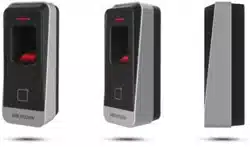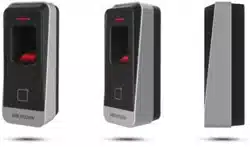

DS-K1201A Series Fingerprint and Card Reader
User Manual

DS-K1201 Fingerprint and Card Reader
i
User Manual
©2021 Hangzhou Hikvision Digital Technology Co., Ltd.
This manual is applied to fingerprint and card reader.
Device Name Model
Fingerprint and
Card Reader
DS-K1201AMF
DS-K1201AEF
It includes instructions on how to use the Product. The software embodied in the
Product is governed by the user license agreement covering that Product.
About this Manual
The Manual includes instructions for using and managing the product. Pictures,
charts, images and all other information hereinafter are for description and
explanation only. The information contained in the Manual is subject to change,
without notice, due to firmware updates or other reasons. Please find the latest
version in the company website (http://overseas.hikvision.com/en/).
Trademarks
and other Hikvision’s trademarks and logos are the properties of
Hikvision in various jurisdictions. Other trademarks and logos mentioned below are
the properties of their respective owners.
Disclaimer
TO THE MAXIMUM EXTENT PERMITTED BY APPLICABLE LAW, THE PRODUCT
DESCRIBED, WITH ITS HARDWARE, SOFTWARE AND FIRMWARE, IS PROVIDED “AS
IS”, WITH ALL FAULTS AND ERRORS, AND HIKVISION MAKES NO WARRANTIES,
EXPRESS OR IMPLIED, INCLUDING WITHOUT LIMITATION, MERCHANTABILITY,
SATISFACTORY QUALITY, FITNESS FOR A PARTICULAR PURPOSE, AND
NON-INFRINGEMENT OF THIRD PARTY. IN NO EVENT WILL HIKVISION, ITS
DIRECTORS, OFFICERS, EMPLOYEES, OR AGENTS BE LIABLE TO YOU FOR ANY
SPECIAL, CONSEQUENTIAL, INCIDENTAL, OR INDIRECT DAMAGES, INCLUDING,
AMONG OTHERS, DAMAGES FOR LOSS OF BUSINESS PROFITS, BUSINESS
INTERRUPTION, OR LOSS OF DATA OR DOCUMENTATION, IN CONNECTION WITH
THE USE OF THIS PRODUCT, EVEN IF HIKVISION HAS BEEN ADVISED OF THE
POSSIBILITY OF SUCH DAMAGES.
REGARDING TO THE PRODUCT WITH INTERNET ACCESS, THE USE OF PRODUCT
SHALL BE WHOLLY AT YOUR OWN RISKS. HIKVISION SHALL NOT TAKE ANY
RESPONSIBILITES FOR ABNORMAL OPERATION, PRIVACY LEAKAGE OR OTHER
DAMAGES RESULTING FROM CYBER ATTACK, HACKER ATTACK, VIRUS INFECTION, OR
OTHER INTERNET SECURITY RISKS; HOWEVER, HIKVISION WILL PROVIDE TIMELY
TECHNICAL SUPPORT IF REQUIRED.

DS-K1201 Fingerprint and Card Reader
ii
SURVEILLANCE LAWS VARY BY JURISDICTION. PLEASE CHECK ALL RELEVANT LAWS
IN YOUR JURISDICTION BEFORE USING THIS PRODUCT IN ORDER TO ENSURE THAT
YOUR USE CONFORMS THE APPLICABLE LAW. HIKVISION SHALL NOT BE LIABLE IN
THE EVENT THAT THIS PRODUCT IS USED WITH ILLEGITIMATE PURPOSES.
IN THE EVENT OF ANY CONFLICTS BETWEEN THIS MANUAL AND THE APPLICABLE
LAW, THE LATER PREVAILS.
Support
Should you have any questions, please do not hesitate to contact your local dealer.
Data Protection
During the use of device, personal data will be collected, stored and processed. To
protect data, the development of Hikvision devices incorporates privacy by design
principles. For example, for device with facial recognition features, biometrics data
is stored in your device with encryption method; for fingerprint device, only
fingerprint template will be saved, which is impossible to reconstruct a fingerprint
image.
As data controller, you are advised to collect, store, process and transfer data in
accordance with the applicable data protection laws and regulations, including
without limitation, conducting security controls to safeguard personal data, such as,
implementing reasonable administrative and physical security controls, conduct
periodic reviews and assessments of the effectiveness of your security controls.

DS-K1201 Fingerprint and Card Reader
iii
Regulatory Information
FCC Information
Please take attention that changes or modification not expressly approved by the
party responsible for compliance could void the user’s authority to operate the
equipment.
FCC compliance: This equipment has been tested and found to comply with the
limits for a Class B digital device, pursuant to part 15 of the FCC Rules. These limits
are designed to provide reasonable protection against harmful interference in a
residential installation. This equipment generates, uses and can radiate radio
frequency energy and, if not installed and used in accordance with the instructions,
may cause harmful interference to radio communications. However, there is no
guarantee that interference will not occur in a particular installation. If this
equipment does cause harmful interference to radio or television reception, which
can be determined by turning the equipment off and on, the user is encouraged to
try to correct the interference by one or more of the following measures:
—Reorient or relocate the receiving antenna.
—Increase the separation between the equipment and receiver.
—Connect the equipment into an outlet on a circuit different from that to which
the receiver is connected.
—Consult the dealer or an experienced radio/TV technician for help.
FCC Conditions
This device complies with part 15 of the FCC Rules. Operation is subject to the
following two conditions:
1. This device may not cause harmful interference.
2. This device must accept any interference received, including interference that
may cause undesired operation.
EU Conformity Statement
This product and - if applicable - the supplied accessories too are
marked with "CE" and comply therefore with the applicable
harmonized European standards listed under the EMC Directive
2014/30/EU, the RoHS Directive 2011/65/EU.
2012/19/EU (WEEE directive): Products marked with this symbol
cannot be disposed of as unsorted municipal waste in the European
Union. For proper recycling, return this product to your local
supplier upon the purchase of equivalent new equipment, or
dispose of it at designated collection points. For more information
see: www.recyclethis.info
2006/66/EC (battery directive): This product contains a battery that cannot be
disposed of as unsorted municipal waste in the European Union. See the product
DS-K1201 Fingerprint and Card Reader
iv
documentation for specific battery information. The battery is
marked with this symbol, which may include lettering to indicate
cadmium (Cd), lead (Pb), or mercury (Hg). For proper recycling,
return the battery to your supplier or to a designated collection
point. For more information see: www.recyclethis.info
Industry Canada ICES-003 Compliance
This device meets the CAN ICES-3 (B)/NMB-3(B) standards requirements.
Use only power supplies listed in the user instructions:
Model Manufacturer Standard
DSA-12PFT-12FUK 120100 Dee Van Enterprise Co., Ltd. BS
DSA-12PFT-12FAU 120100 Dee Van Enterprise Co., Ltd. AS
DSA-12PFT-12FIN 120100 Dee Van Enterprise Co., Ltd. IS
DSA-12PFT-12FUS 120100 Dee Van Enterprise Co., Ltd. IEC
DSA-12PFT-12 FBZ 120100 Dee Van Enterprise Co., Ltd. NBR
Safety Instruction
These instructions are intended to ensure that user can use the product correctly to
avoid danger or property loss.
The precaution measure is divided into Warnings and Cautions:
Warnings: Neglecting any of the warnings may cause serious injury or death.
Cautions: Neglecting any of the cautions may cause injury or equipment damage.
Warnings
� All the electronic operation should be strictly compliance with the electrical
safety regulations, fire prevention regulations and other related regulations in
your local region.
� Please use the power adapter, which is provided by normal company. The power
consumption cannot be less than the required value.
� Do not connect several devices to one power adapter as adapter overload may
cause over-heat or fire hazard.
� Please make sure that the power has been disconnected before you wire, install
or dismantle the device.
� When the product is installed on wall or ceiling, the device shall be firmly fixed.
Warnings Follow
these safeguards
to prevent
serious injury or
death.
Cautions Follow
these precautions
to prevent
potential injury or
material damage.

DS-K1201 Fingerprint and Card Reader
v
� If smoke, odors or noise rise from the device, turn off the power at once and
unplug the power cable, and then please contact the service center.
� If the product does not work properly, please contact your dealer or the nearest
service center. Never attempt to disassemble the device yourself. (We shall not
assume any responsibility for problems caused by unauthorized repair or
maintenance.)
Cautions
� Do not drop the device or subject it to physical shock, and do not expose it to
high electromagnetism radiation. Avoid the equipment installation on vibrations
surface or places subject to shock (ignorance can cause equipment damage).
� Do not place the device in extremely hot (refer to the specification of the device
for the detailed operating temperature), cold, dusty or damp locations, and do not
expose it to high electromagnetic radiation.
� The device cover for indoor use shall be kept from rain and moisture.
� Exposing the equipment to direct sun light, low ventilation or heat source such as
heater or radiator is forbidden (ignorance can cause fire danger).
� Do not aim the device at the sun or extra bright places. A blooming or smear may
occur otherwise (which is not a malfunction however), and affecting the
endurance of sensor at the same time.
� Please use the provided glove when open up the device cover, avoid direct
contact with the device cover, because the acidic sweat of the fingers may erode
the surface coating of the device cover.
� Please use a soft and dry cloth when clean inside and outside surfaces of the
device cover, do not use alkaline detergents.
� Please keep all wrappers after unpack them for future use. In case of any failure
occurred, you need to return the device to the factory with the original wrapper.
Transportation without the original wrapper may result in damage on the device
and lead to additional costs.
� Improper use or replacement of the battery may result in hazard of explosion.
Replace with the same or equivalent type only. Dispose of used batteries
according to the instructions provided by the battery manufacturer.
� Biometric recognition products are not completely applicable to anti-spoofing
environments. If you require a higher security level, use multiple
authentication modes.
� Please take care of your card and report card loss in time when card is lost.
� If you require a higher security level, use multiple authentication modes.
� Multiple card types are supported. Please select an appropriate card type
according to the card performance and the usage scenarios.
0100001090812

DS-K1201 Fingerprint and Card Reader
vi
Content
Chapter 1 Introduction ....................................................................................... 1
1.1 Product Overview ........................................................................................... 1
1.2 Product Appearance ....................................................................................... 1
Chapter 2 Installation ......................................................................................... 2
2.1 Introduction for DIP Switch ............................................................................. 2
2.2 Definition of Cable .......................................................................................... 2
2.3 Wiring Cables .................................................................................................. 3
2.4 Installing Card Reader ..................................................................................... 3
Chapter 3 Sound Prompt and Indicator ............................................................... 5
Appendix Tips for Scanning Fingerprint ................................................................ 7
DS-K1201 Fingerprint and Card Reader
1
Chapter 1 Introduction
1.1Product Overview
Fingerprint and card reader is a kind of high-performance product, with a 32 bit
high-speed processor. It communicates with access controller via the RS-485
protocol. And a built-in tamper-proof module helps to protect card reader from
malicious damage. NFC tag anti-cloning is also supported.
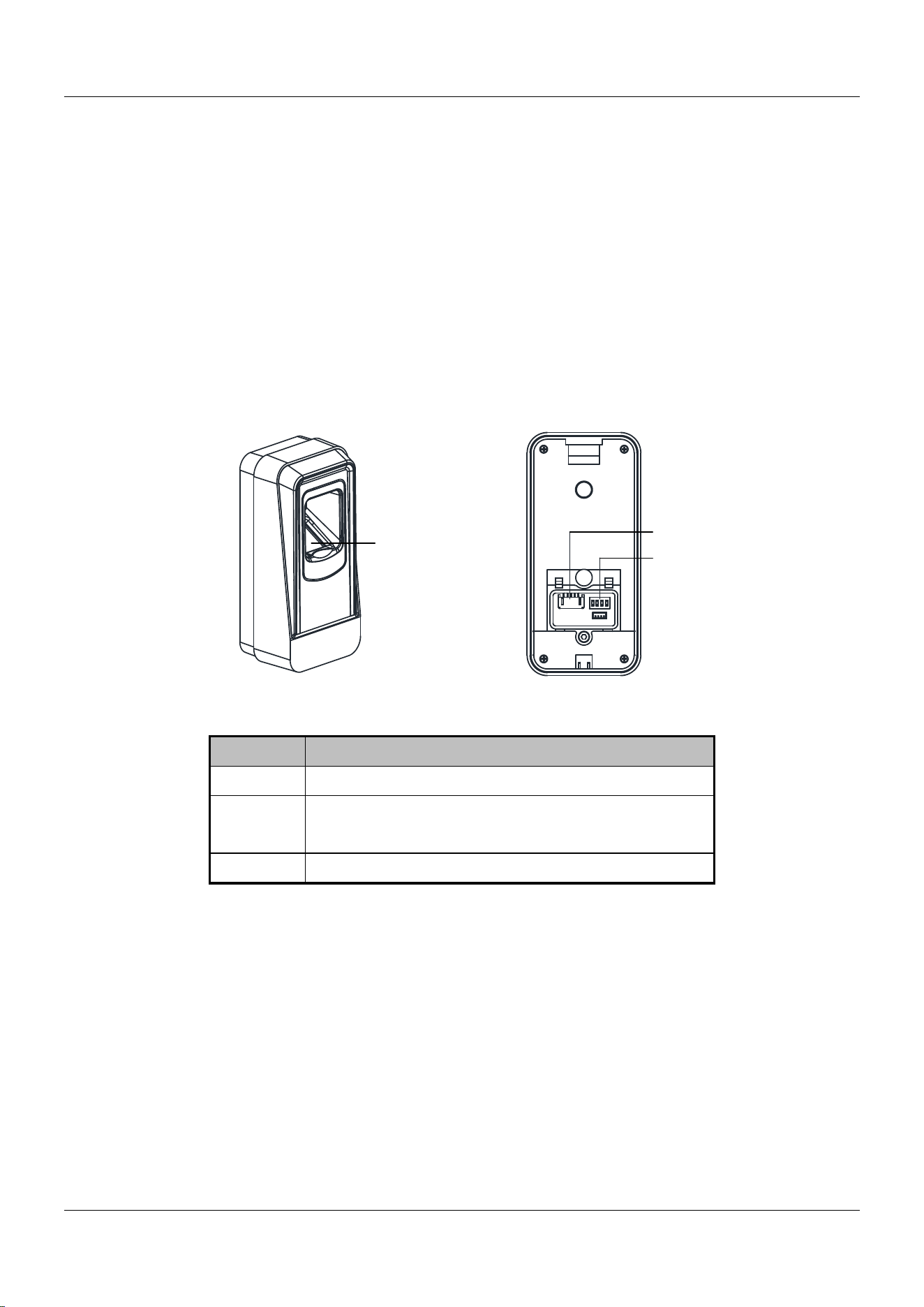
1.2Product Appearance
1
Figure 1-1 Front View
2
3
Figure 1-2 Rear View
Table 1-1 Components Description
No. Name
1 Fingerprint Scanner
2 Cable Interface of RS-485, Power, LED
Control, etc.
3 DIP Switch
DS-K1201 Fingerprint and Card Reader
2
Chapter 2 Installation
2.1Introduction for DIP Switch
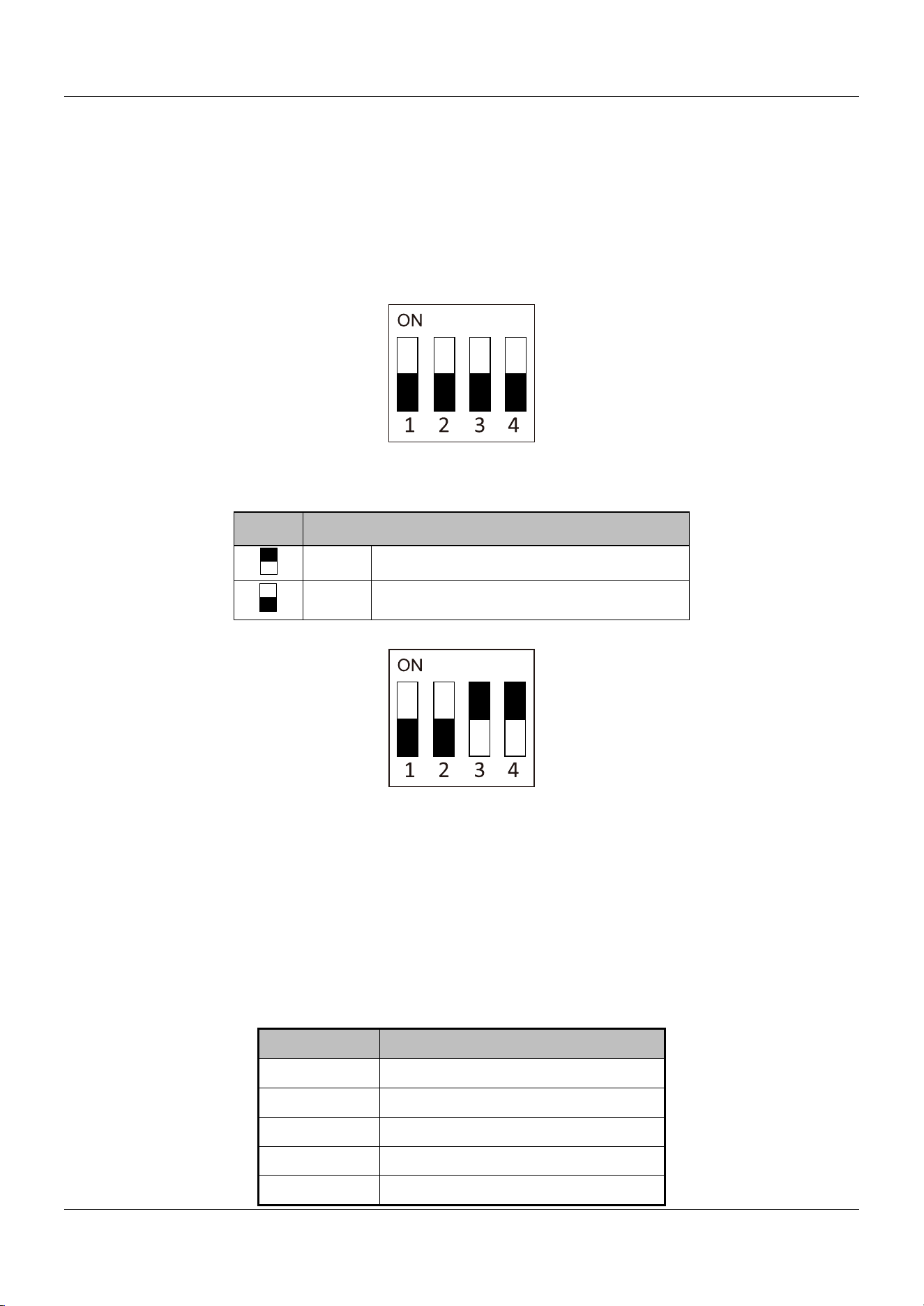
The DIP switch module is shown below. The No. of DIP switch from left to right is 1
to 4, representing the RS-485 address.
Figure 2-1 DIP Switch Module
Table 1-2 Description of DIP Switch
Icon Description
1 Represent ON in binary mode
0 Represent OFF in binary mode
For example, the binary value of the following status is 1100.
Figure 2-2 DIP Switch Module
Note: The DIP switch of RS-485 address should reach the access control devices
requirements. For different access control devices, the DIP switch addresses may be
different.
2.2Definition of Cable
The description of 5 cables is shown below.
Table 1-3 Description of Cables
Color Description
Blue RS-485 -
Yellow RS-485 +
Red PWR (DC +12V)
Black GND (Power Grounding)
Black GND (RS-485 Grounding)
DS-K1201 Fingerprint and Card Reader
3
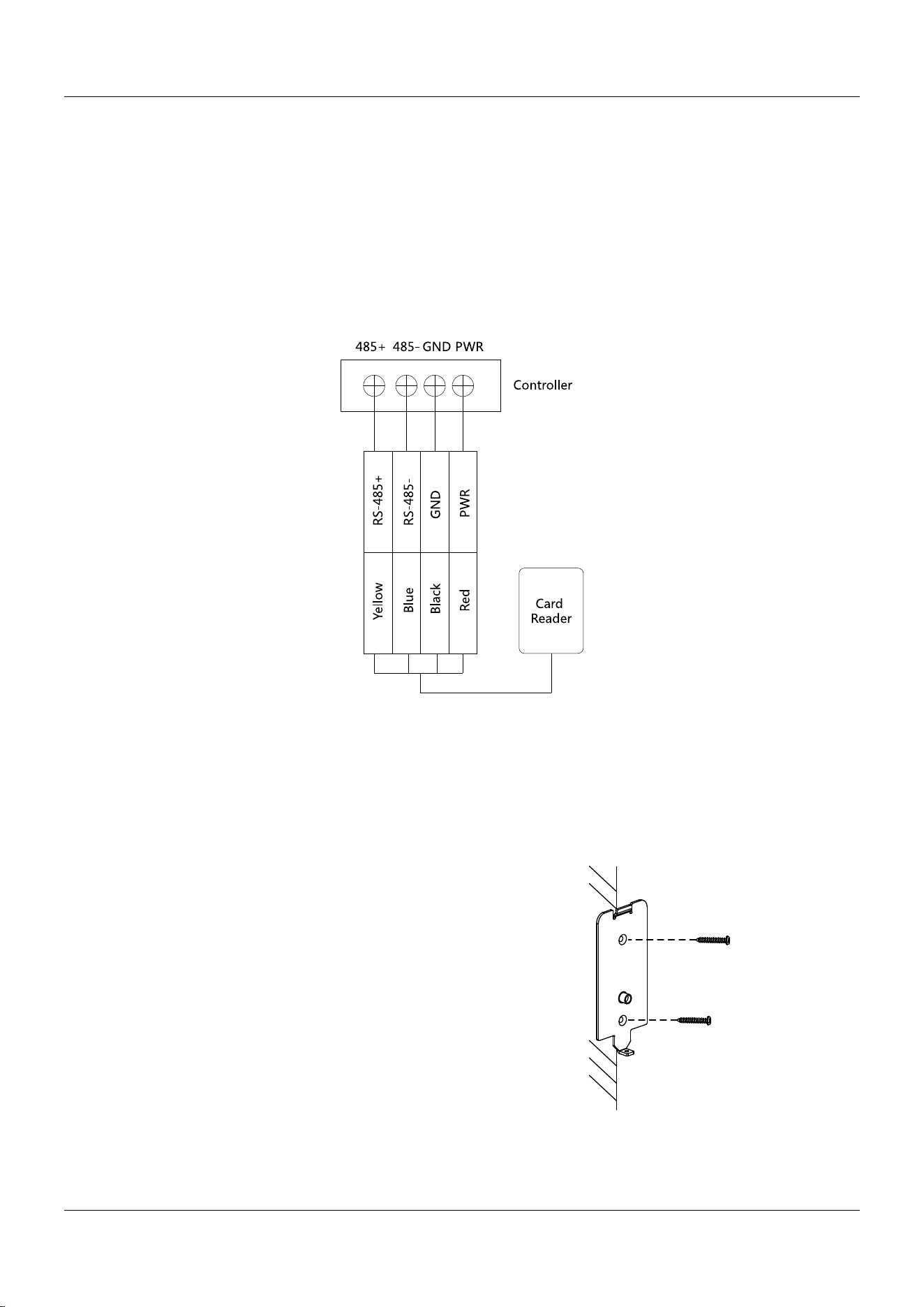
2.3Wiring Cables
Purpose:
Wire the cables between the controller and the card reader, thus to establish the
communication between them.
Steps for RS-485 communication mode:
1. Set the DIP switch for RS-485 address. For Details, refer to 2.1 Introduction for
DIP Switch.
2. Wire the cable between the controller and the card reader as shown below.
Figure 2-3 Wiring for RS-485 Communication Mode
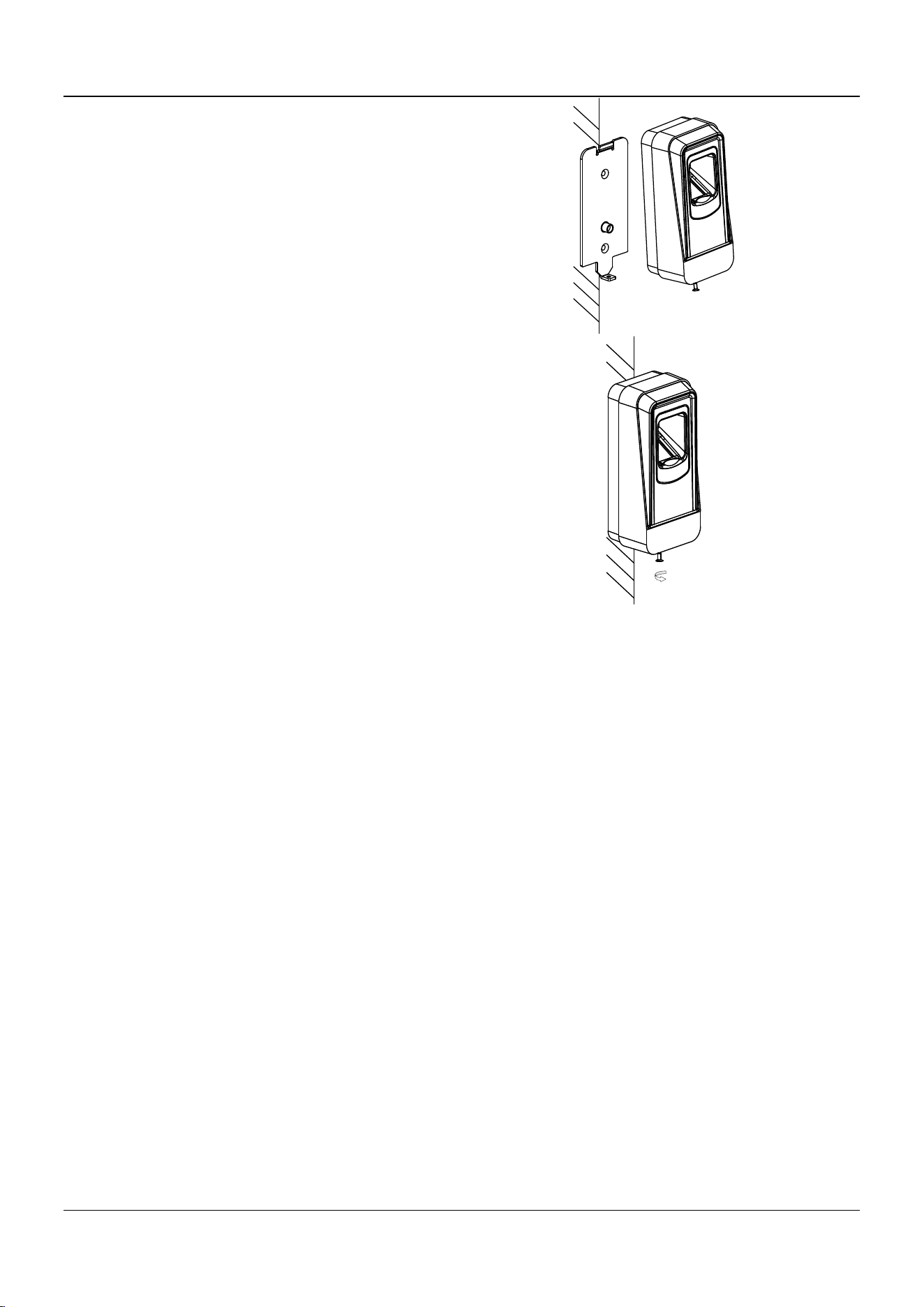
2.4Installing Card Reader
Before you start:
Set the DIP switch. For details, refer to 2.1 Introduction for DIP Switch.
Steps:
1. Fix the mounting plate on the wall with 2
provided screws.
Note: Do not warp the mounting plate when
installing.
DS-K1201 Fingerprint and Card Reader
4
2. Connect the cables between the controller
and the card reader. For details, refer to 2.3
Wiring Cables.
3. Unscrew the screw at the bottom of the card
reader.
4. Buckle the card reader up to the plate.
5. Fasten the card reader to the plate with the
set screw.

DS-K1201 Fingerprint and Card Reader
5
Chapter 3 Sound Prompt and Indicator
After the card reader is powered on, LED status indicator will turn green and blink
for 1 time. Then it will turn red and blink for 3 times. At last the buzzer will send out
a beep sound indicating the starting up process is completed.
When using the card reader, it will send out different sounds prompt and the LED
indicator to indicate different statuses. You can refer to tables below for detailed
information.
Table 1-4 Description of Prompt Sound
Sound Prompt Description
One beep
Swiping card prompt
For Card + Fingerprint
authentication: prompt for pressing
the fingerprint after swiping the
card.
Two rapid beeps
The operation of pressing keys or
swiping card is valid.
Three slow beeps
The operation of pressing keys or
swiping card is invalid.
Rapidly continuous
Prompt for tamper-proof alarm.
beeps
Prompt for buzzer alarm.
Slowly continuous
beeps
The card reader is unencrypted.

DS-K1201 Fingerprint and Card Reader
6
Table 1-5 Description of LED Indicator
LED Indicator Status Description
Green (blink for 1
time), and red (blink The card reader is power on.
for 3 times)
Green and blinking
For Card + Fingerprint authentication:
prompt for pressing the fingerprint after
swiping the card.
The operation of configuring the fingerprint.
Solid green for 2s The operation of swiping card is valid.
Solid red Card reader is working normally.
Red and blink for 3
times
The operation of swiping card is invalid.
Red and blinking
For RS-485 protocol: Registering failed or
card reader is offline.
DS-K1201 Fingerprint and Card Reader
7
Appendix Tips for Scanning Fingerprint
Recommended Finger
Forefinger, middle finger or the third finger.
Correct Scanning
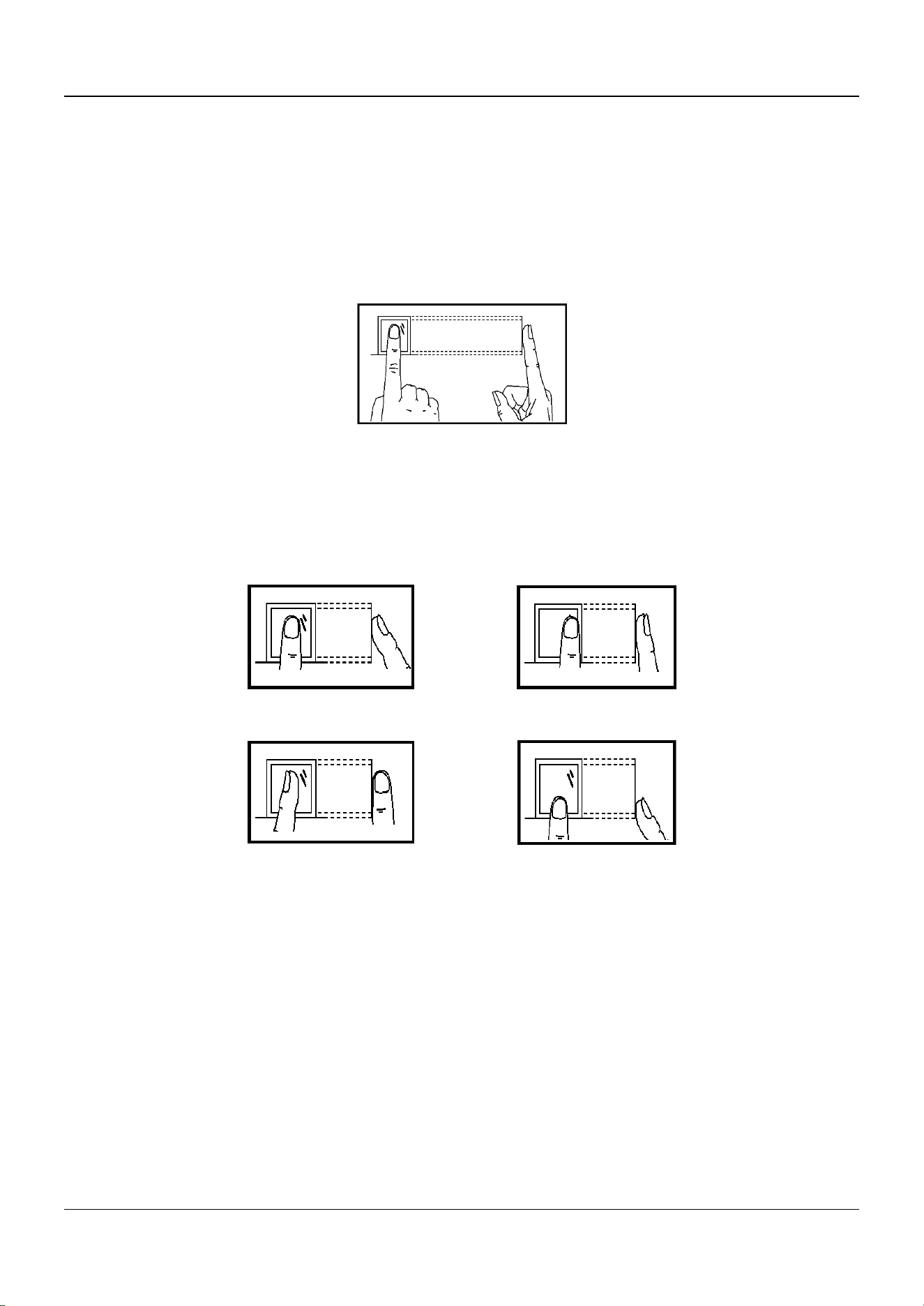
The figure displayed below is the correct way to scan your finger:
You should press your finger on the scanner horizontally. The center of your
scanned finger should align with the scanner center.
Incorrect Scanning
The figures of scanning fingerprint displayed below are wrong:
Environment
The scanner should avoid direct high light, high temperature, humid conditions and
rain.
When it is dry, the scanner may not recognize your fingerprint successfully. You can
blow your finger and scan again.
Others
If your fingerprint is shallow, or it is hard to scan your fingerprint, we recommend
you to use other authentication methods.
If you have injuries on the scanned finger, the scanner may not recognize. You can
change another finger and try again.
Side Edge II
Vertical Edge I

8
UD22704B-B