W÷bsite: http://www,,us,Jg÷,,com
ELECTRICRANGE
LRE30755SW/SB/ST
MANUAL THOROUGHLY BEFORE OPERATING.
Printed in Korea
P/NO.:3828W5A8237
Thank you for purchasing an LG electric oven.
Please record the model number and serial number of
this unit for future reference. We also suggest that you
record the details of any contact with LG (LG
Electronics USA, Inc.)concerning this unit.
Model No.:
Serial No.:
Dealer:
Dealer Phone No.:
Staple your receipt here to verify your retail purchase.
Customer Relations
LG Electronics U.S.A., Inc.
Service DivisionBldg. #3
201 James Record Rd.
Huntsville,AL 35824-0126
SAFETY ....................................................................... 3-5
- Important safety instructions ................................. 3-5
SURFACE CONTROLS COOKING ............................. 6-10
- PF or HS message ................................................. 6
- Locations ofthe radiant surface elements
and controls ............................................................. 6
- Setting surface controls ......................................... 7
- Operating the warming zone.................................. 8
-About smoothtop surface ...................................... 8-9
-About cookware ..................................................... 10
SETTING WARMING DRAWER CONTROLS ............ 11
INFORMATION ........................................................... 12-13
- Parts and features ............................................... 12
- Control panel features ............................................. 13
OPERATION ............................................................... 14-24
- Setting the clock .................................................... 14
- Setting the timer on/off .......................................... 14
- Options ................................................................... 15-16
• Setting convection auto conversion feature
• Thermostat adjustment
• Setting language selection (English or Spanish)
• Setting preheating alarm light on/off
• Setting beeper volume
• Setting temperature unit (F or C)
-Setting bake ........................................................... 17
-Setting timed bake ................................................. 18
-Setting delayed timed bake .................................... 19
-Setting broil ............................................................ 19
- Recommended broiling guide .............................. 20
-Setting convection bake ......................................... 21
-Setting convection roast ........................................ 22
- Using the favorites feature ................................ 23
-Setting the cook & warm feature ........................... 23
-Setting oven lockout feature .................................. 24
-Changing hour mode on clock (12hr., 24hr.) .............. 24
-Setting the proof feature ........................................ 24
-To turn the oven light on/off ................................... 24
SELF-CLEAN ............................................................... 25-26
MAINTENANCE ......................................................... 27-31
- Removing and replacing the warming drawer ....... 27
-Care & cleaning ...................................................... 28-30
- Removing & replacing the lift-off oven door .......... 31
TROUBLESHOOTING ................................................ 32-35
- Before calling for service ........................................ 32-35
WARRANTY ............................................................... 36
-2-
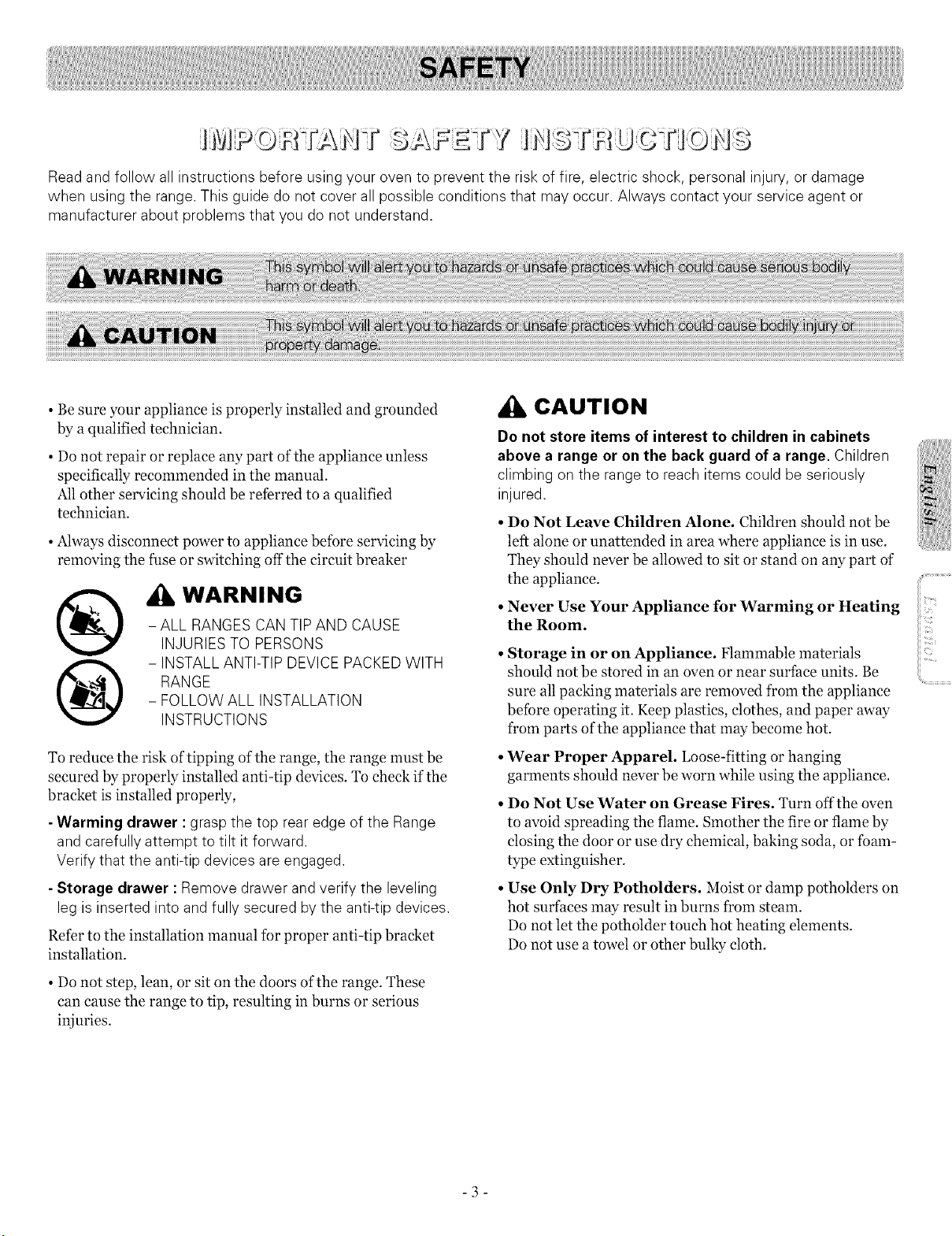
Read and follow all instructions before using your oven to prevent the risk of fire, electric shock, personal injury, or damage
when using the range.This guide do not cover all possible conditions that may occur. Always contact your service agent or
manufacturer about problems that you do not understand.
• Be sure your appliance is properly installed and grounded
by a qualified technician.
• Do not repair or replace any part of the appliance unless
specifically recommended in the manual.
Allother servicing should be referred to a qualified
technician.
• Always disconnect power to appliance before servicing by
removing the fuse or switching off the circuit breaker
®
@
WARNING
- ALL RANGES CAN TIP AND CAUSE
INJURIES TO PERSONS
- INSTALLANTI-TIP DEVICEPACKED WITH
RANGE
- FOLLOW ALL INSTALLATION
INSTRUCTIONS
To reduce the risk of tipping ofthe range, the range must be
secured by properly installed anti-tip devices. To check if the
bracket is installed properly,
- Warming drawer : grasp the top rear edge of the Range
and carefully attempt to tilt it forward.
Verify that the anti-tip devices are engaged.
- Storage drawer :Remove drawer and verify the leveling
leg isinserted into and fully secured bythe anti-tip devices.
Refer to the installation manual for proper anti-tip bracket
installation.
• Do not step, lean, or sit on the doors of the range. These
can cause the range to tip, resulting in burns or serious
injuries.
CAUTION
Do not store items ofinterest to children in cabinets
above a range or on the back guard ofa range. Children
climbing on the range to reach items could be seriously
injured.
• Do Not Leave Children Alone. Children should not be
left alone or unattended in area where appliance is in use.
They should never be allowed to sit or stand on any part of"
the appliance.
• Never Use Your Appliance for Warming or Heating
the Room.
•Storage in or on Appliance. Flammable materials
should not be stored in an oven or near surface units. Be
sure all packing materials are removed from the appliance
before operating it. Keep plastics, clothes, and paper away
from parts of the appliance that may become hot.
• Wear Proper Apparel. Loose-fitting orhanging
garments should never be worn while using the appliance.
• Do Not Use Water on Grease Fires. Turn off the oven
to avoid spreading the flame. Smother the fire or flame by
closing the door or use dry chemical, baking soda, or foam-
type extinguisher.
• Use Only Dry Potholders. Moist or damp potholders on
hot surfaces may result in burns from steam.
Do not let the potholder touch hot heating elements.
Do not use a towel or other bulky cloth.
-3-
....<_t,i_ _
SURFACE COOKING UNITS OVEN
• Use Proper Pan Sizes. This appliance is equipped with
one or more surface units of different size. Select utensils
having flat bottoms large enough to cover the surface unit
heating element.
The use of undersized utensils will expose a portion ofthe
heating element to direct contact and may result in ignition
of clothing. Proper relationship of utensil to burner will
also improve efficiency.
• Never Leave Surface Units Unattended at High
Heat Settings. Boilovers cause smoking and greasy
spillovers that may ignite.
• Glazed Cooking Utensils. Only certain types of glass,
glass/ceramic, ceramic,earthenware, or other glazed
utensils are suitable for range-top service without breaking
due tothe sudden change in temperature.
• Utensil Handles Should Be Turned Inward and Not
Extend Over Adjacent Surface Units. To reduce the
risk of burns, ignition of flammable materials, and spillage
due to unintentional contact with the utensil, the handle of
a utensil should be positioned so that it is turned inward,
and does not extend over adjacent surface units.
• Besure you know which control pads operate each surface
unit.
Make sure you turned on the correct surface unit.
DO NOT TOUCH HEATING ELEMENTS OR
INTERIOR SURFACES OF OVEN. Heating elements
may be hot even though they are dark in color. Interior
surfaces of an oven become hot enough to cause burns.
During and after use, do not touch or let clothing or other
flammable materials contact heating elements or interior
surfaces of oven until they have had sufficient time to cool
Other surfaces of the appliance may become hot enough to
cause burns. Among these surfaces are oven vent openings
and surfaces near these openings, oven doors, and windows
of oven doors.
• Use Care When Opening Door. Let hot air or steam
escape before you remove or replace fbod in the oven
• Do Not Heat Unopened Food Containers. Build-up of
pressure may cause container to burst and result in injury.
• Protective Liners. Do not use aluminum foil to line the
oven bottoms, except as suggested in the manual. Improper
installation of these liners may result in a risk of electric
shock or fire.
• Keep Oven Vent Ducts Unobstructed. The oven vent
is located above the left rear surface unit. this area could
become hot during oven use. Never block this vent and
never place plastic or heat-sensitive items on vent
• Placement of Oven Racks. Always place oven racks in
desired location while oven is cool. If rack must be moved
while oven is hot, do not let potholder contact hot heating
element in oven.
Do Not allow aluminum foil or meat probe to contact
heating elements.
-4-
SELF-CLEANING OVENS
• Do Not Clean Door Gasket. The door gasket is essential
for a good seal. Care should be taken not to rub, damage, or
move the gasket.
• Do Not Use Oven Cleaners. No commercial oven
cleaner or oven liner protective coating of any kind should
be used in or around any part of the oven.
• Clean in the self-clean cycle only parts listed in this
manual. Before self-dean the oven, remove the broiler
pan and any utensils of fbods from the oven.
• Before Self-Cleaning the Oven. Remove broiler pan
and other utensils.
• Never keep pet birds in the kitchen. The health of
birds is extremely sensitive to the fumes released during an
oven self-dean cycle. Fumes may be harmful or fatal to
birds. Move birds to well-ventilated room.
• Important Instruction. In the event the self-dean mode
F code goes on, or three long beeps sound, oven is
malfunctioning in the self dean mode. Turn off or
disconnect appliance from power supply and have serviced
by a qualified technician.
VENTILATING HOODS:
GLASS/CERAMIC COOKING
SURFACES
• DO NOT TOUCH SURFACE UNITS OR AREAS
NEAR UNITS. Surface units may be hot even though they
are dark in color.
Areas near surface units may become hot enough to cause
burns. During and after use, do not touch, or let clothing or
other flammable materials contact surface units or areas
near units until they have had sufficient time to cool.
Among these areas are identification of areas - for
example, the cooktop and surfaces facing the eooktop.
• Do Not Cook on Broken CookTop. If eooktop should
break, cleaning solutions and spillovers may penetrate the
broken cook-top and create a risk of electric shock. Contact
a qualified technician immediately.
• Clean CookTop With Caution. If a wet sponge or cloth
is used to wipe spills on a hot cooking area, be careful to
avoid steam burn. Some cleaners can produce noxious
fumes if applied to a hot surface.
DEEP FATFRYERS:
• Use extreme caution when moving the grease kettle or
disposing of hot grease.
• Clean Ventilating Hoods Frequently. Grease should
notbe allowed to accumulate on hood or filter.
• When flaming foods under the hood, turn the fan
on.
-5-
I I1-_i
n:,_Hot Surface) MESSAGE
LIGHT WILL:
• Come on when the unit is hot to touch after it is turned off:
• Come on during Self Cleaning Cycle.
• Stay on even after the unit is turned off.
• Glow until the unit has cooled down to approximately 150°F.
LOCATIONS OF THE RADIANT
SURFACE ELEMENTS AND
CONTROLS
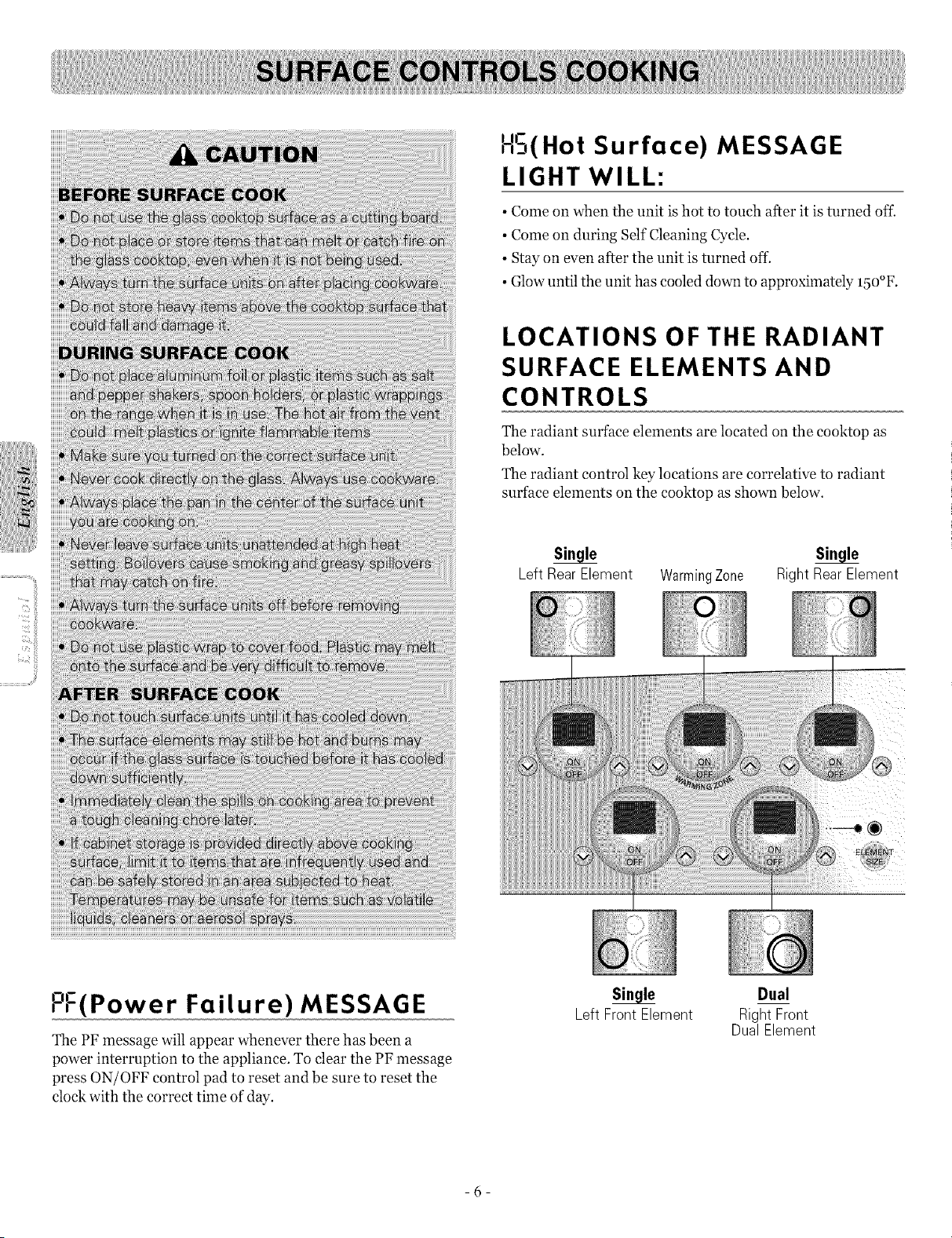
The radiant surface elements are located on the cooktop as
below.
The radiant control key locations are correlative to radiant
surface elements on the cooktop as shown below.
Left Rear Element WarmingZone Right Rear Element
ol-
,-,-(Power Failure) MESSAGE
The PF message will appear whenever there has been a
power interruption to the appliance. To clear the PF message
press ON/OFF control pad to reset and be sure to reset the
clock with the correct time of day.
si.gle
Left Front Element
Dual
Right Front
DualElement
-6-
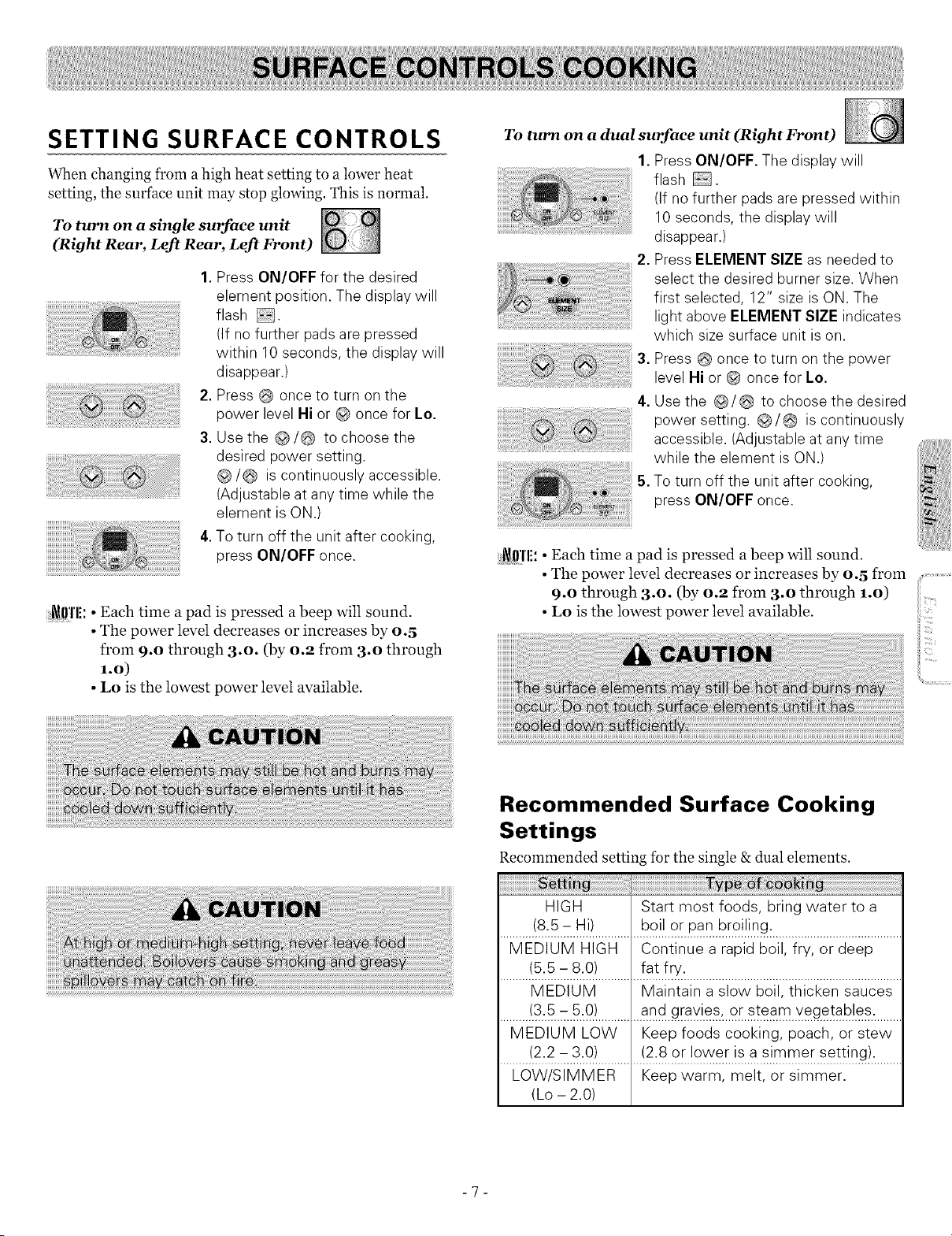
SETTING SURFACE CONTROLS
When changing from ahigh heat setting to a lower heat
setting, the surface unit may stop glowing. This is normal.
To turn on a single surface unit
(Right Rear, Left Rear, Left Front)
iiiiiiiiiiiiiiiiiii_iil;);i@iiiiii)¸¸;ii¸¸;;;;_ii!!il;:;ii!;;;;;;;;;;;;;;;;;;;;;;;;;iill
iiiiiiiiiiiiiiiiiiiiiiiiiiiiiiiiiiiiiiii;i¸;¸¸¸¸.... )!Ji%iiiiiiiiiiiiiii%i
iiiiiiiiiiiiiiiiiiii ,
1.Press ON/OFF for the desired
element position. The display will
flash .
(If no further padsare pressed
within 10 seconds, the display will
disappear.)
2.Press once to turn on the
power level Hi or @ once for Lo.
3.Use the @/@ to choose the
desired power setting.
@/@ iscontinuously accessible.
(Adjustable at any time while the
element isON.)
4.Toturn off the unit after cooking,
press ON/OFF once.
i_ffl'li: • Each time a pad is pressed a beep wilt sound.
• The power level decreases or increases by 0.5
from 9.0 through 3.0. (by 0.9 from 3.0 through
1.0)
• Lo is the lowest power level available.
To turn on a dual surface unit (Right Front)
1.Press ON/OFF. The display will
flash .
(If no further pads are pressed within
10 seconds, the display will
disappear.)
2. Press ELEMENT SIZE as needed to
select the desired burner size. When
first selected, 12" size isON. The
light above ELEMENT SIZE indicates
which size surface unit is on.
3. Press @ once to turn on the power
level Hi or @ once for Lo.
4. Use the @/@ to choose the desired
power setting. @/@ iscontinuously
accessible. (Adjustable at any time
while the element isON.)
5. Toturn off the unit after cooking,
press ON/OFF once.
i_ffl'li: • Each time a pad is pressed a beep will sound.
• The power level decreases or increases by 0.5 from
9.0 through 3.0. (by 0.9 from 3.o through 1.o)
• Lo is the lowest power level available.
Recommended Surface Cooking
Settings
Recommended setting for the single & dual elements.
ry _ ;_i: .....................................................
HIGH Start most foods, bring water to a
(8.5 - Hi) boil or pan broiling.
MEDIUM HIGH Continue a rapid boil, fry, or deep
(5.5 - 8.0) fat fry.
MEDIUM Maintain a slow boil, thicken sauces
.........!3.5..c:.5...o!..............a s.teamxegetab!.es..........
MEDIUM LOW Keep foods cooking, poach, or stew
(2.2 - 3.0) (2.8 or lower is a simmer setting).
LOW/SIMMER Keep warm, melt, or simmer.
(Lo - 2.0)
-7-
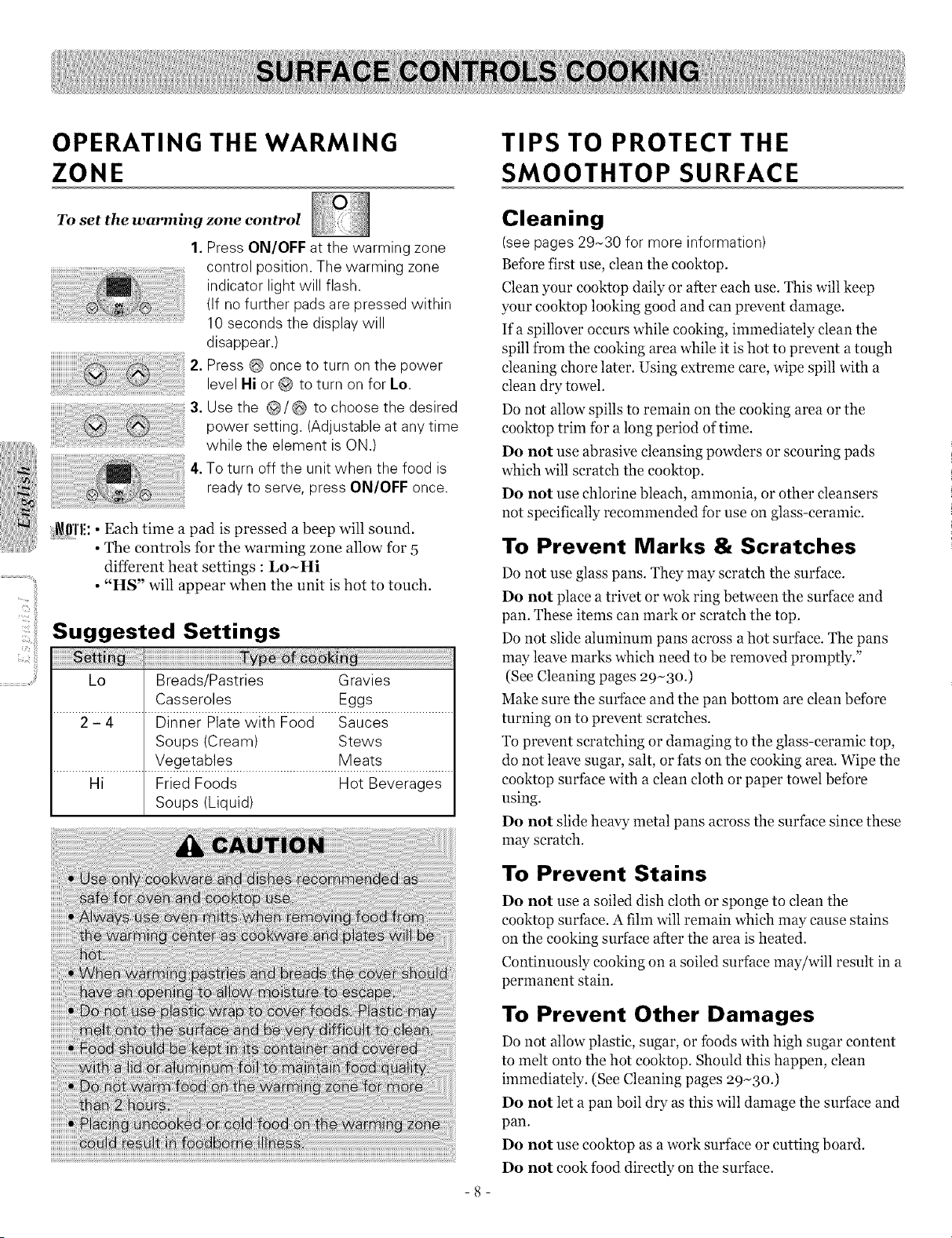
OPERATING THE WARMING
ZONE
TIPS TO PROTECT THE
SMOOTHTOP SURFACE
To set the warming
1.
,
3.
,
zone control
Press ON/OFF at the warming zone
control position. The warming zone
indicator light will flash.
(If no further padsare pressed within
10 seconds the display will
disappear.)
Press once to turn on the power
level Hi or to turn on for Lo.
Use the @/@ to choose the desired
power setting. (Adjustable atany time
while the element isON.)
Toturn off the unit when the food is
readyto serve, press ON/OFF once.
_!_111'1!:•Each time a pad is pressed a beep will sound.
• The controls for the warming zone allow for 5
different heat settings : Lo~Hi
• "HS" wilt appear when the unit is hot to touch.
Suggested Settings
Lo Breads/Pastries Gravies
Casseroles Eggs
2 - 4 Dinner Platewith Food Sauces
Soups (Cream) Stews
Vegetables Meats
Hi Fried Foods Hot Beverages
Soups (Liquid)
-8-
Cleaning
(seepages 29N30 for more information)
Before first use, cleanthe cooktop.
Clean your eooktop daily or after each use. This will keep
your cooktop looking good and can prevent damage.
If a spillover occurs while cooking, immediately clean the
spill from the cooking area while it is hot to prevent a tough
cleaning chore later. Using extreme care, wipe spill with a
clean dry towel.
Do not allow spills to remain on the cooking area or the
cooktop trim for a long period of time.
Do not use abrasive cleansing powders or scouring pads
which will scratch the cooktop.
Do not use chlorine bleach, ammonia, or other cleansers
not specifically recommended for use on glass-ceramic.
To Prevent Marks & Scratches
Do not use glass pans. They may scratch the surface.
Do not place a trivet or wok ring between the surface and
pan. These items can mark or scratch the top.
Do not slide aluminum pans across a hot surface. The pans
may leave marks which need to be removed promptly."
(See Cleaning pages 29-3o.)
Make sure the surface and the pan bottom are clean before
turning on to prevent scratches.
To prevent scratching or damaging to the glass-ceramic top,
do not leave sugar, salt, or fats on the cooking area. Wipe the
cooktop surface with a clean cloth or paper towel before
using.
Do not slide heavy metal pans across the surface since these
may scratch.
To Prevent Stains
Do not use a soiled dish cloth or sponge to clean the
cooktop surface. A film will remain which may cause stains
on the cooking surface after the area isheated.
Continuously cooking on a soiled surface may/will result in a
permanent stain.
To Prevent Other Damages
Do not allow plastic, sugar, or foods with high sugar content
to melt onto the hot eooktop. Should this happen, clean
immediately. (See Cleaning pages 29-30.)
Do not let a pan boil dry as this will damage the surface and
pan.
Do not use cooktop as a work surface or cutting board.
Do not cook food directly on the surface.
SMOOTHTOP SURFACE
Smoothtop Surface Notes:
• Cooktop may emit light smoke and odor the first few
times the cooktop is used. This is normal.
• Smoothtop cooktops retain heat for a period of
time after the elements are turned off. Turn the
elements off a few minutes before food is completely
cooked and use the retained heat to complete cooking.
When the hot surface light turns off, the cooking area will
cool down enough to touch. Because of the way they retain
heat, the smoothtop elements will not respond to changes
in settings as quickly as coil elements.
• In the event of a potential boilover, remove the pan from
the cooking surface.
• Do not attempt to lift the cooktop.
• The smoothtop surface may appear discolored when it is
hot. This is normal and will disappear when the surface
cools.
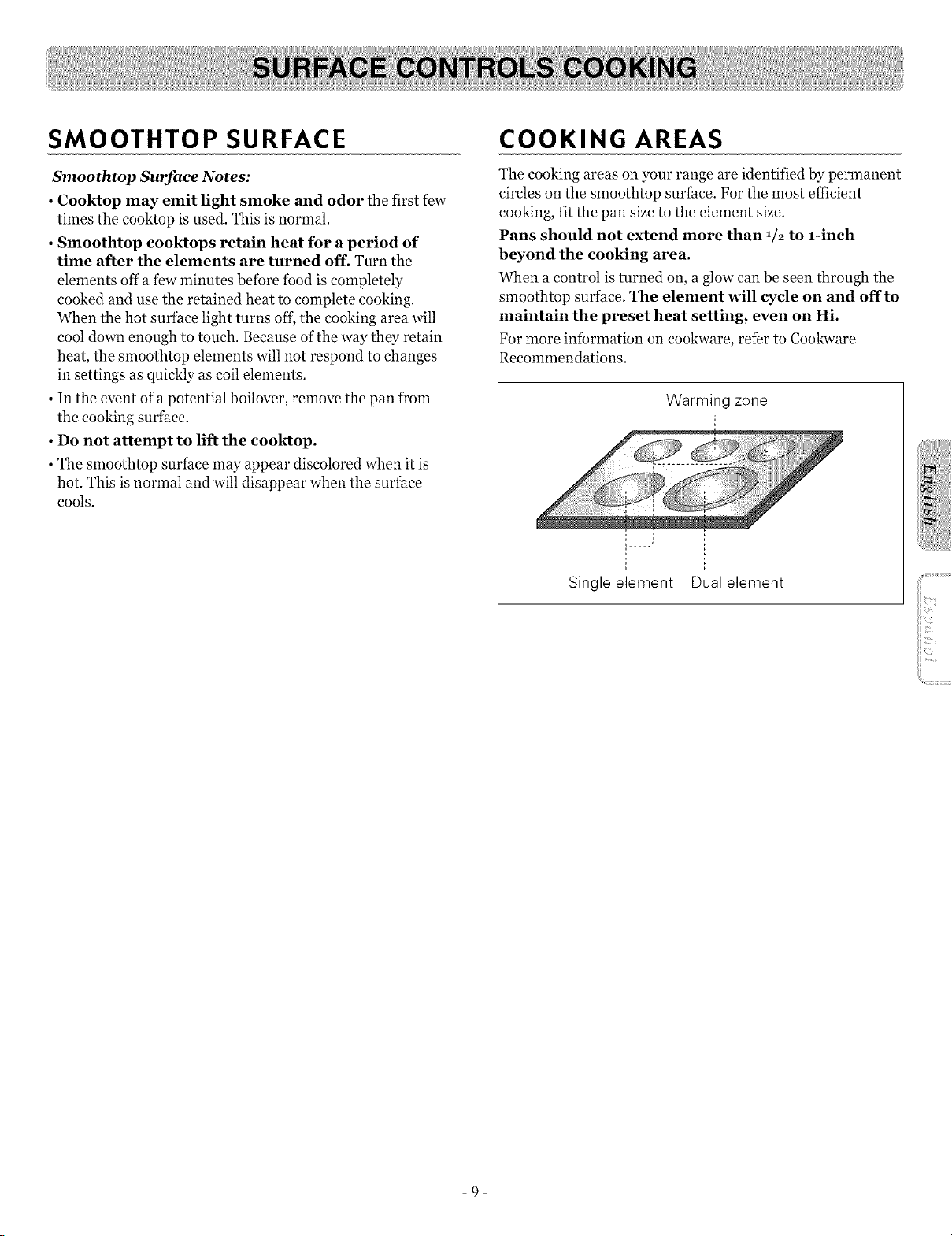
COOKING AREAS
The cooking areas on your range are identified by permanent
circles on the smoothtop surface. For the most efficient
cooking, fit the pan size to the element size.
Pans should not extend more than 1/2 to 1-inch
beyond the cooking area.
When a control is turned on, a glow can be seen through the
smoothtop surface. The element will cycle on and offto
maintain the preset heat setting, even on Hi.
For more intbrmation on cookware, refer to Cookware
Recommendations.
Warming zone
Single element
Dual element
-9-
iiiiiiiiliiiiXi??ii/i_i_i{_!iiDiii
iiiii:ii:ii: i!
_"_{_ii¸i-_?:ii'
iiiii:_ii_NI_!
USING THE PROPER COOKWARE
Using the right cookware can prevent many problems, such
as food taking longer to cook or achieving inconsistent
results. Proper pans will reduce cooking times and cook food
more evenly. Stainless steel is recommended.
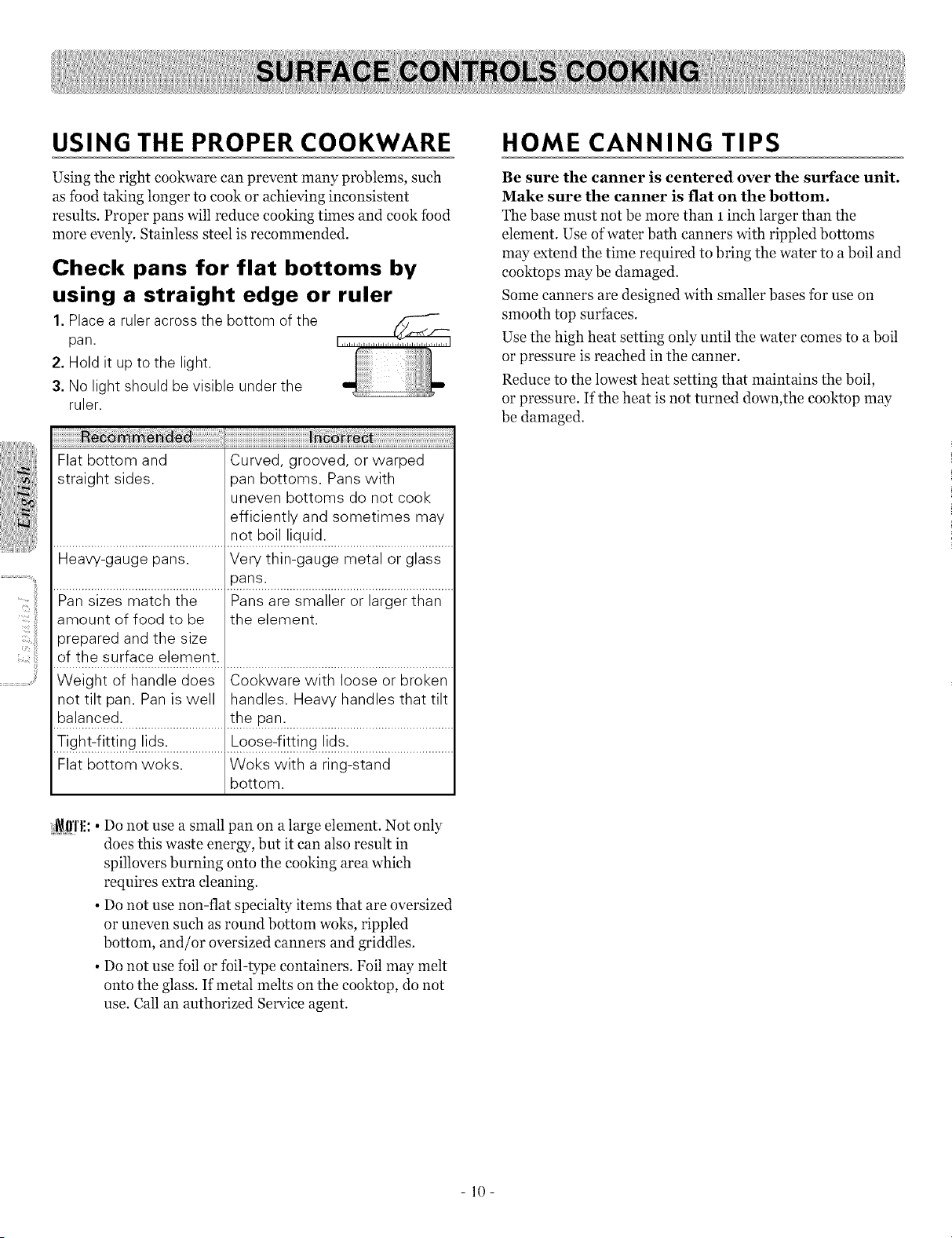
Check pans for flat bottoms by
using a straight edge or ruler
1.Placea ruler across the bottom ofthe
pan.
2. Hold it up to the light,
3. No light should be visible under the
ruler.
iiiiiiiiiiiiiiiiiiiiiiiiiiiiiiiiiiiiiiiiiiiiiiiiiiiiiiiiiiii
Flat bottom and Curved, grooved, or warped
straight sides, oan bottoms. Pans with
uneven bottoms do not cook
efficiently and sometimes may
........................................................n_!b°._J..!!qu._.d...........................................
Heavy-gauge pans. Very thin-gauge metal or glass
......................................................?ar_s:...........................................................
Pan sizes match the Pans are smaller or larger than
amount of food to be the element.
prepared and the size
!f tbt s u[face..!!.e_.tnt: ..........................................................................
Weight of handle does Cookware with loose or broken
not tilt pan. Pan iswell handles. Heavy handles that tilt
balanced, the pan.
Tight-fitting lids. Loose-fitting lids.
Flat bottom woks. Woks with a ring-stand
bottom.
:i_l)'l'l!:• Do not use a small pan on a large element. Not only
does this waste energy, but it can also result in
spillovers burning onto the cooking area which
requires extra cleaning.
• Do not use non-flat specialty items that are oversized
or uneven such as round bottom woks, rippled
bottom, and/or oversized canners and griddles.
• Do not use foil or foil-type containers. Foil may melt
onto the glass. If metal melts on the cooktop, do not
use. Call an authorized Service agent.
HOME CANNING TIPS
Be sure the canner is centered over the surface unit.
Make sure the canner is flat on the bottom.
The base must not be more than 1 inch larger than the
element. Use ofwater bath canners with rippled bottoms
may extend the time required to bring the water to a boil and
cooktops may be damaged.
Some canners are designed with smaller bases for use on
smooth top surfaces.
Use the high heat setting only until the water comes to a boil
or pressure is reached in the canner.
Reduce to the lowest heat setting that maintains the boil,
or pressure. If the heat is not turned down,the cooktop may
be damaged.
10
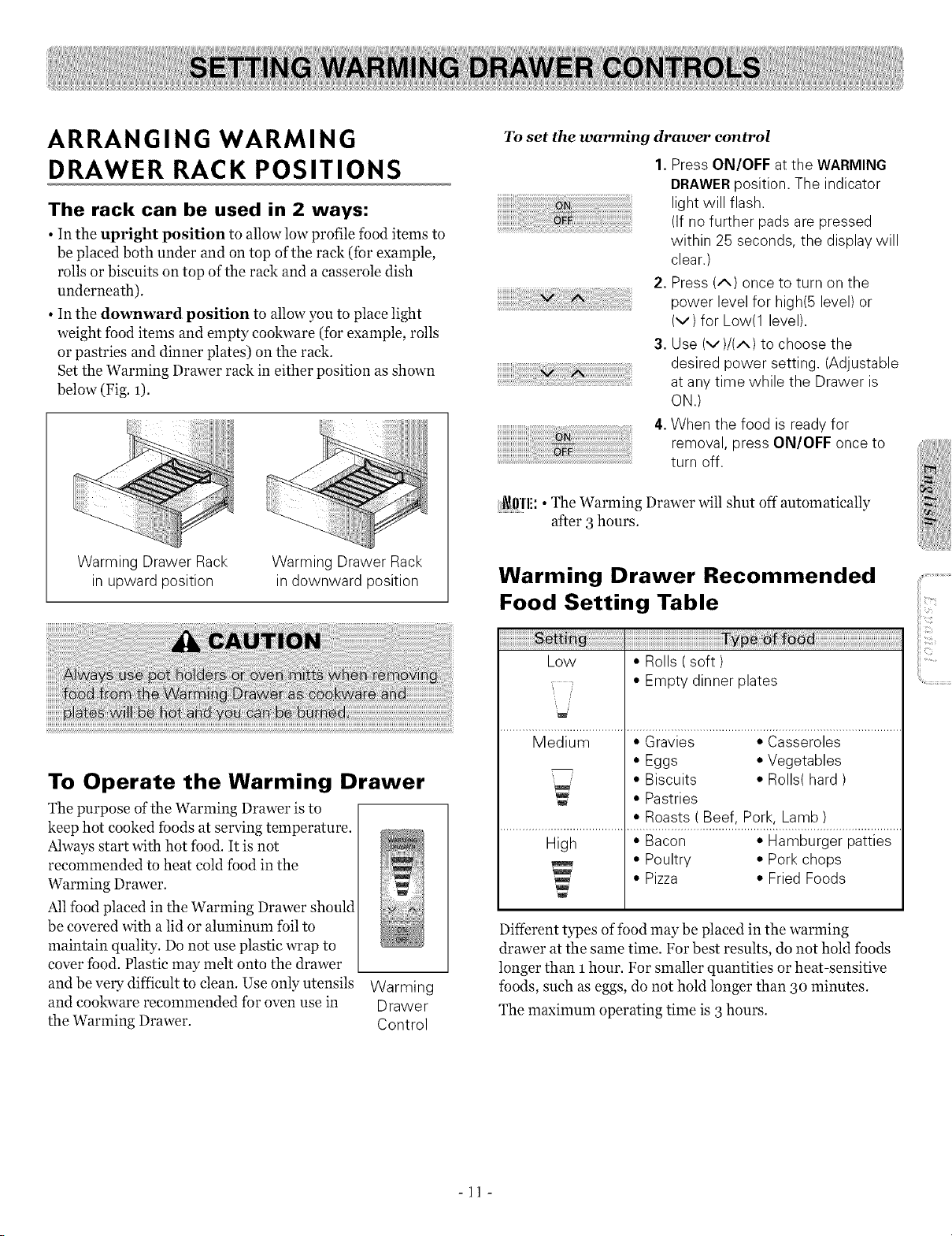
ARRANGING WARMING
DRAWER RACK POSITIONS
The rack can be used in 2 ways:
• In the upright position to allow low profile food items to
be placed both under and on top of the rack (fbr example,
rolls or biscuits on top of the rack and a casserole dish
underneath).
• In the downward position to allow you to place light
weight food items and empty cookware (for example, rolls
or pastries and dinner plates) on the ra&.
Set the Warming Drawer rack in either position as shown
below (Fig. 1).
_i(iil)iilH!iiiiiiiiii/ii!iiii_
%i_!i!%iiiiii_
Warming Drawer Rack
in upward position
Warming Drawer Rack
in downward position
To Operate the Warming Drawer
The purpose of the Warming Drawer is to
keep hot cooked foods at serving temperature.
Always start with hot food. It is not
recommended to heat cold food in the m
Warming Drawer. w
Allfood placed in the Warming Drawer should
be covered with a lid or aluminum foil to
maintain quality. Do not use plastic wrap to
cover food. Plastic may melt onto the drawer
and be very difficult to clean. Use only utensils Warming
and cookware recommended for oven use in Drawer
the Warming Drawer. Control
To set the warming drawer control
1. Press ON/OFF at the WARMING
DRAWERposition. The indicator
light will flash.
(If no further padsare pressed
within 25 seconds, the display will
clear.)
2. Press (A) once to turn on the
power level for high(5 level) or
(v) for Low(1 level).
3. Use (V)/(A) to choose the
desired power setting. (Adjustable
at anytime while the Drawer is
ON.)
4.When the food isready for
removal, press ON/OFF once to
turn off.
i_!l!'l'li:• The Warming Drawer will shut off automatically
after 3 hours.
Warming Drawer Recommended
Food Setting Table
!ii ii ii ii ii ii ii ii ii ii ii ii ii ii ii ii ii ii ii ii ii ii ii ii ii 1 i i i i i i i i i i i i i i i i i i i i i i i i i i i i i i i i i i i i i i i i i i i i i i i i i i i i i i i i i i i i i i i i i i i ii .....
Low • Rolls ( soft )
• Empty dinner plates
/
Medium • Gravies • Casseroles
• Eggs * Vegetables
• Biscuits • Rolls( hard )
• Pastries
• Roasts ( Beef, Pork, Lamb )
High * Bacon * Hamburger patties
• Poultry * Pork chops
• Pizza * FriedFoods
Different types of food may be placed in the warming
drawer at the same time. For best results, do not hold foods
longer than 1 hour. For smaller quantities or heat-sensitive
foods, such as eggs, do not hold longer than 3o minutes.
The maximum operating time is 3 hours.
-11 -
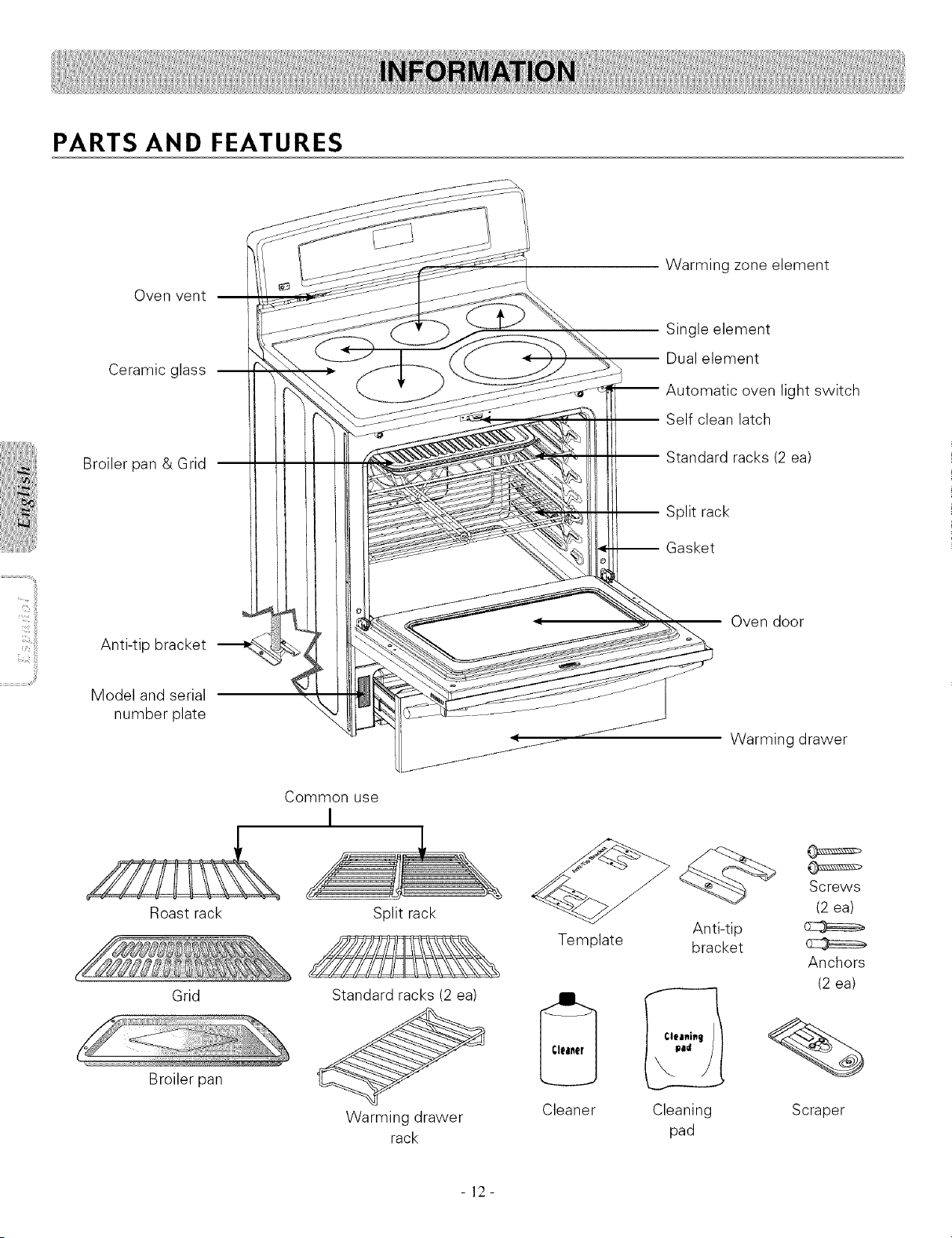
PARTS AND FEATURES
Oven vent
Ceramic glass
Broiler pan & Grid
Warming zone element
Single element
-- Dual element
Automatic oven light switch
-- Self clean latch
-- Standard racks (2 ea)
-- Split rack
-- Gasket
Anti-tip bracket
Model and serial
number plate
Roast rack
Grid
Broiler pan
Oven door
Warming drawer
Common use
I
Split rack
Standard racks (2 ea)
Warming drawer
rack
Template
Cleaner
Anti-tip
bracket
Cleaning
pad
Screws
(2 ea)
Anchors
(2 ea)
Scraper
- 12-
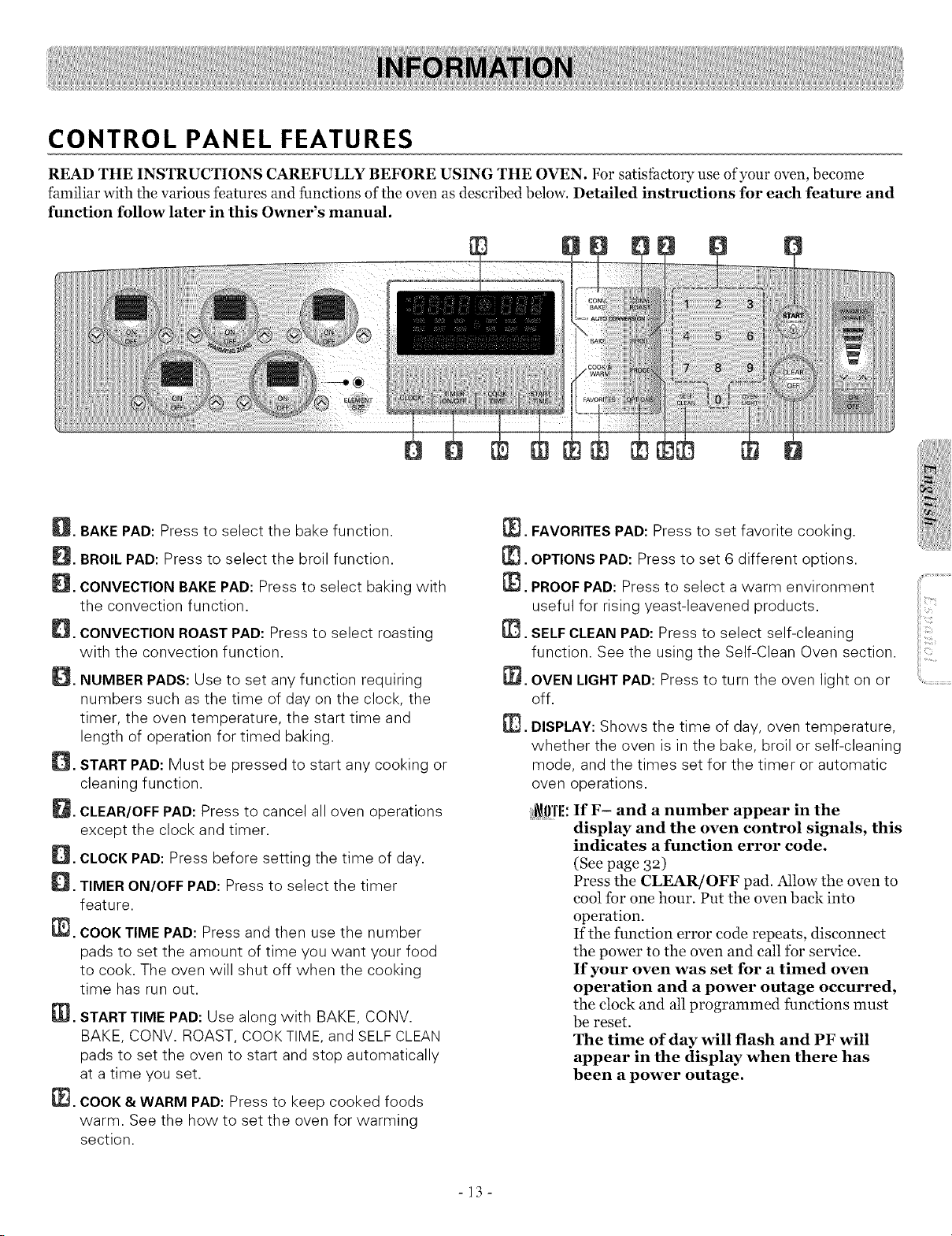
CONTROL PANEL FEATURES
THE INSTRUCTIONS CAREFULLY BEFORE USING THE OVEN. For satisfactory use ofyour oven, become
familiar with the various features and functions of the oven as described below. Detailed instructions for each feature and
function follow later in this Owner's manual.
@iiiil
E_. BAKEPAD: Press to select the bake function.
_[_. BROILPAD: Press to select the broil function.
_[_. CONVECTION BAKE PAD: Press to select baking with
the convection function.
_. CONVECTION ROAST PAD: Press to select roasting
with the convection function.
_. NUMBER PADS: Use to set any function requiring
numbers such asthe time of day on the clock, the
timer, the oven temperature, the start time and
length of operation for timed baking.
_. START PAD: Must be pressed to start any cooking or
cleaning function.
_[_. CLEAR/OFFPAD: Press to cancel all oven operations
except the clock and timer.
_[_. CLOCK PAD: Press before setting the time of day.
_. TIMER ON/OFF PAD: Press to select the timer
feature.
[_. COOKTIME PAD: Press and then use the number
pads to set the amount of time you want your food
to cook. The oven will shut off when the cooking
time has run out.
[_. STARTTIME PAD: Use along with BAKE, CONV.
BAKE, CONV. ROAST, COOKTIME, and SELF CLEAN
pads to set the oven to start and stop automatically
at a time you set.
[_. COOK&WARM PAD: Press to keep cooked foods
warm. See the how to set the oven for warming
section.
[_. FAVORITES PAD: Press to set favorite cooking.
[1_. OPTIONSPAD: Press to set 6 different options.
[_. PROOF PAD: Press to select a warm environment
useful for rising yeast-leavened products.
[I_. SELF CLEAN PAD: Press to select self-cleaning
function. See the using the Self-Clean Oven section.
[_. OVEN LIGHTPAD: Press to turn the oven light on or
off.
@.
DISPLAY: Shows the time of day, oven temperature,
whether the oven is in the bake, broil or self-cleaning
mode, and the times set for the timer or automatic
oven operations.
i_l!'l'l!: If F- and a number appear in the
display and the oven control signals, this
indicates a function error code.
(See page 32)
Press the CLEAR/OFF pad. Allow the oven to
cool for one hour. Put the oven back into
operation.
If the function error code repeats, disconnect
the power to the oven and call ibr service.
If your oven was set for a timed oven
operation and a power outage occurred,
the clock and all programmed functions must
be reset.
The time of day will flash and PF will
appear in the display when there has
been a power outage.
-13-
iiiiiiiiliiiiXi;iii/i i i : !iiDi ii
_"_(_ii¸i*,;,;?:ii'
iiiii:_i!'NI_!
..............................,?i!¸
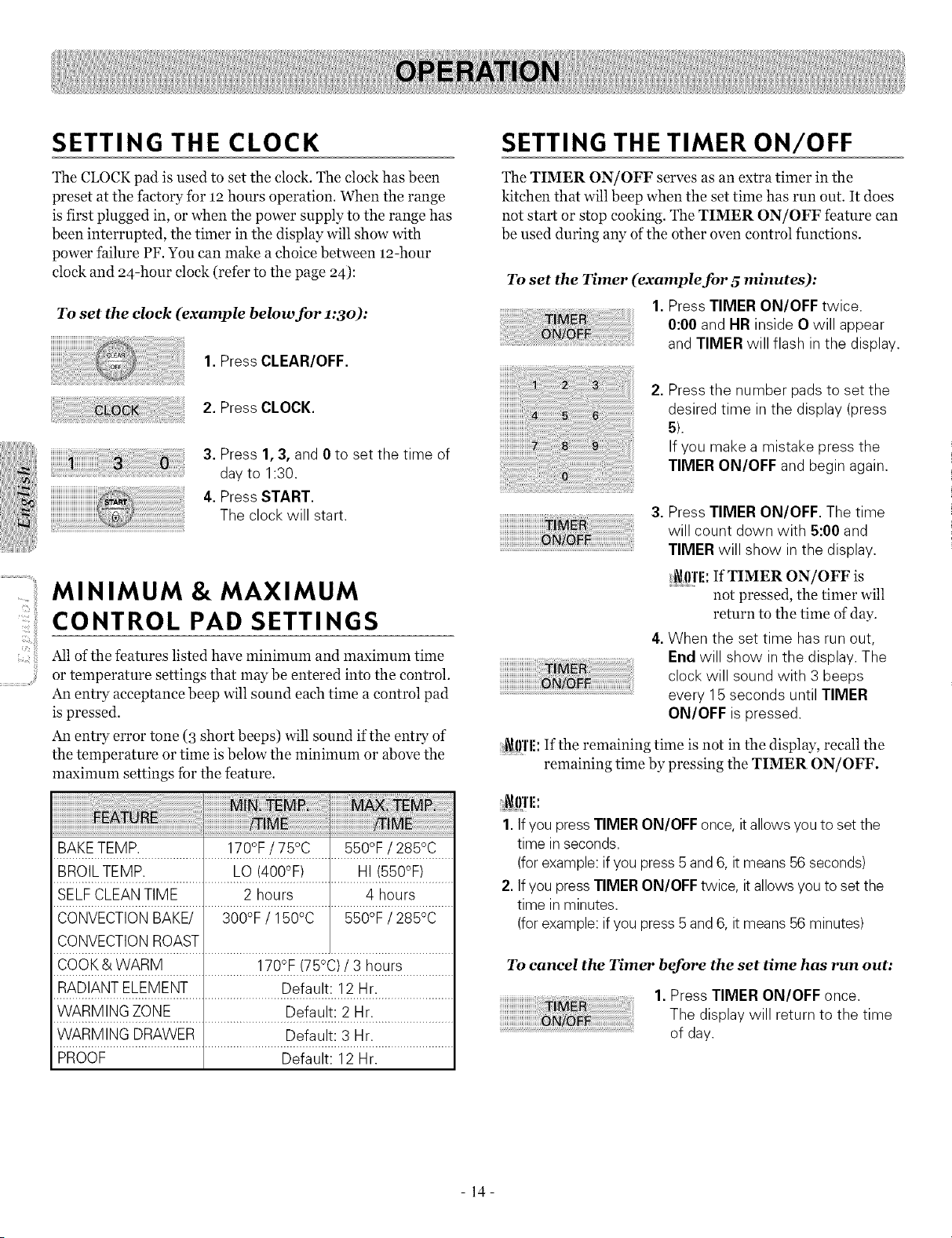
SETTING THE CLOCK
The CLOCK pad is used to set the clock. The clock has been
preset at the factory for 12 hours operation. When the range
is first plugged in, or when the power supply to the range has
been interrupted, the timer in the display will show with
power failure PF. You can make a choice between m-hour
clock and 24-hour clock (refer to the page 24):
To set the clock (example below for 1:3o):
1.Press CLEAR/OFF.
2. Press CLOCK.
iiiiiiiiiiiiiiiiiiiiiiiiiiiiiiiiii_i_i_iiiiiiiiiiiiiiiiiiiiiiiiiiiiiii_
i!!;!;!;!;!;!;!;!;!;!;!;!;!;!;!!i!!_!!_!!_!!_!!_!!_!!_!!_!!_!!_!!_!!_!!_!!_!!_!!_!!_!!_!!_!!_!!_!!_!!_!!_!!_!!_!!_!!_!!_!!_!!_!!_!!_!!__i__!_!
3. Press 1,3,and 0 to set the time of
dayto 1:30.
4. Press START.
The clock will start.
MINIMUM & MAXIMUM
CONTROL PAD SETTINGS
Allof the features listed have minimum and maximum time
or temperature settings that may be entered into the control.
An entry acceptance beep will sound each time a control pad
is pressed.
An entry error tone (3 short beeps) will sound if the entry of
the temperature or time is below the minimum or above the
maxinmm settings fbr the feature.
BAKETEMP. 170°F / 75°C 550°F / 285°C
BROILTEMP. LO (400°F) HI (550°F)
SELF CLEANTIME 2 hours 4 hours
CONVECTIONBAKE/ 300°F / 150°C 550°F / 285°C
CONVECTIONROAST
COOK& WARM 170°F (75°C) /3 hours
RADIANT ELEMENT Default: 12 Hr.
WARMING ZONE Default: 2 Hr.
WARMING DRAWER Default: 3 Hr.
PROOF Default: 12 Hr.
SETTING THE TIMER ON/OFF
The TIMER ON/OFF serves as an extra timer in the
kitchen that will beep when the set time has run out. It does
not start or stop cooking. The TIMER ON/OFF feature can
be used during any ofthe other oven control functions.
To set the Timer (example for 5 minutes):
1. Press TIMER ON/OFF twice,
0:00 and HR inside O will appear
and TIMER will flash in the display.
2. Press the number pads to set the
desired time in the display (press
5).
If you make a mistake press the
TIMER ON/OFF and begin again.
3. Press TIMER ON/OFF. Thetime
will count down with 5:00 and
TIMER will show in the display.
i_l!'l'l!: If TIMER ON/OFF is
not pressed, the timer will
return to the time of day.
4.When the set time hasrun out,
End will show in the display. The
clock will sound with 3 beeps
every 15 seconds until TIMER
ON/OFF ispressed.
i_
SETTING CONVECTION AUTO
CONVERSION FEATURE
When using convection bake, the Convection Auto
Conversion feature will automatically convert entered
regular baking temperatures to convection baking
temperatures.
This feature is activated so that the display will show the
actual converted (reduced) temperature. For example, if you
enter a regular recipe temperature of 35o°F and press the
START pad, the display will show the converted
temperature of 325°F.
To set the feature Disable/enable
1.Press OPTIONS once.
2. Press 1 for ENABLE or 2 for
DISABLE.
3. Press START to accept the
desired change.
THERMOSTAT ADJUSTMENT
The temperature in the oven has been preset at the factory.
When first using the oven, be sure to tbllow recipe times and
temperatures. If you think the oven is too hot or too cool,
the temperature in the oven can be adjusted. Before
adjusting, test a recipe by using a temperature setting that is
higher or lower than the recommended temperature. The
baking results should help you to decide how much of an
adjustment is needed.
The oven temperature can be adjusted +35°F(±19°C).
_l!]'li: The thermostat adjustments made with this feature
will change Bake, Convection Bake, and Convection
Roast temperature.
To increase the oven temperature:
1, Press OPTIONS twice.
2.To increase the temperature use
the number padsto enter the
desired change.
(Example 20°F : 2 and 0).
200 will be displayed.
3. Press START to accept the
temperature change and the
display will return to the time of
day. Press CLEAR/OFF to reject
the change if necessary.
To decrease the oven temperature:
1,Press OPTIONS twice.
2.To decrease the temperature use
the number pads to enter the
desired change.
(Example -20°F : 2 and 0) and then
press OPTIONS once.
200 will be displayed,
3. Press START to accept the
temperature change and the
display will return to the time of
day. Press CLEAR/OFF to reject
the change ifnecessary.
-15-
SETTING LANGUAGE SELECTION
(English or Spanish)
The scroll display can be shown either ENGLISH or
SPANISH.
To set language option
1.Press the OPTIONS 3 times.
2. Press 1 for ENGLISH or 2 for
SPANISH.
3. Press START to accept the change.
SETTING PREHEATING ALARM
LIGHT ON/OFF
The interior oven light automatically turn on when the oven
door is opened.
When oven reaches set-temperature after preheat, the oven
notifies preheat-end by flashing oven lamp until door is
opened.
You can activate or deactivate smart oven light feature.
Default Setting is on.
To set smart oven light on/o_"
1.Press the OPTIONS 4 times.
2. Press 1 for ON or 2 for OFF.
3. Press START to accept the
change.
SETTING TEMPERATURE UNIT
- Fahrenheit or Centigrade
OPTIONS pad control the Fahrenheit or Centigrade
temperature display modes. The oven control can be
programmed to display temperatures in Fahrenheit or
Centigrade. The oven has been preset at the factory to
display in Fahrenheit.
To change display from Fahrenheit to Centigrade or
Centigrade to Fahrenheit:
1. Press OPTIONS 6 times.
2. Press 1 number pad for
Fahrenheit(°F) or 2 for
Centigrade(°C).
3. Press START to accept the desired
change.
SETTING BEEPER VOLUME
The beeper volume feature allows you to adjust the volumes
to a more acceptable volume. There are tour possible volume
levels.
To set beeper volume
1. Press OPTIONS 5 times.
2. Press 1 for loud level, 2 for normal
level, 3 for low level and 4 for mute
level.
i
3. Press START.
- 16-
SETTING BAKE
The BAKE pad controls normal baking. The oven can be
programmed to bake at any temperature from 17o°F to
55o°F. Default temperature is 35o°F (175°C).
To set the Bake Temperature to 375°F:
1.Press BAKE. 350 °will appear in
the display.
2.Press 3,7, and 5. BAKE will flash.
3.Press START. The display will
show BAKE and the changing
temperature starting at 100°F.
i_ll3111rl'i\i\rl'_IITI!:
Place food in the oven after preheating ifthe recipe calls for
it. Preheating is so important for good results when baking
cakes, cookies, pastry, and breads. After the oven has
reached the desired temperature, long beeps will sound
5 times and oven lamp will flash. This will take
approximately lO-15 minutes.
Press CLEAR/OFF to cancel the Bake feature at any time.
To change the Bake Temperature while cooking
(example changing from 375 °to 425°F):
1. If the oven temperature needsto
be changed to 425°F, press BAKE
and 3500 will show in the display.
2.Press 4,2,and 5.
3.Press START.
BAKING LAYER CAKES
Baking results will be better if baking pans are centered in
the oven as much as possible. If baking with more than one
pan, place the pans so each has at least 1"to 11/2,, of air space
around it.
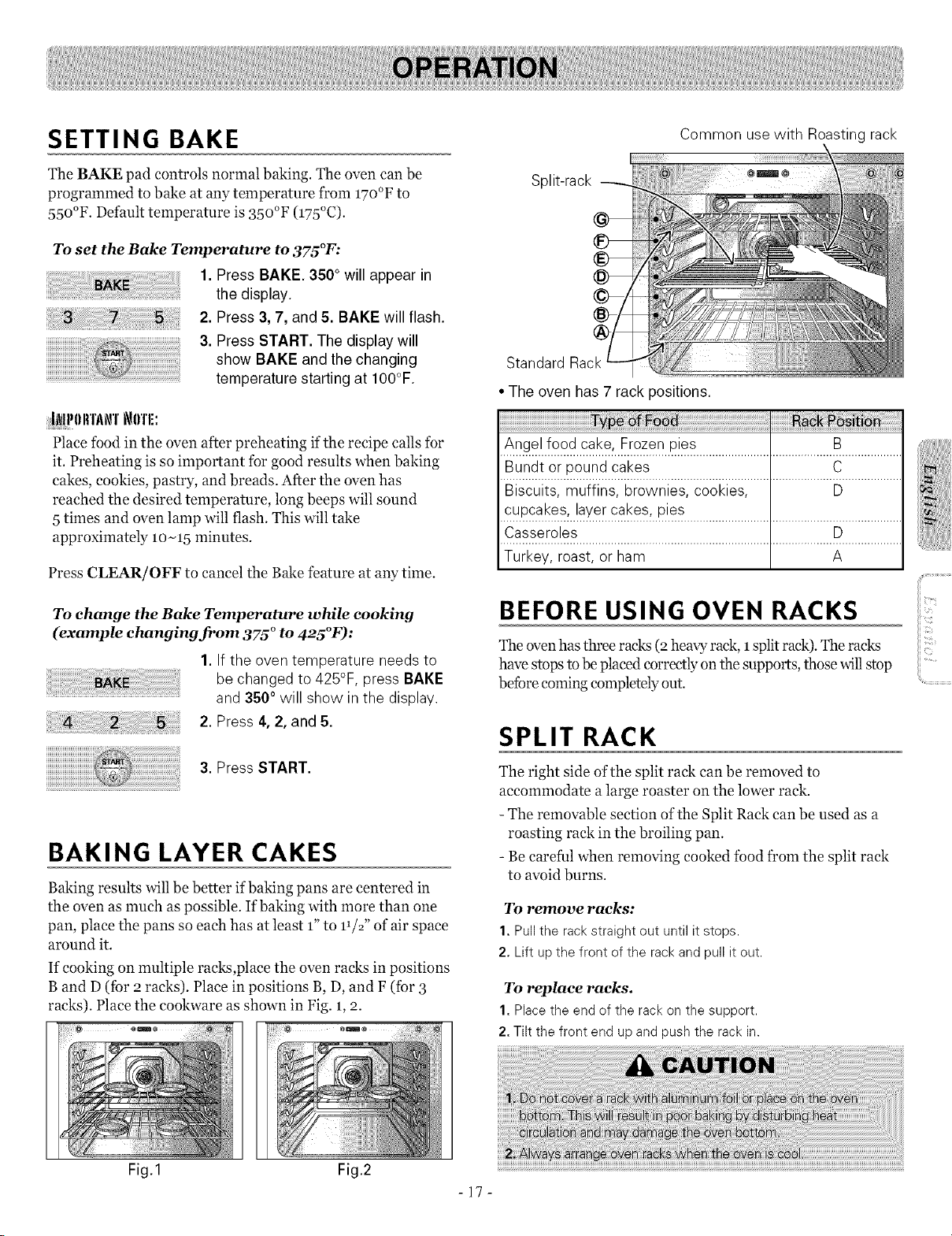
If cooking on multiple racks,place the oven ra&s in positions
B and D(for 2 racks). Place in positions B, D, and F (for 3
racks). Place the cookware as shown in Fig. 1,2.
Fig.1 Fig.2
Split-rack
Common usewith Roasting rack
Standard Rack
• The oven has 7 rack positions.
/_ge.l..f.(_2d.._a.I}.e:..F.!2_en..P!£_...........................................B...................
B .............................................................................
Biscuits, muffins, brownies, cookies, D
CUl_cakes;..!a_(.ercal}es; i_ies.....................................................................
.................................................................................F2...................
Turkey, roast, or ham A
BEFORE USING OVEN RACKS
The ovenhas three racks (2 heavy rack, Isplit rack). The racks
have stops to be placed correctly on the supports, those will stop
befbre coming completely out.
SPLIT RACK
The right side of the split rack can be removed to
accommodate a large roaster on the lower rack.
- The removable section ofthe Split Rack can be used as a
roasting rack in the broiling pan.
- Be careful when removing cooked food from the split rack
to avoid burns.
To remove racks:
1.Pull the rack straight out until it stops.
2. Lift upthe front of the rackand pull it out.
To replace racks.
1.Place the end of the rack on the support.
2. Tilt the front end upand push the rack in.
,_i!iiiiiiiii_,_,_,!,!,!,!,i,i,i,i,:_:_:!:!liii!!i'
ii_i_ii_iiii_i'i'ii!:iii
iiii_::il;i;ii!iii,!,!ii_i::::;i:
-17-
SETTING TIMED BAKE
The oven will turn on immediately and cook for a selected
length of time. At the end of the cooking time, the oven will
turn off automatically.
To program the oven to begin baking immediately
and to shut off automatically:
(example below to bake at 3oo°F for 30 minutes):
When the Timed Bake finishes:
1.END OFCYCLE and the time of
daywill show in the display.The
oven will shut off automatically.
2. The control will continue to beep 3
times every minute until
CLEAR/OFF ispressed.
¸
ii_ii_i!i__!!_!ii!{_ii!i_i_!_!_i]_i!i_i_ili{i!{i{{ii!i_i_!_!_i]_i!i_i_il;!i_i_i_i!{ii!i]_i_i_ii_i_i_iiiiliiiiiiiiii!ii_i_!_!_i]_i!i_i_ii!{ii:!i_i_i_i_!{i!:_i_}i_!i!i::_ii!i_!_!_i]_i!i_i_ii!{i:!_ii_i_!_!i_:_i_i_i_i_!i!i:!_ii_i_!__ii
1.Be sure the clock is set for the
correct time of day.
2. Press BAKE, 3500 will appear in
the display.
3. Press 3, 0,and 0. BAKE will flash
and 3000 will appear in the display.
4. Press COOK TIME. TIMED will
flash. BAKE, 0:00 and 3000 will
appear in the display.
5. Enter the desired baking time by
pressing 3 and 0. TIMED will flash
and BAKE, 30:00 and 3000 will
appear in the display.
i_0'l'l!: Baking time can be set for
any amount of time between
1 minute to 11hours and 59
minutes.
6. Press START. The oven will turn
on, and the display will show the
cooking time countdown and the
changing temperature starting at
100°F (thetemperature display will
start to change once the oven
temperature reaches 100°F).The
oven will continue to cook for the
set amount oftime, then turn off
automatically, unless the COOK &
WARM feature was set. Refer to
the Setting the COOK& WARM
feature section on page 23.
I i_llI_11Irl'._\i\rl' t_IIl'li:
Place food in the oven after preheating if the recipe calls for
it. Preheating is so important for good results when baking
cakes, cookies, pastry, and breads. After the oven has
reached the desired temperature, long beeps will sound
5 times and oven lamp will flash. This will take
approximately lO-15 minutes.
- 18-
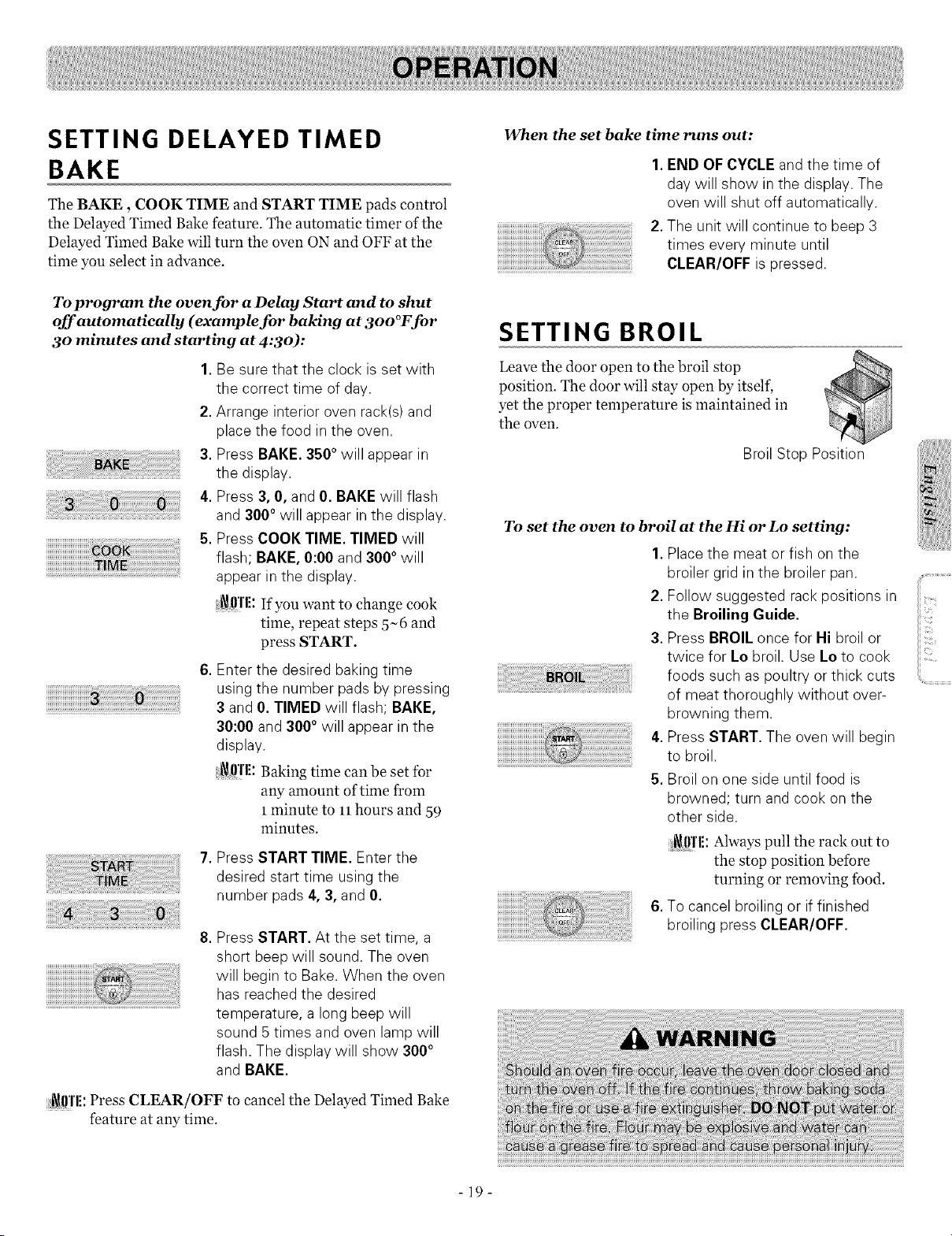
SETTING DELAYED TIMED
BAKE
The BAKE, COOK TIME and START TIME pads control
the Delayed Timed Bake feature. The automatic timer of the
Delayed Timed Bake will turn the oven ON and OFF at the
time you select in advance.
To program the oven for a Delay Start and to shut
off automatically (example for baking at 3oo°F for
30 minutes and starting at 4:30):
1.Be surethat the clock is set with
the correct time of day.
2.Arrange interior oven rack(s) and
place the food in the oven.
3.Press BAKE. 3`50°will appear in
the display.
4.Press 3, 0,and 0. BAKE will flash
and 300°will appear in the display.
5.Press COOK TIME. TIMED will
flash; BAKE, 0:00 and 3000 will
appear in the display.
_lll'l[: If you want to changecook
time, repeat steps5-6 and
press START.
6.Enter the desired baking time
using the number pads by pressing
3 and 0.TIMED will flash; BAKE,
30:00 and 300 ° will appear in the
display.
i_ff!'l[: Baking time can be set for
any amount of time from
1minute to 11hours and 59
minutes.
7.Press START TIME. Enter the
desired start time usingthe
number pads4, 3,and 0.
8.Press START. At the set time, a
short beep will sound. The oven
will begin to Bake. When the oven
has reached the desired
temperature, a long beep will
sound 5 times and oven lamp will
flash. The display will show 3000
and BAKE.
i_ffl'l[: Press CLEAR/OFF to cancel the Delayed Timed Bake
feature at any time.
When the set bake time runs out:
iiiiiiiiiiiiiiiiiiiiiiiiiiiiiiiiiiiiiiiiiiiiiiiiiiiiiiiiiiiiiiiiiiiiii !!!!!! ililililililililililililililililililililililililililililililililil
1. END OFCYCLEand the time of
day will show in the display. The
oven will shut off automatically.
2.The unit will continue to beep 3
times every minute until
CLEAR/OFF is pressed.
SETTING BROIL
Leave the door open to the broil stop
position. The door will stay open by itself,
yet the proper temperature is maintained in
the oven.
Broil Stop Position
To set the oven to broil at the Hi or Lo setting:
1.Place the meat or fish on the
broiler grid in the broiler pan.
2. Follow suggested rack positions in
the Broiling Guide.
3. Press BROIL once for Hi broil or
twice for Lo broil. Use Lo to cook
foods such as poultry or thick cuts
of meat thoroughly without over-
browning them.
4. Press START. The oven will begin
to broil.
,5.Broil on one side until food is
browned; turn and cook on the
other side.
i_01'1[:Always pull the rack out to
the stop position before
turning or removing food.
6.To cancel broiling or iffinished
broiling press CLEAR/OFF.
-19-
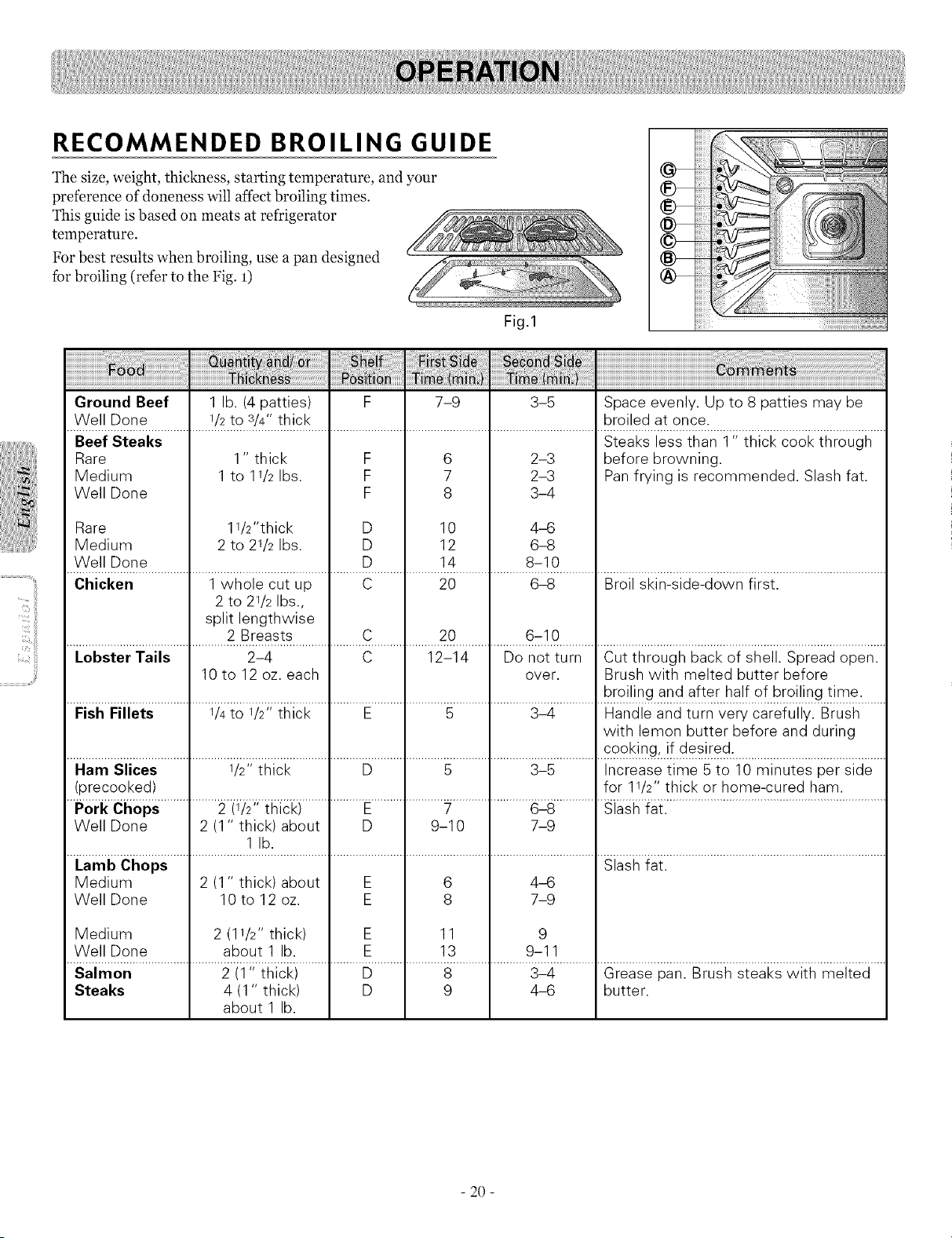
RECOMMENDED BROILING GUIDE
The size, weight, thickness, starting temperature, and your
preference ofdoneness will affect broiling times.
This guide is based on meats at refrigerator
temperature.
For best results when broiling, use a pan designed
for broiling (refer to the Fig. 1)
Fig.1
iiiiiiiiii;!!!_
@-
@-
@-
iiiiiiiiiii_!!iiii
iiiiiiiiiii_;_i!i!_
Ground Beef 1 lb. (4 patties) F 7-9 3-5 Space evenly. Up to 8 patties may be
Well Done I/2 to 3/4" thick broiled at once.
Steaks less than 1" thick cook through
Beef Steaks
Rare
Medium
Well Done
11/2"thick
2 to 21/2 Ibs.
Rare
Medium
Well Done
1" thick F
1 to 1I/2 Ibs. F
F
D
D
D
6
7
8
10
12
14
2-3
2-3
3-4
4_3
6-8
8-10
before browning.
Pan frying is recommended. Slash fat.
Chicken 1 whole cut up C 20 6-8 Broil skin-side-down first.
2 to 21/2 Ibs.,
split lengthwise
2 Breasts C 20 6-10
Lobster Tails 2-4 C 12-14 Do not turn Cut through back of shell. Spread open.
10 to 12 oz. each over. Brush with melted butter before
broiling and after half of broiling time.
FishFillets I/4 to I/2" thick E 5 3-4 Handle and turn very carefully. Brush
with lemon butter before and during
..........................................................................................................................................................................ce_k_ng_!_@s!red.................................................
Ham Slices 1/2"thick D 5 3-5 Increase time 5 to 10 minutes per side
(precooked) for 11/2"thick or home-cured ham.
Pork Chops 2 (1/2" thick) E 7 6-8 Slash fat.
Well Done 2 (1 " thick) about D 9-10 7-9
1 lb.
Lamb Chops Slash fat.
Medium 2 (1 " thick) about E 6 4_6
Well Done 10 to 12 oz. E 8 7-9
Medium 2 (11/2" thick) E 11 9
Well Done about 1 lb. E 13 9-11
saimor;.............................2ii_;ihicki....................U.......................8.........................3_4...............eiease_;an.Biushsieakswiii__eli;d....
Steaks 4 (1" thick) D 9 4-6 butter.
about 1 lb.
- 20 -
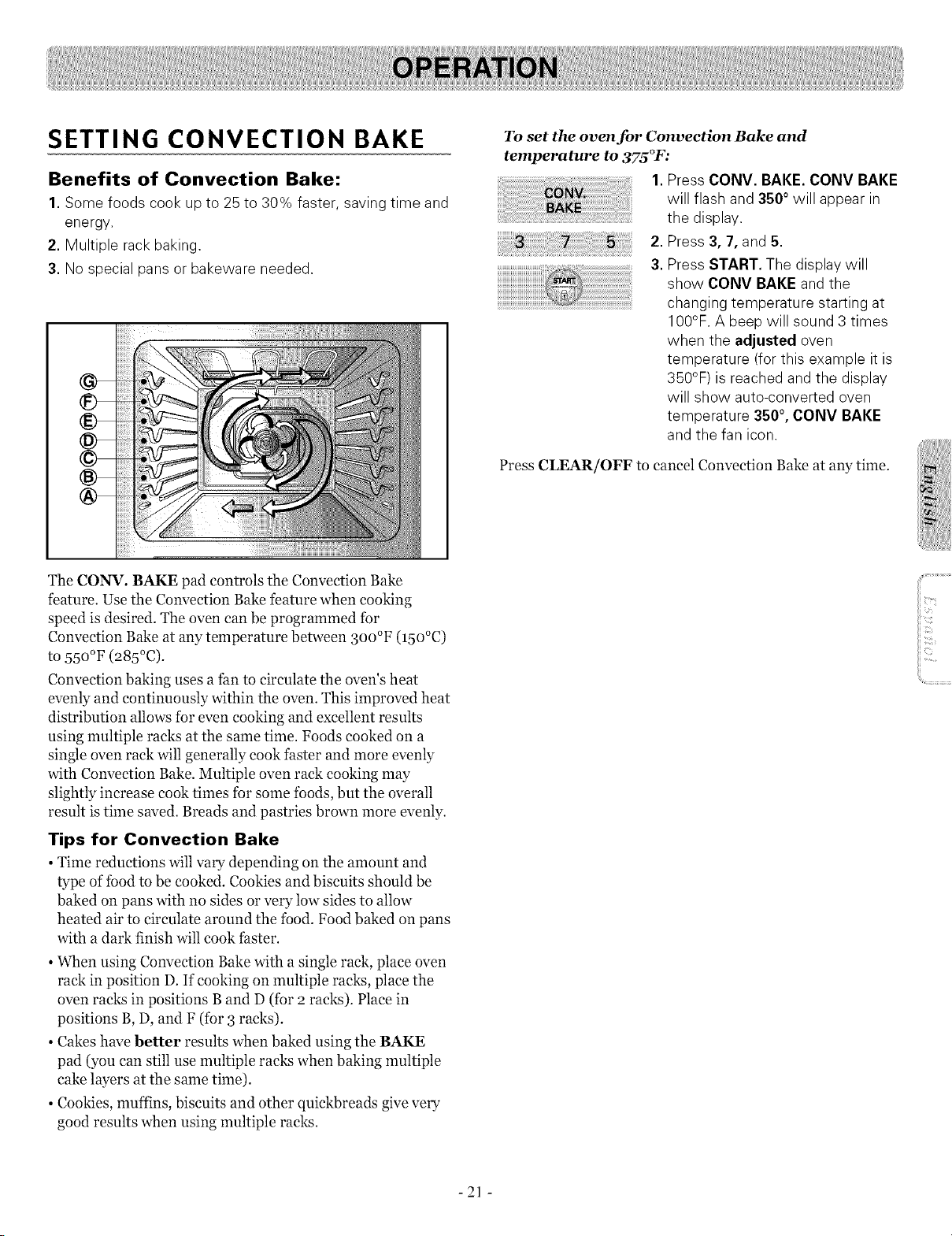
SETTING CONVECTION BAKE
Benefits of Convection Bake:
1.Some foods cook up to 25 to 30% faster, saving time and
energy.
2. Multiple rack baking.
3. No special pans or bakeware needed.
To set the oven for Convection Bake and
temperature to 375°F:
1. Press CONV. BAKE. CONV BAKE
will flash and 3500 will appear in
the display.
2. Press 3,7, and 5.
3. Press START. The display will
show CONY BAKEand the
...................................................................................................changing temperature starting at
100°F.A beep will sound 3 times
when the adjusted oven
temperature (for this example it is
350°F) isreached and the display
will show auto-converted oven
temperature 350 °, CONV BAKE
and the fan icon.
Press (;LEAR/OFF to cancel Convection Bake at any time.
The (;ONV. BAKE pad controls the Convection Bake
feature. Use the Convection Bake feature when cooking
speed is desired. The oven can be programmed for
Convection Bake at any temperature between 3oo°F (15o°C)
to 55o°F (285°C).
Convection baking uses a fan to circulate the oven's heat
evenly and continuously within the oven. This improved heat
distribution allows for even cooking and excellent results
using multiple racks at the same time. Foods cooked on a
single oven rack will generally cook faster and more evenly
with Convection Bake. Multiple oven rack cooking may
slightly increase cook times for some foods, but the overall
result istime saved. Breads and pastries brown more evenly.
Tips for Convection Bake
• Time reductions will vary depending on the amount and
type of food to be cooked. Cookies and biscuits should be
baked on pans with no sides or very low sides to allow
heated air to circulate around the food. Food baked on pans
with a dark finish will cook faster.
• When using Convection Bake with a single rack, place oven
rack in position D. If cooking on multiple racks, place the
oven racks in positions Band D (for 2 racks). Place in
positions B, D, and F (for 3 racks).
• Cakes have better results when baked using the BAKE
pad (you can still use multiple racks when baking multiple
cake layers at the same time).
• Cookies, muffins, biscuits and other quickbreads give very
good results when using multiple racks.
- 21 -
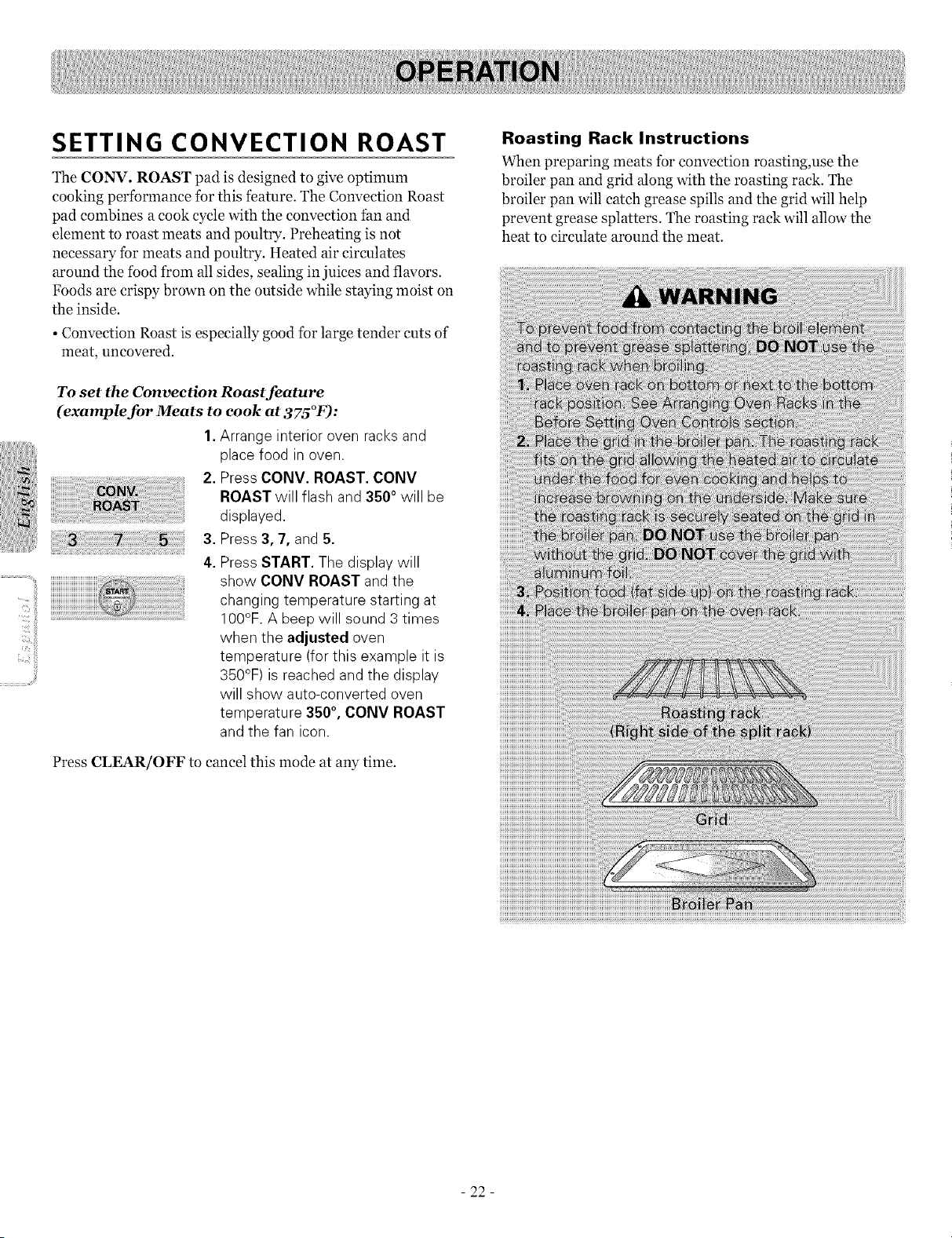
SETTING CONVECTION ROAST
The CONV. ROAST pad is designed to give optimum
cooking performance for this feature. The Convection Roast
pad combines a cook cycle with the convection fan and
element to roast meats and poultry. Preheating is not
necessary for meats and poultry. Heated air circulates
around the food from all sides, sealing in juices and flavors.
Foods are crispy brown on the outside while staying moist on
the inside.
• Convection Roast is especially good for large tender cuts of
meat, uncovered.
To set the Convection Roast feature
(example for Meats to cook at 375°F):
4.
1.Arrange interior oven racksand
place food in oven.
2. Press CONY. ROAST. CONY
ROAST will flash and 3500 will be
displayed.
Press 3, 7,and 5.
Press START. The display will
show CONY ROAST and the
changing temperature starting at
100°F.A beep will sound 3 times
when the adjusted oven
temperature (forthis example it is
350°F) isreached and the display
will show auto-converted oven
temperature 350 °, CONV ROAST
and the fan icon.
Press CLEAR/OFF to cancel this mode at any time.
Roasting Rack Instructions
When preparing meats for convection roasting,use the
broiler pan and grid along with the roasting rack. The
broiler pan will catch grease spills and the grid will help
prevent grease splatters. The roasting rack will allow the
heat to circulate around the meat.
- 22 -
USING THE FAVORITES
FEATURE
The FAVORITES pad is used to record and recall your
favorite recipe settings. This feature may store and recall up
to 3different settings. The Favorite Setting feature may be
used with COOK TIME feature. This feature will not work
with any other function including START TIME feature.
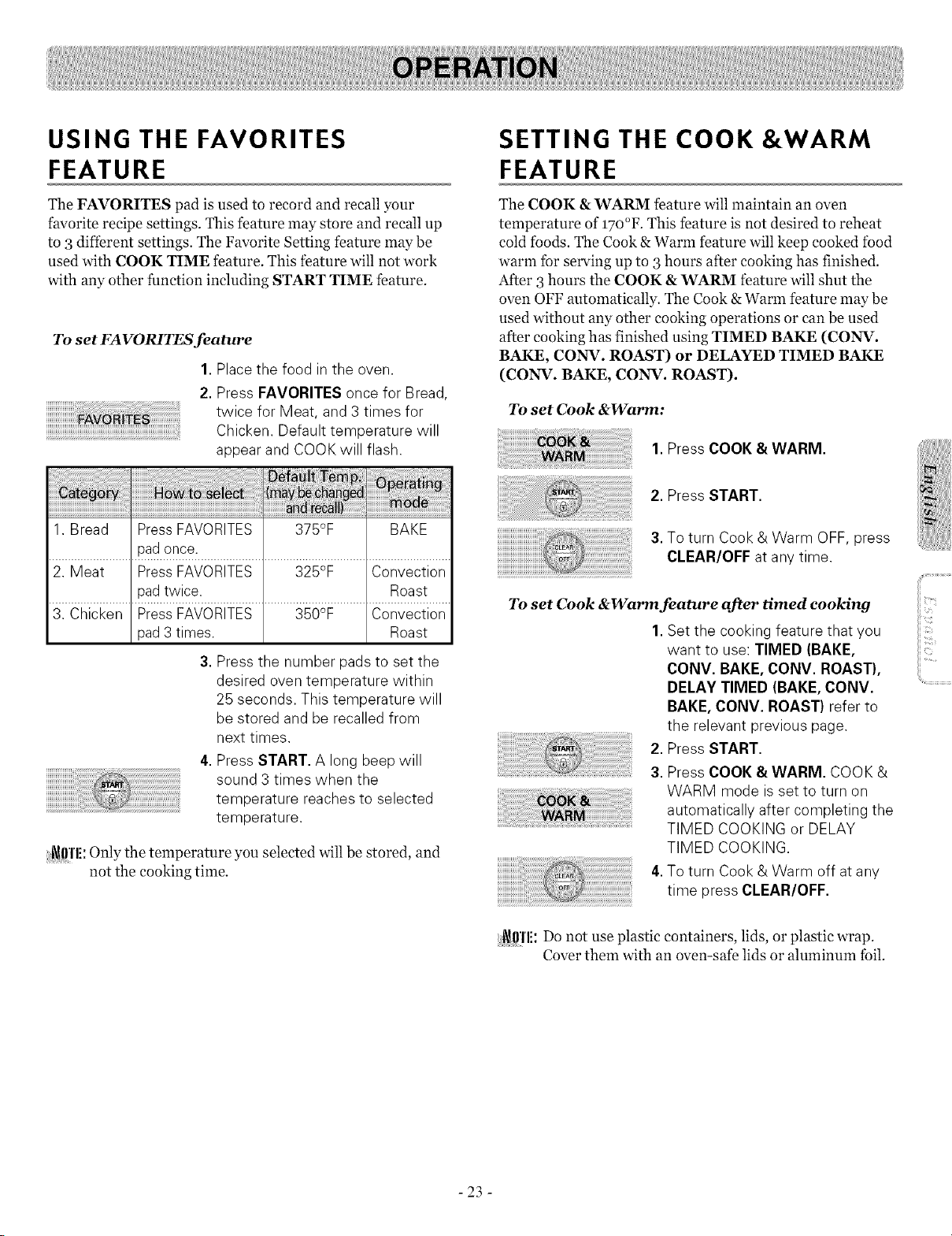
To set FAVORITES feature
1.Placethe food in the oven.
2.Press FAVORITES once for Bread,
twice for Meat, and 3 times for
Chicken. Default temperature will
appear and COOKwill flash.
1.Bread Press FAVORITES 375°F BAKE
pad once.
2. Meat Press FAVORITES 325°F Convection
pad twice. Roast
3. Chicken Press FAVORITES 350°F Convection
pad 3 times. Roast
3. Press the number pads to set the
desired oven temperature within
25 seconds. This temperature will
be stored and be recalled from
next times.
4.Press START. A long beep will
sound 3 times when the
temperature reaches to selected
temperature.
[_dffl'li:Only the temperature you selected will be stored, and
not the cooking time.
SETTING THE COOK &WARM
FEATURE
The COOK &WARM feature will maintain an oven
temperature of 17o°F. This feature is not desired to reheat
cold foods. The Cook &Warm feature will keep cooked food
warm for serving up to 3hours after cooking has finished.
After 3hours the COOK &WARM feature will shut the
oven OFF automatically. The Cook &Warm feature may be
used without any other cooking operations or can be used
after cooking has finished using TIMED BAKE (CONV.
BAKE, CONN. ROAST) or DELAYED TIMED BAKE
(CONg. BAKE, CONV. ROAST).
To set Cook &Warm:
1. Press COOK &WARM.
2. Press START.
3.Toturn Cook & Warm OFF, press
CLEAR/OFF atany time.
To set Cook &Warm feature after timed cooking
1. Set the cooking feature that you
want to use: TIMED (BAKE,
CONV. BAKE, CONV. ROAST),
DELAY TIMED (BAKE, CONV.
BAKE, CONV. ROAST) refer to
the relevant previous page.
2. Press START.
3. Press COOK &WARM. COOK&
WARM mode is set to turn on
automatically after completing the
TIMED COOKINGor DELAY
TIMED COOKING.
4.to turn Cook & Warm off atany
time press CLEAR/OFF.
:[_ff!'li:Do not use plastic containers, lids, or plastic wrap.
Cover them with an oven-safe lids or aluminum foil.
- 23 -
SETTING OVEN LOCKOUT
FEATURE
The START pad controls the Oven Lockout feature. The
Oven Lockout feature automatically locks the oven door,
prevents the Warming Drawer and most oven controls from
being turned ON. It does not disable the clock, timer, or the
interior oven light.
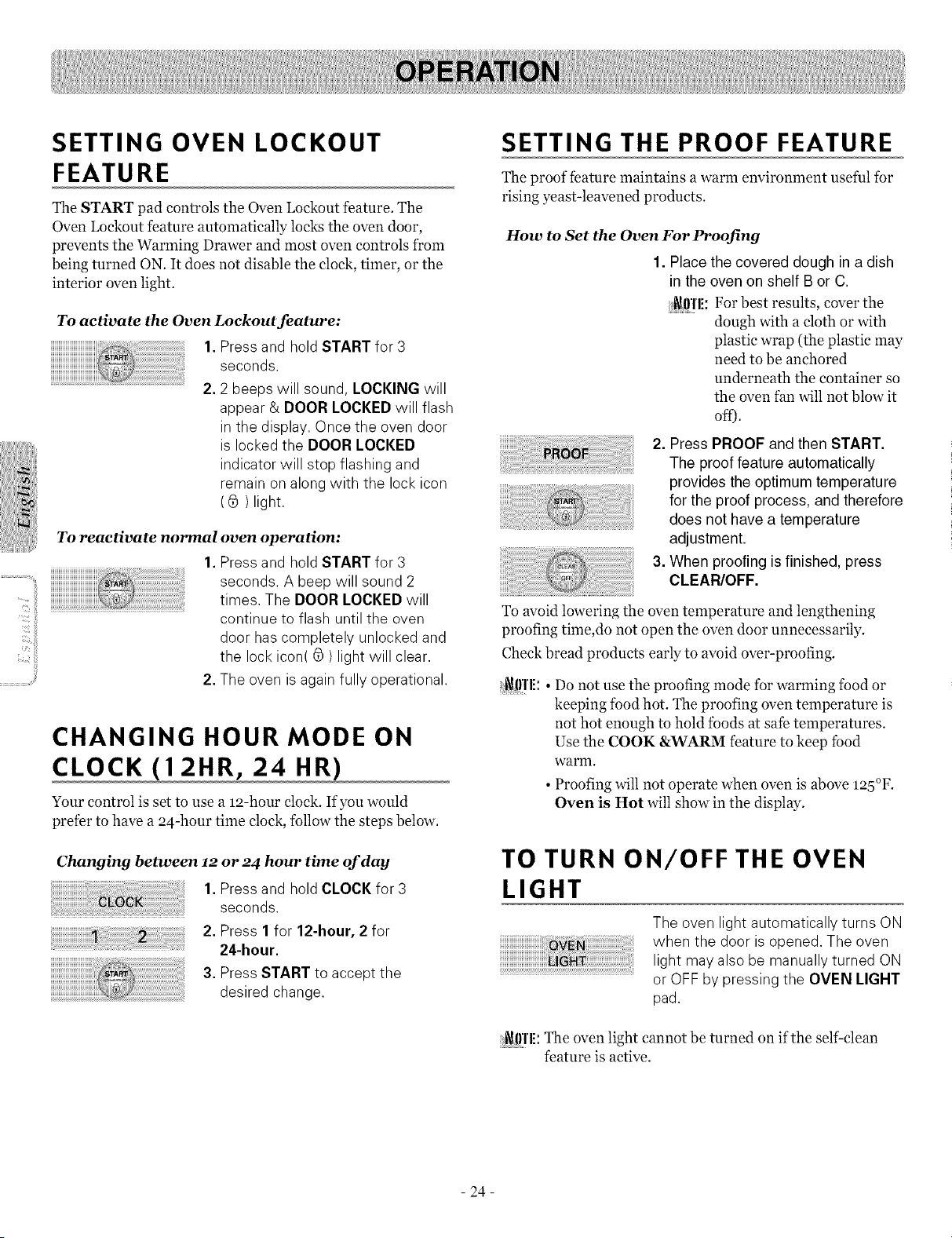
To activate the Oven Lockout feature:
1.Press and hold START for 3
seconds.
2.2 beeps will sound, LOCKING will
appear & DOOR LOCKED will flash
in the display. Once the oven door
is locked the DOOR LOCKED
indicator will stop flashing and
remain on along with the lock icon
( _ ) light.
To reactivate normal oven operation:
1.Press and hold START for 3
seconds. A beep will sound 2
times. The DOOR LOCKED will
continue to flash until the oven
door hascompletely unlocked and
the lock icon( _ ) light will clear.
2.The oven isagain fully operational.
CHANGING HOUR MODE ON
CLOCK (12HR, 24 HR)
Your control is set to use a 12-hour clock. If you would
prefer to have a 24-hour time clock, follow the steps below.
Changing between 12 or 24 hour time of day
1. Press and hold CLOCK for 3
seconds.
2. Press 1for 12-hour, 2 for
24-hour.
3. Press START to accept the
desired change.
SETTING THE PROOF FEATURE
The proof feature maintains a warm environment useful for
rising yeast-leavened products.
How to Set the Oven For Proofing
1. Placethe covered dough in a dish
in the oven on shelf B or C.
b_!0l'l!: For best results, cover the
dough with a cloth or with
plastic wrap (the plastic may
need to be anchored
underneath the container so
the oven fan will not blow it
off).
2. Press PROOF and then START.
The proof feature automatically
provides theoptimum temperature
for the proof process, and therefore
does not have a temperature
adjustment.
3. When proofing isfinished, press
CLEAR/OFF.
To avoid lowering the oven temperature and lengthening
proofing time,do not open the oven door unnecessarily.
Check bread products early to avoid over-proofing.
[_J0]'l!:• Do not use the proofing mode for warming food or
keeping food hot. The proofing oven temperature is
not hot enough to hold foods at safe temperatures.
Use the COOK &WARM feature to keep food
warm.
• Proofing will not operate when oven is above mb°F.
Oven is Hot will show in the display.
TO TURN ON/OFF THE OVEN
LIGHT
The oven light automatically turns ON
when the door is opened. The oven
light may alsobe manually turned ON
or OFF by pressing the OVEN LIGHT
pad.
J_J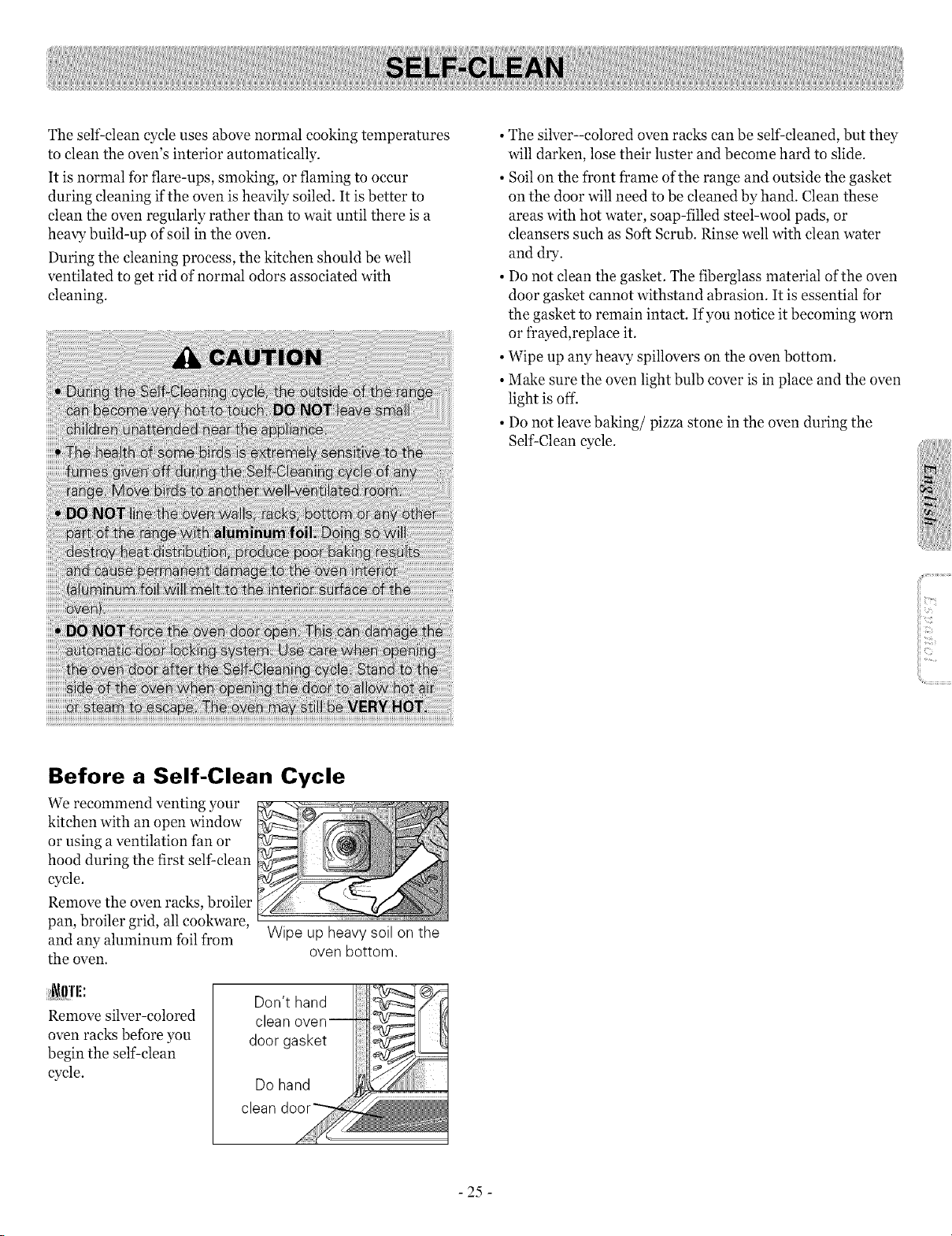
The self clean cycle uses above normal cooking temperatures
to clean the oven's interior automatically.
It is normal for flare-ups, smoking, or flaming to occur
during cleaning ifthe oven is heavily soiled. It is better to
clean the oven regularly rather than to wait until there is a
heavy build-up of soil in the oven.
During the cleaning process, the kitchen should be well
ventilated to get rid of normal odors associated with
cleaning.
• The silver-colored oven racks can be self-cleaned, but they
will darken, lose their luster and become hard to slide.
• Soilon the front frame of the range and outside the gasket
on the door will need to be cleaned by hand. Clean these
areas with hot water, soap-filled steel-wool pads, or
cleansers such as Soft Scrub. Rinse well with clean water
and dry.
• Do not clean the gasket. The fiberglass material of the oven
door gasket cannot withstand abrasion. It is essential for
the gasket to remain intact. If you notice it becoming worn
or frayed,replace it.
• Wipe up any heavy spillovers on the oven bottom.
• Make sure the oven light bulb cover is in place and the oven
light is off.
• Do not leave baking/pizza stone in the oven during the
Self Clean cycle.
Before a Self-Clean Cycle
We recommend venting your
kitchen with an open window
or using a ventilation fan or
hood during the first self clean
cycle.
Remove the oven racks, broiler
pan, broiler grid, all cookware,
and any aluminum foil from
the oven.
Wipe up heavy soil on the
oven bottom.
Don't hand
clean
i lmi:
Remove s_er-colored
oven racks before you
begin the self clean
cycle.
clean
- 25 -
The SELF-CLEAN pad is used to start a Self Clean cycle.
When used with START TIME pad, a delayed Self Clean
cycle may also be programmed. The Self-Clean function has
cycle times of 2, 3, or 4 hours.
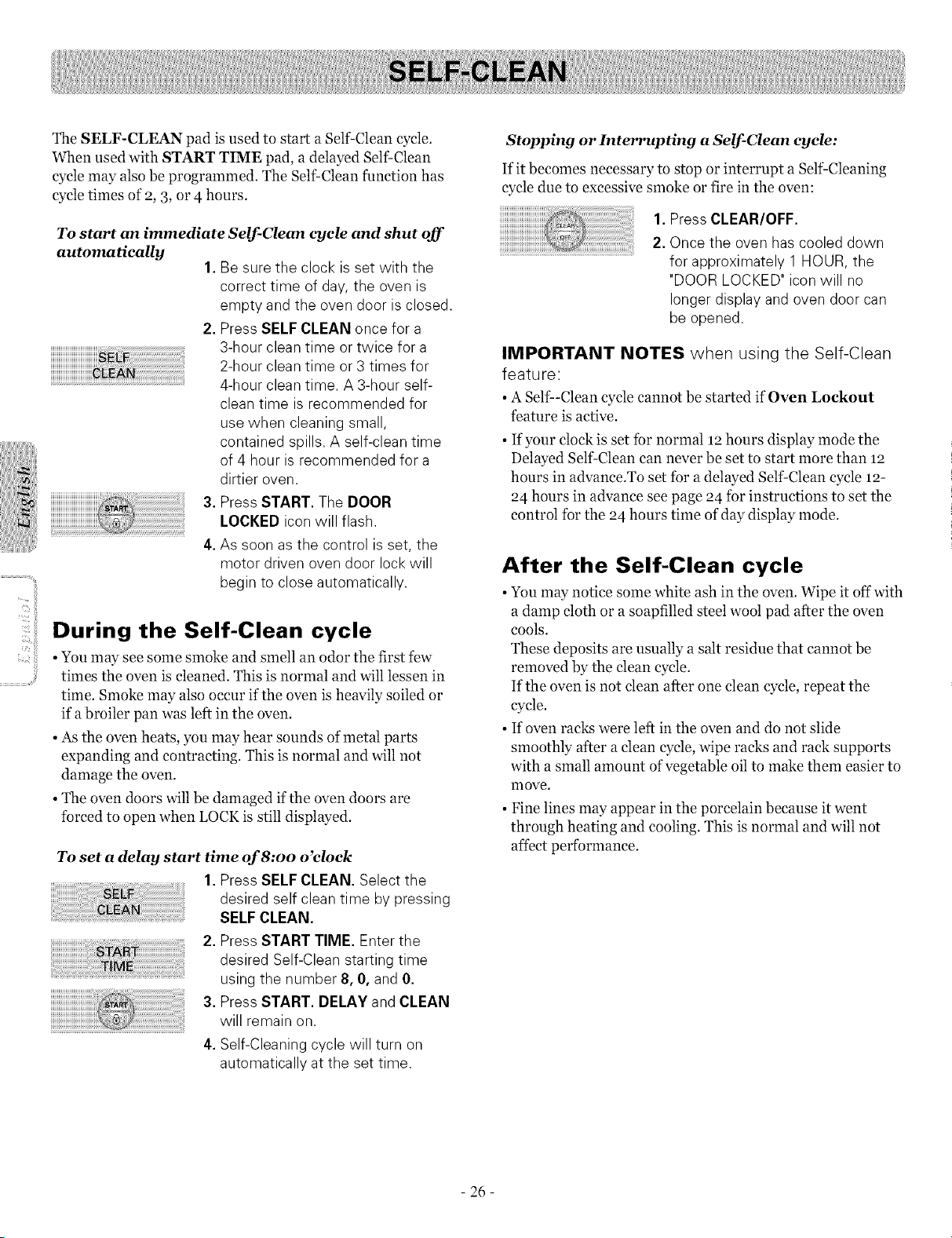
To start an immediate Self-Clean cycle and shut off
automatically
1.Be sure the clock is set with the
correct time of day, the oven is
empty and the oven door isclosed.
2. Press SELFCLEAN once for a
3-hour clean time or twice for a
2-hour clean time or 3 times for
4-hour clean time. A 3-hour self-
clean time isrecommended for
use when cleaning small,
contained spills. A self-clean time
of 4 hour isrecommended for a
dirtier oven.
3. Press START. The DOOR
LOCKED iconwill flash.
4. As soon asthe control is set, the
motor driven oven door lock will
begin to close automatically.
During the Self-Clean cycle
• You may see some smoke and smell an odor the first few
times the oven is cleaned. This is normal and will lessen in
time. Smoke may also occur if the oven is heavily soiled or
if a broiler pan was left in the oven.
• As the oven heats, you may hear sounds ofmetal parts
expanding and contracting. This is normal and will not
damage the oven.
• The oven doors will be damaged if the oven doors are
forced to open when LOCK is still displayed.
To set a delay start time of 8:oo o'clock
1.Press SELF CLEAN. Select the
desired self cleantime by pressing
SELFCLEAN.
2. Press START TIME. Enter the
desired Self-Clean starting time
using the number 8,0, and 0.
3. Press START. DELAYand CLEAN
will remain on.
4. Self-Cleaning cycle will turn on
automatically atthe set time.
Stopping or Interrupting a Self-Clean cycle:
If it becomes necessary to stop or interrupt a Self-Cleaning
cycle due to excessive smoke or fire in the oven:
1. Press CLEAR/OFF.
2. Once the oven has cooled down
for approximately 1 HOUR, the
"DOOR LOCKED" iconwill no
longer display and oven door can
be opened.
IMPORTANT NOTES when using the Self-Clean
feature:
• ASelf--Clean cycle cannot be started if Oven Lockout
feature is active.
• If your clock is set for normal 12 hours display mode the
Delayed Self-Clean can never be set to start more than 12
hours in advance.To set for a delayed Self-Clean cycle 12-
24 hours in advance see page 24 for instructions to set the
control for the 24 hours time of day display mode.
After the Self-Clean cycle
• You may notice some white ash in the oven. Wipe it off with
a damp cloth or a soapfilled steel wool pad after the oven
cools.
These deposits are usually a salt residue that cannot be
removed by the clean cycle.
If the oven is not clean after one clean cycle, repeat the
cycle.
• If oven racks were left in the oven and do not slide
smoothly after a clean cycle, wipe racks and rack supports
with a small amount of vegetable oil to make them easier to
nlove.
• Fine lines may appear in the porcelain because it went
through heating and cooling. This is normal and will not
affect performance.
- 26 -
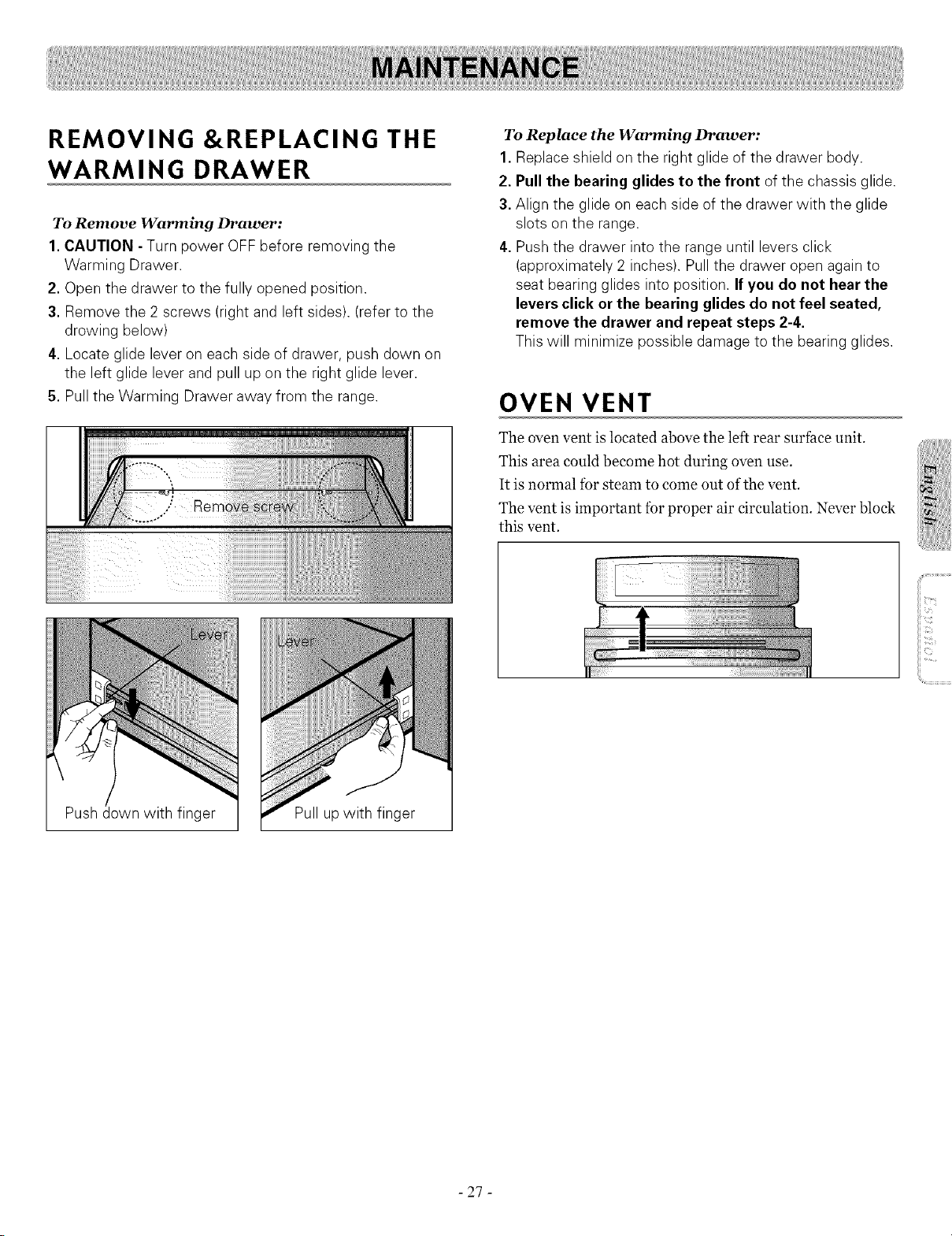
REMOVING &REPLACING THE
WARMING DRAWER
To Remove Warming Drawer:
1.CAUTION - Turn power OFF before removing the
Warming Drawer.
2. Open the drawer to the fully opened position.
3. Remove the 2 screws (rightand left sides). (refer to the
drowing below)
4. Locate glide lever on each side of drawer, push clown on
the left glide leverand pull up on the right glide lever.
5. Pull the Warming Drawer away from the range.
To Replace the Warming Drawer:
1. Replace shield on the right glide of the drawer body.
2. Pullthe bearing glides to the front of the chassis glide.
3. Align the glide on each side of the drawer with the glide
slots on the range.
4. Pushthe drawer into the range until levers click
(approximately 2 inches). Pull the drawer open again to
seat bearing glides into position. If you do not hear the
levers click or the bearing glides do not feel seated,
remove the drawer and repeat steps 2-4.
This will minimize possible damage to the bearing glides.
OVEN VENT
The oven vent is located above the left rear surface unit.
This area could become hot during oven use.
It is normal for steam to come out of the vent.
The vent is important for proper air circulation. Never block
this vent.
_i!iiiiiiT,!,!,!,!,7,7_:!:!liii!!i
iiii_i_ii_)!iii
iiii_71;ii!17!!7:::;i:
Push
get Pull up with finger
- 27 -

CARE &CLEANING
Changing the Oven Light
The oven light is a standard 4o-watt appliance bulb. It will
come on when the oven door is open. When the oven door is
closed, press OVEN LIGHT to turn it on or off. It will not
work during the Self-Clean cycle.
To replace:
• Make sure oven and bulb are cool.
1.Unplug range or disconnect power,
2.Turn the glass bulb cover in the back of
the oven counterclockwise to remove.
3.Turn bulb counterclockwise to remove from socket.
4. Replace bulb and bulb cover byturning clockwise.
5. Plug in range or reconnect power.
Painted and Body Parts, and
Decorative Trim
For general cleaning, use a cloth with hot and soapy water.
For more difficult soils and built-up grease, apply a liquid
detergent directly onto the soil. Leave on soil for 3o to 6o
minutes. Rinse with a damp cloth and dry. DO NOT use
abrasive cleaners on any of these materials; they can scratch.
Stainless Steel Surfaces (on some
models)
Do not use a steel-wool pad; it will scratch the
surface.
1.Shakebottle well.
2. Placea small amount of Stainless Steel Appliance Cleaner
or polish on a damp cloth or damp paper towel.
3. Cleana small area, rubbing with the grain of the stainless
steel ifapplicable.
4. Dry and buff with a clean, dry paper towel or soft cloth.
5. Repeat as necessary.
[_ffl'l!:If amineral off-based stainless steel appliance cleaner has
been used before to clean the appliance, wash the surface
with dishwashing liquid and water prior to using the
Stainless Steel Appliance Cleaner or polish.
Broiler Pan and Grid
Do not clean the broiler
pan or grid in a self-
cleaning mode.
Mter broiling, remove the Donotstore a soiled broiler
broiler pan from the oven. pan and gridanywhere inthe
Remove the grid from the pan. range.
Carefully pour out the grease
from the pan into a proper container.
Wash and rinse the broiler pan and grid in hot
water with a soap-filled or plastic scouring pad.
If fbod has burned on,sprinkle the grid with cleaner while
hot and cover with wet paper towels or a dishcloth. Soaking
the pan will remove burned-on foods.
Both the broiler pan and grid may be cleaned with a
commercial oven cleaner.
Both the broiler pan and grid can also be cleaned in a
dishwasher.
Oven Racks
Remove the oven racks
before operating the Self-
Clean cycle. Leaving the
racks in place could cause
discoloration, and, if tbod
is spilled into the tracks,
could causes the racks to
become stuck. If left, clean
by using a mild, abrasive
cleaner. Rinse with clean
water and dry.
If the racks are cleaned in the Self-Clean cycle, their color
will turn slightly blue and the finish will be dull. After the
Self Clean cycle is complete, and the oven has cooled, rub
the sides of the racks with wax paper or a cloth containing a
small amount of oil. This will make the racks glide easier into
the rack tracks.
- 28 -
Oven door
Use soap &water to thoroughly clean the top, sides, and
t¥ont of the oven door. Rinse well. You may use a glass
cleaner on the outside glass ofthe oven door. DO NOT
immerse the door in water. DO NOT spray or allow
water or the glass cleaner to enter the door vents.
DO NOT use oven cleaners, cleaning powders, or any harsh
abrasive cleaning materials on the outside of the oven door.
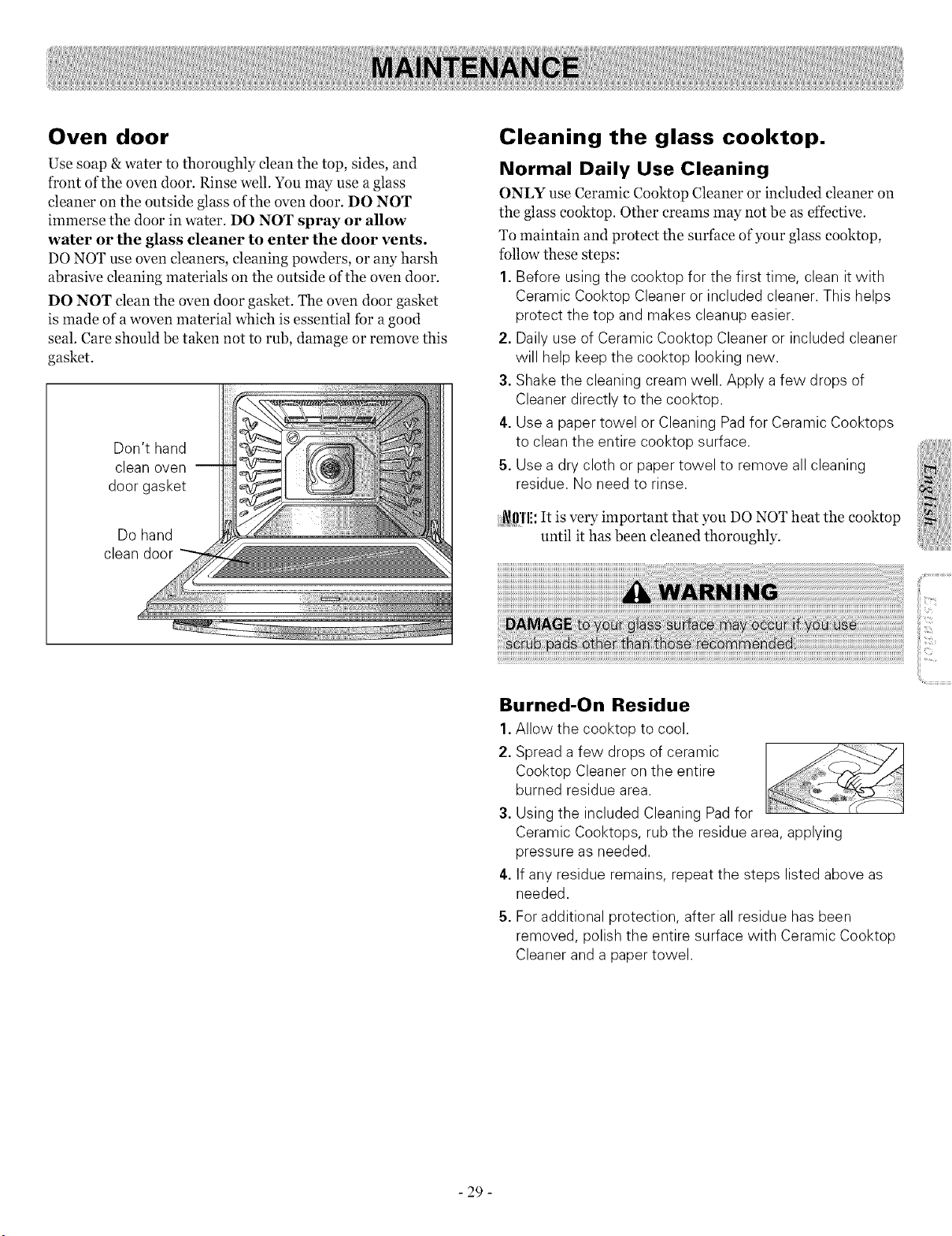
DO NOT clean the oven door gasket. The oven door gasket
is made of a woven material which is essential tbr a good
seal. Care should be taken not to rub, damage or remove this
gasket.
Don't hand
clean oven
door gasket
Dohand
clean door
Cleaning the glass cooktop.
Normal Daily Use Cleaning
ONLY use Ceramic Cooktop Cleaner or included cleaner on
the glass cooktop. Other creams may not be as effective.
To maintain and protect the surface of your glass cooktop,
follow these steps:
1. Before usingthe cooktop for the first time, clean it with
Ceramic Cooktop Cleaner or included cleaner. This helps
protect the top and makes cleanup easier.
2. Daily useof Ceramic Cooktop Cleaner or included cleaner
will help keepthe cooktop looking new.
3. Shakethe cleaning cream well. Apply a few drops of
Cleaner directly to the cooktop.
4. Use a paper towel or Cleaning Pad for Ceramic Cooktops
to clean the entire cooktop surface.
5. Use a dry cloth or paper towel to remove all cleaning
residue. No need to rinse.
_l}'l'li: It is very important that you DO NOT heat the cooktop
until it has been cleaned thoroughly.
Burned-On Residue
1.Allow the cooktop to cool.
2. Spread a few drops of ceramic
Cooktop Cleaner on the entire
burned residue area.
3. Using the included Cleaning Pad for
Ceramic Cooktops, rub the residue area,applying
pressure as needed.
4. If any residue remains, repeat the steps listed above as
needed.
5. For additional protection, after all residue hasbeen
removed, polish the entire surface with Ceramic Cooktop
Cleaner and a paper towel.
- 29 -
Heavy, Burned-On Residue
1. Allow the cooktop to cool
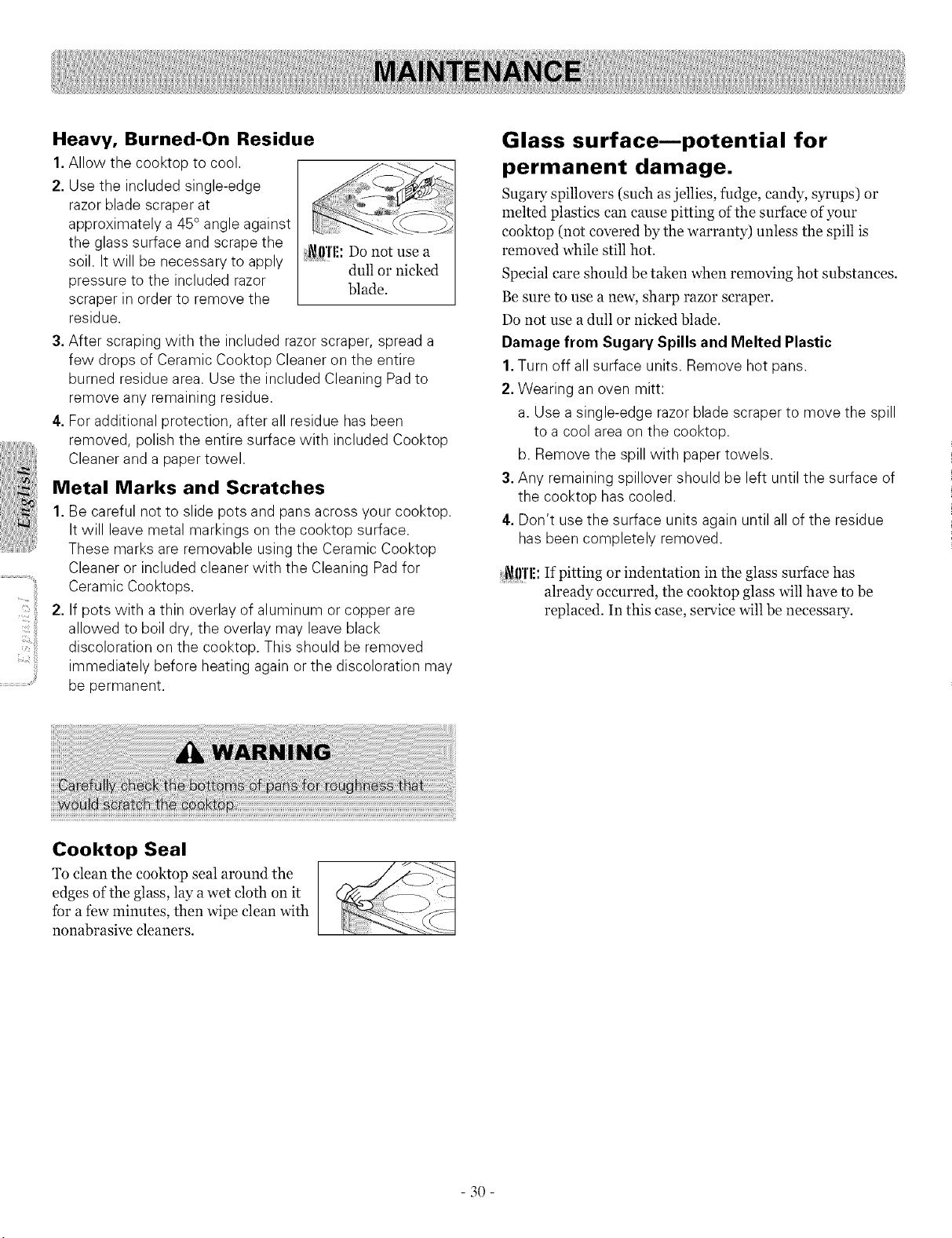
2. Use the included single-edge
razorblade scraper at
approximately a 45 °angle against
the glass surface and scrape the i_!l'l'l!: Donot usea
soil. It will be necessary to apply .............dull or nicked
pressure to the included razor
blade.
scraper in order to remove the
residue.
3.After scraping with the included razorscraper, spreada
few drops of Ceramic Cooktop Cleaner on the entire
burned residue area. Use the included Cleaning Pad to
remove any remaining residue.
4. Foradditional protection, after all residue hasbeen
removed, polish the entire surface with included Cooktop
Cleanerand a paper towel.
Metal Marks and Scratches
1. Be careful not to slide pots and pansacross your cooktop.
It will leave metal markings on the cooktop surface.
These marks are removable usingthe Ceramic Cooktop
Cleaneror included cleaner with the Cleaning Pad for
Ceramic Cooktops.
2. If pots with a thin overlay of aluminum or copper are
allowed to boil dry, the overlay may leaveblack
discoloration on the cooktop. This should be removed
immediately before heating again or the discoloration may
be permanent.
Glass surface--potential for
permanent damage.
Sugary spillovers (such as jellies, fudge, candy, syrups) or
melted plastics can cause pitting ofthe surface of your
cooktop (not covered by the warranty) unless the spill is
removed while still hot.
Special care should be taken when removing hot substances.
Be sure to use a new, sharp razor scraper.
Do not use a dull or ni&ed blade.
Damage from Sugary Spills and Melted Plastic
1. Turn off all surface units. Remove hot pans.
2. Wearing an oven mitt:
a.Use a single-edge razorblade scraper to move the spill
to a cool area on the cooktop.
b. Remove the spill with paper towels.
3. Any remaining spillover should be left until the surface of
the cooktop hascooled.
4. Don't usethe surface units againuntil all of the residue
hasbeen completely removed.
i_ff!'l!:If pitting or indentation in the glass surface has
already occurred, the eooktop glass will have to be
replaced. In this case, service will be necessary.
Cooktop Seal
To clean the cooktop seal around the
edges of the glass, lay awet cloth on it
for a few minutes, then wipe clean with
nonabrasive cleaners.
_i_i_ii,!!,i_II -_.,
3O
REMOVING &REPLACING THE
LIFT-OFF OVEN DOOR
Step. 3
Open the door fully. If the door will not open fully, the
indentation is not seated correctly in the bottom edge ofthe
slot.
Step.
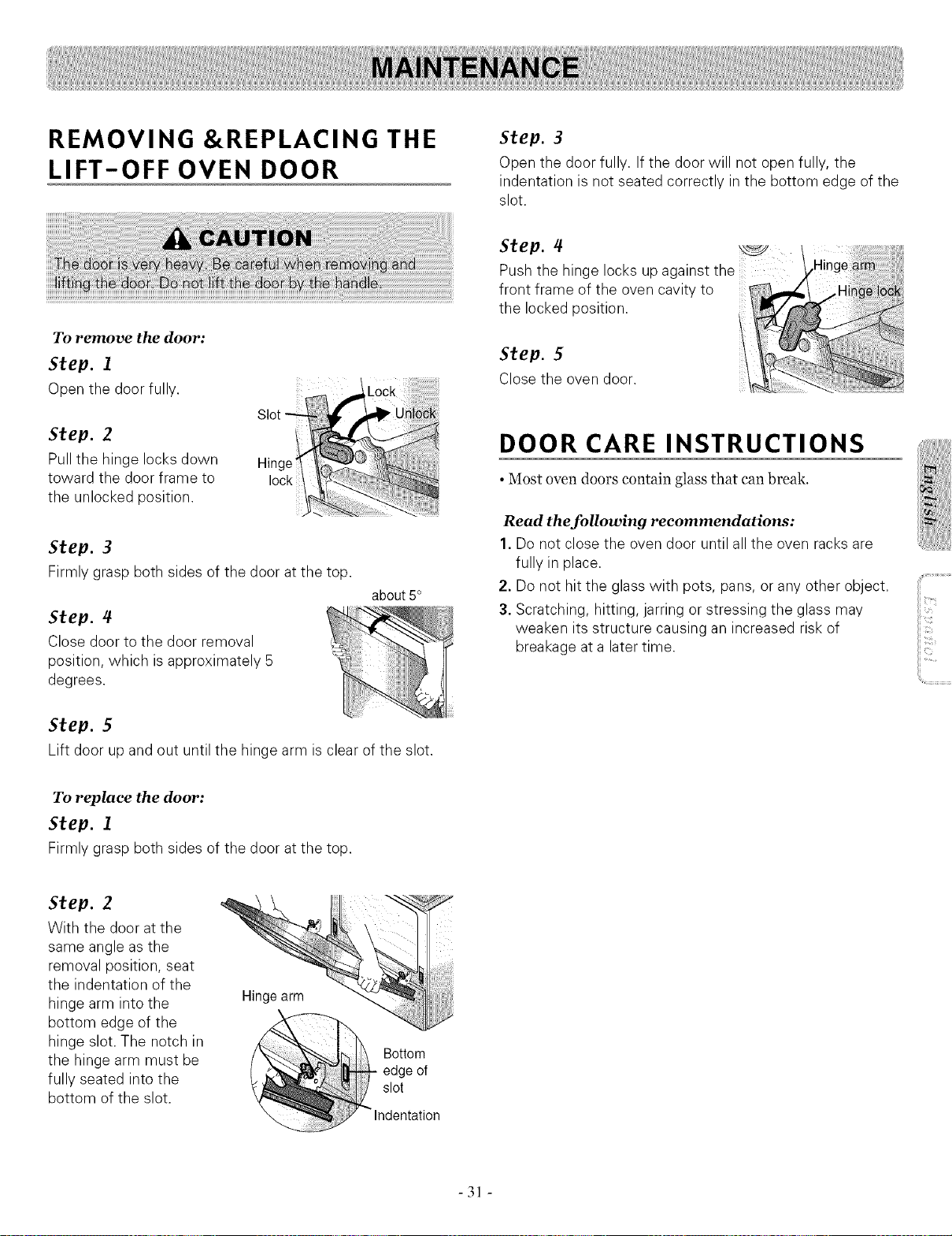
To remove the door:
Step. 1
Open the door fully.
Step. 2
Pull the hinge locks down
toward the door frame to
the unlocked position.
Hinge
lock
Step. 3
Firmly grasp both sides of the door atthe top.
Step. 4
Close door to the door removal
position, which isapproximatel
degrees.
about 5°
DOOR CARE INSTRUCTIONS
• Most oven doors contain glass that can break.
Read the following recommendations:
1. Do not close the oven door until all the oven racks are
fully in place.
2. Donot hitthe glass with pots, pans, or any other object.
3. Scratching, hitting, jarring or stressing the glass may
weaken its structure causing an increased risk of
breakage at a latertime.
Step. 5
Lift door up and out until the hinge arm isclear of the slot.
To replace the door:
Step. 1
Firmly grasp both sides of the door atthe top.
Step. 2
With the door atthe
same angle asthe
removal position, seat
the indentation of the
hinge arm intothe
bottom edge of the
hinge slot. The notch in
the hinge arm must be
fully seated into the
bottom ofthe slot.
Hingearm
- 31 -
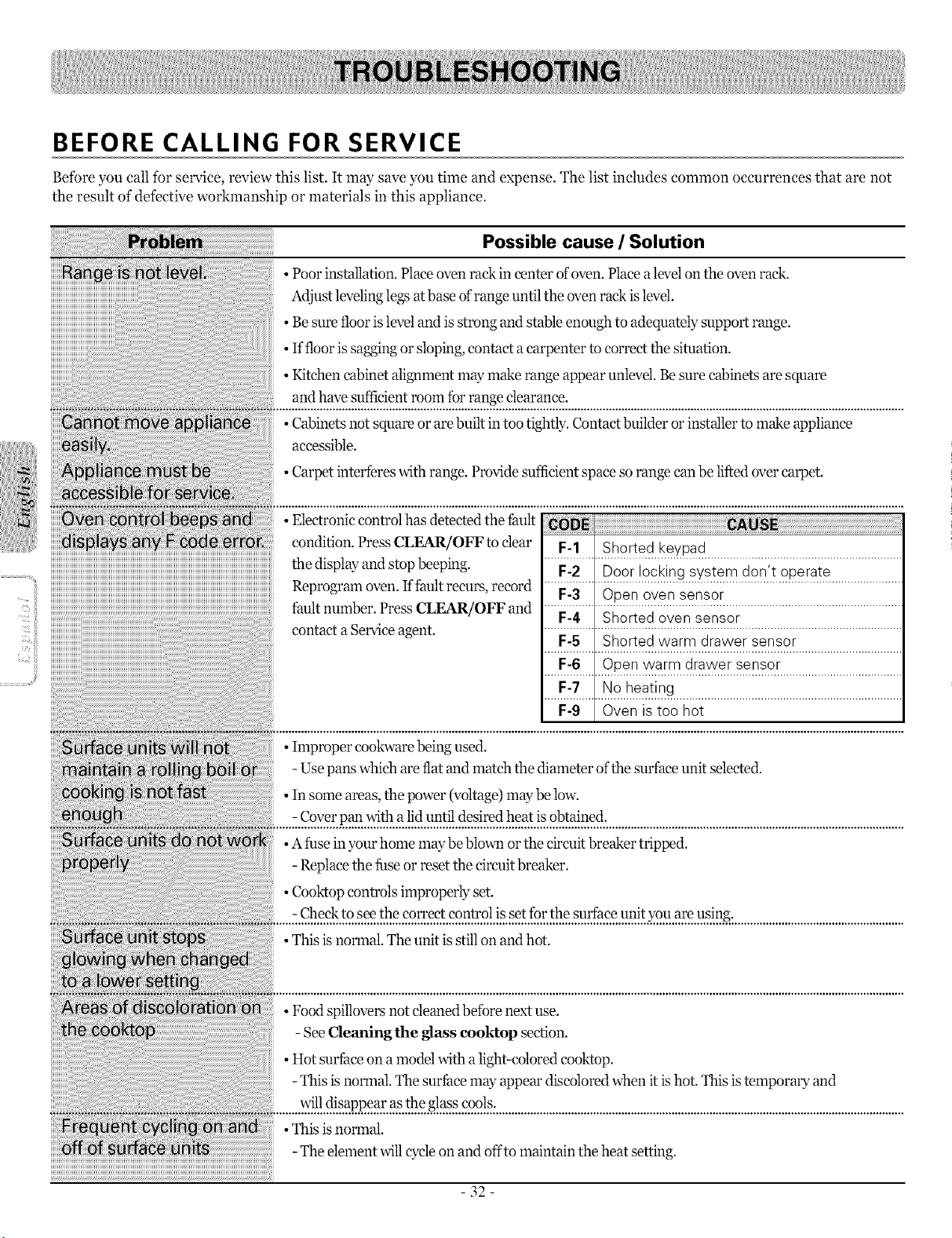
BEFORE CALLING FOR SERVICE
Before you call for service, review this list• It may save you time and expense• The list includes common occurrences that are not
the result of detective workmanship or materials in this appliance•
Possible cause / Solution
• Poor installati on•Place oven rack in center of oven• Place alevel on the oven rack.
Adjust leveling legs at base of range until the oven rack islevel.
•. Be sure floor isleveland is strong and stable enough to adequately support range.
• Ifflooris sagging or sloping, contact a carpenter to correct the situation.
Kitchen cabinet alignment may make range appear unlevel. Besure cabinets are square
• and have sufficient room fur range clearance.
NNNot vN N_iINN N Cabinets not square or are built in too tightly. Contact builder or installer to make appliance
• accessible.
Carpet interferes with range. Provide sufficient space so range can be lifted over carpet.
condition• Press CLEAR/OFFto clear F2i ISho;i;dk;V;;d
the &splay and stop beeping
• F-2 I Door locking system don't operate
Reprogran_oven If fault recurs, record ..................................................................................................................
• F-3 Open oven sensor
fault number. PressCLLaK{/OFF and .....F-4 Sl_ortedoven se nsor ...................................................
contacta Serviceagent. •..................................................................................................................
F-5 Shorted warm drawer sensor
F-6 Open warm drawer sensor
F-7 Noheating
F-9 Oven istoo hot
• Improper cookware being used•
-Use pans which are fiat and match the diameter ofthe surface unit selected•
• Insome areas, the power (voltage) may below.
-Cover pan with alid until desired heat is obtained•
• A fuse inyour home may be blown or the circuit breaker tripped.
-Replace the fuse or reset the circuit breaker•
• Cooktop controls improperly set.
-Check to seethe correct control is setforthe surfaee unit you are using•
• This is normal. The unit is stillon and hot.
• Food spillovers not cleaned before next use.
-See Cleaning the glass eooktop section•
• Hot surfhee on a model with a light-colored cooktop.
-This is normal. The surfi_eemay appear discolored when it ishot. This istemporary and
will disappear as the glass cools.
• This is normal.
-The element will cycleon and offto maintain the heat setting.
- 32-
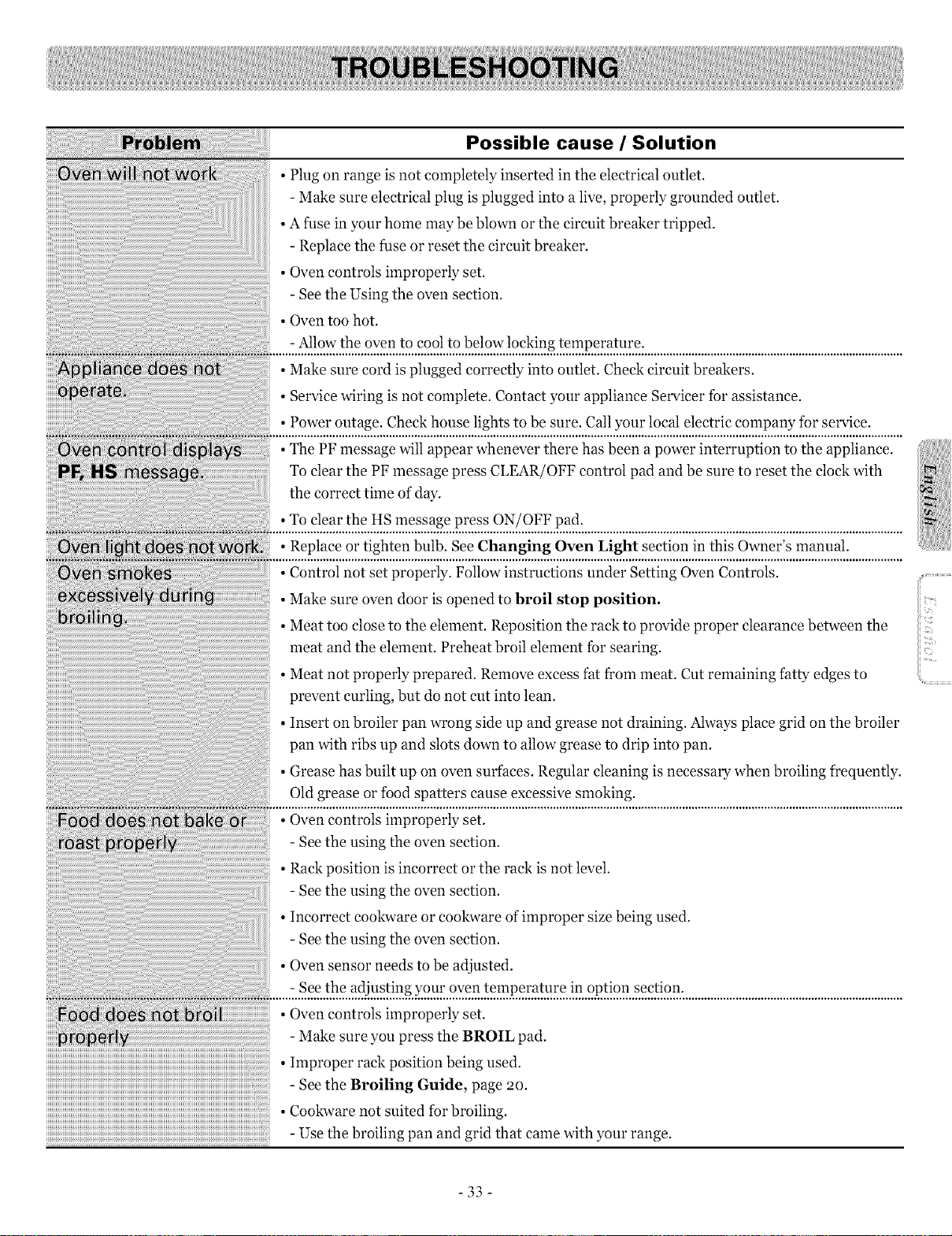
Possible cause / Solution
• Meat too close to the element. Reposition the rack to provide proper clearance between the
....................................................................................................meat and the element. Preheat broil element for searing.
• Meat not properly prepared. Remove excess fat from meat. Cut remaining fatty edges to
• prevent curling, but do not cut into lean.
Insert on broiler pan wrong side up and grease not draining. Always place grid on the broiler
• pan with ribs up and slots down to allow grease to drip into pan.
Grease has built up on oven surfaces. Regular cleaning is necessary when broiling frequently.
• Old grease or food spatters cause excessive smoking.
..... ....................................................................................................................................
- See the using the oven section.
• Rack position is incorrect or the rack is not level.
- See the using the oven section.
• Incorrect cookware or cookware of improper size being used.
- See the using the oven section.
• Oven sensor needs to be adjusted.
- See the adjusting your oven temperature in option section.
l • Oven controls improperly set.
-Make sure you press the BROIL pad.
• Improper rack position being used.
- See the Broiling Guide, page 2o.
• Cookware not suited for broiling.
-Use the broiling pan and grid that came with your range.
-33-
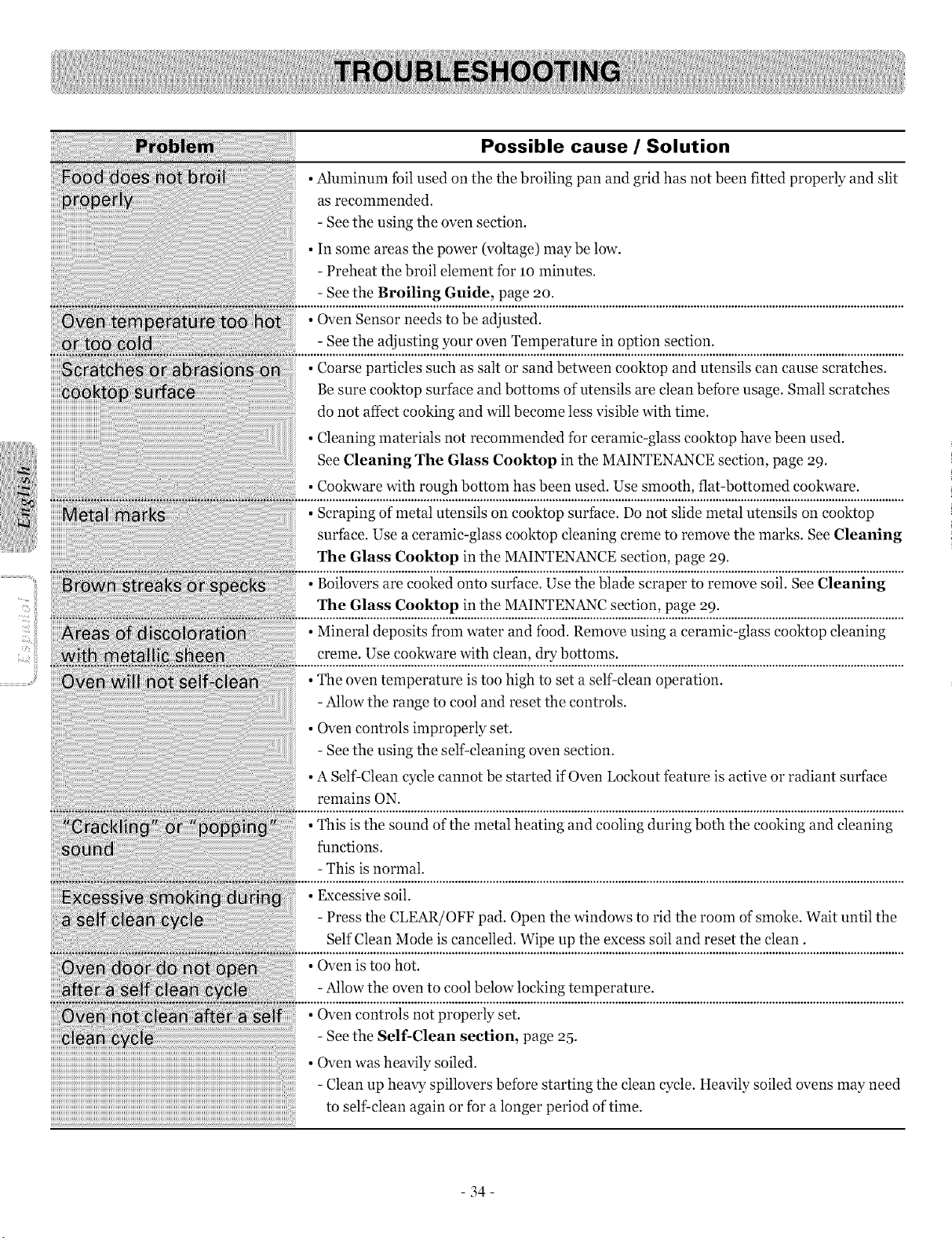
Possible cause / Solution
• Aluminum toil used on the the broiling pan and grid has not been fitted properly and slit
as recommended.
- See the using the oven section.
• In some areas the power (voltage) may be low.
- Preheat the broil element for lO minutes.
- See the Broiling Guide, page 2o.
• Oven Sensor needs to be adjusted.
- See the adjusting your oven Temperature in option section.
• Coarse particles such as salt or sand between eooktop and utensils can cause scratches.
Be sure cooktop surface and bottoms of utensils are clean before usage. Small scratches
do not affect cooking and will become less visible with time.
• Cleaning materials not recommended fbr ceramic-glass cooktop have been used.
See Cleaning The Glass Cooktop in the MAINTENANCE section, page 29.
• Cookware with rough bottom has been used. Use smooth, flat-bottomed cookware.
• Scraping of metal utensils on cooktop surface. Do not slide metal utensils on eooktop
surface. Use a ceramic-glass cooktop cleaning creme to remove the marks. See Cleaning
The Glass Cooktop in the MAINTEN_NCE section, page 29.
• Boilovers are cooked onto surface. Use the blade scraper to remove soil. See Cleaning
The Glass Cooktop in the MAINTENANC section, page 29.
• Mineral deposits from water and food. Remove using a ceramic-glass cooktop cleaning
creme. Use cookware with clean, dry bottoms.
• The oven temperature is too high to set a self-clean operation.
-Allow the range to cool and reset the controls.
• Oven controls improperly set.
- See the using the self-cleaning oven section.
• A Self-Clean cycle cannot be started if Oven Lockout feature is active or radiant surface
remains ON.
• This is the sound of the metal heating and cooling during both the cooking and cleaning
functions.
-This is normal.
• Excessive soil.
- Press the CLEAR/OFF pad. Open the windows to rid the room of smoke. Wait until the
Self Clean Mode is cancelled. Wipe up the excess soil and reset the clean.
• Oven is too hot.
-Allow the oven to cool below locking temperature.
• Oven controls not properly set.
- See the Self-Clean section, page 25.
• Oven was heavily soiled.
-Clean up heavy spillovers before starting the clean cycle. Heavily soiled ovens may need
to self-clean again or for a longer period of time.
- 34-
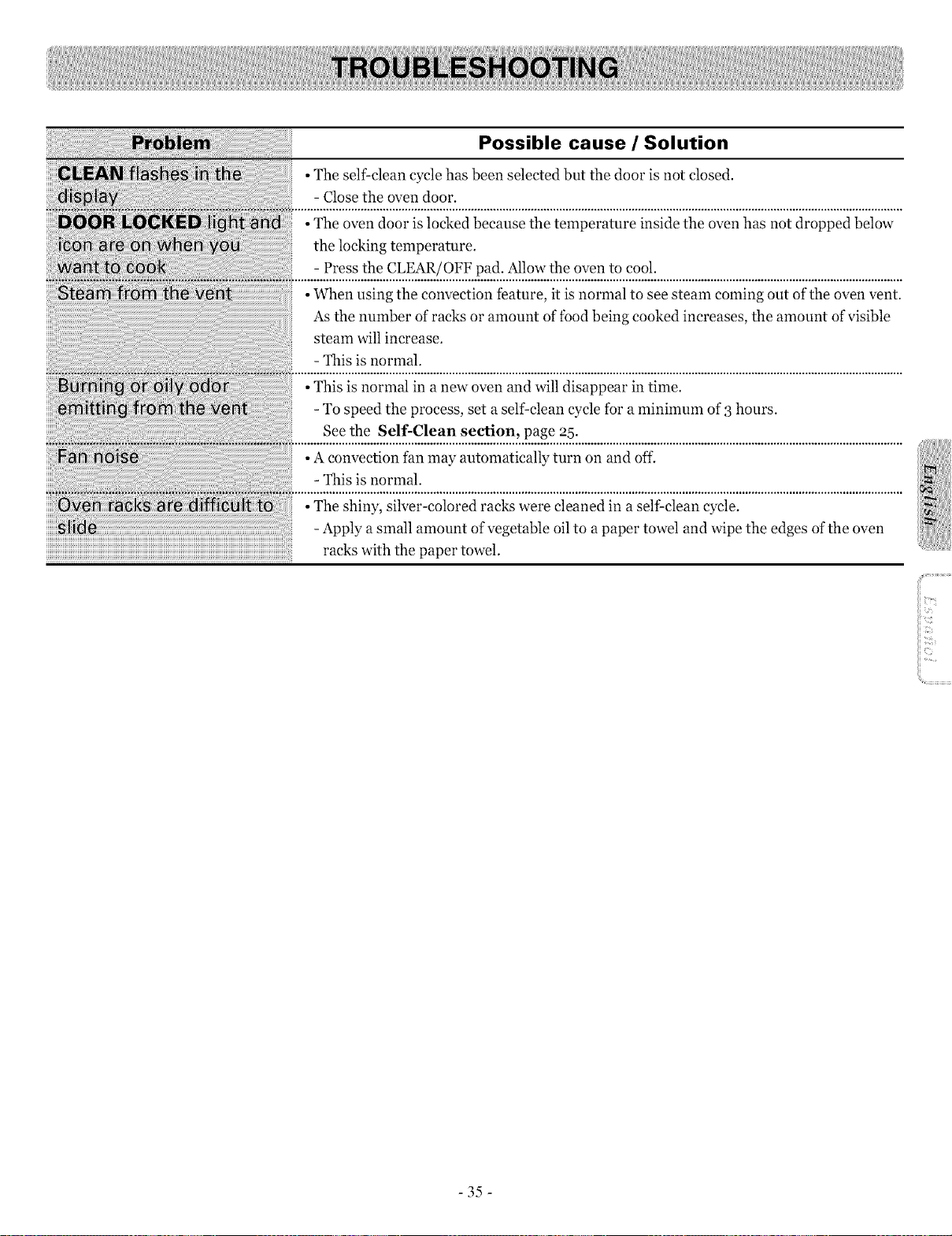
Possible cause / Solution
• The self-clean cycle has been selected but the door is not closed.
- Close the oven door.
• The oven door is locked because the temperature inside the oven has not dropped below
the locking temperature.
- Press the CLEAR/OFF pad. Allow the oven to cool.
• When using the convection feature, it is normal to see steam coming out of the oven vent.
As the number of racks or amount of food being cooked increases, the amount of visible
steam will increase.
- This is normal.
• This is normal in a new oven and will disappear in time.
-To speed the process, set a self clean cycle for aminimum of 3 hours.
See the stir-Clean section, page 95.
• Aconvection fan may automatically turn on and off.
- This is normal.
• The shiny, silver-colored racks were cleaned in a self clean cycle.
-Apply a small amount of vegetable oil to a paper towel and wipe the edges ofthe oven
racks with the paper towel.
-35-
LG Electronics Inc. will repair or replace your product, at LG's option, if it proves to be defective in material or
workmanship under normal use, during the warranty period set forth below, effective from the date of original consumer
purchase of the product. This limited warranty is good only to the original purchaser of the product and effective only
when used in U.S.A.
WARRANTY PERIOD:
One Year
From the date of the
original purchase
Five Years
From the date of the
original purchase
HOW SERVICE IS HANDLED:
Any part of the range which fails due to a defect in materials or workmanship. During this
full one-year warranty, LG will also provide, free of charge, all labor and in-home service
to replace the defective part.
A replacement glass cooktop if it should crack due to thermal shock, discolor, crack at the
rubber seal between the glass cooktop and the porcelain edge.
A replacement radiant surface unit if it should burn out.
During this limited additional four-year warranty, you will be responsible for any labor or
in-home service.
THIS WARRANTY IS IN LIEU OF ANY OTHER WARRANTIES, EXPRESS OR IMPLIED, INCLUDING
WITHOUT LIMITATION, ANY WARRANTY OF MERCHANTABILITY OR FITNESS FOR A PARTICULAR
PURPOSE. TO THE EXTENT ANY IMPLIED WARRANTY IS REQUIRED BY LAW, IT IS LIMITED IN
DURATION TO THE EXPRESS WARRANTY PERIOD ABOVE. LG WILL NOT BE LIABLE FOR ANY
CONSEQUENTIAL, INDIRECT, OR INCIDENTAL DAMAGES OF ANY KIND, INCLUDING LOST
REVENUES OR PROFITS, IN CONNECTION WITH THE PRODUCT. SOME STATES DO NOT ALLOW
LIMITATION ON HOW LONG AN IMPLIED WARRANTY LASTS OR THE EXCLUSION OF INCIDENTAL
OR CONSEQUENTIAL DAMAGES, SO THE ABOVE LIMITATIONS OR EXCLUSIONS MAY NOT APPLY TO
YOU.
THIS LIMITED WARRANTY DOES NOT APPLY TO:
1. Service calls to correct the installation of your appliance, to instruct you how to use your appliance, to replace house
fuses or correct house wiring, or to replace owner-accessible light bulbs.
2. Repairs when your appliance is used in other than normal, single-family household use.
3. Pickup and delivery. Your appliance is designed to be repairable in the home.
4. Damage resulting from accident, alteration, misuse, abuse, fire, flood, improper installation, acts of God, or use of
products not approved by LG Corporation.
5. Repairs to ceramic glass cooktop or other surfaces if they have not been cared for as recommended in the Owner's
manual.
6. Repairs to parts or systems resulting from unauthorized modifications made to the appliance.
7. Replacement parts or repair labor costs for units operated outside the united states.
8. Any labor costs during the limited warranty period.
This warranty is extended to the original purchaser and any subsequent owner for products purchased for home use within
the USA. In Alaska, the warranty excludes the cost of shipping or service calls to your home.
Some states do not allow the exclusion or limitation of incidental or consequential damages, so this exclusion or limitation
may not apply to you. This warranty gives you specific legal rights, and you may also have other rights which vary fi'om
states to states. To know what your legal rights are, consult your local or state consumer affairs or your state's Attorney
General.
CUSTOMER ASSISTANCE INFORMATION:
To Prove Warranty Coverage
To Obtain Nearest Authorized
Service Center or Sales Dealer, or to
Obtain Product, Customer, or
Service Assistance
Retain your Sales Receipt to prove date of purchase.
A copy of your Sales Receipt must be submitted at the time warranty
service is provided.
Call 1-800-243-0000 (Phone answered 24 hours - 365 days a year) and
choose the appropriate prompt from the menu; or visit our website at:
http://us.lgservice.com.
36