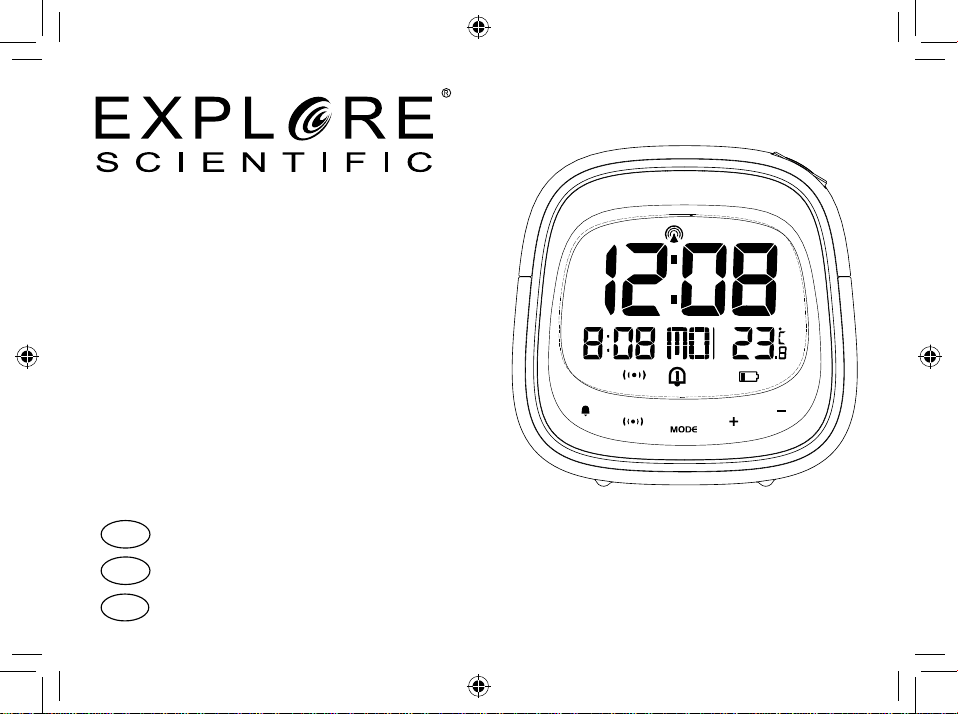
IT
ISTRUZIONI PER L’USO .......... 2
DE
BEDIENUNGSANLEITUNG .... 16
EN
INSTRUCTION MANUAL ....... 30
Art.No.:
black RDP3007-CM3000
SVEGLIA RADIOCONTROLLATA
FUNKWECKER
RC ALARM CLOCK

2
INFORMAZIONI SUL MANUALE DI
ISTRUZIONI
Il presente manuale è parte integrante del prodot-
to.
Non azionare il dispositivo prima di aver letto attenta-
mente le istruzioni di sicurezza e le istruzioni per l’uso
in esso contenute.
Il manuale deve essere conservato in modo che sia
possibile consultarlo anche in seguito. Nel caso in cui il
dispositivo venga venduto o ceduto a terzi, dovrà essere
fornito al nuovo possessore del dispositivo. Il disposi-
tivo può essere utilizzato esclusivamente in ambienti
interni.
AVVERTENZE GENERALI
• RISCHIO DI FOLGORAZIONE — Questo apparec-
chio contiene componenti elettronici azionati da
una sorgente di corrente (alimentatore e/o batte-
rie). L’utilizzo deve avvenire in stretta conformità
con quanto prescritto nel presente manuale. In
caso contrario, non sarà possibile escludere il ri-
schio di infortuni elettrici.
• PERICOLO DI SOFFOCAMENTO — I bambini pos-
sono utilizzare il dispositivo solo sotto la vigilanza
di un adulto. I materiali di imballaggio, i sacchetti
di plastica e le fasce in gomma possono causare
soffocamento e, pertanto, devono essere conser-
vati in modo che i bambini non riescano a raggiun-
gerli.
• RISCHIO DI USTIONE CHIMICA — Tenere le bat-
terie fuori dalla portata dei bambini. Accertarsi di
installare le batterie nel modo corretto. La fuoriu-
scita di acido dalle batterie può causare ustioni
chimiche. Evitare che l’acido venga a contatto con
pelle, occhi e mucose. In caso, lavare immedia-
tamente le parti interessate con un’abbondante
quantità di acqua e rivolgersi a un medico.
• RISCHIO DI INCENDIO/ESPLOSIONE — Non
esporre il dispositivo a temperature elevate. Utiliz-
zare solo le batterie consigliate. Evitare che pos-
sano vericarsi corto-circuiti a carico del disposi-
tivo o delle batterie. Non gettare il dispositivo o le
batterie nel fuoco. Il surriscaldamento o l’impiego
inappropriato potrebbe generare un cortocircuito,
un incendio o un’esplosione.

IT
DE
EN
3
• Non smontare il dispositivo. Qualora dovesse ri-
levarsi difettoso, rivolgersi al proprio rivenditore
autorizzato. Il rivenditore provvederà a contattare
il Centro assistenza e, se necessario, spedirà il di-
spositivo in riparazione.
• Utilizzare solo le batterie consigliate. Le batterie
scariche o esaurite devono essere sempre sostituite
con una serie completa di batterie nuove di capacità
massima. Non utilizzare batterie di marche o capaci-
tà diverse. Rimuovere le batterie dall’unità se questa
rimarrà inutilizzata per un periodo prolungato.
CONTENUTO DELLA CONFEZIONE
Sveglia, manuale di istruzioni, adattatore CA/ CC, due
batterie AAA.
PRIMA DI INIZIARE
• Si consiglia l'uso di batterie alcaline. Se le tempera-
ture tendono regolarmente a scendere sotto 0 °C (32
°F), tuttavia, potrebbe essere preferibile l’impiego di
batterie al litio.
• Evitare di utilizzare batterie ricaricabili (le batterie
ricaricabili non soddisfano i requisiti di alimenta-
zione appropriati).
• Al primo utilizzo, avere cura di inserire le batterie in
modo da rispettare la polarità indicata nel relativo
vano. Sono necessarie due batterie AAA.
4
INFORMAZIONI GENERALI SUL
PRODOTTO
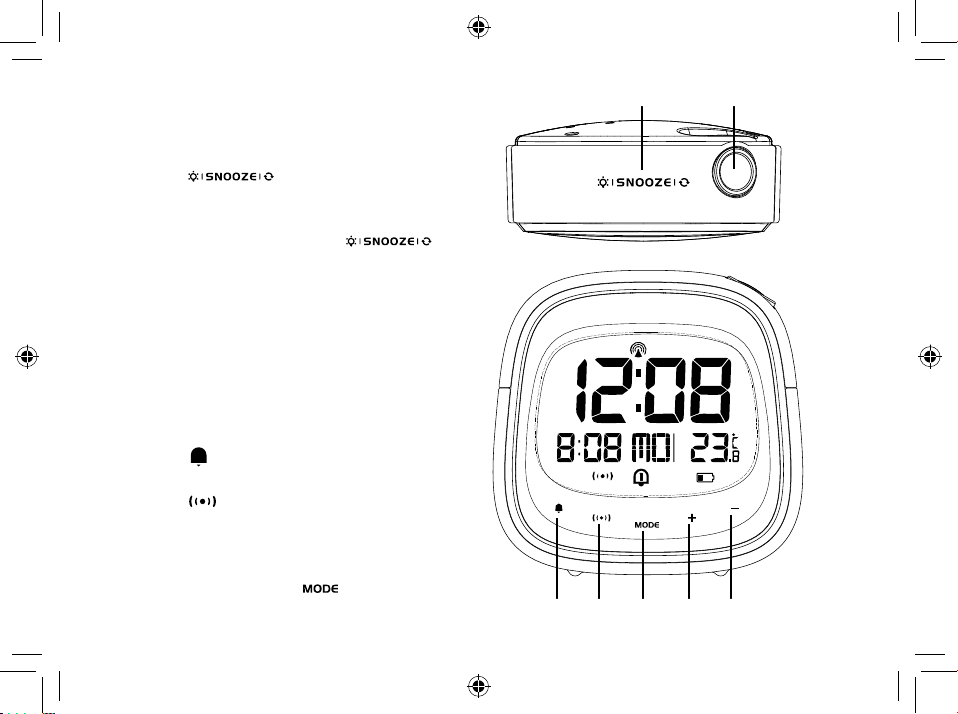
1. Premere [ ] per attivare lo snoo-
ze e la retroilluminazione per 8 secondi. La
funzione di snooze consente di silenziare la
sveglia per 8 minuti. Premere [ ]
per capovolgere la proiezione di 180°. Tenere
premuto per accendere la retroilluminazione
per 8 secondi e la proiezione per 5 minuti.
Premere di nuovo il tasto e tenerlo premuto
per accendere la retroilluminazione per 8 se-
condi e la proiezione continua (la proiezione
continua è possibile solo quando si utilizza un
adattatore CA/CC).
2. Lente di proiezione.
3. Premere [
] per attivare/disattivare la sve-
glia.
4. Premere [ ] per passare dalla visualizza-
zione del calendario a quella della sveglia e
viceversa. Tenendo premuto il tasto, è possi-
bile procedere all’impostazione della sveglia.
5. Premere e tenere premuto [ ] per accedere
all’impostazione dell’ora e della data.
IT
DE
EN
5
6. Premere e tenere premuto [ ] per accendere o spe-
gnere la ricezione RCC. In modalità impostazione,
premere il tasto per aumentare il valore impostato
di una unità; tenerlo premuto per incrementare il va-
lore rapidamente.
7. Premere e tenere premuto [ ] per visualizzare la
temperatura o l’ora (solo quando la proiezione è
attiva). In modalità impostazione, premere il tasto
per ridurre il valore impostato di una unità; tenerlo
premuto per decrementare il valore rapidamente.
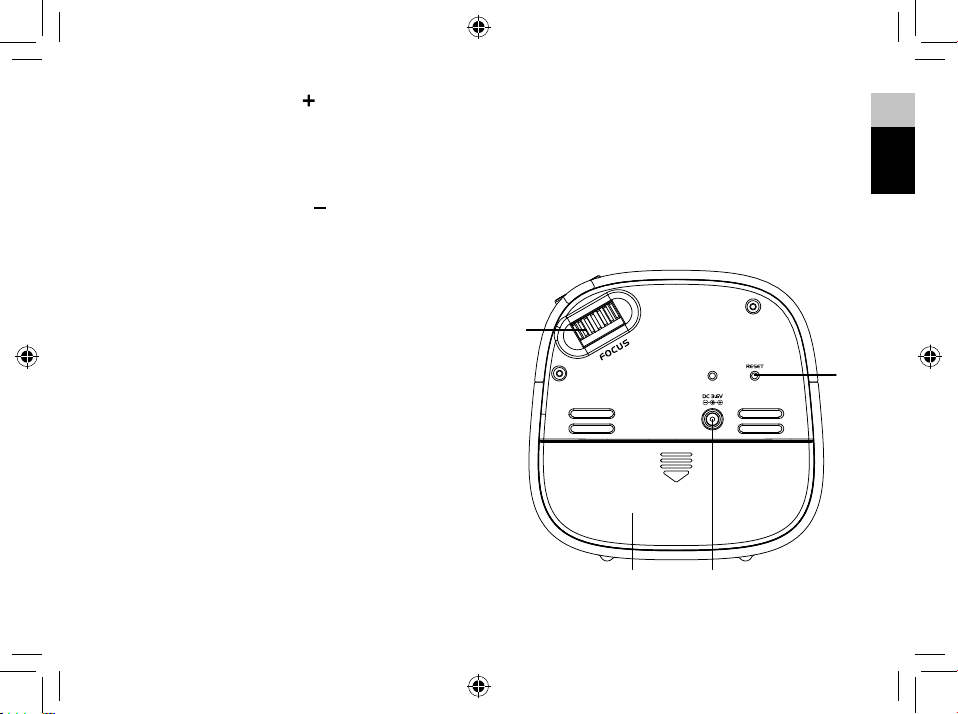
8. Regolare la messa a fuoco della proiezione con
l’apposita rotella.
9. Premere il tasto di reimpostazione per ripristinare
i valori prede niti.
10. Vano batterie. Scorrere verso il basso per aprire.
11. Spina jack di alimentazione.
6
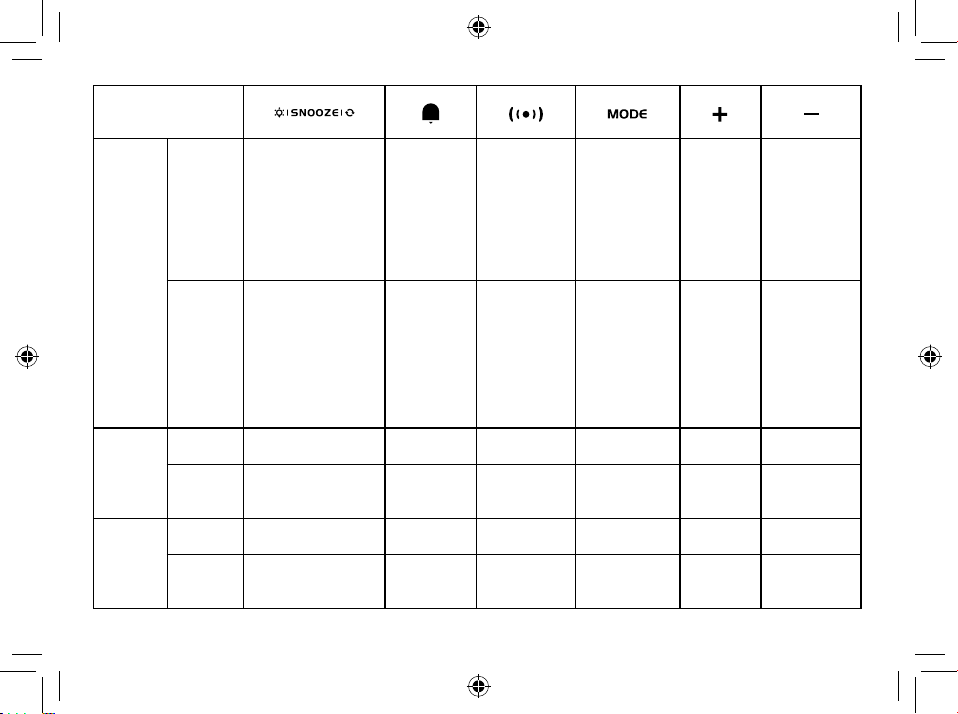
TASTO
MODALITÀ
Standard
PREMERE
PER
Accendere la retroil
-
luminazione per 8
secondi (SNOOZE
mentre la sveglia
suona)
Azionare l’interruttore
per la proiezione a 180°
Attivare o
disattivare
la sveglia
Interrompere
la sveglia
(mentre
suona)
Alternare la
visualizzazione
del calendario
e quella della
sveglia
_______ _______ _______
TENERE
PREMUTO
PER
Accendere la retroillumi
-
nazione per 8 secondi
e la proiezione per 5
minuti. Tenere premuto
di nuovo per attivare
la proiezione continua
(solo con adattatore
AC/DC)
_______
Accedere alla
modalità
impostazione
della sveglia
Accedere
all’impostazione
dell’ora e della
data
Accensione/
spegnimen-
to dell’RCC
Visualizzare la
temperatura
o l’ora (solo
quando la
proiezione è
attivata)
Impo
-
stazione
dell’ora
PREMERE
PER
_______ _______
Confermare
l’ora
Confermare
l’impostazione
Aumentare Diminuire
TENERE
PREMUTO
PER
_______ _______ _______ _______
Aumentare
rapidamente
Diminuire
rapidamente
Impo
-
stazione
dell’ora di
sveglia
PREMERE
PER
_______ _______ _______
Confermare
l’impostazione
Aumentare Diminuire
TENERE
PREMUTO
PER
_______ _______ _______ _______
Aumentare
rapidamente
Diminuire
rapidamente
IT
DE
EN
7
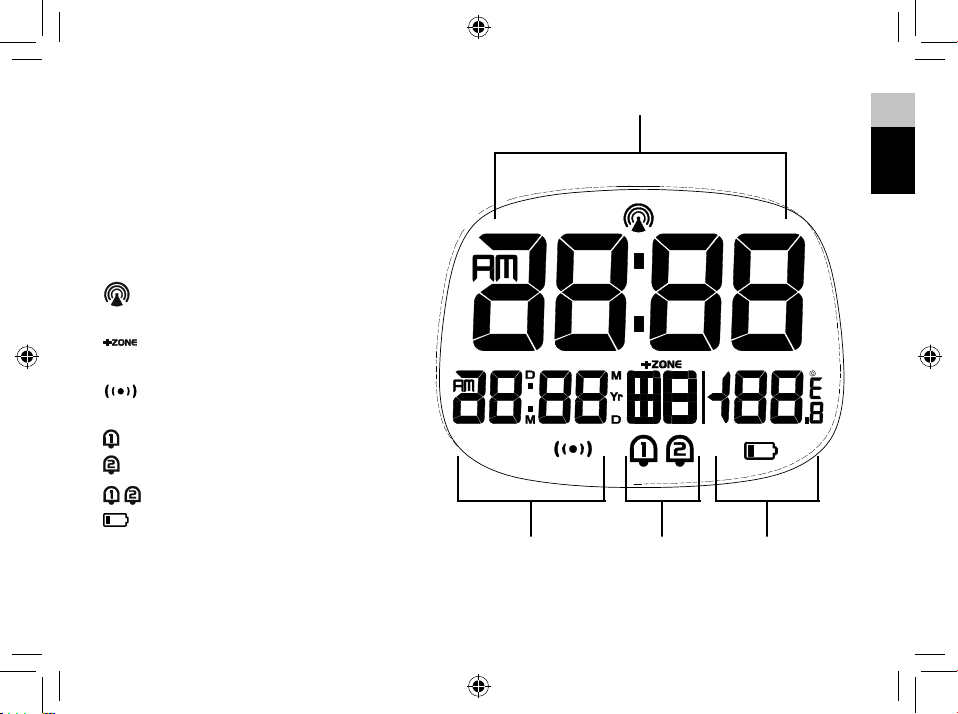
DISPLAY LCD
1. Visualizzazione dell’ora
2. Visualizzazione del calendario
3. Visualizzazione del giorno della
settimana
4. Visualizzazione della temperatura
[
] Segnale RCC ricevuto
[
] Indicatore del fuso orario
[
] Snooze attivato
[
] Sveglia 1 attivata
[
] Sveglia 2 attivata
[
] Sveglia 1 + Sveglia 2 attivate
[
] Indicatore di batteria scarica
8
OPERAZIONI PRELIMINARI
INSTALLAZIONE DELLE BATTERIE
1. Rimuovere lo sportello dal vano batterie situato sul
retro del dispositivo.
2. Inserire due batterie AAA tipo LR03 da 1,5 V. Accer-
tarsi che i poli (+/-) delle batterie corrispondano ai
segni riportati nel vano.
3. Rimontare lo sportello del vano batterie.
NOTA: se viene visualizzato il simbolo [
] o se la
luminosità del display si riduce, sostituire le batterie.
ADATTATORE DI ALIMENTAZIONE CA/CC
4
Utilizzare esclusivamente un adattatore CA/CC com-
patibile (3,6 V
4
100 mA). Collegare il cavo di ali-
mentazione alla presa jack del dispositivo e l’adatta-
tore a una presa di corrente adeguata.
NOTA: si consiglia di tenere le batterie inserite come
alimentazione di riserva.
OROLOGIO
RICEZIONE DELL’OROLOGIO
1. Quando si sostituiscono le batterie o si tiene pre-
muto il tasto [
], viene avviata la ricezione RCC.
2. La durata del processo di ricezione è di 7 minuti.
3. Durante il processo di ricezione, il simbolo
[
] lampeggia sul display.
4. Se il processo di ricezione dell’RCC ha esito posi-
tivo, sul display viene visualizzato il simbolo RCC
[
] e vengono impostate automaticamente
la data e l’ora. Se il processo non si conclude nel
modo previsto entro 7 minuti, viene interrotto au-
tomaticamente. In tal caso, tenere premuto il tasto
[
] per riavviare la ricezione RCC.
5. Il processo di ricezione del segnale RCC viene av-
viato automaticamente alle ore 02:03, 03:03, 04:03
e 05:03 di ogni notte. Una volta raggiunto un esito
positivo, la funzione di ricezione automatica viene
IT
DE
EN
9
disattivata.
6. Per interrompere la ricezione RCC, tenere premuto
il tasto [
].
7. Se il dispositivo non riceve ancora il segnale, impo-
stare l’ora manualmente.
NOTA: se si utilizza un adattatore di alimentazione,
aumentarne la distanza dall’unità principale per evita-
re interferenze nella ricezione del segnale RCC.
IMPOSTAZIONE MANUALE
DELL’OROLOGIO
1. Premere e tenere premuto il tasto [ ] e impo-
stare l’ora e la data.
2. Il parametro di impostazione inizierà a lampeggiare.
3. Premendo il tasto [
] una volta, il valore del para-
metro aumenta di una unità (durante l’impostazio-
ne dei minuti, i secondi vengono reimpostati su 0).
Se si tiene il tasto [
] premuto, il valore incremen-
ta rapidamente.
4. Premendo il tasto [
] una volta, il valore del para-
metro diminuisce di una unità (durante l’imposta-
zione dei minuti, i secondi vengono reimpostati su
0). Se si tiene il tasto [
] premuto, il valore decre-
menta rapidamente.
5. Premere il tasto [
] per confermare l’imposta-
zione e passare al parametro successivo.
6. Sequenza di impostazione: Fuso orario Formato
12/24 ore Ora Minuto Anno Modalità
calendario (giorno-mese/mese-giono) Mese
Giorno Lingua per il giorno della settimana
°C/°F Esci.
7. Se non si esegue alcuna azione per 20 secondi, il
valore impostato viene salvato e la modalità impo-
stazione viene chiusa.
LINGUA
Sono disponibili le seguenti opzioni per la lingua: In-
glese (E) Tedesco (D) Francese (F) Italiano (I)
Spagnolo (S).
IMPOSTAZIONE DEL FUSO ORARIO
Per impostare un altro fuso orario, effettuare le opera-
zioni seguenti.
10
1. Tenere premuto il tasto [ ] e impostare l’ora e
la data.
2. L’impostazione relativa allo scarto di fuso orario
inizierà a lampeggiare.
3. Premere il tasto [
] per aumentare lo scarto di
fuso orario o il tasto [
] per ridurlo.
IMPOSTAZIONE DELLA
TEMPERATURA IN GRADI C/F
1. Tenere premuto il tasto [ ] e impostare l’ora e
la data.
2. Premere il tasto [
] più volte, nché sul display
non viene visualizzato °C/°F.
3. Premere il tasto [
] o [ ] per passare dai gradi
Celsius (°C) ai gradi Fahrenheit (°F) e viceversa.
SVEGLIA
IMPOSTAZIONE/REGOLAZIONE DELLA DOPPIA ORA
DI SVEGLIA
È possibile impostare due orari per la sveglia (AL1
e AL2).
1. Premere il tasto [
] per visualizzare la sveglia 1.
2. Premere il tasto [ ] e tenerlo premuto per ac-
cedere all’impostazione della sveglia attualmente
selezionata (sveglia 1).
3. Il parametro di impostazione inizierà a lampeggiare.
4. Premere il tasto [
] or [ ] per impostare i dati
desiderati.
5. Premere il tasto [
] per confermare l’imposta-
zione e passare al parametro successivo.
6. Sequenza di impostazione: Ora Minuto Esci.
7. Al termine delle operazioni di impostazione, la sve-
glia viene attivata automaticamente.
8. Se non si esegue alcuna azione per 20 secondi, il valo-
re impostato viene salvato e la modalità impostazio-
ne viene chiusa.
ATTIVAZIONE/DISATTIVAZIONE
DELLA SVEGLIA
1. In modalità visualizzazione della sveglia, premere
il tasto [
] per attivare/disattivare la sveglia cor-
rente. In modalità visualizzazione del calendario, la
sequenza è la seguente: AL1 attivata AL2 atti-
vata AL1+AL2 attivate AL1+AL2 disattivate.
IT
DE
EN
11
2. La sveglia dura 2 minuti e diventa sempre più ve-
loce.
FUNZIONAMENTO
1. All’ora impostata, la sveglia inizia a suonare.
2. Mentre la sveglia sta suonando, premere il tasto
[
] per ritardarla di 8 minuti.
3. Se non viene premuto alcun tasto, la sveglia cessa
automaticamente di suonare dopo 2 minuti.
4. Per interrompere la sveglia, è possibile premere
[
] o qualsiasi altro tasto, ad eccezione di SNOOZE.
5. La sveglia si riaccenderà all’ora successiva, a meno
che la funzione di sveglia non venga disattivata te-
nendo premendo il tasto [
].
PROIEZIONE
Il proiettore visualizza l’ora sul softto o sulla parete
e può ruotare di 180°. La visualizzazione risulta più
chiara in una stanza buia. Per ottenere una proiezione
ottimale, posizionare l’unità a 1,5-2 m dal softto o
dalla parete.
1. Premere il tasto [
] per attivare la re-
troilluminazione per 8 secondi e la proiezione per
5 minuti.
2. Premere di nuovo il tasto [
] per capo-
volgere il display di proiezione di 180°.
3. Tenere premuto il tasto [
] per attivare
la proiezione continua nel caso in cui si stia uti-
lizzando l’alimentazione dell’adattatore e per atti-
vare la proiezione per 5 minuti nel caso in cui si
stia utilizzando solo l’alimentazione delle batterie.
Premere di nuovo il tasto [
] e tenerlo
premuto per disattivare la proiezione temporanea e
la proiezione continua.
4. Tenere premuto [
] per visualizzare la temperatu-
ra o l’ora (solo quando la proiezione è attivata).
RIPRISTINO
Premere il tasto di reimpostazione per ripristinare i
valori predeniti.
12
SPECIFICHE
Dimensioni (unità principale)
98 x 43 x 97 mm (LxPxA)
Peso (unità principale)
189g
Campo di visualizzazione della temperatura
Da -5 a +50 °C (da 23 a 122 °F)
Accuratezza
Da 10 a 40°C (da 50 a 104 °F) = +/- 1 °C (+/-2 °F)
<0 e >+40 °C (<32 e >104 °F): +/- 2 °C (+/-4 °F)
Risoluzione
0,1 °C (0,2 °F)
Alimentazione
Due batterie AAA tipo LR03 da 1,5V
Adattatore di alimentazione 3,6V (100mA)
NOTA
• Quando la temperatura è inferiore a -5 °C (23 °F),
sul display della temperatura viene visualizzata l’in-
dicazione LL.L. Quando la temperatura è superiore a
50 °C (122 °F), sul sul display della temperatura viene
visualizzata l’indicazione HH.H.
DICHIARAZIONE DI CONFORMITÀ CE
Con la presente Bresser GmbH dichiara che
il tipo di apparecchiatura identicato con il
codice RDP3007 è conforme alla direttiva
2014/53/UE. Il testo integrale della dichiarazione di
conformità UE è disponibile all’indirizzo Internet: www.
bresser.de/download/RDP3007/CE/RDP3007_CE.pdf
NOTE SULLA PULIZIA
• Prima di pulire il dispositivo, rimuovere le batterie.
• Per pulire le superci esterne del dispositivo,
servirsi solo di un panno asciutto. Per evitare di
danneggiare i componenti elettronici, non utilizzare
alcun tipo di uido detergente.
• Tenere il dispositivo al riparo da polvere e umidità.
IT
DE
EN
13
SMALTIMENTO
I materiali di imballaggio devono essere smalti-
ti nel modo appropriato, a seconda del tipo, ad
esempio carta o cartone. Contattare il servizio
di smaltimento riuti locale o l’autorità ambientale
per informazioni su come eseguire correttamente lo
smaltimento.
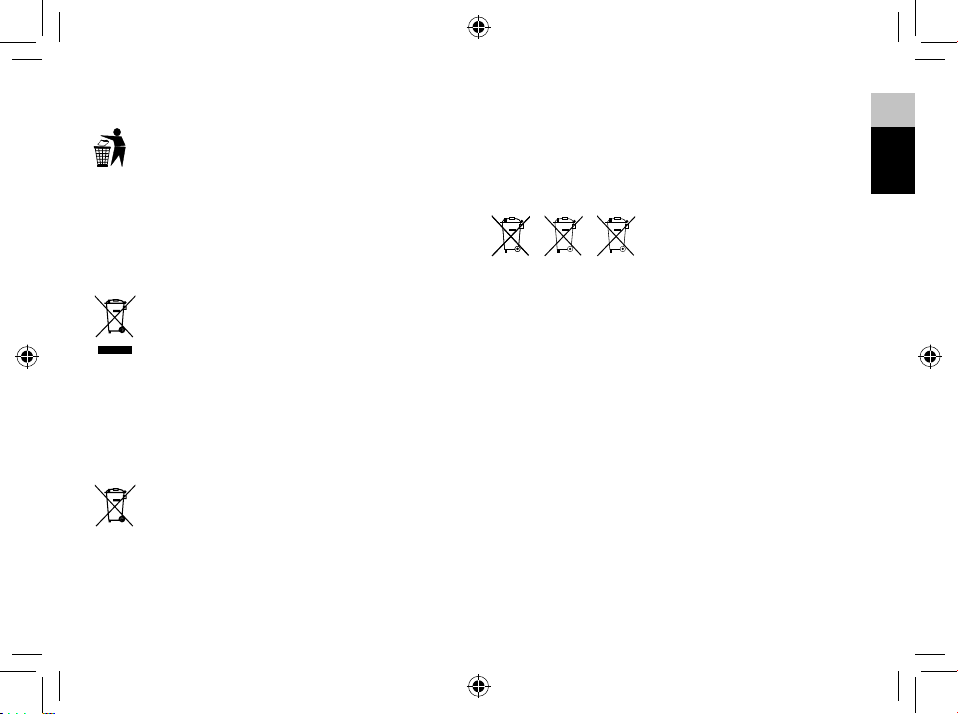
Non smaltire gli apparecchi elettronici nei riu-
ti domestici. Ai sensi della direttiva 2002/96/
CE del Parlamento europeo sullo smaltimento
di apparecchiature elettriche ed elettroniche,
così come recepita nelle legislazioni locali, i dispositivi
elettronici usati devono essere smaltiti separatamente
e riciclati nel rispetto dell’ambiente.
Le normative riguardanti le batterie e le batte-
rie ricaricabili ne vietano espressamente lo
smaltimento tra i normali riuti domestici.
Assicurarsi di smaltire le batterie usate in accordo
alle disposizioni vigenti, servendosi di un punto di
raccolta locale o avvalendosi del canale commerciale
al dettaglio. Lo smaltimento nei riuti domestici vio-
la la direttiva sulle batterie. Le batterie in cui sono in-
clusi elementi tossici sono contraddistinte da un segno
e un simbolo chimico.
Cd¹ Hg² Pb³
1
Batteria contenente cadmio
2
Batteria contenente mercurio
3
Batteria contenente piombo
GARANZIA E ASSISTENZA
Il normale periodo di garanzia è di due anni con de-
correnza dal giorno dell’acquisto. Per beneciare di
un esteso periodo di garanzia volontaria, come indi-
cato sulla confezione regalo, è necessaria la registra-
zione nel sito Web del Produttore.
È possibile consultare le condizioni di garanzia nella
loro interezza, le informazioni sulla proroga del perio-
do di garanzia e i dettagli sui servizi offerti dal Pro-
duttore all’indirizzo www.bresser.de/warranty_terms.
Se si desidera ricevere istruzioni particolareggiate su
questo prodotto in una lingua specica, accedere al
sito Web del Produttore servendosi del collegamento

14
sottostante (codice QR) per le versioni disponibili.
In alternativa, è possibile inviare un’e-mail a ma-
nuals@bresser.de o lasciare un messaggio al numero
+49 (0) 28 72 - 80 74-220*. È importante comunicare
sempre il proprio nome, l’indirizzo esatto, un numero
di telefono valido e un indirizzo e-mail, nonché il codi-
ce e il nome dell’articolo.
*Addebito della chiamata alle tariffe locali in vigore in Germania
(l’importo che verrà addebitato per telefonata dipenderà dalle tarif-
fe applicate dal proprio operatore telefonico). Le chiamate dall’e-
stero comportano costi maggiori.
www.bresser.de/warranty_terms

IT
DE
EN
15

16
ZU DIESER ANLEITUNG
Lesen Sie vor der Benutzung des Geräts aufmerk-
sam die Sicherheitshinweise und die Bedienungs-
anleitung.
Bewahren Sie diese Bedienungsanleitung für die er-
neute Verwendung zu einem späteren Zeitpunkt auf.
Bei Verkauf oder Weitergabe des Gerätes ist die Be-
dienungsanleitung an jeden nachfolgenden Besitzer/
Benutzer des Produkts weiterzugeben.
Das Gerät ist
nur für den Betrieb in Innenräumen bestimmt!
ALLGEMEINE
SICHERHEITSHINWEISE
• GEFAHR eines STROMSCHLAGS! Dieses Gerät be-
inhaltet Elektronikteile, die über eine Stromquelle
(Netzteil und/oder Batterien) betrieben werden.
Die Nutzung darf nur, wie in der Anleitung beschrie-
ben erfolgen, andernfalls besteht GEFAHR eines
STROMSCHLAGS!
• ERSTICKUNGSGEFAHR! Kinder sollten das Gerät
nur unter Aufsicht benutzen. Verpackungsmateria-
lien (Plastiktüten, Gummibänder, etc.) von Kindern
fernhalten! Es besteht ERSTICKUNGSGEFAHR!
• VERÄTZUNGSGEFAHR! Batterien gehören nicht in
Kinderhände! Achten Sie beim Einlegen der Batte-
rie auf die richtige Polung. Ausgelaufene Batterie-
säure kann zu Verätzungen führen! Vermeiden Sie
den Kontakt von Batteriesäure mit Haut, Augen und
Schleimhäuten. Spülen Sie bei Kontakt mit der Säure
die betroffenen Stellen sofort mit reichlich klarem
Wasser und suchen Sie einen Arzt auf.
• BRAND-/EXPLOSIONSGEFAHR! Setzen Sie das Ge-
rät keinen hohen Temperaturen aus. Benutzen Sie
nur die empfohlenen Batterien. Gerät und Batterien
nicht kurzschließen oder ins Feuer werfen! Durch
übermäßige Hitze und unsachgemäße Handha-
bung können Kurzschlüsse, Brände und sogar Ex-
plosionen ausgelöst werden!
• Bauen Sie das Gerät nicht auseinander! Wenden Sie
sich im Falle eines Defekts bitte an Ihren Fachhänd-
ler. Er nimmt mit dem Service-Center Kontakt auf
und kann das Gerät ggf. zwecks Reparatur einschi-
cken.
• Benutzen Sie nur die empfohlenen Batterien. Erset-
zen Sie schwache oder verbrauchte Batterien im-
mer durch einen komplett neuen Satz Batterien mit
voller Kapazität. Verwenden Sie keine Batterien un-

IT
DE
EN
17
terschiedlicher Marken, Typen oder unterschiedlich
hoher Kapazität. Entfernen Sie Batterien aus dem
Gerät, wenn es längere Zeit nicht benutzt wird!
LIEFERUMFANG
Funkwecker, Netzstecker, Bedienungsanleitung, 2x
Batterien vom Typ AAA
VOR DEM GEBRAUCH
• Wir empfehlen die Verwendung von Alkali-Mangan-
Batterien. Bei Temperaturen, die regelmäßig unter
0°C (32°F) fallen, empfehlen wir Lithiumbatterien.
• Verwenden Sie nach Möglichkeit keine wieder auf-
ladbaren Batterien. (Diese können auf Dauer die
Leistungsanforderungen nicht erfüllen.)
• Legen Sie vor dem ersten Gebrauch die Batterien
ein und achten Sie dabei auf die korrekte Polarität
im Batteriefach. Es sind 2 AAA-Zellen erforderlich.
18
PRODUKTÜBERSICHT
1. Drücken Sie [ ], um die Schlum-
merfunktion und die Hintergrundbeleuchtung
für 8 Sekunden zu aktivieren. Die Schlum-
merfunktion stoppt den Alarm für 8 Minuten.
Drücken Sie [
], um die Projektion
um 180° zu drehen. Halten Sie diese Taste
gedrückt, um die Hintergrundbeleuchtung für
8 Sekunden und die Projektion für 5 Minuten
einzuschalten. Halten Sie die Taste erneut ge-
drückt, um die Hintergrundbeleuchtung für 8
Sekunden und die kontinuierliche Projektion
einzuschalten. (Kontinuierliche Projektion nur
mit AC/DC-Adapter).
2. Projektionslinse.
3. Drücken Sie [
], um den Alarm ein- oder aus-
zuschalten. Im Weckzeitmodus.
4. Drücken Sie [
], um zwischen Kalender-
und Alarmanzeige umzuschalten. Die Taste
gedrückt halten, um in die Alarmeinstellung
zu gelangen.
IT
DE
EN
19
5. Halten Sie die Taste [ ] gedrückt, geben Sie
die Uhrzeit und das Datum ein.
6. Halten Sie [
] gedrückt, um den RCC-Empfang
ein- oder auszuschalten. Im Einstellmodus drü-
cken, um eine Einheit zu erhöhen, drücken und
halten, um schnell zu erhöhen.
7. Halten Sie [
] gedrückt, um die Temperatur oder
Zeit anzuzeigen (nur wenn die Projektion einge-
schaltet ist). Im Einstellmodus drücken, um eine
Einheit zu verringern, drücken und halten, um sie
schnell zu verringern.
8. Stellen Sie den Projektionsfokus mit dem Fokussi-
errad ein.
9. Drücken Sie die RESET-Taste, um die Einstellun-
gen auf die Werkseinstellungen zurückzusetzen.
10. Batteriefach. Zum Öffnen nach unten schieben.
11. Stromanschluss.
20
TASTE
MODUS
Standard
Modus
drücken
Schalten Sie die Hintergrund
-
beleuchtung für 8 Sekunden
ein (SNOOOZE bei klingeln
-
dem Alarm)
Projektion 180° Umkehrung
Alarm
ein-/auss
-
chalten
Alarm stoppen
(Klingelton)
Umschalten
zwischen
Kalender-
und Alar-
manzeige
_______ _______ _______
gedrückt
halten
Schalten Sie die Hintergrund
-
beleuchtung für 8 Sekunden
und die Projektion für 5
Minuten ein. Halten Sie die
Taste erneut gedrückt, um
die kontinuierliche Projektion
zu aktivieren (nur mit AC/
DC-Adapter)
_______
In die
Alarmeinstel-
lung
In die Zeit-
und Datum-
seinstellung
wechseln
RCC
ein-/aus-
schalten
Temperatur
oder Zeit
anzeigen
(nur wenn die
Projektion
eingeschaltet
ist)
Zeit-
Einstel
-
lungs-
Modus
drücken
_______ _______
Einstellung
bestätigen
Einstellung
bestätigen
Erhöhen Verringern
gedrückt
halten
_______ _______ _______ _______
Schnelle
Erhöhung
Schnelle
Verringerung
Alarm
Einstel
-
lungs-
Modus
drücken
_______ _______ _______
Einstellung
bestätigen
Erhöhen Verringern
gedrückt
halten
_______ _______ _______ _______
Schnelle
Erhöhung
Schnelle
Verringerung
IT
DE
EN
21
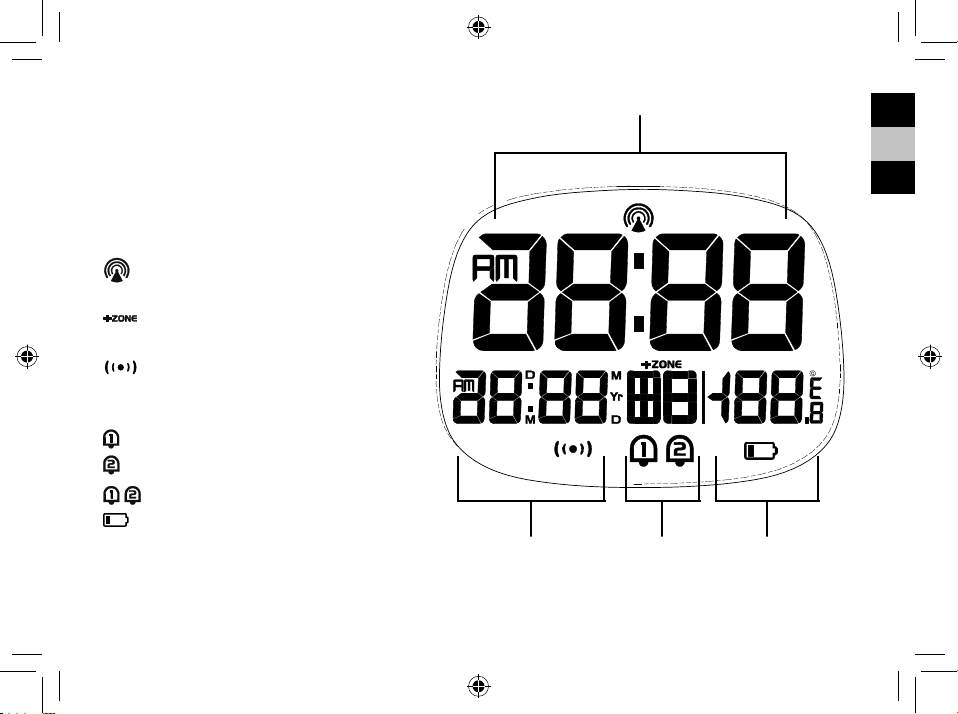
LCD-ANZEIGE
1. Zeitanzeige
2. Kalenderanzeige
3. Wochentagsanzeige
4. Temperaturanzeige:
[
] RCC-Signal empfangen
[
] Zeitzonenanzeige
[
] SNOOZE/Schlummermodus
aktiviert
[ ] Alarm 1 EIN
[
] Alarm 2 EIN
[
] Alarm 1 + Alarm 2 EIN
[
] Anzeige bei schwacher Batterie
22
ERSTE SCHRITTE
BATTERIEN EINLEGEN
1. Entfernen Sie die Batteriefachabdeckung von der
Rückseite.
2. Legen Sie 2x AAA (LR03)/1,5V Batterien ein. Bitte
stellen Sie sicher, dass die Polaritäten (+/-) der Bat-
terien bei der Installation übereinstimmen.
3. Schließen Sie das Batteriefach.
HINWEIS: Ersetzen Sie die Batterien, wenn die An-
zeige [
] schwach ist, oder ein leerer/schwacher
Batteriebestand angezeigt wird.
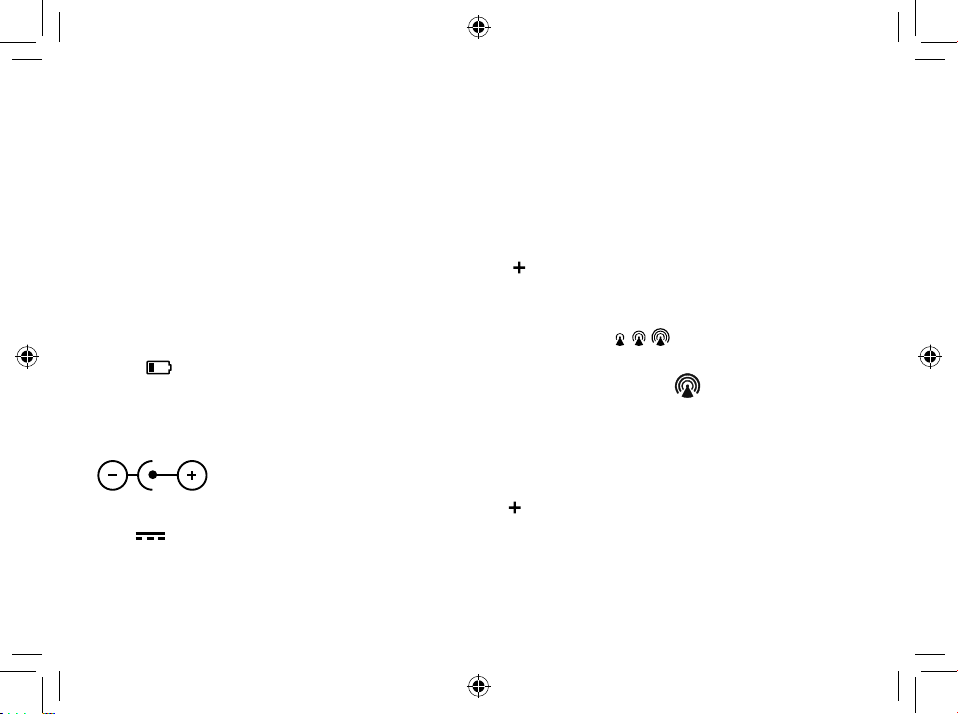
AC/DC-NETZTEIL
4
Verwenden Sie nur ein kompatibles AC/DC-Netzteil
(3,6V
4
100mA). Stecken Sie das Netzkabel in die
Buchse und das Netzteil an eine geeignete Steckdo-
se.
HINWEIS: Wir empfehlen, Batterien als Backup-
Stromquelle einzusetzen.
UHR
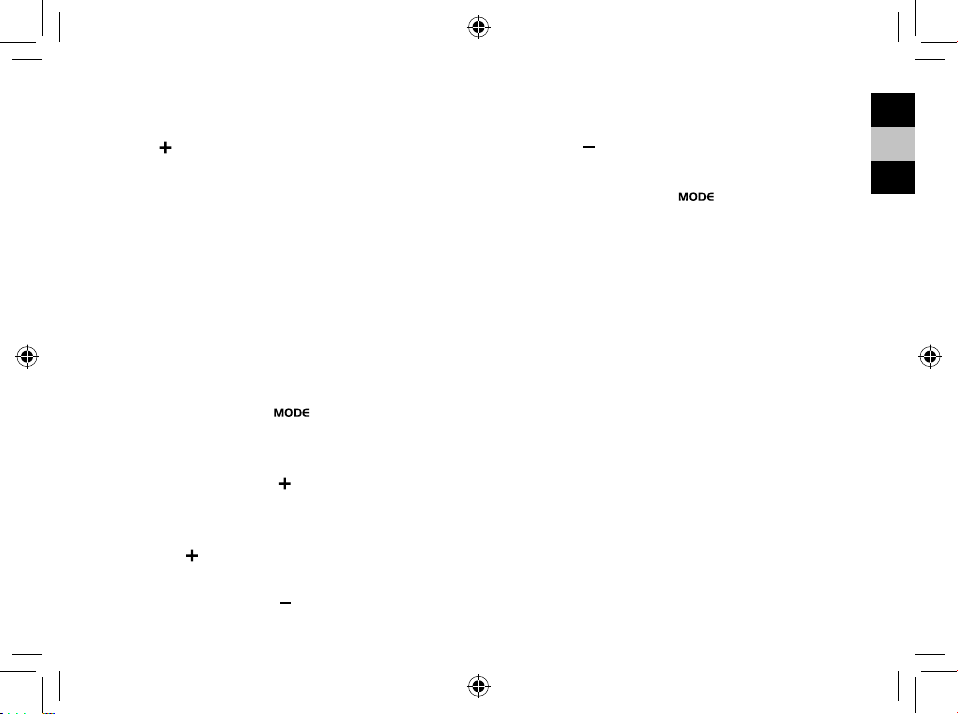
UHRENEMPFANG
1. Ersetzen Sie die Batterien oder halten Sie die Taste
[
] gedrückt, um den RCC-Empfang einzuleiten.
2. Die Empfangsprozessdauer beträgt 7 Minuten.
3. Während des Empfangsvorgangs blinkt das RCC-
Signalsymbol [
].
4. Wenn der Prozess erfolgreich war, wird das voll-
ständige RCC-Symbol [
] im Display angezeigt
und das Datum und die Uhrzeit werden automa-
tisch eingestellt. Wenn es innerhalb von 7 Minuten
fehlschlägt, wird die RCC-Einstellung automatisch
beendet. Wenn das passiert, halten Sie die Taste [
] gedrückt, um den RCC-Empfang erneut zu star-
ten.
5. Der RCC-Empfang beginnt jede Nacht automatisch
um 2:03, 3:03, 3:03, 4:03, 5:03 Uhr. Die automati-
sche Empfangsfunktion wird beendet, wenn sie
IT
DE
EN
23
erfolgreich ist.
6. Um den RCC-Empfang zu stoppen, halten Sie die
Taste [
] gedrückt.
7. Wenn das Gerät das Signal immer noch nicht emp-
fängt, fahren Sie bitte fort, die Uhrzeit manuell ein-
zustellen.
HINWEIS: Wenn Sie ein Netzteil verwenden, vergrö-
ßern Sie bitte den Abstand von Hauptgerät und Netz-
teil, um Störungen beim Empfang von RCC-Signalen
zu vermeiden.
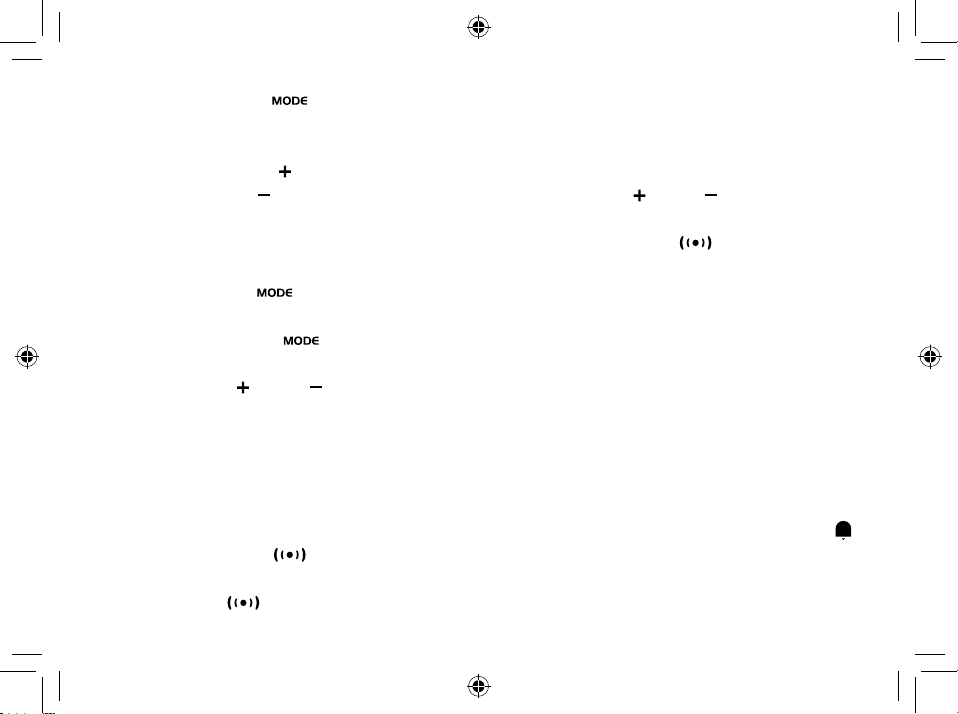
DIE UHR MANUELL EINSTELLEN
1. Halten Sie die Taste [ ] gedrückt, geben Sie
die Uhrzeit und das Datum ein.
2. Während der Einstellung blinkt der Einstellparameter.
3. Drücken Sie die Taste [
] einmal, die Zahl erhöht
sich um eine Einheit (beim Einstellen der Minute
wird die Sekunde auf 0 zurückgesetzt). Halten Sie
die Taste [
] gedrückt, um die Zahl schneller zu
erhöhen.
4. Drücken Sie die Taste [
] einmal, die Zahl verrin-
gert sich um 1 Einheit (beim Einstellen der Minute
wird die Sekunde auf 0 zurückgesetzt). Halten Sie
die Taste [
] gedrückt, um die Zahl schneller zu
verringern.
5. Drücken Sie die Taste [
], um die Einstellung
zu bestätigen und zum nächsten Parameter zu ge-
langen.
6. Reihenfolge der Einstellung: Zeitzone 12/24
Stundenformat Stunde Minute Jahr
Kalendermodus (Tag-Monat/Monat-Tag) Monat
Tag Wochentag Sprache °C/°F Ende
7. Wenn innerhalb 20 Sekunden keine weitere Aktion
erfolgt, wird die Einstellung gespeichert und der
Einstellmodus verlassen.
SPRACHE
Die Sprachoptionen sind: Englisch (E), Deutsch (D)
Französisch (F)Italienisch (I) Spanisch (S)
ZEITZONENEINSTELLUNG
Um eine andere Zeitzone einzustellen, gehen Sie wie
folgt vor:
24
1. Halten Sie die Taste [ ] gedrückt, um in die
Zeiteinstellung zu gelangen.
2. Die Einstellung für den Zeitzonenversatz blinkt.
3. Drücken Sie die Taste [
], um den Wert zu erhö-
hen, oder die Taste [
], um den Zeitzonenversatz
zu verringern.
°C/°F-EINSTELLUNG
1. Halten Sie die Taste [ ] gedrückt, geben Sie die
Uhrzeit und das Datum ein.
2. Drücken Sie die Taste [
] mehrmals, bis auf
dem Display °C/°Fangezeigt wird.
3. Drücken Sie die [
] oder [ ] Taste, um Celsius
(°C) / Fahrenheit (°F) zu wechseln.
ALARM
EINSTELLEN/ANPASSEN DER BEIDEN
ALARMZEITEN
Sie können zwei Alarmzeiten (AL1 und AL2) einstellen.
1. Drücken Sie die Taste [
], um Alarm 1 anzuzei-
gen.
2. Halten Sie die [
] Taste gedrückt, um in den
Alarmeinstellmodus für den aktuell ausgewählten
Alarm (Alarm 1) zu gelangen.
3. Während der Einstellung blinkt der Einstellparame-
ter.
4. Drücken Sie die [
] oder [ ] Taste, um die ge-
wünschten Daten einzustellen.
5. Drücken Sie die Taste [
], um die Einstellung
zu bestätigen und zum nächsten Parameter zu ge-
langen.
6. Reihenfolge der Einstellung: Stunden Minuten
verlassen
7. Der Alarm wird automatisch eingeschaltet, wenn
die Alarmeinstellung beendet ist.
8. Wenn innerhalb 20 Sekunden keine weitere Aktion
erfolgt, wird die Einstellung gespeichert und der Ein-
stellmodus verlassen.
ALARM EIN-/AUSSCHALTEN
1. Drücken Sie im Alarmanzeigemodus die Taste [ ],
um den aktuellen Alarm ein- und auszuschalten.
Im Kalenderanzeigemodus lautet die Reihenfolge:
AL1 ein AL2 ein AL1 ein AL1+AL2 ein
IT
DE
EN
25
AL1+AL2 aus.
2. Der Alarm dauert 2 Minuten und wird mit der Zeit
immer schneller.
BETRIEB
1. Zur eingestellten Zeit ertönt das Alarmsignal.
2. Drücken Sie während des Alarms die Taste [
], um den Alarm um 8 Minuten zu ver-
zögern.
3. Wenn Sie keine Taste drücken, um den Alarm zu
beenden, wird er nach 2 Minuten automatisch aus-
geschaltet.
4. Um den Alarm zu stoppen, drücken Sie [
] oder
eine eine beliebige andere Taste außer SNOOOZE.
5. Der Alarm beginnt zum nächsten Alarmzeitpunkt
erneut, es sei denn, Sie schalten die Alarmfunktion
durch Drücken der [
] Taste aus.
PROJEKTION
Der Projektor zeigt die Uhrzeit oder Temperatur an
Ihrer Decke oder Wand an und kann um 180° gedreht
werden. Die Projektion ist in einem dunklen Raum
besser zu sehen. Um optimale Projektionsergebnis-
se zu erzielen, platzieren Sie das Gerät innerhalb von
1.5 - 2 m (5-6.5 ft) von der Decke oder Wand entfernt.
1. Drücken Sie die Taste [
], um die Hinter-
grundbeleuchtung für 8 Sekunden und die Projekti-
on für 5 Minuten zu aktivieren.
2. Drücken Sie die Taste [
] erneut, um die
Projektionsanzeige um 180° zu drehen.
3. Halten Sie die Taste [
] gedrückt, um
bei der Verwendung eines Netzteils, die Projekti-
on dauerhaft fortzusetzen, ansonsten schaltet die
Projektion für 5 Minuten ein, wenn Sie nur Batterien
verwenden. Halten Sie die Taste [
] er-
neut gedrückt, um die kurz-, oder dauerhafte Pro-
jektion wieder auszuschalten.
4. Halten Sie [
] gedrückt, um Temperatur oder Zeit an-
zuzeigen (nur wenn die Projektion eingeschaltet ist).
RESET
Drücken Sie RESET, um auf die Standardeinstellungen
zurückzusetzen.
26
SPEZIFIKATIONEN
Abmessungen (Hauptgerät):
98 x 43 x 97 mm (L x B x H)
Gewicht (Hauptgerät):
189 g
Temperaturanzeigebereich:
-5 °C bis +50 °C (23 °F bis 122 °F)
Genauigkeit:
10° bis +40°C: +/- 1°C (+/-2°F)
<0° und >+40°: +/- 2°C (+/-4°F)
Auösung:
0,1°C / 0,2°F
Energie:
2x AAA (LR03) 1,5V Batterien
Netzteil 3,6V
HINWEIS:
• Wenn die Temperatur niedriger als -5°(23°) ist, zeigt
die Temperaturanzeige LL.L. an. Wenn die Tempera-
tur höher als 50°(122°) ist, zeigt die Temperaturan-
zeige HH.H. an.
EG-KONFORMITÄTSERKLÄRUNG
Hiermit erklärt die Bresser GmbH, dass der
Funkanlagentyp mit Artikelnummer:
RDP3007 der Richtlinie 2014/53/EU ent-
spricht. Der vollständige Text der EG-Konformitätser-
klärung ist unter der folgenden Internetadresse ver-
fügbar: www.bresser.de/download/RDP3007/CE/
RDP3007_CE.pdf
HINWEISE ZUR REINIGUNG
• Trennen Sie das Gerät vor der Reinigung von der
Stromquelle oder entfernen Sie die Batterien!
• Reinigen Sie das Gerät nur äußerlich mit einem
trockenen Tuch. Um eine Beschädigung der
Elektronik zu vermeiden, verwenden Sie keine
Reinigungsüssigkeit.
• Schützen Sie das Gerät vor Staub und Feuchtigkeit.
IT
DE
EN
27
ENTSORGUNG
Entsorgen Sie die Verpackungsmaterialien sor-
tenrein. Beachten Sie bitte bei der Entsorgung
des Geräts die aktuellen gesetzlichen Bestim-
mungen. Informationen zur fachgerechten Entsor-
gung erhalten Sie bei den kommunalen Entsorgungs-
dienstleistern oder dem Umweltamt.
Werfen Sie Elektrogeräte nicht in den Haus-
müll! Gemäß der Europäischen Richtlinie
2002/96/EG über Elektro- und Elektronik-Alt-
geräte und deren Umsetzung in nationales
Recht, müssen verbrauchte Elektrogeräte getrennt
gesammelt und einer umweltgerechten Wiederver-
wertung zugeführt werden.
Sie können die Batterien nach Gebrauch ent-
weder in unserer Verkaufsstelle oder in unmit-
telbarer Nähe (z.B. im Handel oder in kommu-
nalen Sammelstellen) unentgeltlich zurückgeben.
Bitte entsorgen Sie Ihre gebrauchten Batterien wie
gesetzlich vorgeschrieben - an einer lokalen Sammel-
stelle oder im Einzelhandel. Die Entsorgung über den
Hausmüll verstößt gegen die Batterie-Richtlinie. Bat-
terien und Akkus sind mit einer durchgekreuzten
Mülltonne sowie dem chemischen Symbol des Schad-
stoffes beschriftet.
Cd¹ Hg² Pb³
1
Batterie enthält Cadmium
2
Batterie enthält Quecksilber
3
Batterien enthalten Blei
GARANTIE & SERVICE
Die reguläre Garantiezeit beträgt 2 Jahre und
beginnt am Tag des Kaufs. Um von einer
verlängerten, freiwilligen Garantiezeit wie auf dem
Geschenkkarton angegeben zu protieren, ist eine
Registrierung auf unserer Website erforderlich.
Die vollständigen Garantiebedingungen sowie
Informationen zu Garantiezeitverlängerung und
Serviceleistungen können Sie unter www.bresser.
de/garantiebedingungen www.bresser.de/warranty_
terms einsehen.
Sie wünschen eine ausführliche Anleitung zu
diesem Produkt in einer bestimmten Sprache? Dann
besuchen Sie unsere Website über nachfolgenden
Link (QR Code) für verfügbare Versionen. Alternativ

28
können Sie uns auch eine E-Mail an die Adresse
manuals@bresser.de schicken oder eine Nachricht
unter +49 (0) 28 72 – 80 74-220* hinterlassen. Bitte
geben Sie stets Ihren Namen, Ihre genaue Adresse,
eine gültige Telefonnummer und E-Mail-Adresse
sowie die Artikelnummer und -bezeichnung an.
*Lokale Rufnummer in Deutschland (Die Höhe der Gebühren je
Telefonat ist abhängig vom Tarif Ihres Telefonanbieters); Anrufe aus
dem Ausland sind mit höheren Kosten verbunden.
www.bresser.de/warranty_terms

IT
DE
EN
29

30
ABOUT THIS INSTRUCTION
MANUAL
These operating instructions are to be considered
a component of the device.
Please read the safety instructions and the operating
instructions carefully before use.
Keep these instructions for renewed use at a later date.
When the device is sold or given to someone else, the
instruction manual must be provided to the new owner/
user of the product. The device is intended only for
indoor use.
GENERAL WARNINGS
• Risk of electric shock — This device contains
electronic components that operate via a power
source (power supply and/or batteries). Children
should only use the device under adult supervi-
sion. Only use the device as described in the
manual; otherwise, you run the risk of an electric
shock.
• Choking hazard — Children should only use the
device under adult supervision. Keep packaging
material, like plastic bags and rubber bands, out
of the reach of children, as these materials pose a
choking hazard.
• Risk of chemical burn — Keep batteries out of the
reach of children! Make sure you insert the bat-
teries correctly. Leaking battery acid can lead to
chemical burns. Avoid contact of battery acid with
skin, eyes and mucous membranes. In the event
of contact, rinse the affected region immediately
with a plenty of water and seek medical attention.
• Risk of re/explosion — Do not expose the device
to high temperatures. Use only the recommended
batteries. Do not short-circuit the device or batter-
ies, or throw them into a re. Excessive heat or im-
proper handling could trigger a short-circuit, a re,
or an explosion.
• Do not disassemble the device. In the event of a
defect, please contact your dealer. The dealer will
contact the Service Centre and can send the de-
vice in to be repaired, if necessary.
• Use only the recommended batteries. Always re-
place weak or empty batteries with a new, com-

IT
DE
EN
31
plete set of batteries at full capacity. Do not use
batteries from different brands or with different
capacities. The batteries should be removed from
the unit if it has not been used for a long time.
SCOPE OF DELIVERY
Alarm clock, Power adapter, Operating instructions,
2x AAA batteries.
BEFORE YOU BEGIN
• We recommend using alkaline batteries. If temper-
atures regularly fall below 0°C (32°F), we recom-
mend using lithium batteries.
• Avoid using rechargeable batteries. (Rechargeable
batteries cannot maintain correct power require-
ments.)
• Insert batteries before rst use, matching the po-
larity in the battery compartment. 2x AAA Batteries
are required.
32
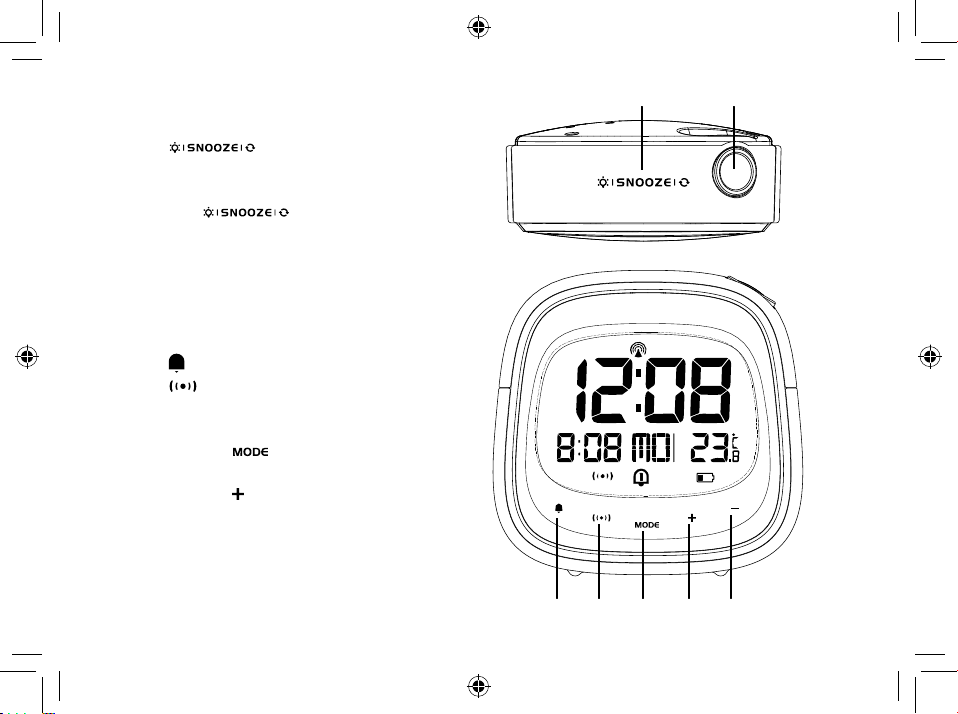
PRODUCT OVERVIEW
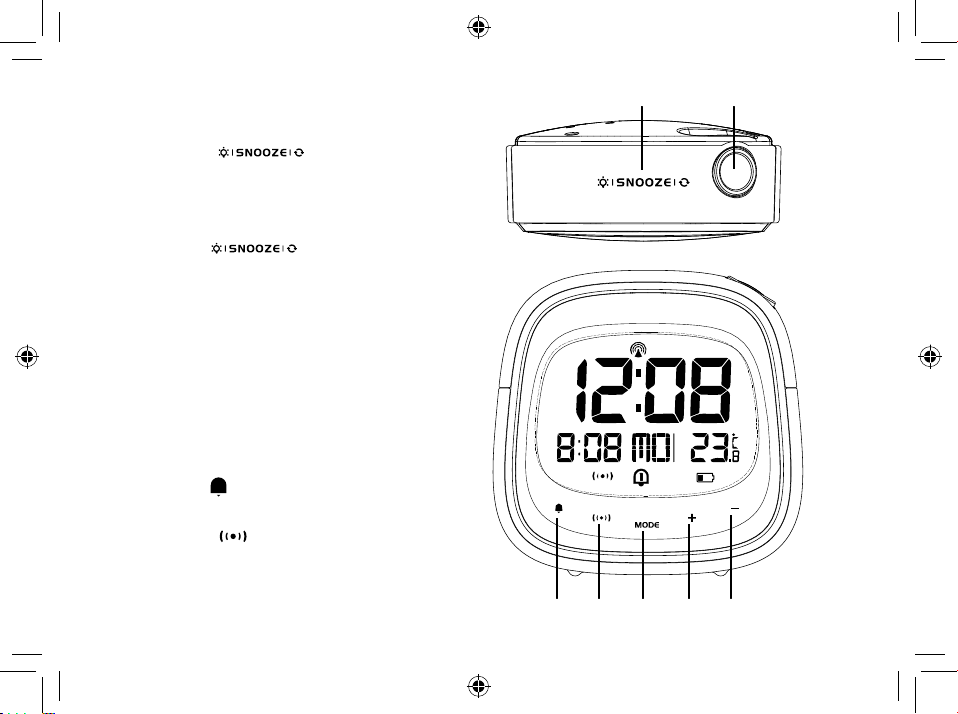
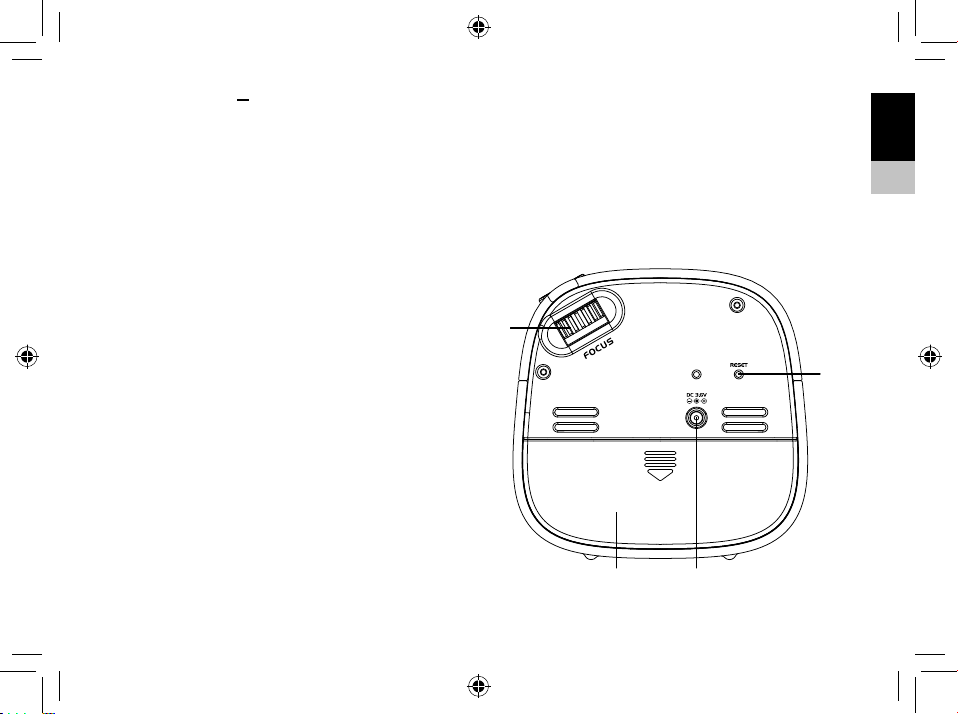
1. Press [ ] to activate the snooze
function and backlight for 8 seconds. The
Snooze function will stop the alarm for 8 min-
utes. Press [
] to ip the projection
by 180°. Press and hold to turn on backlight
for 8 seconds and projection for 5 minutes.
Press and hold again, to turn on backlight for
8 seconds and continuous projection. (Conti-
nous projection only with AC/DC Adpater).
2. Projection lens.
3. Press [
] to turn on/off alarm.
4. Press [ ] to toggle between the calendar
and alarm display. Press and hold to enter the
alarm setting mode.
5. Press and hold [ ] to enter time and date
setting mode.
6. Press and hold [ ] to turn RCC on/off. In set-
ting mode, press to increase one unit, press
and hold to increase rapidly.
IT
DE
EN
33
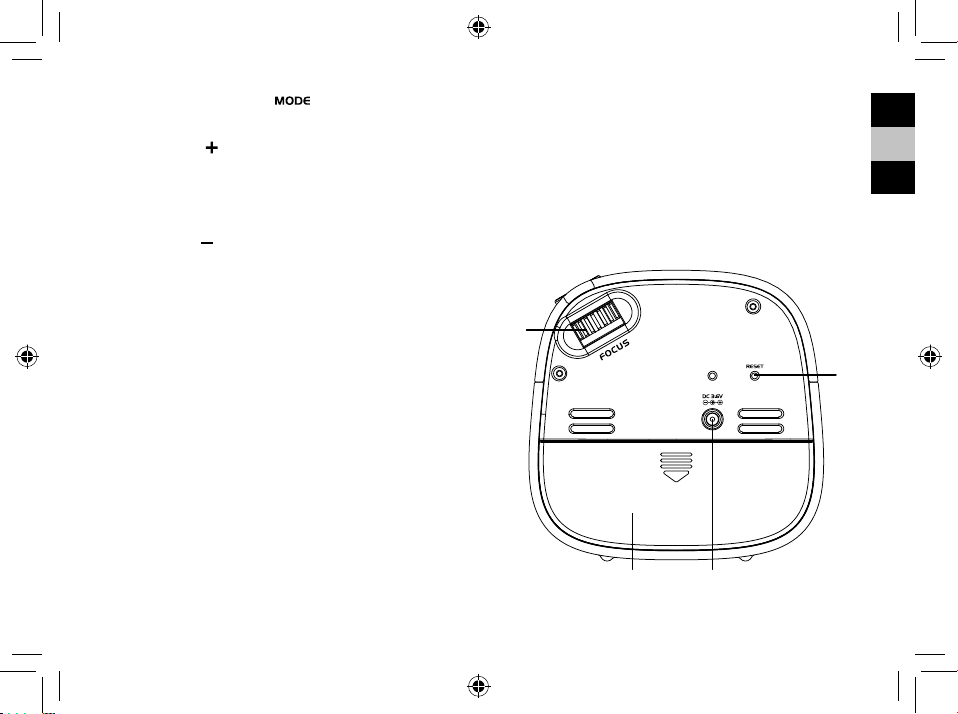
7. Press and hold [ ] to display the temperature
or time (only when the projection is on). In set-
ting mode, press to decrease one unit, press and
hold to decrease rapidly.
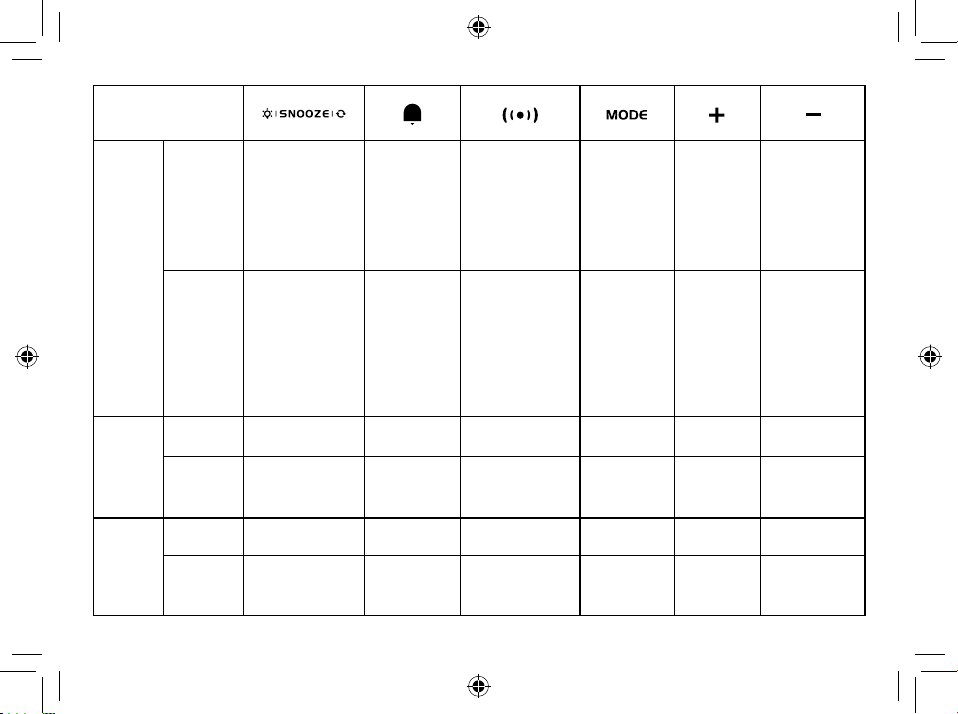
8. Adjust projection focus with the focus wheel.
9. Press the RESET button to restore settings to
factory default.
10. Battery compartment. Slide down to open.
11. Power jack.
34
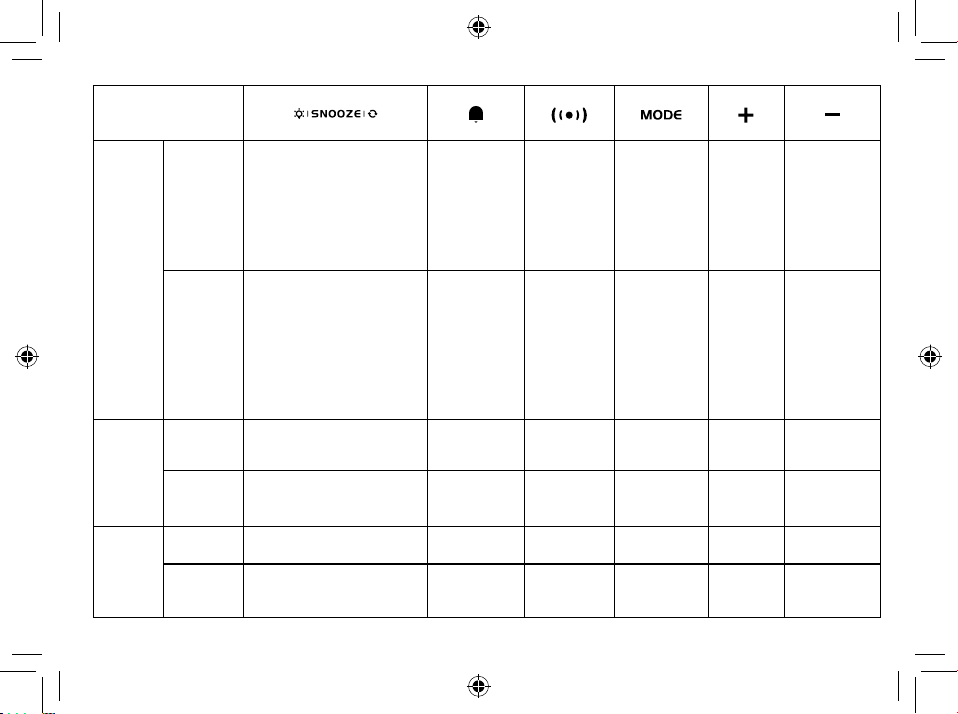
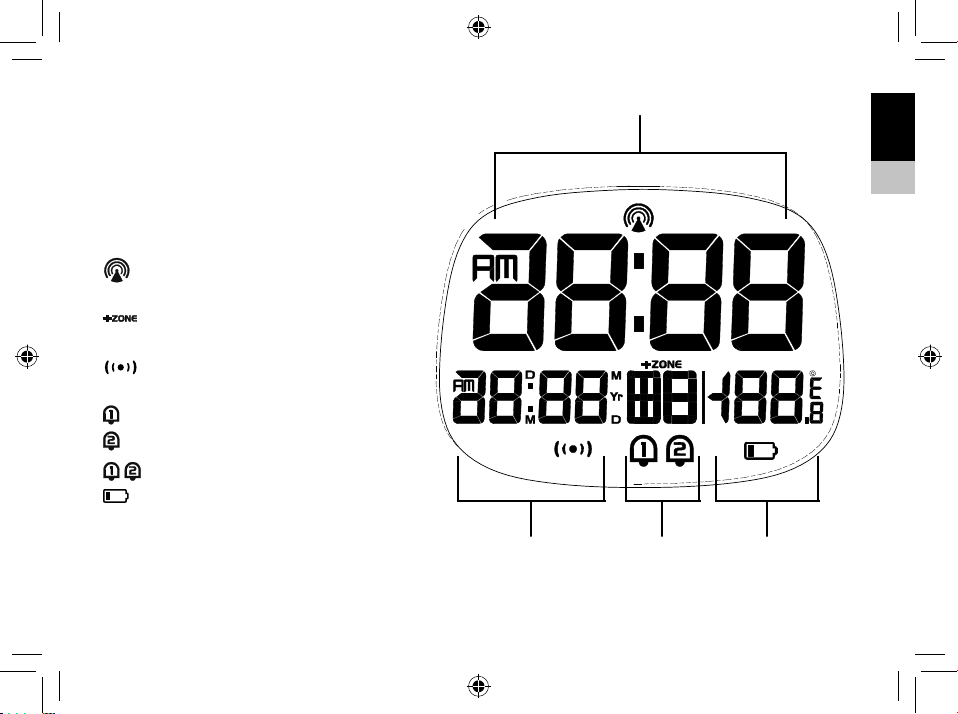
BUTTON
MODE
Standard
mode
PRESS
Turn on backlight
for 8 seconds
(SNOOZE when
alarm is ringing)
Projection 180°
switch
Turn Alarm
on/off
Stop alarm
(ringing)
Toggle between
Calendar and
Alarm display
_______ _______ _______
HOLD
Turn on backlight
for 8 seconds
and projection for
5 minutes. Hold
again to activate
continous projec
-
tion (only with AC/
DC Adapter)
_______
Enter into
alarm setting
Enter into
time and date
setting
Turn RCC
on/off
Display Tem-
perature or
Time (only
when the pro-
jection is on)
Time
setting
mode
PRESS
_______ _______
Conrm
setting
Conrm
setting
Increase Decrease
HOLD
_______ _______ _______ _______
Quick
Increase
Quick Decrease
Alarm
setting
mode
PRESS
_______ _______ _______
Conrm
setting
Increase Decrease
HOLD
_______ _______ _______ _______
Quick
Increase
Quick Decrease
IT
DE
EN
35
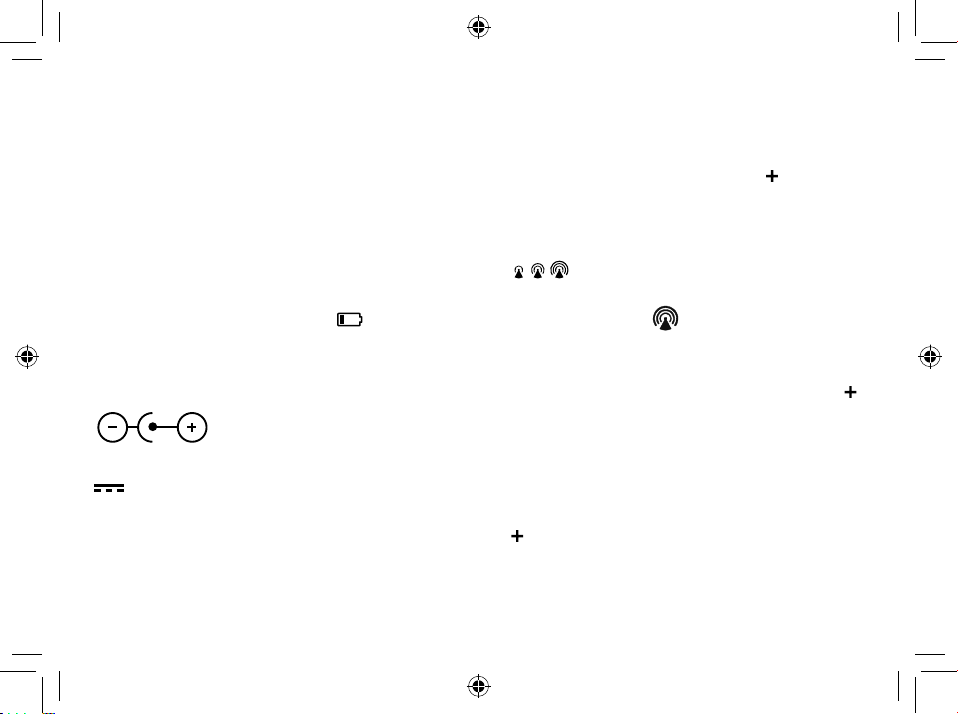
LCD DISPLAY
1. Time display
2. Calendar display
3. Weekday display
4. Temperature display
[
] RCC signal received
[
] Time Zone indicator
[
] Snooze activated
[
] Alarm 1 ON
[
] Alarm 2 ON
[
] Alarm 1 + Alarm 2 ON
[
] Low battery indicator
36
GETTING STARTED
INSERT BATTERIES
1. Remove the battery door from the back.
2. Insert 2x AAA (LR03)/1.5V batteries. Please en-
sure the polarities (+/-) of the batteries match upon
installation.
3. Reattach the battery door.
NOTE: Replace batteries when [
] displays, or
when the display is dim.
AC/DC POWER ADAPTER
4
Only use a compatible AC/DC Power adapter (3.6V
4
100mA). Plug the power cable to the power jack
and the power adapter to a suitable power outlet.
NOTE: We recommend to insert batteries as backup
power source.
CLOCK
CLOCK RECEPTION
1. Replace batteries or press and hold [
] button will
initiate RCC receiving.
2. The receiving process duration is 7 minutes.
3. During receiving process, the RCC signal symbol
[
] ashes.
4. If the RCC receiving process is successful, a com-
pleted RCC symbol [
] will be shown in the dis-
play and the date and time will be set automatically.
If it fails within 7 minutes, RCC setting will quit au-
tomatically. If that happens, press and hold the [
]
button to re-initiate RCC receiving.
5. RCC receiving will automatically start at 2:03, 3:03,
4:03, 5:03 every night. Auto receiving function will
cease if it is successful.
6. To stop RCC reception, press and hold the
[
] button.
7. If the device is still not receiving the signal, please
proceed to set the time manually.
IT
DE
EN
37
NOTE: When using a power adapter, please increase
the separation of the main unit and the power adapter
to avoid interference of RCC signal receiving.
SET THE CLOCK MANUALLY
1. Press and hold [ ] button to enter into time
and date setting.
2. The setting parameter will flash.
3. Press [
] button once, the figure will increase 1 unit
(when setting minute, second will reset to 0). Press
and hold the [
] button, the figures will increase
rapidly.
4. Press [
] button once, the figure will decrease 1
unit (when setting minute, second will reset to 0).
Press and hold the [
] button, the figures will de-
crease rapidly.
5. Press [
] button to confirm setting and enter to
next parameter.
6. Sequence of setting: Time Zone 12/24 Hr format
Hour Minute Year Calendar Mode (day-
month/month-day) Month Day Weekday
Language °C/°F Exit
7. If there is no action in 20 seconds, the setting will be
saved and will exit the setting mode.
LANGUAGE
The Language options are: English (E), German (D)
French (F) Italian (I) Spanish (S)
TIME ZONE SETTING
To set a different time zone, proceed as follows:
1. Press and hold [
] button, enter time and date
setting.
2. The Time zone offset setting will ash.
3. Press the [
] button to increase or [ ] button to
decrease the Time zone offset.
°C/°F SETTING
1. Press and hold [ ] button, enter time and date
setting.
2. Press [
] button several times until the display
shows °C/°F.
3. Press the [
] or [ ] button to switch Celsius (°C) /
Fahrenheit (°F).
38
ALARM
SETTING/ADJUSTING DUAL ALARM TIME
You can set two alarm times (AL1 and AL2).
1. Press the [
] button to display Alarm 1.
2. Press and hold [
] to enter the alarm setting
mode for the currently selected alarm (Alarm 1).
3. The setting parameter will flash.
4. Press [
] or [ ] button to set the desired data.
5. Press [
] button to confirm setting and enter to
next parameter.
6. Sequence of setting: Hour Minute Exit
7. Alarm will turn on automatically when alarm setting
is finished.
8. If there is no action in 20 seconds, the setting will be
saved and will exit the setting mode.
TURN ON/OFF ALARM
1. In alarm display mode, press the [ ] button to
turn on/off the current alarm. when in calendar dis-
play mode, the sequence is: AL1 on AL2 on
AL1+AL2 on AL1+AL2 off.
2. The alarm lasts 2 minutes and becomes faster and
faster over time.
OPERATION
1. At the set time, alarm signal rings.
2. During the alarm, press the [
] button to
delay the alarm by 8 minutes.
3. If you do not press any button to stop the alarm, it
will automatically turn off after 2 minutes.
4. To stop the alarm, press [
] or any other button
except SNOOZE.
5. The alarm will start again at the next alarm time,
unless you switch off the alarm function by press-
ing the [
] button.
PROJECTION
The projector displays the time or temperature on your
ceiling or wall and it can rotate 180°. It is easier to view
in a darkened room. For the optimal projection results,
place the unit within 1.5 - 2 m (5-6.5 ft) from the ceiling
or wall.
IT
DE
EN
39
1. Press [ ] button to activate the back-
light for 8 seconds and projection for 5 minutes.
2. Press the [
] button again, to ip the
projection display 180°.
3. Press and hold [
] button, toggle con-
tinues projection on in case of using adapter power
source and toggle projection on for 5 minutes in
case of using batteries power only. Press and hold
[
] button again, turn off projection and
toggle continues projection off.
4. Press and hold [
] to display Temperature or Time
(only when the projection is on).
RESET
Press RESET to return to the default settings.
SPECIFICATIONS
Dimensions (Main unit):
98 x 43 x 97 mm (L x W x H)
Weight (Main unit):
189 g
Temperature display range:
-5°C to +50°C (23°F to 122°F)
Accuracy:
10°C to +40°C: +/- 1°C (+/-2°F)
<0° and >+40°: +/- 2°C (+/-4°F)
Resolution:
0.1°C (0.2°F)
Power:
2x AAA (LR03) 1.5V batteries
Power adapter 3.6V (100mA)
40
NOTE
• When the temperature is lower than -5°C (23°F), the
temperature displays LL.L. When the temperature is
higher than 50°C (122°F), the temperature displays
HH.H.
EC DECLARATION OF CONFORMITY
Hereby, Bresser GmbH declares that the
equipment type with part number: RDP3007
is in compliance with Directive: 2014/53/
EU. The full text of the EU declaration of conformity is
available at the following internet address: www.bress-
er.de/download/RDP3007/CE/RDP3007_CE.pdf
NOTES ON CLEANING
• Remove the batteries before cleaning.
• Only use a dry cloth to clean the exterior of the
device. To avoid damaging the electronics, do not
use any cleaning uid.
• Protect the device from dust and moisture.
DISPOSAL
Dispose of the packaging materials properly,
according to their type, such as paper or card-
board. Contact your local waste-disposal ser-
vice or environmental authority for information on the
proper disposal.
Do not dispose of electronic devices in the
household garbage!
As per the Directive 2002/96/EC of the Euro-
pean Parliament on waste electrical and elec-
tronic equipment and its adaptation into German law,
used electronic devices must be collected separately
and recycled in an environmentally friendly manner.
In accordance with the regulations concern-
ing batteries and rechargeable batteries, dis-
posing of them in the normal household
waste is explicitly forbidden. Please make sure to
dispose of your used batteries as required by law — at
a local collection point or in the retail market. Dis-
posal in domestic waste violates the Battery Direc-
tive. Batteries that contain toxins are marked with a sign
and a chemical symbol.
IT
DE
EN
41
Cd¹ Hg² Pb³
1
battery contains cadmium
2
battery contains mercury
3
battery contains lead
WARRANTY & SERVICE
The regular guarantee period is 2 years and begins
on the day of purchase. To benet from an extended
voluntary guarantee period as stated on the gift box,
registration on our website is required.
You can consult the full guarantee terms as well
as information on extending the guarantee period
and details of our services at www.bresser.de/
warranty_terms.
Would you like detailed instructions for this product
in a particular language? Then visit our website via
the link below (QR code) for available versions.
Alternatively you can also send an email to
manuals@bresser.de or leave a message on +49 (0)
28 72 – 80 74-220*. Please always state your name,
precise address, a valid phone number and email
address, as well as the article number and name.
*Number charged at local rates in Germany (the
amount you will be charged per phone call will
depend on the tariff of your phone provider); calls
from abroad will involve higher costs.
www.bresser.de/warranty_terms

42
Would you like detailed instructions for this product
in a particular language? Then visit our website via
the link below (QR code) for available versions.
Alternatively you can also send an email to manuals@
bresser.de or leave a message on +49 (0) 28 72 –
80 74-220*. Please always state your name, precise
address, a valid phone number and email address, as
well as the article number and name.
*Number charged at local rates in Germany (the amount you will
be charged per phone call will depend on the tariff of your phone
provider); calls from abroad will involve higher costs.
www.bresser.de/warranty_terms

IT
DE
EN
43

Con riserva di errori e modi che tecniche.
Irrtümer und technische Änderungen vorbehalten.
Errors and technical changes reserved.
Manual_RDP3007000000_Alarm-clock_it-de-en_EXPSC_v072019a
www.bresser.de/warranty_terms
SERVICE AND WARRANTY:
www.bresser.de/download/RDP3007
MANUAL DOWNLOAD:
Bresser GmbH
Gutenbergstr. 2 · DE-46414 Rhede
Germany
www.bresser.de · service@bresser.de