1
User manual
HS00 JN.00000 PN.000000-00-00 00.00.00 VERSION NO.01
corrale
2 Getting the most
from your warranty
3 In the box
3 Controls
4 Using your straightener
5 Traveling with your straightener
5 Assembling the charging dock
6 Charging your straightener
6 Changing settings
7 Looking after your straightener

2
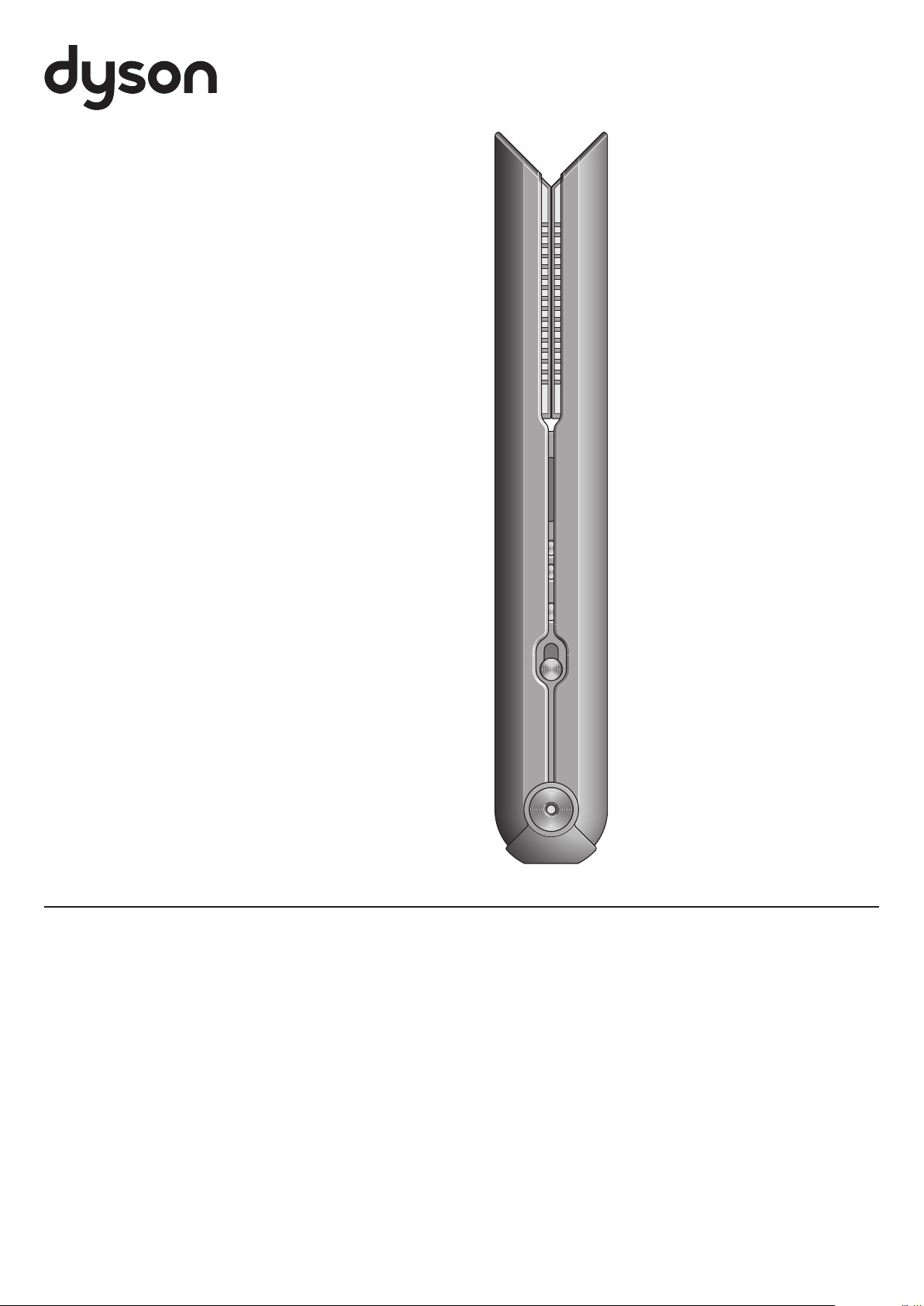
Thank you for
choosing to buy
a Dyson Corrale
TM
straightener.
Getting the most
from your warranty
We don’t stop caring about our
machines once they’re yours.
Even when your warranty has
ended, we’ll still be on hand to help.
Exclusive owner benefits
– Free Dyson parts and labor
– Hassle-free replacement
– Expert advice. 7 days a week.
– Styling tips and guides.
To activate your warranty, you’ll
need your serial number, which can
be found on the battery pack label.
Go to: www.dyson.com/your-dyson
or reach out to our helpline at
866-277-5122
To achieve enhanced styling with
less reliance on heat, Dyson engineers
developed flexing plates. Made from
materials selected for their flexibility,
strength and thermal conduction,
they shape to gather and control hair.
Explore www.dyson.com/mycorrale to:
– Discover styling tips and guides
– Learn about your machine’s features
– Activate your 2-year warranty.
3
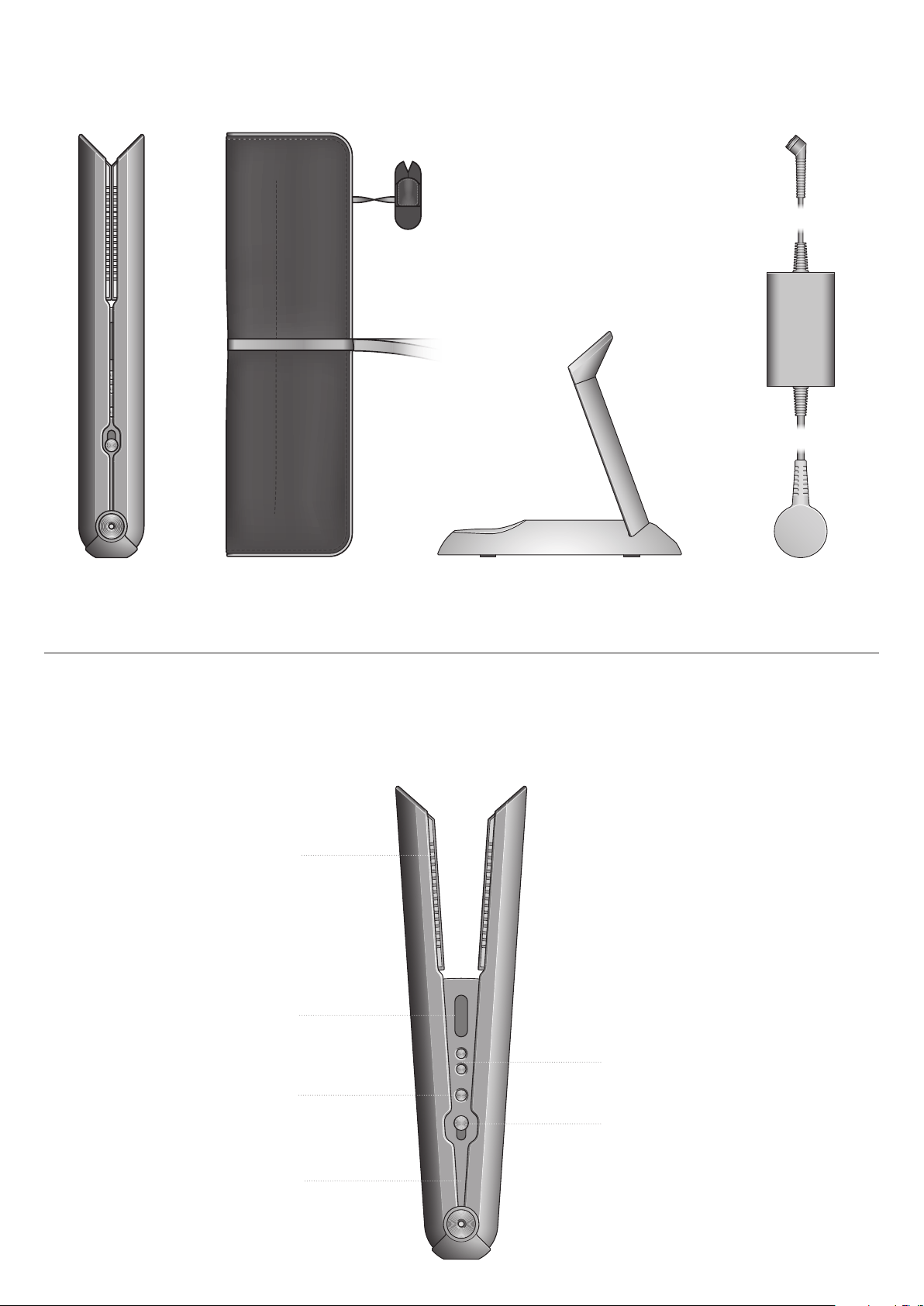
In the box
Dyson Corrale
TM
straightener
Heat-resistant travel
pouch and Flight-ready
tag protector
Charging dock Magnetic 360°
charging cable
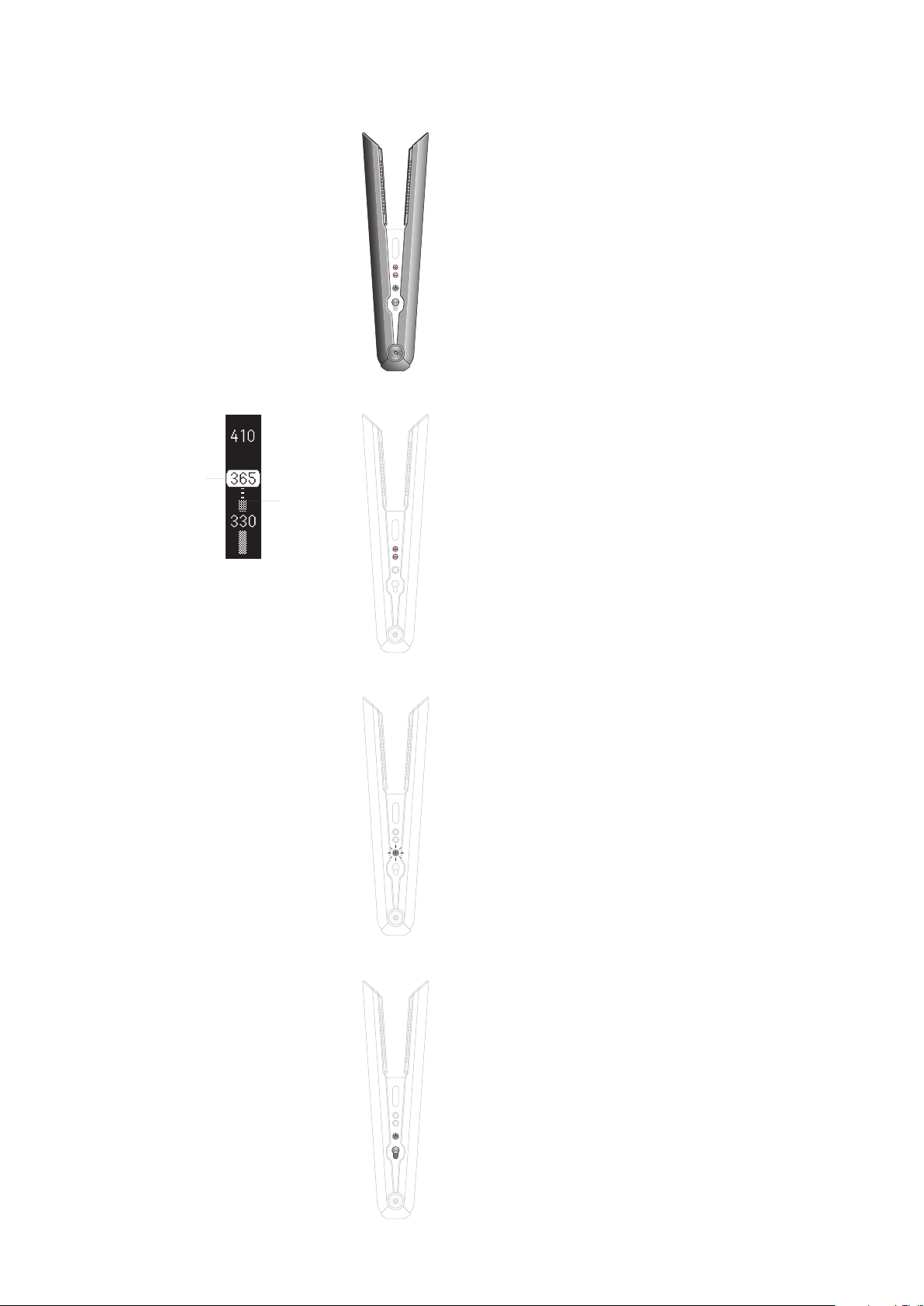
Controls
Power button
Charging LED
OLED screen
OLED screen shows information
about temperature settings and
battery level.
Flexing plates
Shape to gather and
control your hair.
Lock button
Conceals the flexing
plates for immediate
storage after use.
Temperature controls
Three heat settings, 330°F, 365°F and
410°F, to ensure effective straightening
and styling for all hair types and lengths.
4
Using your straightener
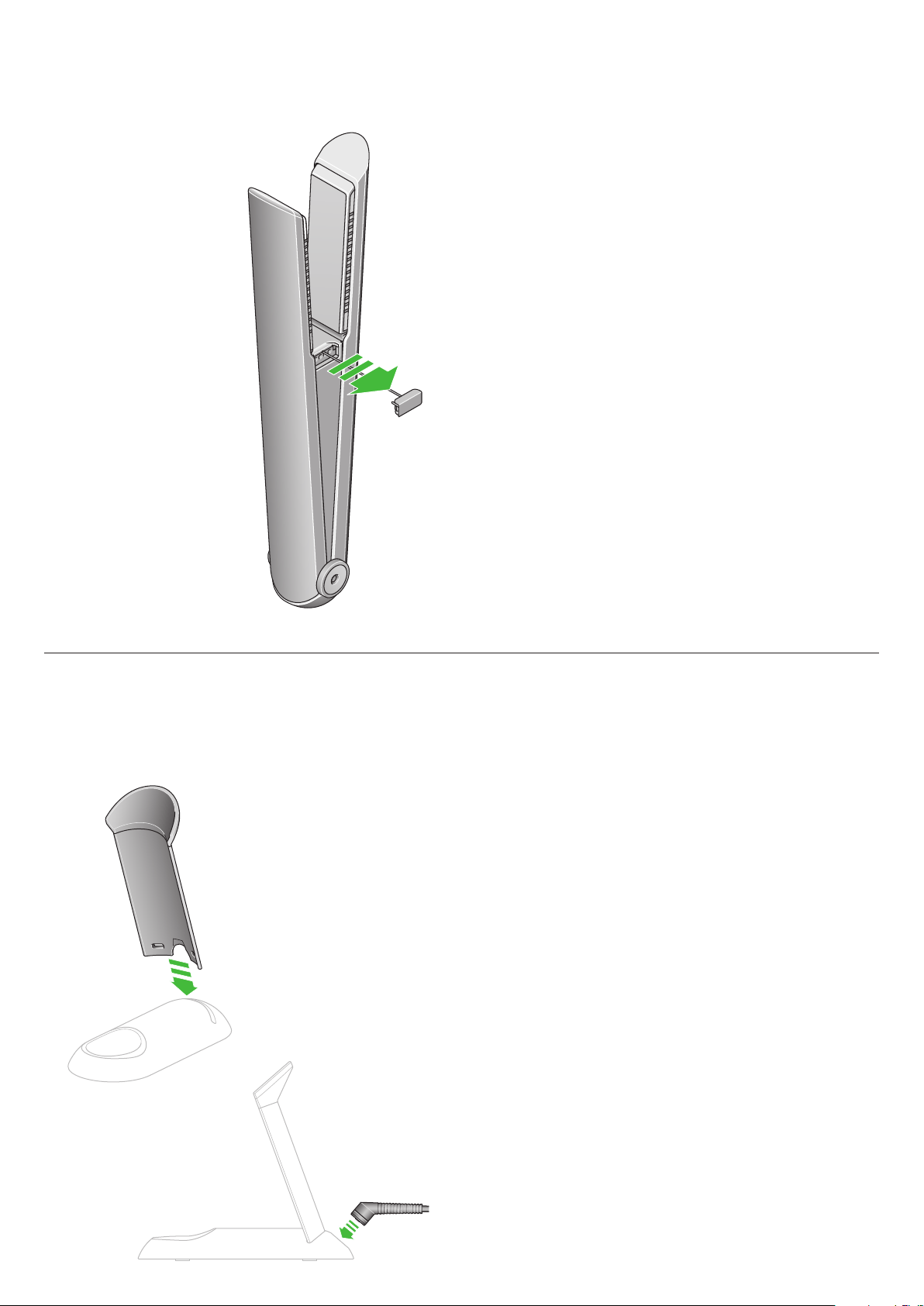
Turning on
Slide the Lock button to open
your straightener.
Press and hold the Power button
until a battery icon appears on
the OLED screen.
Press the Temperature (+) button
to select the temperature
you want.
The Power button will pulse red
as your straightener heats up.
Your straightener is ready
to use when the Power button
illuminates red, a prompt sounds
and a tick icon appears on the
OLED screen.
Getting started
Before using your Dyson Corrale™ straightener
for the first time, remove the Flight-ready tag
from any packaging.
Insert the Flight-ready tag into your straightener.
Fully charge your straightener before first use.
For the best styling results, make sure your hair
is dry and tangle-free.
Turning off
Press and hold the Power button
until the OLED screen turns off.
Close your straightener and slide
the Lock button to close.
The Power button will pulse until
the flexing plates have cooled.
If you close your straightener
without turning the power off,
it will turn off automatically.
Sleep mode
If your Dyson Corrale™
straightener is left unattended
with the power on for longer than
five minutes, the flexing plates will
automatically switch off.
The Power button will flash red
and an alert will sound every
10 seconds.
Press any button to reactivate
your straightener.
The temperature will increase
to the last setting used.
If your straightener is left
unattended with the power
on for a further five minutes,
it will turn off completely.
Go to www.dyson.com/mycorrale
for styling tips and guides.
Target
temp
Current
temp
Adjusting the temperature
Press the Temperature (+/-)
control buttons to select the
temperature that suits your hair
type and styling preference.
Your straightener has three
settings, to enable you to style
at lower temperatures.
Go to www.dyson.com/mycorrale
for styling tips and guides.
The temperature will appear on
the OLED screen as it heats up
or cools down and the Power
button will pulse until the selected
temperature has been reached.
5
Assembling the charging dock
Traveling with your straightener
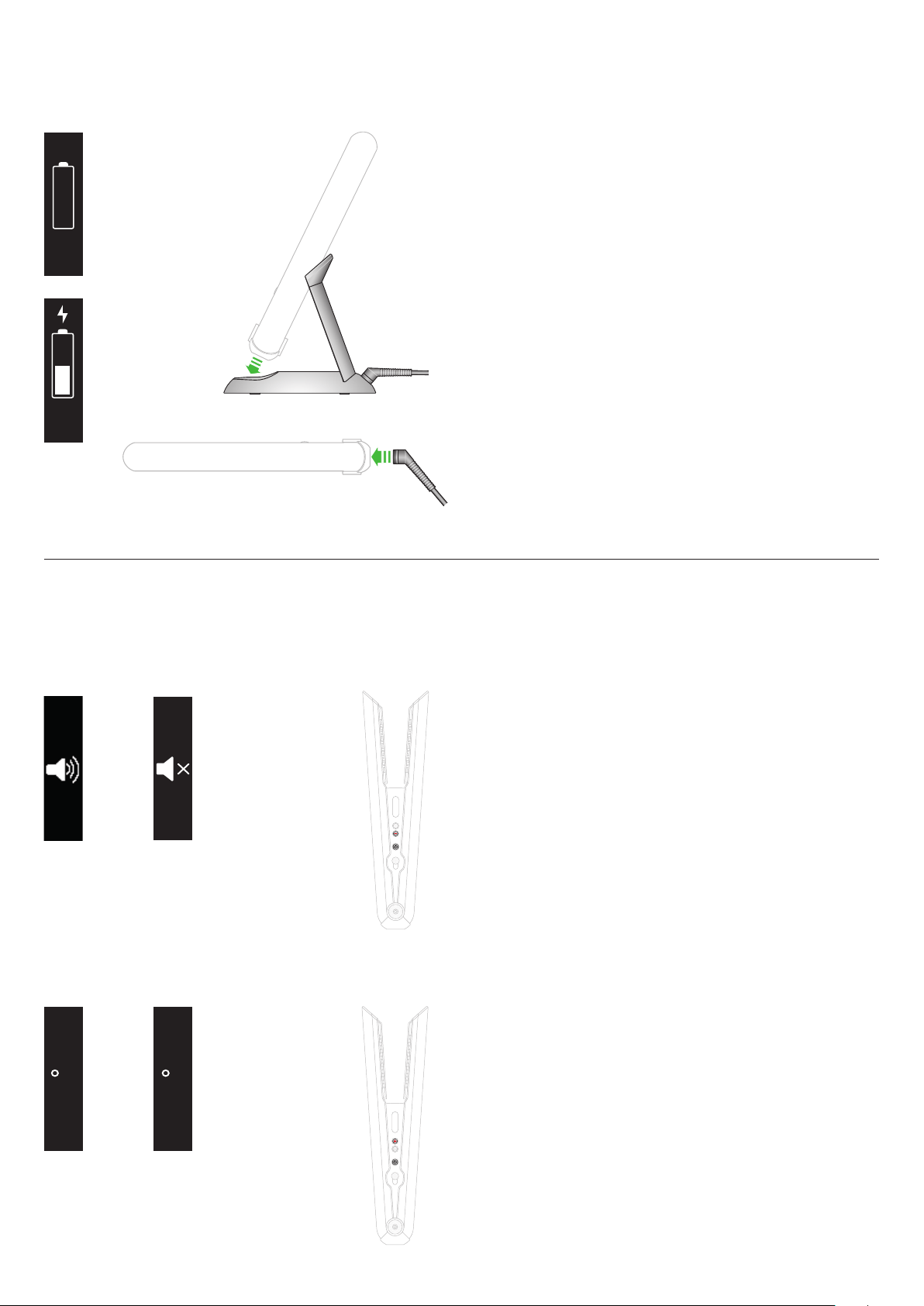
Your dock can be used as
a charging dock or a stand
to store your Dyson Corrale™
straightener.
Push the two parts of the
charging dock together until
they click securely in place.
Connect the Magnetic 360°
charging cable to the base
of the charging dock.
Getting ready to fly
The Dyson Corrale™ straightener
is designed to meet ICAO
regulations, allowing you to
carry it on board an aircraft.
Before flying:
1
Contact your airline in advance
to inform them about the Flight-
ready feature.
2
Remove the Flight-ready tag
before airport security and leave
disconnected throughout the
flight.
3
Store your straightener in your
hand luggage.
Please note: Regulations in
Japan mean you will not be able
to fly in or out of any Japanese
airports with your straightener.
For more information about
being flight-ready go to
www.dyson.com/mycorrale.
When the Flight-ready tag is
removed, all controls will be
disabled. If you try to use your
straightener when flight-ready,
an airplane icon will appear
on the OLED screen.
If the airplane symbol does not
appear on the OLED screen when
the Flight-ready tag is removed,
contact Dyson before traveling.
Place the Flight-ready tag in the
Flight-ready tag protector to
prevent damage to the tag and
straightener.
Charging when traveling
Just check if you need a travel
adaptor. The Magnetic 360°
charging cable is suitable for use
with all mains electricity supplies.
Reactivating your straightener
Insert the Flight-ready tag back
into your straightener.
6
Changing settings
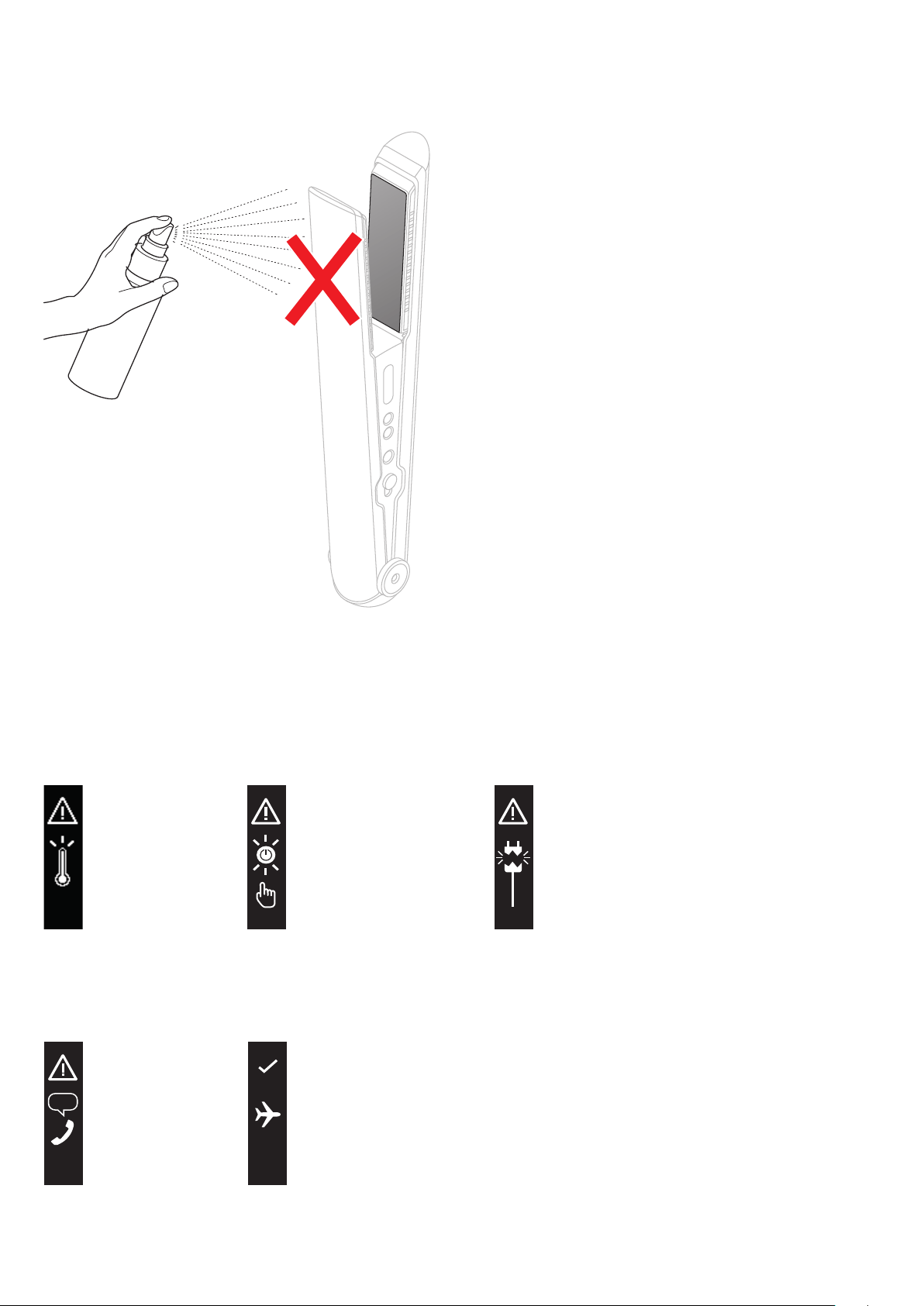
Turning the prompt sounds
on and off
You can mute the prompt sounds
during active use.
For your safety, you won’t
be able to mute the sounds
for Sleep mode or alerts.
Press and hold the Power and
Temperature (–) buttons to turn
the prompt sounds off.
When the speaker icon is crossed
through, the prompt sounds will
be muted.
Repeat to turn the prompt sound
back on.
Charging your straightener
Battery
empty
Sound
on
Sound
off
Charging
C
F
Changing temperature units
You can select your preferred
temperature units (Centigrade
or Fahrenheit).
Press and hold the Power
and Temperature (+) buttons
to change between units.
When your preferred temperature
unit shows on the OLED screen,
release the buttons.
For best performance, place your
Dyson Corrale straightener in
the dock when not in use and in
between sections to extend run
time. Always begin with 100%
charge before styling.
When your straightener needs
charging, the battery icon on
the OLED screen will flash and
a prompt will sound.
When the battery is empty,
the battery icon will flash and a
prompt will sound five seconds
before your straightener turns off.
The battery charging LED will
be amber when charging and
turn green when fully charged.
Charge your Dyson Corrale™
straightener on the dock or
directly with the Magnetic 360°
charging cable.
If your straightener is turned off,
a prompt will sound when you
connect to the Magnetic 360°
charging cable.
Charging dock
Place your Dyson Corrale
straightener in the dock when not
in use and in between sections
to extend run time. Always begin
with 100% charge before styling.
7
Looking after your straightener
Too hot
Turn your straightener off
and leave to cool down.
Reset
Charge your straightener to
100% then turn it off then
back on again to reset.
Charger error
The charger isn’t working
as it should. Please contact
the Dyson helpline.
Alert screens
Turn off your Dyson Corrale™
straightener and leave to cool
before cleaning.
Clean the flexing plates with a
damp, lint-free cloth. Rub gently
to remove any stubborn hair
product residue.
Don’t use chemicals or abrasive
products as this may damage the
surface of the flexing plates.
Charger error
The charger isn’t working
as it should. Please contact
the Dyson helpline.
Call Dyson
Your straightener isn’t working
as it should. Please contact
the Dyson helpline.
If the airplane symbol doesn’t
appear on the OLED screen when
the Flight-ready tag is removed,
contact Dyson before traveling.