W415-4094 / A / 03.01.23
INSTALLATION & USER GUIDE
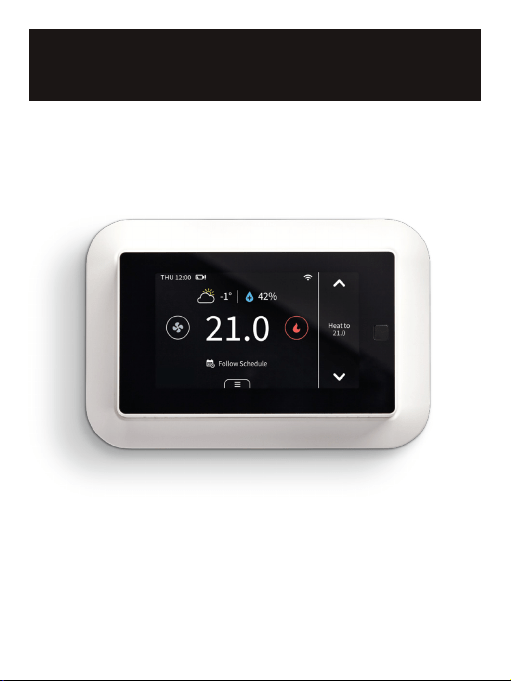
WSC43BA Thermostat
Wolf Steel Ltd., 24 Napoleon Rd., Barrie, ON, L4M 0G8 Canada / 103 Miller Drive, Crittenden, Kentucky, USA, 41030
Phone 1 (866) 820-8686 • www.napoleon.com • [email protected]
W415-4094 / A / 03.01.23
2
SAFETY HANDLING
EN
!
WARNING
• Failure to follow these safety notices could result in fire,
electric shock, other injuries, or damage to the thermostat
and other property. Read all the safety notices below before
using the thermostat.
• Avoid high humidity or extreme temperatures.
• Avoid long exposure to direct sunlight or strong ultraviolet light.
• Do not drop or expose the unit to intense vibration.
• Do not disassemble or try to repair the unit on your own.
• Do not expose the unit or its accessories to flammable liquids,
gases, or other explosives.
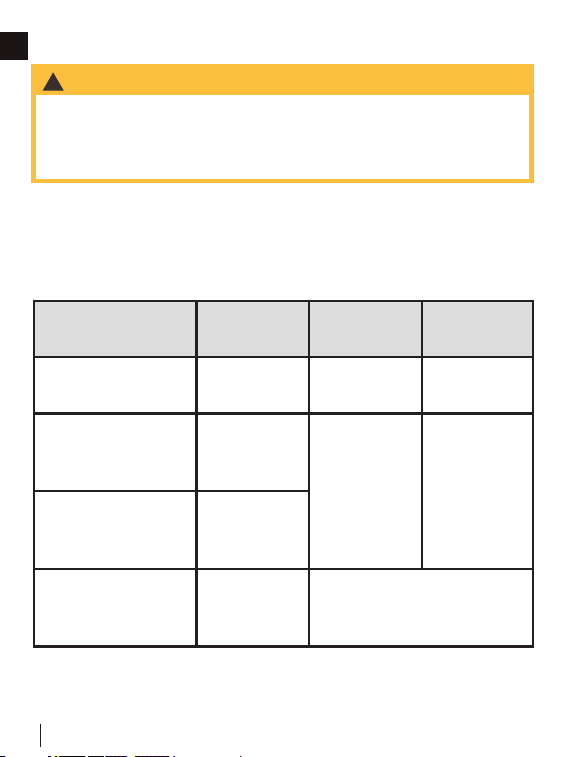
Product Name
Model
Number
FCC ID IC ID
Touchscreen
Thermostat
WSC43BA
VA8-WSC43BA
7114A-
WSC43BA
Indoor PIR
Temperature
Sensor
WSC-IS
VA8-WSC-IS
7114A-
WSCIS
Outdoor
Temperature
Sensor with Probe
WSC-OS
Thermostat Power
Module
(not included)
WSC-
PWRM
N/A
This device complies with Part 15 of the FCC Rules. Operation is subject
to the following two conditions: 1) The device may not cause harmful
interference; and 2) the device must accept any interference received,
including interference that may cause undesired operation.

W415-4094 / A / 03.01.23
3
SAFETY HANDLING
EN
Changes or modifications not expressly approved by the party
responsible for compliance could void the user’s authority to
operate the equipment.
NOTE: This equipment has been tested and found to comply
with the limits for a Class B digital device, pursuant to Part
15 of the FCC Rules. These limits are designed to provide
reasonable protection against harmful interference in a residential
installation. This equipment generates, uses, and can radiate
radio frequency energy and, if not installed and used in
accordance with the instructions, may cause harmful interference
to radio communications. However, there is no guarantee that
interference will not occur in a particular installation.
If this equipment does cause harmful interference to radio or
television reception which can be determined by turning the
equipment off and on, the user is encouraged to try to correct the
interference by one or more of the following measures:
• Reorient or relocate the receiving antenna.
• Increase the separation between the equipment and
receiver
• Connect the equipment into an outlet on a circuit different
from that to which the receiver is connected.
• Consult the dealer or an experienced radio/TV technician
for help.
NOTE: This device and its antenna(s) must not be co-located or
operation in conjunction with any other antenna or transmitter.
To maintain compliance with FCC’s RF Exposure guidelines, this
equipment should be installed and operated with a minimum
distance of 20cm from the radiator to your body. This device
and its antenna(s) must not be co-located or operated in
conjunction with any other antenna or transmitter.
RF Exposure Statement

W415-4094 / A / 03.01.23
4
TABLE OF CONTENTS
EN
NOTE: The information throughout this manual is believed to be correct at the time of
printing. Wolf Steel Ltd. reserves the right to change or modify any information within
this manual at any time without notice. Changes, other than editorial, are denoted by a
vertical line in the margin.
1.0 WELCOME 5
2.0 IN THE BOX 5
3.0 WIRING DIAGRAMS 6
4.0 INSTALLATION GUIDE 10
4.1 REMOVING YOUR OLD THERMOSTAT 10
4.2 CONNECTING THE WIRES 13
4.2.1 INSTALL THE THERMOSTAT WITH A C-WIRE 14
4.2.2 INSTALL THE THERMOSTAT WITHOUT A C-WIRE
(OPTIONAL)
18
4.3 WIRING CONFIGURATION ON THERMOSTAT 27
4.4 PAIRING INDOOR AND OUTDOOR SENSORS 29
5.0 TECHNICAL SPECIFICATIONS 30
6.0 HOME APP 33
7.0 FAQS 37
8.0 MEET YOUR THERMOSTAT 39
8.1 DEVICE OVERVIEW 39
9.0 APP OVERVIEW 54
10.0 WARRANTY 55
W415-4094 / A / 03.01.23
5
EN
Label 1.
Label 2.
Thermostat
If you have a C
wire, you will not
need the label 2
below.
Control board
C C
RC
RC
RC
RC
RH
RH
R R
C C
S S
G G
R R
RC RC
RH RH Y2 Y2
Y/Y1 Y/Y1
Y/Y1 Y/Y1
W/W1 W/W1
W/W1 W/W1
W2 W2
O/B O/B
* *
G G
1.0 WELCOME
The EQHub thermostat makes it easier and smarter to control
your household temperature. You can control and switch easily
between dual fuel sources using custom hybrid heating modes.
With the help of indoor and outdoor sensors, you can balance
hot or cold spots throughout the home to achieve best comfort
or select specific sensors for target temperatures. You can also
set schedules for your thermostat, so it operates automatically
based on the selected time periods and settings.
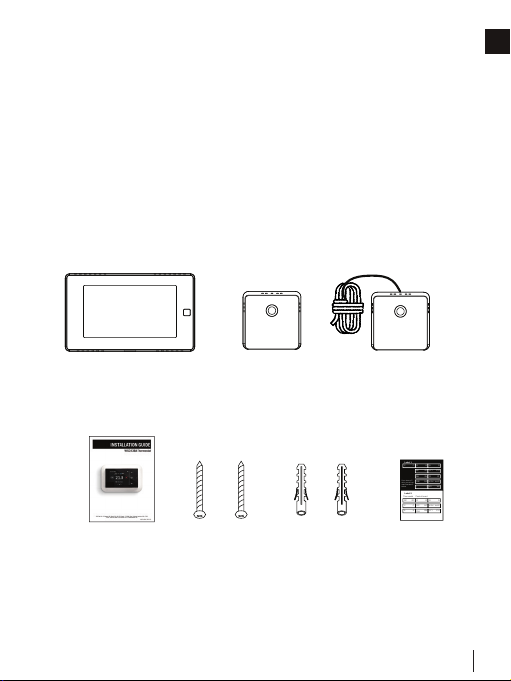
2.0 IN THE BOX
WSC43BA Thermostat Indoor Sensor
(WSC-IS)
Outdoor Sensor
Installation &
User Guide
6 x Screws 6 x Drywall
Plugs
Wire Tags
Base
Wall Mounting
Plate
3M Sensor
Mounting Stickers
W415-4094 / A / 03.01.23
6
EN
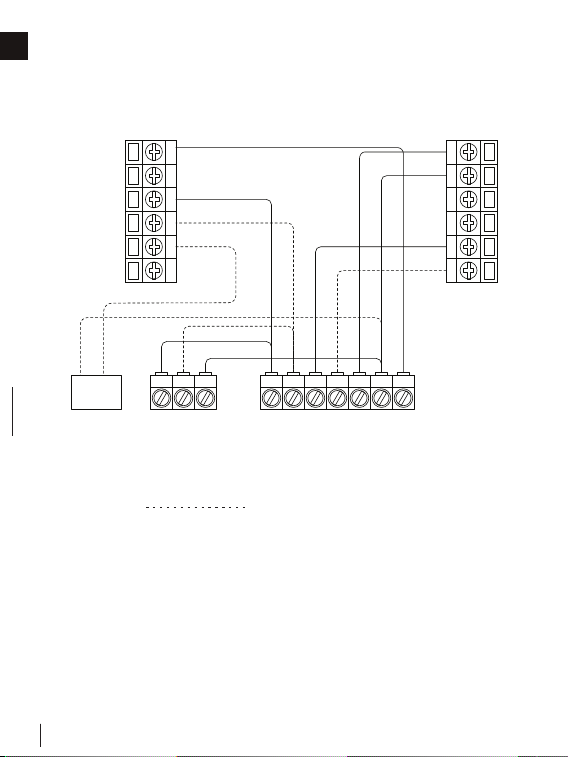
3.0 WIRING DIAGRAMS
Below are the wiring diagrams for common HVAC equipment.
Remove the jumper between Rh, Rc, or R terminals. Adjust the
DIP switch on the back of the thermostat to “Disconnect” if you
have connected both RC-wire and RH-wire to the wall-plate.
Otherwise, switch it to the “Connect” side.
G
S
Y1
Y2
M1
M2
C
RC
RH
O/B
W1
W2
Y1 Y2 C
Y1 Y2 W1 W2 R C G
Air conditioner
Humidifier/Dehumidifier
(optional)
Furnace/Air Handler
Optional
Conventional Heating and Cooling System
W415-4094 / A / 03.01.23
7
WIRING DIAGRAMS
EN
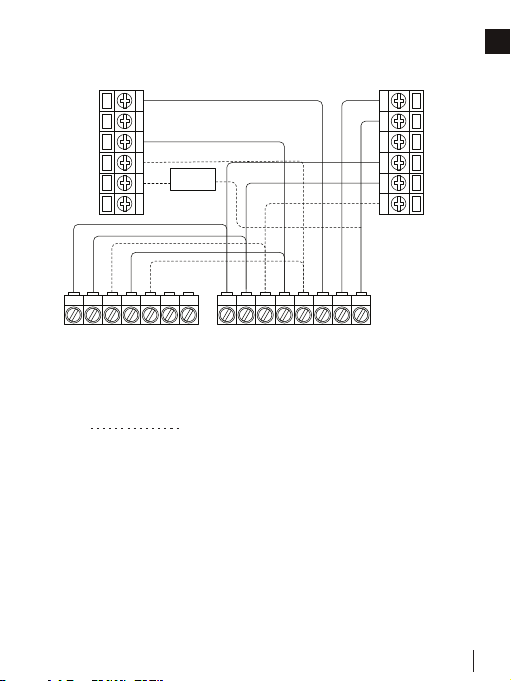
Heat Pump with Furnace
Remove the jumper between Rh, Rc, or R terminals. Adjust the
DIP switch on the back of the thermostat to “Disconnect” if you
have connected both RC-wire and RH-wire to the wall-plate.
Otherwise, switch it to the “Connect” side.
Optional
RO/B D G
O/B
Heat pump
Furnace
G
S
Y1
Y2
M1
M2
C
RC
RH
O/B
W1
W2
Y1 Y2 C
Y1 Y2W1 W2 R CG
Humidifier/
Dehumidifier
(optional)
W415-4094 / A / 03.01.23
8
WIRING DIAGRAMS
EN
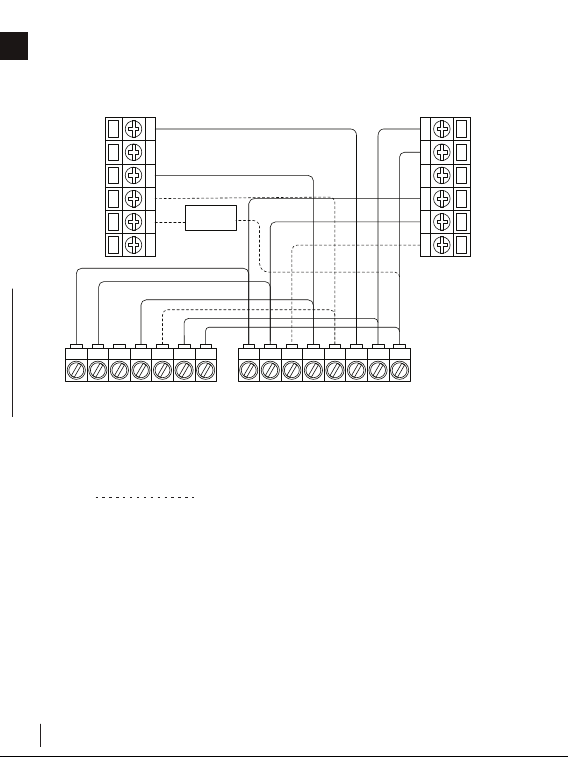
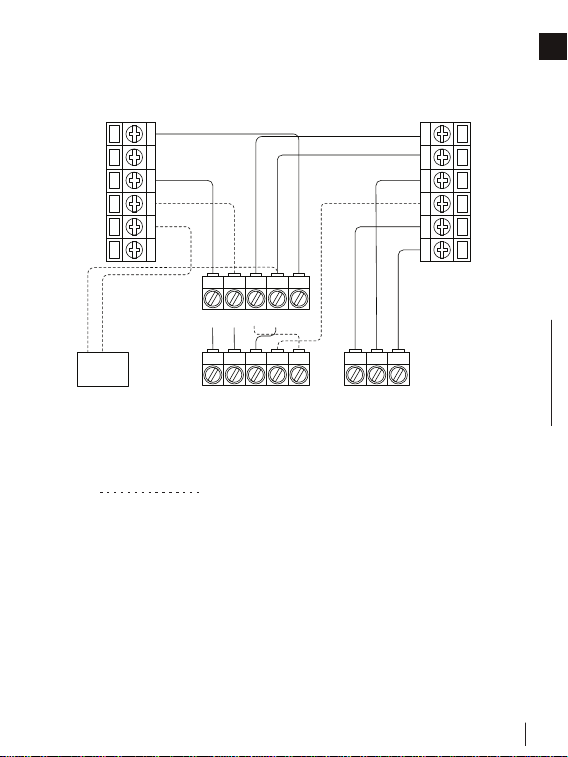
Heat Pump with Air Handler
Remove the jumper between Rh, Rc, or R terminals. Adjust the
DIP switch on the back of the thermostat to “Disconnect” if you
have connected both RC-wire and RH-wire to the wall-plate.
Otherwise, switch it to the “Connect” side.
RB D G
O/B
Heat pump
Air Handler
G
S
Y1
Y2
M1
M2
C
RC
RH
O/B
W1
W2
Y1 Y2 C
Y1 Y2
W1/D W2 R CG
Humidifier/
Dehumidifier
(optional)
Optional
W415-4094 / A / 03.01.23
9
WIRING DIAGRAMS
EN
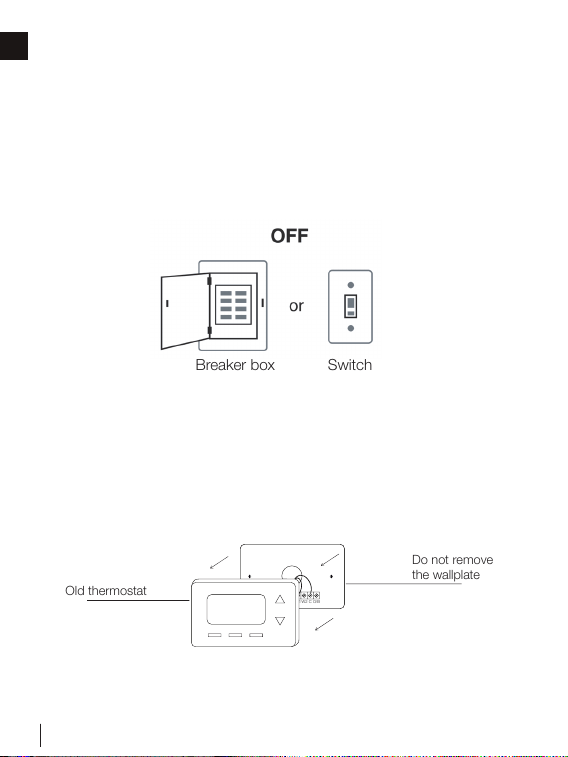
Boiler or Radiant System with Air Handler and
Conventional Cooling or Heat Pump
Remove the jumper between Rh, Rc, or R terminals. Adjust the
DIP switch on the back of the thermostat to “Disconnect” if you
have connected both RC-wire and RH-wire to the wall-plate.
Otherwise, switch it to the “Connect” side.
G
S
Y1
Y2
M1
M2
C
RC
RH
O/B
W1
W2
Y1 Y2 C
Y1 Y2
W1 W2
R C G
O/B
1
R
Air conditioner or Heat pump Boiler
Air handler
1
For heat pump only.
Humidifier/
Dehumidifier
(optional)
R
Optional
W415-4094 / A / 03.01.23
10
EN
4.0 INSTALLATION GUIDE
4.1 REMOVING YOUR OLD THERMOSTAT
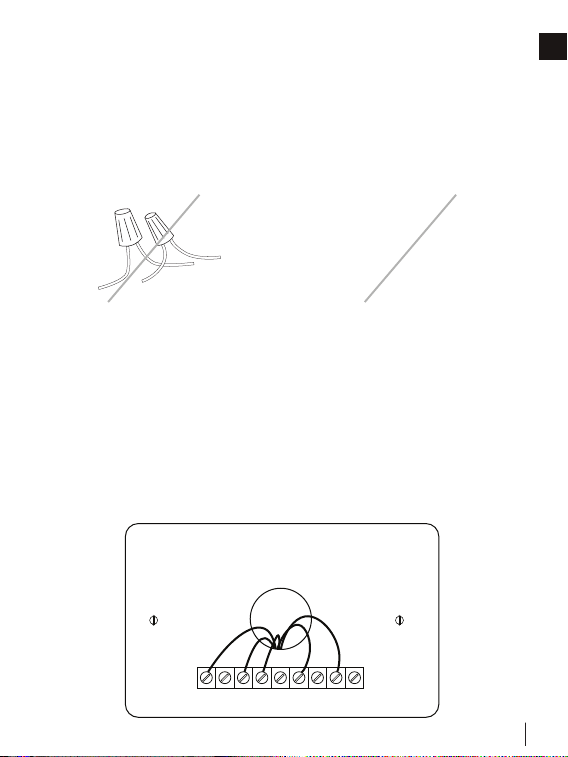
Step 1: Switch off your HVAC system
Before you start, please switch off your HVAC system to protect
you and to avoid blowing a fuse. Wait a few minutes, then try to
adjust the temperature of your old thermostat to verify that the
system is off.
RC
RH G
C
Y1 Y2
W1
W2 O/B
Do not remove
the wallplate
Old thermostat
Breaker box Switch
Step 2: Remove the old thermostat
Remove the old thermostat from the wall. Keep the wall-plate
with wires.
W415-4094 / A / 03.01.23
11
INSTALLATION GUIDE
EN
RC
RH G
C
Y1 Y2
W1
W2 O/B
OR
120V
or
higher
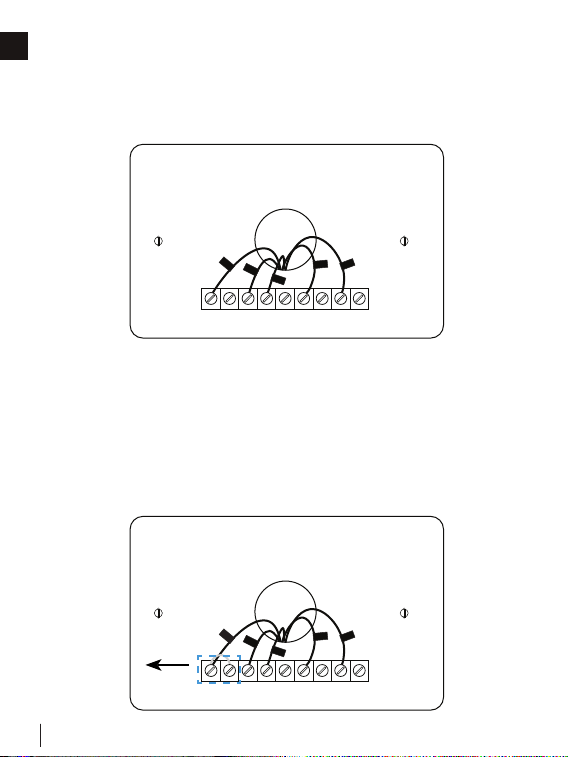
Step 3: Compatibility check
If you find a thick wire with wire nuts on the backplate of the old
thermostat, or if the voltage of your old system is 120V or higher,
it will not be compatible with WSC43BA. If none of the above is
true, please proceed to the next step.
Step 4: Take a photo
Take a photo of the wires connected to the terminal of your old
thermostat. You may need to reference this photo later.
W415-4094 / A / 03.01.23
12
INSTALLATION GUIDE
EN
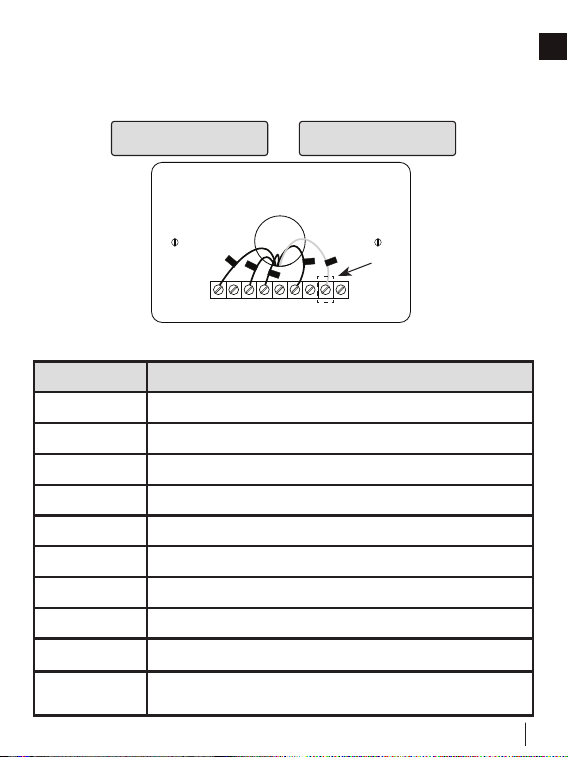
Step 5: Label the wires with tags
Label each wire on the wall-plate with the tags (label 1) provided,
then carefully disconnect the wires.
RC
RH G
C
Y1 Y2
W1
W2 O/B
C
RC
G
W1
Y1
RC
RH G
C
Y1 Y2
W1
W2 O/B
C
RC
G
W1
Y1
Remove
NOTE: If there are any jumper wires between Rh, Rc, or R
terminals, do not label them. WSC43BA does not need jumpers.
Remove and save them, along with your old thermostat.
NOTE: For unique wiring situations, see “Wiring Diagrams”
section.
W415-4094 / A / 03.01.23
13
INSTALLATION GUIDE
EN
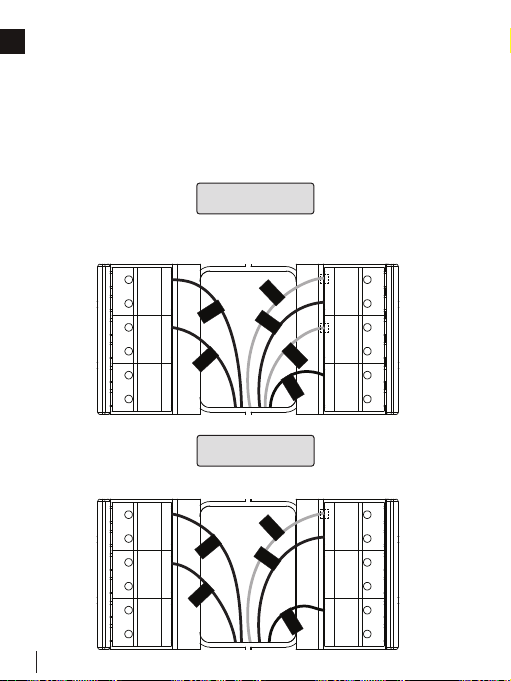
4.2 CONNECTING THE WIRES
Do you have a C-wire connected to your old thermostat?
YES = See 4.2.1 NO = See 4.2.2
Terminal Designation
Terminals What It Means
RC
24VAC primary for cooling
RH
24VAC primary for heating
C
24VAC common
W1
1st stage primary heating relay/AUX heat
W2
2nd stage secondary heating relay/AUX heat
Y1
1st stage primary compressor contactor
Y2
2nd stage secondary compressor contactor
G
Fan relay
O/B
Changeover valve for heat pumps
S
Optional wiring module terminal to combine Y and G, while
reserving an extra in-wall wire to power on the thermostat
RC
RH G
C
Y1 Y2
W1
W2 O/B
RC
G
Y1
W1
C
W415-4094 / A / 03.01.23
14
INSTALLATION GUIDE
EN
RC
RH G
C
Y1 Y2
W1
W2 O/B
C
RC
G
W1
Y1
↑
↑
↑
↑
4.2.1 INSTALL THE THERMOSTAT WITH A C-WIRE
Step 1: Remove the old wall-plate
Unscrew the old wall-plate from the wall, then gently pull it out to
ensure the wires will not fall back into the hole.
Step 2: Attach the base of WSC43BA to the wall
Bundle and insert the wires through the holes of the base
of WSC43BA, then attach the base to the wall with screws
(supplied). If preferred, the wall mounting plate should be
secured to the wall now, pulling the wires through the holes of
the mounting plate. Insert the drywall plugs behind the wall plate,
screwing the wall plate into the wall first, then screw the base into
the wall, through the wall plate.
IMPORTANT: It is recommended to seal the wall opening after the thermostat wire has
been installed. The opening can be sealed with insulation, foam and or sealed off with
foam tape.
RC
RH G
C
Y1 Y2
W1
W2 O/B
C
RC
G
W1
Y1
↑
↑
↑
↑
Label 1.
Label 2.
Thermostat
If you have a C
wire, you will not
need the label 2
below.
Control board
C C
RC
RC
RC
RC
RH
RH
R R
C C
S S
G G
R R
RC RC
RH RH Y2 Y2
Y/Y1 Y/Y1
Y/Y1 Y/Y1
W/W1 W/W1
W/W1 W/W1
W2 W2
O/B O/B
* *
G G
Wall Mounting
Plate
Seal opening
to prevent air
leakage behind
the thermostat.
W415-4094 / A / 03.01.23
15
INSTALLATION GUIDE
EN
G
S
Y1
Y2
M1
M2
RC
C
RH
O/B
W1
W2
W1
R/RC/RH
C
G
Y1
G
S
Y1
Y2
M1
M2
RC
C
RH
O/B
W1
W2
W1
R/RC
C
G
Y1
RH
Step 3: Connect the wires
Connect the wires to the corresponding terminal in the base.
Take a photo of the wires when you are finished. You may need
to refer to it later during the setup wizard.
Do you have more than one R-wire (R, RC, or RH)?
YES
R- or RC-wire into the RC terminal
RH-wire into the RH terminal
NO
R-, RC-, or RH-wire into the RC terminal
G
S
Y1
Y2
M1
M2
RC
C
RH
O/B
W1
W2
W1
R/RC/RH
C
G
Y1
G
S
Y1
Y2
M1
M2
RC
C
RH
O/B
W1
W2
W1
R/RC
C
G
Y1
RH
W415-4094 / A / 03.01.23
16
INSTALLATION GUIDE
EN
RC&RH
Connect
Disconnect
DIP switch
→
→
→
→
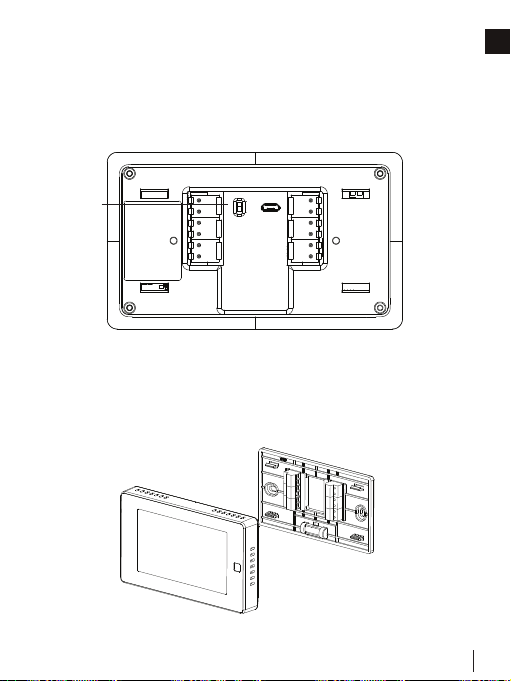
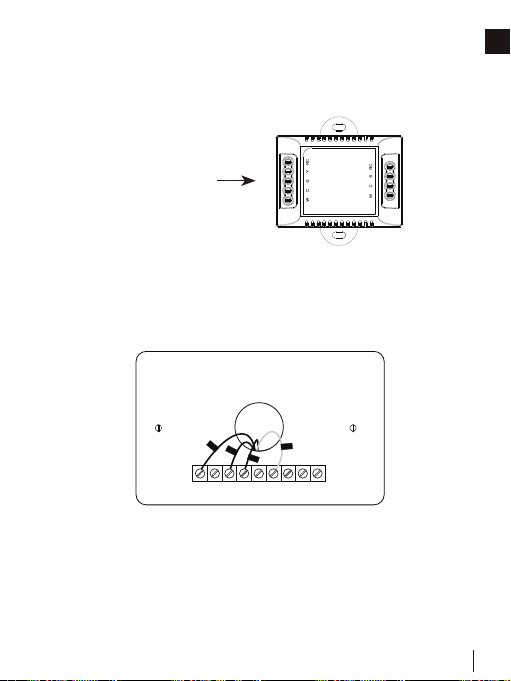
Step 4: DIP switch
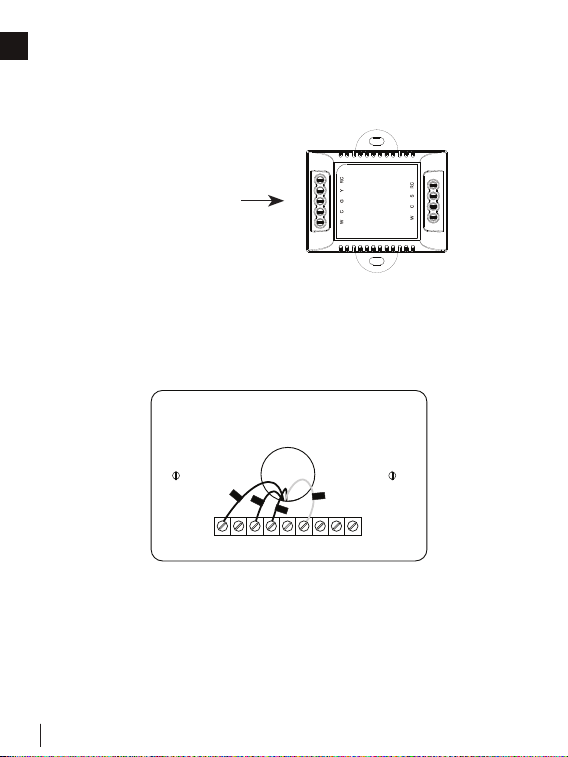
Adjust the DIP switch on the back of the thermostat to
“Disconnect” if you have connected the RC-wire and the RH-wire
to the wall-plate. Otherwise, switch it to the “Connect” side.
Step 5: Attach the WSC43BA to the base
Gently press the WSC43BA into the base until it clicks.
RC&RH
Connect
Disconnect
DIP switch
→
→
→
→
W415-4094 / A / 03.01.23
17
INSTALLATION GUIDE
EN
Hi ,
Wel com e
Step 6: Power on your system
Congratulations! The installation is finished. Please power on your
HVAC system.
When the power is successfully energized, the thermostat’s
screen will light up and go into the setup wizard. You can
complete the following configuration according to section 4.
W415-4094 / A / 03.01.23
18
INSTALLATION GUIDE
EN
4.2.2 INSTALL THE THERMOSTAT WITHOUT A C-WIRE
(OPTIONAL)
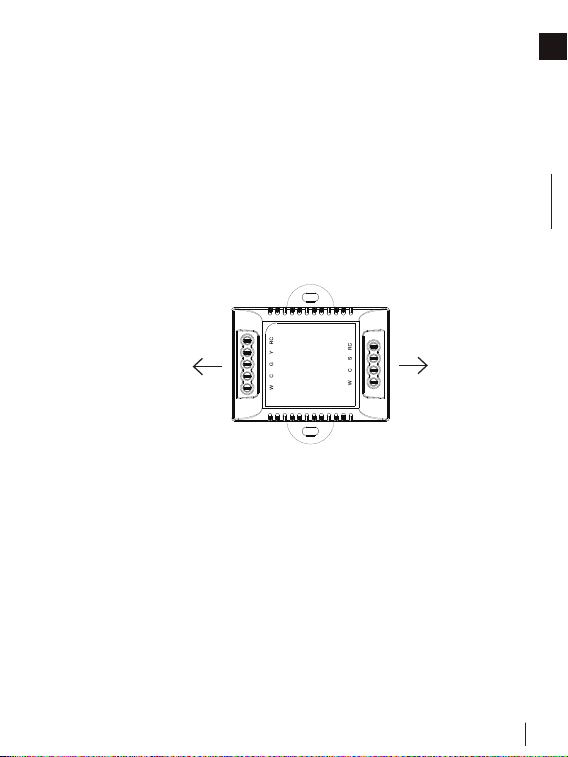
Power module requires your system to have the following wires:
• 4 wires: W/W1, Y/Y1, G, and R (or Rc or Rh)
• Or 3 wires: Y/Y1, G, and R (or Rc or Rh)
If you do not have these wires, your system may not be
compatible with the power module.
RC
RH G
C
Y1 Y2
W1
W2 O/B
RC
G
Y1
W1
RC
RH G
C
Y1 Y2
W1
W2 O/B
RC
G
Y1
W1
WSC-PWRM
Power Module
(Not Included)
W415-4094 / A / 03.01.23
19
INSTALLATION GUIDE
EN
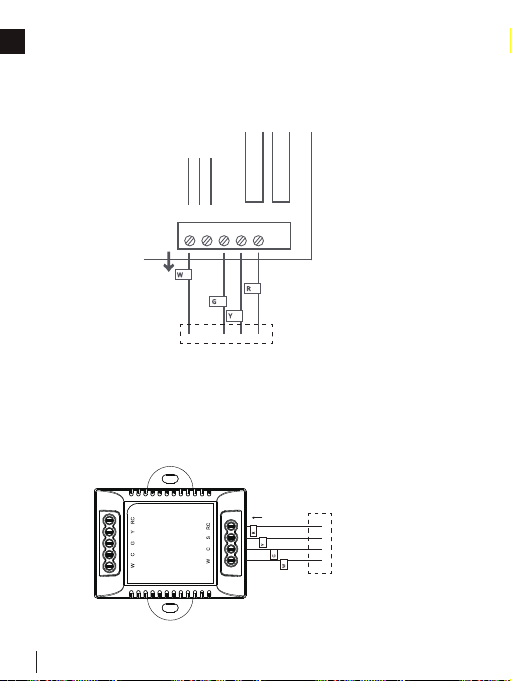
Description:
The C-wire is used to provide power to the thermostat. If your
system does not have a C-wire, you can use the power module
to power your thermostat, using the existing wires.
Power module
To thermostatTo HVAC control board
There are two sides with connections. One side (4 terminals) is for
thermostat connections; the other side, pre-wired (5 terminals), is
for the control board connections.
For certain applications where more than just an additional
C-wire is required, the addition of the power module may not be
sufficient on its own.
W415-4094 / A / 03.01.23
20
INSTALLATION GUIDE
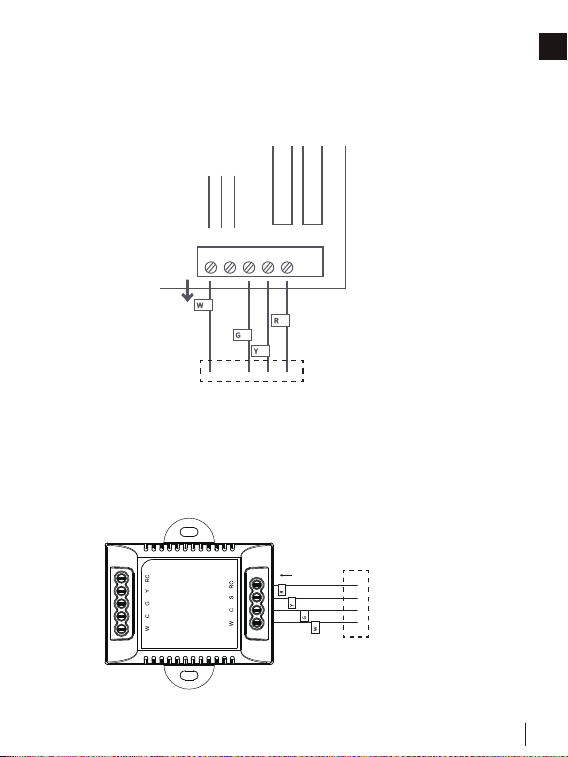
EN
Step 1: Find the HVAC terminals
Find the control board of your HVAC system. Open your HVAC
system’s cover and take a photo of the wires connected to the
terminals of your old thermostat. You may need to reference this
photo later.
Step 2: Label the wires
Label only the wires from the control board to your old thermostat
with the tags provided (label 2 control board).
W
C G
Y R
W
R
G
Y
To thermostat
W
C
G Y R
W C G Y R
Label 1.
Label 2.
Thermostat
If you have a C
wire, you will not
need the label 2
below.
Control board
C C
RC
RC
RC
RC
RH
RH
R R
C C
S S
G G
R R
RC RC
RH RH Y2 Y2
Y/Y1 Y/Y1
Y/Y1 Y/Y1
W/W1 W/W1
W/W1 W/W1
W2 W2
O/B O/B
* *
G G
W
C G
Y R
W
R
G
Y
To thermostat
W
C
G Y R
W C G Y R
Label 1.
Label 2.
Thermostat
If you have a C
wire, you will not
need the label 2
below.
Control board
C C
RC
RC
RC
RC
RH
RH
R R
C C
S S
G G
R R
RC RC
RH RH Y2 Y2
Y/Y1 Y/Y1
Y/Y1 Y/Y1
W/W1 W/W1
W/W1 W/W1
W2 W2
O/B O/B
* *
G G
W415-4094 / A / 03.01.23
21
INSTALLATION GUIDE
EN
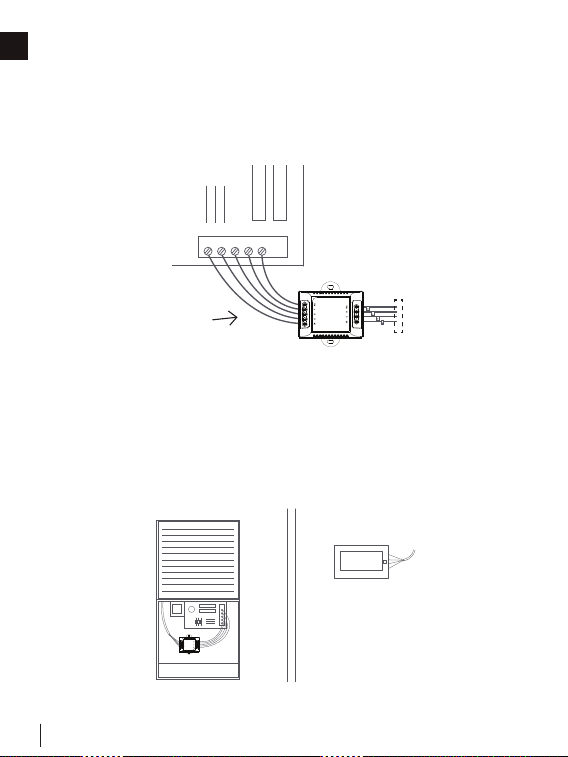
Step 3: Disconnect the wires
Disconnect the W/W1, G, Y/Y1, and R wires from the control
board.
Step 4: Connect the wiring module
Reconnect them correspondingly to the 4 terminals side of the
power module.
R -> RC || W/W1 -> W || G -> C || Y/Y1 -> S
R
Y
G
W
Control Board
W
R
G
Y
W C G Y
R
To thermostat
To thermostat
Power module
R
Y
G
W
Control Board
W
R
G
Y
W C G Y
R
To thermostat
To thermostat
Power module
W415-4094 / A / 03.01.23
22
INSTALLATION GUIDE
EN
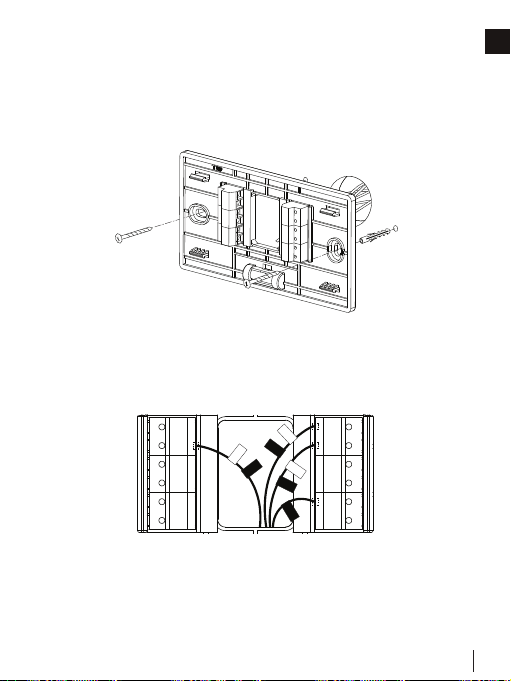
Step 5: Connect the wires
Generally, the control board will have W, C, G, Y, and R terminals.
Connect the pre-wired side of the power module (5 terminals) to
the corresponding terminals.
Step 6: Position the wiring module
The power module should be installed between your thermostat
wiring and your control board. Install it in the right position,
then close the HVAC cover panel securely and return to your
thermostat.
HVAC Control Board
W
C G
Y R
Power module
R
Y
G
W
To HVAC control board
To thermostat
HVAC Control Board
W
C G
Y R
Power module
R
Y
G
W
To HVAC control board
To thermostat
W415-4094 / A / 03.01.23
23
INSTALLATION GUIDE
EN
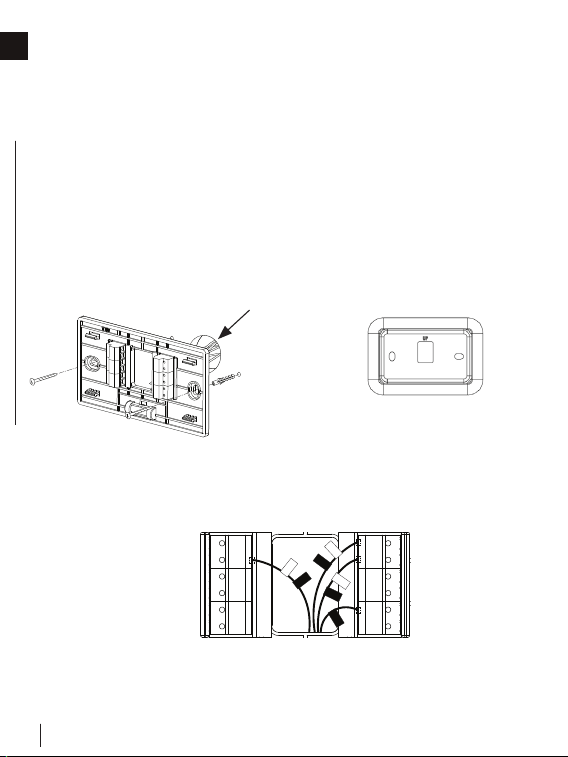
Step 7: Add new tags
Add new tags to the following tags to simplify your wiring:
R/RC/RH -> RC || G -> C || Y/Y1 -> S
Step 8: Remove the wall-plate
Unscrew the wall-plate from the wall, then gently pull it out and
ensure the wires will not fall back into the hole.
RC
RH G
C
Y1 Y2
W1
W2 O/B
RC
RC
G
C
S
W1
Y1
RC
RH G
C
Y1 Y2
W1
W2 O/B
RC
RC
C
G
W1
Y1
S
Label 1.
Label 2.
Thermostat
If you have a C
wire, you will not
need the label 2
below.
Control board
C C
RC
RC
RC
RC
RH
RH
R R
C C
S S
G G
R R
RC RC
RH RH Y2 Y2
Y/Y1 Y/Y1
Y/Y1 Y/Y1
W/W1 W/W1
W/W1 W/W1
W2 W2
O/B O/B
* *
G G
RC
RH G
C
Y1 Y2
W1
W2 O/B
RC
RC
G
C
S
W1
Y1
RC
RH G
C
Y1 Y2
W1
W2 O/B
RC
RC
C
G
W1
Y1
S
Label 1.
Label 2.
Thermostat
If you have a C
wire, you will not
need the label 2
below.
Control board
C C
RC
RC
RC
RC
RH
RH
R R
C C
S S
G G
R R
RC RC
RH RH Y2 Y2
Y/Y1 Y/Y1
Y/Y1 Y/Y1
W/W1 W/W1
W/W1 W/W1
W2 W2
O/B O/B
* *
G G
W415-4094 / A / 03.01.23
24
INSTALLATION GUIDE
EN
Step 9: Attach the base of WSC43BA to the wall
Then connect other wires to the corresponding terminal in the
base. Take a photo of the wires when you are finished. You may
need to refer to it later during the setup wizard.
Step 10: Connect the wires
First, connect 3 wires as shown below.
RC, C, S
↑
↑
G
S
Y1
Y2
M1
M2
RC
C
RH
O/B
W1
W2
RC
RC
G
C
W1
Y1
S
Bundle and insert the wires through the holes of the base
of WSC43BA, then attach the base to the wall with screws
(supplied). If preferred, the wall mounting plate should be
secured to the wall now, pulling the wires through the holes of
the mounting plate. Insert the drywall plugs behind the wall plate,
screwing the wall plate into the wall first, then screw the base into
the wall, through the wall plate.
RC
RH G
C
Y1 Y2
W1
W2 O/B
C
RC
G
W1
Y1
↑
↑
↑
↑
IMPORTANT: It is recommended to seal the wall opening after the thermostat wire has
been installed. The opening can be sealed with insulation, foam and or sealed off with
foam tape.
Label 1.
Label 2.
Thermostat
If you have a C
wire, you will not
need the label 2
below.
Control board
C C
RC
RC
RC
RC
RH
RH
R R
C C
S S
G G
R R
RC RC
RH RH Y2 Y2
Y/Y1 Y/Y1
Y/Y1 Y/Y1
W/W1 W/W1
W/W1 W/W1
W2 W2
O/B O/B
* *
G G
Wall Mounting
Plate
Seal opening
to prevent air
leakage behind
the thermostat.
W415-4094 / A / 03.01.23
25
INSTALLATION GUIDE
EN
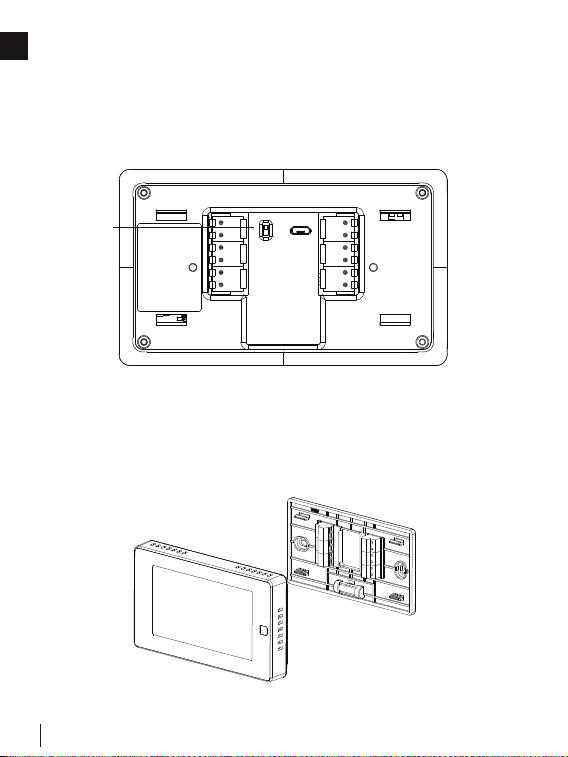
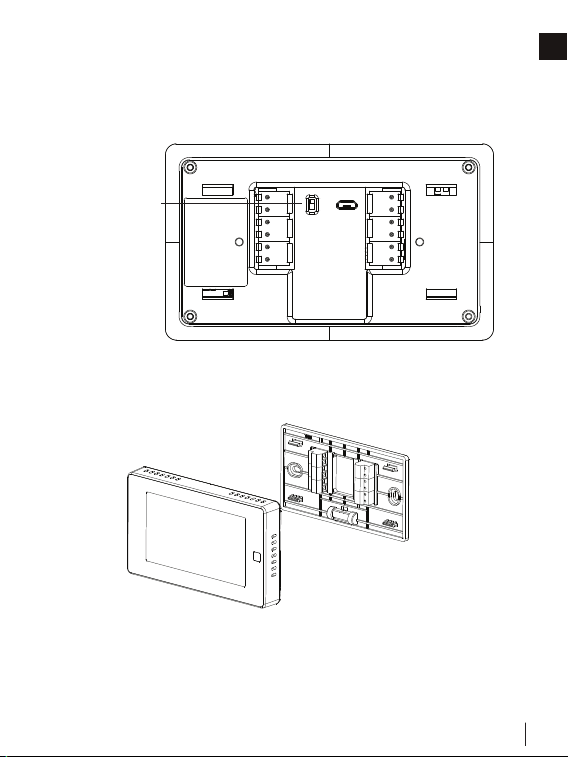
Step 11: DIP switch
Adjust the DIP switch on the back of the thermostat to the
“Connect” side.
Step 12: Attach the WSC43BA to the base
Gently press the WSC43BA into the base until it clicks.
→
→
→
→
RC&RH
Connect
Disconnect
DIP switch
→
→
→
→
RC&RH
Connect
Disconnect
DIP switch
W415-4094 / A / 03.01.23
26
INSTALLATION GUIDE
EN
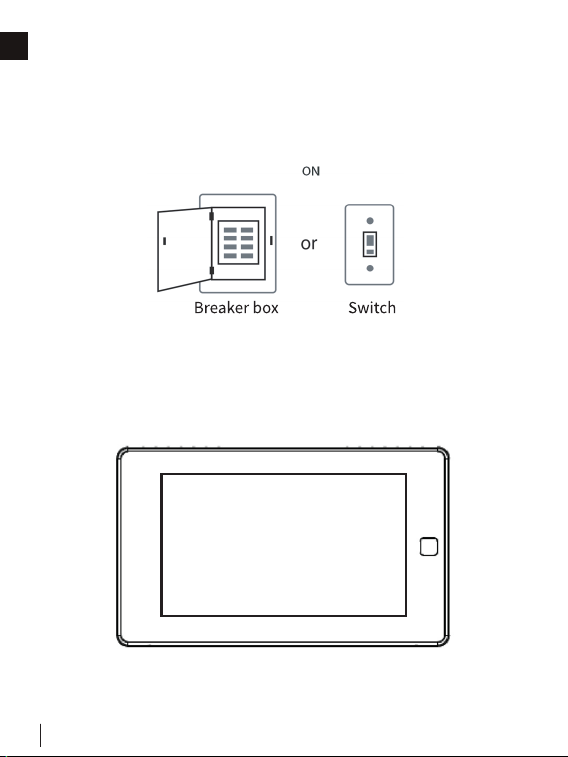
Step 13: Power on your system
Congratulations! The installation is finished. Please power on your
HVAC system.
Hi ,
Wel com e
When the power is successfully energized, the thermostat’s
screen will light up and go into the setup wizard. You can
complete the following configuration according to section 4.

W415-4094 / A / 03.01.23
27
INSTALLATION GUIDE
EN
4.3 WIRING CONFIGURATION ON THERMOSTAT
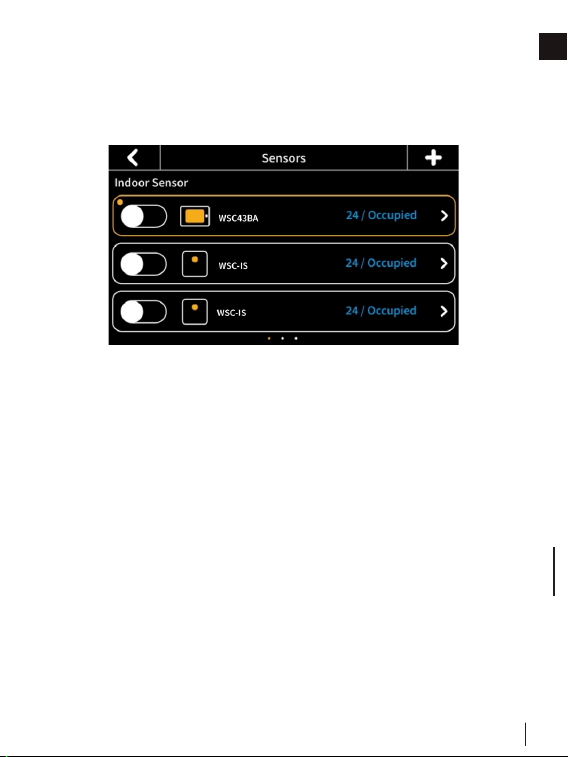
Follow the wizard first to complete the thermostat setup based
on your HVAC system.
• Wiring
Next
RC
Y1
RH
Y2
C
W1
G
W2
S
M2
O/B
M1
Heat Pump Type
Choose your heat pump source from the options provided:
• Air to air
• Geothermal
O/B Setting
Choose the alternative function for your Heat Pump*:
• O/B on cool
• O/B on heat
* Consult your heat pump manual to determine the correct O/B setting for your
application.
Heating Type
Select your system’s heating type:
• Furnace
• Boiler

W415-4094 / A / 03.01.23
28
INSTALLATION GUIDE
EN
Heat Fan Control
Allow the fan to be controlled either by your thermostat or
furnace:
• By thermostat
• By furnace
Accessory Configuration
Choose your connected accessory. M1 must be selected in the
wiring section for this option to appear:
• Humidifier
• Dehumidifier
Humidifier Type
Select the Humidifier type if accessory chosen is Humidifier:
• Evaporative
• Steam
Dehumidifier Active:
Select your Humidifier type if accessory chosen is Dehumidifier:
• Relay is open
• Relay is closed
Heating Source (Furnace)
Choose your system’s heating source when heating type selected
is Furnace.
• Standard efficiency gas forced air
• High efficiency gas forced air
• Oil forced air
• Electric forced air
• Hot water fan coil
Heating Source (Boiler)
Choose your system’s heating source when heating type selected
is Boiler:
• Hot water radiant heat
• Steam
W415-4094 / A / 03.01.23
29
INSTALLATION GUIDE
EN
4.4 PAIRING INDOOR AND OUTDOOR SENSORS
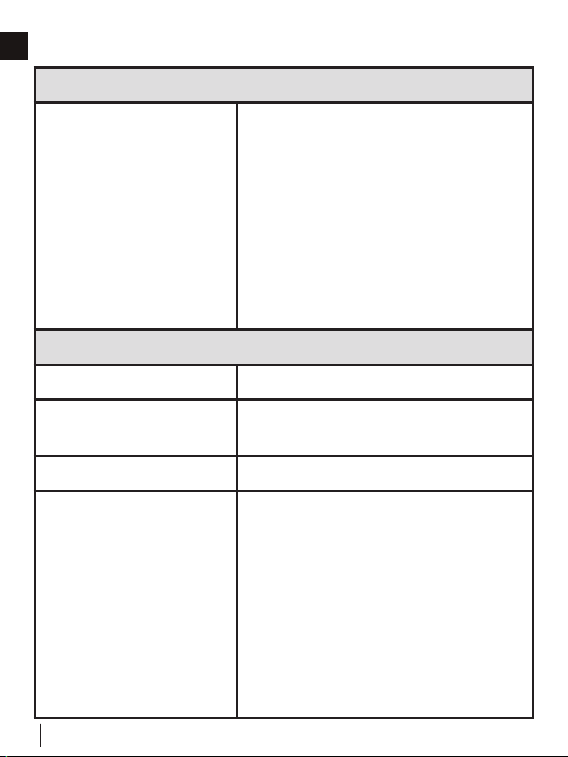
1. Click the “+” button at the top-right corner of the interface in
“Menu” -> “Sensors” on the thermostat and tap “Next”.
2. Remove the rear cover of the sensor.
3. Press and hold the button on the back of the sensor until
the indicator on the front of the sensor flashes red.
4. Wait for sensors to pair automatically. When the pairing is
successful, the sensor flashes green 3 times.
5. For Outdoor Sensors only: Place the temperature probe
of the sensor outdoors while leaving the main body of the
sensor indoors. Make sure the sensor is within 10 meters of
the thermostat.The outdoor sensor is great to use in areas
of limited/intermittent internet access or in regions where
local weather conditions are different to internet weather
forecasts.
You can set the indoor remote sensor as the main sensor or to only participate in the
calculation of the average temperature. (Only one sensor can be set as the main sensor
at a time). With multiple indoor remote sensors, if one of them is set as the main sensor,
the other indoor remote sensors and the built-in sensor will continue to participate,
according to the different participation periods set. The thermostat will calculate the
average temperature of all the sensors in the occupied state as a reference. If there is
no one in the room where the sensor is located, that sensor will not participate in the
calculation.
W415-4094 / A / 03.01.23
30
EN
5.0 TECHNICAL SPECIFICATIONS
Compatibility
Compatible systems
• Conventional: single-stage heat-
ing, 2-stage heating, and 2-stage
cooling HVAC systems
• Heat pump: 2-stage heating,
2-stage cooling, 2-aux heating
• Humidifier/dehumidifier
• Supports natural gas, electric, hot
water, steam or gravity, gas fireplac-
es (24 volts), oil heat sources, heat
pump, dual fuel
HVAC Control Functions
System mode • Heat, Cool, Auto, Off
Hybrid mode
• Low Cost, Comfort, Green,
Nighttime
Fan mode • On, Auto, Circle (adjustable)
Advanced
• Setting temperature locally or
remotely
• Auto-changeover between heat
and cool mode (System Auto)
• Compressor protection time is
available for select equipment
• Failure protection by cutting off all
circuit relays
• Smart warm-up
• Low temperature protection
W415-4094 / A / 03.01.23
31
TECHNICAL SPECIFICATIONS
EN
Wireless Connectivity
WiFi • 802.11 b/g/n @ 2.4GHz
Radio • 915MHZ
Physical Specifications
LCD Screen • 4.3-inch color touch screen
PIR Sensor • Sensing distance 3m, angle 70°
Electrical Rating
• 24 VAC, 1A carry; 5A surge
50/60 HZ
Max. Load Current • 1A
Operating Environment
• 0°C~50°C (32°F~122°F)
• Humidity range: 5%~95%
Storage Temperature • 30°C~60°C (-22°F~140°F)
Wiring
• 18 AWG, requires both R and C
wires from the HVAC system
Dimensions
• 131mm (L) x 78mm (W) x
29.2mm (H)
Mounting Type • Wall mounting
W415-4094 / A / 03.01.23
32
TECHNICAL SPECIFICATIONS
EN
Indoor and Outdoor Sensors
Battery • DC 3V (2*AAA batteries)
Radio • 915MHZ
LED • 2-color LED (red, green)
PIR
• Detect occupancy
• Sensing distance 5m, angle 120°
Operating Environment
• 0°C~50°C (32°F~122°F)
(indoor only)
• Humidity range: 5%~95%
Dimensions
• 62mm (L) x 62mm (W) x
15.5mm (H)
Mounting Type
• Wall-mounted or placed on a
stable surface (i.e., a tabletop stand)
Connectivity Range 10m
W415-4094 / A / 03.01.23
33
EN
6.0 HOME APP
• Access your appliance remotely by downloading the
Home App from your app store.
• In order to access the app, you will be required to create an
account by following the instructions listed within the app
(see below for details).
• By pairing your appliance to the Home App via WiFi, you
gain control to all modes and functions of the appliance.
• All notifications and alarms are sent through the app to keep
you connected with ease.
How Does It Work?
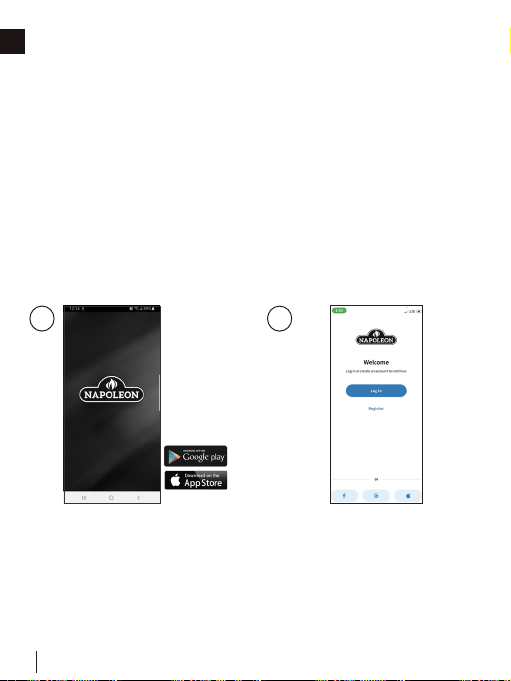
Let’s Get Started
Download the Home App
from your app store (Google
Play or Apple App Store).
NOTE: This requires Android
7.0 or iOS 11.0.
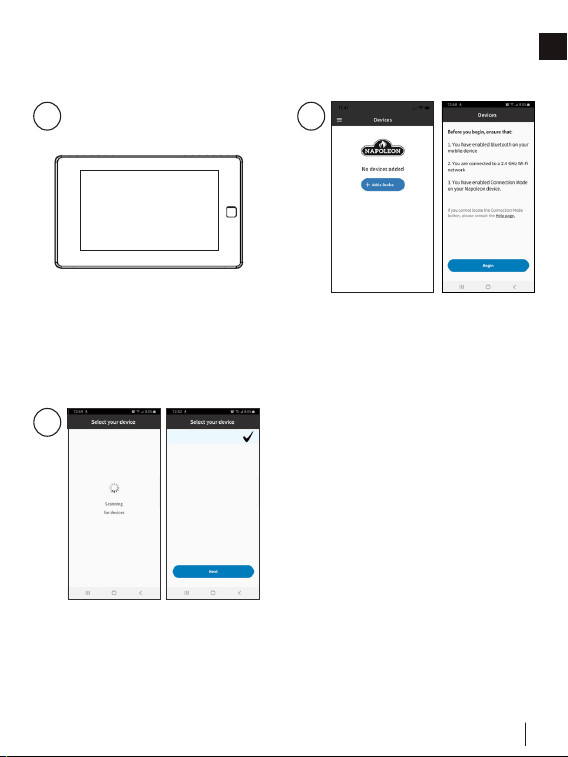
1
2
Register an account with the
Home App OR sign-in using
your Facebook, Google, or
Apple account information.
W415-4094 / A / 03.01.23
34
HOME APP
EN
3
Enter user information and
create a password for the
account. Select the country in
which the appliance is located.
4
The information entered in
Step 3 will be registered to the
Home App and a confirma-
tion will be sent to the email
provided.
Open email inbox and select
the confirmation link.
NOTE: The confirmation link
must be opened on the device
that the Home App is installed
on.
5
Welcome!
If no email is found, click “Re-
Send Confirmation Link” and
check junk folder.
6
W415-4094 / A / 03.01.23
35
HOME APP
EN
Bluetooth Connection
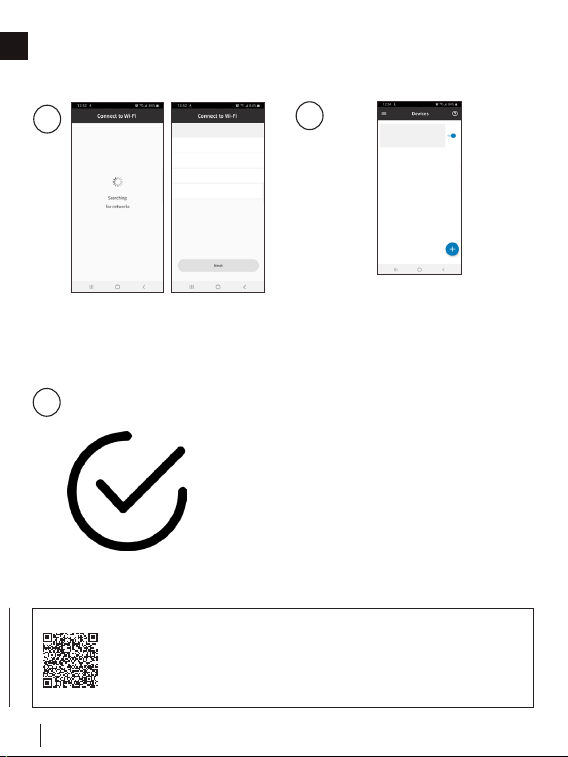
7
Ensure your appliance is
plugged in and turned on.
8
Turn on Bluetooth on your de-
vice, select “Add Device” and
accept the permissions.
9
Search for devices and select
the device from the list.
Your New Connect Product
W415-4094 / A / 03.01.23
36
HOME APP
EN
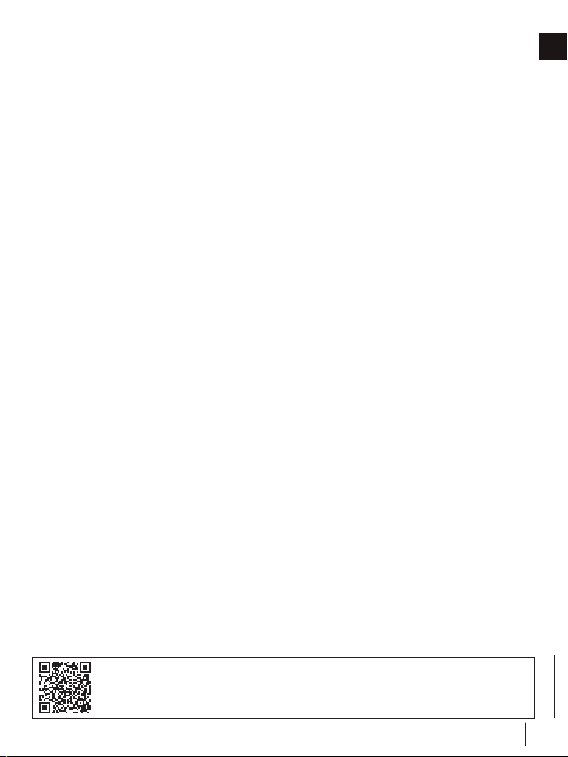
10
Select your desired WiFi and
connect by entering the WiFi
password of your home.
Your Home Wifi (SSID)
11
Once the appliance has been
connected to the access point,
it can be given a nickname for
recognizability.
Your New Connect Product
12
You are now connected!
Adding WiFi Credentials
To register your EQHub Smart Thermostat and Heat
Pump as a Hybrid Heating solution, please go to:
https://www.napoleon.com/en/ca/heating-cooling/
product-registration-eqhub-smart-thermostat
W415-4094 / A / 03.01.23
37
FAQs
EN
7.0 FAQs
What is the WiFi configuration if the thermostat fails?
1. Confirm the device, mobile phone, and router are as close
as possible.
2. Confirm that the network is stable. Put the phone beside
your device and ensure they are in the same network
environment. Try to open a website to ensure the network
can be used.
3. Confirm adding device is under 2.4G WiFi channel. If 2.4G
and 5G WiFi use the same name, it is recommended to
change one to a different name.
4. Confirm the entered router password is correct.
5. If it still does not work, it is recommended to reset the router
and try again.
What if the device is offline?
1. Confirm if the thermostat is powered on.
2. Confirm if the device or the network has been cut off. If so,
please reconnect the network, as it may need some time to
recover. Please check the status 2 minutes later.
3. Confirm that the network is stable. Put the phone beside
your device and ensure they are in the same network
environment. Try to open a website to ensure the network
can be used.
4. Confirm if the home WiFi network is normal or if the WiFi
name and password has been modified. If necessary,
remove the device and add again.
Refer to website FAQ page for more details.

W415-4094 / A / 03.01.23
38
FAQs
EN
5. If the network is normal but the device is still offline, please
check if there are too many WiFi connections. Try restarting
the router, wait for 5 minutes, and observe the status of the
device.
6. If it still does not work, it is recommended to remove the
device or reset the router and then add it again.
W415-4094 / A / 03.01.23
39
EN
8.0 MEET YOUR THERMOSTAT
8.1 DEVICE OVERVIEW
Main Page
• Date & Time
• Low Sensor Battery Icon
• Outdoor Temperature
• Humidity Status Indicator
& Control Access
• Indoor Humidity
(only when viewing
temperature controls)
• WiFi
• Increase Temperature
• Set Point Temperature
• Decrease Temperature
• System Mode
• Menu
• Hold Mode
• Fan Mode
• Indoor Temperature
• Weather Icon
W415-4094 / A / 03.01.23
40
MEET YOUR THERMOSTAT
EN
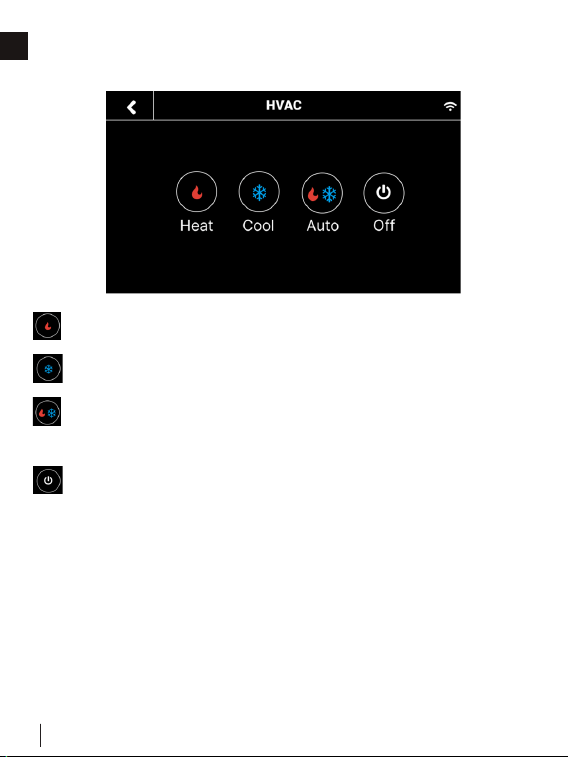
System Mode
• Heat: Heating only
• Cool: Cooling only
• Auto: Automatic control of heating and cooling based on
ambient temperature
• Off: Turn the system off
W415-4094 / A / 03.01.23
41
MEET YOUR THERMOSTAT
EN
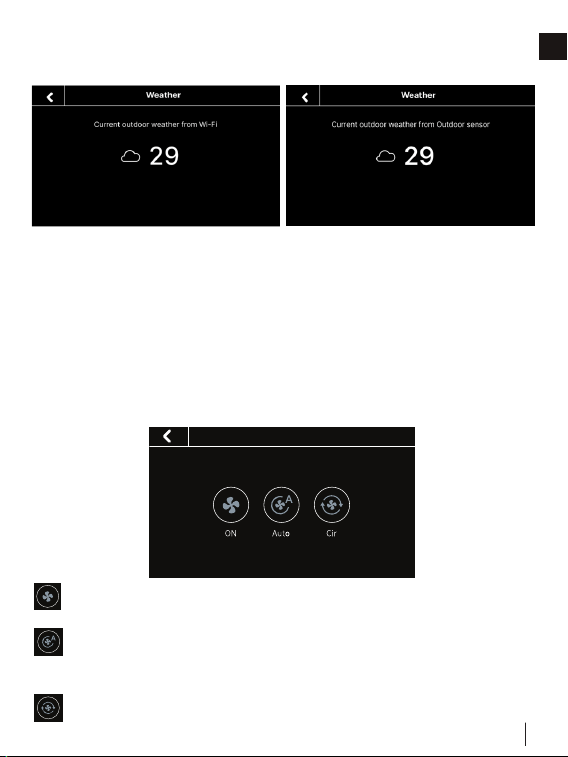
Weather
Fan Mode
Click the weather icon on the home page to display the real time
outdoor weather condition and temperature for the current day in
your home location.
NOTE: The weather display screen will indicate the source of the
outdoor temperature value. If the outdoor sensor is activated and
in use, the thermostat will display the temperature value from the
outdoor sensor. If the outdoor sensor is offline or unavailable, the
thermostat will display an outdoor temperature value from the
cloud.
• Fan
• On: Runs continuously
• Auto: Automatically adjust fan according to the system
mode
• Clr: Runs at intervals to circulate air
• Fan
• Fan
• Fan
W415-4094 / A / 03.01.23
42
MEET YOUR THERMOSTAT
EN
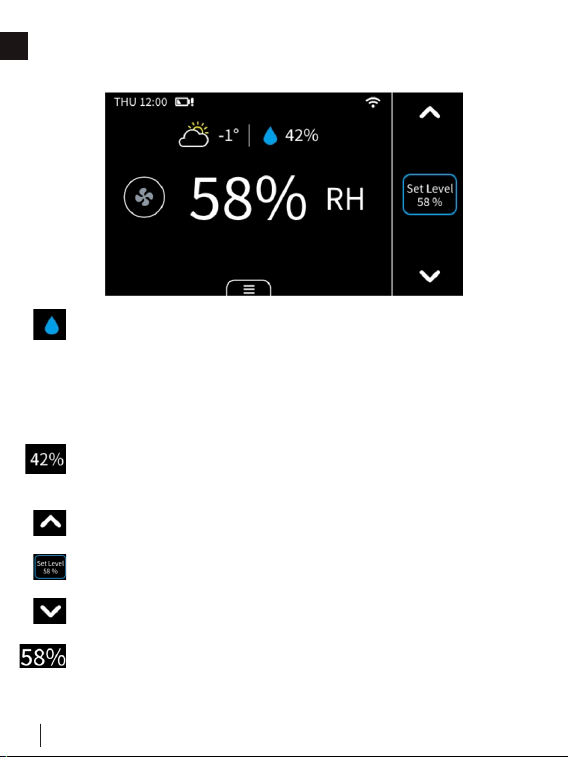
Humidifier/Dehumidifier
• Humidity indicator & temperature control access
• + for humidifying
• - for dehumidifying
• Tap icon to switch between humidity and
temperature views
• Outdoor humidity (only when viewing humidity
controls)
• Increase humidity level if humidifier is connected
• Humidity level
• Decrease humidity level if dehumidifier is connected
• Indoor humidity
W415-4094 / A / 03.01.23
43
MEET YOUR THERMOSTAT
EN
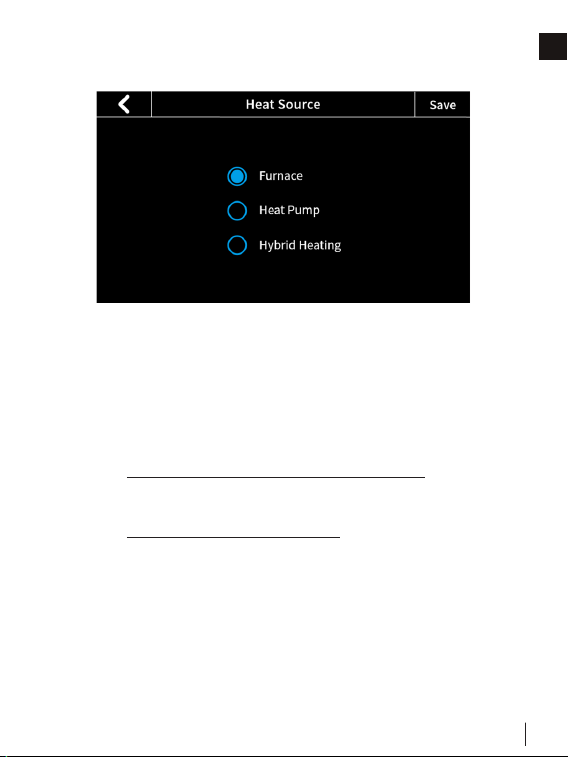
Heating Options
Heat Source
• Furnace
• Heat Pump
NOTE: The below settings are only applicable when the
heat source selected is Heat Pump:
• Min. Heat Pump Outdoor Temperature: When the
outdoor temperature is below this temperature, the
Heat Pump will not be used.
• Max. Heat Pump Run Time: This is the length of
time the Heat Pump is allowed to run.
• Hybrid
Choose your preferred source of heating from the options in
Heat Source. The thermostat will satisfy demand based on
selections made. The Hybrid selection will enable the use of dual
fuel switching, alternating between primary and secondary heat
sources.
W415-4094 / A / 03.01.23
44
MEET YOUR THERMOSTAT
EN
Hybrid Mode
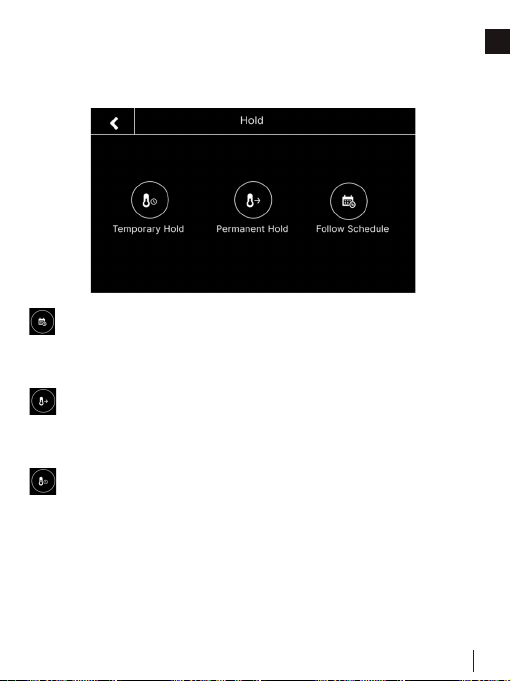
• Low Cost: Satisfy your heating demands using the
lowest cost available fuel source. In this mode, the second
stage HP heating is will be turned on according to the
‘Compressor Stage2 Temp Delta’ (non adjustable) and
‘Compressor Stage1 Max Runtime’ (adjustable) and second
stage furnace heating will be turned on according to ‘Aux
Heat Stage 1 Max Runtime’ (adjustable) and ‘AUX Heat
Stage 2 Temp Delta’ (non adjustable) in Menu > Settings >
Installation > Advanced setting.
• Comfort: Satisfy your heating demands with any available
fuel source to prioritize your comfort levels, always keeping
your home as close to your desired set point as possible.
In this mode, the second stage HP heating is will be turned
When Hybrid heating is selected in Menu > System > Heating
Options > Heat Source, the heat source used by the system is
controlled by the values in the corresponding modes’ switching
table. The switching tables can be accessed in Menu > Hybrid
Heating.
W415-4094 / A / 03.01.23
45
MEET YOUR THERMOSTAT
EN
on according to the ‘Compressor Stage2 Temp Delta’
(non adjustable) and ‘Compressor Stage1 Max Runtime’
(adjustable) and second stage furnace heating will be turned
on according to ‘Aux Heat Stage 1 Max Runtime’ in Menu
> Settings > Installation > Advanced setting.
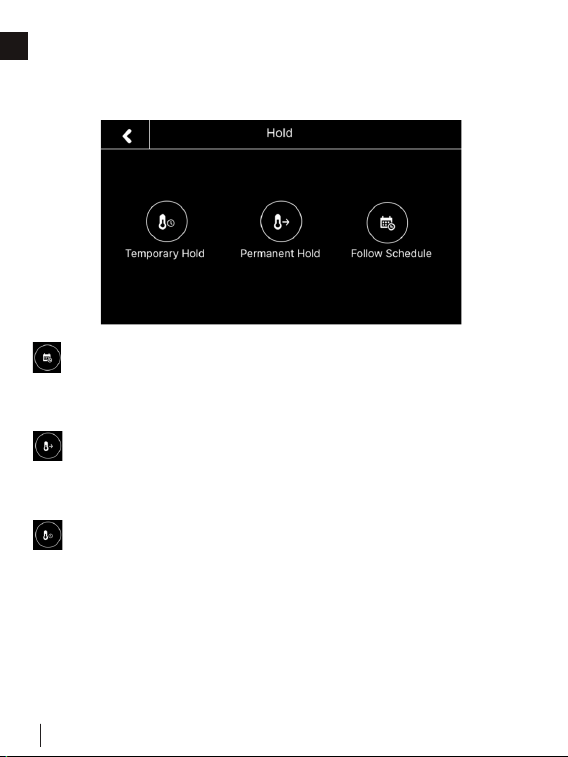
• Green: The values in your green switching table are
formulated to help in prioritizing GHG savings and reducing
your carbon footprint when satisfying your heating demand.
In this mode, the second stage HP heating is will be turned
on according to the ‘Compressor Stage2 Temp Delta’
(non adjustable) and ‘Compressor Stage1 Max Runtime’
(adjustable) and second stage furnace heating will be
turned on according to ‘Aux Heat Stage 1 Max Runtime’
(adjustable) and ‘AUX Heat Stage 2 Temp Delta’ (non
adjustable) in Menu > Settings > Installation > Advanced
setting.
• Nighttime: Run quiet operation of your unit at night,
limiting fan speed and utilizing low stage heating for as
long as possible. In this mode, second stage HP heating
is controlled by values in ‘Compressor Stage2 Temp Delta’
and ‘Hybrid Max Heat Pump Runtime’ and second stage
furnace heating will be turned on according to the ‘Aux Heat
Stage 1 Max Runtime’ and ‘AUX Heat Stage 2 Temp Delta’
in Menu > Settings > Installation > Advanced setting.
W415-4094 / A / 03.01.23
46
MEET YOUR THERMOSTAT
EN
Hold Mode
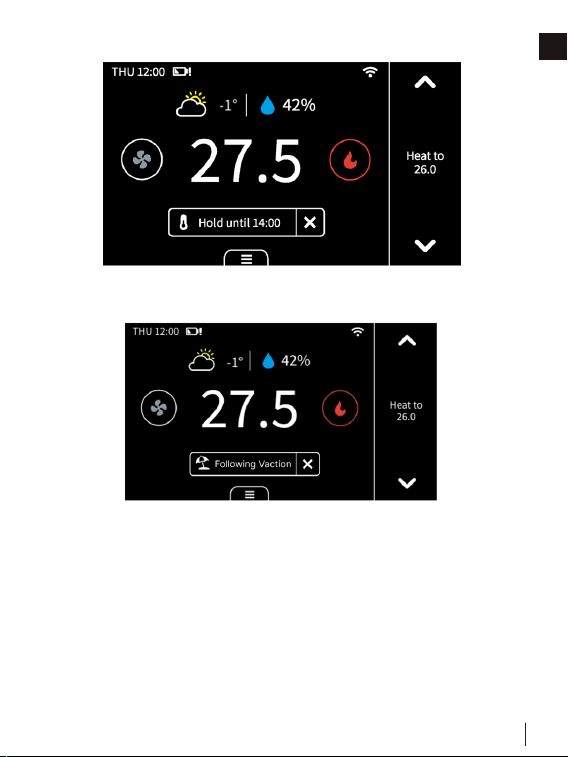
There are 3 hold modes you can select:
• Follow Schedule: Follow the settings of schedule to adjust
the temperature, fan, or hybrid mode (if enabled). When you
remove hold, the mode will turn to “Follow Schedule”.
• Permanent Hold: This will always hold the current target
temperature, fan, or hybrid mode (if enabled). It will override
the current schedule settings.
• Temporary Hold: Keep the current target temperature,
fan, or hybrid mode (if enabled) until the next scheduled
activity begins. You can select this mode manually or by
adjusting the target temperature, fan, or hybrid mode (if
enabled) under “Follow Schedule” mode, as it will turn to
“Temporary Hold”.
W415-4094 / A / 03.01.23
47
MEET YOUR THERMOSTAT
EN
Hold temperature until next schedule.
If you are away for a long time, you can set the thermostat to
vacation mode in “Menu” -> “Vacation”. You can set the
time of departure and return, as well as the highest and lowest
temperatures during this period. The thermostat will automatically
hold this temperature range.
NOTE: During this mode, you cannot manually change the target
temperature. If you want to exit this mode, change the Hold
mode manually or delete the vacation in menu.
Vacation Mode
W415-4094 / A / 03.01.23
48
MEET YOUR THERMOSTAT
EN
Display
Here are some changes on the screen and what they mean:
When you turn on the compressor frequently, there will be a
time countdown to protect the compressor. This will occur in the
following case:
Heat pump: heating, cooling || Conventional: cooling
You can set the time countdown in “Menu” -> “Installation” ->
“Advanced” -> “Compressor Protect Time”.
1
2
W415-4094 / A / 03.01.23
49
MEET YOUR THERMOSTAT
EN
3
When the outdoor temperature is below the “Compressor
Min Outdoor Temp” you set, the icon on system mode
will display ! and the compressor will be turned off
automatically.
The thermostat is connected to the router, but the router is
not connected to the network.
Unusual heating or cooling alert:
When the following occurs, this prompt appears on the
thermostat:
1. When your thermostat is cooling, the temperature in the
room does not go down for a long time, but instead, the
temperature still rises.
2. When your thermostat is heating, the temperature in the
room does not go up for a long time, but instead, the
temperature still falls.
W415-4094 / A / 03.01.23
50
MEET YOUR THERMOSTAT
EN
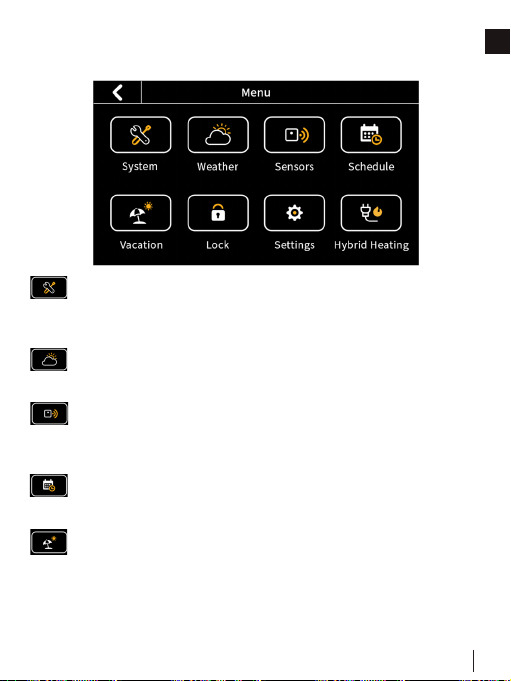
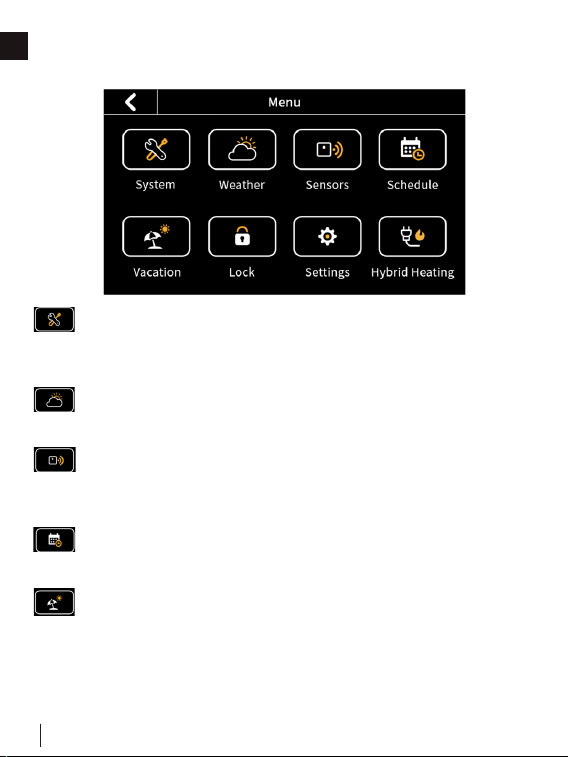
Menu
System
• HVAC: Switch system mode (Heat/Cool/Auto/Off)
• Fan: Switch fan mode (ON/Auto/Cir)
Weather
Weather conditions of the real time in your home location.
Sensors
Add multi-sensors to balance the current temperature
throughout the home.
Schedule
Set schedule to change the temperature automatically.
Vacation
Set vacation to change the temperature automatically.

W415-4094 / A / 03.01.23
51
MEET YOUR THERMOSTAT
EN
Lock
Multi-level keypad lockout to avoid others tampering with
the settings. After locking, the corresponding function is
not available and the corresponding settings icon will go
dim. An icon with a small lock will appear on top of the
main page.
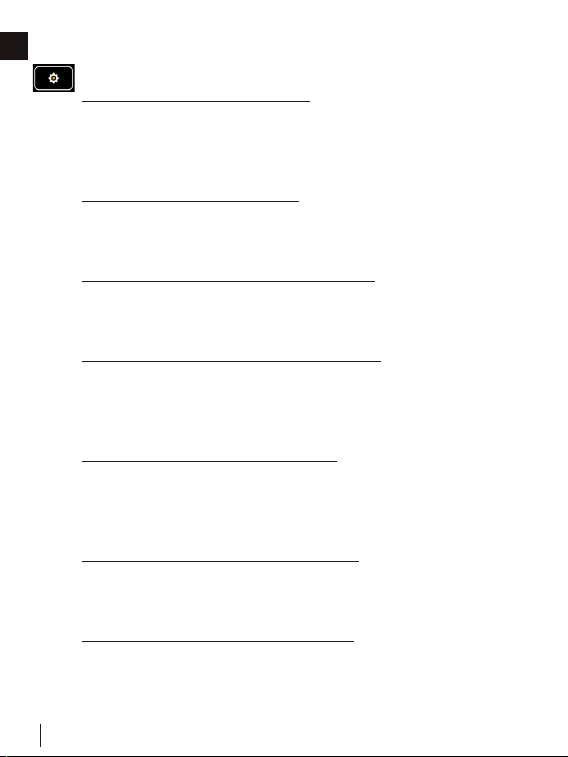
Settings
• Date & Time: Set time format.
• Fan Run Time: Set minimum fan run time in “Clr”
mode during heating/cooling cycles.
• WiFi: Configure and display WiFi information.
• Smart Warm-Up: When smart warm-up is enabled,
your thermostat automatically calculates when to
turn on heating or cooling so your home will reach a
scheduled temperature on time. This only worked in
“Follow Schedule” mode.
• Device Name: Rename your device.
• Temp Unit: Celsius or Fahrenheit.
• Temp Range: Set the adjustment range of heating and
cooling.
• Screen: Adjust screen brightness on active/standby/
sleep and standby time.
• T/H Correction: Adjust the accuracy of temperature
and humidity to match your environment.
• Installation
W415-4094 / A / 03.01.23
52
MEET YOUR THERMOSTAT
EN
• Advanced Settings
1. Heat/Cool Dissipation Time
This is the amount of time the fan will continue to run
once the heat/cool is turned off. It will circulate any
heated/cooled air remaining in the vents.
2. Compressor Protect Time
A timed countdown to protect the compressor from
starting too frequently.
3. Compressor/Aux Heat Min On Time
This is the length of time the compressor or auxiliary
heat is turned on during heating/cooling cycles.
4. Aux Heat Stage 2 Temperature Delta
When the difference between the indoor temperature
and the target temperature reaches this value, the
second stage is automatically turned on.
5. Aux Heat Stage 1 Max Routine
If the first stage fails to reach the target temperature
after this time, the second stage will be automatically
turned on.
6. Hybrid Max Heat Pump Run Time
This is the length of time the Heat Pump is allowed to
run in hybrid heating mode.
7. Differential Temperature/Humidity
This is the allowable value from your set point before
your heating, cooling, or humidity call is made.

W415-4094 / A / 03.01.23
53
MEET YOUR THERMOSTAT
EN
Hybrid Heating
Set mode to low-cost, comfort, green, or night (see “Hybrid
Mode” section for more details).
Equipment
Reconfigure your wiring setting on thermostat.
Equipment Test
Test whether the corresponding function of the equipment
can run normally as required.
• Filter: Filter change reminder.
• Reset:
Reset setting
Reset schedule (Reset system schedule and clear
vacation.)
Reset all (Reset the thermostat to default factory
setting.)
• About: Show device information.
W415-4094 / A / 03.01.23
54
EN
9.0 APP OVERVIEW
Control Page
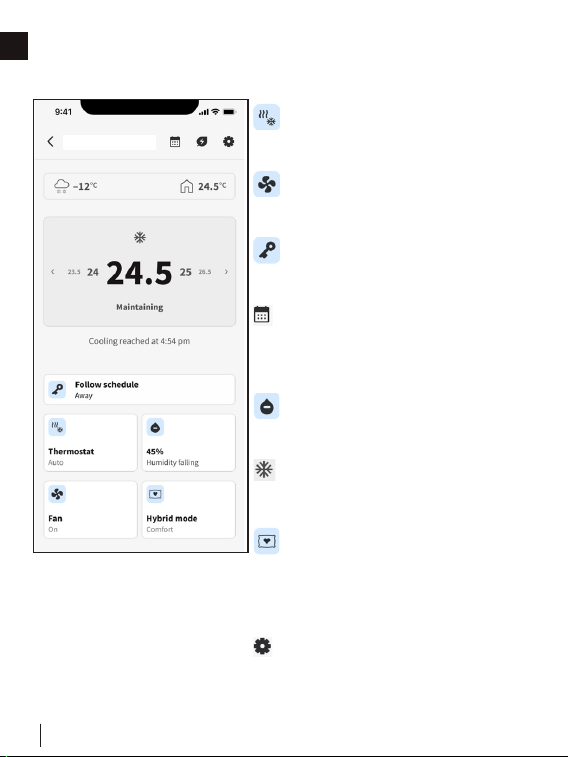
• Thermostat Mode: Displays
the current system mode. Tap
to switch.
• Fan Mode: Displays the
current fan mode. Tap to
switch.
• Hold Mode: Displays the
current hold mode. Tap to
switch.
• Schedule: Set a schedule
for the week so that you can
get the right temperature at a
certain time.
• Humidity Control: Displays
the current humidity level. Tap
to adjust target level.
• Set Point Temperature:
Increase/decrease the target
temperature.
• Heating Mode: Displays
heating source selection. When
hybrid heating is selected,
options to select hybrid modes
will be displayed.
• Settings: You can edit the app
settings, such as device name,
heat source, temperature unit,
and geofencing.
Thermostat
W415-4094 / A / 03.01.23
55
EN
10.0 WARRANTY
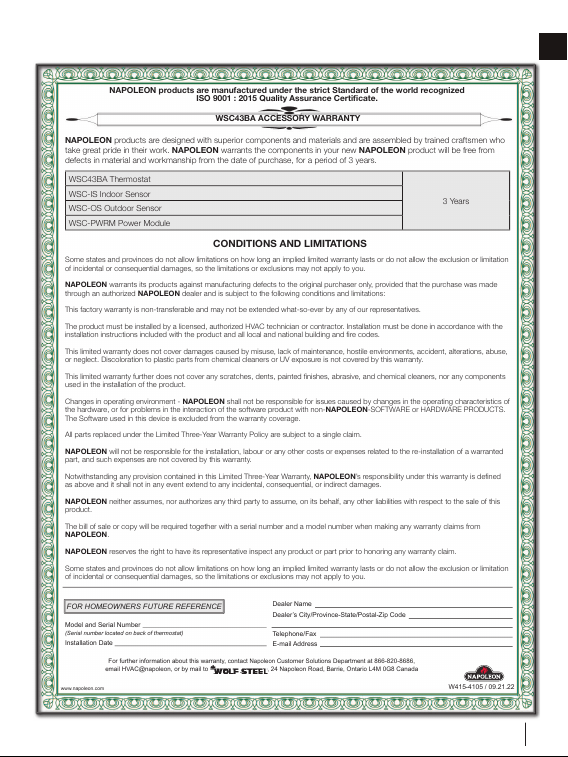
WSC43BA ACCESSORY WARRANTY
NAPOLEON products are manufactured under the strict Standard of the world recognized
ISO 9001 : 2015 Quality Assurance Certificate.
For further information about this warranty, contact
Napoleon
Customer Solutions Department at 866-820-8686,
email HVAC@napoleon, or by mail to , 24 Napoleon Road, Barrie, Ontario L4M 0G8 Canada
www.napoleon.com
Dealer Name
Dealer’s City/Province-State/Postal-Zip Code
Telephone/Fax
E-mail Address
Model and Serial Number
(Serial number located on back of thermostat)
Installation Date
W415-4105 / 09.21.22
NAPOLEON products are designed with superior components and materials and are assembled by trained craftsmen who
take great pride in their work. NAPOLEON warrants the components in your new NAPOLEON product will be free from
defects in material and workmanship from the date of purchase, for a period of 3 years.
WSC43BA Thermostat
3 Years
WSC-IS Indoor Sensor
WSC-OS Outdoor Sensor
WSC-PWRM Power Module
Some states and provinces do not allow limitations on how long an implied limited warranty lasts or do not allow the exclusion or limitation
of incidental or consequential damages, so the limitations or exclusions may not apply to you.
NAPOLEON warrants its products against manufacturing defects to the original purchaser only, provided that the purchase was made
through an authorized NAPOLEON dealer and is subject to the following conditions and limitations:
This factory warranty is non-transferable and may not be extended what-so-ever by any of our representatives.
The product must be installed by a licensed, authorized HVAC technician or contractor. Installation must be done in accordance with the
installation instructions included with the product and all local and national building and fire codes.
This limited warranty does not cover damages caused by misuse, lack of maintenance, hostile environments, accident, alterations, abuse,
or neglect. Discoloration to plastic parts from chemical cleaners or UV exposure is not covered by this warranty.
This limited warranty further does not cover any scratches, dents, painted finishes, abrasive, and chemical cleaners, nor any components
used in the installation of the product.
Changes in operating environment - NAPOLEON shall not be responsible for issues caused by changes in the operating characteristics of
the hardware, or for problems in the interaction of the software product with non-NAPOLEON-SOFTWARE or HARDWARE PRODUCTS.
The Software used in this device is excluded from the warranty coverage.
All parts replaced under the Limited Three-Year Warranty Policy are subject to a single claim.
NAPOLEON will not be responsible for the installation, labour or any other costs or expenses related to the re-installation of a warranted
part, and such expenses are not covered by this warranty.
Notwithstanding any provision contained in this Limited Three-Year Warranty, NAPOLEON’s responsibility under this warranty is defined
as above and it shall not in any event extend to any incidental, consequential, or indirect damages.
NAPOLEON neither assumes, nor authorizes any third party to assume, on its behalf, any other liabilities with respect to the sale of this
product.
The bill of sale or copy will be required together with a serial number and a model number when making any warranty claims from
NAPOLEON.
NAPOLEON reserves the right to have its representative inspect any product or part prior to honoring any warranty claim.
Some states and provinces do not allow limitations on how long an implied limited warranty lasts or do not allow the exclusion or limitation
of incidental or consequential damages, so the limitations or exclusions may not apply to you.
CONDITIONS AND LIMITATIONS
FOR HOMEOWNERS FUTURE REFERENCE