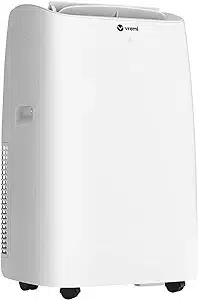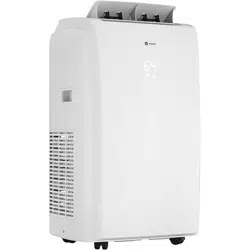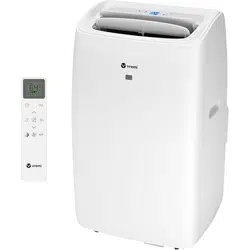

Portable Air Conditioner 1
No Foolin’
All Coolin’.
Portable Air Conditioner
This Is A Manual.
To prevent any internal damage, it is
very important to keep refrigeration
units (like this one) upright throughout
their journey. Please leave the unit
standing upright and outside the box
for 24 HOURS before plugging it in.
Before First Use
In the event this product malfunctions, or you believe it is defective,
please contact Customer Service at vremi.com/chat,
646-490-9904 or support@vremi.com and hold onto
the defective product (pending further instruction).
A defective product should be clearly marked or stored
where it cannot be used by mistake. Failure to keep
the product in its original quality from the time
of receipt may impede Vremi®’s ability to correct
any legitimate problem and may limit the extent
to which Vremi® may provide recourse.
Portable Air Conditioner Table Of Contents 3
Thank you for choosing our Portable Air Conditioner.
Before using your unit, please read this manual
carefully. Should you have questions, please contact
Customer Service at vremi.com/chat,
646-490-9904 or support@vremi.com.
Table Of Contents
Important Safety Instructions 4
Description Of Parts 8
Installation Instructions 9
Operating Instructions 11
Remote Control 15
Tips For Correct Use 22
Water Drainage Method 23
Cleaning 25
Troubleshooting 26
Warranty Information 27
Drop Us A Line 27
4 Important Safety Instructions Portable Air Conditioner
· This appliance can be used by children
(at least 8 years of age), persons with
reduced physical, sensory, or mental
capabilities, or those lacking experience
or knowledge with its use, as long as they
are under adult or guardian supervision,
have been given instructions on the
proper and safe use of this appliance,
and understand the hazards involved.
· Children should not play with this
appliance.
· Cleaning and maintenance of this unit
should not be performed by children
without adult or guardian supervision.
· If the supply cord is damaged, it must be
replaced by the manufacturer, its service
agent, or a similarly qualied person to
avoid hazards.
ACCORDING TO IEC STANDARDS:
· This appliance is not intended for use by
persons (including children) with reduced
physical, sensory, or mental capabilities,
or with lack of experience and knowledge,
unless they have been given adult or
guardian supervision or instructions on
the proper and safe use of this appliance.
· Children should be supervised to ensure
that they do not play with this appliance.
· If the supply cord is damaged, it must be
replaced by the manufacturer, its service
agent, or a similarly qualied person to
avoid hazards.
· Disconnect the appliance from its power
source during service, parts replacement,
and cleaning.
· Installation of this appliance should
be done in accordance with national
wiring regulations.
NOTE: Check the nameplate
for the type of refrigerant gas used
in your appliance.
· Specic information regarding
appliances with refrigerant gas.
· R410A, R134a, R290, R32 is a refrigerant
that complies with European
ecological standards; nevertheless,
it is recommended not to pierce the
cooling circuit of the machine. At the end
of its useful life, deliver the appliance to a
special waste collection centre for disposal.
· This hermetically sealed system contains
uorinated greenhouse gases.
· Environmental Information: This unit
contains uorinated greenhouse gases
covered by the Kyoto Protocol.
· Maintenance and disposal operations
must be carried out by qualied
personnel only. (For more details
on the refrigerant, see back cover).
· GWP (Global Warming Potential): R410A:
2088, R134a: 1430, R290: 3, R32: 675.
· Do not use this unit for functions other than
those described in this instruction manual.
· If the power cord becomes worn out
or damaged, the cord should only be
replaced by a qualied service technician
using genuine replacement parts.
· Make sure the plug is inserted rmly and
completely into the outlet, otherwise,
it can result in electrical shock or re.
· Do not plug other appliances into the same
outlet as it can result in electrical shock.
· Do not disassemble or modify the
appliance or the power cord as it can result
in electrical shock or re. All other services
should be referred to a qualied technician.
· Do not place the power cord or appliance
near a heater, radiator, or other heat sources.
It can result in electrical shock or re.
· This unit is equipped with a cord that has
an earthed wire connected to an earthed
pin or grounding tab. The plug must be
plugged into a socket that is properly
installed and earthed. Do not under any
circumstances cut or remove the earthed
pin or grounding tab from this plug.
· The unit should be used or stored in such
away that it is protected from moisture
e.g. condensation, splashed water, etc.
Unplug it immediately if this occurs.
ACCORDING TO EUROPEAN
STANDARDS (ENS):
IMPORTANT SAFETY INSTRUCTIONS
Portable Air Conditioner Important Safety Instructions 5
· Always transport your appliance in
avertical position and place on a stable,
level surface. If the unit is transported
laying on its side, it should be positioned
upright after transport and left unplugged
for 6 hours before use.
· Always use the switch on the unit’s Control
Panel or use the Remote Control to turn
the unit off. Do not start or stop operation
by plugging in or unplugging the power
cord. It can result in electrical shock.
· Do not touch the buttons on the Control
Panel with wet or damp ngers.
· Hazardous chemicals should not come
into contact with this appliance. Do not use
wax, thinner, or a strong detergent when
cleaning. Clean only with a soft cloth to
prevent damage to the surface nish. Do
not use this appliance in the presence of
inammable substances or vapour such as
alcohol, insecticides, gasoline, etc.
· If the appliance is making unusual sounds
or is emitting smoke or an unusual odor,
unplug it immediately.
· Do not clean the unit with water. Water can
enter the unit and damage the insulation,
creating a shock hazard. If water enters the
unit, unplug it immediately and contact
Customer Service.
· Two or more people are needed to lift
and install the unit.
· Always grasp the plug when plugging in
or unplugging the appliance. Never
unplug by pulling on the cord. It can
result in electrical shock and damage.
· Install the appliance on a sturdy, level
oor capable of supporting up to 110 lbs
(50 kg). Installation on a weak or unlevel
oor can result in property damage and
personal injury.
The following information is also specied
in the manual for units with ammable
refrigerant (R32).
· The maximum refrigerant charge amount
(refer to nameplate marking refrigerant
amount);
· Information for refrigerant handling,
cleaning, servicing, and disposal;
· A warning to keep any required ventilation
openings clear of obstruction;
· A notice that servicing shall be performed
only as recommended by the manufacturer;
· A warning that the appliance shall be
stored in a well-ventilated area where
the room size corresponds to the room
area as specied for operation;
· A warning that the appliance should be
stored in a room without open ames
e.g. a continuously operating gas
appliance and without ignition
sources e.g. an electric heater;
· Instructions as to how the appliance is
to be stored so as to prevent mechanical
damage from occurring;
· Specic information about the required
qualications for maintenance, service,
and repair personnel;
1. Do not accelerate the defrosting or
cleaning process by any means other
than those recommended by the
manufacturer.
2. Store this unit in a room without open
ames and ignition sources such as
gas appliances or electric heaters.
3. Do not pierce or burn.
4. Please be aware that refrigerants
may be odourless.
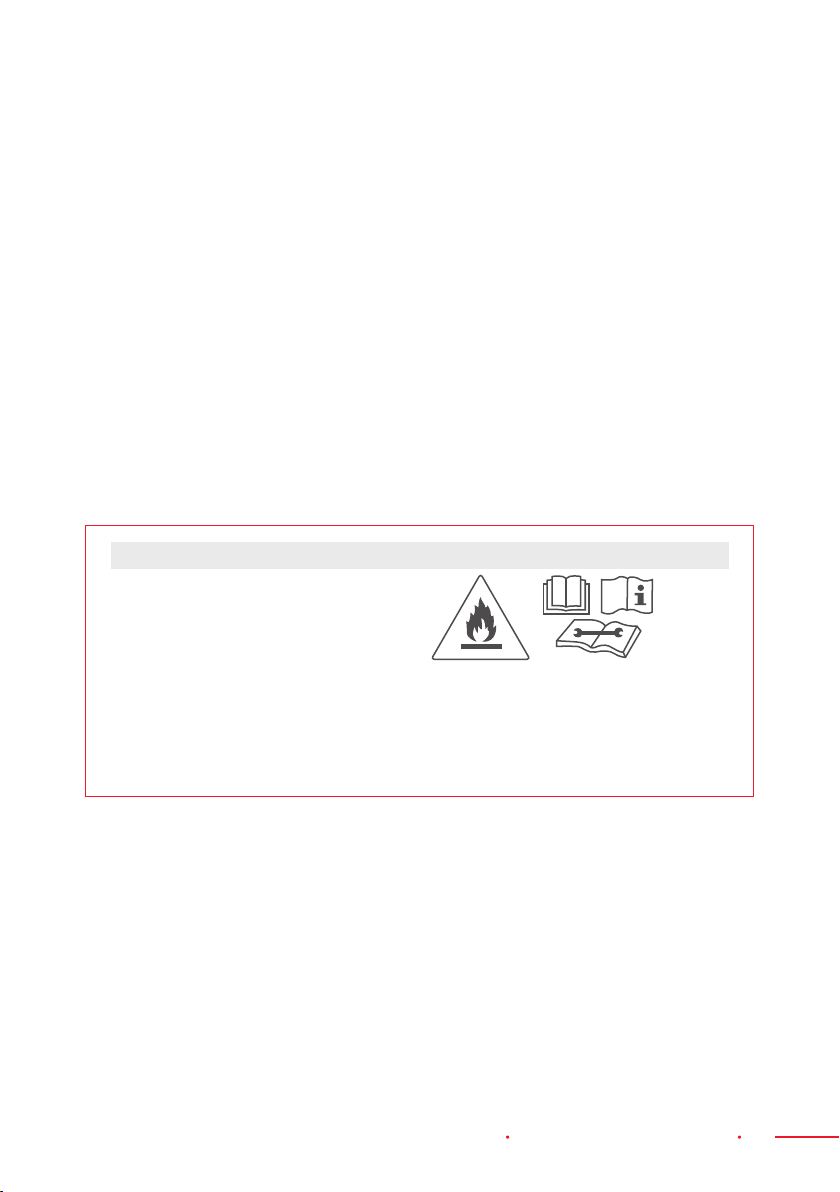
WARNING
CAUTION: Risk of Fire
The 4 statements on the left are
accompanied by the “Risk of Fire” symbol.
This symbol shows a ame in a triangle
(warning symbol W021 of ISO 7010).

6 Important Safety Instructions Portable Air Conditioner
This appliance is not intended for use by
persons (including children) with reduced
physical, sensory, or mental capabilities,
or with lack of experience and knowledge,
unless they are under adult or guardian
supervision or have been given instructions
on the proper and safe use of this appliance.
Children should be supervised to ensure
that they do not play with the appliance.
If the supply cord is damaged, it must be
replaced by the manufacturer, its service
agent, or a similarly qualied person to
avoid hazards.
Installation of this appliance should be
done in accordance with national wiring
regulations.
IMPORTANT −
GROUNDING METHOD
This product is factory equipped with
a power supply cord that has a three-
pronged grounded plug. It must be
plugged into a mating grounding type
receptacle in accordance with the National
Electrical Code and applicable local
codes and ordinances. If the circuit does
not have a grounding type receptacle, it
is the responsibility and obligation of
the customer to exchange the existing
receptacle in accordance with the National
Electrical Code and applicable local codes
and ordinances. The third ground prong
should not, under any circumstances, be cut
or removed. Never use the cord, the plug,
or the appliance when they show any sign of
damage. Do not use your appliance with an
extension cord unless it has been checked
and tested by a qualied electrical supplier.
Improper connection of the grounding plug
can result in re, electrical shock and/
or personal injury. The appliance must be
properly grounded. When in doubt, check
with a qualied service representative.
ELECTRICAL CONNECTIONS
Before plugging the appliance into the
main socket, check that:
· The main power supply corresponds
to the value indicated on the rating
plate at the back of the appliance.
· The power socket and electrical circuit
are adequate for the appliance.
· The main socket matches the plug. If this
is not the case, have the plug replaced.
· The main socket is adequately earthed.
Failure to follow these important safety
instructions absolves the manufacturer
of all liability.
FCC STATEMENT
The device complies with the local national
regulations. In USA, this device complies
with part 15 of the FCC Rules. Operation is
subject to the following two conditions:
(1) This device may not cause harmful
interference, and
(2) This device must accept any interference
received, including interference that may
cause undesired operation.
This device has been tested and found
to comply with the limits for a Class B
digital device, pursuant to Part 15 of the
FCC Rules. These limits are designed to
provide reasonable protection against
harmful interference in a residential
installation. This device generates, uses
and can radiate radio frequency energy
and, if not installed and used in accordance
with the instructions, may cause harmful
interference to radio communications.
However, there is no guarantee that
interference will not occur in a particular
installation. If this device does cause
harmful interference to radio or television
reception, which can be determined by
turning the equipment off and on, the
user is encouraged to try to correct
the interference by one or more of the
following measures:
Portable Air Conditioner Important Safety Instructions 7
· Reorient or relocate the receiving antenna.
· Increase the separation between the
equipment and Receiver.
· Connect the equipment into an outlet on
a circuit different from that to which the
Receiver is connected.
· Consult the dealer or an experienced
radio/TV technician for help.
· Changes or modications not approved
by the party responsible for compliance
could void users authority to operate the
equipment.
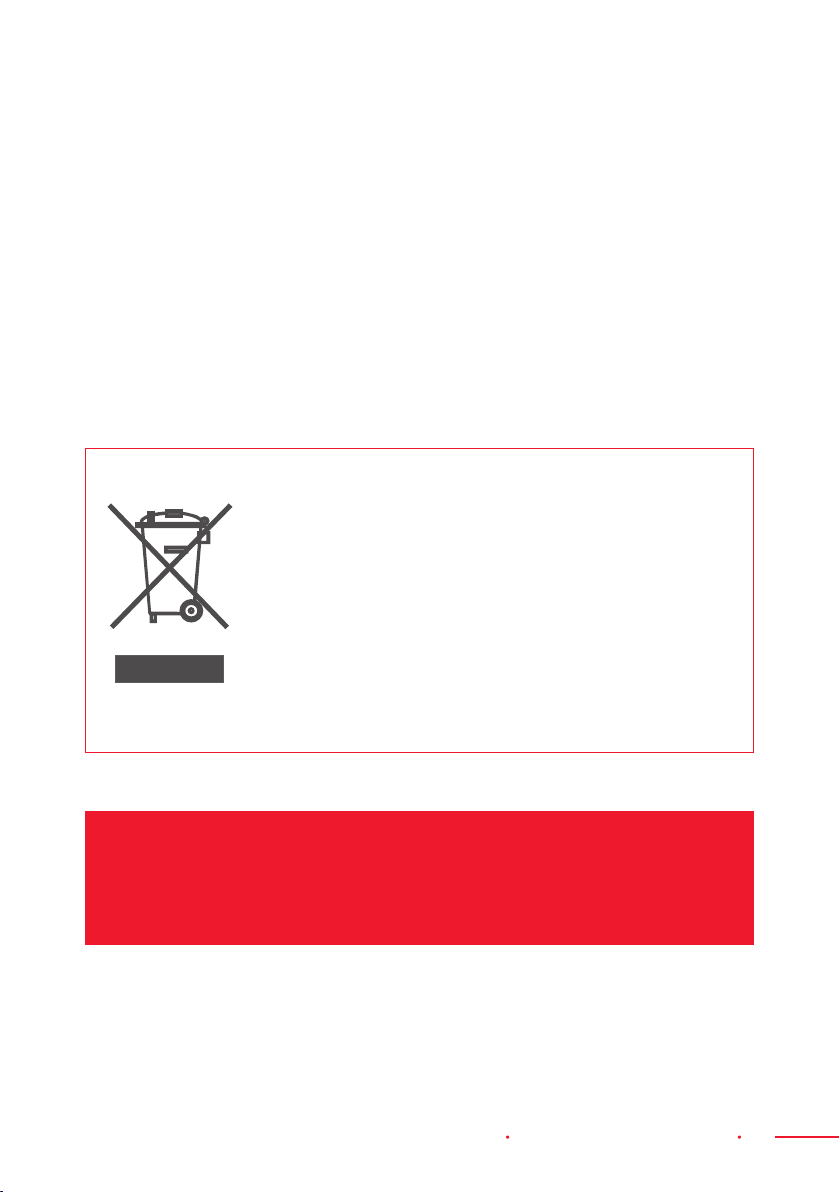
Important information on the correct disposal of the product
in accordance with EC Directive 2012/19/EU.
At the end of its working life, the product must not be disposed
of as urban waste. It must be taken to a special local authority
differentiated waste collection centre or to a dealer providing this
service. Disposing a household appliance separately prevents
possible negative health and environmental consequences that
could result from improper disposal. Proper appliance disposal
enables the constituent materials to be recovered to obtain
signicant savings in energy and resources. As a reminder of the
need to separately dispose household appliances, this product
is marked with a crossed-out wheeled dustbin.
SAVE THESE INSTRUCTIONS
For Household Use Only

8 Description Of Parts Portable Air Conditioner
Description Of Parts
DESCRIPTION
1. Control Panel
2. Handle (both sides)
3. Castors
4. Deector
5. Remote Control
Receiver
6. Intake Grille
7. Air Outlet Grille
8. Intake Grille
9. Power Cable
10. Plug Fixer
11. Middle Drainage
12. Condenser Drain
1
2
3
4
5
10
6
7
8
9
12
11
PARTS PARTS NAME QUANTITY
Exhaust Hose
Hose Inlet
Hose Outlet
1 set
Window Slider Kit 1 set
Remote Control
(Battery)
1 set
Drainage Hose 1 piece
Foam Seal 1 set
4 Bolts
(Metal Locking Screw)
4 pieces
ACCESSORIES
NOTE: All the illustrations in this manual are for explanatory purposes only.
Your appliance may be slightly different.
Please make sure all accessories are removed from their packing materials before use.
Portable Air Conditioner Installation Instructions 9
Installation Instructions
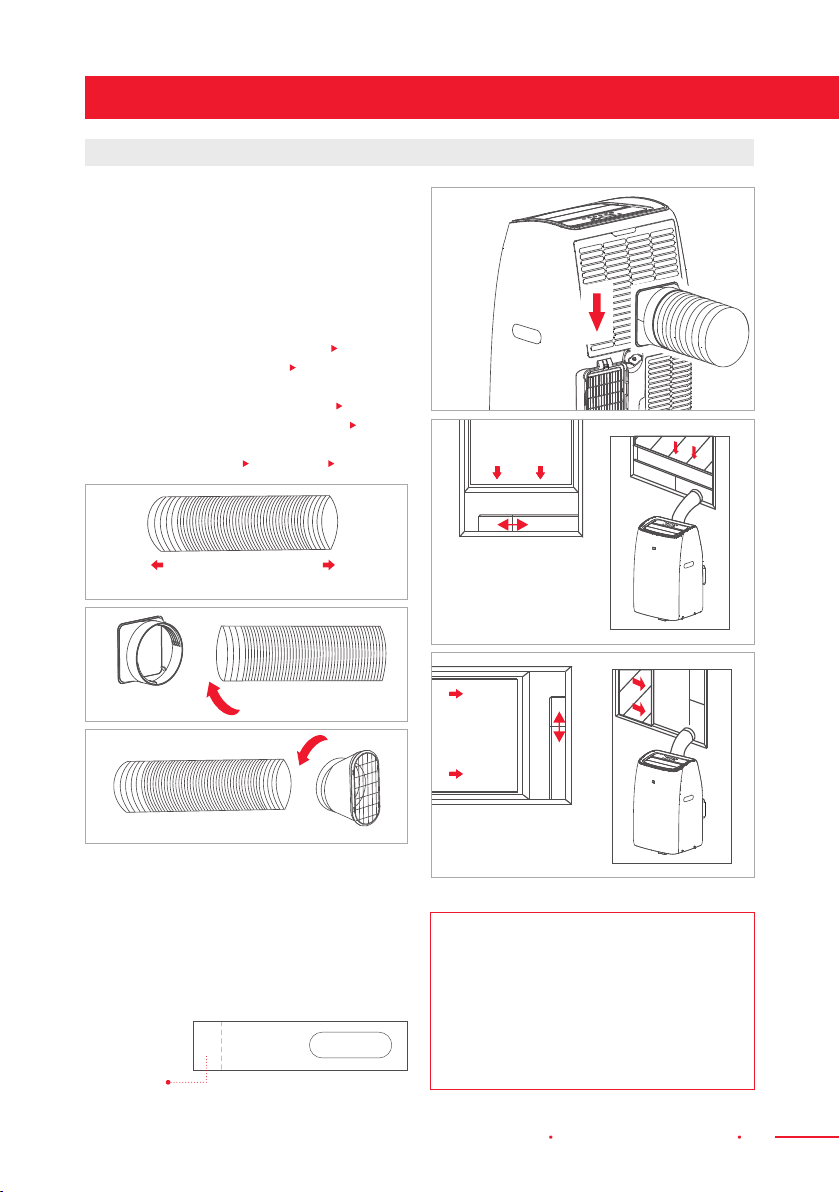
EXHAUSTING HOT AIR
In “Cool” mode, the appliance must be
placed close to a window or opening so that
the warm exhaust air can be ducted outside.
First, position the unit on a at oor. Next,
make sure there’s a minimum of 18"(45cm)
clearance around the unit and that it is
within the vicinity of a single circuit outlet
or power source.
1. Extend either side of the Hose (
Fig. 1)
and screw the Hose Inlet ( Fig. 2).
2. Extend the other side of the Hose
and screw it to the Hose Outlet (
Fig. 3).
3. Install the Hose Inlet into the unit (
Fig. 4).
4. Afx the Hose Outlet into the Window
Slider Kit and Seal (
Fig. 5 and
Fig. 6).
Make a cut on
the opposite
side of the
hole.
Your Window Slider Kit has been designed
to t most standard vertical and horizontal
window applications; however, it may be
necessary for you to modify some aspects
of the installation procedures for certain
types of windows. The Window Slider Kit
can be fastened with screws.
NOTE: If the window opening is
less than the minimum length of
the Window Slider Kit, cut the end
without the hole in it to make it
short enough to t in the window
opening. Never cut out the hole in
the Window Slider Kit.
Fig. 1
Vertical
Window
Fig. 5
Window Slider
Fig. 6
Window Slider
Horizontal
Window
Fig. 2
Fig. 3
Slide Into
Fig. 4
Extend The Sides
Of The Hose
10 Installation Instructions Portable Air Conditioner
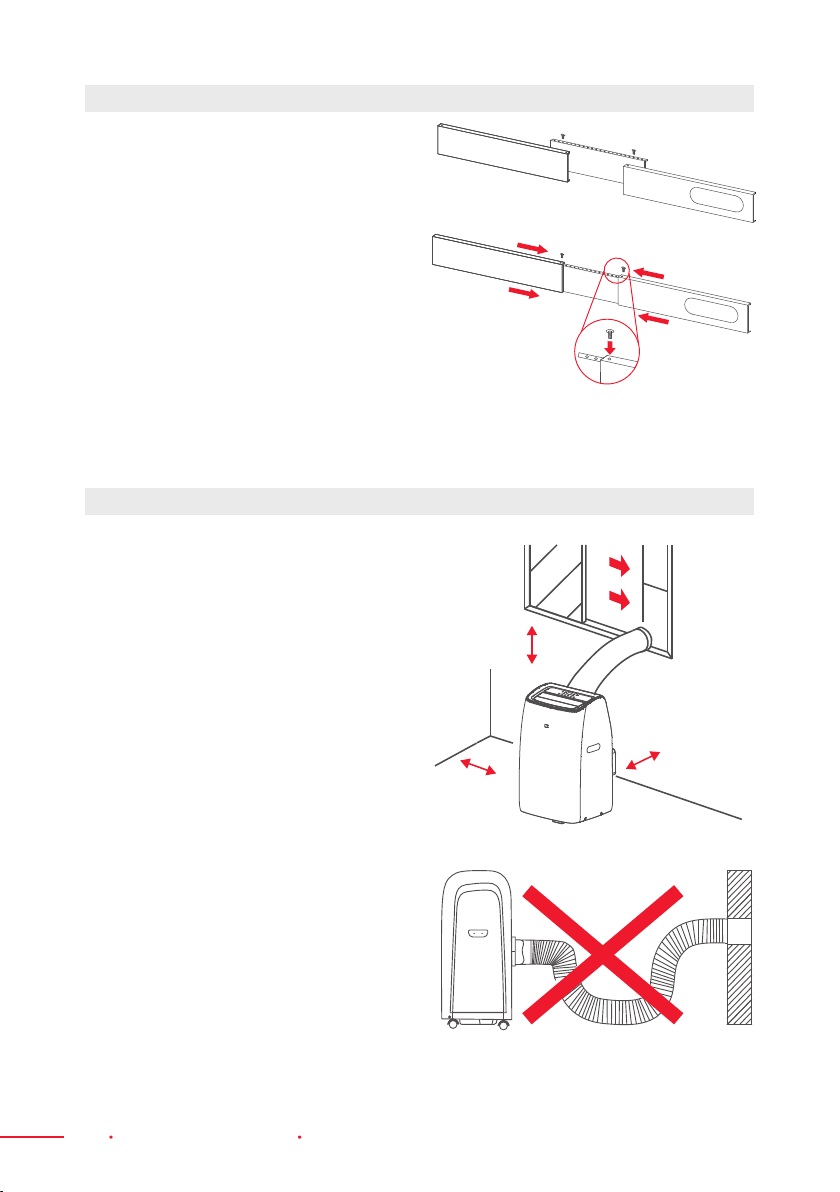
1. The unit should be placed on arm
foundation to minimize noise and
vibration. For safe and securepositioning,
place the unit on a smooth, level oor
strong enough to support the unit.
2. The unit has casters to aid placement,
but it should only be rolled on smooth,
at surfaces. Use caution when rolling
on carpeted surfaces. Use caution and
protect oors when rolling over wood
oors. Do not attempt to roll the unit
over objects.
3. The unit must be placed within reach
of a properly rated grounded socket.
4. Never place any obstacles around the
air inlet or outlet of the unit.
5. Allow at least 18" (45 cm) of space around
and above this unit for it to work more
efciently.
6. The Hose can be extended, but it is
best to keep its length to the required
minimum. Make sure that the Hose does
not have any sharp bends or sags.
WINDOW SLIDER KIT INSTALLATION
LOCATION
18" (45 cm)
18" (45 cm)
18" (45 cm)
A
B
C
D
C
D
B
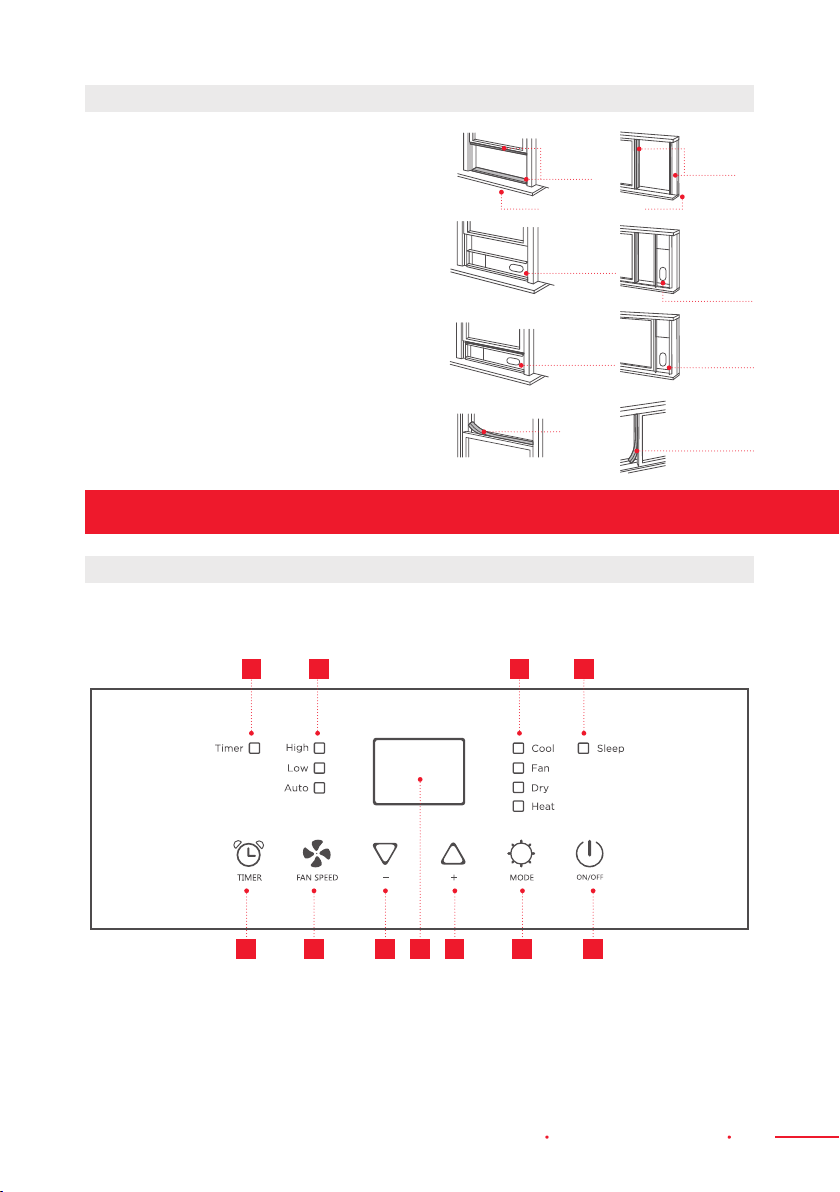
1. Parts:
A) Panel with two holes;
B) Panel with one hole;
C) Panel without a hole;
D) Screw for locking the Window Kit in place.
2. Assembly:
Slide Panel B and C into PanelA and size
them to window width. Window sizes
vary. When sizing the window width and
taking measurements, make sure that the
Window Kit assembly is free from gaps
and/or air pockets.
3. Lock The Screw Into The Holes.
The holes should correspond with
the width that your window requires
to ensure that there are no gaps or air
pockets in the Window Kit assembly after
installation.
Portable Air Conditioner Operating Instructions 11
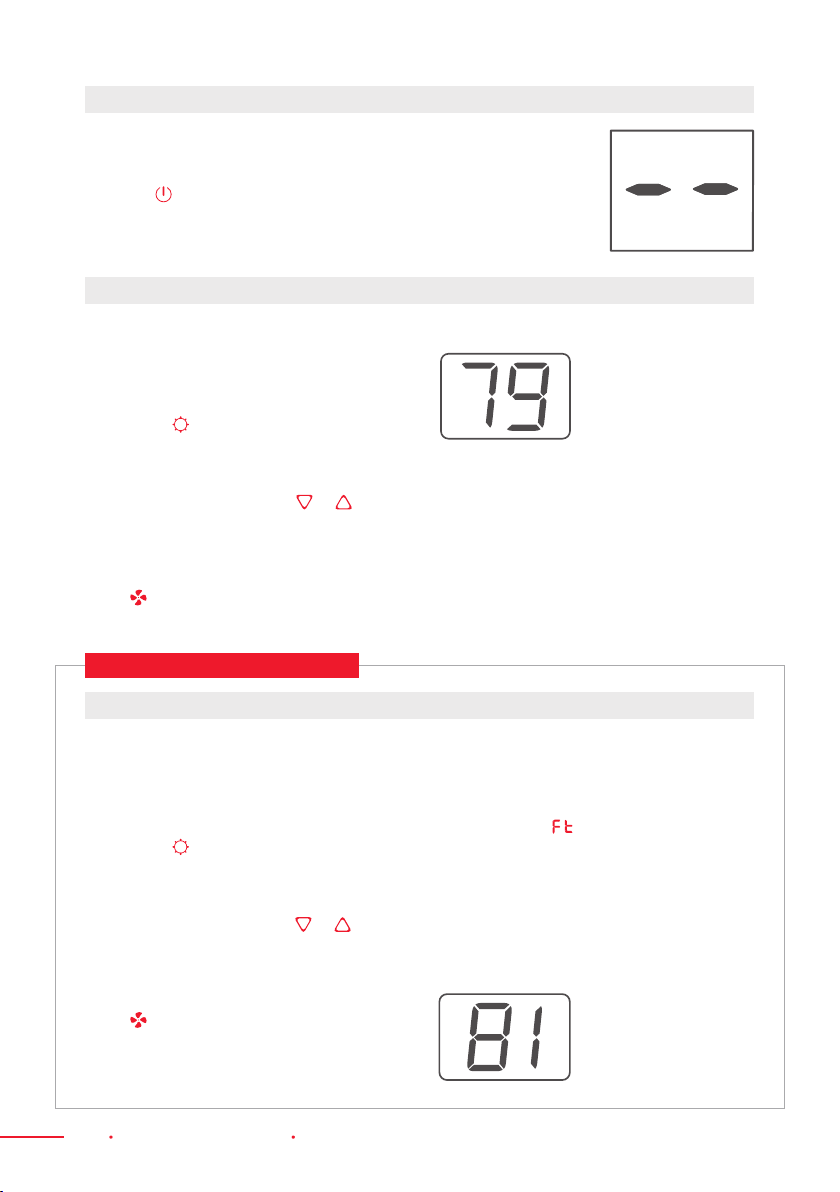
1. Cut the Foam Seal (adhesive type) to the
proper length and attach it to the window sash.
2. Attach the Window Slider Kit to the window
sash. Adjust the length of the Window Slider
Kit according to the width of the window.
The width should be more than 20" (51 cm)
but less than 53" (135 cm).
3. Cut the Foam Seal (adhesive type) to the
proper length and attach it on the window.
4. Close the window securely against
the Window Slider Kit.
5. Secure the Window Slider Kit to the
window sash.
6. Cut the Foam Seal to an appropriate length
and Seal the open gap between the top
window frame and outer window frame.
DOUBLE-HUNG SASH/SLIDING CASEMENT WINDOW INSTALLATION
The Control Panel is on top of the appliance and enables you to manage part functions
without the Remote Control; however, to maximize potential, use the Remote Control.
Operating Instructions
DESCRIPTION OF THE DISPLAY SCREEN
1 2 3 5 6 74
A B C D
Foam Seal
Foam
Seal
Window Sash
Foam
Seal
Foam Seal
Window
Slider Kit
Window
Slider Kit
Window
Slider Kit
Window
Slider Kit
20~53" (51~135 cm)
20~53"
(51~135 cm)
1. Timer Button
2. Fan Speed Button
3. Decrease Button
4. Display Screen
5. Increase Button
6. Mode Button
7. On/Off Button
A) Timer Symbol
B) Fan Speed Symbol
C) Mode Symbol*
D) Sleep Symbol
*This means only the heat
pump model has “Heat”
mode.
12 Operating Instructions Portable Air Conditioner
Ideal for hot and muggy weather when you
need to cool and dehumidify the room.
To Set This Mode Correctly:
1. Press the button a few times until the
“Cool” symbol appears.
2. Select the target temperature 64—90°F
(18—32°C) by pressing the or
button until the corresponding
value is displayed.
3. Select the required fan speed by pressing
the button. Three speeds are available:
High / Low / Auto.
*This means only the heat pump model
has “Heat” mode
.
To Set This Mode Correctly:
1. Press the button a few times
until the “Heat” symbol appears.
2. Select the target temperature 55—81°F
(13—27°C) by pressing the or
button until the corresponding
value is displayed.
3. Select the required fan speed by pressing
the button. Three speeds are available:
High / Low / Auto.
4. Water is removed from the air and
collected in the tank.
5. When the tank is full, the appliance shuts
down and the symbol appears on the
display. The tank cap must be extracted
and emptied. Drain off all the water left
into a basin. When all the water has been
drained, put the cap back in place.
6. When the tank has been emptied,
the appliance will start up again.
COOL MODE
HEAT MODE*
The most suitable temperature for rooms
during the summer varies from 75°F to81°F
(24°C to 27°C). You are recommended,
to not to set the temperature way below
the outdoor temperature. The fan speed
difference is more noticeable when the
appliance is in “Fan” mode, but may not be
as noticeable in “Cool” mode.
VRM050518N / VRM050520N
Plug the appliance to the main socket.
The appliance will be on “Standby” mode.
Press the button to turn the appliance on.
The last function that was active when the appliance
was last turned off will automatically be applied.
TURNING THE APPLIANCE ON

Portable Air Conditioner Operating Instructions 13
Programming Start Up
1. Turn on the appliance and choose the
mode you want. For Example: Cool,
75°F (24°C), high fan speed. Turn off the
appliance.
2. Press the “Timer” button. The symbol
and number of hours will ash.
3. Press the button to set the number of
hours of delay before the appliance turns
on. The Timer can be set to intervals of
1hour to 24 hours.
When using the appliance in this mode,
there is no need to attach the Air Hose.
1. Press the button a few times until the
“Fan” symbol appears.
2. Select the required fan speed by pressing
the button. Two speeds are available:
High / Low.
The screen will display as high speed
and as low speed.
Ideal for reducing room humidity (during
spring and autumn, rainy periods, and in
damp rooms, etc).
In “Dry” mode, the appliance should be
prepared in the same way as “Cool” mode,
with the Air Exhaust Hose attached to
enable the moisture to be discharged
outside.
To Set This Mode Correctly:
1. Press the button a few times until
the “Dry” symbol appears. The screen
will display the symbol.
2. In this mode, fan speed is selected
automatically. It cannot be set manually.
SETTING THE TIMER
FAN MODE DRY MODE
VRM050518N / VRM050520N
N.B.:
· When operating in very cold rooms, the appliance defrosts automatically, momentarily
interrupting normal operation. During this operation, it is normal for the noise from
the appliance to change.
· In this mode, you may have to wait for a few minutes before the appliance starts
producing hot air.
· In this mode, the fan may operate for short periods, even though the set temperature
has already been reached.
High Speed
Low Speed
This Timer can be used to delay the start-up or shutdown of the appliance. This prevents
electricity from being wasted, by optimizing operating periods.
4. A few seconds after the Timer is set,
the unit will memorize that setting.
The “Timer” indicator will light up and
the display will show that the unit is on
standby.
5. Press the “Timer” button again, or
the button, to cancel the Timer. The
“Timer” symbol will disappear from
the screen.
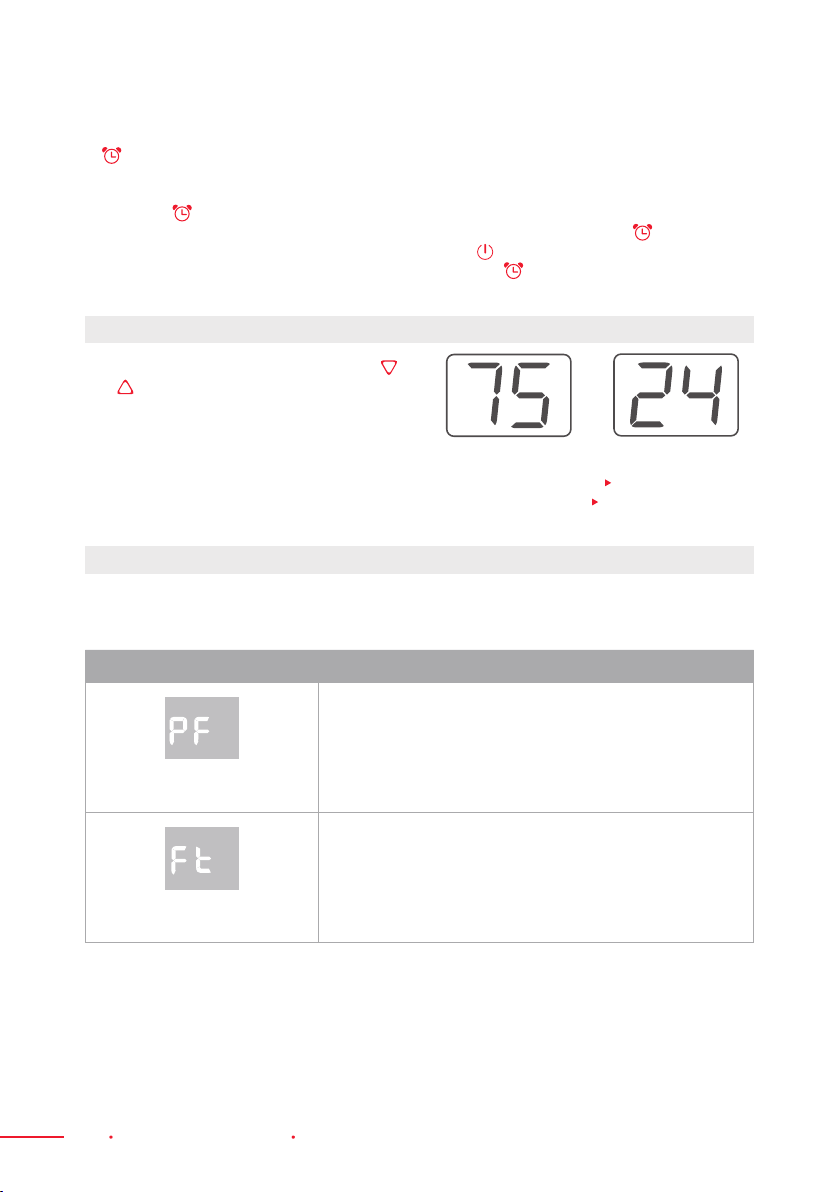
14 Operating Instructions Portable Air Conditioner
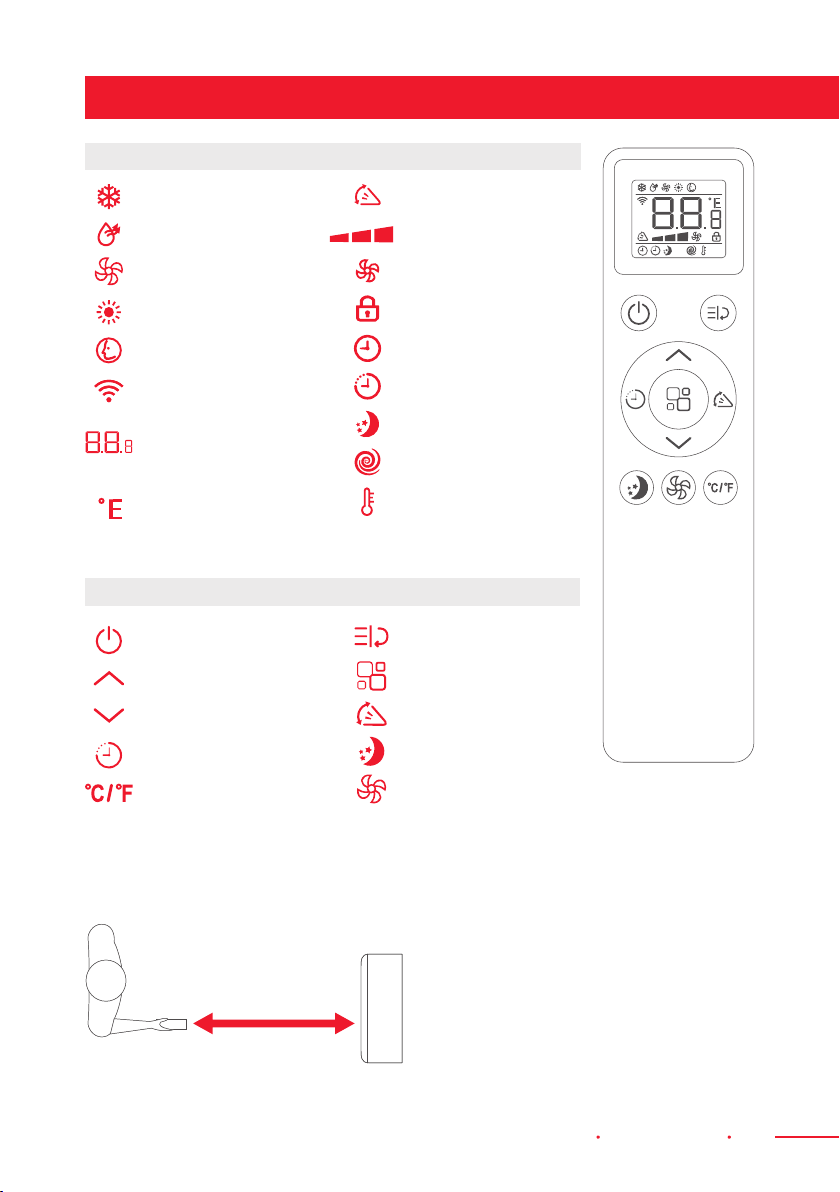
SWITCH THE UNIT OF TEMPERATURE
When the appliance is running, hold the
and buttons together for 3 seconds at the
same time, to change the unit of temperature.
For Example:
Before the change, in “Cool” mode, the screen display will be similar to
Fig. 7.
After the change, in “Cool” mode, the screen display will be similar to
Fig. 8.
Fig. 7 Fig. 8
SELF-DIAGNOSIS
The appliance has a self diagnosis system that identies a number of malfunctions.
Error messages will appear on this unit’s display.
WHAT IS DISPLAYED WHAT SHOULD I DO?
PROBE FAILURE
(Sensor Damaged)
If this is displayed,
contact your local
authorized Customer Service.
FULL TANK
(Safety Tank Full)
Empty the internal safety tank based on
the instructions found on the “End Of Season
Operations” part of this manual (p. 25).
Programming Shut Down
1. When the appliance is running, press the
button. The “Timer” indicator and the
hours will ash.
2. Press the button to set the number of
hours delay before the appliance turns
on. The Timer can be set to intervals of
1hour to 24 hours.
3. A few seconds after the Timer is set,
the unit will memorize that setting. The
“Timer” indicator will light up and the
display will show the current mode. At
the end of the set time, the unit will
automatically revert to “Standby” mode.
4. Press the “Timer” button again, or
the button, to cancel the Timer. The
“Timer” symbol will disappear from the
screen.
Portable Air Conditioner Remote Control 15
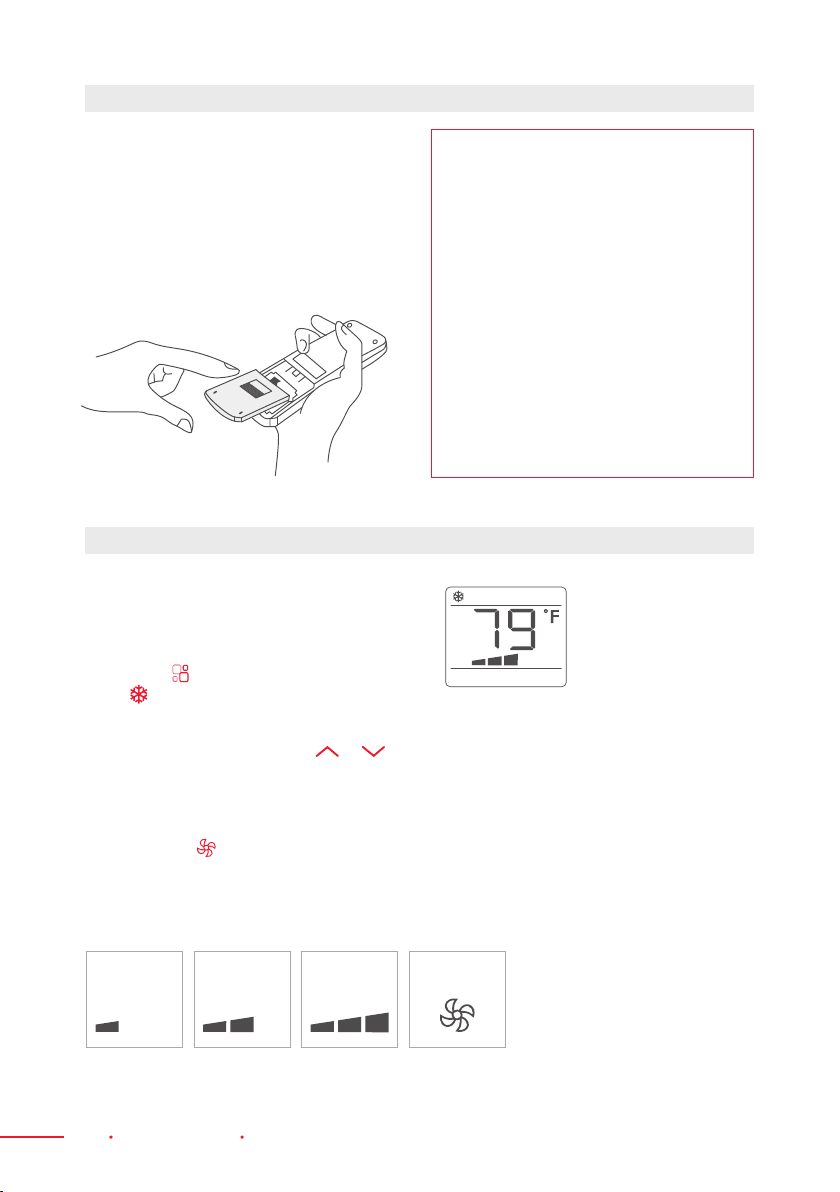
Remote Control
DISPLAY AREA ICONS
BUTTON ICONS
Cooling Mode
Dry Mode
Fan Mode
Heating Mode
Smart Mode
Signal
Display Digits
Temperature
or Hours
°F or °C
Temperature
On/Off Button
Increase Button
Decrease Button
Timer Button
Unit Switch Button
Swing
Fan Speed
Auto Speed
Child Lock
Timer On
Timer Off
Sleep
Turbo
Follow Me
Turbo
Mode Button
Swing Button
Sleep Button
Fan Speed Button
· Point the Remote Control at the Receiver
on the appliance.
· The Remote Control must be no more
than 23 feet (7 meters) away from the
appliance (without obstacles between
the Remote Control and the Receiver).
· The Remote Control must be handled with
extreme care. Do not drop it or expose it
to direct sunlight or sources of heat. If the
Remote Control does not work, try to take
out the battery, put the battery back, then
try using the Remote Control again.
Max 23 feet
(7 meters)
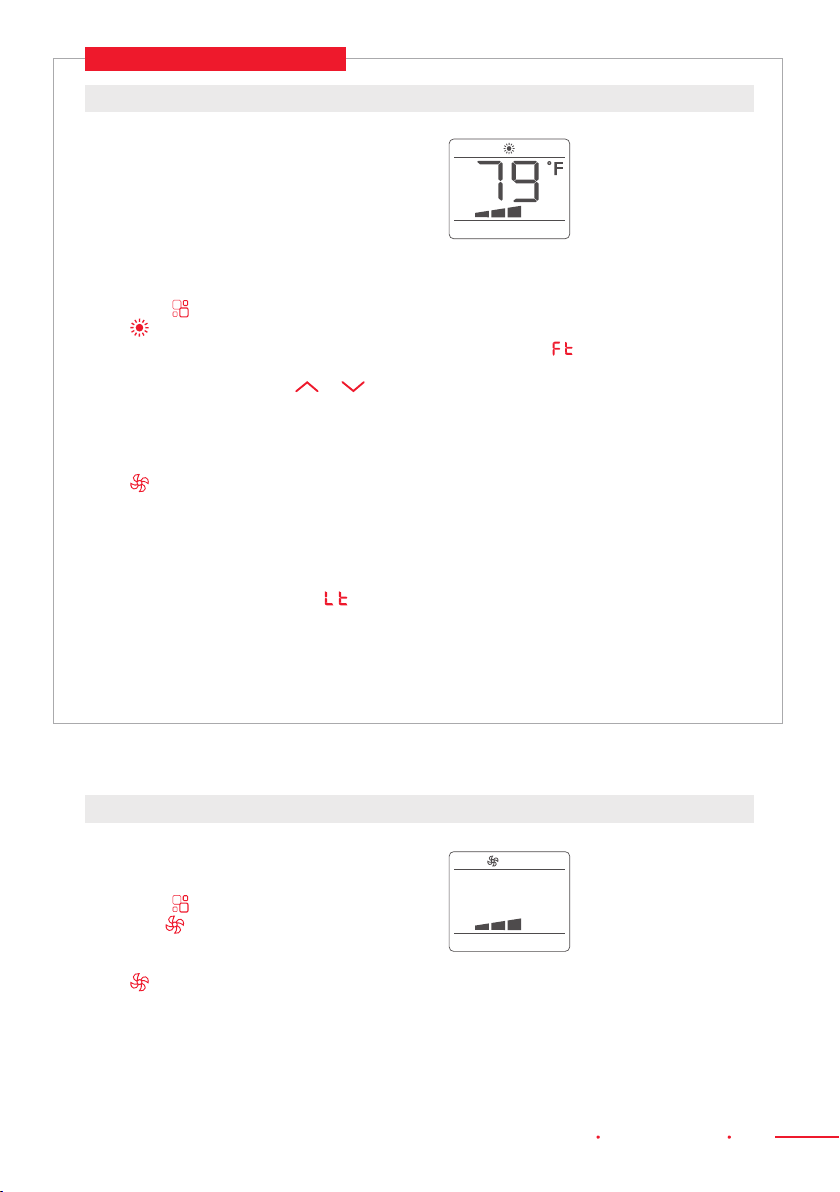
16 Remote Control Portable Air Conditioner
1. Remove the cover on the rear
of the Remote Control.
2. Insert two “AAA” 1.5 V batteries
in the correct position (see instructions
inside the battery compartment).
3. Replace the cover.
Ideal for hot and muggy weather when you
need to cool and dehumidify the room.
To Set This Mode Correctly:
1. Press the button a few times until
the symbol appears.
2. Select the target temperature 64—90°F
(18—32°C) by pressing either or
button until the corresponding value is
displayed.
3. Select the required fan speed by
pressing the button.
4. Three speeds are available:
High / Low / Auto.
INSERTING OR REPLACING THE BATTERIES
COOL MODE
NOTE:
· If the Remote Control unit is replaced
or disposed of, the batteries must
be removed and discarded in
accordance with current legislation
and regulations as they are harmful
to the environment.
· Do not mix old and new batteries.
· Do not mix alkaline, standard
(carbon-zinc) or rechargeable
(nickel-cadmium) batteries.
· Do not dispose of batteries in re.
The batteries could explode or leak.
· If the Remote Control will remain
unused for a certain length of time,
remove the batteries.
Low
Medium High Auto
The most suitable temperature for rooms
during the summer varies from 75°F to81°F
(24°C to 27°C). You are recommended,
however, not to set the temperature way
below the outdoor temperature. The fan
speed difference is more noticeable when
the appliance is under “Fan” mode, but may
not be as noticeable under “Cool” mode.
N.B.: Medium speed is not available.
Portable Air Conditioner Remote Control 17
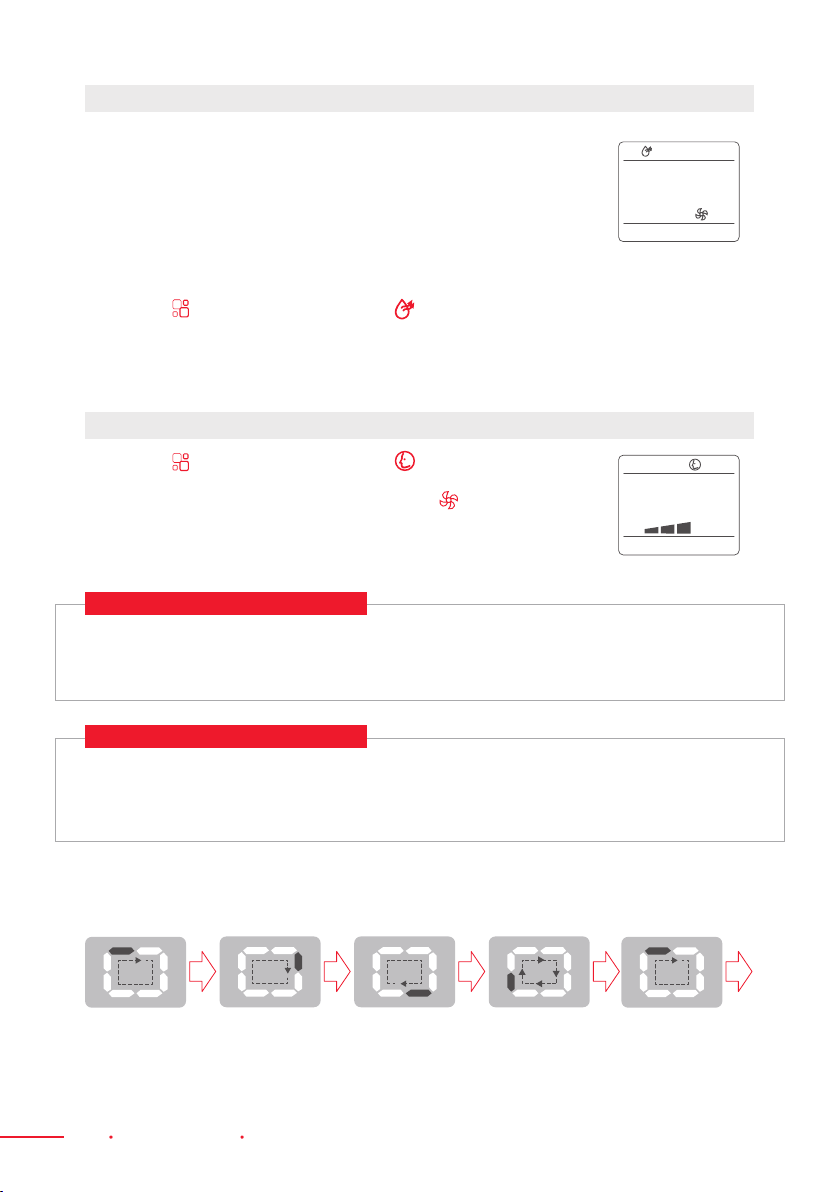
When using the appliance in this mode,
there is no need to attach the Air Hose.
1. Press the button a few times
until the symbol appears.
2. Select the required fan speed by pressing
the button. Two speeds are available:
High / Low.
FAN MODE
*This means only the heat pump model
has “Heat” mode.
If the appliance is a cooling only model,
when you choose “Heat” mode, “Fan” mode
will turn on.
To Set This Mode Correctly:
1. Press the button a few times until
the symbol appears.
2. Select the target temperature 55—81°F
(13—27°C) by pressing the or
button until the corresponding value
is displayed.
3. Select the required fan speed by pressing
the button. Three speeds are
available: High / Low / Auto.
HEAT MODE*
VRM050518N / VRM050520N
N.B.:
· When operating in very cold rooms, the appliance defrosts automatically, momentarily
interrupting normal operation. appears on the display. During this operation, it is
normal for the noise from the appliance to change.
· In this mode, you may have to wait for a few minutes before the appliance starts
producing hot air.
· In this mode, the fan may operate for short periods, even though the set temperature
has already been reached.
4. Water is removed from the air
and collected in the tank.
5. When the tank is full, the appliance shuts
down and the symbol appears on the
display. The tank cap must be extracted
and emptied. Drain off all the water left
into a basin. When all the water has been
drained, put the cap back in place.
6. When the tank has been emptied,
the appliance will start up again.
18 Remote Control Portable Air Conditioner
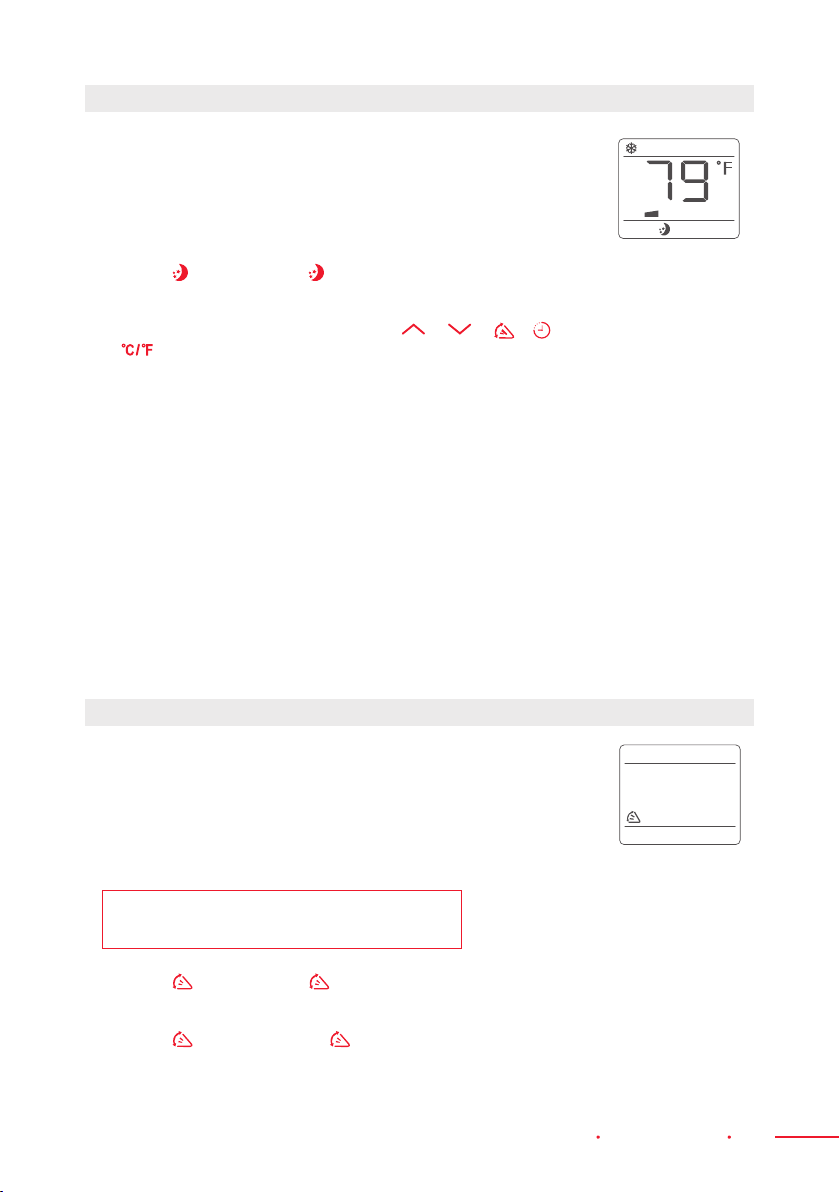
Ideal for reducing room humidity (during spring and autumn, rainy
periods, and in damp rooms, etc).
In “Dry” mode, the appliance should be prepared in the same way
as “Cool” mode, with the Air Exhaust Hose attached to enable the
moisture to be discharged outside.
To Set This Mode Correctly:
1. Press the button a few times until the symbol appears.
2. In this mode, fan speed is selected automatically.
It cannot be set manually.
1. Press the button a few times until the symbol appears.
2. Select the required fan speed by pressing the button.
Three speeds are available: High / Low / Auto.
DRY MODE
SMART MODE
Display on the Control Panel:
VRM050517N / VRM050519N
VRM050518N / VRM050520N
If the unit is a cooling and heating model, the unit operates in “Heat” mode when the room
temperature is below 68°F (20°C) and in “Fan” mode when the room temperature is from 68°F
(20°C) to 73°F (23°C) and in “Cool” mode when the room temperature is above 73°F (23°C).
If the appliance is a cooling only model, the unit operates in “Fan“ mode when the room
temperature is below 73°F (23°C) and in “Cool“ mode when the room temperature is
above 73°F (23°C).
This shows that the air is circulating.
Portable Air Conditioner Remote Control 19
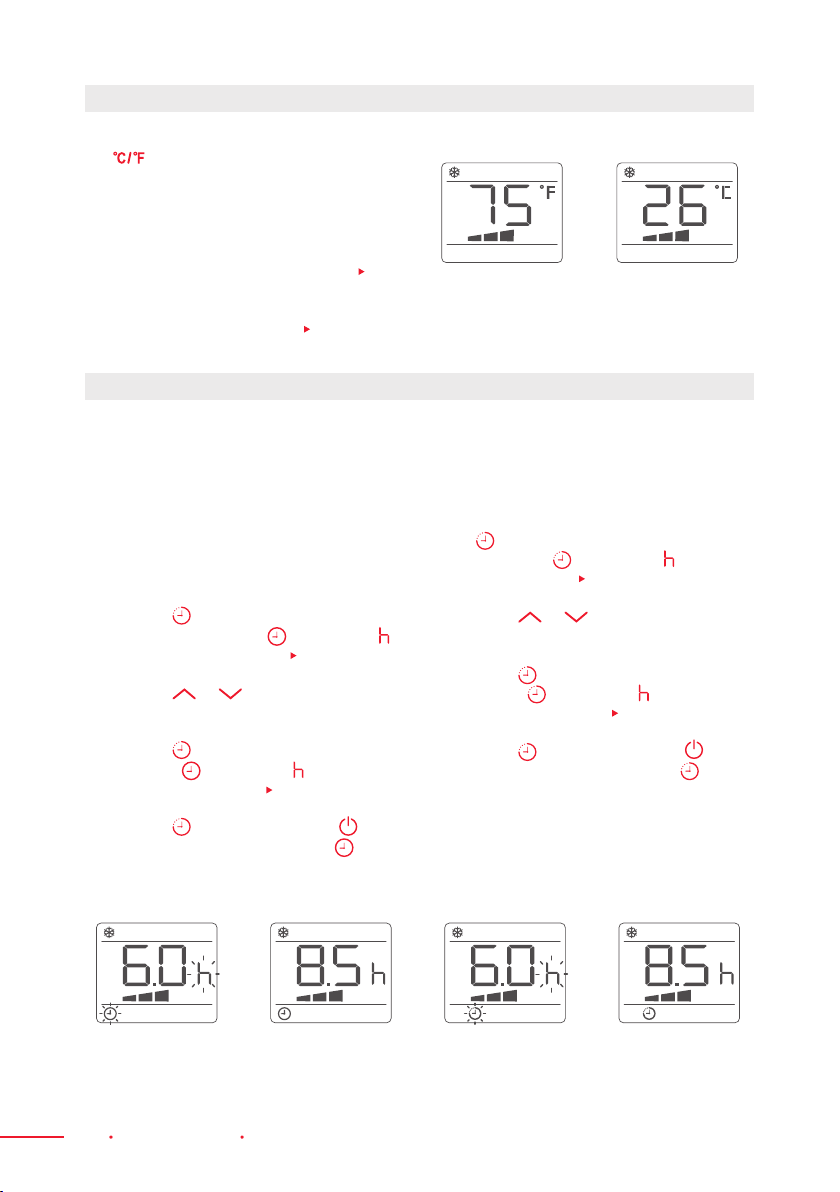
This function is useful at night (e.g. during bedtime),
as it gradually reduces the unit’s operation.
To Set This Function Correctly:
1. Select “Cool” or “Heat” mode as described above.
2. Press the button until the symbol appears. The light
on the display will go dim and after 1 minute, the light will
completely turn off. If you want to check the status, please
press any of the buttons below: either or or or or
or then 5 seconds later, the light will turn off again.
SLEEP FUNCTION
The “Sleep” function maintains the room’s
optimal temperature without excessive
uctuations e.g. in temperature or humidity,
with its silent operation. Fan speed is always
at the Low setting, while room temperature
and humidity vary gradually to ensure
maximum comfort.
When in “Cool” mode, the selected
temperature will increase by 1°F (1°C)
per hour in a 2-hour period. This new
temperature will be maintained for the next
6 hours, then “Sleep“ mode will turn off, and
the unit will return to its previous setting.
When in “Heat” mode, the selected
temperature will decrease by 1°F (1°C)
per hour in a 3-hour period. This new
temperature will be maintained for the next
5 hours, then “Sleep“ mode will turn off, and
the unit will return to its previous setting.
The “Sleep” function can be canceled
at any time during operation by pressing
the “Sleep”, ”Mode” or “Fan Speed” button.
When the appliance is in “Fan” or “Dry”
mode, the “Sleep” function cannot
be set.
This function is useful for selecting the air swing direction
on your Air Conditioner.
To Set This Function Correctly:
1. Select the operating mode (“Cool”, “Dry”, “Fan”, or "Heat")
as described above.
NOTE: “Heat” can only be selected on models
with Heat function.
2. Press the button and the symbol will appear,
then the deector will start to swing.
3. Press the button again. The symbol will disappear,
then the deector will stop swinging.
SWING FUNCTION
20 Remote Control Portable Air Conditioner
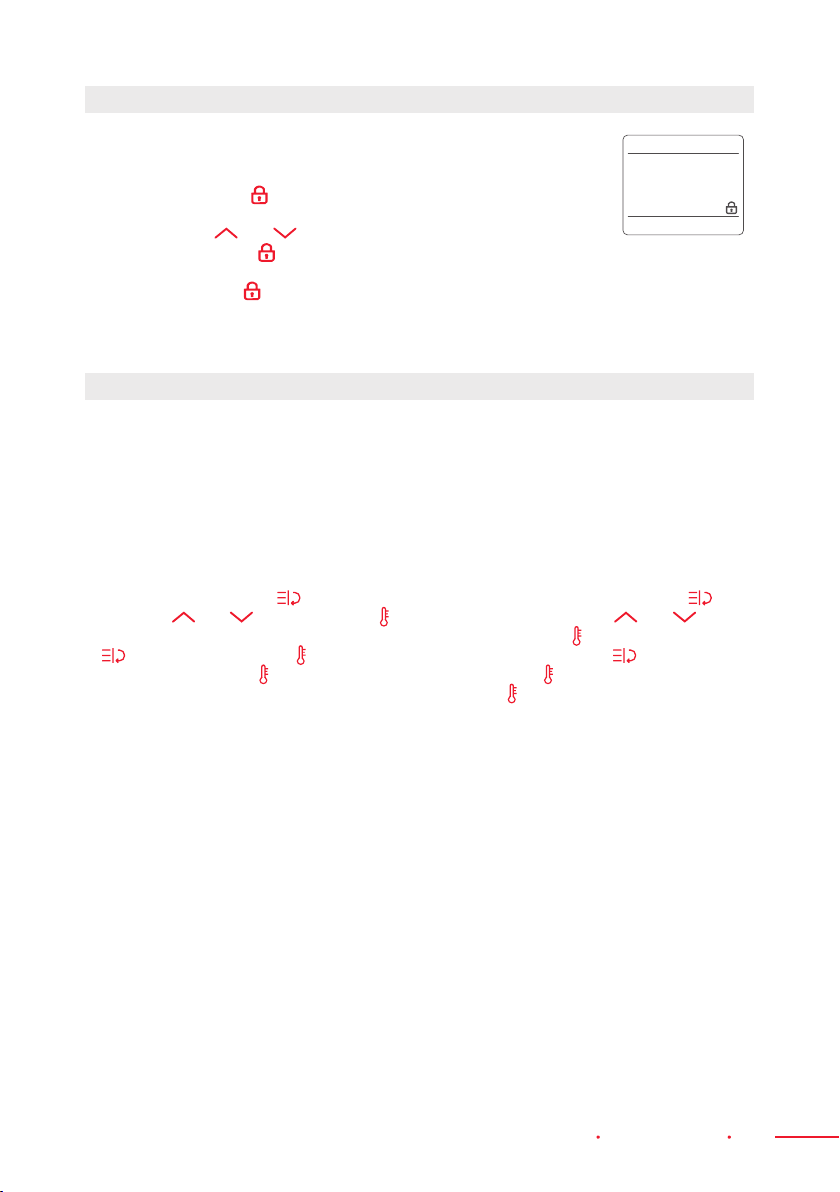
While the appliance is running, press
the button to change the unit of
temperature.
For Example:
Before the change, in “Cool” mode, the
display on the screen will be similar to
Fig. 9.
After the change, in “Cool” mode, the display
on the screen will be similar to
Fig. 10.
Programming Start Up
1. Turn on the appliance and choose the
mode you want. For Example: Cool,
75°F (24°C), high fan speed. Turn off the
appliance.
2. Press the button twice. The screen
will display hours. The symbol and
symbol will start ashing (
Fig. 11).
3. Press the or button until the
corresponding time is displayed.
4. Press the button again to activate the
Timer. The symbol and symbol will
appear on the screen (
Fig. 12).
5. Press the button again or the
button to cancel the Timer. The
symbol will disappear from the screen.
SWITCH THE UNIT OF TEMPERATURE
SETTING THE TIMER
Programming Shut Down
1. When the appliance is running, press
the button. The screen will display the
hours and the symbol and symbol
will start ashing
(
Fig. 13).
2. Press the or button until the
corresponding time is displayed.
3. Press the button again to activate the
Timer. The symbol and symbol will
appear on the screen (
Fig. 14).
4. Press the button again or the
button to cancel the Timer. The
symbol will disappear from the screen.
This Timer can be used to delay the start-up or shutdown of the appliance. This prevents
electricity from being wasted by optimizing operating periods.
Fig. 9 Fig. 10
Fig. 11 Fig. 12 Fig. 13 Fig. 14
Portable Air Conditioner Remote Control 21
This function is used to prevent children from pressing the Remote
Control carelessly or accidentally. In the event that they do,
no changes on the Air Conditioner’s operation will take place
when the “Child Lock” function is on.
1. Hold down the and and press for more than 3 seconds to
turn the “Child Lock” function on or off.
2. When “Child Lock” is on, pressing any button on the Remote
Control will not have any effect.
1. This function can only be activated via the
Remote Control.
2. The Remote Control serves as a
remote thermostat allowing for precise
temperature control at its location.
3. To activate the “Follow Me” function,
point the Remote Control towards the
appliance and press the button, then
press the and buttons until the
symbol ashes on screen, then press the
button toconrm. The symbol will
stop ashing and the symbol will show
onthe screen.
4. The Remote will display the actual
temperature at its location. The Remote
Control will send this signal to the Air
Conditioner in 20-minute intervals until
the “Follow Me” / "Temp Sensing" button
is pressed again.
5. If the unit does not receive the “Follow
Me” / "Temp Sensing" signal during any
25-minute interval, the unit will exit the
“Follow Me” / "Temp Sensing" mode.
6. To cancel this function, press the
button, then press the and
buttons until the symbol ashes on
screen, then press the button to
conrm. The symbol will stop ashing
and the symbol will disappear from the
screen.
CHILD LOCK FUNCTION
FOLLOW ME FUNCTION
22 Tips For Correct Use Portable Air Conditioner
Tips For Correct Use
To get the best from your appliance, follow these
recommendations:
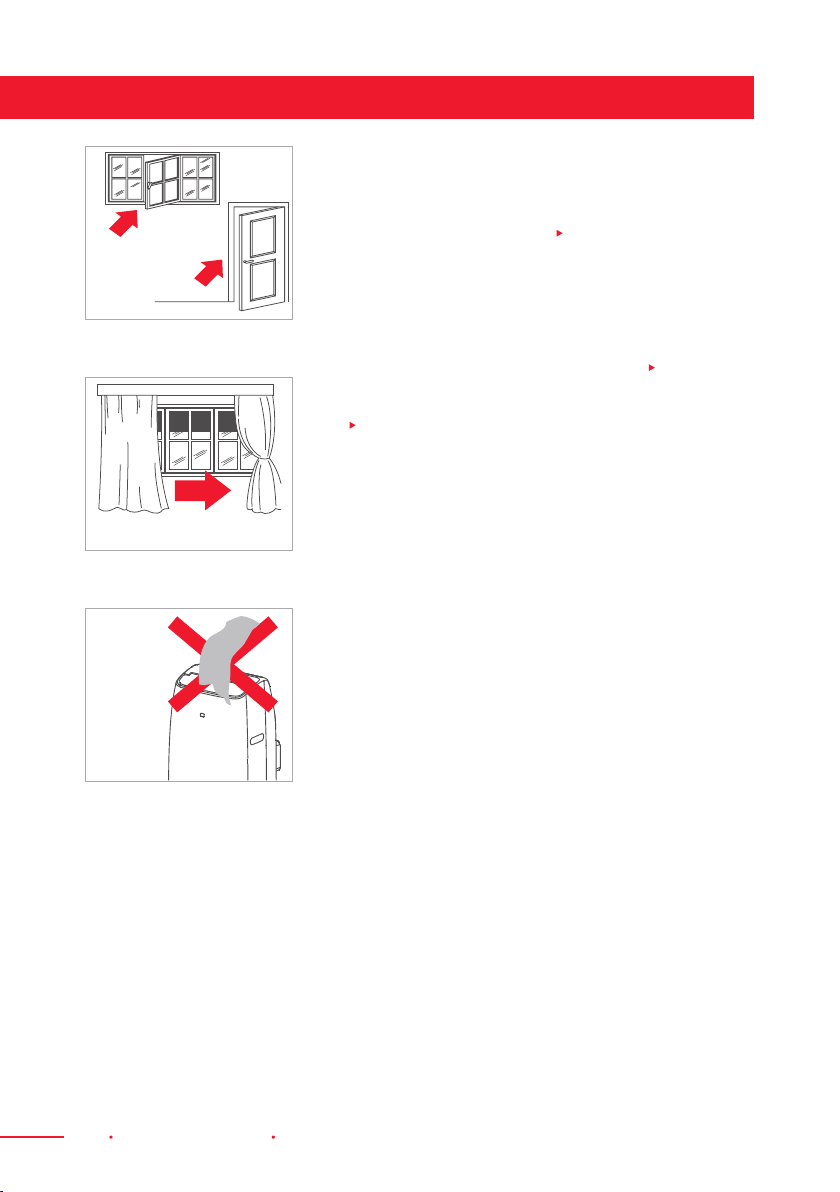
· Close the windows and doors in the room where the
Air Conditioner will be used (
Fig. 15). When installing
the appliance semi-permanently, you should leave the
door slightly open (as little as 0.4" [1 cm]) to guarantee
correct ventilation.
· Protect the room from direct exposure to the sun by
partially closing curtains and/or blinds to make the
appliance much more economical to run (
Fig. 16).
· Never place objects of any kind on the appliance
(
Fig.17).
· Do not block the air inlet or outlet of the appliance.
· Reduced air ow will result in poor performance
and could damage the unit.
· Make sure there are no heat sources in the room.
· Never use the appliance in very damp rooms
(in laundry rooms, for Example).
· Never use the appliance outdoors.
· Make sure the appliance stands on a level surface.
If necessary, place the castor locks under the front
wheels.
Close Doors
And Windows
Fig. 15
Fig. 16
Close Curtains
Fig. 17
Do Not
Cover The
Appliance

Portable Air Conditioner Water Drainage Method 23
When there is excess water condensation inside the unit, the appliance stops running and
shows symbol (“Full Tank” as mentioned in the “Self-Diagnosis” section of this manual
[p. 14]). This indicates that the water condensation needs to be drained through the
following procedures:
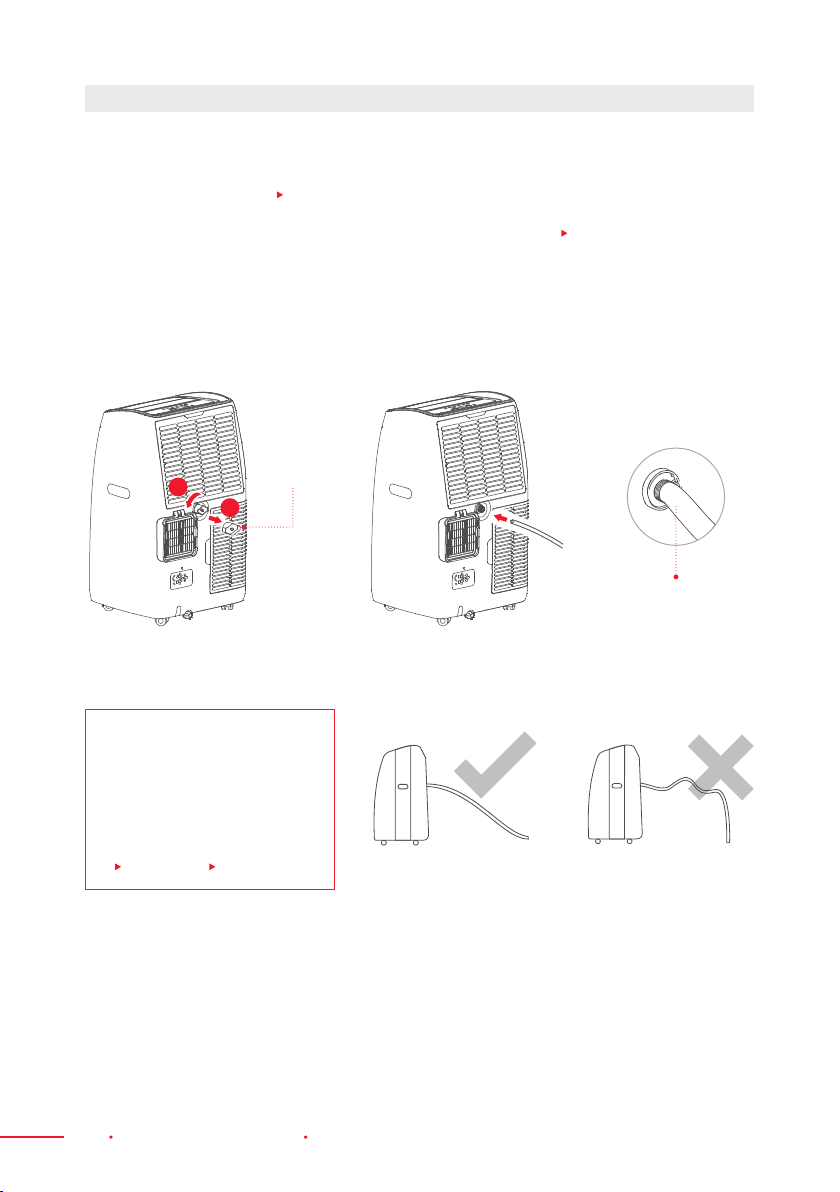
Water may need to be drained in high
humidity areas.
1. Unplug the unit from the power source.
2. Place a drain pan under the lower drain
plug (
Fig. 18).
3. Remove the lower drain plug.
4. Water will drain out and collect in the
drain pan. (The user may have to provide
his/her own drain pan as it may not be
included in the box).
5. After the water is drained, replace
the lower drain plug rmly.
6. Turn on the unit.
While using the unit in “Dehumidier” mode,
continuous drainage is recommended.
1. Unplug the unit from the power source.
2. Remove the drain plug. While doing this
operation, some residual water may spill
so please have a pan ready to collect
the water.
3. Connect the Drain Hose (½" or 12.7 mm,
may not be supplied) (
Fig. 19).
4. The water can be drained continuously
through the Hose into a oor drain or
bucket.
5. Turn on the unit.
MANUAL DRAINING (
FIG. 18)
CONTINUOUS DRAINING ( FIG. 19)
NOTE: Please make sure
that the height and section
of the Drain Hose is not
higher than the Drain
Outlet. If higher, draining
of the water tank may
not be successful
(
Fig. 20 and
Fig. 21).
Fig. 18
Fig. 19
Fig. 20 Fig. 21
Drain Outlet
Drain Outlet
Drain Cap
Drain Cap
Drain
Hose
Water Drainage Method
24 Water Drainage Method Portable Air Conditioner
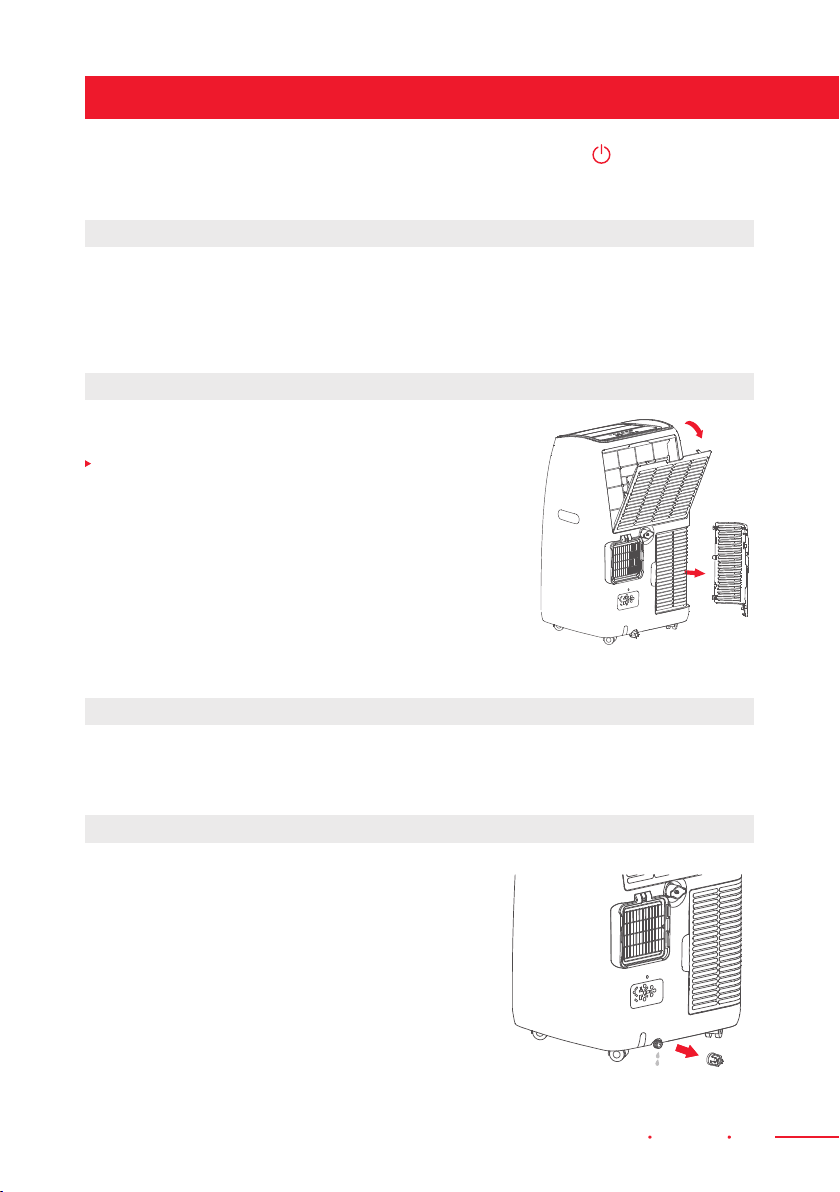
When the unit is in “Dry” mode, follow the drainage instructions below:
1. Unplug the unit from the power source.
2. Remove the drain plug (
Fig. 22). While doing this operation, some residual water may
spill so please have a pan ready to collect the water.
3. Connect the Drain Hose (½" or 12.7 mm, may not be supplied) (
Fig. 23).
4. The water can be continuously drained through the Hose into a oor drain or bucket.
5. Turn on the unit.
MIDDLE DRAINAGE
NOTE: Please make sure
that the height and section
of the Drain Hose is not
higher than the drain
outlet. If higher, draining
of the water tank may
not be successful
(
Fig. 24 and
Fig. 25).
Fig. 24 Fig. 25
Garden Hose Or
Drainage Hose
Fig. 22
Fig. 23
Drain Cap
1
2
Portable Air Conditioner Cleaning 25
Before cleaning or maintenance, turn the appliance off by pressing the button on the
Control Panel, or on the Remote Control. Wait for a few minutes then unplug from the main
socket.
You should clean the appliance with a slightly damp cloth, then dry with a dry cloth.
· Never wash the appliance with water. It could damage the appliance or put the
user in danger.
· Never use petrol, alcohol, or solvents to clean the appliance.
· Never spray insecticide or other similar liquids.
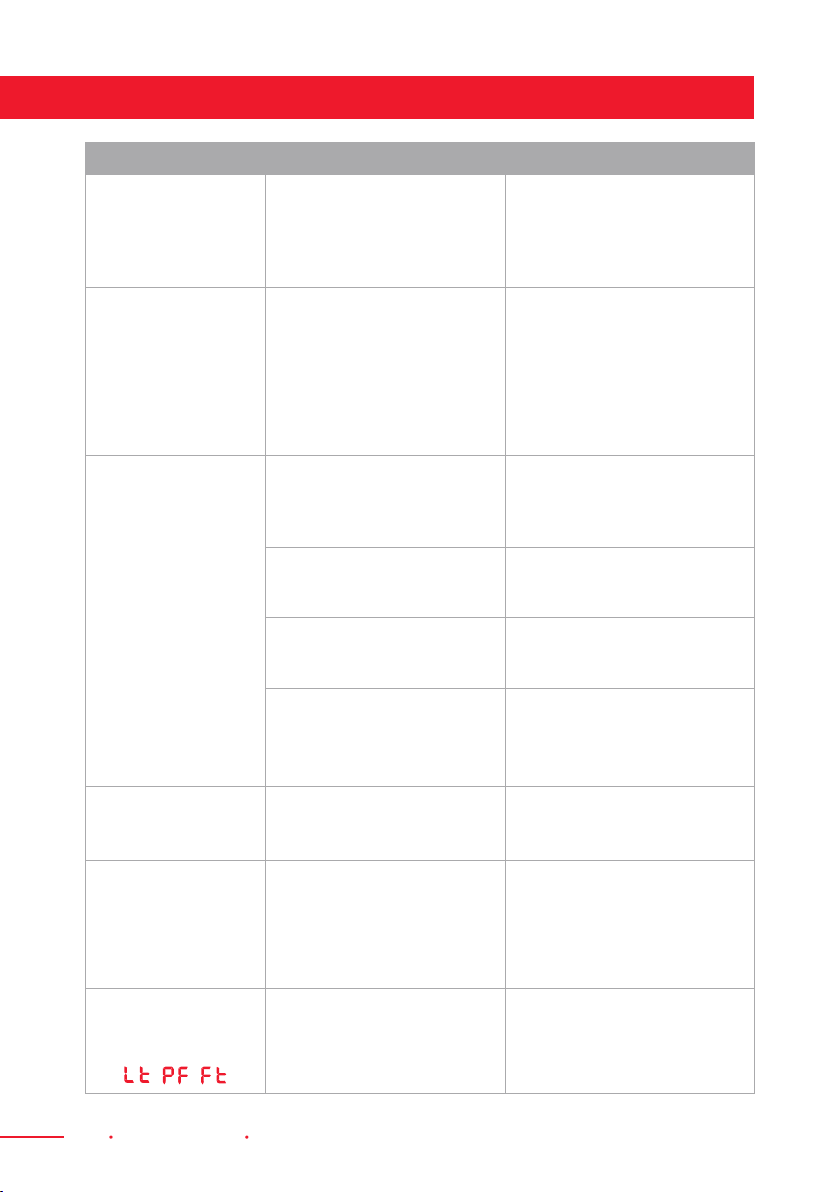
To keep your appliance working efciently, you should
clean the lter weekly. Take the lter out as shown in
Fig. 26 below.
To avoid possible cuts or the risk of personal injury, avoid
being in contact with the metal parts of the appliance as
you remove or re-install the lter.
Use a vacuum cleaner to remove accumulated dust from
the lter. If it is very dirty, immerse it in warm water and
rinse a few times. The water should never be hotter than
104°F (40°C). After washing, leave the lter to dry then
attach the Intake Grille to the appliance.
Make sure the Power Cable and plug are undamaged and the earthing or grounding
system is efcient. Strictly follow the installation instructions.
To empty the internal circuit completely
of water, remove the cap.
Drain off all water left into a basin.
When all the water has been drained,
put the cap back in place. Clean the lter
then dry thoroughly before putting it back.
Strictest Operation Environment:
Cooling mode: 64—95°F (18—35°C), 30~90% RH
Heating mode: 50—77°F (10—25°C), 30~90% RH
CLEANING THE CABINET
CLEANING THE AIR FILTERS
START OF SEASON CHECKS
END OF SEASON OPERATIONS
Fig. 26
Cleaning
26 Troubleshooting Portable Air Conditioner
Troubleshooting
PROBLEM CAUSE SOLUTION
The appliance
does not turn ON
∙ There is no current
∙ It is not plugged into the
main socket
∙ The internal safety device
has tripped
∙ Wait
∙ Plug into the main socket
∙ Wait 30 minutes. If the
problem persists, contact
Customer Serivce
The appliance
works for a short
time only
∙ There are bends in
the Air Exhaust Hose
∙ Something is preventing the
air from being discharged
∙ Position the Air Exhaust
Hose correctly, keeping it as
short and free of curves as
possible to avoid bottlenecks
∙ Check and remove any
obstacles obstructing air
discharge
The appliance
works, but does not
cool the room
∙ Windows, doors,
and/or curtains are open
∙ Close the doors, windows,
and curtains, keeping in mind
the “Tips For Correct Use”
stated on this manual (p. 22)
∙ There are heat sources
in the room (e.g. oven,
hairdryer, etc.)
∙ Eliminate the heat sources
∙ The Air Exhaust Hose
is detached from the
appliance
∙ Attach the Air Exhaust Hose
to the housing at the back of
the appliance
∙ The technical specication
of the appliance is not
adequate for the room
inwhich it is located
During operation,
there is an unpleasant
odour in the room
∙ The air lter is clogged
∙ Clean the lter based on the
instructions on this manual
The appliance does
not operate for about
three minutes after
restarting it
∙ The internal compressor
safety device prevents
the appliance from being
restarted until three
minutes have elapsed since
it was last turned off
∙ Wait. This delay is part of
the normal operation of this
appliance
The following
message appears
on the display:
/ /
∙ The appliance has a self
diagnosis system to identify
a number of malfunctions
and errors
∙ See the “Self-Diagnosis”
section of this manual (p. 14)
Vremi® offers a 12-month warranty on all of our products purchased new and unused from
Vremi® LLC or an authorized reseller, with an original proof of purchase and where a defect
has arisen, wholly or substantially, as a result of faulty manufacturing, parts or workmanship
during the Warranty Period.
The warranty does not apply where damage is caused by other factors, including but
without limitation to: (a) normal wear and tear; (b) abuse, mishandling, accident or failure
to follow operating instructions; (c) exposure to liquid or inltration of foreign particles;
(d) servicing or modication of the product other than by Vremi®.
These are our general terms for the warranty service, but we always urge our customers
to reach out to us with any issue, regardless of warranty terms. If you experience an issue
with a Vremi® product, please contact us at support@vremi. com, and we will do our best
toresolve it for you.
We’re Here To Help:
Warranty Information
Drop Us A Line
WARNING: Keep all plastic bags away from children.
vremi.com/chat
646-490-9904
support@vremi.com
WARNING: This manual covers items
with the model numbers:
VRM050517N
VRM050518N VRM050520N
VRM050519N

28 Drop Us A Line Portable Air Conditioner
vremi.com/chat support@vremi.com 646-490-9904Questions?