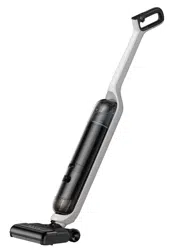
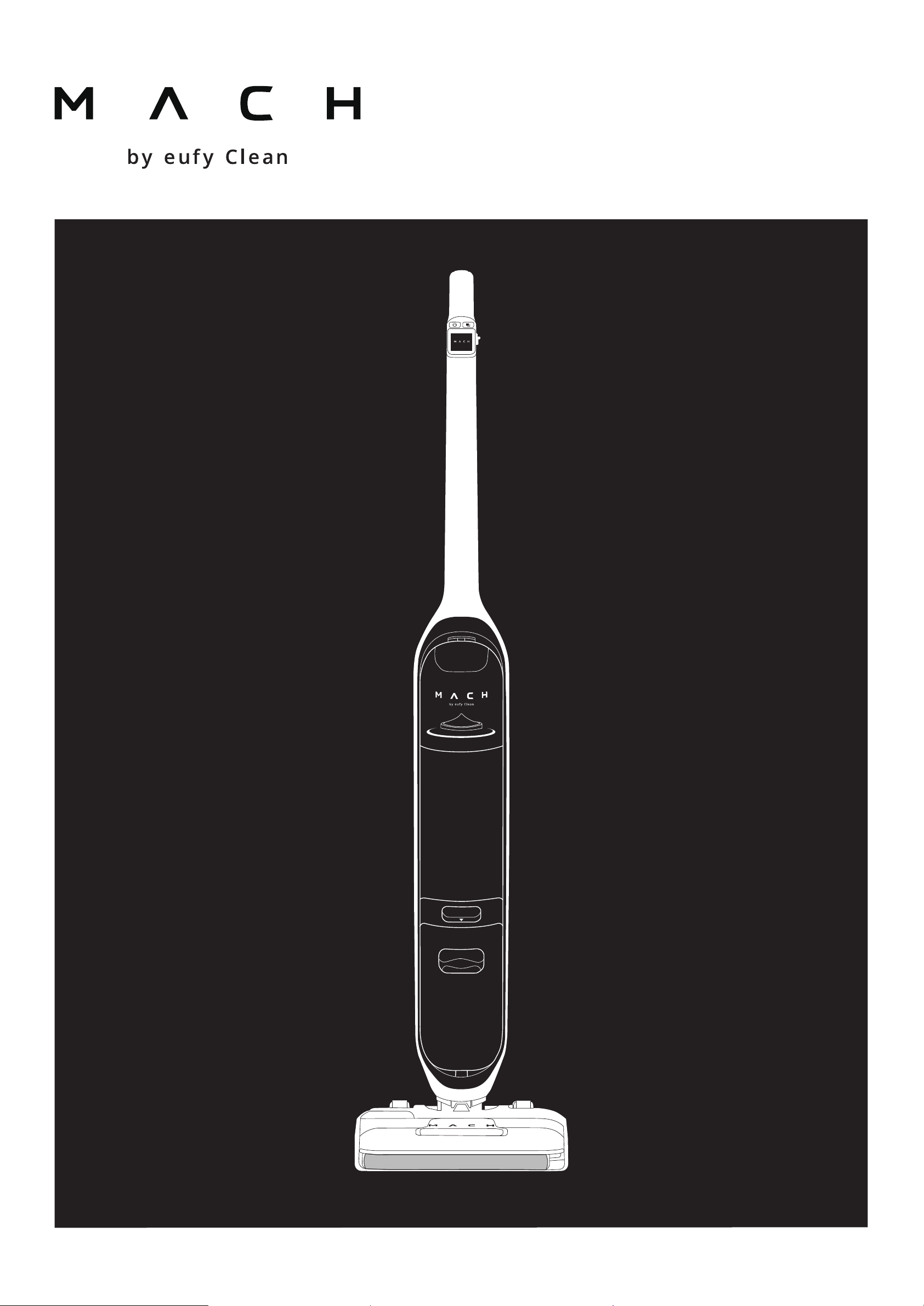
Owner's Manual
V1

English01
Español19

EN 01
Table of Contents
Overview …………………………………………… 02
Button Control ………………………………… 03
Charging …………………………………………… 04
Turning On ………………………………………… 05
Initial Setup
Using the MACH Vacuum Cleaner 06
Add Water and Floor Cleaner
Start / Stop cleaning
LCD Screen Guide …………………………… 09
Selecting a Cleaning Mode ………… 10
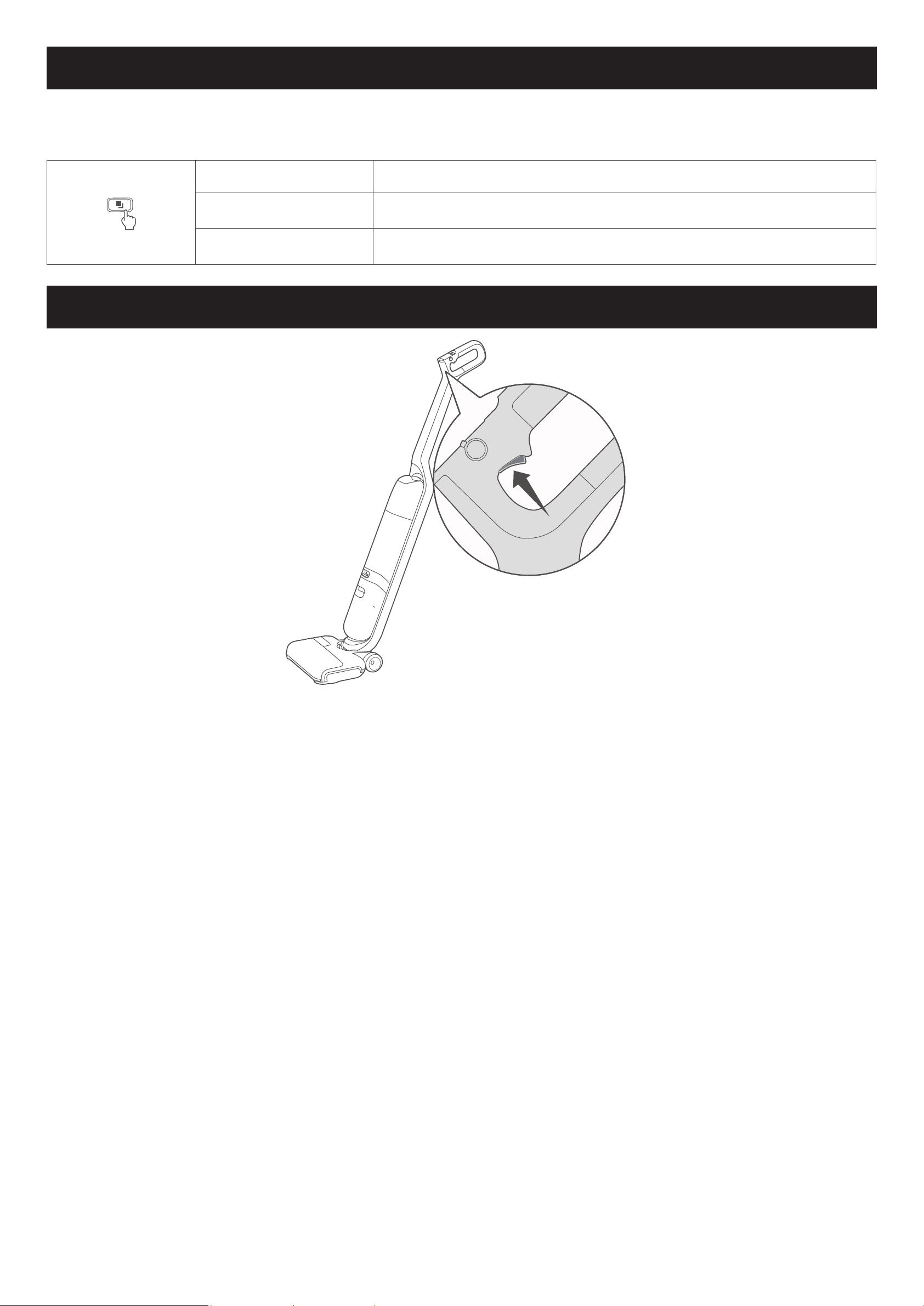
Using the Trigger …………………………… 10
Using the Menu ……………………………… 11
Status Light Indication ………………… 12
Turning Voice Prompts On or O 12
Maintenance …………………………………… 13
Self-Cleaning and Self-Drying
Drying of the Rolling Brush
Clean the Dirty Water Tank
Clean the Rolling Brush Manually
Clean the High-Performance Filter
Clean the Removable Cover
Troubleshooting ……………………………… 17
Specications ………………………………… 17
Customer Service …………………………… 18
02 EN
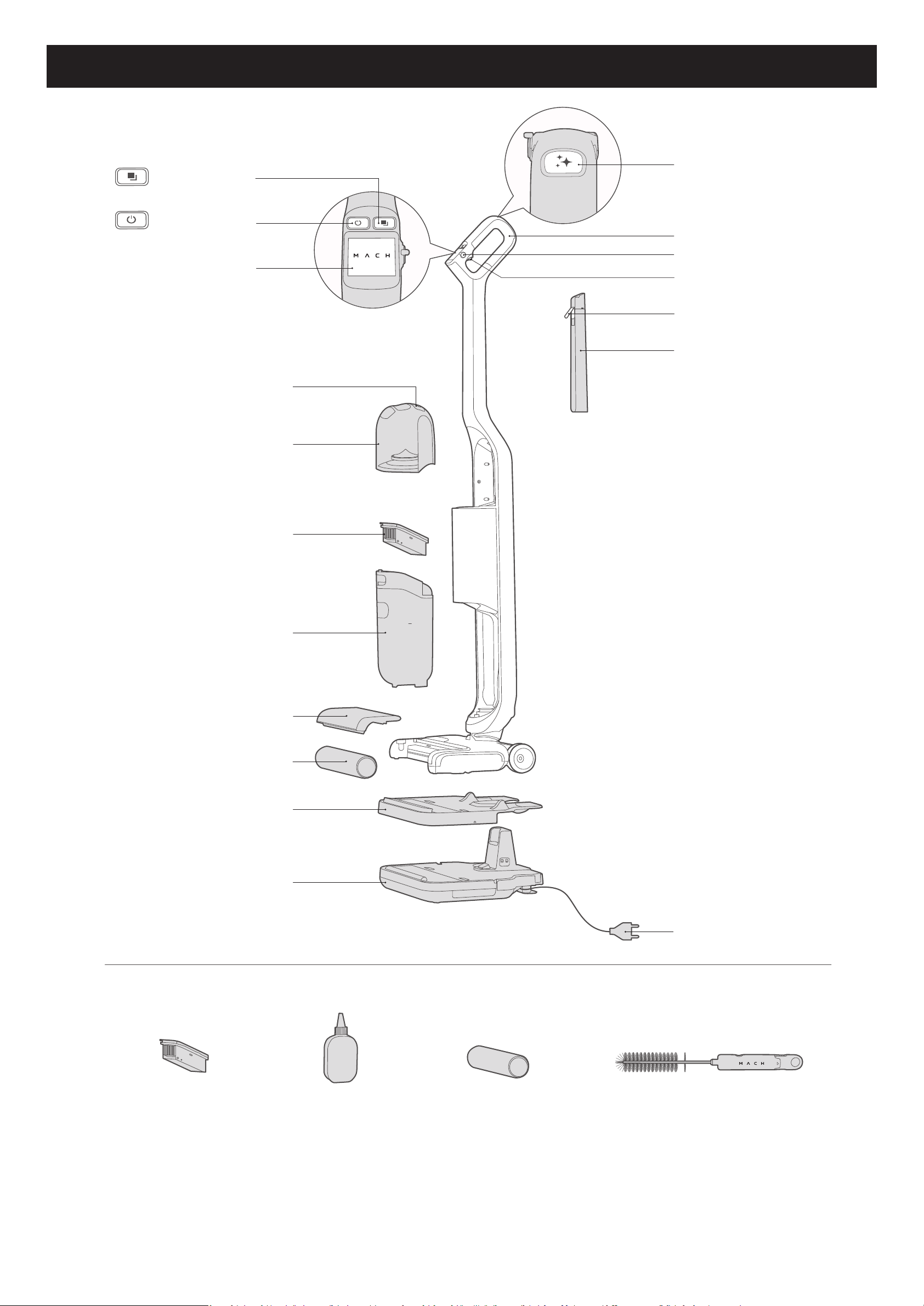
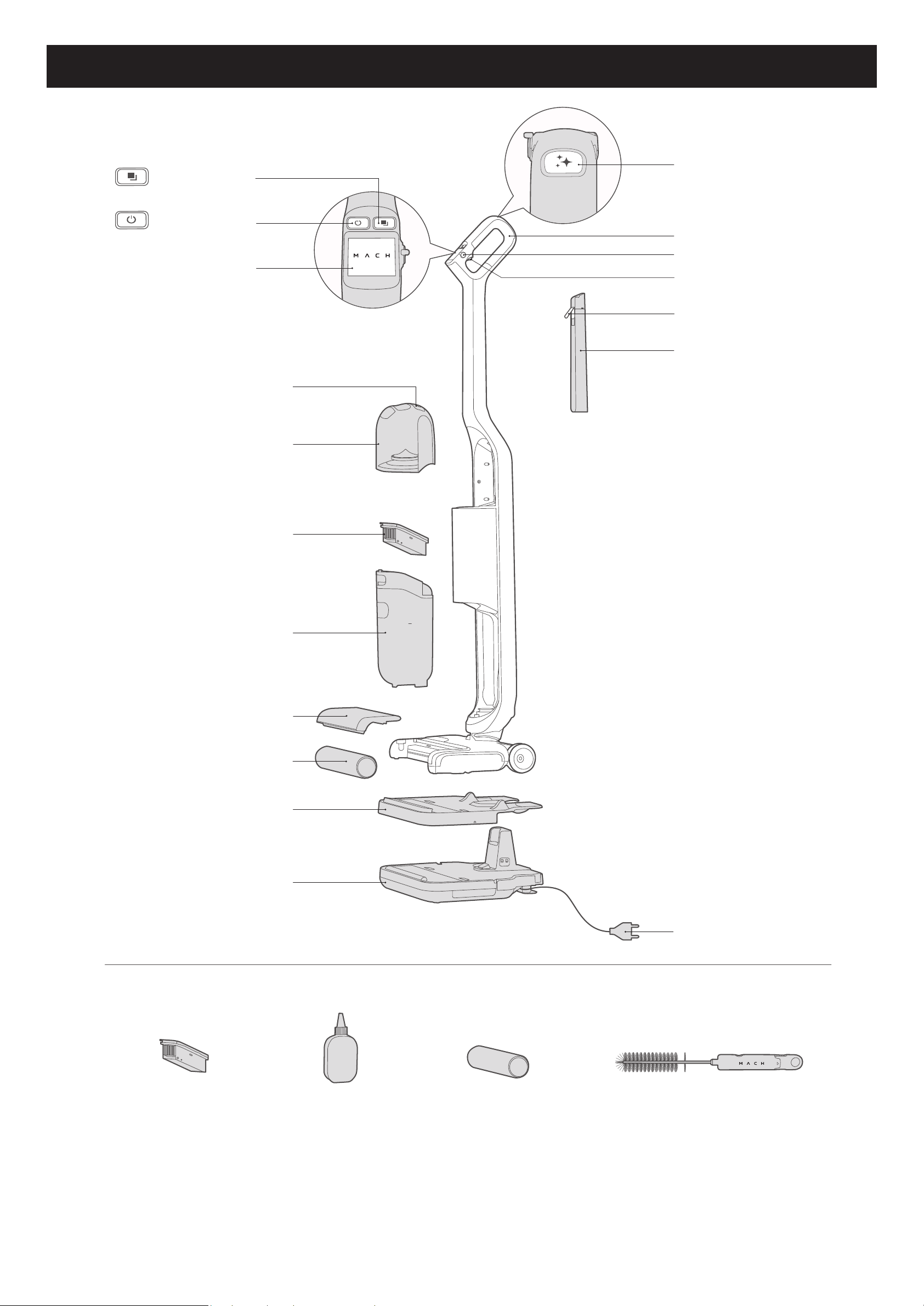
Overview
max
m ach
Mode button
Power button
LCD display screen
Rubber cover
Clean water tank
High-performance lter
Dirty water tank
Rolling brush cover
Multi-surface rolling brush
(Not suitable for use on
high-pile rugs)
Removable cover
Charging base
Self-cleaning button
Handle bar
Floor cleaner switch
Trigger
Rubber cover
Floor cleaner tank
Power cord
Additional
high-performance lter
Floor cleaner
Additional multi-surface
rolling brush
Cleaning tool
EN 03
Button Control
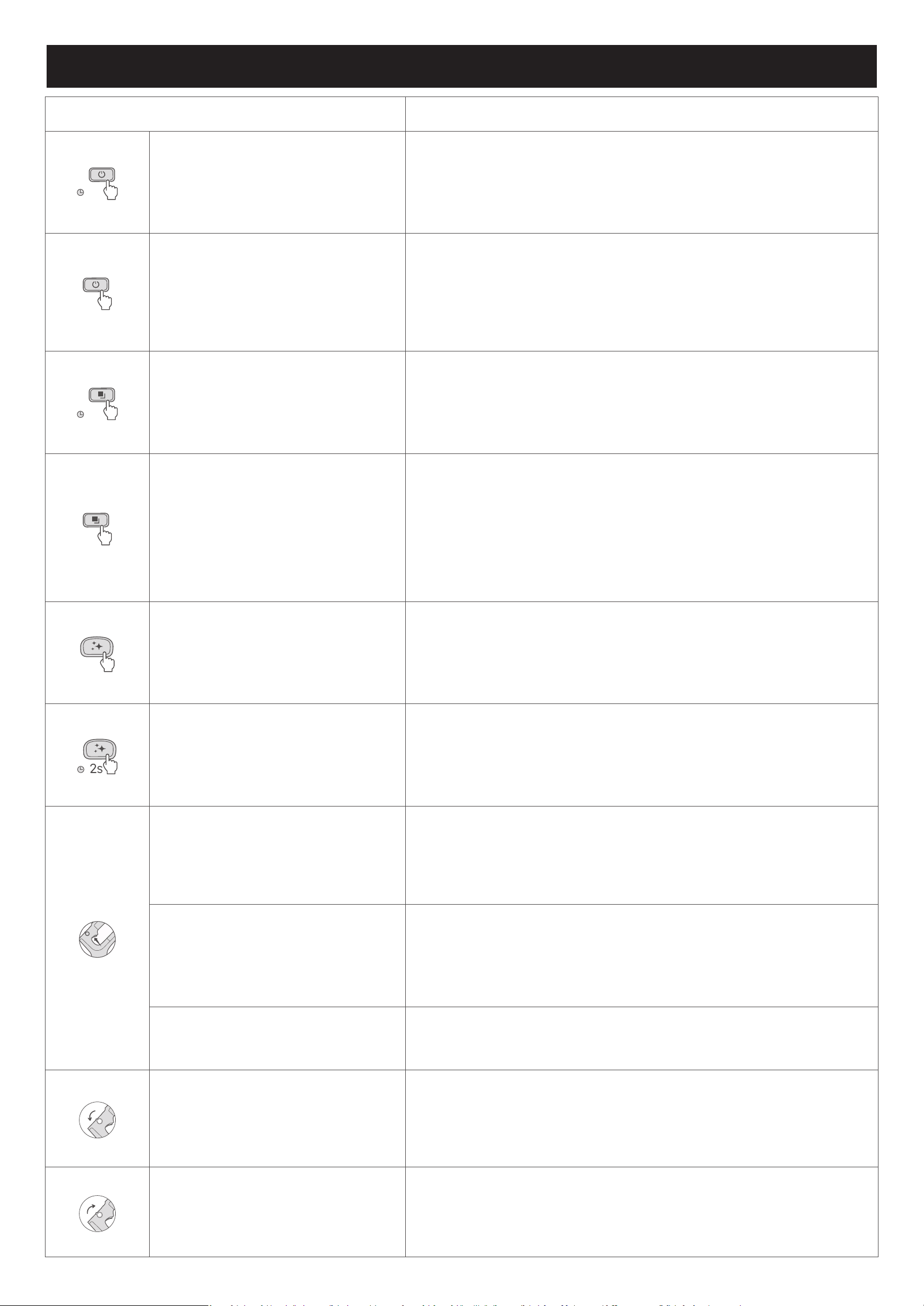
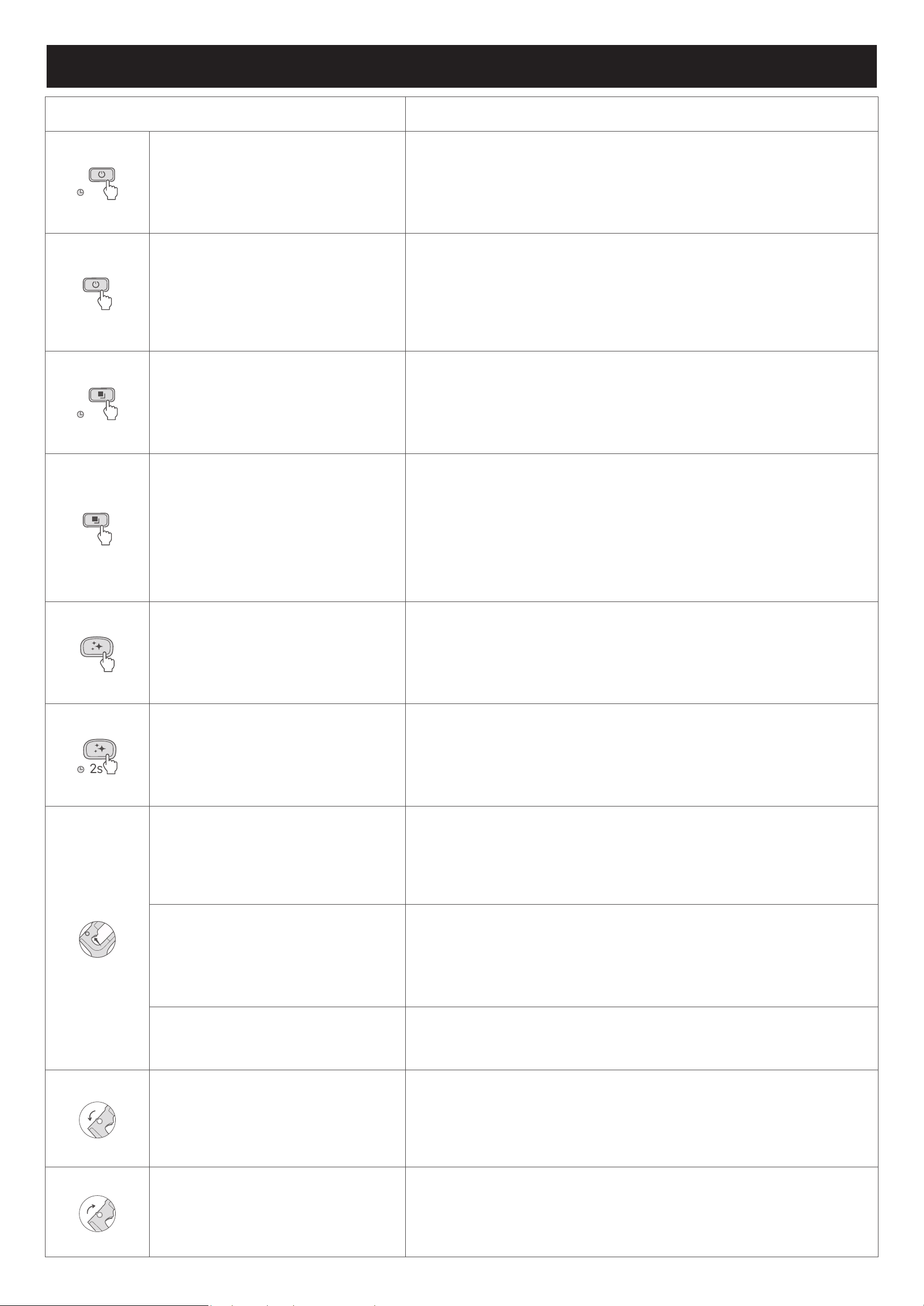
Action Function
1s
Press and hold the power button for
1 second
• Turn on or o
Press the power button
• During cleaning, pause or resume current task
• During menu setting, skip to the previous menu option
1s
Press and hold the mode button for
1 second
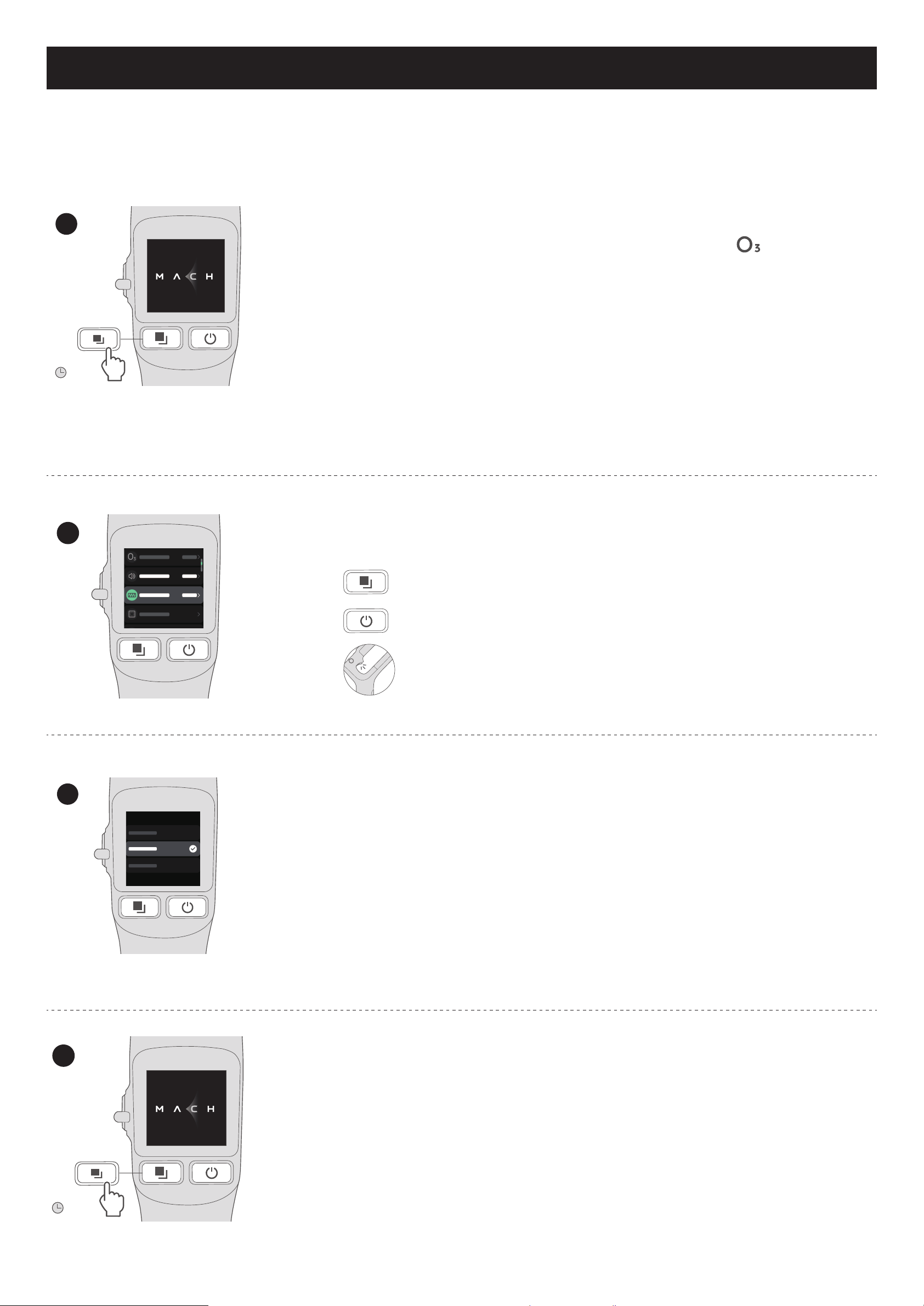
• Enter menu setting mode
Press the mode button
• Select a mode
• Smart mode (default)
• Suction mode
• During menu setting, skip to the next menu option
Press the self-cleaning button • Start self-cleaning and self-drying
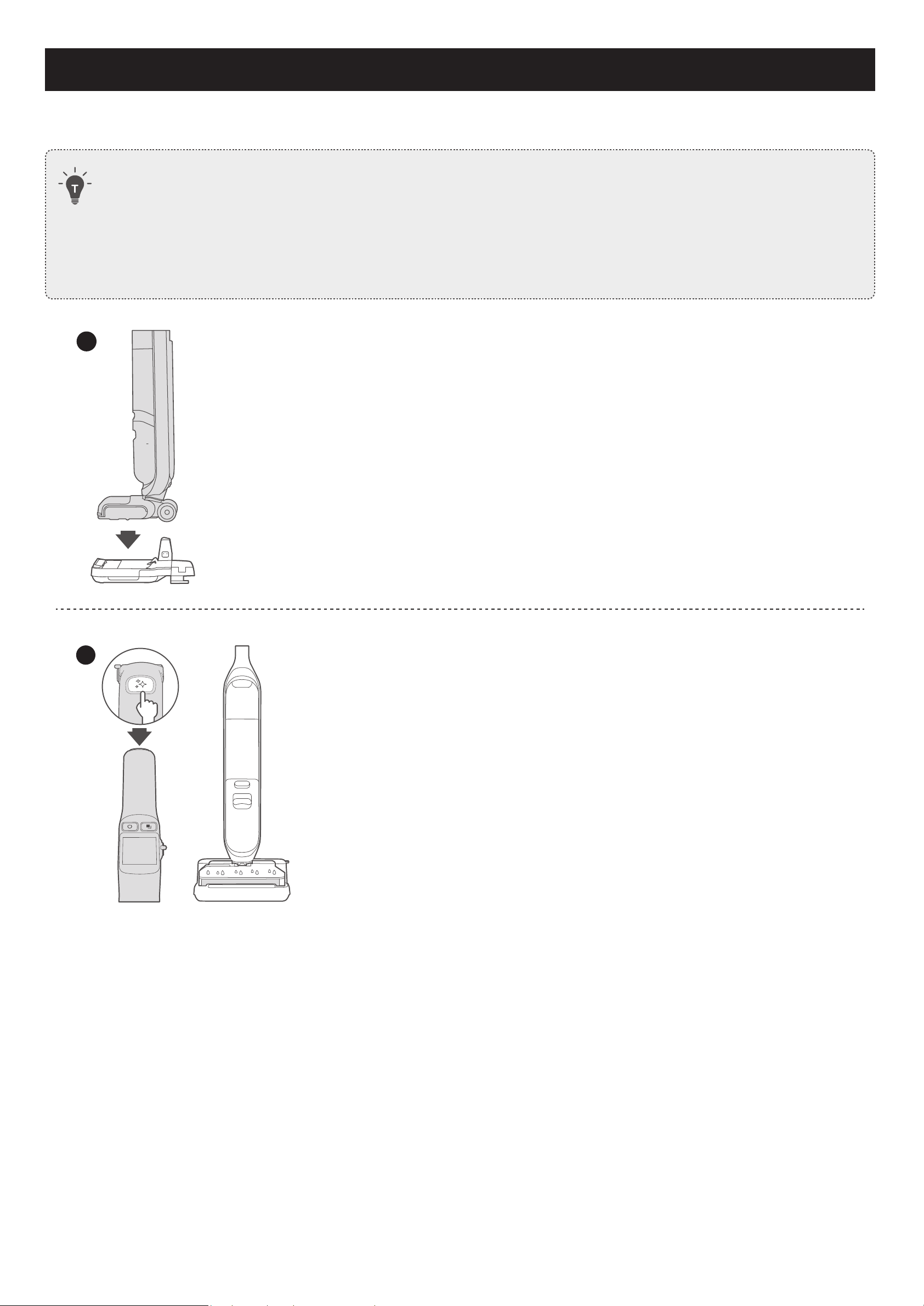
Press and hold the self-cleaning
button for 2 seconds
• Turn voice prompts on or o
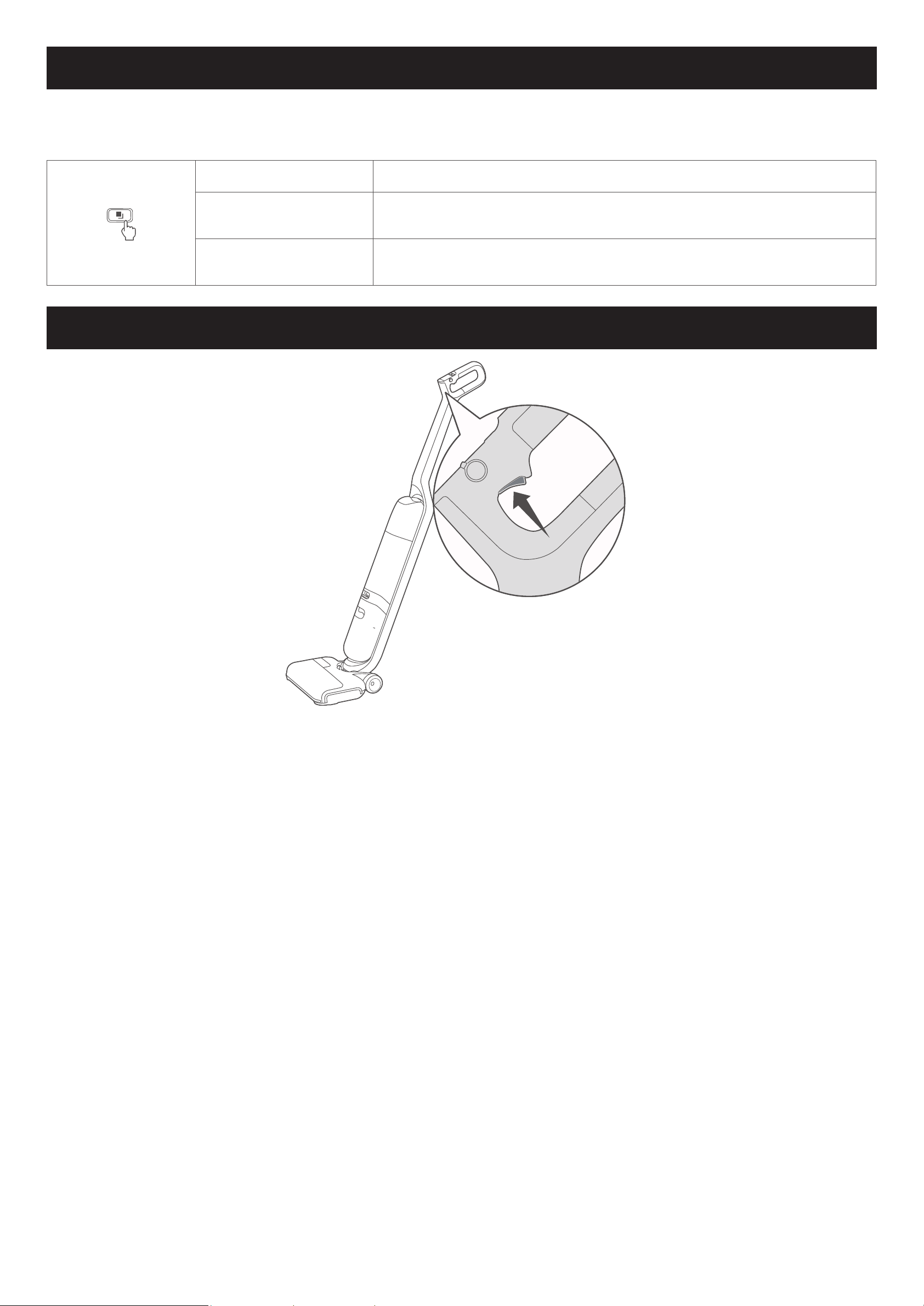
Hold the trigger
• In smart mode, activate more powerful cleaning
• In suction mode, activate more powerful suction
Hold the trigger for 2 seconds
(when placed on the charging base)
• Dry the rolling brush
Press the trigger • During menu setting, conrm a selection
Turn anticlockwise Turn the oor cleaner switch on
Turn clockwise Turn the oor cleaner switch o
04 EN
Charging
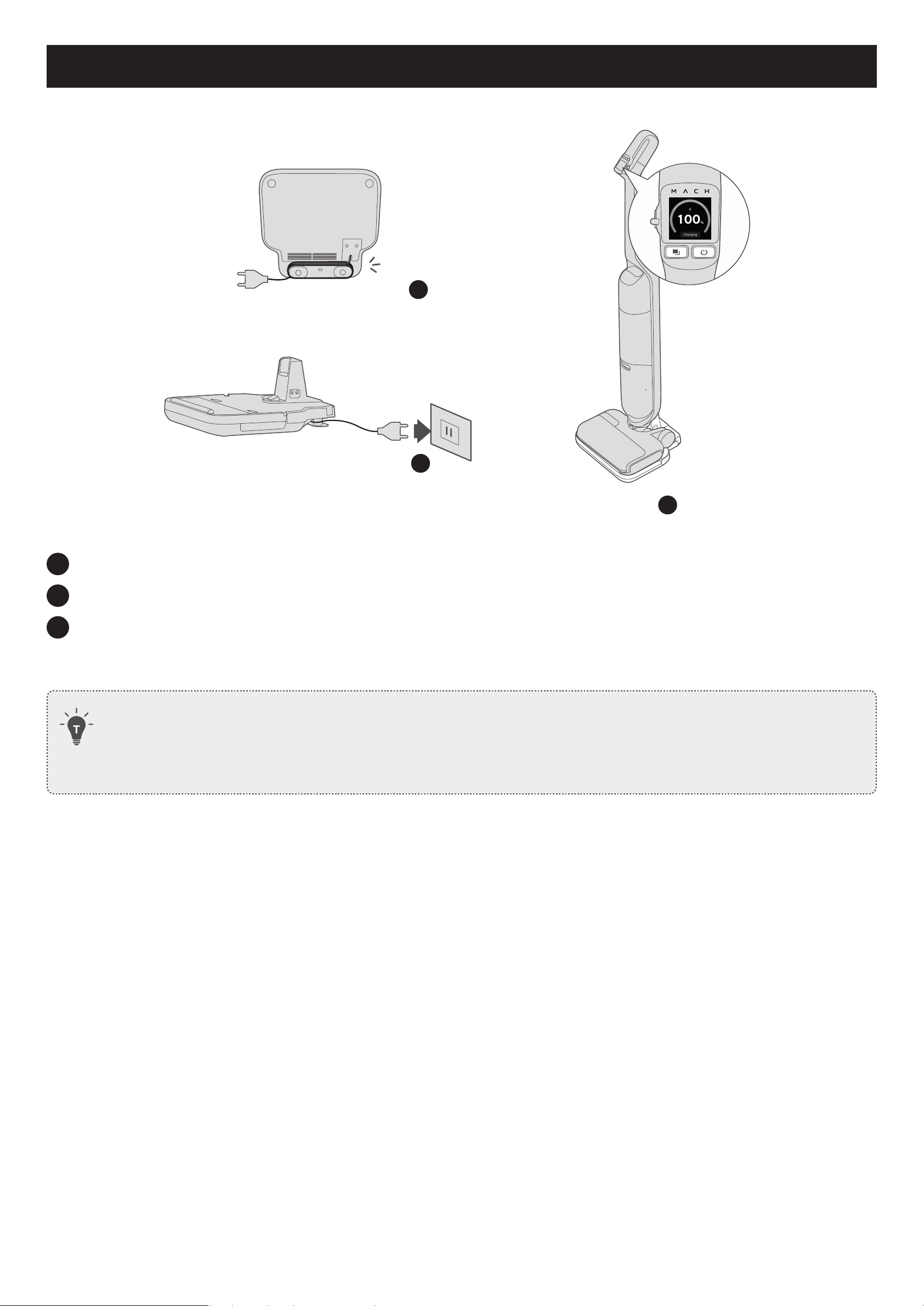
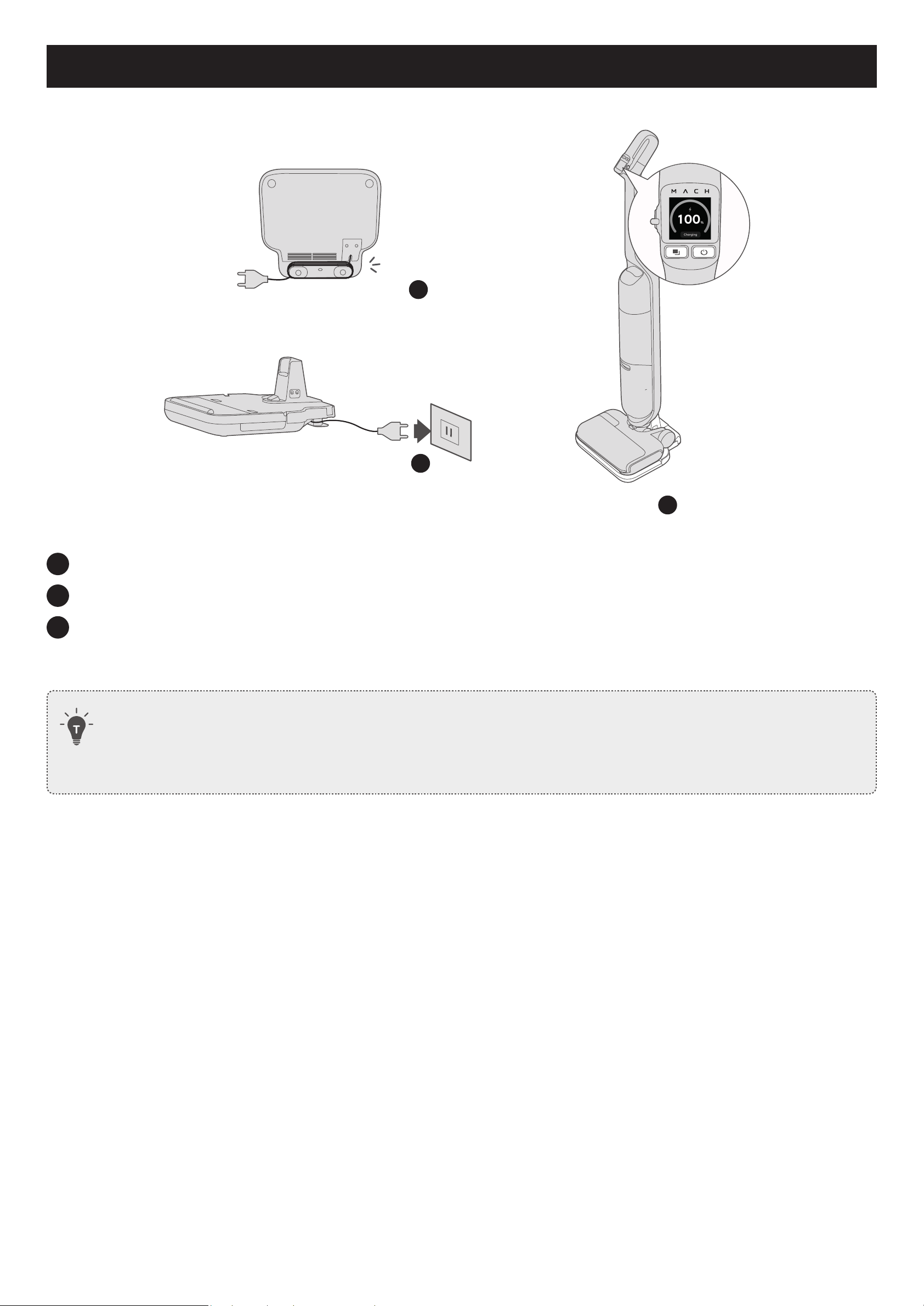
Before first use, fully charge the MACH Vacuum Cleaner for 4 hours.
1
2
max
m a c h
3
1
Wrap your power cable as needed and keep your cable organized.
2
Connect the power cord to a power outlet.
3
Place the MACH Vacuum Cleaner onto the charging base.
• The LCD display lights up and you will hear a voice prompt, indicating that the MACH Vacuum Cleaner
starts charging.
• The power plug varies by region.
• The charging speed depends on the working mode and ambient temperature. Before use, wait patiently
until the charging is complete.
EN 05
Turning On
1
max
max
m ach
1s
2
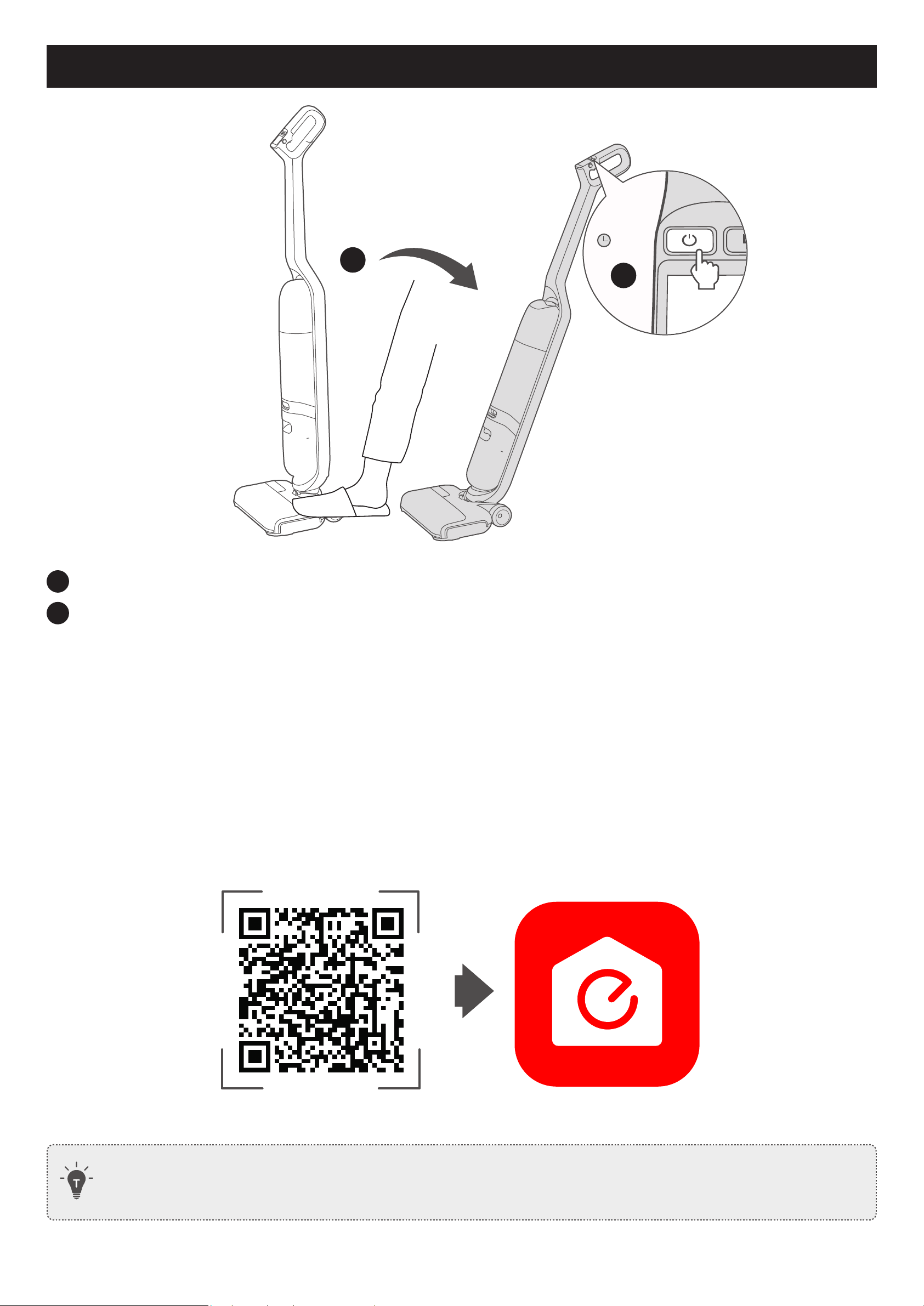
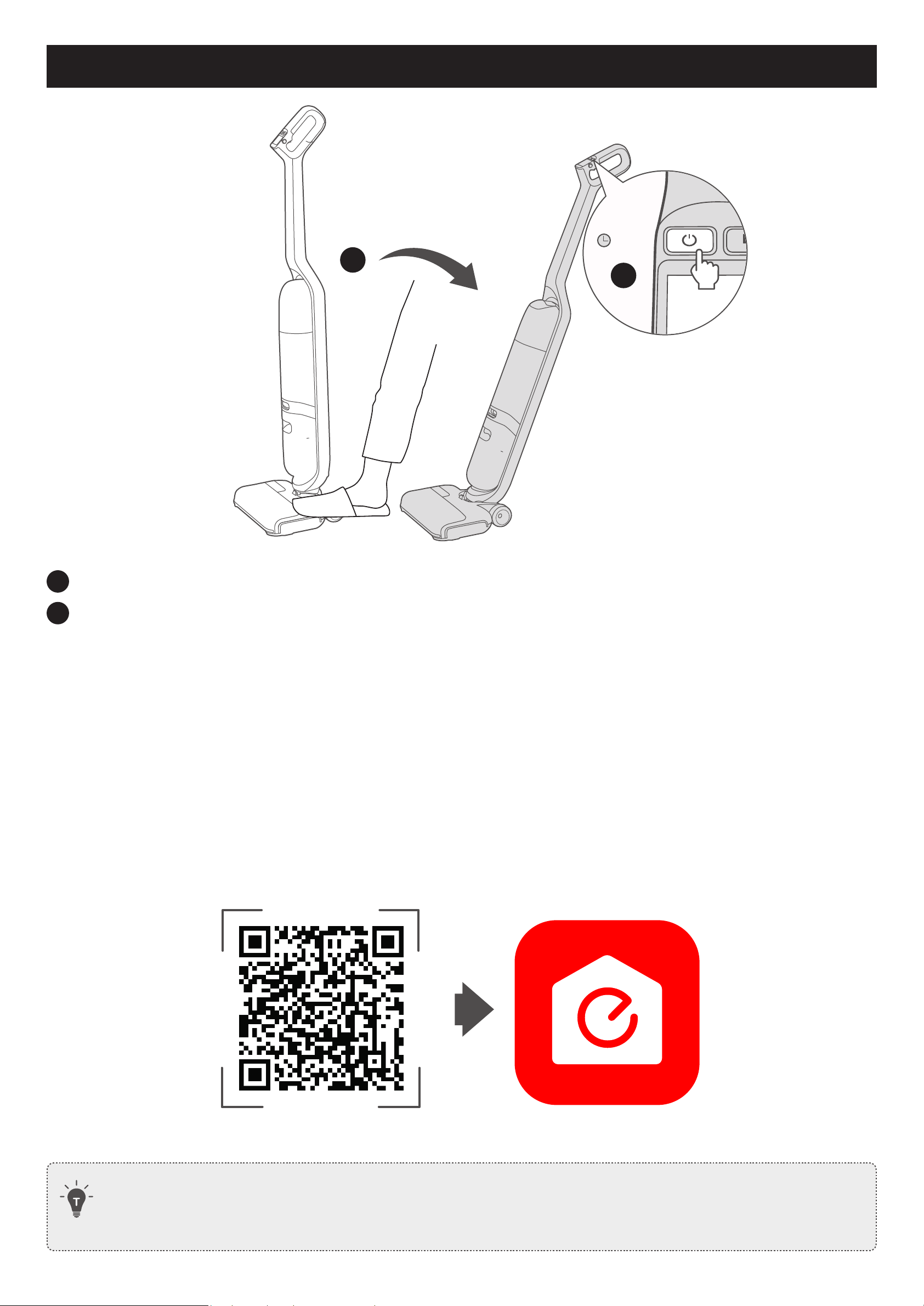
1
Gently step on the foot pedal and push the handle bar backward until you hear a click.
2
Press and hold the power button for 1 second to turn on the MACH Vacuum Cleaner.
• The LCD display lights up.
Initial Setup
Before you start, make sure that:
• Your smartphone or tablet is running iOS 10.0+ or Android 5.0+.
• The 2.4GHz band wireless signal is enabled on your wireless router.
For first-time use, the boot animation will guide you to learn the basic operations, select a voice prompt language,
scan the QR code to download the eufy Clean app, and complete the Wi-Fi connection.
• To better understand the operation and maintenance of this device, and obtain the latest product
services and information, please scan the QR code to download the eufy Clean app.
06 EN
Using the MACH Vacuum Cleaner
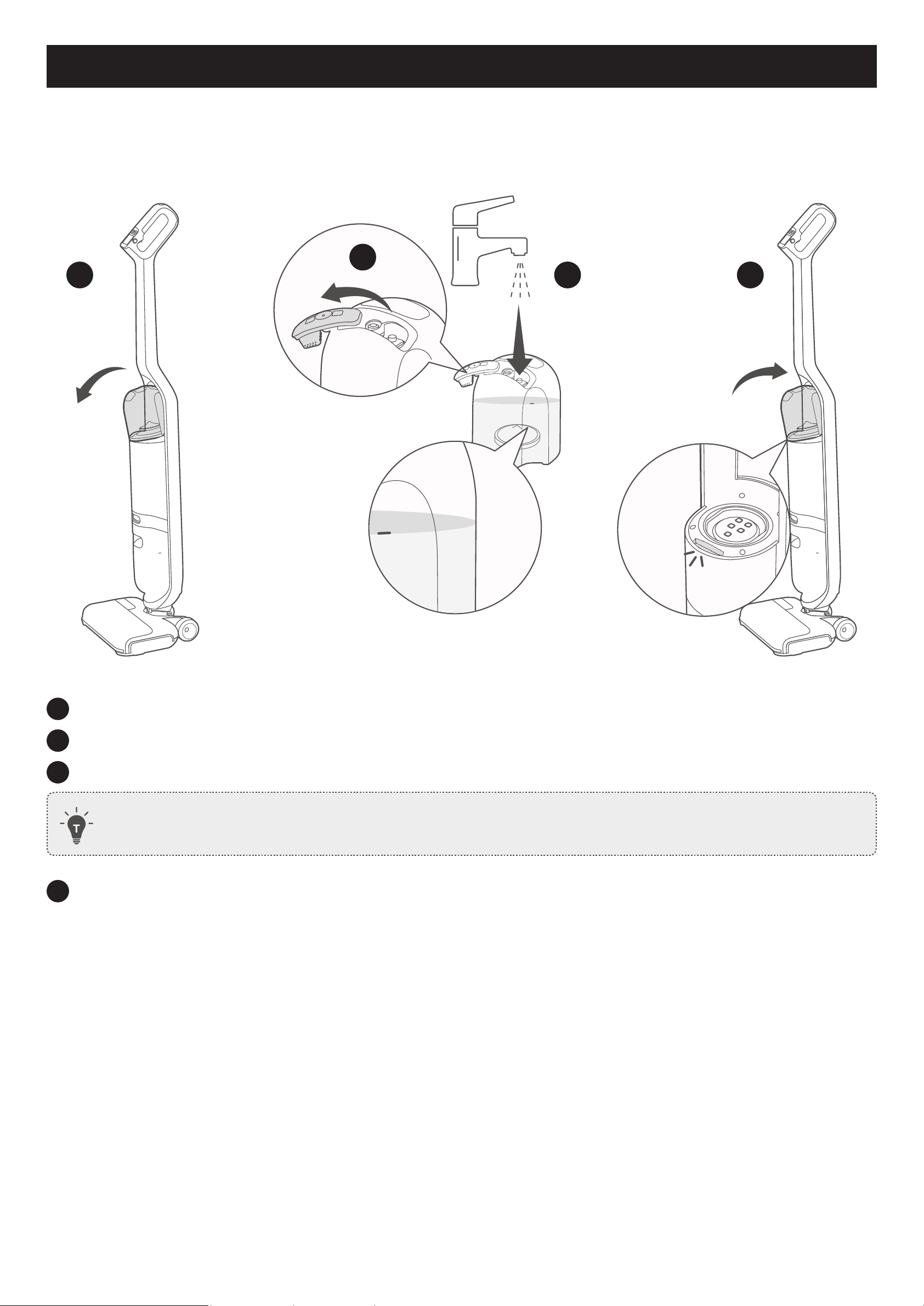
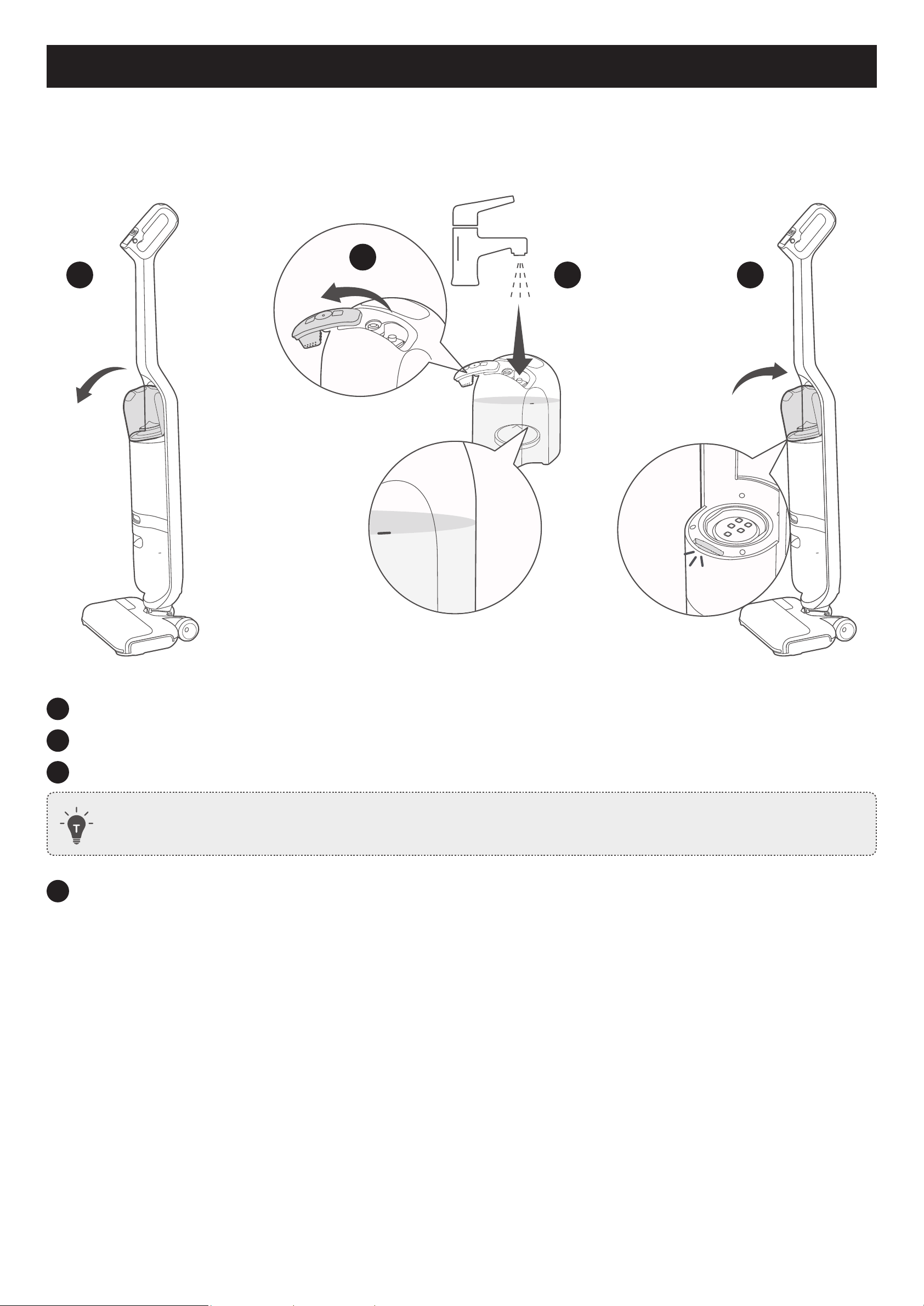
Add Water and Floor Cleaner
Add Clean Water
1
max
2
max
max
Click
3 4
max
1
Remove the clean water tank from the MACH Vacuum Cleaner.
2
Open the rubber cover.
3
Add tap water until it reaches the MAX water line.
• Do not use mineral or purified water.
4
Replace the clean water tank.
• You will hear a click when the clean water tank is locked in place.
EN 07
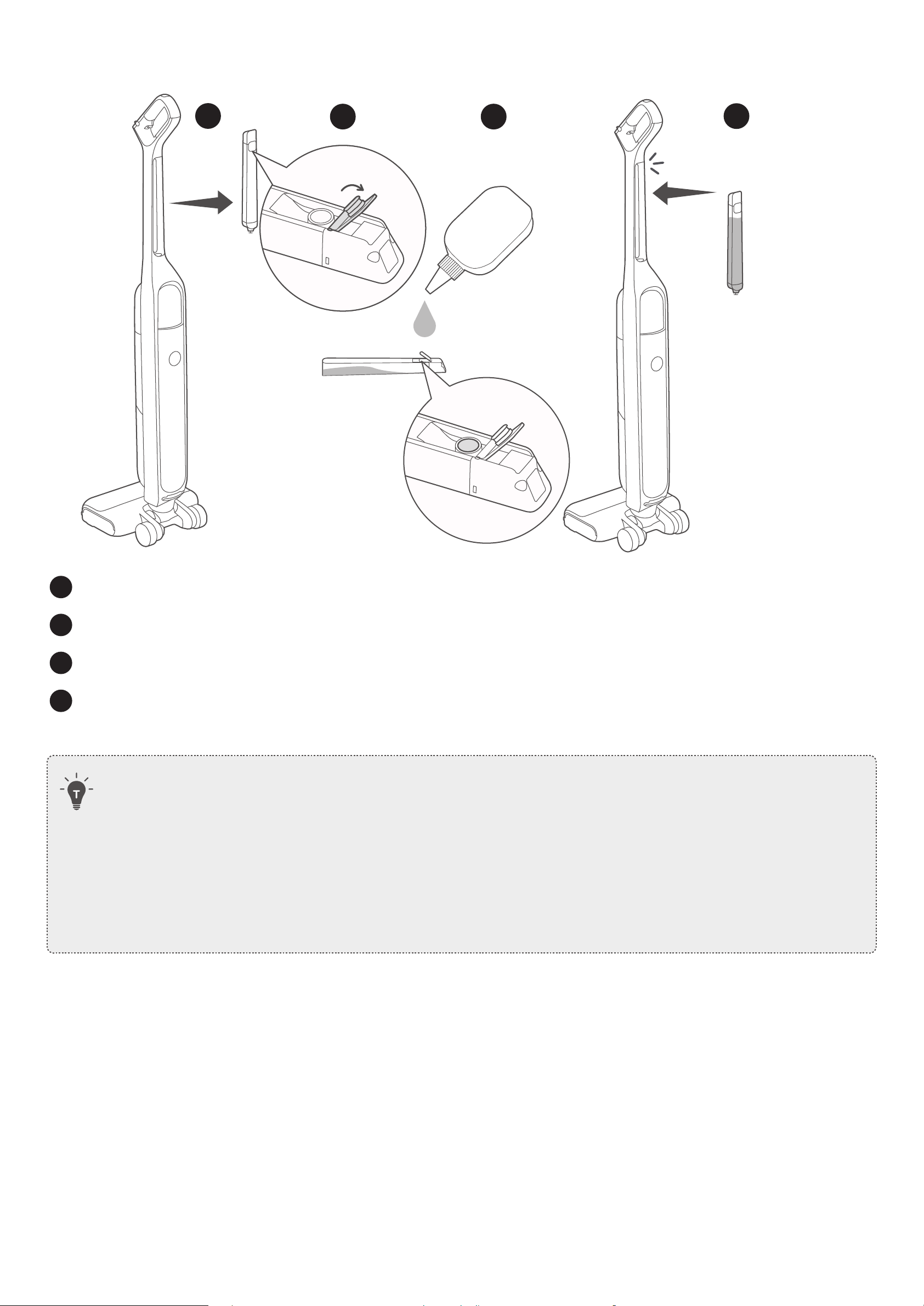
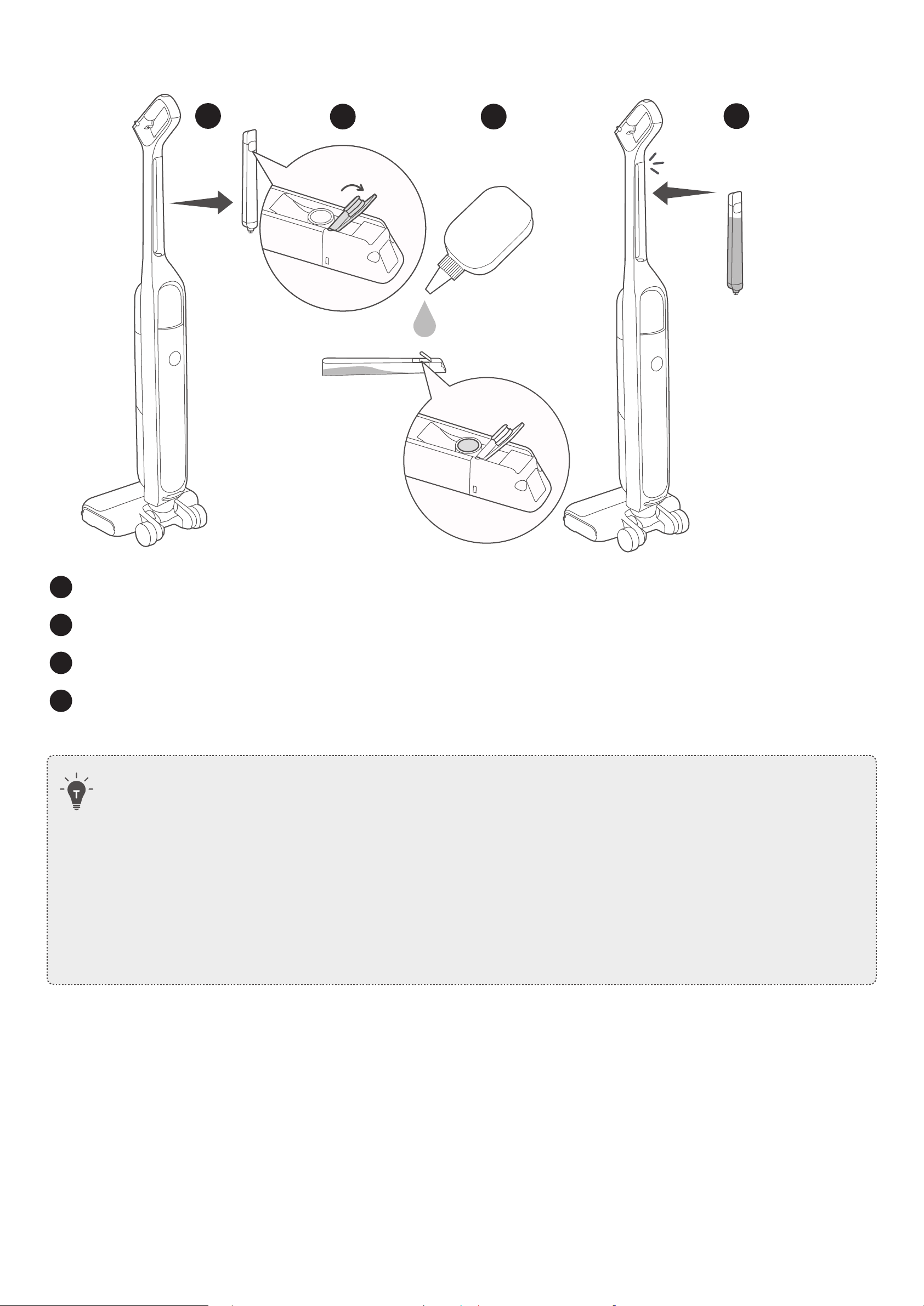
Add Floor Cleaner
1
2 3
4
Click
1
Remove the floor cleaner tank.
2
Open the rubber cover.
3
Add floor cleaner into the floor cleaner tank.
4
Replace the floor cleaner tank. You will hear a click when it is locked in place.
• To use the floor cleaner during cleaning, make sure the floor cleaner switch is turned on.
• Do not add hot water above 50 degrees, alcohol and corrosive liquid into the water tank.
• Use the floor cleaner designated by eufy only. Use with any other cleaner may cause severe damage to
the MACH Vacuum Cleaner.
• Do not add floor cleaner with too much foam as it will cause false alarms.
• Do not put the water tank into a microwave for heating.
08 EN
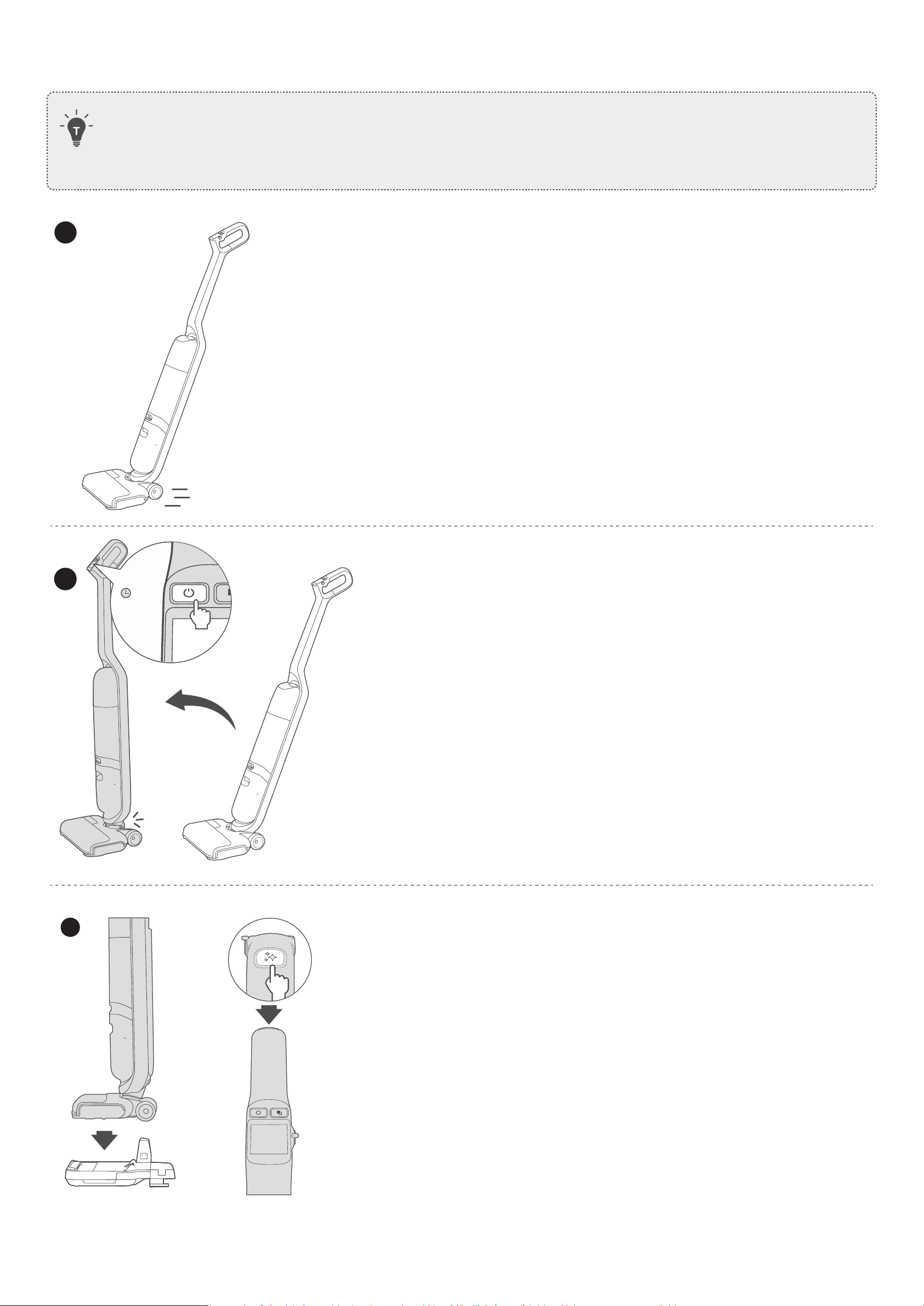
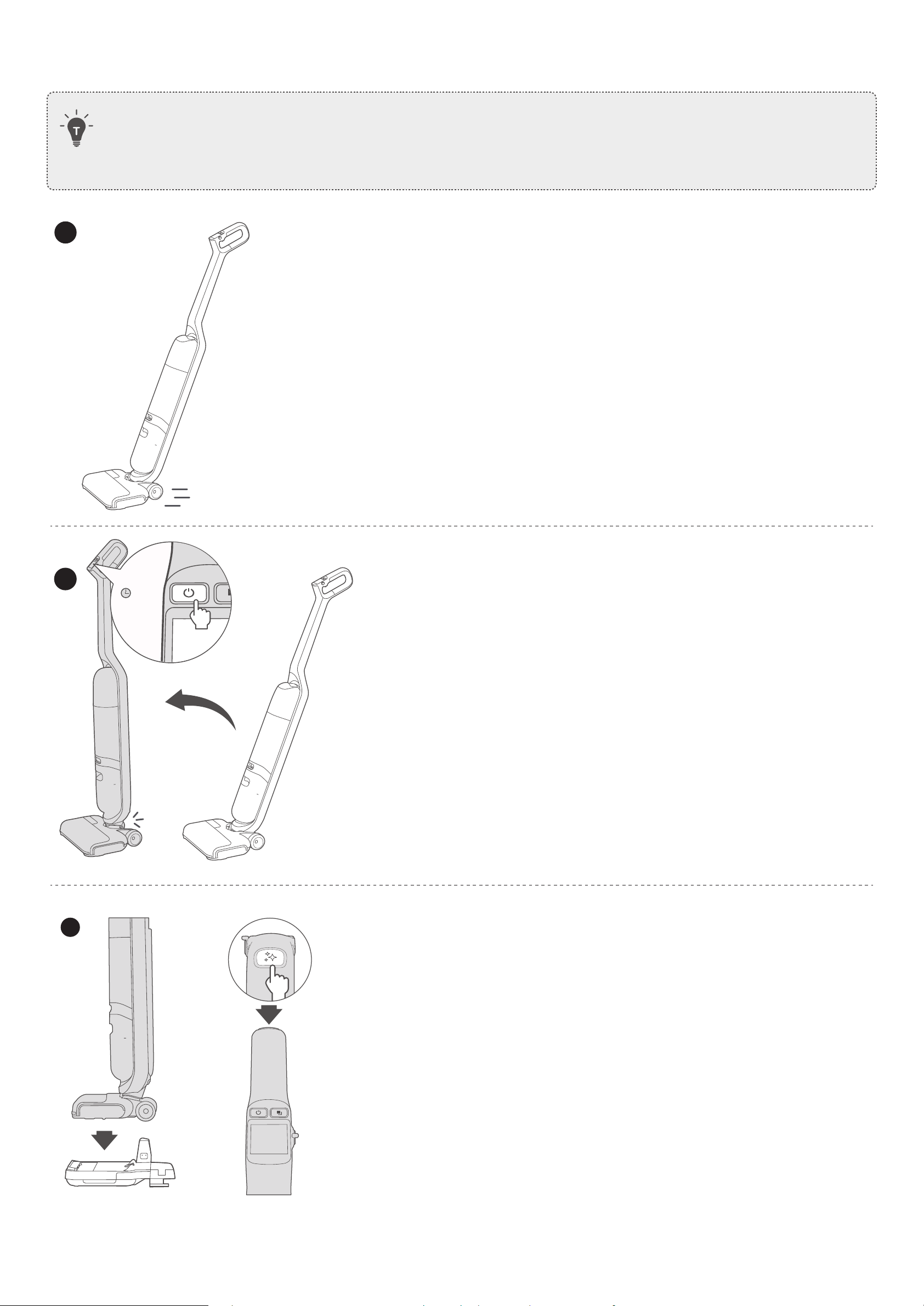
Start / Stop cleaning
• The MACH Vacuum Cleaner cannot clean high-pile rugs more than 1cm in height.
• Do not clean carpets which are made of materials including wool or other animal furs.
• It is recommended to clean your carpets in suction mode.
max
m ach
1
max
max
m ach
max
After Wi-Fi setup, start cleaning in the smart mode by default.
• To change the cleaning mode, refer to the "Selecting a
Cleaning Mode" section.
• To pause or resume current task, press the power button.
2
Click
max
m ach
1s
max
max
m ach
max
To stop cleaning,
• press and hold the power button for 1 second; or
• push the handle bar forward until you hear a click.
3
max
m ach
max
max
m ach
max
Place the MACH Vacuum Cleaner onto the charging base to
charge, and then press the self-cleaning button to start
self-cleaning and self-drying (see the Maintenance section).
EN 09
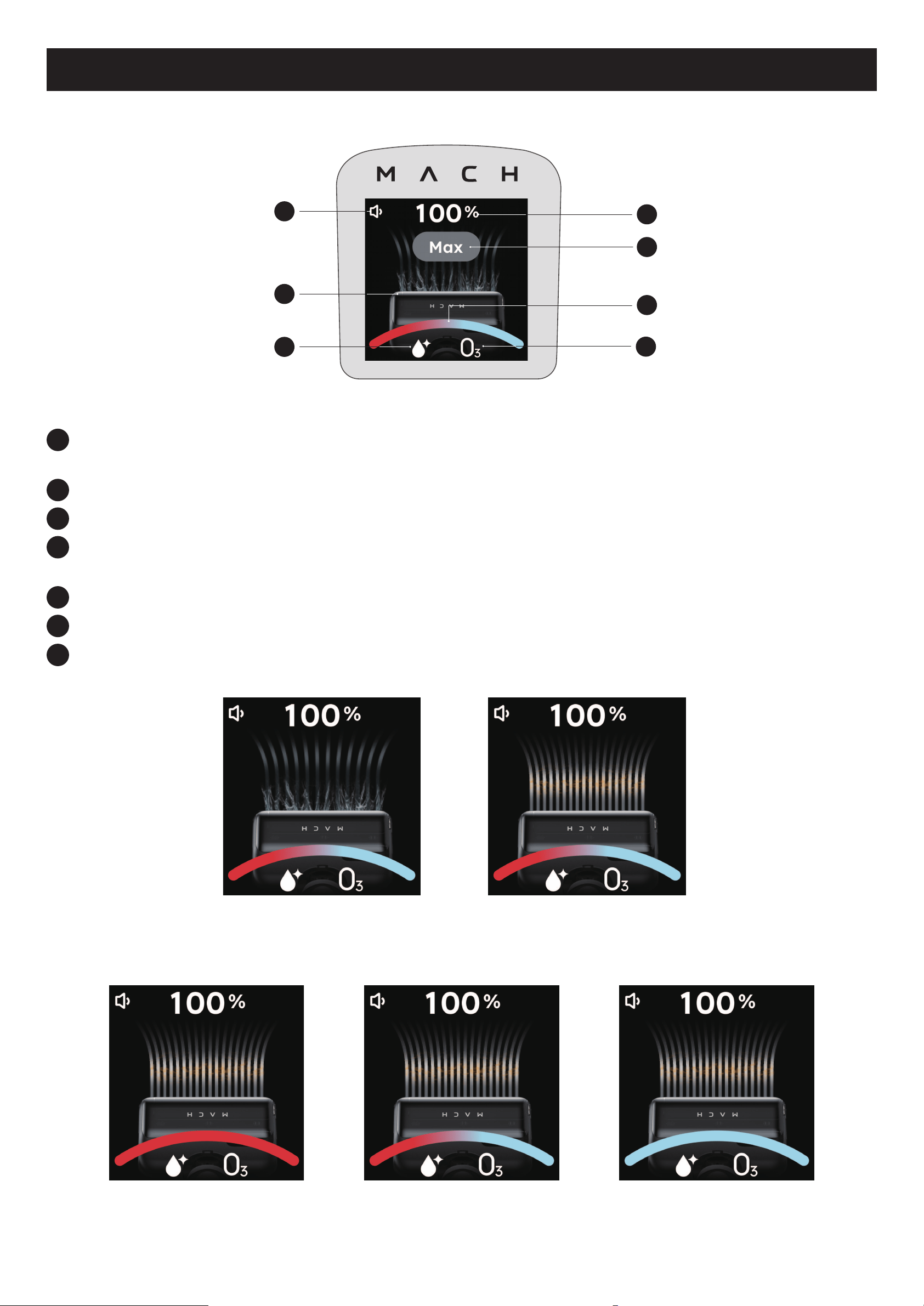
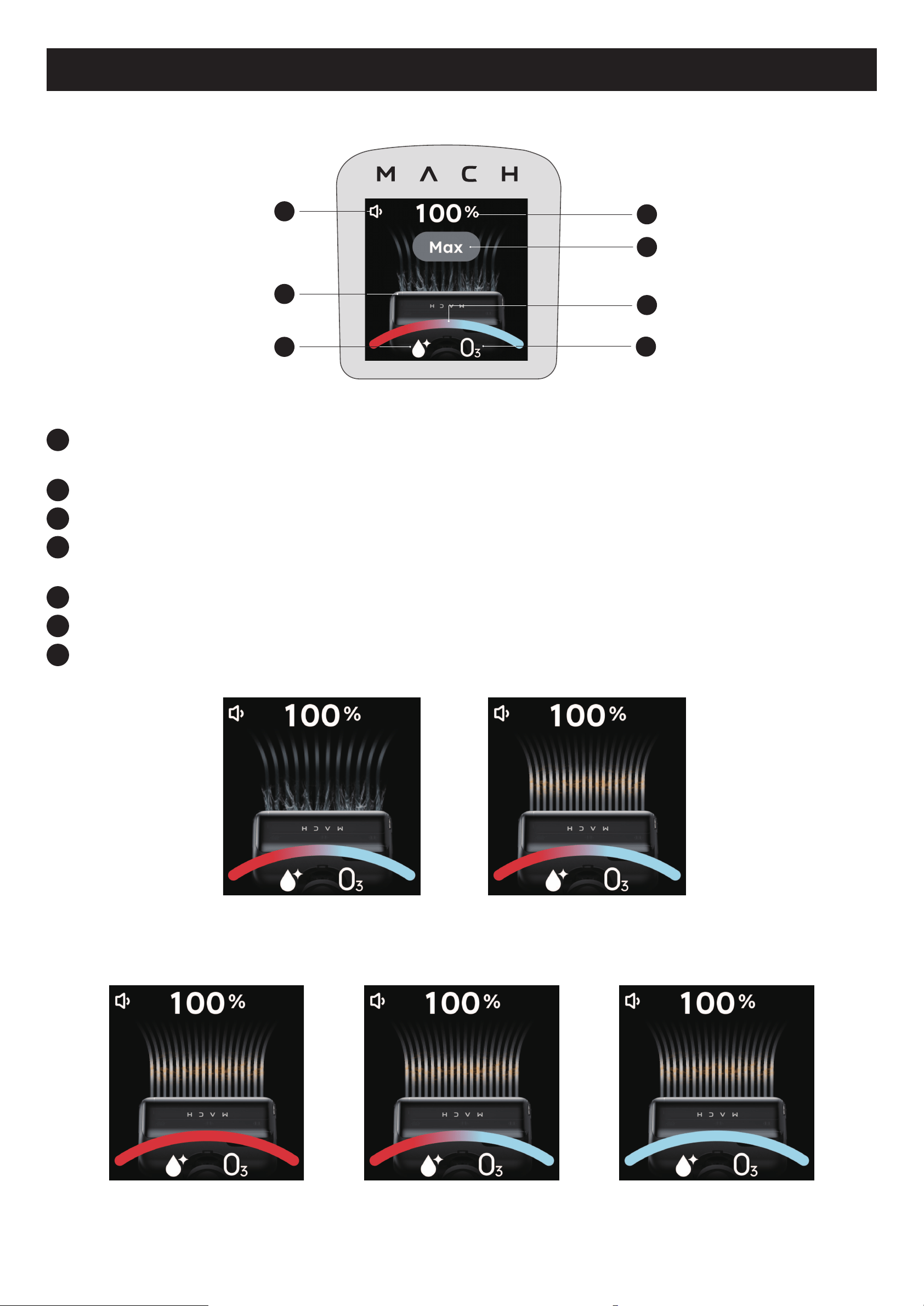
LCD Screen Guide
The LCD screen will show you the working status of the MACH Vacuum Cleaner.
4
2
7
3
5
1
6
1
Shows current volume level of voice prompts
(High / Low / Mute)
2
Shows the animation of current work mode
3
Lights up when oor cleaner switch is turned on
4
Shows current charging status / battery level
Shows current mode name when switching work modes
5
Lights up when operating the device under maximum power condition
6
Intelligently shows current cleanliness status of your oor
7
Lights up when ozone disinfection is enabled
Smart mode Suction mode
The different color of light bar indicates different cleanliness status.
Dirty Half-dirty Clean
10 EN
Selecting a Cleaning Mode
During cleaning, press the mode button to select a cleaning mode.
• You will hear the corresponding voice prompt when a mode is selected.
Mode Use
Smart mode (default) For daily mopping and hard oor washing
Suction mode Ideal for carpet cleaning or soaking up dry / liquid waste on the oor
Using the Trigger
max
• In smart or suction mode, press and hold the trigger. The current function will be strengthened.
• Release the button to deactivate the feature.
EN 11
Using the Menu
From the menu, you can access additional features and information.
m ach
1s
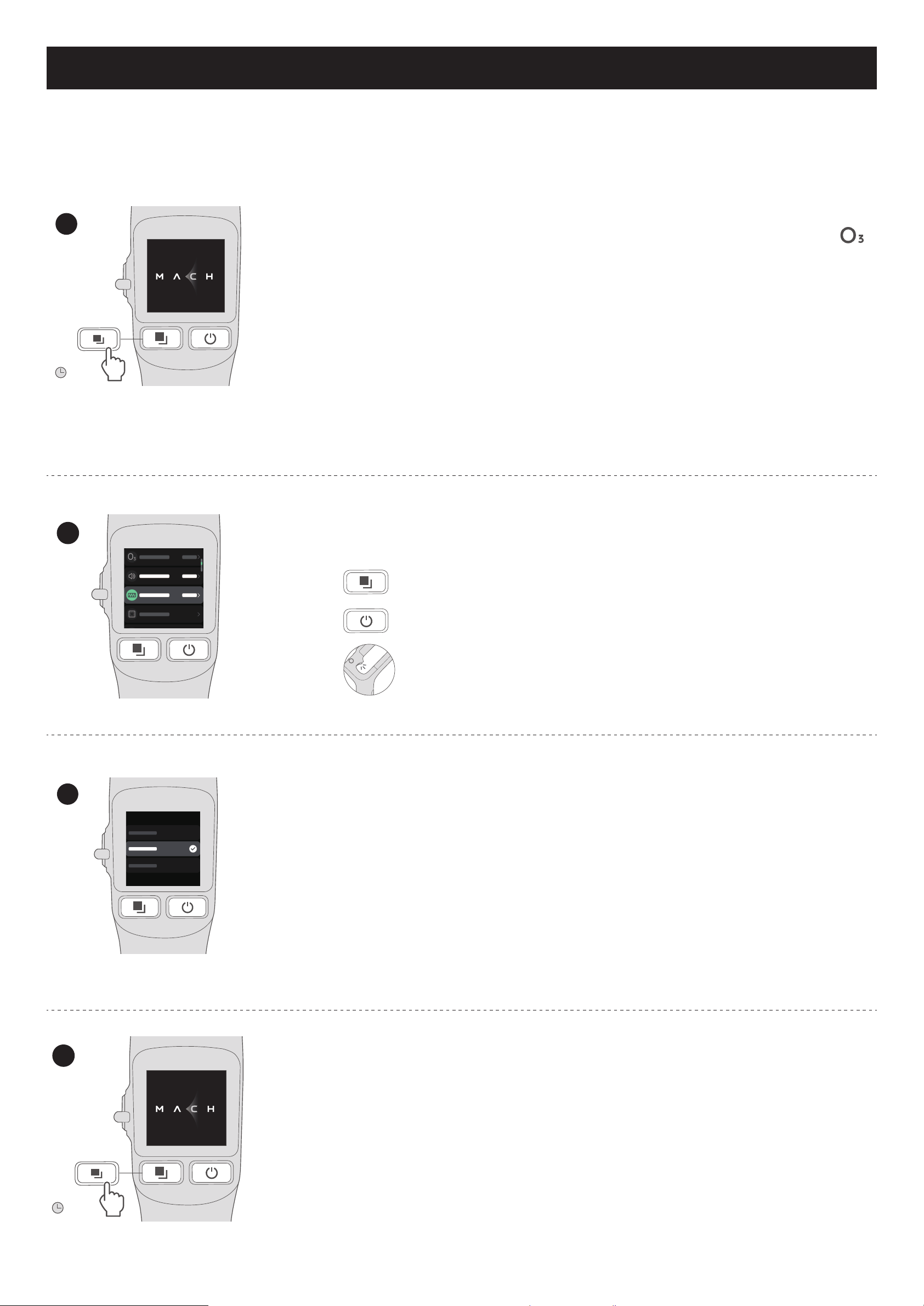
1
Press and hold the mode button for 1 second to access the menu options.
• Select a language.
• Adjust volume.
• Enable or disable EcoClean™ Ozone disinfection. The
icon is
displayed when this feature is enabled.
• Reset the Wi-Fi connection: The Wi-Fi connection may be interrupted
due to network change. In this case, reset the Wi-Fi connection, re-add
the device via the eufy Clean app, and complete the Wi-Fi setup.
• View the basic information of the MACH Vacuum Cleaner.
• Restore factory settings.
•
Show the life span of consumable materials including rolling brush and lter.
If the consumable material has been replaced with a new one, you can reset
the progress bar to re-monitor its life span.
m ach
2
Press the mode / power button to select an option, and then press the
trigger to confirm.
Select the next menu option
Select the previous menu option
Confirm a selection
m ach
3
To select a sub-menu, repeat step 2.
m ach
1s
4
After menu setting, press and hold the mode button for 1 second to exit.
12 EN
Status Light Indication
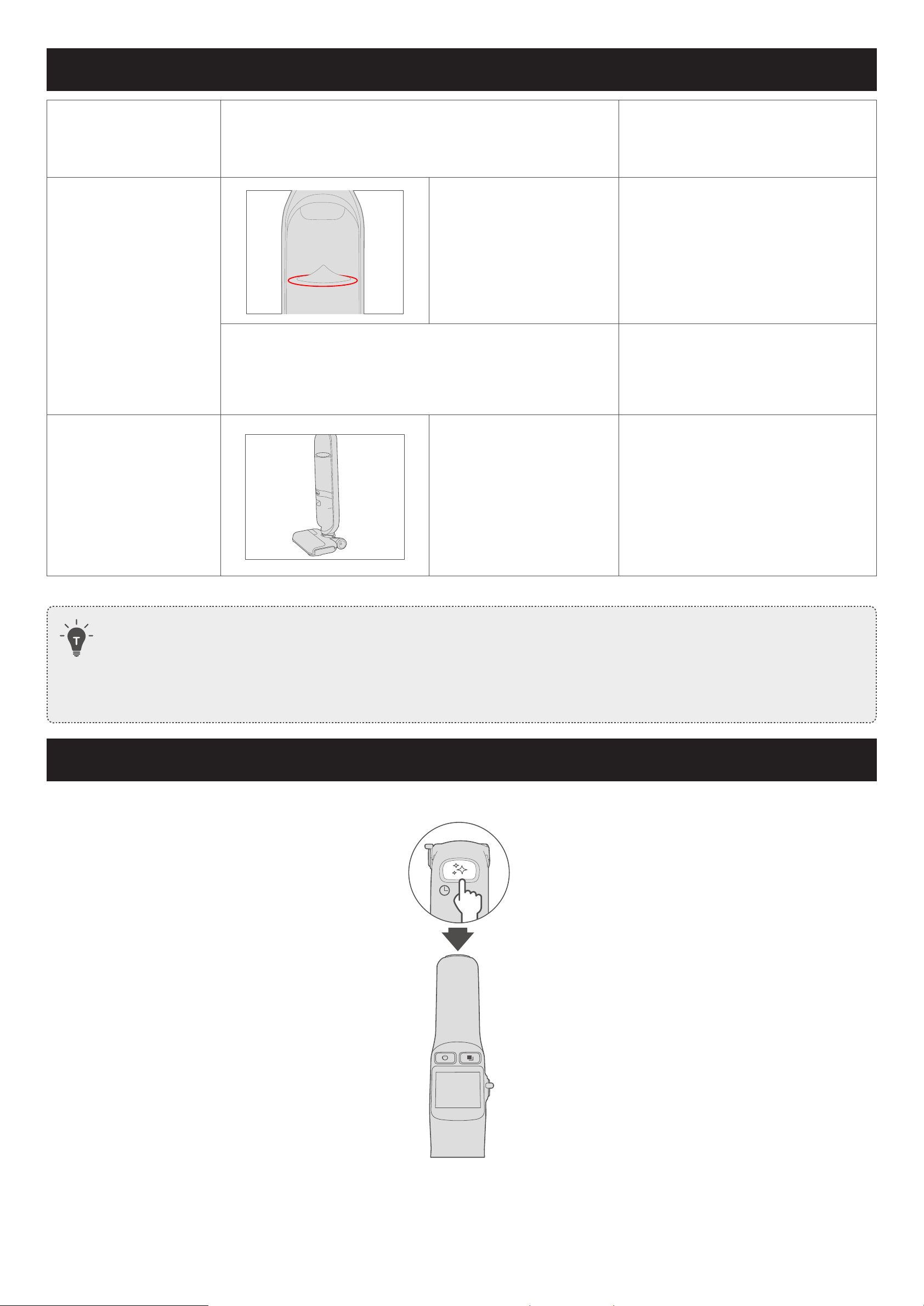
Status lights Indication Status
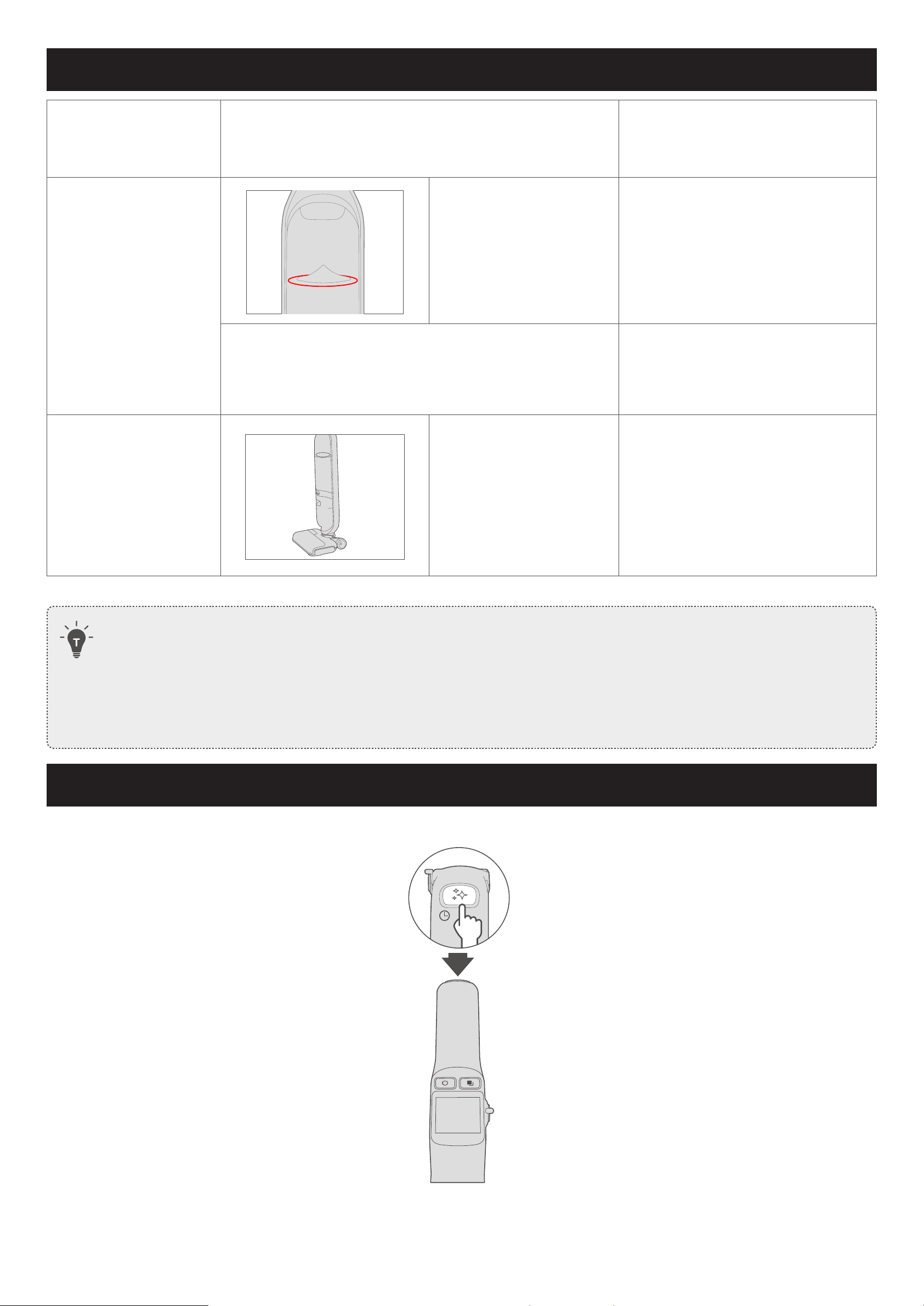
Ozone status light
Steady white Enable ozone disinfection
O Disable ozone disinfection
Ozone status light
Flashing red
Indicate that you need to start
self-cleaning or clean the dirty
water tank
• When the MACH Vacuum Cleaner is upright and idle for 5 minutes, and you have not started self-cleaning or
cleaned the dirty water tank, the red status lights will ash and continue for up to 5 minutes.
• To turn o the red warning lights, follow the on-screen instructions to start self-cleaning or clean the dirty
water tank.
• You can also turn o the red lights via the eufy Clean app.
Turning Voice Prompts On or Off
Press and hold the self-cleaning button for 2 seconds to turn the voice prompts on or off.
m ach
2s
EN 13
Maintenance
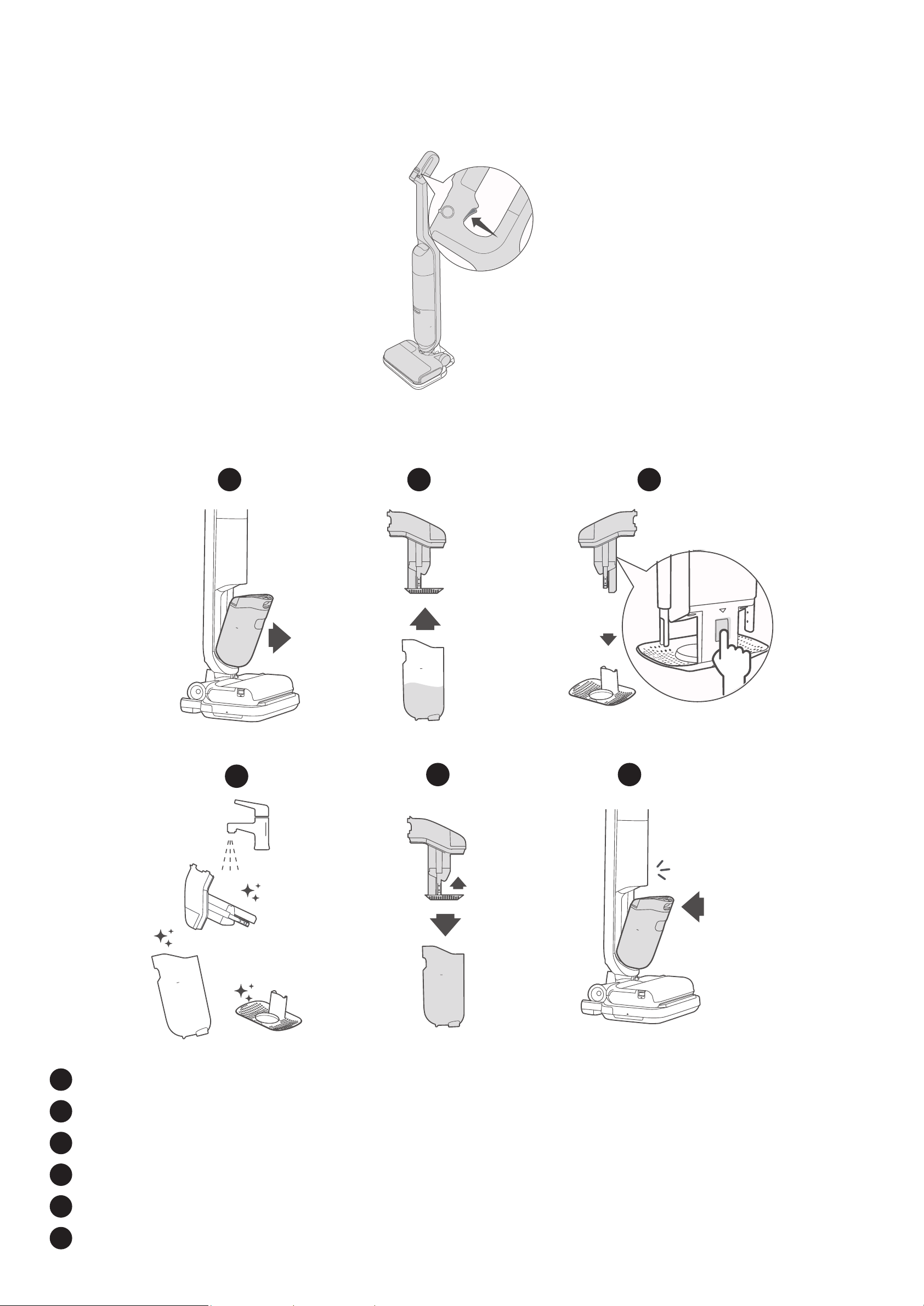
Self-Cleaning and Self-Drying
• Make sure you have filled more than half of the clean water tank before self-cleaning.
•
To avoid any damage to the mopping head of the MACH Vacuum Cleaner, do not rinse or soak it in
water.
• Do not remove the rolling brush cover during self-cleaning. Make sure the rolling brush cover is installed
in place to avoid any damage to the MACH Vacuum Cleaner or hurting your fingers.
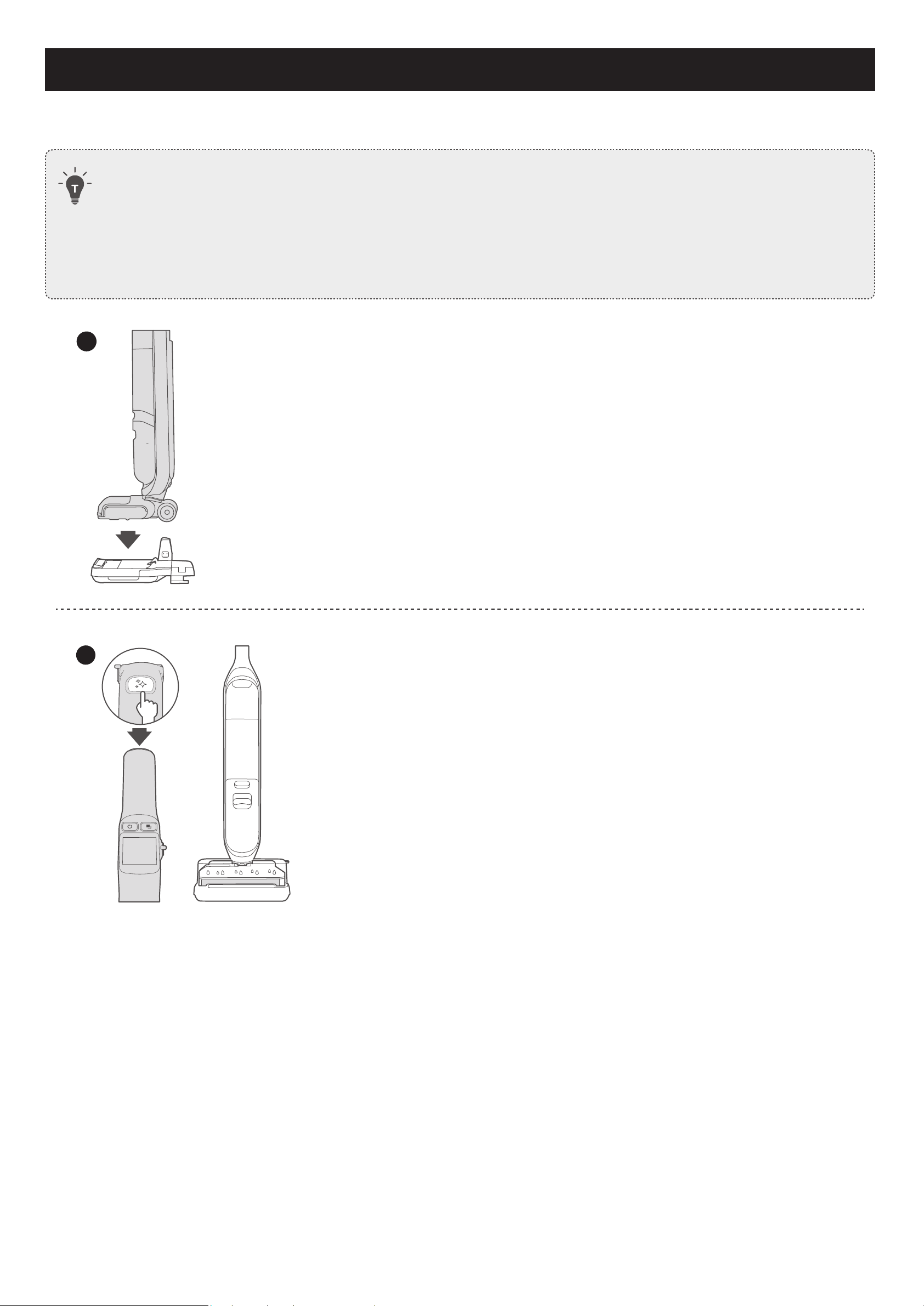
1
m ach
max
After cleaning, place the MACH Vacuum Cleaner onto the charging base.
2
m ach
max
Press the self-cleaning button.
• The MACH Vacuum Cleaner will clean and self-dry the rolling brush
automatically.
• For a better cleaning effect, turn on the floor cleaner switch before
self-cleaning.
• When the rolling brush starts self-drying, the system will prompt
you to clean the dirty water tank.
14 EN
Drying of the Rolling Brush
If only the rolling brush needs to be dried, hold the trigger for 2 seconds when the MACH Vacuum Cleaner is on the
charging base.
•
The device begins drying of the rolling brush.
max
m a c h
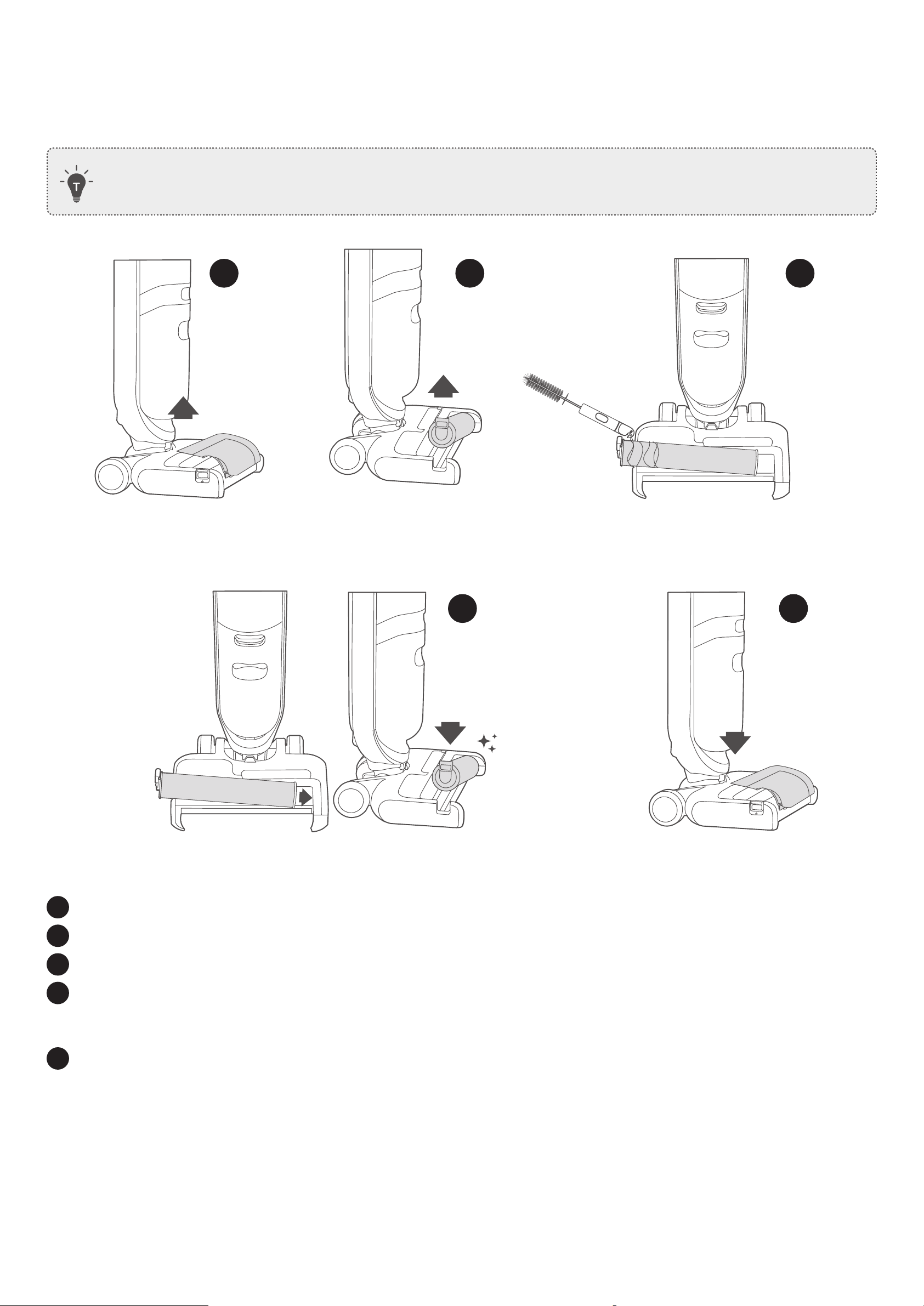
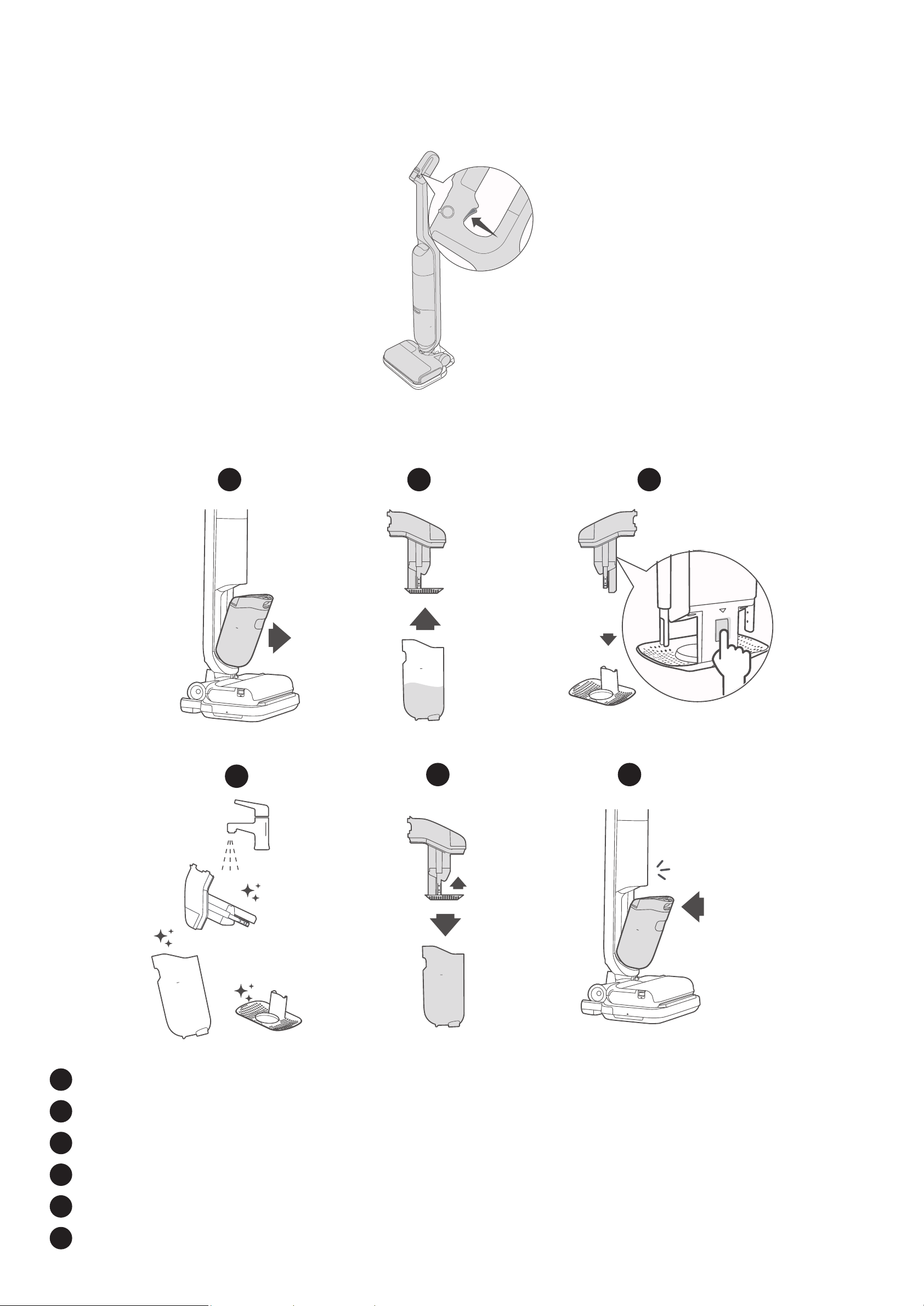
Clean the Dirty Water Tank
1 2
6
max
3
4
5
max
max
Click
max
max
1
Remove the dirty water tank.
2
Separate the top container from the dirty water tank.
3
Remove the dry waste separator.
4
Rinse the dirty water tank and all components thoroughly with water.
5
Reassemble the dirty water tank.
6
Push the dirty water tank back into the MACH Vacuum Cleaner.
EN 15
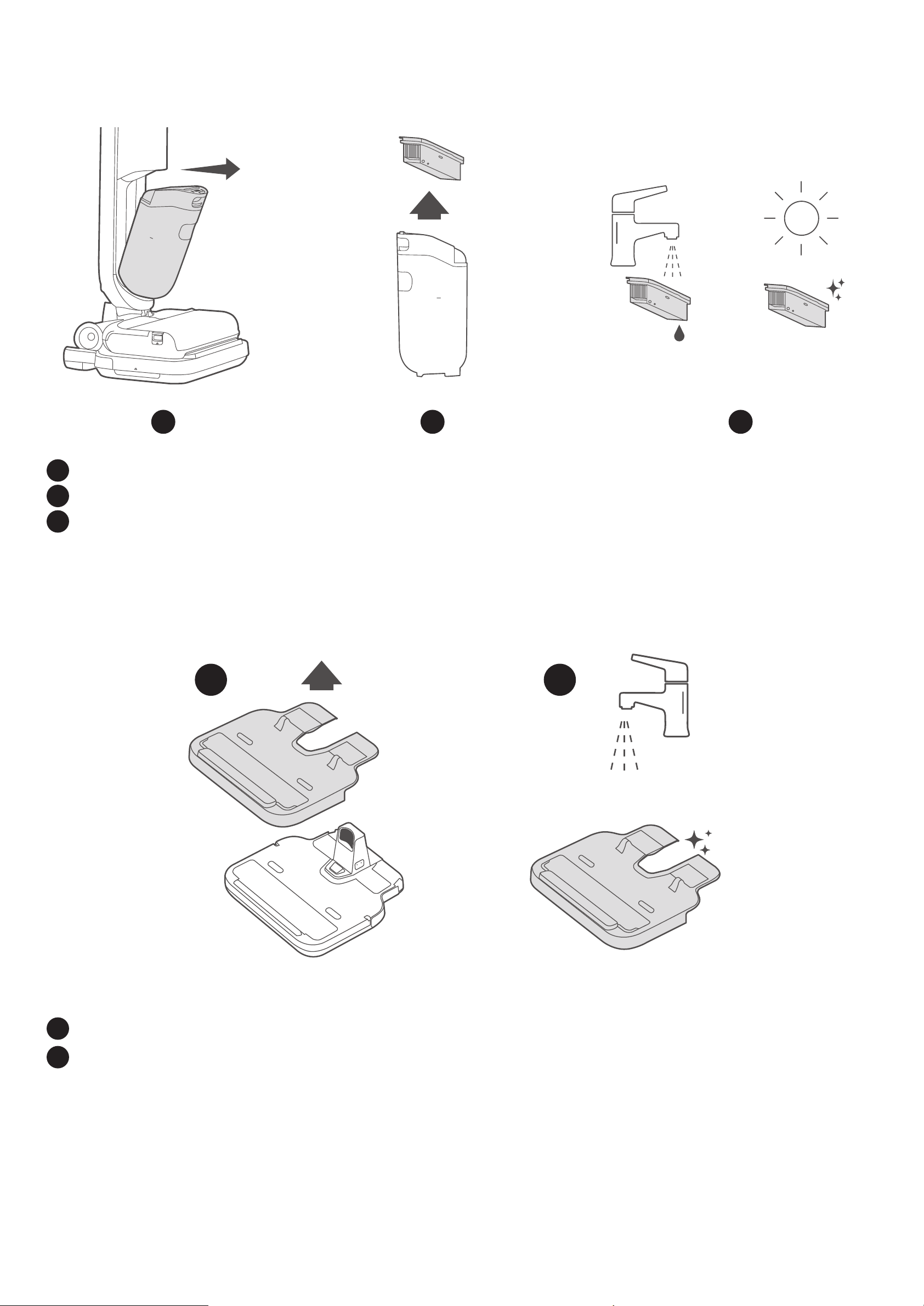
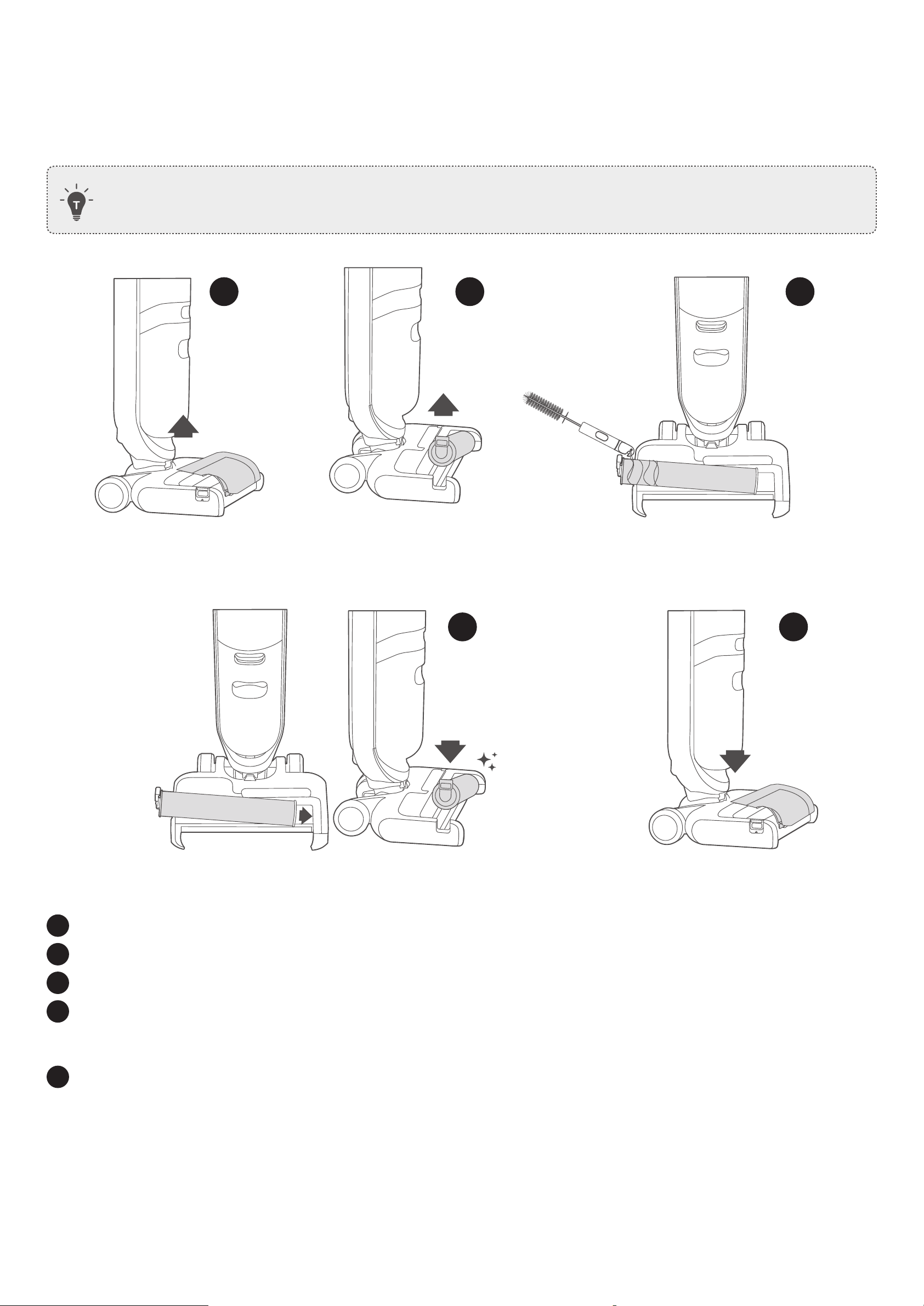
Clean the Rolling Brush Manually
The multi-surface rolling brush can be cleaned automatically through self-cleaning, but some foreign substances, such as
hair, can easily get tangled in the rolling brush, so it is best to clean the rolling brush manually if it occurs.
• Before removing the rolling brush cover, make sure the MACH Vacuum Cleaner has been turned off.
4
5
1
2
3
1
Pull out to open the cover.
2
Press the release button and then pull up to remove the
rolling brush.
3
Clean the rolling brush with the supplied cleaning tool.
4
Reinstall the rolling brush: Insert the end of the rolling brush into the right side of the holder, then press down
the release button into the left side of the holder. Make sure the rolling brush is installed properly, otherwise it
may be damaged during use.
5
Reinstall the rolling brush cover.
16 EN
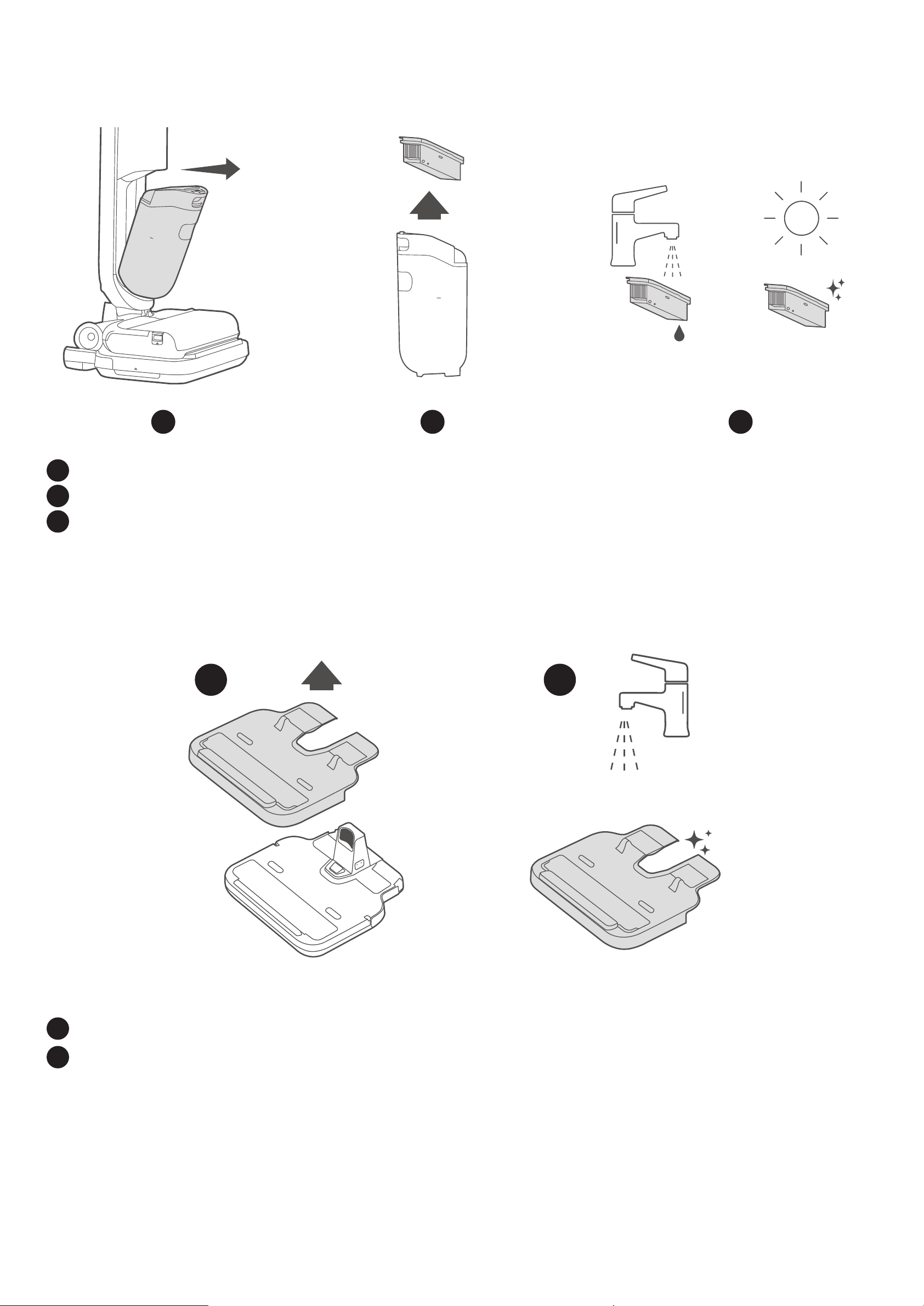
Clean the High-Performance Filter
It is recommended to clean the lter once a week.
1
2 3
max
max
1
Remove the dirty water tank.
2
Remove the high-performance lter.
3
Rinse the lter and dry it completely before next use.
Clean the Removable Cover
It is recommended to clean the cover once a week.
m a c h
m a c h
1
2
1
Remove the cover.
2
Rinse the cover thoroughly.

EN 17
Troubleshooting
MACH Vacuum Cleaner is not working normally:
• Make sure the battery is fully charged.
• Make sure the handle bar has been pushed backward and you have heard a click before use.
• Check if the rolling brush is stuck.
Suction power is decreased or there is a loud noise:
• Check if any objects are stuck in the opening.
• Check if the dirty water tank is properly installed.
• Check if the dirty water tank and lter are clean.
Specifications
Model V1
Rated voltage (charging base) AC 100-240 V
Battery life
Runtime up to 45 minutes (in smart mode)
* According to lab data. May vary based on actual usage and environment.
Battery energy 84.36 Wh
Battery capacity 3800 mAh
Charging time ≤4 hours
Noise 65 dBA, measured according to SPL (sound pressure level)
Clean water tank capacity 820 ml
Dirty water tank capacity 720 ml
18 EN
Customer Service
For tutorial videos, FAQs, manuals, and more information, please visit:
https://support.eufylife.com
Warranty: 24-month limited warranty
Contact Us
support@eufylife.com
(US/CA) +1 (800) 994 3056
(UK) +44 (0) 1604 936200
(DE) +49 (0) 69 9579 7960
(日本) +81 03 4455 7823
www.eufylife.com
For more support phone numbers, please visit:
https://support.eufylife.com/s/phonecontactus
Or scan the QR code below:
Scan this QR code to get the online
user manuals in other languages.
MACH strives to improve product performance and ensure the accuracy of the Owner's Manual. If there is
any inconsistency between the illustrations and the actual operation due to software updates, actual product
performance shall prevail. MACH reserves the right to modify this Owner's Manual without prior notice.

ES 19
Índice
Vista general …………………………………… 20
Control de botones ………………………… 21
Carga ………………………………………………… 22
Encendido ………………………………………… 23
Conguración inicial
Modo de uso del aspirador MACH 24
Añadir agua y el limpiador para suelos
Iniciar/detener la limpieza
Guía de la pantalla LCD ……………… 27
Selección del modo de limpieza … 28
Modo de uso del gatillo ………………… 28
Uso del menú …………………………………… 29
Indicación de luz de estado ………… 30
Cómo activar o desactivar las
indicaciones de voz ……………………… 30
Mantenimiento ……………………………… 31
Autolimpieza y autosecado
Secado del cepillo giratorio
Limpieza el depósito de agua sucia
Limpiar el cepillo giratorio manualmente
Limpiar el ltro de alto rendimiento
Limpiar la tapa extraíble
Solución de problemas ………………… 35
Especicaciones ……………………………… 35
Servicio de atención al cliente …… 36
20 ES
Vista general
max
m ach
Botón de
modo
Botón de
encendido
Pantalla LCD
Tapa de goma
Depósito para agua limpia
Filtro de alto rendimiento
Depósito de agua sucia
Tapa del cepillo giratorio
Cepillo giratorio
multisupercies(no está
indicado para usarse en
alfombras de pelo largo)
Tapa extraíble
Base de carga
Botón de
autolimpieza
Mango
Control del
limpiador de pisos
Gatillo
Tapa de goma
Depósito para el
limpiador de suelos
Cable de corriente
Filtro de alto
rendimiento
adicional
Limpiador de
suelos
Cepillo giratorio
multisupercies adicional
Herramienta de limpieza
ES 21
Control de botones
Acción Función
1s
Mantener pulsado el botón de
encendido durante 1 segundo
• Se enciende o se apaga
Pulsar el botón de encendido
• Durante la limpieza, se pausa o reanuda la operación actual
• Durante la conguración del menú, se abre la opción anterior del
menú
1s
Mantener pulsado el botón de
modo durante 1 segundo
• Se activa el modo de conguración del menú
Pulsar el botón de modo
• Se selecciona un modo
• Modo inteligente (predeterminado)
• Modo de succión
• Durante la conguración del menú, se abre la opción siguiente
del menú
Pulsar el botón de autolimpieza • Se inicia el proceso de autolimpieza y autosecado
Mantener pulsado el botón de
autolimpieza durante 2 segundos
• Se activan o desactivan las indicaciones de voz
Dejar presionado el gatillo
• En el modo inteligente, se activa una intensidad de limpieza más
potente
• En el modo de succión, se activa una intensidad de succión más
potente
Dejar presionado el gatillo durante
2 segundos
(cuando está colocado en la base
de carga)
• Se seca el cepillo giratorio
Presionar el gatillo
• Durante la conguración del menú, se conrma una opción
seleccionada
Girar en el sentido contrario a las
agujas del reloj
Activar el control del limpiador de pisos
Girar en el sentido de las agujas del
reloj
Desactivar el control del limpiador de pisos
22 ES
Carga
Antes de usarlo por primera vez, deje cargando el aspirador MACH durante 4 horas hasta el máximo.
1
2
max
m a c h
3
1
Enrolle el cable de corriente según sea necesario y déjelo bien colocado.
2
Conecte el cable de corriente a una toma de alimentación.
3
Coloque el aspirador MACH en la base de carga.
• La pantalla LCD se enciende y se oye un mensaje de voz que indica que la aspiradora MACH está
empezando a cargarse.
• El enchufe de corriente varía según la región.
• La velocidad de carga depende del modo de funcionamiento y la temperatura ambiente. Antes de
usarlo, espere hasta que se complete la carga.
ES 23
Encendido
1
max
max
m ach
1s
2
1
Pise suavemente el pedal y tire del mango hacia atrás hasta que oiga un clic.
2
Mantenga pulsado el botón de encendido durante 1 segundo para encender el aspirador MACH.
• La pantalla LCD se encenderá.
Configuración inicial
Antes de empezar, asegúrese de que:
• Su teléfono inteligente o tableta debe tener instalado iOS 10.0 (o superior) o Android 5.0 (o superior).
• La señal inalámbrica de la banda de 2,4 GHz está activada en el router inalámbrico.
En el primer uso, la animación de inicio le explicará las operaciones básicas, además de cómo seleccionar el
idioma de las indicaciones de voz, escanear el código QR para descargar la aplicación eufy Clean y completar la
conexión wifi.
• Para conocer mejor cómo funciona este dispositivo y cómo realizar el mantenimiento, así como obtener
los últimos servicios e información del producto, escanee el código QR para descargar la aplicación
eufy Clean.
24 ES
Modo de uso del aspirador MACH
Añadir agua y el limpiador para suelos
Añadir el agua limpia
1
max
2
max
max
Clic
3 4
max
1
Retire el depósito de agua limpia del aspirador MACH.
2
Abra la tapa de goma.
3
Vierta agua corriente hasta que llegue a la marca MAX.
• No utilice agua mineral ni purificada.
4
Cambie el depósito para agua limpia.
• Oirá un clic cuando el depósito para agua limpia quede fijado en su sitio.
ES 25
Añadir el limpiador de suelos
1
2 3
4
Clic
1
Quite el depósito para el limpiador de suelos.
2
Abra la tapa de goma.
3
Añada el limpiador de suelos en el depósito correspondiente.
4
Cambie el depósito para el limpiador de suelos. Oirá un clic cuando este quede fijado en su sitio.
• Para usar el limpiador de pisos durante la limpieza, compruebe que el control del limpiador de pisos
esté encendido.
• No añada agua caliente que supere los 50 grados, además de alcohol ni líquidos corrosivos, en el
depósito de agua.
• Utilice solo el limpiador de suelos facilitado por eufy. Si se usa cualquier otro limpiador, esto podría
causar daños importantes en el aspirador MACH.
• Evite crear mucha espuma al añadir el limpiador de suelos ya que provocaría falsas alarmas.
• No coloque el depósito de agua en un microondas para calentarlo.
26 ES
Iniciar/detener la limpieza
• El aspirador MACH no puede limpiar alfombras de pelo largo de más de 1 cm de altura.
• No limpie alfombras que estén hechas de materiales como lana u otras pieles de animales.
• Se recomienda limpiar las alfombras en el modo de succión.
max
m ach
1
max
max
m ach
max
Después de congurar la conexión wi conguración,
empiece a limpiar con el modo inteligente activado de forma
predeterminada.
• Para cambiar el modo de limpieza, consulte la sección
“Selección del modo de limpieza”.
• Para pausar o reanudar la operación actual, pulse el botón
de encendido.
2
Clic
max
m ach
1s
max
max
m ach
max
Para dejar de limpiar,
• mantenga pulsado el botón de encendido durante 1 segundo; o
• mueva el mango hacia adelante hasta que suene un clic.
3
max
m ach
max
max
m ach
max
Coloque el aspirador MACH en la base de carga para cargarlo
y luego pulse el botón de autolimpieza para que empiece
a autolimpiarse y autosecarse (consulte la sección
Mantenimiento).
ES 27
Guía de la pantalla LCD
En la pantalla LCD aparecerá el estado de funcionamiento del aspirador MACH.
4
2
7
3
5
1
6
1
Muestra el nivel de volumen actual de las indicaciones de voz
(Alto / Bajo / Silencio)
2
Muestra la animación del modo de funcionamiento actual
3
Se ilumina cuando el control del limpiador de pisos está encendido
4
Muestra el estado de carga actual y el nivel de batería
Muestra el nombre del modo actual al cambiar de modo de funcionamiento
5
Se ilumina cuando se utiliza el dispositivo con la máxima potencia
6
Muestra de manera inteligente el estado de limpieza actual del piso
7
Se ilumina cuando la desinfección con ozono está activada
Modo inteligente Modo de succión
Un color diferente de la barra de luz indica un estado de limpieza distinto.
Sucio Algo sucio Limpio
28 ES
Selección del modo de limpieza
Durante la limpieza, pulse el botón de modo para elegir un modo de limpieza.
• Oirá el mensaje de voz correspondiente cuando seleccione cada modo.
Modo Modos de uso
Modo inteligente
(predeterminado)
Sirve para hacer la limpieza con mopa diaria y suelos duros
Modo de succión
Es ideal para limpiar alfombras/moquetas o absorber residuos secos o
líquidos del suelo
Modo de uso del gatillo
max
• En el modo inteligente o de succión, deje presionado el gatillo. La función actual será más intensa.
• Suelte el botón para desactivar esta función.
ES 29
Uso del menú
En el menú puede acceder a otras funciones e información adicional.
m ach
1s
1
Mantenga pulsado el botón de modo durante 1 segundo para acceder a
las opciones del menú.
• Seleccionar un idioma.
• Ajustar el volumen.
• Activar o desactivar la desinfección con ozono EcoClean™. El icono
aparece cuando esta función está habilitada.
• Restablecer la conexión wifi: La conexión wifi puede interrumpirse si
se cambia de red. En este caso, restablezca la conexión wifi, vuelva a
añadir el dispositivo a través de la aplicación eufy Clean y termine de
configurar la red wifi.
• Ver la información básica del aspirador MACH.
• Restablecer la configuración de fábrica.
•
Información sobre la vida útil de los materiales consumibles, como el cepillo
giratorio y el ltro.Si el material consumible se ha reemplazado por uno
nuevo, puede reiniciar la barra de progreso para volver a llevar un control
de la vida útil.
m ach
2
Pulse el botón de modo o de encendido para seleccionar una opción y
luego presione el gatillo para confirmarlo.
Seleccionar la siguiente opción del menú
Seleccionar la opción anterior del menú
Confirmar la selección
m ach
3
Para seleccionar un submenú, repita el paso 2.
m ach
1s
4
Después de la configuración en el menú, mantenga pulsado el botón de
modo durante 1 segundo para salir.
30 ES
Indicación de luz de estado
Luces de estado Indicación Estado
Luz de estado de ozono
Blanco jo Activar desinfección con ozono
Apagado Desactivar desinfección con ozono
Luz de estado de
ozono
Rojo intermitente
Indican que necesita iniciar la
autolimpieza o limpiar el depósito
para agua sucia
• Cuando el aspirador MACH esté en posición vertical e inactivo durante 5 minutos, y no haya iniciado la
autolimpieza ni haya limpiado el depósito para agua sucia, las luces rojas de estado parpadearán y seguirán
así 5 minutos como máximo.
• Para apagar las luces rojas de advertencia, siga las instrucciones en pantalla para iniciar la autolimpieza o
limpiar el depósito para agua sucia.
• También puede apagar las luces rojas a través de la aplicación eufy Clean.
Cómo activar o desactivar las indicaciones de voz
Mantenga pulsado el botón de autolimpieza durante 2 segundos para activar o desactivar las indicaciones de voz.
m ach
2s
ES 31
Mantenimiento
Autolimpieza y autosecado
• Procure llenar hasta más de la mitad el depósito para agua limpia antes de la autolimpieza.
•
Para evitar cualquier daño al cabezal de la mopa del aspirador MACH, no lo enjuague ni lo sumerja en
agua.
• No quite la tapa del cepillo giratorio durante la autolimpieza. Fíjese si la tapa del cepillo rodante esté
colocada en su lugar para evitar daños en el aspirador MACH o lastimarse los dedos.
1
m ach
max
Después de limpiar, coloque el aspirador MACH en la base de carga.
2
m ach
max
Pulse el botón de autolimpieza.
• El aspirador MACH limpiará y secará automáticamente el cepillo
giratorio.
• Para conseguir una limpieza más eficaz, encienda el control del
limpiador de pisos antes de iniciar la autolimpieza.
• Cuando el cepillo giratorio comience a secarse automáticamente,
el sistema le indicará que limpie el depósito para agua sucia.
32 ES
Secado del cepillo giratorio
Si solo necesita secar el cepillo giratorio, deje presionado el gatillo durante 2 segundos cuando el aspirador MACH esté
en la base de carga.
•
El aparato comienza con el proceso de secado del cepillo giratorio.
max
m a c h
Limpieza el depósito de agua sucia
1 2
6
max
3
4
5
max
max
Clic
max
max
1
Retire el depósito para agua sucia.
2
Separe el recipiente superior del depósito para agua sucia.
3
Retire el separador de residuos secos.
4
Enjuague bien con agua el depósito para agua sucia y todas sus piezas.
5
Vuelva a montar el depósito para agua sucia.
6
Fije de nuevo el depósito para agua sucia al aspirador MACH.
ES 33
Limpiar el cepillo giratorio manualmente
El cepillo giratorio multisupercies se puede limpiar automáticamente a través del sistema de autolimpieza, pero
algunas sustancias extrañas, como el pelo, pueden quedar enredadas fácilmente en el cepillo giratorio, por lo que es
mejor limpiarlo de forma manual si esto ocurre.
• Antes de quitar la tapa del cepillo giratorio, compruebe que el aspirador MACH esté apagado.
4
5
1
2
3
1
Tire hacia afuera para abrir la tapa.
2
Pulse el botón de extracción y luego tire de él para quitar el cepillo giratorio.
3
Limpie el cepillo giratorio con la herramienta de limpieza incluida.
4
Vuelva a colocar el cepillo giratorio: Encaje el extremo del cepillo giratorio en el lado derecho del soporte
y después presione hacia abajo el botón de extracción del lado izquierdo del soporte. Compruebe que el
cepillo giratorio esté bien instalado porque, de lo contrario, podría dañarse al usarlo.
5
Vuelva a poner la tapa del cepillo giratorio.
34 ES
Limpiar el filtro de alto rendimiento
Se recomienda limpiar el ltro una vez por semana.
1
2 3
max
max
1
Retire el depósito para agua sucia.
2
Retire el ltro de alto rendimiento.
3
Lave y aclare el ltro y séquelo del todo antes de volver a usarlo.
Limpiar la tapa extraíble
Se recomienda limpiar la tapa una vez por semana.
m a c h
m a c h
1
2
1
Quite la tapa.
2
Lave y enjuague bien la tapa.

ES 35
Solución de problemas
Si el aspirador MACH no funciona correctamente:
• Asegúrese de que la batería está completamente cargada.
• Recuerde que debe tirar del mango y compruebe que escucha el clic correspondiente antes de usarla.
• Revise el cepillo giratorio para ver si está atascado.
La potencia de succión es menor o se produce un ruido fuerte:
• Compruebe si hay algún objeto atascado en la boquilla.
• Compruebe que el depósito para agua sucia esté colocado correctamente.
• Fíjese si el depósito para agua sucia y la esponja del ltro están limpios.
Especificaciones
Modelo V1
Tensión nominal (base de
carga)
100-240 V CA
Duración de la batería
Autonomía de hasta 45 minutos (en modo inteligente)
* Según datos recogidos en laboratorio. Pueden variar según el uso y las
condiciones del entorno reales.
Energía de la batería 84.36 Wh
Capacidad de la batería 3800 mAh
Tiempo de carga ≤4 horas
Ruido 65 dBA, calculado según el SPL (nivel de presión sonora)
Capacidad del depósito de
agua limpia
820 ml
Capacidad del depósito de
agua sucia
720 ml
36 ES
Servicio de atención al cliente
Para ver tutoriales en vídeo, preguntas frecuentes, manuales y demás información, visite:
https://support.eufylife.com
Garantía: garantía limitada de 24 meses
Contáctenos
support@eufylife.com
(US/CA) +1 (800) 994 3056
(UK) +44 (0) 1604 936200
(DE) +49 (0) 69 9579 7960
(日本) +81 03 4455 7823
www.eufylife.com
Para obtener más números de teléfono de asistencia, visite:
https://support.eufylife.com/s/phonecontactus
O escanee el código QR :
Escanee este código QR para
acceder a los manuales de usuario
en otros idiomas.
MACH hace todo lo posible por mejorar el rendimiento del producto y garantizar la abilidad del manual del
fabricante. Si existe alguna discrepancia entre las ilustraciones y el funcionamiento real debido a actualizaciones
de software, prevalecerá el rendimiento real del producto. MACH se reserva el derecho a modicar este manual
del fabricante sin previo aviso.