KDP120 / KDP75
Owner’s Manual
Important Information
Preparation
Basic Operation
Adjustments & Settings
Appendix
Important Safety Instructions
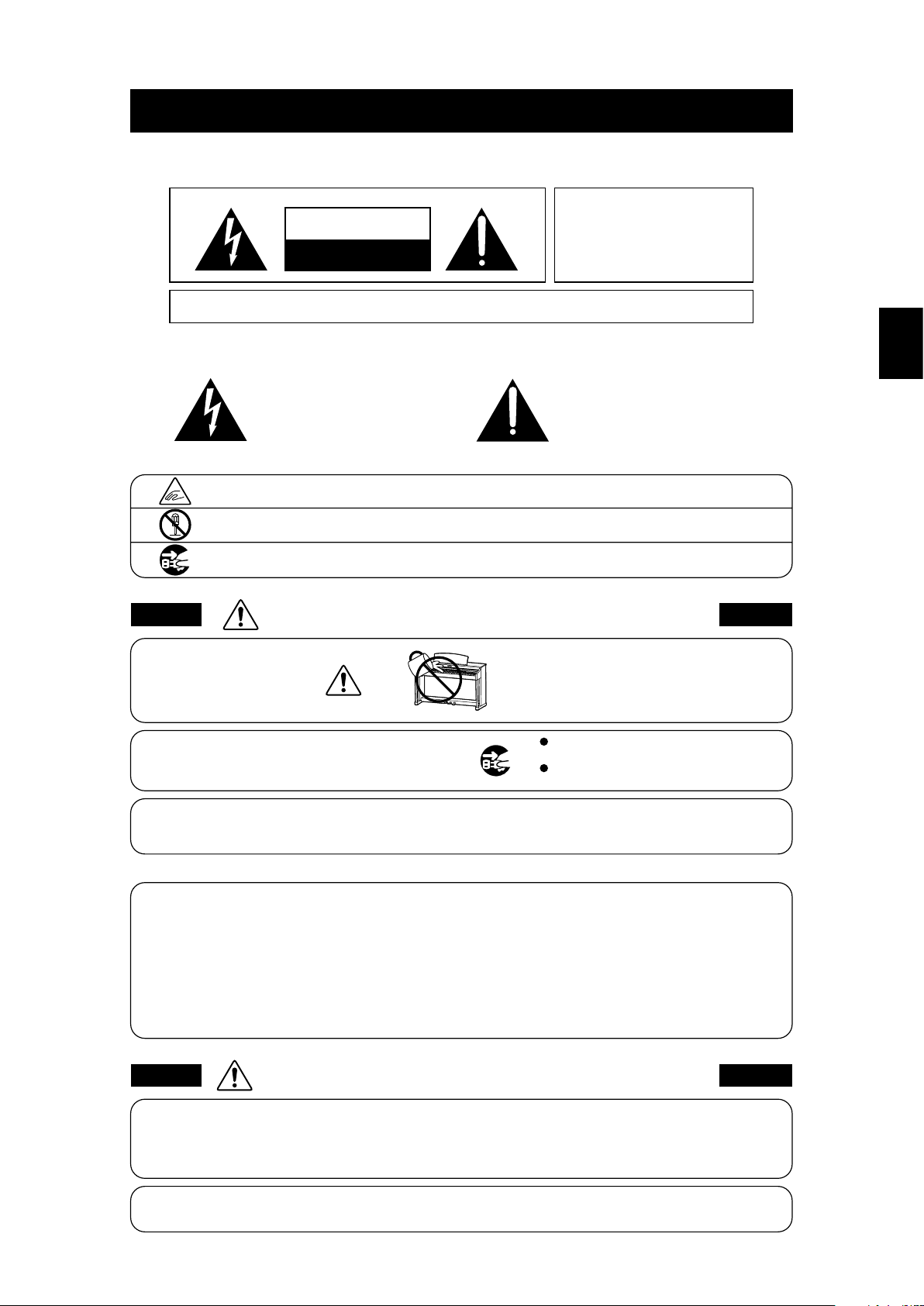
denotes that care should be taken.
The example instructs the user to take care not to allow ngers to be trapped.
denotes a prohibited operation.
The example instructs that disassembly of the product is prohibited.
denotes an operation that should be carried out.
The example instructs the user to remove the power cord plug from the AC outlet.
Examples of Picture Symbols
Read all the instructions before using the product.
CAUTION
RISK OF ELECTRIC SHOCK
DO NOT OPEN
AVIS : RISQUE DE CHOC ELECTRIQUE - NE PAS OUVRIR.
TO REDUCE THE RISK OF ELECTRIC SHOCK, DO NOT OPEN THE AC ADAPTOR.
NO USER-SERVICEABLE PARTS INSIDE. REFER SERVICING TO QUALIFIED SERVICE PERSONNEL.
The lighting ash with arrowhead symbol, within
an equilateral triangle, is intended to alert the user
to the presence of uninsulated "dangerous
voltage" within the product's enclosure that may
be of sucient magnitude to constitute a risk of
electric shock to persons.
The exclamation point within an equilateral
triangle is intended to alert the user to the
presence of important operating and maintenance
(servicing) instructions in the leterature
accompanying the product.
WARNING
TO REDUCE THE RISK OF FIRE
OR ELECTRIC SHOCK, DO NOT
EXPOSE THIS PRODUCT TO
RAIN OR MOISTURE.
INSTRUCTIONS PERTAINING TO A RISK OF FIRE, ELECTRIC SHOCK, OR INJURY TO PERSONS
SAVE THESE INSTRUCTIONS
1) Read these instructions.
2) Keep these instructions.
3) Heed all warnings.
4) Follow all instructions.
5) Do not use this apparatus near water.
6) Clean only with dry cloth.
7) Do not block any ventilation openings. Install in
accordance with the manufacturer's instructions.
8) Do not install near any heat sources such as radiators,
heat registers, stoves, or other apparatus (including
ampliers) that produce heat.
9) Do not defeat the safety purpose of the polarized or
grounding-type plug. A polarized plug has two
blades with one wider than the other. A grounding
type plug has two blades and a third grounding
prong. The wide blade or the third prongs are
provided for your safety. If the provided plug does
not t into your outlet, consult an electrician for
replacement of the obsolete outlet.
10) Protect the power cord from being walked on or
pinched particularly at plugs, convenience
receptacles, and the point where they exit from the
apparatus.
11) Only use attachments/accessories specied by the
manufacturer.
12) Use only with the cart, stand, tripod, bracket, or table
specied by the manufacturer, or
sold with the apparatus. When a cart is used,
use caution when moving the cart/apparatus
combination to avoid injury from tip-over.
13) Unplug this apparatus during lightning storms or
when unused for long periods of time.
14) Refer all servicing to qualied service personnel.
Servicing is required when the apparatus has been
damaged in any way, such as power-supply cord or
plug is damaged, liquid has been spilled or object
have fallen into the apparatus, the apparatus has
been exposed to rain or moisture, does not operate
normally, or has been dropped.
Important Information
2
3
Important Information
Important Safety Instructions
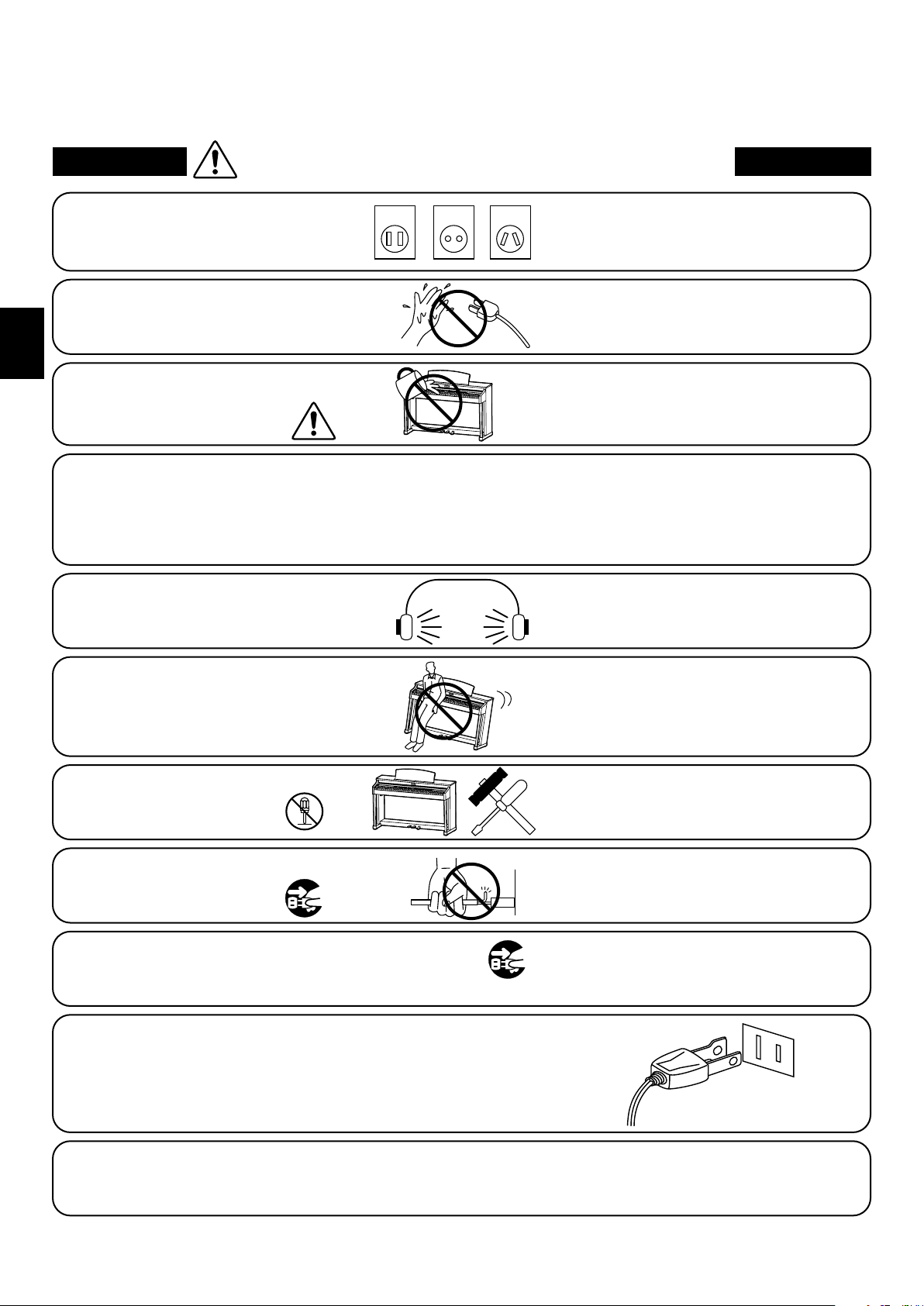
Indique que des précautions doivent être prises.
L’ exemple indique à l’utilisateur qu’il doit faire attention à ne pas se faire coincer les doigts.
Indique une manipulation interdite.
L’ exemple indique que le démontage de l’appareil est interdit.
Indique qu’une manipulation doit être effectuée.
L’ exemple indique à l’utilisateur qu’il doit débrancher le câble d’alimentation de la prise secteur.
Exemples de symboles graphiques
Le symbole de l’éclair avec une pointe de flèche à
l’intérieur d’un triangle équilatéral met en garde
l’utilisateur contre la présence de tension
dangereuse, non isolée, à l’intérieur de l’appareil,
dont l’amplitude peut être suffisante pour induire un
risque d’électrocution d’une personne.
Le point d’exclamation à l’intérieur d’un triangle
équilatéral alerte l’utilisateur de la présence de règles
d’utilisation et d’entretien importantes dans la notice
qui accompagne l’appareil.
CAUTION
RISK OF ELECTRIC SHOCK
DO NOTOPEN
AVIS :RISQUEDECHOCELECTRIQUE
-NEPAS OUVRIR.
POURREDUIRE LESRISQUES D’INCENDIE OU D’ELECTROCUTION, NE DEMONTEZPAS LE COUVERCLE
(OUL’ARRIERE). A L’ INTERIEUR, AUCUNE PARTIE N’EST REPARABLEPAR L’ UTILISAT EUR.
POURLAMAINTENANCE, ADRESSEZ-VOUS A DU PERSONNELQUALIFIE.
AVERTISSEMENT
POUR REDUIRELES RISQUES
D’INCENDIE OU D’ELECTROCUTION,
PROTEGEZ CET APPAREILDELA
PLUIEOUDEL’HUMIDITE.
CONSERVEZ CES INSTRUCTIONS
Règles de sécurité
(Supplémentairespour le Canada)
AVERTISSEMENT
Indique un risque potentiel qui peut entraîner
la mort, ou de graves lésions, si l’appareil
n’est pas manipulé correctement.
L’introduction d’eau, d’aiguilles ou d’épingles à
cheveux, peut provoquer une panne ou un
court-circuit. Ce produit doit être mis à l’abri des
écoulements ou projections d’eau. Ne jamais
placer sur le produit des objets contenant des
liquides, tels que des vases ou autres récipients.
Faite attention de ne pas introduire un
produit étranger à l’intérieur
de l’appareil.
Il est recommandé de placer l’instrument à proximité de la prise de courant et de positionner le câble d’alimentation
secteurdesorte qu’ilpuisseêtre débranché rapidement en casd’urgence,lecourant électrique étanttoujours
présenttant quela prise est branchée même si le bouton de mise en marche esten position Arrêt.
INSTRUCTIONS DE MISE À LA TERRE
Si vous ne le faisiez pas la foudre pourrait
provoquer un incendie.
Si vous ne le faisiez pas, la surchauffe de
l’appareil pourrait provoquer un incendie.
Ce produit n’est pas totalement déconnecté du circuit électrique
lorsqu’il est mis hors tension par le bouton d’arrêt. Si l’appareil
ne doit pas être utilisé pendant une longue période, débranchez
le câble d’alimentation de la prise secteur.
Ce produit doit être mis à la terre. En cas de défaillance matérielle ou de panne, la mise à la terre fournit un chemin de moindre
résistance au courant électrique afin de réduire le risque d’électrocution. Ce produit est équipé d’un câble avec un conducteur de
protection et une fiche de mise à la terre. La fiche doit être branchée dans une prise appropriée correctement installée et mise à la
terre conformément à tous les codes et règlements locaux.
DANGER - La connexion incorrecte du conducteur de protection peut présenter un risque d’électrocution.
Consultez un électricien ou un réparateur qualifié si vous avez des doutes en ce qui concerne la mise à la terre du produit. Ne
modifiez pas la fiche fournie avec le produit – si elle n’est pas adaptée à la prise, faites installer une prise correcte par un électricien
qualifié.
[Seuls les produits avec 3P fiche]
PRECAUTION
Indique un risque potentiel qui peut entraîner la détérioration,
ou des dommages, pour l’appareil ou ses propriétés, si celui-ci
n’est pas manipulé correctement.
Votre piano doit être placé à un endroit tel que sa position n’altère pas sa propre ventilation. Gardez une
distance minimum de 5 cm autour de l’instrument pour une aération suffisante.
Description de la l'emplacement de la reference (Le cas échéant):
Anglais phrase: The nameplate label is located on the underside of the instruments, as indicated below.
Français phrase: La reference commerciale est inscrite sur une etiquette en dessous de votre instrument, conformement
a l’indication ci-dessous.
4
Important Information
WARNING
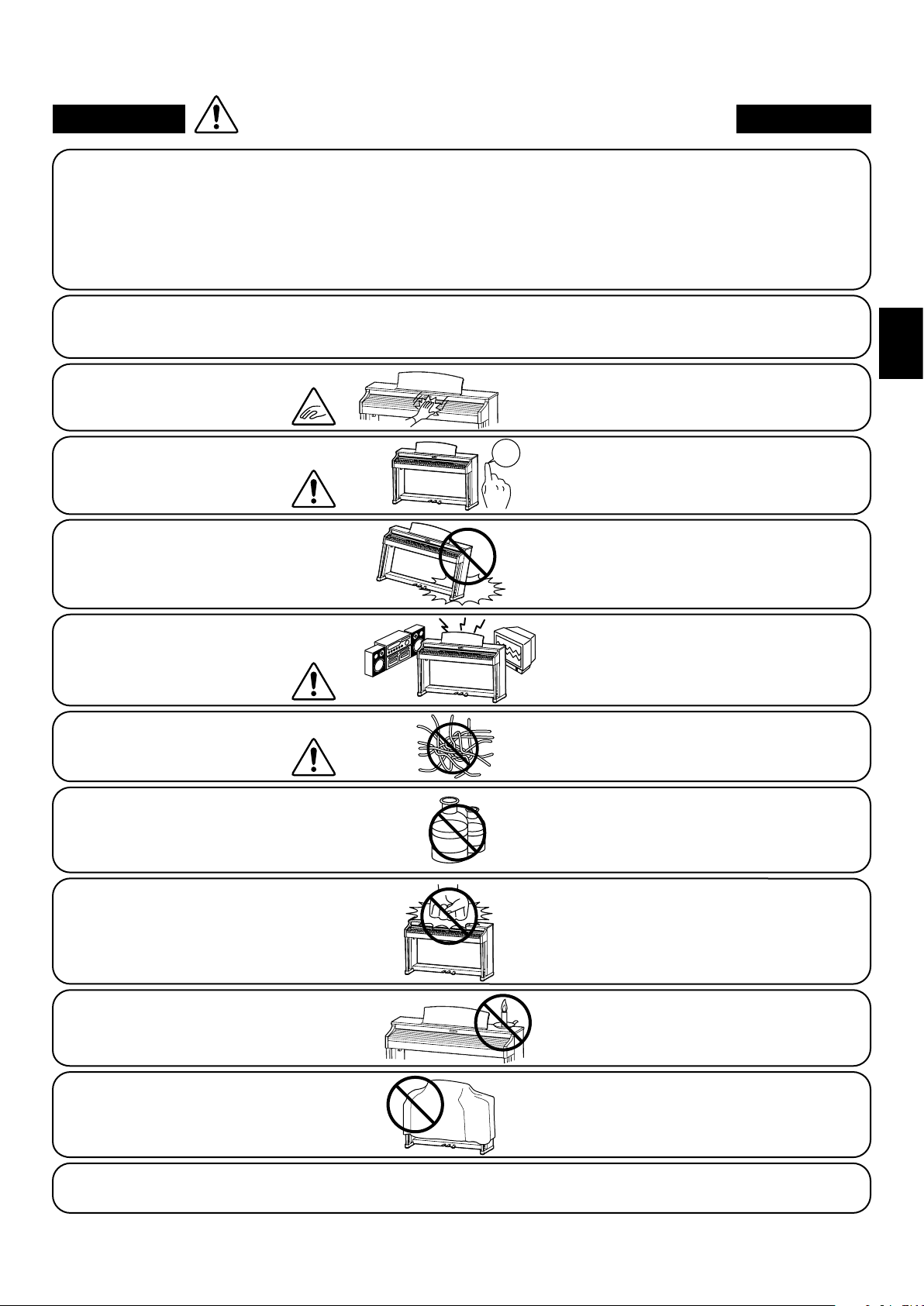
The product should be connected to
an AC outlet of the specied voltage.
● If you are going to use an AC power cord,
make sure that its has the correct plug shape
and conforms to the specied power voltage.
● Failure to do so may result in re.
120V 240V230V
Indicates a potential hazard that could result in death or
serious injury if the product is handled incorrectly.
Do not insert or disconnect the power
cord plug with wet hands.
Doing so may cause electric shock.
WARNING - When using electric products, basic precautions should always be followed, including the following.
The product is not completely disconnected from the
power supply even when the power switch is turned
o. If the product will not be used for a long time,
unplug the AC power cord from the AC outlet.
● Failure to do so may cause re in case of
lightning.
● Failure to do so may over-heat the product,
resulting in re.
Do not disassemble, repair or modify
the product.
Doing so may result in product breakdown, electric
shock or short-circuit.
This product may be equipped with a polarized line plug (one blade wider
than the other). This is a safety feature.
If you are unable to insert the plug into the outlet, contact an electrician to
replace your obsolete outlet.
Do not defeat the safety purpose of the plug.
When disconnecting the AC power cord's
plug, always hold the plug
and pull it to remove it.
● Pulling the AC power cord itself may damage
the cord, causing a re, electric shock or
short-circuit.
Doing so may cause the product to fall over,
resulting in injury.
Do not lean against the keyboard.
When using the headphones, do not
listen for long periods of
time at high volume levels.
Doing so may result in hearing problems.
It is a good practice to have the instrument near the AC outlet and the power cord plug in a position
so that it can readily be disconnected in an emergency because electricity is always charging
while the plug is in the AC outlet even in a power switch o condition.
The chair must be used properly (it must be
used only when playing the product).
● Do not play with it or stand on it.
● Only one person is allowed to sit on it.
● Do not sit on it when opening the lid.
● Re-tighten the bolts occasionally.
Doing so may cause the chair to fall over or your
ngers to be trapped, resulting in injury.
Entry of water, needles or hair pins may result
in breakdown or short-circuit.
The product shall not be exposed to dripping or
splashing. No objects lled with liquids, such as
vases, shall be placed on the product.
Take care not to allow any foreign
matter to enter the product.
5
Important Information
WARNING
The product should be connected to
an AC outlet of the specied voltage.
● If you are going to use an AC power cord,
make sure that its has the correct plug shape
and conforms to the specied power voltage.
● Failure to do so may result in re.
120V 240V230V
Indicates a potential hazard that could result in death or
serious injury if the product is handled incorrectly.
Do not insert or disconnect the power
cord plug with wet hands.
Doing so may cause electric shock.
WARNING - When using electric products, basic precautions should always be followed, including the following.
The product is not completely disconnected from the
power supply even when the power switch is turned
o. If the product will not be used for a long time,
unplug the AC power cord from the AC outlet.
● Failure to do so may cause re in case of
lightning.
● Failure to do so may over-heat the product,
resulting in re.
Do not disassemble, repair or modify
the product.
Doing so may result in product breakdown, electric
shock or short-circuit.
This product may be equipped with a polarized line plug (one blade wider
than the other). This is a safety feature.
If you are unable to insert the plug into the outlet, contact an electrician to
replace your obsolete outlet.
Do not defeat the safety purpose of the plug.
When disconnecting the AC power cord's
plug, always hold the plug
and pull it to remove it.
● Pulling the AC power cord itself may damage
the cord, causing a re, electric shock or
short-circuit.
Doing so may cause the product to fall over,
resulting in injury.
Do not lean against the keyboard.
When using the headphones, do not
listen for long periods of
time at high volume levels.
Doing so may result in hearing problems.
It is a good practice to have the instrument near the AC outlet and the power cord plug in a position
so that it can readily be disconnected in an emergency because electricity is always charging
while the plug is in the AC outlet even in a power switch o condition.
The chair must be used properly (it must be
used only when playing the product).
● Do not play with it or stand on it.
● Only one person is allowed to sit on it.
● Do not sit on it when opening the lid.
● Re-tighten the bolts occasionally.
Doing so may cause the chair to fall over or your
ngers to be trapped, resulting in injury.
Entry of water, needles or hair pins may result
in breakdown or short-circuit.
The product shall not be exposed to dripping or
splashing. No objects lled with liquids, such as
vases, shall be placed on the product.
Take care not to allow any foreign
matter to enter the product.
● Doing so may cause the product to become
deformed or fall over, resulting in breakdown
or injury.
Do not stand on the product or exert
excessive force.
● Doing so may result in discoloration or deformation
of the product.
● When cleaning the product, put a soft cloth in
lukewarm water, squeeze it well, then wipe the
product.
Do not wipe the product with benzene
or thinner.
Failure to do so may damage them, resulting in
re, electric shock or short-circuit.
When connecting the AC power cord
and other cords, take care
not to get them tangled.
● Doing so may cause the product to generate
noise.
● If the product generates noise, move the
product suciently away from the electrical
appliance or connect it to another AC outlet.
Do not place the product near electrical
appliances such as TVs and radios.
Please lift up the product when moving it.
Please note that the product is heavy and must
be carried by more than two persons.
Dropping the product may result in breakdown.
Do not drag the product on the oor.
Take care not to drop the product.
Doing so may cause the illumination to fall over,
resulting in re.
Do not place naked ame, such as lighted
candles on the product.
CAUTION
Indicates a potential hazard that could result in injury or
damage to the product or other property if the product
is handled incorrectly.
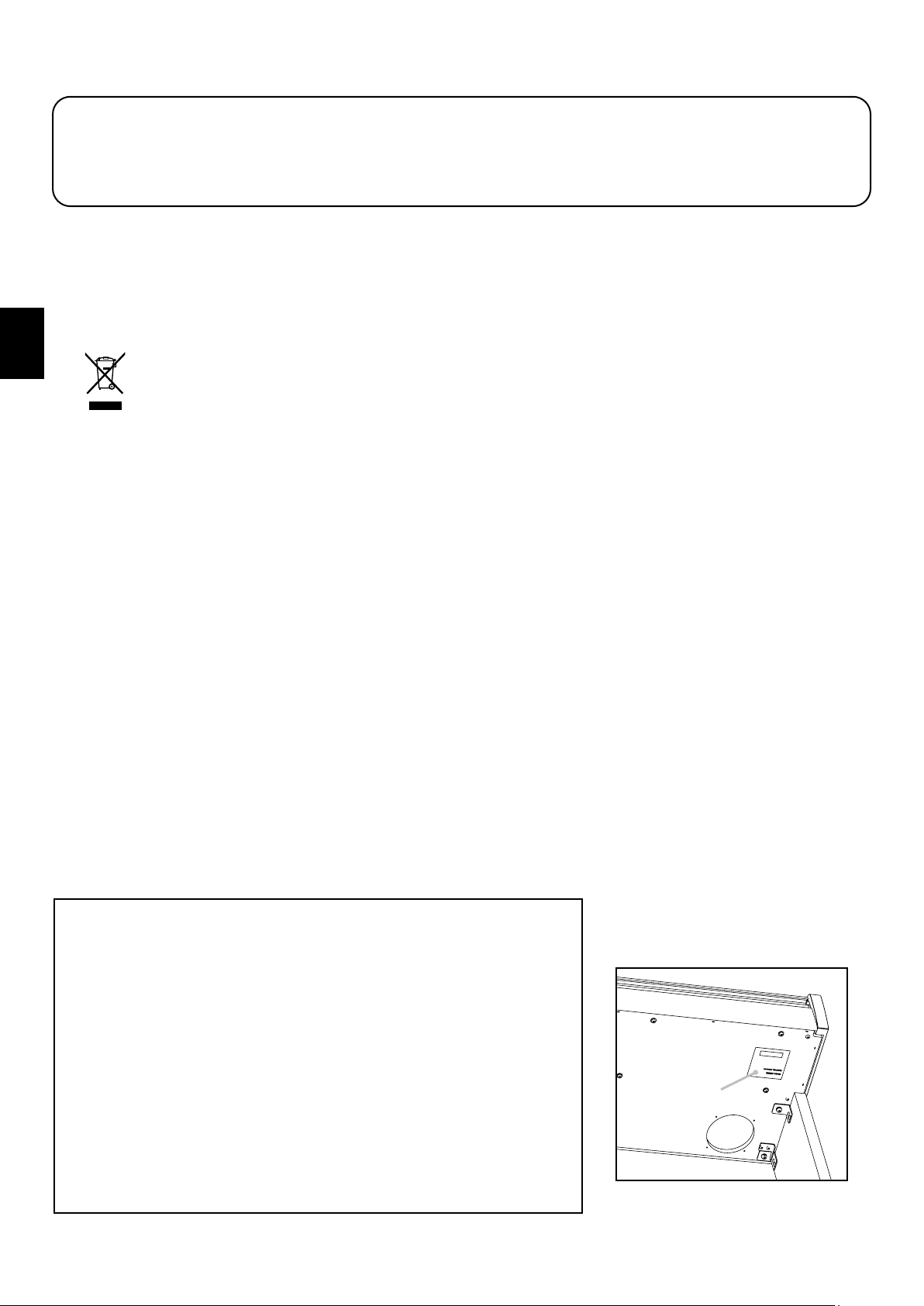
Using the product in such areas may result in
product breakdown.
Use the product only in moderate climates (not
in tropical climates).
Do not use the product in the following areas.
● Areas, such as those near windows, where the product is
exposed to direct sunlight
● Extremely hot areas, such as near a heater
● Extremely cold areas, such as outside
● Extremely humid areas
● Areas where a large amount of sand or dust is present
● Areas where the product is exposed to excessive
vibrations
Closing it roughly may trap your ngers,
resulting in injury.
When you close the keyboard cover,
close it gently.
Failure to do so may cause breakdown of this
product and other devices.
Before connecting cords, make sure
that the power to this product
and other devices is turned
OFF.
OFF
The product should be located so that its location or position does not interfere with its proper ventilation. Ensure a
minimum distance of 5cm around the product for sucient ventilation.
Failure to do so may over-heat the product,
resulting in re.
Ensure that the ventilation is not
impeded by covering the ventilation
openings with items, such as newspaper,
table-cloths, curtains, etc.
Use only the AC adaptor included with this instrument to power the instrument.
● Do not use other AC adaptors to power this instrument.
● Do not use the included AC adaptor or AC power cord to power other equipment.
6
Important Information
The product should be serviced by qualied service personnel when:
● The power supply cord or the plug has been damaged.
● Objects have fallen, or liquid has been spilled into the product.
● The product has been exposed to rain.
● The product does not appear to operate normally or exhibits a marked change in performance.
● The product has been dropped, or the enclosure damaged.
Notes on Repair
Should an abnormality occur in the product, immediately turn the power OFF, disconnect the power cord plug, and then contact the shop from which
the product was purchased.
CAUTION:
To prevent electric shock, match wide blade of plug to wide slot, fully insert.
ATTENTION:
Pour éviter les chocs électriques, introduire la lame la plus large de la che dans la borne correspondante de la prise et pousser jusqu'au fond.
An information on Disposal for users
If your product is marked with this recycling symbol it means that, at the end of its life, you must dispose of it separately by taking it to an
appropriate collection point.
You should not mix it with general household waste. Disposing of this product correctly will prevent potential negative eects on the environment
and human health which could otherwise arise due to inappropriate waste handling.
For further details, please contact your local authority.
(European Union only)
Instruction for AC power cord (U.K.)
IMPORTANT
THE WIRES IN THIS MAINS LEAD ARE COLOURED IN ACCORDANCE WITH THE FOLLOWING CODE.
BLUE : NEUTRAL
BROWN : LIVE
As the colours of the wires in the mains lead of this apparatus may not correspond with the coloured markings identifying the terminals in your plug,
proceed as follows:
The wire which is coloured BLUE must be connected to the terminal which is marked with the letter N or coloured BLACK.
The wire which is coloured BROWN must be connected to the terminal which is marked with the letter L or coloured RED.
Do not plug either terminal of the power cord to the the ground od AC outlet on the wall.
Canadian Radio Interference Regulations
This instrument complies with the limits for a class B digital apparatus, pursuant to the Radio Interference Regulations, C.R.C., c. 1374.
FCC Information (U.S.A)
CAUTION : Changes or modications not expressly approved by the party responsible for compliance could void the user’s authority to operate the
equipment.
NOTE : This equipment has been tested and found to comply with the limits for a Class B digital device, pursuant to Part 15 of the FCC Rules. These limits are
designed to provide reasonable protection against harmful interference in a residential installation. This equipment generates, uses and can radiate radio
frequency energy and, if not installed and used in accordance with the instructions, may cause harmful interference to radio communications. However, there
is no guarantee that interference will not occur in a particular installation. If this equipment does cause harmful interference to radio or television reception,
which can be determined by turning the equipment o and on, the user is encouraged to try to correct the interference by one or more of the following
measures:
• Reorient or relocate the receiving antenna.
• Increase the separation between the equipment and receiver.
• Connect the equipment into an outlet on a circuit dierent from that to which the receiver is connected.
• Consult the dealer or an experienced radio/TV technician for help.
The nameplate label is located on
the
underside of the instrument, as
indicated below.
Declaration of Conformity
Products : Electronic Piano
Model Number : KDP120/KDP75
Responsible Party Name : Kawai America Corporation
Address : 2055 East University Drive Rancho
Dominguez, CA 90220
Telephone 310-631-1771
This device complies with Part 15 of the FCC Rules.
Operation is subject to the following two conditions:
(1) this device may not cause harmful interference, and
(2) this device must accept any interference received,
including interference that may cause undesired operation.
This applies only to products distributed by Kawai America Corporation.
Nameplate


Introduction
8
Important Information
Introduction
Thank you for purchasing this Kawai KDP120/KDP75 digital piano.
This owner’s manual contains important information regarding the instrument’s usage and operation.
Please read all sections carefully, keeping this manual handy for future reference.
About this owner’s manual
This owner’s manual provides information for customers to enjoy using this instrument immediately after purchase, and
explanations about the various functions of this instrument.
Display illustrations shown in this manual may dier from the actual displays of the product depending on its version.
Nameplate
The model name and serial number of the product are indicated on the nameplate label located on the underside of the instrument.
Cleaning
Make sure to unplug the power cord before cleaning.
Clean the product body with a dry, soft cloth.
If the surface of the pedals becomes dirty, clean the pedals using a dry dish-washing sponge. Note that cleaning the gold pedals
using a cloth may cause the pedals to become dull.
Do not attempt to clean the pedals using rust-removing solvents, abrasives or les.
Do not clean the product using benzine or thinner which may cause discoloring or deformation.
Intellectual property rights
“Windows” is a registered trademark of Microsoft Corporation.
The Bluetooth® word mark and logos are registered trademarks owned by the Bluetooth SIG, Inc. and any use of such marks by
Kawai Musical Instruments Mfg. Co., Ltd. is under license.
Other company names and product names mentioned or referenced herein are registered trademarks or trademarks of
respective owners.
Kawai Musical Instruments Mfg. Co., Ltd. shall have no liability for any acts in violation of the Copyright Act made by any users
of this product.

9
Important Information
Table of Contents
Important Information
Important Safety Instructions ..................2
Introduction ......................................8
Table of Contents ................................9
Part Names and Functions .....................10
Preparation
Setting Up the Piano ............................11
Basic Operation
Operation Guide ................................12
Selecting Sounds ................................16
Using the Pedals ................................17
Dual Mode .......................................18
Four Hands Mode ...............................19
Metronome ......................................20
Demo Songs .....................................22
Concert Magic ...................................23
Concert Magic demo modes .....................24
Concert Magic Mode ............................25
Concert Magic song arrangement types .........26
Lesson Function .................................27
1. Selecting a lesson book/song .................27
2. Listening to the selected lesson song ..........28
3. Practicing left and right-hand parts separately ...29
Recorder .........................................31
1. Recording a song .............................31
2. Playing back a song ...........................32
3. Erasing recorded songs ........................32
Adjustments & Settings
Keyboard and Sound Settings .................33
1. Damper Resonance ...........................33
2. Reverb ........................................34
3. Touch .........................................34
4. Low Volume Balance ..........................35
5. Tuning ........................................35
6. Transpose .....................................36
7. Brilliance ......................................36
8. Virtual Technician (Smart Mode) ...................37
9. Spatial Headphone Sound .....................38
10. Phones Type .................................38
Auto Power O ..................................39
Bluetooth® MIDI (KDP120 only) .....................40
Information about Bluetooth® (KDP120 only) .....41
Appendix
Connecting to Other Devices ..................42
USB MIDI (USB to Host connector) .....................43
Troubleshooting ................................44
Assembly Instructions ..........................45
Demo Song List .................................49
Concert Magic Song List ........................49
Lesson Function Song Lists ....................50
Information about Adaptor Specications ...52
EU Declaration of Conformity ..................53
Specications ....................................54
10
Important Information
Part Names and Functions
Operation Guide
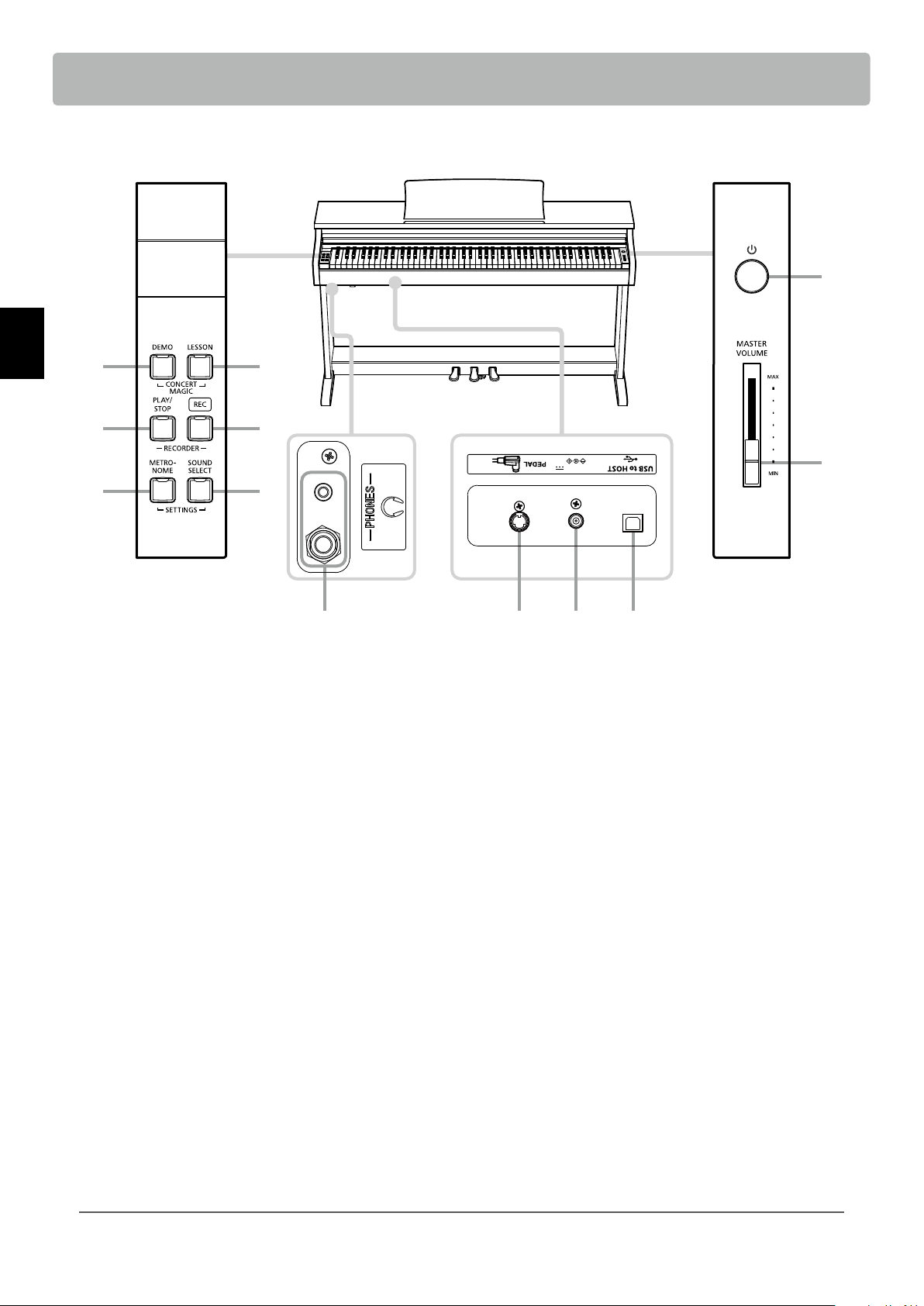
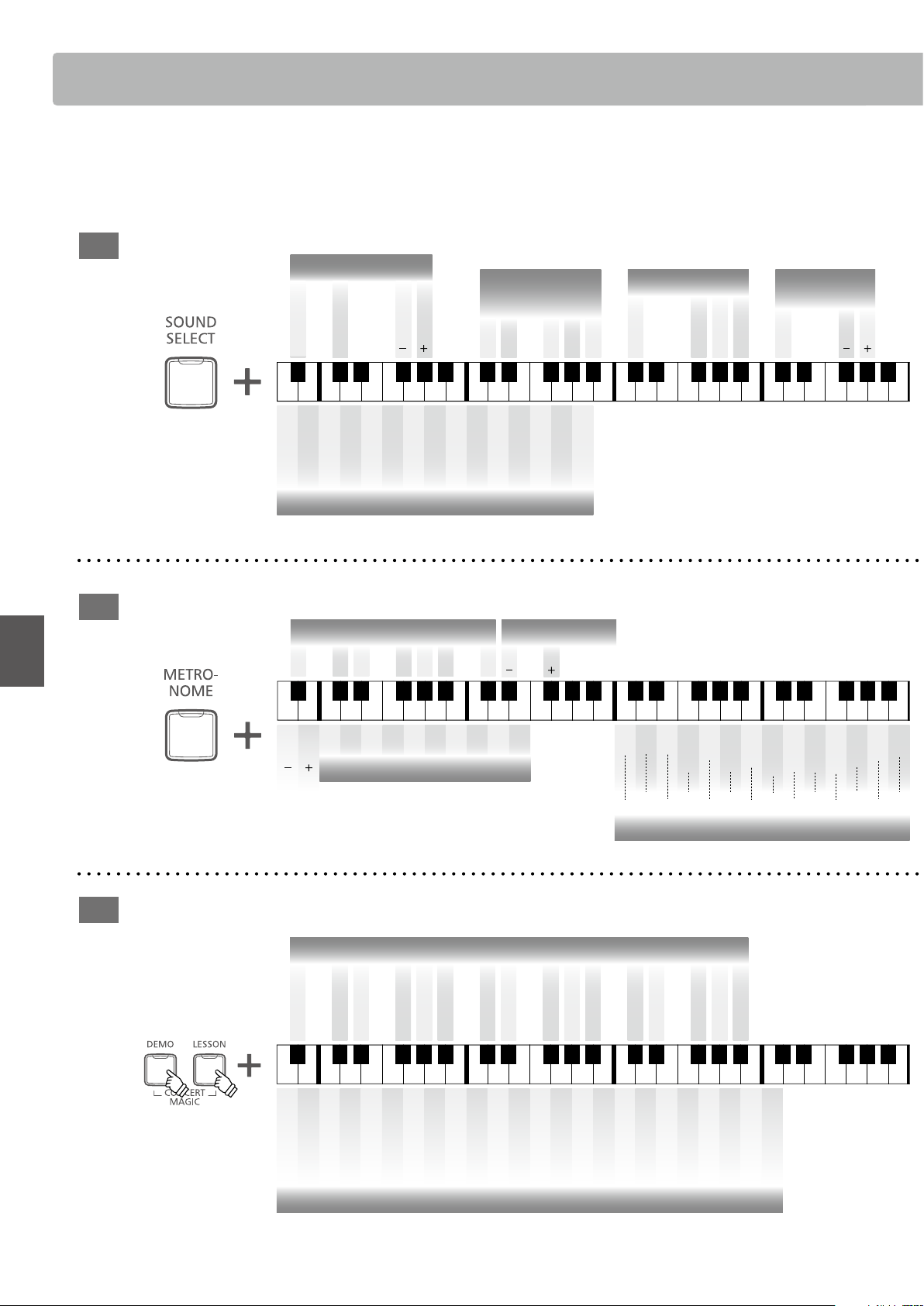
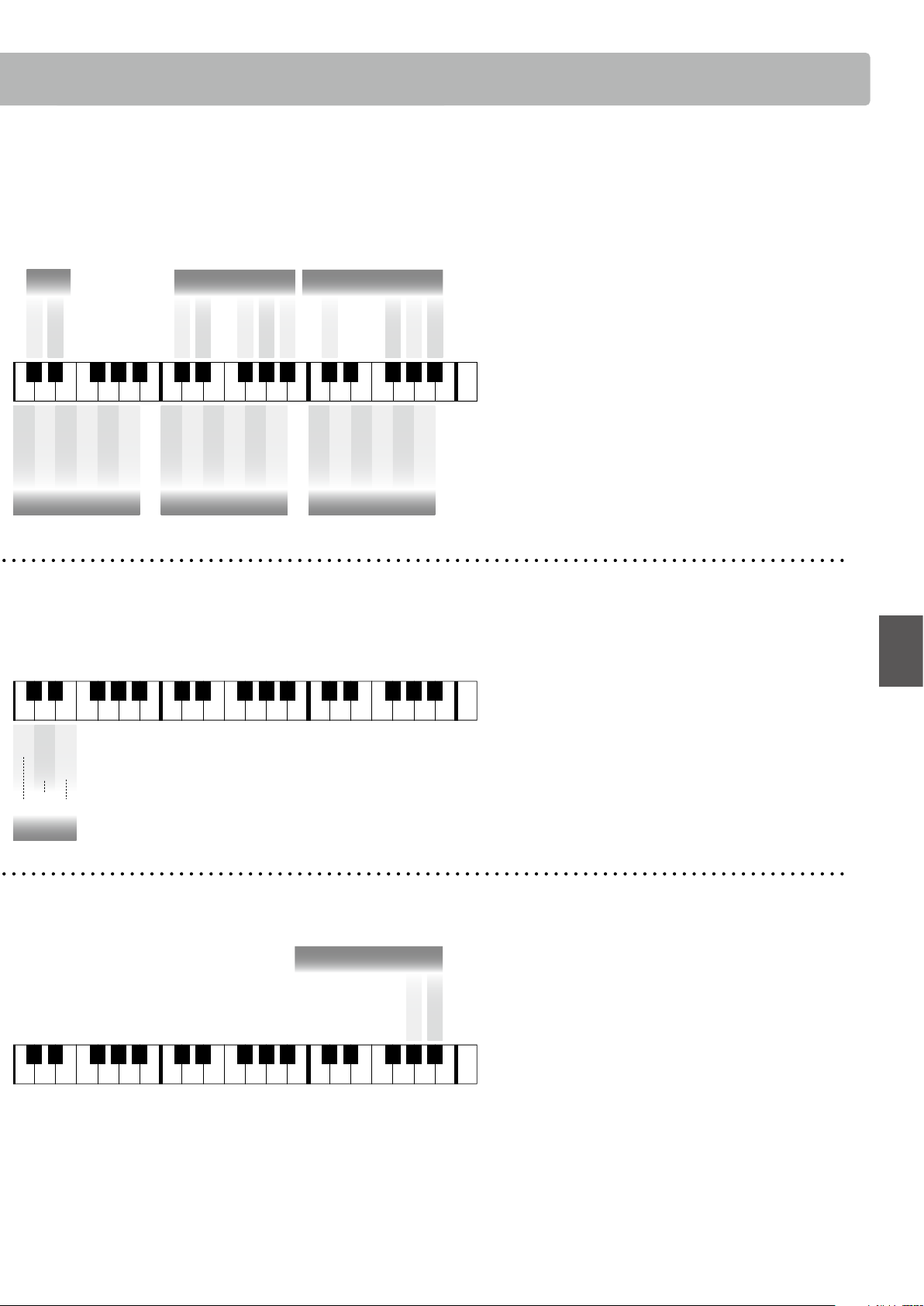
The separate Operation Guide provides a convenient overview of the KDP120/KDP75 digital piano’s various button and keyboard
controls. This sheet is also reprinted in the Appendix section of this owner’s manual.
a POWER switch
This switch is used to turn the KDP120/KDP75 digital piano on/
o. Be sure to turn o the instrument after playing.
b MASTER VOLUME slider
This slider controls the master volume level of the KDP120/
KDP75 digital piano’s built-in speakers or headphones, if
connected.
c DEMO button
This button is used to start/stop playback of the KDP120/
KDP75 digital piano’s built-in Demo songs.
d LESSON button
This button is used to select the KDP120/KDP75 digital piano’s
built-in Lesson songs.
e PLAY / STOP button
This button is used to start/stop the playback of Recorder
songs stored in memory and KDP120/KDP75 digital piano’s
built-in Lessons songs.
f REC button
This button is used to record performances to the KDP120/
KDP75 digital piano’s internal memory.
g METRONOME button
This button is used to turn the metronome function on/o, and
also to adjust its tempo, time signature, and volume settings.
h SOUND SELECT button
This button is used to select the sound(s) that will be heard
when the keys are pressed.
i PEDAL connector
This connector is used to connect the KDP120/KDP75 digital
piano’s pedal board to the instrument.
j DC IN jack
This jack is used to connect the AC adaptor.
k USB to Host port
This port is use to connect the instrument to a computer using
a USB “B to A” type cable in order to send and receive MIDI
data.
l PHONES jacks
These jacks are used to connect stereo headphones to the
KDP120/KDP75 digital piano. Two pairs of headphones can be
connected and used simultaneously.
a
b
dc
e
g h
i j kl
f
DIGITAL PIANO
KDP120
DC IN 15V
* The following diagram shows KDP120. Only the model name and input voltage are dierent in KDP75.
* DC 12V for KDP75.
11
Preparation
Setting Up the Piano
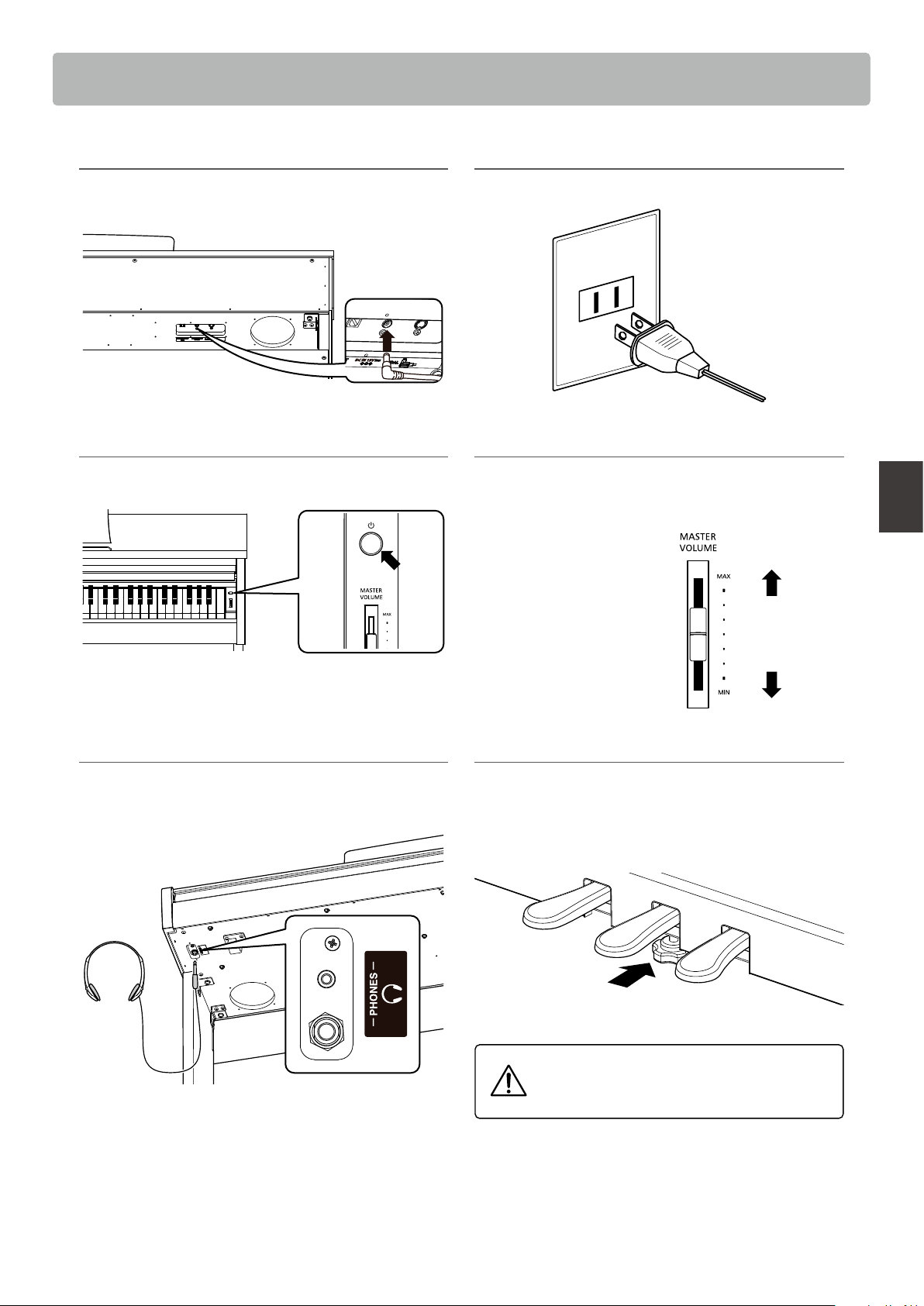
1. Connecting the power adaptor
Connect the AC power adaptor to the DC IN terminal located
on the underside of the instrument, as indicated below.
* DC 12V for KDP75.
2. Connecting the power adaptor to an outlet
Connect the AC power adaptor to an AC outlet.
3. Turning on the power
Press the POWER switch, located on the right hand side of the
keyboard.
The LED indicator for the SOUND SELECT button will turn on
and the Concert Grand sound will be selected automatically.
4. Adjusting the volume
Move the MASTER VOLUME slider up and down to increase
and decrease the volume level of the instrument’s speakers, or
headphones if connected.
Adjust the volume to a
comfortable listening level
- the middle is often a good
starting point.
Increase
volume
Decrease
volume
Using headphones
Use the jacks located beneath the keyboard on the left hand
side, to connect stereo headphones to the KDP120/KDP75
digital piano.
Up to two pairs of headphones can be connected and used
simultaneously. When a pair of headphones is connected,
sound will not be produced by the speakers.
Adjusting the pedal support bolt
A pedal support bolt is attached at the base of the pedal board
to aid stability when the pedals are pushed. Turn the bolt anti-
clockwise until it makes contact with the oor and supports
the pedals rmly.
When moving the instrument, always adjust or
remove the pedal support bolt, then readjust
when the instrument is in its new position.
Operation Guide
12
Basic Operation
Operation Guide
SOUND
METRONOME
CONCERT MAGIC
Virtual Technician
Historical
Rich
Dark
Clean
Virtual Technician
Brilliant
Soft
Light Resonance
Deep Resonance
Noiseless
Normal
A
#
0 C
#
1 D
#
1 F
#
1 G
#
1 A
#
1 C
#
2 D
#
2 F
#
2 G
#
2 A
#
2
A0 B0 C1 D1 E1 F1 G1 A1 B1 C2 D2 E2 F2 G2 A2 B2
C
#
3 D
#
3 F
#
3 G
#
3 A
#
3
C3 D3 E3 F3 G3 A3 B3
C
#
4 D
#
4 F
#
4 G
#
4 A
#
4
C4 D4 E4 F4 G4 A4 B4
C
#
5 D
#
5 F
#
5 G
#
5 A
#
5
C5 D5 E5 F5 G5 A5 B5
C
#
6 D
#
6 F
#
6 G
#
6 A
#
6
C6 D6 E6 F6 G6 A6 B6
C
#
7 D
#
7 F
#
7 G
#
7 A
#
7
C7 C8D7 E7 F7 G7 A7 B7
Full
Spatial Headphone Sound
Wide
Normal
Forward
O
(-10~+10)
O
Brilliance
Sound Select
Atmosphere
New Age Pad
Choir
Slow Strings
String Ensemble
Vibraphone
Harpsichord
Church Organ
Jazz Organ
Modern E.Piano
Classic E.Piano
Modern Piano
Mellow Grand
Studio Grand
Concert Grand
Reverb
Cathedral
Live Hall
Concert Hall
Small Hall
Lounge
Room
Phones Type
Canal
Inner-ear
Closed
Semi Open
Open
Normal
(For Concert Grand, Studio Grand,
Mellow Grand, Modern Piano only)
Large
Medium
Small
On
O
Damper Resonance
On
O
Reverb
Light
Heavy
O
Normal
Touch
Dual
Dual Mode On
Dual Balance Reset
Dual Balance
Dual Balance
In addition to the side panel buttons, the KDP120/KDP75 digital piano can also controlled by pressing and
holding a button, then pressing a key on the keyboard. This section explains the various functions for each
panel button.
Metronome Tempo (Musical Term)
Metronome Tempo (3 digits)
Tempo
Tempo
1
(-2) (
+2)
2 3 4 5 6 7 8 9 0
Metronome Time Signature
1/4 2/4
Metronome Volume
3/4 4/4 5/4 3/8 6/8
Prestissimo
Vivacissimo
Presto
Vivace
Allegro
Animato
Allegretto
Moderato
Maestoso
Andantino
Andante
Adagietto
Adagio
Larghetto
Lento
Largo
Grave
A
#
0 C
#
1 D
#
1 F
#
1 G
#
1 A
#
1 C
#
2 D
#
2 F
#
2 G
#
2 A
#
2
A0 B0 C1 D1 E1 F1 G1 A1 B1 C2 D2 E2 F2 G2 A2 B2
C
#
3 D
#
3 F
#
3 G
#
3 A
#
3
C3 D3 E3 F3 G3 A3 B3
C
#
4 D
#
4 F
#
4 G
#
4 A
#
4
C4 D4 E4 F4 G4 A4 B4
C
#
5 D
#
5 F
#
5 G
#
5 A
#
5
C5 D5 E5 F5 G5 A5 B5
C
#
6 D
#
6 F
#
6 G
#
6 A
#
6
C6 D6 E6 F6 G6 A6 B6
C
#
7 D
#
7 F
#
7 G
#
7 A
#
7
C7 C8D7 E7 F7 G7 A7 B7
40 52 60 72 88 108 132
184 208
192
46 56 66 80 96 120 160
A
#
0 C
#
1 D
#
1 F
#
1 G
#
1 A
#
1 C
#
2 D
#
2 F
#
2 G
#
2 A
#
2
A0 B0 C1 D1 E1 F1 G1 A1 B1 C2 D2 E2 F2 G2 A2 B2
C
#
3 D
#
3 F
#
3 G
#
3 A
#
3
C3 D3 E3 F3 G3 A3 B3
C
#
4 D
#
4 F
#
4 G
#
4 A
#
4
C4 D4 E4 F4 G4 A4 B4
C
#
5 D
#
5 F
#
5 G
#
5 A
#
5
C5 D5 E5 F5 G5 A5 B5
C
#
6 D
#
6 F
#
6 G
#
6 A
#
6
C6 D6 E6 F6 G6 A6 B6
C
#
7 D
#
7 F
#
7 G
#
7 A
#
7
C7 C8D7 E7 F7 G7 A7 B7
3 6 8 9 11 13 15 16 18 20 21 23 25 27 28 30 32 33 35 37 39 4041
Song Select
My Wild Irish Rose
Romance De L’amour
Santa Lucia
When Irish Eyes
Are Smiling
Wedding March
Bridal Chorus
Gavotte (Gossec)
Skater’s Waltz
Clair De Lune
Andante from
Symphony No.94 (Haydn)
The Entertainer
The Camptown Races
Oh Susanna
Clementine
Yankee Doodle
Battle Hymn
Of The Republic
Silent Night
O Come All Ye Faithful
Jingle Bells
Hark The Herald
Angels Sing
Frère Jacques
London Bridge
Mary Had A Little Lamb
Twinkle, Twinkle,
Little Star
I’m A Little Teapot
2
Old MacDonald
Had A Farm
7
Joy To The World
12
Row, Row, Row
Your Boat
5
Deck The Halls
10
We Wish You
A Merry Christmas
14
Auld Lang Syne
19
William Tell
Overture
24
Londonderry Air
17
When The Saints
Go Marching In
22
Für Elise
26
Waltz Of
The Flowers
31
Chiapanecas
36
Blue Danube Waltz
29
Pomp And
Circumstance
34
Funiculì Funiculà
38
Song Select
Concert Magic demo modes
Random Play
Category Play
* Refer to page 16.
* Refer to page 23.
* Refer to page 18.
* Refer to page 23.
* Refer to page 20.
* Refer to page 33. * Refer to page 34. * Refer to page 36.
13
Basic Operation
Operation Guide
Virtual Technician
Historical
Rich
Dark
Clean
Virtual Technician
Brilliant
Soft
Light Resonance
Deep Resonance
Noiseless
Normal
A
#
0 C
#
1 D
#
1 F
#
1 G
#
1 A
#
1 C
#
2 D
#
2 F
#
2 G
#
2 A
#
2
A0 B0 C1 D1 E1 F1 G1 A1 B1 C2 D2 E2 F2 G2 A2 B2
C
#
3 D
#
3 F
#
3 G
#
3 A
#
3
C3 D3 E3 F3 G3 A3 B3
C
#
4 D
#
4 F
#
4 G
#
4 A
#
4
C4 D4 E4 F4 G4 A4 B4
C
#
5 D
#
5 F
#
5 G
#
5 A
#
5
C5 D5 E5 F5 G5 A5 B5
C
#
6 D
#
6 F
#
6 G
#
6 A
#
6
C6 D6 E6 F6 G6 A6 B6
C
#
7 D
#
7 F
#
7 G
#
7 A
#
7
C7 C8D7 E7 F7 G7 A7 B7
Full
Spatial Headphone Sound
Wide
Normal
Forward
O
(-10~+10)
O
Brilliance
Sound Select
Atmosphere
New Age Pad
Choir
Slow Strings
String Ensemble
Vibraphone
Harpsichord
Church Organ
Jazz Organ
Modern E.Piano
Classic E.Piano
Modern Piano
Mellow Grand
Studio Grand
Concert Grand
Reverb
Cathedral
Live Hall
Concert Hall
Small Hall
Lounge
Room
Phones Type
Canal
Inner-ear
Closed
Semi Open
Open
Normal
(For Concert Grand, Studio Grand,
Mellow Grand, Modern Piano only)
Large
Medium
Small
On
O
Damper Resonance
On
O
Reverb
Light
Heavy
O
Normal
Touch
Dual
Dual Mode On
Dual Balance Reset
Dual Balance
Dual Balance
Metronome Tempo (Musical Term)
Metronome Tempo (3 digits)
Tempo
Tempo
1
(-2) (
+2)
2 3 4 5 6 7 8 9 0
Metronome Time Signature
1/4 2/4
Metronome Volume
3/4 4/4 5/4 3/8 6/8
Prestissimo
Vivacissimo
Presto
Vivace
Allegro
Animato
Allegretto
Moderato
Maestoso
Andantino
Andante
Adagietto
Adagio
Larghetto
Lento
Largo
Grave
A
#
0 C
#
1 D
#
1 F
#
1 G
#
1 A
#
1 C
#
2 D
#
2 F
#
2 G
#
2 A
#
2
A0 B0 C1 D1 E1 F1 G1 A1 B1 C2 D2 E2 F2 G2 A2 B2
C
#
3 D
#
3 F
#
3 G
#
3 A
#
3
C3 D3 E3 F3 G3 A3 B3
C
#
4 D
#
4 F
#
4 G
#
4 A
#
4
C4 D4 E4 F4 G4 A4 B4
C
#
5 D
#
5 F
#
5 G
#
5 A
#
5
C5 D5 E5 F5 G5 A5 B5
C
#
6 D
#
6 F
#
6 G
#
6 A
#
6
C6 D6 E6 F6 G6 A6 B6
C
#
7 D
#
7 F
#
7 G
#
7 A
#
7
C7 C8D7 E7 F7 G7 A7 B7
40 52 60 72 88 108 132
184 208
192
46 56 66 80 96 120 160
A
#
0 C
#
1 D
#
1 F
#
1 G
#
1 A
#
1 C
#
2 D
#
2 F
#
2 G
#
2 A
#
2
A0 B0 C1 D1 E1 F1 G1 A1 B1 C2 D2 E2 F2 G2 A2 B2
C
#
3 D
#
3 F
#
3 G
#
3 A
#
3
C3 D3 E3 F3 G3 A3 B3
C
#
4 D
#
4 F
#
4 G
#
4 A
#
4
C4 D4 E4 F4 G4 A4 B4
C
#
5 D
#
5 F
#
5 G
#
5 A
#
5
C5 D5 E5 F5 G5 A5 B5
C
#
6 D
#
6 F
#
6 G
#
6 A
#
6
C6 D6 E6 F6 G6 A6 B6
C
#
7 D
#
7 F
#
7 G
#
7 A
#
7
C7 C8D7 E7 F7 G7 A7 B7
3 6 8 9 11 13 15 16 18 20 21 23 25 27 28 30 32 33 35 37 39 4041
Song Select
My Wild Irish Rose
Romance De L’amour
Santa Lucia
When Irish Eyes
Are Smiling
Wedding March
Bridal Chorus
Gavotte (Gossec)
Skater’s Waltz
Clair De Lune
Andante from
Symphony No.94 (Haydn)
The Entertainer
The Camptown Races
Oh Susanna
Clementine
Yankee Doodle
Battle Hymn
Of The Republic
Silent Night
O Come All Ye Faithful
Jingle Bells
Hark The Herald
Angels Sing
Frère Jacques
London Bridge
Mary Had A Little Lamb
Twinkle, Twinkle,
Little Star
I’m A Little Teapot
2
Old MacDonald
Had A Farm
7
Joy To The World
12
Row, Row, Row
Your Boat
5
Deck The Halls
10
We Wish You
A Merry Christmas
14
Auld Lang Syne
19
William Tell
Overture
24
Londonderry Air
17
When The Saints
Go Marching In
22
Für Elise
26
Waltz Of
The Flowers
31
Chiapanecas
36
Blue Danube Waltz
29
Pomp And
Circumstance
34
Funiculì Funiculà
38
Song Select
Concert Magic demo modes
Random Play
Category Play
* Refer to page 34. * Refer to page 37. * Refer to page 38.
* Refer to page 24.
* Refer to page 34. * Refer to page 37. * Refer to page 38.
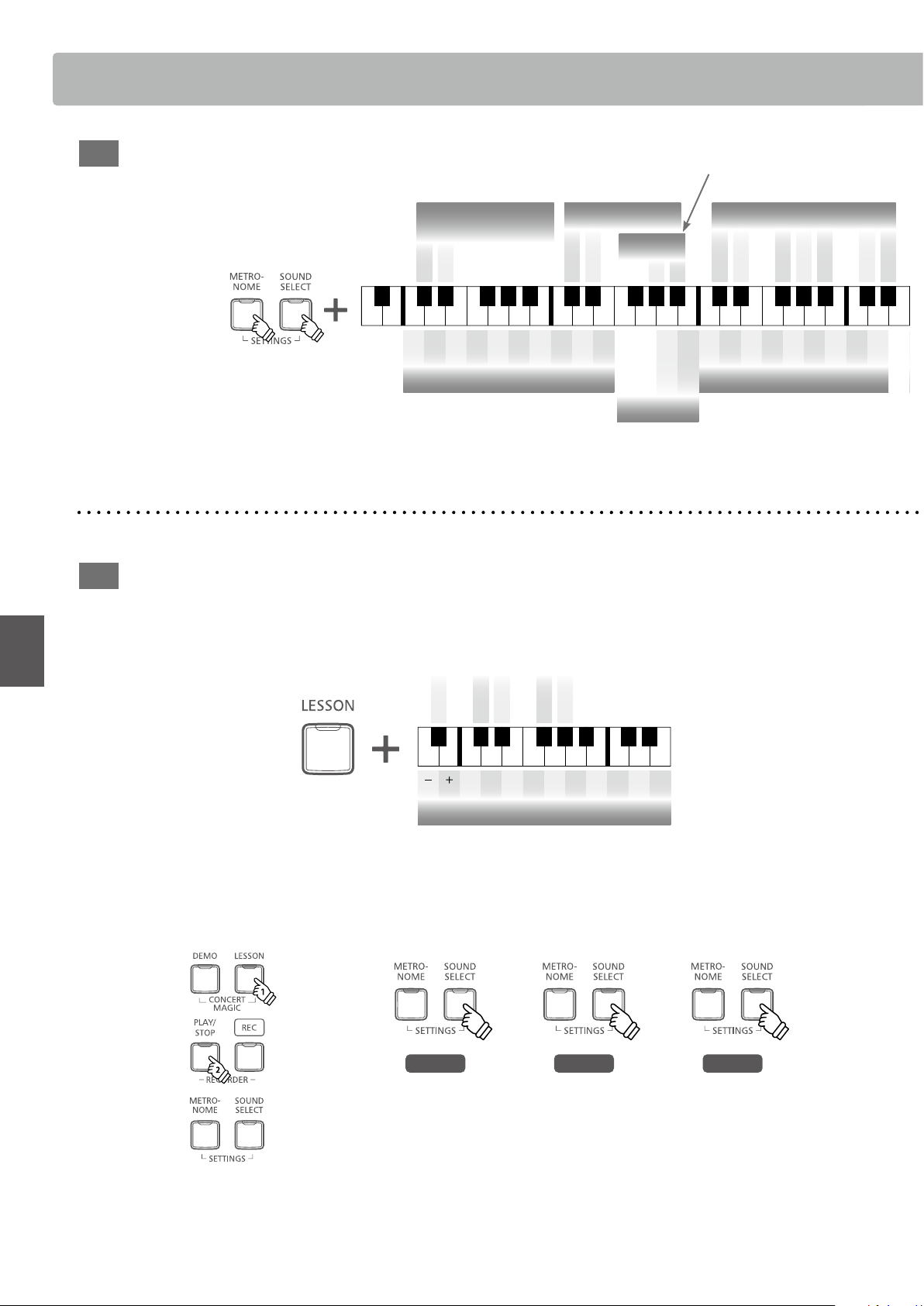
Operation Guide
14
Operation Guide
Basic Operation
SETTINGS
LESSON
On
O
Bluetooth
A
#
0 C
#
1 D
#
1 F
#
1 G
#
1 A
#
1 C
#
2 D
#
2 F
#
2 G
#
2 A
#
2
A0 B0 C1 D1 E1 F1 G1 A1 B1 C2 D2 E2 F2 G2 A2 B2
C
#
3 D
#
3 F
#
3 G
#
3 A
#
3
C3 D3 E3 F3 G3 A3 B3
C
#
4 D
#
4
F
#
4 G
#
4 A
#
4
C4 D4 E4
F4 G4 A4 B4
C
#
5 D
#
5 F
#
5 G
#
5 A
#
5
C5 D5 E5 F5 G5 A5 B5
C
#
6 D
#
6 F
#
6 G
#
6 A
#
6
C6 D6 E6 F6 G6 A6 B6
C
#
7 D
#
7 F
#
7 G
#
7 A
#
7
C7 C8D7 E7 F7 G7 A7 B7
On
(-6~+5)
O
Transpose
(427 Hz~453 Hz)
440
Hz
+0.5
Hz
-0.5
Hz
Tuning
1 2 3 4 5 6 7 8 9 0
Tuning Value (3 digits)
Transmit MIDI Program
Change
On
O
1 2 3 4 5 6 7 8 9 0
Program Number (3 digits)
Multi-timbral Mode
On
O
2 4 7 9 11 14 16
MIDI Channel
1 3 5 6 8 10 12 13 15
MIDI Channel
Auto Power Off
120 min.
60 min.
15 min.
O
Local Control
On
O
Low Volume Balance
Type5
Type4
Type3
Type2
Type1
O
* Refer to PDF manual.
* Refer to PDF manual.
* Refer to PDF manual.
* Refer to page 27.
* Refer to page 28. * Refer to page 29.
* Refer to PDF manual. * Refer to PDF manual. * Refer to PDF manual.
* Refer to page 40.
(KDP120 only)
Selecting a Lesson book and song Listening to the song
A
#
0 C
#
1 D
#
1 F
#
1 G
#
1 A
#
1 C
#
2 D
#
2
A0 B0 C1 D1 E1 F1 G1 A1 B1 C2 D2 E2
Selecting the part to practice
Press once:
Left-hand only
L
Press twice:
Right-hand only
R
Press 3 times:
Both Left and Right hands
L & R
Book 1
Book 2
Book 4
Book 3
Book 5
1 2 3 4 5 6 7 8 9 0
Song Number (3 digits)
Selecting a Lesson book and song Listening to the song
A
#
0 C
#
1 D
#
1 F
#
1 G
#
1 A
#
1 C
#
2 D
#
2
A0 B0 C1 D1 E1 F1 G1 A1 B1 C2 D2 E2
Selecting the part to practice
Press once:
Left-hand only
L
Press twice:
Right-hand only
R
Press 3 times:
Both Left and Right hands
L & R
Book 1
Book 2
Book 4
Book 3
Book 5
1 2 3 4 5 6 7 8 9 0
Song Number (3 digits)
Selecting a Lesson book and song Listening to the song
A
#
0 C
#
1 D
#
1 F
#
1 G
#
1 A
#
1 C
#
2 D
#
2
A0 B0 C1 D1 E1 F1 G1 A1 B1 C2 D2 E2
Selecting the part to practice
Press once:
Left-hand only
L
Press twice:
Right-hand only
R
Press 3 times:
Both Left and Right hands
L & R
Book 1
Book 2
Book 4
Book 3
Book 5
1 2 3 4 5 6 7 8 9 0
Song Number (3 digits)
Selecting a Lesson book and song Listening to the song
A
#
0 C
#
1 D
#
1 F
#
1 G
#
1 A
#
1 C
#
2 D
#
2
A0 B0 C1 D1 E1 F1 G1 A1 B1 C2 D2 E2
Selecting the part to practice
Press once:
Left-hand only
L
Press twice:
Right-hand only
R
Press 3 times:
Both Left and Right hands
L & R
Book 1
Book 2
Book 4
Book 3
Book 5
1 2 3 4 5 6 7 8 9 0
Song Number (3 digits)
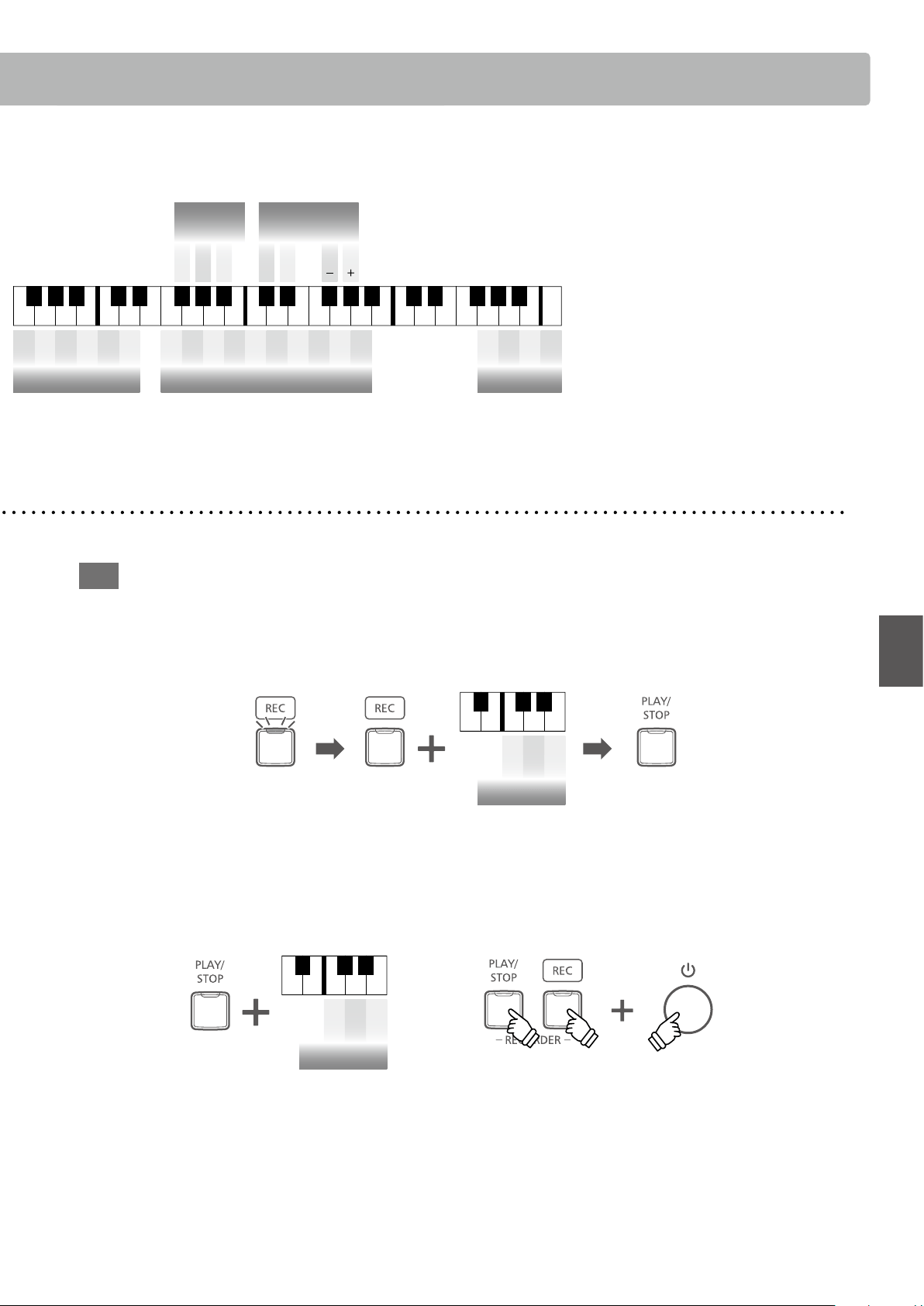
15
Operation Guide
Basic Operation
RECORDER
On
O
Bluetooth
A
#
0 C
#
1 D
#
1 F
#
1 G
#
1 A
#
1 C
#
2 D
#
2 F
#
2 G
#
2 A
#
2
A0 B0 C1 D1 E1 F1 G1 A1 B1 C2 D2 E2 F2 G2 A2 B2
C
#
3 D
#
3 F
#
3 G
#
3 A
#
3
C3 D3 E3 F3 G3 A3 B3
C
#
4 D
#
4
F
#
4 G
#
4 A
#
4
C4 D4 E4
F4 G4 A4 B4
C
#
5 D
#
5 F
#
5 G
#
5 A
#
5
C5 D5 E5 F5 G5 A5 B5
C
#
6 D
#
6 F
#
6 G
#
6 A
#
6
C6 D6 E6 F6 G6 A6 B6
C
#
7 D
#
7 F
#
7 G
#
7 A
#
7
C7 C8D7 E7 F7 G7 A7 B7
On
(-6~+5)
O
Transpose
(427 Hz~453 Hz)
440
Hz
+0.5
Hz
-0.5
Hz
Tuning
1 2 3 4 5 6 7 8 9 0
Tuning Value (3 digits)
Transmit MIDI Program
Change
On
O
1 2 3 4 5 6 7 8 9 0
Program Number (3 digits)
Multi-timbral Mode
On
O
2 4 7 9 11 14 16
MIDI Channel
1 3 5 6 8 10 12 13 15
MIDI Channel
Auto Power Off
120 min.
60 min.
15 min.
O
Local Control
On
O
Low Volume Balance
Type5
Type4
Type3
Type2
Type1
O
* Refer to page 35.* Refer to page 35. * Refer to page 39.
* Refer to page 35. * Refer to page 36.
* Refer to page 31.
* Refer to page 32. * Refer to page 32.
Erase all songs
A
#
0 C
#
1 D
#
1
A0 B0 C1 D1 E1
A
#
0 C
#
1 D
#
1
A0 B0 C1 D1 E1
Play songRecord song
a
Hold both buttons
b
Turn the power on
b
Select a song memory
c
Start recording
a
Enter recording mode
Song 2
Song 3
Song 1
Song Memory
Song 2
Song 3
Song 1
Song Memory
Erase all songs
A
#
0 C
#
1 D
#
1
A0 B0 C1 D1 E1
A
#
0 C
#
1 D
#
1
A0 B0 C1 D1 E1
Play songRecord song
a
Hold both buttons
b
Turn the power on
b
Select a song memory
c
Start recording
a
Enter recording mode
Song 2
Song 3
Song 1
Song Memory
Song 2
Song 3
Song 1
Song Memory
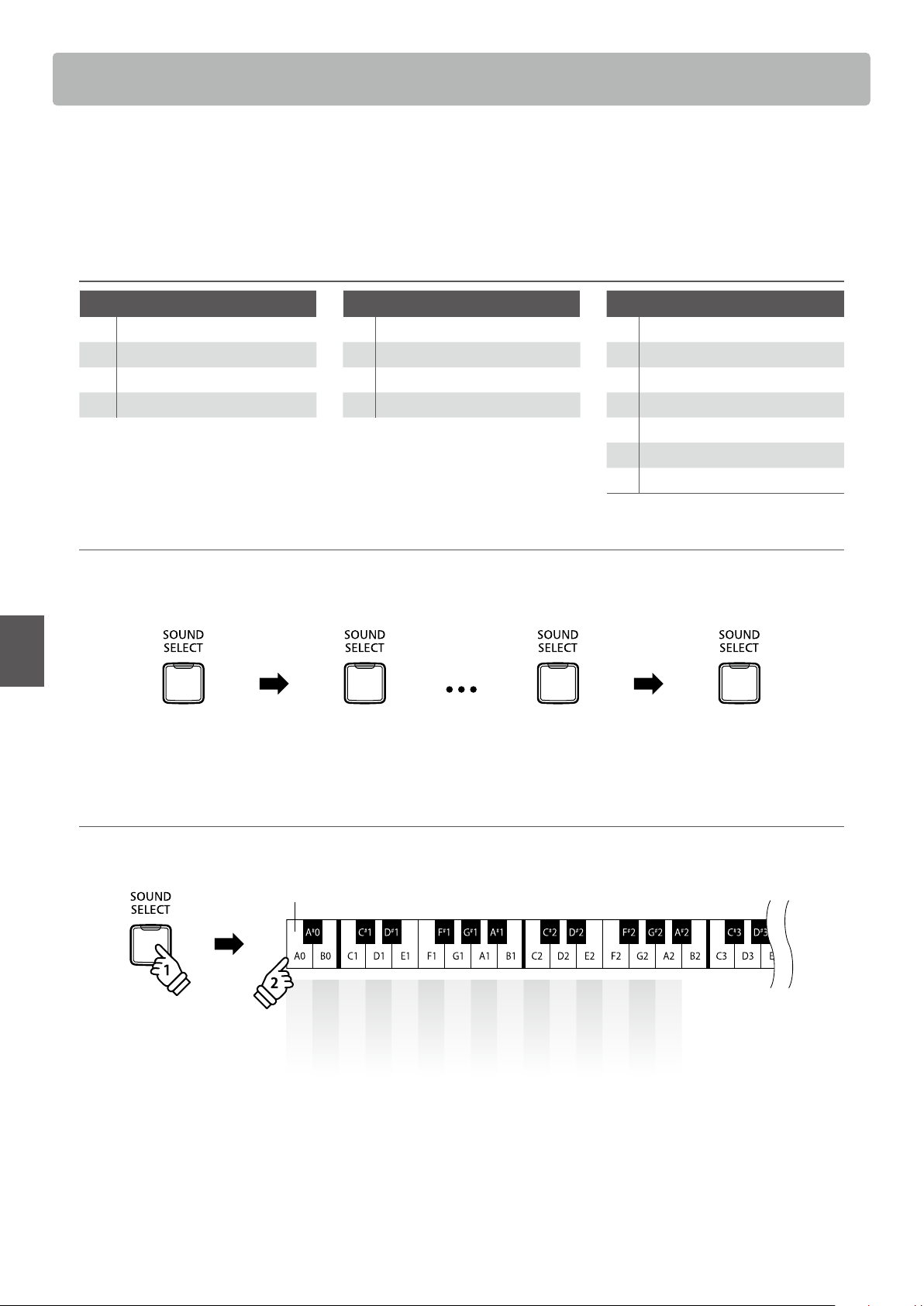
Selecting Sounds
16
Basic Operation
Selecting Sounds
The KDP120/KDP75 digital piano features 15 dierent instrument sounds, which can be selected in one
of two ways. By default the “Concert Grand” sound will be selected automatically when the instrument is
turned on.
Instrument Sounds
PIANO E.PIANO / ORGAN OTHERS
1 Concert Grand 1 Classic E.Piano 1 Harpsichord
2 Studio Grand 2 Modern E.Piano 2 Vibraphone
3 Mellow Grand 3 Jazz Organ 3 String Ensemble
4 Modern Piano 4 Church Organ 4 Slow Strings
5 Choir
6 New Age Pad
7 Atmosphere
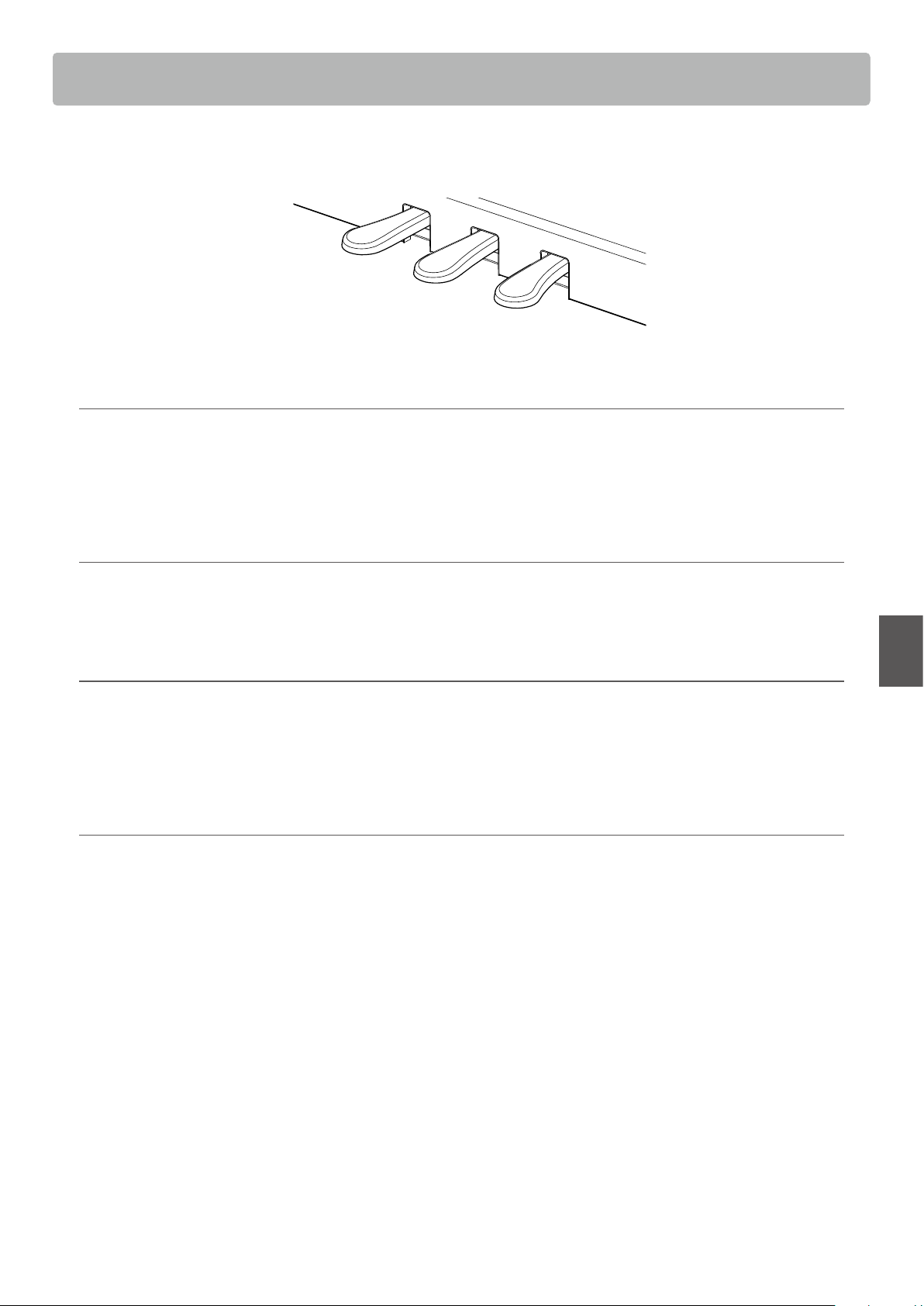
Selecting a sound: Method 1
Press the SOUND SELECT button repeatedly to cycle through the 15 available instrument sounds.
[Power On]
Press once Press 13 times Press once
Concert Grand Concert GrandStudio Grand Atmosphere
Selecting a sound: Method 2
Press and hold the SOUND SELECT button, then press one of the lowest 15 white keys to select the desired instrument sound.
Concert Grand
Studio Grand
Mellow Grand
Modern Piano
Classic E.Piano
Modern E.Piano
Jazz Organ
Church Organ
Harpsichord
Vibraphone
String Ensemble
Slow Strings
Choir
New Age Pad
Atmosphere
Lowest key
holdhold
17
Basic Operation
Using the Pedals
As with a grand piano, the KDP120/KDP75 digital piano features three pedals: sustain, sostenuto, and soft.
Soft pedal
Sostenuto pedal
Sustain pedal
Sustain pedal (right pedal)
Depressing this pedal sustains the sound after one’s hands have been lifted from the keyboard - greatly enriching the piano
sound, while also assisting smooth “legato” passages.
The sustain pedal is capable of responding to half pedaling.
Sostenuto pedal (centre pedal)
Depressing this pedal after playing the keyboard and before releasing the keys, sustains the sound of only those notes that have
been played. Any keys that are subsequently played after the sostenuto pedal is depressed will not be sustained.
Soft pedal (left pedal)
Depressing this pedal softens the sound, reducing its volume.
When the Jazz Organ sound is selected, the soft pedal is also used to alternate the speed of the rotary speaker simulation between
“Slow” and “Fast” eect modes.
Grand Feel pedal system (KDP120 only)
The KDP120 digital piano features the new Grand Feel pedal system, which replicates the sustain, soft, and sostenuto pedal
weighting of Kawai’s SK-EX Concert Grand piano.
Dual Mode
18
Basic Operation
Dual Mode
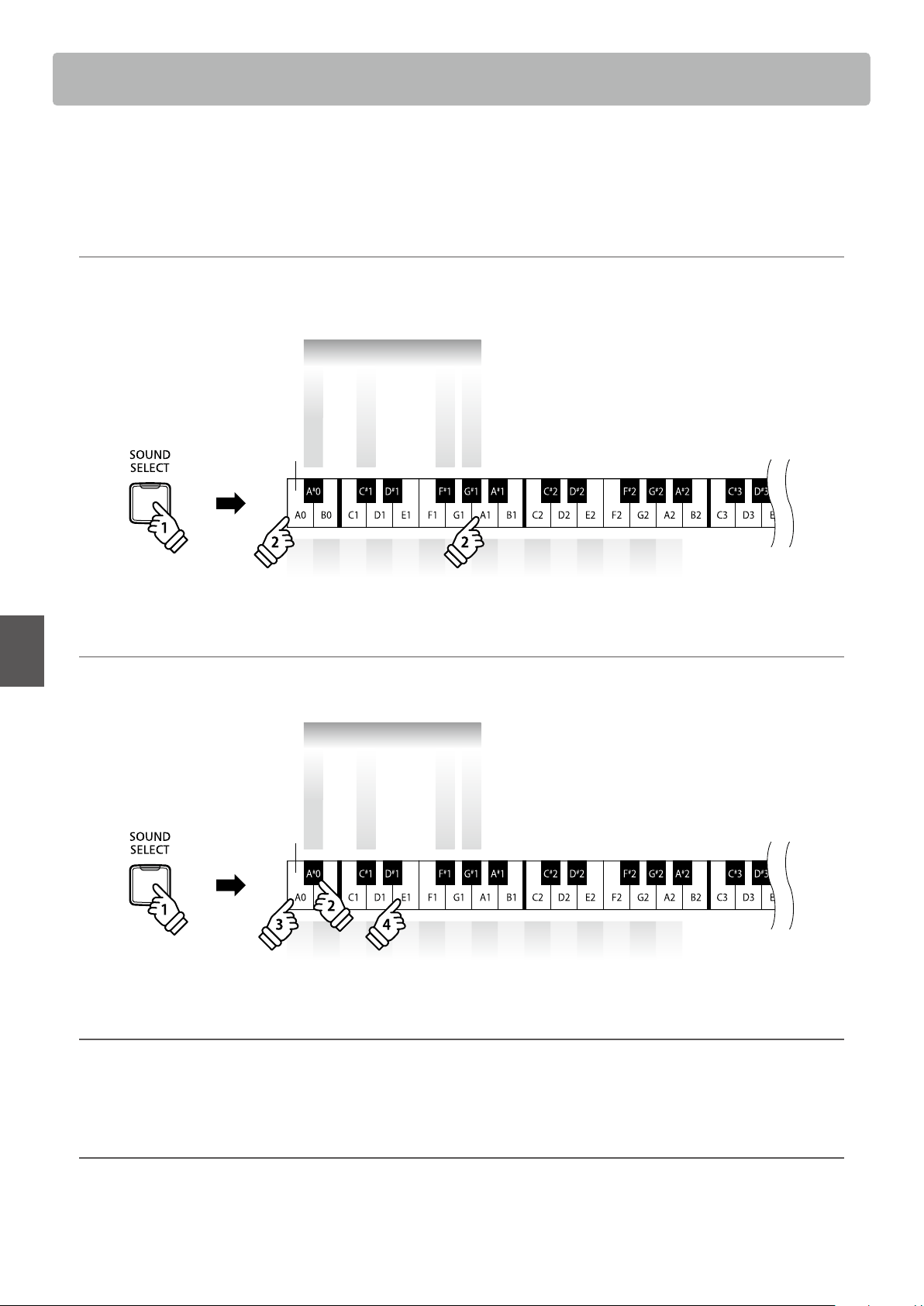
The Dual playing mode allows two sounds to be layered together, creating a more complex sound. For
example, a piano sound layered with strings, or a church organ combined with a choir, etc.
Enabling Dual Mode : Method 1 Operation Guide: SOUND (page 12~13)
Press and hold the SOUND SELECT button, then press two of the lowest 15 white keys simultaneously.
The sounds corresponding to the two keys will be layered together.
holdhold
1 2 3 4 5 6 7 8 9 10 11 12 13 14 15
Lowest key
Dual
Dual Balance Reset
Dual Mode On
Dual Balance
+
Dual Balance
–
Enabling Dual Mode : Method 2 Operation Guide: SOUND (page 12~13)
Press and hold the SOUND SELECT button, then press the A#0 key.
While still holding the SOUND SELECT button, press two of the lowest 15 white keys in order.
holdhold
1 2 3 4 5 6 7 8 9 10 11 12 13 14 15
Lowest key
Dual
Dual Balance Reset
Dual Mode On
Dual Balance
+
Dual Balance
–
Adjusting the volume balance Operation Guide: SOUND (page 12~13)
Press and hold the SOUND SELECT button, then press the F#1 or G#1 key repeatedly to decrease or increase the volume balance
between the two sounds, or the C#1 key to reset the volume balance.
Exiting Dual Mode
Press the SOUND SELECT button.
The Concert Grand sound will be selected automatically and the instrument will return to normal operation.
19
Basic Operation
Four Hands Mode
The Four Hands playing mode function divides the keyboard into two sections in a similar way to that of
the Split keyboard mode. However, with Four Hands keyboard mode enabled, the octave/pitch of each
section is automatically adjusted to create two separate 44-key instruments with the same playing range.
Furthermore, the damper (right) pedal and soft (left) pedal act as separate damper pedals for the respective
right and left sections, allowing two people to perform piano duets using a single instrument.
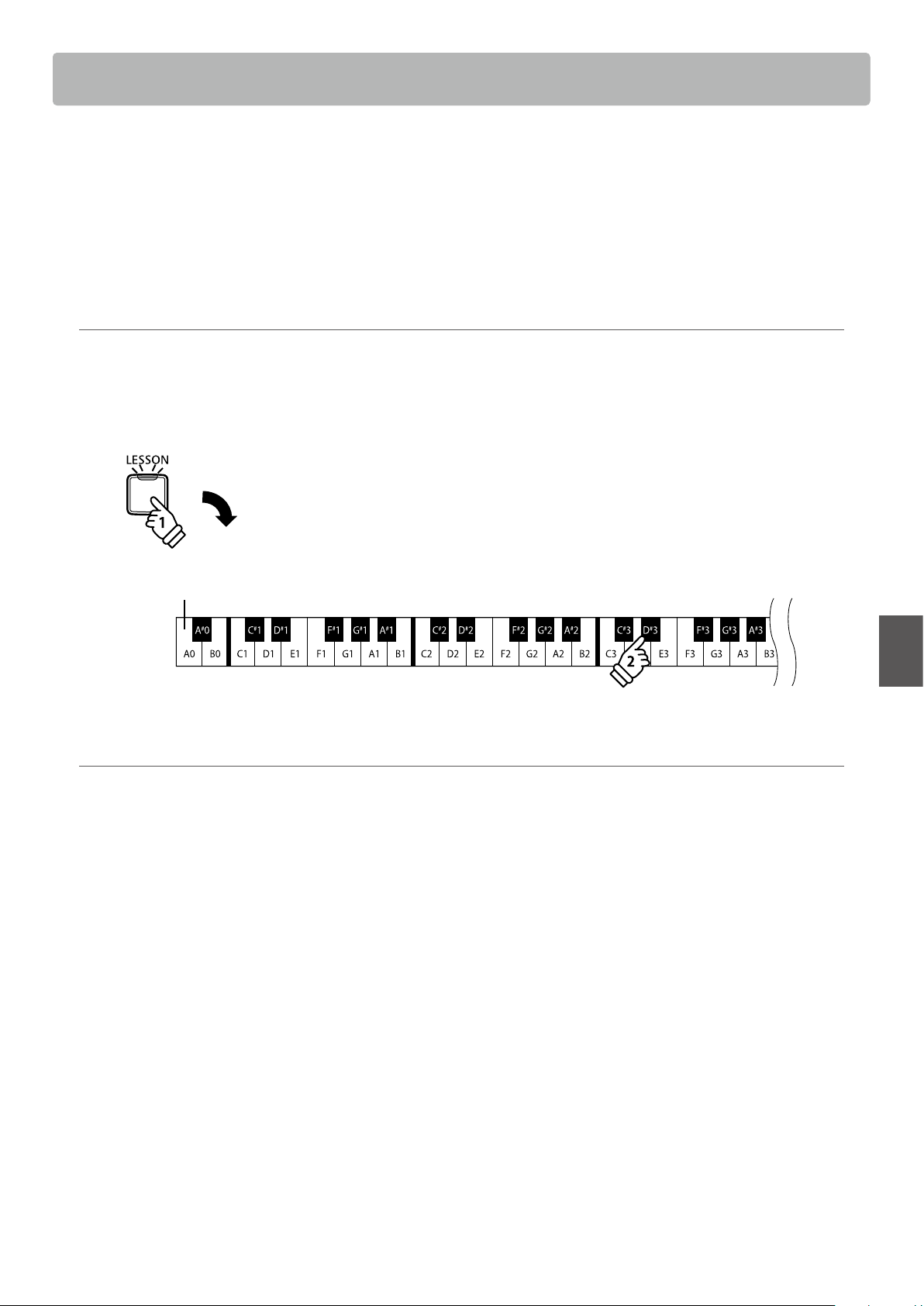
Enabling Four Hands Mode
Press and hold the LESSON button, then press the D#3 key, as shown in the illustration below.
The LED indicators for the LESSON button will start to ash, indicating that Four Hands Mode is enabled.
* The selected keyboard sound can still be changed when Four Hands Mode is enabled.
Lowest key
holdhold
Exiting Four Hands Mode
Press the LESSON button.
The instrument will return to normal operation.
* With the Four Hands Mode activated, selecting a dierent sound will aect both the left and right sections.
* The Split Point for the Four Hands Mode is set to F4, and cannot be adjusted.
* The sostenuto pedal will aect the right section sound only.
Metronome
20
Basic Operation
Metronome
The Metronome function provides a steady beat to aid practicing the piano at a consistent tempo.
The time signature, volume, and tempo of the metronome can be freely adjusted.
Turning the metronome on/o
Press the METRONOME button.
The metronome will start to count and the LED indicator for
the METRONOME button will turn on, indicating that the
metronome is in use.
* By default the metronome will count with a 1/4 beat at 120 bpm.
Press the METRONOME button again to stop the metronome.
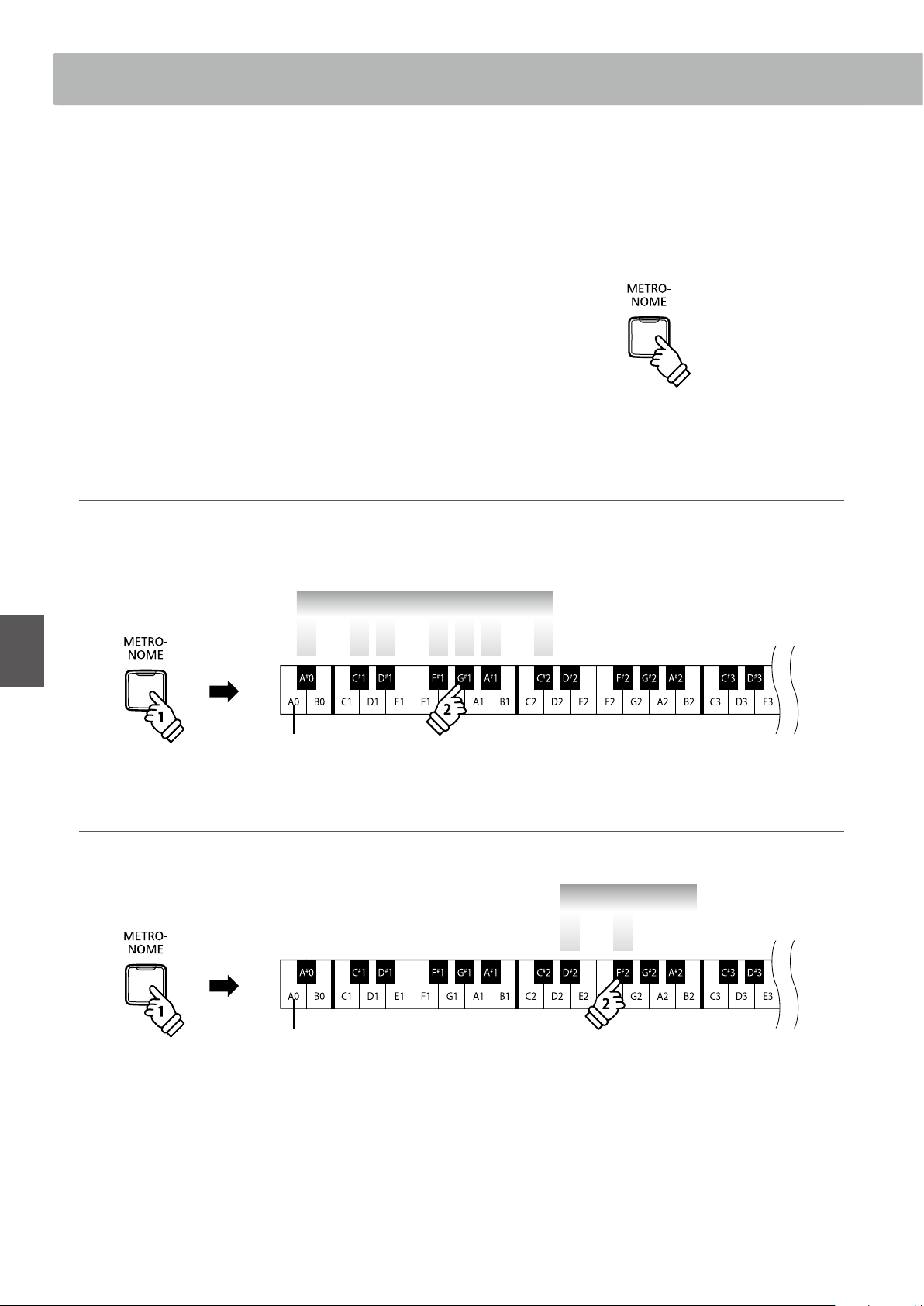
Changing the metronome time signature Operation Guide: METRONOME (page 12~13)
Press and hold the METRONOME button, then press one of the 7 lowest black keys, as shown in the illustration below.
* The metronome can be set to one of seven time signatures: 1/4, 2/4, 3/4, 4/4, 5/4, 3/8, and 6/8.
Metronome Time Signature
5/44/43/42/41/4 6/83/8
Lowest key
holdhold
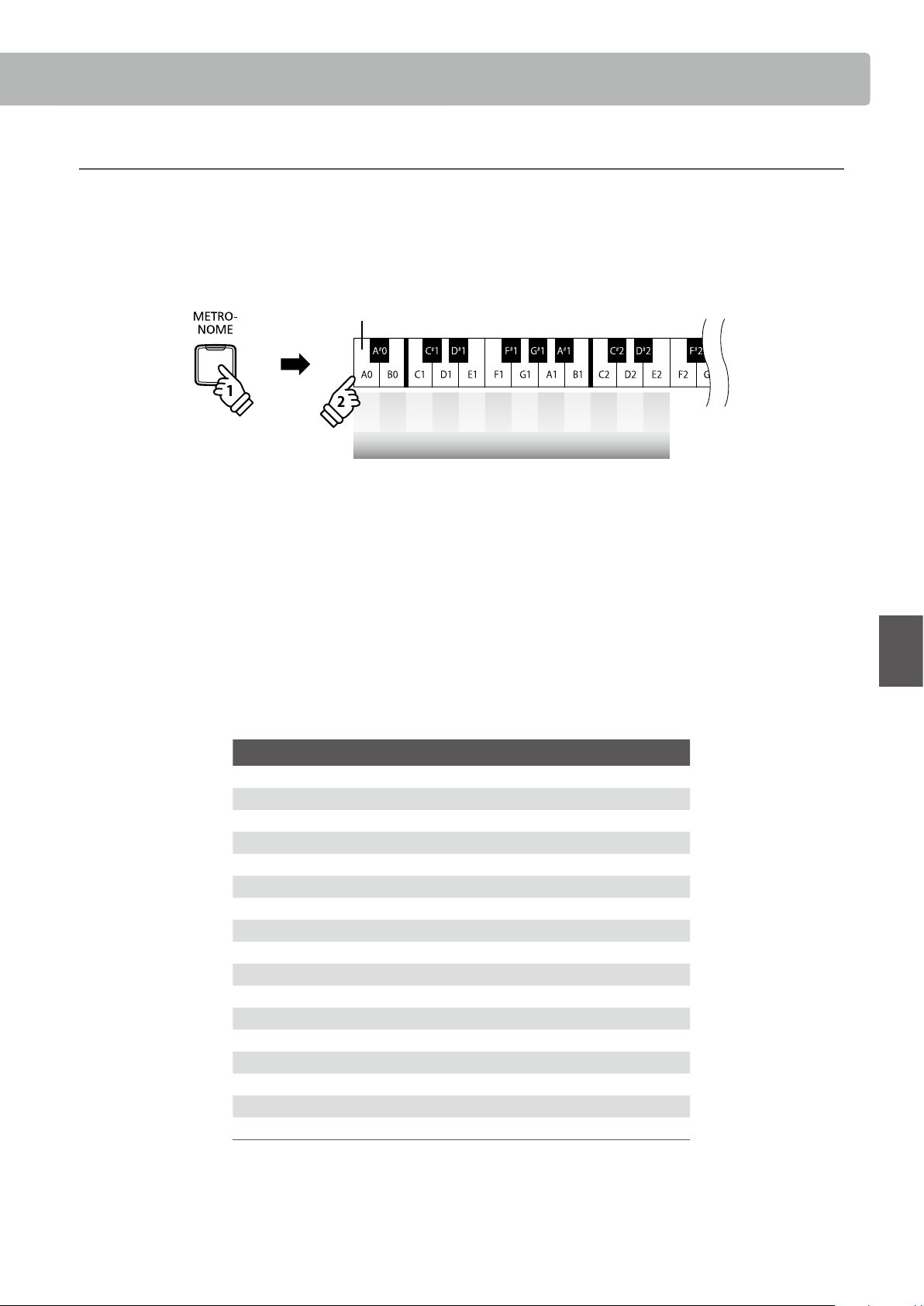
Adjusting the metronome volume Operation Guide: METRONOME (page 12~13)
Press and hold the METRONOME button, then press the keys marked -/+ in the illustration below.
Lowest key
Metronome Volume
+-
holdhold
21
Basic Operation
Metronome
Adjusting the metronome tempo Operation Guide: METRONOME (page 12~13)
Press and hold the METRONOME button, enter the desired tempo using the lowest 12 white keys marked below, then release the
METRONOME button.
* The metronome tempo can be adjusted within the range of 10-300 bpm.
* The metronome tempo can be entered precisely, or decreased and increased gradually.
holdhold
– + 1 2 3 4 5 6 7 8 9 0
Metronome Tempo
Lowest key
Method 1:
While pressing the METRONOME button, press keys 1, 5, and 0 to set the tempo to 150 bpm, or keys 8 and 5 to set the tempo to
85 bpm.
Method 2:
While pressing the METRONOME button, press the - / + keys repeatedly to gradually decrease or increase the tempo in 2 bpm
increments.
It is also possible to conveniently set the metronome tempo to correspond with musical terms such as Allegro or Andante.
Method 3:
While pressing the METRONOME button, press keys C3~E5 to select the desired tempo.
Key Description Tempo
1 C3 Grave Very slow 40
2 D3 Largo Broadly 46
3 E3 Lento Slowly 52
4 F3 Larghetto Rather broadly 56
5 G3 Adagio Slowly, with great expression 60
6 A3 Adagietto Slightly faster than Adagio 66
7 B3 Andante At a walking pace 72
8 C4 Andantino Slightly faster than Andante 80
9 D4 Maestoso Majestic and stately 88
10 E4 Moderato At a moderate speed 96
11 F4 Allegretto Moderately fast 108
12 G4 Animato Lively and fast 120
13 A4 Allegro Fast, quick, and bright 132
14 B4 Vivace Active and quick 160
15 C5 Presto Very, very fast 184
16 D5 Vivacissimo Very fast and lively 192
17 E5 Prestissimo Even faster than Presto 208
Demo Songs
22
Basic Operation
Demo Songs
The KDP120/KDP75 digital piano includes a selection of demonstration songs to introduce each internal
sound.
Demo songs
Sound name Song name Composer
Concert Grand La Campanella
Liszt
Studio Grand Original Kawai
Mellow Grand Sonata No.30 Op.109 Beethoven
Modern Piano Original
Kawai
Classic E.Piano Original
Modern E.Piano Original
Jazz Organ Original
Church Organ Chorale Prelude “Wachet auf, ruft uns die Stimme.”
Bach
Harpsichord French Suite No.6
Vibraphone Original Kawai
String Ensemble Le quattro stagioni: la “Primavera” Vivaldi
Slow Strings Original Kawai
Choir Londonderry Air Irish folk song
New Age Pad Original
Kawai
Atmosphere Original
* Kawai regret that sheet music for Kawai original demo songs is not available.
1. Playing the demo songs
Press the DEMO button.
The LED indicator for the DEMO button will start to ash, and
the demo song for the Concert Grand sound will start to play.
* When the Concert Grand demo song has nished, another demo song
will be selected at random. This process will continue until all of the
demo songs have been played.
Press the DEMO button again to stop the demo.
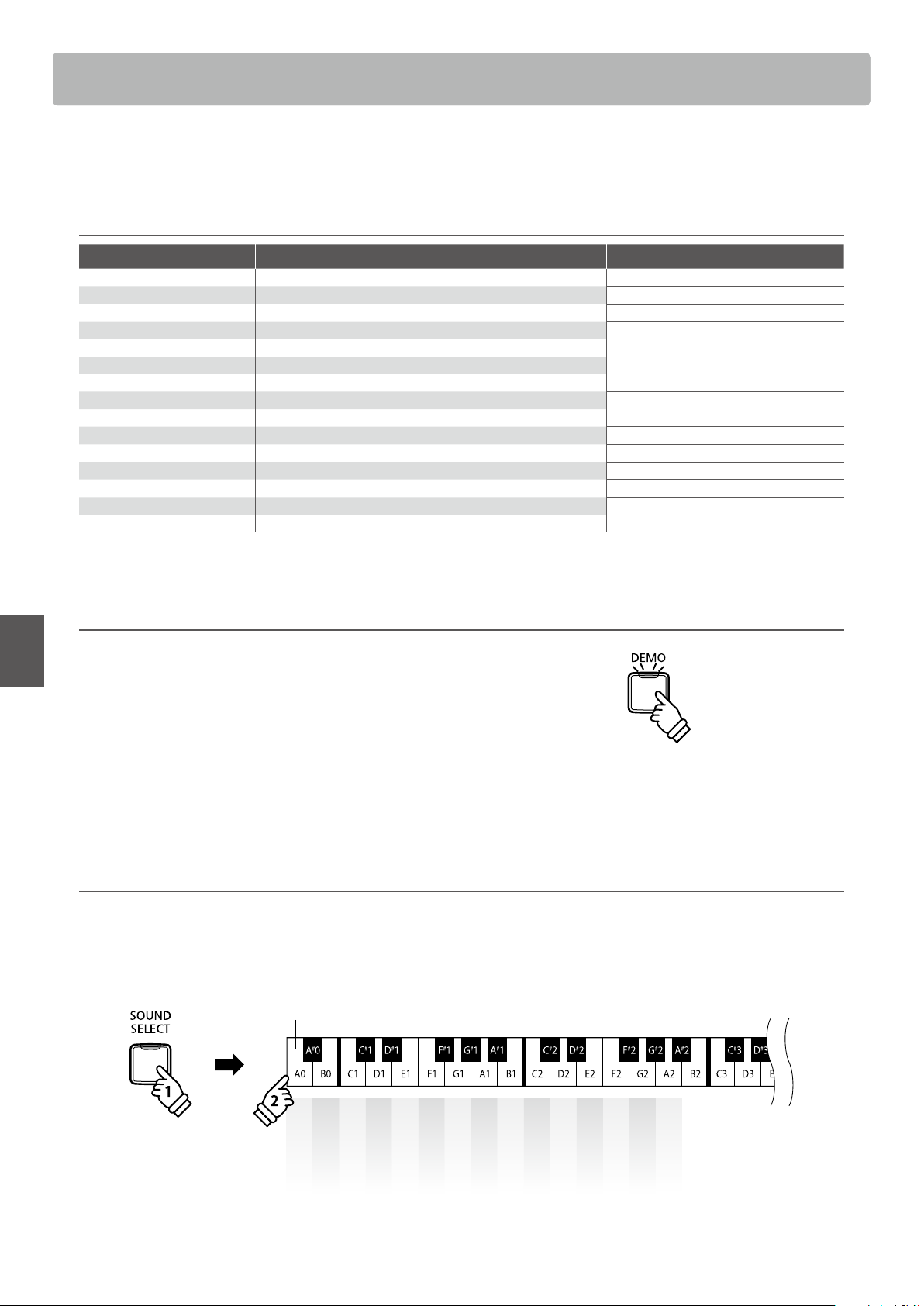
2. Selecting a demo song Operation Guide: SOUND (page 12~13)
While the demo is playing:
To listen to the demo song for a particular sound, press and hold the SOUND SELECT button, then press one of the lowest 15 white
keys assigned to the desired sound.
holdhold
Concert Grand
Studio Grand
Mellow Grand
Modern Piano
Classic E.Piano
Modern E.Piano
Jazz Organ
Church Organ
Harpsichord
Vibraphone
String Ensemble
Slow Strings
Choir
New Age Pad
Atmosphere
Lowest key
Alternatively, press the SOUND SELECT button to skip to the next demo song.
23
Basic Operation
The Concert Magic function allows complete beginners to enjoy playing the piano by simply selecting one
of the 40 pre-programmed songs, then tapping the keyboard with a steady rhythm and tempo.
The Concert Magic songs are categorised by group and assigned to the lowest 40 keys of the keyboard.For a
complete listing of available Concert Magic songs, please refer to page 49 of this owner’s manual.
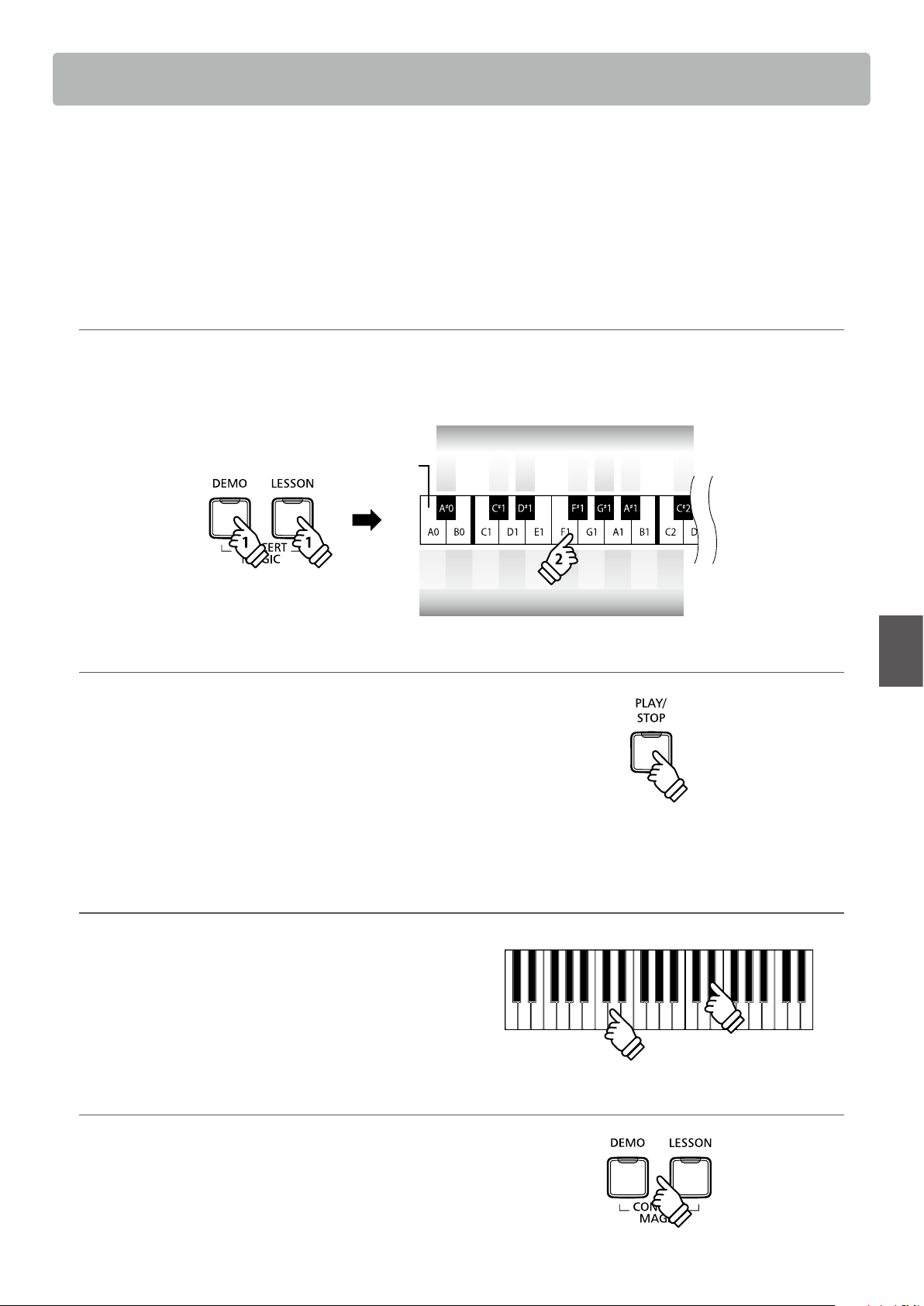
Selecting a Concert Magic song Operation Guide: Concert Magic (page 12~13)
Press and hold the CONCERT MAGIC button (DEMO and LESSON buttons), then press the key assigned to the desired Concert
Magic song.
The LED indicator for the CONCERT MAGIC button will turn on, indicating that Concert Magic playing mode is in use.
Lowest key
holdhold
holdhold
1 3 4 6 8 9 11 13 15 ...
Concert Magic song no.
2 5 10 14 ...7 12
Concert Magic song no.
Listening to the selected Concert Magic song
Press the PLAY/STOP button.
The LED indicator for the PLAY/STOP button will turn on and
the selected Concert Magic song will start to play.
* The selected song will play repeatedly until it is stopped.
* To listen to a dierent Concert Magic song simply repeat the above step.
Press either the PLAY/STOP or CONCERT MAGIC (DEMO and
LESSON) button again to stop the song.
Performing the selected Concert Magic song
Press keys on the keyboard.
The song will advance with every key that is pressed.
Pressing the keys gently will produce a soft sound, while
pressing heavily will produce a loud sound.
Similarly, pressing the keys quickly will increase the tempo of
the song, while pressing slowly will decrease the tempo.
Exiting Concert Magic playing mode
Press the DEMO or LESSON button.
The LED indicator for the CONCERT MAGIC button will turn o
and the instrument will return to normal operation.
Concert Magic
Concert Magic
24
Concert Magic
Basic Operation
Concert Magic demo modes
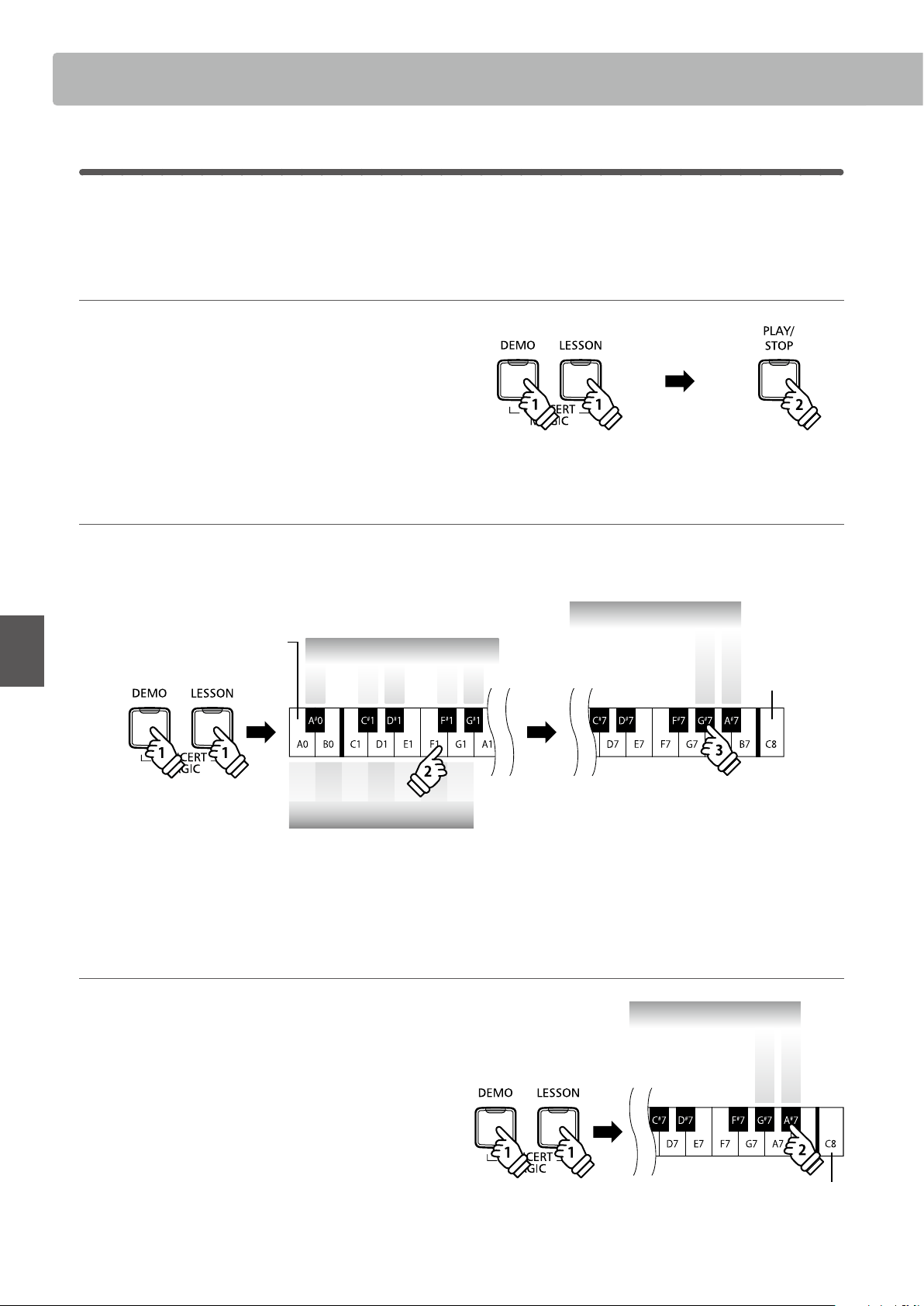
The Concert Magic demo modes allow the Concert Magic songs to be listened to in one of three ways:
All Play, Category Play, and Random Play
All Play
Press the CONCERT MAGIC button (DEMO and LESSON
buttons), then press the PLAY/STOP button.
The LED indicator for the PLAY/STOP button will turn on and
the Concert Magic songs will start to play in numerical order.
Press either the CONCERT MAGIC or PLAY/STOP button again
to stop song playback.
Category Play Operation Guide: Concert Magic (page 12~13)
Press and hold the CONCERT MAGIC button (DEMO and LESSON buttons), then press the key assigned to the desired Concert
Magic song.
While still holding the CONCERT MAGIC button, press the G#7 key.
After selecting
a song
holdhold
holdhold
1 3 4 6 8 9 ...
Concert Magic song no.
2 5 10 ...7
Concert Magic song no.
Lowest key
Highest key
Concert Magic demo modes
Category Play
Random Play
The selected Concert Magic song will start to play.
* When the selected song nishes, the next song in the same category will start to play automatically.
Random Play Operation Guide: Concert Magic (page 12~13)
Press the CONCERT MAGIC button (DEMO and LESSON
buttons) and then press the A#7 key.
The KDP120/KDP75 digital piano will play back the rst
Concert Magic song, followed by the remaining 39 Concert
Magic songs in random order.
holdhold
holdhold
Highest key
Concert Magic demo modes
Category Play
Random Play

25
Concert Magic
Basic Operation
Concert Magic Mode
The Concert Magic Mode setting changes the Concert Magic playing mode, allowing all Concert Magic songs
to be played by simply tapping any key with a constant steady beat, regardless of the song arrangement
type.
Concert Magic Mode
Concert Magic Mode Description Pedal
Normal Concert Magic songs will be performed according to their arrangement type. Soft
Steady Beat All Concert Magic songs will be performed by tapping the key with a constant beat. Sostenuto
Changing the Concert Magic Mode
Press and hold the CONCERT MAGIC button (DEMO and LESSON buttons), then press the pedal assigned to the desired Concert
Magic Mode.
To select Normal mode, press and hold the CONCERT MAGIC button, then depress the Soft pedal.
To select Steady Beat mode, press and hold the CONCERT MAGIC button, then depress the Sostenuto pedal.
The selected Concert Magic Mode type will be applied immediately.
* When the instrument is turned on, the Concert Magic Mode setting will return to the default type of “Normal”.
Concert Magic
26
Basic Operation
Concert Magic song arrangement types
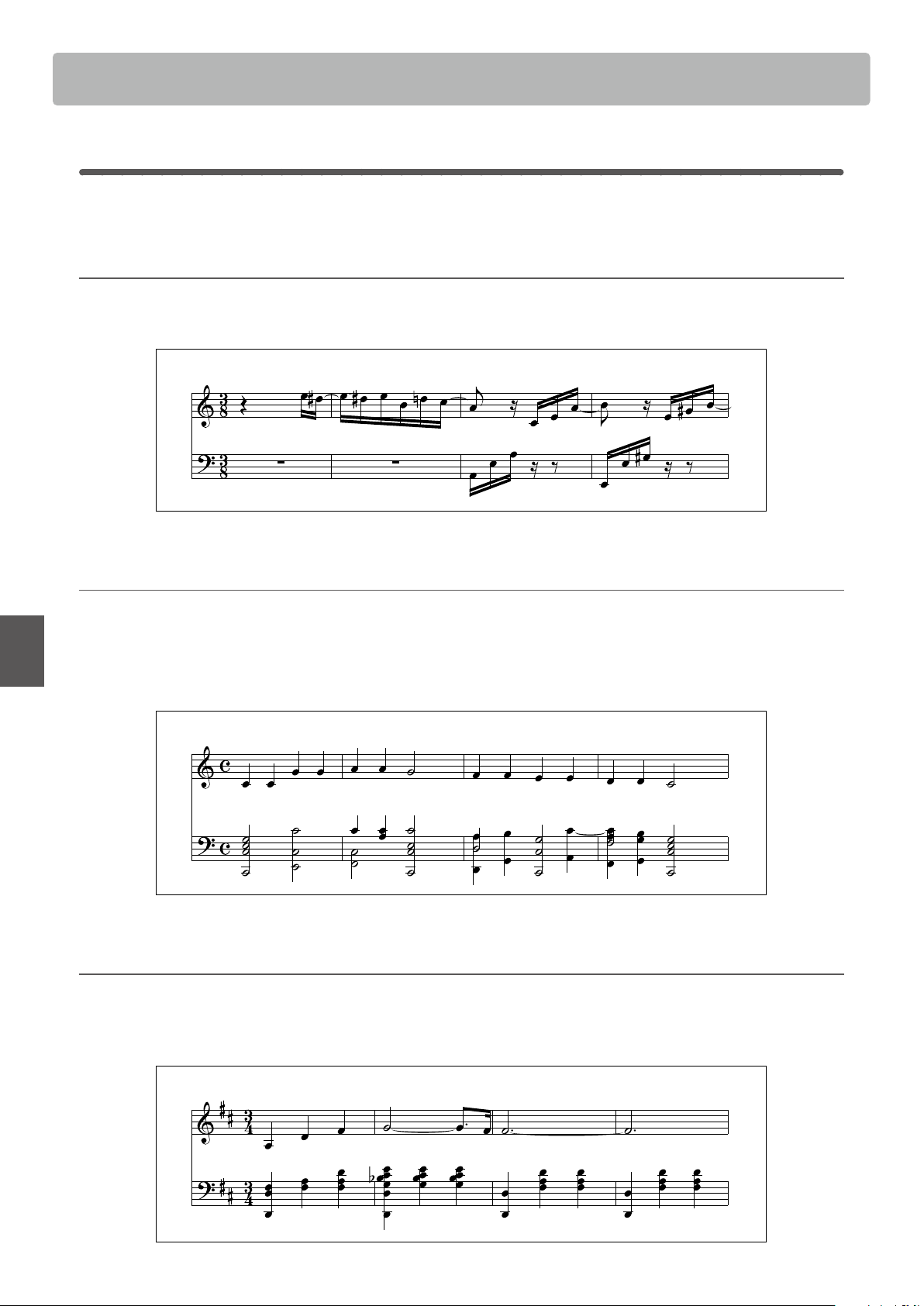
Concert Magic songs are divided into three dierent arrangement types: Easy Beat (EB), Melody Play (MP),
and Skillful (SK). Each arrangement type requires a dierent level of skill to be performed correctly.
Easy Beat EB
These are the easiest songs to play. To perform them, simply tap out a constant, steady beat on any key of the keyboard.
For example, when playing the piece “Für Elise”, a constant, steady rhythm should to be maintained throughout the song.
Key on: X X X X X X X X X XX X X X X X X X X X
Melody Play MP
These songs are also relatively easy to play, especially if they are familiar to the player. To perform them, tap out the rhythm of the
melody on any key of the keyboard. Singing along as the rhythm is tapped can be helpful.
For example, when playing the piece “Twinkle, Twinkle, Little Star”, the rhythm of the melody should be played.
* When performing fast Concert Magic songs, it may be easier to press dierent keys with two alternating ngers in order to achieve greater speed.
Key on: X X X X X X X X X X X X X X
Skillful SK
These songs range in diculty from moderately dicult to dicult. To perform them, tap out the rhythm of both the melody and
the accompaniment notes on any key of the keyboard.
For example, when playing the piece “Waltz of the Flowers”, the rhythm of both the melody and the accompaniment should be
played.
Key on: X X X X X X X X X X X X X
27
Basic Operation
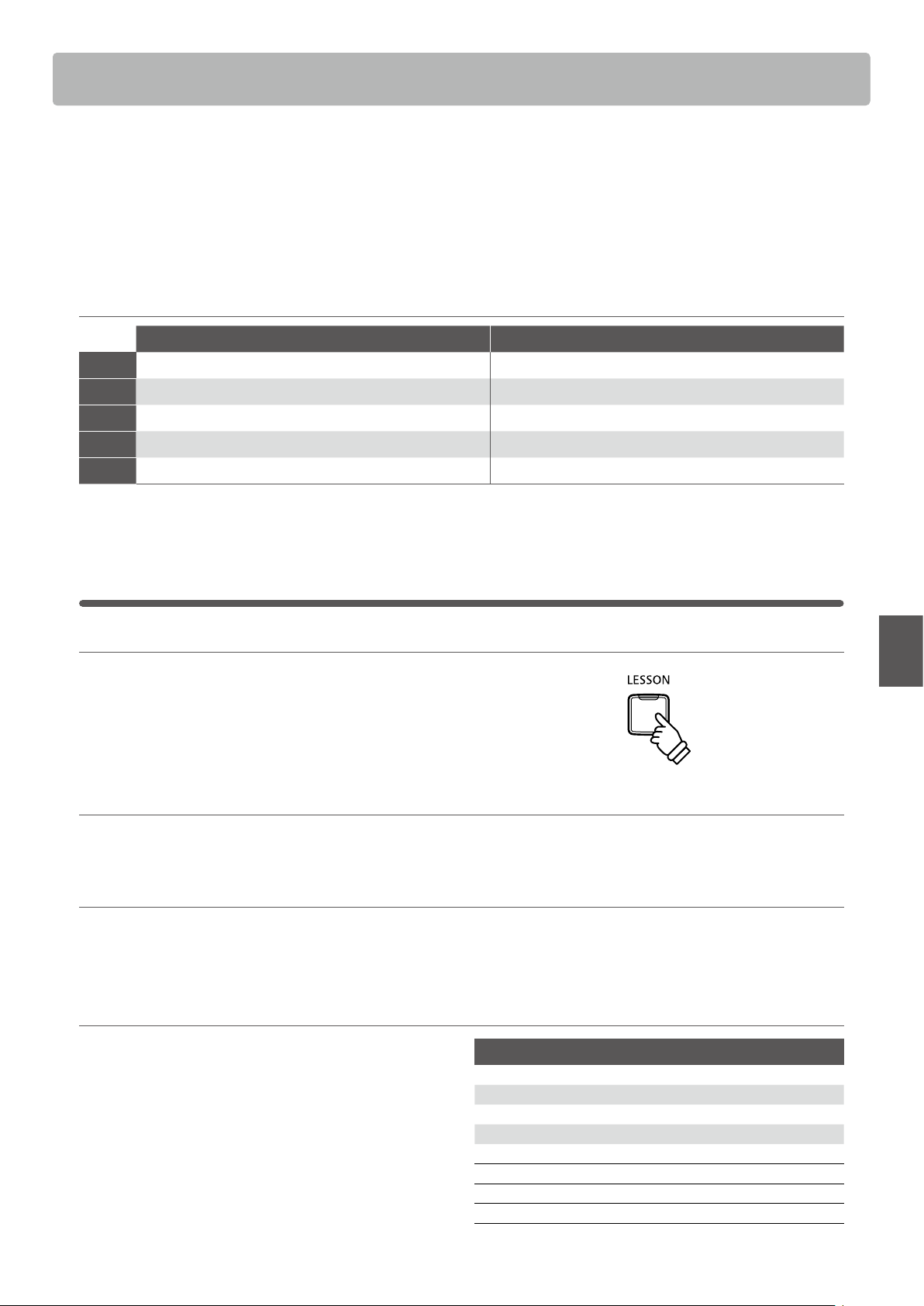
The Lesson function allows budding pianists to practice the piano using a selection of built-in song books.
The left and right hand parts for each piece can be practiced separately, while adjusting the tempo allows
dicult passages to be perfected.
For a complete listing of available Lesson Function songs, please refer to page 50 of this owner’s manual.
Built-in lesson function song books
US, Canada, Australasia Rest of the World
Book 1
Alfred’s Basic Piano Library Lesson Book Level 1A Beyer 106 (Vorschule im Klavierspiel, Opus 101)
Book 2
Alfred’s Basic Piano Library Lesson Book Level 1B Burgmüller 25 (25 Etudes Faciles, Opus 100)
Book 3
Beyer 106 (Vorschule im Klavierspiel, Opus 101) Czerny 30 (Etudes de Mécanisme, Opus 849)
Book 4
Burgmüller 25 (25 Etudes Faciles, Opus 100) Alfred’s Basic Piano Library Lesson Book Level 1A
Book 5
Czerny 30 (Etudes de Mécanisme, Opus 849) Alfred’s Basic Piano Library Lesson Book Level 1B
* Lesson books sold separately - please refer to page 51 of this owner’s manual for more information.
1
Selecting a lesson book/song
1. Entering lesson mode
Press the LESSON button.
The LED indicator for the LESSON button will turn on, indicating
that lesson mode is enabled, and the Concert Grand sound will
be selected automatically.
2. Selecting a lesson book Operation Guide: LESSON (page 14)
While holding down the LESSON button, press the black key assigned to the desired lesson book.
3. Selecting a lessson song Operation Guide: LESSON (page 14)
While holding down the LESSON button, enter the piece number by pressing the corresponding white keys in sequence (e.g. to
select piece no.25, press D1 followed by G1). Then, release the LESSON button.
Selecting the Beyer variation
The Beyer lesson book includes 106 exercises. Exercise no.1
consists of 12 variations, while exercise no.2 consists of 8
variations.
To select the variation for the no.1 and no.2 exercises, rst press
and hold the LESSON button and press the corresponding
black key to select the Beyer lesson book.
While holding down the LESSON button, press the C1 or D1
key to select the no.1 or no.2 exercise, then nally press the B0
key (+) multiple times to select the desired variation.
Listing of Beyer’s pieces
No. 1 Theme
1-1 to 1-12 Variations
No. 2 Theme
2-1 to 2-8 Variations
No. 3 Theme
No. 4 Theme
Theme
No. 106 Theme
Lesson Function
Lesson Function
28
Lesson Function
Basic Operation
2
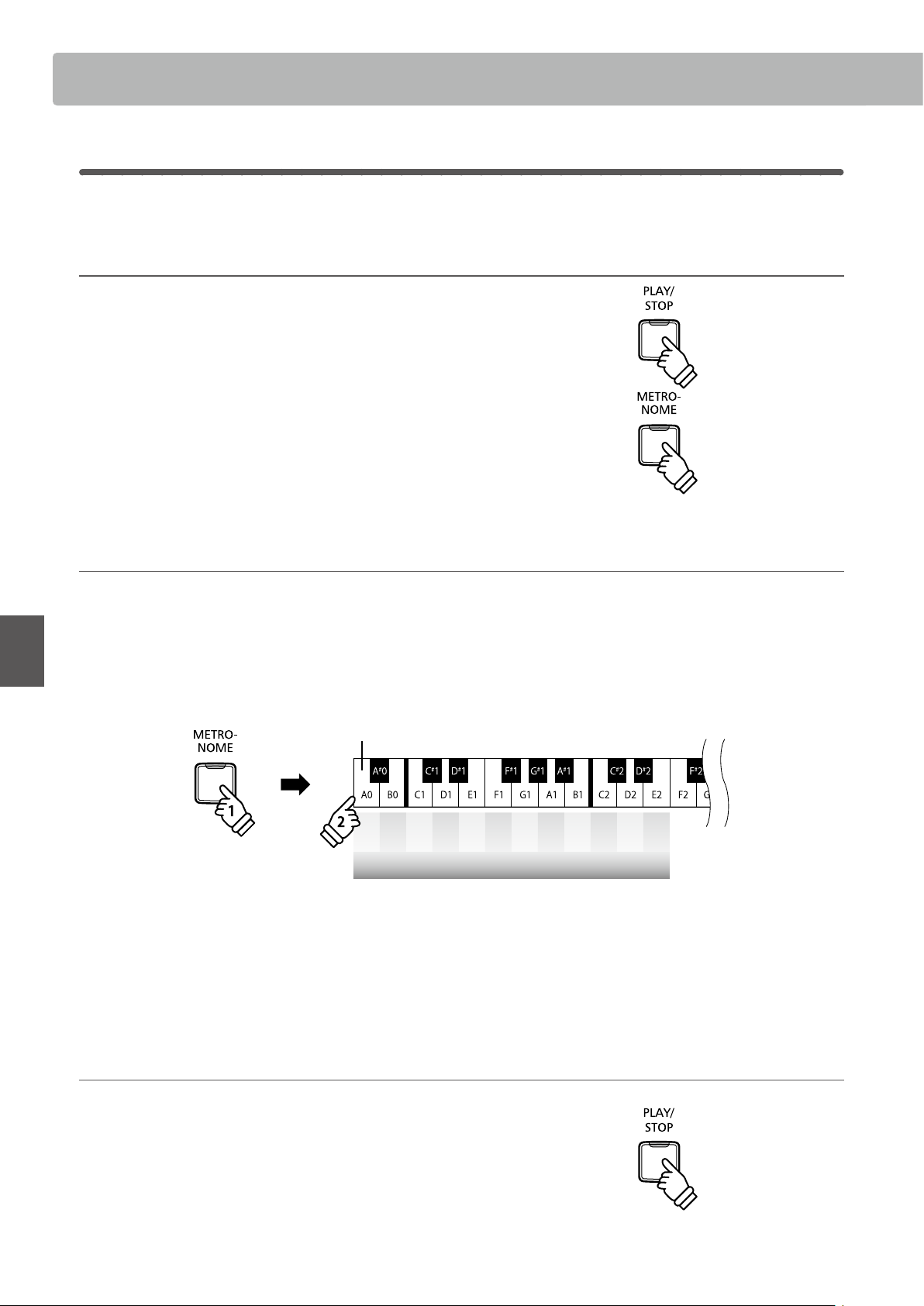
Listening to the selected lesson song
This page will explain how to play and stop the selected lesson song, and adjust the tempo.
Playing the lesson song
After selecting a lesson book and song:
Press the PLAY/STOP button.
The LED indicator for the PLAY/STOP button will turn on, and
a one bar count-in will be heard before the song starts to play.
While the lesson song is playing, press the METRONOME
button to turn the metronome on/o.
* The metronome time signature and tempo will automatically be set to
that of the currently selected lesson song.
Adjusting tempo of the lesson song Operation Guide: METRONOME (page 12~13)
While the lesson song is playing:
Press and hold the METRONOME button, enter the desired tempo using the lowest 12 white keys marked below, then release the
METRONOME button.
* The lesson song tempo can be adjusted within the range of 10-300 bpm.
* The lesson song tempo can be entered precisely, or decreased and increased gradually.
holdhold
– + 1 2 3 4 5 6 7 8 9 0
Lesson Song Tempo
Lowest key
Method 1:
While pressing the METRONOME button, press keys 1, 5, and 0 to set the tempo to 150 bpm, or keys 8 and 5 to set the tempo to
85 bpm.
Method 2:
While pressing the METRONOME button, press the - / + keys repeatedly to gradually decrease or increase the tempo in 2 bpm
increments.
Stopping the lesson song
While the lesson song is playing:
Press the PLAY/STOP button again to stop the lesson song.
The LED indicator for the PLAY/STOP button will turn o.
29
Lesson Function
Basic Operation
3
Practicing left and right-hand parts separately
This page will explain how to mute/activate the left and right-hand parts of the selected lesson song,
allowing each part to be practiced separately.
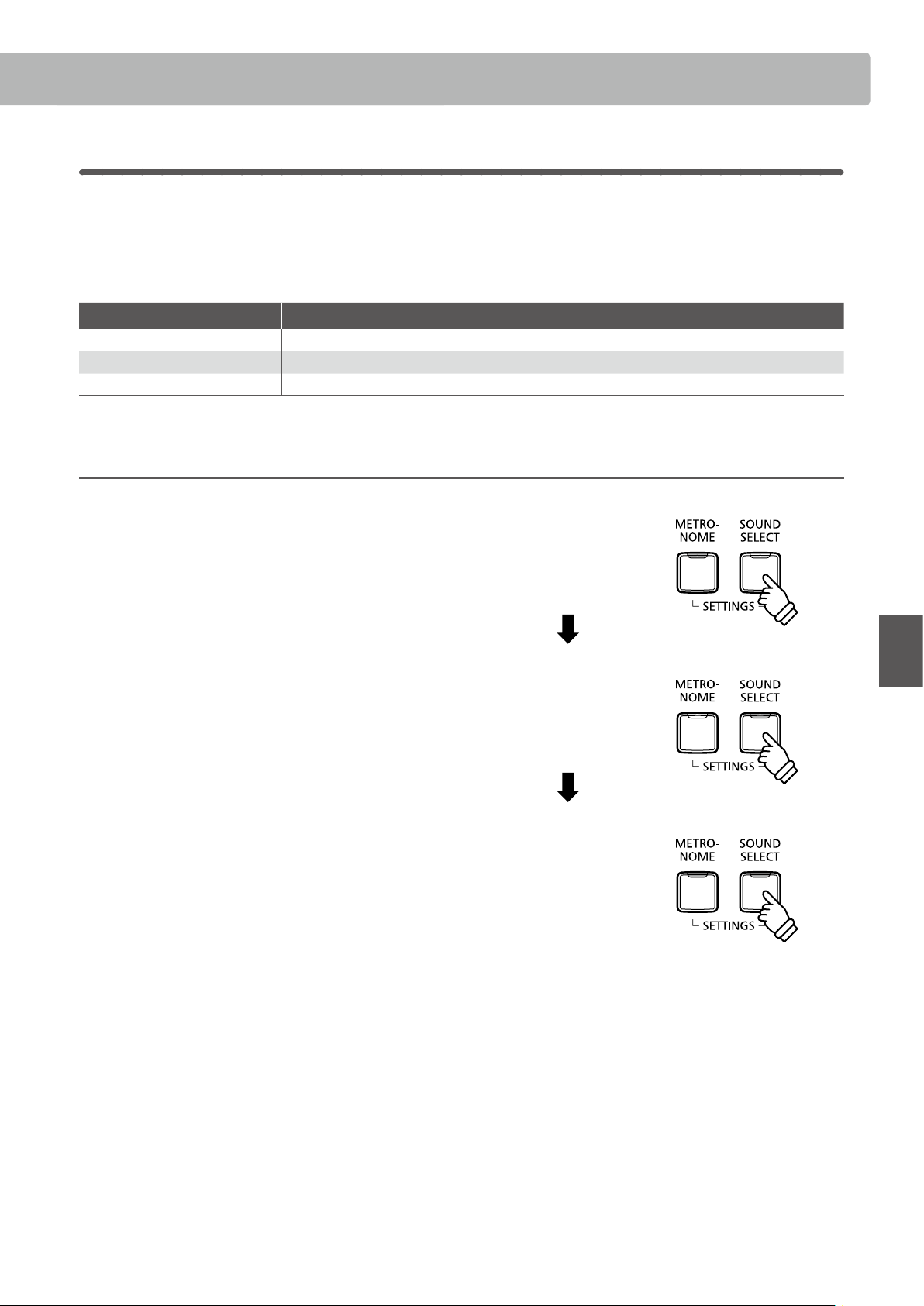
The LED indicators for the METRONOME and SOUND SELECT buttons are used to indicate which part (left or
right-hand) of the selected lesson song is muted/active.
METRONOME button LED SOUND SELECT button LED Lesson song playback
On On Left and Right-hand parts
(default playing mode)
On O Left-hand part only
O On Right-hand part only
Muting/activating lesson song parts 1
After selecting a lesson book and song:
Press the SOUND SELECT button.
The LED indicator for the SOUND SELECT button will turn o
(the LED indicator for the METRONOME button will remain
turned on), indicating that only the left-hand part of the lesson
song is active (i.e. the right-hand part will be muted).
Press the SOUND SELECT button again.
The LED indicator for the SOUND SELECT button will turn on
and the LED indicator for the METRONOME button will turn
o, indicating that only the right-hand part of the lesson song
is active (i.e. the left-hand part will be muted).
Press the SOUND SELECT button once again.
The LED indicator for the SOUND SELECT button will remain
turned on and the LED indicator for the METRONOME button
will also turn on, indicating that both the left and right-hand
parts of the lesson song are active.
Press once:
Left-hand only
Press twice:
Right-hand only
Press 3 times:
Left and Right-hand
Lesson Function
30
Basic Operation
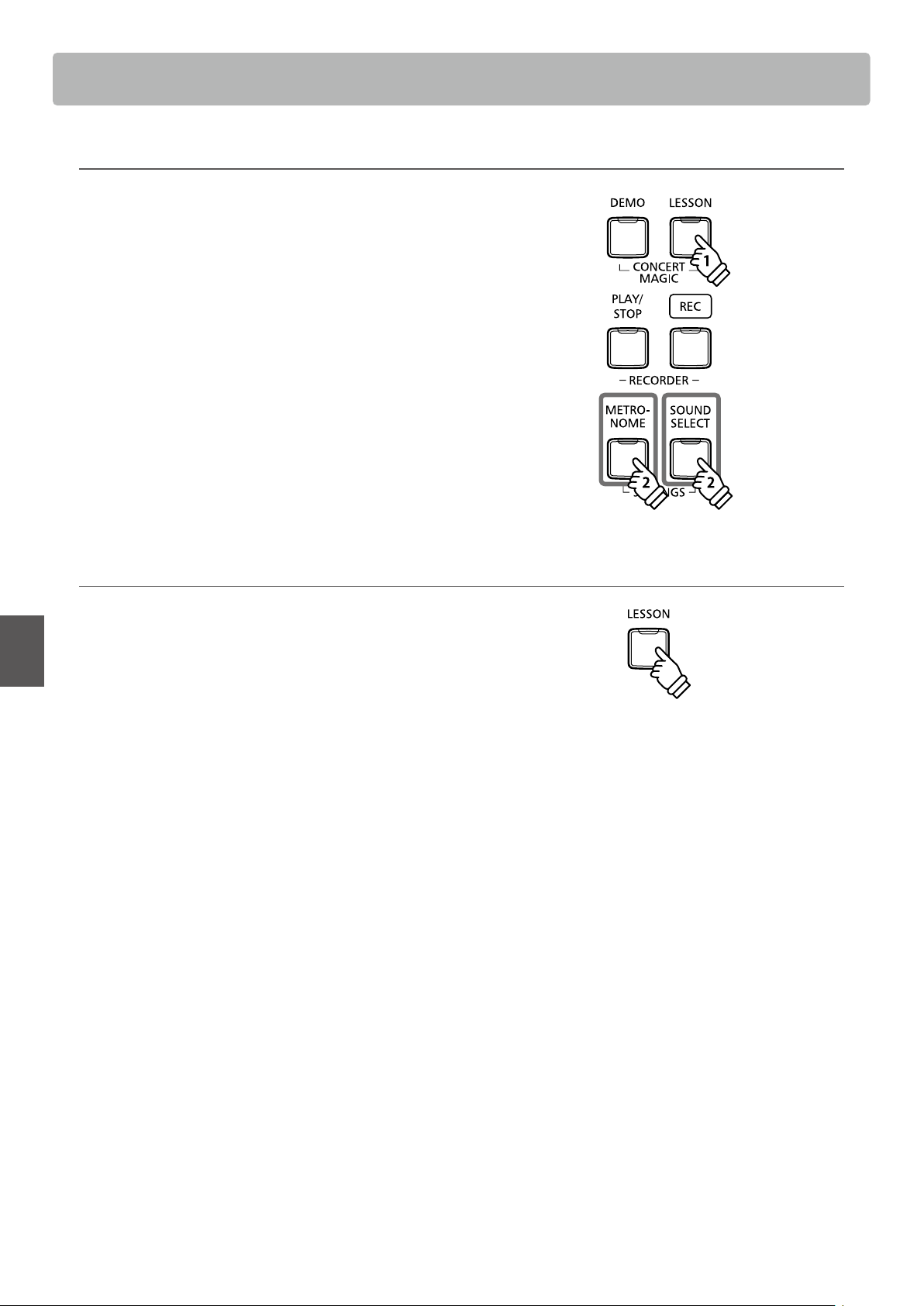
Muting/activating lesson song parts 2
Select a part directly. While holding down the LESSON button,
press the part button you want to replay.
Press and hold the METRONOME and SOUND SELECT buttons
simultaneously, both the left and right parts will return to
playback.
To restore the normal replay, exit the lesson mode and then
enter the lesson mode again.
Exiting lesson mode
Press the LESSON button.
The LED indicator for the LESSON button will turn o, and the
instrument will return to normal operation.
Left-hand part Right-hand part
holdhold
31
Basic Operation
Recorder
The KDP120/KDP75 digital piano allows up to 3 dierent songs to be recorded, stored in internal memory,
and played back at the touch of a button.
1
Recording a song
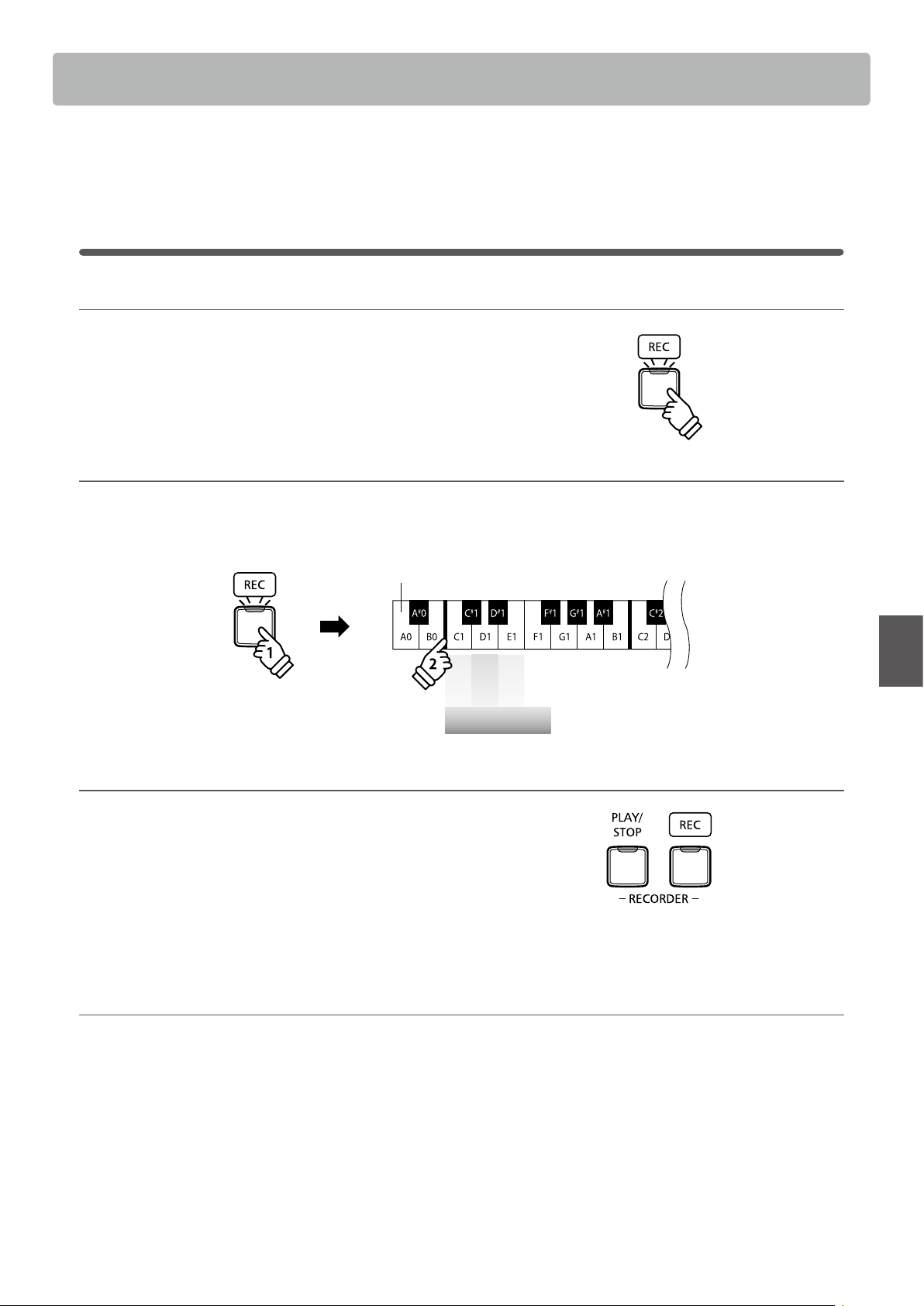
1. Entering song recorder mode
Press the REC button.
The LED indicator for the REC button will start to ash, to
indicate that the piano is in recording standby mode.
2. Selecting a song memory Operation Guide: RECORDER (page 15)
Press and hold the REC button, then press the C1, D1 or E1 key to select the desired song memory.
* Selecting a song memory that has already been used to record a song will automatically erase the previously recorded song.
Song 1
Song 2
Song 3
Song Memory
Lowest key
holdhold
3. Starting the song recorder
Press a key on the keyboard.
The LED indicators for the REC and PLAY/STOP buttons will
turn on, and recording will start.
* Recording can also be started by pressing the PLAY/STOP button,
allowing a rest period or empty bar to be inserted at the beginning of
the song.
4. Stopping the song recorder
Press the PLAY/STOP button.
The LED indicators for the PLAY/STOP and REC buttons will turn o.
* The maximum recording capacity is approximately 10,000 notes, with button and pedal presses also counted as one note.
If the maximum recording capacity is reached during recording, the recorder will stop automatically.
* Recorder songs will remain in memory after the power is turned o.
Recorder
32
Basic Operation
2
Playing back a song
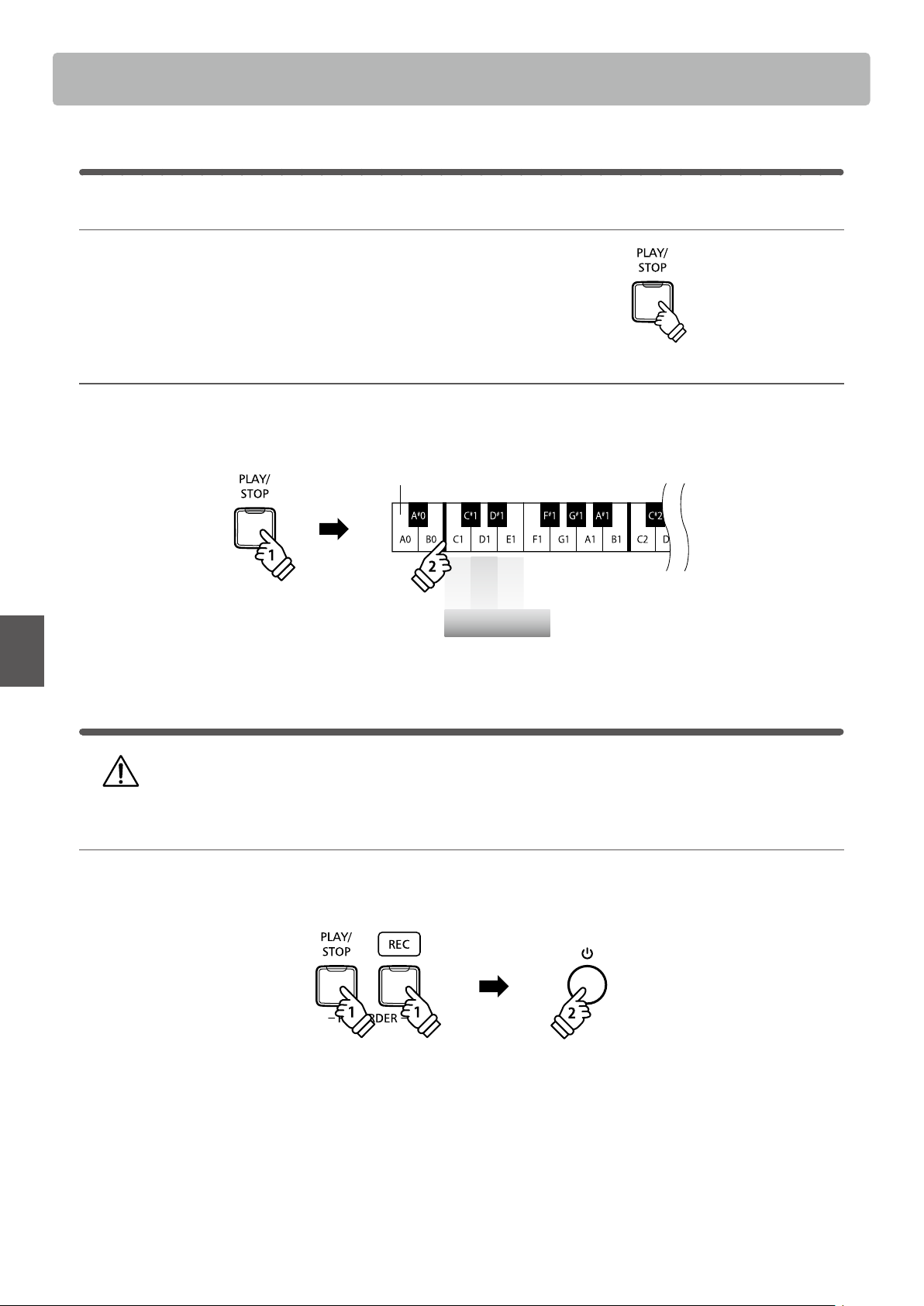
1. Playing the recorded song
Press the PLAY/STOP button.
The LED indicator for the PLAY/STOP button will turn on, and
the recorded song will start to play.
2. Playing a song stored in another memory Operation Guide: RECORDER (page 15)
Press and hold the PLAY/STOP button, then press the C1, D1 or E1 key to play the desired song memory.
* The selected song will start to play when the PLAY/STOP button is released.
Song 1
Song 2
Song 3
Song Memory
Lowest key
holdhold
3
Erasing recorded songs
Warning: This process will erase all three songs stored in internal memory, and cannot be undone.
Erasing the recorder songs
Press and hold the PLAY/STOP and REC buttons simultaneously, then turn the instrument’s power on.
All recorder songs stored in memory will be erased.
holdhold
holdhold
33
Adjustments & Settings
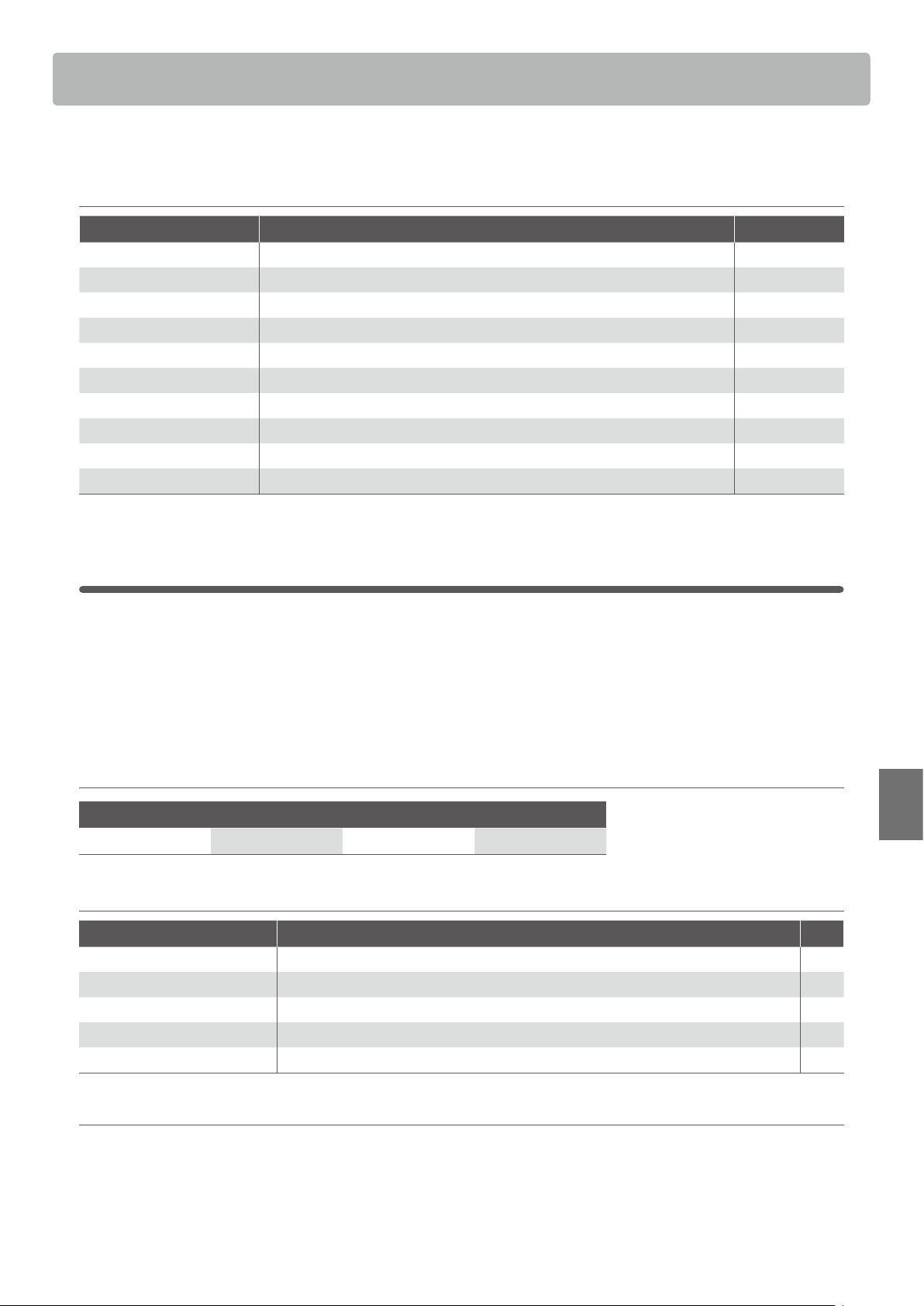
Keyboard and Sound Settings
The KDP120/KDP75’s keyboard and sound settings allow various aspects of the instrument to be adjusted.
Keyboard and Sound Settings
Setting name Explanation Default setting
Damper Resonance Adjust the resonance that is heard when depressing the damper pedal. Medium
Reverb Change the type of reverberation added to the sound. On
Touch Change the touch sensitivity of the keyboard. Normal
Low Volume Balance Change the dierence in volume between pianissimo and fortissimo playing. Type3
Tuning Increase or decrease the pitch of the keyboard in 0.5 Hz steps. 440.0Hz
Transpose Increase or decrease the pitch of the keyboard in semi-tone steps. 0
Brilliance Adjust the brightness of the sound. 0
Virtual Technician Select the tuning from 10 preset styles. O
Spatial Headphone Sound Select the desired Spatial Headphone Sound mode. Normal
Phones Type Select the type of headphones to be used with the instrument. Normal
1
Damper Resonance
Depressing the sustain pedal of an acoustic piano raises all dampers, allowing the strings to vibrate freely.
When a note or chord is played on the piano with the sustain pedal depressed, not only will the strings of the
notes played vibrate, but also the strings of other notes, vibrating in sympathetic resonance.
The KDP120/KDP75 digital piano recreates this phenomenon, with the Damper Resonance setting allowing
the volume of this resonance to be changed.
Damper Resonance
Sounds aected by Damper Resonance
Concert Grand Studio Grand Mellow Grand Modern Piano
Damper Resonance type
Damper Resonance type Description Key
O Disables the damper resonance eect. C#2
On (Re)Enables the damper resonance eect. D#2
Small Piano sounds produce a small amount of damper resonance. F#2
Medium
(default) Piano sounds produce a medium amount of damper resonance. G#2
Large Piano sounds produce a large amount of damper resonance. A#2
Changing the Damper Resonance type Operation Guide: SOUND (page 12~13)
Press and hold the SOUND SELECT button, then press the key assigned to the desired Damper Resonance type.
* To disable/enable the damper resonance eect, press the key assigned to the o/on function.
* If the damper resonance eect is disabled, it will be turned on automatically upon selecting a damper resonance type.
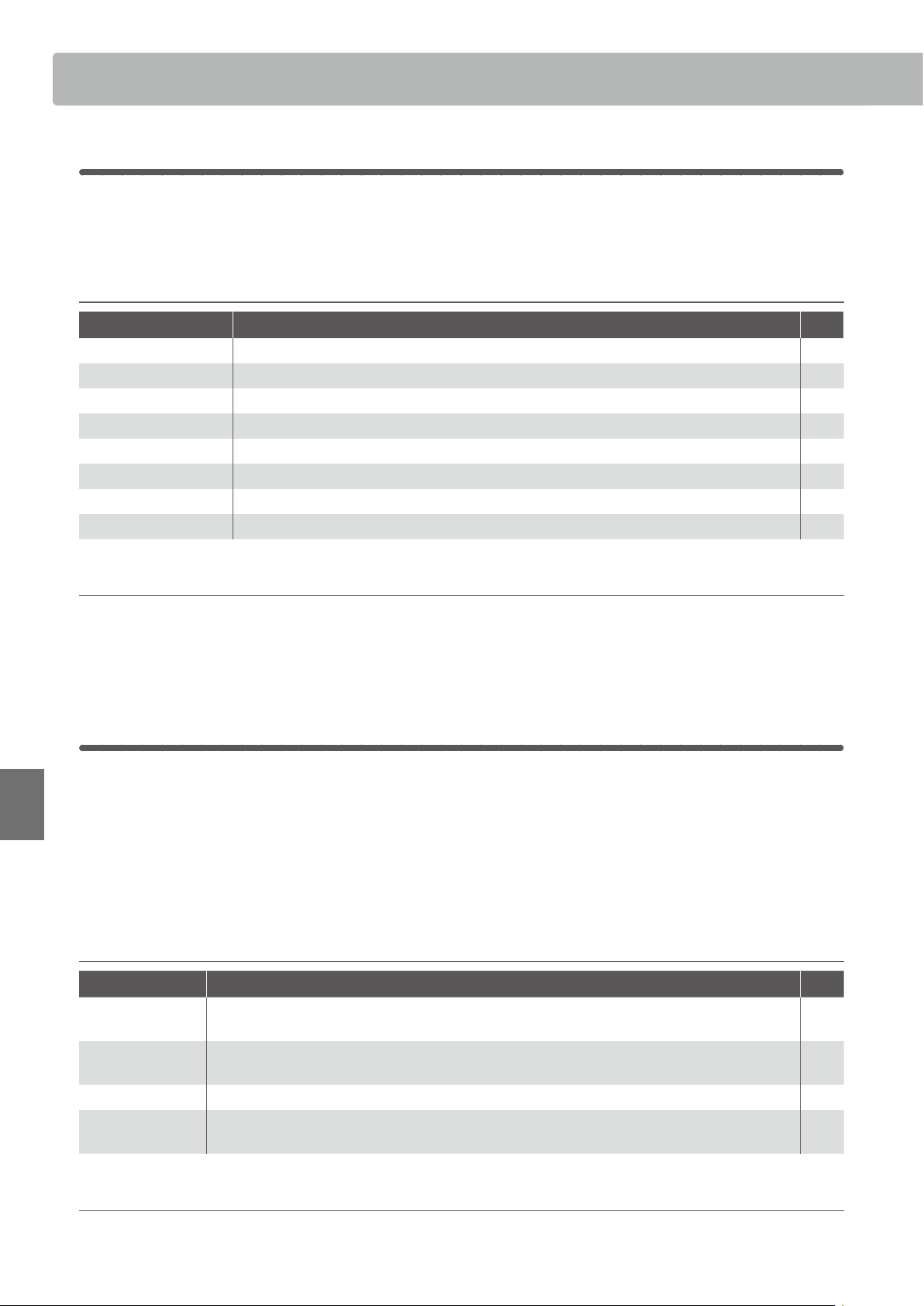
Keyboard and Sound Settings
34
Keyboard and Sound Settings
Adjustments & Settings
2
Reverb
Adjust the type and amount of reverb applied to the current sound, in order to simulate various dierent
virtual environments. The most suitable reverb type is applied automatically when selecting each sound,
however it is also possible to select a dierent reverb type manually if desired.
Reverb type
Reverb type Description Key
O Disables the reverb eect. C#5
On (Re)Enables the reverb eect. D#5
Room Simulates the ambiance of a small rehearsal room. C5
Lounge Simulates the ambience of piano lounge. D5
Small Hall Simulates the ambiance of a small hall. E5
Concert Hall Simulates the ambiance of a concert hall or theater. F5
Live Hall Simulates the ambiance of a live hall or stage. G5
Cathedral Simulates the ambiance of a large cathedral. A5
Changing the Reverb type Operation Guide: SOUND (page 12~13)
Press and hold the SOUND SELECT button, then press the key assigned to the desired Reverb type.
* To disable/enable the reverb eect, press the key assigned to the “o/on” function.
* If the reverb eect is disabled, it will be turned on automatically upon selecting a reverb type.
3
Touch
As with an acoustic piano, the KDP120/KDP75 digital piano produces a louder sound when the keys are
struck with force, and a softer sound when the keys are played gently. The volume and tonal character
change in relation to the strength and speed of playing - on a digital piano this system is referred to as
“touch sensitivity”.
The Touch setting allows the touch sensitivity of the keyboard to be conveniently adjusted. There are four
dierent preset touch settings available.
Touch type
Touch type Description Key
O
A constant volume is produced regardless of how hard the keys are struck.
This setting is recommended for sounds that have a xed dynamic range such as organ and harpsichord.
C#3
Light
A louder volume is produced even when playing with a soft touch.
This setting is recommended for children and organ players, or for those still developing nger strength.
F#3
Normal
(default) Reproduces the standard touch sensitivity of an acoustic piano. G#3
Heavy
Requires a heavier touch to produce a loud volume.
This setting is recommended to those with stronger ngers.
A#3
Changing the Touch type Operation Guide: SOUND (page 12~13)
Press and hold the SOUND SELECT button, then press the key assigned to the desired touch type.
35
Keyboard and Sound Settings
Adjustments & Settings
4
Low Volume Balance
The Low Volume Balance setting reduces the dierence in volume between pianissimo and fortissimo
touches, allowing the piano to continue to be played at low volume without the sound of pianissimo notes
being lost.
Low Volume Balance type
Low Volume Balance type Description Key
O Low Volume Balance adjustment is not applied. F4
Type1
When playing at low volume, a small amount of Low Volume Balance adjustment will be
applied.
G4
Type2
The amount of Low Volume Balance adjustment applied when playing at low volume will
gradually increase.
A4
Type3
(default) B4
Type4 C5
Type5
When playing at low volume, a large amount of Low Volume Balance adjustment will be
applied.
D5
Changing the Low Volume Balance type Operation Guide: SETTINGS (page 14~15)
Press and hold the METRONOME and SOUND SELECT buttons, then press the key assigned to the desired Low Volume Balance
type.
5
Tuning
The Tuning setting allows the overall pitch of the KDP120/KDP75 digital piano to be raised and lowered in
0.5 Hz steps, and may therefore prove useful when playing with other instruments.
Adjusting the Tuning setting: Method 1 Operation Guide: SETTINGS (page 14~15)
Press and hold the METRONOME and SOUND SELECT buttons, then enter the desired pitch using the number keys indicated
below.
* The keyboard pitch can be adjusted within the range of 427 - 453 Hz.
* To reset the pitch to 440.0Hz, press the Reset key indicated below.
Adjusting the Tuning setting: Method 2 Operation Guide: SETTINGS (page 14~15)
Press and hold the METRONOME and SOUND SELECT buttons, then press the keys assigned -/+ to lower or raise the keyboard pitch
in 0.5 Hz steps.

Keyboard and Sound Settings
36
Keyboard and Sound Settings
Adjustments & Settings
6
Transpose
The Key Transpose setting allows the pitch of the KDP120/KDP75 digital piano keyboard to be raised or
lowered in semi-tone steps. This is particularly useful when accompanying instruments with dierent tones,
or when a song learned in one key must be played in another key. When transposed, the song can be played
in the original key, yet heard in a dierent key.
Adjusting the Transpose setting Operation Guide: SETTINGS (page 14~15)
Press and hold the METRONOME and SOUND SELECT buttons, then press the keys assigned -/+ to lower or raise the keyboard pitch
in semi-tone steps.
* The transpose setting can be adjusted within the range of –6 - +5 semi-tones.
* To disable/enable the transpose setting, press the key assigned to the “o/on” function.
7
Brilliance
The Brilliance setting allows the brightness of the KDP120/KDP75 digital piano’s sound to be adjusted.
Adjusting the Brilliance setting Operation Guide: SOUND (page 12~13)
Press and hold the SOUND SELECT button, then press the F#4 or G#4 key repeatedly to decrease or increase the brightness of the
sound.
* The Brilliance setting can be adjusted within the range of -10~+10, with +10 being the brightest setting.
* To reset the Brilliance eect, press and hold the SOUND SELECT button, then press the C#4 key.
37
Keyboard and Sound Settings
Adjustments & Settings
8
Virtual Technician (Smart Mode)
An experienced piano technician is essential to fully realise the potential of a ne acoustic piano. In
addition to meticulously tuning each note, the technician also performs numerous regulation and voicing
adjustments that allow the instrument to truly sing.
The KDP120/KDP75 digital piano’s Virtual Technician simulates these renements digitally, with ten preset
congurations that intelligently adjust various characteristics of the grand piano sound to match dierent
musical styles.
Virtual Technician type
Virtual Technician type
Description Key
Normal
(default) The default piano sound without additional adjustments. C6
Noiseless A piano adjusted to minimise additional damper resonance. D6
Deep Resonance A piano adjusted to emphasise damper resonance. E6
Light Resonance A piano adjusted to reduce damper resonance. F6
Soft
A piano adjusted by softening the hammers and increasing the touch weight of the keyboard in
order to produce a softer tone that is suitable for slow, quiet pieces.
G6
Brilliant A piano adjusted by hardening the hammers in order to produce a brighter tone for modern pieces. A6
Clean A piano adjusted by hardening the hammers and reducing the damper resonance. C#6
Full
A piano adjusted to emphasise dynamics with a lightened keyboard touch and powerful damper resonance.
D#6
Dark
A piano adjusted by hardening the hammers and increasing the touch weight of the keyboard, in
order to produce a dark, gloomy tone.
F#6
Rich A piano adjusted by lightening the touch weight of the keyboard and increasing damper resonance. G#6
Historical A piano adjusted for romantic, classical music, with a bright, open tone. A#6
Selecting the Virtual Technician type Operation Guide: SOUND (page 12~13)
Press and hold the SOUND SELECT button, then press the key assigned to the desired Virtual Technician type.
Piano Remote
In addition to changing the piano’s sound by selecting dierent Virtual Technician presets, it is also possible to adjust individual
characteristics using the PianoRemote app. This app gives the player full control over every aspect of the piano’s conguration,
allowing precise adjustments to be made to voicing, damper resonance and various other acoustic characteristics, from a
convenient touchscreen interface.
Keyboard and Sound Settings
38
Adjustments & Settings
9
Spatial Headphone Sound
Spatial Headphone Sound is a special feature of the KDP120/KDP75 digital piano that enhances the depth
and realism of the acoustic piano sound when listening through headphones or earphones.
The Spatial Headphone Sound setting allows the player to select from one of three dierent acoustic presets
that adjust the spatial positioning of the sound, while also helping to reduce auditory fatigue when using
earphones or headphones for extended periods of time.
Spatial Headphone Sound type
Spatial Headphone Sound type Description Key
O Disable the Spatial Headphone Sound feature. C#7
Forward Front focused, somewhat narrow spatial positioning. F#7
Normal
(default) Naturally balanced spatial positioning that is neither forward nor wide. G#7
Wide Wide, very open spatial positioning. A#7
Setting the Spatial Headphone Sound system Operation Guide: SOUND (page 12~13)
Press and hold the SOUND SELECT button, then press the key assigned to the desired Spatial Headphone Sound type.
10
Phones Type
The Phones Type setting optimises the sound of the KDP120/KDP75 digital piano when listening through
dierent types of headphones or earphones.
* This setting does not aect the speaker sound.
Phones type
Phones type Description Key
Normal
(default) Disables headphone optimisation. C7
Open Optimises the sound for open type headphones. D7
Semi-open Optimises the sound for semi-open type headphones. E7
Closed Optimises the sound for closed type headphones. F7
Inner-ear Optimises the sound for inner-ear type headphones. G7
Canal Optimises the sound for canal-type headphones A7
Phones Type setting Operation Guide: SOUND (page 12~13)
Press and hold the SOUND SELECT button, then press the key assigned to the desired Phones type.

39
Adjustments & Settings
The KDP120/KDP75 digital piano features a power saving function that can be used to automatically turn o
the instrument after a specied period of inactivity.
Auto Power O settings
Auto Power O Explanation Key
O The Auto Power O function is disabled. G7
15 min. The instrument will turn o automatically after 15 minutes of inactivity. A7
60 min. The instrument will turn o automatically after 60 minutes of inactivity. B7
120 min. The instrument will turn o automatically after 120 minutes of inactivity. C8
Selecting the Auto Power O setting Operation Guide: SETTINGS (page 14~15)
Press and hold the METRONOME and SOUND SELECT buttons simultaneously, then press the key assigned to the desired Auto
Power O setting.
* The Auto Power O setting will be stored automatically, and recalled every time the instrument is turned on.
Auto Power O

Bluetooth® MIDI (KDP120 only)
40
Adjustments & Settings
Bluetooth® MIDI (KDP120 only)
The Bluetooth MIDI setting is used to enable/disable the KDP120 digital piano’s Bluetooth MIDI function.
When enabled, the KDP120 digital piano can be connected to smart phones, tablets, and other smart devices
to facilitate wireless MIDI communication, allowing a wide range of music-related apps to be enjoyed using
the instrument.
* Availability of Bluetooth function dependent on market location.
Bluetooth MIDI settings
Bluetooth MIDI Description Key
O Disables the instrument’s Bluetooth MIDI function. G#2
On (default) Enables the instrument’s Bluetooth MIDI function. A#2
Enabling/disabling Bluetooth MIDI Operation Guide: SETTINGS (page 14~15)
Press and hold the METRONOME and SOUND SELECT buttons, then press the G#2 key to disable Bluetooth MIDI, or the A#2 key to
enable Bluetooth MIDI.
Connecting the KDP120 digital piano to a smart device using Bluetooth MIDI
After enabling the Bluetooth MIDI function of the KDP120 digital piano, enable Bluetooth communications on the smart device.
After a few moments the KDP120 digital piano should appear in the app’s device list. Tap the KDP120 entry to connect the
instrument to the smart device. It should now be possible for MIDI apps to communicate with the KDP120 digital piano.
* When the KDP120 digital piano is connected to a smart device via Bluetooth MIDI, the USB MIDI connector will be disabled.
* Please check for Bluetooth MIDI compatibility with the smart device manufacturer and app developer.
* For a list of potential issues and recommended solutions when using Bluetooth communications, please refer to page 44 of this owner’s manual.
* For more detailed instructions regarding Bluetooth pairing, please refer to the Bluetooth support pages of the Kawai Global website:
http://www.kawai-global.com/support/bluetooth/
41
Adjustments & Settings
Information about Bluetooth® (KDP120 only)
Please refer to the following information about Bluetooth.
About Bluetooth
The Bluetooth® word mark and logos are registered trademarks owned by the Bluetooth SIG, Inc. and any use of such marks by
Kawai Musical Instruments Mfg. Co., Ltd. is under license.
Frequency Band of Radio: 2400~2483.5 MHz Maximum Transmit Power: 2.5 mW (Bluetooth Low Energy), 4.5mW (A2DP)
Availability of Bluetooth function dependent on market location.
For USA, Canada
▮
For USA, Canada
It is strictly forbidden to use antenna except designated.
This equipment must not be co-located or operated in
conjunction with any other antenna or transmitter.
Please refer to the following information about Bluetooth.
Information about Bluetooth®
▮
About Bluetooth
・The Bluetooth® word mark and logos are registered trademarks owned by the Bluetooth SIG, Inc. and any use of such marks by Kawai
Musical Instruments Mfg. Co., Ltd. is under license.
・Frequency Band of Radio: 2400~2483.5 MHz Maximum Transmit Power: 2.5 mW (Bluetooth Low Energy), 4.5mW (A2DP)
・Availability of Bluetooth function dependent on market location.
▮
For Canada
・This device complies with Industry Canada’s licence-exempt
RSSs. Operation is subject to the following two conditions:
(1) This device may not cause interference; and
(2) This device must accept any interference, including
interference that may cause undesired operation of the device.
・Le présent appareil est conforme aux CNR d’Industrie Canada
applicables aux appareils radio exempts de licence. L’exploitation
est autorisée aux deux conditions suivantes :
(1) l’appareil ne doit pas produire de brouillage;
(2) l’utilisateur de l’appareil doit accepter tout brouillage
radioélectrique subi,même si le brouillage est susceptible d’en
compromettre le fonctionnement.
▮
For Taiwan
第十二條 經型式認證合格之低功率射頻電機,非經許可,公司、商號或使
用者均不得擅自變更頻率、加大功率或變更原設計之特性及功能。
第十四條 低功率射頻電機之使用不得影響飛航安全及干擾合法通信;經發
現有干擾現象時,應立即停用,並改善至無干擾時方得繼續使用。 前項合法
通信,指依電信法規定作業之無線電通信。 低功率射頻電機
須忍受合法通
信或工業、科學及醫療用電波輻射性電機設備之干擾。
▮
For Argentina
Marca : KAWAI, Bluegiga
Modelo : MBH7BLZ07, WT32i
▮
For Mexico
PIANO DIGITAL
MARCA : KAWAI
MODELO : MBH7BLZ07, RCPKAMB16-1764
: WT32i, RCPKAWT17-1556
La operación de este equipo está sujeta a las siguientes dos
condiciones:
(1) es posible que este equipo o dispositivo no cause interferencia
perjudicialy
(2) este equipo o dispositivo debe aceptar cualquier interferencia,
▮
For Brazil
Este equipamento opera em caráter secundário, isto é, não
tem direito a proteção contra interferência prejudicial, mesmo
de estações do mesmo tipo e não pode causar interferência a
sistemas operando em caráter primário. Para consultas, visite:
www.anatel.gov.br
▮
For Korea
・
해당 무선설비는 전파혼신 가능성이 있으므로 인명안전과 관련된 서비스는 할 수 없습니다
・
B 급 기기 ( 가정용 방송통신기자재 ) 이 기기는 가정용 (B 급 ) 전자파적합기기로서 주로 가정에서 사용하는 것을 목적으로 하며 , 모든 지역에서 사용할 수 있습니다 .
・
모델명 MBH7BLZ07 WT32i-A
・
인증을받은 상표 이름제조자 Kawai Musical Instruments Manufacturing Co., Ltd. Bluegiga Technologies Oy
・
원산지 일본 핀란드
・
기자재 명칭 정소출력 무선기기 ( 무선데이터통신시스템용 무선기기 )
・
제조년 월 제품에 붙어있는 라벨을 확인하시기 바랍니다
.
▮
For South Africa
C-17079
C-21199
TA-2016/2398
APPROVED
TA-2018/509
APPROVED
04349-16-10021
02414-18-01395
For Canada
▮
For USA, Canada
It is strictly forbidden to use antenna except designated.
This equipment must not be co-located or operated in
conjunction with any other antenna or transmitter.
Please refer to the following information about Bluetooth.
Information about Bluetooth®
▮
About Bluetooth
・The Bluetooth® word mark and logos are registered trademarks owned by the Bluetooth SIG, Inc. and any use of such marks by Kawai
Musical Instruments Mfg. Co., Ltd. is under license.
・Frequency Band of Radio: 2400~2483.5 MHz Maximum Transmit Power: 2.5 mW (Bluetooth Low Energy), 4.5mW (A2DP)
・Availability of Bluetooth function dependent on market location.
▮
For Canada
・This device complies with Industry Canada’s licence-exempt
RSSs. Operation is subject to the following two conditions:
(1) This device may not cause interference; and
(2) This device must accept any interference, including
interference that may cause undesired operation of the device.
・Le présent appareil est conforme aux CNR d’Industrie Canada
applicables aux appareils radio exempts de licence. L’exploitation
est autorisée aux deux conditions suivantes :
(1) l’appareil ne doit pas produire de brouillage;
(2) l’utilisateur de l’appareil doit accepter tout brouillage
radioélectrique subi,même si le brouillage est susceptible d’en
compromettre le fonctionnement.
▮
For Taiwan
第十二條 經型式認證合格之低功率射頻電機,非經許可,公司、商號或使
用者均不得擅自變更頻率、加大功率或變更原設計之特性及功能。
第十四條 低功率射頻電機之使用不得影響飛航安全及干擾合法通信;經發
現有干擾現象時,應立即停用,並改善至無干擾時方得繼續使用。 前項合法
通信,指依電信法規定作業之無線電通信。 低功率射頻電機
須忍受合法通
信或工業、科學及醫療用電波輻射性電機設備之干擾。
▮
For Argentina
Marca : KAWAI, Bluegiga
Modelo : MBH7BLZ07, WT32i
▮
For Mexico
PIANO DIGITAL
MARCA : KAWAI
MODELO : MBH7BLZ07, RCPKAMB16-1764
: WT32i, RCPKAWT17-1556
La operación de este equipo está sujeta a las siguientes dos
condiciones:
(1) es posible que este equipo o dispositivo no cause interferencia
perjudicialy
(2) este equipo o dispositivo debe aceptar cualquier interferencia,
▮
For Brazil
Este equipamento opera em caráter secundário, isto é, não
tem direito a proteção contra interferência prejudicial, mesmo
de estações do mesmo tipo e não pode causar interferência a
sistemas operando em caráter primário. Para consultas, visite:
www.anatel.gov.br
▮
For Korea
・
해당 무선설비는 전파혼신 가능성이 있으므로 인명안전과 관련된 서비스는 할 수 없습니다
・
B 급 기기 ( 가정용 방송통신기자재 ) 이 기기는 가정용 (B 급 ) 전자파적합기기로서 주로 가정에서 사용하는 것을 목적으로 하며 , 모든 지역에서 사용할 수 있습니다 .
・
모델명 MBH7BLZ07 WT32i-A
・
인증을받은 상표 이름제조자 Kawai Musical Instruments Manufacturing Co., Ltd. Bluegiga Technologies Oy
・
원산지 일본 핀란드
・
기자재 명칭 정소출력 무선기기 ( 무선데이터통신시스템용 무선기기 )
・
제조년 월 제품에 붙어있는 라벨을 확인하시기 바랍니다
.
▮
For South Africa
C-17079
C-21199
TA-2016/2398
APPROVED
TA-2018/509
APPROVED
04349-16-10021
02414-18-01395
For South Africa
▮
For USA, Canada
It is strictly forbidden to use antenna except designated.
This equipment must not be co-located or operated in
conjunction with any other antenna or transmitter.
Please refer to the following information about Bluetooth.
Information about Bluetooth®
▮
About Bluetooth
・The Bluetooth® word mark and logos are registered trademarks owned by the Bluetooth SIG, Inc. and any use of such marks by Kawai
Musical Instruments Mfg. Co., Ltd. is under license.
・Frequency Band of Radio: 2400~2483.5 MHz Maximum Transmit Power: 2.5 mW (Bluetooth Low Energy), 4.5mW (A2DP)
・Availability of Bluetooth function dependent on market location.
▮
For Canada
・This device complies with Industry Canada’s licence-exempt
RSSs. Operation is subject to the following two conditions:
(1) This device may not cause interference; and
(2) This device must accept any interference, including
interference that may cause undesired operation of the device.
・Le présent appareil est conforme aux CNR d’Industrie Canada
applicables aux appareils radio exempts de licence. L’exploitation
est autorisée aux deux conditions suivantes :
(1) l’appareil ne doit pas produire de brouillage;
(2) l’utilisateur de l’appareil doit accepter tout brouillage
radioélectrique subi,même si le brouillage est susceptible d’en
compromettre le fonctionnement.
▮
For Taiwan
第十二條 經型式認證合格之低功率射頻電機,非經許可,公司、商號或使
用者均不得擅自變更頻率、加大功率或變更原設計之特性及功能。
第十四條 低功率射頻電機之使用不得影響飛航安全及干擾合法通信;經發
現有干擾現象時,應立即停用,並改善至無干擾時方得繼續使用。 前項合法
通信,指依電信法規定作業之無線電通信。 低功率射頻電機
須忍受合法通
信或工業、科學及醫療用電波輻射性電機設備之干擾。
▮
For Argentina
Marca : KAWAI, Bluegiga
Modelo : MBH7BLZ07, WT32i
▮
For Mexico
PIANO DIGITAL
MARCA : KAWAI
MODELO : MBH7BLZ07, RCPKAMB16-1764
: WT32i, RCPKAWT17-1556
La operación de este equipo está sujeta a las siguientes dos
condiciones:
(1) es posible que este equipo o dispositivo no cause interferencia
perjudicialy
(2) este equipo o dispositivo debe aceptar cualquier interferencia,
▮
For Brazil
Este equipamento opera em caráter secundário, isto é, não
tem direito a proteção contra interferência prejudicial, mesmo
de estações do mesmo tipo e não pode causar interferência a
sistemas operando em caráter primário. Para consultas, visite:
www.anatel.gov.br
▮
For Korea
・
해당 무선설비는 전파혼신 가능성이 있으므로 인명안전과 관련된 서비스는 할 수 없습니다
・
B 급 기기 ( 가정용 방송통신기자재 ) 이 기기는 가정용 (B 급 ) 전자파적합기기로서 주로 가정에서 사용하는 것을 목적으로 하며 , 모든 지역에서 사용할 수 있습니다 .
・
모델명 MBH7BLZ07 WT32i-A
・
인증을받은 상표 이름제조자 Kawai Musical Instruments Manufacturing Co., Ltd. Bluegiga Technologies Oy
・
원산지 일본 핀란드
・
기자재 명칭 정소출력 무선기기 ( 무선데이터통신시스템용 무선기기 )
・
제조년 월 제품에 붙어있는 라벨을 확인하시기 바랍니다
.
▮
For South Africa
C-17079
C-21199
TA-2016/2398
APPROVED
TA-2018/509
APPROVED
04349-16-10021
02414-18-01395
For Argentina
▮
For USA, Canada
It is strictly forbidden to use antenna except designated.
This equipment must not be co-located or operated in
conjunction with any other antenna or transmitter.
Please refer to the following information about Bluetooth.
Information about Bluetooth®
▮
About Bluetooth
・The Bluetooth® word mark and logos are registered trademarks owned by the Bluetooth SIG, Inc. and any use of such marks by Kawai
Musical Instruments Mfg. Co., Ltd. is under license.
・Frequency Band of Radio: 2400~2483.5 MHz Maximum Transmit Power: 2.5 mW (Bluetooth Low Energy), 4.5mW (A2DP)
・Availability of Bluetooth function dependent on market location.
▮
For Canada
・This device complies with Industry Canada’s licence-exempt
RSSs. Operation is subject to the following two conditions:
(1) This device may not cause interference; and
(2) This device must accept any interference, including
interference that may cause undesired operation of the device.
・Le présent appareil est conforme aux CNR d’Industrie Canada
applicables aux appareils radio exempts de licence. L’exploitation
est autorisée aux deux conditions suivantes :
(1) l’appareil ne doit pas produire de brouillage;
(2) l’utilisateur de l’appareil doit accepter tout brouillage
radioélectrique subi,même si le brouillage est susceptible d’en
compromettre le fonctionnement.
▮
For Taiwan
第十二條 經型式認證合格之低功率射頻電機,非經許可,公司、商號或使
用者均不得擅自變更頻率、加大功率或變更原設計之特性及功能。
第十四條 低功率射頻電機之使用不得影響飛航安全及干擾合法通信;經發
現有干擾現象時,應立即停用,並改善至無干擾時方得繼續使用。 前項合法
通信,指依電信法規定作業之無線電通信。 低功率射頻電機
須忍受合法通
信或工業、科學及醫療用電波輻射性電機設備之干擾。
▮
For Argentina
Marca : KAWAI, Bluegiga
Modelo : MBH7BLZ07, WT32i
▮
For Mexico
PIANO DIGITAL
MARCA : KAWAI
MODELO : MBH7BLZ07, RCPKAMB16-1764
: WT32i, RCPKAWT17-1556
La operación de este equipo está sujeta a las siguientes dos
condiciones:
(1) es posible que este equipo o dispositivo no cause interferencia
perjudicialy
(2) este equipo o dispositivo debe aceptar cualquier interferencia,
▮
For Brazil
Este equipamento opera em caráter secundário, isto é, não
tem direito a proteção contra interferência prejudicial, mesmo
de estações do mesmo tipo e não pode causar interferência a
sistemas operando em caráter primário. Para consultas, visite:
www.anatel.gov.br
▮
For Korea
・
해당 무선설비는 전파혼신 가능성이 있으므로 인명안전과 관련된 서비스는 할 수 없습니다
・
B 급 기기 ( 가정용 방송통신기자재 ) 이 기기는 가정용 (B 급 ) 전자파적합기기로서 주로 가정에서 사용하는 것을 목적으로 하며 , 모든 지역에서 사용할 수 있습니다 .
・
모델명 MBH7BLZ07 WT32i-A
・
인증을받은 상표 이름제조자 Kawai Musical Instruments Manufacturing Co., Ltd. Bluegiga Technologies Oy
・
원산지 일본 핀란드
・
기자재 명칭 정소출력 무선기기 ( 무선데이터통신시스템용 무선기기 )
・
제조년 월 제품에 붙어있는 라벨을 확인하시기 바랍니다
.
▮
For South Africa
C-17079
C-21199
TA-2016/2398
APPROVED
TA-2018/509
APPROVED
04349-16-10021
02414-18-01395
For Mexico
▮
For USA, Canada
It is strictly forbidden to use antenna except designated.
This equipment must not be co-located or operated in
conjunction with any other antenna or transmitter.
Please refer to the following information about Bluetooth.
Information about Bluetooth®
▮
About Bluetooth
・The Bluetooth® word mark and logos are registered trademarks owned by the Bluetooth SIG, Inc. and any use of such marks by Kawai
Musical Instruments Mfg. Co., Ltd. is under license.
・Frequency Band of Radio: 2400~2483.5 MHz Maximum Transmit Power: 2.5 mW (Bluetooth Low Energy), 4.5mW (A2DP)
・Availability of Bluetooth function dependent on market location.
▮
For Canada
・This device complies with Industry Canada’s licence-exempt
RSSs. Operation is subject to the following two conditions:
(1) This device may not cause interference; and
(2) This device must accept any interference, including
interference that may cause undesired operation of the device.
・Le présent appareil est conforme aux CNR d’Industrie Canada
applicables aux appareils radio exempts de licence. L’exploitation
est autorisée aux deux conditions suivantes :
(1) l’appareil ne doit pas produire de brouillage;
(2) l’utilisateur de l’appareil doit accepter tout brouillage
radioélectrique subi,même si le brouillage est susceptible d’en
compromettre le fonctionnement.
▮
For Taiwan
第十二條 經型式認證合格之低功率射頻電機,非經許可,公司、商號或使
用者均不得擅自變更頻率、加大功率或變更原設計之特性及功能。
第十四條 低功率射頻電機之使用不得影響飛航安全及干擾合法通信;經發
現有干擾現象時,應立即停用,並改善至無干擾時方得繼續使用。 前項合法
通信,指依電信法規定作業之無線電通信。 低功率射頻電機
須忍受合法通
信或工業、科學及醫療用電波輻射性電機設備之干擾。
▮
For Argentina
Marca : KAWAI, Bluegiga
Modelo : MBH7BLZ07, WT32i
▮
For Mexico
PIANO DIGITAL
MARCA : KAWAI
MODELO : MBH7BLZ07, RCPKAMB16-1764
: WT32i, RCPKAWT17-1556
La operación de este equipo está sujeta a las siguientes dos
condiciones:
(1) es posible que este equipo o dispositivo no cause interfere
ncia
perjudicialy
(2) este equipo o dispositivo debe aceptar cualquier interferencia,
▮
For Brazil
Este equipamento opera em caráter secundário, isto é, não
tem direito a proteção contra interferência prejudicial, mesmo
de estações do mesmo tipo e não pode causar interferência a
sistemas operando em caráter primário. Para consultas, visite:
www.anatel.gov.br
▮
For Korea
・
해당 무선설비는 전파혼신 가능성이 있으므로 인명안전과 관련된 서비스는 할 수 없습니다
・
B 급 기기 ( 가정용 방송통신기자재 ) 이 기기는 가정용 (B 급 ) 전자파적합기기로서 주로 가정에서 사용하는 것을 목적으로 하며 , 모든 지역에서 사용할 수 있습니다 .
・
모델명 MBH7BLZ07 WT32i-A
・
인증을받은 상표 이름제조자 Kawai Musical Instruments Manufacturing Co., Ltd. Bluegiga Technologies Oy
・
원산지 일본 핀란드
・
기자재 명칭 정소출력 무선기기 ( 무선데이터통신시스템용 무선기기 )
・
제조년 월 제품에 붙어있는 라벨을 확인하시기 바랍니다
.
▮
For South Africa
C-17079
C-21199
TA-2016/2398
APPROVED
TA-2018/509
APPROVED
04349-16-10021
02414-18-01395
For Brazil
▮
For USA, Canada
It is strictly forbidden to use antenna except designated.
This equipment must not be co-located or operated in
conjunction with any other antenna or transmitter.
Please refer to the following information about Bluetooth.
Information about Bluetooth®
▮
About Bluetooth
・The Bluetooth® word mark and logos are registered trademarks owned by the Bluetooth SIG, Inc. and any use of such marks by Kawai
Musical Instruments Mfg. Co., Ltd. is under license.
・Frequency Band of Radio: 2400~2483.5 MHz Maximum Transmit Power: 2.5 mW (Bluetooth Low Energy), 4.5mW (A2DP)
・Availability of Bluetooth function dependent on market location.
▮
For Canada
・This device complies with Industry Canada’s licence-exempt
RSSs. Operation is subject to the following two conditions:
(1) This device may not cause interference; and
(2) This device must accept any interference, including
interference that may cause undesired operation of the device.
・Le présent appareil est conforme aux CNR d’Industrie Canada
applicables aux appareils radio exempts de licence. L’exploitation
est autorisée aux deux conditions suivantes :
(1) l’appareil ne doit pas produire de brouillage;
(2) l’utilisateur de l’appareil doit accepter tout brouillage
radioélectrique subi,même si le brouillage est susceptible d’en
compromettre le fonctionnement.
▮
For Taiwan
第十二條 經型式認證合格之低功率射頻電機,非經許可,公司、商號或使
用者均不得擅自變更頻率、加大功率或變更原設計之特性及功能。
第十四條 低功率射頻電機之使用不得影響飛航安全及干擾合法通信;經發
現有干擾現象時,應立即停用,並改善至無干擾時方得繼續使用。 前項合法
通信,指依電信法規定作業之無線電通信。 低功率射頻電機
須忍受合法通
信或工業、科學及醫療用電波輻射性電機設備之干擾。
▮
For Argentina
Marca : KAWAI, Bluegiga
Modelo : MBH7BLZ07, WT32i
▮
For Mexico
PIANO DIGITAL
MARCA : KAWAI
MODELO : MBH7BLZ07, RCPKAMB16-1764
: WT32i, RCPKAWT17-1556
La operación de este equipo está sujeta a las siguientes dos
condiciones:
(1) es posible que este equipo o dispositivo no cause interferencia
perjudicialy
(2) este equipo o dispositivo debe aceptar cualquier interferencia,
▮
For Brazil
Este equipamento opera em caráter secundário, isto é, não
tem direito a proteção contra interferência prejudicial, mesmo
de estações do mesmo tipo e não pode causar interferência a
sistemas operando em caráter primário. Para consultas, visite:
www.anatel.gov.br
▮
For Korea
・
해당 무선설비는 전파혼신 가능성이 있으므로 인명안전과 관련된 서비스는 할 수 없습니다
・
B 급 기기 ( 가정용 방송통신기자재 ) 이 기기는 가정용 (B 급 ) 전자파적합기기로서 주로 가정에서 사용하는 것을 목적으로 하며 , 모든 지역에서 사용할 수 있습니다 .
・
모델명 MBH7BLZ07 WT32i-A
・
인증을받은 상표 이름제조자 Kawai Musical Instruments Manufacturing Co., Ltd. Bluegiga Technologies Oy
・
원산지 일본 핀란드
・
기자재 명칭 정소출력 무선기기 ( 무선데이터통신시스템용 무선기기 )
・
제조년 월 제품에 붙어있는 라벨을 확인하시기 바랍니다
.
▮
For South Africa
C-17079
C-21199
TA-2016/2398
APPROVED
TA-2018/509
APPROVED
04349-16-10021
02414-18-01395
For Taiwan
▮
For USA, Canada
It is strictly forbidden to use antenna except designated.
This equipment must not be co-located or operated in
conjunction with any other antenna or transmitter.
Please refer to the following information about Bluetooth.
Information about Bluetooth®
▮
About Bluetooth
・The Bluetooth® word mark and logos are registered trademarks owned by the Bluetooth SIG, Inc. and any use of such marks by Kawai
Musical Instruments Mfg. Co., Ltd. is under license.
・Frequency Band of Radio: 2400~2483.5 MHz Maximum Transmit Power: 2.5 mW (Bluetooth Low Energy), 4.5mW (A2DP)
・Availability of Bluetooth function dependent on market location.
▮
For Canada
・This device complies with Industry Canada’s licence-exempt
RSSs. Operation is subject to the following two conditions:
(1) This device may not cause interference; and
(2) This device must accept any interference, including
interference that may cause undesired operation of the device.
・Le présent appareil est conforme aux CNR d’Industrie Canada
applicables aux appareils radio exempts de licence. L’exploitation
est autorisée aux deux conditions suivantes :
(1) l’appareil ne doit pas produire de brouillage;
(2) l’utilisateur de l’appareil doit accepter tout brouillage
radioélectrique subi,même si le brouillage est susceptible d’en
compromettre le fonctionnement.
▮
For Taiwan
第十二條 經型式認證合格之低功率射頻電機,非經許可,公司、商號或使
用者均不得擅自變更頻率、加大功率或變更原設計之特性及功能。
第十四條 低功率射頻電機之使用不得影響飛航安全及干擾合法通信;經發
現有干擾現象時,應立即停用,並改善至無干擾時方得繼續使用。 前項合法
通信,指依電信法規定作業之無線電通信。 低功率射頻電機
須忍受合法通
信或工業、科學及醫療用電波輻射性電機設備之干擾。
▮
For Argentina
Marca : KAWAI, Bluegiga
Modelo : MBH7BLZ07, WT32i
▮
For Mexico
PIANO DIGITAL
MARCA : KAWAI
MODELO : MBH7BLZ07, RCPKAMB16-1764
: WT32i, RCPKAWT17-1556
La operación de este equipo está sujeta a las siguientes dos
condiciones:
(1) es posible que este equipo o dispositivo no cause interferencia
perjudicialy
(2) este equipo o dispositivo debe aceptar cualquier interferencia,
▮
For Brazil
Este equipamento opera em caráter secundário, isto é, não
tem direito a proteção contra interferência prejudicial, mesmo
de estações do mesmo tipo e não pode causar interferência a
sistemas operando em caráter primário. Para consultas, visite:
www.anatel.gov.br
▮
For Korea
・
해당 무선설비는 전파혼신 가능성이 있으므로 인명안전과 관련된 서비스는 할 수 없습니다
・
B 급 기기 ( 가정용 방송통신기자재 ) 이 기기는 가정용 (B 급 ) 전자파적합기기로서 주로 가정에서 사용하는 것을 목적으로 하며 , 모든 지역에서 사용할 수 있습니다 .
・
모델명 MBH7BLZ07 WT32i-A
・
인증을받은 상표 이름제조자 Kawai Musical Instruments Manufacturing Co., Ltd. Bluegiga Technologies Oy
・
원산지 일본 핀란드
・
기자재 명칭 정소출력 무선기기 ( 무선데이터통신시스템용 무선기기 )
・
제조년 월 제품에 붙어있는 라벨을 확인하시기 바랍니다
.
▮
For South Africa
C-17079
C-21199
TA-2016/2398
APPROVED
TA-2018/509
APPROVED
04349-16-10021
02414-18-01395
For Korea
▮
For USA, Canada
It is strictly forbidden to use antenna except designated.
This equipment must not be co-located or operated in
conjunction with any other antenna or transmitter.
Please refer to the following information about Bluetooth.
Information about Bluetooth®
▮
About Bluetooth
・The Bluetooth® word mark and logos are registered trademarks owned by the Bluetooth SIG, Inc. and any use of such marks by Kawai
Musical Instruments Mfg. Co., Ltd. is under license.
・Frequency Band of Radio: 2400~2483.5 MHz Maximum Transmit Power: 2.5 mW (Bluetooth Low Energy), 4.5mW (A2DP)
・Availability of Bluetooth function dependent on market location.
▮
For Canada
・This device complies with Industry Canada’s licence-exempt
RSSs. Operation is subject to the following two conditions:
(1) This device may not cause interference; and
(2) This device must accept any interference, including
interference that may cause undesired operation of the device.
・Le présent appareil est conforme aux CNR d’Industrie Canada
applicables aux appareils radio exempts de licence. L’exploitation
est autorisée aux deux conditions suivantes :
(1) l’appareil ne doit pas produire de brouillage;
(2) l’utilisateur de l’appareil doit accepter tout brouillage
radioélectrique subi,même si le brouillage est susceptible d’en
compromettre le fonctionnement.
▮
For Taiwan
第十二條 經型式認證合格之低功率射頻電機,非經許可,公司、商號或使
用者均不得擅自變更頻率、加大功率或變更原設計之特性及功能。
第十四條 低功率射頻電機之使用不得影響飛航安全及干擾合法通信;經發
現有干擾現象時,應立即停用,並改善至無干擾時方得繼續使用。 前項合法
通信,指依電信法規定作業之無線電通信。 低功率射頻電機
須忍受合法通
信或工業、科學及醫療用電波輻射性電機設備之干擾。
▮
For Argentina
Marca : KAWAI, Bluegiga
Modelo : MBH7BLZ07, WT32i
▮
For Mexico
PIANO DIGITAL
MARCA : KAWAI
MODELO : MBH7BLZ07, RCPKAMB16-1764
: WT32i, RCPKAWT17-1556
La operación de este equipo está sujeta a las siguientes dos
condiciones:
(1) es posible que este equipo o dispositivo no cause interferencia
perjudicialy
(2) este equipo o dispositivo debe aceptar cualquier interferencia,
▮
For Brazil
Este equipamento opera em caráter secundário, isto é, não
tem direito a proteção contra interferência prejudicial, mesmo
de estações do mesmo tipo e não pode causar interferência a
sistemas operando em caráter primário. Para consultas, visite:
www.anatel.gov.br
▮
For Korea
・
해당 무선설비는 전파혼신 가능성이 있으므로 인명안전과 관련된 서비스는 할 수 없습니다
・
B 급 기기 ( 가정용 방송통신기자재 ) 이 기기는 가정용 (B 급 ) 전자파적합기기로서 주로 가정에서 사용하는 것을 목적으로 하며 , 모든 지역에서 사용할 수 있습니다 .
・
모델명 MBH7BLZ07 WT32i-A
・
인증을받은 상표 이름제조자 Kawai Musical Instruments Manufacturing Co., Ltd. Bluegiga Technologies Oy
・
원산지 일본 핀란드
・
기자재 명칭 정소출력 무선기기 ( 무선데이터통신시스템용 무선기기 )
・
제조년 월 제품에 붙어있는 라벨을 확인하시기 바랍니다
.
▮
For South Africa
C-17079
C-21199
TA-2016/2398
APPROVED
TA-2018/509
APPROVED
04349-16-10021
02414-18-01395
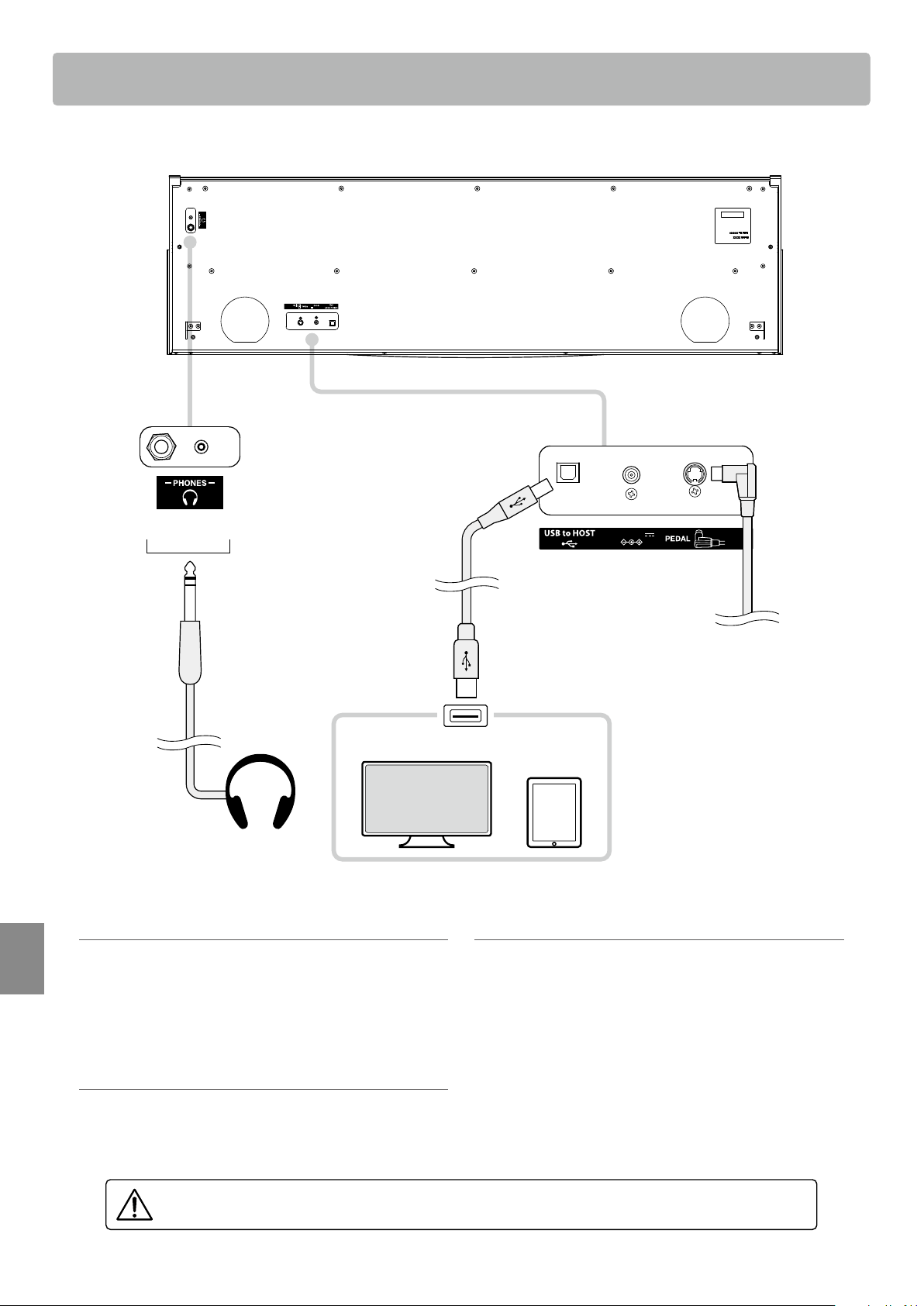
Connecting to Other Devices
42
Appendix
Connecting to Other Devices
a PHONES jacks (1/4” & 1/8” phone jacks)
These jacks are used to connect stereo headphones to the
KDP120/KDP75 digital piano. Headphones can be connected
and used simultaneously. When a pair of headphones is
connected, sound will not be produced by the speakers.
b PEDAL connector
This connector is used to connect the pedal board to the
KDP120/KDP75 digital piano (see page 48).
c USB to Host port (“B” type)
This port is used to connect the KDP120/KDP75 digital piano to
a computer using an inexpensive USB cable. When connected,
the instrument can be used as a standard MIDI device, allowing
it to send and receive MIDI data. Connect a “B” type USB
connector to the instrument, and an “A” type USB connector
to the computer.
If there is no USB port of terminal A, a conversion adapter is
required separately for connection.
DC IN 15V
DC IN 15V
Front
Underside
Back
Headphones
USB type “A”
USB type “B”
Smart
device
Computer
a
b
c
Pedal Cable
* DC 12V for KDP75.
Before connecting the KDP120/KDP75 digital piano to other devices, ensure that the power to both
the instrument and the other device is turned o.

43
Appendix
USB MIDI (USB to Host connector)
The KDP120/KDP75 digital piano features a “USB to Host” type connector, allowing the instrument to be connected
to a computer using an inexpensive USB cable and utilised as a MIDI device. Depending on the type of computer
and operating system installed, additional driver software may be required for USB MIDI communication to function
correctly.
For more information regarding the USB MIDI driver, please visit the following website:
https://www.kawai-global.com/support/downloads/
USB MIDI information
Disconnecting the USB MIDI cable suddenly, or turning the
instrument on/o while using USB MIDI may cause computer
instability in the following situations:
– while installing the USB MIDI driver
– while starting up the computer
– while MIDI applications are performing tasks
– while the computer is in energy saver mode
If there are any further problems experienced with USB MIDI
communication while the instrument is connected, please
double-check all connections and relevant MIDI settings in
the computer’s operating system.
Ensure that the instrument is turned OFF before attempting
to connect the USB MIDI cable.
When connecting the instrument to a computer using
the USB MIDI port, there may be a short delay before
communications begin.
If the instrument is connected to a computer via a USB hub
and USB MIDI communication becomes unreliable/unstable,
please connect the USB MIDI cable directly to the one of the
computer’s USB ports.
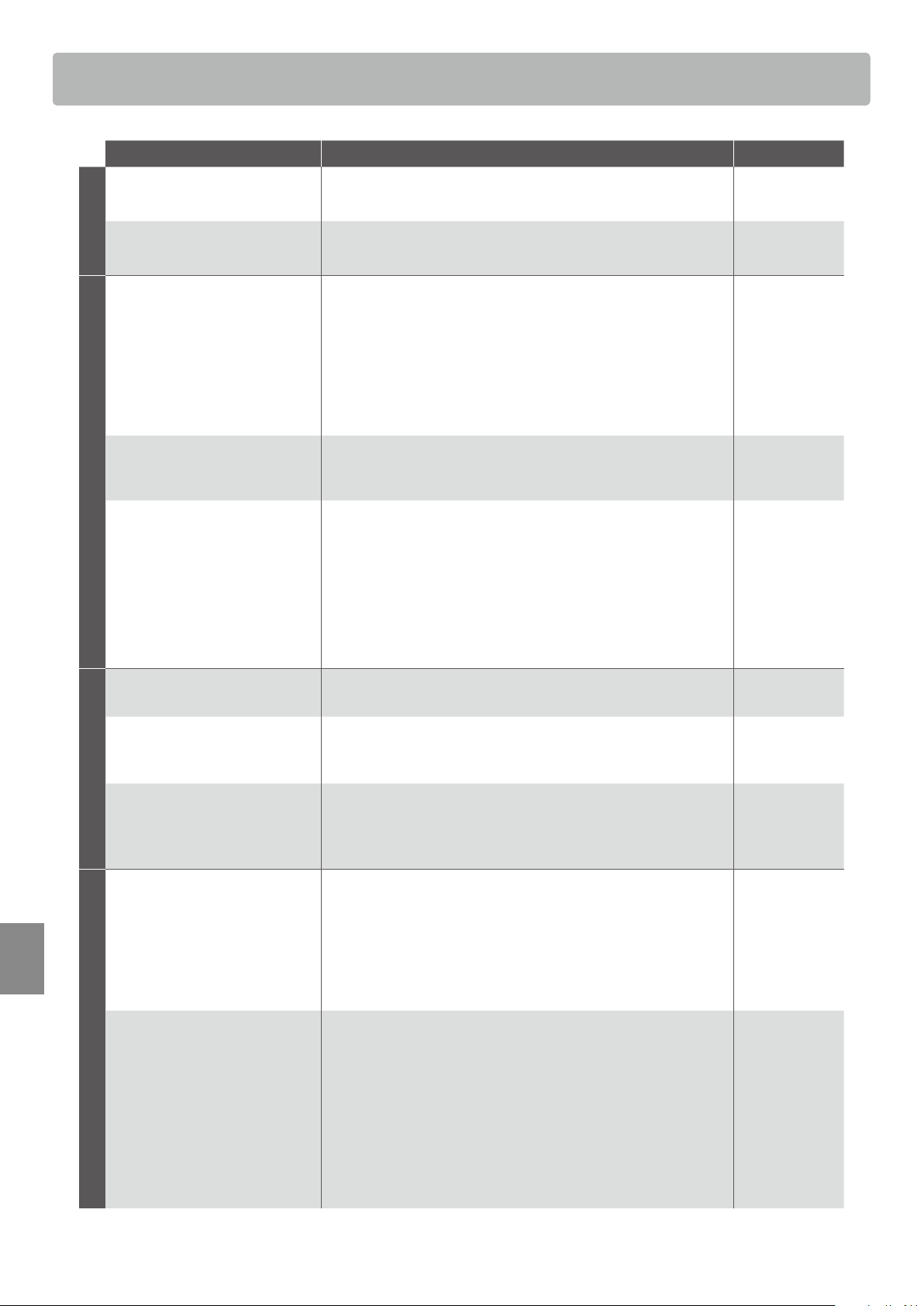
Troubleshooting
44
Appendix
Problem Possible Cause and Solution Page no.
Power
The instrument does not turn on.
Check that the power cable is rmly attached to the instrument,
and connected to an AC outlet.
p. 11
The instrument turns itself o
after a period of inactivity.
Check that the “Auto Power O” function is not enabled. p. 39
Sound
The instrument is turned on,
however no sound is produced
when the keys are played.
Check that the MASTER VOLUME slider is not set to the lowest
position.
Check that a pair of headphones (or headphone adaptor plug) are
not connected to the PHONES jack.
Check that Local Control is enabled in the MIDI Settings menu.
p. 11
p. 11
“MIDI Settings
Manual” p. 5
The sound distorts when playing
at very loud volume levels.
Check that the MASTER VOLUME slider is set to an appropriate
level, reducing the volume if excessive distortion is heard.
p. 11
Strange sounds or noises are
heard when playing with piano
sounds.
The KDP120/KDP75 digital piano attempts to reproduce the rich
variety of tones created by an acoustic grand piano as accurately
as possible. This includes damper resonances and other subtle
eects that contribute to the overall piano playing experience.
While these additional eects are intended to enhance
the realism of the instrument, it is possible to reduce their
prominence, or disable them altogether using the sound settings.
p.33
p.34
Pedals
The pedals are unreliable or do
not function at all.
Check that the pedal cable is rmly connected to the instrument. p. 48
When depressing a pedal, the
pedal board exes and is not
rm.
Check that the pedal support bolt is fully extended. p. 48
The top 18 notes of the
keyboard sustain for longer than
neighbouring notes, even when
the damper pedal is not pressed.
This is the correct behaviour, and intended to reproduce the
undamped notes (typically the top two octaves) of an acoustic
grand piano.
—
USB MIDI, Bluetooth® MIDI
The instrument is connected to
the computer using a USB cable,
however the software does not
respond to key presses.
Check that a USB MIDI driver is installed on the computer.
Check that “USB Audio Device” or “KAWAI USB MIDI” is selected in
the software’s input/output device settings.
Check that the instrument is not connected to a smart device
using Bluetooth MIDI. (KDP120 only)
p. 43
p. 43
p. 40
The instrument cannot connect
to the smart device/app via
Bluetooth. (KDP120 only)
Check that the instrument’s Bluetooth MIDI function is turned On.
Ensure that the mobile device’s Bluetooth function is turned On.
Try deleting the instrument’s Bluetooth connection using the
mobile device’s “Forget Device” function.
Try turning the instrument O and then On, and/or restarting the
mobile device.
p. 40
Troubleshooting
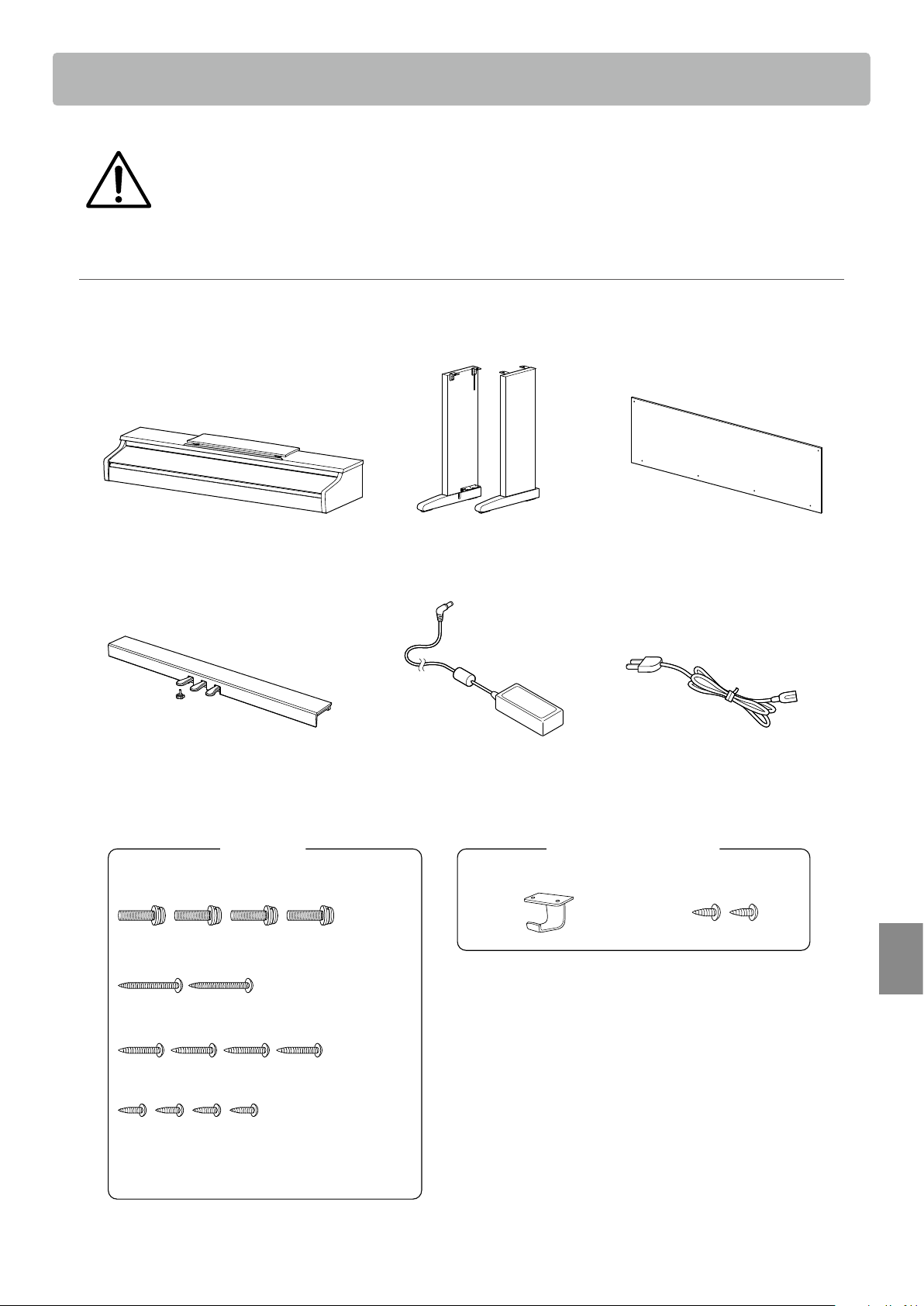
45
Appendix
Please read these assembly instructions thoroughly before attempting to assemble the KDP120/KDP75
digital piano.
Please ensure that two or more people work on assembling the KDP120/KDP75 digital piano, especially
when lifting the main body of the instrument onto the stand in step 3.
Included parts
Before attempting to assemble the KDP120/KDP75 digital piano, ensure that all parts below are included.
A Phillips-head screwdriver (not included) will also be required in order to assemble the instrument.
b Side panel
(left, right)
a Main body
f Power cablee AC/DC Adaptor
c Back board
d Pedal board
Pedal support bolt
Screw set
g Screw (with at washer and spring washer) x 4
h Tapping screw (long, black, 4 x 30 mm) x 2 *
i Tapping screw (short, black, 4 x 20 mm) x 4 *
j Tapping screw (silver, 4 x 16 mm) x 4
* For White nished instruments, black screws will be
replaced with silver screws.
* j Silver screws are provided in a separate bag.
k Headphone hook set x 1
Headphone hook x 1 Mounting screw x 2
Assembly Instructions
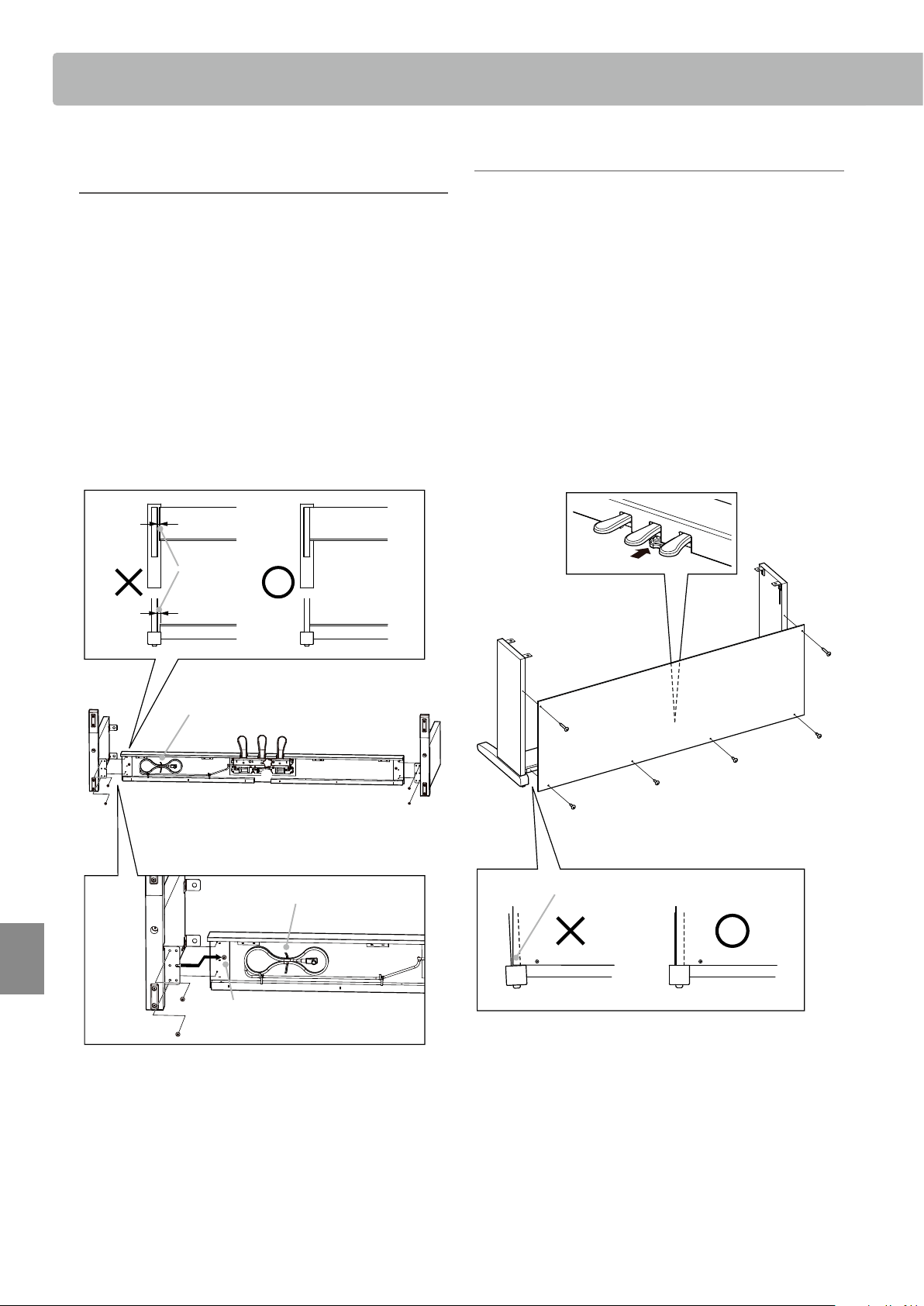
Assembly Instructions
46
Assembly Instructions
Appendix
2. Attaching the back board c
Allow the assembled pedal board and side panels to stand
upright (vertically) on the oor.
* Ensure that the adjustor bolt is attached to the pedal board.
Temporarily x the back board c to the left and right side
panels using the two long black tapping screws h
*
, leaving a
tightening allowance of approximately 1-2 mm.
Then attach the bottom of the back board to the pedal board
using the four short black tapping screws i
*
.
* For White nished instruments, black screws will be replaced with silver
screws.
not aligned
b
h
i
i
i
i
h
c
b
1. Assembling the side panels b,
and pedal board d
Unfasten and extend the pedal connection cable attached to
the bottom of the pedal board d.
Attach the pedal board d to the left and right side panels b
using the alignment screws located on either end of the pedal
board. Ensure that the correct side panel is used for the left
and right side.
Ensure that the pedal board and side panels make close
contact, and that there are no large gaps between the
assembled parts.
Insert the four short silver tapping screws j into the holes as
shown, and securely fasten the pedal board to the and left and
right side panels.
gap
Pedal cable
Alignment screw
b
b
d
b
b
d
d
b
b
d
b
j
j
Unfasten
d
d d
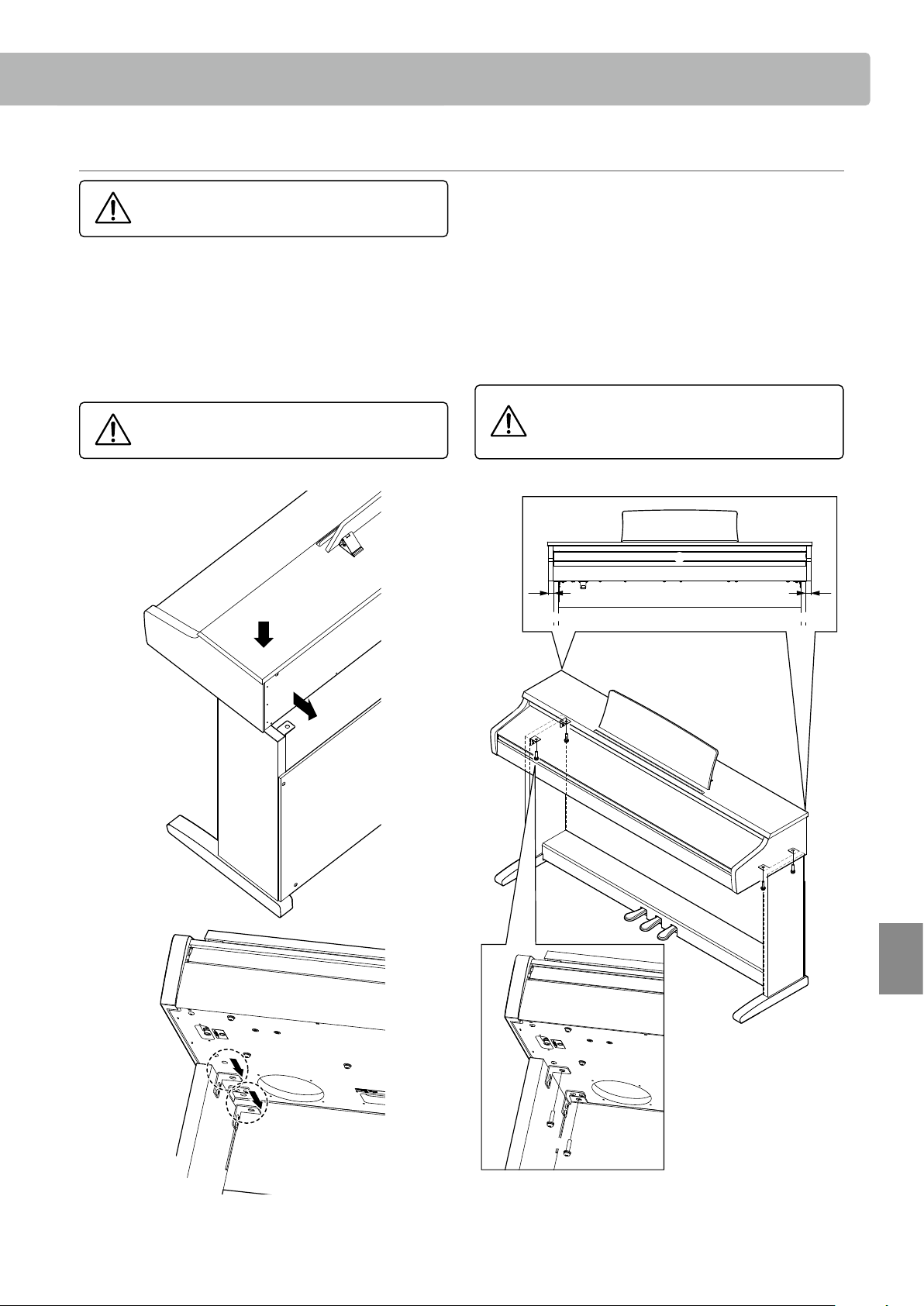
47
Assembly Instructions
Appendix
3. Mounting the main body a
Secure the main body to the stand from below, using the four
screws (with the at washer and spring washer) g.
Tighten all screws securely to ensure that the
main body is rmly attached to the stand.
Failing to do so may result in serious injury.
Front view
a a
bb
a
a
b
b
d
a
b
g
g
Ensure that two or more people undertake the
following step of the assembly process.
Lift the main body a and carefully place it onto the stand.
Position the main body towards the front of the stand, so that
the metal tting holes are visible when viewed from above.
Gently slide the main body backwards until the base engages
with the xings inside the side panels and locks into place.
When lifting the main body onto the stand, be
careful not to catch/trap hands and ngers.
1
2
a
b
c
a
b
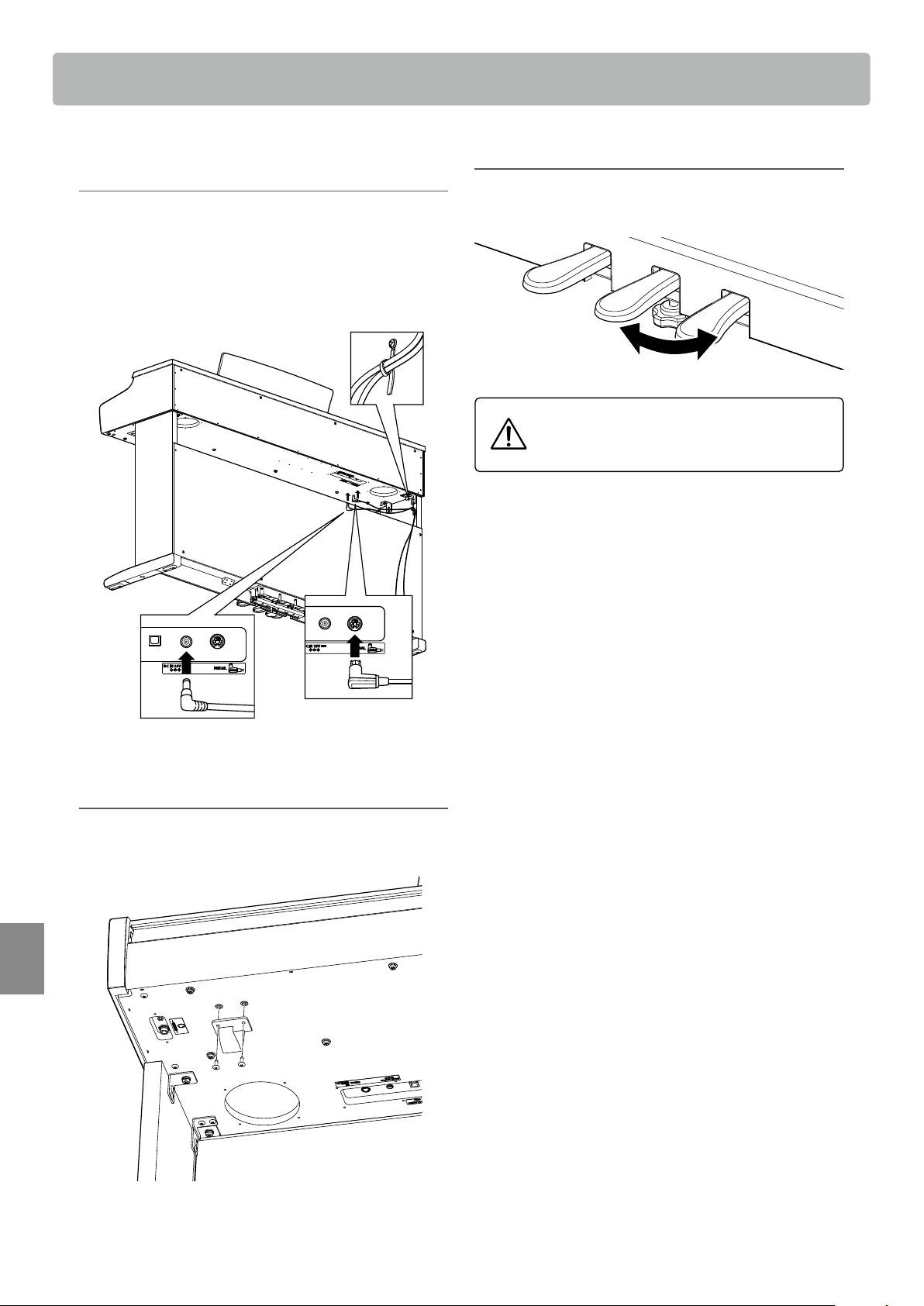
Assembly Instructions
48
Appendix
4. Connecting the pedal cable and
AC/DC adaptor
Connect the pedal cable to the PEDAL terminal located on the
underside of the main body.
Connect the AC/DC adaptor e to the DC IN terminal.
Use the binders to x the cables in place.
Binder
* Note the direction
* DC 12V for KDP75.
5. Attaching the headphone hook (optional)
If desired, attach the headphone hook to the underside of the
main body using the two tapping screws provided.
a
b
k
6. Adjusting the pedal support bolt
Turn the pedal support bolt anti-clockwise until it makes
contact with the oor and supports the pedals rmly.
When moving the instrument, always adjust or
remove the pedal support bolt, then readjust
when the instrument is in its new position.
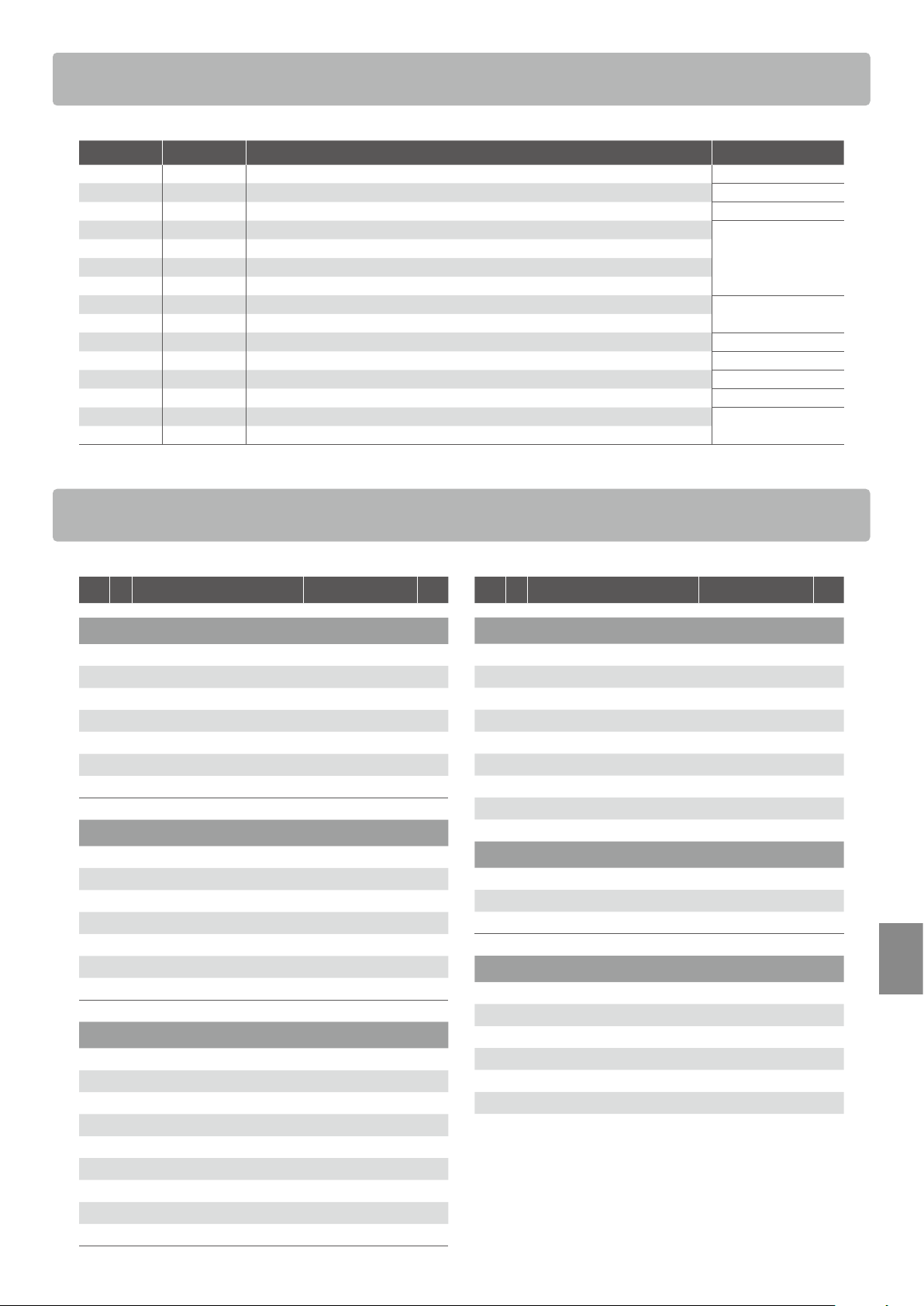
49
Appendix
Demo Song List
Key No. Sound Name (Song Title) Composer
A0 1 Concert Grand (La Campanella) Liszt
B0 2 Studio Grand (Original) Kawai
C1 3 Mellow Grand (Sonata No.30 Op.109) Beethoven
D1 4 Modern Piano (Original)
Kawai
E1 5 Classic E.Piano (Original)
F1 6 Modern E.Piano (Original)
G1 7 Jazz Organ (Original)
A1 8 Church Organ (Chorale Prelude “Wachet auf, ruft uns die Stimme.”)
Bach
B1 9 Harpsichord (French Suite No.6)
C2 10 Vibraphone (Original) Kawai
D2 11 String Ensemble (Le quattro stagioni: la “Primavera”) Vivaldi
E2 12 Slow Strings (Original) Kawai
F2 13 Choir (Londonderry Air) Irish folk song
G2 14 New Age Pad (Original)
Kawai
A2 15 Atmosphere (Original)
Concert Magic Song List
Key No. Song Name Composer Type
Children’s Songs
A0 1 Twinkle, Twinkle, Little Star French folk song MP
A#0 2 I’m A Little Teapot Traditional MP
B0 3 Mary Had A Little Lamb American folk song MP
C1 4 London Bridge Traditional MP
C#1 5 Row, Row, Row Your Boat American folk song MP
D1 6 Frère Jacques French folk song MP
D#1 7 Old MacDonald Had A Farm American folk song MP
Christmas Songs
E1 8 Hark The Herald Angels Sing Mendelssohn MP
F1 9 Jingle Bells Traditional MP
F#1 10 Deck The Halls Welsh Air MP
G1 11 O Come All Ye Faithful J.Reading MP
G#1 12 Joy To The World Traditional MP
A1 13 Silent Night Traditional MP
A#1 14 We Wish You A Merry Christmas British folk song MP
American Classics
B1 15 Battle Hymn Of The Republic Traditional MP
C2 16 Yankee Doodle American folk song MP
C#2 17 Londonderry Air Irish folk song EB
D2 18 Clementine American folk song MP
D#2 19 Auld Lang Syne Scottish folk song MP
E2 20 Oh Susanna S.C.Foster SK
F2 21 The Camptown Races S.C.Foster MP
F#2 22 When The Saints Go Marching In American folk song EB
G2 23 The Entertainer S.Joplin SK
Key No. Song Name Composer Type
Classical Selections
G#2 24 William Tell Overture Rossini SK
A2 25 Andante from Symphony No.94 Haydn MP
A#2 26 Für Elise Beethoven EB
B2 27 Clair De Lune Debussey SK
C3 28 Skater’s Waltz E.Waldteuful SK
C#3 29 Blue Danube Waltz Strauss SK
D3 30 Gavotte Gossec SK
D#3 31 Waltz Of The Flowers Tchaikovsky SK
Special Occasions
E3 32 Bridal Chorus Wagner MP
F3 33 Wedding March Mendelssohn SK
F#3 34 Pomp And Circumstance Elgar SK
International Songs
G3 35 When Irish Eyes Are Smiling E.R.Ball EB
G#3 36 Chiapanecas Mexican folk song SK
A3 37 Santa Lucia Naplish folk song SK
A#3 38 Funiculì Funiculà L.Denza SK
B3 39 Romance De L’amour Spanish folk song EB
C4 40 My Wild Irish Rose Chauncy Alcote EB

Lesson Function Song Lists
50
Lesson Function Song Lists
Appendix
Lesson Function Song Lists
No.
Alfred’s Basic Piano Library Lesson Book Level 1A
No.
Alfred’s Basic Piano Library Lesson Book Level 1B
1 Right & Left 1 Step Right Up!
2 Left & Right 2 The Carousel
3 Merrily We Roll Along/O’er the Deep Blue Sea 3 Hail to Thee, America!
4 Hand-Bells 4 Brother John
5 Jolly Old Saint Nicholas 5 Good Sounds
6 Old MacDonald 6 The Cuckoo
7 Batter Up! 7 Money Can’t Buy Ev’rything!
8 My Clever Pup 8 Ping-Pong
9 The Zoo 9 Grandpa’s Clock
10 Playing in a New Position 10 When the Saints Go Marching In
11 Sailing 11 G’s in the “BAG”
12 Skating 12 Join the Fun
13 Wishing Well 13 Oom-Pa-pa!
14 Rain, Rain! 14 The Clown
15 A Happy Song 15 Thumbs on C!
16 Position C 16 Waltz Time
17 A Happy Song 17 Good King Wenceslas
18 See-Saws 18 The Rainbow
19 Just a Second! 19 Yankee Doodle
20 Balloons 20 The Windmill
21 Who’s on Third? 21 Indians
22 Mexican Hat Dance 22 New Position G
23 Rock Song 23 Pedal Play
24 Rockets 24 Harp Song
25 Sea Divers 25 Concert Time
26 Play a Fourth 26 Music Box Rock
27 July the Fourth! 27 A Cowboy’s Song
28 Old Uncle Bill 28 The Magic Man
29 Love Somebody 29 The Greatest Show on Earth!
30 My Fifth 30 The Whirlwind
31 The Donkey 31 The Planets
32 Position G 32 C Major Scale Piece
33 Jingle Bells! 33 G Major Scale Piece
34 Willie & Tillie 34 Carol in G Major
35 A Friend Like You 35 The Same Carol in C Major
36 My Robot 36 French Lullaby
37 Rockin’ Tune 37 Sonatina
38 Indian Song 38 When Our Band Goes Marching By!
39 Raindrops
40 It’s Halloween!
41 Horse Sense
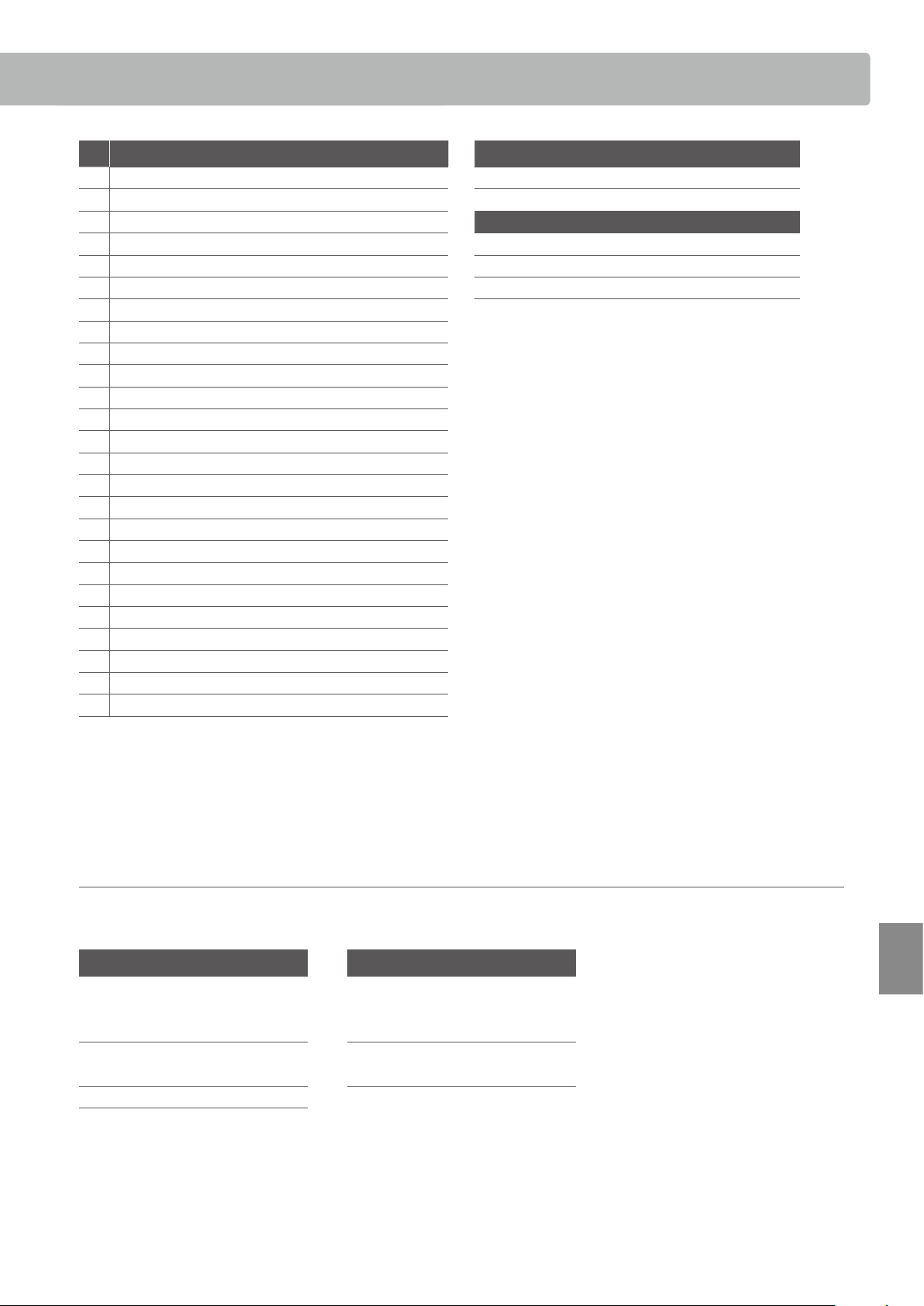
51
Lesson Function Song Lists
Appendix
No.
Burgmüller 25 (25 Etudes Faciles, Opus 100) Czerny 30 (Etudes de Mécanisme, Opus 849)
1 La candeur No. 1 to No. 30
2 Arabesque
3 Pastorale
Beyer 106
4 Petite réunion No. 1 (1-1 to 1-12)
5 Innocence No. 2 (2-1 to 2-8)
6 Progrès No. 3 to No. 106
7 Courant Limpide
8 La gracieuse
9 La chasse
10 Tendre eur
11 La bergeronnette
12 Adieu
13 Consolation
14 La styrienne
15 Ballade
16 Douce plainte
17 Babillarde
18 Inquiétude
19 Ave Maria
20 Tarentelle
21 Harmonie des anges
22 Barcarolle
23 Retour
24 L’hirondelle
25 La chevaleresque
Lesson Function song book availability
Alfred’s Basic Piano Library, Burgmüller: Etudes Faciles, Czerny: Etudes de Mécanisme, and Beyer lesson song books are sold separately.
Please check your local dealer for more information. Alfred’s international oces may also be contacted directly:
USA / Canada Australia
Alfred Music Publishing Alfred Publishing Australia
PO Box 10003 PO Box 2355
Van Nuys, CA 91410 Taren Point NSW 2229
Tel: +1 (800) 292-6122 Tel: +61 (02) 9524 0033
Website: http://www.alfred.com
Information about Adaptor Specications
52
Appendix
Information about Adaptor Specications
This adapter specication table conforms to the requirements of EU Commission Regulation (EU) 2019/1782.
Adaptor Type
PS-129 PS-154 PS-241 PS-242
Manufacturer’s trademark KAWAI KAWAI KAWAI KAWAI
Model identifer PS-129 PS-154 PS-241 PS-242
Input voltage 230 V 230 V 230 V 230 V
Input AC frequency 50 Hz 50 Hz 50 Hz 50 Hz
Output voltage 12.0 V 15.0 V 24.0 V 24.0 V
Output current 2.0 A 4.0 A 6.2 A 5.0 A
Output power 24.0 W 60.0 W 150.0 W 120.0 W
Average active eciency 90.38% 88.80% 90.41% 91.55%
Eciency at low load (10%) 85.71% 84.33% 78.62% 88.84%
No-load power consumption 0.061 W 0.082 W 0.135 W 0.020 W
53
Appendix
EU Declaration of Conformity
KDP120/KDP75_簡易DOC.xlsx/CA99_79 1/1
ES
DECLARACIÓN UE DE CONFORMIDAD SIMPLIFICADA
Spanish
Por la presente, Kawai Europa GmbH declara que el tipo de equipo radioeléctrico [ KDP120/KDP75 ] es conforme con la Directiva 2014/53/UE.
El texto completo de la declaración UE de conformidad está disponible en la dirección Internet siguiente:
CS
ZJEDNODUŠENÉ EU PROHLÁŠENÍ O SHODĚ
EU Declaration of Conformity
BG
ОПРОСТЕНА ЕС ДЕКЛАРАЦИЯ ЗА СЪОТВЕТСТВИЕ
Bulgarian
С настоящото Kawai Europa GmbH декларира, че този тип радиосъоръжение [ KDP120/KDP75 ] е в съответствие с Директива 2014/53/ЕС.
Цялостният текст на ЕС декларацията за съответствие може да се намери на следния интернет адрес:
DE
VEREINFACHTE EU-KONFORMITÄTSERKLÄRUNG
German
Hiermit erklärt Kawai Europa GmbH, dass der Funkanlagentyp [ KDP120/KDP75 ] der Richtlinie 2014/53/EU entspricht.
Der vollständige Text der EU-Konformitätserklärung ist unter der folgenden Internetadresse verfügbar:
ET
LIHTSUSTATUD ELI VASTAVUSDEKLARATSIOON
Czech
Tímto Kawai Europa GmbH prohlašuje, že typ rádiového zařízení [ KDP120/KDP75 ] je v souladu se směrnicí 2014/53/EU.
Úplné znění EU prohlášení o shodě je k dispozici na této internetové adrese:
DA
FORENKLET EU-OVERENSSTEMMELSESERKLÆRING
Danish
Hermed erklærer Kawai Europa GmbH, at radioudstyrstypen [ KDP120/KDP75 ] er i overensstemmelse med direktiv 2014/53/EU.
EU-overensstemmelseserklæringens fulde tekst kan findes på følgende internetadresse:
EN
SIMPLIFIED EU DECLARATION OF CONFORMITY
English
Hereby, Kawai Europa GmbH declares that the radio equipment type [ KDP120/KDP75 ] is in compliance with Directive 2014/53/EU.
The full text of the EU declaration of conformity is available at the following internet address:
FR
DECLARATION UE DE CONFORMITE SIMPLIFIEE
Estonian
Käesolevaga deklareerib Kawai Europa GmbH, et käesolev raadioseadme tüüp [ KDP120/KDP75 ] vastab direktiivi 2014/53/EL nõuetele.
ELi vastavusdeklaratsiooni täielik tekst on kättesaadav järgmisel internetiaadressil:
EL
ΑΠΛΟΥΣΤΕΥΜΕΝΗ ΔΗΛΩΣΗ ΣΥΜΜΟΡΦΩΣΗΣ ΕΕ
Greek
Με την παρούσα ο/η Kawai Europa GmbH, δηλώνει ότι ο ραδιοεξοπλισμός [ KDP120/KDP75 ] πληροί την οδηγία 2014/53/ΕΕ.
Το πλήρες κείμενο της δήλωσης συμμόρφωσης ΕΕ διατίθεται στην ακόλουθη ιστοσελίδα στο διαδίκτυο:
IT
DICHIARAZIONE DI CONFORMITÀ UE SEMPLIFICATA
Italian
Il fabbricante, Kawai Europa GmbH, dichiara che il tipo di apparecchiatura radio [ KDP120/KDP75 ] è conforme alla direttiva 2014/53/UE.
Il testo completo della dichiarazione di conformità UE è disponibile al seguente indirizzo Internet:
LV
VIENKĀRŠOTA ES ATBILSTĪBAS DEKLARĀCIJA
French
Le soussigné, Kawai Europa GmbH, déclare que l'équipement radioélectrique du type [ KDP120/KDP75 ] est conforme à la directive 2014/53/UE.
Le texte complet de la déclaration UE de conformité est disponible à l'adresse internet suivante:
HR
POJEDNOSTAVLJENA EU IZJAVA O SUKLADNOSTI
Croatian
Kawai Europa GmbH ovime izjavljuje da je radijska oprema tipa [ KDP120/KDP75 ] u skladu s Direktivom 2014/53/EU.
Cjeloviti tekst EU izjave o sukladnosti dostupan je na sljede?oj internetskoj adresi:
HU
EGYSZERŰSÍTETT EU-MEGFELELŐSÉGI NYILATKOZAT
Hungarian
Kawai Europa GmbH igazolja, hogy a [ KDP120/KDP75 ] típusú rádióberendezés megfelel a 2014/53/EU irányelvnek.
Az EU-megfelelőségi nyilatkozat teljes szövege elérhető a következő internetes címen:
MT
DIKJARAZZJONI SSIMPLIFIKATA TA' KONFORMITÀ TAL-UE
Latvian
Ar šo Kawai Europa GmbH deklarē, ka radioiekārta [ KDP120/KDP75 ] atbilst Direktīvai 2014/53/ES.
Pilns ES atbilstības deklarācijas teksts ir pieejams šādā interneta vietnē:
LT
SUPAPRASTINTA ES ATITIKTIES DEKLARACIJA
Lithuanian
Aš, Kawai Europa GmbH, patvirtinu, kad radijo įrenginių tipas [ KDP120/KDP75 ] atitinka Direktyvą 2014/53/ES.
Visas ES atitikties deklaracijos tekstas prieinamas šiuo interneto adresu:
PL
UPROSZCZONA DEKLARACJA ZGODNOŚCI UE
Polish
Kawai Europa GmbH niniejszym oświadcza, że typ urządzenia radiowego [ KDP120/KDP75 ] jest zgodny z dyrektywą 2014/53/UE.
Pełny tekst deklaracji zgodności UE jest dostępny pod następującym adresem internetowym:
PT
DECLARAÇÃO UE DE CONFORMIDADE SIMPLIFICADA
Maltese
B'dan, Kawai Europa GmbH, niddikjara li dan it-tip ta' tagħmir tar-radju [ KDP120/KDP75 ] huwa konformi mad-Direttiva 2014/53/UE.
It-test kollu tad-dikjarazzjoni ta' konformità tal-UE huwa disponibbli f'dan l-indirizz tal-Internet li ġej:
NL
VEREENVOUDIGDE EU-CONFORMITEITSVERKLARING
Dutch
Hierbij verklaar ik, Kawai Europa GmbH, dat het type radioapparatuur [ KDP120/KDP75 ] conform is met Richtlijn 2014/53/EU.
De volledige tekst van de EU-conformiteitsverklaring kan worden geraadpleegd op het volgende internetadres:
SK
ZJEDNODUŠENÉ EÚ VYHLÁSENIE O ZHODE
Slovak
Kawai Europa GmbH týmto vyhlasuje, že rádiové zariadenie typu [ KDP120/KDP75 ] je v súlade so smernicou 2014/53/EÚ.
Úplné EÚ vyhlásenie o zhode je k dispozícii na tejto internetovej adrese:
SL
POENOSTAVLJENA IZJAVA EU O SKLADNOSTI
Portuguese
O(a) abaixo assinado(a) Kawai Europa GmbH declara que o presente tipo de equipamento de rádio [ KDP120/KDP75 ] está em conformidade com a Diretiva 2014/53/UE.
O texto integral da declaração de conformidade está disponível no seguinte endereço de Internet:
RO
DECLARAȚIA UE DE CONFORMITATE SIMPLIFICATĂ
Romanian
Prin prezenta, Kawai Europa GmbH declară că tipul de echipamente radio [ KDP120/KDP75 ] este în conformitate cu Directiva 2014/53/UE.
Textul integral al declarației UE de conformitate este disponibil la următoarea adresă internet:
SV
FÖRENKLAD EU-FÖRSÄKRAN OM ÖVERENSSTÄMMELSE
Swedish
Härmed försäkrar Kawai Europa GmbH att denna typ av radioutrustning [ KDP120/KDP75 ] överensstämmer med direktiv 2014/53/EU.
Den fullständiga texten till EU-försäkran om överensstämmelse finns på följande webbadress:
https://www.kawai-global.com/
Slovenian
Kawai Europa GmbH potrjuje, da je tip radijske opreme [ KDP120/KDP75 ] skladen z Direktivo 2014/53/EU.
Celotno besedilo izjave EU o skladnosti je na voljo na naslednjem spletnem naslovu:
FI
YKSINKERTAISTETTU EU-VAATIMUSTENMUKAISUUSVAKUUTUS
Finnish
Kawai Europa GmbH vakuuttaa, että radiolaitetyyppi [ KDP120/KDP75 ] on direktiivin 2014/53/EU mukainen.
EU-vaatimustenmukaisuusvakuutuksen täysimittainen teksti on saatavilla seuraavassa internetosoitteessa:
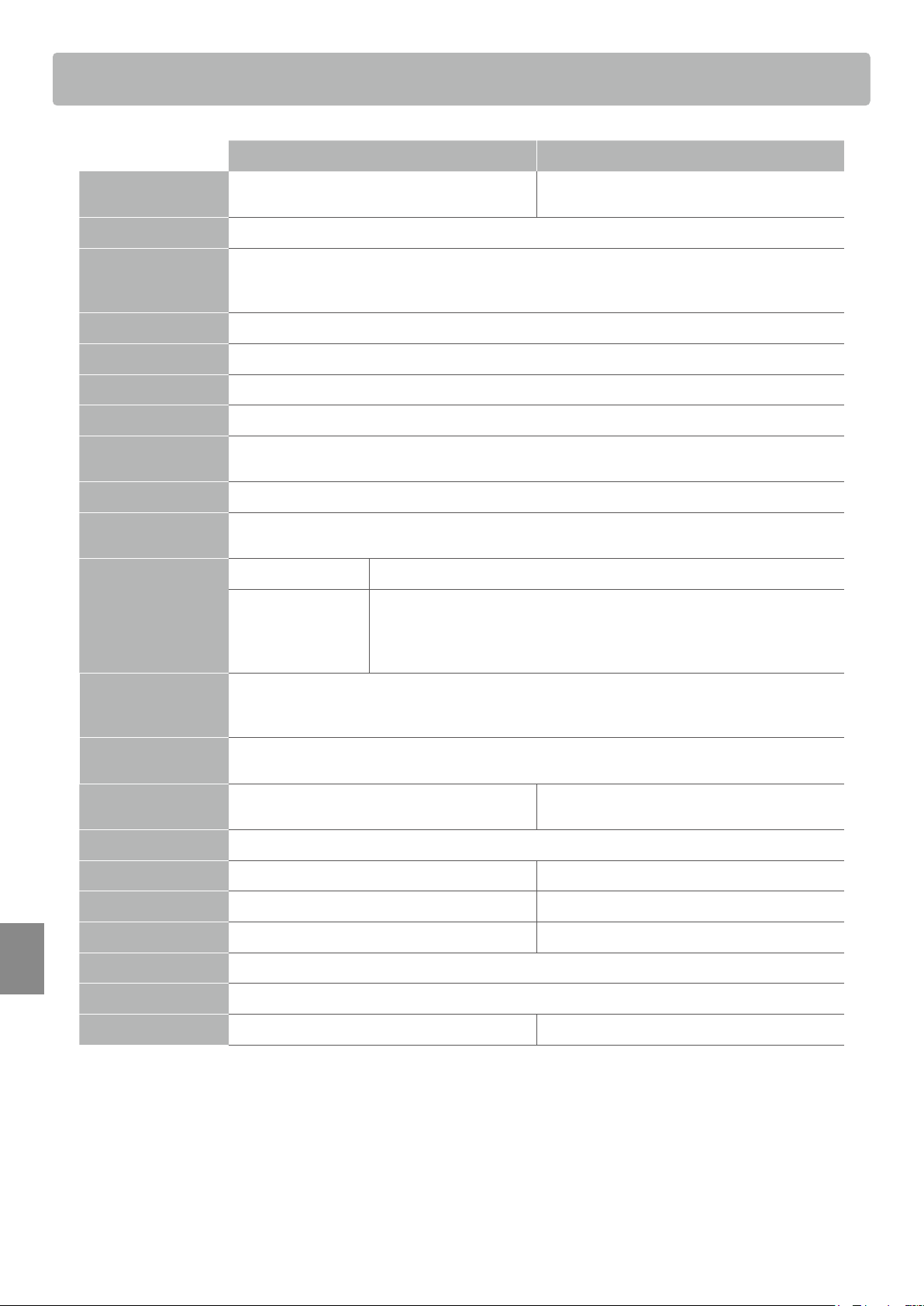
Specications
54
Appendix
KDP120 KDP75
Keyboard
88 weighted keys
Responsive Hammer Compact II (RHC II) action
88 weighted keys
Responsive Hammer Compact (RHC) action
Sound Source
Harmonic Imaging™ (HI), 88-key piano sampling
Internal Sounds Concert Grand, Studio Grand, Mellow Grand, Modern Piano, Classic E.Piano, Modern E.Piano,
Jazz Organ, Church Organ, Harpsichord, Vibraphone, String Ensemble, Slow Strings, Choir,
New Age Pad, Atmosphere
Polyphony
max. 192 notes
Reverb
Room, Lounge, Small Hall, Concert Hall, Live Hall, Cathedral
Internal Recorder
3 song recorder - approximately 10,000 note memory capacity
Lesson Function
Alfred, Burgmüller, Czerny and Beyer lesson songs
Metronome
Beat: 1/4, 2/4, 3/4, 4/4, 5/4, 3/8, 6/8
Tempo: 10-300 bpm
Demo Songs
15 songs
Keyboard Modes
Dual Mode (with adjustable volume balance)
Four Hands Mode
Virtual Technician
Smart Mode: 10 presets
Advanced Mode:
(adjustable via app)
Touch Curve, Damper Resonance, Hammer Delay,
Topboard Simulation, Decay Time, Minimum Touch, Stretch Tuning,
Temperament, Temperament Key, Half-Pedal Point, Soft Pedal Depth,
Voicing, Release Time
Other Functions Damper Resonance, Reverb, Touch, Low Volume Balance, Tuning, Transpose, Brilliance,
Spatial Headphone Sound, Phones Type, Auto Power O, Bluetooth MIDI (KDP120 only),
Transmit Program Change Number, MIDI Channel, Local Control, Multi-timbral mode
Bluetooth *
(KDP120 only)
Bluetooth (Ver. 4.1; GATT compatible)
Bluetooth Low Energy MIDI Specication compliant
Pedals
Sustain (with half-pedal support), Soft, Sostenuto
(GFPS)
Sustain (with half-pedal support), Soft, Sostenuto
Jacks
Headphones × 2, USB to HOST
Speakers
12 cm × 2 (8 × 12) cm × 2
Output Power
20 W × 2 9 W × 2
Power Consumption
15 W 7 W
Key Cover
Sliding type
Dimensions
1360 (W) × 405 (D) × 855 (H) mm (folding Music Rack)
Weight
37 kg 36 kg
Specications are subject to change without notice.
* Availability of Bluetooth function dependent on market location.
Specications


KDP120/KDP75 Owner’s Manual
SP00000734
OW1143E-S2104
Printed in IndonesiaCopyright © 2021 Kawai Musical Instruments Mfg. Co.,Ltd. All Rights Reserved.