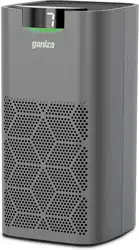
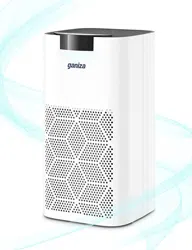
User Manual Ganiza G200S True HEPA Air Purifier
If you have any questions or need further assistance, please contact us at [email protected]
IMPORTANT SAFETY INSTRUCTIONS
READ AND SAVE THESE INSTRUCTIONS
Power Supply
- This appliance has a polarized plug (one blade is wider than the other). To reduce the risk of electric shock, this plug is intended to fit in a polarized outlet only one way. If the plug does not fit fully in the outlet, reverse the plug. If it still does not fit, contact a qualified electrician. Do not attempt to defeat this safety feature.
- To Reduce The Risk Of Fire Or Electric Shock, Do Not Use This Fans With Any Solid-State Speed Control Device.
- Please do not over bend or twist the power cord, as this may damage it.
- Do not use any inapplicable AC outlets.
Warning
- Users should only operate the air purifier once they have understood all the following important safety instructions. Users who have a disability and need assistance are responsible for seeking support and ensuring their own safety in line with the instructions given in this manual.
- Children should be supervised to ensure that they do not play with the appliance.
Moving
- Turn off and unplug the air purifier before moving it.
- Firmly grab the groove of the air purifier to avoid excessive vibration or injury due to falling.
Installation
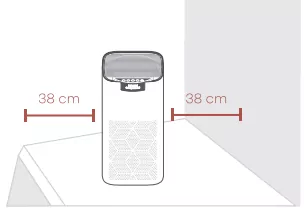
- Keep a distance of at least 38cm/15inches between the air inlets and walls or other objects.
Where in Use
- Please immediately stop using the air purifier if overheats, makes unusual sounds, gives off unpleasant odors, or its fan rotates irregularly.
- Do not put your fingers or other objects into the air inlet, air outlet, or filter compartment.
- Keep hair or cloth away from the air purifier to avoid them getting into and blocking the inlet/outlet.
- Please do not sit on, lean on, or tilt the air purifier.
- Please ventilate when using the air purifier together with any combustion equipment, e.g., fireplace or barbecue oven, etc., to keep you safe from carbon monoxide.
- Always place the air purifier out of the reach of patients, children, or pets.
- Please keep your air purifier away from any heat sources, such as stove, oven, electric heater, etc.
Tips for Essential Oils
- Do not add any essential oils to the air purifier or the filter. If you are doing so, the HEPA&Activated Carbon Filter will be damaged and eventually release an unpleasant odor.
- Do not use any essential oil diffuser near the air purifier.
Ganiza will accept no liability or responsibility for fires or electrical shocks caused by improper operation or not adhering to the above safety instructions.
WHAT'S INCLUDED
Air purifier x1
HEPA&Activated Carbon Filter (inside the Filter compartment) x1
User Manual x1
Quick Guide x1
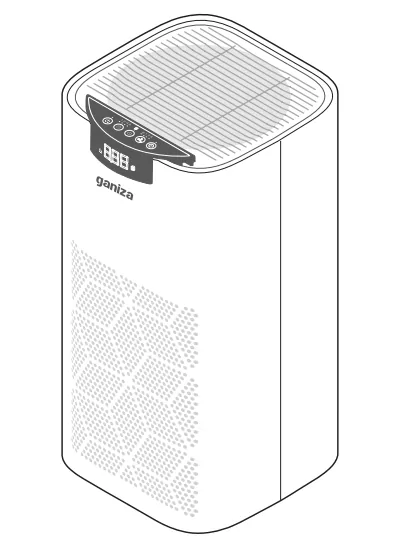
KNOW YOUR AIR PURIFIER
Product Overview
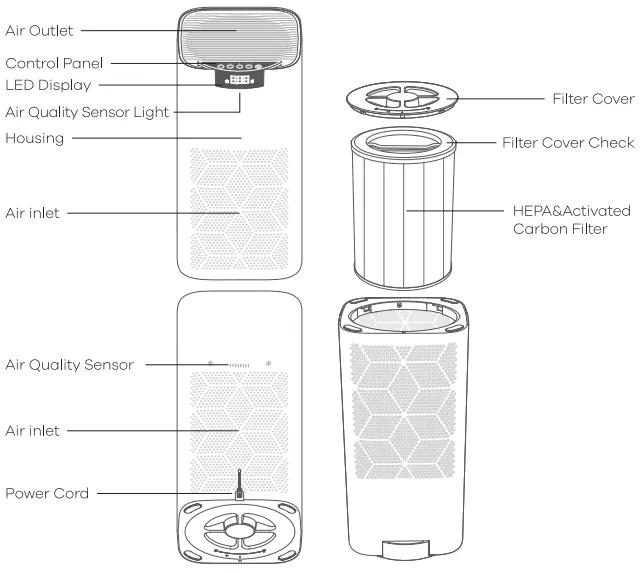
Control Panel
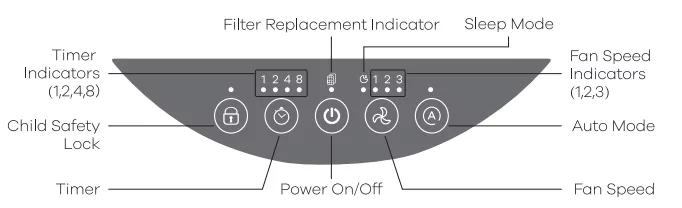
 Power On/Off - Turn on/off the air purifier.
 Fan Speed - Cycle through 3 fan speed options: Sleep 1 (low), 2 (medium), and 3 (high).
 Sleep Mode - Enable or disable sleep mode.
 Filter Replacement Indicator - Flashing when the HEPA&Activated Carbon Filter should be replaced.
 Child Safety Lock - Prevent the current settings from being changed accidentally by children or pets.
 Auto Mode - Automatically adjust wind speed to purify air according to air quality.
 Timer - Set the time duration to automatically power off the air purifier.
Filtration System
The air purifier's filtration system consists of the Pre-filters and the HEPA&Activated Carbon Filter.
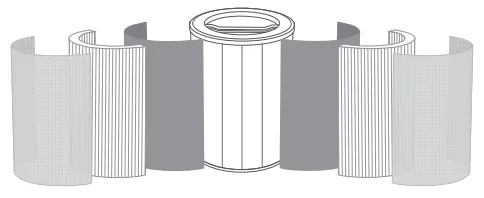
- Pre-filters
>The pre-filters can filter large particles such as dust, lint, fibers, hair, and pet hair.
- True HEPA&Activated Carbon Filter
HEPA
Filter out particles 0.3 micron in diameter from at least 99.97% of the air.
>The HEPA can filter small particles such as smoke, dust, mold spores, bacteria.
>Viruses and allergens such as pollen, pet dander, and dust mites.
- Activated Carbon Filter
>This layer is to deal with odors or smoke.
>This layer can also filter the organic compound such as formaldehyde, ammonia, hydrogen sulfide, and volatile organic compound.
Temperature Conditions for Using the Filter
Excessive moisture may damage the filter. The air purifier should be used in an area with a humidity level below 85% RH. If you use the air purifier in excessively humid areas, the surface of the filter part will become moldy.
SPECIFICATIONS
| Voltage Input |
AC 120V, 60Hz |
| Rated Power |
45W |
| Standby Power |
<1W |
| Dimension |
243*253*473mm / 9.56*9.96*18.62 inches |
| Net Weight |
4kg / 141.09Oz |
GET STARTED
Step 1: Flip over the air purifier and open the filter cover.
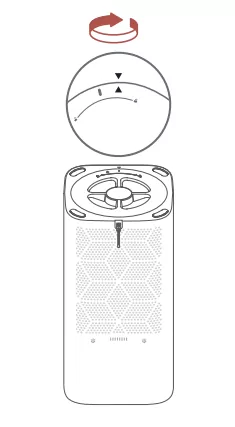
Step 2: Remove the protective plastic bag from HEPA&Activalted Carbon Filter, and reinstall the filter into the housing.
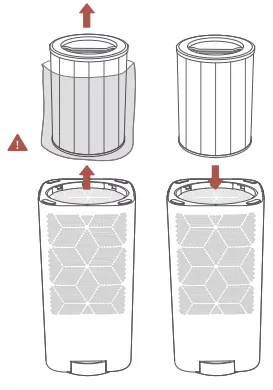
Step 3: Close the filter cover, and turn over the air purifier to get it ready for use.
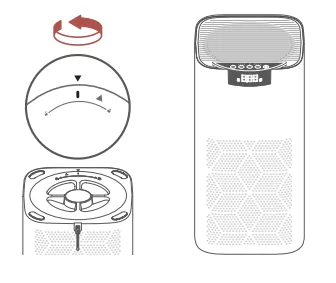
Step 4: Place the air purifier in a ventilated area and on a level floor. Keep the air inlet facing upwards and maintain a distance of at least 38 cm/15 inches away from the wall or other objects.
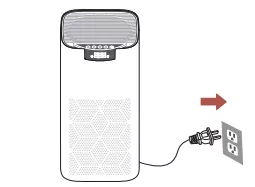
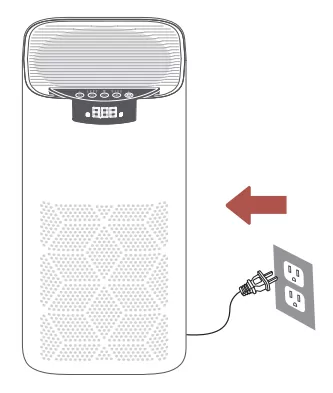
Step 5: Plug the power cord of the air purifier into the working socket.
USE YOUR AIR PURIFIER
Turn On/Off
① After connecting the air purifier to power, press  to turn it on, and it will start purifying the air with the default fan speed.
② Press again to turn off the air purifier.
Fan Speed Adjustment
① There are three speed options for this air purifier, which include Speed 1 (low), 2 (medium), and 3 (high).
② Press  to cycle through three fan speed options, and the corresponding fan speed indicator will light up.
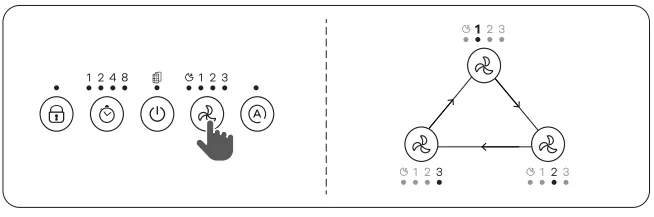
Tips:
- The fan speed indicators are not the buttons to adjust the speed.
- The fan speed option of 3 is the highest level that can purify the air quickly, but it will make louder sounds.
- To effectively purify the air, please close your windows and doors while the air purifier is working. But do ventilate if you are using some combustion equipment, e.g. fireplace or barbecue oven; this is to keep you safe from carbon monoxide.
Sleep Mode
① When the air purifier is working, press to enter the  . All the lights, including the indicators and air quality sensor light, will be off, and the air purifier will continue to work with the lowest fan speed.
② Press again to exit the , and the air purifier will return to low speed.
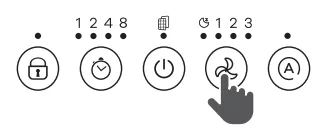
Tips: In sleep mode, timer adjustments are available. The corresponding indicator will light up for 1s when setting and then turn off.
Filter Replacement
① When the filter is at the end of its service life, the indicator has been flashing to remind you to replace the filter with a new one.
② Reset the service time of the new filter after replacement. Please long press for 5s until the indicator is normally on.
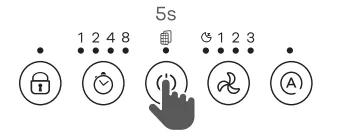
Child Safety Lock
This function is to prevent the current settings from being changed accidentally by children or pets.
① Long press  the child safety lock button for 3s to enable Child Safety Lock, and the button will light up in white. All the other buttons will be deactivated.
② Long press again for 3s to exit this mode, and all the other buttons will be activated.
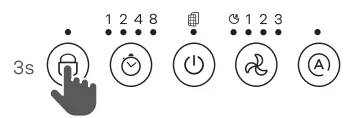
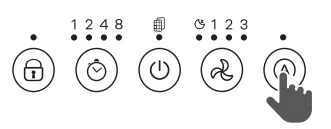
Auto Mode
This indicator uses an automatic sensor to display the air quality. This sensor uses an infrared light to detect airborne particles.
① The air purifier will take 10seconds to detect the air quality each time it is turned on. During this time, the color of the air quality indicator will be green. After 10 seconds, the color of the air quality indicator will change based on the detected air quality.
② Press  again to turn off the Auto Mode.
| Air Quality Indicator Chart |
| Indicator Color |
Air Quality |
Fan Speed |
| Green |
Good |
Low |
| Orange |
Moderate |
Medium |
| Red |
Bad |
High |
Tips: Auto Mode adjusts the fan speed automatically based on air quality. For example, if the air quality is bad, the fan will be set to high speed.
Timer
Four timer options are available, including 1H, 2H, 4H, and 8H.
① Press  once at a time to select a timer. The corresponding indicator will light up.
② Press the fifth time or long press it for 1.5s to disable the timer function. The timer indicator will be off.
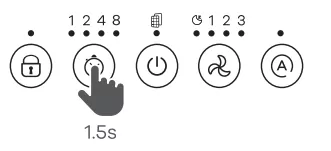
Tips: The timer indicators are not the buttons to change the timer duration. The air purifier will automatically power off once the timer ends.
MAINTENANCE AND CARE
| Filter Frequency |
Cleaning Frequency |
Replacing |
| Pre-filter |
Once or twice per month |
/ |
| HEPA&Deodorization Filter |
/ |
3-6 months |
Clean the Air Purifier
Step 1: Unplug the air purifier before cleaning.
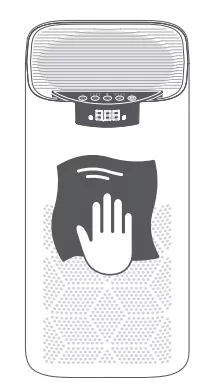
Step 2: Wipe clean the air purifier's housing with a soft, dry cloth or brush. If necessary, wipe clean the housing with a damp cloth and dry it immediately.
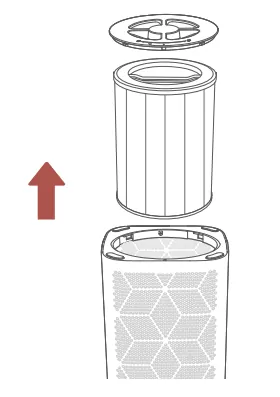
Step 3: Turn over the air purifier, open the filter cover, then take out the HEPA&Activated Carbon Filter.
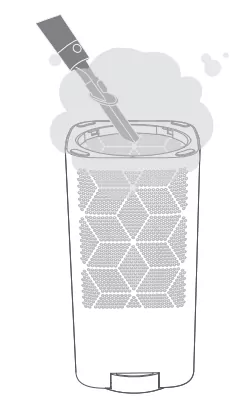
Step 4: Vacuum inside the filter compartment.
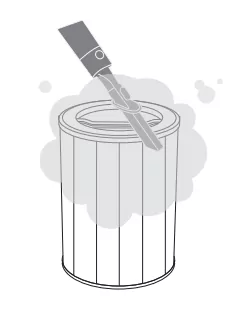
Step 5: Vacuum the pre-filters, or wipe them with a damp cloth and make them dry completely.
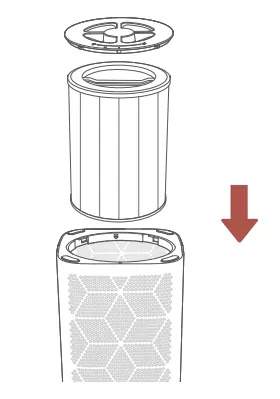
Step 6: Reinstall the HEPA&Activated Carbon Filter into the air purifier, then close the cover.
Notes:
- If the pre-filters are not cleaned sufficiently, gently wash them under the water with a soft brush. DO NOT reinstall them into the air purifier before they dry completely.
- Do not clean any parts with abrasive chemicals or flammable agents.
- Do not wash the HEPA&Activated Carbon Filter, as this may damage it.
Replace the HEPA&Activated Carbon Filter
>Generally, the HEPA&Activated Carbon Filter should be replaced every 3-6 months. If the air purifier is frequently used in an environment with relatively high pollution, you will need to replace the filter more often.
>The indicator  will flash in white to remind you to replace the filter.
>You may need to replace the filter if you notice:
- increased noise when the air purifier is turned on;
- decreased airflow from the air outlet;
- unpleasant odor from the air outlet;
- a visibly clogged and black filter.
Tips:
- To maintain optimal performance, please use the original filter made by Ganiza. Please contact us to get the purchase link.
- Do not forget to reset the service time of the filter after replacing it.
Storage
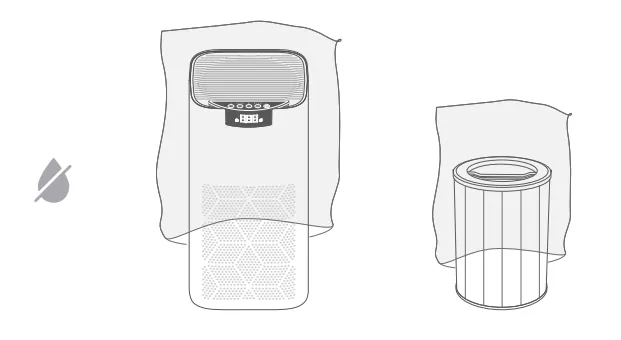
If the air purifier is not used for an extended period of time, please cover the air purifier and filters with protective plastic bags, then store them in a dry place.
TROUBLESHOOTING GUIDE
If you need any further assistance, please feel free to contact us. To maintain optimal performance, please regularly clean the air purifier and remove objects that block the air inlet.
Q1. The air purifier produces an unusual noise after it's turned on.
- Make sure the HEPA&Activated Carbon Filter is removed from the plastic bag and properly installed.
- Make sure the air purifier is working on a hard, flat, and even surface.
- The air purifier may be damaged, or there may be foreign objects inside.
Please stop using the air purifier and contact us. Do not attempt to repair the air purifier yourself.
Q2. An unpleasant odor is coming from the air purifier.
- Clean the pre-filters, or replace the HEPA&Activated Carbon Filter if necessary.
- Stop using the air purifier and contact us.
Q3. The air purifier can't be turned on or stops working.
- Check if the air purifier is plugged in.
- Check if the power cord is damaged. If yes, stop using and contact us.
- Try to plug the air purifier into a different outlet.
- The air purifier is malfunctioning. Please contact us.
Q4. The air quality is still poor after using the air purifier.
- Make sure the filter is removed from the plastic bag and properly installed.
- Tap to adjust the fan speed to a higher level.
- Please make sure the air inlet and outlet are not blocked by any objects. Leave 38 cm/15 inches of clearance on all sides.
- Close doors and windows while using the air purifier.
- Please check if the pre-filters are clogged by large particles, such as hair or lint. If yes, please clean them.
- Replace the HEPA&Activated Carbon Filter.
Q5. The Filter Replacement Indicator is still on after I replace the filter with a new one.
- After replacing the filter, please long press for 5s until the indicator flashes 3 times to reset the service time.
Q6. The Filter Replacement Indicator is still off after I use the air purifier for 6 months, or it flashes less than 3 months after use.
- The indicator reminds you to check the filter. It flashes depending on the use frequency and air quality. If you don't use your air purifier often, it will take longer to flash. If you use it frequently, it will take shorter to flash.
Q7. The touch panel isn't working.
- Ensure the Child Safety Lock is turned off.
- The air purifier is malfunctioning. Please contact us.
Q8. Where to buy HEPA&Carbon Activated Filters?
- Please contact us to get the purchase link. Thanks.
Q9. Display shows Error Code "E1".
When the machine is in operation, opening the screen cover, the button is invalid, the indicator light flashes, and the display shows "E1" state. After closing, it will return to normal.
CUSTOMER SUPPORT
[email protected]
WARRANTY LETTER
Thank you for purchasing the TRUE HEPAAIR PURIFIER BY GANIZA.
Any questions please feel free to contact us to extend the limited warranty and get more boons at
We are here 24/7 to help you. Your 100% satisfaction is always our ultimate goal.
Hope you enjoy your new air purifier!!
A. 365-DAY Manufacturer's Limited Warranty
Subject to the terms and conditions of this limited
B. What This Limited Warranty Covers
This warranty covers any defects or malfunctions in
C. How Long Is The Coverage?
This warranty is for a period of 365 days from the
This warranty is not transferable and coverage
D. What Will Manufacturer Do?
Manufacturer will. at its option. repair or replace the
E. What Does This Warranty Not Cover?
This limited warranty excludes any and all
(a) abuse. misuse. accident. improper operation or
(c) use of any parts from another manufacturer.
To the extent permissible by applicable law.
Note. some states do not allow the exclusion or
F. How Do You Get Service?
In order to be eligible for service under this warranty.
Please contact [email protected] to speak
G. Your Rights Under State Law
This warranty gives you specific legal rights. and you
H. Contact us
GANIZA welcomes feedback from our customers.
If you have a question. concern or comment. please
- Pre-filters - The pre-filters can filter large particles such as dust, lint, fibers, hair, and pet hair.
- True HEPA&Activated Carbon Filter
- HEPA: Filter out particles 0.3 microns in diameter from at least 99.97% of the air. The HEPA can filter small particles such as smoke, dust, mold spores, bacteria, viruses, and allergens such as pollen, pet dander, and dust mites.
- Activated Carbon Filter: This layer is to deal with odors or smoke. This layer can also filter organic compounds such as formaldehyde, ammonia, hydrogen sulfide, and volatile organic compounds.
- Voltage Input: AC120V,60Hz
- Rated Power: 45W
- Standby Power: <1W
- Dimension: 243*253*473mm / 9.56*9.96*18.62inches
- Net Weight: 4kg / 141.09OZ
- Pre-filter: Cleaning frequency once or twice per month.
- HEPA & Deodorization Filter: Replacing frequency 3-6 months.