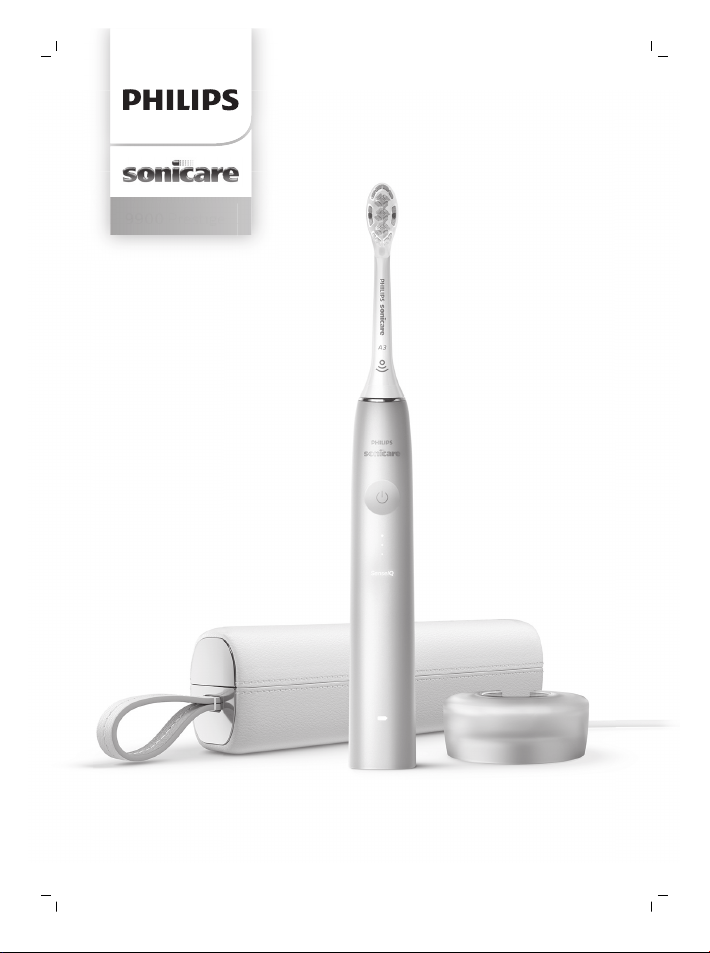
9900 Prestige

1
4
5
6
7
9
10
2
3
13
14
8
1615
12
11

empty page before TOC

English 6
Bahasa Melayu 24
ภาษาไทย
44
한국어
61
English
6
English
Introduction
Congratulations on your new Philips Sonicare power
toothbrush! Superior plaque removal, whiter teeth,
and healthier gums are at your fingertips. Using
Sonicare’s combination of gentle sonic technology
and clinically developed and proven features, you can
be confident that you’re getting the very best clean,
every time.
Further support and product registration are available
to you at: www.philips.com/Prestige-Get-Started
Welcome to the Philips Sonicare family!
Important safety information
Only use the product for its intended purpose. Read
this important information carefully before you use
the product and its batteries and accessories, and
save it for future reference. Misuse can lead to
hazards or serious injuries.
Warnings
- Keep the charger away from water.
- After cleaning, make sure the charger is completely
dry before you connect it to the wall socket.
- This appliance can be used by children and
persons with reduced physical, sensory or mental
capabilities or lack of experience and knowledge if
they have been given supervision or instruction
concerning use of the appliance in a safe way and
understand the hazards involved. Cleaning and
user maintenance shall not be made by children
without supervision.
- Children shall not play with the appliance.
- Only use original Philips accessories or
consumables. Only use the charger provided with
the product. If supplied, only use the original USB
cable and USB power supply unit.

7
English
- This appliance contains no user-serviceable parts.
If the appliance is damaged, stop using it and
contact the Consumer Care Center in your country
(see 'Warranty and support'). If the cord is
damaged, replace the charger with a new one.
- Do not use the charger outdoors or near heated
surfaces.
- Do not clean any part of the product in the
dishwasher.
- This appliance has only been designed for cleaning
teeth, gums and tongue.
- Stop using the appliance and consult your
dentist/doctor if excessive bleeding occurs after
use, if bleeding continues to occur after 1 week of
use or if you experience discomfort or pain.
- If you have had oral or gum surgery in the previous
2 months, consult your dentist before you use this
appliance.
- If you have a pacemaker or other implanted device,
contact your doctor or the manufacturer of the
implanted device prior to use.
- If you have medical concerns, consult your doctor
before you use this appliance.
- This appliance is a personal care device and is not
intended for use on multiple patients in a dental
practice or institution.
- Stop using a brush head with crushed or bent
bristles. Replace the brush head every 3 months or
sooner if signs of wear appear.
- If your toothpaste contains peroxide, baking soda
or bicarbonate (common in whitening
toothpastes), thoroughly clean the brush head with
soap and water after each use. This prevents
possible cracking of the plastic.
- Avoid direct contact with products that contain
essential oils or coconut oil. Contact may result in
bristles dislodging.

8
English
- To charge the battery, only use the USB wall
adapter, charging base and charging travel case
provided with the product: WAA1001, WAA2001,
HX9200 or HX9200/B, and TCC1001, TCC2001,
TCC3001, CBB1001 or CBB2001. Do not use an
extension cord.
- Charge, use and store the product at a
temperature between 0°C and 40°C.
- Keep product and batteries away from fire and do
not expose them to direct sunlight or high
temperatures.
- If the product becomes abnormally hot or smelly,
changes color or if charging takes longer than
usual, stop using and charging the product and
contact Philips.
- Do not place products and their batteries in
microwave ovens or on induction cookers.
- Do not open, modify, pierce, damage or dismantle
the product or battery to prevent batteries from
heating up or releasing toxic or hazardous
substances. Do not short-circuit, overcharge or
reverse charge batteries.
- If batteries are damaged or leaking, avoid contact
with the skin or eyes. If this occurs, immediately
rinse well with water and seek medical care.
Electromagnetic fields (EMF)
This Philips appliance complies with all applicable
standards and regulations regarding exposure to
electromagnetic fields.
Radio Equipment Directive
Hereby, Philips declares that electric tootbrushes
equipped with a radio frequency interface (Bluetooth
or BrushSync) are in compliance with Directive
2014/53/EU.
- Bluetooth radio frequency: 2.4 GHz
- Maximum Bluetooth radio frequency power: 3 dBm
- NFC radio frequency: 13.56 MHz
- Maximum NFC radio frequency power: 30.16 dBm

9
English
The full text of the EU declaration of conformity is
available at the following internet address:
www.philips.com/support
Intended use
Sonicare Prestige power toothbrushes are intended to
remove adherent plaque and food debris from the
teeth to reduce tooth decay and improve and
maintain oral health. Prestige power toothbrushes are
intended for consumer home use. Use by children
should be supervised by an adult.
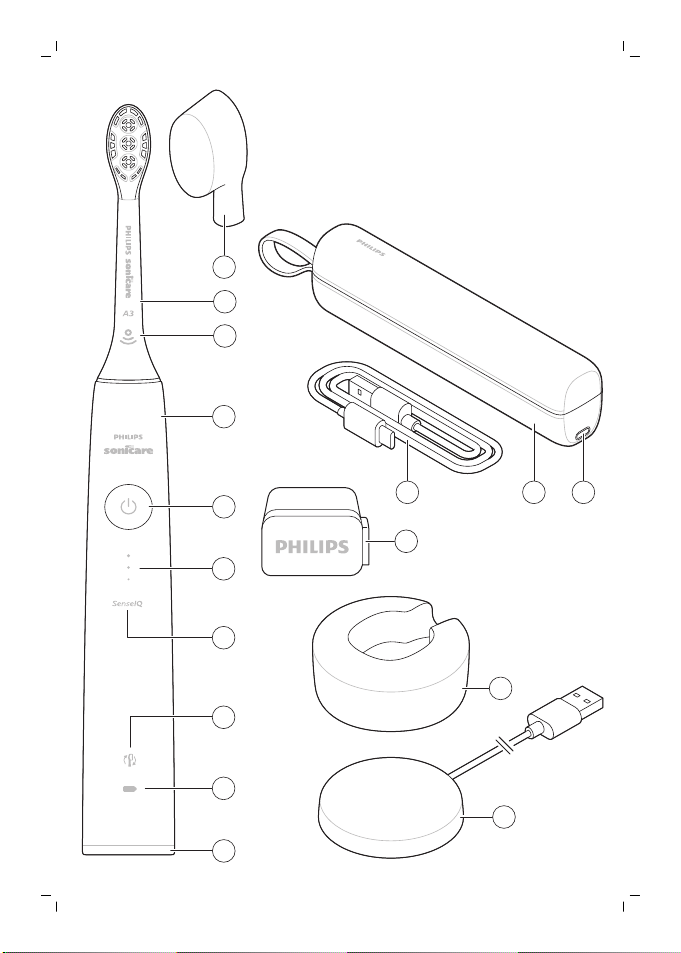
Your Philips Sonicare
1 Hygienic travel cap
2 Premium All-in-One brush head (A3)
3 BrushSync symbol
4 Handle
5 Power on/off button
6 Intensity indicator and hidden button
7 SenseIQ indicator
8 Brush head replacement reminder indicator
9 Battery indicator
10 Brushing feedback light
11 Charging base
12 Charging stand
13 USB-A wall adapter
14 USB-C cord
15 Charging travel case
16 USB-C socket
Note: The content of the box may vary based on the
model purchased.
The following symbols may appear on the product:
Read Operator’s Manual.
10
English
Detachable Power Supply Part:The "xxxxxx" indicates
the model number of the approved chargers to be
used.
Sonicare App - Getting Started
The Sonicare app pairs with your toothbrush to
provide you a connected experience. By connecting
your toothbrush to your Sonicare app account, you
will be able to:
- Customize your Sonicare toothbrush settings
according to your preferred modes, intensity and
toothbrush feedback.
- Track your brushing progress.
- Receive personalized tips and actionable
recommendations to improve your oral health.
- Access the full range of benefits and receive
ongoing upgrades to your Prestige experience.
The app is compatible with a wide range of iPhone
and Android™ smartphones. More information is
available at www.philips.com/Prestige-Get-Started
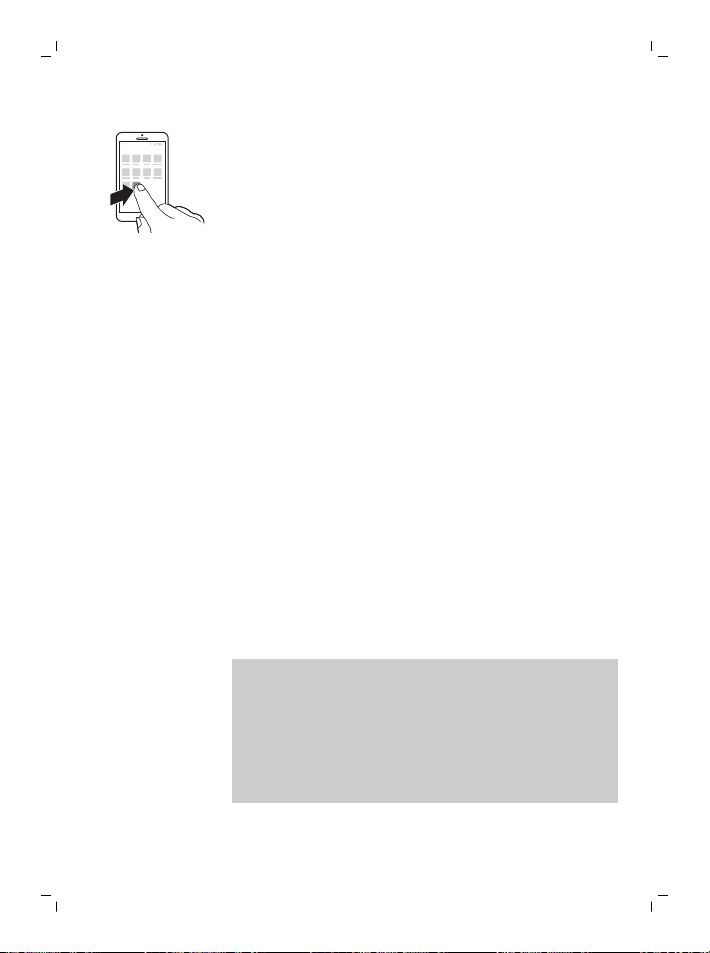
To start using the Sonicare app:
S7920
1
Download the Sonicare app to your phone.
2
Ensure your phone's Bluetooth is turned on.
3
Pick up your toothbrush to ensure it is active (lights
on).
4
Open the app and follow guided steps.
5
Pair your toothbrush with the app.
6
Create your account via the app. Complete
firmware update, if prompted, to access the latest
improvements and features.
7
Brush regularly. You are ready to start your
connected experience. When you regularly sync
the toothbrush with the app, you can receive
updates to help improve your oral healthcare.
11
English
8
Sync regularly.
- To sync manually: Pair/connect your toothbrush
with the app every couple of weeks to benefit from
the app features/capabilities.
- To sync automatically: Allow location permission
while setting up the app. By allowing location
permissions, your phone knows when it is in the
connection range of your toothbrush and can
refresh your brushing data to the app to provide
the latest insights and recommendations
Note: Make sure your phone's Bluetooth is turned on
when using the app so that your toothbrush can
transfer and update your brushing data to the app. If
you have questions about why your brushing data is
collected, be sure to review the Sonicare Privacy
Statement, available throughout the app setup
process.
App - Features
The Sonicare App provides customizable settings for
your toothbrush according to your preference,
including:
- Intensity Settings
- Mode Controls
- Enable and disable Adaptive Intensity
- Enable and disable Scrubbing feedback
Brush Head
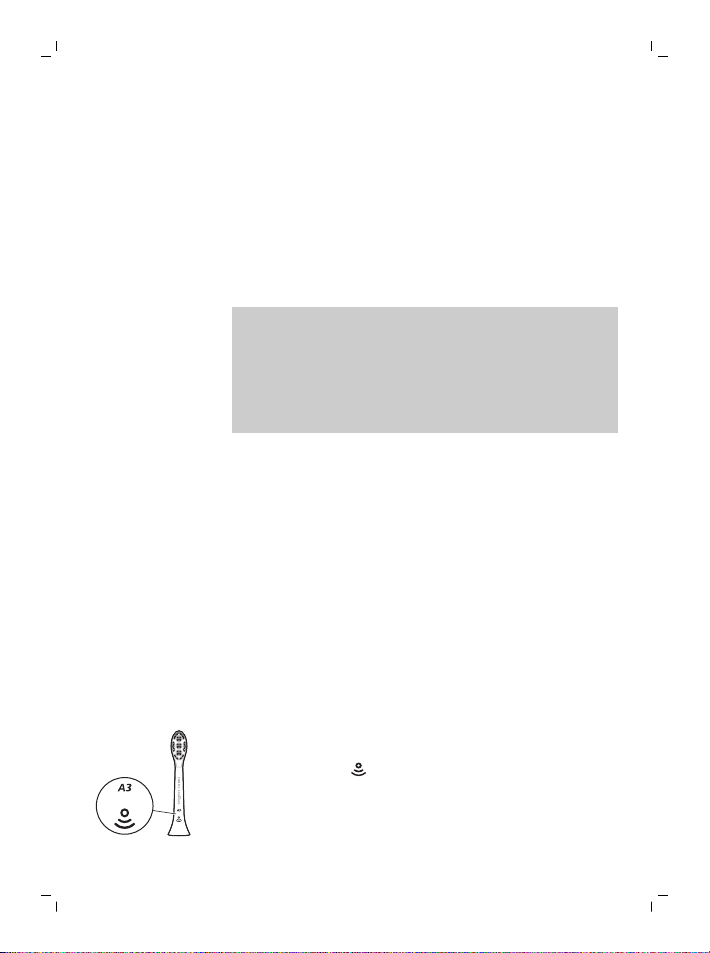
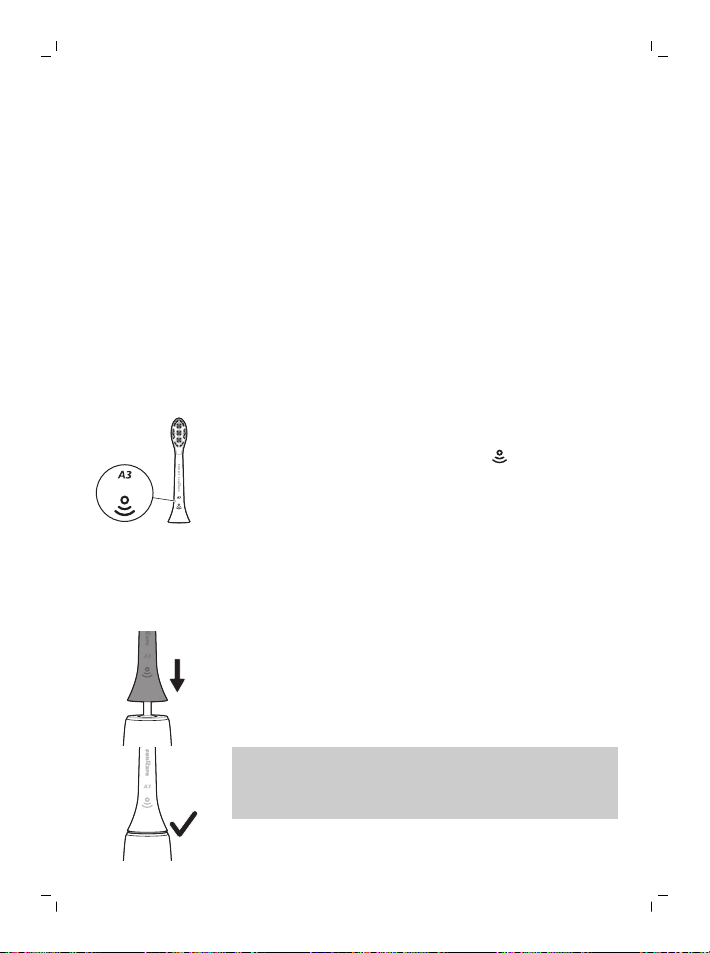
Your Sonicare Prestige power toothbrush comes with
the new "Premium All-in-One brush head" (A3). This
brush head is specifically designed to provide
exceptional plaque removal, whitening (stain
removal), and gum health benefits.
Premium All-in-One brush heads come with
BrushSync Technology (see description below) as
indicated by the
symbol at the bottom of the brush
head.
To explore our full range of brush head options,
please visit our website for more information:
www.philips.com/toothbrush-heads
12
English
Using your Philips Sonicare
Brushing instructions
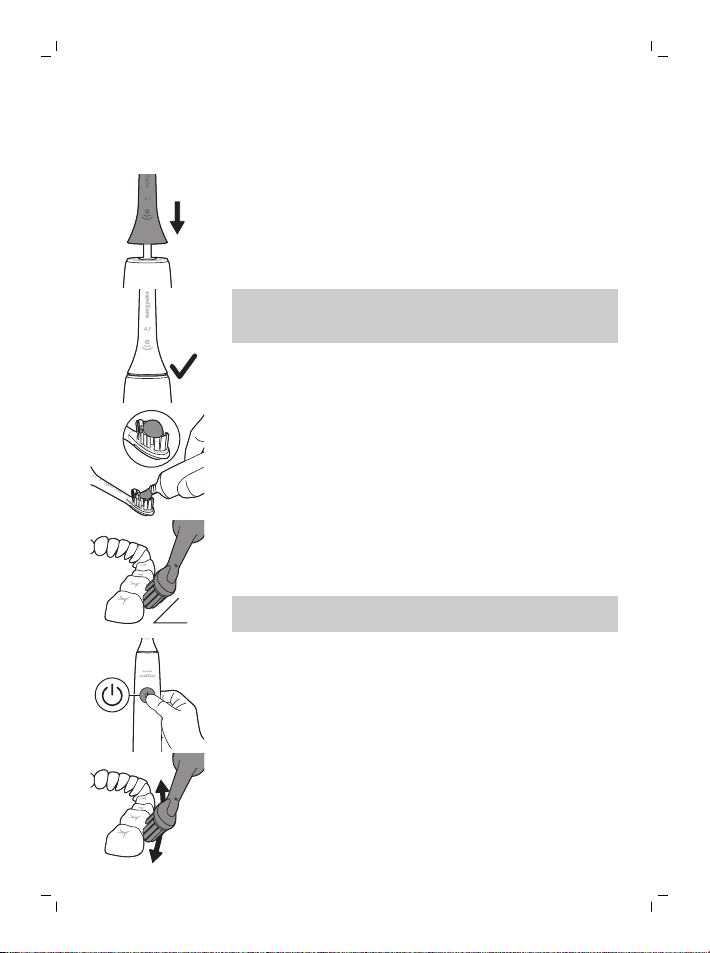
1
Push the brush head firmly onto the handle.
Note: It is normal to see a slight gap between the
brush head and the handle. This allows the brush
head to vibrate properly.
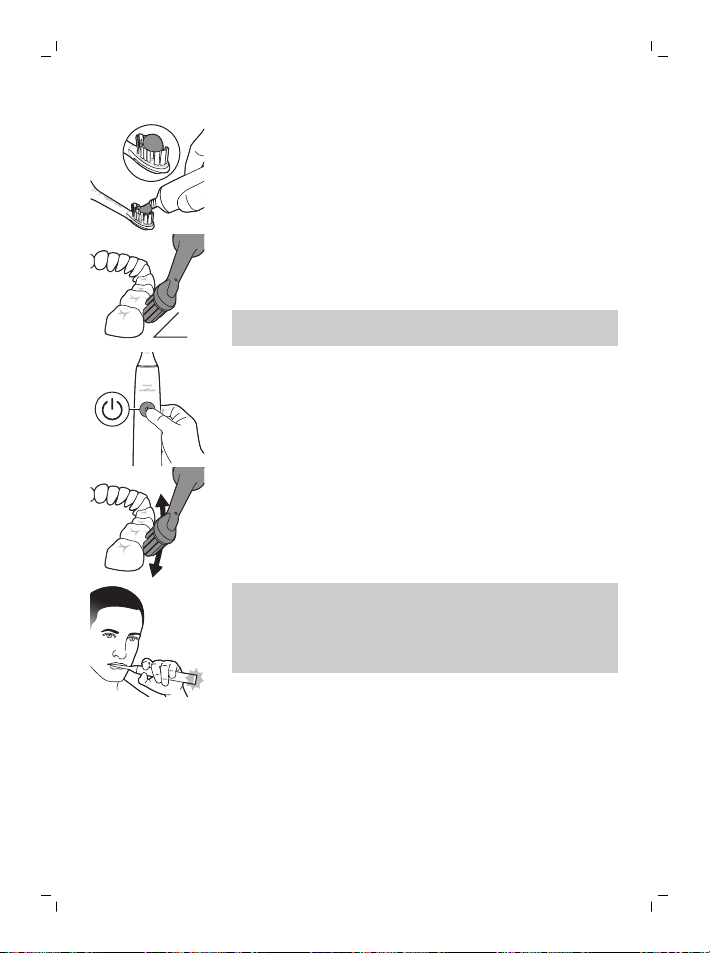
2
Wet the bristles and apply a small amount of
toothpaste.
45°
3
Place the toothbrush bristles against the teeth at a
slight angle (45 degrees). Apply light pressure to
make the bristles reach the gumline or slightly
beneath the gumline.
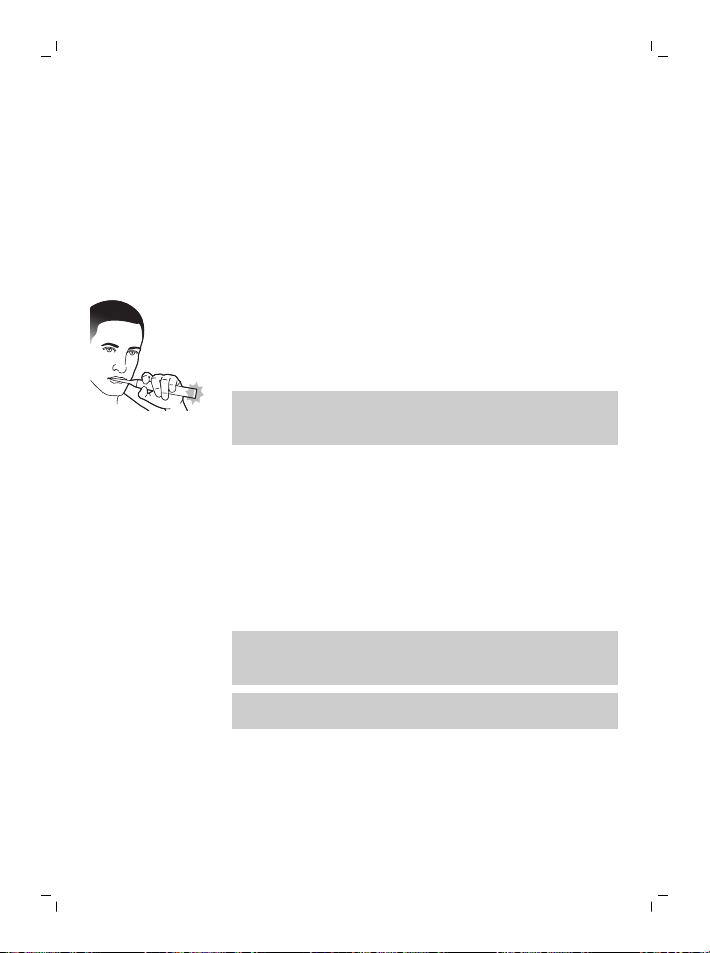
Note: Keep the center of the brush head in contact
with the teeth at all times.
4
Press the power on/off button to turn on the
Philips Sonicare.
5
Apply light pressure to maximize Philips Sonicare’s
effectiveness and let the Philips Sonicare
toothbrush do the brushing for you.
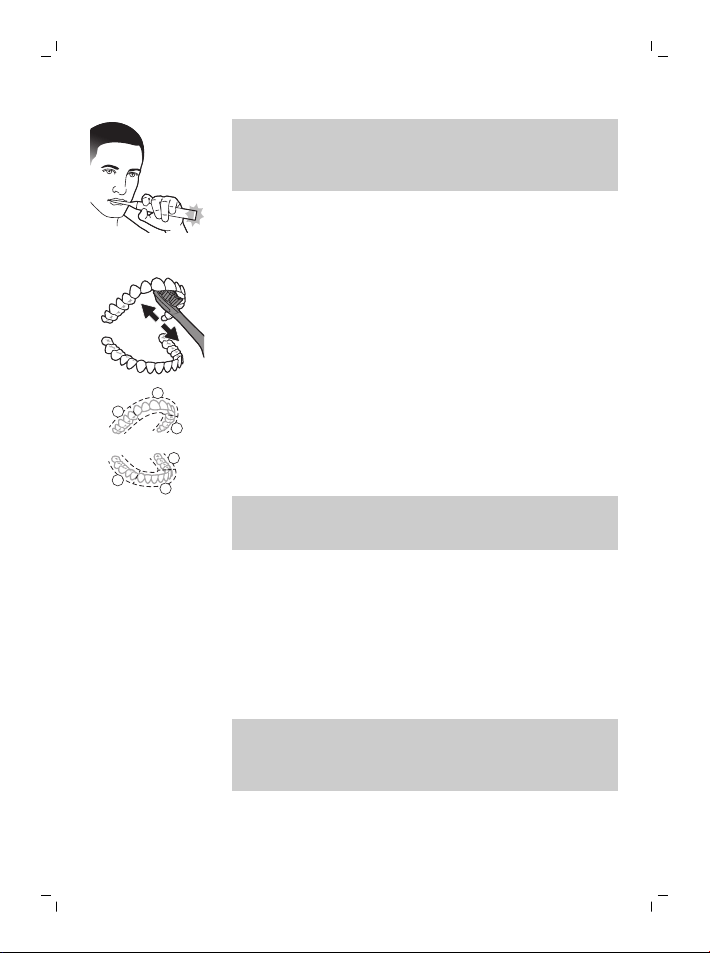
13
English
Note: The bristles should slightly flare. Do not
scrub. A change in vibration from the handle and
the brushing feedback light flashes purple to alert
you when you apply too much pressure.
Gently move the brush head slowly across the
teeth in a small back and forth motion so the
longer bristles reach between your teeth. Continue
this motion throughout the brushing cycle.
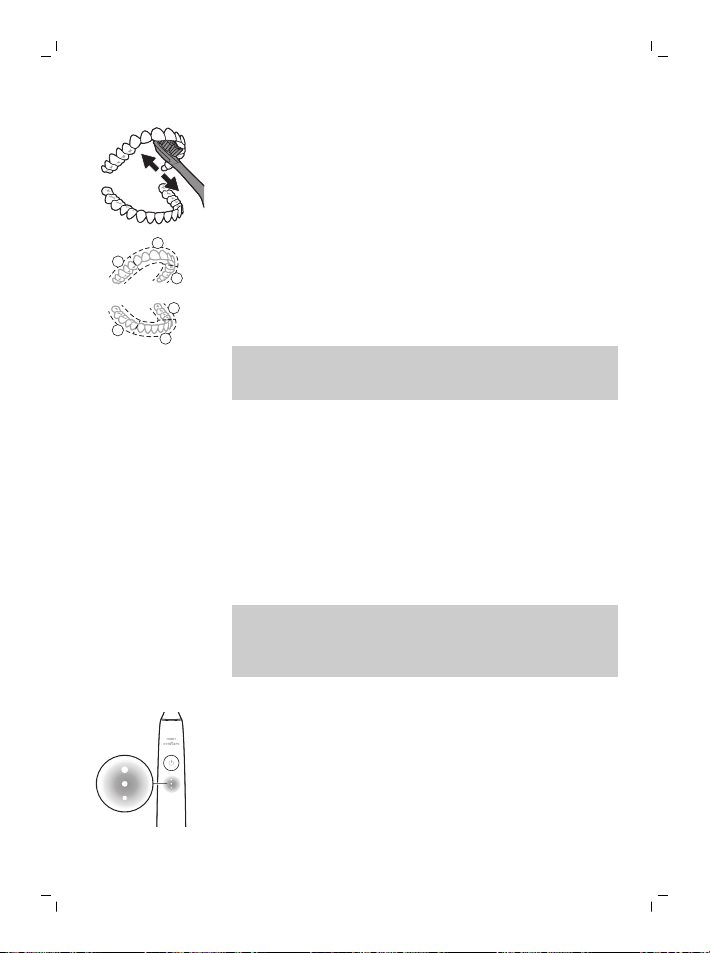
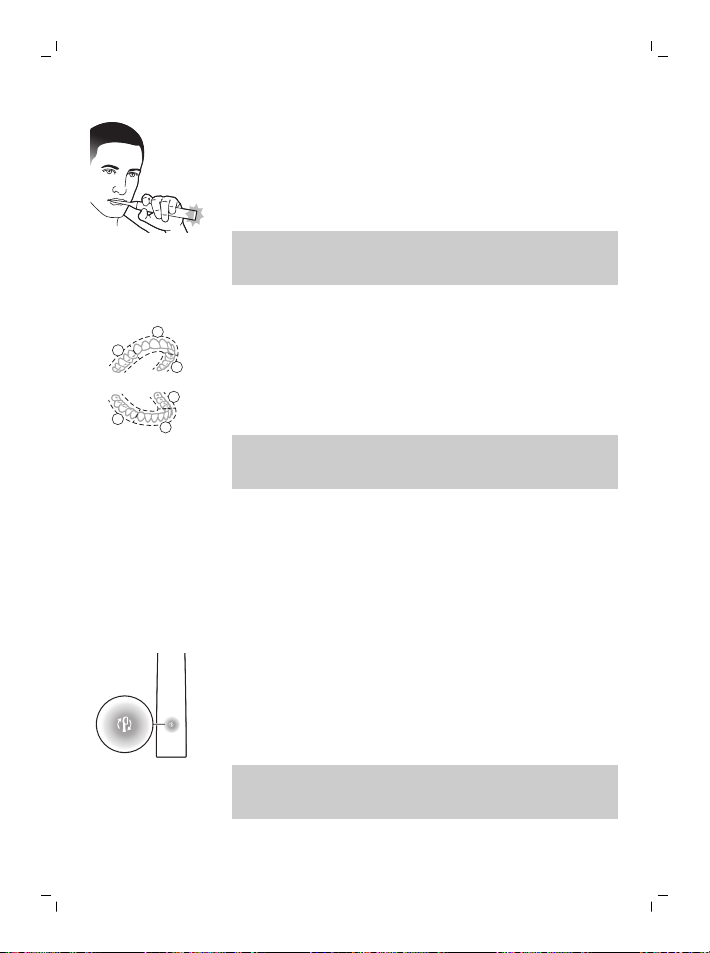
6
To clean the inside surfaces of the front teeth, tilt
the brush handle semi-upright and make several
vertical overlapping brushing strokes on each
tooth.
1
2
3
4
5
6
7
The BrushPacer divides the brushing time into six
equal segments and indicates when you should
move to the next area. Segments are indicated
with a brief pause in vibration. The toothbrush
automatically stops at the end of the brushing
session.
Note: Your Philips Sonicare toothbrush is safe to use
on braces, dental modifications and dental
restorations (fillings, crowns, veneers)
Brushing modes
Your power toothbrush comes pre-set to the all-in-
one clean mode that provides the dentist
recommended 2 minute brushing routine, with a six
segment brush pacer.
To personalize your brushing mode you can
customize your power toothbrush settings from the
Sonicare app (see 'Sonicare App - Getting Started').
Note: Although a mode is not displayed on the
toothbrush handle, you can update the mode any
time from the Sonicare App and your selection will be
stored.
14
English
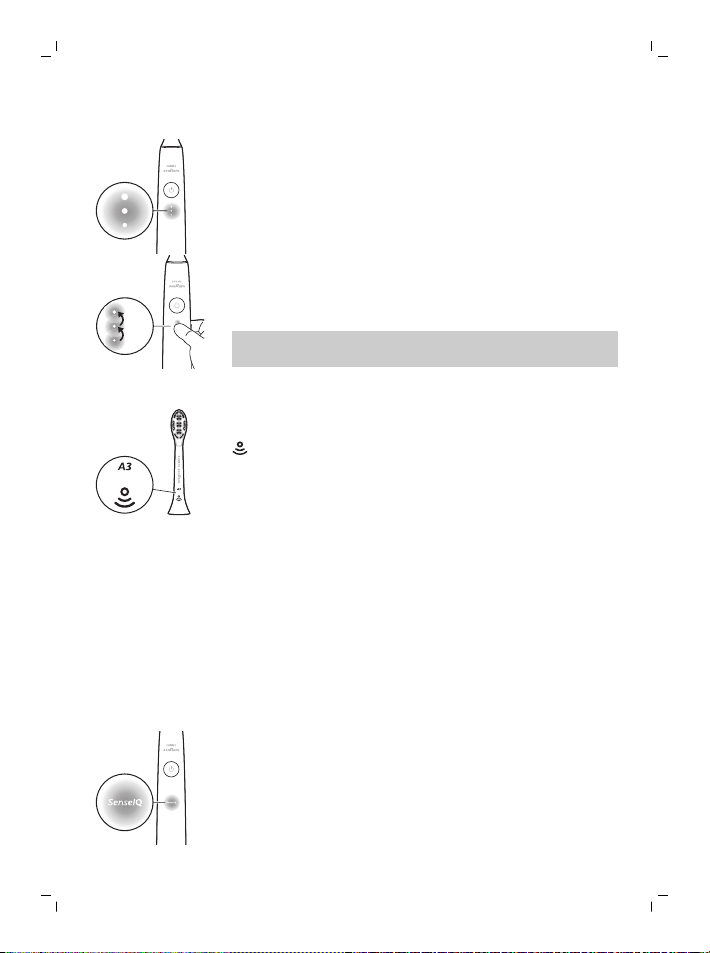
Intensity settings
Your power toothbrush comes with 3 different
intensity settings:
- High intensity (three lights)
- Medium intensity (two lights)
- Low intensity (one light)
×3
×1
×2
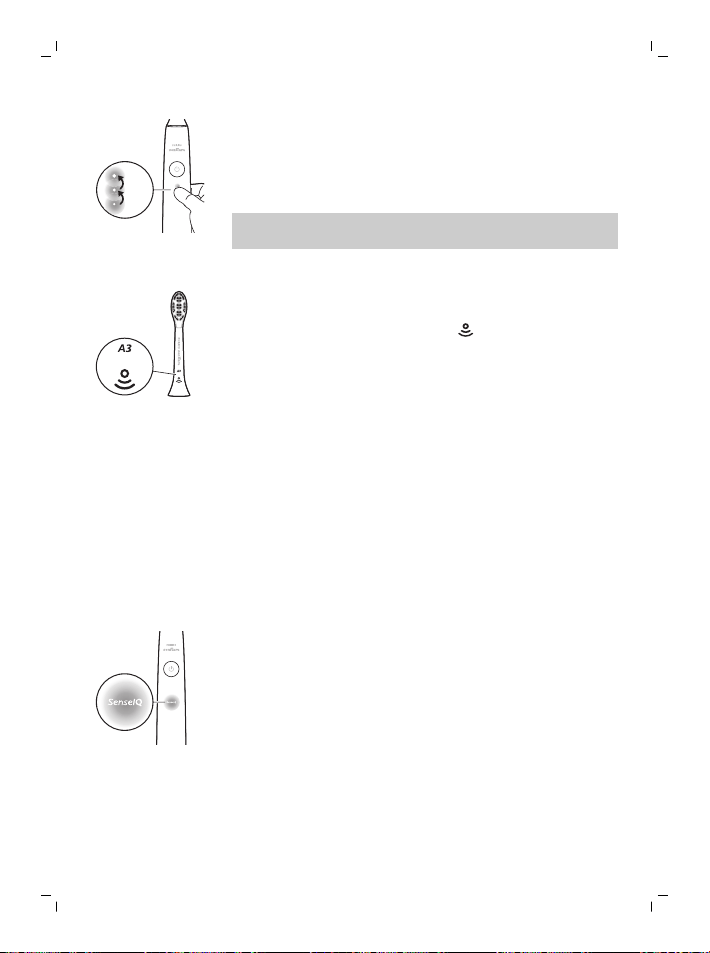
To manually select your desired intensity, press the
intensity indicator lights on the handle, to cycle
through the options. The intensity setting can be
changed before, during, or after brushing.
Note: The intensity setting can also be customized
from the Sonicare app.
BrushSync technology
BrushSync technology enables your brush head to
communicate with your handle using a microchip. The
symbol at the bottom of the brush head indicates
that the brush head is equipped with this technology.
BrushSync technology enables:
- Brush head replacement reminder
- BrushSync mode paring (for Tongue Care brush
heads)
Features
- SenseIQ
- Pressure Sensor Feedback
- Adaptive Intensity
- Scrubbing Feedback
- BrushPacer
- Brush head replacement reminder
SenseIQ
Your Sonicare is equipped with SenseIQ technology
that is a combination of smart features that observe
your brushing behaviors (e.g. motions, habits, brush
head choice) and provide personalized feedback and
recommendations.
The SenseIQ features include:
- Adaptive Intensity
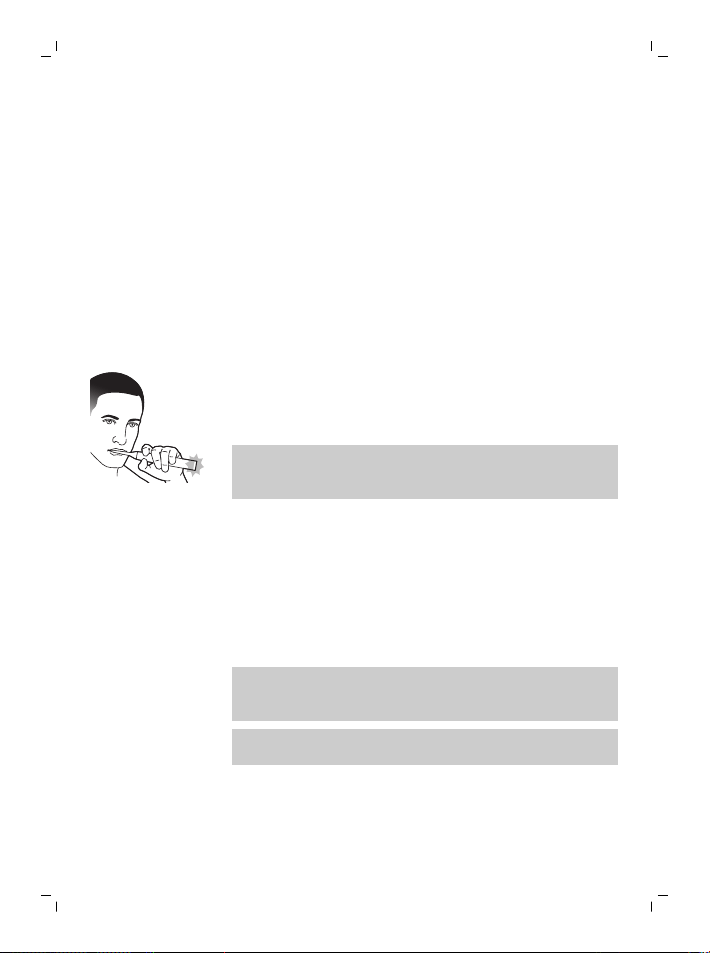
15
English
- Real time feedback:
- Scrubbing Feedback
- Pressure Sensor Feedback
- Personalized recommendations in the app
- Brushing behavior feedback in the app
The SenseIQ icon on the handle will illuminate when
the smart features are active:
- while brushing
- to confirm enabling and disabling of settings
Pressure Sensor Feedback
Your Sonicare toothbrush measures the pressure you
apply while brushing to protect your gums and teeth
from damage.
If you apply excess pressure, the handle will change
its vibration and the brushing feedback light will flash
(purple) at the bottom of the handle until you reduce
the pressure.
Note: The Pressure Sensor comes activated with your
product. To deactivate this feature, see 'Activating or
deactivating features'.
Adaptive intensity
Your Sonicare toothbrush is designed with Adaptive
Intensity to protect your gums. If you apply excess
pressure for an extended period of time, your
toothbrush will automatically lower the intensity
setting 1 level. You will experience a brief pause in the
pressure feedback and feel the intensity adjust to the
next lower level.
Note: Adaptive Intensity comes activated with your
product. To deactivate this feature, see 'Activating or
deactivating features'.
Note: Every new brushing cycle the intensity will go
back to your pre-selected setting.
Scrubbing Feedback
Your Sonicare toothbrush measures the motions while
brushing to detect scrubbing behavior (see brushing
instructions for optimal technique). If you regularly
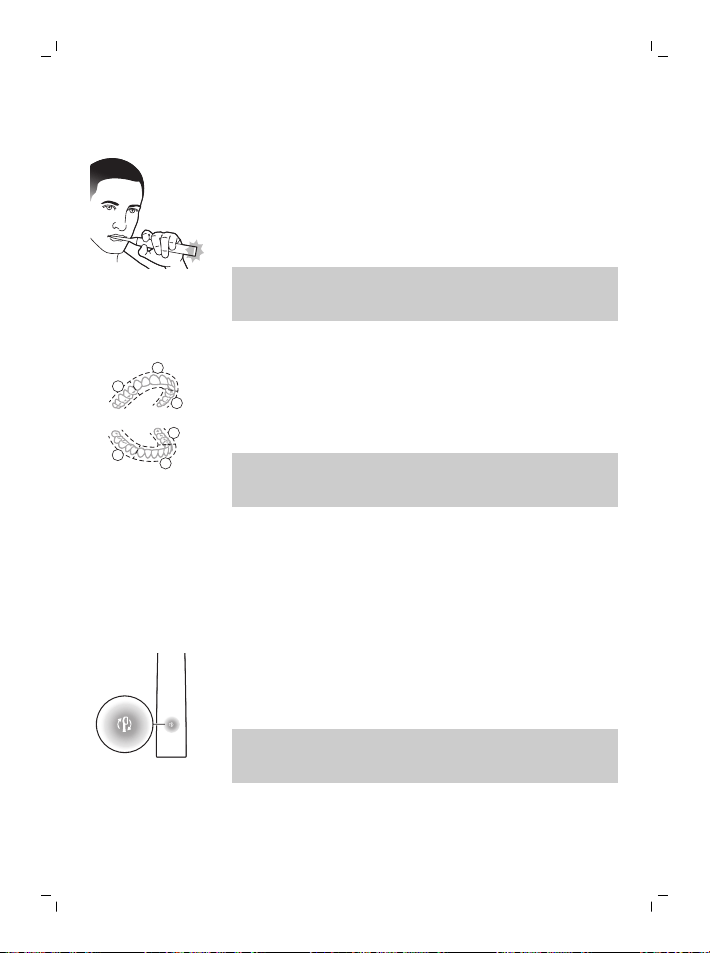
16
English
scrub while brushing, the app will recommend that
you enable Scrubbing Feedback.
When Scrubbing Feedback is activated the brushing
feedback light at the bottom of the handle will
illuminate amber and the handle will change its
vibration as a reminder to stop scrubbing. The
brushing feedback light will turn off when you stop
scrubbing.
Note: Scrubbing Feedback comes deactivated. To
activate this feature, see 'Activating or deactivating
features'.
BrushPacer
1
2
3
4
5
6
The BrushPacer divides the brushing time into six
equal segments and indicates when you should move
to the next area. Segments are indicated with a brief
pause in vibration. The toothbrush automatically
stops at the end of the brushing session.
Note: Additional segments may be added when you
use White+ or Gum Health Modes. See Sonicare app
for mode descriptions.
Brush head replacement reminder
Your Sonicare toothbrush will track the wear of your
smart brush head, using the BrushSync technology to
measure:
- The overall pressure you apply while brushing
- The total time you have brushed with your brush
head
Once your brush head is no longer effective, the brush
head replacement reminder indicator light will blink
amber and the handle will make a series of beeps and
tones to indicate it is time to replace your brush head.
Note: The brush head replacement reminder comes
activated with your product. To deactivate this
feature, see 'Activating or deactivating features'.
Activating or deactivating features
You can activate or deactivate the following features
of your toothbrush:
17
English
- Adaptive Intensity
- Pressure Sensor Feedback
- Scrubbing Feedback
- Brush head replacement reminder
Note: Adaptive Intensity will be deactivated when
pressure sensor is deactivated.
From app
The following features can be activated or deactivated
from the Sonicare app.
- Adaptive Intensity
- Scrubbing Feedback
For instruction for how to connect to the app (see
'Sonicare App - Getting Started').
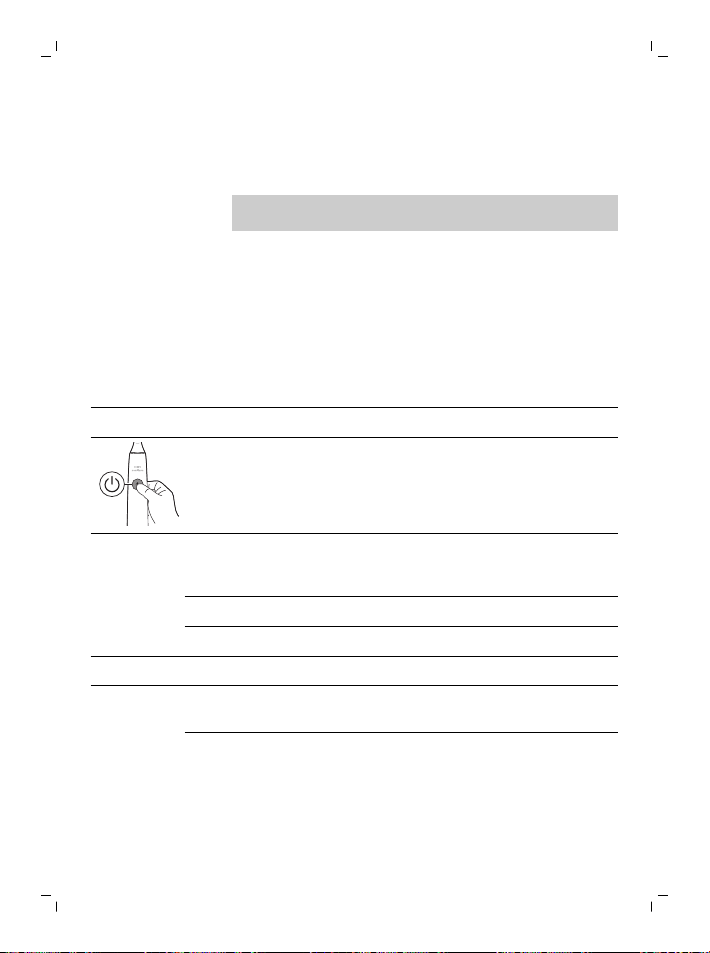
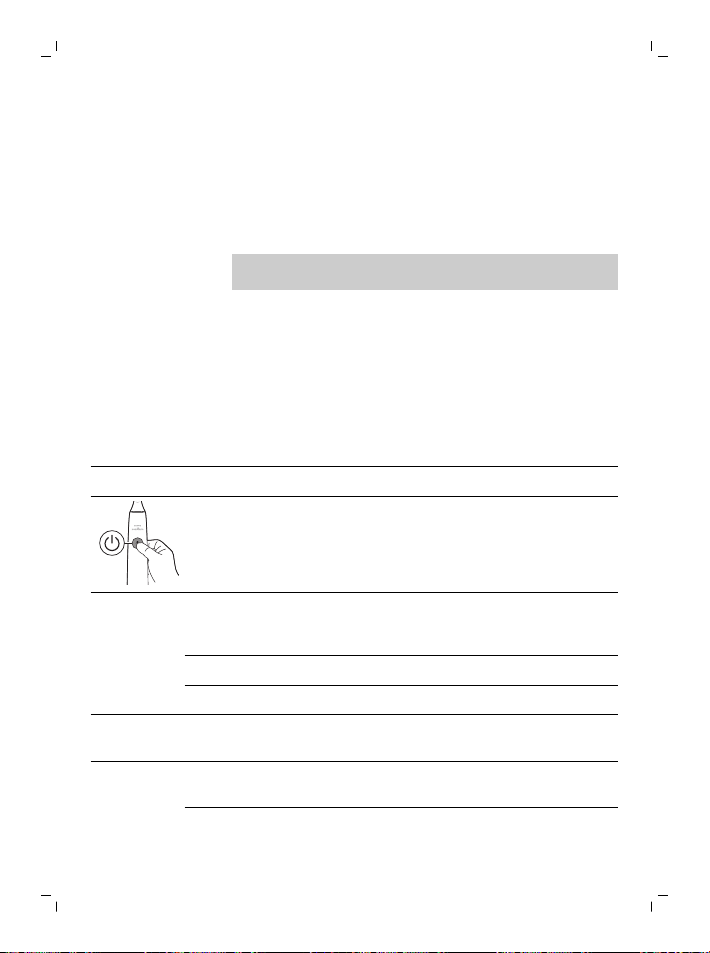
From handle
Step 1: Place the handle on the charging stand.
Step 2: Press and hold power button for:
Adaptive
intensity
Brush head
replacement
reminder
Pressure Sensor
Feedback
up to 3 seconds Up to 5 seconds Up to 7 seconds
¯ ¯ ¯
Step 3: Let go power button when you hear
1 beep 1 beep and then
2 beeps
1 beep, 2 beeps and
then 3 beeps
¯ ¯ ¯
18
English
SenseIQ
indicator lights
up for 3
seconds
Brush head
replacement
reminder
indicator lights
up for 3
seconds
SenseIQ indicator and
light ring lights up
purple for 3 seconds
Together with:
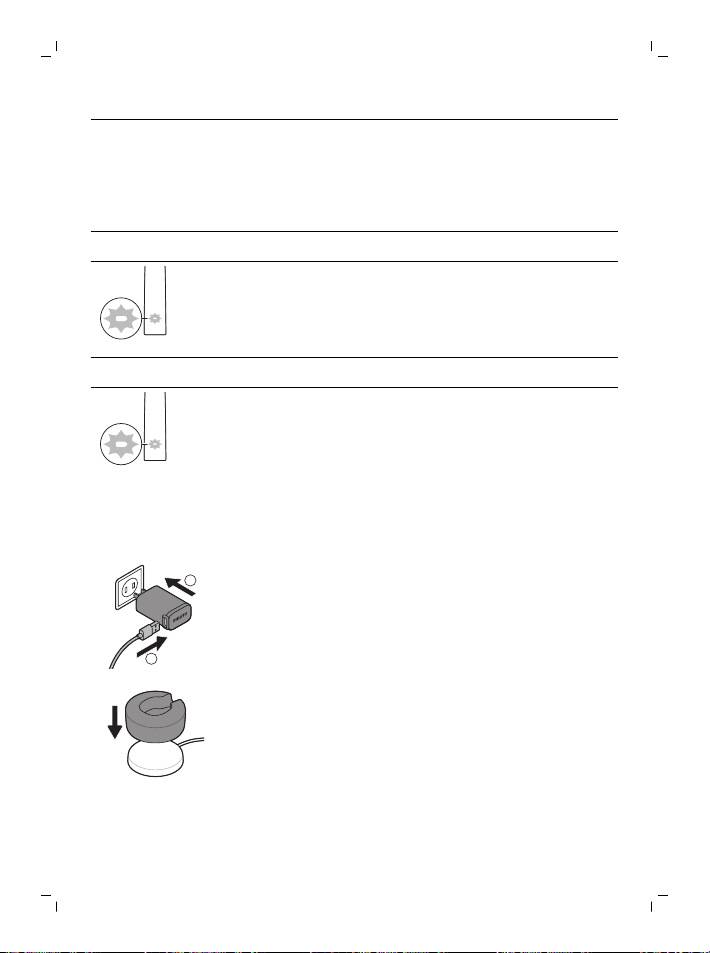
If you see the battery indication blink white 3 times and
hear 3 tones from low to high, then the feature has been
activated.
OR
If you see battery indication blink amber 3 times and hear 3
tones high to low, then the feature has been deactivated.
Charging and battery status
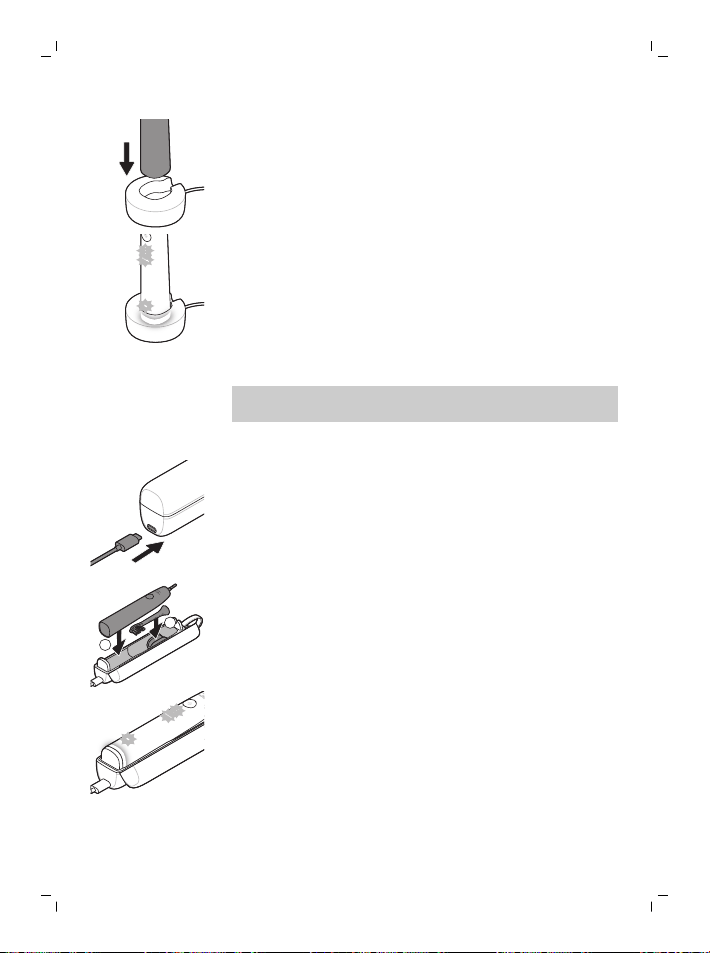
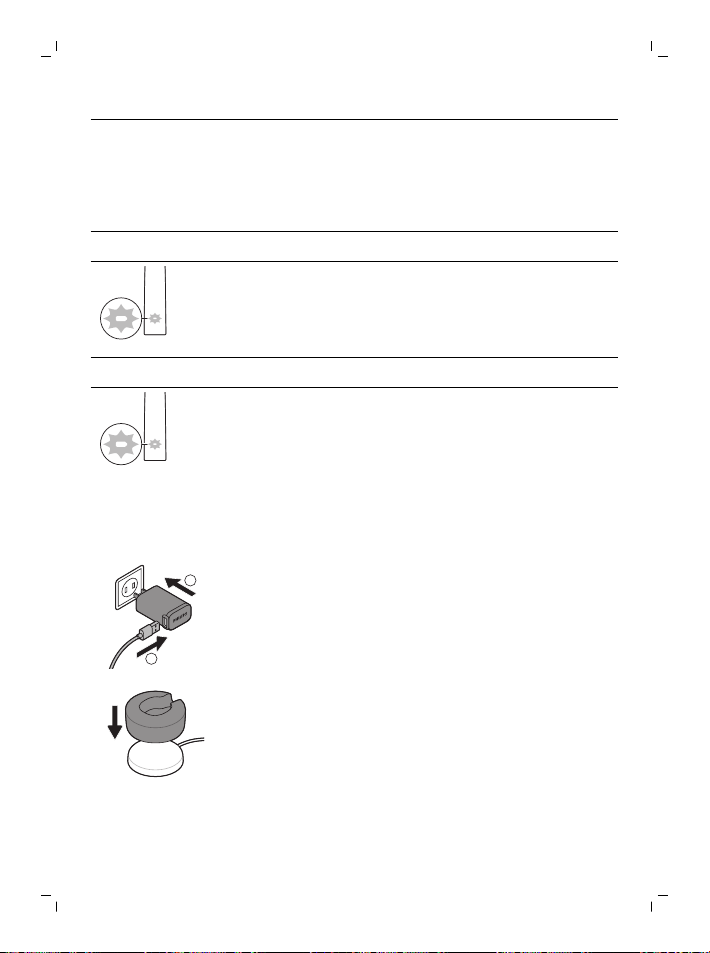
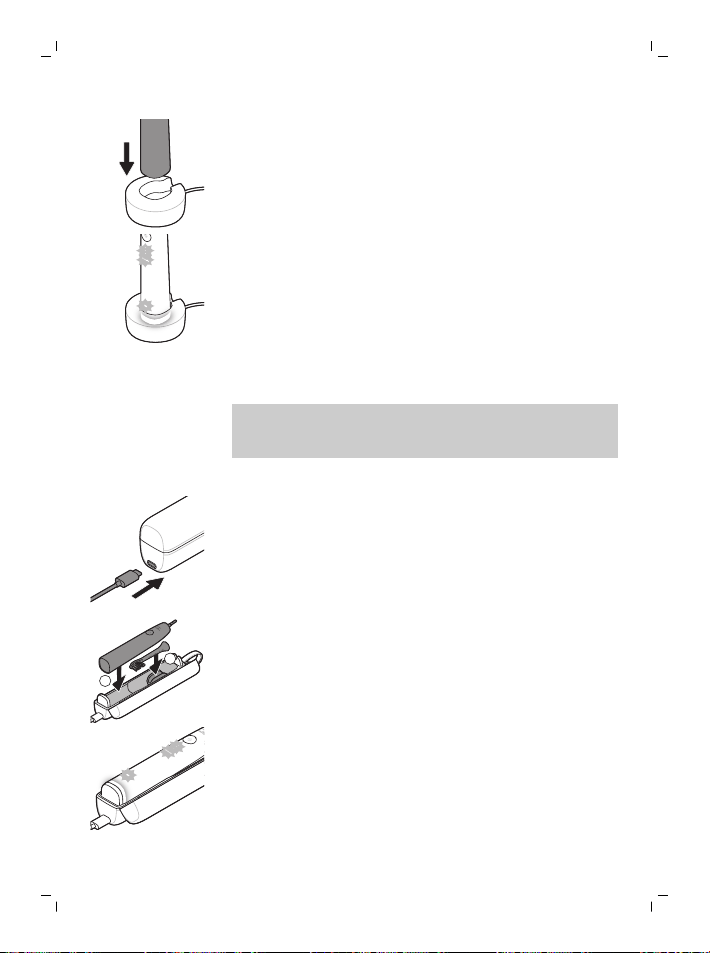
Charging on charger base
1
2
1
Plug the USB cord of the charging base into the
USB wall adapter and plug the wall adapter into an
electrical outlet.
2
Place the charging stand (clear cover) on the
charging base.
19
English
3
Place the toothbrush handle on the charger.
a To indicate charging has started successfully,
the toothbrush will beep twice and the lights
will illuminate in an upward motion.
b While charging the battery indicator blinks in
white.
4
Leave the toothbrush on the charger until it is fully
charged. The battery light will turn off (stop
blinking) when the handle has finished charging.
Note: It may take up to 16 hours to fully charge your
Sonicare toothbrush.
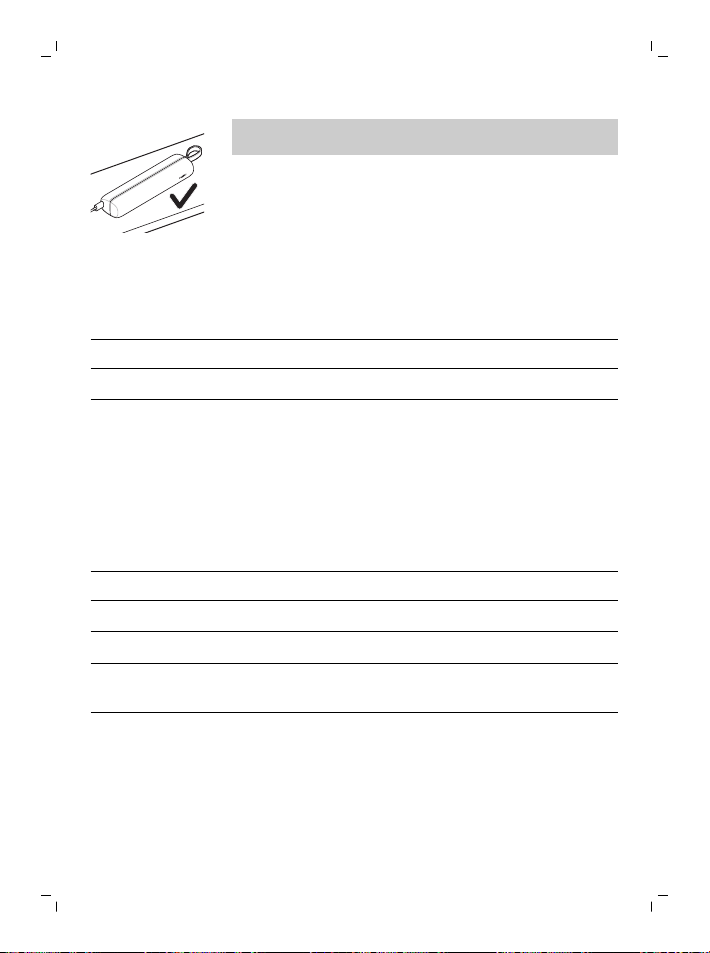
Charging with the travel case
1
Plug the USB cord into the travel case and into the
USB wall adapter.
2
Plug the wall adapter into an electrical outlet.
1
2
3
Place toothbrush into travel case.
a To indicate charging has started successfully,
the toothbrush will beep twice and the lights
will illuminate in an upward motion.
b While charging the battery indicator blinks in
white.
4
Leave travel case plugged in until toothbrush is
fully charged. The battery light will turn off (stop
blinking) when the handle has finished charging.
20
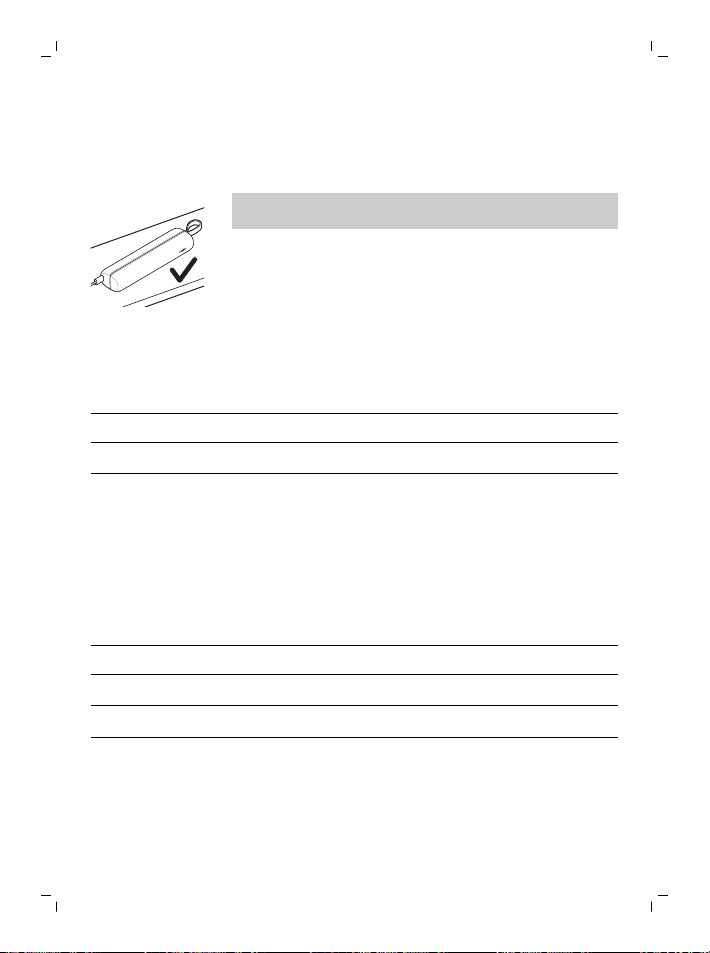
English
Note: Make sure the travel case is placed on its side
for better stability.
Battery Status (when handle is on a working charger or travel
case)
When the handle is placed on the charger or in the
travel case, the battery indication will communicate
the battery level.
Battery status
Battery indication
Charging Blinks in white
Full Illuminates white for 30 seconds
and then turns off.
Battery Status (when handle is not placed on Charger)
When the toothbrush is awake, the battery light at the
bottom of the handle will indicate the status of the
battery.
Battery status Battery indication Sound
Full Illuminated in white -
Partially full Blinks white -
Low Blinks amber The handle emits 3
beeps after brushing
Empty Blinks amber The handle emits 2
sets of beeps after
brushing
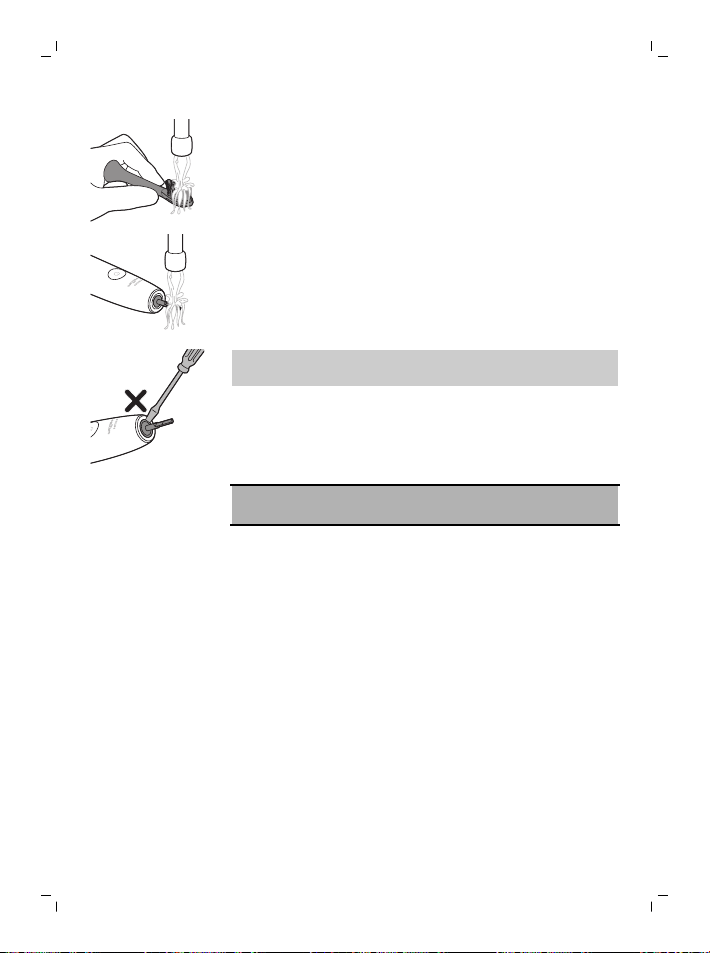
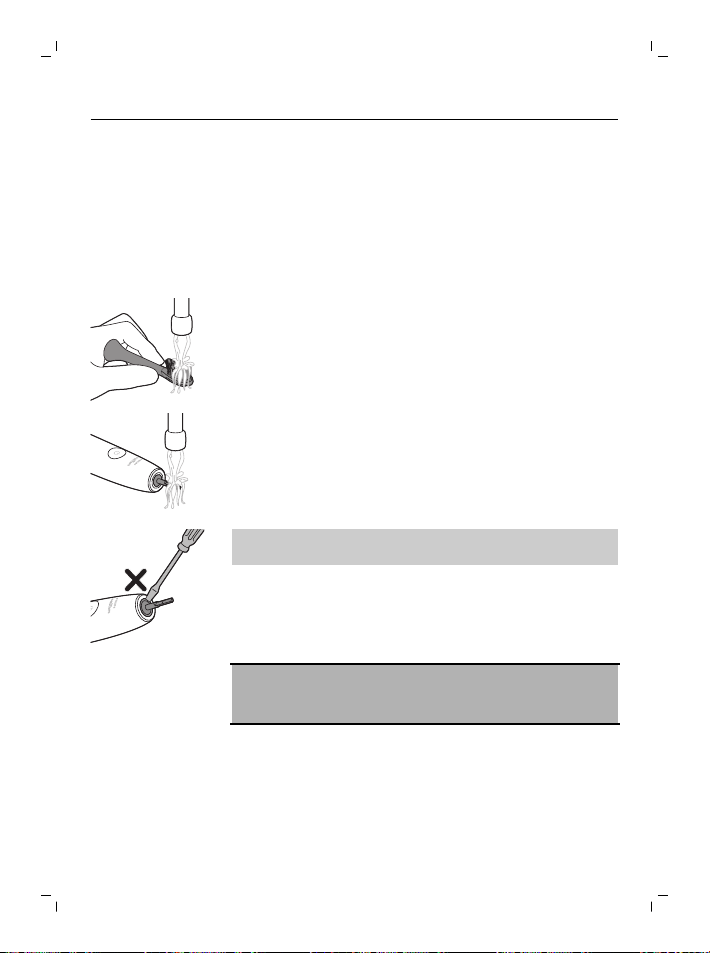
Cleaning
Brush head and handle
The brush heads and handle can be cleaned by
rinsing it with warm water.
21
English
1
Remove the brush head from the handle and rinse
it thoroughly.
2
Rinse the entire handle, especially the brush head
connection. Gently clean around the rubber seal.
At least once a week.
Note: Do not push on the rubber seal at the top of
the handle.
Travel case and charger
1
Unplug the charger and travel case before you
clean them.
2
Use damp cloth to wipe the surface of the charger
and travel case.
Danger: Unplug the USB wall adapter and
chargers before cleaning them.
Cautions:
- Do not clean the product or accessories in the
dishwasher.
- Do not use isopropyl alcohol, vinegar, bleach, or
any other house hold cleaning products, to clean
the product or accessories as this may cause
discoloration.
- Make sure brush head and toothbrush are dry
before storing in travel case.
- Do not use essential oils to clean the brush head,
the product or accessories as this can cause
damage
Storage
If you are not going to use the product for an
extended period of time, unplug it from the electrical
outlet, clean it and store it in a cool and dry place
away from direct sunlight.

22
English
Troubleshooting
This chapter summarizes the most common problems
you could encounter with the appliance. If you are
unable to solve the problem with the information
below, visit www.philips.com/support for a list of
frequently asked questions or contact the Consumer
Care Center in your country.
Problem Possible Cause Solution
I cannot fully attach
the brush head. There
is a gap between the
brush head and
handle.
This gap is normal and is
needed for the brush
head to vibrate
appropriately.
My Philips Sonicare
toothbrush vibration is
less powerful than
before.
The adaptive
intensity function has
been activated, the
pressure sensor has
been activated (see
'Pressure Sensor
Feedback'), or the
intensity was
accidentally changed.
Turn off the adaptive
intensity and/or the
pressure sensor function
(see 'Activating or
deactivating features'),
and/or raise the
intensity level by
pressing the intensity
indicator light to the
desired level (see
'Intensity settings').
My Philips Sonicare
toothbrush is missing
parts.
The missing parts are
not included with the
model you
purchased.
The accessories and the
number of brush head
attachments are
dependent on the
model number you have
purchased. You can find
the HX model number at
the bottom of your
handle to identify what
comes with your handle.

23
English
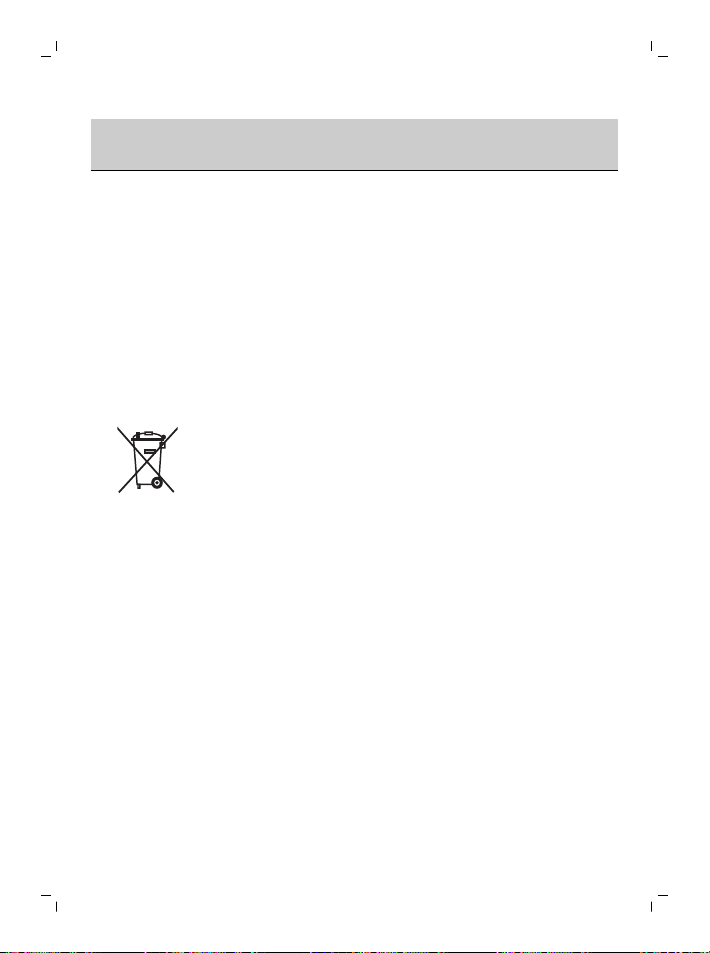
Recycling
- This symbol means that electrical products and
batteries shall not be disposed of with normal
household waste.
- Follow your country’s rules for the separate
collection of electrical products and batteries.
Removal of built-in rechargeable battery
The built-in rechargeable battery must be removed by
a qualified professional when the product is
discarded. Instructions for removal of built-in
rechargeable batteries can be found on
www.philips.com/support.
Warranty and support
If you need information or support, please visit
www.philips.com/support or read the international
warranty leaflet.
Warranty restrictions
The terms of the international warranty do not cover
the following:
- Brush heads.
- Damage caused by use of unauthorized
replacement parts.
- Damage caused by misuse, abuse, neglect,
alterations or unauthorized repair.
- Normal wear and tear, including chips, scratches,
abrasions, discoloration or fading.
Bahasa Melayu
24
Bahasa Melayu
Pengenalan
Tahniah kerana membeli berus gigi berkuasa Philips
Sonicare baharu anda! Pembersihan plak yang lebih
hebat, gigi lebih putih dan gusi lebih sihat di hujung
jari anda. Dengan menggunakan gabungan teknologi
sonik lembut Sonicare dan ciri yang dibangunkan
serta terbukti secara klinikal, anda boleh yakin
bahawa anda memperoleh hasil pembersihan yang
terbaik pada setiap masa.
Sokongan dan pendaftaran produk lanjut tersedia
untuk anda di: www.philips.com/Prestige-Get-
Started
Selamat datang ke keluarga Philips Sonicare!
Maklumat keselamatan penting
Hanya gunakan produk untuk tujuan penggunaan
produk ini. Baca maklumat penting ini dengan teliti
sebelum anda menggunakan produk dan bateri serta
aksesorinya, dan simpan untuk rujukan pada masa
hadapan. Penyalahgunaan boleh menyebabkan
bahaya atau kecederaan serius.
Amaran
- Pastikan pengecas berada jauh dari air.
- Selepas membersihkan, pastikan pengecas telah
kering sepenuhnya sebelum anda
menyambungkannya ke soket dinding.
- Perkakas ini boleh digunakan oleh kanak-kanak
dan orang yang kurang upaya dari segi fizikal, deria
atau mental, atau kurang berpengalaman dan
pengetahuan jika mereka diberi pengawasan dan
arahan berkenaan penggunaan perkakas secara
selamat dan memahami bahaya yang mungkin
berlaku. Pembersihan dan penyelenggaraan oleh
pengguna tidak harus dilakukan oleh kanak-kanak
tanpa pengawasan.
- Kanak-kanak tidak sepatutnya bermain dengan
perkakas ini.

25
Bahasa Melayu
- Hanya gunakan aksesori atau barangan pakai
habis Philips yang tulen. Hanya gunakan pengecas
yang disediakan dengan produk. Sekiranya
dibekalkan, hanya gunakan kabel USB tulen dan
unit bekalan kuasa USB.
- Perkakas ini tidak mengandungi bahagian yang
boleh diservis pengguna. Jika perkakas tersebut
rosak, berhenti menggunakan perkakas itu dan
hubungi Pusat Khidmat Pengguna di negara (lihat
'Jaminan dan sokongan') anda. Sekiranya kordnya
rosak, ganti pengecas dengan yang baharu.
- Jangan gunakan pengecas di luar atau berdekatan
permukaan panas.
- Jangan bersihkan mana-mana bahagian produk ini
di dalam mesin basuh pinggan mangkuk.
- Perkakas ini hanya direka bentuk untuk
membersihkan gigi, gusi dan lidah.
- Berhenti menggunakan perkakas ini dan berjumpa
dengan doktor gigi/doktor anda sekiranya
pendarahan berlebihan berlaku selepas
penggunaan, jika pendarahan terus berlaku
setelah 1 minggu penggunaan atau jika anda
mengalami ketidakselesaan atau kesakitan.
- Jika anda pernah melalui pembedahan gigi atau
gusi dalam tempoh 2 bulan sebelum ini, hubungi
doktor gigi anda sebelum anda menggunakan
perkakas ini.
- Jika anda mempunyai perentak jantung atau
peranti lain yang diimplan, hubungi doktor anda
atau pengilang peranti yang diimplan sebelum
menggunakan peranti tersebut.
- Jika anda mempunyai keraguan dari segi
perubatan, temui doktor anda sebelum anda
menggunakan perkakas ini.
- Perkakas ini ialah alat pembersihan peribadi dan
tidak dimaksudkan untuk digunakan oleh lebih dari
seorang pesakit di klinik atau institusi gigi.
- Berhenti menggunakan kepala berus dengan bulu
kejur yang renyuk atau bengkok. Gantikan kepala
berus setiap 3 bulan sekali atau lebih awal jika
tanda-tanda haus kelihatan.

26
Bahasa Melayu
- Jika ubat gigi anda mengandung peroksida, baking
soda atau bikarbonat (biasa di dalam ubat gigi
pemutihan), bersihkan kepala berus dengan teliti
menggunakan sabut dan air selepas setiap kali
digunakan. Ini mencegah kemungkinan rekahan
pada plastiknya.
- Elakkan sentuhan langsung dengan produk yang
mengandungi minyak pati atau minyak kelapa.
Sentuhan mungkin menyebabkan bulu berus
tertanggal.
- Untuk mengecas bateri, hanya gunakan penyesuai
dinding USB, tapak pengecas dan bekas pengecas
perjalanan yang disertakan bersama produk ini:
WAA1001, WAA2001, HX9200 atau HX9200/B dan
TCC1001, TCC2001, TCC3001, CBB1001 atau
CBB2001. Jangan gunakan kord pelanjutan.
- Cas, gunakan dan simpan produk pada suhu
antara 0°C hingga 40°C.
- Jauhkan produk dan bateri daripada api dan
jangan dedahkan kepada cahaya matahari
langsung atau suhu tinggi.
- Jika produk menjadi panas secara luar biasa atau
mengeluarkan bau, berubah warna atau jika
pengecasan memakan masa yang lebih lama
daripada biasa, berhenti menggunakan serta
mengecas produk dan hubungi pengedar Philips
tempatan anda.
- Jangan letakkan produk dan baterinya dalam
ketuhar gelombang mikro atau pada dapur induksi.
- Jangan buka, ubah suai, tebuk, rosakkan atau
merungkas produk atau bateri untuk mengelak
bateri daripada memanas atau melepaskan bahan
toksik atau berbahaya. Jangan pintaskan litar,
terlebih cas atau melakukan pengecasan berbalik
pada bateri.
- Jika bateri rosak atau bocor, elakkan daripada
tersentuh kulit atau mata. Jika ini berlaku, bilas
segera dengan air dan dapatkan rawatan
perubatan.

27
Bahasa Melayu
Medan elektromagnet (EMF)
Perkakas Philips ini mematuhi semua piawaian dan
peraturan yang berkaitan dengan pendedahan
kepada medan elektromagnet.
Arahan Peralatan Radio
Dengan ini, Philips mengisytiharkan bahawa berus gigi
elektrik yang dilengkapi antara muka frekuensi radio
(Bluetooth atau BrushSync) mematuhi Perintah
2014/53/EU.
- Frekuensi radio Bluetooth: 2.4 GHz
- Kuasa frekuensi radio Bluetooth maksimum: 3 dBm
- Frekuensi radio NFC: 13.56 MHz
- Kuasa frekuensi radio NFC maksimum: 30.16 dBm
Teks penuh perisytiharan pematuhan EU tersedia di
alamat Internet yang berikut:
www.philips.com/support
Penggunaan yang dimaksudkan
Berus gigi berkuasa Sonicare Prestige bertujuan untuk
menanggalkan plak dan sisa makanan yang melekat
daripada gigi untuk mengurangkan kerosakan gigi dan
menambah baik serta menjaga kesihatan oral. Berus
gigi berkuasa Prestige bertujuan untuk penggunaan
pengguna di rumah. Penggunaan oleh kanak-kanak
hendaklah diawasi oleh orang dewasa.
Philips Sonicare Anda
1 Penutup kembara yang bersih
2 Kepala berus Semua dalam Satu Premium (A3)
3 Simbol BrushSync
4 Pemegang
5 Butang kuasa hidup/mati
6 Penunjuk keamatan dan butang tersembunyi
7 Penunjuk SenseIQ
8 Penunjuk peringatan penggantian kepala berus
9 Penunjuk bateri
10 Lampu maklum balas memberus
11 Pangkalan pengecasan
12 Dirian pengecasan
13 Penyesuai dinding USB-A
28
Bahasa Melayu
14 Kord USB-C
15 Beg kembara pengecasan
16 Soket USB-C
Nota: Kandungan kotak mungkin berbeza
berdasarkan model yang dibeli.
Simbol berikut mungkin muncul pada produk:
Baca Manual Pengendali.
Bahagian Bekalan Kuasa Boleh Tanggal:"Xxxxxx"
menunjukkan nombor model pengecas yang
diluluskan untuk digunakan.
Aplikasi Sonicare – Bermula
Aplikasi Sonicare berpasangan dengan berus gigi
anda untuk memberi anda pengalaman tersambung.
Dengan menyambung berus gigi anda dengan akaun
aplikasi Sonicare, anda akan dapat:
- Sesuaikan tetapan berus gigi Sonicare anda
mengikut mod pilihan, keamatan dan maklum
balas berus gigi yang anda inginkan.
- Jejak kemajuan pemberusan anda
- Terima petua dan cadangan tindakan yang boleh
diambil yang diperibadikan untuk meningkatkan
kesihatan mulut anda.
- Akses barisan penuh manfaat dan dapatkan
peningkatan berterusan untuk pengalaman
Prestige anda.
Aplikasi ini serasi dengan pelbagai jenis telefon pintar
iPhone dan Android™. Maklumat lanjut boleh didapati
di www.philips.com/Prestige-Get-Started
Untuk mula menggunakan aplikasi Sonicare:
29
Bahasa Melayu
S7920
1
Muat turun aplikasi Sonicare ke telefon anda
2
Pastikan Bluetooth telefon anda dihidupkan.
3
Angkat berus gigi anda untuk memastikan ia aktif
(lampu menyala).
4
Buka aplikasi dan ikuti langkah berpandu.
5
Pasangkan berus gigi anda dengan aplikasi
tersebut
6
Buat akaun anda melalui aplikasi ini. Lengkapkan
kemas kini perisian tegar, jika digesa, untuk
mengakses penambahbaikan dan ciri terkini.
7
Berus dengan kerap. Anda sudah bersedia untuk
memulakan pengalaman tersambung anda.
Apabila anda kerap menyegerakkan berus gigi
dengan aplikasi ini, anda boleh menerima kemas
kini untuk membantu meningkatkan penjagaan
kesihatan mulut anda.
8
Segerakkan secara berkala.
- Untuk menyegerakkan secara manual:
Pasangkan/sambungkan berus gigi anda dengan
aplikasi setiap beberapa minggu untuk
memanfaatkan ciri/keupayaan aplikasi.
- Untuk menyegerakkan secara automatik: Izinkan
kebenaran lokasi semasa menyediakan aplikasi ini.
Dengan mengizinkan kebenaran lokasi, telefon
anda mengetahui waktu ia berada dalam julat
sambungan berus gigi anda dan boleh memuatkan
semula data memberus anda kepada aplikasi ini
untuk memberikan pemahaman dan cadangan
terkini.
Nota: Pastikan Bluetooth telefon anda dihidupkan
ketika menggunakan aplikasi ini supaya berus gigi
anda boleh memindahkan dan mengemas kini data
memberus ke aplikasi. Jika anda mempunyai soalan
tentang sebab data memberus anda dikumpulkan,
pastikan untuk menyemak Pernyataan Privasi
Sonicare, yang tersedia sepanjang proses persediaan
aplikasi tersebut.
30
Bahasa Melayu
Aplikasi - Ciri
Aplikasi Sonicare menyediakan tetapan yang boleh
disesuaikan untuk berus gigi anda mengikut pilihan
anda, termasuk:
- Tetapan Keamatan
- Kawalan Mod
- Mendaya dan menyahdaya Keamatan Adaptif
- Mendayakan dan menyahdaya maklum balas
menggosok
kepala berus
Berus gigi Sonicare Prestige anda dilengkapi "kepala
berus Semua dalam Satu Premium" yang baharu (A3).
Kepala berus direka khusus untuk menyediakan
penanggalan plak, pemutihan (penghapusan kesan)
dan manfaat kesihatan gusi yang luar biasa.
Kepala berus Semua dalam Satu Premium dilengkapi
dengan Teknologi BrushSync (lihat huraian di bawah)
sebagaimana yang ditunjukkan oleh simbol di
bahagian bawah kepala berus.
Untuk meneroka pelbagai pilihan kepala berus kami,
sila layari laman web kami untuk mendapatkan
maklumat lanjut:
www.philips.com/toothbrush-heads
Menggunakan Philips Sonicare
Arahan pemberusan
1
Tolak kepala berus dengan ketat pada pemegang.
Nota: Menjadi perkara biasa untuk melihat jurang
antara kepala berus dan pemegang. Ini
membolehkan kepala berus bergetar dengan
betul.
31
Bahasa Melayu
2
Basahkan bulu kejur dan letakkan sedikit ubat gigi.
45°
3
Tempatkan bulu kejur berus gigi pada gigi dengan
menyendeng sedikit (45 darjah). Beri tekanan
ringan untuk membuat bulu mencapai garis gusi
atau sedikit di bawah garis gusi.
Nota: Pastikan bahagian tengah kepala berus
bersentuhan dengan gigi pada setiap masa.
4
Tekan butang kuasa hidup/mati untuk
menghidupkan Philips Sonicare.
5
Tekan dengan perlahan untuk memaksimumkan
keberkesanan Philips Sonicare dan biarkan berus
gigi Philips Sonicare menjalankan pemberusan
untuk anda.
Nota: Bulu kejurnya hendaklah kembang sedikit.
Jangan gosok. Perubahan getaran daripada
pemegang dan lampu maklum balas memberus
berkelip ungu untuk memberi amaran ketika anda
mengenakan terlalu banyak tekanan.
Gerakkan kepala berus dengan perlahan merentasi
gigi dalam gerakan pergi balik yang sedikit agar
berus kejur yang lebih panjang akan sampai ke
ruang di antara gigi anda. Teruskan pergerakan ini
sepanjang kitaran pemberusan.
32
Bahasa Melayu
6
Untuk membersihkan permukaan bahagian dalam
gigi hadapan, condongkan pemegang berus
separuh tegak dan buat beberapa gerakan
memberus bertindih menegak pada setiap gigi.
1
2
3
4
5
6
7
BrushPacer membahagikan masa memberus
kepada enam segmen yang sama dan
menunjukkan bila anda perlu beralih ke kawasan
seterusnya. Segmen ditunjukkan dengan jeda
sebentar getaran. Berus gigi akan berhenti secara
automatik pada penghujung sesi memberus.
Nota: Berus gigi Philips Sonicare selamat digunakan
pada pendakap, pengubahsuaian gigi dan pemulihan
gigi (tampalan, korona, venir)
Mod memberus
Berus gigi berkuasa anda telah ditetapkan lebih awal
kepada mod cuci semua dalam satu yang
menyediakan rutin memberus gigi yang disyorkan
oleh doktor gigi selama 2 minit, dengan perentak
berus enam segmen.
Untuk memperibadikan mod memberus anda, anda
boleh menyesuaikan tetapan berus gigi kuasa anda
daripada aplikasi (lihat 'Aplikasi Sonicare – Bermula')
Sonicare.
Nota: Walaupun mod tidak dipaparkan pada
pemegang berus gigi, anda boleh mengemas kini mod
tersebut pada bila-bila masa daripada Aplikasi
Sonicare dan pilihan anda akan disimpan.
Tetapan intensiti
Berus gigi berkuasa anda dilengkapi dengan 3 tetapan
keamatan yang berlainan:
- Keamatan tinggi (tiga lampu)
- Keamatan sederhana (dua lampu)
- Keamatan rendah (satu lampu)
33
Bahasa Melayu
×3
×1
×2
Untuk memilih keamatan yang anda inginkan secara
manual, tekan lampu penunjuk keamatan pada
pemegang, untuk mengitar melalui pilihan. Tetapan
keamatan boleh diubah sebelum, semasa, atau
selepas memberus.
Nota: Tetapan keamatan juga boleh disesuaikan
daripada aplikasi Sonicare.
Teknologi BrushSync
Teknologi BrushSync membolehkan kepala berus
anda berkomunikasi dengan pemegang anda
menggunakan mikrocip. Simbol di bahagian bawah
kepala berus menandakan bahawa kepala berus
dilengkapi dengan teknologi ini.
Teknologi BrushSync membolehkan:
- Peringatan penggantian kepala berus
- Memasangkan mod BrushSync (untuk kepala
berus Penjagaan Lidah)
Ciri
- SenseIQ
- Maklum balas Sensor Tekanan
- Keamatan Adaptif
- Maklum Balas Menggosok
- BrushPacer
- Peringatan penggantian kepala berus
SenseIQ
Sonicare anda dilengkapi dengan teknologi SenseIQ,
iaitu gabungan ciri pintar yang memerhatikan tingkah
laku memberus gigi anda (contohnya, pergerakan,
tabiat, pilihan kepala berus) dan memberikan maklum
balas dan cadangan yang diperibadikan.
Ciri-ciri SenseIQ merangkumi:
- Keamatan Adaptif
- Maklum balas masa nyata:
- Maklum Balas Menggosok
- Maklum balas Sensor Tekanan
- Cadangan yang diperibadikan dalam aplikasi
- Memberi maklum balas tingkah laku dalam aplikasi
34
Bahasa Melayu
Ikon SenseIQ pada pemegang akan menyala apabila
ciri pintar aktif:
- semasa memberus
- untuk mengesahkan tetapan didayakan dan
dinyahdayakan
Maklum balas Sensor Tekanan
Berus gigi Sonicare anda mengukur tekanan yang
anda gunakan semasa memberus untuk melindungi
gusi dan gigi anda daripada rosak.
Sekiranya anda mengenakan tekanan berlebihan,
pemegang akan mengubah getarannya dan lampu
maklum balas memberus akan berkelip (ungu) di
bahagian bawah pemegang sehingga anda
mengurangkan tekanan.
Nota: Sensor Tekanan akan terus diaktifkan bersama
produk anda. Untuk menyahaktifkan ciri ini, lihat
'Mengaktifkan atau menyahaktifkan ciri'.
Keamatan Adaptif
Berus gigi Sonicare anda direka dengan Keamatan
Adaptif untuk melindungi gusi anda. Sekiranya anda
mengenakan tekanan berlebihan untuk tempoh masa
yang lama, berus gigi anda akan menurunkan tetapan
keamatan 1 tahap. Anda akan mengalami jeda
sebentar dalam maklum balas tekanan dan merasai
keamatan dilaraskan ke tahap yang lebih rendah
seterusnya.
Nota: Keamatan Adaptif diaktifkan dengan produk
anda. Untuk menyahaktifkan ciri ini, lihat
'Mengaktifkan atau menyahaktifkan ciri'.
Nota: Setiap kitaran memberus, keamatan akan
kembali kepada tetapan yang anda pilih lebih awal.
Maklum Balas Menggosok
Berus gigi Sonicare anda mengukur gerakan semasa
memberus untuk mengesan tingkah laku menggosok
(lihat arahan memberus untuk teknik optimum).
Sekiranya anda kerap menggosok sambil memberus,
aplikasi akan mengesyorkan agar anda mengaktifkan
Maklum Balas Menggosok.
35
Bahasa Melayu
Apabila Maklum Balas Menggosok diaktifkan, lampu
maklum balas menyala di bahagian bawah pemegang
akan berwarna kuning dan pemegang akan
mengubah getarannya sebagai peringatan untuk
berhenti menggosok. Lampu maklum balas memberus
akan mati apabila anda berhenti menggosok.
Nota: Maklum Balas Menggosok didatangkan dengan
dinyahaktifkan. Untuk mengaktifkan ciri ini, lihat
'Mengaktifkan atau menyahaktifkan ciri'.
BrushPacer
1
2
3
4
5
6
BrushPacer membahagikan masa memberus kepada
enam segmen yang sama dan menunjukkan bila anda
perlu beralih ke kawasan seterusnya. Segmen
ditunjukkan dengan jeda sebentar getaran. Berus gigi
akan berhenti secara automatik pada penghujung sesi
memberus.
Nota: Segmen tambahan boleh ditambah semasa
anda menggunakan Mod Kesihatan Putih+ atau Gusi.
Lihat aplikasi Sonicare untuk keterangan mod.
Peringatan penggantian kepala berus
Berus gigi Sonicare anda akan menjejaki kelusuhan
kepala berus pintar anda, menggunakan teknologi
BrushSync untuk mengukur:
- Tekanan keseluruhan yang anda kenakan semasa
memberus
- Jumlah masa yang telah anda berus dengan
kepala berus anda
Setelah kepala berus anda tidak lagi berkesan, lampu
penunjuk peringatan penggantian kepala berus akan
berkelip kuning dan pemegangnya akan membuat
serangkaian bunyi bip dan nada untuk menunjukkan
bahawa sudah tiba masanya untuk menggantikan
kepala berus anda.
Nota: Peringatan penggantian kepala berus diaktifkan
bersama-sama produk anda. Untuk menyahaktifkan
ciri ini, lihat 'Mengaktifkan atau menyahaktifkan ciri'.
36
Bahasa Melayu
Mengaktifkan atau menyahaktifkan ciri
Anda boleh mengaktifkan atau menyahaktifkan ciri
yang berikut bagi berus gigi anda:
- Keamatan Adaptif
- Maklum balas Sensor Tekanan
- Maklum Balas Menggosok
- Peringatan penggantian kepala berus
Nota: Keamatan Adaptif akan dinyahaktifkan apabila
sensor tekanan dinyahaktifkan.
Daripada aplikasi
Ciri-ciri berikut boleh diaktifkan atau dinyahaktifkan
daripada aplikasi Sonicare.
- Keamatan Adaptif
- Maklum Balas Menggosok
Untuk arahan cara bersambung ke aplikasi (lihat
'Aplikasi Sonicare – Bermula').
Daripada pemegang
Langkah 1: Letakkan pemegang pada kaki pengecas.
Langkah 2: Tekan dan tahan butangkuasa untuk:
Keamatan
Adaptif
Peringatan
penggantian
kepala berus
Maklum balas Sensor
Tekanan
sehingga 3 saat Sehingga 5 saat Sehingga 7 saat
¯ ¯ ¯
Langkah 3: Lepaskan butang kuasa apabila anda
mendengar
1 bip 1 bip dan
kemudian 2 bip
1 bip, 2 bip dan
kemudian 3 bip
¯ ¯ ¯
37
Bahasa Melayu
Penunjuk
SenseIQ
menyala selama
3 saat
Penunjuk
peringatan
penggantian
kepala berus
menyala selama
3 saat
Penunjuk SenseIQ dan
gelung cahaya menyala
ungu selama 3 saat
Bersama-sama dengan:
Jika anda melihat penunjuk bateri bernyala putih 3 kali dan
mendengar 3 nada dari rendah hingga tinggi, maka ciri
tersebut telah diaktifkan.
ATAU
Jika anda melihat penunjuk bateri berkelip kuning 3 kali
dan mendengar 3 nada tinggi hingga rendah, maka ciri
tersebut telah dinyahaktifkan.
Pengecasan dan status bateri
Pengecasan di atas tapakpengecas
1
2
1
Pasangkan kabel USB daripada tapak pengecasan
ke dalam penyesuai dinding USB dan sambungkan
penyesuai dinding kepada soket elektrik.
2
Letakkan kaki pengecas (penutup lutsinar) pada
tapak pengecas.
38
Bahasa Melayu
3
Letakkan pemegang berus gigi pada pengecas.
a Untuk menunjukkan pengecasan berjaya
dimulakan, berus gigi akan berbunyi bip dua
kali dan lampu akan menyala dalam pergerakan
menaik.
b Semasa mengecas penunjuk bateri berkelip
putih.
4
Biarkan berus gigi pada pengecas sehingga dicas
sepenuhnya. Lampu bateri akan mati (berhenti
berkelip) apabila pemegang selesai mengecas.
Nota: Masa yang diambil mungkin sehingga 16 jam
untuk mengecas berus gigi Sonicare anda
sepenuhnya.
Mengecas dengan bekas perjalanan
1
Pasangkan kabel USB ke dalam bekas kembara
dan ke dalam penyesuai dinding USB.
2
Masukkan penyesuai dinding ke dalam salur keluar
elektrik.
1
2
3
Letakkan berus gigi ke dalam bekas kembara.
a Untuk menunjukkan pengecasan berjaya
dimulakan, berus gigi akan berbunyi bip dua
kali dan lampu akan menyala dalam pergerakan
menaik.
b Semasa mengecas penunjuk bateri berkelip
putih.
39
Bahasa Melayu
4
Biarkan bekas kembara tersambung sehingga
berus gigi dicas sepenuhnya. Lampu bateri akan
mati (berhenti berkelip) apabila pemegang selesai
mengecas.
Nota: Pastikan bekas kembara diletakkan pada sisinya
untuk kestabilan yang lebih baik.
Status Bateri (semasa pemegang pada pengecas yang
berfungsi atau bekas kembara)
Dengan pemegang diletakkan pada pengecas atau
dalam beg kembara, penunjuk bateri akan
memaklumkan paras bateri.
Status bateri
Penunjuk bateri
Mengecas Berkelip putih
Penuh Bernyala putih selama 30 saat dan
kemudian padam.
Status Bateri (apabila pemegang tidak diletakkan pada
Pengecas)
Apabila berus gigi anda jaga, lampu bateri di bawah
pemegang akan menunjukkan status bateri.
Status bateri Penunjuk bateri Bunyi
Penuh Bernyala putih -
Separa penuh Berkelip putih -
Rendah Berkelip kuning jingga Pemegang tersebut
mengeluarkan 3 bip
setelah memberus
40
Bahasa Melayu
Kosong Berkelip kuning jingga Pemegang tersebut
mengeluarkan 2 set
bunyi bip selepas
memberus
Pembersihan
Berus kepala dan pemegang
Kepala dan pemegang berus dapat dibersihkan
dengan membilas dengan air suam.
1
Keluarkan kepala berus daripada pemegang dan
bilas hingga bersih.
2
Bilas keseluruhan pemegang, terutamanya
sambungan kepala berus. Bersihkan di sekeliling
pengedap getah dengan cermat. Sekurang-
kurangnya seminggu sekali.
Nota: Jangan tekan pada pengedap getah di
bahagian atas pemegang.
Pengecas dan beg kembara
1
Cabut palam pengecas dan bekas kembara
sebelum anda membersihkan produk tersebut.
2
Gunakan kain lembap untuk mengelap permukaan
pengecas dan bekas kembara.
Bahaya: Cabut palam penyesuai dinding dan
pengecas USB sebelum membersihkan peralatan
tersebut.
Amaran:
- Jangan bersihkan produk atau aksesori di dalam
mesin basuh pinggan mangkuk.
- Jangan gunakan alkohol isopropil, cuka, peluntur
atau mana-mana produk mencuci rumah yang lain
untuk membersihkan produk atau aksesori kerana
ini boleh menyebabkan perubahan warna.

41
Bahasa Melayu
- Pastikan kepala berus dan berus gigi kering
sebelum disimpan dalam bekas kembara.
- Jangan gunakan minyak pati untuk membersihkan
kepala berus, produk atau aksesori kerana ini
boleh menyebabkan kerosakan
Penyimpanan
Sekiranya anda tidak akan menggunakan produk
untuk tempoh yang lama, cabut palam pengecas
daripada alur keluar elektrik, bersihkannya dan
simpan di tempat yang dingin dan kering yang jauh
dari cahaya matahari.
Penyelesai Masalah
Bab ini meringkaskan masalah paling lazim yang anda
mungkin hadapi dengan perkakas ini. Jika anda tidak
dapat menyelesaikan masalah dengan maklumat di
bawah, lawati www.philips.com/support untuk
mendapatkan senarai soalan lazim atau hubungi
Pusat Penjagaan Pengguna di negara anda.
Masalah Kemungkinan
Punca
Penyelesaian
Saya tidak boleh
memasang kepala
berus sepenuhnya.
Terdapat ruang kecil
antara kepala berus
dengan pemegang.
Ruang ini perkara biasa
dan diperlukan supaya
kepala berus boleh
bergetar dengan betul.
Getaran berus gigi My
Philips Sonicare
kurang kuat
berbanding
sebelumnya.
Fungsi keamatan
adaptif telah
diaktifkan, sensor
tekanan telah
diaktifkan (lihat
'Maklum balas Sensor
Tekanan') atau
keamatan berubah
secara tidak sengaja.
Matikan fungsi (lihat
'Mengaktifkan atau
menyahaktifkan ciri')
keamatan adaptif
dan/atau sensor
tekanan dan/atau
tambah tahap keamatan
dengan menekan lampu
penunjuk keamatan ke
tahap (lihat 'Tetapan
intensiti') yang
dikehendaki.
42
Bahasa Melayu
Masalah Kemungkinan
Punca
Penyelesaian
Ada bahagian berus
gigi My Philips
Sonicare yang tiada.
Bahagian yang tiada
ini tidak disertakan
dengan model yang
anda beli.
Aksesori dan bilangan
sambungan kepala
berus bergantung pada
nombor model yang
anda beli. Anda boleh
mendapati nombor
model HX di bahagian
bawah pemegang anda
untuk mengenal pasti
disertakan dengan
pemegang anda.
Kitar semula
- Simbol ini bermakna bahawa produk elektrik dan
bateri tidak harus dibuang bersama sampah rumah
biasa.
- Patuhi peraturan negara anda untuk pengambilan
produk elektrik dan bateri secara berasingan.
Penanggalan bateri boleh cas semula terbina
dalam
Bateri boleh cas semula yang terbina dalam mesti
ditanggalkan oleh profesional yang berkelayakan
semasa produk dibuang. Petunjuk untuk penanggalan
bateri yang boleh cas semula terbina dalam boleh
didapati di www.philips.com/support.
Jaminan dan sokongan
Jika anda memerlukan maklumat atau sokongan, sila
lawati www.philips.com/support atau baca risalah
jaminan antarabangsa.
Sekatan jaminan
Terma jaminan sedunia tidak meliputi yang berikut:
- Kepala berus.
- Kerosakan yang disebabkan oleh penggunaan alat
ganti yang tidak diluluskan.

43
Bahasa Melayu
- Kerosakan yang disebabkan oleh penyalahgunaan,
pensia-siaan, pengabaian, ubah suaian atau
pembaikan yang tidak dibenarkan.
- Haus dan lusuh yang biasa termasuklah terserpih,
tercalar, lelasan, perubahan warna atau
kepudaran.
ภาษาไทย
44
ภาษาไทย
ข้อมูลเบื้องต้น
ขอแสดงความยินดีกับแปรงสีฟันไฟฟ้า Philips Sonicare
ด้ามใหม่ของคุณ ทีนี้การขจัดคราบพลัคอย่างยอดเยี่ยม ฟันที่ขาวขึ้น
และสุขภาพเหงือกที่ดีขึ้นก็อยู่แค่เพียงปลายนิ้วสัมผัส Sonicare
ผสานรวมเทคโนโลยี Sonic ที่นุ่มนวลและมีคุณสมบัติต่างๆ
ที่ผ่านการพัฒนาและพิสูจน์ทางการแพทย์มาแล้ว
คุณจึงมั่นใจได้ถึงความสะอาดหมดจดทุกครั้งที่ใช้งาน
คุณสามารถดูข้อมูลสนับสนุนเพิ่มเติมและลงทะเบียนผลิตภัณฑ์ได้ที่:
www.philips.com/Prestige-Get-Started
ยินดีต้อนรับสู่ครอบครัว Philips Sonicare
ข้อมูลความปลอดภัยที่สำคัญ
ใช้ผลิตภัณฑ์นี้ตามวัตถุประสงค์ที่ตั้งไว้เท่านั้น
โปรดอ่านข้อมูลสำคัญนี้ให้ละเอียดก่อนที่จะใช้งานผลิตภัณฑ์รวมถึงแบต-
เตอรี่และอุปกรณ์เสริม และเก็บคู่มือไว้ใช้อ้างอิงในคราวต่อไป
การนำไปใช้ในทางที่ผิดอาจก่อให้เกิดอันตรายหรือการบาดเจ็บสาหัสได้
คำเตือน
- เก็บแท่นชาร์จให้ห่างจากน้ำ
- หลังจากทำความสะอาดแล้ว
ตรวจดูให้แน่ใจว่าแท่นชาร์จแห้งสนิทก่อนที่คุณจะเสียบเข้ากับเต้ารั-
บบนผนัง
- เด็กและผู้ที่มีสภาพร่างกายไม่สมบูรณ์
ประสาทสัมผัสไม่สมบูรณ์หรือสภาพจิตใจไม่ปกติ
หรือขาดประสบการณ์และความรู้ความเข้าใจ สามารถใช้เครื่องนี้ได้
หากอยู่ในการควบคุมดูแลหรือได้รับคำแนะนำในการใช้งานที่ปลอด-
ภัยและเข้าใจถึงอันตรายที่เกี่ยวข้องในการใช้งาน
ไม่ควรให้เด็กทำความสะอาดและดูแลรักษา โดยไม่มีการควบคุมดูแล
- ห้ามให้เด็กเล่นเครื่องนี้
- ใช้เฉพาะอุปกรณ์เสริมหรือสินค้าบริโภคภัณฑ์ของแท้ของ Philips
ใช้แท่นชาร์จได้ที่มาพร้อมกับผลิตภัณฑ์เท่านั้น ใช้เฉพาะสาย USB
และหน่วยจ่ายไฟ USB ของแท้เท่านั้น หากมีมาให้
- เครื่องใช้นี้ไม่มีชิ้นส่วนใดที่ผู้ใช้สามารถถอดเปลี่ยนเองได้
หากเครื่องเกิดความเสียหาย
โปรดหยุดใช้งานและติดต่อศูนย์บริการลูกค้าในประเทศ (ดู
'การรับประกันและสนับสนุน')ของคุณ หากสายไฟเสียหาย
ให้เปลี่ยนแท่นชาร์จใหม่

45
ภาษาไทย
- อย่าใช้แท่นชาร์จกลางแจ้งหรือใกล้พื้นผิวที่มีความร้อน
- ห้ามนำส่วนประกอบต่างๆ
ของผลิตภัณฑ์ไปทำความสะอาดในเครื่องล้างจาน
- เครื่องนี้ออกแบบมาเพื่อทำความสะอาดฟัน เหงือก และลิ้นเท่านั้น
- หยุดใช้เครื่องและปรึกษาทันตแพทย์/แพทย์ของคุณหากมีเลือดออกม-
ากเกินไปหลังการใช้งาน หากยังคงมีเลือดออกหลังจากใช้งาน 1
สัปดาห์ หรือหากคุณรู้สึกไม่สบายหรือเจ็บปวด
- หากคุณเคยผ่านการผ่าตัดเหงือกหรือศัลยกรรมภายในช่องปากในช่ว-
งระยะเวลา 2 เดือนที่ผ่านมา โปรดปรึกษาทันตแพทย์ก่อนใช้งาน
- หากคุณมีเครื่องกระตุ้นหัวใจหรือได้รับการฝังอุปกรณ์อื่นๆ
ให้ติดต่อแพทย์หรือผู้ผลิตอุปกรณ์ที่ฝังในร่างกายก่อนใช้งาน
- หากคุณมีความกังวลเกี่ยวกับสุขภาพ ให้ปรึกษาแพทย์ก่อนใช้เครื่องนี้
- เครื่องใช้นี้เป็นอุปกรณ์ดูแลทำความสะอาดส่วนบุคคล
และไม่สามารถนำมาใช้ร่วมกับผู้ป่วยหลายคนในสถาบันหรือการดำเ-
นินการทางทันตกรรมได้
- หยุดใช้หัวแปรงที่ถูกกดทับหรือมีขนแปรงที่โค้งงอ
เปลี่ยนหัวแปรงใหม่ทุก 3
เดือนหรือเร็วกว่านั้นเมื่อขนแปรงเริ่มเสื่อมสภาพ
- หากยาสีฟันของคุณมีเพร็อกไซด์ ผงฟู หรือไบคาร์บอเนต
(ใช้โดยทั่วไปในยาสีฟันที่มีสารทำให้ฟันขาว)
ให้ทำความสะอาดหัวแปรงด้วยสบู่และน้ำทุกครั้งหลังใช้งานแต่ละค-
รั้ง ซึ่งจะช่วยป้องกันไม่ให้พลาสติกเกิดการกะเทาะได้
- ควรหลีกเลี่ยงไม่ให้สัมผัสกับผลิตภัณฑ์ที่มีส่วนประกอบของน้ำมันห-
อมระเหยหรือน้ำมันมะพร้าว เพราะอาจส่งผลให้ขนแปรงแข็งผิดรูป
- ในการชาร์จแบตเตอรี่ ให้ใช้อะแดปเตอร์เสียบผนัง USB, ฐานชาร์จ
และกล่องบรรจุพกพาแบบชาร์จไฟได้ที่ให้มากับผลิตภัณฑ์เท่านั้น:
WAA1001, WAA2001, HX9200 หรือ HX9200/B และ
TCC1001, TCC2001, TCC3001, CBB1001 หรือ CBB2001
ห้ามใช้สายต่อ
- ชาร์จไฟ ใช้งาน และจัดเก็บผลิตภัณฑ์ที่อุณหภูมิระหว่าง 0 °C และ
40 °C
- เก็บผลิตภัณฑ์และแบตเตอรี่ให้ห่างจากไฟไหม้
และห้ามให้ผลิตภัณฑ์และแบตเตอรี่สัมผัสแสงอาทิตย์หรือความร้อน-
สูง
- หากผลิตภัณฑ์ร้อนผิดปกติ มีกลิ่นแปลกๆ เปลี่ยนสี
หรือใช้เวลาชาร์จนานปกติ ให้หยุดใช้และหยุดชาร์จผลิตภัณฑ์
แล้วติดต่อ Philips
- ห้ามวางผลิตภัณฑ์และแบตเตอรี่ไว้ในเตาไมโครเวฟหรือบนเตาแม่เ-
หล็กไฟฟ้า

46
ภาษาไทย
- ห้ามเปิด ดัดแปลง เจาะ ทำให้เกิดความเสียหาย
หรือถอดแยกชิ้นส่วนผลิตภัณฑ์หรือแบตเตอรี่เพื่อป้องกันไม่ให้แบตเ-
ตอรี่ร้อนเกินไป หรือปล่อยสารพิษหรือสารที่เป็นอันตราย
อย่าทำให้แบตเตอรี่เกิดไฟฟ้าลัดวงจร ชาร์จไฟเกิน
หรือชาร์จไฟกลับด้าน
- หากแบตเตอรี่เสียหายหรือรั่ว
ให้หลีกเลี่ยงการสัมผัสกับผิวหนังหรือดวงตา หากเกิดเหตุการณ์เช่นนี้
ให้ล้างออกด้วยน้ำเปล่าทันที และไปพบแพทย์
สนามแม่เหล็กไฟฟ้า (EMF)
อุปกรณ์ Philips
เครื่องนี้สอดคล้องกับมาตรฐานและกฎข้อบังคับที่เกี่ยวข้องทั้งหมดเกี่ยวกั-
บการสัมผัสกับสนามแม่เหล็กไฟฟ้า
ข้อกำหนดอุปกรณ์วิทยุ
Philips ขอประกาศ ณ ที่นี้ว่า
แปรงสีฟันไฟฟ้าที่ใช้อินเทอร์เฟซความถี่คลื่นวิทยุ (Bluetooth หรือ
BrushSync) สอดคล้องกับข้อกำหนด 2014/53/EU
- ความถี่วิทยุ Bluetooth: 2.4 GHz
- กำลังความถี่วิทยุ Bluetooth สูงสุด: 3 dBm
- ความถี่วิทยุ NFC: 13.56 MHz
- กำลังความถี่วิทยุ NFC สูงสุด: 30.16 dBm
ข้อความเกี่ยวกับประกาศเรื่องความสอดคล้องกับ EU
ทั้งหมดจะแสดงอยู่ในที่อยู่อินเทอร์เน็ตต่อไปนี้:
www.philips.com/support
วัตถุประสงค์การใช้งาน
แปรงสีฟันไฟฟ้า Sonicare Prestige
ใช้สำหรับขจัดคราบพลัคและเศษอาหารที่ติดแน่นจากฟันเพื่อลดฟันผุ
และปรับปรุงและรักษาสุขภาพช่องปาก แปรงสีฟันไฟฟ้า Prestige
ผลิตขึ้นสำหรับการใช้งานภายในบ้านของผู้บริโภค
การใช้งานโดยเด็กควรอยู่ภายใต้การควบคุมดูแลของผู้ใหญ่
Philips Sonicare ของคุณ
1 ฝาครอบปิดแบบพกพาที่ถูกสุขอนามัย
2 หัวแปรง All-in-One ระดับพรีเมียม (A3)
3 สัญลักษณ์ BrushSync
4 ด้ามจับ
5 ปุ่มเปิด/ปิดเครื่อง
6 สัญญาณไฟแสดงความเข้มและปุ่มที่ซ่อนอยู่
7 สัญญาณไฟ SenseIQ
47
ภาษาไทย
8 สัญญาณไฟเตือนให้เปลี่ยนหัวแปรง
9 สัญญาณไฟแสดงแบตเตอรี่
10 ไฟข้อเสนอแนะสำหรับการแปรงฟัน
11 ฐานชาร์จ
12 แท่นชาร์จไฟ
13 อะแดปเตอร์เสียบผนัง USB-A
14 สาย USB-C
15 แท่นชาร์จแบบพกพา
16 เต้ารับ USB-C
หมายเหตุ: สิ่งที่อยู่ในกล่องอาจแตกต่างออกไปขึ้นอยู่กับรุ่นที่ซื้อ
สัญลักษณ์ต่อไปนี้อาจปรากฏบนผลิตภัณฑ์:
อ่านคู่มือผู้ใช้
ส่วนของแหล่งจ่ายไฟที่ถอดออกได้: "xxxxxx"
ระบุหมายเลขรุ่นของแท่นชาร์จที่ได้รับการอนุมัติให้ใช้
แอพ Sonicare - เริ่มต้นใช้งาน
แอพ Sonicare จะจับคู่กับแปรงสีฟันของคุณเพื่อทำการเชื่อมต่อ
เมื่อเชื่อมต่อแปรงสีฟันเข้ากับบัญชีแอพ Sonicare คุณจะสามารถ:
- ปรับแต่งการตั้งค่าแปรงสีฟัน Sonicare ของคุณตามโหมด ความเข้ม
และข้อเสนอแนะสำหรับแปรงสีฟันที่คุณต้องการ
- ติดตามความก้าวหน้าในการแปรงฟันของคุณ
- รับเคล็ดลับส่วนบุคคลและคําแนะนําที่สามารถดําเนินการได้เพื่อปรั-
บปรุงสุขภาพช่องปากของคุณ
- เข้าถึงสิทธิประโยชน์มากมายและรับการอัพเกรดสำหรับประสบการ-
ณ์การใช้งาน Prestige ของคุณอย่างต่อเนื่อง
แอพนี้สามารถใช้งานได้กับอุปกรณ์ iPhone และสมาร์ทโฟน
Android™ หลายรุ่น สามารถดูข้อมูลเพิ่มเติมได้ที่
www.philips.com/Prestige-Get-Started
ในการเริ่มต้นใช้งานแอพ Sonicare ให้ทำดังนี้:
48
ภาษาไทย
S7920
1
ดาวน์โหลดแอพ Sonicare ลงบนโทรศัพท์ของคุณ
2
ตรวจสอบให้แน่ใจว่าโทรศัพท์ของคุณเปิด Bluetooth อยู่
3
ยกแปรงสีฟันของคุณขึ้นเพื่อให้แน่ใจว่ามีการใช้งานอยู่ (ไฟสว่างขึ้น)
4
เปิดแอพและทำตามขั้นตอนที่แนะนำ
5
จับคู่แอพเข้ากับแปรงสีฟันของคุณ
6
สร้างบัญชีของคุณผ่านแอพ อัพเดตเฟิร์มแวร์ให้เสร็จสมบูรณ์
หากได้รับแจ้ง ให้เข้าไปที่การปรับปรุงและคุณสมบัติล่าสุด
7
แปรงฟันเป็นประจำ
คุณพร้อมที่จะเริ่มรับประสบการณ์การเชื่อมต่อกับการแปรงฟันแล้ว
เมื่อคุณซิงค์แปรงสีฟันกับแอพเป็นประจํา
คุณสามารถรับการอัปเดตเพื่อช่วยปรับปรุงการดูแลสุขภาพช่องปาก-
ของคุณได้
8
ซิงค์เป็นประจำ
- เมื่อต้องการซิงค์ด้วยตนเอง:
จับคู่/เชื่อมต่อแปรงสีฟันของคุณกับแอพทุกสองสามสัปดาห์เพื่อรับป-
ระโยชน์จากคุณสมบัติ/ความสามารถของแอพ
- เมื่อต้องการซิงค์โดยอัตโนมัติ:
อนุญาตการเข้าถึงตําแหน่งขณะตั้งค่าแอพ
เมื่ออนุญาตการเข้าถึงตําแหน่ง
โทรศัพท์ของคุณจะทราบเมื่ออยู่ในช่วงการเชื่อมต่อของแปรงสีฟัน
และสามารถรีเฟรชข้อมูลการแปรงฟันไปยังแอพเพื่อให้ข้อมูลเชิงลึก-
และคําแนะนําล่าสุดได้
หมายเหตุ: ตรวจสอบให้แน่ใจว่า Bluetooth
ของโทรศัพท์เปิดอยู่เมื่อใช้แอพ
เพื่อให้แปรงสีฟันของคุณสามารถถ่ายโอนและอัปเดตข้อมูลการแปรงฟัน-
ไปยังแอพได้ หากคุณมีคำถามเกี่ยวกับการเก็บข้อมูลการแปรงฟันของคุณ
โปรดดูประกาศความเป็นส่วนตัวของ Sonicare
ซึ่งมีอยู่ในกระบวนการติดตั้งแอพทุกขั้นตอน
แอพ - คุณสมบัติ
แอพ Sonicare
ให้การตั้งค่าที่ปรับแต่งได้สําหรับแปรงสีฟันของคุณตามความต้องการขอ-
งคุณ ซึ่งรวมถึง:
- การตั้งค่าความแรง
- การควบคุมโหมด
- เปิดใช้งานและปิดใช้งานความเข้มที่ปรับได้
- เปิดใช้งานและปิดใช้งานข้อเสนอแนะสำหรับการขัด
49
ภาษาไทย
หัวแปรง
แปรงสีฟันไฟฟ้า Sonicare Prestige ของคุณมาพร้อมกับ "หัวแปรง All-
in-One ระดับพรีเมียม" (A3) ใหม่
หัวแปรงนี้ได้รับการออกแบบมาโดยเฉพาะเพื่อมอบการขจัดคราบจุลินทรี-
ย์ การฟอกสีฟัน (การขจัดคราบ) และประโยชน์ต่อสุขภาพเหงือกที่ดีเยี่ยม
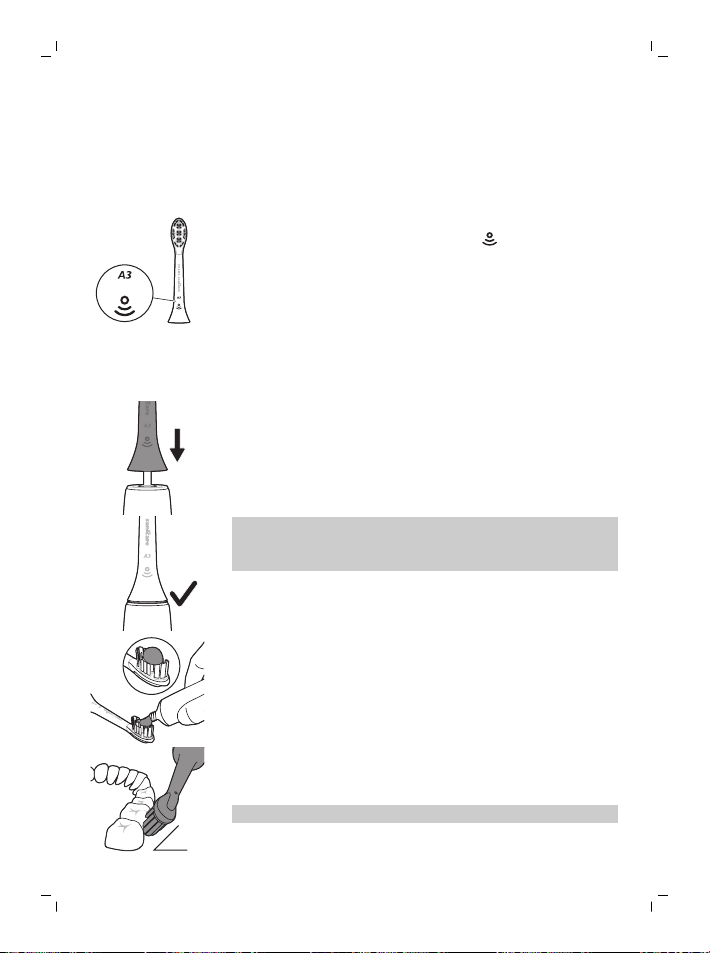
หัวแปรง All-in-One ระดับพรีเมียมมาพร้อมกับเทคโนโลยี BrushSync
(ดูคําอธิบายด้านล่าง) ตามที่ระบุโดยสัญลักษณ์
ที่ด้านล่างของหัวแปรง
เพื่อสํารวจตัวเลือกหัวแปรงทั้งหมดของเรา
โปรดเยี่ยมชมเว็บไซต์ของเราสําหรับข้อมูลเพิ่มเติม:
www.philips.com/toothbrush-heads
การใช้งาน Philips Sonicare ของคุณ
คำแนะนำการแปรงฟัน
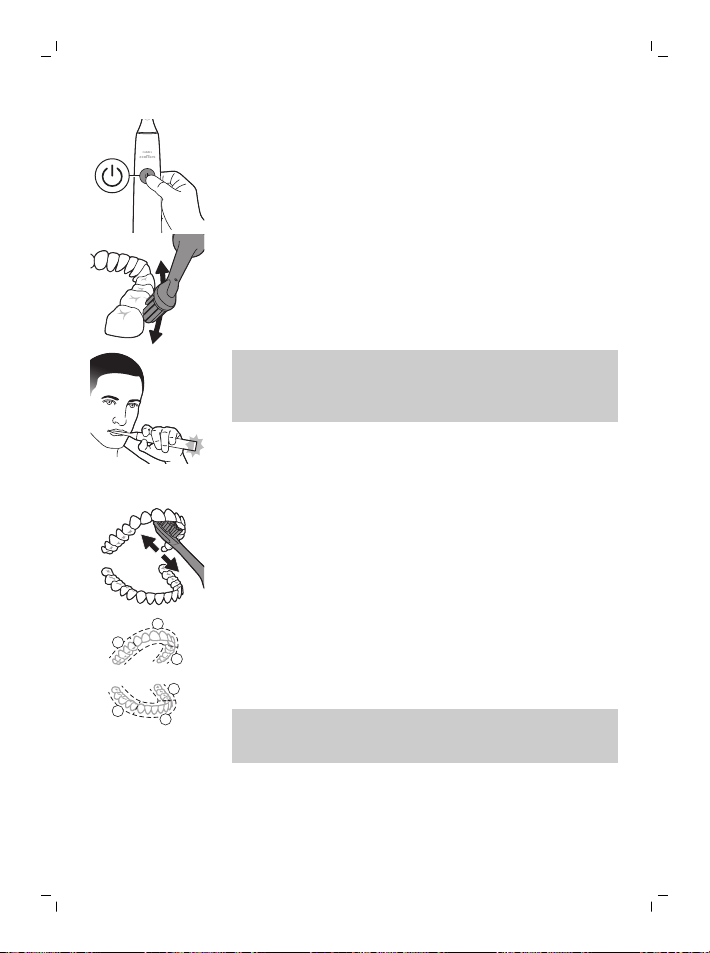
1
ดันหัวแปรงให้เข้าไปในด้ามจับอย่างมั่นคง
หมายเหตุ: คุณสามารถมองเห็นช่องว่างเล็กๆ
ระหว่างหัวแปรงและด้ามจับได้เป็นเรื่องปรกติ
ช่องว่างนี้จะช่วยให้หัวแปรงสั่นสะเทือนได้อย่างเหมาะสม
2
ทำขนแปรงสีฟันให้เปียกและบีบยาสีฟันออกมาเล็กน้อย
45°
3
วางแปรงสีฟันให้ขนแปรงทำมุมเอียงกับฟันเล็กน้อย (45 องศา)
ใช้แรงกดเบาๆ เพื่อให้ขนแปรงเข้าถึงขอบเหงือก
หรืออยู่ใต้ขอบเหงือกเล็กน้อย
หมายเหตุ: รักษาให้ส่วนกลางของหัวแปรงสัมผัสกับฟันอยู่ตลอดเวลา
50
ภาษาไทย
4
กดปุ่ม 'เปิด/ปิด' เพื่อเปิดสวิตช์ Philips Sonicare
5
ใช้แรงกดเบาๆ เพื่อให้ได้รับประโยชน์สูงสุดจาก Philips Sonicare
และปล่อยให้แปรงสีฟัน Philips Sonicare แปรงฟันให้คุณ
หมายเหตุ: ขนแปรงอาจบานออกเล็กน้อย ห้ามขัด
เครื่องจะมีการเปลี่ยนแปลงในการสั่นสะเทือนจากด้ามจับและไฟข้อเ-
สนอแนะสำหรับการแปรงฟันจะกะพริบเป็นสีม่วงเพื่อแจ้งเตือนคุณเ-
มื่อคุณใช้แรงกดมากเกินไป
ค่อยๆ เลื่อนหัวแปรงไปมาอย่างช้าๆ
ด้วยการเคลื่อนไหวเข้าและออกเล็กน้อย
เพื่อให้ขนแปรงที่ยาวเข้าถึงซอกฟันของคุณได้ทั่วถึง
เคลื่อนไหวในลักษณะนี้อย่างต่อเนื่องตลอดรอบการแปรงฟัน
6
ในการทำความสะอาดด้านในของฟันหน้า
ให้เอียงด้ามแปรงจับแบบกึ่งตั้งขึ้น
และแปรงลงในแนวตั้งซ้ำกันหลายๆ ครั้งที่ละซี่
1
2
3
4
5
6
7
BrushPacer แบ่งเวลาการแปรงฟันออกเป็นหกส่วนเท่าๆ กัน
และระบุว่าเมื่อใดที่คุณควรย้ายไปยังพื้นที่ถัดไป
แปรงจะหยุดสั่นสะเทือนเป็นช่วงสั้นๆ
เพื่อเป็นสัญญาณระบุถึงส่วนต่างๆ
แปรงสีฟันจะหยุดการทำงานโดยอัตโนมัติเมื่อจบรอบการแปรงฟัน
หมายเหตุ: แปรงสีฟัน Philips Sonicare สามารถใช้กับเหล็กดัดฟัน
การจัดฟัน และการบูรณะฟัน (อุดฟัน ครอบฟัน เคลือบฟัน)
ได้อย่างปลอดภัย
โหมดการแปรงฟัน
แปรงสีฟันไฟฟ้าของคุณมาพร้อมการตั้งค่าล่วงหน้าในโหมดทําความสะอ-
าดแบบ All-in-one ที่ให้กิจวัตรการแปรงฟัน 2
นาทีเป็นประจำตามที่ทันตแพทย์แนะนํา
โดยแบ่งการแปรงฟันออกเป็นหกส่วน
51
ภาษาไทย
เพื่อปรับแต่งโหมดการแปรงฟันของคุณ
คุณสามารถปรับแต่งการตั้งค่าแปรงสีฟันไฟฟ้าของคุณจากแอพ (ดู 'แอพ
Sonicare - เริ่มต้นใช้งาน') Sonicare ได้
หมายเหตุ: แม้ว่าโหมดจะไม่แสดงบนด้ามจับแปรงสีฟัน
แต่คุณสามารถอัปเดตโหมดได้ตลอดเวลาจากแอพ Sonicare
และแอพจะจัดเก็บการเลือกของคุณเอาไว้
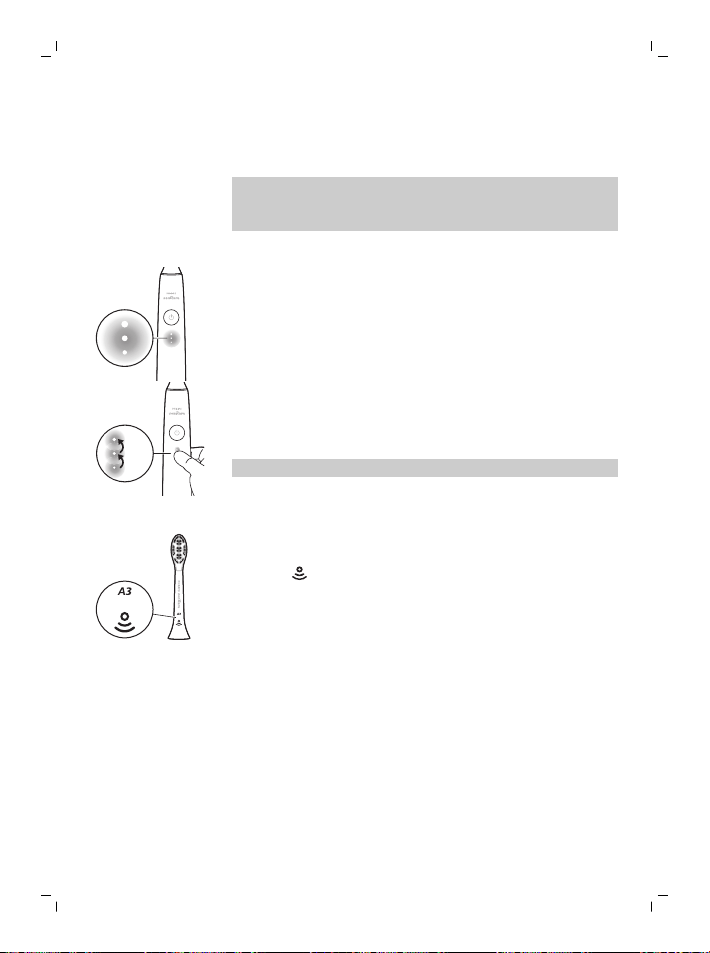
ระดับความแรง
แปรงสีฟันไฟฟ้าของคุณมีการตั้งค่าความแรงแตกต่างกัน 3 ระดับ:
- ความเข้มสูง (ไฟสามดวง)
- ความเข้มปานกลาง (ไฟสองดวง)
- ความเข้มต่ำ (ไฟหนึ่งดวง)
×3
×1
×2
หากต้องการเลือกความเข้มที่คุณต้องการด้วยตนเอง
ให้กดไฟแสดงสถานะความเข้มที่ด้ามจับเพื่อวนไปตามแต่ละตัวเลือก
การตั้งค่าความเข้มสามารถเปลี่ยนแปลงได้ก่อน ระหว่าง
หรือหลังการแปรงฟัน
หมายเหตุ: การตั้งค่าความเข้มสามารถปรับแต่งได้จากแอพ Sonicare
เทคโนโลยี BrushSync
เทคโนโลยี BrushSync
ช่วยให้หัวแปรงสามารถสื่อสารกับด้ามจับของคุณได้โดยใช้ไมโครชิป
สัญลักษณ์
ที่ด้านล่างหัวแปรงจะระบุว่าเป็นหัวแปรงมาพร้อมเทคโนโลยีนี้
เทคโนโลยี BrushSync ช่วยให้:
- สัญญาณเตือนให้เปลี่ยนหัวแปรง
- การจับคู่โหมด BrushSync (สําหรับหัวแปรงรักษาสุขภาพลิ้น)
คุณสมบัติ
- SenseIQ
- ข้อเสนอแนะสำหรับเซ็นเซอร์ตรวจวัดแรงกด
- ความเข้มที่ปรับได้
- ข้อเสนอแนะสำหรับการขัด
- เครื่องนับจังหวะการแปรง
- สัญญาณเตือนให้เปลี่ยนหัวแปรง
52
ภาษาไทย
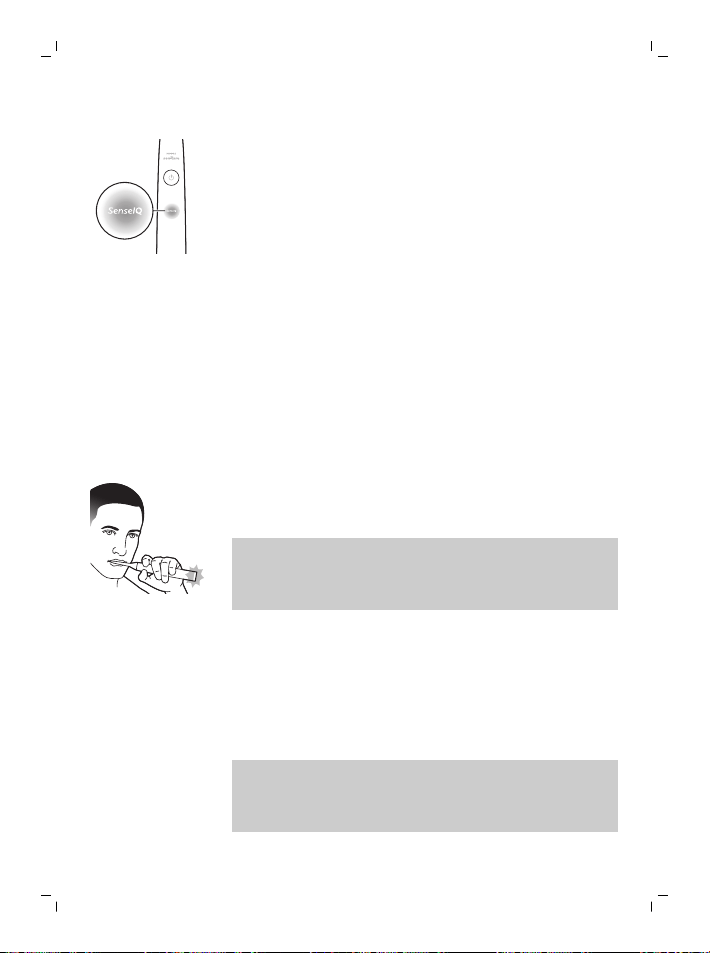
SenseIQ
Sonicare ของคุณมาพร้อมกับเทคโนโลยี SenseIQ
ซึ่งเป็นการผสมผสานระหว่างคุณสมบัติอัจฉริยะที่สังเกตพฤติกรรมการแ-
ปรงฟันของคุณ (เช่น การเคลื่อนไหว พฤติกรรม การเลือกหัวแปรง)
และให้ข้อเสนอแนะและคําแนะนําสำหรับคุณโดยเฉพาะ
คุณสมบัติ SenseIQ รวมถึง:
- ความเข้มที่ปรับได้
- ข้อเสนอแนะแบบเรียลไทม์:
- ข้อเสนอแนะสำหรับการขัด
- ข้อเสนอแนะสำหรับเซ็นเซอร์ตรวจวัดแรงกด
- คําแนะนําสำหรับคุณโดยเฉพาะในแอพ
- ข้อเสนอแนะเกี่ยวกับพฤติกรรมการแปรงฟันในแอพ
ไอคอน SenseIQ ที่ด้ามจับจะสว่างขึ้นเมื่อคุณสมบัติอัจฉริยะทํางาน:
- ขณะแปรงฟัน
- เพื่อยืนยันการเปิดใช้งานและการปิดใช้งานการตั้งค่า
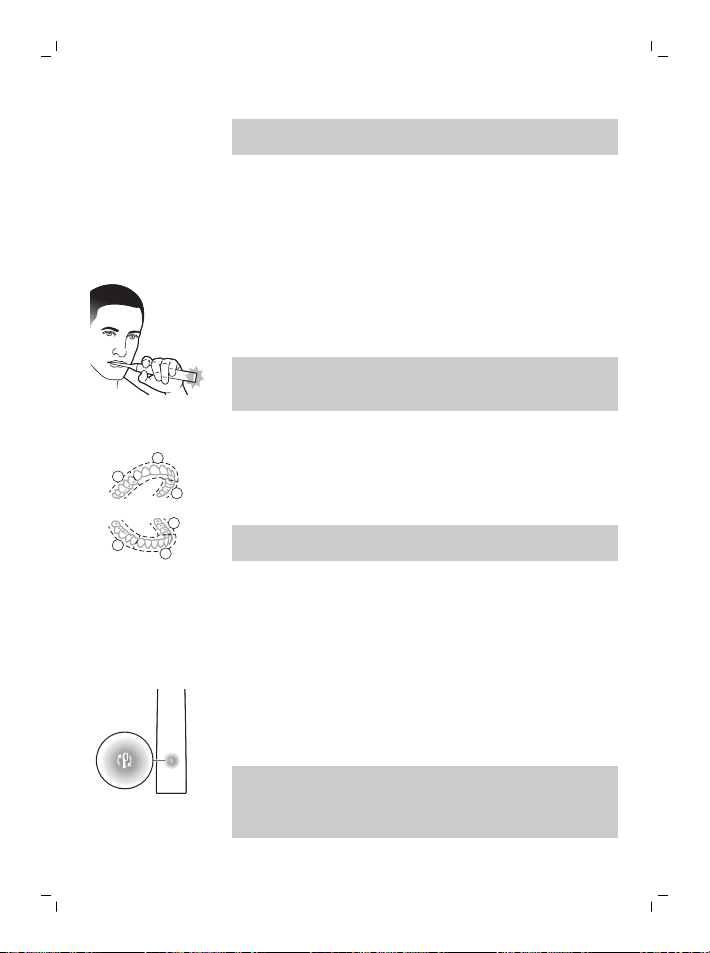
ข้อเสนอแนะสำหรับเซ็นเซอร์ตรวจวัดแรงกด
แปรงสีฟัน Sonicare
ของคุณจะวัดแรงกดที่คุณใช้ในระหว่างแปรงฟันเพื่อปกป้องเหงือกและฟั-
นไม่ให้ได้รับความเสียหาย
หากคุณใช้แรงกดมากเกินไป
ด้ามจับจะเปลี่ยนการสั่นสะเทือนและไฟข้อเสนอแนะสำหรับการแปรงฟั-
นจะกะพริบ (สีม่วง) ที่ด้านล่างของด้ามจับจนกว่าคุณจะลดแรงกด
หมายเหตุ:
เซ็นเซอร์ตรวจวัดแรงกดที่มาพร้อมกับผลิตภัณฑ์ของคุณจะเปิดการใช้งา-
นไว้ หากต้องการปิดใช้งานคุณสมบัตินี้ ให้ดูที่
'การเปิดหรือปิดใช้งานคุณสมบัติต่างๆ'
ความเข้มที่ปรับได้
แปรงสีฟัน Sonicare
ของคุณได้รับการออกแบบให้มีความเข้มที่ปรับได้เพื่อปกป้องเหงือกของ-
คุณ หากคุณใช้แรงกดมากเกินไปเป็นระยะเวลานาน
แปรงสีฟันของคุณจะลดการตั้งค่าความเข้มลง 1 ระดับโดยอัตโนมัติ
คุณจะสัมผัสได้ถึงข้อเสนอแนะสำหรับแรงกดที่มีการหยุดเป็นช่วงสั้นๆ
และรู้สึกถึงความเข้มที่ปรับให้เข้ากับระดับถัดไปที่ต่ำกว่า
หมายเหตุ:
ความเข้มที่ปรับได้ที่มาพร้อมกับผลิตภัณฑ์ของคุณจะเปิดการใช้งานไว้
หากต้องการปิดใช้งานคุณสมบัตินี้ ให้ดูที่
'การเปิดหรือปิดใช้งานคุณสมบัติต่างๆ'
53
ภาษาไทย
หมายเหตุ: ทุกรอบการแปรงฟันใหม่
การตั้งค่าความเข้มจะกลับไปที่ระดับที่คุณเลือกไว้ล่วงหน้า
ข้อเสนอแนะสำหรับการขัด
แปรงสีฟัน Sonicare
ของคุณวัดการเคลื่อนไหวในขณะที่แปรงเพื่อตรวจจับพฤติกรรมการขัด
(ดูคําแนะนําการแปรงฟันสําหรับเทคนิคที่ดีที่สุด)
หากคุณขัดเป็นประจําขณะแปรงฟัน
แอพจะแนะนําให้คุณเปิดใช้งานข้อเสนอแนะสำหรับการขัด
เมื่อข้อเสนอแนะสำหรับการขัดเปิดใช้งานอยู่
ไฟข้อเสนอแนะสำหรับการแปรงฟันที่ด้านล่างของด้ามจับจะติดสว่างเป็-
นสีเหลือง และด้ามจับจะเปลี่ยนการสั่นสะเทือนเป็นการเตือนให้หยุดขัด
ไฟข้อเสนอแนะสำหรับการแปรงฟันจะดับลงเมื่อคุณหยุดขัด
หมายเหตุ: ข้อเสนอแนะสำหรับการขัดจะปิดการใช้งานไว้ตั้งแต่ต้น
หากต้องการเปิดใช้งานคุณสมบัตินี้ ให้ดูที่
'การเปิดหรือปิดใช้งานคุณสมบัติต่างๆ'
เครื่องนับจังหวะการแปรง
1
2
3
4
5
6
BrushPacer แบ่งเวลาการแปรงฟันออกเป็นหกส่วนเท่าๆ กัน
และระบุว่าเมื่อใดที่คุณควรย้ายไปยังพื้นที่ถัดไป
แปรงจะหยุดสั่นสะเทือนเป็นช่วงสั้นๆ เพื่อเป็นสัญญาณระบุถึงส่วนต่างๆ
แปรงสีฟันจะหยุดการทำงานโดยอัตโนมัติเมื่อจบรอบการแปรงฟัน
หมายเหตุ: สามารถเพิ่มส่วนเพิ่มเติมได้ เมื่อคุณใช้โหมดฟันขาว+
หรือรักษาสุขภาพเหงือก ดูแอพ Sonicare สําหรับคําอธิบายโหมด
สัญญาณเตือนให้เปลี่ยนหัวแปรง
แปรงสีฟัน Sonicare
ของคุณจะติดตามการสึกหรอของหัวแปรงอัจฉริยะโดยใช้เทคโนโลยี
BrushSync เพื่อวัด:
- แรงกดโดยรวมที่คุณใช้ขณะแปรงฟัน
- ระยะเวลาทั้งหมดที่คุณแปรงฟันด้วยหัวแปรงของคุณ
เมื่อหัวแปรงหมดประสิทธิภาพแล้ว
ไฟแสดงสถานะแจ้งเตือนให้เปลี่ยนหัวแปรงจะกะพริบเป็นสีเหลือง
และด้ามแปรงจะทำการส่งเสียงบี๊พและดังขึ้นเพื่อระบุว่าถึงเวลาที่คุณต้อ-
งเปลี่ยนหัวแปรง
หมายเหตุ: สัญญาณเตือนให้เปลี่ยนหัวแปรง
ที่มาพร้อมกับผลิตภัณฑ์ของคุณจะเปิดการใช้งานไว้
หากต้องการปิดใช้งานคุณสมบัตินี้ ให้ดูที่
'การเปิดหรือปิดใช้งานคุณสมบัติต่างๆ'
54
ภาษาไทย
การเปิดหรือปิดใช้งานคุณสมบัติต่างๆ
คุณสามารถเปิดหรือปิดใช้งานคุณสมบัติต่อไปนี้ของแปรงสีฟันได้
- ความเข้มที่ปรับได้
- ข้อเสนอแนะสำหรับเซ็นเซอร์ตรวจวัดแรงกด
- ข้อเสนอแนะสำหรับการขัด
- สัญญาณเตือนให้เปลี่ยนหัวแปรง
หมายเหตุ:
แปรงจะปิดใช้งานความเข้มที่ปรับได้เมื่อเซ็นเซอร์ตรวจวัดแรงกดถูกปิดใ-
ช้งาน
จากแอพ
คุณสมบัติต่อไปนี้สามารถเปิดใช้งานหรือปิดใช้งานจากแอพ Sonicare ได้
- ความเข้มที่ปรับได้
- ข้อเสนอแนะสำหรับการขัด
สำหรับคำแนะนำเกี่ยวกับวิธีเชื่อมต่อกับแอพ (ดู 'แอพ Sonicare -
เริ่มต้นใช้งาน')
จากด้ามจับ
ขั้นตอนที่ 1: วางด้ามจับบนแท่นชาร์จ
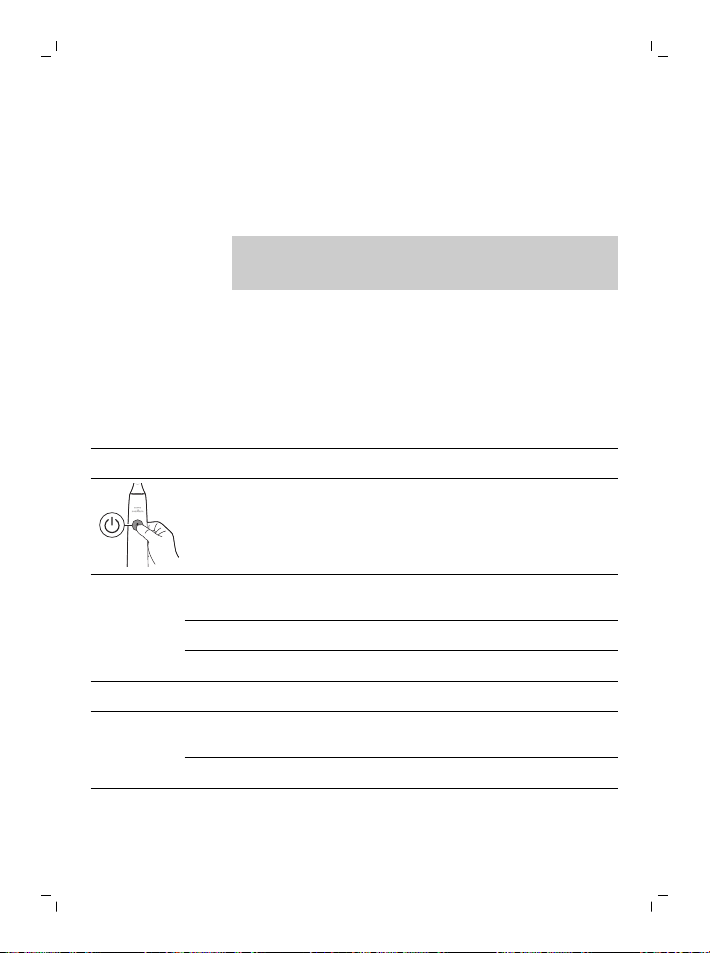
ขั้นตอนที่ 2: กดปุ่มเปิด/ปิดค้างไว้สำหรับ:
ความเข้มที่ปรับได้ สัญญาณเตือนให้เป-
ลี่ยนหัวแปรง
ข้อเสนอแนะสำหรับเซ็นเซอร์-
ตรวจวัดแรงกด
สูงสุด 3 วินาที สูงสุด 5 วินาที สูงสุด 7 วินาที
¯ ¯ ¯
ขั้นตอนที่ 3: ปล่อยปุ่มเปิด/ปิดเมื่อได้ยิน
เสียงบี๊พ 1 ครั้ง เสียงบี๊พ 1 ครั้ง
และได้ยินอีก 2 ครั้ง
เสียงบี๊พ 1 ครั้ง 2 ครั้ง
และได้ยินอีก 3 ครั้ง
¯ ¯ ¯
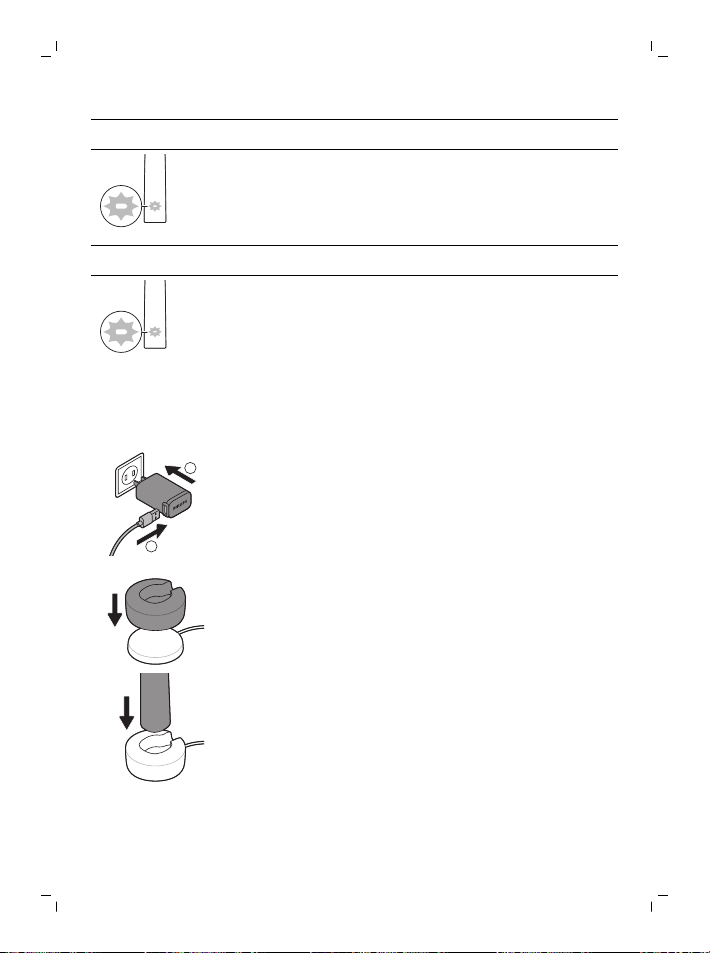
สัญญาณไฟ
SenseIQ
ติดสว่างเป็นเวลา 3
วินาที
สัญญาณไฟเตือนให้-
เปลี่ยนหัวแปรงติดสว่-
างเป็นเวลา 3 วินาที
สัญญาณไฟ SenseIQ
และแถบไฟติดสว่างเป็นสีม่วงเ-
ป็นเวลา 3 วินาที
55
ภาษาไทย
ร่วมกับ:
หากคุณเห็นไฟสถานะแบตเตอรี่สีขาวกะพริบ 3 ครั้งและได้ยินเสียง 3
ครั้งจากเบาแล้วดังขึ้น แสดงว่าเปิดใช้งานคุณสมบัตินี้แล้ว
หรือ
หากคุณเห็นไฟสถานะแบตเตอรี่กะพริบเป็นสีเหลือง 3 ครั้ง และได้ยินเสียง 3
ครั้งจากเบาแล้วดังขึ้น แสดงว่ามีการปิดใช้งานคุณสมบัตินี้แล้ว
การชาร์จและสถานะแบตเตอรี่
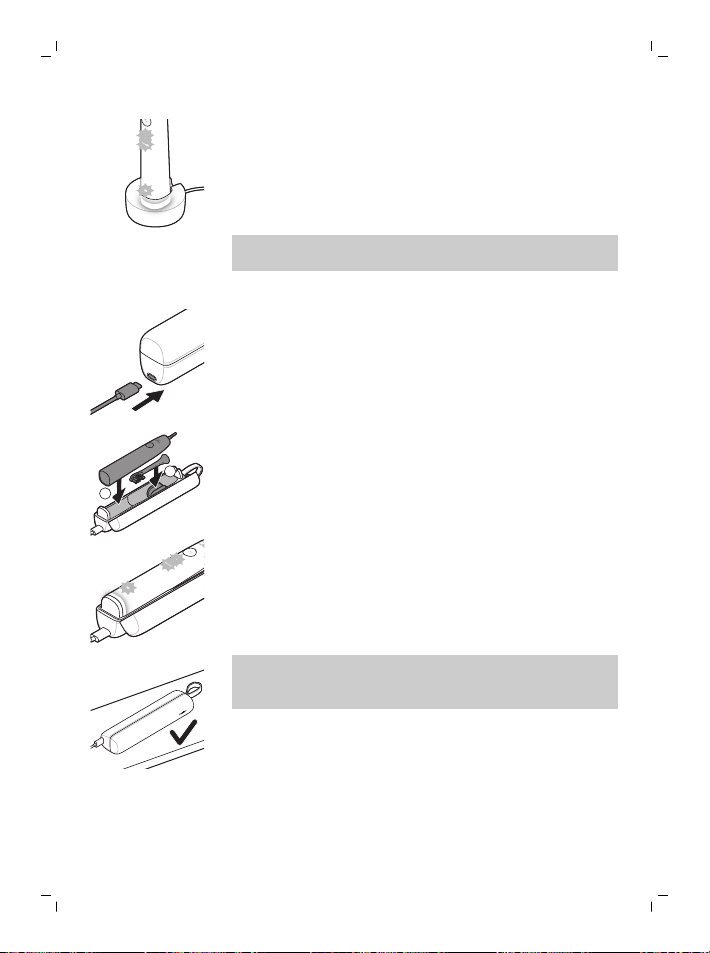
การชาร์จบนฐานแท่นชาร์จ
1
2
1
เสียบสาย USB ของฐานชาร์จเข้ากับอะแดปเตอร์เสียบผนัง USB
และเสียบอะแดปเตอร์ติดผนังเข้ากับเต้ารับไฟฟ้า
2
วางแท่นชาร์จ (ฝาครอบใส) บนฐานชาร์จ
3
วางด้ามจับแปรงสีฟันบนแท่นชาร์จ
56
ภาษาไทย
a เพื่อระบุว่าการชาร์จเริ่มต้นสำเร็จ
แปรงสีฟันจะส่งเสียงบี๊บสองครั้งและไฟจะติดสว่างขึ้นในลักษณ-
ะไล่จากระดับต่ำไปสูง
b ในขณะที่ชาร์จ ไฟแสดงสถานะแบตเตอรี่จะกะพริบเป็นสีขาว
4
วางแปรงสีฟันไว้บนแท่นชาร์จจนกว่าจะชาร์จเต็ม
ไฟแบตเตอรี่จะดับลง (หยุดกะพริบ) เมื่อด้ามจับชาร์จเสร็จแล้ว
หมายเหตุ: อาจใช้เวลาถึง 16 ชั่วโมงในการชาร์จแปรงสีฟัน Sonicare
ของคุณให้เต็ม
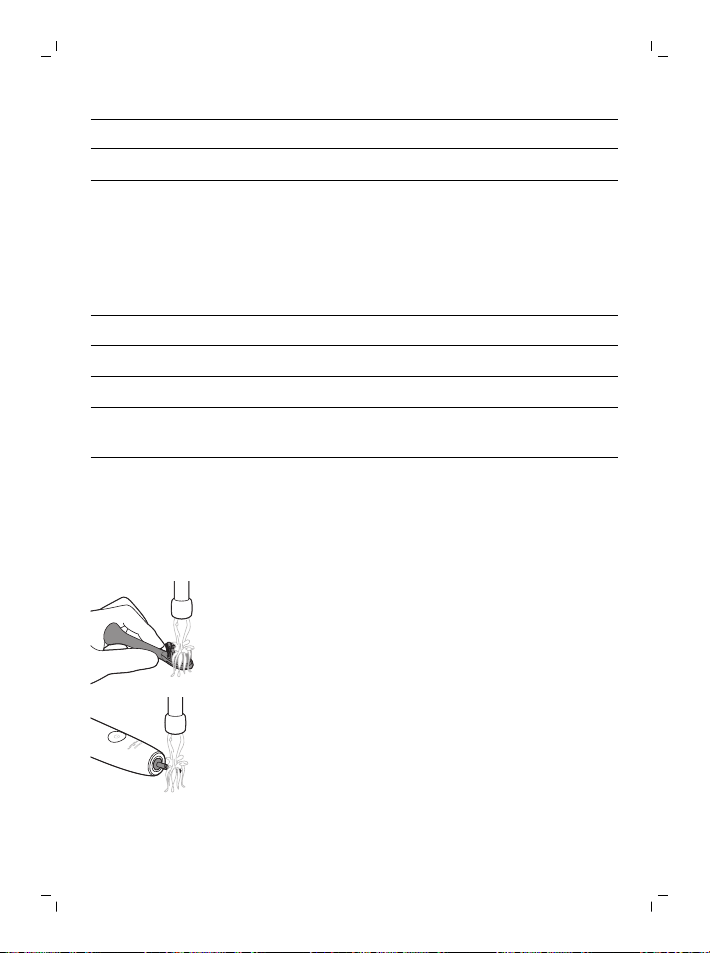
การชาร์จด้วยแท่นชาร์จแบบพกพา
1
เสียบสาย USB เข้ากับกล่องบรรจุพกพา
และเสียบเข้ากับอะแดปเตอร์เสียบผนัง USB
2
เสียบอะแดปเตอร์ติดผนังเข้ากับเต้ารับไฟฟ้า
1
2
3
วางแปรงสีฟันลงในกล่องบรรจุพกพา
a เพื่อระบุว่าการชาร์จเริ่มต้นสำเร็จ
แปรงสีฟันจะส่งเสียงบี๊บสองครั้งและไฟจะติดสว่างขึ้นในลักษณ-
ะไล่จากระดับต่ำไปสูง
b ในขณะที่ชาร์จ ไฟแสดงสถานะแบตเตอรี่จะกะพริบเป็นสีขาว
4
เสียบปลั๊กกล่องบรรจุพกพาทิ้งไว้จนกว่าแปรงสีฟันจะชาร์จจนเต็ม
ไฟแบตเตอรี่จะดับลง (หยุดกะพริบ) เมื่อด้ามจับชาร์จเสร็จแล้ว
หมายเหตุ:
ตรวจสอบให้แน่ใจว่ากล่องบรรจุพกพาวางอยู่ด้านข้างเพื่อให้มั่นคงมากยิ่ง-
ขึ้น
สถานะแบตเตอรี่
(เมื่อด้ามจับอยู่บนแท่นชาร์จหรือกล่องบรรจุพกพาที่ทํางานอยู่)
ขณะที่ด้ามแปรงอยู่บนแท่นชาร์จ หรือกล่องบรรจุพกพา
ไฟสถานะแบตเตอรี่จะแจ้งระดับแบตเตอรี่
57
ภาษาไทย
สถานะของแบตเตอรี่ สัญลักษณ์แสดงแบตเตอรี่
การชาร์จ ไฟสีขาวกะพริบ
แบตเต็ม ส่องไฟสีขาวเป็นเวลา 30 วินาทีแล้วดับ
สถานะแบตเตอรี่ (เมื่อด้ามจับไม่ได้อยู่บนแท่นชาร์จ)
เมื่อแปรงสีฟันตื่นตัวอยู่
ไฟสถานะแบตเตอรี่ที่ด้านล่างของด้ามแปรงจะแสดงสถานะของแบตเตอรี่
สถานะของแบตเตอรี่
สัญลักษณ์แสดงแบตเตอรี่ เสียง
แบตเต็ม ไฟสีขาวจะสว่างขึ้น -
แบตเกือบเต็ม ไฟสีขาวกะพริบ -
ต่ำ ไฟสีเหลืองกะพริบ ด้ามจับส่งเสียงบี๊บ 3
ครั้งหลังจากแปรงฟัน
ไม่มี ไฟสีเหลืองกะพริบ ด้ามจับส่งเสียงบี๊บ 2
ชุดหลังจากแปรงฟัน
การทำความสะอาด
หัวแปรงและด้ามจับ
สามารถทําความสะอาดหัวแปรงและด้ามจับได้โดยการล้างด้วยน้ำอุ่น
1
ถอดหัวแปรงออกจากด้ามจับ และล้างให้ทั่ว
2
ล้างทั้งด้ามจับ โดยเฉพาะที่จุดเชื่อมต่อกับหัวแปรง
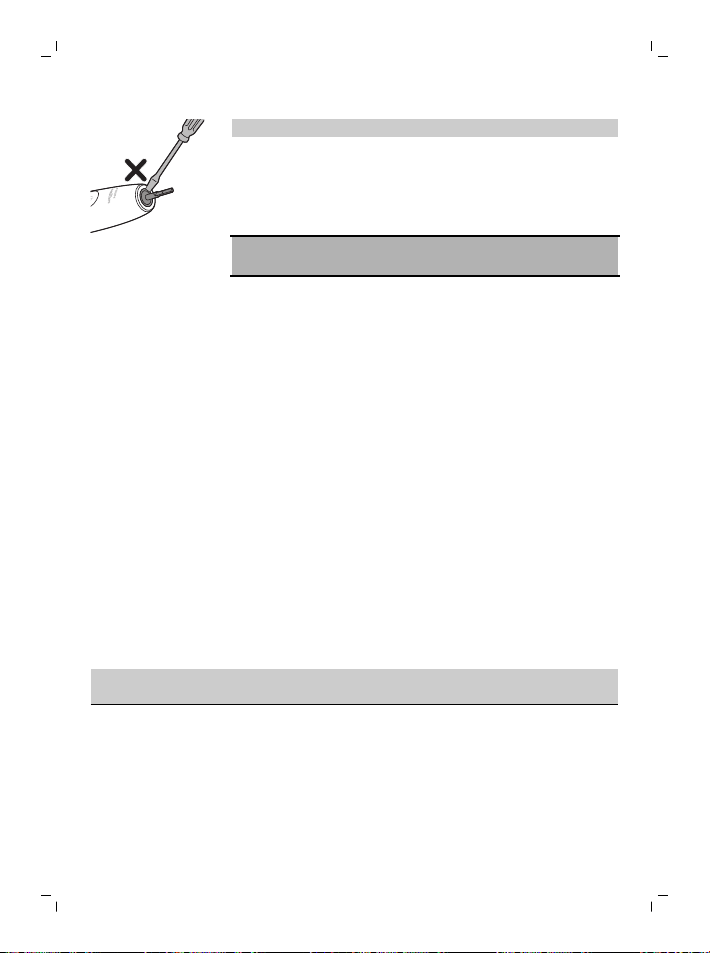
ทำความสะอาดรอบๆ ซีลยางเบาๆ อย่างน้อยสัปดาห์ละหนึ่งครั้ง
58
ภาษาไทย
หมายเหตุ: อย่ากดที่ซีลยางตรงด้านบนสุดของด้ามจับ
กล่องบรรจุพกพาและแท่นชาร์จ
1
ต้องถอดปลั๊กแท่นชาร์จและกล่องบรรจุพกพาออกก่อนที่คุณจะทำคว-
ามสะอาด
2
ใช้ผ้าชุบน้ำหมาดเช็ดทำความสะอาดพื้นผิวของแท่นชาร์จและกล่อง-
บรรจุพกพา
อันตราย: ถอดปลั๊กอะแดปเตอร์ติดผนัง USB
และแท่นชาร์จก่อนทําความสะอาด
คำเตือน:
- ห้ามทําความสะอาดผลิตภัณฑ์หรืออุปกรณ์เสริมในเครื่องล้างจาน
- ห้ามใช้ไอโซโพรพิลแอลกอฮอล์ น้ำส้มสายชู สารฟอกขาว
หรือผลิตภัณฑ์ทำความสะอาดบ้านอื่นๆ
ทำความสะอาดผลิตภัณฑ์หรืออุปกรณ์เสริม
เนื่องจากอาจทำให้สีเกิดการเปลี่ยนแปลงได้
- ตรวจสอบให้แน่ใจว่าหัวแปรงและแปรงสีฟันแห้งก่อนเก็บไว้ในกล่อง-
บรรจุพกพา
- อย่าใช้น้ำมันหอมระเหยในการทําความสะอาดหัวแปรง ผลิตภัณฑ์
หรืออุปกรณ์เสริม เนื่องจากอาจทําให้เกิดความเสียหายได้
การจัดเก็บ
หากคุณจะไม่ใช้ผลิตภัณฑ์เป็นเวลานาน
ให้ถอดปลั๊กออกจากเต้ารับไฟฟ้า ทำความสะอาดและเก็บไว้ในที่แห้ง เย็น
และห่างจากการสัมผัสโดยตรงกับแสงแดด
การแก้ปัญหา
บทนี้ได้รวบรวมปัญหาทั่วไปเกี่ยวกับเครื่องซึ่งคุณอาจพบได้
หากยังไม่สามารถแก้ไขปัญหาตามข้อมูลด้านล่างได้
โปรดดูรายการคำถามที่พบบ่อยที่ www.philips.com/support
หรือติดต่อศูนย์บริการลูกค้าในประเทศของคุณ
ปัญหา สาเหตุที่เป็นไปได้ การแก้ปัญหา
ฉันไม่สามารถติดหัวแปรงได้-
อย่างสมบูรณ์
มีช่องว่างระหว่างหัวแปรงแล-
ะด้ามจับ
ช่องว่างนี้เป็นเรื่องปกติและจําเป็-
นสําหรับหัวแปรงเพื่อให้สามารถ-
สั่นได้อย่างเหมาะสม
59
ภาษาไทย
ปัญหา สาเหตุที่เป็นไปได้ การแก้ปัญหา
การสั่นสะเทือนของแปรงสีฟัน
Philips Sonicare
ของฉันอ่อนกำลังลงกว่าเมื่อก่-
อน
ฟังก์ชันความเข้มที่ปรับเปิดใ-
ช้งานอยู่
เซ็นเซอร์ตรวจวัดแรงกดเปิด-
ใช้งาน (ดู
'ข้อเสนอแนะสำหรับเซ็นเซ-
อร์ตรวจวัดแรงกด')อยู่
หรือความเข้มมีการเปลี่ยนแ-
ปลงโดยไม่ตั้งใจ
ปิดความเข้มที่ปรับได้
และ/หรือฟังก์ชัน (ดู
'การเปิดหรือปิดใช้งานคุณสมบัติ-
ต่างๆ')เซ็นเซอร์ตรวจวัดแรงกด
และ/หรือเพิ่มระดับความเข้มโด-
ยการกดไฟแสดงสถานะความเข้-
มให้อยู่ในระดับ (ดู
'ระดับความแรง')ที่ต้องการ
แปรงสีฟัน Philips Sonicare
ของฉันมีชิ้นส่วนขาดหายไป
ชิ้นส่วนที่ขาดหายไปจะไม่ร-
วมอยู่ในรุ่นที่คุณซื้อ
อุปกรณ์เสริมและจํานวนหัวแปร-
งขึ้นอยู่กับหมายเลขรุ่นที่คุณซื้อ
คุณสามารถค้นหาหมายเลขรุ่น
HX
ได้ที่ด้านล่างของด้ามจับเพื่อระบุ-
ชิ้นส่วนที่มาพร้อมกับด้ามจับของ-
คุณ
การรีไซเคิล
- สัญลักษณ์นี้หมายความว่า
คุณจะต้องไม่นำผลิตภัณฑ์ไฟฟ้าและแบตเตอรี่ไปทิ้งรวมกับขยะภา-
ยในบ้านทั่วไป
- ปฏิบัติตามกฎภายในประเทศของคุณสำหรับการคัดแยกผลิตภัณฑ์ไ-
ฟฟ้าและแบตเตอรี่
การถอดแบตเตอรี่แบบชาร์จไฟใหม่ได้ในตัว
ต้องถอดแบตเตอรี่แบบชาร์จไฟใหม่ได้ในตัวโดยผู้เชี่ยวชาญที่มีคุณสมบัติ-
เหมาะสมเมื่อทิ้งผลิตภัณฑ์
สามารถดูคําแนะนําสําหรับการถอดแบตเตอรี่แบบชาร์จไฟใหม่ได้ในตัวไ-
ด้ที่ www.philips.com/support
การรับประกันและสนับสนุน
หากคุณต้องการข้อมูลหรือการสนับสนุน โปรดเข้าชมเว็บไซต์
www.philips.com/support
หรืออ่านข้อมูลจากเอกสารแผ่นพับที่แยกเฉพาะเกี่ยวกับการรับประกันทั่-
วโลก
ข้อจำกัดการรับประกัน
เงื่อนไขการรับประกันแบบทั่วโลกจะไม่ครอบคลุมรายการต่อไปนี้:
- หัวแปรง
- ความเสียหายที่เกิดจากการใช้ชิ้นส่วนอะไหล่ที่ไม่ได้รับอนุญาต

60
ภาษาไทย
- ความเสียหายที่เกิดจากการใช้ผิดวิธี การละเมิดเงื่อนไขการใช้
การใช้โดยละเลยและประมาท การดัดแปลง
หรือการซ่อมแซมที่ไม่ได้รับอนุญาต
- การชำรุดและการฉีกขาดที่เกิดขึ้นโดยปกติ
ซึ่งรวมถึงการแตกกระเทาะ รอยครูด รอยขีดข่วน
สีเปลี่ยนหรือสีซีดจาง
한국어
61
한국어
소개
Philips Sonicare 전동 칫솔을 새로 구매해 주셔서
감사합니다! 우수한 플라그 제거, 치아 착색 제거 및
건강한 잇몸을 체험하실 수 있습니다. 부드러운 음파
기술과 임상적으로 개발 및 검증된 기술이 결합된
소닉케어를 사용하면 매번 최적의 세정 효과를 얻을 수
있다는 점을 확신할 수 있습니다.
추가 지원 및 제품 등록은 www.philips.com/Prestige-
Get-Started에서 하실 수 있습니다.
Philips Sonicare의 가족이 되신 것을 환영합니다!
중요 안전 정보
본래 용도로만 제품을 사용하십시오. 본 제품과 배터리,
액세서리를 사용하기 전에 이 중요 정보를 주의 깊게 읽고
나중에 참조할 수 있도록 잘 보관하십시오. 제품을
오용하면 위험한 상황이 발생하거나 심각한 부상을 입을
수 있습니다.
경고
- 충전기를 물기가 있는 곳에 두지 마십시오.
- 세척한 경우 충전기를 완전히 건조시킨 다음에 다시
벽면 콘센트에 연결하십시오.
- 본 장비는 어린이 및 신체적인 감각 및 정신적인
능력이 떨어지거나 경험과 지식이 풍부하지 않은
사람이 사용하려면 제품 사용과 관련하여 안전하게
사용할 수 있도록 지시사항을 충분히 숙지한 사람의
도움을 받아야 합니다. 어린이가 어른의 감독없이
제품의 세척과 관리를 해서는 안 됩니다.
- 어린이가 제품을 가지고 놀지 않도록 하십시오.
- 필립스에서 제공하는 정품 액세서리 또는 소모품만
사용하십시오. 제품과 함께 제공된 충전기만
사용하십시오. 제공되는 경우 원래 USB 케이블 및
USB 전원 공급 장치만 사용하십시오.

62
한국어
- 본 제품에는 서비스 가능한 부품이 없습니다. 제품에
손상된 부분이 있으면 사용을 중단하고 해당 국가
(보기 '품질 보증 및 지원')의 고객 상담실에
문의하십시오. 코드가 손상된 경우 충전기를 새
충전기로 교체하십시오.
- 충전기를 실외 또는 발열되는 표면 근처에서
사용하지 마십시오.
- 식기세척기를 사용하여 제품의 부품을 세척하지
마십시오.
- 본 제품은 치아, 잇몸, 혀만을 세정하기 위한 용도로
설계되었습니다.
- 본 제품을 사용한 후 출혈이 심하거나 1주일이
지나도 증상이 호전되지 않거나 불편함을 느끼거나
통증이 있을 경우 기기 사용을 중단하고 치과
의사/의사와 상의하십시오.
- 최근 2개월 내에 구강 또는 잇몸 수술을 받은
경우에는 본 제품을 사용하기 전에 치과 전문의와
상의하십시오.
- 심장 박동 보조기 등 보조 기기를 이식받은
경우에는, 사용하기 전에 의사나 이식한 해당 기기의
제조업체에 문의한 후 사용하십시오.
- 사용자에게 건강과 관련한 문제가 있다면 본 제품을
사용하기 전에 치과 전문의와 상의하십시오.
- 이 제품은 개인 위생 기구이므로 치과나 기타 의료
시설에서 공용으로 이용하지 마십시오.
- 칫솔모의 모가 눕거나 휘면 사용을 중단하십시오.
3개월마다 또는 마모의 흔적이 보이면 그 전이라도
칫솔모를 교체하십시오.
- 사용하는 치약에 과산화수소, 탄산수소나트륨,
중탄산염 (일반적 미백 치약 성분)이 포함된 경우,
양치질을 하고 난 후 칫솔모를 비누로 닦고 물로
깨끗이 씻어 내십시오. 이렇게 해야 플라스틱 부분의
손상을 방지할 수 있습니다.
- 에센셜 오일 또는 코코넛 오일이 함유된 제품과
직접적으로 닿지 않도록 하십시오. 닿을 경우
칫솔모가 빠질 수 있습니다.

63
한국어
- 배터리를 충전하려면 제품과 함께 제공된 USB 벽면
어댑터, 충전대 및 충전 여행용 케이스만
사용하십시오. WAA1001, WAA2001, HX9200 또는
HX9200/B 및 TCC1001, TCC2001, TCC3001,
CBB1001 또는 CBB2001. 연장선을 사용하지
마십시오.
- 제품은 0°C - 40°C 사이의 온도에서 충전, 사용
및 보관하는 것이 적합합니다.
- 제품과 배터리를 불에서 멀리 떨어진 곳에 두고
직사광선이나 고온에 노출되지 않도록 하십시오.
- 제품이 이상 수준으로 뜨거워지거나 냄새가 나거나
색이 변하거나 충전 시간이 평소보다 훨씬 오래
걸리면 제품의 사용 및 충전을 중단하고 필립스
고객센터에 문의하십시오.
- 제품과 배터리를 전자레인지에 넣거나 또는 인덕션
위에 올리지 마십시오.
- 배터리가 가열되거나 유독 또는 유해 물질이
방출되지 않도록 제품 또는 배터리를 열거나
개조하거나 구멍을 내거나 손상시거나 분해하지
마십시오. 배터리를 누전시키거나 과충전하거나
역충전하지 마십시오.
- 배터리가 손상되거나 누출된 경우 피부 또는 눈에
닿지 않도록 하십시오. 이 경우 즉시 물로 잘 헹구고
치료를 받으십시오.
EMF (전자기장)
이 Philips 제품은 EMF(전자기장) 노출과 관련된 모든
기준 및 규정을 준수합니다.
무선 장비 지침
무선 주파수 인터페이스(Bluetooth 또는 BrushSync)가
장착된 필립스 전동칫솔은 Directive 2014/53/EU를
준수합니다.
- Bluetooth 무선 주파수: 2.4GHz
- 최대 Bluetooth 무선 주파수 출력: 3dBm
- NFC 무선 주파수: 13.56MHz
- 최대 NFC 무선 주파수 전력: 30.16dBm
EU 적합성 선언의 전문을 볼 수 있는 인터넷 주소:
www.philips.com/support
64
한국어
용도
소닉케어 프레스티지 전동칫솔은 충치를 줄이고 구강
건강을 개선하고 유지할 수 있도록 치아에 붙어있는
플라그 및 음식물 잔여물을 제거합니다. 프레스티지
전동칫솔은 가정에서 사용하는 고객을 위한 제품입니다.
어린이는 성인의 감독하에 제품을 사용해야 합니다.
Philips Sonicare
1 위생 칫솔모 캡
2 프리미엄 올인원 칫솔모(A3)
3 BrushSync 기호
4 핸들
5 전원 버튼
6 강도 표시등 및 숨겨진 버튼
7 SenseIQ 표시등
8 칫솔모 교체 알림 표시등
9 배터리 표시기
10 양치질 피드백 표시등
11 충전대
12 충전대
13 USB-A 벽면 어댑터
14 USB-C 코드
15 여행용 충전 케이스
16 USB-C 소켓
참고: 제품 구성품은 구입한 모델에 따라 다릅니다.
제품에 다음과 같은 기호가 나타날 수 있습니다.
사용 설명서를 읽으십시오.
분리형 전원 공급 장치 부품:"xxxxxx"는 사용할 승인된
충전기의 모델 번호를 나타냅니다.
65
한국어
소닉케어 앱 - 시작하기
소닉케어 앱은 칫솔과 페어링하여 커넥티드 경험을
제공합니다. 칫솔을 소닉케어 앱 계정에 연결하면 다음을
실행할 수 있습니다.
- 선호하는 모드, 강도 및 칫솔 피드백에 따라
소닉케어 칫솔 설정을 사용자 지정합니다.
- 양치질 진행 상황을 추적합니다.
- 구강 건강을 개선하기 위해 맞춤형 팁과 실행 가능한
권장 사항을 받습니다.
- 모든 혜택에 접근하고 고객님의 프레스티지 칫솔에
대한 경험을 지속적으로 업그레이드 받습니다.
앱은 다양한 iPhone 및 Android™ 스마트폰과
호환됩니다. 자세한 내용은 www.philips.com/Prestige-
Get-Started를 참조하십시오.
소닉케어 앱 사용을 시작하려면 다음을 수행합니다.
S7920
1
휴대전화에 소닉케어 앱을 다운로드합니다.
2
휴대전화의 Bluetooth가 켜져 있는지 확인합니다.
3
칫솔이 설정되었는지 확인하기 위해 칫솔을
집어듭니다(표시등 켜짐).
4
앱을 열고 지침 단계를 따릅니다.
5
칫솔과 앱을 페어링합니다.
6
앱을 통해 계정을 만듭니다. 메시지가 나타나면 최신
개선사항과 기능에 접근 가능한 펌웨어 업데이트를
완료하십시오.
7
정기적으로 양치질합니다. 커넥티드 경험을 시작할
준비가 완료되었습니다. 칫솔을 앱과 정기적으로
동기화하면 구강 건강 관리를 개선하는 데 도움이
되는 업데이트를 받을 수 있습니다.
8
정기적으로 동기화합니다.
- 수동으로 동기화하려면 다음을 수행합니다. 앱
기능의 혜택을 누리려면 몇 주마다 칫솔을 앱과
페어링/연결합니다.
- 자동으로 동기화하려면 다음을 수행합니다. 앱을
설정하는 동안 위치 권한을 허용합니다. 위치 권한을
허용하면 휴대 전화가 칫솔의 연결 범위를 인식하고
양치 데이터를 앱에서 갱신하여 최신 인사이트와
권장 사항을 제공할 수 있습니다.
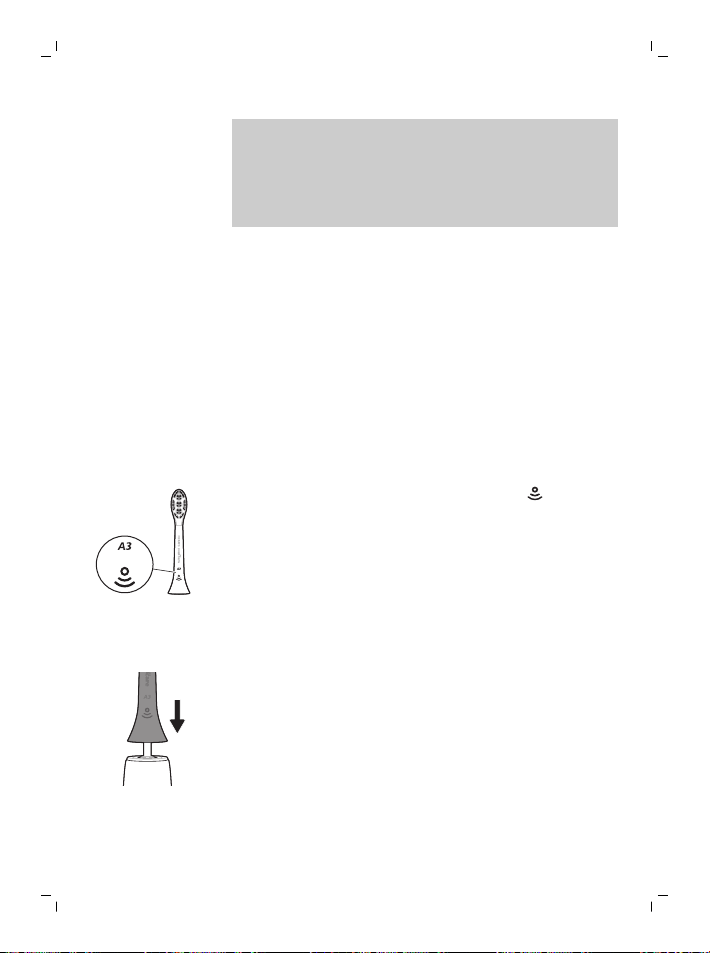
66
한국어
참고: 칫솔이 양치 데이터를 앱으로 전송하고 업데이트할
수 있도록 앱을 사용할 때 휴대 전화의 Bluetooth가 켜져
있는지 확인합니다. 양치 데이터를 수집하는 이유에 관한
문의사항이 있다면, 앱 설정을 진행하는 내내 확인할 수
있는 소닉케어 개인정보 보호정책을 반드시
검토하십시오.
앱 - 기능
소닉케어 앱은 다음과 같은 기본 설정에 따라 칫솔에 대한
사용자 지정 가능한 설정을 제공합니다.
- 강도 설정
- 모드 컨트롤
- 적응 강도 설정 및 해제
- 문지름 피드백 설정 및 해제
칫솔모
소닉케어 프레스티지 전동칫솔에는 새로운 "프리미엄
올인원 칫솔모"(A3)가 함께 제공됩니다. 이 칫솔모는
뛰어난 플라그 제거, 착색 제거, 잇몸 건강상의 이점을
제공하도록 특별히 설계되었습니다.
프리미엄 올인원 칫솔모에는 칫솔모 하단의 기호
표시에 따라 BrushSync 기술(아래 설명 참조)이 함께
제공됩니다.
칫솔모 옵션의 전체 범위를 탐색하려면 필립스 웹
사이트에서 자세한 내용을 확인하십시오.
www.philips.com/toothbrush-heads
필립스 소닉케어 사용
양치질 방법
1
칫솔모를 핸들 쪽으로 강하게 미십시오.
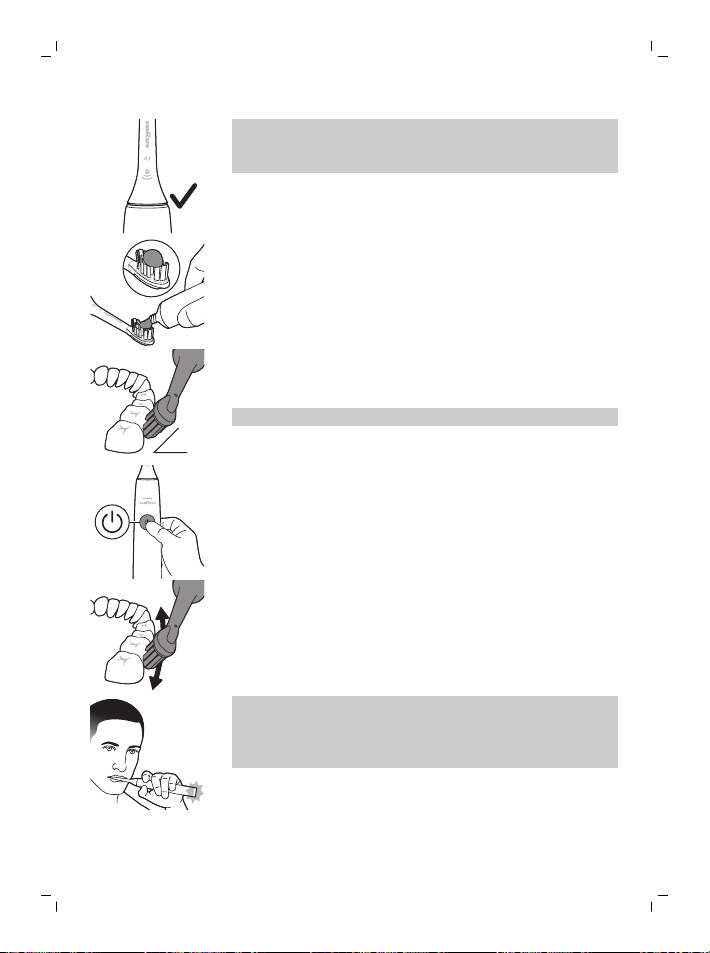
67
한국어
참고: 칫솔모와 핸들 사이에 약간의 이격이 생기는
것은 정상입니다. 이렇게 하면 칫솔모가 적절하게
진동합니다.
2
칫솔모에 소량의 치약을 바르십시오.
45°
3
칫솔모를 치아에 45도 정도로 살짝 비스듬하게 올려
놓습니다. 잇몸 경계 부분이나 그 약간 아래에
칫솔모가 살짝 닿도록 약하게 압력을 가합니다.
참고: 항상 칫솔모 중앙이 치아에 닿아야 합니다.
4
전원 버튼을 눌러 Philips Sonicare를 켜십시오.
5
Philips Sonicare의 효과를 극대화하려면 칫솔모를
치아에 대고 세게 문지르지 마시고, 필립스 소닉케어
음파칫솔이 양치질을 하도록 맡겨두십시오.
참고: 칫솔모가 살짝 퍼지도록 해야 합니다.
문지르지 마십시오. 너무 많이 압력을 가하면
핸들에서 진동이 변경되고 양치질 피드백 표시등이
보라색으로 깜박거려 이를 알려줍니다.
치아를 향해 칫솔모를 앞 뒤로 약간씩 움직여서
칫솔모의 끝 부분이 치아 사이 사이에 위치하도록
합니다. 이 방식으로 치아 전체를 닦습니다.
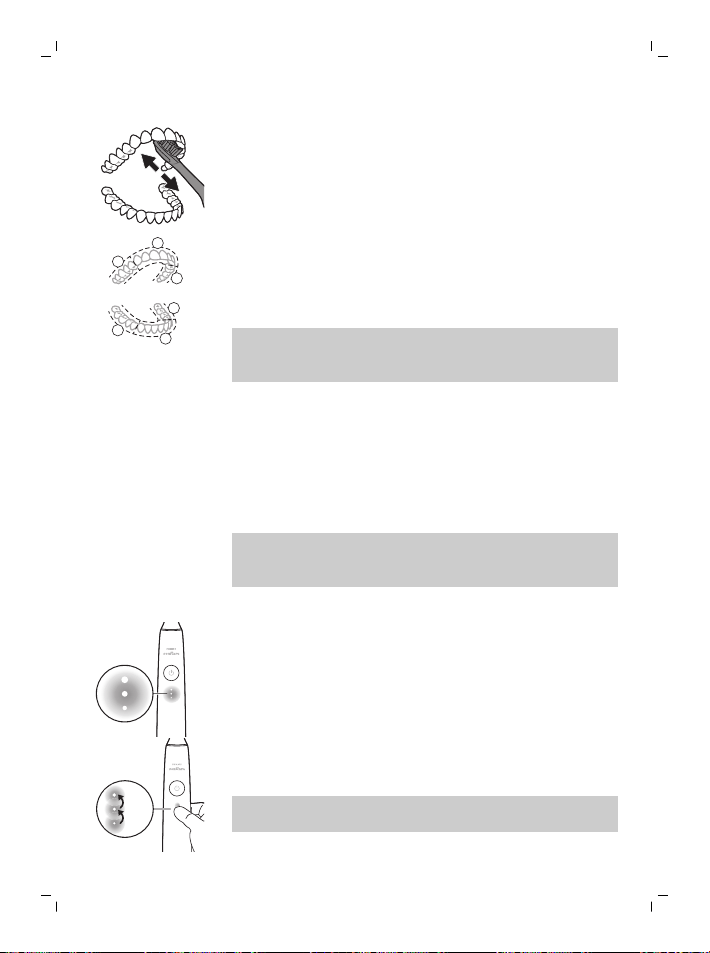
68
한국어
6
앞니의 안쪽 표면을 닦으려면 칫솔 핸들을 수직
상태에서 살짝 기울인 후 각 치아에 수직으로 여러
번 반복하여 양치질을 합니다.
1
2
3
4
5
6
7
브러시페이서는 양치질 시간을 6개의 동일한
구역으로 나누고 다음 부위로 이동해야 할 때를
나타냅니다. 각 구역은 진동이 잠시 일시 정지 되며
알려줍니다. 칫솔은 양치질이 완료되면 자동으로
중지됩니다.
참고: Philips Sonicare 칫솔은 치아 교정기, 치아 조정 및
치아 보철물(신경치료, 크라운, 라미네이트)에 사용해도
안전합니다.
양치질 모드
전동칫솔은 치과 의사가 추천하는 2분의 양치질 루틴을
제공하는 올인원 클린 모드로 미리 설정되어 있으며, 6개
구역 칫솔 페이서가 제공됩니다.
양치질 모드를 맞춤 설정하려면 소닉케어 앱 (보기
'소닉케어 앱 - 시작하기')에서 전동칫솔 설정을 사용자
지정합니다.
참고: 칫솔 핸들에는 모드가 표시되지 않지만 소닉케어
앱에서 언제든지 모드를 업데이트할 수 있으며 선택
항목은 저장됩니다.
강도 설정
전동칫솔에는 세 가지 강도 설정이 있습니다.
- 높은 강도(3개의 표시등)
- 중간 강도(2개의 표시등)
- 약한 강도(1개의 표시등)
×3
×1
×2
원하는 강도를 수동으로 선택하려면 핸들의 강도
표시등을 눌러 원하는 옵션을 선택합니다. 양치질 전,
도중 또는 후에 강도 설정을 변경할 수 있습니다.
참고: 강도 설정은 소닉케어 앱에서도 사용자가 지정할 수
있습니다.
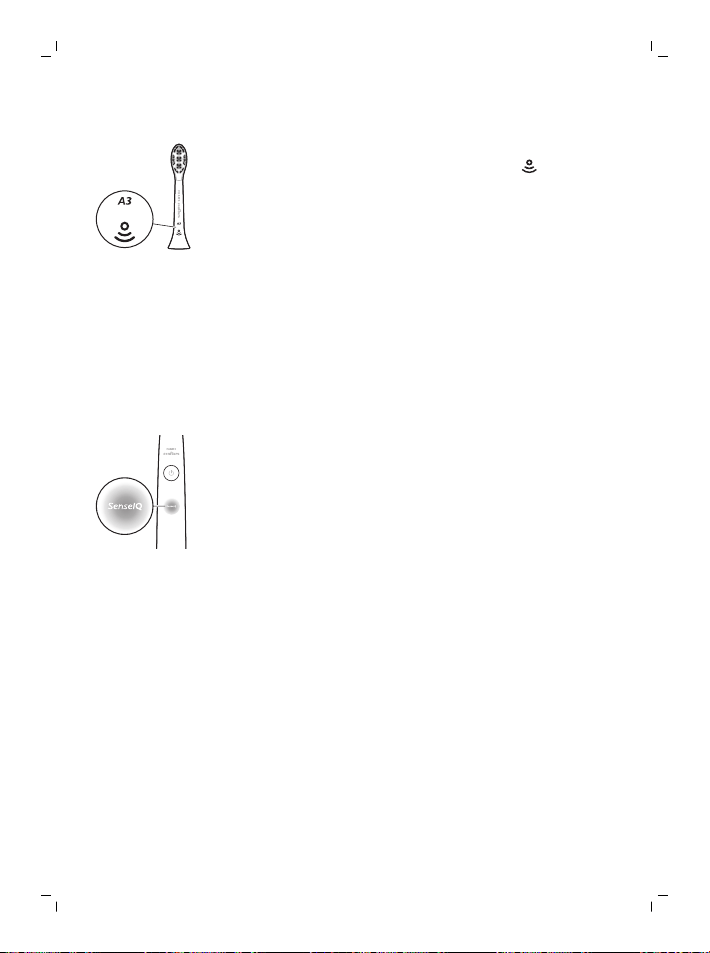
69
한국어
브러시싱크 기술
BrushSync 기술을 통해 칫솔모가 마이크로칩으로
핸들과 통신할 수 있습니다. 칫솔모 하단의 기호는
칫솔모에 이 기술이 적용되어 있음을 표시합니다.
BrushSync 기술을 사용하면 다음을 수행할 수 있습니다.
- 칫솔모 교체 알림
- BrushSync 모드 페어링(혀 관리 칫솔모용)
기능
- SenseIQ
- 압력 센서 피드백
- 적응 강도
- 문지름 피드백
- 칫솔페이서
- 칫솔모 교체 알림
SenseIQ
소닉케어는 양치질 동작(예: 움직임, 습관, 칫솔모 선택)을
관찰하고 맞춤형 피드백과 권장 사항을 제공하는 스마트
기능의 조합인 SenseIQ 기술이 탑재되어 있습니다.
SenseIQ 기능은 다음과 같습니다.
- 적응 강도
- 실시간 피드백:
- 문지름 피드백
- 압력 센서 피드백
- 앱의 맞춤형 권장 사항
- 앱의 양치질 동작 피드백
스마트 기능이 활성화되면 핸들의 SenseIQ 아이콘이
켜집니다.
- 양치질하는 동안
- 설정의 활성화 및 비활성화를 확인하기 위해
압력 센서 피드백
소닉케어 칫솔은 잇몸과 치아를 손상되지 않도록
보호하기 위해 양치질하는 동안 가해지는 압력을
측정합니다.

70
한국어
과도한 압력을 가하면 핸들이 압력을 낮출 때까지 진동을
변경하고 핸들 하단에서 양치질 피드백 표시등이
보라색으로 깜박입니다.
참고: 압력 센서는 제품에 설정되어 있습니다. 이 기능을
해제하려면 '기능 설정 또는 해제'를 참조하십시오.
적응 강도
소닉케어 칫솔은 잇몸을 보호하기 위해 적응 강도로
설계되었습니다. 장시간 과도한 압력을 가하면 칫솔은
강도 설정 1 레벨을 자동으로 낮춥니다. 압력 피드백에서
잠시 일시 중지가 되고 강도의 수준이 한 단계 더
낮아졌음이 느껴집니다.
참고: 적응 강도는 제품과 함께 설정됩니다. 이 기능을
해제하려면 '기능 설정 또는 해제'를 참조하십시오.
참고: 새 양치질 주기마다 강도가 미리 선택된 설정으로
돌아갑니다.
문지름 피드백
소닉케어 칫솔은 문지름 동작을 감지하기 위해 양치질을
하는 동안 움직임을 측정합니다(최적의 기술은 양치질
지침 참조). 양치질하는 동안 정기적으로 문지르는 경우
앱에서는 사용자가 문지름 피드백을 설정할 것을
권장합니다.
문지름 피드백이 설정되면 핸들 하단의 양치질 피드백
표시등이 황색으로 켜지고 핸들의 진동이 변경되어
문지름 중지를 알립니다. 문지름을 중지하면 양치질
피드백 표시등이 꺼집니다.
참고: 문지름 피드백이 해제됩니다. 이 기능을 설정하려면
'기능 설정 또는 해제'를 참조하십시오.
브러시페이서
1
2
3
4
5
6
브러시페이서는 양치질 시간을 6개의 동일한 구역으로
나누고 다음 부위로 이동해야 할 때를 나타냅니다. 각
구역은 진동이 잠시 일시 정지 되며 알려줍니다. 칫솔은
양치질이 완료되면 자동으로 중지됩니다.
참고: White+ 또는 Gum Health 모드를 사용할 때 추가
세그먼트가 추가될 수 있습니다. 모드 설명은 소닉케어
앱을 참조하십시오.
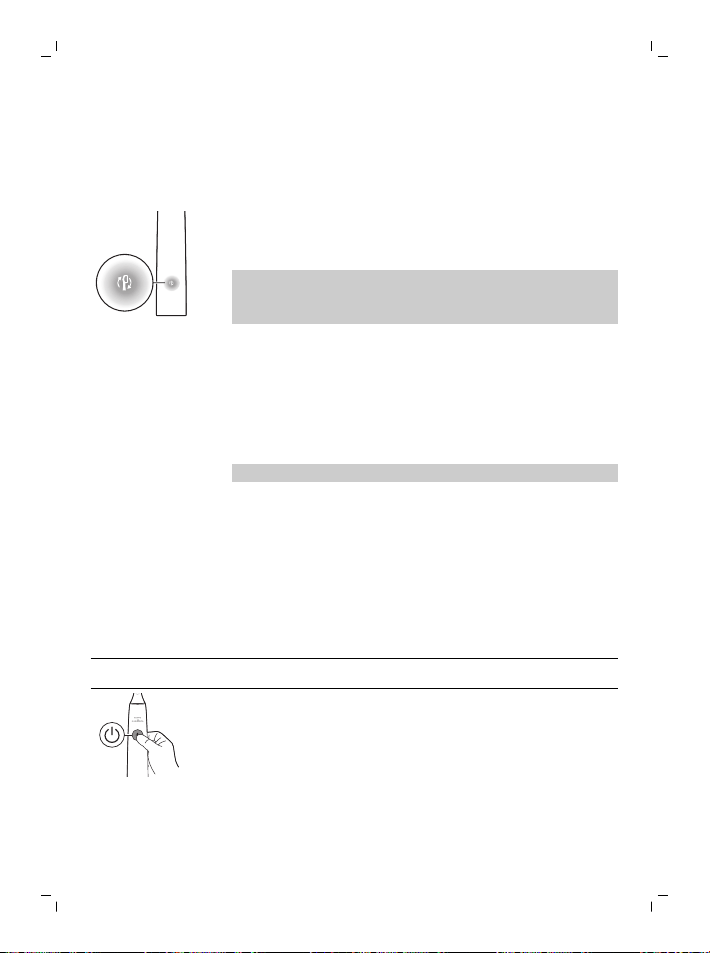
71
한국어
칫솔모 교체 알림
소닉케어 칫솔은 다음을 측정하는 BrushSync 기술을
사용하여 스마트 칫솔모의 마모를 추적합니다.
- 양치질하면서 가하는 전반적인 압력
- 칫솔모로 양치질한 총 시간
칫솔모가 더 이상 사용할 수 없게 되면 칫솔모 교체 알림
표시등이 황색으로 깜박이고 핸들에서 일련의 신호음을
내 칫솔모 교체 시기를 알립니다.
참고: 칫솔모 교체 알림은 제품에 활성화되어 있습니다.
이 기능을 해제하려면 '기능 설정 또는 해제'를
참조하십시오.
기능 설정 또는 해제
칫솔의 다음 기능을 설정 또는 해제할 수 있습니다.
- 적응 강도
- 압력 센서 피드백
- 문지름 피드백
- 칫솔모 교체 알림
참고: 압력 센서가 해제되면 적응 강도가 해제됩니다.
앱에서
다음 기능은 소닉케어 앱에서 설정 또는 해제할 수
있습니다.
- 적응 강도
- 문지름 피드백
앱 (보기 '소닉케어 앱 - 시작하기')에 연결하는 방법에
대한 지침입니다.
핸들에서
1단계: 충전대에 핸들을 꽂습니다.
2단계: 전원 버튼을 다음 시간 동안 길게 누릅니다.
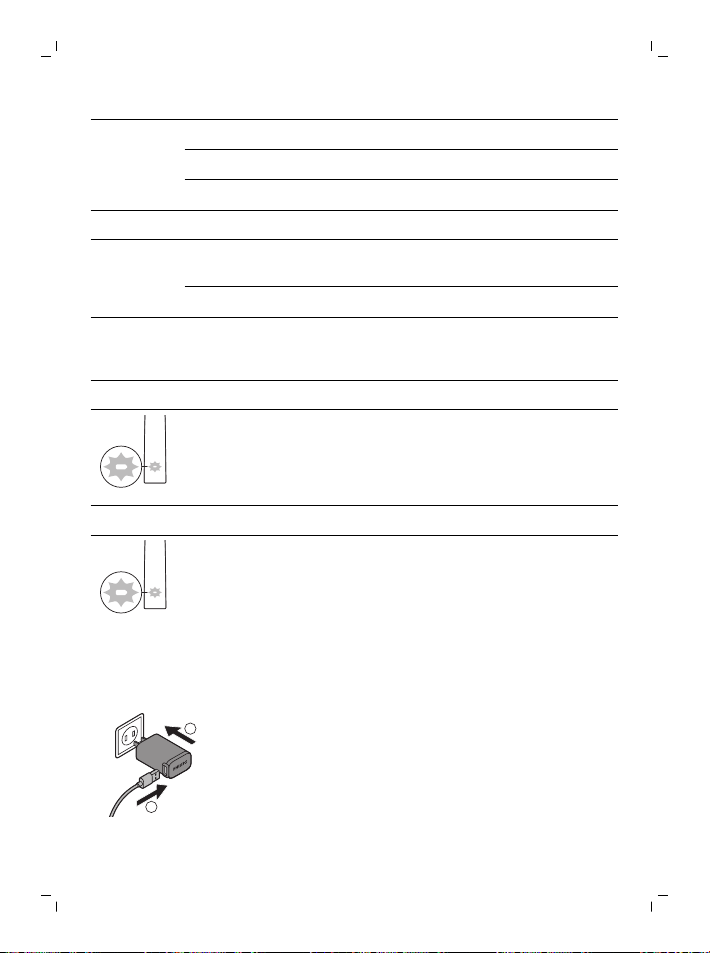
72
한국어
적응 강도 칫솔모 교체 알림 압력 센서 피드백
최대 3초 최대 5초 최대 7초
¯ ¯ ¯
3단계: 신호음을 들으면 전원 버튼에서 손을 뗌
신호음 1회 신호음 1회 후
2회
신호음 1회, 2회 후 3회
¯ ¯ ¯
SenseIQ
표시등이 3초
동안 켜짐
칫솔모 교체 알림
표시등이 3초
동안 켜짐
SenseIQ 표시기 및
표시등이 3초 동안
보라색으로 표시
다음도 함께 제공:
배터리 표시등이 흰색으로 3회 깜박이고 낮은 신호음에서 높은
신호음이 3회가 들리면 기능이 설정된 것입니다.
또는
배터리 표시등이 황색으로 3회 깜박이고 높은 신호음에서 낮은
신호음이 3회가 들리면 기능이 해제된 것입니다.
충전 및 배터리 잔량
충전대에서 충전
1
2
1
충전대의 USB 코드를 USB 벽면 어댑터에 연결하고
벽면 어댑터를 전기 콘센트에 연결합니다.
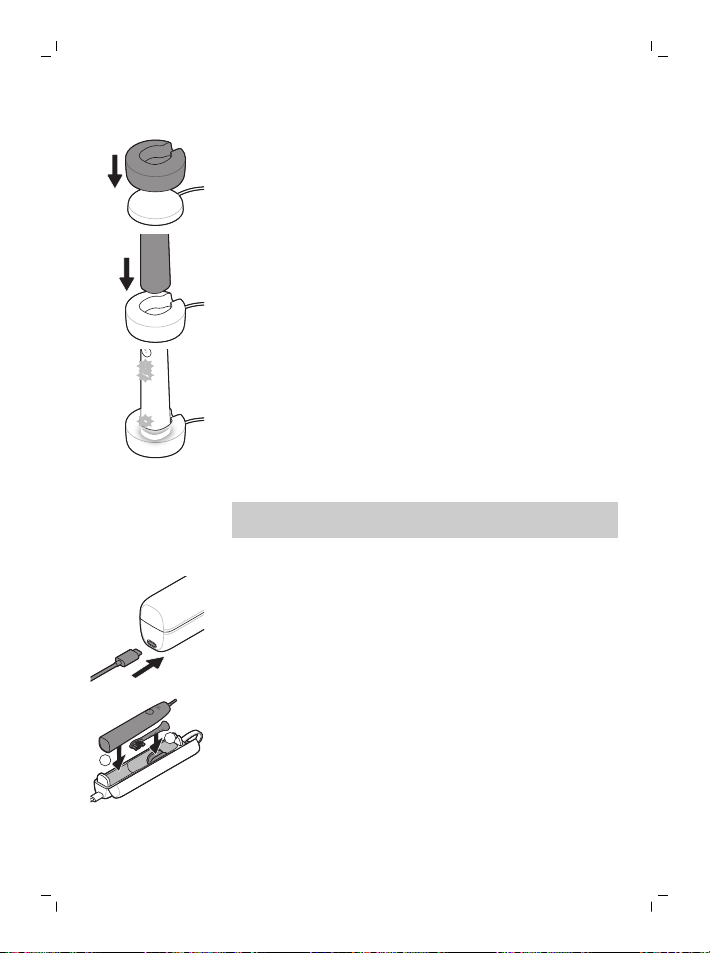
73
한국어
2
충전 스탠드(투명 커버)를 충전대에 놓습니다.
3
칫솔 핸들을 충전기에 꽂습니다.
a 충전이 성공적으로 시작되었음을 알리기 위해
칫솔에서 알림음이 두 번 나고 표시등이
위쪽으로 켜집니다.
b 충전하는 동안 배터리 표시기가 흰색으로
깜박입니다.
4
칫솔이 완전히 충전될 때까지 충전기에 둡니다.
핸들의 충전을 마쳤을 때 배터리 표시등이
꺼집니다(깜박임 멈춤).
참고: 소닉케어 칫솔을 완전히 충전하는 데 최대
16시간이 걸릴 수 있습니다.
여행용 케이스로 충전
1
USB 코드를 여행용 케이스에 연결하고 USB 벽면
어댑터에 연결합니다.
2
벽면 어댑터를 전원 콘센트에 꽂습니다.
1
2
3
칫솔을 여행용 케이스에 넣습니다.
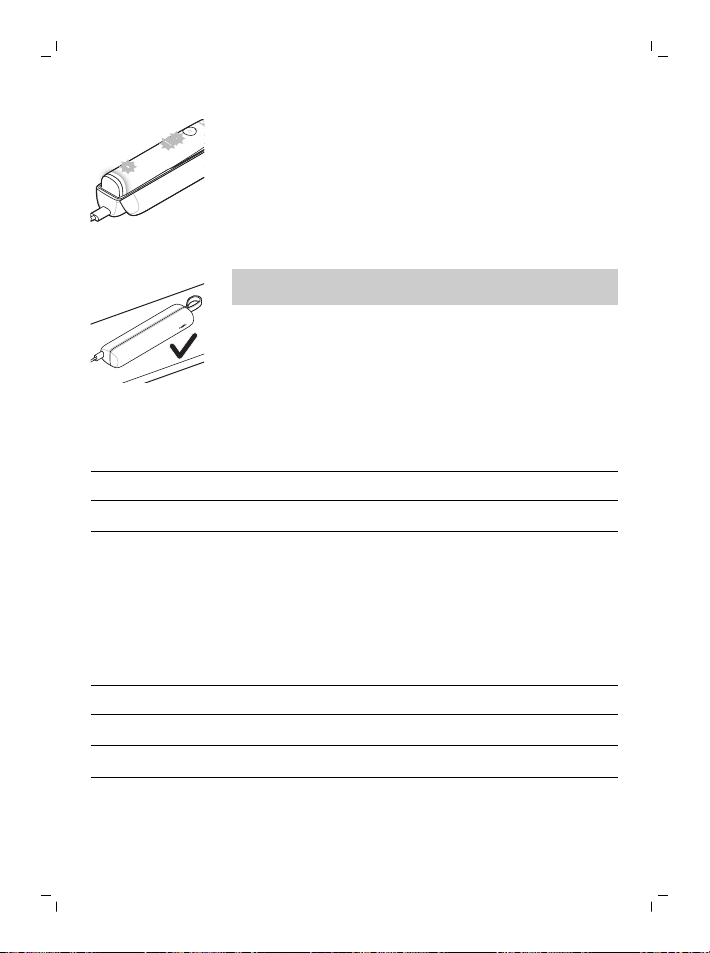
74
한국어
a 충전이 성공적으로 시작되었음을 알리기 위해
칫솔에서 알림음이 두 번 나고 표시등이
위쪽으로 켜집니다.
b 충전하는 동안 배터리 표시기가 흰색으로
깜박입니다.
4
칫솔이 완전히 충전될 때까지 여행용 케이스 연결을
유지합니다. 핸들의 충전을 마쳤을 때 배터리
표시등이 꺼집니다(깜박임 멈춤).
참고: 더 나은 안정성을 위해 여행용 케이스를 측면에
배치했는지 확인합니다.
배터리 상태(핸들이 작동 충전기 또는 여행용 케이스에 있는
경우)
핸들을 충전기 또는 여행용 케이스에 놓으면 배터리
표시등이 배터리 전력을 표시합니다.
배터리 잔량
배터리 표시등
충전 흰색 깜박임
완전 충전 30초 동안 흰색으로 점등되었다가
꺼짐
배터리 잔량(칫솔 핸들을 충전기에 놓지 않았을 때)
칫솔을 켜면 핸들 하단의 배터리 표시등이 배터리의
잔량을 표시합니다.
배터리 잔량
배터리 표시등 소리
완전 충전 흰색으로 점등됨 -
일부 충전 흰색 깜박임 -
낮음 황색 깜박임 양치질 후 핸들에서
신호음이 3회 울림
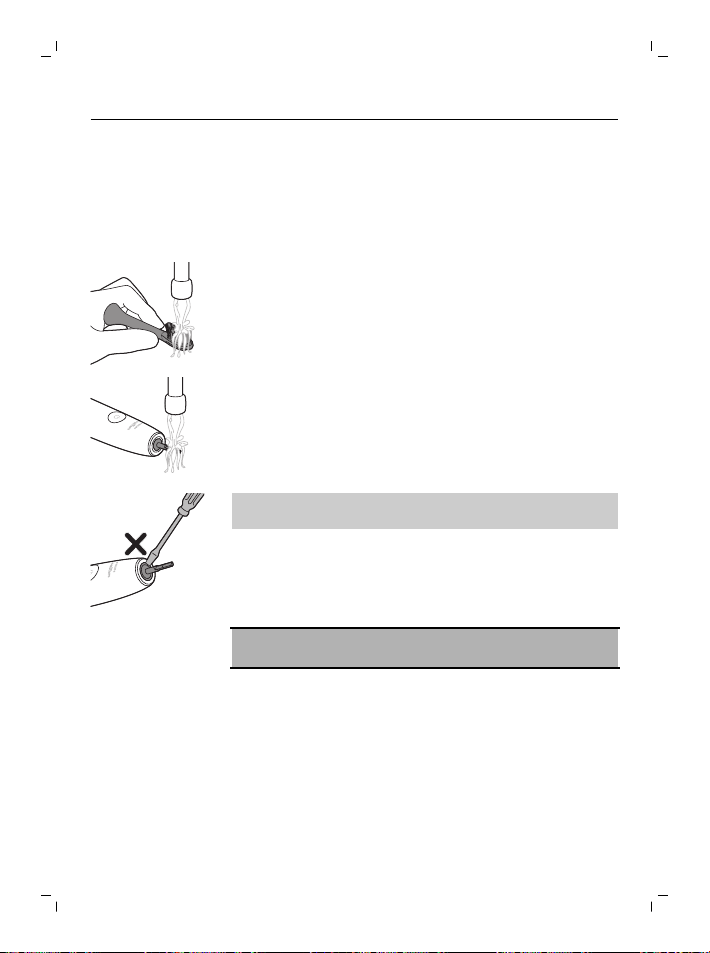
75
한국어
비움 황색 깜박임 양치질 후 핸들에서
신호음이 두 번씩 울림
세척
칫솔모 및 핸들
칫솔모 및 핸들은 따뜻한 물로 헹궈서 세척할 수
있습니다.
1
핸들에서 칫솔모를 분리하고 깨끗이 씻어냅니다.
2
핸들 전체, 특히 칫솔모 부착 부분을 씻습니다.
고무로 된 마감 부분 주변을 부드럽게 세척하십시오.
적어도 일주일에 한 번 세척합니다.
참고: 핸들의 상단에 있는 고무 마감 부분을 누르지
마십시오.
여행용 케이스 및 충전기
1
충전기와 여행용 케이스를 세척하기 전에 해당 전원
코드를 뽑으십시오.
2
충전기와 여행용 케이스의 표면을 물에 적신 천으로
닦으십시오.
위험: USB 벽면 어댑터와 충전기를 분리한 후
청소하십시오.
주의 사항:
- 식기세척기를 사용하여 제품 또는 액세서리를
세척하지 마십시오.
- 변색을 초래할 수 있으므로 제품 또는 액세서리 세척
시 이소프로필 알코올, 식초, 표백제나 다른 가정용
세제는 사용하지 마십시오.
- 여행용 케이스에 보관하기 전에 칫솔모 및 칫솔이
건조 상태여야 합니다.
- 제품과 액세서리가 손상될 수 있으므로 에센셜
오일을 사용하여 세척하지 마십시오.
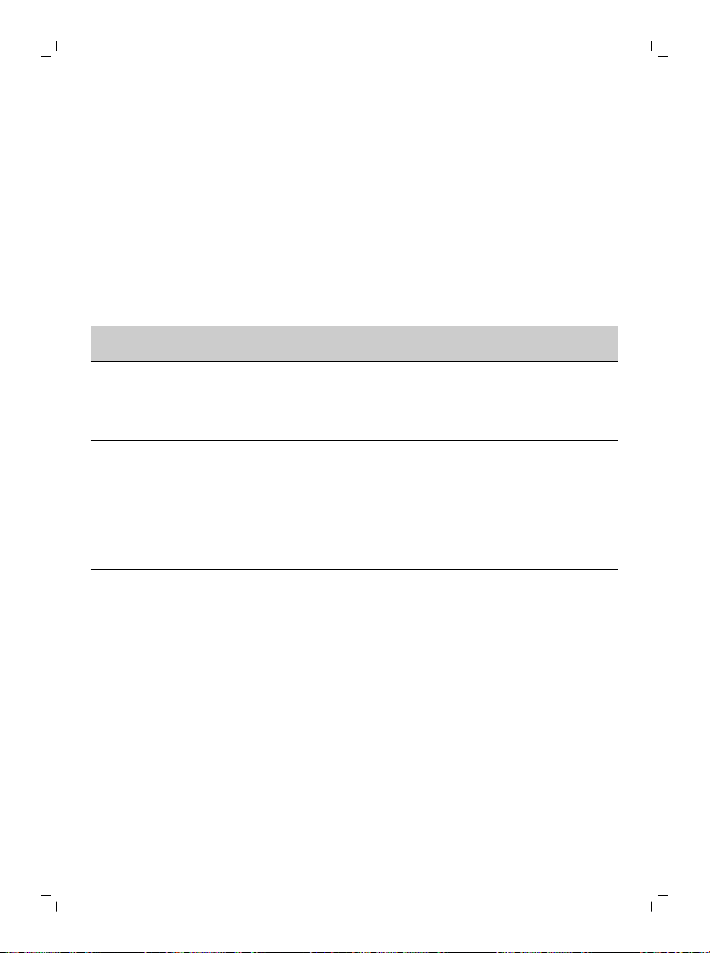
76
한국어
보관
제품을 장기간 사용하지 않을 경우, 전기 콘센트에서
코드를 뽑고 깨끗하게 닦은 다음 직사광선이 닿지 않는
시원하고 건조한 장소에 보관하십시오.
문제 해결
이 장에서는 제품을 사용하면서 접할 수 있는 가장
일반적인 문제를 다룹니다. 아래 정보를 통해 문제를
해결하지 못한 경우 www.philips.com/support를
방문하여 자주 묻는 질문(FAQ) 목록을 참조하거나 해당
국가의 필립스 서비스 센터로 문의하십시오.
문제점 예상 원인 해결책
칫솔모를 완전히 부착할
수 없습니다. 칫솔모와
핸들 사이에 약간의
이격이 있습니다.
이 틈은 정상이며
칫솔모가 적절하게
진동하는 데 필요합니다.
Philips Sonicare
칫솔의 진동이 이전보다
약합니다.
적응 강도 기능이
해제되었거나, 압력
센서가 해제 (보기
'압력 센서
피드백')되었거나,
강도가 실수로
변경되었습니다.
적응 강도 및/또는 압력
센서 기능 (보기 '기능
설정 또는 해제')을 끄거나
강도 표시등을 원하는
수준 (보기 '강도
설정')으로 눌러 강도
레벨을 올립니다
Philips Sonicare
칫솔의 부품이
없습니다.
누락된 부품은 구입한
모델에 포함되어 있지
않습니다.
액세서리와 칫솔모
액세서리 수는 구입한
모델 번호에 따라
다릅니다. 핸들 하단에
있는 HX 모델 번호를 찾아
핸들과 함께 제공되는
품목을 파악할 수
있습니다.

77
한국어
재활용
- 이 기호는 전기 제품 및 배터리를 일반 가정용
쓰레기와 함께 폐기하면 안 된다는 것을 의미합니다.
- 전기 제품 및 배터리의 분리 수거에 대한 해당
국가의 규정을 준수하십시오.
내장 충전식 배터리 분리
제품을 폐기할 때는 자격을 갖춘 전문가가 내장 충전식
배터리를 분리해야 합니다. 내장 충전식 배터리 분리에
대한 지침은 www.philips.com/support에서 찾을 수
있습니다.
품질 보증 및 지원
보다 자세한 정보나 지원이 필요한 경우에는 필립스
웹사이트(www.philips.com/support)를 방문하거나 국제
보증 리플릿을 참조하십시오.
보증 제한
국제 보증 약관에서 제외되는 항목은 다음과 같습니다.
- 칫솔모
- 정품이 아닌 교체품의 사용으로 인한 손상
- 오용, 남용, 부주의, 개조 또는 무단 수리로 인한
손상
- 쪼개짐, 긁힘, 마멸, 변색, 탈색 등, 일반적인 마모
또는 손상




Empty page before back cover

www.philips.com/Sonicare
© 2021 Koninklijke Philips N.V. (KPNV). All rights reserved. Philips and the
Philips shield are trademarks of KPNV. Sonicare and the Sonicare logo are
trademarks of Philips Oral Healthcare, LLC and/or KPNV.
© and TMs owned by Koninklijke Philips N.V. All rights reserved.
Download on the App Store.
GET IT ON Google Play.
The Bluetooth® word mark and logos are registered trademarks owned by
Bluetooth SIG, Inc. and any use of such marks by KPNV is under license.
Apple and the Apple logo are trademarks of Apple Inc., registered in the U.S.
and other countries. App Store is a service mark of Apple Inc.
Android, Google Play and the Google Play logo are trademarks of Google
Inc.
3000.059.2776.1 (18/3/2021)
>75 % recycled paper
>75 % papier recyclé