!
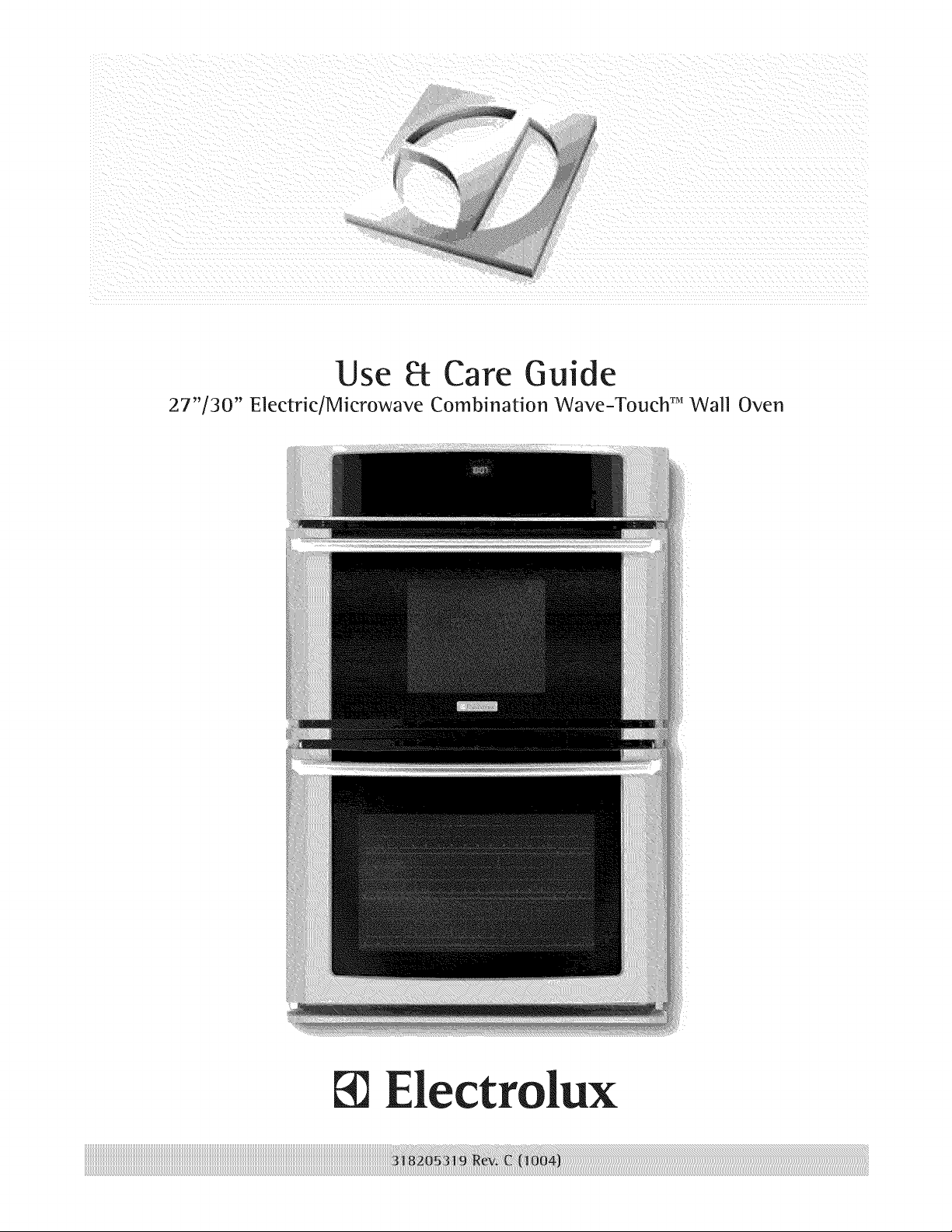
Use Pc Care Guide
27"/30" Electric/Microwave Combination Wave-Touch TMWall Oven
ectrolux
Fin
ing Information
Table of contents
Finding information .................................................... 2
Safety ....................................................................... 3-8
Information You Need To Know ............................ 941
Features ................................................................ 12=15
Getting Started ..................................................... 16=17
Power up, control display modes & timers .......... 16
Control lock & oven lights .................................... 17
Settings for Best Results .................................... 18=19
Setting Microwave Controls ............................... 20-29
• Time cooking ....................................................... 20
• Quick sensor ........................................................ 21
• Sensor cook ......................................................... 23
• Auto cook ............................................................. 24
• Auto reheat .......................................................... 26
• Melt, soften .......................................................... 27
• Auto defrost ......................................................... 28
• Multi stage cooking .............................................. 29
Setting Lower Oven Controls ............................. 30-52
• Rapid preheat ...................................................... 30
• Bake .................................................................... 31
• Using cook time ................................................... 32
• Using cook time with end time ........................... 33
• Broil ................................................................ 34-35
• Convection bake .................................................. 36
• Using convection convert .................................... 37
• Convection roast ............................................. 38-39
• Probe .............................................................. 40-41
• Convection broil ................................................... 42
• Keep warm .......................................................... 43
Slow cook ............................................................ 44
Perfect Turkey TM .................................................. 45
Defrost ................................................................. 46
• Dehydrate ....................................................... 46-47
Bread proof .......................................................... 47
Saving & recalling my favorite recipes ................. 48
• Multi stage cooking ......................................... 49-50
• Setting Sabbath mode .................................... 51-52
Setting Your Preferences .................................... 53=57
• Setting clock ........................................................ 53
• Setting clock display (CLO) ................................. 53
• Setting 12 or 24 hour mode (CLO) ...................... 54
• Changing between F° or C ° (F-C) ........................ 54
• Setting 12hr energy saving mode (ES) ................ 55
• Setting audio mode (AUD) ................................... 55
• Adjusting oven temperature (UPO) ..................... 56
• Factory default reset (RST) ................................. 56
• User preferences chart ........................................ 57
Lower Oven Se_f-C_ean ....................................... 58=59
Lower Oven Care & Cleaning ............................. 60=64
• Cleaning recommendations ............................ 60-61
• Oven door removal ......................................... 62-63
• Changing oven lights ........................................... 64
Microwave Care & Cleaning .................................... 65
Solutions to Common Problems ........................ 66=68
Microwave Service Call Check ................................ 69
Warranty .................................................................... 71
Please read & save this guide
Thank you for choosing Electrolux, the new
premium brand in home appliances. This Use &
Care Guide is part of our commitment to customer
satisfaction and product quality throughout the
service life of your new appliance.
We view your purchase as the beginning of a
relationship. To ensure our ability to continue
serving you, please use this page to record
important product information.
Keep a record for quick
reference
Purchase date
Electrolux model number
Electrolux serial number
Serial plate location
Questions?
For toll-free telephone support in the U.S. and
Canada:
I=877=4ELECTROLUX (1=877=435=3287)
For online support and Internet production information
visit http://www.electroluxappliances.com
@2009 Etectrolux Home Products, Inc. All rights reserved. Printed in the USA
important Safety instructions
::::::::::::::::::::::::::::::::::::::::::::::::::::::::::::::::::::::::::::::::
iiiiiiiiiiiiiiiiiiiiiiiiiiiiiiiiiiiiiiiiiiiiiiiiiiiiiiiiiiiiiiiiiiiiiiiiiiiiiiii_
Whatyou need to knowaboutsafety instructions iiiiiiiiiiiiiiiiiiiiiiiiiiiiiiiiiiiiiiiiiiiiiiiiiiiiiiiiiiiiiiiiiiiiiiiiiiiiiiii_i
iiiiiiiiiiiiiiiiiiiiiiiiiiiiiiiiiiiiiiiiiiiiiiiiiiiiiiiiiiiiiiiiiiiiiiiiiiiiiiii
warning and Important Instructions appearing inthis guide are not meant to cover all possible conditions iiiiiiiiiiiiiiiiiiiiiiiiiiiiiiiiiiiiiiiiiiiiiiiiiiiiiiiiiiiiiiiiiiiiiiiiiiiiiiii:
and situationsthatmayoccur. Commonsense, cautionand care mustbeexercisedwhen installing, iiiiiiiiiiiiiiiiiiiiiiiiiiiiiiiiiiiiiiiiiiiiiiiiiiiiiiiiiiiiiiiiiiiiiiiiiiiiiiii::
maintainingoroperatingamicrowave.
ALWAYS contact your dealer, distributor, service agent or manufacturer about problems or conditions
you do not understand.
Recognize Safety Symbols, Words, Labels
WARNING -- Hazards or unsafe practices
which COULD result in severe personal injury
or death.
CAUTION -- Hazards or unsafe practices which
COULD result in minor personal injury.
iiiiiiiiiiiiiiiiiiiiiiiiiiiiiiiiiiiiiiiiiiiiiiiiiiiiiiiiiiiiiiiiiiiiiiiiiiiiiiiiiii
___________________________________________________________________________________
PRECAUTIONSTOAVOID POSSIBLE iiiiiiiiiiiiiiiiiiiiiiiiiiiiiiiiiiiiiiiiii
EXPOSURE TO EXCESSIVE iiiiiiiiiiiiiiiiiiiiiiiiiiiiiiiiiiiiiiiiii
MICROWAVE ENERGY iiiiiiiiiiiiiiiiiiiiiiiiiiiiiiiiiiiiiiiiii
iiiiiiiiiiiiiiiiiiiiiiiiiiiiiiiiiiiiiiiiiiiiiiiiiiiiiiiiiiiiiiiiiiiiiiiiiiiiiiiiiii
DO NOTattempttooperate the microwave ovenwith the dooropen sinceopen-dooroperation iiiiiiiiiiiiiiiiiiiiiiiiiiiiiiiiiiiiiiiiiiiiiiiiiiiiiiiiiiiiiiiiiiiiiiiiiiiiiiiiiii
canresultinharmfulexposuretomicrowaveenergy. Itis importantnottoddeatortamperwiththe iiiiiiiiiiiiiiiiiiiiiiiiiiiiiiiiiiiiiiiiiiiiiiiiiiiiiiiiiiiiiiiiiiiiiiiiiiiiiiiiiii
DONOTplaceanyobjectbetweentheovenfrontfaceandthedoororallowsoilorcleanerresidue iiiiiiiiiiiiiiiiiiiiiiiiiiiiiiiiiiiiiiiiiiiiiiiiiiiiiiiiiiiiiiiiiiiiiiiiiiiiiiiiiii
• toaccumulateonsealingsurfaces, iiiiiiiiiiiiiiiiiiiiiiiiiiiiiiiiiiiiiiiiiiiiiiiiiiiiiiiiiiiiiiiiiiiiiiiiiiiiiiiiiii
__N_T_peratet_e_venifitisdamaged._tisparticu_ar_yimp_rtantthatthe_vend__r_l_sepr_per_y iiiiiiiiiiiiiiiiiiiiiiiiiiiiiiiiiiiiiiiiiiiiiiiiiiiiiiiiiiiiiiiiiiiiiiiiiiiiiiiiiii
andthatthereisn_damaget_the:(1)d__r(bent)_(2)hingesand_atches(br_ken_r___sened)_(3) iiiiiiiiiiiiiiiiiiiiiiiiiiiiiiiiiiiiiiiiiiiiiiiiiiiiiiiiiiiiiiiiiiiiiiiiiiiiiiiiiii
doorsealsandsealingsurfaces, iiiiiiiiiiiiiiiiiiiiiiiiiiiiiiiiiiiiiiiiiiiiiiiiiiiiiiiiiiiiiiiiiiiiiiiiiiiiiiiiiii
" The oven should not be adjusted or repaired by anyone except properly qualified service iiiiiiiiiiiiiiiiiiiiiiiiiiiiiiiiiiiiiiiiiiiiiiiiiiiiiiiiiiiiiiiiiiiiiiiiiiiiiiiiiii
personnel, iiiiiiiiiiiiiiiiiiiiiiiiiiiiiiiiiiiiiiiiii
iiiiiiiiiiiiiiiiiiiiiiiiiiiiiiiiiiiiiiiiiiiiiiiiiiiiiiiiiiiiiiiiiiiiiiiiiiiiiiiiiii
iiiiiiiiiiiiiiiiiiiiiiiiiiiiiiiiiiiiiiiiiiiiiiiiiiiiiiiiiiiiiiiiiiiiiiiiiiiiiiiiiii
iiiiiiiiiiiiiiiiiiiiiiiiiiiiiiiiiiiiiiiiiiiiiiiiiiiiiiiiiiiiiiiiiiiiiiiiiiiiiiiiiii
iiiiiiiiiiiiiiiiiiiiiiiiiiiiiiiiiiiiiiiiiiiiiiiiiiiiiiiiiiiiiiiiiiiiiiiiiiiiiiiiiii
iiiiiiiiiiiiiiiiiiiiiiiiiiiiiiiiiiiiiiiiiiiiiiiiiiiiiiiiiiiiiiiiiiiiiiiiiiiiiiiiiii
iiiiiiiiiiiiiiiiiiiiiiiiiiiiiiiiiiiiiiiiiiiiiiiiiiiiiiiiiiiiiiiiiiiiiiiiiiiiiiiiiii
iiiiiiiiiiiiiiiiiiiiiiiiiiiiiiiiiiiiiiiiiiiiiiiiiiiiiiiiiiiiiiiiiiiiiiiiiiiiiiiiiii
iiiiiiiiiiiiiiiiiiiiiiiiiiiiiiiiiiiiiiiiiiiiiiiiiiiiiiiiiiiiiiiiiiiiiiiiiiiiiiiiiii
iiiiiiiiiiiiiiiiiiiiiiiiiiiiiiiiiiiiiiiiiiiiiiiiiiiiiiiiiiiiiiiiiiiiiiiiiiiiiiiiiii
important Safety instructions
iiiiiiiiiiiiiiiiiiiiiiiiiiiiiiiiiiiiiiiiiiiiiiiiiiiiiiiii
_iiiiiiiiiiiiiiiiiiiiiiiiiiiiiiiiiiiiiiiiiiiiiiiiiiiiiiiiii
_iiiiiiiiiiiiiiiiiiiiiiiiiiiiiiiiiiiiiiiiiiiiiiiiiiiiiiiiiiiii
When using electrical appliances, basic safety
precautions should be followed to reduce the risk
of burns, electric shock, fire, injury to persons or
exposure to excessive microwave energy:
READ ALL instructions before using the
appliance.
READ AND FOLLOW the specific
"PRECAUTIONS TO AVOID POSSIBLE
EXPOSURE TO EXCESSIVE MICROWAVE
ENERGY".
• Install or locate this appliance only in
accordance with the provided installation
instructions.
• Some products such as whole eggs and sealed
containers - for example, closed jars - are able
to explode and SHOULD NOT be HEATED in
this oven.
• Use this appliance ONLY for its intended use as
described in this manual. Do not use corrosive
chemicals or vapors in this appliance. This type
of oven is specifically designed to heat, cook
or dry food. It is not designed for industrial or
laboratory use.
• As with any appliance, CLOSE SUPERVISION
is necessary when used by CHILDREN or
INFIRM PERSONS.
• This appliance, including power cord, must be
serviced ONLY by qualified service personnel.
Contact nearest Electrolux Authorized Servicer
for examination, repair or adjustment.
DO NOT cover or block any vents or openings
on the oven.
DO NOT store or use this appliance outdoors.
• DO NOT use this product near water--for
example, near a kitchen sink, in a wet
basement, near a swimming pool, or similar
locations.
° Review the door cleaning instructions on page 61
(oven door) and 65 (microwave door).
To reduce the risk of fire in the oven cavity:
. DO NOT overcook food. Carefully attend
to appliance when paper, plastic or other
combustible materials are placed inside the
oven to facilitate cooking.
° Remove wire twist-ties from paper or plastic
bags before placing bag in oven.
. if materials inside the oven ignite, keep oven
door closed, turn oven off and disconnect
the power cord or shut off power at the fuse
or circuit breaker panel.
• DO NOT use the cavity for storage purposes.
DO NOT leave paper products, cooking utensils
or food in the cavity when not in use.
Liquids, such as water, coffee or tea are able to
be overheated beyond the boiling point without
appearing to be boiling. Visible bubbling or boiling
when the container is removed from the Microwave
Oven is not always present. THIS COULD RESULT
IN VERY HOT LIQUIDS SUDDENLY BOILING
OVER WHEN A SPOON OR OTHER UTENSIL IS
INSERTED INTO THE LIQUID.
To reduce the risk of injury to persons:
o DO NOT overheat the liquid.
° Stir the liquid both before and halfway through
heating it.
° Do not use straight-sided containers with
narrow necks. Use a wide-mouthed container.
° After heating, allow the container to stand in the
Microwave Oven at least for 20 seconds before
removing the container.
° Use extreme care when inserting a spoon or
other utensil into the container.
If the microwave oven light fails, consult a
Electrolux Authorized Servicer.
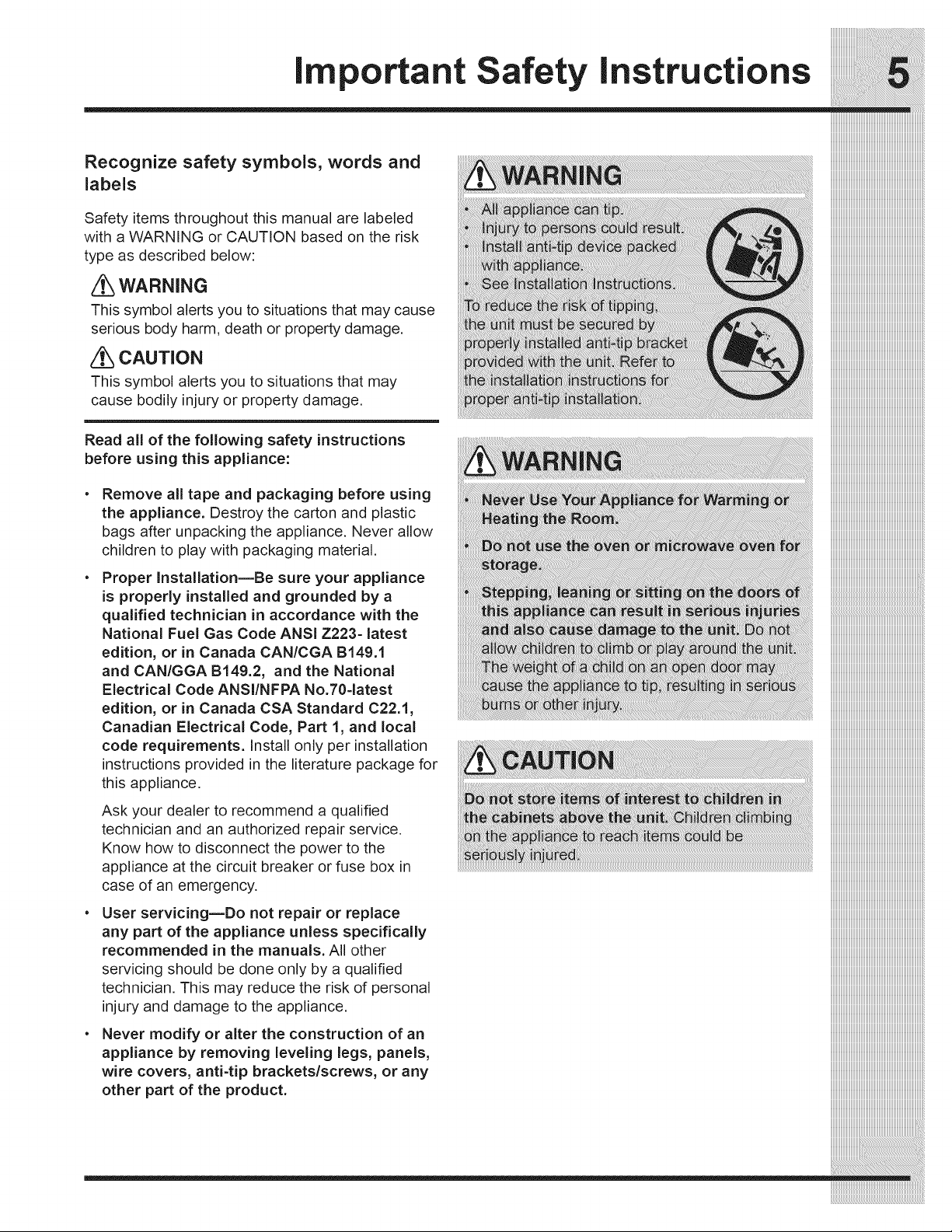
Recognize safety symbols, words and
labels
Safety items throughout this manual are labeled
with a WARNING or CAUTION based on the risk
type as described below:
WARNING
This symbol alerts you to situations that may cause
serious body harm, death or property damage.
CAUTION
This symbol alerts you to situations that may
cause bodily injury or property damage.
Read all of the following safety instructions
before using this appliance:
Remove all tape and packaging before using
the appliance. Destroy the carton and plastic
bags after unpacking the appliance. Never allow
children to play with packaging material.
Proper InstallationmBe sure your appliance
is properly installed and grounded by a
qualified technician in accordance with the
National Fuel Gas Code ANSi Z223- latest
edition, or in Canada CAN/CGA B149.1
and CAN/GGA B149.2, and the National
Electrical Code ANSI/NFPA No.70=latest
edition, or in Canada CSA Standard C22.1,
Canadian Electrical Code, Part 1, and local
code requirements. Install only per installation
instructions provided in the literature package for
this appliance.
Ask your dealer to recommend a qualified
technician and an authorized repair service.
Know how to disconnect the power to the
appliance at the circuit breaker or fuse box in
case of an emergency.
User servicingmDo not repair or replace
any part of the appliance unless specifically
recommended in the manuals. All other
servicing should be done only by a qualified
technician. This may reduce the risk of personal
injury and damage to the appliance.
Never modify or alter the construction of an
appliance by removing leveling legs, panels,
wire covers, anti-tip brackets/screws, or any
other part of the product.
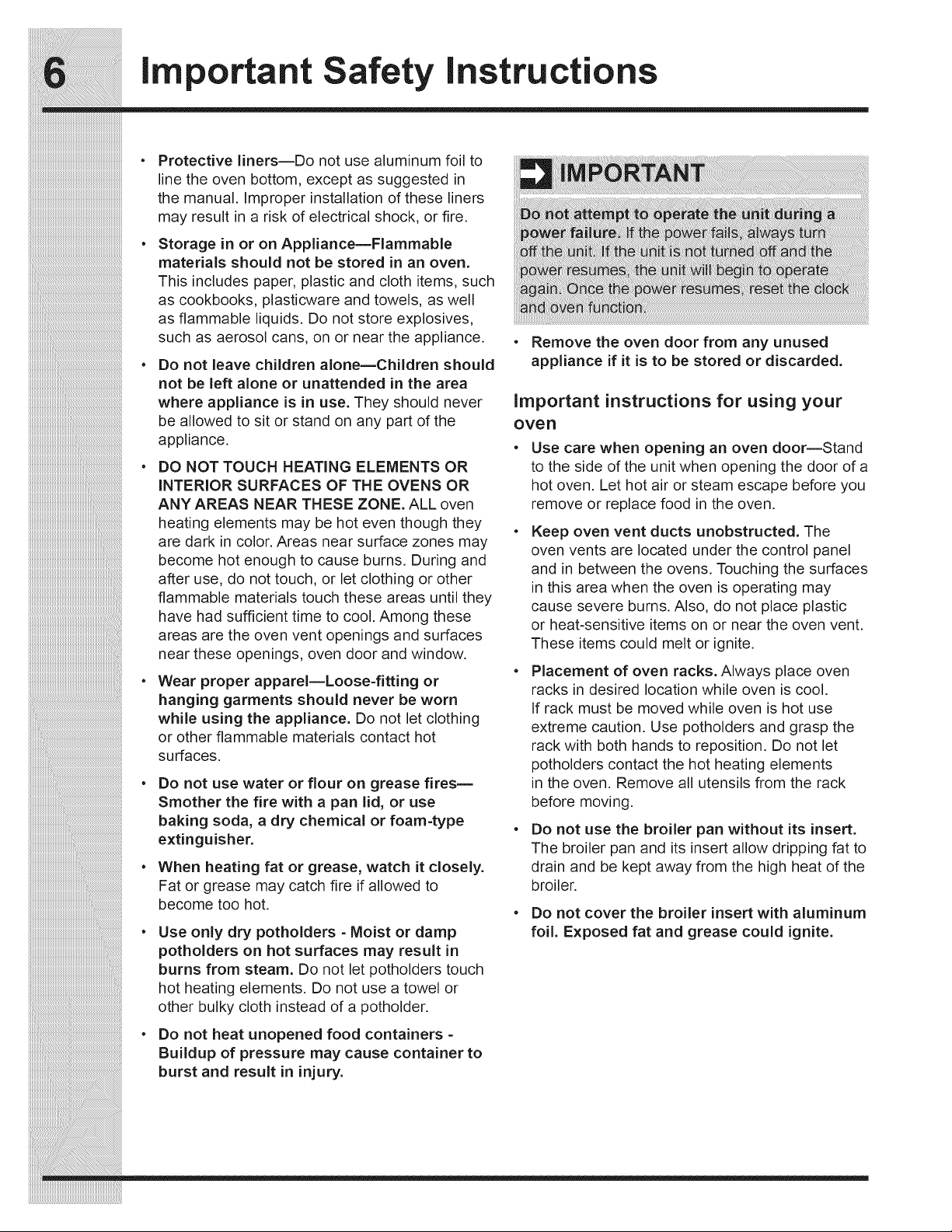
important Safety instructions
e
e
Protective liners--Do not use aluminum foil to
line the oven bottom, except as suggested in
the manual. Improper installation of these liners
may result in a risk of electrical shock, or fire.
Storage in or on AppliancemFlammable
materials should not be stored in an oven.
This includes paper, plastic and cloth items, such
as cookbooks, plasticware and towels, as well
as flammable liquids. Do not store explosives,
such as aerosol cans, on or near the appliance.
Do not leave children alonemChildren should
not be left alone or unattended in the area
where appliance is in use. They should never
be allowed to sit or stand on any part of the
appliance,
DO NOT TOUCH HEATING ELEMENTS OR
iNTERiOR SURFACES OF THE OVENS OR
ANY AREAS NEAR THESE ZONE. ALL oven
heating elements may be hot even though they
are dark in color. Areas near surface zones may
become hot enough to cause burns. During and
after use, do not touch, or let clothing or other
flammable materials touch these areas until they
have had sufficient time to cool. Among these
areas are the oven vent openings and surfaces
near these openings, oven door and window.
Wear proper apparel=Loose-fitting or
hanging garments should never be worn
while using the appliance. Do not let clothing
or other flammable materials contact hot
surfaces.
Do not use water or flour on grease fires=
Smother the fire with a pan lid, or use
baking soda, a dry chemical or foam-type
extinguisher.
When heating fat or grease, watch it closely.
Fat or grease may catch fire if allowed to
become too hot.
Use only dry potholders - Moist or damp
potholders on hot surfaces may result in
burns from steam. Do not let potholders touch
hot heating elements. Do not use a towel or
other bulky cloth instead of a potholder.
Do not heat unopened food containers -
Buildup of pressure may cause container to
burst and result in injury.
Remove the oven door from any unused
appliance if it is to be stored or discarded.
important instructions for using your
over
Use care when opening an oven door--Stand
to the side of the unit when opening the door of a
hot oven. Let hot air or steam escape before you
remove or replace food in the oven.
Keep oven vent ducts unobstructed. The
oven vents are located under the control panel
and in between the ovens. Touching the surfaces
in this area when the oven is operating may
cause severe burns. Also, do not place plastic
or heat-sensitive items on or near the oven vent.
These items could melt or ignite.
Placement of oven racks. Always place oven
racks in desired location while oven is cool.
If rack must be moved while oven is hot use
extreme caution. Use potholders and grasp the
rack with both hands to reposition. Do not let
potholders contact the hot heating elements
in the oven. Remove all utensils from the rack
before moving.
Do not use the broiler pan without its insert.
The broiler pan and its insert allow dripping fat to
drain and be kept away from the high heat of the
broiler,
• Do not cover the broiler insert with aluminum
foil. Exposed fat and grease could ignite.
important Safety instructions
• Cold temperatures can damage the electronic Self cleaning ovens iiiiiiiiiiiiiiiiiiiiiiiiiiiiiiiiiiiiiiiiiiiiiiiiiiiiiiiiiiiiiiiiiiiiiiiiiiiiiiii:
control. When using the appliance for the first . __
time, or when the appliance has not been used
for an extended period of time, be certain the
unit has been in temperatures above 32°F (0°C)
for at least 3 hours before turning on the power
to the appliance.
important instructions for cleaning your
appliance
• Clean the appliance regularly to keep all
parts free of grease that could catch fire.
Pay particular attention to the area underneath
each surface element. Do not allow grease to
accumulate.
• Kitchen cleaners and aerosolsmAIways
follow the manufacturer's recommended
directions for use. Be aware that excess
residue from cleaners and aerosols may ignite
causing damage and injury.
• Clean ventilating hoods frequentlymGrease
should not be allowed to accumulate on
the hood or filter. Follow manufacturer's
instructions for cleaning.
SAVE THESE
FUTURE
C eaninthese f-c eaningcycleonlytheparts
listed in this Use & Care Manual Before self
cleaning the oven, remove the broiler pan and
any utensils or foods from the oven.
Do not use oven cleaners--No commercial oven
cleaner or oven liner protective coating of any kind
should be used in or around any part of the oven.
Do not clean door gasket--The door gasket is
essential for a good seal. Care should be taken
not to rub, damage or move the gasket.
iiiiiiiiiiiiiiii_1:i:i:i:i:i:i:i:i:i:i:i:i:i:i:i:i:i:i:i:i:i:i:i:i:i:i:i:i:i:i:i:i:i:i:i:i:i:i:i:i:i:i:i:i:i:i:i:i:i:i:i:i:i:i:i:i:i:i:i:i:i:i:i:i:i
The health of some birds is extremely sensitive
to the fumes given off during the self-cleaning
cycle of any oven. Move birds to another well-
ventilated room.
important safety notice
The California Safe Drinking Water and Toxic
Enforcement Act requires the Governor of California
to publish a list of substances known to the state
to cause cancer, birth defects or other reproductive
harm, and requires businesses to warn customers of
potential exposure to such substances.
INSTRUCTIONS
REFERENCES
FOR
important Safety instructions
Federal Communications Commission Radio Frequency
interference Statement (U.S.A. Only)
This equipment generates and uses ISM frequency energy and if not installed and used properly, that is
in strict accordance with the manufacturer's instructions, may cause interference to radio and television
reception. It has been type tested and found to comply with limits for ISM Equipment pursuant to part
18 of FCC Rules, which are designed to provide reasonable protection against such interference in a
residential installation.
However, there is no guarantee that interference will not occur in a particular installation. If this
equipment does cause interference to radio or television reception, which can be determined by turning
the equipment off and on, the user is encouraged to try to correct the interference by one or more of the
following:
• Reorient the receiving antenna of the radio or television.
• Relocate the microwave oven with respect to the receiver.
• Move the microwave oven away from the receiver.
• Plug the microwave oven into a different outlet so that the microwave oven and the receiver are on
different branch circuits.
The manufacturer is not responsible for any radio or television interference caused by unauthorized
modification to this microwave oven. It is the responsibility of the user to correct such interference.
_i_i_i_i_i_i_i_i_i_i_i_i_i_i_i_i_i_i_i_i_i_i_i_i_i_i_i_i_i_i_i_i_i_i_i_i_i_i_i_i_i_i_i_i_i_i_i_i_i_i_i_i_i_i_i_i__!__________________________________________
iiiiiiiiiiiiiiiiiiiiiiiiiiiiiiiiiiiiiiiiiiiiiiiiiiiiiiiiiiiiiiiiiiiiiiiiiiiiiiiiiiiiiiiiiiiiiiiiiiiiiiiiiiiiiiiiiiiiiii_i!iiiiiiiiiiiiiiiiiiiiiiiiiiiiiiiiiiiiiiiiiiiiiiiiiiiii_
iiiiiiiiiiiiiiiiiiiiiiiiiiiiiiiiiiiiiiiiiiiiiiiiiiiiiiiiiiiiiiiiiiiiiiiiiiiiiiiiiiiiiiiiiiiiiiiiiiiiiiiiiiiiiiiiiiiiiiiiiiiii_i!iiiiiiiiiiiiiiiiiiiiiiiiiiiiiiiiiiiiiiiiiiii_
information You Need To Know
About your oven
This Use and Care Guide is valuable: read it on and off. It is normal for the exterior of the oven
carefully and always save it for reference.
A good microwave cookbook is a valuable asset.
Check it for microwave cooking principles,
techniques, hints and recipes.
NEVER use the Microwave Oven without the
turntable and support nor turn the turntable
over so that a large dish could be placed in the
oven. The turntable will turn both clockwise and
cou nterclockwise.
iiiiiiiiiiiiiiiiiiiiiiiiiiiiiiiiiiiiiiiiiiiiiiiiiiiiiiiiiiiiiiiiiiiiiiiiiiiiiiii:
________________________________________________________________________________
__:
__
iiiiiiiiiiiiiiiiiiiiiiiiiiiiiiiiiiiiiiiiiiiiiiiiiiiiiiiiiiiiiiiiiiiiiiiiiiiiiiii_
iiiiiiiiiiiiiiiiiiiiiiiiiiiiiiiiiiiiiiiiiiiiiiiiiiiiiiiiiiiiiiiiiiiiiiiiiiiiiiii:
________________________________________________________________________________
__:
__
iiiiiiiiiiiiiiiiiiiiiiiiiiiiiiiiiiiiiiiiiiiiiiiiiiiiiiiiiiiiiiiiiiiiiiiiiiiiiiii_
tobewarmtothetouchwhencookingorreheating, iiiiiiiiiiiiiiiiiiiiiiiiiiiiiiiiiiiiiiiiiiiiiiiiiiiiiiiiiiiiiiiiiiiiiiiiiiiiiiii__
Condensation is a normal part of microwave
cooking. Room humidity and the moisture in
food will influence the amount of moisture that
condenses in the oven. Generally, covered foods
will not cause as much condensation as uncovered
ones. Ventilation openings must not be blocked.
The Microwave Oven is for food preparation only. It
should not be used to dry clothes or newspapers.
ALWAYS have food in the Microwave Oven when
it is on to absorb the microwave energy.
When using the Microwave Oven at power levels
below 100%, you may hear the magnetron cycling
Your Microwave Oven is rated 900 watts by
using the IEC Test Procedure. In using recipes or
package directions, check food a minute or two
before the minimum time and add time accordingly.
About safety
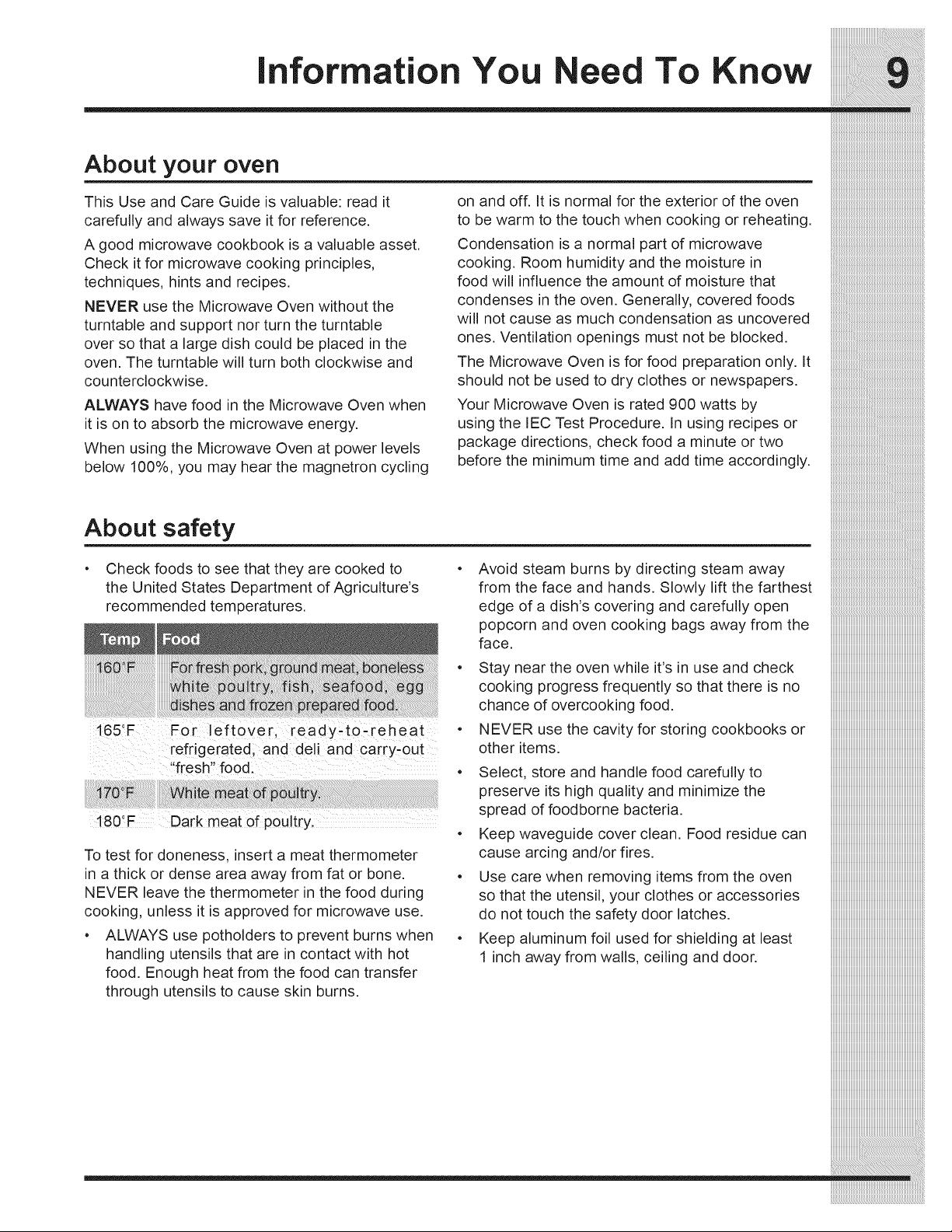
• Check foods to see that they are cooked to
the United States Department of Agriculture's
recommended temperatures.
165_F For left0ve[; ready_t0,reheat •
[efdgeratedi and dell and carry-out
fresh food! ...... .
!80!F Dark meat of pou!try,
To test for doneness, insert a meat thermometer
in a thick or dense area away from fat or bone.
NEVER leave the thermometer in the food during
cooking, unless it is approved for microwave use.
• ALWAYS use potholders to prevent burns when
handling utensils that are in contact with hot
food. Enough heat from the food can transfer
through utensils to cause skin burns.
Avoid steam burns by directing steam away
from the face and hands. Slowly lift the farthest
edge of a dish's covering and carefully open
:::::::::::::::::::::::::::::::::::::::::::::::::::::::::::::::::::::::::::::::::::
popcorn and oven cooking bags awayfrom the iiiiiiiiiiiiiiiiiiiiiiiiiiiiiiiiiiiiiiiiiiiiiiiiiiiiiiiiiiiiiiiiiiiiiiiiiiiiiiiiiii
face. iiiiiiiiiiiiiiiiiiiiiiiiiiiiiiiiiiiiiiiiiiiiiiiiiiiiiiiiiiiiiiiiiiiiiiiiiiiiiiiiiii
Stayneartheovenwhile it's in useand check iiiiiiiiiiiiiiiiiiiiiiiiiiiiiiiiiiiiiiiiiiiiiiiiiiiiiiiiiiiiiiiiiiiiiiiiiiiiiiiiiii
cooking progressfrequentlysothatthere is no iiiiiiiiiiiiiiiiiiiiiiiiiiiiiiiiiiiiiiiiiiiiiiiiiiiiiiiiiiiiiiiiiiiiiiiiiiiiiiiiiii
chanceofovercookingfood, iiiiiiiiiiiiiiiiiiiiiiiiiiiiiiiiiiiiiiiiiiiiiiiiiiiiiiiiiiiiiiiiiiiiiiiiiiiiiiiiiii
NEVER usethe cavityforstoring cookbooksor iiiiiiiiiiiiiiiiiiiiiiiiiiiiiiiiiiiiiiiiiiiiiiiiiiiiiiiiiiiiiiiiiiiiiiiiiiiiiiiiiii
otheritems, iiiiiiiiiiiiiiiiiiiiiiiiiiiiiiiiiiiiiiiiiiiiiiiiiiiiiiiiiiiiiiiiiiiiiiiiiiiiiiiiiii
Select, storeand handlefoodcarefullyto iiiiiiiiiiiiiiiiiiiiiiiiiiiiiiiiiiiiiiiiiiiiiiiiiiiiiiiiiiiiiiiiiiiiiiiiiiiiiiiiiii
preserve its high qualityand minimizethe iiiiiiiiiiiiiiiiiiiiiiiiiiiiiiiiiiiiiiiiiiiiiiiiiiiiiiiiiiiiiiiiiiiiiiiiiiiiiiiiiii
spreadoffoodbornebacteria, iiiiiiiiiiiiiiiiiiiiiiiiiiiiiiiiiiiiiiiiiiiiiiiiiiiiiiiiiiiiiiiiiiiiiiiiiiiiiiiiiii
Keep waveguide coverclean. Food residue can iiiiiiiiiiiiiiiiiiiiiiiiiiiiiiiiiiiiiiiiiiiiiiiiiiiiiiiiiiiiiiiiiiiiiiiiiiiiiiiiiii
causearcingand/orfires, iiiiiiiiiiiiiiiiiiiiiiiiiiiiiiiiiiiiiiiiiiiiiiiiiiiiiiiiiiiiiiiiiiiiiiiiiiiiiiiiiii
Use care when removing items from the oven iiiiiiiiiiiiiiiiiiiiiiiiiiiiiiiiiiiiiiiiiiiiiiiiiiiiiiiiiiiiiiiiiiiiiiiiiiiiiiiiiii
sothattheutensil, yourclothesoraccessories iiiiiiiiiiiiiiiiiiiiiiiiiiiiiiiiiiiiiiiiiiiiiiiiiiiiiiiiiiiiiiiiiiiiiiiiiiiiiiiiiii
donottouchthesafetydoorlatches, iiiiiiiiiiiiiiiiiiiiiiiiiiiiiiiiiiiiiiiiiiiiiiiiiiiiiiiiiiiiiiiiiiiiiiiiiiiiiiiiiii
Keep aluminumfoil usedforshielding atleast iiiiiiiiiiiiiiiiiiiiiiiiiiiiiiiiiiiiiiiiiiiiiiiiiiiiiiiiiiiiiiiiiiiiiiiiiiiiiiiiiii
l inchawayfromwalls, ceilinganddoor, iiiiiiiiiiiiiiiiiiiiiiiiiiiiiiiiiiiiiiiiiiiiiiiiiiiiiiiiiiiiiiiiiiiiiiiiiiiiiiiiiii
iiiiiiiiiiiiiiiiiiiiiii
iiiiiiiiiiiiiiiiiiiiiii
iiiiiiiiiiiiiiiiiiiiiii
iiiiiiiiiiiiiiiiiiiiiii
iiiiiiiiiiiiiiiiiiiiiii
iiiiiiiiiiiiiiiiiiiiiii
iiiiiiiiiiiiiiiiiiiiiiiiiiiiiiiiiiiiiiiiiiiiiiiiiiiiiiiiiiiiiiiiiiiiiiiiiiiiiiiiiii
information You Need To Know
iiiiiiiiiiiiiiiiiiiiiiiiiiiiiiiiiiiiiiiiiiiiiiiiiiiiiiiiiiiiiiiiiiiiiiiiiiiiiii
About microwave cooking
• Arrange food carefully. Place thickest areas
towards outside of dish.
• Watch cooking time. Cook for the shortest
amount of time indicated and add more as
needed. Food severely overcooked can smoke
or ignite.
° Cover foods while cooking. Check recipe or
cookbook for suggestions: paper towels, wax
paper, microwave plastic wrap or a lid. Covers
prevent spattering and help foods to cook
evenly.
° Shield with small flat pieces of aluminum foil
any thin areas of meat or poultry to prevent
overcooking before dense, thick areas are
cooked thoroughly.
° Stir foods from outside to center of dish once or
twice during cooking, if possible.
° Turn foods over once during microwaving to
speed cooking of such foods as chicken and
hamburgers. Large items like roasts must be
turned over at least once.
Rearrange foods such as meatballs halfway
through cooking both from top to bottom and
from the center of the dish to the outside.
Add standing time. Remove food from oven
and stir, if possible. Cover for standing time
which allows the food to finish cooking without
overcooking.
Check for doneness. Look for signs indicating
that cooking temperatures have been reached.
Doneness signs include:
Food steams throughout, not just at edge.
Center bottom of dish is very hot to the
touch.
Poultry thigh joints move easily.
Meat and poultry show no pinkness.
Fish is opaque and flakes easily with a fork.
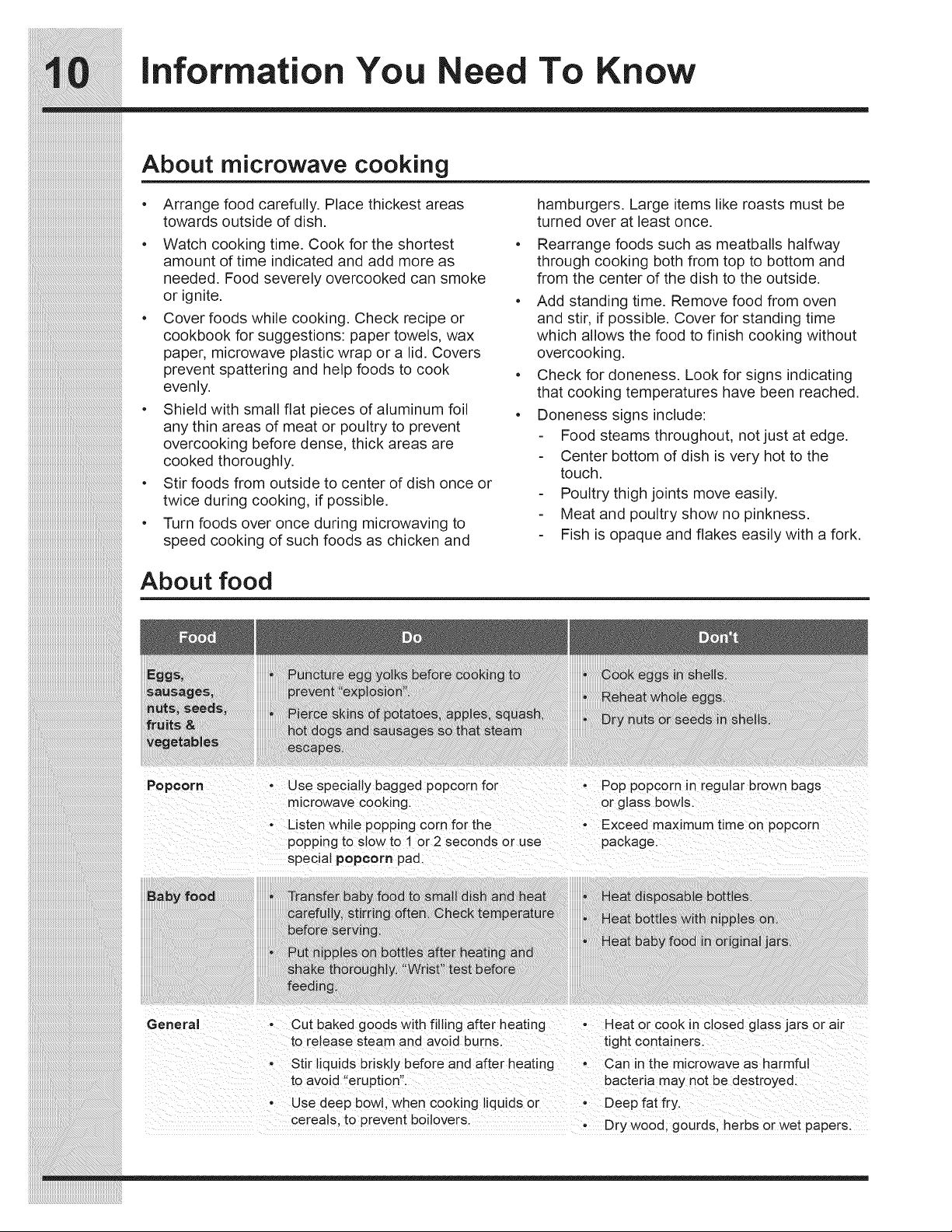
About food
General • Cut baked goods with filling after heating • Heat or cook in closed glass jars or air
to release steam and avoid burns, tight containers.
Stir liquids briskly before and after heating - Can in the microwave as harmful
to avoid "eruption". bacteria may not be destroyed.
• Use deep bow]. when cooking liquids or • Deep fat fry.
cereals, to prevent boilovers Dry wood, gourds, herbs or wet papers.
information You Need To Know
__
_________________________________________________________________________________
__
iiiiiiiiiiiiiiiiiiiiiiiiiiiiiiiiiiiiiiiiiiiiiiiiiiiiiiiiiiiiiiiiiiiiiiiiiiiiiiii_
Abo.tot o odcov og iiiiiiiiiiiiiiiiiiiiiiiiiiiiiiiiiiiiiiiii:
It is not necessary to buy all new cookware. The following coverings are ideal: iiiiiiiiiiiiiiiiiiiiiiiiiiiiiiiiiiiiiiiiiiiiiiiiiiiiiiiiiiiiiiiiiiiiiiiiiiiiiiii
Manypiecesalreadyinyourkitchencanbeused • Papertowelsaregoodforcoveringfoodsfor iiiiiiiiiiiiiiiiiiiiiiiiiiiiiiiiiiiiiiiiiiiiiiiiiiiiiiiiiiiiiiiiiiiiiiiiiiiiiiii:[
successfullyinyournewMicrowaveOven. Make reheatingandabsorbingfatwhilecooking ___:_:_:__________________________________________________________________________________________________________________________________________________________I
sure the utensil does not touch the interior walls bacon.
during cooking.
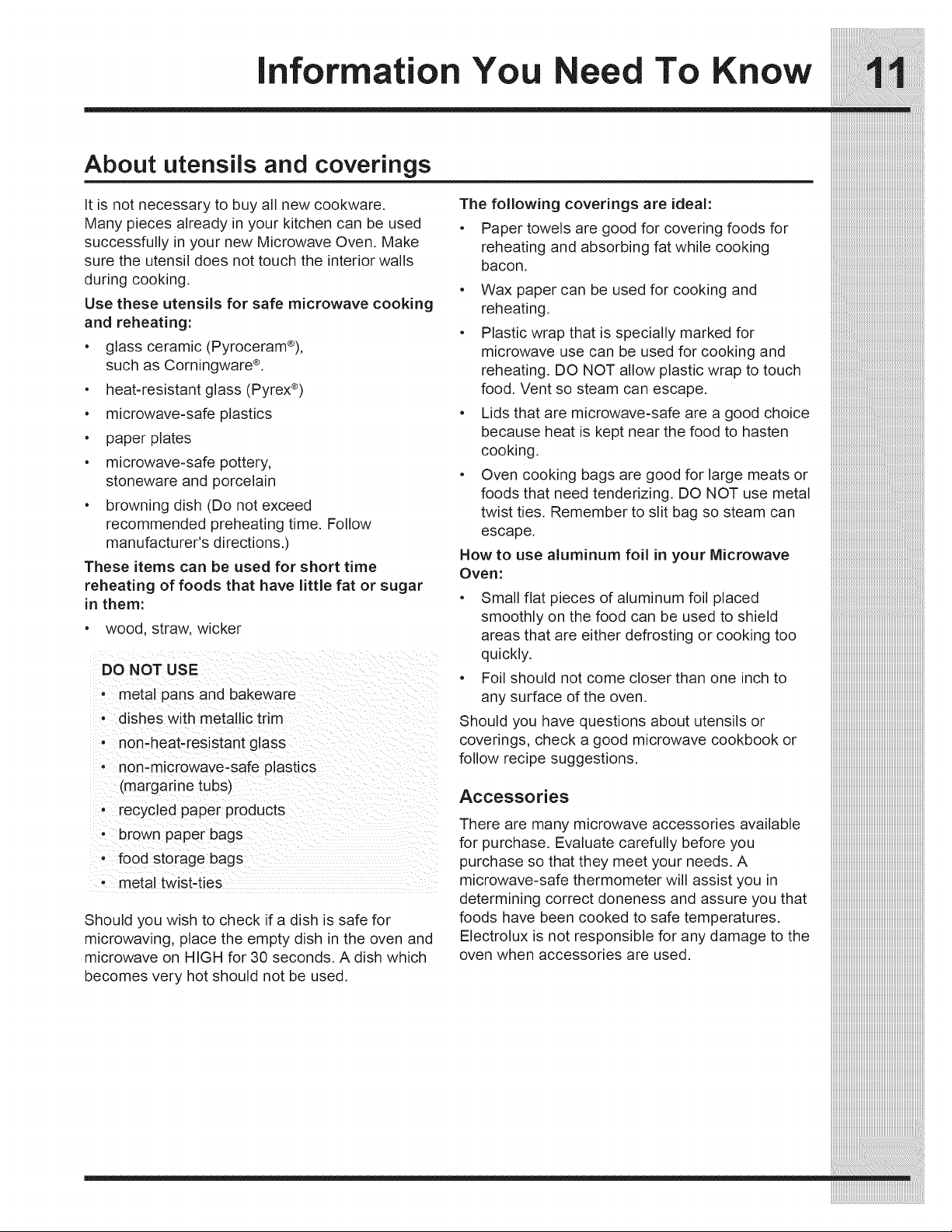
Use these utensils for safe microwave cooking
and reheating:
• glass ceramic (Pyroceram®),
such as Corningware ®.
• heat-resistant glass (Pyrex ®)
Wax paper can be used for cooking and
reheating.
Plastic wrap that is specially marked for
microwave use can be used for cooking and
reheating. DO NOT allow plastic wrap to touch
food. Vent so steam can escape.
iiiiiiiiiiiiiiiiiiiiiiiiiiiiiiiiiiiiiiiiiiiiiiiiiiiiiiiiiiiiiiiiiiiiiiiiiiiiiiii
iiiiiiiiiiii_iiiiiiiiiiiiiiiiiiiiiiiiiiiiiiiiiiiiiiiiiiiiiiiiiiiiiiiiiiiiiiiiiii
• microwave-safe plastics
• paper plates
• microwave-safe pottery,
stoneware and porcelain
• browning dish (Do not exceed
recommended preheating time. Follow
manufacturer's directions.)
These items can be used for short time
reheating of foods that have little fat or sugar
in them:
• wood, straw, wicker
DO NOT USE
• metal pans and bakeware
• dishes with metallic trim
• non-heat-resistant glass
• non-microwave-safe plastics
(margarine tubs)
• recycled paper products
- brown paper bags
• food storage bags
- metal twist-ties
Should you wish to check if a dish is safe for
microwaving, place the empty dish in the oven and
microwave on HIGH for 30 seconds. A dish which
becomes very hot should not be used.
• Lids that are microwave-safe are a good choice
because heat is kept near the food to hasten
cooking.
• Oven cooking bags are good for large meats or
foods that need tenderizing. DO NOT use metal
twist ties. Remember to slit bag so steam can
escape.
How to use aluminum foil in your Microwave
Oven:
• Small flat pieces of aluminum foil placed
smoothly on the food can be used to shield
areas that are either defrosting or cooking too
quickly.
• Foil should not come closer than one inch to
any surface of the oven.
Should you have questions about utensils or
coverings, check a good microwave cookbook or
follow recipe suggestions.
Accessories
There are many microwave accessories available
for purchase. Evaluate carefully before you
purchase so that they meet your needs. A
microwave-safe thermometer will assist you in
determining correct doneness and assure you that
foods have been cooked to safe temperatures.
Electrolux is not responsible for any damage to the
oven when accessories are used.
iiiiiiiiiiiiiiiiiiiiiiiiiiiiiiiiiiiiiiiiiiiiiiiiiiiiiiiii
_iiiiiiiiiiiiiiiiiiiiiiiiiiiiiiiiiiiiiiiiiiiiiiiiiiiiiiiiii
_iiiiiiiiiiiiiiiiiiiiiiiiiiiiiiiiiiiiiiiiiiiiiiiiiiiiiiiiiiiii
4.
5.
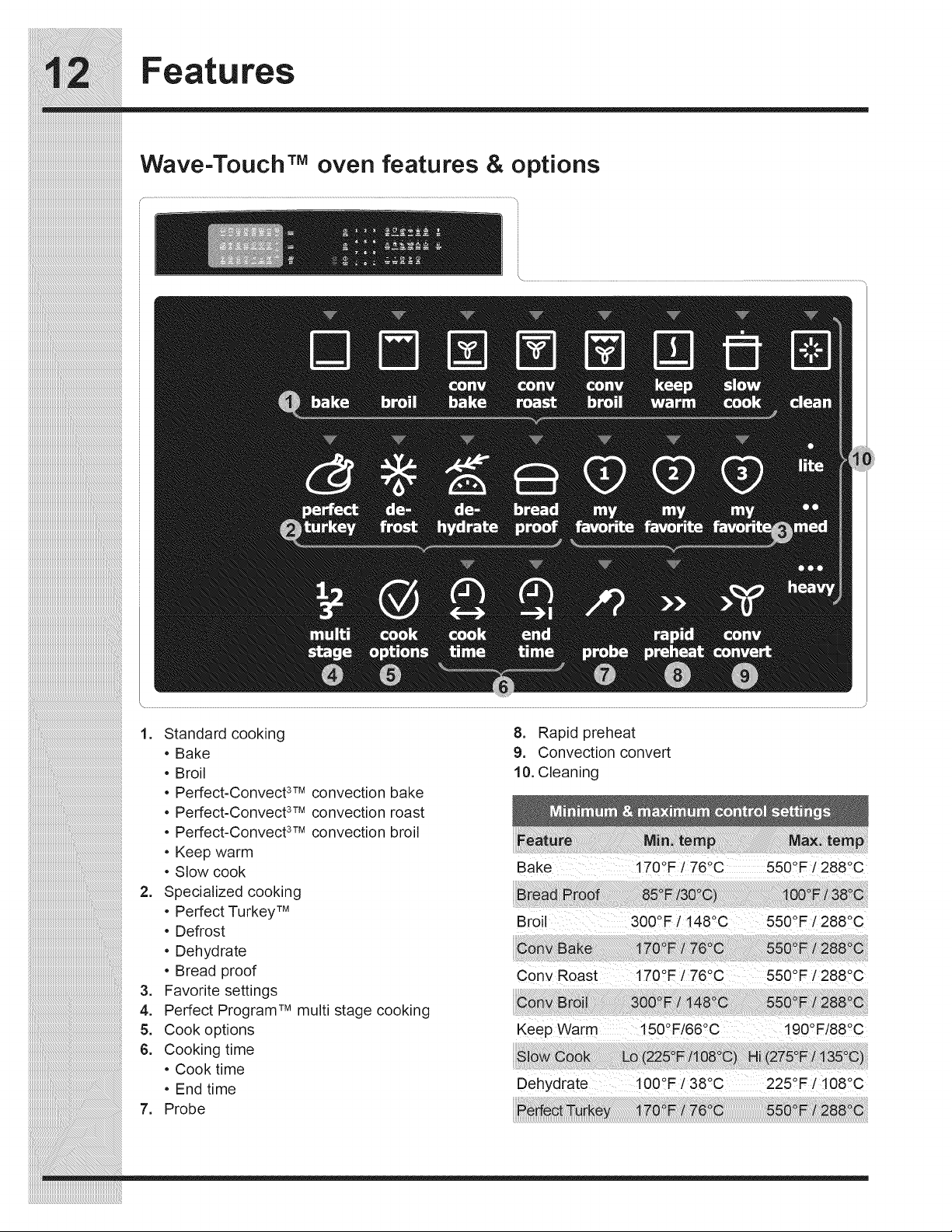
1. Standard cooking
• Bake
• Broil
• Perfect-Convect 3TMconvection bake
• Perfect-Convect 3TMconvection roast
• Perfect-Convect 3TMconvection broil
• Keep warm
• Slow cook
2. Specialized cooking
• Perfect Turkey TM
• Defrost
• Dehydrate
• Bread proof
Favorite settings
Perfect Program TM multi stage cooking
Cook options
6. Cooking time
• Cook time
• End time
7. Probe
8. Rapid preheat
9. Convection convert
10. Cleaning
Bake i70°F / 76°C 550°F i 2880C
Broil 3000F / 148QC 5500F / 288°C
cony Roast 1700F/76°C 550°F i 288°C
Keep Warm 150°F/660C t90°F/88°C
Dehydrate 100°F / 38°C 225°F / 108°C
Features
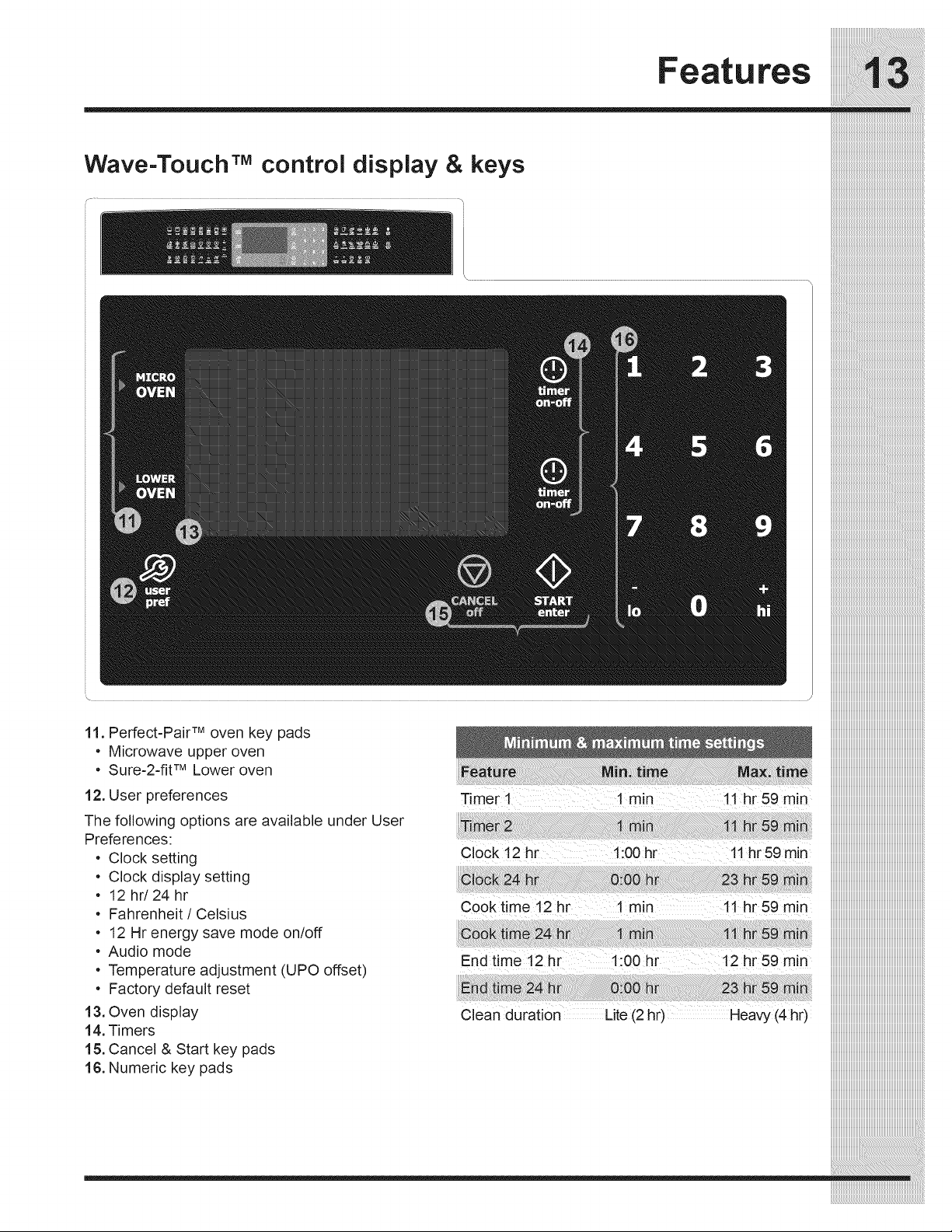
Wave-TouchTM control display & keys
" iiiiiiiiiiiiiiiiiiiiiiiiiiiiiiiiiiiiiiiiiiiiiiiiiiiiiiiiiiiiiiiiiiiiiiiiiiiiiiiiiii
TM [[[[[[[[[[[[[[[[[[[[[[[[[[[[[[[[[[[[[[[[[[[[[[[[[[[[[[[[[[[[[[[[[[[[[[[[[[[[[[[[[[[
11. Perfect=Pair oven key pads iiiiiiiiiiiiiiiiiiiiiiiiiiiiiiiiiiiiiiiiiiiiiiiiiiiiiiiiiiiiiiiiiiiiiiiiiiiiiiiiiii
• Microwave upper oven iiiiiiiiiiiiiiiiiiiiiiiiiiiiiiiiiiiiiiiiiiiiiiiiiiiiiiiiiiiiiiiiiiiiiiiiiiiiiiiiiii
iiiiiiiiiiiiiiiiiiiiiiiiiiiiiiiiiiiiiiiiiiiiiiiiiiiiiiiiiiiiiiiiiiiiiiiiiiiiiiiiiii
• Sure-2-fit TMLower oven
12. User preferences
The following options are available under User
Preferences:
• Clock setting
• Clock display setting
• 12hr/24hr
• Fahrenheit / Celsius
• 12 Hr energy save mode on/off
• Audio mode
• Temperature adjustment (UPO offset)
• Factory default reset
13. Oven display
14. Timers
15. Cancel & Start key pads
16. Numeric key pads
Timer 1 1 min 11hr 59 min
iiiiiiiiiiiiiiiiiiiiiii
_i_i_i_i_i_i_i_i_i_i_i_i_i_i_i_i_i_i_i_i_i_i_i_i_i_i_i_i_i_i_i_i_i_i_i_i_i_i_i_i_i_
_i_i_i_i_i_i_i_i_i_i_i_i_i_i_i_i_i_i_i_i_i_i_i_i_i_i_i_i_i_i_i_i_i_i_i_i_i_i_i_i_i_
Features
!!!!!!!!!!!!!!!!!!!!!!!!!!!!!!!!!!!!!!!!!!!!!!!!!!!!!!!!!!!!!!!!!!!!!!!!!!!!!!!
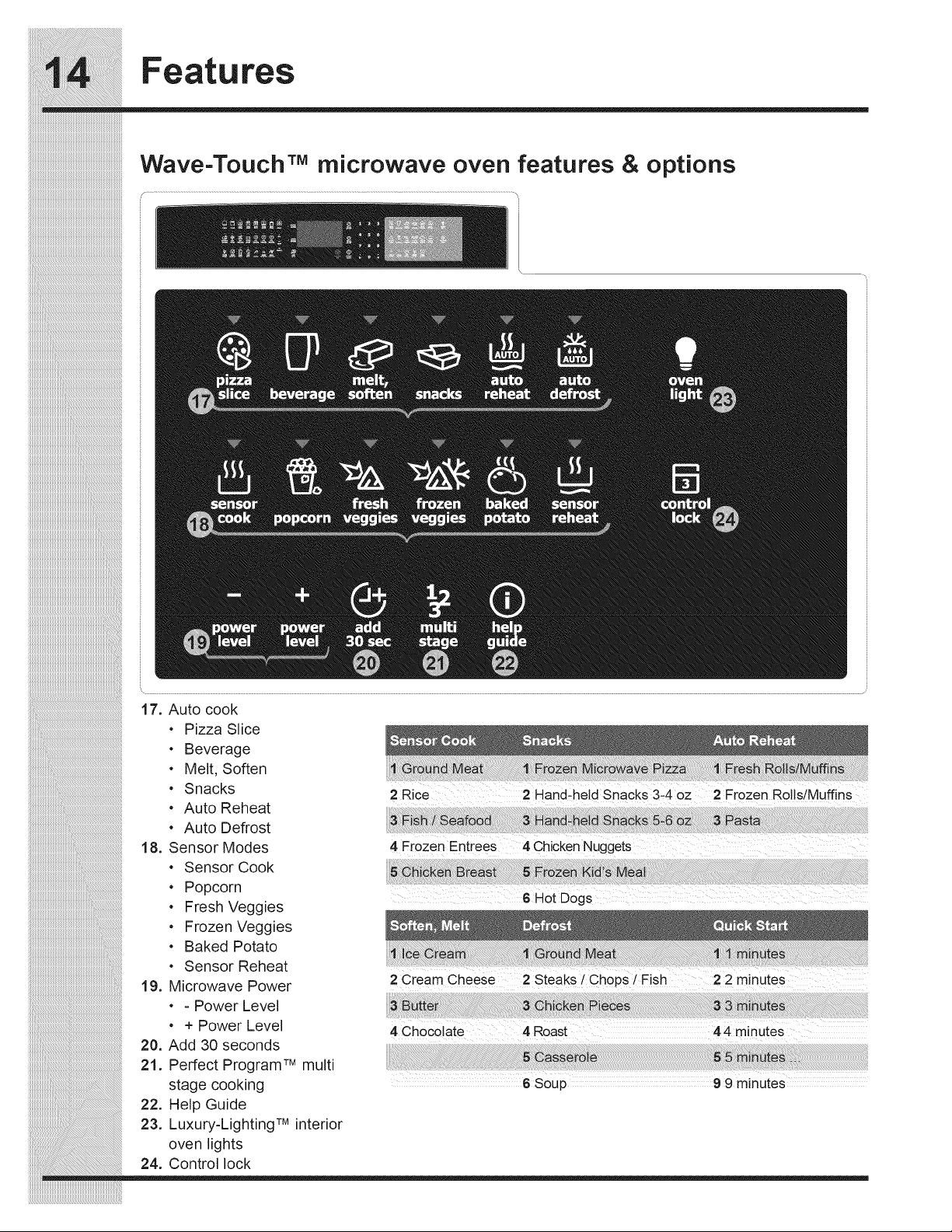
Wave-Touch :M microwaveoven features & options
_i_i_i_i_i_i_i_i_i_i_i_i_i_i_i_i_i_i_i_i_i_i_i_i_i_i_i_i_i_i_i_i_i_i_i_i_i_i_i_i_i_i_i_i_i_i_i_i_i_i_i_i_i_i_i_i__!__________________________________________
iiiiiiiiiiiiiiiiiiiiiiiiiiiiiiiiiiiiiiiiiiiiiiiiiiiiiiiiiiiiiiiiiiiiiiiiiiiiiiiiiiiiiiiiiiiiiiiiiiiiiiiiiiiiiiiiiiiiiii_i!iiiiiiiiiiiiiiiiiiiiiiiiiiiiiiiiiiiiiiiiiiiiiiiiiiiii_
iiiiiiiiiiiiiiiiiiiiiiiiiiiiiiiiiiiiiiiiiiiiiiiiiiiiiiiiiiiiiiiiiiiiiiiiiiiiiiiiiiiiiiiiiiiiiiiiiiiiiiiiiiiiiiiiiiiiiiiiiiiii_i!iiiiiiiiiiiiiiiiiiiiiiiiiiiiiiiiiiiiiiiiiiii_
• Pizza Slice
• Beverage
• Melt, Soften
• Snacks
• Auto Reheat
• Auto Defrost
18. Sensor Modes
• Sensor Cook
• Popcorn
• Fresh Veggies
• Frozen Veggies
• Baked Potato
• Sensor Reheat
19. Microwave Power
• - Power Level
• + Power Level
20. Add 30 seconds
21. Perfect Program TM multi
stage cooking
22. Help Guide
23. Luxury=Lighting TM interior
oven lights
24. Control lock
2 Rice 2 Hand-held Snacks 3.4 oz 2 Frozen Rolls/Muffins
2 cieam Cheese 2 Steaks /Ch0Ps i Fish 22 minutes
6Soup 9 9 minutes
Features
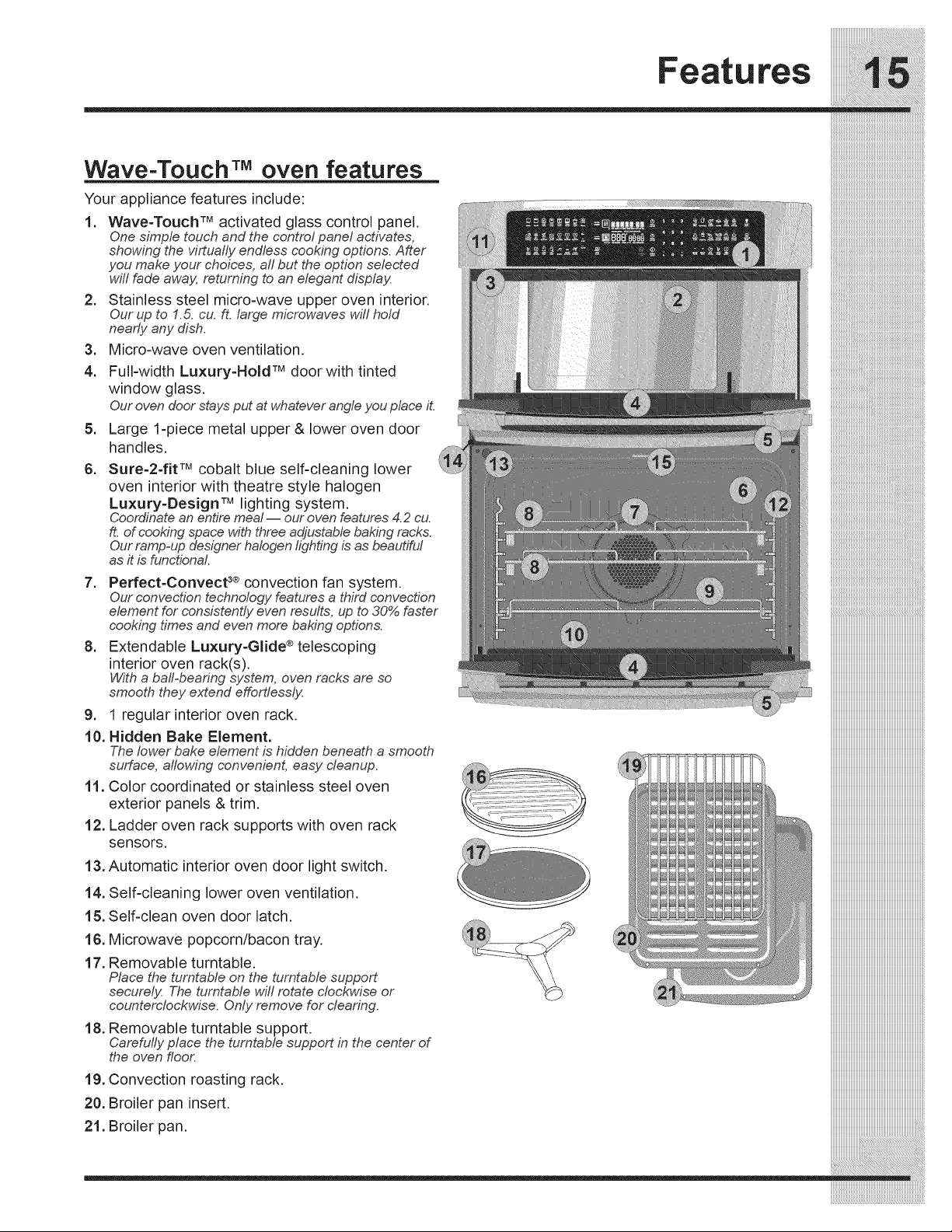
Wave=Touch TM oven features
Your appliance features include:
1. Wave-Touch TM activated glass control panel.
One simple touch and the control panel activates,
showing the virtually endless cooking options. After
you make your choices, aft but the option selected
wJIIfade away, returnLeg to an elegant display.
2. Stainless steel micro-wave upper oven interior.
Our up to 1.5. cu. ft. large microwaves wJIIhold
nearly any dish.
Micro-wave oven ventilation.=
4.
=
6.
Full-width Luxury=Hold TMdoor with tinted
window glass.
Our oven doorstays put at whateverangle you place it.
Large 1-piece metal upper & lower oven door
handles.
Sure=2=fit TMcobalt blue self-cleaning lower
oven interior with theatre style halogen
Luxury-Design TMlighting system.
Coordinate an entire meal-- our oven features 4.2 cu.
ft. of cooking space with three adjustable baking racks.
Our ramp-up designer halogen lighting is as beautiful
as it is functional.
7. Perfect=Convect 3®convection fan system.
Our convection techno!ogy features a third convection
element for consistently even results, up to 30% faster
cooking times and even more baking options.
8. Extendable Luxury-Glide ®telescoping
interior oven rack(s).
Witha ba!l=bearingsystem, oven racks are so
smooth they extend effortlessly.
9. 1 regular interior oven rack.
10. Hidden Bake Element,
The lower bake element is hidden beneath a smooth
surface, allowing convenient, easy cleanup.
11. Color coordinated or stainless steel oven
exterior panels & trim.
12. Ladder oven rack supports with oven rack
sensors.
13. Automatic interior oven door light switch.
14. Self-cleaning lower oven ventilation.
15. Self-clean oven door latch.
16. Microwave popcorn/bacon tray.
17. Removable turntable.
Place the turntable on the turntable support
securely. The turntable will rotate clockwise or
countem!ock_;se. Only remove for clearing.
18. Removable turntable support.
Carefully place the turntable support in the center of
the oven floor.
19. Convection roasting rack.
20. Broiler pan insert.
21. Broiler pan.
Started
iiiiiiiiiiiiiiiiiiiiiiiiiiiiiiiiiiiiiiiiiiiiiiiiiiiiiiiiiiiiiiiiiiiiiiiiiiiiiii
Setting clock at power up
You will be prompted to enter the time of day in the
event of a power failure or when you first provide
electric power to your appliance,
• When your appliance is first powered up, 12:00
will flash in the display,
Enter the time of day using the numeric key pads
and press START to set.
If an invalid time of day is entered, the control will
triple beep. Re-enter a valid time of day and press
START. If CANCEL is pressed your clock will start
with the time set for 12:00.
Select the user pref key to modify the time of day
during other situations such as day light savings.
Wave-TouchTM display modes
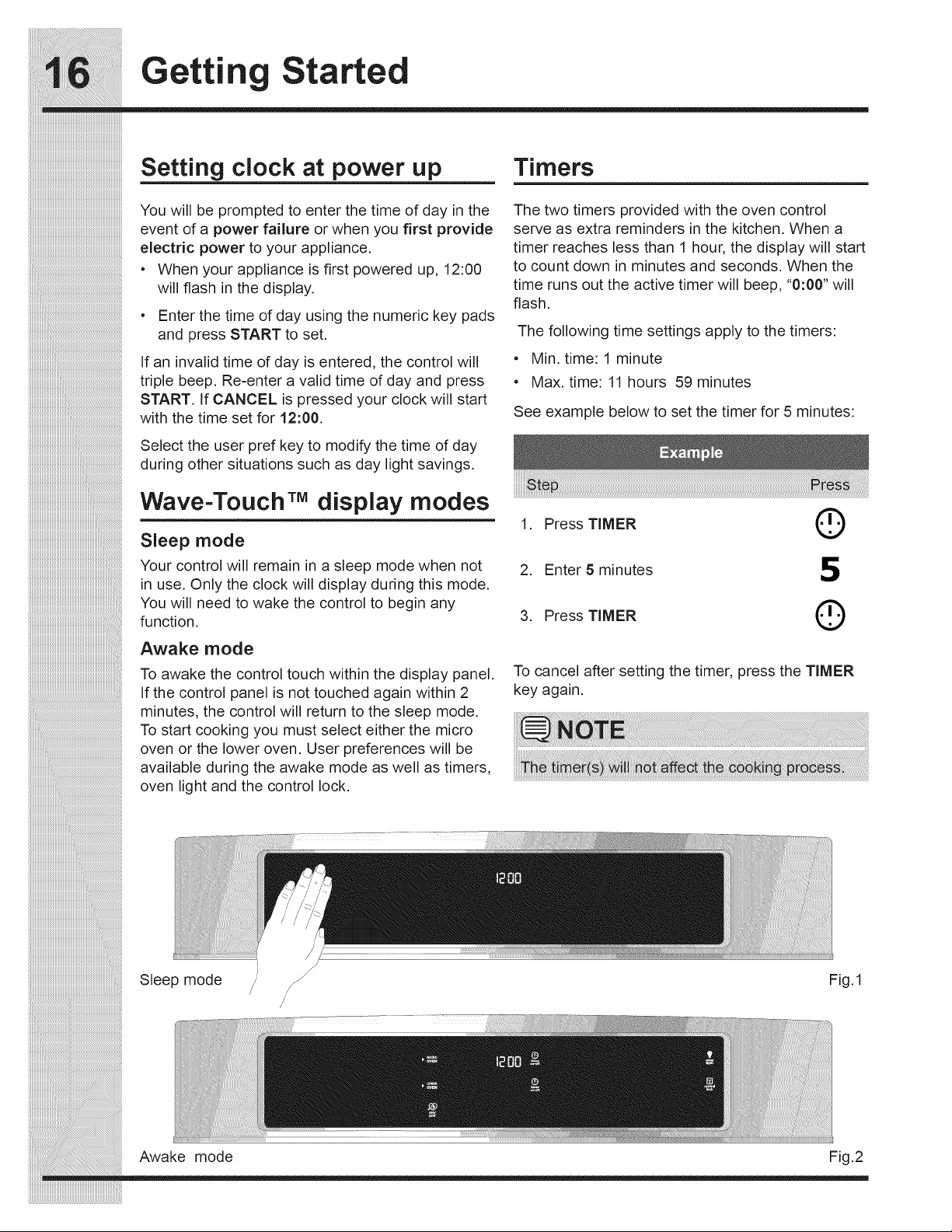
Sleep mode
Your control will remain in a sleep mode when not
in use. Only the clock will display during this mode.
You will need to wake the control to begin any
function.
Awake mode
To awake the control touch within the display panel.
If the control panel is not touched again within 2
minutes, the control will return to the sleep mode.
To start cooking you must select either the micro
oven or the lower oven. User preferences will be
available during the awake mode as well as timers,
oven light and the control lock.
Timers
The two timers provided with the oven control
serve as extra reminders in the kitchen. When a
timer reaches less than 1 hour, the display will start
to count down in minutes and seconds. When the
time runs out the active timer will beep, "0:00" will
flash.
The following time settings apply to the timers:
• Min. time: 1 minute
• Max. time: 11 hours 59 minutes
See example below to set the timer for 5 minutes:
1. Press TIMER (_
2. Enter 5 minutes 5
3. Press TIMER (_
To cancel after setting the timer, press the TIMER
key again.
!i!i!ii i ii ii i! ii ii !! ii
_i_i_i_i_i_i_i_i_i_i_i_i_i_i_i_i_i_i_i_i_i_i_i_i_i_i_i_i_i_i_i_i_i_i_i_i_i_i_i_i_i_i_i_i_i_i_i_i_i_i_i_i_i_i_i_i__!__________________________________________
iiiiiiiiiiiiiiiiiiiiiiiiiiiiiiiiiiiiiiiiiiiiiiiiiiiiiiiiiiiiiiiiiiiiiiiiiiiiiiiiiiiiiiiiiiiiiiiiiiiiiiiiiiiiiiiiiiiiiii_i!iiiiiiiiiiiiiiiiiiiiiiiiiiiiiiiiiiiiiiiiiiiiiiiiiiiii_
iiiiiiiiiiiiiiiiiiiiiiiiiiiiiiiiiiiiiiiiiiiiiiiiiiiiiiiiiiiiiiiiiiiiiiiiiiiiiiiiiiiiiiiiiiiiiiiiiiiiiiiiiiiiiiiiiiiiiiiiiiiii_i!iiiiiiiiiiiiiiiiiiiiiiiiiiiiiiiiiiiiiiiiiiii_
Sleep mode /
/
Fig.1
Awake mode Fig.2
Started
Changing settings
Software controls the micro and lower ovens
so that both may be set to operate at the same
time with unique settings. It is very important to
understand that before setting or modifying either
oven, you must first select which oven you desire
to set or modify.
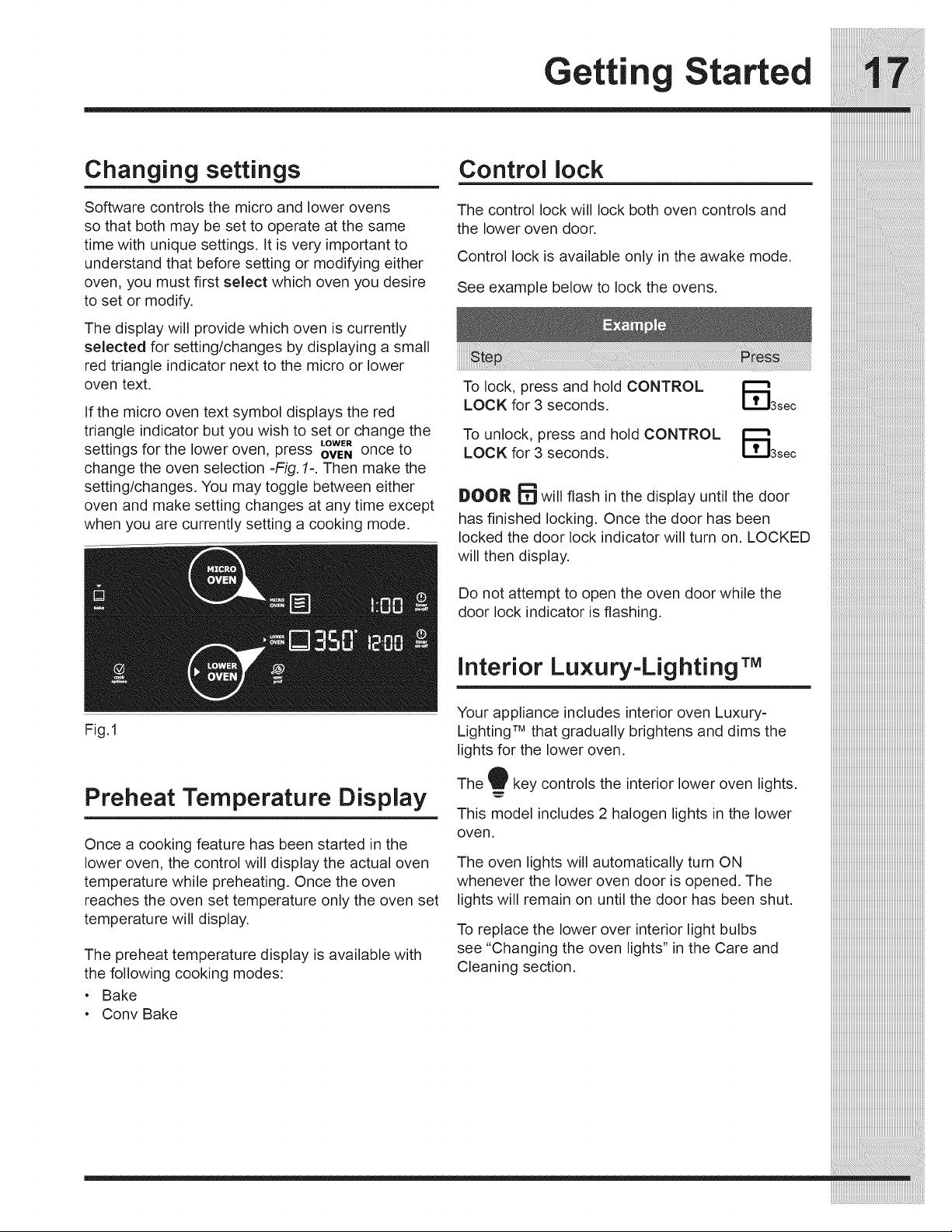
The display will provide which oven is currently
selected for setting/changes by displaying a small
red triangle indicator next to the micro or lower
oven text.
If the micro oven text symbol displays the red
triangle indicator but you wish to set or change the
LOWER
settings for the lower oven, press OVENonce to
change the oven selection -Fig. 1-. Then make the
setting/changes. You may toggle between either
oven and make setting changes at any time except
when you are currently setting a cooking mode.
Fig.1
Preheat Temperature Display
Once a cooking feature has been started in the
lower oven, the control will display the actual oven
temperature while preheating. Once the oven
reaches the oven set temperature only the oven set
temperature will display.
The preheat temperature display is available with
the following cooking modes:
• Bake
• Conv Bake
Control lock
The control lock will lock both oven controls and
the lower oven door.
Control lock is available only in the awake mode.
See example below to lock the ovens,
To lock, press and hold CONTROL
LOCK for 3 seconds.
To unlock, press and hold CONTROL
LOCK for 3 seconds.
DOOR _ will flash in the display until the door
has finished locking. Once the door has been
locked the door lock indicator will turn on. LOCKED
will then display.
Do not attempt to open the oven door while the
door lock indicator is flashing.
Interior Luxury-LightingrM
Your appliance includes interior oven Luxury-
Lighting rM that gradually brightens and dims the
lights for the lower oven.
The 9 key controls the interior lower oven lights.
This model includes 2 halogen lights in the lower
oven.
The oven lights will automatically turn ON
whenever the lower oven door is opened. The
lights will remain on until the door has been shut.
To replace the lower over interior light bulbs
see "Changing the oven lights" in the Care and
Cleaning section.
Settin for Best Results
Loweroven racksupports &
oven vents
_nstalling Oven RackSupports
Oven Rack Positions
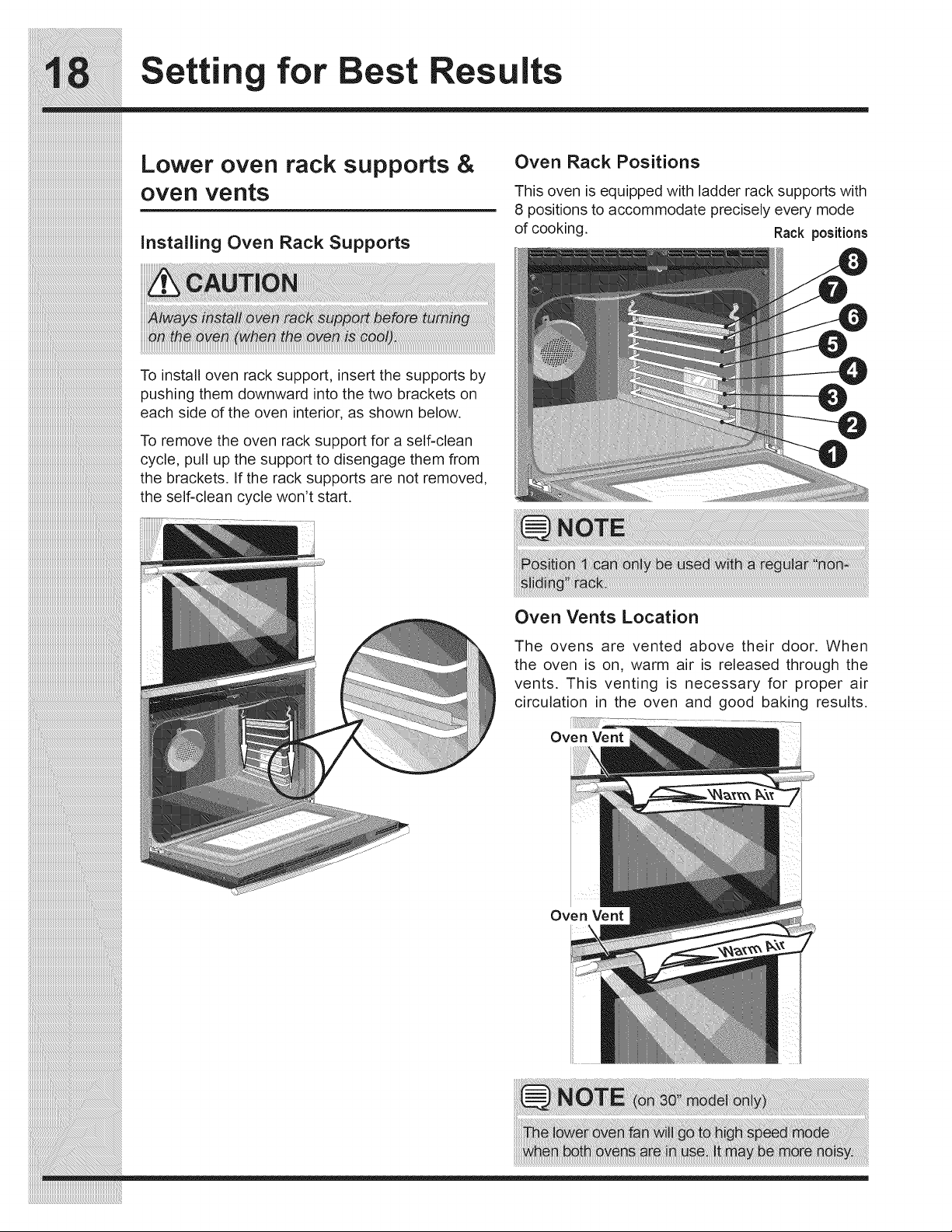
This oven is equipped with ladder rack supports with
8 positions to accommodate precisely every mode
of cooking. Rack positions
To install oven rack support, insert the supports by
pushing them downward into the two brackets on
each side of the oven interior, as shown below.
To remove the oven rack support for a self-clean
cycle, pull up the support to disengage them from
the brackets. If the rack supports are not removed,
the self-clean cycle won't start.
Oven Vents Location
The ovens are vented above their door. When
the oven is on, warm air is released through the
vents. This venting is necessary for proper air
circulation in the oven and good baking results.
Oven Vent
_i_i_i_i_i_i_i_i_i_i_i_i_i_i_i_i_i_i_i_i_i_i_i_i_i_i_i_i_i_i_i_i_i_i_i_i_i_i_i_i_i_i_i_i_i_i_i_i_i_i_i_i_i_i_i_i__!__________________________________________
iiiiiiiiiiiiiiiiiiiiiiiiiiiiiiiiiiiiiiiiiiiiiiiiiiiiiiiiiiiiiiiiiiiiiiiiiiiiiiiiiiiiiiiiiiiiiiiiiiiiiiiiiiiiiiiiiiiiiii_i!iiiiiiiiiiiiiiiiiiiiiiiiiiiiiiiiiiiiiiiiiiiiiiiiiiiii_
iiiiiiiiiiiiiiiiiiiiiiiiiiiiiiiiiiiiiiiiiiiiiiiiiiiiiiiiiiiiiiiiiiiiiiiiiiiiiiiiiiiiiiiiiiiiiiiiiiiiiiiiiiiiiiiiiiiiiiiiiiiii_i!iiiiiiiiiiiiiiiiiiiiiiiiiiiiiiiiiiiiiiiiiiii_
Oven Vent
Lower oven racks
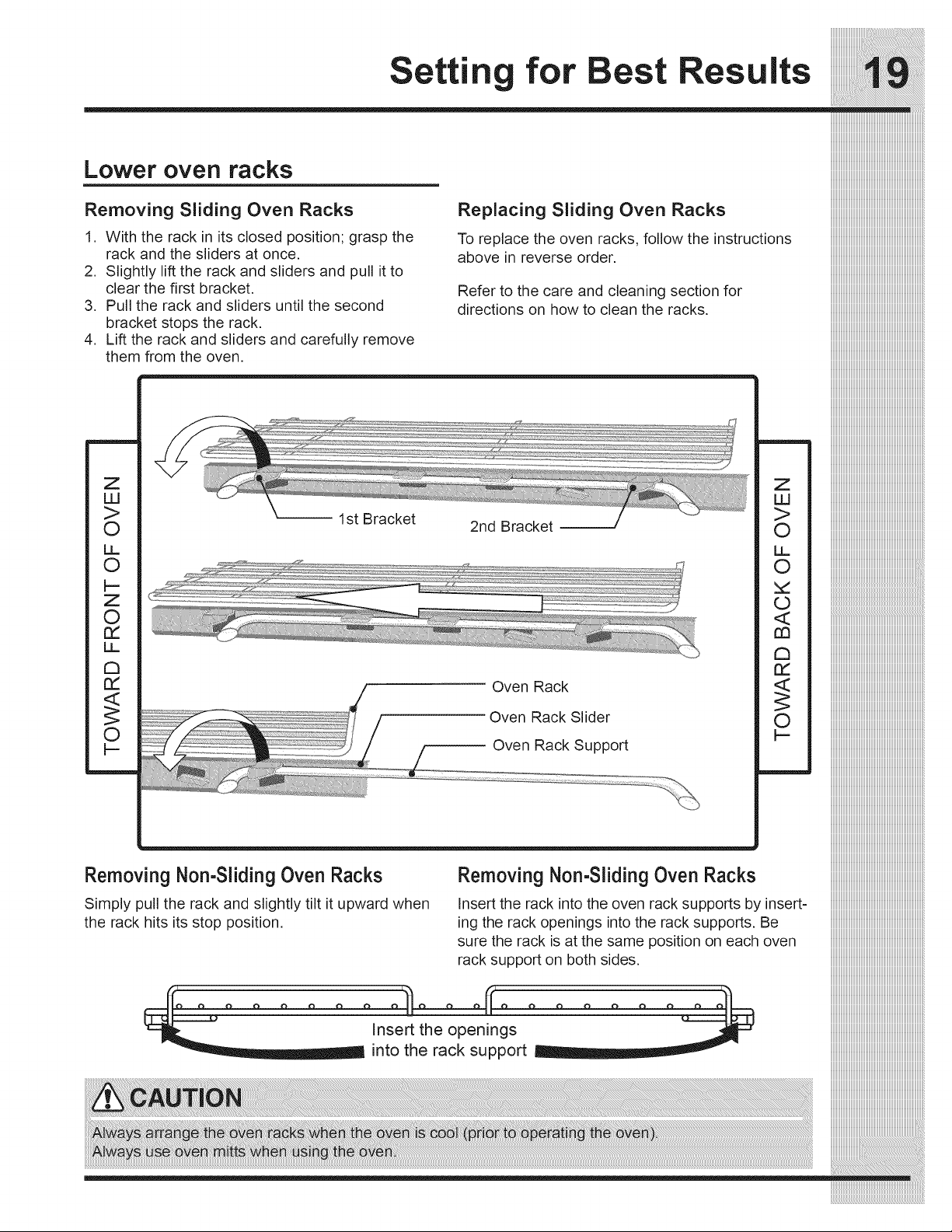
Removing Sliding Oven Racks
1. With the rack in its closed position; grasp the
rack and the sliders at once.
2. Slightly lift the rack and sliders and pull it to
clear the first bracket.
3. Pull the rack and sliders until the second
bracket stops the rack.
4. Lift the rack and sliders and carefully remove
them from the oven.
Z
LU
>
O
LL
O
I--
Z
O
rY
LL
Replacing Sliding Oven Racks
To replace the oven racks, follow the instructions
above in reverse order.
Refer to the care and cleaning section for
directions on how to clean the racks.
-- 1st Bracket
2nd Bracket
Oven Rack
Oven Rack Slider
Oven Rack Support
Z
LU
>
O
LL
O
©
<
rn
Removing Non-SlidingOven Racks
Simply pull the rack and slightly tilt it upward when
the rack hits its stop position,
Removing Non-SlidingOven Racks
Insert the rack into the oven rack supports by insert=
ing the rack openings into the rack supports. Be
sure the rack is at the same position on each oven
rack support on both sides.
_ Insert the openings
into the rack support
Settin icrowave Controls
_i_i_i_i_i_i_i_i_i_i_i_i_i_i_i_i_i_i_i_i_i_i_i_i_i_i_i_i_i_i_i_i_i_i_i_i_i_i_i_i_i_i_i_i_i_i_i_i_i_i_i_i_i_i_i_i_!_
iiiiiiiiiiiiiiiiiiiiiiiiiiiiiiiiiiiiiiiiiiiiiiiiiiiiiiiiiiiiiiiiiiiiiiiiiiiiiiiiiiiiiiiiiiiiiiiiiiiiiiiiiiiiiiiiiiiiiii_;i!iiiiiiiiiiiiiiiiiiiiiiiiiiiiiiiiiiiiiiiiiiiiiiiiiiiii_
iiiiiiiiiiiiiiiiiiiiiiiiiiiiiiiiiiiiiiiiiiiiiiiiiiiiiiiiiiiiiiiiiiiiiiiiiiiiiiiiiiiiiiiiiiiiiiiiiiiiiiiiiiiiiiiiiiiiiiiiiiiii_;i!iiiiiiiiiiiiiiiiiiiiiiiiiiiiiiiiiiiiiiiiiiii_
Time cooking
Your Microwave Oven can be programmed for
99 minutes 59 seconds (99.59). Always enter the
seconds after the minutes, even if they are both
zeros.
• Suppose you want to cook for 5 minutes at
100%.
1. Press MICRO OVEN
MICRO
OVEN
2. Enter cooking time.
500
3. Press START _)
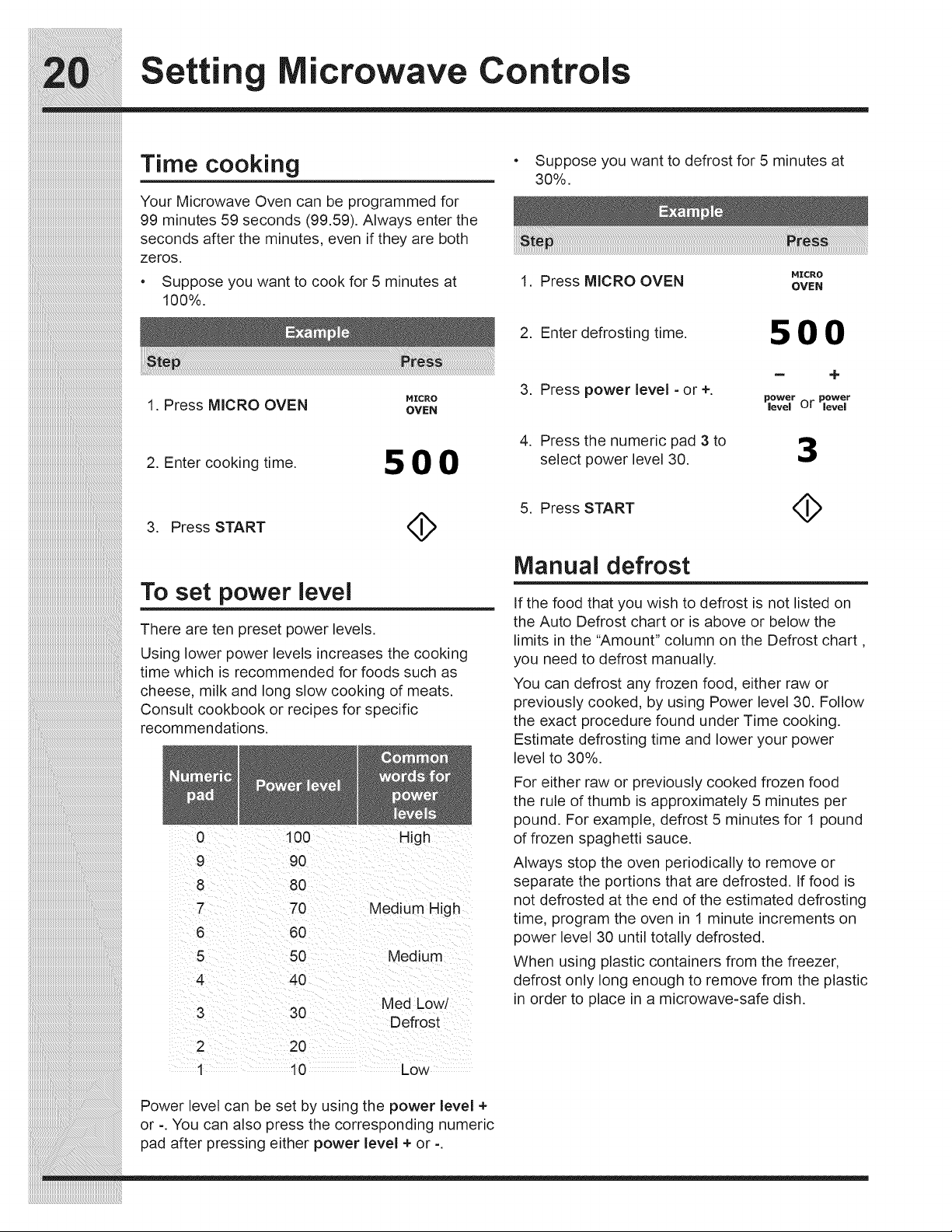
To set power level
There are ten preset power levels.
Using lower power levels increases the cooking
time which is recommended for foods such as
cheese, milk and long slow cooking of meats.
Consult cookbook or recipes for specific
recommendations.
0 100 High
9 90
8 80
7 70 Medium High
606
5
4
50 Medium
4O
Med Low/
3 3O
Defrost
2 20
1 10 Low
Power level can be set by using the power level +
or -. You can also press the corresponding numeric
pad after pressing either power level + or -.
• Suppose you want to defrost for 5 minutes at
30%.
MICRO
1. Press MICRO OVEN OVEN
2. Enter defrosting time. 5 O 0
= +
3. Press power level - or +.
i_ower power
evel or level
.
Press the numeric pad 3 to
select power level 30.
5. Press START
Manual defrost
If the food that you wish to defrost is not listed on
the Auto Defrost chart or is above or below the
limits in the "Amount" column on the Defrost chart,
you need to defrost manually.
You can defrost any frozen food, either raw or
previously cooked, by using Power level 30. Follow
the exact procedure found under Time cooking.
Estimate defrosting time and lower your power
level to 30%.
For either raw or previously cooked frozen food
the rule of thumb is approximately 5 minutes per
pound. For example, defrost 5 minutes for 1 pound
of frozen spaghetti sauce.
Always stop the oven periodically to remove or
separate the portions that are defrosted. If food is
not defrosted at the end of the estimated defrosting
time, program the oven in 1 minute increments on
power level 30 until totally defrosted.
When using plastic containers from the freezer,
defrost only long enough to remove from the plastic
in order to place in a microwave-safe dish.
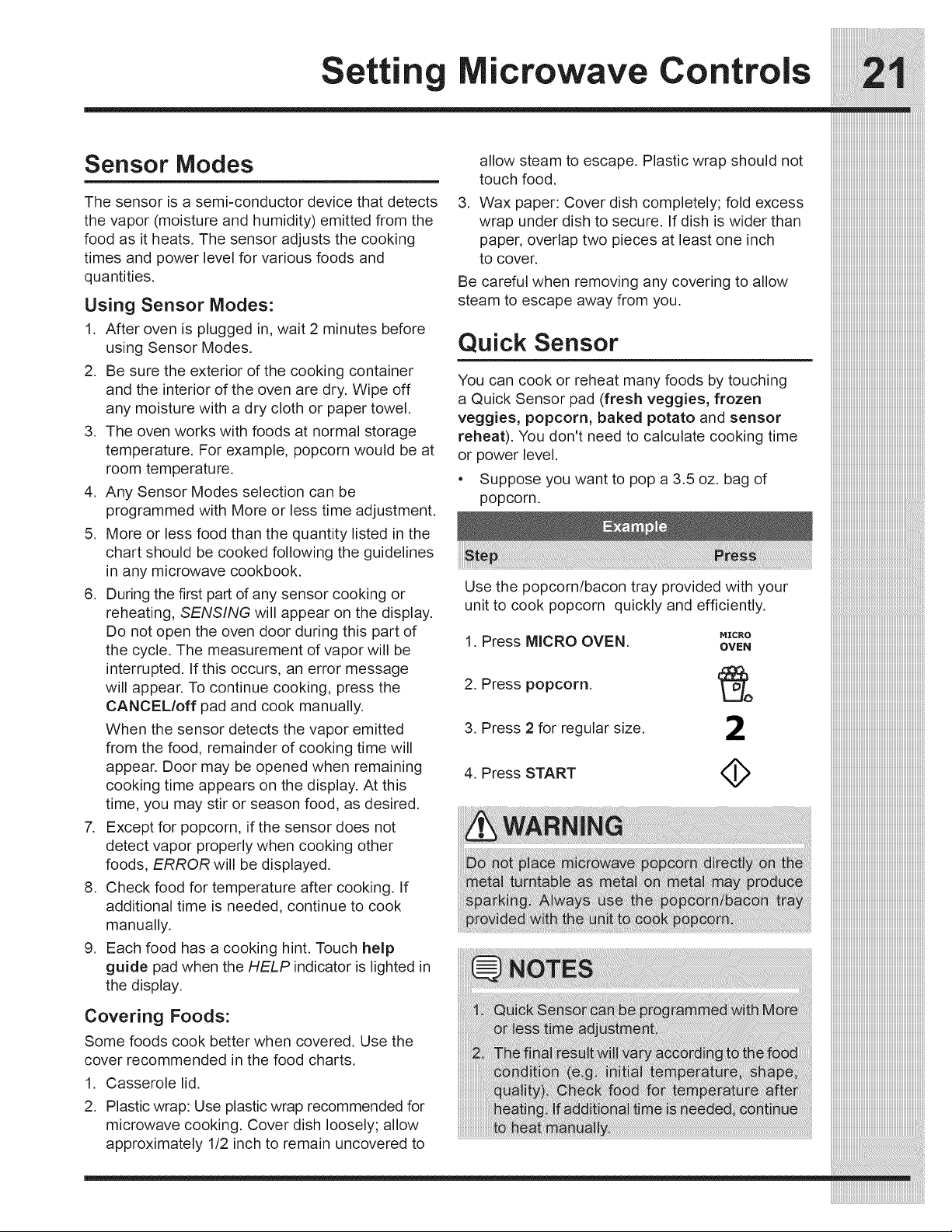
Sensor Modes
The sensor is a semi=conductor device that detects
the vapor (moisture and humidity) emitted from the
food as it heats. The sensor adjusts the cooking
times and power level for various foods and
quantities.
Using Sensor Modes:
1. After oven is plugged in, wait 2 minutes before
using Sensor Modes.
2. Be sure the exterior of the cooking container
and the interior of the oven are dry. Wipe off
any moisture with a dry cloth or paper towel.
3. The oven works with foods at normal storage
temperature. For example, popcorn would be at
room temperature.
4. Any Sensor Modes selection can be
programmed with More or less time adjustment.
5. More or less food than the quantity listed in the
chart should be cooked following the guidelines
in any microwave cookbook.
6. During the first part of any sensor cooking or
reheating, SENSING will appear on the display.
Do not open the oven door during this part of
the cycle. The measurement of vapor will be
interrupted. If this occurs, an error message
will appear. To continue cooking, press the
CANCEL/off pad and cook manually.
When the sensor detects the vapor emitted
from the food, remainder of cooking time will
appear. Door may be opened when remaining
cooking time appears on the display. At this
time, you may stir or season food, as desired.
7. Except for popcorn, if the sensor does not
detect vapor properly when cooking other
foods, ERROR will be displayed.
8. Check food for temperature after cooking. If
additional time is needed, continue to cook
manually.
9. Each food has a cooking hint. Touch help
guide pad when the HELP indicator is lighted in
the display.
Covering Foods:
Some foods cook better when covered. Use the
cover recommended in the food charts.
1. Casserole lid.
2. Plastic wrap: Use plastic wrap recommended for
microwave cooking. Cover dish loosely; allow
approximately 1/2 inch to remain uncovered to
allow steam to escape. Plastic wrap should not
touch food.
3. Wax paper: Cover dish completely; fold excess
wrap under dish to secure. If dish is wider than
paper, overlap two pieces at least one inch
to cover.
Be careful when removing any covering to allow
steam to escape away from you.
Quick Sensor
You can cook or reheat many foods by touching
a Quick Sensor pad (fresh veggies, frozen
veggies, popcorn, baked potato and sensor
reheat). You don't need to calculate cooking time
or power level.
• Suppose you want to pop a 3.5 oz. bag of
popcorn.
Use the popcorn/bacon tray provided with your
unit to cook popcorn quickly and efficiently.
1. Press MICRO OVEN.
2. Press popcorn.
3. Press 2 for regular size.
4. Press START
MICRO
OVEN
2
Settin icrowave Controls
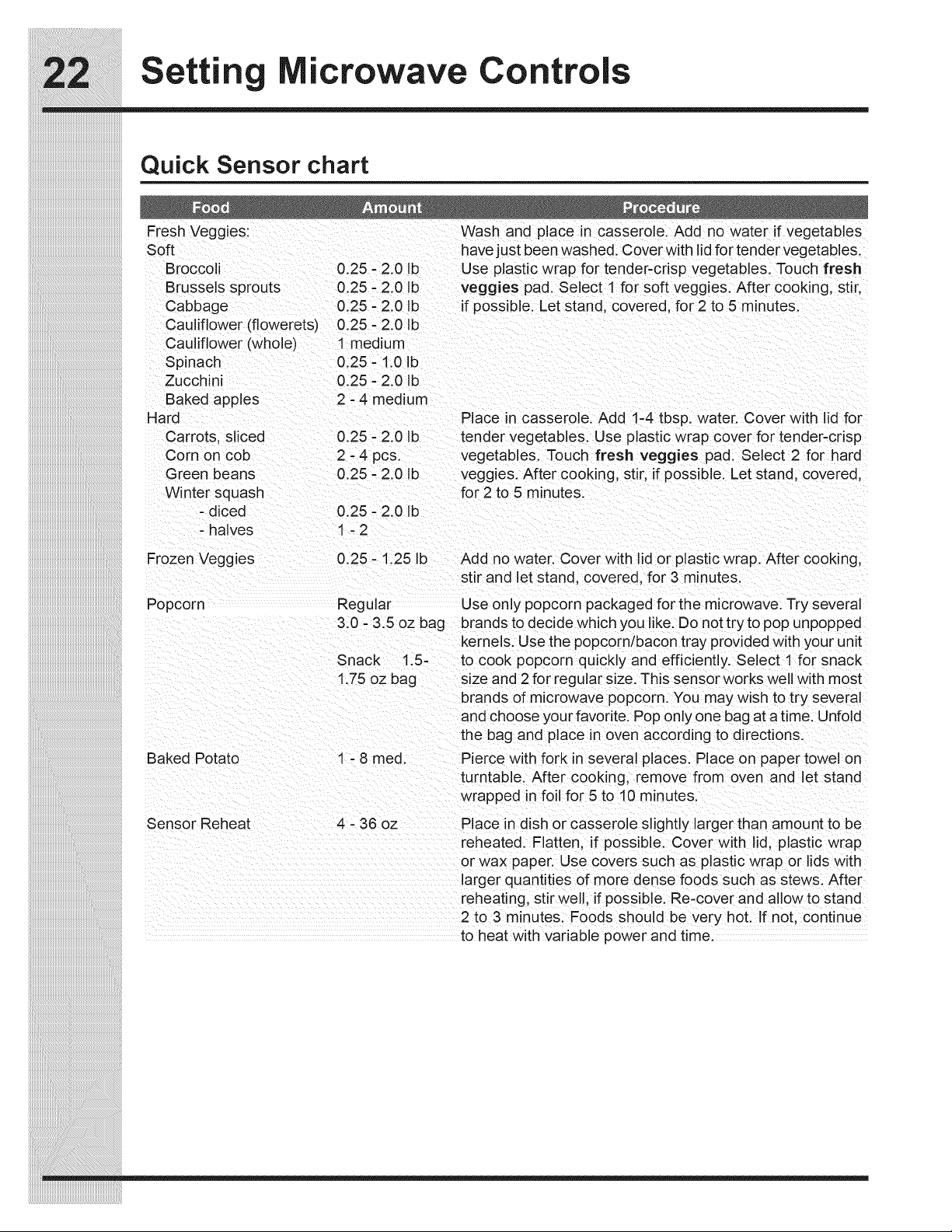
Quick Sensor chart
Fresh Veggies: Wash and place in casserole. Add no water if vegetables
Soft have just been washed. Cover with lid for tender vegetables.
Broccoli 0.25 - 2.0 Ib Use plastic wrap for tender-crisp vegetables. Touch fresh
Brussels sprouts 0.25 - 2.0 Ib veggies pad. Select 1 for soft veggies. After cooking, stir,
Cabbage 0.25 - 2.0 Ib if possible. Let stand, covered, for 2 to 5 minutes.
Cauliflower (flowerets) 0.25 - 2.0 Ib
Cauliflower (whole) 1 medium
Spinach 0.25 - 1.0 Ib
Zucchini 0.25 - 2.0 ID
Baked apples 2 - 4 medium
Hard
Carrots, sliced
Corn on cob
Green beans
Winter squash
- diced
- halves
Place in casserole. Add 1-4 tbsp. water. Cover with lid for
0.25 - 2.0 Ib tender vegetables. Use plastic wrap cover for tender-crisp
2 -4 pcs. vegetables. Touch fresh veggies pad. Select 2 for hard
0.25 - 2.0 Ib veggles. After cooking, stir, if possible. Let stand, covered,
for 2 to 5 minutes.
0.25 - 2.0 Ib
1-2
Frozen Veggies
0.25 - 1.25 Ib
Add no water. Cover with lid or plastic wrap. After cooking,
stir and let stand, covered, for 3 minutes.
Popcorn Regular
3.0 - 3.5 oz bag
Snack 1.5-
1.75 oz bag
Use only popcorn packaged for the microwave. Try several
brands to decide which you like. Do not try to pop unpopped
kernels. Use the popcorn/bacon tray provided with your unit
to cook popcorn quickly and efficiently. Select 1 for snack
size and 2 for regular size. This sensorworks well with most
brands of microwave popcorn. You may wish to try several
and choose your favorite. Pop only one bag at a time. Unfold
the bag and place in oven according to directions.
Baked Potato 1 - 8 med.
Sensor Reheat 4 - 36 oz
Pierce with fork in several places. Place on paper towel on
turntable. After cooking, remove from oven and le_ stand
wrapped in foil for 5 to 10 minutes.
Place in dish or casserole slightly larger than amount to be
reheated. Flatten, if possible. Cover with lid, plastic wrap
or wax paper. Use covers such as plastic wrap or lids with
larger quantities of more dense foods such as stews. After
reheating, stir well, if possible. Re-cover and allow to stand
2 to 3 minutes. Foods should be very hot. If not, continue
to heat with variable power and time.
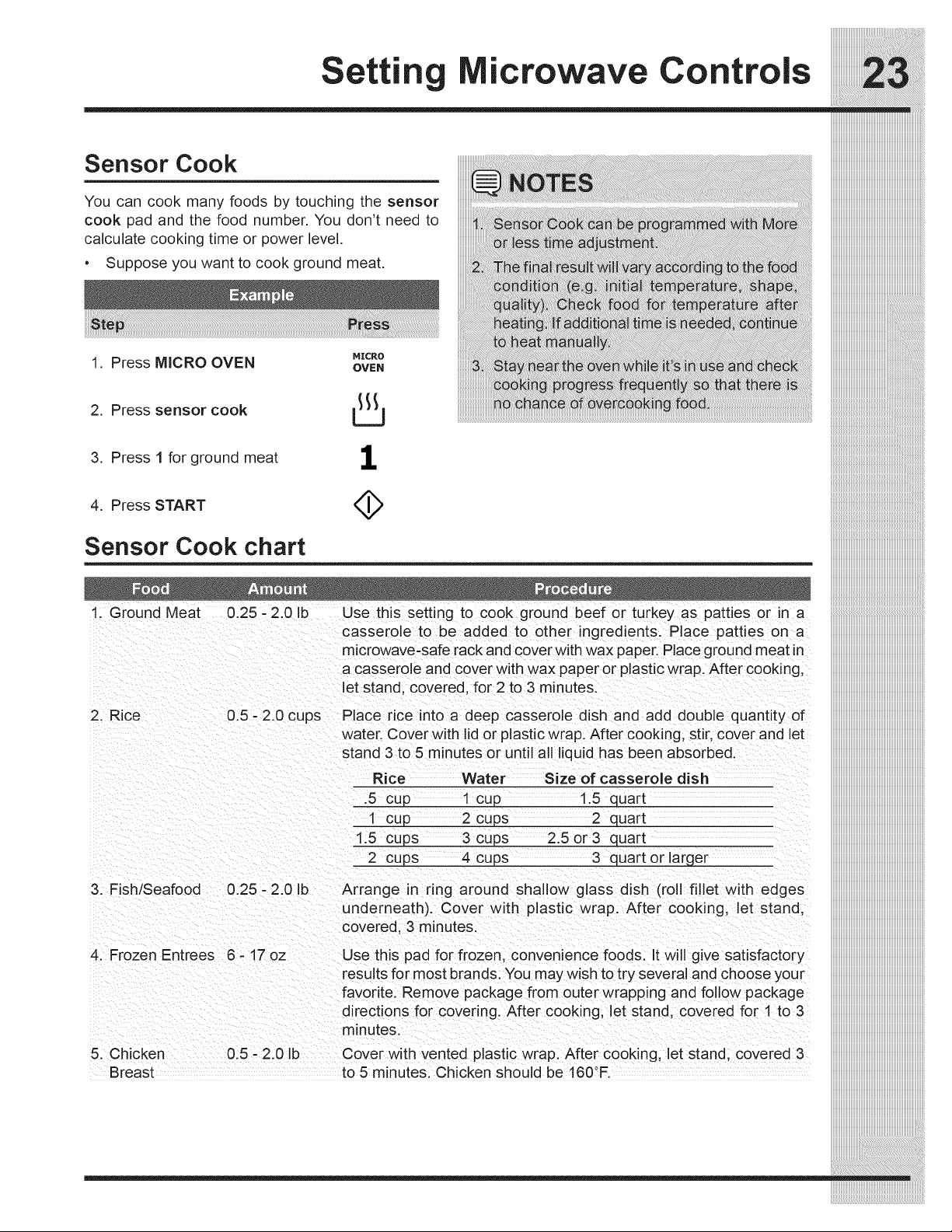
Sensor Cook
You can cook many foods by touching the sensor
cook pad and the food number. You don't need to
calculate cooking time or power level.
• Suppose you want to cook ground meat.
1. Press MICRO OVEN
2. Press sensor cook
MICRO
OVEN
3. Press 1 for ground meat
1
4. Press START
Sensor Cook chart
1. Ground Meat 0.25 - 2.0 Ib Use this setting to cook ground beef or turkey as patties or in a
casserole to be added to other ingredients. Place patties on a
microwave-safe rack and cover with wax paper. Place ground meat in
a casserole and cover with wax paper or plastic wrap. After cooking,
et stand, covered, for 2 to 3 minutes.
2. Rice 0.5- 2.0 cups Place rice into a deep casserole dish and add double quantity of
water. Cover with lid or plastic wrap. After cooking, stir, cover and let
stand 3 to 5 minutes or until all liquid has been absorbed.
Rice Water Size of casserole dish
.5 cup 1 cup 1.5 quart
1 cup 2 cups 2 quart
1.5 cups 3 cups 2.5 or 3 quart
2 cups 4 cups 3 quart or larger
3. Fish/Seafood 0.25 - 2.0 Ib Arrange in ring around shallow glass dish (roll fillet with edges
underneath). Cover with plastic wrap. After cooking, et stand,
covered, 3 minutes.
4. Frozen Entrees 6 - 17 oz Use this pad for frozen, convenience foods. It will give satisfactory
results for most brands. You may wish to try several and choose your
5. Chicken
Breast
favorite. Remove package from outer wrapping and follow package
directions for covering. After cooking, let stand, covered for 1 to 3
minutes.
0.5 - 2.0 Ib Cover with vented plastic wrap. After cooking, let stand, covered 3
to 5 minutes. Chicken should be 160°F.
iiiiiiiiiiiiiiiiiiiiiiiiiiiiiiiiiiiiiiiiiiiiiiiiiiiiiiiiiiiiiiiiiiiiiiiiiiiiiiiiiiiii
Settin icrowave Controls
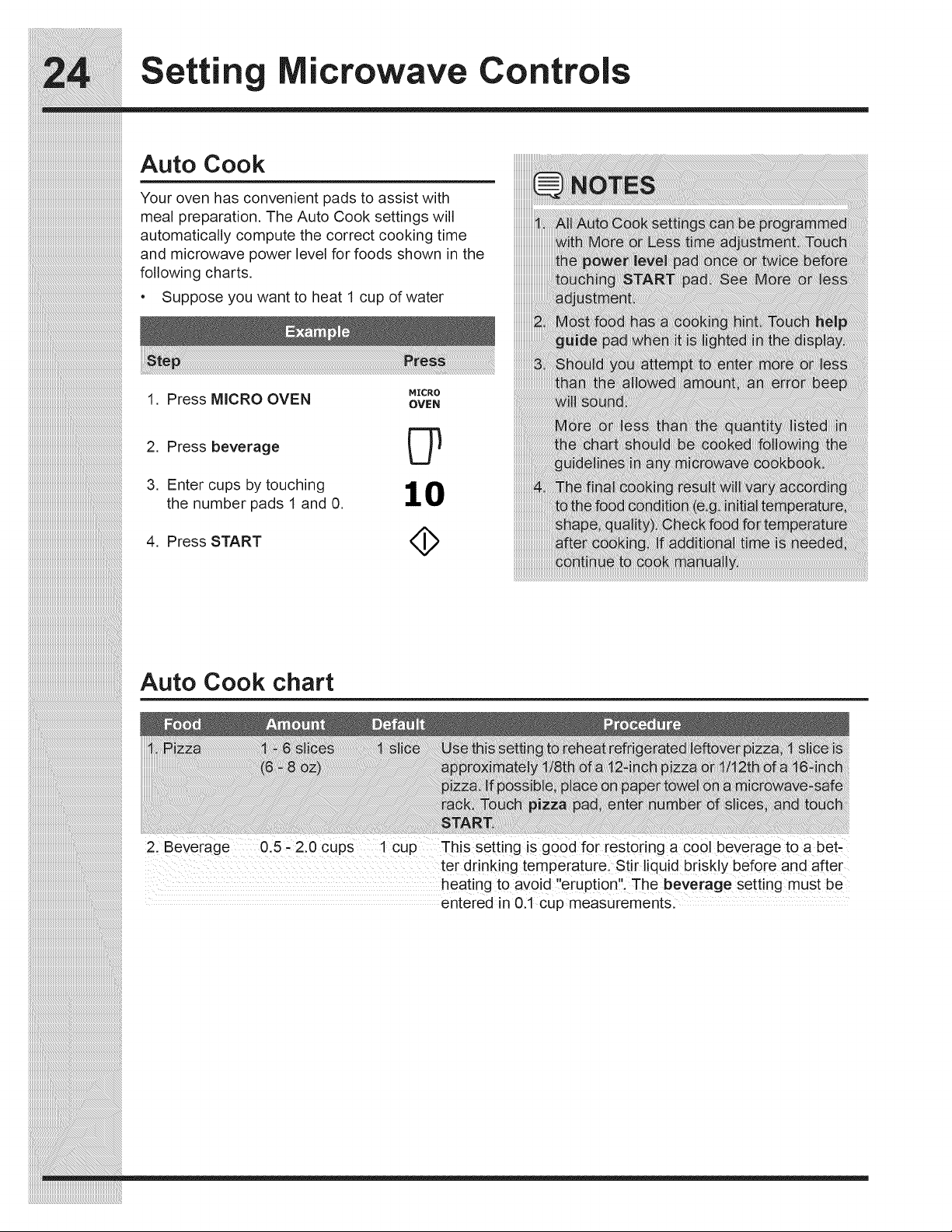
Auto Cook
Your oven has convenient pads to assist with
meal preparation. The Auto Cook settings will
automatically compute the correct cooking time
and microwave power level for foods shown in the
following charts.
Suppose you want to heat 1 cup of water
MICRO
1. Press MICRO OVEN OVeN
2. Press beverage
3. Enter cups by touching 1 0
the number pads 1 and 0.
4. Press START
_i_i_i_i_i_i_i_i_i_i_i_i_i_i_i_i_i_i_i_i_i_i_i_i_i_i_i_i_i_i_i_i_i_i_i_i_i_i_i_i_i_i_i_i_i_i_i_i_i_i_i_i_i_i_i_i_!_
iiiiiiiiiiiiiiiiiiiiiiiiiiiiiiiiiiiiiiiiiiiiiiiiiiiiiiiiiiiiiiiiiiiiiiiiiiiiiiiiiiiiiiiiiiiiiiiiiiiiiiiiiiiiiiiiiiiiiii_;i!iiiiiiiiiiiiiiiiiiiiiiiiiiiiiiiiiiiiiiiiiiiiiiiiiiiii_
iiiiiiiiiiiiiiiiiiiiiiiiiiiiiiiiiiiiiiiiiiiiiiiiiiiiiiiiiiiiiiiiiiiiiiiiiiiiiiiiiiiiiiiiiiiiiiiiiiiiiiiiiiiiiiiiiiiiiiiiiiiii_;i!iiiiiiiiiiiiiiiiiiiiiiiiiiiiiiiiiiiiiiiiiiii_
Auto Cook chart
21 Beverage 0.5; 2.0 cups 1cup This setting iS good for restoring a cool beverage to abet-
ter dr nking temperaturel ,S,t!rliquid briskly before and after
heating to av0id eruption, The beverage setting must be
entered in 0.1 cup measurements:
icrowave Controls
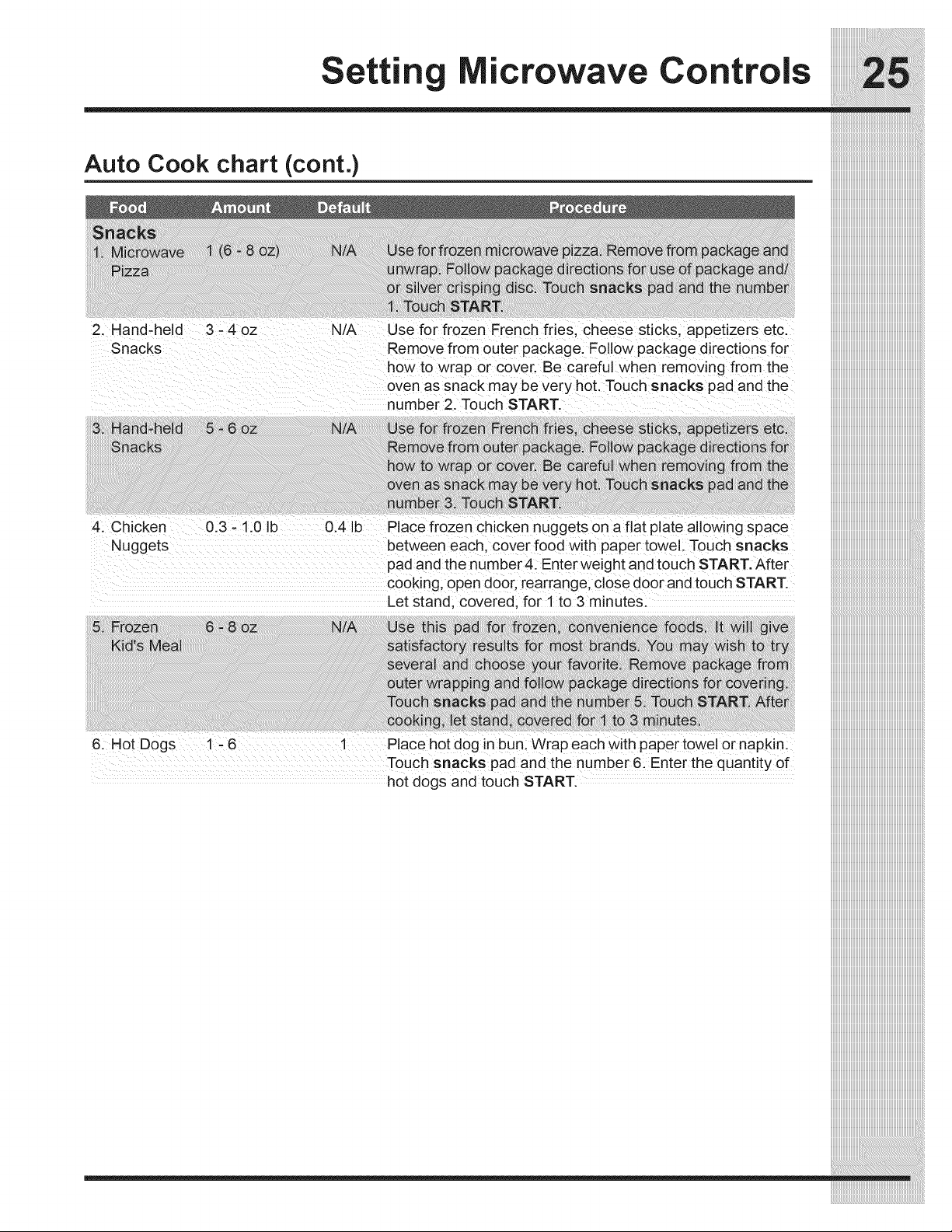
Au t o Cook chart (cont.)
!!!!!_!i!_ii!i_!!:_i_i_!_i_i!i!i!i!i!i!i!i!i!i!i!i!i!i!i!i!i!_!i!i!i_i_;;_i_!i_i_i_!_!_!_!_!_!_!_!_!_!_!_!!_!_!_!_!_!_!_!_!_!_!_!_!_!_!_:_!i_i_!_i!_i_!_ii_ii!i!ii!i_iii_i_i_i_i_!_:i_!!i!!_!ii!_!_i!_i!i_i!i_i_i!_i_ii_iii!iii_ii_!i_!_i_i!i_:_i!_!!i_ii_ii!i_i_!i!_!_iii_i_i!iii_:!i!i!_i;!_i_!i_ii_ii_ii!i_iiiii!i!!i!!i!ii_!!i!_!!!ii_!_!i!iii_!i_!_i_i_!_!_!i!iiii!_!_!_i_!i_!_i!i!i_!_!i_!!!i!_!_!_i!_!_i_ii!i_!_i!!_!i!i_!!_!_!i_!_i_i!_i_:_i:ii:!i:ii:ii_i_iiiiiiiiiiiiiiiiiiiiiiiiiiiiiiiiiiiiiiiiiiiiiiiiiiiiiiiiiiiiiiiiiiiiiiiiiiiiiiii
ii!i!!ili!!i!!i!!i!iii!iiiiiiiiiiiiiiiiiiiiiiiiiiiiiliiiiiiiiiiiiiiiii!i!i!!!iili!iiliiiiililiiiii!iiiiliiiiiiiiliiiiiiiiiiiiiiiiiiiiiiiiiiiiiiiiiiiiiiiiiiiiiiiiiiiiiiiiiiiiiiiiiiiiiiiilili!i!i!i!i!iiiii!i!ii!ii!ii!ii!i!!ii!ii!ii!ii!ii!ii!ii!ii!i!!i!ii!ii!iiiii!!i!i!i!ii!il!iiiiiiii!ii!ii!iliii!il!iliiiililiiiiiiili!i!ili!i!ii!ii!ii!ii!ii!ii!ii!il!ii!ii!ii!ii!ii!ii!ii!il!iiiiiiiiiiiliiliiliiiiiiliiii!iiiiii!iii!iiiili!ii!!!!i!i!iiiiliililili!i!!!!!i!!i!ii!!i!ii!ili!ii!ii!i!!i!!i!!i!!i!!i!!i!iii!ii!ii!iiiiiiiiiiiiiliiiiiiiiiiii!i!i!i!i!i!iiiiiliiiliiliiiiiiiliiiliiiilililiiiiiiiiiiiliiliiiiiiiiiiiiiiiii!i!i!i!i!iil!ii!ii!iii!i!i!iililililiiiiiiiiiiiiiiiliiii!ii!iiiiiiii!i!iiiililliiillii!i!iliilillif!iliiliiliili!i!iii!i!iliiiiiiiiliiliiiiiiiiii!ii!ii!ii!ii!ii!i!!iiiiiiiiiliili!i!!i!:ii_i!iiiiiiiiiiiiili_!ii!il_ii_illi_i_ii!ililliiiii_i_i!_i_ii:illiiliii!iiii!ii!ii!!i!!i!illii!l!ii!ii!ii!ii!ii!ii!ii!ii!ili!ii!ii!ii!i!!ii!ii!ii!ii!ii!ii!ii!ii!ii!ii!ii!iiiiiiliiiiiiiiiiiliiliiiiiiiiiiiiiliiiiiiiiilliiiiiiiiiiiiiiiiiiiiii!i!iiiiii!i!i!i!i!!i!i!iiiiiiii!i!i!i!iiliiililliiiiilliililiiiiiiiiiii!iliii!ii!!fillif!!ii!ii!iiii!!ii!iiiiiii!i!!ii!iilii!i!iil!i!!i!iii!iiii!iii!iiiiiiiiiiiiliiiiiiiliiiiiiiiiii!i!i!i!i!i!i!!!!!!i!i!i!ii!ii!ii!ii!i!!!!i!!!illill!i!ii!ii!i!iliiliiliiliiiiiiiiiiiiiiiiiiiiii!i!!!!!i!!i!!i!ii!ii!ii!ii!ii!ii!!!!!i!i!!!!!!i!ii!ii!iiiiiiiiiii!iiiii!iiiii!ii!i!!i!!i!!ii!il!i!!!i!i!!illi!ii!ii!i!iiiiiiiiiii!i!i!i!i!i!iiiiii!i!i!!!i!i!iiiiiii!ii!ii!ii!iiili!i!!ii!ii!ii!iilii!iili!iii!ii!iliiiii!iiiiiiliiliiiiiiiiiililiiii!ii!ii!iiiiiiiiiiiiiiiiiiiii!iiiiiiii!i!!!!!!!!i!i!ii!!iiiiiiiiiiiiiiiii!iii!iii iiiiiiiiiiiiiiiiiiiiiiiiiiiiiiiiiiiiiiiiiiiiiiiiiiiiiiiiiiiiiiiiiiiiiiiiiiiiiiii
Z Hand;held 3 _4oz N/A Use for frozen Erenchfdes, cheese sticks; appetizers etc:
snacks Remove from outer packagei FolloW package d rect ons for
howt0 Wrap or €oven Be careful when removing from the
oven as Snack may be very hot, Touch snacks pad and the
nUmber Z Touch START
Nuggets between eachl cover f0od With Paper toWell ToUch snacks
pad and the number 4: Enter Weight and touch START, After
cooking; Open d00[ rear[ange; close d0or and touch START
Let stand; covered; for i to 3 minutes:
6:Hot Dogs !-6 i Place hot d0g in bun: Wrap each W!th paPe[t0wei or napkin:
Touch snacks pad and the number 6: Ente[ the quantity of
hot dogs and touch START.
Settin icrowave Controls
iiiiiiiiiiiiiiiiiiiiiiiiiiiiiiiiiiiiiiiiiiiiiiiiiiiiiiiiiiiiiiiiiiiiiiiiiiiiiii
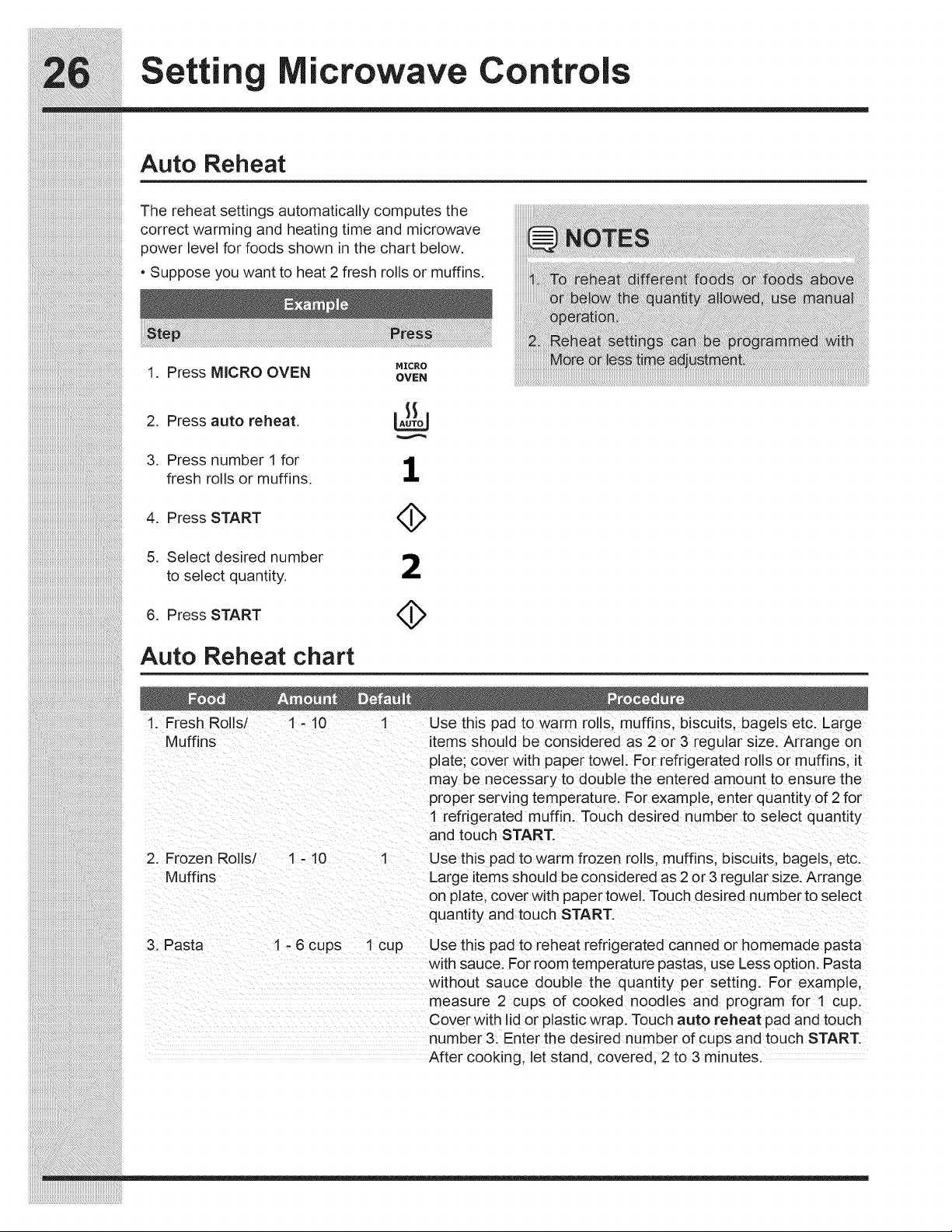
Auto Reheat
The reheat settings automatically computes the
correct warming and heating time and microwave
power level for foods shown in the chart below.
• Suppose you want to heat 2 fresh rolls or muffins.
MICRO
1. Press MICRO OVEN OVEN
2. Press auto reheat.
3. Press number 1 for 1
fresh rolls or muffins,
4. Press START
5. Select desired number
to select quantity,
A
6. Press START (_
Auto Reheat chart
1. Fresh Rolls/ 1 - 10 1 Use this pad to warm rolls, muffins, biscuits, bagels etc. Large
Muffins items should be considered as 2 or 3 regular size. Arrange on
plate; cover with paper towel. For refrigerated rolls or muffins, it
may be necessary to double the entered amount to ensure the
proper serving temperature. For example, enter quantity of 2 for
1 refrigerated muffin. Touch desired number to select quantity
and touch START.
2. Frozen Rolls/ 1 - 10 1 Use this pad to warm frozen rolls, muffins, biscu ts, bagels, etc.
Muffins Large items shou d be considered as 2 or 3 regular size. Arrange
on plate, cover with paper towel. Touch desired number to select
quantity and touch START.
3. Pasta 1 - 6 cups 1 cup Use this pad to reheat refrigerated canned or homemade pasta
with sauce. For room temperature pastas, use Less option. Pasta
without sauce double the quantity per setting. For example,
measure 2 cups of cooked noodles and program for 1 cup.
Cover with lid or plastic wrap. Touch auto reheat pad and touch
number 3. Enter the desired number of cups and touch START.
After cooking, let stand, covered, 2 to 3 minutes.
icrowave Controls
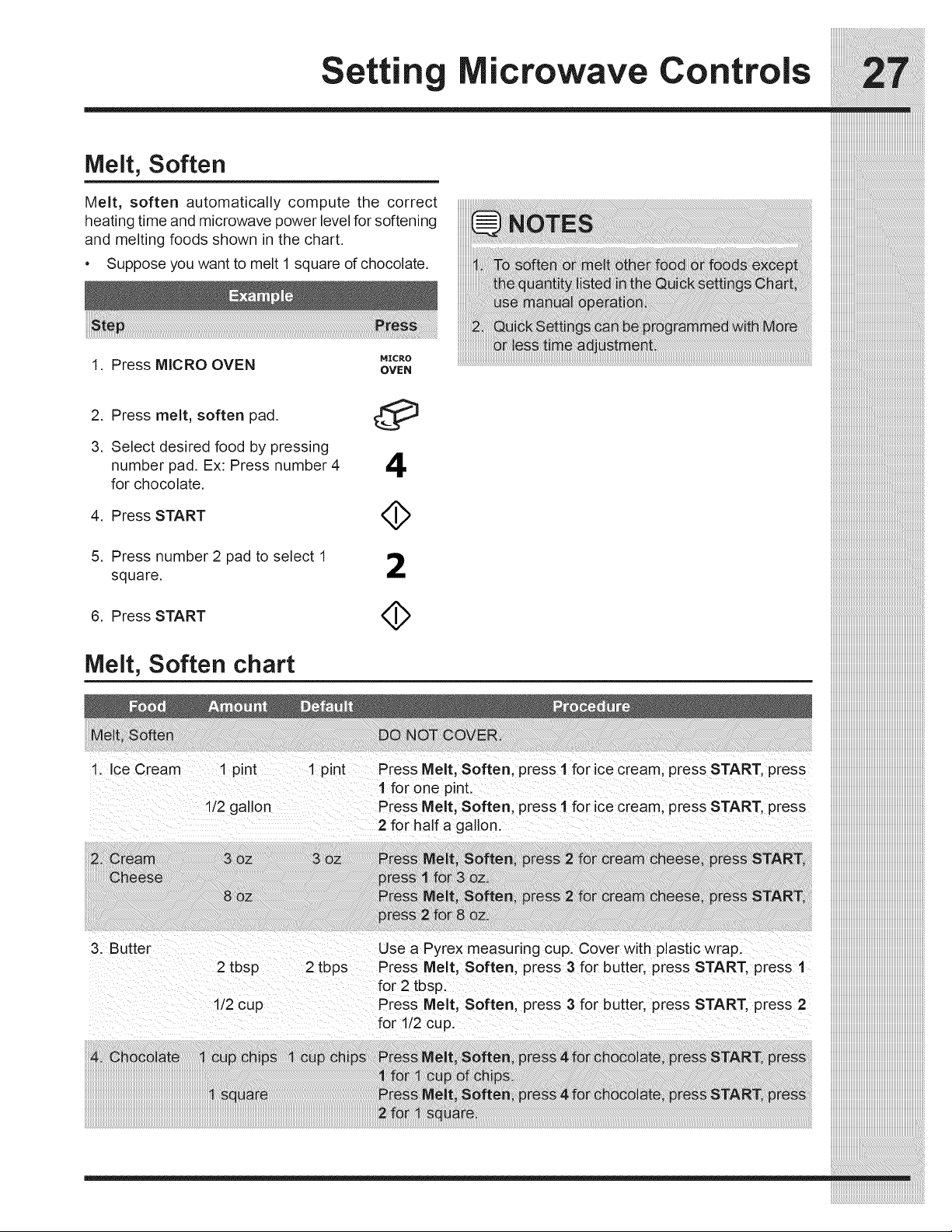
Melt, Soften
Melt, soften automatically compute the correct
heating time and microwave power level for softening
and melting foods shown in the chart.
• Suppose you want to melt 1 square of chocolate.
1. Press MICRO OVEN
MICRO
OVEN
2. Press melt, soften pad.
3. Select desired food by pressing
number pad. Ex: Press number 4
for chocolate.
4. Press START
O
4
4>
5. Press number 2 pad to select 1 _._
i_
square.
A
6. Press START
Mo_t,soito,,oh__t iiiiiiiiiiiiiiiiiiiiiiiiiiiiiiiiiiiiiiiiii
11 Ice cream ! pint 1 pint PreSs Melt, Soften; Press I fo[ !ce Cream; press START, Press
l for one pint, ....
1/2 gallon Press Melt, Soften press 1 forice cream; press START, press
for half a gallonl
3: Butter Usea Pyrex measuring cup. Cover withp aStic Wrapl
2 tbsp 2 tbps Press Melt, Soften press 3 for butter preSs START, press 1
for 2 tbsp:
!i2cup Press Melt, Soften press 3 for butter press START, preSs 2
iiiiiiiiiiiiiiiiiiiiiiiiiiiiiiiiiiiiiiiiii
Settin icrowave Controls
iiiiiiiiiiiiiiiiiiiiiiiiiiiiiiiiiiiiiiiiiiiiiiiiiiiiiiiiiiiiiiiiiiiiiiiiiiiiiii
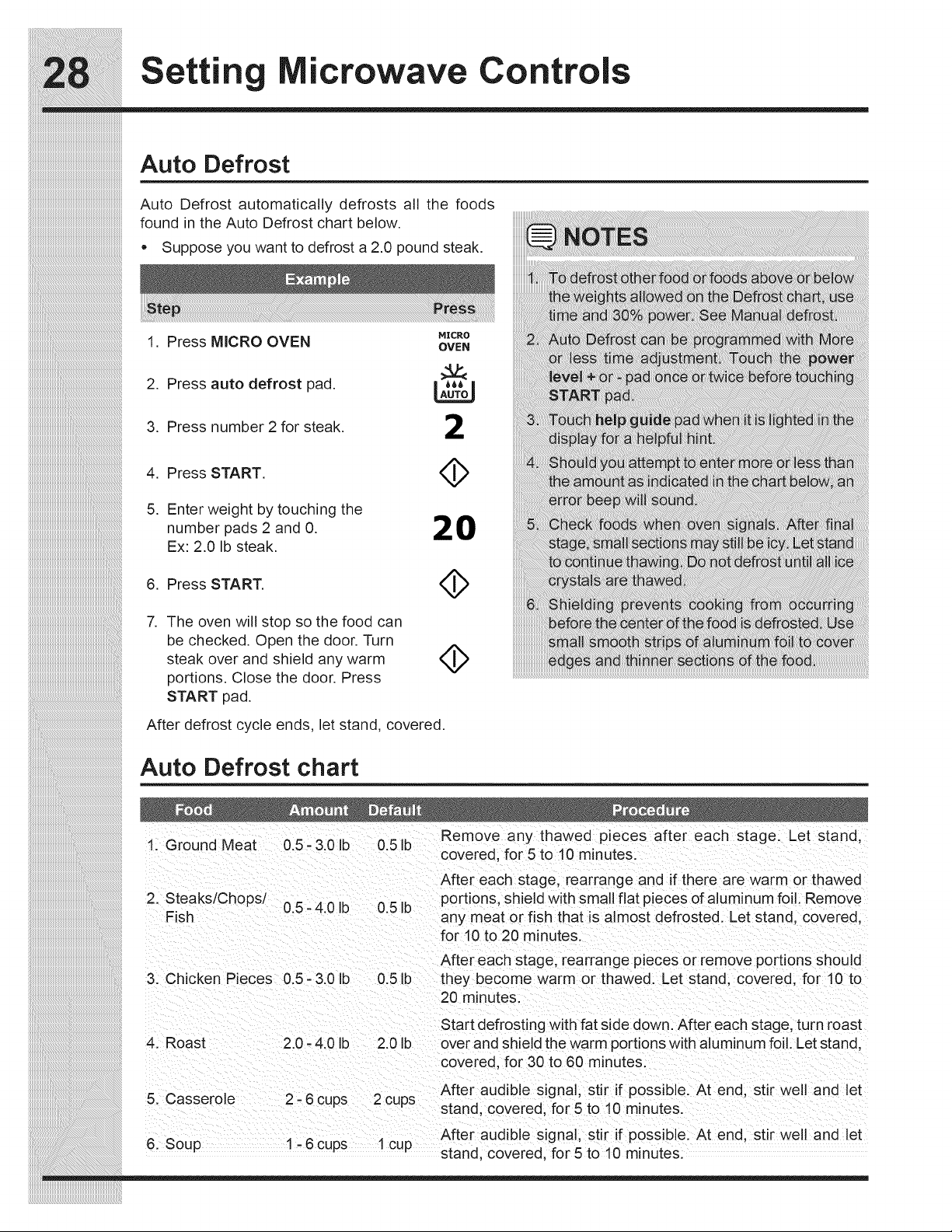
Auto Defrost
Auto Defrost automatically defrosts all the foods
found in the Auto Defrost chart below.
• Suppose you want to defrost a 2.0 pound steak.
MICRO
1. Press MICRO OVEN OVEN
2. Press auto defrost pad. II_ I
3. Press number 2 for steak. _!1
5. Enter weight by touching the
number pads 2 and 0. 20
Ex: 2.0 Ib steak.
,
The oven will stop so the food can
be checked. Open the door. Turn
steak over and shield any warm
portions. Close the door. Press
START pad.
4>
After defrost cycle ends, let stand, covered.
Auto Defrost chart
. ,. .............. Remove any thawed pieces after each stage. Let stand
_. _rouna _vlea_ u.b - ,_.uID U.b ID .....
coverea, TOtb to "lu minutes.
After each stage rearrange and if there are warm or thawed
2. Steaks/Chops/ .......... portions, shiel(_ with small flat pieces of aluminum foil. Remove
Ub-4UID UblD
F sh any meat or f sh that s a most defrosted. Let stand, covered,
for 10 to 20 minutes.
After each stage, rearrange pieces or remove portions shou Id
3. Chicken Pieces 0.5- 3.0 Ib 0.5 Ib they become warm or thawed. Let stand, covered, for 10 to
20 minutes.
4. Roast
2.0 - 4.0 Ib 2.0 Ib
Start defrosting with fat side down. After each stage, turn roast
over and shield the warm portions with aluminum foil. Let stand,
covered, for 30 to 60 minutes.
5. Casserole
2 - 6 cups 2 cups
After audible signal, stir if possible. At end, stir well and let
stand, covered, for 5 to 10 minutes.
After audible signal, stir if possible. At end, stir well and let
6. Soup 1 - 6 cups 1 cup stand, covered, for 5 to 10 minutes.
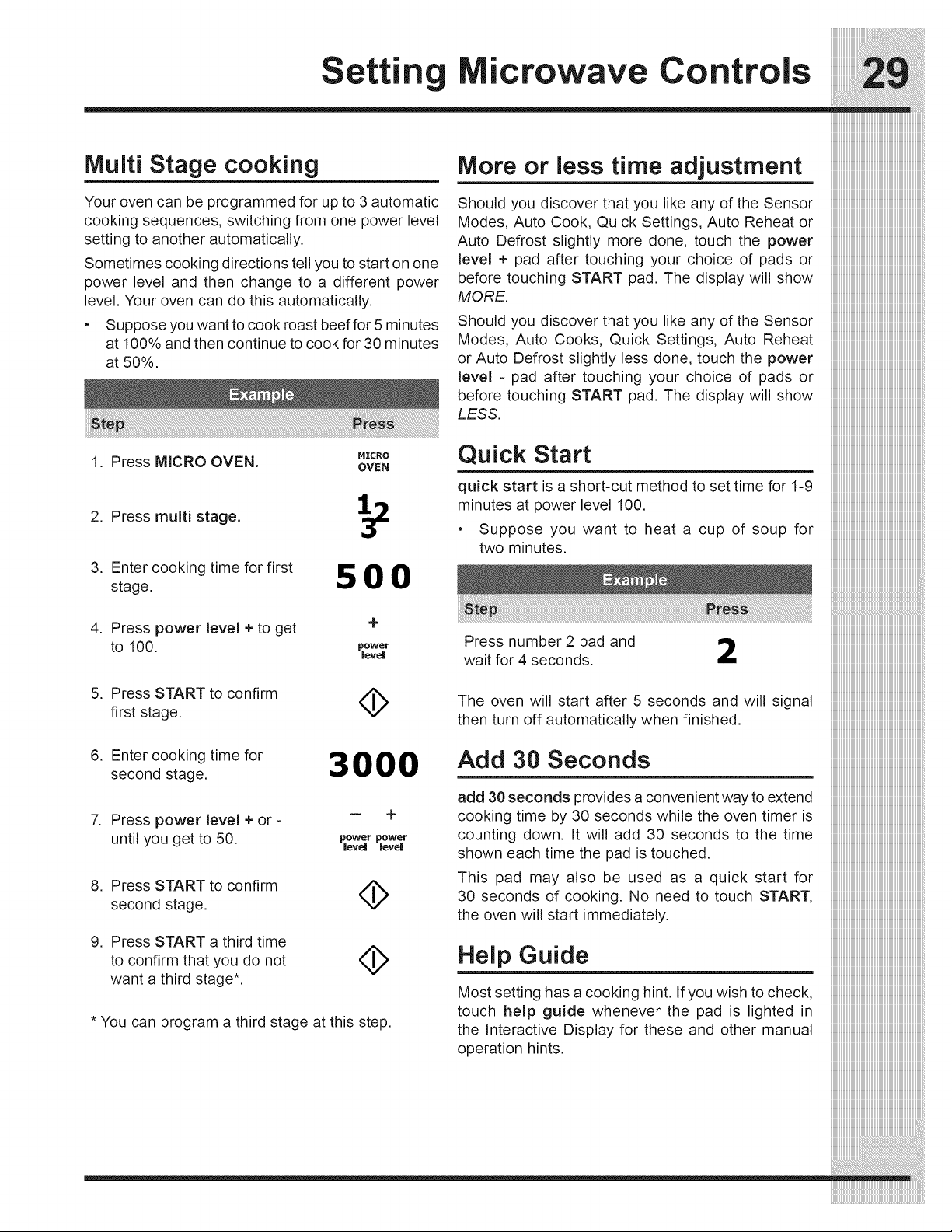
Multi Stage cooking
Your oven can be programmed for up to 3 automatic
cooking sequences, switching from one power level
setting to another automatically.
Sometimes cooking directions tell you to start on one
power level and then change to a different power
level. Your oven can do this automatically.
• Suppose you want to cook roast beef for 5 minutes
at 100% and then continue to cook for 30 minutes
at 50%.
1. Press MICRO OVEN.
2. Press multi stage.
3. Enter cooking time for first
stage.
MICRO
OVEN
500
4. Press power level + to get +
to 100. power
level
5. Press START to confirm A
V
first stage.
6. Enter cooking time for
second stage.
3000
-- +
7. Press power level + or -
until you get to 50. power power
level level
8. Press START to confirm
second stage.
9. Press START a third time
to confirm that you do not
want a third stage*.
4>
4>
* You can program a third stage at this step.
More or less time adjustment
Should you discover that you like any of the Sensor
Modes, Auto Cook, Quick Settings, Auto Reheat or
Auto Defrost slightly more done, touch the power
level ÷ pad after touching your choice of pads or
before touching START pad. The display will show
MORE.
Should you discover that you like any of the Sensor
Modes, Auto Cooks, Quick Settings, Auto Reheat
or Auto Defrost slightly less done, touch the power
level - pad after touching your choice of pads or
before touching START pad. The display will show
LESS.
Quick Start
quick start is a short-cut method to set time for 1-9
minutes at power level 100.
• Suppose you want to heat a cup of soup for
two minutes.
___________________________________________________________________________________
Press number2 pad and iiiiiiiiiiiiiiiiiiiiiiiiiiiiiiiiiiiiiiiiiiiiiiiiiiiiiiiiiiiiiiiiiiiiiiiiiiiiiiiiiii
waitfor4seconds, iiiiiiiiiiiiiiiiiiiiiiiiiiiiiiiiiiiiiiiiiiiiiiiiiiiiiiiiiiiiiiiiiiiiiiiiiiiiiiiiiii
The oven will start after 5 seconds and will signal iiiiiiiiiiiiiiiiiiiiiiiiiiiiiiiiiiiiiiiiiiiiiiiiiiiiiiiiiiiiiiiiiiiiiiiiiiiiiiiiiii
thenturnoffautomaticallywhenfinished, iiiiiiiiiiiiiiiiiiiiiiiiiiiiiiiiiiiiiiiiiiiiiiiiiiiiiiiiiiiiiiiiiiiiiiiiiiiiiiiiiii
Add 30 Seconds iiiiiiiiiiiiiiiiiiiiiiiiiiiiiiiiiiiiiiiiiiiiiiiiiiiiiiiiiiiiiiiiiiiiiiiiiiiiiiiiiii
iiiiiiiiiiiiiiiiiiiiiiiiiiiiiiiiiiiiiiiiiiiiiiiiiiiiiiiiiiiiiiiiiiiiiiiiiiiiiiiiiii
add 30 seconds provides a convenient way to extend iiiiiiiiiiiiiiiiiiiiiiiiiiiiiiiiiiiiiiiiiiiiiiiiiiiiiiiiiiiiiiiiiiiiiiiiiiiiiiiiiii
cooking time by 30 seconds while the oven timer is iiiiiiiiiiiiiiiiiiiiiiiiiiiiiiiiiiiiiiiiiiiiiiiiiiiiiiiiiiiiiiiiiiiiiiiiiiiiiiiiiii
counting down. It will add 30 seconds to the time iiiiiiiiiiiiiiiiiiiiiiiiiiiiiiiiiiiiiiiiiiiiiiiiiiiiiiiiiiiiiiiiiiiiiiiiiiiiiiiiiii
showneachtimethepadistouched, iiiiiiiiiiiiiiiiiiiiiiiiiiiiiiiiiiiiiiiiiiiiiiiiiiiiiiiiiiiiiiiiiiiiiiiiiiiiiiiiiii
This pad may also be used as a quick start for iiiiiiiiiiiiiiiiiiiiiiiiiiiiiiiiiiiiiiiiiiiiiiiiiiiiiiiiiiiiiiiiiiiiiiiiiiiiiiiiiii
30 seconds of cooking. No need to touch START, iiiiiiiiiiiiiiiiiiiiiiiiiiiiiiiiiiiiiiiiiiiiiiiiiiiiiiiiiiiiiiiiiiiiiiiiiiiiiiiiiii
theovenwillstartimmediately, iiiiiiiiiiiiiiiiiiiiiiiiiiiiiiiiiiiiiiiiiiiiiiiiiiiiiiiiiiiiiiiiiiiiiiiiiiiiiiiiiii
iiiiiiiiiiiiiiiiiiiiiiiiiiiiiiiiiiiiiiiiiiiiiiiiiiiiiiiiiiiiiiiiiiiiiiiiiiiiiiiiiii
Help Guide iiiiiiiiiiiiiiiiiiiiiiiiiiiiiiiiiiiiiiiiiiiiiiiiiiiiiiiiiiiiiiiiiiiiiiiiiiiiiiiiiii
iiiiiiiiiiiiiiiiiiiiiiiiiiiiiiiiiiiiiiiiiiiiiiiiiiiiiiiiiiiiiiiiiiiiiiiiiiiiiiiiiii
Most setting has a cooking hint. If you wish to check, iiiiiiiiiiiiiiiiiiiiiiiiiiiiiiiiiiiiiiiiiiiiiiiiiiiiiiiiiiiiiiiiiiiiiiiiiiiiiiiiiii
touch help guide whenever the pad is lighted in iiiiiiiiiiiiiiiiiiiiiiiiiiiiiiiiiiiiiiiiiiiiiiiiiiiiiiiiiiiiiiiiiiiiiiiiiiiiiiiiiii
the Interactive Display for these and other manual iiiiiiiiiiiiiiiiiiiiiiiiiiiiiiiiiiiiiiiiiiiiiiiiiiiiiiiiiiiiiiiiiiiiiiiiiiiiiiiiiii
operationhints, iiiiiiiiiiiiiiiiiiiiiiiiiiiiiiiiiiiiiiiiiiiiiiiiiiiiiiiiiiiiiiiiiiiiiiiiiiiiiiiiiii
iiiiiiiiiiiiiiiiiiiiiii
iiiiiiiiiiiiiiiiiiiiiii
iiiiiiiiiiiiiiiiiiiiiiiiiiiiiiiiiiiiiiiiiiiiiiiiiiiiiiiiiiiiiiiiiiiiiiiiiiiiiiiiiii
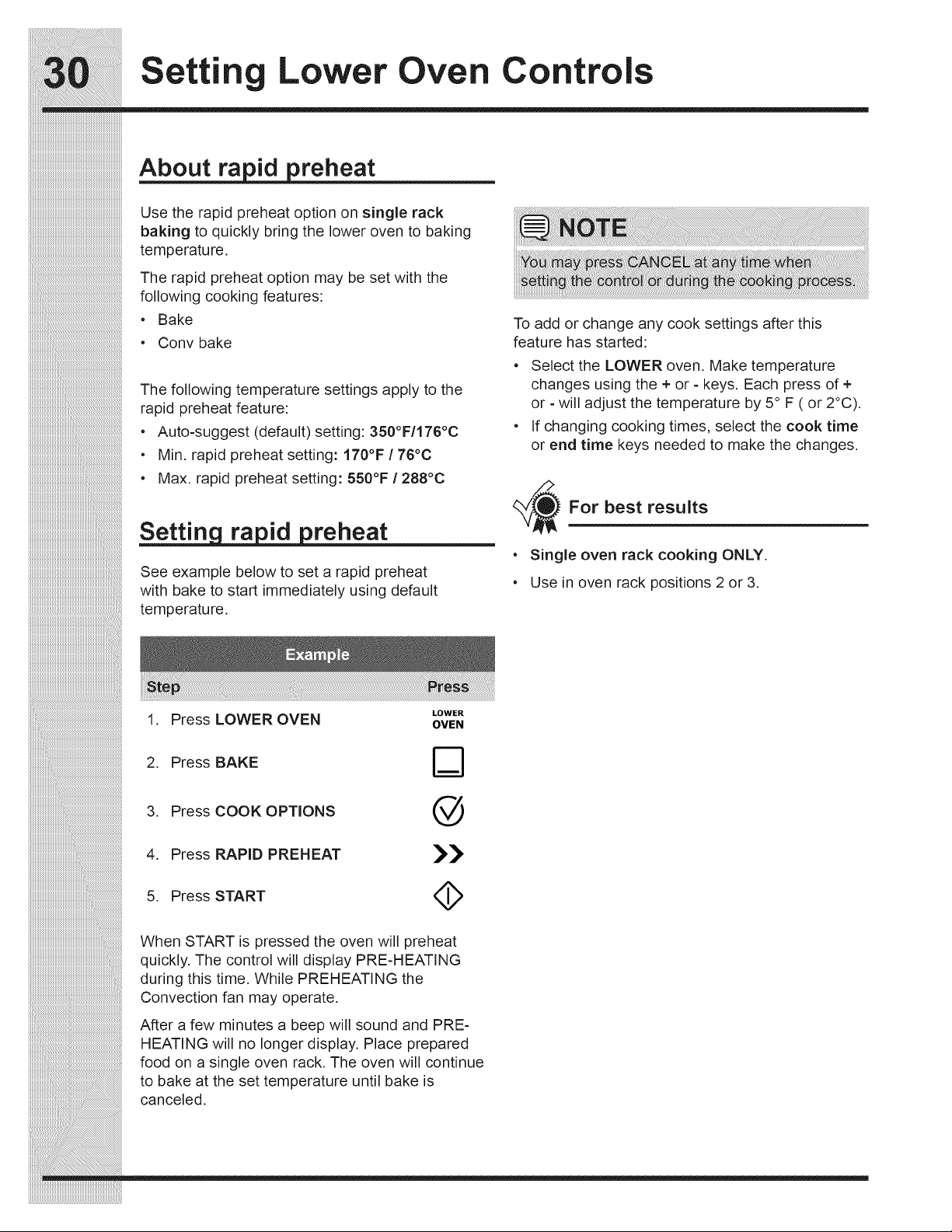
Settin Lower Oven Controls
About ra reheat
Use the rapid preheat option on single rack
baking to quickly bring the lower oven to baking
temperature,
The rapid preheat option may be set with the
following cooking features:
• Bake
•Conv bake
The following temperature settings apply to the
rapid preheat feature:
• Auto-suggest (default) setting: 350°F/176°C
• Min. rapid preheat setting: 170°F / 76°C
• Max. rapid preheat setting: 550°F / 288°C
Setti n reheat
See example below to set a rapid preheat
with bake to start immediately using default
temperature,
1. Press LOWER OVEN
LOWER
OVEN
To add or change any cook settings after this
feature has started:
° Select the LOWER oven. Make temperature
changes using the + or - keys. Each press of +
or - will adjust the temperature by 5° F ( or 2°C).
° If changing cooking times, select the cook time
or end time keys needed to make the changes.
For best results
° Single oven rack cooking ONLY.
° Use in oven rack positions 2 or 3.
2. Press BAKE
3. Press COOK OPTIONS
4. Press RAPID PREHEAT
5. Press START
@
>>
4>
When START is pressed the oven will preheat
quickly. The control will display PRE-HEATING
during this time, While PREHEATING the
Convection fan may operate.
After a few minutes a beep will sound and PRE-
HEATING will no longer display. Place prepared
food on a single oven rack. The oven will continue
to bake at the set temperature until bake is
canceled,
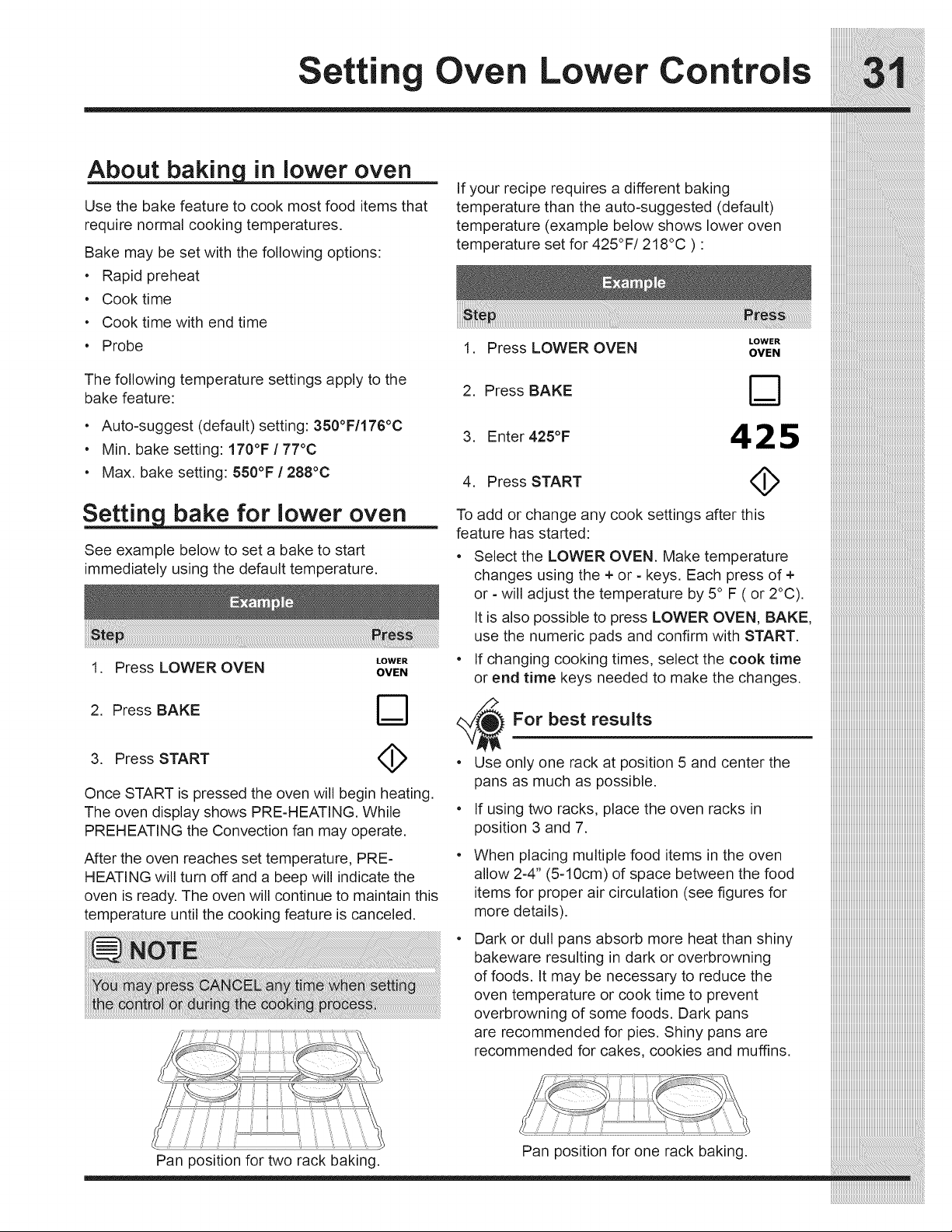
Setting Oven Lower Controls
in lower oven
Use the bake feature to cook most food items that
require normal cooking temperatures.
Bake may be set with the following options:
• Rapid preheat
• Cook time
• Cook time with end time
• Probe
The following temperature settings apply to the
bake feature:
• Auto-suggest (default) setting: 350°F/176°C
• Min. bake setting: 170°F / 77°C
• Max. bake setting: 550°F / 288°C
bake for lower oven
See example below to set a bake to start
immediately using the default temperature.
LOWER
1. Press LOWER OVEN OVEN
2. Press BAKE
3. Press START
Once START is pressed the oven will begin heating.
The oven display shows PRE-HEATING. While
PREHEATING the Convection fan may operate.
After the oven reaches set temperature, PRE-
HEATING will turn off and a beep will indicate the
oven is ready. The oven will continue to maintain this
temperature until the cooking feature is canceled.
Pan position for two rack baking.
If your recipe requires a different baking
temperature than the auto-suggested (default)
temperature (example below shows lower oven
temperature set for 425°F/218°C ) :
LOWER
1. Press LOWER OVEN OVEN
2. Press BAKE D
3. Enter 425°F 4 2 5
4. Press START _),
To add or change any cook settings after this
feature has started:
• Select the LOWER OVEN. Make temperature
changes using the + or - keys. Each press of +
or - will adjust the temperature by 5° F ( or 2°C).
It is also possible to press LOWER OVEN, BAKE,
use the numeric pads and confirm with START.
• If changing cooking times, select the cook time
or end time keys needed to make the changes.
• Use only one rack at position 5 and center the
pans as much as possible.
• If using two racks, place the oven racks in
position 3 and 7.
• When pla,cing,multiple food items in the oven
allow 2-4 (5-10cm) of space between the food
items for proper air circulation (see figures for
more details).
• Dark or dull pans absorb more heat than shiny
bakeware resulting in dark or overbrowning
of foods. It may be necessary to reduce the
oven temperature or cook time to prevent
overbrowning of some foods. Dark pans
are recommended for pies. Shiny pans are
recommended for cakes, cookies and muffins.
Pan position for one rack baking.
iiiiiiiiiiiiiiiiiiiiiiiiiiiiiiiiiiiiiiiiiiiiiiiiiiiiiiiiiiiiiiiiiiiiiiiiiiiiiiiiiii
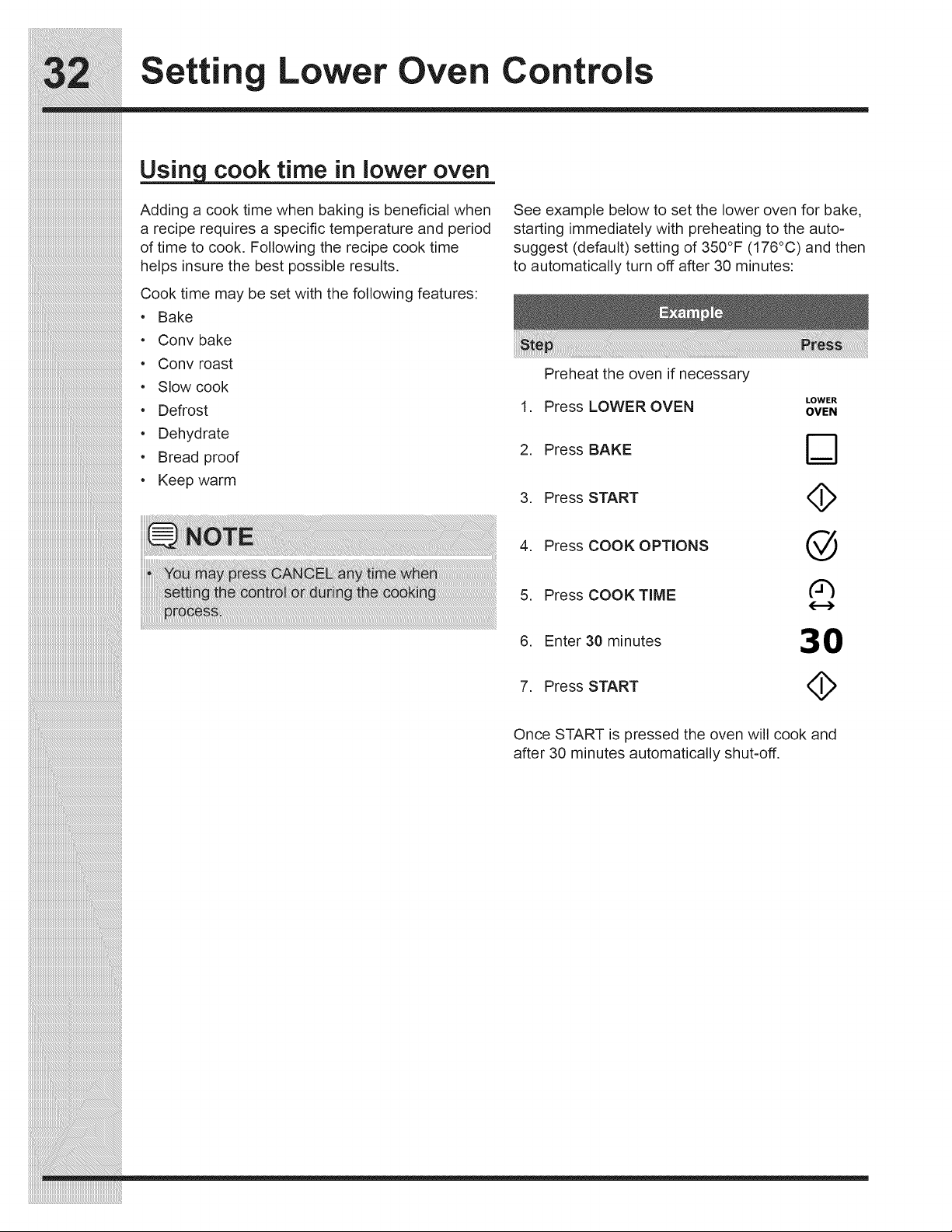
Settin Lower Oven Controls
iiiiiiiiiiiiiiiiiiiiiiiiiiiiiiiiiiiiiiiiiiiiiiiiiiiiiiiiiiiiiiiiiiiiiiiiiiiiiii
cook time in lower oven
Adding a cook time when baking is beneficial when
a recipe requires a specific temperature and period
of time to cook. Following the recipe cook time
helps insure the best possible results.
Cook time may be set with the following features:
• Bake
•Conv bake
Conv roast
• Slow cook
• Defrost
• Dehydrate
• Bread proof
° Keep warm
See example below to set the lower oven for bake,
starting immediately with preheating to the auto-
suggest (default) setting of 350°F (176°C) and then
to automatically turn off after 30 minutes:
Preheat the oven if necessary
LOWER
1. Press LOWER OVEN OVEN
2. Press BAKE
3. Press START (_
4. Press COOK OPTIONS @
5. Press COOK TiME
6. Enter 30 minutes 30
7. Press START (_
Once START is pressed the oven will cook and
after 30 minutes automatically shut=off.
_i_i_i_i_i_i_i_i_i_i_i_i_i_i_i_i_i_i_i_i_i_i_i_i_i_i_i_i_i_i_i_i_i_i_i_i_i_i_i_i_i_i_i_i_i_i_i_i_i_i_i_i_i_i_i_i__!__________________________________________
iiiiiiiiiiiiiiiiiiiiiiiiiiiiiiiiiiiiiiiiiiiiiiiiiiiiiiiiiiiiiiiiiiiiiiiiiiiiiiiiiiiiiiiiiiiiiiiiiiiiiiiiiiiiiiiiiiiiiii_i!iiiiiiiiiiiiiiiiiiiiiiiiiiiiiiiiiiiiiiiiiiiiiiiiiiiii_
iiiiiiiiiiiiiiiiiiiiiiiiiiiiiiiiiiiiiiiiiiiiiiiiiiiiiiiiiiiiiiiiiiiiiiiiiiiiiiiiiiiiiiiiiiiiiiiiiiiiiiiiiiiiiiiiiiiiiiiiiiiii_i!iiiiiiiiiiiiiiiiiiiiiiiiiiiiiiiiiiiiiiiiiiii_
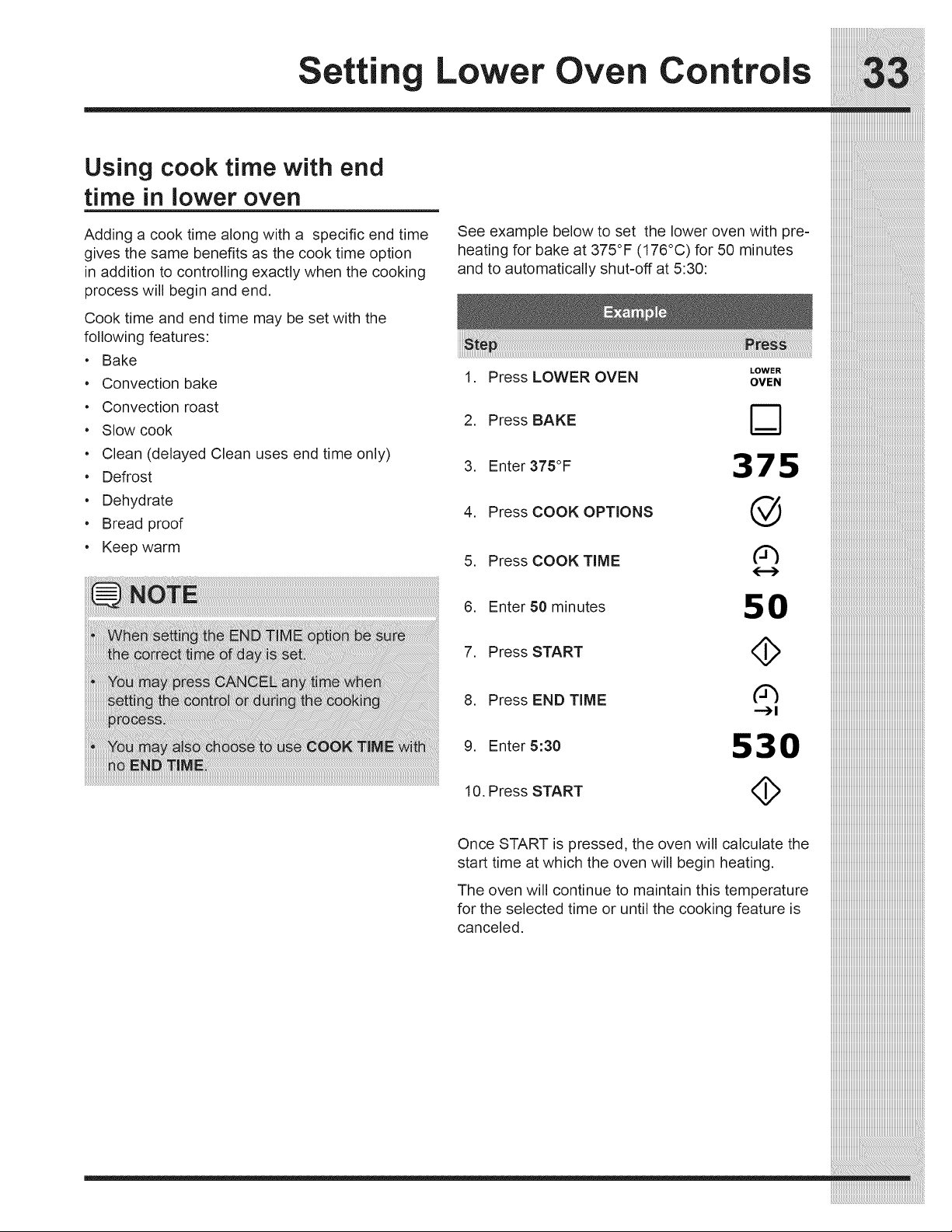
Using cook time with end
time in lower oven
Adding a cook time along with a specific end time
gives the same benefits as the cook time option
in addition to controlling exactly when the cooking
process will begin and end.
Cook time and end time may be set with the
following features:
• Bake
• Convection bake
• Convection roast
• Slow cook
• Clean (delayed Clean uses end time only)
• Defrost
• Dehydrate
• Bread proof
• Keep warm
See example below to set the lower oven with pre-
heating for bake at 375°F (176°C) for 50 minutes
and to automatically shut=off at 5:30:
LOWER
1. Press LOWER OVEN OVEN
2. Press BAKE
3. Enter 375°F 375
4. Press COOK OPTIONS @
5. Press COOKTIME
{.--)
6. Enter 50 minutes 5 0
7. Press START ,_
8. Press END TIME ('_
-,-_1
9. Enter 5:30 530
10. Press START <_
Once START is pressed, the oven will calculate the
start time at which the oven will begin heating.
The oven will continue to maintain this temperature
for the selected time or until the cooking feature is
canceled.
___________________________________________________________________________________
iiiiiiiiiiiiiiiiiiiiiiiiiiiiiiiiiiiiiiiiiiiiiiiiiiiiiiiiiiiiiiiiiiiiiiiiiiiiiiiiiii
iiiiiiiiiiiiiiiiiiiiiiiiiiiiiiiiiiiiiiiiiiiiiiiiiiiiiiiiiiiiiiiiiiiiiiiiiiiiiiiiiii
iiiiiiiiiiiiiiiiiiiiiiiiiiiiiiiiiiiiiiiiiiiiiiiiiiiiiiiiiiiiiiiiiiiiiiiiiiiiiiiiiii
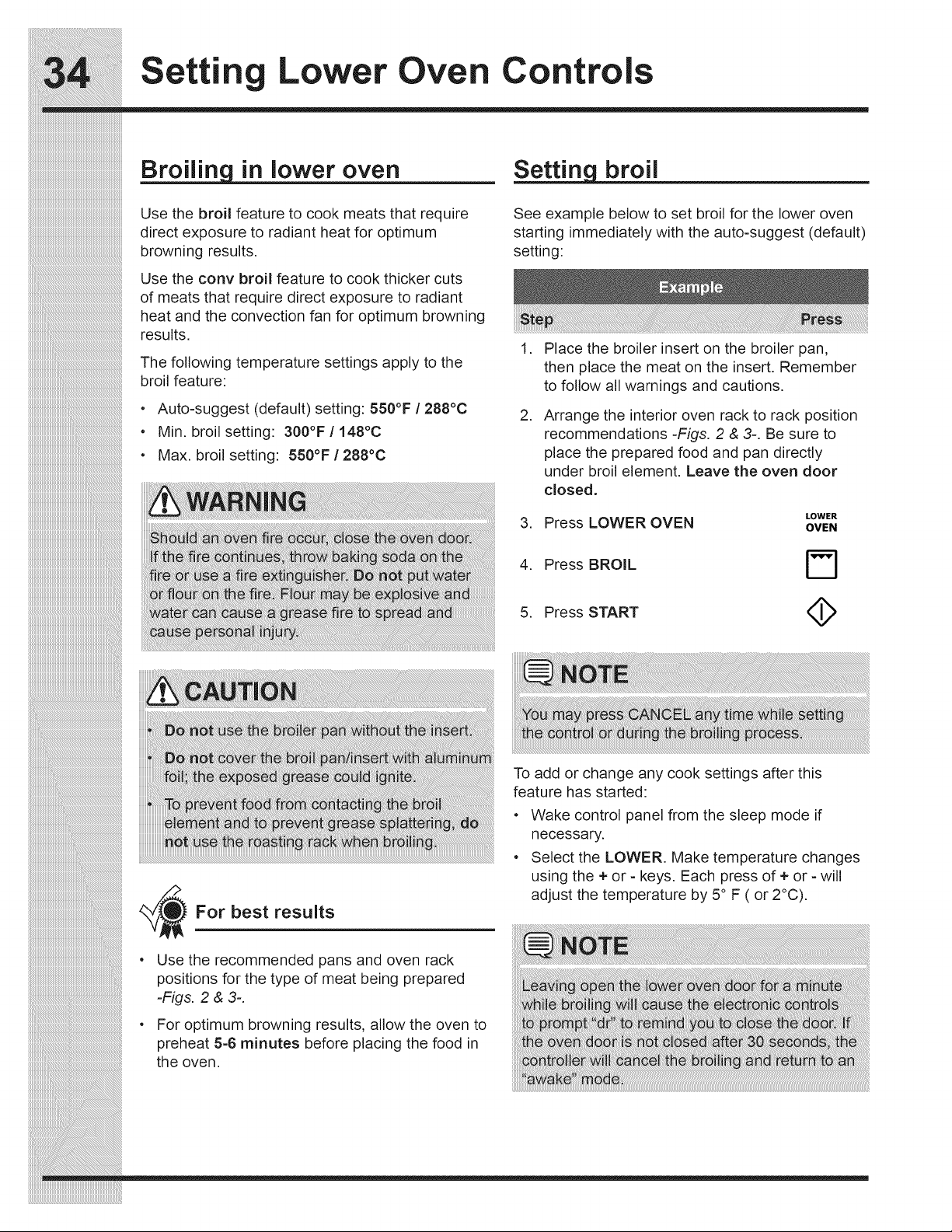
Settin Lower Oven Controls
iiiiiiiiiiiiiiiiiiiiiiiiiiiiiiiiiiiiiiiiiiiiiiiiiiiiiiiiiiiiiiiiiiiiiiiiiiiiiii
in lower oven
Use the broil feature to cook meats that require
direct exposure to radiant heat for optimum
browning results.
Use the conv broil feature to cook thicker cuts
of meats that require direct exposure to radiant
heat and the convection fan for optimum browning
results.
The following temperature settings apply to the
broil feature:
• Auto-suggest (default) setting: 550°F / 288°C
• Min. broil setting: 300°F / 148°C
• Max. broil setting: 550°F / 288°C
broil
See example below to set broil for the lower oven
starting immediately with the auto-suggest (default)
setting:
,
,
Place the broiler insert on the broiler pan,
then place the meat on the insert. Remember
to follow all warnings and cautions.
Arrange the interior oven rack to rack position
recommendations -Figs. 2 & 3-. Be sure to
place the prepared food and pan directly
under broil element. Leave the oven door
closed.
LOWER
3. Press LOWER OVEN OVEN
4. Press BROIL r_
5. Press START <_
_//_ For best results
Use the recommended pans and oven rack
positions for the type of meat being prepared
-Figs. 2 & 3-.
For optimum browning results, allow the oven to
preheat 5-6 minutes before placing the food in
the oven.
To add or change any cook settings after this
feature has started:
Wake control panel from the sleep mode if
necessary.
Select the LOWER. Make temperature changes
using the + or - keys. Each press of + or =will
adjust the temperature by 5 ° F ( or 2°C).
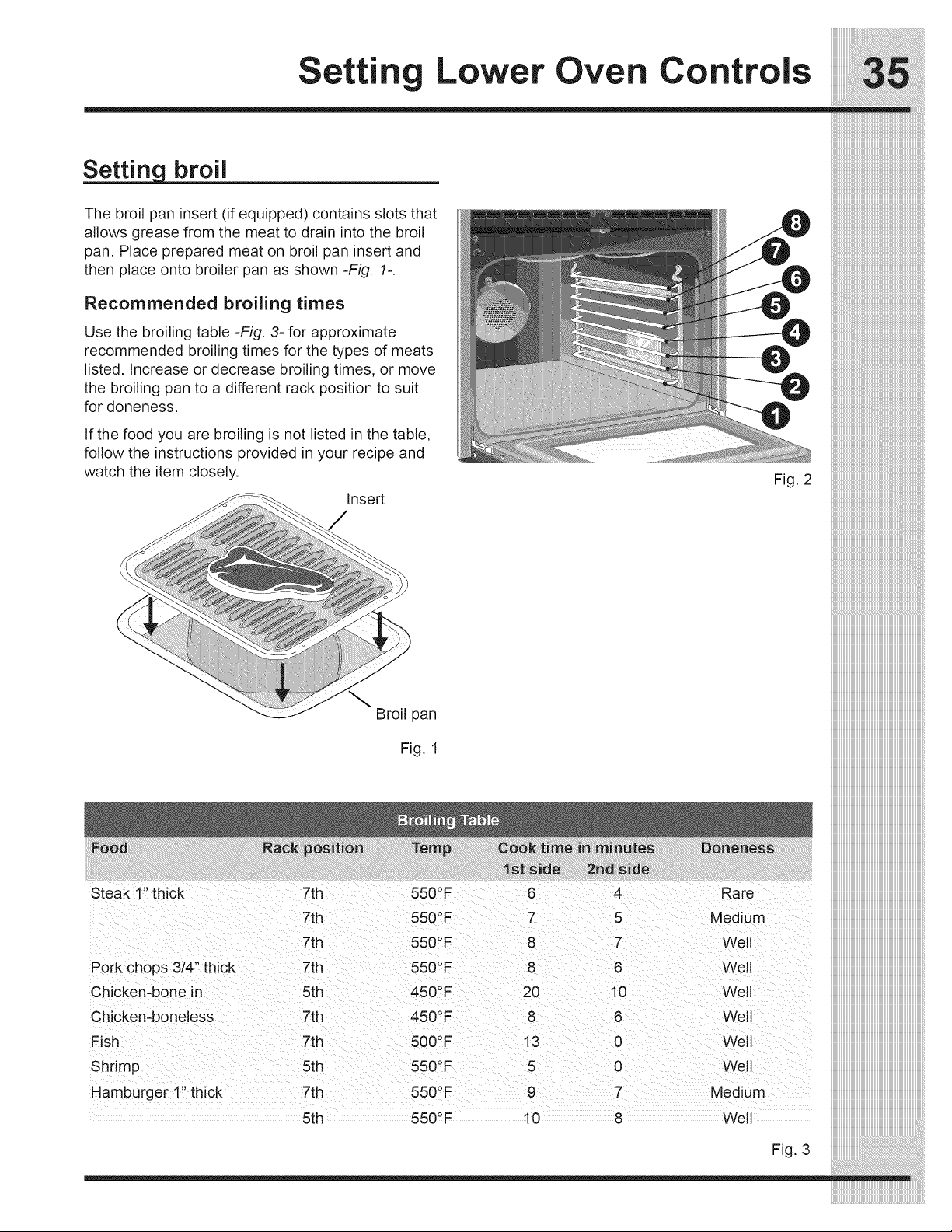
Setting Lower Oven Controls
Setting broil
The broil pan insert (if equipped) contains slots that
allows grease from the meat to drain into the broil
pan. Place prepared meat on broil pan insert and
then place onto broiler pan as shown -Fig. 1=.
Recommended broiling times
Use the broiling table -Fig. 3- for approximate
recommended broiling times for the types of meats
listed. Increase or decrease broiling times, or move
the broiling pan to a different rack position to suit
for doneness.
If the food you are broiling is not listed in the table,
follow the instructions provided in your recipe and
watch the item closely.
Insert
Fig. 2
Broil pan
Fig. 1
Steak 1" thick 7th 550°F 6 4 Rare
7th 550 _F 7 5 Medium
7th 550°F 8 7 Well
Pork chops 3/4" thick 7th 550°F 8 6 Well
Chicken-bone in 5th 450°F 20 10 Well
Chicken-boneless 7th 450°F 8 6 Well
Fish 7th 500°F 13 0 Well
Shrimp 5th 550°F 5 0 Well
Hamburger 1" thick 7th 550°F 9 7 Medium
5th 550°F 10 8 Well
iiiiiiiiiiiiiiiiiiiiiiiiiiiiiiiiiiiiiiiiiiiiiiiiiiiiiiiiiiiiiiiiiiiiiiiiiiiiiiiiiii_i
iiiiiiiiiiiiiiiiiiiiiiiiiiiiiiiiiiiiiiiiiiiiiiiiiiiiiiiiiiiiiiiiiiiiiiiiiiiiiiiiiii_i
iiiiiiiiiiiiiiiiiiiiiiiiiiiiiiiiiiiiiiiiiiiiiiiiiiiiiiiiiiiiiiiiiiiiiiiiiiiiiiiiiii_i
Fig. 3
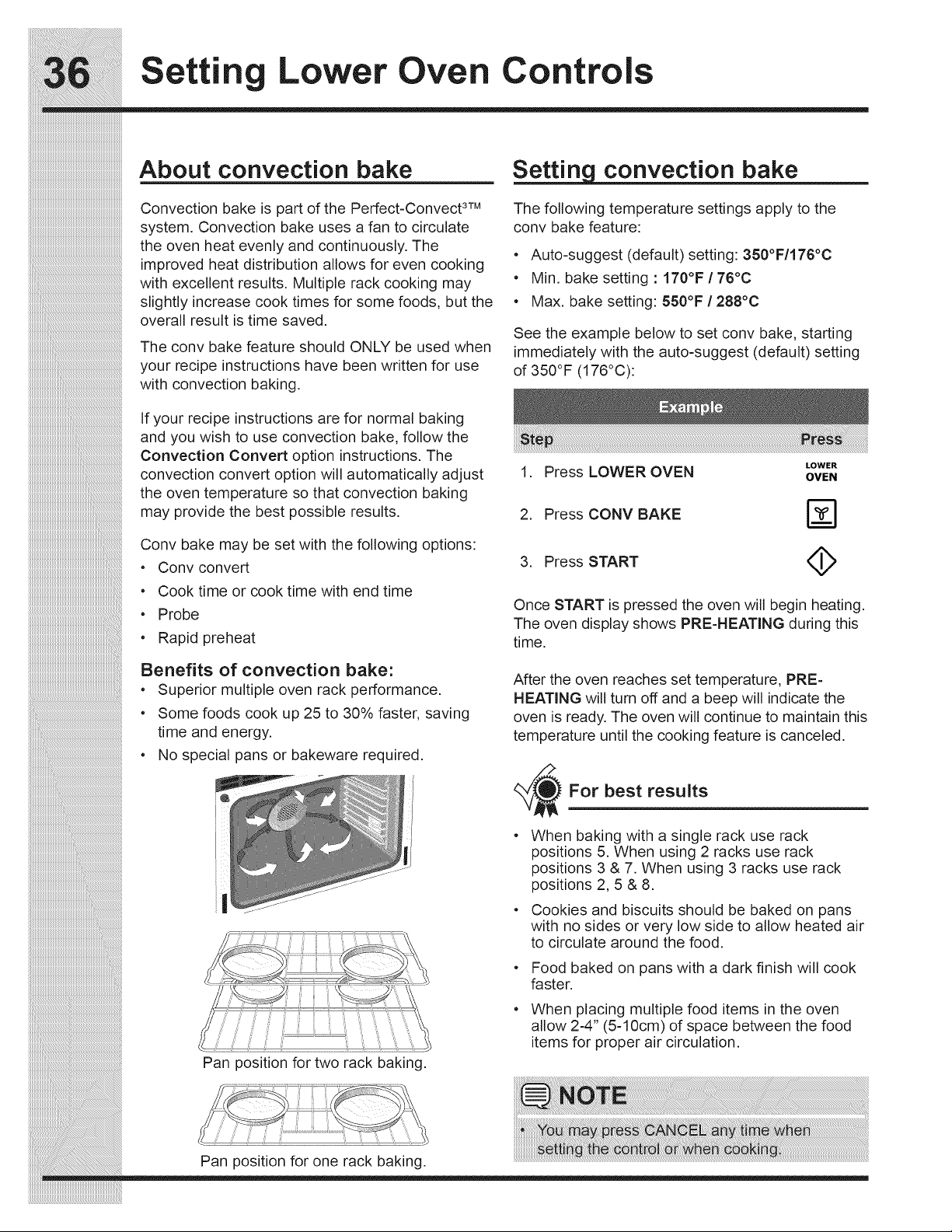
Settin Lower Oven Controls
About convection bake
Convection bake is part of the Perfect-Convect 3TM
system. Convection bake uses a fan to circulate
the oven heat evenly and continuously. The
................................................................................improved heat distribution allows for even cooking
with excellent results. Multiple rack cooking may
slightly increase cook times for some foods, but the
overall result is time saved.
The conv bake feature should ONLY be used when
your recipe instructions have been written for use
with convection baking.
If your recipe instructions are for normal baking
and you wish to use convection bake, follow the
Convection Convert option instructions. The
convection convert option will automatically adjust
the oven temperature so that convection baking
may provide the best possible results.
_i_i_i_i_i_i_i_i_i_i_i_i_i_i_i_i_i_i_i_i_i_i_i_i_i_i_i_i_i_i_i_i_i_i_i_i_i_i_i_i_i_i_i_i_i_i_i_i_i_i_i_i_i_i_i_i__!__________________________________________
iiiiiiiiiiiiiiiiiiiiiiiiiiiiiiiiiiiiiiiiiiiiiiiiiiiiiiiiiiiiiiiiiiiiiiiiiiiiiiiiiiiiiiiiiiiiiiiiiiiiiiiiiiiiiiiiiiiiiii_i!iiiiiiiiiiiiiiiiiiiiiiiiiiiiiiiiiiiiiiiiiiiiiiiiiiiii_
iiiiiiiiiiiiiiiiiiiiiiiiiiiiiiiiiiiiiiiiiiiiiiiiiiiiiiiiiiiiiiiiiiiiiiiiiiiiiiiiiiiiiiiiiiiiiiiiiiiiiiiiiiiiiiiiiiiiiiiiiiiii_i!iiiiiiiiiiiiiiiiiiiiiiiiiiiiiiiiiiiiiiiiiiii_
Conv bake may be set with the following options:
•Conv convert
• Cook time or cook time with end time
• Probe
• Rapid preheat
Benefits of convection bake:
• Superior multiple oven rack performance.
Some foods cook up 25 to 30% faster, saving
time and energy.
No special pans or bakeware required.
_1'
,_ _...... ii ii_i' !!
Pan position for two rack baking.
convection bake
The following temperature settings apply to the
conv bake feature:
• Auto-suggest (default) setting: 350°F/176°C
• Min. bake setting : 170°F / 76°C
• Max. bake setting: 550°F / 288°C
See the example below to set conv bake, starting
immediately with the auto-suggest (default) setting
of 350°F (176°C):
LOWER
1. Press LOWER OVEN OVEN
2. Press CONV BAKE [-_
3. Press START (_
Once START is pressed the oven will begin heating.
The oven display shows PRE-HEATING during this
time.
After the oven reaches set temperature, PRE-
HEATING will turn off and a beep will indicate the
oven is ready, The oven will continue to maintain this
temperature until the cooking feature is canceled.
For best results
When baking with a single rack use rack
positions 5. When using 2 racks use rack
positions 3 & 7. When using 3 racks use rack
positions 2, 5 & 8.
Cookies and biscuits should be baked on pans
with no sides or very low side to allow heated air
to circulate around the food.
• Food baked on pans with a dark finish will cook
faster.
• When placing multiple food items in the oven
allow 2-4" (5=10cm) of space between the food
items for proper air circulation.
Pan position for one rack baking.
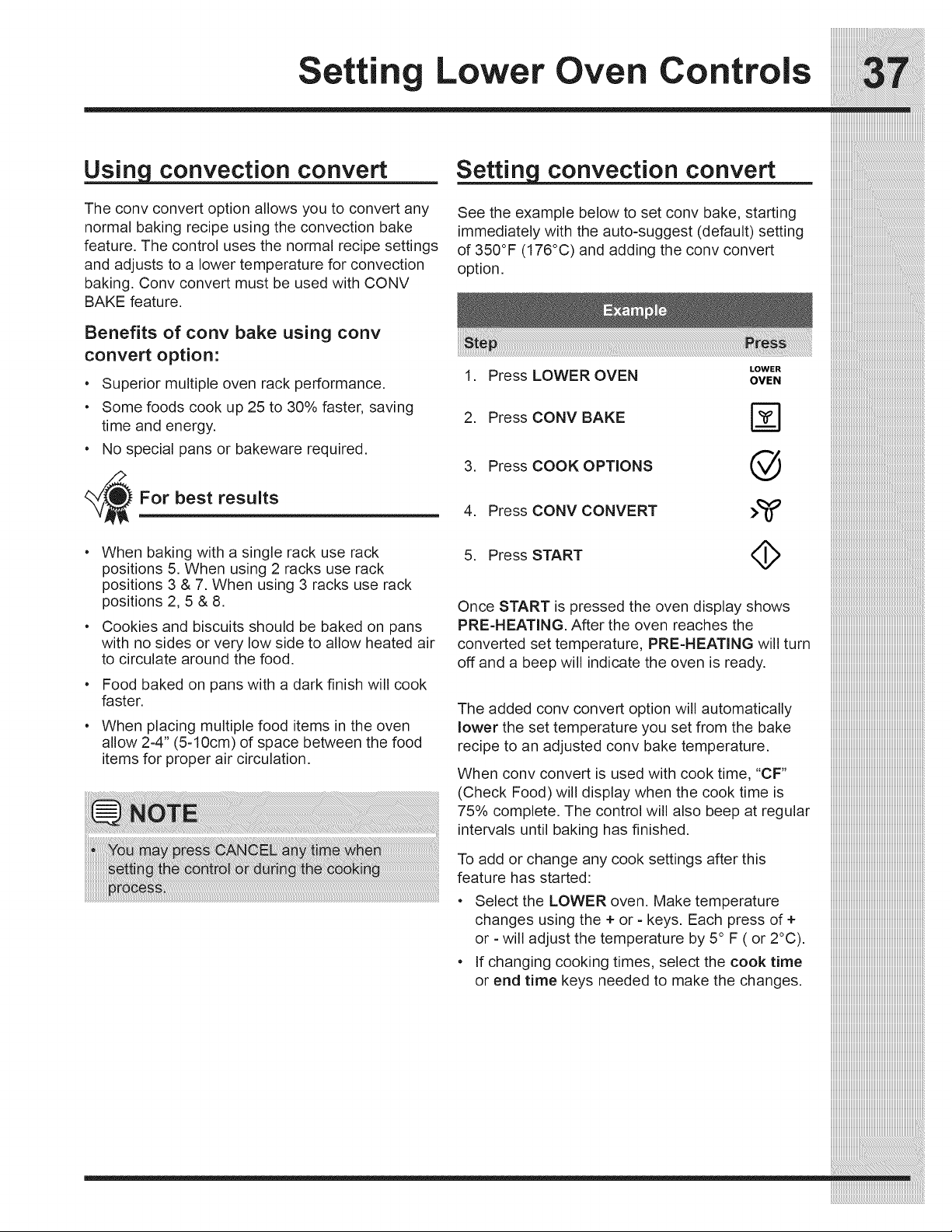
iiiiiiiiiiiiiiiiiiiiiiiiiiiiiiiiiiiiiiiiiiiiii_i_i!_i_i_;!;_!;!ii!i_!i!_i_i_ii_ii_ii;ii_ii:i_!iiii_i_ii_ii_ii_ii_ii_ii_ii_ii_ii_i_i_i_iiiii_i_!!!!!
Setting Lower Oven Controls
convection convert convection convert
The conv convert option allows you to convert any
normal baking recipe using the convection bake
feature. The control uses the normal recipe settings
and adjusts to a lower temperature for convection
baking. Conv convert must be used with CONV
BAKE feature.
See the example below to set conv bake, starting
immediately with the auto-suggest (default) setting
of 350°F (176°C) and adding the conv convert
option.
Benefits of cony bake using conv
convert option:
• Superior multiple oven rack performance.
• Some foods cook up 25 to 30% faster, saving
time and energy.
• No special pans or bakeware required.
_--_For best results
LOWER
1. Press LOWER OVEN OVEN
2. Press CONV BAKE F_
3. Press COOK OPTIONS @
4. Press CONV CONVERT >T
When baking with a single rack use rack
positions 5. When using 2 racks use rack
positions 3 & 7. When using 3 racks use rack
positions 2, 5 & 8.
Cookies and biscuits should be baked on pans
with no sides or very low side to allow heated air
to circulate around the food.
Food baked on pans with a dark finish will cook
faster.
When placing multiple food items in the oven
allow 2-4" (5-10cm) of space between the food
items for proper air circulation.
5. Press START <_
Once START is pressed the oven display shows
PRE-HEATING. After the oven reaches the
converted set temperature, PRE-HEATING will turn
off and a beep will indicate the oven is ready.
The added conv convert option will automatically
lower the set temperature you set from the bake
recipe to an adjusted conv bake temperature.
When conv convert is used with cook time, "CF"
(Check Food)will display when the cook time is
0
75 _/ocomplete. The control will also beep at regular
intervals until baking has finished.
To add or change any cook settings after this
feature has started:
• Select the LOWER oven. Make temperature
changes using the + or - keys. Each press of +
or - will adjust the temperature by 5° F ( or 2°C).
• If changing cooking times, select the cook time
or end time keys needed to make the changes.
iiiiiiiiiiiiiiiiiiiiiiiiiiiiiiiiiiiiiiiiiiiiiiiiiiiiiiiiiiiiiiiiiiiiiiiiiiiiiiiiiii
iiiiiiiiiiiiiiiiiiiiiiiiiiiiiiiiiiiiiiiiiiiiiiiiiiiiiiiiiiiiiiiiiiiiiiiiiiiiiiiiiii
iiiiiiiiiiiiiiiiiiiiiiiiiiiiiiiiiiiiiiiiiiiiiiiiiiiiiiiiiiiiiiiiiiiiiiiiiiiiiiiiiii
iiiiiiiiiiiiiiiiiiiiiiiiiiiiiiiiiiiiiiiiiiiiiiiiiiiiiiiiiiiiiiiiiiiiiiiiiiiiiiiiiii
iiiiiiiiiiiiiiiiiiiiiiiiiiiiiiiiiiiiiiiiiiiiiiiiiiiiiiiiiiiiiiiiiiiiiiiiiiiiiiiiiii
iiiiiiiiiiiiiiiiiiiiiiiiiiiiiiiiiiiiiiiiiiiiiiiiiiiiiiiiiiiiiiiiiiiiiiiiiiiiiiiiiii
iiiiiiiiiiiiiiiiiiiiiiiiiiiiiiiiiiiiiiiiiiiiiiiiiiiiiiiiiiiiiiiiiiiiiiiiiiiiiiiiiii
iiiiiiiiiiiiiiiiiiiiiiiiiiiiiiiiiiiiiiiiiiiiiiiiiiiiiiiiiiiiiiiiiiiiiiiiiiiiiiiiiii
iiiiiiiiiiiiiiiiiiiiiiiiiiiiiiiiiiiiiiiiiiiiiiiiiiiiiiiiiiiiiiiiiiiiiiiiiiiiiiiiiii
iiiiiiiiiiiiiiiiiiiiiiiiiiiiiiiiiiiiiiiiiiiiiiiiiiiiiiiiiiiiiiiiiiiiiiiiiiiiiiiiiii
iiiiiiiiiiiiiiiiiiiiiiiiiiiiiiiiiiiiiiiiiiiiiiiiiiiiiiiiiiiiiiiiiiiiiiiiiiiiiiiiiii
iiiiiiiiiiiiiiiiiiiiiiiiiiiiiiiiiiiiiiiiiiiiiiiiiiiiiiiiiiiiiiiiiiiiiiiiiiiiiiiiiii
iiiiiiiiiiiiiiiiiiiiiiiiiiiiiiiiiiiiiiiiiiiiiiiiiiiiiiiiiiiiiiiiiiiiiiiiiiiiiiiiiii
iiiiiiiiiiiiiiiiiiiiiiiiiiiiiiiiiiiiiiiiiiiiiiiiiiiiiiiiiiiiiiiiiiiiiiiiiiiiiiiiiii
iiiiiiiiiiiiiiiiiiiiiiiiiiiiiiiiiiiiiiiiiiiiiiiiiiiiiiiiiiiiiiiiiiiiiiiiiiiiiiiiiii
iiiiiiiiiiiiiiiiiiiiiiiiiiiiiiiiiiiiiiiiiiiiiiiiiiiiiiiiiiiiiiiiiiiiiiiiiiiiiiiiiii
iiiiiiiiiiiiiiiiiiiiiiiiiiiiiiiiiiiiiiiiiiiiiiiiiiiiiiiiiiiiiiiiiiiiiiiiiiiiiiiiiii
iiiiiiiiiiiiiiiiiiiiiiiiiiiiiiiiiiiiiiiiiiiiiiiiiiiiiiiiiiiiiiiiiiiiiiiiiiiiiiiiiii
iiiiiiiiiiiiiiiiiiiiiiiiiiiiiiiiiiiiiiiiiiiiiiiiiiiiiiiiiiiiiiiiiiiiiiiiiiiiiiiiiii
iiiiiiiiiiiiiiiiiiiiiiiiiiiiiiiiiiiiiiiiiiiiiiiiiiiiiiiiiiiiiiiiiiiiiiiiiiiiiiiiiii
iiiiiiiiiiiiiiiiiiiiiiiiiiiiiiiiiiiiiiiiiiiiiiiiiiiiiiiiiiiiiiiiiiiiiiiiiiiiiiiiiii
iiiiiiiiiiiiiiiiiiiiiiiiiiiiiiiiiiiiiiiiiiiiiiiiiiiiiiiiiiiiiiiiiiiiiiiiiiiiiiiiiii
iiiiiiiiiiiiiiiiiiiiiiiiiiiiiiiiiiiiiiiiiiiiiiiiiiiiiiiiiiiiiiiiiiiiiiiiiiiiiiiiiii
iiiiiiiiiiiiiiiiiiiiiiiiiiiiiiiiiiiiiiiiiiiiiiiiiiiiiiiiiiiiiiiiiiiiiiiiiiiiiiiiiii
iiiiiiiiiiiiiiiiiiiiiiiiiiiiiiiiiiiiiiiiiiiiiiiiiiiiiiiiiiiiiiiiiiiiiiiiiiiiiiiiiii
iiiiiiiiiiiiiiiiiiiiiiiiiiiiiiiiiiiiiiiiiiiiiiiiiiiiiiiiiiiiiiiiiiiiiiiiiiiiiiiiiii
iiiiiiiiiiiiiiiiiiiiiiiiiiiiiiiiiiiiiiiiiiiiiiiiiiiiiiiiiiiiiiiiiiiiiiiiiiiiiiiiiii
iiiiiiiiiiiiiiiiiiiiiiiiiiiiiiiiiiiiiiiiiiiiiiiiiiiiiiiiiiiiiiiiiiiiiiiiiiiiiiiiiii
iiiiiiiiiiiiiiiiiiiiiiiiiiiiiiiiiiiiiiiiiiiiiiiiiiiiiiiiiiiiiiiiiiiiiiiiiiiiiiiiiii
iiiiiiiiiiiiiiiiiiiiiiiiiiiiiiiiiiiiiiiiiiiiiiiiiiiiiiiiiiiiiiiiiiiiiiiiiiiiiiiiiii
iiiiiiiiiiiiiiiiiiiiiiiiiiiiiiiiiiiiiiiiiiiiiiiiiiiiiiiiiiiiiiiiiiiiiiiiiiiiiiiiiii
iiiiiiiiiiiiiiiiiiiiiiiiiiiiiiiiiiiiiiiiiiiiiiiiiiiiiiiiiiiiiiiiiiiiiiiiiiiiiiiiiii
iiiiiiiiiiiiiiiiiiiiiiiiiiiiiiiiiiiiiiiiiiiiiiiiiiiiiiiiiiiiiiiiiiiiiiiiiiiiiiiiiii
iiiiiiiiiiiiiiiiiiiiiiiiiiiiiiiiiiiiiiiiiiiiiiiiiiiiiiiiiiiiiiiiiiiiiiiiiiiiiiiiiii
iiiiiiiiiiiiiiiiiiiiiiiiiiiiiiiiiiiiiiiiiiiiiiiiiiiiiiiiiiiiiiiiiiiiiiiiiiiiiiiiiii
iiiiiiiiiiiiiiiiiiiiiiiiiiiiiiiiiiiiiiiiiiiiiiiiiiiiiiiiiiiiiiiiiiiiiiiiiiiiiiiiiii
iiiiiiiiiiiiiiiiiiiiiiiiiiiiiiiiiiiiiiiiiiiiiiiiiiiiiiiiiiiiiiiiiiiiiiiiiiiiiiiiiii
iiiiiiiiiiiiiiiiiiiiiiiiiiiiiiiiiiiiiiiiiiiiiiiiiiiiiiiiiiiiiiiiiiiiiiiiiiiiiiiiiii
iiiiiiiiiiiiiiiiiiiiiiiiiiiiiiiiiiiiiiiiiiiiiiiiiiiiiiiiiiiiiiiiiiiiiiiiiiiiiiiiiii
iiiiiiiiiiiiiiiiiiiiiiiiiiiiiiiiiiiiiiiiiiiiiiiiiiiiiiiiiiiiiiiiiiiiiiiiiiiiiiiiiii
iiiiiiiiiiiiiiiiiiiiiiiiiiiiiiiiiiiiiiiiiiiiiiiiiiiiiiiiiiiiiiiiiiiiiiiiiiiiiiiiiii
iiiiiiiiiiiiiiiiiiiiiiiiiiiiiiiiiiiiiiiiiiiiiiiiiiiiiiiiiiiiiiiiiiiiiiiiiiiiiiiiiii
iiiiiiiiiiiiiiiiiiiiiiiiiiiiiiiiiiiiiiiiiiiiiiiiiiiiiiiiiiiiiiiiiiiiiiiiiiiiiiiiiii
iiiiiiiiiiiiiiiiiiiiiiiiiiiiiiiiiiiiiiiiiiiiiiiiiiiiiiiiiiiiiiiiiiiiiiiiiiiiiiiiiii
iiiiiiiiiiiiiiiiiiiiiiiiiiiiiiiiiiiiiiiiiiiiiiiiiiiiiiiiiiiiiiiiiiiiiiiiiiiiiiiiiii
iiiiiiiiiiiiiiiiiiiiiiiiiiiiiiiiiiiiiiiiiiiiiiiiiiiiiiiiiiiiiiiiiiiiiiiiiiiiiiiiiii
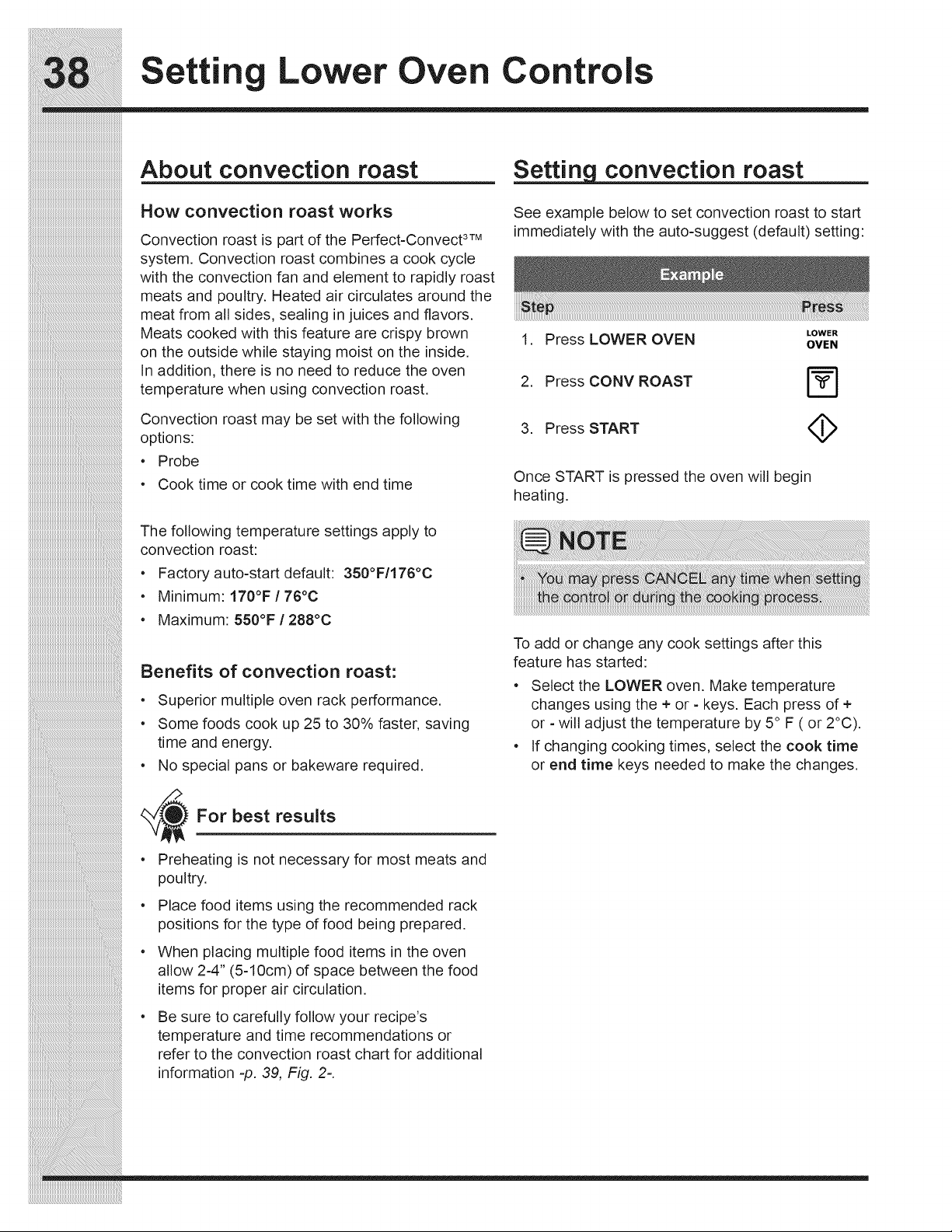
Settin Lower Oven Controls
About convection roast
How convection roast works
Convection roast is part of the Perfect-Convect 3TM
system. Convection roast combines a cook cycle
with the convection fan and element to rapidly roast
meats and poultry. Heated air circulates around the
meat from all sides, sealing in juices and flavors.
Meats cooked with this feature are crispy brown
on the outside while staying moist on the inside.
In addition, there is no need to reduce the oven
temperature when using convection roast.
Convection roast may be set with the following
options:
• Probe
• Cook time or cook time with end time
The following temperature settings apply to
convection roast:
• Factory auto-start default: 350°F/176°C
• Minimum: 170°F / 76°C
• Maximum: 550°F/288°C
Benefits of convection roast:
• Superior multiple oven rack performance.
Some foods cook up 25 to 30% faster, saving
time and energy.
• No special pans or bakeware required.
For best results
• Preheating is not necessary for most meats and
poultry.
• Place food items using the recommended rack
positions for the type of food being prepared.
• When placing multiple food items in the oven
allow 2-4" (5-10cm) of space between the food
items for proper air circulation.
Be sure to carefully follow your recipe's
temperature and time recommendations or
refer to the convection roast chart for additional
information -p. 39, Fig. 2=.
convection roast
See example below to set convection roast to start
immediately with the auto-suggest (default) setting:
LOWER
1. Press LOWER OVEN OVEN
2. Press CONV ROAST
3. Press START (_
Once START is pressed the oven will begin
heating.
To add or change any cook settings after this
feature has started:
° Select the LOWER oven. Make temperature
changes using the + or - keys. Each press of +
or - will adjust the temperature by 5° F ( or 2°C).
° If changing cooking times, select the cook time
or end time keys needed to make the changes.
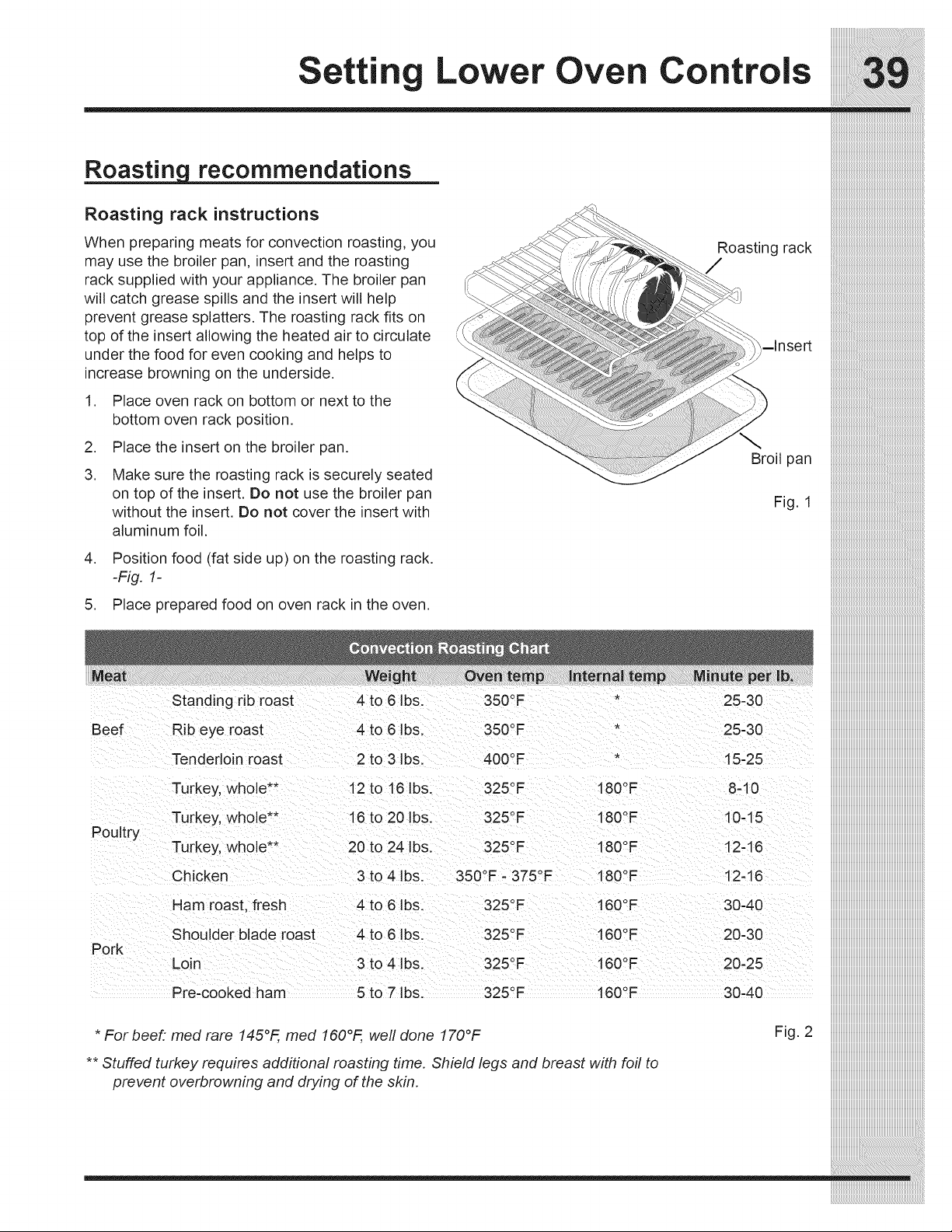
Setting Lower Oven Controls
Roastin recommendations
Roasting rack instructions
When preparing meats for convection roasting, you
may use the broiler pan, insert and the roasting
rack supplied with your appliance. The broiler pan
will catch grease spills and the insert will help
prevent grease splatters. The roasting rack fits on
top of the insert allowing the heated air to circulate
under the food for even cooking and helps to
increase browning on the underside.
1. Place oven rack on bottom or next to the
bottom oven rack position.
2. Place the insert on the broiler pan.
,
Make sure the roasting rack is securely seated
on top of the insert. Do not use the broiler pan
without the insert. Do not cover the insert with
aluminum foil.
Roasting rack
/
-Insert
Broil pan
Fig. 1
_1_i_i_i_i_i_i_i_i_i_i_i_i_i_i_i_i_i_i_i_i_i_i_i_i_i_i_i_i_i_i_i_i_i_i_i_i_i_i_i_i_i_i_i_i_i_i_i_i_i_i_i_i_i_i_i_i_i_i_i_i_i_i_i_i_i_i_i_i_i_i_i_i_i_i_i_i_i_i
_________i:iiiiiiiiiiiiiiiiiiiiiiiiiiiiiiiiiiiiiiiiiiiiiiiiiiiiiiiiiiiiiiiiiiiiiiiiiiiiiiiiiiiiiiiiiiiiiiiiiiiiiiiiiiiiiiiiiiiiiiiiiiiiiiiiiiiiiiiiiiiiiiiii
_i_i_i_i_i_i_i_i_i_i_i_1_i_i_i_i_i_i_i_i_i_i_i_i_i_i_i_i_i_i_i_i_i_i_i_i_i_i_i_i_i_i_i_i_i_i_i_i_i_i_i_i_i_i_i_i_i_i_i_i_i_i_i_i_i_i_i_i_i_i_i_i_i_i_i_i_i_i_i_i_i_i
_________________i:iiiiiiiiiiiiiiiiiiiiiiiiiiiiiiiiiiiiiiiiiiiiiiiiiiiiiiiiiiiiiiiiiiiiiiiiiiiiiiiiiiiiiiiiiiiiiiiiiiiiiiiiiiiiiiiiiiiiiiiiiiiiiiiii
_i_i_i_i_i_i_i_i_i_i_i_i_i_i_i_i_i_i_i_1_i_i_i_i_i_i_i_i_i_i_i_i_i_i_i_i_i_i_i_i_i_i_i_i_i_i_i_i_i_i_i_i_i_i_i_i_i_i_i_i_i_i_i_i_i_i_i_i_i_i_i_i_i_i_i_i_i_i_i_i_i_i
iiiiiiiiiiiiiiiiiiiiiiiiiiiiiiiiiiiiiiiiiiiiiiiiiiiiiiiiiiiiiiiiiiiiiiiiiiiiiiiiiiiiiiiiii_i:iiiiiiiiiiiiiiiiiiiiiiiiiiiiiiiiiiiiiiiiiiiiiiiiiiiiiiiiiiiiiiiiiiiiiiiiii
,
Position food (fat side up) on the roasting rack.
-Fig. 1-
5. Place prepared food on oven rack in the oven.
Standing rib roast
Beef Rib eye roast
Tenderloin roast
Turkey, whole**
Turkey, whole**
Poultry
Turkey, whole**
Chicken
Ham roast, fresh
Shoulder blade roast
Pork
Loin
4 to 6 Ibs. 350°F *
4 to 6 Ibs. 350°F
2 to 3 Ibs. 400°F
12 to 16 Ibs. 325°F 180°F
16 to 20 Ibs. 325°F 180 °=
20 to 24 Ibs. 325°F 180°F
3 to 4 Ibs. 350°F - 375°F 180°F
4 to 6 Ibs. 325°F 160°F
4 to 6 Ibs. 325°F 160°F
3 to 4 Ibs. 325°F 160°F
160°FPre-cooked ham 5 to 7 Ibs. 325°F
* Forbeef: med rare 145°F, med 160°F, well done 170°F
** Stuffed turkey requires additional roasting time. Shield legs and breast with foil to
prevent overbrowning and drying of the skin.
25-30
25-30
15-25
8-10
10-15
12-16
12-16
30-40
20-30
20-25
30-40
Fig. 2
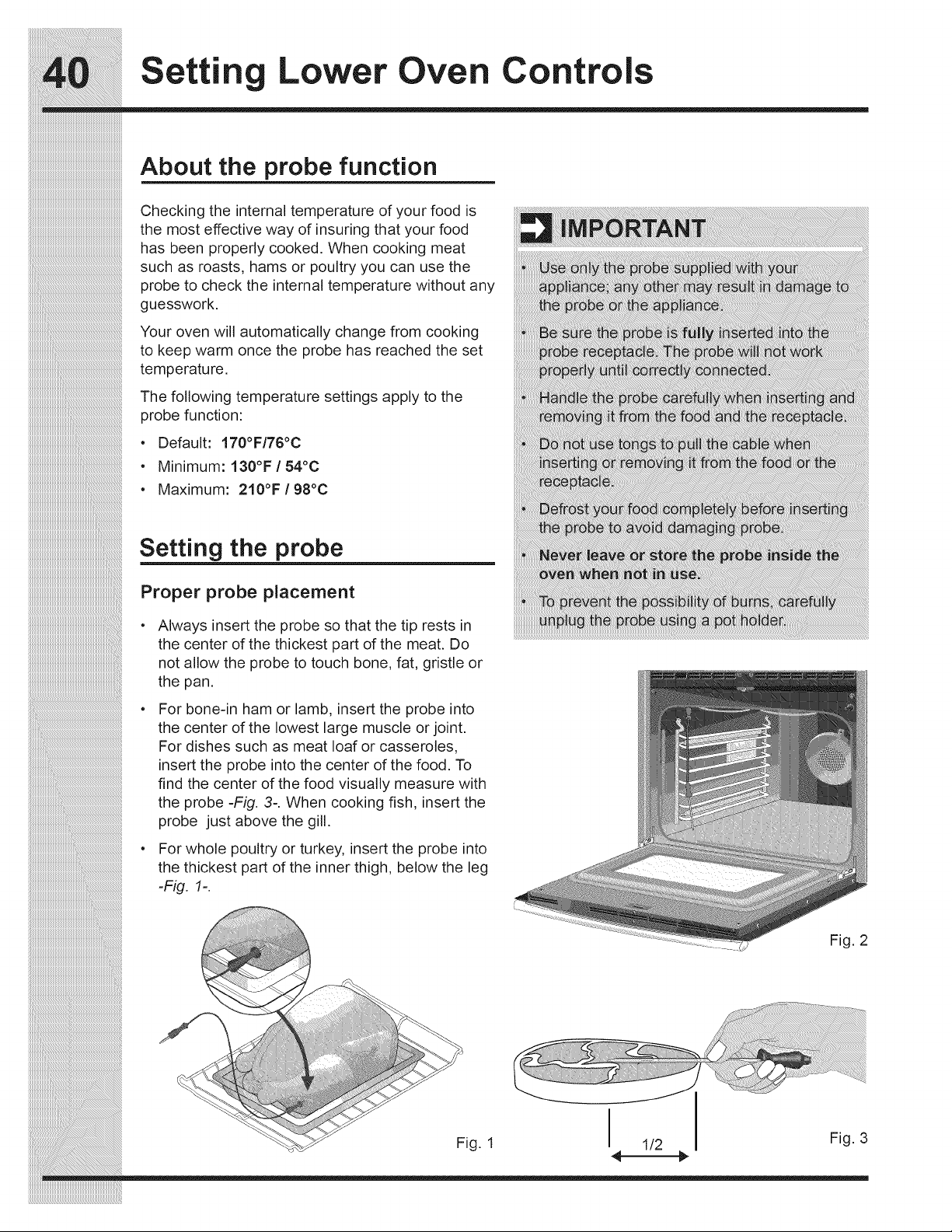
iiiiiiiiiiiiiiiiiiiiiiiiiiiiiiiiiiiiiiiiiiiiiiiiiiiiiiiiiiiiiiiiiiiiiiiiiiiiiii
Settin Lower Oven Controls
About the probe function
Checking the internal temperature of your food is
the most effective way of insuring that your food
has been properly cooked. When cooking meat
such as roasts, hams or poultry you can use the
probe to check the internal temperature without any
guesswork.
Your oven will automatically change from cooking
to keep warm once the probe has reached the set
temperature.
The following temperature settings apply to the
probe function:
• Default: 170°F/76°0
• Minimum: 130°F/54°C
• Maximum: 210°F/98°C
_i_i_i_i_i_i_i_i_i_i_i_i_i_i_i_i_i_i_i_i_i_i_i_i_i_i_i_i_i_i_i_i_i_i_i_i_i_i_i_i_i_i_i_i_i_i_i_i_i_i_i_i_i_i_i_i__!__________________________________________
iiiiiiiiiiiiiiiiiiiiiiiiiiiiiiiiiiiiiiiiiiiiiiiiiiiiiiiiiiiiiiiiiiiiiiiiiiiiiiiiiiiiiiiiiiiiiiiiiiiiiiiiiiiiiiiiiiiiiii_i!iiiiiiiiiiiiiiiiiiiiiiiiiiiiiiiiiiiiiiiiiiiiiiiiiiiii_
iiiiiiiiiiiiiiiiiiiiiiiiiiiiiiiiiiiiiiiiiiiiiiiiiiiiiiiiiiiiiiiiiiiiiiiiiiiiiiiiiiiiiiiiiiiiiiiiiiiiiiiiiiiiiiiiiiiiiiiiiiiii_i!iiiiiiiiiiiiiiiiiiiiiiiiiiiiiiiiiiiiiiiiiiii_
Setting the probe
Proper probe placement
Always insert the probe so that the tip rests in
the center of the thickest part of the meat. Do
not allow the probe to touch bone, fat, gristle or
the pan.
For bone-in ham or lamb, insert the probe into
the center of the lowest large muscle or joint.
For dishes such as meat loaf or casseroles,
insert the probe into the center of the food. To
find the center of the food visually measure with
the probe -Fig. 3-. When cooking fish, insert the
probe just above the gill.
For whole poultry or turkey, insert the probe into
the thickest part of the inner thigh, below the leg
-Fig. 1-.
Fig. 2
Fig. 1
I
1/2
I
Fig. 3
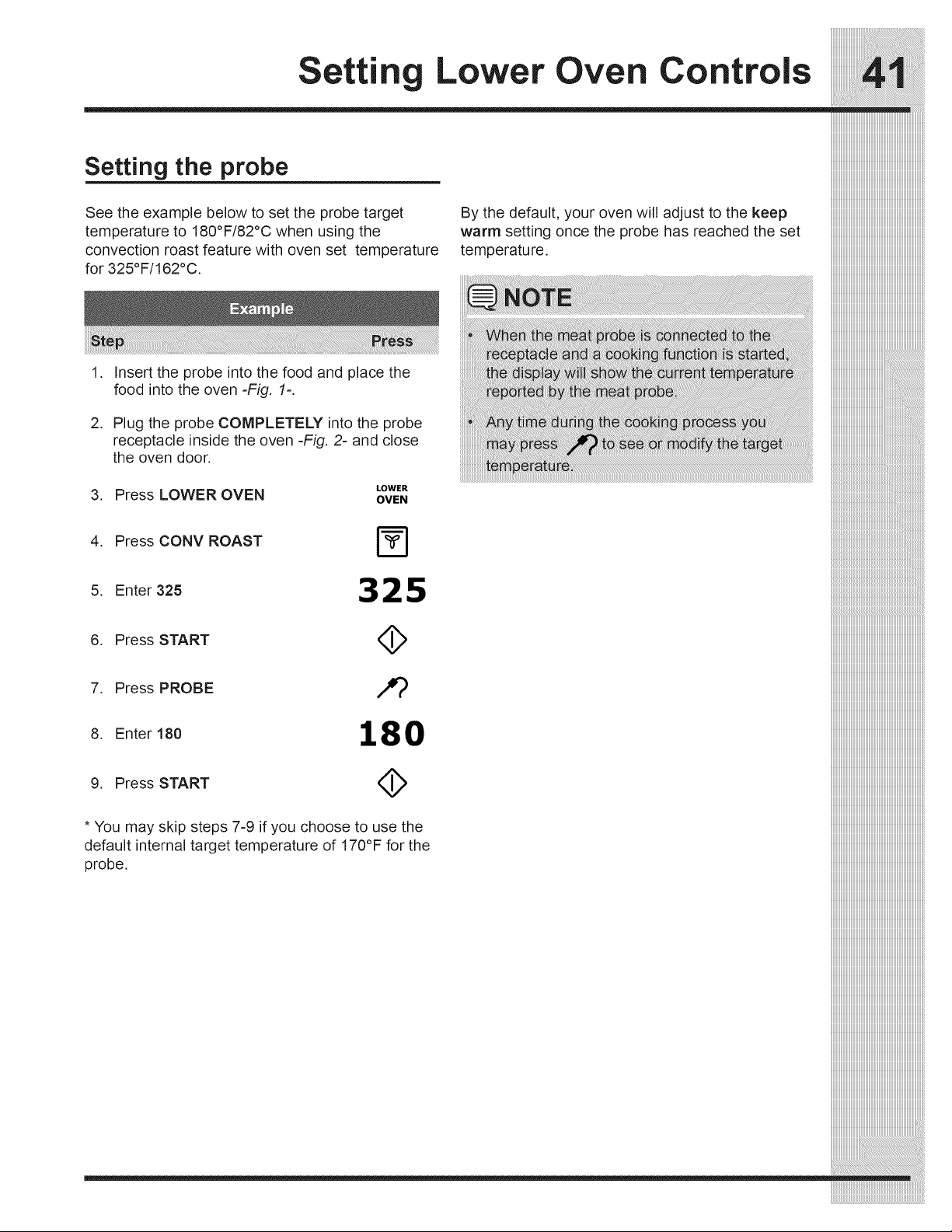
Setting the probe
See the example below to set the probe target
temperature to 180°F/82°C when using the
convection roast feature with oven set temperature
for 325°F/162°C.
1. Insert the probe into the food and place the
food into the oven -Fig. 1=.
By the default, your oven will adjust to the keep
warm setting once the probe has reached the set
temperature.
2. Plug the probe COMPLETELY into the probe
receptacle inside the oven -Fig. 2- and close
the oven door.
LOWER
3. Press LOWER OVEN OVEN
4. Press CONV ROAST
5. Enter 325 3 2 5
6. Press START (_
7. Press PROBE /,_
8. Enter 180 180
9. Press START (_
* You may skip steps 7-9 if you choose to use the
default internal target temperature of 170°F for the
probe.
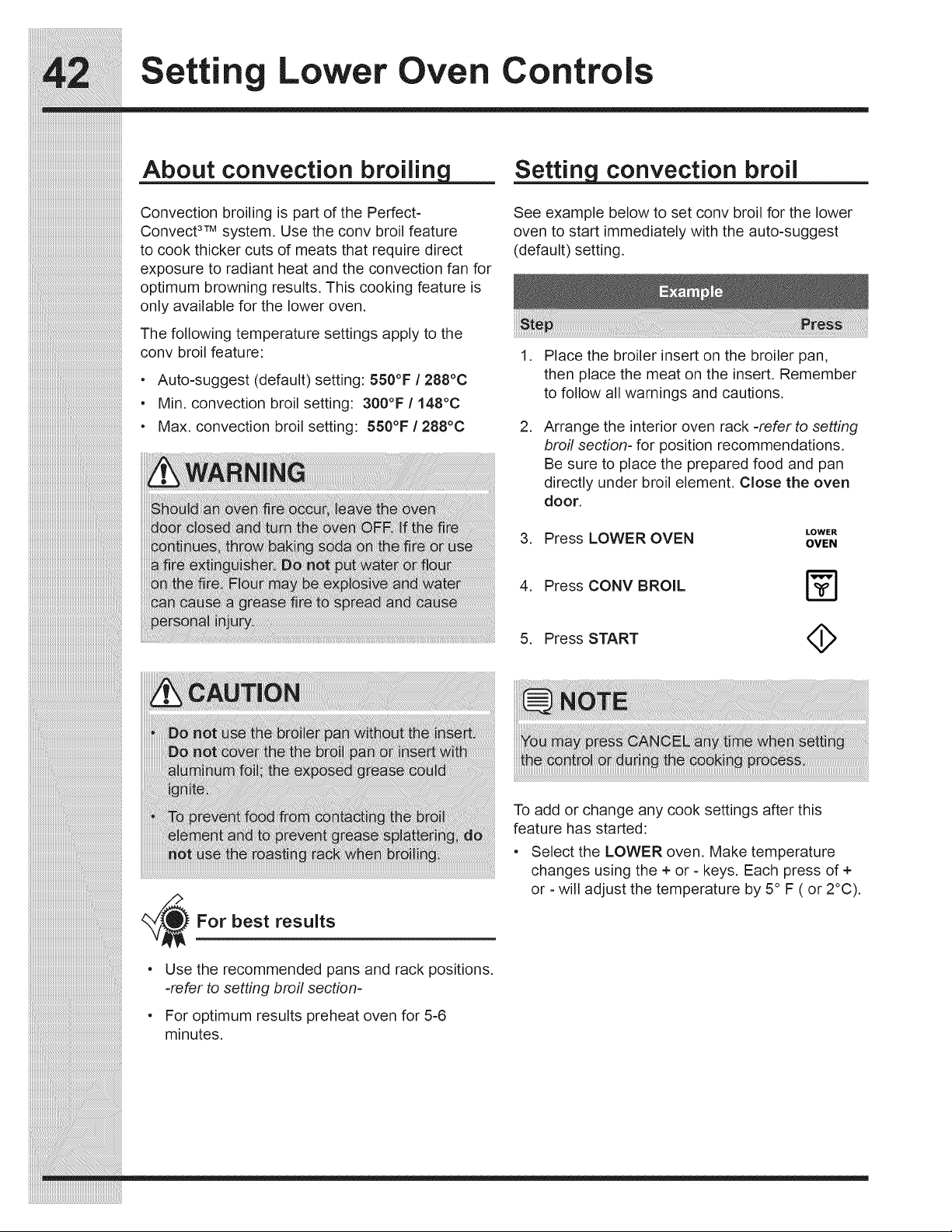
Settin Lower Oven Controls
About convection broilin
Convection broiling is part of the Perfect-
Convect 3TMsystem. Use the conv broil feature
to cook thicker cuts of meats that require direct
exposure to radiant heat and the convection fan for
optimum browning results. This cooking feature is
only available for the lower oven.
The following temperature settings apply to the
conv broil feature:
• Auto-suggest (default) setting: 550°F / 288°C
• Min. convection broil setting: 300°F / 148°C
° Max. convection broil setting: 550°F / 288°C
convection broil
See example below to set conv broil for the lower
oven to start immediately with the auto-suggest
(default) setting.
,
.
Place the broiler insert on the broiler pan,
then place the meat on the insert. Remember
to follow all warnings and cautions.
Arrange the interior oven rack -refer to setting
broil section- for position recommendations.
Be sure to place the prepared food and pan
directly under broil element. Close the oven
door.
LOWER
3. Press LOWER OVEN OVEN
4. Press CONV BROIL
5. Press START <_
For best results
Use the recommended pans and rack positions.
=refer to setting broil section-
For optimum results preheat oven for 5-6
minutes.
To add or change any cook settings after this
feature has started:
° Select the LOWER oven. Make temperature
changes using the + or = keys. Each press of +
or - will adjust the temperature by 5° F ( or 2°C).
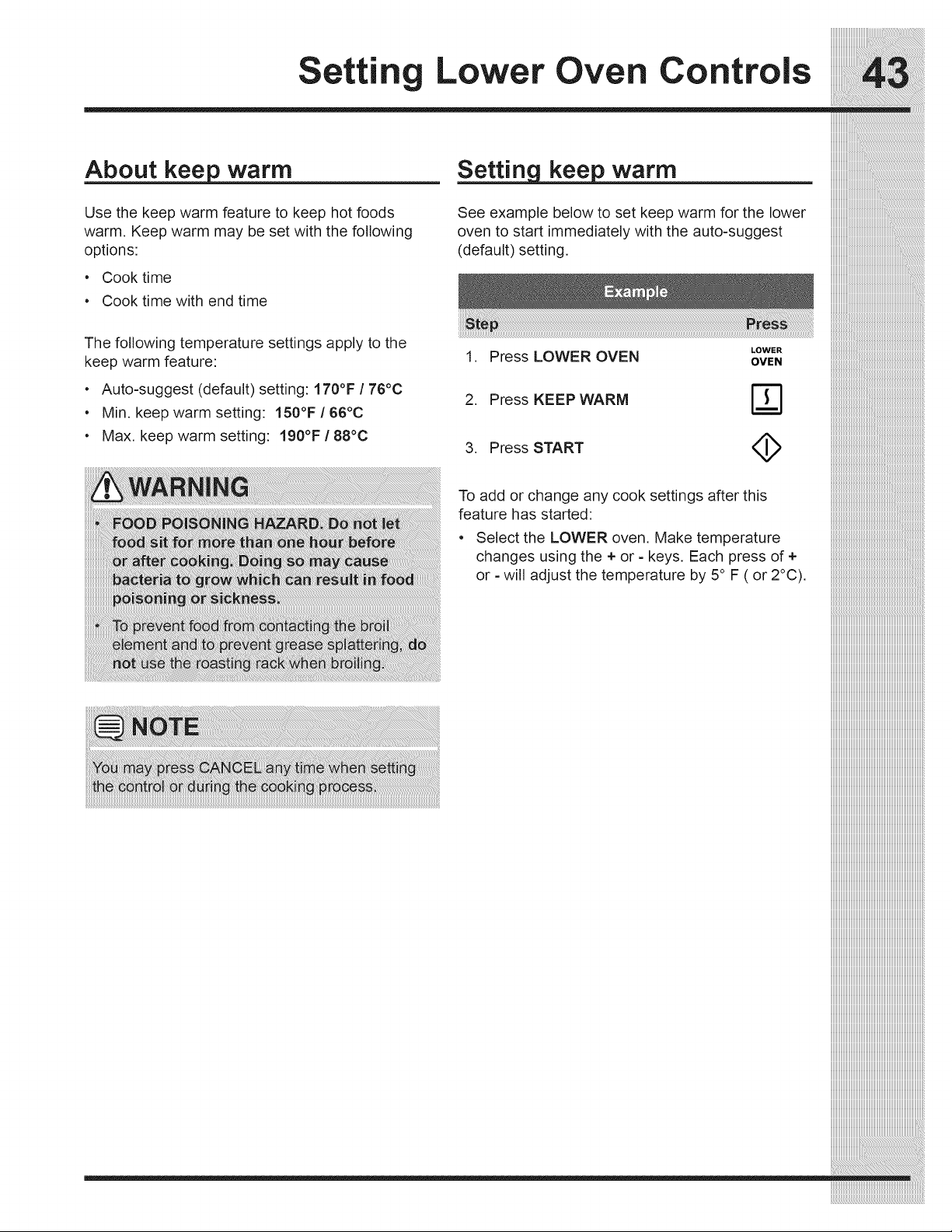
Setting Lower Oven Controls
About keep warm
Use the keep warm feature to keep hot foods
warm. Keep warm may be set with the following
options:
• Cook time
• Cook time with end time
warm
See example below to set keep warm for the lower
oven to start immediately with the auto-suggest
(default) setting.
The following temperature settings apply to the
keep warm feature:
• Auto-suggest (default) setting: 170°F / 76°C
• Min. keep warm setting: 150°F / 66°C
• Max. keep warm setting: 190°F / 88°C
LOWER
1. Press LOWER OVEN OVEN
2. Press KEEPWARM r_
3. Press START
To add or change any cook settings after this
feature has started:
• Select the LOWER oven. Make temperature
changes using the + or - keys. Each press of +
or - will adjust the temperature by 5° F ( or 2°C).
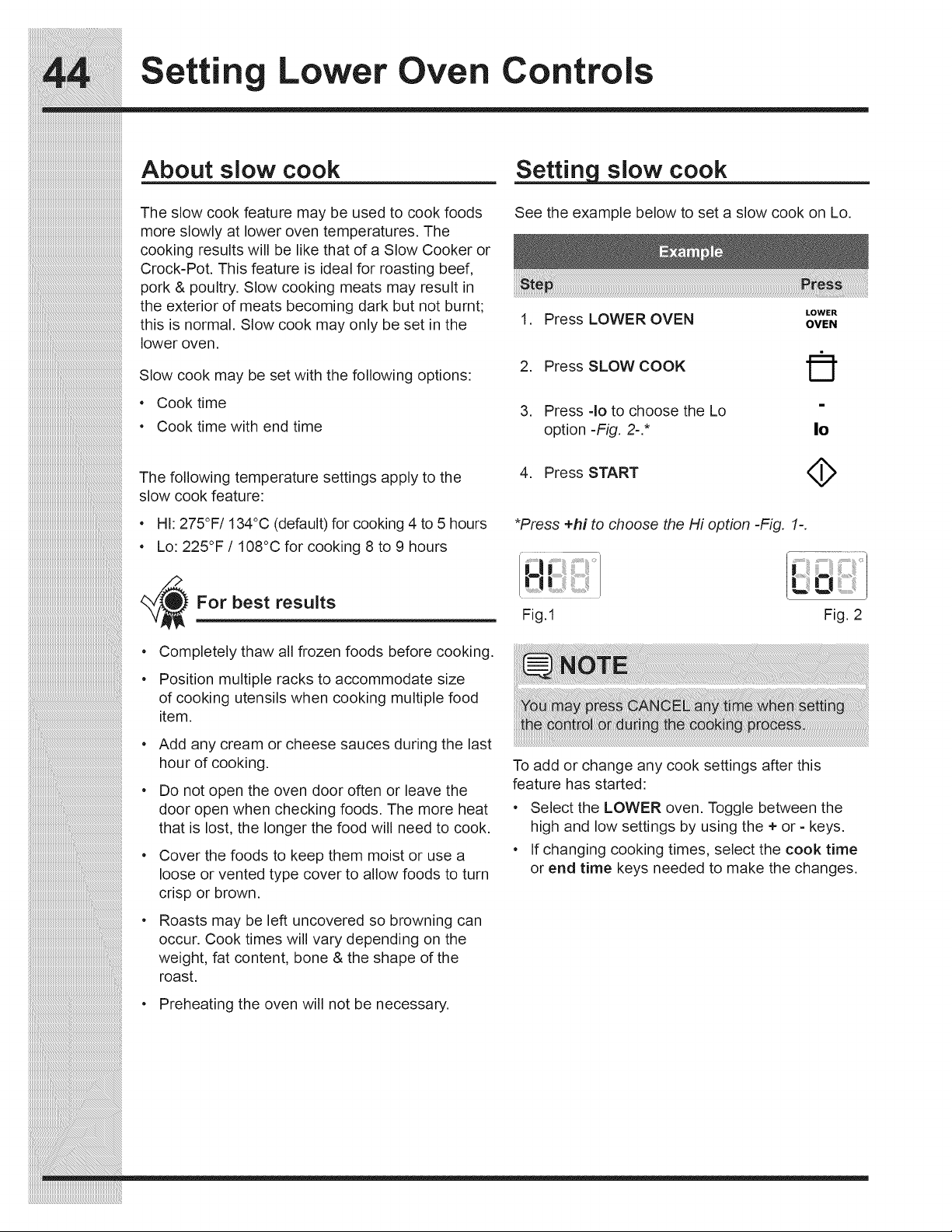
Settin Lower Oven Controls
About slow cook
The slow cook feature may be used to cook foods
more slowly at lower oven temperatures. The
cooking results will be like that of a Slow Cooker or
Crock-Pot. This feature is ideal for roasting beef,
pork & poultry. Slow cooking meats may result in
the exterior of meats becoming dark but not burnt;
this is normal. Slow cook may only be set in the
lower oven.
Slow cook may be set with the following options:
• Cook time
• Cook time with end time
The following temperature settings apply to the
slow cook feature:
• HI: 275°F/134°C (default) for cooking 4 to 5 hours
• Lo: 225°F / 108°C for cooking 8 to 9 hours
For best results
e
e
Completely thaw all frozen foods before cooking.
Position multiple racks to accommodate size
of cooking utensils when cooking multiple food
item.
Add any cream or cheese sauces during the last
hour of cooking.
Do not open the oven door often or leave the
door open when checking foods. The more heat
that is lost, the longer the food will need to cook.
Cover the foods to keep them moist or use a
loose or vented type cover to allow foods to turn
crisp or brown.
Roasts may be left uncovered so browning can
occur. Cook times will vary depending on the
weight, fat content, bone & the shape of the
roast.
• Preheating the oven will not be necessary.
slow cook
See the example below to set a slow cook on Lo.
LOWER
1. Press LOWER OVEN OVEN
2. Press SLOW COOK
, Press =_oto choose the Lo
option-Fig. 2-.*
4. Press START
|O
4>
*Press +hi to choose the Hi option =Fig. 1=.
:_!
Fig.1 Fig. 2
To add or change any cook settings after this
feature has started:
• Select the LOWER oven. Toggle between the
high and low settings by using the + or - keys.
• If changing cooking times, select the cook time
or end time keys needed to make the changes.
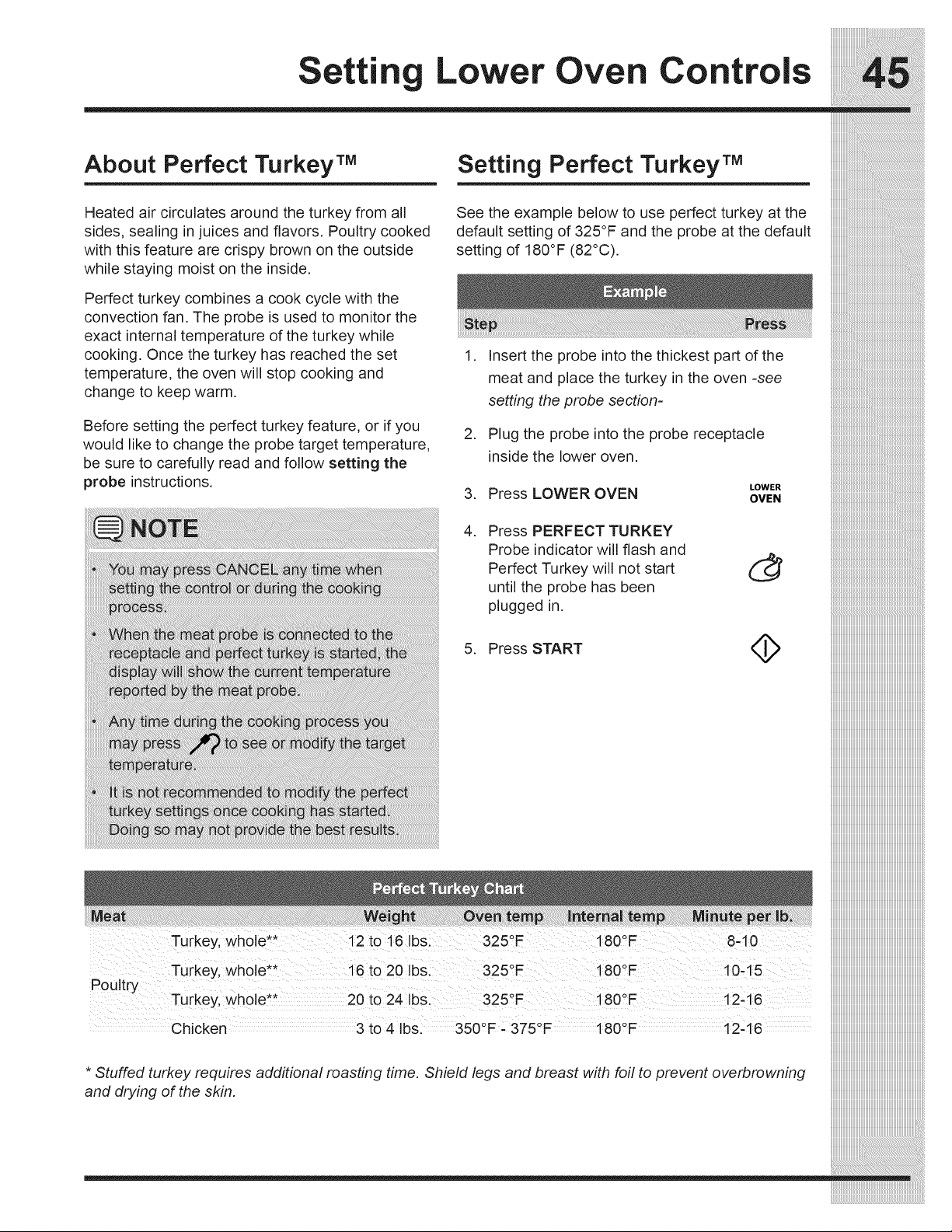
Setting Lower Oven Controls
About Perfect Turkey TM Setting Perfect Turkey TM
Heated air circulates around the turkey from all
sides, sealing in juices and flavors. Poultry cooked
with this feature are crispy brown on the outside
while staying moist on the inside.
Perfect turkey combines a cook cycle with the
convection fan. The probe is used to monitor the
exact internal temperature of the turkey while
cooking. Once the turkey has reached the set
temperature, the oven will stop cooking and
change to keep warm.
Before setting the perfect turkey feature, or if you
would like to change the probe target temperature,
be sure to carefully read and follow setting the
probe instructions.
See the example below to use perfect turkey at the
default setting of 325°F and the probe at the default
setting of 180°F (82°C).
,
,
Insert the probe into the thickest part of the
meat and place the turkey in the oven -see
setting the probe section-
Plug the probe into the probe receptacle
inside the lower oven.
LOWER
3. Press LOWER OVEN OVEN
i Chicken 3 to 4 Ibs. 350°F _ 375°F 180°F 12-16
Stuffed turkey requires additional roasting time. Shield legs and breast with foil to prevent overbrowning
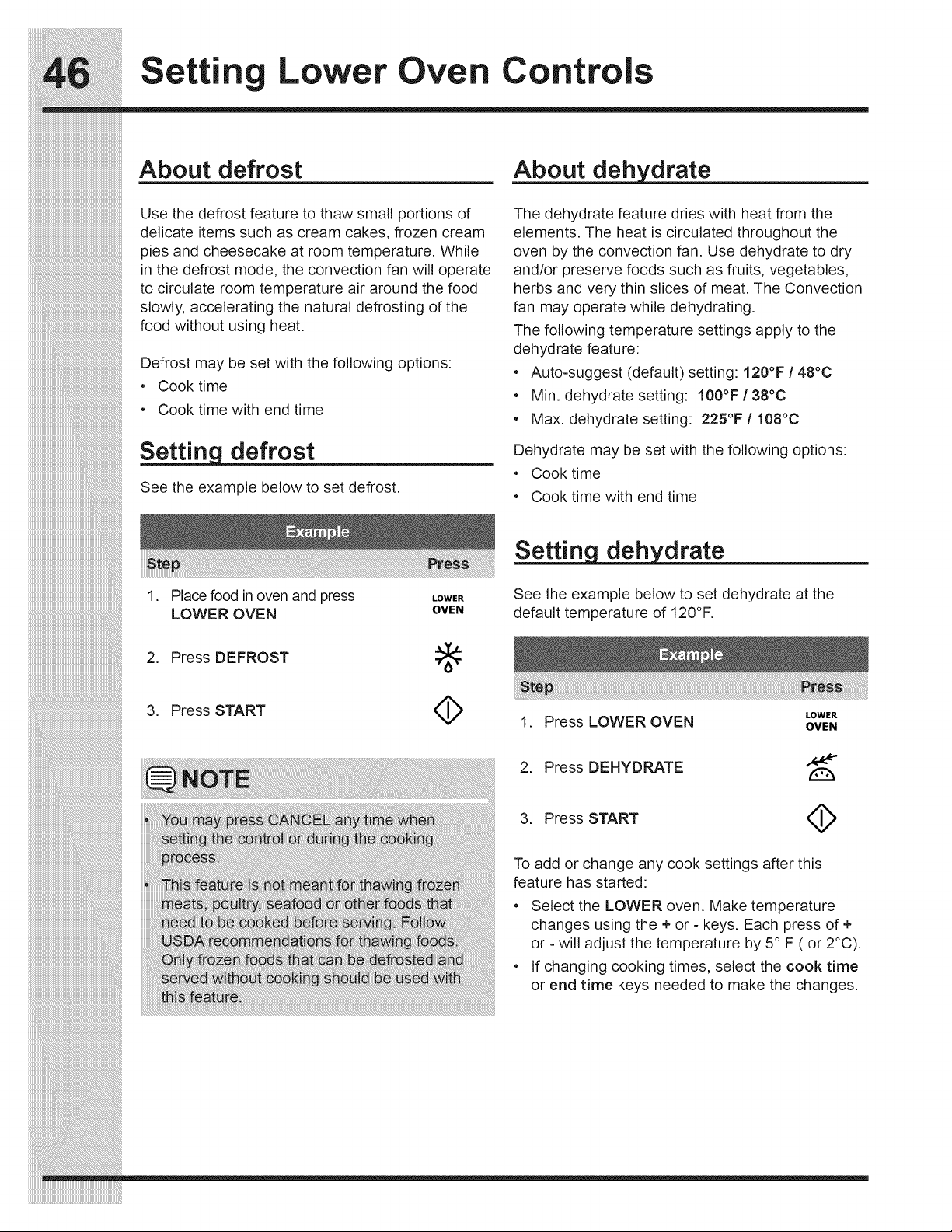
Settin Lower Oven Controls
iiiiiiiiiiiiiiiiiiiiiiiiiiiiiiiiiiiiiiiiiiiiiiiiiiiiiiiiiiiiiiiiiiiiiiiiiiiiiii
iiiiiiiiiiiiiiiiiiiiiiiiiiiiiiiiiiiiiiiiiiiiiiiiiiiiiiiiiiiiiiiiiiiiiiiiiiiiiii
About defrost
Use the defrost feature to thaw small portions of
delicate items such as cream cakes, frozen cream
pies and cheesecake at room temperature. While
in the defrost mode, the convection fan will operate
to circulate room temperature air around the food
slowly, accelerating the natural defrosting of the
food without using heat.
Defrost may be set with the following options:
• Cook time
• Cook time with end time
Setting defrost
See the example below to set defrost.
drate
The dehydrate feature dries with heat from the
elements. The heat is circulated throughout the
oven by the convection fan. Use dehydrate to dry
and/or preserve foods such as fruits, vegetables,
herbs and very thin slices of meat. The Convection
fan may operate while dehydrating.
The following temperature settings apply to the
dehydrate feature:
• Auto-suggest (default) setting: 120°F /48°C
• Min. dehydrate setting: 100°F / 38°C
• Max. dehydrate setting: 225°F / 108°C
Dehydrate may be set with the following options:
• Cook time
• Cook time with end time
1. Place food in oven and press LOWER
LOWER OVEN OVEN
2. Press DEFROST :_:
3. Press START <_
drate
See the example below to set dehydrate at the
default temperature of 120°F.
LOWER
1. Press LOWER OVEN OVEN
2. Press DEHYDRATE
3. Press START <:_
To add or change any cook settings after this
feature has started:
• Select the LOWER oven. Make temperature
changes using the + or - keys. Each press of +
or - will adjust the temperature by 5° F ( or 2°C).
• If changing cooking times, select the cook time
or end time keys needed to make the changes.
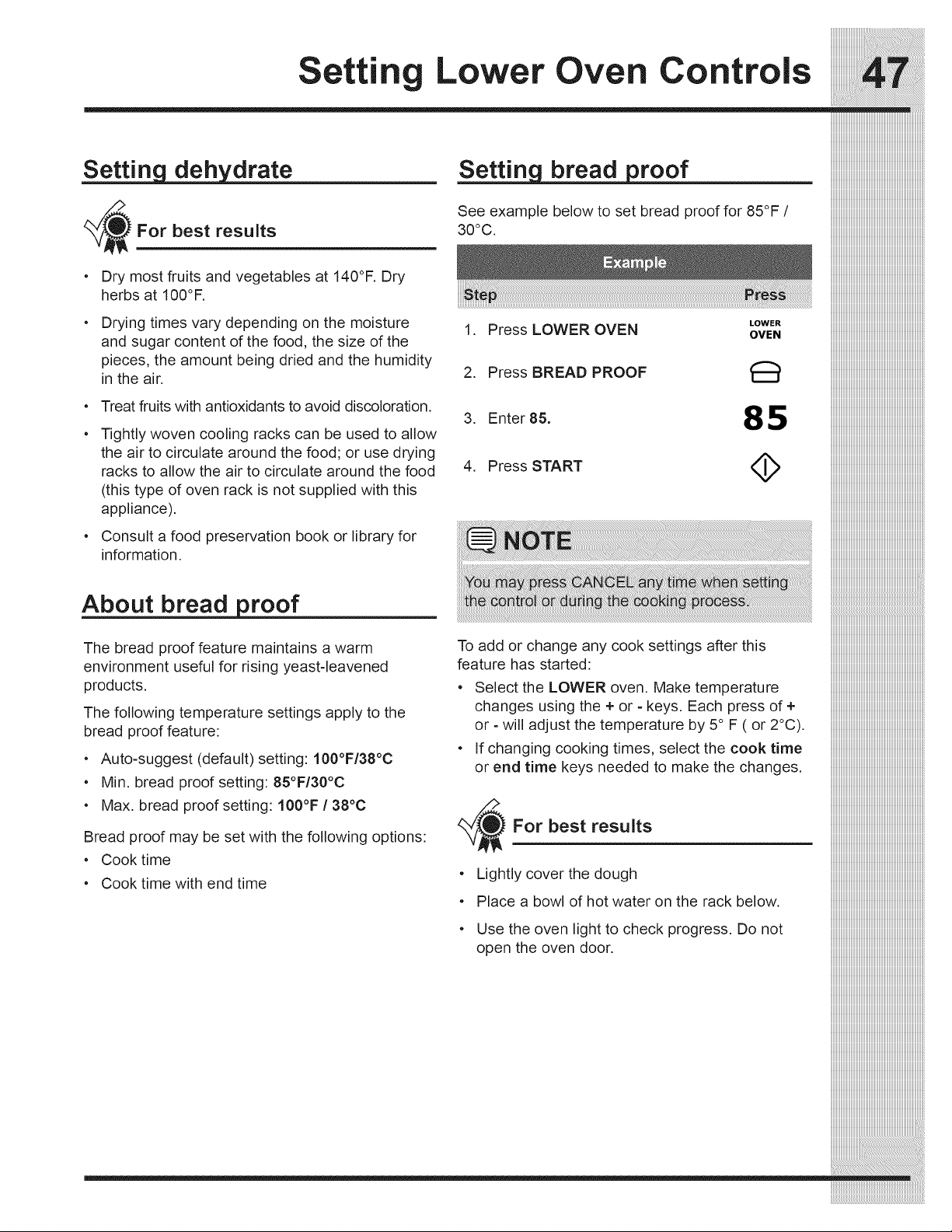
drate
_/_For best results
• Dry most fruits and vegetables at 140°F. Dry
herbs at 100°F.
Drying times vary depending on the moisture
and sugar content of the food, the size of the
pieces, the amount being dried and the humidity
in the air.
• Treat fruits with antioxidants to avoid discoloration.
Tightly woven cooling racks can be used to allow
the air to circulate around the food; or use drying
racks to allow the air to circulate around the food
(this type of oven rack is not supplied with this
appliance).
Consult a food preservation book or library for
information.
About bread proof
The bread proof feature maintains a warm
environment useful for rising yeast-leavened
products.
The following temperature settings apply to the
bread proof feature:
• Auto-suggest (default) setting: 100°F/38°C
• Min. bread proof setting: 85°F/30°C
• Max. bread proof setting: 100°F/38°C
Bread proof may be set with the following options:
• Cook time
• Cook time with end time
bread proof
See example below to set bread proof for 85°F /
30°C.
LOWER
1. Press LOWER OVEN OVEN
2. Press BREAD PROOF
3. Enter 85. 85
4. Press START <_
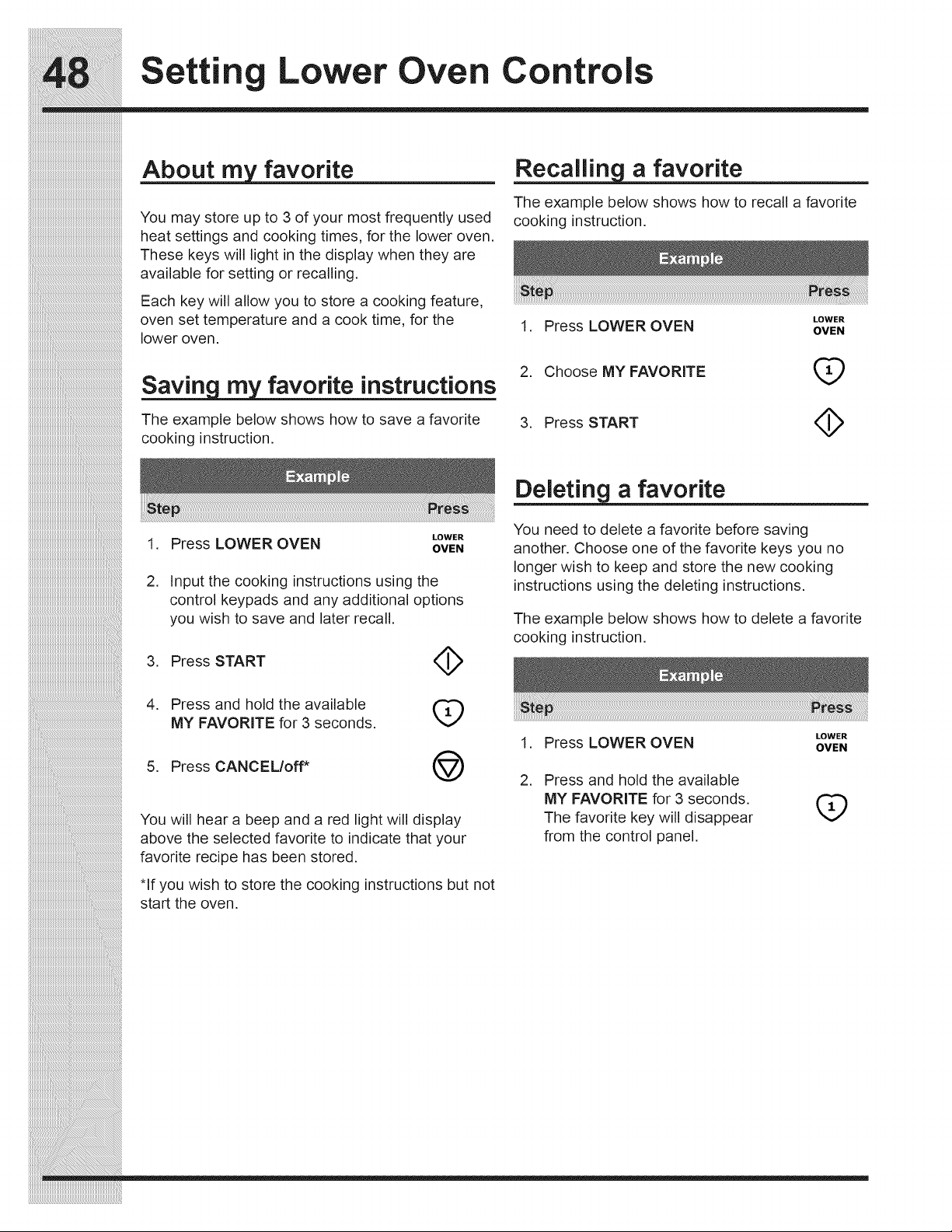
Settin Lower Oven Controls
iiiiiiiiiiiiiiiiiiiiiiiiiiiiiiiiiiiiiiiiiiiiiiiiiiiiiiiiiiiiiiiiiiiiiiiiiiiiiii
favorite
You may store up to 3 of your most frequently used
heat settings and cooking times, for the lower oven.
These keys will light in the display when they are
available for setting or recalling.
Each key will allow you to store a cooking feature,
oven set temperature and a cook time, for the
lower oven.
favorite instructions
The example below shows how to save a favorite
cooking instruction.
a favorite
The example below shows how to recall a favorite
cooking instruction.
LOWER
1. Press LOWER OVEN OVEN
2. Choose MY FAVORITE (_
3. Press START <_
_i_i_i_i_i_i_i_i_i_i_i_i_i_i_i_i_i_i_i_i_i_i_i_i_i_i_i_i_i_i_i_i_i_i_i_i_i_i_i_i_i_i_i_i_i_i_i_i_i_i_i_i_i_i_i_i__!__________________________________________
iiiiiiiiiiiiiiiiiiiiiiiiiiiiiiiiiiiiiiiiiiiiiiiiiiiiiiiiiiiiiiiiiiiiiiiiiiiiiiiiiiiiiiiiiiiiiiiiiiiiiiiiiiiiiiiiiiiiiii_i!iiiiiiiiiiiiiiiiiiiiiiiiiiiiiiiiiiiiiiiiiiiiiiiiiiiii_
iiiiiiiiiiiiiiiiiiiiiiiiiiiiiiiiiiiiiiiiiiiiiiiiiiiiiiiiiiiiiiiiiiiiiiiiiiiiiiiiiiiiiiiiiiiiiiiiiiiiiiiiiiiiiiiiiiiiiiiiiiiii_i!iiiiiiiiiiiiiiiiiiiiiiiiiiiiiiiiiiiiiiiiiiii_
LOWER
1. Press LOWER OVEN OVEN
2. Input the cooking instructions using the
control keypads and any additional options
you wish to save and later recall.
3. Press START
4. Press and hold the available
MY FAVORITE for 3 seconds.
5. Press CANCEL/off*
4>
q;)
@
You will hear a beep and a red light will display
above the selected favorite to indicate that your
favorite recipe has been stored.
*If you wish to store the cooking instructions but not
start the oven.
Deleting a favorite
You need to delete a favorite before saving
another. Choose one of the favorite keys you no
longer wish to keep and store the new cooking
instructions using the deleting instructions.
The example below shows how to delete a favorite
cooking instruction.
LOWER
1. Press LOWER OVEN OVEN
2. Press and hold the available
MY FAVORITE for 3 seconds.
The favorite key will disappear
from the control panel.
q;)
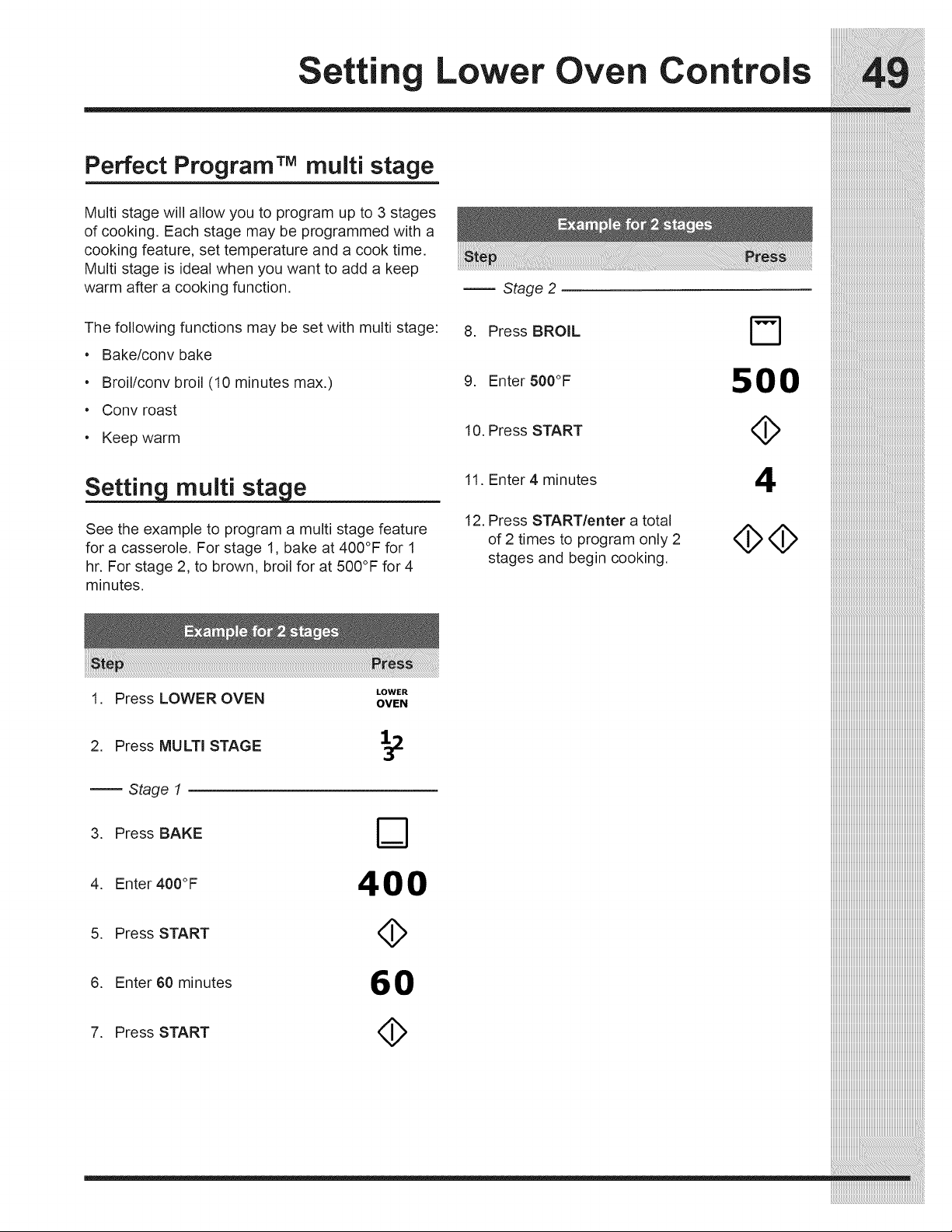
Setting Lower Oven Controls
Perfect ProgramTM multi stage
Multi stage will allow you to program up to 3 stages
of cooking. Each stage may be programmed with a
cooking feature, set temperature and a cook time.
Multi stage is ideal when you want to add a keep
warm after a cooking function.
The following functions may be set with multi stage:
• Bake/conv bake
• Broil/conv broil (10 minutes max.)
•Conv roast
• Keep warm
Settin multi sta e
See the example to program a multi stage feature
for a casserole. For stage 1, bake at 400°F for 1
hr. For stage 2, to brown, broil for at 500°F for 4
minutes.
LOWER
1. Press LOWER OVEN OVEN
2. Press MULTi STAGE _2
Stage 1
3. Press BAKE F'_
4. Enter 400°F 400
5. Press START <_
6. Enter 60 minutes 60
7. Press START
Stage 2
8. Press BROIL
9. Enter 500°F
10. Press START
11. Enter 4 minutes
12. Press START/enter a total
of 2 times to program only 2
stages and begin cooking.
500
4
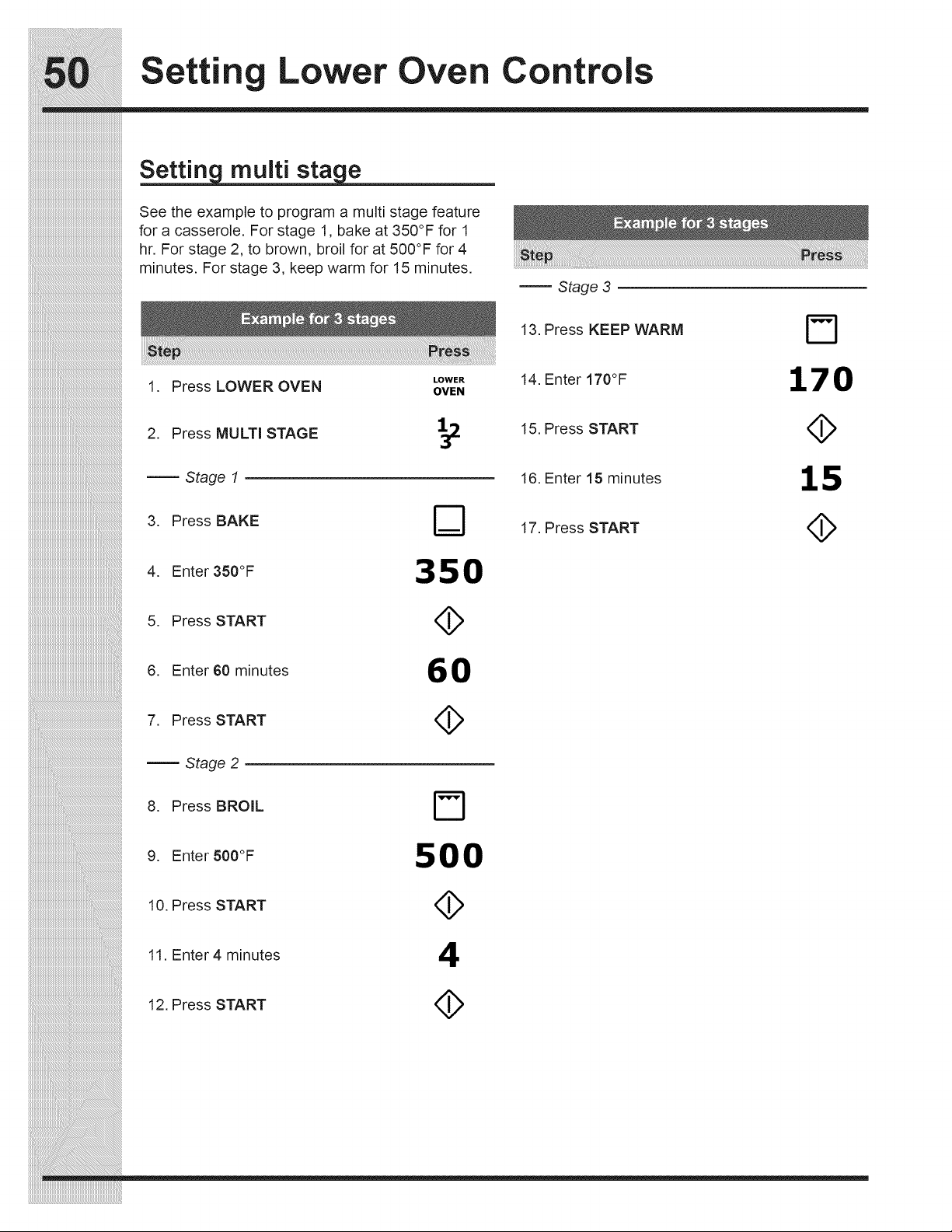
Settin Lower Oven Controls
iiiiiiiiiiiiiiiiiiiiiiiiiiiiiiiiiiiiiiiiiiiiiiiiiiiiiiiiiiiiiiiiiiiiiiiiiiiiiii
iiiiiiiiiiiiiiiiiiiiiiiiiiiiiiiiiiiiiiiiiiiiiiiiiiiiiiiiiiiiiiiiiiiiiiiiiiiiiii
Setting multi stage
See the example to program a multi stage feature
for a casserole. For stage 1, bake at 350°F for 1
hr. For stage 2, to brown, broil for at 500°F for 4
minutes. For stage 3, keep warm for 15 minutes.
_i_i_i_i_i_i_i_i_i_i_i_i_i_i_i_i_i_i_i_i_i_i_i_i_i_i_i_i_i_i_i_i_i_i_i_i_i_i_i_i_i_i_i_i_i_i_i_i_i_i_i_i_i_i_i_i__!__________________________________________
iiiiiiiiiiiiiiiiiiiiiiiiiiiiiiiiiiiiiiiiiiiiiiiiiiiiiiiiiiiiiiiiiiiiiiiiiiiiiiiiiiiiiiiiiiiiiiiiiiiiiiiiiiiiiiiiiiiiiii_i!iiiiiiiiiiiiiiiiiiiiiiiiiiiiiiiiiiiiiiiiiiiiiiiiiiiii_
iiiiiiiiiiiiiiiiiiiiiiiiiiiiiiiiiiiiiiiiiiiiiiiiiiiiiiiiiiiiiiiiiiiiiiiiiiiiiiiiiiiiiiiiiiiiiiiiiiiiiiiiiiiiiiiiiiiiiiiiiiiii_i!iiiiiiiiiiiiiiiiiiiiiiiiiiiiiiiiiiiiiiiiiiii_
LOWER
1. Press LOWER OVEN OVEN
2. Press MULTi STAGE _.
Stage 1
3. Press BAKE
4. Enter350°F
5. Press START
6. Enter 60 minutes
7. Press START
Stage 2
8. Press BROIL
9. EnterSOO°F
10. Press START
11. Enter 4 minutes
350
6O
500
4
Stage 3
13. Press KEEP WARM
14. Enter 170°F
15. Press START
16. Enter 15 minutes
17. Press START
170
15
12. Press START
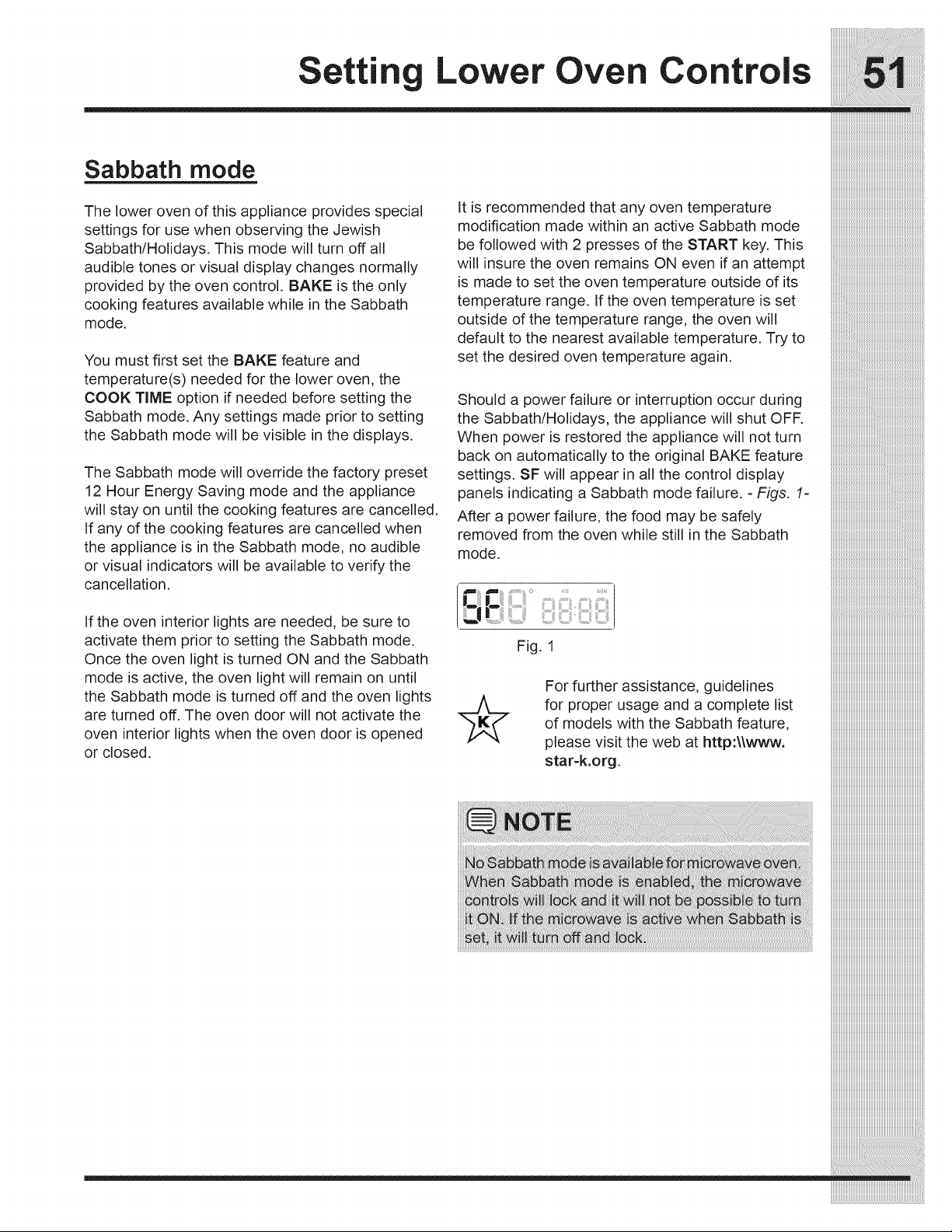
Setting Lower Oven Controls
Sabbath mode
The lower oven of this appliance provides special It is recommended that any oven temperature
settings for use when observing the Jewish modification made within an active Sabbath mode
Sabbath/Holidays. This mode will turn off all be followed with 2 presses of the START key. This
audible tones or visual display changes normally
provided by the oven control. BAKE is the only
cooking features available while in the Sabbath
mode.
You must first set the BAKE feature and
temperature(s) needed for the lower oven, the
COOK TIME option if needed before setting the
Sabbath mode. Any settings made prior to setting
the Sabbath mode will be visible in the displays.
The Sabbath mode will override the factory preset
12 Hour Energy Saving mode and the appliance
will stay on until the cooking features are cancelled.
If any of the cooking features are cancelled when
the appliance is in the Sabbath mode, no audible
or visual indicators will be available to verify the
cancellation.
If the oven interior lights are needed, be sure to
activate them prior to setting the Sabbath mode.
Once the oven light is turned ON and the Sabbath
mode is active, the oven light will remain on until
the Sabbath mode is turned off and the oven lights
are turned off. The oven door will not activate the
oven interior lights when the oven door is opened
or closed.
will insure the oven remains ON even if an attempt
is made to set the oven temperature outside of its
temperature range. If the oven temperature is set
outside of the temperature range, the oven will
default to the nearest available temperature. Try to
set the desired oven temperature again.
Should a power failure or interruption occur during
the Sabbath/Holidays, the appliance will shut OFF.
When power is restored the appliance will not turn
back on automatically to the original BAKE feature
settings. SF will appear in all the control display
panels indicating a Sabbath mode failure. =Figs. 1=
After a power failure, the food may be safely
removed from the oven while still in the Sabbath
mode.
_! I ......
Fig. 1
For further assistance, guidelines
for proper usage and a complete list
of models with the Sabbath feature,
please visit the web at http:\\www.
star-k.org.
iiiiiiiiiiiiiiiiiiiiiiiiiiiiiiiiiiiiiiiiiiiiiiiiiiiiiiiiiiiiiiiiiiiiiiiiiiiiiiii_
iiiiiiiiiiiiiiiiiiiiiiiiiiiiiiiiiiiiiiiiiiiiiiiiiiiiiiiiiiiiiiiiiiiiiiiiiiiiiiii__
________________________________________________________________________________
__
iiiiiiiiiiiiiiiiiiiiiiiiiiiiiiiiiiiiiiiiiiiiiiiiiiiiiiiiiiiiiiiiiiiiiiiiiiiiiiii_
iiiiiiiiiiiiiiiiiiiiiiiiiiiiiiiiiiiiiiiiiiiiiiiiiiiiiiiiiiiiiiiiiiiiiiiiiiiiiiii__
________________________________________________________________________________
__
iiiiiiiiiiiiiiiiiiiiiiiiiiiiiiiiiiiiiiiiiiiiiiiiiiiiiiiiiiiiiiiiiiiiiiiiiiiiiiii_
iiiiiiiiiiiiiiiiiiiiiiiiiiiiiiiiiiiiiiiiiiiiiiiiiiiiiiiiiiiiiiiiiiiiiiiiiiiiiiii__
________________________________________________________________________________
iiiiiii_iiiiiiiiiiiiiiiiiiiiiiiiiiiiiiiiiiiiiiiiiiiiiiiiiiiiiiiiiiiiiiiiiiiiiiii
iiiiiiiiiiiiiiiiiiiiiiiiii_iiiiiiiiiiiiiiiiiiiiiiiiiiiiiiiiiiiiiiiiiiiiiiiiiiiiii_
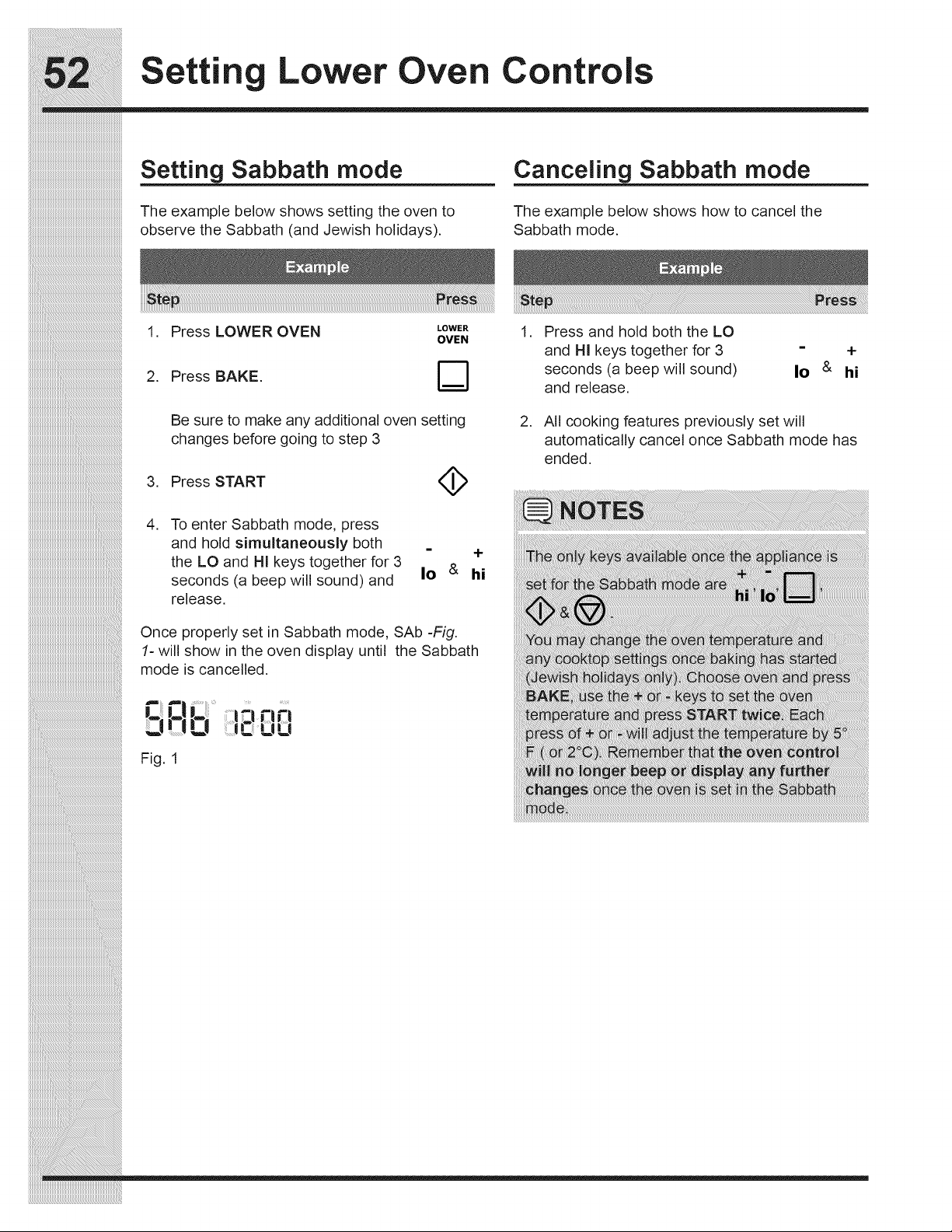
Settin Lower Oven Controls
Setting Sabbath mode
The example below shows setting the oven to
observe the Sabbath (and Jewish holidays).
Canceling Sabbath mode
The example below shows how to cancel the
Sabbath mode.
_i_i_i_i_i_i_i_i_i_i_i_i_i_i_i_i_i_i_i_i_i_i_i_i_i_i_i_i_i_i_i_i_i_i_i_i_i_i_i_i_i_i_i_i_i_i_i_i_i_i_i_i_i_i_i_i_!_
iiiiiiiiiiiiiiiiiiiiiiiiiiiiiiiiiiiiiiiiiiiiiiiiiiiiiiiiiiiiiiiiiiiiiiiiiiiiiiiiiiiiiiiiiiiiiiiiiiiiiiiiiiiiiiiiiiiiiii_i!iiiiiiiiiiiiiiiiiiiiiiiiiiiiiiiiiiiiiiiiiiiiiiiiiiiii_
iiiiiiiiiiiiiiiiiiiiiiiiiiiiiiiiiiiiiiiiiiiiiiiiiiiiiiiiiiiiiiiiiiiiiiiiiiiiiiiiiiiiiiiiiiiiiiiiiiiiiiiiiiiiiiiiiiiiiiiiiiiii_i!iiiiiiiiiiiiiiiiiiiiiiiiiiiiiiiiiiiiiiiiiiii_
1. Press LOWER OVEN ,OWE.
OVEN
2. Press BAKE. D
Be sure to make any additional oven setting
changes before going to step 3
3. Press START (_
.
To enter Sabbath mode, press
and hold simultaneously both
the LO and HI keys together for 3
seconds (a beep will sound) and
release.
i
Io &
Once properly set in Sabbath mode, SAb -Fig.
1- will show in the oven display until the Sabbath
mode is cancelled.
Q __ n n
,:! O LtLt
Fig. 1
.
.
Press and hold both the LO
and HI keys together for 3
seconds (a beep will sound)
and release.
- +
Io & hi
All cooking features previously set will
automatically cancel once Sabbath mode has
ended.
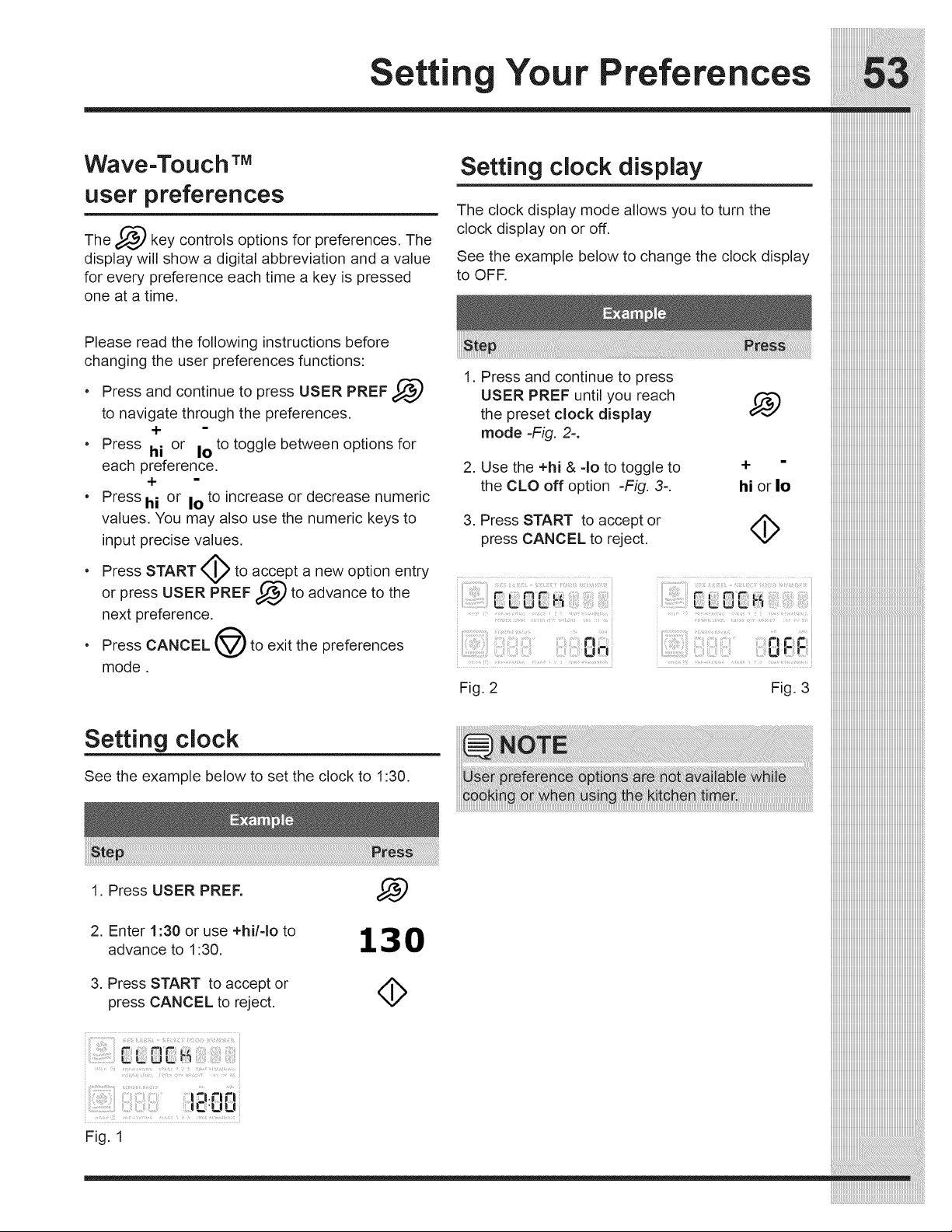
Wave-Toll ch TM
llser preferences
The _/,_d key controls options for preferences. The
display will show a digital abbreviation and a value
for every preference each time a key is pressed
one at a time.
Setting clock display
The clock display mode allows you to turn the
clock display on or off.
See the example below to change the clock display
to OFF.
Please read the following instructions before
changing the user preferences functions:
• Press and continue to press USER PREF _-_
to navigate through the preferences.
+
• Press hi or Io to toggle between options for
each preference.
+
• Press hi or Io to increase or decrease numeric
values. You may also use the numeric keys to
input precise values.
• Press START I_ to accept_a new option entry
USER PREF 1_,,,) to advance to the
or
press
next preference.
• Press CANCEL @ to exit the preferences
mode.
Setting clock
See the example below to set the clock to 1:30.
1. Press USER PREF.
2. Enter 1:30 or use +hi/-Io to
advance to 1:30.
3. Press START to accept or
press CANCEL to reject.
130
::::::::::::::::::::::::::::::::::::::::::::::::::::::::::::::::::::::::::::::::
USER PREF until you reach i_ iiiiiiiiiiiiiiiiiiiiiiiiiiiiiiiiiiiiiiiiiiiiiiiiiiiiiiiiiiiiiiiiiiiiiiiiiiiiiiii
thepresetclockdisplay iiiiiiiiiiiiiiiiiiiiiiiiiiiiiiiiiiiiiiiiiiiiiiiiiiiiiiiiiiiiiiiiiiiiiiiiiiiiiiii
mode-Fig. 2-. iiiiiiiiiiiiiiiiiiiiiiiiiiiiiiiiiiiiiiiiiiiiiiiiiiiiiiiiiiiiiiiiiiiiiiiiiiiiiiii
2. Use the +hi &-Iototoggleto + " iiiiiiiiiiiiiiiiiiiiiiiiiiiiiiiiiiiiiiiiiiiiiiiiiiiiiiiiiiiiiiiiiiiiiiiiiiiiiiii
theCLOoffoption -Fig. 3-. hiorlo iiiiiiiiiiiiiiiiiiiiiiiiiiiiiiiiiiiiiiiiiiiiiiiiiiiiiiiiiiiiiiiiiiiiiiiiiiiiiiii
iiiiiiiiiiiiiiiiiiiiiiiiiiiiiiiiiiiiiiiiiiiiiiiiiiiiiiiiiiiiiiiiiiiiiiiiiiiiiiii
3. Press START to accept or
press CANCEL to reject, iiiiiiiiiiiiiiiiiiiiiiiiiiiiiiiiiiiiiiiiiiiiiiiiiiiiiiiiiiiiiiiiiiiiiiiiiiiiiiii
1. Press and continue to press
Fig. 2
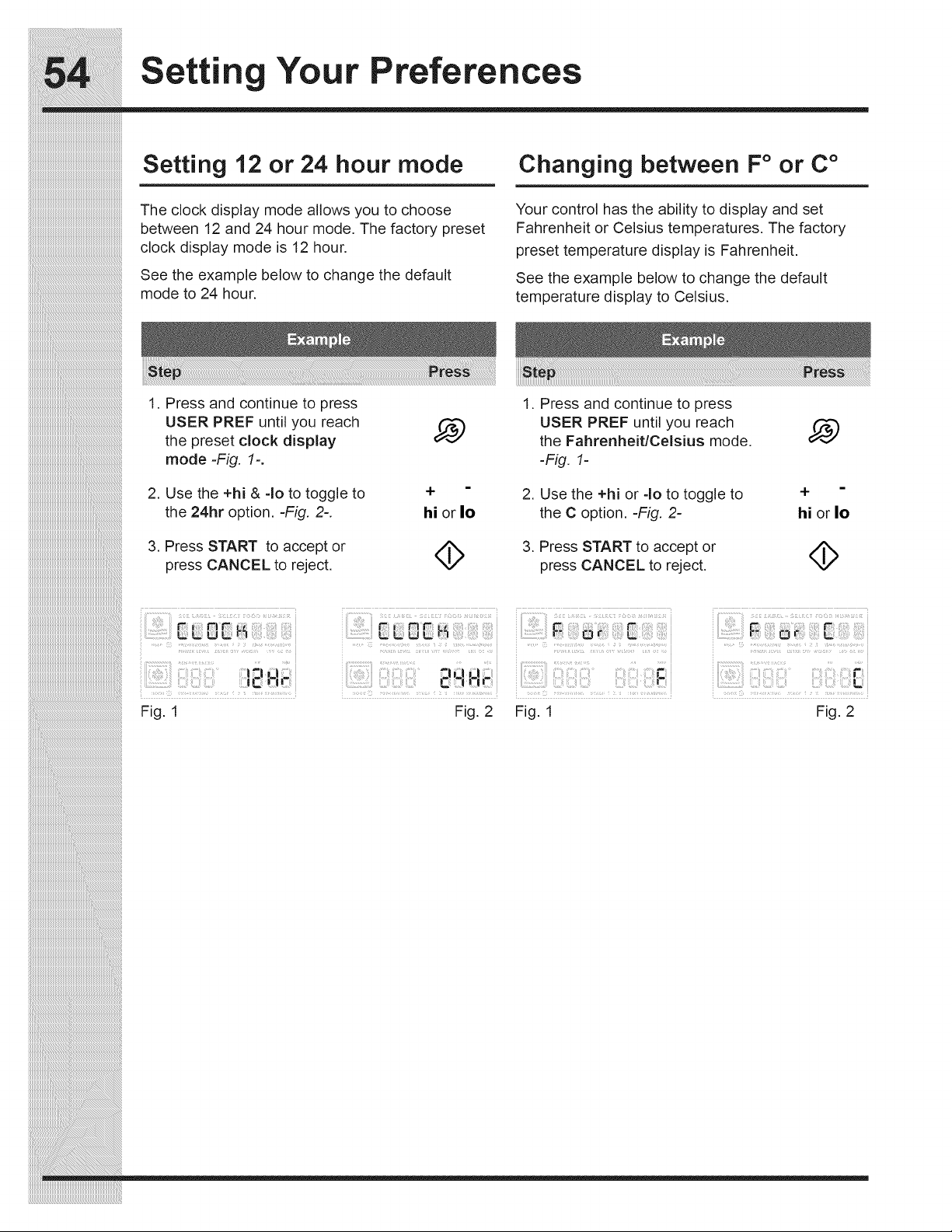
Settin Your Preferences
iiiiiiiiiiiiiiiiiiiiiiiiiiiiiiiiiiiiiiiiiiiiiiiiiiiiiiiiiiiiiiiiiiiiiiiiiiiiiii
Setting 12 or 24 hour mode
The clock display mode allows you to choose
between 12 and 24 hour mode. The factory preset
clock display mode is 12 hour.
See the example below to change the default
mode to 24 hour.
1. Press and continue to press
Changing between F° or C °
Your control has the ability to display and set
Fahrenheit or Celsius temperatures. The factory
preset temperature display is Fahrenheit,
See the example below to change the default
temperature display to Celsius.
USER PREF until you reach
the preset clock display
mode =Fig. 1-.
2. Use the +hi & -Io to toggle to
the 24hr option. =Fig. 2-.
3. Press START to accept or
press CANCEL to reject.
hi or Io
4>
1. Press and continue to press
USER PREF until you reach
the Fahrenheit/Celsius mode.
-Fig. 1-
2. Use the +hi or 40 to toggle to
the C option. -Fig. 2-
3. Press START to accept or
press CANCEL to reject.
+
hi or Io
4>
_i_i_i_i_i_i_i_i_i_i_i_i_i_i_i_i_i_i_i_i_i_i_i_i_i_i_i_i_i_i_i_i_i_i_i_i_i_i_i_i_i_i_i_i_i_i_i_i_i_i_i_i_i_i_i_i_!_
iiiiiiiiiiiiiiiiiiiiiiiiiiiiiiiiiiiiiiiiiiiiiiiiiiiiiiiiiiiiiiiiiiiiiiiiiiiiiiiiiiiiiiiiiiiiiiiiiiiiiiiiiiiiiiiiiiiiiii_i!iiiiiiiiiiiiiiiiiiiiiiiiiiiiiiiiiiiiiiiiiiiiiiiiiiiii_
iiiiiiiiiiiiiiiiiiiiiiiiiiiiiiiiiiiiiiiiiiiiiiiiiiiiiiiiiiiiiiiiiiiiiiiiiiiiiiiiiiiiiiiiiiiiiiiiiiiiiiiiiiiiiiiiiiiiiiiiiiiii_i!iiiiiiiiiiiiiiiiiiiiiiiiiiiiiiiiiiiiiiiiiiii_
I _ i'i
Fig. 1
_: LJ _ _
:lil
-ii-i i-
Fig. 2 Fig. 1
iiii:!iiii!5_::!i!i(_i!i_i:_!ii_i:ii_iii!ii!i!_ii_i_!i_:i_'i_iiii!_ii:_iiii_iiil_
Fig. 2
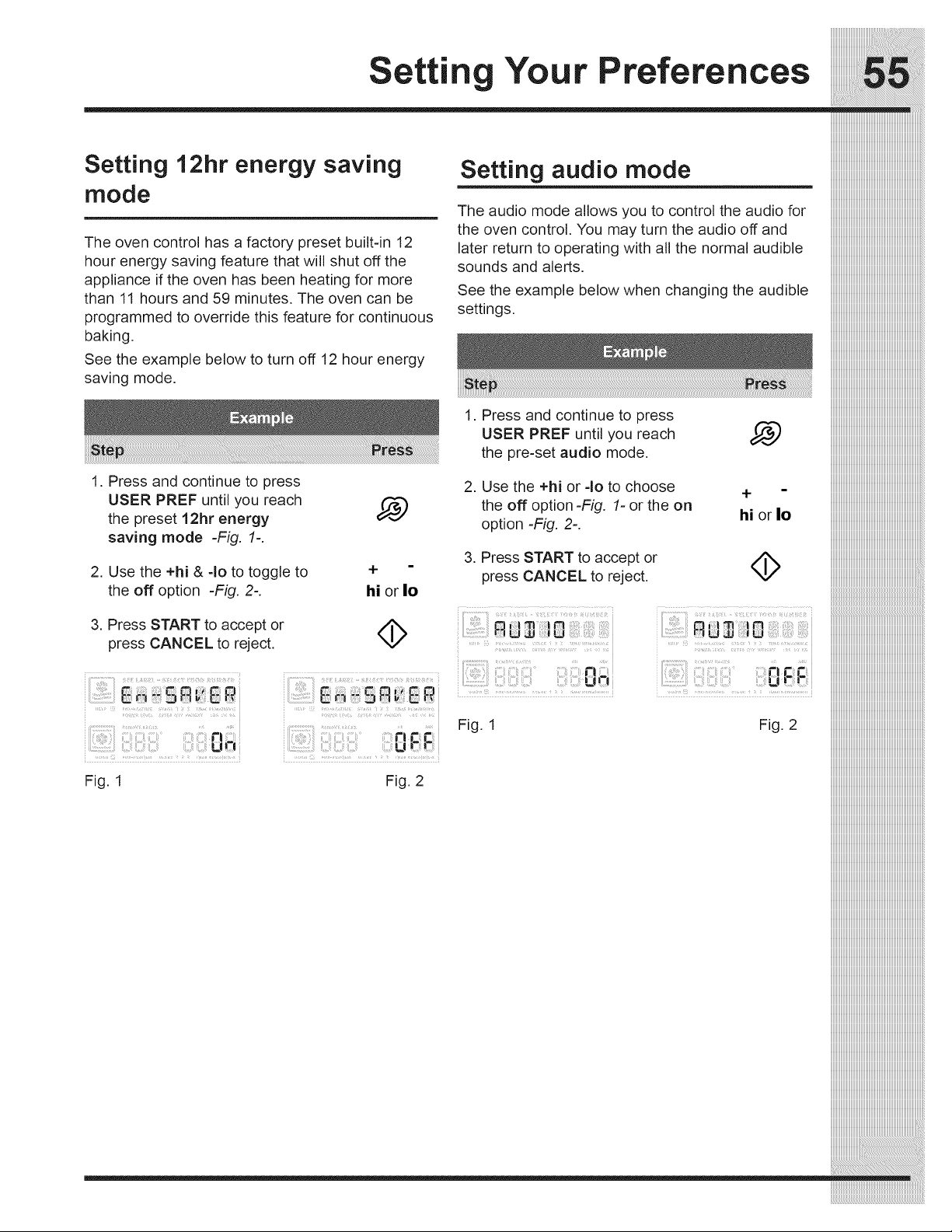
iiiiiiiiiiiiiiiiiiiiiiiiiiiiiiiiiiiiii_i_;!_!JJJJJJJ_!_!_!_!_!_!_!_!_i!i!i_i_i!i_i_i_i_i_i_i_i_i_i_i_i_i_i_ii_!!!
etti Your Preferences ......ilililil;!;
Setting 12hr energy saving Setting audio mode iiiiiiiiiiiiiiiiiiiiiiiiiiiiiiiiiiiiiiiiiiiiiiiiiiiiiiiiiiiiiiiiiiiiiiiiiiiiiiii
mode iiiiiiiiiiiiiiiiiiiiiiiiiiiiiiiiiiiiiiiiiiiiiiiiiiiiiiiiiiiiiiiiiiiiiiiiiiiiiiii
The audio mode allows you to control the audio for iiiiiiiiiiiiiiiiiiiiiiiiiiiiiiiiiiiiiiiiiiiiiiiiiiiiiiiiiiiiiiiiiiiiiiiiiiiiiiii
the oven control. You may turn the audio off and iiiiiiiiiiiiiiiiiiiiiiiiiiiiiiiiiiiiiiiiiiiiiiiiiiiiiiiiiiiiiiiiiiiiiiiiiiiiiiii
The oven control has a factory preset built-in 12 later return to operating with all the normal audible iiiiiiiiiiiiiiiiiiiiiiiiiiiiiiiiiiiiiiiiiiiiiiiiiiiiiiiiiiiiiiiiiiiiiiiiiiiiiiii
hour energy saving feature that will shut off the sounds and alerts, iiiiiiiiiiiiiiiiiiiiiiiiiiiiiiiiiiiiiiiiiiiiiiiiiiiiiiiiiiiiiiiiiiiiiiiiiiiiiiii
appliance if the oven has been heating for more iiiiiiiiiiiiiiiiiiiiiiiiiiiiiiiiiiiiiiiiiiiiiiiiiiiiiiiiiiiiiiiiiiiiiiiiiiiiiiii
than 11 hours and 59 minutes. The oven can be See the example below when changing the audible iiiiiiiiiiiiiiiiiiiiiiiiiiiiiiiiiiiiiiiiiiiiiiiiiiiiiiiiiiiiiiiiiiiiiiiiiiiiiiii
programmed to override this feature for continuous settings, iiiiiiiiiiiiiiiiiiiiiiiiiiiiiiiiiiiiiiiiiiiiiiiiiiiiiiiiiiiiiiiiiiiiiiiiiiiiiiii
iiiiiiiiiiiiiiiiiiiiiiiiiiiiiiiiiiiiiiiiiiiiiiiiiiiiiiiiiiiiiiiiiiiiiiiiiiiiiiii
baking.
See the example below to turn off 12 hour energy
saving mode.
1. Press and continue to press
USER PREF until you reach
the preset 12hr energy
saving mode =Fig. 1=.
2. Use the +hi & =1oto toggle to
the off option -Fig. 2=.
3. Press START to accept or
press CANCEL to reject.
Fig. 1
hi or Io
4>
Fig. 2
1. Press and continue to press iiiiiiiiiiiiiiiiiiiiiiiiiiiiiiiiiiiiiiiiiiiiiiiiiiiiiiiiiiiiiiiiiiiiiiiiiiiiiiii
USERPREFuntilyoureach _ iiiiiiiiiiiiiiiiiiiiiiiiiiiiiiiiiiiiiiiiiiiiiiiiiiiiiiiiiiiiiiiiiiiiiiiiiiiiiiii
thepre-setaudiomode, iiiiiiiiiiiiiiiiiiiiiiiiiiiiiiiiiiiiiiiiiiiiiiiiiiiiiiiiiiiiiiiiiiiiiiiiiiiiiiii
2. Usethe+hior=lotochoose + - iiiiiiiiiiiiiiiiiiiiiiiiiiiiiiiiiiiiiiiiiiiiiiiiiiiiiiiiiiiiiiiiiiiiiiiiiiiiiiii
the offoption-Fig, l=orthe on .- • iiiiiiiiiiiiiiiiiiiiiiiiiiiiiiiiiiiiiiiiiiiiiiiiiiiiiiiiiiiiiiiiiiiiiiiiiiiiiiii
option =Fig. 2=. n, orlo iiiiiiiiiiiiiiiiiiiiiiiiiiiiiiiiiiiiiiiiiiiiiiiiiiiiiiiiiiiiiiiiiiiiiiiiiiiiiiii
iiiiiiiiiiiiiiiiiiiiiiiiiiiiiiiiiiiiiiiiiiiiiiiiiiiiiiiiiiiiiiiiiiiiiiiiiiiiiiii
3. Press START to accept or _ _
press CANCEL to reject. "_/ iiiiiiiiiiiiiiiiiiiiiiiiiiiiiiiiiiiiiiiiiiiiiiiiiiiiiiiiiiiiiiiiiiiiiiiiiiiiiiiiiii
.........:: ,:(i:jiii iii,i:i¸IL¸I.,I_;:/¸'I;:/:';:
un,_,
Fig. 1
_:_u_ iiiiiiiiiiiiiiiiiiiiiiiiiiiiiiiiiiiiiiiiiiiiiiiiiiiiiiiiiiiiiiiiiiiiiiiiiiiiiiiiiii
....._._,_'_i!!_..............,............. _ _............................i iiiiiiiiiiiiiiiiiiiiiiiiiiiiiiiiiiiiiiiiiiiiiiiiiiiiiiiiiiiiiiiiiiiiiiiiiiiiiiiiiii
iiiiiiiiiiiiiiiiiiiiiiiiiiiiiiiiiiiiiiiiiiiiiiiiiiiiiiiiiiiiiiiiiiiiiiiiiiiiiiiiiii
iiiiiiiiiiiiiiiiiiiiiiiiiiiiiiiiiiiiiiiiiiiiiiiiiiiiiiiiiiiiiiiiiiiiiiiiiiiiiiiiiii
Fig. 2 iiiiiiiiiiiiiiiiiiiiiiiiiiiiiiiiiiiiiiiiiiiiiiiiiiiiiiiiiiiiiiiiiiiiiiiiiiiiiiiiiii
iiiiiiiiiiiiiiiiiiiiiiiiiiiiiiiiiiiiiiiiiiiiiiiiiiiiiiiiiiiiiiiiiiiiiiiiiiiiiiiiiii
iiiiiiiiiiiiiiiiiiiiiiiiiiiiiiiiiiiiiiiiiiiiiiiiiiiiiiiiiiiiiiiiiiiiiiiiiiiiiiiiiii
iiiiiiiiiiiiiiiiiiiiiiiiiiiiiiiiiiiiiiiiiiiiiiiiiiiiiiiiiiiiiiiiiiiiiiiiiiiiiiiiiii
iiiiiiiiiiiiiiiiiiiiiiiiiiiiiiiiiiiiiiiiiiiiiiiiiiiiiiiiiiiiiiiiiiiiiiiiiiiiiiiiiii
iiiiiiiiiiiiiiiiiiiiiiiiiiiiiiiiiiiiiiiiiiiiiiiiiiiiiiiiiiiiiiiiiiiiiiiiiiiiiiiiiii
iiiiiiiiiiiiiiiiiiiiiiiiiiiiiiiiiiiiiiiiiiiiiiiiiiiiiiiiiiiiiiiiiiiiiiiiiiiiiiiiiii
iiiiiiiiiiiiiiiiiiiiiiiiiiiiiiiiiiiiiiiiiiiiiiiiiiiiiiiiiiiiiiiiiiiiiiiiiiiiiiiiiii
iiiiiiiiiiiiiiiiiiiiiiiiiiiiiiiiiiiiiiiiiiiiiiiiiiiiiiiiiiiiiiiiiiiiiiiiiiiiiiiiiii
iiiiiiiiiiiiiiiiiiiiiiiiiiiiiiiiiiiiiiiiiiiiiiiiiiiiiiiiiiiiiiiiiiiiiiiiiiiiiiiiiii
iiiiiiiiiiiiiiiiiiiiiiiiiiiiiiiiiiiiiiiiiiiiiiiiiiiiiiiiiiiiiiiiiiiiiiiiiiiiiiiiiii
iiiiiiiiiiiiiiiiiiiiiiiiiiiiiiiiiiiiiiiiiiiiiiiiiiiiiiiiiiiiiiiiiiiiiiiiiiiiiiiiiii
iiiiiiiiiiiiiiiiiiiiiiiiiiiiiiiiiiiiiiiiiiiiiiiiiiiiiiiiiiiiiiiiiiiiiiiiiiiiiiiiiii
iiiiiiiiiiiiiiiiiiiiiiiiiiiiiiiiiiiiiiiiiiiiiiiiiiiiiiiiiiiiiiiiiiiiiiiiiiiiiiiiiii
iiiiiiiiiiiiiiiiiiiiiiiiiiiiiiiiiiiiiiiiiiiiiiiiiiiiiiiiiiiiiiiiiiiiiiiiiiiiiiiiiii
iiiiiiiiiiiiiiiiiiiiiiiiiiiiiiiiiiiiiiiiiiiiiiiiiiiiiiiiiiiiiiiiiiiiiiiiiiiiiiiiiii
iiiiiiiiiiiiiiiiiiiiiiiiiiiiiiiiiiiiiiiiiiiiiiiiiiiiiiiiiiiiiiiiiiiiiiiiiiiiiiiiiii
iiiiiiiiiiiiiiiiiiiiiiiiiiiiiiiiiiiiiiiiiiiiiiiiiiiiiiiiiiiiiiiiiiiiiiiiiiiiiiiiiii
iiiiiiiiiiiiiiiiiiiiiiiiiiiiiiiiiiiiiiiiiiiiiiiiiiiiiiiiiiiiiiiiiiiiiiiiiiiiiiiiiii
iiiiiiiiiiiiiiiiiiiiiiiiiiiiiiiiiiiiiiiiiiiiiiiiiiiiiiiiiiiiiiiiiiiiiiiiiiiiiiiiiii
iiiiiiiiiiiiiiiiiiiiiiiiiiiiiiiiiiiiiiiiiiiiiiiiiiiiiiiiiiiiiiiiiiiiiiiiiiiiiiiiiii
iiiiiiiiiiiiiiiiiiiiiiiiiiiiiiiiiiiiiiiiiiiiiiiiiiiiiiiiiiiiiiiiiiiiiiiiiiiiiiiiiii
iiiiiiiiiiiiiiiiiiiiiiiiiiiiiiiiiiiiiiiiiiiiiiiiiiiiiiiiiiiiiiiiiiiiiiiiiiiiiiiiiii
iiiiiiiiiiiiiiiiiiiiiiiiiiiiiiiiiiiiiiiiiiiiiiiiiiiiiiiiiiiiiiiiiiiiiiiiiiiiiiiiiii
iiiiiiiiiiiiiiiiiiiiiiiiiiiiiiiiiiiiiiiiiiiiiiiiiiiiiiiiiiiiiiiiiiiiiiiiiiiiiiiiiii
iiiiiiiiiiiiiiiiiiiiiiiiiiiiiiiiiiiiiiiiiiiiiiiiiiiiiiiiiiiiiiiiiiiiiiiiiiiiiiiiiii
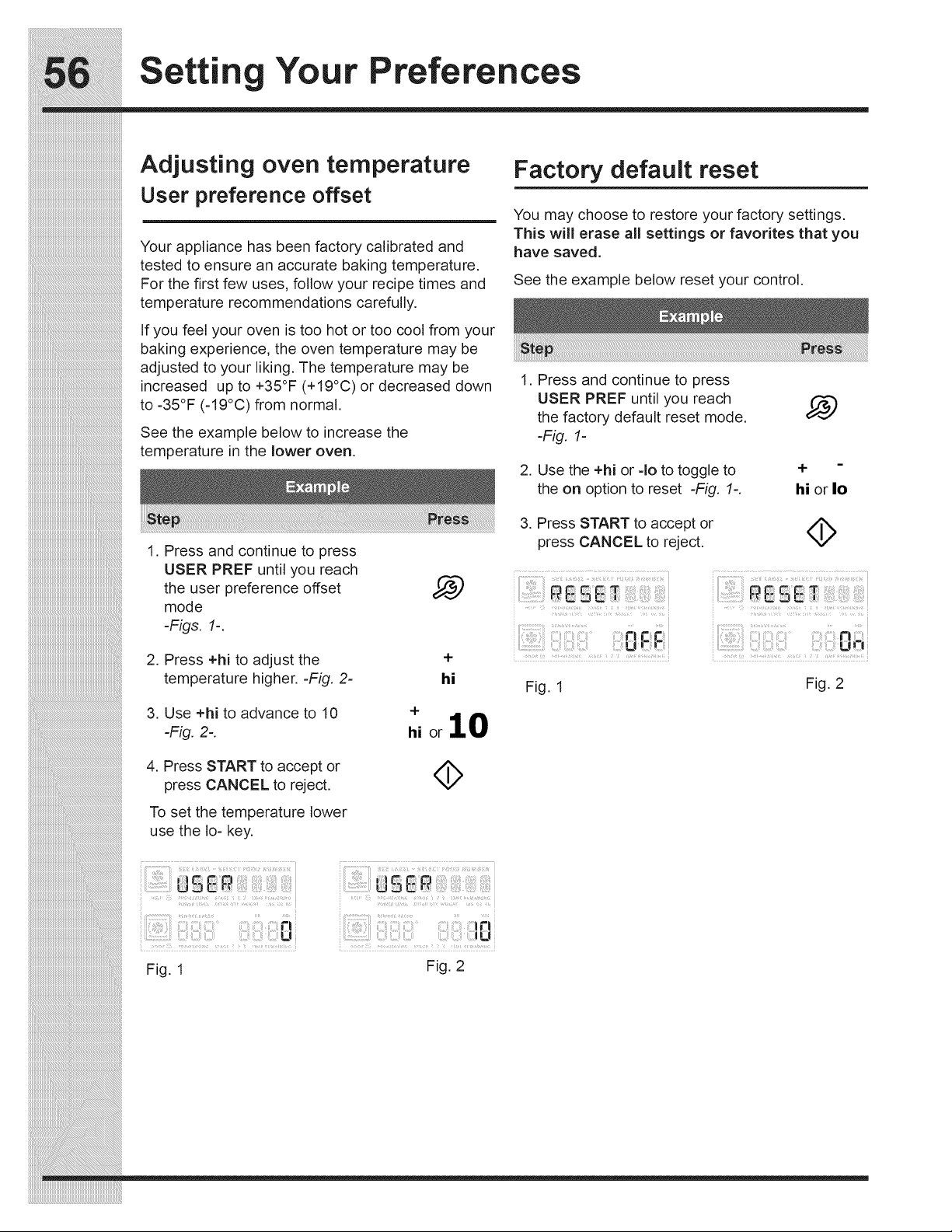
iiiiiiiiiiiiiiiiiiiiiiiiiiiiiiiiiiiiiiiiiiiiiiiiiiiiiiiiiiiiiiiiiiiiiiiiiiiiiii
Setting Your Preferences
Adjusting oven temperature
User preference offset
Your appliance has been factory calibrated and
tested to ensure an accurate baking temperature.
For the first few uses, follow your recipe times and
temperature recommendations carefully.
If you feel your oven is too hot or too cool from your
baking experience, the oven temperature may be
adjusted to your liking. The temperature may be
increased up to +35°F (+19°C) or decreased down
to -35°F (-19°C) from normal.
See the example below to increase the
temperature in the lower oven.
1. Press and continue to press
USER PREF until you reach
the user preference offset ,_,,,,,)
mode
-Figs. 1-.
2. Press +hi to adjust the
temperature higher.-Fig. 2-
4-
4-
hi
Factory default reset
You may choose to restore your factory settings.
This will erase all settings or favorites that you
have saved.
See the example below reset your control.
1. Press and continue to press
USER PREF until you reach
the factory default reset mode.
-Fig. 1-
2. Use the +hi or -Io to toggle to
the on option to reset -Fig. 1-.
3. Press START to accept or
press CANCEL to reject.
4>
Fig. 1
Fig. 2
Fig. 1
Fig. 2
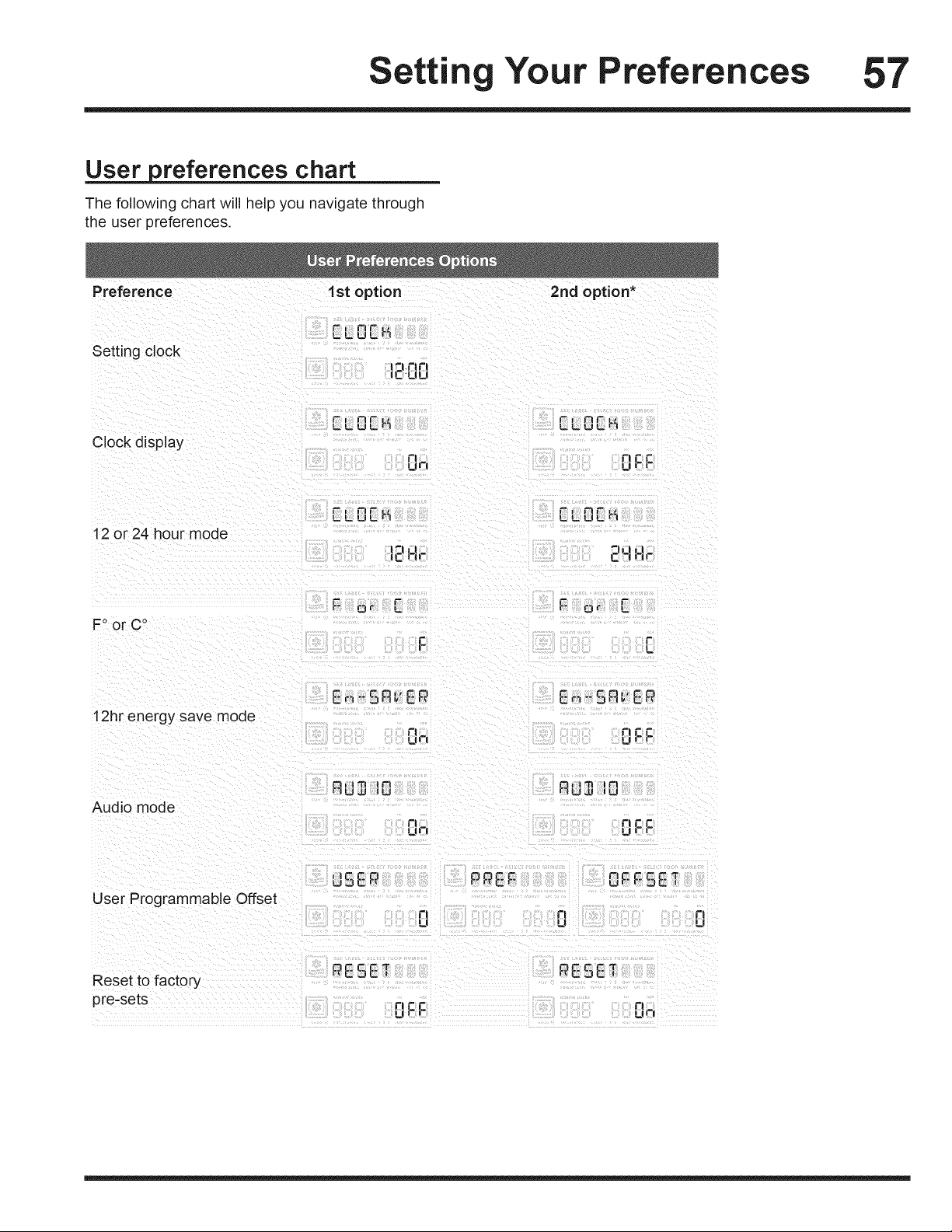
etti Your Preferences 57
User preferences chart
The following chart will help you navigate through
the user preferences.
Preference 1st option 2rid option*
Setting clock
t7.rt 1"1
IC'ULI
Clock display
C|| fl r_C
_7 Urr
12 or 24 hour mode
t" _1 "lw I_ 1
IC i-|_- C 7 i7_-
C r:
FoorC o
C
12hr energy save mode
E_I_'SF'I,,EP E_"Sn_ EP
0 rr_c
m7 m,,,ji_ i-
Audio mode
rJ
17
".ll I1"1 IPI
UJJ lU
Or_C
Fl
User Programmable Offset
,me r_
u:JE 7
n 17
u u
O_FcP _
"JC I
Reset to factory
pre-sets
tic r_
Ui-i-
PESET
rl
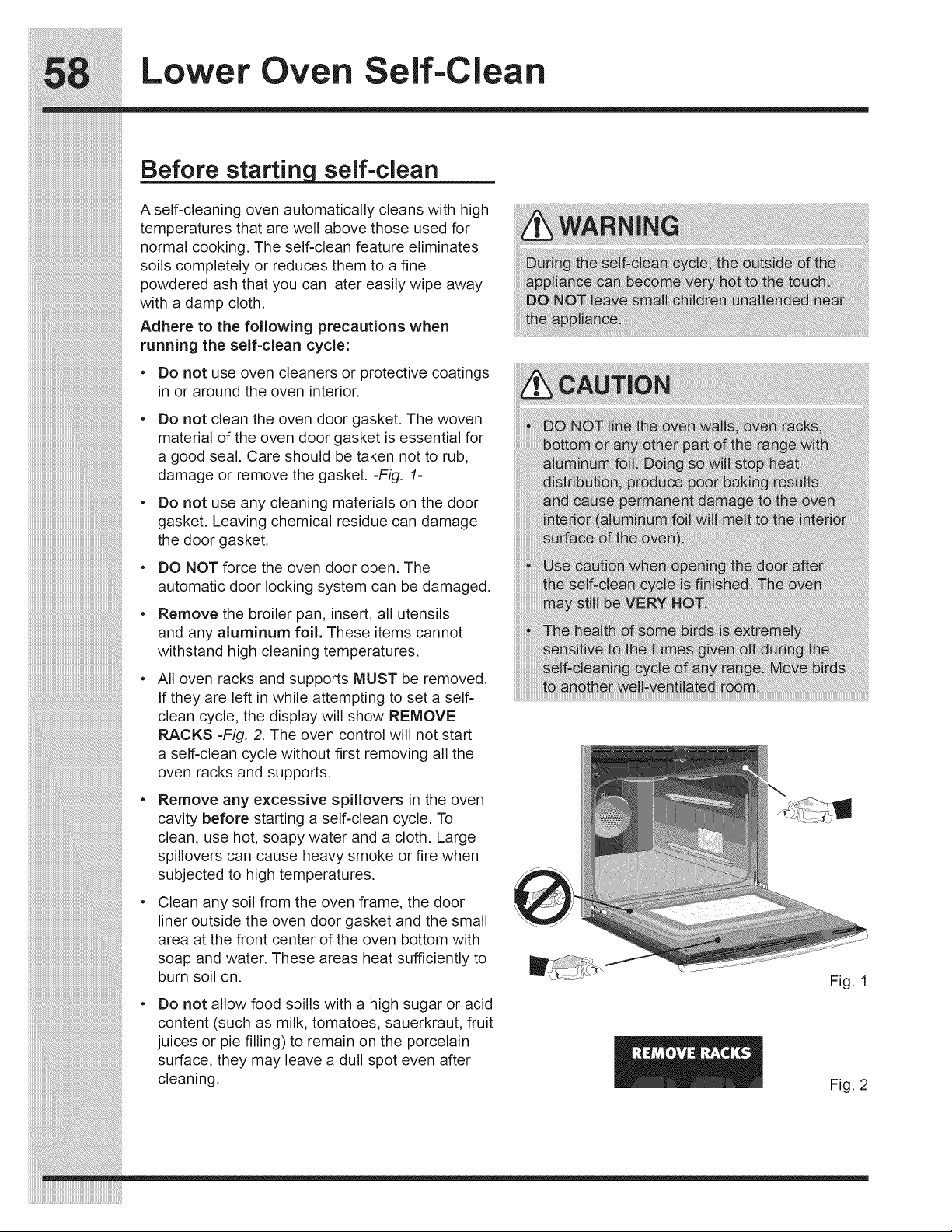
Lower Oven Self-Clean
self-clean
A self-cleaning oven automatically cleans with high
temperatures that are well above those used for
normal cooking. The self-clean feature eliminates
soils completely or reduces them to a fine
powdered ash that you can later easily wipe away
with a damp cloth.
Adhere to the following precautions when
running the self-clean cycle:
Do not use oven cleaners or protective coatings
in or around the oven interior.
Do not clean the oven door gasket. The woven
material of the oven door gasket is essential for
a good seal. Care should be taken not to rub,
damage or remove the gasket. -Fig. 1-
Do not use any cleaning materials on the door
gasket. Leaving chemical residue can damage
the door gasket.
DO NOT force the oven door open. The
automatic door locking system can be damaged.
Remove the broiler pan, insert, all utensils
and any aluminum foil. These items cannot
withstand high cleaning temperatures.
All oven racks and supports MUST be removed.
If they are left in while attempting to set a self-
clean cycle, the display will show REMOVE
RACKS -Fig. 2. The oven control will not start
a self-clean cycle without first removing all the
oven racks and supports.
Remove any excessive spillovers in the oven
cavity before starting a self-clean cycle. To
clean, use hot, soapy water and a cloth. Large
spillovers can cause heavy smoke or fire when
subjected to high temperatures.
Clean any soil from the oven frame, the door
liner outside the oven door gasket and the small
area at the front center of the oven bottom with
soap and water. These areas heat sufficiently to
burn soil on.
Do not allow food spills with a high sugar or acid
content (such as milk, tomatoes, sauerkraut, fruit
juices or pie filling) to remain on the porcelain
surface, they may leave a dull spot even after
cleaning.
Fig. 1
Fig. 2
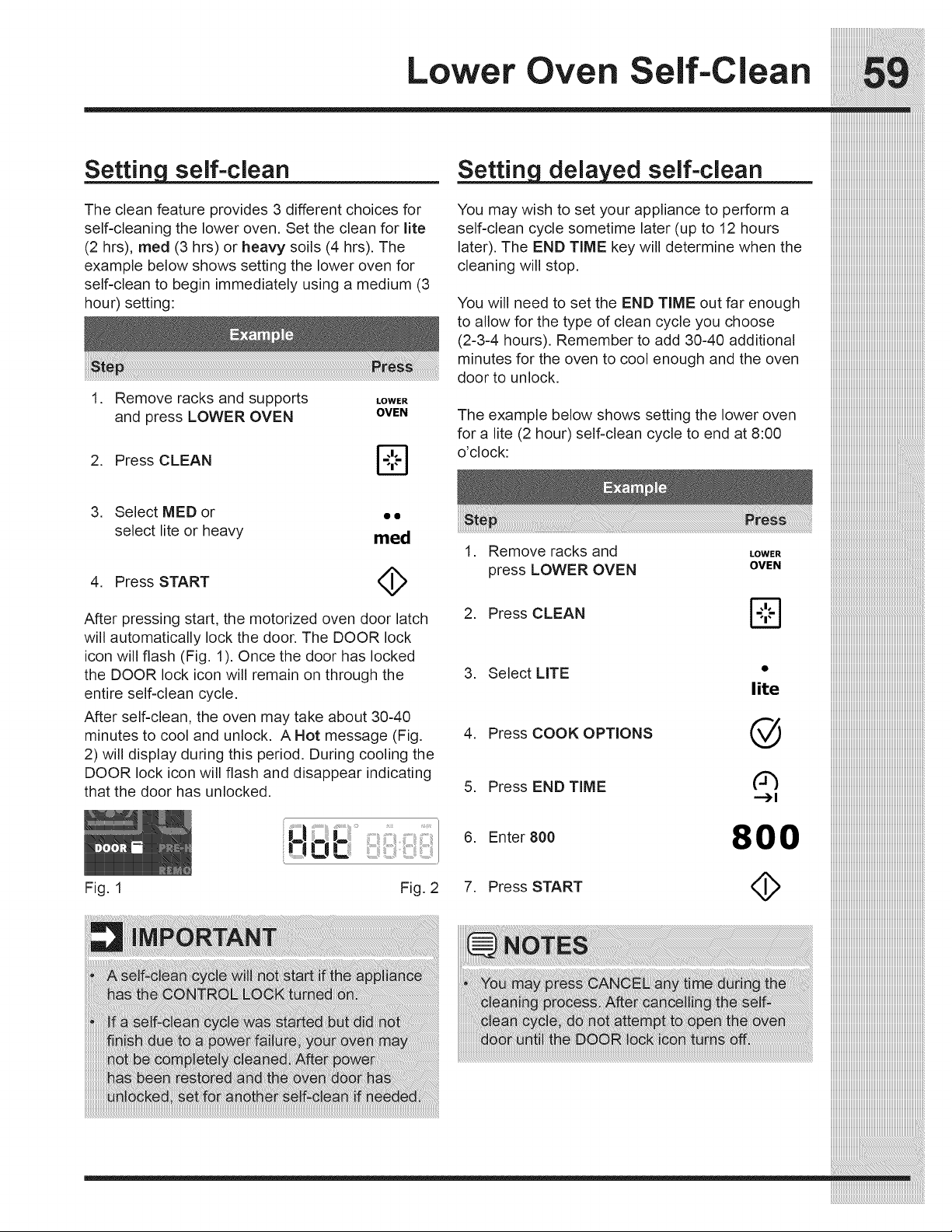
self-clean
The clean feature provides 3 different choices for
self-cleaning the lower oven. Set the clean for lite
(2 hrs), meal (3 hrs) or heavy soils (4 hrs). The
example below shows setting the lower oven for
self-clean to begin immediately using a medium (3
hour) setting:
1. Remove racks and supports LOWER
and press LOWER OVEN OVEN
2. Press CLEAN
L,,Z-J
self-clean
You may wish to set your appliance to perform a
self-clean cycle sometime later (up to 12 hours
later). The END TIME key will determine when the
cleaning will stop.
You will need to set the END TIME out far enough
to allow for the type of clean cycle you choose
(2-3-4 hours). Remember to add 30-40 additional
minutes for the oven to cool enough and the oven
door to unlock.
The example below shows setting the lower oven
for a lite (2 hour) self-clean cycle to end at 8:00
o'clock:
3. Select MED or • •
select lite or heavy med
4. Press START (_
After pressing start, the motorized oven door latch
will automatically lock the door. The DOOR lock
icon will flash (Fig. 1). Once the door has locked
the DOOR lock icon will remain on through the
entire self-clean cycle.
After self-clean, the oven may take about 30-40
minutes to cool and unlock. A Hot message (Fig.
2) will display during this period. During cooling the
DOOR lock icon will flash and disappear indicating
that the door has unlocked.
Fig. 1 Fig. 2
. Remove racks and
press LOWER OVEN
LOWER
OVEN
2. Press CLEAN
3. Select LITE •
lite
4. Press COOK OPTIONS @
5. Press END TiME (_
--_1
6. Enter 800 800
7. Press START <_

Lower Oven Care an Cleani
• Aluminum (trim pieces) & vinyl Use hot, soapy water and a cloth. Dry with a clean
cloth.
• Painted and plastic control knobs
• Body parts,
• Painted decorative trim
For general cleaning, use hot, soapy water and a
cloth. For more difficult soils and built-up grease,
apply a liquid detergent directly onto the soil.
Leave on soil for 30 to 60 minutes. Rinse with a
aamp cloth and dry. Do not use abrasive cleaners
on any of these materials; they can scratch. To
remove control knobs, turn to the OFF position;
grasp firmly and pull straight off the shaft. To
replace knobs after cleaning, line up the flat sides
of both the knob and the shaft: then push the knob
into place.
- Chrome control panel (some models)
, Decorative trim (some models)
- Stainless steel (some models)
Before cleaning the control panel, turn all controls
to OFF and remove the control knobs. To remove,
pull each knob straight off the shaft. Clean using
hot, soapy water and a dishcloth. Rinse with a
clean water using a dishcloth. Be sure to squeeze
excess water from the cloth before wi ping the
panel; especially when wiping around the controls.
Excess water in or around the controls may cause
damage to the appliance. To replace knobs after
cleaning, line up the flat sides of both the knob and
the shaft; then push the knob into place.
Stainless Steel (some models). Clean the stain-
less with warm soapy water using a clean sponge
or cloth. Rinse with clean water and dry with a soft
clean cloth. Do not use harsh scrubbing cleaners.
Only use kitchen cleaners that are especially made
for cleaning Stainless Steel. Always be sure to
rinse the cleaners from the surface as bluish stains
may occur during heating that cannot be removed.
o Porcelain enamel broiler pan and insert (if Gentle scouring with a soapy scouring pad will
equipped) remove most spots. Rinse with a 1:1 solution of
clear water and ammonia. If necessary, cover
• Door liner & body parts
difficult spots with an ammonia-soaked paper
towel for 30 to 40 minutes. Rinse with clean water
and a damp cloth, and then scrub with a soap-filled
scouring pad. Rinse and wipe dry with a clean
cloth. Remove all cleaners or the porcelain may
become damaged during future heating. Do not
use spray oven cleaners on the cooktop.
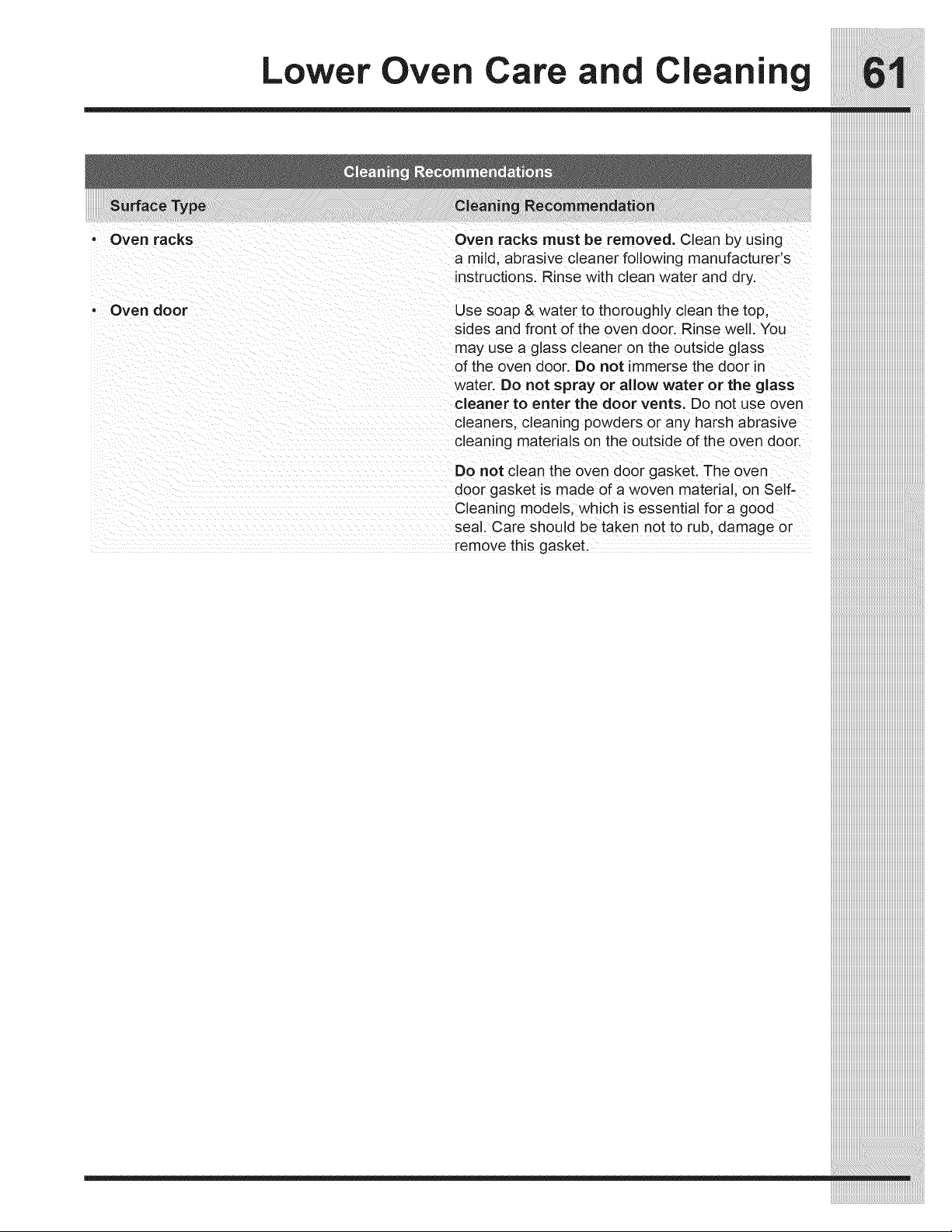
Oven racks
Oven door
Lower Oven Care and Cleaning
Oven racks must be removed. Clean by using
a mild, abrasive cleaner following manufacturer's
instructions. Rinse with clean water and dry.
Use soap & water to thoroughly clean the top,
sides and front of the oven door. Rinse well. You
may use a glass cleaner on the outside glass
of the oven door. Do not immerse the door in
water. Do not spray or allow water or the glass
cleaner to enter the door vents. Do not use oven
cleaners, cleaning powders or any harsh abrasive
cleaning materials on the outside of the oven door.
Do not clean the oven door gasket. The oven
door gasket is made of a woven materia, on Self-
Cleaning models, which is essential for a good
seal. Care should be taken not to rub, damage or
remove this gasket.
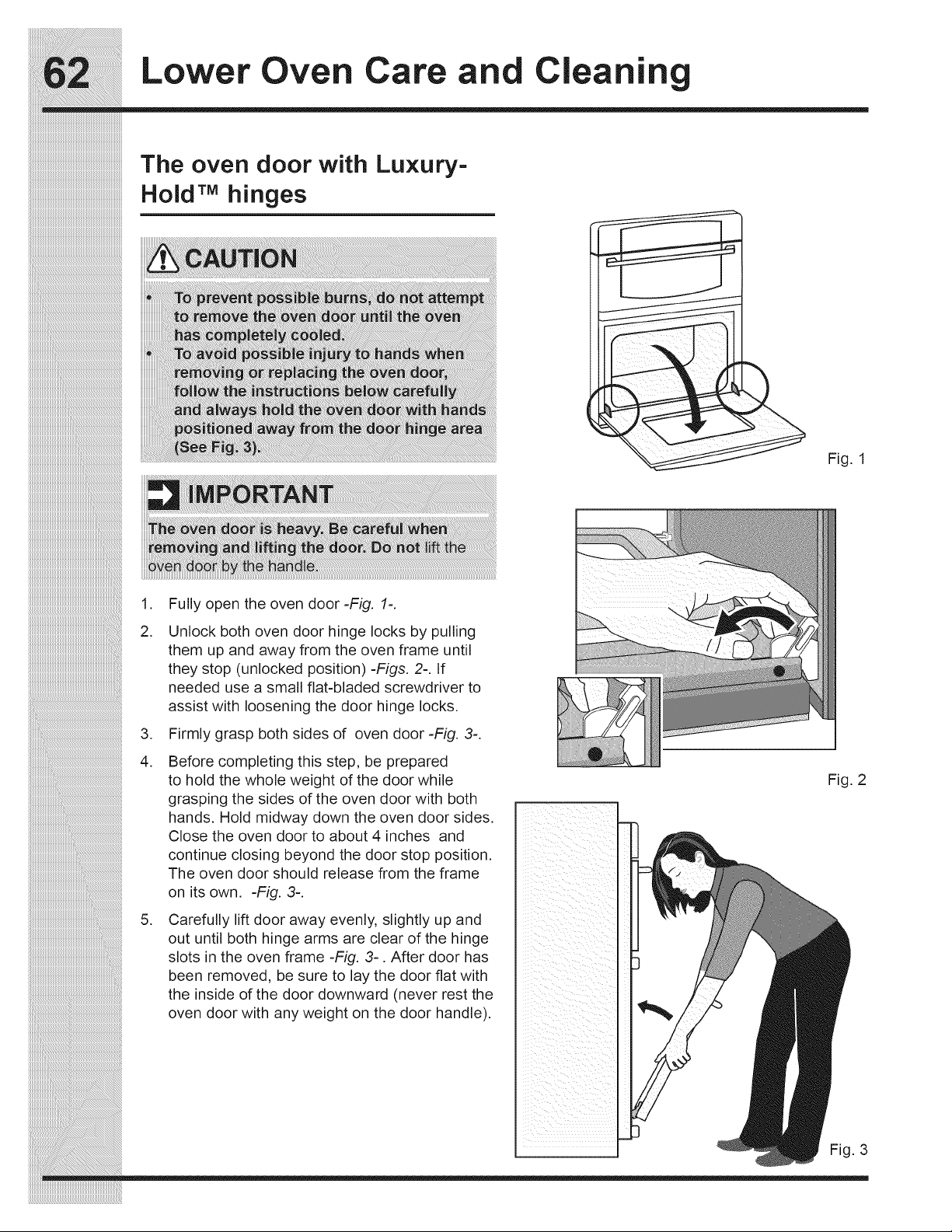
Lower Oven Care an Cleani
The oven door with Luxury=
Hold TM hinges
Fig. 1
iiiiiiiiiiiiiiiiiiiiiiiiiiiiiiiiiiiiiiiiiiiiiiiiiiiiiiiiiiiiiiiiiiiiiiiiiiiiiiiiiiiiiiiiiiiiiiiiiiiiiiiiiiiiiiiiii_i!iiiiiiiiiiiiiiiiiiiiiiiiiiiiiiiiiiiiiiiiii
iiiiiiiiiiiiiiiiiiiiiiiiiiiiiiiiiiiiiiiiiiiiiiiiiiiiiiiiiiiiiiiiiiiiiiiiiiiiiiiiiiiiiiiiiiiiiiiiiiiiiiiiiiiiiiiiiiiiiii_i!iiiiiiiiiiiiiiiiiiiiiiiiiiiiiiiiiiiiiiiiiiiiiiiiiiiii_
iiiiiiiiiiiiiiiiiiiiiiiiiiiiiiiiiiiiiiiiiiiiiiiiiiiiiiiiiiiiiiiiiiiiiiiiiiiiiiiiiiiiiiiiiiiiiiiiiiiiiiiiiiiiiiiiiiiiiiiiiiiii_i!iiiiiiiiiiiiiiiiiiiiiiiiiiiiiiiiiiiiiiiiiiii_
,
2.
.
4.
,
Fully open the oven door -Fig. 1=.
Unlock both oven door hinge locks by pulling
them up and away from the oven frame until
they stop (unlocked position) -Figs. 2-. If
needed use a small flat-bladed screwdriver to
assist with loosening the door hinge locks.
Firmly grasp both sides of oven door -Fig. 3-.
Before completing this step, be prepared
to hold the whole weight of the door while
grasping the sides of the oven door with both
hands. Hold midway down the oven door sides.
Close the oven door to about 4 inches and
continue closing beyond the door stop position.
The oven door should release from the frame
on its own. -Fig. 3-.
Carefully lift door away evenly, slightly up and
out until both hinge arms are clear of the hinge
slots in the oven frame -Fig. 3-. After door has
been removed, be sure to lay the door flat with
the inside of the door downward (never rest the
oven door with any weight on the door handle).
Fig. 2
Fig. 3
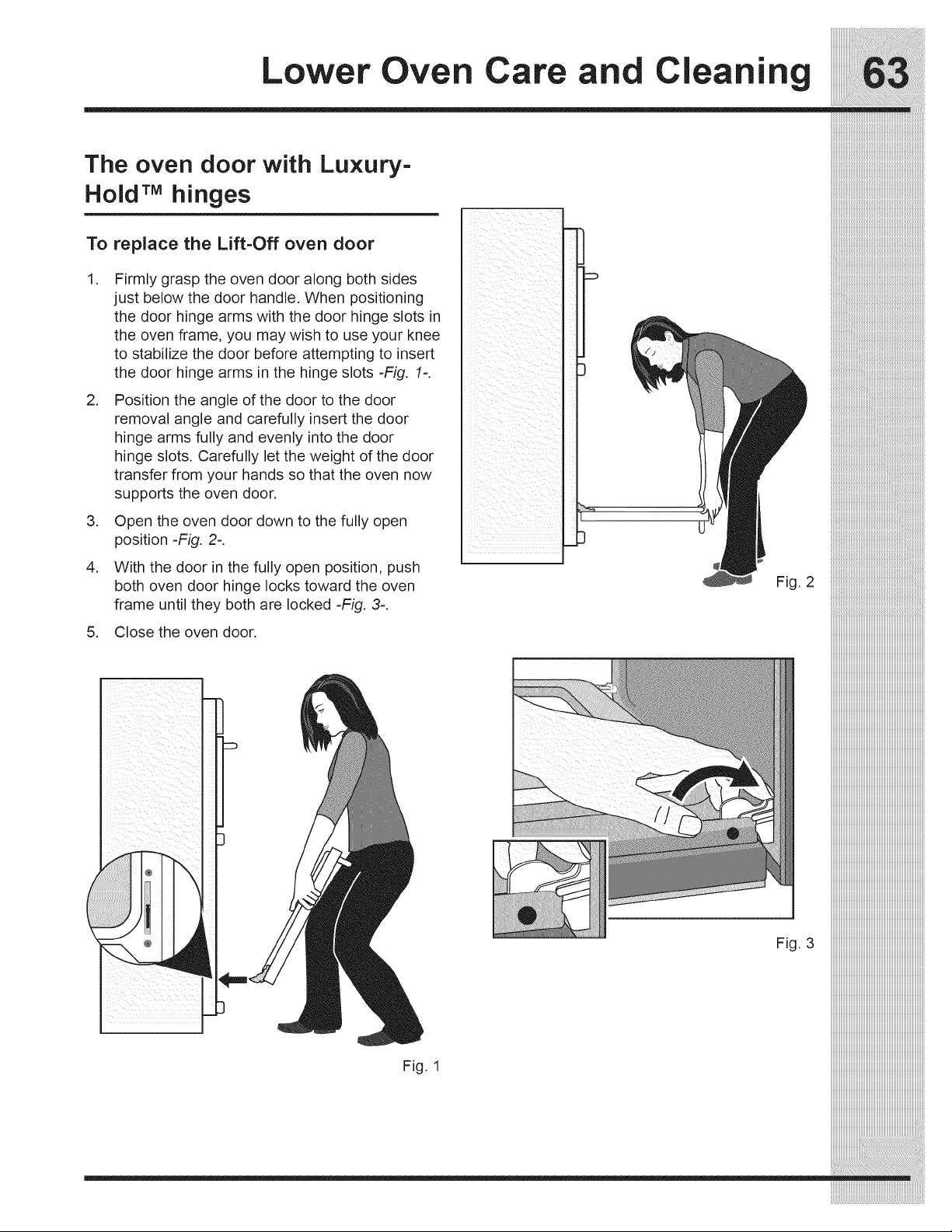
Lower Oven Care and Cleaning
The oven door with Luxury-
Hold TMhinges
To replace the Lift-Off oven door
1 Firmly grasp the oven door along both sides
just below the door handle. When positioning
the door hinge arms with the door hinge slots in
the oven frame, you may wish to use your knee
to stabilize the door before attempting to insert
the door hinge arms in the hinge slots =Fig. 1=.
2.
3. Open the oven door down to the fully open
position-Fig. 2-.
Position the angle of the door to the door
removal angle and carefully insert the door
hinge arms fully and evenly into the door
hinge slots. Carefully let the weight of the door
transfer from your hands so that the oven now
supports the oven door.
With the door in the fully open position, push
both oven door hinge locks toward the oven
frame until they both are locked -Fig. 3-.
•
Fig. 2
5. Close the oven door•
Fig. 3
Fig. 1
___________i:i_i_i_i_i_i_i_i_i_i_i_i_i_i_i_i_i_i_i_i_i_i_i_i_i_i_i_i_i_i_i_i_i_i_i_i_i_i_i_i_i_i_i_i_i_i_i_i_i_i_i_i_i_i_i_i_i_i_i_i_i_i_i_i_i_i_i_i_i_i_i
_:_iiiiiiiiiiiiiiiiiiiiiiiiiiiiiiiiiiiiiiiiiiiiiiiiiiiiiiiiiiiiiiiiiiiiiiiiiiiiiiiiiiiiiiiiiiiiiiiiiiiiiiiiiii_
i_i_i_i_i_i_i_i_i_i_i_i_i_i_i_i_i_i_i_i_i_i_i_i_i_i_i_i_i_1:iiiiiiiiiiiiiiiiiiiiiiiiiiiiiiiiiiiiiiiiiiiiiiiiiiiiiiiiiiiiiiiiiiiiiiiiiiiiiiiiiiiiiiiiiiiiiiiiiiiiiiii_i
iiiiiiiiiiiiiiiiiiiiiiiiiiiiiiiiiiiiiiiiiiiiiiiiiiiiiiiiiiiiiiiiiiiiiiiiiiiiiiiiiii
iiiiiiiiiiiiiiiiiiiiiiiiiiiiiiiiiiiiiiiiiiiiiiiiiiiiiiiiiiiiiiiiiiiiiiiiiiiiiiiiiii
iiiiiiiiiiiiiiiiiiiiiiiiiiiiiiiiiiiiiiiiiiiiiiiiiiiiiiiiiiiiiiiiiiiiiiiiiiiiiiiiiii
iiiiiiiiiiiiiiiiiiiiiiiiiiiiiiiiiiiiiiiiiiiiiiiiiiiiiiiiiiiiiiiiiiiiiiiiiiiiiiiiiii
iiiiiiiiiiiiiiiiiiiiiiiiiiiiiiiiiiiiiiiiiiiiiiiiiiiiiiiiiiiiiiiiiiiiiiiiiiiiiiiiiii
iiiiiiiiiiiiiiiiiiiiiiiiiiiiiiiiiiiiiiiiiiiiiiiiiiiiiiiiiiiiiiiiiiiiiiiiiiiiiiiiiii
iiiiiiiiiiiiiiiiiiiiiiiiiiiiiiiiiiiiiiiiiiiiiiiiiiiiiiiiiiiiiiiiiiiiiiiiiiiiiiiiiii
iiiiiiiiiiiiiiiiiiiiiiiiiiiiiiiiiiiiiiiiiiiiiiiiiiiiiiiiiiiiiiiiiiiiiiiiiiiiiiiiiii
iiiiiiiiiiiiiiiiiiiiiiiiiiiiiiiiiiiiiiiiiiiiiiiiiiiiiiiiiiiiiiiiiiiiiiiiiiiiiiiiiii
iiiiiiiiiiiiiiiiiiiiiiiiiiiiiiiiiiiiiiiiiiiiiiiiiiiiiiiiiiiiiiiiiiiiiiiiiiiiiiiiiii
iiiiiiiiiiiiiiiiiiiiiiiiiiiiiiiiiiiiiiiiiiiiiiiiiiiiiiiiiiiiiiiiiiiiiiiiiiiiiiiiiii
iiiiiiiiiiiiiiiiiiiiiiiiiiiiiiiiiiiiiiiiiiiiiiiiiiiiiiiiiiiiiiiiiiiiiiiiiiiiiiiiiii
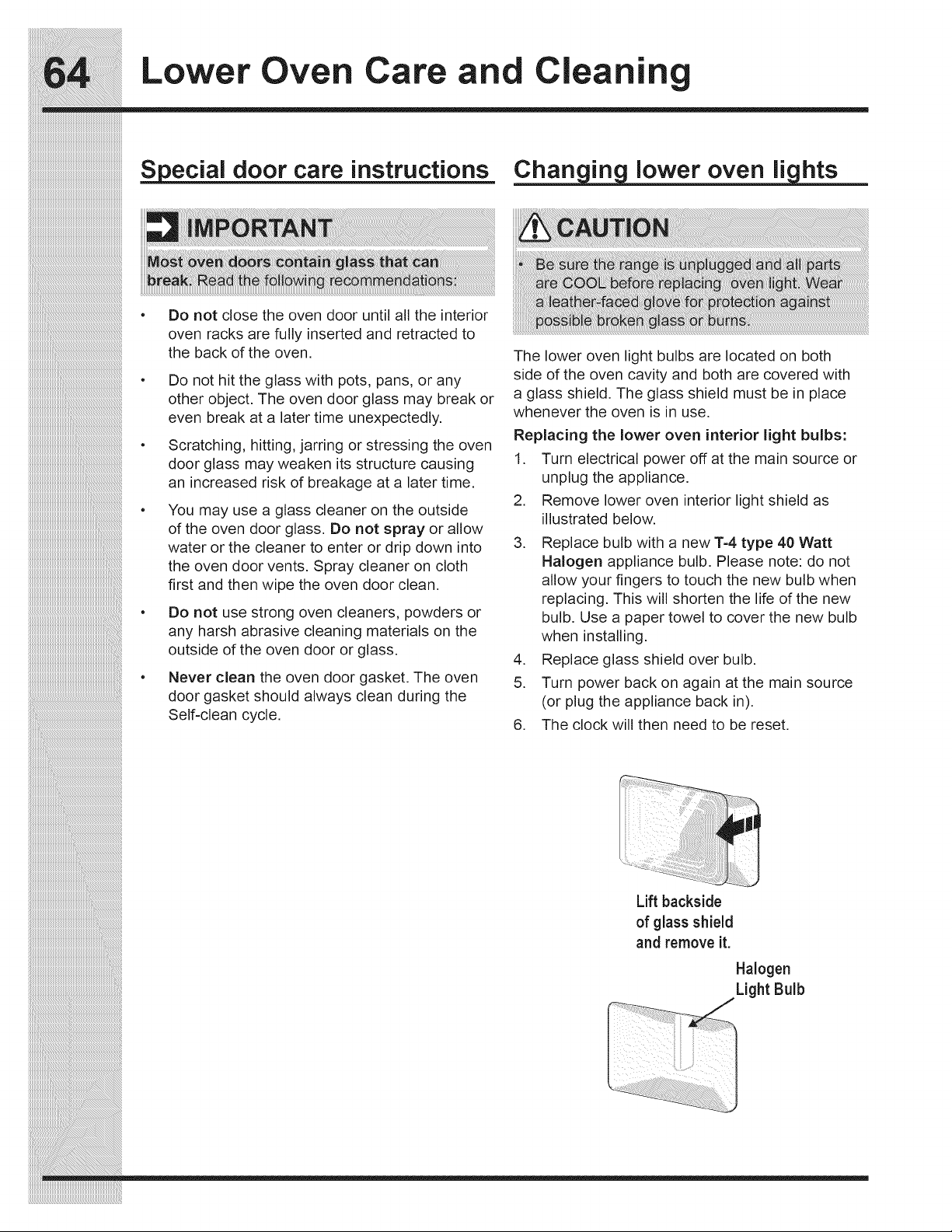
Lower Oven Care an Cleani
iiiiiiiiiiiiiiiiiiiiiiiiiiiiiiiiiiiiiiiiiiiiiiiiiiiiiiiiiiiiiiiiiiiiiiiiiiiiiii
S ecial door care "instructions
Chart in lower oven li hts
Do not close the oven door until all the interior
oven racks are fully inserted and retracted to
the back of the oven.
Do not hit the glass with pots, pans, or any
other object. The oven door glass may break or
even break at a later time unexpectedly.
Scratching, hitting, jarring or stressing the oven
door glass may weaken its structure causing
an increased risk of breakage at a later time.
You may use a glass cleaner on the outside
of the oven door glass. Do not spray or allow
water or the cleaner to enter or drip down into
the oven door vents. Spray cleaner on cloth
first and then wipe the oven door clean.
Do not use strong oven cleaners, powders or
any harsh abrasive cleaning materials on the
outside of the oven door or glass.
Never clean the oven door gasket. The oven
door gasket should always clean during the
Self-clean cycle.
The lower oven light bulbs are located on both
side of the oven cavity and both are covered with
a glass shield. The glass shield must be in place
whenever the oven is in use.
Replacing the lower oven interior light bulbs:
1. Turn electrical power off at the main source or
unplug the appliance.
2. Remove lower oven interior light shield as
illustrated below.
3. Replace bulb with a new 1-4 type 40 Watt
Halogen appliance bulb. Please note: do not
allow your fingers to touch the new bulb when
replacing. This will shorten the life of the new
bulb. Use a paper towel to cover the new bulb
when installing.
4. Replace glass shield over bulb.
5. Turn power back on again at the main source
(or plug the appliance back in).
6. The clock will then need to be reset.
_i_i_i_i_i_i_i_i_i_i_i_i_i_i_i_i_i_i_i_i_i_i_i_i_i_i_i_i_i_i_i_i_i_i_i_i_i_i_i_i_i_i_i_i_i_i_i_i_i_i_i_i_i_i_i_i__!__________________________________________
iiiiiiiiiiiiiiiiiiiiiiiiiiiiiiiiiiiiiiiiiiiiiiiiiiiiiiiiiiiiiiiiiiiiiiiiiiiiiiiiiiiiiiiiiiiiiiiiiiiiiiiiiiiiiiiiiiiiiii_i!iiiiiiiiiiiiiiiiiiiiiiiiiiiiiiiiiiiiiiiiiiiiiiiiiiiii_
iiiiiiiiiiiiiiiiiiiiiiiiiiiiiiiiiiiiiiiiiiiiiiiiiiiiiiiiiiiiiiiiiiiiiiiiiiiiiiiiiiiiiiiiiiiiiiiiiiiiiiiiiiiiiiiiiiiiiiiiiiiii_i!iiiiiiiiiiiiiiiiiiiiiiiiiiiiiiiiiiiiiiiiiiii_
Lift backside
of glass shield
and remove it.
Halogen
Light Bulb
icrowave Care and Cleaning
Exterior
Clean the outside with mild soap and water; rinse and
dry with a soft cloth. Do not use any type of household
or abrasive cleaner.
Door
Wipe the window on both sides with a damp cloth
to remove any spills or spatters. Metal parts will be
easier to maintain if wiped frequently with a damp
cloth. Avoid the use of spray and other harsh cleaners
as they may stain, streak or dull the door surface.
Touch Control Panel
Care should be taken in cleaning the touch control
panel. If the control panel becomes soiled, open the
Microwave Oven door before cleaning. Wipe the
panel with a cloth dampened slightly with water only.
Dry with a soft cloth. Do not scrub or use any sort
of chemical cleaners. Close door and touch STOP/
CLEAR.
interior
Cleaning is easy because little heat is generated to
the interior surfaces; therefore, there is no baking
and setting of spills or spattering. To clean the interior
surfaces, wipe with a soft cloth and warm water. DO
NOT USE ABRASIVE OR HARSH CLEANERS OR
SCOURING PADS. For heavier soil, use baking soda
or a mild soap; rinse thoroughly with hot water. The
rack can be cleaned with hot soapy water, rinsed and
dried. NEVER SPRAY OVEN CLEANERS DIRECTLY
ONTO ANY PART OF THE MICROWAVE OVEN.
Wavegu ide Cover
The waveguide cover is made from mica so requires
special care. Keep the waveguide cover clean to
assure good oven performance. Carefully wipe with a
damp cloth any food spatters from the surface of the
cover immediately after they occur. Built=up splashes
may overheat and cause smoke or possibly catch fire.
Do not remove the waveguide cover.
Odor Removal
Occasionally, a cooking odor may remain in the oven.
To remove, combine 1 cup water, grated peel and
juice of I lemon and several whole cloves in a 2-cup
glass measuring cup. Boil for several minutes using
100% power. Allow to set in oven until cool. Wipe
interior with a soft cloth.
Turntable/Turntable Support/Racks
The turntable, turntable support and racks can be
removed for easy cleaning. Wash them in mild,
sudsy water; for stubborn stains use a mild cleanser
and a non=abrasive scouring sponge. They are also
dishwasher-proof. Use top rack of dishwasher for
turntable support.
Foods with high acidity, such as tomatoes or lemons,
will cause the porcelain enamel turntable to discolor.
Do not cook highly acidic foods directly on the turn-
table; if spills occur, wipe up immediately.
The turntable motor shaft is not sealed, so excess
water or spills should not be allowed to stand in this
area.
iiiiiiiiiiiiiiiiiiiiiiiiiiiiiiiiiiiiiiiiiiiiiiiiiiiiiiiiiiiiiiiiiiiiiiiiiiiiiiiiiii
iiiiiiiiiiiiiiiiiiiiiiiiiiiiiiiiiiiiiiiiiiiiiiiiiiiiiiiiiiiiiiiiiiiiiiiiiiiiiiiiiii
iiiiiiiiiiiiiiiiiiiiiiiiiiiiiiiiiiiiiiiiiiiiiiiiiiiiiiiiiiiiiiiiiiiiiiiiiiiiiiiiiii
___________________________________________________________________________________
iiiiiiiiiiiiiiiiiiiiiiiiiiiiiiiiiiiiiiiiiiiiiiiiiiiiiiiiiiiiiiiiiiiiiiiiiiiiiiiiiii
iiiiiiiiiiiiiiiiiiiiiiiiiiiiiiiiiiiiiiiiiiiiiiiiiiiiiiiiiiiiiiiiiiiiiiiiiiiiiiiiiii
__
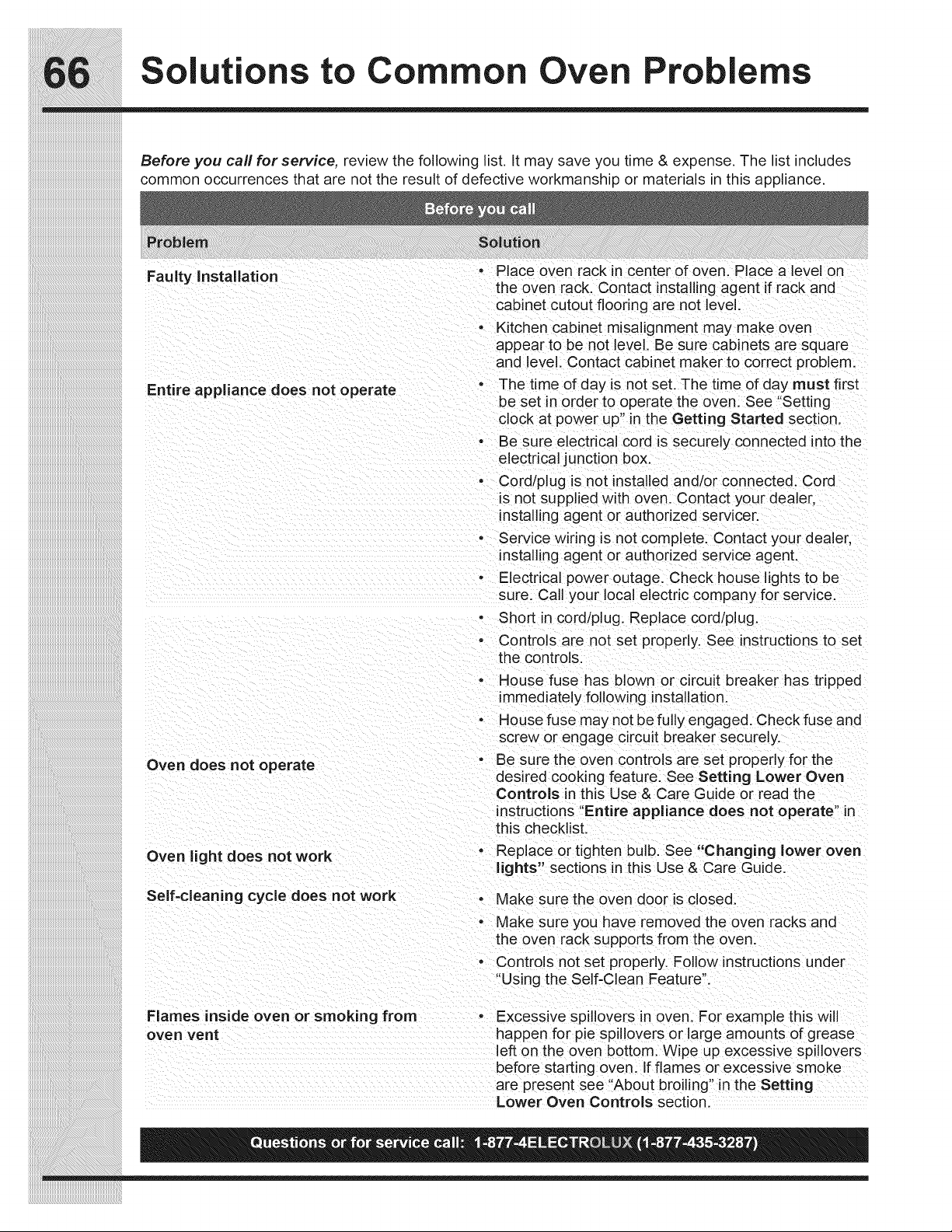
Solutions to Common Oven Problems
Before you carl for service, review the following list. It may save you time & expense. The list includes
common occurrences that are not the result of defective workmanship or materials in this appliance.
Faulty Installation
- Place oven rack in center of oven. Place a level on
the oven rack. Contact installing agent if rack and
cabinet cutout flooring are not level.
Entire appliance does not operate
• Kitchen cabinet misalignment may make oven
appear to be not level. Be sure cabinets are square
and level. Contact cabinet maker to correct problem.
o The time of day is not set. The time of day must first
be set in order to operate the oven. See "Setting
clock at power up" in the Getting Started section,
• Be sure electrical cord is securely connected into the
electrical junction box.
• Cord/plug is not installed and/or connected. Cord
is not supplied with oven. Contact your dealer,
installing agent or authorized se rvicer.
• Service winng is not complete. Contact your dealer,
installing agent or authorized service agent.
- Electrical power outage. Check house lights to be
sure. Call your local electric company for service.
Oven does not operate
Oven light does not work
Self=cleaning cycle does not work
• Short in cord/plug. Replace cord/plug.
• Controls are not set properly. See instructions to set
the controls.
o House fuse has blown or circuit breaker has tripped
immediately following installation.
• House fuse may not be fully engaged. Check fuse and
screw or engage circuit breaker securely.
• Be sure the oven controls are set properly for the
desired cooking feature. See Setting Lower Oven
Controls in this Use & Care Guide or read the
instructions "Entire appliance does not operate" in
this checklist.
o Replace or tighten bulb. See "Changing lower oven
lights" sections in this Use & Care Guide.
- Make sure the oven door is closed.
- Make sure you have removed the oven racks and
the oven rack supports from the oven.
• Controls not set properly. Follow instructions uqder
"Using the Self-Clean Feature".
Flames inside oven or smoking from - Excessive spillovers in oven. For example this will
oven vent happen for pie spillovers or large amounts of grease
left on the oven bottom. Wipe up excessive spillovers
before starting oven. If flames or excessive smoke
are present see "About broiling" in the Setting
Lower Oven Controls section.
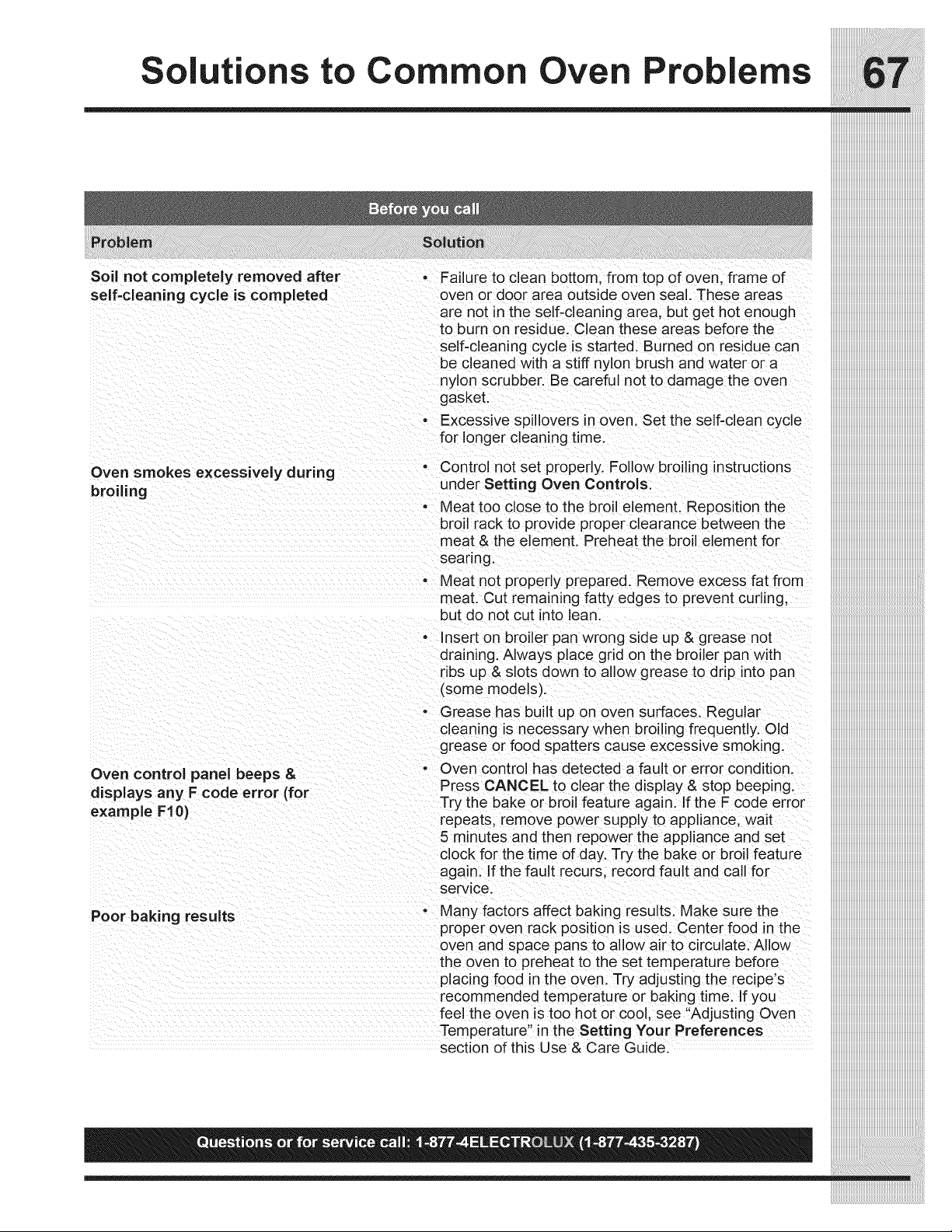
Soil not completely removed after
self-cleaning cycle is completed
• Failure to clean bottom, from top of oven, frame of
oven or door area outside oven seal. These areas
are not in the self-cleaning area, but get hot enough
to burn on residue. Clean these areas before the
self-cleaning cycle is started, Burned on residue can
be cleaned with a stiff nylon brush and water or a
nylon scrubber. Be careful not to damage the oven
gasket.
• Excessive spillovers in oven. Set the self-clean cycle
for longer cleaning time.
Control not set properly. Follow broiling instructions
under Setting Oven Controls.
• Meat too close to the broil element. Reposition the
broil rack to provide proper clearance between the
meat & the element. Preheat the broil element for
searing.
• Meat not properly prepared. Remove excess fat from
meat. Cut remaining fatty edges to prevent curling,
. but do not cut into lean.
Insert on broiler pan wrong side up & grease not
draining. Always place grid on the broiler pan with
ribs up & slots down to allow grease to drip into pan
(some models).
o Grease has built up on oven surfaces. Regular
cleaning is necessary when broiling frequently. Old
grease or food spatters cause excessive smoking.
- Oven control has detected a fault or error condition.
Press CANCEL to clear the display & stop beeping.
Try the bake or broil feature again. If the F code error
repeats, remove power supply to appliance, wait
5 minutes and then repower the appliance and set
clock for the time of day. Try the bake or broil feature
again. If the fault recurs, record fault and call for
service.
- Many factors affect baking results. Make sure the
proper oven rack position is used. Center food in the
oven and space pans to allow air to circulate. Allow
the oven to preheat to the set temperature before
placing food in the oven. Try adjusting the recipe's
recommended temperature or baking time. If you
feel the oven is too hot or cool, see "Adjusting Oven
Temperature" in the Setting Your Preferences
section of this Use & Care Guide.
Oven smokes excessively during °
broiling
Oven control panel beeps &
displays any F code error (for
example FI 0)
Poor baking results
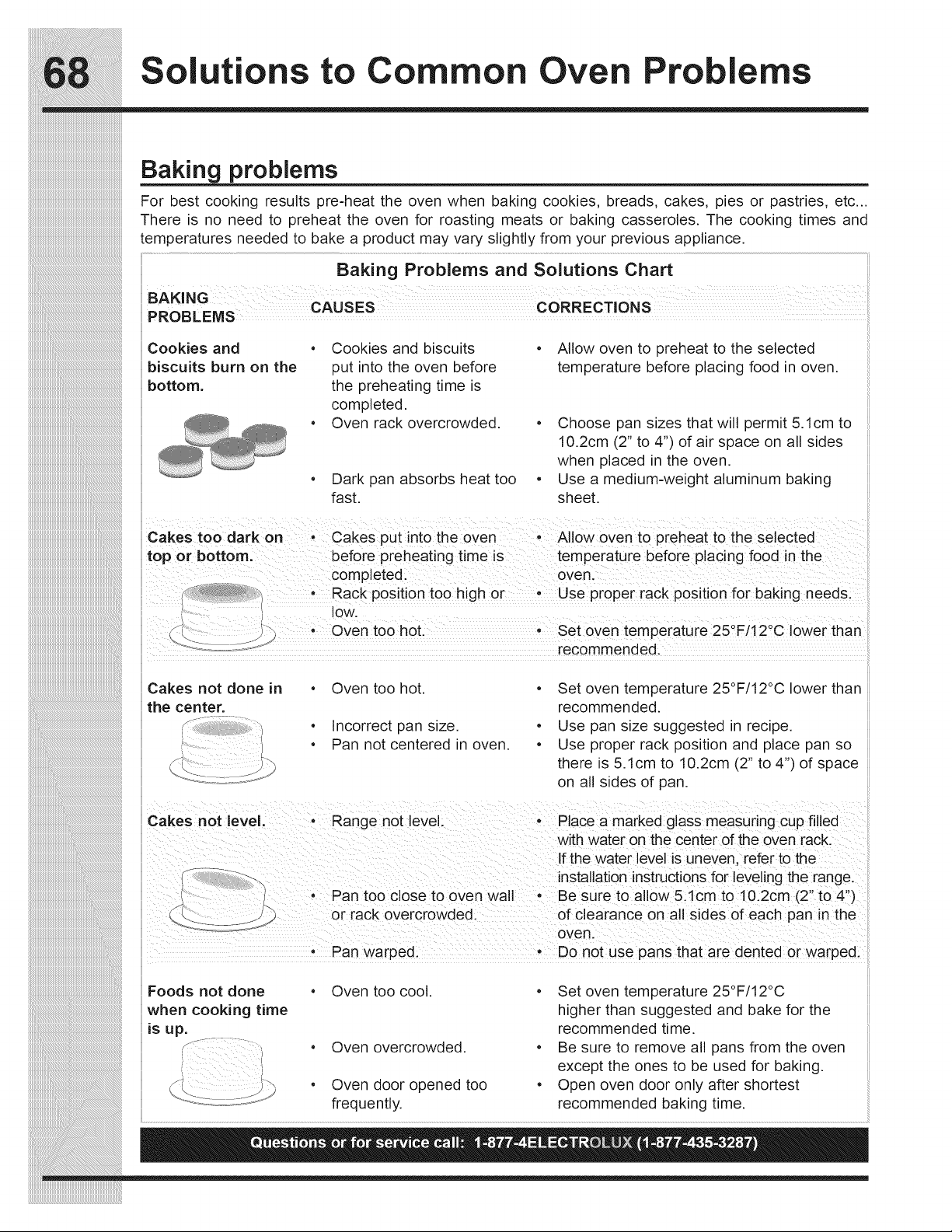
Solutions to Common Oven Problems
Baking problems
For best cooking results pre=heat the oven when baking cookies, breads, cakes, pies or pastries, etc...
There is no need to preheat the oven for roasting meats or baking casseroles. The cooking times and
temperatures needed to bake a product may vary slightly from your previous appliance.
Baking Problems and Solutions Chart
BAKING CAUSES CORRECTIONS
H
Cookies and Cookies and biscuits Allow oven to preheat to the selected
biscuits burn on the put into the oven before temperature before placing food in oven.
bottom, the preheating time is
, completed.
i
Oven rack overcrowded. Choose pan sizes that will permit 5.1cm to
10.2cm (2" to 4") of air space on all sides
when in the
placed
oven.
• Dark pan absorbs heat too • Use a medium-weight aluminum baking
fast. sheet.
Cakes too dark on' CakeS put into the oven, AII0W oven to Preheat t0 the selected
\ e e o o
_i Oven too hot. Set oven temperature 25 F/12 C lower than
J
:: .....< recommended: ....
• • o o
Cakes not done in Oven too hot. Set oven temperature 25 F/12 C lower than
the center, recommended.
• Incorrect pan size. • Use pan size suggested in recipe.
• Pan not centered in oven. • Use proper rack position and place pan so
there is 5. lcm to 10.2cm (2" to 4") of space
on all sides of pan.
Cakes not level. • Range not level. • Place a marked glass measuring cup filled
with water on the center of the oven rack.
if the water level is uneven, refer to the
f:- _':-_ installation instructionsfor leveling the range.
• Pan too close to oven wall • Be sure to allow 5.1cm to 10.2cm (2" to 4")
or rack overcrowded, of clearance on all sides of each pan in the
oven.
• Pan warped. • Do not use pans that are dented or warped.
Foods not done • Oven too cool. • Set oven temperature 25°F/12°C
when cooking time higher than suggested and bake for the
is up. recommended time.
f- , • Oven overcrowded. • Be sure to remove all pans from the oven
except the ones to be used for baking.
• Oven door opened too • Open oven door only after shortest
frequently, recommended baking time.
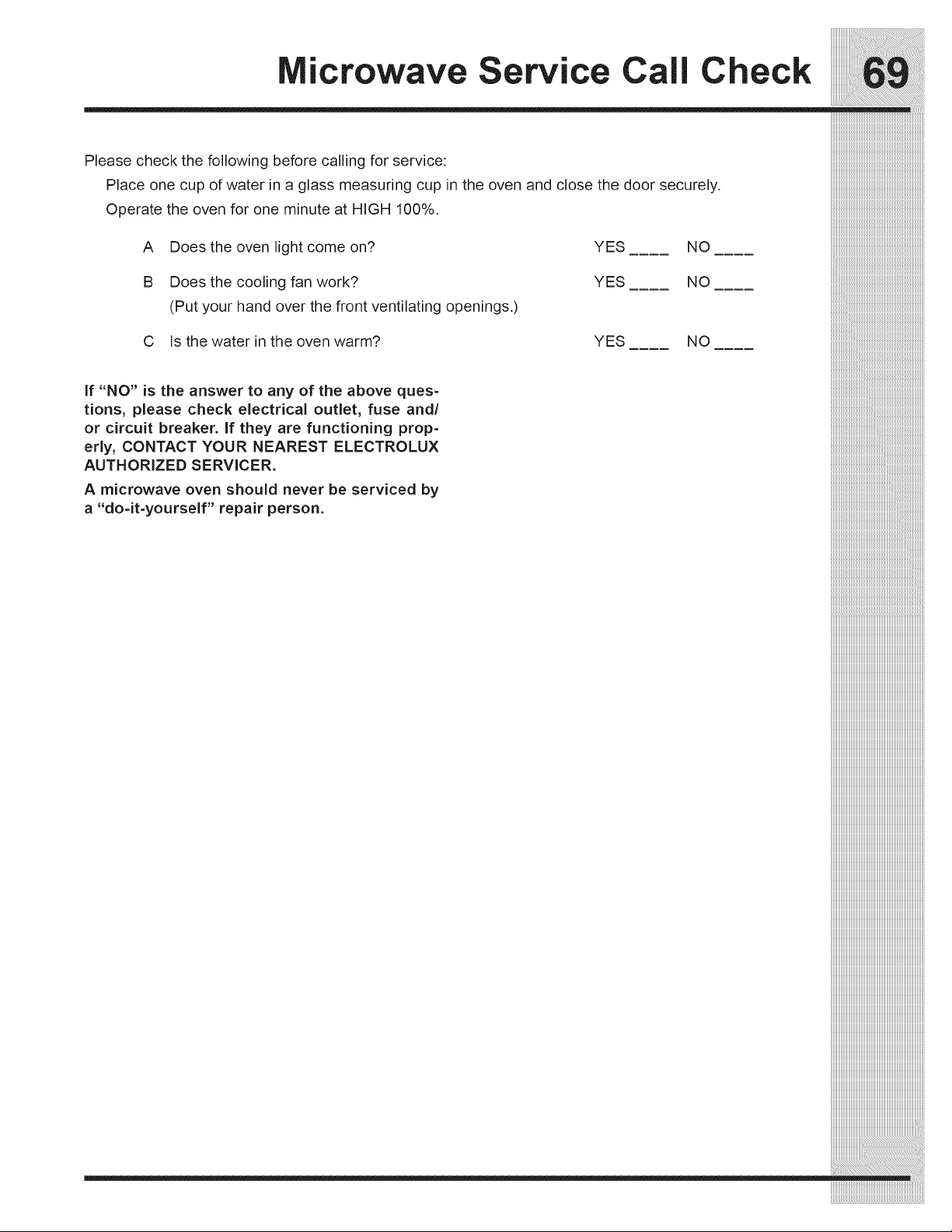
crowave Service Call Check
Please check the following before calling for service:
Place one cup of water in a glass measuring cup in the oven and close the door securely.
Operate the oven for one minute at HIGH 100%.
A Does the oven light come on?
B Does the cooling fan work?
(Put your hand over the front ventilating openings.)
C Is the water in the oven warm?
YES NO
YES NO
YES NO
if "NO" is the answer to any of the above ques-
tions, please check electrical outlet, fuse and/
or circuit breaker. If they are functioning prop-
erly, CONTACT YOUR NEAREST ELECTROLUX
AUTHORIZED SERVICER.
A microwave oven should never be serviced by
a "do-it-yourself" repair person.
___________i:i_i_i_i_i_i_i_i_i_i_i_i_i_i_i_i_i_i_i_i_i_i_i_i_i_i_i_i_i_i_i_i_i_i_i_i_i_i_i_i_i_i_i_i_i_i_i_i_i_i_i_i_i_i_i_i_i_i_i_i_i_i_i_i_i_i_i_i_i_i_i
_:_iiiiiiiiiiiiiiiiiiiiiiiiiiiiiiiiiiiiiiiiiiiiiiiiiiiiiiiiiiiiiiiiiiiiiiiiiiiiiiiiiiiiiiiiiiiiiiiiiiiiiiiiiii_

ores
_i_i_i_i_i_i_i_i_i_i_i_i_i_i_i_i_i_i_i_i_i_i_i_i_i_i_i_i_i_i_i_i_i_i_i_i_i_i_i_i_i_i_i_i_i_i_i_i_i_i_i_i_i_i_i_i__!__________________________________________
iiiiiiiiiiiiiiiiiiiiiiiiiiiiiiiiiiiiiiiiiiiiiiiiiiiiiiiiiiiiiiiiiiiiiiiiiiiiiiiiiiiiiiiiiiiiiiiiiiiiiiiiiiiiiiiiiiiiiii_i!iiiiiiiiiiiiiiiiiiiiiiiiiiiiiiiiiiiiiiiiiiiiiiiiiiiii_
iiiiiiiiiiiiiiiiiiiiiiiiiiiiiiiiiiiiiiiiiiiiiiiiiiiiiiiiiiiiiiiiiiiiiiiiiiiiiiiiiiiiiiiiiiiiiiiiiiiiiiiiiiiiiiiiiiiiiiiiiiiii_i!iiiiiiiiiiiiiiiiiiiiiiiiiiiiiiiiiiiiiiiiiiii_
ajor Appliance rranty information
::::::::::::::::::::::::::::::::::::::::::::::::::::::::::::::::::::::::::::::::
Your appliance is covered by a one year limited warranty. For one year from your original date of purchase, Electrolux will iiiiiiiiiiiiiiiiiiiiiiiiiiiiiiiiiiiiiiiiiiiiiiiiiiiiiiiiiiiiiiiiiiiiiiiiiiiiiiii
repairorreplaceanypartsofthisappliancethatproveto bedefectivein materialsorworkmanshipwhen suchappliance is iiiiiiiiiiiiiiiiiiiiiiiiiiiiiiiiiiiiiiiiiiiiiiiiiiiiiiiiiiiiiiiiiiiiiiiiiiiiiiii::
installed, used, and maintained in accordance with the provided instructions. In addition, the glass cooktop or radiant surface iiiiiiiiiiiiiiiiiiiiiiiiiiiiiiiiiiiiiiiiiiiiiiiiiiiiiiiiiiiiiiiiiiiiiiiiiiiiiiii
element of your appliance (excluding built-in and free-standing range appliances)is covered by a two through five year iiiiiiiiiiiiiiiiiiiiiiiiiiiiiiiiiiiiiiiiiiiiiiiiiiiiiiiiiiiiiiiiiiiiiiiiiiiiiiii:
limited warranty. During the 2nd through 5th years from your original date of purchase, Electrolux will provide a replacement iiiiiiiiiiiiiiiiiiiiiiiiiiiiiiiiiiiiiiiiiiiiiiiiiiiiiiiiiiiiiiiiiiiiiiiiiiiiiiii:
glassc__kt_p_rradiantsurfacee_ementf_ry_urappliancewhichhaspr_vent_bedefectiveinmaterials_rw_rkmanship
when such appliance is installed, used, and maintained in accordance with the provided instructions.
Exclusions
___________i:i_i_i_i_i_i_i_i_i_i_i_i_i_i_i_i_i_i_i_i_i_i_i_i_i_i_i_i_i_i_i_i_i_i_i_i_i_i_i_i_i_i_i_i_i_i_i_i_i_i_i_i_i_i_i_i_i_i_i_i_i_i_i_i_i_i_i_i_i_i_i
This warranty does not cover the following:
1. Products with original serial numbers that have been removed, altered or cannot be readily determined.
2. Product that has been transferred from its original owner to another party or removed outside the USA or Canada.
3. Rust on the interior or exterior of the unit.
4. Products purchased "as-is" are not covered by this warranty.
5. Products used in a commercial setting.
6. Service calls which do not involve malfunction or defects in materials or workmanship, or for appliances not in
ordinary household use or used other than in accordance with the provided instructions.
7. Service calls to correct the installation of your appliance or to instruct you how to use your appliance.
8. Expenses for making the appliance accessible for servicing, such as removal of trim, cupboards, shelves, etc.,
which are not a part of the appliance when it is shipped from the factory.
9. Service calls to repair or replace appliance light bulbs, air filters, water filters, other consumables, or knobs,
handles, or other cosmetic parts.
10. Labor or in-home service costs during the additional limited warranty periods beyond the first year from your origi-
nal date of purchase.
11. Pickup and delivery costs; your appliance is designed to be repaired in the home.
12. Surcharges including, but not limited to, any after hour, weekend, or holiday service calls, tolls, ferry trip charges,
or mileage expense for service calls to remote areas, including the state of Alaska.
13. Damages to the finish of appliance or home incurred during transportation or installation, including but not limited
to floors, cabinets, walls, etc.
14. Damages caused by: services performed by unauthorized service companies; use of parts other than genuine
Electrolux parts or parts obtained from persons other than authorized service companies; or external causes such
as abuse, misuse, inadequate power supply, accidents, fires, or acts of God.
DISCLAIMER OF IMPLIED WARRANTIES; LIMITATION OF REMEDIES
CUSTOMER'S SOLE AND EXCLUSIVE REMEDY UNDER THIS LIMITED WARRANTY SHALL BE REPAIR OR REPLACE-
MENT AS PROVIDED HEREIN. CLAIMS BASED ON IMPLIED WARRANTIES, INCLUDING WARRANTIES OF MER-
CHANTABILITY OR FITNESS FOR A PARTICULAR PURPOSE, ARE LIMITED TO ONE YEAR OR THE SHORTEST
PERIOD ALLOWED BY LAW, BUT NOT LESS THAN ONE YEAR. ELECTROLUX SHALL NOT BE LIABLE FOR CONSE-
QUENTIAL OR INCIDENTAL DAMAGES SUCH AS PROPERTY DAMAGE AND INCIDENTAL EXPENSES RESULTING
FROM ANY BREACH OF THIS WRITTEN LIMITED WARRANTY OR ANY IMPLIED WARRANTY. SOME STATES AND
PROVINCES DO NOTALLOW THE EXCLUSION OR LIMITATION OF INCIDENTAL OR CONSEQUENTIAL DAMAGES,
OR LIMITATIONS ON THE DURATION OF IMPLIED WARRANTIES, SO THESE LIMITATIONS OR EXCLUSIONS MAY
NOT APPLY TO YOU. THIS WRITTEN WARRANTY GIVES YOU SPECIFIC LEGAL RIGHTS. YOU MAY ALSO HAVE
OTHERR GHTSTHATVARYFROMSTATETOSTATE.
IfYou Need Service
Keep your receipt, delivery slip, or some other appropriate payment record to establish the warranty period should service
be required. If service is performed, it is in your best interest to obtain and keep all receipts. Service under this warranty
must be obtained by contacting Electrolux at the addresses or phone numbers below.
This warranty only applies in the USA, Puerto Rico and Canada. In the USA and Puerto Rico, your appliance is warranted by
Electrolux Major Appliances North America, a division of Electrolux Home Products, Inc. In Canada, your appliance is war-
ranted by Electrolux Canada Corp. Electrolux authorizes no person to change or add to any obligations under this warranty.
Obligations for service and parts under this warranty must be performed by Electrolux or an authorized service company.
Product features or specifications as described or illustrated are subject to change without notice.
uSA
1-8 7-435-328 1- 00-25 - 3
Electrolux Major Appliances North America Etectrolux Canada Corp.
RO. Box 212378 5855 Terry Fox Way
Augusta, GA 30907 Mississauga, Ontario, Canada L5V 3E4

ectrolux

