Use & Care Guide
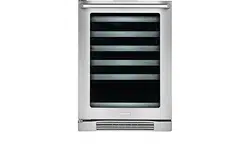
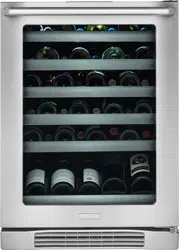
Wine Cooler / Beverage Center
241888400 October 2007
2
Finding Information
Product Registration Card
The package containing this manual also includes
your product registration information. Warranty
coverage begins at the time your Electrolux wine
cooler / beverage center was purchased.
Please Read and Save This
Guide
Thank you for choosing Electrolux, the new
premium brand in home appliances. This Use &
Care Guide is part of our commitment to customer
satisfaction and product quality throughout the
service life of your new wine cooler / beverage
center.
We view your purchase as the beginning of a
relationship. To ensure our ability to continue
serving you, please use this page to record key
product information.
IMPORTANT
PLEASE READ all instructions completely before
attempting to install or operate the unit.
All wine coolers / beverage centers require
a connection to an electrical power source.
Improper hook-up can result in a safety hazard
and potential damage to the product or contents!
Proper installation, in accordance with the
manufacturer’s specifications and all local
codes, is the sole responsibility of the consumer.
The manufacturer is not responsible for any
installation expenses or damages incurred due
to improper installation. If you are unsure of your
ability to safely connect electric power to the unit,
consult a licensed and insured professional to
perform all electrical work.
Once you have your unit installed, we suggest
you keep this manual in a safe place for future
reference. Should any problems occur, refer to the
“Troubleshooting” section of this manual. This
information will help you quickly identify a problem
and get it remedied. In the event you require
assistance, please contact the dealer where you
purchased your unit.
Make a Record for Quick
Reference
Whenever you call to request information or
service, you will need to know your model number
and serial number. You can find this information on
the serial plate located on the ceiling of your unit
and on the product registration card.
NOTE
Registering your product with Electrolux
enhances our ability to serve you. You can
register online (at the Internet address below)
or by dropping your Product Registration Card
in the mail. Complete and mail the Product
Registration Card as soon as possible to validate
the registration date.
Please record the purchase date of your Electrolux
unit and your dealer’s name, address and
telephone number.
_________________________________________
Purchase Date
_________________________________________
Electrolux Model Number
_________________________________________
Electrolux Serial Number
_________________________________________
Dealer Name
_________________________________________
Dealer Address
_________________________________________
Dealer Telephone
Keep this manual and the sales receipt together in
a safe place for further reference.
Questions?
For toll-free telephone support in the U.S. and
Canada:
1-877- 4ELECTROLUX (1-877-435-3287)
For online support and Internet product information:
www.electroluxusa.com

3
Finding Information
Table of Contents
Finding Information ................................................................................. 2
Please Read and Save This Guide ......................................................................................2
Make a Record for Quick Reference ...................................................................................2
Product Registration Card ..................................................................................................2
Questions? .........................................................................................................................2
Safety
.................................................................................................. 4
Important Safety Instructions ............................................................................................4
Safety Precautions ......................................................................................................... 4
Definitions .....................................................................................................................4
General Precautions .......................................................................................................4
Installation ........................................................................................... 5
Installing the Wine Cooler / Beverage Center .....................................................................5
Site Preparation .................................................................................................................6
Leveling
............................................................................................... 7
Leveling the Unit ................................................................................................................7
Door Reversal
........................................................................................ 8
Reversing the Door ............................................................................................................8
Start-Up and Temperature Control
............................................................... 11
Starting the Unit ...............................................................................................................11
Adjusting the Temperature ...............................................................................................11
Operation............................................................................................. 12
Description of Features
....................................................................................................12
Alarms ..............................................................................................................................12
Sabbath Mode ..................................................................................................................13
Storage ............................................................................................... 13
Proper Storage .................................................................................................................13
Display Rack (Wine Cooler Only) .....................................................................................13
Stocking Recommendations (Wine Cooler Only) .............................................................13
Maintenance
......................................................................................... 14
Maintaining Your Wine Cooler / Beverage Center .............................................................14
Exterior Cleaning for Your Stainless Steel Model .........................................................14
Interior Cleaning ..........................................................................................................14
Wine Rack Removal/Installation ..................................................................................14
Glass Shelf Removal/Installation (Beverage Center Only) ............................................15
Troubleshooting ..................................................................................... 16
Before You Call for Service ...............................................................................................16
If Service is Required
.......................................................................................................16
Warranty Information
.............................................................................. 17
4
Safety
Important Safety Instructions
Safety Precautions
Do not attempt to install or operate your unit
until you have read the safety precautions in this
manual. Safety items throughout this manual are
labeled with a Danger, Warning or Caution based
on the risk type.
Definitions
This is the safety alert symbol. It is used to
alert you to potential personal injury hazards. Obey
all safety messages that follow this symbol to avoid
possible injury or death.
WARNING
WARNING indicates a potentially hazardous
situation which, if not avoided, could result in
death or serious injury.
IMPORTANT
Indicates installation, operation or maintenance
information which is important but not hazard-
related.
CAUTION
CAUTION indicates a potentially hazardous
situation which, if not avoided, may result in
minor or moderate injury.
DANGER
DANGER indicates an imminently hazardous
situation which, if not avoided, will result in
death or serious injury.
General Precautions
DANGER
RISK OF CHILD ENTRAPMENT. Before you
throw away your old appliance, take off the
doors and leave shelves in place so that
children may not easily climb inside.
WARNING
• Neverattempttorepairorperform
maintenance on the unit until the electricity
has been disconnected.
• Altering,cuttingofpowercord,removalof
power cord, removal of power plug, or direct
wiring can cause serious injury, fire and/or
loss of property and/or life and will void the
warranty.
• Donotliftunitbydoorhandle.
CAUTION
• Usecarewhenmovingtheunit.Someedges
are sharp and may cause personal injury.
Wear gloves when moving or repositioning
the unit.
• Neverinstalltheunitbehindcloseddoors.
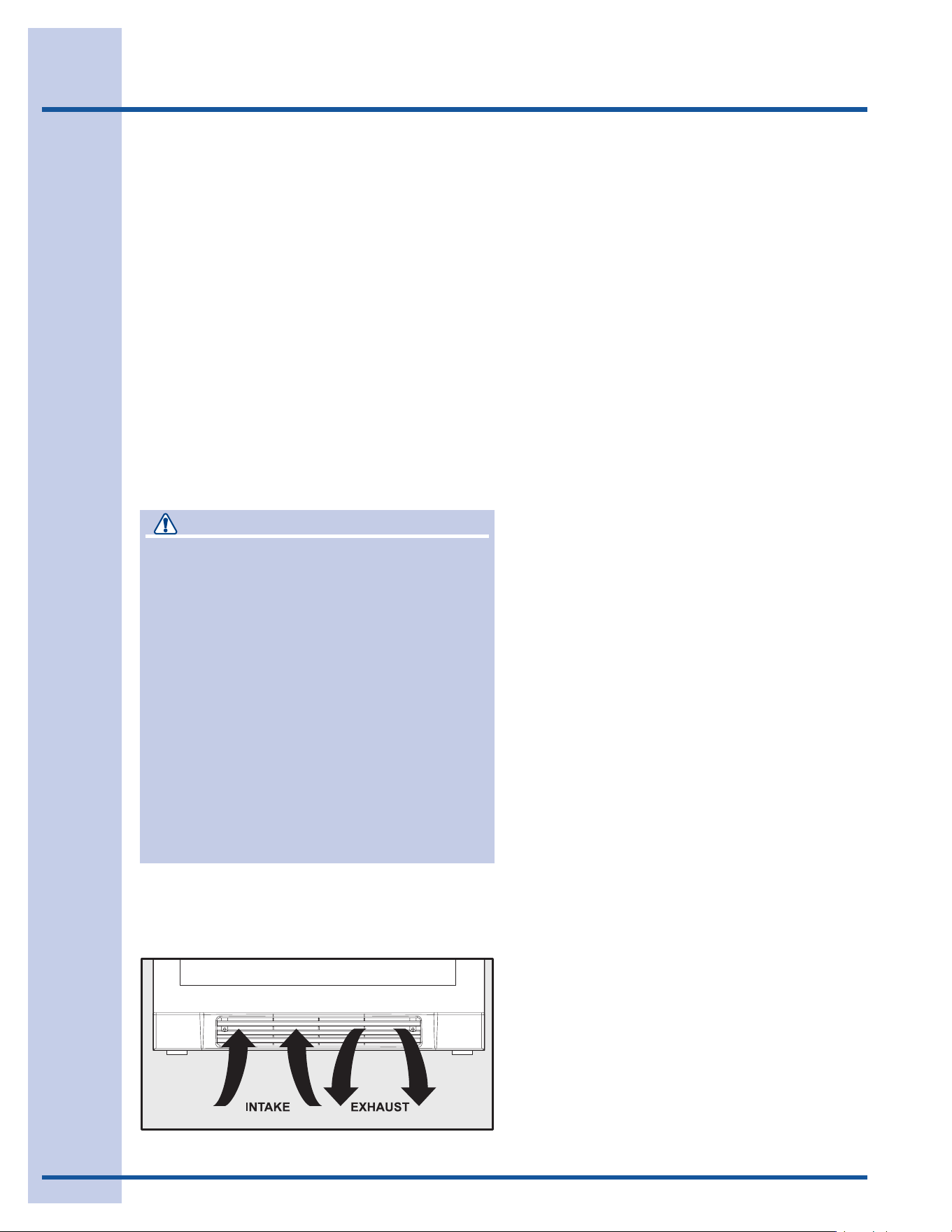
Be sure front grille is free of obstruction.
Obstructing free air flow can cause the unit
to malfunction, and may void the warranty.
• Allowunittemperaturetostabilizefor24
hours before use.
CAUTION
• UseonlygenuineElectroluxreplacement
parts. Imitation parts can damage the unit
and may void the warranty.
5
Installation
Installing the Wine Cooler / Beverage Center
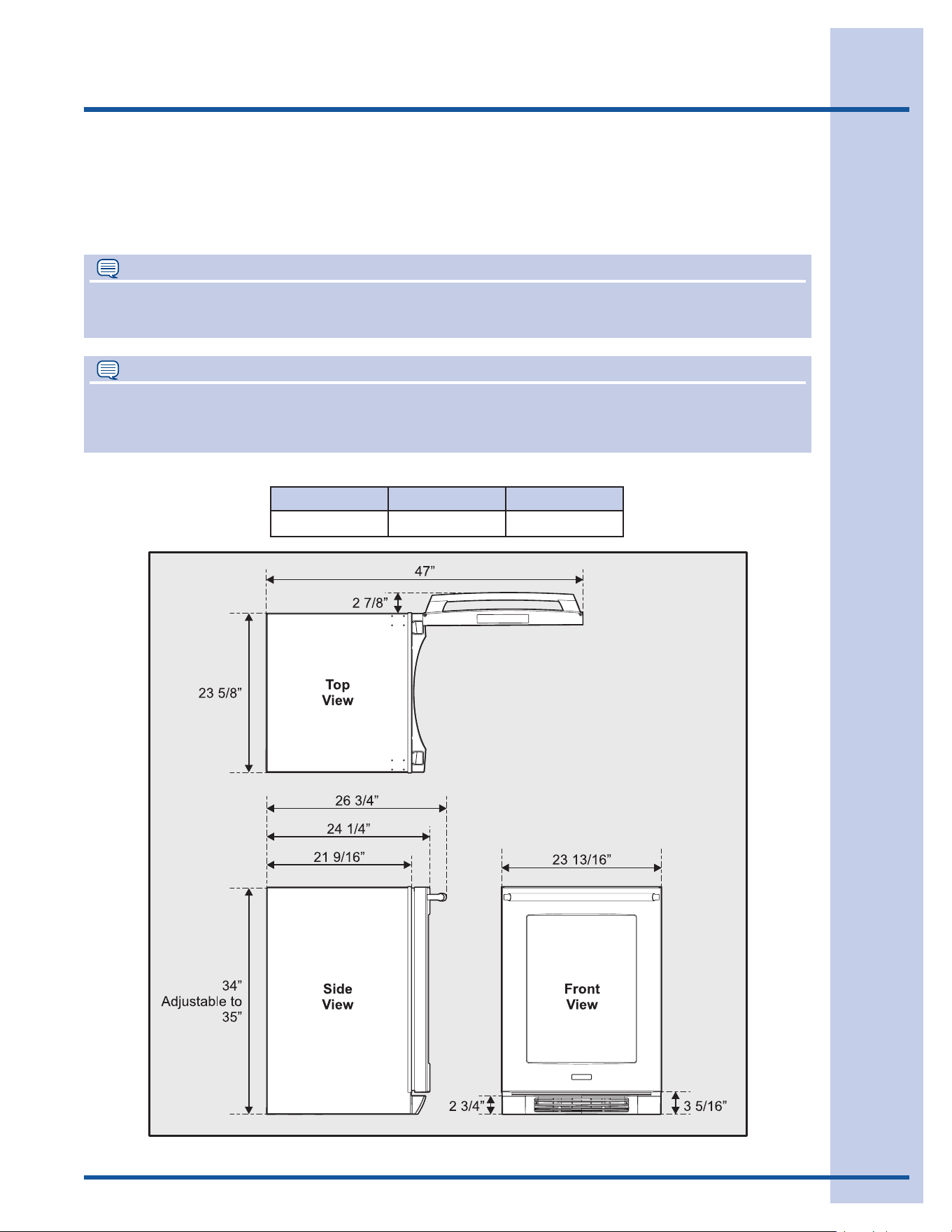
Your Electrolux wine cooler / beverage center has been designed for either free-standing or built-in
installation. When built-in, your wine cooler does not require additional air space for top, sides or rear. In
either case, the front grille must NOT be obstructed.
NOTE
To ease unit installation and removal, it is recommended that the cabinet rough opening dimensions be
increased by at least ¼ inch over the dimensions given for your unit.
Width Height Depth
23
13
/
16
inch 34-35 inches 26
3
/
4
inch
Unit Dimensions
NOTE
All units require zero clearance when installed flush with a cabinet or wall. Electrolux stainless steel
models require a minimum 2⁷⁄₈ inch handle clearance when installed against a wall or cabinet that
extends beyond the front edge of the unit.
Product Dimensions
6
Installation
DANGER
ELECTROCUTION HAZARD!
Electrical Grounding Required. This appliance
is equipped with a three prong (grounding)
polarized plug for your protection against
possible shock hazards.
•NEVERremovetheroundgroundingprong
from the plug.
•NEVERuseatwo-pronggroundingadapter.
•NEVERuseanextensioncordtoconnect
power to the unit.
Whereatwo-prongwallreceptacleis
encountered or a longer power cord is
required, contact a qualified electrician to
have it replaced in accordance with applicable
electrical codes.
5 Position the unit to allow free air flow through
the front grille.
6 Wipe out inside of unit with a damp cloth.
7 Be sure to install the Anti-Tip bracket. Follow
the instructions provided with the Anti-Tip
bracket kit.
Site Preparation
1 Position the unit on a flat, level surface
capable of supporting the entire weight of the
unit. Remember the unit will be significantly
heavier once it is fully loaded.
2 This unit requires a grounded and polarized
115 VAC, 60Hz, 15A circuit (normal
household current).
3 Avoid connecting the unit to a Ground
Fault Interruptor (GFI). GFIs are prone to
nuisance tripping which will cause the unit to
shut down. GFIs are generally not used on
circuits which power equipment that must run
unattended for long periods of time.
4 The unit must be installed according to your
local codes and ordinances.
7
Leveling
Leveling the Unit
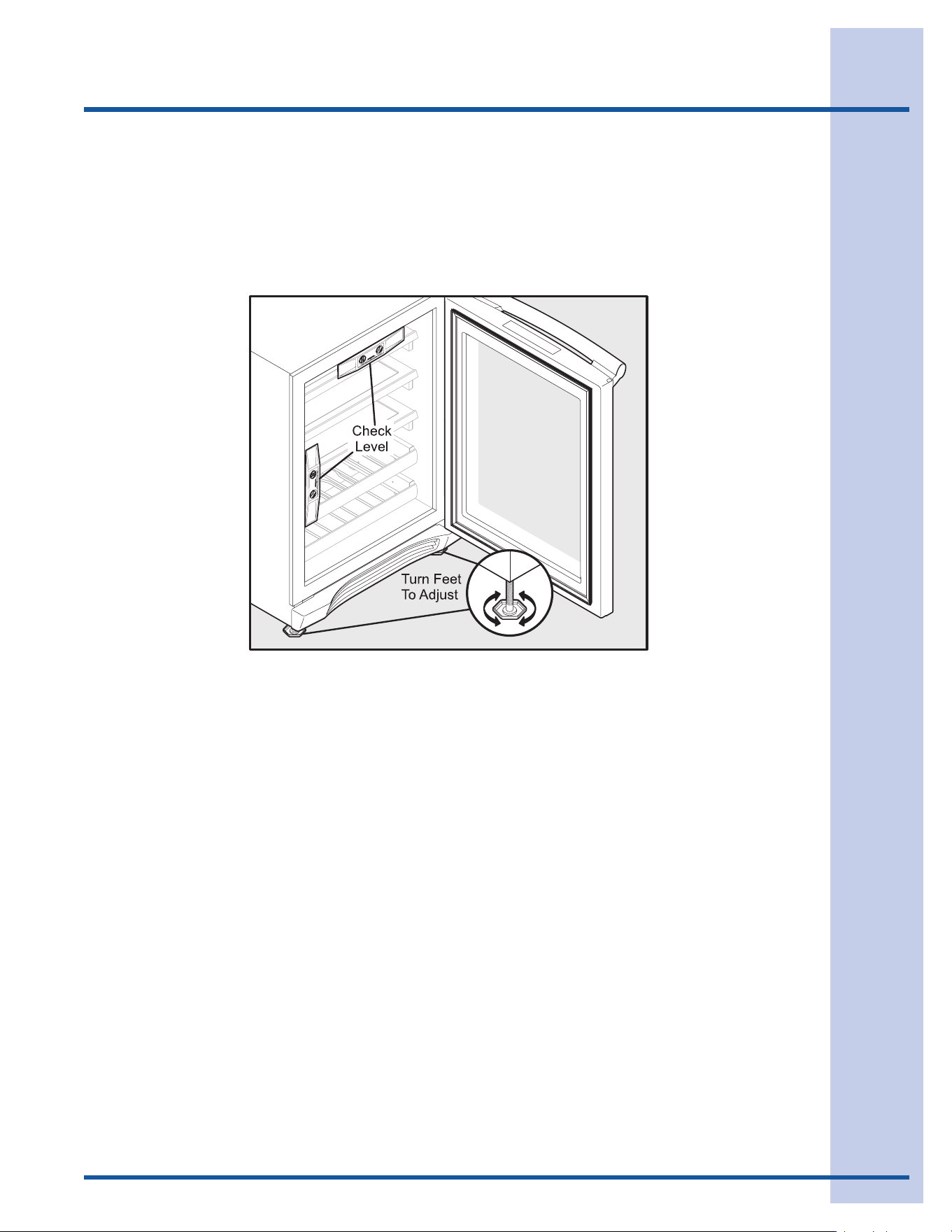
Position the unit on a flat, level surface capable of supporting the entire weight of the unit when full.
This unit contains four (4) adjustable leveling legs. Turn the legs clockwise to raise and counterclockwise
to lower.
8
Door Reversal
Reversing the Door
To reverse the door:
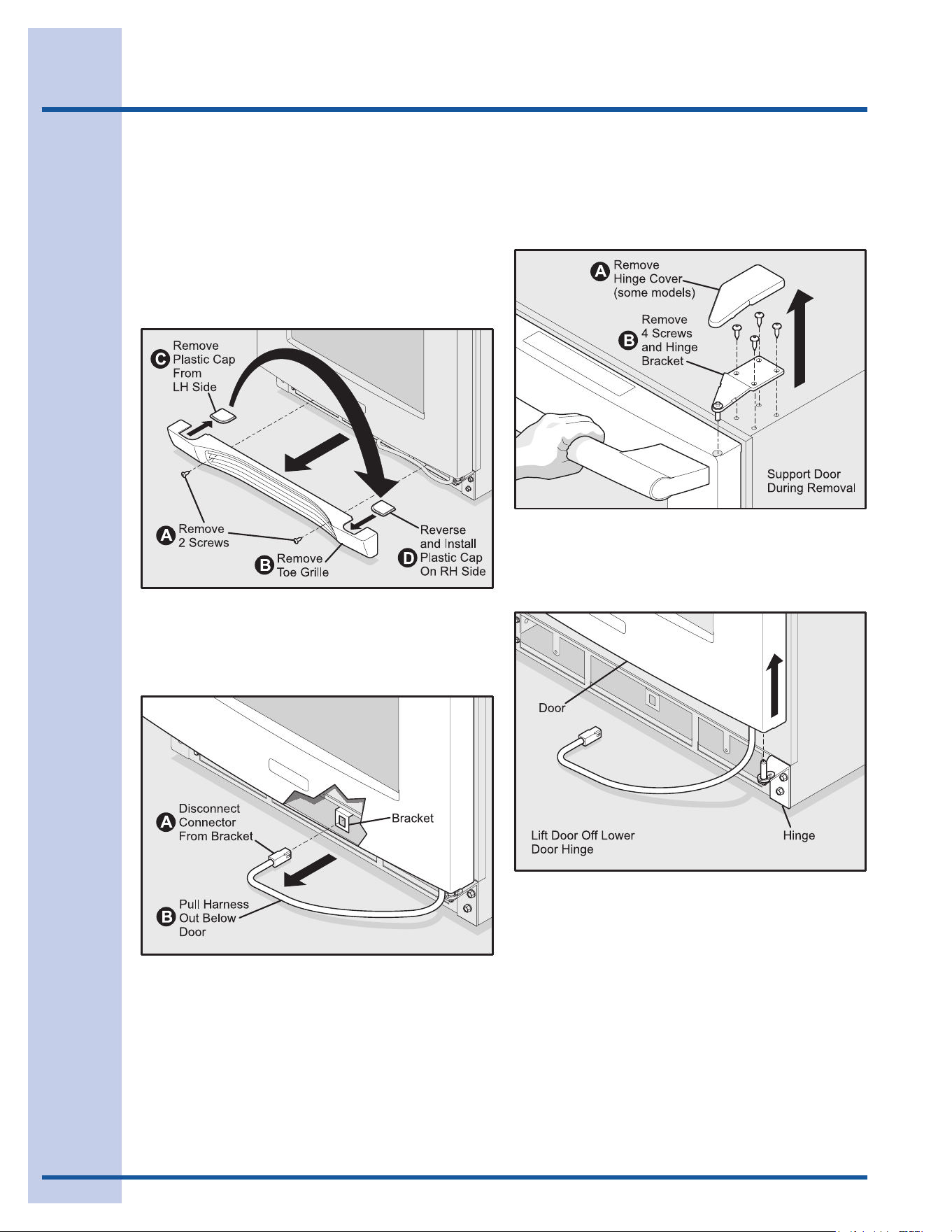
1 Disconnect power to the wine cooler /
beverage center.
2 Remove toe grille by removing two (2) Philips
screws. Remove plastic cap, reverse it and
place it in the other side of the toe grille.
3 Disconnect door harness from connector
bracket behind lower front panel. Pull
harness from behind lower front panel so it is
hanging below the door.
4 Remove upper right-hand (RH) hinge bracket
by loosening four (4) Torx screws. Be careful
to support the door while loosening and
removing the upper hinge bracket.
5 Lift the door off of the lower RH hinge
bracket. Turn the door upside down and
place on a soft, non-abrasive surface.
9
Door Reversal
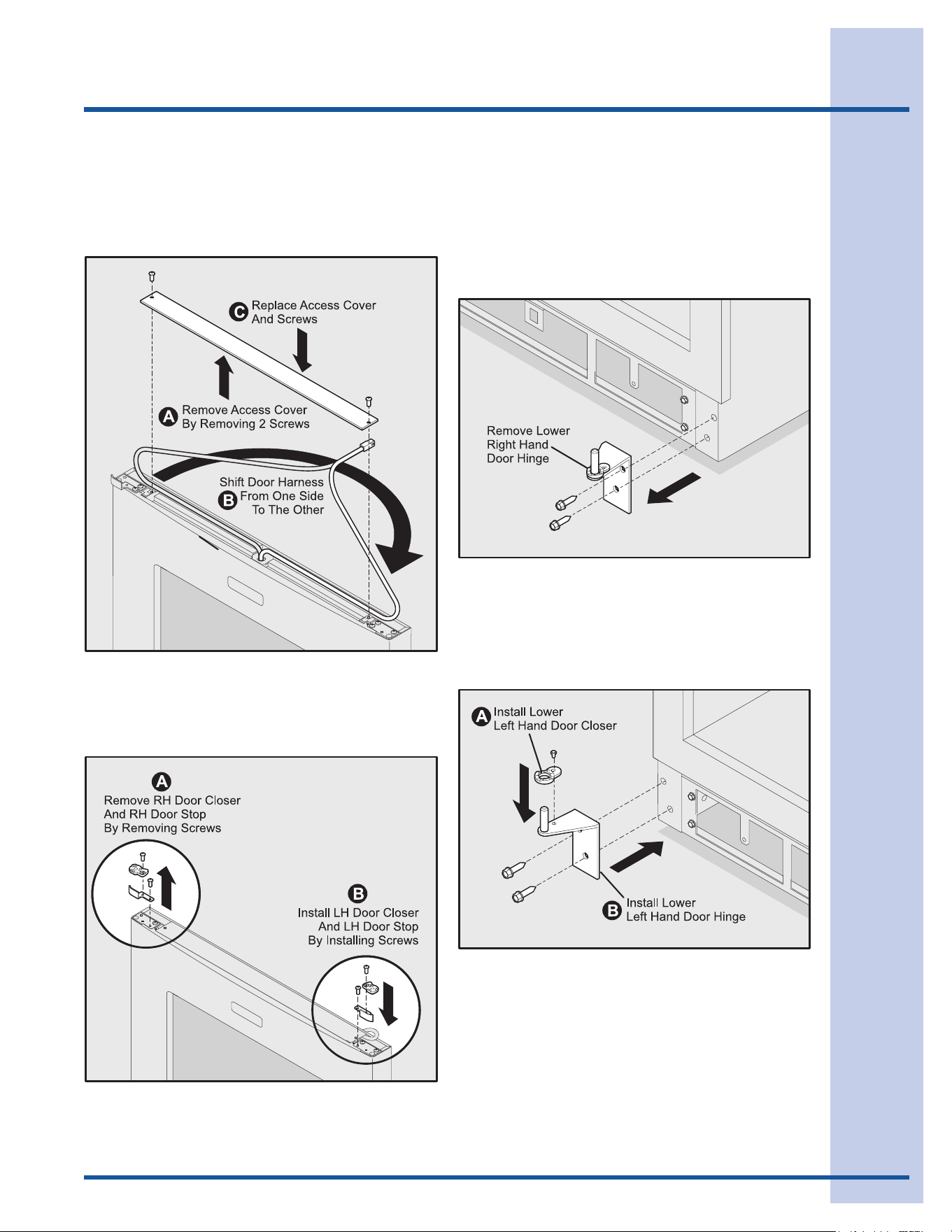
6 Remove access cover by removing two (2)
Philips screws.
7 Shift door harness from one side to the other.
Replace access cover.
8 Remove plastic RH door closer by removing
hex head screw. Remove metal RH door
stop by removing hex head screw.
9 Install metal left-hand (LH) door stop by
installing hex head screw.
10 Install plastic LH door stop by installing hex
head screw.
11 Remove lower RH door hinge by removing
two (2) hex head screws.
12 Install lower LH door closer in lower LH door
hinge by installing hex head screw.
13 Install lower LH door hinge by installing two
(2) hex head screws.
10
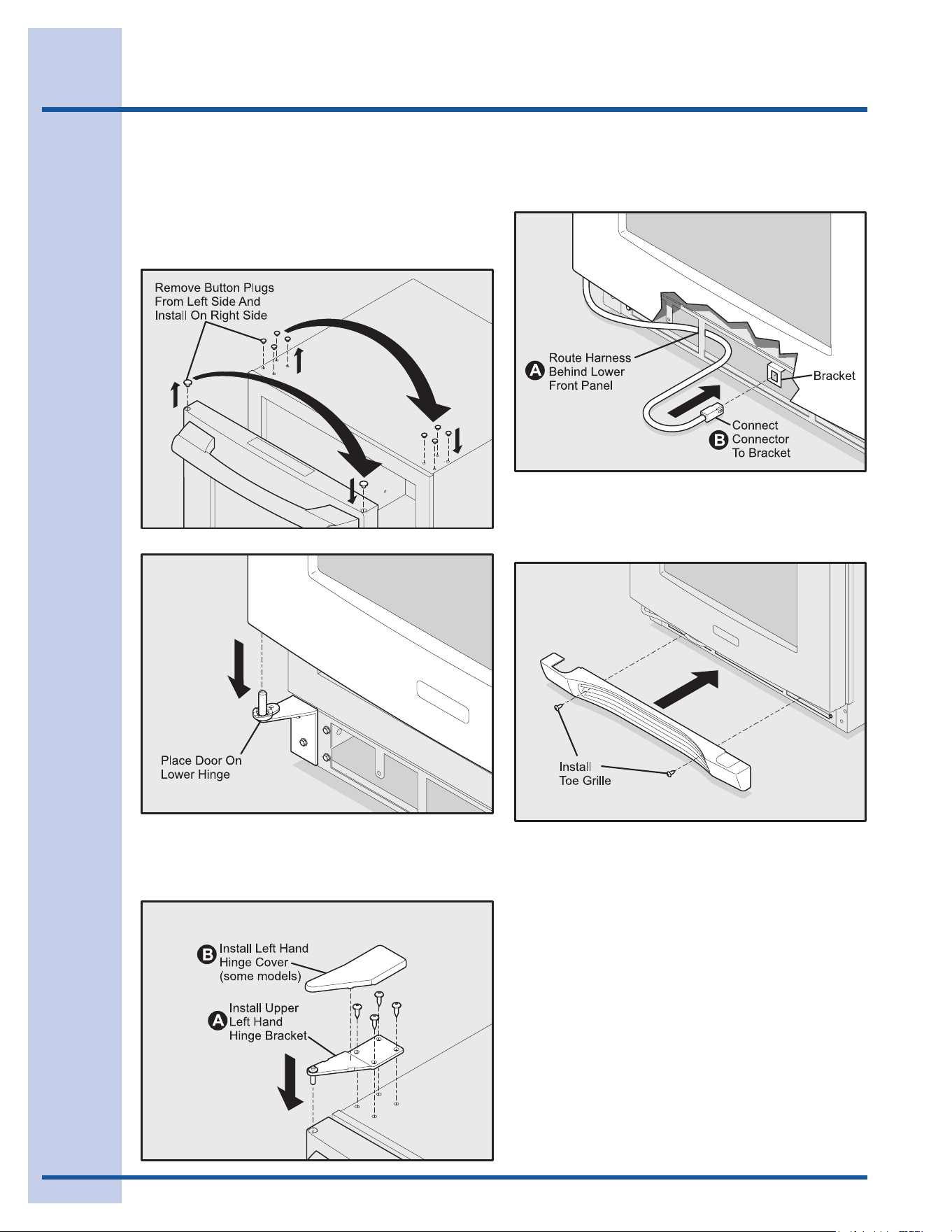
14 Remove button plugs from left side of cabinet
and place in right side of cabinet. Remove
button plug from upper left side of door and
place in upper right side of door. Place door
on lower LH hinge bracket.
Door Reversal
15 Install upper LH hinge bracket by installing
four (4) Torx screws.
16 Route door harness behind lower front panel.
Reconnect door harness to bracket.
17 Reattach toe grille by installing two (2) Philips
screws.
18 Reapply power.
11
Starting the Unit
Your wine cooler / beverage center is shipped in the ON position; however, you may turn it ON or OFF by
pressing and holding the ON/OFF for three (3) seconds.
Adjusting the Temperature
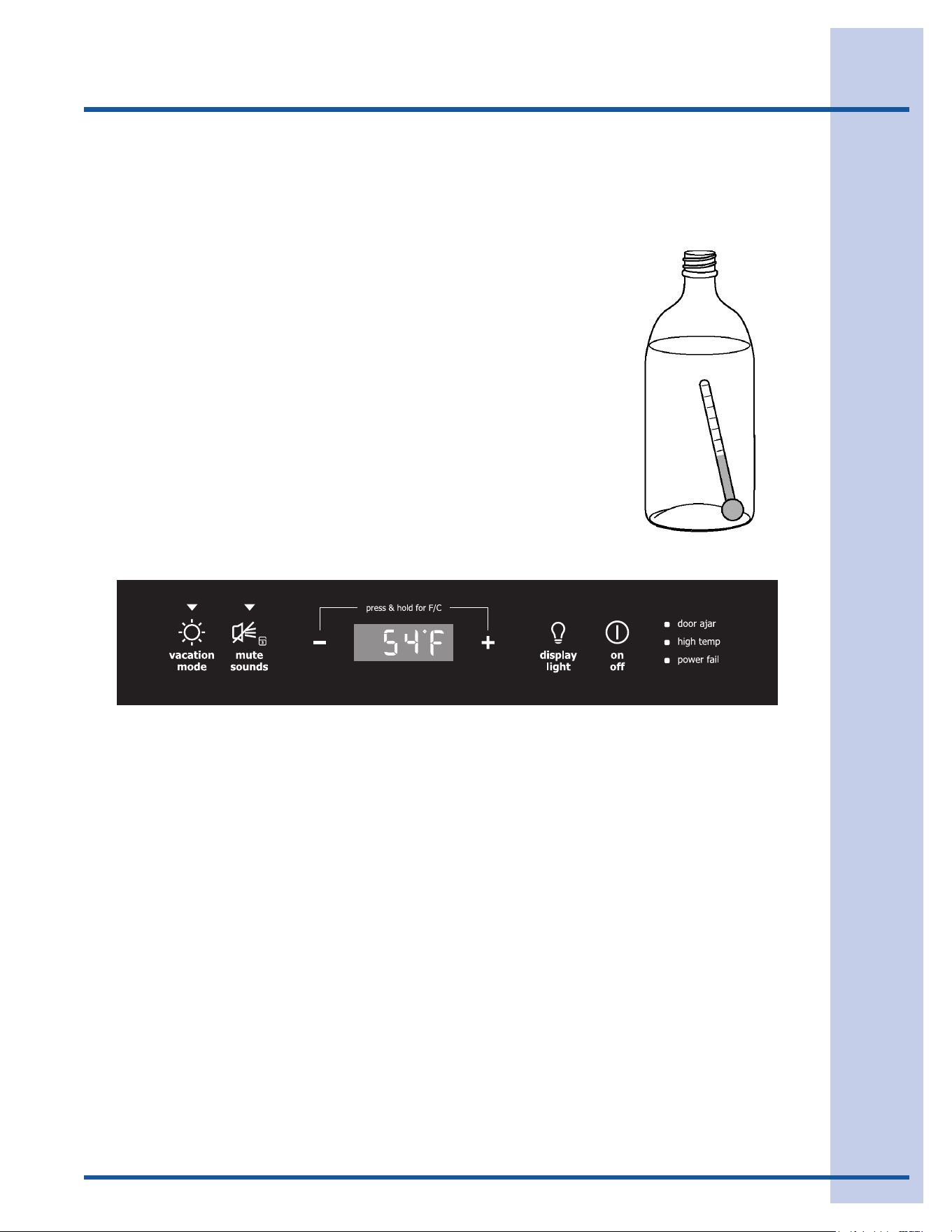
To accurately check the temperature, insert a reliable thermometer
into a plastic (non-breakable) bottle, partially filled with water.
Tighten the bottle cap securely.
Place the bottle in the desired area for 24 hours. Refrain from
opening the unit during the testing period. After 24 hours, check the
temperature of the water.
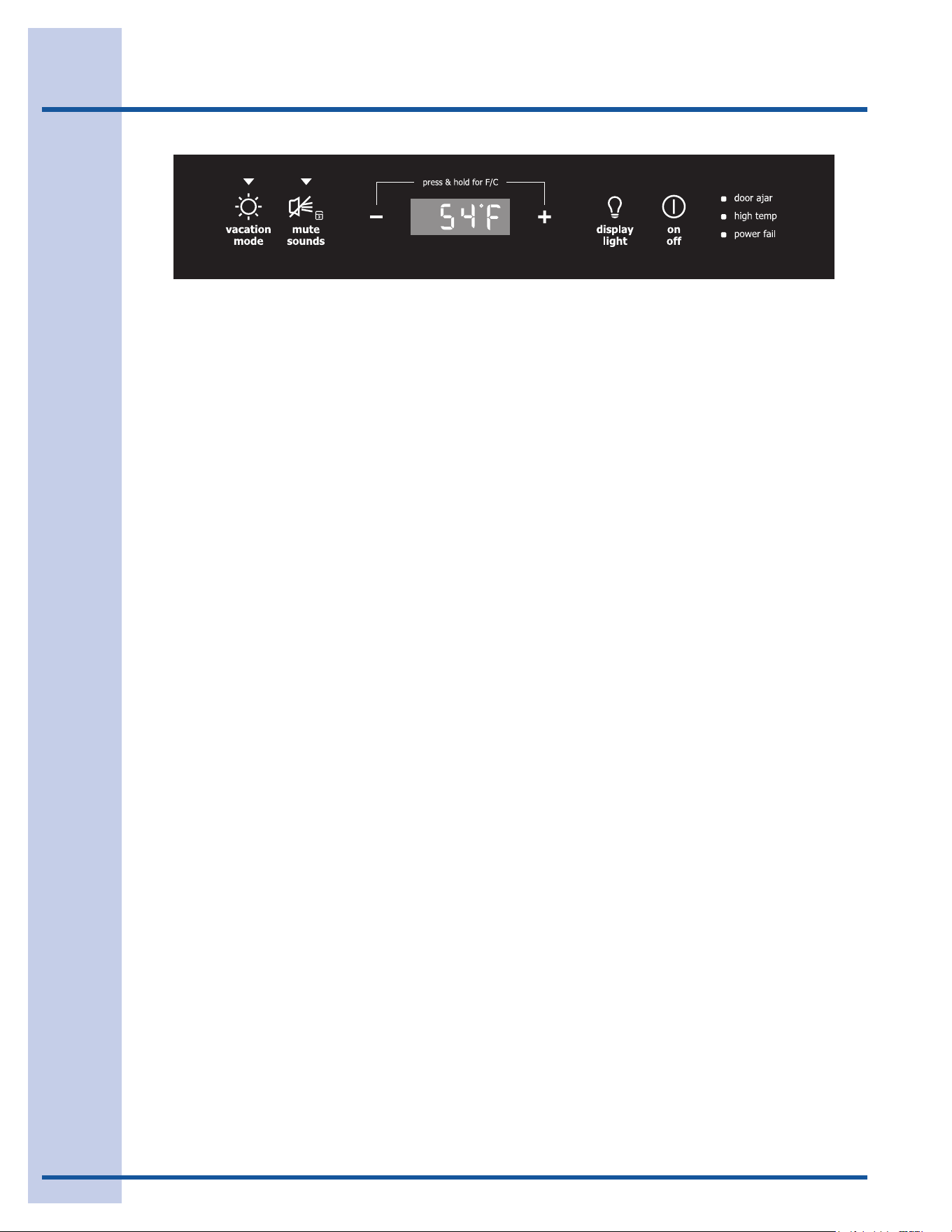
Press the (+) or (–) indicator to adjust the temperature to the desired
setting. The temperature display will begin to blink with the first
touch. Adjust the temperature by touching the key. After three
(3) seconds of inactivity, the display will beep to accept the new
temperature.
Start-UpandTemperatureControl
Factors that affect the internal temperatures of the cabinet include:
1 Temperature setting.
2 Room temperature where installed.
3 Number of times the door is opened and closed.
4 Amount of time the internal light is illuminated. This affects primarily wines/beverages on the top
racks/shelves.
5 Installation in direct sunlight or near a heat source.
12
Operation
Alarms
door ajar If the door has been left open for five (5) min-
utes, an audible alarm will sound and the door
ajar indicator will illuminate on the right side of
the display. The mute sounds indicator will
blink. Pressing the mute sounds key will
acknowledge the alarm and disable the audible
portion. The door ajar indicator will continue
to blink until the door is closed.
high temp
In the event of a high temperature condition,
an audible alarm will sound, the temperature
display will blink and display “HI” and the
high temp indicator on the right side of
the display will blink. The mute sounds
indicator will blink. Pressing the mute
sounds key will acknowledge the alarm and
disable the audible portion. All other modes
are turned off until the alarm is acknowl-
edged. The high temperature indicator
and “HI” will stay illuminated until a normal
safe range operating temperature has been
reached, at which time the temperature
display will show the actual temperature.
power fail
In the event of a power failure or initial
power-up, an audible alarm will sound and the
power fail indicator on the right side of the
display will blink. The mute sounds indica-
tor will blink. Pressing the mute sounds
key will acknowledge the alarm and disable
the audible portion. All other functions are
disabled until the alarm is acknowledged,
at which point the power fail indicator is
turned off and the unit will resume normal
operation. The high temp alarm (beverage
center only) may also be illuminated until a
safe temperature has been reached.
Description of Features
vacation mode Conserves energy by disabling interior
lights and keypad inputs.
mute sounds
Tones emitted by each keypress can be
turned off based on user preference. The
sounds are muted when the red indicator is
lit. The mute sounds key also is used to
acknowledge alarm conditions, denoted by
a flashing red indicator. Press and hold the
mute sounds key for three (3) seconds
to enable control lock, which prevents
undesired changes to the unit settings.
Temperature display will show “LOC”.
temperature mode
Simultaneously pressing the (+) and (–)
keys causes the temperature display to
toggle from Fahrenheit to Celsius and back
again.
display light
Manually activates the lights, regardless of
whether the door is closed. Each succes-
sive keypress will advance the interior lights
from “Off” to “Low Intensity” to “Maximum
Intensity” then to “Off” again. Interior
lighting is automatically disabled after 120
minutes, at which point the lights may be
manually activated again if desired.
on off
Press and hold for three (3) seconds. This
allows the user to turn off the cooling sys-
tem. The temperature display will display
“OFF”. THIS DOES NOT REMOVE POWER
FROM THE UNIT.
(Beverage
Center Only)
Sabbath Mode
Sabbath mode disables portions of the unit and its controls in accordance with the weekly Sabbath and
religious holidays observed within the Orthodox Jewish community.
Sabbath mode is enabled and disabled by pressing and holding the vacation mode key for five
(5) seconds. Temperature display shows “Sb” while in Sabbath mode.
The customer may open or close the door at any time without concern of directly turning on or
off any lights, digital readouts, solenoids, fans, valves, compressor, icons, tones or alarms. After
power failure, the unit will immediately return to Sabbath mode.
While in Sabbath mode, alarm indicators may illuminate, but will not be accompanied by audible alarms. The
alarm indicators will continue to blink until the Sabbath mode is exited and the alarm condition is remedied.
For further assistance, guidelines for proper usage and a complete list of models with the Sabbath feature,
please visit the web at http:\\www.star-k.org.

13
Storage
Proper Storage
The wine cooler will accommodate 46 bottles (750
ml size). There are five (5) upper racks that will
hold eight (8) bottles each and one lower display
rack that will hold six (6) bottles. Specially designed
wine racks allow for proper horizontal storage of the
wine. The cork remains moist which keeps air from
entering the bottle.
The beverage center will accommodate eight (8)
bottles on the two (2) lower racks that hold four
(4) bottles each. Additional storage capacity is
provided on the glass shelves above the racks.
Display Rack
(Wine Cooler Only)
The bottom rack in your wine cooler is designed for
storage as well as for display purposes. The unit
holds six (6) bottles in the display rack.
Stocking Recommendations
(Wine Cooler Only)
The wine racks allow for the proper horizontal
storage of wine. The bottles are properly positioned
so that the wine remains in contact with the cork to
assure that the cork does not become dry. Use the
procedure listed below to stock your wine cooler.
White and sparkling wines should be maintained on
the bottom to middle racks and red wine on the top
racks.
Your wine cooler should be stocked beginning with
the bottom display rack at the back and working
forward staggering the bottles.
Subsequent racks should be stocked similarly,
starting with the back of each rack.
14
Maintenance
Maintaining Your Wine Cooler/
Beverage Center
Periodic cleaning and proper maintenance will
ensure efficiency, top performance, and long
life. The maintenance intervals listed are based
on normal conditions. You may want to shorten
the intervals if you have pets or other special
considerations.
ExteriorCleaningforYourStainless
Steel Model
• Yourstainlesssteelmodelmaydiscolorwhen
exposed to chlorine gas, pool chemicals, salt
water, or cleaners with bleach.
• Keepyourstainlessunitlookingnewby
cleaning with a high quality, all-in-one
stainless steel cleaner/polish on a monthly
basis. Frequent cleaning will remove surface
contamination that could lead to rust. Some
installations will require cleaning on a weekly
basis.
• DONOTCLEANWITHSTEELWOOLPADS.
• DONOTUSECLEANERSTHATARE
NOT SPECIFICALLY INTENDED FOR
STAINLESS STEEL (this includes glass, tile
and counter cleansers).
• Ifanysurfacediscolorsorrustingappears,
clean it quickly with Bon-Ami or Barkeepers
Friend Cleanser and a non-abrasive cloth.
Always clean in the direction of the grain.
Always finish this process with a high quality,
all-in-one stainless steel cleaner/polish to
prevent further problems.
• USEOFABRASIVEPADSSUCHAS
SCOTCHBRITE WILL CAUSE THE
GRAINING IN THE STAINLESS TO
BECOME BLURRED.
• Rustthatisallowedtolingercanpenetrate
into the surface of the stainless steel and
become impossible to remove.
CAUTION
• Stainlesssteelmodelsexposedto
chlorine gas and moisture such as areas
with spas or swimming pools, may have
some discoloration of the stainless steel.
Discoloration from chlorine gas is normal.
Followexteriorcleaninginstructions.
• NEVERUSECHLORIDETOCLEAN
STAINLESS STEEL.
InteriorCleaning-asRequired
1 Disconnect power to the wine cooler /
beverage center.
2 Remove racks if desired, see “WINE RACK
REMOVAL/INSTALLATION”below.
3 Wipe down the interior with a solution of non-
abrasive mild detergent and warm water.
4 Rinse with clear water.
5 Reconnect power to the unit.
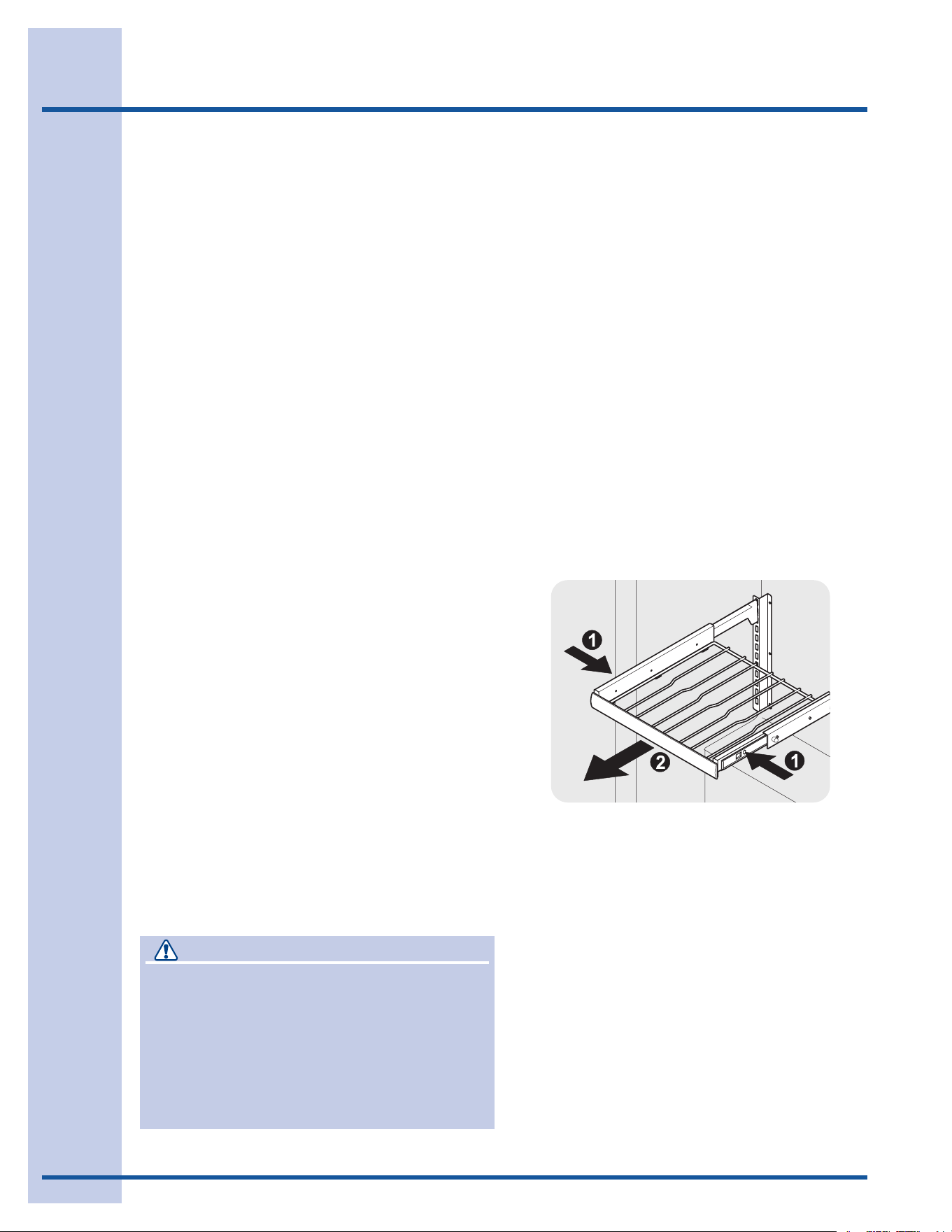
Wine Rack Removal/Installation
1 Open door fully.
2 Extend wine rack fully.
3 Ball bearing slide features plastic release
latches on each side. Push release latches,
then pull wine rack out.
4 To reinstall, push ball bearing slides in fully.
Slide rack into ball bearing slide ensuring
each side engages properly.
15
Maintenance
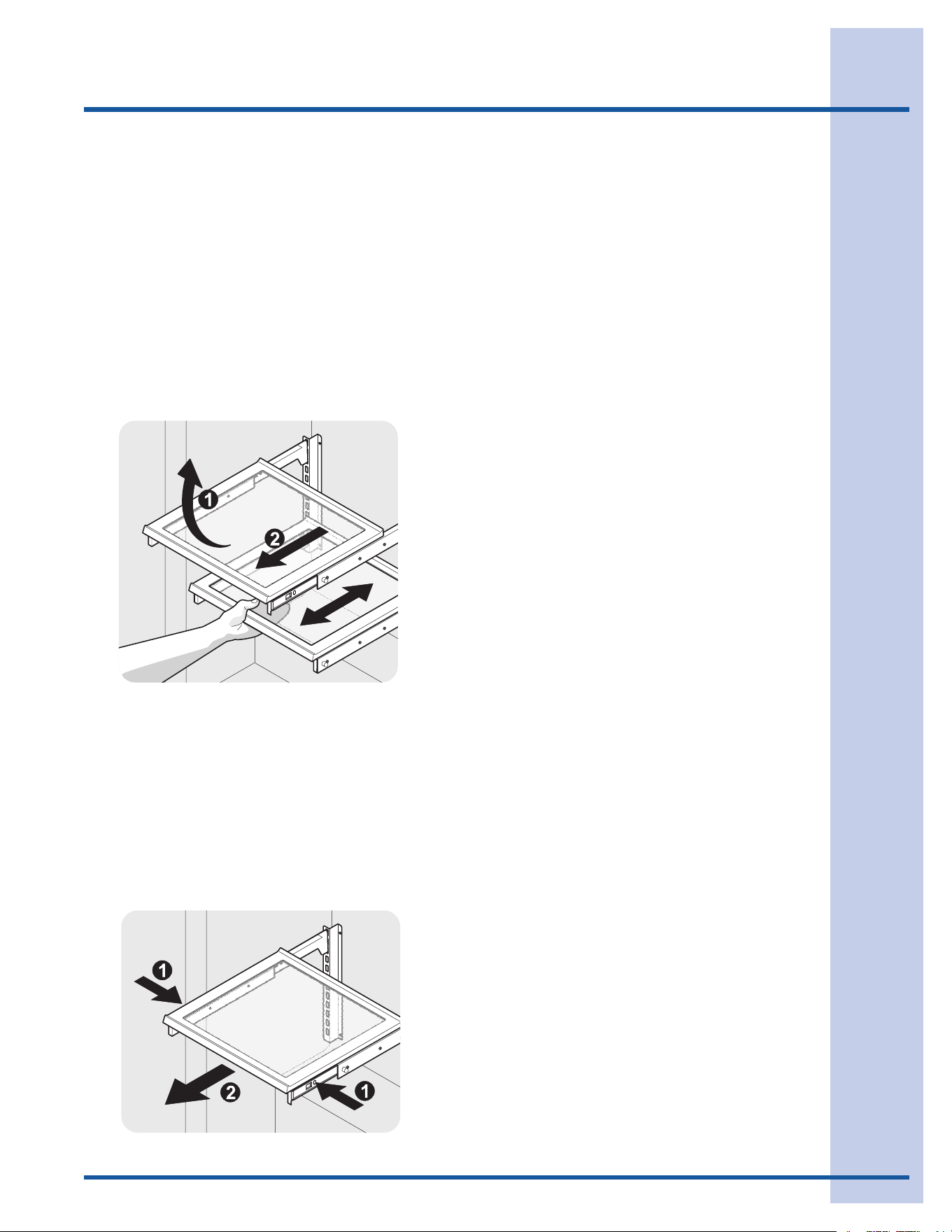
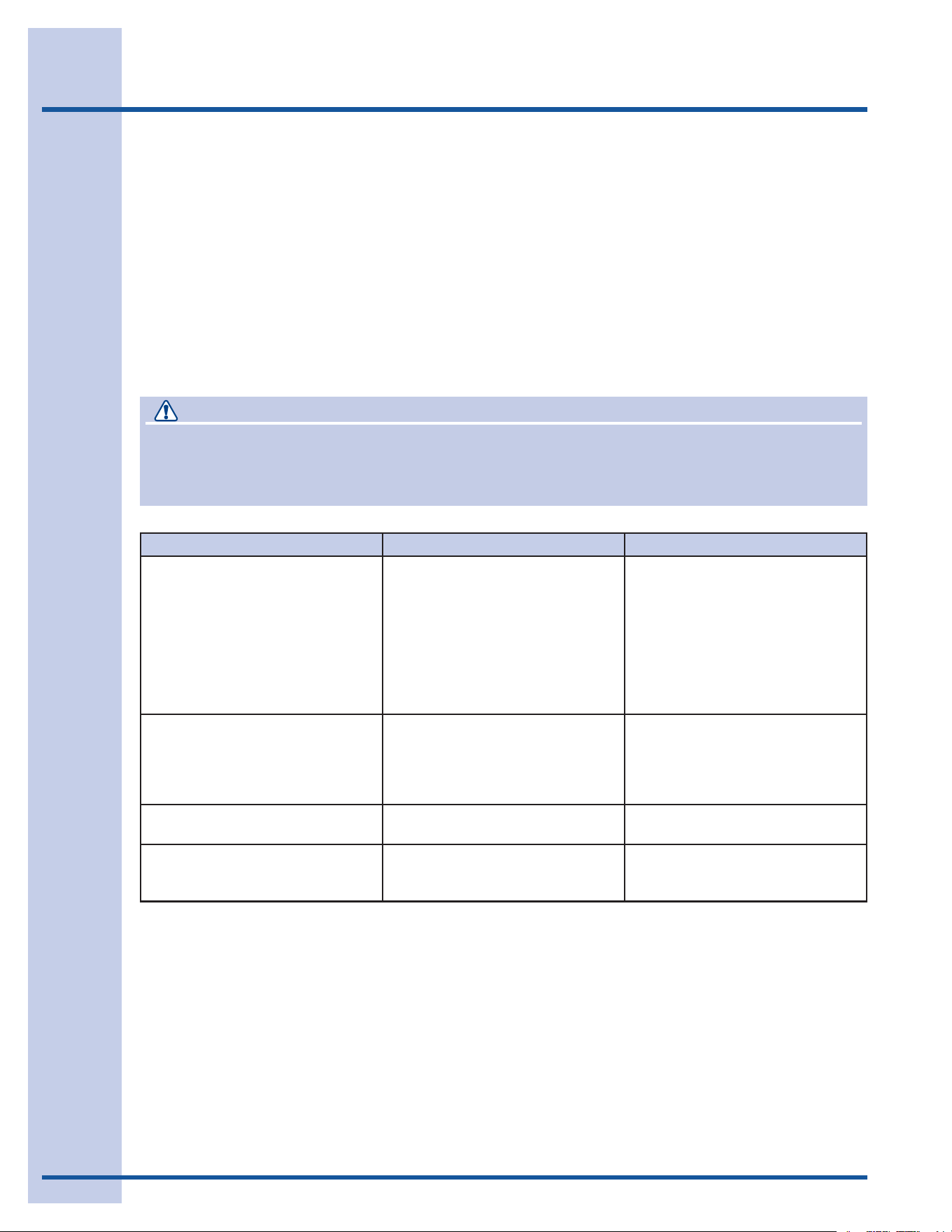
3 Method 2 - glass shelf removal:
a. Extend shelf fully.
b. Ball bearing slide features plastic release
latches on each side. Push release
latches then pull shelf out.
c. To reinstall, push ball bearing slides in
fully. Slide shelf rack into ball bearing
slide ensuring each side engages
properly.
Glass Shelf Removal/Installation
(Beverage Center Only)
1 Open door fully.
2 Method 1 - removal of entire shelf
assembly:
a. Lift up on front edge and rear portion of
shelf. Cantilever brackets will disengage
from ladder.
b. To reinstall, slide shelf into cabinet
ensuring the cantilever brackets engage
fully in the proper holes. It may help to
extend the glass portion.
16
Troubleshooting
Before You Call for Service
If the unit appears to be malfunctioning, read
through this manual first. If the problem persists,
check the Troubleshooting Guide below. Locate
the problem in the guide and refer to the cause
and its remedy before calling for service. The
problem may be something very simple that can
be solved without a service call. Some remedies
listed in the Troubleshooting Guide are very
complex. Consulting or contracting a qualified
service technician may be necessary.
If Service is Required
Contact the dealer where you purchased the unit
if service is required. State the model and serial
number and explain the problem. The model and
serial number plate is located on the ceiling of your
unit.
If you do not know the name of the selling dealer or
a local service company, you can check online at
www.electroluxusa.comor call1-877-435-3287.
DANGER
ELECTROCUTION HAZARD
NEVERattempttorepairorperformmaintenanceontheunituntilthemainelectricalpowerhas
been disconnected.
Problem Possible Cause Remedy
Unit not cold enough.
Adjust temperatures (see “Adjusting
the Temperature” in the “
Start-Up
and Temperature Control” section).
•Controlsettoowarm.
•Lightstayingon.
•Airowtofrontgrilleblocked.
•Doorgasketnotsealingproperly.
•Adjusttemperaturecolder.Allow
24 hours for temperature to
stabilize.
•Turnoffmanuallightcontrol.See
“Operation” Section.
•Airowmustnotbeobstructed
to front grille. See “Installation”
Section.
•Adjustdoorgasket.
Unit too cold.
Adjust temperatures (see “Adjusting
the Temperature” in the “Start-Up
and Temperature Control” section).
•Controlsettoocold. •Adjusttemperaturewarmer.
Allow 24 hours for temperature to
stabilize.
No interior light.
•FailedLEDassembly. •ContactaqualiedElectrolux
Service Technician.
Light will not go out when door is
closed.
•ManuallightcontrolisON.
•Doorswitchnotmakingcontact.
•Turnoffmanuallightcontrol.See
“Operation” Section.
•Checkforproperdooralignment.

17
Warranty Information
Major Appliance Warranty Information
Your appliance is covered by a one year limited warranty. For one year from your original date of purchase, Electrolux will repair or
replace any parts of this appliance that prove to be defective in materials or workmanship when such appliance is installed, used, and
maintained in accordance with the provided instructions. In addition, the cabinet liner and sealed refrigeration system (compressor,
condenser, evaporator, dryer or tubing) of your appliance is covered by a two through fi ve year limited warranty. During the 2nd through
5th years from your original date of purchase, Electrolux will repair or replace any parts in the cabinet liner and sealed refrigeration
system which prove to be defective in materials or workmanship when such appliance is installed, used, and maintained in accordance
with the provided instructions.
Exclusions
This warranty does not cover the following:
1. Products with original serial numbers that have been removed, altered or cannot be readily determined.
2. Product that has been transferred from its original owner to another party or removed outside the USA or Canada.
3. Rust on the interior or exterior of the unit.
4. Products purchased “as-is” are not covered by this warranty.
5. Food loss due to any refrigerator or freezer failures.
6. Products used in a commercial setting.
7. Service calls which do not involve malfunction or defects in materials or workmanship, or for appliances not in ordinary
household use or used other than in accordance with the provided instructions.
8. Service calls to correct the installation of your appliance or to instruct you how to use your appliance.
9. Expenses for making the appliance accessible for servicing, such as removal of trim, cupboards, shelves, etc., which are not a
part of the appliance when it is shipped from the factory.
10. Service calls to repair or replace appliance light bulbs, air fi lters, water fi lters, other consumables, or knobs, handles, or other
cosmetic parts.
11. Pickup and delivery costs; your appliance is designed to be repaired in the home.
12. Surcharges including, but not limited to, any after hour, weekend, or holiday service calls, tolls, ferry trip charges, or mileage
expense for service calls to remote areas, including the state of Alaska.
13. Damages to the fi nish of appliance or home incurred during transportation or installation, including but not limited to fl oors,
cabinets, walls, etc.
14. Damages caused by: services performed by unauthorized service companies; use of parts other than genuine Electrolux
parts or parts obtained from persons other than authorized service companies; or external causes such as abuse, misuse,
inadequate power supply, accidents, fi res, or acts of God.
DISCLAIMER OF IMPLIED WARRANTIES; LIMITATION OF REMEDIES
CUSTOMER’S SOLE AND EXCLUSIVE REMEDY UNDER THIS LIMITED WARRANTY SHALL BE REPAIR OR REPLACEMENT
AS PROVIDED HEREIN. CLAIMS BASED ON IMPLIED WARRANTIES, INCLUDING WARRANTIES OF MERCHANTABILITY OR
FITNESS FOR A PARTICULAR PURPOSE, ARE LIMITED TO ONE YEAR OR THE SHORTEST PERIOD ALLOWED BY LAW,
BUT NOT LESS THAN ONE YEAR. ELECTROLUX SHALL NOT BE LIABLE FOR CONSEQUENTIAL OR INCIDENTAL DAMAGES
SUCH AS PROPERTY DAMAGE AND INCIDENTAL EXPENSES RESULTING FROM ANY BREACH OF THIS WRITTEN LIMITED
WARRANTY OR ANY IMPLIED WARRANTY. SOME STATES AND PROVINCES DO NOT ALLOW THE EXCLUSION OR LIMITATION
OF INCIDENTAL OR CONSEQUENTIAL DAMAGES, OR LIMITATIONS ON THE DURATION OF IMPLIED WARRANTIES, SO THESE
LIMITATIONS OR EXCLUSIONS MAY NOT APPLY TO YOU. THIS WRITTEN WARRANTY GIVES YOU SPECIFIC LEGAL RIGHTS.
YOU MAY ALSO HAVE OTHER RIGHTS THAT VARY FROM STATE TO STATE.
If You Need Service
Keep your receipt, delivery slip, or some other appropriate payment record to establish the warranty period should service be required.
If service is performed, it is in your best interest to obtain and keep all receipts. Service under this warranty must be obtained by
contacting Electrolux at the addresses or phone numbers below.
This warranty only applies in the USA, Puerto Rico and Canada. In the USA and Puerto Rico, your appliance is warranted by Electrolux
Major Appliances North America, a division of Electrolux Home Products, Inc. In Canada, your appliance is warranted by Electrolux
Canada Corp. Electrolux authorizes no person to change or add to any obligations under this warranty. Obligations for service and parts
under this warranty must be performed by Electrolux or an authorized service company. Product features or specifi cations as described
or illustrated are subject to change without notice.
USA
1-877-435-3287
Electrolux Major Appliances North America
P.O. Box 212378
Augusta, GA 30907
Canada
1-800-265-8352
Electrolux Canada Corp.
5855 Terry Fox Way
Mississauga, Ontario, Canada L5V 3E4