Model 8030
FAST. ACCURATE. RELIABLE.
CONVERSIONCALC PLUS
™
ULTIMATE PROFESSIONAL CONVERSION CALCULATOR
PRG8030E-A.indd 1 8/21/2012 11:39:49 AM

Pocket RefeRence Guide — 3
CONVERSIONCALC PLUS™
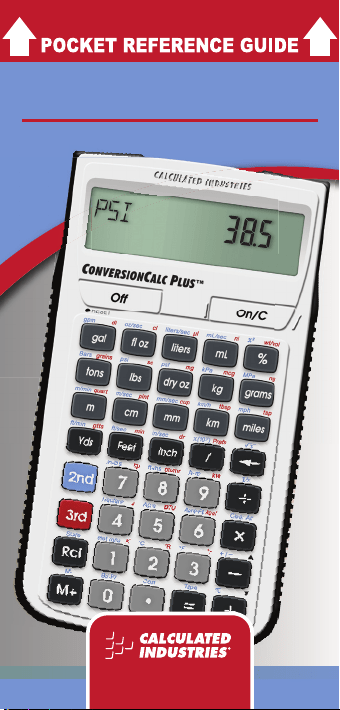
The ConversionCalc Plus™ is an
easy-to-use and powerful handheld
calculator that provides more than
500 conversion combinations using
70 built-in Standard, Metric and other
units of measure. Work in and convert
between linear, area and volume units,
plus weights, temperatures, velocity
and more.
With the ConversionCalc Plus you
can enter and convert everything from
very large units to micro- and nano-
units -- kilograms and tons, drams,
scruples, grains, microliters, even
tablespoons and cups. Don’t waste
time looking up tables and conversions
in books and online. Virtually any
conversion is at your ngertips with the
ConversionCalc Plus.
PRG8030E-A.indd 2 8/21/2012 11:39:50 AM

Pocket RefeRence Guide — 3
The ConversionCalc Plus™ is the
professional choice for:
• Health Care Professionals
• Scientists
• Pharmacists
• Nutritionists
• Lab Technicians
• Speciers
• Importers/Exporters
With the ConversionCalc Plus™
you can convert:
• Flow Rate
• Weight
• Linear, Area and Volume
Dimensions
• Temperature
• Weight per Volume
• Pressure
• Torque
• Energy
• Power
• Velocity
PRG8030E-A.indd 3 8/21/2012 11:39:50 AM

Pocket RefeRence Guide — 5
TABLE OF CONTENTS
GETTING STARTED
6
Key Denitions
6
Basic Function Keys 6
Miscellaneous Function Keys 7
Conversion Function Keys 9
Preference Settings
14
Calculating Percentages
16
Using Exponential Notation
17
Memory Operation
19
Paperless Tape Function
20
USING THE
CONVERSION CALC PLUS
21
Using the 2nd and 3rd
Function Keys
21
Entering Dimensions and Units
22
Linear Dimensions 22
Square and Cubic Dimensions 23
Converting Units
23
Conversion Examples
24
Linear Conversion 24
Area Conversion 25
PRG8030E-A.indd 4 8/21/2012 11:39:50 AM

Pocket RefeRence Guide — 5
Volume Conversion 25
Weight Conversion 28
Weight/Volume Conversion 29
Temperature Conversion 31
Flow Rate Conversion 31
Pressure Conversion 32
Velocity Conversion 33
Torque Conversion 33
Energy Conversion 34
Power Conversion 34
APPENDIX
35
Default Settings
35
Auto Shut-Off
36
Accuracy/Errors
36
Battery
37
Reset
38
REPAIR AND RETURN
38
WARRANTY
39
FCC CLASS B
42
LOOKING FOR NEW IDEAS
42
PRG8030E-A.indd 5 8/21/2012 11:39:50 AM

Pocket RefeRence Guide — 7
GETTING STARTED
You may want to practice getting
a feel for your calculator keys by
reading through the key denitions
and learning how to enter data,
how to store values, etc., before
proceeding to the examples.
KEY DEFINITIONS
Basic Function Keys
O
On/Clear Key — Turns on
power. Pressing once clears
the last entry and the display.
Pressing twice clears all non-
permanent values.
o
Off — Turns all power off.
Clears all non-permanent
values.
+-*
,=
Arithmetic operation keys.
0 - 9
and
.
Keys used for entering
numbers.
%
Percentage — Used to
dene a given percentage of
a number.
PRG8030E-A.indd 6 8/21/2012 11:39:50 AM

Pocket RefeRence Guide — 7
(cont’d)
/
Fraction Bar — Used to
enter fractions. Fractions can
be entered as proper (1/2, 1/8,
1/16) or improper (3/2, 9/8). If
the denominator (bottom) is
not entered, the calculator’s
fractional accuracy setting is
automatically used.
S and
T
Used with the dimensional
keys to convert between units
or with other keys to access
special functions.
r
Recall — Used with other
keys to recall stored values
and settings.
Sr
Store — Used for storing
values.
P
Accumulative Memory —
Adds displayed value to
Accumulative Memory.
SP
M- — Subtracts displayed
value from Accumulative
Memory.
Miscellaneous Function Keys
B
Backspace Key — Used to
delete entries one at a time
(unlike the
O key which
deletes the entire entry).
PRG8030E-A.indd 7 8/21/2012 11:39:50 AM

Pocket RefeRence Guide — 9
(cont’d)
SB Square Root (!) —
Calculates the Square Root
of the number in the display.
S=
Paperless Tape (Tape) —
Accesses the Paperless
Tape Mode, which keeps
track of your past 20 entries.
Useful for checking strings of
numbers.
T/
Preference Settings
(Prefs) — Accesses various
customizable settings, such
as dimensional answer
formats (see Preference
Settings section).
S,
Reciprocal (1/x) —
Calculates the reciprocal of
the number in the display.
(e.g.,
8S,= 0.125).
S*
Clear All — Returns all
stored values to the default
settings. Does not affect
Preference Settings.
S-
Change Sign (+/–) —
Toggles displayed value
between negative and
positive value.
S+
Pi — Displays value of
(3.141593).
PRG8030E-A.indd 8 8/21/2012 11:39:50 AM

Pocket RefeRence Guide — 9
(cont’d)
S.
Total Cost (Cost) —
Calculates total cost based
on entry of per unit cost.
S%
x
2
— Squares the value on
the display.
S/
Exponential Notation
x(10
y
) — Enters exponential
notation values. Also used to
toggle between exponential
and non-exponential modes.
T%
Weight per Volume
(wt/vol) — Stores a new
Weight per Volume value.
Default value is 62.42796
pounds per cubic foot (1,000
kilograms per cubic meter).
CONVERSION FUNCTION KEYS
With the ConversionCalc Plus you
can easily and quickly enter or
convert any of the following units.
Linear, Area and Volume Keys
UNIT KEY
Feet
f
Inch
i
Yards
y
Meter
m
PRG8030E-A.indd 9 8/21/2012 11:39:50 AM

Pocket RefeRence Guide — 11
Centimeter
c
Millimeter
M
Kilometer
k
Miles
N
Acre
S5
Hectare
S4
Board Feet (Bd-Ft)
S0
Acre Feet (Acre-Ft)
S6
Gallon
G
Fluid Ounce
F
Quart
Tm
Pint
Tc
Cup
TM
Tablespoon (tbsp)
Tk
Teaspoon (tsp)
TN
Dram (dr)
Ti
Minim (min)
Tf
Liters
l
Milliliter
L
Deciliter (dl)
TG
Centiliter (cl)
TF
Microliter (μl)
Tl
Nanoliter (nl)
TL
Drops (gtts)
Ty
(cont’d)
UNIT KEY
PRG8030E-A.indd 10 8/21/2012 11:39:50 AM

Pocket RefeRence Guide — 11
(cont’d)
Weight Keys
UNIT KEY
Tons
t
Pounds
p
Dry Ounce
d
Kilogram
K
Grams
g
Milligram (mg)
Td
Microgram (mcg)
TK
Nanogram (ng)
Tg
Metric Tons (met tons)
S1
Grains
Tt
Scruples (sc)
Tp
Velocity Keys
UNIT KEY
Feet per
Minute
(ft/min)
Sy
Inches per
Second
(in/sec)
Si
Feet per
Second
(ft/sec)
Sf
Miles per
Hour
(mph)
SN
Meters per
Minute
(m/min)
Sm
PRG8030E-A.indd 11 8/21/2012 11:39:50 AM

Pocket RefeRence Guide — 13
Meters per
Second
(m/sec)
Sc
Millimeters
per Second
(mm/sec)
SM
Kilometers
per Hour
(km/h)
Sk
Flow Rate Keys
UNIT KEY
Gallons per
Minute
(gpm)
SG
Ounces per
Second
(oz/sec)
SF
Liters per
Second
(liters/sec)
Sl
Milliliters per
Second
(mL/sec)
SL
Pressure Keys
UNIT KEY
Pounds per
Square Inch
(psi)
Sp
Pounds per
Square Foot
(psf)
Sd
Kilopascals (kPa)
SK
Megapascals (MPa)
Sg
Bars
St
(cont’d)
UNIT KEY
PRG8030E-A.indd 12 8/21/2012 11:39:50 AM

Pocket RefeRence Guide — 13
Torque Keys
UNIT KEY
Inch-Pounds (in-lbs)
S7
Foot-Pounds (ft-lbs)
S8
Newton-Meters (N-m)
S9
Temperature Keys
UNIT KEY
Celsius (°C)
S2
Fahrenheit (°F)
S3
Kelvin (K)
T1
Rankine (°R)
T2
Réaumur (°r)
T3
Energy Keys
UNIT KEY
Joules (J)
T4
British
Thermal Units
(BTU)
T5
Kilocalories (kcal)
T6
Power Keys
UNIT KEY
Horsepower (hp)
T7
BTU per Hour (btu/hr)
T8
Kilowatts (kW)
T9
PRG8030E-A.indd 13 8/21/2012 11:39:50 AM

Pocket RefeRence Guide — 15
PREFERENCE SETTINGS
Press
T, then / to access the
Preferences menu. Continue pressing
/ to toggle through different
Preferences. Press
+ or - keys
to toggle between options of the
different Preferences. Press
O to
exit Preferences. Your calculator will
keep your Preference Settings until
a Full Reset alters your settings to
the default values (see Appendix for
more information).
KEYSTROKE DISPL AY
T/ (Fractional
Resolution)
FRAC 0-1/64
INCH
+
FRAC 0-1/2
INCH
+
FRAC 0-1/4
INCH
+
FRAC 0-1/8
INCH
+
FRAC 0-1/16
INCH
+
FRAC 0-1/32
INCH
+ (repeats options)
FRAC 0-1/64
INCH
Second press of
/ :
(Area Answer Format)
AREA Std.
+
AREA 0.
SQ FEET
+
AREA 0.
SQ YD
+
AREA 0.
SQ M
+ (repeats options)
AREA Std.
PRG8030E-A.indd 14 8/21/2012 11:39:50 AM

Pocket RefeRence Guide — 15
Third press of
/ :
(Volume Answer Format)
VOL Std.
+
VOL 0.
CU YD
+
VOL 0.
CU FEET
+
VOL 0.
CU M
+ (repeats options)
VOL Std.
Fourth press of
/:
(Exponential Mode)
EXP On
+
EXP OFF
+ (repeats options)
EXP On
Fifth press of
/:
(Metric Rounding)
METR 0.000
M
+
METR FLOAt
M
+ (repeats options)
METR 0.000
M
Sixth press of
/:
(Mathematical
Operation)
MATH OrdEr
+
MATH CHAIn
+ (repeats options)
MATH OrdEr
Seventh press of
/:
(Fractional Mode)
FRAC Std.
+
FRAC COnSt.
+ (repeats options)
FRAC Std.
PRG8030E-A.indd 15 8/21/2012 11:39:50 AM

Pocket RefeRence Guide — 17
CALCULATING PERCENTAGES
The
% key can be used for nding
a given percent of a number or for
working add-on, discount or division
percentage calculations. It can be
used with any type of number, in any
dimension (feet, inch, millimeter, etc.)
and any type of convention (non-
dimensioned, linear, square or cubic).
Find 18% of 50 feet:
KEYSTROKE DISPL AY
OO
0.
50f*18%
9
FEET
0
INCH
Find 17.5% of 75 nanograms:
KEYSTROKE DISPL AY
75Tg*
17.5%
13.125
nG
Subtract 37.5% from 130
foot-pounds:
KEYSTROKE DISPL AY
130S8-
37.5%
81.25
LB FEET
PRG8030E-A.indd 16 8/21/2012 11:39:51 AM

Pocket RefeRence Guide — 17
USING EXPONENTIAL
NOTATION
Your calculator is defaulted to
have exponential notation set to
“on.” Therefore, any integer value
exceeding seven digits will display
in exponential format. When
exponential notation is off, the
calculator adjusts dimensioned
values to a higher unit when the
display limit is exceeded (known as
Auto-Ranging); e.g., “20,000,000
mm” exceeds the seven-digit display,
so “20,000 m” is displayed. This
auto-ranging also applies to other
dimensional units, such as Inches to
Feet, Feet to Yards, etc.
To enter an exponential value, enter
the main value, press
S/, then
enter the exponential power.
Enter 2.34 x 10
8
into the calculator.
KEYSTROKE DISPL AY
2.34
2.34
S/8
2.34
8
=
2.34000
08
You can also toggle a displayed value
to exponential notation by simply
pressing the
/ key.
(cont’d)
PRG8030E-A.indd 17 8/21/2012 11:39:51 AM

Pocket RefeRence Guide — 19
(cont’d)
Enter 2,356 and change to
exponential notation:
KEYSTROKE DISPL AY
2356=
2356.
/
2.35600
03
Enter 0.00056 and change to
exponential notation:
.00056=
0.00056
/
5.60000
-04
MEMORY OPERATION
Whenever the
P key is pressed,
the displayed value will be added
to the Memory. Other Memory
functions:
FUNCTION KEYSTROKE
Add to Memory P
Subtract from Memory SP
Recall total in Memory rP
Display/Clear Memory rr
Memory is semi-permanent,
clearing only when you do one of
the following:
— turn off the calculator
— press
rr
— press S* (Clear All)
PRG8030E-A.indd 18 8/21/2012 11:39:51 AM

Pocket RefeRence Guide — 19
(cont’d)
When Memory is recalled (rP),
consecutive presses of
P will
display the calculated Average and
total Count of the accumulated values.
Using M+
KEYSTROKE DISPL AY
45P
M+ 45. &
25P
M+ 25. &
15SP
M- 15. &
rP
TTL 55. &
P
AVG 18.33333 &
P
CNT 3. &
rr
M+ 55.
Using Memory Storage Keys (M0 - M9)
In addition to the standard cumulative
Memory (as previously described),
your calculator has ten independent
Storage Registers – M0 through M9 –
that can be used to permanently store
single, noncumulative values.
The following example shows the use
of M0 (
Sr0). To use M1 through
M9, replace the presses of the 0
key with presses of the corresponding
number key (
1 through 9).
PRG8030E-A.indd 19 8/21/2012 11:39:51 AM

Pocket RefeRence Guide — 21
You can replace a value in one of
these Memory registers by storing a
new value in place of the stored value.
— Store single value in M0
— Clear M0
— Recall M0
Store 212.5 into M0, recall the value
and then clear the value.
KEYSTROKE DISPL AY
212.5
Sr0
M-0 212.5
oO
0.
r0
M-0 212.5
0Sr0
M-0 0.
PAPERLESS TAPE FUNCTION
The Paperless Tape function is
useful for checking gures. You
can review your entries by scrolling
through your past 20 entries or
calculations. Press
S= to access
Paperless Tape mode. Press +
or - to scroll forward or backward.
Press = to exit mode and continue
with a new entry or calculation.
Add 15 mL, then 25 mL, then 45 mL.
Access Paperless Tape mode and
scroll back through your entries.
(cont’d)
PRG8030E-A.indd 20 8/21/2012 11:39:51 AM

Pocket RefeRence Guide — 21
KEYSTROKE DISPL AY
O O
0.
1 5 L +
15.
mL
2 5 L +
40.
mL
4 5 L =
85.
mL
r =
85.
mL
+
15.
mL
+
25.
mL
+
45.
mL
=
85.
mL
USING THE
CONVERSIONCALC PLUS
USING THE 2
ND
AND 3
RD
FUNCTION KEYS
The primary keys are used to access
miscellaneous calculator functions and
to enter numeric values and units.
Use the
S and T function keys to
enter or convert to the units above the
primary keys. The abbreviations for the
secondary functions are printed in blue
(like the
S key) and the abbreviations
for the third functions are printed in red
(like the
T
key).
PRG8030E-A.indd 21 8/21/2012 11:39:51 AM

Pocket RefeRence Guide — 23
ENTERING DIMENSIONS
AND UNITS
When entering feet-inch dimensional
values, you must enter the largest
dimension rst — feet before
inches, inches before fractions. To
enter fractions of an inch, enter the
numerator (value above the line), press
/ (Fraction Bar key) and then enter
the denominator (value below the line).
numerator 3
fraction bar —
denominator 16
For all other units of measurement,
you can only enter whole numbers or
decimal numbers. You cannot enter
combinations of units (for example,
you cannot enter 12 meters 6
centimeters 4 millimeters).
Linear Dimensions
The following examples show how
linear dimensions are entered.
Note: The
O
key should be pressed after
each of the entries to clear the display.
DIMENSION KEYSTROKE
5 feet 5f
1/2 inch 1/2
PRG8030E-A.indd 22 8/21/2012 11:39:51 AM

Pocket RefeRence Guide — 23
(cont’d)
5 feet 1-1/2 inch 5f1i1/2
10 yards 10y
17. 5 m eters 17
.5m
Square and Cubic Dimensions
For square dimensions, enter the
value and press the unit key twice.
For cubic dimensions, press the unit
key three times.
DIMENSION KEYSTROKE
33 square meters 33mm
5.5 cubic meters 5.
5mmm
130 square feet 130ff
CONVERTING UNITS
With the ConversionCalc Plus you can
easily convert an entered or calculated
unit to other units by simply pressing
the key(s) for the units you want to
convert to.
Add a series of values and then
calculate the sum and convert to
other units.
1. Add 375 milliliters plus 385
milliliters plus 65 milliliters:
KEYSTROKE DISPL AY
OO
0.
PRG8030E-A.indd 23 8/21/2012 11:39:51 AM

Pocket RefeRence Guide — 25
375L+
385L+
65L=
375.
mL
760.
mL
825.
mL
2. Convert to other units:
Tl (microliters)
825000.
mc
L
f (cubic feet)
0.029135
CU FEET
i (cubic inches)
50.34459
CU INCH
F (uid ounces)
27.89657
F-OZ
G (gallons)
0.217942
GAL
Note: Continued presses of other units of
volume will convert the values to those units.
CONVERSION EXAMPLES
Linear Conversion
1. Enter 185 feet, 6-1/2 inches and
convert to other linear values:
KEYSTROKE DISPL AY
OO
0.
185f
6i1/2 185
FEET
6-1/2
INCH
2. Convert to other linear values:
KEYSTROKE DISPL AY
i
2226 1/2
INCH
y
61.84722
YD
m
56.553
M
(cont’d)
KEYSTROKE DISPL AY
PRG8030E-A.indd 24 8/21/2012 11:39:51 AM

Pocket RefeRence Guide — 25
(cont’d)
c
5655.31
CM
M
56553.1
MM
k
0.056553
kM
N
0.03514
MILE
Area Conversion
Enter 125 square meters and convert
to other units of area:
KEYSTROKE DISPL AY
OO
0.
125mm
125
SQ M
y
149.4988
SQ YD
f
1345.489
SQ FEET
i
193750.
39
SQ INCH
N
0.000048
SQ MILE
c
1250000.
SQ CM
m
125.
SQ M
S5 (acres)
0.030888
ACRE
S4 (hectares)
0.0125
HECT
Volume Conversion
Enter 75 cubic feet and convert to
other units of volume:
KEYSTROKE DISPL AY
OO
0.
75fff
75
CU FEET
y
2.777778
CU YD
PRG8030E-A.indd 25 8/21/2012 11:39:51 AM

Pocket RefeRence Guide — 27
m
2.123763
CU M
S0 (Board Feet)
900.
BDFT
S6 (Acre Feet)
0.001722
ACFT
Enter 15 liters and convert to other
units of volume:
KEYSTROKE DISPL AY
OO
0.
1 5 l
15
L
F (uid ounces)
507.2103
F-OZ
Tm (quart)
15.85032
QT
L (milliliters)
15000. mL
Enter 3.5 cups and
convert to other
units of volume:
KEYSTROKE DISPL AY
OO
0.
3.5TM (cups)
3.5
CUP
Tk (tablespoons)
56.
TBSP
TN (teaspoons)
168.
TSP
Ti (drams)
224.
DRAM
Tf (minims)
13440.
MIN
l
0.828059
L
Enter 25 drams and
convert to other
units of volume:
KEYSTROKE DISPL AY
OO
0.
(cont’d)
KEYSTROKE DISPL AY
PRG8030E-A.indd 26 8/21/2012 11:39:51 AM

Pocket RefeRence Guide — 27
25Ti (drams)
25
DRAM
L (milliliters)
92.41728 mL
Tl (microliters)
92417.28 mcL
TL (nanoliters)
9.24173
07
nL
Ty (drops or gtts)
1386.259
GTTS
Adjust the default to 20 drops per
cubic centimeter. Enter 25 drams and
convert to other units of volume.
KEYSTROKE DISPL AY
[O O
0.
[20S
ry[
20.
GTTS Per CU CM
25Ti
25
DRAM
L (milliliters)
92.41728
mL
Tl (µL-microliters)
92417.28
mcL
Ty (drops or gtts)
1848.346
GTTS
If a low viscosity liquid contains
20 drops per cubic centimeter, how
many drops are contained in
2-1/2 teaspoons?
KEYSTROKE DISPL AY
[OO
0.
20
Sry [
20.
GTTS Per CU CM
2.[5TN
2.5
TSP
Ty
246.4461
GTTS
PRG8030E-A.indd 27 8/21/2012 11:39:51 AM

Pocket RefeRence Guide — 29
Weight Conversion
Enter 1,200 pounds and convert to
other units of weight:
KEYSTROKE DISPL AY
OO
0.
1200p
1200
LB
t
0.6 Ton
S1 (metric tons)
0.544311
MET
Ton
d
19200.
D-OZ
K
544.3108
kG
g
544310.
84
GRAM
Enter 750 milligrams and convert to
other units of weight:
KEYSTROKE DISPL AY
OO
0.
750
Td
(milligrams)
750 mG
TK (micrograms)
750000. mcG
Tg (nanograms)
7.50000
08
nG
Tt (grains)
11.57427
GRAN
Tp (scruples)
0.578713
SC
PRG8030E-A.indd 28 8/21/2012 11:39:51 AM

Pocket RefeRence Guide — 29
Weight/Volume Conversions
The ConversionCalc Plus can
convert between Weight and Volume.
To recall Weight per Volume factor
press
T%
. Continue pressing
%
to display as pounds, grains, metric
tons, kilograms, grams, milligrams or
tons. The default weight per Volume
factor is:
• 62.42796 pounds per cubic feet
• 0.036127 pounds per cubic inch
• 8.345404 pounds per gallon
• 252.891 grains per cubic inch
• 1 metric ton per cubic meter
• 1,000 kilograms per cubic meter
• 1 gram per cubic centimeter
• 1 kilogram per liter
• 1,000 grams per liter
• 1,000,000 milligrams per liter
• 0.842777 tons per cubic yard
• 1,685.555 pounds per cubic yard
(cont’d)
PRG8030E-A.indd 29 8/21/2012 11:39:52 AM

Pocket RefeRence Guide — 31
To change the Weight per Volume
factor, enter the value, then press
T%. The rst press will enter the
Weight as the calculator’s current
setting. To change the Weight per
Volume factor, continue to press the
% key to cycle through the factors
shown above. When you have
selected the desired factor, press
O to set and exit.
If crude oil has an approximate
density of 850 kilograms per cubic
meter, how much would 55
gallons weigh?
KEYSTROKE DISPL AY
OO
0.
850T% *
850
*Continue pressing
%
until kG Per CU M
is shown.
55G
55
GAL
p
390.1477
LB
Butter has a density of 56.9 pounds
per cubic foot. How much does 6
cups of butter weigh?
KEYSTROKE DISPL AY
OO
0.
56.9T%*
56.9
(cont’d)
PRG8030E-A.indd 30 8/21/2012 11:39:52 AM

Pocket RefeRence Guide — 31
(cont’d)
*Continue pressing
%
until LB Per CU
FEET is shown.
6TM (Cup)
6
CUP
p
2.852409
LB
Note: To return weight/volume factor to
default setting of 62.42796 pounds per cubic
foot, perform a Clear All by pressing
S*
.
Temperature Conversion
Enter 212° Fahrenheit and convert
to other temperatures:
KEYSTROKE DISPL AY
OO
0.
212S3
212
ºF
S2
(Celsius)
100
ºC
T1 (Kelvin)
373.15
K
T2 (Rankine)
671.67
ºR
T3 (Réaumur)
80. ºr
Flow Rate Conversion
Enter 1.3 gallons per minute and
convert to other ow rates:
KEYSTROKE DISPL AY
OO
0.
1.3SG
(gallons per minute) 1.3
GPM
SF
(ounces per second) 2.773333
OPS
PRG8030E-A.indd 31 8/21/2012 11:39:52 AM

Pocket RefeRence Guide — 33
Sl (liters per
second)
0.082017
L/S
SL
(milliliters per
second) 82.01726
mL/S
Pressure Conversion
Enter 345 kilopascals and convert to
other units of pressure:
KEYSTROKE DISPL AY
OO
0.
345
SK
(kilopascals)
345
KPA
Convert to other units of pressure:
Sg(megapascals)
0.345
MPA
St (bars)
3.45
BAR
Sp (pounds per
square inch)
50.03802
PSI
Sd (pounds
per square foot)
7205.475
PSF
Velocity Conversion
Enter 150 kilometers per hour and
convert to other units of velocity:
KEYSTROKE DISPL AY
OO
0.
KEYSTROKE DISPL AY
(cont’d)
PRG8030E-A.indd 32 8/21/2012 11:39:52 AM

Pocket RefeRence Guide — 33
(cont’d)
150Sk
(kilometers per hour)
150
KM/H
SN (miles
per hour)
93.20568
MPH
Sm (meters
per minute)
2500.
M/M
Sc (meters
per second)
41.66667
M/S
SM (millimeters
per second)
41666.67
MM/S
Sy (feet per
minute)
8202.1
FPM
Sf (feet
per second)
136.7017
FPS
Si (inches
per second)
1640.42
IPS
Torque Conversion
Enter 45 foot-pounds of torque
and convert to inch-pounds and
Newton-meters:
KEYSTROKE DISPL AY
OO
0.
45S8
(foot-pounds)
45
LB FEET
S7 (inch-pounds)
540.
LB INCH
S9
(Newton-meters)
61.01179
N-M
PRG8030E-A.indd 33 8/21/2012 11:39:52 AM

Pocket RefeRence Guide — 35
Energy Conversion
Enter 225 kilocalories and convert to
Joules and British thermal units:
KEYSTROKE DISPL AY
OO
0.
225T6
(kilocalories)
225
KCAL
Convert to other units of energy:
T4 (Joules)
941400.
JOUL
T5 (British
thermal units)
892.8721
BTU
Power Conversion
Enter 175 kilowatts and convert to
British thermal units per hour and
horsepower:
KEYSTROKE DISPL AY
OO
0.
175
T9
(kilowatts)
175
KW
T8 (British
thermal units
per hour)
597124.
79
BTUH
T7 (horsepower)
234.6789
HP
PRG8030E-A.indd 34 8/21/2012 11:39:52 AM

Pocket RefeRence Guide — 35
APPENDIX
DEFAULT SETTINGS
After a Clear All (S*), your
calculator will return to the following
settings:
STORED VALUES DEFAULT VALUE
Weight per
Volume
62.42796 LB/CU FT
Drops (gtts) per
cubic centimeter
15. Per CU CM
If you replace your battery or perform
a Full Reset* (press o, hold down
* and press O), your calculator
will return to the following settings (in
addition to those above):
PREFERENCE SETTINGS DEFAULT VALUE
Fractional Resolution
1/64
Area Display
Standard
Volume Display
Standard
Exponential Mode
On
Meter Linear Display
0.000
Mathematical Operation
Order
Fractional Mode
Standard
* Pressing Reset ‒ a small hole located
below the
o
key ‒ will also perform a Full
Reset.
PRG8030E-A.indd 35 8/21/2012 11:39:52 AM

Pocket RefeRence Guide — 37
AUTO SHUT-OFF
Your calculator will shut itself off after
about 8-12 minutes of non-use.
ACCURACY/ERRORS
Accuracy/Display Capacity
Your calculator has a twelve digit
display. This is made up of eight digits
(normal display) and four fractional
digits. You may enter or calculate
values up to 19,999,999.99. Each
calculation is carried out internally to
twelve digits.
Errors
When an incorrect entry is made, or
the answer is beyond the range of
the calculator, an error message will
display. To clear an error condition you
must press the
O button once.
At this point you must determine
what caused the error and re-key the
problem.
Error Codes
OFLO
Overow (too large)
MATH Error
Divide by 0
DIM Error
Dimension error
ENT Error
Invalid entry error
PRG8030E-A.indd 36 8/21/2012 11:39:52 AM

Pocket RefeRence Guide — 37
Auto-Range
If an “overow” is created because
of a calculation with small units that
are out of the standard digit range
of the display, the answer will be
automatically expressed in the next
larger units (instead of showing
“OFLO”) – e.g., 20,000,000 mm is
shown as 20,000 m.
Note: If Exponential Notation is activated
through the Preference Setting, the value
will be shown in scientic notation (e.g., 20
million mm – 2.00000
07
mm).
BATTERY
This model uses one (1) CR2016
battery (included). This should last
approximately 800 hours of actual
use. Should your calculator display
become very dim or erratic, replace
the battery.
Note: Please use caution when
disposing of your old batteries
as they contain hazardous
chemicals.
Replacement batteries are available
at most discount or electronics
stores. You may also call Calculated
Industries at 1-775-885-4900.
PRG8030E-A.indd 37 8/21/2012 11:39:52 AM

Pocket RefeRence Guide — 39
RESET
If your calculator should ever “lock
up,” press Reset – a small hole
located below the
o key – to
perform a total reset.
REPAIR AND RETURN
RETURN GUIDELINES
1. Please read the Warranty in this
User’s Guide to determine if your
Calculated Industries product
remains under warranty before
calling or returning any device for
evaluation or repairs.
2. If your product won’t turn on,
check the battery as outlined in
the User’s Guide.
3. If you need more assistance, please
go to the website listed below.
4. If you believe you need to return
your product, please call a
Calculated Industries representative
between the hours of 8:00am
and 4:00pm Pacic Time for
additional information and a Return
Merchandise Authorization (RMA).
Call Toll Free: 1-800-854-8075
Outside USA: 1-775-885-4900
www.calculated.com/warranty
PRG8030E-A.indd 38 8/21/2012 11:39:52 AM

Pocket RefeRence Guide — 39
(cont’d)
WARRANTY
Calculated Industries (“CI”) warrants
this product against defects in
materials and workmanship for a
period of one (1) year from the date
of original consumer purchase in
the U.S. If a defect exists during the
warranty period, CI, at its option,
will either repair (using new or
remanufactured parts) or replace
(with a new or remanufactured
calculator) the product at no charge.
THE WARRANTY WILL NOT
APPLY TO THE PRODUCT
IF IT HAS BEEN DAMAGED
BY MISUSE, ALTERATION,
ACCIDENT, IMPROPER
HANDLING OR OPERATION, OR
IF UNAUTHORIZED REPAIRS
ARE ATTEMPTED OR MADE.
SOME EXAMPLES OF DAMAGES
NOT COVERED BY WARRANTY
INCLUDE, BUT ARE NOT LIMITED
TO, BATTERY LEAKAGE,
BENDING, A “BLACK INK SPOT”
OR VISIBLE CRACKING OF THE
LCD, WHICH ARE PRESUMED TO
BE DAMAGES RESULTING FROM
MISUSE OR ABUSE.
To obtain warranty service in the
U.S., please go to the website.
PRG8030E-A.indd 39 8/21/2012 11:39:52 AM

Pocket RefeRence Guide — 41
A repaired or replacement product
assumes the remaining warranty
of the original product or 90 days,
whichever is longer.
Non-Warranty Repair Service —
U.S.A.
Non-warranty repair covers service
beyond the warranty period, or
service requested due to damage
resulting from misuse or abuse.
Contact Calculated Industries at
1-775-885-4900 to obtain current
product repair information and
charges. Repairs are guaranteed for
90 days.
Repair Service — Outside the U.S.A.
To obtain warranty or non-warranty
repair service for goods purchased
outside the U.S., contact the dealer
through which you initially purchased
the product. If you cannot reasonably
have the product repaired in your
area, you may contact CI to obtain
current product repair information and
charges, including freight and duties.
(cont’d)
PRG8030E-A.indd 40 8/21/2012 11:39:52 AM

Pocket RefeRence Guide — 41
Disclaimer
CI MAKES NO WARRANTY OR
REPRESENTATION, EITHER
EXPRESS OR IMPLIED, WITH
RESPECT TO THE PRODUCT’S
QUALITY, PERFORMANCE,
MERCHANTABILITY, OR FITNESS
FOR A PARTICULAR PURPOSE.
AS A RESULT, THIS PRODUCT,
INCLUDING BUT NOT LIMITED
TO, KEYSTROKE PROCEDURES,
MATHEMATICAL ACCURACY AND
PREPROGRAMMED MATERIAL,
IS SOLD “AS IS,” AND YOU THE
PURCHASER ASSUME THE ENTIRE
RISK AS TO ITS QUALITY AND
PERFORMANCE.
IN NO EVENT WILL CI BE LIABLE
FOR DIRECT, INDIRECT, SPECIAL,
INCIDENTAL, OR CONSEQUENTIAL
DAMAGES RESULTING FROM ANY
DEFECT IN THE PRODUCT OR ITS
DOCUMENTATION.
The warranty, disclaimer, and
remedies set forth above are exclusive
and replace all others, oral or written,
expressed or implied. No CI dealer,
agent, or employee is authorized to
make any modication, extension, or
addition to this warranty.
PRG8030E-A.indd 41 8/21/2012 11:39:52 AM

Pocket RefeRence Guide — 43
Some states do not allow the exclusion
or limitation of implied warranties or
liability for incidental or consequential
damages, so the above limitation or
exclusion may not apply to you. This
warranty gives you specic rights, and
you may also have other rights, which
vary from state to state.
FCC CLASS B
This equipment has been certied
to comply with the limits for a Class
B calculating device, pursuant to
Subpart J of Part 15 of FCC rules.
LOOKING FOR NEW IDEAS
Calculated Industries, a leading
manufacturer of special-function
calculators and digital measuring
instruments, is always looking for
new product ideas in these areas.
If you have a new product idea,
please visit our “Bright Idea” page at
www.calculated.com/brightidea.asp.
For suggestions about improving this
product or other products, please
visit us at www.calculated.com under
“Contact Us.” Thank you.
PRG8030E-A.indd 42 8/21/2012 11:39:52 AM

Pocket RefeRence Guide — 43
4840 Hytech Drive
Carson City, NV 89706 U.S.A.
1-775-885-4900
Fax: 1-775-885-4949
E-mail: [email protected]
www.calculated.com
PRG8030E-A.indd 43 8/21/2012 11:39:53 AM
Designed in the United States of America.
PRG8030E-A
Printed in China
PRG8030E-A.indd 44 8/21/2012 11:39:53 AM