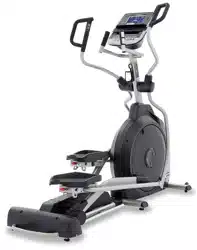
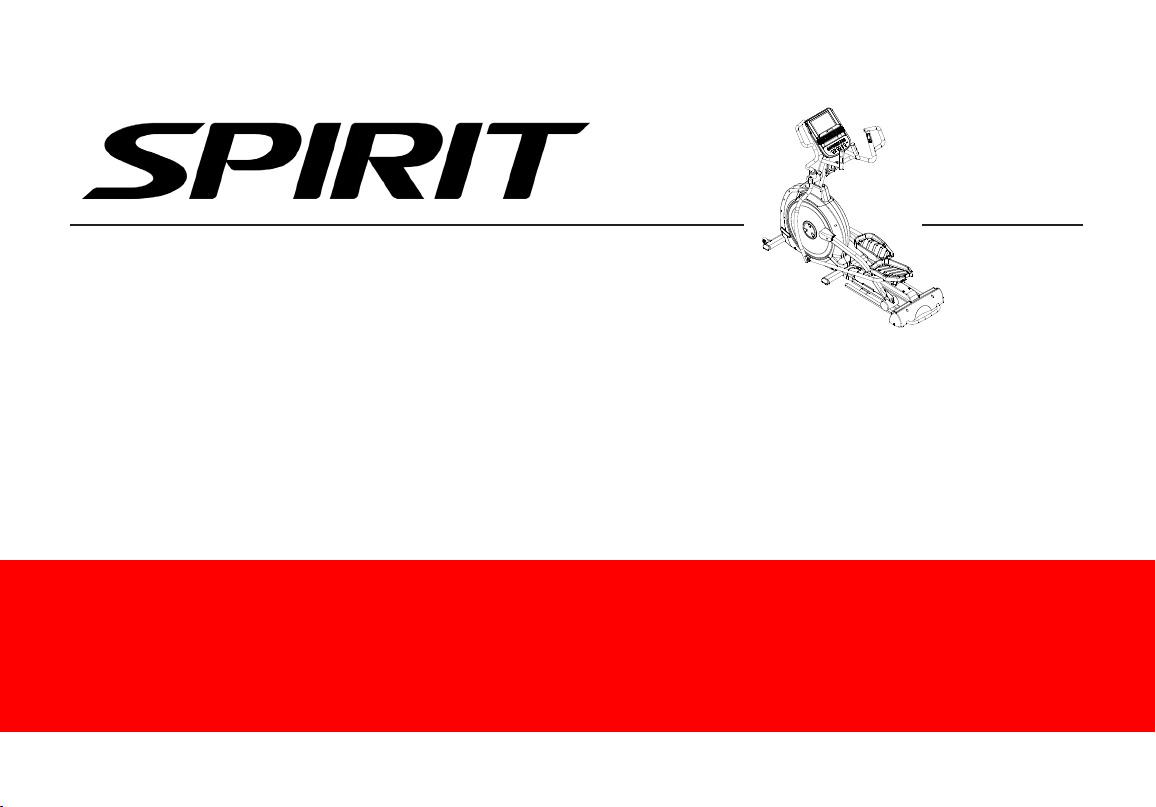
XE395ENT ELLIPTICAL TRAINER
OWNER’S MANUAL

3
TABLE OF CONTENTS
5 PRODUCT REGISTRATION
6 IMPORTANT SAFETY INSTRUCTIONS
7 IMPORTANT ELECTRICAL INSTRUCTIONS
9 IMPORTANT OPERATION INSTRUCTIONS
10 XE395ENT ASSEMBLY INSTRUCTIONS
18 CONSOLE OPERATION
31 PROGRAMS
43 USING HEART RATE TRANSMITTER
46 USING THE SPIRIT+ APP
47 GENERAL MAINTENANCE
48 MANUFACTURER’S LIMITED WARRANTY
50 EXPLODED VIEW
51 PARTS LIST
Thank you for purchasing our product, please save these instructions. Please do not perform or attempt any
customizing, adjustments, repair or maintenance that is not described in this manual.
4
Congratulations on your new elliptical trainer and welcome to the Spirit Fitness family!
Thank you for your purchase of this quality elliptical trainer from Spirit Fitness. Your new elliptical trainer was
manufactured by one of the leading tness manufacturers in the world and is backed by one of the most comprehensive
warranties available. Through your dealer, Spirit Fitness will do all we can to make your ownership experience as
pleasant as possible for many years to come. If not purchased direct from Spirit Fitness, the local dealership where you
purchased this elliptical trainer is your administrator for all Spirit Fitness warranty and service needs. Their responsibility
is to provide you with the technical knowledge and service personnel to make your experience more informed and any
difculties easier to remedy.
Please take a moment at this time to record the name of the dealer, their telephone number, and the date of purchase
below to make any future, needed contact easy. We appreciate your support and we will always remember that you are
the reason that we are in business.
Yours in Health,
Spirit Fitness
NAME OF DEALER _________________________________
DEALER PHONE # _________________________________
PURCHASE DATE _________________________________
5
Record Your Serial Number
Please record the serial number of this tness product in the space provided below.
Serial Number:
Register Your Purchase
The self-addressed product registration card must be completed in full and returned to Spirit
Fitness. You can also go to www.spirittness.com/warranty under the Support tab to register online.

6
Important Safety Instructions
WARNING
When using an electrical appliance, basic precautions
should always be followed, including the following:
Read all instructions before using this appliance.
DANGER - To reduce the risk of electric shock:
Always unplug this appliance from the electrical outlet
immediately after using and before cleaning.
WARNING - To reduce the risk of burns, re, electric
shock, or injury to persons, install the elliptical on a at
level surface with access to a 115-volt, 15-amp grounded
outlet with only the elliptical plugged into the circuit.
DO NOT USE AN EXTENSION CORD UNLESS IT IS A 18AWG OR
BETTER, WITH ONLY ONE OUTLET ON THE END:
• To reduce the risk of burns, re electric shock, or
injury to persons:
• An appliance should never be left unattended when
plugged in. Unplug from outlet when not in use, and
before putting on or taking off parts.
• Do not operate under blanket or pillow. Excessive
heating can occur and cause re, electric shock, or
injury to persons.
• Close supervision is necessary when this appliance
is used by, on, or near children, invalids, or disabled
persons.
• Use this appliance only for its intended use as
described in this manual. Do not use attachments not
recommended by the manufacturer.
• Never operate this appliance if it has a damaged cord
or plug, if it is not working properly, if it has been
dropped or damaged, or dropped into water. Return
the appliance to a service center for examination and
repair.
• Do not carry this appliance by supply cord or use
cord as a handle.
• Keep the cord away from heated surfaces.
• Never operate the appliance with the air openings
blocked. Keep the air openings free of lint, hair, and
the like.
• Never drop or insert any object into any opening.
• Do not use outdoors.
• Do not operate where aerosol (spray) products are
being use or where oxygen is being administered.
• Connect this appliance to a properly grounded outlet
only.
• The appliance is intended for household use.
• This exercise equipment is not intended for use by
persons with reduced physical, sensory or mental
capabilities, or lack of experience and knowledge.
• Keep children under the age of 13 away from this
machine.
SAVE THESE INSTRUCTIONS - THINK SAFETY!

7
Fitness Equipment Safety Instructions
To disconnect turn all controls to the off position,
then remove the plug from the outlet.
• Do not operate equipment on deeply padded, plush
or shag carpet. Damage to both carpet and equipment
may result.
• Before beginning this or any exercise program, consult
a physician. This is especially important for persons
over the age of 35 or persons with pre-existing health
conditions.
• Do not attempt to use your equipment for any
purpose other than for the purpose it is intended.
• Keep hands away from all moving parts.
• The pulse sensors are not medical devices. Their
purpose is to provide you with an approximate
measurement in relation to your target heart rate.
Use of a chest transmitter strap (sold separately) is
a much more accurate method of heart rate analysis
.Various factors, including the user’s movement,
may affect the accuracy of heart rate readings. The
pulse sensors are intended only as exercise aids in
determining heart rate trends in general.
• Wear proper shoes. High heels, dress shoes, sandals
or bare feet are not suitable for use on your
equipment. Quality athletic shoes are recommended
to avoid leg fatigue.
Failure to follow all guidelines may compromise the
effectiveness of the exercise experience, expose yourself
(and possibly others) to injury, and reduce the longevity of
the equipment.
WARNING: This product can expose you to
chemicals including Toluene and Acrylamide which are
known to the State of California to cause cancer and birth
defects or other reproductive harm.
For more information go to www.P65Warnings.ca.gov
Important Electrical Instructions
WARNING
NEVER remove any cover without rst disconnecting
AC power. If voltage varies by ten percent (10%) or
more, the performance of your Elliptical may be affected.
Such conditions are not covered under your warranty. If
you suspect the voltage is low, contact your local power
company or a licensed electrician for proper testing.
NEVER expose this elliptical to rain or moisture. This
product is NOT designed for use outdoors, near a pool
or spa, or in any other high humidity environment. The
operating temperature specication is 40 to 120 degrees
Fahrenheit, and humidity is 95% non-condensing (no water
drops forming on surfaces).
8
Circuit Breakers: Some circuit breakers used in homes are not rated for high inrush currents that can occur when
a elliptical is rst turned on or even during use. If your elliptical is tripping the house circuit breaker (even though it is
the proper current rating) but the circuit breaker on the elliptical itself does not trip, you will need to replace the home
breaker with a high inrush type. This is not a warranty defect. This is a condition we as a manufacture have no ability to
control. This part is available through most electrical supply stores. Examples: Grainger part # 1D237, or available online at
www.squared.com part #QO120HM. The electrical outlet used should have a dedicated 15 amp circuit breaker.
Grounding Instructions
This product must be grounded. If the your equipment should malfunction or breakdown, grounding provides a
path of least resistance for electric current, reducing the risk of electric shock. This product is equipped with a cord
having an equipment-grounding plug. The plug must be plugged into an appropriate outlet that is properly installed and
grounded in accordance with all local codes and ordinances.
DANGER - Improper connection of the equipment-grounding conductor can result in a risk of electric shock. Check with
a qualied electrician or serviceman if you are in doubt as to whether the product is properly grounded. Do not modify
the plug provided with the product if it will not t the outlet; have a proper outlet installed by a qualied electrician.
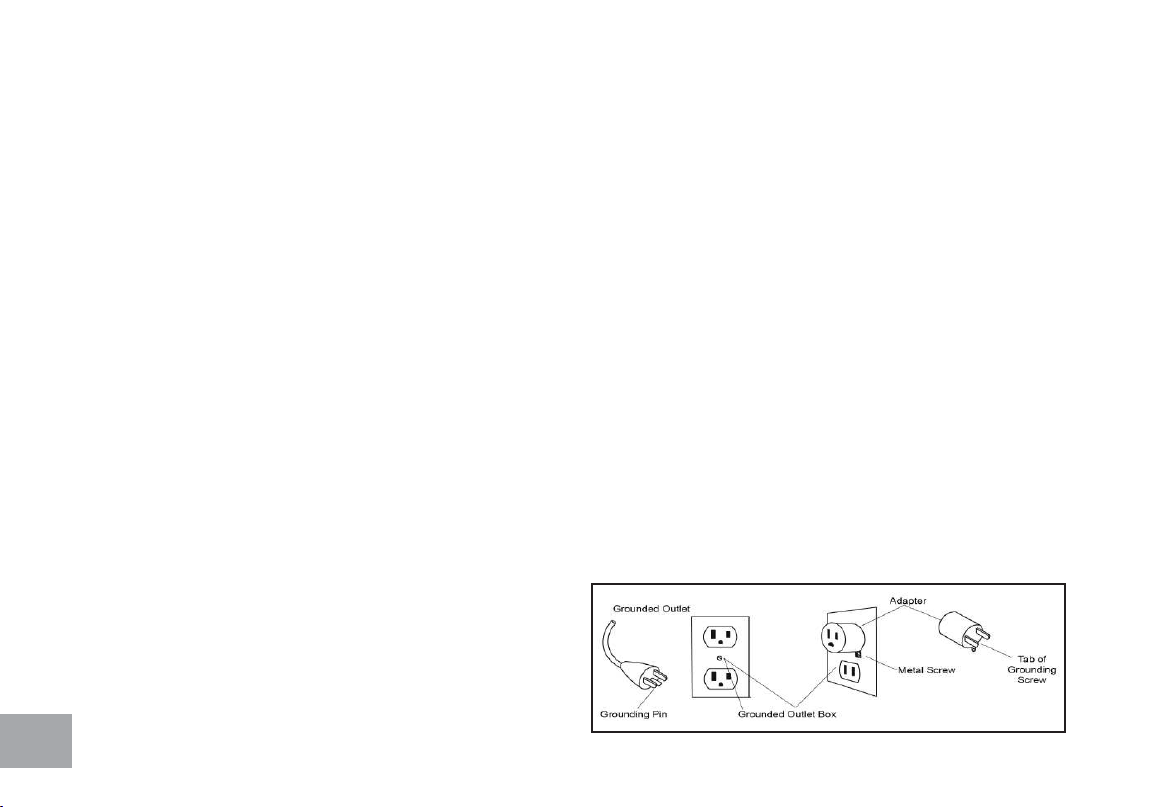
This product is for use on a nominal 110-volt/15 amp dedicated circuit, and has a grounding plug that looks like the plug
illustrated below. A temporary adapter that looks like the adapter illustrated below may be used to connect this plug
to a 2-pole receptacle as shown below if a properly grounded outlet is not available. The temporary adapter should
be used only until a properly grounded outlet, (shown
below) can be installed by a qualied electrician. The
green colored rigid ear-lug, or the like, extending from the
adapter, must be connected to a permanent ground such
as a properly grounded outlet box cover. Whenever the
adapter is used, it must be held in place by a metal screw.

9
Important Operation Instructions
• NEVER operate this elliptical trainer without reading and completely understanding the results of any operational
change you request from the computer.
• Understand that changes in resistance do not occur immediately. Set your desired resistance level on the computer
console and release the adjustment key. The computer will obey the command gradually.
• NEVER use your elliptical during an electrical storm. Surges may occur in your household power supply that could
damage elliptical components. Unplug the elliptical during an electrical storm as a precaution.
• Use caution while participating in other activities while pedaling on your elliptical trainer; such as watching
television, reading, etc. These distractions may cause you to lose balance which may result in serious injury.
• Do not use excessive pressure on console control keys. They are precision set to function properly with little nger
pressure.
10
XE395ENT PRE ASSEMBLY
UNPACKING
1. Cut the straps, then lift the box over the unit and unpack.
2. Carefully remove all parts from the carton and inspect for any damage
or missing parts. If parts are damaged or missing, contact your dealer
immediately.
3. Locate the hardware package. Remove the tools rst. Remove the
hardware for each step as needed to avoid confusion. The numbers in
the instructions that are in parenthesis (#) are the item number from
the assembly drawing for reference.
TOOLS INCLUDED:
13/14mm Wrench
Phillips Head Screwdriver
12/14mm Wrench
Combination M5 Allen Wrench
& Phillips Head Screw Driver
PARTS INCLUDED:
1 Main Frame
1 Console Mast
1 Console Mast Cover
2 Swing Arms
2 Connecting Arms
6 Levelers
1 Console
2 Foot Pedals
1 Power Cord
1 Audio Cable
2 Transport Wheels
1 Hardware Kit
11
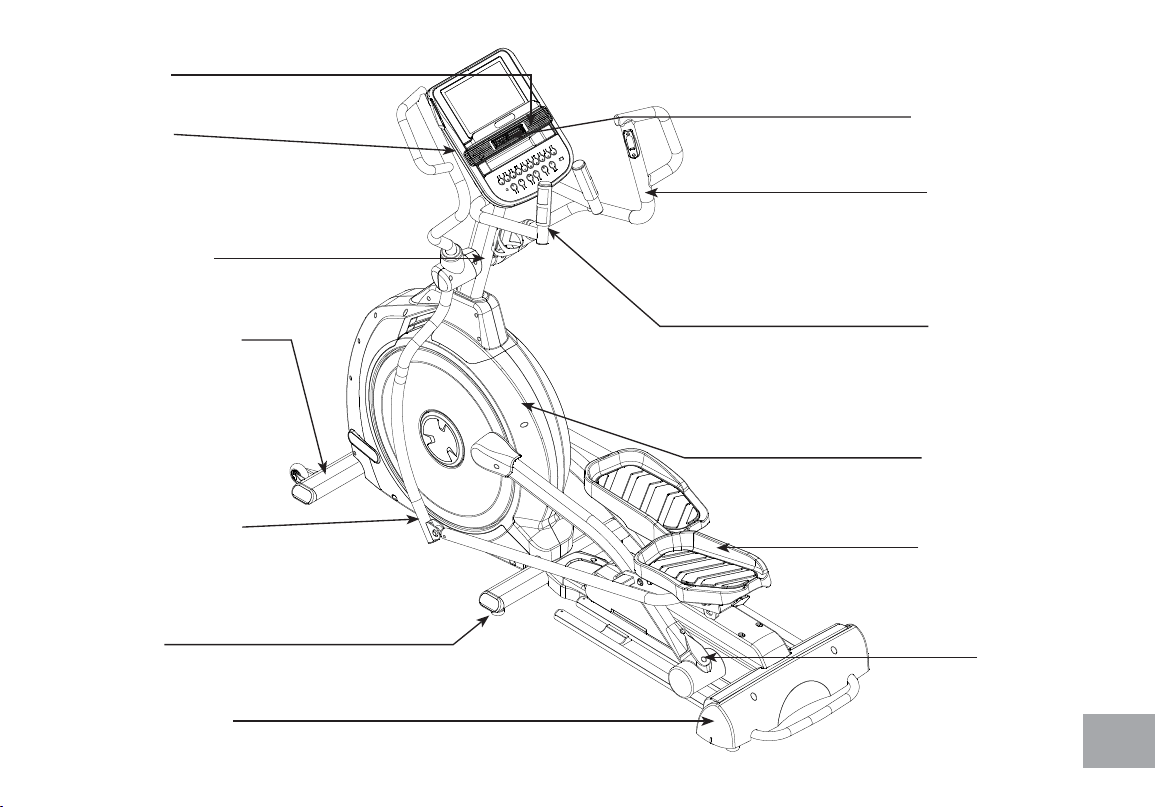
SPEAKERS
CONSOLE
CONSOLE MAST
CONNECTING ARM
LEVELERS
FRONT STABILIZER
REAR STABILIZER
FOOT PEDALS
MAIN FRAME
RAILS
PULSE GRIPS
SWING ARM
CONSOLE FAN
12
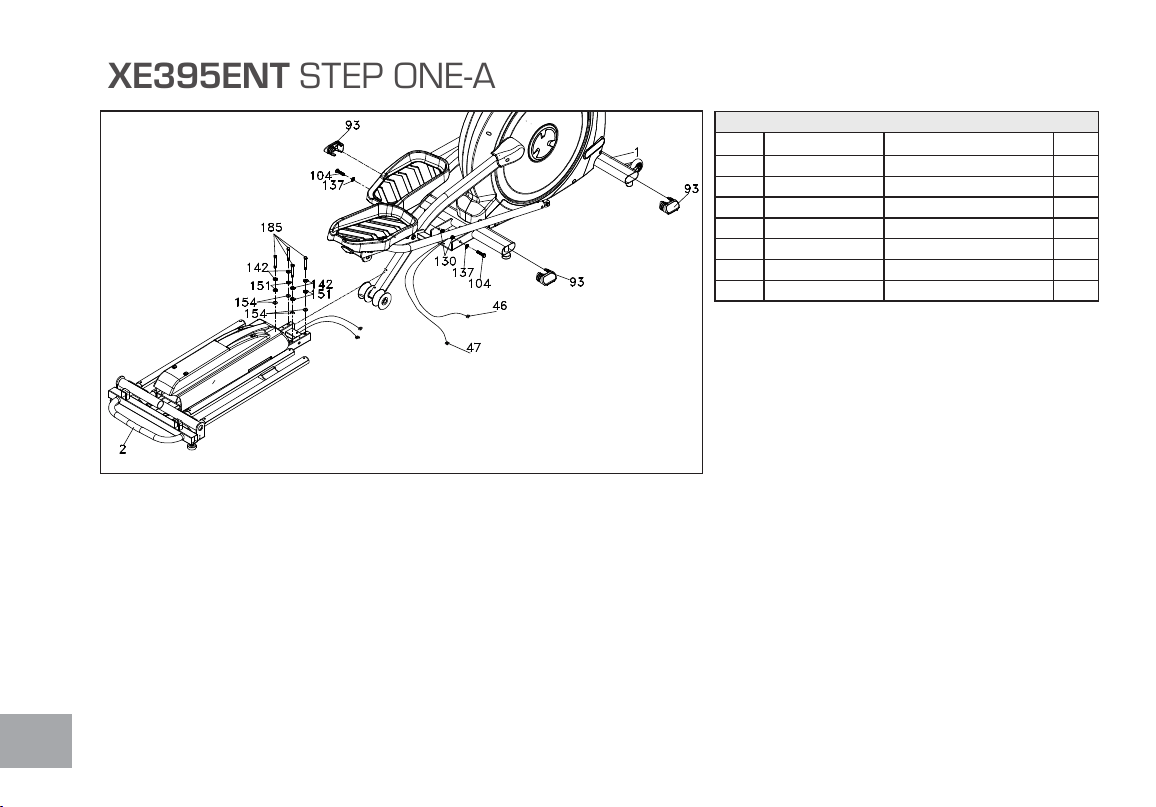
XE395ENT STEP ONE-A
HARDWARE FOR STEP 1
PART TYPE DESCRIPTION QTY
104 HEX HEAD BOLT
3/8” X UNC16 X 1-1/2”
2
130 NYLOC NUT
3/8” X 7T
2
137 FLAT WASHER
3/8” × Ø19 × 1.5T
2
142 FLAT WASHER
5/16” X 20 X 1.5T
4
151 SPLIT WASHER
8 X 1.5T (5/16” X 1.5T)
4
154 STAR WASHER
5/16”
4
185 HEX HEAD BOLT
5/16” X 2 - 1/4”
4
1. Gather HARDWARE FOR STEP 1.
2. Slide the INCLINE RAIL ASSEMBLY (2) into
the U channel of the MAIN FRAME (1). Be very
careful not to damage the wires that exit each part.
3. Connect the INCLINE RAIL ASSEMBLY
(2) horizontally to the U channel of the MAIN
FRAME (1) with 2 HEX HEAD BOLTS (104), 2
FLAT WASHERS (137), and 2 NYLOC NUTS
(130). Secure it vertically with 4 HEX HEAD
BOLTS (185), 4 SPLIT WASHERS (142), 4
FLAT WASHERS (151), and 4 STAR WASHERS
(154). Tighten using the WRENCHES provided
(155 & 158).
4. Connect the INCLINE MOTOR WIRES (46 &
47) to the wiring harness & black wire that exits the
INCLINE RAIL ASSEMBLY (2). Push the excess
cable inside the U channel.
13
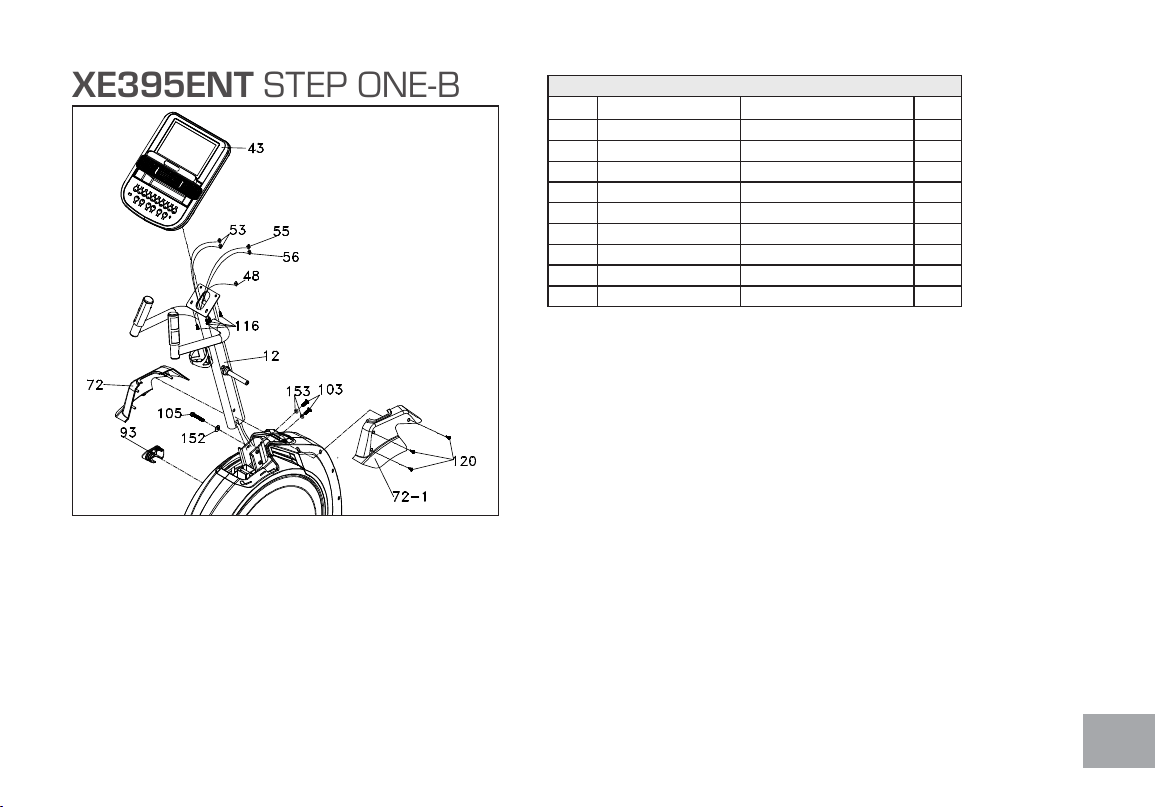
XE395ENT STEP ONE-B
HARDWARE FOR STEP 1
PART TYPE DESCRIPTION QTY
103 HEX HEAD BOLT
3/8”X3/4”
2
105 HEX HEAD BOLT
3/8” X 2-1/4”
1
116 PHILLIPS HEAD SCREW
M5 X 10mm
4
120 SHEET METAL SCREW
3.5 X16mm
3
130 NYLOC NUT
3/8” X 7T
2
137 FLAT WASHER
3/8” × Ø19 × 1.5T
2
142 FLAT WASHER
5/16” X 20 X 1.5T
4
152 SPLIT WASHER
Ø10 × 2T
1
153 CURVED WASHER
Ø3/8” × 23 × 2T
2
1. Gather HARDWARE FOR STEP 1-B.
2. Locate the CONSOLE MAST (12) and CONSOLE MAST
COVER (72); slide the Cover onto the mast as far as it will go. Make
sure the CONSOLE MAST COVER (72) is facing the correct way.
Tighten 3 SHEET METAL SCREWS (120) on the CONSOLE
MAST COVER (72/72-1) with the SCREW DRIVER (157).
3. At the top opening of the MAIN FRAME (1), there is a COMPUTER
CABLE (48) tied to a twist tie wire. Feed the twist tie wire and
COMPUTER CABLE (48) into the bottom of the CONSOLE
MAST (12) and out of the opening at the top.
4. Install the CONSOLE MAST (12) into the receiving bracket on the
top of the MAIN FRAME (1). Be extremely careful not to pinch the
cables between the tubing. If the cable gets pinched, this may affect the
electrical functions of the console.
NOTE: There is one bolt already installed in the receiving bracket that will
engage with the slot at the bottom of the Console Mast. This needs to be
tightened last, after the three other Console Mast bolts.
5. Place a SPLIT WASHER (152) onto the HEX HEAD BOLT (105)
and hand tighten through the left side of the Console Mast. Place a
CURVED WASHER (153) onto each HEX HEAD BOLT (103) and
thread both into the front of the Console Mast tube. Fasten these front
bolts as tight as possible with the WRENCH (155). Next rmly tighten
the two left side bolts with the same wrench.
6. Connect the 2 HAND PULSE CABLES (53), RESISTANCE CABLE
(55), and INCLINE CABLE (56) to the back of the CONSOLE (43).
Do not force the connectors; they will only t one way and are different
sizes to prevent confusion. Store the excessive cable in the CONSOLE
MAST TUBE (12).
7. Attach the CONSOLE (43) to the bracket of the Console Mast tube
with 4 PHILLIPS HEAD SCREWS (116). Tighten the screws with the
PHILLIPS HEAD SCREW DRIVER (157).
8. Insert 4 OVAL END CAPS (93) into the MAIN FRAME (1).
14
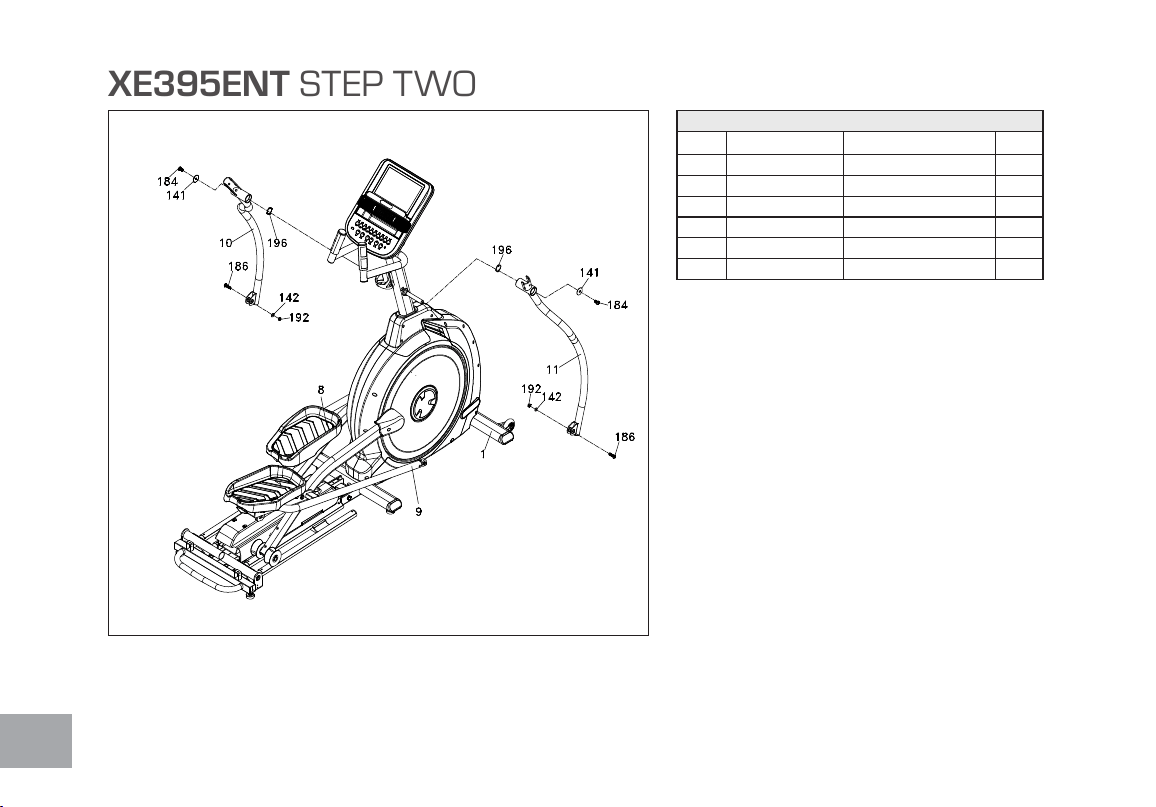
XE395ENT STEP TWO
HARDWARE FOR STEP 2
PART TYPE DESCRIPTION QTY
141 FLAT WASHER
5/16” X 23 X 1.5T
2
142 FLAT WASHER
5/16” X 20 X 1.5T
2
196 WAVE WASHER
Ø17
4
184 HEX HEAD BOLT
5/16” X 15L
2
186 HEX HEAD BOLT
5/16” X 1 - 1/4”
2
192 NYLOC NUT
5/16” X 9T
2
1. Gather HARDWARE FOR STEP 2.
2. Slide 2 WAVE WASHERS (196) onto each side of the
Swing Arm Axle. Slide the LOWER SWING ARMS
(10 LEFT,11 RIGHT) onto the axles and secure with
the 2 BOLTS (184) and FLAT WASHERS (141). Do
not force the Swing Arms onto the axle. They should slide
on, but you may need to jiggle them to get them lined up
properly. The Swing Arms have been previously installed at
the factory so they do t properly.
3. Remove the tie that holds the spacer in the rod end
located at the end of the RIGHT CONNECTING
ARM (9) and line up the rod end with the bracket at the
bottom of the LOWER RIGHT SWING ARM (11).
Slide the BOLT (186) through the bracket of the Lower
Swing Arm and then through the rod end and spacer.
Install the FLAT WASHER (142) and NYLOC NUT
(192) on the bolt and tighten as much as possible. Repeat
this step for the left side. Tighten using the WRENCHES
(155 & 158).
15
XE395ENT STEP THREE
HARDWARE FOR STEP 3
PART TYPE DESCRIPTION QTY
127 NYLOC NUT
5/16” X 7T
6
159 HEX HEAD BOLT
5/16” X 1-3/4”
6
160 CURVED WASHER
8 X 23 X1.5T
4
161 SWITCH WIRE CAP 2
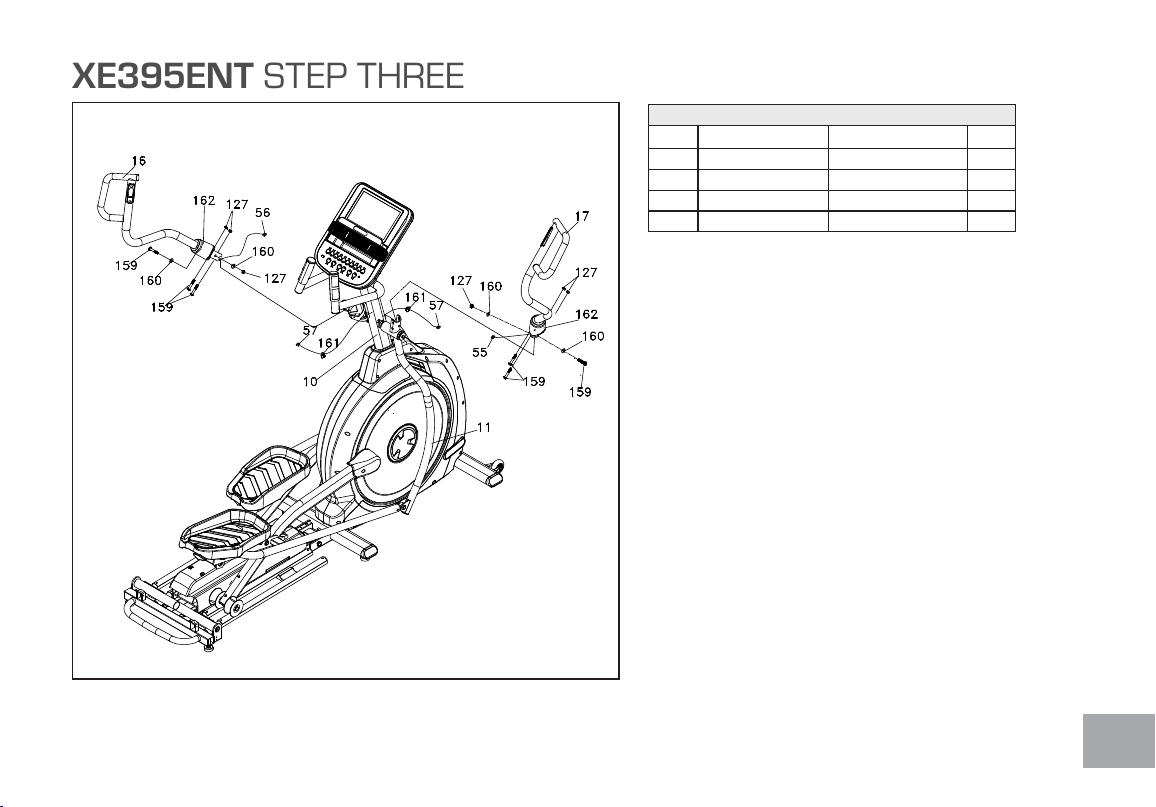
1. Gather HARDWARE FOR STEP 3.
2. Slide the RUBBER SLEEVE (162) onto the LEFT
(16) and RIGHT (17) Upper Swing Arms. Make sure
the wide part is at the bottom.
3. Attach the RESISTANCE CABLE (55) from
the RIGHT UPPER SWING ARM (17) and the
INCLINE CABLE (56) from the LEFT UPPER
SWING ARM (16) to 2 HANDLE CABLES (57)
that exit the CONSOLE MAST TUBE (12). Slide the
2 SWITCH WIRE CAPS (161) onto the wire with
the wide side facing the Swing Arm.
4. Insert the UPPER SWING ARM (17) into the
Lower Swing Arm. Fasten together with 3 HEX HEAD
BOLTS (159), 2 CURVED WASHERS (160), and 3
NYLOC NUTS (127).
5. Repeat steps from above on the left side.
16
XE395ENT STEP FOUR
HARDWARE FOR STEP 4
PART TYPE DESCRIPTION QTY
115 PHILLIPS HEAD SCREW
M5 X12MM
12
119 SHEET METAL SCREW
3.5 X 12MM
8
122 PHILLIPS HEAD SCREW
M6 X 10MM
4
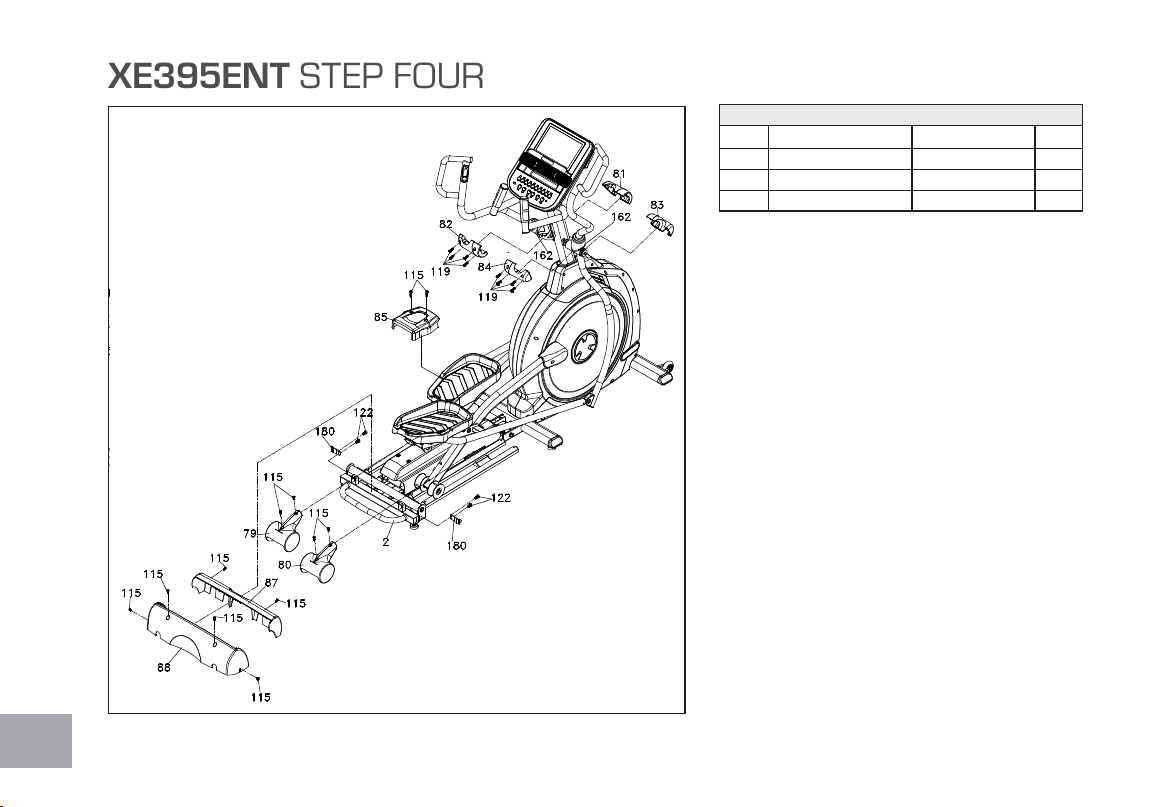
1. Gather HARDWARE FOR STEP 4.
2. Fasten the 2 WHEEL COVERS (79 & 80) above
the rollers with 4 PHILLIPS HEAD SCREWS
(115). Tighten with the PHILLIPS HEAD
SCREW DRIVER (157).
3. Plug the power cord into the machine and a
grounded wall outlet. Turn the power switch on.
Press the start button and elevate the incline
to level 8. Attach the COVER (85) to the
mid-stabilizer tube with 2 PHILLIPS HEAD
SCREWS (115). Tighten the screws with the
PHILLIPS HEAD SCREW DRIVER (157).
4. Install the LEFT HANDLE BAR COVERS (81
& 82) and RIGHT HANDLE BAR COVERS
(83 & 84) over the Handle Bars axle connections
with 4 SHEET METAL SCREWS (119) on each
side. Tighten with the PHILLIPS HEAD SCREW
DRIVER (157).
Continued on next page...

17
5. Attach a STEEL BRACKET (180) to the Rear Stabilizer Tube
on the left and right sides (with the single hole facing the rear), and
secure them with 4 PHILLIPS HEAD SCREWS (122). Tighten
using the PHILLIPS HEAD SCREW DRIVER (157).
6. Attach the front REAR STABILIZER COVER (87) to the REAR
STABILIZER TUBE (2) with 2 PHILLIPS HEAD SCREWS
(115). Secure with the PHILLIPS HEAD SCREW DRIVER
(157). Attach the back REAR STABILIZER COVER (88) onto
the Rear Stabilizer Tube with 4 PHILLIPS HEAD SCREWS (115).
Secure using the PHILLIPS HEAD SCREW DRIVER (157).
7. Look closely at the four oor levelers underneath the middle and
rear of the elliptical. If any of these aren’t in contact with the oor,
use the WRENCH (109) to loosen the top nut. Once the nut
has been loosened, turn the rubber caster clockwise until it makes
solid contact with the oor. Retighten the top nut to prevent it from
moving.
8. Return the elevation to the at position using the Incline down key.
18
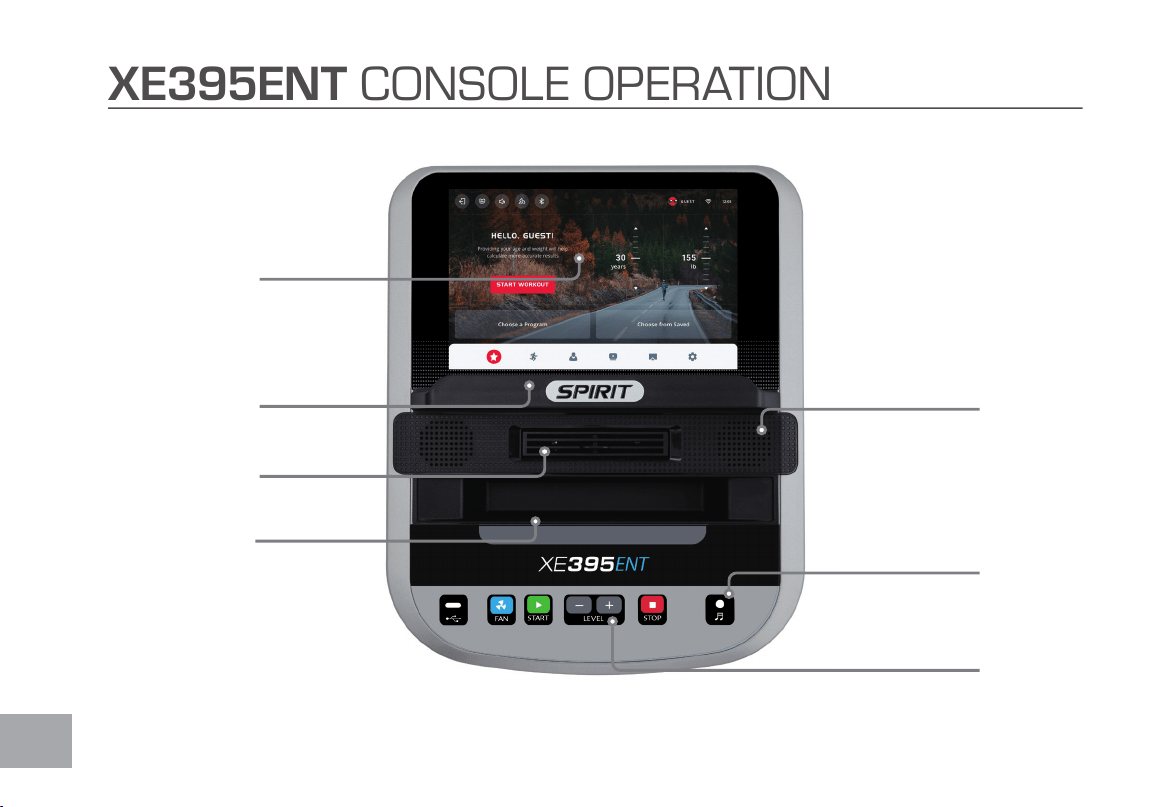
XE395ENT CONSOLE OPERATION
Easy-Touch
Control Keys
3.5mm Audio-input
Only (no output)
Swivel Fan to
keep you cool
Phone and Tablet
Reading Rack
Integrated Speakers
for MP3 Player
Convenient cargo compartment for
keys, phone, or MP3 player
Touchscreen
Display

19
POWER
When the power cord is connected to the elliptical, the console will automatically power up.
QUICK START
This is the quickest way to start a workout. After the console powers up you just press the Start
Workout on the screen, or press the START key to begin. This will initiate Quick Start the Time
will count up from zero and the workload may be adjusted manually by pressing the Level Up/
Down keys.
There are 20 levels of resistance available for plenty of variety. The rst 5 levels are very easy
workloads and the changes between levels are set to a good progression for de-conditioned
users. Levels 6-10 are more challenging, but the increases in resistance from one level to the next
remain small. Levels 11-15 start getting tough as the levels jump more dramatically. Levels 16-20 are
extremely hard and are good for short interval peaks and elite athletic training.
BASIC INFORMATION
The Stop key actually has several functions. Pressing the Stop key once during a program will
pause the program for 5 minutes. If you need to get a drink, answer the phone or any of the many
things that could interrupt your workout, this is a great feature. To resume your workout during
Pause, just press the Start key. If the Stop key is pressed twice during a workout, the program will
end and the console will display your Workout Summary (Total time, Avg. Speed, Avg. Power, Avg. HR,
total Laps).

20
PROGRAMMING THE CONSOLE
Each of the programs can be customized with your personal information and changed to suit your
needs. Some of the information asked for is necessary to ensure the readouts are correct. You will
be asked for your Age and Weight. Entering your Age is necessary during the Heart Rate programs
to ensure the correct settings are in the program for your Age. Otherwise the work settings could
be too high or low for you. Entering your Weight aides in calculating a more correct Calorie reading.
Although we cannot provide an exact calorie count, we do want to be as close as possible.
CALORIE NOTE: Calorie readings on every piece of exercise equipment, whether it is in a gym or at
home, are not accurate and tend to vary widely. They are meant only as a guide to monitor your
progress from workout to workout. The only way to measure your calorie burn accurately is in
a clinical setting connected to a host of machines. This is because every person is different and
burns calories at a different rate. Some good news is that you will continue to burn calories at an
accelerated rate for at least an hour after you have nished exercising!

21
CHARGE PORTABLE DEVICES WITH USB PORT
You can charge your personal device during your workout using the tness equipment’s on-console
USB port. To charge your mobile electronics make sure the tness equipment power is on.
Step 1: Connect your USB charging cable (not included) to the USB Power Port and to your device.
Step 2: Check to make sure your device icon indicates it is charging.
NOTE:
• USB charging cable is not included, make sure compatible USB charging cable is being used.
• The USB port on the console is capable of powering USB devices. It provides up to 5Vdc/1.0
amp of power and meets USB 2.0 regulations. You will not be able to save your workout data to
a USB via this port; it is used for charging purposes only.
WIFI SETUP
Once the console is powered on, connect to the available WiFi network either by pressing the
Signal icon on the top right corner or from the SETTINGS menu on the bottom right corner.
Without WiFi, saving workout data to the cloud, using apps and casting content will not work. If
WiFi connection is not set up, please set data and time manually. If you change your mind later, you
can always nd WiFi settings in the bottom right corner on the screen.
Choose “Guest” user or create yourself a prole to get more personalized experience. Maximum of
9 proles can be created. Learn more about proles in “Prole”.
22
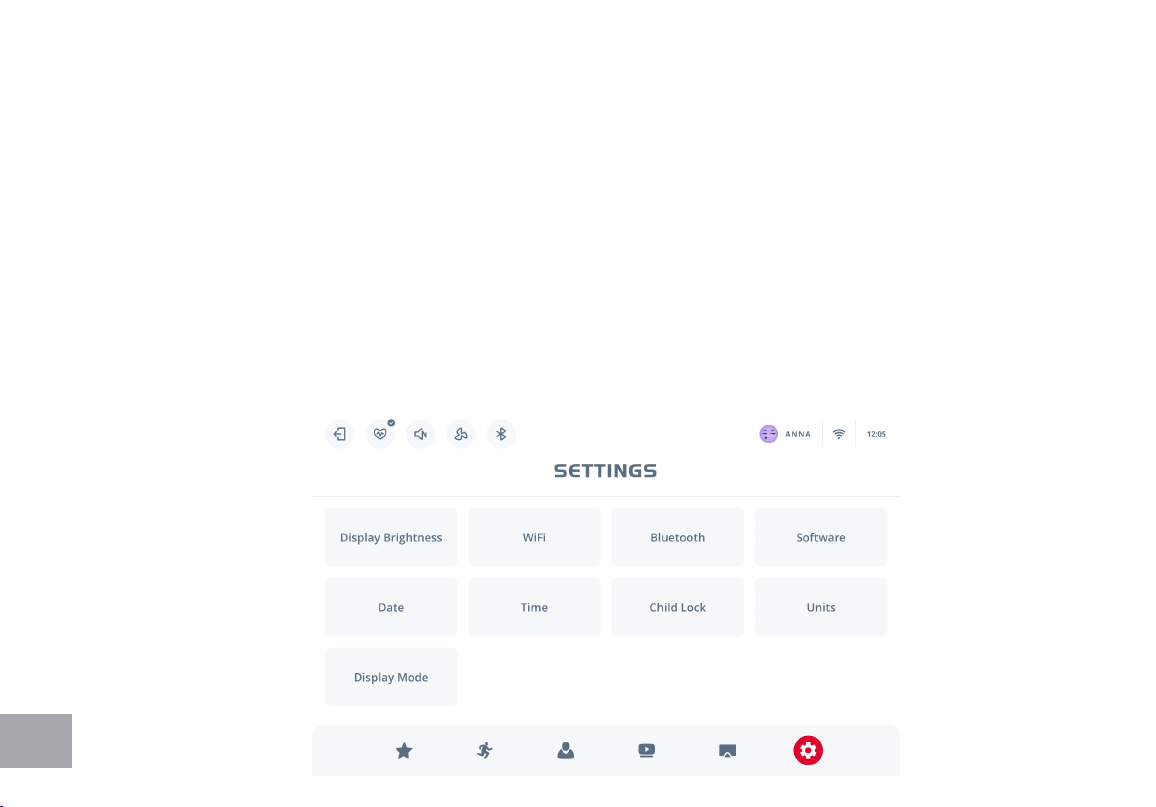
• Tap on DISPLAY BRIGHTNESS to adjust the brightness of the screen.
• Tap on WIFI for internet connection settings.
• Tap on BLUETOOTH to pair with the Bluetooth devices including the Bluetooth type of chest straps,
earphones, or speakers.
• Tap on SOFTWARE to check the current software version or to update, if a new one is available. Press
• Update to upload and install the latest version. Be sure to be connected to the Internet.
• Tap on DAT E or TIME to change the machine time settings. The time and date settings dene the time
information in the workout summary. Both 12 and 24 hours formats are available.
• Tap on CHILD LOCK to lock the screen.
• Tap on UNITS to switch between imperial and metric system.
• Tap on DISPLAY MODE to turn ON/OFF the screen.
SETTINGS

23
To create a new prole, press + button on the starting screen. If you already have a Spirit APP
account, open the app and select CONNECT TO MACHINE. Then use your phone’s camera to
scan the QR code that appears on the screen. This action will not only upload your already existing
personal info to the machine, but also link two proles together, so your workout history will be
fully displayed in the Spirit app. One Spirit app account cannot be linked to multiple proles on one
machine.
If you do not have a Spirit account, press the I DON’T button to continue and build one by lling
in the form.
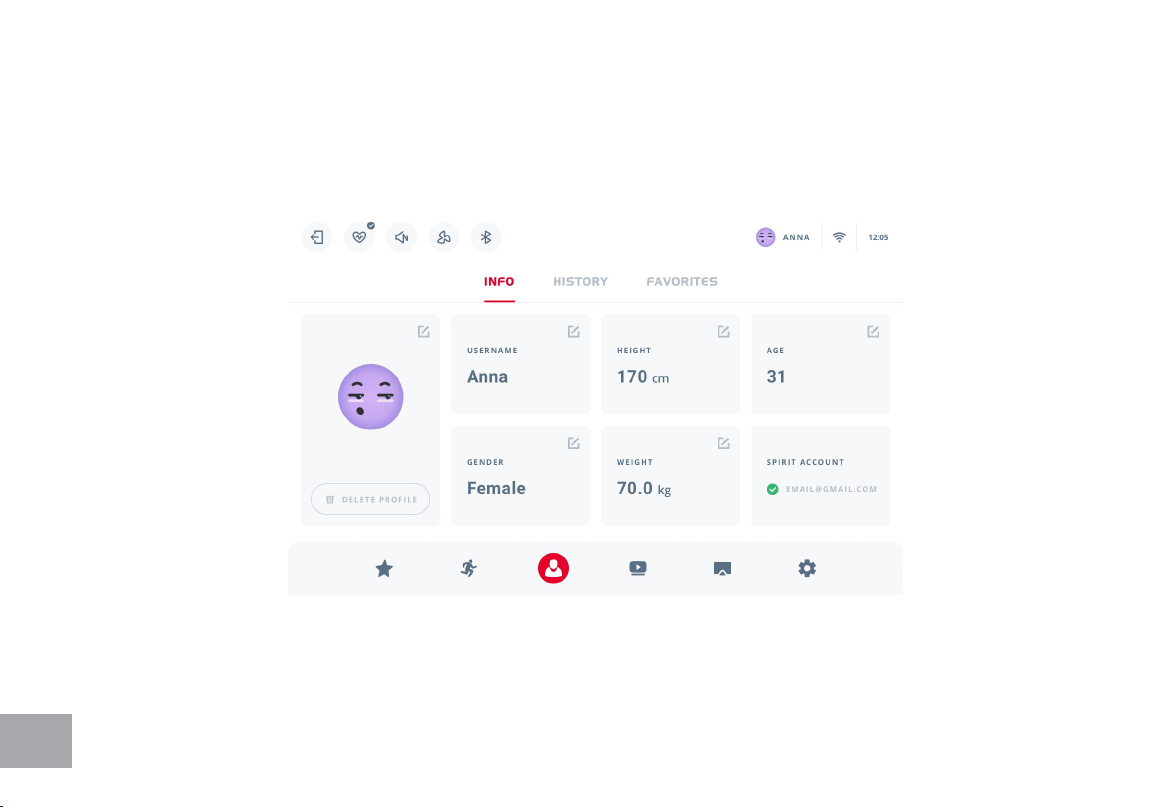
There are 3 tabs in the Prole section: Info, History, and Favorites. Creating a prole lets your
machine remember your physical data, so you don’t need to provide it every time you want to work
out. Your personal data can be found in the INFO tab. To edit, tap on any information eld and make
changes, then press Save. If you haven’t linked your Spirit account to the local machine prole, you
can also do it here by pressing “Spirit Account” eld.
Ten records of the latest activity can be found in HISTORY tab. Workout history only shows
work- outs that were completed by the current user. Tap on the record preview for details. All
the records are available in the Spirit app account, if the prole is linked to the Spirit app account.
FAVORITES tab is where all the programs that were labeled as favorites by the current user can
be seen and deleted.
Different users can choose different unit systems, select their personal favorite programs and save
their own templates.
PROFILE
24
25
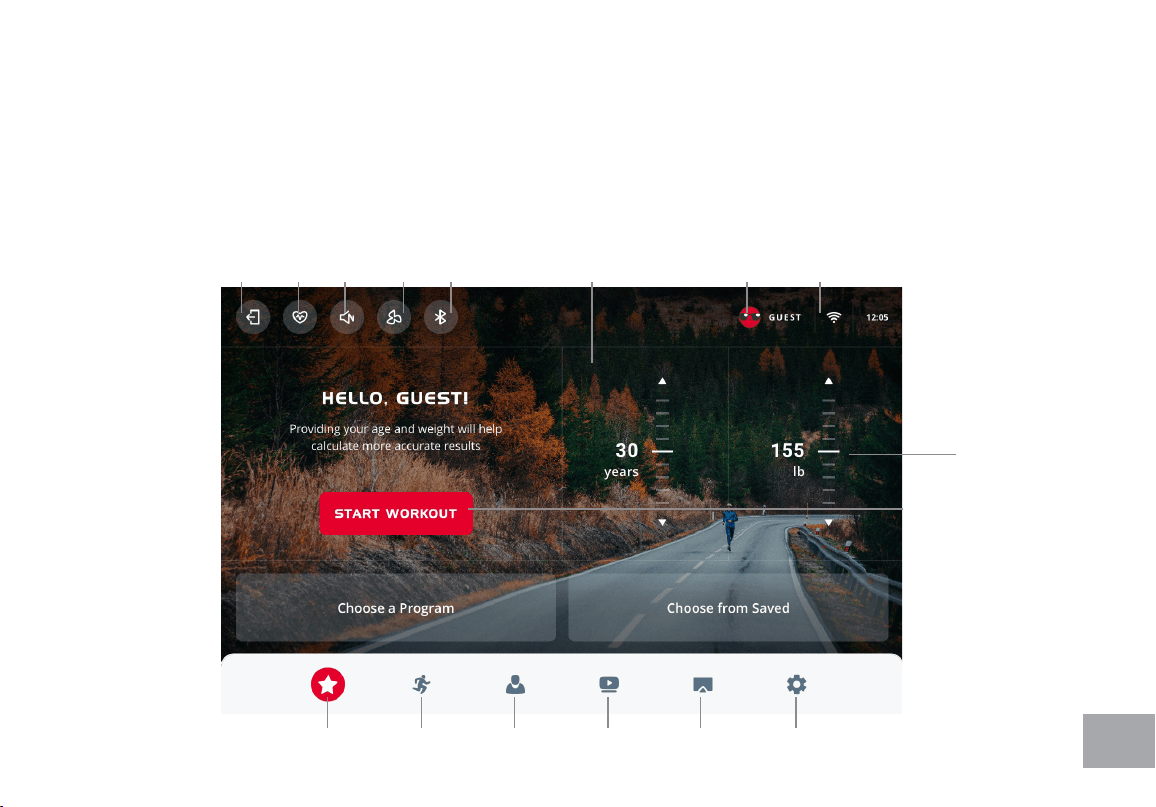
Homescreen
User data
setting
Quick Start
Wi
Settings
Current
User
Activity
Overview
Fan
on/o
Pair Bluetooth
Device
Adjust
volume
Pair HR
device
Log out
Workout
Programs
Proles
Internet
& Apps
Screen
Mirroring
Settings
HOMESCREEN
The Homescreen provides activity overview and suggests shortcuts to the training options.
If in Guest mode, you can provide your physical data here, which will help the machine more
accurately calculate your workout summary. Use scales or arrows to adjust your age and weight.
Start Workout button starts the workout immediately.
26
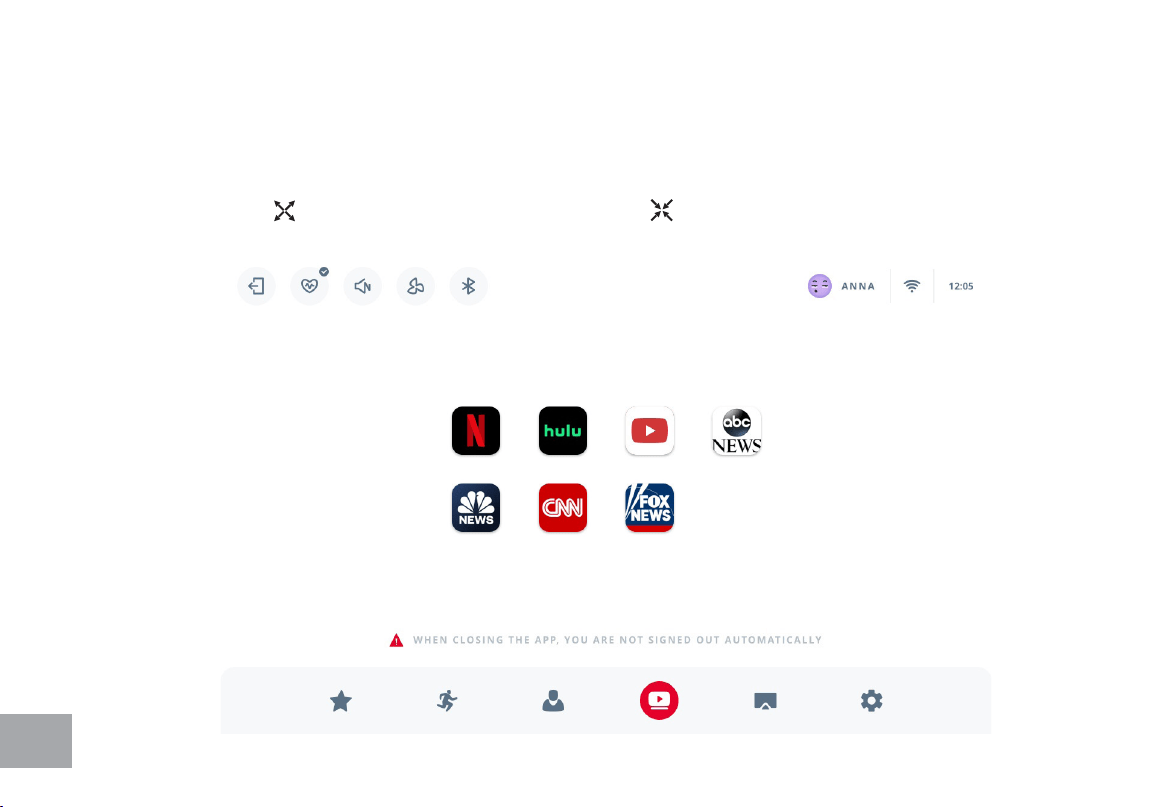
In this section there are a variety of third party apps to keep you entertained during your workout.
To use them, make sure your machine is connected to WiFi (see page 21 for instructions). Then
choose the app you want to use by clicking on it. Note that some apps may require a subscription
to access. Press to enter full screen mode. Press to exit full screen mode. Press ⌂ to
choose another app.
INTERNET & APPS
27
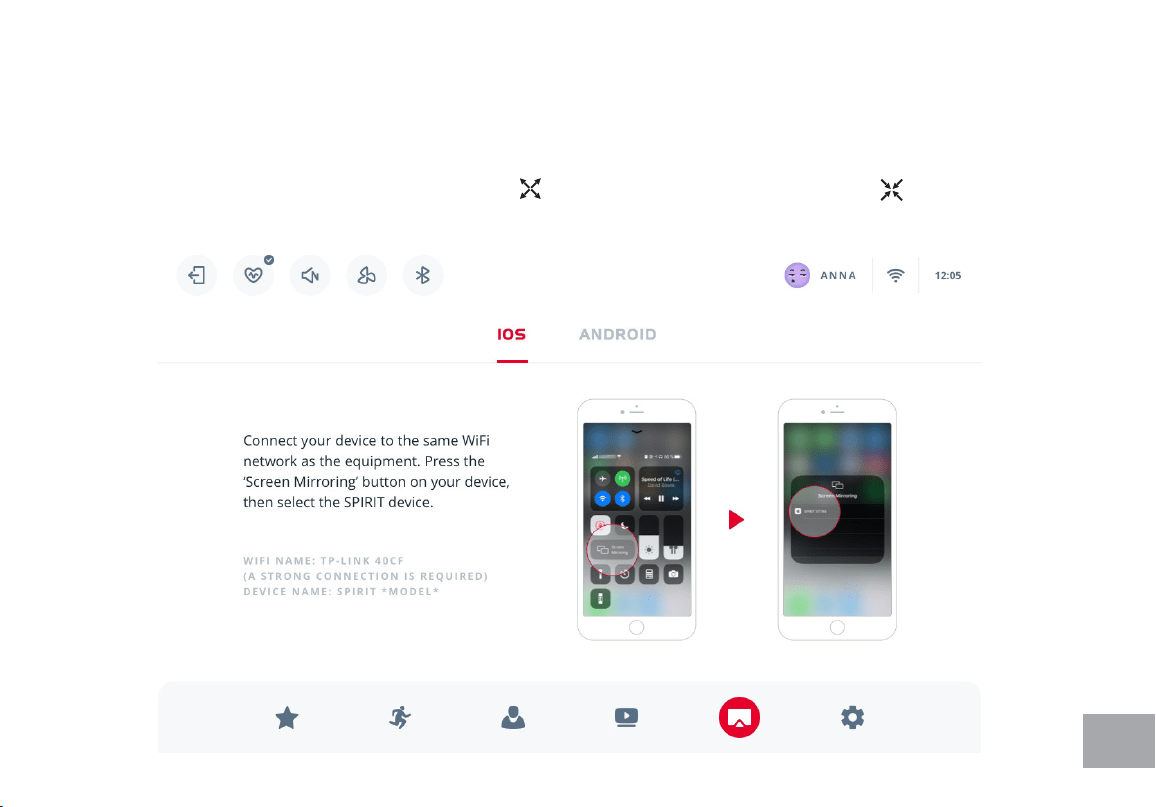
To display various content from your smartphones or tablets on the machine console, open this
section and follow the instructions provided, depending on whether you use an iOS or an Android
device. Once the mirroring has started, press to enter full screen mode. Press to exit full
screen mode.
SCREEN MIRRORING

28
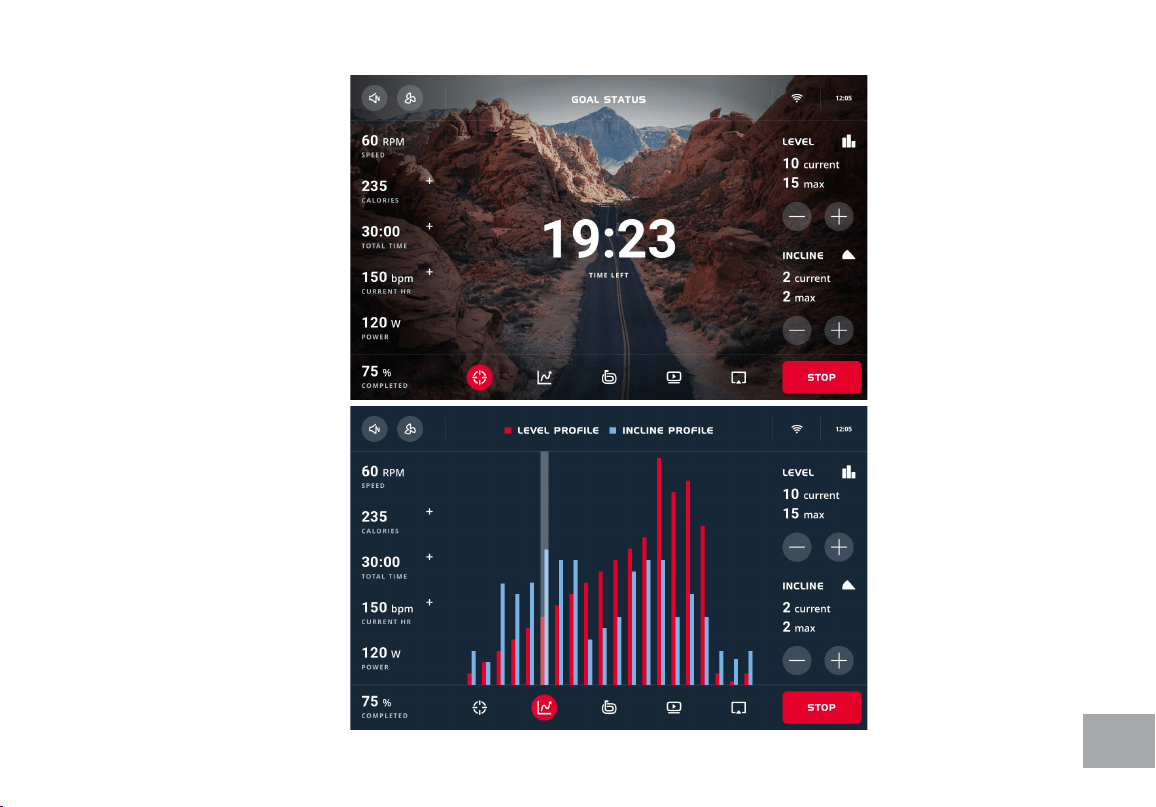
WORKOUT VIEWS
Once the workout has started, after the short countdown the console will appear in its workout
mode.
The panel on the left is xed and shows your current WORKOUT STATS. More related stats can
be revealed by pressing on the + icon. LEVEL AND INCLINE CONTROLS can be adjusted
by tapping on arrows in the right panel. The icons on the top panel are the tools available during
your workout: volume, fan and WiFi. When the workout is paused, you can also access HR device
pairing settings.
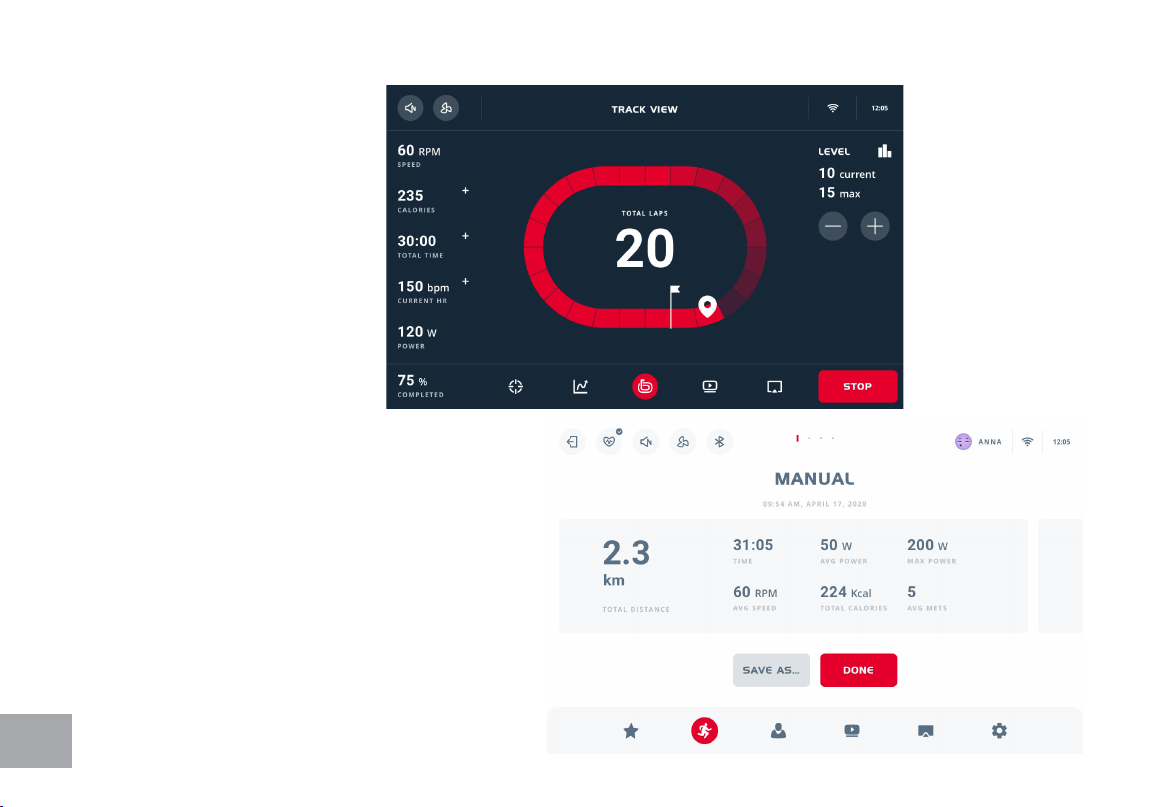
The bottom panel is with 3 views from the left to the right:
• GOAL VIEW displays the parameter that denes your workout nish (for example, for prole
programs it is time counting down; for distance programs it is distance left).
• PROFILE VIEW shows your workout proles and your current position in them.
• TRACK VIEW helps to imagine yourself making laps on a 1/4 mile track and shows your
progress depending on distance covered.
INTERNET and SCREEN MIRRORING work the same way as in non-workout mode. To pause
or nish the workout, press Stop on the bottom right corner.
29
Goal View:
Profile View:
30
Track View
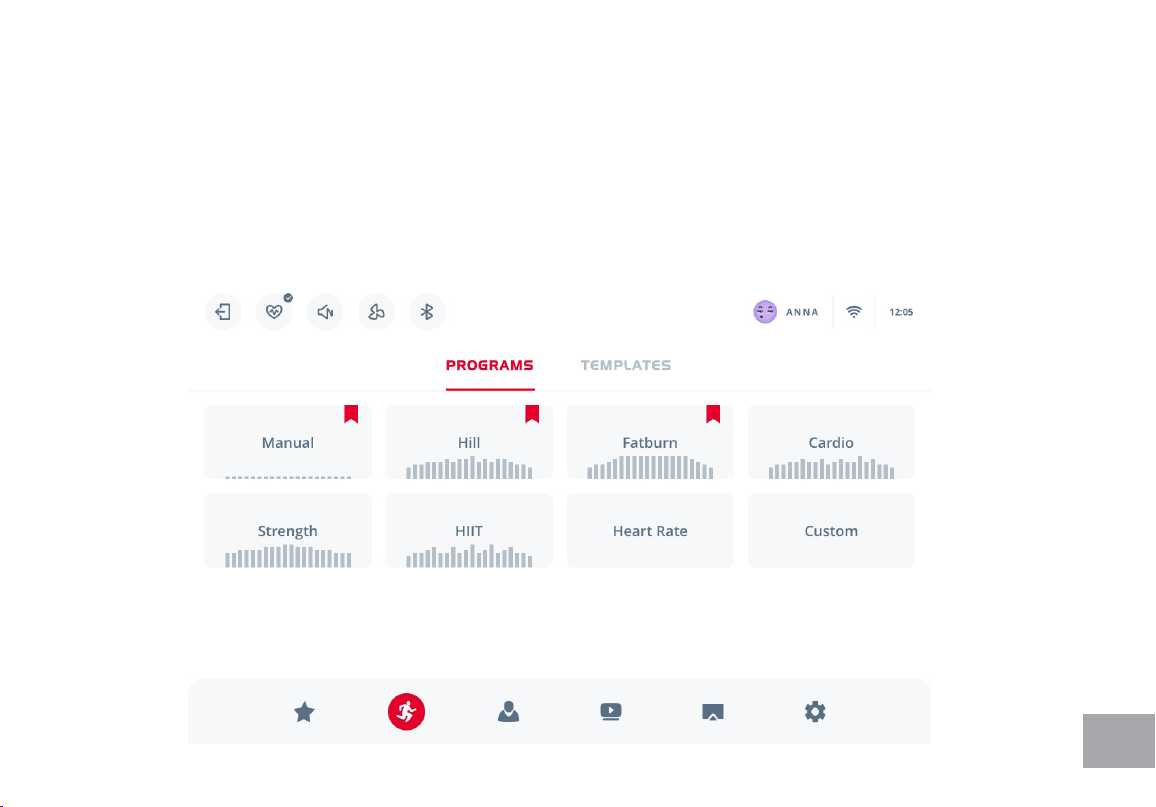
After the workout is nished, the workout
summary will appear. Slide to the left to
get more details or press Done to go
back to the Home screen. You can also
save the completed program as a template
from here, if you press Save as button. The
workout record will appear in History tab
of the Prole section.
31
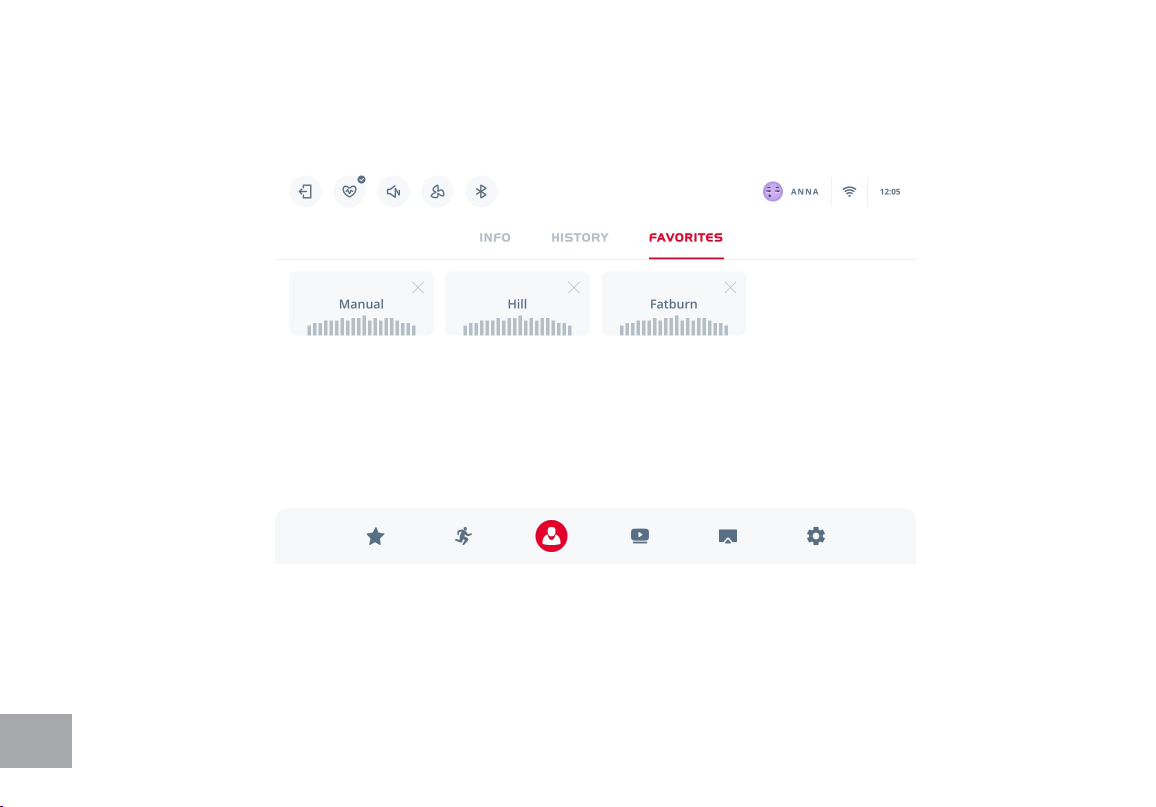
In this section, there are 2 program categories available: Programs (programs with predened level and
incline changing proles) and Templates (regular programs, saved with your personal adjustments).Tap
on the category names to switch between them.
To get more info on each program, tap on the program preview. In this view you can scroll to the side
to see all the program descriptions of the selected category. Press CHOOSE to select and adjust a
program.
WORKOUT PROGRAMS
32
Any program can be labeled as FAVORITE.
Favorite programs appear on the Homescreen, so you can access them anytime you want.
33
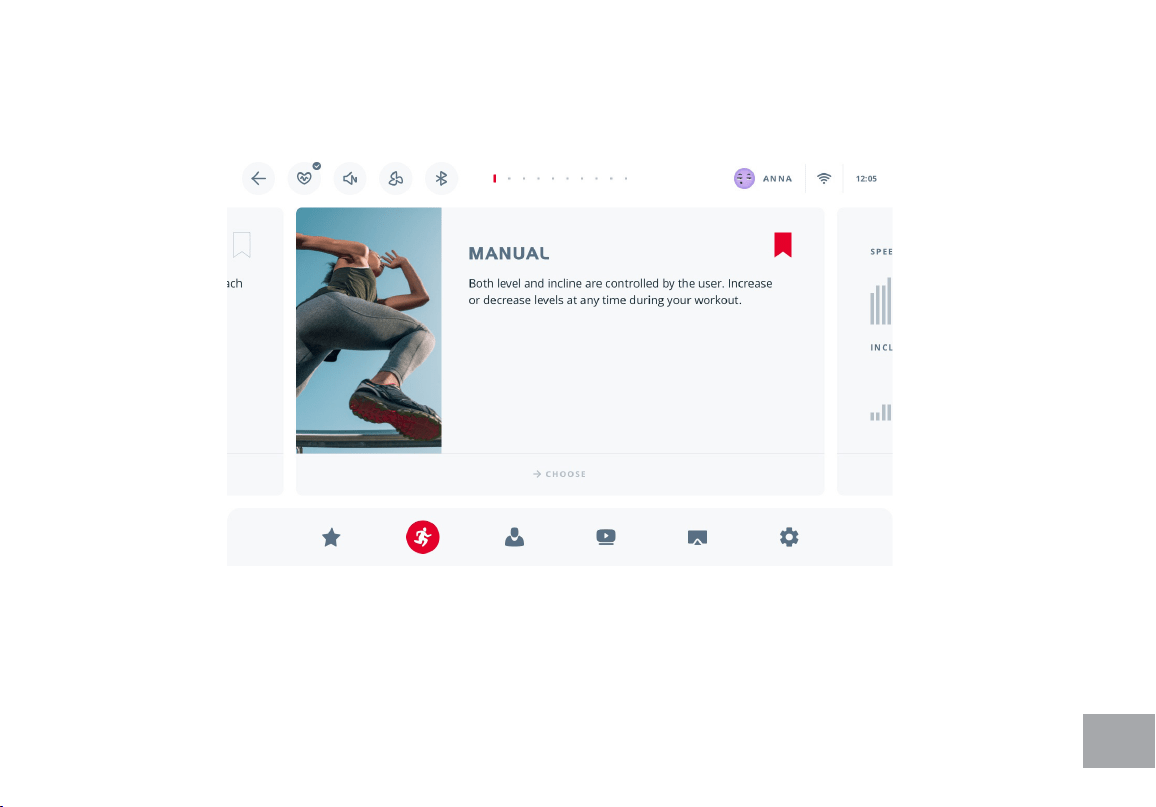
MANUAL program requires a time frame set before starting. Use the scale or arrows to adjust
target time. Level and incline are adjusted manually while running. Press START to begin workout.
34
PRESET PROGRAMS
The elliptical has ve different programs that have been designed for a variety of workouts. These
ve programs have factory preset work level proles for achieving different goals.
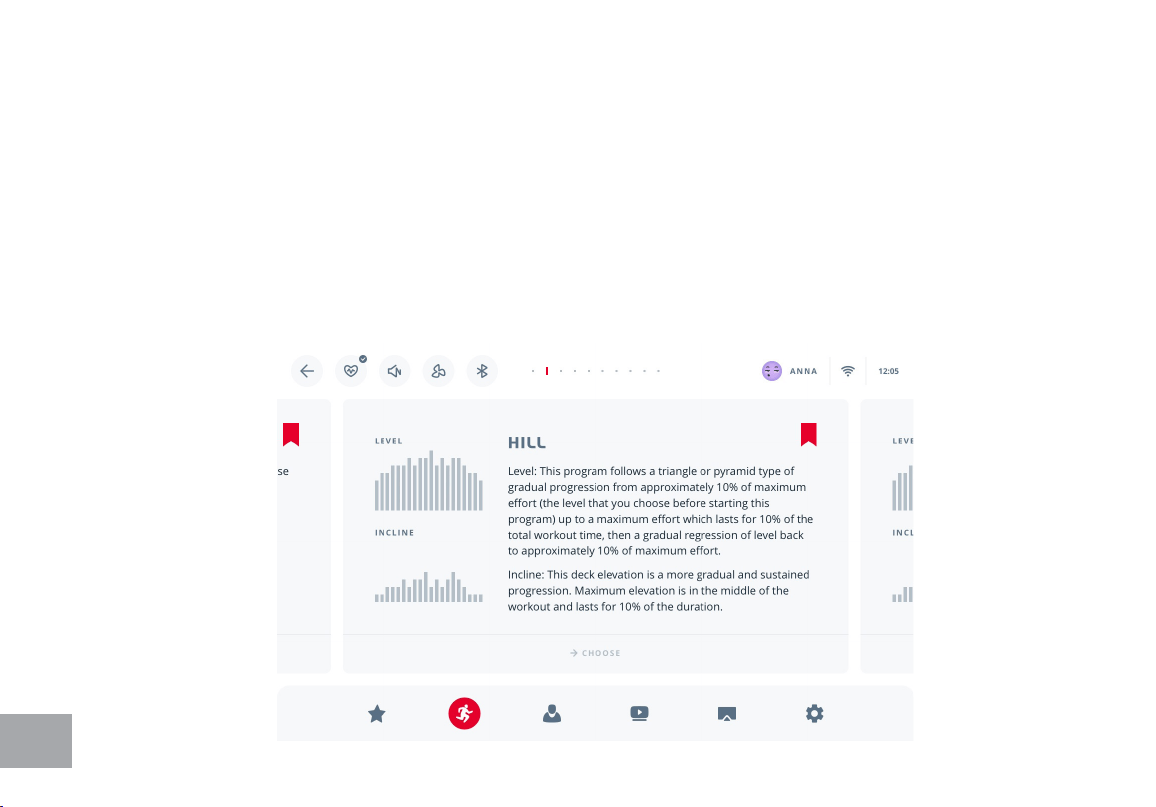
HILL program follows a triangle or pyramid type of gradual progression from approximately 10% of
maximum effort (the level that you chose before starting this program) up to a maximum effort
which lasts for 10% of the total workout time, then a gradual regression of resistance back to
approximately 10% of maximum effort. Incline: The pedal elevation is a more gradual and sustained
progression. Maximum elevation is in the middle of the workout and lasts for 10% of the duration.
35
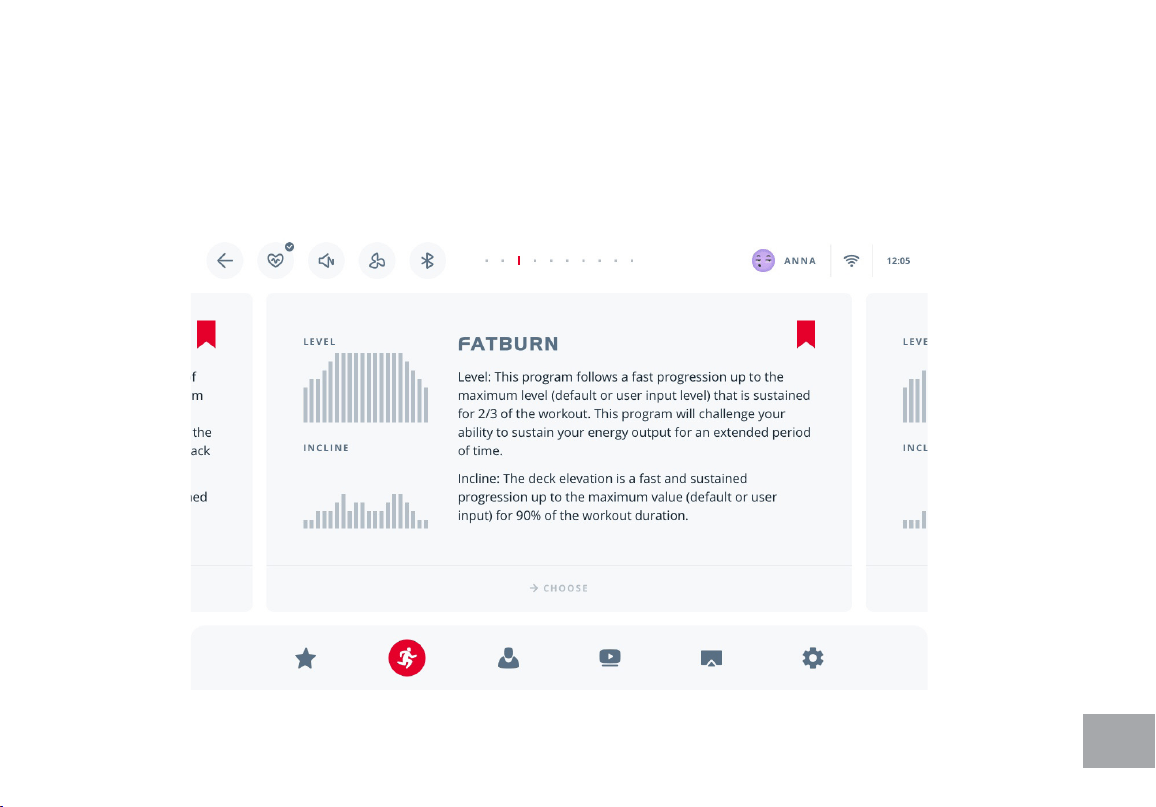
FAT BURN program follows a quick progression up to the maximum resistance level (default or
user input level) that is sustained for 2/3 of the workout. This program will challenge your ability
to sustain your energy output for an extended period of time. Incline: The pedal elevation is a
quick and sustained progression up to the maximum value (default or user input) for 90% of the
workout duration.
36
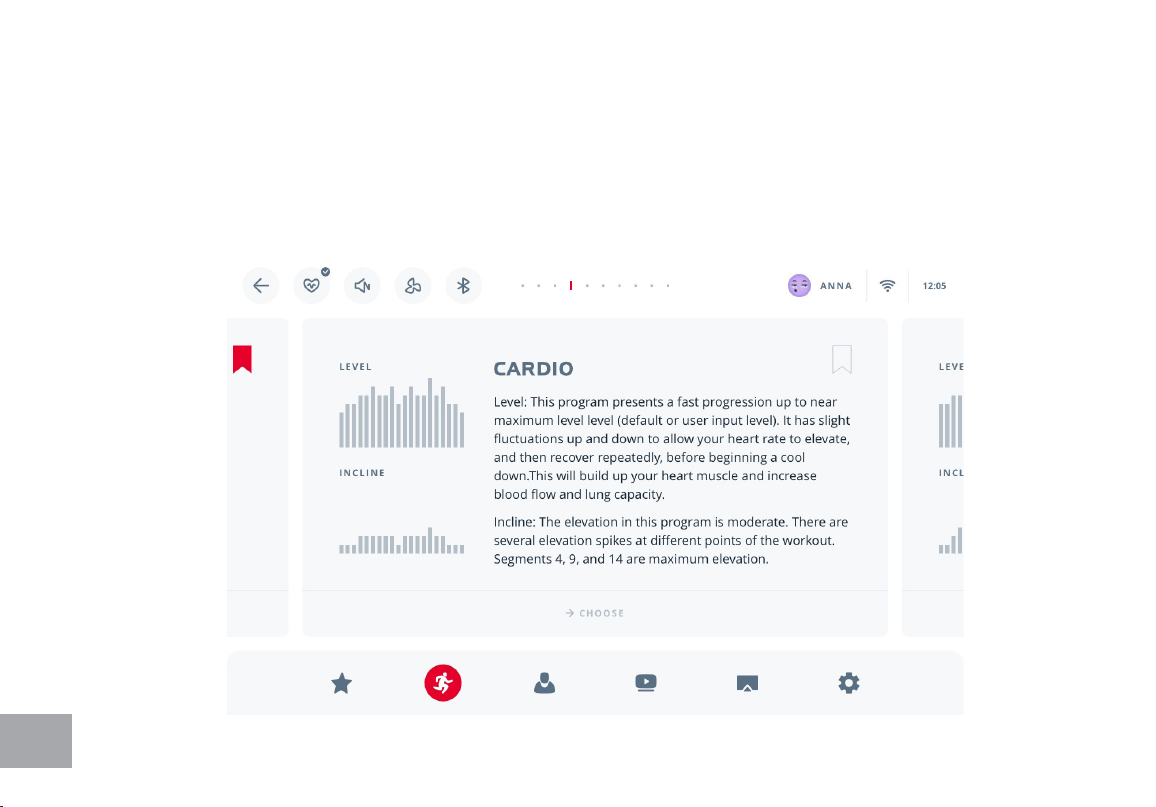
CARDIO program presents a quick progression up to near maximum resistance level (default or
user input level). It has slight fluctuations up and down to allow your heart rate to elevate, and then
recover repeatedly, before beginning a quick cool down. This will build up your heart muscle and
increase blood flow and lung capacity. Incline: The elevation in this program is moderate. There are
several elevation spikes at different points of the workout. Segments 4, 9, and 14 are maximum
elevation for this program.
37
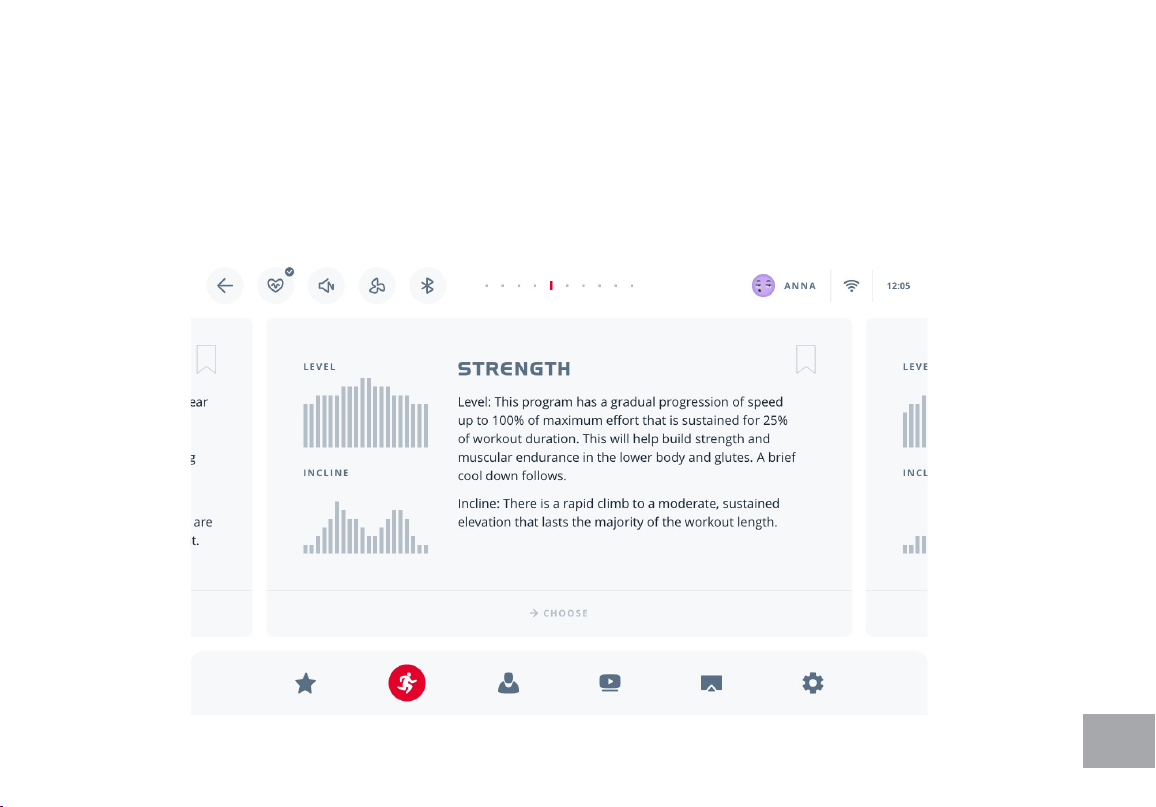
STRENGTH program has a gradual progression of resistance up to 100% of maximum effort that
is sustained for 25% of workout duration. This will help build strength and muscular endurance in
the lower body and glutes. A brief cool down follows. Incline: There is a quick climb to a moderate,
sustained elevation that lasts the majority of the workout length.
38
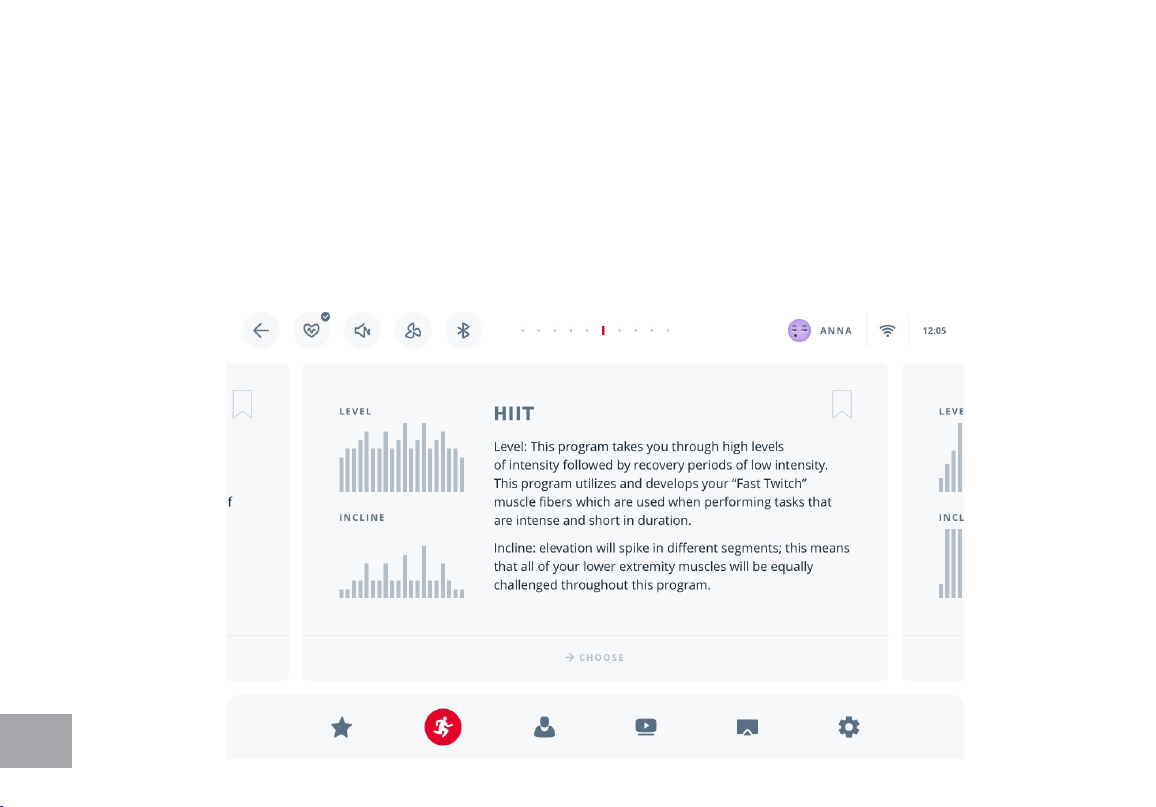
HIIT, OR HIGH INTENSITY INTERVAL Training, program takes you through high levels of intensity
followed by recovery periods of low intensity. This program utilizes and develops your “Fast Twitch”
muscle fibers which are used when performing tasks that are intense and short in duration.
These deplete your oxygen level and spike your heart rate, followed by periods of recovery and
heart rate drop to replenish oxygen. Your cardiovascular system gets programmed to use
oxygen more efficiently. Incline: This program will spike similar to the speed profile, but in different
segments (columns); this means that all of your lower extremity muscles will be equally challenged
throughout this program. The incline alternates between 25 & 65 % of maximum elevation.
39
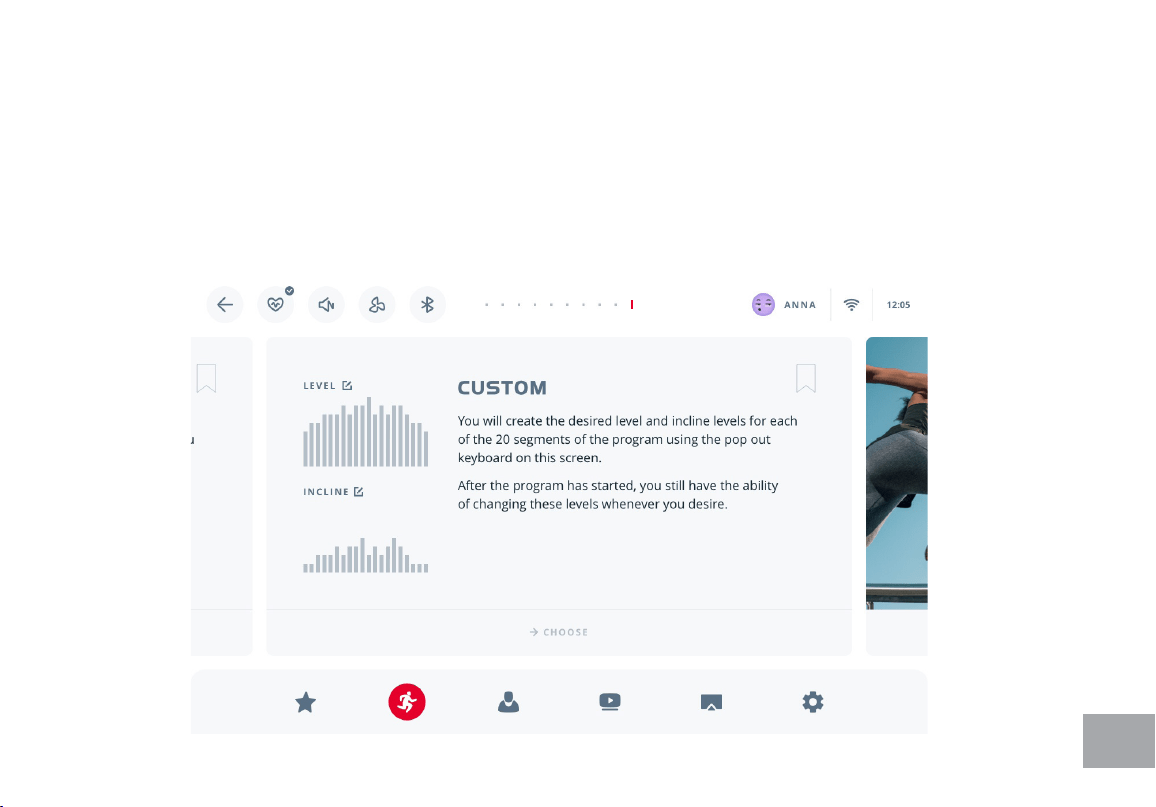
CUSTOM program allows you to set the level and incline variations within a program profile. Once
the profile is defined, choose target time and maximum level, so the intensity adapts accordingly.
Every program can be saved as a template once adjusted or once completed. Press Save as to
save the program with the current settings. You can manage saved programs in TEMPLATES. To
delete a template, tap on it, then press Delete in the top right corner. Maximum of 12 template
programs can be stored. A Template program is only available to a user who created it.
40
HEART RATE PROGRAMS
Note: You must wear a heart rate transmitter strap for these programs.
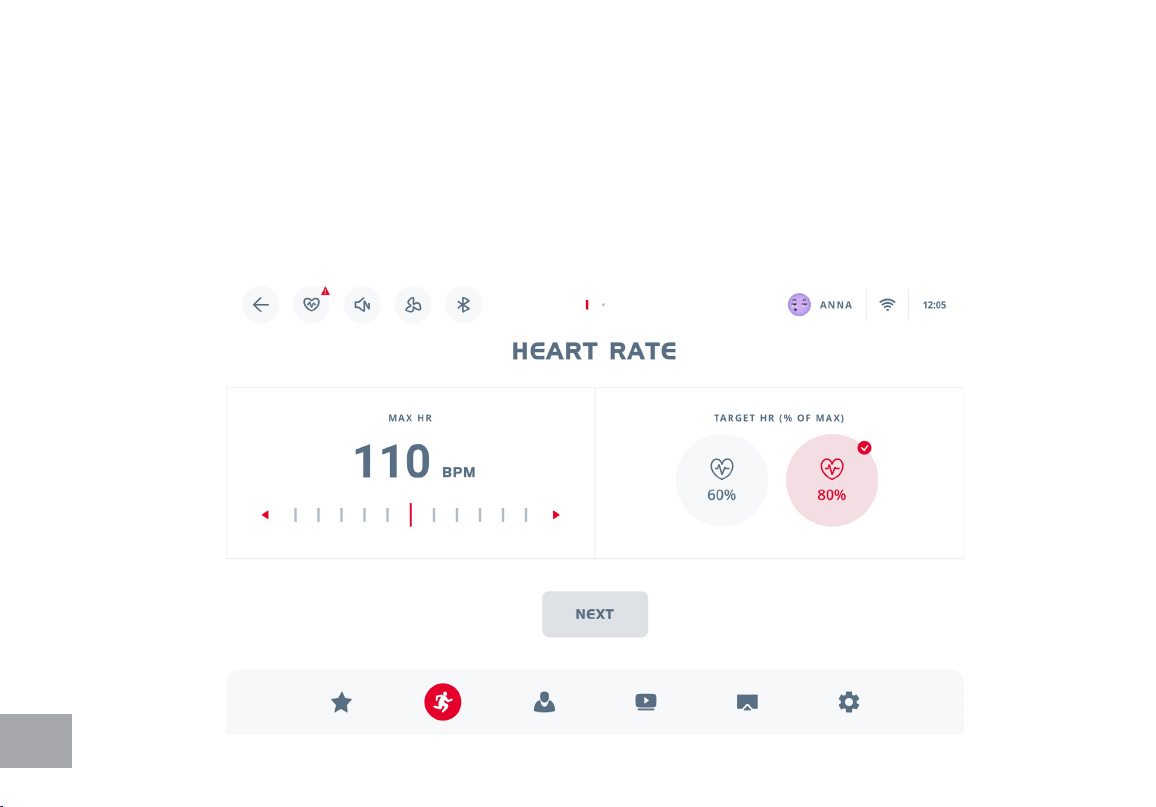
Both programs operate the same, the only difference is that HR1 is set to 60% and HR2 is set to
80% of the maximum heart rate. They both are programmed the same way. To start an HR
program select the HR1 or HR2 program, then the Next button and follow the directions on the
screen.

41
Heart Rate Programs
The old motto, “no pain, no gain”, is a myth that has been overpowered by the benets of exercising
comfortably. A great deal of this success has been promoted by the use of heart rate monitors. With
the proper use of a heart rate monitor, many people nd that their usual choice of exercise intensity
was either too high or too low and exercise is much more enjoyable by maintaining their heart rate
in the desired benet range.
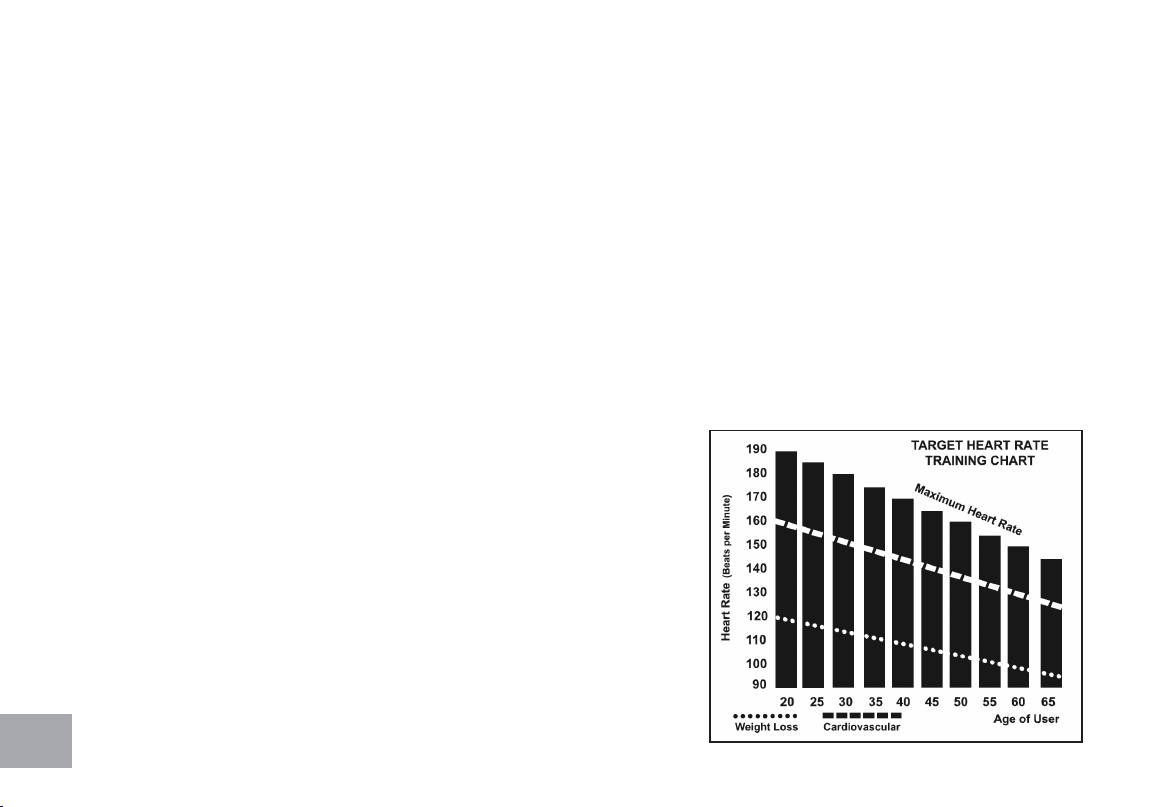
To determine the benet range in which you wish to train, you must rst determine your Maximum
Heart Rate. This can be accomplished by using the following formula: 220 minus your age. This will
give you the Maximum Heart Rate (MHR)for someone of your age. To determine the effective
heart rate range for specic goals you simply calculate a percentage of your MHR. Your Heart rate
training zone is 50% to 90% of your maximum heart rate. 60% of your MHR is the recommended
for burning fat while 80% is recommended for strengthening the cardio vascular system. This 60% to
80% is the zone to stay in for maximum benet.
For someone who is 40 years old their
target heart rate zone is calculated:
220 – 40 = 180 (maximum heart rate)
180 x .6 = 108 beats per minute (60% of maximum)
180 X .8 = 144 beats per minute (80% of maximum)
So for a 40 year old the training zone would
be 108 to 144 beats per minute.
If you enter your age during programming the console will perform this calculation automatically.
Entering your age is used for the Heart Rate programs. After calculating your MHR you can decide
upon which goal you would like to pursue.
42
The two most popular reasons for, or goals, of exercise are cardiovascular tness (training for the
heart and lungs) and weight control. The black columns on the chart above represent the MHR
for a person whose age is listed at the bottom of each column. The training heart rate, for either
cardiovascular tness or weight loss, is represented by two different lines that cut diagonally
through the chart. A denition of the lines’ goal is in the bottom left-hand corner of the chart. If
your goal is cardiovascular tness or if it is weight loss, it can be achieved by training at 80% or 60%,
respectively, of your MHR on a schedule approved by your physician. Consult your physician before
participating in any exercise program.
With all Spirit Fitness Heart Rate programs you may use the heart rate monitor feature without
using the Heart Rate program. This function can be used during manual mode or during any of the
nine different programs. The Heart Rate program automatically controls resistance at the pedals.
Rate of Perceived Exertion
Heart rate is important but listening to your body also has a
lot of advantages. There are more variables involved in how
hard you should workout than just heart rate. Your stress
level, physical health, emotional health, temperature, humidity,
the time of day, the last time you ate and what you ate, all
contribute to the intensity at which you should workout. If
you listen to your body, it will tell you all of these things.
The rate of perceived exertion (RPE), also know as the Borg
scale, was developed by Swedish physiologist G.A.V. Borg.
43
This scale rates exercise intensity from 6 to 20 depending upon how you feel or the perception of
your effort.
The scale is as follows:
Rating Perception of Effort
You can get an approximate heart rate level for each rating by simply adding a zero to each rating. For example a rating
of 12 will result in an approximate heart rate of 120 beats per minute. Your RPE will vary depending up the factors
discussed earlier. That is the major benet of this type of training. If your body is strong and rested, you will feel strong
and your pace will feel easier. When your body is in this condition, you are able to train harder and the RPE will support
this. If you are feeling tired and sluggish, it is because your body needs a break. In this condition, your pace will feel
harder. Again, this will show up in your RPE and you will train at the proper level for that day.
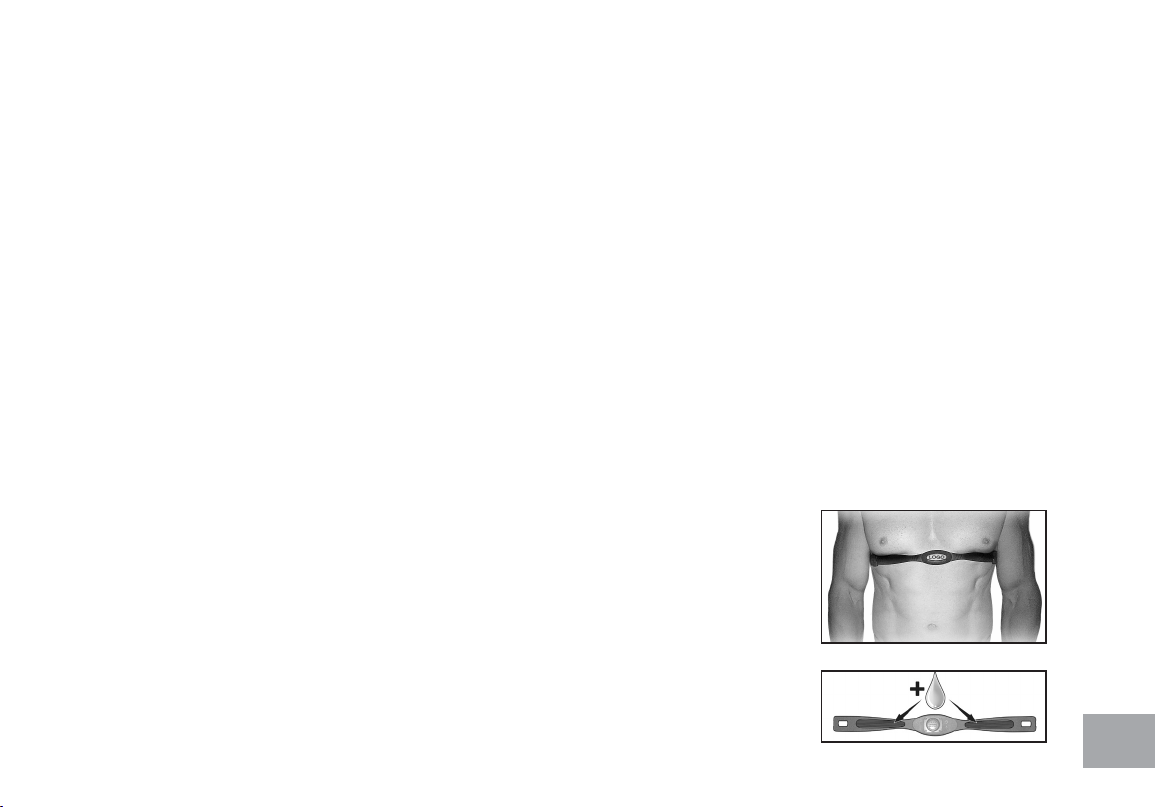
Wearing The Chest Strap
1. Attach the transmitter to the elastic strap using the interlocking key.
2. Adjust the strap as tightly as possible as long as the strap is not too tight to remain
comfortable.
3. Position the transmitter with the logo centered in the middle of your torso facing away
from your chest (some people must position the transmitter slightly left of center).
Attach the nal end of the elastic strap by inserting the round end and, using the
locking parts, secure the transmitter and strap around your chest.
4. Position the transmitter directly below the pectoral muscles.
6 Minimal
7 Very,very light
8 Very,very light +
9 Very light
10 Very light +
11 Fairly light
12 Comfortable
13 Somewhat hard
14 Somewhat hard +
15 Hard
16 Hard +
17 Very hard
18 Very hard +
19 Very,very hard
20 Maximal

44
5. Sweat is the best conductor to measure very minute heart beat electrical signals. However, plain water can also
be used to pre-wet the electrodes (2 ribbed oval areas on the reverse side of the belt and both sides of the
transmitter). It’s also recommended that you wear the transmitter strap a few minutes before your work out. Some
users, because of body chemistry, have a more difcult time in achieving a strong, steady signal at the beginning. After
“warming up”, this problem lessens.
6. Your workout must be within range - distance between transmitter/receiver – to achieve a strong steady signal. The
length of range may vary somewhat but generally stay close enough to the console to maintain good, strong, reliable
readings. Wearing the transmitter directly on bare skin assures you of proper operation. If you wish, you may wear
the transmitter over a shirt. To do so, wet the areas of the shirt that the electrodes will rest upon.
Note: The transmitter is automatically activated when it detects activity from the user’s heart. Additionally, it
automatically deactivates when it does not receive any activity. Although the transmitter is water resistant, moisture can
have the effect of creating false signals, so you should take precautions to completely dry the transmitter after use to
prolong battery life (estimated transmitter battery life is 2500 hours). The replacement battery is Panasonic CR2032.
ERRATIC OPERATION
Caution! Do not use this elliptical trainer for Heart Rate programs unless a steady, solid Actual
Heart Rate value is being displayed. High, wild, random numbers being displayed
indicate a problem.
Areas to look for interference which may cause erratic heart rate:
1. Microwave ovens, TV’s, small appliances, etc.
2. Fluorescent lights.
3. Some household security systems.
4. Perimeter fence for a pet.
5. Some people have problems with the transmitter picking up a signal from their skin. If you have problems try

45
wearing the transmitter upside down. Normally the transmitter will be oriented so the Spirit Fitness logo is right
side up.
6. The antenna that picks up your heart rate is very sensitive. If there is an outside noise source, turning the whole
machine 90 degrees may de-tune the interference.
7. Another Individual wearing a transmitter within 3’ of your machine’s console.
If you continue to experience problems contact your dealer
46
Using the Spirit+ App
In order to help you achieve your exercise goals, your new exercise machine comes equipped with a
Bluetooth® transceiver that will allow it to interact with selected phones or tablet computers via the
Spirit+ App.
Scan the QR code on the screen or search Spirit+ in the App Store or Google Play to download.
The Spirit+ App also allows you to sync your workout data with one of many tness cloud sites.
Syncing the App with your exercise machine:
1. Download the App.
2. Open the App on your device (phone or tablet) and make sure Bluetooth® is enabled on your device (phone or
tablet).
3. In the App click the icon in the top right corner to search for your Spirit equipment (shown right).
4. After the equipment is detected, click the row on which the equipment is to connect Spirit+ app. Then click the
“Display” icon to start the sync process.
5. When your workout is complete, the data is automatically saved and uploaded to a cloud site.
*Note: Your device will need to be running on a minimum operating system of iOs 13 or Android 8.0 for the Spirit+
App to operate properly.

47
GENERAL MAINTENANCE
1. Wipe down all areas in the sweat path with a damp cloth after each workout.
2. If a squeak, thump, clicking or rough feeling develops the main cause is most likely one of several reasons:
I. The hardware was not sufciently tightened during assembly. All bolts that were installed
during assembly need to be tightened as much as possible. It may be necessary to use a larger wrench than the
one provided if you cannot tighten the bolts sufciently. I cannot stress this point enough; 90% of calls to the
service department for noise issues can be traced to loose hardware.
II. Dirt build-up on the rear rails and polyurethane wheels are also a source of noise. Noise from build-up on the
rails can cause a thumping sound that you would swear is coming from inside the main body of the machine
because noise travels, and is amplied, in the tubing of the frame. Clean the rails and wheels with a lint free
cloth and rubbing alcohol. Stubborn build-up can be removed with your thumbnail or a nonmetallic scraper, like
the back edge of a plastic knife. After cleaning, apply a small amount of lubricant on the rails with your ngers or
a lint free cloth. You only need a thin coat of lubrication, wipe off any excess.
III. The crank arm nut needs to be retightened
I V. If squeaks or other noises persist, check that the unit is properly leveled. There are 2 leveling pads on the bot-
tom of the rear stabilizer, use a 14mm wrench (or adjustable wrench) to adjust the levelers.

48
Elliptical Trainer Warranty - Effective February 25, 2021
Spirit Fitness, Inc. (Spirit Fitness) warrants all its elliptical trainer parts for a period of time listed below from the date of retail sale, as determined by
sale receipt, or in the absence of a sales receipt eighteen (18) months from the original factory shipping date. Spirit Fitness’ responsibilities include
providing new or remanufactured parts, at Spirit Fitness’ option, and technical support to our independent dealers and servicing organizations. In the
absence of a dealer or service organization, these warranties will be administered by Spirit Fitness directly to a consumer. The warranty period applies
to the following components:
NORMAL RESPONSIBILITIES OF THE CONSUMER
This warranty applies only to products in ordinary household use (see restrictions above), and the consumer/facility is responsible for the items listed
below:
1. The warranty registration card must be completed and returned to the address listed on the card within 10 days of the original purchase to
validate the manufacturer’s limited warranty.
2. Proper use of the elliptical trainer in accordance with the instructions provided in this manual
3. Proper installation in accordance with instructions provided with the elliptical trainer and with all local electric codes.
4. Expenses for making the elliptical trainer accessible for servicing, including any item that was not part of the elliptical trainer at the time it was
shipped from the factory.
5. Damages to the elliptical trainer nish during shipping, installation or following installation.
6. Routine maintenance of this unit as specied in this manual.
EXCLUSIONS
This warranty does not cover the following:
1. CONSEQUENTIAL, COLLATERAL, OR INCIDENTAL DAMAGES SUCH AS PROPERTY DAMAGE AND INCIDENTAL EXPENSES RESULTING
FROM ANY BREACH OF THIS WRITTEN OR ANY IMPLIED WARRANTY.
Note: Some states do not allow the exclusion or limitation of incidental or consequential damages, so this limitation or exclusion may not apply
to you.
2. Service call reimbursement to the consumer. Service call reimbursement to the dealer that does not involve malfunction or defects in
workmanship or material, for units that are beyond the warranty period, for units that are beyond the service call reimbursement period, for
elliptical trainer not requiring component replacement, or elliptical trainer not in ordinary household or light commercial use.
3. Damages caused by services performed by persons other than authorized Spirit Fitness service companies; use of parts other than original Spirit
Fitness parts; or external causes such as corrosion, discoloration of paint or plastic, alterations, modications, abuse, misuse, accident, improper
maintenance, inadequate power supply, or acts of God.
4. Products with original serial numbers that have been removed or altered.
Warranty
Residential
Frame
Lifetime
Brake
Lifetime
Parts
10 Years
Labor
1 Year
Console
2 Years

49
5. Products that have been: sold, transferred, bartered, or given to a third party.
6. Products that do not have a warranty registration card on le at Spirit Fitness. Spirit Fitness reserves the right to request proof of purchase if no
warranty record exists for the product.
7. THIS WARRANTY IS EXPRESSLY IN LIEU OF ALL OTHER WARRANTIES EXPRESSED OR IMPLIED, INCLUDING THE WARRANTIES OF
MERCHANTABILITY AND/OR FITNESS FOR A PARTICULAR PURPOSE.
8. Product use in any environment other than a residential setting or non-dues paying facility with 5 hours use or less per day.
9. Warranties outside of the United States may vary. Please contact your local dealer for details.
SERVICE
Keep your bill of sale. Twelve (12) months from the date on the bill of sale or eighteen (18) months from the date of factory shipping as determined
by the serial number establishes the labor warranty period should service be required. If service is performed, it is in your best interest to obtain and
keep all receipts. This written warranty gives you specic legal rights. You may also have other rights that vary from state to state. Service under this
warranty must be obtained by following these steps, in order:
1. Contact your selling authorized Spirit Fitness dealer. OR
2. Contact your local authorized Spirit Fitness service organization.
3. If there is a question as to where to obtain service, contact our service department at (870) 935-1107.
4. Spirit Fitness’ obligation under this warranty is limited to repairing or replacing, at Spirit Fitness’ option, the product through one of our
authorized service centers. All repairs must be preauthorized by Spirit Fitness. If the product is shipped to a service center freight charges to and
from the service center will be the customer’s responsibility. For replacement parts shipped while the product is under warranty, the customer
will be responsible for shipping and handling charges. For in-home service, the customer will be responsible for a trip charge. There will be an
additional trip charge if the customer is located over 100 miles from the nearest service center.
5. The owner is responsible for adequate packaging upon return to Spirit Fitness. Spirit Fitness is not responsible for damages in shipping.
Make all freight damage claims with the appropriate freight carrier. DO NOT SHIP ANY UNIT TO OUR FACTORY WITHOUT A RETURN
AUTHORIZATION NUMBER. All units arriving without a return authorization number will be refused.
6. For any further information, or to contact our service department by mail, send your correspondence to:
Spirit Fitness, Inc.
P.O. Box 2037
Jonesboro, AR 72402-2037
Product features or specications as described or illustrated are subject to change without notice. All warranties are made by Spirit Fitness, Inc. This
warranty applies only in the 48 contiguous United States. NOTE: This does not apply to Alaska or Hawaii.
50
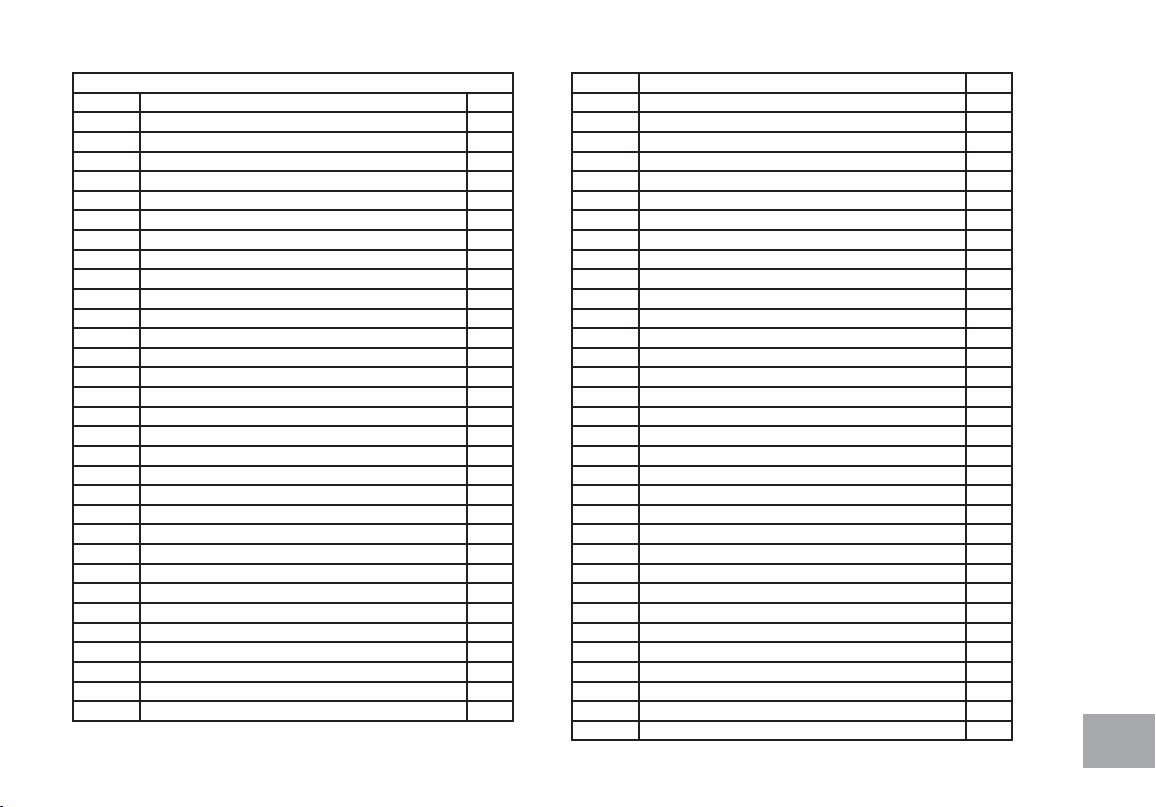
51
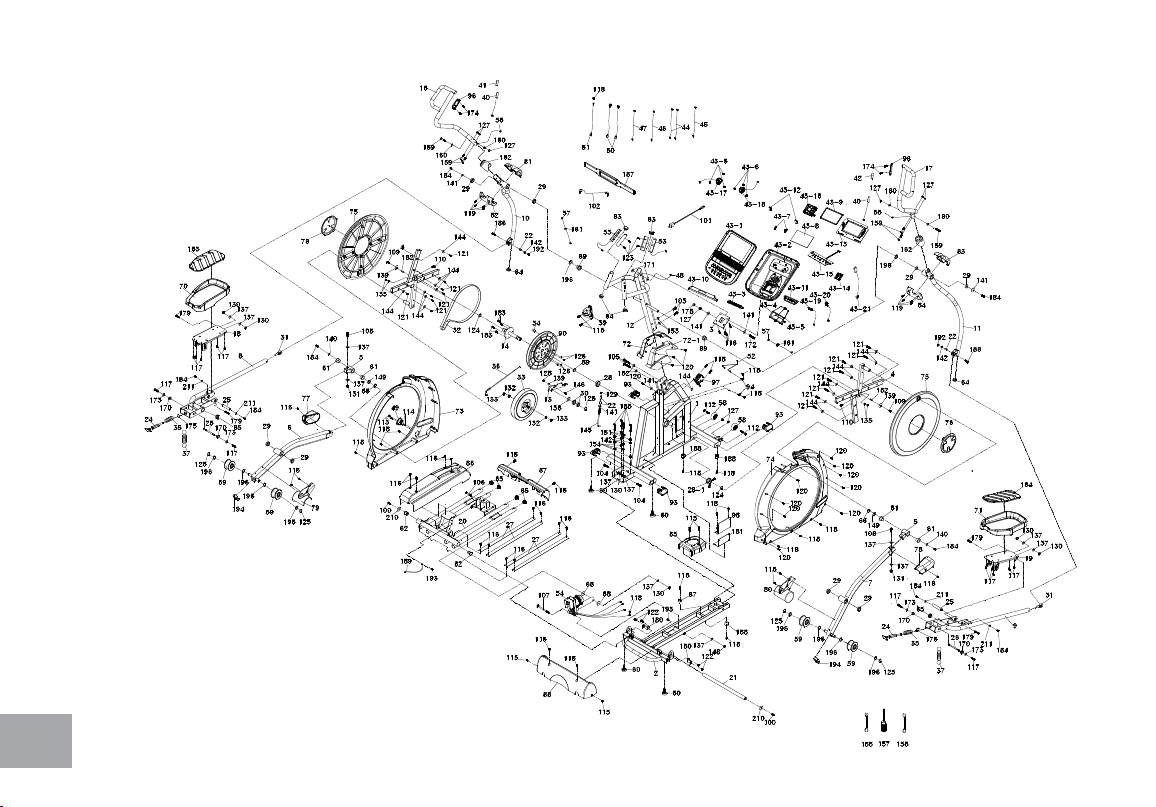
XE395ENT Parts List
1 Main Frame 1
2 Rail Base Assembly 1
3 Console Holder Assembly 1
4 Cross Bar 2
5 Bushing Housing, Pedal Arm 2
6 Pedal Arm (L) 1
7 Pedal Arm (R) 1
8 Connecting Arm (L) 1
9 Connecting Arm (R) 1
10 Lower Handle Bar (L) 1
11 Lower Handle Bar (R) 1
12 Console Mast 1
13 Idler Bracket 1
14 Crank Axle 1
16 Swing Arm (L) 1
17 Swing Arm (R) 1
18 Adjustable Pedal (L) 1
19 Adjustable Pedal (R) 1
20 Rear Rail Assembly 1
21 Locking Tube Assembly 1
22 Rod End Sleeve 4
24 Locking Pin Assembly 2
25 Axle for Pedal 2
26 Axle Of Locking Pin 2
27 Aluminum Rail 4
28 6005_Bearing 1
28-1 6005-2RS_Bearing 1
29 6003_Bearing 8
30 6203_Bearing 2
31 M12 × P1.75_Rod End Bearing 2
32 Drive Belt 1
33 Flywheel 1
34 Magnet 1
35 Latch Spring 2
36 Steel Cable 1
37 Pedal Tension Spring 2
39 Drink Bottle Holder 1
40 Resistance Button W/Cable 2
41 Handgrip Resistance Label (INCLINE) 1
42 Handgrip Resistance Label (LEVEL) 1
43 Console Assembly 1
43~1 Console Top Cover 1
43~2 Console Bottom Cover 1
43~3 Deector Fan Grill 1
43~4 Wind Duct (L) 1
43~5 Wind Duct (R) 1
43~6 Speaker Grill Anchor 6
43~7 Fan Grill Anchor 2
43~8 LCD Transparent Piece 1
43~9 Water-resist Rubber 1
43~10 Book Rack 1
43~11 Console Bottom Cover 1
43~12 Fan Fixing Plate 2
43~13 Console Display Board 1
43~14 Interface Board 1
43~15 Key Board 1
43~16 400m/m_Fan Assembly(White) 1
43~17 250m/m_Speaker W/Cable 1
43~18 460m/m_Speaker W/Cable 1
43~19 300m/m_W/Receiver, HR 1
43~20 350m/m_Earphone socket with cable and securing metal 1
43~21 USB Board 1
44 850m/m_Connecting Wire, Controller(Red) 2
45 650m/m_Computer Cable 1
46 500m/m_Connecing Wire, Incline Motor Power Cord 1
47 550m/m_Connecting Wire, Incline Motor 1
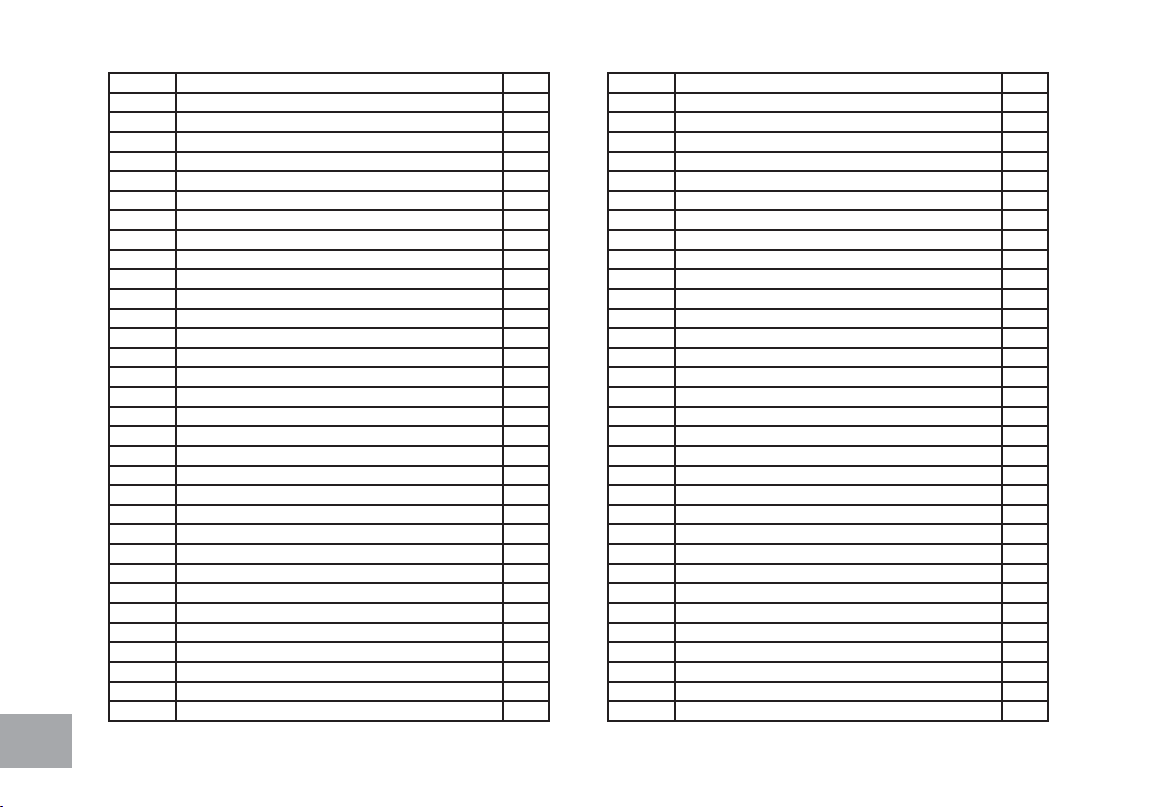
52
48 1600m/m_Computer Cable 1
49 AC Electronic Module 1
50 80m/m_Connecting Wire (White) 2
51 200m/m_Ground Wire 1
52 450m/m_Sensor W/Cable 1
53 850m/m_Handpulse W/Cable Assembly 2
54 Incline Motor 1
55 450m/m_Handle Wire (Upper), Resistance(White) 1
56 450m/m_Handle Wire (Upper), Incline(Red) 1
57 900m/m_Handle Wire (Lower), Resistance/Incline 2
58 Ø65_Transportation Wheel 2
59 Ø78_Slide Wheel , Urethane 4
60 Ø35 × 10m/m_Rubber Foot 4
61 WFM-2528-21_Bushing 4
62 Ø38 × Ø34 × Ø26 × 4 + 16T_Bushing 2
63 Ø32(1.8T)_Button Head Plug 2
64 Ø32 × 2.0T_Round Cap 4
65 32 × 2.5T_Round Cap 6
66 Ø25.5 × 33.5 × 1.5T_Nylon Wave Washer 2
67 Ø25 × Ø25 × 15T_Rubber Foot Pad 1
68 3/8" × 35 × 5T_Nylon Washer 2
69 Ø30 × 19m/m_Upright Bushing 2
70 Pedal (L) 1
71 Pedal (R) 1
72 Console Mast Cover(L) 1
72~1 Console Mast Cover(R) 1
73 Side Case(L) 1
74 Side Case (R) 1
75 Round Disk 2
76 Round Disk Cover 2
77 Pedal Arm Cover (L) 1
78 Pedal Arm Cover (R) 1
79 Slide Wheel Cover(L) 1
80 Slide Wheel Cover(R) 1
81 Front Handle Bar Cover (L) 1
82 Rear Handle Bar Cover (L) 1
83 Front Handle Bar Cover (R) 1
84 Rear Handle Bar Cover (R) 1
85 Bottom Cover 1
86 Incline Cover 1
87 Inclinable Rail Cover 1
88 Rear Bar Cover 1
89 Spacer Bushing 1
90 Ø330_Drive Pulley 1
93 Ø40 × Ø80_Oval End Cap 4
94 Sensor Rack 2
96 Handle Switch Bracket 2
97 Gear Motor 1
98 Incline Controller 1
100 5/16" × UNC18 × 1"_Hex Head Bolt 2
101 Power Cord 1
102 400m/m_Audio Cable 1
103 3/8" × 3/4"_Hex Head Bolt 2
104 3/8" × UNC16 × 1-1/2"_Hex Head Bolt 2
105 3/8" × 2-1/4"_Hex Head Bolt 2
106 3/8" × 2-1/2"_Hex Head Bolt 1
107 M10 × 130m/m_Hex Head Bolt 1
108 3/8" × 2-1/4"_Socket Head Cap Bolt 2
109 5/16" × UNC18 × 15L_Flat Head Socket Bolt 2
110 M8 × 1.25 × 40m/m_Socket Head Cap Bolt 2
112 5/16" × 1-3/4"_Button Head Socket Bolt 2
113 M4 × 12mm_Phillips Head Screw 2
114 M4 × P0.7 × 5T_Nyloc Nut 2
115 M5 × 15m/m_Phillips Head Screw 14
116 M5 × 10mm_Phillips Head Screw 18
117 M5 × 10mm_Phillips Head Screw(Nylock) 14
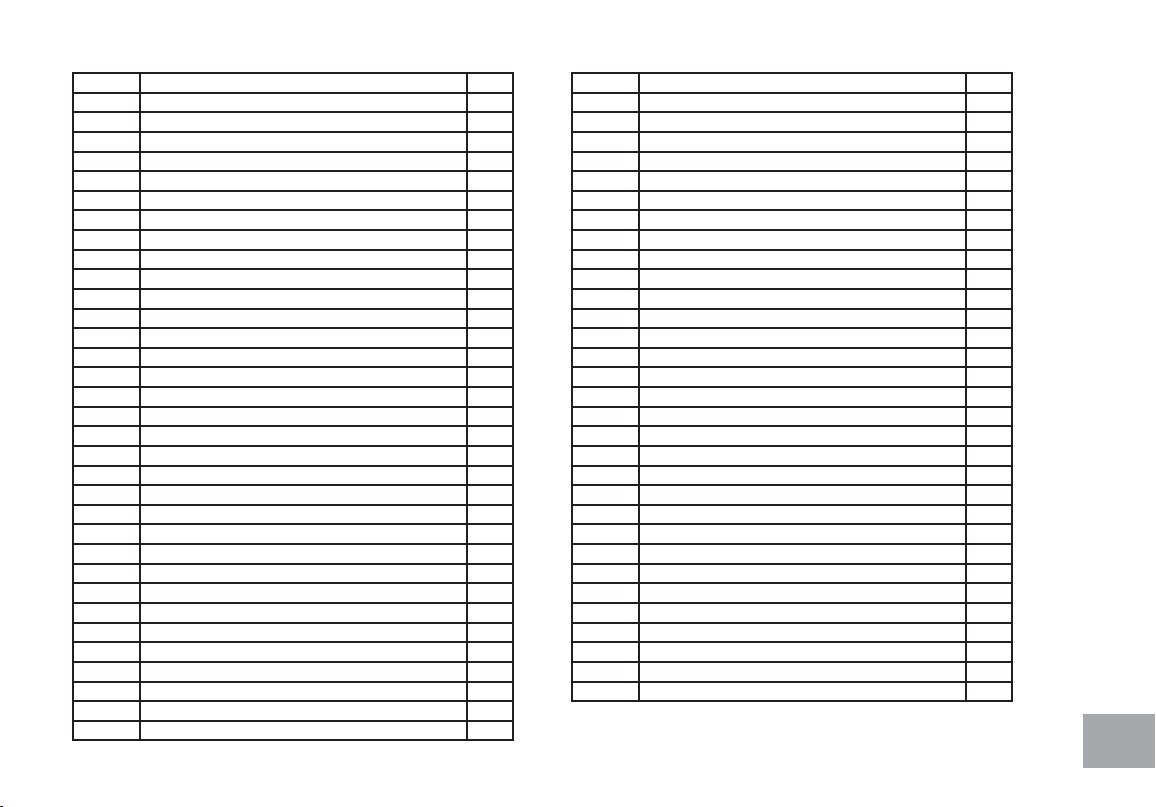
53
118 5 × 19m/m_Tapping Screw 18
119 3.5 × 12m/m _Sheet Metal Screw 8
120 3.5 × 16m/m_Sheet Metal Screw 13
121 5 × 16mm_Tapping Screw 16
122 M6 × 10m/m_Phillips Head Screw 4
123 3 × 20m/m_Tapping Screw 4
124 Ø25_C Ring 2
125 Ø17_C Ring 5
126 1/4" × 8T_Nyloc Nut 4
127 5/16" × 7T_Nyloc Nut 9
128 M8 × 7T_Nyloc Nut 1
129 M8 × 9T_Nyloc Nut 1
130 3/8" × 7T_Nyloc Nut 7
131 3/8" × 11T_Nyloc Nut 2
132 3/8" × UNF26 × 4T_Luck Nut 2
133 3/8" × UNF26 × 11T_Nut 2
135 M8 × 6.3T_Luck Nut 4
136 Ø17 × Ø23.5 × 1.0T_Flat Washer 1
137 Ø3/8" × Ø19 × 1.5T_Flat Washer 12
139 Ø5/16" × Ø35 × 1.5T_Flat Washer 3
140 Ø5/16" × 35 × 2.0T_Flat Washer 2
141 Ø5/16" × Ø23 × 1.5T_Flat Washer 6
142 Ø5/16" × Ø20 × 1.5T_Flat Washer 6
144 Ø1/4" × 19_Flat Washer 17
145 M8 × 170m/m_J Bolt 1
146 M8 × 20m/m_Carriage Bolt 1
148 M10 × 8T_Nyloc Nut 1
149 Ø25_Wave Washer 2
151 Ø8 × 1.5T_Spring Washer 4
152 Ø10 × 2T_Spring Washer 2
153 Ø3/8" × 23 × 2.0T_Curved Washer 2
154 Ø5/16"_Star Washer 4
155 13/14m/m_Wrench 1
157 Phillips Head Screw Driver 1
158 12/14m/m_Wrench 1
159 5/16" × 1-3/4"_Hex Head Bolt 6
160 Ø8 × 23 × 1.5T_Curved Washer 4
161 Switch Wire Cap 2
162 Swing Arm Bushing 2
163 Pedal Foam (L) 1
164 Pedal Foam (R) 1
170 Ø19 × Ø14 × Ø10 × (5+4)_Bushing 4
171 5/16" × 25 × 3T_Nylon Washer 2
172 5/16" × 2-1/2"_Hex Head Bolt 1
173 Ø5 × Ø15 × 1.5T_Flat Washer 4
174 M5 × 15m/m_Flat Head Socket Screw 4
175 Ø10_C Ring 2
178 13L_Bolt Cap 1
179 3/8" × 19m/m_Hex Head Bolt 4
180 Cover Holder(B) 2
181 Control Fixing Plate 1
182 Woodruff Key 2
183 1/4" × UNC20 × 3/4"_Hex Head Bolt 4
184 5/16" × UNC18 × 15L_Hex Head Bolt 8
185 5/16" × 2-1/4"_Hex Head Bolt 4
186 5/16" × 1-1/4"_Hex Head Bolt 2
187 Chest Strap (Optional) 1
188 Ø25 × 25mm_Rubber Foot Pad 3
189 250m/m_Ground Wire 1
192 5/16" × 9T_Nyloc Nut 2
193 Ø5 × 16L_Tapping Screw 2
194 Stabilizer End Cap 2
196 Ø17 × 0.5T_Wave Washer 10
210 Ø38 × Ø8.5 × 4T_Flat Washer 2
211 Ø5/16" × Ø23 × 3T_Flat Washer 4
210104

54

55
800.258.4555
spiritservice@spirittness.com
www.spirittness.com
Spirit Fitness
3000 Nestle Road
Jonesboro, AR 72401
XE395ENT Owners Manual
© 2021 All Rights Reserved
Revision: 02.25.2021