lnte\liBeam
The "lnte/liBeam " logo and "]ntelliBeam" are trademarks of Yamaha
Corporation.
The "_" logo and "Cinema DSP" are registered tradenmrks of
Yamaha Corporation.
hiVolum
Tile "UUJVOHUHI6"and "UniVolume" are tradenlarks of Yamaha Corporation.
yA@red
Tile "y A@r e d" and "y Aired" are trademarks of Yan]aha Corporation.
rllDOLB¥
TRtmXl2 ]
Manut-tctured under license t_om Dolby Laboratories.
Dolby, Pro Logic and the double-D symbol are trademarks of Dolby
Laboratories
L_dl_-u0
Master Audio
Manufaclured under license under U.S. Patent No's:
5 451 942:5,956 674 5,974 380 5,978,762 6,226 616:6 487,535 & other U.S. and
worldwide patents issued & pending. DTS is a regislered lrademark and lhe DTS
logns, Symbol, DTS-HD and DTS-HD Masler Audio are lrademark nf DTS, Inc. ©
1996-2007 DTS, Inc. All Rights Reserved.
Manufactured under license from Cambridge Mechatronics Ltd. Worldwide
patents applied tUr.
The "'i_} " logo and "Digital Sound Projector '_''' are trademarks of
Cambridge Mechatronics Ltd.
H.---Iml
"HDMI", the "HDMI" logo and "High-Definition Multimedia Interface" are
trademarks or registered trademarks of HDMI Licensing LLC.
x.v.Color
"x.v.Color" is a trademark.
iPod TM, iPhone TM
iPod is :t trademark of Apple Inc., registered in the U.S. and other countries.
iPhone is a mtdemark of Apple Inc.
"Made for iPod" means that an electronic accessory has been designed to
connect specifically to iPod and has been certified by the developer to meet
Apple perfornaance standards.
"Works with iPhone" means that an electronic accessory has been designed to
connect specifically to iPhone and has been certified by the developer to meet
Apple performance standards.
Apple is not responsible t_r the operation of this device or its compliance with
safety and regulatory standards.
SlRIUS
RE A DY
SIRIUS, XM and all rehtted marks and logos are tradenmrks of Sirius XM
Radio Inc. and its subsidiaries. All rights reserved. Service not available in
Alaska and Hawaii.
About this manual
•Make sure you read precautions in "Safety and Accesso UInformation" (separate booklet) carefully before using this unit.
• This manual describes how to connect and operate this unit. For details regarding the operation of external components, refer to the
supplied owner's manual for each component.
• Operations in this manual use keys on the supplied remote control of this unit unless otherwise specified.
• :i" indicates a tip for your operation.
• An illustration of the remote control in the left pages of this manual indicates the keys to be used in two facing (left and right) pages.
• This manual is produced prior to production. Designs and specifications are subject to change in part as a result of improvements,
etc. In case of differences between the manual and the product, the product has priority.
2En
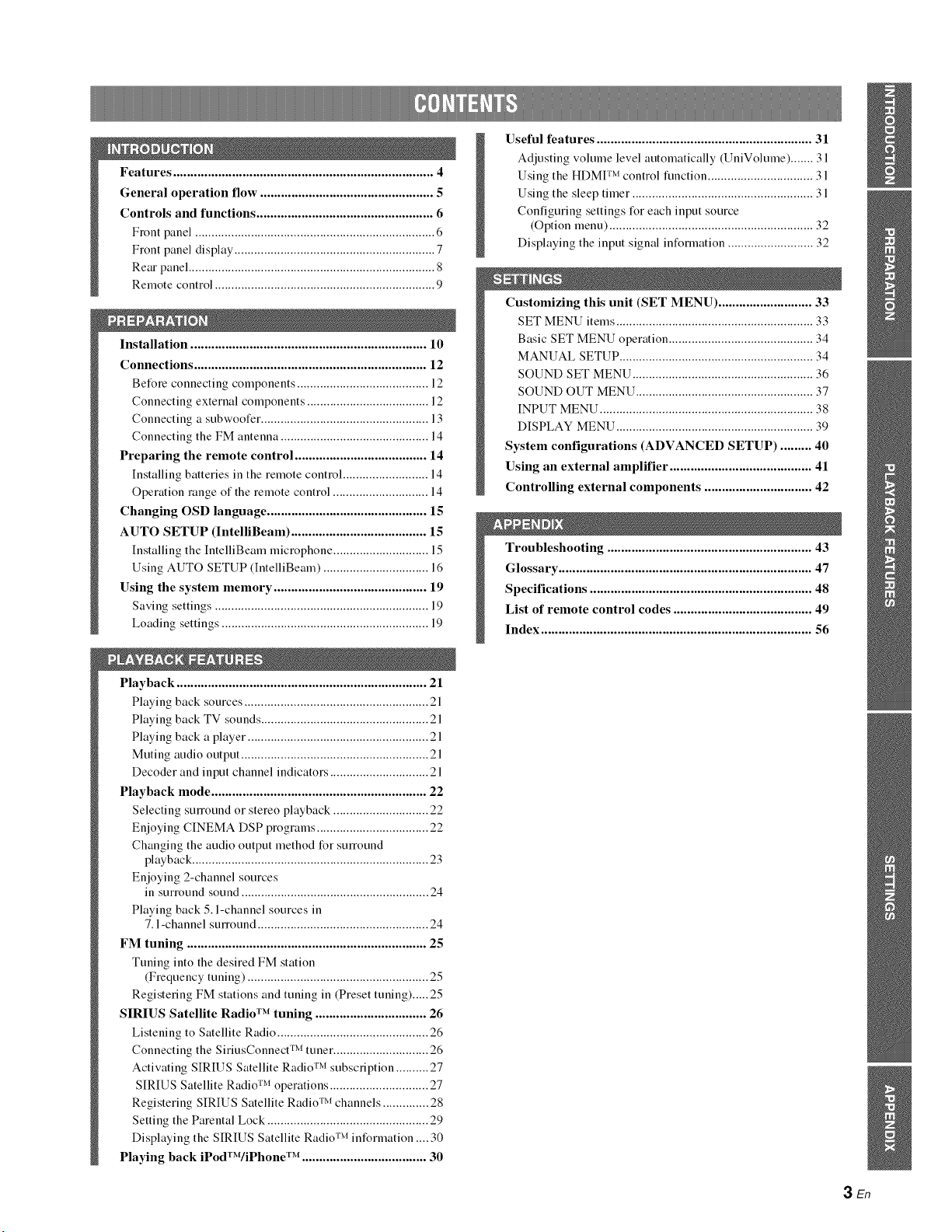
Features ........................................................................... 4
General operation flow .................................................. 5
Controls and functions ................................................... 6
Front panel ......................................................................... 6
Front panel display ............................................................. 7
Rear panel ........................................................................... 8
Remote control ................................................................... 9
Installation .................................................................... 10
Connections ................................................................... 12
Before connecting components ........................................ 12
Connecting external components .......................................
Connecting a subwoofer ................................................... 13
Connecting the FM antenna ............................................. 14
Preparing the remote control ...................................... 14
Installing batteries in the remote control .......................... 14
Operation range of the remote control ............................. 14
Changing OSD language .............................................. 1S
AUTO SETUP (IntelliBeam) ....................................... 1S
Installing the IntelliBeam microphone ............................. 15
Using AUTO SETUP (IntelliBeam) ................................ 16
Using the system memory ............................................ 19
Saving settings ................................................................. 19
Loading settings ............................................................... 19
Playback ........................................................................ 21
Playing back sources ........................................................ 21
Playing back TV sounds ................................................... 21
Playing back a player ....................................................... 21
Muting audio output ......................................................... 21
Decoder and input channel indicators .............................. 21
Playback mode .............................................................. 22
Selecting sunound or stereo playback ............................. 22
Enjoying CINEMA DSP programs .................................. 22
Changing the audio output method for surround
playback ........................................................................ 23
Enjoying 2-channel sources
in surround sound ......................................................... 24
Playing back 5. l-channel sources in
7.1 -channel sunound .................................................... 24
FM tuning ..................................................................... 25
Tuning into the desired FM station
(Frequency tuning) ....................................................... 25
Registering FM stations and tuning in (Preset tuning)..... 25
SIRIUS Satellite Radio TM tuning ................................ 26
Listening to Satellite Radio .............................................. 26
Connecting the SiriusConnect TM tuner ............................. 26
Activating SIRIUS Satellite Radio TM subscription .......... 27
SIRIUS Satellite Radio TM operations .............................. 27
Registering SIRIUS Satellite Radio TM channels .............. 28
Setting the Parental Lock ................................................. 29
Displaying the SIRIUS Satellite Radio TM information .... 30
Playing back iPodTWiPhone TM .................................... 30
Useful features .............................................................. 31
Adjusting volume level automatically (UniVolume) ....... 31
Using the HDMI TM control function ................................ 31
Using the sleep timer ....................................................... 31
Configuring settings for each input source
(Option menu) .............................................................. 32
Displaying the input signal information .......................... 32
Customizing this unit (SET MENU) ........................... 33
SET MENU items ............................................................ 33
Basic SET MENU operation ............................................ 34
MANUAL SETUP ........................................................... 34
SOUND SET MENU ....................................................... 36
SOUND OUT MENU ...................................................... 37
INPUT MENU ................................................................. 38
DISPLAY MENU ............................................................ 39
System configurations (ADVANCED SETUP) ......... 40
Using an external amplifier ......................................... 41
Controlling external components ............................... 42
Troubleshooting ........................................................... 43
Glossary ......................................................................... 47
Specifications ................................................................ 48
List of remote control codes ........................................ 49
Index .............................................................................. 56
3En
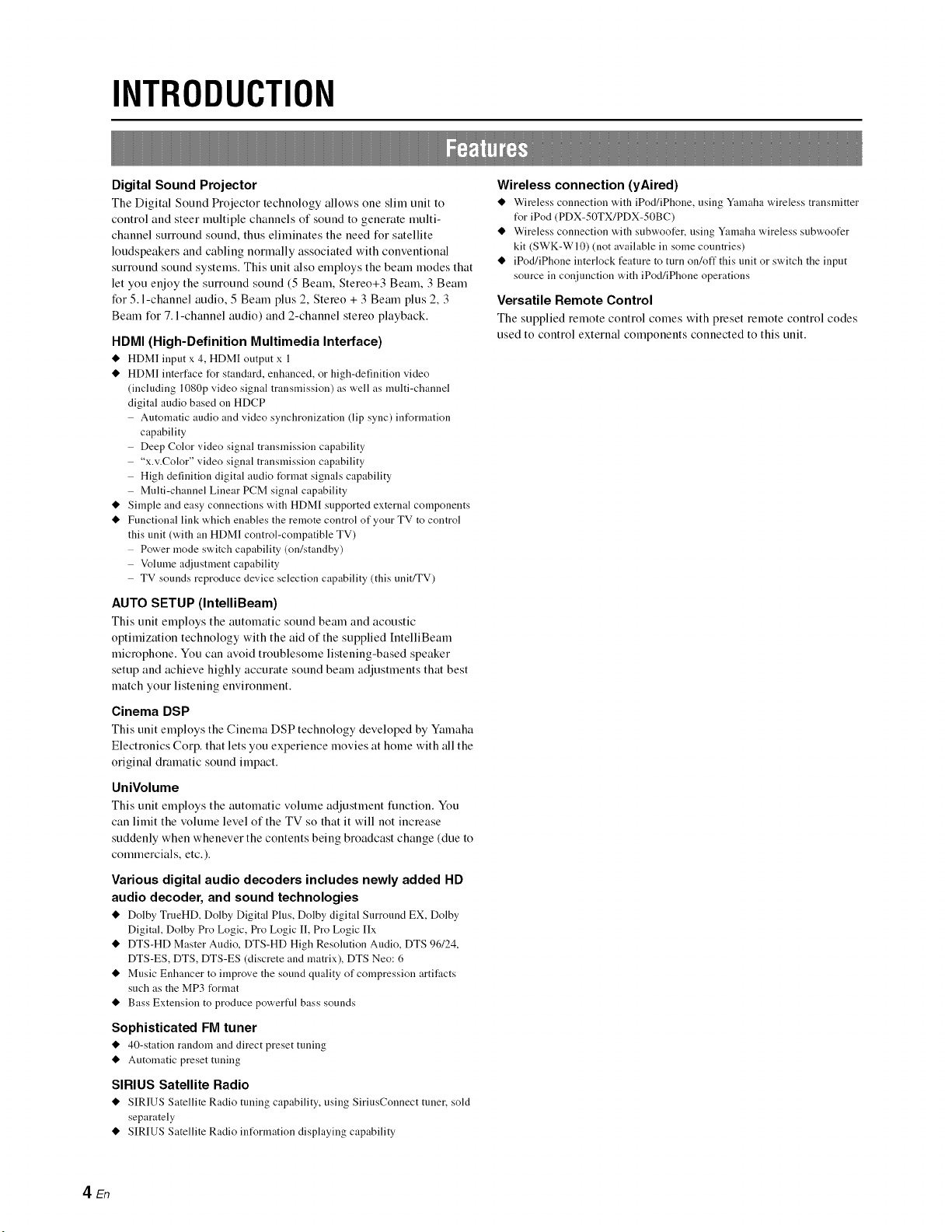
INTRODUCTION
Digital Sound Projector
The Digital Sotmd Projector technology allows one slim trait to
control and steer multiple channels of sound to generate multi-
channel surround sound, thus eliminates the need for satellite
loudspeakers and cabling normally associated with conventional
surround sound systems. This unit also employs the beam modes that
let you enjoy the surround sound (5 Beam, Stereo+3 Beam, 3 Beam
for 5. l-channel audio, 5 Beam plus 2, Stereo + 3 Beam plus 2, 3
Beam for 7. l-channel audio) and 2-channel stereo playback.
HDMI (High-Definition Multimedia Interface)
@HDM] input x 4, HDMI output x 1
@HDMI interface for standard, enhanced, or high-definition video
(including 1080p video signal transmission) as well as multi-channel
digital audio based on HDCP
Automatic audio and video synchronization (lip sync) information
capability
Deep Color video signal transmission capability
"x.v.Color" video signal transmission capability
High definition digital audio format signals capability
Multi-channel Linear PCM signal capability
@Simple and easy connections with HDMI supported external components
@Functional link which enables the remote control of your TV to control
this unit (with an HDM] control-compatible TV)
Power mode switch capability (on/standby)
Volume a@lstment capability
TV sounds reproduce device selection capability (this unit/TV)
AUTO SETUP (IntelliBeam)
This unit employs the automatic sound beam and acoustic
optimization technology with the aid of the supplied IntelliBeam
microphone. You can avoid troublesome listening-based speaker
setup and achieve highly accurate sound beam adjustments that best
match your listening environment.
Cinema DSP
This unit employs the Cinema DSP technology developed by Ymnaha
Electronics Corp. that lets you experience movies at home with all the
original dramatic sound impact.
UniVolume
This unit employs the automatic volume adjustmeut function. You
can limit the volume level of the TV so that it will not increase
suddenly when whenever the contents being broadcast change (due to
commercials, etc.).
Various digital audio decoders includes newly added HD
audio decoder, and sound technologies
@Dolby TrueHD, Dolby Digital Plus, Dolby digital Surround EX, Dolby
Digital, Dolby Pro Logic, Pro Logic I], Pro Logic IIx
@DTS-HD Master Audio, DTS-HD High Resolution Audio, DTS 96/24,
DTS-ES, DTS, DTS-ES (discrete and matrix), DTS Neo: 6
@Music Enhancer to improve the sound quality of compression artifacts
such as the MP3 format
@Bass Extension to produce powerful bass sounds
Sophisticated FM tuner
@40-station random and direct preset tuning
@Automatic preset tuning
SIRIUS Satellite Radio
@SIRIUS Satellite Radio tuning capability, using SiriusCounect tuner, sold
separately
@SIRIUS Satellite Radio intUrmation displaying capability
Wireless connection (yAired)
@Wireless connection with iPod/iPhoue, using Yamaha wireless transmitter
t_r iPod (PDX-50TX/PDX-50BC)
@Wireless connection with subwoofer, using Yamaha wireless subwoofer
kit (SWK-WI0) (not available in some countries)
@iPod/iPhoneinterlockfeaturetoturnon/offthisunitorswitchtheinput
source in conjunction with iPod/iPhone operations
Versatile Remote Control
The supplied remote control comes with preset remote control codes
used to control external components connected to this unit.
4En
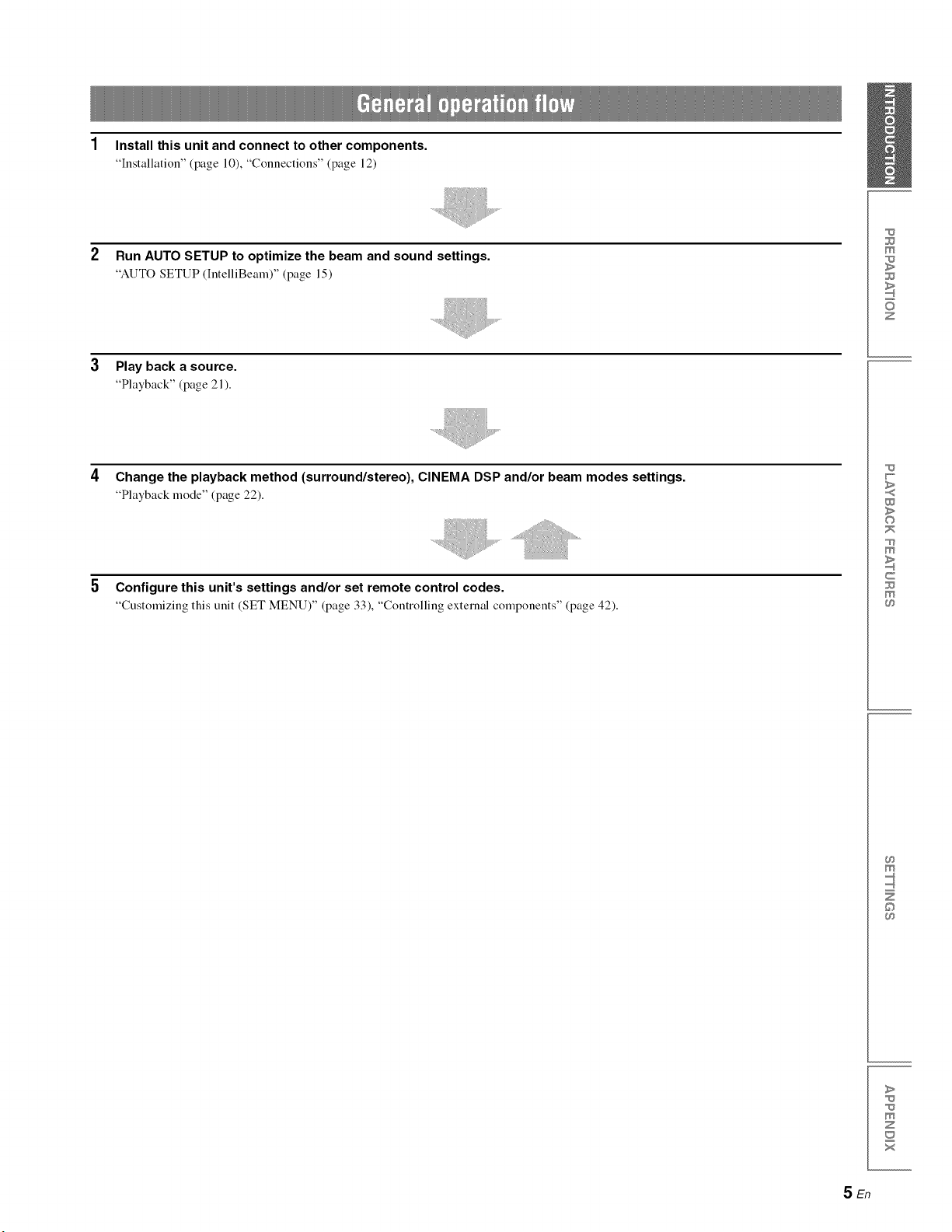
1 Install this unit and connect to other components.
"Installation" (page 10), "Connections" (page 12)
Run AUTO SETUP to optimize the beam and sound settings.
"AUTO SETUP (IntelliBemn)" (page 15)
Play back a source.
"Playback" (page 21 ).
Change the playback method (surround/stereo), CINEMA DSP and/or beam modes settings.
"Playback mode" (page 22).
Configure this unit's settings and/or set remote control codes.
"Customizing this unit (SET MENU)" (page 33), "Controlling external components" (page 42).
m
z
w
>
©
m
c
m
m
©
>
m
z
x
SEn
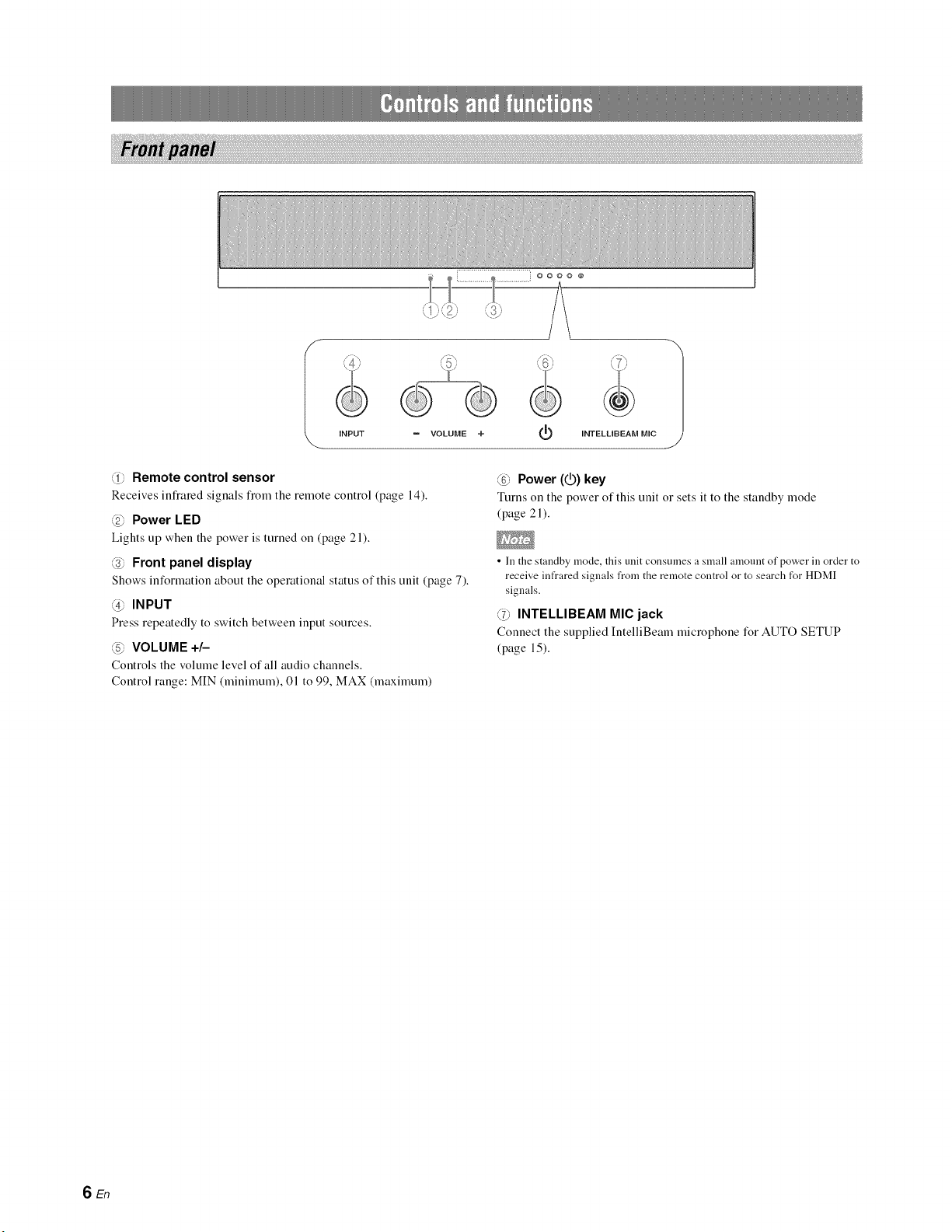
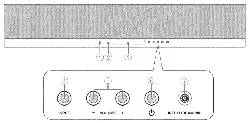
IINPUT = VOLUME +INTELLIBEAM MIC 1
@Remote control sensor
Receives infiared signals fiom the remote control (page 14).
@Power LED
Lights up when the power is turned on (page 21).
@Front panel display
Shows information about the operational status of this unit (page 7).
@INPUT
Press repeatedly to switch between input sources.
_5_ VOLUME +/-
Controls the volume level of all audio channels.
Control range: MIN (minimum), 01 to 99, MAX (maximum)
_ _ Power (1_) key
Turns on the power of this unit or sets it to the standby mode
(page 21 ).
• In the standby mode, this unit consumes a small amonnt of power in order to
receive infrared signals from the remote control or to search for HDMI
signals.
@INTELLIBEAM MIC jack
Connect the supplied IntelliBeam microphone for AUTO SETUP
(page 15).
SEn
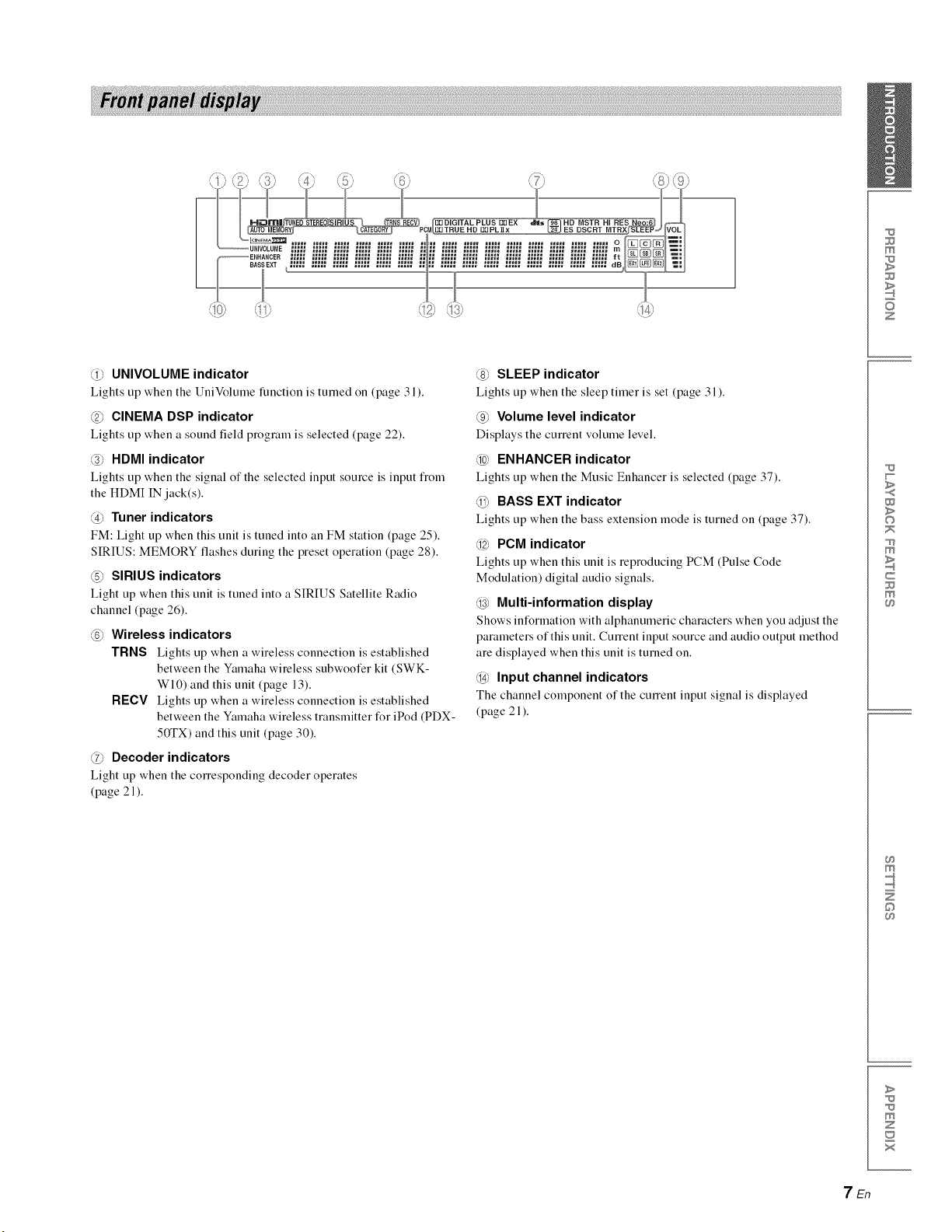
@UNIVOLUME indicator
Lights tip when the UniVoltune function is turned on (page 3 l).
@CINEMA DSP indicator
Lights tip when a sound field prograu] is selected (page 22).
@HDMI indicator
Lights tip when the signal of the selected input source is input t]om
the HDMI IN jack(s).
@Tuner indicators
FM: Light tip when this unit is tuned into an FM station (page 25).
SIRIUS: MEMORY flashes during the preset operation (page 28).
(5_ SIRIUS indicators
Light tip when this unit is tuned into a SIRIUS Satellite Radio
channel (page 26).
@Wireless indicators
TRNS Lights tip when a wireless connection is established
between the Yamaha wireless subwoofer kit (SWK-
WI0) and this unit (page 13).
RECV Lights up when a wireless connection is established
between the Yamaha wireless transmitter for iPod (PDX-
50TX) and this unit (page 30).
@Decoder indicators
Light tip when the COlTesponding decoder operates
(page 21 ).
@SLEEP indicator
Lights up when the sleep timer is set (page 31).
@Volume level indicator
Displays the current voltune level.
@ENHANCER indicator
Lights tip when the Music Enhancer is selected (page 37).
_BASS EXT indicator
Lights tip when the bass extension mode is turned on (page 37).
@PCM indicator
Lights tip when this unit is reproducing PCM (Pulse Code
Modulation) digital audio signals.
@Multi-information display
Shows information with alphanumeric characters when you adjust the
parameters of this unit. CulTent input source and audio output method
are displayed when this unit is turned on.
@Input channel indicators
The channel component of the current input signal is displayed
(page 21 ).
m
z
w
>
©
m
c
m
m
©
>
m
z
x
7En
!i! i ii!iiiii!iig!ii!i!!iilJi!i!ili!ii!i!ilig!iiiiii!ii i !iii !ii i! ii !ii ii! ii !iii i!i iii ! ii ii! ii !iii i!i iii ! ii ii! ii !iii i!i iii ! ii ii! ii !iii i!i iii ! ii ii! ii !iii i!i iii ! ii ii! ii !iii i!i iii ! ii ii! ii !iii i!i iii ! ii ii! ii !iii i!i iii ! ii ii! ii !iii i!i iii ! ii ii! ii !iii i!i iii ! ii ii! ii !iii i!i iii ! ii ii! ii !iii i!i iii ! ii ii! ii !iii i!i iii ! ii ii! ii !iii i!i iii ! ii ii! ii !iii i!i iii ! ii ii! ii !iii i!i iii ! ii ii! ii !iii i!i iii ! ii ii! ii !iii i!i iii ! ii ii! ii !iii i!i iii ! ii ii! ii !iii i!i iii ! ii ii! ii !iii
\
. J
• The rear panel illustration show's jacks and their names to help you find them easily. They are not exactly the same as the ones on the actual rear panel of this
unit.
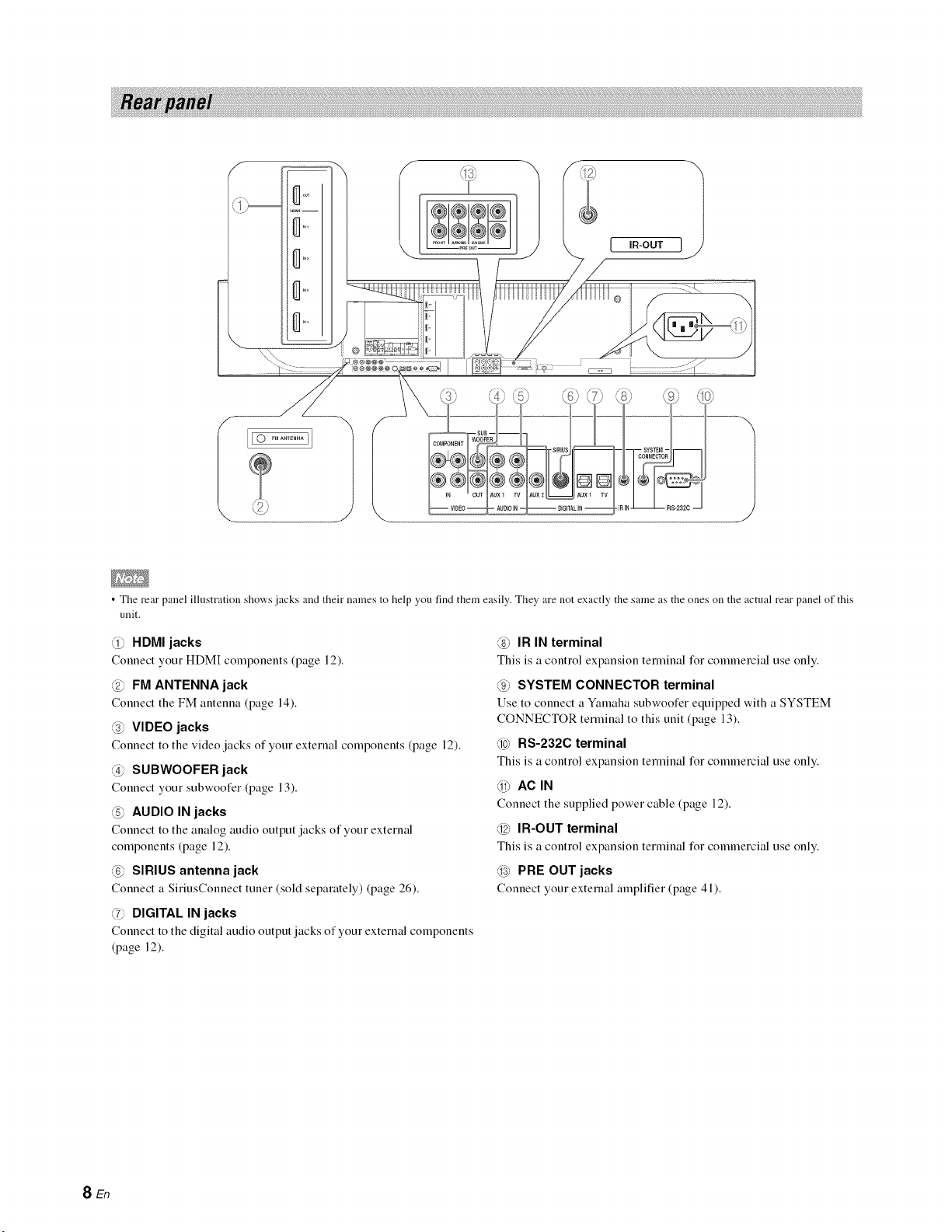
@HDMI jacks
Connect your HDM[ components (page 12).
@FM ANTENNA jack
Connect the FM antenna (page 14).
@VIDEO jacks
Connect to the video jacks of your external components (page 12).
@SUBWOOFER jack
Connect your subwoofer (page 13).
@AUDIO IN jacks
Connect to the analog audio output jacks of your external
components (page 12).
@SIRIUS antenna jack
Connect a SiriusConnect tuner (sold separately) (page 26).
@DIGITAL IN jacks
Connect to the digital audio output jacks of your external components
(page 12).
@IR IN terminal
This is a control expansion terminal for commercial use only.
@SYSTEM CONNECTOR terminal
Use to connect a Ymnaha subwoofer equipped with a SYSTEM
CONNECTOR terminal to this unit (page 13).
@RS-232C terminal
This is a control expansion terminal for commercial use only.
_AC_N
Connect the supplied power cable (page 12).
@IR-OUT terminal
This is a control expansion terminal for commercial use only.
@PRE OUT jacks
Connect your external amplifier (page 41).
SEn
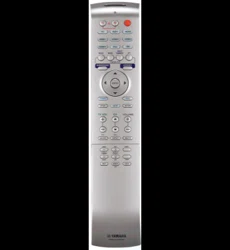
• When operating the keys located on the slide cover (INFO, SLEEP, etc.),
close the slide cover completely bet_re operation.
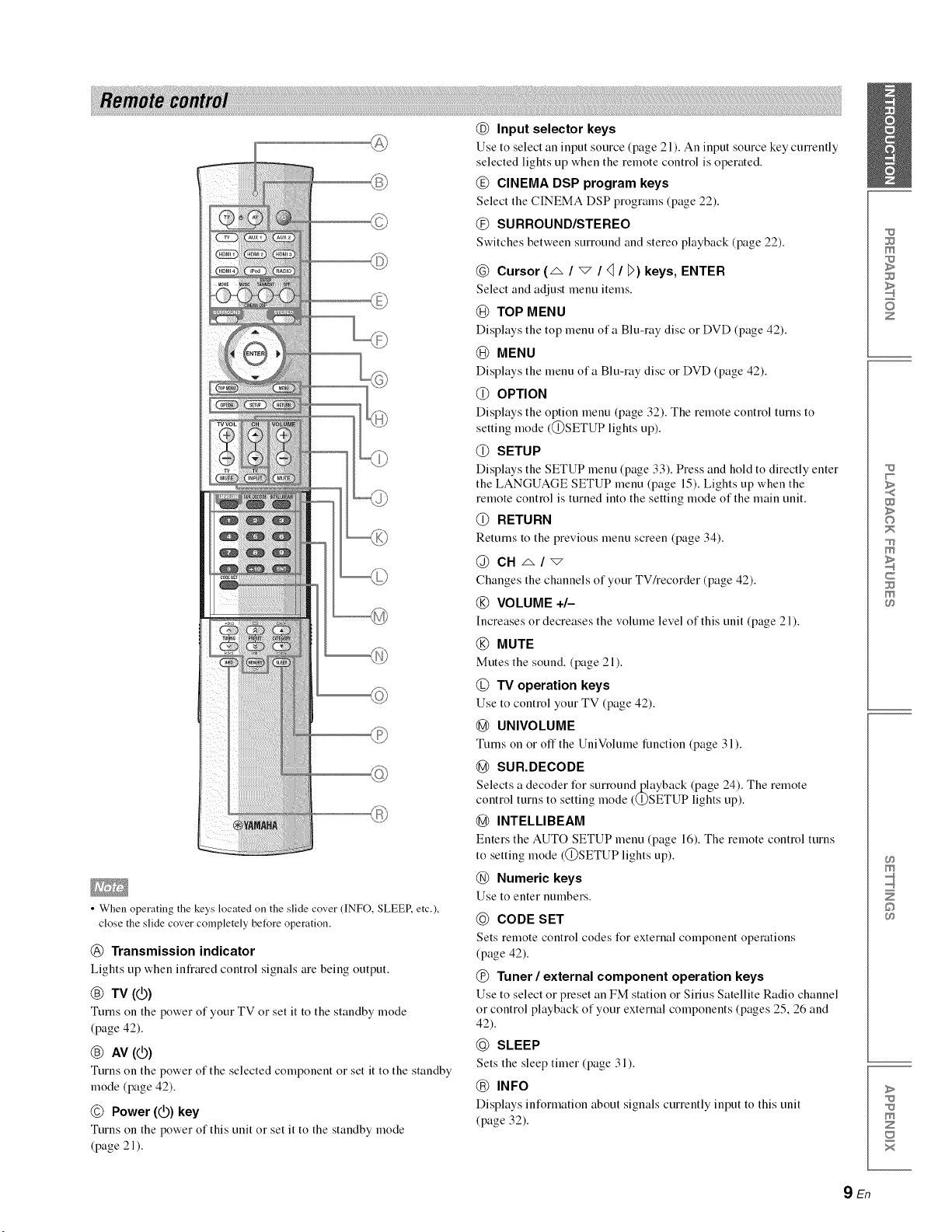
@Transmission indicator
Lights up when infrared control signals are being output.
@TV (@)
Turns on the power of your TV or set it to the standby mode
(page 42).
@AV (_)
Turns on the power of the selected component or set it to the standby
mode (page 42).
©Power (_) key
Turns on the power of this unit or set it to the standby mode
(page 21 ).
@Input selector keys
Use to select an input source (page 21). An input source key cmTently
selected lights up when the remote control is operated.
@CINEMA DSP program keys
Select the CINEMA DSP programs (page 22).
@SURROUND/STEREO
Switches between surround and stereo playback (page 22).
@Cursor (_ /"_ /<1/D) keys, ENTER
Select and adjust menu items.
@TOP MENU
Displays the top menu ofa Blu-ray disc or DVD (page 42).
@MENU
Displays the menu ofa Blu-ray disc or DVD (page 42).
@ OPTION
Displays the option menu (page 32). The remote control turns to
setting mode (@SETUP lights up).
@ SETUP
Displays the SETUP menu (page 33). Press and hold to directly enter
the LANGUAGE SETUP menu (page 15). Lights up when the
remote control is turned into the setting mode of the main unit.
@RETURN
Returns to the previous menu screen (page 34).
@CN _/'_
Changes the channels of your TV/recorder (page 42).
@VOLUME +/-
Increases or decreases the volume level of this unit (page 2 l).
@MUTE
Mutes the sound. (page 2 l).
@TV operation keys
Use to control your TV (page 42).
@UNIVOLUME
Turns on or off the UniVolume function (page 31).
@SUR.DECODE
Selects a decoder for surrouudj_layback (pa_e 24). The remote
control turns to setting mode (Q)SETUP ligl_ts up).
@INTELLIBEAM
Enters the AUTO SETUP menu (page 16). The remote control turns
to setting mode (@SETUP lights up).
@Numeric keys
Use to enter numbers.
@CODE SET
Sets remote control codes for external component operations
(page 42).
@Tuner /external component operation keys
Use to select or preset an FM station or Sirius Satellite Radio channel
or control playback of your external components (pages 25, 26 and
42).
(_) SLEEP
Sets the sleep timer (page 31 ).
INFO
Displays information about signals currently input to this unit
(page 32).
m
z
w
>
©
m
c
m
m
©
>
m
z
x
9En

PREPARATION
This section desclibes asuitable installation location to install this unit using awall mount bracket, arack, a table top stand o1 afloor stand. To
achieve desired surromld sound effects, install this unit where there are no objects such as furniture obstructing the path of sound beams
(page 11 ). Depending oll yore installation environment, connections with external components (page 12) should be done before installation.
• Make sure you leave an adequate amount of ventilation space so that heat
can escape. We recommend installing this unit using a wall mount bracket, a
rack, a table top stand or a floor stand.
• Be sure to install this unit where it will not fall subject to vibrations, such as
from an earthquake, and where it is out of the reach of chiktren.
• When using a cathode-ray tube (CRT) TV, do not install this unit directly
above your TV.
• ]f the picture on your TV screen becomes blurred or distorted, we
recommend moving this unit away from your TV.
•Attach the stands
Attach the supplied stands to this unit as shown below. Make sure that
you attach the left and right stands correctly. These stands are
unnecessary if you use the optional wall mount bracket.
Right stand (supplied)
......._and (supplied)
Sc_ied)
• Depending on a rack, table top stand, or floor stand, the stands may not be
necessary.
•Using a rack
You can install this unit either above or under your TV in a
commercially available rack.
It should be large enough to allow adequate ventilation space around
this unit and strong enough to support the weight of both this unit and
your TV.
When this unit is installed above your TV
When this unit is installed under our TV
•Using a wall mount bracket
You can use the optional wall mount bracket (such as SPM-K30) to
mount this unit on the wall in your listening room.
Attachment of the wall mount bracket: refer to the owner's manual
supplied with the wall mount bracket.
This unit
Wall mount bracket
TV
Dimensions when using SPM-K30
YSP-5100
2_1 23s • 3ss I 3s5 23_
I_ 730 4
SPM-K30 (Option)
| _ 730 _ (ram)
YSP-4100
o
107
(turn)
•Using a table top stand or a floor stand
You can mount both your TV and this unit on a commercially
available table top stand o1 floor stand.
lO En
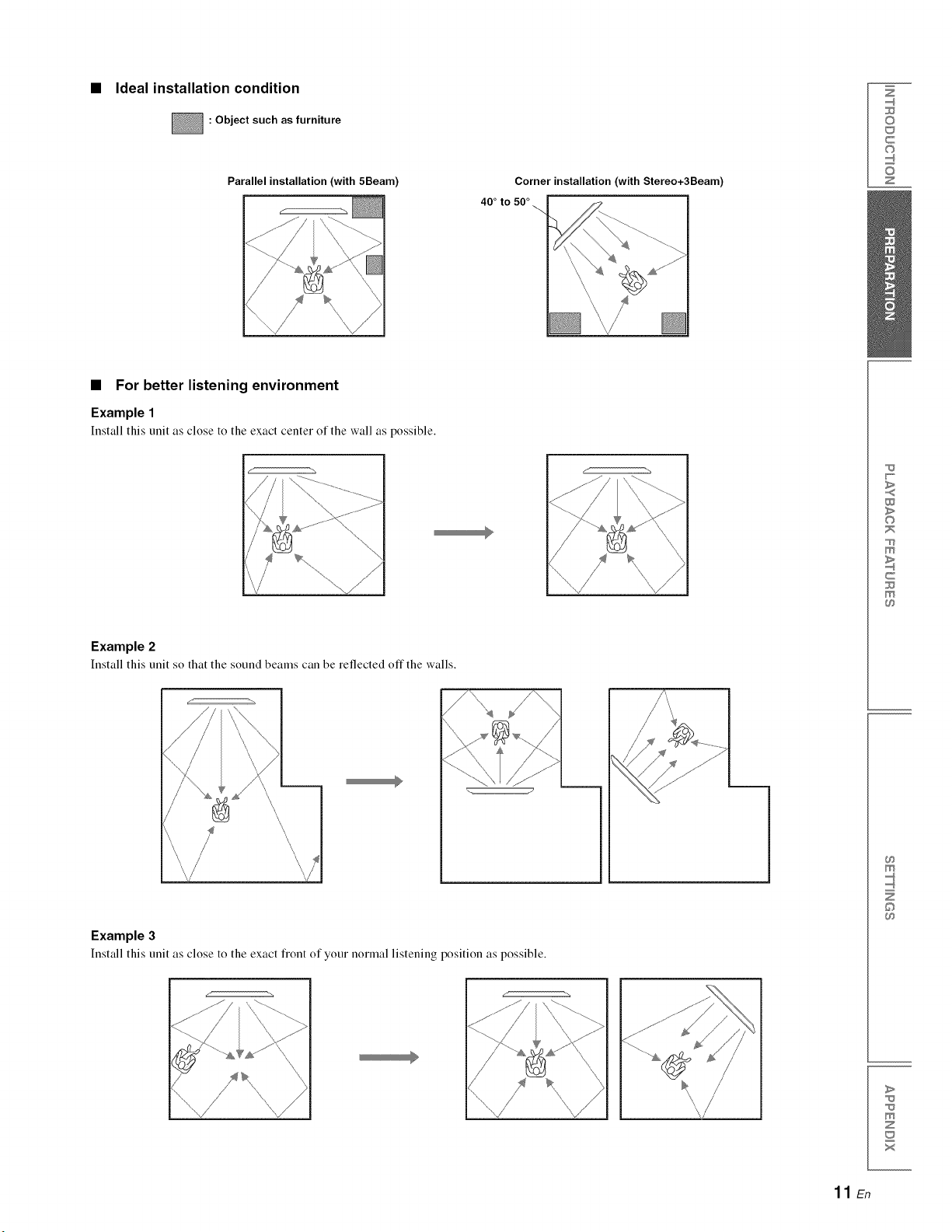
Ideal installation condition
: Object such as furniture
Parallel installation (with 5Beam) Corner installation (with Stereo+3Beam
40 °to 50 °
Z
©
c
©
z
•For better listening environment
Example 1
Install this unit as close to the exact center of the wall as possible.
Example 2
Install this unit so that the sound beams can be reflected offthe walls.
Example 3
Install this unit as close to the exact fiont of your normal listening position as possible.
w
>
©
m
c
m
m
©
>
m
z
x
11 En
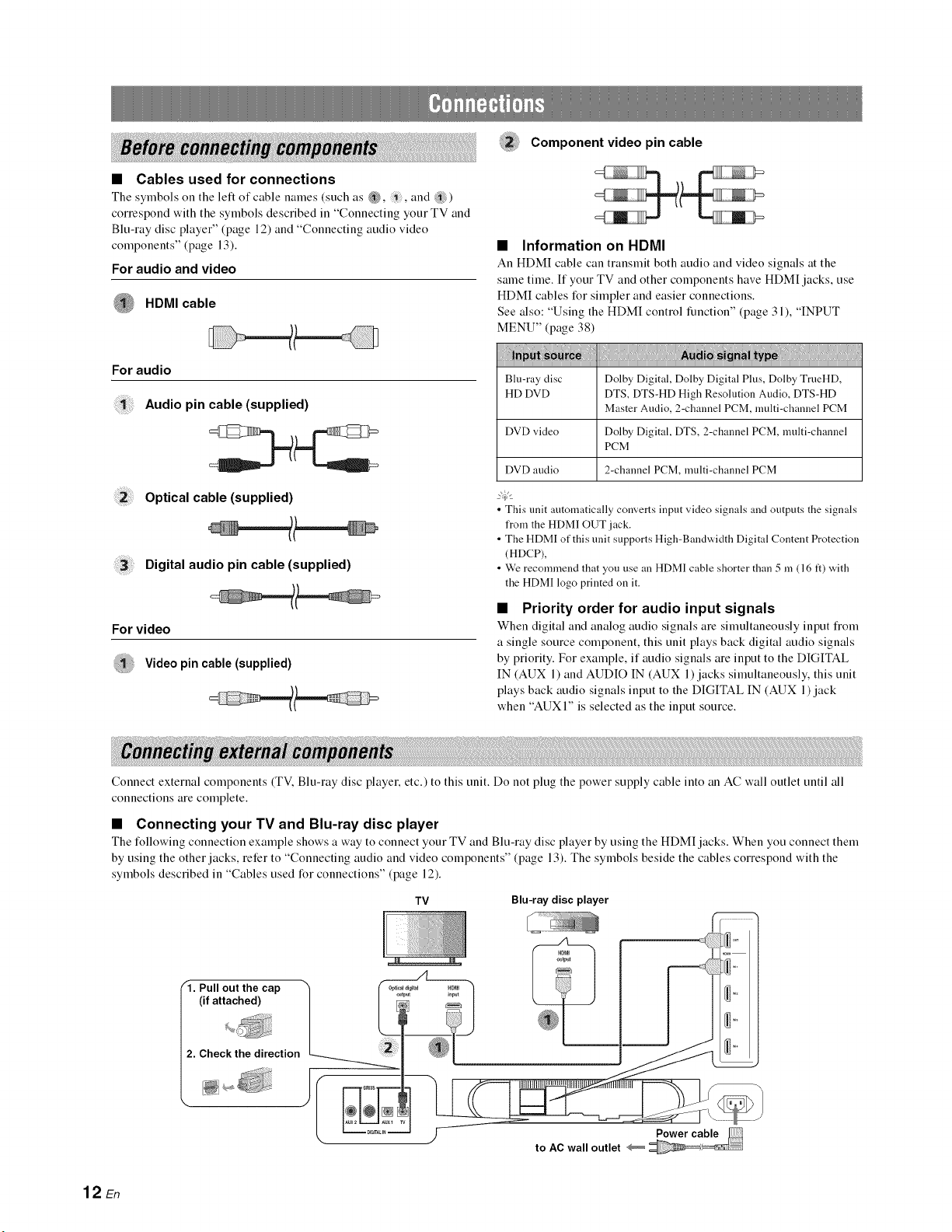
•Cables used for connections
The symbols on the left of cable names (such as _, , and ?ili)
correspond with the symbols described in "Connecting your TV and
Blu-ray disc player" (page 12) and "Connecting audio video
components" (page 13).
For audio and video
HDMI cable
For audio
Audio pin cable (supplied)
Optical cable (supplied)
Digital audio pin cable (supplied)
For video
Video pin cable (supplied)
Component video pin cable
•Information on HDMI
An HDMI cable can transmit both audio and vide() signals at the
same time. If your TV and other components have HDM[ jacks, use
HDMI cables for simpler and easier connections.
See also: "Using the HDM[ control function" (page 31), "INPUT
MENU" (page 38)
Dolby Digital, Dolby Digital Plus, Dolby TrueHD,
DTS, DTS-HD High Resolution Audio, DTS-HD
Master Audio, 2-channel PCM, multi-channel PCM
Blu-ray disc
HD DVD
DVD video Dolby Digital, DTS, 2-channel PCM, multi-channel
PCM
DVD audio 2-channel PCM, multi-channel PCM
• This unit automatically converts input video signals and outputs the signals
from the HDM] OUT jack.
• The HDMI of this unit supports High-Bandwidth Digital Content Protection
(HDCP),
• We recommend that you use an HDMI cable shorter than 5 in (16 ft) with
the HDMI logo printed on it.
•Priority order for audio input signals
When digital and analog audio signals are simtfltaneously input fiom
a single source component, this unit plays back digital audio signals
by priority. For example, if audio signals are input to the DIGITAL
IN (AUX 1) and AUDIO IN (AUX 1) jacks simultaneously, this unit
plays back audio signals input to the DIGITAL IN (AUX 1) jack
when "AUXI" is selected as the input source.
Connect external components (TV. Blu-ray disc player, etc.) to this unit. Do not plug the power supply cable into an AC wall outlet until all
connections are complete.
•Connecting your TV and Blu-ray disc player
The following connection example shows a way to connect your TV and Blu-ray disc player by using the HDM[ jacks. When you connect them
by using the other jacks, refer to "Connecting audio and video components" (page 13). The symbols beside the cables correspond with the
symbols described in "Cables used for connections" (page 12).
TV Blu-ray disc player
"1. Pull out the cap
(if attached)
2. Check the direction
to AC wall outlet
12 En
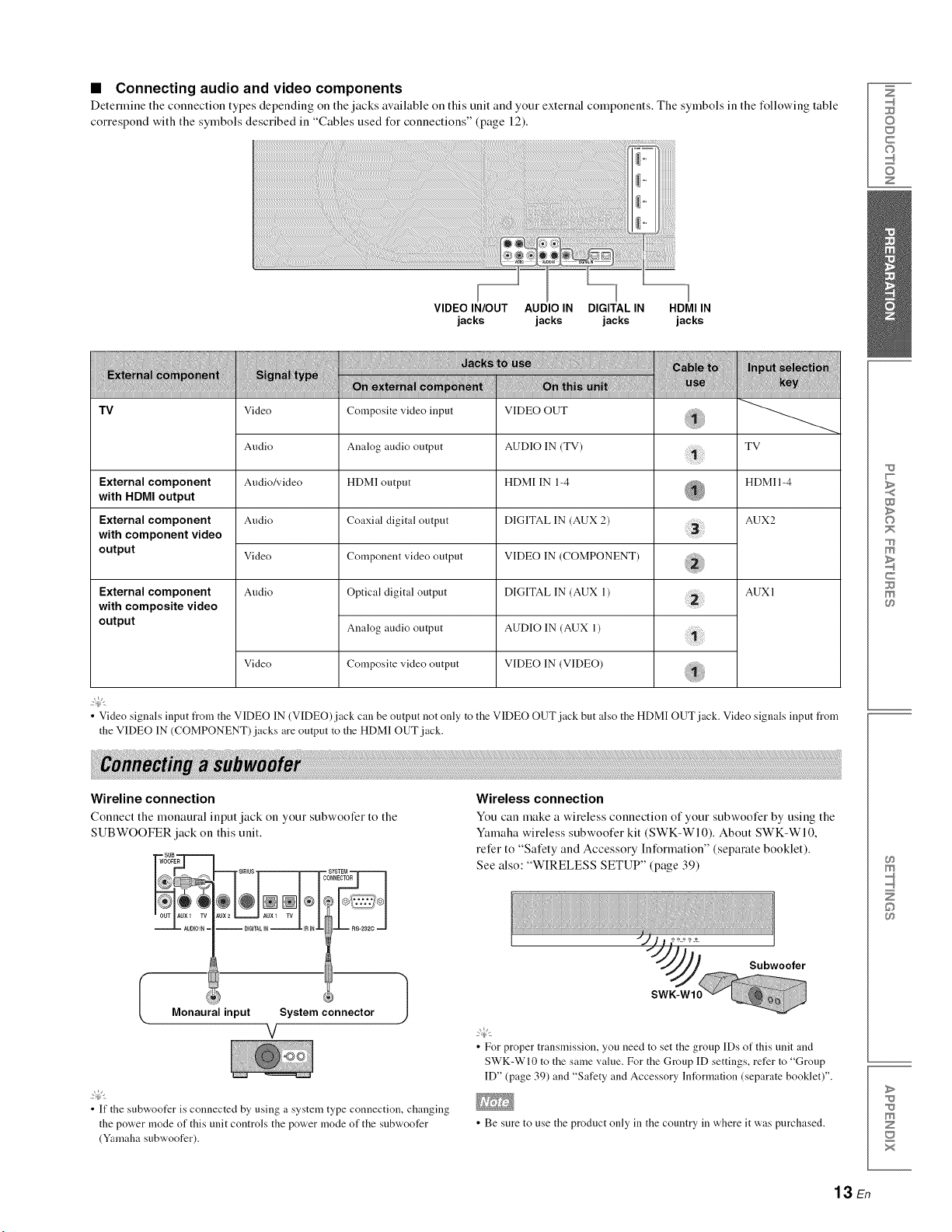
•Connecting audio and video components
Determine the connection types depending on the jacks available on this unit and your external components. The symbols in the following table
correspond with the symbols described in "Cables used t_r connections" (page 12).
Z
©
c
©
z
VIDEO IN/OUT AUDIO IN DIGITAL IN HDMI IN
jacks jacks jacks jacks
Tv
TV
External component HDMI 1-4
with HDMI output
AUX2
External component
with component video
output
External component
with composite video
output
Video
Audio
Audio/video
Audio
Video
Audio
Video
Composite video input
Analog audio output
HDMI output
Coaxial digital outpnt
Component video output
Optical digital output
Analog audio output
Composite video output
VIDEO OUT
AUDIO IN (TV)
HDMI IN 1-4
DIGITAL IN (AUX 2)
VIDEO IN (COMPONENT)
DIGITAL IN (AUX 1)
AUDIO IN (AUX 1)
VIDEO IN (VIDEO)
AUX l
2@'
•Video signals input t_om the VIDEO IN (VIDEO)jack can be output not only to the VIDEO OUT jack but also the HDMI OUT jack. Video signals input from
the VIDEO IN (COMPONENT) jacks are output to the HDMI OUT jack.
Wireline connection
Connect the monaural input jack on your subwoofer to the
SUBWOOFER jack on this unit.
SUB
__WOOFER
AUDIOIN=
Monaural input System connector
V}
2@'
• If the subwoofer is connected by using a system type connection, changing
the power mode of this unit controls the power mode of the subwoofer
(Yamaha subwoofer).
Wireless connection
You can make a wireless connection of your subwoofer by using the
Yamaha wireless subwoofer kit (SWK-WI0). About SWK-WI0,
refer to "Safety and Accessory Information" (separate booklet).
See also: "WIRELESS SETUP" (page 39)
Subwooter
• For proper transmission, you need to set the group IDs of this unit and
SWK-WI0 to the same value. For the Group ID settings, refer to "Group
ID" (page 39) and "Safety and Accessory Information (separate booklet)".
• Be sure to use the product only in the country in where it was purchased.
W
>
©
m
c
m
m
©
>
m
z
x
13 En
©
_ (2E3 _
TVVOL CH VOLUME
__j,5, ¸,,_,
G!i3_ (5i3
,0DES_
CD
_YAMAHA
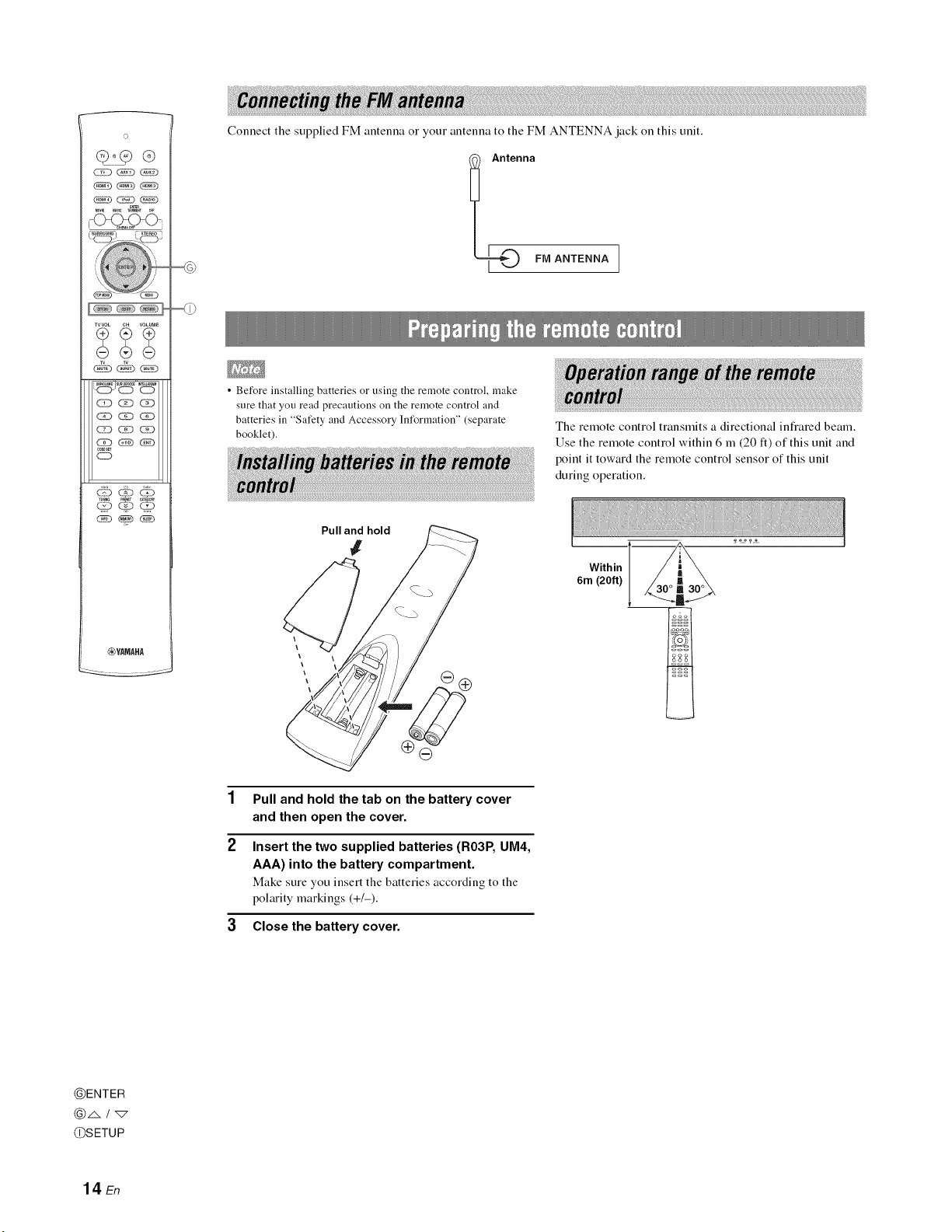
Connect the supplied FM antenna o1 your antenna to the FM ANTENNA jack oll this unit.
IAnte_naFiVl ANTENNA
• Before installing batteries or using the remote control, make
sure that you read precautions on the remote control and
batteries in "Safety and Accessory Information" (separate
booklet).
Pull and hold
#
The remote control transmits a directional infrared beam.
Use the remote control within 6 m (20 It) of this unit and
point it toward the remote control sensor of this unit
during operation.
Within
6m (20ft)
Pull and hold the tab on the battery cover
and then open the cover.
Insert the two supplied batteries (R03P, UM4,
AAA) into the battery compartment.
Make sure you insert the batteries according to the
polarity markings (+/-).
3Close the battery cover.
@ENTER
@/,. / "_
@SETUP
14 En
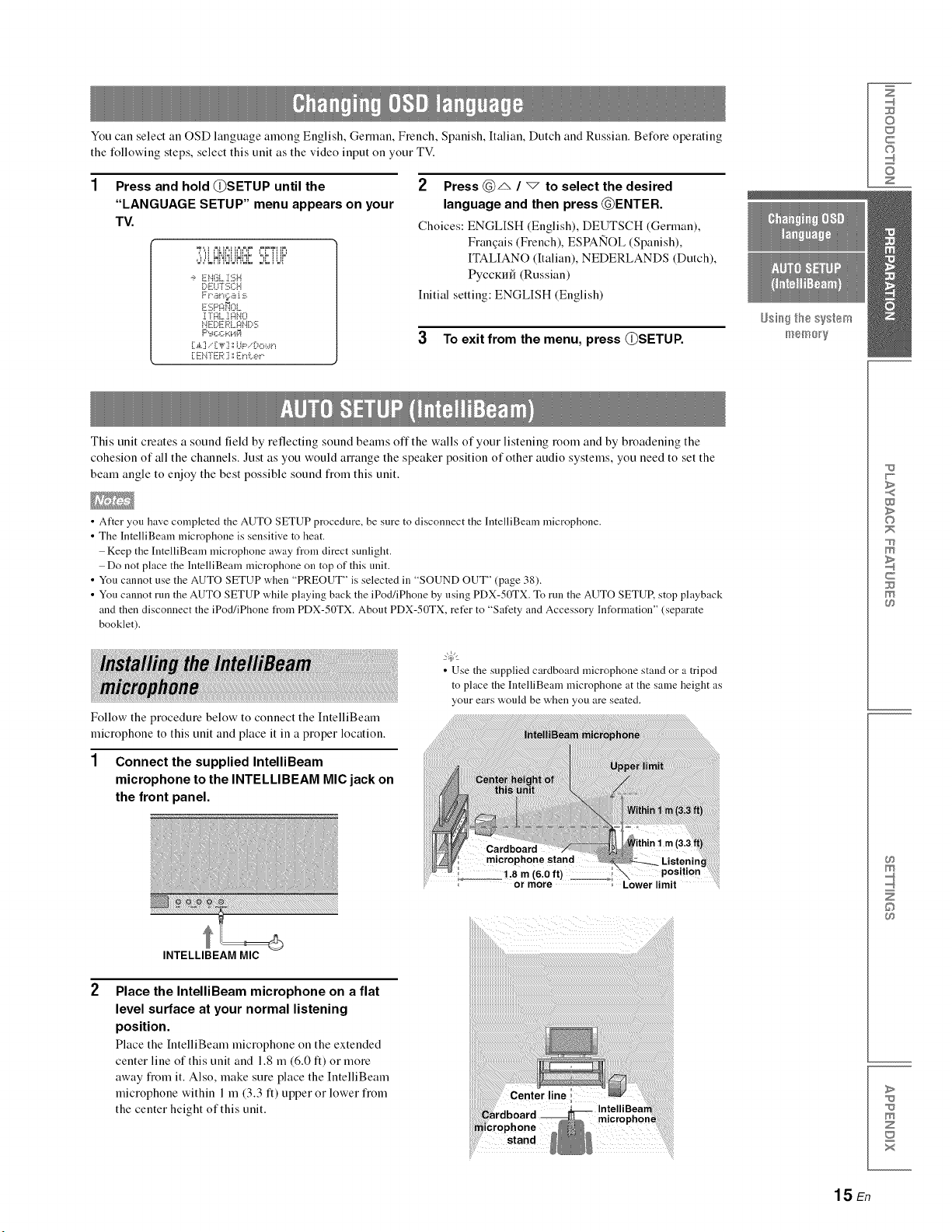
You can select an OSD language among English, German, French, Spanish, Italian, Dutch and Russian. Be%re operating
the following steps, select this unit as the video input oll your TV.
Press and hold (_}SETUP until the
"LANGUAGE SETUP" menu appears on your
TV.
", il uYi=JIUI=,P '@ ii iP'
-_ EN(iL :[SH
[;,ELFI'2;C:H
F t',an,;:.a s
ESF'_:i_OL,
:[mL :[¢_HO
NE:[)E:I:_:L,qN[:,2:
[ EN]ER ] ',',E_"_i:..e_".
2 Press (_)_ /_to select the desired
language and then press (_)ENTER.
Choices: ENGLISH (English), DEUTSCH (German),
Frauqais (French), ESPANOL (Spanish),
ITALIANO (Italian), NEDERLANDS (Dutch),
PyccKrffI (Russian)
Initial setting: ENGLISH (English)
3To exit from the menu, press {L)SETUP.
_sii_ the s%_em
iF_18/31@_y
Z
©
c
©
z
This unit creates a sound field by reflecting sound beams offthe walls of your listening room and by broadening the
cohesion of all the channels. Just as you would alTauge the speaker position of other audio systems, you need to set the
beam angle to enjoy the best possible sound fiom this unit.
• After you have completed the AUTO SETUP procedure, be sure to disconnect the ]ntelliBeam microphone.
• The IntelliBeam microphone is sensitive to heat.
Keep the IntelliBeam microphone away from direct sunlight.
Do not place the IntelliBeam microphone on top of this unit.
• You cannot use the AUTO SETUP when "PREOUT" is selected in "SOUND OUT" (page 38).
• You cannot run the AUTO SETUP while playing back the iPod/iPhone by using PDX-50TX. To run the AUTO SETUE stop playback
and then disconnect the iPod/iPhone from PDX-50TX. About PDX-50TX, refer to "Safety and Accessory Information" (separate
booklet).
Follow the procedure below to connect the IutelliBeam
microphone to this unit and place it in a proper location.
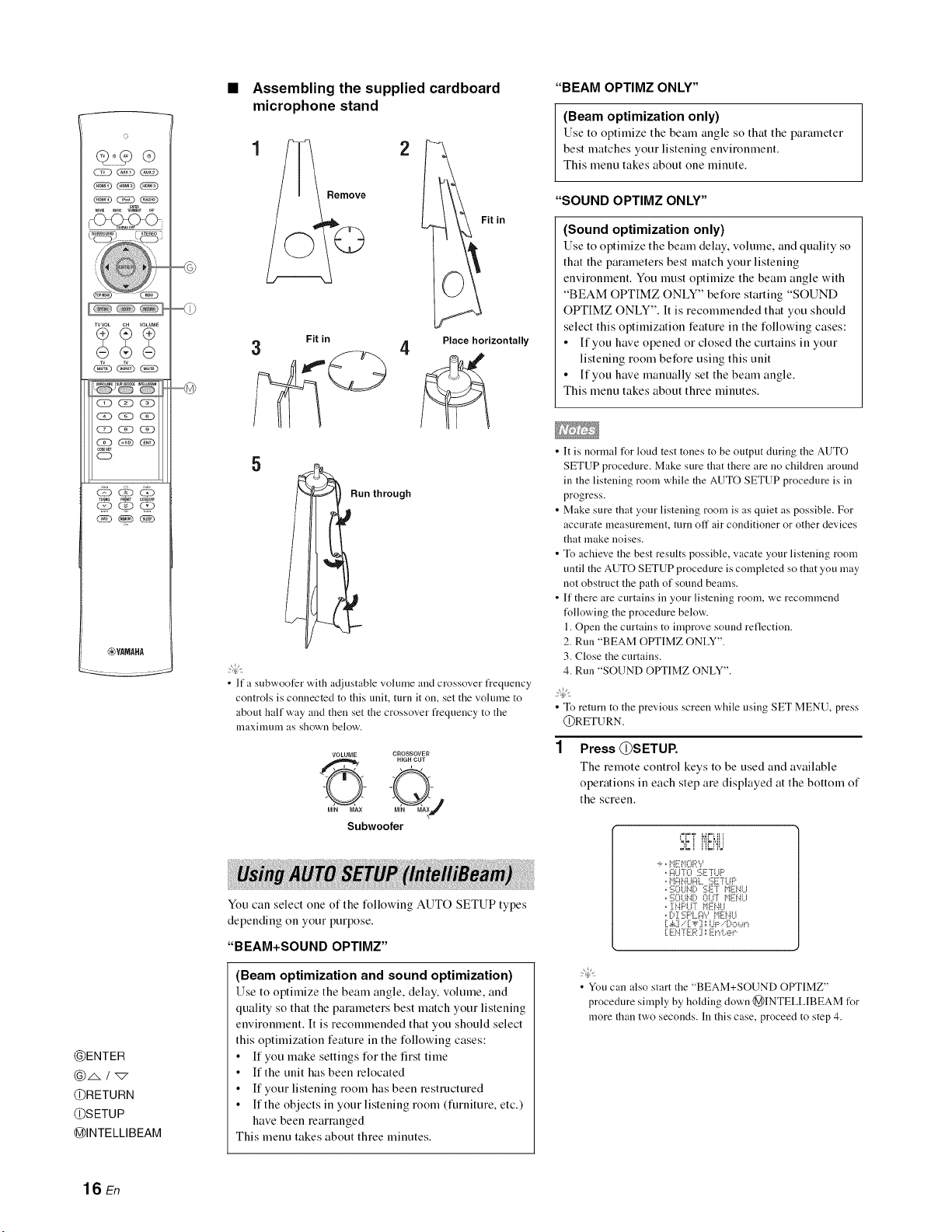
• Use the supplied cardboard microphone stand or a tripod
to >lacethe IntelliBeam microphone at the same height as
our ears would be when you are seated.
1 Connect the supplied IntelliBeam
microphone to the INTELLIBEAM MIC jack on
the front panel.
INTELLIBEAM MIC
Place the IntelliBeam microphone on a flat
level surface at your normal listening
position.
Place the hltelfiBeam microphone on the extended
center line of this unit and 1.8 m (6.0 it) or more
away from it. Also, make sure place the IutelliBeam
microphone within 1 m (3.3 it) upper or lower from
the center height of this unit.
w
>
©
m
c
m
m
©
>
z
x
15 En
o
-C_(_<>
TVVOL CH VOLUME
(Z3 _ C_D
CE) _ _(N5
,0DES_
o
_YAMAHA
@ENTER
@RETURN
@SETUP
@INTELLIBEAM
Assembling the supplied cardboard
microphone stand
Fit in
3
5
Fit in
4Place horizontally
Run through
•lfa subwoofer with adjustable vohnne and crossover frequency
controls is connected to this unit, turn it on, set the vohnne to
about half way and then set the crossover frequency to the
nlaxinmm as shown below.
VOLUME CROSSOVER
HIGH CUT
O-@j
MIN MAX
Subwoofer
You can select one of the following AUTO SETUP types
depending oll your purpose.
"BEAM+SOUND OPTIMZ"
(Beam optimization and sound optimization)
Use to optimize the beam angle, delay, volume, and
quality so that the parameters best match your listening
environment. It is recommended that you should select
this optimization feature in the following cases:
•If you make settings for the first time
• If the unit has been relocated
• If your listening room has been restructured
• If the objects in your listening room (furniture, etc.)
have been rearranged
This menu takes about three minutes.
"BEAM OPTIMZ ONLY"
(Beam optimization only)
Use to optimize the beam angle so that the parameter
best matches your listening environment.
This menu takes about one minute.
"SOUND OPTIMZ ONLY"
(Sound optimization only)
Use to optimize the beam delay, volume, and quality so
that the parameters best match your listening
environment. You must optimize the beam angle with
"BEAM OPTIMZ ONLY" before starting "SOUND
OPTIMZ ONLY". It is recommended that you should
select this optimization feature in the following cases:
• If you have opened or closed the curtains in your
listening room before using this unit
• If you have manually set the beam angle.
This menu takes about three minutes.
•It is normal for loud test tones to be output during the AUTO
SETUP procedure. Make sure that there are no children around
in the listening room while the AUTO SETUP procedure is in
progress.
• Make sure that your listening room is as quiet as possible. For
accurate measurement, mrn off air conditioner or other devices
that make noises.
• To achieve the best results possible, vacate your listening room
until the AUTO SETUP procedure is completed so that you may
not obstruct the path of sound beams.
• If there are curtains in your listening room, we recommend
t_llowing the procedure below.
1. Open the curtains to improve sound reflection.
2. Run "BEAM Otr['IMZ ONLY".
3. Close the curtains.
4. Run "SOUND OPTIMZ ONLY".
• To return to the previous screen while using SET MENU, press
@RETURN.
Press @SETUP,
The remote control keys to be used and available
operations in each step are displayed at the bottom of
the screen.
-_,,i"i_:HORY
,,AUT0 5ET'H.IF'
,,HAHUAt_ SETrUP
,,:i;OUt¢:, gi:T HEt4U
,,:i!;OUNi) OU°r HE!4Li
,, INF'U7 HE!.iU
oDI E:PLAY HEHU
[ .&:i.."[ ,F] _UP..' Do_,_r_
[ E:N"FE:R] ,','E:r_L,eP
•You can also start the "BEAM+SOUND OPTIMZ"
procedure simply by hoMing down @INTELLIBEAM for
more than two seconds. In this case, proceed to step 4.
16 En
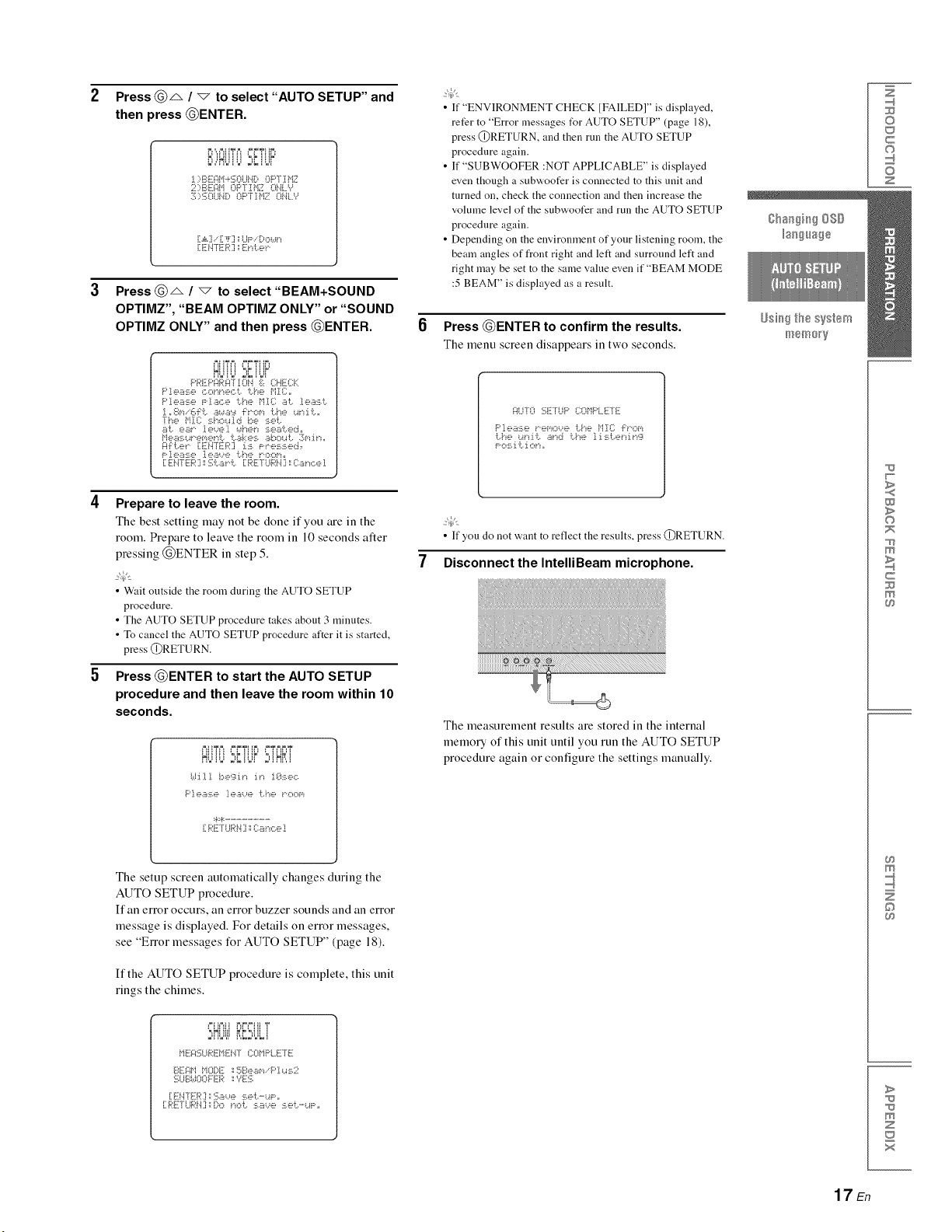
Press @_ /vto select "AUTO SETUP" and
then press @ENTER.
PIIIIIIII _=LiliL _
l):_:A:='i_ <' .L, 0P'[ii=IZ
2:BEAi"i OF"[Ti"IZ O.iL '_
:I.;':U}L_ i(: , OF"F:[H2.10HLY
[ ._iCL."[ _F] '.'UF'..'DO_a_"_
•IKhTE '_," El ",.:... "
Press @_ /"_ to select "BEAM+SOUND
OPTIMZ", "BEAM OPTIMZ ONLY" or "SOUND
OPTIMZ ONLY" and then press @ENTER.
'_iiiii k:" !ilk'
p_'_::Pq_'q'ruiiq ;:i:. CHECK
F'].ea::-:.e Piac, e 1:,.he i"iiE: ai. 'ie.:s:!!i.
[[ _8[,'i..'6_'i:,..h_a.A'::l _"ovi i:,.h8 i..i_'i i:,._
The }"i}X; ::_.ho_,.ilci be set.
a'i:,, es 1_,_.._e].iah_,_'i 5e.B'iL,eci,,
i"IGE!21.U_'_=[,'!_,_"iiL,'iL..i_k_!%.B[)Obii:,. 3["i _"i.
{:ii:i:..e_" iTEH"ER'J :[:!_.Fressed,
"_i'T_""::_?bavi;...c_ J [PE[U_'H]:Canc.el
Prepare to leave the room.
The best setting may not be done if you are ill the
room. Prepare to leave the room ill 10 seconds alter
pressing @ENTER ill step 5.
• Wait outside the room during the AUTO SETUP
procedure.
• The AUTO SETUP procedure takes about 3 minutes.
• To cancel the AUTO SETUP procedure after it is started,
press @RETURN.
Press @ENTER to start the AUTO SETUP
procedure and then leave the room within 10
seconds.
_iiiii ",kiiii" ",i_b'i
(dill be';_i_"_i_"_ 1_::k:.ec.
[ RETUR!.i ] ',',(}a h,::,e!
The setup screen automatically changes during the
AUTO SETUP procedure.
If all error occurs, all error buzzer sounds and all error
message is displayed. For details on error messages,
see "ElTor messages for AUTO SETUP" (page 18).
If the AUTO SETUP procedure is complete, this unit
rings the chimes.
!:!':,UL!
i"iE:A_;UR!:HENT (::OMF'L.E7E
BEAi"I i"iOD_: _SBea_,'wF'ius2
E;LiBi,.:.:OOFE:R_YE'i;
[ E:NF[:R] ',',_;a,.,e Set..-UF',,
[REFUi;I:!.i]',',Dono'L, sa,..,e, se'L,-u_:,,
•If "ENVIRONMENT CHECK IFAILED]" is displayed,
refer to "Error messages IYr AUTO SETUP" (page 18),
press @RETURN, and then run the AUTO SETUP
procedure again.
• If "SUBWOOFER :NOT APPLICABLE" is displayed
even though a subwoofer is connected to this unit and
turned on, check the connection and then increase the
volume level of the subwoofer and run the AUTO SETUP
procedure again.
• Depending on the environment of your listening room, the
beam angles of front right and left and surround left and
right may be set to the same value even if "BEAM MODE
:5 BEAM" is displayed as a result.
Press @ENTER to confirm the results.
The menu screen disappears ill two seconds.
AUTO E;EfLiF' O}i"iF'LE-[E
Please _".e_,'_oue 1:.,he Mrc i:_'.om
• If you do not want to reflect the results, press @RETURN.
7Disconnect the IntelliBeam microphone.
The measurement results are stored ill the internal
memory of this unit until you run the AUTO SETUP
procedure again or configure the settings manually.
©
c
©
z
>
©
c
©
>
z
17 En
©
TVVOL CH VOLUME
__j,5, ¸,,_,
CK)_Q
CE) G?D _(N)
,0DES_
CD
_YAMAHA
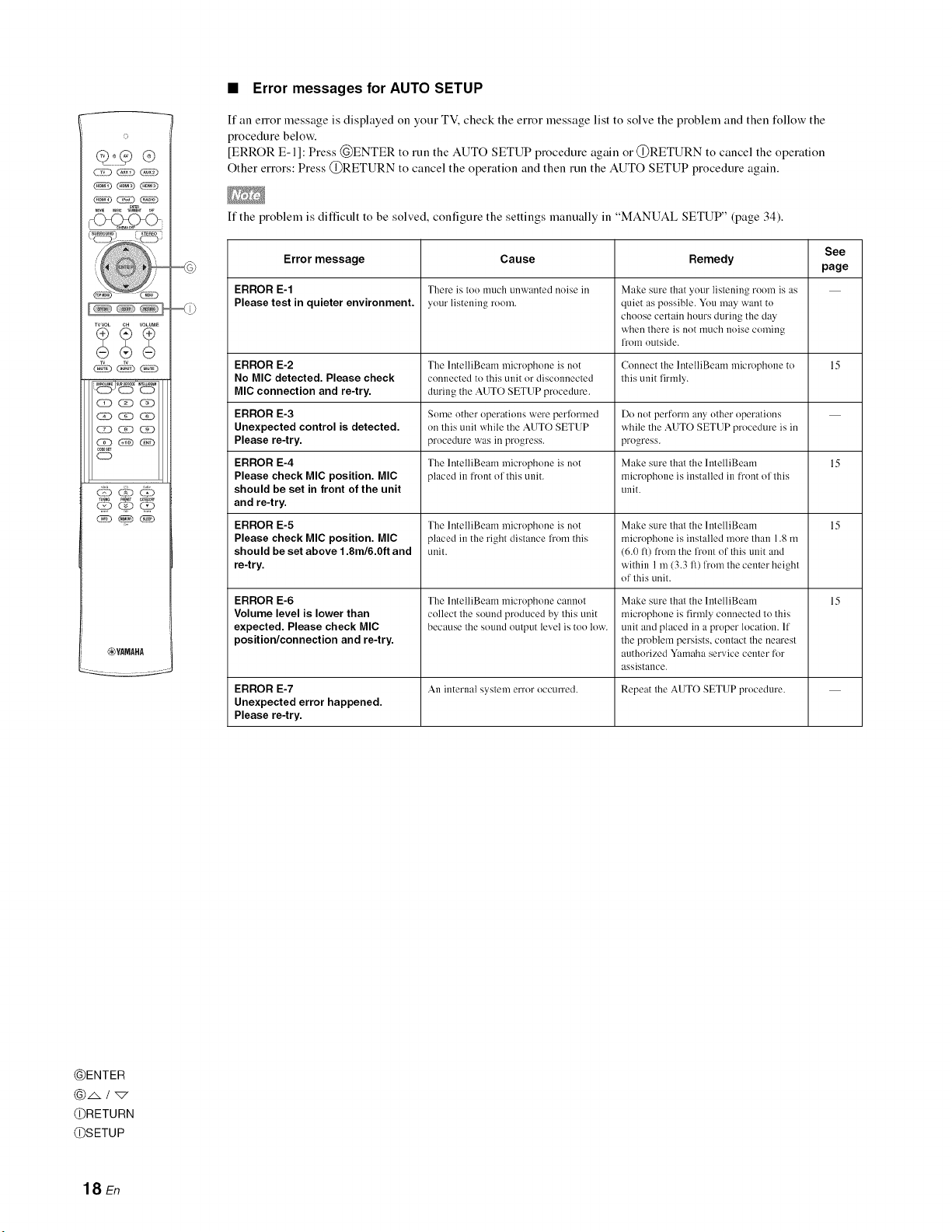
•Error messages for AUTO SETUP
If an enor message is displayed oll your TV, check the error message list to solve the problem and then follow the
procedure below.
[ERROR E-1]: Press @ENTER to run the AUTO SETUP procedure again or @RETURN to cancel the operation
Other errors: Press @RETURN to cancel the operation and then run the AUTO SETUP procedure again.
If the problem is difficult to be solved, configure the settings manually in "MANUAL SETUP" (page 34).
Error message
ERROR E-1
Please test in quieter environment.
ERROR E-2
No MIC detected. Please check
MIC connection and re-try.
ERROR E-3
Unexpected control is detected.
Please re-try.
ERROR E-4
Please check MIC position. MIC
should be set in front of the unit
and re-try.
ERROR E-5
Please check MIC position. MIC
should be set above 1.8m/6.0ft and
re-try.
ERROR E-6
Volume level is lower than
expected. Please check MIC
position/connection and re-try.
Cause
There is too much unwanted noise in
your listening room.
The lntelliBeam microphone is not
connected to this unil or disconnected
during ihe AUTO SETUP procedure.
Some other operations were perlormed
on this unit while Ihe AUTO SETUP
procedure was ill progress.
The lntelliBeam microphone is not
placed in front ol this unit.
The lntelliBeam microphone is not
placed in the righl distance h'om this
unit.
The lntelliBeam microphone cannot
collecl the sound produced by this unil
because the sound oulpul level is ioo low.
Remedy
Make sure that your listening room is as
quiet as possible. You may want to
choose certain hours during the day
when there is not much noise coming
from outside.
Connect the lntelliBeam microphone 1o
this unit firmly.
Do not perforl'n any other operations
while the AUTO SETUP procedure is in
progress.
Make sure that the lntelliBeam
rnicrophone is installed in fl'ont of this
unit.
Make sure that the lntelliBeam
microphone is installed more than 1.8 m
(6.0 ft) from the front of this unit mad
within 1 m (3.3 fl) from the center height
of this unit.
Make sure that the lntelliBeam
microphone is firmly connected to this
unit and placed in a proper location. If
the problem persists, contact the nearest
authorized Yamaha service center for
assistance.
See
page
15
15
15
15
ERROR E-7 An internal system error occurred. Repeat the AUTO SETUP procedure.
Unexpected error happened.
Please re-try.
@ENTER
@RETURN
@SETUP
18 En
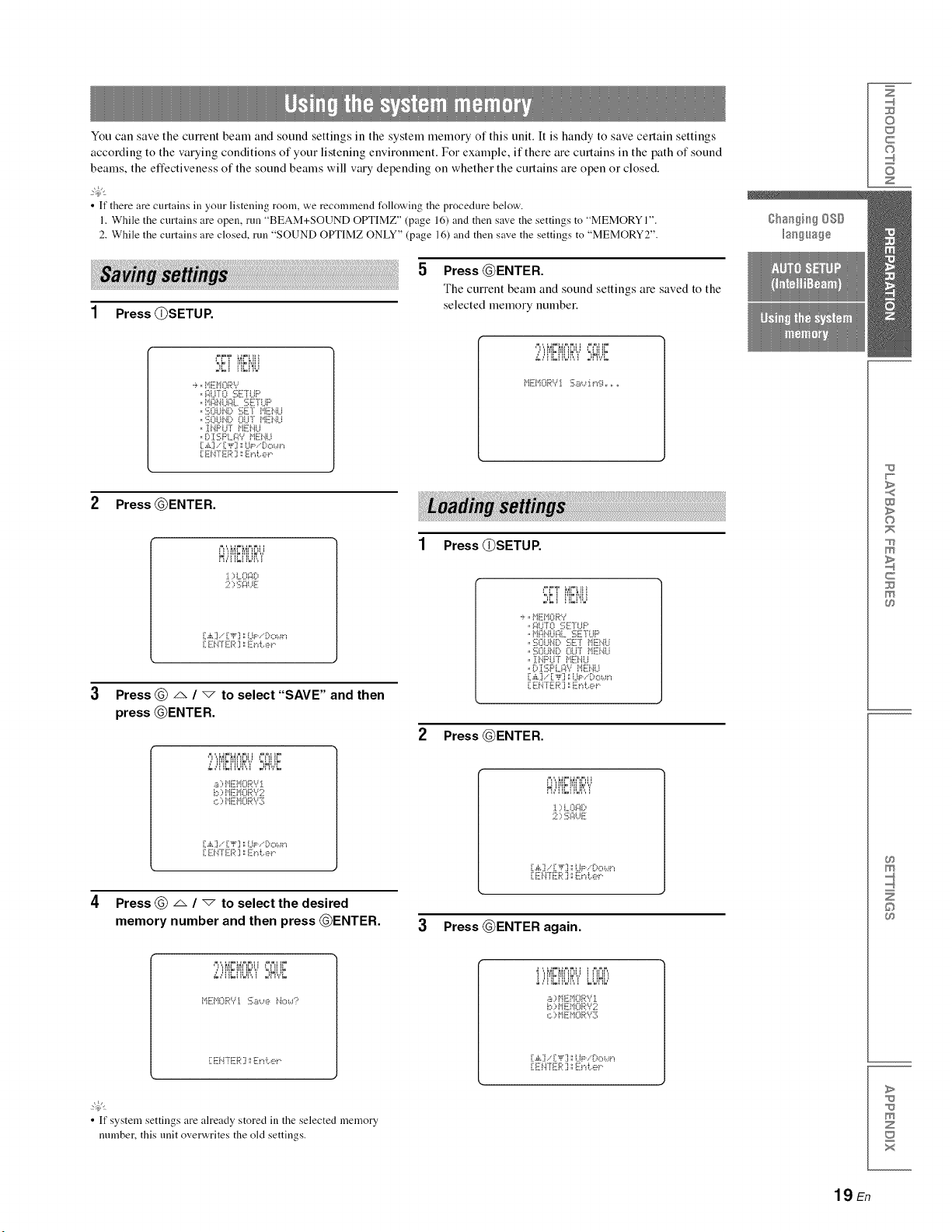
You can save the current beam and sound settings in the system memory of this unit. It is handy to save certain settings
according to the varying conditions of your listening environment. For example, if there are curtains in the path of sound
beams, the effectiveness of the sound beams will vary depending on whether the curtains are open or closed.
2@t
• If there are curtains in your listening room, we recommend following the procedure below.
1. While the curtains are open, run "BEAM+SOUND OPTIMZ" (page 16) and then save the settings to "MEMORY 1".
2. While the curtains are closed, run "SOUND OPTIMZ ONLY" (page 16) and then save the settings to "MEMORY2".
5
1Press (])SETUP,
Press @ENTER.
The current beam and sound settings are saved to the
selected memory number,
.._:!UT0 SE]UP
,,t'i_:)_.it.i_:il._SETUP
,,SOUtX) SET t'iENU
,,SOUNP OU]' MEN,-'J
,, :[t.iPUT ME!.iU
° P :1:2;F'L_W i"iEi'.iU
[ E]'ITE_':I _E)'d:.,e_"
'/i i'iki'iiik",i'°=HUk
2 Press @ENTER.
I )iJ'_F i:_
;;, ::,:i::ii.iF:
[A] .."i]_ ] '.'LIp..'Do_,_"_
[ EN°[ ER ] _Et"d:.,e_"
Press @ A /vto select "SAVE" and then
press @ENTER.
'.,.2.:,['iL['ii.ii:'.,.'':,Ht,.t
.:: ,[. , ,,
b ::,t'IEi"IORY2
c.::,i"IEMORYS
[A].." [_F] ; (JP..'Do_,_t"_
[ E]',TE,,:.I '.'E)%e_"
Press @ _ / "_ to select the desired
memory number and then press @ENTER.
1Press (])SETUP,
'=,k ! iqkt'_il
-_,,MEMORY
,,F!iJTO SE]UP
,,M-:6iUF!L SETUP
,,SOU_X) '.:_;ETPiE},[Li
,,SOUN[:, oLI°r i"iE[!4U
,, ][NF'UT t'iENLI
.P:[SF'LF!Y MEt.iLl
[ .£] .."[ ,_] ._iJP..'Do_,_'_
[ E]'ITER ] _E)I i:.,e_"
2 Press @ENTER.
ii_ik!_iiik',,'
) LOFli)
2) :_;i::iuE
[,_L].." [_F ] ._i.JP..'Dc,_,_"_
. ,.: .°.,.: .:], ,.:.",...."
3Press @ENTER again.
/i i_iki_i!ik'"," '=,Ulik
t'IEMORY:_ Sa,..,e Ho_,d:'
!)!'!Et'!OF:':'L
a)t'IEMORYi
c.::,i"IE]iORYS
[,¢.]..' ["_'] '.'UP..'[:,o_,_"_
[ E!.i°fER ] ::Zt%er.
_t
• If system settings are already stored in the selected memory
number, this unit overwrites the old settings.
0
C
©
Z
>
0
c
©
>
Z
19 En
o
_ _ (_
__j,5, ¸,,_
,00Es_
o
_YAMAHA
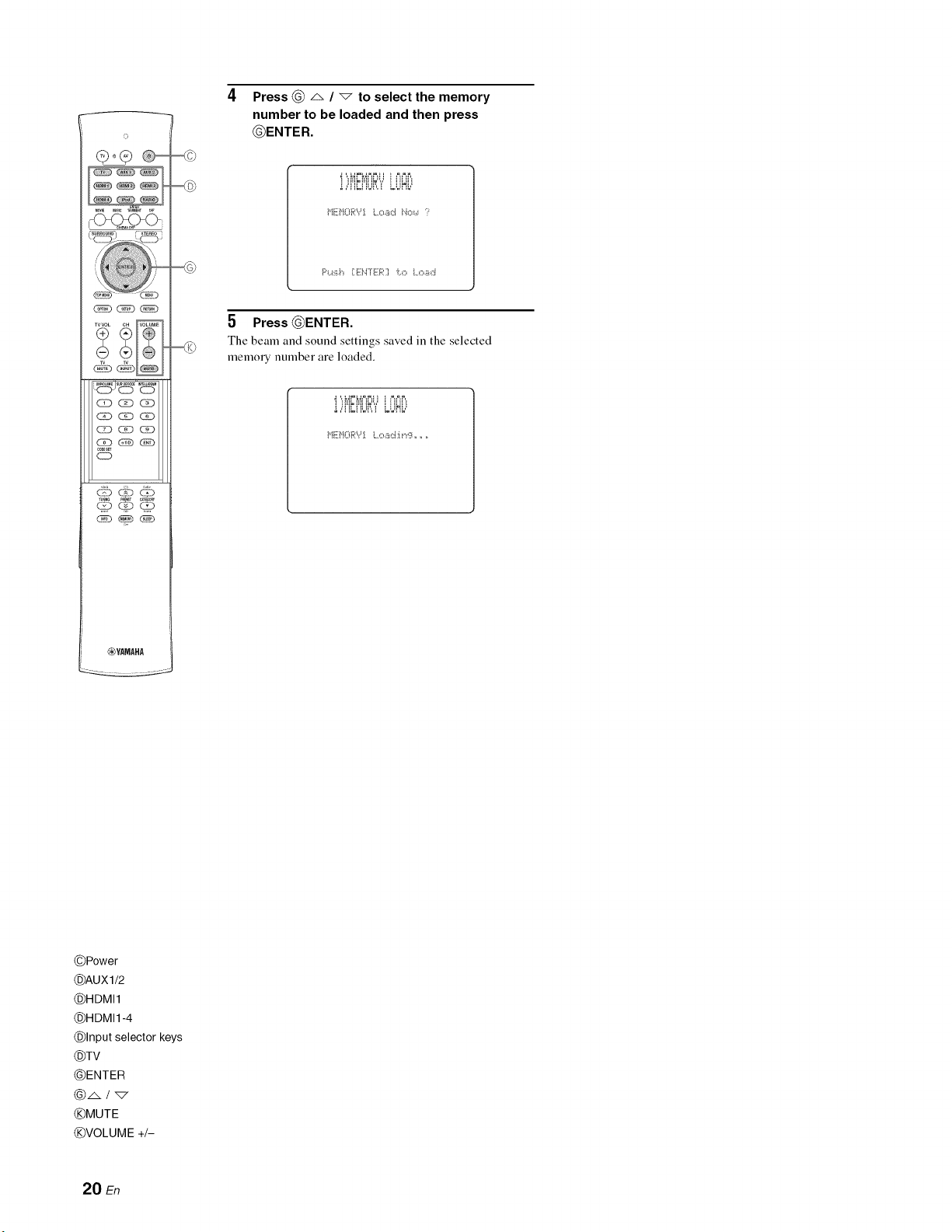
4Press _ A /_to select the memory
number to be loaded and then press
_ENTER.
F'_..i:i_,h[E]'=TE[."I i:.,o Load
5 Press _ENTER.
The beam and sound settings saved in the selected
memory number are loaded.
!,"[!_[!U_:":"LUHL"
©Power
©AUXU2
©HDMI1
©HDMI1-4
©Input selector keys
©TV
@ENTER
@A/_7
©MUTE
©VOLUME +/-
20 En
PLAYBACKFEATURES
This section describes how to playback source input fi'om
your external components. For details on your external
components, refer to the owner's manual supplied with
each component.
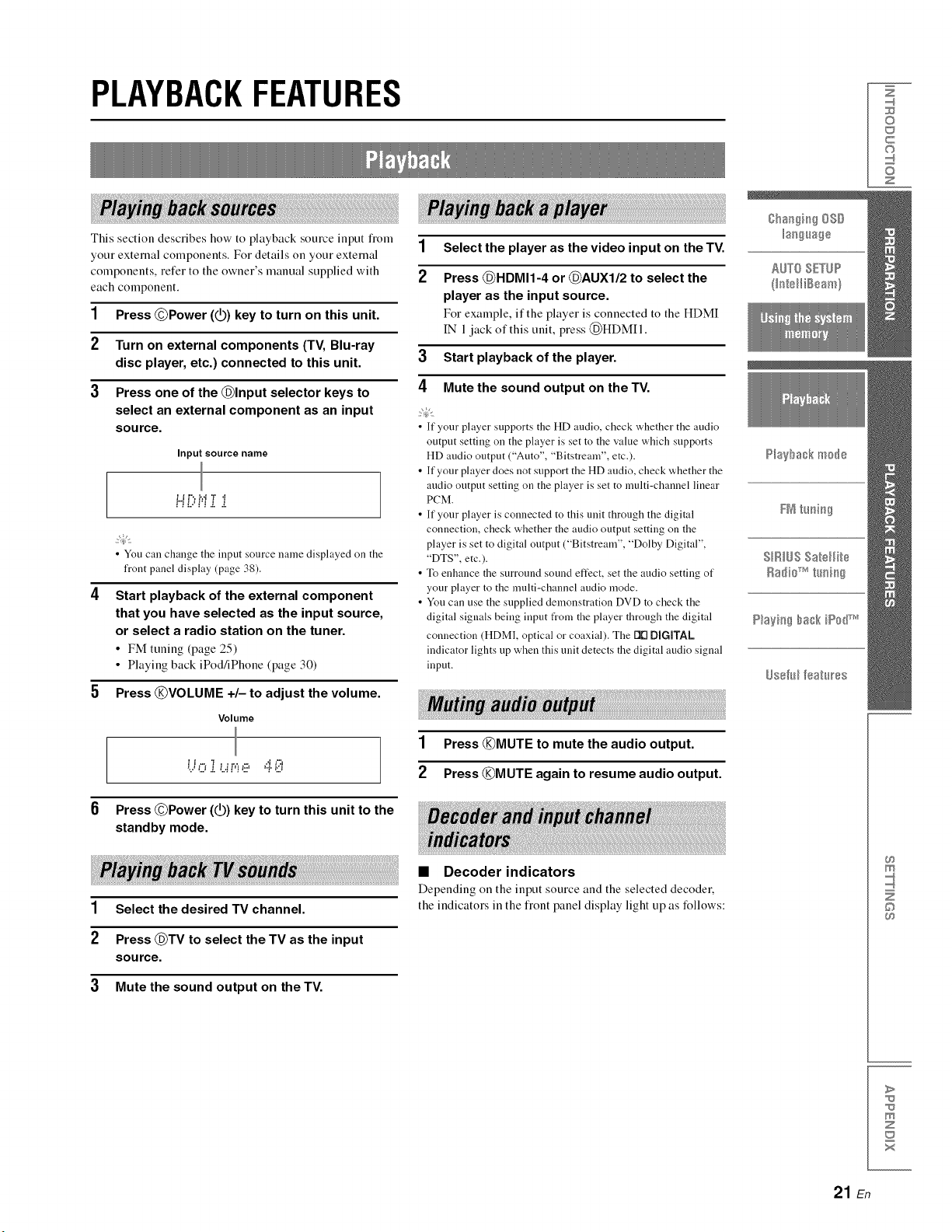
1Press @Power (_) key to turn on this unit.
2 Turn on external components (TV, Blu-ray
disc player, etc.) connected to this unit.
3Press one of the @Input selector keys to
select an external component as an input
source.
Input source name
= = =-, =,a,=, a
P'i_iHi i i
• You can change the input source name displayed on the
front panel display (page 38).
4 Start playback o! the external component
that you have selected as the input source,
or select a radio station on the tuner.
• FM tuning (page 25)
• Playing back iPod/iPhone (page 30)
1 Select the player as the video input on the TV.
2Press @HDMI1-4 or @AUXI/2 to select the
player as the input source.
For example, if the player is connected to the HDMI
IN 1jack of this unit, press (_HDMII.
3Start playback of the player.
4Mute the sound output on the TV.
• If your player supports the HD audio, check whether the audio
output setting on the player is set to the value which supports
HD audio output ("Auto", "Bitstream", etc.).
• If your player does not support the HD audio, check whether the
audio output setting on the player is set to multi-channel linear
PCM.
• If your player is connected to this unit through the digital
connection, check whether the audio output setting on the
player is set to digital output ("Bitstream", "Dolby Digital",
"DTS", etc.).
• To enhance the surround sound effect, set the audio setting of
your player to the multi-channel audio mode.
• You can use the supplied demonstration DVD to check the
digital signals being inpnt from the player through the digital
connection (HDM], optical or coaxial). The 1111DiGiTAL
indicator lights up when this unit detects the digital audio signal
input.
5 Press @VOLUME +/- to adjust the volume.
Volume
= _ ,= .= ,.-,
1Press @MUTE to mute the audio output.
2 Press @MUTE again to resume audio output.
Press @Power (@) key to turn this unit to the
standby mode.
1 Select the desired TV channel.
2Press @TV to select the TV as the input
source.
3Mute the sound output on the TV.
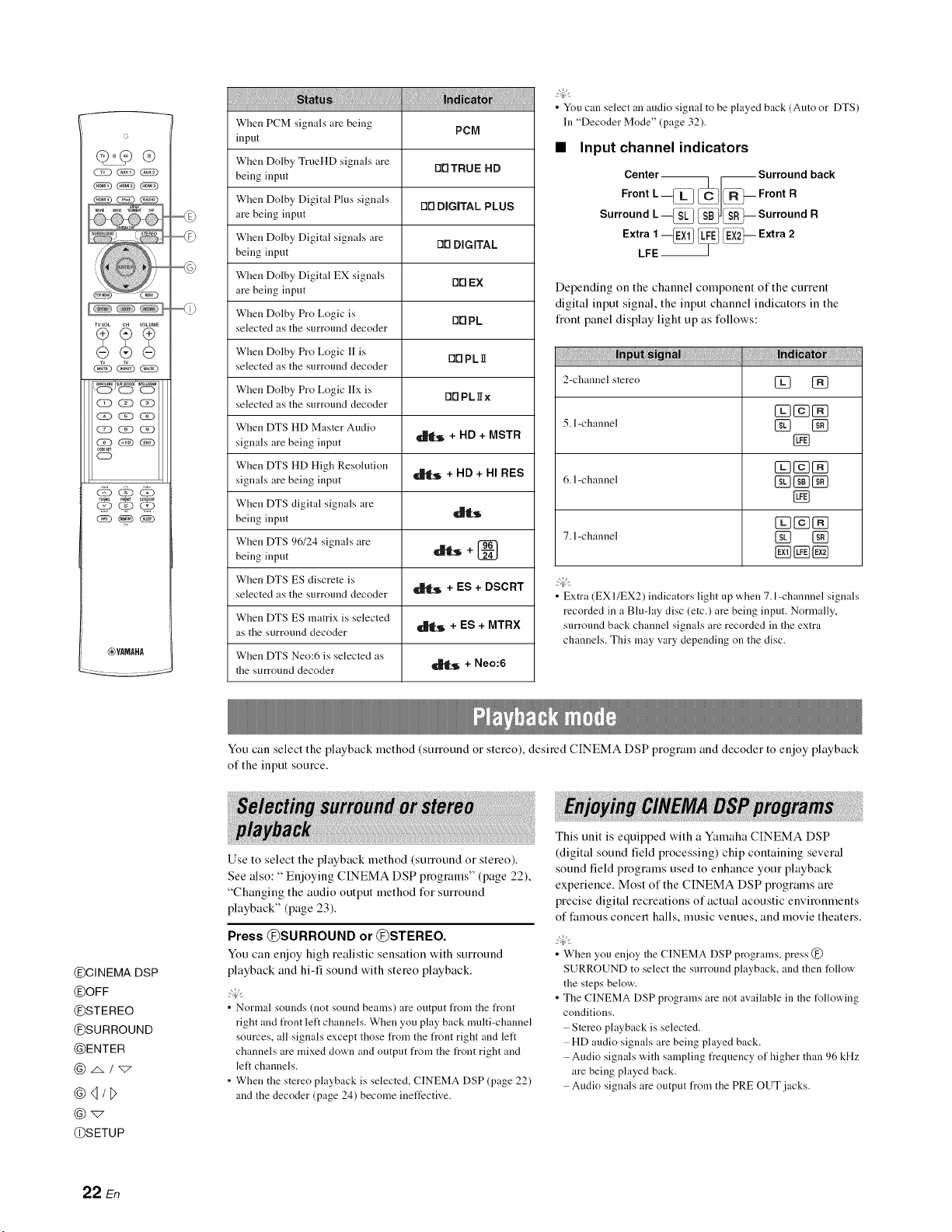
•Decoder indicators
Depending on the input source and the selected decoder,
the indicators in the fiont panel display light up as follows:
©
c
©
z
©
>
z
21 En
©
_YAMAHA
iiiji ii i !ilii
When PCM signals are being PC[71
input
When Dolby TrueHD signals are DrlTRUE HD
being input
When Dolby Digital Plus signals Dr1 DIIGJTAL PLUS
are being input
When Dolby Digital signals are rlrl DiGiTAL
being input
When Dolby Digital EX signals rlrl EX
are being input
When Dolby Pro Logic is [111PL
selected as the surround decoder
When Dolby Pro Logic II is O0 PL]I
selected as the surround decoder
When Dolby Pro Logic IIx is OOPLgx
selected as the surround decoder
When DTS HD Master Audio
signals are being input _ + HD + MSTR
When DTS HD High Resolution
signals are being input _ + HD +HI RES
When DTS digital signals are
being input
When DTS 96/24 signals are +
being input __S
When DTS ES discrete is
selected as the surround decoder _[S + ES + DSCRT
When DTS ES matrix is selected
as the surround decoder _ + ES + MTR×
When DTS Neo:6 is selected as
the surround decoder _ +Neo:6
•You can select an audio signal to be played back (Auto or DTS)
In "Decoder Mode" (page 32).
•Input channel indicators
Center_ _Surround back
Front L --_ ,_C I_-- Front R
Surround L_ _--Surround R
Extra 1_EX11 II!II_E)Ii_i_ii_-- Extra 2
LFE
Depending on the channel component of the current
digital input signal, the input channel indicators in the
fiont panel display light up as follows:
....
2-channel stereo [_ [_
5. l-channel [_ [_
[]
6. l-channel [] [_
[]
_g_cN
7. l-channel [] []
• Extra (EX I/EX2) indicators light up when 7. l-channnel signals
recorded in a Blu-lay disc (etc.) are being input. Normally,
surround back channel signals are recorded in the extra
channels. This may vary depending on the disc.
@CINEMA DSP
@OFF
@STEREO
@SURROUND
@ENTER
@4/D
@SETUP
You can select the playback method (surround or stereo), desired CINEMA DSP program and decoder to enjoy playback
of the input source.
Use to select the playback method (SmTound or stereo).
See also: " Enjoying CINEMA DSP programs" (page 22),
"Changing the audio output method for surround
playback" (page 23).
Press @SURROUND or @STEREO.
You can enjoy high realistic sensation with surround
playback and hi-fi sound with stereo playback.
• Normal sounds (not sound beams) are output from the front
right and front left channels. When you play back multi-channel
sources, all signals except those from the front right and left
channels are mixed clown and output from the front right and
left channels.
• When the stereo playback is selected, CINEMA DSP (page 22)
and the decoder (page 24) become ineffective.
This unit is equipped with a Yamaha CINEMA DSP
(digital sound field processing) chip containing several
sound field programs used to enhance your playback
experience. Most of the CINEMA DSP programs are
precise digital recreations of actual acoustic environments
of t;amous concert halls, music venues, and movie theaters.
•When you enjoy the CINEMA DSP programs, press @
SURROUND to select the surround playback, and then follow
the steps below.
• The CINEMA DSP programs are not available in the t_llowing
conditions.
Stereo playback is selected.
HD audio signals are being played back.
Audio signals with sampling frequency of higher than 96 kHz
are being played back.
Audio signals are output from the PRE OUT jacks.
22 En
Press the desired @CINEMA DSP key.
The CINEMA DSP category name appears in the
flout panel display and the CINEMA DSP indicator
(page 7) lights up.
While the category name is displayed, press
the @CINEMA DSP key repeatedly.
Each time you press the key, program switches.
• To turn offthe CINEMA DSP program, press
@oFv.
•Movie (MOVIE)
Sci-Fi
This program clearly reproduces dialogs and special
sound effects of the latest science fiction films and lets
you feel a broad and expansive cinematic space.
Spectacle
This program reproduces the wide and grand environment
and lets you have added impressions on spectacular scenes
with strong visual impacts.
Adventure
This program reproduces the thrilling environment of the
latest action films and lets you feel the dynamic and
excitement of t:ast-moving scenes.
•Music (MUSIC)
Music Video
This program produces a vibrant environment and lets you
feel as if you are at an actual jazz or rock concert.
Concert Hall
This program creates a rich surround effect of a large
round concert hall with a great deal of presence,
emphasizing the extension of sounds, and lets you feel as
if you are seated close to the center of the stage.
Jazz Club
This program recreates the acoustic environment of "The
Bottom Line", a famous jazz club in New York once and
lets you feel as if you are seated right in fiont of the stage.
•Entertainment (ENTERTAINMENT)
Sports
This program reproduces the energetic environment of live
sports broadcasting, converging a commentator's voice on
the center and broadening the overall atmosphere of the
stadium, and lets you feel as if you are seated at an actual
stadium or a ball park.
Drama
This program stables reverberations that match a wide
range of movie genres fiom serious dramas to musicals
and comedies, and offers an optimum 3D feeling,
reproducing effects tones and background music softly but
cubically around clear words.
Talk Show
This program reproduces excitement of live talk shows. It
enhances the ambience of gaiety while keeping the
conversations at a comfortable volume.
Game
This program is suitable for role-playing and adventure
games. It utilizes the sound field effects for movies to
represent the depth and spatial feeling of the field during
play, while offering movie-like SmTound effects in the
movie scenes in the game.
Mch Stereo
This program downmixes multi-channel source to 2
channels and then outputs the sound fiom all speakers and
produces stereo sounds in wide range. It is ideal for
background music at parties, etc.
You can set the number of beam output channels and
audio output method.
1
2
3
4
5
6
Press @SETU P.
The "SET MENU" screen appears on the TV.
Use @ _. /"7 and @ENTER to select
"SOUND OUT MENU"- "SOUND BEAM OUT
CONFIG" - "CHANNEL OUT".
Press @ <1/D to select the number of output FN t_mi_g
channels.
Choices: 5. lch, 7. lch
hfitial setting: 7. lch SIRIUSSatellite
Radiio_ h_:fi:_
Press @ v to select "BEAM MODE".
Press @ "_ to select the desired audio P_;@g_gh_k iiP_'_dT_v_
output method.
To exit from the menu, press @SETUP. _s@,_lff_;_h_s
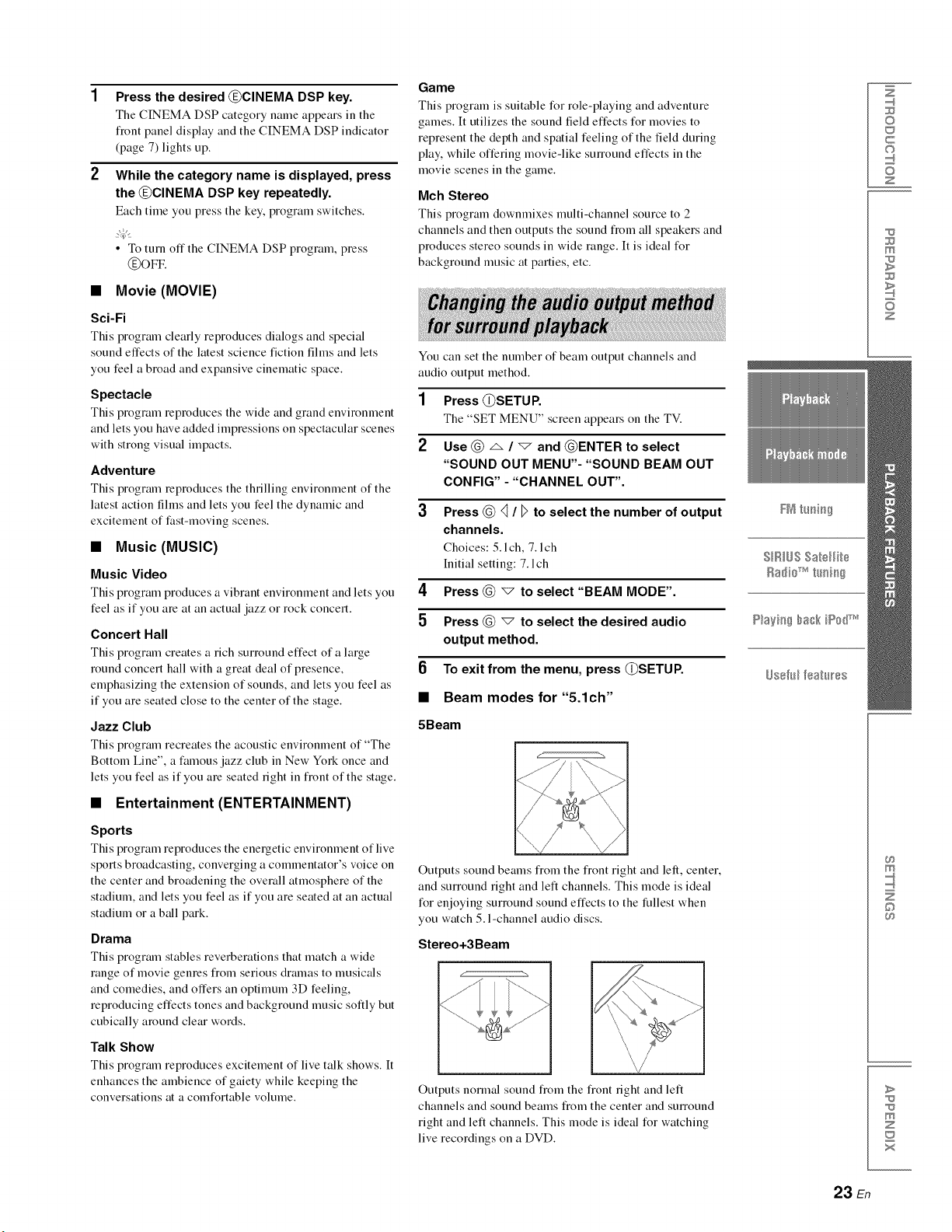
Beam modes for "5.1ch"
5Beam
Outputs sound beams from the flout right and left, center,
and surround right and left channels. This mode is ideal
for enjoying surround sound effects to the fullest when
you watch 5. l-channel audio discs.
Stereo+3Beam
Outputs nonnal sound fiom the flout fight and left
channels and sound beams from the center and surround
right and left channels. This mode is ideal for watching
live recordings on a DVD.
Z
©
c
©
z
m
z
m
©
>
m
z
x
23 En
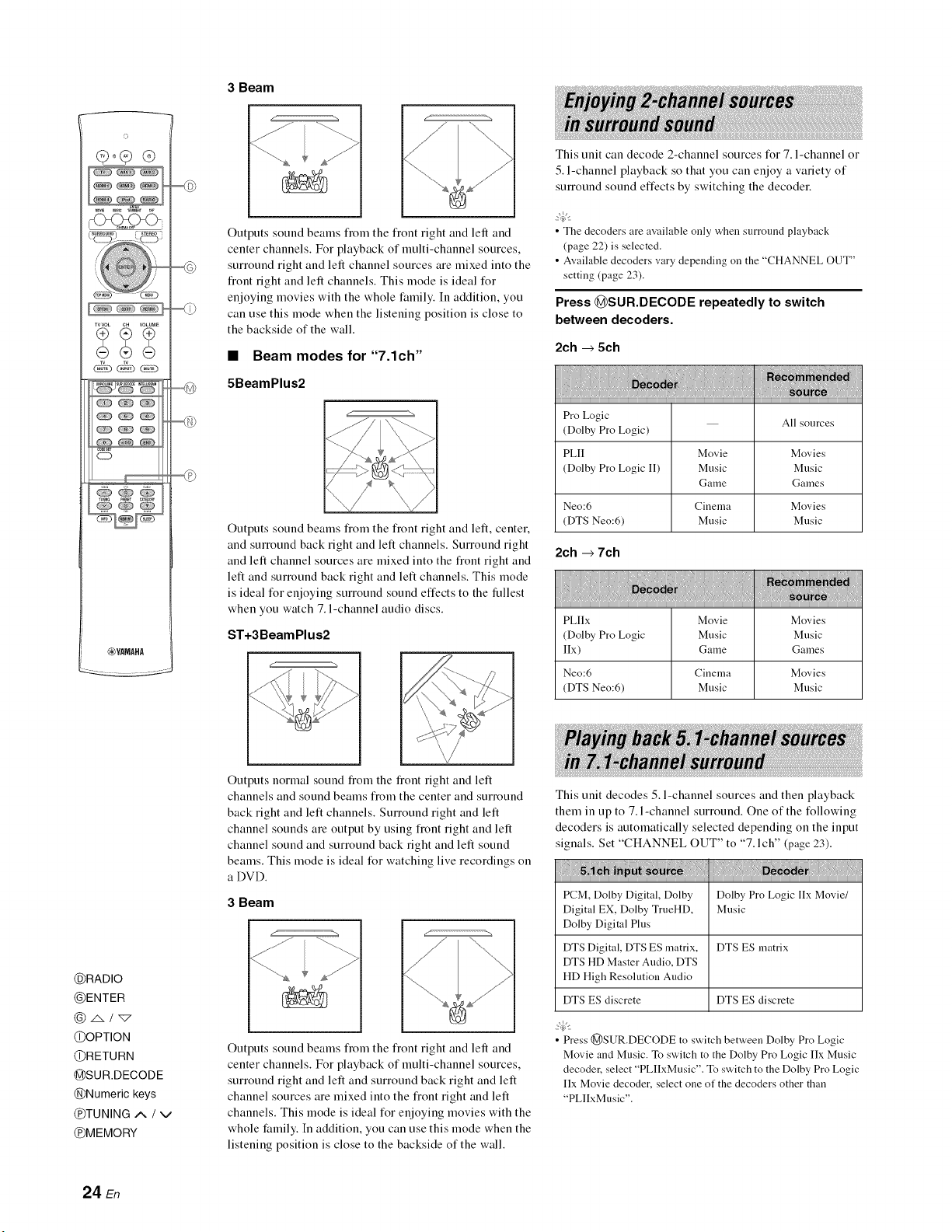
3 Beam
o
TVVOL CH VOLUME
o
_YAMAHA
_7:7
Outputs sound beams flom the flont right and left and
cemer channels. For playback of multi-channel sources,
surround right and left channel sources are mixed into the
fiont right and left channels. This mode is ideal for
enjoying movies with the whole t:amily. In addition, you
can use this mode when the listening position is close to
the backside of the wall.
•Beam modes for "7.1ch"
5BeamPlus2
Outputs sound beams flom the front right and left, center.
and surround back right and left channels. Surround right
and left channel sources are mixed into the fiont right and
left and surround back right and left channels. This mode
is ideal for enjoying surround sound effects to the fullest
when you watch 7. l-channel audio discs.
ST+3BeamPlus2
This unit can decode 2-channel sources for 7. l-channel or
5. l-channel playback so that you can enjoy a variety of
surround sound effects by switching the decoder.
•The decoders are available only when surround playback
(page 22) is selected.
• Available decoders vary depending on the "CHANNEL OUT"
setting (page 23).
Press @SUR.DECODE repeatedly to switch
between decoders.
2ch _5ch
Pro Logic All sources
(Dolby Pro Logic)
PLII Movie Movies
(Dolby Pro Logic I1) Music Music
Game Games
Neo:6 Cinema Movies
(DTS Neo:6) Music Music
2ch +7ch
PLIIx Movie Movies
(Dolby Pro Logic Music Music
lIx) Game Games
Neo:6 Cinema Movies
(DTS Neo:6) Music Music
@RADIO
@ENTER
@z&/_
@OPTION
@RETURN
@SUR.DECODE
@Numeric keys
@TUNING A /V
@MEMORY
Outputs normal sound flom the flout right and left
channels and sound beams from the center and surround
back right and left channels. Surround right and left
channel sounds are output by using front right and left
channel sound and surround back right and left sound
beams. This mode is ideal for watching live recordings on
a DVD.
3 Beam
1
"'-...
Outputs sound beams flom the flout right and left and
center channels. For playback of multi-channel sources,
surround right and left and surround back right and left
channel sources are mixed into the fiont right and left
channels. This mode is ideal for enjoying movies with the
whole t:amily. In addition, you can use this mode when the
listening position is close to the backside of the wall.
This unit decodes 5. l-channel sources and then playback
them in up to 7. l-channel surround. One of the following
decoders is automatically selected depending on the input
signals. Set "CHANNEL OUT" to "7. l ch" (page 23).
PCM, Dolby Digital, Dolby Dolby Pro Logic lIx Movie/
Digital EX, Dolby TrueHD, Music
Dolby Digital Plus
DTS Digital, DTS ES matrix, DTS ES matrix
DTS HD Master Audio, DTS
HD High Resolution Audio
DTS ES discrete DTS ES discrete
• Press @SUR.DECODE to switch between Dolby Pro Logic
Movie and Music. To switch to the Dolby Pro Logic Ilx Music
decoder, select "PLIIxMusic". To switch to the Dolby Pro Logic
IIx Movie decoder, select one of the decoders other than
"PLlIxMusic".
24 En
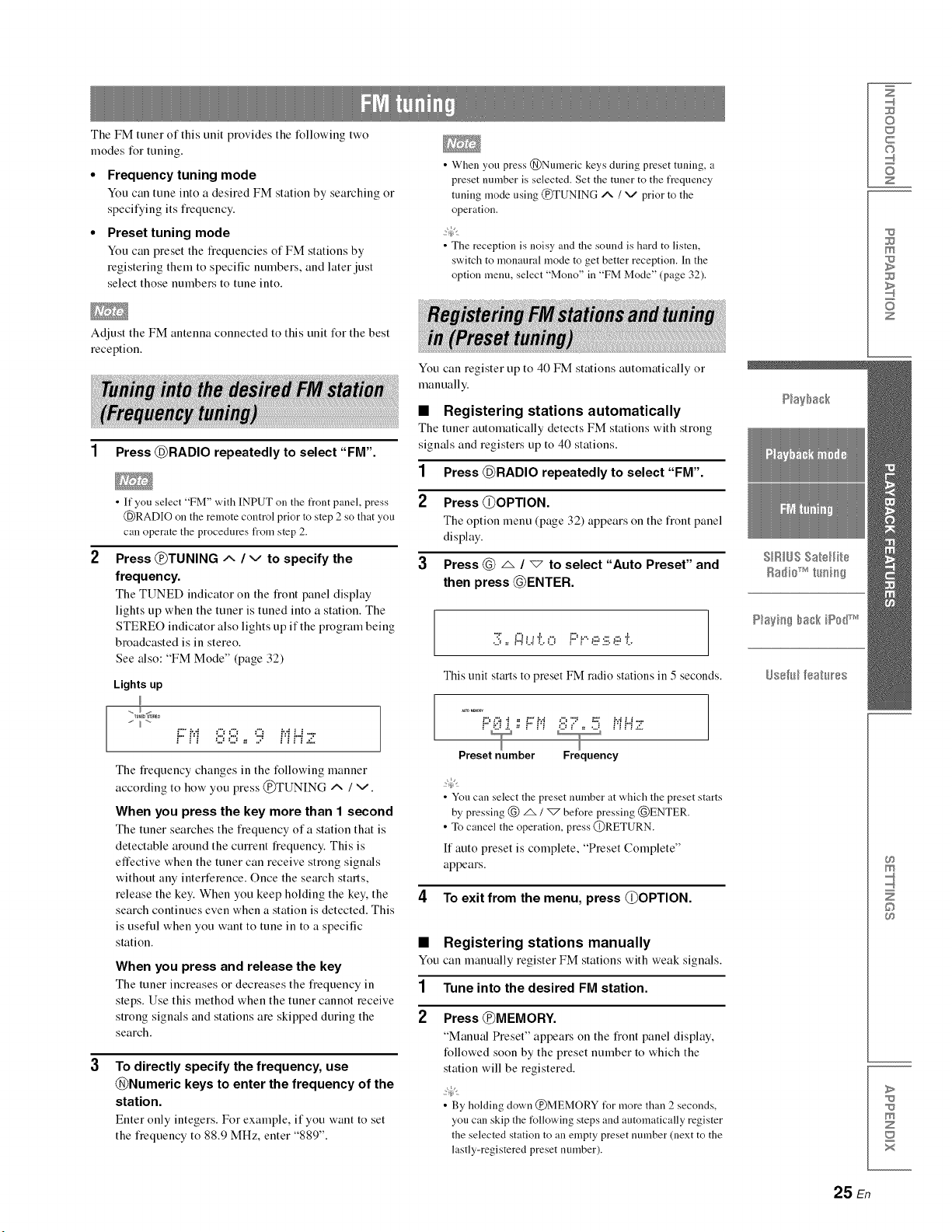
The FM tuner of this unit provides the following two
modes for tuning.
•Frequency tuning mode
You can tune into a desired FM station by searching o1
specifying its fiequency.
Preset tuning mode
You can preset the fiequencies of FM stations by
registering them to specific numbers, and later just
select those numbers to tune into.
Adjust the FM antenna connected to this unit for the best
reception.
• When you press @Numeric keys during preset tuning, a
preset number is selected. Set the tuner to the frequency
tuning mode using @TUNING A /v prior to the
operation.
• The reception is noisy and the sound is hard to listen,
switch to monaural mode to get better reception. In the
option menu, select "Mono" in "FM Mode" (page 32).
You can register up to 40 FM stations automatically or
manually.
Z
©
c
©
z
m
z
1Press @RADIO repeatedly to select "FM".
• If you select "FM" with INPUT on the front panel, press
(_)RADIO on the remote control prior to step 2 so that you
can operate the procedures from step 2.
Press @TUNING ix /vto specify the
frequency.
The TUNED indicator on the fiont panel display
lights up when the tuner is tuned into a station. The
STEREO indicator also lights up if the program being
broadcasted is in stereo.
See also: "FM Mode" (page 32)
Lights up
"TU_DI_RE0
i2' ivi :..:"":..:'' '2..' iviLi ..,=.
The fiequency changes in the following manner
according to how you press @TUNING _ /v.
When you press the key more than 1 second
The tuner searches the fiequency of a station that is
detectable around the current fiequency. This is
effective when the tuner can receive strong signals
without any interference. Once the search starts,
release the key. When you keep holding the key, the
search continues even when a station is detected. This
is useful when you want to tune in to a specific
station.
•Registering stations automatically
The tuner automatically detects FM stations with strong
signals and registers up to 40 stations.
1 Press @RADIO repeatedly to select "FM".
2 Press @OPTION.
The option menu (page 32) appears on the fiont panel
display.
3Press @ _ / "_ to select "Auto Preset" and
then press @ENTER.
::!;,,i:i:._!?o F::=P e s e !?
This unit starts to preset FM radio stations in 5 seconds.
_0 MEM0_
Preset number Frequency
• You can select the preset number at which the preset starts
by pressing @ _/_ before pressing @ENTER.
• To cancel the operation, press @RETURN.
If auto preset is complete, "Preset Complete"
appears.
4To exit from the menu, press @OPTION.
When you press and release the key You
The tuner increases or decreases the fiequency in 1
steps. Use this method when the tuner cannot receive
strong signals and stations are skipped during the 2
search.
To directly specify the frequency, use
@Numeric keys to enter the frequency of the
station.
Enter only integers. For example, if you want to set
the fiequency to 88.9 MHz, enter "889".
Registering stations manually
can manually register FM stations with weak signals.
Tune into the desired FM station.
Press @MEMORY.
"Manual Preset" appears on the fiont panel display,
followed soon by the preset number to which the
station will be registered.
• By holding down @MEMORY t_r more than 2seconds,
you can skip the following steps and automatically register
the selected station to an empty preset number (next to the
lastly-registered preset number).
©
>
m
z
25 En
o
¢P 9 ®
-O_C_<>
TVVOL O. VOLUME
o
_YAMAHA
@RADIO
@ENTER
@A/_"
@OPTION
@RETURN
@Numeric keys
®o
@ENT
@CATEGORY _ /
@MEMORY
@PRESET _ /vv
@TUNING A /v
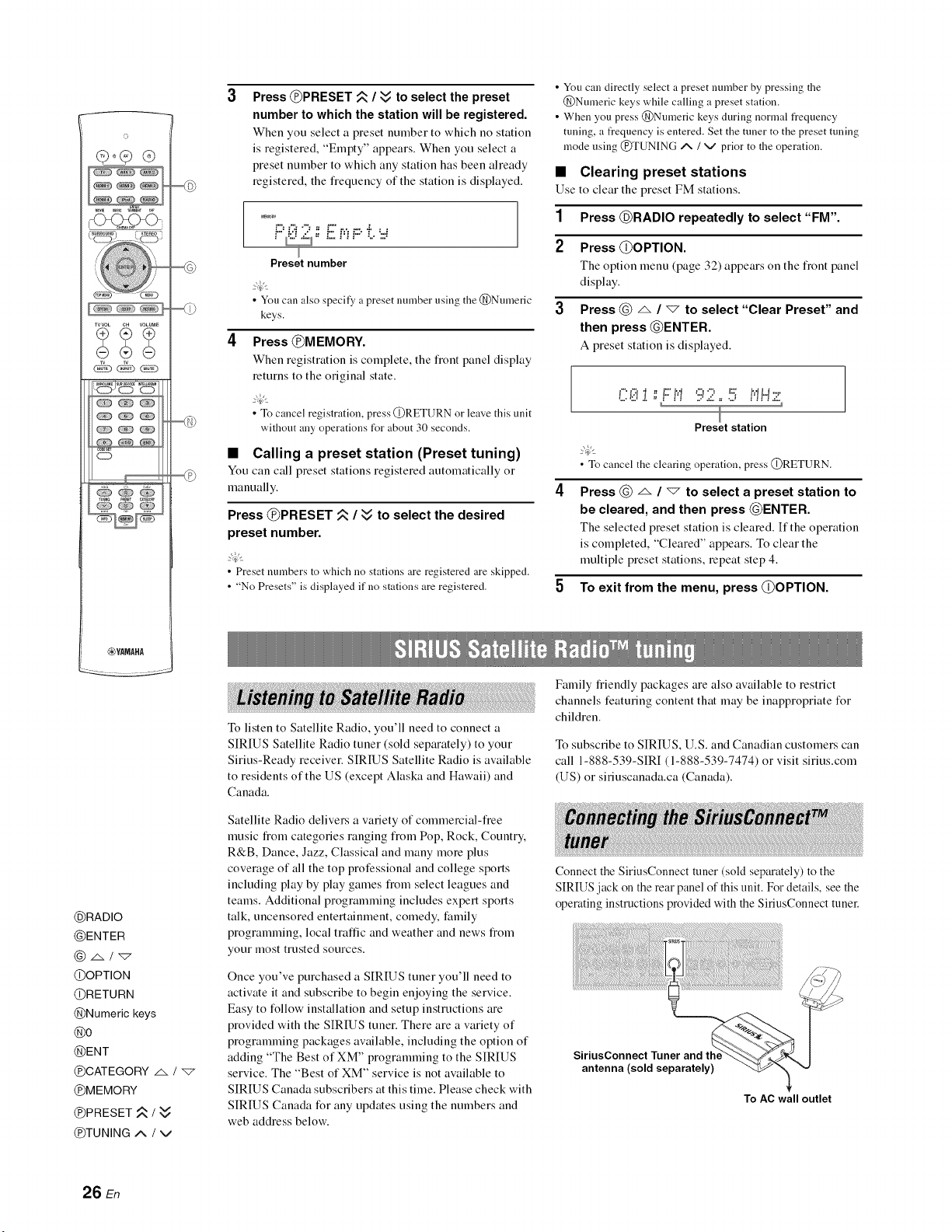
Press @PRESET _ /_ to select the preset
number to which the station will be registered.
When yeu select a preset number te which ne station
is registered, "Empty" appears. When you select a
preset number to which any station has been already
registered, the fiequency of the station is displayed.
MEMO,Y
I", ,", ,", .I.... I
Preset number
•You can also specii_yapreset number using the @Numeric
keys.
Press @M EMO RY.
When registration is complete, the front panel display
returns to the original state.
• To cancel registration, press @RETURN or leave this unit
without any operations for about 30 seconds.
•Calling a preset station (Preset tuning)
You can call preset stations registered automatically or
manually.
Press @PRESET _ /Wto select the desired
preset number.
• Preset numbers to which no stations are registered are skipped.
• "No Presets" is displayed if no stations are registered.
To listen to Satellite Radio, you'll need to connect a
SIRIUS Satellite Radio tuner (sold separately) to your
Sirius-Ready receiver. SIRIUS Satellite Radio is available
to residents of the US (except Alaska and Hawaii) and
Canada.
Satellite Radio delivers a variety of commercial-fiee
music fiom categories ranging fiom Pop, Rock, Country,
R&B, Dance, Jazz, Classical and many more plus
coverage of all the top professional and college sports
including play by play games fiom select leagues and
teams. Additional programming includes expert sports
talk, uncensored entertainment, comedy, l:amily
programming, local traffic and weather and news fiom
your most trusted sources.
Once you've purchased a SIRIUS tuner you'll need to
activate it and subscribe to begin enjoying the service.
Easy to follow installation and setup instructions are
provided with the SIRIUS tuner. There are a variety of
programming packages available, including the option of
adding "The Best of XM" programming to the SIRIUS
service. The "Best of XM" service is not available to
SIRIUS Canada subscribers at this time. Please check with
SIRIUS Canada for any updates using the numbers and
web address below.
• You can directly select a preset number by pressing the
@Numeric keys while calling a preset station.
• When you press @Numeric keys during normal frequency
tuning, a frequency is entered. Set the tuner to the preset tuning
mode using @TUNING A /v prior to the operation.
•Clearing preset stations
Use to clear the preset FM stations.
1Press @RADIO repeatedly to select "FM".
2 Press @OPTION.
The option lllellt! (page 32) appears on the front panel
display.
3Press @ _ /"7 to select "Clear Preset" and
then press @ENTER.
A preset station is displayed.
C_3i ; F::N 92 ,, !5 Nl...iz
Preset station
•Tocancel the clearing operation, press @RETURN.
Press @dx /"_" to select a preset station to
be cleared, and then press @ENTER.
The selected preset station is cleared. If the operation
is completed, "Cleared" appears. To clear the
multiple preset stations, repeat step 4.
5 To exit from the menu, press @OPTION.
Family fiiendly packages are also available to restrict
channels featuring content that may be inappropriate for
children.
To subscribe to SIRIUS, U.S. and Canadian customers can
call 1-888-539-SIRI (1-888-539-7474) or visit sirius.corn
(US) or siriuscanada.ca (Canada).
Connect the SiriusConnect tuner (sold separately) to the
SIRIUS jack on the rear panel of this unit. For details, see the
operating instructions provided with the SiriusConnect tuner.
To AC wall outlet
26 En
• To ensure optimal reception of the SIRIUS Satellite Radio
signals, the antenna of the SiriusConnect tuner must be placed
at or near a window with no obstacles in the path to the sky. The
orientation of the antenna t_r the best reception differs
depending on the area. Refer to the instruction manuals
supplied with the SiriusConnect tuner for the installation of the
antenna. You can mount it indoors or outdoors.
• Use the "Antenna Level" information in the front panel display
(page 30) to check the antenna reception level and actiust the
orientation of the antenna.
• You need to connect the SiriusConnect tuner to an AC wall
outlet.
• If"ANTENNA ERR" appears on the front panel display, the
connection of the SiriusConnect tuner or antenna is incorrect. In
such cases, check the connection of the SiriusConnect tuner and
the antenna.
Be%re using the SIRIUS Satellite Radio feature, you need
to activate your SIRIUS Satellite Radio subscription. To
activate the subscription you need the Sirius ID which is
uniquely assigned to the SiriusConnect tuner. Sirius ID is
12-digit number and it appears on the package of the
SiriusConnect tuner, on the label of the SiriusConnect
tuner, and when you tune into the SIRIUS Satellite Radio
channel "0" (see below).
•Displaying the Sirius ID of your
SiriusConnect tuner
1 Press @RADIO repeatedly to select
"SIRIUS".
2Press @0 and then @ENT to display the
Sirius ID of your SiriusConnect tuner.
"000 Sirius ID" and "xxxxxxxxxxxx"
("xxxxxxxxxxxx" indicates the 12-digit Sirius ID of
your SiriusConnect tuner) appears on the fiont panel
display.
Write the Sirius ID below.
ID:
3Contact SIRIUS Satellite Radio to activate
your subscription.
SIRIUS Satellite Radio online information
Contact for activation
URL: https://activate.siriusradio.com/
Phone: 1-888-539-SIRIUS (1-888-539-7474)
• Status messages appear on the front panel display during
the activation. For details, see "SIRIUS Satellite Radio"
(page 44). Once the activation is finished, "SUB
UPDATED" appears.
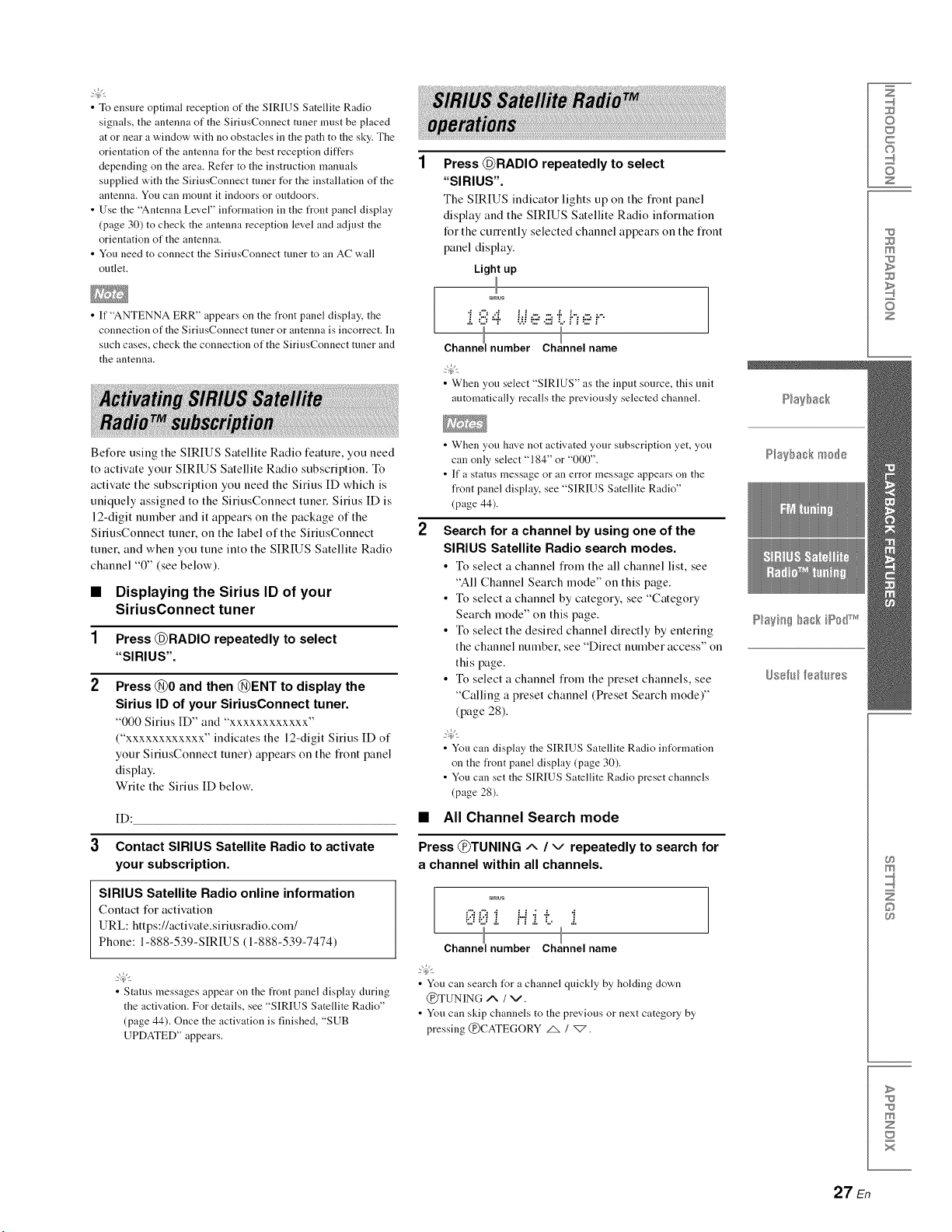
Press @RADIO repeatedly to select
"SIRIUS".
The SIRIUS indicator lights up on the flont panel
display and the SIRIUS Satellite Radio information
for the currently selected channel appears on the fiont
panel display.
Light up
i 8 4 b.!e a !:.k.,e i..
I I
Channel number Channe name
• When you select "SIRIUS" as the input source, this unit
automatically recalls the previously selected channel.
• When yon have not activated your subscription yet, you
can only select "184" or "000".
• If a stares message or an error message appears on the
front panel display, see "SIRIUS Satellite Radio"
(page 44).
Search for a channel by using one of the
SIRIUS Satellite Radio search modes.
•To select a channel fiom the all channel list, see
"All Channel Search mode" on this page.
• To select a channel by category, see "Category
Search mode" on this page.
• To select the desired channel directly by entering
the channel number, see "Direct number access" on
this page.
• To select a channel fiom the preset channels, see
"Calling a preset channel (Preset Search mode)"
(page 28).
• Yon can display the SIRIUS Satellite Radio int_rmation
on the front panel display (page 30).
• You can set the SIRIUS Satellite Radio preset channels
(page 28).
•All Channel Search mode
Press @TUNING ^ /v repeatedly to search for
a channel within all channels.
smEus
i2i;£i i..i.i .i. "i
•.." "..' ,;. II ,;, '.." ,.".
Channel number Channel name
• You can search lUr a channel quickly by holding down
@TUNING ,,% /v.
• Yon can skip channels to the previous or next category by
pressing @CATEGORY _ /_.
Z
©
c
©
z
m
z
m
©
>
m
z
x
27 En
o
TVVOL CH VOLUME
__j,5, ¸,,_
CD
cZ) Ck_
@6N
_YAMAHA
@ENTER
@4/_>
@OPTION
@RETURN
@Numeric keys
@ENT
@CATEGORY _ /
@MEMORY
@PRESET ,,_ / vv
@TUNING ^ /v
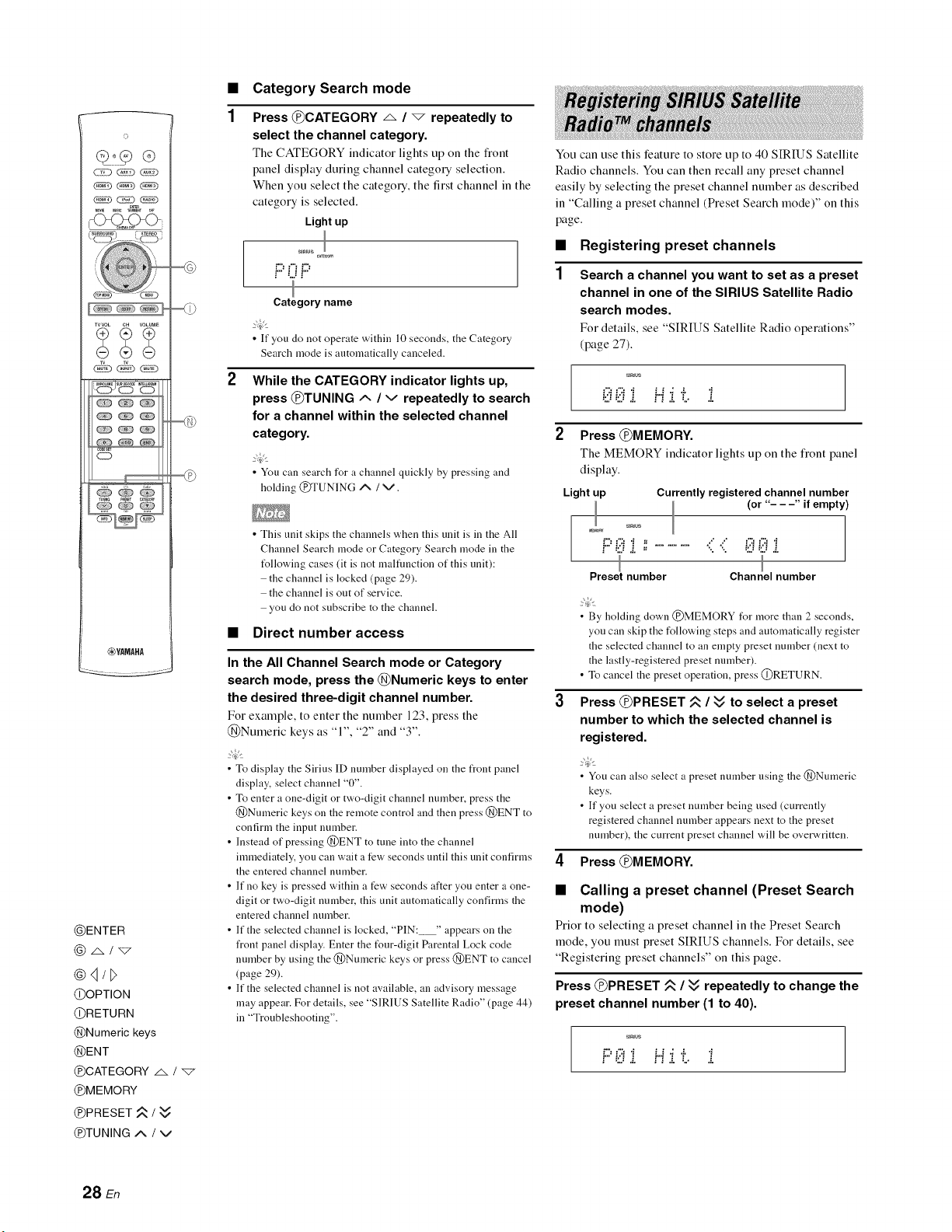
1
Category Search mode
Press @CATEGORY _. /_repeatedly to
select the channel category.
The CATEGORY indicator lights tip on the front
panel display during channel category selection.
When you select the category, the first channel in the
category is selected.
Light up
SIREUS_0_
F' F'
Category name
• If you do not operate within l0 seconds, the Category
Search mode is automatically canceled.
While the CATEGORY indicator lights up,
press @TUNING ^ /vrepeatedly to search
for a channel within the selected channel
category.
• You can search for achannel quickly by pressing and
holding @TUNING ^ /v.
• This unit skips the channels when this unit is in the All
Channel Search mode or Category Search mode in the
tUllowing cases (it is not malfimction of this unit):
the channel is locked (page 29).
the channel is out of service.
you do not subscribe to the channel.
•Direct number access
In the All Channel Search mode or Category
search mode, press the @Numeric keys to enter
the desired three-digit channel number.
For example, to enter the number 123, press the
@Numeric keys as "1", "2" and "3".
• To display the Sirius ID number displayed on the front panel
display, select channel "0".
• To enter a one-digit or two-digit channel number, press the
@Nnmeric keys on the remote control and then press @ENT to
confirm the input number.
• Instead of pressing @ENT to tune into the channel
immediately, you can wait a few seconds until this unit confirms
the entered channel nmnber.
• If no key is pressed within a few seconds after you enter a one-
digit or two-digit nmnber, this unit automatically confirms the
entered channel number.
• If the selected channel is locked, "PIN: " appears on the
front panel display. Enter the t_ur-digit Parental Lock code
number by using the @Numeric keys or press @ENT to cancel
(page 29).
• If the selected channel is not available, an advisory message
may appear. For details, see "SIRIUS Satellite Radio" (page 44)
in "Troubleshooting".
You can use this feature to store up to 40 SIREJS Satellite
Radio channels. You can then recall any preset channel
easily by selecting the preset channel number as described
in "Calling a preset channel (Preset Search mode)" on this
page.
•Registering preset channels
Search a channel you want to set as a preset
channel in one of the SIRIUS Satellite Radio
search modes.
Fer details, see "SIRIUS Satellite Radie operations"
(page 27).
sirius
;ili ;iiiif...fj.!:,i
2Press @MEMORY.
The MEMORY indicator lights tip on the front panel
display.
Light up Currently registered channel number
(or "- - -" if empty)
sirius
MEMORY
! :L: ,.", =
I
I
Preset number Channel number
• By holding clown @MEMORY l\_r more than 2 seconds,
you can skip the following steps and automatically register
the selected channel to an empty preset number (next to
the lastly-registered preset number).
• To cancel the preset operation, press @RETURN.
Press @PRESET ,_ /vv to select a preset
number to which the selected channel is
registered.
• You can also select a preset number using the @Numeric
keys.
• If you select a preset number being used (currently
registered channel number appears next to the preset
nmnber), the current preset channel will be overwritten.
4Press @MEMORY.
•Calling a preset channel (Preset Search
mode)
Prier to selecting a preset channel in the Preset Search
mode, you must preset SIRIUS channels. For details, see
"Registering preset channels" on this page.
Press @PRESET _ /Wrepeatedly to change the
preset channel number (1 to 40).
sirius
f:::'i;ilii f...f:,.".!:.. i
28 En
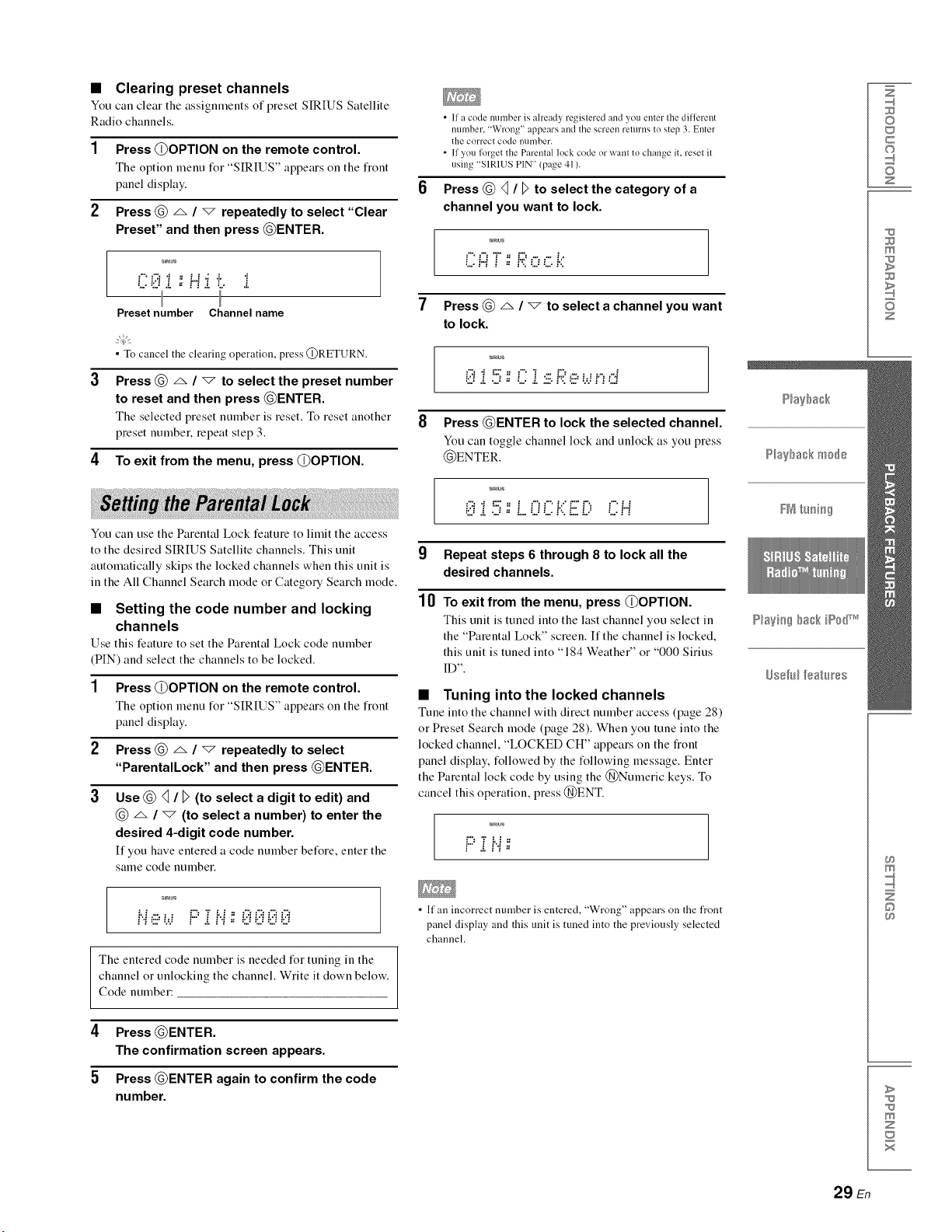
•Clearing preset channels
You can cleat" the assignments of preset SIRIUS Satellite
Radio channels.
Press @OPTION on the remote control.
The option menu for "SIRIUS" appears on the fiont
panel display.
2 Press @ _ /"7 repeatedly to select "Clear
Preset" and then press @ENTER.
s_mus
i
Preset number Channel name
•To cancel the clearing operation, press @RETURN.
Press @ _, /"7 to select the preset number
to reset and then press @ENTER.
The selected preset number is reset. To reset another
preset number, repeat step 3.
4To exit from the menu, press @OPTION.
You can use the Parental Lock feature to limit the access
to the desired SIRIUS Satellite channels. This unit
automatically skips the locked channels when this unit is
in the All Channel Search mode or Categot 7 Search mode.
•Setting the code number and locking
channels
Use this feature to set the Parental Lock code number
(PIN) and select the channels to be locked.
1 Press @OPTION on the remote control.
The option menu for "SIRIUS" appears on the fiont
panel display.
2 Press @ _ /"7 repeatedly to select
"ParentalLock" and then press @ENTER.
3Use @<] /D (to select a digit to edit) and
@ _ /"_" (to select a number) to enter the
desired 4-digit code number.
It"you have entered a code number before, enter the
same code nunlbeE
s_mus
Hew F:Zi'.i;;i;iiii;iiii;iiii;ili
The entered code number is needed for tuning in the
channel or unlocking the channel. Write it down below.
Code number:
4Press @ENTER.
The confirmation screen appears.
5 Press @ENTER again to confirm the code
number.
•If a code number is already registered and you enter the different
number. 'Wrong" appears and the screen returns to step 3. Enter
the correct code nLimber.
• If you fl_rget the Parental lock code or want to change it. reset it
using "SIRIUS PIN" (page 41 ).
Press @ _ /Dto select the category of a
channel you want to lock.
smEus
Ci:iT;; Roc.k
7Press @ A / "_ to select a channel you want
to lock.
smEus
i;ilii 5::C i s £ e wi.,,.::i
8 Press @ENTER to lock the selected channel.
You can toggle channel lock and unlock as you press
@ENTER.
smEus
0i5:L..0ci.{£ -, cH
g Repeat steps 6 through 8 to lock all the
desired channels.
10 To exit from the menu, press @OPTION.
This unit is tuned into the last channel you select in
the "Parental Lock" screen. If the channel is locked,
this unit is tuned into "184 Weather" or "000 Sirius
ID".
•Tuning into the locked channels
Tune into the channel with direct number access (page 28)
or Preset Search mode (page 28). When you tune into the
locked channel, "LOCKED CH" appears on the fiont
panel display, followed by the following message. Enter
the Parental lock code by using the @Numeric keys. To
cancel this operation, press @ENT.
• If an incorrect number is entered, "Wrong" appears on the front
panel display and this unit is tuned into the previously selected
channel.
Z
©
c
©
z
m
z
m
©
>
m
z
x
29 En
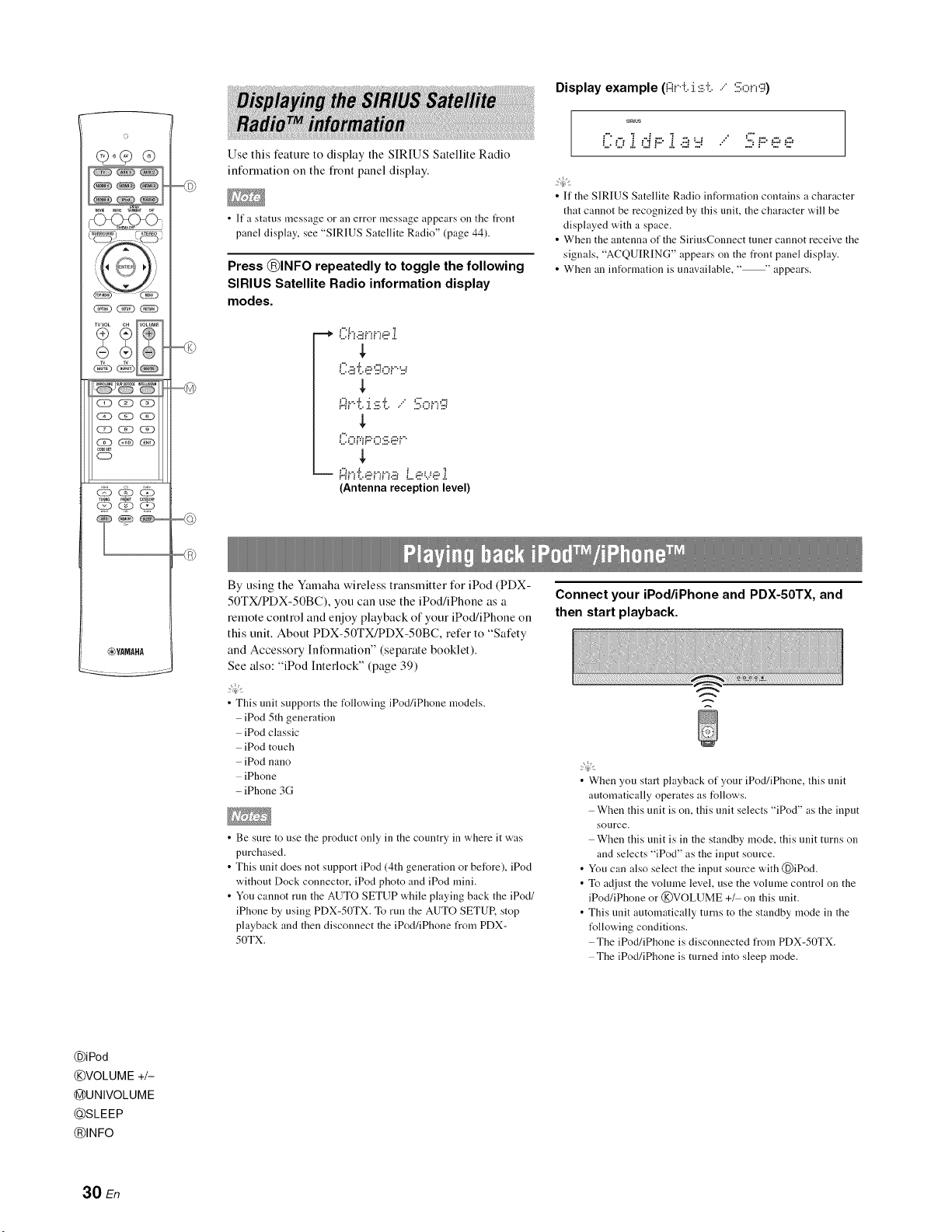
_YAMAHA
Use this feature to display the SIRIUS Satellite Radio
infommtion oll the fiont panel display.
• If a status message or an error message appears on the t_ont
panel display, see "SIRIUS Satellite Radio" (page 44).
Press @INFO repeatedly to toggle the following
SIRIUS Satellite Radio information display
modes.
By using the Yamaha wireless transmitterfor iPod (PDX-
50TX/PDX-50BC), you can use the iPod/iPhone as a
remote control and enjoy playback of your iPod/iPhone on
this unit. About PDX-50TX/PDX-50BC, refer to "Safety
and Accessory Information" (separate booklet).
See also: "iPod Interlock" (page 39)
• This unit supports the following iPod/iPhone models.
iPod 5th generation
iPod classic
iPod touch
iPod nano
iPhone
- iPhone 3G
• Be sure to use the product only in the country in where it was
purchased.
• This unit does not support iPod (4th generation or before), iPod
without Dock connector, iPod photo and iPod mini.
• You cannot run the AUTO SETUP while playing back the iPod/
iPhone by using PDX-50TX. To run the AUTO SETUR stop
playback and then disconnect the iPod/iPhone from PDX-
50TX.
Display example (Fii..i:..:i.:i;'i.." :iil;,:::,i._';;i)
sirius
• If the SIRIUS Satellite Radio information contains a character
that cannot be recognized by this unit, the character will be
displayed with a space.
• When the antenna of the SirinsConnect tuner cannot receive the
signals, "ACQUIRING" appears on the front panel display.
• When an information is unavailable, "--' appears.
Connect your iPod/iPhone and PDX-50TX, and
then start playback.
• When you start playback of your iPod/iPhone, this unit
automatically operates as follows.
When this unit is on, this unit selects "iPod" as the input
source.
When this unit is in the standby mode, this unit turns on
and selects "iPod" as the input source.
• You can also select the input source with @iPod.
• To adjust the volume level, use the volume control on the
iPod/iPhone or @VOLUME +_ on this unit.
• This unit automatically turns to the standby mode in the
t_llowing conditions.
The iPod/iPhone is disconnected from PDX-50TX.
The iPod/iPhone is turned into sleep mode.
@iPod
@VOLUME +/-
@UNIVOLUME
_SLEEP
@INFO
30 En
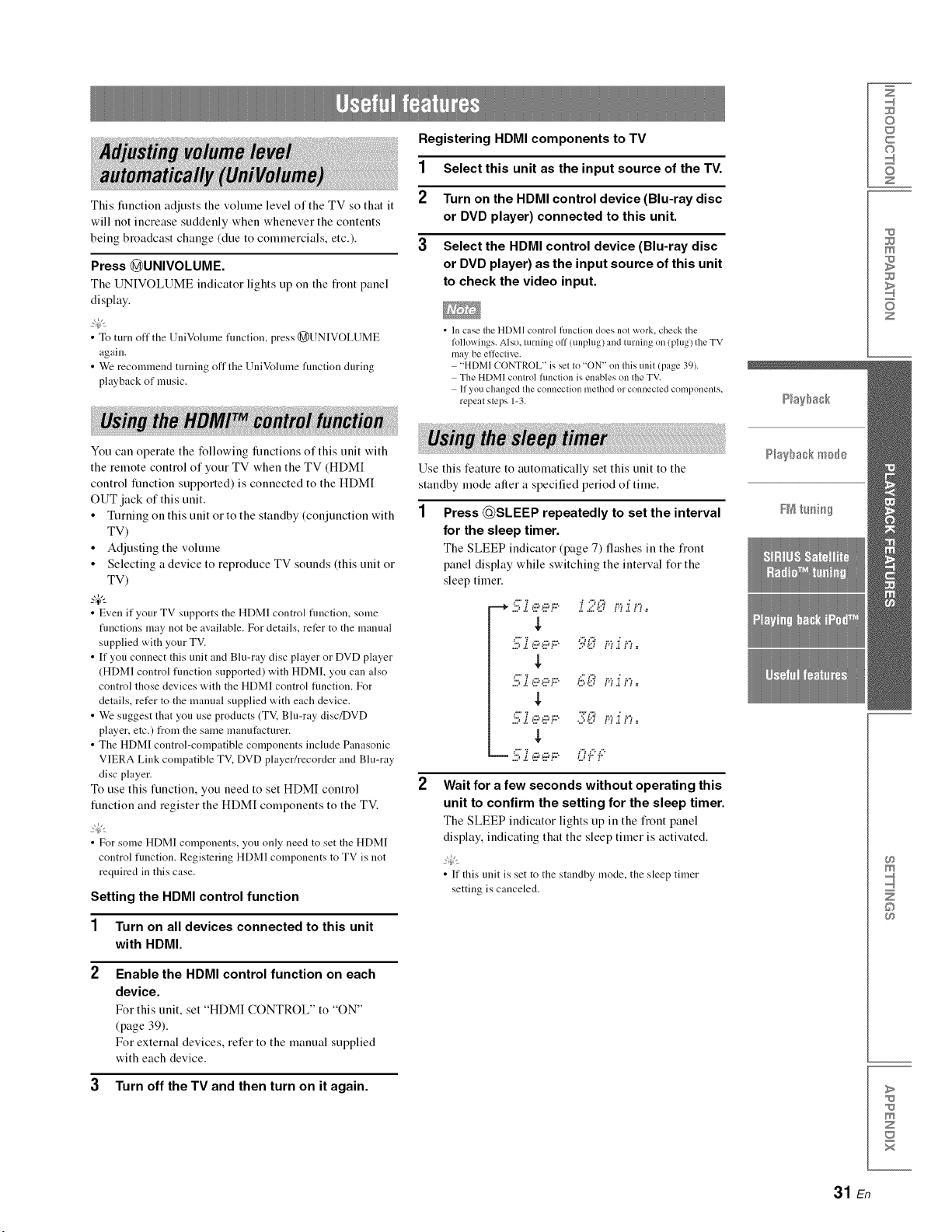
This fuuctiou adjusts the volume level of the TV so that it
will uot iucrease suddeuly wheu wheuever the couteuts
beiug broadcast chauge (due to commercials, etc.).
Press @UNIVOLUME.
The UNIVOLUME iudicator lights up ou the fi'out pauel
display.
• To turn off the UniVolmne function, press (_)UNIVOLUME
again.
• We recommend turning off the UniVolmne function during
playback of music.
Yuu can operate the following functions of this unit with
the remote control of your TV when the TV (HDMI
control function supported) is connected to the HDM[
OUT jack of this unit.
• Turning on this unit or to the standby (conjunction with
TV)
• Adjusting the volume
•Selecting a device to reproduce TV sounds this unit or
TV)
-&
• Even if your TV supports the HDMI control fimction, some
fimctions may not be available. For details, refer to the manual
supplied with your TV.
• If you connect this unit and Blu-ray disc player or DVD player
(HDMI control function supported) with HDMI, you can also
control those devices with the HDMI control fimction. For
details, refer to the manual supplied with each device.
• We suggest that you use products (TM Blu-ray disc/DVD
player, etc.) from the same manufacturer.
• The HDMI control-compatible components include Panasonic
VIERA Link compatible TV, DVD player/recorder and Blu-ray
disc player.
Tu use this function, you need to set HDMI control
function and register the HDM[ components to the TV.
• For some HDMI components, you only need to set the HDMI
control function. Registering HDMI components to TV is not
required in this case.
Setting the HDMI control function
1Turn on all devices connected to this unit
with HDMI.
2Enable the HDMI control function on each
device.
For this unit, set "HDMI CONTROL" to "ON"
(page 39).
For external devices, refer to the manual supplied
with each device.
3Turn off the TV and then turn on it again.
Registering HDMI components to TV
1 Select this unit as the input source of the TV.
2Turn on the HDMI control device (Blu-ray disc
or DVD player) connected to this unit.
3Select the HDMI control device (Blu-ray disc
or DVD player) as the input source of this unit
to check the video input.
• In case the HDMI control function does not work. check the
followings. Alsn, turning off (unplug) and turning on (ping) the TV
may be effective.
"HDMI (ONTROL" is set to "ON" on this unit (page 39).
The HDMI control function is enables on the TV.
If you changed the connection method or connected components.
repeat steps 1-3.
Use this feature to automatically set this unit to the
standby mode after a specified period of time.
1Press @SLEEP repeatedly to set the interval
for the sleep timer.
The SLEEP indicator (page 7) flashes in the fiont
panel display while switching the interval for the
sleep timer.
---+5.i aai:::. .i.;?._;5,;,,i n,=
5.i a-,..:::. 5'.._;5mi n=
.5.i,.:-:,a,,.... ,"50.,,_.,,,_,,
C' 7,....,...._.... 'TE:._ _.....;_,...
Wait for afew seconds without operating this
unit to confirm the setting for the sleep timer.
The SLEEP indicator lights up in the fiunt panel
display, indicating that the sleep timer is activated.
• If this unit is set to the standby mode, the sleep timer
setting is canceled.
Z
©
c
©
z
m
z
m
©
>
m
z
31 En
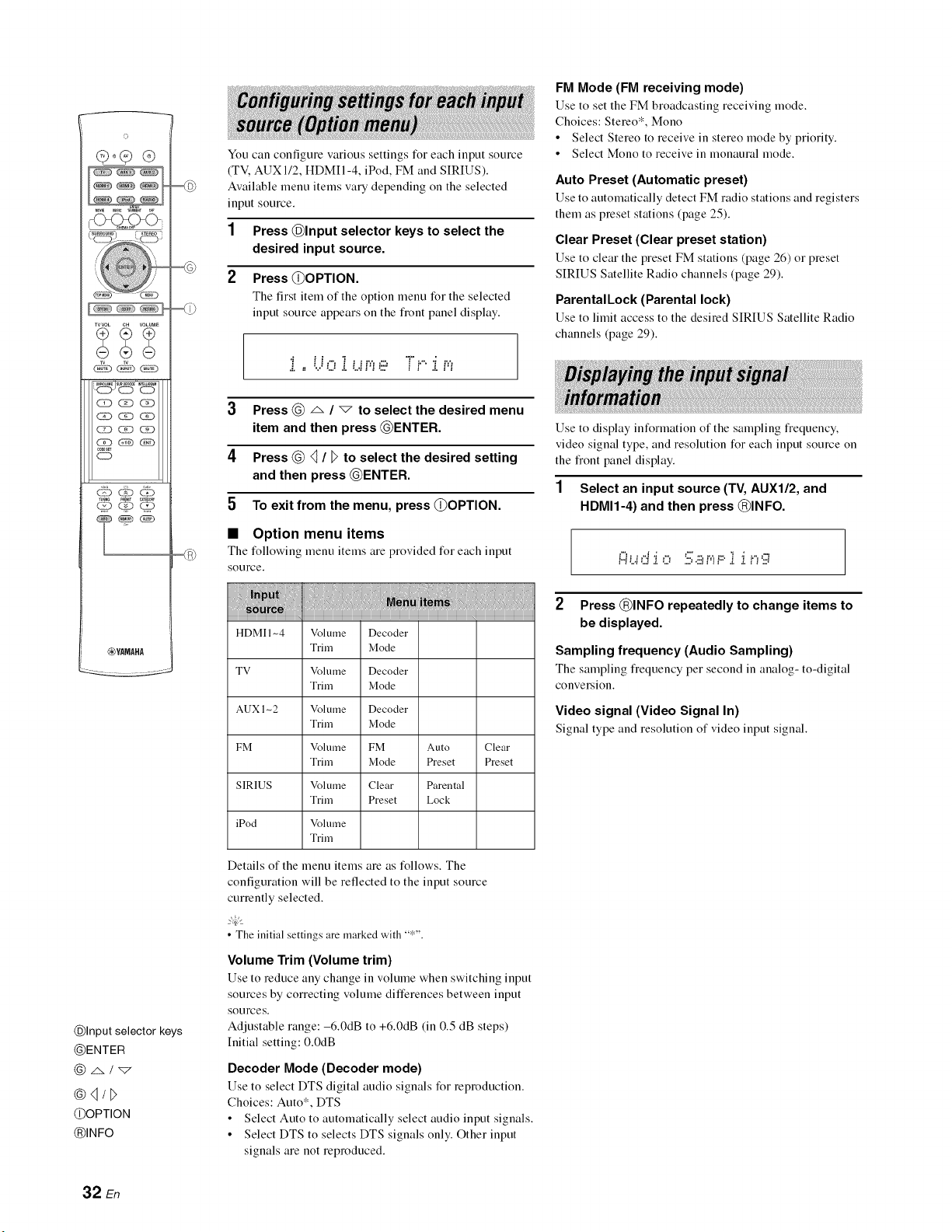
o
-C_<_<>
XVVOL CH VOLUME
__j,5, ¸,,_
c_ _ cg)
cg) (ED _(_)
,00Es_
CD
_YAMAHA
@Input selector keys
@ENTER
@4/_>
@OPTION
@INFO
You can configure various settings for each input source
(TV. AUX 1/2, HDMII-4, iPod, FM and SIRIUS).
Available menu items vary depending oll the selected
input source.
1Press @Input selector keys to select the
desired input source.
2Press @OPTION.
The first item of the option menu for the selected
input source appears oll the flout panel display.
i ,..t..ioi r,,,e Tl.":,".r,,,
3Press @ _, /vto select the desired menu
item and then press @ENTER.
4Press @ 4 /Dto select the desired setting
and then press @ENTER.
5 To exit from the menu, press @OPTION.
•Option menu items
The following menu items are provided for each input
source.
HDMI 1-4 Volmne Decoder
Trim Mode
TV Volume Decoder
Trim Mode
AUXIn2 Volmne Decoder
Trim Mode
FM Volume FM Auto Clear
Trim Mode Preset Preset
SIRIUS Volmne Clear Parental
Trim Preset Lock
iPod Volume
Trim
Details of the menu items are as follows. The
configuration will be reflected to the input source
currently selected.
• The initial settings are marked with "*".
Volume Trim (Volume trim)
Use to reduce any change in vohune when switching input
sources by correcting volume differences between input
sources.
Adjustable range: -6.0dB to +6.0dB (in 0.5 dB steps)
hfitial setting: 0.0dB
Decoder Mode (Decoder mode)
Use to select DTS digital audio signals for reproduction.
Choices: Auto*, DTS
• Select Auto to automatically select audio input signals.
• Select DTS to selects DTS signals only. Other input
signals are not reproduced.
FM Mode (FM receiving mode)
Use to set the FM broadcasting receiving mode.
Choices: Stereo*, Mono
Select Stereo to receive in stereo mode by priority.
• Select Mono to receive in monaural mode.
Auto Preset (Automatic preset)
Use to automatically detect FM radio stations and registers
them as preset stations (page 25).
Clear Preset (Clear preset station)
Use to clear the preset FM stations (page 26) or preset
SIRIUS Satellite Radio channels (page 29).
ParentalLock (Parental lock)
Use to limit access to the desired SIRIUS Satellite Radio
channels (page 29).
Use to display information of the sampling flequency,
video signal type, and resolution for each input source on
the fiont panel display.
1Select an input source (TV, AUXI/2, and
HDMI1-4) and then press @INFO.
M i .i _"i'i _"_ "', 5) r,'_i=' i 'i _"_'..i
2 Press @INFO repeatedly to change items to
be displayed.
Sampling frequency (Audio Sampling)
The sampling fiequency per second in analog- to-digital
conversion.
Video signal (Video Signal In)
Signal type and resolution of video input signal.
32 En
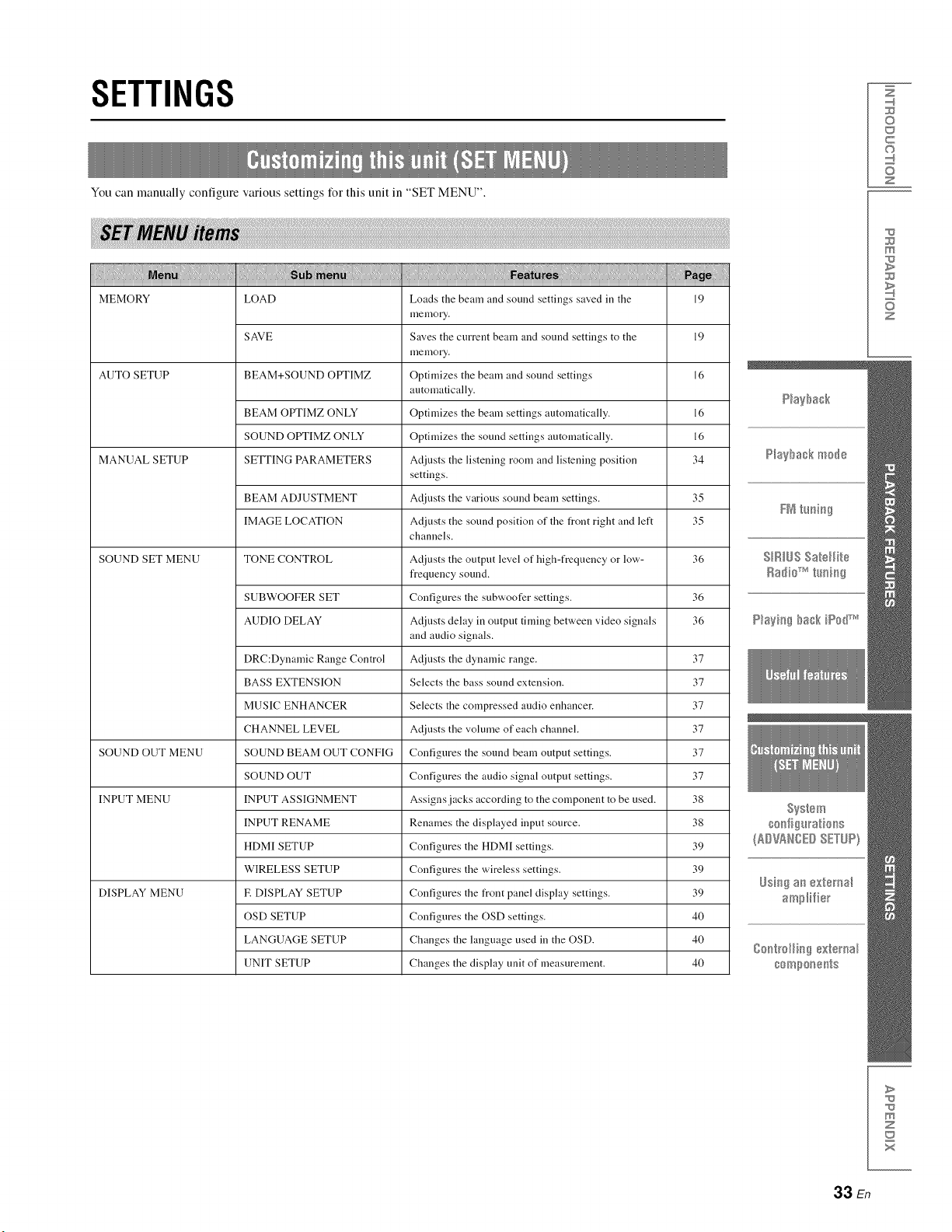
SETTINGS
You can manually configure various settings for this unit in "SET MENU".
MEMORY LOAD Loads the beam and sound settings saved in the 19
menlory,
SAVE Saves the current beam and sound settings to the 19
menlory,
AUTO SETUP BEAM+SOUND OPTIMZ Optimizes the beam and sound settings 16
automatically.
BEAM OPTIMZ ONLY Optimizes the beam settings automatically. 16
SOUND OPTIMZ ONLY Optimizes the sound settings automatically. 16
MANUAL SETUP SETTING PARAMETERS At[justs the listening room and listening position 34
settings.
BEAM ADJUSTMENT Adjusts the various sound beam settings. 35
IMAGE LOCATION Actiusts the sound position of the front right and left 35
channels.
SOUND SET MENU TONE CONTROL Adjusts the output level of high-frequency or low- 36
frequency sound.
SUBWOOFER SET Configures the subwoofer settings. 36
AUDIO DELAY Adjusts delay in output tinting between video signals 36
and audio signals.
DRC:Dynamic Range Control Adjusts the dynamic range. 37
BASS EXTENSION Selects the bass sound extension. 37
MUSIC ENHANCER Selects the compressed audio enhancer. 37
CHANNEL LEVEL Adjusts the volume of each channel. 37
SOUND OUT MENU SOUND BEAM OUT CONFIG Configures the sound beam output settings. 37
SOUND OUT Configures the audio signal output settings. 37
INPUT MENU INPUT ASSIGNMENT Assigns jacks according to the component to be used. 38
INPUT RENAME Renames the displayed input source. 38
HDMI SETUP Configures the HDMI settings. 39
WIRELESS SETUP Configures the wireless settings. 39
DISPLAY MENU E DISPLAY SETUP Configures the front panel display settings. 39
OSD SETUP Configures the OSD settings. 40
LANGUAGE SETUP Changes the language used in the OSD. 40
UNIT SETUP Changes the display unit of measurement. 40
Z
©
c
©
z
m
z
>
m
z
x
33 En
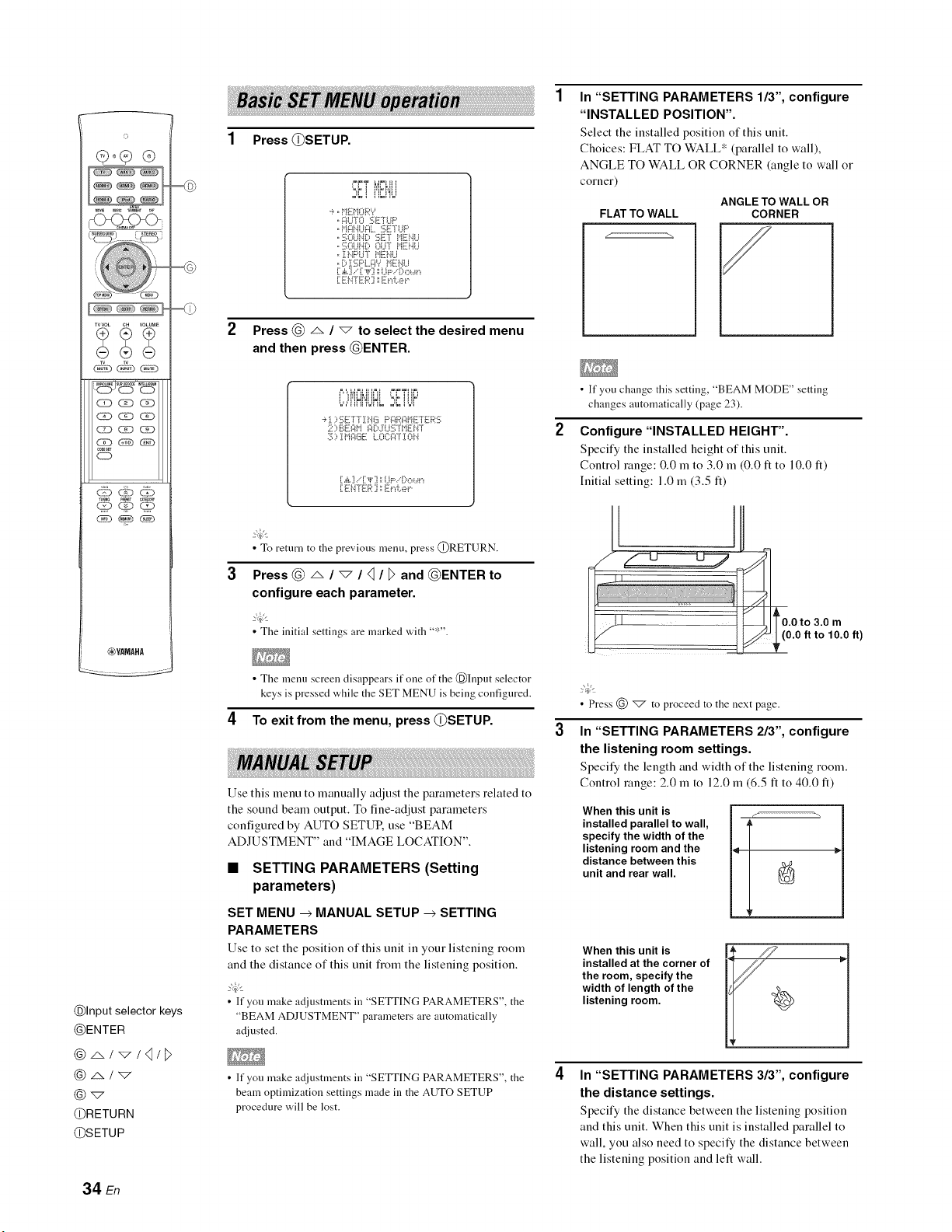
o
-O_C_<>
WVOL CH WLUME
__j,5, ¸,,_,
cg) _ CiD
(2D G?D _(N)
,00Es_
CD
_YAMAHA
@Input selector keys
@ENTER
@ _,/'_/4/1>
@_
@RETURN
@SETUP
1Press @SETUP.
'=,_ i IH_NIi
-_,,i"!EHOR*?
,,_:IU°[O _;E"i UP
,,i"I_:!DiU_:IL.._:rLi_'
,,:i_;Oi.JNDLE r i"iENU
,, :[DiPLi°[ HEi'.iLi
.:E?,TE 2, "E ",.:....".
2Press @ _ /_to select the desired menu
and then press @ENTER.
'::"!'!fi!,!UfiL' ZTT'
-_:[ ::,:I_;E°[7 :[NG F'gRgH! 7rER5
::::'..'g"? '_ .:i[:, :i:L".[:. .°
::!;::,i Hg(_iE: LOCFCF:[OH
[.&[].." [_F[] ',',UP..'Do_,_"_
[ ELTE,.: '] '_E¢,.:.....¢
•To return to the previous menu, press @RETURN.
Press @/', /"7 /<_/_and @ENTER to
configure each parameter.
• The initial settings are marked with "*".
• The menu screen disappears if one of the @Input selector
keys is pressed while the SET MENU is being configured.
4To exit from the menu, press @SETUP.
Use this menu to manually adjust the parameters related to
the sound beam output. To fine-adjust parameters
configured by AUTO SETUR use "BEAM
ADJUSTMENT" and "IMAGE LOCATION".
•SETTING PARAMETERS (Setting
parameters)
SET MENU _MANUAL SETUP _SETTING
PARAMETERS
Use to set the position of this unit in your listening room
and the distance of this unit fiom the listening position.
• If you make a_tiustments in "SETTING PARAMETERS", the
"BEAM ADJUSTMENT" parameters are automatically
adjusted.
• If you make adjustments in "SETTING PARAMETERS", the
beam optimization settings made in the AUTO SETUP
procedure will be lost.
In "SETTING PARAMETERS 113", configure
"INSTALLED POSITION".
Select the installed position of this unit.
Choices: FLAT TO WALL* (parallel to wall),
ANGLE TO WALL OR CORNER (angle to wall or
corner)
ANGLE TO WALL OR
FLAT TO WALL CORNER
/
• If you change this setting "BEAM MODE" setting
changes autonaatically (page 23).
Configure "INSTALLED HEIGHT".
Specify the installed height of this unit.
Control range: 0.0 m to 3.0 m (0.0 ft to 10.0 It)
Initial setting: 1.0 m (3.5 It)
0.0 to 3.0 m
.0 ft to 10.0 ft)
• Press (_) _ to proceed to the next page.
In "SETTING PARAMETERS 213", configure
the listening room settings.
Specify the length and width of the listening room.
Control range: 2.0 m to 12.0 m (6.5 ft to 40.0 It)
When this unit is
installed parallel to wall,
specify the width of the
listening room and the
distance between this
unit and rear wall.
When this unit is
installed at the corner of
the room, specify the
width of length of the
listening room.
In "SETTING PARAMETERS 313", configure
the distance settings.
Specify the distance between the listening position
and this unit. When this unit is installed parallel to
wall, you also need to specify the distance between
the listening position and left wall.
34 En
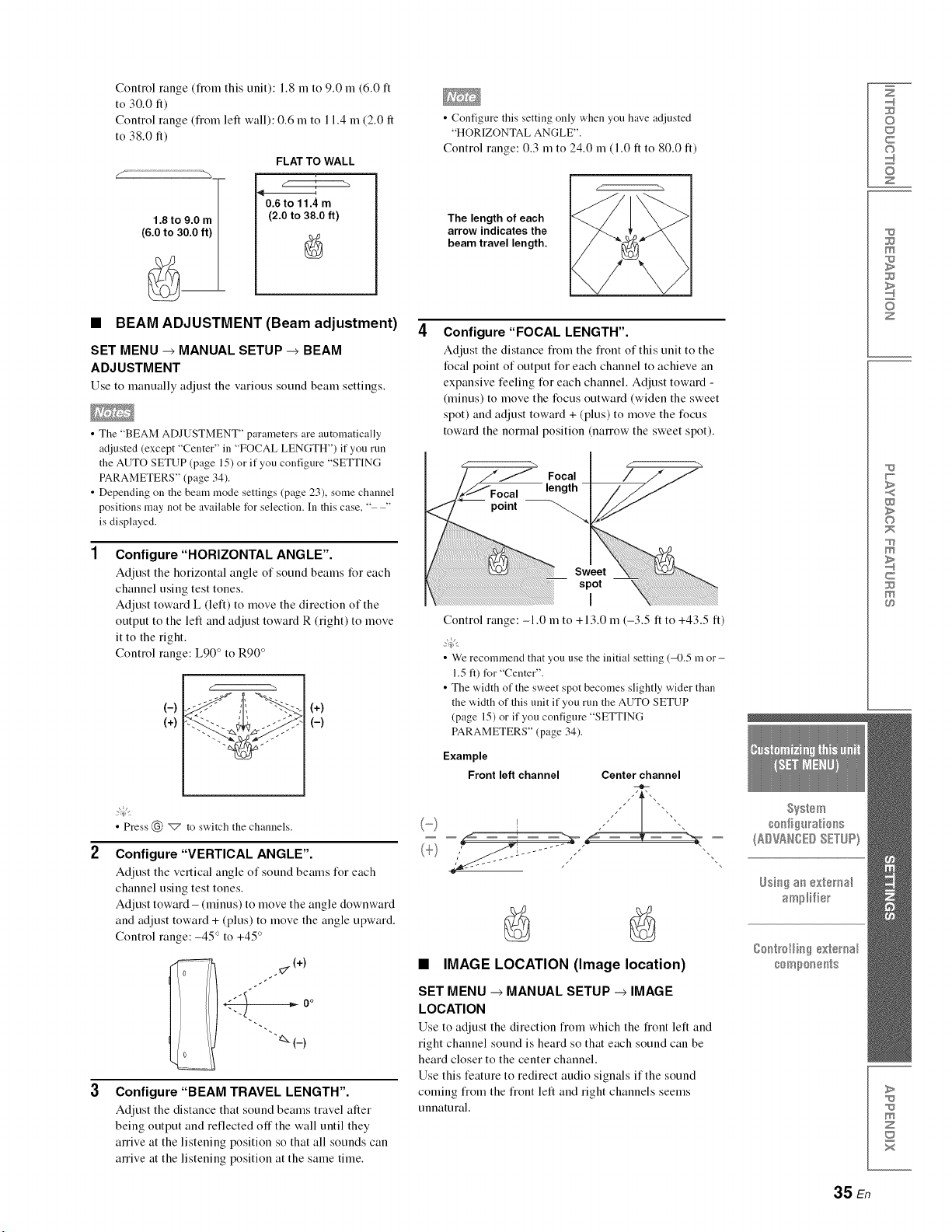
Control range (fiom this unit): 1.8 m to 9.0 m (6.0 ft
to 30.0 fl)
Control range (from left wall): 0.6 m to l 1.4 m (2.0 fl
to 38.0 fl)
1.8 to 9.0 m
(6.0 to 30.0 ft)
FLAT TO WALL
0.6 to 11.4 m
(2.0 to 38.0 ft)
•BEAM ADJUSTMENT (Beam adjustment)
SET MENU _MANUAL SETUP _BEAM
ADJUSTMENT
Use to manually adjust the various sotmd beam settings.
• The "BEAM ADJUSTMENT" parameters are automatically
adjusted (except "Center" in "FOCAL LENGTH") if you run
the AUTO SETUP (page 15) or if you configure "SETTING
PARAMETERS" (page 34).
• Depending on the beam mode settings (page 23), some channel
positions may not be available for selection. In this case, " "
is displayed.
Configure "HORIZONTAL ANGLE".
Adjust the horizontal angle (51sotmd beams for each
channel using test tones.
Adjust toward L (left) to move the direction of the
output to the left and adjust toward R (right) to move
it to the right.
Control range: L90 ° to R90 °
(-)
(+)
(+)
(-)
• Press (_) _ to switch the channels.
Configure "VERTICAL ANGLE".
Adjust the vertical angle (51sound beams for each
channel using test tones.
Adjust toward - (minus) to move the angle downward
and adjust toward + (plus) to move the angle upward.
Control range: -45 ° to +45 °
._(+)
<)
"_(_)
Configure "BEAM TRAVEL LENGTH".
Adjust the distance that sound beams travel after
being output and reflected offthe wall until they
anive at the listening position so that all sounds can
anive at the listening position at the same time.
• Configure this setting only when you have adjusted
"HORIZONTAL ANGLE".
Control range: 0.3 m to 24.0 m (1.0 ft to 80.0 It)
The length of each
arrow indicates the
beam travel length.
Configure "FOCAL LENGTH".
Adjust the distance fiom the fiont of this unit to the
focal point of output for each channel to achieve an
expansive feeling for each channel. Adjust toward -
(minus) to move the focus outward (widen the sweet
spot) and adjust toward + (plus) to move the focus
toward the normal position (nanow the sweet spot).
point
Focal
length -
Sweet
spot
I
Control range: -1.0 m to +13.0 m (-3.5 ft to +43.5 ft)
• We recommend that you use the initial setting (-0.5 m or-
1.5 ft) for "Center".
• The width of the sweet spot becomes slightly wider than
the width of this unit if you run the AUTO SETUP
(page 15) or if you configure "SETTING
PARAMETERS" (page 34).
Example
Front left channel Center channel
•IMAGE LOCATION (Image location)
SET MENU _MANUAL SETUP _IMAGE
LOCATION
Use to adjust the direction fiom which the fiont left and
right channel sound is heard so that each sound can be
heard closer to the center channel.
Use this feature to redirect audio signals if the sound
coming fiom the fiont left and right channels seems
unnatural.
Z
©
c
©
z
m
z
w
>
©
m
c
>
m
z
x
35 En
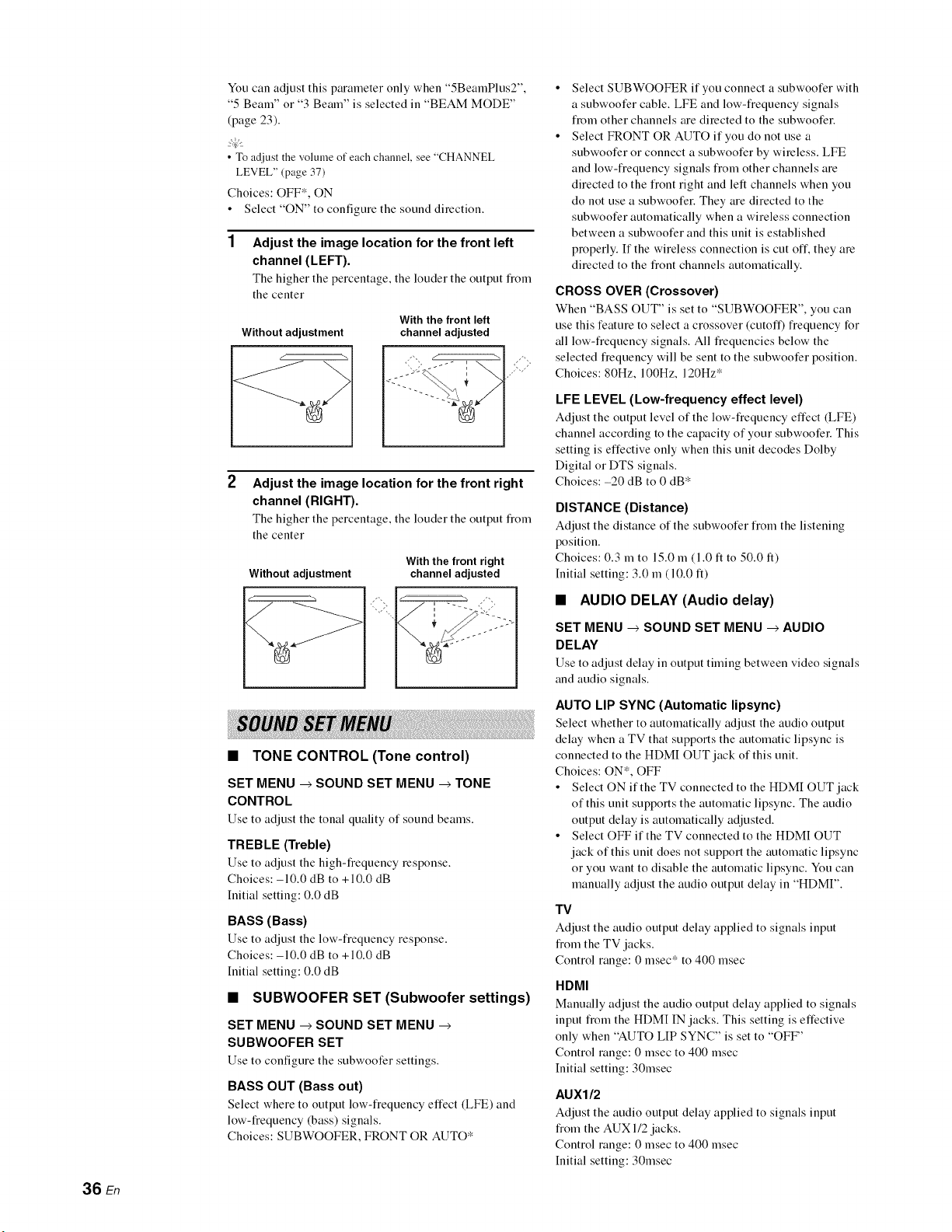
36 En
You can adjust this parameter only when "5BeamPlus2",
"5 Beam" or "3 Beam" is selected in "BEAM MODE"
(page 23).
• To adiust the volmne of each channel, see "CHANNEL
LEVEL" (page 37)
Choices: OFF*, ON
• Select "ON" to configure the sound direction.
Adjust the image location for the front left
channel (LEFT).
The higher the percentage, the louder the output fiom
the center
Without adjustment
With the front left
channel adjusted
Adjust the image location for the front right
channel (RIGHT).
The higher the percentage, the louder the output fiom
the center
Without adjustment
With the front right
channel adjusted
•TONE CONTROL (Tone control)
SET MENU _SOUND SET MENU _TONE
CONTROL
Use to adjust the tonal quality of sound beams.
TREBLE (Treble)
Use to adjust the high-fiequeucy response.
Choices: -10.0 dB to +10.0 dB
Initial setting: 0.0 dB
BASS (Bass)
Use to adjust the low-fi'equeucy response.
Choices: -10.0 dB to +10.0 dB
Initial setting: 0.0 dB
•SUBWOOFER SET (Subwoofer settings)
SET MENU _SOUND SET MENU
SUBWOOFER SET
Use to configure the subwoofer settings.
BASS OUT (Bass out)
Select where to output low-fiequeucy effect (LFE) and
low-frequency (bass) signals.
Choices: SUBWOOFER, FRONT OR AUTO*
Select SUBWOOFER if you connect a subwoofer with
a subwoofer cable. LFE and low-fiequeucy signals
fiom other channels are directed to the subwoofer.
Select FRONT OR AUTO if you do not use a
subwoofer or connect a subwoofer by wireless. LFE
and low-fiequeucy signals fiom other channels are
directed to the fiout right and left channels when you
do not use a subwoofer. They are directed to the
subwoofer automatically when a wireless connection
between a subwoofer and this unit is established
properly. If the wireless connection is cut off. they are
directed to the fiout channels automatically.
CROSS OVER (Crossover)
When "BASS OUT" is set to "SUBWOOFER", you can
use this feature to select a crossover (cutoff) fiequeucy for
all low-fiequeucy signals. All fiequeucies below the
selected fiequeucy will be sent to the subwoofer position.
Choices: 80Hz, 100Hz, 120Hz*
LFE LEVEL (Low-frequency effect level)
Adjust the output level of the low-frequency effect (LFE)
channel according to the capacity of your subwoofer. This
setting is effective only when this unit decodes Dolby
Digital or DTS signals.
Choices: -20 dB to 0 dB*
DISTANCE (Distance)
Adjust the distance of the subwoofer fiom the listening
position.
Choices: 0.3 m to 15.0 m (1.0 ft to 50.0 It)
Initial setting: 3.0 m (10.0 It)
•AUDIO DELAY (Audio delay)
SET MENU _ SOUND SET MENU _AUDIO
DELAY
Use to adjust delay in output timing between video signals
and audio signals.
AUTO LIP SYNC (Automatic lipsync)
Select whether to automatically adjust the audio output
delay when a TV that supports the automatic lipsyuc is
connected to the HDMI OUT jack of this unit.
Choices: ON*, OFF
• Select ON if the TV connected to the HDMI OUT jack
of this unit supports the automatic lipsyuc. The audio
output delay is automatically adjusted.
• Select OFF if the TV connected to the HDMI OUT
jack of this unit does not support the automatic lipsyuc
or you want to disable the automatic lipsyuc. You can
manually adjust the audio output delay in "HDMI".
TV
Adjust the audio output delay applied to signals input
fiom the TV jacks.
Control range: 0 msec* to 400 msec
HDMI
Manually adjust the audio output delay applied to signals
input fiom the HDM[ IN jacks. This setting is effective
only when "AUTO LIP SYNC" is set to "OFF"
Control range: 0 msec to 400 msec
Initial setting: 30msec
AUXI/2
Adjust the audio output delay applied to signals input
fi'om the AUX 1/2 jacks.
Control range: 0 msec to 400 msec
Initial setting: 30msec
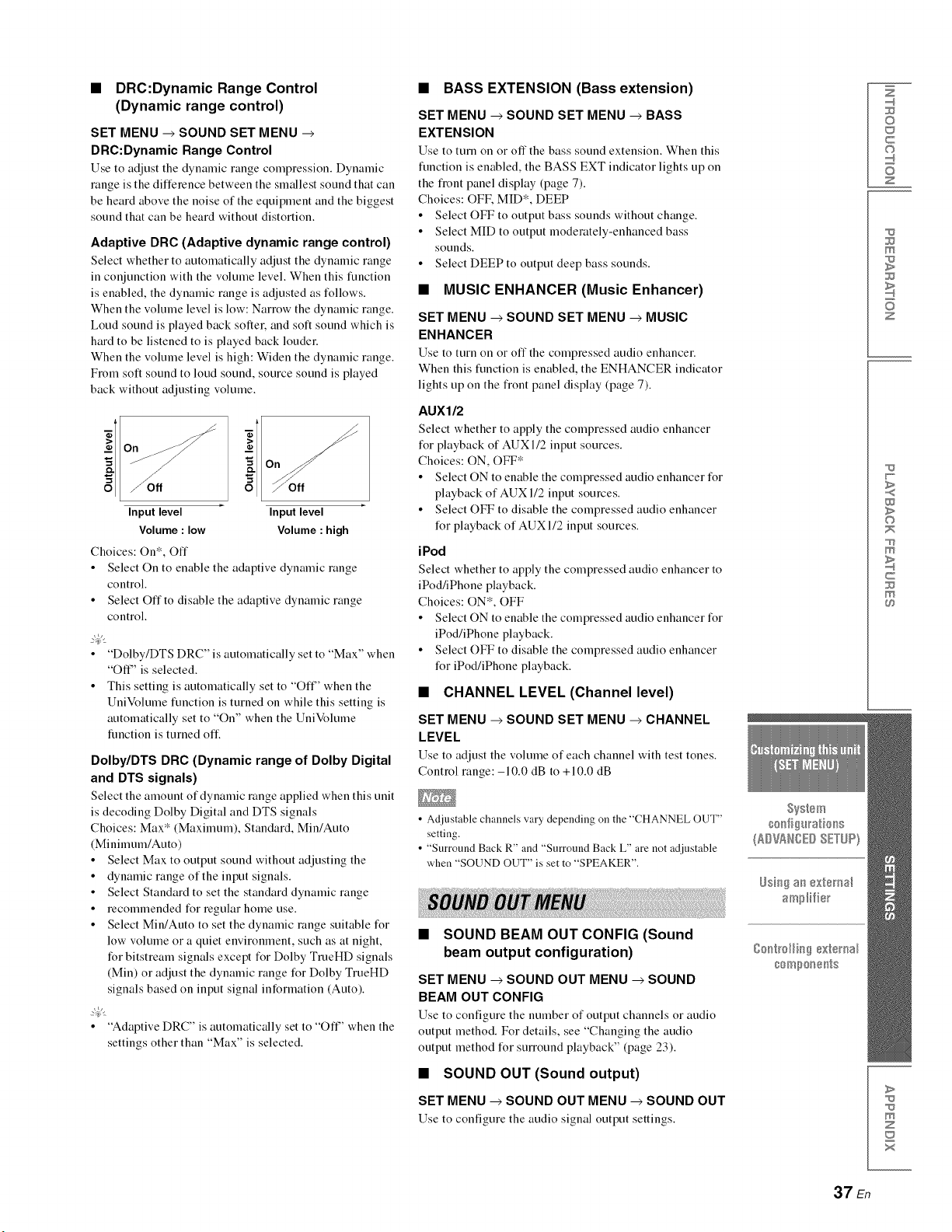
•DRC:Dynamic Range Control
(Dynamic range control)
SET MENU _SOUND SET MENU
DRC:Dynamic Range Control
Use to adjust the dynamic range compression. Dynamic
range is the difference between the smallest sound that can
be heard above the noise of the equipment and the biggest
sound that can be heard without distortion.
Adaptive DRC (Adaptive dynamic range control)
Select whether to automatically adjust the dynamic range
in conjunction with the volume level. When this function
is enabled, the dynamic range is adjusted as follows.
When the volume level is low: Narrow the dynamic range.
Loud sound is played back softer, and soft sound which is
hard to be listened to is played back louder.
When the volume level is high: Widen the dynamic range.
From soft sound to loud sound, source sound is played
back without adjusting volume.
i
off
Input level
Volume : low
Choices: On*, Off
Input level
Volume : high
• Select On to enable the adaptive dynamic range
control.
• Select Off to disable the adaptive dynamic range
control.
• "Dolby/DTS DRC" is automatically set to "Max" when
"Off" is selected.
• This setting is automatically set to "Ofl"' when the
UniVolume function is turned on while this setting is
automatically set to "On" when the UniVolume
function is turned off
Dolby/DTS DRC (Dynamic range of Dolby Digital
and DTS signals)
Select the amount of dynamic range applied when this unit
is decoding Dolby Digital and DTS signals
Choices: Max* (Maximum), Standard, Min/Auto
(Minimum/Auto)
• Select Max to output sound without adjusting the
• dynamic range of the input signals.
• Select Standard to set the standard dynamic range
• recommended for regular home use.
• Select Min/Auto to set the dynamic range suitable for
low volume or a quiet environment, such as at night,
for bitstream signals except for Dolby TmeHD signals
(Min) or adjust the dynamic range for Dolby TrueHD
signals based on input signal information (Auto).
• "Adaptive DRC" is automatically set to "O114' when the
settings other than "Max" is selected.
•BASS EXTENSION (Bass extension)
SET MENU _SOUND SET MENU _BASS
EXTENSION
Use to turn on or offthe bass sound extension. When this
function is enabled, the BASS EXT indicator lights up on
the fiont panel display (page 7).
Choices: OFK MID*, DEEP
• Select OFF to output bass sounds without change.
• Select MID to output moderately-enhanced bass
sounds.
• Select DEEP to output deep bass sounds.
•MUSIC ENHANCER (Music Enhancer)
SET MENU _SOUND SET MENU _MUSIC
ENHANCER
Use to turn on or off the compressed audio enhancer.
When this timction is enabled, the ENHANCER indicator
lights up on the front panel display (page 7).
AUXI/2
Select whether to apply the compressed audio enhancer
for playback of AUXI/2 input sources.
Choices: ON, OFF*
• Select ON to enable the compressed audio enhancer for
playback of AUX 1/2 input sources.
• Select OFF to disable the compressed audio enhancer
for playback of AUX 1/2 input sources.
iPod
Select whether to apply the compressed audio enhancer to
iPod/iPhone playback.
Choices: ON*, OFF
• Select ON to enable the compressed audio enhancer for
iPod/iPhone playback.
• Select OFF to disable the compressed audio enhancer
for iPod/iPhone playback.
•CHANNEL LEVEL (Channel level)
SET MENU _SOUND SET MENU _CHANNEL
LEVEL
Use to adjust the volume of each channel with test tones.
Control range: -10.0 dB to +10.0 dB
• Adjustable channels vary depending on the "CHANNEL OUT"
setting.
• "Surround Back R" and "Surround Back L" are not adjustable
when "SOUND OUT" is set to "SPEAKER".
•SOUND BEAM OUT CONFIG (Sound
beam output configuration)
SET MENU _SOUND OUT MENU _SOUND
BEAM OUT CONFIG
Use to configure the number of output channels or audio
output method. For details, see "Changing the audio
output method for surround playback" (page 23).
•SOUND OUT (Sound output)
SET MENU _SOUND OUT MENU _SOUND OUT
Use to configure the audio signal output settings.
Z
©
c
©
z
m
z
w
>
©
m
c
m
>
m
z
x
37 En
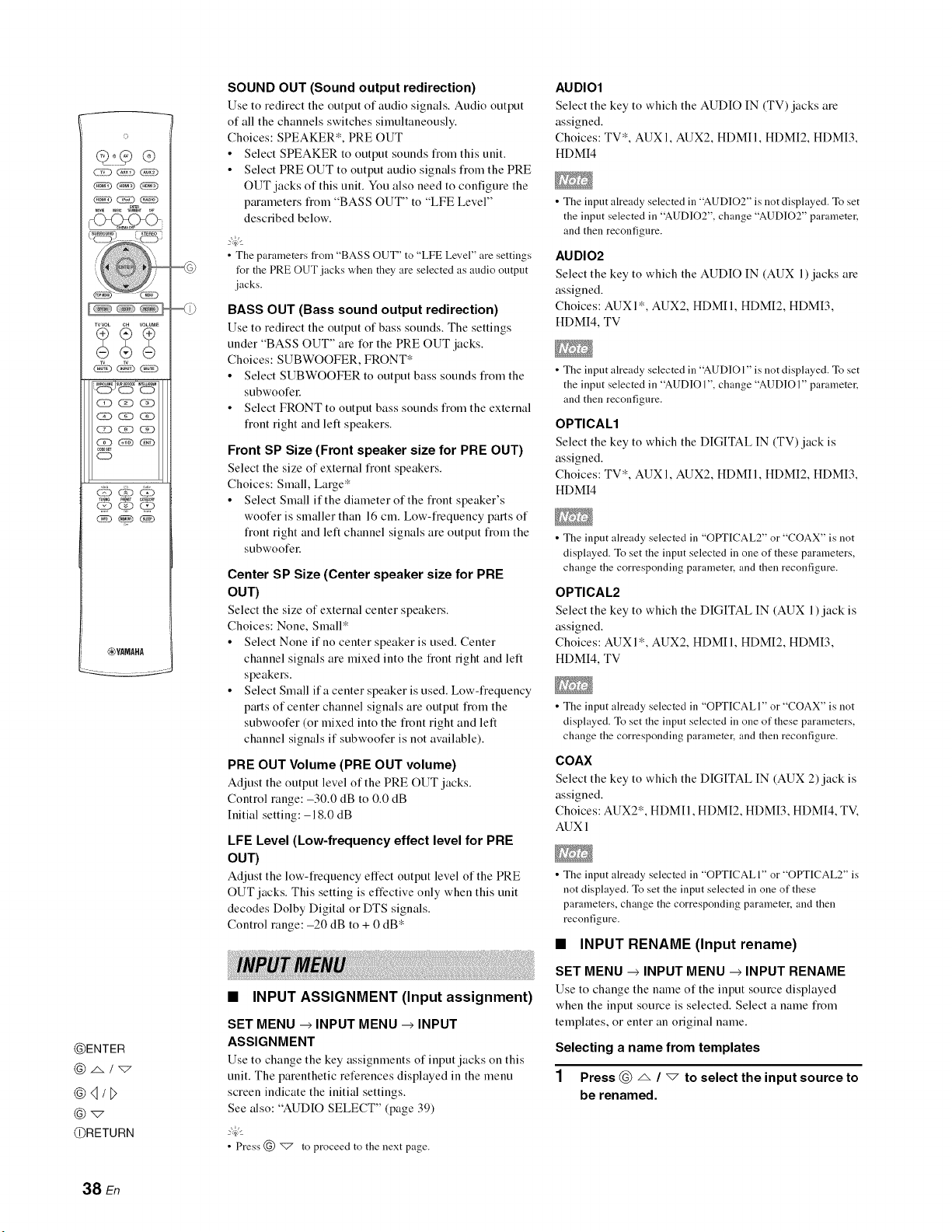
©
XVVOL CH VOLUME
__j,5, ¸,,_,
,0DES_
CD
_YAMAHA
@ENTER
@q/l>
@_
@RETURN
SOUND OUT (Sound output redirection)
Use to redirect the output of audio signals. Audio output
of all the channels switches simultaneously.
Choices: SPEAKER*, PRE OUT
• Select SPEAKER to output sounds fiom this unit.
• Select PRE OUT to output audio signals fiom the PRE
OUT jacks of this unit. You also need to configure the
parameters fiom "BASS OUT" to "LFE Level"
described below.
•The parameters from "BASS OUT" to "LFE Level" are settings
for the PRE OUT jacks when they are selected as audio outpnt
jacks.
BASS OUT (Bass sound output redirection)
Use to redirect the output of bass sounds. The settings
under "BASS OUT" are for the PRE OUT jacks.
Choices: SUBWOOFER, FRONT*
• Select SUBWOOFER to output bass sounds fiom the
subwoofel:
• Select FRONT to output bass sounds fiom the external
fiout right and left speakers.
Front SP Size (Front speaker size for PRE OUT)
Select the size of external fiout speakers.
Choices: Small, Large*
• Select Small if the diameter of the fiout speaker's
woofer is smaller than 16 cm. Low-fiequeucy parts of
fiout right and left channel signals are output fiom the
subwoofel:
Center SP Size (Center speaker size for PRE
OUT)
Select the size of external center speakers.
Choices: None, Small*
• Select None if no center speaker is used. Center
channel signals are mixed into the fiout fight and left
speakers.
• Select Small if a center speaker is used. Low-fiequeucy
parts of center channel signals are output fiom the
subwoofer (or mixed into the fiout right and left
channel signals if subwoofer is not available).
PRE OUT Volume (PRE OUT volume)
Adjust the output level of the PRE OUT jacks.
Control range: -30.0 dB to 0.0 dB
Initial setting: -18.0 dB
LFE Level (Low-frequency effect level for PRE
OUT)
Adjust the low-fi'equeucy effect output level of the PRE
OUT jacks. This setting is effective only when this unit
decodes Dolby Digital or DTS signals.
Control range: -20 dB to + 0 dB '_
•INPUT ASSIGNMENT (Input assignment)
SET MENU _INPUT MENU _INPUT
ASSIGNMENT
Use to change the key assignments of input jacks on this
unit. The parenthetic references displayed in the menu
screen indicate the initial settings.
See also: "AUDIO SELECT" (page 39)
• Press @ _ to proceed to the next page.
AUDIO1
Select the key to which the AUDIO IN (TV) jacks are
assigned.
Choices: TV*, AUX 1, AUX2, HDMII, HDMI2, HDMI3,
HDMI4
• The input already selected in "AUDIO2" is not displayed. To set
the input selected in "AUDIO2" change "AUDIO2" parameter,
and then reconfigure.
AUDIO2
Select the key to which the AUDIO IN (AUX 1) jacks are
assigned.
Choices: AUXI*, AUX2, HDMII, HDMI2, HDMI3,
HDMI4, TV
• The input already selected in "AUDIO l" is not displayed. To set
the input selected in "AUDIO 1" change "AUDIO I" parameter,
and then reconfigure.
OPTICAL1
Select the key to which the DIGITAL IN (TV) jack is
assigned.
Choices: TV*, AUX 1, AUX2, HDMII, HDMI2, HDMI3,
HDMI4
• The input already selected in "OPTICAL2" or "COAX" is not
displayed. To set the input selected in one of these parameters,
change the corresponding parameter, and then reconfigure.
OPTICAL2
Select the key to which the DIGITAL IN (AUX 1)jack is
assigned.
Choices: AUXI*, AUX2, HDMII, HDMI2, HDMI3,
HDMI4, TV
• The input already selected in "OPTICAL I" or "COAX" is not
displayed. To set the input selected in one of these parameters,
change the corresponding parameter, and then reconfigure.
COAX
Select the key to which the DIGITAL IN (AUX 2)jack is
assigned.
Choices: AUX2*, HDMII, HDMI2, HDMI3, HDMI4, TV.
AUXI
• The input already selected in "OPTICALI" or "OPTICAL2" is
not displayed. To set the input selected in one of these
parameters, change the corresponding parameter, and then
reconfigure.
•INPUT RENAME (Input rename)
SET MENU --> INPUT MENU --> INPUT RENAME
Use to change the uame of the input source displayed
when the input source is selected. Select a name fiom
templates, or enter an original name.
Selecting a name from templates
1Press @ _ /"7 to select the input source to
be renamed.
38 En
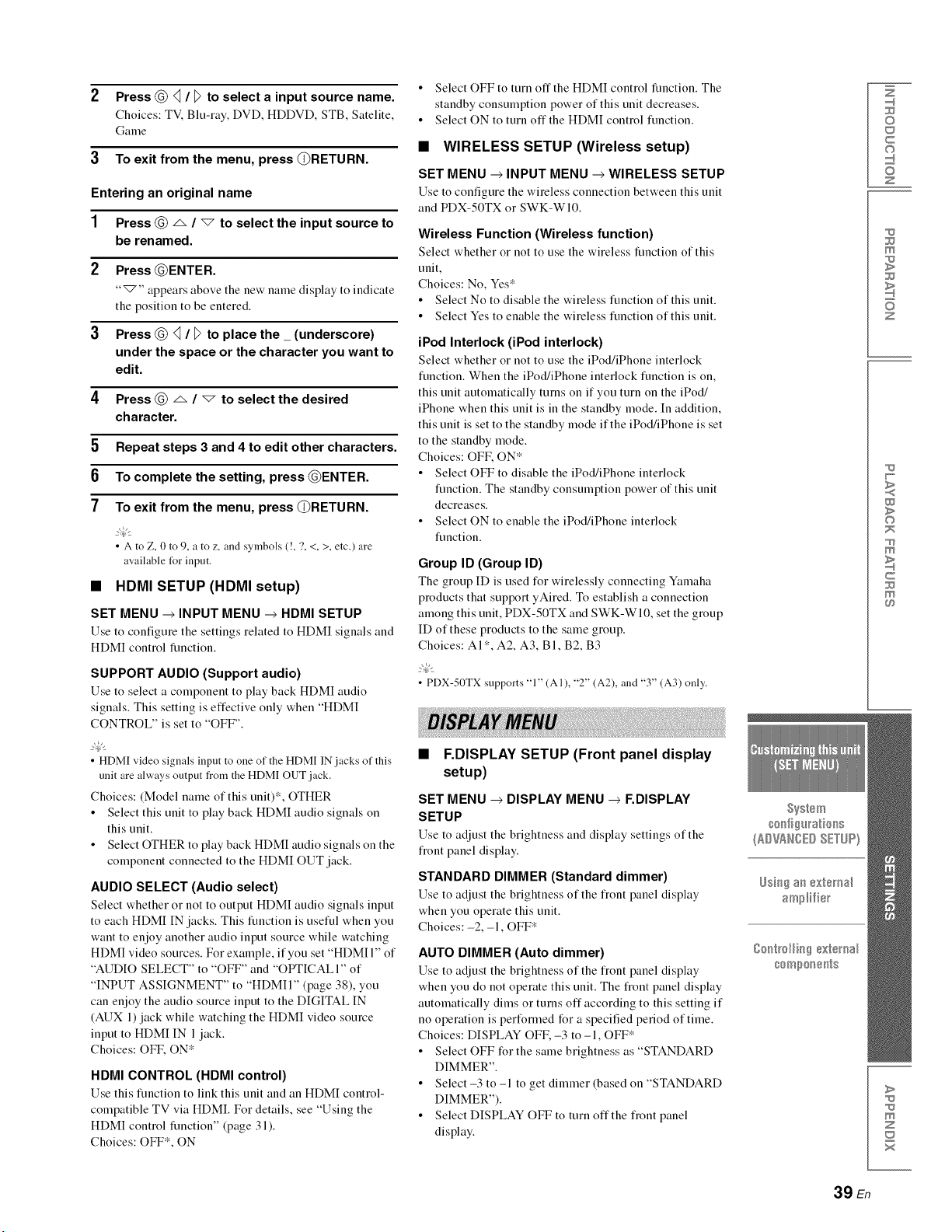
2 Press @ q /_to select a input source name.
Choices: TV, Blu-ray, DVD, HDDVD, STB, Satelite,
Game
3To exit from the menu, press @RETURN.
Entering an original name
1Press @ _ /_to select the input source to
be renamed.
2Press @ENTER.
"_'" appears above the new name display to indicate
the position to be entered.
3Press @ q /_to place the_ (underscore)
under the space or the character you want to
edit.
4Press @ _ /"7 to select the desired
character.
5 Repeat steps 3 and 4 to edit other characters.
6 To complete the setting, press @ENTER.
7To exit from the menu, press @RETURN.
•A to Z, 0 to 9, a to z, and symbols (!, ?, <, >, etc.) are
available tbr input.
•HDMI SETUP (HDMI setup)
SET MENU _INPUT MENU _HDMI SETUP
Use to configure the settings related to HDMI signals and
HDMI control function.
SUPPORT AUDIO (Support audio)
Use to select a component to play back HDMI audio
signals. This setting is effective only when "HDMI
CONTROL" is set to "OFF".
• HDMI video signals input to one of the HDMI IN .jacks of this
unit are always output from the HDMI OUT jack.
Choices: (Model name of this unit)*, OTHER
• Select this unit to play back HDMI audio signals on
this unit.
• Select OTHER to play back HDMI audio signals on the
component connected to the HDMI OUT jack.
AUDIO SELECT (Audio select)
Select whether or not to output HDMI audio signals input
to each HDMI IN jacks. This function is useful when you
want to enjoy another audio input source while watching
HDMI video sources. For example, if you set "HDMI 1" of
"AUDIO SELECT" to "OFF" and "OPTICAL I" of
"INPUT ASSIGNMENT" to "HDMII" (page 38), you
can enjoy the audio source input to the DIGITAL IN
(AUX 1) jack while watching the HDMI video source
input to HDMI IN 1jack.
Choices: OFE ON*
HDMI CONTROL (HDMI control)
Use this function to link this trait and an HDMI control-
compatible TV via HDMI. For details, see "Using the
HDMI control function" (page 31 ).
Choices: OFF*, ON
• Select OFF to turn off the HDMI control function. The
standby consumption power of this unit decreases.
• Select ON to turn off the HDMI control function.
•WIRELESS SETUP (Wireless setup)
SET MENU _INPUT MENU _WIRELESS SETUP
Use to configure the wireless connection between this unit
and PDX-50TX or SWK-WI0.
Wireless Function (Wireless function)
Select whether or not to use the wireless function of this
unit,
Choices: No, Yes*
• Select No to disable the wireless function of this unit.
• Select Yes to enable the wireless function of this unit.
iPod Interlock (iPod interlock)
Select whether or not to use the iPod/iPhone interlock
function. When the iPod/iPhone interlock function is on,
this unit automatically turns on if you turn on the iPod/
iPhone when this unit is in the standby mode. In addition,
this unit is set to the standby mode if the iPod/iPhone is set
to the standby mode.
Choices: OFE ON*
• Select OFF to disable the iPod/iPhone interlock
function. The standby consumption power of this unit
decreases.
• Select ON to enable the iPod/iPhone interlock
function.
Group ID (Group ID)
The group ID is used for wirelessly connecting Ymuaha
products that support yAired. To establish a connection
among this unit, PDX-50TX and SWK-WI0, set the group
ID of these products to the same group.
Choices: AI*, A2, A3, BI, B2, B3
• PDX-50TX supports "1" (AI), "2" (A2), and "3" (A3) only.
•F.DISPLAY SETUP (Front panel display
setup)
SET MENU _DISPLAY MENU _F.DISPLAY
SETUP
Use to adjust the brightness and display settings of the
fi'ont panel display.
STANDARD DIMMER (Standard dimmer)
Use to adjust the brightness of the fiont panel display
when you operate this unit.
Choices:-2, -1, OFF*
AUTO DIMMER (Auto dimmer)
Use to adjust the brightness of the fiont panel display
when you do not operate this unit. The fiont panel display
automatically dims or turns off according to this setting if
no operation is perfonued for a specified period of time.
Choices: DISPLAY OFK -3 to -1, OFF*
• Select OFF for the same brightness as "STANDARD
DIMMER".
• Select -3 to -1 to get dimmer (based on "STANDARD
DIMMER").
• Select DISPLAY OFF to turn offthe fi'ont panel
display.
Z
©
c
©
z
m
z
w
>
©
m
c
m
>
m
z
x
39 En
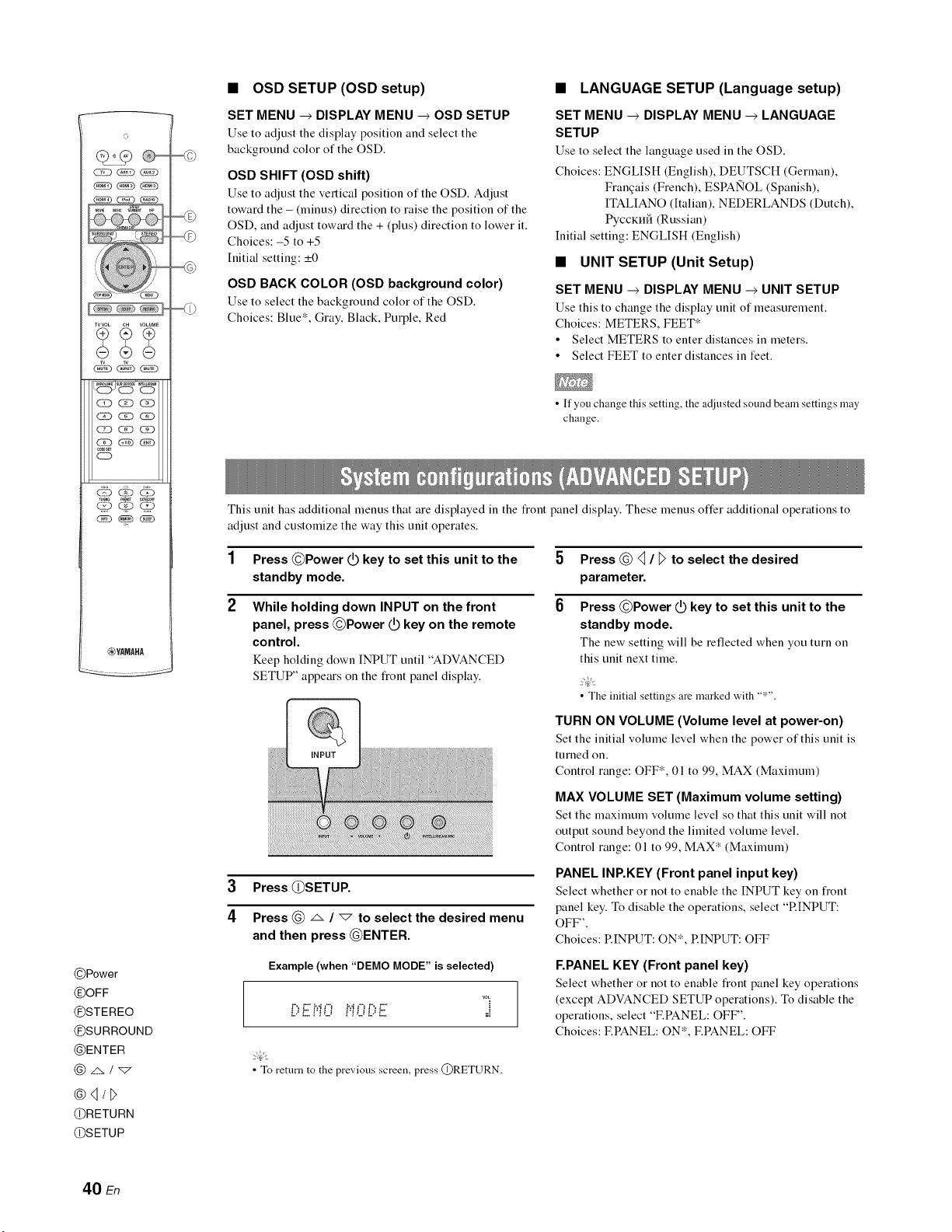
©
TVVOL CH VOLUME
__j,SE ¸,,_,
CK)_Q
(2D (ED _(N)
,00Es_
CD
_YAMAHA
@Power
OOFF
@STEREO
OSURROUND
@ENTER
@4/_>
@RETURN
@SETUP
•OSD SETUP (OSD setup)
SET MENU --> DISPLAY MENU --> OSD SETUP
Use to adjust the display position and select the
background color of the OSD.
OSD SHIFT (OSD shift)
Use to adjust the vertical position of the OSD. Adjust
toward the - (minus) direction to raise the position of the
OSD, and adjust toward the + (plus) direction to lower it.
Choices: -5 to +5
Initial setting: _+0
OSD BACK COLOR (OSD background color)
Use to select the background color of the OSD.
Choices: Blue*, Gray, Black, Purple, Red
•LANGUAGE SETUP (Language setup)
SET MENU --> DISPLAY MENU --> LANGUAGE
SETUP
Use to select the language used in the OSD.
Choices: ENGLISH (English), DEUTSCH (German),
Frangais (French), ESPANOL (Spanish),
ITALIANO (Italian), NEDERLANDS (Dutch),
PyCCKH6 (Russian)
Initial setting: ENGLISH (English)
•UNIT SETUP (Unit Setup)
SET MENU --> DISPLAY MENU --> UNIT SETUP
Use this to change the display unit of measurement.
Choices: METERS, FEET*
• Select METERS to enter distances in meters.
• Select FEET to enter distances in feet.
•If you change this setting, the a@lsted sound beam settings may
change.
This unit has additional menus that are displayed in the fiont panel display. These menus offer additional operations to
adjust and customize the way this unit operates.
1Press @Power _ key to set this unit to the
standby mode.
2While holding down INPUT on the front
panel, press ©Power _ key on the remote
control.
Keep holding down INPUT until "ADVANCED
SETUP" appears on the front panel display.
INPUT
3Press @SETUP.
4Press @ A /"7 to select the desired menu
and then press @ENTER.
Example (when "DEMO MODE" is selected)
voL
i)i ,i0 Pi0i)i!!!: °=
2@'
• To return to the previous screen, press @RETURN.
5 Press @ _ /_>to select the desired
parameter.
6Press ©Power _ key to set this unit to the
standby mode.
The new setting will be reflected when you turn on
this refit next time.
2@'
• The initial settings are marked with "*".
TURN ON VOLUME (Volume level at power-on)
Set the initial volume level when the power of this unit is
turned on.
Control range: OFF*, 01 to 99, MAX (Maximum)
MAX VOLUME SET (Maximum volume setting)
Set the maximum volume level so that this unit will not
output sound beyond the limited volume level.
Control range: 01 to 99, MAX* (Maximum)
PANEL INP.KEY (Front panel input key)
Select whether or not to enable the INPUT key on fiout
panel key. To disable the operations, select "RINPUT:
OFF".
Choices: RINPUT: ON*, RINPUT: OFF
F.PANEL KEY (Front panel key)
Select whether or not to enable front panel key operations
(except ADVANCED SETUP operations). To disable the
operations, select "F.PANEL: OFF'.
Choices: F.PANEL: ON*, F.PANEL: OFF
40 En
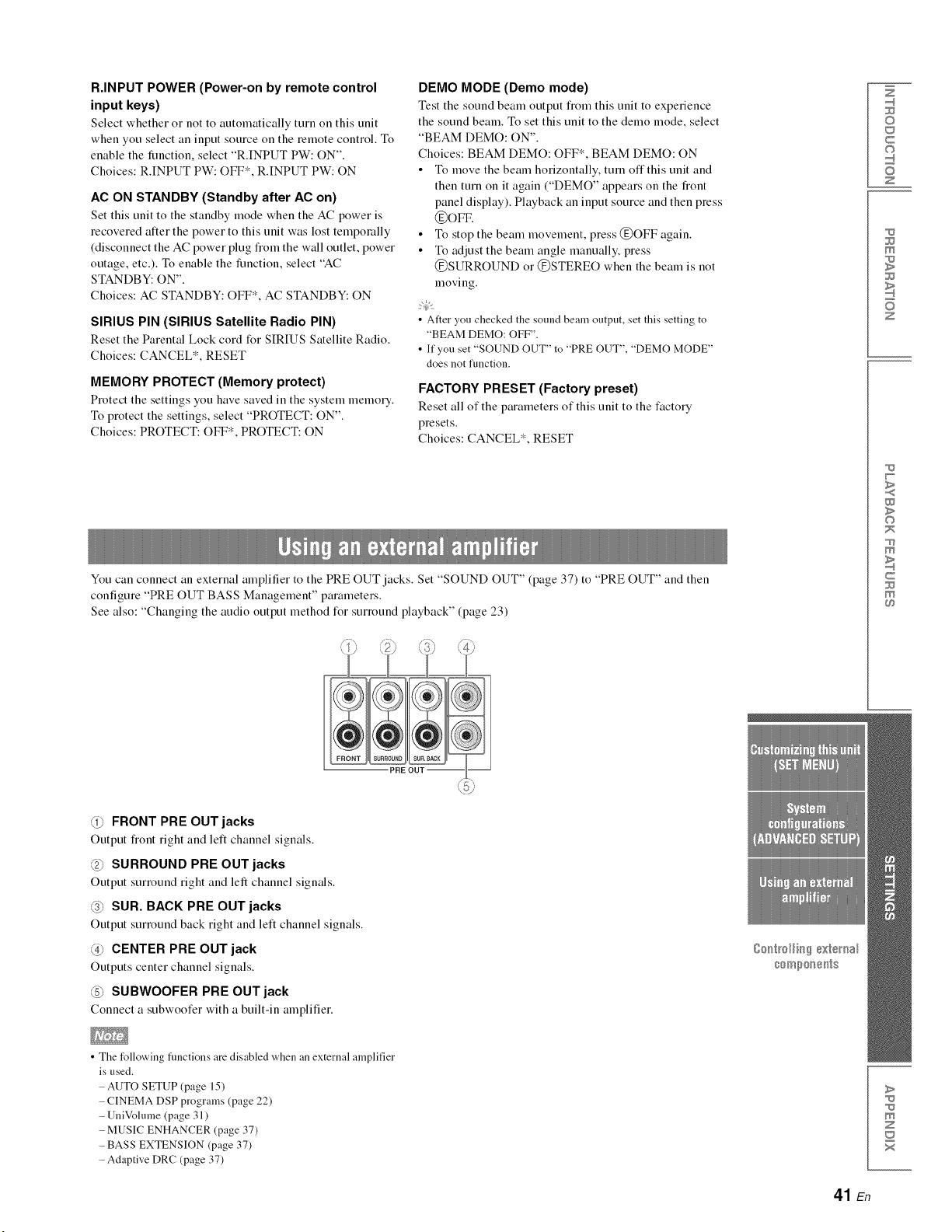
R.INPUT POWER (Power-on by remote control
input keys)
Select whether or not to automatically turn on this trait
when you select an input source on the remote control. To
enable the function, select "R.INPUT PW: ON".
Choices: R.INPUT PW: OFF*, R.INPUT PW: ON
AC ON STANDBY (Standby after AC on)
Set this unit to the standby mode when the AC power is
recovered alter the power to this unit was lost temporally
(disconnect the AC power plug fiom the wall outlet, power
outage, etc.). To enable the function, select "AC
STANDBY: ON".
Choices: AC STANDBY: OFF*, AC STANDBY: ON
SIRIUS PIN (SIRIUS Satellite Radio PIN)
Reset the Parental Lock cord for SIRIUS Satellite Radio.
Choices: CANCEL*, RESET
MEMORY PROTECT (Memory protect)
Protect the settings you have saved in the system memo17.
To protect the settings, select "PROTECT: ON".
Choices: PROTECT: OFF*, PROTECT: ON
DEMO MODE (Demo mode)
Test the sotmd beam output fiom this trait to experience
the sound beam. To set this unit to the demo mode, select
"BEAM DEMO: ON".
Choices: BEAM DEMO: OFF*, BEAM DEMO: ON
• To move the beam horizontally, turn off this unit and
then turn on it again ("DEMO" appears on the fiont
panel display). Playback an input source and then press
®oFv.
• To stop the beam movement, press ®OFF again.
• To adjust the beam angle manually, press
®SURROUND or ®STEREO when the beam is not
moving.
2@t
• After you checked the sound beam output, set this setting to
"BEAM DEMO: OFF".
• If you set "SOUND OUT" to "PRE OUT", "DEMO MODE"
does not function.
FACTORY PRESET (Factory preset)
Reset all of the parameters of this unit to the factory
presets.
Choices: CANCEL*, RESET
You can connect an external amplifier to the PRE OUT jacks. Set "SOUND OUT" (page 37) to "PRE OUT" and then
configure "PRE OUT BASS Management" parameters.
See also: "Changing the audio output method for surround playback" (page 23)
Z
©
c
©
z
m
z
w
>
©
m
c
m
PRE OUT I
@FRONT PRE OUT jacks
Output fi'ont right and left channel signals.
@SURROUND PRE OUT jacks
Output surrotmd right and left channel signals.
@SUR. BACK PRE OUT jacks
Output surrotmd back right and left channel signals.
@CENTER PRE OUT jack
Outputs center channel signals.
@SUBWOOFER PRE OUT jack
Connect a subwoofer with a built-in amplifier.
• The following fimctions are disabled when an external amplifier
is used.
AUTO SETUP (page 15)
CINEMA DSP programs (page 22)
UniVolume (page 31)
MUSIC ENHANCER (page 37)
BASS EXTENSION (page 37)
Adaptive DRC (page 37)
>
m
z
x
41 En
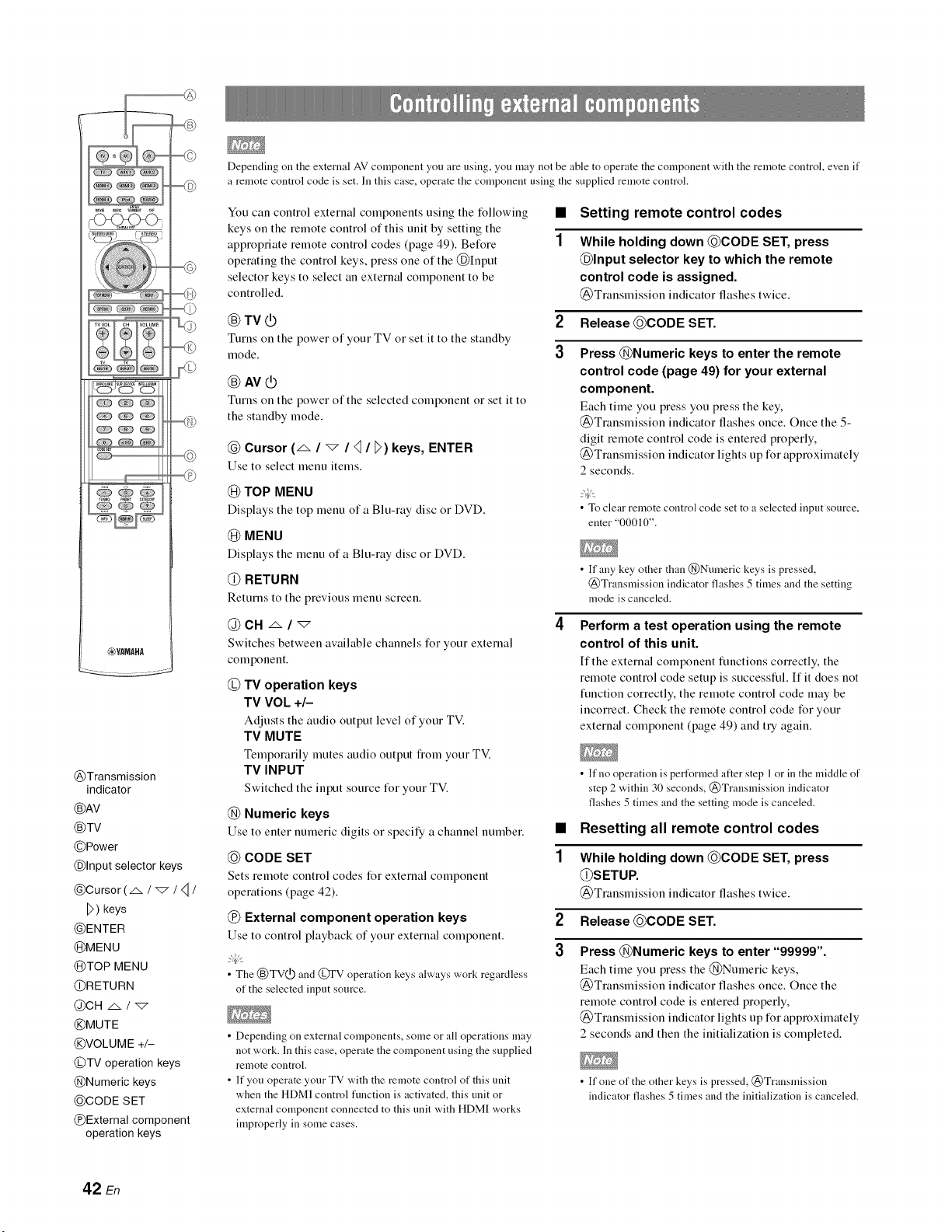
-C_<_<>
_YAMAHA
_77
@Transmission
indicator
®AV
®TV
@Power
@Input selector keys
@Cursor (z_/_/4/
D ) keys
@ENTER
@MENU
@TOP MENU
@RETURN
@CH .m /_
@MUTE
@VOLUME +/-
@TV operation keys
@Numeric keys
@CODE SET
@External component
operation keys
Depending oil the external AV component you are using, you may not be able to operate the component with the remote control, even if
a remote control code is set. In this case, operate the component using the supplied remote control.
You can control external components using the following
keys on the remote control of this unit by setting the
appropriate remote control codes (page 49). Before
operating the control keys, press one of the @Input
selector keys to select an external component to be
controlled.
@TV@
Turns on the power of your TV or set it to the standby
mode.
@AV@
Turns on the power of the selected component or set it to
the standby mode.
@Cursor (_ /"7 ///_) keys, ENTER
Use to select menu items.
@TOP MENU
Displays the top menu of a Blu-ray disc or DVD.
@ MENU
Displays the menu of a Blu-ray disc or DVD.
@ RETURN
Returns to the previous menu screen.
@CN z_/_
Switches between available channels for your external
component.
@TV operation keys
TV VOL +/-
Adjusts the audio output level of your TV.
TV MUTE
Temporarily nmtes audio output flom your TV.
TV INPUT
Switched the input source for your TV.
@Numeric keys
Use to enter numeric digits or specify a channel number.
@CODE SET
Sets remote control codes for external component
operations (page 42).
@External component operation keys
Use to control playback of your external component.
• The @TV0.D and (_FV operation keys always work regardless
of the selected input source.
• Depending on external components, some or all operations may
not work. In this case, operate the component using the supplied
remote controh
• If you operate your TV with the remote control of this unit
when the HDMI control function is activated, this unit or
external component connected to this unit with HDMI works
improperly in some cases.
1
Setting remote control codes
While holding down @CODE SET, press
@Input selector key to which the remote
control code is assigned.
(_)Translnission indicator flashes twice.
2Release@CODE SET.
3Press @Numeric keys to enter the remote
control code (page 49) for your external
component.
Each time you press you press the key,
@Transmission indicator flashes once. Once the 5-
digit remote control code is entered properly,
@Transmission indicator lights up for approximately
2 seconds.
2@'
• To clear remote control code set to a selected input source,
enter "00010".
• If any key other than @Numeric keys is pressed,
@Transmission indicator flashes 5 times and the setting
mode is canceled.
Perform a test operation using the remote
control of this unit.
If the external component functions conectly, the
remote control code setup is successtid. If it does not
limction correctly, the remote control code may be
incorrect. Check the remote control code for your
external component (page 49) and try again.
• If no operation is pert%rmed after step 1or in the middle of
step 2 within 30 seconds, @Transmission indicator
flashes 5 times and the setting mode is canceled.
•Resetting all remote control codes
1While holding down @CODE SET, press
@SETUP.
(_)Translnission indicator flashes twice.
2 Release@CODE SET.
3Press @Numeric keys to enter "99999".
Each time you press the @Numeric keys,
@Transmission indicator flashes once. Once the
remote control code is entered properly,
@Transmission indicator lights up for approximately
2 seconds and then the initialization is completed.
• If one of the other keys is pressed, @Transmission
indicator flashes 5 times and the initialization is canceled.
42 En
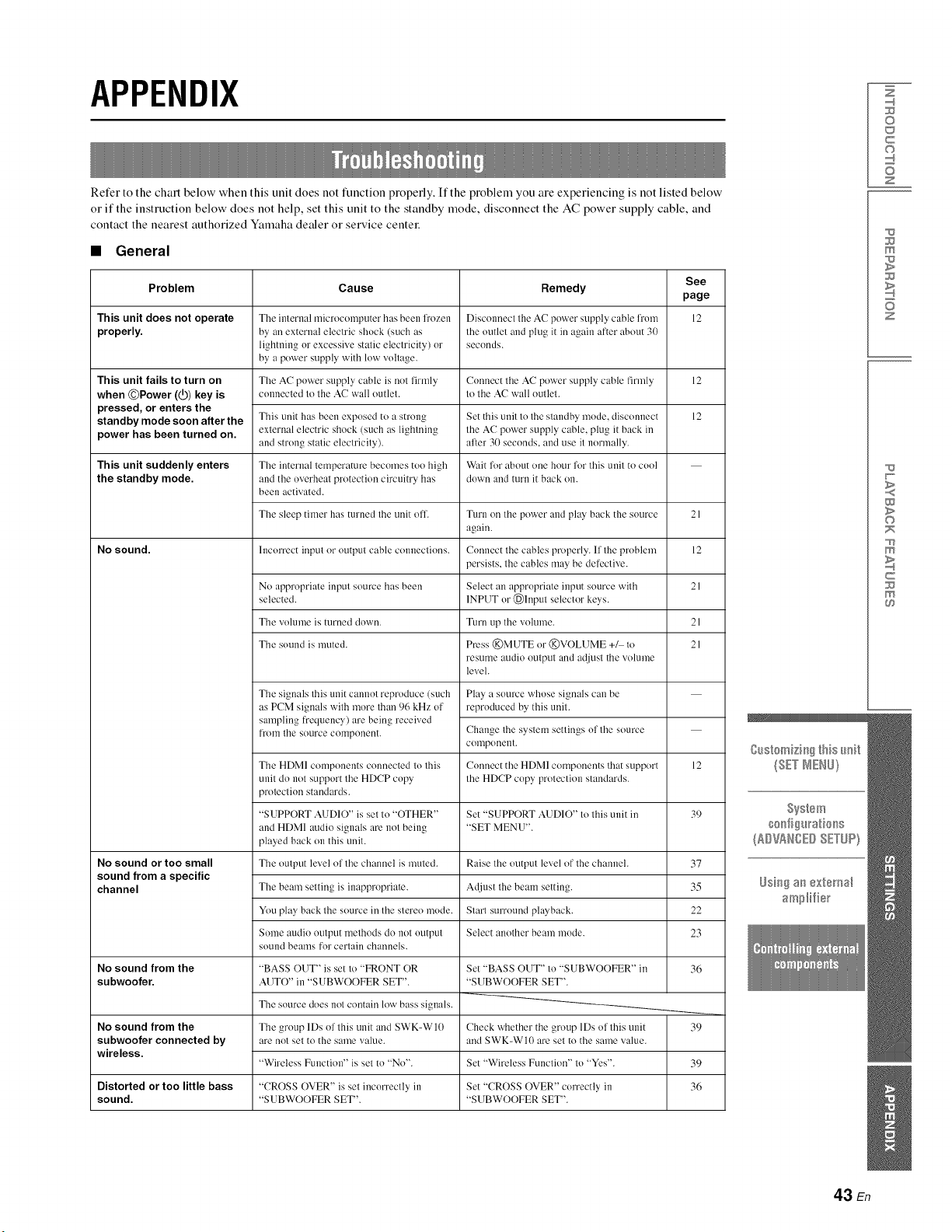
APPENDIX
Refer to the chart below when this unit does not function properly. If the problem you are experiencing is not listed below
or if the instruction below does not help, set this unit to the standby mode, disconnect the AC power supply cable, and
contact the nearest authorized Yamaha dealer or service centre:
•General
See
Problem Cause Remedy page
This unit does not operate Tile imern:d ruicrocumputer has been frozen Disconnect tile AC power suppl3, cable from 12
properly, by an extern:d electric shuck (such as the outlet and plug it in again after about 30
lightning or excessive static electricity) or seconds.
by a power supply with low voltage.
The AC power supply cable is not firmly Connect tile AC puwer supply cable firmly
connected to tile AC wall outlet, to tile AC wall outlet.
This unit fails to turn on
when ©Power (@) key is
pressed, or enters the
standby mode soon after the
power has been turned on.
This unit suddenly enters
the standby mode.
No sound.
No sound or too small
sound from a specific
channel
No sound from the
subwoofer.
No sound from the
subwoofer connected by
wireless.
This unit has been exposed tu a strong
external electric shock (such as lightning
and strong static electricity).
The internal temperature becomes too high
and the uverheat protection circuitry has
been activated.
The sleep timer has turned the unit off.
1ilcurrect input or output cable CUllnections.
Set this unit to the standby mode, disconnect
the AC puwer supply cable, plug it back in
afler 30 seconds, and use it normally.
W:dt for about une hour for this unit to cool
down and turn it back on.
Turn oil tile power and play back the source
again.
Connect the cables properly. If the problem
persists, the cables may be defective.
12
12
No appropriate input source has been Select an appropriate input source with
selected. INPUT or (_)luput selector keys.
Tile volume is turned down. Turn up the volume.
Tile sound is muted. Press @MUTE ur @VOLUME +_ tu
resume audio output and adjust tile volume
level.
Play a source whuse signals can be
reproduced by this unit.
Tile signals this unit cmmot reproduce (such
as PCM signals with inure than 96 kHz uf
sampling frequency) are being received
['lX)ii1tile source corllponent.
21
12
21
21
21
Change the systern settings of the source
CUlllponeI1t.
Connect the HDMI cumponents that support 12
the HDCP copy protection standards.
Set "SUPPORT AUDIO" to this unit in 39
"SET MENU".
Raise the output level of the channel. 37
Adjust the beam setting. 35
Start surround playback. 22
Select another beam mode. 23
Set "BASS OUT" to "SUBWOOFER" in
"SUBWOOFER SET".
Check whether tile group 1Ds uf this unit
and SWK-W10 are set to the same value.
Set "Wireless Function" to "Yes".
Set "CROSS OVER" currectly in
"SUBWOOFER SET".
Tile HDMI cumponents connected to this
unit do nut support the HDCP copy
protection standards.
"SUPPORT AUDIO" is set to "OTHER"
and HDMI audio signals are not being
played back on this unit.
Tile output level of tile channel is muted.
The beam setting is inappropriate.
You play back the source in tile stereo mode.
Some audio output methods do not output
sound beams for certain channels.
"BASS OUT" is set to "FRONT OR
AUTO" in "SUBWOOFER SET".
The source does not contain low bass signals.
Tile group lDs of this unit and SWK-W 10
are not set to the same value.
"Wireless Function" is set to "No".
"CROSS OVER" is set incorrectly in
"SUBWOOFER SET".
36
39
Distorted or too little bass 36
sound.
39
Z
©
c
©
z
m
z
w
>
©
m
c
m
43 En
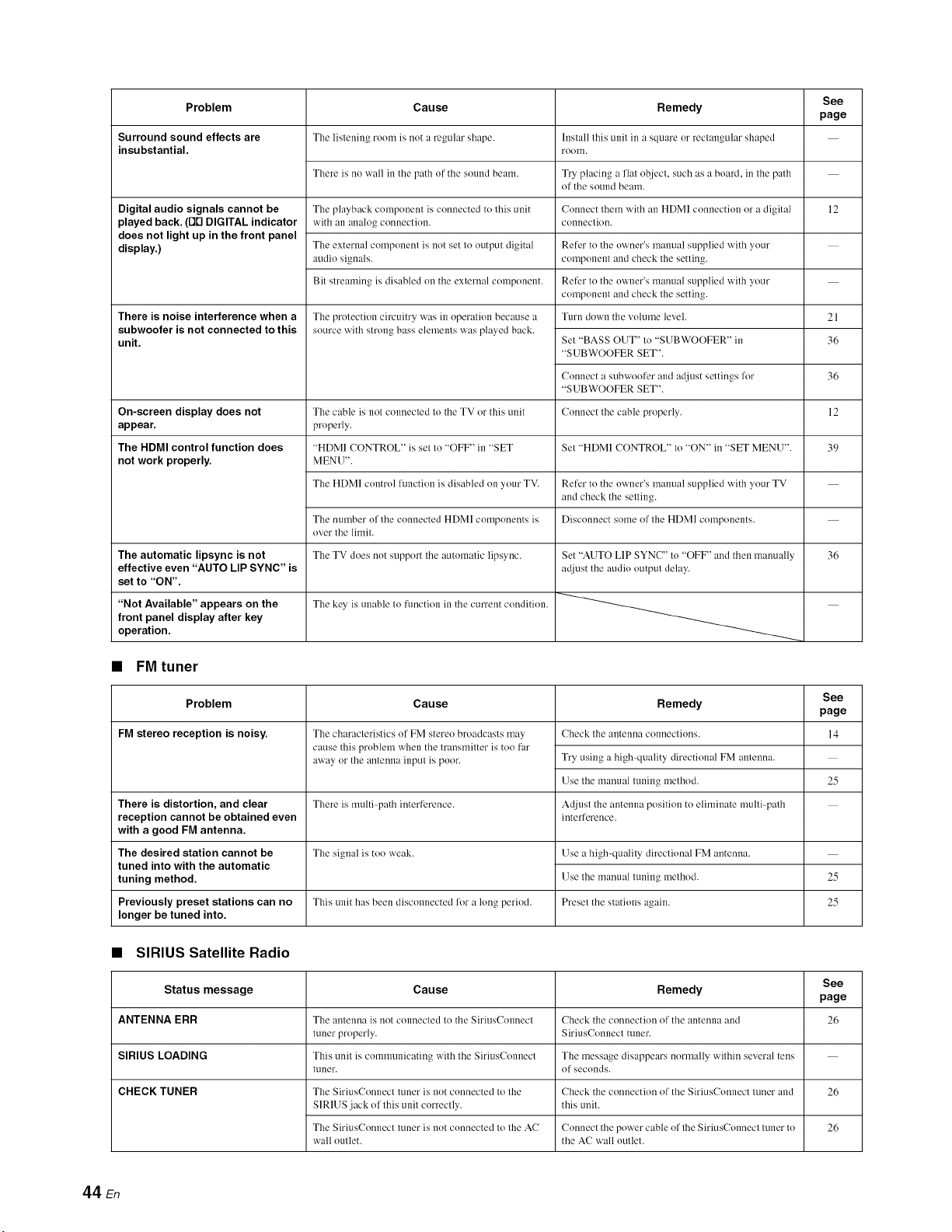
Problem
Surround sound effects are
insubstantial.
Digital audio signals cannot be
played back. (Fit'1DIGITAL indicator
does not light up in the front panel
display.)
There is noise interference when a
subwoofer is not connected to this
unit.
Cause
The listening room is not a regular shape.
There is no wall in the path of the solmd beam.
The playback component is connected to this unit
with an analog connection.
The external component is nut set to output digital
audio signals.
Bit streaming is disabled on the external component.
The protection circuitry was in operation because a
source with strong bass elements was played back.
Remedy
Install this unit in asquare or rectangular shaped
rooIIl.
Try placing a fiat object, such as a board, in the path
of the sound beam.
Connect them with an HDMI connection or a digital
counectiou.
Refer to the owner's manual supplied with your
component and check the setting.
Refer to the owner's ruanual supplied with your
component and check the setting.
Turn down the volume level.
Set "BASS OUT" to "SUBWOOFER" in
"SUBWOOFER SET".
Connect a subwoofer and adjust settings Rw
"SUBWOOFER SET".
Connect the cable properly.On-screen display does not
appear.
Set "HDMI CONTROL" to "ON" in "SET MENU".The HDMI control function does
not work properly.
The automatic lipsync is not
effective even "AUTO LIP SYNC" is
set to "ON".
The cable is not connected to the TV or this unit
properly.
"HDMI CONTROL" is set to "OFF" in "SET
MENU".
The HDMI control function is disabled on your TV. Refer to the owner's manual supplied with your TV
and check the setting.
Disconnect some of the HDMI components.The number of the connected HDMI components is
over the limit.
The TV does not support the automatic lipsync.
The key is unable to functiun in the cmTent condition."Not Available" appears on the
front panel display after key
operation.
Set "AUTO LIP SYNC" to "OFF' and then manually
adjust the audio output delay.
•FM tuner
Problem Cause
FM stereo reception is noisy. The characteristics of FM stereo broadcasts may
cause this problem when the transmitter is too far
away or the antenna input is poor.
There is distortion, and clear There is multiq_ath interference.
reception cannot be obtained even
with a good FM antenna.
Tile signal is too weak.
The desired station cannot be
tuned into with the automatic
tuning method.
Remedy
Cheek tile antenna connections.
Try using a high-quality directional FM antenna.
Use the manual tuning method.
Adjust the antenna position to eliminate multi-path
interference.
Use a high-quality directional FM antenna.
Use the manual tuning method.
Preset the stations again.
See
page
12
Remedy
Cheek the connection of the antenna aM
SiriusConnect tuner.
The message disappears normally within several tens
of seconds.
Check the connection of the SiriusConnect tuner and
this unit.
Connect the power cable of the SiriusConnect tuner to
the AC wall outlet.
21
36
36
12
39
36
See
page
14
25
25
25Previously preset stations can no This unit has been disconnected for a long period.
longer be tuned into.
•SIRIUS Satellite Radio
Status message Cause See
page
ANTENNA ERR Tile antenna is not connected to the SiriusConneet 26
tuner properly.
SIRIUS LOADING This unit is communicating with the SiriusConnect
tuner.
CHECK TUNER The SiriusConnect tuner is not connected to the
SIRIUS jaek of this unit correctly.
The SiriusConnect tuner is not connected to the AC
wall outlet.
26
26
44 En
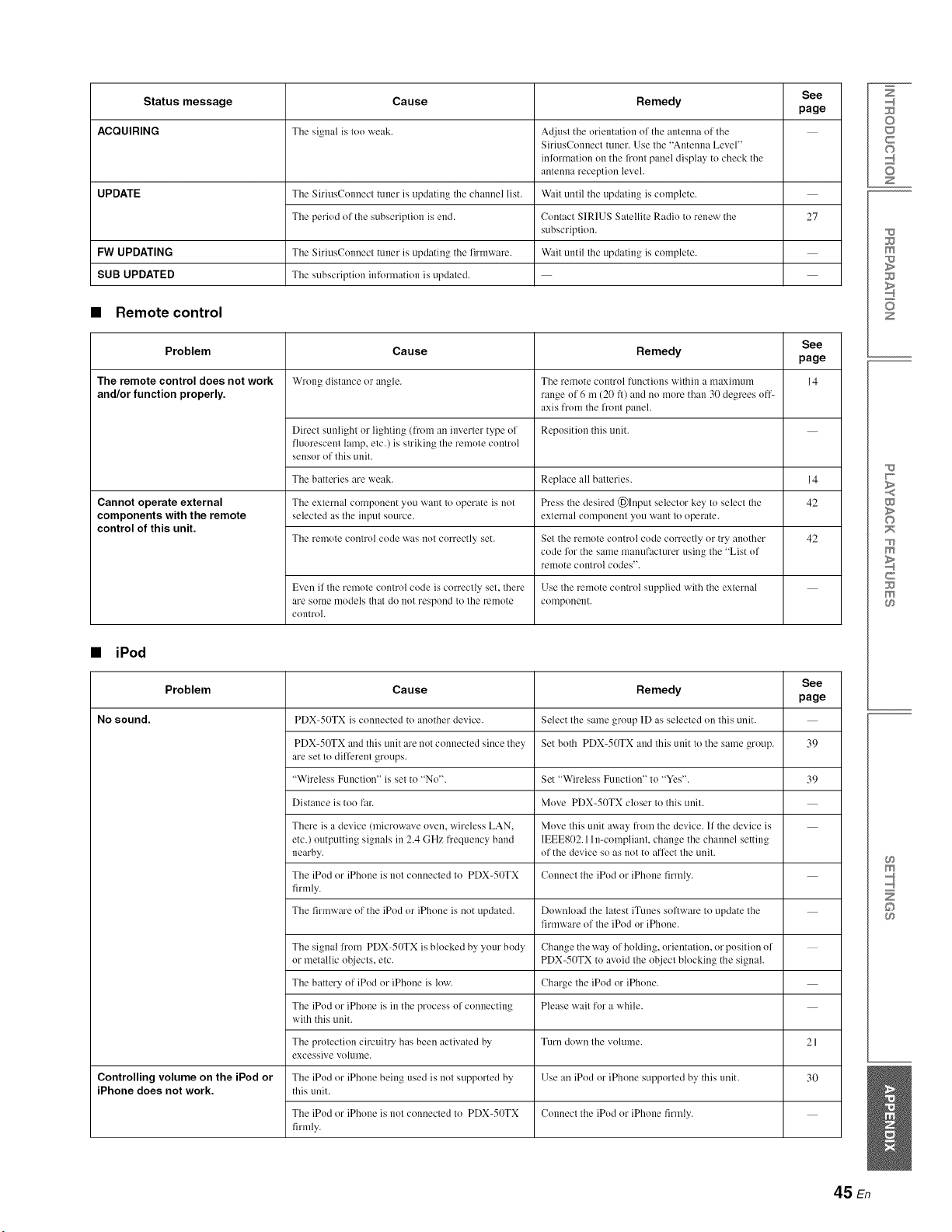
Status message Cause See
page
ACQUIRING Thesignalistooweak.
UPDATE The SiriusConnect tuner is updating the channel list.
The period of the subscription is end.
Remedy
Adjust the orientation of the antenna of the
SiriusConnect tuner. Use the "Antenna Level"
information on the fi'ont panel display to check the
antenna reception level.
Wait until the updating is complete.
Contact SIRIUS Satellite Radio to renew the
subscription.
Wait until the updating is complete.
27
Problem
The remote control does not work
and/or function properly.
FW UPDATING The SiriusConnect tuner is updating the firmware.
SUB UPDATED The subscription information is updated.
•Remote control
Cause See
page
Wrong distance or angle. 14
Remedy
The remote control functions within a rnaximum
range of 6 m (20 fl) and no more than 30 degrees off-
axis ['FOII1the front panel.
Reposition this unit.Direct sunlight or lighting (from an inverter type of
fluorescent lamp, etc.) is striking the remote control
sensor of this unit.
The batteries are weak. Replace all balteries.
Even if the remote control code is correctly set, there
are some models thai do not resi')ond to the remote
control.
14
42Cannot operate external
components with the remote
control of this unit.
•iPod
Problem
No sound.
The external component you want to operate is not Press the desired (_)luput selector key to select the
selected as the input source, external component you want to operate.
The remote control code was not correctly set. Set the remote control code correctly or try another 42
code %r the same manufacturer using the "List of
remote COiltrol codes".
Use the remote control supplied with the external
COlllponellt.
Remedy
Select the same group 1D as selected on this unit.
Set both PDX=50TX and this unit to the same group.
See
page
39
Cause
PDX-50TX is connected to another devk'e.
PDX-50TX and this unit are not connected since they
are set to different groups.
"Wireless Function" is set to "No".
Distance is too far.
There is a device (microwave oven, wireless LAN,
etc.) outputting signals in 2.4 GHz frequency band
nearby.
The iPod or iPhone is not connected to PDX-50TX
firmly.
The firmware of the iPod or iPhone is not updated.
Set "Wireless Function" to "Yes". 39
Move PDX-50TX closer to this unit.
Move this unit away from the device. If the device is
1EEE802.11 n-compliant, change the channel setting
of the device so as not to affect the unit.
Connect the iPod or iPhone firmly.
Download the latest iTunes soflware to update the
firmware of the iPod or iPhone.
The signal from PDX-50TX is blocked by your body Change the way of holding, orientation, or position of
or metallic objects, etc. PDX-50TX to avoid the object blocking the signal.
The battery of iPod or iPhone is low. Charge the iPod or iPhone.
The iPod or iPhone is in the process of connecting Please wait for a while.
with this unit.
Turn down the volume.
The protection circuitry has been activated by
excessive volume.
Use an iPod or iPhone supported by this unit.
Connect the iPod or iPhone firmly.
Controlling volume on the iPod or
iPhone does not work.
The iPod or iPhone being used is not supported by
this unit.
The iPod or iPhone is not connected to PDX-50TX
firmly.
21
30
Z
©
c
©
z
m
z
w
>
©
m
c
m
m
©
45 En
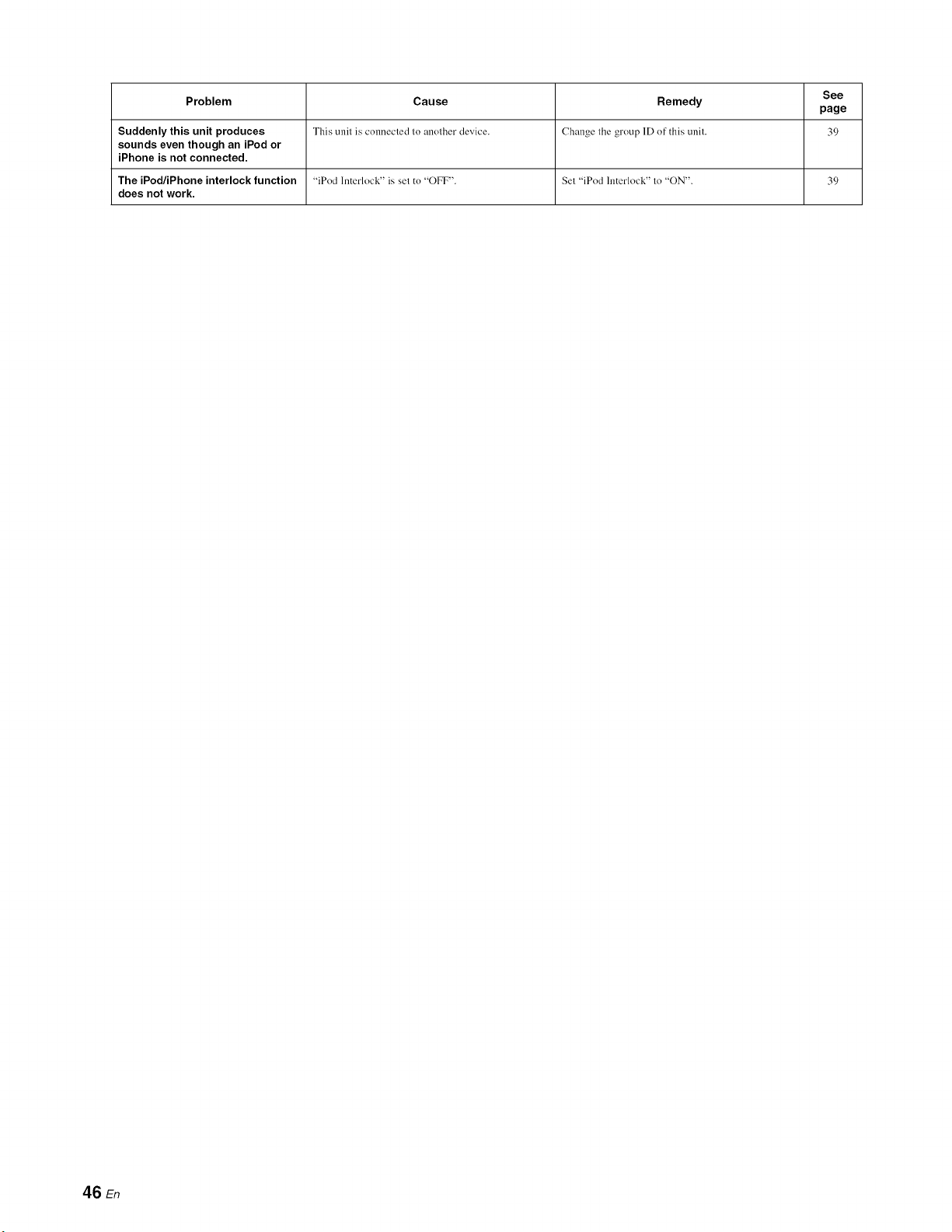
See
Problem Cause Remedy page
Suddenly this unit produces This unit is connected to another device. Change the group 1D of" this unit. 39
sounds even though an iPod or
iPhone is not connected.
The iPod/iPhone interlock function "iPod Interlock" is set to "OFF". Set "iPod Interlock" to "ON'. 39
does not work.
46 En
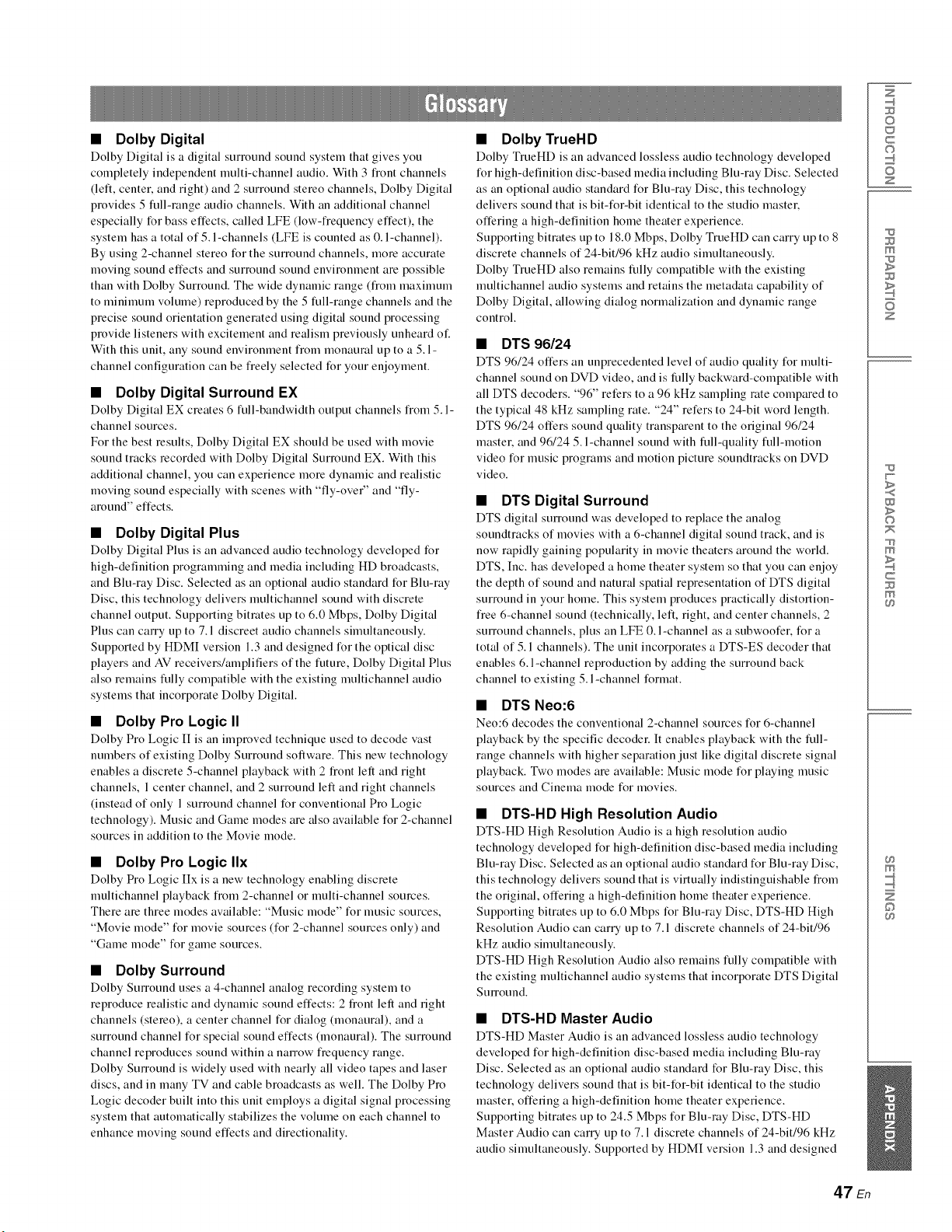
• Dolby Digital
Dolby Digital is a digital surround sotmd system that gives you
completely independent multi-channel audio. With 3 fiont channels
(left, center, and right) and 2 surround stereo channels, Dolby Digital
provides 5 full-range audio channels. With an additional channel
especially for bass effects, called LFE (low-fiequency effect), the
system has a total of 5. l-channels (LFE is counted as 0. l-channel).
By using 2-channel stereo for the sunouud channels, more accurate
moving sound effects and surround sound environment are possible
than with Dolby Surround. The wide dynamic range (from maximum
to nfininmm volume) reproduced by the 5 full-range channels and the
precise sound orientation generated using digital sound processing
provide listeners with excitement and realism previously unheard o1:
With this unit, any sound environment fiom monaural up to a 5. l-
channel configuration can be fieely selected for your enjoyment.
•Dolby Digital Surround EX
Dolby Digital EX creates 6 full-bandwidth output channels fiom 5. l-
channel sources.
For the best results, Dolby Digital EX should be used with movie
sound tracks recorded with Dolby Digital Surround EX. With this
additional channel, you can experience more dynamic and realistic
moving sound especially with scenes with "fly-over" and "fly-
arouud" effects.
•Dolby Digital Plus
Dolby Digital Plus is an advanced audio technology developed t_r
high-definition progranmfiug and media including HD broadcasts,
and Blu-ray Disc. Selected as an optional audio standard for Blu-ray
Disc, this technology delivers multichauuel sound with discrete
channel output. Supporting bitrates up to 6.0 Mbps, Dolby Digital
Plus can calTy up to 7. l discreet audio channels simultaneously.
Supported by HDMI version 1.3 and designed for the optical disc
players and AV receivers/amplifiers of the future, Dolby Digital Plus
also remains fully compatible with the existing nmltichauuel audio
systems that incorporate Dolby Digital.
•Dolby Pro Logic II
Dolby Pro Logic I[ is an improved technique used to decode vast
numbers of existing Dolby Surround software. This new technology
enables a discrete 5-channel playback with 2 fiout left and right
channels, 1 center channel, and 2 surround left and right channels
(instead of only l surround channel for conventional Pro Logic
technology). Music and Game modes are also available for 2-channel
sources in addition to the Movie mode.
•Dolby Pro Logic IIx
Dolby Pro Logic IIx is a new technology enabling discrete
nmltichauuel playback fiom 2-channel or nmlti-chauuel sources.
There are three modes available: "Music mode" for nmsic sources,
"Movie mode" for movie sources (for 2-channel sources only) and
"Game mode" for game sources.
•Dolby Surround
Dolby SmTound uses a 4-channel analog recording system to
reproduce realistic and dynamic sound effects: 2 flout left and fight
channels (stereo), a center channel for dialog (monaural), and a
surround channel for special sound effects (monaural). The surround
channel reproduces sound within a ua1Tow fi'equeucy range.
Dolby SmTouud is widely used with nearly all video tapes and laser
discs, and in many TV and cable broadcasts as well. The Dolby Pro
Logic decoder built into this unit employs a digital signal processing
system that automatically stabilizes the volume on each channel to
enhance moving sound effects and directionality.
•Dolby TrueHD
Dolby TrueHD is an advanced lossless audio technology developed
for high-definition disc-based media including Blu-ray Disc. Selected
as an optional audio standard for Blu-ray Disc, this technology
delivers sound that is bit-for-bit identical to the studio master,
offering a high-definition home theater experience.
Supporting bitrates up to 18.0 Mbps, Dolby TrueHD can carry up to 8
discrete channels of 24-bit/96 kHz audio simultaneously.
Dolby TrueHD also remains fully compatible with the existing
nmltichanuel audio systems and retains the metadata capability of
Dolby Digital, allowing dialog normalization and dyuanfic range
control.
•DTS 96/24
DTS 96/24 offers an unprecedented level of audio quality for multi-
channel sound on DVD video, and is fully backward-compatible with
all DTS decoders. "96" refers to a 96 kHz sampling rate compared to
the typical 48 kHz sampling rate. "24" refers to 24-bit word length.
DTS 96/24 offers sound quality transparent to the original 96/24
master, and 96/24 5. l-channel sound with full-quality full-motion
video for nmsic programs and motion picture souudtracks on DVD
video.
•DTS Digital Surround
DTS digital surround was developed to replace the analog
souudtracks of movies with a 6-channel digital sound track, and is
now rapidly gaining popularity in movie theaters around the world.
DTS, Inc. has developed a home theater system so that you can enjoy
the depth of sound and natural spatial representation of DTS digital
surround in your home. This system produces practically distortiou-
fiee 6-channel sound (technically, left, right, and center channels, 2
smTouud channels, plus an LFE 0. l-channel as a subwoofer, for a
total of 5.1 channels). The unit incorporates a DTS-ES decoder that
enables 6. l-channel reproduction by adding the surround back
channel to existing 5. l-channel format.
•DTS Neo:6
Neo:6 decodes the conventional 2-channel sources for 6-channel
playback by the specific decoder. It enables playback with the full-
range channels with higher separation just like digital discrete signal
playback. Two modes are available: Music mode for playing music
sources and Cinema mode for movies.
•DTS-HD High Resolution Audio
DTS-HD High Resolution Audio is a high resolution audio
technology developed for high-definition disc-based media including
Blu-ray Disc. Selected as an optional audio standard for Blu-ray Disc,
this technology delivers sound that is virtually indistinguishable fiom
the original, offering a high-definition home theater experience.
Supporting bitrates up to 6.0 Mbps for Blu-ray Disc, DTS-HD High
Resolution Audio can can 7 up to 7.1 discrete channels of 24-bit/96
kHz audio simultaneously.
DTS-HD High Resolution Audio also remains fully compatible with
the existing multichauuel audio systems that incorporate DTS Digital
Surround.
•DTS-HD Master Audio
DTS-HD Master Audio is an advanced lossless audio technology
developed for high-definition disc-based media including Blu-ray
Disc. Selected as an optional audio standard for Blu-ray Disc, this
technology delivers sound that is bit-for-bit identical to the studio
master, offering a high-definition home theater experience.
Supporting bitrates up to 24.5 Mbps for Blu-ray Disc, DTS-HD
Master Audio can can 7 up to 7.1 discrete channels of 24-bit/96 kHz
audio sinmltaueously. Supported by HDMI version 1.3 and designed
Z
©
c
©
z
m
z
w
>
©
m
c
m
m
©
47 En
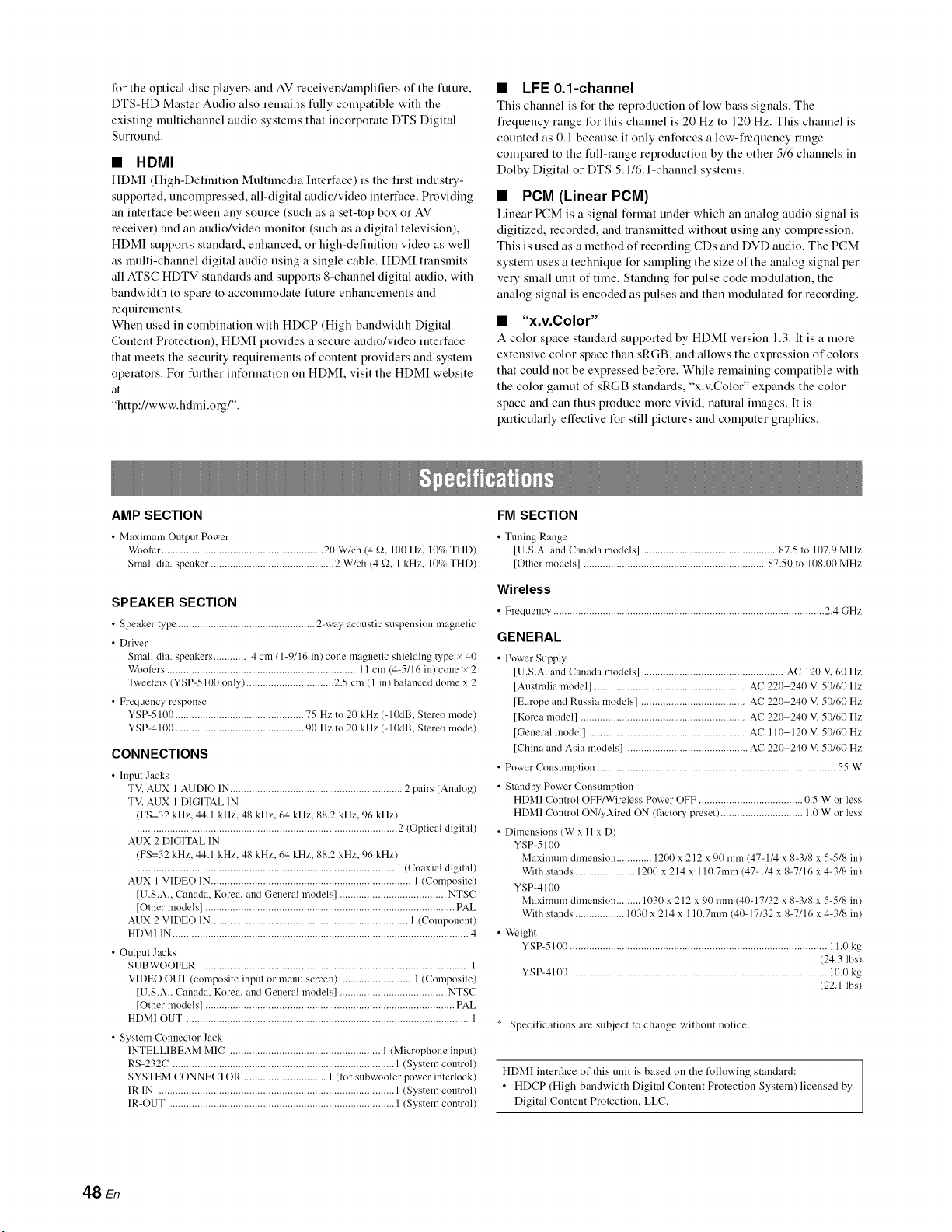
for the optical disc players and AV receivers/amplifiers of the future,
DTS-HD Master Audio also remains fully compatible with the
existing multichannel audio systems that incorporate DTS Digital
Surround.
•HDMI
HDMI (High-Definition Multimedia Intert:ace) is the first indust U-
supported, uncompressed, all-digital audio/video interface. Providing
an interface between any source (such as a set-top box or AV
receiver) and an audio/video monitor (such as a digital television),
HDMI supports standard, enhanced, or high-definition video as well
as multi-channel digital audio using a single cable. HDMI transmits
all ATSC HDTV standards and supports 8-channel digital audio, with
bandwidth to spare to accommodate future enhancements and
requirements.
When used in combination with HDCP (High-bandwidth Digital
Content Protection), HDMI provides a secure audio/video interface
that meets the security requirements of content providers and system
operators. For further inlkmnation on HDMI, visit the HDMI website
at
"http://www.hdmi.org/".
•LFE 0.1-channel
This channel is for the reproduction of low bass signals. The
fiequency range lk_r this channel is 20 Hz to 120 Hz. This channel is
counted as 0.1 because it only enlk_rces a low-fiequency range
compared to the full-range reproduction by the other 5/6 channels in
Dolby Digital or DTS 5.1/6. l-channel systems.
•PCM (Linear PCM)
Linear PCM is a signal format under which an analog audio signal is
digitized, recorded, and transmitted without using any compression.
This is used as a method of recording CDs and DVD audio. The PCM
system uses a technique for sampling the size of the analog signal per
ve Usmall unit of time. Standing lk_r pulse code modulation, the
analog signal is encoded as pulses and then modulated for recording.
• "x.v.Color"
A color space standard supported by HDMI version 1.3. It is a more
extensive color space than sRGB, and allows the expression of colors
that could not be expressed before. While remaining compatible with
the color gamut of sRGB standards, "x.v.Color" expands the color
space and can thus produce more vivid, natural images. It is
particularly effective for still pictures and computer graphics.
AMP SECTION
• Maximum Output Power
Woofer ........................................................... 20 W/ch (4 _2, 100 Hz. 10% THD)
Small dia. speaker. ............................................ 2 W/ch (4 f2, 1 kHz. 10c/_ THD)
SPEAKER SECTION
• Speaker type .................................................. 2-way acoustic suspension magnetic
• Driver
Small dia. speakers ............ 4 cm ( 1-9116 in) cone magnetic shielding type × 40
Woofers ..................................................................... 11 cm (4-5116 in) cone × 2
Tweeters (YSP-5100 only) ................................ 2.5 cm ( 1 in) balanced dome x 2
• Frequency response
YSP-5100 ............................................... 75 Hz to 20 kHz (- 10dB, Stereo mode)
YSP-4100 ............................................... 90 Hz to 20 kHz (- 10dB, Stereo mode)
CONNECTIONS
• Input Jacks
TV, AUX 1 AUDIO IN ............................................................... 2 pairs (Analog)
TV, AUX 1 DIGITAL 1N
(FS=32 kHz, 44.1 kHz, 48 kHz, 64 kHz, 88.2 kHz, 96 kHz)
............................................................................................... 2 (Optical digital)
AUX 2 DIGITAL IN
(FS=32 kHz, 44.1 kHz, 48 kHz, 64 kHz, 88.2 kHz, 96 kHz)
.............................................................................................. 1 (Coaxial digital)
AUX 1 VIDE()IN ......................................................................... 1 (Composite)
[U.S.A., Canada, Korea, mid General models] ....................................... NTSC
[Other models] ........................................................................................... PAL
AUX 2 VIDE() 1N........................................................................ 1 (Component)
HDMI 1N ............................................................................................................ 4
• Output Jacks
SUBWOOFER .................................................................................................. 1
VIDEO OUT (composite input or menu screen) ......................... 1 (Composite)
[U.S.A., Canada, Korea, and General models] ....................................... NTSC
[Other models] ........................................................................................... PAL
HDMI OUT ....................................................................................................... 1
• System Connector Jack
1NTELLIBEAM MIC ....................................................... 1 (Microphone input)
RS-232C ................................................................................. 1 (System control)
SYSTEM CONNECTOR .............................. 1 (for subwoofcr power interlock)
1R 1N ...................................................................................... 1 (System control)
1R-OUT .................................................................................. 1 (System control)
FM SECTION
• Tuning Range
[U.S.A. and Canada models] ................................................ 87.5 to 107.9 MHz
[Other models] .................................................................. 87.50 to 108.00 MHz
Wireless
• Frequency ................................................................................................... 2.4 GHz
GENERAL
• Power Supply
[U.S.A. and Canada models] ................................................... AC 120 V, 60 Hz
[Australia model] ....................................................... AC 220-240 V, 50/60 Hz
[Europe and Russia models] ...................................... AC 220-240 V, 50/60 Hz
[Korea model] ............................................................ AC 220-240 V, 50/60 Hz
[General model] ......................................................... AC 110-120 V, 50/60 Hz
[China and Asia models] ............................................ AC 220-240 V, 50/60 Hz
• Power Consumption ....................................................................................... 55 W
• Standby Power Consumption
HDMI Control OFF/Wireless Power OFF ...................................... 0.5 W or less
HDMI Control ON@Aired ON (factnry preset) .............................. 1.0 W or less
• Dimensions (W x H x D)
YSP-5100
Maximum dimension ............. 1200 x 212 x 90 mm (4%1/4 x 8-3/8 x 54/8 in)
With stands ...................... 1200 x 214 x 110.7ram (4%1/4 x 8-7/16 x 4-3/8 in)
YSP-4100
Maximum dimension ......... 1030 x 212 x 90 mm (40-17/32 x 8-3/8 x 5-5/8 in)
With stands .................. 1030 x 214 x 110.7ram (40-17/32 x 8-7/16 x 4-3/8 in)
• Weight
YSP-5100 .............................................................................................. 11.0 kg
(24.3 lbs)
YSP-4100 .............................................................................................. 10.0 kg
(22.1 lbs)
* Specifications are subject to change without notice.
HDMI interface of this unit is based on the l_llowing standard:
• HDCP (High-bandwidth Digital Content Protection System) licensed by
Digital Content Protection, LLC.
48 En
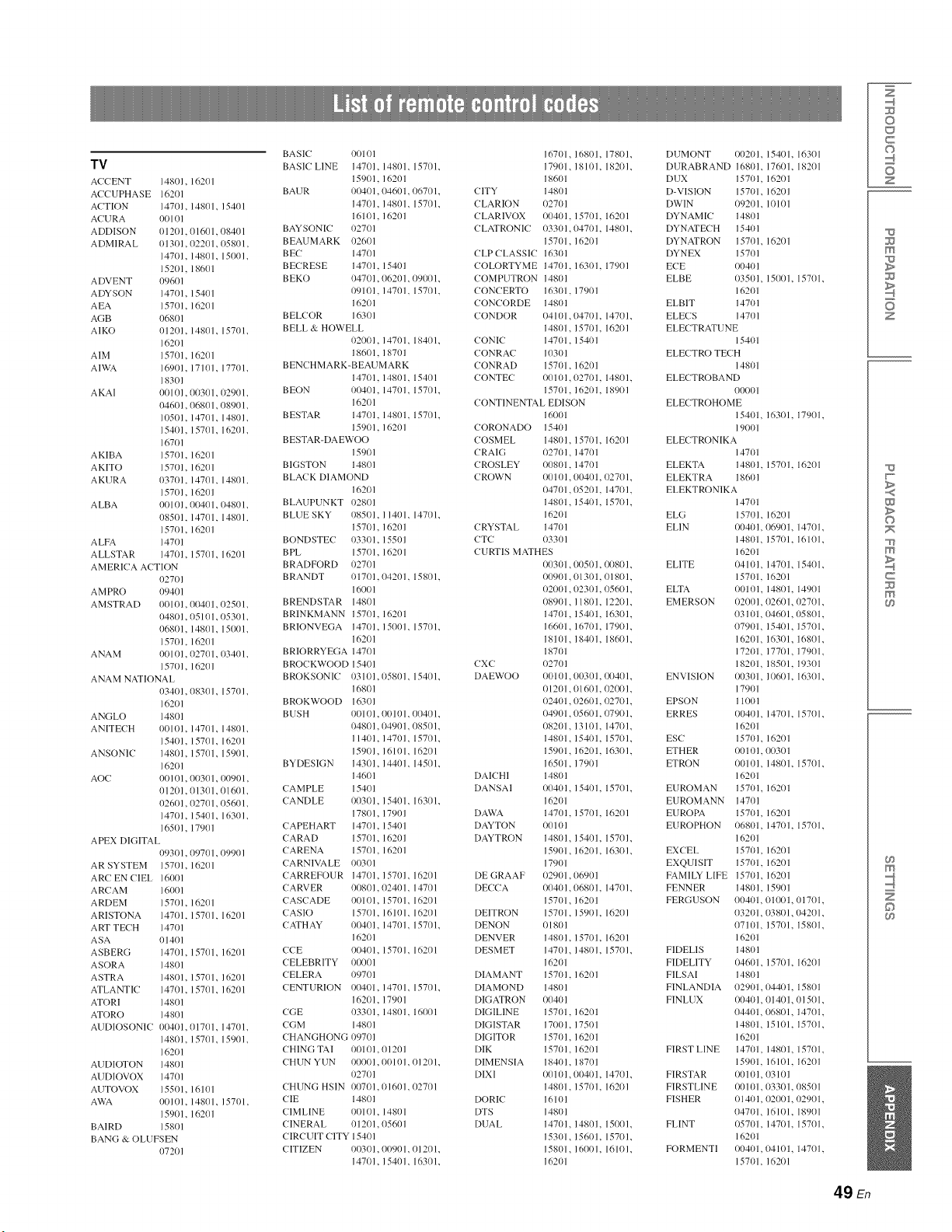
TV
ACCENT 14801, 16201
ACC UPHASE 16201
ACTION 14701, 14801, 15401
ACURA 00101
ADDISON 01201, 01601, 08401
ADMIRAL 01301, 02201, 05801,
14701, 14801, 15001,
15201, 18601
ADVENT 09601
ADYSON 14701, 15401
AEA 15701, 16201
AGB 06801
AIKO 01201, 14801, 15701,
162o 1
AIM 15701, 16201
AIWA 16901, 17101, 17701,
18301
A KAI 0Ill 01,011301, 02901,
04601, 06801, 08901,
10501, 14701, 14801,
154111, 15701, 16201,
167o 1
AKIBA 15701, 16201
AKITO 15701, 16201
AKURA 03701, 14701, 14801,
15701, 16201
A LBA 0Ill 01,00401, 04801,
08501, 14701, 14801,
157111, 16201
ALFA 14701
ALLSTAR 14701, 15701, 16201
AMERICA ACTION
027/) 1
A M PRO 09401
AMSTRAD 00101, 00401, 02501,
04801, 05101, 05301,
068/11, 14801, 15001,
15701, 16201
ANAM 00101, 02701, 03401,
157111, 16201
ANAM NATIONAL
034111, 08301, 15701,
16201
ANGLO 14801
ANITEC H 00101, 14701, 14801,
15401, 15701, 16201
ANSONIC 14801, 15701, 15901,
16201
AOC 0Ill 01, 011301, o0901,
01201, 01301, 01601,
02601, 02701, 05601,
14701, 15401, 16301,
16501, 17901
APEX DIGITAL
093/11, 09701, 09901
AR SYSTEM 15701, 16201
ARC EN CIEL 16001
ARCAM 16001
ARDEM 15701, 16201
ARISTONA 147111, 15701, 16201
ART TECH 14701
ASA 01401
ASBERG 14701, 15701, 16201
ASORA 14801
ASTRA 14801, 15701, 16201
ATLANTIC 14701, 15701, 16201
ATORI 14801
ATORO 14801
AUDIOSONIC 00401, 01701, 14701,
14801, 15701, 15901,
16201
AUDIOTON 14801
AUDIOVOX 14701
AUTOVOX 15501, 16101
AWA 00101, 14801, 157/11,
15901, 16201
BAIRD 15801
BANG & OLUFSEN
072O1
BASIC 0O101
BASIC LINE 14701, 14801, 15701,
159(11, 16201
BAUR 00401, 04601, 06701,
147/11, 14801, 15701,
16101, 16201
BAYSONIC 02701
BEAUMARK 02601
B E( 14701
BEC RESE 14701, 15401
BEKO 04701, 06201, 091101,
09101, 14701, 15701,
16201
BELCOR 16301
BELL & HOWELL
02001, 14701, 18401,
186/11, 18701
BENC HMARK-BEAUMARK
147111, 14801, 15401
BEON 00401, 14701, 15701,
162Ol
BESTAR 14701, 14801, 15701,
159111, 16201
BESTAR-DAEWOO
15901
BIGSTON 14801
BLACK DIAMOND
16201
BLAUPUNKT 02801
BLUE SKY 08501, 11401, 14701,
157111, 16201
BONDSTEC 03301, 15501
BPL 15701, 16201
BRADFORD 02701
BRANDT 01701,04201, 15801,
16001
BRENDSTAR 14801
BRINKMANN 15701, 16201
BRIONVEGA 147111, 15001, 15701,
16201
BRIORRYEGA 1471/1
BROC KWOOD 15401
BROKSONIC 03101, 05801, 154(/1,
16801
BROKWOOD 16301
B USH 00101, 00101, 00401,
04801, 04901, 08501,
11401, 14701, 15701,
159111, 16101, 16201
BYDESIGN 14301, 14401, 14501,
14601
CAMPLE 15401
CANDLE 00301, 15401, 16301,
178111, 17901
C APEHART 14701, 15401
CARAD 15701, 16201
C ARENA 15701, 16201
C ARNI¥_LE 00301
CARREFOUR 14701, 15701, 16201
CARVER 00801,02401, 14701
CASCADE 00101, 15701, 16201
CASIO 15701, 16101, 16201
CATHAY 00401, 14701, 15701,
16201
CCE 00401, 15701, 16201
CELEBRITY 00001
C ELERA 09701
CENTURION 00401, 14701, 15701,
162111, 17901
CGE 03301, 14801, 16001
CGM 14801
C HANGHONG 0970 l
CHING TAI 00101, 01201
CHUN YUN 00001, 00101,01201,
O27O1
CHUNG HSIN 00701, 01601,02701
CIE 14801
C IMLINE 00101, 14801
C INERAL 01201, 05601
CIRCUIT CITY 15401
CITIZEN 00301, 00901, 01201,
14701, 15401, 16301,
16701, 16801, 178111, DUMONT 00201, 15401, 16301
17901, 18101, 182111, DURABRAND 16801, 17601, 18201
18601 DUX 15701, 16201
CITY 14801 D-VISION 157111, 16201
CLARION 02701 DWIN 09201, 10101
CLARIVOX 00401, 15701, 16201 DYNAMIC 14801
CLATRONIC 03301,04701, 14801, DYNATECH 15401
157/11, 16201 DYNATRON 15701, 16201
CLP CLASSIC 163/11 DYNEX 15701
COLORTYME 14701, 16301, 17901 ECE 00401
COMPUTRON 14801 ELBE 03501, 15001, 15701,
CONCERTO 16301, 17901 16201
CONCORDE 14801 ELBIT 14701
CONDOR 04101,04701, 14701, ELECS 14701
14801, 157111, 162111 ELECTRATUNE
CONIC 14701, 15401 15401
CONRAC 10301 ELECTRO TECH
CONRAD 15701, 16201 148111
CONTEC 00101,1127111, 14801, ELEC TROBAND
15701, 16201, 18901 00001
CONTINENTAL EDISON ELEC TROHOME
16001 15401, 16301, 17901,
CORONADO 15401 19001
COSMEL 14801, 15701, 16201 ELECTRONIKA
CRAIG 02701, 14701 14701
CROSLEY 00801, 14701 ELEKTA 14801, 15701, 16201
CROWN 00101,00401,02701, ELEKTRA 18601
04701,05201, 14701, ELEKTRONIKA
14801, 15401, 15701, 147/)1
16201 ELG 15701, 16201
CRYSTAL 14701 ELIN 00401, 06901, 14701,
CTC 03301 14801, 15701, 16101,
CURTIS MATHES 16201
00301,00501,00801, ELITE 04101, 14701, 15401,
00901,01301, 01801, 15701, 16201
02001,02301,05601, ELTA 00101, 14801, 14901
08901, I 1801, 12201, EMERSON 02001, 02601, 02701,
14701, 15401, 16301, 03101, 04601,05801,
16601, 16701, 17901, 07901, 15401, 15701,
18101, 18401, 18601, 16201, 16301, 16801,
18701 17201, 17701, 17901,
CXC 02701 18201, 18501, 19301
DAEWOO 111)1()1,011301,011401, ENVISION 00301, 10601, 16301,
O1201,01601, 02001, 17901
02401,026111, 02701, EPSON 11001
04901,05601, 07901, ERRES 00401, 14701, 15701,
08201, 13101, 14701, 16201
14801, 15401, 15701, ESC 15701, 16201
15901, 16201, 1630 I, ETH ER 00101,00301
16501, 17901 ETRON 00101, 14801, 15701,
DAIC HI 14801 16201
DANSAI 00401, 15401, 15701, EUROMAN 15701, 16201
16201 EUROMANN 14701
DAWA 14701, 15701, 16201 EUROPA 157111, 16201
DAYTON 00101 EUROPHON 06801, 14701, 15701,
DAYTRON 14801, 15401, 15701, 16201
15901, 16201, 16301, EXCEL 15701, 16201
17901 EXQUISIT 15701, 16201
DE GRAAF 02901,06901 FAMILY LIFE 157111, 16201
DECCA 00401,06801, 14701, FENNER 14801, 15901
15701, 16201 FERGUSON 00401, 01001, 01701,
DEITRON 15701, 15901, 16201 03201, 03801,04201,
DENON Ill 801 07101, 15701, 15801,
DENVER 14801, 15701, 16201 16201
DESMET 14701, 14801, 15701, FIDELIS 14801
16201 FIDELITY 04601, 157111, 16201
DIAMANT 15701, 16201 FILSAI 14801
DIAMOND 14801 FINLANDIA 029111,04401, 15801
DIGATRON 00401 FINLUX 00401, 01401, 01501,
DIGILINE 15701, 16201 04401, 06801, 14701,
DIGISTAR 17001, 17501 14801, 15101, 15701,
DIGITOR 15701, 16201 16201
DIK 157111, 16201 FIRST LINE 147111, 14801, 15701,
DIMENSIA 18401, 18701 15901, 16101, 16201
DIXI 00101,00401, 14701, FIRSTAR 00101, 03101
14801, 15701, 162111 FIRSTLINE 00101,03301,08501
DORIC 16101 FISHER Ill 401, 02001, 02901,
DTS 14801 04701, 16101, 18901
DUAL 14701, 14801, 15001, FLINT 05701, 14701, 15701,
153111, 15601, 15701, 16201
15801, 16001, 16101, FORMENTI 00401,04101, 14701,
16201 157/11, 16201
Z
©
C
©
Z
m
z
w
>
©
m
c
m
m
©
49 En
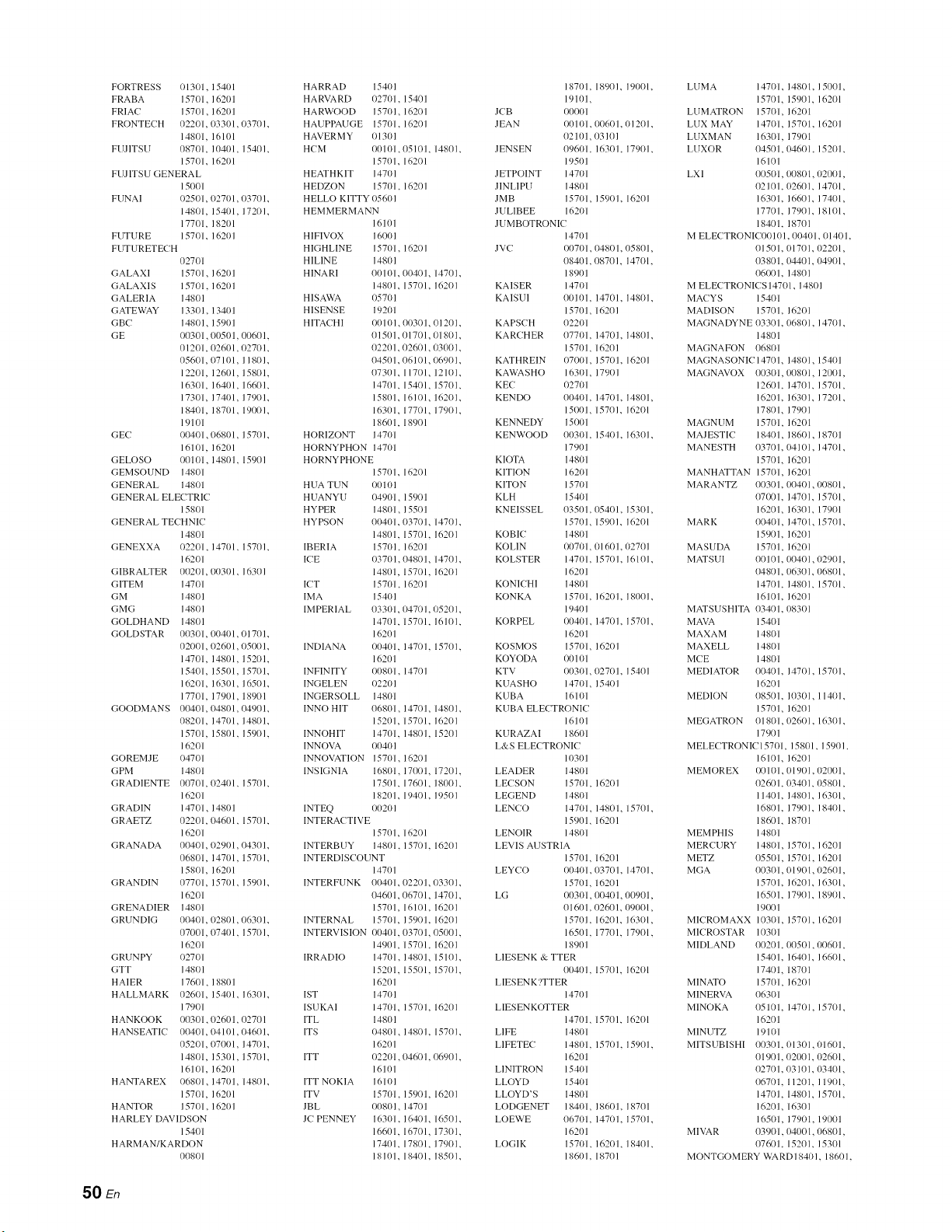
FORTRESS {}131}1, 1541}1
FRABA 15701, 1621}1
FRIAC 15701, 1621}1
FRONTECH 02201, 033/)1,03701.
1481}1, 16101
FUJITSU 08701, 10401, 15401.
157/)1. 1621)1
FUJITSU GENERAL
15001
FUNAI 02501, 02701,03701.
1481)1, 15401, 17201.
177/)1, 18201
FUTURE 15701, 1620 I
FUTURETECH
027/)1
GALAXI 1571)1, 1621}1
GALAXIS 157/)1. 1621}1
GALERIA 1481}1
GATEWAY 13301. 13401
GBC 1481}1, 1591}1
GE {}0301,00501, 00601,
/)1201, 02601,02701.
05601, 07101, 118/)1.
12201, 126/)1, 1581)1.
16301, l{}4t}l, 16601.
17301, 1741}1, 1791}1.
18401, 187(}1, 1901}1.
19101
GE( I}0401, (}68/)1, 15701.
1611}1, 16201
GELOSO {_)101, 14801. 15901
GEMSO1JND 148/)1
GENERAL 14801
GENERAL ELECTRIC
15801
GENERAL TECHNIC
14801
GENEXXA {}2201, 1471}1, 15701.
16201
GIBRALTER 00201. (}03/)1. 16301
GITEM 147/)1
GM 148/)1
GMG 1481}1
GOLDHAND 1481}1
GOLDSTAR 003/)1, 0(/41}1,01701.
021}/)1,026/)1, (}5001.
14701, 14801, 1521}1.
15401, 1551)1, 1571}1.
16201, 163/)1, 1651)1.
177/)1, 17901, 18901
GOODMANS 00401, 048/)1,049(/1.
08201, 1471}1, 148/)1.
15701, 158/)1, 1591}1.
16201
GOREMJE {}47/)1
GPM 1481}1
GRADIENTE 0(/701, 0241}1, 15701.
16201
GRADIN 14701, 14801
GRAETZ 02201, 046/)1, 15701.
16201
GRANADA /)1)401, 02901,/)43/)1.
068/)1, /471}1, 1571}1.
1581}1, / 621}1
GRANDIN 07701, /57t}1, 15901.
16201
GRENADIER 148/)1
GRUNDIG 00401,02801,06301.
07001, 0741}1, 1571}1.
16201
GRUNPY 02701
GTT 1481}1
HALER 17601, 18801
HALLMARK 02601, 15401, 163(//.
17901
HANKOOK {}03/)1,026/)1,027(/1
HANSEATIC (/(/401,0410 [, 046(/1.
05201, (}701}1, 1471}1.
1481}1, 153/)1, 1571}1,
16101. 1621}1
HANTAREX {}681}1, 1471}1, 14801.
157/)1, 1621}1
HANTOR 157/)1. 1621}1
HARLEY DAVIDSON
15401
HARMAN/KARDON
0081}1
HARRAD 1541}1 18701. 18901, 191}1)1.
HARVARD 1}271}1. 15401 19101,
HARWOOD 15701, 1621}1 J(-B {}0001
HAUPPAUGE 157/)1. 16201 JEAN {}0101.00601,01201.
HAVERMY 1}13/)1 02101, 03101
H( M 1}(/101,05101, 1480 I. JENS EN 0961}1. 1630 I, 1791}1.
15701. 16201 19501
HEATHKIT 1471}1 JETPOINT 14701
HEDZON 157/)1. 16201 JINLIPU 148/)1
HELLO KITTY (}56/)1 ]MB 15701, / 590/. 16201
HEMMERMANN JULIBEE 1621}1
16101 JUMBOTRONIC
HIFIVOX 16001 14701
HIGHLINE 15701. 16201 JVC 00701. 04801, 05801,
HILINE 148/)1 08401. 08701, 147/)1.
HINARI 00101. 00401, 14701. 18901
14801. 15701. 16201 KAISER 14701
HISAWA 05701 KAISUI 00101. 14701, 148/)1.
HISENSE 19201 15701, 1620/
HITACHI {}0101, 003/)1,012(/1. KAPSCH 02201
01501.0/701,01801. KAR(HER 077/)1. 14701, 14801.
02201. 0261tl, 03001. 157(11, 162(11
04501. 06101,06901. KATHREIN {}7(/(}1, 15701. 16201
07301. 11701, 1211}1. KAWASHO 16301, 1791}1
14701. 1540 l, 15701. KEC {)270 [
15801. 161{}1, 16201. KENDO 00401. 14701, 148(/1,
16301. 17701, 17901. 15001, 15701. 16201
186(/1, 18901 KENNEDY 15001
HORIZONT 1471}1 KENWOOD 0(/3/)1. 1541}1, 16301.
HORNYPHON 1471}1 17901
HORNYPHONE KIOTA 1481}1
15701. 16201 KITION 1621}1
HUA TUN 00101 KITON 15701
HUANYU 04901. 1591}1 KLH 1541}1
HYPER 148/)1, 1551)1 KNEISSEL 03501. 05401, 15301,
HYPSON 00401./)371}1, 147(/1. 15701, 15901. 16201
14801. 157/)1. 16201 KOBIC 148/)1
IBERIA 1571}1, 16201 KOLIN {}(/71}1,(}16/)1, {}27(/1
ICE {}37/)1. 048/)1, 147(/1. KOLSTER 14701. 1571}1, 16101.
14801, 15701. 16201 16201
ICT 1571}1. 16201 KONI(- HI 148/)1
IMA 1541}1 KONKA 157/)1. 1621}1, 18001.
IMPERIAL 033/)1. {}471}1, {}5201. 19401
14701. 157/)1, 16101. KORPEL 00401. 14701, 15701.
16201 16201
INDIANA 00401. 14701, 15701. KOSMOS 157/)1, 16201
162(/1 KOYODA 00101
INFINITY {}(/8/)1, 14701 KTV {}(/31}1, (}271}1, 15401
INGELEN {}2201 KUASHO 147/)1, 1541}1
INGERSOLL 1481}1 K15BA 16101
INNO HIT 06801, 1471}1, 148(/1. KUBA ELECTRONIC
15201, 157/)1. 16201 16101
INNOHIT 1471}1. 1481}1. 15201 KURAZAI 18601
INNOVA {}041}1 L&S ELE(TRONIC
INNOVATION 15701, 1621}1 10301
INSIGNIA 16801, 17001, 172/)1. LEADER 14801
17501. 17601, 18/)/)1. LECSON 1571}1, 1621}1
18201. 19401. 19501 LEGEND 148/)1
INTEQ 0020/ LEN(20 1470 l. 14801, 1570/.
INTERACTIVE 15901, 16201
15701, 16201 LENOIR 14801
INTERBUY 14801. 15701. 16201 LEVIS AUSTRIA
INTERDISCOUNT 15701, 16201
147(/1 LEYCO {}(/41}1.03701, 1470 I.
INTERFUNK 004(_h02201,03301. 157(/1, [620l
04601. 067/)1, 14701. LG 00301. 00401,00901,
15701, 16101. 16201 01601. 026(/1,/)91}/)1,
INTERNAL 1570h 15917}1. 162(/1 15701. 16201. 1631}1,
INTERVISION {}(/41}1.l)371}1,050(/1. 16501. 17701, 17901.
14901, 15701. 16201 18901
IRRADIO 1470t. 14801, 15l(/1. LIESENK & TTER
15201. 15501, 157/)1. 00401. 15701. 16201
16201 LIESENK?TTER
[ST 1471}1 14701
IS13KAI 14701. 1571}1. 16201 LIESENKOTTER
ITL 14801 14701, 15701. 16201
ITS (}4801, 14801, 15701. LIFE 14801
16201 LIFETEC 14801. 1571}1, 15901.
ITT {}221}1,046/) I, 0690 I. 16201
16101 LINITRON 15401
ITT NOKIA 16101 LLOYD 1541}1
ITV 15701. 1591}1. 16201 LLOYD'S 14801
JBL 00801, 14701 LODGENET 18401, 186/)1. 18701
J( PENNEY 163/)1. 1641}1, 16501. LOEWE 06701. 1471}1, 15701.
16601. 16701, 1731}1. 16201
17401. 17801, 17901. LOGIK 1571}1. 1621}1, 18401.
18101. 18401, 1851)1. 18601. 18701
LUMA 14701. 14801, 151/1)1,
15701, 15901. 16201
LUMATRON 15701, 1621}1
LUX MAY 14701, 15701. 1621t/
LUXMAN 16301, 1791}1
LUXOR 04501,04601, 1521}1.
16101
LXI 00501,0081)1, (}201}1,
02101./)2601, 1471}1,
16301. 1661)1, 17401,
17701. 17901, 18101.
18401. 18701
M ELECTRONIC(}{tI01. 00401, 01401.
015(/1. /)17(/1, /)2201,
038(/1. (}44(/1, 04901.
06001. 148(/1
M ELECTRONICS 14701. 1481) 1
MACYS 15401
MADISON 157(/l. 16201
MAGNADYNE 03301./)681}1, 1471}1.
14801
MAGNAFON 0681}1
MAGNASONICI4701, 14801, 15401
MAGNAVOX 0(/3/)1,(}081}1, 120t}1,
12601. 14701, 1571}1,
16201. 16301, 1721}1.
17801, 179(/1
MAGNUM 15701, 16201
MAJESTI( 18401, 18601, 1871}1
MANESTH 03701./)4101, 1471}1.
15701, 16201
MANHATTAN 15701, 16201
MARANTZ 00301. 00401, (}08/)1,
07/)1/1. 14701, 15701,
16201, 16301. 1791}1
MARK 00401, 14701, 15701.
15901. 1621/1
MASUDA 15701, 16201
MATSUI 00101. 00401, (}2901,
04801./)6301,/)68/)1,
14701. 14801, 15701.
16101. 16201
MATS1JSHITA 03401. {}83/)1
MAVA 15401
MAXAM 148/)1
MAXELL 14801
MCE 14801
MEDIATOR 01/41/1. 147/)1, 1571}1.
16201
MED1ON 08501. 11)301, 1141t/.
15701, 16201
MEGATRON 01801,0261}1, 163/)1.
17901
MELE(TRONICI5701, 15801, 15901.
16101, 162(/1
MEMOREX 00101. 01901, 02001,
026(/1. l)3401,/)58/)1,
11401. 14801, 163/)1,
168(/l. 179(/l. 18401.
18601, 18701
MEMPHIS 14801
MERCURY 14801, 1571}1. 16201
METZ 0551)1, 15701. 16201
MGA 0(/3/)1,01901, (}2601,
15701. 16201, 163/)1,
16501. 17901, 1891}1.
19001
MI(ROMAXX 10301, 157/)1. 1621}1
MI( ROSTAR 10301
MIDLAND 0(/2(/1. 00501, (}06/)1,
15401. 16401, 166/)1.
17401, 18701
MINATO 157/)1, 1621}1
MINERVA 063/)1
MINOKA 0511/1. 147/)1, 1571}1.
16201
MINUTZ 19101
MITSUBISHI 00301. {}13/)1,(}16/)1,
01901. 021}01, 1126/) 1,
02701.03101,//3401,
06701. 112(/1, 1191}1,
14701. 14801, 1571}1.
16201, 163(/1
1651}1, 17901. 19001
M I'V_,R 03901. {}4001,06801,
076(/1. 15201. 15301
MONTGOMER'{ WARD/840/, 1860/.
50 En
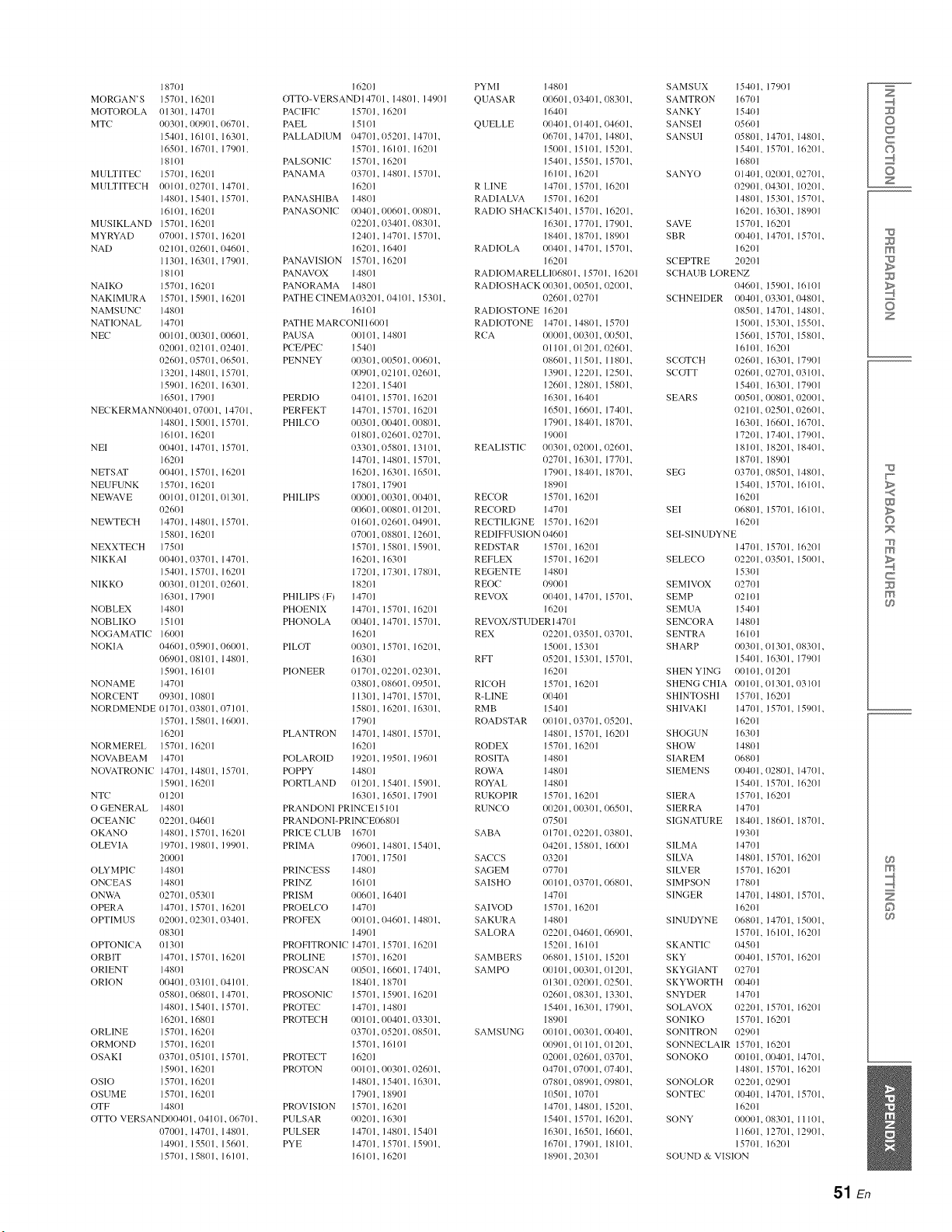
187Ol
MORGAN'S 157111, 16201
MOTOROLA 01301, 14701
MTC 00301, 00901, 06701,
154(11. 16101. 16301.
16501, 16701, 17901,
18101
MULTITEC 15701, 16201
MULTITECH 00101, 02701, 14701,
14801, 15401. 15701.
16101, 16201
MUSIKLAND 157(11, 16201
MYRYAD 07001, 15701. 16201
NAD 02101, 02601, 04601,
11301. 16301. 17901.
18101
NAIKO 15701. 16201
NAKIMURA 15701, 15901, 16201
NAMSUNC 14801
NATIONAL 14701
NEC 00101, 00301,00601,
02001, 02101, 02401,
026/)1, 05701, 06501,
13201, 14801, 15701,
159111, 16201, 16301,
16501, 17901
NECKERMANN00401,07001, 147/)1,
14801, 15001, 15701,
16101, 16201
NEI 0(1401, 14701, 15701,
16201
NETSAT 00401, 15701, 16201
NEUFUNK 15701, 16201
NEWAVE 0tll01, 01201, 111301,
02601
NEWTECH 14701, 14801, 15701,
15801, 16201
NEXXTECH 17501
NIKKAI 00401, 03701, 14701,
154(11, 15701, 16201
NIKKO 011301, 01201, 02601,
16301, 17901
NOBLEX 14801
NOBLIKO 15101
NOGAMATI( 16001
NOKIA 04601, 05901,061101,
06901, 08101, 14801,
159111, 16101
NONAME 14701
NOR( ENT 09301, 10801
NOR DMENDE 111701, 03801, 07101,
15701, 15801, 16001,
162O 1
NORMEREL 157111, 16201
NOVABEAM 14701
NO_/_.TRONIC 14701, 14801, 15701,
15901, 16201
NTC 01201
O GENERAL 14801
O( EANIC 02201, 04601
OKANO 14801, 15701, 16201
OLEVIA 19701, 19801, 19901,
20001
OLYMPIC 14801
ONCEAS 14801
ONWA 02701, 05301
OPERA 14701, 15701, 16201
OPTIMUS 02001,02301,03401,
08301
OPTONI(A 01301
ORBIT 14701, 15701, 16201
ORIENT 14801
ORLON 00401, 03101, 04101,
058111, 06801, 14701,
148/11, 15401, 15701,
16201, 16801
ORLINE 15701, 16201
ORMOND 15701, 16201
OSAKI 03701, 05101, 15701,
15901, 16201
OSIO 15701, 16201
OSUME 15701, 16201
OTF 14801
OTTO VERSAND00401, 04101, 06701,
07001, 14701, 14801,
149111, 15501, 15601,
157111, 15801, 16101,
16201
OTTO-VERSANDI4701, 14801, 14901
PA( IFIC 157/) 1, 1620 I
PAEL 15101
PALLADIUM 04701, 05201, 14701,
15701, 16101, 16201
PALSONI( 15701, 16201
PANAMA 03701, 14801, 15701,
16201
PANASHIBA 14801
PANASONIC 00401, 00601, 00801,
02201, 03401, 08301,
12401, 14701, 15701,
16201, 16401
PANAVISION 157/11, 16201
PANAVOX 14801
PANORAMA 14801
PATHE CINEMA03201,04101, 153/11,
16101
PATH E MAR(ONI 16/)01
PAUSA 00101, 14801
P( E/PEC 15401
PENNEY 00301, 00501,00601,
00901, 02101, 02601,
12201, 15401
PERDIO 04101, 15701, 16201
PERFEKT 14701, 15701, 16201
PHILCO 00301,00401, 00801,
Ill 801,02601, 02701,
03301, 05801, 13101,
147111, 14801, 15701,
16201, 16301, 16501,
17801, 17901
PH 1LIPS 00001,00301, 00401,
00601,00801, 01201,
O1601, 02601, 04901,
07001, 08801, 12601,
157111, 15801, 15901,
162111, 16301
17201, 17301, 17801,
182Ol
PHILIPS (F) 14701
PHOENIX 147ol, 15701, 16201
PHONOLA 00401, 14701, 15701,
16201
PILOT 00301, 15701, 16201,
163/11
PIONEER 01701, 02201, 02301,
03801,08601, 09501,
11301, 14701, 15701,
158/11, 16201, 16301,
17901
PLANTRON 14701, 14801, 15701,
16201
POLAROID 19201, 19501, 19601
POPPY 14801
PORTLAND 01201, 15401, 15901,
163/11, 16501, 17901
PRANDONI PRINCE15101
PRANDONI-PRINCE06801
PRICE CLUB 16701
PRIMA 09601, 14801, 15401,
17001, 17501
PRINCESS 14801
PRINZ 16101
PRISM 00601, 16401
PROELCO 14701
PROFEX 00101, 04601, 14801,
149o 1
PROFITRONI( 14701, 15701, 16201
PROLINE 15701, 16201
PROS(AN 00501, 16601, 17401,
18401, 18701
PROSONI( 15701, 15901, 16201
PROTE( 14701, 14801
PROTE( H 00101, 00401, 03301,
03701, 05201,08501,
157111, 16101
PROTECT 16201
PROTON 00101, 00301, 02601,
148/11, 15401, 16301,
17901, 18901
PROVISION 157111, 16201
PULSAR 00201, 16301
PULSER 14701, 14801, 15401
PYE 14701, 15701, 15901,
16101, 16201
PYMI 148/11
QUASAR 00601,
16401
QUELLE 00401
O6701
15001
15401
161O1
RLINE 147/11
RADIALVA 157/11
RADIO SHACK15401
163/11
18401
RADIOLA 00401
16201
0340 l, (/83(/1,
01401, 04601,
14701, 14801,
15101, 152{11,
15501, 15701,
16201
15701, 16201
16201
15701, 16201,
177{11, 17901,
1871}1, 1891}1
147{11, 15701,
RADIOMARELLI06801, 1571/I, 16201
RADIOSH A(K 00301, 00501, (/21/1/I,
(126111, (}27{}I
RADIOSTONE 162111
RADIOTONE 14701, 14801, 15701
R(A 00001,00301, 00501,
1}1101,01201, 02601,
08601, 11501, 11801,
13901, 12201, 12501,
12601, 12801, 15801,
16301, 16401
16501, 16601, 17401,
17901, 1841}1, 187111,
19001
REALISTI( 00301, 02001,02601,
02701, 16301, 1771}1,
17901, 184111, 18701,
18901
RE(OR 15701, 16201
RE(ORD 14701
RE(TILIGNE 157111, 16201
REDIFFUSION 04601
REDSTAR 157/11, 16201
REFLEX 157/11, 16201
REGENTE 148111
R EOC O9001
REVOX 00401, 14701, 15701,
16201
REVOX/STUDER 147111
REX 02201,03501, (/371/1,
15001,
RFT {}5201,
16201
RI(OH 15701,
R-LINE {104111
RMB 15401
ROADSTAR 110101,
148O1,
RODEX 157(11,
ROS ITA 14801
ROWA 14801
ROYAL 148/) 1
RUKOPIR 15701,
RUNCO 00201,
O7501
SABA 01701,
O4201,
SAC(S 03201
SAGEM 07701
SAISHO 00101,
14701
SAIVOD 15701,
SAKURA 14801
SALORA 02201,
15201,
SAMBERS 06801,
SAMPO 00101,
{}1301,
O2601,
15401,
18901
SAMSUNG 00101
{}0901
{}2(}/)1
O4701
O7801
10501
14701
15401
163/11
167/11
18901
153/11
15301, 15701,
16201
03701, (/52(/1,
15701, 16201
162(/I
16201
00301,06501,
02201, (/38(/1,
1581) I, 16001
0370 I, (/68(/I,
16201
04601, 06901,
16101
15101, 15201
00301, 01201,
02001,02501,
1183/11, 13301,
163/11, 179111,
0/)3/) 1, 00401,
01101,01201,
026/)1, 037(}1,
07001, 07401,
08901, 09801,
107/) 1
14801, 15201,
157111, 16201,
16501, 16601,
179111, 18101,
203/11
SAMSUX 15401, 17901
SAMTRON 16701
SANKY 15401
SANSEI 05601
SANSUI 05801, 14701, 14801,
15401, 15701, 16201,
16801
SANYO Ill 4(11, 02001, 02701,
02901, 04301, 10201,
14801, 15301, 15701,
16201, 16301, 18901
SAVE 157111, 16201
SBR 00401, 14701, 15701,
16201
SCEPTRE 20201
S(HAUB LORENZ
04601, 159111, 16101
S(HNEIDER 00401,03301, 04801,
08501, 147111, 14801,
15001, 15301, 15501,
15601, 157111, 15801,
16101, 162111
S(OTCH 02601, 16301, 17901
SCOTT 02601,02701, 03101,
15401, 163/11, 17901
SEARS {10501,00801, 02001,
021111, 02501, (12601,
16301, 16601, 16701,
17201, 174111, 17901,
18101, 18201, 18401,
18701, 189111
SEG 03701, 08501, 14801,
15401, 15701, 16101,
16201
SEI {16801, 15701, 16101,
16201
SEI-SINUDYNE
14701, 157111, 16201
SELE(O 02201,03501, 15001,
153/11
SEMIVOX 02701
SEMP {}2101
SEMUA 154{11
SEN(ORA 148/11
SENTRA 16101
SH ARP 00301,013/) 1, 08301,
15401, 163/11, 17901
SHEN YING 00101, 01201
SHENG CHIA 00101,013/11, 03101
SHINTOSHI 15701, 16201
SHIVAKI 14701, 15701, 15901,
16201
SHOGUN 163/11
SHOW 14801
SIAREM 06801
SIEMENS 00401,02801, 14701,
15401, 157111, 16201
SIERA 15701, 16201
SIERRA 147111
SIGNATURE 18401, 18601, 18701,
19301
SILMA 14701
SILVA 14801, 15701, 16201
SILVER 157111, 16201
SIMPSON 17801
SINGER 14701, 14801, 15701,
16201
SINUDYNE 06801, 147/11, 15001,
15701, 16101, 16201
SKANTI( 04501
SKY {}04{}1, 1570 l, 1620 I
SKYGIANT {}27(}1
SKYWORTH 00401
SNYDER 14701
SOLAVOX 02201, 15701, 16201
SONIKO 15701, 16201
SONITRON 02901
SONNECLAIR 157/11, 16201
SONOKO {}0101,00401, 14701,
14801, 15701, 16201
SONOLOR 02201, 02901
SONTEC 00401, 147{11, 15701,
16201
SONY 00001, 08301, 11101,
116111, 127111, 12901,
15701, 16201
SOUND & VISION
Z
©
C
©
Z
m
z
w
>
©
m
c
m
m
©
51 En
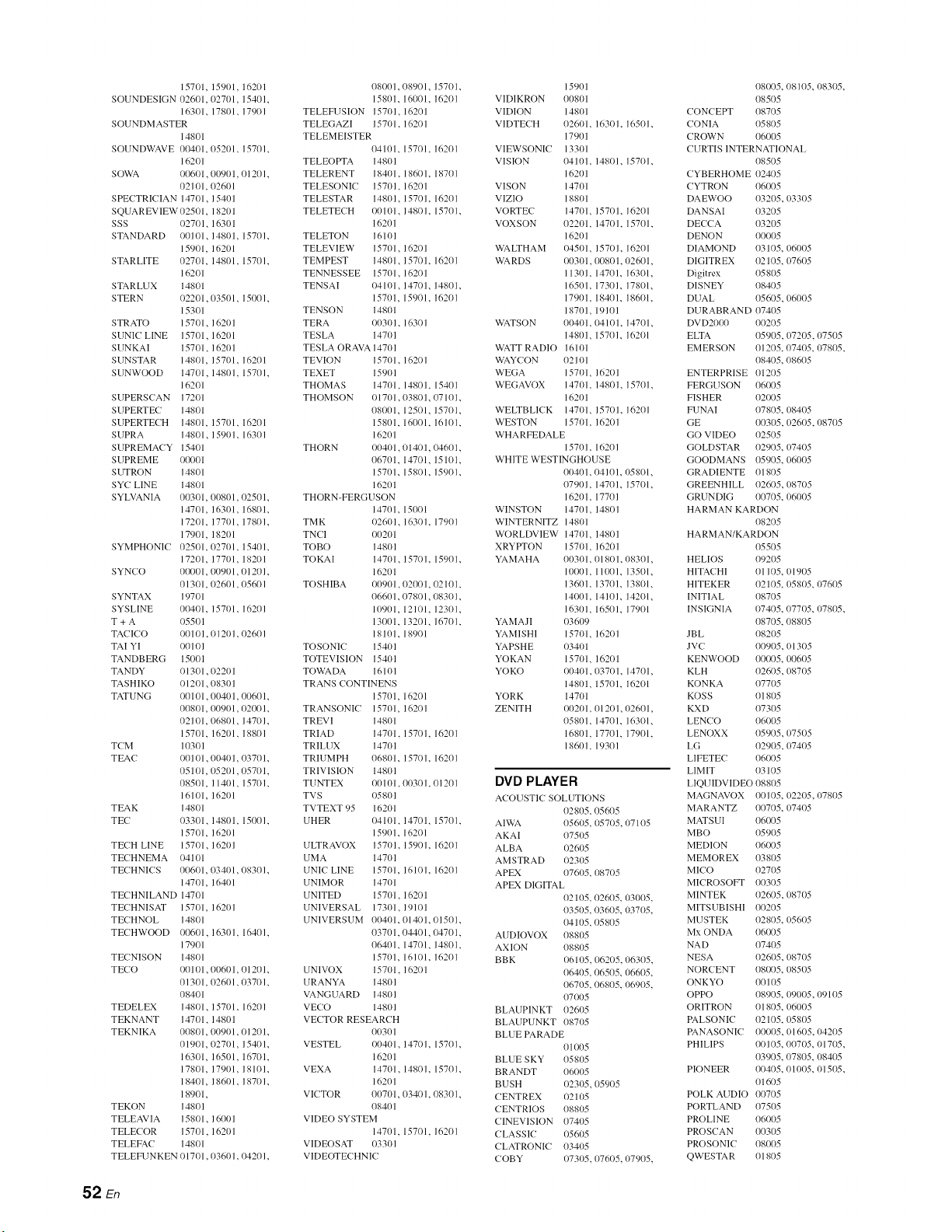
15701, 159111, 162/11
SOUNDESIGN 026t11,/127111, 15401.
16301. 178/11. 179111
SOUNDMASTER
148/11
SOUNDWAVE 00401, 05201, 15701.
1621)1
SOWA (106111,0/19111, 01201.
02101, 02601
SPE(TRI(IAN 14701, 15401
SQUAREVIEW 02501. 182111
SSS (127111, 163/) 1
STANDARD 00101, 148/11, 15701.
15901, 16201
STARLITE 02701, 148/11, 15701.
1621)1
STARLUX 14801
STERN 02201,03501, 15001.
15301
STRATO 157/11, 162111
SUNIC LINE 157/11, 162111
SUNKA1 15701, 16201
SUNSTAR 14801, 157/11. 16201
SUNWOOD 14701, 148/11, 15701.
16201
SUPERS(AN 172t11
SUPERTEC 148/11
SUPERTECH 14801, 15701. 16201
SUPRA 148/11, 159111. 16301
SUPREMACY 15401
SUPREME {_101
SUTRON 148/11
SYC LINE 148111
SYLVANIA (10301,00801, (/2501.
14701, 163/11, 168/11.
17201, 17701, 178/11.
17901, 18201
SYMPHONI( 025!11, 027111, 15401.
17201, 17701, 182111
SYNCO 00001. 00901,01201.
01301, 026/11. 056/11
SYNTAX 197/11
SYSLINE 00401. 157111. 16201
T + A 05501
TACICO o0101, o12111,02601
TAI YI 00101
TANDBERG 15!1/11
TANDY {11301,022111
TASHIKO 01201,083/11
TATUNG 00101,00401, 00601.
008111, 00901, (120111.
02101, 06801, 147111.
15701. 162111. 18801
TC M 10301
TEA(? 00101,00401, 03701.
05101, 05201,057111.
08501, 114111, 15701.
16101, 16201
TEAK 148111
TE( 03301, 14801, 15001.
15701, 162111
TE(H LINE 15701, 16201
TE(HNEMA {141111
TE(HNI(S 006111, 034111,08301.
14701, / 641tl
TE( HNILAND 147/11
TE( HNISAT 15701, /62111
TECHNOL 14801
TE(HWOOD 00601, 163/11, 16401.
179111
TECNISON 1480_
TE(O O0101,0/16/) 1, 01201.
013/11,026/11,03701.
(1_0 L
TEDELEX 148111, 157/11. 16201
TEKNANT 14701, 148/11
TEKNIKA 00801,00901,01201.
019111, 02701, 154111.
16301, 165!11, 167/11.
17801. 17901, 18101.
18401, 186/11, 187111.
1891)1,
TEKON 148/) 1
TELEAVIA 158111, 16001
TELECOR 157/11, 162111
TELEFAC 148111
TELEFUNKEN 1117/11. 1136/11,04201.
081101. 089t11, 15701.
15801. 1611/11. 16201
TELEFUSION 157111, 16201
TELEGAZI 157111. 162111
TELEMEISTER
04101. 15701. 162f11
TELEOPTA 148t11
TELERENT 184111. 18601. 18701
TELESONI( 15701. 16201
TELESTAR 148/11, 15701. 16201
TELETE(H 00101, 14801, 15701.
16201
TELETON 16101
TELEVIEW 15701, 162111
TEMPEST 14801, 157111. 16201
TENNESSEE 15701, 16201
TENSAI 04101, 14701, 14801.
15701, 15901. 16201
TENSON 14801
TERA 003/11. 16301
TESLA 147{)1
TESLA ORAVA 14701
TEVION 15701. 162111
TEXET 159{)1
THOMAS 1470H 1481tl. 15401
THOMSON (11701./138/11, 07101.
08001. 12501, 157/11.
15801. t600t, 16101.
16201
THORN 00401 , 01401, 04601.
1/671/l. 14701. 15101.
15701. 15801, 15901.
16201
THORN-FERGUSON
14701. 15001
TMK 026/11, 163/11. 17901
TN(I 00201
TOBO 148/) 1
TOKAI 14701, 15701, 15901,
16201
TOSHIBA 00901,02001, 02101.
06601. 07801,08301.
10901. 12101, 123/11.
13001. 13201, 167/11.
18101. 18901
TOSONI( 15401
TOTEVISION 15401
TOWADA 16101
TRANS ( ONTINENS
15701, 16201
TRANSONIC 15701, 162111
TREVI 148/11
TRIAD 147111. 15701. 162111
TRILUX 14701
TRIUMPH 068/11. 157111. 16201
TRIVISION 14801
TUNTEX 00101. 003/11.01201
TVS 115801
TVTEXT 95 16201
UHER 04101, 14701, 15701.
15901. 162t11
ULTRAVOX 15701. 15901. 16201
UMA 14701
UNIC LINE 15701, 16101. 16201
UNIMOR 1470
UNITED 157111, 16201
UNIVERSAL 173/11, 191!11
UNIVERSUM (J(¼0H 01401, 01501.
03701.0_01,04701.
06401. 147/11, 14801.
1571/1, 16101. 1620/
UNIVOX 15701. 16201
URANYA 14801
VANGUARD 148/) 1
VE(O 14801
VE(TOR RESEARCH
00301
VESTEL 00401, 14701, 15701.
16201
VEXA 14701, 14801, 15701.
16201
VI(TOR 007/11. 03401,08301.
08401
VIDEO SYSTEM
14701. 15701. 16201
VIDEOSAT 033/11
VIDEOTE( HNI(
15901
VIDIKRON 00801
VIDION 148111
VIDTECH 026111. 163111, 16501.
17901
VIEWSONIC 13301
VISION (14101. 14801, 15701.
16201
VISON 147/11
VIZIO 18801
VORTEC 14701, 157{)1, 16201
VOXSON 02201, 147111, 15701,
16201
WALTHAM (145t11, 15701. 16201
WARDS 00301. 008/11, 02601,
11301. 14701, 1630H
16501. 17301, 17801,
17901. 18401, 18601.
18701, _9101
WATSON 00401. 04101, 14701,
14801, 15701. 16201
WATT RADIO 16LOL
WAYCON 021t11
WEGA 157/11, 162111
WEGAVOX 14701. 148/11. 15701.
16201
WELTBLI(K 14701, 157111. 16201
WESTON 15701. 162111
WHARFEDALE
15701. 16201
WHITE WESTINGHOUSE
011401. 04101, {158111,
07901. 14701, 157/11.
16201. 17701
WINSTON 14701, 148/11
WINTERNITZ 14801
WORLDVIEW 14701, 148111
XRYPTON 15701, 16201
YAMAHA 00301. O1801, {18301,
10001. 11001, 135t11,
YAMAJI
YAMISHI
YAPSHE
YOKAN
YOKO
YORK
ZENITH
13601. 13701, 138111,
14001. 14101, 142t11,
16301. 16501. 17901
{136/19
15701, 162111
O3401
15701, 16201
00401,03701, 14701,
14801, 15701. 162t11
14701
0021) 1.0121)1,02601,
05801. 14701, 163111,
168/11. 17701, /7901.
18601. 19301
DVD PLAYER
ACOUSTI( SOLUTIONS
1128115, (156115
AIWA 05605, 05705, 07105
AKAI 07505
ALBA 02605
AMSTRAD 02305
APEX 07605. 08705
APEX DIGITAL
1/21115. 02605. 03005.
1/351/5. 03605. 037/15.
04105.05805
AUDIOVOX 1/88/15
AXION 1/88t15
BBK 1716105.1162115. 06305.
1/641/5.1/651/5. 06605.
1/671/5.1/681/5. 06905.
1/7/)1/5
BLAUPINKT 02605
BLAUPUNKT 1/87/15
BLUE PARADE
01005
BLUE SKY (/58/)5
BRANDT 060/)5
BUSH 023/15. 05905
CENTREX 02105
CENTRIOS (18805
CINEVISION 07405
CLASSIC 05605
CLATRONIC 03405
COBY {173/15. {176/15. {1791/5.
1/801/5,118//15, 08305,
08505
CON( EPT 08705
CONIA 1158115
CROWN 06/1/15
CURTIS INTERNATIONAL
08505
CYBERHOME 02405
CYTRON 06005
DAEWOO 03205. 03305
DANSAI 03205
DE((A 032t15
DENON 00005
DIAMOND 03105.06/1/15
DIGITREX 02105. 07605
Digitr_x (15805
DISNEY 08405
DUAL 05605.06/)/)5
DURABRAND 07405
DV D201)0
ELTA
EMERSON
ENTERPRISE
FERGUSON
FISHER
FUNAI
GE
GO VIDEO
GOLDSTAR
GOODMANS
GRADIENTE
GREENHILL
GRUNDIG
00205
05905. 07205. 07505
01205. 07405, 07805.
08405. 08605
01205
06/)05
02O05
07805. 08405
003115. 02605. 08705
02505
02905. 07405
05905. 06005
01805
02605, (187115
00705, 06005
HARMAN KARDON
08205
HARMAN/KARDON
05505
HELIOS
HITA( HI
HITEKER
INITIAL
INSIGNIA
JBL
JV(
KENWOOD
KLH
KONKA
KOSS
KXD
LENCO
LENOXX
LG
LIFETEC
LIMIT
09205
01105. 01905
02105. (}58(}5. (}7605
08705
I17405. 077/15, I178/15.
08705, (188115
082t15
009t15, 013/15
00005, 00605
02605, 08705
07705
0181t5
073/15
06/1/15
05905, 07505
02905. 07405
06/105
(13105
LIQUIDVIDEO 1/88115
MAGNAVOX
MARANTZ
MATSUI
MBO
MEDION
MEMOREX
MI(O
MI( ROSOFT
MINTEK
MITSUBISHI
MUSTEK
Mx ONDA
NAD
NESA
NOR( ENT
ONKYO
OPPO
ORITRON
PALSONIC
PANASONIC
PHILIPS
PIONEER
POLK AUDIO
PORTLAND
PROLINE
PROSCAN
PROSONIC
QWESTAR
00105. 02205. {178/15
1/1/71/5. 07405
06005
059t15
06005
038O5
027/15
00305
02605, 1187/15
00205
02805. (}56(}5
06/)05
07405
026t15,1187/15
08005, 08505
001 ()5
08905. 09005.09105
01805. 06005
02105. (158/15
00005, 01605, 04205
00105, 00705, 01705,
03905. 07805. 08405
011405.010/15, O1505.
01605
00705
075!15
06005
00305
080/15
01805
52 En
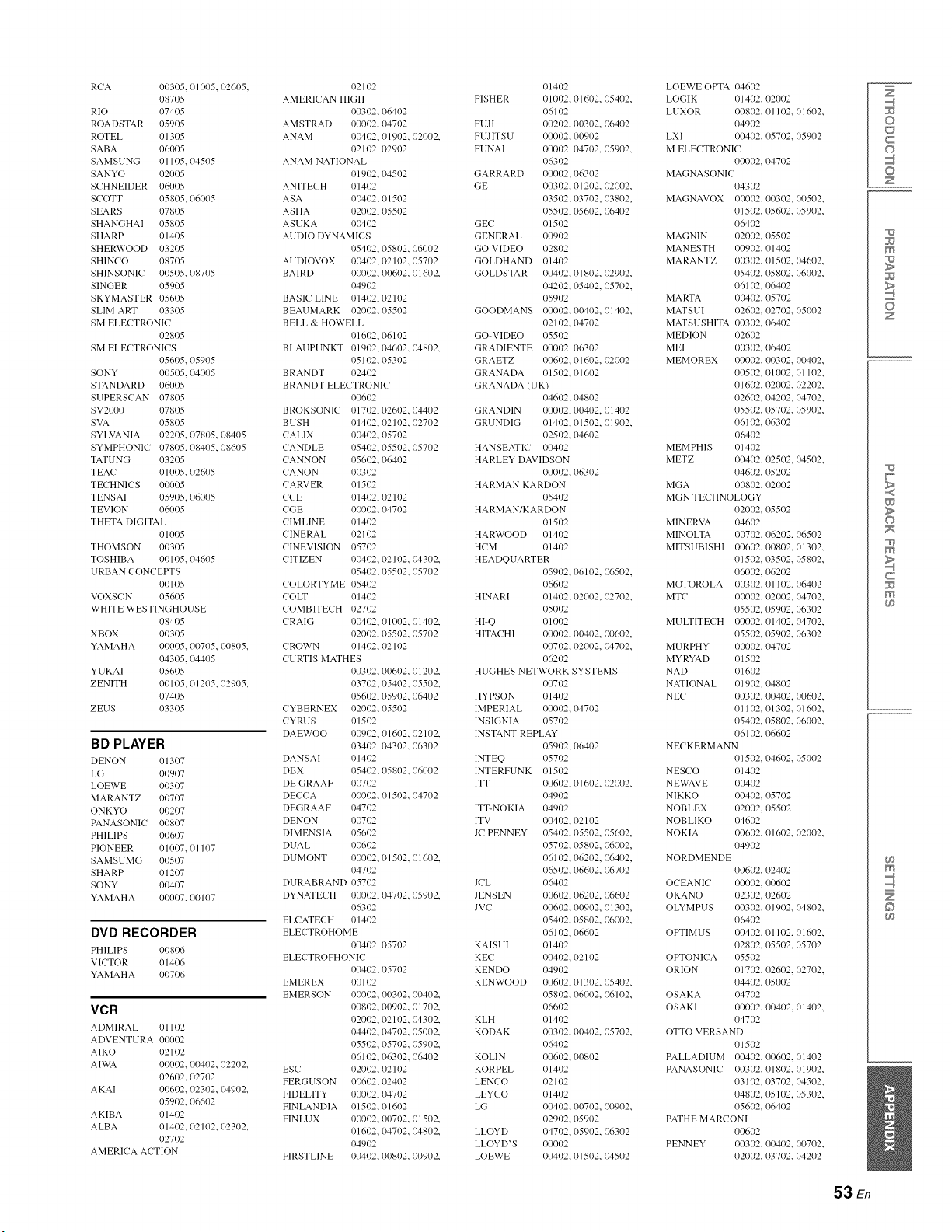
RCA 00305, 01005, 02605,
08705
RIO 07405
ROADSTAR 05905
ROTEL 01305
SABA 06005
SAMSUNG 01105, 04505
SANYO 02005
SCHNEIDER 06005
SCOTT 058{/5, 06005
SEARS 07805
SHANGHAI 05805
SHARP 01405
SHERWOOD 03205
SHINCO 08705
SHINSONIC 00505, 08705
SINGER 05905
SKYMASTER 05605
SLIM ART 03305
SM ELECTRONIC
02805
SM ELECTRONICS
056115, 05905
SONY 011505, 04005
STANDARD 06005
SUPERSCAN 07805
SV2000 07805
SVA 05805
SYLVANIA 02205, 078/15, (18405
SYMPHONIC 078115, 08405, 08605
TATUNG 03205
TEA(; 01005, 02605
TECHNICS 00005
TENSAI 059115, 06005
TEVION 06005
THETA DIGITAL
01005
THOMSON 00305
TOSHIBA 00105, 04605
URBAN CONCEPTS
0011) 5
VOXSON 05605
WHITE WESTINGHOUSE
08405
XBOX 0O305
YAMAHA 00005, 00705, (10805,
04305, 04405
YUKAI 05605
ZENITH 00105, 01205, 02905,
07405
ZEUS 03305
BD PLAYER
DENON /11307
LG 0t1907
LOEWE 011307
MARANTZ 011707
ONKYO 00207
PANASONIC 011807
PHILIPS 011607
PIONEER 01007, 01107
SAMSUMG 011507
SHARP 01207
SONY 011407
YAMAHA 011007, 011107
DVD RECORDER
PHILIPS /108/16
VI(TOR 1114116
YAMAHA 011706
VCR
ADMIRAL 01102
ADVENTURA 00002
AIKO 02102
AIWA 011002, 00402, 02202,
02602, 02702
AKAI 00602, 02302, (14902,
059112, 06602
AKIBA 01402
ALBA 01402, 02102, (12302,
O2702
AMERICA ACTION
O2102
AMERl( AN HIGH
00302, 06402
AMSTRAD 00002, 04702
ANAIM 00402, 01902, 02002,
pc p02102,1 = )( =
ANAM NATIONAL
O1902, 04502
ANITE(H {114(/2
ASA 00402, 01502
ASHA 02002, 05502
ASUKA 00402
AUDIO DYNAMICS
05402, 05802, 06002
AUDIOVOX 00402, 02102, 05702
BAIRD 00002, 00602, 01602,
O49O2
BASIC LINE 01402, 02102
BEAUMARK 02002, 05502
BELL & HOWELL
O1602, 06102
BLAUPUNKT 01902,04602,04802,
05102, (15302
BRANDT (12402
BRANDT ELECTRONIC
O06O2
BROKSONIC 111702, (12602, 04402
B USH 111402, 02102, 02702
(ALIX 00402, 05702
(ANDLE 05402, 05502, 05702
(ANNON 05602, (16402
(ANON 00302
CARVER 01502
CCE 01402, 02102
CGE 00002, 04702
(IMLINE 01402
(INERAL 02102
( INEVISION 05702
( ITIZEN 00402, 112102, 04302,
05402, (15502, 05702
(OLORTYME 05402
(OLT 01402
(OMBITE(H 02702
(RAIG 00402, 01002, 01402,
02002, (15502, 05702
(ROWN 01402, 02102
(URTIS MATHES
00302, 00602, 01202,
03702, 05402, 05502,
05602, (15902, 06402
( YBERNEX 02002, 05502
(YRUS 01502
DAEWOO 00902, 01602, 02102,
03402, (14302, 06302
DANSAI 111402
DBX 05402, 05802, 06/102
DE GRAAF 00702
DECCA 00002, 01502, 04702
DEGRAAF 04702
DENON 00702
DIMENSIA 05602
DUA L 00602
DUMONT 00002, 01502, 01602,
047O2
DURABRAND 05702
DYNATE( H 00002, 04702, 05902,
06302
ELCATECH (11402
ELE(TROHOME
1104112, (15702
ELE( TROPHONIC
00402, (15702
EMEREX 00102
EMERSON 00002, 00302, 00402,
00802, 00902, 01702,
{12002, 02102, 04302,
04402, 04702, 05002,
05502, 05702, 05902,
06102, 06302, 06402
ES( 02002, 02102
FERGUSON 00602, 02402
FIDELITY 00002, 04702
FINLANDIA {11502,01602
FINLUX 00002, 00702, 01502,
Ol 6/12,/14702, 04802,
I14902
FIRSTLINE 00402, 00802, 00902,
01402
FISHER 01002, 01602, 05402,
O6102
FUJI 00202, 00302, 06402
FUJITSU 00002, 00902
FUNAI 00002, 04702, 05902,
O6302
GARRARD 00002, 06302
GE 00302, 01202, 02002,
03502, 03702, 038/12,
05502,/156/12, 06402
GE( 1}1502
GENERAL 00902
GO VIDEO 02802
GOLDHAND 01402
GOLDSTAR 00402, 01802, 02902,
04202, 05402, 05702,
O5902
GOODMANS 00002, 00402, 01402,
02102, 04702
GO-VIDEO 05502
GRADIENTE 00002, 1163/12
GRAETZ 00602, 1116/12, 02002
GRANADA 11151)2, 111602
GRANADA iUK)
04602, 04802
GRANDIN 00002, 11/14112,01402
GRUNDIG 01402, 01502, 01902,
02502, 04602
HANSEATIC 00402
HARLEY DAVIDSON
00002, 06302
HARMAN KARDON
O5402
HARMAN/KARDON
O1502
HARWOOD 01402
HCM Ol 4o2
HEADQUARTER
05902, 06102, 06502,
O6602
HINARI {}1402, {}20{}2, 02702,
O5002
HI-Q O1002
HITACHI {}0002, {}/)4{}2, 00602,
{}0702, {}20t}2, 047{}2,
06202
HUGHES NETWORK SYSTEMS
O0702
HYPSON {}141}2
IMPERIAL {}0002, (}47(}2
INSIGNIA 05702
INSTANT REPLAY
05902, 06402
INTEQ 05702
INTERFUNK Ill 502
ITT 00602, (11602, 02002,
O4902
ITT-NOKIA 04902
ITV 00402, 02102
JC PENNEY 05402, 05502, 05602,
05702, 1158112, 06002,
06102, 06202, 06402,
{}65{)2, (}66/12, 067{}2
JCL O6402
JENSEN 00602, 06202, 06602
JV( 00602, (1/)902, 01302,
05402, 05802, 06002,
061 (12,/)66/)2
KAISUI Ill 4(12
KE( 00402,1)2102
KENDO {}49(}2
KENWOOD {}0602, (}1302, 05402,
{}581}2,(}6002, 06102,
{}6602
KLH {}14(}2
KODAK {}0302, (}/1402, 05702,
{}6402
KOLIN {}0602,/)/1802
KOR PEL {11402
LEN(O 02102
LEY(O Ill 4112
LG 00402, 00702, 00902,
02902, 05902
LLOYD 04702,/15902, 06302
LLOYD'S 00002
LOEWE 00402, 01502, 04502
LOEWE OPTA 04602
LOGIK {}1402, 02002
LUXOR 00802, 01102, 01602,
04902
LXI (}04{}2, 05702, 05902
M ELE( TRONI(
00002, 04702
MAGNASONI(
043/12
MAGNAVOX 00002, 00302, 00502,
015{)2, (}56/12, 05902,
06402
MAGNIN 02002, 05502
MANESTH {}0902, 01402
MARANTZ {}0302, 01502, 04602,
05402, (}58(}2, {}6002,
061 (}2, (}64{}2
MARTA {}/1402, 05702
MATSUI {}26/12, 02702, 05{)02
MATSUSHITA {}0302, 06402
MEDION {}26/12
MEI {}/)302, 06402
MEMOREX {}0002, 00302, 00402,
005{)2, {}1002, {}1102,
016(}2, {}2002, {}2202,
026(}2, (}42{}2, {}4702,
055{)2, (}57(}2, {}5902,
06102, (}63/12
{}64O2
MEMPHIS {}1402
METZ {}04(}2, 02502, 04502,
04602, (}52(}2
MGA 00802, 02002
MGN TE( HNOLOGY
02002, (}55{)2
MINERVA {}4602
MINOLTA {}0702, 06202, 06502
MITSUBISHI {}06(}2, (}/18/12, 01302,
015{)2, (}3502, {}5802,
061}/12, (}62{}2
MOTOROLA {}/1302, 01102, 06402
MTC {}/1002, 02002, 04702,
055{)2, {}59{}2, {}6302
MULTITE(H {}0002, 01402, 04702,
055{)2, (}59(}2, {}6302
MURPHY {}/1002, 04702
MYRYAD 01502
NAD {}1602
NATIONAL {}19(}2, 04802
NEC 00302, 00402, 00602,
01102, {}13/12, {}1602,
05402, {}5802, {}6002,
061 {}2, {}66/12
NE(KERMANN
01502,/146/12, 05002
NES(O Ill 4112
NEWAVE 00402
NIKKO 00402, 05702
NOBLEX 02002, 05502
NOBLIKO {146/12
NOKIA {}06/12, 016/12, 02002,
04902
NORDMENDE
00602, 02402
OCEANI( {}0002, 00602
OKANO {}23/12, 02602
OLYMPUS {}03/)2, 01902, 04802,
06402
OPTIMUS 00402, 01102, 01602,
02802, 05502, 05702
OPTONICA 05502
ORLON {}1702, 026/12, 02702,
04402, 05002
OSAKA 04702
OSAKI {}00t}2, 0t}402, 01402,
047/12
OTTO VERSAND
01502
PALLADIUM 00402, 00602, 01402
PANASONIC {}03/12, 01802, 01902,
031 {)2, {}37/)2, {}4502,
048(}2, {}51{)2, {}5302,
056{}2, {}64{}2
PATHE MARCONI
00602
PENNEY {}03/)2, 004{}2, 00702,
02{}/12, {}37{}2, {}4202
Z
©
C
©
Z
m
z
w
>
©
m
c
m
m
©
53 En
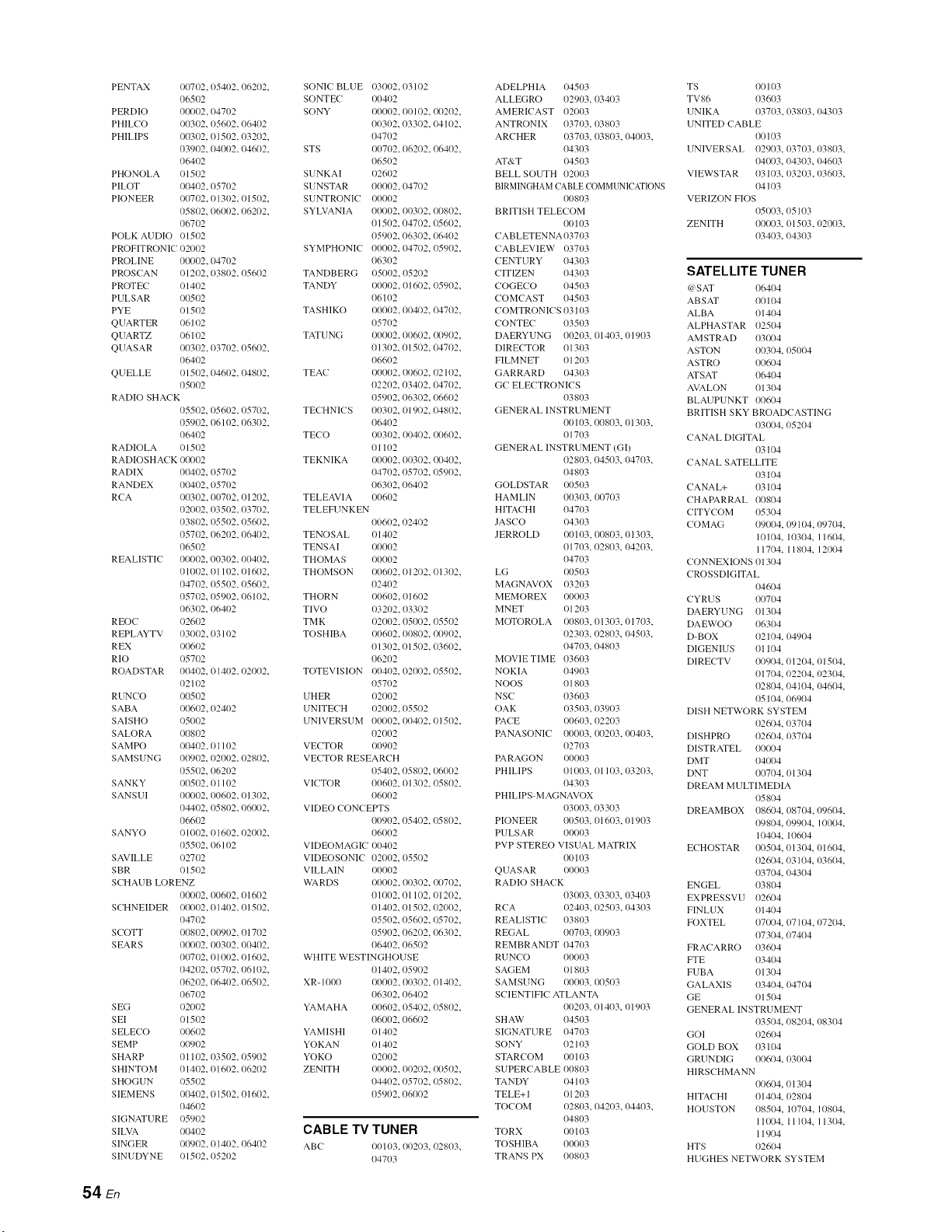
PENTAX 00702, 05402, 06202,
06502
PERDIO 01/0/)2, 04702
PHILCO 00302, 05602, 06402
PHILIPS 00302, O1502, 03202,
03902, 04002, 04602,
06402
PHONOLA O1502
PILOT 00402, 05702
PIONEER 00702, 01302, 01502,
05802, 06002, 06202,
067/)2
POLK AUDIO 0151)2
PROFITRONIC 02002
PROLINE 01/0/)2, 04702
PROSC AN O1202, 03802, 05602
PROTEC 01402
PULSAR 0051)2
PYE O1502
QUARTER 0611)2
QUARTZ 06102
QUASAR 00302, 03702, 05602,
06402
QUELLE 01502, 04602, 04802,
05002
RADIO SHACK
05502, 05602, 05702,
05902, 06102, 06302,
06402
RADIOLA 01502
RADIOSHACK 00002
RADIX 00402, 05702
RANDEX 00402, 05702
RCA 00302, 00702, 01202,
020/)2, 03502, 03702,
03802, 05502, 05602,
057/)2, 06202, 06402,
06502
REALISTIC 00002, 00302, 00402,
01002, 01102, 016/)2,
047/)2, 05502, 05602,
057/)2, 05902, 06102,
063/)2, 06402
R EOC 02602
REPLAYTV 03/)/)2, 03102
R EX 00602
RIO o5702
ROADSTAR 00402, 01402, 02002,
02102
RUNCO o051)2
SABA 00602, 02402
SAISHO 051)02
SALORA 00802
SAM PO 0041)2, 01102
SAMSUNG 00902, 02002, 02802,
05502, 06202
SANKY 00502, O1102
SANSUI 00002, 00602, O1302,
04402, 05802, 06002,
06602
SANYO 01002, O1602, 02002,
05502, 06102
SAVILLE 02702
SBR O1502
SC HAUB LORENZ
00002, 00602, 01602
SCHNEIDER 00002, 01402, 01502,
04702
SCOTT 00802, 00902, 01702
SEARS 00002, 00302, 00402,
00702, O1002, O1602,
04202, 05702, 06102,
06202, 06402, 06502,
06702
S EG 02002
SEI O1502
S ELECO 00602
SEMP 00902
SHARP 01102, 0351)2, 05902
SHINTOM 01402, 01602, 06202
SHOGUN 0551)2
SIEMENS 0041)2, 01502, 01602,
04602
SIGNATURE 05902
SILVA 00402
SINGER 00902, 01402, 06402
SINUDYNE O1502, 05202
SONIC BLUE 03002, 03102
SONTEC 00402
SONY 000t)2, 00102, 01,)202,
00302, 033/)2, 04102,
04702
STS 00702, 06202, 06402,
06502
SUNKAI 02602
SUNSTAR 01/01,)2, 04702
SUNTRONIC 00002
SYLVANIA 00002, 00302, 00802,
01502, 047/)2, 05602,
05902, 063/)2, 0641)2
SYMPHONIC 0001`)2, 04702, 05902,
06302
TANDBERG 05002, 05202
TANDY 00002, 016/)2, 05902,
06102
TASHIKO 00002, 00402, 04702,
05702
TATUNG 0001`)2, 00602, 01,)902,
01302, 01502, 04702,
06602
TEAC 00002, 00602, 02102,
02202, 03402, 04702,
05902, 063/)2, 06602
TECHNICS 003/)2, 01902, 04802,
06402
TECO 00302, 00402, 00602,
01102
TEKNIKA 00002, 00302, 00402,
04702, 057/)2, 0591)2,
06302, 06402
TELEAVIA 006/)2
TELEFUNKEN
00602, 02402
TENOSAL 01402
TENSAI 00002
THOMAS 00002
THOMSON 00602, O1202, 01302,
02402
THORN 00602, 01602
TIVO 03202, 033/)2
TM K 02002, 05002, 05502
TOSHIBA 00602, 00802, 00902,
01302, 01502, 03602,
06202
TOTEVISION 00402, 02002, 05502,
05702
UH ER 02002
UNITECH 02002, 0551)2
UNIVERSUM 00002,00402,01502,
02002
VECTOR 00902
VECTOR RESEARCH
05402, 05802, 06002
VICTOR 006/)2, 013/)2, 05802,
O6OO2
VIDEO CONCEPTS
00902, 05402, 05802,
06002
VIDEOMAGIC /)0402
VIDEOSONIC 02002, 05502
VILLAIN 00002
WARDS 00002, 00302, 00702,
01002, 01102, O1202,
01402, 01502, 02002,
05502, 05602, 05702,
05902, 06202, 06302,
06402, 06502
WHITE WESTINGHOUSE
01402, 05902
XR- 1000 00002, 00302, 01402,
06302, 06402
YAMAHA 00602, 05402, 05802,
06002, 06602
YAMISHI 01402
YOKAN O1402
YOKO O2OO2
ZENITH 00002, 00202, 00502,
04402, 057/)2, 05802,
05902, 06/)/)2
CABLE TV TUNER
ABC 00103, 00203, 02803,
04703
ADELPHIA 0451)3
ALLEGRO 02903, 03403
AMERICAST 02003
ANTRONIX 037/)3, 03803
ARCHER 03703, 03803, 04003,
04303
AT&T 0451)3
BELL SOUTH 02003
BIRMINGHAM CABLE COMMUNICAT[ONS
00803
BRITISH TELEC OM
00103
CABLETENNA 037/)3
CABLEVIEW 03703
CENTURY 043/)3
CITIZEN 043/)3
COGEC O 04503
COMCAST 04503
COMTRONICS 03103
CONTEC 03503
DAERYUNG 00203, 01403, O1903
DIRECTOR 013/)3
FILMNET 01203
GARRARD 04303
GC ELECTRONICS
03803
GENERAL INSTRUMENT
00103, 00803, O1303,
01703
GENERAL INSTRUMENT (GI)
02803, 04503, 04703,
04803
GOLDSTAR 00503
HAMLIN 00303, 00703
HITACHI 04703
JASCO 04303
JERROLD 0011)3, 00803, 01303,
01703, 02803, 0421)3,
04703
LG 0051)3
MAGNAVOX 03203
MEMOREX 00003
MNET O1203
M()TOROLA 00803, 01303, 01703,
02303, 02803, 0451)3,
04703, 04803
MOVIE TIME 03603
NOKIA 04903
NOOS 01803
NSC 036/)3
OAK 0351)3, 03903
PACE 00603, 02203
PANASONIC 00/)/)3, 0021)3, 00403,
02703
PARAGON 00003
PHILIPS 01003, O1103, 03203,
04303
PHILIPS-MAGNAVOX
03/)03, 03303
PIONEER 0051)3, 01603, 01903
PULSAR 000/)3
PVP STEREO VISUAL MATRIX
00103
QUASAR 00003
RADIO SHACK
03003, 03303, 03403
RCA 02403, 0251)3, 04303
REALISTIC 03803
REGAL 007/)3, 00903
REMBRANDT 04703
RUNCO 00003
SAGEM O181)3
SAMSUNG 00003, 0051)3
SCIENTIFIC ATLANTA
00203, 01403, O1903
SHAD" 04503
SIGNATURE 047/)3
SONY 02103
STARC OM 00103
SUPERCABLE 00803
TANDY 04103
TELE+I O1203
TOCOM o281)3, o42o3, o4403,
04803
TORX o0103
TOSHIBA 000/)3
TRANS PX 00803
TS 00103
TV86 03603
UNIKA 037/)3, 03803, 04303
UNITED CABLE
00103
UNIVERSAL 02903, 03703, 03803,
04003, 04303, 04603
VIEWSTAR 03103, 0321)3, 03603,
04103
VERIZON F|OS
05003, 05103
ZENITH 00003, O1503, 02003,
03403, 04303
SATELLITE TUNER
(a'SAT 1)641)4
ABSAT 00104
ALBA 01404
ALPHASTAR 02504
AMSTRAD 03/)04
ASTON 00304, 051)04
ASTRO 00604
ATSAT 06404
AVALON 01304
BLAUPUNKT 00604
BRITISH SKY BROADCASTING
03/)04, 05204
CANAL DIGITAL
03104
CANAL SATELLITE
03104
CANAL+ 03104
CHAPARRAL 00804
CITYC OM 053(/4
COMAG 09004, 09104, 09704,
10104, 10304, 11604,
11704, 11804, 12004
CONNEXIONS 01304
CROSSDIGITAL
04604
CYRUS 007/)4
DAERYUNG 013/)4
DAEWOO 063/)4
D-BOX 02104, 04904
DIGENIUS 01104
DIREC TV 00904, 01204, O1504,
01704, 02204, 02304,
02804, 04104, I)46/)4,
05104, 06904
DISH NETWORK SYSTEM
02604, 03704
DISHPRO 02604, 03704
DISTRATEL 00004
DMT O4O04
DNT 00704, O131)4
DREAM MULTIMEDIA
05804
DREAMBOX 08604, 08704, 09604,
098(/4, 09904, 10004,
10404, 10604
EC HOSTAR 00504, 013/)4, 01604,
02604, 03104, 03604,
037(/4, 04304
ENGEL 03804
EXPRESSVU 02604
FINLUX 01404
FOXTEL 07004, 07104, 07204,
07304, 07404
FRACARRO 03604
FTE 03404
FUBA 013114
GALAXIS 03404, 04704
GE 01504
GENERAL INSTRUMENT
03504, 08204, 08304
GOI O26O4
GOLD BOX 03104
GRUNDIG 00604, 03004
HIRSC HMANN
00604, 013(14
HITACHI 01404, I)281)4
HOUSTON 08504, 10704, 10804,
11004, 11104, 113/)4,
11904
HTS 02604
HUGHES NETWORK SYSTEM
54 En
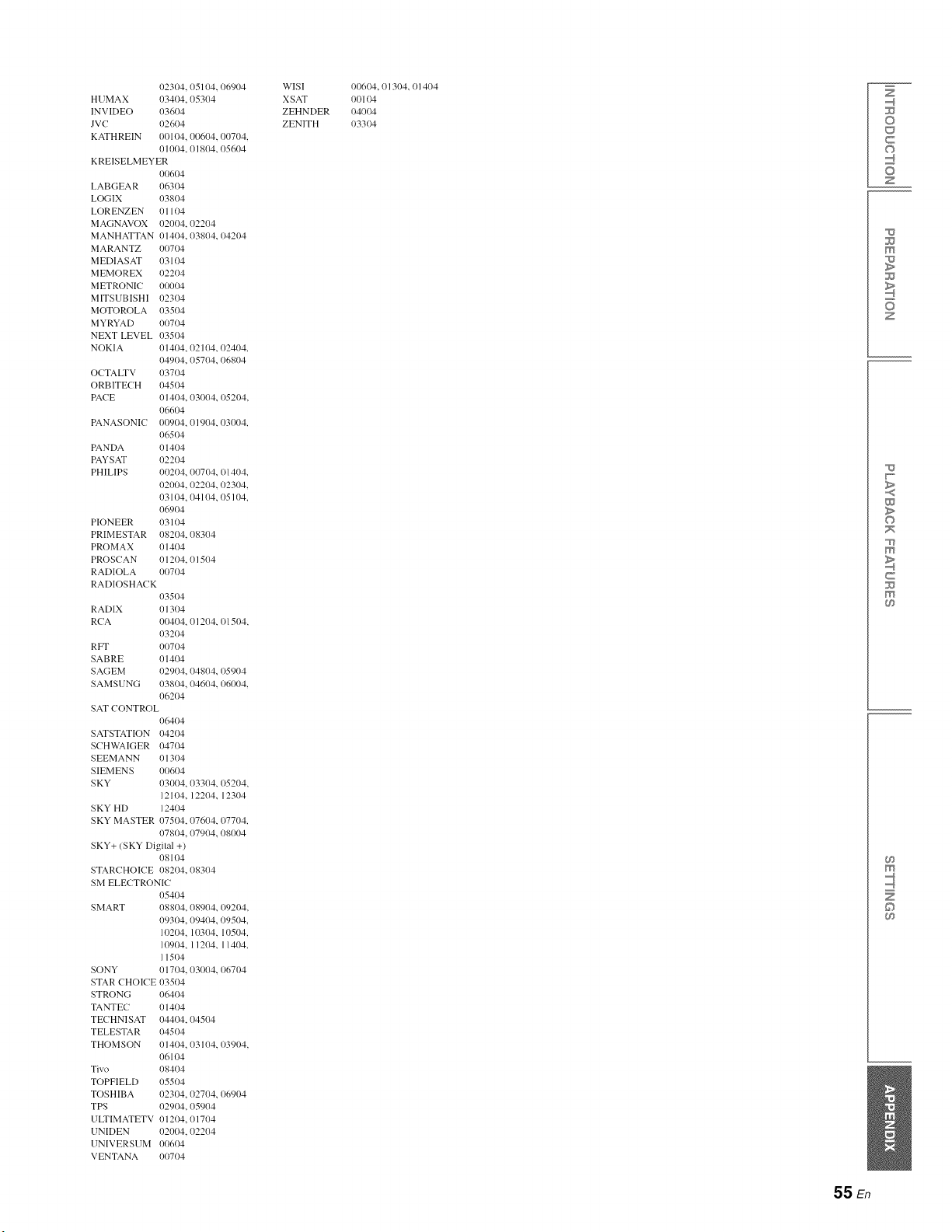
023/)4, 05104, 06904
HUMAX 03404, 05304
INVIDEO 03604
JVC 02604
KATHREIN 00104, 00604, 00704,
01004, 01804, 05604
KREISELMEYER
0{}6/)4
LABGEAR 06304
LOGIX 03804
LORENZEN 01104
MAGNAVOX 02004, 02204
MANHATTAN 01404, 03804, 04204
MARANTZ 00704
MEDIASAT 03104
MEMOREX 02204
METRONIC 00004
MITSUBISHI 02304
MOTOROLA 03504
MYRYAD 00704
NEXT LEVEL 03504
NOKIA 01404, 02104, 02404,
04904, 05704, 06804
O(TALTV 03704
ORBITE(H 04504
PACE 01404, 03/)04, 05204,
066/)4
PANASONI( 00904, 01904, 03/)04,
06504
PANDA 01404
PAYSAT 02204
PHILIPS 00204, 00704, (11404,
02004, 02204, 02304,
03104, 04104, 05104,
069O4
PIONEER 03104
PRIMESTAR 08204, 08304
PROMAX 01404
PROSCAN 01204, 01504
RADIOLA 0{}704
RADIOSHACK
03504
RADIX
RCA
RFT
SABRE
SAGEM
SAMSUNG
01304
0{}404, 01204, {}15{)4,
032{}4
0O704
01404
02904, 04804, {}5904
03804, 04604, {}6/)04,
O62{}4
SAT CONTROL
06404
SATSTATION 04204
SCHWAIGER 04704
SEEMANN 01304
SIEMENS 00604
SKY 03004, 03304, (15204,
12104, 12204, 12304
SKY HD 12404
SKY MASTER 07504, 07604, (17704,
07804, 07904, 08/)04
SKY+/SKY Digital +)
08104
STARCHOICE 08204, 08304
SM ELE(TRONIC
05404
SMART 08804, 08904, 09204,
093/)4, 09404, 09504,
10204, 10304, 10504,
109114, 11204, 11404,
11504
SONY 01704, 03/)04, 06704
STAR CHOICE 03504
STRONG 06404
TANTEC 01404
TECHNISAT 04404, 04504
TELESTAR 04504
THOMSON 01404, 03104, {}3904,
06104
Tivo 08404
TOPFIELD 05504
TOSHIBA 023/)4, 02704, 06904
TPS 02904, 05904
ULTIMATETV 01204, 01704
UNIDEN 02004, 02204
UNIVERSUM 0t}604
VENTANA 0{}704
WISI
XSAT
ZEHNDER
ZENITH
{}0604, 01304, 01404
{}0104
{}4004
{}3304
Z
©
C
©
Z
m
z
w
>
©
m
c
m
m
©
55 En

•Numerics
2-channel source surround decode ............................... 24
3Beam. beam mode ...................................................... 24
5.1ch beam mode .......................................................... 23
5. I-channel source 7. l-channel decode ........................ 24
5Beam. beam mode ...................................................... 23
5BeamPlus2. beam mode ............................................. 24
7.1ch beam mode .......................................................... 24
•A
AC IN .jack ..................................................................... 8
AC ON STANDBY, ADVANCED SETUP ................ 41
Activating SIRIUS Satellite Radio subscription .......... 27
Adaptive DRC, Dynamic range control ....................... 37
Adaptive dynamic range control.
Dynamic range control ............................................ 37
A_[justing vohune level automatically UniVolume ...... 31
ADVAN( ED SETUP .................................................. 40
Adventure. (INEMA DSP program ............................ 23
All Channel Search mode. SIRIUS Satellite Radio ..... 27
Attaching stands, installation ....................................... 10
Audio /video component connection ........................... 13
AUDIO DELAY. SOUND SET MENU ...................... 36
Audio delay, SOUND SET MENU .............................. 36
AUDIO IN .jacks ............................................................. 8
Audio Sampling, input signal information ................... 32
AUDIO SELE(T. HDMI setup ................................... 39
Audio select. HDMI setup ............................................ 39
AUTO DIMMER. Front panel display setup ............... 39
Auto dimmer. Front panel display setup ...................... 39
AUTO LIP SYNC. Audio delay .................................. 36
Auto Preset. option menu ............................................. 32
AUTO SETUP .............................................................. 15
AUTO SETUP. Error messages ................................... 18
Automatic lipsync. Audio delay ................................... 36
Automatic preset, option menu .................................... 32
AUXI/2, Audio delay .................................................. 36
AV button. Remote control ............................................ 9
AV key, controlling external component ..................... 42
• B
BASS EXT indicator ...................................................... 7
BASS EXTENSION. SOUND SET MENU ................ 37
Bass extension. SOUND SET MENU ......................... 37
BASS OUT. Subwoofer settings .................................. 36
Bass out. Subwoofer settings ....................................... 36
Bass sound ontput redirection. Sound output ............... 38
BEAM ADJUSTMENT. MANUAL SETUP .............. 35
Beam a_[justment. MANUAL SETUP ......................... 35
Beam mode. 5.1ch ........................................................ 23
Beam mode. 7. Ich ........................................................ 24
Blu-ray disc player connection ..................................... 12
•c
cardboard microphone stand assemble ......................... 16
Category Search mode. SIRIUS Satellite Radio .......... 28
CENTER PRE OUT jack ............................................. 41
Center SP Size. Sound output ...................................... 38
Center speaker size for PRE OUT. Sound output ........ 38
CH key, controlling external component ..................... 42
CH keys, Remote control ............................................... 9
CHANNEL LEVEL. SOUND SET MENU ................ 37
Channel level. SOUND SET MENU ........................... 37
CINEMA DSP indicator ................................................. 7
CINEMA DSP program keys, Remote control .............. 9
CINEMA DSP programs .............................................. 22
Clear preset station, option menu ................................. 32
Clear Preset. option menu ............................................ 32
CODE SET key, controlling external component ........ 42
CODE SET key, Remote control ................................... 9
Concert Hall. CINEMA DSP program ......................... 23
Configuring input source settings ................................ 32
Connecting audio /video components ......................... 13
Connecting Blu-ray disc player .................................... 12
Connecting external components ................................. ] 2
Connecting FM antenna ............................................... 13
Connecting SiriusConnect tuner .................................. 26
Connecting subwoofer ................................................. 14
Connecting TV ............................................................. 12
Connections ................................................................. 12
Controlling external component .................................. 42
Corner installation, placement ..................................... 11
CROSS OVER. Subwoofer settings ............................ 36
Crossover. Subwoofer settings .................................... 36
Cursor keys, controlling external component .............. 42
Cursor keys. Remote control ......................................... 9
Customizing tiffs unit ................................................... 33
•D
Decoder indicators ................................................... 7.21
Decoder Mode. option menu ....................................... 32
Decoder mode. option menu ........................................ 32
DEMO MODE. ADVAN(ED SETUP ....................... 41
Demo mode. ADVANCED SETUP ............................ 41
DIGITAL IN .jacks ......................................................... 8
Direct number access. SIRIUS Satellite Radio ............ 28
Display language change ............................................. 15
DISPLAY MENU ........................................................ 39
Displaying input signal information ............................ 32
DISTANCE, Subwoofer settings ................................. 36
Distance. Subwoofer settings ....................................... 36
Dolby Digital Plus, glossary ........................................ 47
Dolby Digital Surround EX. glossary .......................... 47
Dolby Digital, glossary ................................................ 47
Dolby Pro Logic II, glossary ....................................... 47
Dolby Pro Logic IIx, glossary ..................................... 47
Dolby Surround, glossary ............................................ 47
Dolby TrueHD, glossary .............................................. 47
Dolby/DTS DR(-, Dynamic range control ................... 37
Drama. CINEMA DSP program .................................. 23
DRC:Dynamic Range (-TRL.
SOUND SET MENU .............................................. 37
DTS 96/24, glossary .................................................... 47
DTS Digital Surround, glossary .................................. 47
DTS Neo:6, glossary .................................................... 47
DTS-HD High Resolution Audio, glossary ................. 47
DTS-HD Master Audio, glossary ................................ 47
Dynamic range control. SOUND SET MENU ............ 37
Dynamic range of Dolby Digitahmd DTS signals.
Dynamic range control ............................................ 37
• E
ENHANCER indicator .................................................. 7
ENTER key, controlling external component ............. 42
ENTER key, Remote control ......................................... 9
ENTERTAINMENT. CINEMA DSP program ........... 23
Entertainment. CINEMA DSP program ...................... 23
Error messages, AUTO SETUP .................................. 18
External amplifier using .............................................. 41
External conlponent connection .................................. 12
External conlponent control ......................................... 42
External component operation keys,
controlling external component .............................. 42
External component operation keys. Remote control .... 9
• F
F.DISPLAY SETUP. DISPLAY MENU .................... 39
F.PANEL KEY. ADVANCED SETUP ...................... 40
FACTORY PRESET. ADVANCED SETUP .............. 41
Factory preset. ADVAN(- ED SETUP ......................... 41
FM antenna connection ................................................ 13
FM ANTENNA jack ...................................................... 8
FM Mode. option menu ............................................... 32
FM receiving mode, option menu ................................ 32
FM tuner, troubleshooting ........................................... 44
FM tuning .................................................................... 25
Frequency tuning, FM tuning ...................................... 25
Front panel ..................................................................... 6
Front panel display ..................................................... 6. 7
Front panel display setup, DISPLAY MENU .............. 39
Front panel input key, ADVAN(- ED SETUP .............. 40
Front panel key, ADVANCED SETUP ....................... 40
FRONT PRE OUT jacks .............................................. 41
Front SP Size. Sound output ........................................ 38
Front speaker size for PRE OUT. Sound output .......... 38
•G
Game. CINEMA DSP program .................................... 23
General, troubleshooting .............................................. 43
Group ID, Wireless setup ............................................. 39
• H
HDMI control function ................................................ 31
HDMI CONTROL. INPUT MENU ............................. 39
HDMI control, INPUT MENU .................................... 39
HDMI indicator .............................................................. 7
HDMI jacks .................................................................... 8
HDMI SETUP. INPUT MENU ................................... 39
HDMI setup, INPUT MENU ....................................... 39
HDMI. Audio delay ..................................................... 36
HDMI, glossary ............................................................ 48
• I
IMAGE LOCATION. MANUAL SETUP .................. 35
hnage location. MANUAL SETUP ............................. 35
INFO key, Remote control ............................................. 9
INPUT ASSIGNMENT, INPUT MENU ..................... 38
Input assignment. INPUT MENU ................................ 38
Input channel indicators ........................................... 7.22
INPUT key, Front panel ................................................. 6
INPUT MENU ............................................................. 38
INPUT RENAME. INPUT MENU .............................. 38
Input rename. INPUT MENU ...................................... 38
Input selector keys, Remote control ............................... 9
Input signal information display .................................. 32
Input source setting configuration ................................ 32
Installing batteries, remote control ............................... 14
lntelliBeam ................................................................... 15
INTELLIBEAM key, Remote control ........................... 9
INTELLIBEAM MIC .jack ............................................. 6
iPod Interlock. Wireless setup ...................................... 39
iPod interlock. Wireless setup ...................................... 39
iPod. troubleshooting ................................................... 45
iPod/iPhone playback ................................................... 30
IR IN terminal ................................................................ 8
IR-OUT terminal ............................................................ 8
•J
Jazz Club. CINEMA DSP program ............................. 23
•L
LANGUAGE SETUP. DISPLAY MENU ................... 40
Language setup, DISPLAY MENU ............................. 40
LFE O.l-channel. glossary ............................................ 48
LFE Level. Sound output ............................................. 38
LFE LEVEL. Subwoofer settings ................................ 36
Linear P(.M, glossary ................................................... 48
Loading settings ........................................................... 19
Low-frequency effect level for PRE OUT.
Sound ontput ........................................................... 38
Low-frequency effect level. Subwoofer settings ......... 36
•M
MANUAL SETUP ....................................................... 34
MAX VOLUME SET, ADVAN(. ED SETUP ............. 40
Maximum volume setting, ADVANCED SETUP ....... 40
Mch Stereo. (-INEMA DSP program ........................... 23
MEMORY PROTECT, ADVAN(- ED SETUP ........... 41
Memory protect, ADVAN(- ED SETUP ...................... 41
MENU key, controlling extennd component ............... 42
MENU key, Remote control .......................................... 9
MOVIE. (-INEMA DSP program ................................ 23
56 En
Movie. CINEMA DSP pmgmm .................................. 23
Muhiqnformalion display ............................................. 7
MUSIC ENHANCER, SOUND SET MENU ............. 37
Music Video. CINEMA DSP program ........................ 23
MUSIC. CINEMA DSP program ................................ 23
Music. CINEMA DSP program .................................. 23
MUTE ke}, Rmnme conlrol .......................................... 9
Muting audio oulput .................................................... 21
• N
Numeric keys. conlrolling extemM component .......... 42
Numeric keys. Remote control ...................................... 9
• o
Operalion range, remote control .................................. 14
OPTION key. Remote comrol ....................................... 9
OSD BACK COLOR. OSD selup ............................... 40
OSD background color. OSD setup ............................ 40
OSD language change ................................................. 15
OSD SETUP. DISPLAY MENU ................................ 40
OSD setup, DISPLAY MENU .................................... 40
OSD SHIFT. OSD setup ............................................. 40
OSD shift. OSD setup ................................................. 40
• P
PANEL INP.KEY, ADVANCED SETUP .................. 40
Parallel insl:dlaliom placement .................................... 11
Parent:d lock. inpm signal inlkmnation ....................... 32
ParenlalLock, input signal infornmlion ....................... 32
PCM indicator ............................................................... 7
PCM, glossa U............................................................. 48
Playback ...................................................................... 21
Playing back iPod/iPhone ............................................ 30
Power key. Ffront panel ................................................ b
Power key, Remote control ........................................... 9
Power LED .................................................................... b
Power-on by remote conlrol input keys,
ADVANCED SETUP ............................................ 41
PRE OUT jacks ............................................................. 8
PRE OUT Vdume. Sound output ............................... 38
PRE OUT vdume. Sound oulput ................................ 38
Preset tuning. FM tuning ............................................. 25
• R
R.INPUT POWER. ADVANCED SETUP ................. 41
Rack uqng. inslalhnion ............................................... 10
Rear panel ...................................................................... 8
RECV. Wireless indicators ............................................ 7
Registering SIRIUS Satellite Radio channels ............. 28
Remote control .............................................................. 9
Remole control code lisl .............................................. 49
Remole conlrol code reselling all ................................ 42
Remote control code selling ........................................ 42
Remote control preparation ......................................... 14
Remote control sensor ................................................... 6
Remote controh troubleshooting ................................. 45
Resetting all remote control code ................................ 42
Resolution. input qgnal infonnation ........................... 32
RETURN key. controlling external component .......... 42
RETURN key. Rmnote control ..................................... 9
RS-232C terminal .......................................................... 8
• s
Sampling frequency, input signal inlornmtion ............ 32
Satellite radio lislening. SIRIUS Salellile Radio ......... 26
Saving settings ............................................................. 19
Sci-Fi. CINEMA DSP program ................................... 23
SET MENU ................................................................. 33
SET MENU operation ................................................. 34
Selling Loading ........................................................... 19
SETTING PARAMETERS. MANUAL SETUP ........ 34
Selling parameters. MANUAL SETUP ...................... 34
Selling rmnole control code ......................................... 42
Selling saving .............................................................. 19
Selling Ihe Parental Lock. SIRIUS Satellite Radio ..... 29
SETUP key. Remote conlrol ......................................... 9
SIRIUS anlenna jack ..................................................... 8
SIRIUS indic:,mrs .......................................................... 7
SIRIUS PIN, ADVANCED SETUP ............................ 41
SIRIUS Salellite Radio el'runnel registration ............... 28
SIRIUS Satellite Radio PIN. ADVANCED SETUP ... 41
SIRIUS Salellile Radio subscriplion acliwllion ........... 27
SIRIUS Satellile Radio. lrouNeshooling ..................... 44
SIRIUS Salellile Radio _M tuning ................................. 26
SiriusCtmnecl luner conrJeclion ................................... 26
SLEEP imlicalor ............................................................ 7
SLEEP key. Remote control .......................................... 9
Sleep timer ................................................................... 31
SOUND BEAM OUT CONFIG.
SOUND OUT MENU ............................................. 37
Sound beam output configuration.
SOUND OUT MENU ............................................. 37
SOUND OUT MENU .................................................. 37
SOUND OUT. SOUND OUT MENU ......................... 37
Sound outpm redirectiom Sound output ...................... 38
Sound ompm. SOUND OUT MENU .......................... 37
SOUND SET MENU ................................................... 36
Specifications ............................................................... 48
Speclacle. CINEMA DSP pro_mlm ............................. 23
Sports. CINEMA DSP program ................................... 23
ST+3BeamPlus2. beam mode ...................................... 24
Stand anachmenk inslallalion ...................................... 10
STANDARD DIMMER. Front panel display setup .... 39
Standard dimmer. Front panel disph,y setup ............... 39
Standby after AC on, ADVANCED SETUP ............... 41
STEREO key. Remote control ....................................... 9
Stereo+3Beam. beam mode ......................................... 23
Subwoofer conneclion ................................................. 14
SUBWOOFER jack ....................................................... 8
SUBWOOFER PRE OUT jack .................................... 41
SUBWOOFER SET. SOUND SET MENU ................ 36
Subwoofer setling_,. SOUND SET MENU .................. 36
SUPPORT AUDIO. HDMI setup ................................ 39
Support audio. HDMI setup ......................................... 39
SUP,. BACK PRE OUT jacks ...................................... 41
SUR.DECODE key. Rmnme conlrd ............................. 9
SURROUND key, Remote control ................................ 9
SURROUND PRE OUT jacks ..................................... 41
System configurations .................................................. 40
SYSTEM CONNECTOR terminal ................................ 8
System memo Uusing .................................................. 19
• T
Table top stand/floor st:rod using, installation ............. 10
Talk Show. CINEMA DSP program ........................... 23
TONE CONTROL. SOUND SET MENU .................. 36
Tone contrd. SOUND SET MENU ............................ 36
TOP MENU key. contrdling exlernal componem ...... 42
TOP MENU key. Remote conlrol .................................. 9
Tmnsmission indicator. Remote conlrol ........................ 9
TREBLE. Tone contrd ................................................ 36
TreNe. Tone control .................................................... 36
TRNS. Wireless indicators ............................................ 7
Trouble@_oolirJg ........................................................... 43
Ttmer indicators ............................................................. 7
Tuner operalion keys. Remote conlrol ........................... 9
TURN ON VOLUME. ADVANCED SETUP ............ 40
TV ................................................................................ 36
TV buUom Remote control ............................................ 9
TV connection .............................................................. 12
TV INPUT key. controlling exlerual component ........ 42
TV key. controlling exlernal componenl ..................... 42
TV MUTE key. conlrolling external component ......... 42
TV operalion keys. Remote conlrol ............................... 9
TV VOL +/ key. controlling external component ...... 42
TV. Audio delay .......................................................... 36
• u
UNIT SETUP. DISPLAY MENU ............................... 40
Unit selup. DISPLAY MENU ..................................... 40
UNIVOLUME indicalor ................................................ 7
UNIVOLUME key, Remote contrd .............................. 9
• v
VIDEO jacks .................................................................. 8
Video Signal In, input signal inl'onnation ................... 32
VOLUME +1 keys. From panel .................................... 6
VOLUME +/keys. Remote conlrd ............................. 9
Vdume level at power-on. ADVANCED SETUP ...... 40
Vdume level indicator ................................................... 7
Vdume Trim. option menu .......................................... 32
Vdume trim. option menu ........................................... 32
• w
w:,ll m_mnt br:,cket using, inslalhnion .......................... 10
Wireless Function. Wireless setup ............................... 39
Wireless InrJclion. Wireless setup ................................ 39
Wireless indicamrs ......................................................... 7
WIRELESS SETUP. INPUT MENU ........................... 39
Wireless selup. INPUT MENU .................................... 39
• x
x.v.Color, gloss:,ry ....................................................... 48
Z
©
c
©
z
m
z
w
>
©
m
c
m
m
©
57 En

OYAMA
YAMAHA CORPORATION
© 2009 Yamaha CorporationAll rights reserved U YC174A0/OMEN1
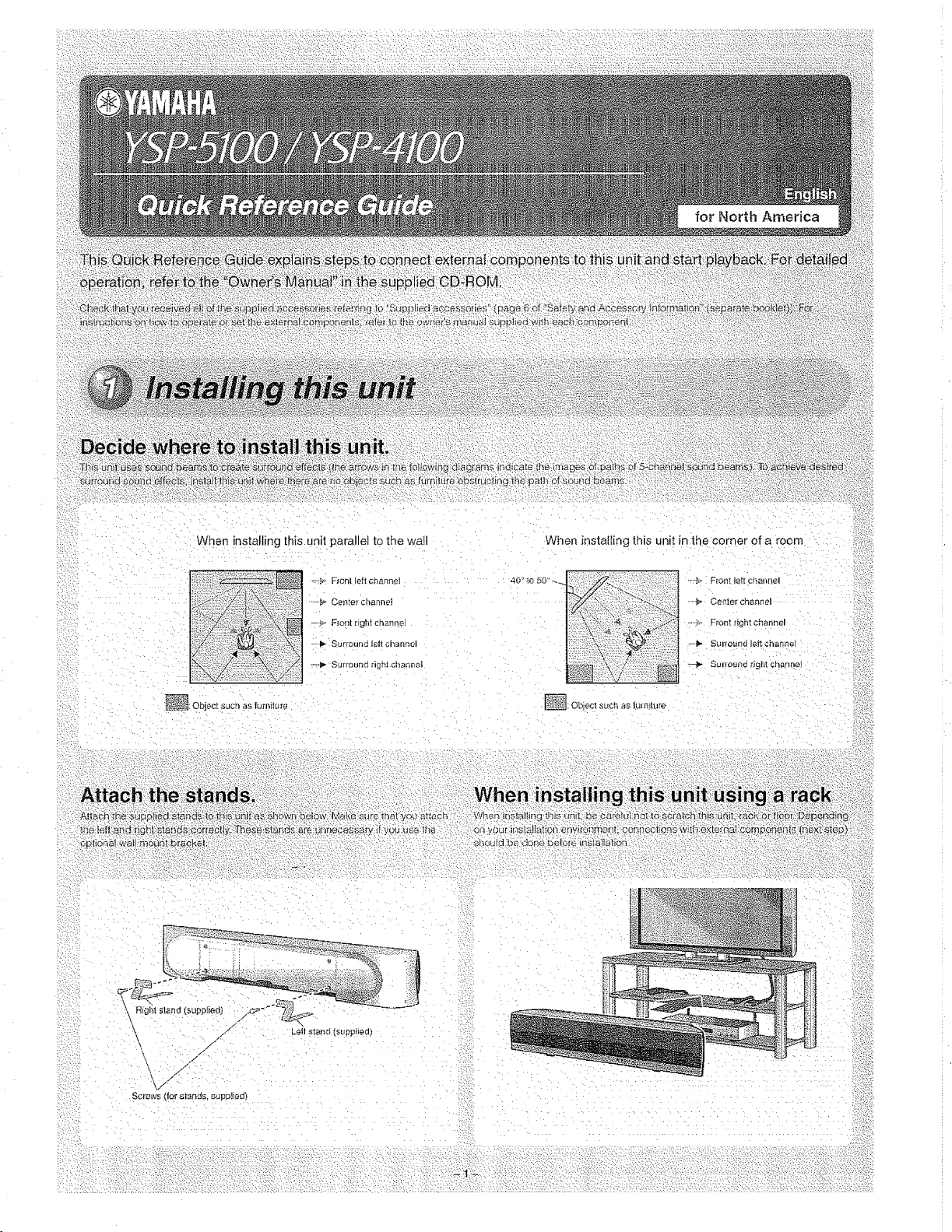
When installing this unit parallel to the wati
b:i:i:i_
:/:Z:
,:.>
_: Object such as furniture
_:_, F_onl feltchanneI
, ,_ Center chant.el
--,_ Flenl light chan_"_eJ
--,_ Surround tell channel
@ Surround righ! cl_anaeI
When instafling this unit in the corner of a room
-'--'_"F[ont left chaJmel
.-_ Cen[er channel
_._.,. Front _;ightchannel
-_-i_ Suneund _eit channel
@ Suuound righlchanhel
• •,L
_/- Leii stand [suppled}
\//"
}'V "
Screws (los _lancis. supplied)
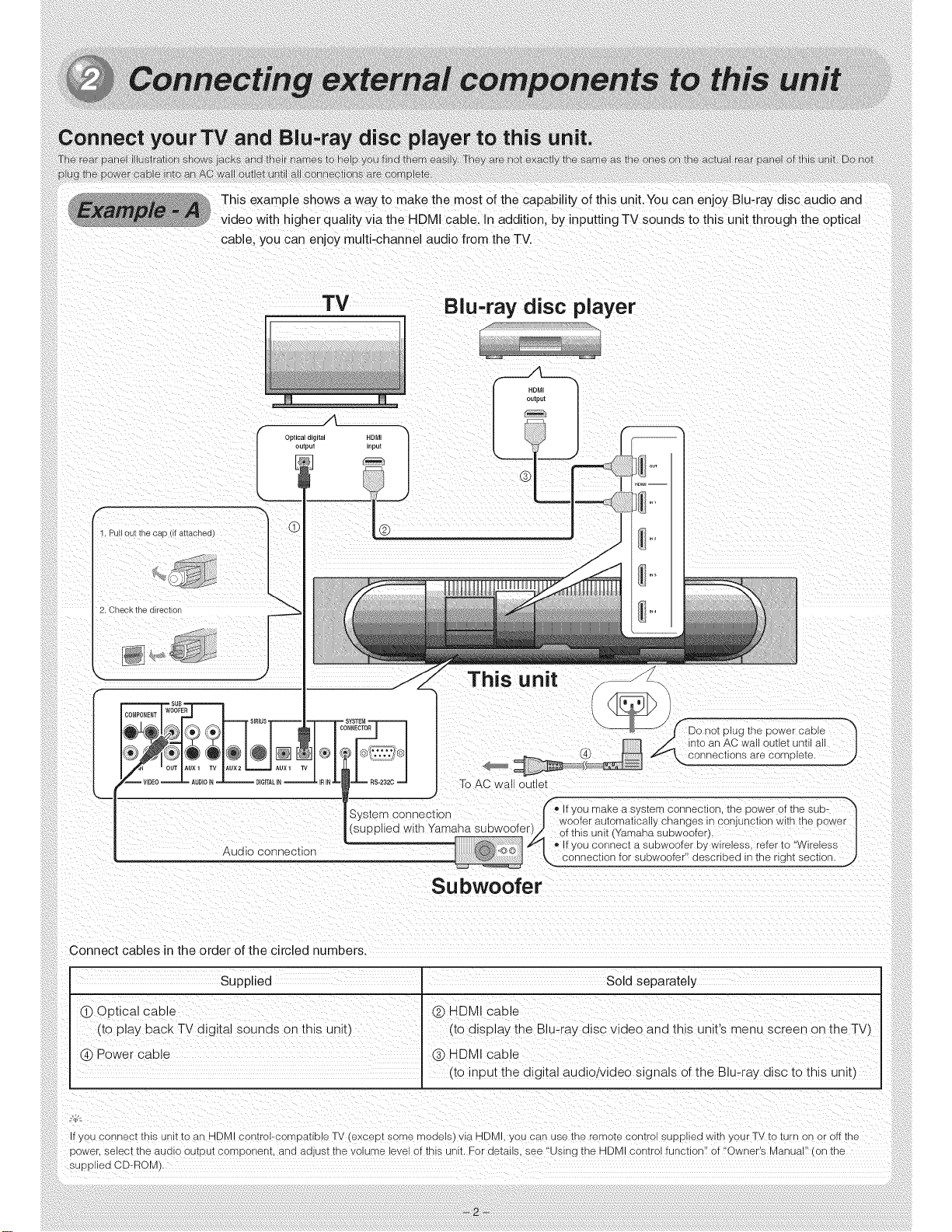
This example shows a way to make the most of the capability of this unit.You can enjoy Blu-ray disc audio and
video with higher quality via the HDMI cable. In addition, by inputting TV sounds to this unit through the optical
cable, you can enjoy multi-channel audio from the TV.
TV Blu=ray disc player
f
1. Pull out the cad I IT ai[acnea
2. Check the direction
_ J
iWOOFER SIRIUS ,
Audio connecuon
HDMI
This unit
To AC wa au_let
S stem oonneotlo (fo If you maKe a s/stem connecuon [ne power of the sub- ""
y n
• • | woofer automatically changes in conjunction with the power
(supplied wkth Yamaha subwoofer r _ of this unit (Yamaha subwoofer).
@,©© _ _oIf you connect a subwoofer by wireless, refer to "Wireless
-_ _ onnechon for subwoofer" described in the nght section, j
Subwoofer
Connect cables in the order of the circled numbers.
Supplied I
(_) Optical cable
(to play 8ack TV digital sounds on this unit',
(_ Power cable
Sold separately
(_) HDMI cable
([c display the Blu-ray d sc video and this unit's menu screen on the TW
(_) HDMI cable
(to input the dig tal audiolvideo signals of the Blu-ray disc to this unit_
f you connect tnls unit to an HDM control-compatible TV (except some mooels) via HDMI, you san use tne remote c sntrol SUDE ea wltn your TV to turn or" or off the
pswer, select tne auolo OUtDUTcomponent, ana aQjL.Sttne volume .evel of this unit For details, see % s ng the HDMI control function" of "Owner's Manual on tne
SuDDlied CD-ROM'
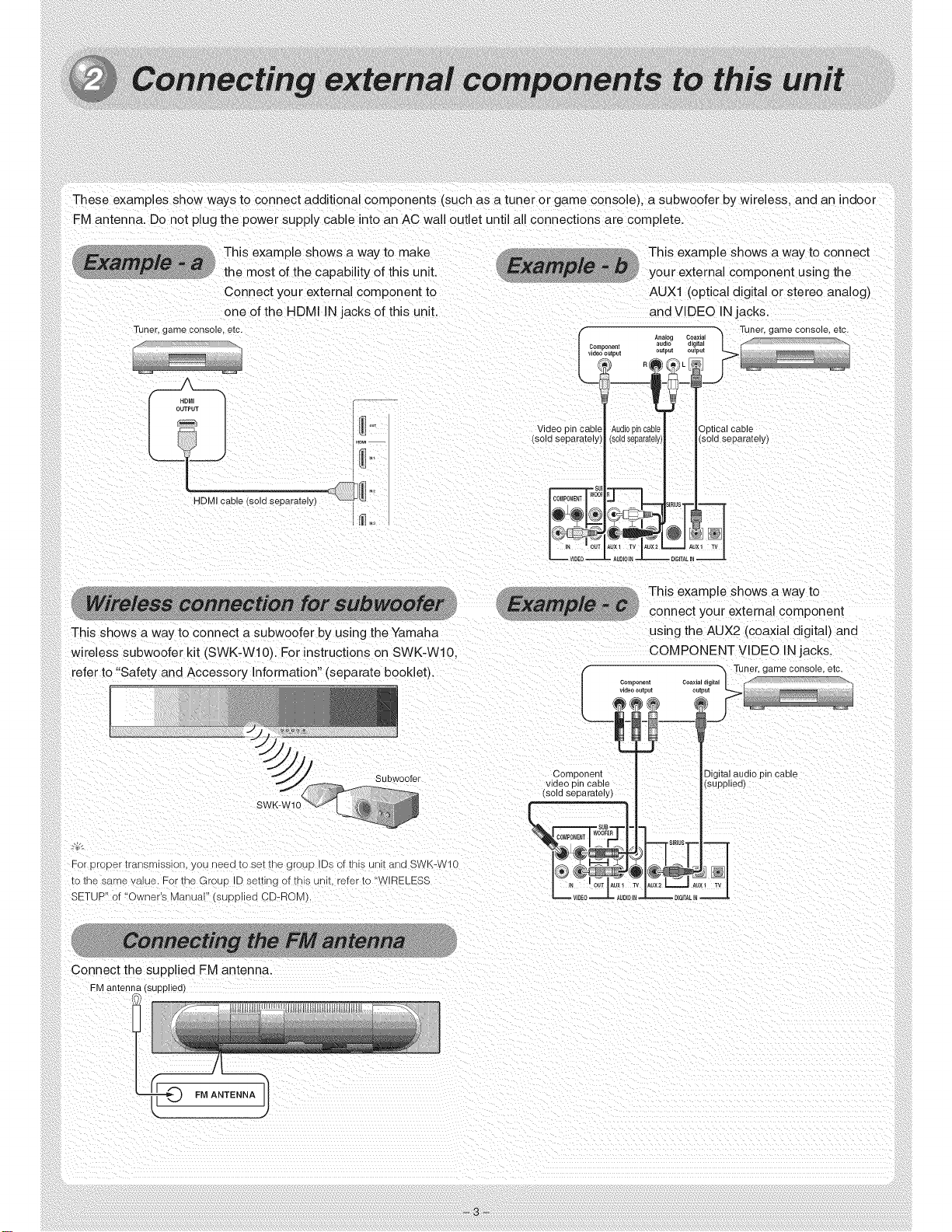
These examples show ways to connect additional components (such as a tuner or game conse e), a subwoofer by wireless, and an indoor
FM antenna. Do not plug the power supply cable into an AC wall outlet until all connections are complete.
This example shows a way to make
_° the most of the capability of this unit.
Connect your external component to
one of the HDMI IN jacks of this unit.
Tuner, game console, etc.
L J
HDMI cable lsola separa[ely)_ _ "_
fco_ iponent
ooutput
Video pin cabl Audiopir
sold separately] (s01dsep.
This example shows a way to connect
your external component using the
AUXl (optical digital or stereo analog)
and VIDEO IN jacks
Tuner, game console, etc.
' ' al cable
ately) /(sold separately)
,_RIUS
DIGITALIN _
This shows a way to connect a subwoofer by using the Yamaha
wireless subwoofer kit (SWK-Wl0). For instructions on SWK-Wl0.
ref_ ' and Accessory Information" {separate booklet).
This example shows a way to
connect your external component
using the AUX2 (coaxial digital) and
COMPONENT VIDEO IN jacks.
Sub Noofer
For Droeer_ransmlsslonyou need to set rne group IDs of this unit and SWK-W10
[e the same value. For the GroLo ID seTungof this unit. refer to "WIRELESS
SETUP"of "Owner's Manual" ;UDE ed CD-ROM).
Connect the supplieu FM antenna.
FM anter 3plied)
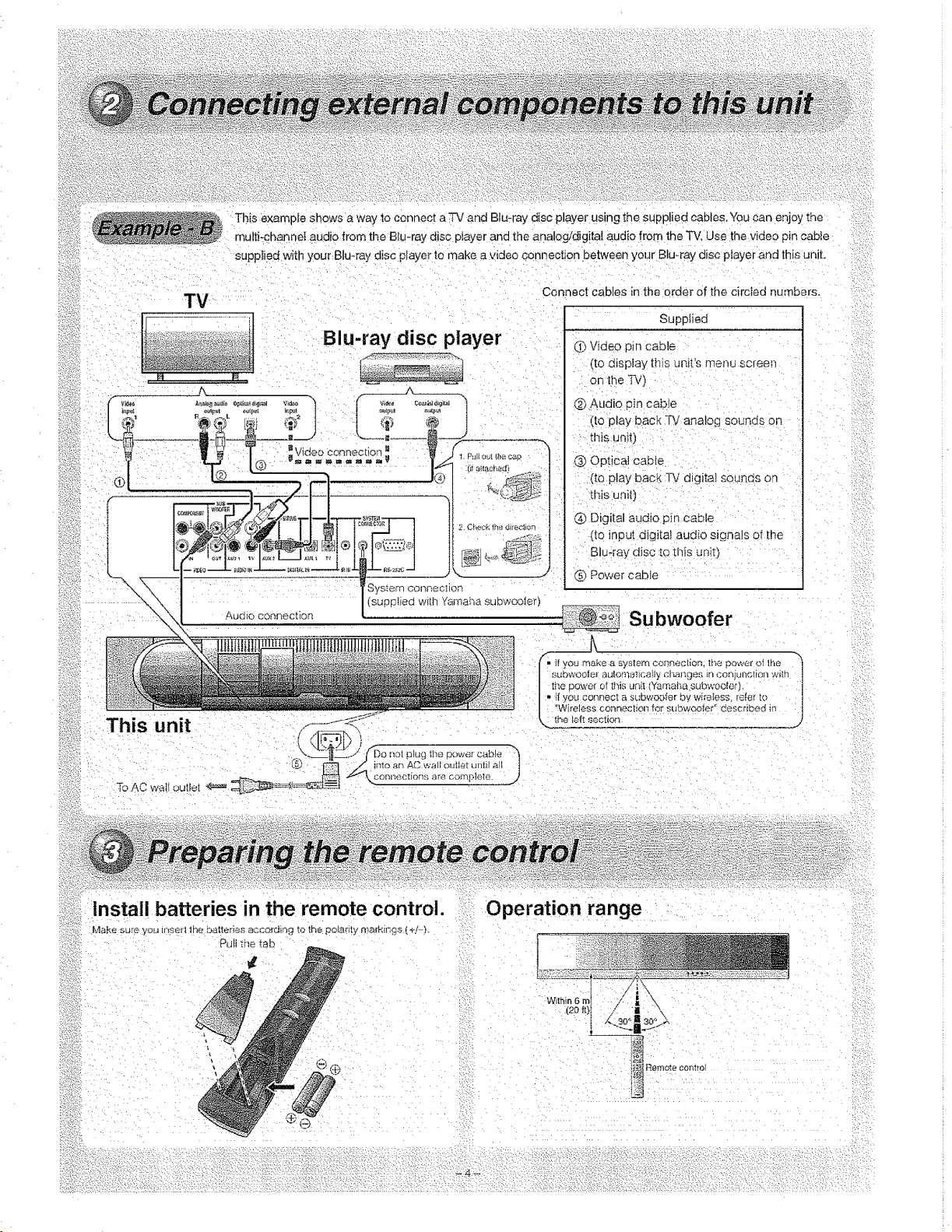
This example shows a way to connect a TV and Blu-ray disc player using the supplied cables. You can enjoy the
multi+channeI audio iron the B]u-ray disc player and the aria og/digital audio from the "IV. Use the video pin cable
TV
Blu-ray disc player
This unit _
[ J(Do not plug me power cable >}
_ into an AC ",++'alloutlet until all J
_.,.conr_ections are comp+e_e
To AC wall outlet
Connect cables in the orde_ of the circled numbers.
Supplied
(i) Video pin Cable
(to display this unit's menu screen
on the TV)
(_) Audio pin cable
(to play bac k _V analog sounds on
tl_is unit1
Q Optical cable
(to play bac_: TV digital sounos on
this :unit)
@ Digital audio pin cable
(to input digital audio signals of the
Blu:ray disc to _his unit}
@Power cable
Subwoofer
• ff you make a _ystem connection. It',e power oi the
subwoofe_" autom_)tlcalJy chartOe£ In coniuthotten with
the oe_+'e_ of this unit Yamaha subwoofet)
•l| you connect asL+'bwoo_er by wireless, [e_er to
"Wireless connection for subwooier ,+described in
,_ the left section j
i!ii ,ns,a,,bo.e.,es,n,,oremotecontro,.
Make sure you in?err lhe batteries accordmg to the polarity markmgs (+]..-}+
Pull the tab
Operation range
WithiI
..... . . . P_ : .: -:: :"_::,::,,]?
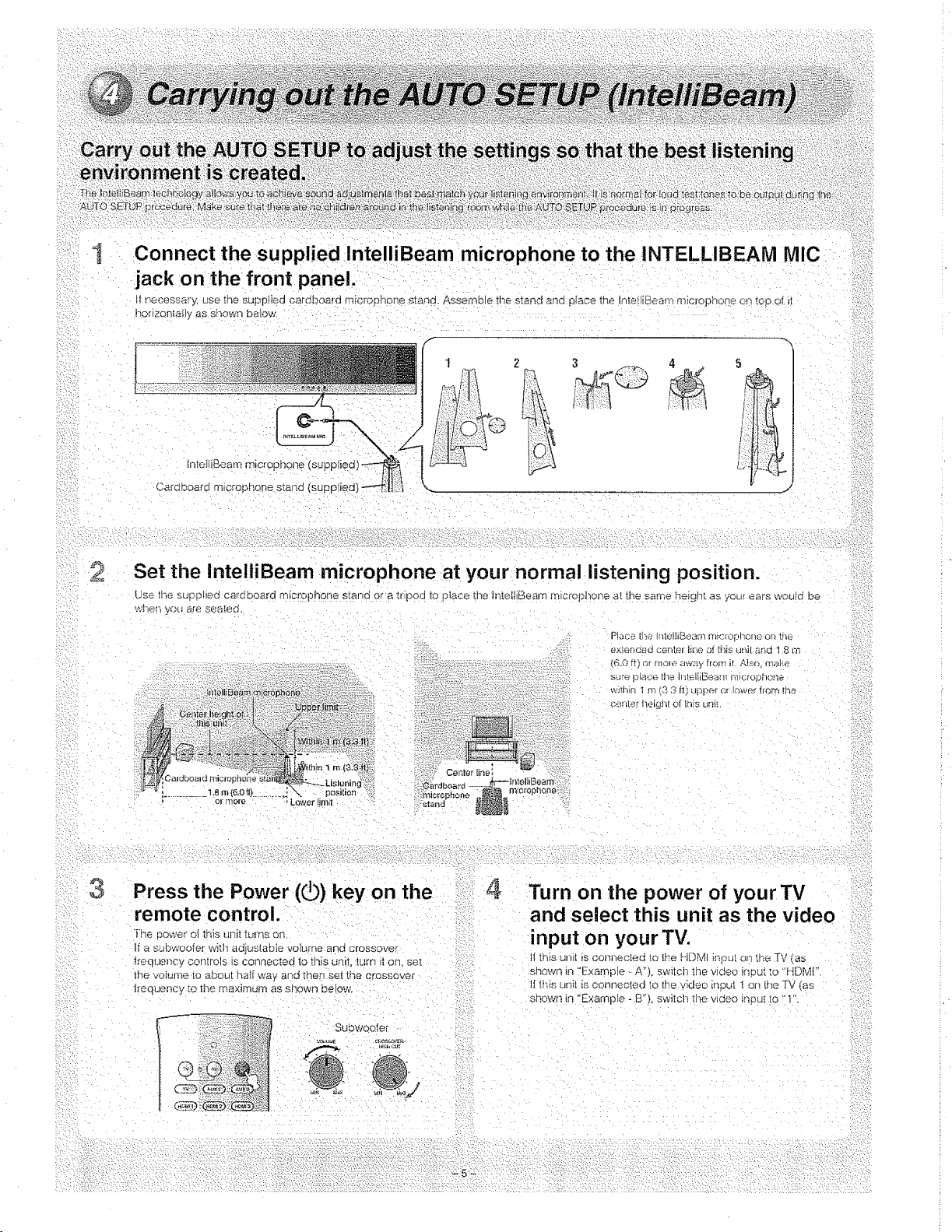
2
concoct,nte,,iOeammic.o,honetothe,OTE.L,OEA°.,C
jack on the front panel.
ir necessar% use _ne su/Jplied cardboard m_cro_hone s_and. Asse_yble the stared arid place the InteiliBeam rnicropno,be on _op of it
horlzonta;}y as shown below
Ip.tetiiBeam microphol7e (supplied} _ i
5
i;}i£d:l. _ •
!i
Set the inteltiBeam microphone at your normal listening position.
Use tt;e suooNed cardboard microphone s_:and ora tr poa [o place the ]nteNiBeam microphone at tiye same height as your ears would be
wher_ you are sea_:ed.
Place the h_tofhBeam m_c_opb, ene on the
exleneea can[el l;lia of this _JtlJ!aria 1,8 m
{6,0 tt) ,_r rno_e away from if Also make
sure place tlte llitelllBea,.i] 1110fof_l'lofle,
:'dthin I m f3 3 fl) upper or i_wer lrom !he
cehter heighi of this ur]li
3Press the Power (_) key on the
remote control.
The cower el lhis unit tLrlnS on
If a subwoofer with adjuslable volume ana crossover
ltequency conlrots s connected to this unit. _Llr_7_!on. se[
Ihe volume _o abou[ half way and the_ set the crossover
fiequency _o the maximum as shown below,
Subwooler
.u_: 4
,i//,;:v:7,//: i{i:;L_:¸-w •....
Turn on the power of your TV
and select this unit as the video
input on your TV.
If this unl[ fs oonl_eoted _o the HDL41 hspu[ o_1tl-_eTV (as
snown in "Example _ A"), sw_tch the video inou{ to "HDMt".
tf this unit is conl7ected to the video input I on the TV (as
ShOWn in "Example -B") switch the video inp _ to "t"
.¢?

5Press and hold INTELLIBEAM
for more than 2 seconds.
The tNTELLIBEAM key is located inside of the slide cover.
9Press ENTER.
The fol[owipg screen appea_s on the TV _o_ 2 seconds and
ttmen tlmemenu screen disappears from the TV.
6Make sure that your listening
room is as quiet as possible.
Fo_ accurate measiJremeni, turn off a[r conditioner or otner
devices tI'_at make noises.
Prepareto leave the room.
The best setting may not oe done if you are in tt;e room.
Prepare lo leave 1no room in 10 seconds atie_ pressJNa ENTER
in step 8.
:;' •When _eaving tt'_e room, bn}mg ttlt£ Outck Refer'once Guide with Vou
•Wait outside the room during ttle AUTO SETUP procedure
oThe AUTO SETUP procedu_'e lakes about 3 minutes.
-* To cancei the AUTO SETUP proceaure after i_ is started _sress
RETURN.
-:::
8Press ENTER to start the AUTO
SETUP procedure and then leave
the room within 10 seconds.
The setup screen automatically changes dqring the AUTO
S_UP p_ocedure
\,Vher- the AUTO SETUP procedure is complete, the "SHOW
RESULT" screen appears on the TV.
If "ENVIRONMENT CHECK (FAILED)" is alsplayea, see "Erro_
massages lot AUTO SETUP" of "Owner's ManuaF' {on the
:* supplied CD_ROM) and then run the proceaure agal_
_-qr:
:: • The result may differ depending on the envtronmenL
• if any error occurs, the co_respond[ng error message appears on time
screen, ha th_s case see "krlor massages to/AUTO SETUP" o! "OwneP
:i s Manuai" (oiq the supplied CD-ROIvl).
I0 Disconnect the lnteiliBeam
microphone.
Now the AUTO SETUP is complete, Keep the IntetliBeam
m_croohone in a safe place.
The settings are automatically savea in the systef'0 memory. i=/ :::
I
2
Press HDMll-4 or AUX1/2 to
select the Blu-ray disc player
asthe input source and start
playback of the demonstration
DVD. 1
Check whether the 13[-IDIGITAL
indicator lights up.
• !_the i_d_ca[or aoes not iigl_t up. check the seihng for digiiat audio outpul
un the pfayei. For detaits, see "Using the supplied demonstration DVD"
(page 7 of "Safety and Accessow lnbrmation" (separate booklet)).
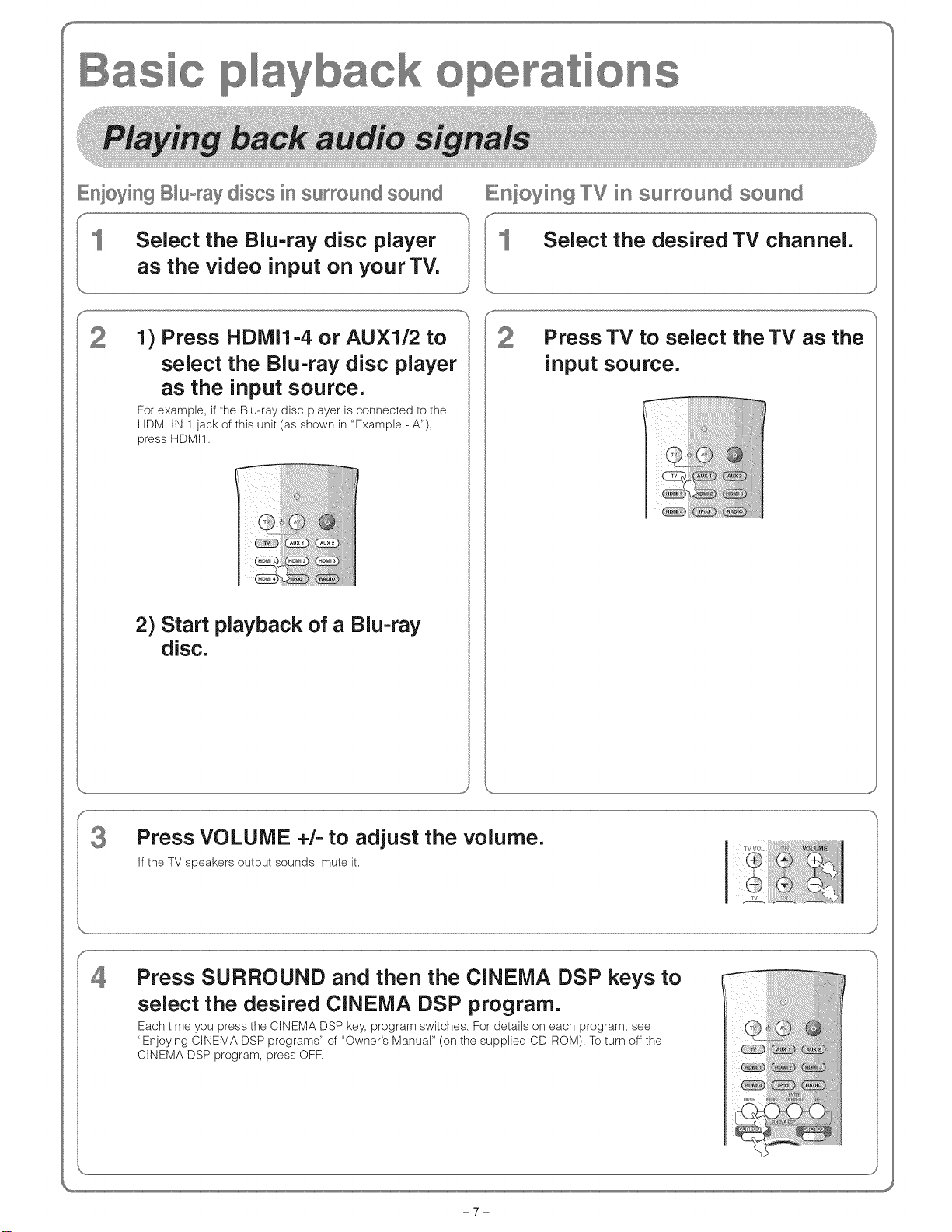
SS
Enioying B_uoraydiscs in surround sound
Select the Blu-ray disc player
as the video input on your TV.
IIE,nioying TV in surround sound
1) Press HDMI1-4 or AUX1/2 to
select the Blu-ray disc player
as the input source.
For example, if the Blu-ray disc player is connected to the
HDMI IN I jack of this unit (as shown in "Example - A%
press HDMI1.
2) Start playback of a Blu-ray
disc.
Press TV to select the TV as the
input source.
Press VOLUME +/- to adjust the volume.
If the TV speakers output sounds, mute it,
Press SURROUND and then the CINEMA DSP keys to
select the desired CINEMA DSP program.
Each time you press the CINEMA DSP key, program switches. For details on each program, see
"Enjoying CINEMA DSP programs '_of "Owner's ManuaP (on the supplied CD-ROM). To turn off the
CINEMA DSP program, press OFF.
-7-
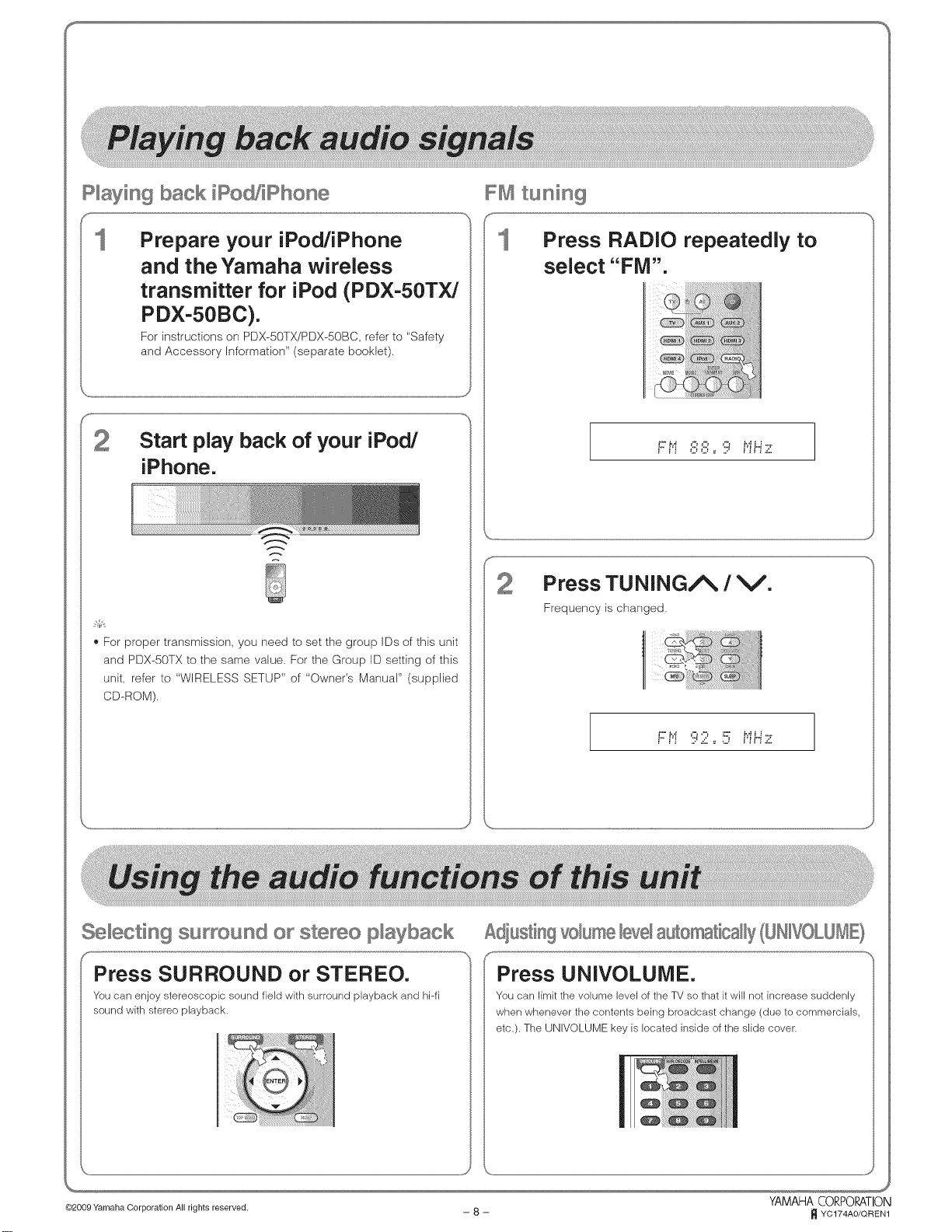
S %
P_aying back iPod/iPhone
Prepare your iPod/iPhone
and the Yamaha wireless
transmitter for iPod (PDX-50TX/
PDX-50BC).
For instructions on PDX-50TX/PDX-50BC, refer to "Safety
and Accessory Information" (separate booklet).
_'For proper transmission, you need to set the group IDs of this unit
and PDX-50TX to the same value, For the Group ID setting of this
unit, refer to "WIRELESS SETUP" of "OwneCs Manual" (supplbd
CD-ROM).
FM tuning
Press RADIO repeatedly to
select "FM".
..... J
Press TUNING/_ /V.
Frequency is changed.
F t"i 92 ,,5 i"iHz
..... #
Selecting surround or stereo p_ayback
Press SURROUND or STEREO.
You can enjoy stereoscopic sound field with surround playback and hPfi
sound with stereo playback.
AdiustingvoBme bve_automatically(UHWOLUME}
Press UNIVOLUiViE.
You can limit the volume level of the TV so that it will not increase suddenly
when whenever the contents being broadcast change (due to commercials,
etc.). The UNIVOLUME key is located inside of the slide cover.
.J
YAMAHA CORPORATION
@2009 Yamaha Corporation All rights reserved, -- 8 -- _ YC174AO/QREN1
OYAMAHA
YSP-5100 / YSP-4100
Digital Sound ProjectorrM
For more detailed information, refer to the Owner's Manual on the CD-ROM. To view the Owner's Manual, click
"English" in the screen displayed automatically when you insert the CD-ROM into your PC. Then follow the on-
screen instructions. If the screen is not displayed automatically, ()pen the "index.html" in the CD-ROM.
Caution: Do not attempt to play this CD-ROM on an audio CD player.
Including "Wireless transmitter for iPod PDX-50TX/PDX-50BC Owner's Manual" and "Wireless subwoofer kit
SWK-W 10 Owner's Manual"
Safetyand AccessoryInformation
CAUTION
RISKOFELECTRICSHOCK
DONOTOPEN
CAUTION: TO REDUCE THE RISK OF
ELECTRIC SHOCK, DO NOT REMOVE
COVER (OR BACK). NO USER-SERVICEABLE
PARTS INSIDE. REFER SERVICING TO
QUALIFIED SERVICE PERSONNEL.
Explanation of Graphical Symbols
The lighming l]ash with arrowhead symbol,
within an equilateral triangle, is intended to
alert you to the presence of uninsulated
"'dangerous voltage" within the product's
enclosure that may be of sulTicient magnitude
to constitute a risk of electric shock to
persons.
The exclamation point within an equilateral
triangle is intended to alert you to the
presence of important operating and
maintenance (servicing) instructions in the
literature accompanying the appliance.
1
2
3
4
5
6
7
10
11
12
13
14
Read these instructions.
Keep these instructions.
Heed all warnings.
Follow all instructions.
Do not use this apparatus near water.
Clean only with dry cloth.
Do not block any ventilation openings. Install m accordance with
the manufacturer's instructions.
Do not install near any heat sources such as radiators, heat
registers, stoves, or other apparatus (including ampli tiers) thai
produce heat.
Do not defeat the safety purpose of the polarized or grounding-
type plug. A polarized plug has two blades with one wider than
,,he other. A grounding type plug has two blades and a third
grounding prong. The wide blade or the third prong are provided
for your sal_zly. If the provided plug does not fit into your outlet,
consuh an electrician for replacement of the obsolete outlet.
Protect the power cord from being walked on or pinched
particularly at plugs, convenience receptacles, and the point
where they exit flom the apparatus.
Only use attachments/accessories specified by the manutitcturer.
Use only with the cart, stand, tripod, bracket
or table specified by the manufacturer, or
sold with the apparatus. When a cart is used
use caution when moving the carWapparatus
combination to avoid iniury from tip-over.
Unplug this apparatus during lightning
storms or when unused for long periods of time.
Refer all servicing to qualified service personnel. Servicing is
required when the apparatus has been damaged in any way, such
as power-supply cord or plug is damaged, liquid has been spilled
or objects have tilllen into the apparatus, the apparatus has been
exposed to rain or moisture, does not operate normally, or has
been dropped.
We Want You Listening For A Lifetime
Yamaha and the Electronic Industries Association's Consumer Electronics Group want you to get the most out of your
equipment by playing it at a safe level. One that lets the sound coine through loud and clear without annoying
blaring or distortion - and, most importantly, without affecting your sensitive hearing.
Since hearing damage from loud sounds is often undetectabIe until it is too late, Yamaha and the Electronic Industries vaanlyou
Association's Consumer Electronics Group recommend you to avoid prolonged exposure from excessive volume levels. LJSTENZNG
2En

FCC INFORMATION (for US customers)
1. IMPORTANT NOTICE: DO NOT MODIFY THIS UNIT!
This product, when installed as indicated in the instructions
contained in this manual, meets FCC requirements.
Modifications not expressly approved by Yamaha may void
your authority, granted by the FCC, to use the product.
2. IMPORTANT:
When connecting this product to accessories and/or another
product use only high quality shielded cables. Cable/s supplied
with this product MUST be used. Follow all installation
instructions. Failure to follow instructions could void your FCC
authorization to use this product in the USA.
3. NOTE:
This product has been tested and found to comply with the
requirements listed in FCC Regulations, Part 15 for Class "B"
digital devices. Compliance with these requirements provides a
reasonable level of assurance that your use of this product in a
residential environment will not result in harmful interference
with other electronic devices.
This equipment generates/uses radio frequencies and, if not
installed and used according to the instructions found in the
users manual, may cause interference harmful to the operation
of other electronic devices.
Compliance with FCC regulations does not guarantee that
interference will not occur in all installations, ff this product is
found to be the source of interference, which can be determined
by turning the unit "OFF" and "'ON", please try to eliminate the
problem by using one of the toltowing measures:
Relocate either this product or the device that is being affected
by the interference.
Utilize power outlets that are on different branch (circuit
breaker or fuse) circuits or install AC line fiher!s.
In the case of radio or TV interference, relocate/reorient the
antenna. If the antenna lead-in is 300 ohm ribbon lea& change
the lead-in to coaxial type cable.
If these corrective measures do not produce satisfactory results,
please contact the local retailer authorized to distribute this type
of product. If you can not locate the appropriate retailer, please
contact Yamaha Electronics Cor_., U.S.A. 6660 Orangethorpe
Ave, Buena Park, CA 90620.
The above statements apply ONLY to those products distributed
by Yamaha Corporation of America or its subsidiaries.
This device complies with Part 15 of the FCC Rules.
Operation is subject to the following two conditions:
1) this device may not cause harmful interference, and
2) this device must accept any interference received including interference that may cause undesired operation.
See user manual instructions if interference to radio reception is suspected.
This equipment compiles with FCC!IC radiation exposure limits set forth for uncontrolled equipment and meets the FCC radio fl-equency
(RF)
Exposure Guidelines in Supplement C to OET65 and RSS-t02 of the IC radio frequency (RF) Exposure rules. This equipment has very low
levels of RF energy that it deemed to comply without maximum permissive exposure evaluation (MPEL But it is desirable that it should be
installed and operated with at least 20 cm and more between the radiator and person's body (excluding extremities: hands, wrists, feet and
ankles).
NOTICE
This equipment has been tested and found to comply with the limits for a Class B digital device, pursuant to part 15 of the FCC Rules. These
limits are designed to provide reasonable protection against harmful interference in a residential installation.
This equipment generates, uses and can radiate radio frequency energy and, if not installed and used in accordance with the instructions, may
cause harmful interference to radio communications. However, there is no guarantee that interference will not occur in a particular
installation. If this equipment does cause harmful interference to radio or television reception, which can be determined by turning the
equipment off and on, the user is encouraged to try to correct the interference by one or more of the following measures:
......Reorient or relocate the receiving antenna
- Increase the separation between the equipment and receiver.
- Connect the equipment into an outlet on a circuit different from that to which the receiver is connected.
- Consult the dealer or an experienced radio/TV technician for help.
FCC WARNING
Change or modifications not expressly approved by the party responsible for compliance could void the user's authority to operate the
equipment.
FOR CANADIAN CUSTOMERS
To prevent electric shock, match wide blade of ping to wide slot and fully insert.
This Class B digital apparatus complies with Canadian ICES-003.
POUR LES CLIENTS RESIDANT AU CANADA
Afin d'(viter les risques de ddcharges (lectriques, veillez 'a ins&er 'a fond la large broche de la fiche dans la large tente de la prise de courant.
Cet appareil numdrique de Classe Best conforme h la norme canadienne ICES-003.
3En
1
2
To assure the finest performance, please read this manual
carefully. Keep it in a safe place for future reference.
Install this sound system in a well ventilated, cool, dry, clean
place with at least 5 cm (2 in) of space above (or below) this unit
away from direct sunlight, heat sources, vibration, (lust.
moisture, and/or cold.
3 Locate this unit away from other electrical appliances, motors, or
translormers to avoid humming sounds.
4 Do not expose this unit to sudden temperature changes from cold
to hot, and do not locate this unit in an environment with high
humidity (i.e. a room with a humidifier) to prevent condensation
inside this mill which may cause an electrical shock, fire,
damage to this uniL and/or personal injury.
5Avoid installing this unit where fi)reign object may lhll onto this
unit and/or this unit may be exposed to liquid dripping or
splashing. On the top of this unit, do not place:
- Other components, as they, may cause damage and/or
discoloration on the surface of this unit.
........Burning objects (i.e, candles), as they may cause fire, damage
to this unit, and/or personal injury.
Containers with liquid in them, as they ntay fail and liquid
may cause electrical shock t,,) the user and/or damage to this
unit.
6 Do not cover lhis unit with a newspaper, tablecloth, curtain, etc.
in order not to obstruct heat radiation. If the temperature inside
this unit rises, it may cause fire, damage to lhis unit, and/or
personal injury.
7 Do not plug in this unit to a walt outlet until all connections are
complete.
8 Do not operate this unit upside-down. It may overheat, possibly
causing damage.
9 Do not use force on switches, knobs and/or cords.
10 When disconnecting the power cable from the wall outlet, grasp
the plug; do not pull the cable.
11 Do not clean this unit with chemical solvents; this might damage
the finish. Use a clean, dry cloth.
12 Only voltage specified on Ibis unit must be used. Using this unit
with a higher voltage than specified is dangerous and may cause
fire, damage to this unit, and/or personal injury. Yamaha will not
be held responsible for any damage resulting from use of this unit
with a voltage other than specified.
13 To prevent damage by lightning, keep the power cord and outdoor
antennas disconnected from a wall outlet or this unit during a
lighming storm.
14 Do not attempt to modify or fix this unit. Contact qualified
Yamaha service personnel when any service is needed. The
cabinet should never be opened for any reasons.
15 When not planning to use this unit for long periods of time (i.e.
vacation), disconnect the AC power plug from the wall outlet.
16 Be sure to read the "Troubleshooting" section (of "Owner's
Manual" on the supplied CD-ROM) on common operating errors
before concluding that this unit is taulty.
17 Before moving this unit, press the power (_) key,' to set it to
standby mode and disconnect the AC power plug l'rom the wall
outlet.
18 Condensation will form when tile surrounding temperature
changes snddenly. Disconnect the power cable from the outlet,
then leave this unit alone.
19 When using this unit for n hmg time, this unit may become warm.
Turn the power off, then leave this unit alone for cooling.
20 Install this unit near the AC outlet and where the AC power plug
can be reached easily,
21 The batteries shall not be exposed to excessive heat such as
sunshine, fire or the like.
WARNING
TO REDUCE THE RISK OF FIRE OR ELECTRIC SHOCK. DO
NOT EXPOSE THIS UNIT TO RAIN OR MOISTURE.
CAUTION
Use of controls or adjusm_ents or perlormance of procedures other
than those specified herein may result in hazardous radiation
exposure.
WARNING
THE POWER SUPPIN CABI_E OF THIS UNIT MUST BE
CONNECTED TO 'FILE MAIN SOCKET OUTLET VIA A
PROTECTIVE EARTHING CONNECTION.
Radio waves may affect electro-medical devices.
Do not use this unit near medical devices or inside medical
facilities.
This unit is not disconnected from the AC power source as long as
it is connected to the wall outlet, even if this unit itself is turned
off by the power (IQ))key. This state is called the standby mode. In
this state, this unit is designed to consume a very small quantity of
power.
Do not use this unit within 22 cm (9 inches) of persons with a
heart pacemaker implant or defibrillator implant,
IMPORTANT
Please record the serial number of this unit in the space below.
MOI)EL:
Serial No.:
The serial number is located on the rear of the unit. Retain this
Safety and Accessory Information in a sali: place for future
reference.
Notes on remote controls and batteries
• Do not spill v, ater or other liquids on the remote control.
• Do not drop the remote control.
• l)o not leave or store the remote control it] the lollowing
conditions:
places of high humidity, such as near a bath
places of high temperatures, such as near a heater or stove
- places of extremely low temperatures
dusty places
• Insert the battery according to the polarity markings (+ and -).
• Change all batteries if you notice the lk)llowing conditions: the
operation range of the remote control narrov_s or tile transmit
indicator does not flash or is dim.
• If the batteries run out, immediately remove them from the remote
control to prevent an explosion or acid leak.
• If you find leaking batteries, discard the batteries immediately,
taking care not to touch the leaked material. If the leaked material
comes into contact with your skin or gets into your eyes or month,
rinse it away immediately and consult a doctor. Clean the battery
compartment thoroughly before installing new batteries.
* Do not use old batteries together with new ones. This may shorten
the life of the new batteries or cause old batteries to leak.
• Do not use different types of batteries (such as alkaline and
manganese batteries) together. Specification of batteries may be
different even though they look the same.
• Belore inserting new batteries, wipe the compartment clean.
• If the remote control is without batteries lor more than 2 minutes,
or if exhausted batteries remain in the remote control, the contents
of the memory may be cleared. In such a case, install new batteries
and set the remote control code.
• Dispose of batteries according to your regional regulalions,
4En
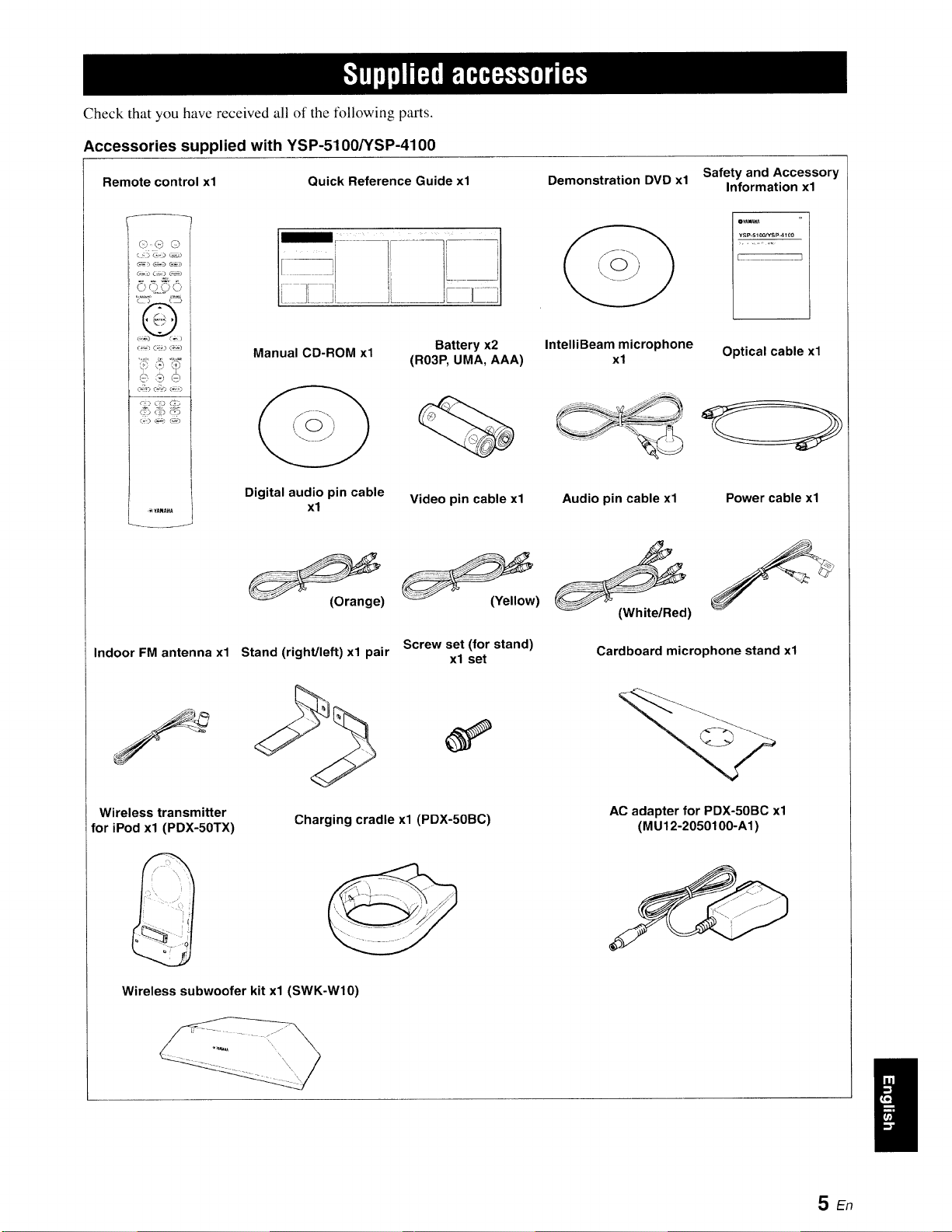
Check that you have received all of the tk_llowing parts.
Accessories supplied with YSP-5100NSP-4100
Safety and Accessory
Remote control xl Quick Reference Guide xl Demonstration DVD xl Information xl
I
...... t
_YAMAHA
Manual CD-ROM xl
Digital audio pin cable
xl
)
Battery x2 IntelliBeam microphone
(R03P, UMA, AAA) xl
Video pin cable xl
)
Indoor FM antenna xl
Wireless transmitter
for iPod xl (PDX-50TX)
Screw set (for stand)
Stand (right/left) xl pair xl set
Charging cradle xl (PDX-50BC)
Wireless subwoofer kit xl (SWK-Wl0)
¥S_-_10_SP-4100
L ...........................................................J
Optical cable xl
:,=_:<:_.... _ _S_¸_'
Audio pin cable xl Power cable xl
(White/Red)
Cardboard microphone stand xl
AC adapter for PDX-50BC xl
(MU12-2050100-A1)
i
5En
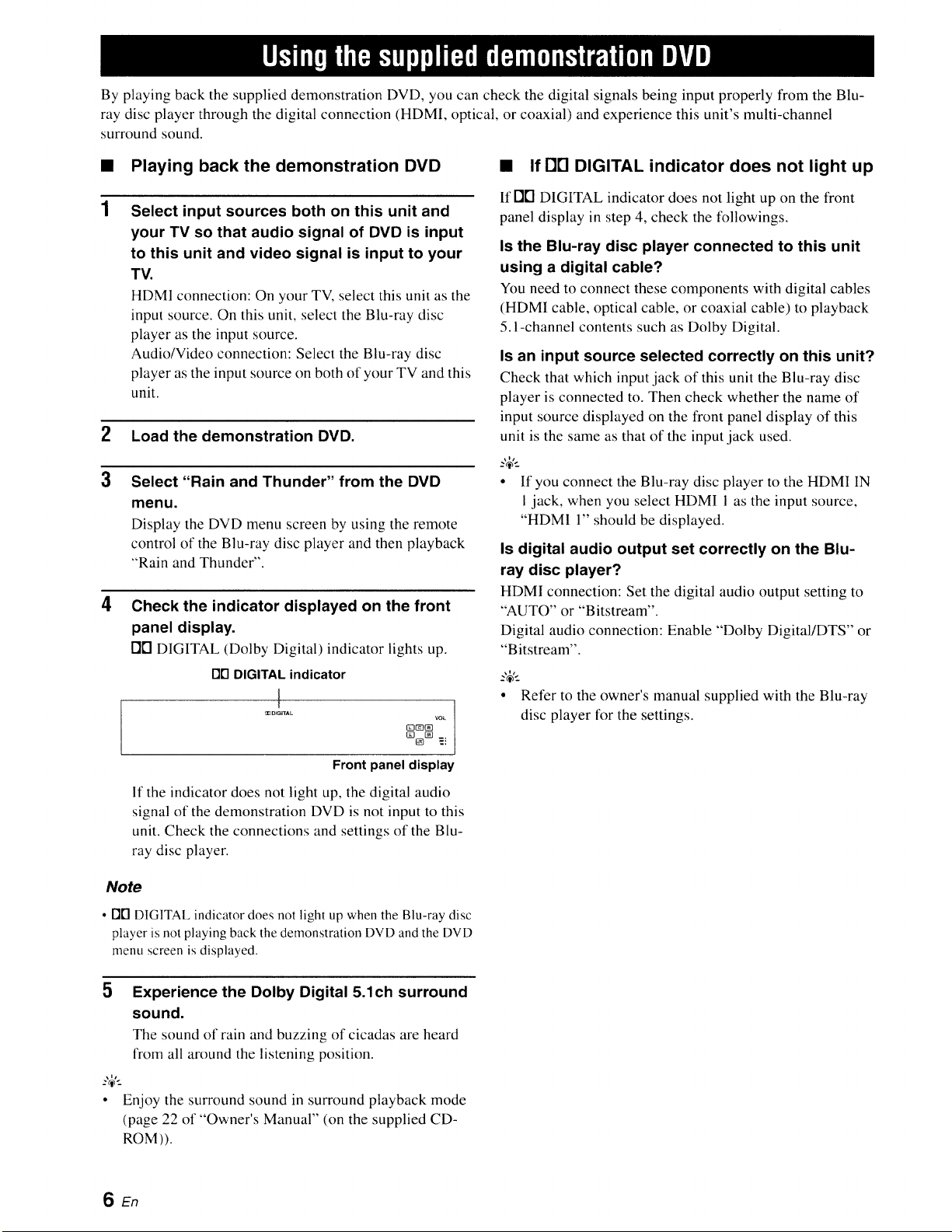
By playing back the supplied demonstration DVD, you can check the digital signals being input properly from the Blu-
ray disc player through the digital connection (HDMI, optical, or coaxial) and experience this unit's multi-channel
surround sound.
1
Playing back the demonstration DVD
Select input sources both on this unit and
your TV so that audio signal of DVD is input
to this unit and video signal is input to your
TV.
ttDMI connection: On your TV, select this unit as the
input source. On this unit, select the Blu-ray disc
player as the input source.
Audio/Video connection: Select the Blu-ray disc
player as the input source on both of your TV and this
unit.
2 Load the demonstration DVD.
3Select "Rain and Thunder" from the DVD
4
menu.
Display the DVD menu screen by using the remote
control of the Blu-ray disc player and then playback
"Rain and Thunder".
Check the indicator displayed on the front
panel display.
FI['I DIGITAL (Dolby Digital) indicator lights up.
rlrl DIGITAL indicator
l
mOt_ITAL
GL'_ vo_
Front panel display
•If DE] DIGITAL indicator does not light up
If FIB DIGITAL indicator does not light up on the front
panel display in step 4, check the followings.
Is the Blu-ray disc player connected to this unit
using a digital cable?
You need to connect these components with digital cables
(HDM! cable, optical cable, or coaxial cable) to playback
5. I-channel contents such as Dolby Digital.
Is an input source selected correctly on this unit?
Check that which input jack of this unit the Blu-ray disc
player is connected to. Then check whether the name of
input source displayed on the front panel display of this
unit is the same as that of the input jack used.
"4'--
• If you connect the Blu-ray disc player to the HDMI IN
i jack, when you select HDMI 1 as the input source,
"HDM1 1" should be displayed.
Is digital audio output set correctly on the Blu-
ray disc player?
HDMI connection: Set the digital audio output setting to
"AUTO" or "Bitstream".
Digital audio connection: Enable "Dolby Digital/DTS" or
"Bitstream".
• Refer to the owner's manual supplied with the Blu-ray
disc player lk_rthe settings.
If the indicator does not light up, the digital audio
signal of the demonstration DVD is not input to this
unit. Check the connections and settings of the Blu-
ray disc player.
Note
•01"1DIGITAL indicator does not light up when the Blu-ray disc
player is not playing back the demonstration DVD and the DVD
menu screen is displayed.
5Experience the Dolby Digital 5.1ch surround
sound.
The sound of rain and buzzing of cicadas are heard
from all around the listening position.
• Enjoy the surround sound in surround playback mode
(page 22 of "Owner's Manual" (on the supplied CD-
ROM )).
SEn
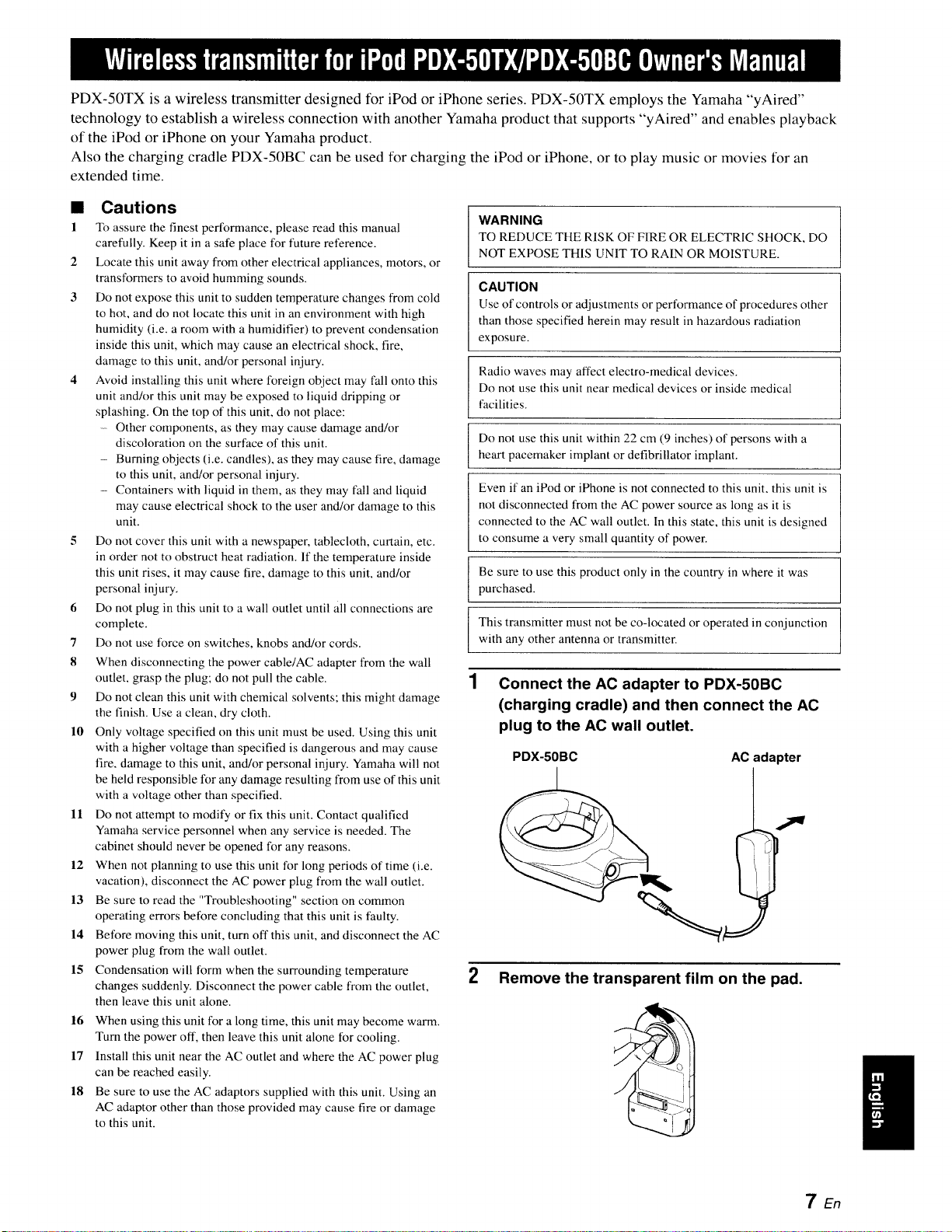
PDX-50TX is a wireless transmitter designed for iPod or iPhone series. PDX-50TX employs the Yamaha "yAired"
technology to establish a wireless connection with another Yamaha product that supports "yAired" and enables playback
of the iPod or iPhone on your Yamaha product.
Also the charging cradle PDX-50BC can be used for charging the iPod or iPhone, or to play music or movies for an
extended time.
•Cautions
1 To assure the finest performance, please read this manual
carefully. Keep it in a safe place for future retErence.
2 Locate this unit away from other electrical appliances, motors, or
transformers to avoid humming sounds.
3 Do not expose this unit to sudden temperature changes from cold
to hot, and do not locate this unit in an environment with high
humidity (i.e. a room with a humidifier) to prevent condensation
inside this unit, which may cause an electrical shock, fire,
damage to this unit, and/or personal injury.
4 Avoid installing this unit where foreign object may fall onto this
unit and/or this unit may be exposed to liquid dripping or
splashing. On the top of this unit, do not place:
Other components, as they may cause damage and!or
discoloration on the surface of this unit.
- Burning objects (i.e. candles), as they may cause fire, damage
to this unit, and/or personal injury.
- Containers with liquid in them, as they may fall and liquid
may cause electrical shock to the user and/or damage to this
unit.
5 Do not cover this unit with a newspaper, tablecloth, curtain, etc.
in order not to obstruct heat radiation. If the temperature inside
this unit rises, it may cause fire, damage to this unit, and/or
personal injury.
6 Do not plug in this unit to a wall outlet until all connections are
complete.
7 Do not use force on switches, knobs and/or cords.
8 When disconnecting the power cable/AC adapter from the wall
outlet, grasp the plug; do not pull the cable.
9 Do not clean this unit with chemical solvents; this might damage
the finish. Use a clean, dry cloth.
10 Only voltage specified on this unit must be used. Using this unit
with a higher voltage than specified is dangerous and may cause
fire, damage to this unit, and/or personal injury. Yamaha will not
be held responsible for any damage resulting from use of this unit
with a voltage other than specified.
11 Do not attempt to modify or fix this unit. Contact qualified
Yamaha service personnel when any service is needed. The
cabinet should never be opened for any reasons.
12 When not planning to use this unit for long periods of time (i.e.
vacation), disconnect the AC power plug from the wall outlet.
13 Be sure to read the "Troubleshooting" section on common
operating errors before concluding that this unit is faulty.
14 Before moving this unit, turn off this unit, and disconnect the AC
power plug from the wall outlet.
15 Condensation wilt form when the surrounding temperature
changes suddenly. Disconnect the power cable from the outlet,
then leave this unit alone.
16 When using this unit for a long time, this unit may become warm.
Turn the power off, then leave this unit alone for cooling.
17 Install this unit near the AC outlet and where the AC power plug
can be reached easily.
18 Be sure to use the AC adaptors supplied with this unit. Using an
AC adaptor other than those provided may cause fire or damage
to this unit.
WARNING
TO REDUCE THE RISK OF FIRE OR ELECTRIC SHOCK, DO
NOT EXPOSE THIS UNIT TO RAIN OR MOISTURE.
CAUTION
Use of controls or adjustments or performance of procedures other
than those specified herein may result in hazardous radiation
exposure.
Radio waves may affect electro-medical devices.
Do not use this unit near medical devices or inside medical
facilities.
Do not use this unit within 22 cm (9 inches) of persons with a
heart pacemaker implant or defibrillator implant.
Even if an iPod or iPhone is not connected to this unit, this unit is
not disconnected from the AC power source as long as it is
connected to the AC wall outlet. In this state, this unit is designed
to consume a very small quantity of power.
Be sure to use this product only in the country in where it was
purchased.
This transmitter must not be co-located or operated in conjunction
with any other antenna or transmitter.
1Connect the AC adapter to PDX-50BC
(charging cradle) and then connect the AC
plug to the AC wall outlet.
PDX-50BC AC ada )ter
2 Remove the transparent film on the pad.
7En
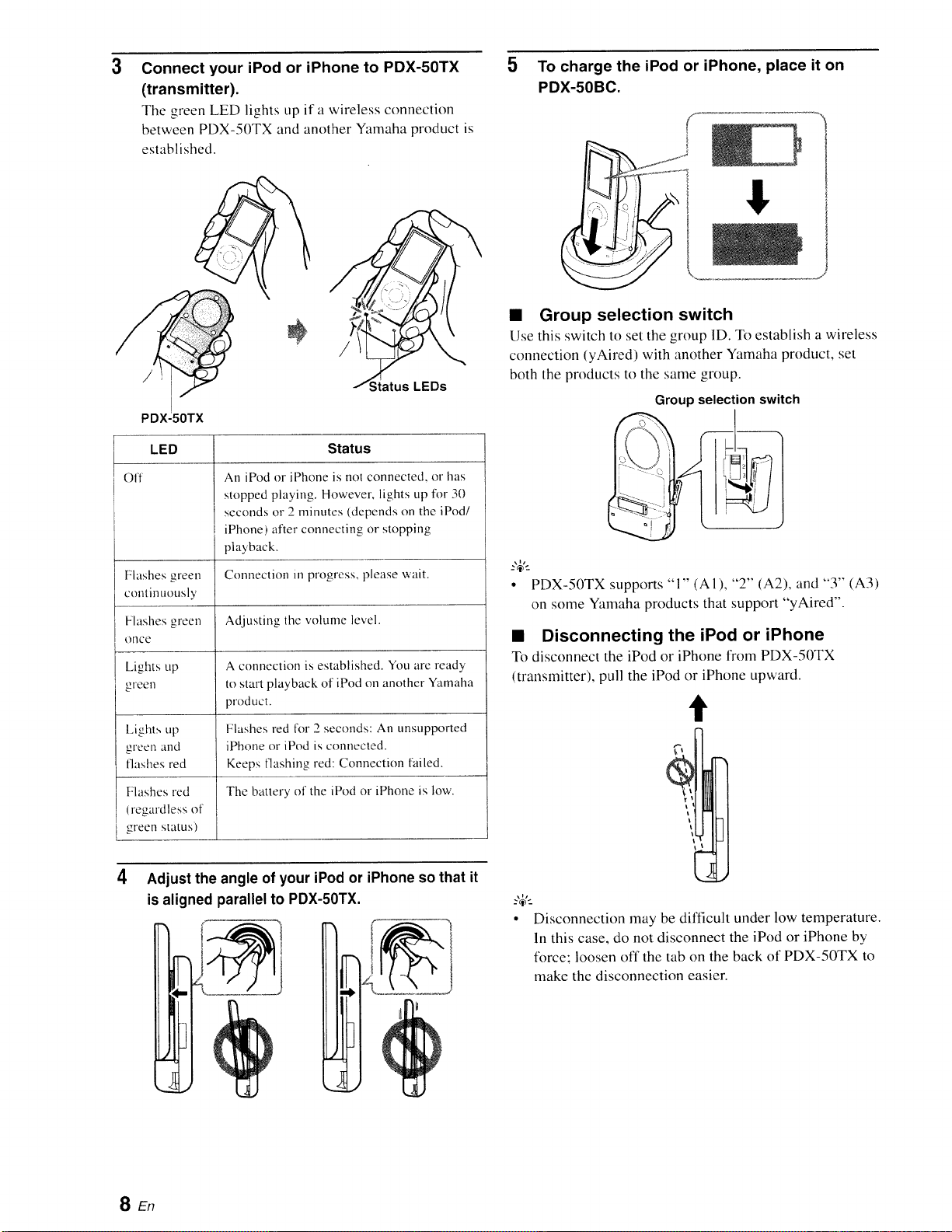
3Connect your iPod or iPhone to PDX-50TX
(transmitter).
The green LED lights up if a wireless connection
between PDX-50TX and another Yamaha product is
established.
5To charge the iPod or iPhone, place it on
PDX-50BC.
/Status LEDs
PDXJ5;TX
LED Status
off An iPod or iPhone is not connected, or has
stopped playing. However, lights up for 30
seconds or 2 minutes (depends on the iPod/
iPhone) after connecting or stopping
playback.
Flashes green Connection m progress, please wait.
continuously
Adjusting the volun_e level.Flashes green
once
Lights up
green
A connection is established. You are ready
to start playback of iPod on another Yamaha
product.
l+ights up Flashes red lkw2 seconds: An unsupported
green and iPhone or iPod is colmected.
flashes red Keeps flashing red: Connection failed.
Flashes red The banery of the iPod or iPhone is tow.
(regardless of
green status)
4Adjust the angle of your iPod or iPhone so that it
is aligned parallel to PDX-50TX.
I
]
•Group selection switch
Use this switch to set the group ID. "lb establish a wireless
connection (yAired) with another Yamaha product, set
both the products to the same group.
Group selection switch
•PDX-50TX supports "1" (AlL "2" (A2), and "3" (A3)
on some Yamaha products that support "yAired'.
•Disconnecting the iPod or iPhone
To disconnect the iPod or iPhone from PDX-50TX
(transmitter), pull the iPod or iPhone upward.
t
?_1-_
Disconnection may be difficult under low temperature.
In this case, do not disconnect the iPod or iPhone by
force; loosen off the tab on the back of PDX-50TX to
make the disconnection easier.
SEn
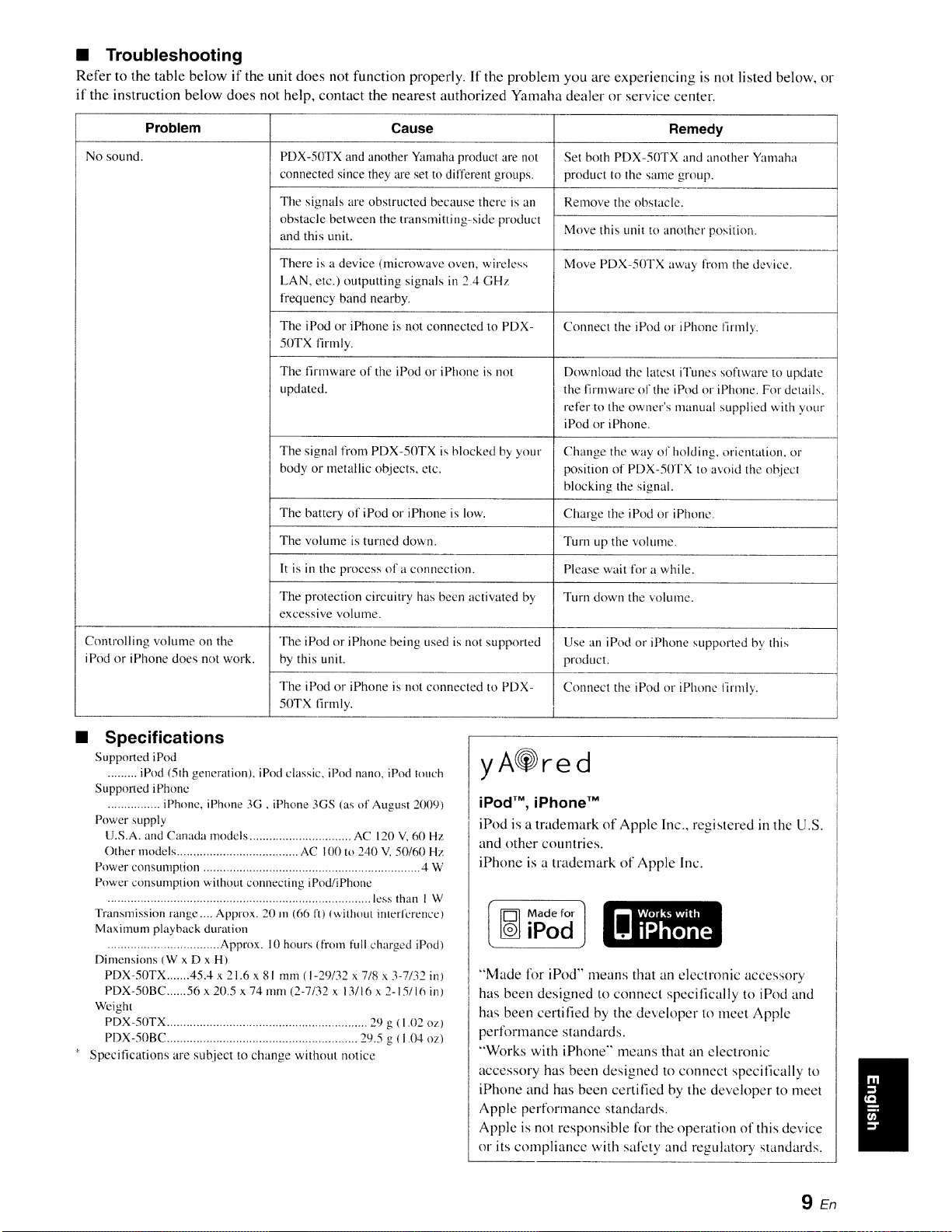
•Troubleshooting
Refer to the table below if the unit does not function properly. If the problem you are experiencing is not listed below, or
if the instruction below does not help, contact the nearest authorized Yamaha dealer or service center.
Problem
No sound.
Cause
PDX-50TX and another Yamaha product are not
connected since they are set to different groups.
The signals are obstructed because there is an
obstacle between the transmitting-side product
and this unit.
There is a device (microwave oven, wireless
LAN, etc.) outputting signals in 2.4 GHz
frequency band nearby.
The iPod or iPhone is not connected to PDX-
50TX firmly.
The firmware of the iPod or iPhone is not
updated.
Remedy
Set both PDX-50TX and another Yamaha
product to the same group.
Remove the obstacle.
Move this unit to another position.
Move PDX-50TX away from the device.
Connect the iPod or iPhone firmly.
Download the latest iTunes software to update
the firmware ol'the iPod or iPhone. For delails,
refer to the owner's manual supplied with your
iPod or iPhone,
The signal from PDX-50TX is blocked by your Change the way of holding, orientation, or
body or metallic objects, etc. position of PDX-50TX to avoid the obiecl
blocking the signal.
Charge the iPod or iPhone.
Turn up the volume.
Please wait for a while.
The battery of iPod or iPhone is low.
The w)lume is turned down.
It is in the process of a connection.
The protection circuitry has been activated by
excessive volume.
The iPod or iPhone being used is not supported
by this unit.
The iPod or iPhone is not connected to PDX-
50TX firmly.
Turn down the volume.
Controlling volume on the Use an iPod or iPhone supported by this
iPod or iPhone does not work. product.
Connect the iPod or iPhone lirmly.
Specifications
Supported iPod
......... iPod (5th generation), iPod classic, iPod nano, iPod touch
Supported iPhone
................ iPhone, iPhone 3G , iPhone 3GS (as of August 2009)
Power supply
U.S.A. and Canada models ............................... AC 120 V,60 Hz
Other models ..................................... AC 100 to 240 V, 50/60 Hz
Power consumption .................................................................. 4 W
Power consumption wilhout connecting iPod/iPhone
................................................................................ tess than 1 W
Transmission lange .... Approx. 20 m (66 ft) lwilhout inlerfercnce)
Maximum playback duration
.................................. Approx. 10 hours (from full charged iPod)
Dimensions (W x D x H)
PDX-50TX .......45.4 x 21.6 x 81 mm (I-29/32 x 718 x 3-7132 in)
PDX-50BC ......56 x 20.5 x 74 nun (2-7/32 x 13116x 2-15116 in)
Weight
PDX-50TX ............................................................. 29 g ( 1.02 oz)
PDX-50BC .......................................................... 29,5 g (1.04 oz)
Specifications are subject to change without notice
yA@red
iPod TM, iPhone TM
iPod is a trademark of Apple Inc., registered in the U.S.
and other countries.
iPhone is a trademark of Apple Inc.
Made for 1
iPod
"Made for iPod" means that an electronic accessory
has been designed to connect specifically to iPod and
has been certifed by the developer to meet Apple
perlk)rmance standards.
"Works with iPhone'" means that an electronic
accessory has been designed to connect specifically to
iPhone and has been certified by the developer to meet
Apple performance standards.
Apple is not responsible lk}rthe operation of this device
or its compliance with safety and regulatory standards.
9En
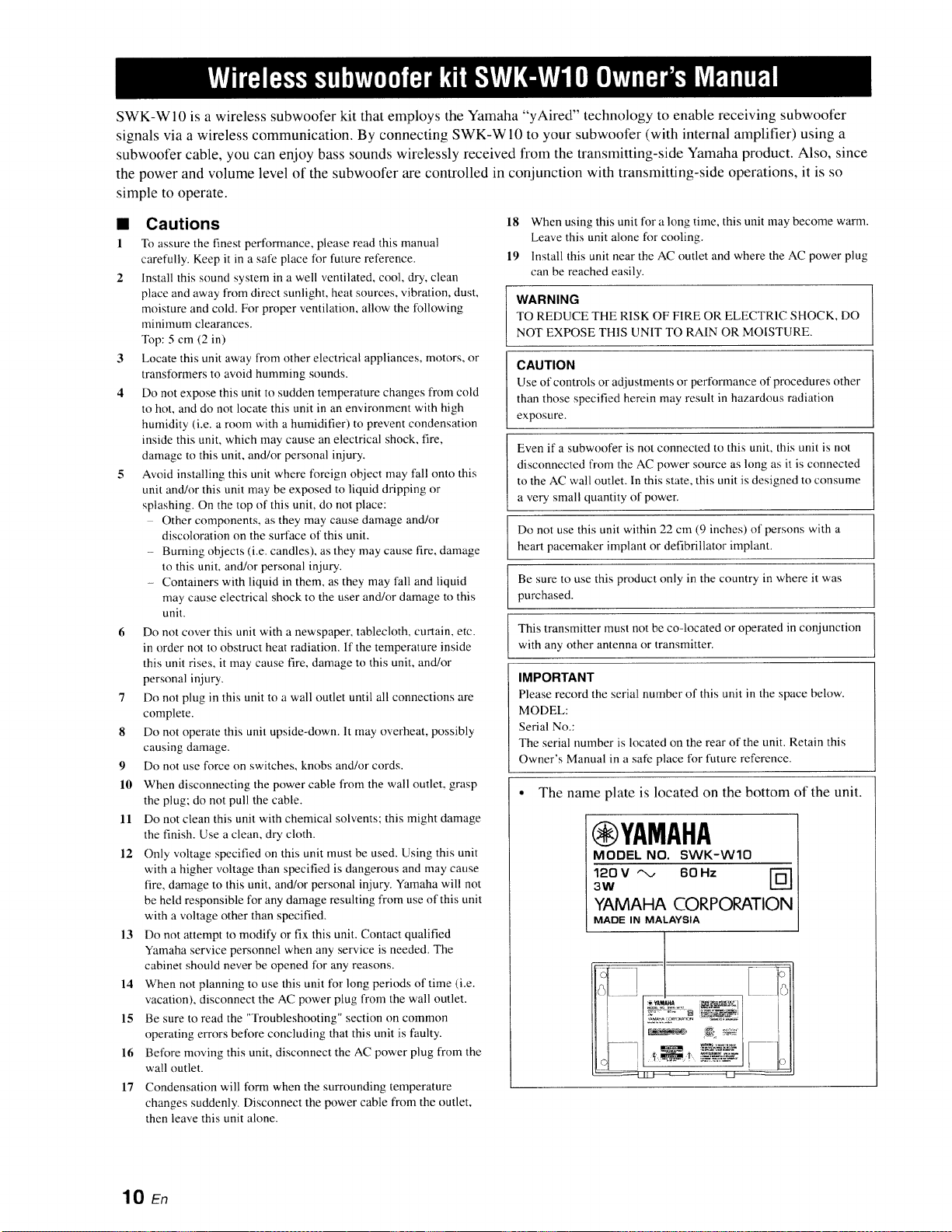
SWK-W10 is a wireless subwoofer kit that employs the Yamaha "yAired" technology to enable receiving subwoofer
signals via a wireless communication. By connecting SWK-WI0 to your subwoofer (with internal amplifier) using a
subwoofer cable, you can enjoy bass sounds wirelessly received from the transmitting-side Yamaha product. Also, since
the power and volume level of the subwoofer are controlled in conjunction with transmitting-side operations, it is so
simple to operate.
•Cautions
1 To assure the finest performance, please read this manual
carefully. Keep it in a sate place for future reference.
2 Install this sound system in a well ventilated, cool, dry, clean
place and away from direct sunlight, heat sources, vibration, dust,
moisture and cold. For proper ventilation, allow the [bllowing
minimum clearances.
Top: 5 cm (2 in)
3 Locate this unit away from other electrical appliances, motors, or
transformers to avoid humming sounds.
4 Do not expose this unit to sudden temperature changes from cold
to hot, and do not locate this unit in an environment with high
humidity (i.e. a room with a humidifier) to prevent condensation
inside this unit, which may cause an electrical shock, fire,
damage to this unit, and/or personal injury.
5 Avoid installing this unit where foreign object may fall onto this
unit and!or this unit may be exposed to liquid dripping or
splashing. On the top of this unit, do not place:
Other components, as they may cause damage and/or
discoloration on the surface of this unit.
Burning objects (i.e. candles), as they may cause fire, damage
to this unit, and/or personal injury.
- Containers with liquid in them, as they may fall and liquid
may cause electrical shock to the user and/or damage to this
unit.
6 Do not cover this unit with a newspaper, tablecloth, curtain, etc.
in order not to obstruct heat radiation. If the temperature inside
this unit rises, it may cause fire, damage to this unit, and/or
personal injury.
7 Do not plug in this unit to a wall outlet until all connections are
complete.
8 Do not operate this unit upside-down. It may overheat, possibly
causing damage.
9 Do not use force on switches, knobs and/or cords.
10 When disconnecting the power cable from the wall outlet, grasp
the plug: do not pull the cable.
11 Do not clean this unit with chemical solvents; this might damage
the finish. Use a clean, dry cloth.
12 Only voltage specified on this unit must be used. Using this unit
with a higher voltage than specified is dangerous and may cause
fire, damage to this uniL and/or personal injury. Yamaha will not
be held responsible for any damage resulting from use of this unit
with a voltage other than specified.
13 t)o not attempt to modify or fix this unit. Contact qualified
Yamaha service personnel when any service is needed, The
cabinet should never be opened for any reasons.
14 When not planning to use this unit for long periods of time (i.e.
vacation), disconnect the AC power plug from the wall outlet.
15 Be sure to read the "Troubleshooting" section on common
operating errors before concluding that this unit is faulty.
16 Before moving this unit, disconnect the AC power plug from the
wall outlet.
17 Condensation will form when the surrounding temperature
changes suddenly. Disconnect the power cable from the outlet,
then leave this unit alone.
18 When using this unit for a long time, this unit may become warm.
Leave this unit a!one tbr cooling.
19 Install this unit near the AC outlet and where the AC power plug
can be reached easily.
WARNING
TO REDUCE THE RISK OF FIRE OR ELECTRIC SI1OCK, DO
NOT EXPOSE THIS UNIT TO RAIN OR MOISTURE.
CAUTION
Use of controls or adjustments or performance of procedures other
than those specified herein may result in hazardous radiation
exposure.
Even if a subwoofer is not connected to this unit, this unit is not
disconnected from the AC power source as long as it is connected
to the AC wall outlet. In this state, this unit is designed to consume
a very small quantity of power.
Do not use this unit within 22 cm (9 inches) of persons with a
heart pacemaker implant or defibrillator implant.
Be sure to use this product only in the country in where it was
purchased.
This transmitter must not be co-located or operated in conjunction
with any other antenna or transmitter.
IMPORTANT
Please record the serial number of this unit in the space below.
MODEL:
Serial No.:
The serial number is located on the rear of the unit. Retain this
Owner's Manual in a safe place for future reference.
The name plate is located on the bottom of the unit.
( YAMAHA
MODEL NO. SWK-WIO
120 V _ 60 Hz
3W
YAMAHA CORPOP, ATION
MADE IN MALAYSIA
10 En
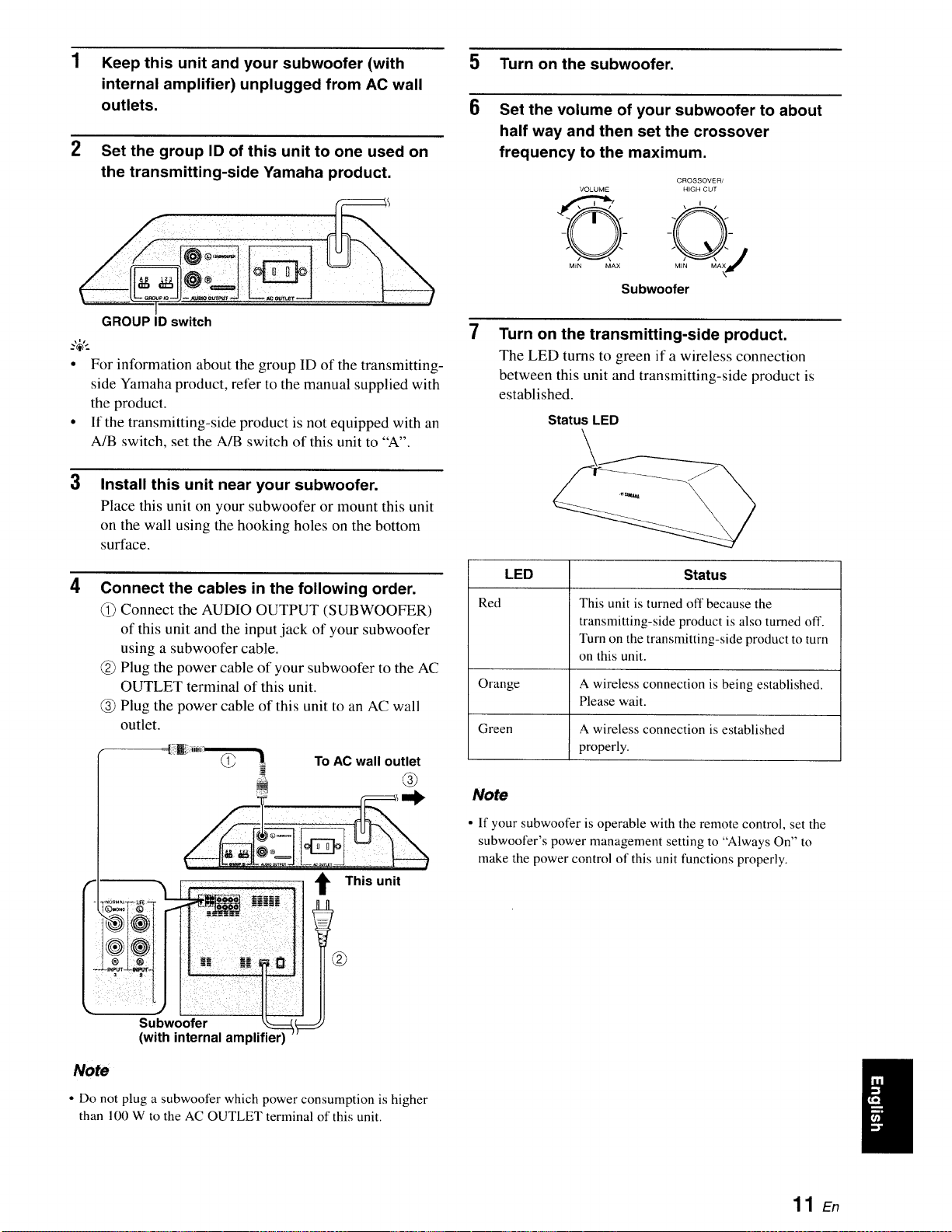
1Keep this unit and your subwoofer (with
internal amplifier) unplugged from AC wall
outlets.
Set the group ID of this unit to one used on
the transmitting-side Yamaha product.
-ilill !iiiiiiii ii !iii
GROUP ID switch
.,_,.
•For information about the group ID of the transmitting-
side Yamaha product, refer to the manual supplied with
the product.
• If the transmitting-side product is not equipped with an
A/B switch, set the A/B switch of this unit to "A".
3Install this unit near your subwoofer.
Place this unit on your subwoofer or mount this unit
on the wall using the hooking holes on the bottom
surface.
4Connect the cables in the following order.
Connect the AUDIO OUTPUT (SUBWOOFER)
of this unit and the input.jack of your subwoofer
using a subwoofer cable.
Plug the power cable of your subwoofer to the AC
OUTLET terminal of this unit.
(_ Plug the power cable of this unit to an AC wall
outlet.
To AC wall outlet
:i.......
!i!,woo!!!
(with internal amplifier)
t This unit
No_ ¸
• Do not plug a subwoofer which power consumption is higher
than 100 W to the AC OUTLET terminal of this unit.
5 Turn on the subwoofer.
6Set the volume of your subwoofer to about
half way and then set the crossover
frequency to the maximum.
CROSSOVER/
VOLUME HIGH CUT
MiN MAX
Subwoofer
7Turn on the transmitting-side product.
The LED turns to green if a wireless connection
between this unit and transmitting-side product is
established.
Status LED
LED Status
Red This unit is turned off because the
transmitting-side product is also turned off.
Turn on the transmitting-side product to turn
on this unit.
Orange A wireless connection is being established.
Please wait.
Green A wireless connection is established
properly.
Note
• If your subwoofer is operable with the remote control, set the
subwoofer's power management setting to "Always On" to
make the power control of this unit functions properly.
11 En
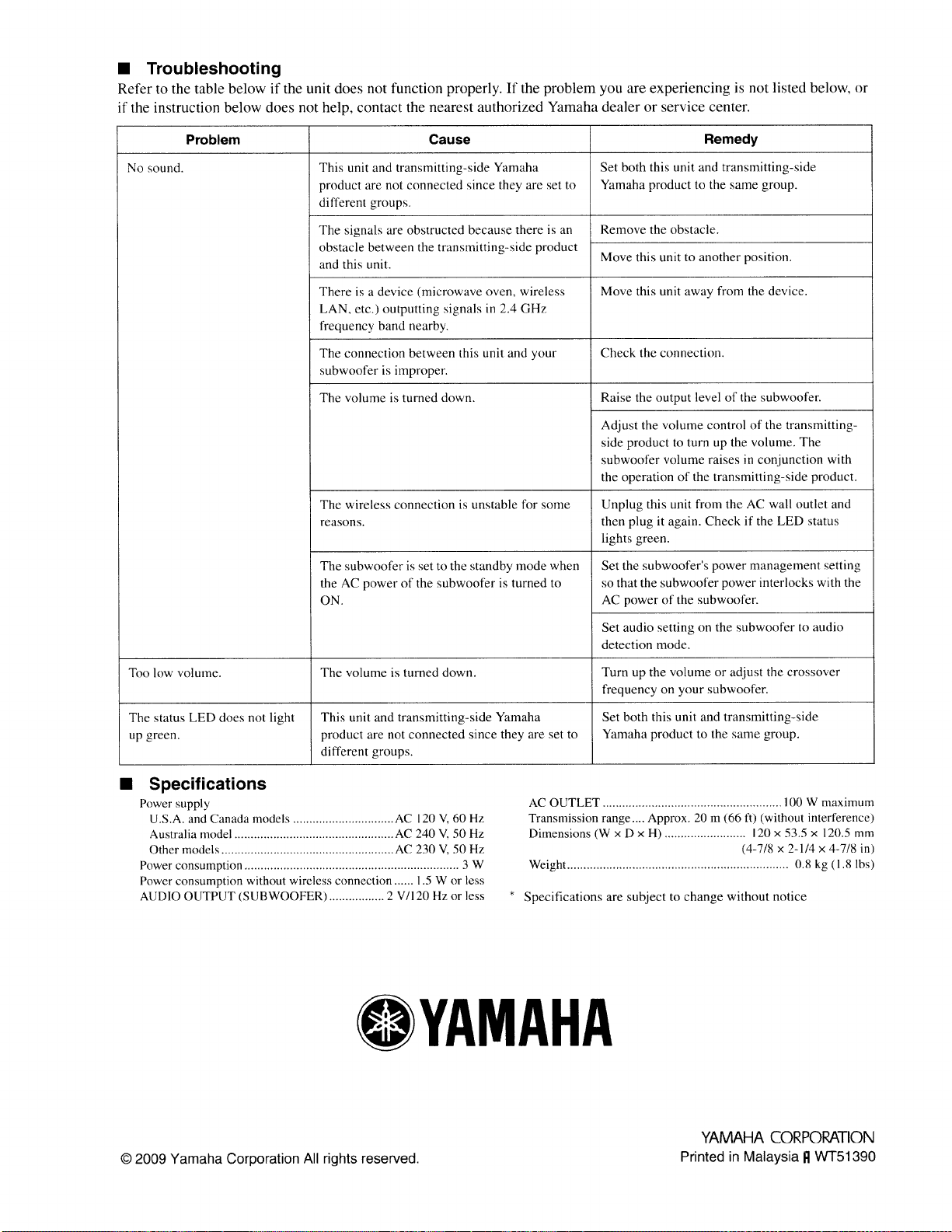
•Troubleshooting
Refer to the table below it" the unit does not function properly. If the problem you are experiencing is not listed below, or
if the instruction below does not help, contact the nearest authorized Yamaha dealer or service center.
Problem Cause
No sound. This unit and transmitting-side Yamaha
product are not connected since they are set to
different groups.
The signals are obstructed because there is an
obstacle between the transmitting-side product
and this unit.
Remedy
Set both this unit and transmitting-side
Yamaha product to the same group.
Remove the obstacle.
Move this unit to another position.
Move this unit away from the device.There is a device (microwave oven, wireless
LAN, etc.) outputting signals in 2.4 GHz
frequency band nearby.
The connection between this unit and your Check the connection.
subwoofer is improper.
The volume is turned down, Raise the output level of the subwoofer.
The wireless connection is unstable for some
reasons.
The subwoofer is set to the standby mode when
the AC power of the subwoofer is turned to
ON.
Adjust the volume control of the transmitting-
side product to turn up the volume. The
subwoofer volume raises in conjunction with
the operation of the transmitting-side product.
Unplug this unit from the AC wal! outlet and
then plug it again. Check if the LED status
lights green.
Set the subwoofer's power management setting
so that the subwoofer power interlocks with the
AC power of the subwoofer.
Set audio setting on the subwoofer to audio
detection mode.
Too low volume. The volume is turned down. Turn up the volume or adjust the crossover
fi'equency on your subwoofer.
The status LED does not light This unit and transmitting-side Yamaha Set both this unit and transmitting-side
up green, product are not connected since they are set to Yamaha product to the same group.
different groups.
•Specifications
Power supply
U.S.A. and Canada models ............................... AC 120 V, 60 Hz
Australia model ................................................. AC 240 V, 50 Hz
Other models ..................................................... AC 230 V, 50 Hz
Power consumption .................................................................. 3 W
Power consumption without wireless connection ...... 1.5 W or less
AUDIO OUTPUT (SUBWOOFER) ................. 2 V/120 Hz or less *
AC OUTLET ....................................................... 100 W maximum
Transmission range.... Approx. 20 m (66 f0 (without interference)
Dimensions (W x D x H) ......................... 120 x 53.5 x 120.5 mm
(4-7/8 x 2-1/4 x 4-7/8 in)
Weight .................................................................... 0.8 kg (I.8 Ibs)
Specifications are subject to change without notice
OYAMAHA
© 2009 Yamaha Corporation All rights reserved.
YAMAHA COP,POP,ATION
Printed in Malaysia It WT51390

OYAMAHA
Registering Your New Yamaha
Product is Fast and Easy
Thank you for purchasing a new product from Yamaha Electronics.We'd like to
continue providing you with high quality products and better service. So,we've made
it simple to register your new product purchase online. Please take a few minutes to
visit our website at www.yamaha.comTYECIregistration/and complete the
information and questions included there.We appreciate your businessand we look
forward to hearing from you.
Failure to complete the registration form does not diminish your warranty rights in any way.
Product registration appfies to USA customers only.
WF 15740
YAMAHA Home Audio products are designed and manufactured to provide a high level of trouble-free per[ormance. YAMAHA Electronics Corporation, USA, is
proud of the experienced craftsmanship that goes into each and every YAMAHA Home Audio product. YAMAItA sells its Home Audio products only through a network
of high quality, specially authorized dealers and is pleased to offer the following Limited Warranty, which applies only to products purchased from our authorized dealers.
YAMAHA Home Audio products are backed by a nationwide network of high quality YAMAHA Authorized Service Centers, providing prompt, courteous, and profes-
sional service. We suggest that you read the Limited Warranty thoroughly, and invite you to contact your authorized YAMAHA dealer or the YAMAHA Electronics
Corporation, USA, Service Department if you have any questions.
NN'NNNNNN'_ .NNN'NN_NNN'NNNNNNN'NNNN .N.N'NN'N'NN'NNN'NN'NNN'NNNNNNNNNNNNNNNNNN
b.:41 OYAMAHA o°
N
>- LI}v ITED WAI I A TY <
N ..N
HOME AUDIO PRODUCTS
Type of Product Duration of Warranty
(beginning from first consumer purchase) _-._
'_ A/V and Stereo Receivers, Processor and Integrated Amplifiers, Separate Amplifiers
_- and Preamplifiers, Tuners, CD Players and Changers, HDD Players and Recorders, "_
Powered Loudspeakers, Media Controllers and Speaker Systems purchased individually,
as a pair, or as part of an Integrated or Packaged system ............................................................................................... 2 years "_
•N .N
Cassette Decks, BLU-RAY Disc Players, DVD Players and Changers, Integrated Systems "_
._ (Receiver or Amplifier combined or on same chassis with CD or DVD Player),
Desktop Audio Systems (i.e. TSX and PDX Series), Multimedia Speakers and Accessories ........................................ 1 year "_
N .N
What is Covered and what is Not Covered: ._
•_ This warranty covers all defects in materials or workmanship in this product, but DOES NOT COVER the following:
(1) Damage, deterioration or malfunction resulting from: ._
._ a. Accident, negligence, misuse, abuse, improper installation or operation or failure to follow instructions contained in your Owner's Manual.
b. Any shipment of the product. (Claims must be presented to the carrier.)
_._ c. Repair or attempted repair by anyone other than YAMAHA or an authorized YAMAHA Service Center.
._ (2) Any unit which has been altered or on which the serial number has been defaced, modified or removed. _
•_ (3) Normal wear, battery replacement and any periodic maintenance.
(4) Any unit which has not been purchased from an authorized YAMAHA Home Audio dealer in the USA. If you are uncertain as to whether a
•_. dealer has been authorized by YAMAHA, please contact YAMAHA's Service Department. _i_
(5) Any unit used for industrial or commercial purposes.
N .N
Who may enforce the warranty:
This warranty is enforceable only by the original purchaser. ._"
N N
What we will pay for and what you must pay for: _
"_ YAMAHA will repair or replace units covered by this warranty, without charge to the consumer for labor or materials. Some repair parts may be "_
_._ used or rebuilt replacements, that meet or exceed Yamaha specifications for new parts, in exchange for defective parts. YOU ARE RESPONSIBLE
FOR ANY INSTALLATION OR REMOVAL CHARGES AND FOR ANY INITIAL SHIPPING CHARGES, if the product(s) must be shipped for
.' warranty service. However, we will pay the return shipping charges to any destination within the USA if the repairs are covered by the warranty.
How you can get Warranty Service:
'_ (1) If your YAMAHA product(s) require service, contact the authorized YAMAHA dealer and the dealer will advise you of the procedures to be
_ followed. If this is not practical, contact YAMAHA at the address, telephone number or Internet URL shown below. We may request that you _-_
_ send the defective product(s) to a local authorized YAMAHA Service Center, to an authorized YAMAHA Regional Service Center, or autho-
_'_ rize return of the defective product(s) to YAMAHA for repair. '_
(2) Product(s) shipped for service should be packed securely and must be accompanied by a detailed explanation of the problem(s) requiring
service, as well as your sales receipt or other proof of date and place of purchase, as evidence of warranty coverage. '_
(3) Warranty registration is not required for warranty coverage. '_
"_" Limitation of Implied Warranties: "_
ANY IMPLIED WARRANTIES, INCLUDING WARRANTIES OF MERCHANTABILITY AND FITNESS FOR A PARTICULAR PURPOSE,
_ ARE LIMITED IN DURATION TO THE LENGTH OF THIS WARRANTY. SOME STATES DO NOT ALLOW LIMITATIONS ON HOW LONG
'_ AN IMPLIED WARRANTY LASTS, SO THE ABOVE LIMITATION MAY NOT APPLY TO YOU.
N .N
_'_ Exclusion of Damages: _-_
YAMAHA'S LIABILITY FOR ANY DEFECTIVE PRODUCT IS LIMITED TO REPAIR OR REPLACEMENT OF THE PRODUCT, AT OUR P_
_'_ OPTION. IF WE ELECT TO REPLACE THE PRODUCT, THE REPLACEMENT MAY BE A RECONDITIONED UNIT. YAMAHA SHALL NOT BE
_"_ LIABLE FOR DAMAGES BASED UPON INCONVENIENCE, LOSS OF USE, DAMAGE TO ANY OTHER EQUIPMENT OR OTHER ITEMS AT '_
"_ THE SITE OF USE, OR ANY OTHER DAMAGES WHETHER INCIDENTAL, CONSEQUENTIAL OR OTHERWISE. SOME STATES DO NOT '_
'_ ALLOW LIMITATIONS ON HOW LONG AN IMPLIED WARRANTY LASTS AND/OR DO NOT ALLOW THE EXCLUSION OR LIMITATION OF
_'_ INCIDENTAL OR CONSEQUENTIAL DAMAGES, SO THE ABOVE LIMITATIONS AND EXCLUSIONS MAY NOT APPLY TO YOU. THIS
'_ WARRANTY GIVES YOU SPECIFIC LEGAL RIGHTS, AND YOU MAY ALSO HAVE OTHER RIGHTS WHICH VARY FROM STATE TO STATE.
Should you have any questions about service received or if you need assistance in locating an authorized YAMAHA Service Center, please contact: -'_
N N
N .N
OYAMAHA o°
N.N
_-_ SERVICE DEPARTMENT _
_YAMAHA Electronics Corporation, USA N
_ 6660 Orangethorpe Avenue, Buena Park, California 90620-1345
_._ Telephone: (800) 292-2982, 8 AM to 4 PM Pacific time ._._
_._ Internet URL: http://www.yamaha.com/yec/
Do not return any product to the above address; it is not a service location. YAMAHA products are backed by a nationwide network of high quality "._
_ YAMAHA authorized Service Centers, providing prompt, courteous and professional service. For referral to your nearest authorized YAMAHA "_
_-'_ Preferred Customer Service Center or authorized YAMAHA Regional Service Center call 1-800-4 YAMAHA.
WR48160