Instructions for use
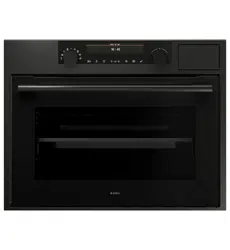
COMBI MICROWAVE OVEN
OCM8478G / BO4CM4T2-42
OCM8478GG / BO4CM4T2-42
688564_en_naslovnica_drug_papir.indd EN_1688564_en_naslovnica_drug_papir.indd EN_1 25. 02. 2022 12:17:2625. 02. 2022 12:17:26

EN Manual EN 3 - EN 47
Pictograms used
Important information
Tip
688564_en_naslovnica_drug_papir.indd EN_2688564_en_naslovnica_drug_papir.indd EN_2 25. 02. 2022 12:17:3925. 02. 2022 12:17:39

EN 3
CONTENTS
Your oven
Introduction 4
Control panel 5
Description 6
Guide rails/Telescopic guide rails 6
Accessories 6
Door 7
Cooling fan 7
Touch screen 8
Main displays 8
Function-setting display 11
Stand-by display 12
Initial use
Initial use 13
Operation
Using the ‘Plus’ menu 15
Opening the keyboard 17
Use
Oven function 18
Using the microwave 20
Microwave function 22
Using the ‘Extras’ functions 23
Functions table 27
Delayed start 32
Stage cooking 33
Gratin 35
Additional functions 36
Settings 40
Cleaning
Cleaning the appliance 42
Steam clean 42
Removing and cleaning the guide rails 43
Replacing the oven lamp 44
Solving problems
General 45
Your oven and the environment
Disposal of the appliance and packaging 47
688564_en_naslovnica_drug_papir.indd EN_3688564_en_naslovnica_drug_papir.indd EN_3 25. 02. 2022 12:17:3925. 02. 2022 12:17:39

EN 4
Introduction
Congratulations on choosing this Asko combi microwave oven.
This product is designed to offer simple operation and optimum
user-friendliness. The oven has a wide range of settings enabling you
to select the correct cooking method every time.
This manual shows how you can best use this oven. In addition to
information about operating the oven, you will also find background
information that may be useful when using the appliance.
Please read the separate safety instructions
carefully before using the appliance!
Read this manual before using the appliance and keep it in a safe
place for future use.
Installation instructions are supplied separately.
YOUR OVEN
688564_en_naslovnica_drug_papir.indd EN_4688564_en_naslovnica_drug_papir.indd EN_4 25. 02. 2022 12:17:3925. 02. 2022 12:17:39
EN 5
YOUR OVEN
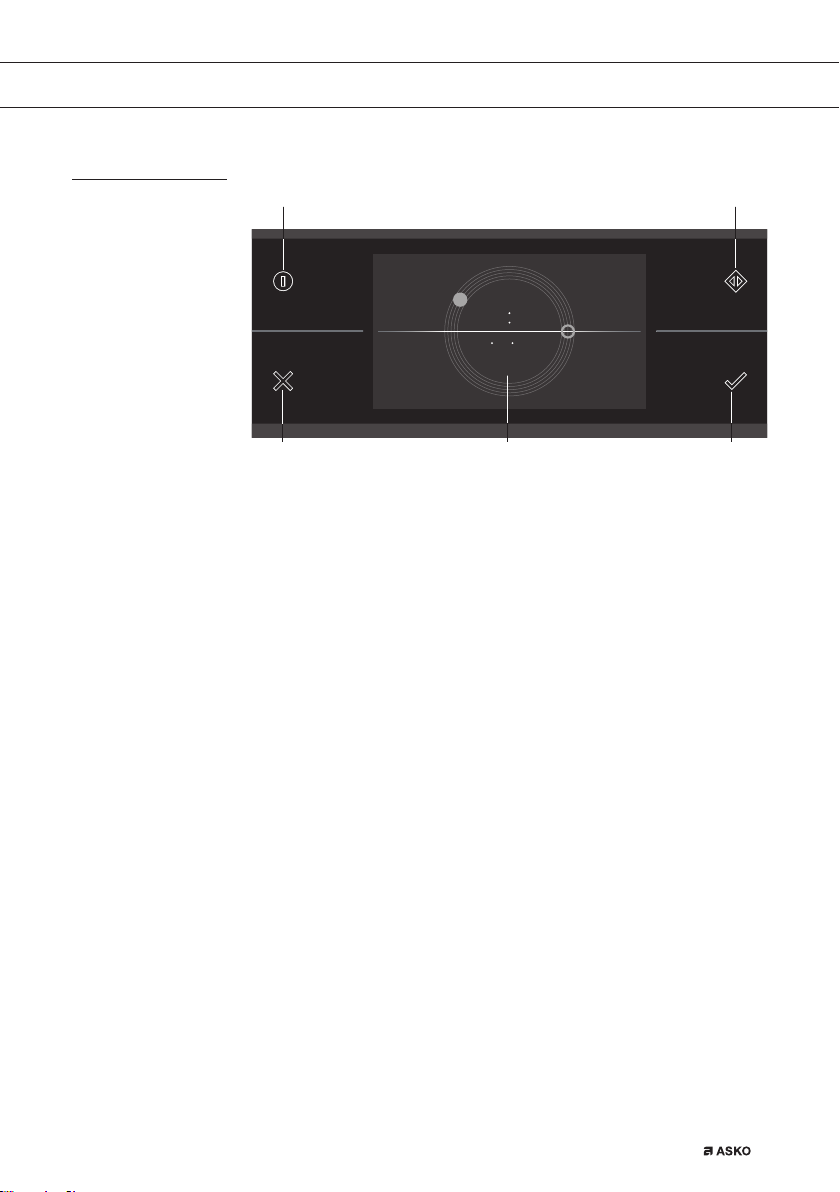
Control panel
01. On/Off key; use to:
▷ switch on the appliance.
▷ switch to stand-by
▷ switch off the appliance. Keep the ‘On / Off’ key pressed until
the appliance switches off.
02. X key; use to:
▷ go a step back in the menu.
▷ close or answer ‘No’ to a pop-up.
▷ close or cancel a menu or function.
03. Quick start; use to:
▷ switch on the microwave function directly (from the start or
‘Extras’ menu or the various function menus). Touching the
display more often adds extra time. Microwave power and the
added cooking times can be adjusted in the settings menu.
04. Confirm key; use to:
▷ confirm settings
▷ start a function.
▷ close or answer ‘Yes’ to a pop-up.
05. Touch screen/display
10 15
10 10 2015
040502
01 03
688564_en_naslovnica_drug_papir.indd EN_5688564_en_naslovnica_drug_papir.indd EN_5 25. 02. 2022 12:17:4025. 02. 2022 12:17:40
EN 6
YOUR OVEN
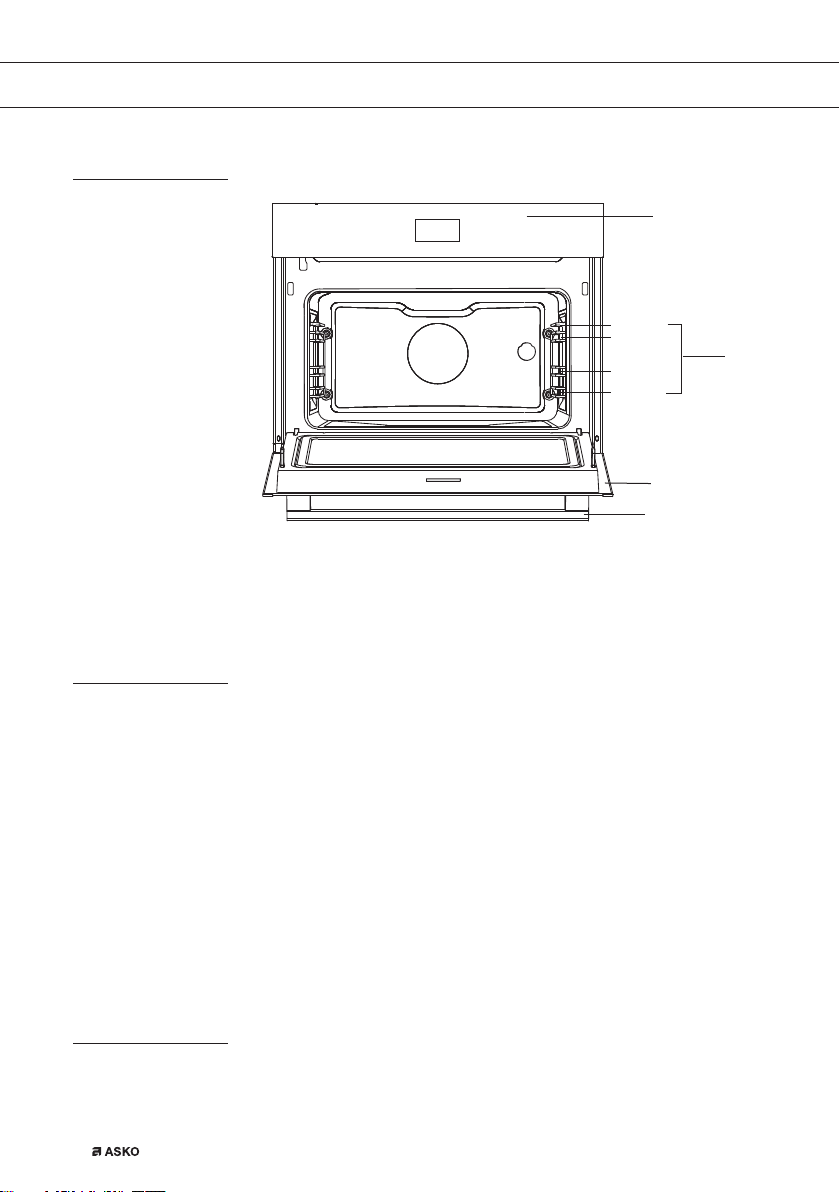
Description
1. Control panel
2. Shelf levels
3. Oven door
4. Door handle
Guide rails/Telescopic guide rails
• The oven has four or five guide rails (Level 1 to 4/5), depending on
the model. Level 1 is mainly used in combination with bottom heat.
The two upper levels are mainly used for the grill function.
• Place the oven rack, baking tray or steam dish in the gap between
the guide rail sliders.
• A number of shelf levels can have fully-retractable telescopic guide
rails, depending on the model.
▷ Pull the telescopic guide rails out of the oven cavity completely
and place the oven rack / baking tray / steam dish on them.
Then slide the oven rack / baking tray / steam dish on the
telescopic guide rails, back into the oven cavity.
▷ Only close the oven door when the telescopic guide rails have
been returned completely back into the oven cavity.
Accessories
Your appliance is accompanied by a range of accessories, depending
on the model. Only use original accessories; they are specially suited
toyour appliance. Be sure that all the accessories that are being used
1
3
Level 1
Level 2
Level 3
Level 4
2
4
688564_en_naslovnica_drug_papir.indd EN_6688564_en_naslovnica_drug_papir.indd EN_6 25. 02. 2022 12:17:4025. 02. 2022 12:17:40
EN 7
are able to withstand the temperature settings of the chosen oven
function.
Note: not all accessories are suitable/available for every appliance
(itmay also differ by country). When purchasing, always provide the
exact identification number of your appliance. Please see the sales
brochures or check online for more details about optional accessories.
Note: never place an accessory on the bottom of the oven!
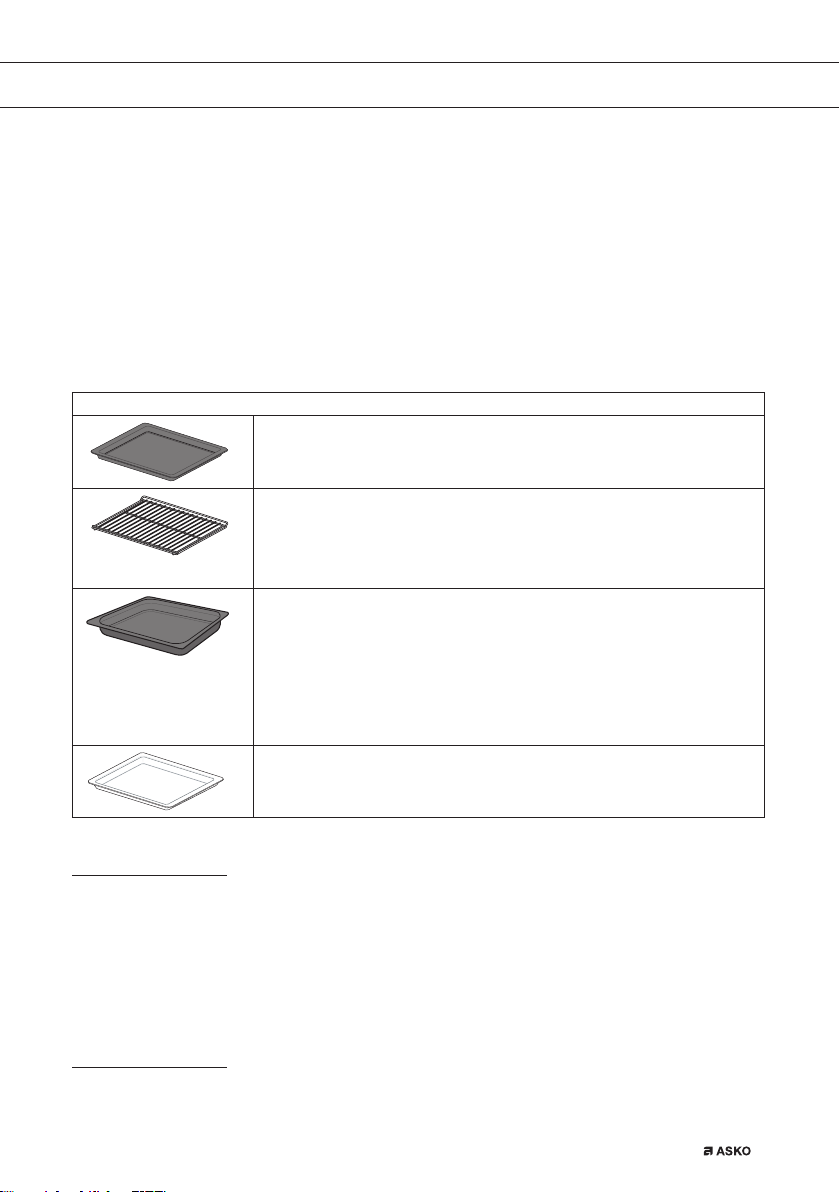
Accessories that can be supplied with your appliance (depending on the model)
Enamelled baking tray; to be used for pastries and cakes.
• Do not use the enamelled baking tray for microwave functions!
• Suitable for pyrolysis cleaning.
Oven rack; mainly used for grilling. A steam dish or pan with food
can also be placed on the oven rack.
• The oven rack is equipped with a safety peg. Lift the rack slightly
at the front to slide it out of the oven.
• Do not use the oven rack for microwave functions!
Deep enamelled baking tray; to be used for roasting meat and
baking moist pastry.
• Do not place the deep baking tray on the lowest level during
a cooking process, except when using it as a drip tray during
grilling, roasting or roasting with a spit roast (when available).
• Do not use the deep enamelled baking tray for microwave
functions!
• Suitable for pyrolysis cleaning.
Glass baking tray; for microwave and oven use.
• NOT suitable for pyrolysis cleaning.
Door
• The door switches interrupt the operation of the oven when the door
is opened during use. The oven continues operating when the door
is closed.
• This oven has a ‘Soft close door system’. When closing the oven
door, this system dampens the movement, from a certain angle, and
silently closes the oven door.
Cooling fan
• The appliance is equipped with a cooling fan that cools the casing
and control panel.
YOUR OVEN
688564_en_naslovnica_drug_papir.indd EN_7688564_en_naslovnica_drug_papir.indd EN_7 25. 02. 2022 12:17:4025. 02. 2022 12:17:40
EN 8
YOUR OVEN
Touch screen
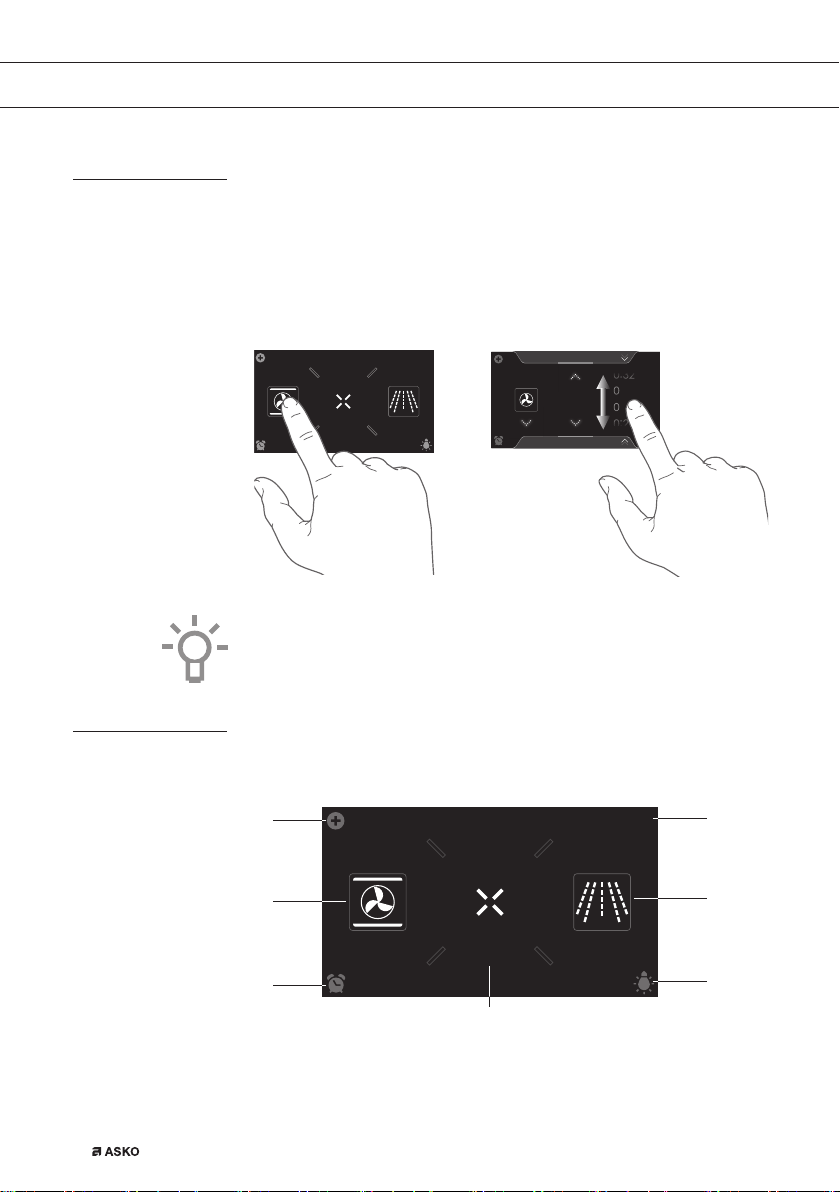
• Operate your oven’s touch screen by tapping or swiping it.
• Tap the display to open a function or adjust a setting.
• Swipe the display for further information/show options or adjust a
setting.
Tapping: Swiping:
EXTRASOVEN
dz,&52:$9(
10
:
15
:
:
Hot air
352*5$06
180
30
31
°C
10
:
15
For the best response, touch the keys with the main part of your
fingertip. Every time you tap a key during use, a short tone will sound
(unless this is adjusted in the settings).
Main displays
Start display
EXTRASOVEN
dz,&52:$9(
10
:
15
01
03
02
04
05
07
06
688564_en_naslovnica_drug_papir.indd EN_8688564_en_naslovnica_drug_papir.indd EN_8 25. 02. 2022 12:17:4025. 02. 2022 12:17:40

EN 9
YOUR OVEN
Plus menu (01)
• Tap the plus symbol to open the ‘Plus’ menu. The contents of this
menu change according to the control options available at that time.
Oven (02)
• Tap ‘OVEN’ to open the oven function menu.
Egg timer (03)
• Tap the egg timer symbol to open the egg timer menu. The egg
timer can be used independently from the oven function.
▷ The longest possible alarm time is 24 hours.
▷ When the egg timer has finished, a pop-up will appear and a
sound signal sounds.
▷ Tap on the X key, confirm key or the display to switch off
the signal and close the pop-up. The sound signal will stop
automatically after approximately 1 minute.
Extras (04)
• Tap on ‘EXTRAS’ to show the appliance’s extra functions.
Time (05)
• The time is shown here.
Microwave (06)
• Tap on ‘MICROWAVE’ to open the microwave function.
Lighting (07)
• Tap on the ‘lamp’ symbol to switch the oven light on or off.
• The oven light will also light up when you open the oven door or
start cooking. The oven light will dim automatically (unless this is
adjusted in the settings).
688564_en_naslovnica_drug_papir.indd EN_9688564_en_naslovnica_drug_papir.indd EN_9 25. 02. 2022 12:17:4225. 02. 2022 12:17:42
EN 10
YOUR OVEN
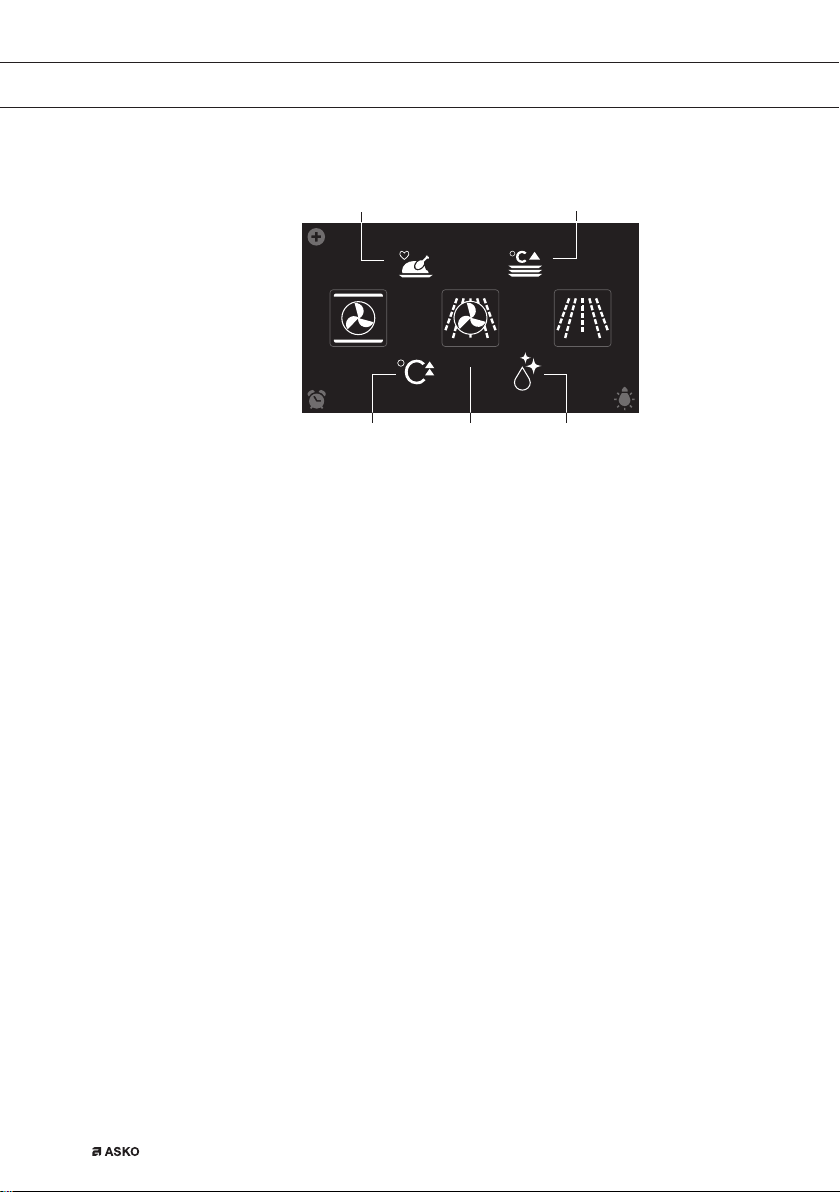
Extras display
COMBI
PROGRAMS WARMING
CLEANINGFAST PREHEAT
10
:
15
0201 03
04
05
Fast preheat (01)
• Tap on ‘FAST PREHEAT’ to open the fast preheat function.
Combi (02)
• Tap on ‘COMBI’ to open the combi function menu.
Cleaning (03)
• Tap on ‘CLEANING’ to open the cleaning function.
Warming (04)
• Tap on ‘WARMING’ to open the warming function menu.
Plate warming, defrost and keep warm can be found here.
Programs (05)
• Tap on ‘PROGRAMS’ to open the programs menu. The favourites
and automatic programs can be found here.
688564_en_naslovnica_drug_papir.indd EN_10688564_en_naslovnica_drug_papir.indd EN_10 25. 02. 2022 12:17:4225. 02. 2022 12:17:42
EN 11
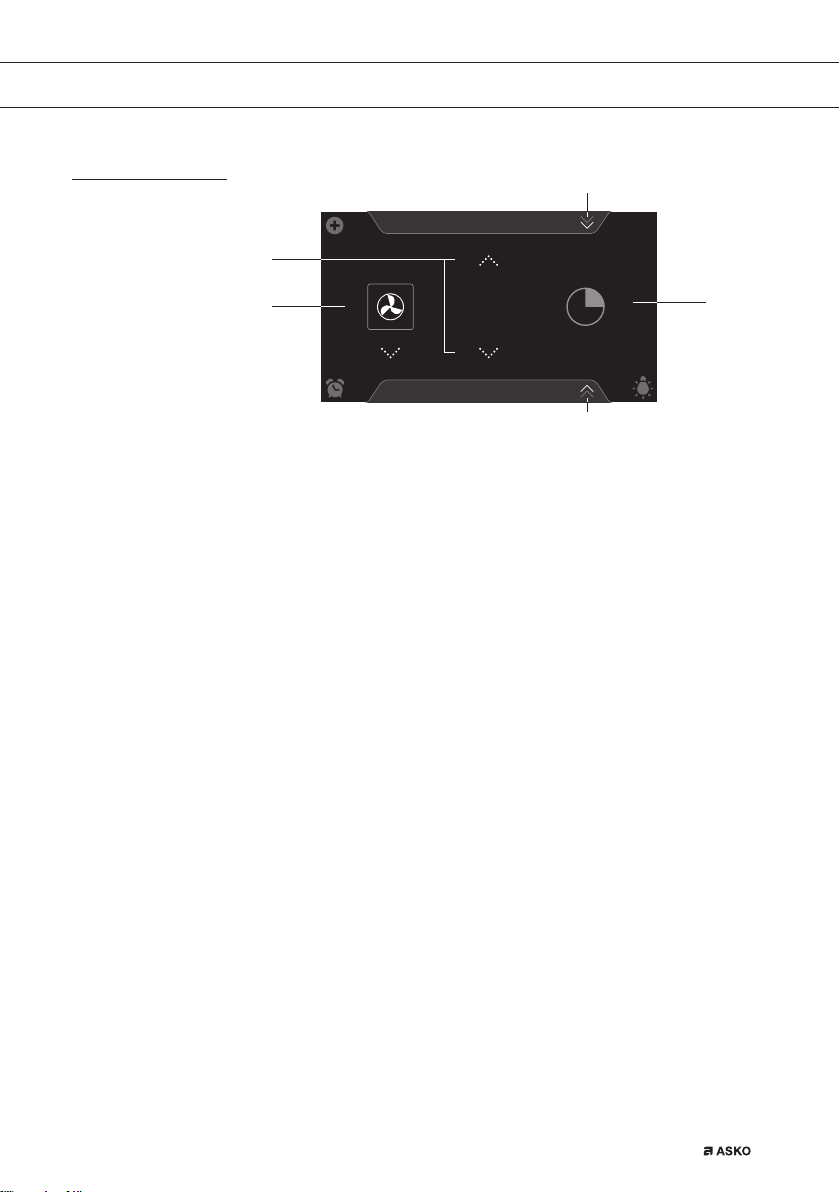
Function-setting display
Hot air
PROGRAMS
10
:
15
180
°C
01
02
05
04
03
Selecting a function (01)
• Tap on the arrows above and below the function or sweep over the
symbol to select a function (see also ‘Opening the Keyboard’).
Setting temperature/power (02)
• Tap on the arrows above and below the temperature/power or sweep
over the temperature/power indicator to select a temperature or
power (see also ‘Opening the Keyboard’).
Cooking time (03)
• Tap the cooking time symbol if you want to set a cooking time. If a
cooking time is already stated, it is necessary to set this.
• Tap on the arrows above and below the time or swipe over the time
to adjust it (see also ‘Opening the Keyboard’).
Programs (04)
• Tap on ‘PROGRAMS’ to open the program menu. The favourites
and automatic programs can be found here.
Info tab (05)
• The name of the selected function appears in the bottom tab of
the display. Tap on the tab to request more information about the
selected function.
YOUR OVEN
688564_en_naslovnica_drug_papir.indd EN_11688564_en_naslovnica_drug_papir.indd EN_11 25. 02. 2022 12:17:4325. 02. 2022 12:17:43
EN 12
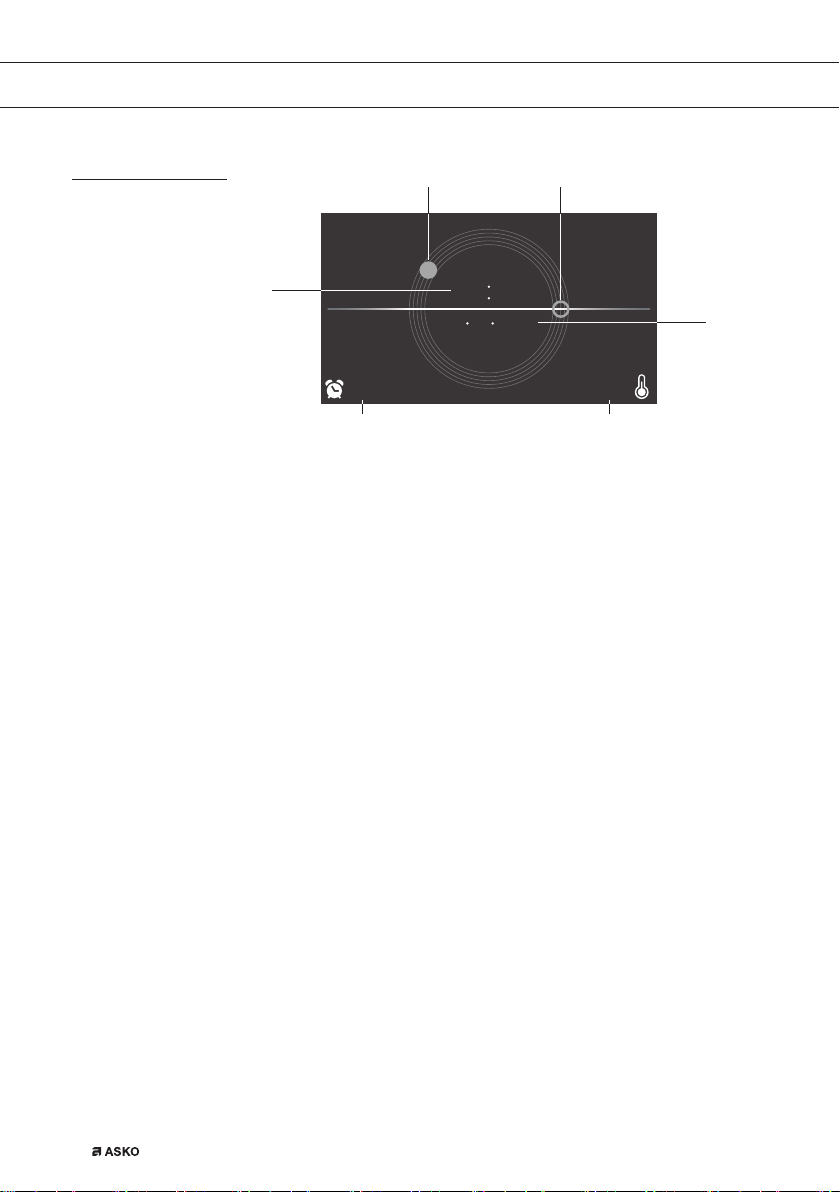
Stand-by display
10 15
10 10 2015
9:27 125
°C
01
05 06
02 03
04
Display time (digital/01)
• Actual time of day.
Display time (analog/02 and 03)
• Actual time of day.
• The hour hand of the analog clock is indicated with a ‘closed’ circle
(02) and the minute hand with an ‘open’ circle (03).
Display of date (04)
• Actual date.
Display egg timer (05)
• The expiring egg timer.
Display descending temperature (06)
• Actual temperature in the oven (waste heat).
YOUR OVEN
688564_en_naslovnica_drug_papir.indd EN_12688564_en_naslovnica_drug_papir.indd EN_12 25. 02. 2022 12:17:4325. 02. 2022 12:17:43

EN 13
Initial use
• Clean the oven interior and accessories with hot water and
washing-up liquid. Do not use aggressive cleaning agents, abrasive
sponges and similar.
• The oven will emit a particular odor when it is used for the first
time; this is normal. Make sure that there is good ventilation during
initial use.
When the appliance is plugged in for the first time or after the appliance
was disconnected from the mains for a longer period of time, you have
to set ‘Language’, ‘Time’ and ‘Date’
Setting the language
English
Nederlands
Deutsch
Francais
LANGUAGE
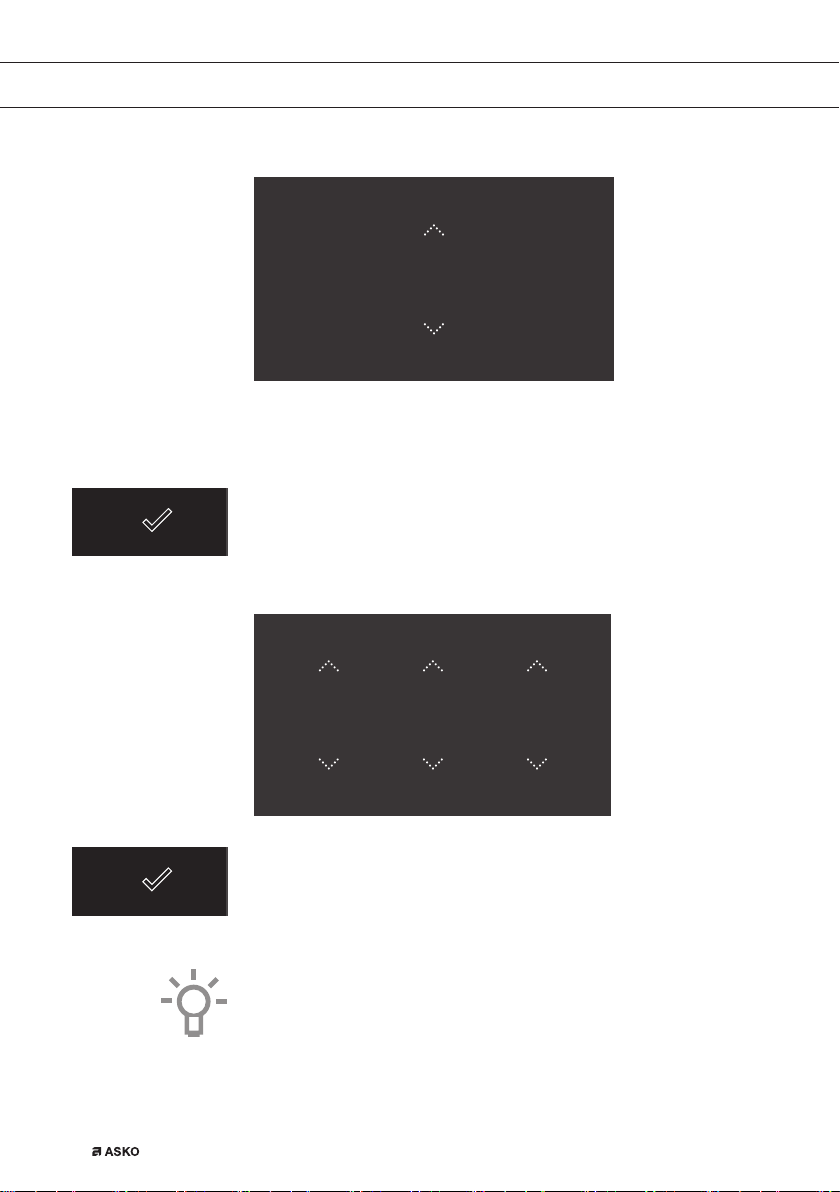
Set the desired language in which the appliance’s display texts will
appear. ‘English’ is selected as standard.
1. Swipe over the display to view all languages.
2. Tap on a language to select this.
3. Press on the confirm key to save the set language.
INITIAL USE
688564_en_naslovnica_drug_papir.indd EN_13688564_en_naslovnica_drug_papir.indd EN_13 25. 02. 2022 12:17:4325. 02. 2022 12:17:43
EN 14
Setting the time
TIME
12
:
00
1. Tap on the arrows above and below the time or swipe over the time
to adjust it.
2. For fast entry, tap in the centre of the time display; a pop-up
keyboard will appear on which the desired time can be typed
(see ‘Opening the Keyboard’ chapter).
3. Press on the confirm key to save the set time.
Setting the date
DATE
DAY MONTH YEAR
01 01 2015
1. Tap on the arrows above and below the day, month or year or swipe
over the day, month or year to adjust these.
2. Press on the confirm key to save the set date.
The appliance is now ready for use.
The language, time and date can be adjusted in the settings menu
(see ‘Settings’ chapter). The settings menu can be opened from the
start display via the ‘Plus’ menu.
INITIAL USE
688564_en_naslovnica_drug_papir.indd EN_14688564_en_naslovnica_drug_papir.indd EN_14 25. 02. 2022 12:17:4425. 02. 2022 12:17:44
EN 15
OPERATION
Using the ‘Plus’ menu
EXTRASOVEN
dz,&52:$9(
10
:
15
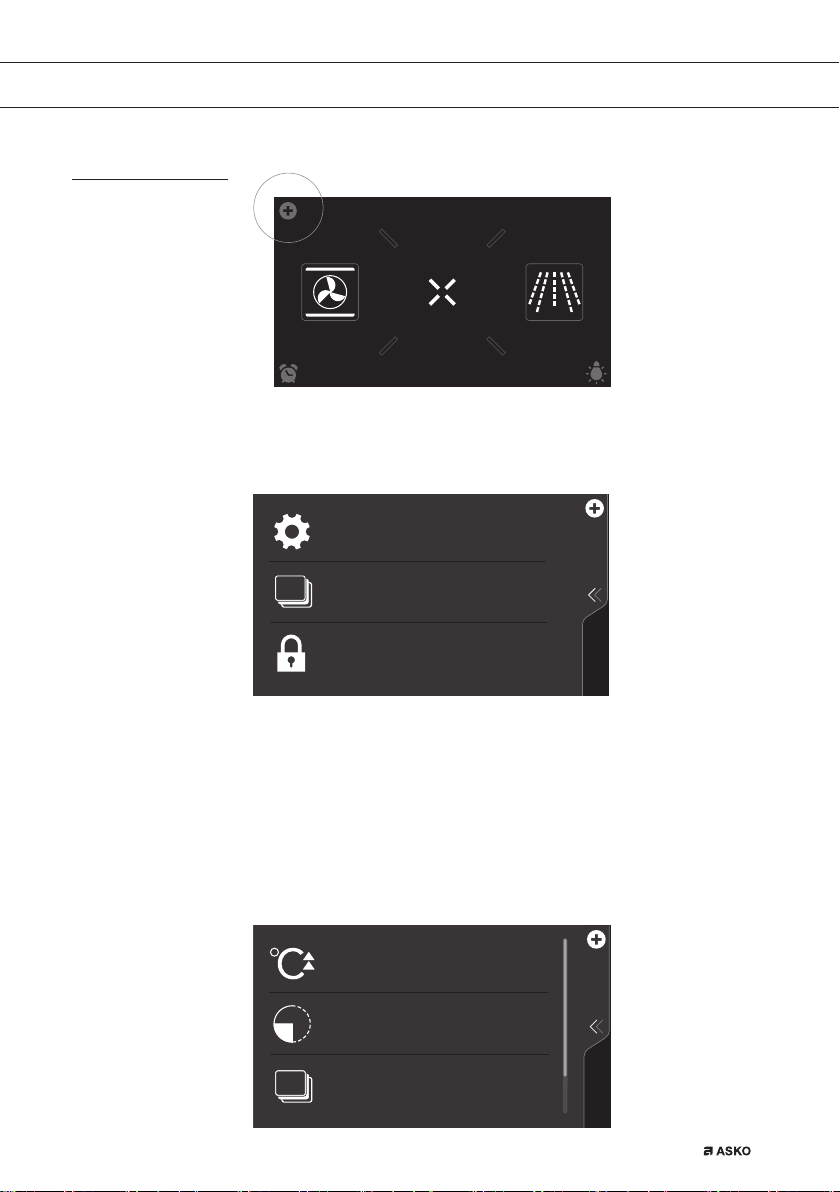
The ‘Plus’ menu comprises a number of functions or settings.
The offered plus functions depend on the display that is active.
KEY LOCK
To clean the dashboard or to apply as child
lock
SETTINGS
Combine up to three functions in one
cooking process
Go to the appliance settings
STAGE COOKING
• From the start display, the following functions/menus can be found
in the ‘Plus’ menu:
▷ Settings; Set your preferences (see ‘Settings’ chapter).
▷ Stage cooking; Combine up to three functions in one cooking
process (see ‘Stage cooking’ chapter).
▷ Key Lock; Lock all the keys to clean the dashboard or to
prevent that the appliance gets into progress accidentally.
Hold the function pressed until the key lock is enabled.
Preheat the oven space quickly
Don't insert the dish yet
FAST PREHEAT
DELAYED START
The cooking process starts automatically at
the preferred time
STAGE COOKING
Combine up to three functions in one
cooking process
688564_en_naslovnica_drug_papir.indd EN_15688564_en_naslovnica_drug_papir.indd EN_15 25. 02. 2022 12:17:4425. 02. 2022 12:17:44
EN 16
OPERATION
• From the oven, microwave or combi function-setting display, the
following functions can be found in the ‘Plus’ menu:
▷ Fast preheat; Preheat the oven space quickly to the desired
temperature within a cooking process (see ‘Fast preheat’ chapter)
Only from oven function-settings display.
▷ Delayed start; The cooking process will start automatically at
the time you set (not available for microwave function).
▷ Stage cooking; Combine up to three functions in one cooking
process (see ‘Stage cooking’ chapter).
▷ Key Lock; Lock all the keys to clean the dashboard or to
prevent that the appliance gets into progress accidentally. Hold
the function pressed until the key lock is enabled.
▷ Gratin; To add the grill function at the end of the progress (gratin
time will be added at the end of the cooking process).
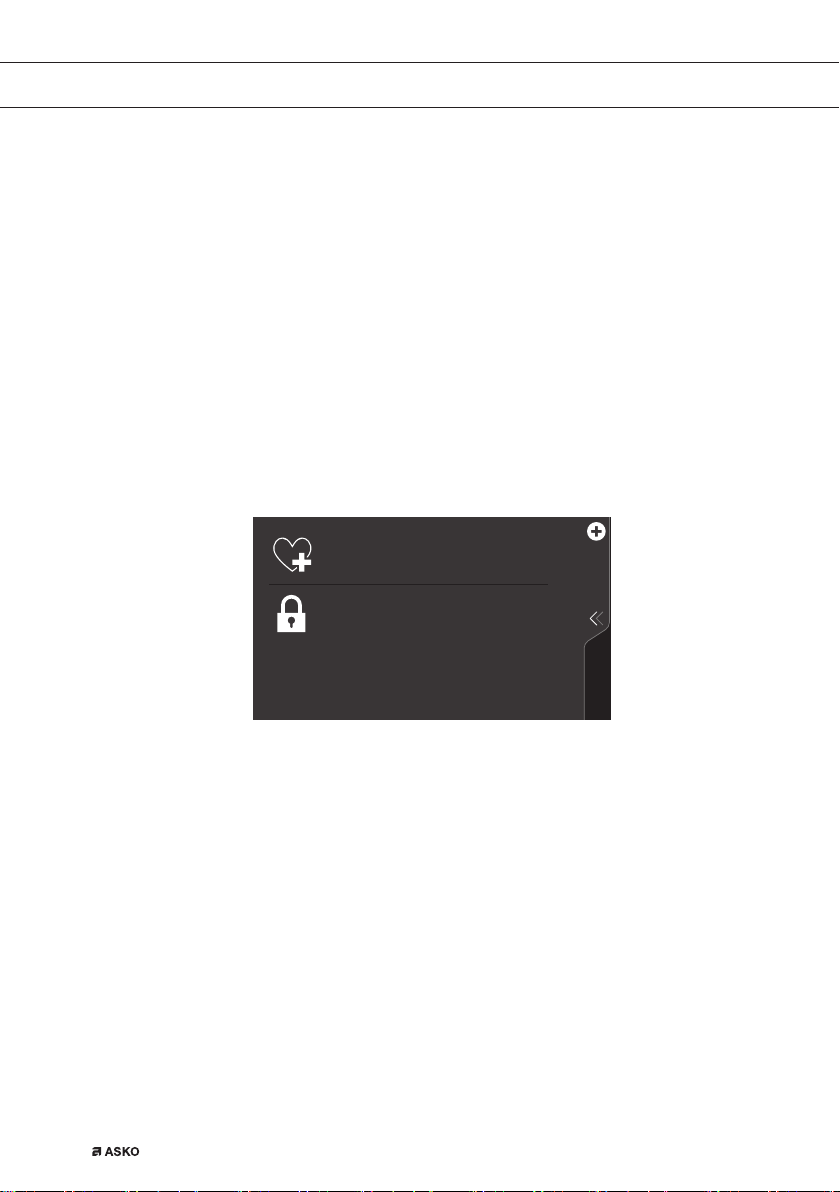
KEY LOCK
ADD TO FAVOURITES
Save the current cooking settings to your
favourites
To clean the dashboard or to apply as child
lock
• When an oven, microwave or combi function is started, the following
functions can be found in the ‘Plus’ menu:
▷ Add to favourites; Add the settings for the cooked dish to your
favourites (see ‘Additional functions’ chapter).
▷ Key Lock; Lock all the keys to clean the dashboard or to
prevent that the appliance gets into progress accidentally. Hold
the function pressed until the key lock is enabled.
▷ Gratin; To add the grill function at the end of the progress (gratin
time will be added at the end of the cooking process).
688564_en_naslovnica_drug_papir.indd EN_16688564_en_naslovnica_drug_papir.indd EN_16 25. 02. 2022 12:17:4525. 02. 2022 12:17:45

EN 17
Opening the keyboard
A keyboard can be opened for fast entry of a function, temperature,
power or cooking time. A quick setting can be selected with this or a
value can be entered.
Hot air
352*5$06
10
:
15
180
°C
30
H
:
0
:
1. Tap in the centre of the function symbol, temperature, power or
cooking time (activated). The keyboard appears.
Set function
2
45
78
1
3
9
6
000
Set temperature
°C
2
45
78
Set cooking time
1
3
9
6
00
:
00
H
:
M
Set power level
W
WW
W
W
W
2. Enter the desired value or tap the desired value.
3. If the set value is not confirmed automatically, press on the confirm
key to confirm the entry.
OPERATION
688564_en_naslovnica_drug_papir.indd EN_17688564_en_naslovnica_drug_papir.indd EN_17 25. 02. 2022 12:17:4625. 02. 2022 12:17:46
EN 18
USE
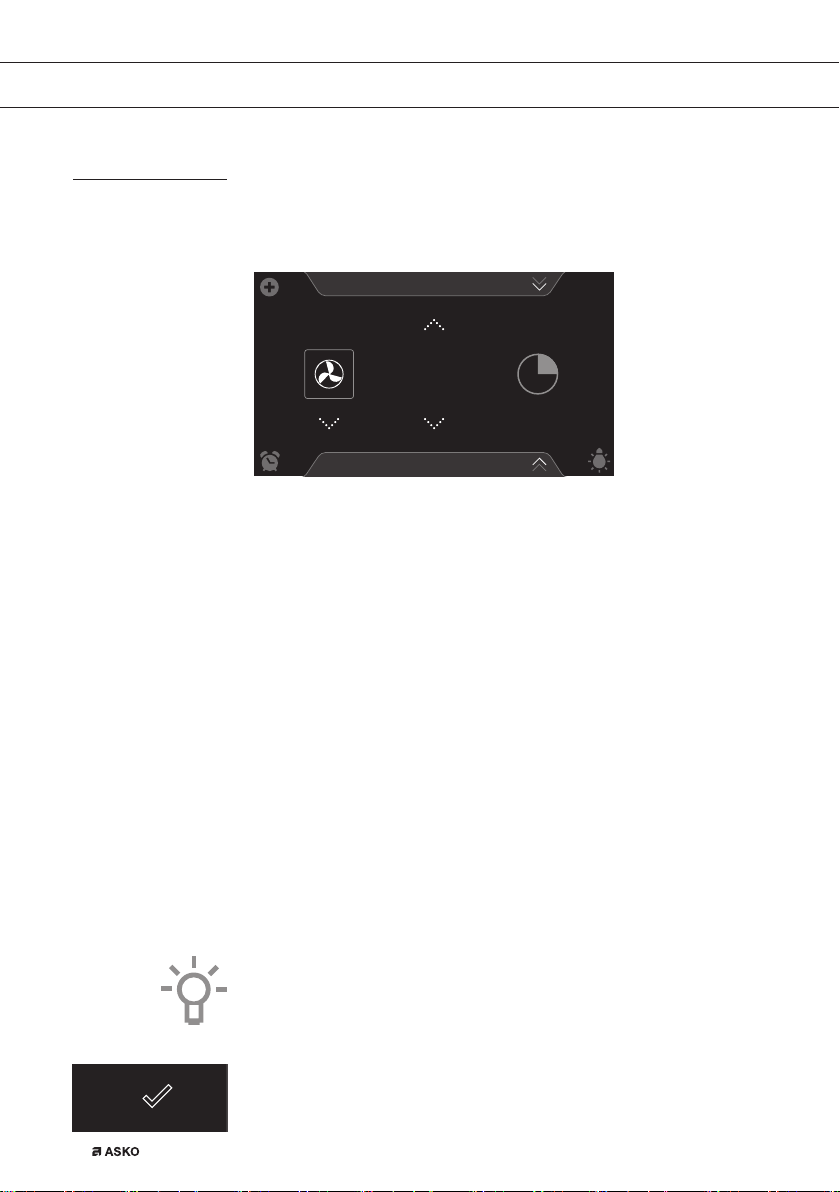
Oven function
Use the oven functions to cook dishes using, for instance, hot air, bottom
heat and grill.
Hot air
PROGRAMS
10
:
15
180
°C
• Various oven functions can be selected.
• A temperature and a cooking time can be set for each oven function.
• Plus functions such as preheat, stage cooking and delayed start can
also be selected. Tap on the plus symbol for this. See the ‘Using the
‘Plus’ menu’ chapter.
Using an oven function
Select the oven function appropriate for the meal you are cooking.
Consult the Functions table for this. You can also consult the info tab.
Tap on the tab at the bottom of the display to request more information
about the selected function.
1. Switch on the oven using the ‘On/Off’ key.
2. Place the dish in the oven.
3. Tap ‘OVEN’ to open the oven function menu.
4. Select an oven function (see ‘Function-setting display’ chapter).
5. Select a temperature (see ‘Function-setting display’ chapter).
6. Tap the ‘cooking time’ symbol and set a cooking time (see
‘Function-setting display’ chapter).
Cooking can also be started without a cooking time being set.
You should then skip steps 6.
7. Select any additional settings using the ‘Plus’ menu (for example
fast preheat).
8. Start cooking the dish using the confirm key.
688564_en_naslovnica_drug_papir.indd EN_18688564_en_naslovnica_drug_papir.indd EN_18 25. 02. 2022 12:17:4825. 02. 2022 12:17:48

EN 19
USE
165
23
:
54
10
:
45
°C
180
°C
10 21
• The following values can now be read in the display:
▷ current temperature (165 °C)
▷ set temperature (180 °C)
▷ status indicator time (outer circle)
▷ status indicator temperature (inner circle)
▷ cooking time (23:54)
▷ end time (10:45)
• Tap in the middle of the display during cooking to open a pop-up
display with settings. Adjust these if desired.
• At the end of a dish’s cooking time a sound signal will sound. The
signal can be switched off by opening the oven door or pressing
a key.
• The selected settings can be saved in ‘Favourites’.
Open ‘ADD TO FAVOURITES’ from the ‘Plus’ menu (See ‘Saving a
cooking method’ in the ‘Additional functions’ chapter).
165
0
:
00
°C
10 50
Display view at the end of cooking.
688564_en_naslovnica_drug_papir.indd EN_19688564_en_naslovnica_drug_papir.indd EN_19 25. 02. 2022 12:17:4825. 02. 2022 12:17:48

EN 20
USE
Using the microwave
Microwaves are high-frequency electromagnetic waves. The energy
makes it possible to cook or warm up dishes without affecting the form
or colour.
• The microwave is used for:
▷ Microwave function
▷ Combi functions
Cooking principle
1. The microwaves generated by the microwave are spread evenly by
a distribution system. This cooks the dish evenly.
2. The food absorbs the microwaves to a depth of approximately 2.5 cm.
Cooking then continues, because the heat is spread in the dish.
3. The cooking times vary and depend on the dish you use and the
properties of the food:
▷ Quantity and density
▷ Moisture content
▷ Starting temperature (whether or not it is cooled)
Important
The dish is cooked from the inside out by means of heat distribution.
The cooking continues even when you take the dish from the oven.
Standing times in recipes and in this book should therefore be
adhered to, in order to ensure:
• Even heating into the middle of the dish;
• Equal temperatures in all parts of the dish.
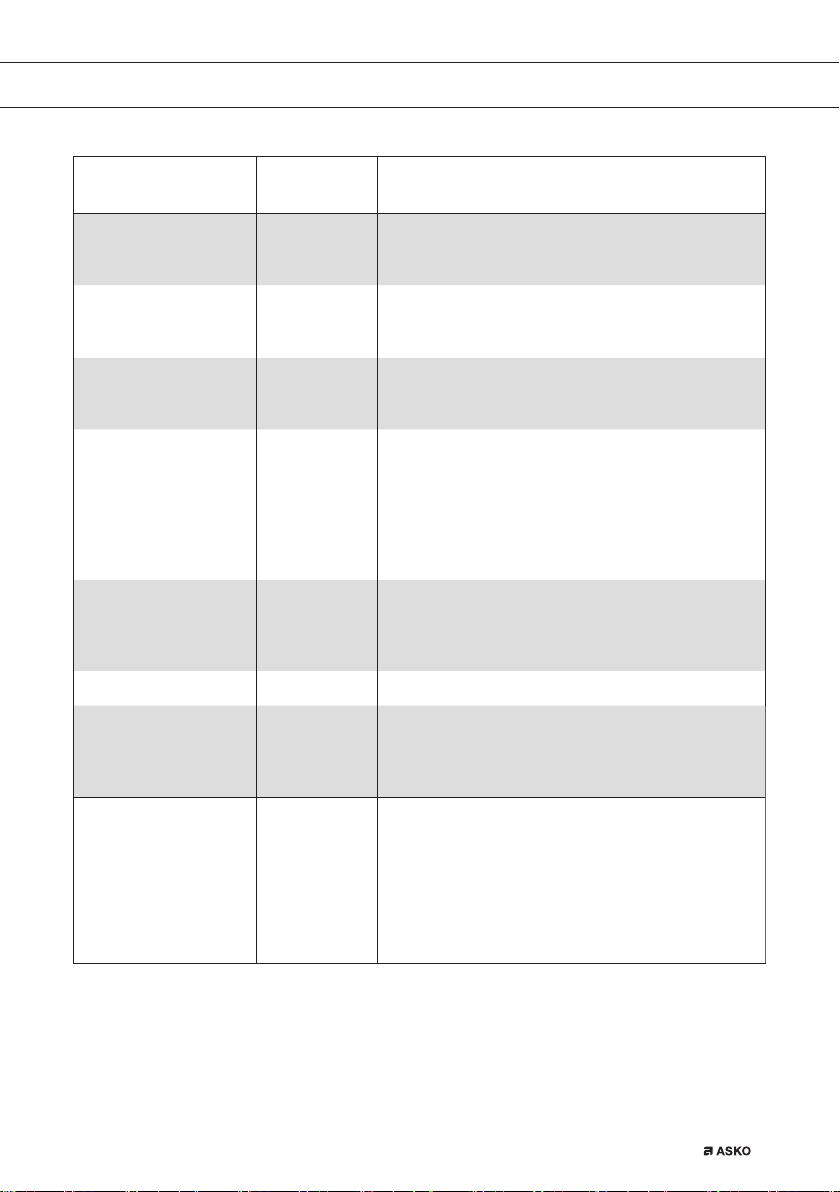
Guidelines for microwave cookware
Cookware that you use for the microwave function should not block
the microwaves. Metals such as stainless steel, aluminium and copper
reflect microwaves. For that reason, do not use metal cookware.
Cookware which is designated as microwave-safe can be used safely.
For more information about suitable cookware, consult the following
guidelines and always use the glass baking tray on level 1 if you use
the microwave function.
688564_en_naslovnica_drug_papir.indd EN_20688564_en_naslovnica_drug_papir.indd EN_20 25. 02. 2022 12:17:4925. 02. 2022 12:17:49
EN 21
USE
Cookware Microwave safe Remarks
Aluminium foil
Can be used in small quantities to prevent certain parts
of the dish from overcooking. Arcing can occur if the foil
is too close to the oven wall or if too much foil is used.
Porcelain and
earthenware
Porcelain, earthenware, glazed earthenware and ivory
porcelain are usually suitable, unless they have a metal
edge.
Disposable crockery
made from polyester
or cardboard
Frozen meals are sometimes packaged in disposable
tableware.
Fast food packaging
•
Polystyrene cups
•
Paper bags or
newspaper
•
Recycled paper
or metal edges
Can be used to warm up dishes.
Polystyrene can melt if it overheats.
Can catch fi re.
Can cause arcing.
Glassware
•
Oven dishes
•
Fine glassware
•
Glass jars
Can be used, unless it has a metal edge.
Can be used to warm up dishes or liquids. Thin glass can
break or shatter with sudden heating.
The lid must be removed. Only suitable for warming.
Metal
Can cause arcing or fi re.
Paper
•
Plates, cups,
kitchen paper
•
Recycled paper
For short cooking times and warming. For absorbing
excess moisture.
Can cause arcing.
Plastic
Especially heat-resistant thermoplastic material.
Other types of plastic can warp or discolour at high
temperatures. Do not use melamine plastic.
Can be used to hold moisture.
May not touch the food.
Be careful when you remove the fi lm; hot steam can escape.
Only if boil-proof or ovenproof. Must not be airtight.
If necessary, prick it with a fork.
: Recommended
: Careful
: Unsafe
688564_en_naslovnica_drug_papir.indd EN_21688564_en_naslovnica_drug_papir.indd EN_21 25. 02. 2022 12:17:4925. 02. 2022 12:17:49
EN 22
USE
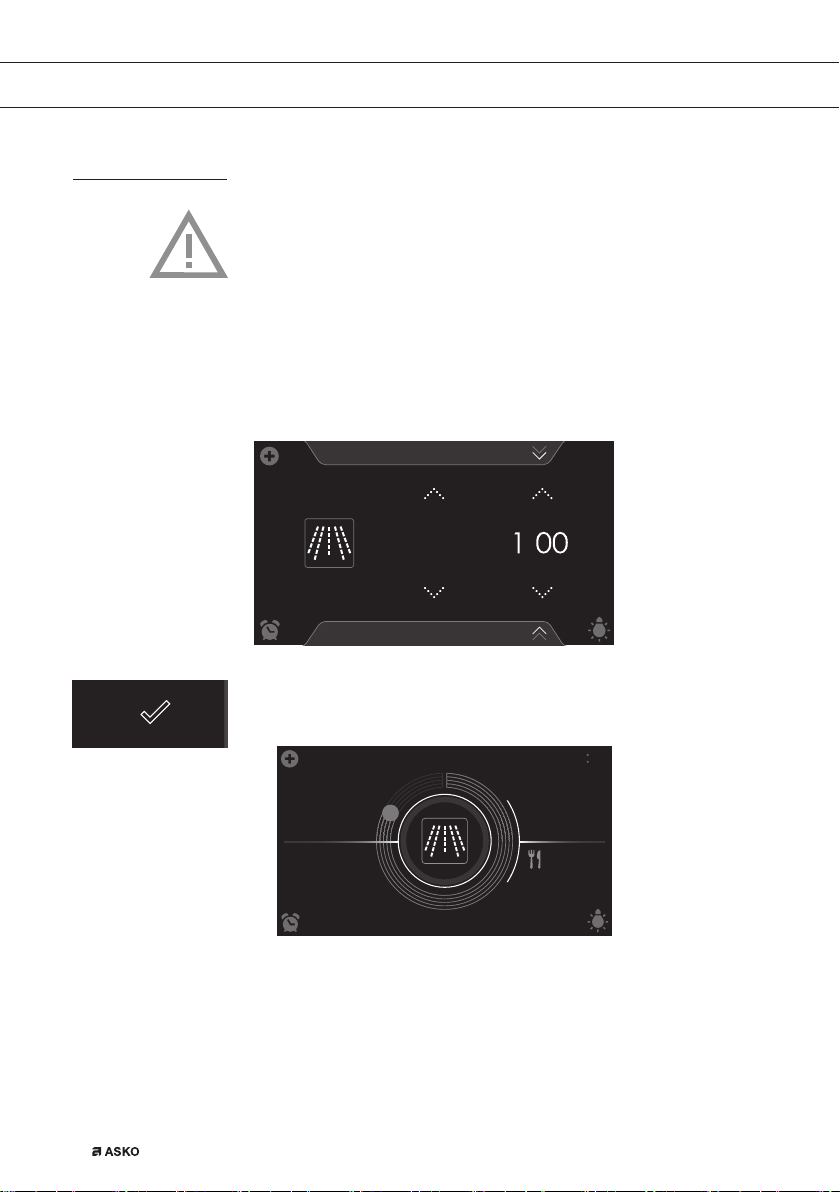
Microwave function
Do not use metal cookware or utensils. See ‘Guidelines for
microwave cookware’. Do not preheat the oven.
Select a power level appropriate for the meal you are cooking.
For this open the tab at the bottom of the display.
1. Switch on the oven using the ‘On/Off’ key.
2. Place the dish in the oven.
3. Tap on ‘MICROWAVE’ to select the microwave function.
M
:
S
:
W
750
Microwave
PROGRAMS
10
:
15
4. Select a power level (see ‘Function-setting display’ chapter).
5. Select a cooking time (see ‘Function-setting display’ chapter).
6. Start cooking the dish using the confirm key (04).
0
:
53
10
:
16
10 15
750
W
• The following values can now be read in the display:
▷ set power level (750 W)
▷ status indicator time (outer circle)
▷ cooking time (00:53)
▷ end time (10:16)
688564_en_naslovnica_drug_papir.indd EN_22688564_en_naslovnica_drug_papir.indd EN_22 25. 02. 2022 12:17:4925. 02. 2022 12:17:49
EN 23
USE
Microwave table
Power level Use
1000 W • For quick heating of drinks, water and dishes
containing a lot of moisture.
• For cooking fresh or frozen vegetables.
750 W • For preparing and heating of drinks and dishes.
600 W • For melting chocolate.
• For cooking fi sh and seafood.
• For heating on two levels.
• For cooking dried beans at low temperatures.
• For heating or cooking delicate dishes with eggs.
360 W • For cooking dairy products or jam at low
temperatures.
180 W • For fast defrosting of dishes.
• For softening butter or ice cream.
90 W • For defrosting cakes containing cream.
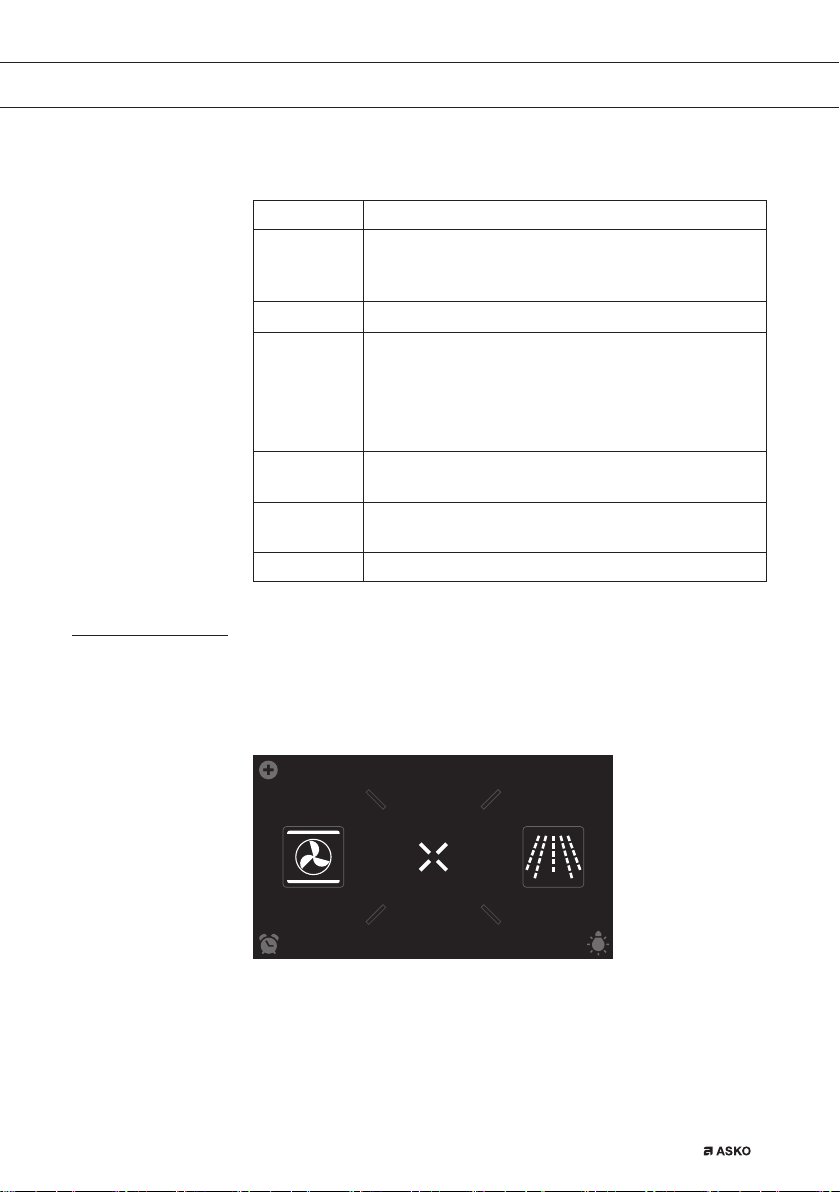
Using the ‘Extras’ functions
Open the ‘Extras’ display to select a combi microwave setting or to
preheat the oven quickly. A cleaning program, warming functions or
automatic programs can also be selected.
EXTRASOVEN
dz,&52:$9(
10
:
15
Tap on ‘EXTRAS’ to show the appliance’s extra functions.
688564_en_naslovnica_drug_papir.indd EN_23688564_en_naslovnica_drug_papir.indd EN_23 25. 02. 2022 12:17:5025. 02. 2022 12:17:50
EN 24
USE
COMBI
PROGRAMS WARMING
CLEANINGFAST PREHEAT
10
:
15
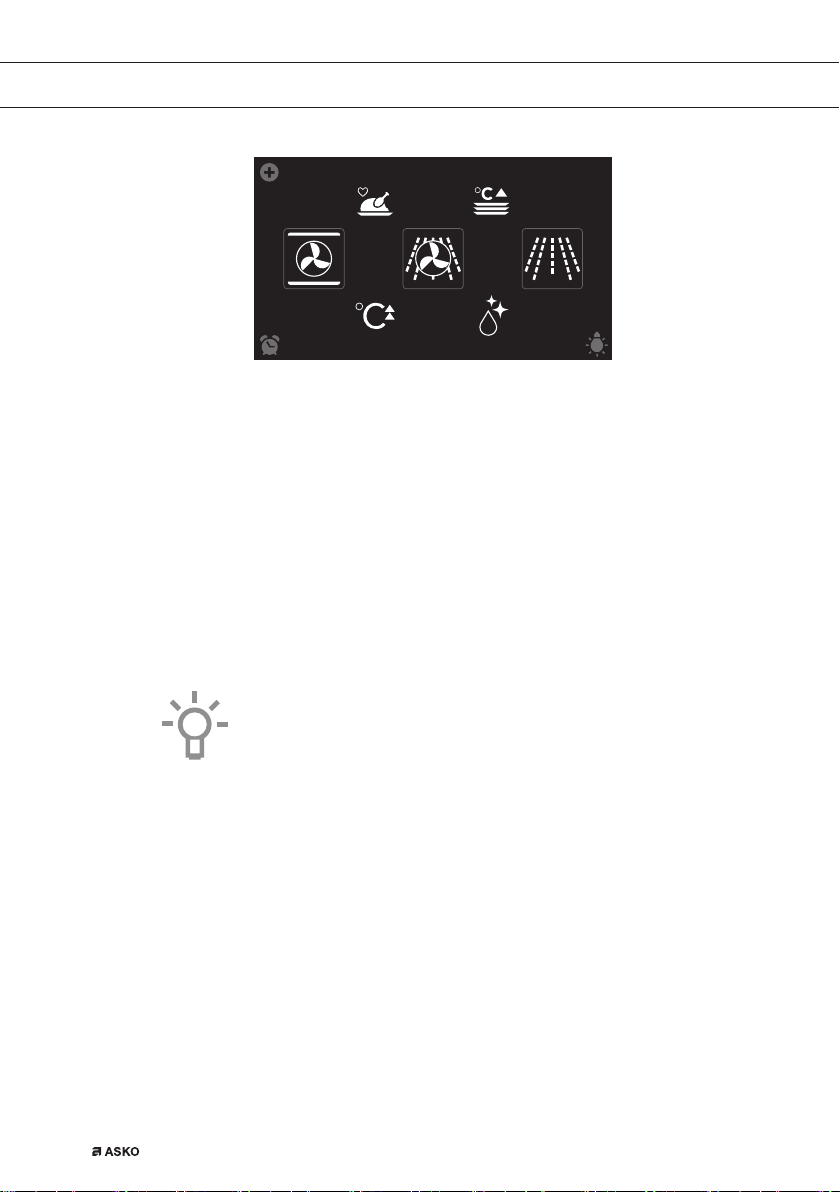
The following functions can now be selected:
• Fast preheat
• Combi
▷ Hot air + Microwave
▷ Grill + Fan + Microwave
• Cleaning (see ‘Cleaning’ chapter)
• Warming (see ‘Additional functions’ chapter):
▷ Plate warming
▷ Defrost
▷ Keep warm
• Programs (see ‘Additional functions’ chapter):
▷ Favourites
▷ Automatic programs
Fast preheat
Use this oven function for preheating the oven quickly. Don’t insert
a dish during Fast preheat. When the oven is heated to the set
temperature, preheating is finished and the oven is ready to cook the dish.
Using fast preheat
1. Switch on the oven using the ‘On/Off’ key.
2. Tap on ‘EXTRAS’ to show the appliance’s extra functions.
3. Tap on ‘FAST PREHEAT’ to open the fast preheat function.
688564_en_naslovnica_drug_papir.indd EN_24688564_en_naslovnica_drug_papir.indd EN_24 25. 02. 2022 12:17:5025. 02. 2022 12:17:50
EN 25
USE
PROGRAMS
180
10 15
Fast preheat
°C
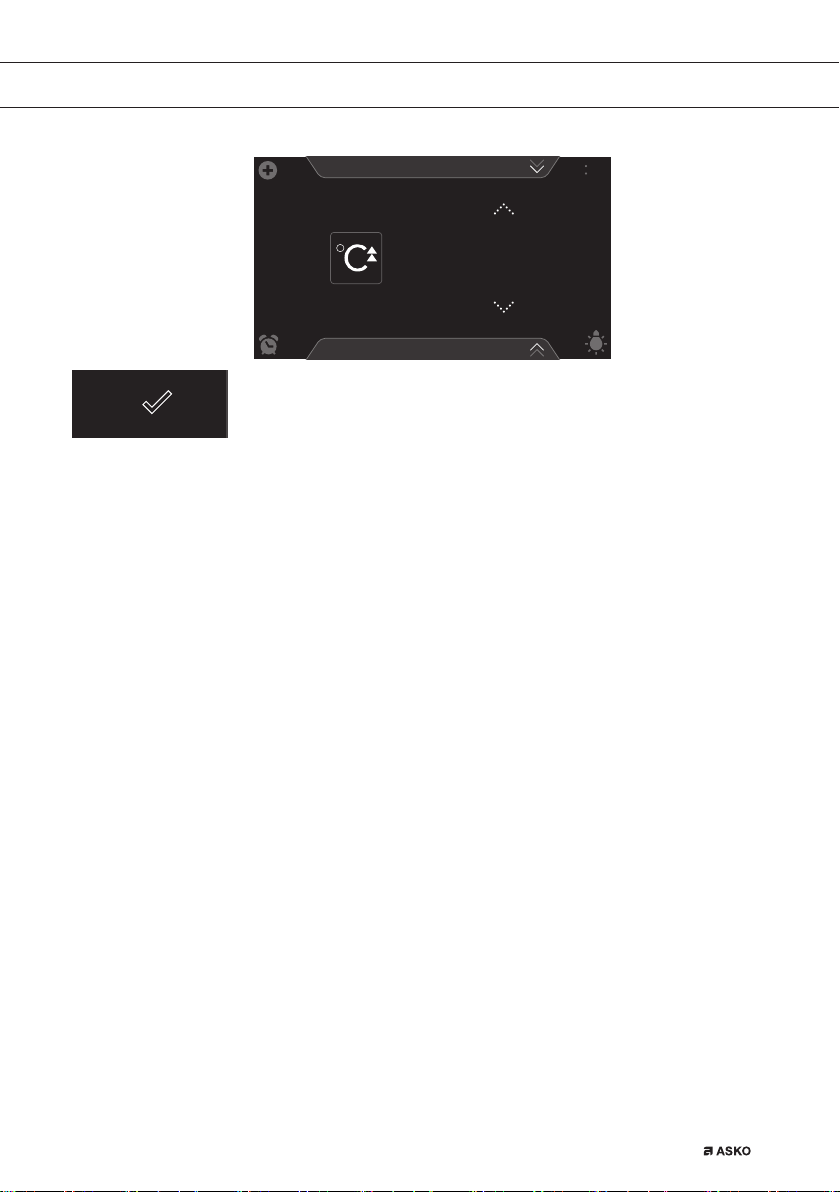
4. Select a temperature (see ‘Function-setting display’ chapter).
5. Start fast preheat using the confirm key.
• Fast preheat can also be linked to a cooking process.
• Activate ‘FAST PREHEAT’ from the ‘Plus’ menu to do so.
• When the set temperature is reached, a pop-up will appear and a
sound signal sounds.
• The cooking time starts counting up or down after door closing.
Combi
• 2 different combi functions can be selected.
▷ Hot air + Microwave
▷ Grill + Fan + Microwave
• A temperature, the microwave power level and a cooking time can
be set for each combi function.
• ‘Plus’ menu functions such as ‘stage cooking’ and ‘delayed start‘ can
also be activated. Tap on the plus symbol for this. See the ‘Using the
‘Plus’ menu’ chapter.
Using a combi function
Select the combi function appropriate for the meal you are cooking.
Consult the Functions table for this. You can also consult the info tab.
Tap on the tab at the bottom of the display to request information about
the current function.
1. Switch on the oven using the ‘On/Off’ key.
2. Place the dish in the oven.
3. Tap on ‘EXTRAS’ to show the appliance’s extra functions.
4. Tap on ‘COMBI’ to open the combi function menu.
688564_en_naslovnica_drug_papir.indd EN_25688564_en_naslovnica_drug_papir.indd EN_25 25. 02. 2022 12:17:5025. 02. 2022 12:17:50
EN 26
Hot air + Microwave
PROGRAMS
°C
16 0
:
15
H
:
M
W
6
10
:
15
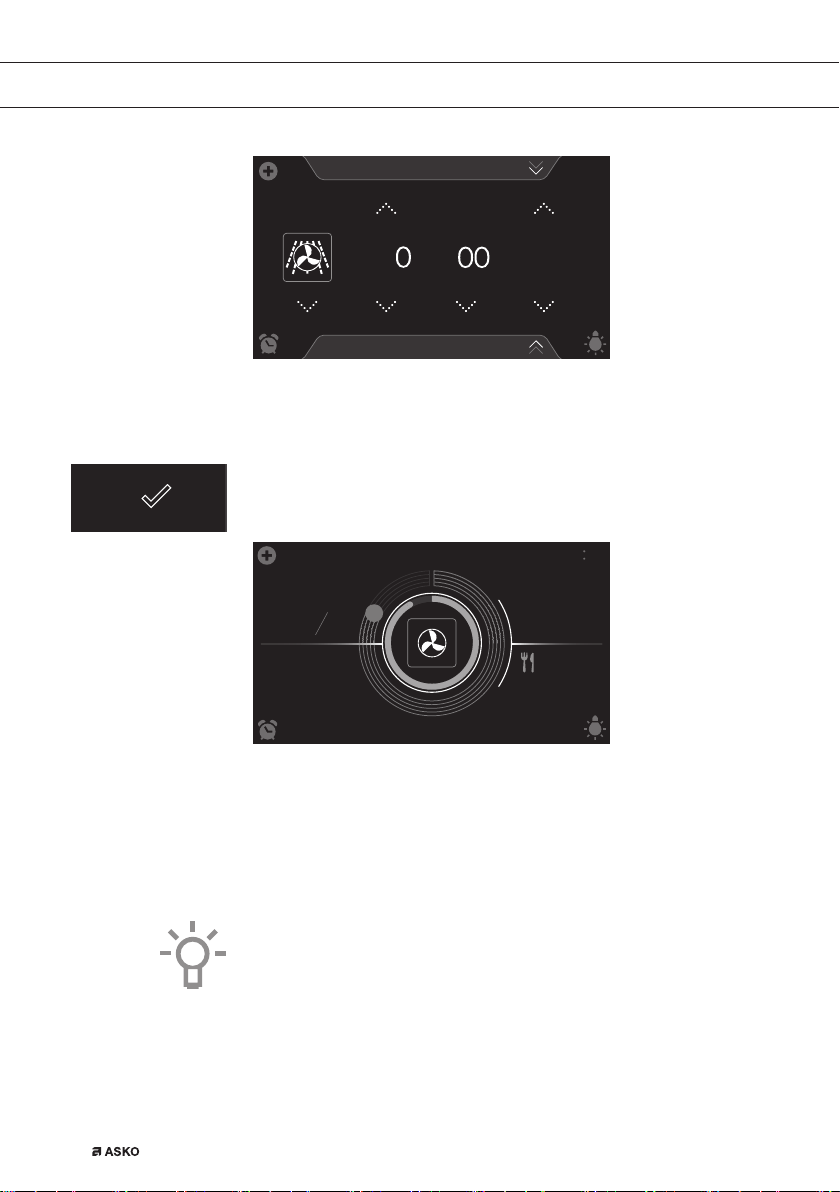
5. Select a combi function (see ‘Function-setting display’ chapter).
6. Select a temperature (see ‘Function-setting display’ chapter).
7. Select a power level (see ‘Function-setting display’ chapter).
8. Select a cooking time (see ‘Function-setting display’ chapter).
9. Select any additional settings using the ‘Plus’ menu.
10. Start cooking the dish using the confirm key.
145
8
:
54
10
:
30
°C
10 21
160
600
W
• The following values can now be read in the display:
▷ current temperature (145 °C) / set temperature (160 °C)
▷ selected power level (600 W)
▷ status indicator time (outer circle)
▷ status indicator temperature (inner circle)
▷ cooking time (08:54)
▷ end time (10:30)
• Tap in the centre of the display during cooking to open a pop-up
display with all settings. Adjust these if desired.
• At the end of a dish’s cooking time a sound signal will sound. The
signal can be switched off by opening the oven door or pressing a
key.
• The selected settings can be saved in ‘Favourites’.
Open ‘ADD TO FAVOURITES’ from the ‘Plus’ menu (See ‘Saving a
cooking method’ in the ‘Additional functions’ chapter).
USE
688564_en_naslovnica_drug_papir.indd EN_26688564_en_naslovnica_drug_papir.indd EN_26 25. 02. 2022 12:17:5125. 02. 2022 12:17:51
EN 27
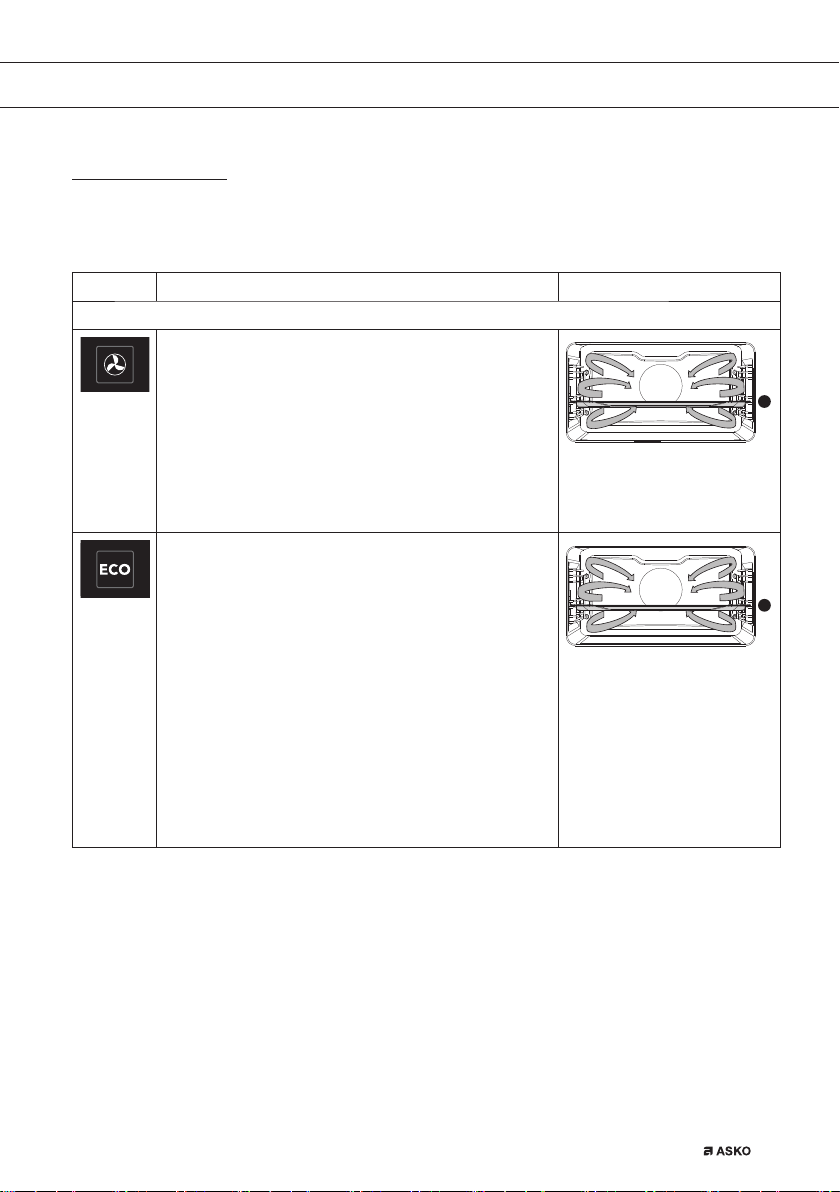
Functions table
Consult the table to choose the desired function. Also consult the
instructions for preparation on the dish packaging.
Function Description
Oven functions
Hot Air
• Heating by means of hot air from the back of the
oven.
• This mode provides uniform heating and is ideal for
baking.
• Place the baking tray or oven rack in the middle of
the oven.
• Suggested temperature: 180 °C
• Preheating is recommended.
2
ECO Hot air
• Heating by means of hot air. ECO hot air uses less
energy but gives the same result as the hot air
setting. Cooking takes a few minutes longer.
• This mode can be used for roasting meat and
baking pastry.
• Place the baking tray or oven rack in the middle of
the oven.
• Suggested temperature: 180 °C
• This setting makes use of the residual heat (heating
is not on the whole time) to achieve low energy
consumption (in accordance with energy class EN
60350-1). In this mode the actual temperature in the
oven is not displayed.
2
USE
688564_en_naslovnica_drug_papir.indd EN_27688564_en_naslovnica_drug_papir.indd EN_27 25. 02. 2022 12:17:5225. 02. 2022 12:17:52
EN 28
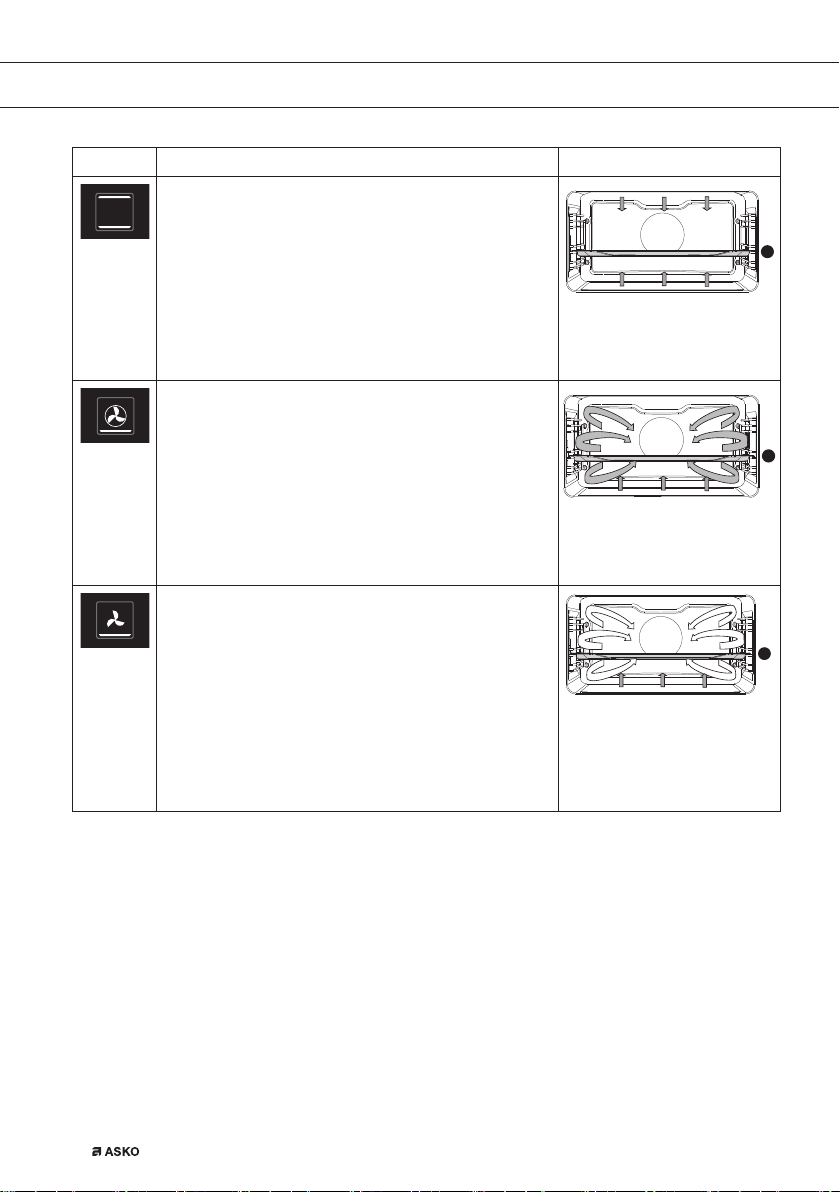
Function Description
Top + Bottom heat
• Heating by means of the upper and lower heating
elements.
• This mode can be used for traditional baking and
roasting.
• Place the baking tray or oven rack in the middle of
the oven.
• Suggested temperature: 200 °C
• Preheating is recommended.
2
Hot air + Bottom heat
• Heating by means of hot air from the back of the
oven and the bottom heating element.
• This mode can be used to bake pizza, moist pastry,
fruitcakes, leavened dough and short crust.
• Place the baking tray or oven rack in the middle of
the oven.
• Suggested temperature: 200 °C
• Preheating is recommended.
2
Bottom heat + Fan
• Heating by means of the lower heating element.
The heat is distributed by the fan.
• This mode can be used for baking low leavened
cakes, as well as for preservation of fruit and
vegetables.
• Place a not too high baking tray in the lower part of
the oven, so that hot air can also circulate over the
upper surface of the food.
• Suggested temperature: 180 °C
2
USE
688564_en_naslovnica_drug_papir.indd EN_28688564_en_naslovnica_drug_papir.indd EN_28 25. 02. 2022 12:17:5225. 02. 2022 12:17:52
EN 29
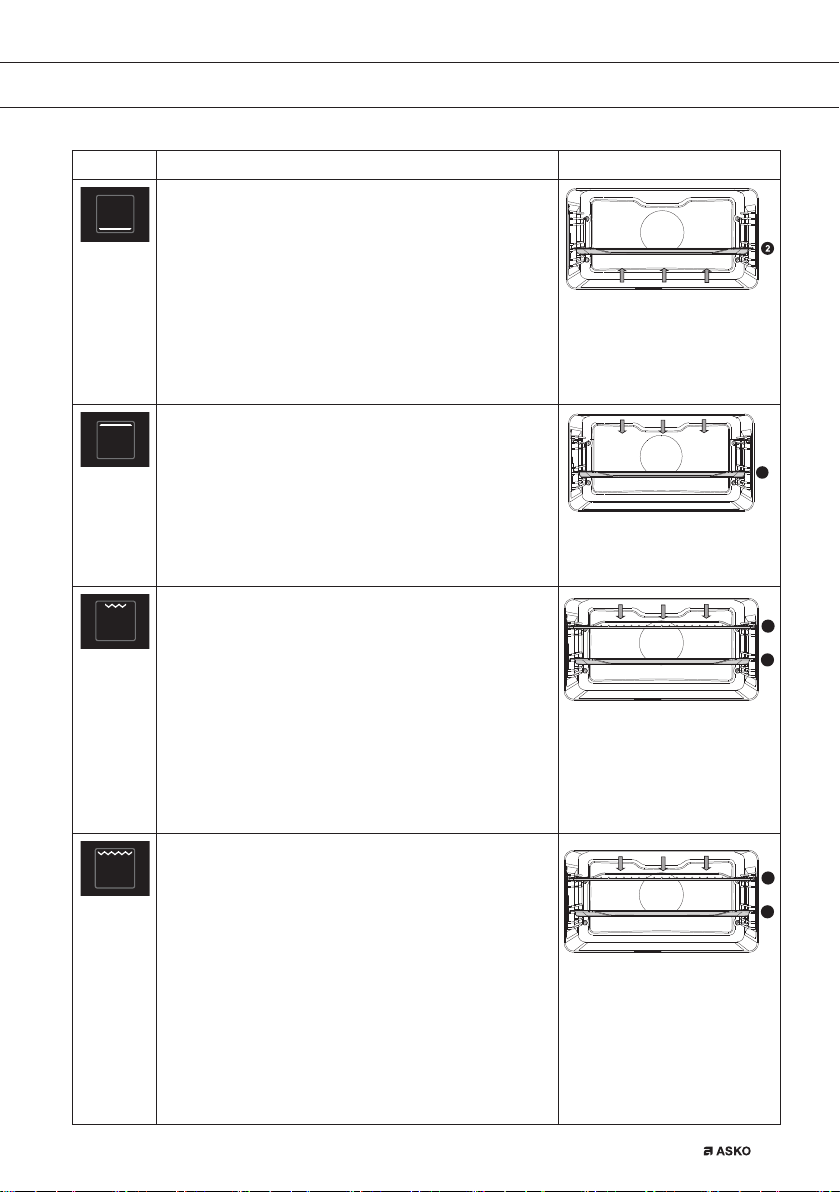
Function Description
Bottom Heat
• Heating only by means of the lower heating element.
• This mode can be used with dishes and baked
goods that require a distinctive bottom crust or
browning.
• Place the baking tray or oven rack in the lower part of
the oven.
• Use just before the end of the baking or roasting
time.
• Suggested temperature: 160 °C
Top Heat
• Heating only by means of the upper heating
element.
• This mode can be used when you wish to bake/
roast the top part of your dish.
• Place the baking tray or oven rack in the middle of the
oven.
• Suggested temperature: 150 °C
2
Grill
• Heating by means of the grill element.
• This mode can be used for grilling a smaller amount
of open sandwiches, beer sausages, and for
toasting bread.
• Place the oven rack in the upper part of the oven
and the baking tray in the middle of the oven.
• Maximum allowed temperature 240 °C.
• Monitor the cooking process at all times. The dish
may burn quickly due to the high temperature.
• Preheat for 5 minutes.
2
4
Large Grill
• Heating by means of the upper element and grill
element.
• This mode can be used with dishes and baked
goods that require a distinctive bottom crust or
browning. Use just before the end of the baking or
roasting time.
• Place the oven rack in the upper part of the oven
and the baking tray in the middle of the oven.
• Maximum allowed temperature 240 °C.
• Monitor the cooking process at all times. The dish
may burn quickly due to the high temperature.
• Preheat for 5 minutes.
2
4
USE
688564_en_naslovnica_drug_papir.indd EN_29688564_en_naslovnica_drug_papir.indd EN_29 25. 02. 2022 12:17:5325. 02. 2022 12:17:53
EN 30
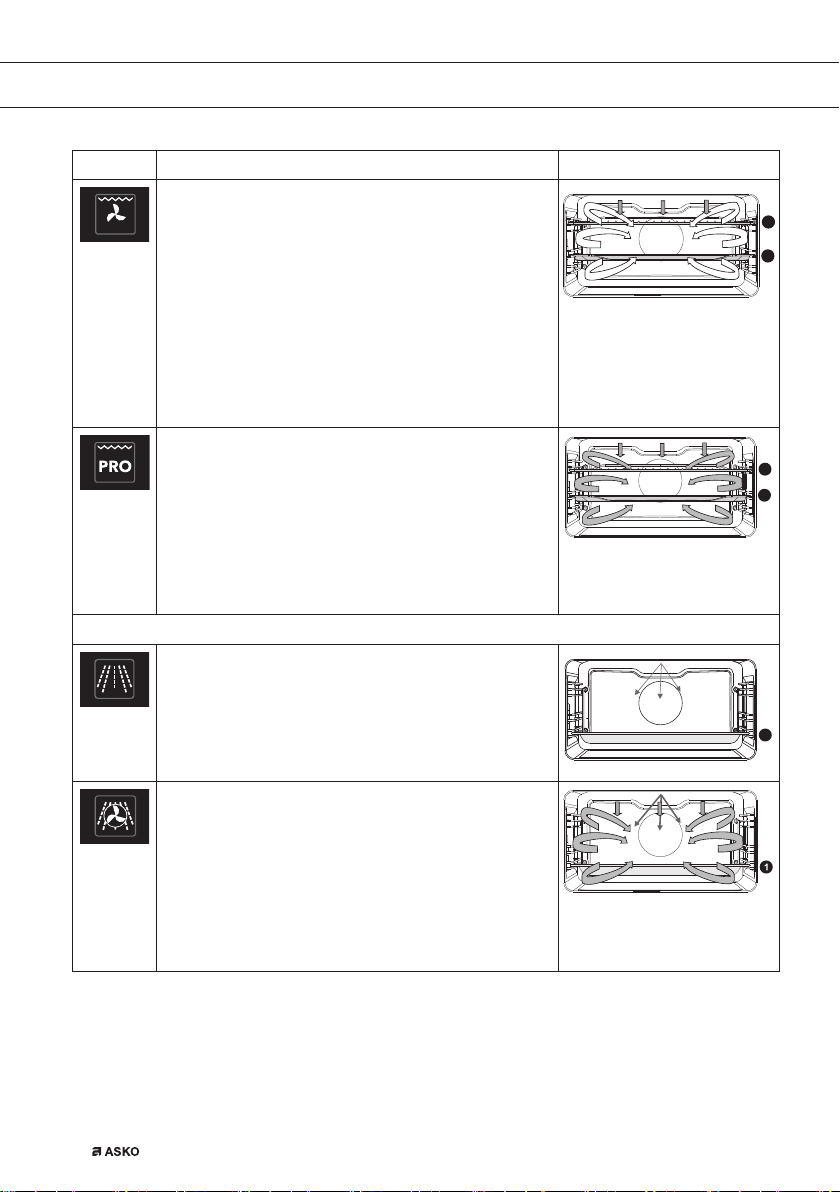
Function Description
Large grill + fan
• Heating by means of the top heating elements. The
heat is distributed by the fan.
• This mode can be used for grilling meat, fish and
vegetables.
• Place the oven rack in the upper part of the oven
and the baking tray in the middle of the oven.
• Suggested temperature: 170 °C
• Monitor the cooking process at all times. The dish
may burn quickly due to the high temperature.
• Preheat for 5 minutes.
2
4
Pro Roasting
• This setting has an automatic heating cycle.
• First the meat is sealed at a high temperature by
means of hot air and the top heating element.
• Then the dish is slowly cooked at the low, preset
temperature, with the top and bottom heating
elements.
• This function is suitable for meat, poultry and fish.
• Suggested temperature: 180 °C
2
3
Microwave function
Microwave
• This function uses microwaves. Dishes are
defrosted, heated or cooked quickly and efficiently.
• Place the glass baking tray on level 1.
• Suggested power: 750 W
1
Hot air + Microwave
• The dish is cooked with a combination of
microwaves and hot air. This shortens the cooking
time, but the dishes do get a nice brown crispy top.
• This function is used to cook meat, poultry and
vegetables. But also for casseroles, cakes and bread.
• Place the glass baking tray on level 1.
• Suggested temperature: 160 °C
• Suggested power: 600 W
USE
688564_en_naslovnica_drug_papir.indd EN_30688564_en_naslovnica_drug_papir.indd EN_30 25. 02. 2022 12:17:5325. 02. 2022 12:17:53
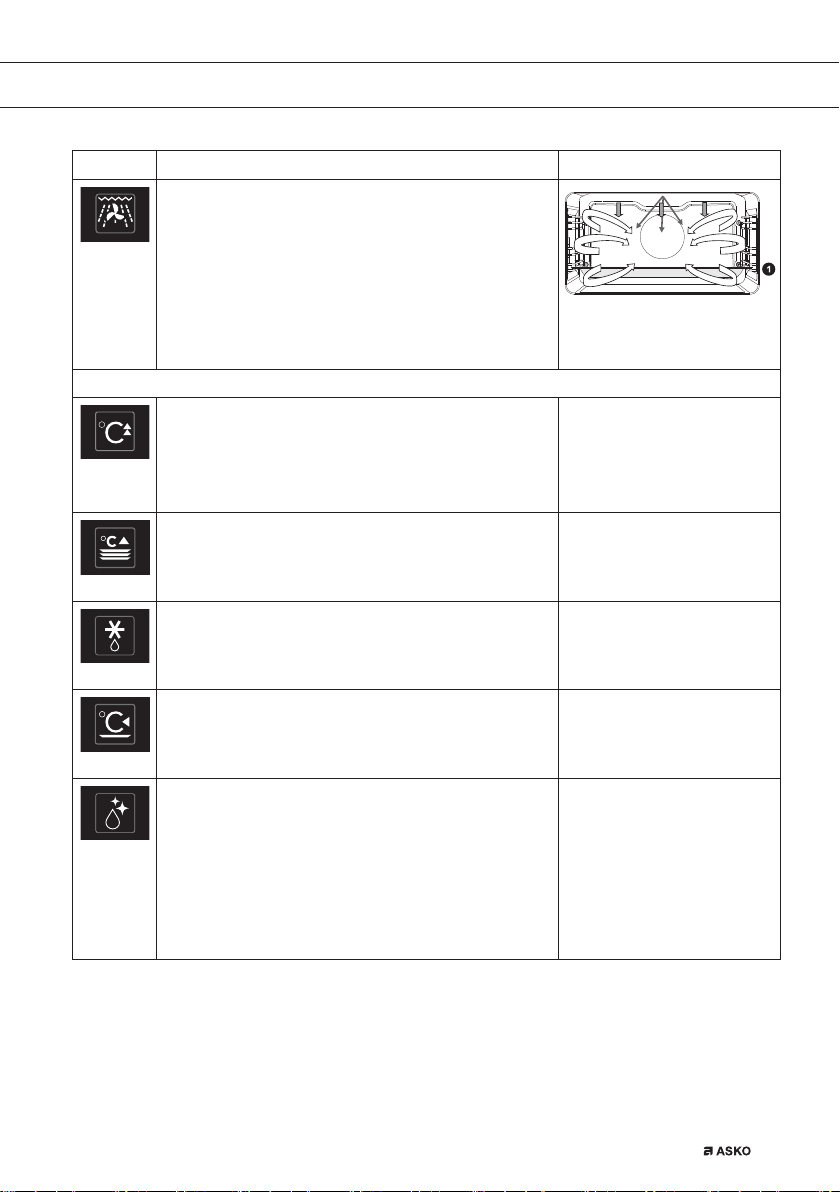
EN 31
Function Description
Grill + Fan + Microwave
• The dish is cooked with a combination of
microwaves, grill and fan. This shortens the cooking
time, but the dishes do get a nice brown crispy top.
• This setting is suitable for cooking small portions or
thin pieces of fish, meat or poultry.
• Place the glass baking tray on level 1.
• Suggested temperature: 200 °C
• Suggested power: 600 W
Extra functions
Fast preheat
• With this function, the oven cavity is quickly heated
to the desired temperature. Do not use this setting
when you have a dish in the oven.
• Suggested temperature: 180 °C
Plate warming
• This function is used for warming tableware, so that
the served food stays hotter for longer.
• Suggested temperature: 60 °C
Defrost
• This function uses microwaves. Dishes are defrosted
quickly and efficiently.
• Suggested power: 90 W
Keep warm
• This function is used to keep already cooked dishes
warm.
• Suggested temperature: 60 °C
Steam clean
• With this function and a damp cloth, you can easily
remove grease and dirt from the oven walls.
• Use this function only when the oven has cooled
down fully. Pour 0,15 liters of water onto the bottom
of the oven space before starting the cleaning
process.
• After soaking, food residues can be removed with a
damp cloth.
USE
688564_en_naslovnica_drug_papir.indd EN_31688564_en_naslovnica_drug_papir.indd EN_31 25. 02. 2022 12:17:5525. 02. 2022 12:17:55
EN 32
USE
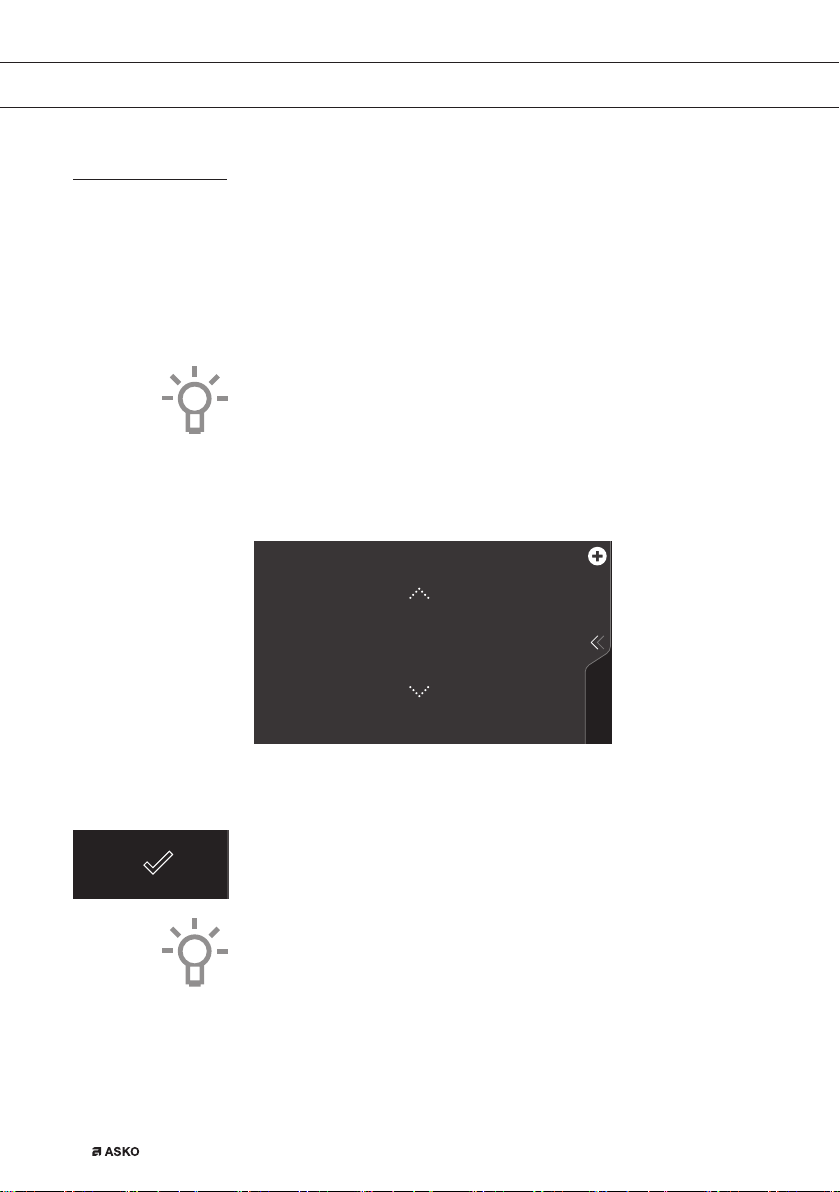
Delayed start
Use the ‘delayed start’ function to start cooking at a later time.
The delayed start function can only be selected via the ‘Plus’ menu in an
oven function or combi function. See the ‘Using the ‘Plus’ menu’ chapter.
Setting a delayed start time
1. Select a function, temperature and set a cooking time if necessary
(see ‘Function-setting display’ chapter).
A delayed start time can also be set without setting a cooking
time.
2. Tap the ‘plus’ symbol to open the ‘Plus’ menu.
3. Tap on ‘DELAYED START’ to open the function.
DELAYED START
10
:
45
4. Select a start time (see ‘Function-setting display’ chapter).
5. Confirm the set start time using the confirm key.
The ‘delayed start time’ icon appears under the plus symbol to
indicate activation. The delayed start time can be deselected by
returning the setting to the current time.
6. Start cooking using the confirm key.
The cooking will start automatically at the set time. If a cooking
time has been set, the cooking will also stop automatically.
688564_en_naslovnica_drug_papir.indd EN_32688564_en_naslovnica_drug_papir.indd EN_32 25. 02. 2022 12:17:5625. 02. 2022 12:17:56
EN 33
USE
180
10
:
45
11
:
15
°C
10 15
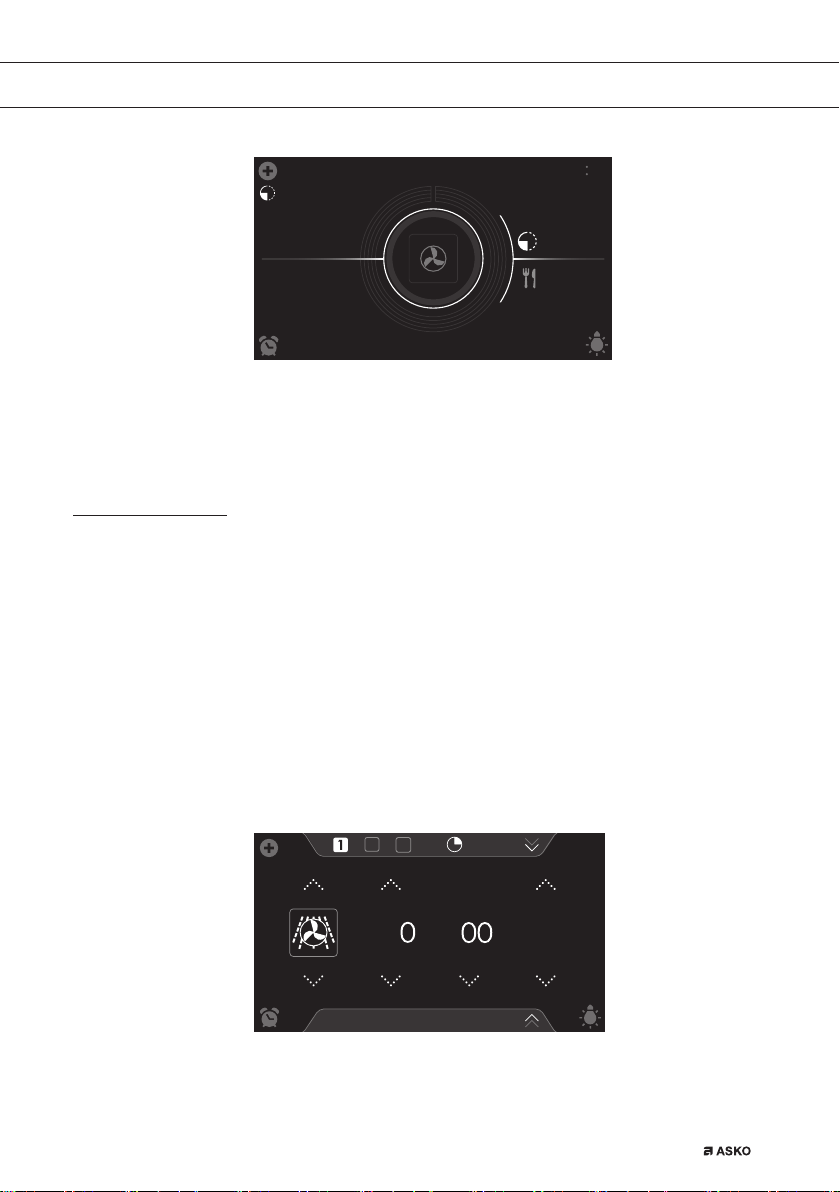
• The following values can now be read in the display:
▷ set temperature (180 °C)
▷ start time (10:45)
▷ end time (11:15) (only visible if a cooking time has been set!)
Stage cooking
• Open the ‘Stage cooking’ menu via the ‘Plus’ menu. See the ‘Using
the ‘Plus’ menu’ chapter.
• This function allows you to combine up to three functions in one
cooking process.
• Select different functions and settings to compose the cooking
process of your preference.
1. Tap the plus symbol to open the ‘Plus’ menu.
2. Tap ‘STAGE COOKING’ to open the function (can only be opened
if no cooking process has started). The stage 1 settings are visible.
These can be adjusted if desired.
Stage cooking
10
:
15
00
:
10
°C
18 0
:
10
H
:
M
W
6
3. Select a function (see ‘Function-setting display’ chapter).
4. Select a temperature (see ‘Function-setting display’ chapter).
5. Select a power level (see ‘Function-setting display’ chapter).
688564_en_naslovnica_drug_papir.indd EN_33688564_en_naslovnica_drug_papir.indd EN_33 25. 02. 2022 12:17:5625. 02. 2022 12:17:56
EN 34
USE
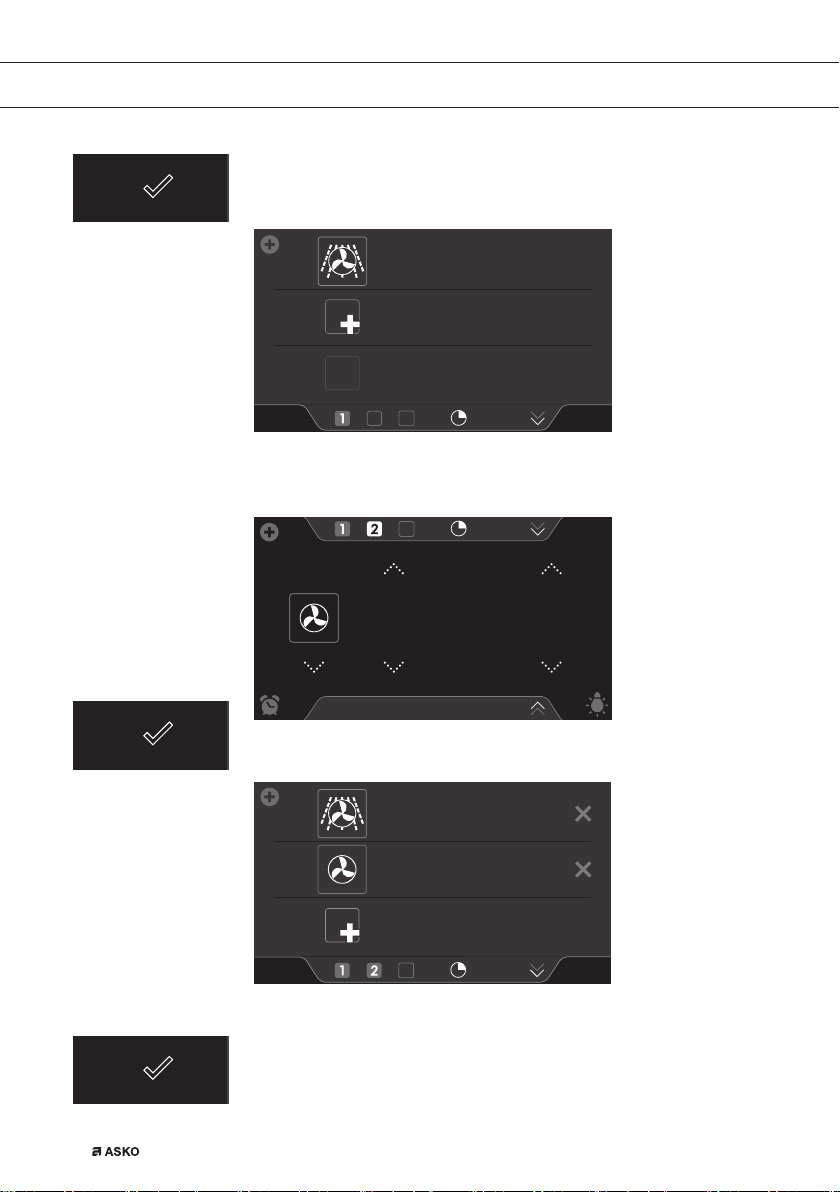
6. Select a cooking time (see ‘Function-setting display’ chapter).
7. Confirm the setting of stage 1 using the confirm key.
1
2
3
00
:
10
160
°C
600
W
H
:
M
00
:
10
8. Tap on ‘2’ to show the stage 2 settings.
9. If necessary change the stage 2 default values (function,
temperature/power level and cooking time) (see points 3 - 6).
Stage cooking
10
:
15
00
:
30
200
°C
0
:
20
H
:
M
10. Confirm the setting of stage 2 using the confirm key.
1
2
3
00
:
20
200
°C
H
:
M
00
:
10
160
°C
600
W
H
:
M
00
:
30
11. If desired, tap on ‘3’ to show the stage 3 settings.
12. If necessary change the stage 3 default values (function,
temperature/power level and cooking time) (see points 3 - 6).
13. Confirm the setting of stage 3 using the confirm key.
688564_en_naslovnica_drug_papir.indd EN_34688564_en_naslovnica_drug_papir.indd EN_34 25. 02. 2022 12:17:5725. 02. 2022 12:17:57
EN 35
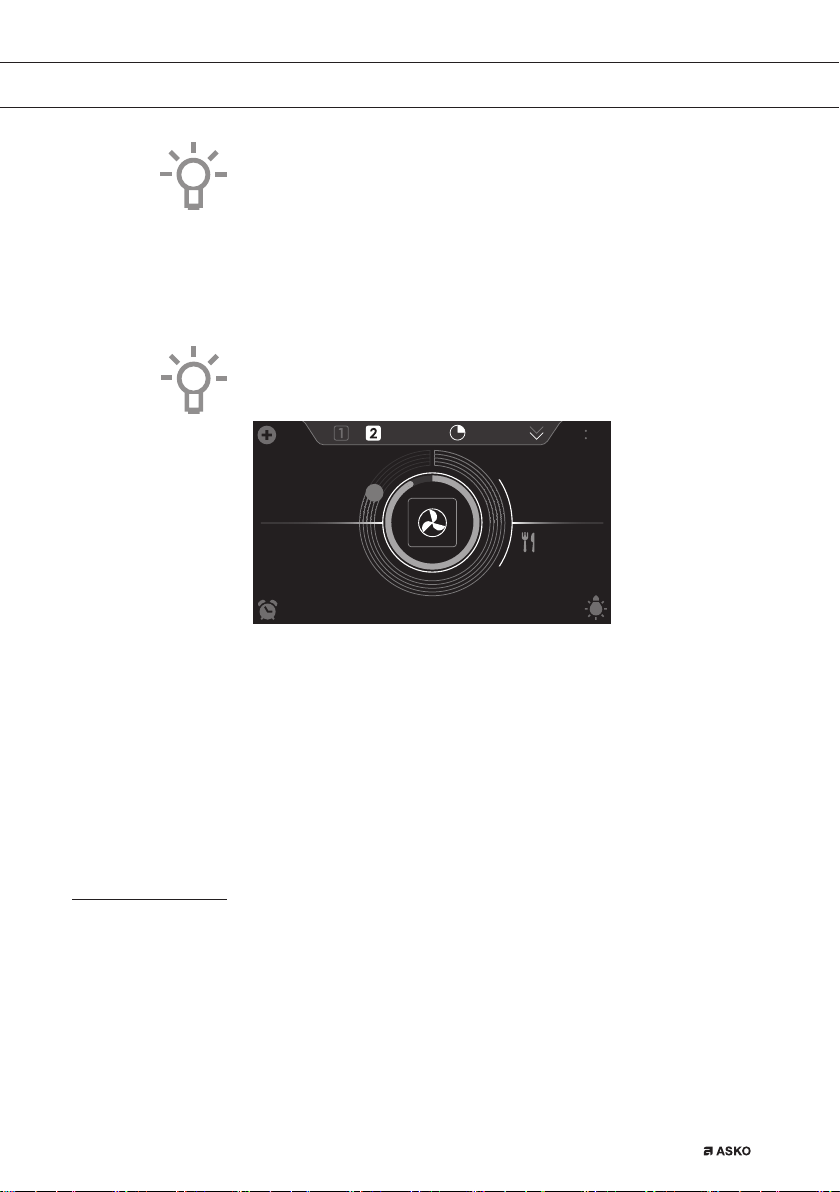
Delete a stage by tapping on the cross next to the settings.
A stage can only be deleted if it has not yet started.
14. By pressing the confirm key again, the oven starts to work according
to stage 1 (the activated stage is displayed in white). When the set
time has elapsed, the following stage will be activated, this being
stage 2 and later stage 3 if this has been set.
The selected settings can be saved in ‘Favourites’.
Open ‘ADD TO FAVOURITES’ from the ‘Plus’ menu (See ‘Saving
a cooking method’ in the ‘Additional functions’ chapter).
185
17
:
32
10
:
45
°C
200
°C
10 27
00
:
18
• The following values can now be read in the display:
▷ active stage (2)
▷ total cooking time (00:18)
▷ current temperature (185 °C)
▷ active stage set temperature (200 °C)
▷ active stage status indicator time (outer circle)
▷ active stage status indicator temperature (inner circle)
▷ active stage cooking time (17:32)
▷ total end time (10:45)
Gratin
To add the grill function at the end of the progress (gratin time will be
added at the end of the cooking process).
1. Tap the ‘plus’ symbol to open the ‘Plus’ menu .
2. Tap on ‘GRATIN’ to open the function.
3. The temperature and time can be set or the program can be started
directly by pressing the confirm key.
USE
688564_en_naslovnica_drug_papir.indd EN_35688564_en_naslovnica_drug_papir.indd EN_35 25. 02. 2022 12:17:5825. 02. 2022 12:17:58
EN 36
Additional functions
Several additional functions or programs can be selected.
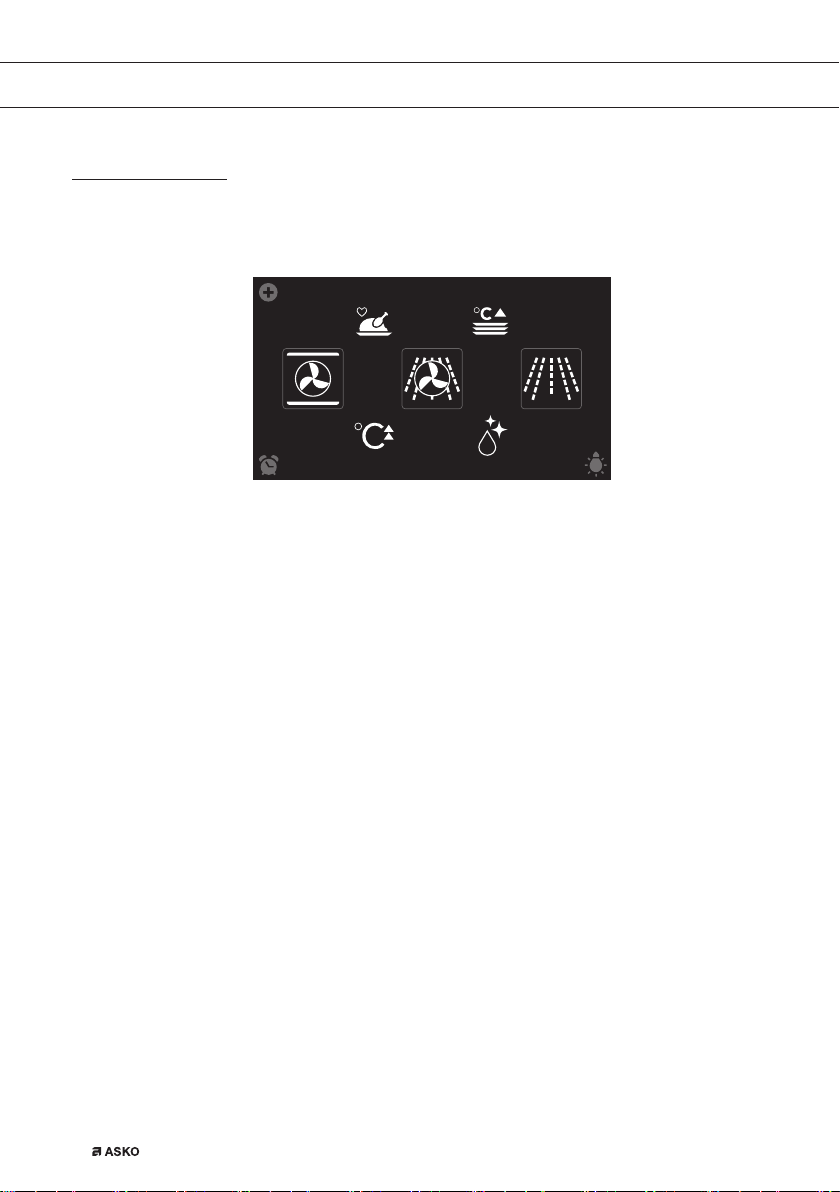
1. Tap on ‘EXTRAS’ to show the appliance’s extra functions.
COMBI
PROGRAMS WARMING
CLEANINGFAST PREHEAT
10
:
15
The following additional functions and programs can now be selected:
• Warming:
▷ Plate warming
▷ Defrost
▷ Keep warm
• Programs:
▷ Favourites
▷ Automatic programs
Warming
• Plate warming
▷ This function is used when you want to warm tableware (plates,
cups) so that the served food stays hotter for longer.
▷ By choosing this function you can determine the plate warming
temperature and duration.
• Defrost
▷ This function uses microwaves. Dishes are defrosted quickly and
efficiently. Use this function for slow defrosting of frozen dishes
(cakes, biscuits, cookies, bread, bread rolls and frozen fruit).
▷ By choosing this function you can determine the defrost power
level and duration.
▷ Turn the food over after half the defrost time has elapsed; stir
the food or break up large pieces if these are frozen together.
• Keep warm
▷ Use this function to keep already cooked food at temperature.
▷ By choosing this function you can determine the keep warm
temperature and duration.
USE
688564_en_naslovnica_drug_papir.indd EN_36688564_en_naslovnica_drug_papir.indd EN_36 25. 02. 2022 12:17:5925. 02. 2022 12:17:59
EN 37
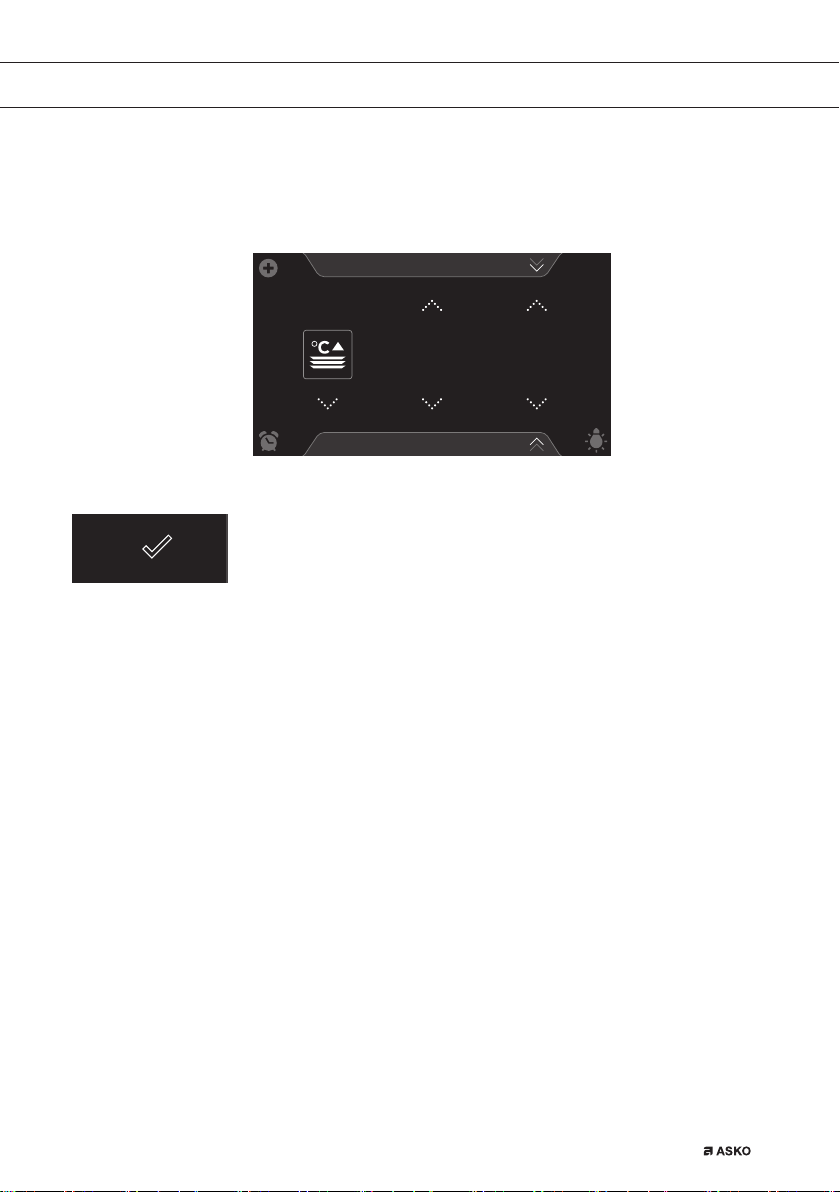
Selecting warming functions
1. Tap on ‘EXTRAS’ to show the appliance’s extra functions.
2. Tap on ‘WARMING’ to open the warming function menu.
Plate warming
PROGRAMS
10
:
15
60
°C
1
:
00
H
:
M
3. Choose the desired warming function (plate warming, defrost or
keep warm). Adjust the settings if necessary (see ‘Function-setting
display’ chapter)
4. Start the function using the confirm key.
Programs:
• Favourites
▷ You can select your own stored recipes in ‘FAVOURITES’. See
also ‘Saving a cooking method’.
• Automatic programs
▷ You can use ‘automatic programs’ for cooking by selecting a
dish from a list of pre-programmed dishes. The programs are
subdivided into categories (MEAT, VEGETABLES, etc.).
▷ First select the category and then the dish itself from the
available list.
Selecting program functions
1. Tap on ‘EXTRAS’ to show the appliance’s extra functions.
2. Tap on ‘PROGRAMS’ to open the programs menu.
USE
688564_en_naslovnica_drug_papir.indd EN_37688564_en_naslovnica_drug_papir.indd EN_37 25. 02. 2022 12:17:5925. 02. 2022 12:17:59
EN 38
PROGRAMS
FAVOURITES
VEGETABLES
MEAT
FISH AND CRUSTACEANS
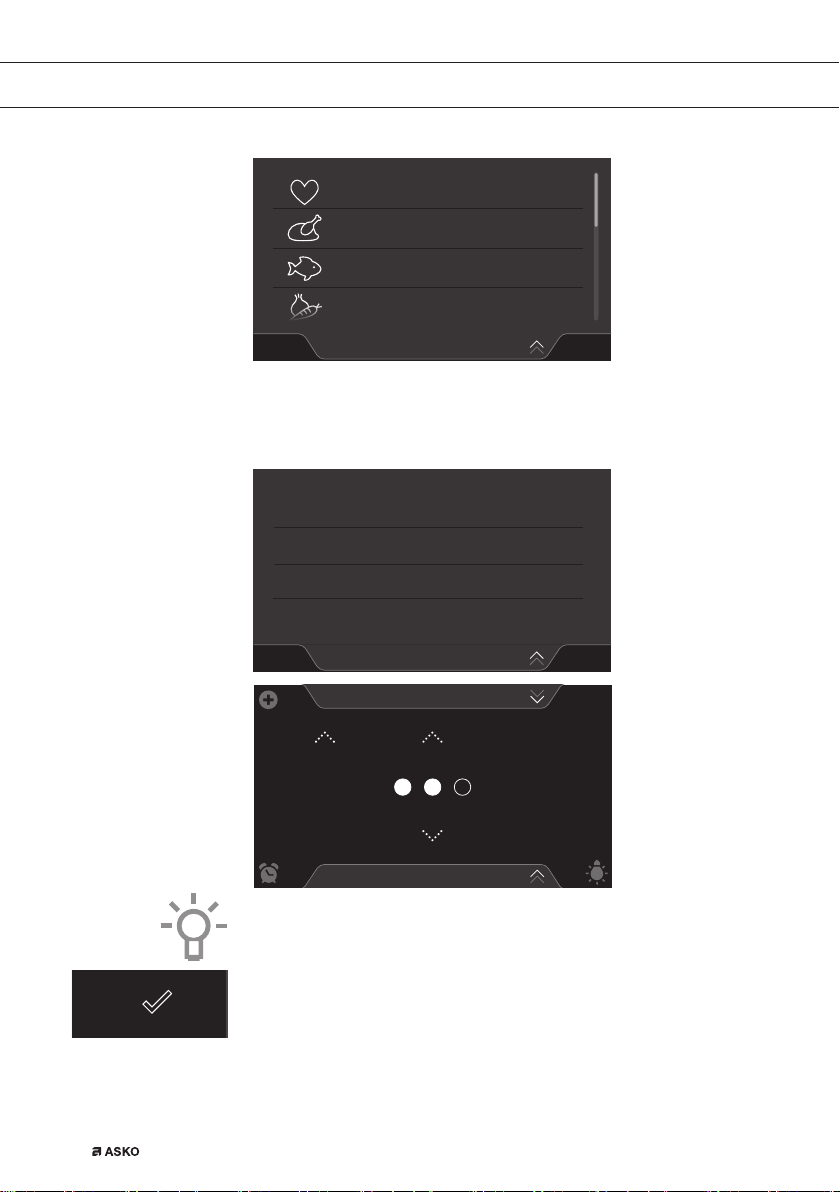
3. Tap on ‘FAVOURITES’ or one of the automatic program categories.
▷ Select one of your saved dishes in ‘FAVOURITES’.
▷ Select a dish from the available list in the automatic programs.
PROGRAMS
MEAT
PORK
BEEF
OTHER MEAT
POULTRY
Lamb - ribs
1
:
00
H:M
1,0
KG
INTENSITY
PROGRAMS
10
:
15
4. If necessary adjust the intensity and/or the weight.
The intensity or weight cannot be adjusted in all automatic programs.
5. Start the chosen program using the confirm key.
USE
688564_en_naslovnica_drug_papir.indd EN_38688564_en_naslovnica_drug_papir.indd EN_38 25. 02. 2022 12:18:0025. 02. 2022 12:18:00
EN 39
• Open information about the chosen program using the info tab.
Information about the required accessories and the shelf level in
the oven can be read in this tab. Sometimes information about
cooking the dish may also be found in this tab.
• For a number of automatic programs, it is sometimes possible
to adjust settings manually. For adjusting the settings open the
‘Plus’ menu and tap ‘MANUAL’.
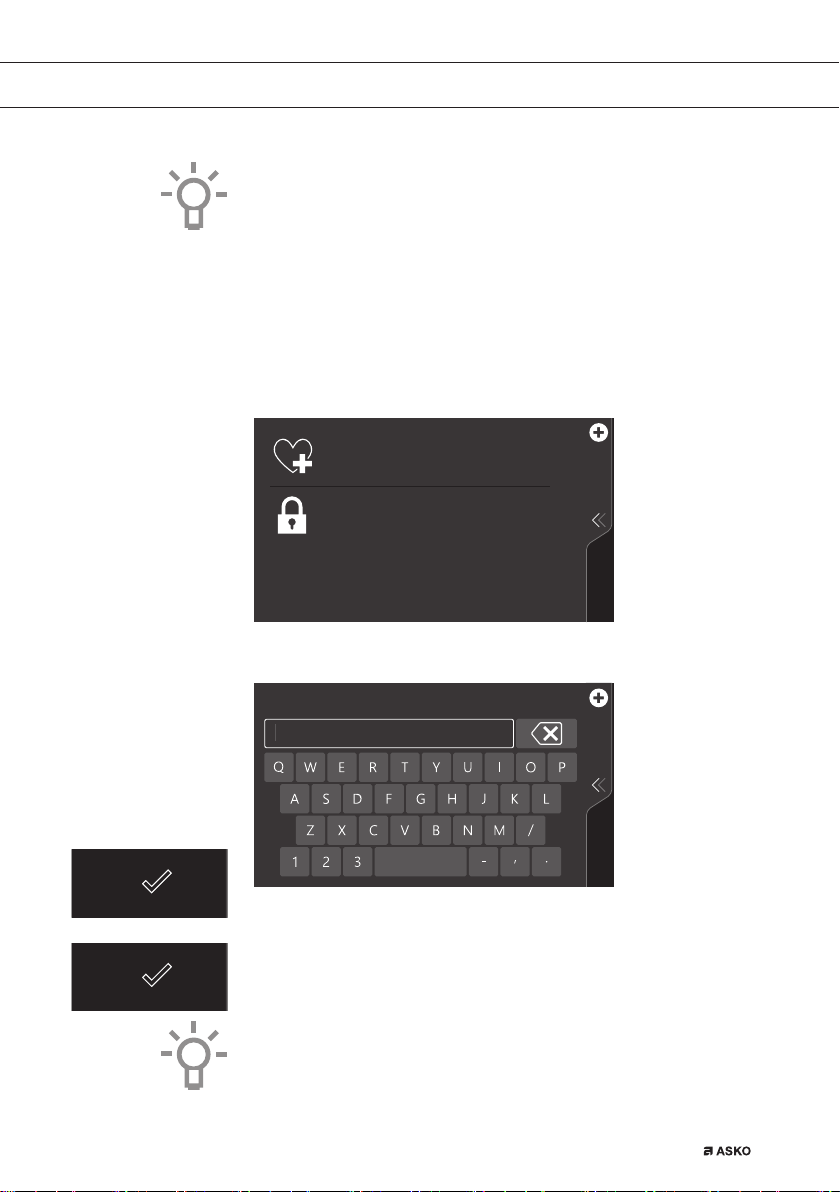
Saving a cooking method
A function/cooking method is active (the oven has started).
KEY LOCK
ADD TO FAVOURITES
Save the current cooking settings to your
favourites
To clean the dashboard or to apply as child
lock
1. Open the ‘Plus’ menu and tap on ‘ADD TO FAVOURITES’.
ADD TO FAVOURITES
2. Give the dish you are preparing a name by selecting the appropriate
letters. Tap on the ‘arrow with cross’ symbol if you wish to delete a
letter.
3. Press on the confirm key to save the cooking method.
Automatic programs can also be saved under ‘FAVOURITES’.
USE
688564_en_naslovnica_drug_papir.indd EN_39688564_en_naslovnica_drug_papir.indd EN_39 25. 02. 2022 12:18:0125. 02. 2022 12:18:01

EN 40
Settings
1. From the start display, tap on the plus symbol.
KEY LOCK
To clean the dashboard or to apply as child
lock
SETTINGS
Combine up to three functions in one
cooking process
Go to the appliance settings
STAGE COOKING
2. Tap on ‘SETTINGS’.
This menu offers the following choices:
• General
• Sound
• Display and light
• Cooking
• System
GENERAL
COOKING
DISPLAY AND LIGHT
SOUND
SETTINGS
3. Tap on the desired category and the setting to be adjusted.
▷ tap on the desired choice from a list
▷ adjust a value by tapping the arrows above and below the value
or swiping over the value
▷ or switch a setting on or off by tapping on ‘ON’ or ‘OFF’
4. Press the confirm key to confirm.
USE
688564_en_naslovnica_drug_papir.indd EN_40688564_en_naslovnica_drug_papir.indd EN_40 25. 02. 2022 12:18:0225. 02. 2022 12:18:02

EN 41
GENERAL
You can set the following from this menu:
• Language (language of the touch screen)
• Time (Current time)
• Time display (12 or 24 hour clock)
• Date (current date)
• Date display (date visible or not in the ‘stand-by’ display)
SOUND
You can set the following from this menu:
• General sounds (volume of sound signals and alarms)
• Key sounds (volume of key sounds)
• Start-up/shut-down sound (volume of start-up/shut-down sound)
DISPLAY AND LIGHT
You can set the following from this menu:
• Display brightness (adjustable in 5 brightness levels)
• Oven light (the time the light stays on after activation)
• Appliance to stand-by mode (the length of time before the
appliance goes to stand-by after the last operation)
• Appliance switch off (how long the appliance stays in stand-by)
• Start-up/shut-down animation (start-up/shut-down of the brand
animation)
• Night mode (start and end time for lower display brightness)
When for ‘APPLIANCE SWITCH OFF’ setting ‘Manual’ is selected,
the appliance does not switch off automatically. When the device is
switched off manually, this setting is put back to the factory setting.
This is a mandatory maximum energy consumption regulation.
COOKING
You can set the following from this menu:
• Quick start microwave (adjust power level and time of quick start)
• Default program intensity (intensity of automatic programs)
SYSTEM
You can set the following from this menu:
• Appliance information (request appliance information)
• Factory settings (back to factory settings)
USE
688564_en_naslovnica_drug_papir.indd EN_41688564_en_naslovnica_drug_papir.indd EN_41 25. 02. 2022 12:18:0325. 02. 2022 12:18:03
EN 42
CLEANING
Cleaning the appliance
Clean the oven regularly to prevent fat and food particles from
accumulating, especially on the surfaces of the interior and the exterior,
the door and the seal.
• Activate the child lock (to prevent that the appliance is switched on
accidentally).
• Clean the exterior surfaces with a soft cloth and warm soapy water.
• Next wipe with a clean, damp cloth and dry the surfaces.
• Remove splashes and stains on the interior surfaces with a
cloth and soapy water.
• Next wipe with a clean, damp cloth and dry the surfaces.
Important
• Make sure that no water enters the vents.
• Never use abrasive cleaning materials or chemical solvents.
• Always make sure that the seal of the door is clean. This prevents
accumulation of dirt and allows you to close the door properly.
Steam clean
With the steam clean function and a damp cloth, you can easily remove
grease and dirt from the oven walls.
Using steam clean
Only use steam clean when the oven has cooled down fully. It is more
difficult to remove dirt and grease if the oven is hot.
1. Remove all accessories from the oven.
2. Pour 0.15 litres of water into the bottom of the oven.
3. Tap on ‘EXTRAS’ to show the appliance’s extra functions.
4. Tap on ‘CLEANING’ to open the cleaning function.
5. Press on the confirm key to start steam clean.
• Do not open the door during the cleaning process.
• The process takes 30 minutes.
Food remains on the enamel walls will be sufficiently soaked after
30 minutes so that they can be removed with a damp cloth.
688564_en_naslovnica_drug_papir.indd EN_42688564_en_naslovnica_drug_papir.indd EN_42 25. 02. 2022 12:18:0325. 02. 2022 12:18:03
EN 43
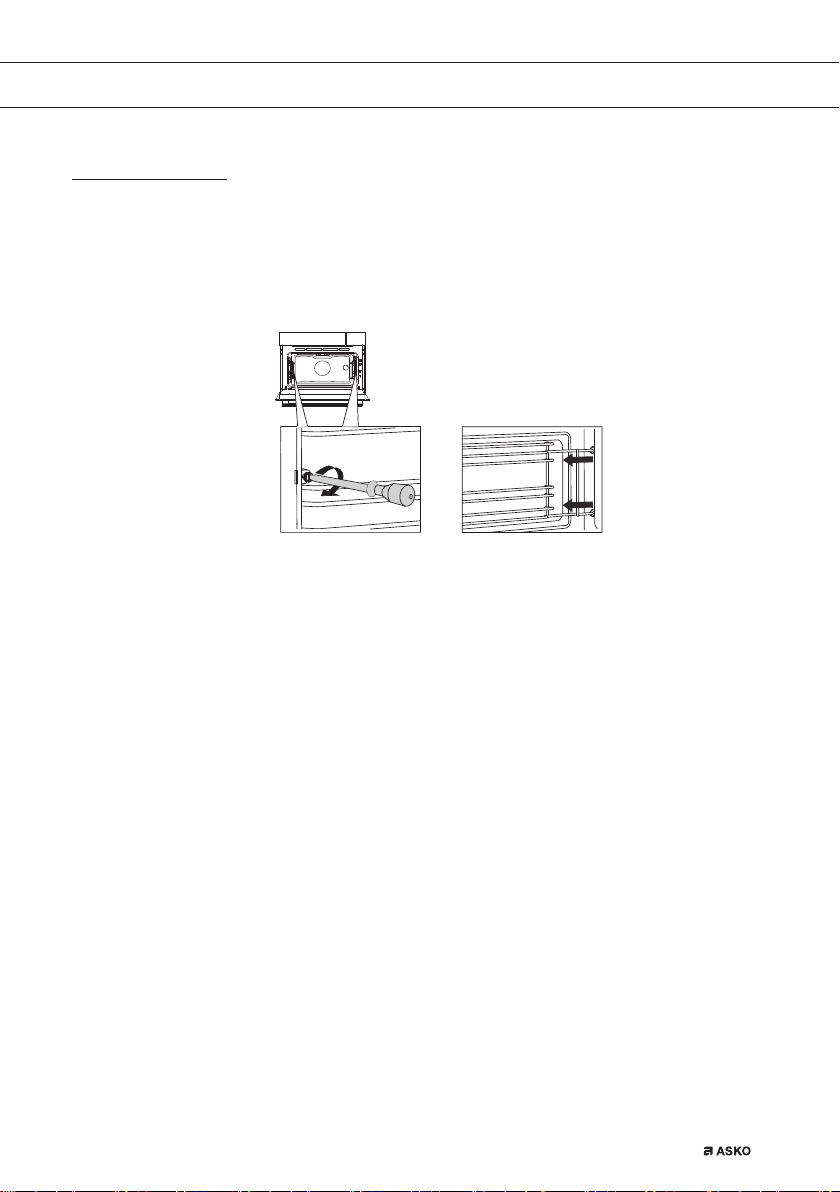
Removing and cleaning the guide rails
Use conventional cleaning products to clean the guide rails.
• Remove the screw using a screwdriver.
• Remove the guide rails from the holes in the back wall. Save the
guide rail spacers carefully. Return the spacers after cleaning. This
prevents sparks being created during use.
CLEANING
688564_en_naslovnica_drug_papir.indd EN_43688564_en_naslovnica_drug_papir.indd EN_43 25. 02. 2022 12:18:0325. 02. 2022 12:18:03
EN 44
Replacing the oven light bulb
The light bulbs (2x) (halogen G9, 230 V, 25 W) are a consumer items
and therefore not covered by warranty. To replace it, first remove the
baking tray, oven rack and guide rails.
The oven is fitted with a halogen lamp.
This product contains a light source of energy efficiency class (G).
The lamp in this household appliance is only suitable for
illumination of this appliance. The lamp is not suitable for
household room illumination.
Disconnect the appliance from the power supply by removing the
plug from the socket or by switching off the circuit breaker in the
fuse box.
Please note: the light bulb can be very hot! Use protection to
remove the bulb.
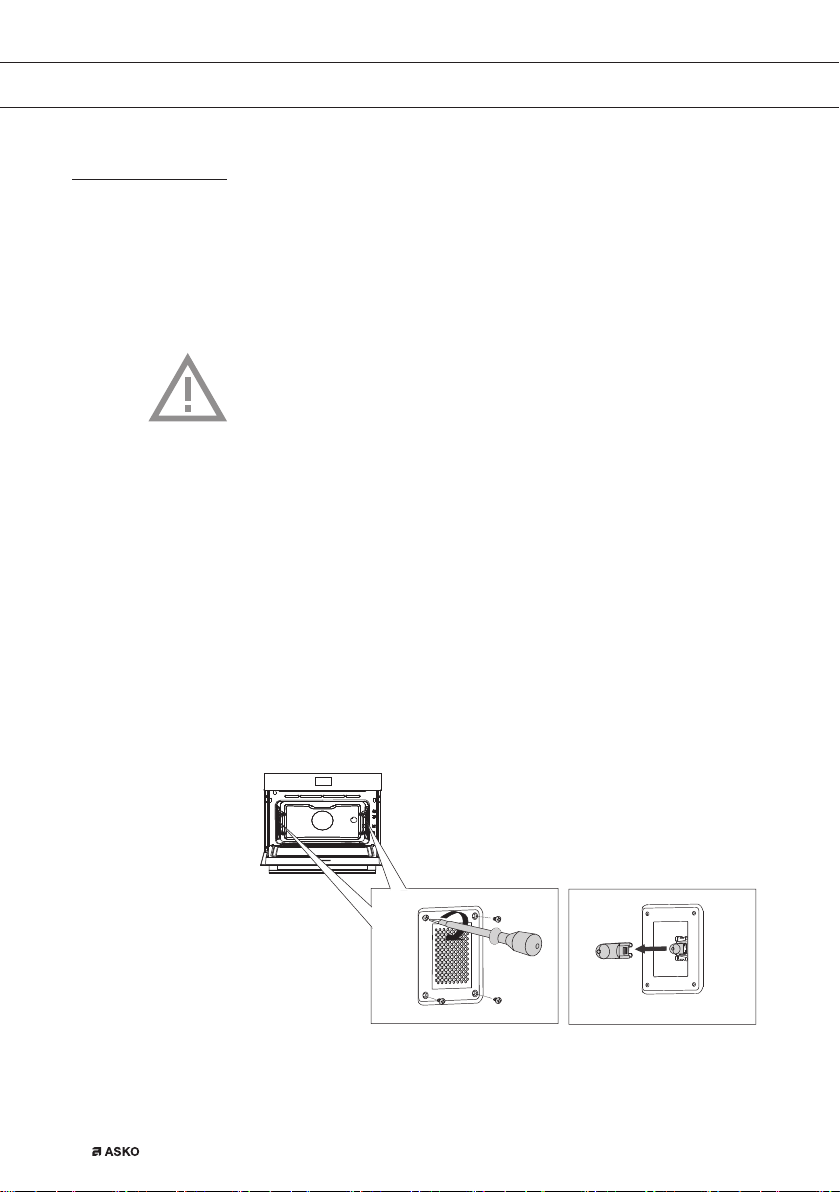
1. Unscrew the cover panel’s four screws. Remove the cover panel
and glass.
2. Remove the faulty halogen lamp and replace it with a new one.
To prevent burns, use protection to remove the lamp.
3. Do not remove the seal from the cover panel.
The seal should not become lose from the cover panel. The seal
needs to fit perfectly in the oven wall recess.
CLEANING
688564_en_naslovnica_drug_papir.indd EN_44688564_en_naslovnica_drug_papir.indd EN_44 25. 02. 2022 12:18:0425. 02. 2022 12:18:04

EN 45
SOLVING PROBLEMS
General
If you have problems with your oven, consult the error overview below.
Should the problems persist, please contact the Customer Services
Department.
The food stays raw
• Check whether the timer has been set and you have pressed the
confirm key.
• Is the door closed properly?
• Check whether a fuse has blown and whether a circuit breaker has
been activated.
The food is overcooked or undercooked
• Check whether the correct cooking time has been set.
• Check whether the correct power has been set.
The sensors don’t respond; the display is locked.
• Disconnect the appliance from the power supply for a few minutes
(unscrew the fuse or switch off the mains); then reconnect the
appliance and switch it on.
Sparking in the oven space.
• Ensure that all cover panels from the lamps are secure and that all
spacers are placed on the guide rails.
Power failure can cause the display to reset.
• Remove the plug from the socket and put it back in again.
• Set the time again.
There is condensation in the oven.
• This is normal. Wipe the oven clean after use.
The fan keeps working after the oven is switched off.
• This is normal. The fan will keep working for a while after the oven
is switched off.
Air flow can be felt at the door and the exterior of the appliance.
• This is normal.
688564_en_naslovnica_drug_papir.indd EN_45688564_en_naslovnica_drug_papir.indd EN_45 25. 02. 2022 12:18:0425. 02. 2022 12:18:04

EN 46
Steam escapes from the door or the vents.
• This is normal.
Clicking sounds can be heard when the oven is working,
particularly in the defrost setting.
• This is normal.
The fuse switches off regularly.
• Consult a service technician.
The display gives an error code, ERROR XX ...
(XX indicates the number of the error).
• There is a fault in the electronic module. Disconnect the appliance
from the power supply for a few minutes. Then reconnect it and set
the current time.
• Consult a service technician if the error persists.
Storing and repairing the oven
Repairs should only be performed by a qualified service technician.
If maintenance is required, take the plug from the socket and contact
the Asko customer service.
Have the following information to hand when you call:
• The model number and serial number (stated on the inside of the
oven door)
• Guarantee details
• A clear description of the problem
Choose a clean, dry place if you have to store the oven temporarily,
as dust and moisture can damage the appliance.
SOLVING PROBLEMS
688564_en_naslovnica_drug_papir.indd EN_46688564_en_naslovnica_drug_papir.indd EN_46 25. 02. 2022 12:18:0425. 02. 2022 12:18:04
EN 47
Disposal of the appliance and packaging
This product is made from sustainable materials. However, the
appliance must be disposed of responsibly at the end of its useful life.
The government can provide you with information about this.
The packaging of the appliance can be recycled. The following materials
have been used:
• cardboard
• polyethylene wrap (PE)
• CFC-free polystyrene (hard PS foam)
Dispose of these materials responsibly in accordance with legal provisions.
The product has a pictogram of a rubbish bin with a cross through it.
This indicates that household appliances must be disposed of
separately. This means that the appliance may not be processed via
the regular waste flow at the end of its useful life. You should take it to
a special municipal waste depot or a sales outlet that offers to do this
for you.
Collecting household equipment separately prevents harm to the
environment and public health. The materials used in manufacturing
this appliance can be recycled, which provides considerable savings
in energy and raw materials.
Declaration of conformity
We hereby declare that our products comply with the relevant European
directives, standards and regulations as well as all requirements
referred to in the standards.
YOUR OVEN AND THE ENVIRONMENT
688564_en_naslovnica_drug_papir.indd EN_47688564_en_naslovnica_drug_papir.indd EN_47 25. 02. 2022 12:18:0425. 02. 2022 12:18:04

688564 / VER 3 / 25-02-2022
en (03-22)
688564_en_naslovnica_drug_papir.indd EN_48688564_en_naslovnica_drug_papir.indd EN_48 25. 02. 2022 12:18:0525. 02. 2022 12:18:05