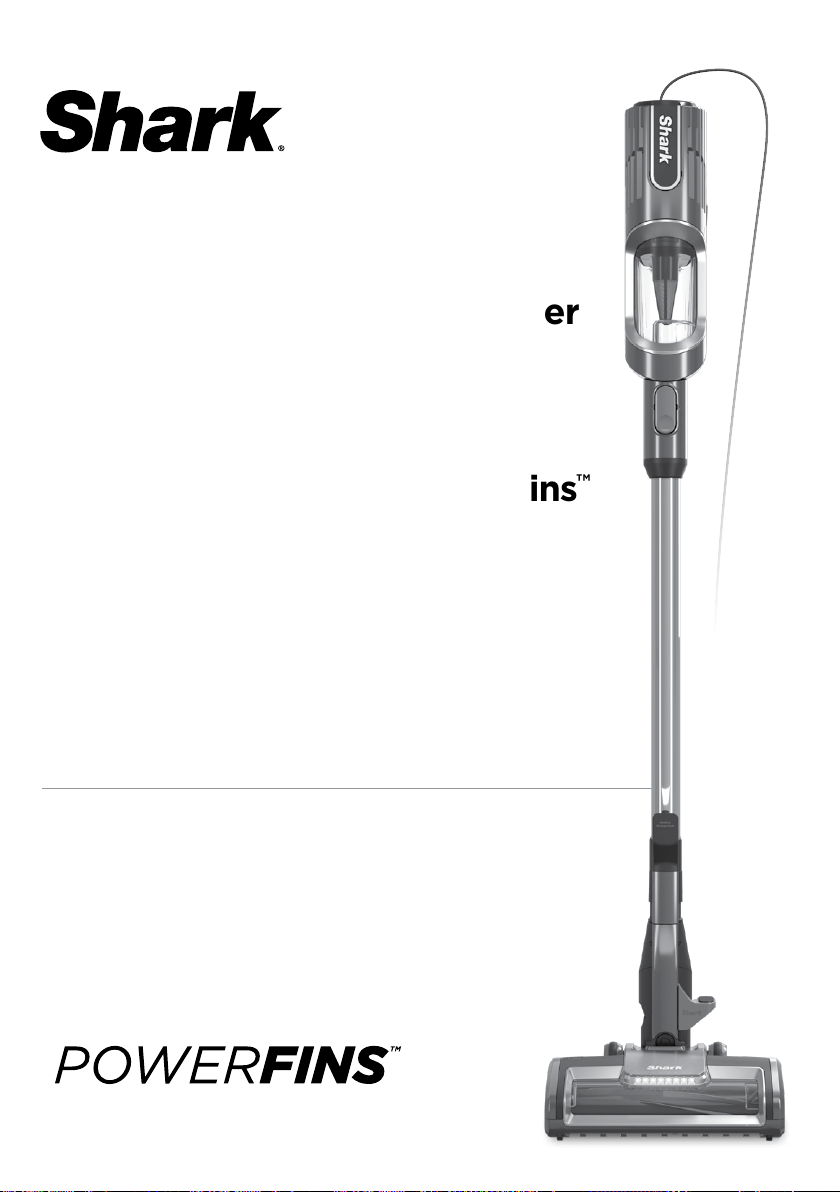
UltraLight PowerFins
™
Corded Stick Vacuum with
Self-Cleaning Brushroll
HZ600 Series
OWNER’S GUIDE

sharkclean.com
READ ALL INSTRUCTIONS BEFORE
USING THIS VACUUM
1. Inspect power cord and plug for any
damage before use. DO NOT use
vacuum cleaner with a damaged
cord or plug. Turn off all controls
before plugging in or unplugging
the vacuum cleaner. Store your
vacuum cleaner with the power cord
secured around the two cord hooks.
To minimize the risk of power cord
damage, do not allow the motorized
brush roll to ingest the cord. If this
occurs, immediately shut off power
to the vacuum and remove the cord.
2. This appliance has a polarized plug,
if the plug does not fit fully into the
outlet, reverse the plug (one blade is
wider than the other). If it still does
not fit, contact a qualified electrician.
DO NOT force into outlet or try to
modify to fit.
3. Your vacuum cleaner may consist of
a motorized nozzle, wand, hose, and/
or vacuum pod. This device contains
electrical connections, electrical
wiring, and moving parts that
potentially present risk to the user.
4. Use only identical replacement parts.
5. Carefully observe and follow the
instructions provided below to avoid
improper use of the appliance.
DO NOT use the vacuum for any
purpose other than those described
in this manual.
6. Before use, carefully inspect all parts
for any damage. DO NOT use if any
parts are damaged.
7. The use of an extension cord is
NOT recommended.
8. This vacuum cleaner contains
no serviceable parts.
9. This appliance can be used by
persons with reduced physical,
sensory or mental capabilities or
lack of experience and knowledge
if they have been given supervision
or instruction concerning use of
the appliance in a safe way and
understand the hazards involved.
Cleaning and user maintenance
shall not be made by children. Keep
the appliance and its cord out of
reach of children. DO NOT allow the
appliance to be used by children. DO
NOT allow to be used as a toy. Close
supervision is necessary when used
near children.
10. Always turn off the vacuum cleaner
before connecting or disconnecting
any motorized nozzles or other
accessories.
11. DO NOT handle plug or vacuum
cleaner with wet hands.
12. DO NOT use without filters in place.
13. Only use Shark® branded filters
and accessories.
14. DO NOT damage the power cord:
a) DO NOT pull or carry vacuum
cleaner by the cord or use the
cord as a handle.
b) DO NOT unplug by pulling on
cord. Grasp the plug, not the cord.
c) DO NOT run the vacuum cleaner
over the power cord, close a door
on the cord, pull the cord around
sharp corners, or leave the cord
near heated surfaces.
WARNING
To reduce the risk of fire, electric shock, injury, or property damage, when using
an electrical appliance, basic precautions should always be followed, including
the following:
IMPORTANT SAFETY INSTRUCTIONS
FOR HOUSEHOLD USE ONLY

sharkclean.com
15. DO NOT put any objects into nozzle
or accessory openings. DO NOT use
with any opening blocked; keep free
of dust, lint, hair, and anything that
may reduce airflow.
16. DO NOT use if nozzle or accessory
airflow is restricted. If the air paths or
the motorized floor nozzle become
blocked, turn the vacuum cleaner
off and unplug from electrical outlet.
Remove all obstructions before you
plug in and turn on the unit again.
17. Keep nozzle and all vacuum openings
away from hair, face, fingers,
uncovered feet, or loose clothing.
18. DO NOT use if vacuum cleaner is
not working as it should, or has been
dropped, damaged, left outdoors, or
dropped into water.
19. Use extra care when cleaning
on stairs.
20. DO NOT leave the vacuum cleaner
unattended while plugged in.
21. When powered on, keep the
vacuum cleaner moving over the
carpet surface at all times to avoid
damaging the carpet fibers.
22. DO NOT place vacuum cleaner
on unstable surfaces such as chairs
or tables.
23. Your Shark® vacuum may not
be designed to stand up on its own.
When taking a break from cleaning,
you may need to lean it against
furniture or a wall, or lay it flat
on the floor. Using the vacuum
for an application where the unit
lacks stability may result in
personal injury.
24. DO NOT use to pick up:
a) Liquids
b) Large objects
c) Hard or sharp objects
(glass, nails, screws, or coins)
d) Large quantities of dust (drywall
dust, fireplace ash, or embers).
DO NOT use as an attachment to
power tools for dust collection.
e) Smoking or burning objects
(hot coals, cigarette butts,
or matches)
f) Flammable or combustible
materials (lighter fluid, gasoline,
or kerosene)
g) Toxic materials (chlorine bleach,
ammonia, or drain cleaner)
25. DO NOT use in the following areas:
a) Poorly lit areas
b) Wet or damp surfaces
c) Outdoor areas
d) Spaces that are enclosed and may
contain explosive or toxic fumes
or vapors (lighter fluid, gasoline,
kerosene, paint, paint thinners,
mothproofing substances, or
flammable dust)
26. Turn off all controls before plugging
in or unplugging the vacuum.
27. Unplug from electrical outlet
when not in use and before
any maintenance or cleaning.
28. Hand wash with water only.
Washing with cleaning chemicals
could damage the unit.
29. During cleaning or routine
maintenance, DO NOT cut anything
other than hair, fibers, or string
wrapped around the brushroll.
30. Allow all filters to air-dry completely
before replacing in the vacuum to
prevent liquid from being drawn
into electric parts.
31. Make sure the dust cup and all
filters are in place after routine
maintenance.
32. If provided, secure the power
cord around the two cord hooks
during storage.
SAVE THESE INSTRUCTIONS
sharkclean.com
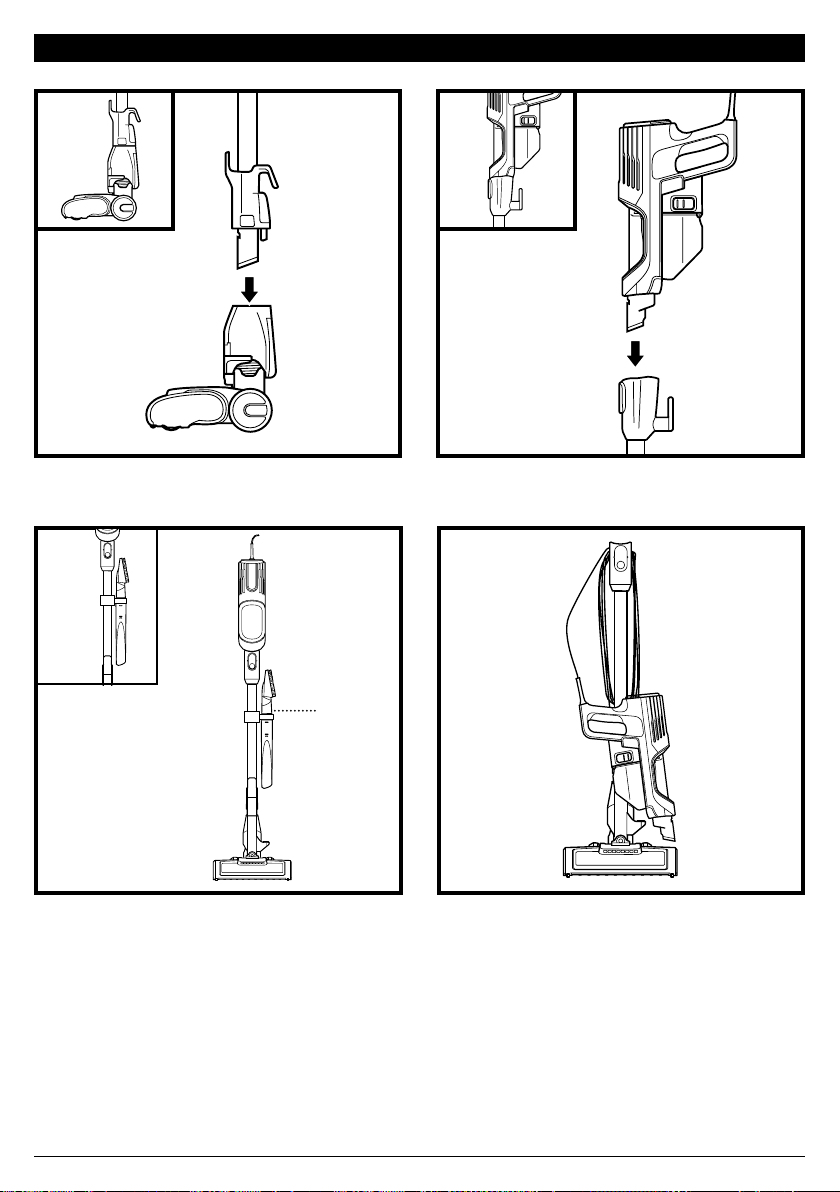
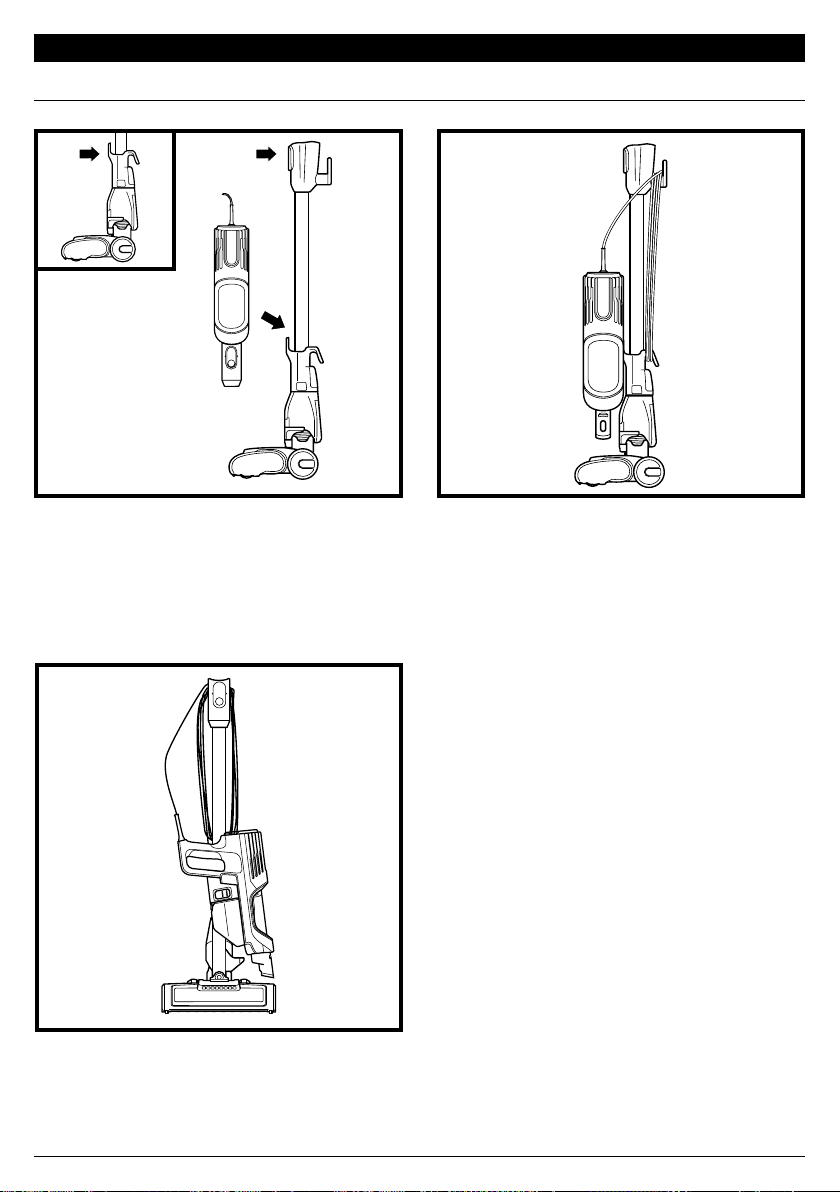
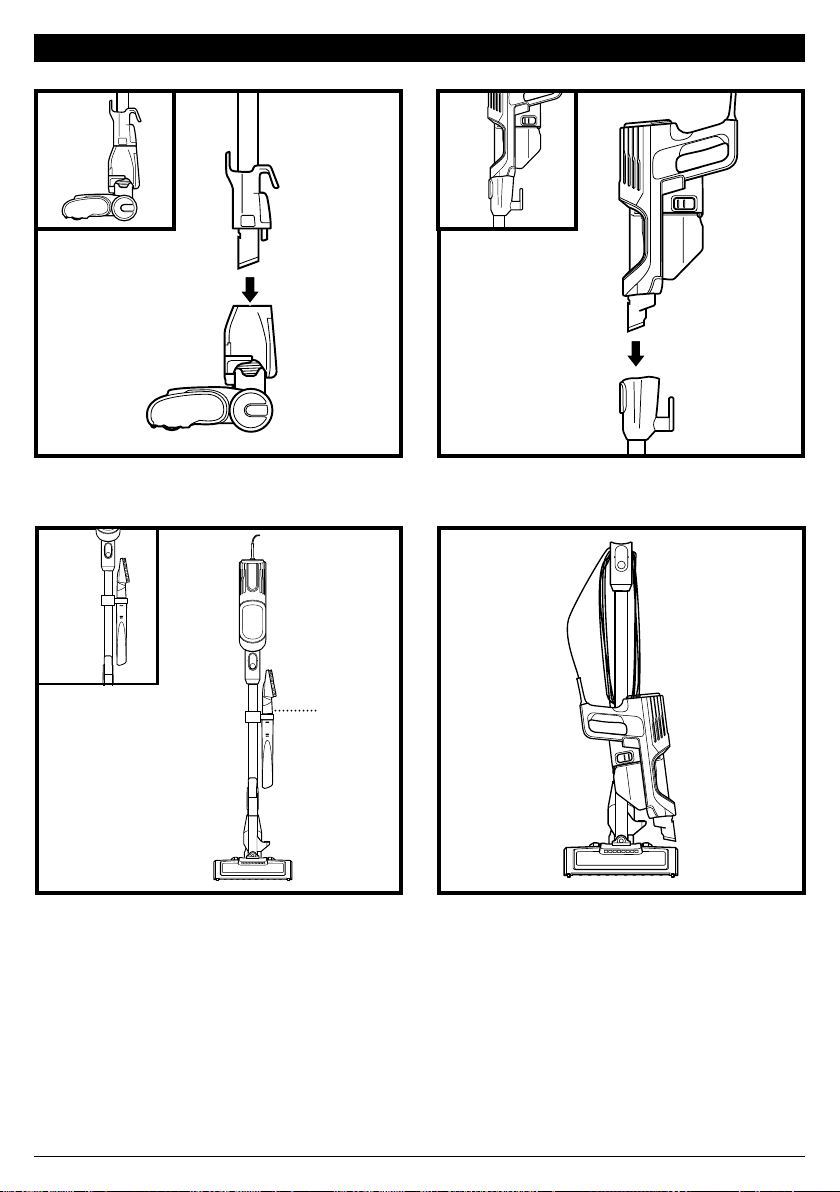
ASSEMBLY
1 2
3
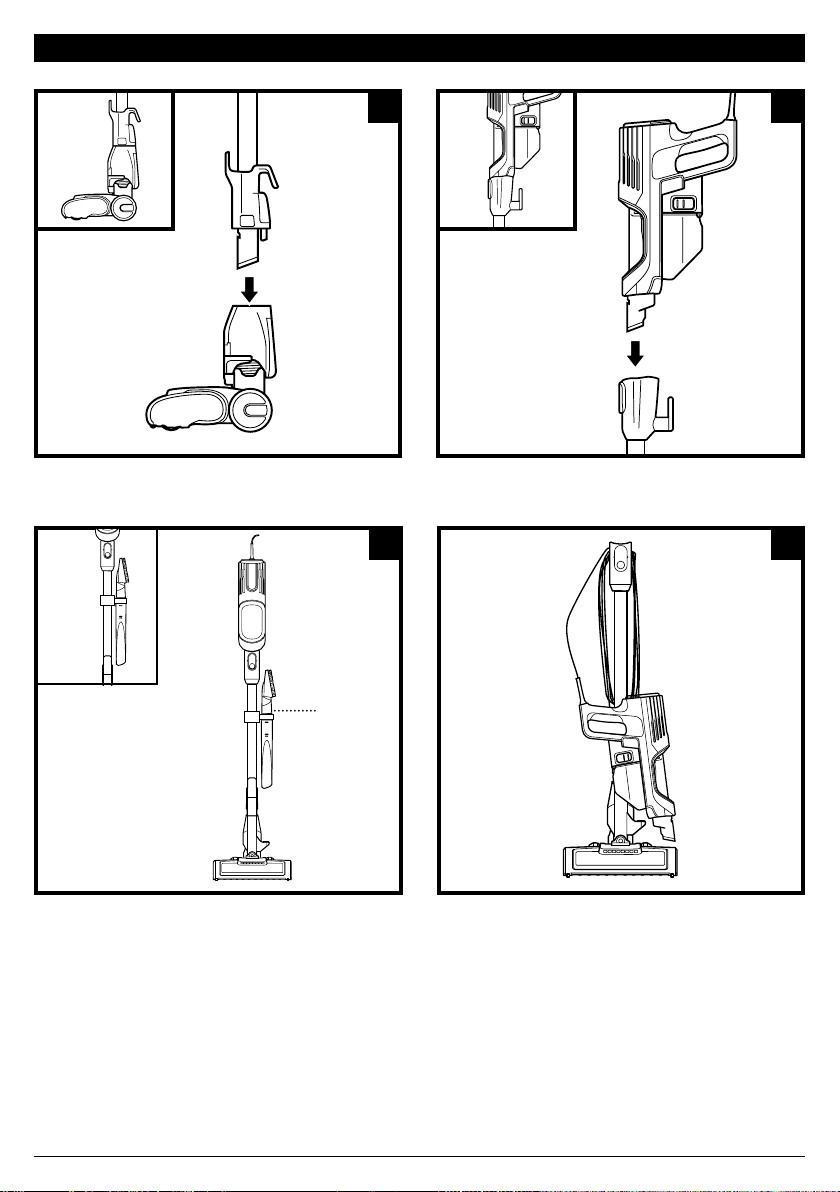
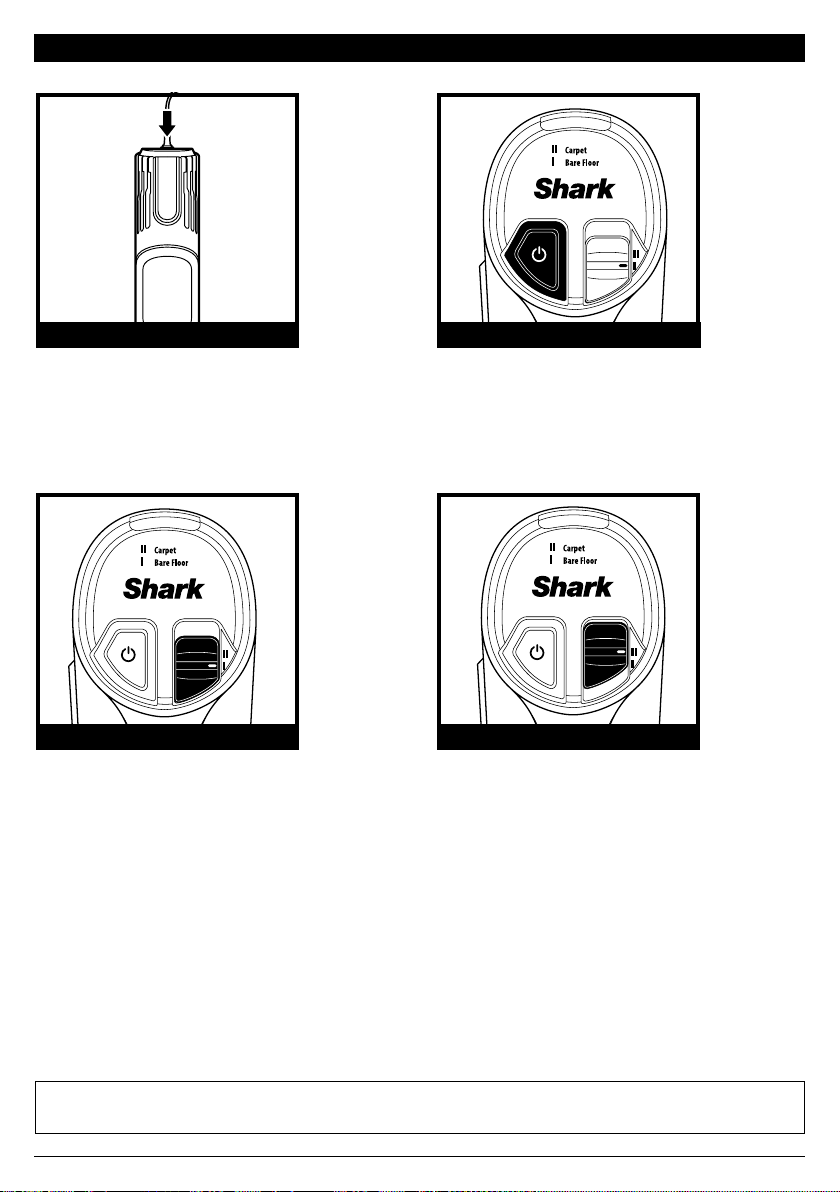
4. For compact storage, hang the handheld
vacuum from the Storage Hook on the wand.
1. Insert Wand into Floor Nozzle. 2. Insert Handheld Vacuum into wand.
3. Snap the Onboard Storage Clip onto the
wand, then place accessories in the holder.
Ensure all connections click securely into place.
(Snap)
(Click)
(Click)
4
sharkclean.com
SETTINGS
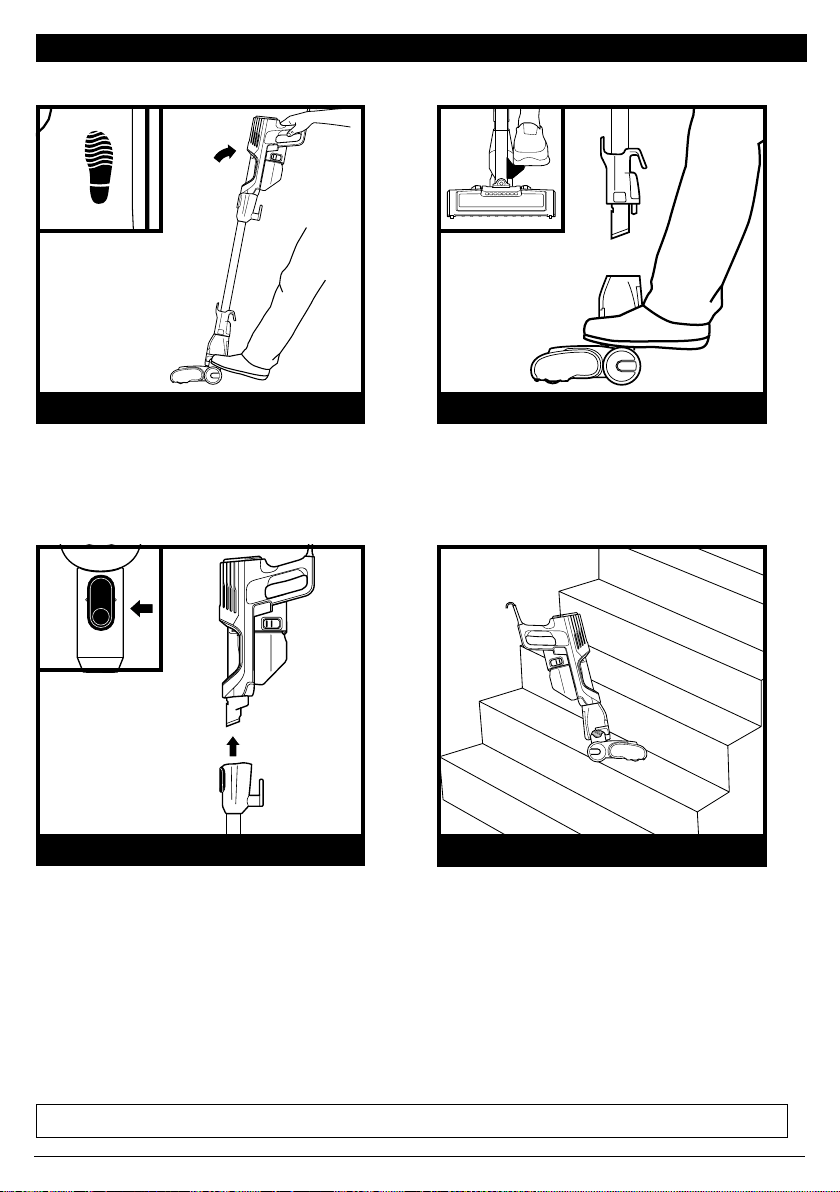
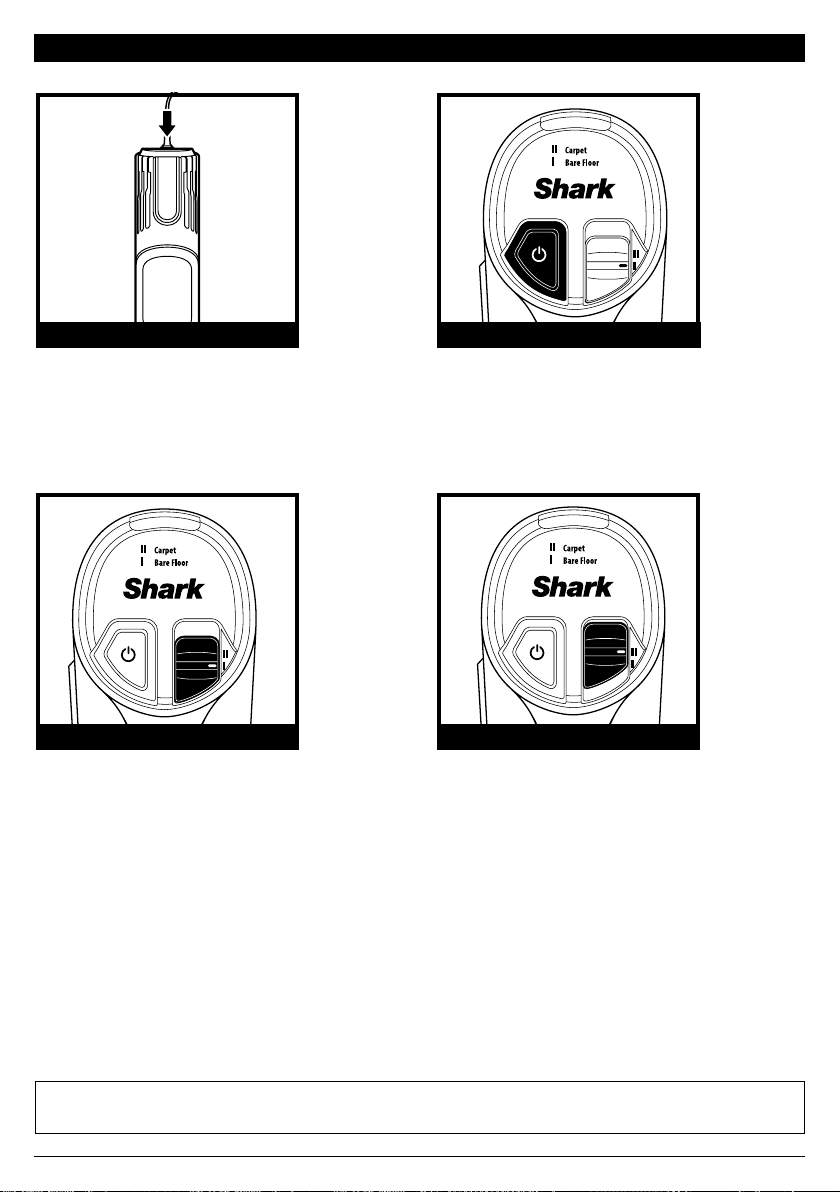
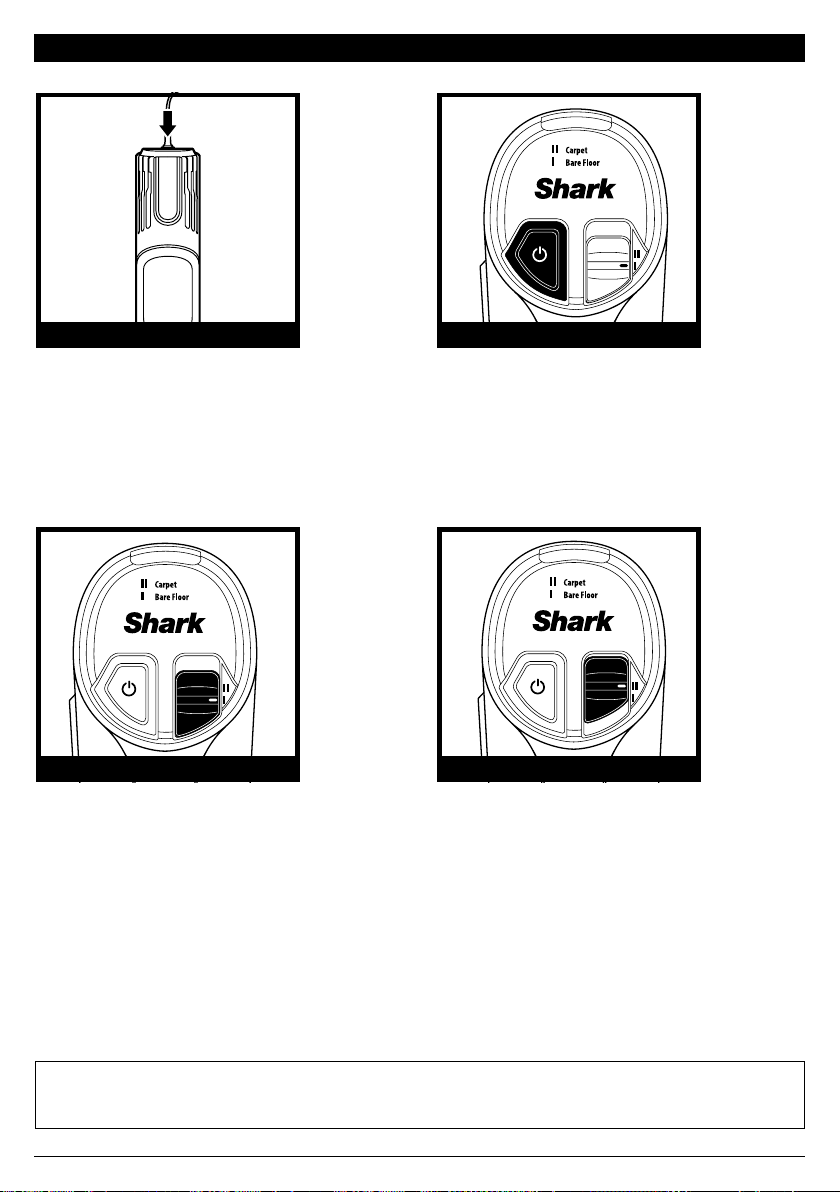
NOTE: Press the floor select button to toggle between Bare Floor and Carpet settings.
NOTE: For deep cleaning per ASTM F 608 (embedded dirt in carpets) please use the Carpet setting.
NOTE: Select Carpet for stuck-on dust and debris.
Power Button
Press the Power button to begin
vacuuming. Press again to turn o power.
Slide the floor select button to setting
II to clean carpets. In this setting, the
brushroll spins faster to pick up debris
below the surface ofyour carpets.
CONTROLS
The control panel is located on top of
the handheld vacuum.
POWER BUTTON
Slide the floor select button to setting
I to clean bare floors and small area
rugs. The brushroll spins slowly in
this setting.
BARE FLOOR SETTING CARPET SETTING
sharkclean.com
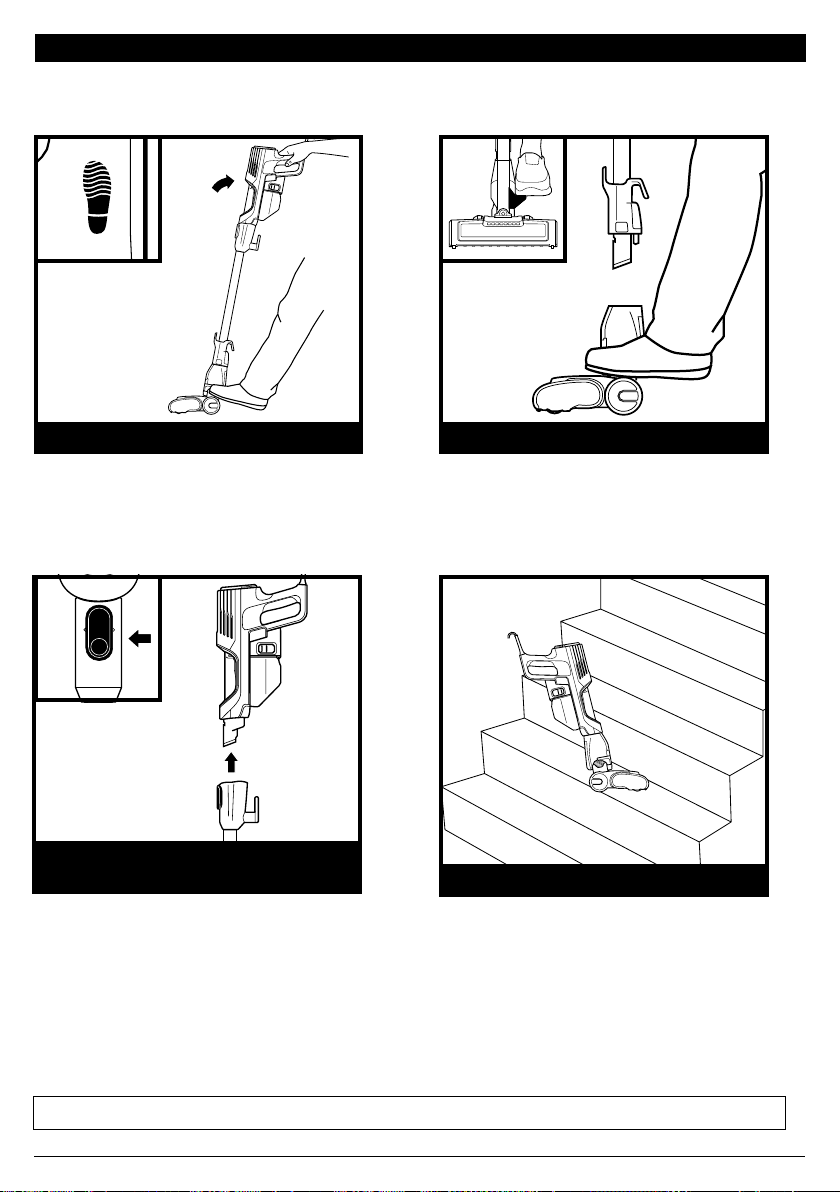
CLEANING MODES
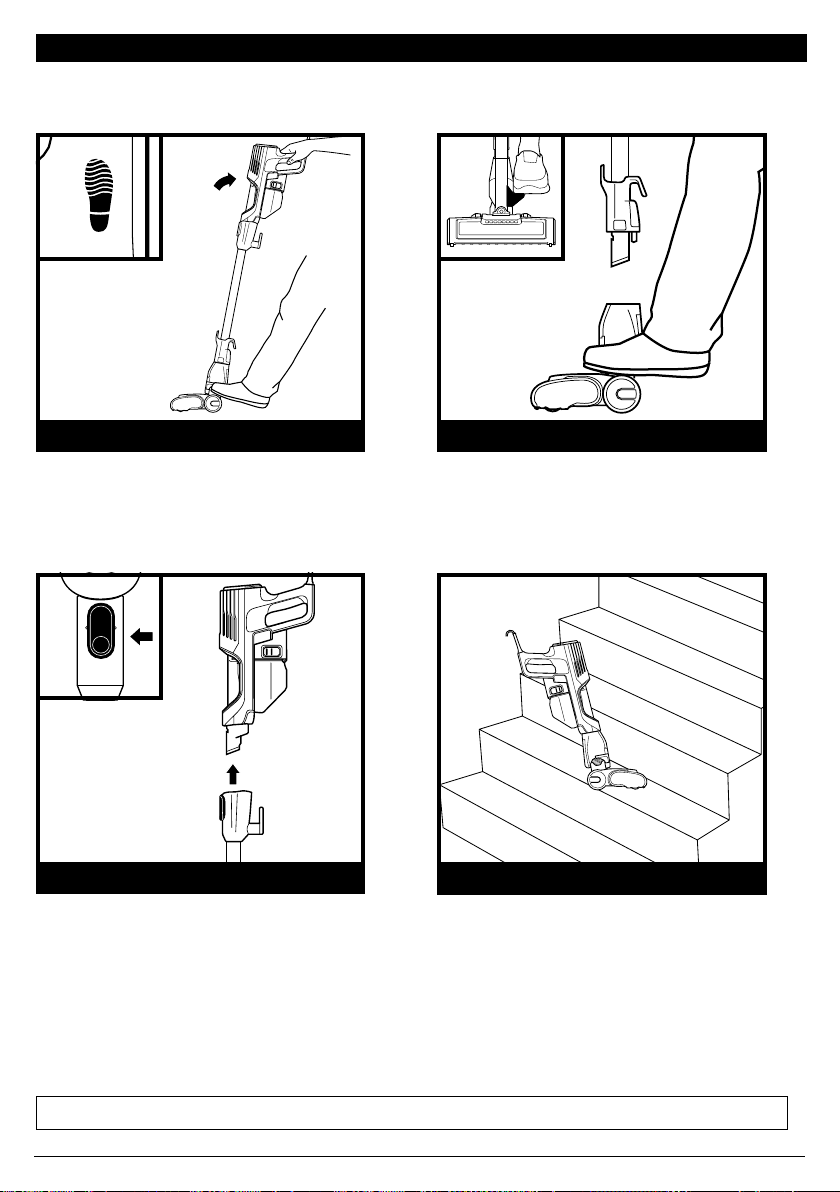
NOTE: All accessories are compatible with both the wand and the handheld vacuum.
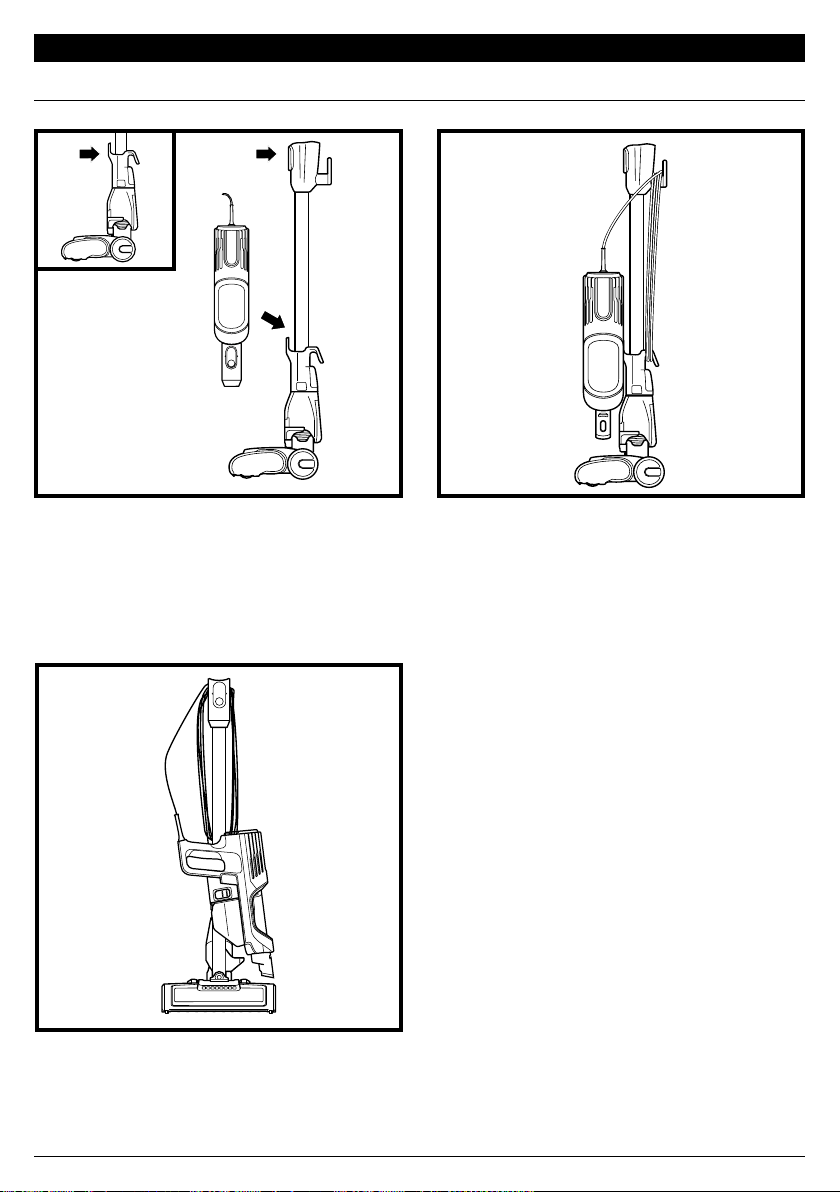
To clean floors, step on floor nozzle
and tilt handheld vacuum back.
To clean stairs or other narrow spaces,
attach the handheld vacuum to the
floor nozzle.
FLOOR MODE
STAIR CLEANING
For more reach, detach the wand. Stand
the vacuum upright, step on the Foot Pedal
on the side of the nozzle, and pull up the
wand to detach.
ABOVE-FLOOR WITH WAND
To detach the handheld vacuum, press
the Wand Release button and lift
the handheld vacuum o the wand.
Great for cleaning stairs, furniture, and
countertops.
ABOVE-FLOOR HANDHELD
sharkclean.com
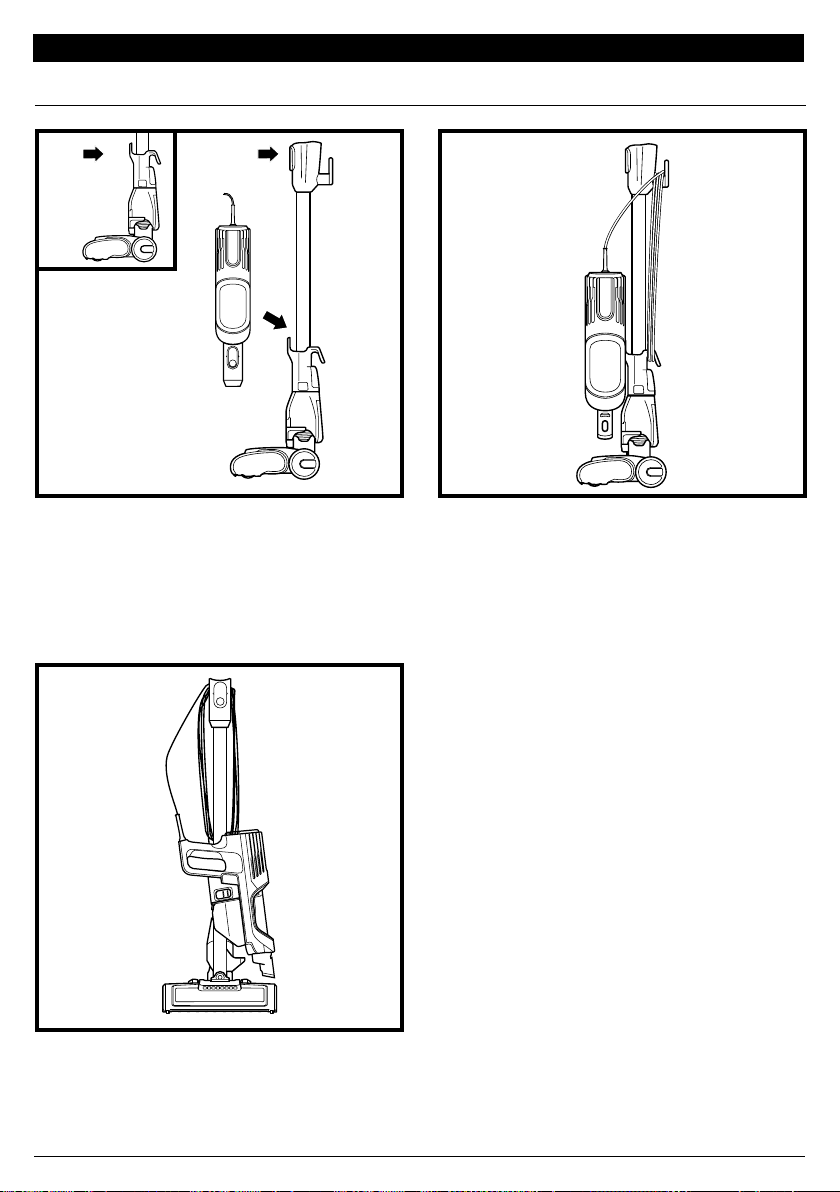
STORAGE MODE
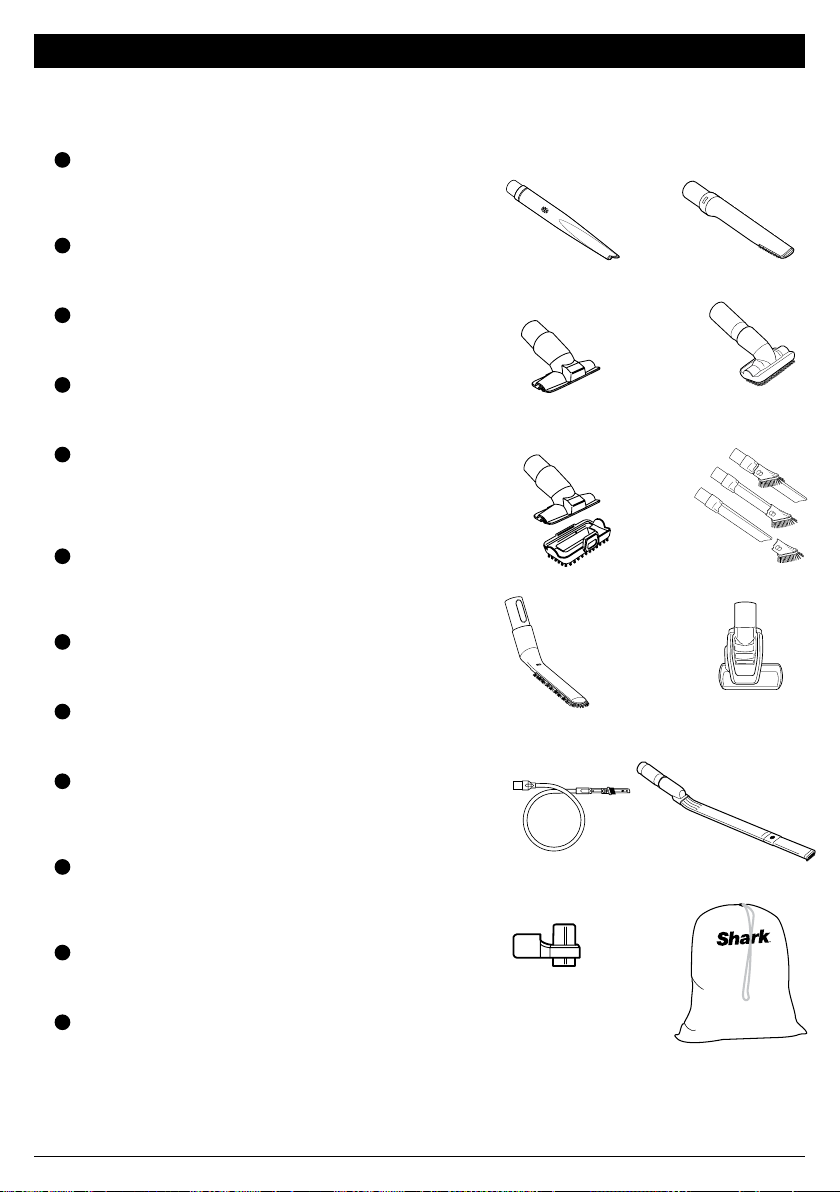
HANDHELD STORAGE HOOK
Press the Wand Release button near the top
of the wand to detach the handheld vacuum.
Align the Catch on the side of the handheld
vacuum with the Storage Hook on the wand,
then hang the handheld vacuum from the hook.
Wrap the cord around the two cord hooks.
Start with the top hook, and leave a little
slack in the cord.
Storage
Hook
sharkclean.com
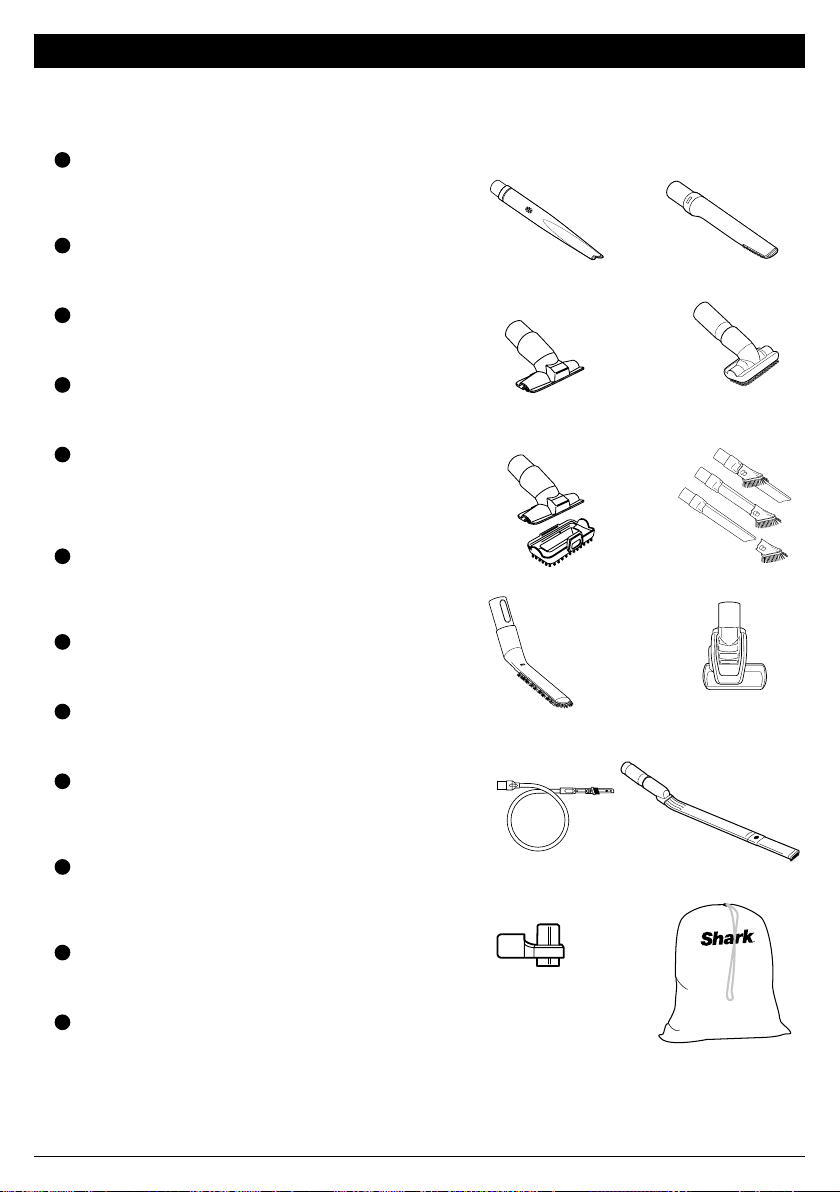
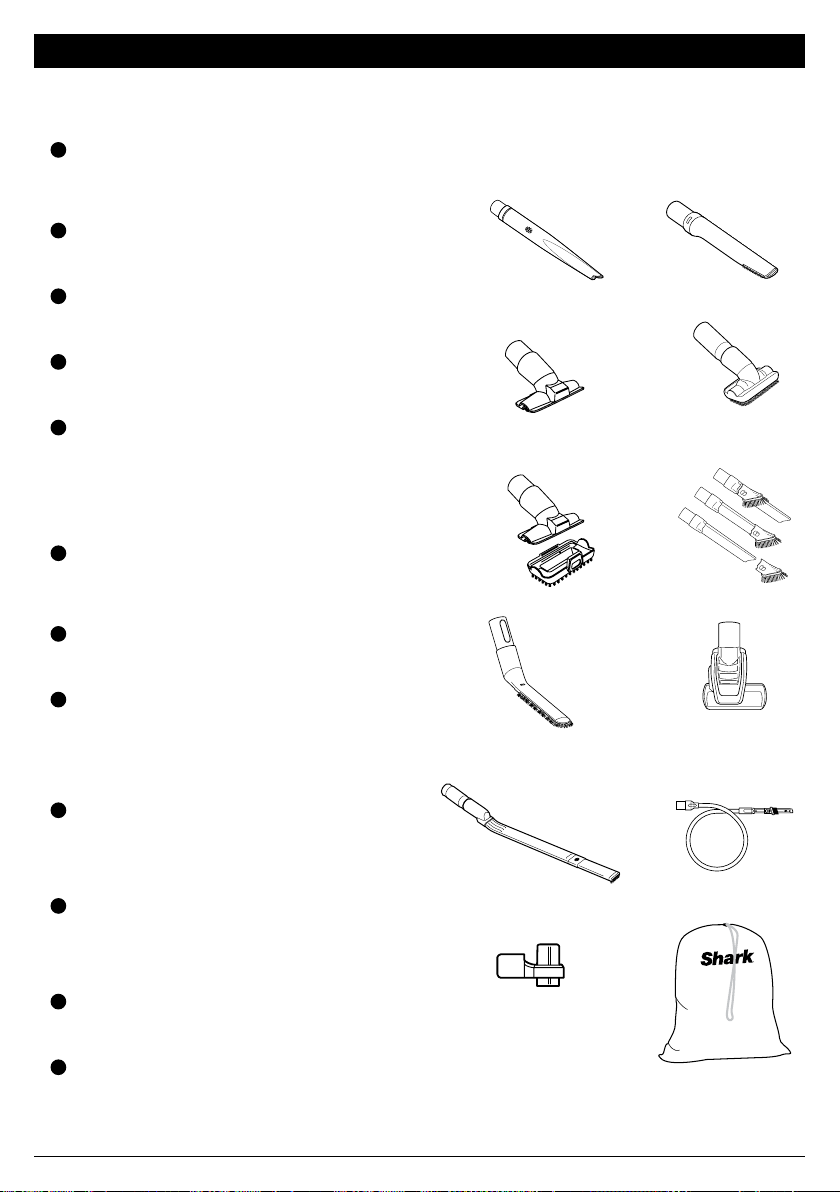
AVAILABLE ACCESSORIES
A
Crevice Tool
This slim tool is great for cleaning in tight
spaces, between couch cushions, and in
hard-to-reach areas. A longer crevice tool is
available at sharkaccessories.com.
B
Pet Crevice Tool
This versatile, slender 8" tool removes pet hair
from hard-to-reach spaces like corners, stairs,
and between couch cushions.
C
Upholstery Tool
Picks up pet hair, dust, and large debris from
mattresses, couches, curtains, and other
delicate upholstered fabrics.
D
Dusting Brush
This brush dusts and cleans delicate surfaces.
Great for use on fans, blinds, lampshades,
and keyboards.
E
Pet Multi-Tool
A single convertible tool for cleaning tough pet
messes two ways: use the sti bristle brush to
clean stuck-on debris, or take o the bristles to
reveal an upholstery tool perfect for removing
stubborn pet hair and large piles of debris.
F
Duster Crevice Tool
Two cleaning tools in one. The crevice tool
gives you extended reach to clean in tight
spaces, while the soft brush is ideal for dusting
delicate surfaces.
G
Anti-Allergen Dust Brush
This brush features nylon fiber bristles specifically
designed for removing fine dust and allergen
particles from the most delicate surfaces.
H
Self-Cleaning Pet Power Brush
Tackles pet hair and ground-in dirt from above-
floor areas like carpeted stairs and upholstery,
while actively removing hair wrap as it cleans.
I
Precision Duster
This flexible tube features a micro-duster crevice
tool on the end for cleaning around delicate
objects and in dicult-to-reach spots like car
interiors and computer keyboards.
J
Under-Appliance Wand
Clean under and behind hard-to-move
appliances and furniture with this adjustable 36"
tool. Flip the extension piece over to clean the
underside of appliances.
K
Onboard Storage Clip
This removable clip attaches to your vacuum.
The clip can store up to two accessories at a
time while you clean.
L
Accessory Bag (Large, 32cm x 70 cm)
This convenient accessory storage bag
measures 32 cm x 70 cm and fits the Under-
Appliance Wand. Smaller size available at
sharkaccessories.com
NOTE: Not all accessories come with all units. For a list of the accessories included with this model, see the top
inside flap of the box. To order additional accessories, visit sharkaccessories.com.
B
A
D
F
J
H
C
E
G
I
K L
sharkclean.com
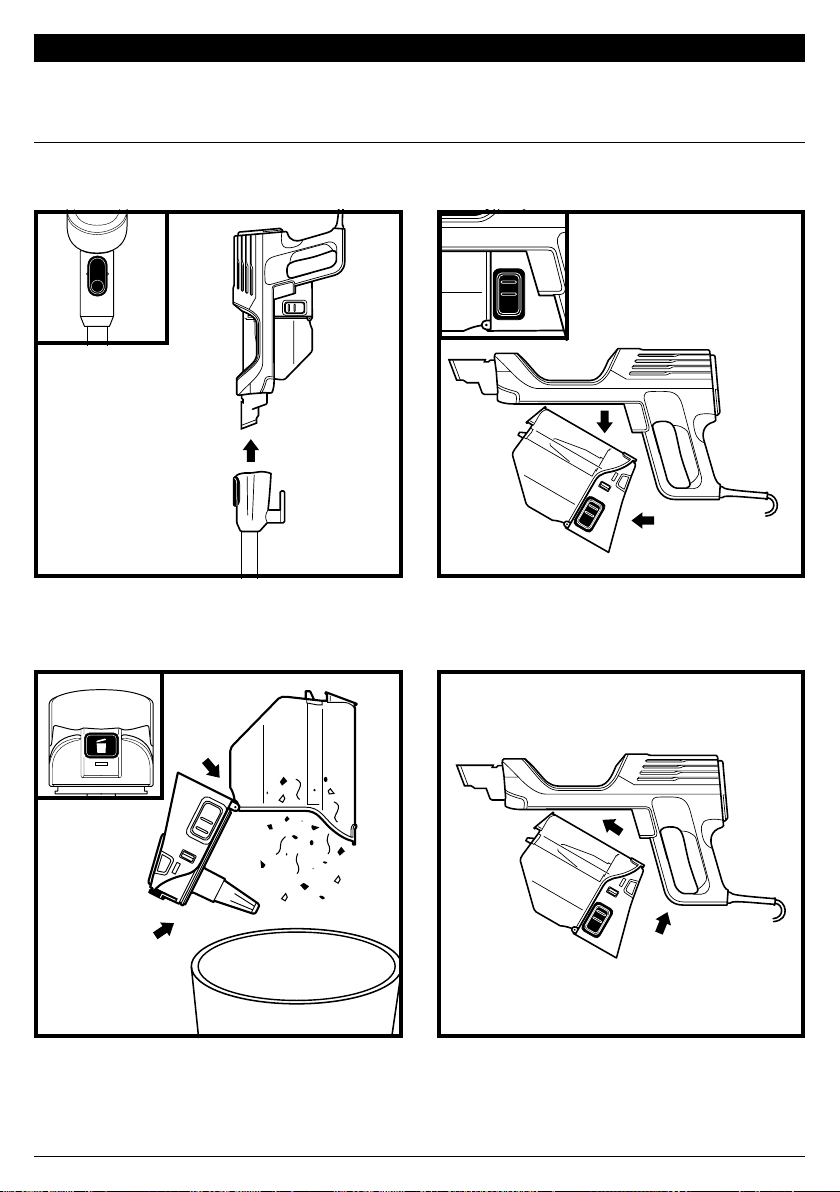
MAINTENANCE
EMPTYING THE DUST CUP
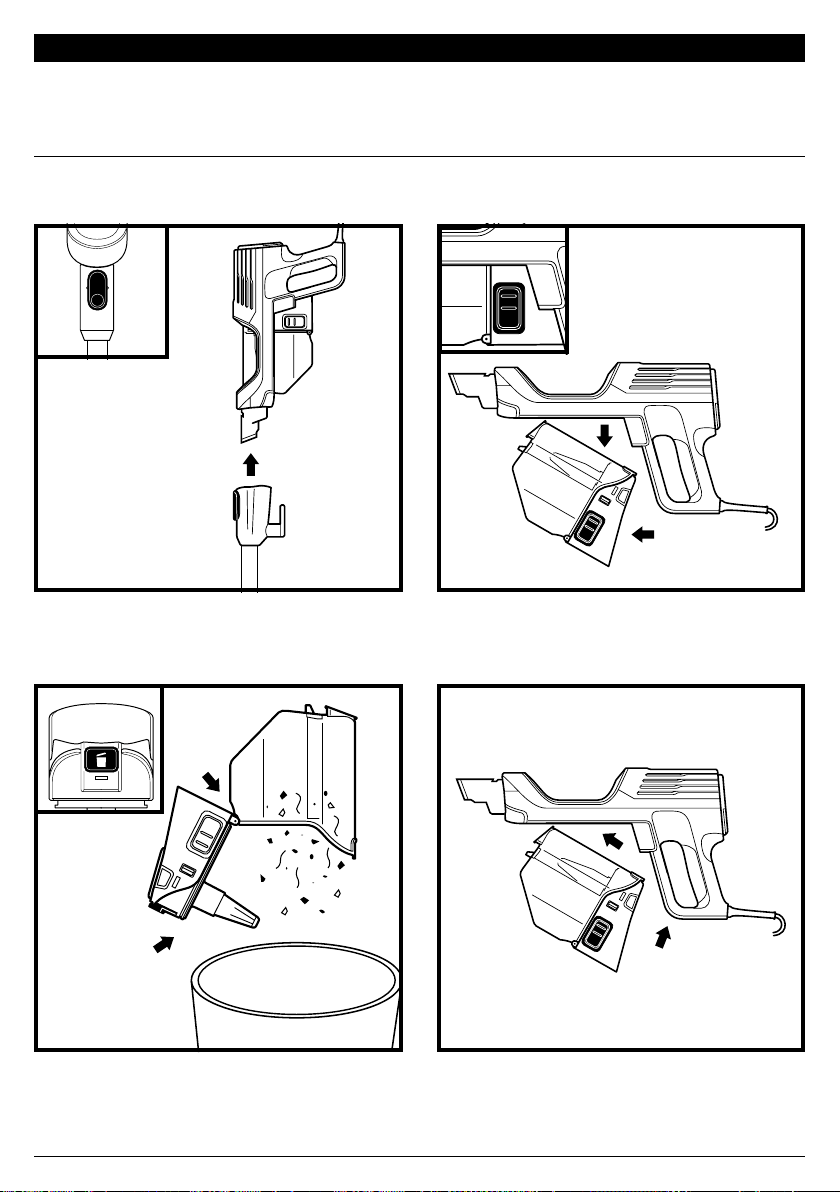
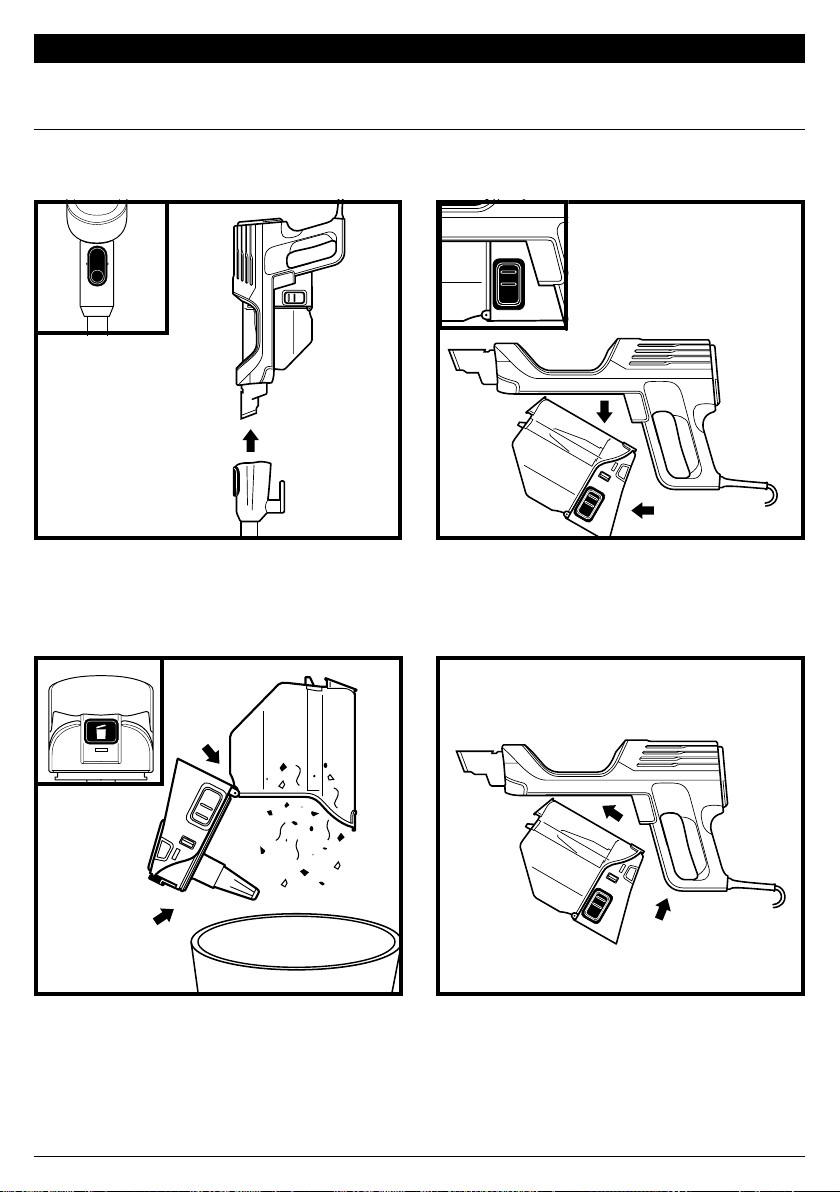
Press the Wand Release button and lift o
the handheld vacuum.
To remove the dust cup from the handheld
vacuum, press the two Dust Cup Release
buttons at the same time and slide out
the dust cup.
To reinstall, push the lid closed, then insert
the front end of the dust cup into the
handheld vacuum first, then the back end,
until it clicks into place.
Hold the dust cup over the trash. Press the
Empty button and pull open the dust cup lid
until it clicks and locks in the open position.
Gently tap the cone-shaped screen inside the
dust cup to knock dust and debris into the trash.
Empty the dust cup each time you vacuum and periodically during cleaning, when debris in the dust cup
reaches the MAX fill line.
IMPORTANT: Unplug the vacuum before performing any maintenance.
(Click)
sharkclean.com
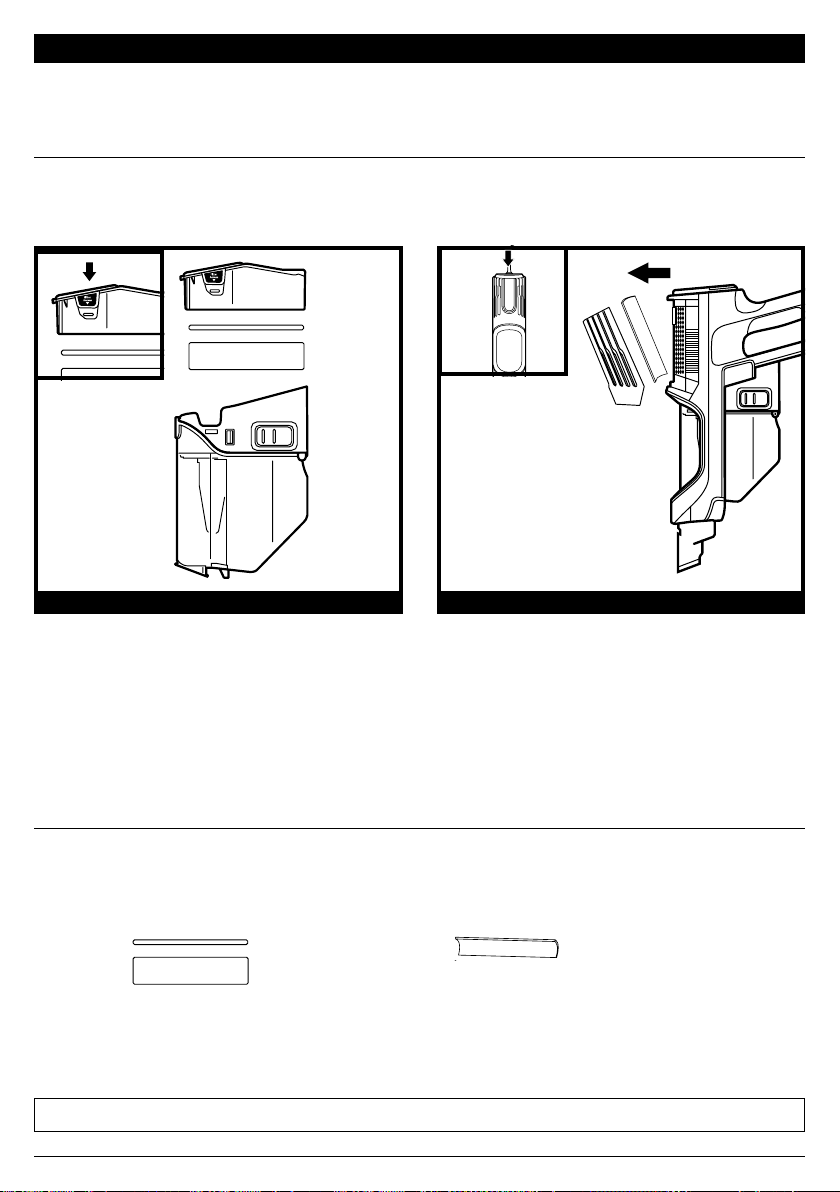
Regularly rinse and replace the filters to maintain your vacuum's suction power.
To prevent damage from cleaning chemicals, rinse filters with cold water only. Do not use soap. Allow all filters to
air-dry for at least 24 hours before reinstalling them to prevent liquid from being drawn into electronic parts.
MAINTENANCE
CLEANING FILTERS
IMPORTANT: Unplug the vacuum before performing any maintenance.
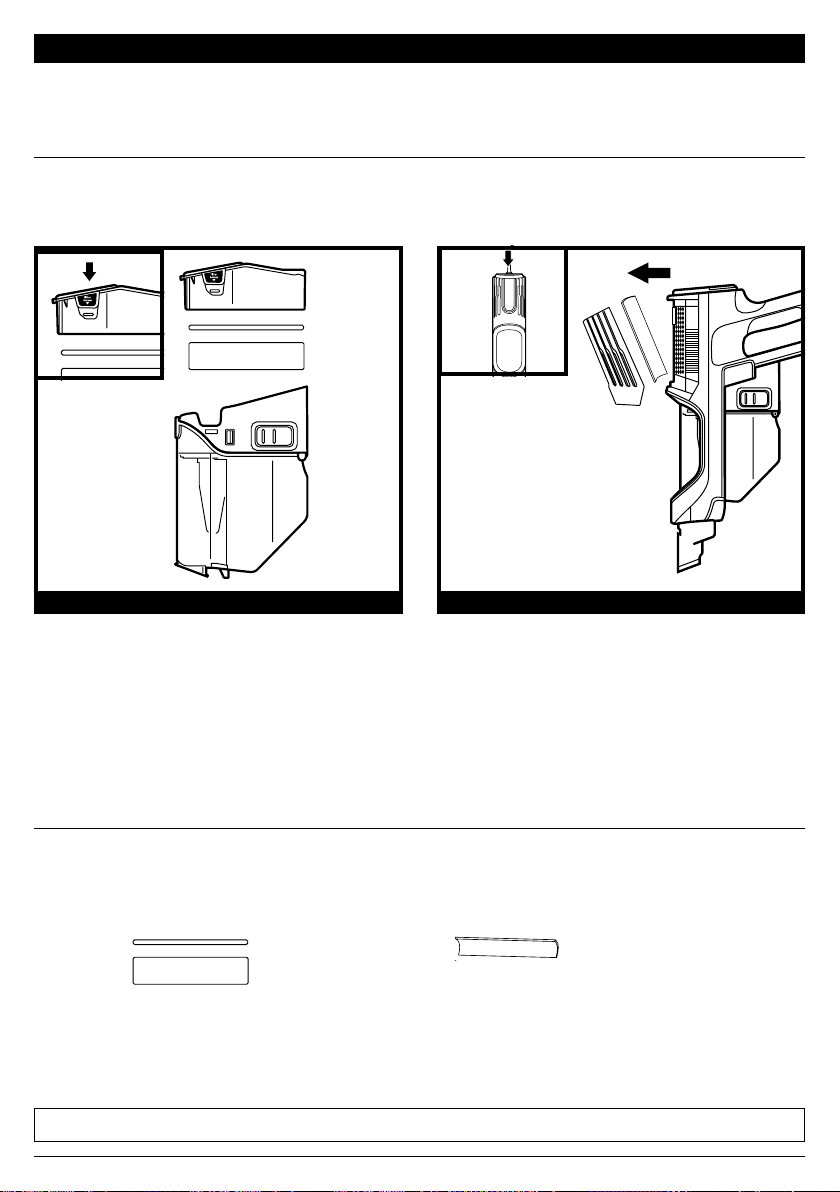
PRE-MOTOR FILTERS POST-MOTOR FILTER
REPLACEMENT FILTERS
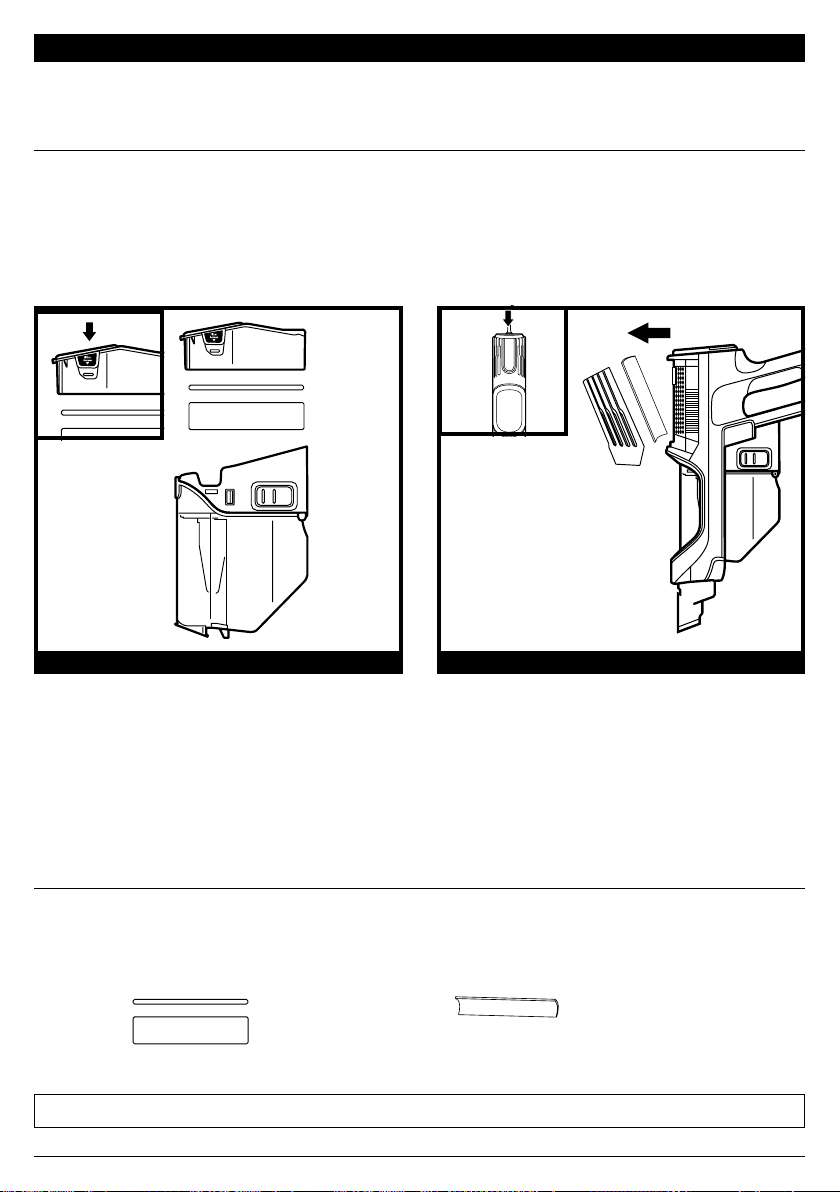
With the dust cup detached, press the Filter
Access buttons on both sides of the back of
the dust cup, then pull out the filter housing.
Pull the foam filter out of the housing, then
lift out the felt filter by the pull tab.
The Pre-Motor Filters should be washed
once a month.
To access the post-motor filter, press the
release latch on the filter cover on the
handheld vacuum. Remove the cover and
lift out the filter.
The Post-Motor Filter should be washed
once every 9 months.
NOTE: The pre-motor filters should be replaced every 2.5 years. The post-motor filter should be replaced every 3 years.
Replacement Pre-Motor Filter Kit
XFFKHZ2000
Replacement Post-Motor Filter
XPMFHZ2000

sharkclean.com
CHECKING FOR BLOCKAGES
MAINTENANCE
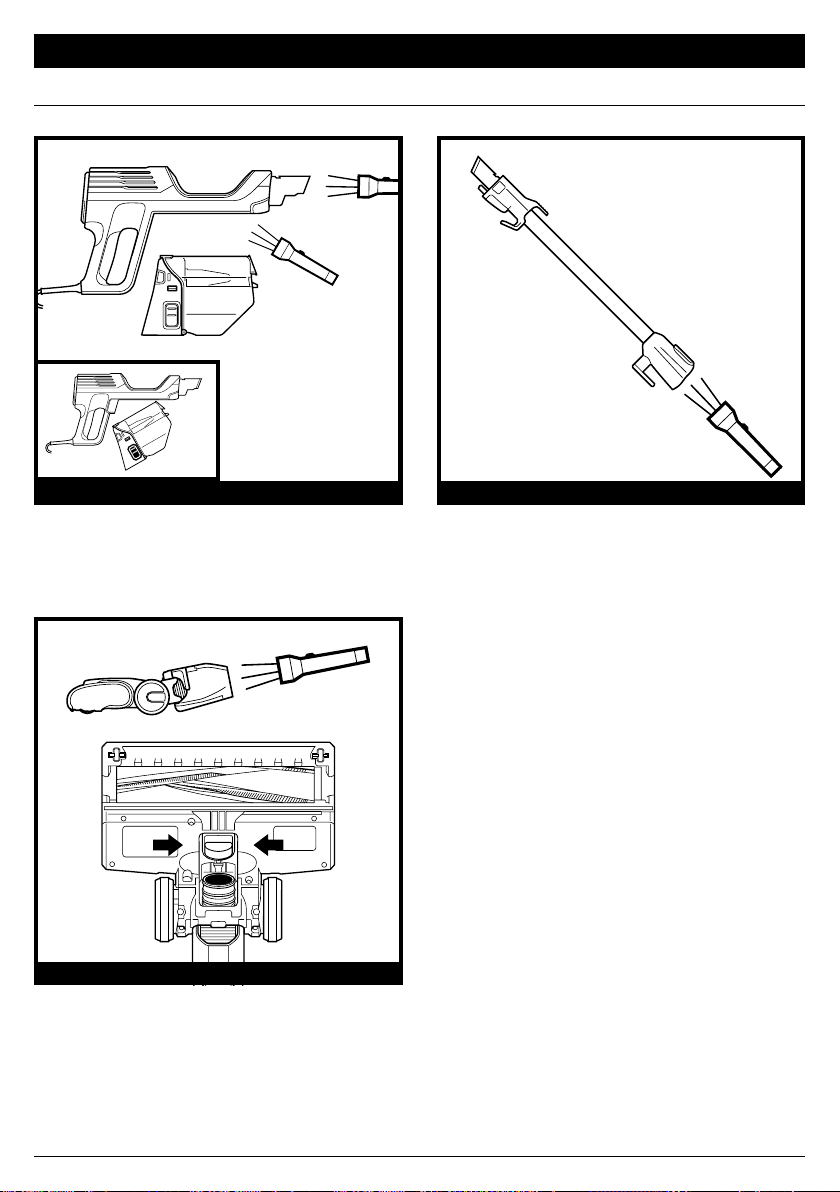
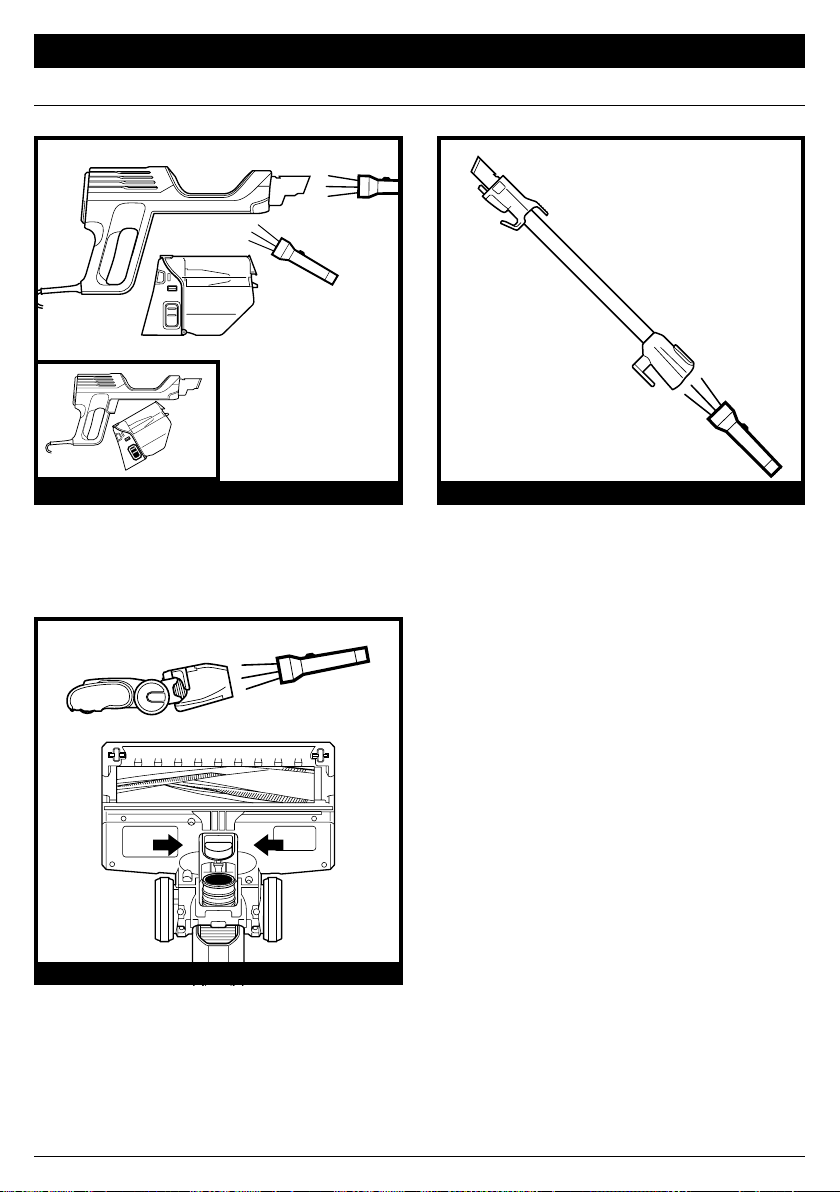
Remove the handheld vacuum from the
wand and check all dust cup intake openings
for debris or blockages.
Detach the wand and check it for blockages.
CHECK HANDHELD CHECK WAND
Detach the wand, then tilt the floor nozzle
Debris Intake back and check openings for
blockages.
CHECK FLOOR NOZZLE
sharkclean.com
MAINTENANCE
NOTE: For best performance, keep the Soft Roller clean with regular maintenance.
To minimize the risk of power cord damage, DO NOT run the vacuum over the power cord.
If this occurs, immediately shut o power to the vacuum and remove the cord from the
brushroll or nozzle.
1. DO NOT pull or carry vacuum cleaner by
the cord or use cord as a handle.
2. DO NOT unplug by pulling on the cord.
Grasp the plug, not the cord.
3. DO NOT close the door on the cord.
4. DO NOT pull the cord around sharp
corners.
5. DO NOT leave the cord near heated
surfaces.
CORD MAINTENANCE
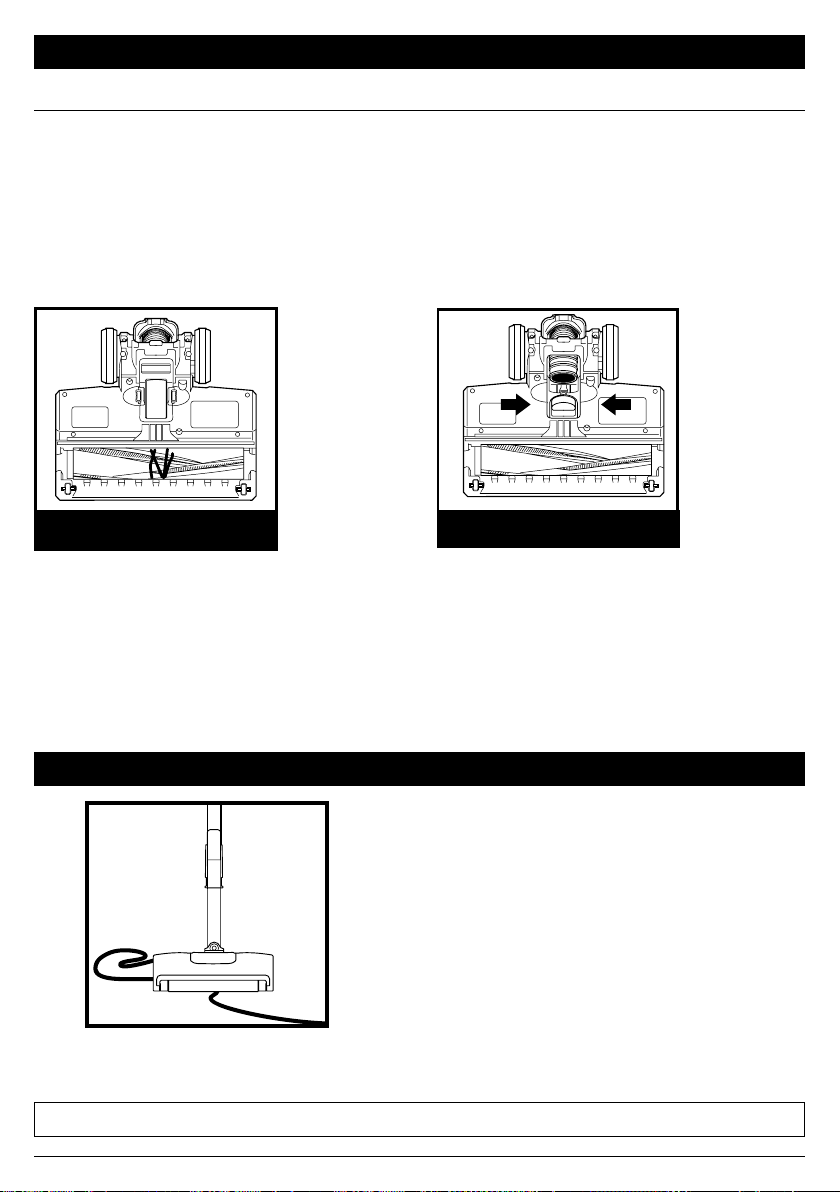
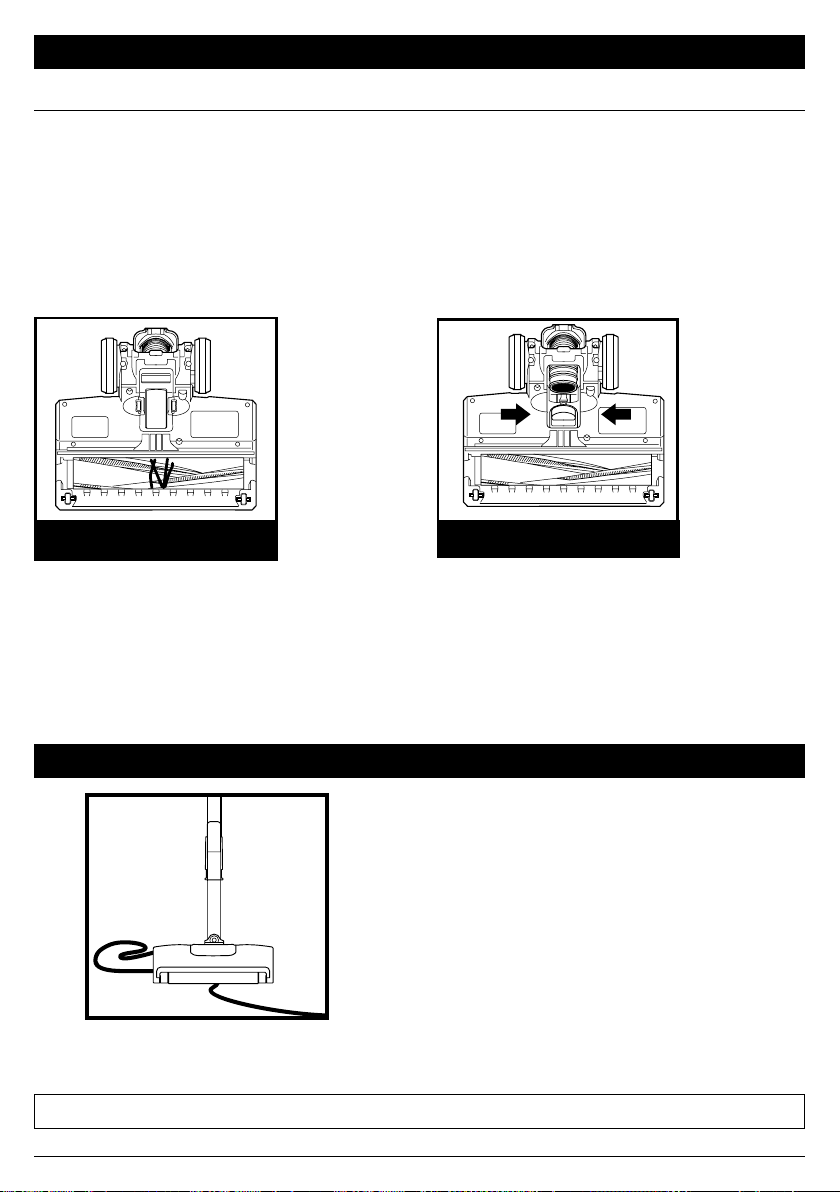
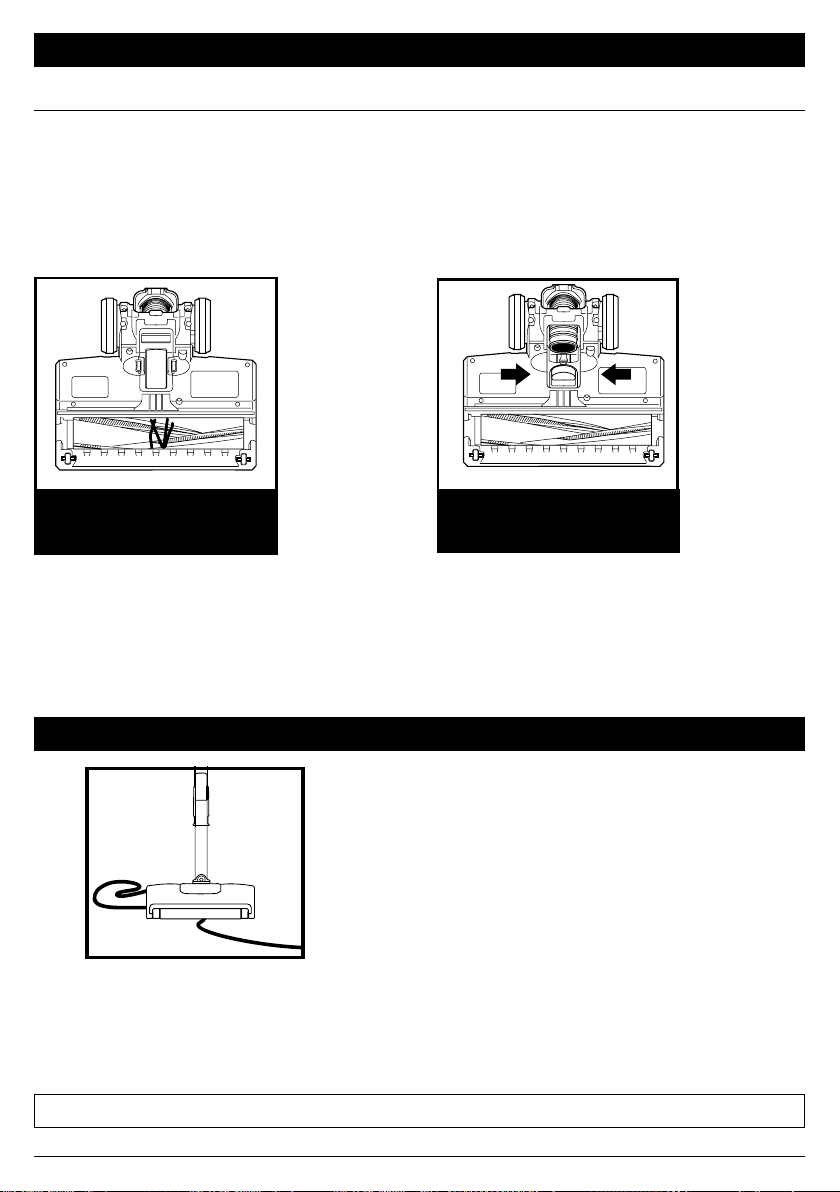
Clean o any debris on the brushroll. Check the Debris intake and clear away any dirt
or blockages. To close the cover, push down
until it clicks into place.
NOZZLE MAINTENANCE
DEBRIS WRAPPED
AROUND BRUSHROLL
SELF-CLEANING BRUSHROLL
If you run over a hard or sharp object or notice a noise change while vacuuming, check for
blockages or objects caught in the brushroll.
If some fibers remain wrapped around the brushroll after continued use, clear them from the
brushroll.
DEBRIS BEHIND BRUSHROLL

sharkclean.com
TROUBLESHOOTING
For all other issues, visit sharkclean.com/support.
Power cord caught in brushroll or floor nozzle.
• To minimize the risk of power cord damage, DO NOT run the vacuum over the power cord. If this
occurs, immediately shut o power to the vacuum and remove the cord from the brushroll or nozzle.
• Inspect power cord and plug for any damage before use. DO NOT use vacuum cleaner with a
damaged cord or plug. Turn o all controls before plugging in or unplugging the vacuum cleaner.
Store your vacuum cleaner with the power cord secured around the two cord hooks.
Vacuum is not picking up debris. No suction or light suction.
See Maintenance section for more information.
• Empty the dust cup. Check filters to see if they need cleaning. Follow instructions for rinsing and
completely air-drying the filters before reinstalling them.
• Clear any blockages in the nozzle, wand, handheld vacuum, or accessories. See Checking for Blockages
section for more information.
• If any string, hair, or carpet fibers remain wrapped around the brushroll after continued use, carefully
clear them away.
• Remove any blockages from the debris intake in the floor nozzle. Pinch the tabs on the bottom of the
nozzle to open the cover, and lift up the intake tube. Clear blockages, then push the tube down and
press the nozzle cover closed.
Vacuum lifts area rugs.
• Suction is powerful. Take care when vacuuming area rugs or rugs with delicately sewn edges.
• Turn o the unit to disengage the brushroll. To restart, press the power button on the handle.
NOTE: Clean area rugs in Bare Floor mode or with accessories. See Available Accessories section.
Vacuum turns o on its own or the indicator light flashes red.
If your vacuum overheats, the thermostat will automatically turn o the motor. Perform the following steps
to restart:
1. Turn o the vacuum and unplug it.
2. Empty the dust cup and clean the filters. See Emptying the Dust Cup and Cleaning Filters sections.
3. Check for blockages in the wand, floor nozzle, handheld vacuum, inlet openings, and accessories.
4. Reassemble the entire vacuum and ensure all parts click into place.
5. Allow unit to cool for a minimum of 60 minutes.
6. Plug in vacuum and turn it on.
Handheld vacuum is warm.
Due to the strong suction power of the vacuum, it is normal for the area around the filter exhaust to
become warm during and after use. Turn o the vacuum and wait 10 minutes for it to cool down. If it
still feels warm, clean the pre-motor and post-motor filters. See Maintenance section for filter cleaning
instructions.

sharkclean.com
The Five (5) Year Limited Warranty applies to purchases made from authorized retailers of SharkNinja
Operating LLC. Warranty coverage applies to the original owner and to the original product only and is
not transferable.
SharkNinja warrants that the unit shall be free from defects in material and workmanship for a period
of five (5) years from the date of purchase when it is used under normal household conditions and
maintained according to the requirements outlined in the Owner’s Guide, subject to the following
conditions and exclusions:
What is covered by this warranty?
1. The original unit and/or non-wearable components deemed defective, in SharkNinja’s sole discretion,
will be repaired or replaced up to five (5) years from the original purchase date.
2. In the event a replacement unit is issued, the warranty coverage ends six (6) months following the
receipt date of the replacement unit or the remainder of the existing warranty, whichever is later.
SharkNinja reserves the right to replace the unit with one of equal or greater value.
What is not covered by this warranty?
1. Normal wear and tear of wearable parts (such as foam filters, HEPA filters, pads, etc.), which require
regular maintenance and/or replacement to ensure the proper functioning of your unit, are not covered
by this warranty. Replacement parts are available for purchase at sharkaccessories.com.
2. Any unit that has been tampered with or used for commercial purposes.
3. Damage caused by misuse (e.g., vacuuming up water or other liquids), abuse, negligent handling,
failure to perform required maintenance (e.g., not cleaning the filters), or damage due to mishandling
in transit.
4. Consequential and incidental damages.
5. Defects caused by repair persons not authorized by SharkNinja. These defects include damages caused
in the process of shipping, altering, or repairing the SharkNinja product (or any of its parts) when the
repair is performed by a repair person not authorized by SharkNinja.
6. Products purchased, used, or operated outside North America.
How to get service
If your appliance fails to operate properly while in use under normal household conditions within the warranty
period, visit sharkclean.com/support for product care and maintenance self-help. Our Customer Service
Specialists are also available at 1-800-798-7398 to assist with product support and warranty service options,
including the possibility of upgrading to our VIP warranty service options for select product categories.
SharkNinja will cover the cost for the customer to send in the unit to us for repair or replacement. A fee of
$25.95 (subject to change) will be charged when SharkNinja ships the repaired or replacement unit.
How to initiate a warranty claim
You must call 1-800-798-7398 to initiate a warranty claim. You will need the receipt as proof of purchase.
A Customer Service Specialist will provide you with return and packing instruction information.
How state law applies
This warranty gives you specific legal rights, and you also may have other rights that vary from state to
state. Some states do not permit the exclusion or limitation of incidental or consequential damages, so
the above may not apply to you.
FIVE (5) YEAR LIMITED WARRANTY
sharkclean.com
TECHNICAL SPECIFICATIONS
Voltage: 120V~, 60Hz
Watts: 680W
RECORD THIS INFORMATION
Model Number: ������������������������
Date Code: ����������������������������
Date of Purchase: ����������������������
(Keep receipt)
Store of Purchase: ����������������������
REGISTER YOUR PURCHASE
registeryourshark.com
Scan QR code using
mobile device
TIP: The model number is on the rating label
behind the dust cup.
TIP: The date code is on one of the prongs
of the power cordplug.
Benefits of registering your product and
creating an account:
• Get easier, faster product support and
access to warranty information
• Access troubleshooting and product care
instructions
• Be among the first to know about
exclusive product promotions

© 2021 SharkNinja Operating LLC. SHARK is a registered trademark of SharkNinja Operating LLC.
POWERFINS is a trademark of SharkNinja Operating LLC.
HZ600Series�IB�E�MP�210416
PRINTED IN CHINA
PLEASE READ CAREFULLY AND KEEP FOR FUTURE REFERENCE.
This Owner’s Guide is designed to help you get a complete understanding of your new Shark
Ultralight PowerFins™ Corded Stick Vacuum with Self-Cleaning Brushroll.
SharkNinja Operating LLC
US: Needham, MA 02494
CAN: Ville St-Laurent, QC H4S 1A7
sharkclean.com
Illustrations may dier from actual product. We are constantly striving to improve our products;
therefore the specifications contained herein are subject to change without notice.
For SharkNinja U.S. Patent information, visit sharkninja.com/uspatents
UltraLight PowerFins
™
Corded Stick Vacuum with
Self-Cleaning Brushroll
Aspirateur-balai à fil ultraléger
PowerFins
™
avec brosse
rotative autonettoyante
Aspiradora vertical de varilla
con cable UltraLight PowerFins
™
con cepillo giratorio de
autolimpieza
HZ600 Series • Série • Serie
OWNER’S GUIDE
GUIDE DE L’UTILISATEUR
GUÍA DEL PROPIETARIO

sharkclean.com
READ ALL INSTRUCTIONS BEFORE
USING THIS VACUUM
1. Inspect power cord and plug for any
damage before use. DO NOT use
vacuum cleaner with a damaged
cord or plug. Turn off all controls
before plugging in or unplugging
the vacuum cleaner. Store your
vacuum cleaner with the power cord
secured around the two cord hooks.
To minimize the risk of power cord
damage, do not allow the motorized
brush roll to ingest the cord. If this
occurs, immediately shut off power
to the vacuum and remove the cord.
2. This appliance has a polarized plug,
if the plug does not fit fully into the
outlet, reverse the plug (one blade is
wider than the other). If it still does
not fit, contact a qualified electrician.
DO NOT force into outlet or try to
modify to fit.
3. Your vacuum cleaner may consist of
a motorized nozzle, wand, hose, and/
or vacuum pod. This device contains
electrical connections, electrical
wiring, and moving parts that
potentially present risk to the user.
4. Use only identical replacement parts.
5. Carefully observe and follow the
instructions provided below to avoid
improper use of the appliance.
DO NOT use the vacuum for any
purpose other than those described
in this manual.
6. Before use, carefully inspect all parts
for any damage. DO NOT use if any
parts are damaged.
7. The use of an extension cord is
NOT recommended.
8. This vacuum cleaner contains
no serviceable parts.
9. This appliance can be used by
persons with reduced physical,
sensory or mental capabilities or
lack of experience and knowledge
if they have been given supervision
or instruction concerning use of
the appliance in a safe way and
understand the hazards involved.
Cleaning and user maintenance
shall not be made by children. Keep
the appliance and its cord out of
reach of children. DO NOT allow the
appliance to be used by children. DO
NOT allow to be used as a toy. Close
supervision is necessary when used
near children.
10. Always turn off the vacuum cleaner
before connecting or disconnecting
any motorized nozzles or other
accessories.
11. DO NOT handle plug or vacuum
cleaner with wet hands.
12. DO NOT use without filters in place.
13. Only use Shark® branded filters
and accessories.
14. DO NOT damage the power cord:
a) DO NOT pull or carry vacuum
cleaner by the cord or use the
cord as a handle.
b) DO NOT unplug by pulling on
cord. Grasp the plug, not the cord.
c) DO NOT run the vacuum cleaner
over the power cord, close a door
on the cord, pull the cord around
sharp corners, or leave the cord
near heated surfaces.
WARNING
To reduce the risk of fire, electric shock, injury, or property damage, when using
an electrical appliance, basic precautions should always be followed, including
the following:
IMPORTANT SAFETY INSTRUCTIONS
FOR HOUSEHOLD USE ONLY

sharkclean.com
15. DO NOT put any objects into nozzle
or accessory openings. DO NOT use
with any opening blocked; keep free
of dust, lint, hair, and anything that
may reduce airflow.
16. DO NOT use if nozzle or accessory
airflow is restricted. If the air paths or
the motorized floor nozzle become
blocked, turn the vacuum cleaner
off and unplug from electrical outlet.
Remove all obstructions before you
plug in and turn on the unit again.
17. Keep nozzle and all vacuum openings
away from hair, face, fingers,
uncovered feet, or loose clothing.
18. DO NOT use if vacuum cleaner is
not working as it should, or has been
dropped, damaged, left outdoors, or
dropped into water.
19. Use extra care when cleaning
on stairs.
20. DO NOT leave the vacuum cleaner
unattended while plugged in.
21. When powered on, keep the
vacuum cleaner moving over the
carpet surface at all times to avoid
damaging the carpet fibers.
22. DO NOT place vacuum cleaner
on unstable surfaces such as chairs
or tables.
23. Your Shark® vacuum may not
be designed to stand up on its own.
When taking a break from cleaning,
you may need to lean it against
furniture or a wall, or lay it flat
on the floor. Using the vacuum
for an application where the unit
lacks stability may result in
personal injury.
24. DO NOT use to pick up:
a) Liquids
b) Large objects
c) Hard or sharp objects
(glass, nails, screws, or coins)
d) Large quantities of dust (drywall
dust, fireplace ash, or embers).
DO NOT use as an attachment to
power tools for dust collection.
e) Smoking or burning objects
(hot coals, cigarette butts,
or matches)
f) Flammable or combustible
materials (lighter fluid, gasoline,
or kerosene)
g) Toxic materials (chlorine bleach,
ammonia, or drain cleaner)
25. DO NOT use in the following areas:
a) Poorly lit areas
b) Wet or damp surfaces
c) Outdoor areas
d) Spaces that are enclosed and may
contain explosive or toxic fumes
or vapors (lighter fluid, gasoline,
kerosene, paint, paint thinners,
mothproofing substances, or
flammable dust)
26. Turn off all controls before plugging
in or unplugging the vacuum.
27. Unplug from electrical outlet
when not in use and before
any maintenance or cleaning.
28. Hand wash with water only.
Washing with cleaning chemicals
could damage the unit.
29. During cleaning or routine
maintenance, DO NOT cut anything
other than hair, fibers, or string
wrapped around the brushroll.
30. Allow all filters to air-dry completely
before replacing in the vacuum to
prevent liquid from being drawn
into electric parts.
31. Make sure the dust cup and all
filters are in place after routine
maintenance.
32. If provided, secure the power
cord around the two cord hooks
during storage.
SAVE THESE INSTRUCTIONS
sharkclean.com
ASSEMBLY
4. For compact storage, hang the handheld
vacuum from the Storage Hook on the wand.
1. Insert Wand into Floor Nozzle. 2. Insert Handheld Vacuum into wand.
3. Snap the Onboard Storage Clip onto the
wand, then place accessories in the holder.
Ensure all connections click securely into place.
(Snap)
(Click)
(Click)
sharkclean.com
SETTINGS
NOTE: Press the floor select button to toggle between Bare Floor and Carpet settings.
NOTE: For deep cleaning per ASTM F 608 (embedded dirt in carpets) please use the Carpet setting.
NOTE: Select Carpet for stuck-on dust and debris.
Power Button
Press the Power button to begin
vacuuming. Press again to turn o power.
Slide the floor select button to setting
II to clean carpets. In this setting, the
brushroll spins faster to pick up debris
below the surface ofyour carpets.
CONTROLS
The control panel is located on top of
the handheld vacuum.
POWER BUTTON
Slide the floor select button to setting
I to clean bare floors and small area
rugs. The brushroll spins slowly in
this setting.
BARE FLOOR SETTING CARPET SETTING
sharkclean.com
CLEANING MODES
NOTE: All accessories are compatible with both the wand and the handheld vacuum.
To clean floors, step on floor nozzle
and tilt handheld vacuum back.
To clean stairs or other narrow spaces,
attach the handheld vacuum to the
floor nozzle.
FLOOR MODE
STAIR CLEANING
For more reach, detach the wand. Stand
the vacuum upright, step on the Foot Pedal
on the side of the nozzle, and pull up the
wand to detach.
ABOVE-FLOOR WITH WAND
To detach the handheld vacuum, press
the Wand Release button and lift
the handheld vacuum o the wand.
Great for cleaning stairs, furniture, and
countertops.
ABOVE-FLOOR HANDHELD
sharkclean.com
STORAGE MODE
HANDHELD STORAGE HOOK
Press the Wand Release button near the top
of the wand to detach the handheld vacuum.
Align the Catch on the side of the handheld
vacuum with the Storage Hook on the wand,
then hang the handheld vacuum from the hook.
Wrap the cord around the two cord hooks.
Start with the top hook, and leave a little
slack in the cord.
Storage
Hook
sharkclean.com
AVAILABLE ACCESSORIES
A
Crevice Tool
This slim tool is great for cleaning in tight
spaces, between couch cushions, and in
hard-to-reach areas. A longer crevice tool is
available at sharkaccessories.com.
B
Pet Crevice Tool
This versatile, slender 8" tool removes pet hair
from hard-to-reach spaces like corners, stairs,
and between couch cushions.
C
Upholstery Tool
Picks up pet hair, dust, and large debris from
mattresses, couches, curtains, and other
delicate upholstered fabrics.
D
Dusting Brush
This brush dusts and cleans delicate surfaces.
Great for use on fans, blinds, lampshades,
and keyboards.
E
Pet Multi-Tool
A single convertible tool for cleaning tough pet
messes two ways: use the sti bristle brush to
clean stuck-on debris, or take o the bristles to
reveal an upholstery tool perfect for removing
stubborn pet hair and large piles of debris.
F
Duster Crevice Tool
Two cleaning tools in one. The crevice tool
gives you extended reach to clean in tight
spaces, while the soft brush is ideal for dusting
delicate surfaces.
G
Anti-Allergen Dust Brush
This brush features nylon fiber bristles specifically
designed for removing fine dust and allergen
particles from the most delicate surfaces.
H
Self-Cleaning Pet Power Brush
Tackles pet hair and ground-in dirt from above-
floor areas like carpeted stairs and upholstery,
while actively removing hair wrap as it cleans.
I
Precision Duster
This flexible tube features a micro-duster crevice
tool on the end for cleaning around delicate
objects and in dicult-to-reach spots like car
interiors and computer keyboards.
J
Under-Appliance Wand
Clean under and behind hard-to-move
appliances and furniture with this adjustable 36"
tool. Flip the extension piece over to clean the
underside of appliances.
K
Onboard Storage Clip
This removable clip attaches to your vacuum.
The clip can store up to two accessories at a
time while you clean.
L
Accessory Bag (Large, 32cm x 70 cm)
This convenient accessory storage bag
measures 32 cm x 70 cm and fits the Under-
Appliance Wand. Smaller size available at
sharkaccessories.com
NOTE: Not all accessories come with all units. For a list of the accessories included with this model,
see the top inside flap of the box. To order additional accessories, visit sharkaccessories.com.
B
A
D
F
J
H
C
E
G
I
K L
sharkclean.com
MAINTENANCE
EMPTYING THE DUST CUP
Press the Wand Release button and lift o
the handheld vacuum.
To remove the dust cup from the handheld
vacuum, press the two Dust Cup Release
buttons at the same time and slide out
the dust cup.
To reinstall, push the lid closed, then insert
the front end of the dust cup into the
handheld vacuum first, then the back end,
until it clicks into place.
Hold the dust cup over the trash. Press the
Empty button and pull open the dust cup lid
until it clicks and locks in the open position.
Gently tap the cone-shaped screen inside the
dust cup to knock dust and debris into the trash.
Empty the dust cup each time you vacuum and periodically during cleaning, when debris in
the dust cup reaches the MAX fill line.
IMPORTANT: Unplug the vacuum before performing any maintenance.
(Click)
sharkclean.com
Regularly rinse and replace the filters to maintain your vacuum's suction power.
To prevent damage from cleaning chemicals, rinse filters with cold water only. Do not use soap. Allow all filters to
air-dry for at least 24 hours before reinstalling them to prevent liquid from being drawn into electronic parts.
MAINTENANCE
CLEANING FILTERS
IMPORTANT: Unplug the vacuum before performing any maintenance.
PRE-MOTOR FILTERS POST-MOTOR FILTER
REPLACEMENT FILTERS
With the dust cup detached, press the Filter
Access buttons on both sides of the back of
the dust cup, then pull out the filter housing.
Pull the foam filter out of the housing, then
lift out the felt filter by the pull tab.
The Pre-Motor Filters should be washed
once a month.
To access the post-motor filter, press the
release latch on the filter cover on the
handheld vacuum. Remove the cover and
lift out the filter.
The Post-Motor Filter should be washed
once every 9 months.
NOTE: The pre-motor filters should be replaced every 2.5 years. The post-motor filter should be replaced every 3 years.
Replacement Pre-Motor Filter Kit
XFFKHZ2000
Replacement Post-Motor Filter
XPMFHZ2000
sharkclean.com
CHECKING FOR BLOCKAGES
MAINTENANCE
Remove the handheld vacuum from the
wand and check all dust cup intake openings
for debris or blockages.
Detach the wand and check it for blockages.
CHECK HANDHELD CHECK WAND
Detach the wand, then tilt the floor nozzle
Debris Intake back and check openings for
blockages.
CHECK FLOOR NOZZLE
sharkclean.com
MAINTENANCE
NOTE: For best performance, keep the Soft Roller clean with regular maintenance.
To minimize the risk of power cord damage, DO NOT run the vacuum over the power cord.
If this occurs, immediately shut o power to the vacuum and remove the cord from the
brushroll or nozzle.
1. DO NOT pull or carry vacuum cleaner
by the cord or use cord as a handle.
2. DO NOT unplug by pulling on the cord.
Grasp the plug, not the cord.
3. DO NOT close the door on the cord.
4. DO NOT pull the cord around sharp
corners.
5. DO NOT leave the cord near
heated surfaces.
CORD MAINTENANCE
Clean o any debris on the brushroll. Check the Debris intake and clear away any dirt
or blockages. To close the cover, push down
until it clicks into place.
NOZZLE MAINTENANCE
SELF-CLEANING BRUSHROLL
If you run over a hard or sharp object or notice a noise change while vacuuming, check for
blockages or objects caught in the brushroll.
If some fibers remain wrapped around the brushroll after continued use, clear them from the
brushroll.
DEBRIS WRAPPED
AROUND BRUSHROLL
DEBRIS BEHIND BRUSHROLL

sharkclean.com
TROUBLESHOOTING
For all other issues, visit sharkclean.com/support.
Power cord caught in brushroll or floor nozzle.
• To minimize the risk of power cord damage, DO NOT run the vacuum over the power cord.
If this occurs, immediately shut o power to the vacuum and remove the cord from the
brushroll or nozzle.
• Inspect power cord and plug for any damage before use. DO NOT use vacuum cleaner with
a damaged cord or plug. Turn o all controls before plugging in or unplugging the vacuum
cleaner. Store your vacuum cleaner with the power cord secured around the two cord hooks.
Vacuum is not picking up debris. No suction or light suction.
See Maintenance section for more information.
• Empty the dust cup. Check filters to see if they need cleaning. Follow instructions for rinsing
and completely air-drying the filters before reinstalling them.
• Clear any blockages in the nozzle, wand, handheld vacuum, or accessories. See Checking for
Blockages section for more information.
• If any string, hair, or carpet fibers remain wrapped around the brushroll after continued use,
carefully clear them away.
• Remove any blockages from the debris intake in the floor nozzle. Pinch the tabs on the
bottom of the nozzle to open the cover, and lift up the intake tube. Clear blockages, then push
the tube down and press the nozzle cover closed.
Vacuum lifts area rugs.
• Suction is powerful. Take care when vacuuming area rugs or rugs with delicately sewn edges.
• Turn o the unit to disengage the brushroll. To restart, press the power button on the handle.
NOTE: Clean area rugs in Bare Floor mode or with accessories. See Available Accessories section.
Vacuum turns o on its own or the indicator light flashes red.
If your vacuum overheats, the thermostat will automatically turn o the motor. Perform the
following
steps to restart:
1. Turn o the vacuum and unplug it.
2. Empty the dust cup and clean the filters. See Emptying the Dust Cup and Cleaning Filters
sections.
3. Check for blockages in the wand, floor nozzle, handheld vacuum, inlet openings, and
accessories.
4. Reassemble the entire vacuum and ensure all parts click into place.
5. Allow unit to cool for a minimum of 60 minutes.
6. Plug in vacuum and turn it on.
Handheld vacuum is warm.
Due to the strong suction power of the vacuum, it is normal for the area around the filter exhaust
to become warm during and after use. Turn o the vacuum and wait 10 minutes for it to cool
down. If it still feels warm, clean the pre-motor and post-motor filters. See Maintenance section
for filter cleaning instructions.

sharkclean.com
The Five (5) Year Limited Warranty applies to purchases made from authorized retailers of SharkNinja
Operating LLC. Warranty coverage applies to the original owner and to the original product only and is
not transferable.
SharkNinja warrants that the unit shall be free from defects in material and workmanship for a period
of five (5) years from the date of purchase when it is used under normal household conditions and
maintained according to the requirements outlined in the Owner’s Guide, subject to the following
conditions and exclusions:
What is covered by this warranty?
1. The original unit and/or non-wearable components deemed defective, in SharkNinja’s sole discretion,
will be repaired or replaced up to five (5) years from the original purchase date.
2. In the event a replacement unit is issued, the warranty coverage ends six (6) months following the
receipt date of the replacement unit or the remainder of the existing warranty, whichever is later.
SharkNinja reserves the right to replace the unit with one of equal or greater value.
What is not covered by this warranty?
1. Normal wear and tear of wearable parts (such as foam filters, HEPA filters, pads, etc.), which require
regular maintenance and/or replacement to ensure the proper functioning of your unit, are not covered
by this warranty. Replacement parts are available for purchase at sharkaccessories.com.
2. Any unit that has been tampered with or used for commercial purposes.
3. Damage caused by misuse (e.g., vacuuming up water or other liquids), abuse, negligent handling,
failure to perform required maintenance (e.g., not cleaning the filters), or damage due to mishandling
in transit.
4. Consequential and incidental damages.
5. Defects caused by repair persons not authorized by SharkNinja. These defects include damages caused
in the process of shipping, altering, or repairing the SharkNinja product (or any of its parts) when the
repair is performed by a repair person not authorized by SharkNinja.
6. Products purchased, used, or operated outside North America.
How to get service
If your appliance fails to operate properly while in use under normal household conditions within the warranty
period, visit sharkclean.com/support for product care and maintenance self-help. Our Customer Service
Specialists are also available at 1-800-798-7398 to assist with product support and warranty service options,
including the possibility of upgrading to our VIP warranty service options for select product categories.
SharkNinja will cover the cost for the customer to send in the unit to us for repair or replacement. A fee of
$25.95 (subject to change) will be charged when SharkNinja ships the repaired or replacement unit.
How to initiate a warranty claim
You must call 1-800-798-7398 to initiate a warranty claim. You will need the receipt as proof of purchase.
A Customer Service Specialist will provide you with return and packing instruction information.
How state law applies
This warranty gives you specific legal rights, and you also may have other rights that vary from state to
state. Some states do not permit the exclusion or limitation of incidental or consequential damages, so
the above may not apply to you.
FIVE (5) YEAR LIMITED WARRANTY
sharkclean.com
TECHNICAL SPECIFICATIONS
Voltage: 120V~, 60Hz
Watts: 680W
RECORD THIS INFORMATION
Model Number: ������������������������
Date Code: ����������������������������
Date of Purchase: ����������������������
(Keep receipt)
Store of Purchase: ����������������������
REGISTER YOUR PURCHASE
registeryourshark.com
Scan QR code using
mobile device
TIP: The model number is on the rating label
behind the dust cup.
TIP: The date code is on one of the prongs
of the power cordplug.
Benefits of registering your product and
creating an account:
• Get easier, faster product support and
access to warranty information
• Access troubleshooting and product care
instructions
• Be among the first to know about
exclusive product promotions

sharkclean.com
LISEZ TOUTES LES INSTRUCTIONS AVANT
D'UTILISER CET ASPIRATEUR
1. Inspectez le cordon d’alimentation
et la fiche pour déceler d’éventuels
dommages avant l’utilisation.
N’UTILISEZ PAS l’aspirateur si le
cordon d’alimentation ou la fiche
sont endommagés. Fermez toutes les
commandes avant de brancher ou
de débrancher l’aspirateur. Rangez
l’aspirateur en prenant soin d’enrouler
le cordon d’alimentation autour des
deux crochets à cordon. Pour minimiser
le risque d’endommager le cordon
d’alimentation, ne laissez pas la brosse
rotative motorisée ingérer le cordon. Si
cela se produit, coupez immédiatement
l’alimentation de l’aspirateur et retirez
le cordon.
2. Cet appareil est muni d’une fiche
polarisée. Si la fiche ne s’insère pas
complètement dans la prise électrique,
inversez la fiche (une lame est plus large
que l’autre). Si elle ne s’insère toujours
pas, communiquez avec un électricien
qualifié. NE FORCEZ PAS pour insérer la
fiche dans la prise et ne tentez pas de la
modifier.
3. Votre aspirateur pourrait être composé
d’une buse motorisée, d’un tube,
d’un tuyau ou d’un réceptacle. Cet
appareil comporte des raccordements
électriques, du filage électrique et des
pièces amovibles pouvant exposer
l’utilisateur à certains risques.
4. Utilisez uniquement des pièces de
rechange identiques.
5. Respectez et suivez attentivement les
instructions ci-dessous afin d’éviter
tout usage inadéquat de l’appareil.
N’UTILISEZ PAS l’aspirateur pour un
usage autre que ceux décrits dans le
présent manuel.
6. Avant d’utiliser l’appareil, inspectez
soigneusement toutes les pièces afin de
déceler tout dommage. NE L’UTILISEZ
PAS s’il est endommagé.
7. L’utilisation d’une rallonge électrique
N’EST PAS recommandée.
8. Cet aspirateur ne contient aucune pièce
pouvant être réparée par l’utilisateur.
AVERTISSEMENTS CONCERNANT
L’UTILISATION
9. Cet appareil peut être utilisé par des
personnes dont les capacités physiques,
sensorielles ou mentales sont réduites
ou qui manquent d’expérience et de
connaissances seulement si elles ont été
supervisées ou instruites par rapport à
l’utilisation sécuritaire de l’appareil et si
elles comprennent les dangers possibles.
Les enfants ne peuvent pas nettoyer ni
entretenir l’appareil. Gardez l’appareil
et son câble hors de la portée des
enfants. NE LAISSEZ PAS les enfants
se servir de l’appareil. NE PERMETTEZ
PAS de l’utiliser comme un jouet. Une
surveillance étroite est nécessaire
lorsque l’appareil est utilisé en présence
d’enfants.
10. Mettez toujours l’aspirateur hors tension
avant d’attacher ou de détacher la buse
motorisée ou un autre accessoire.
11. NE MANIPULEZ PAS la fiche ou
l’aspirateur avec les mains mouillées.
12. N’UTILISEZ PAS l’appareil si les filtres ne
sont pas en place.
13. Utilisez uniquement des filtres et des
accessoires de marque Shark®.
14. N’ENDOMMAGEZ PAS le cordon
d’alimentation :
a) N’UTILISEZ PAS le cordon
d’alimentation comme poignée pour
transporter ou pour tirer l’aspirateur.
b) NE DÉBRANCHEZ PAS l’appareil en
tirant sur le cordon d’alimentation.
Agrippez la fiche et non le cordon
d’alimentation.
c) NE PASSEZ PAS l’aspirateur sur le
cordon d’alimentation, ne fermez pas
de porte sur le cordon, ne tendez pas
le cordon sur des coins pointus et ne
laissez pas le cordon près de surfaces
chaudes.
AVERTISSEMENT
Pour réduire le risque d’incendie, de décharge électrique, de blessure ou
de dommages matériels lors de l’utilisation d’un appareil électrique, il faut
toujours suivre les précautions de base suivantes :
CONSIGNES DE SÉCURITÉ IMPORTANTES
POUR USAGE DOMESTIQUE SEULEMENT

sharkclean.com
15. ÉVITEZ d’insérer des objets dans les
ouvertures de la buse ou de tout autre
accessoire. N’UTILISEZ PAS l’appareil
si une ouverture est obstruée. Veillez
à ce que les ouvertures ne soient pas
bloquées par de la poussière, de la
peluche, des cheveux ou tout autre
élément qui pourrait gêner la circulation
de l’air.
16. N’UTILISEZ PAS l’appareil si le flux d’air
de la buse ou de l’accessoire est obstrué.
Si la buse de plancher motorisée ou
les conduits d’air deviennent obstrués,
éteignez l’aspirateur et débranchez-le
de la prise de courant. Retirez toute
obstruction avant de remettre l’appareil
en marche.
17. Tenez la buse et tous les orifices de
l’aspirateur éloignés des cheveux, du
visage, des doigts, des pieds déchaussés
ou de vêtements amples.
18. N’UTILISEZ PAS l’aspirateur s’il ne
fonctionne pas comme prévu, ou s’il
a été échappé sur le sol, endommagé,
laissé à l’extérieur ou immergé.
19. Soyez extrêmement prudent lorsque
vous nettoyez les escaliers.
20. NE LAISSEZ PAS l’aspirateur sans
surveillance lorsqu’il est branché.
21. Lorsqu’il est en marche, gardez
l’aspirateur en mouvement sur le tapis en
tout temps, afin d’éviter d’endommager
les fibres du tapis.
22. NE PLACEZ PAS l’aspirateur sur des
surfaces instables comme des chaises ou
des tables.
23. Votre aspirateur Shark® pourrait ne pas
avoir été conçu pour se maintenir de
lui-même en position verticale. Lorsque
vous prenez une pause, vous devrez
peut-être l’appuyer contre un meuble
ou un mur, ou le placer sur le plancher.
Toute utilisation où l’aspirateur serait
dans une position instable pourrait
entraîner des blessures corporelles.
24. N’UTILISEZ PAS l’appareil pour aspirer :
a) Des liquides
b) Des objets de grande taille
c) Des objets durs ou tranchants (verre,
clous, vis ou pièces de monnaie)
d) De grandes quantités de poussière
(poussière de cloison sèche, cendres
ou braises de foyer). N’UTILISEZ PAS
l’aspirateur comme accessoire pour
un outil électrique pour l’aspiration
de la poussière.
e) Des objets fumants ou brûlants
(charbons ardents, mégots de
cigarettes ou allumettes)
f) Des matériaux inflammables ou
combustibles (essence à briquet,
essence ou kérosène)
g) Des matières toxiques (eau de Javel,
ammoniaque ou produit débouchant)
25. N’UTILISEZ PAS l’appareil dans les
endroits suivants:
a) Les endroits faiblement éclairés
b) Les surfaces humides ou mouillées
c) À l’extérieur
d) Endroits fermés pouvant contenir des
matières explosives ou des fumées
ou des vapeurs toxiques (essence à
briquet, essence, kérosène, peinture,
diluants à peinture, produits de
traitement antimite ou poussières
inflammables)
26. Fermez toutes les commandes
avant debrancher ou de débrancher
l’aspirateur.
27. Débranchez l’appareil de la prise murale
lorsqu’il n’est pas en usage, et avant d’en
faire l’entretien ou de le nettoyer.
28. Lavez à la main avec de l’eau seulement.
L’utilisation de produits chimiques
de nettoyage pourrait endommager
l’appareil.
29. Pendant le nettoyage ou l’entretien, NE
COUPEZ AUCUNE matière autre que
des cheveux, des fibres ou de la ficelle
enroulés autour de la brosse rotative.
30. Laissez tous les filtres sécher
complètement avant de les remettre
dans l’aspirateur pour éviter que
du liquide ne soit aspiré dans les
composants électriques.
31. Après avoir effectué l’entretien de
routine, assurez-vous que le récipient à
poussière et tous les filtres sont en place.
32. Le cas échéant, fixez le cordon
d’alimentation autour des deux crochets
avant de ranger l’appareil.
CONSERVEZ CES INSTRUCTIONS
sharkclean.com
(se casser)
(Clic)
(Clic)
4. Pour un rangement compact, suspendez
l’aspirateur portatif par le crochet de
rangement sur le tube.
1. Insérez le tube dans la buse de plancher. 2. Insérez l’aspirateur portatif dans le tube.
3. Enclenchez l’attache de rangement
intégrée sur le tube, puis placez les
accessoires sur le support.
Assurez-vous que tous les raccords sont
bien enclenchés.
ASSEMBLAGE
sharkclean.com
REMARQUE: Utilisez le sélecteur de surface pour alterner entre les réglages Bare Floor (plancher) et Carpet (tapis).
REMARQUE: Pour un nettoyage en profondeur conformément à la norme ASTMF608 (saleté incrustée dans les tapis),
veuillez utiliser le réglage Carpet (tapis).
REMARQUE: Sélectionnez le mode Carpet (tapis) pour la poussière et les débris collés.
Bouton Power (mise en marche)
Appuyez sur le bouton de mise en
marche pour commencer à passer
l’aspirateur. Appuyez de nouveau
pour l’arrêter. Appuyez sur le
bouton FLOOR TYPE (type de
plancher) pour alterner entre les
réglages pour planchers et tapis.
Tapis
Appuyez sur FLOOR TYPE (type de
plancher) pour passer au réglage Carpet
(tapis). Les brosses rotatives tournent
rapidement pour aspirer les débris
incrustés dans les tapis.
Le panneau de commande se trouve
sur le dessus de l’aspirateur portatif.
Plancher/Carpettes
Lorsqu’il est mis en marche,
l’aspirateur est en mode Bare
Floor (plancher). Dans ce mode,
les rouleaux des brosses rotatives
tournent lentement pour nettoyer les
planchers et les carpettes.
RÉGLAGES
COMMANDES
BOUTON POWER (MISE EN MARCHE)
RÉGLAGE POUR PLANCHERS RÉGLAGE POUR TAPIS
sharkclean.com
NETTOYAGE DES ESCALIERS
AU-DESSUS DU SOL AVEC LE TUBE
MODE POUR PLANCHERS
MODES DE NETTOYAGE
Pour nettoyer les planchers, appuyez sur
la buse de plancher et inclinez vers l’arrière
l’aspirateur portatif.
Pour nettoyer les escaliers ou les autres
espaces étroits, fixez l’aspirateur portatif
à la buse de plancher.
Pour élargir votre portée, détachez le tube.
Pour détacher le tube, placez l’aspirateur en
position debout, appuyez sur la pédale sur le
côté de la buse et tirez le tube vers le haut.
Pour détacher l’aspirateur portatif,
appuyez sur le bouton Wand Release
(dégagement du tube) et soulevez
l’aspirateur portatif pour le retirer du
tube. Idéal pour nettoyer les escaliers,
les meubles et les comptoirs.
REMARQUE: Tous les accessoires sont compatibles avec le tube et l’aspirateur portatif.
AU-DESSUS DU SOL AVEC
L’ASPIRATEUR PORTATIF
sharkclean.com
Appuyez sur le bouton Wand Release
(dégagement du tube) situé près de la partie
supérieure du tube pour dégager l’aspirateur
portatif. Alignez le collecteur sur le côté
de l’aspirateur portatif avec le crochet
de rangement sur le tube, puis suspendez
l’aspirateur portatif sur le crochet.
Enroulez le câble d’alimentation autour des
deux crochets. Commencez par le crochet
supérieur et laissez un peu de jeu dans le fil.
MODE RANGEMENT
CROCHET DE RANGEMENT DE L’ASPIRATEUR PORTATIF
Crochet de
rangement
sharkclean.com
ACCESSOIRES DISPONIBLES
A
Suceur plat
Cet outil mince est parfait pour nettoyer les
espaces restreints, entre les coussins du divan et
les zones difficiles à atteindre. Un suceur plat plus
long est offert à sharkaccessories.com.
B
Suceur plat pour poils d’animaux de compagnie
Cet outil polyvalent et elé de 20cm enlève les poils
d’animaux des endroits diciles d’accès comme les
coins, les plafonds et entre les coussins.
C
Outil à meubles
Enlève les poils d’animaux, la poussière et les gros
débris des matelas, des canapés, des rideaux et des
autres surfaces délicates en tissu rembourré.
D
Brosse à épousseter
Cette brosse époussette et nettoie les surfaces
délicates. Elle est parfaite pour nettoyer les
ventilateurs, les stores, les abat-jours et les claviers.
E
Accessoire polyvalent pour les poils d’animaux de
compagnie
Un seul outil convertible pour nettoyer les dégâts des
animaux de compagnie de deux manières: utilisez
la brosse à poils rigides pour nettoyer les débris
tenaces, ou retirez la brosse à poils pour révéler
un outil à meubles parfait pour nettoyer les poils
d’animaux tenaces et les amas de débris.
F
Outil suceur plat avec brosse à épousseter
Deuxaccessoires pour le nettoyage en un. Le suceur plat
vous permet de mieux atteindre des espaces restreints
à nettoyer, tandis que la brosse douce à épousseter est
parfaite pour nettoyer des surfaces délicates.
G
Brosse à épousseter anti-allergène
Cette brosse est dotée de poils de fibres de nylon
spécialement conçus pour enlever la poussière fine et
les particules allergènes des surfaces les plus délicates.
H
Brosse motorisée autonettoyante pour les poils
d’animaux
S’attaque aux poils d’animaux domestiques et à la
saleté incrustée dans les zones surélevées, comme les
marches recouvertes de tapis et les meubles en tissu,
tout en retirant activement les poils qui s’enroulent
pendant qu’elle nettoie.
I
Brosse à épousseter de précision
Ce tube flexible comporte à son bout un micro-suceur
plat avec brosse à épousseter permettant de nettoyer
autour d’objets délicats et dans des endroits diciles
d’accès comme dans les habitacles de voiture et sur
les claviers d’ordinateur.
J
Tube d’extension pour l’espace sous les meubles
Utilisez cet accessoire réglable de 90cm pour
nettoyer en dessous et à l’arrière des meubles et
des appareils électroménagers diciles à déplacer.
Retournez l’accessoire de rallonge pour nettoyer en
dessous des appareils électroménagers.
K
Attache de rangement intégrée
Cette attache amovible se fixe sur votre aspirateur.
L’attache peut comporter jusqu’à deux accessoires en
même temps lors du nettoyage.
L
Sac d’accessoires (large, 32x70cm)
Ce sac de rangement pratique pour accessoires de
32cm x 70cm peut contenir le tube d’extension pour
l’espace sous les meubles. Taille plus petite proposée
sur sharkaccessories.com.
REMARQUE: Tous les accessoires ne sont pas fournis avec tous les appareils. Pour une liste des
accessoires inclus avec ce modèle, consultez le rabat intérieur supérieur de la boîte. Pour acheter des
accessoires supplémentaires, consultez le site sharkaccessories.com.
B
A
D
F
I
H
C
E
G
J
K L
sharkclean.com
(Clic)
ENTRETIEN
VIDANGE DU RÉCIPIENT À POUSSIÈRE
Appuyez sur le bouton Wand Release
(dégagement du tube) et soulevez l’aspirateur
portatif pour le retirer du tube.
Pour retirer le récipient à poussière de
l’aspirateur portatif, appuyez simultanément
sur les deuxboutons Dust Cup Release
(déverrouillage du récipient à poussière), puis
faites glisser le récipient à poussière.
Pour réinstaller, poussez le couvercle pour
le refermer, puis insérez d’abord l’extrémité
avant du récipient à poussière dans
l’aspirateur portatif, puis l’extrémité arrière,
jusqu’à ce qu’elle s’enclenche avec un clic.
Tenez le récipient à poussière au-dessus de
la poubelle. Appuyez sur le bouton Empty
(vidange) et tirez pour ouvrir le couvercle du
récipient à poussière jusqu’à ce qu’il s’enclenche
et se verrouille en position ouverte. Tapotez
doucement le filtre en forme de cône à l’intérieur
du récipient à poussière pour faire tomber la
poussière et les débris dans la poubelle.
Videz le récipient à poussière chaque fois que vous passez l’aspirateur et périodiquement
pendant le nettoyage, lorsque les débris dans le récipient atteignent la ligne MAX fill
(remplissage maximal).
IMPORTANT: Débranchez l’aspirateur avant d’eectuer tout entretien.
sharkclean.com
FILTRES PRÉ-MOTEUR FILTRE POST-MOTEUR
Rincez régulièrement et remplacez les filtres afin de maintenir la puissance d’aspiration de
votre aspirateur.
Rincez les filtres avec de l’eau froide seulement afin d’éviter les dégâts résultant de l’utilisation de
produits chimiques. N’utilisez pas de savon. Laissez tous les filtres sécher entièrement au moins
24heures avant de les remettre dans l’aspirateur pour éviter que l’eau ne soit aspirée dans les
composantsélectroniques.
ENTRETIEN
NETTOYAGE DES FILTRES
IMPORTANT: Débranchez l’aspirateur avant d’eectuer tout entretien.
FILTRES DE REMPLACEMENT
Une fois le récipient à poussière détaché,
appuyez sur les boutons de dégagement de
la porte du filtre des deux côtés à l’arrière du
récipient à poussière, puis retirez le boîtier du
filtre. Retirez le filtre en mousse du boîtier, puis
soulevez le filtre en feutre par la languette.
Les filtres pré-moteur devraient être lavés une
fois que par mois.
Pour accéder au filtre post-moteur, appuyez
sur le loquet de dégagement du couvercle
du filtre de l’aspirateur portatif. Retirez le
couvercle et soulevez le filtre pour le retirer.
Le filtre post-moteur devrait être lavé une
fois tous les neufmois.
REMARQUE: Les filtres pré-moteur devraient être remplacés tous les 2ans et demi. Le filtre post-moteur devrait être remplacé tous les 3ans.
Trousse de remplacement du
filtre pré-moteur
XFFKHZ2000
Filtre post-moteur de
remplacement
XPMFHZ2000
sharkclean.com
VÉRIFICATION DE LA PRÉSENCE D’OBSTRUCTIONS
ENTRETIEN
VÉRIFIEZ L’ASPIRATEUR PORTATIF VÉRIFIEZ LE TUBE
Détachez la tête d’aspirateur du tube, puis
renversez-la et vérifiez que les ouvertures
par lesquelles sont absorbés les débris ne
sont pas obstruées.
POUR VÉRIFIER LA TÊTE D’ASPIRATEUR
Retirez l’aspirateur portatif du tube et vérifiez
toutes les entrées du récipient à poussière
pour y déceler la présence de débris ou de
poussière.
Détachez le tube et vérifiez qu’il n’est
pas obstrué.
sharkclean.com
Nettoyez tous les débris sur la
brosse rotative.
Vérifiez les ouvertures par lesquelles
sont absorbés les débris et enlevez
toute saleté ou obstruction. Pour
fermer le couvercle, poussez-le vers le
bas jusqu’à ce qu’il s’enclenche.
ENTRETIEN DES BUSES
BROSSE ROTATIVE AUTONETTOYANTE
Si vous aspirez un objet dur ou tranchant ou remarquez un changement de bruit pendant
que vous passez l’aspirateur, vérifiez si des débris ou objets obstruent la brosse rotative.
Si des fibres sont restées enroulées autour de la brosse rotative après une utilisation
continue, enlevez-les.
DÉBRIS ENROULÉS
AUTOUR DE LA BROSSE
ROTATIVE
DÉBRIS DERRIÈRE LA
BROSSE ROTATIVE
Pour minimiser les risques d’endommager le cordon d’alimentation, ne passez PAS
l’aspirateur sur le cordon d’alimentation. Si cela se produit, coupez immédiatement
l’alimentation de l’aspirateur et retirez le cordon de la brosse rotative ou de la buse.
1. N’UTILISEZ PAS le cordon d’alimentation
comme poignée, pour porter ou pour tirer
l’aspirateur.
2. NE DÉBRANCHEZ PAS l’appareil en tirant
sur le cordon d’alimentation. Saisissez la
fiche et non le cordon.
3. NE FERMEZ PAS la semelle sur le cordon.
4. NE TIREZ PAS le cordon autour d’un coin pointu.
5. NE LAISSEZ PAS le cordon près de surfaces
chauffées.
ENTRETIEN DU CORDON
REMARQUE: Pour une performance optimale, gardez le rouleau doux propre et entretenez-le régulièrement.
ENTRETIEN

sharkclean.com
DÉPANNAGE
Pour tous les autres problèmes, visitez sharkclean.com/support.
Si le cordon d’alimentation reste coincé dans la brosse rotative ou la tête d’aspirateur.
• Pour éviter le plus possible d’endommager le cordon d’alimentation, NE passez PAS
l’aspirateur sur le cordon d’alimentation. Si cela se produit, coupez immédiatement
l’alimentation de l’aspirateur et retirez le cordon de la brosse rotative ou de la tête
d’aspirateur.
• Vérifiez si le cordon d’alimentation et la fiche sont endommagés avant d’utiliser l’aspirateur.
N’utilisez PAS un aspirateur dont la fiche ou le cordon est endommagé. Éteignez toutes les
commandes avant de brancher ou de débrancher l’aspirateur. Rangez votre aspirateur avec
le cordon d’alimentation enroulé autour des deux crochets.
Si l’aspirateur ne ramasse pas les débris, n’aspire pas ou aspire peu :
Consultez la section Entretien pour obtenir de plus amples renseignements.
• Videz le compartiment à poussière. Vérifiez les filtres pour voir s’ils ont besoin d’être nettoyés.
Suivez les instructions pour rincer et sécher complètement les filtres à l’air avant de les
réinstaller.
• Nettoyez toute partie obstruée dans la tête d’aspirateur, le tube, l’aspirateur à main ou les
accessoires. Voir la section Vérifier que les ouvertures ne sont pas obstruées pour plus de
renseignements.
• Si des fibres de corde, de cheveux ou de tapis restent enroulées autour de la brosse rotative
après une utilisation continue, enlevez-les délicatement.
Retirez tout ce qui pourrait obstruer l’ouverture de la tête d’aspirateur. Pincez les languettes
au bas de la tête d’aspirateur pour ouvrir le couvercle, puis soulevez l’ouverture du tube.
Nettoyez tout ce qui pourrait obstruer l’ouverture, puis poussez le tube vers le bas et fermez le
couvercle de la tête d’aspirateur.
• L’aspirateur soulève les tapis.
L’appareil a une forte puissance d’aspiration. Gardez-le en tête lorsque vous passez l’aspirateur
sur les tapis aux bords délicatement cousus.
Coupez l’alimentation de l’appareil avant de libérer la brosse rotative. Pour repartir l’aspirateur,
appuyez sur le bouton de mise sous tension de la poignée
REMARQUE : Nettoyez les tapis en mode Plancher ou avec des accessoires. Voir la section des
Accessoires disponibles.
L’aspirateur se met hors tension tout seul ou le témoin clignote en rouge.
Si votre aspirateur surchaue, le thermostat éteint automatiquement le moteur. Suivez les
étapes suivantes pour repartir l’aspirateur :
1. Mettez l’aspirateur hors tension et débranchez-le.
2. Videz le compartiment à poussière et nettoyez les filtres. Voir les sections Vider le
compartiment à poussière et Nettoyer les filtres.
3. Vérifiez si des débris obstruent le tube, la tête d’aspirateur, l’aspirateur à main, les
ouvertures et les accessoires.
4. Réassemblez l’aspirateur et assurez-vous que toutes les pièces sont bien en place.
5. Laissez l’appareil refroidir pendant au moins 60 minutes.
6. Branchez l’aspirateur et allumez-le.
L’aspirateur à main est chaud.
En raison de la puissance d’aspiration élevée de l’aspirateur, il est normal que la zone autour
de l’échappement du filtre se réchaue pendant et après l’utilisation. Mettez l’aspirateur
hors tension et attendez 10 minutes pour qu’il refroidisse. S’il est encore chaud, nettoyez les
filtres avant et après le moteur. Consultez la section Entretien pour obtenir les instructions de
nettoyage des filtres.

sharkclean.com
La garantie limitée de cinq(5)ans s’applique aux achats eectués auprès de détaillants autorisés de
SharkNinja Operating LLC. La garantie s’applique uniquement au premier propriétaire et au produit original et
n’est pas transférable.
SharkNinja garantit ce produit contre toute défectuosité de matériau ou de main-d’œuvre pour une période
de cinq(5)ans à compter de la date d’achat, dans le cadre d’un usage domestique normal et si le produit est
entretenu conformément aux exigences décrites dans le guide de l’utilisateur, sous réserve des conditions et
des exclusions ci-dessous:
Qu’est-ce qui est couvert par cette garantie?
1. L’appareil d’origine et/ou les composants inusables considérés comme défectueux, à la seule discrétion de
SharkNinja, seront réparés ou remplacés jusqu’à cinq(5)ans à compter de la date d’achat initiale.
2. Dans le cas d’un remplacement de l’appareil, la garantie prendra fin six(6)mois après la date de réception
de l’appareil de remplacement ou pendant le reste de la période de garantie existante, selon la période la
plus longue. SharkNinja se réserve le droit de le remplacer par un appareil de valeur égale ou supérieure.
Qu’est-ce qui n’est pas couvert par cette garantie?
1. L’usure normale des pièces (comme les filtres en mousse, les filtres HEPA, les tampons, etc.) qui
nécessitent un entretien et/ou un remplacement réguliers afin d’assurer le bon fonctionnement de votre
appareil n’est pas couverte par cette garantie. Vous pouvez faire l’achat de pièces de rechange par
l’entremise du site sharkaccessories.com.
2. La garantie ne s’applique pas aux appareils utilisés de façon abusive ou à des fins commerciales.
3. Les dommages causés par une mauvaise utilisation (comme aspirer de l’eau ou d’autres liquides), un abus,
une négligence lors de la manipulation, un manquement à l’entretien nécessaire (comme ne pas nettoyer
les filtres), ou un dommage dû à une mauvaise manipulation pendant le transport.
4. Les dommages indirects et accessoires.
5. Les défectuosités causées par des réparateurs non autorisés par SharkNinja. Ces défectuosités incluent
les dommages causés lors du processus d’expédition, de modification ou de réparation du produit
SharkNinja (ou de l’une de ses pièces) lorsque la réparation est eectuée par un réparateur non autorisé
par SharkNinja.
6. Les produits achetés, utilisés ou mis en fonction à l’extérieur de l’Amérique du Nord.
Comment obtenir du service
Si votre appareil ne fonctionne pas correctement lorsque vous l’utilisez normalement à domicile durant la
période de garantie, visitez le sharkclean.com/support pour obtenir de l’information sur les soins et l’entretien du
produit que vous pouvez eectuer vous-même. Nos spécialistes du service à la clientèle sont aussi disponibles au
1800798-7398 pour de l’assistance sur les produits et les options de garantie de service oertes, y compris la
possibilité de passer à nos options de garantie de service VIP pour certaines catégories de produits.
SharkNinja assumera les frais de retour de l’appareil à nos sites par le consommateur en vue de la réparation ou
du remplacement de l’appareil. Un montant de 25,95$ (sujet à changement) sera facturé lorsque SharkNinja
expédiera l’appareil réparé ou remplacé.
Comment présenter une demande de service sous garantie
Vous devez téléphoner au 1800798-7398 pour soumettre une réclamation au titre de la garantie. Vous aurez
besoin du reçu comme preuve d’achat.
Un spécialiste du service à la clientèle vous fournira les directives d’emballage et de retour.
De quelle manière les lois d’État s’appliquent-elles?
Cette garantie vous accorde des droits spécifiques légaux et vous pouvez aussi bénéficier d’autres droits
qui varient d’une province ou d’un État à l’autre. Comme certains États américains ou certaines provinces
canadiennes n’acceptent pas l’exclusion ou la limitation de dommages accessoires ou indirects,
cette disposition peut ne pas s’appliquer à votre cas.
GARANTIE LIMITÉE DE CINQ(5)ANS
sharkclean.com
CARACTÉRISTIQUES TECHNIQUES
Tension électrique:
120V~, 60Hz
Puissance: 680W
CONSIGNEZ CES RENSEIGNEMENTS
Numéro de modèle: ��������������������
Code de date: �������������������������
Date d’achat: ��������������������������
(Conservez la facture)
Magasin où l’appareil a été acheté: ��������
ENREGISTREZ VOTRE ACHAT:
registeryourshark.com
Numérisez le code QR avec
votre appareil mobile
CONSEIL: Le numéro de modèle est indiqué
sur la plaque signalétique à l’arrière de
l’appareil.
CONSEIL: Le code de la date est
indiqué sur l’une des broches du cordon
d’alimentation.
Les avantages d’enregistrer votre produit et
de créer un compte :
• Obtenez un support produit plus facile et
plus rapide, et accédez aux informations de
garantie
• Accédez aux instructions de dépannage et
de maintenance produit
• Soyez parmi les premiers à connaître les
promotions de produits exclusives

sharkclean.com
LEA TODAS LAS INSTRUCCIONES ANTES
DE USAR ESTA VACÍO
1. Revise que el enchufe y el cable de
alimentación no estén dañados antes
de usar. NO use la aspiradora si tiene
el enchufe o el cable dañados. Apague
todos los controles antes de enchufar o
desenchufar la aspiradora. Almacene la
aspiradora con el cable de alimentación
bien sujeto alrededor de los dos ganchos
para cable. Para minimizar el riesgo
de daños en el cable de alimentación,
no permita que el rodillo del cepillo
motorizado aspire el cable. Si esto
ocurre, apague inmediatamente la
aspiradora y retire el cable..
2. Este aparato tiene un enchufe
polarizado; si el enchufe no entra por
completo en el tomacorriente, inviértalo
(una hoja es más ancha que la otra). Si
aun así no entra, comuníquese con un
electricista calificado. NO lo inserte por
la fuerza en el tomacorriente ni trate de
modificarlo para que entre.
3. La aspiradora puede estar compuesta
por una boquilla motorizada, un vástago,
una manguera o un receptáculo de la
aspiradora. Este dispositivo contiene
conexiones eléctricas, cables eléctricos
y piezas móviles que presentan un riesgo
potencial para el usuario.
4. Use únicamente piezas de repuesto
idénticas.
5. Observe y siga las siguientes
instrucciones detenidamente para evitar
el uso incorrecto del electrodoméstico.
NO use la aspiradora para otro fin que no
sea el que se describe en este manual.
6. Antes de usarla, inspeccione todas las
piezas para verificar que no tengan
daños. NO use ninguna pieza que
esté dañada.
7. El uso de un cable de extensión NO se
recomienda.
8. Esta aspiradora contiene piezas que no
se reparan.
ADVERTENCIAS PARA EL USO
9. Este electrodoméstico lo pueden utilizar
personas con capacidades físicas,
sensoriales o mentales disminuidas o que
carecen de experiencia y conocimientos
si han recibido la supervisión o
instrucciones relacionadas con el uso
del electrodoméstico de forma segura,
y si comprenden los peligros. Los
niños no deben realizar la limpieza y el
mantenimiento del aparato. Mantenga
este electrodoméstico y su cable fuera
del alcance de los niños. NO permita
que los niños usen el electrodoméstico.
NO permita que los niños usen el
electrodoméstico como un juguete. Es
necesaria una supervisión minuciosa
cuando se utiliza cerca de los niños.
10. Siempre apague la aspiradora antes
de conectar o desconectar cualquier
boquilla de piso motorizada u otros
accesorios.
11. NO manipule el enchufe o la aspiradora
con las manos mojadas.
12. NO la use sin los filtros colocados en su
lugar.
13. Solo use filtros y accesorios de la marca
Shark®.
14. NO dañe el cable de alimentación:
a) NO tire del cable ni cargue la
aspiradora del cable ni use el cable
como un mango.
b) NO desenchufe tirando del cable.
Sujete el enchufe, no el cable.
c) NO pase la aspiradora sobre el
cable de alimentación, ni cierre una
puerta sobre el cable, ni tire del
cable alrededor de esquinas afiladas,
tampoco deje el cable cerca de
superficies calientes.
ADVERTENCIA
Para reducir el riesgo de incendio, descargas eléctricas, lesiones o daños a
la propiedad, siempre se deben seguir las siguientes precauciones básicas al
utilizar un aparato eléctrico:
INSTRUCCIONES IMPORTANTES DE SEGURIDAD
SOLO PARA USO DOMÉSTICO

sharkclean.com
15. NO coloque ningún objeto dentro de
la boquilla de piso o los orificios de
accesorios. NO la use con un orificio
obstruido; mantenga el electrodoméstico
libre de polvo, pelusas, pelo y cualquier
otra cosa que pueda reducir el flujo de aire.
16. NO la use si el flujo de aire de la boquilla
de piso o del accesorio está restringido.
Si los pasajes de aire o la boquilla de
piso motorizada se bloquean, apague
la aspiradora y desenchúfela de la toma
de corriente eléctrica. Quite todas las
obstrucciones antes de volver a enchufar
y encender la unidad.
17. Mantenga la boquilla de piso y todos
los orificios de la aspiradora alejados
del pelo, rostro, dedos, pies descalzos o
ropa suelta.
18. NO use la aspiradora si no funcionacomo
debe ser o si se le cayó, dañó, se dejó en
los exteriores o se cayó en agua.
19. Tenga mucho cuidado al limpiar
escaleras.
20 NO deje la aspiradora sin supervisión
mientras esté enchufada.
21. Cuando esté encendida, mantenga
la aspiradora en movimiento sobre
la superficie de la alfombra en todo
momento para evitar dañar las fibras de
la alfombra.
22. NO coloque la aspiradora en superficies
poco estables, como sillas o mesas.
23. La aspiradora Shark® no está diseñada
para sostenerse por sí sola. Cuando haga
una pausa en la limpieza, es posible que
deba apoyarla contra un mueble o la
pared o acostarla en el piso. El uso de la
aspiradora en una aplicación en la que
la unidad no tiene estabilidad puede
provocar lesiones personales.
24. NO la use para recoger lo siguiente:
a) Líquidos
b) Objetos grandes
c) Objetos duros o afilados (vidrio,
clavos, tornillos o monedas)
d) Grandes cantidades de polvo (polvo
de placas de yeso, cenizas de
chimenea o brasas). NO la use como
accesorio para recolección de polvo
de herramientas eléctricas.
e) Objetos humeantes o incandescentes
(carbón caliente, colillas de cigarrillo
o fósforos)
f) Materiales inflamables o
combustibles (líquido de encendedor,
gasolina o queroseno)
g) Materiales tóxicos (blanqueador con
cloro, amoniaco o limpiador alcalino
para drenajes)
25. NO la use en las siguientes áreas:
a) Áreas poco iluminadas
b) Superficies húmedas o mojadas
c) Áreas exteriores
d) Espacios cerrados y que contengan
gases o vapores explosivos o tóxicos
(líquido de encendedor, gasolina,
queroseno, pintura, diluyente de
pintura, sustancias antipolillas o
polvo inflamable)
26. Apague todos los controles antes de
enchufar o desenchufar la aspiradora.
27. Desenchúfela de la toma de
corrienteeléctrica cuando no la use y
antes de cualquier mantenimiento o
limpieza.
28. Limpie a mano solo con agua. Limpiarla
unidad con productos químicos de
limpieza podría dañarla.
29. Durante la limpieza o mantenimiento
de rutina, NO corte nada más que
los mechones de pelo, fibras o hilos
enredados en el cepillo giratorio.
30. Permita que todos los filtros se sequen
al aire libre completamente antes de
volver a colocarlos en la aspiradora para
impedir que ingrese líquido a las piezas
eléctricas.
31. Asegúrese de que el recipiente para el
polvo y todos los filtros estén en su lugar
después del mantenimiento de rutina.
32. Si se proporcionaron, asegure el cable
de alimentación alrededor de los
dos ganchos para cable durante el
almacenamiento.
CONSERVE ESTAS INSTRUCCIONES
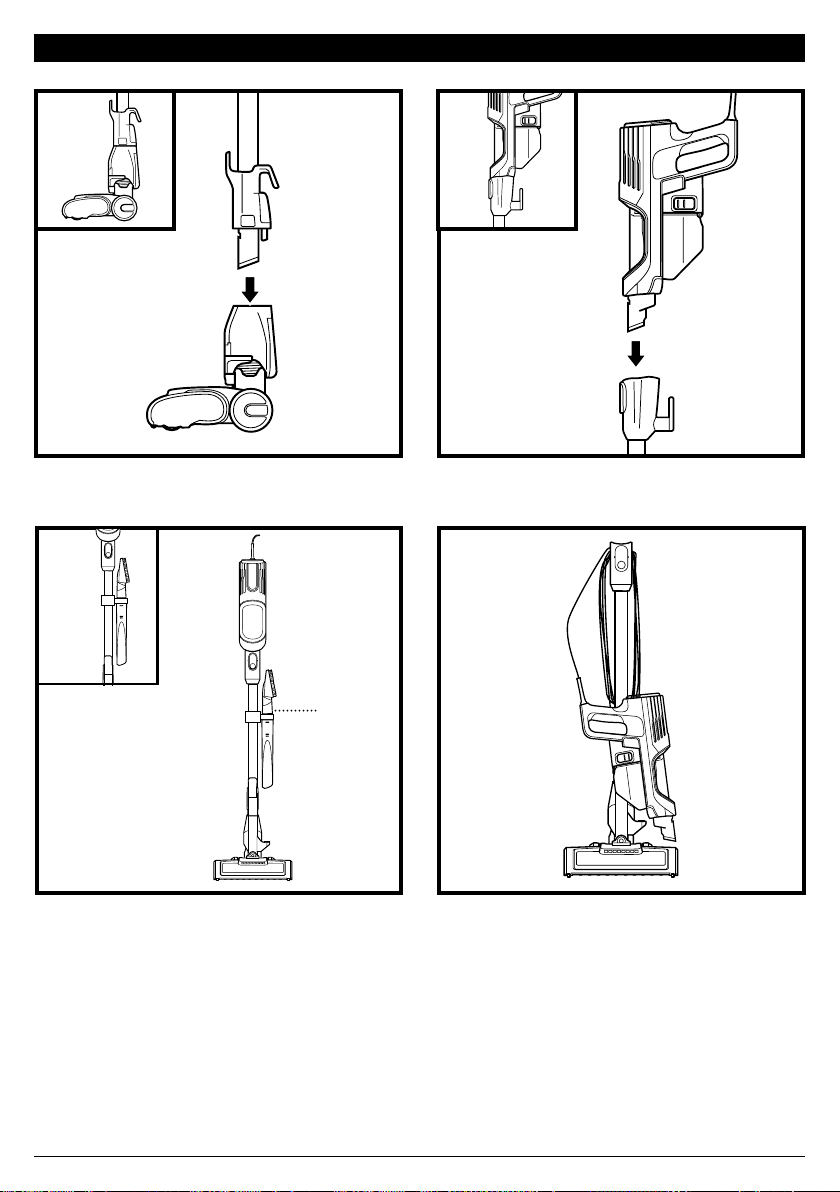
sharkclean.com
(Quebrar)
(Clic)
(Clic)
ENSAMBLADO
4. Para un almacenamiento compacto,
cuelgue la aspiradora portátil del gancho
de almacenamiento que se encuentra
en el vástago.
1. Inserte el vástago en la boquilla de piso.
3. Encaje el clip de almacenamiento
integrado en el vástago, y luego coloque
los accesorios en el soporte.
Asegúrese de que todas las conexiones
encajen haciendo clic en su lugar.
2. Inserte la aspiradora portátil en el vástago.
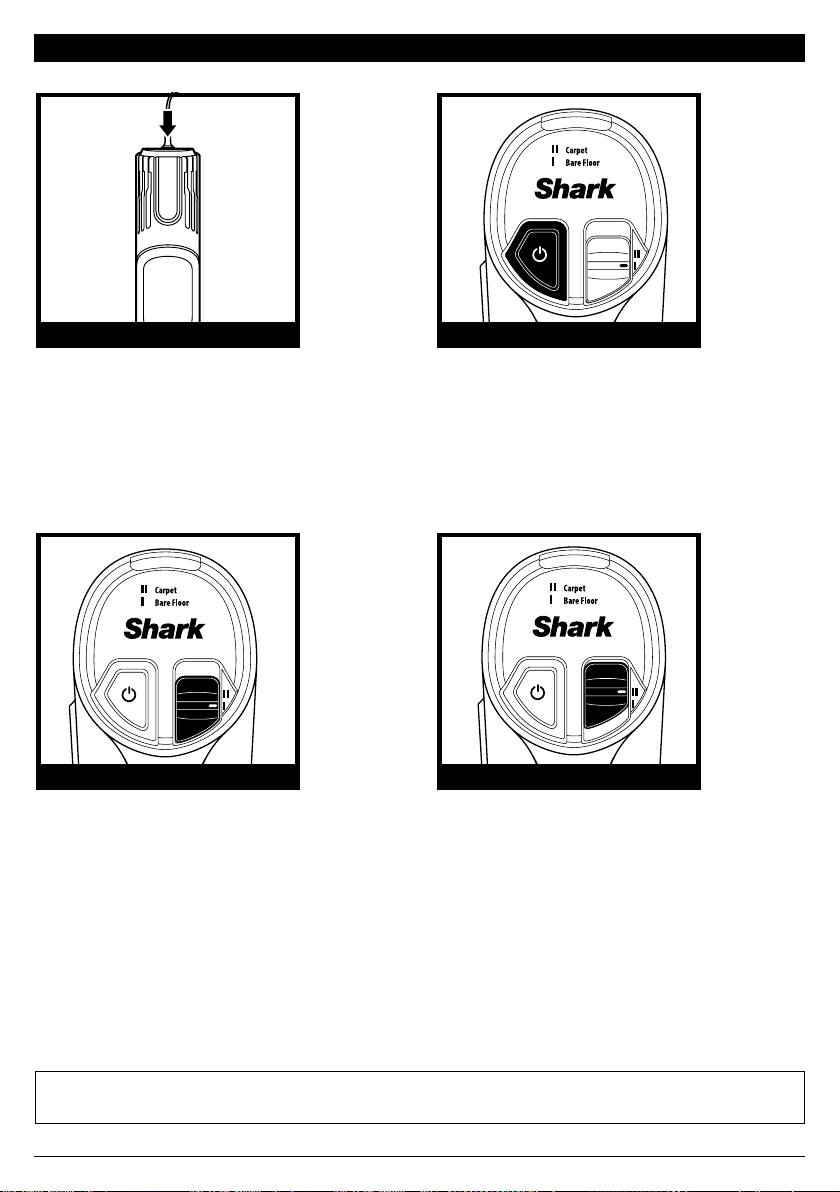
sharkclean.com
CONTROLES BOTÓN POWER (ENCENDIDO)
AJUSTE PARA PISO SENCILLO AJUSTE PARA ALFOMBRA
AJUSTES
NOTA: Use el seleccionador de tipo de piso para alternar entre los ajustes Bare Floor (piso sencillo) y Carpet (alfombra).
NOTA: Para una limpieza profunda según ASTM F 608 (suciedad incrustada en alfombras) use el ajuste Carpet (alfombra).
NOTA: Seleccione Carpet (alfombra) para polvo y escombros adheridos.
Botón Power (encendido)
Presione el botón Power
(encendido) para comenzar a
aspirar. Presiónelo nuevamente
para apagar la aspiradora. Presione
el botón FLOOR TYPE (tipo de
piso) para alternar entre los ajustes
piso sencillo y alfombra.
Alfombra
Presione el botón FLOOR TYPE (tipo
de piso) para cambiar al ajuste Carpet
(alfombra). Los cepillos giratorios giran
más rápidamente para levantar los
escombros que se encuentran debajo
de la superficie de la alfombra.
El panel de control se encuentra en la
parte superior de la aspiradora portátil.
Piso sencillo/Tapetes
Cuando la encienda, la aspiradora
estará en la configuración Bare Floor
(piso sencillo). En este ajuste, los
cepillos giratorios giran suavemente
para limpiar pisos y tapetes.
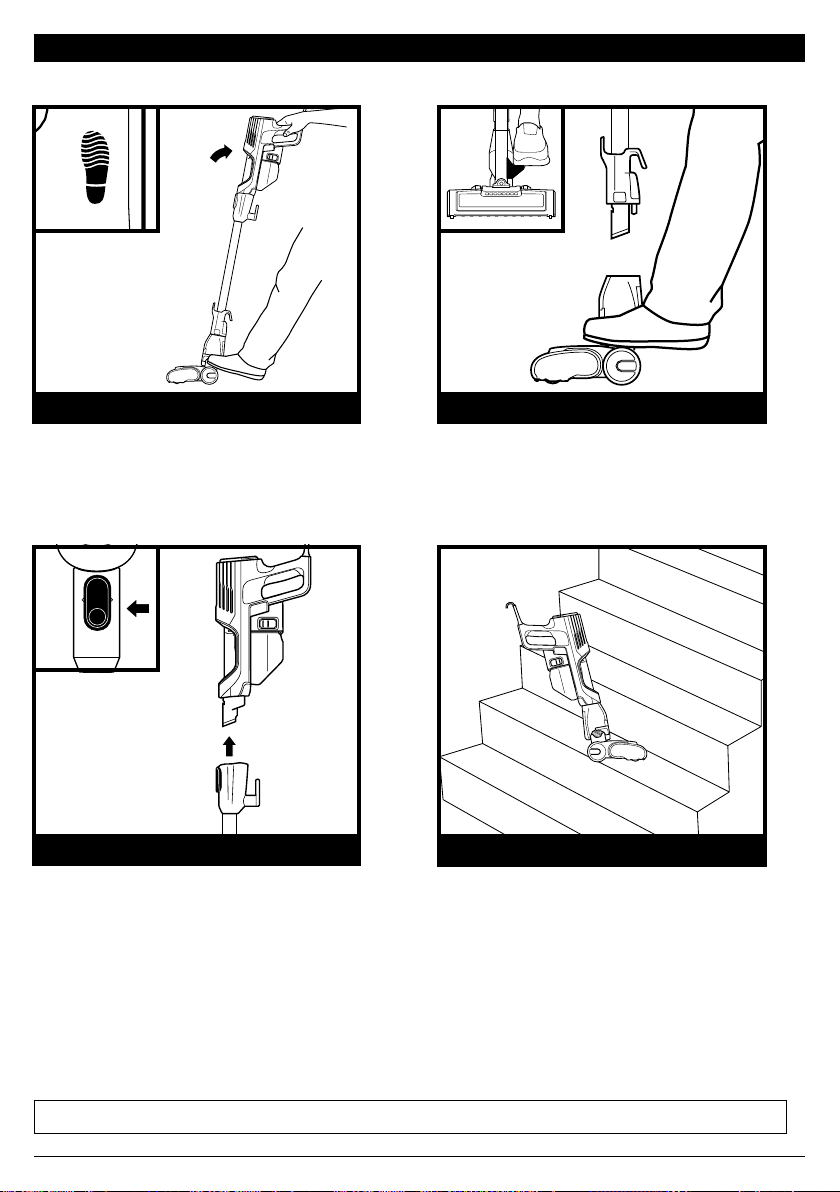
sharkclean.com
MODO PISO
LIMPIEZA DE ESCALERAS
ENCIMA DEL PISO CON VÁSTAGO
ENCIMA DEL PISO CON PORTÁTIL
MODOS DE LIMPIEZA
NOTA: Todos los accesorios son compatibles con el vástago y con la aspiradora portátil.
Para limpiar los pisos, pise la boquilla de piso
e incline la aspiradora portátil hacia atrás.
Para limpiar escaleras y otros espacios
estrechos, conecte la aspiradora portátil
a la boquilla de piso.
Para mayor alcance, separe el vástago.
Coloque la aspiradora en posición vertical,
luego pise el pedal que se encuentra a un
costado de la boquilla de piso y tire del
vástago para separarlo.
Para separar la aspiradora portátil,
presione el botón Wand Release
(liberación del vástago) y sáquela
del vástago. Fantástica para limpiar
escaleras, muebles y encimeras.
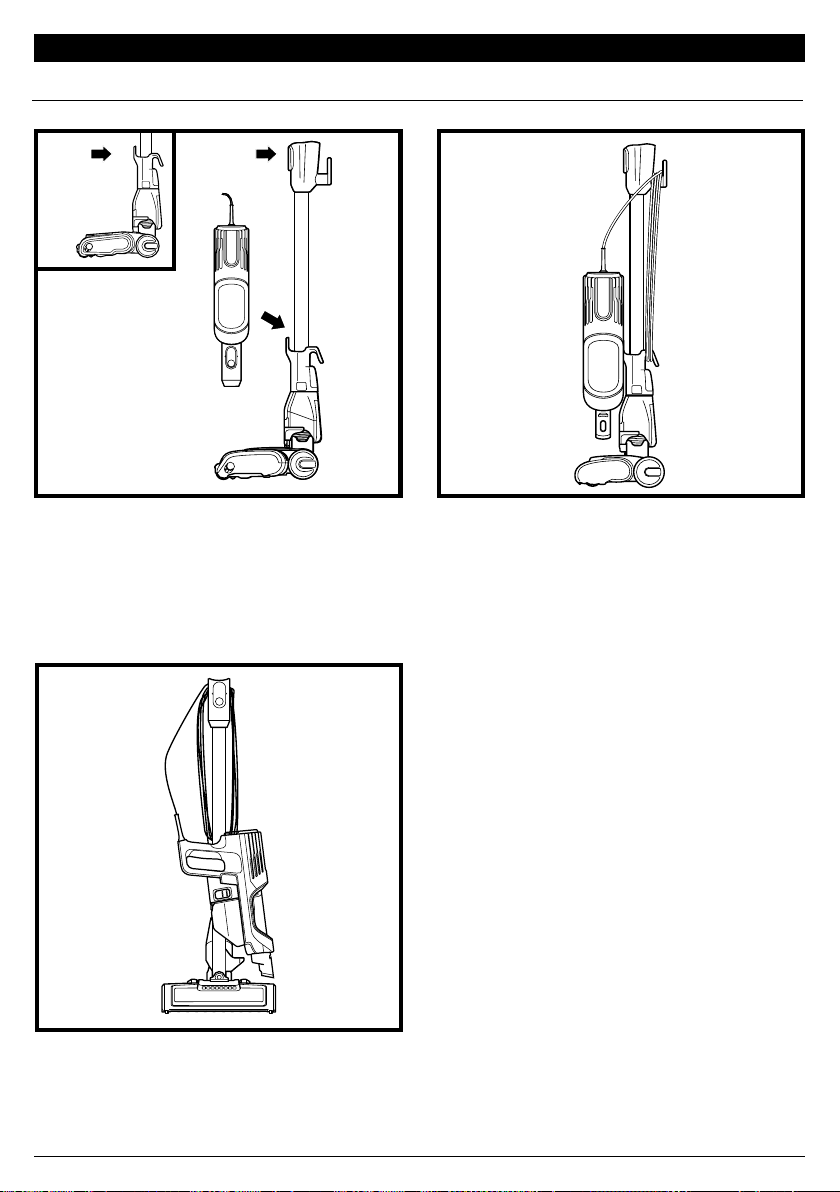
sharkclean.com
Storage
Hook
MODO ALMACENAMIENTO
Presione el botón Wand Release (liberación
del vástago), en la parte superior del vástago,
para separar la aspiradora portátil.
Alinee el pestillo que se encuentra en el
costado de la aspiradora portátil con el
gancho de almacenamiento del vástago, y
luego cuelgue la aspiradora portátil del gancho.
Enrolle el cable alrededor de los dos ganchos
para el cable. Comience con el gancho
superior, y deje el cable un poco flojo.
GANCHO DE ALMACENAMIENTO PARA LA PORTÁTIL
Gancho de
almacenamiento
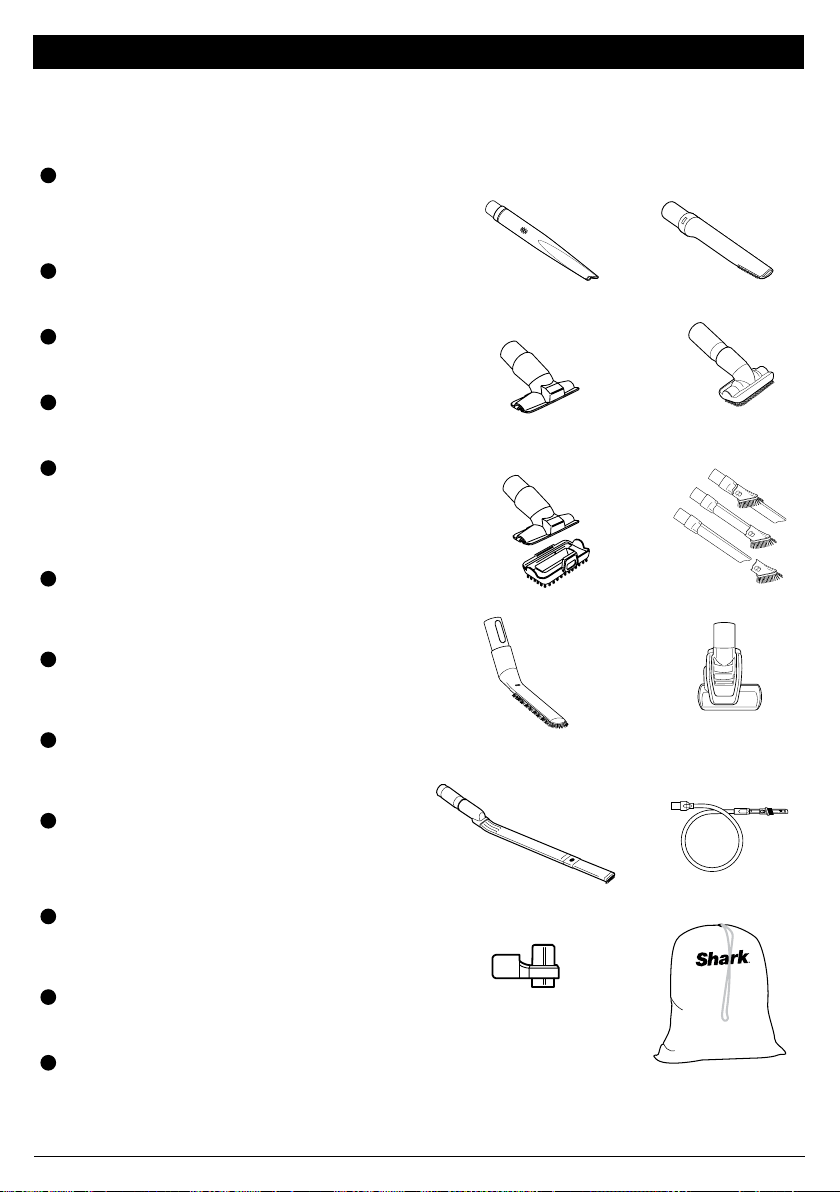
sharkclean.com
ACCESORIOS DISPONIBLES
A
Herramienta para grietas
Esta delgada herramienta es excelente para
limpiar espacios reducidos, entre los cojines del
sofá y áreas de difícil acceso. Una herramienta
para grietas más larga ya está disponible en
sharkaccessories.com.
B
Herramienta para grietas para pelo de mascotas
Esta delgada y versátil herramienta de 20 cm elimina el
pelo de las mascotas de los espacios de difícil acceso
como esquinas, techos y entre los cojines del sofá.
C
Herramienta para tapicería
Recolecta pelo de las mascotas, polvo y desechos
grandes de colchones, sofás, cortinas y otras telas
para tapizar delicadas.
D
Cepillo quitapolvo
Este cepillo elimina el polvo y limpia superficies
delicadas. Excelente para usar en ventiladores,
cortinas, pantallas de lámparas y teclados.
E
Herramienta múltiple para mascotas
Una sola herramienta convertible para limpiar la
suciedad difícil de mascotas de dos maneras: use el
cepillo de cerda dura para limpiar suciedad pegada o
retire las cerdas para revelar una herramienta perfecta
para tapicería que elimina el pelo adherido de
mascotas y grandes cantidades de desechos.
F
Herramienta para grietas quitapolvo
Dos herramientas de limpieza en una. La herramienta
para grietas ofrece alcance extendido para limpar
espacios reducidos, mientras que el cepillo suave es
ideal para eliminar polvo de superficies delicadas.
G
Cepillo quitapolvo antialérgeno
Este cepillo tiene cerdas de fibra de nailon
específicamente diseñadas para eliminar polvo fino y
partículas de alérgenos de la mayoría de las superficies
delicadas.
H
Cepillo motorizado de autolimpieza para mascotas
Recoge pelo de mascotas y suciedad de áreas por
encima del piso, como escaleras alfombradas y
tapicería, a la vez que elimina activamente el pelo
enredado mientras limpia.
I
Sacudidor de precisión
Este tubo flexible tiene en la punta una herramienta
microsacudidora para grietas para limpiar alrededor
de objetos delicados y en lugares de difícil acceso
como interiores de vehículos y teclados de
computadoras.
J
Vástago para usar debajo de electrodomésticos
Limpie debajo y detrás de electrodomésticos y
muebles difíciles de mover con esta herramienta
ajustable de 91 cm. Voltee la pieza de extensión para
limpiar la parte inferior de los electrodomésticos.
K
Clip de almacenamiento integrado
Este clip desmontable se fija a su aspiradora. El clip
puede sujetar hasta dos accesorios al mismo tiempo
mientras limpia.
L
Bolsa grande para accesorios (Grande, 32 x 70 cm)
Esta práctica bolsa para guardar accesorios mide 32 cm
x 70 cm y le cabe el vástago que se utiliza para limpiar
debajo de los electrodomésticos. Hay un tamaño más
pequeño disponible en sharkaccessories.com.
NOTA: No se incluyen todos los accesorios en todas las unidades. Para ver la lista de accesorios
incluidos con este modelo, consulte la solapa interior superior de la caja. Para solicitar accesorios
adicionales, visite sharkaccessories.com.
B
A
D
F
I
H
C
E
G
J
K L
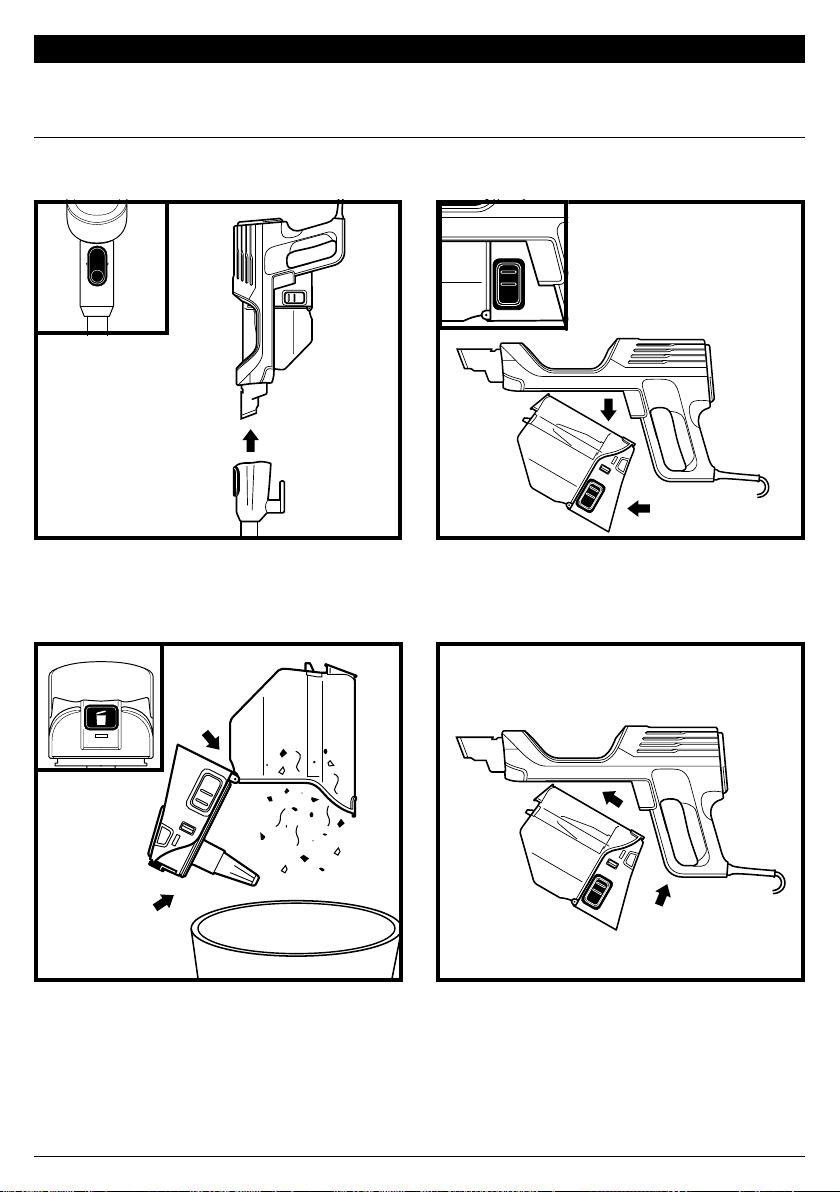
sharkclean.com
(Clic)
MANTENIMIENTO
CÓMO VACIAR EL RECIPIENTE PARA EL POLVO
Presione el botón Wand Release (liberación
del vástago) y retire la aspiradora portátil.
Para retirar el recipiente para el polvo de la
aspiradora portátil, oprima al mismo tiempo los
dos botones Dust Cup Release (liberación del
recipiente para el polvo), y saque el recipiente.
Para reinstalar, empuje la tapa hacia la posición
cerrada, luego inserte primero la parte
delantera del recipiente para el polvo en la
aspiradora portátil y después la parte trasera,
hasta que encaje en su lugar con un clic.
Sostenga el recipiente para el polvo sobre
el bote de basura. Presione el botón Empty
(vaciar) y tire de la tapa del recipiente para el
polvo hasta que esta haga clic y se bloquee en
la posición abierta. Golpee suavemente la rejilla
en forma de cono que se encuentra al interior
del recipiente para el polvo para echar el polvo y
los residuos a la basura.
Vacíe el recipiente para el polvo cada vez que aspire y límpielo periódicamente cuando limpie
y cuando los escombros lleguen a la línea de llenado MAX en el recipiente para el polvo.
IMPORTANTE: Desenchufe la aspiradora antes de cualquier tarea de mantenimiento.
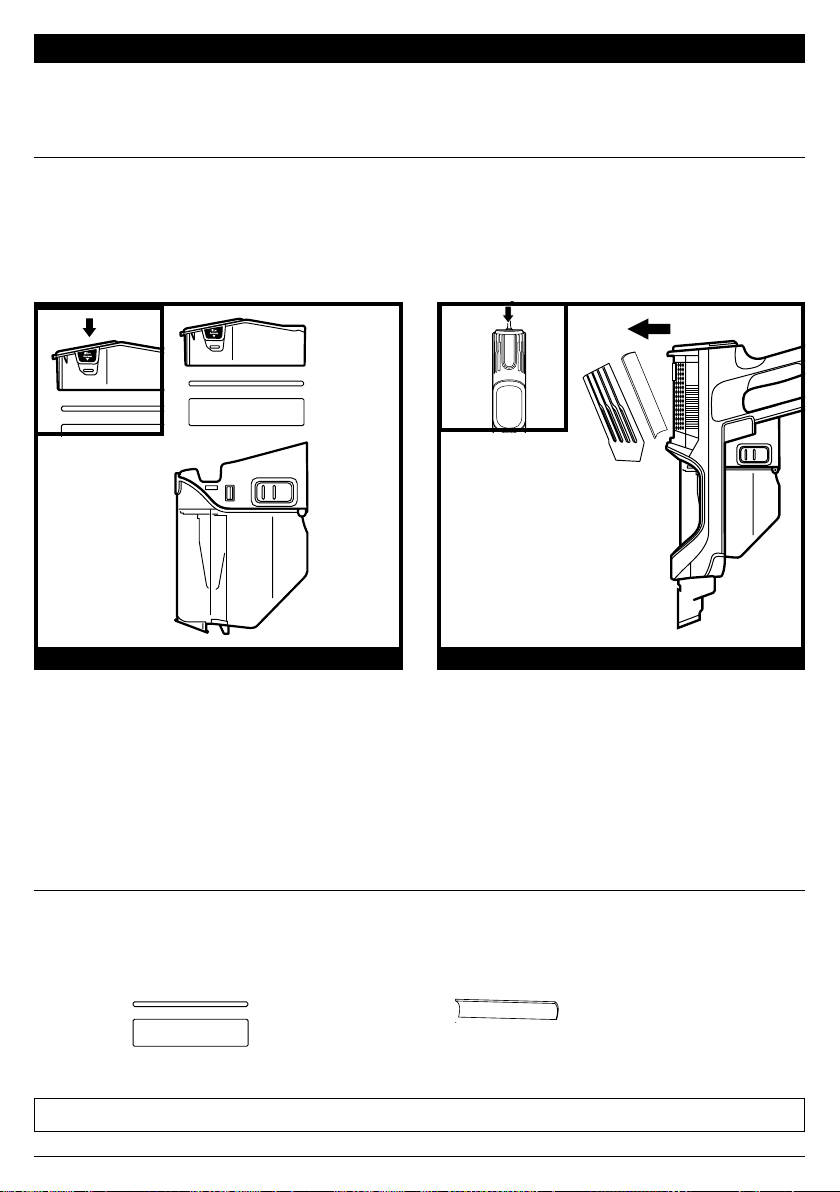
sharkclean.com
FILTROS PARA LA PARTE DELANTERA DEL MOTOR
FILTRO PARA LA PARTE TRASERA DEL MOTOR
Enjuague y remplace los filtros con regularidad para mantener el poder de succión de la
aspiradora.
Para evitar los daños que pueden causar los productos químicos de limpieza, enjuague los filtros
únicamente con agua fría. No utilice detergente. Permita que los filtros se sequen al aire durante
24horas por lo menos antes de volver a colocarlos para impedir que se succione el líquido hacia
las piezas electrónicas.
MANTENIMIENTO
LIMPIEZA DE LOS FILTROS
IMPORTANTE: Desenchufe la aspiradora antes de cualquier tarea de mantenimiento.
FILTROS DE REPUESTO
Con el recipiente para el polvo separado,
presione los botones de acceso a los filtros
que se encuentran a ambos lados de la parte
posterior del recipiente para el polvo, y
luego saque la caja del filtro. Tire del filtro de
espuma para sacarlo de la caja y luego saque
el de fieltro tirando de la pestaña.
Lave los filtros para la parte delantera del
motor una vez al mes.
Para acceder al filtro para la parte trasera del
motor, presione el cerrojo de liberación que
se encuentra en la cubierta del filtro de la
aspiradora portátil. Retire la cubierta y saque
el filtro.
Lave el filtro para la parte trasera del motor
cada 9 meses.
NOTA: Remplace los filtros para la parte delantera del motor cada 2.5 años. Remplace el filtro para la parte trasera del motor cada 3 años.
Kit de filtros de repuesto para la parte
delantera del motor
XFFKHZ2000
Filtro de repuesto para la parte trasera del
motor
XPMFHZ2000
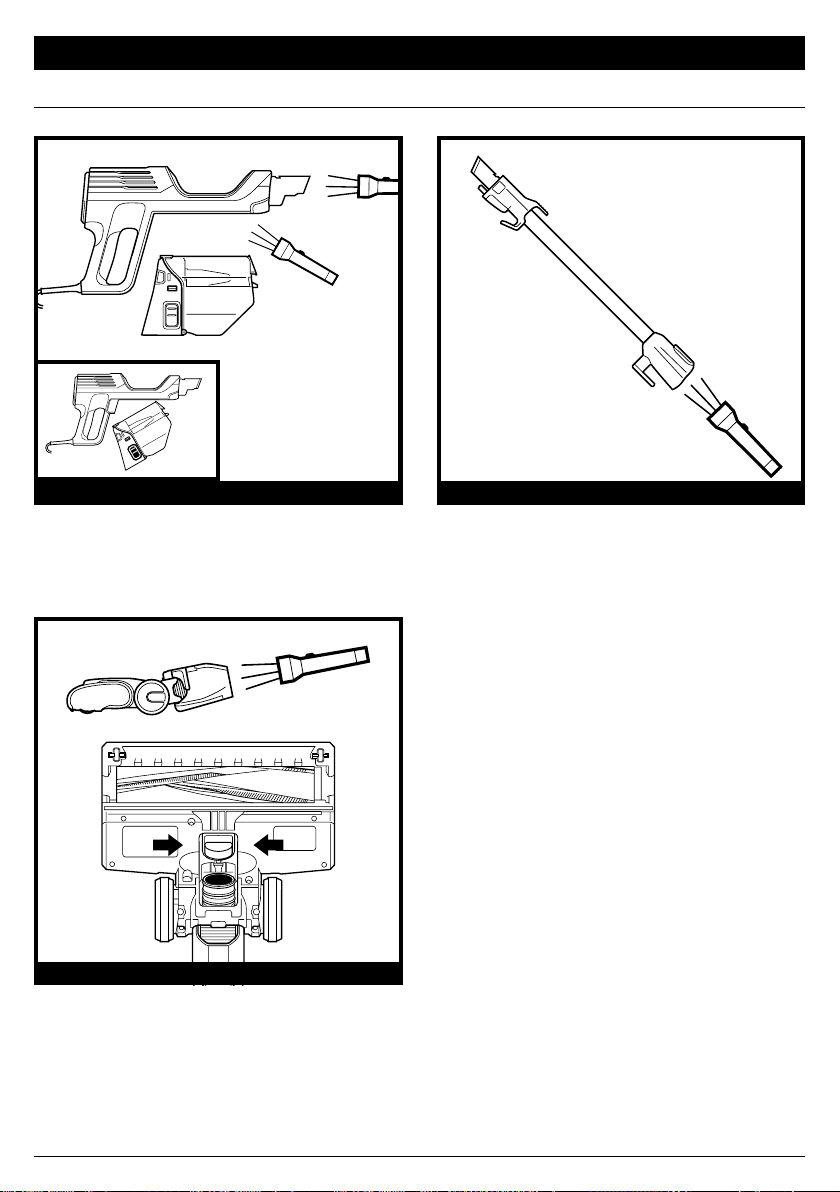
sharkclean.com
REVISE LA PORTÁTIL REVISE EL VÁSTAGO
Separe el vástago, luego incline hacia atrás la
entrada de residuos de la boquilla de piso y
revise si hay obstrucciones en las aberturas.
REVISE LA BOQUILLA DE PISO
Quite la aspiradora portátil del vástago y
revise todas las aberturas de entrada del
recipiente para el polvo para ver si hay
escombros u obstrucciones.
Desconecte el vástago y verifique que no
haya obstrucciones.
CÓMO VERIFICAR SI HAY OBSTRUCCIONES
MANTENIMIENTO
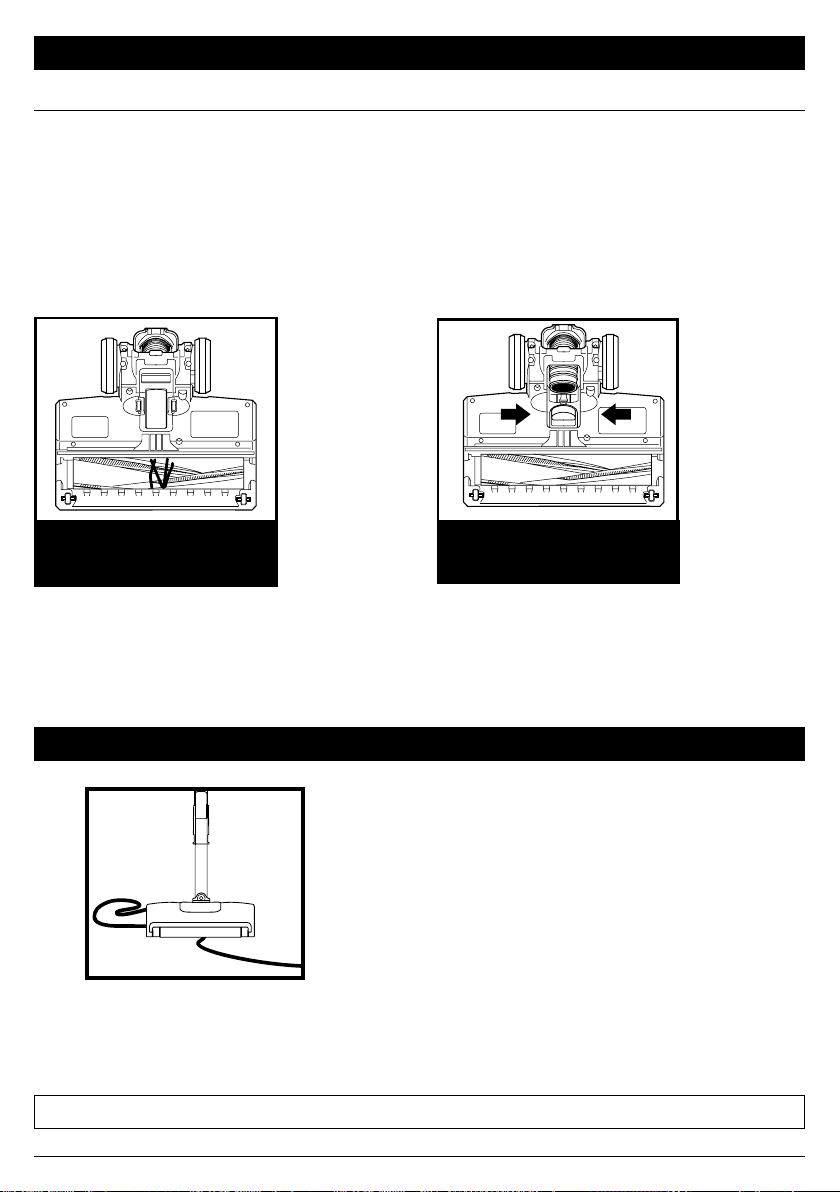
sharkclean.com
Limpie todos los residuos en el
cepillo giratorio.
Revise la entrada de residuos y elimine toda
la suciedad u obstrucciones. Para cerrar la
cubierta, presiónela hacia abajo hasta que
encaje en su lugar.
MANTENIMIENTO DE BOQUILLAS
CEPILLO GIRATORIO DE AUTOLIMPIEZA
Si aspira un objeto duro o afilado, o se da cuenta de un cambio en el ruido mientras aspira,
verifique si hay obstrucciones u objetos atrapados en el cepillo giratorio.
Si aún quedan fibras enredadas en el cepillo giratorio después del uso constante, quítelas del
cepillo giratorio.
RESIDUOS ENREDADOS
ALREDEDOR DEL CEPILLO
GIRATORIO
RESIDUOS DETRÁS DEL
CEPILLO GIRATORIO
NOTA: Para lograr el mejor rendimiento, mantenga limpio el rodillo suave mediante un mantenimiento regular.
Para minimizar el riesgo de daño al cable de alimentación, NO pase la aspiradora sobre
el cable. Si esto ocurre, apague inmediatamente la aspiradora y libere el cable del cepillo
giratorio o de la boquilla de piso.
1. NO tire del cable, ni lo use para cargar la
aspiradora o como si fuera un mango.
2. NO desenchufe la aspiradora tirando del
cable. Sujete el enchufe, no el cable.
3. NO cierre la placa de asiento de la
aspiradora sobre el cable.
4. NO tire del cable alrededor de esquinas
filosas.
5. NO deje el cable cerca de superficies
calientes.
MANTENIMIENTO DE CORD
MANTENIMIENTO

sharkclean.com
SOLUCIÓN DE PROBLEMAS
Para todos los demás problemas, visite sharkclean.com/support.
Cable de alimentación atascado en el cepillo giratorio o la boquilla de piso.
• Para minimizar el riesgo de daños en el cable de alimentación, NO pase la aspiradora sobre
él. Si esto ocurre, apague inmediatamente la fuente de alimentación a la aspiradora y quite
el cable del cepillo o la boquilla.
• Verifique que el cable de alimentación y el enchufe no estén dañados antes de volver a
utilizar la aspiradora. NO UTILICE una aspiradora con un cable o enchufe dañados. Apague
todos los controles antes de enchufar o desenchufar la aspiradora. Guarde la aspiradora
con el cable de alimentación fijado alrededor de los dos ganchos para el cable.
La aspiradora no recolecta residuos. No hay succión o hay poca succión.
Consulte la sección Mantenimiento para obtener más información.
• Vacíe el recipiente para el polvo. Revise los filtros para determinar si necesitan limpieza. Siga
las instrucciones para enjuagar y secar al aire libre los filtros completamente antes de volver a
insertarlos.
• Clear any blockages in the nozzle, wand, handheld vacuum, or accessories. See Checking for
Blockages section for more information.
• Si cualquier hilo, cabello, o fibras de alfombras permanecen enredados alrededor del cepillo
giratorio después de uso continuo, retírelos cuidadosamente.Retire cualquier obstrucción de
la boquilla de piso, el vástago, la aspiradora portátil o de los accesorios. Para obtener más
información, consulte la sección Cómo verificar si hay obstrucciones.
• La aspiradora levanta los tapetes.
• La succión es potente. Tenga cuidado cuando aspire tapetes con delicados bordes cosidos.
Apague la unidad para desengranar el cepillo giratorio. Para reiniciar, presione el botón de
encendido en el mango.
NOTA: Limpie los tapetes del área en modo Tapetes de piso descubierto o con accesorios.
Consulte la sección Accesorios disponibles.
NOTA: Limpie los tapetes del área en modo Tapetes de piso descubierto o con accesorios.
Consulte la sección Accesorios disponibles. La aspiradora se apaga por sí sola o la luz indicadora
parpadea en rojo.
La aspiradora se apaga por sí sola o la luz indicadora parpadea en rojo.
Si la aspiradora se sobrecalienta, el termostato apagará el motor automáticamente. Complete
los siguientes pasos para reiniciar:
1. Apague la aspiradora y desenchúfela.
2. Vacíe el recipiente para el polvo y limpie los filtros. Consulte las secciones Cómo vaciar el
recipiente para el polvo y Limpieza de los filtros.
3. Verifique que no haya obstrucciones en el vástago, la boquilla de piso, la aspiradora
portátil, los orificios de entrada ni en los accesorios.
4. Vuelva a armar la aspiradora completa y asegúrese de que todas las piezas encajan en su lugar.
5. Permita que la unidad se enfríe durante un mínimo de 60 minutos.
6. Enchufe la aspiradora y enciéndala.
La aspiradora portátil está caliente.
Debido a la fuerte potencia de succión de la aspiradora, es normal que el área alrededor del escape
del filtro se caliente durante y después de su uso. Apague la aspiradora y espere 10 minutos para
que se enfríe. Si aún se siente caliente, limpie los filtros de la parte delantera y trasera del motor.
Consulte la sección Mantenimiento para ver las instrucciones de limpieza de los filtros.

sharkclean.com
La garantía limitada de cinco (5) años se aplica a las compras realizadas a los vendedores minoristas
autorizados de SharkNinja Operating LLC. La cobertura de garantía se aplica solo al propietario y al producto
originales y no puede transferirse.
SharkNinja garantiza que la unidad estará libre de defectos de materiales y de mano de obra durante un
período de cinco (5) años desde la fecha de compra, siempre y cuando se use en condiciones domésticas
normales y se efectúe su mantenimiento de acuerdo con los requisitos descritos en este manual del
propietario, sujeto a las siguientes condiciones y exclusiones:
¿Qué cubre esta garantía?
1. La unidad original o los componentes que no se gastan que se consideren defectuosos, a criterio exclusivo
de SharkNinja, se repararán o reemplazarán durante un período máximo de cinco (5) años desde la fecha
de compra original.
2. En el caso de que se entregue una unidad de reemplazo, la cobertura de la garantía termina seis (6) meses
después de la fecha de recepción de la unidad de reemplazo o cuando termine el plazo restante de la
garantía vigente, lo que sea posterior. SharkNinja se reserva el derecho a reemplazar la unidad con una de
igual o mayor valor.
¿Qué no cubre esta garantía?
1. Esta garantía no cubre el desgaste normal de las piezas que se gastan (como los filtros de espuma, los
filtros HEPA, las almohadillas, etc.), que requieren mantenimiento o reemplazo regular para asegurar el
funcionamiento adecuado de la unidad. Se pueden comprar piezas de repuesto en sharkaccessories.com.
2. Cualquier unidad que haya sido alterada o usada con fines comerciales.
3. Daños causados por el uso incorrecto (p.ej., aspirar agua u otros líquidos), abuso, manipulación
negligente, falta de mantenimiento necesario (p.ej., no limpiar los filtros) o daños debidos al mal trato
durante el transporte.
4. Daños emergentes o incidentales.
5. Defectos causados por personas que hacen reparaciones y no estén autorizadas por SharkNinja. Estos
defectos incluyen daños causados en el proceso de envío, modificación o reparación del producto
SharkNinja (o cualquiera de sus piezas) cuando la reparación es realizada por una persona que no está
autorizada por SharkNinja.
6. Productos comprados, usados u operados fuera de Norteamérica.
Cómo solicitar el servicio técnico
Si su aparato no funciona adecuadamente cuando se usa en condiciones domésticas normales dentro del
período de garantía, visite sharkclean.com/support para obtener instrucciones de cuidado y mantenimiento del
producto que usted mismo pueda llevar a cabo. Nuestros especialistas de servicio al cliente también están a su
disposición si llama al 1-800-798-7398 para asistirlo con todas las opciones de servicio de garantía y soporte
del producto, incluida la posibilidad de mejorar su garantía a nuestras opciones de servicio de garantía VIP para
categorías de productos exclusivos.
SharkNinja cubrirá el costo de envío de la unidad por parte del cliente para ser reparada o reemplazada. Se
cobrará una tarifa de 25,95USD (sujeto a cambios) cuando SharkNinja envíe la unidad reparada o el reemplazo.
Cómo iniciar un reclamo de garantía
Debe llamar al 1-800-798-7398 para iniciar un reclamo de garantía. Necesitará el recibo como prueba de compra.
Un especialista de servicio al cliente le proporcionará instrucciones para la devolución y el embalaje.
Cómo se aplica la ley estatal
Esta garantía le otorga derechos legales específicos, y usted también puede tener otros derechos que
varían según el estado. Algunos estados no permiten la exclusión o la limitación de los daños incidentales o
emergentes, por lo que lo anterior puede no aplicarse en su caso.
GARANTÍA LIMITADA DE CINCO (5) AÑOS
sharkclean.com
ESPECIFICACIONES TÉCNICAS
Voltaje: 120V~, 60Hz
Vatios: 680 vatios
REGISTRE ESTA INFORMACIÓN
Número de modelo: ���������������������
Código de fecha: �����������������������
Fecha de compra: ����������������������
(conserve el recibo)
Tienda de compra: ����������������������
REGISTRE SU COMPRA
registeryourshark.com
Escanee el código QR
con un dispositivo móvil
CONSEJO: El número de modelo se encuentra
en la etiqueta que indica las características,
detrás del recipiente para el polvo.
CONSEJO: El código de fecha se ubica en
una de las clavijas del enchufe del cable de
alimentación.
Beneficios de registrar su producto y crear
una cuenta:
• Obtenga un servicio de asistencia para el
producto más fácil y rápido
• Acceda a instrucciones para la solución de
problemas y cuidado de su producto
• Sea uno de los primeros en recibir
promociones de productos exclusivas

HZ600Series�IB�E�F�S�MP�210416
PRINTED IN CHINA / IMPRIMÉ EN CHINE / IMPRESO EN CHINA
© 2021 SharkNinja Operating LLC. SHARK is a registered trademark of SharkNinja Operating LLC. POWERFINS is a
trademark of SharkNinja Operating LLC.
© 2021 SharkNinja Operating LLC. SHARK est une marque de commerce déposée de SharkNinja Operating LLC.
POWERFINS est une marque de commerce déposée de SharkNinja Operating LLC.
© 2021 SharkNinja Operating LLC. SHARK es una marca comercial registrada de SharkNinja Operating LLC. POWERFINS
es una marca comercial registrada de SharkNinja Operating LLC.
PLEASE READ CAREFULLY AND KEEP FOR FUTURE REFERENCE.
This Owner’s Guide is designed to help you get a complete understanding of your new Shark
Ultralight PowerFins™ Corded Stick Vacuum with Self-Cleaning Brushroll.
SharkNinja Operating LLC
US: Needham, MA 02494
CAN: Ville St-Laurent, QC H4S 1A7
1-800-798-7398
sharkclean.com
Illustrations may dier from actual product. We are constantly striving to improve our products;
therefore the specifications contained herein are subject to change without notice.
For SharkNinja U.S. Patent information, visit sharkninja.com/uspatents
VEUILLEZ LIRE ATTENTIVEMENT LE PRÉSENT MODE D’EMPLOI ET LE CONSERVER À
TITRE INFORMATIF.
Ce guide d’utilisation est conçu pour vous aider à bien connaître le fonctionnement de votre nouvel
aspirateur-balai à fil ultraléger PowerFins™ avec brosse rotative autonettoyante
SharkNinja Operating LLC
États-Unis: Needham, MA 02494
Canada: Saint-Laurent (Québec) H4S1A7
1-800-798-7398
sharkclean.com
Les illustrations peuvent diérer du produit réel. Nous tentons constamment d’améliorer nos produits;
par conséquent, les caractéristiques indiquées dans le présent guide peuvent être modifiées sans préavis.
Pour obtenir de l’information au sujet des brevets de SharkNinja aux États-Unis, consultez le site
suivant:www.sharkninja.com/uspatents.
LEA ESTAS INSTRUCCIONES DETENIDAMENTE Y CONSÉRVELAS PARA REFERENCIA FUTURA.
Esta Guía del propietario está diseñada para ayudarlo a entender completamente la nueva
aspiradora vertical de varilla con cable Shark Ultralight PowerFins™ con cepillo giratorio
de autolimpieza.
SharkNinja Operating LLC
EE.UU.: Needham, MA 02494
CAN: Ville St-Laurent, QC H4S 1A7
1-800-798-7398
sharkclean.com
Las ilustraciones pueden diferir del producto real. Nos esforzamos constantemente por mejorar
nuestros productos, por lo que las especificaciones que se incluyen en el presente pueden cambiar
sin previo aviso.
Para obtener información sobre las patentes de SharkNinja en los EE.UU., visite sharkninja.com/uspatents