
Table of Contents
i
SAFETY PRECAUTIONS
SAFETY FIRST! ....................................................................... 1
ABOUT THE CODE READER
CONTROLS AND INDICATORS ............................................. 3
DISPLAY FUNCTIONS ............................................................ 4
ONBOARD DIAGNOSTICS
COMPUTER ENGINE CONTROLS ......................................... 7
DIAGNOSTIC TROUBLE CODES (DTCs) .............................. 12
OBD2 MONITORS ................................................................... 15
USING THE CODE READER
CODE RETRIEVAL PROCEDURE ........................................... 24
VIEWING ABS DTCs ............................................................... 26
ERASING DIAGNOSTIC TROUBLE CODES (DTCs) ............. 27
ABOUT REPAIRSOLUTIONS 2® ............................................ 28
CONNECTING TO BLUETOOTH / WIFI ................................. 29
WARRANTY AND SERVICING
LIMITED ONE YEAR WARRANTY ........................................... 33
SERVICE PROCEDURES ....................................................... 33

Safety Precautions
SAFETY FIRST
1
SAFETY FIRST!
This manual describes common test procedures used
by experienced service technicians. Many test procedures
require precautions to avoid accidents that can result in
personal injury, and/or damage to your vehicle or test
equipment. Always read your vehicle's service manual and
follow its safety precautions before and during any test or
service procedure. ALWAYS observe the following general
safety precautions:
When an engine is running, it produces carbon monoxide,
a toxic and poisonous gas. To prevent serious injury or
death from carbon monoxide poisoning, operate the
vehicle ONLY in a well-ventilated area.
To protect your eyes from propelled objects as well as hot
or caustic liquids, always wear approved safety eye
protection.
When an engine is running, many parts (such as the
coolant fan, pulleys, fan belt etc.) turn at high speed. To
avoid serious injury, always be aware of moving parts.
Keep a safe distance from these parts as well as other
potentially moving objects.
Engine parts become very hot when the engine is running.
To prevent severe burns, avoid contact with hot engine
parts.
Before starting an engine for testing or troubleshooting,
make sure the parking brake is engaged. Put the
transmission in park (for automatic transmission) or
neutral (for manual transmission). Block the drive wheels
with suitable blocks.
Connecting or disconnecting test equipment when the
ignition is ON can damage test equipment and the
vehicle's electronic components. Turn the ignition OFF
before connecting the Code Reader to or disconnecting
the Code Reader from the vehicle’s Data Link Connector
(DLC).
To avoid personal injury, instrument damage and/or
damage to your vehicle.
Safety Precautions
SAFETY FIRST
2
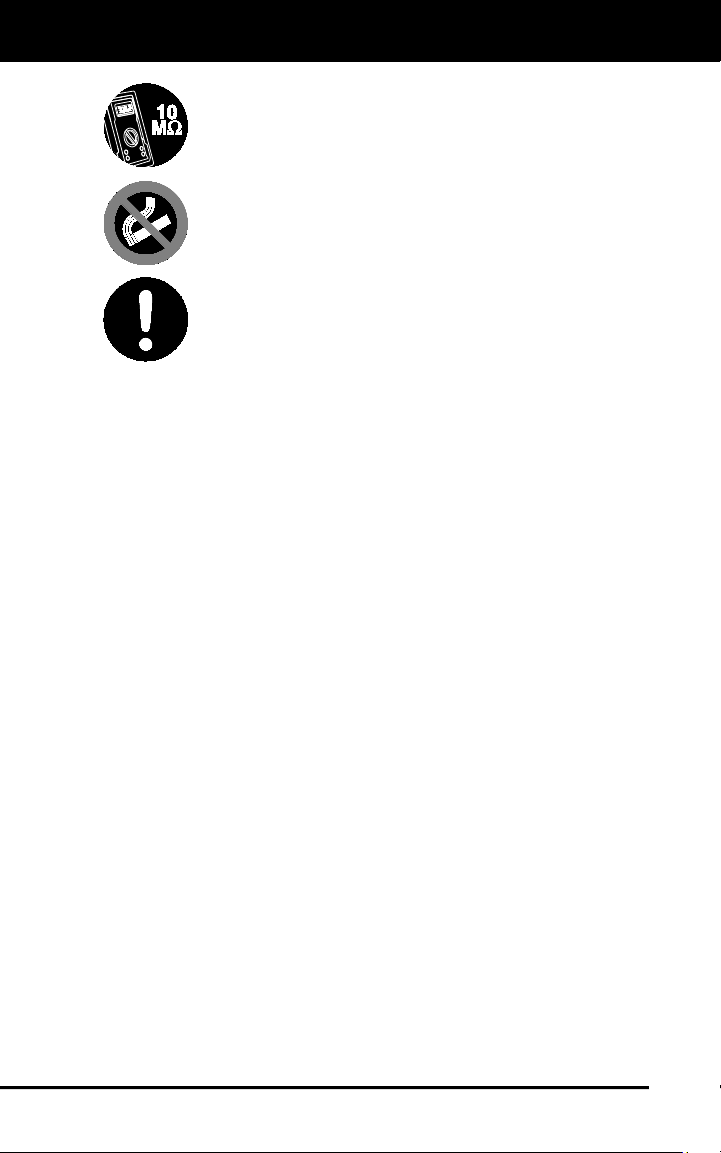
To prevent damage to the on-board computer when taking
vehicle electrical measurements, always use a digital
multimeter with at least 10 megOhms of impedance.
Fuel and battery vapors are highly flammable. To prevent
an explosion, keep all sparks, heated items and open
flames away from the battery and fuel / fuel vapors. DO
NOT SMOKE NEAR THE VEHICLE DURING TESTING.
Don't wear loose clothing or jewelry when working on an
engine. Loose clothing can become caught in the fan,
pulleys, belts, etc. Jewelry is highly conductive, and can
cause a severe burn if it makes contact between a power
source and ground.

About the Code Reader
CONTROLS AND INDICATORS
3
CONTROLS AND INDICATORS
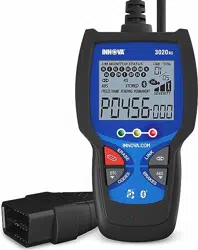
Figure 1. Controls and Indicators
See Figure 1 for the locations of items 1 through 9, below.
1.
ERASE button - Erases Diagnostic Trouble Codes (DTCs) and
"Freeze Frame" data from your vehicle's computer, and resets
Monitor status.
2. DTC button - Displays the Diagnostic Trouble Codes View screen
and/or scrolls the LCD display to view Diagnostic Trouble Codes.
About the Code Reader
DISPLAY FUNCTIONS
4
3. LINK button - When the Code Reader is connected to a vehicle,
links the Code Reader to the vehicle’s PCM to retrieve Powertrain
DTCs from the computer’s memory.
4. ABS button - Links the Code Reader to the vehicle’s ABS control
module to retrieve ABS DTCs from the computer’s memory.
5. GREEN LED - Indicates that all engine systems are running
normally (all Monitors on the vehicle are active and performing their
diagnostic testing, and no DTCs are present).
6. YELLOW LED - Indicates there is a possible problem. A “Pending”
DTC is present and/or some of the vehicle's emission monitors have
not run their diagnostic testing.
7. RED LED - Indicates there is a problem in one or more of the
vehicle's systems. The red LED is also used to show that DTC(s)
are present. DTCs are shown on the Code Reader’s LCD display. In
this case, the Malfunction Indicator (“Check Engine”) lamp on the
vehicle's instrument panel will light steady on.
8. LCD Display - Displays test results, Code Reader functions and Moni-
tor status information. See DISPLAY FUNCTIONS, below, for details.
9. CABLE - Connects the Code Reader to the vehicle's Data Link
Connector (DLC).
DISPLAY FUNCTIONS
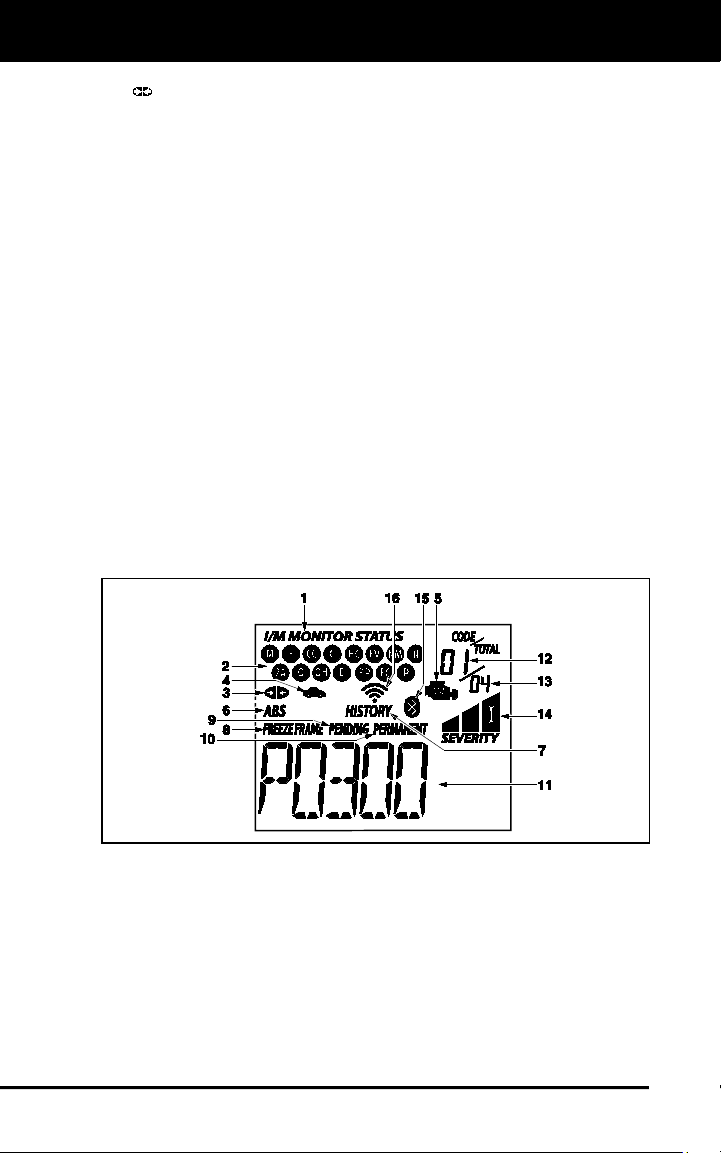
Figure 2. Display Functions
See Figure 2 for the locations of items 1 through 16 below.
1. I/M MONITOR STATUS field - Identifies the I/M Monitor status area.
2. Monitor icons - Indicate which Monitors are supported by the
vehicle under test, and whether or not the associated Monitor has
run its diagnostic testing (Monitor status). When a Monitor icon is
solid, it indicates that the associated Monitor has completed its
diagnostic testing. When a Monitor icon is flashing, it indicates that
the vehicle supports the associated Monitor, but the Monitor has not
yet run its diagnostic testing.

About the Code Reader
DISPLAY FUNCTIONS
5
The I/M Monitor Status icons are associated with INSPECTION
and MAINTENANCE (I/M) READINESS STATUS. Some states
require that all vehicle Monitors have run and completed their
diagnostic testing before a vehicle can be tested for Emissions
(Smog Check). A maximum of fifteen Monitors are used on OBD2
systems. Not all vehicles support all fifteen Monitors. When the
Code Reader is linked to a vehicle, only the icons for Monitors
that are supported by the vehicle under test are visible on the
display.
3.
Link icon - Indicates whether or not the Code Reader is
communicating (linked) with the vehicle's on-board computers.
When visible, the Code Reader is communicating with the
computers. If the Link icon is not visible, the Code Reader is not
communicating with the computers.
4.
Vehicle icon - Indicates whether or not the Code Reader is
being properly powered through the vehicle's Data Link Connector
(DLC). A visible icon indicates that the Code Reader is being
powered through the vehicle's DLC connector.
5. MIL icon - Indicates the status of the Malfunction Indicator Lamp
(MIL). The MIL icon is visible only when a DTC has commanded the
MIL on the vehicle's dashboard to light.
6. ABS icon - Indicates the currently displayed DTC is an Anti-Lock
Braking System code.
7. HISTORY icon – Indicates the currently displayed DTC is a
“History” code.
8. FREEZE FRAME icon - Indicates that “Freeze Frame” data has been
stored in the vehicle’s computer for the currently displayed DTC.
9. PENDING icon - Indicates the currently displayed DTC is a
"Pending" code.
10. PERMANENT icon - Indicates the currently displayed DTC is a
“Permanent” code.
11. DTC Display Area - Displays the Diagnostic Trouble Code (DTC)
number. Each fault is assigned a code number that is specific to that
fault.
12. Code Number Sequence - The Code Reader assigns a sequence
number to each DTC that is present in the computer's memory,
starting with "01.” This helps keep track of the number of DTCs
present in the computer's memory. Code number "01" is always the
highest priority code, and the one for which "Freeze Frame" data
has been stored.
13. Code Enumerator - Indicates the total number of codes retrieved
from the vehicle’s computer.
14. Severity - Indicates the level of severity for the priority code (code
number “1”), as follows:
Service should be scheduled and repairs made when
convenient. This DTC typically has no immediate threat to
essential system components in the short term.

About the Code Reader
DISPLAY FUNCTIONS
6
Repair immediately if drivability issues are present. Threat
to essential system components if not repaired as soon as
possible.
Stop and repair vehicle immediately to prevent interrelated
failures. Harmful and damaging to essential system
components.
15.
Bluetooth icon – Indicates communication status with a compatible
Innova mobile application (please visit www.innova.com/apps for more
information). When ON, indicates an active Bluetooth connection has
been established. When OFF, indicates Bluetooth is not connected.
16.
WiFi icon – Indicates WiFi communication status. When ON,
indicates the scan tool is linked to a WiFi network. When OFF,
indicates there is no WiFi connection.

Onboard Diagnostics
COMPUTER ENGINE CONTROLS
7
COMPUTER ENGINE CONTROLS
The Introduction of Electronic Engine Controls
As a result of increased air pollution (smog) in large cities,
such as Los Angeles, the California Air Resources Board
(CARB) and the Environmental Protection Agency (EPA)
set new regulations and air pollution standards to deal with
the problem. To further complicate matters, the energy crisis of
the early 1970s caused a sharp increase in fuel prices over a
short period. As a result, vehicle manufacturers were not only
required to comply with the new emissions standards, they also
had to make their vehicles more fuel-efficient. Most vehicles
were required to meet a miles-per-gallon (MPG) standard set by the U.S.
Federal Government.
Precise fuel delivery and spark timing are needed to reduce vehicle
emissions. Mechanical engine controls in use at the time (such as
ignition points, mechanical spark advance and the carburetor)
responded too slowly to driving conditions to properly control fuel
delivery and spark timing. This made it difficult for vehicle manufacturers
to meet the new standards.
A new Engine Control System had to be designed and integrated with
the engine controls to meet the stricter standards. The new system had
to:
Respond instantly to supply the proper mixture of air and fuel for any
driving condition (idle, cruising, low-speed driving, high-speed
driving, etc.).
Calculate instantly the best time to “ignite” the air/fuel mixture for
maximum engine efficiency.
Perform both these tasks without affecting vehicle performance or
fuel economy.
Vehicle Computer Control Systems can perform millions of calculations
each second. This makes them an ideal substitute for the slower
mechanical engine controls. By switching from mechanical to electronic
engine controls, vehicle manufacturers are able to control fuel delivery
and spark timing more precisely. Some newer Computer Control
Systems also provide control over other vehicle functions, such as
transmission, brakes, charging, body, and suspension systems.
Electronic Computer Control Systems make it possible
for vehicle manufacturers to comply with the tougher
emissions and fuel efficiency standards mandated by
State and Federal Governments.
Onboard Diagnostics
COMPUTER ENGINE CONTROLS
8
The Basic Engine Computer Control System
The on-board computer is the heart of the Computer
Control System. The computer contains several programs
with preset reference values for air/fuel ratio, spark or
ignition timing, injector pulse width, engine speed, etc.
Separate values are provided for various driving conditions,
such as idle, low speed driving, high-speed driving, low load,
or high load. The preset reference values represent the ideal
air/fuel mixture, spark timing, transmission gear selection,
etc., for any driving condition. These values are programmed
by the vehicle manufacturer, and are specific to each vehicle model.
Most on-board computers are located inside the vehicle behind the dashboard,
under the passenger’s or driver’s seat, or behind the right kick panel. However,
some manufacturers may still position it in the engine compartment.
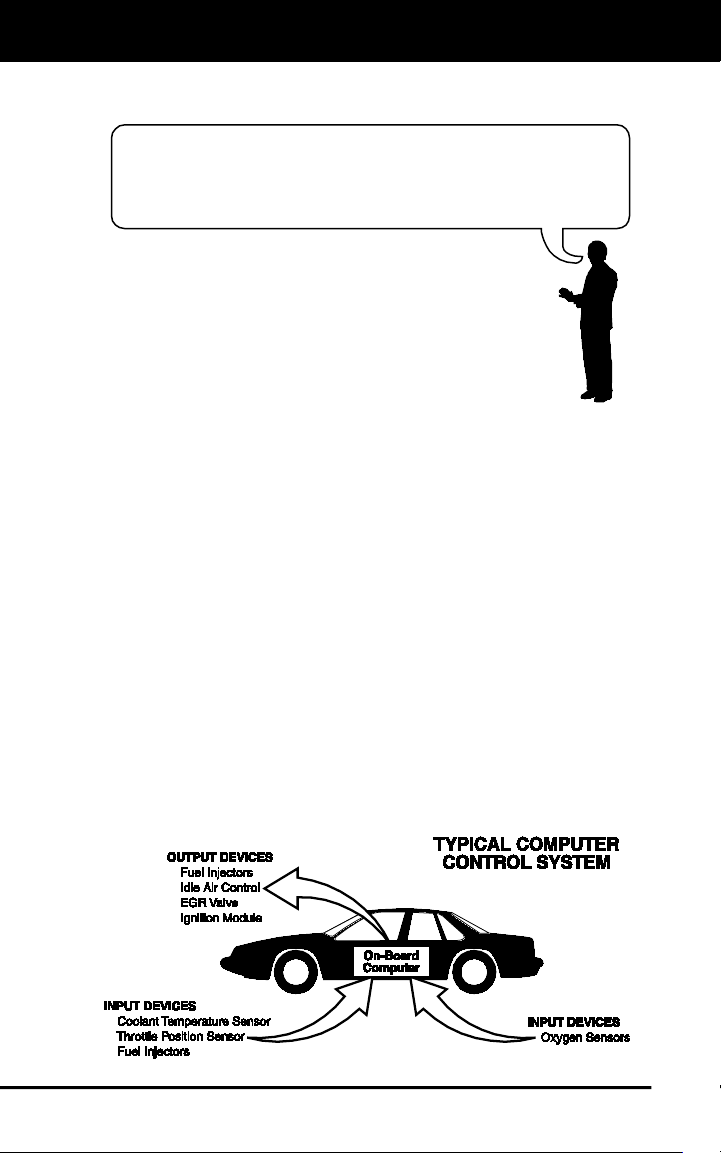
Vehicle sensors, switches, and actuators are located throughout the
engine, and are connected by electrical wiring to the on-board computer.
These devices include oxygen sensors, coolant temperature sensors,
throttle position sensors, fuel injectors, etc. Sensors and switches are
input devices. They provide signals representing current engine
operating conditions to the computer. Actuators are output devices. They
perform actions in response to commands received from the computer.
The on-board computer receives information inputs from sensors and
switches located throughout the engine. These devices monitor critical
engine conditions such as coolant temperature, engine speed, engine
load, throttle position, air/fuel ratio etc.
The computer compares the values received from these sensors with its
preset reference values, and makes corrective actions as needed so
that the sensor values always match the preset reference values for the
current driving condition. The computer makes adjustments by
commanding other devices such as the fuel injectors, idle air control,
EGR valve or Ignition Module to perform these actions.
The Computer Control System consists of an on-board
computer and several related control devices (sensors,
switches, and actuators).

Onboard Diagnostics
COMPUTER ENGINE CONTROLS
9
Vehicle operating conditions are constantly changing. The computer
continuously makes adjustments or corrections (especially to the air/fuel
mixture and spark timing) to keep all the engine systems operating
within the preset reference values.
On-Board Diagnostics - First Generation (OBD1)
Beginning in 1988, California’s Air Resources Board
(CARB), and later the Environmental Protection Agency (EPA)
required vehicle manufacturers to include a self-diagnostic
program in their on-board computers. The program would be
capable of identifying emissions-related faults in a system. The
first generation of Onboard Diagnostics came to be known as
OBD1.
OBD1 is a set of self-testing and diagnostic instructions
programmed into the vehicle’s on-board computer. The
programs are specifically designed to detect failures in the sensors,
actuators, switches and wiring of the various vehicle emissions-related
systems. If the computer detects a failure in any of these components or
systems, it lights an indicator on the dashboard to alert the driver. The
indicator lights only when an emissions-related problem is detected.
The computer also assigns a numeric code for each specific problem
that it detects, and stores these codes in its memory for later retrieval.
These codes can be retrieved from the computer’s memory with the use
of a “Code Reader” or a “Scan Tool.”
On-Board Diagnostics - Second Generation (OBD2)
In addition to performing all the
functions of the OBD1 System, the
OBD2 System has been enhanced with
new Diagnostic Programs. These
programs closely monitor the functions
of various emissions-related compo-
nents and systems (as well as other
systems) and make this information readily available (with
the proper equipment) to the technician for evaluation.
The California Air Resources Board (CARB) conducted
studies on OBD1 equipped vehicles. The information that was
gathered from these studies showed the following:
A large number of vehicles had deteriorating or degraded
emissions-related components. These components were
causing an increase in emissions.
With the exception of some 1994 and 1995 vehicles,
most vehicles from 1982 to 1995 are equipped with
some type of first generation On-Board Diagnostics.
The OBD2 System is
an enhancement of the
OBD1 System.

Onboard Diagnostics
COMPUTER ENGINE CONTROLS
10
Because OBD1 systems only detect failed components, the
degraded components were not setting codes.
Some emissions problems related to degraded components only
occur when the vehicle is being driven under a load. The emission
checks being conducted at the time were not performed under
simulated driving conditions. As a result, a significant number of
vehicles with degraded components were passing Emissions Tests.
Codes, code definitions, diagnostic connectors, communication
protocols and emissions terminology were different for each
manufacturer. This caused confusion for the technicians working on
different make and model vehicles.
To address the problems made evident by this study, CARB and the
EPA passed new laws and standardization requirements. These laws
required that vehicle manufacturers to equip their new vehicles with
devices capable of meeting all of the new emissions standards and
regulations. It was also decided that an enhanced on-board diagnostic
system, capable of addressing all of these problems, was needed. This
new system is known as “On-Board Diagnostics Generation Two
(OBD2).” The primary objective of the OBD2 system is to comply with
the latest regulations and emissions standards established by CARB
and the EPA.
The Main Objectives of the OBD2 System are:
To detect degraded and/or failed emissions-related components or
systems that could cause tailpipe emissions to exceed by 1.5 times
the Federal Test Procedure (FTP) standard.
To expand emissions-related system monitoring. This includes a set
of computer run diagnostics called Monitors. Monitors perform
diagnostics and testing to verify that all emissions-related
components and/or systems are operating correctly and within the
manufacturer’s specifications.
To use a standardized Diagnostic Link Connector (DLC) in all
vehicles. (Before OBD2, DLCs were of different shapes and sizes.)
To standardize the code numbers, code definitions and language
used to describe faults. (Before OBD2, each vehicle manufacturer
used their own code numbers, code definitions and language to
describe the same faults.)
To expand the operation of the Malfunction Indicator Lamp (MIL).
To standardize communication procedures and protocols between
the diagnostic equipment (Scan Tools, Code Readers, etc.) and the
vehicle’s on-board computer.
OBD2 Terminology
The following terms and their definitions are related to OBD2 systems.
Read and reference this list as needed to aid in the understanding of
OBD2 systems.

Onboard Diagnostics
COMPUTER ENGINE CONTROLS
11
Powertrain Control Module (PCM) - The PCM is the OBD2
accepted term for the vehicle’s “on-board computer.” In addition
to controlling the engine management and emissions systems,
the PCM also participates in controlling the powertrain
(transmission) operation. Most PCMs also have the ability to
communicate with other computers on the vehicle (ABS, ride
control, body, etc.).
Monitor - Monitors are “diagnostic routines” programmed into the
PCM. The PCM utilizes these programs to run diagnostic tests, and
to monitor operation of the vehicle’s emissions-related components
or systems to ensure they are operating correctly and within the
vehicle’s manufacturer specifications. Currently, up to fifteen
Monitors are used in OBD2 systems. Additional Monitors will be
added as the OBD2 system is further developed.
Not all vehicles support all fifteen Monitors.
Enabling Criteria - Each Monitor is designed to test and monitor
the operation of a specific part of the vehicle’s emissions system
(EGR system, oxygen sensor, catalytic converter, etc.). A specific
set of “conditions” or “driving procedures” must be met before the
computer can command a Monitor to run tests on its related system.
These “conditions” are known as “Enabling Criteria.” The
requirements and procedures vary for each Monitor. Some Monitors
only require the ignition key to be turned “On” for them to run and
complete their diagnostic testing. Others may require a set of
complex procedures, such as, starting the vehicle when cold,
bringing it to operating temperature, and driving the vehicle under
specific conditions before the Monitor can run and complete its
diagnostic testing.
Monitor Has/Has Not Run - The terms “Monitor has run” or
“Monitor has not run” are used throughout this manual. “Monitor
has run,” means the PCM has commanded a particular Monitor to
perform the required diagnostic testing on a system to ensure the
system is operating correctly (within factory specifications). The term
“Monitor has not run” means the PCM has not yet commanded a
particular Monitor to perform diagnostic testing on its associated part
of the emissions system.
Trip - A Trip for a particular Monitor requires that the vehicle is
being driven in such a way that all the required “Enabling Criteria”
for the Monitor to run and complete its diagnostic testing are met.
The “Trip Drive Cycle” for a particular Monitor begins when the
ignition key is turned “On.” It is successfully completed when all the
“Enabling Criteria” for the Monitor to run and complete its diagnostic
testing are met by the time the ignition key is turned “Off.” Since
each of the fifteen monitors is designed to run diagnostics and
testing on a different part of the engine or emissions system, the
“Trip Drive Cycle” needed for each individual Monitor to run and
complete varies.

Onboard Diagnostics
DIAGNOSTIC TROUBLE CODES (DTCs)
12
OBD2 Drive Cycle - An OBD2 Drive Cycle is an extended set of
driving procedures that takes into consideration the various types of
driving conditions encountered in real life. These conditions may
include starting the vehicle when it is cold, driving the vehicle at a
steady speed (cruising), accelerating, etc. An OBD2 Drive Cycle
begins when the ignition key is turned “On” (when cold) and ends
when the vehicle has been driven in such a way as to have all the
“Enabling Criteria” met for all its applicable Monitors. Only those
trips that provide the Enabling Criteria for all Monitors applicable to
the vehicle to run and complete their individual diagnostic tests
qualify as an OBD2 Drive Cycle. OBD2 Drive Cycle requirements
vary from one model of vehicle to another. Vehicle manufacturers
set these procedures. Consult your vehicle’s service manual for
OBD2 Drive Cycle procedures.
Do not confuse a “Trip” Drive Cycle with an OBD2 Drive Cycle. A
“Trip” Drive Cycle provides the “Enabling Criteria” for one specific
Monitor to run and complete its diagnostic testing. An OBD2 Drive
Cycle must meet the “Enabling Criteria” for all Monitors on a
particular vehicle to run and complete their diagnostic testing.
Warm-up Cycle - Vehicle operation after an engine off period where
engine temperature rises at least 40°F (22°C) from its temperature
before starting, and reaches at least 160°F (70°C). The PCM uses
warm-up cycles as a counter to automatically erase a specific code
and related data from its memory. When no faults related to the
original problem are detected within a specified number of warm-up
cycles, the code is erased automatically.
DIAGNOSTIC TROUBLE CODES (DTCs)
Diagnostic Trouble Codes (DTCs) are
meant to guide you to the proper
service procedure in the vehicle’s
service manual. DO NOT replace parts
based only on DTCs without first
consulting the vehicle’s service manual
for proper testing procedures for that
particular system, circuit or component.
DTCs are alphanumeric codes that are used to identify a
problem that is present in any of the systems that are
monitored by the on-board computer (PCM). Each trouble
code has an assigned message that identifies the circuit,
component or system area where the problem was found.
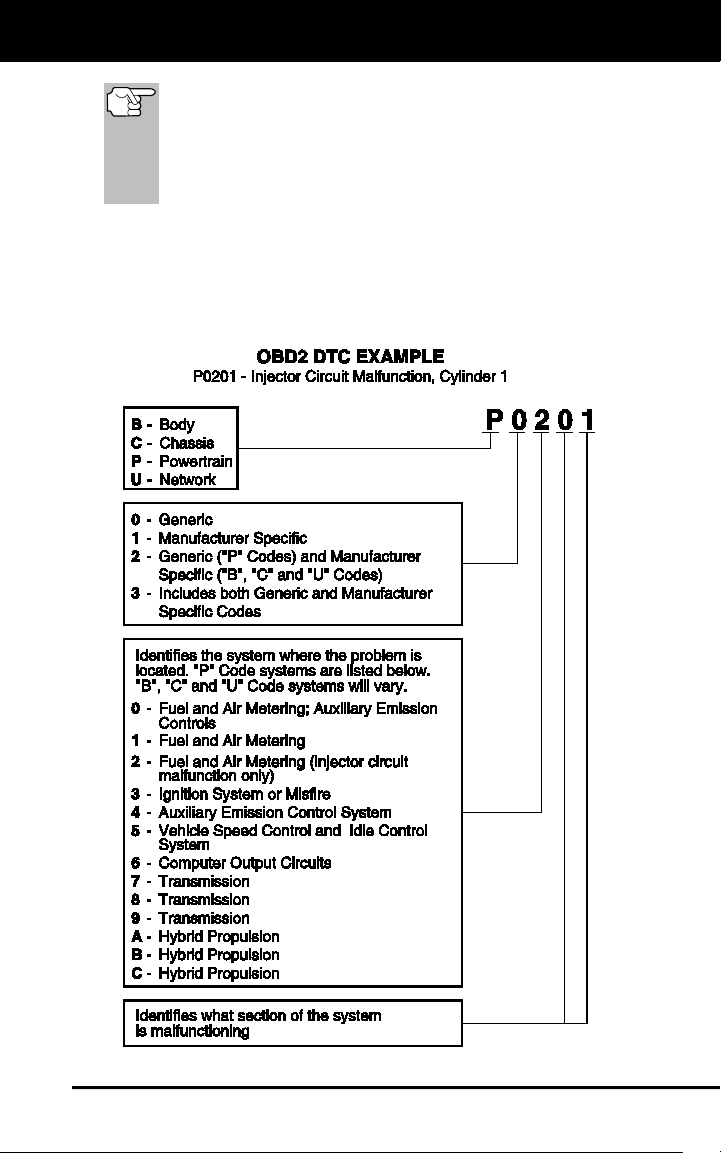
OBD2 diagnostic trouble codes are made up of five characters:
The 1st character is a letter (B, C, P or U). It identifies the
“main system” where the fault occurred (Body, Chassis, Powertrain,
or Network).
The 2nd character is a numeric digit (0 thru 3). It identifies the
“type” of code (Generic or Manufacturer-Specific).
Generic DTCs are codes that are used by all vehicle manu-
facturers. The standards for generic DTCs, as well as their
definitions, are set by the Society of Automotive Engineers (SAE).
Diagnostic Trouble
Codes (DTCs) are
codes that identify a
specific problem area.
Onboard Diagnostics
DIAGNOSTIC TROUBLE CODES (DTCs)
13
Manufacturer-Specific DTCs are codes that are controlled by
the vehicle manufacturers. The Federal Government does not
require vehicle manufacturers to go beyond the standardized
generic DTCs in order to comply with the new OBD2 emissions
standards. However, manufacturers are free to expand beyond
the standardized codes to make their systems easier to
diagnose.
The 3rd character is a letter or a numeric digit (0 thru 9, A thru F).
It identifies the specific system or sub-system where the problem is
located.
The 4th and 5th characters are letters or numeric digits (0 thru 9, A
thru F). They identify the section of the system that is malfunctioning.
Onboard Diagnostics
DIAGNOSTIC TROUBLE CODES (DTCs)
14
DTCs and MIL Status
When the vehicle’s on-board computer detects
a failure in an emissions-related component or
system, the computer’s internal diagnostic
program assigns a diagnostic trouble code
(DTC) that points to the system (and subsystem)
where the fault was found. The diagnostic
program saves the code in the computer’s
memory. It records a “Freeze Frame” of
conditions present when the fault was found, and lights the Malfunction
Indicator Lamp (MIL). Some faults require detection for two trips in a row
before the MIL is turned on.
The “Malfunction Indicator Lamp” (MIL) is the accepted term
used to describe the lamp on the dashboard that lights to warn
the driver that an emissions-related fault has been found.
Some manufacturers may still call this lamp a “Check Engine”
or “Service Engine Soon” light.
There are two types of DTCs used for emissions-related faults: Type “A”
and Type “B.” Type “A” codes are “One-Trip” codes; Type “B” DTCs are
usually Two-Trip DTCs.
When a Type “A” DTC is found on the First Trip, the following events
take place:
The computer commands the MIL “On” when the failure is first found.
If the failure causes a severe misfire that may cause damage to the
catalytic converter, the MIL “flashes” once per second. The MIL
continues to flash as long as the condition exists. If the condition
that caused the MIL to flash is no longer present, the MIL will light
“steady” On.
A DTC is saved in the computer’s memory for later retrieval.
A “Freeze Frame” of the conditions present in the engine or emissions
system when the MIL was ordered “On” is saved in the computer’s
memory for later retrieval. This information shows fuel system status
(closed loop or open loop), engine load, coolant temperature, fuel trim
value, MAP vacuum, engine RPM and DTC priority.
When a Type “B” DTC is found on the First Trip, the following events
take place:
The computer sets a Pending DTC, but the MIL is not ordered “On.”
“Freeze Frame” data may or may not be saved at this time
depending on manufacturer. The Pending DTC is saved in the
computer’s memory for later retrieval.
If the failure is found on the second consecutive trip, the MIL is
ordered “On.” “Freeze Frame” data is saved in the computer’s
memory.
If the failure is not found on the second Trip, the Pending DTC is
erased from the computer’s memory.
The MIL will stay lit for both Type “A” and Type “B” codes until one of
the following conditions occurs:

Onboard Diagnostics
OBD2 MONITORS
15
If the conditions that caused the MIL to light are no longer present
for the next three trips in a row, the computer automatically turns the
MIL “Off” if no other emissions-related faults are present. However,
the DTCs remain in the computer’s memory as a history code for 40
warm-up cycles (80 warm-up cycles for fuel and misfire faults). The
DTCs are automatically erased if the fault that caused them to be
set is not detected again during that period.
Misfire and fuel system faults require three trips with “similar
conditions” before the MIL is turned “Off.” These are trips where the
engine load, RPM and temperature are similar to the conditions
present when the fault was first found.
After the MIL has been turned off, DTCs and Freeze Frame
data stay in the computer’s memory.
Erasing the DTCs from the computer’s memory can also turn off the
MIL. See ERASING DIAGNOSTIC TROUBLE CODES (DTCs) on
page 27, before erasing codes from the computer’s memory. If a
Diagnostic Tool or Scan Tool is used to erase the codes, Freeze
Frame data will also be erased.
OBD2 MONITORS
To ensure the correct operation of the various emissions-related
components and systems, a diagnostic program was developed and
installed in the vehicle’s on-board computer. The program has several
procedures and diagnostic strategies. Each procedure or diagnostic
strategy is made to monitor the operation of, and run diagnostic tests on,
a specific emissions-related component or system. These tests ensure
the system is running correctly and is within the manufacturer’s
specifications. On OBD2 systems, these procedures and diagnostic
strategies are called “Monitors.”
Currently, fifteen Monitors are supported by OBD2 systems. Additional
monitors may be added as a result of Government regulations as the
OBD2 system grows and matures. Not all vehicles support all fifteen
Monitors. Additionally, some Monitors are supported by “spark ignition”
vehicles only, while others are supported by “compression ignition”
vehicles only.
Monitor operation is either “Continuous” or “Non-Continuous,”
depending on the specific monitor.
Continuous Monitors
Three of these Monitors are designed to constantly monitor their
associated components and/or systems for proper operation.
Continuous Monitors run constantly when the engine is running. The
Continuous Monitors are:
Comprehensive Component Monitor (CCM)
Misfire Monitor
Fuel System Monitor
Onboard Diagnostics
OBD2 MONITORS
16
Non-Continuous Monitors
The other twelve Monitors are “non-continuous” Monitors. “Non-
continuous” Monitors perform and complete their testing once per trip.
The “non-continuous” Monitors are:
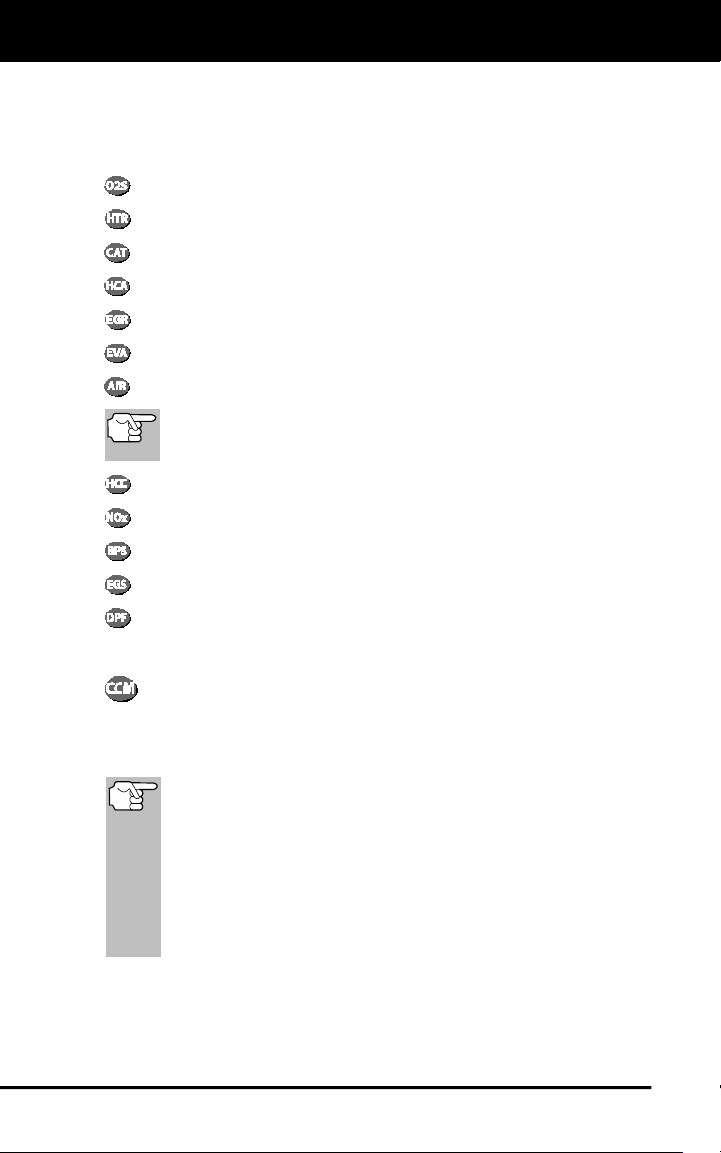
Oxygen Sensor Monitor
Oxygen Sensor Heater Monitor
Catalyst Monitor
Heated Catalyst Monitor
EGR System Monitor
EVAP System Monitor
Secondary Air System Monitor
The following Monitors became standard beginning in 2010.
The majority of vehicles produced before this time will not
support these Monitors
NMHC Monitor
NOx Adsorber Monitor
Boost Pressure System Monitor
Exhaust Gas Sensor Monitor
PM Filter Monitor
The following provides a brief explanation of the function of each Monitor:
Comprehensive Component Monitor (CCM) - This Monitor
continuously checks all inputs and outputs from sensors,
actuators, switches and other devices that provide a signal to the
computer. The Monitor checks for shorts, opens, out of range value,
functionality and “rationality.”
Rationality: Each input signal is compared against all other
inputs and against information in the computer’s memory to see
if it makes sense under the current operating conditions.
Example: The signal from the throttle position sensor indicates
the vehicle is in a wide-open throttle condition, but the vehicle is
really at idle, and the idle condition is confirmed by the signals
from all other sensors. Based on the input data, the computer
determines that the signal from the throttle position sensor is not
rational (does not make sense when compared to the other
inputs). In this case, the signal would fail the rationality test.
The CCM is supported by both “spark ignition” vehicles and
“compression ignition” vehicles. The CCM may be either a “One-Trip” or
a “Two-Trip” Monitor, depending on the component.

Onboard Diagnostics
OBD2 MONITORS
17
Fuel System Monitor - This Monitor uses a Fuel System
Correction program, called Fuel Trim, inside the on-board
computer. Fuel Trim is a set of positive and negative values that
represent adding or subtracting fuel from the engine. This program is
used to correct for a lean (too much air/not enough fuel) or rich (too
much fuel/not enough air) air-fuel mixture. The program is designed to
add or subtract fuel, as needed, up to a certain percent. If the correction
needed is too large and exceeds the time and percent allowed by the
program, a fault is indicated by the computer.
The Fuel System Monitor is supported by both “spark ignition” vehicles
and “compression ignition” vehicles. The Fuel System Monitor may be a
“One-Trip” or “Two-Trip” Monitor, depending on the severity of the
problem.
Misfire Monitor - This Monitor continuously checks for engine misfires.
A misfire occurs when the air-fuel mixture in the cylinder does not
ignite. The misfire Monitor uses changes in crankshaft speed to sense an
engine misfire. When a cylinder misfires, it no longer contributes to the speed
of the engine, and engine speed decreases each time the affected cylinder(s)
misfire. The misfire Monitor is designed to sense engine speed fluctuations
and determine from which cylinder(s) the misfire is coming, as well as how
bad the misfire is. There are three types of engine misfires, Types 1, 2, and 3.
- Type 1 and Type 3 misfires are two-trip monitor faults. If a fault is sensed
on the first trip, the computer temporarily saves the fault in its memory as
a Pending Code. The MIL is not commanded on at this time. If the fault is
found again on the second trip, under similar conditions of engine speed,
load and temperature, the computer commands the MIL “On,” and the
code is saved in its long term memory.
- Type 2 misfires are the most severe type of misfire. When a Type 2
misfire is sensed on the first trip, the computer commands the MIL to
light when the misfire is sensed. If the computer determines that a
Type 2 misfire is severe , and may cause catalytic converter damage,
it commands the MIL to “flash” once per second as soon as the
misfire is sensed. When the misfire is no longer present, the MIL
reverts to steady “On” condition.
The Misfire Monitor is supported by both “spark ignition” vehicles and
“compression ignition” vehicles.
Catalyst Monitor - The catalytic converter is a device that is
installed downstream of the exhaust manifold. It helps to oxidize
(burn) the unburned fuel (hydrocarbons) and partially burned fuel
(carbon monoxide) left over from the combustion process. To
accomplish this, heat and catalyst materials inside the converter react
with the exhaust gases to burn the remaining fuel. Some materials
inside the catalytic converter also have the ability to store oxygen, and
release it as needed to oxidize hydrocarbons and carbon monoxide. In
the process, it reduces vehicle emissions by converting the polluting
gases into carbon dioxide and water.
The computer checks the efficiency of the catalytic converter by
monitoring the oxygen sensors used by the system. One sensor is located
before (upstream of) the converter; the other is located after (downstream
of) the converter. If the catalytic converter loses its ability to store oxygen,
Onboard Diagnostics
OBD2 MONITORS
18
the downstream sensor signal voltage becomes almost the same as the
upstream sensor signal. In this case, the monitor fails the test.
The Catalyst Monitor is supported by “spark ignition” vehicles only. The
Catalyst Monitor is a “Two-Trip” Monitor. If a fault is found on the first
trip, the computer temporarily saves the fault in its memory as a
Pending Code. The computer does not command the MIL on at this time.
If the fault is sensed again on the second trip, the computer commands
the MIL “On” and saves the code in its long-term memory.
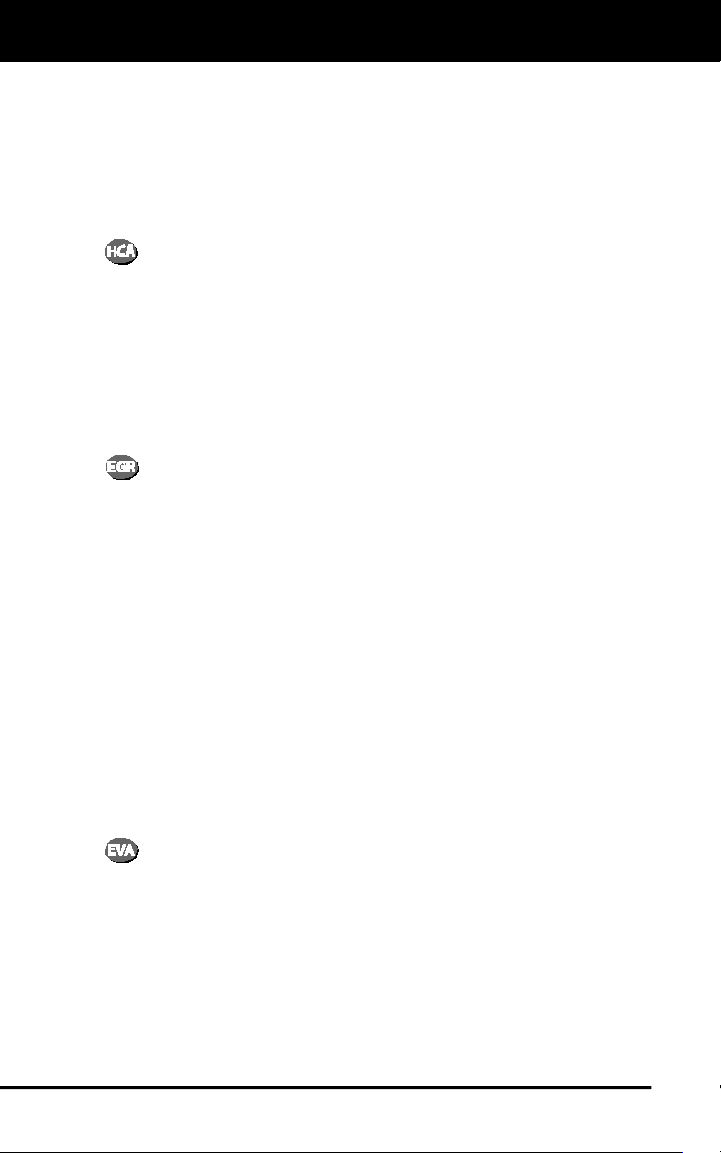
Heated Catalyst Monitor - Operation of the “heated” catalytic
converter is similar to the catalytic converter. The main
difference is that a heater is added to bring the catalytic converter to its
operating temperature more quickly. This helps reduce emissions by
reducing the converter’s down time when the engine is cold. The Heated
Catalyst Monitor performs the same diagnostic tests as the catalyst
Monitor, and also tests the catalytic converter’s heater for proper
operation.
The Heated Catalyst Monitor is supported by “spark ignition” vehicles
only. This Monitor is also a “Two-Trip” Monitor.
Exhaust Gas Recirculation (EGR) Monitor - The Exhaust Gas
Recirculation (EGR) system helps reduce the formation of
Oxides of Nitrogen during combustion. Temperatures above 2500°F
cause nitrogen and oxygen to combine and form Oxides of Nitrogen in
the combustion chamber. To reduce the formation of Oxides of Nitrogen,
combustion temperatures must be kept below 2500°F. The EGR system
recirculates small amounts of exhaust gas back into the intake manifold,
where it is mixed with the incoming air/fuel mixture. This reduces
combustion temperatures by up to 500°F. The computer determines
when, for how long, and how much exhaust gas is recirculated back to
the intake manifold. The EGR Monitor performs EGR system function
tests at preset times during vehicle operation.
The EGR Monitor is supported by both “spark ignition” vehicles and
“compression ignition” vehicles. The EGR Monitor is a “Two-Trip”
Monitor. If a fault is found on the first trip, the computer temporarily
saves the fault in its memory as a Pending Code. The computer does
not command the MIL on at this time. If the fault is sensed again on the
second trip, the computer commands the MIL “On,” and saves the code
in its long-term memory.
Evaporative System (EVAP) Monitor - OBD2 vehicles are
equipped with a fuel Evaporative system (EVAP) that helps
prevent fuel vapors from evaporating into the air. The EVAP system
carries fumes from the fuel tank to the engine where they are burned
during combustion. The EVAP system may consist of a charcoal
canister, fuel tank cap, purge solenoid, vent solenoid, flow monitor, leak
detector and connecting tubes, lines and hoses.
Fumes are carried from the fuel tank to the charcoal canister by hoses
or tubes. The fumes are stored in the charcoal canister. The computer
controls the flow of fuel vapors from the charcoal canister to the engine
via a purge solenoid. The computer energizes or de-energizes the purge
solenoid (depending on solenoid design). The purge solenoid opens a

Onboard Diagnostics
OBD2 MONITORS
19
valve to allow engine vacuum to draw the fuel vapors from the canister
into the engine where the vapors are burned. The EVAP Monitor checks
for proper fuel vapor flow to the engine, and pressurizes the system to
test for leaks. The computer runs this Monitor once per trip.
The EVAP Monitor is supported by “spark ignition” vehicles only. The
EVAP Monitor is a “Two-Trip” Monitor. If a fault is found on the first trip,
the computer temporarily saves the fault in its memory as a Pending
Code. The computer does not command the MIL on at this time. If the
fault is sensed again on the second trip, the PCM commands the MIL
“On,” and saves the code in its long-term memory.
Oxygen Sensor Heater Monitor - The Oxygen Sensor Heater
Monitor tests the operation of the oxygen sensor’s heater. There
are two modes of operation on a computer-controlled vehicle: “open-
loop” and “closed-loop.” The vehicle operates in open-loop when the
engine is cold, before it reaches normal operating temperature. The
vehicle also goes to open-loop mode at other times, such as heavy load
and full throttle conditions. When the vehicle is running in open-loop, the
oxygen sensor signal is ignored by the computer for air/fuel mixture
corrections. Engine efficiency during open-loop operation is very low,
and results in the production of more vehicle emissions.
Closed-loop operation is the best condition for both vehicle emissions
and vehicle operation. When the vehicle is operating in closed-loop, the
computer uses the oxygen sensor signal for air/fuel mixture corrections.
In order for the computer to enter closed-loop operation, the oxygen
sensor must reach a temperature of at least 600°F. The oxygen sensor
heater helps the oxygen sensor reach and maintain its minimum
operating temperature (600°F) more quickly, to bring the vehicle into
closed-loop operation as soon as possible.
The Oxygen Sensor Heater Monitor is supported by “spark ignition”
vehicles only. The Oxygen Sensor Heater Monitor is a “Two-Trip”
Monitor. If a fault is found on the first trip, the computer temporarily
saves the fault in its memory as a Pending Code. The computer does
not command the MIL on at this time. If the fault is sensed again on the
second trip, the computer commands the MIL “On,” and saves the code
in its long-term memory.
Oxygen Sensor Monitor - The Oxygen Sensor monitors how
much oxygen is in the vehicle’s exhaust. It generates a varying
voltage of up to one volt, based on how much oxygen is in the exhaust
gas, and sends the signal to the computer. The computer uses this
signal to make corrections to the air/fuel mixture. If the exhaust gas has
a large amount of oxygen (a lean air/fuel mixture), the oxygen sensor
generates a “low” voltage signal. If the exhaust gas has very little
oxygen (a rich mixture condition), the oxygen sensor generates a “high”
voltage signal. A 450mV signal indicates the most efficient, and least
polluting, air/fuel ratio of 14.7 parts of air to one part of fuel.
The oxygen sensor must reach a temperature of at least 600-650°F,
and the engine must reach normal operating temperature, for the
computer to enter into closed-loop operation. The oxygen sensor only
functions when the computer is in closed-loop. A properly operating

Onboard Diagnostics
OBD2 MONITORS
20
oxygen sensor reacts quickly to any change in oxygen content in the
exhaust stream. A faulty oxygen sensor reacts slowly, or its voltage
signal is weak or missing.
The Oxygen Sensor Monitor is supported by “spark ignition” vehicles
only. The Oxygen Sensor Monitor is a “Two-Trip” monitor. If a fault is
found on the first trip, the computer temporarily saves the fault in its
memory as a Pending Code. The computer does not command the MIL
on at this time. If the fault is sensed again on the second trip, the
computer commands the MIL “On,” and saves the code in its long-term
memory.
Secondary Air System Monitor - When a cold engine is first
started, it runs in open-loop mode. During open-loop operation,
the engine usually runs rich. A vehicle running rich wastes fuel and
creates increased emissions, such as carbon monoxide and some
hydrocarbons. A Secondary Air System injects air into the exhaust
stream to aid catalytic converter operation:
1. It supplies the catalytic converter with the oxygen it needs to oxidize
the carbon monoxide and hydrocarbons left over from the
combustion process during engine warm-up.
2. The extra oxygen injected into the exhaust stream also helps the
catalytic converter reach operating temperature more quickly during
warm-up periods. The catalytic converter must heat to operating
temperature to work properly.
The Secondary Air System Monitor checks for component integrity and
system operation, and tests for faults in the system. The computer runs
this Monitor once per trip.
The Secondary Air System Monitor is a “Two-Trip” monitor. If a fault is
found on the first trip, the computer temporarily saves this fault in its
memory as a Pending Code. The computer does not command the MIL
on at this time. If the fault is sensed again on the second trip, the
computer commands the MIL “On,” and saves the code in its long-term
memory.
Non-Methane Hydrocarbon Catalyst (NMHC) Monitor - The
non-methane hydrocarbon catalyst is a type of catalytic
converter. It helps to remove non-methane hydrocarbons (NMH) left
over from the combustion process from the exhaust stream. To
accomplish this, heat and catalyst materials react with the exhaust
gases to convert NMH to less harmful compounds. The computer checks
the efficiency of the catalyst by monitoring the quantity of NMH in the
exhaust stream. The monitor also verifies that sufficient temperature is
present to aid in particulate matter (PM) filter regeneration.
The NMHC Monitor is supported by “compression ignition” vehicles only.
The NMHC Monitor is a “Two-Trip” Monitor. If a fault is found on the first
trip, the computer temporarily saves the fault in its memory as a
Pending Code. The computer does not command the MIL on at this time.
If the fault is sensed again on the second trip, the computer commands
the MIL “On,” and saves the code in its long-term memory.

Onboard Diagnostics
OBD2 MONITORS
21
NOx Aftertreatment Monitor - NOx aftertreatment is based on a
catalytic converter support that has been coated with a special
washcoat containing zeolites. NOx Aftertreatment is designed to reduce
oxides of nitrogen emitted in the exhaust stream. The zeolite acts as a
molecular "sponge" to trap the NO and NO2 molecules in the exhaust
stream. In some implementations, injection of a reactant before the
aftertreatment purges it. NO2 in particular is unstable, and will join with
hydrocarbons to produce H2O and N2. The NOx Aftertreatment Monitor
monitors the function of the NOx aftertreatment to ensure that tailpipe
emissions remain within acceptable limits.
The NOx Aftertreatment Monitor is supported by “compression ignition”
vehicles only. The NOx Aftertreatment Monitor is a “Two-Trip” Monitor. If
a fault is found on the first trip, the computer temporarily saves the fault
in its memory as a Pending Code. The computer does not command the
MIL on at this time. If the fault is sensed again on the second trip, the
computer commands the MIL “On,” and saves the code in its long-term
memory.
Boost Pressure System Monitor - The boost pressure system
serves to increase the pressure produced inside the intake
manifold to a level greater than atmospheric pressure. This increase in
pressure helps to ensure compete combustion of the air-fuel mixture.
The Boost Pressure System Monitor checks for component integrity and
system operation, and tests for faults in the system. The computer runs
this Monitor once per trip.
The Boost Pressure System Monitor is supported by “compression
ignition” vehicles only. The Boost Pressure System Monitor is a “Two-
Trip” Monitor. If a fault is found on the first trip, the computer temporarily
saves the fault in its memory as a Pending Code. The computer does
not command the MIL on at this time. If the fault is sensed again on the
second trip, the computer commands the MIL “On,” and saves the code
in its long-term memory.
Exhaust Gas Sensor Monitor - The exhaust gas sensor is used
by a number of systems/monitors to determine the content of the
exhaust stream. The computer checks for component integrity, system
operation, and tests for faults in the system, as well as feedback faults
that may affect other emission control systems.
The Exhaust Gas Sensor Monitor is supported by “compression ignition”
vehicles only. The Exhaust Gas Sensor Monitor is a “Two-Trip” Monitor.
If a fault is found on the first trip, the computer temporarily saves the
fault in its memory as a Pending Code. The computer does not
command the MIL on at this time. If the fault is sensed again on the
second trip, the computer commands the MIL “On,” and saves the code
in its long-term memory.

Onboard Diagnostics
OBD2 MONITORS
22
PM Filter Monitor - The particulate matter (PM) filter removes
particulate matter from the exhaust stream by filtration. The filter
has a honeycomb structure similar to a catalyst substrate, but with the
channels blocked at alternate ends. This forces the exhaust gas to flow
through the walls between the channels, filtering the particulate matter
out. The filters are self-cleaning by periodic modification of the exhaust
gas concentration in order to burn off the trapped particles (oxidizing the
particles to form CO2 and water). The computer monitors the efficiency
of the filter in trapping particulate matter, as well as the ability of the filter
to regenerate (self-clean).
The PM Filter Monitor is supported by “compression ignition” vehicles
only. The PM Filter Monitor is a “Two-Trip” Monitor. If a fault is found on
the first trip, the computer temporarily saves the fault in its memory as a
Pending Code. The computer does not command the MIL on at this time.
If the fault is sensed again on the second trip, the computer commands
the MIL “On,” and saves the code in its long-term memory.
OBD2 Reference Table
The table below lists current OBD2 Monitors, and indicates the following
for each Monitor:
A. Monitor Type (how often does the Monitor run; Continuous or
Once per trip)
B. Number of trips needed, with a fault present, to set a pending DTC
C. Number of consecutive trips needed, with a fault present, to
command the MIL “On” and store a DTC
D. Number of trips needed, with no faults present, to erase a Pending
DTC
E. Number and type of trips or drive cycles needed, with no faults
present, to turn off the MIL
F. Number of warm-up periods needed to erase the DTC from the
computer’s memory after the MIL is turned off

Onboard Diagnostics
OBD2 MONITORS
23
Name of
Monitor
A
B
C
D
E
F
Comprehensive
Component Monitor
Continuous 1 2 1 3 40
Misfire Monitor
(Type 1 and 3)
Continuous 1 2 1
3 - similar
conditions
80
Misfire Monitor
(Type 2)
Continuous 1
3 - similar
conditions
80
Fuel System Monitor
Continuous 1 1 or 2 1
3 - similar
conditions
80
Catalytic Converter
Monitor
Once per
trip
1 2 1 3 trips 40
Oxygen Sensor
Monitor
Once per
trip
1 2 1 3 trips 40
Oxygen Sensor
Heater Monitor
Once per
trip
1 2 1 3 trips 40
Exhaust Gas
Recirculation (EGR)
Monitor
Once per
trip
1 2 1 3 trips 40
Evaporative
Emissions Controls
Monitor
Once per
trip
1 2 1 3 trips 40
Secondary Air
System (AIR) Monitor
Once per
trip
1 2 1 3 trips 40
NMHC Monitor
Once per
trip
1 2 1 3 trips 40
Nox Adsorber Monitor
Once per
trip
1 2 1 3 trips 40
Boost Pressure
System Monitor
Once per
trip
1 2 1 3 trips 40
Exhaust Gas Sensor
Monitor
Once per
trip
1 2 1 3 trips 40
PM Filter Monitor Once per
trip
1 2 1 3 trips 40
Using the Code Reader
CODE RETRIEVAL PROCEDURE
24
CODE RETRIEVAL PROCEDURE
Never replace a part based only on the DTC definition. Each DTC has a
set of testing procedures, instructions and flow charts that must be
followed to confirm the location of the problem. This information is found
in the vehicle's service manual. Always refer to the vehicle's service
manual for detailed testing instructions.
Check your vehicle thoroughly before performing any test.
ALWAYS observe safety precautions whenever working on a
vehicle. See SAFETY FIRST! on page 1 for more information.
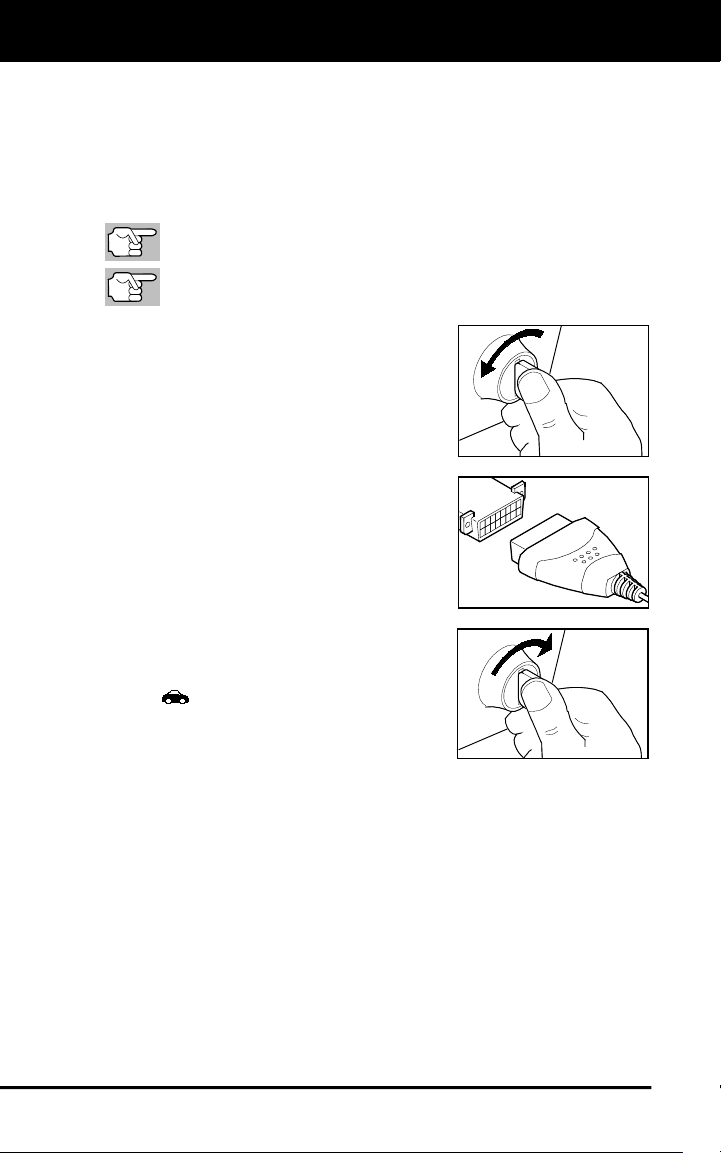
1. Turn the ignition off.
2. Locate the vehicle's 16-pin Data Link
Connector (DLC).
3. Connect the Code Reader’s cable
connector to the vehicle's DLC. The
cable connector is keyed and will only fit
one way.
If you have problems connecting the
cable connector to the DLC, rotate
the connector 180° and try again.
If you still have problems, check the
DLC on the vehicle and on the Code
Reader. Refer to your vehicle's
service manual to properly check the
vehicle's DLC.
After the Code Reader’s test
connector is properly connected to
the vehicle's DLC, the Vehicle icon
should display to confirm a good
power connection.
4. Turn the ignition on. DO NOT start the
engine.
5. The Code Reader will automatically link to the vehicle’s computer(s).
If the LCD display is blank, it indicates there is no power at the
vehicle's DLC. Check your fuse panel and replace any burned-
out fuses.
If replacing the fuse(s) does not correct the problem, see your
vehicle's repair manual to locate the proper computer (PCM)
fuse/circuit. Perform any necessary repairs before continuing.
After 4-5 seconds, the Code Reader will retrieve and display
any Diagnostic Trouble Codes that are in the vehicle's computer
memory.
Using the Code Reader
CODE RETRIEVAL PROCEDURE
25
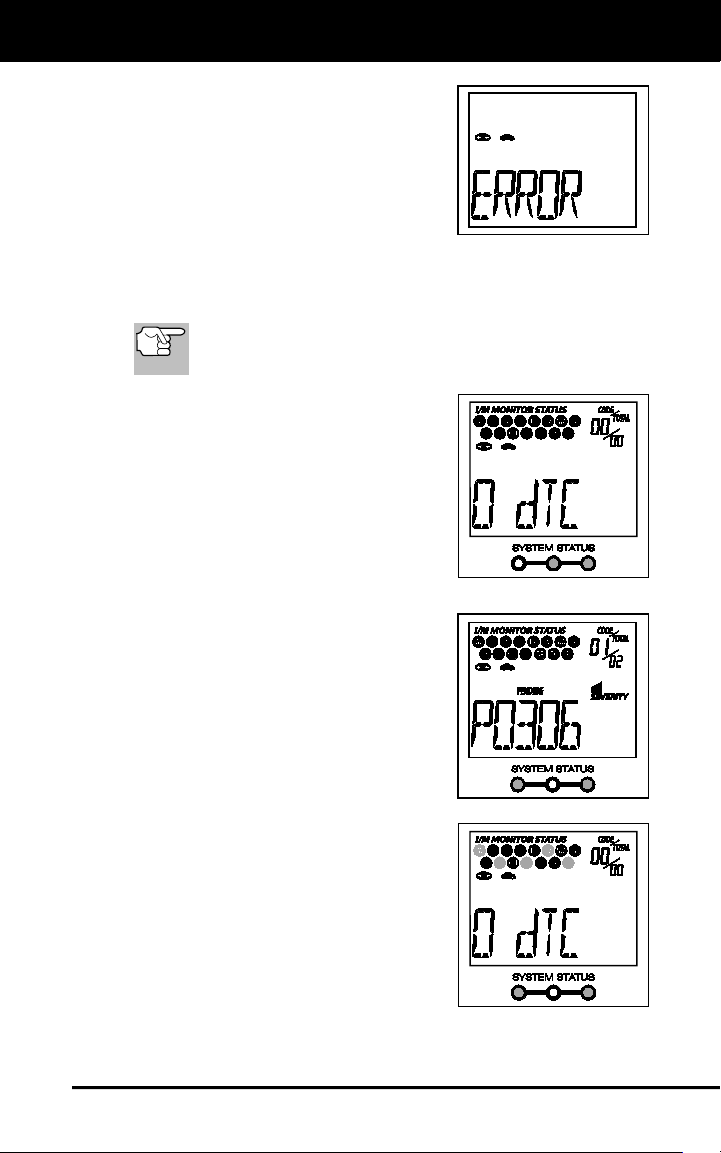
If Error is shown on the Code
Reader’s LCD display, it indicates
there is a communication problem.
This means that the Code Reader is
unable to communicate with the
vehicle's computer. Do the following:
- Turn the ignition key off, wait 5
seconds and turn the key back on
to reset the computer.
- Make sure your vehicle is OBD2 compliant.
6. Read and interpret the Diagnostic Trouble Codes using the LCD
display and the green, yellow and red LEDs.
The green, yellow and red LEDs are used (with the LCD
display) as visual aids to make it easier for the user to
determine engine system conditions.
Green LED - Indicates that all
engine systems are "OK" and
running normally. All monitors on the
vehicle are active and are performing
their diagnostic testing, and no
trouble codes are present. The
message 0 DTC will show on the
Code Reader’s LCD display for
further confirmation.
Yellow LED - Indicates one of the
following conditions:
PENDING CODE PRESENT - If the
yellow LED is lit, it may indicate the
existence of a pending code. Check
the Code Reader’s LCD display for
confirmation. A pending code is
confirmed by the presence of a
numeric code and the word PENDING
on the Code Reader’s LCD display. If
no pending code is shown, the yellow
LED indicates Monitor Status (see the
following).
MONITOR STATUS - If the Code
Reader’s LCD display shows the
message 0 DTC (indicating there are
no DTCs present in the vehicle's
computer), but the yellow LED is lit, it
indicates a "Monitor Has Not Run"
status. This means that some of the
Monitors on the vehicle have not yet
finished their diagnostic self-testing.
This condition is confirmed by one or
more blinking Monitor icons on the
LCD display. A blinking Monitor icon means the Monitor has not
yet run and finished its diagnostic self-testing. All Monitor icons
that are solid have completed their diagnostic self-testing.
Using the Code Reader
VIEWING ABS DTCs
26
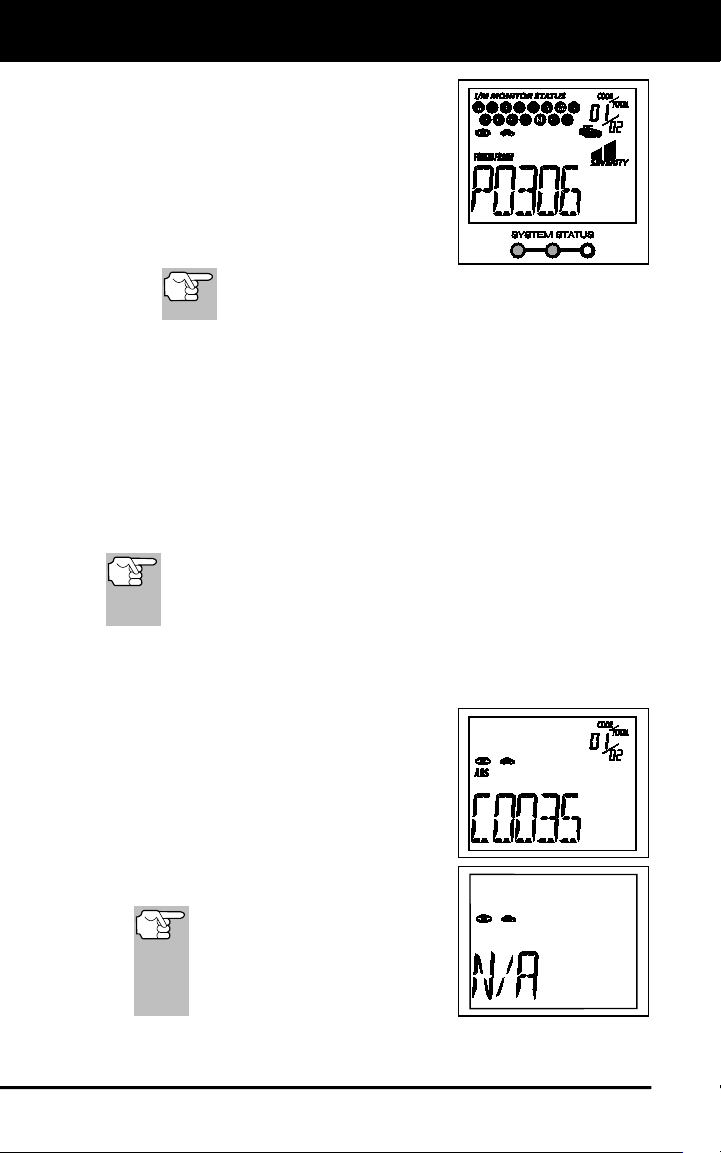
Red LED - Indicates there is a problem
with one or more of the vehicle's
systems. The red LED is also used to
show that DTC(s) are present (dis-
played on the Code Reader’s LCD
display). In this case, the Malfunction
Indicator (Check Engine) lamp on the
vehicle's instrument panel will light
steady on.
The Code Reader will display a code only if codes are
present in the vehicle's computer memory. If no codes
are present, a "0" will be displayed.
7. If more than one code is present, press and release the DTC button,
as necessary, to display additional codes.
8. When the last retrieved DTC has been displayed and the DTC
button is pressed, the Code Reader returns to the “Priority” code.
Visit the manufacturer's website for Fault Code Definitions. Match the
retrieved DTC(s) with those listed. Read the associated definition(s),
and see the vehicle's service manual for further evaluation.
VIEWING ABS DTCs
ABS functionality is supported for Chrysler, Ford, GM, Honda,
Hyundai, Kia, Mazda, Mitsubishi, Nissan, Subaru, and Toyota,
vehicles (identified by VIN) only. Visit the manufacturer’s
website for a complete list of vehicles covered.
1. If not connected already, connect the Code Reader to the vehicle's
DLC, and turn the ignition "On.” (If the Code Reader is already
connected and linked to the vehicle's computer, proceed directly to
step 3. If not, continue to step 2.)
2. Perform the Code Retrieval procedure
as described on page 7.
3. Press the ABS button. After 4-5 seconds,
the Code Reader will retrieve and
display any Diagnostic Trouble Codes
stored in the ABS controller’s memory.
If ABS functionality is not supported
by your vehicle, the message “N/A”
shows on the Code Reader’s display.
The Code Reader will display a
code only if codes are present
in the vehicle’s computer
memory. If no codes are
present, the message 0 DTC
will be displayed.
4. If more than one code is present, press and release the ABS button,
as necessary, to display additional codes.
Using the Code Reader
ERASING DIAGNOSTIC TROUBLE CODES
27
5. When the last retrieved DTC has been displayed and the ABS
button is pressed, the Code Reader returns to the “Priority” code.
To exit the ABS mode, press the DTC button to return to the
OBD2 mode.
Visit the manufacturer's website for Fault Code Definitions. Match the
retrieved DTC(s) with those listed. Read the associated definition(s),
and see the vehicle's service manual for further evaluation.
ERASING DIAGNOSTIC TROUBLE CODES (DTCs)
When the Code Reader’s ERASE function is used to erase
the DTCs from the vehicle's on-board computer, "Freeze
Frame" data and manufacturer-specific enhanced data are
also erased.
If you plan to take the vehicle to a Service Center for repair, DO NOT
erase the codes from the vehicle's computer. If the codes are erased,
valuable information that might help the technician troubleshoot the
problem will also be erased.
Erase DTCs from the computer's memory as follows:
When DTCs are erased from the vehicle's computer memory, the
I/M Readiness Monitor Status program resets status of all the
Monitors to a not run "flashing" condition. To set all of the Monitors
to a DONE status, an OBD2 Drive Cycle must be performed.
Refer to your vehicle's service manual for information on how to
perform an OBD2 Drive Cycle for the vehicle under test.
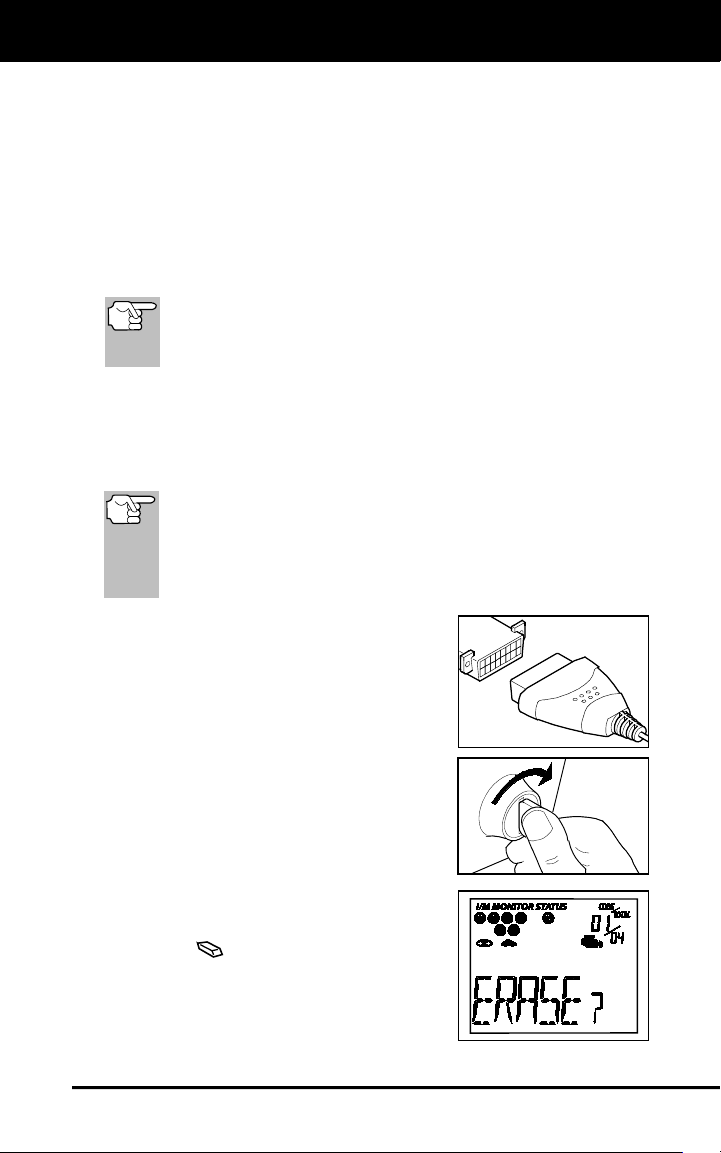
6. If not connected already, connect the Code
Reader to the vehicle's DLC. (If the Code
Reader is already connected and linked to
the vehicle's computer, proceed directly to
step 4. If not, continue to step 2.)
7. Turn the ignition on. DO NOT start the
engine. The Code Reader will auto-
matically link to the vehicle’s computer.
To erase OBD2 DTCs: Wait until the
codes are displayed on the Code
Reader’s LCD and then proceed to
step 3.
To erase ABS DTCs: Press the
ABS button to retrieve codes, and
then proceed to step 3.
8. Press and release the Code Reader’s
ERASE
button. The LCD display will
indicate "ERASE?" for your confirmation.
If you change your mind and do not
wish to erase the codes, press the
DTC button to return to the code
retrieval function.
Using the Code Reader
ABOUT REPAIRSOLUTIONS®
28
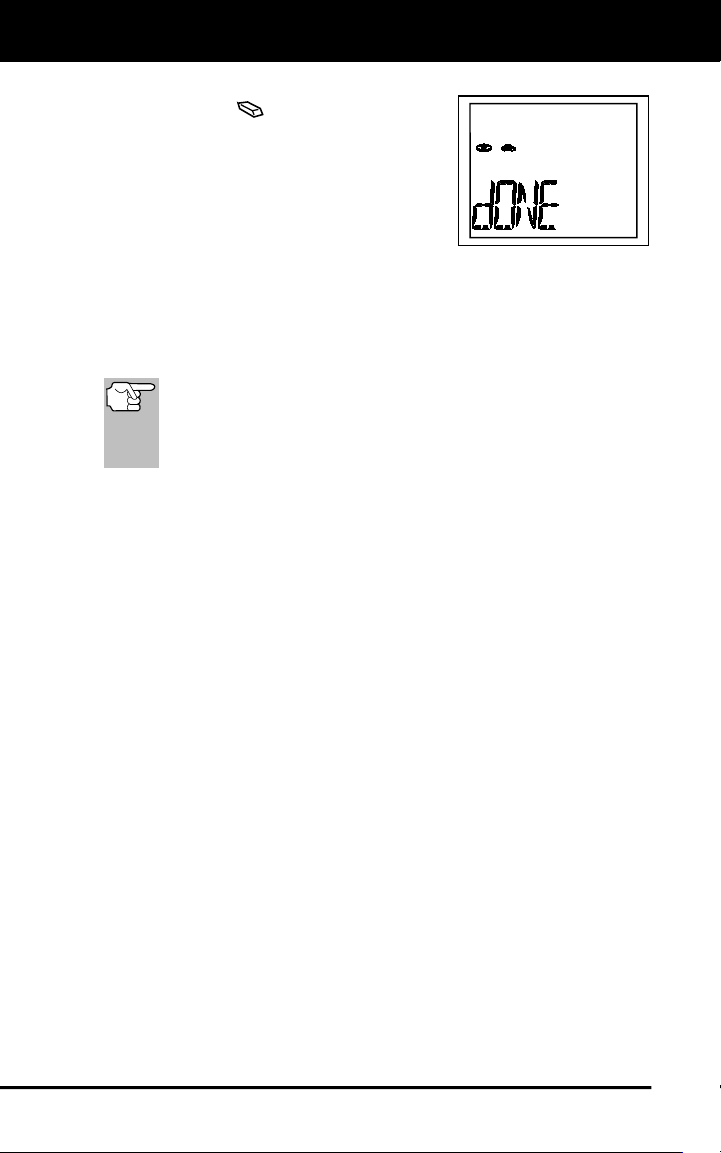
If you wish to continue, press the
ERASE
button again. The
message ERASE displays while the
erase is in progress. When all
retrievable information, including
DTCs, has been cleared from the
computer’s memory, the Code
Reader will re-link to the vehicle’s
computer, and the LCD display will
show the message dONE.
- If the erase is not successful, the message SENT shows on
the Coder Reader’s display.
The Code Reader will relink to the previously selected module.
Erasing DTCs does not fix the problem(s) that caused the code(s)
to be set. If proper repairs to correct the problem that caused the
code(s) to be set are not made, the code(s) will appear again (and
the check engine light will illuminate) as soon as the vehicle is
driven long enough for its Monitors to complete their testing.
ABOUT REPAIRSOLUTIONS 2®
RepairSolutions 2® is a web-based service created to assist both Do-It-
Yourself and Professional technicians in quickly and accurately
diagnosing and repairing today’s vehicles. RepairSolutions 2 allows you
to view and save the diagnostic data retrieved from a vehicle’s on-board
computer(s) using your Code Reader. At the core of RepairSolutions 2
is an extensive knowledge database, developed by compiling and
analyzing years worth of “real world” vehicle service data.
RepairSolutions 2 builds on manufacturer-recommended diagnostic and
repair information by providing verified, vehicle-specific fixes supplied by
ASE technicians across the country. RepairSolutions 2 also provides
access to an extensive knowledge database including:
Verified Fixes – Find the most likely fixes reported and verified by
ASE Technicians for the retrieved DTCs.
Repair Instructions – View available repair instructions to properly
perform the fix.
Video Tutorials – Watch repair video tutorials for valuable repair
tips.
Technical Service Bulletins – Research known problems reported
by vehicle manufacturers.
Safety Recalls – Research known safety concerns applicable to a
vehicle.
And much more. Please visit www.innova.com for additional information.
Hardware Requirements:
Innova Code Reader with Bluetooth/WiFi
Android or iOS Smart Device

Using the Code Reader
CONNECTING TO BLUETOOTH / WIFI
29
Accessing RepairSolutions 2®
1. Download and install the RepairSolutions 2® app from the App
Store (for iOS devices) or Google Play (for Android devices).
2. Launch the RepairSolutions 2 app and log in to your account.
If you have not yet established an account, you must register for
a FREE RepairSolutions 2 account before proceeding.
3. Connect the Code Reader to a vehicle and establish a Bluetooth or
WiFi connection with your Smart Device (refer to CONNECTING TO
BLUETOOTH / WIFI, below). Be sure your Smart Device is
connected to an available WiFi network.
The RepairSolutions 2 app will store three WiFi configurations
only.
4. Retrieve diagnostic data (refer to CODE RETRIEVAL PROCEDURE
on 7 for details).
5. The RepairSolutions 2 app automatically displays a report based on
the retrieved diagnostic data.
If the Code Reader is not connected to WiFi or Bluetooth,
vehicle data will not be saved.
CONNECTING TO BLUETOOTH / WIFI
Launch the RepairSolutions 2 app an follow the prompts to establish
Bluetooth and (optionally) WiFi connections, as follows:
1. Launch the RepairSolutions 2 app. Select Wifi Tools Settings from
the menu. Power on your Code Reader, then select from the list of
available devices.
2. When Bluetooth pairing is complete, a confirmation screen displays.
Click Continue.
If a Bluetooth connection cannot be established, an advisory
message displays. Tap Try Again to repeat the pairing process.
3. Follow the on-screen prompts to connect to an available WiFi
network.
You can automatically connect to the network your Smart Device
is currently connected to, or you can manually connect to
another available network.
Note that only 2.4GHz networks are supported.
If you do not wish to connect to a WiFi network at this time, tap
SKIP.
4. When WiFi pairing is complete, a confirmation screen displays. Click
Continue to view the “Setup Complete” message, then click
Continue to enter RepairSolutions 2.
If a WiFi connection cannot be established, an advisory
message displays. Tap Try Again to repeat the pairing process.

Notes
30

Notes
31

Notes
32

Warranty and Servicing
33
LIMITED ONE YEAR WARRANTY
The Manufacturer warrants to the original purchaser that this unit is free
of defects in materials and workmanship under normal use and
maintenance for a period of one (1) year from the date of original
purchase.
If the unit fails within the one (1) year period, it will be repaired or
replaced, at the Manufacturer’s option, at no charge, when returned
prepaid to the Service Center with Proof of Purchase. The sales receipt
may be used for this purpose. Installation labor is not covered under this
warranty. All replacement parts, whether new or remanufactured,
assume as their warranty period only the remaining time of this warranty.
This warranty does not apply to damage caused by improper use,
accident, abuse, improper voltage, service, fire, flood, lightning, or other
acts of God, or if the product was altered or repaired by anyone other
than the Manufacturer’s Service Center.
The Manufacturer, under no circumstances shall be liable for any
consequential damages for breach of any written warranty of this unit.
This warranty gives you specific legal rights, and you may also have
rights, which vary from state to state. This manual is copyrighted with all
rights reserved. No portion of this document may be copied or
reproduced by any means without the express written permission of the
Manufacturer. THIS WARRANTY IS NOT TRANSFERABLE. For
service, send via U.P.S. (if possible) prepaid to Manufacturer. Allow 3-4
weeks for service/repair.
SERVICE PROCEDURES
If you have any questions, require technical support or information on
UPDATES and OPTIONAL ACCESSORIES, please contact your local
store, distributor or the Service Center.
USA & Canada:
(800) 544-4124 (6:00 AM-6:00 PM PST, Monday through Saturday)
All others: (714) 241-6802 (6:00 AM-6:00 PM PST, Monday through
Saturday)
FAX: (714) 241-3979 (24 hr.)
Web: www.innova.com