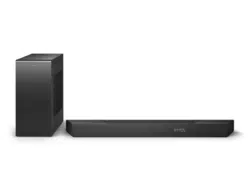
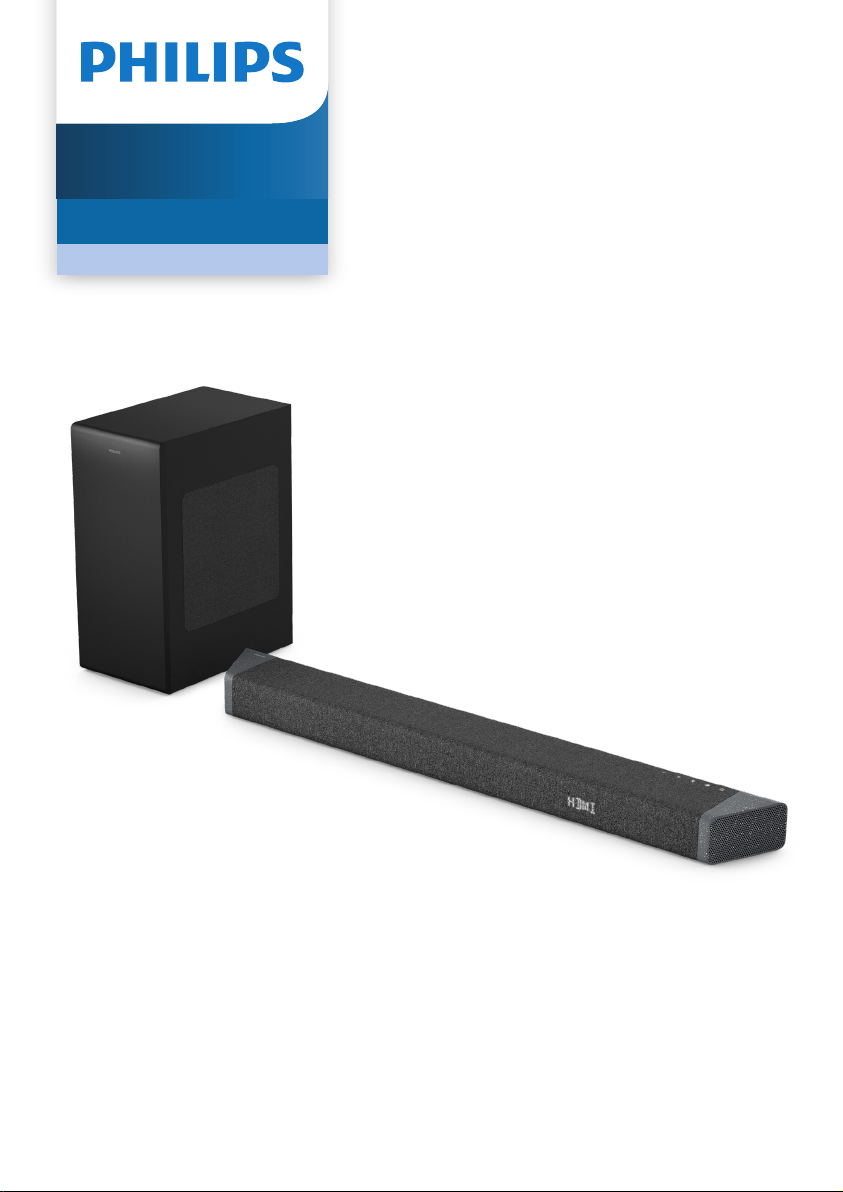
User manual
Register your product and get support at
www.philips.com/support
TAB7908
7000 Series
Soundbar

2 EN
Contents
1 Important safety instructions 3
Safety 3
Care for your product 4
Care of the environment 4
Declaration of conformity 5
Help and support 5
FCC information 6
2 Your Soundbar 7
What’s in the box 7
Soundbar 7
Connectors 8
Wireless subwoofer 8
Remote control 9
Prepare the remote control 9
Placement 10
Wall mount 11
3 Connect 12
Dolby Atmos® 12
Connect to HDMI socket 12
Connect to Optical socket 13
Connect to Audio in socket 13
Connect to power 14
Pair up with the subwoofer 14
4 Use your soundbar 15
Turn on and o 15
Select modes 15
Adjust the volume 15
Select surround mode 15
Setup menu 16
Factory reset 18
Play from Bluetooth devices 18
Listen to an external device 19
Play audio through USB 19
5 Product specications 20
6 Troubleshooting 21
7 Trademarks 23

3EN
1 Important
safety
instructions
Read and understand all instructions
before you use your product. If damage is
caused by failure to follow instructions, the
warranty does not apply.
Safety
Know these safety symbols
CAUTION
CAUTION: TO REDUCE THE RISK OF ELECTRIC
SHOCK, DO NOT REMOVE COVER (OR BACK).
NO USER-SERVICEABLE PARTS INSIDE. REFER
SERVICING TO QUALIFIED SERVICE PERSONNEL.
RISK OF ELECTRIC SHOCK
DO NOT OPEN
This is CLASS II apparatus with
double insulation, and no
protective earth provided.
AC voltage
Follow the instructions in the user
manual!
WARNING!
Warning: Risk of electric shock!
The exclamatory mark is intended
to alert the user to the presence of
important operating instructions.
Risk of electric shock or re!
• Before you make or change any
connections, make sure that all
devices are disconnected from the
power outlet.
• Never expose the product and
accessories to rain or water. Never
place liquid containers, such as vases,
near the product. If liquids are spilt on
or into the product, disconnect it from
the power outlet immediately. Contact
Consumer Care to have the product
checked before use.
• Never place the product and
accessories near naked ames or other
heat sources, including direct sunlight.
• Never insert objects into the
ventilation slots or other openings
on the product.
• Where the mains plug or an
appliance coupler is used as the
disconnect device, the disconnect
device shall remain readily operable.
• Battery (battery pack or batteries
installed) shall not be exposed to
excessive heat such as sunshine, re
or the like.
• Disconnect the product from the
power outlet before lightning storms.
• When you disconnect the power cord,
always pull the plug, never the cable.
• Use the product in tropical and/or
moderate climates.
Risk of short circuit or re!
• For identication and supply ratings,
see the type plate at the back or
bottom of the product.
• Before you connect the product to the
power outlet, ensure that the power
voltage matches the value printed on
the back or bottom of the product.
Never connect the product to the
power outlet if the voltage is dierent.
Risk of injury or damage to this
product!
• For wall mounting, this product must
be securely attached to the wall in
accordance with the installation
instructions. Use only the supplied
wall mount bracket (if available).
Improper wall mounting may result
in accident, injury or damage. If you
have any query, contact Consumer
Care in your country.
4 EN
• Never place the product or any
objects on power cords or on other
electrical equipment.
• If the product is transported in
temperatures below 5°C, unpack
the product and wait until its
temperature matches room
temperature before connecting it to
the power outlet.
• Parts of this product can be made
of glass. Handle with care to avoid
injury and damage.
Risk of overheating!
• Never install this product in a
conned space. Always leave a
space of at least four inches around
the product for ventilation. Ensure
curtains or other objects never cover
the ventilation slots on the product.
Risk of contamination!
• Do not mix batteries (old and new or
carbon and alkaine, etc.).
• CAUTION: Danger of explosion if
batteries are incorrectly replaced.
Replace only with the same or
equivalent type.
• Remove batteries if they are
exhausted or if the remote control is
not to be used for a long time.
• Batteries contain chemical
substances, they should be disposed
of properly.
Note
• The rating label is pasted on the bottom or back
of the equipment.
Care for your product
Use only microber cloth to clean the
product.
Care of the environment
Disposal of your old product and
battery
Your product is designed and
manufactured with high quality
materials and components, which
can be recycled and reused.
This symbol on a product means
that the product is covered by
European Directive 2012/19/EU.
This symbol means that the
product contains batteries covered
by European Directive 2013/56/EU
which cannot be disposed of with
normal household waste.
Inform yourself about the local separate
collection system for electrical and
electronic products and batteries.
Follow local rules and never dispose of
the product and batteries with normal
household waste. Correct disposal
of old products and batteries helps
prevent negative consequences for the
environment and human health.
Removing the disposable batteries
To remove the disposable batteries, see
battery installation section.

5EN
Declaration of conformity
This product complies with the radio
interference requirements of the
European community.
Hereby, TP Vision Europe B.V. declares
that the product is in compliance with the
essential requirements and other relevant
provisions of RED Directive 2014/53/EU
and UK Radio Equipment Regulations
SI 2017 No 1206. You can nd the
Declaration of Conformity on
www.philips.com/support.
Help and support
For extensive online support, visit
www.philips.com/support to:
• download the user manual and the
quick start guide
• watch video tutorials (available only
for selected models)
• nd answers to frequently answered
questions (FAQs)
• email us a question
• chat with our support representative.
Follow the instructions on the website
to select your language, and then enter
your product model number.
Alternatively, you can contact Consumer
Care in your country. Before you contact,
note down the model number and serial
number of your product. You can nd
this information on the back or bottom
of your product.

6 EN
FCC information
NOTE: This equipment has been tested
and found to comply with the limits
for a Class B digital device, pursuant to
Part 15 of the FCC Rules. These limits
are designed to provide reasonable
protection against harmful interference
in a residential installation. This
equipment generates, uses and can
radiate radio frequency energy and, if
not installed and used in accordance
with the instructions, may cause harmful
interference to radio communications.
However, there is no guarantee that
interference will not occur in a particular
installation. If this equipment does
cause harmful interference to radio
or television reception, which can be
determined by turning the equipment
o and on, the user is encouraged to
try to correct the interference by one or
more of the following measures:
• Reorient or relocate the receiving
antenna.
• Increase the separation between the
equipment and receiver.
• Connect the equipment into an
outlet on a circuit dierent from that
to which the receiver is connected.
• Consult the dealer or an experienced
radio / TV technician for help.
FCC&IC Warning:
• This equipment should be installed
and operated with minimum
distance 20cm between the radiator
& your body.
• Changes or modications to this unit
not expressly approved by the party
responsible for compliance could
void the user’s authority to operate
the equipment.
FCC & IC Attention
• Cet appareil est conforme à FCC et
IC l’exposition aux rayonnements
limites xées pour un environnement
non contrôlé. Cet appareil doit être
installé et utilisé avec une distance
minimale de 20 cm entre le radiateur
et votre corps. Cet transmetteur ne
doit pas être co-situé ou opérant en
liaison avec toute autre antenne ou
transmetteur.
• Des câbles blindés doivent être
utilisés avec cet apparei l pour
assurer la conformité avec les
limites de la classe B de la FCC.
fonctionnement de I’appareil.
IC-Canada: CAN ICES-003(B)/NMB-
003(B)
This device contains licence-exempt
transmitter(s) / receiver(s) that comply
with Innovation, Science and Economic
Development Canada’s licence-exempt
RSS(s). Operation is subject to the
following two conditions:
1 This device may not cause
interference.
2 This device must accept any
interference, including interference
that may cause undesired operation
of the device.
Avis d’Industrie Canada: CAN ICES-
003(B)/NMB-003(B)
L’émetteur/récepteur exempt de licence
contenu dans le présent appareil est
conforme aux CNR d’Innovation, Sciences
et Développement économique Canada
applicables aux appareils radio exempts
de licence. L’exploitation est autorisée
aux deux conditions suivantes :
1 L’appareil ne doit pas produire de
brouillage;
2 L’appareil doit accepter tout
brouillage radioélectrique
subi, même si le brouillage est
susceptible d’en compromettre le
fonctionnement.
7EN
2 Your Soundbar
Congratulations on your purchase,
and welcome to Philips! To fully
benet from the support that Philips
oers, register your soundbar at
www.philips.com/support.
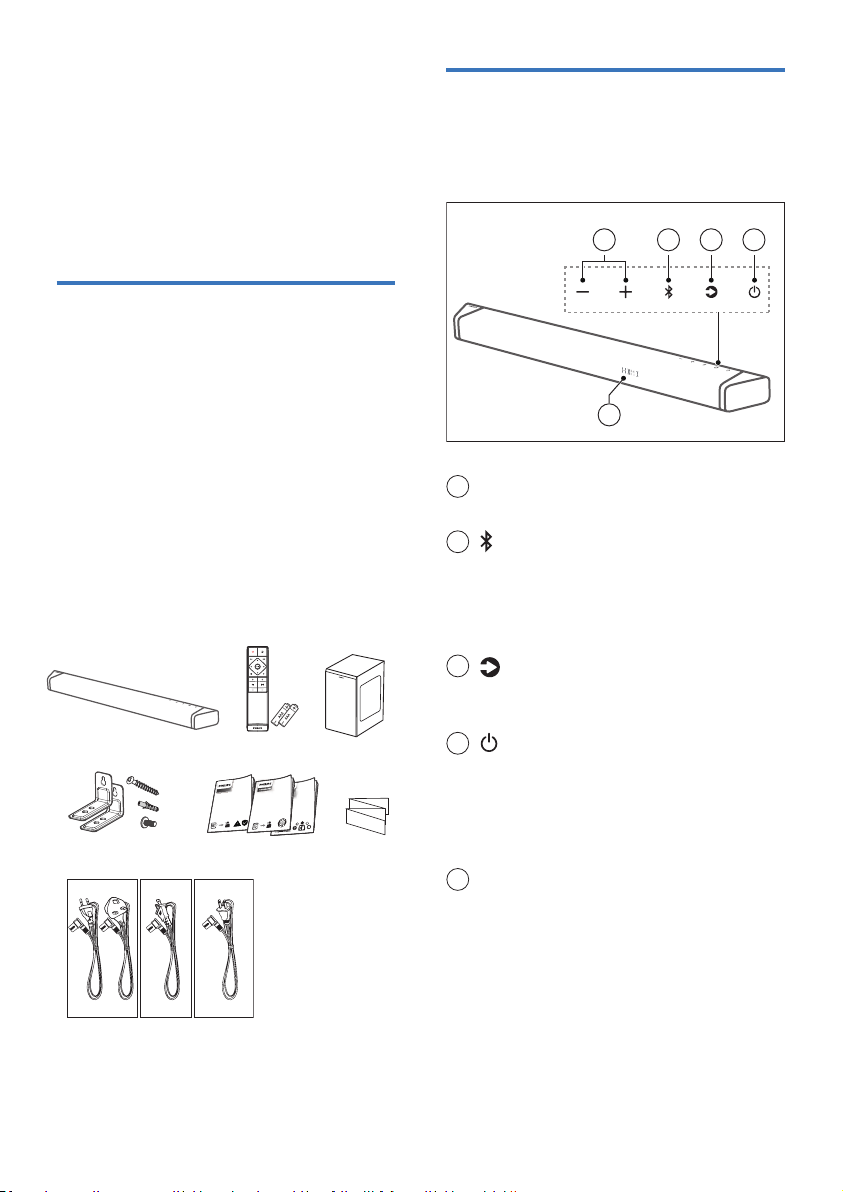
What’s in the box
Check and identify the items in the
package:
• Soundbar x 1
• Remote control x 1
(AAA batteries x 2)
• Wireless subwoofer x 1
• Power cord (Bar and subwoofer)* x 2
• Wall mount kit x 1
(Brackets x2 / Bracket screws x2 /
Wall mounting screws x2 / Wall anchors x2)
• Quick start guide / Warranty card /
Safety sheet x 1
Soundbar
This section includes an overview of the
soundbar.
1 2 3 4
5
1
+ / - (Volume) button
Increase/decrease the volume.
2
(Bluetooth) button
• Press to select the Bluetooth mode.
• Press and hold to disconnect all
devices and enter the Bluetooth
pairing mode.
3
(Source) button
• Press to select an input source for
soundbar.
4
(Standby-On) button
• Switch the soundbar On or to
standby.
• Long press for 20 seconds in power
on state to enable or disable Auto-
Standy (15 minutes Auto-Standby).
5
Remote control sensor /
Display panel
• Power cord quantity and plug type vary by regions.
• Images, illustrations and drawings shown on
this User Manual are for reference only, actual
product may vary in appearance.
Remote control
(AAA batteries x 2)
Soundbar
Wireless subwoofer
Wall mount kit
(brackets x2 / bracket screws x2 /
wall mounting screws x2 / wall anchors x2)
2 X
2 X
2 X
Quick start guide
Warranty card/Safety sheet
Headphones
Series
CTN
Saf
ety I
n
form
ation
Wall mount
template
ULVDEBS CCC
TAB7908/10 TAB7908/37 TAB7908/93
8 EN
Connectors
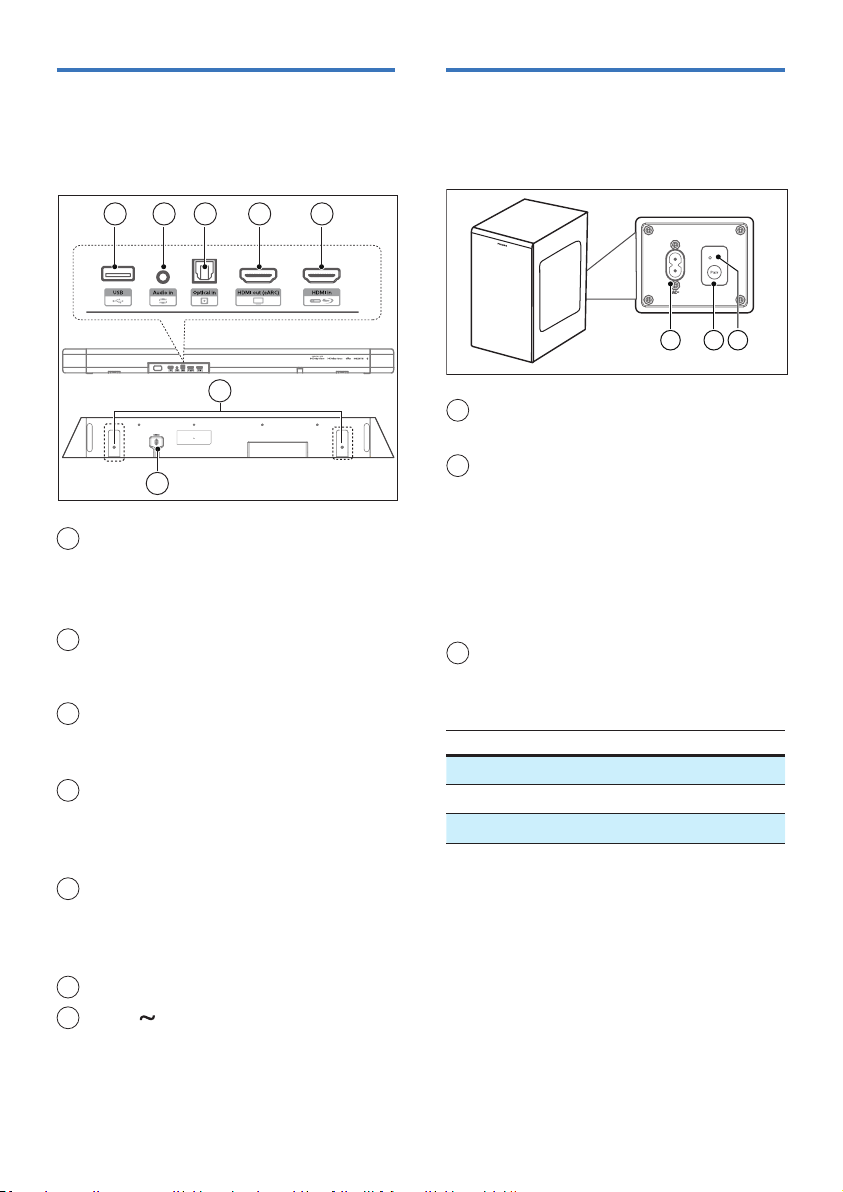
This section includes an overview of the
connectors available on your soundbar.
1 2 3 4 5
7
6
1
USB
• Connect to a USB storage device for
audio media play.
• Upgrade software of this product.
2
Audio in
Audio input from, for example, an
MP3 player (3.5mm jack).
3
Optical in socket
Connect to an optical audio output
on the TV or a digital device.
4
HDMI out (eARC) socket
The port supports the eARC/ARC
HDMI feature, connect to the HDMI
(eARC/ARC) input on the TV.
5
HDMI in socket
Connect to the HDMI source devices,
such as a DVD player, Blu-ray Disc™
player, or gaming console.
6
Wall bracket slot
7
AC in socket
Connect to the power supply.
Wireless subwoofer
This section includes an overview of the
wireless subwoofer.
123
1
AC~ socket
Connect to the power supply.
2
Pair button
Press and hold to enter the pairing
mode for the subwoofer, which
is used for Manual Pairing only.
(Don’t press Pair button as Bar
and Subwoofer would be paired
automatically after the unit is
switched ON)
3
Subwoofer indicator
Determine the status based on the
wireless subwoofer indicator.
LED State Status
Fast blink Subwoofer in pairing mode
Constant on Connected / Pairing successful
Slow blink Pairing failed

9EN
Remote control
This section includes an overview of the
remote control.
1
(Standby-On) button
• Switch the soundbar On or to
standby.
• Long press for 20 seconds in power
on state to enable or disable APD
(15 minutes Auto-Standby)
2
(Source)
• Press to select an input source for
soundbar.
• Press and hold to disconnect all
devices and enter the Bluetooth
pairing mode.
3
(Dolby)
Select surround mode (UPMIX,
STANDARD, AI).
4
(Mute)
Mute or restore volume.
5
Navigation buttons
/ (Left/Right)
• Skip to the previous or next track in
USB/BT mode.
• Navigate Left/Right in menu
structure.
/ (Up/Down)
• Navigate up/down in menu structure.
(Center)
• Start, pause or resume play in USB/
BT mode.
6
(MENU)
Enter setup menu.
7
(Back)
Exit menu.
8
+/- (System’s volume)
Increase / decrease the system’s
volume.
9
+/- (Subwoofer’s Volume)
Increase / decrease the subwoofer’s
volume.
5
6
3
1
8
9
7
4
2
Prepare the remote control
• The provided remote control allows
the unit to be operated from a
distance.
• Even if the remote control is
operated within the eective range
19.7 feet (6m), remote control
operation may be impossible if there
are any obstacles between the unit
and the remote control.
• If the remote control is operated
near other products which generate
infrared rays, or if other remote
control devices using infra-red rays
are used near the unit, it may operate
incorrectly. Conversely, the other
products may operate incorrectly.

10 EN
Replace the remote control battery
Slide to remove the battery compartment
cover, insert 2 AAA batteries (1.5V) with
correct polarity, then slide the battery
compartment cover back into position.
• Make sure the (+) and (–) ends of
the batteries match the (+) and
(–) ends indicated in the battery
compartment.
1
2
3
Precautions concerning batteries
• Be sure to insert the batteries with
correct positive “” and negative
“” polarities.
• Use batteries of the same type.
Never use dierent types of batteries
together.
• Either rechargeable or non-
rechargeable batteries can be used.
Refer to the precautions on their
labels.
• Be aware of your ngernails when
removing the battery cover and the
battery.
• Do not drop the remote control.
• Do not allow anything to impact the
remote control.
• Do not spill water or any liquid on
the remote control.
• Do not place the remote control on a
wet object.
• Do not place the remote control
under direct sunlight or near sources
of excessive heat.
• Remove the battery from the remote
control when not in use for a long
period of time, as corrosion or
battery leakage may occur and result
in physical injury, and/or property
damage, and/or re.
• Do not use any batteries other than
those specied.
• Do not mix new batteries with old
ones.
• Never recharge a battery unless it is
conrmed to be a rechargeable type.
Placement
Place the subwoofer at least 1 meter (3
feet) away from your soundbar, and 10
centimeters away from the wall.
For best results, place your subwoofer as
shown below.

11EN
Wall mount
Note
• Improper wall mounting may result in accident,
injury or damage. If you have any query, contact
Consumer Care in your country.
• Before wall mounting, make sure the wall can
support the weight of your soundbar.
• Before wall mounting, you need not remove
the rubber feet at the bottom of the soundbar,
otherwise the rubber feet cannot be xed back.
• Depending on the type of wall mounting, make
sure that you use screws of a suitable length
and diameter.
• Please check whether the USB port on the back of
the soundbar is connected to a USB device. If it is
found that the connected USB device affects the
wall-mount, you need to use another USB device
of the appropriate size.
Screw length/diameter
3.5-4mm/0.14 -0.16"
4mm/
0.16"
>32mm/1.26"
Suggested wall mounting height
You are recommended to install the TV
rst before wall mounting the soundbar.
With a TV preinstalled, wall mount the
soundbar 50mm/2.0’’ in distance from
the bottom of the TV.
WARNING!
• To prevent injury, this apparatus must be securely
attached to the oor/wall in accordance with the
installation instructions.
• Suggested wall mounting height: ≤ 1.5 meters.
1 Drill 2 parallel holes (diameter 3-8mm
each according to wall type) on the
wall.
» The distance between the holes
are: 668mm / 26.3”
» You can use the wall mount
template provided for helping the
drilling holes position on the wall.
2 Secure the dowels and screws in the
holes.
» Be sure to leave a 3.5-4mm gap
between the wall and the screw’s
head.
3 Attach the wall brackets (x2) into the
back of the soundbar.
4 Hang the soundbar on the fastening
screws.
3
4
1
~50mm/2.0"
668mm / 26.3”
2
3.5-4mm/0.14 -0.16"
4mm/
0.16"
>32mm/1.26"

12 EN
3 Connect
This section helps you connect your
soundbar to a TV and other devices, and
then set it up.
Note
• For identication and supply ratings, see the
type plate at the back or bottom of the product.
• Before you make or change any connections,
make sure that all devices are disconnected
from the power outlet.
Dolby Atmos®
Dolby Atmos gives you immersive listening
experience by delivering sound in three
dimensional space, and all the richness,
clarity, and power of Dolby sound.
For more information, please visit
dolby.com/technologies/dolby-atmos
For use Dolby Atmos®
Dolby Atmos® is available in HDMI mode.
For the details of the connection, please
refer to “HDMI Connection”.
1 To use Dolby Atmos® in HDMI in/
HDMI eARC/ARC mode, your TV has
to support Dolby Atmos®
.
2 Make sure that “No Encoding” is
selected for bitstream in the digital
audio output of the connected
external device (e.g. Blu-ray DVD
player, TV etc.).
3 While entering Dolby Atmos / Dolby
Digital / PCM / DTS format, the
soundbar will show DOLBY ATMOS /
DOLBY AUDIO / PCM / DTS.
Note
• The full Dolby Atmos experience is only
available when the soundbar is connected to
the source via a HDMI 2.0 cable.
• The soundbar will still function when connected
via other methods (such as a Digital Optical
cable) but they are unable to support all of the
Dolby features. Given this, our recommendation
is to connect via HDMI, in order to ensure full
Dolby support.
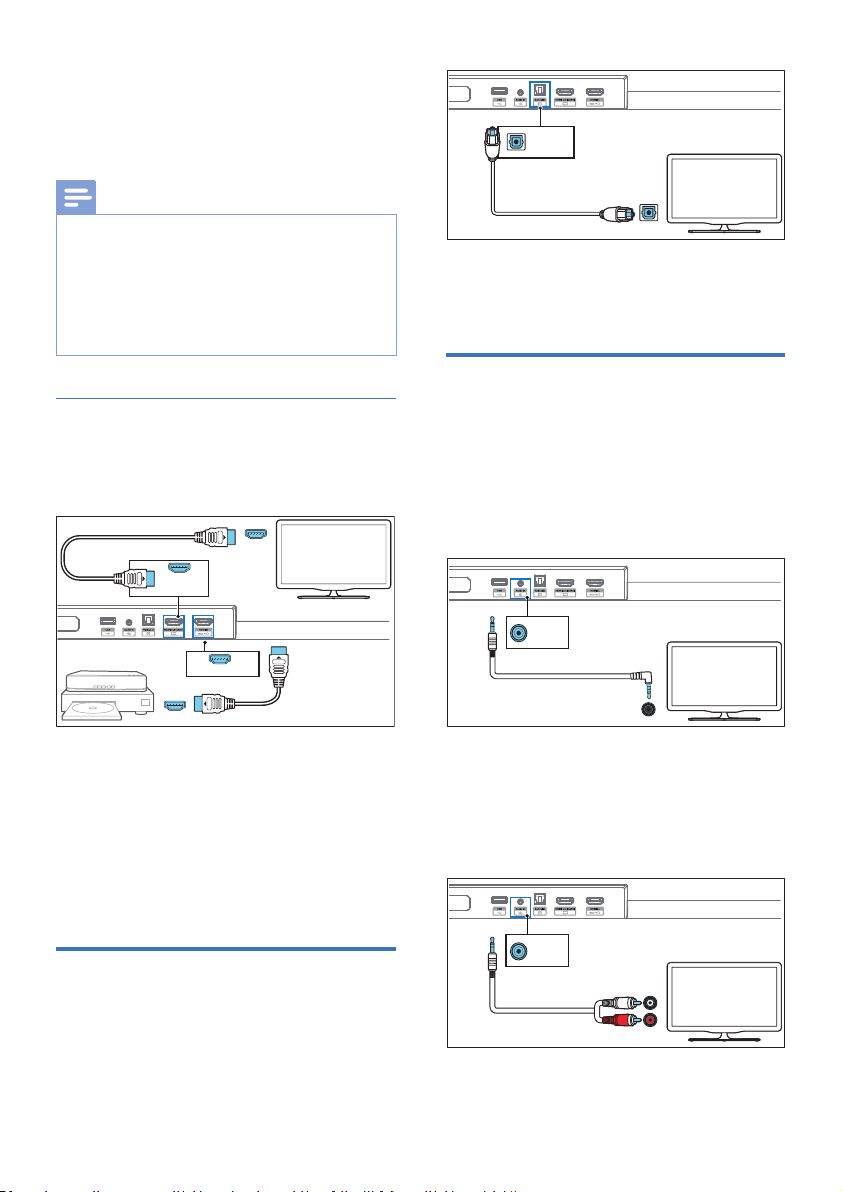
Connect to HDMI socket
Some 4K HDR TVs require the HDMI
input or picture settings to be set for
HDR content reception. For further setup
details on HDR display, please refer to the
instruction manual of your TV.
Option 1:
HDMI eARC (Enhance Audio Return
Channel)
Your soundbar supports HDMI with
eARC/ARC (Enhance Audio Return
Channel). If your TV is HDMI eARC/ARC
compliant, you can hear the TV audio
through your soundbar by using a single
HDMI cable.
HDMI (eARC/ARC)
HDMI out
(eARC)
TV
1 On your TV, turn on HDMI-CEC
operations. For details, see the TV
user manual.
• The HDMI ARC connector on the
TV might be labeled dierently.
For details, see the TV user manual.
13EN
2 Using a High Speed HDMI cable,
connect the HDMI out (eARC/ARC)
connector on your soundbar to the
HDMI ARC connector on the TV.
Note
• Your TV must support the HDMI-CEC and ARC
function. HDMI-CEC and ARC must be set to On.
• The setting method of HDMI-CEC and ARC may
dier depending on the TV. For details about ARC
function, please refer to your TV user manual.
• Make sure to use the HDMI cables can support
the ARC function.
Option 2: Standard HDMI
If your TV is not HDMI ARC-compliant,
connect your soundbar to the TV
through a standard HDMI connection.
HDMI in
HDMI out
Blu-ray Player/DVD Player
/Recorder/Set-top Box...
TV
HDMI out
(eARC)
HDMI in
1 Use an HDMI cable to connect
the soundbar’s HDMI in socket to
your external devices (e.g. games
consoles, DVD players and Blu-ray).
2 Use an HDMI cable to connect the
soundbar’s HDMI out (eARC) socket
to the TV’s HDMI in socket.
Connect to Optical socket
1 Using an optical cable, connect
the Optical in connector on your
soundbar to the Optical out
connector on the TV or other device.
Optical out
Optical in
TV
• The digital optical connector might
be labeled Spdif or Spdif out.
Connect to Audio in
socket
a. Use 3.5mm audio cable
• Use a 3.5mm to 3.5mm audio cable to
connect the TV’s headphone socket to
the Audio in socket on the soundbar.
Headphone
(3.5mm)
Audio out
Audio in
TV
b. Use 3.5mm-RCA audio cable
• Use a RCA to 3.5mm audio cable
to connect the TV’s audio output
sockets to the Audio in socket
on the soundbar.
Audio in
R
L
Audio out
TV
14 EN
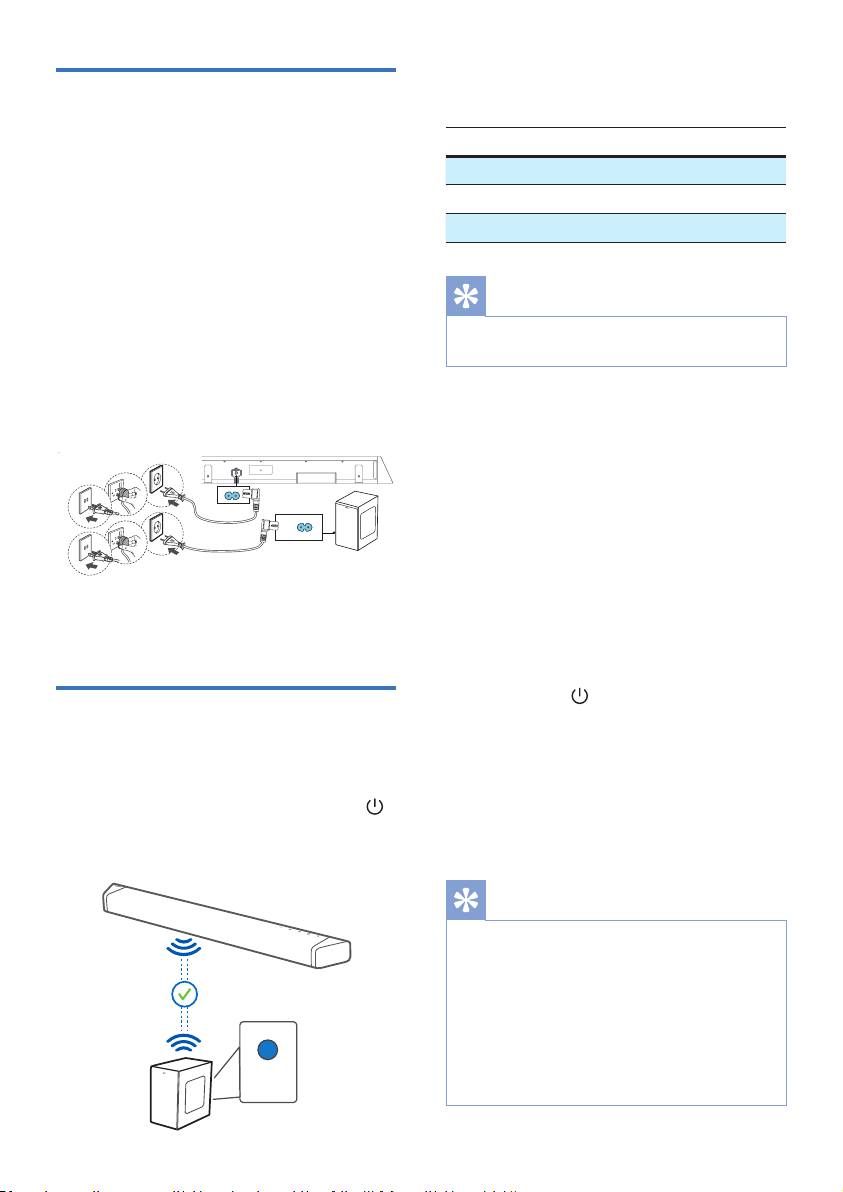
Connect to power
• Before connecting the AC power
cord, ensure you have completed all
other connections.
• Risk of product damage! Ensure that
the power supply voltage corresponds
to the voltage printed on the back or
the underside of the unit.
1 Connect the mains cable to the AC~
socket of the soundbar and then into
a mains socket.
2 Connect the mains cable to the AC~
socket of the subwoofer and then
into a mains socket.
4
AC~
1
2
3
1
2
3
* Power cord quantity and plug type
vary by regions.
Pair up with the subwoofer
Automatic pairing
Plug the soundbar and the subwoofer
into the mains sockets and then press
on the unit or remote control to switch
the unit to ON mode. The subwoofer and
soundbar will be paired automatically.
Solid
» Determine the status based on
the wireless subwoofer indicator.
LED State Status
Fast blink Subwoofer in pairing mode
Constant on Connected / Pairing successful
Slow blink Pairing failed
Tips
• Do not press Pair button on the rear of the
subwoofer, except for manual pairing.
Manual pairing
If no audio from the wireless subwoofer
can be heard, manually pair up the
subwoofer.
1 Unplug both the soundbar and the
subwoofer from the mains sockets
again, then plug them in again after
3 minutes.
2 Press and hold the Pair button on the
rear of the subwoofer for 3 seconds.
» The indicator on the subwoofer
will rapidly blink.
3 Then press on the soundbar
or remote control to switch the
soundbar ON.
» The indicator on the subwoofer
will become solid when successful.
4 If the indicator still keeps blinking,
repeat step 1-3.
Tips
• The subwoofer should be within 6 m of the
soundbar in an open area (the closer the
better).
• Remove any objects between the subwoofer
and the soundbar.
• If the wireless connection fails again, check if
there is a conict or strong interference (e. g.
interference from an electronic device) around
the location. Remove these conicts or strong
interferences and repeat the above procedures.

15EN
4 Use your
soundbar
This section helps you use the soundbar
to play audio from connected devices.
Before you start
• Make the necessary connections
described in the quick start guide
and the user manual.
• Switch the soundbar to the correct
source for other devices.
Turn on and o
• When you rst connect the soundbar
to the main socket, the unit will be in
standby mode.
• Press the button on the soundbar
or on the remote control to switch
the soundbar on or to standby.
• Disconnect the mains plug from the
mains socket if you want to switch
the soundbar o completely.
Select modes
Press the button repeatedly on the
soundbar or on the remote control to select
the HDMI eARC/ARC, HDMI in, USB,
Audio in, Optical, BT (Bluetooth) mode.
» The selected mode will show on
the display.
Display Status
E-ARC
ARC
HDMI eARC
HDMI ARC
HD I
HDMI IN
USB
AUX
Audio in
OPT
Optical
BT
NO BT
Bluetooth
• Connected
• Connection
Adjust the volume
Adjust the system’s volume
Press the +/- buttons on the soundbar
or press +/- (Volume) buttons on the
remote control to increase or decrease
the system’s volume level.
• To mute sound, press (Mute)
button on the remote control.
• To restore the sound, press
(Mute) again or press +/- (Volume).
Adjust the subwoofer’s volume
Press +/- (subwoofer volume) buttons
on the remote control to increase or
decrease the subwoofer’s volume level.
Select surround mode
Experience an immersive audio
experience with Dolby sound modes.
1 Press button on the remote
control to select surround mode.
• UPMIX: 2-ch or 5.1-ch Upmix to
5.1.2-ch
• STANDARD: Original sound
(Speakers output follow the
default channel).
• AI: The media intelligence function
of Dolby Atmos for home audio
is utilized to drive the vocal
enhancement or surround eects.

16 EN
Setup menu
The unit allows you to congure advanced
settings to provide you with an even better
experience.
Button Function
Enter settings menu
/
Navigate up/down in menu
structure
/ Previous/next selection
Exit setting menu
Display / Description /
EQ
Select equalizer (EQ) eect
XX
Adjust the bass level
TRExx
Adjust the treble level
HEIGHT
Adjust the height
surround eects level
AU VOL
Combine Auto volume
with Night mode
DT VRT X
Select DTS Virtual:X eect
control
AVxxx
Set the Audio Delay
CTR XX
Adjust the center channel
volume
DI5P
Set to turn o display
automatically
APD
Auto-standby ON/OFF
DI XX
Set display brightness
AUR T
Restore the default sound
eect
UPGRADE
Update rmware via USB
EQ (
EQ
)
Select predened sound modes to suit
your video and music: MOVIE, MUSIC,
VOICE, STADIUM.
• MOVIE: Create a surround listening
experience. Ideal for watching
movies.
• MUSIC: Create two-channel or
multi-channel stereo sound. Ideal for
listening to music.
• VOICE: Create sound eect which
makes human voice more clear and
outstanding for listening.
• STADIUM: Create an atmosphere
as if watching a sports game in a
stadium.
Bass/Treble (
XX
/
TRExx
)
Change the low frequency (bass) and
high frequency (treble) settings of this
product.
• BAS -5 ... BAS +5
• TRE -5 ... TRE +5
Height surround eects level
(
HEIGHT
)
Adjust the height surround eects level
to best suit your personal taste according
to your environment.
• 00: Minimal eect.
• 01: Small height eect.
• 02: Medium height eect.
• 03: Big height eect.
Note
• For non-HDMI connections (such as use of USB,
Bluetooth, OPTICAL or AUDIO IN), only limited
height surround eects are generated.

17EN
Auto volume (
AUVOL
)
Combine Auto volume with Night mode.
• OFF: Do not use “Auto volume” .
• ON: Responds in real time to
dierent sources and types of
content to maintain consistent
loudness.
• NIGHT: Maintain even loudness
for all sources and types of
content, and enhanced vocal and
dialogue to make it easier to hear
in a quite listing environment.
DTS Virtual:X (
DT VRT X
)
DTS Virtual:X allows you to enjoy multi-
dimensional sound regardless of room
size, layout, or speaker conguration.
DTS Virtual:X technology features
DTS’s proprietary virtual height and
virtual surround processing to deliver
an immersive sound experience from
any type of input source (stereo to 5.1.2
channel) and speaker conguration.
• ON: This mode uses DTS Virtual:X
with virtual height and virtual
surround processing to realize a
three-dimensional sound eld when
the height speakers are not used.
• OFF: Do not use “DTS Virtual:X” .
» Only available if DTS content is
detected.
AV SYNC (
AV XXX
)
Set the Audio Delay.
Video image processing, sometimes
longer than the time required to process
the audio signal. This is called “delayed.”
Audio Delay feature is designed to
remedy this delay.
• AV 00. AV 10 ... AV200
» By default, the audio delay is set
to 00.
Center (
CTR XX
)
Adjust the center channel volume.
• CTR-5 ... CTR+5
» By default, the center channel
volume is set to 0.
Display o (
DI P
)
The display to be turned o after idling
(no user action) for 3 seconds, and shall
be remembered and recalled at the next
power up.
• OFF: Display o after idling (no
user action) for 3 seconds.
• ON: Display won’t turn o.
» By default, the display is set to ON.
Auto Standby (
APD
)
The soundbar automatically turns to
Standby mode after about 15 minutes
if the TV or the external soundbar is
disconnected (or USB, BT function bit
playback pause), or switched off.
• ON: Auto-Standby ON.
• OFF: Auto-Standby OFF.
» By default, Auto-Standby is set
to ON.
DIM (
DI XX
)
Set display brightness.
• HIGH, MID, LOW
» By default, the dimmer is set to
MID.
Audio reset (
AUR T
)
Restore the default sound eect
Item Default settings
EQ Movie
Master Volume 10
Subwoofer Volume
0

18 EN
4 Select and play audio les or music
on your Bluetooth device.
• During play, if a call comes in,
music play pauses. Play resumes
when the call ends.
• If your Bluetooth device supports
AVRCP prole, on the remote
control you can press / to skip
to a track, or press to pause/
resume play.
To disconnect and pair a new
Bluetooth device
• Directly press and hold button on
the soundbar or press and hold the
button on the remote control to
disconnect all devices and enter the
Bluetooth pairing mode.
» The soundbar voice prompt and
the display will show “PAIRING“.
• Follow step 2-3 in “Play from
Bluetooth devices“ above to pair
your Bluetooth device.
Note
• In an open space without obstructions.
The maximum operational range between
the soundbar and a Bluetooth device is
approximately 10 meters (30 feet).
• Compatibility with all Bluetooth devices is not
guaranteed.
• The music streaming may be interrupted by
obstacles between the device and soundbar,
such as wall, metallic casing that covers the
device, or other devices nearby that operate in
the same frequency.
Multi-point control
The product support multi-point feature,
and can connect two Bluetooth device at
same time.
• There is audio prompt when the
second Bluetooth device connect the
soundbar.
BASS 0
TREBLE 0
CH VOL (Center) 0
Top level (Height) 03
DTS Virtual X ON
Auto volume (AUVOL) ON
Factory reset
Reset device to default setting.
• Turn on the soundbar, press and hold
the and buttons at the same
time for 8 seconds.
» Display shows “RESET” for 5
seconds.
» While system reboots, display
shows “REBOOT”.
Play from Bluetooth devices
Through Bluetooth, connect the
soundbar with your Bluetooth device
(such as an iPad, iPhone, iPod touch,
Android phone, or laptop), and then you
can listen to the audio les stored on the
device through your soundbar speakers.
1 Press the (Bluetooth) button on the
soundbar to switch the soundbar to
Bluetooth mode.
» NO BT is displayed on the display
panel.
2 On the Bluetooth device, switch
on Bluetooth, search for and select
Philips TAB7908 to start connection
(see the user manual of the Bluetooth
device on how to enable Bluetooth).
3 Wait until you hear the voice prompt
from the soundbar.
» If the successfully connected, BT
is displayed on the display panel.
19EN
• When the rst Bluetooth device
pause or disconnected, the second
Bluetooth device can stream its
audio to soundbar.
• Incoming call has priority over music
playback regardless from rst or
second devices.
Listen to an external device
Ensure that the soundbar is connected to
the TV or audio device.
1 Press the button repeatedly on the
soundbar or on the remote control
to select the Audio in, Optical, HDMI
eARC/ARC, HDMI in mode.
2 Operate your audio device directly
for playback features.
3 Press the +/– (Volume) buttons to adjust
the volume to your desired level.
» When selecting a dierent audio
format, the soundbar will display
the following as follows:
Audio (abbreviation) Display
LPCM 2ch PCM
LPCM 5.1ch PCM
LPCM 7.1ch PCM
Dolby Digital
Dolby AUDIO
Dolby TrueHD Dolby AUDIO
Dolby Digital Plus Dolby AUDIO
Dolby Atmos -
Dolby TrueHD
Dolby Atmos
Dolby Atmos -
Dolby Digital Plus
Dolby Atmos
DTS Digital surround 5.1 DTS
Note
• The soundbar may not be able to decode all
digital audio formats from the input source. In this
case, the system will mute. This is NOT a defect.
Ensure that the audio setting of the input source
(e.g. TV, game console, DVD player, etc.) is set to
PCM or Dolby Digital (Refer to the user manual
of the input source device for its audio setting
details) with HDMI in / HDMI ARC / Optical input.
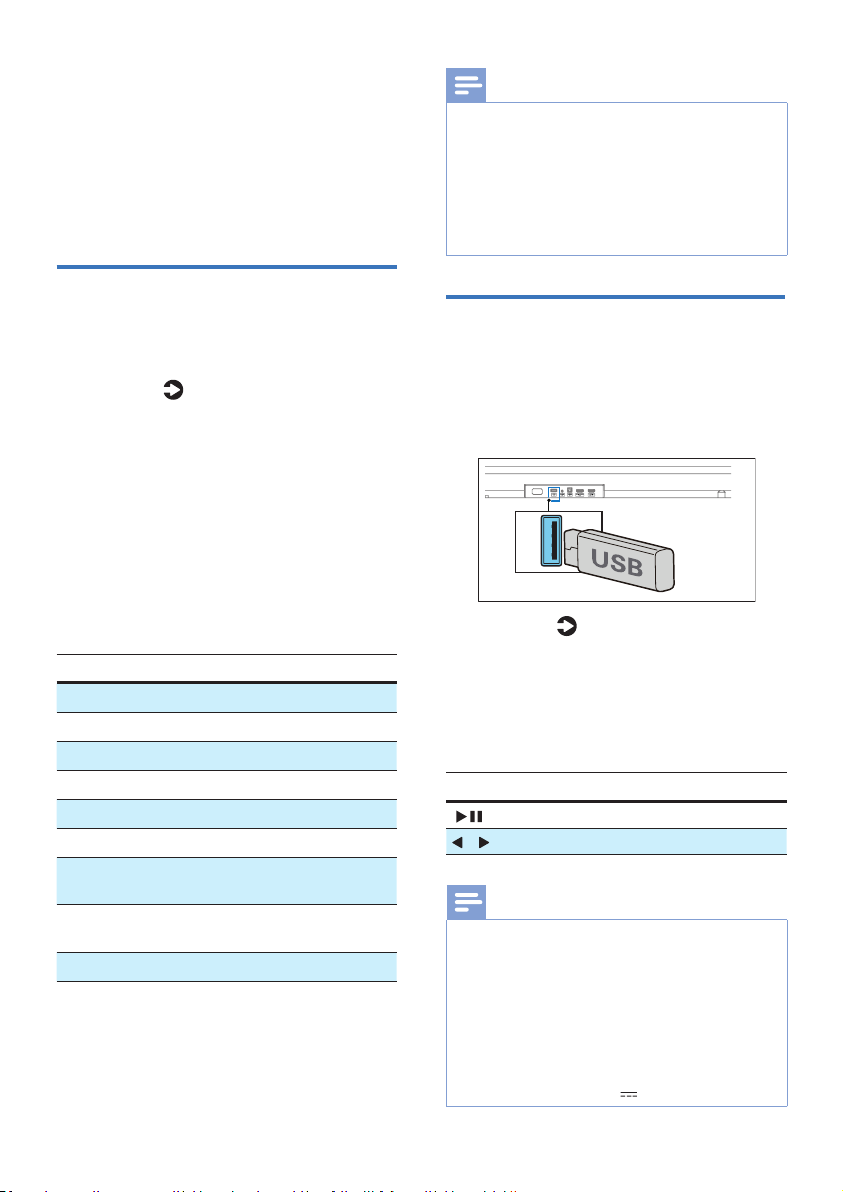
Play audio through USB
Enjoy audio on a USB storage device,
such as an MP3 player and USB ash
memory, etc.
1 Insert the USB device.
2 Press the button repeatedly on
the soundbar or on the remote
control to select the USB mode.
» USB is displayed on the display
panel.
3 During playback:
Button Action
Start, pause or resume play.
/ Skip to the previous or next track.
Note
• This product may not be compatible with
certain types of USB storage devices.
• If you use a USB extension cable, USB hub,
or USB multifunctional card reader, the USB
storage device may not be recognized.
• Do not remove the USB storage device while
reading les.
• The system can support USB devices with up to
128 GB of memory.
• This system can play MP3 / WAV / FLAC.
• Support a USB port: 5V 500mA.

20 EN
5 Product
specifications
Note
• Specications and design are subject
to change without notice.
Bluetooth / Wireless
Bluetooth proles A2DP, AVRCP
Bluetooth version V 5.3
Bluetooth frequency
range / Transmitter
power (EIRP)
2402 ~ 2480MHz
< 10dBm
5.8G wireless frequency
range / Transmitter
power (EIRP)
5729 ~ 5849MHz
< 10dBm
Amplier Section
Output
power
RMS 370W @THD<=10%;
Max. 740W
Soundbar
Power supply
100-240V~
50/60Hz
Power consumption 56 W
Standby consumption < 0.5 W
Frequency response 140Hz - 20kHz
Speakers impedance 8Ω x 8
Dimension
(W x H x D )
970 x 70 x 117
mm
Weight 3.4 kg
Operating temperature 0°C - 45°C
Subwoofer
Power supply 100-240V~
50/60 Hz
Power consumption 24 W
Standby consumption < 0.5 W
Frequency response 35 Hz - 140 Hz
Impedance 3 Ω
Dimensions
(W x H x D)
190 x 410 x 309
mm
Weight 6.3 kg
Operating temperature 0°C - 45°C
USB
USB direct version 2.0 Full Speed
USB 5V 500mA
Remote control
Distance/Angle 6m/30°
Battery type AAA (1.5V X 2)
Supported audio formats
HDMI in
LPCM 2ch, LPCM 5.1ch, LPCM
7.1ch, Dolby Digital, Dolby Digital
plus, Dolby True HD, Dolby MAT,
Dolby Atmos - Dolby Digital Plus,
Dolby Atmos - TrueHD, Dolby
Atmos - Dolby MAT, DTS Digital
surround 5.1.
HDMI
eARC
LPCM 2ch, LPCM 5.1ch, LPCM
7.1ch, Dolby Digital, Dolby Digital
plus, Dolby True HD, Dolby MAT,
Dolby Atmos - Dolby Digital Plus,
Dolby Atmos - TrueHD, Dolby
Atmos - Dolby MAT, DTS Digital
surround 5.1.
HDMI
ARC
LPCM 2ch, LPCM 5.1ch, Dolby
Digital, Dolby Digital plus, Dolby
Atmos - Dolby Digital Plus, DTS
Digital surround 5.1
Optical
LPCM 2ch, LPCM 5.1ch, Dolby Digital
Bluetooth
SBC / AAC
USB
MP3 / WAV / FLAC

21EN
6 Troubleshooting
Warning
• Risk of electric shock. Never remove the
casing of the product.
To keep the warranty valid, never try to
repair the product yourself.
If you have problems using this product,
check the following points before you
request service. If you still have a problem,
get support at www.philips.com/support.
Main unit
The buttons on the main unit do not
work.
• Disconnect form the power supply for a
few minutes, then connect again.
No power
• Ensure that the AC cord is properly
connected.
• Ensure that there is power at the AC
outlet.
• Press button on the remote control or
soundbar to turn the soundbar on.
Sound
No sound from the soundbar speaker.
• Connect the audio cable from your
soundbar to your TV or other devices.
However, you do not need a separate
audio connection when:
- the soundbar and TV are connected
through HDMl ARC connection, or
- a device is connected to the HDMI in
connector on your soundbar.
• On the remote control, select the
correct audio input.
• It would be strongly advised to
ensure that the TV is running its latest
software. Please check the user manual
of your TV for software updating.
• It would also be advised that the
soundbar is running its latest software.
You may consult the local or online
Philips Consumer Care for the latest
software version.
• Please make sure TV’s audio output
is set to “HDMI sound system” (or
whatever brand-specic equivalent for
this setting may exist).
• If audio is not present or distorted,
it would probably help to switch to
a dierent audio output format to
check whether the issue is generic or a
specic incompatibility with a specic
input format is present.
• If there’s no audio on any of sources,
please check other source – like
Bluetooth.
• Make sure that the soundbar is not
muted.
• Reset this product to its factory settings
(see ‘Factory reset‘).
Distorted sound or echo.
• If you play audio from TV through
this product, make sure that the TV is
muted.
Audio and video are not synchronized.
• Press enter setting menu, select ‘AV
SYNC’ to synchronize the audio with
the video.
No sound from the wireless subwoofer.
• Manually connect the subwoofer to
the main unit.
• Increase the volume. Press + (Volume
Up) on the remote control or on the
soundbar.
• When using either of the digital input,
if there is no audio:
- Try setting the TV output to PCM or
- Connect directly to your Blu-ray/
other sources.
- Some TVs do not pass through digital
audio.

22 EN
• Your TV may be set to variable audio
output. Conrm that the audio output
setting is set to FIXED or STANDARD,
not VARIABLE. Refer to your TV’s user
manual for more detailed information.
• If using Bluetooth, ensure that the
volume on your source device is turned
up and that the device is not muted.
Bluetooth
A device cannot connect with the
soundbar.
• The device does not support the
compatible proles required for the
soundbar.
• You have not enabled the Bluetooth
function of the device. See the user
manual of the device on how to enable
the function.
• The device is not correctly connected.
Connect the device correctly.
• The soundbar is already connected
with another Bluetooth device.
Disconnect the connected device,
and then try again.
Quality of audio play from a connected
Bluetooth device is poor.
• The Bluetooth reception is poor. Move
the device closer to the soundbar, or
remove any obstacle between the
device and the soundbar.
I can’t nd the Bluetooth name of this
unit on my Bluetooth device.
• Ensure the Bluetooth function is
activated on your Bluetooth device.
• Re-pair the unit with your Bluetooth
device.
Dolby Atmos
Cannot achieve outstanding Dolby
Atmos eects.
• For non-HDMI connections (such as use
of USB, Bluetooth, Optical or AUDIO
IN), limited height surround eects are
generated. See the section of ‘Dolby
Atmos’ about how to achieve best
Dolby Atmos eects.
Remote control does not work
• Before you press any playback control
button, rst select the correct source.
• Reduce the distance between the
remote control and the unit.
• Insert the battery with its polarities (+/-)
aligned as indicated.
• Replace the battery.
• Aim the remote control directly at the
sensor on the front of the unit.
The subwoofer is idle or the indicator
of subwoofer does not light up
• Unplug power cord from the mains
socket, and plug it in again after 3
minutes to reset the subwoofer.

23EN
7 Trademarks
The Adopted Trademarks HDMI, HDMI
High-Denition Multimedia Interface,
HDMI trade dress and the HDMI Logos are
trademarks or registered trademarks of
HDMI Licensing Administrator, Inc. in the
United States and other countries.
Dolby, Dolby Vision, Dolby Atmos, and
the double-D symbol are registered
trademarks of Dolby Laboratories
Licensing Corporation. Manufactured
under license from Dolby Laboratories.
Condential unpublished works. Copyright
© 2012–2021 Dolby Laboratories. All rights
reserved.
The Bluetooth® word mark and logos are
registered trademarks owned by Bluetooth
SIG, Inc. and any use of such marks by
MMD Hong Kong Holding Limited is under
license. Other trademarks and trade names
are those of their respective owners.
For DTS patents, see http://patents.dts.
com. Manufactured under license from
DTS, Inc. or DTS Licensing Limited. DTS,
Digital Surround, Virtual:X, and the
DTS logo are registered trademarks or
trademarks of DTS, Inc. in the United
States and other countries. © 2021 DTS,
Inc. ALL RIGHTS RESERVED.
EN Roku, the Roku logo, Roku TV, Roku TV
Ready, and the Roku TV Ready logo are
trademarks and/or registered trademarks
of Roku, Inc. This product is Roku TV
Ready-supported in the United States,
Canada, United Kingdom, Mexico and
Brazil. Countries are subject to change. For
the most current list of countries in which
this product is Roku TV Ready-supported,
please email rokutvr[email protected].
•
If you have a Roku TV™, simply plug in
the HDMI cable to the ARC ports and
follow the Roku TV Ready™ on-screen
instructions.
FR Roku TV, Roku TV Ready et le logo Roku
TV Ready sont des marques de commerce
de Roku Inc. Ce produit est certié Roku
TV Ready au/en états-Unis, Canada,
Royaume-Uni, Mexique et Brésil. La liste
de pays peut varier. Pour obtenir la liste
la plus récente des pays dans lesquels
ce produit est pris en charge par Roku
TV Ready, veuillez envoyer un courriel à
rokutvr[email protected].
•
Si vous avez un Roku TV™ , la
conguration est simple. Utilisez juste le
câble inclus pour brancher votre barre
de son au port HDMI ARC de votre télé et
suivez les instructions à l’écran.
ES Roku TV, Roku TV Ready y el logotipo
de Roku TV Ready son marcas
comerciales de Roku, Inc. Este producto
es compatible con Roku TV Ready en
Estados Unidos, canadá, reino unido,
méxico y brasil. Los países están sujetos
a cambios. Para obtener la lista más
actualizada de países en los que este
producto es compatible con Roku
TV, envía un correo electrónico a
rokutvr[email protected].
•
Si tienes una Roku TV™, la conguración
es fácil. Solo tienes que usar el cable
incluido para conectar la barra de sonido
al puerto HDMI ARC de la TV y seguir las
instrucciones que aparecen en pantalla.

Specications are subject to change without notice. Please visit
www.Philips.com/support for the latest updates and documents.
Philips and the Philips Shield Emblem are registered trademarks of
Koninklijke Philips N.V. and are used under license.
This product has been manufactured by and is sold under the responsibility
of MMD Hong Kong Holding Limited or one of its aliates, and MMD
Hong Kong Holding Limited is the warrantor in relation to this product.
TAB7908RE_UM_EN_V2.3_230720