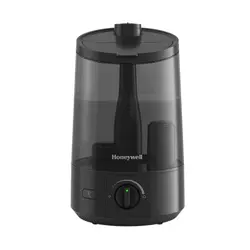
If you have any questions about the operation
of this product, please contact us:
18004770457
www.HoneywellPluggedIn.com/contact-us
www.HoneywellPluggedIn.com
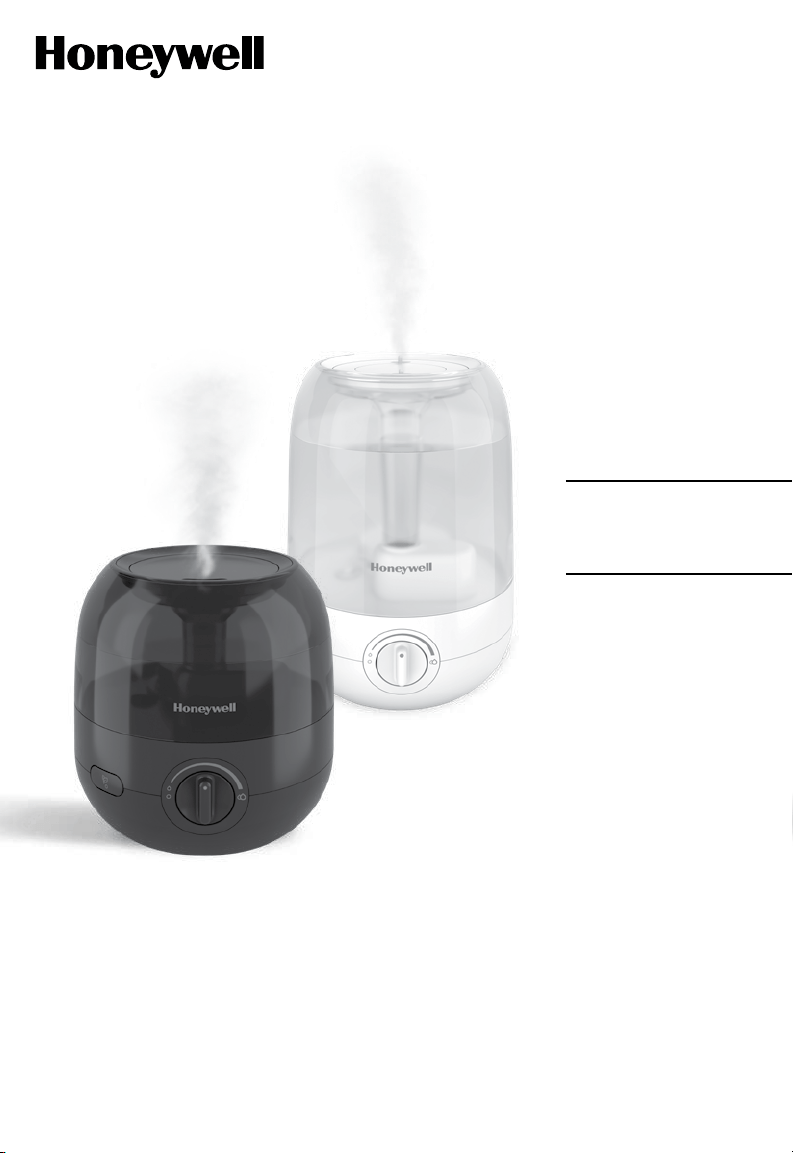
MINI MIST / ULTRA COMFORT
Ultrasonic Cool Mist Humidifier
Owner’s Manual
HUL525 SERIES
HUL545 SERIES

2
IMPORTANT SAFETY INSTRUCTIONS
READ AND SAVE THESE SAFETY INSTRUCTIONS BEFORE
USING THIS HUMIDIFIER
When using electrical appliances, basic precautions should always be followed to reduce the risk
of fire, electric shock, and injury to persons, including the following:
1. The humidifier should ALWAYS be placed
on a firm, flat, waterproof surface at least
three feet (1.2 m) away from bedside, 12
inches (30 cm) from the wall. KEEP OUT
OF REACH OF CHILDREN AND PETS.
2. Be sure the humidifier is in a stable position
and the power cord is away from heated
surfaces and out of the way to prevent the
humidifier from being overturned.
3. DO NOT leave the humidifier unattended
in a closed room. Doing so may result in
personal injury or property damage. If room
becomes saturated, open the door and turn
the humidifier off or down.
4. Before using the humidifier, extend the
cord and inspect for any signs of damage.
DO NOT use the unit if the cord has been
damaged. DO NOT operate with power cord
coiled or with twist tie in place.
5. The humidifier has a polarized plug (one
blade is wider than the other) as a safety
feature. This plug will fit into a polarized
outlet only one way. If the plug does not fit
fully into the outlet, reverse the plug. If it still
does not fit, contact a qualified electrician.
DO NOT attempt to defeat this safety
feature.
6. CAUTION: To avoid fire or electric shock
hazard, plug the humidifier directly into
a 120V AC electrical outlet. To avoid risk
of fire, electric shock, or personal injury,
NEVER use an extension cord or power strip.
7. The humidifier should ALWAYS be
unplugged and emptied when not in
operation or while being cleaned. Turn off
and unplug humidifier before moving. DO
NOT move or tilt humidifier while it is in
operation. Plug and unplug unit with dry
hands. NEVER pull by cord.
8. DO NOT operate the humidifier without
water. Turn off and unplug unit when tank is
empty.
9. Humidifier requires regular cleaning. Refer
to and follow cleaning instructions.
10. DO NOT operate outdoors; this humidifier is
intended for indoor residential use only.
11. DO NOT place in direct sunlight, high
temperature areas or near computers or
sensitive electronic equipment.
12. DO NOT cover or insert objects into any
openings on the unit. DO NOT block intake
or output vents.
13. DO NOT touch the nebulizer while the unit
is plugged in, as burns could result.
14. DO NOT attempt to repair or adjust any
electrical or mechanical functions on this
humidifier. Doing so will void your warranty.
15. DO NOT add any essential oils or
medications (e.g. Vicks VapoSteam) into the
Base Water Reservoir or Water Tank. Doing
so could damage the humidifier and void the
warranty.
16. For Residential Use Only.
SAVE THESE INSTRUCTIONS
3
HPA600 series
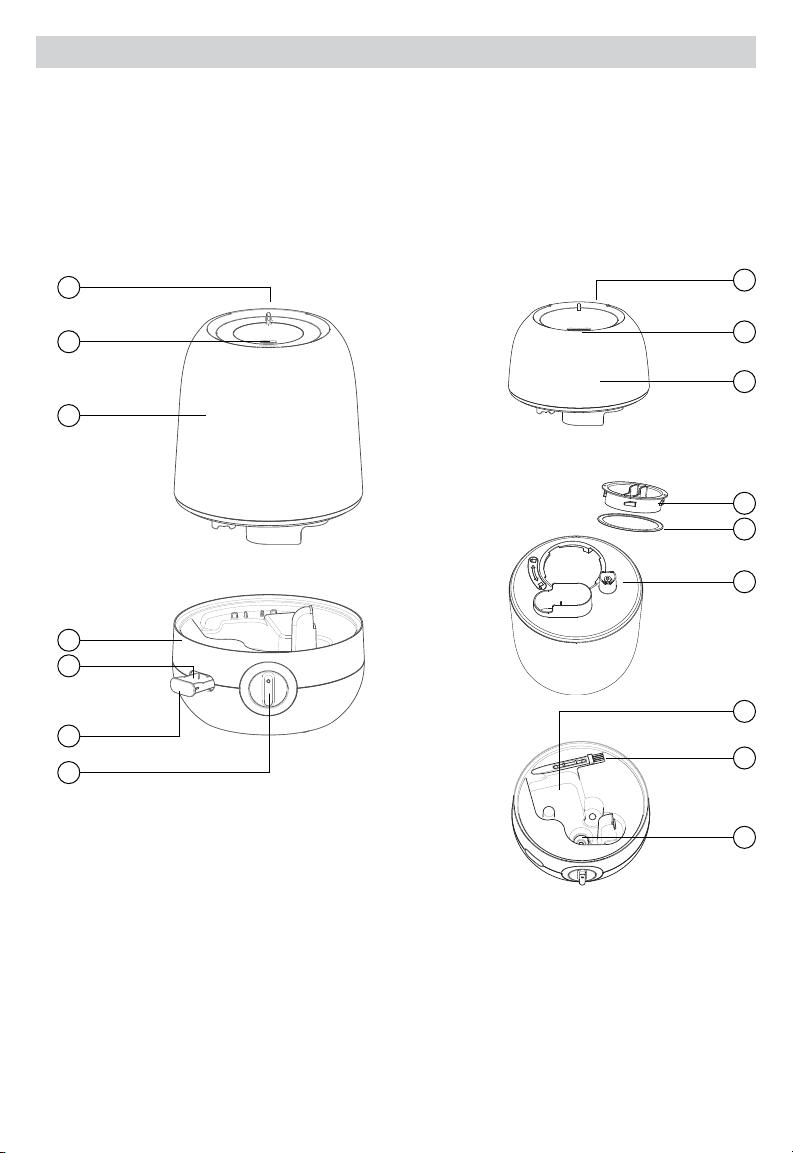
GETTING TO KNOW YOUR COOL MIST HUMIDIFIER
How it Works
Water is released from the Water Tank into the Reservoir. A Nebulizer vibrates at ultrasonic frequency, breaking
the water into a fine mist. The mist is quietly propelled by a fan up a vertical Mist Chamber to the Mist Outlet
where the cool, visible mist enters the room. This humidifier will shut off when the water level is low or when the
Tank is removed from the Base.
Components
1. Tank Handle (not shown)
2. Mist Outlet
3. Water Tank
4. Base
5. Essential Oil Pad
6. Essential Oil Tray
7. Power Knob
8. Tank Cap
9. Gasket
10. Plunger
11. Cleaning Brush
12. Reservoir
13. Nebulizer
HUL545 tank is 1 gallon
HUL525 tank is 1/2 gallon
1
1
2
2
3
3
8
9
10
12
11
13
4
5
6
7
4
SETTING UP YOUR HUMIDIFIER
Unpack the Humidifier
Keep this Owner’s Manual for reference
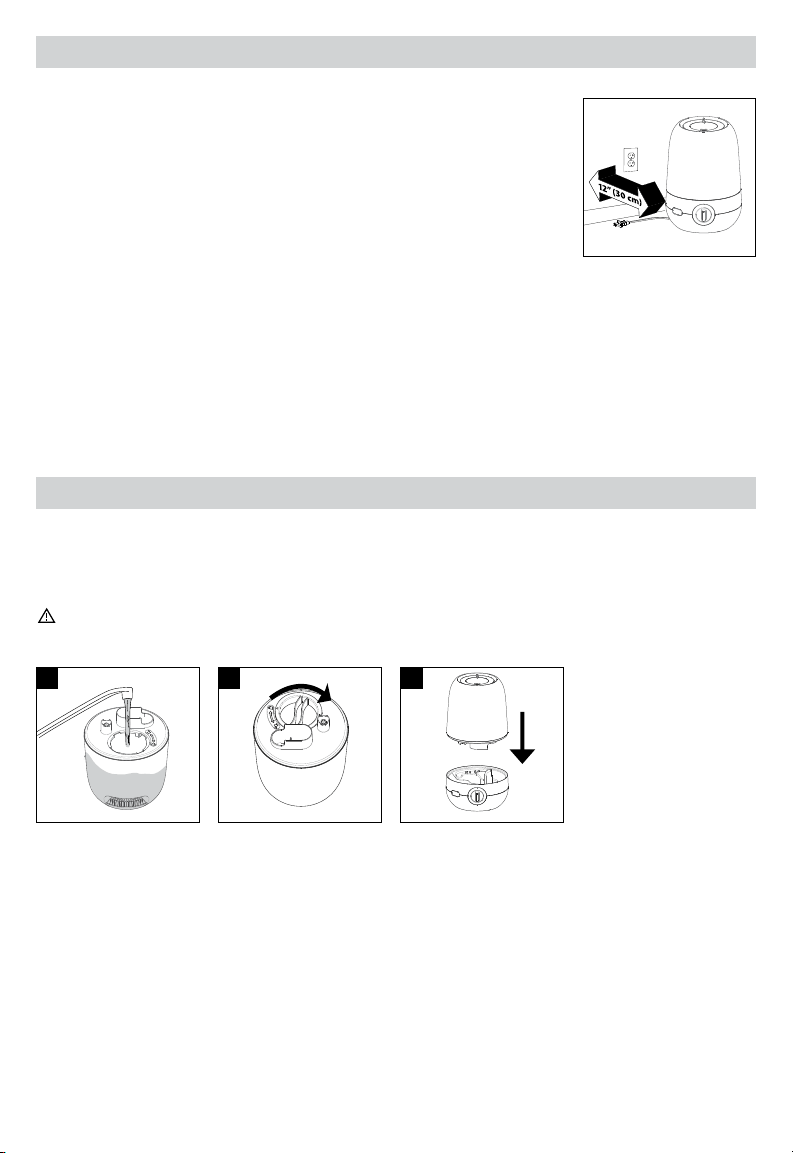
Remove packaging materials. Remove twist tie from power cord and extend power
cord to full length.
Place on a firm, level, water resistant surface a minimum of 12” (30 cm) from any
walls. Mist should be directed away from any walls, bedding and furniture.
Hard Water and White Dust
High mineral content in your water, also known as hard water, may cause a white mineral residue to accumulate
on surfaces in the room near the humidifier. This mineral residue is commonly referred to as white dust. The
higher the mineral content (hardness) of your water, the greater the potential that an ultrasonic humidifier may
produce white dust.
White dust is not a result of a defect or flaw in the humidifier. It is a result of the amount of minerals suspended in
the water you are using.
To reduce white dust, use distilled water or a Protec® PDC51V2 Demineralization Cartridge available through
Consumer Relations; see back of this manual.
FILLING/REFILLING
NOTE: Tank should be carried using two hands; one hand on the Tank Handle and the other supporting the
bottom of the Tank.
Kaz USA, Inc. will not accept responsibility for property damage caused by water spillage.
HUL525 holds 1/2 gallon (1.9 L) of water and HUL545 holds 1 gallon (3.8 L) of water
(tank and reservoir combined).
Filling:
ALWAYS turn the the humidifier off before removing the Water Tank.
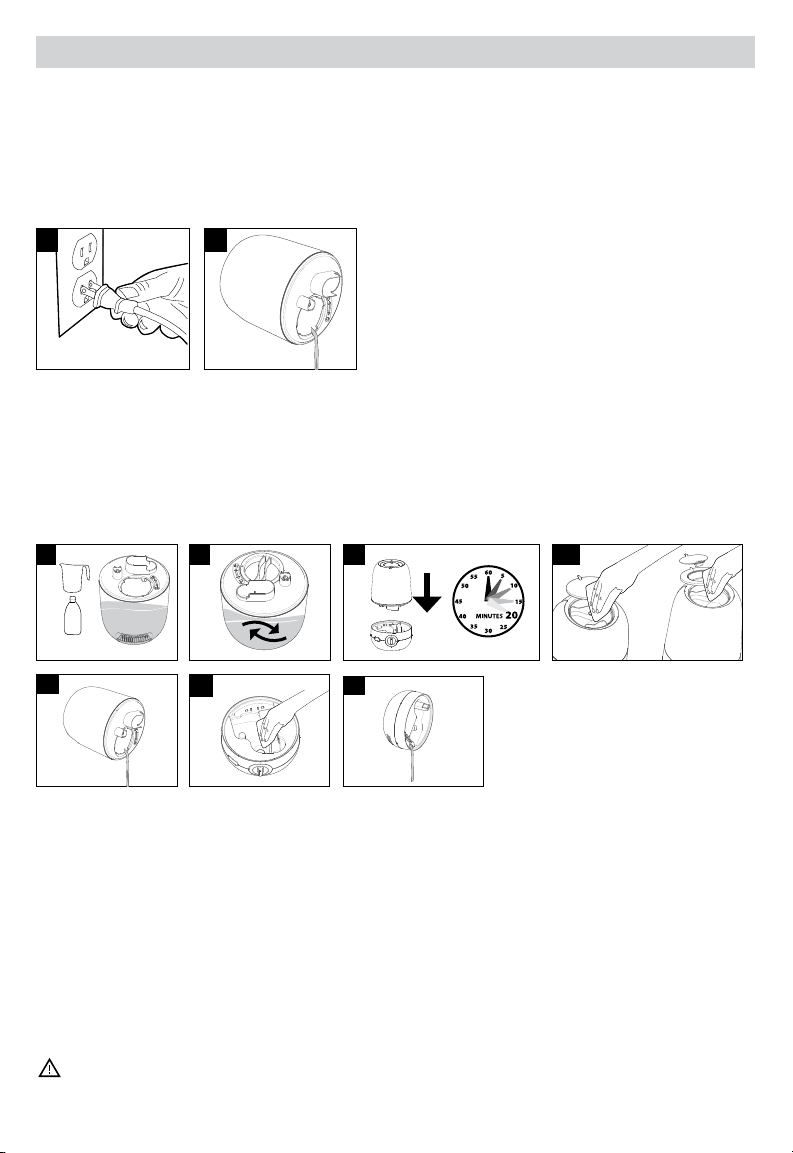
1. Remove Water Tank and turn upside down. Remove Tank Cap by turning counterclockwise (left). Fill Tank
with cool water. DO NOT fill with warm or hot water.
2. Replace Tank Cap by turning clockwise (right), aligning arrow to lock symbol. Be sure Gasket is in place.
3. Place Tank on Base. Water will drain from the Tank into the Reservoir when the Plunger is engaged.
SCALE 0.700
SCALE 0.700
1 2 3
5
USING YOUR HUMIDIFIER
$
3
1 2
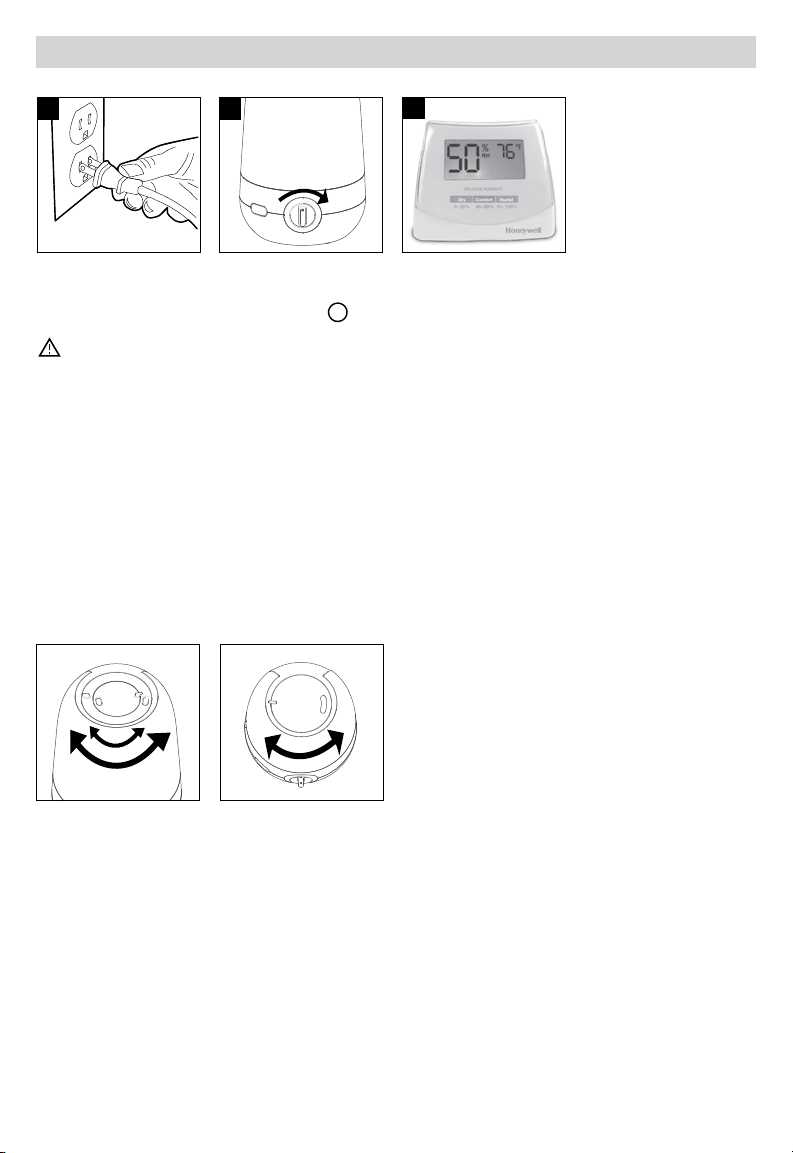
NOTE: Position humidifier to direct mist output away from walls, furniture and bedding.
1. With the Power Knob in the OFF position
, plug the humidifier into a polarized 120V outlet.
CAUTION: TO AVOID ELECTRIC SHOCK, DO NOT PLUG HUMIDIFIER INTO AN OUTLET
WITH WET HANDS.
2. Turn Power Knob to the right to turn on, then turn to left or right to set desired mist level.
3. Humidity Level: When a comfortable humidity level is reached, turn Power Knob to a lower setting.
A comfortable humidity level is between 4060%. Consider using a humidity monitor (not included) to display
current room humidity and temperature.
CONDENSATION: If you notice condensation on the walls, windows or around the humidifier, the humidity
level is too high. Open doors to the room or turn off humidifier until humidity level drops.
Mist Outlet
This humidifier features a directional Mist Outlet. Use this feature to direct the mist where you want it most. The
Outlet will rotate 90º in each direction from front to reduce white dust ingestion in the rear air input vent.
HUL545 HUL525
6
USING YOUR HUMIDIFIER (CONTINUED)
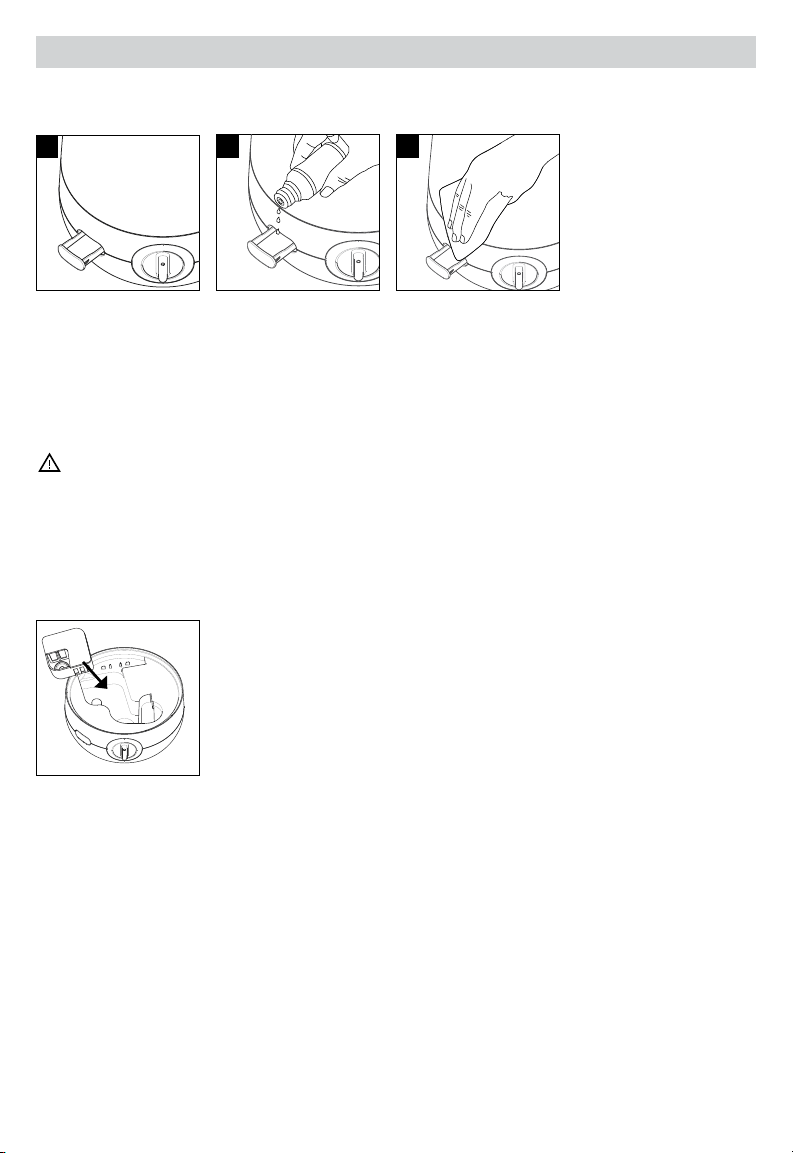
Using The Essential Oil Tray:
This humidifier features an Essentil Oil Tray that can be used with your favorite essential oil for added enjoyment.
This is not a diffuser – the oil does not come in contact with water and is passively evaporated into the air.
Essential oils are not included.
1. Push and release tray to open.
2. Add a few drops of essential oil to the Pad.
WARNING: DO NOT POUR ANY LIQUIDS INTO THE MIST OUTLET. DO NOT ADD LIQUID INHALANTS,
ESSENTIAL OILS OR ANY ADDITIVES TO THE WATER TANK. DOING SO CAN HAVE ADVERSE EFFECTS
ON THE HUMIDIFIER AND VOID THE WARRANTY.
3. To clean the Essential Oil Tray, gently wipe residue from the Tray. Replacement essential oil pads can be
ordered through Consumer Relations; see back of this manual.
Using The Demineralization Cartridge:
This humidifier has been designed to be used with the Protec PDC51V2 or Demineralization Cartridge (not
included). In hard water areas, use of distilled water or a demineralization cartridge with tap water will help
minimize the production of white dust. Cartridges can be ordered through Consumer Relations; see back of this
manual.
Daily Maintenance
For best results, use fresh clean water every day.
1 2
3
7
CLEANING YOUR HUMIDIFIER
To keep your humidifier running efficiently, clean it regularly. Weekly cleaning is recommended. All maintenance
should be done in the kitchen or bathroom on a water-resistant surface near a faucet.
To properly clean your humidifier, we recommend the separate processes of Scale Removal and Disinfecting.
These two processes must be performed separately.
Before Cleaning
1. Turn off and unplug humidifier. Never clean the humidifier when it is running.
2. Remove Water Tank and empty completely from the Tank and Base. Remove any accessories from the Water
Tank and Base.
Scale Removal
Follow steps 12 in Before Cleaning section, then follow the additional steps below.
1. Pour 2 cups (.5 liters) of undiluted distilled white vinegar into the Water Tank.
2. Replace Tank Cap and swish vinegar in Tank to coat the inside of the Water Tank.
3. Place Tank on Base, allowing vinegar to drain into the Water Reservoir. The vinegar will loosen mineral
buildup on the Nebulizer, Plunger and in the bottom of the Tank. Soak for 20 minutes.
4. While soaking, remove the Mist Outlet and wipe with cloth soaked in vinegar.
5. Remove Water Tank and empty vinegar into sink.
6. Use a soft cloth or the included Cleaning Brush to gently clean Nebulizer, and all areas in the Reservoir.
NOTE: Nebulizer is fragile. DO NOT apply extreme pressure.
7. Pour vinegar from the Base into the sink. Pour from the side to avoid leaking into Control Knob. Rinse the
Tank and Reservoir with clean water until the smell of vinegar is gone.
CAUTION: DO NOT SUBMERGE BASE IN WATER. DOING SO WILL DAMAGE THE HUMIDIFIER AND
VOID THE WARRANTY.
$
1
2
7
1
V
2C
4
3
SCALE 0.700
2
5
6
HUL525 HUL545
8
CLEANING YOUR HUMIDIFIER (CONTINUED)
Disinfecting
Before starting the disinfecting process, follow Steps 12 in the Before Cleaning section.
NOTE: Bleach may stain clothes. It is recommended to wear rubber gloves during this process to protect
your hands.
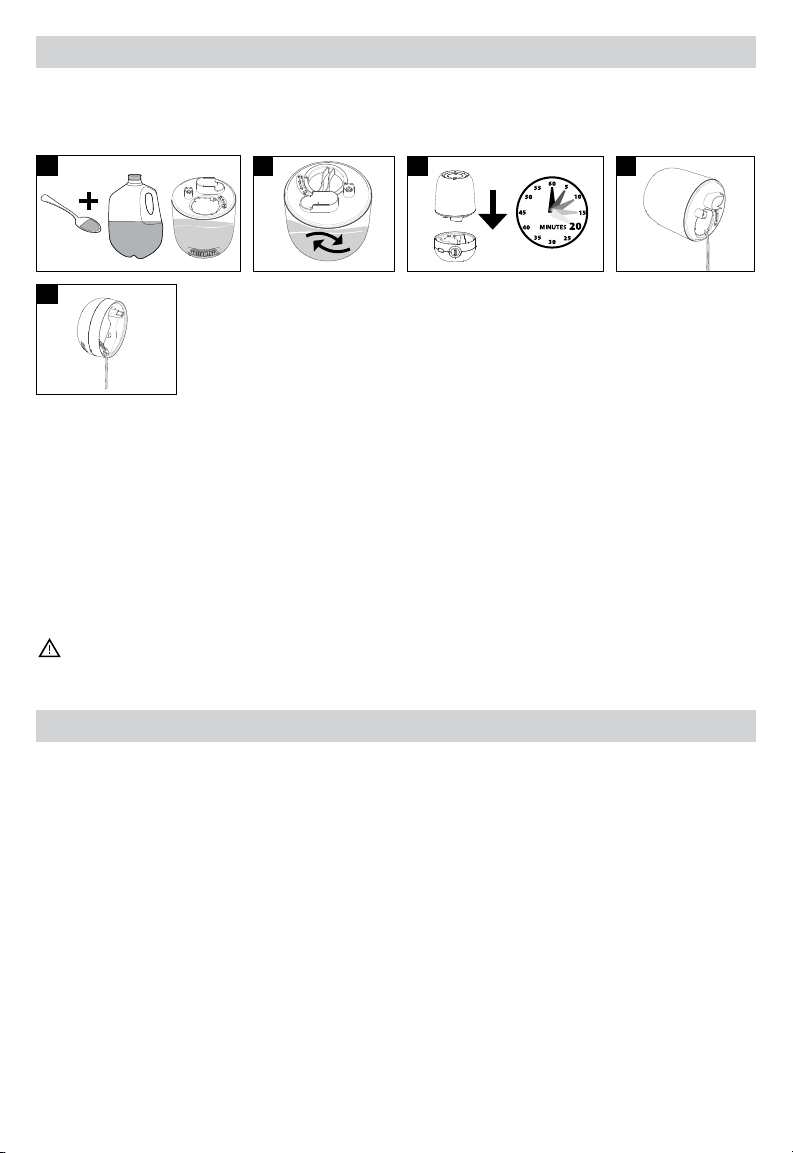
1. For HUL525, mix 1/2 tsp of bleach with 1/2 gallon (1.9 L) of water. For HUL545, mix 1 tsp of bleach with
1 gallon (3.8 L) of water and add to Water Tank.
2. Replace Tank Cap and swish bleach solution in Tank to coat the inside of the Water Tank.
3. Place Tank on Base, allowing solution to drain into the Water Reservoir. Soak for 20 minutes.
4. Remove Water Tank and empty solution into sink.
5. Pour solution from the Base into the sink. Be sure to pour out of the side of the Base to avoid leaking into the
Control Knob. Rinse Tank and Reservoir area with clean water until the smell of bleach is gone.
CAUTION: DO NOT SUBMERGE BASE IN WATER. DOING SO WILL DAMAGE THE HUMIDIFIER AND
VOID THE WARRANTY.
END OF SEASON CARE AND STORAGE
Follow the cleaning instructions when the humidifier will not be used for at least one week, or at the end of the
season. At the end of the season, remove any accessories from the humidifier.
Dry the humidifier completely before storing. DO NOT store with water inside the Water Tank. Pack unit in original
carton and store in a cool, dry location.
5
1
(3,8 L)
B
1/2 tsp
W
1 / 2 Gal.
2
3
SCALE 0.700
4

9
PROBLEM POSSIBLE CAUSE SOLUTION
No power lights Unit not plugged in
Unit is not turned on
Plug unit in
Turn unit on
Power is on and little or no
mist is produced
No water in Tank
Mineral deposits on Nebulizer
Power setting may be too low
Auto shut-off feature has been
engaged
The demineralization cartridge
(sold separately) may be beyond
its service life
Fill Water Tank
Clean Nebulizer (Refer to Cleaning
Your Humidifier section)
Turn power up by turning knob
clockwise
Reset the humidifier by turning it off
for a few seconds, then turn back on
Remove Cartridge; contact
Consumer Relations for replacement
Unit is leaking Tank may be damaged
Tank Cap is not tight
Tank Cap Gasket may be missing
Unit may not be on a level surface
Check for cracks on tank and
contact Consumer Relations
to replace, if necessary.
Tighten Tank Cap
Check to see if Gasket is attached
to inside of Cap; contact Consumer
Relations for replacement
Be sure unit is level
Condensation forms around
humidifier or on windows
Mist intensity is set too high for
room size or current humidity level
Decrease mist output to low setting
or open door to the room
White dust settling on surfaces
in room
Mineral content in hard water Dilute tap water with distilled water
to minimize white dust
Consider use of a PDC51V2
Demineralization Cartridge; contact
Consumer Relations to purchase
NOTE: Failure to keep this unit clean from mineral deposits normally contained in any water supply will affect
the efficiency of operation of this unit. Customer failure to follow these instructions may void the warranty.
TROUBLESHOOTING

10
CONSUMER RELATIONS
We are here to help. Call us toll-free at: 18004770457
Or visit our website at: www.HoneywellPluggedIn.com/contact-us
Please be sure to specify Model number HUL525 or HUL545
NOTE: IF YOU EXPERIENCE A PROBLEM, PLEASE CONTACT CONSUMER RELATIONS FIRST OR SEE YOUR
WARRANTY. DO NOT RETURN TO THE ORIGINAL PLACE OF PURCHASE. DO NOT ATTEMPT TO OPEN THE
MOTOR HOUSING YOURSELF, DOING SO MAY VOID YOUR WARRANTY AND CAUSE DAMAGE TO THE
HUMIDIFIER OR PERSONAL INJURY.
SPECIFICATIONS
Electrical rating: 120V, 60Hz., 25W
Capacity: HUL525 ½ gallon; HUL545 1 gallon
FCC COMPLIANCE
This device complies with Part 18 of the FCC rules.
WARNING: Changes or modifications to this unit not expressly approved by the party responsible for
compliance could void the user’s authority to operate the equipment. This equipment has been tested
and found to comply within the limits for Consumer ISM equipment, pursuant to Part 18 of the FCC rules.
These limits are designed to provide reasonable protection against harmful interference in a residential
installation. This equipment generates, uses and can radiate radio frequency energy, and if not installed
and used in accordance with the instructions, may cause harmful interference with radio communications.
However, there is no guarantee That interference will not occur in a particular installation. If this equipment
does cause harmful interference to radio or television reception, which can be determined by turning
the equipment off and on, the user is encouraged to try to correct the interference by one or more of the
following measures:
• Reorient or relocate the receiving antenna.
• Increase the separation between equipment and receiver.
• Connect the equipment into an outlet on a circuit different from that to which the receiver
is connected.
• Consult the dealer or an experienced radio TV technician for help.

11
2 YEAR LIMITED WARRANTY
You should first read all instructions before attempting to use this product.
This 2 year limited warranty applies to repair or replacement of product found to be defective in material or
workmanship. This warranty does not apply to damage resulting from commercial, abusive, unreasonable use or
supplemental damage. Defects that are the result of normal wear and tear will not be considered manufacturing
defects under this warranty. KAZ IS NOT LIABLE FOR INCIDENTAL OR CONSEQUENTIAL DAMAGES OF ANY
NATURE, ANY IMPLIED WARRANTY OF MERCHANTABILITY OR FITNESS FOR A PARTICULAR PURPOSE ON
THIS PRODUCT IS LIMITED IN DURATION TO THE DURATION OF THIS WARRANTY. Some jurisdictions do
not allow the exclusion or limitation of incidental or consequential damages or limitations on how long an implied
warranty lasts, so the above limitations or exclusions may not apply to you. This warranty gives you specific legal
rights, and you also may have other rights which vary from jurisdiction to jurisdiction. This warranty applies only to
the original purchaser of this product from the original date of purchase.
A. At its option, Kaz will repair or replace this product if it is found to be defective in material or workmanship.
B. This warranty does not cover damage resulting from any unauthorized attempts to repair or from any use not
in accordance with the instruction manual.
C. This warranty does not cover the filters, pre-filters, UV bulbs or other accessories (if included) except for
material or workmanship defects.