De’Longhi Appliances via Seitz, 47 31100 Treviso Italia www.delonghi.com
5711011671_00_1120
Proudly distributed by
De’Longhi Australia Pty Limited
P.O. BOX 4540
CASULA MALL NSW 2170
Customer Service Ph: 1800 126 659
Fax: 1800 706932
www.delonghi.com.au
e-mail: info.au@delonghigroup.com
De’Longhi New Zealand Limited
99 Khyber Pass Road
Grafton 1023
Auckland, New Zealand
P.O. Box 58-056 Botany
MANUKAU 2163
Customer Service Ph: 0508 200 300
Fax: 0508 200 301
www.delonghi.co.nz
e-mail: info.nz@delonghigroup.com
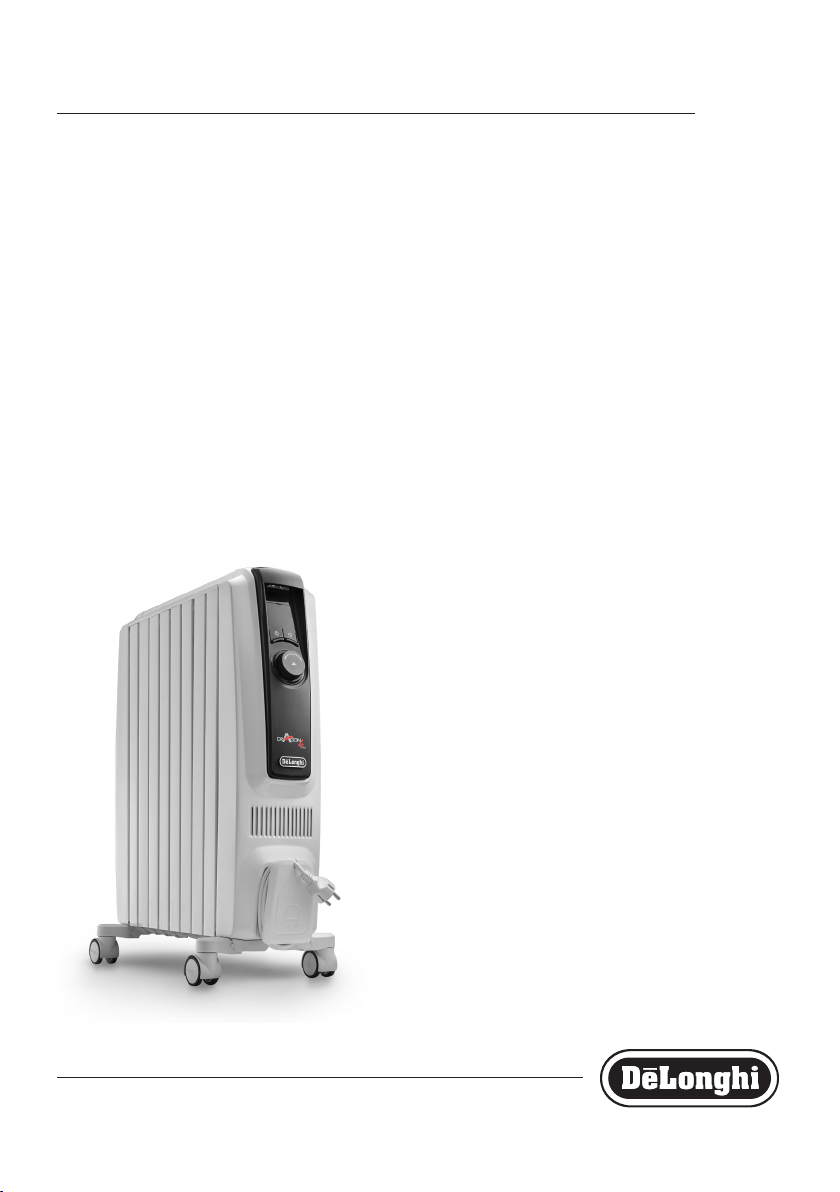
TRDX4
OIL FILLED RADIATOR

2
3
A
C
F
E
B
D
4
5
IMPORTANT WARNINGS
Danger!
Failure to observe the warning may result in life threatening in-
jury by electric shock.
- Do not use this heater in the immediate
surroundings of a bath, a shower or a
swimming pool;
- Never use the heater to dry laundry.
- If the power cable has been damaged, it
must be replaced by the manufacturer or
the technical service centre or by a quali-
ed person so as to avoid all risks.
Important!
Failure to observe the warning could result in injury or damage
to the appliance.
- This appliance can be used by children
aged from 8 years and above and per-
sons with reduced physical, sensory or
mental capabilities or lack of experience
and knowledge if they have been given
supervision or instruction concerning use
of the appliance in a safe way and under-
stand the hazards involved.
Children shall not play with the appli-
ance. Cleaning and user maintenance
shall not be made by children without
supervision.
- Children of less than 3 years should be
kept away unless continuously super-
vised.
- Children aged from 3 years and less than
8 years shall only switch on/o the ap-
pliance provided that it has been placed
or installed in its intended normal oper-
ating position and they have been given
supervision or instruction concerning use
of the appliance in a safe way and un-
derstand the hazards involved. Children
aged from 3 years and less than 8 years
shall not plug in, regulate and clean the
appliance or perform user maintenance.
CAUTION — Some parts of this prod-
uct can become very hot and cause
burns. Particular attention has to be
given where children and vulnera-
ble people are present.
- WARNING: Do not use this heater in
small rooms when they are occupied by
persons not capable of leaving the room
on their own, unless constant supervision
is provided.
- The body of this radiator is lled with a
precise quantity of special oil, so that
repairs requiring the opening of the oil
body must only be made by the service
agent. Any oil leakage must be reported
to the Customer Experience, see enclosed
guarantee for details.
- When scrapping the heater, follow the
regulations concerning the disposal of
oil.
- The appliance must not be located imme-
diately below a xed socket-outlet.
- CAUTION: in order to avoid any danger
caused by an accidental resetting of the
safety system, this appliance must not be
powered through an external timer.
- Do not obstruct the air intake and outlet
area (danger of overheating).
Danger of burns!!
Failure to observe the warning could result in burns or scalds.
- WARNING: In order to avoid
overheating, never under any cir-
cumstances cover the appliances
during operation, as this would lead to
dangerous overheating.
- The use of an extension lead is not rec-
ommended, as overheating of the exten-
sion lead may occur during the operation
of the heater.

5
- Never place the power cable on top of the
heater while it is hot.
- Do not rest anything on the appliance.
- WARNING: To reduce the risk of re, keep
textiles, curtains, or any other ammable
material a minimum distance of 1 m from
the air outlet.
Please note:
This symbol indicates recommendations and important informa-
tion for the user.
- We recommend that you not place the
heater in a draught, because strong
draughts of air may adversely aect the
equipment’s operational eciency.
- Only use this heater on a horizontal and
stable surface.
- Always use the appliance in an upright
position.
- Do not use this heater if it has been
dropped.
- Do not use if there are visible signs of
damage to the heater.
- In order to eliminate the radiator's “new”
smell , set it to maximum power for at
least two hours when used for the rst
time. During this operation, the room
in which the radiator is located must be
ventilated. A little smoke due to the pro-
tective substances applied to the heating
element before transport may be given
o.
- Position the appliance so that the plug
and the outlet can be easily reached.
- Do not use the appliance in rooms less
than 4 m
2
in area.
- The appliance is tted with a safety de-
vice which will switch o it in case of ac-
cidental overheating.
To reset, please contact Customer Experi-
ence, see enclosed guarantee.
- Before putting the appliance away, make
sure it is completely cooled and un-
plugged from the mains socket.
Do not store in dusty atmospheres.
- The appliance must not be hung.
Fundamental safety warnings
Dear customer - the plug on the appliance
heats up during use. This is completely
normal. This HIGH POWER HEATING
APPLIANCE complies with our usual high
standards. You should, however, make sure
that your power socket is in good condition
and that the plug on the appliance is
plugged into the socket correctly to avoid
accidental overheating. If the appliance is
used for long periods of time, we
recommend checking the plug and mains
socket regularly. If in doubt, consult an
electrician.
For non-EU countries only:
This appliance is not intended for use by per-
sons (including children) with reduced phys-
ical, sensory or mental capabilities, or lack
of experience and knowledge, unless they
have been given supervision or instruction
concerning use of the appliance by a person
responsible for their safety.
Children should be supervised to ensure that
they do not play with the appliance.
6
7
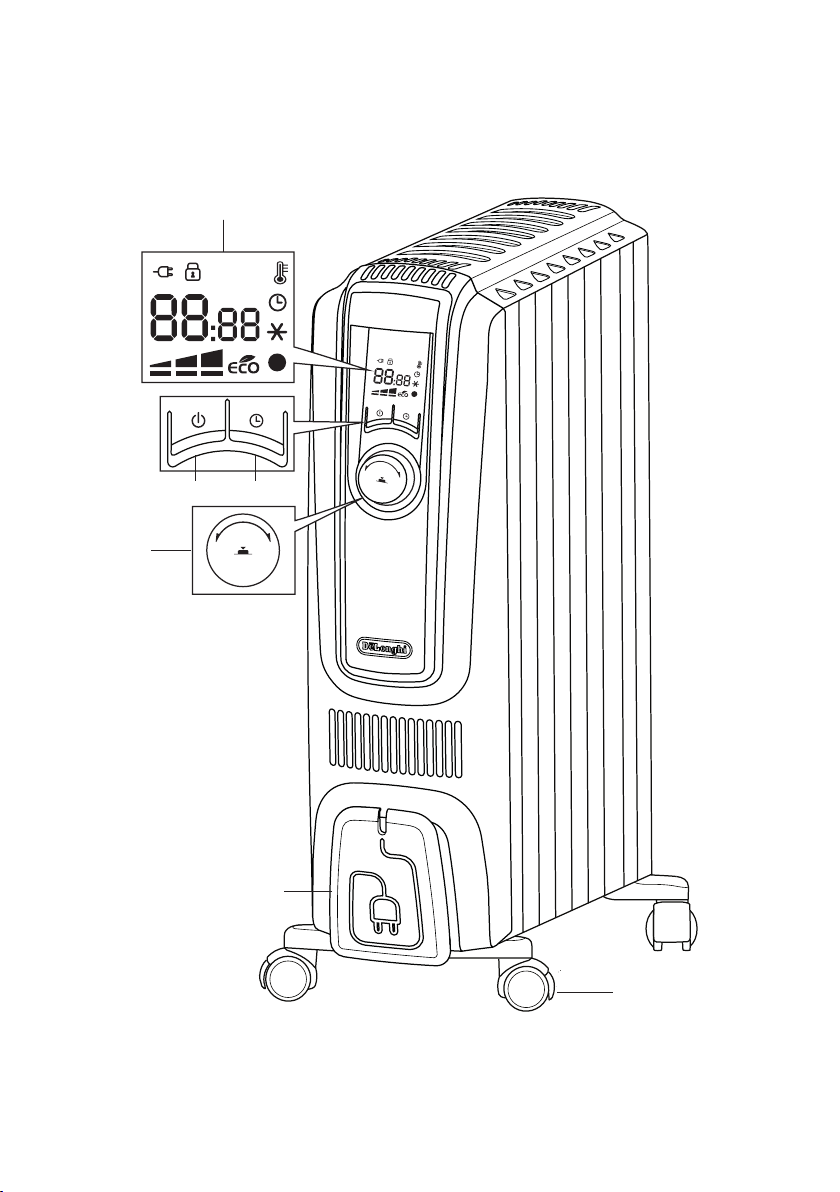
DESCRIPTION
A ON/STAND-BY button
B timer button
C control dial/dial button
D display
E wheel
F cord holder
Symbols shown on the unit's display
key-lock
power supply
temperature/clock
selected power levels
working power levels
Anti-frost symbol
timer function
l (green) Temperature 1 (T1) indicator
l (red) Temperature 2 (T2) indicator
FIRST USE
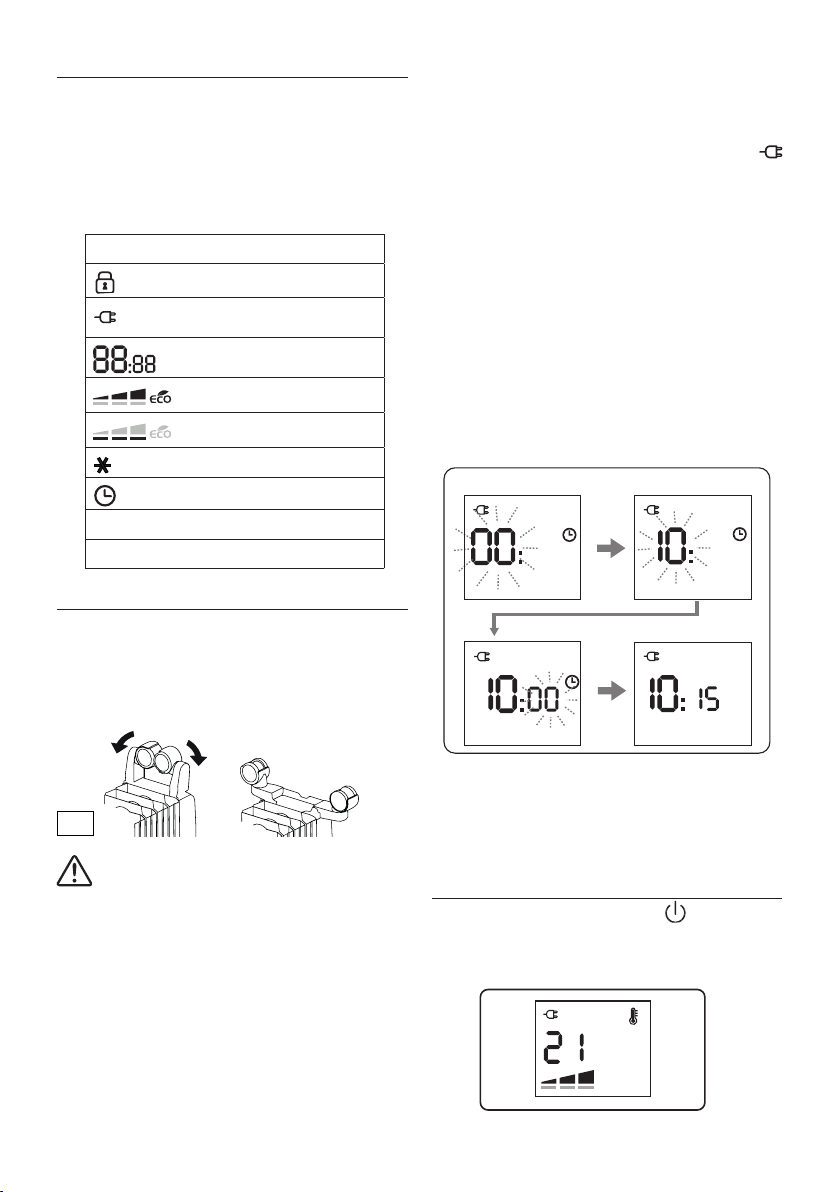
"Easy wheel" system
Turn the radiator upside down on a rug or a soft surface in order
to prevent damaging the paint nish.
Fully unfold the wheels by turning them outwards (Fig. 1). Turn
the radiator back to its upright position.
Important! Wait a minute before turning on the
machine so the oil returns to the normal level.
The radiator must never and for any reason be overturned
when it is in operation.
Location
The heater must not be placed immediately below a power out-
let. Do not use this radiator in rooms having a surface area of less
than 43 square feet (4 sq.m.).
Power connection
Before using the appliance check that your supply voltage is
the same of that shown on the rating label of the unit and that
the power socket and power supply line correspond to the load
specied. After plugged in the appliance will shows the
symbol in red colour.
Setting the time
When using for the rst time or after it has been unplugged for a
long time, you need to set the current time:
1. Plug the appliance into the mains. The display will show
00 blinking.
2. Turn the control dial to select the current hour.
3. When the correct hour is set, press the dial and the min-
utes digits will blink.
4. Turn the control dial to set the minutes then press the dial
to conrm.
Example of display:
❶
❸
❷
❹
Changing the time
If you need to reset the time, in manual operation mode press the
control dial for 5 seconds, then proceed as explained above. After
setting the clock, the unit will return in manual operation mode.
MANUAL OPERATION MODE
Turn the appliance on pressing the button .
The unit will start operating in manual operation mode with the
following default settings:
Fig. 1
7
Setting the temperature
To modify the temperature set point, turn the dial clockwise to
increase and anticlockwise to decrease the temperature.
Temperature settings available are 5°C, and 10°C through to 28
°C. Setting to 5°C turns the unit to the antifrost function. (see
Antifrost function at page 6).
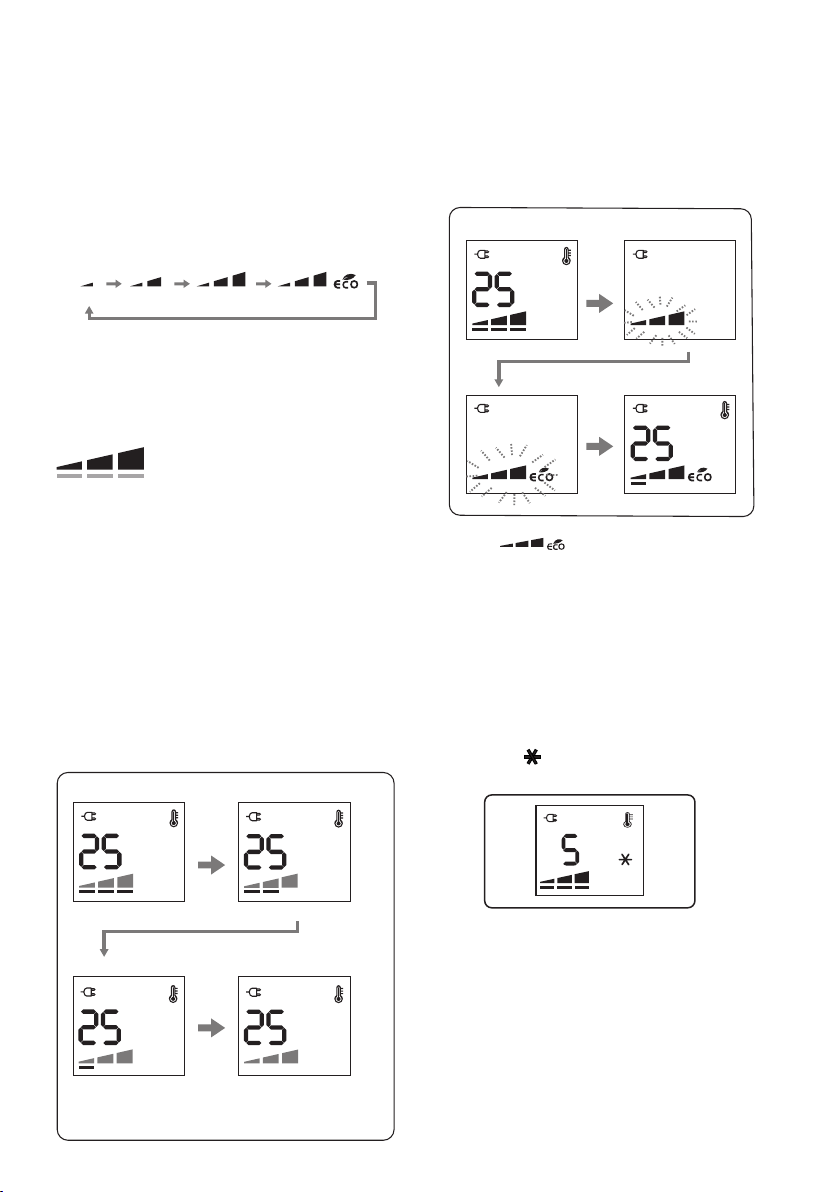
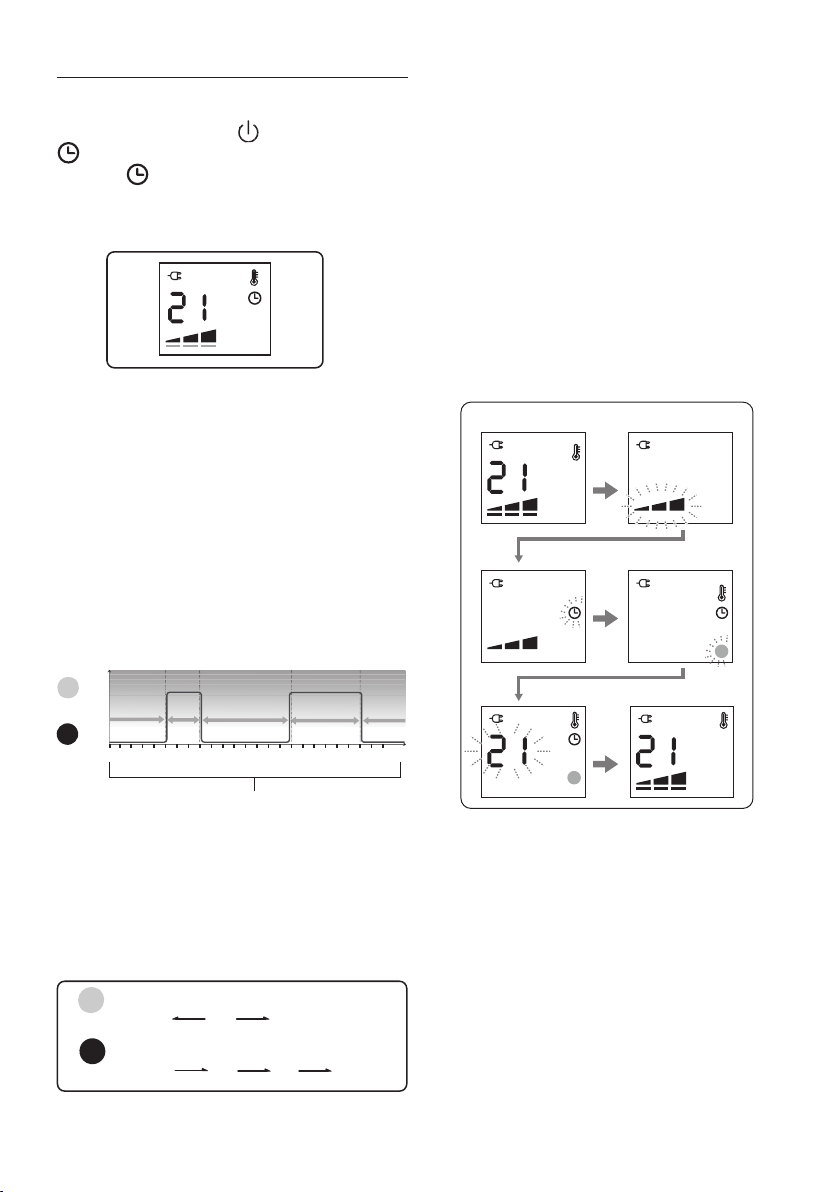
Selected power levels and working power levels
There are 3 power levels (min/med/max) as well as ECO mode.
min
med max max + eco
Depending on the selected power level, the working power level
may be less or equal to the selected power level.
The working heating power is always shown by the unit’s display
by means of the thin bars below the selected power level.
]
]
- If the current room temperature is much lower than the
selected temperature, the appliance will start to heat the
room as rapidly as possible at the selected power level.
- If the current room temperature is close to the selected
temperature, the appliance will heat the room using a
heating power lower than the selected power level.
- When the selected temperature is reached, the unit stops
heating.
Example: Operation is started at room temperature 18°C, the set
temperature is 25 °C, and the selected power level is Max.
Example of display:
Room temperature 18°
Working power level: Max
Working power level: Min
Room temperature 24° Room temperature 25°
The room temperature is
reached the appliance
stops heating
Room temperature 22°
Working power level: Med
❶
❸
❷
❹
Setting the power level
1. Press the dial twice during heating operation.
2. The power level will blink.
3.
Choose one of the available power levels by turning the dial.
4. Press the dial once to conrm.
Example of display:
❶
❸
❷
❹
Eco mode
When the eco mode is activated, the unit will automatically se-
lect the most convenient working power level from Max to Min,
and will also control the set temperature in order to achieve en-
ergy saving while guaranteeing optimum comfort.
Anti-frost function
This function is useful to prevent freezing.
To activate this function, in manual operation when temperature
is set to 10°C turn the dial anticlockwise till the set point 5 is
displayed and a will appear.
In this operation mode the working power can not be set.
The appliance will automatically set to Max power level.
If you turn the dial clockwise, you will restore the same power
setting as before being switched to anti-frost.
Selected power level
Working power level
8
9
TIMER OPERATION MODE
In Timer operation mode the unit works according to a pre-set
daily timer program that can be altered to suit your needs.
Turn on the unit by pressing the button and then press the
button to activate the timer operation mode.
The symbol will appear on the display together with the
pre-set temperature and power level assigned to the current
time interval.
Daily Timer program
The daily timer program consists of a 24 hour timeline that can
be divided into 96 time intervals of 15 minutes each. It is possi-
ble to associate one of the 2 timer temperature settings to each
time interval, T1 or T2. The time intervals and the temperatures
T1 and T2 can be changed to suit your needs.
Pre-set daily timer program
The default pre-set daily timer program is the following:
l T1= 21°C
l T2= heating o
426
8
10 12 14 16 18 20 22 0
(24)
0
21°C
O
T2 T2 T2
T1T1
Time intervals
T1
T2
How to change the daily timer temperatures
It is possible to change the temperature settings for T1 and T2 to
better suit your needs. T1 is associated to Green light (l) and
can be set at any temperature from 10 to 28°C; T2 is associated
to Red light (l) and can be set from o to anti-frost 5° or to any
temperature from 10° to less than T1.
Min
10°C
Min
10°C
Max
28°C
Default
21°C
Default
O
Anti-frost
5°C
Red light
Green light
T1
T2
Max
less than T1
To change the timer temperature setting, from manual opera-
tion mode:
1. Press the control dial.
2. The power level will blink.
3. Turn the dial till you see the clock icon blinking and press
the dial.
4. A green light will appear on the display blinking. Turn the
dial to choose between green light (T1) or red light (T2) and
press to conrm.
5. The temperature digits will blink. Turn the dial to adjust the
temperature according to your needs and press the dial to
conrm.
6. The unit will exit the menu and the display will show the
manual operation settings.
Example of display:
❺❻
❶
❸
❷
❹
Note:
Follow same 6 steps above to set the other daily timer
temperature not previously set.
How to change the daily timer program
1. To change the pre-set daily timer program the unit must be
turned into stand-by mode .
Press the Timer button for approx. 5 seconds.
2. The unit will emit a beep and 00.00 and the blinking green
light symbol will be displayed.
Turn the dial to select the Temperature T1=green light , or
T2=red light, that you would like to have in the room at
00:00 hours and press the dial to conrm.
3. The time digits will start blinking to enable setting the
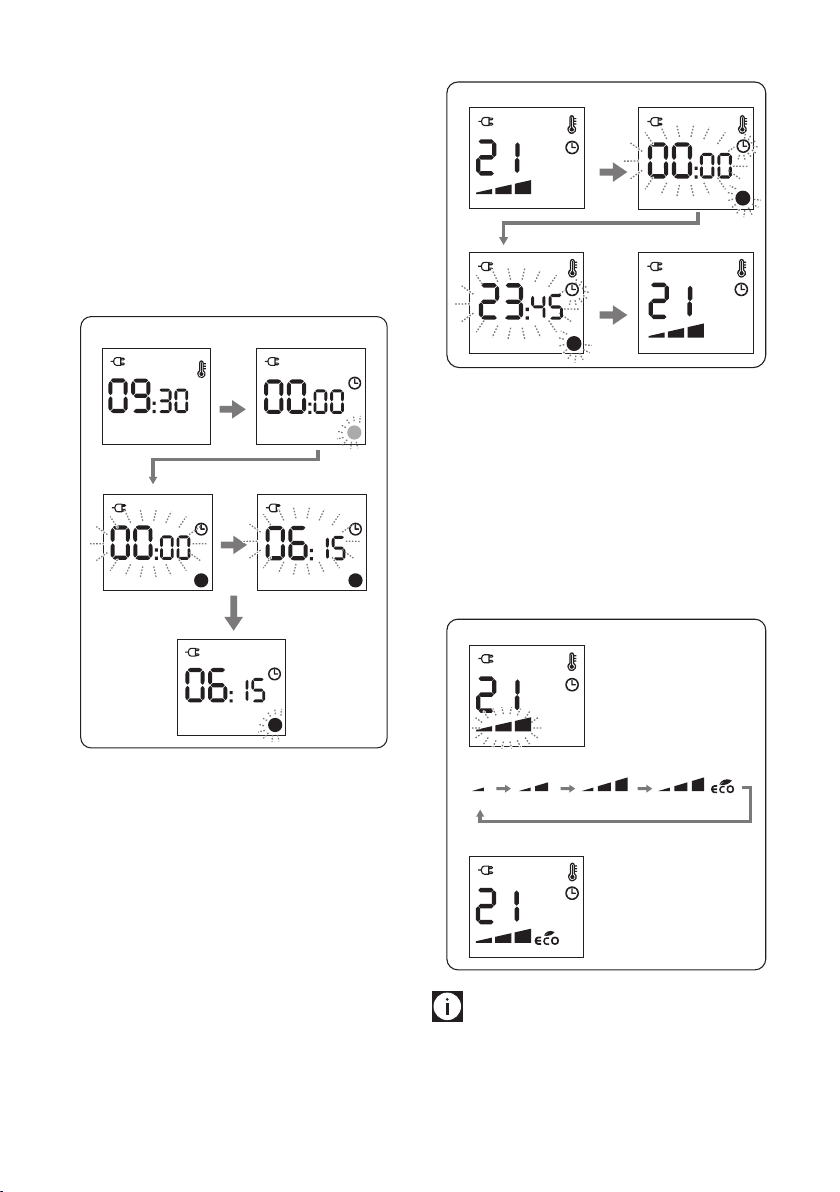
9
length of the time interval.
4. Turn the dial clockwise till you reach the desired ending
time for this program interval.
You will be able to choose any time intervals of minutes.
5. Press the dial to conrm the end of the time interval, and
the temperature light will start blinking to enable you to
set the next program interval.
Set the desired program intervals along the 24 hours till
23:45 to complete the daily timer program following the
same procedure described from points 3 to 5.
Example of display:
❶
❷
❺
❸
❹
How to display the daily timer program
You may need to check the settings of the daily timer program.
1. From timer operation mode, press the timer button for ap-
prox. 5 seconds.
2. The display will show 00:00, the temperature indicator
light (T1=green or T2=red) and the clock icon blinking.
3. Turn the dial clockwise to display the daily timer program
from 00:00 till 23:45.
4. Press the dial to exit.
Example of display:
❶
❸
❷
❹
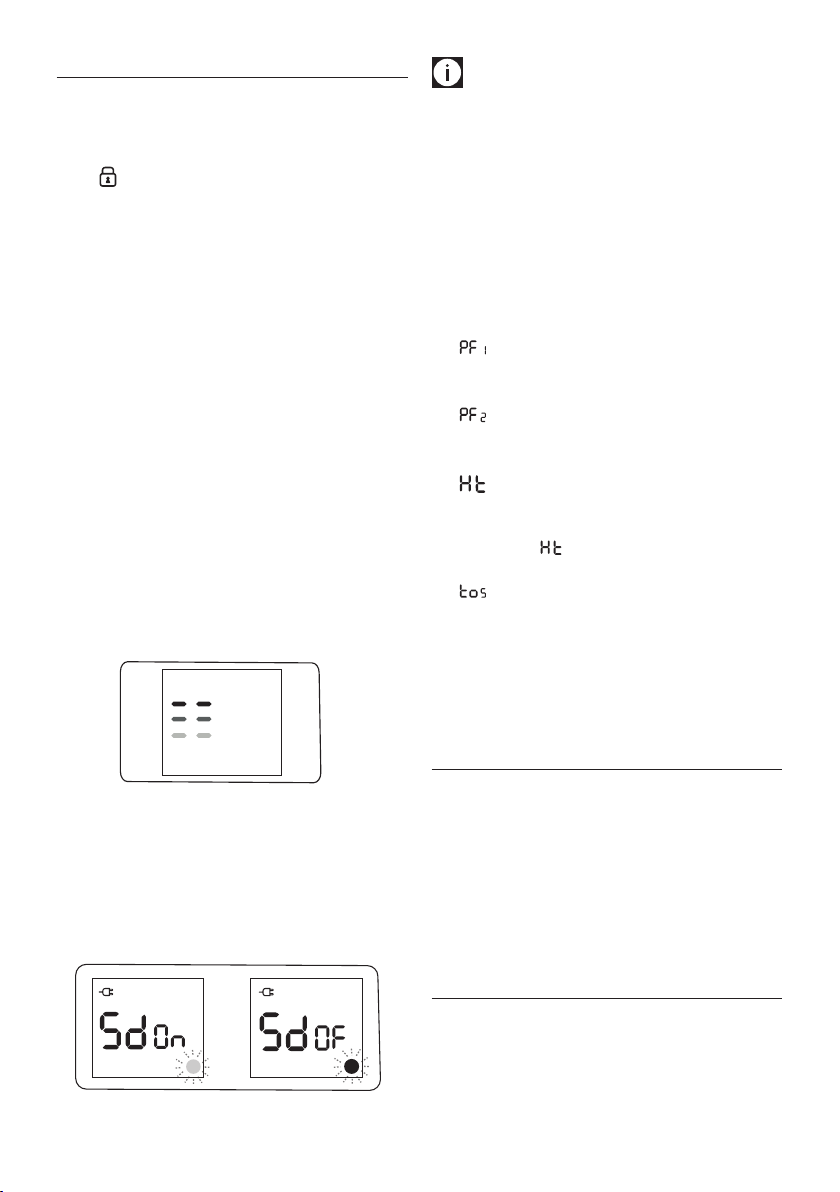
Power level setting in timer operation mode
In timer operation mode, the unit works by default at max power
level. It is possible to change the power level as follows:
1. In timer operation mode, press the control dial and the
power level icon will blink.
2. Turn the dial to choose between min / med / max / max-
+eco.
3. Press the dial to conrm.
Example of display:
min med max max + eco
❶
❸
❷
Please note: If a procedure to modify or monitor the unit
settings is interrupted and no button is pressed for two minutes,
the settings shown on the display will not be maintained and
the appliance will go back to the settings previously displayed.
10
11
EXTRA FUNCTIONS
Key-lock
To prevent accidental button activation, it is possible to lock the
keys.To activate this function press the timer button and the con-
trol dial together for at least 3 seconds. The display shows the
symbol and an acoustic signal will be emitted.
When the appliance is ON and the key lock is activated:
- buttons and dial are blocked
- pressing the ON/STAND-BY button 1 time: the unit comes
on in stand by, and the appliance remains in stand-by even
if the ON/STAND-BY button is pressed again.
- to turn the appliance on again it will be necessary to unlock
the key lock.
When the appliance is OFF and the key lock is activated:
- all buttons and dial are blocked
- it's not possible turn on the appliance
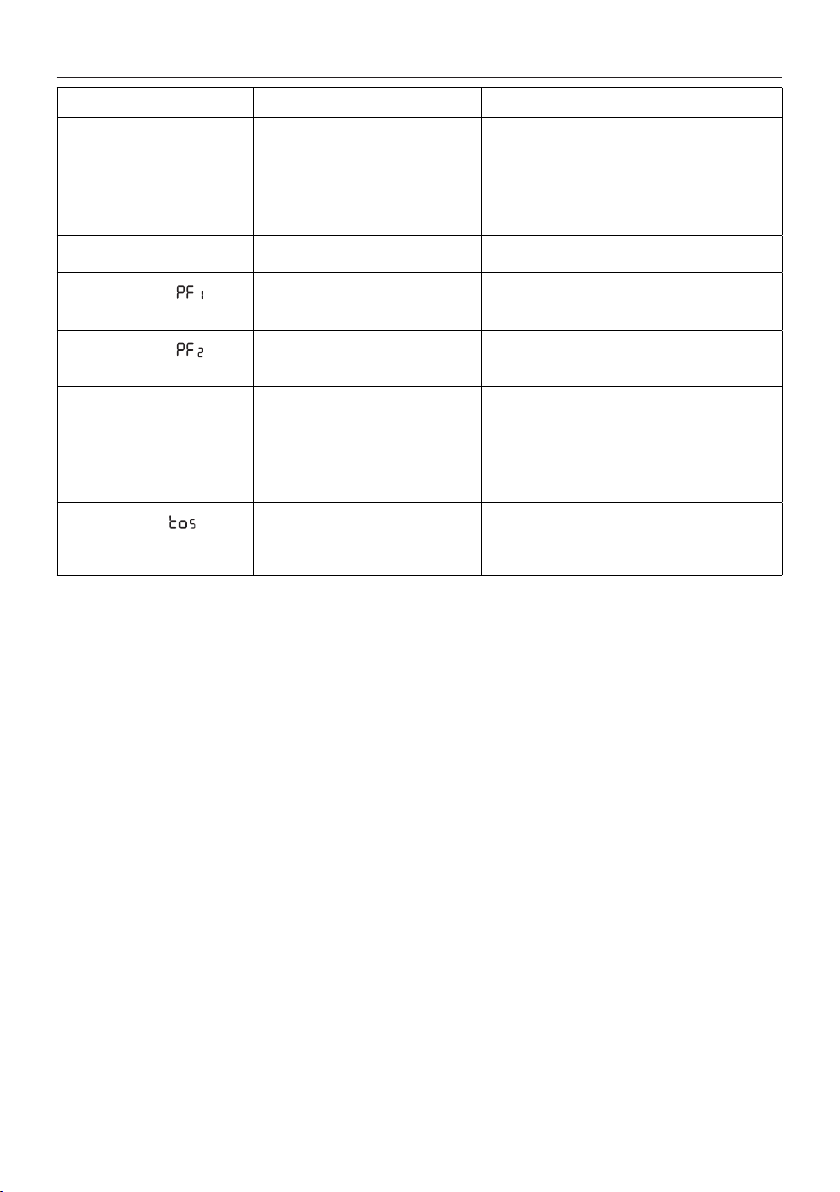
To diactivate the function press the timer button and control dial
together, for at least 3 seconds.
Display brightness regulation
After a few seconds of inactivity the display brightness is auto-
matically reduced. The brightness level during inactivity can be
adjusted to the desired level choosing from 3 levels available.
When the appliance is in stand-by press and hold the control dial
for about 5 seconds, the current level of brightness appears.
Turn the dial till the desired brightness is reached, then press the
dial to conrm.
Buzzer sound on/o
When the appliance is in stand-by press the control dial for
about 5 seconds, the current level of brightness appears: press
the timer button and turn the dial to modify the status of the
buzzer from On (l green) to O (l red) and viceversa.
Press the dial to conrm.
Please note: only for ON/STAND-BY button the sound
remains active.
Memory
After an interruption to the power supply, when the power returns,
the appliance will resume in stand-by mode. When the unit is
switched on again by pressing the on-standby button, the operating
conditions will be same as previously set in manual operation mode.
Alarms
The appliance has a diagnostic system that makes it possible to
signal malfunctions. In case of problems, the display will show
an alarm message with a red square light:
- (Probe failure 1) + beep
Ambient temperature probe failure. Please contact
De'Longhi Customer Service.
- (Probe failure 2) + beep
Probe failure internal security. Please contact De'Longhi
Customer Service.
- (High temperature)
When the product internal temperature is too high, the
heating element will automatically be turned o. The
display shows for two seconds, cycling. To remove the
cause of this alarm check that the unit is not covered.
- (Tip over safety device)
A tip over safety device turns the appliance o if it falls over
or is positioned inappropriately in such a way as to jeopard-
ise safety.
The appliance emits a beep and a TOS on the display.
The appliance resumes operation a few seconds after being
placed in an upright position again in stand-by mode.
MAINTENANCE
Always remove the plug from the power outlet and allow the
radiator to cool. Wipe radiator with a soft damp cloth, do not
use detergents and abrasives. Should the radiator not be in use
over a certain length of time, wind the cord around the cord
holder and store it in a dry place. This appliance has been built to
give many years of trouble free service. In case of malfunction or
doubt, do not try to repair the heater by yourself: this may result
in a re hazard or electric shock. Call De'Longhi Customer Service
(see attached list of De'Longhi Customer Service).
TECHNICAL CHARACTERISTICS
Supply voltage See rating plate
Absorbed power “
11
TROUBLESHOOTING
PROBLEM CAUSE SOLUTION
The display doesn't work Be sure it is plugged in and that the
electrical outlet is working
The safety device may have switched
o the appliance
Plug into the power outlet
Remove the obstruction and let the appliance cool
down. If the appliance doesn't work please contact
De'Longhi Customer Service
The appliance doesn't warm up The temperature may be set too low
Set the temperature to a higher value
The display shows: + unit
o (Probe failure 1)
It indicates that the room temperature
sensor has failed
Please contact De'Longhi Customer Service
The display shows: + unit
o (Probe failure 2)
It indicates that the probe of the
internal safety of the device has failed
Please contact De'Longhi Customer Service
The display shows: Ht
(High temperature)
The unit has reached a too high
internal temperature
Check that the unit is not covered
and let the
appliance cool down
. When the product internal
temperature decreases, the alarm will disappear.
If the appliance doesn't work please contact
De'Longhi Customer Service
The display shows: and unit
is o
The tip-over switch has been activated Make sure the appliance is standing upright on a at
surface. If the appliance doesn’t work please contact
De'Longhi Customer Service