®
P250072
93153462_A
Limited Lifetime Warranty
Date Purchased
Store Purchased
UL Model No.
Serial No.
Vendor No.
UPC
111017
P250072
Progress Lighting fan motors are warranted to the original purchaser to be free of electrical and/or mechanical
defects for so long as the original purchaser owns the fan. Pull chain switches, reverse switches, capacitors and
metal nishes are warranted to be free from defects in materials or workmanship for a period of 1 year from
the date of purchase. Warping of wooden or plastic blades is not covered by this warranty nor is corrosion and/
or deterioration of any nishes for fans installed within ten miles of any sea coast. Extended warranties for
ENERGY STAR
®
qualied products may apply.
Progress Lighting ceiling fans with built-in LED light sources, when properly installed and under normal
conditions of use, are warranted to be free from defects in material and workmanship which cause the light
sources to fail to operate in accordance with the specications for (i) ve (5) years from the date of purchase
on the LED Light modules and electrical components for fans used in single family residences, and (ii) three
(3) years from the date of purchase on the LED Light modules and electrical components for fans used in
multi-family or commercial applications. LED bulbs supplied by Progress Lighting carry no warranty other
than manufacturer’s warranty. Non-LED bulbs carry no warranty.
With proof of purchase, the original purchaser may return the defective fan to the place of purchase during the
rst 30 days for replacement. After 30 days, the original purchaser MUST contact Progress Lighting at (864)
678-1000 for repair or replacement which shall be determined in Progress Lighting’s sole discretion and shall
be purchaser’s sole and exclusive remedy.
Labor and Shipping Excluded. This warranty does not cover any costs or fees associated with the labor
(including, but not limited to, electrician’s fees) required to install, remove, or replace a fan or any fan parts.
This warranty shall not apply to any loss or damage resulting from (i) normal wear and tear or alteration,
misuse, abuse or neglect, or (ii) improper installation, operation, repair or maintenance by original purchaser
or a third party, including without limitation improper voltage supply or power surge, use of improper parts or
accessories, unauthorized repair (made or attempted) or failure to provide maintenance to the fan.
THE FOREGOING WARRANTIES STATE PROGRESS LIGHTING’S ENTIRE WARRANTY OBLIGATION
AND ORIGINAL PURCHASER’S SOLE AND EXCLUSIVE REMEDY RELATED TO SUCH PRODUCTS.
PROGRESS LIGHTING IS NOT RESPONSIBLE FOR DAMAGES (INCLUDING INDIRECT, SPECIAL,
INCIDENTIAL OR CONSEQUENTIAL), DUE TO PRODUCT FAILURE, WHETHER ARISING OUT OF
BREACH OF WARRANTY, BREACH OF CONTRACT, OR OTHERWISE. THIS WARRANTY IS GIVEN
IN LIEU OF ALL OTHER WARRANTIES, WHETHER EXPRESSED OR IMPLIED, INCLUDING THOSE
OF MERCHANTABILITY, FITNESS FOR A PARTICULAR PURPOSE OR NONINFRINGEMENT.
Some states do not allow limitations on how long an implied warranty lasts or the exclusion or limitations
of incidental or consequential damages, so the above limitations and exclusions may not apply to you. This
warranty gives you specic rights and you may have other rights which vary from state to state.
785247260997,
785247260980,
785247260973

Safety Rules
Unpacking Your Fan
Installing Your Fan
Making the Electrical Connections
Operating Your Fan
Care of Your Fan
Troubleshooting
Specications
Table of Contents
1
2
3
6
11
12
12
13
1.
To reduce the risk of electric shock, insure electricity has been
turned off at the circuit breaker or fuse box before beginning.
2.
All wiring must be in accordance with the National Electrical
Code ANSI/NFPA 70-1999 and local electrical codes.
Electrical installation should be performed by a qualied
licensed electrician.
3.
CAUTION: To reduce the risk of personal injury, use only the
screws provided with the electrical box.
4.
The outlet box and support structure must be securely
mounted and capable of reliably supporting 35 lbs. (15.9 kg).
Use only cUL Listed outlet boxes marked “Acceptable for Fan
Support of 35 lbs. (15.9 kg) or less.”
5. CAUTION: The fan must be mounted with a minimum of 7
feet clearance from the trailing edge of the blades to the oor.
6.
Do not wait for the fan to stop before pressing the reverse
button. The fan will not reverse direction if the fan is not
moving.
7.
Avoid placing objects in path of the blades.
8.
To avoid personal injury or damage to the fan and other items,
be cautious when working around or cleaning the fan.
9.
Do not use water or detergents when cleaning the fan or fan
blades. A dry dust cloth or lightly dampened cloth will be
suitable for most cleaning.
10.
After making electrical connections, spliced conductors should
be turned upward and pushed carefully up into electrical box.
The wires should be spread apart with the grounded conductor
and the equipment-grounding conductor on one side of the
electrical box and ungrounded conductor on the other side of
the electrical box.
11.
Electrical diagrams are for reference only. Light kits that
are not packed with the fan must be cUL Listed and marked
suitable for use with the model fan you are installing. Switches
must be cUL General Use Switches. Refer to the instructions
packaged with the light kits and switches for proper assembly.
12.
All set screws must be checked and retightened where
necessary before installation.
13.
WARNING: To reduce the risk of re or electric shock,
this fan should only be used with fan speed control part
no. DP-51R, manufactured by DAWNSUN ELECTRONIC
TECHNOLOGY CO LTD ZHONGSHAN.
14.
Suitable for use in damp locations. Use only with light kits
marked “Suitable for use in damp locations.”
1. Safety Rules
READ AND SAVE THESE INSTRUCTIONS
TO REDUCE THE RISK OF FIRE, ELECTRIC SHOCK OR PERSONAL
INJURY, MOUNT TO OUTLET BOX MARKED “ACCEPTABLE FOR FAN
SUPPORT OF 35LBS. (15.9 KG) OR LESS”, AND USE SCREWS PRO
-
VIDED WITH THE OUTLET BOX.
TO REDUCE THE RISK OF PERSONAL INJURY, DO NOT BEND THE
BLADE BRACKETS (ALSO REFERRED TO AS (“FLANGES”) DURING
ASSEMBLY OR AFTER INSTALLATION. DO NOT INSERT OBJECTS IN
THE PATH OF THE BLADES.
TO REDUCE THE RISK OF SHOCK, THIS FAN MUST BE INSTALLED
WITH AN ISOLATION WALL CONTROL/SWITCH.

a. Blade attachment hardware
(13 screws)
b. Electrical hardware and balancing kit
(1 plastic wire connectors, blade balancing
kit )
7. Light Kit Pan
8. Light Kit Fitter Assembly
9.
Light Shade
10.
T
ransmitter and Receiver
11. Extension Lead Wire
1.
Mounting Bracket (inside canopy)
2.
6” Ball/Downrod
Assembly (hanger pin
and locking pin pre-attached)
3. Canopy with Canopy Ring (attached)
4.
Decorative Motor Collar Cover
5. Fan Motor Assembly
6. Blades (3)
2. Unpacking Your Fan
Unpack your fan and check the contents. You should have the following items:
a
b
1
2
3
4
5
6
7
8
9
11
10
OFF
6
1
5
2
4
3
R
8h
4h
2h

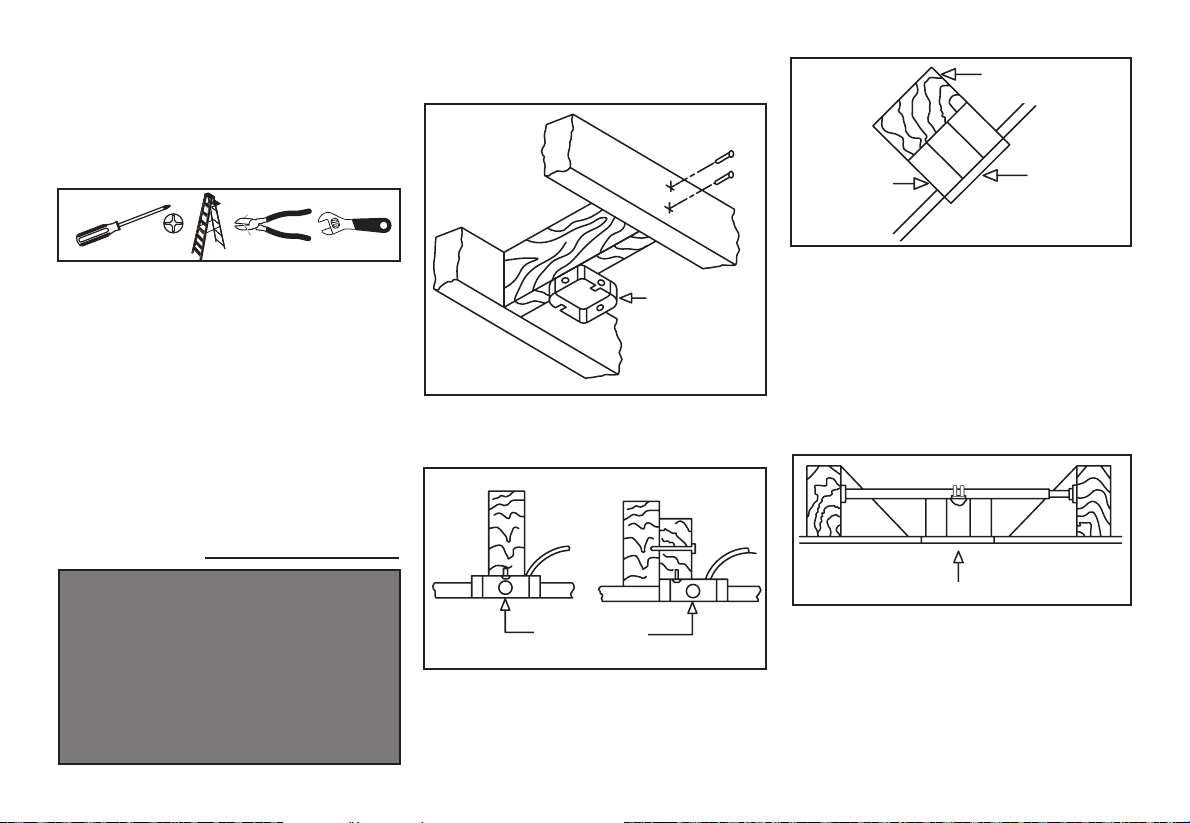
3. Installing Your Fan
Tools Required
Phillips screw driver or straight slotted screw
driver, adjustable wrench, step ladder, and
wire cutters.
Mounting Options
If there isn’t an existing electrical box, then
read the following instructions. Disconnect
the power by removing fuses or turning off
circuit breakers.
Secure the electrical box directly to the building
structure. Use appropriate fasteners and
building materials. The electrical box and
its support must be able to fully support the
moving weight of the fan (at least 35 lbs.).
Do not use plastic electrical boxes.
Figures 1, 2, and 3 are examples of different
ways to mount the electrical box.
Note: You may need a longer downrod to
maintain proper blade clearance when
installing on a steep, sloped ceiling. The
maximum angle allowable is 20˚. If the
canopy touches downrod, turn the canopy
180˚ before attaching the canopy to the
mounting plate.
To hang your fan where there is an existing
xture but no ceiling joist, you may need an
installation hanger bar as shown in Figure 4.
TO REDUCE THE RISK OF FIRE, ELECTRIC
SHOCK OR PERSONAL INJURY, MOUNT
TO OUTLET BOX MARKED “ACCEPTABLE
FOR FAN SUPPORT OF 35LBS. (15.9 KG) OR
LESS”, AND USE SCREWS PROVIDED WITH
THE OUTLET BOX. ELECTRICAL BOXES
COMMONLY USED FOR THE SUPPORT OF
LIGHTING FIXTURES MAY NOT BE ACCEPT-
ABLE FOR FAN SUPPORT AND MAY NEED TO
BE REPLACED. CONSULT A QUALIFIED ELEC-
TRICIAN IF IN DOUBT.
Figure 1
Figure 2
Figure 4
Figure 3

4.
Hanging the Fan
REMEMBER
to turn off the power. Follow
the steps below to hang your fan properly.
NOTE: This fan is recommended for
standard ceiling mount using the downrod
provided with this fan. When using standard
ceiling installation with the 6 inch downrod
provided, the distance from the ceiling
to the bottom of the fan blades will be
approximately 14 inches.
Standard Ceiling Mounting
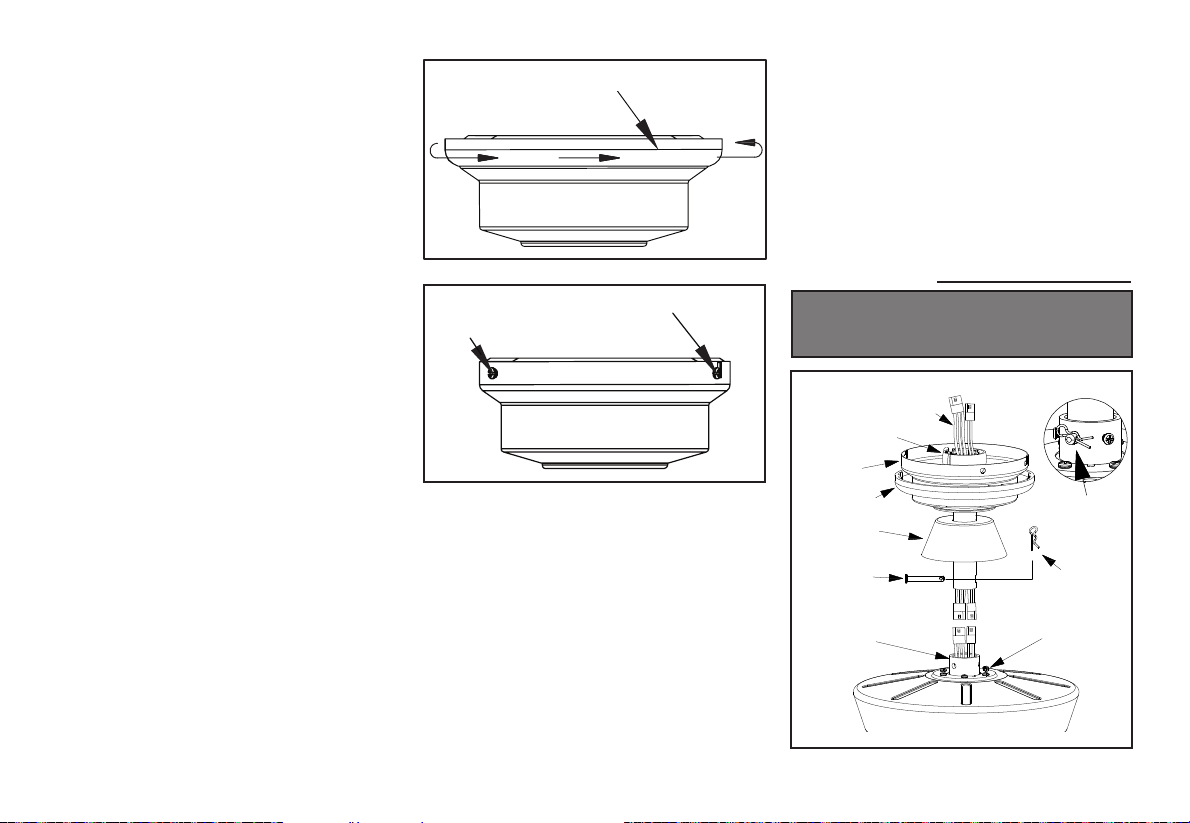
1. Remove the canopy ring from the canopy
by turning the ring counter-clockwise
until it unlocks. (Figure 5)
2. Remove the mounting bracket from the
canopy by loosening the four screws on
the top of the canopy. Remove the two
non-slotted screws and loosen the slotted
screws. This will enable you to remove
the mounting bracket. (Figure 6)
3. Remove the hanger pin and locking pin
from downrod assembly
.
4. Place downrod over canopy and canopy
ring, slide the motor collar cover onto the
downrod. Connect the extension lead wires
to the lead wires from motor. Make sure
the quick connectors are clasped rmly.
Route the wires through the ball/down rod
assembly. (Figure 7)
Remove
Loosen but Do Not Remove
Turn Canopy Ring to Remove
Figure 5
Figure 6
5. Loosen, but do not remove, the set screws
on the collar on the top of the motor
housing.
6.
Align the holes at the bottom of the
downrod with the holes in the collar on top
of the motor housing. (Figure 7)
Carefully insert the hanger pin through the
holes in the collar and downrod. Be careful
not to jam the hanger pin against the wiring
inside the downrod. Insert the locking pin
through the hole near the end of the b
olt
until it snaps into its locked position, as
noted in the circle inset of Figure 7.
7. Re-tighten the set screws on the collar on
top of the motor housing.
8.
Make sure the grommet is properly installed
in the collar cover, then slide the collar cover
on the downrod until it rests on the motor
housing. Be sure that the canopy and the
collar cover are both oriented correctly.
9. Proceed to “Installing the Fan” section.
FAILURE TO PROPERLY INSTALL SET SCREWS
AS NOTED IN STEP 7 COULD RESULT IN FAN
LOOSENING AND POSSIBLY FALLING.
Figure 7
Motor collar
Hanger pin
Tighten
screws
Locking
pin
Pin in
locked
position
Motor collar
cover
Canopy ring
Canopy
Motor wires
Ball/Downrod
assembly

5.
Installing Fan to
the Electrical Box
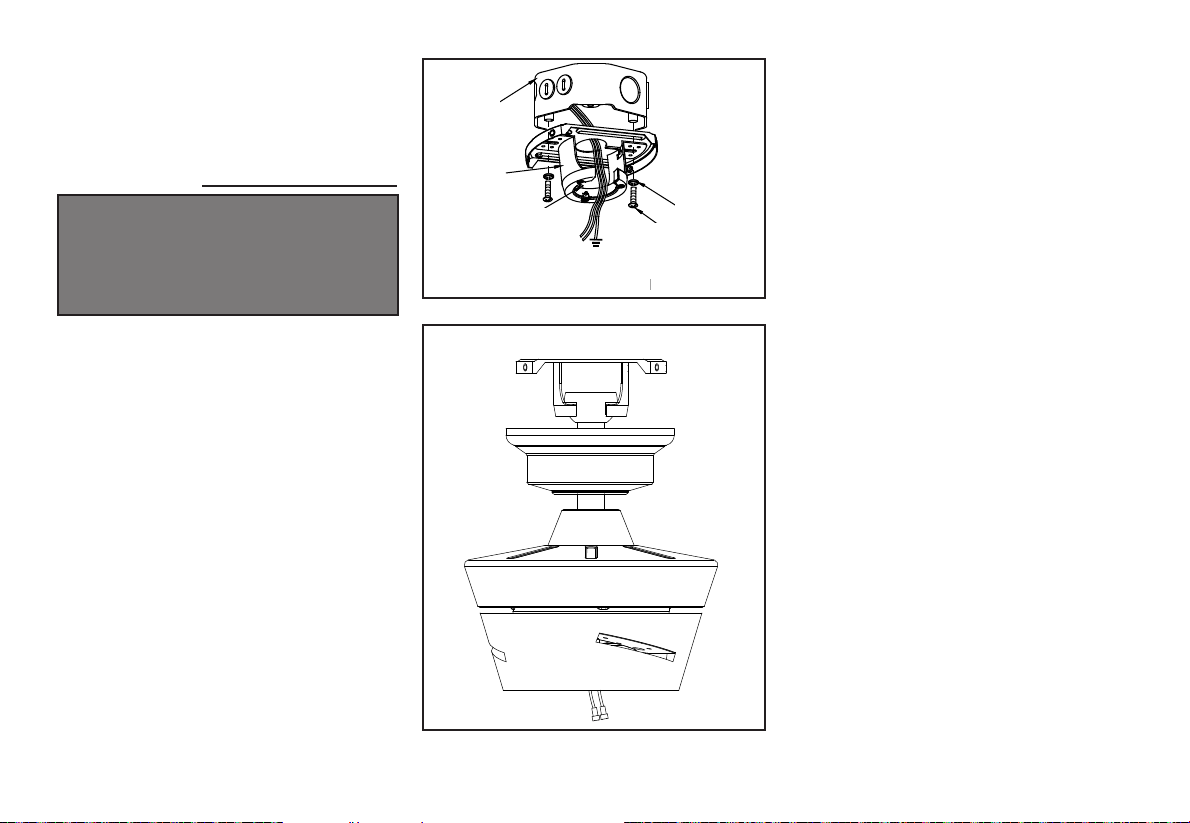
1. Pass the 120-volt supply wires through the
center hole in the ceiling mounting bracket
as shown in Figure 8.
2. Install the ceiling mounting bracket on the
electrical box by using the mounting screws
provided with the electrical box. Note that
the at side of the mounting bracket is
toward the electrical box. (Figure 8)
3.
T
ighten the two screws on the electrical box
securely.
4.
Carefully
lift the fan assembly up to the
ceiling mounting bracket. Make sure the tab
on the mounting bracket is properly seated
in the groove in the hanger ball. (Figure 9)
WHEN USING THE STANDARD BALL/DOWNROD
MOUNTING, THE TAB IN THE RING AT THE
BOTTOM OF THE MOUNTING BRACKET MUST
REST IN THE GROOVE OF THE HANGER BALL.
FAILURE TO PROPERLY SEAT THE TAB IN THE
GROOVE COULD CAUSE DAMAGE TO WIRING.
Figure 9
Standard mounting
Figure 8

Figure 10
6.
Figure 11
BLUE
BLUE
BLACK
WHITE
WHITE
Remote
Receiver
WHITE
L N
BLACK
GREY
BROWN
BLUE
BROWN
GREY
GREEN
WHITE
WHITE
BLUE
BLUE
SUPPLY CIRCUIT
Installing the
Receiver into the
Mounting Bracket
1. Position the house supply wires to one side
of the slide-on mounting bracket; position
the fan wires to the opposite side.
2.
Insert the narrow end of the receiver (as
shown, at side toward ceiling) into the
slide-on mounting bracket until it rests on
top of the ball/downrod assembly
. (Figure
10)
Wiring the Fan to the
Receiver
1. If using the 6 in. ball downrod assembly
provided, wire the receiver to the fan wires
by connecting the molded adaptor plug
from this receiver with the molded adaptor
of the fan motor assembly together.
(Figure 11)
2. If you wish to use longer downrod, you
can use the extension lead wire (66 in.)
provided by connecting the molded
adaptors together.
Wiring the Receiver to
the Household Wiring
1. Connect the green wire to the household
ground wires using a wire connecting nut.
2.
Connect the receiver black wire to
the household black wire using a wire
connecting nut.
3.
Connect the receiver white wire to the
household white wire using a wire
connecting nut.
7.
Attaching the Fan
Blades
Figure 13
Finishing the Fan
Installation
STANDARD CEILING MOUNTING
1. Align the locking slots of the ceiling
canopy with the two screws in the
mounting plate. Push up to engage the
slots and turn clockwise to lock in place.
Immediately tighten the two mounting
screws rmly.
2. Install the remaining two mounting screws
into the holes in the canopy and tighten
rmly.
3. Install the decorative canopy ring by
aligning the ring’s slots with the screws in
the canopy. Rotate the ring clockwise to
lock in place.
4. You may now proceed to attaching the
fan blades.
WHEN USING THE STANDARD BALL/DOWNROD
MOUNTING, THE TAB IN THE RING AT THE
BOTTOM OF THE MOUNTING PLATE MUST
REST IN THE GROOVE OF THE HANGER BALL.
FAILURE TO PROPERLY SEAT THE TAB IN THE
GROOVE COULD CAUSE DAMAGE TO WIRING.
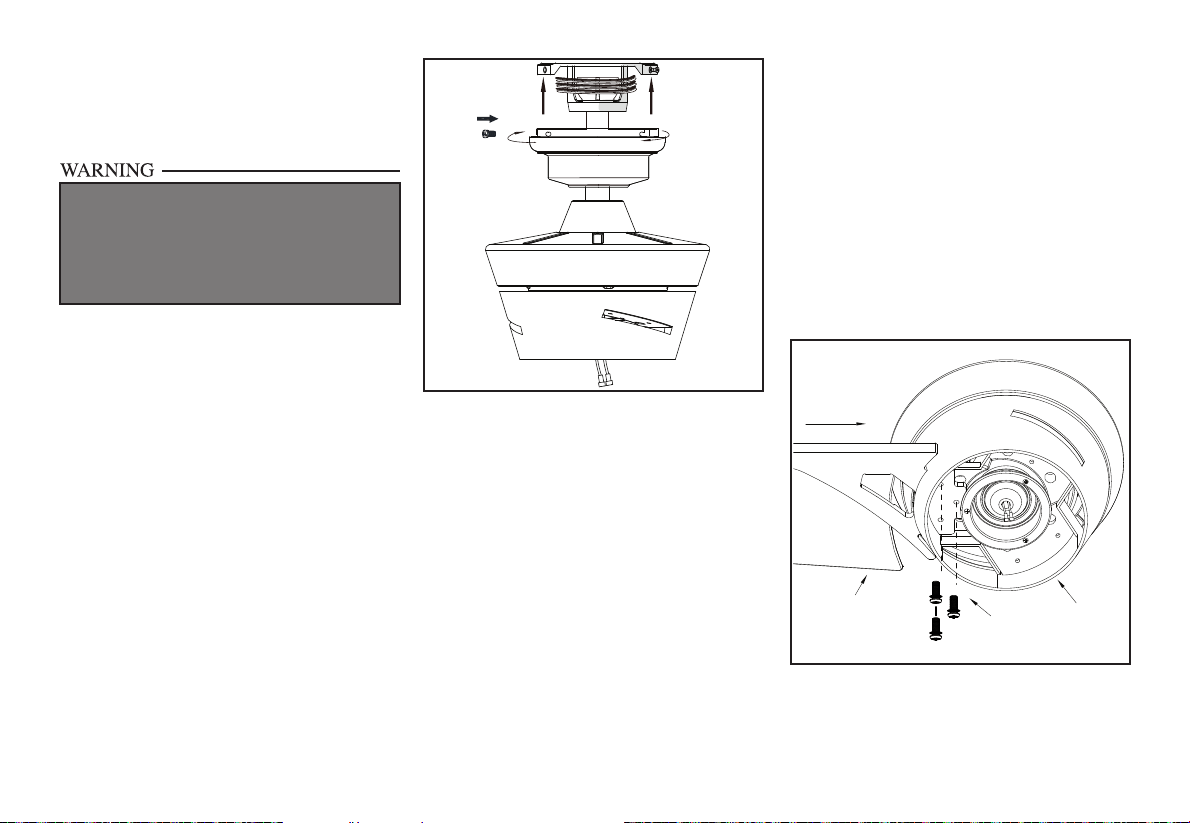
1. Attach the blade to the the fan motor
assembly, align the screw holes in the blade
with the screw holes above and under the
motor assembly, and secure screws.
(Figure 13)
2. Repeat this step for the remaining the
blades.
Screws
Motor Assembly
Blade
Insert
Insert
Figure 12
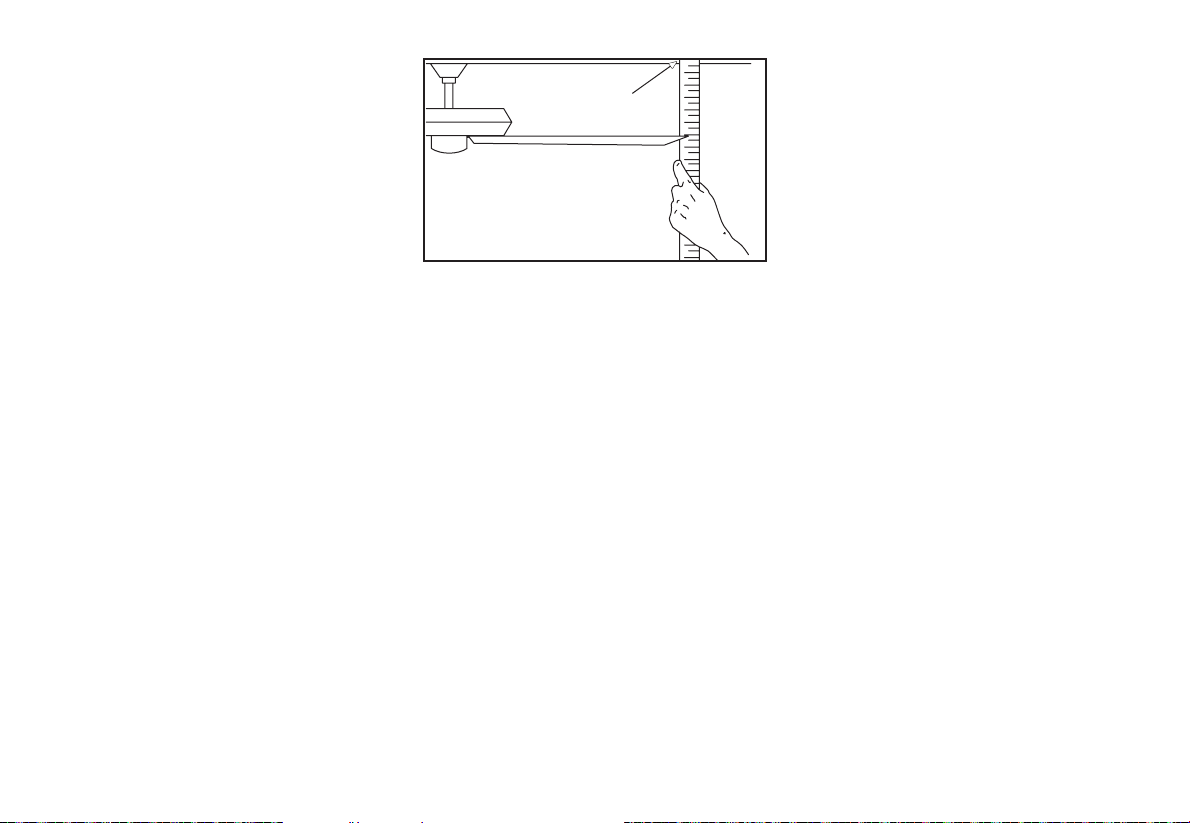
Figure 14
Blade Balancing
All blades are grouped by weight. Because
materials vary in density, the fan may wobble
even though the blades are weight matched.
The following procedure should correct most
fan wobble. Check after each step.
1.
Check that all blade screws are secure.
2. Most fan wobble problems are caused
when blade levels are unequal. Check this
level by selecting a point on the ceiling
above the tip of one of the blades. Measure
from a point on the center of each blade
to the point on the ceiling. Measure this
distance as shown in Figure 14. Rotate
the fan until the next blade is positioned
for measurement. Repeat for each blade.
Measurements deviation should be within
1/8”. Run the fan for 10 minutes.
3.
Make sure that canopy is tightened securely
to ceiling mounting bracket and that the
ceiling mounting bracket is tightened
securely to the electrical box.
4. Interchanging two adjacent blades can
redistribute the weight and possibly result
in the smoother operation.
5.
Use the enclosed Blade Balancing Kit if the
blade wobble is still noticeable.
Touching
Ceiling
8.

9.
Installing the Light Kit
Pan/Light Kit Fitter
Assembly/ Glass Shade
CAUTION - To reduce the risk of electrical
shock, disconnect the electrical supply circuit
to the fan before installing the light kit.
1. Loosen but do not remove two of three
mounting screws from the fan motor
assembly; Remove one mounting screw.
(Figure 15)
2.
Push the light kit pan up to the fan motor
assembly so that the two loosened screw
heads t into the keyhole slots.
Turn the
light kit pan clockwise, tightened the
screws. Re-install the screw that was
removed in step 1 and tighten rmly.
(Figure 15)
3.
Remove one screw from the light kit pan
and loosen, but do not remove the other
two screws. Connect the wires from the
light kit tter assembly to the wires from
the fan motor assembly by connecting the
molded adaptor plugs together. Carefully
tuck all wires and splices into the switch
cap. (Figure 16)
4. Push the light kit tter assembly up so
that the two loosened screw heads t into
the keyhole slots. Turn the light kit tter
assembly clockwise, tighten the screws.
Re-install the screw that was removed in
step 3 and tighten rmly. (Figure 16)
5. Place the light shade into the light kit pan,
aligning the three at areas on the top
of the light shade with the three raised
dimples in the light kit pan. Turn the light
shade clockwise until it stops. (Figure 17)
Figure 15
Figure 16
PERIODICALLY CHECK THE LIGHT SHADE IS
SEATED FULLY CLOCKWISEL LIGHT KIT PAN
ASSEMBLY.
Figure 17
Light
Shade
Flat
Area
Raised
Dimples
Light Kit
Fitter
Assembly
Screws
Light Kit
Pan
White
Blue
Black
Screws
Light Kit
Pan
Motor
Assembly

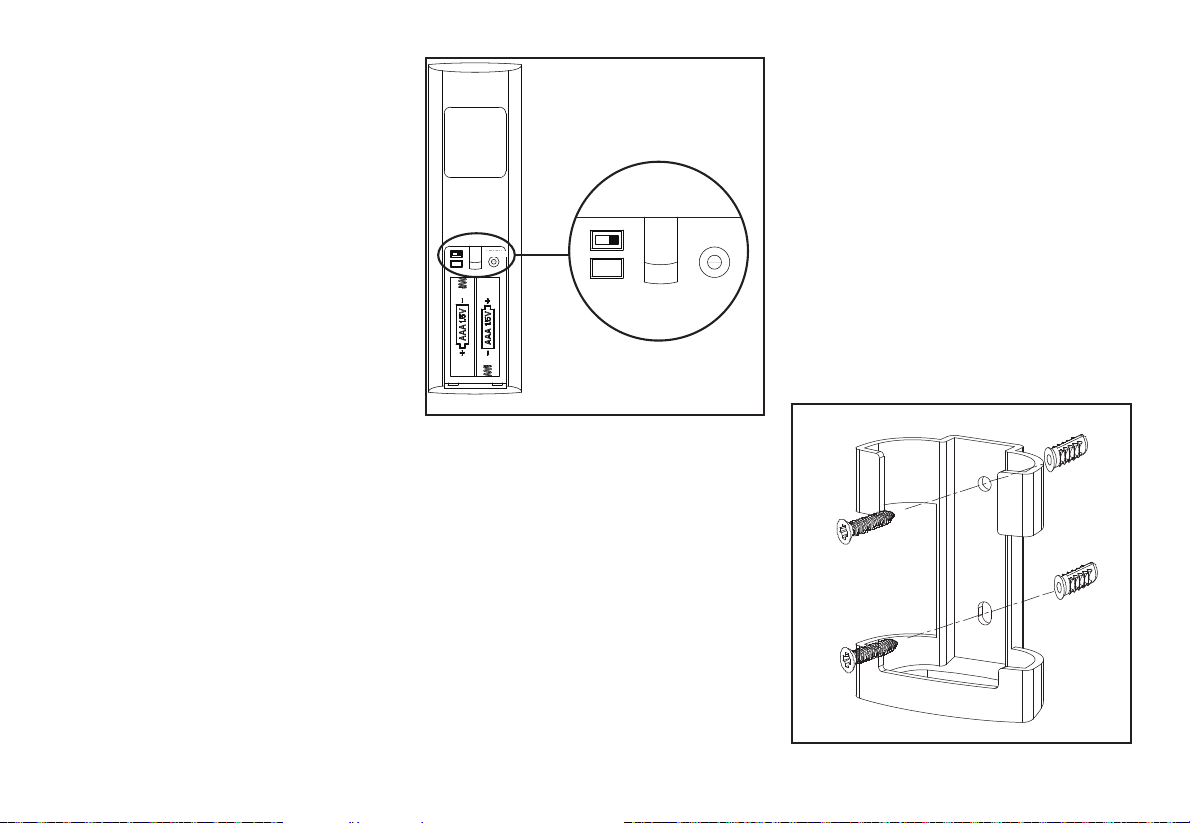
10. Remote Control
LEARN
CFL 0
D 1
LEARN
CFL 0
D 1
Figure 18
Preparing the Remote
Control
1. Remove the battery cover by pressing
rmly on the arrow and sliding the cover
off.
2. Install two 1.5V AAA batteries (included).
3. Slide the dip switch in the battery
compartment to the “1” setting.
4. Conrm that the power to the fan is off at
either the wall switch or breaker box.
5. Return power to the fan at the wall switch
or breaker box.
6.
Press and release the “Learn” button
located in the remote’
s battery
compartment within 30 seconds of turning
on the power.
7.
If pairing is successful, the fan’
s light kit
will ash and the blades will begin to spin.
8.
Replace the battery cover on the remote
control.
NOTE: The remote control has already
been paired to the ceiling fan for your
convenience. If you have two of the
same model fans in your home, please
follow the steps below to control each fan
independently.
Mounting the remote
control holder
1. Position the wall cradle in the desired
position and attach it to the wall using the
included wall cradle screws.
NOTE: Screw wall anchors are included
for extra support. The included screws are
designed to screw easily into the wall. If you
would like a more permanent or secure hold,
install the wall anchors prior to attaching the
wall cradle to the wall.
Figure 19
Remote Control
Figure 21
Figure 22
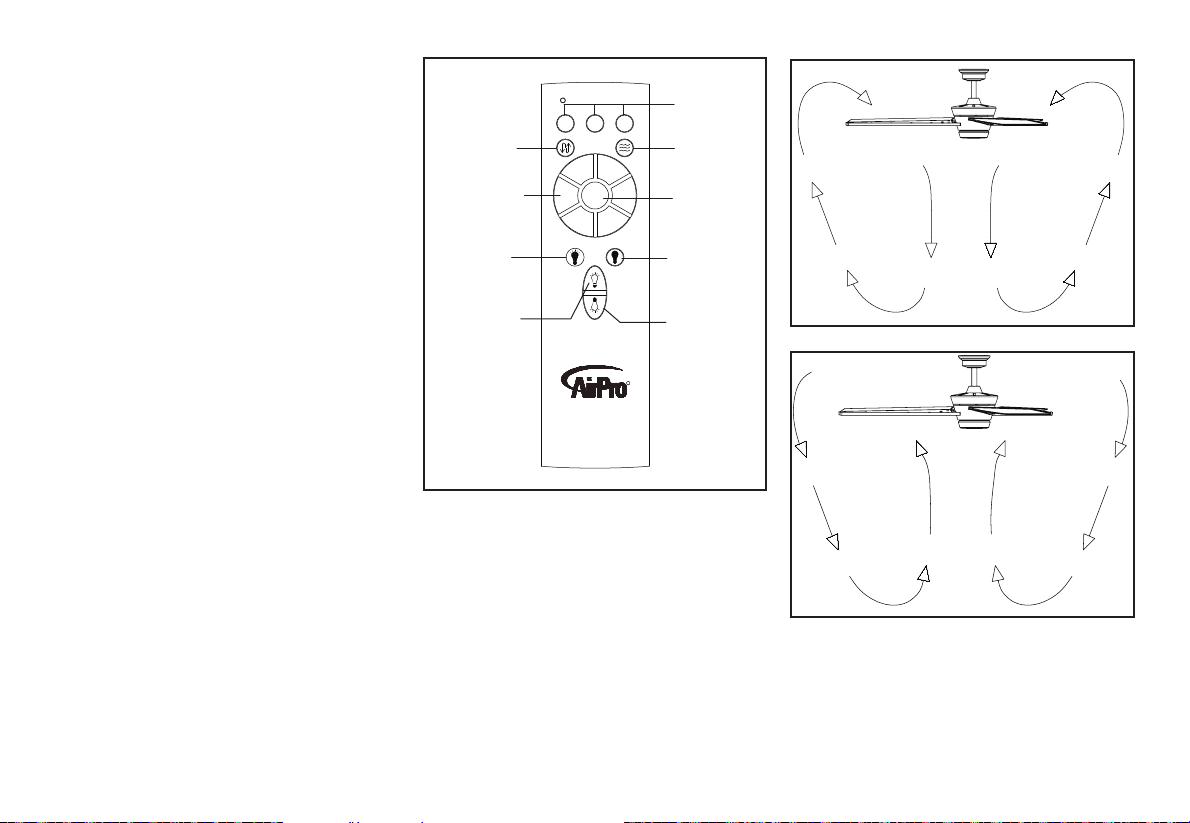
Warm weather - (Forward) A downward air
ow creates a cooling effect as shown in Figure
21. This allows you to set your air conditioner
on a higher setting without affecting your
comfort.
Cool weather - (Reverse) An upward air ow
moves warm air off the ceiling are as shown in
Figure 22. This allows you to set your heating
unit on a lower setting without affecting your
comfort.
Figure 20
11.
Timer:
While the fan is on press 2h - turns on a 2 hour run timer.
While the fan is on press 4h - turns on a 4 hour run timer.
While the fan is on press 8h - turns on an 8 hour run
timer.
Forward/Reverse:
Changes direction of ceiling fan.
Breeze:
Press and release this button to enable the Breeze
function, this will change your fan speed randomly,
simulating a relaxing breeze.
Fan speed:
LEDs on the fan speed button will illuminate to the
corresponding speed.
Press and release 1: turns the fan speed to 1.
Press and release 2: turns the fan speed to 2.
Press and release 3: turns the fan speed to 3.
Press and release 4: turns the fan speed to 4.
Press and release 5: turns the fan speed to 5.
Press and release 6: turns the fan speed to 6.
Fan OFF
:
Turns fan Off
Light ON/OFF
Press and release the light button to turn the light on.
Press and release the light button to turn the light off.
Dimmer:
Press and hold up dimmer button to increase the light
level
Press and hold the down dimmer button to decrease the
light level.
Timer
Light on
Increases the
light level
(Dimmer)
Forward/
Reverse
Comfort
Breeze
Fan speed
Decreases the
light level
(Dimmer)
Light off
Fan off
2h
4h
8h
R
3
4
2
5
1
6
OFF
12. Care of Your Fan and Troubleshooting
Care of Your Fan
Here are some suggestions to help you
maintain your fan.
1. Because of the fan’s natural movement,
some connections may become loose.
Check the support connections, brackets,
and blade attachments twice a year. Make
sure they are secure. (It is not necessary to
remove fan from ceiling.)
2.
Clean your fan periodically to help maintain
its new appearance over the years. Do
not use water when cleaning, this could
damage the motor, or possibly cause an
electrical shock. Use only a soft brush
or lint-free cloth to avoid scratching the
nish. The plating is sealed with a lacquer
to minimize discoloration or tarnishing.
Warning - Make sure the power is off
before cleaning your fan.
3.
You can apply a light coat of furniture polish
to the wood for additional protection and
enhanced beauty. Cover small scratches
with a light application of shoe polish.
4.
Ther
e is no need to oil your fan.
The motor has permanently lubricated
sealed ball bearings.
MAKE SURE THE POWER IS OFF AT THE ELECTRICAL PANEL BOX
BEFORE YOU ATTEMPT TO MAKE ANY REPAIRS. REFER TO THE SECTION,
“MAKING ELECTRICAL CONNECTIONS.”
Fan will not start
Fan sounds noisy
1. Check main and branch circuit fuses or breakers
2.
Check line wire connections to the fan and switch wire connections in
the switch housing. CAUTION: Make sure main power is off.
3. Check batteries in the transmitter. Does the red LED light come on?
Are you standing close enough to the fan? (Normal range is 10-20
feet.) Are the dip switch settings the same on the transmitter (hand unit)
and receiver? REMEMBER TO TURN OFF POWER SUPPLY
BEFORE CHECKING THE DIP SWITCH SETTINGS IN
RECEIVER.
1.
Make sure all motor housing screws are snug.
2.
Make sure the screws that attach the fan blade bracket to the motor hub
are tight.
3.
Make sure wire nut connections are not rattling against each other or
the interior wall of the switch housing.
CAUTION: Make sure power is off.
4.
Allow a 24-hour “breaking in” period. Most noises associated with a
new fan disappear during this time.
5.
If using the Ceiling Fan light kit, make sure the screws securing the
glassware are tight. Check that the light bulb is also secure.
6.
Make sure the canopy is a short distance from the ceiling.
It should not touch the ceiling.
7.
Make sure your electrical box is secure and rubber isolator pads were
used between the mounting bracket and electrical box.
Troubleshooting
Problem Solution

13. Specications
FAN
SIZE
SPEED VOLTS
FAN POWER
CONSUMPTION
(WITHOUT LIGHTS)
WATTS
AIRFLOW
CFM
AIRFLOW
EFFICIENCY
(HIGHER IS BETTER)
CFM/WATT
NET
WEIGHT
GROSS
WEIGHT
CUBE
FEET
56”
Low
120
2.92 2095 717.47
18.53
Lbs
22.93
Lbs
2.25
High 30.89 4844 156.81
©2017 Progress Lighting, Inc.
701 Millennium Blvd.,
Greenville, SC 29607
All Rights Reserved
This equipment has been tested and found to comply with the limits for a Class B digital device, pursuant to Part 15 of the FCC Rules. These limits
are designed to provide reasonable protection against harmful interference in a residential installation. This equipment generates, uses and can radiate
radio frequency energy and, if not installed and used in accordance with the instructions, may cause harmful interference to radio communications.
However, there is no guarantee that interference will not occur in a particular installation. If this equipment does cause harmful interference to radio
or television reception, which can be determined by turning the equipment off and on, the user is encouraged to try to correct the interference by one
or more of the following measures:
--Reorient or relocate the receiving antenna.
--Increase the separation between the equipment and receiver.
--Connect the equipment into an outlet on a circuit different from that to which the receiver is connected.
--Consult the dealer or an experienced radio/TV technician for help.
CAUTION:
Any changes or modications not expressly approved by the grantee of this device could void the user’s authority to operate the equipment.
This device complies with Part 15 of the FCC Rules. Operation is subject to the following two conditions: (1) This device may not cause harmful
interference, and (2) this device must accept any interference received, including interference that may cause undesired operation.

®
Manual de instalación de ventilador de techo
P250072
93153462_A

Garantía limitada de por vida
Fecha de compra
Tienda donde se compró
Modelo UL Nº.
Número de serie
Proveedor Nº.
UPC
111017
P250072
Los motores de ventilador Progress Lighting se garantizan al comprador original como libres de defectos eléctricos
y/o mecánicos por el tiempo en que estén en su posesión como dueño. Los interruptores activados por cadena,
los interruptores de reversa, los capacitores y los acabados de metal se garantizan como libres de defectos
materiales o de fabricación por el plazo de 1 año desde la fecha de compra. Las deformaciones de las aspas de
madera o plástico no están cubiertas por esta garantía. Tampoco lo están la corrosión y/o deterioro del acabado de
ventiladores instalados a menos de diez millas de cualquier costa del mar. Pudieran aplicarse garantías extendidas
para productos ENERGY STAR
®
que caliquen.
Los ventiladores de techo Progress Lighting con fuentes de luz LED incorporadas, si han sido bien instalados y
bajo condiciones normales de uso, se garantizan como libres de defectos materiales y de fabricación que puedan
causar un fallo en el funcionamiento según las especicaciones de dichas fuentes de luz durante un periodo de
(i) cinco (5) años a partir de la fecha de compra para los módulos de luz LED y componentes eléctricos de
ventiladores usados en residencias unifamiliares y durante (ii) tres (3) años para ventiladores usados en residencias
multifamiliares o en instalaciones comerciales. Las bombillas LED suministradas por Progress Lighting sólo
poseen la garantía del fabricante. Las bombillas que no sean LED no tienen garantía.
Con prueba de la compra, el comprador original puede devolver el ventilador defectuoso, para su reposición, al
lugar donde lo compró, dentro de los 30 días siguientes a la compra. Pasados 30 días, el comprador original TIENE
que contactar a Progress Lighting llamando al (864) 678-1000 para reparación o reposición, según determine
Progress Lighting a su entera discreción, y este será el único y exclusivo remedio del comprador.
Se excluyen cargos por mano de obra y envío. Esta garantía no cubre ningún costo ni cargo asociado a la mano de
obra (incluyendo, pero sin limitarse a, los cargos del electricista) que se requiera para instalar, retirar o reponer un
ventilador o cualquiera de sus partes.
Esta garantía no cubre ninguna pérdida o daño resultante de (i) desgaste normal o alteración, mal uso, abuso o
negligencia, o (ii) instalación, operación, reparación o mantenimiento incorrectos por el comprador original o un
tercero, incluso sin limitación del suministro de tensión o sobrecarga de alimentación, uso de piezas o accesorios
inadecuados, reparación no autorizada (realizada o intentada) o falta de mantenimiento al ventilador.
LAS GARANTÍAS ANTERIORES ESTABLECEN LA OBLIGACIÓN DE GARANTÍA TOTAL DE PROGRESS
LIGHTING Y EL ÚNICO Y EXCLUSIVO REMEDIO DEL COMPRADOR ORIGINAL RELACIONADO
CON DICHOS PRODUCTOS. PROGRESS LIGHTING NO ES RESPONSABLE POR NINGÚN DAÑO
(SEAN INDIRECTOS, ESPECIALES, INCIDENTALES O CONSECUENTES) DEBIDO A FALLAS DEL
PRODUCTO, YA SEAN DERIVADAS DE INCUMPLIMIENTO DE LA GARANTÍA O DEL CONTRATO, O
DE CUALQUIER OTRA CAUSA. ESTA GARANTÍA SE OTORGA EN LUGAR DE TODAS LAS DEMÁS, YA
SEAN EXPRESAS O IMPLÍCITAS, INCLUIDAS LAS GARANTÍAS DE COMERCIABILIDAD, IDONEIDAD
PARA UN PROPÓSITO EN PARTICULAR O NO INFRACCIÓN.
Algunos estados no permiten limitaciones en la duración de una garantía implícita ni exclusión o limitaciones de
daños incidentales o consecuentes, así que las exclusiones o limitaciones anteriores pudieran no aplicarse a su
caso. Esta garantía le otorga derechos especícos y es posible que usted tenga otros, que varían de estado a estado.
785247260997,
785247260980,
785247260973
Normas de seguridad
Cómo desempacar el ventilador
Cómo instalar el ventilador
Cómo hacer las conexiones eléctricas
Cómo usar el ventilador
Cuidado del ventilador
Solución de problemas
Especicaciones
Tabla de contenido
1
2
3
6
11
12
12
13

1. Para disminuir el riesgo de descarga eléctrica, antes de comenzar
la instalación asegúrate de que la electricidad ha sido cortada en el
cortacircuitos o en la caja de fusibles.
2. Todo el cableado tiene que cumplir con el Código Nacional de
Electricidad ANSI/NFPA 70-1999 y con los códigos locales de
electricidad. La instalación eléctrica debe hacerse por un electricista
calicado con licencia.
3. CUIDADO: Para reducir el riesgo de lesiones físicas, usa sólo
los tornillos suministrados con la caja de distribución.
4. La caja eléctrica y estructura de soporte tienen que montarse de
forma segura para poder sostener con conanza 35 lb. (15.9 kg).
Usa solo cajas eléctricas aprobadas por cUL y marcadas como
“apropiadas para sostener ventiladores de 35 lb (15.9 kg) o menos”.
5. CUIDADO: El ventilador tiene que montarse con al menos 7 pies
(2.13 m) de separación entre el borde trasero de las aspas y el piso.
6. No esperes a que el ventilador se detenga antes de presionar el botón
de reversa. Si el ventilador no está en movimiento, no cambiará
de dirección.
7. Evita colocar objetos en la trayectoria de las aspas.
8. Para evitar lesiones personales o daños al ventilador y otros
artículos, ten cuidado al limpiarlo o al trabajar cerca de él.
9. No usar agua ni detergentes para limpiar el ventilador o las aspas.
Para limpiar, casi siempre será adecuado un paño seco o ligeramente
humedecido con que quitar el polvo.
10. Después de concluir con las conexiones eléctricas, debes voltear
los conductores empalmados hacia arriba y empujarlos con cuidado
hacia dentro de la caja de distribución. Los cables deben estar
separados, con el cable y el conductor a tierra del equipo hacia uno
de los lados de la caja eléctrica y el conductor sin conexión a tierra
hacia el lado opuesto.
11. Los diagramas eléctricos son solo para referencia. Los kits de luces
que no vienen en la caja del ventilador tienen que estar aprobados
por cUL y marcados como apropiados para usar con el modelo
de ventilador que estás instalando. Los interruptores deben ser
interruptores cUL de uso general. Consulta las instrucciones
que vienen con los kits de luces e interruptores para un montaje
apropiado.
12. Antes de la instalación, todos los tornillos de jación tienen que
comprobarse y reajustarse donde sea necesario.
13. ADVERTENCIA: Para reducir el riesgo de incendio o descarga
eléctrica, este ventilador solo debe usarse con el control de
velocidad de ventilador con número de pieza DP-51R, fabricado
por DAWNSUN ELECTRONIC TECHNOLOGY CO LTD
ZHONGSHAN.
14. Puede usarse en lugares húmedos. Usar solo con kits de luces
marcados como “Adecuado para uso en lugares húmedos".
1. Normas de seguridad
LEE Y GUARDA ESTAS INSTRUCCIONES
PARA REDUCIR EL RIESGO DE INCENDIO, DESCARGA ELÉCTRICA
U OTRAS LESIONES, INSTALA SÓLO EN UNA CAJA ELÉCTRICA
CLASIFICADA COMO “APROPIADA PARA SOSTENER VENTILADORES DE
35 LB (15.9 KG). O MENOS”, Y USA SÓLO LOS TORNILLOS INCLUIDOS CON
LA CAJA ELÉCTRICA.
PARA REDUCIR EL RIESGO DE LESIONES PERSONALES, NO DOBLES
LOS BRAZOS DE LAS ASPAS (TAMBIÉN LLAMADOS “REBORDES”)
NI DURANTE NI DESPUÉS DE LA INSTALACIÓN. NO COLOCAR
OBJETOS EN LA TRAYECTORIA DE LAS ASPAS.
PARA EVITAR EL RIESGO DE DESCARGA ELÉCTRICA, ESTE VENTILADOR
DEBE SER INSTALADO CON UN CONTROL/INTERRUPTOR DE AISLAMIENTO
DE MONTAJE EN PARED.
ADVERTENCIA
ADVERTENCIA
ADVERTENCIA

a. Herrajes de montaje de aspas
(13 tornillos)
b. Kit de compensación y componentes
eléctricos (1 conector plástico de cable,
kit de compensación de aspas )
6. Aspas (3)
7. Carcasa del kit de luces
8. Conjunto de soporte del kit de luces
9. Pantalla de la lámpara
10. Transmisor y receptor
11. Extensión de cable terminal
1. Soporte de montaje (dentro de la cubierta)
2. Conjunto de tubo bajante/esfera de 6”
(15.2 cm) (con pasadores de soporte y de
cierre prejados)
3. Cubierta con aro de cubierta (acoplado)
4. Cubierta decorativa del collarín del motor
5. Conjunto del motor del ventilador
2. Cómo desempacar el ventilador
Desempaca tu ventilador y revisa el contenido. Debes tener los siguientes
artículos:
a
b
1
2
3
4
5
6
7
8
9
11
10
OFF
6
1
5
2
4
3
R
8h
4h
2h
3. Cómo instalar el ventilador
Herramientas
necesarias
Destornillador Phillips o de punta plana, llave
ajustable, escalera de tijera y cortacables.
Opciones de montaje
Si no hay una caja eléctrica presente, lee las
siguientes instrucciones. Desconecta la
energía retirando los fusibles o apagando
los cortacircuitos.
Asegura la caja eléctrica directamente a la
estructura de la edicación. Usa sujetadores
y materiales de construcción apropiados.
La caja eléctrica y su soporte tienen que poder
sostener todo el peso en movimiento del
ventilador (al menos 35 lb = 15.9 kg). No uses
cajas eléctricas de plástico.
Las guras 1, 2 y 3 ejemplican diferentes
maneras de montar la caja eléctrica.
Nota: Tal vez necesites un tubo bajante
más largo para mantener la altura mínima
adecuada de las aspas al instalar el ventilador
en un techo inclinado. El ángulo máximo
permitido es 20º. Si la cubierta toca el tubo
bajante, gira la cubierta 180º antes de
jarla a la placa de montaje.
Para colgar el ventilador donde haya una
lámpara, pero ninguna viga de techo, tal vez
necesites una barra colgante como se muestra
en la Figura 4.
PARA REDUCIR EL RIESGO DE INCENDIO,
DESCARGA ELÉCTRICA U OTRAS LESIONES,
INSTALA SÓLO EN UNA CAJA ELÉCTRICA
CLASIFICADA COMO “APROPIADA PARA
SOSTENER VENTILADORES DE 35 LB (15.9 KG). O
MENOS”, Y USA SÓLO LOS TORNILLOS INCLUIDOS
CON LA CAJA ELÉCTRICA. LAS CAJAS ELÉCTRICAS
UTILIZADAS COMÚNMENTE PARA SOPORTE DE
ARTÍCULOS DE ILUMINACIÓN PUDIERAN NO
SERVIR COMO SOPORTE DE VENTILADOR Y TAL
VEZ DEBAN REEMPLAZARSE. EN CASO DE DUDA,
CONSULTA A UN ELECTRICISTA CALIFICADO.
Figura 1
Figura 2
Figura 4
Figura 3
ADVERTENCIA
Caja eléctrica
Caja eléctrica
Caja eléctrica
Provee un soporte
fuerte
Placa
demontaje
en techo
Caja
eléctrica
empotrada
4.
Cómo colgar
el ventilador
RECUERDA cortar el suministro de
electricidad. Sigue los pasos más abajo para
colgar correctamente tu ventilador.
NOTA: Se recomienda instalar este
ventilador en techo interior estándar usando
el tubo bajante incluido. Cuando uses una
instalación de techo estándar con el tubo
bajante de 6 plg (15.2 cm) suministrado, la
distancia desde el techo a la parte inferior
de las aspas será de unas 14 plg (35.6 cm).
Montaje estándar en techo
1. Retira el aro de la cubierta, girándolo en
sentido contrario a las agujas del reloj hasta
que se libere. (Figura 5)
2. Retira el soporte de montaje de la cubierta
aojando los cuatro tornillos en la parte
superior de la cubierta. Quita los dos tornillos
sin ranura y aoja los tornillos ranurados.
Esto te permitirá retirar el soporte de montaje
(Figura 6)
3. Retira los pasadores de soporte y de cierre en
el conjunto del tubo bajante.
4. Coloca el tubo bajante sobre la cubierta y el aro
de la cubierta, desliza la cubierta del collarín
del motor sobre el tubo bajante. Conecta los
cables de extensión a los cables del motor.
Asegúrate de que los conectores rápidos estén
bien sujetos. Inserta los cables a través del
conjunto del tubo bajante/esfera. (Figura 7)
Remove
Loosen but Do Not Remove
Turn Canopy Ring to Remove
Figura 5
Figura 6
5. Aoja, sin quitarlos, los tornillos de jación en
el collarín de la parte superior de la carcasa de
motor.
6. Alinea los oricios en la parte inferior del tubo
bajante con aquellos del collarín en la parte
superior de la carcasa de motor. (Figura 7)
Inserta con cuidado el pasador de soporte a través
de los oricios del collarín y del tubo bajante.
Ten cuidado de no apretar contra el cableado
dentro del tubo bajante. Inserta el pasador de
cierre en el oricio cercano al extremo del perno
hasta que encaje en su posición, como se muestra
en el círculo de la Figura 7.
7. Vuelve a apretar los tornillos del collarín en la
parte superior de la carcasa del motor.
8. Asegúrate de que el ojal quede instalado
correctamente en la cubierta del collarín y
desliza enseguida la cubierta del collarín por
el tubo bajante hasta quedar sobre la carcasa
del motor. Asegúrate de que tanto la cubierta
como la cubierta del collarín estén orientadas
correctamente.
9. Pasa a la sección "Cómo instalar el ventilador".
SI NO INSTALAS BIEN LOS TORNILLOS DE
FIJACIÓN, COMO SE INDICA EN EL PASO 7, PUEDEN
AFLOJARSE Y POSIBLEMENTE SE CAERÁ EL
VENTILADOR.
Figura 7
Motor collar
Hanger pin
Tighten
screws
Locking
pin
Pin in
locked
position
Motor collar
cover
Canopy ring
Canopy
Motor wires
Ball/Downrod
assembly
Quitar
Aojar pero no quitar
Gira la cubierta para quitar
ADVERTENCIA
Conjunto
detubo
bajante/esfera
Cubierta
Aro de
lacubierta
Aprieta
lostornillos
Pasador
decierre
Pasador
enposición
de cierre
Cables
delmotor
Collarín
del motor
Pasador
desoporte
Cubierta
delcollarín
del motor
5.
Cómo instalar
el ventilador en
la caja eléctrica
1. Pasa los cables de alimentación de 120 V a
través del oricio central en el soporte de
montaje de techo como muestra la Figura 8.
2. Instala el soporte de montaje de techo sobre
la caja eléctrica, usando los tornillos de
montaje incluidos. Nota que el lado plano
del soporte de montaje está hacia la caja
eléctrica. (Figura 8)
3. Aprieta bien los dos tornillos en la caja
eléctrica.
4. Con cuidado alza el conjunto del ventilador
hasta el soporte de montaje en el techo.
Asegúrate de que la pestaña en el soporte
de montaje esté bien asentada dentro de la
ranura de la bola de soporte. (Figura 9)
EN EL MONTAJE ESTÁNDAR DE TUBO
BAJANTE/ESFERA, LA PESTAÑA EN EL
ARO DE LA PARTE INFERIOR DEL SOPORTE
DE MONTAJE TIENE QUE ENCAJAR EN LA
RANURA DE LA BOLA DE SOPORTE. SI NO
ENCAJA BIEN LA PESTAÑA EN LA RANURA,
PUEDE DAÑARSE EL CABLEADO.
Figura 9
Standard mounting
Figura 8
Arandelas
Tornillos
de montaje
(incluidos con
lacaja eléctrica)
Montaje estándar
Gancho
Cables
de120 V
Soporte de
montaje en
cielo raso
Caja
eléctrica
aprobada
por UL
ADVERTENCIA
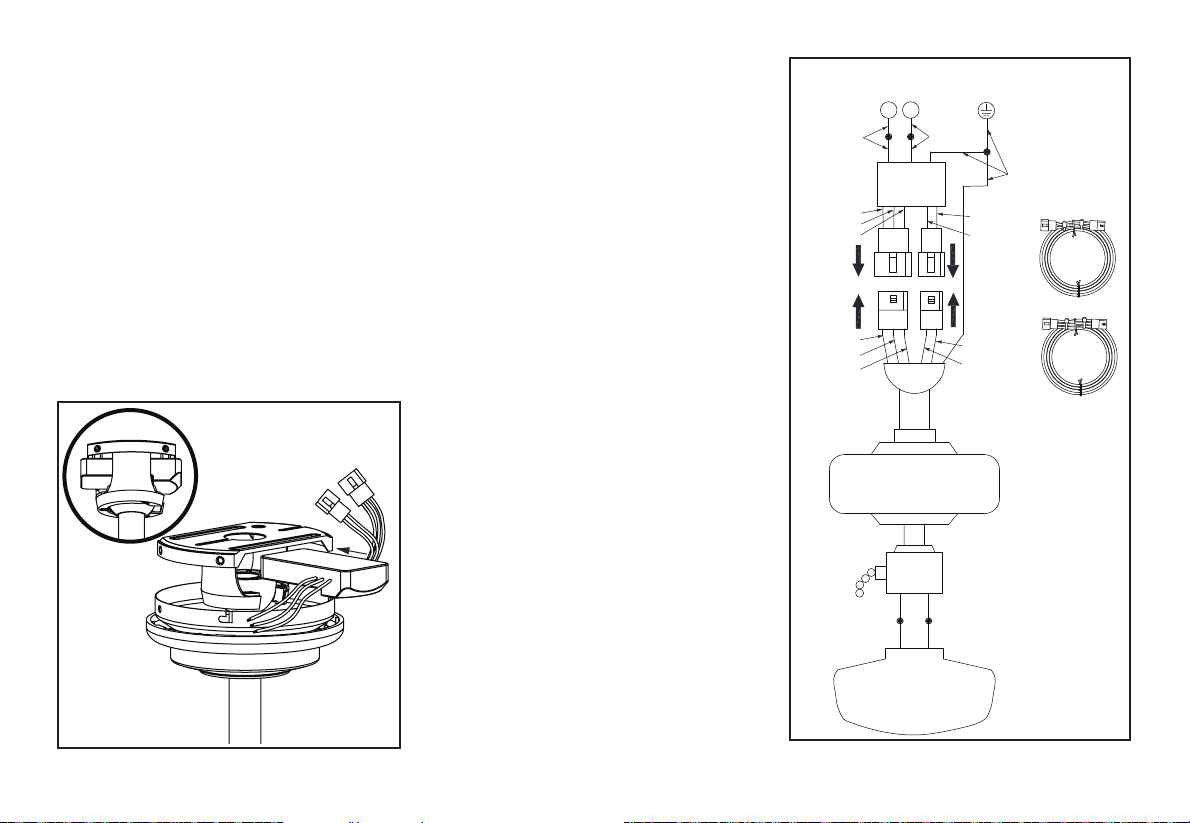
Figura 10
6.
Figura 11
BLUE
BLUE
BLACK
WHITE
WHITE
Remote
Receiver
WHITE
L N
BLACK
GREY
B
ROWN
BLUE
B
ROWN
GREY
GREEN
WHITE
WHITE
BLUE
BLUE
SUPPLY CIRCUIT
Cómo instalar
el receptor en el
soporte de montaje
1. Coloca los cables de suministro del hogar
a un lado del soporte de montaje deslizante;
coloca los cables del ventilador en el lado
opuesto.
2. Inserta el extremo angosto del receptor
(como se muestra: el lado plano hacia el
techo) en el soporte de montaje deslizante
hasta dejarlo apoyado en la parte superior
del conjunto de tubo bajante/esfera.
(Figura 10)
Cómo cablear el
ventilador al receptor
1. Si usas el conjunto del tubo bajante/
esfera de 6 plg (15.2 cm) incluido,
conecta los cables del receptor a los cables
del ventilador uniendo el enchufe del
adaptador moldeado del receptor con el
adaptador moldeado del conjunto del motor
del ventilador. (Figura 11)
2. Si deseas un tubo bajante más largo,
puedes usar la extensión de cable conductor
(66 plg = 168 cm) proporcionado
al conectar los enchufes con adaptadores
moldeados.
Cómo cablear el
receptor al cableado
del hogar
1. Conecta el cable verde a los cables
de tierra de la casa con una tuerca
de conexión de cables.
2. Conecta el cable negro del receptor
al cable negro del hogar usando una tuerca
de conexión de cables.
3. Conecta el cable blanco del receptor
al cable blanco del hogar, usando una
tuerca de conexión de cables.
VERDE
BLANCO
BLANCO
BLANCO
BLANCO
AZUL
NEGRO
BLANCO
AZUL
AZUL
NEGRO
Receptor
remoto
GRIS
MARRÓN
AZUL
GRIS
MARRÓN
AZUL
CIRCUITO DE SUMINISTRO

7.
Cómo jar las aspas
del ventilador
Figura 13
Cómo nalizar
la instalación
del ventilador
MONTAJE ESTÁNDAR
EN CIELO RASO
1. Alinea las ranuras de cierre de la cubierta
de techo con los dos tornillos de la placa
de montaje. Empuja hacia arriba para
enganchar las ranuras y gira de izquierda
a derecha para asegurarlas en su lugar.
Inmediatamente aprieta con rmeza los
dos tornillos de montaje.
2. Instala los dos tornillos de montaje
restantes en los oricios de la cubierta
y aprieta rmemente.
3. Instala el aro de cubierta decorativa
alineando las ranuras del aro con los
tornillos en la cubierta. Gira el aro hacia
la derecha para jarlo en su lugar.
4. Ahora puedes jar las aspas del ventilador.
EN EL MONTAJE ESTÁNDAR DE TUBO
BAJANTE/ESFERA, LA PESTAÑA EN EL
ARO DE LA PARTE INFERIOR DE LA PLACA
DE MONTAJE TIENE QUE ENCAJAR EN LA
RANURA DE LA BOLA DE SOPORTE. SI NO
ENCAJA BIEN LA LENGÜETA EN LA RANURA,
PUEDE DAÑARSE EL CABLEADO.
1. Fija el aspa al ensamblaje del motor
del ventilador, alinea los oricios para
tornillos en el aspa con los oricios para
tornillos arriba y debajo del ensamblaje del
motor y asegura el aspa con los tornillos
del brazo del aspa. (Figura 13)
2. Repite este paso para ensamblar las
aspas restantes.
Screws
Motor Assembly
Blade and
Blade Arm
Insert
Insert
Figura 12
Ensamblaje
delmotor
Insertar
tornillos
Accesorio
Aspa y brazo
del aspa
ADVERTENCIA

Figura 14
Cómo equilibrar
las aspas
Todas las aspas se agrupan por peso. Puesto
que los materiales varían en densidad, el
ventilador puede oscilar aunque las aspas
tengan el mismo peso.
El siguiente procedimiento corregirá en gran
medida la oscilación del ventilador. Verica
después de cada paso.
1. Verica que todos los tornillos de las aspas
estén asegurados.
2. La mayoría de los problemas de oscilación
del ventilador se deben a que las aspas no
están al mismo nivel. Verica este nivel
seleccionando un punto en el techo sobre la
punta de una de las aspas. Mide desde un
punto en el centro de cada aspa al punto en
techo. Mide esta distancia como muestra
la Figura 14. Gira el ventilador hasta que
la siguiente aspa quede en posición para
medir. Repite el procedimiento para cada
aspa. Las desviaciones de la medición no
deben pasar de 1/8” (3.2 mm). Enciende el
ventilador por 10 minutos.
3. Asegúrate de que la cubierta esté bien jada
al soporte de montaje en el techo y de que
este último esté bien jado a la caja eléctrica.
4. Intercambiar dos aspas adyacentes puede
redistribuir el peso y posiblemente mejorar
el funcionamiento.
5. Usa el kit de compensación de aspas
adjunto si sigues notando oscilación.
Touching
Ceiling
8.
Tocando el
cielo raso

Screws
Light Kit
Pan
Motor
Assembly
9.
Cómo instalar la
carcasa del kit de luces/
conjunto del soporte
del kit de luces/pantalla
de vidrio
PRECAUCIÓN - Para reducir el riesgo
de descarga eléctrica, desconecta el circuito
eléctrico de alimentación al ventilador antes
de instalar el kit de luces.
1. Aoja, pero no quites, dos de los tres
tornillos de montaje del conjunto del motor
del ventilador; retira un tornillo de montaje.
(Figura 15)
2. Empuja la carcasa del kit de luces hasta el
conjunto motor-ventilador de manera que las
cabezas de los dos tornillos aojados encajen
en las ranuras tipo ojo de cerradura. Gira
la carcasa del kit de luces hacia la derecha
y aprieta los tornillos. Vuelve a instalar el
tornillo que retiraste en el paso 1 y apriétalo
rmemente. (Figura 15)
3. Quita un tornillo de la carcasa del kit de luces
y aoja, pero no quites, los otros dos. Conecta
los cables del conjunto del soporte del kit
de luces a los cables del conjunto motor-
ventilador uniendo los enchufes moldeados
del adaptador. Coloca con cuidado todos
los cables y empalmes dentro de la caja del
interruptor. (Figura 16)
4. Empuja el conjunto del soporte del kit de
luces hacia arriba de manera que las cabezas
de los dos tornillos aojados encajen en las
ranuras tipo ojo de cerradura. Gira el conjunto
del soporte kit de luces hacia la derecha
y aprieta los tornillos. Vuelve a instalar el
tornillo que retiraste en el paso 3 y apriétalo
rmemente. (Figura 16)
5. Coloca la pantalla de la lámpara dentro de
la carcasa del kit de luces alineando las tres
áreas planas en la parte superior de la pantalla
de la lámpara con las tres muescas salientes
en la carcasa del kit de luces. Gira la pantalla
de la lámpara hacia la derecha hasta que se
detenga. (Figura 17)
Figura 15
Figura 16
Figura 17
Light
Shade
Flat
Area
Raised
Dimples
Light Kit
Fitter
Assembly
Screws
Light Kit
Pan
White
Blue
Black
Ensamblaje
delmotor
Tornillos
Tornillos
Carcasa del
kit de luces
Pantalla
de la
lámpara
Supercie
plana
Muescas
salientes
Conjunto
del soporte
del kit
deluces
Carcasa
del kit
deluces
Blanco
Negro
Azul
COMPRUEBA PERIÓDICAMENTE SI LA PANTALLA
DE LA LÁMPARA ESTÁ BIEN ASENTADA HACIA LA
DERECHA EN EL CONJUNTO ENSAMBLADO DE
LA CARCASA DEL KIT DE LUCES
NOTA
10. Control remoto
LEARN
CFL 0
D 1
LEARN
CFL 0
D 1
Figura 18
Cómo preparar
el control remoto
1. Quita la cubierta de la batería presionando
con rmeza sobre la echa y deslizando la
cubierta hasta liberarla.
2. Instala dos baterías AAA de 1.5 V
(incluidas).
3. Desliza el interruptor del compartimiento
de las baterías a la conguración “1”.
4. Conrma que la electricidad del ventilador
está cortada en el interruptor de pared o en
la caja del cortacircuitos.
5. Conectar la electricidad al ventilador
usando el interruptor de pared o la caja del
cortacircuitos.
6. Presionar y soltar el botón “Learn” en el
compartimiento de la batería del control
remoto dentro de los 30 segundos
siguientes al retorno de la corriente
eléctrica al ventilador.
7. Si la conguración es exitosa, el kit
de luces del ventilador parpadeará y las
aspas comenzarán a girar.
8. Coloca de nuevo la cubierta en el
control remoto.
NOTA: El control remoto ya ha sido congurado
con el ventilador de techo para tu conveniencia.
Si tienes dos ventiladores del mismo modelo en
tu hogar, sigue los pasos de abajo para controlar
cada ventilador por separado.
Cómo instalar el
soporte del control
remoto
1. Coloca el soporte de pared en la posición
deseada y fíjalo a la pared con los tornillos
del soporte de pared incluidos.
NOTA: Se incluyen anclajes de pared con
tornillos para soporte adicional. Los tornillos
incluidos están diseñados para atornillarse
fácilmente en la pared. Si deseas una sujeción
más permanente o segura, instala los anclajes
de pared antes de jar el soporte de pared a
la pared.
Figura 19
LEARN
LEARN

Control remoto
Figura 21
Figura 22
Clima cálido - (Hacia adelante) Un ujo de
aire hacia abajo surte efecto refrescante, como
se muestra en la Figura 21. Esto permite jar
tu aire acondicionado en una conguración más
alta sin afectar tu comodidad.
Clima frío - (Reversa) Un ujo de aire hacia
arriba desplaza el aire cálido lejos del techo,
como se muestra en la Figura 22. Esto permite
jar tu unidad de calefacción en conguración
más baja sin afectar tu comodidad.
Figura 20
11.
Temporizador:
Con el ventilador encendido, oprime el botón 2h para activar
el temporizador con 2 horas de funcionamiento.
Con el ventilador encendido, oprime el botón 4h para activar
el temporizador con 4 horas de funcionamiento.
Con el ventilador encendido, oprime el botón 8h para activar
el temporizador con 8 horas de funcionamiento.
Hacia adelante/reversa:
Cambia la dirección del ventilador de techo.
Breeze:
Oprime y suelta este botón para activar la función Breeze
[Brisa]; esto hará que la velocidad del ventilador cambie
aleatoriamente, imitando una brisa relajante.
Velocidad del ventilador:
Las luces LED en el botón de velocidad del ventilador
indicarán la velocidad correspondiente.
Presionar y soltar 1: convierte la velocidad del ventilador a 1.
Presionar y soltar 2: convierte la velocidad del ventilador a 2.
Presionar y soltar 3: convierte la velocidad del ventilador a 3.
Presionar y soltar 4: convierte la velocidad del ventilador a 4.
Presionar y soltar 5: convierte la velocidad del ventilador a 5.
Presionar y soltar 6: convierte la velocidad del ventilador a 6.
Ventilador APAGADO (OFF):
Apaga el ventilador
ENCENDIDO Y APAGADO de luces
(ON/OFF)
Oprime y suelta el botón luz encendida para encender la luz.
Oprime y suelta el botón de luz apagada para apagar la luz.
Regulador de intensidad:
Oprime y mantén presionado el botón superior de
regulación de intensidad para incrementar al nivel de luz
deseado.
Oprime y mantén presionado el botón inferior de regulación
de intensidad para disminuir al nivel de luz deseado.
Timer
Light on
Increases the
light level
(Dimmer)
Forward/
Reverse
Comfort
Breeze
Fan speed
Decreases the
light level
(Dimmer)
Light off
Fan off
2h
4h
8h
R
3
4
2
5
1
6
OFF
Hacia delante
o en reversa
Velocidad
delventilador
Luz
encendida
Luz
apagada
Disminuye
el nivel de
intensidad
luminosa
(Regulador)
Incrementa
el nivel de
intensidad
luminosa
(Regulador)
Ventilador
apagado
Comfort
breeze
Temporizador

12. Cuidado del ventilador y solución de problemas
Cuidado del ventilador
Aquí tienes algunas sugerencias para el
mantenimiento de tu ventilador.
1. Debido al movimiento natural del
ventilador, algunas conexiones pueden
aojarse. Revisa las conexiones de soporte,
soportes y accesorios de aspas dos veces
al año. Comprueba que estén seguros.
(No es necesario desmontar el ventilador
del cielo raso).
2. Hay que limpiar el ventilador con frecuencia
para que luzca como nuevo al paso de los
años. No uses agua al limpiar; esto puede
dañar el motor e incluso provocar descargas
eléctricas. Usa sólo un cepillo suave o
un paño sin pelusas para evitar arañar el
acabado. El revestimiento está sellado
con laca para minimizar la decoloración u
opacidad. Advertencia - Asegura que la
electricidad esté cortada antes de limpiar
tu ventilador.
3. Puedes aplicar a la madera una na capa
de pulimento para muebles y dar así más
protección y belleza. Cubre los arañazos
pequeños con una leve aplicación de
lustrador para calzado.
4. Tu ventilador no necesita lubricación.
El motor tiene cojinetes de bola sellados y
permanentemente lubricados.
ASEGURA QUE NO HAYA CORRIENTE EN EL PANEL ELÉCTRICO ANTES
DE INTENTAR HACER REPARACIONES. CONSULTA LA SECCIÓN “CÓMO
HACER CONEXIONES ELÉCTRICAS”.
El ventilador
no enciende
El ventilador
hace ruido
1. Verica los fusibles o disyuntores principales y secundarios.
2. Verica las conexiones de cables en línea al ventilador y de cables
del interruptor en la caja de interruptores. PRECAUCIÓN: Asegúrate de
que la fuente principal de electricidad esté apagada.
3. Verica las baterías en el transmisor. ¿Se enciende la luz LED roja?
¿Estás lo sucientemente cerca del ventilador? (El rango normal es de
10-20 pies = 3 a 6 metros.) ¿Coinciden las conguraciones del interruptor
en el transmisor (unidad de mano) y en el receptor? RECUERDA
CORTAR LA ELECTRICIDAD ANTES DE VERIFICAR LAS
CONFIGURACIONES DEL INTERRUPTOR EN EL RECEPTOR.
1. Asegúrate de que los tornillos de la carcasa del motor estén bien ajustados.
2. Asegúrate de que los tornillos que unen el soporte de aspa al cuerpo
del motor estén bien ajustados.
3. Asegúrate de que las conexiones de tuerca de cable no choquen unas
con otras ni con la pared interior de la caja del interruptor.
PRECAUCIÓN: Asegúrate de que la electricidad está desconectada.
4. Deja que transcurra un período de “adaptación” de 24 horas. La mayoría
de los ruidos asociados a un ventilador nuevo desaparecen en ese período.
5. Si usas el kit de luces de ventilador de techo, asegúrate de que los
tornillos que sujetan el vidrio estén bien apretados. Verica así mismo
que la bombilla esté bien jada.
6. Asegúrate de que la cubierta esté a corta distancia del techo.
No debe tocar el techo.
7. Asegúrate de que tu caja eléctrica esté bien segura y de que se hayan
instalado almohadillas aislantes de goma entre el soporte de montaje y la
caja de distribución.
Solución de problemas
Problema Solución
PRECAUCIÓN

13. Especicaciones
TAMAÑO DEL
VENTILADOR
VELOCIDAD VOLTIOS
CONSUMO DE
ENERGÍA DEL
VENTILADOR
(SIN LAS
LUCES) EN
VATIOS
FLUJO
DE AIRE
EN PIES
CÚBICOS
POR
MINUTO
(CFM).
EFICIENCIA DE
FLUJO DE AIRE
(MIENTRAS MÁS
ALTO EL NÚMERO,
MEJOR) CFM/W
PESO
NETO
PESO
BRUTO
PIES
CÚBICOS
1.42 m
Baja
120
2.92 2095 717.47
18.53
Lb
22.93
Lb
2.25
Alta 30.89 4844 156.81
©2017 Progress Lighting, Inc.
701 Millennium Blvd.,
Greenville, SC 29607
Todos los derechos reservados
Este equipo fue sometido a prueba y se determinó que cumple con los límites establecidos para un dispositivo digital Clase B según la Parte 15
de las Normas FCC. Estos límites fueron establecidos para dar protección razonable contra la interferencia dañina en uso residencial. Este equipo
genera, consume y puede irradiar energía de radiofrecuencia; si no se instala y usa de acuerdo con las instrucciones, puede causar interferencia
nociva a comunicaciones radiales. Sin embargo, no hay garantía de que no ocurrirá interferencia en cierta instalación particular. Si este equipo causa
interferencia perjudicial a la recepción de radio o televisión, que puede determinarse encendiendo y apagando el equipo, se recomienda al usuario
tratar de corregir la interferencia con una o más de las siguientes medidas:
-- Reorientar o reubicar la antena receptora.
-- Incrementar la distancia entre los equipos y el receptor.
-- Conectar el equipo a un tomacorriente en circuito distinto del receptor.
-- Pedir asistencia al concesionario o a un técnico de radio/TV con experiencia.
PRECAUCIÓN:
Los cambios o modicaciones sin aprobación expresa del responsable de este dispositivo podrían anular el derecho del usuario a operar el equipo.
Este dispositivo cumple con la Parte 15 de las Normas FCC. Su operación está sujeta a las dos condiciones siguientes: (1) Este dispositivo no debe
causar interferencia dañina y (2) tiene que aceptar cualquier interferencia recibida, incluyendo aquella que pudiera afectar su funcionamiento.
