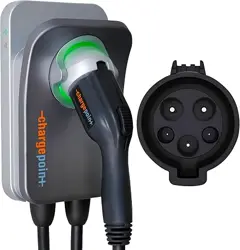
ChargePoint® Home Flex
16A-50A Flexible Amperage Charger
Installation Guide
ATTENTION:
Installers, please
read this guide
thoroughly.
Return the guide
to the owner after
installation.

2 chargepoint.com
Important Safety Instructions
SAVE THESE INSTRUCTIONS
WARNING: This manual contains important instructions for Home Flex.
When using electric products, always follow basic precautions, including
the following.
1. Read and follow all warnings and instructions before installing and
operating the ChargePoint® charging station. Install and operate only as
instructed. Failure to do so may lead to death, injury, or property damage,
and will void the Limited Warranty.
2. Only use licensed professionals to install your ChargePoint® charging
station and adhere to all national and local building codes and standards.
Before installing the ChargePoint® charging station, consult with a licensed
contractor, such as a licensed electrician, and use a trained installation
expert to ensure compliance with local building and electrical codes and
standards, climate conditions, safety standards, and all applicable codes
and ordinances. Inspect the charging station for proper installation before
use.
3. Always ground the ChargePoint® charging station. Failure to ground
the charging station can lead to risk of electrocution or fire. The charging
station must be connected to a grounded, metal, permanent wiring
system, or an equipment grounding conductor shall be run with circuit
conductors and connected to the equipment grounding terminal or lead
on the Electric Vehicle Supply Equipment (EVSE). Connections to the
EVSE shall comply with all applicable codes and ordinances.
4. Install the ChargePoint® charging station using a ChargePoint
approved method. Failure to install on a surface that can support the
weight of the charging station can result in death, personal injury, or
property damage. Inspect the charging station for proper installation
before use.
5. This charging station is not suitable for use in hazardous locations. Do
not install Home Flex near flammable, explosive, or combustible materials.
6. This device should be supervised when used around children.
7. Do not put fingers into the electric vehicle connector.
8. Do not use this product if the flexible input power cable or EV charging
cable is frayed, has broken insulation, or any other signs of damage. Call
ChargePoint customer support immediately at 1.888.758.4389.
9. Do not use this product if the enclosure or the EV connector is broken,
cracked, open, or shows any other indication of damage. Call
ChargePoint customer support immediately at 1.888.758.4389.
10. Use 90°C wire copper conductors only.
11. Do not operate Home Flex in temperatures outside its operating
range. For charging stations set to 16-48 A, the range is -40˚F to 122˚F
(-40˚C to 50˚C). For charging stations set to 50 A, the range is -40˚ to
113˚F (-40 to 45˚C).
chargepoint.com 3
• Other than the charging cable, Home Flex contains no field serviceable parts. Do
not attempt to repair or service any other part of the unit yourself. If the unit
requires servicing, contact ChargePoint, Inc.
• Ensure that Home Flex charging cable is positioned so it is not stepped on,
tripped over, or subjected to damage or stress. Do not close a garage door on
the charging cable.
Product Disposal
ChargePoint Home Flex is electronic and therefore may not be
disposed of as part of unsorted domestic waste. Inquire with local
authorities regarding proper disposal. Product materials are
recyclable as marked.
No Accuracy Guarantee
Commercially reasonable efforts were made to ensure that the specifications and
other information in this manual are accurate and complete at the time of its
publication. However, the specifications and other information in this manual are
subject to change at any time without prior notice.
Copyright and Trademarks
©2013-2019 ChargePoint, Inc. All rights reserved. This material is protected by the
copyright laws of the United States and other countries. It may not be modified,
reproduced or distributed without the prior, express written consent of ChargePoint,
Inc. CHARGEPOINT is a U.S. and European Union registered trademark and service
mark of ChargePoint, Inc. and cannot be used without the prior written consent of
ChargePoint.
CAN ICES-3 (A)/NMB-3 (A)
Important: Under no circumstances will compliance with the information
in this manual relieve the user of his/her responsibility to comply with all
applicable codes or safety standards. This document describes the most
commonly used installation and mounting scenarios. If situations arise in
which it is not possible to perform an installation following the procedures
provided in this document, contact ChargePoint, Inc. ChargePoint, Inc. is
not responsible for any damages that may occur resulting from custom
installations that are not described in this document or for any failure to
adhere to installation recommendations.

4 chargepoint.com

chargepoint.com 5
Table of Contents
Verify Contents ........................................................................................ 7
Gather Tools .............................................................................................. 8
Plan the Location ...................................................................................... 9
Wire the Circuit .........................................................................................11
Mount the Charging Station ....................................................................11
Install the Charging Cable ...................................................................... 15
Complete the Installation ....................................................................... 17
Questions? ................................................................................................ 17
Limited Warranty ..................................................................................... 18

6 chargepoint.com

chargepoint.com 7
Verify Contents
Check the box to ensure you have the Quick Start guide, this installation
guide, and these parts:
a. Charging station (with attached input power cable)
b. Faceplate (pre-installed on charging station)
c. Installation template
d. Charging cable with cable clip
e. Wire cover (pre-installed on charging station)
f. 10 mm (3/8 in) driver bit
g. 4 mm (3/16 in) drill bit
h. Three 6 mm (1/4 in) x 51 mm (2 in) lag screws
Note: If you are missing any of these parts, please call 1-888-758-4389.
CAUTION: The ChargePoint Home Flex charging station must be
installed by a licensed electrician. If you do not know where to find
one, refer to the ChargePoint Home Flex Quick Start Guide or
chargepoint.com/homeinstall for help.
a
d
c
b
e
f
g h
8 chargepoint.com
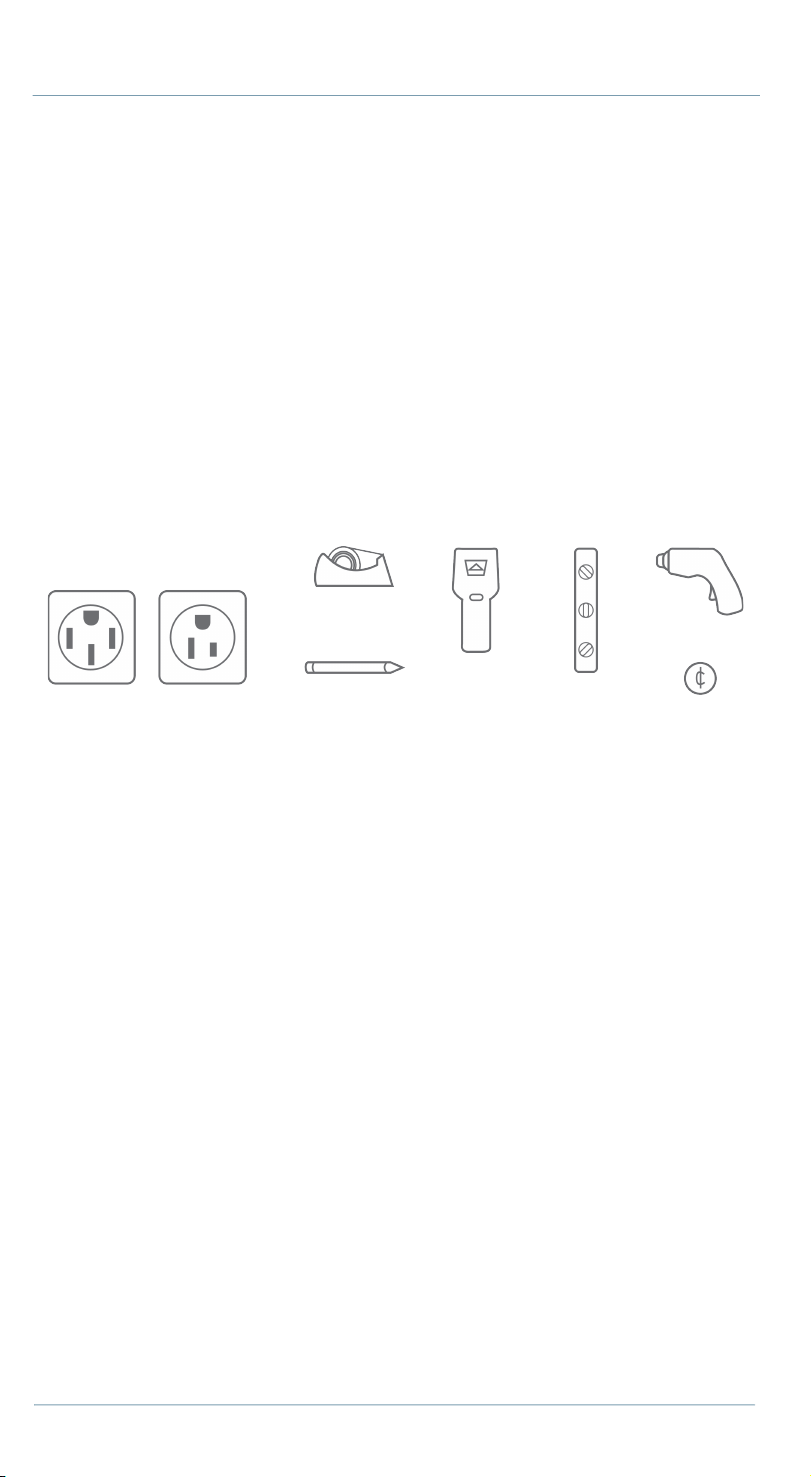
Gather Tools
You also need:
a. One NEMA 6-50 outlet, NEMA 14-50 outlet, or supplies to install a
hardwired circuit.
b. Tape
c. Pencil
d. Stud finder
e. Level
f. Drill
g. Coin
a
c
b
d
e
f
g
chargepoint.com 9
Plan the Location
Before beginning work, check the site for appropriate mounting location and
electrical capacity.
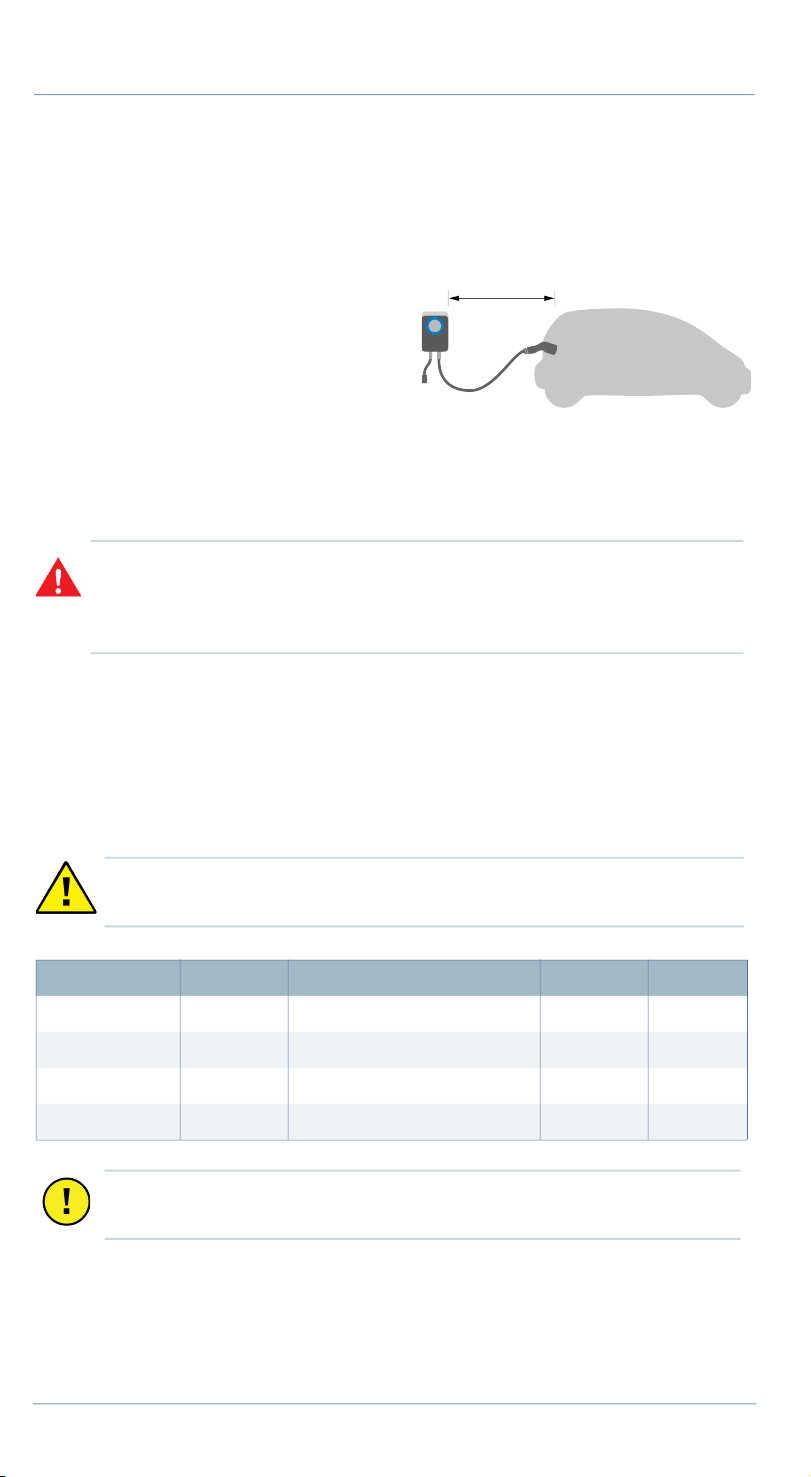
1. Ensure the homeowner has chosen
an installation location that allows
the charging cable to reach the car's
charging port while still providing
slack. Ensure there is a stud available
at the desired location for mounting
the charging station. Ensure there is WiFi signal available.
Note: Outdoor installation is an option, but requires an outdoor-rated,
weather-resistant electrical outlet or hardwired installation.
2. Determine the desired charging amperage with the homeowner. Home
Flex can be installed at a variety of amperages. Choose based on the
availability of space or electrical capacity in the panel, the desired speed
of charging, and whether the homeowner prefers a hardwired or plug-in
installation.
Home Flex can also be wired for higher amperages. Consult all
applicable codes for breaker and wire sizing requirements. The field-
WARNING: In areas with frequent thunderstorms, add surge protection at
the service panel for all circuits. Ensure all power and ground connections,
especially those at the breaker and bus bar, are clean and tight. Remove all
oxide from all conductors and terminals before connecting wiring.
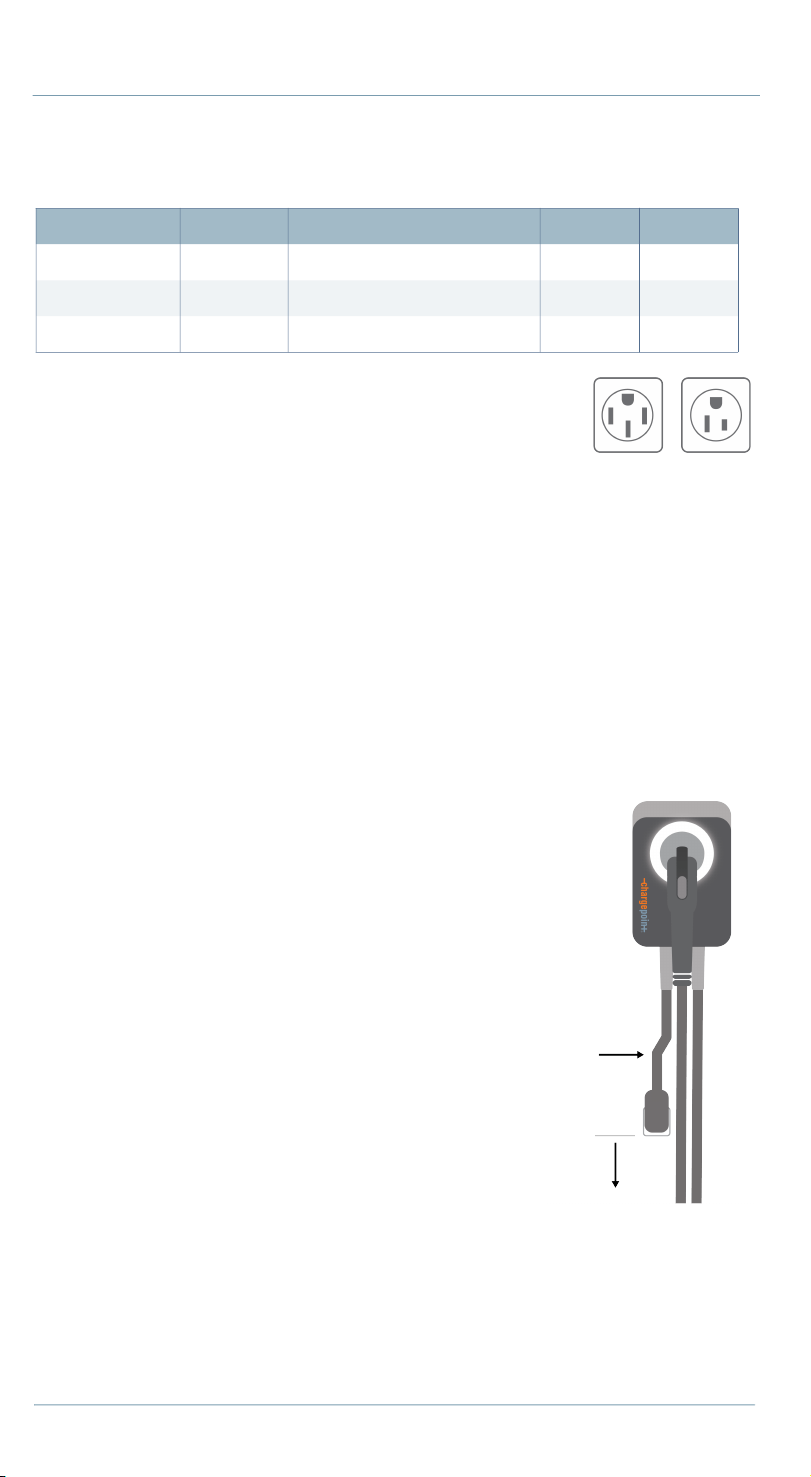
CAUTION: Home Flex is a continuous load device. The circuit must
be rated for 125% of the maximum load.
Circuit Rating Max Load Estimated Range per Hour Plug-in Hardwire
50 A 40 A 30 miles/48 km yes yes
40 A 32 A 25 miles/40 km yes yes
30 A 24 A 18 miles/29 km no yes
20 A 16 A 12 miles/19 km no yes
Important: In Canada, a plug-in installation is only allowed with a 50
amp circuit.
10 chargepoint.com
wiring terminal is rated to 105˚C and accepts a maximum of 16 mm
2
(6
AWG) wire.
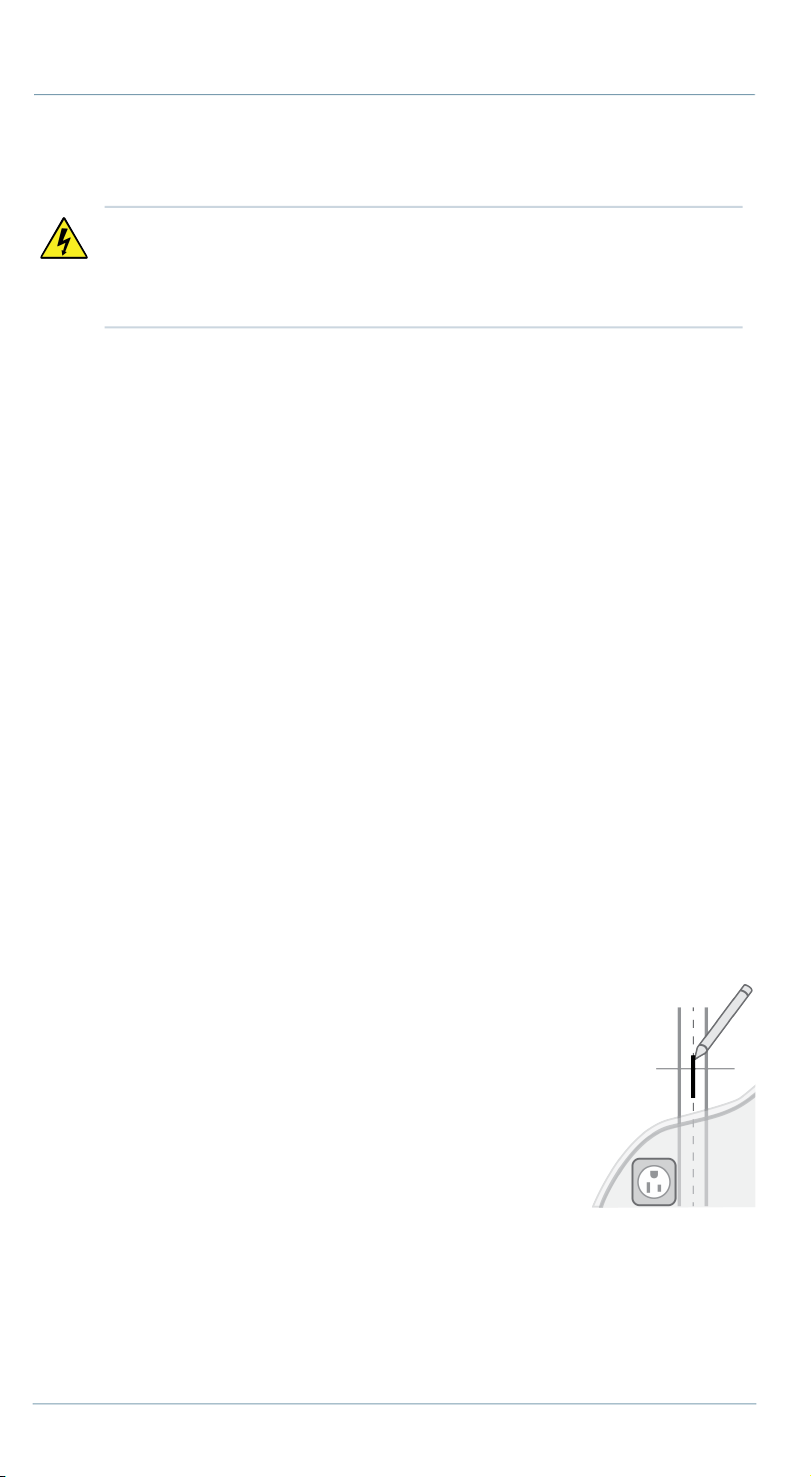
3. Determine the plug type purchased by the
homeowner. It is either a NEMA 6-50 or 14-50 type
plug.
4. Determine if the desired circuit rating requires a
hardwired circuit.
5. Ensure the electrical panel supports a 240 V dedicated circuit with a
new, dedicated, non-GFCI two-pole circuit breaker, in accordance with
local codes and ordinances.
Note: If local codes require a GFCI breaker for plug-in installation,
ChargePoint recommends a hardwire installation. We do not recommend
using a GFCI breaker as the Home Flex has charging circuit interrupting
device (CCID) protection. Using a GFCI breaker in the panel can cause
nuisance tripping.
6. For plug-in installations, the NEMA
outlet should be located 500-660 mm
(20-26 in) from the ground adjacent to
the stud where the charging station will
be mounted.
Note: The input power cable is 300 mm
(12 in) long (as per the National Electric
Code for EV chargers). Ensure the outlet
is installed close enough to the stud for
the input power cable to plug in.
7. Follow all applicable codes and
ordinances and pull a permit for
completing the electrical work as
required.
Circuit Rating Max Load Estimated Range per Hour Plug-in Hardwire
80 A 50 A 37 miles/60 km no yes
70 A 50 A 37 miles/60 km no yes
60 A 48 A 36 miles/58 km no yes
14-50 6-50
300 mm
(12 in)
500-600 mm
(20-26 in)
chargepoint.com 11
Wire the Circuit
1. Install a plug-in or hardwired circuit:
• For a 40 or 50 amp plug-in installation, wire the circuit with the
appropriate 6-50 or 14-50 outlet. Install the outlet with the ground
facing up.
• For a hardwired installation, provide a listed conduit with wiring to the
bottom or rear 19 mm (3/4 in) knockout for AC input. Seal the unused
knockout with the plug provided. Return the original input power
cable to the box.
2. Affix the label with the appropriate rating to the circuit in the panel.
3. Turn off power to the circuit at the panel before proceeding.
Mount the Charging Station
Note: For Hardwired Installation, proceed to page 13.
Plug-In Installation
1. Remove the faceplate and the wire cover from the charging station. Set
them aside.
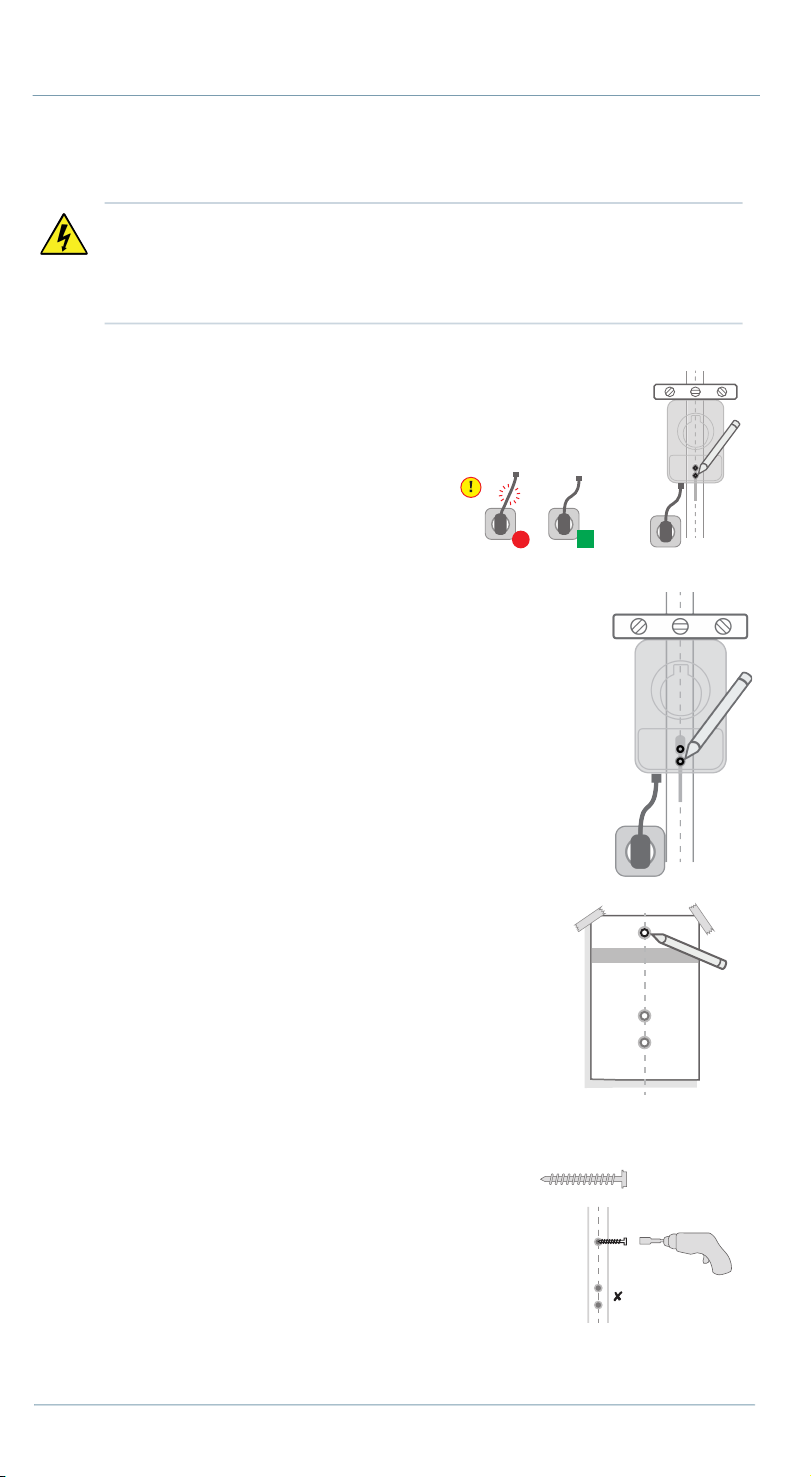
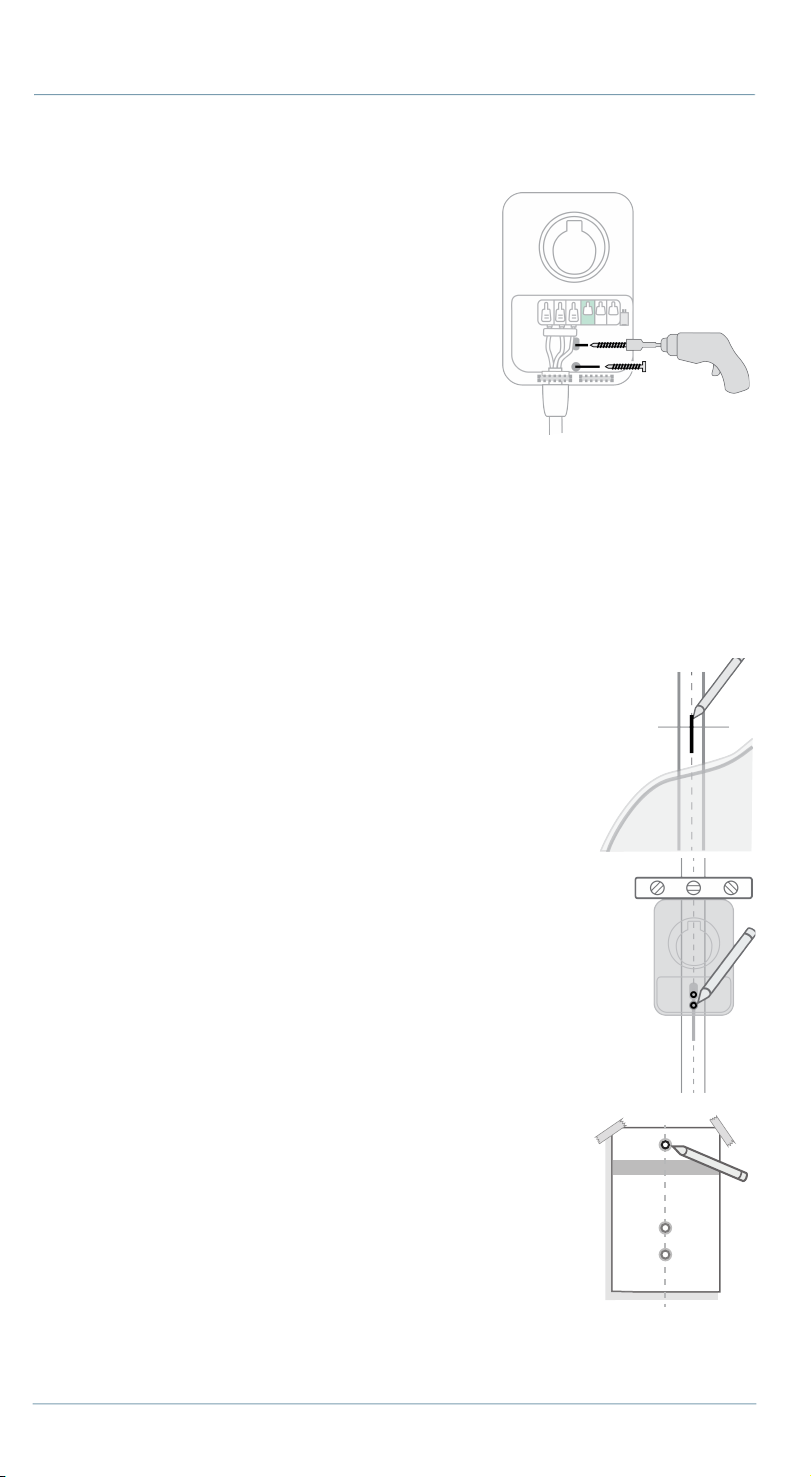
2. Mark the center of the stud with a line
approximately 1000-1100 mm (39-43 in) above the
finished floor.
DANGER: RISK OF SHOCK. Turn off the circuit breaker to the 240 V
outlet. Do not restore power to the outlet until installation is
complete. Failure to follow these instructions could result in shock
or electrocution.
12 chargepoint.com
3. To find the charging station’s ideal mounting height, plug the charging
station's input power cable into the outlet.
4. Place the charging station against
the wall. Line up the charging
station’s two mounting holes with
the marked stud line.
Note: Ensure the input power cable
has a slight curve, and is not
stretched.
5. Ensure the charging station is level.
Mark the two lower mounting holes.
6. Unplug the charging station.
7. Line up the lower mounting holes on the
installation template with the marks you made.
Tape the template to the wall.
8. Mark the top mounting hole on the wall with the
installation template.
9. Remove the template from the wall.
10. Drill the three mounting holes with the included
drill bit.
11. Use the driver bit to drive a lag screw into the
top-most mounting hole, leaving a 3 mm
(1/8 in) gap to hang the charging station on.
Keep the remaining two screws for later use.
12. Hang the charging station on the protruding
screw using the notch on the back of the
charging station.
DANGER: If the front status light turns on when the charging station
is plugged in, the circuit is not off. STOP IMMEDIATELY. Unplug the
charging station and turn off the power to the outlet at the circuit
breaker until the installation is complete.
(1) 2” screw
chargepoint.com 13
Note: Do not plug in the charging station yet.
13. Drive the remaining two lag screws into
the bottom mounting holes to secure the
charging station. Be careful not to damage
the electrical wires.
Note: Ensure the input wire does not make
contact with the screw.
14. Proceed to the Install the Charging Cable
section on page 15.
Hardwired Installation
1. Remove the faceplate and the wire cover from the charging station. Set
them aside.
2. Remove the cable clip and lift the white levers on the field-wiring
terminal block to remove the input power cable.
3. Mark the center of the stud with a line between 1000-
1100 mm (39-43 in) above the finished floor.
4. Hold the station against the wall stud, with the top of
the station approximately 1270 mm (50 in) above
ground level.
5. Ensure the charging station is level. Mark the two lower
mounting holes.
6. Line up the lower mounting holes on the installation
template with the marks you made. Tape the
template to the wall.
7. Mark the top mounting hole on the wall with the
installation template.
8. Remove the template from the wall.
9. Drill the three mounting holes with the included drill
bit.
14 chargepoint.com
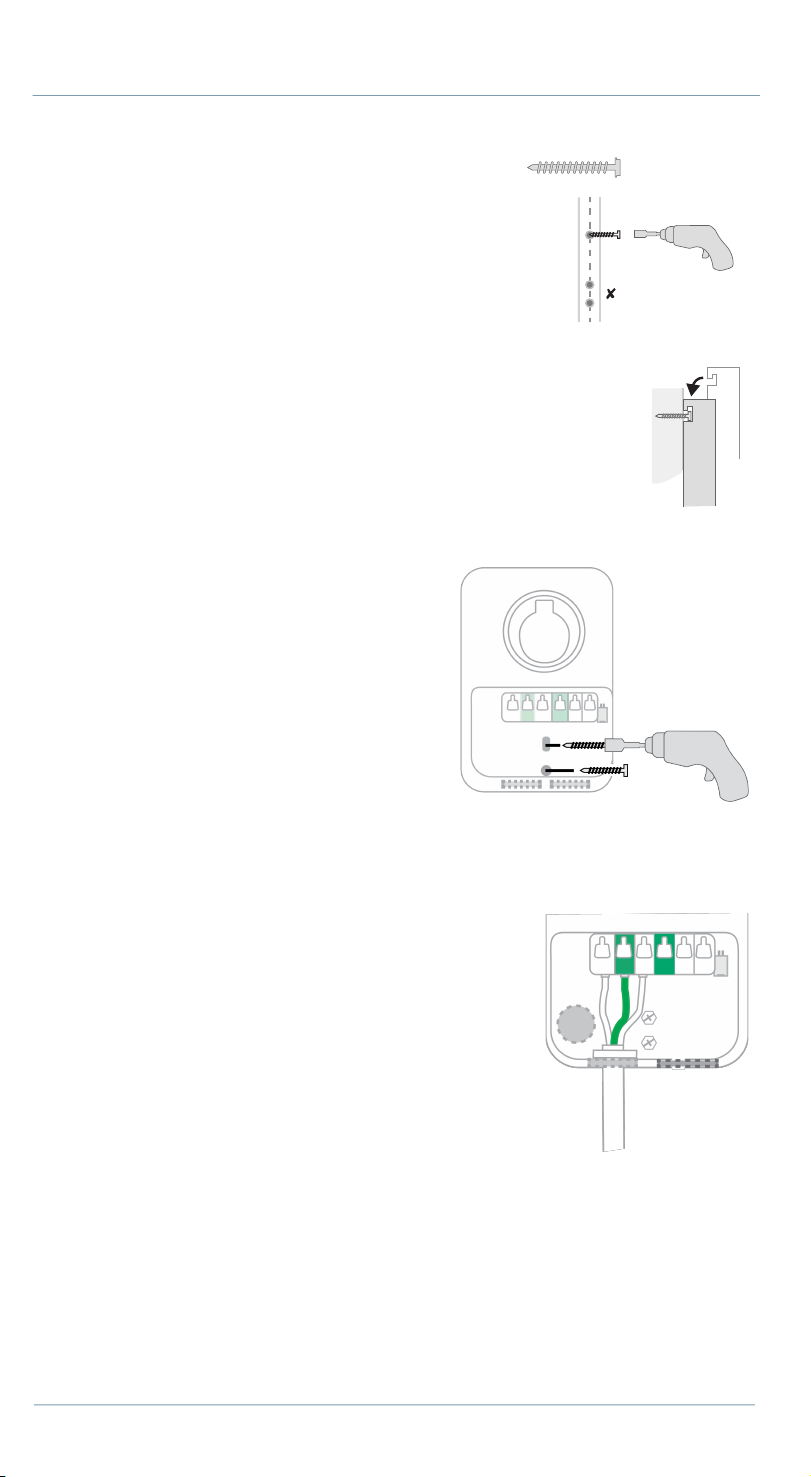
10. Use the driver bit to drive a lag screw into
the top-most mounting hole, leaving a 3 mm
(1/8 in) gap to hang the charging station on.
Keep the remaining two screws for later use.
11. Hang the charging station on the protruding
screw using the notch on the back of the charging
station.
12. Drive the remaining two lag screws
into the bottom mounting holes to
secure the charging station.
13. Insert the exposed wires from the
hardwire circuit installation into the
corresponding holes, pushing the
cables up until the silver conductors
are no longer visible.
Note: If mounting on an exterior wall
and bringing power through the rear knockout, apply sealant around the
rear knockout to prevent water ingress.
14. Bring power through the bottom or
rear knockout.
15. Ensure the service wiring can easily
reach the connectors on the charging
station’s input terminal block.
16. Strip each wire 12 mm (1/2 in).
17. Ensure the white levers on the terminal
block are open. Fully insert the wires
into the connectors on the left side of
the terminal block with the ground wire in the center.
18. Press the three levers down until they snap into place.
Note: The white levers are a pinch point. Be careful of fingers while handling
them.
(1) 2” screw
Side view
chargepoint.com 15
Install the Charging Cable
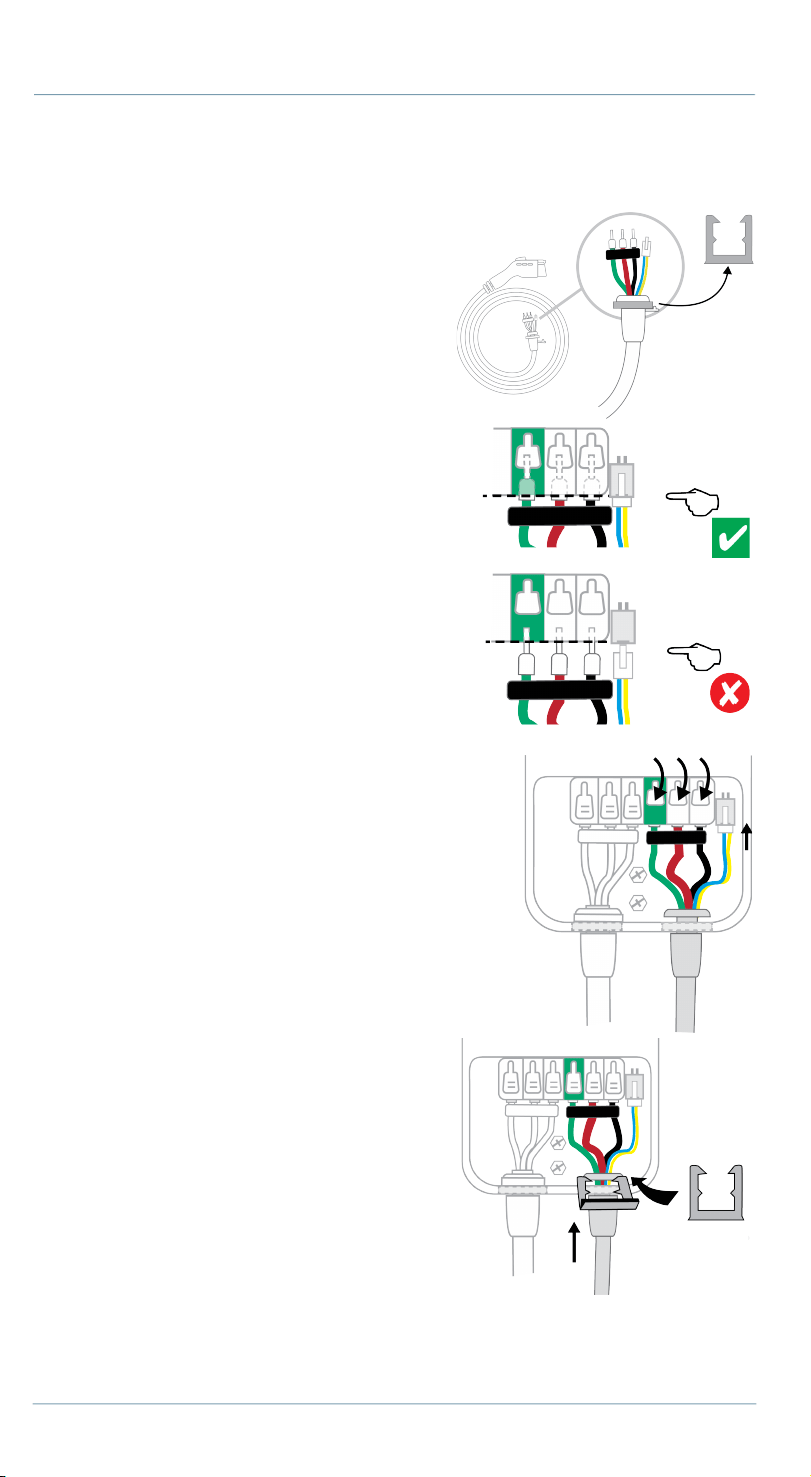
1. Remove the cable clip from the wire
end of the cable, but do not discard it.
2. Fold the wire ends and insert them
into the bottom hole of the charging
station.
3. Match the green wire to the ground on
the left terminal of the output block.
4. Insert the exposed wires into the
corresponding holes, pushing the
cables up until the silver conductors
are no longer visible.
5. Snap the white levers all the way down
on each wire.
Note: The white levers are a pinch point. Be
careful of fingers while handling them.
6. Insert the 4-pin plug into the connector to
the right of the output supply wiring.
7. While pushing the cable up, slide the
cable clip into the slot. This secures the
cable and acts as strain relief.
16 chargepoint.com
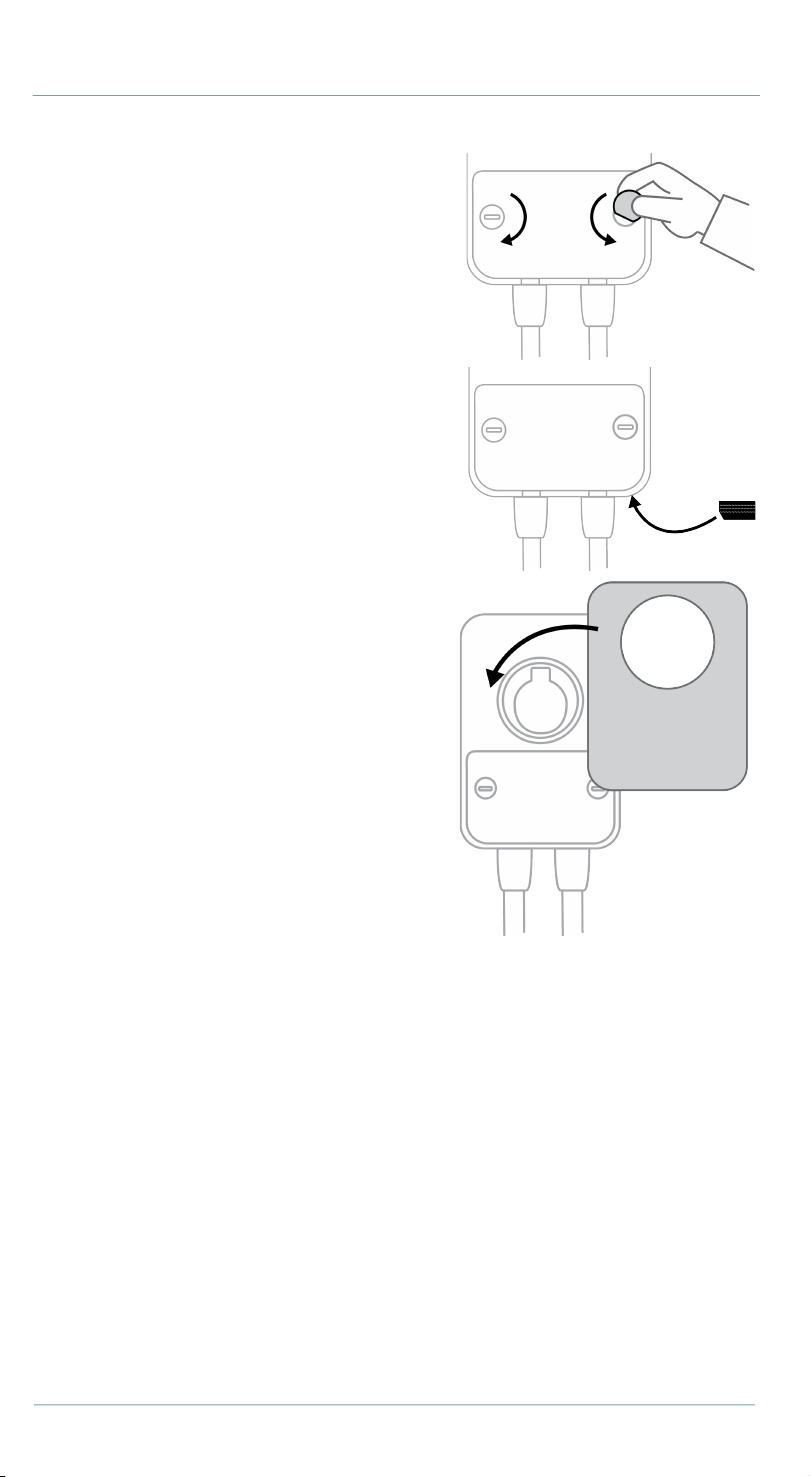
8. Place the wire cover over the exposed
wiring. Use a coin to lock the wire
cover in place.
Note: To avoid damage to the wire
cover, do not use a screwdriver.
9. Apply the rating label to match the
circuit feeding the charging station on
the bottom of the station over the
default rating displayed.
10. Snap the faceplate onto the charging
station.
chargepoint.com 17
Complete the Installation
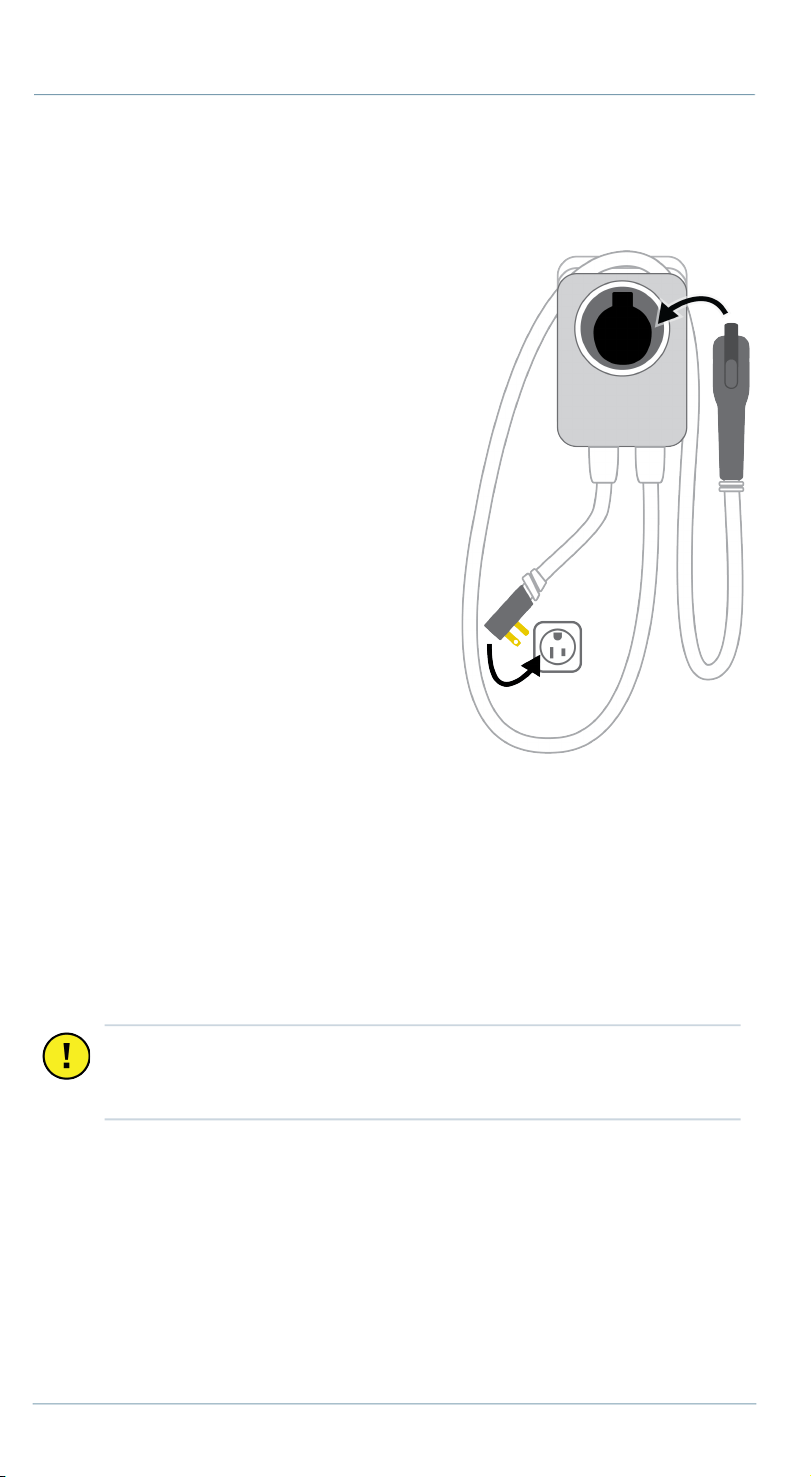
1. Extend the cable to its full length to remove any kinks or tension.
2. Drape the charging cable over the top
of the charging station and dock the
connector in its holster.
3. Ensure labels specifying circuit
amperage are applied to the bottom of
the charging station and to the circuit
in the electrical panel.
4. Restore power to the circuit at the
electrical panel.
5. Plug the charging station into the
outlet (if applicable).
6. Watch to ensure that the front status
light glows yellow, then blinks white.
7. Give the Quick Start Guide, the drill bit,
the driver bit, and this Installation
Guide to the homeowner.
8. Return all packaging materials to the
box and give the box to the homeowner.
9. Advise the homeowner that the charging station is ready for activation
via the mobile application.
10. Tell the homeowner the final amperage of the circuit and the expected
charging rate available after activation. (Refer to the table in the Plan the
Location section.)
Questions?
• chargepoint.com/homeinstall
• U.S. and Canada toll-free: +1-888-758-4389 (24 hours)
Important: The Quick Start Guide contains information that the
owner needs to activate their charging station. Without activation,
the charging station charge current is limited to 16 amps.