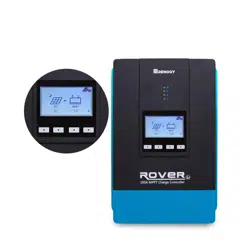
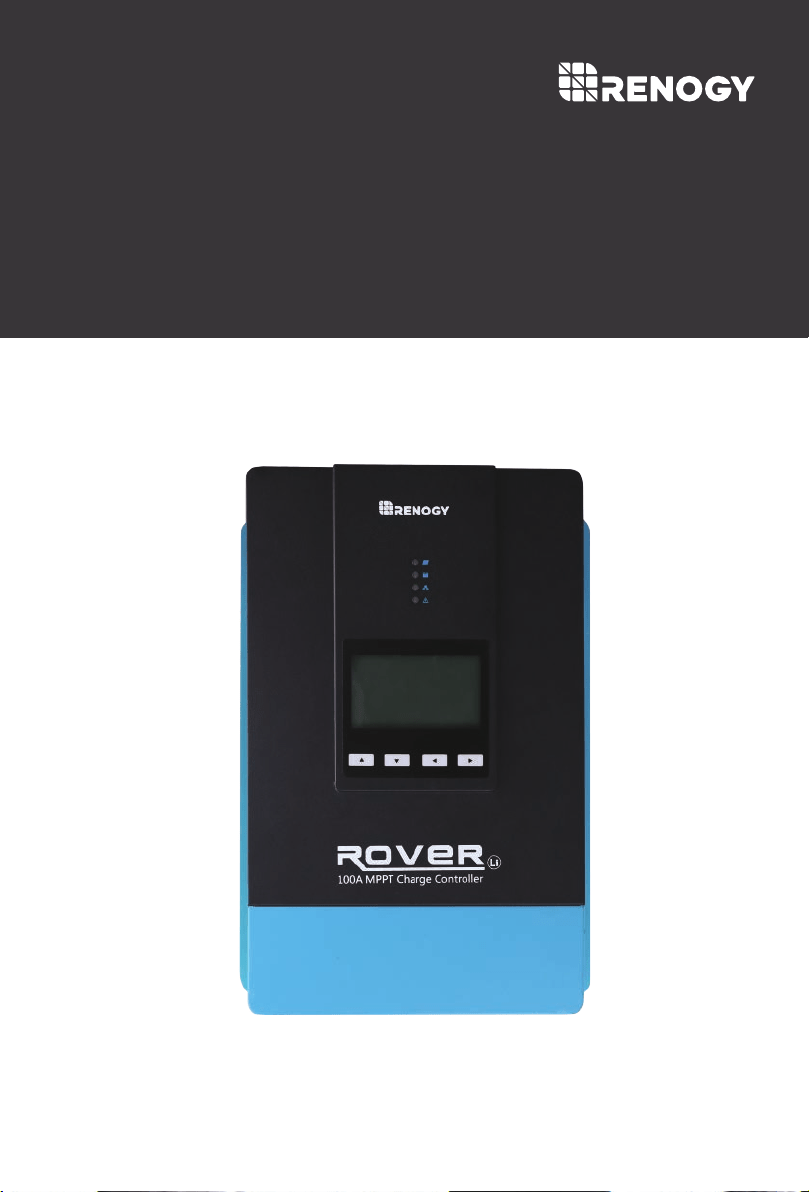
Rover 100A
Version 1.4
Maximum Power Point Tracking Solar Charge Controller
ROVER
SERIES
01
General Safety Information
Charge Controller Safety
Important Safety Instructions
Please save these instructions.
This manual contains important safety, installation, and operating instructions for the charge
controller. The following symbols are used throughout the manual to indicate potentially
dangerous conditions or important safety information.
There are no serviceable parts for this controller. Do NOT disassemble or attempt to repair
the controller.
Make sure all connections going into and from the controller are tight.
NEVER connect the solar panel array to the controller without a battery. Battery must be
connected first.
Ensure input voltage does not exceed 150 VDC to prevent permanent damage. Use the
Open Circuit Voltage (Voc) to make sure the voltage does not exceed this value when
connecting panels together.
Read all of the instructions and cautions in the manual before beginning the installation.
Do
NOT
allow water to enter the controller.
NOTE
CAUTION
WARNING
Indicates a potentially dangerous condition. Use extreme caution
when performing this task
Indicates a critical procedure for safe and proper operation of the
controller
Indicates a procedure or function that is important to the safe and
proper operation of the controller
02
Battery Safety
Use only sealed lead-acid, flooded, gel or lithium batteries which
must be deep cycle.
Explosive battery gases may be present while charging. Be certain there is enough
ventilation to release the gases.
Be careful when working with large lead acid batteries. Wear eye protection and have
fresh water available in case there is contact with the battery acid.
Over-charging and excessive gas precipitation may damage the battery plates and
activate material shedding on them. Too high of an equalizing charge or too long of one
may cause damage. Please carefully review the specific requirements of the battery
used in the system.
Equalization is carried out only for non-sealed / vented/ flooded / wet cell lead acid
batteries.
Do
NOT
equalize VRLA type AGM / Gel / Lithium cell batteries
UNLESS
permitted by
battery manufacturer.
Carefully read battery manuals before operation.
Do
NOT
let the positive (+) and negative (-) terminals of the battery touch each other.
Connect battery terminals to the charge controller BEFORE connecting
the solar panel(s) to the charge controller.
NEVER
connect solar panels to
charge controller until the battery is connected.
WARNING
Recycle battery when it is replaced.
Once equalization is active in the battery charging, it will not exit this stage
unless there is adequate charging current from the solar panel. There
should be
NO
load on the batteries when in equalization charging stage.

Table of Contents
03
General Information
Additional Components
Optional Components
Identification of Parts
04
08
08
09
Installation
10
Operation
Protections
System Status Troubleshooting
15
LED Indicators
24
25
26
Error Codes
27
Maintenance
27
FusingFusing
Technical Specifications
Electrical Parameters
Battery Charging Parameters
PV Power – Conversion Efficiency Curves
Dimensions
28
29
29
29
31
32
34
General

04
General Information
Customizable charging voltages
The MPPT Charge Controller utilizes Maximum Power Point Tracking technology to extract
maximum power from the solar module(s). The tracking algorithm is fully automatic and does
not require user adjustment. MPPT technology will track the array’s maximum power point
voltage (Vmp) as it varies with weather conditions, ensuring that the maximum power is
harvested from the array throughout the course of the day.
The Rover Series charge controllers are suitable for various off-grid solar applications. It protects
the battery from being over-charged by the solar modules and over-discharged by the loads. The
controller features a smart tracking algorithm that maximizes the energy from the solar PV module
(s) and charge the battery. At the same time, the low voltage disconnect function (LVD) will prevent
the battery from over discharging.
The Rover’s charging process has been optimized for long battery life and improved system
performance. The comprehensive self-diagnostics and electronic protection functions can prevent
damage from installation mistakes or system faults.
In many cases, the MPPT charge controller will “boost” up the current in the solar system. The
current does not come out of thin air. Instead, the power generated in the solar panels is the
same power that is transmitted into the battery bank. Power is the product of Voltage (V) x
Amperage (A).
Automatically detect 12V/24V/36V/48V DC system voltages
Deep cycle Sealed, Gel, Flooded and Lithiumbattery option ready
Electronic protection: Overcharging, over-discharging, overload, and short circuit
Innovative MPPT technology with high tracking efficiency up to 99% and peak
conversion efficiency of 98%
Reverse protection: Any combination of solar module and battery, without causing
damage to any component
RS232 port to communicate with BT-1 Bluetooth module or DM-1 4G Date Module
MPPT Technology
Current Boost
Key Features
Charges over discharged lithium batteries
05
Therefore, assuming 100% efficiency:
Power In = Power Out
Volts In * Amps In = Volts out * Amps out
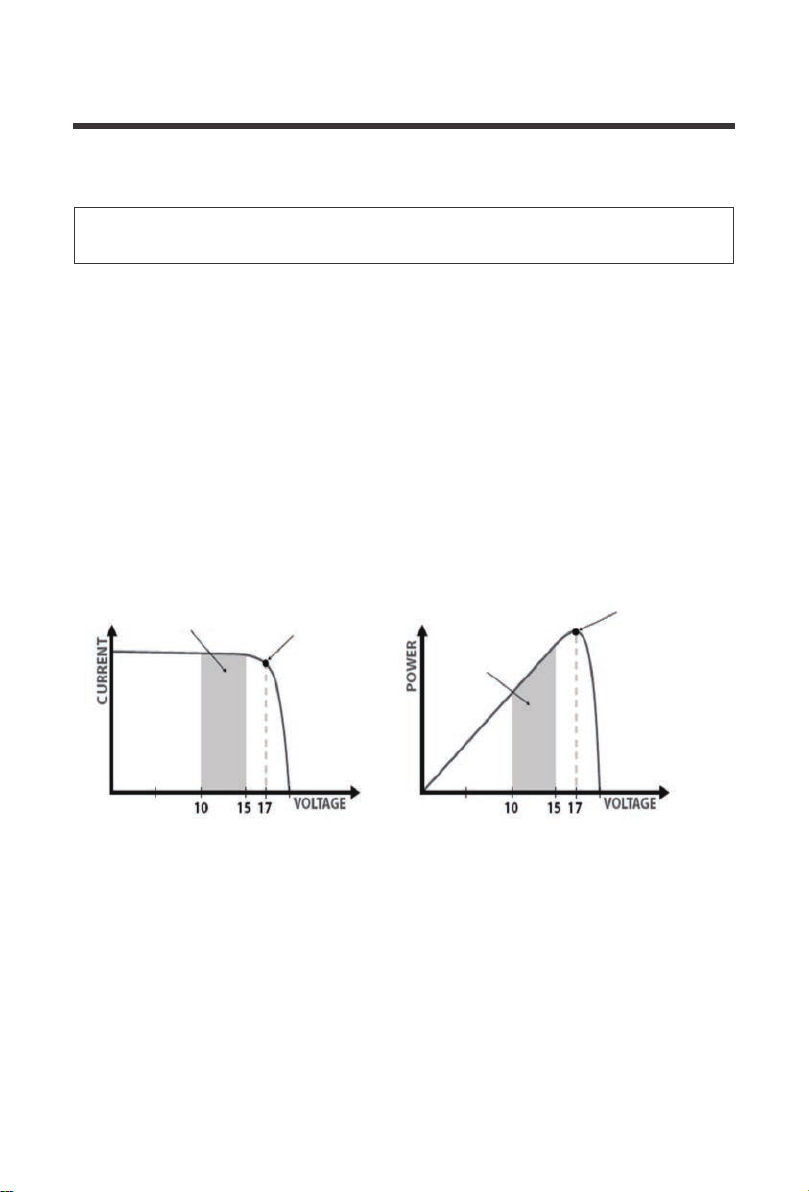
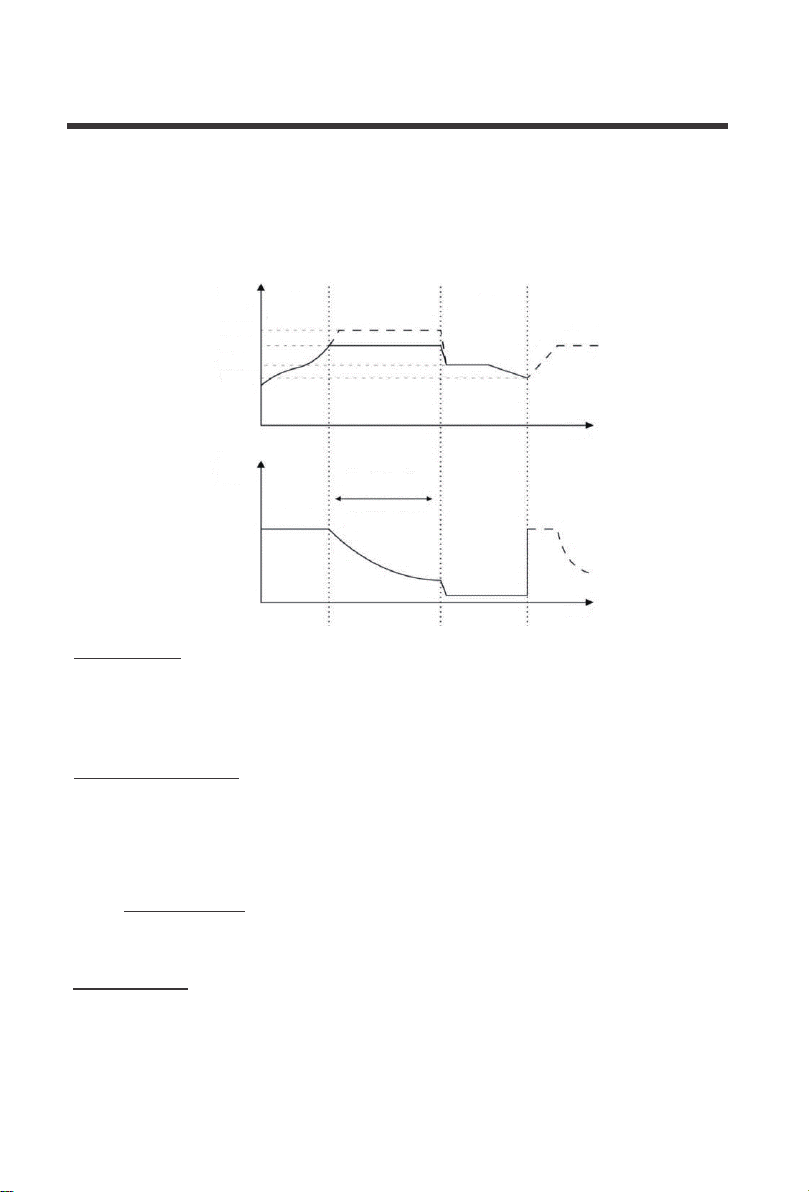
Maximum
Power Point
Traditional
Controller
Operating
Range
Maximum
Power Point
Although MPPT controllers are not 100% efficient, they are very close at about 92-95% efficient.
Therefore, when the user has a solar system whose Vmp is greater than the battery bank
voltage, then that potential difference is proportional to the current boost. The voltage generated
at the solar module needs to be stepped down to a rate that could charge the battery in a stable
fashion by which the amperage is boosted accordingly to the drop. It is entirely possible to have
a solar module generate 8 amps going into the charge controller and likewise have the charge
controller send 10 amps to the battery bank. This is the essence of the MPPT charge controllers
and their advantage over traditional charge controllers. In traditional charge controllers, that
stepped down voltage amount is wasted because the controller algorithm can only dissipate it
as heat. The following demonstrates a graphical point regarding the output of MPPT technology.
Temperature is a huge enemy of solar modules. As the environmental temperature
increases, the operating voltage (Vmp) is reduced and limits the power generation of the
solar module. Despite the effectiveness of MPPT technology, the charging algorithm will
possibly not have much to work with and therefore there is an inevitable decrease in
performance. In this scenario, it would be preferred to have modules with higher nominal
voltage, so that despite the drop in performance of the panel, the battery is still receiving
a current boost because of the proportional drop in module voltage.
Limiting Effectiveness
Current vs. Voltage (12V System) Output Power(12V System)
Typical Battery
Voltage Range
06
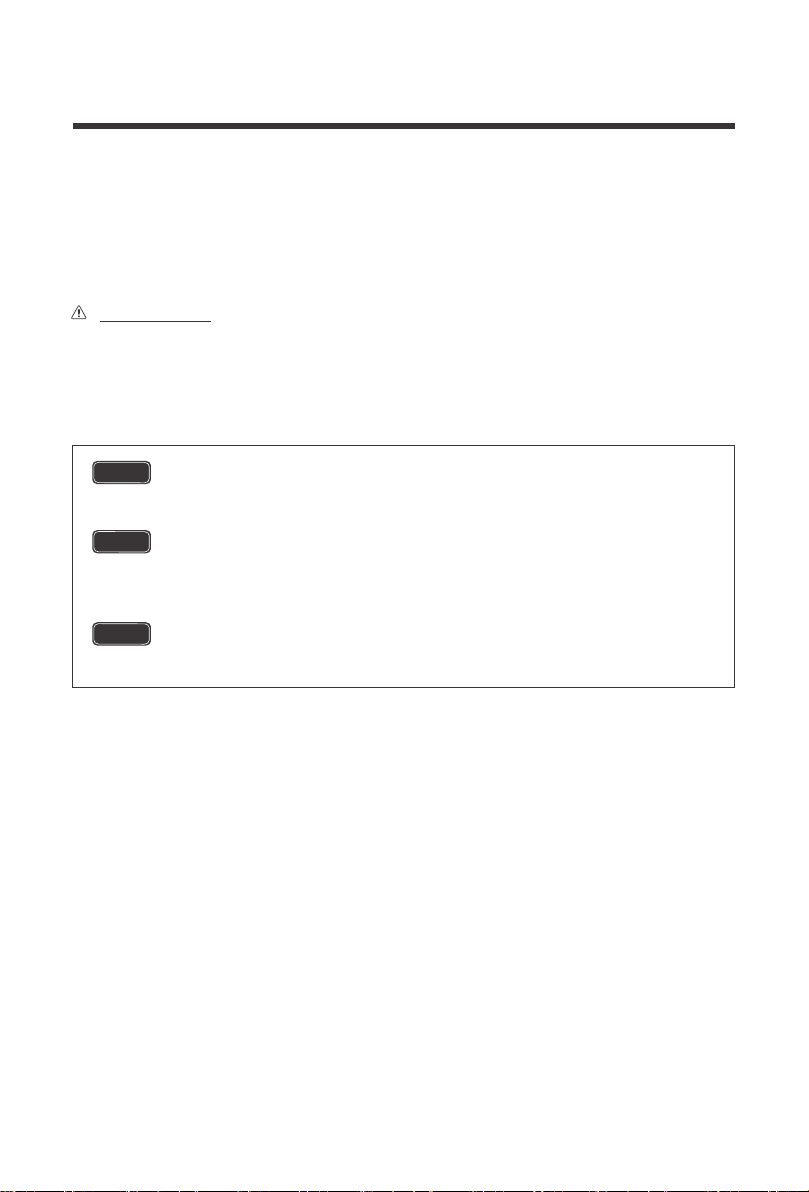
The Rover MPPT charge controller has a 4-stage battery charging algorithm for a rapid,
efficient, and safe battery charging. They include: Bulk Charge, Boost Charge, Float Charge,
and Equalization*.
Bulk Charge: This algorithm is used for day to day charging. It uses 100% of available solar
power to recharge the battery and is equivalent to constant current. In this stage the battery
voltage has not yet reached constant voltage (Equalize or Boost), the controller operates in
constant current mode, delivering its maximum current to the batteries (MPPT Charging).
Float Charge: After the constant voltage stage, the controller will reduce the battery voltage
to a float voltage set point. Once the battery is fully charged, there will be no more chemical
reactions and all the charge current would turn into heat or gas. Because of this, the charge
controller will reduce the voltage charge to smaller quantity, while lightly charging the battery.
Constant Charging: When the battery reaches the constant voltage set point, the controller
will start to operate in constant charging mode, where it is no longer MPPT charging. The current
will drop gradually. This has two stages, equalize and boost and they are not carried out
constantly in a full charge process to avoid too much gas precipitation or overheating of the
battery.
Boost Charge:
Boost stage maintains a charge for 2 hours by default. The user
can adjust the constant time and preset value of boost per their demand.
Four Charging Stages
Time
Time
Battery
Current
Battery
Voltage
Equalize
Boost
Float
Recharge
A
B C
Boost
Bulk Charging
Max Current
Cumulative Time:3h
Duration Time:2h
(Range:10~180min)
Bulk
Constant Charging
Float Charging
07
The purpose for this is to offset the power consumption while maintaining a full battery storage
capacity. In the event that a load drawn from the battery exceeds the charge current, the
controller will no longer be able to maintain the battery to a Float set point and the controller will
end the float charge stage and refer back to bulk charging.
Equalization: Is carried out every 30 days of the month. It is intentional overcharging of
the battery for a controlled period of time. Certain types of batteries benefit from periodic
equalizing charge, which can stir the electrolyte, balance battery voltage and complete
chemical reaction. Equalizing charge increases the battery voltage, higher than the standard
complement voltage, which gasifies the battery electrolyte.
Once equalization is active in the battery charging, it will not exit this stage unless
there is adequate charging current from the solar panel. There should be NO load
on the batteries when in equalization charging stage.
Over-charging and excessive gas precipitation may damage the battery plates
and activate material shedding on them. Too high of equalizing charge or for too
long may cause damage. Please carefully review the specific requirements of the
battery used in the system.
Equalization may increase battery voltage to a level damaging to sensitive DC
loads. Ensure that all load allowable input voltages are greater than the equalizing
charging set point voltage.
WARNING
WARNING
WARNING
The Rover MPPT charge controller has a reactivation feature to awaken a sleeping lithium
battery. The protection circuit of lithium battery will typically turn the battery off and make it
unusable if over-discharged. This can happen when storing a lithium battery pack in a
discharged state for any length of time as self-discharge would gradually deplete the remaining
charge. Without the wake-up feature to reactivate and recharge batteries, these batteries would
become unserviceable and the packs would be discarded. The Rover will apply a small charge
current to activate the protection circuit and if a correct cell voltage can be reached, it starts a
normal charge.
Lithium Battery Activation

08
Additional Components
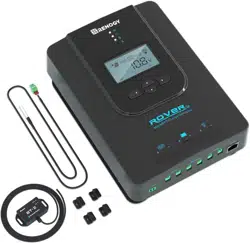
Additional components included in the package:
Optional components that require a separate purchase:
This sensor measures the temperature at the battery and uses this data for
very accurate temperature compensation. Accurate temperature
compensation is important in ensuring proper battery charging regardless
of the temperature.
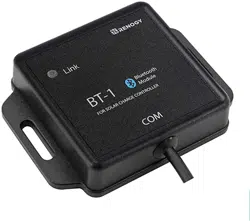
The Bluetooth module is a great addition to any Renogy charge controllers
with a RS232 or RS485 port and is used to pair charge controllers with the
Renogy DC Home App. After pairing is done you can monitor your system
and change parameters directly from you cell phone or tablet. No more
wondering how your system is performing, now you can see performance
in real time without the need of checking on the controller’s LCD.
This communication cable is needed to parallel two or more Rover 100A
charge controllers. Paralleling 100A Rovers allows for higher wattage
systems.
NOTE
This cable should only be used to parallel two Rover
100A charge controllers.
Renogy BT-1 & BT-2 Bluetooth Module:
Remote Temperature Sensor:
Controller Paralleling Cable:
Figure 1
Optional Components
The DM-1 4G Module is capable of connecting to select Renogy charge
controllers through an RS232, and is used to pair charge controllers with
Renogy 4G monitoring app. This app allows you to conveniently monitor
your system and charge syeters parameters remotely from anywhere 4G
LTE network service is available.
Renogy DM-1 4G Data Module:
Key Parts
09
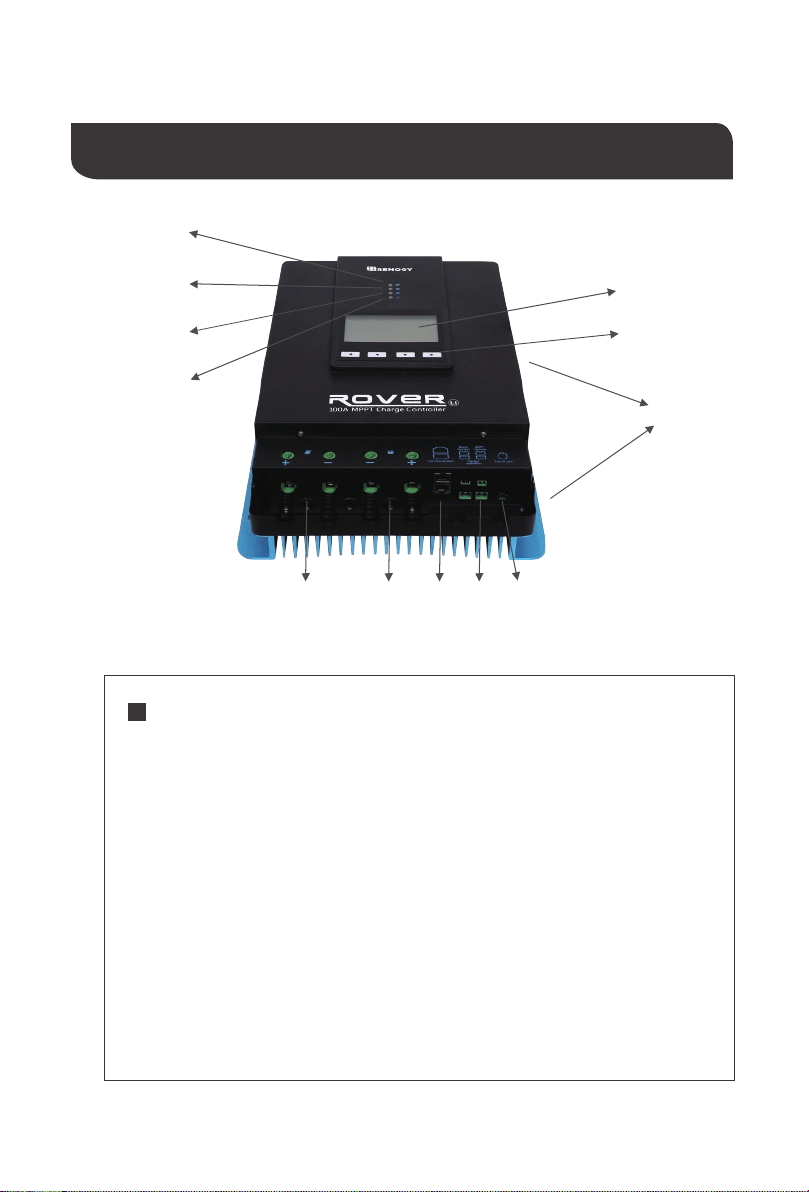
Identification of Parts
1.PV LED Indicator
2.Battery LED Indicator
3.Controller Parallel LED Indicator
4.System Error LED Indicator
5.LCD Screen
6.Operating Keys
7.Mounting Holes
8.PV Terminals
9.Battery Terminals
10.RS485 Port (Optional Accessory)
11.Remote Temperature Sensor/ Battery Remote Port/ Controller Parallel
Port (Optional Accessory)
12.RS232 Port (Optional Accessory)
○
9
○
10
○
11
○
12
○
8
○
6
○
5
○
3
○
4
○
2
○
1
○
7
10
Installation
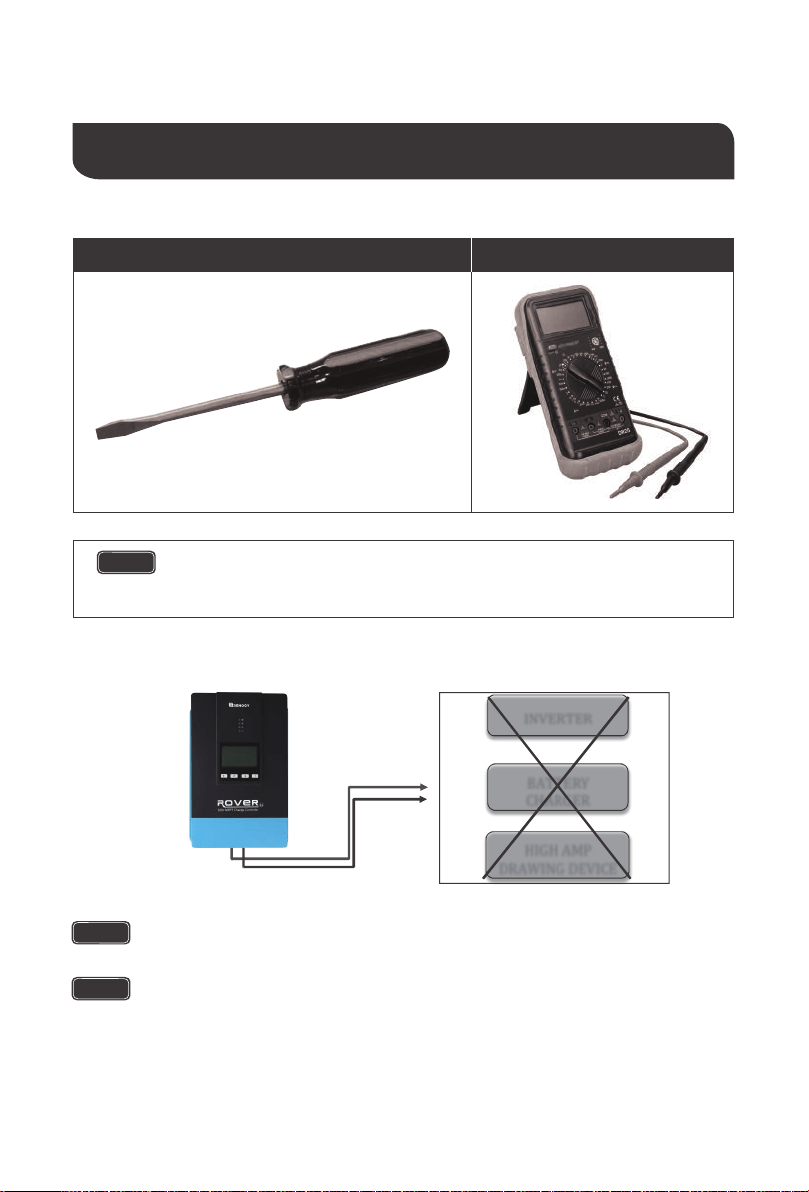
Connect battery terminal wires to the charge controller FIRST then connect the solar
panel(s) to the charge controller. NEVER connect solar panel to charge controller before
the battery.
Recommended tools to have before installation:
Screwdriver
INVERTER
BATTERY
CHARGER
HIGH AMP
DRAWING DEVICE
Do not over tighten the screw terminals. This could potentially break the piece that holds the
wire to the charge controller.
Refer to the technical specifications for max wire sizes on the controller and for the maximum
amperage going through wires.
Multi-Meter
CAUTION
CAUTION
WARNING

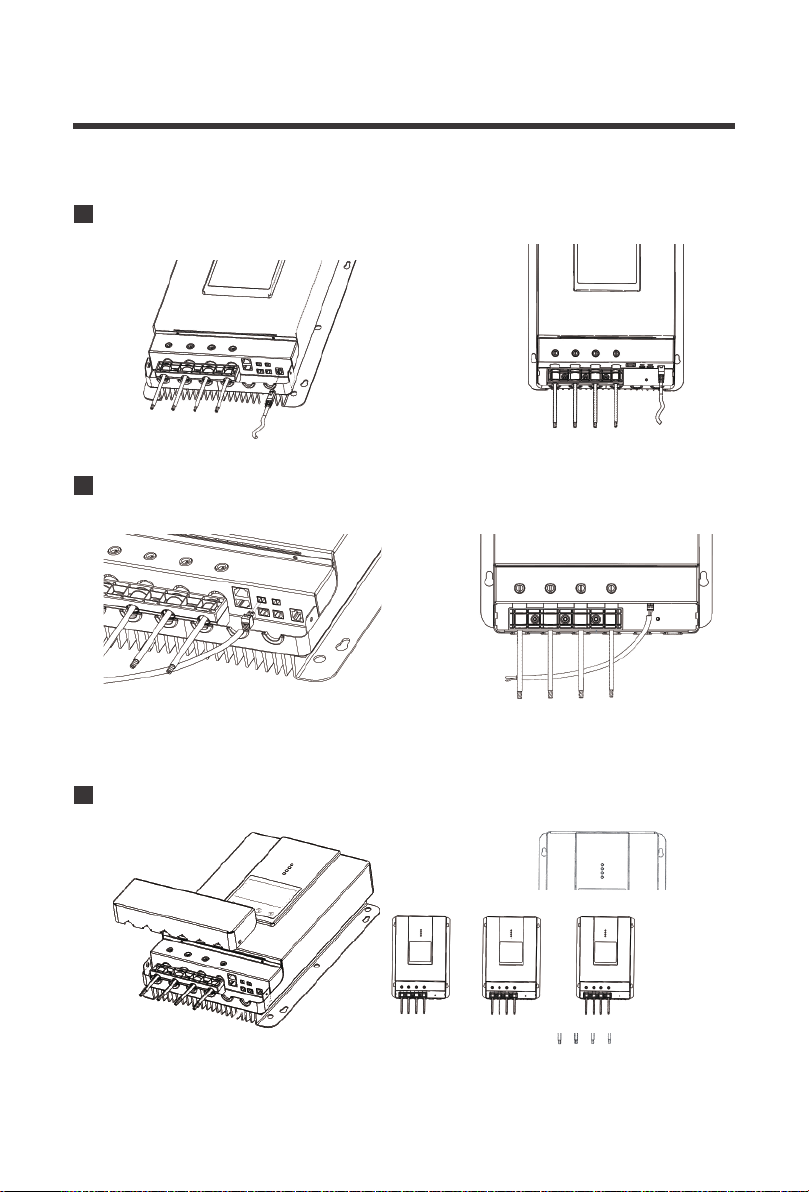
1. Remove Cover
2. Connect Battery
3. Connect Solar Panels
11
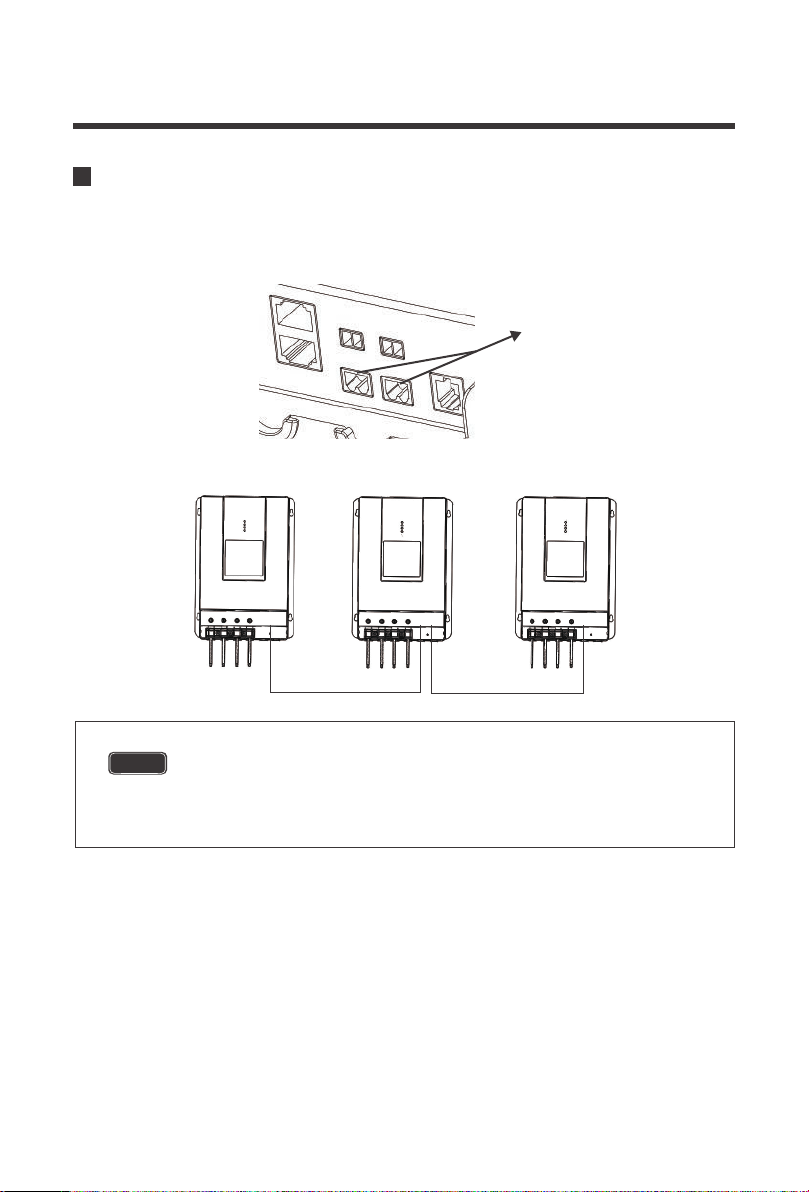
4. Bluetooth Module communication (optional)
6. Install Cover
Secure the Temperature Sensor lug to one of the battery posts
12
5. Temperature Sensor ( not polarity sensitive)
13
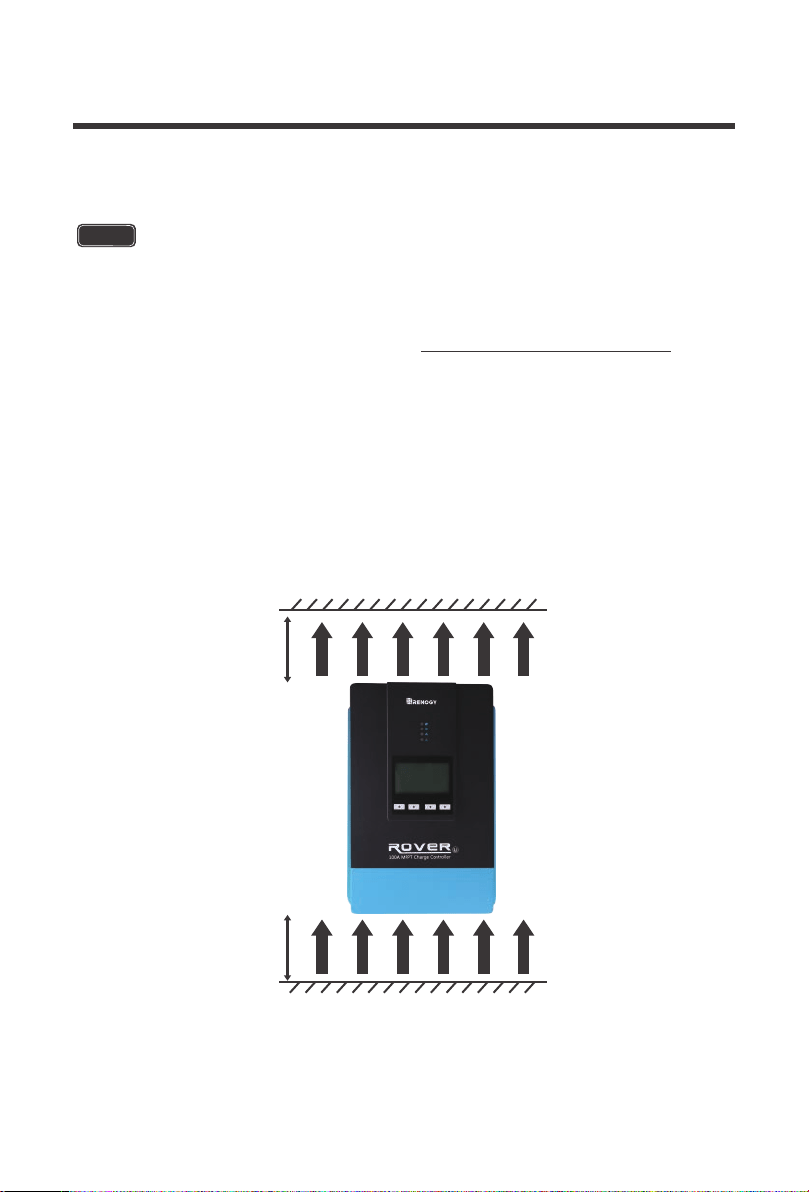
7. Paralleling Function (Optional)
NOTE
Use the provided paralleling cable to combine multiple Rover 100A Charge
Controllers. Connect the cable into the port labeled Parallel Operation on each
Rover 100A. Using this function will allow the Rover to act as one large charge
controller (Example above 300A).
Parallel Port
14
Mounting Recommendations
NEVER INSTALL THE CONTROLLER IN A SEALED ENCLOSURE WITH FLOODED
BATTERIES. GAS CAN ACCUMULATE AND THERE IS A RISK OF EXPLOSION.
1. Choose Mounting Location — place the controller on a vertical surface protected from
direct sunlight, high temperatures, and water. Make sure there is good ventilation.
2. Check for Clearance — verify that there is sufficient room to run wires, as well as
clearance above and below the controller for ventilation. The clearance should be at least 6
inches (150mm).
3. Mark Holes
4. Drill Holes
5. Secure the charge controller.
WARNING
6 inches
warm air
(150mm)
cool air
6 inches
(150mm)
15
Operation
Rover is very simple to use. Simply connect the batteries, and the controller will automatically
determine the battery voltage. The controller comes equipped with an LCD screen and 4
buttons to maneuver though the menus.
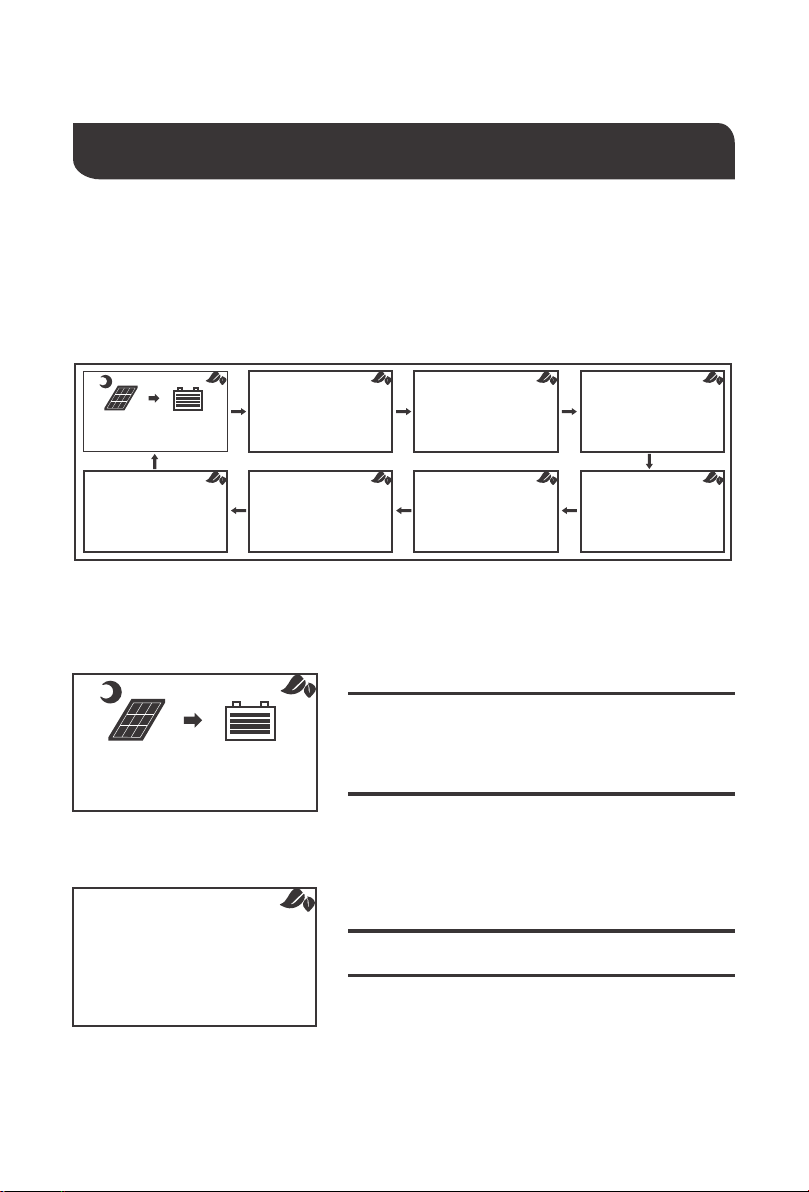
Displays solar panels Voltage and Wattage production
on left side of screen. Shows Voltage and Amperage
being sent to the battery on the right side of the screen
To cycle through the Main Menu screens, press the UP or DOWN buttons.
Main Display
Screen 1
Screen 2
Displays solar panels Voltage and Current production
PV BATT
0A
0W
0V 13.0V
PV VOLT
0V
PV CURR
0A
BATT VOLT
13.0V
CHARGE CURR
0A
CHARGE STATUS
DISCHARGE
E0
NORMAL
BATT MAX VOLT ON THE DAY
BATT MIN VOLT ON THE DAY
13.4V
12.6V
BATT CHARGE KWH TODAY
BATT CHARGE KWH/DAY
0KWH
1.927KWH
DEVICE TEMPERATURE
BATT TEMPERATURE
29℃
25℃
PV VOLT
0V
PV CURR
0A
PV BATT
0A
0W
0V
13.0V
16
Screen 6
Screen 5
Screen 4
Screen 3
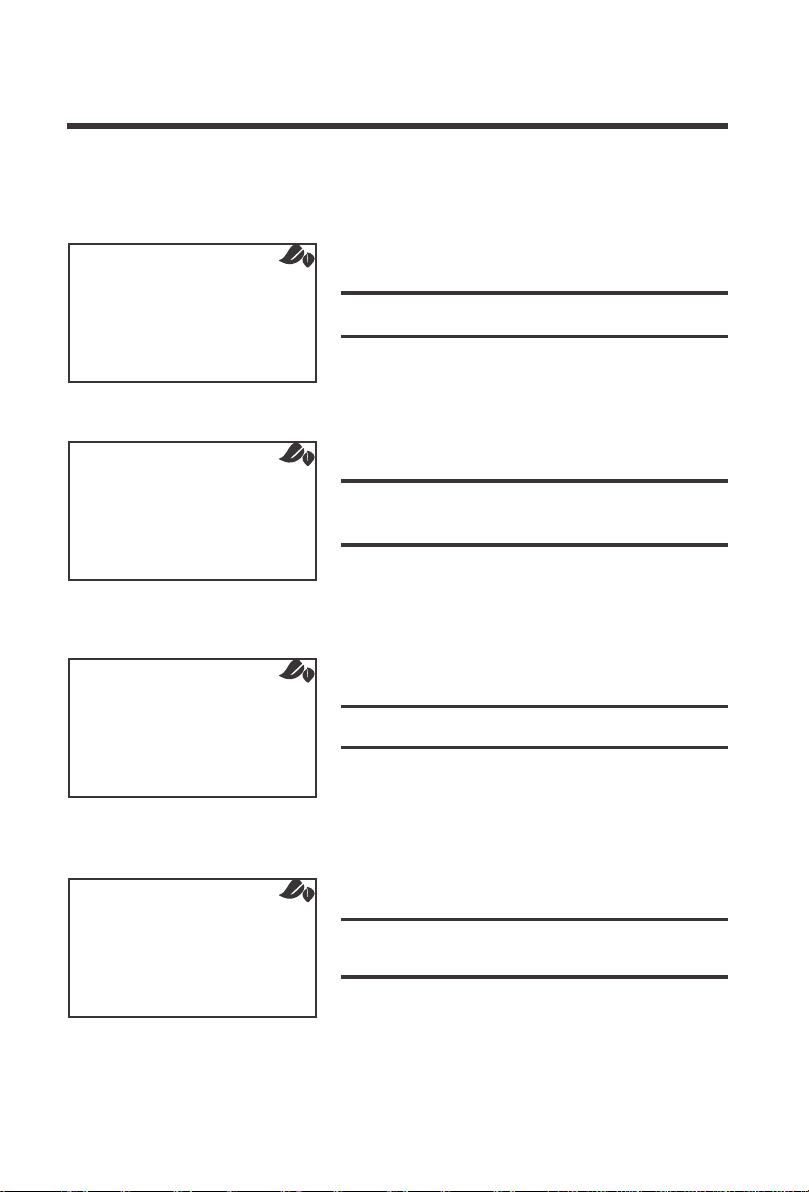
Displays battery Voltage and charging Current
Shows charge controllers current charging stage
(Discharge, Boost, Float and Equalize).
Displays Error code and controller’s status
Displays Maximum and Minimum battery voltage
throughout the day
BATT VOLT
13.0V
CHARGE CURR
0A
CHARGE STATUS
DISCHARGE
BATT MAX VOLT ON THE DAY
BATT MIN VOLT ON THE DAY
13.4V
12.6V
E0
NORMAL
17
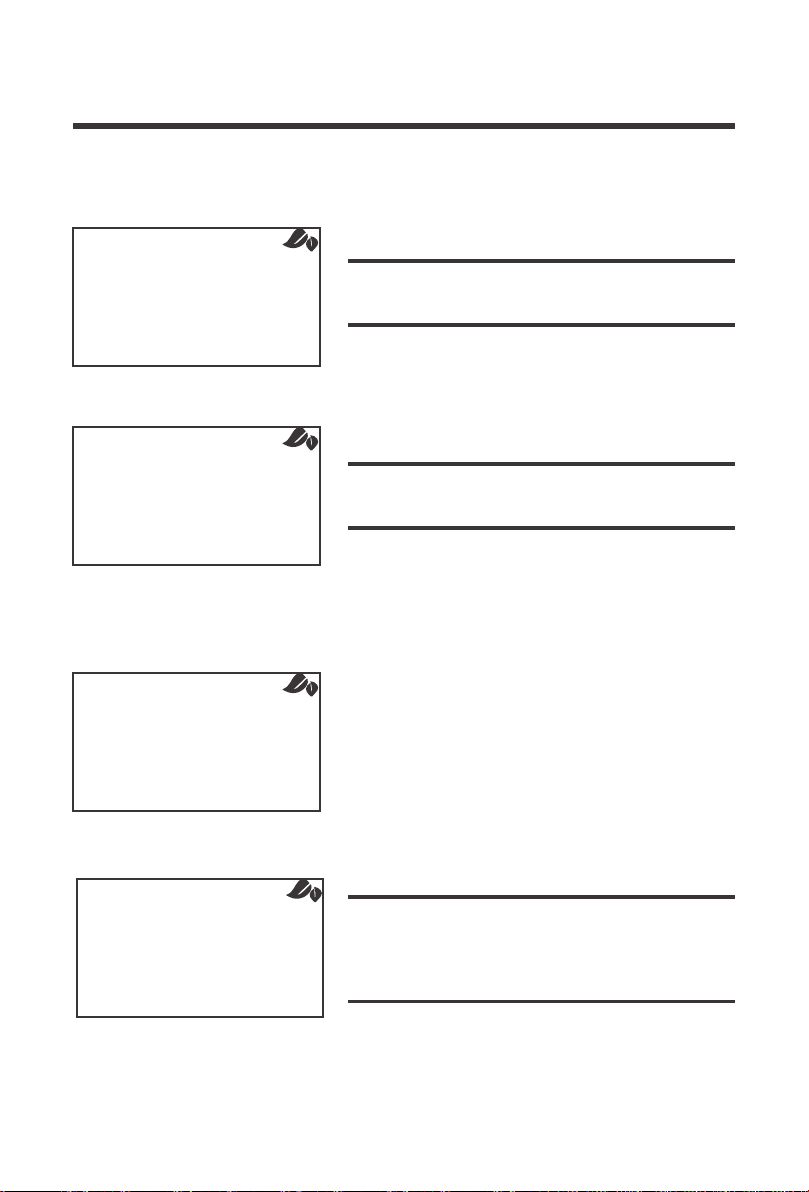
Displays ambient temperature and battery temperature
(Remote temperature sensor needed)
Displays Kilowatt hours charged today, and average
Kilowatt hours charged per day
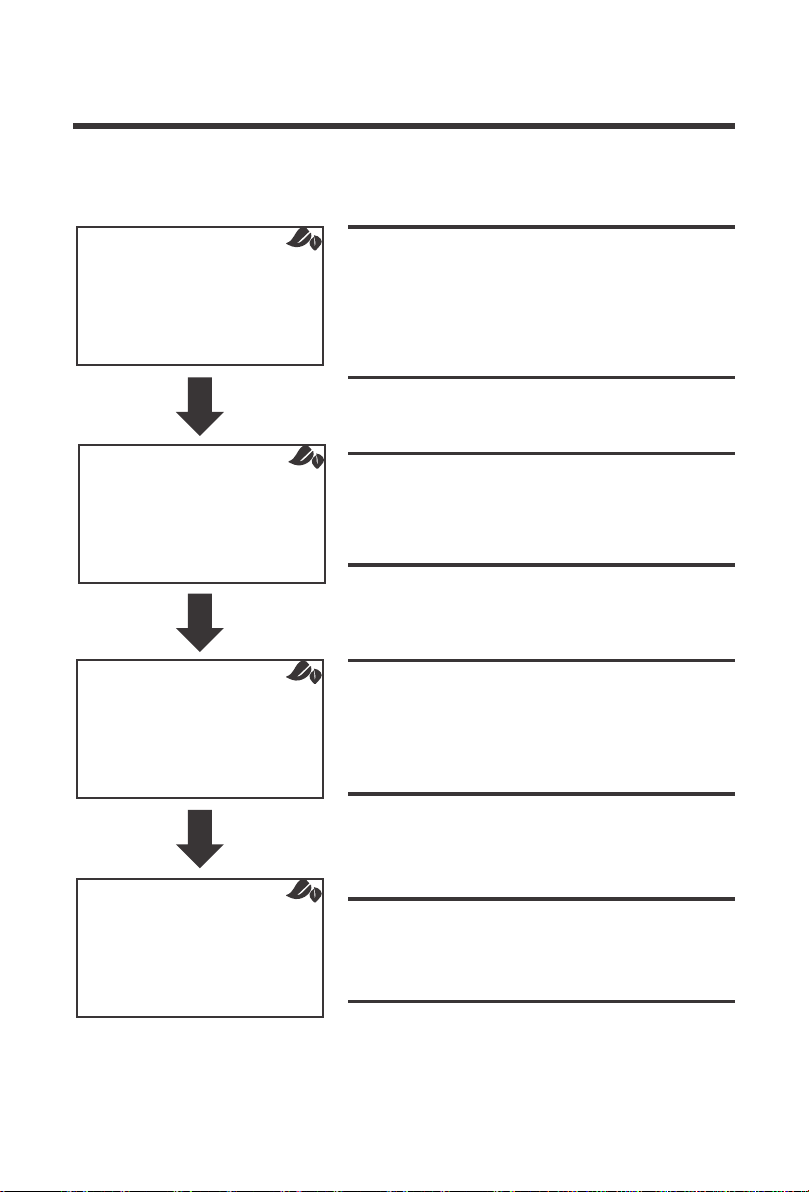
Use the UP and DOWN buttons then press OK button
to enter the desired setting.
1. Device Set
System Settings Display
Screen 8
Screen 7
To enter the following screen long press OK button on any of the main menu screens.
1. Device ID: Controller’s model number
2. BackLight Time: On/Off
3. Error Alarm: On/Off
4. SOC: Turns SOC % on main display on/off
BATT CHARGE KWH TODAY
BATT CHARGE KWH/DAY
0KWH
1.927KWH
DEVICE TEMPERATURE
BATT TEMPERATURE
29℃
25℃
Set Menus
1.Device Set
2.Parameter Set
3.System Log
4.Password
5.Factory Reset
6.Device Information
1.Device ID: C100-0001
2.BackLight Time: ON
3.Error Alarm: OFF
4.SOC: ON
18
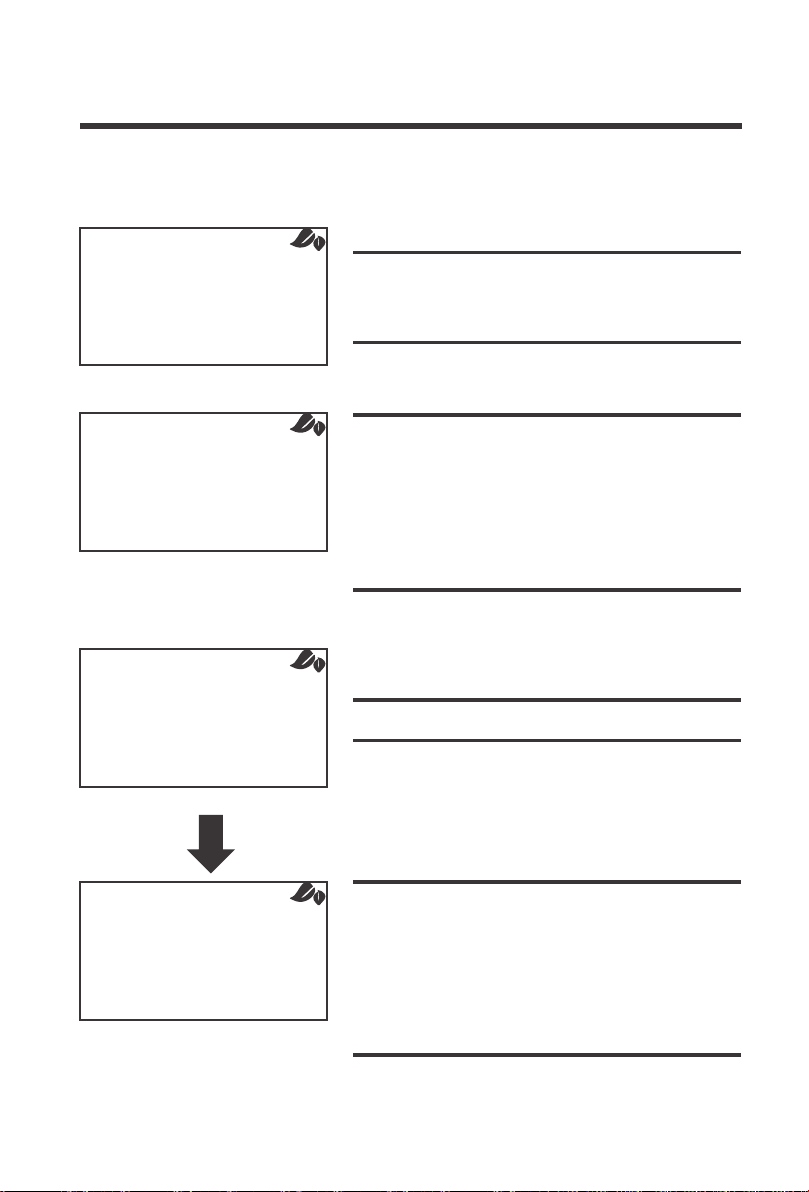
2. Parameter Set
5. Chg Limit Volt: User can set the charge controller’s
maximum charging Voltage
6. Equa Volt: User can set the Equalization Voltage
7. Boost Volt: User can set the Boost Voltage
8. Float Volt: User can set the Float Voltage
9. Boost Return Volt: User can set the Boost Return
Voltage (Voltage when charge controller will re-enter
boost stage.
10. Batt LVR: User can set Low Voltage Reconnect
11. Batt UVW: User can set Under Voltage Warning
12. Batt LVW: User can set Low Voltage Warning
13. EquaChg Time: User can set Equalization time
14. Boost Chg Time: User can set Boost time
15. Equa INV: User can set Equalization interval
16. Temp Comp: User can set Temperature compensation
1. Sys Batt Volt: User can change between
(Auto/12V/24V/36V/48V)
2. Batt Type: User can change between Sealed (SLD),
Gel, Flooded (FLD), Lithium (Li) and User (USE)
3. Battery Capacity: User can set battery bank’s Amp
hour capacity
4. Batt OVD: User can set battery over voltage disconnect
1.Sys Batt Volt: AUTO(12V)
2.Batt Type: SLD
3.Batt Capacity: 200
4.Batt OVD: 16.0V
5.Chg Limit Volt: 15.5V
6.Equa Volt: 14.6V
7.Boost Volt: 14.4V
8.Float Volt: 13.8V
13.Equa Chg Time: 120MIN
14.Boost Chg time: 120MIN
15.Equa INV: 30D
16.Temp Comp: -3mV/℃/2V
9.Boost Return Volt: 13.2V
10.Batt LVR: 12.6V
11.Batt UVW: 12.0V
12.Batt LVW: 11.1V
19
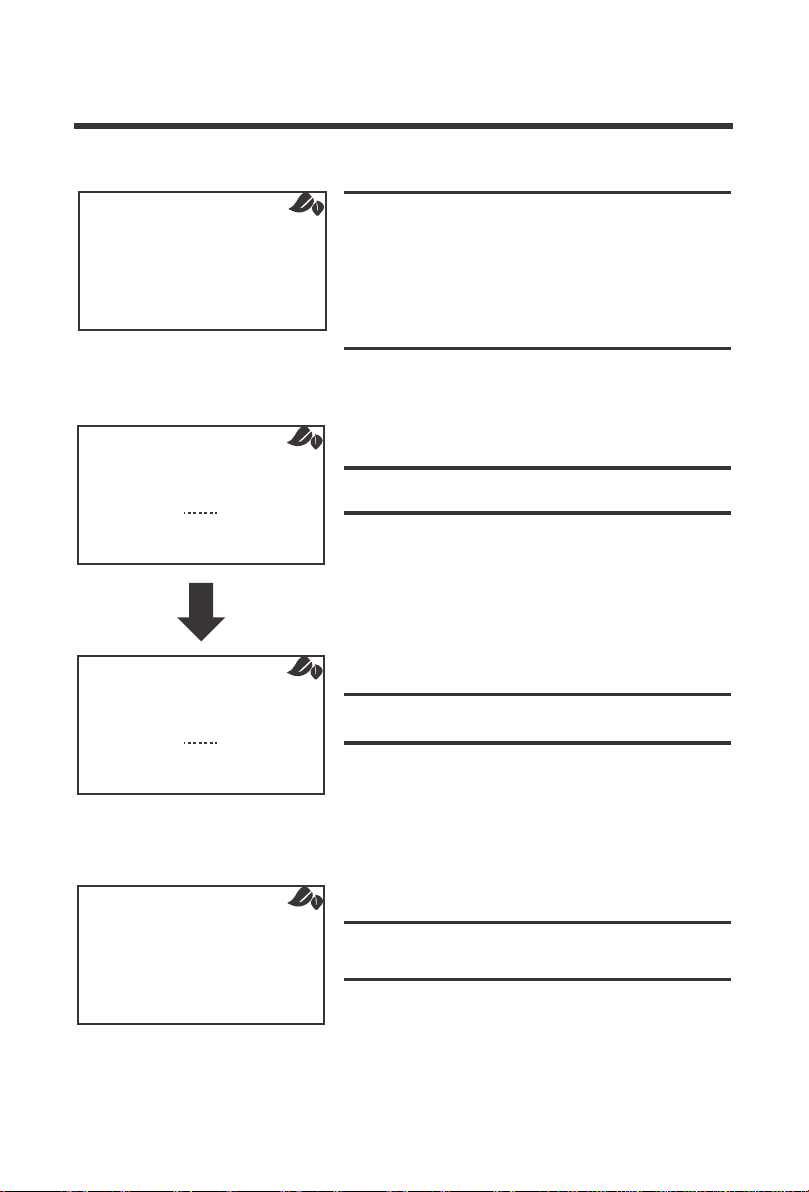
Press UP or DOWN buttons to select the desired day
1. Same day: View system information for current day
2. History: View Historical data
3. Total: View system overall generation
MinBatVol: Batteries lowest voltage for current day
MaxBatVol: Batteries highest voltage for current day
MaxChgCurr: Maximum charging current (Amps) for
current day
MaxChgPow: Maximum charging power (Watts) for
current day
Charge AH: Battery Amp hours charged for current day
Charged KWH: Battery Watt hours charged for current day
MinBatVol: Batteries lowest voltage for current day
MaxBatVol: Batteries highest voltage for current day
MaxChgCurr: Maximum charging current (Amps) for
current day
MaxChgPow: Maximum charging power (Watts) for
current day
Charge AH: Battery Amp hours charged for current day
Charged KWH: Battery Watt hours charged for current day
3. System Log
1.Same day
2.History
3.Total
Choose History Day
0001 Days Ago
Same day
MinBatVol: 13.4V
MaxBatVol: 13.4V
MaxChgCurr: 0A
MaxChgPow: 0W
Charged AH: 0AH
Charged KWH: 0KWH
0001 Days Ago
MinBatVol: 11.5V
MaxBatVol: 12.6V
MaxChgCurr: 0A
MaxChgPow: 0W
Charged AH: 0AH
Charged KWH: 0KWH
20
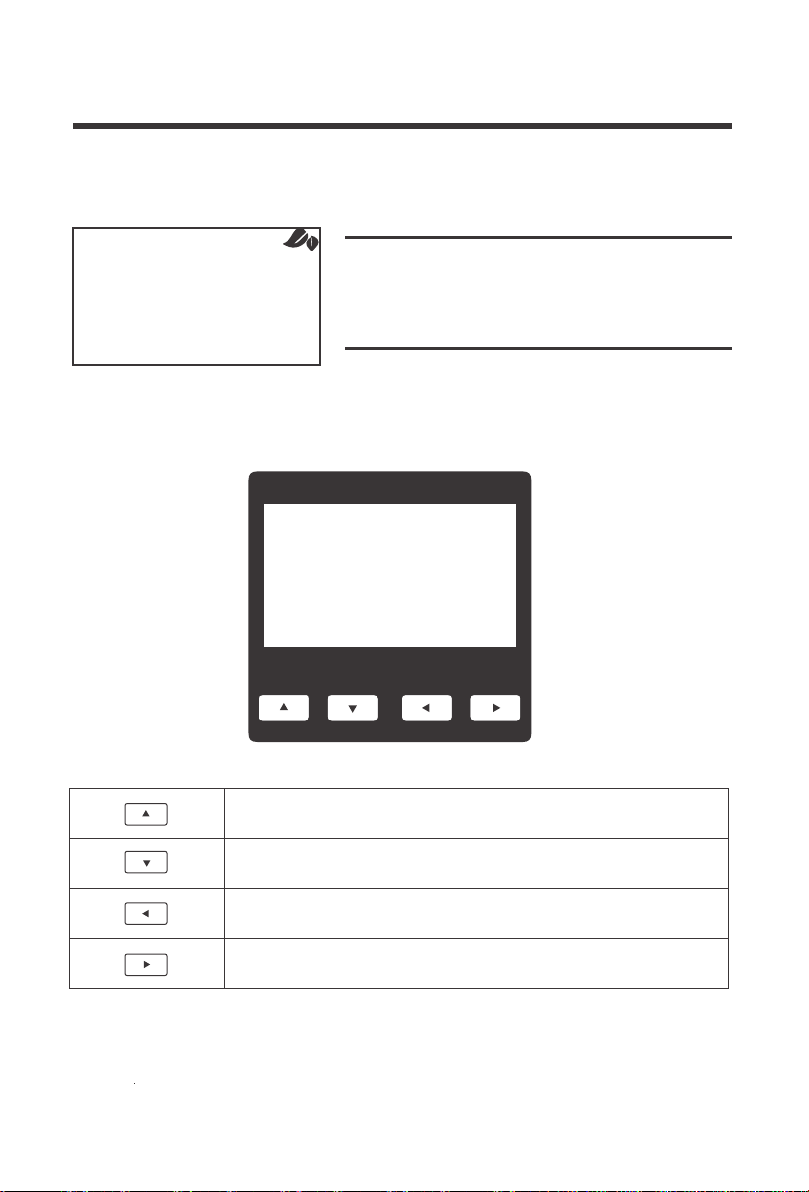
4. Password
5. Factory Reset
User can set desired password
Input desired password again to save
Resets controller to Factory Settings (Password
Protected)
Rundays: Number of days system has been operational
LVW-Count: Number of times controller entered Low
Voltage Warning
FUL-Count: Number of times batteries have been fully
charged
Charge AH: Total Amp hours charged
Generation: Total Kilowatt hours charged
Factory Reset
YES NO
Input New Password
Input Password
ANALYSIS
Rundays: 8D
LVW-Count: 0
FUL -Count: 0
Charge AH: 826AH
Generation: 12.568KWH
21
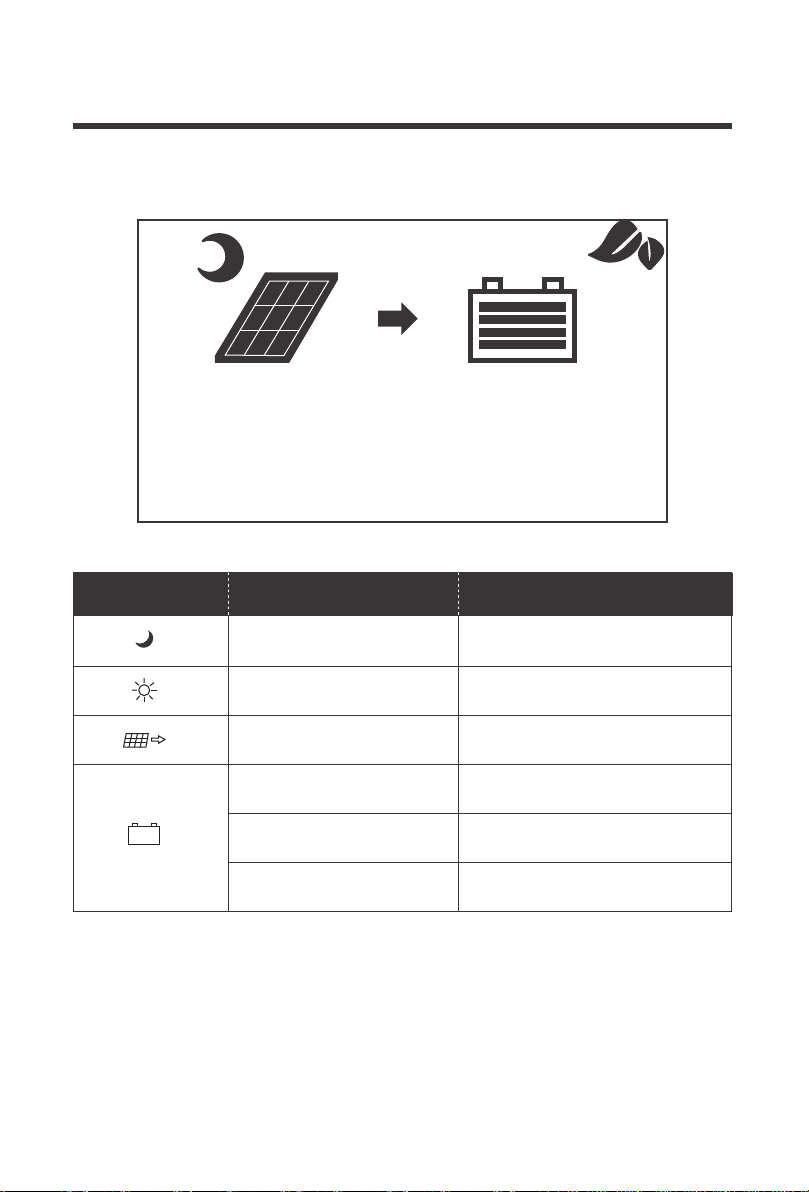
6. Device Information
LCD Buttons Function
Model: Device SKU Number
HW-Ver: Hardware Version
SW-Ver: Software Version
SN: Serial Number
Page Up/ Increase parameter value
Page Down/ Decrease parameter value
Return to the previous menu
Enter sub menu/ save parameter value/ turn load on or off
in manual mode
Model: RNG-CTRL-RVR100
HW-Ver: 00.01.00
SW-Ver: 01.01.04
SN: 18070100
22
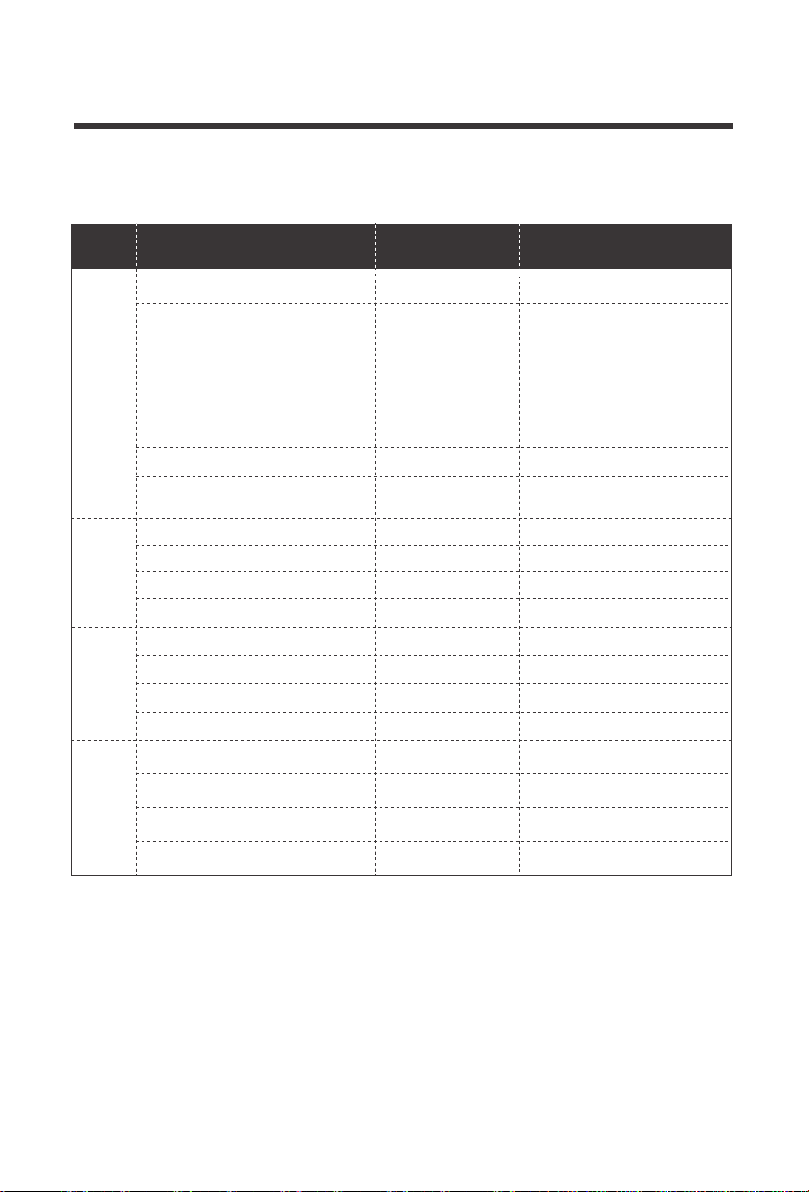
Steady on
Steady on
Steady on
0-100%
0% Slow Flashing
100% Flash Flashing Battery over-voltage
Battery over-discharged
Current battery capacity
A dynamic arrow indicates
charging is in progress.
Daytime
Nighttime
Main Menu LCD
Icon or Value State Description
PV BATT
0A
0W
0V
13.0V
37%
+
-
23
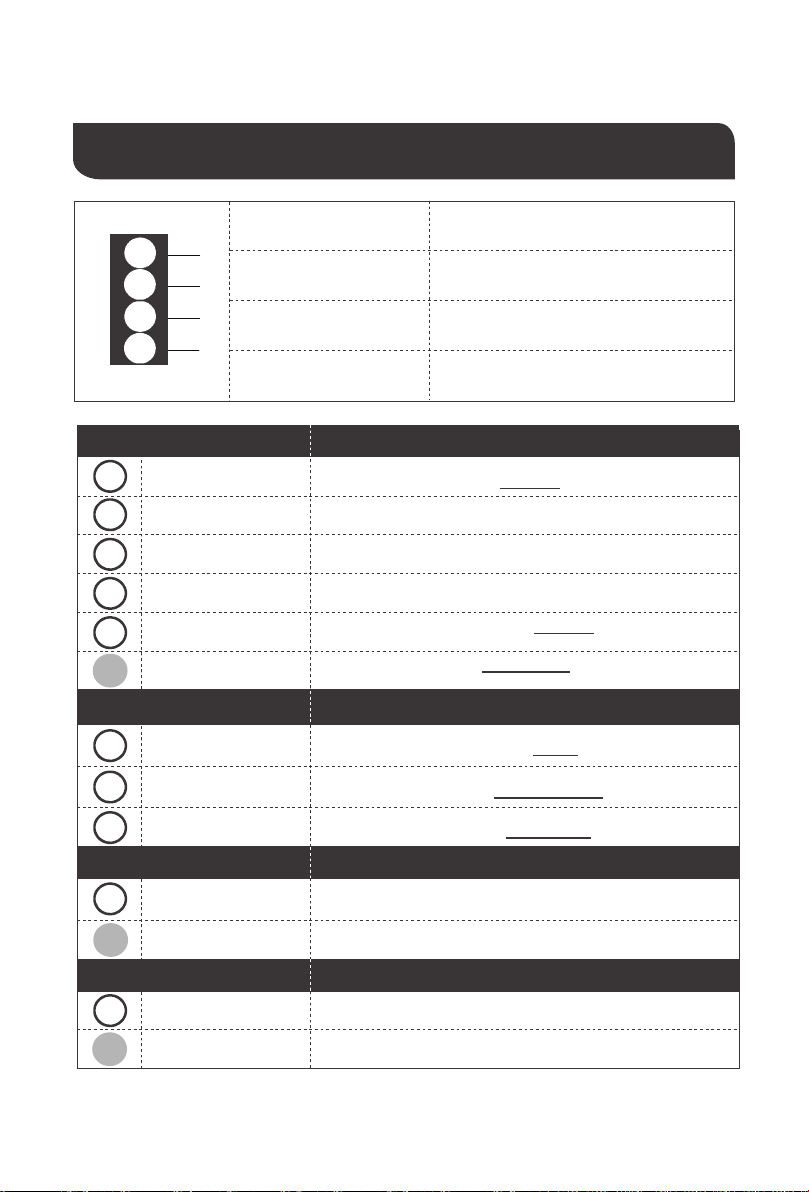
Screen
Parameter
Parameter and
setting range
Displayed
Parameter
System Battery Voltage
Battery type
Nominal battery capacity
Charging Limit Voltage
Equalization Voltage
Boost Voltage
Float Voltage
Boost Return Voltage
Battery Low Voltage Reconnect
Battery Under Voltage Warning
Battery Low Voltage Warning
Equalization Time
Boost Time
Equalization Interval
Temperature Compensation
Float Volt:
Boost Return Volt:
Batt LVR:
Batt UVW:
Batt LVW:
EquaChg Time:
Boost Chg Time:
Equa INV:
Temp Comp: -(0 to 5) mV/°C/2V
250 DAYS
0-600 MIN
0-600 MIN
Boost Volt:
Equa Volt:
Chg Limit Volt:
9.0-17.0V
9.0-17.0V
9.0-17.0V
9.0-17.0V
9.0-17.0V
9.0-17.0V
9.0-17.0V
9.0-17.0V
Battery Over Voltage
Disconnect
Batt Capacity:
Batt OVD:
0-9999
9.0-17.0V
Sys Batt Volt:
12v,24v,36v,48v, AUTO
“SLD” Sealed lead-acid
battery
“FLD” Flooded lead-acid
battery
“GEL” Gel battery
“Li” Lithium battery
“USE” user defined
Batt Type:
1
2
3
4
Parameter Settings
24
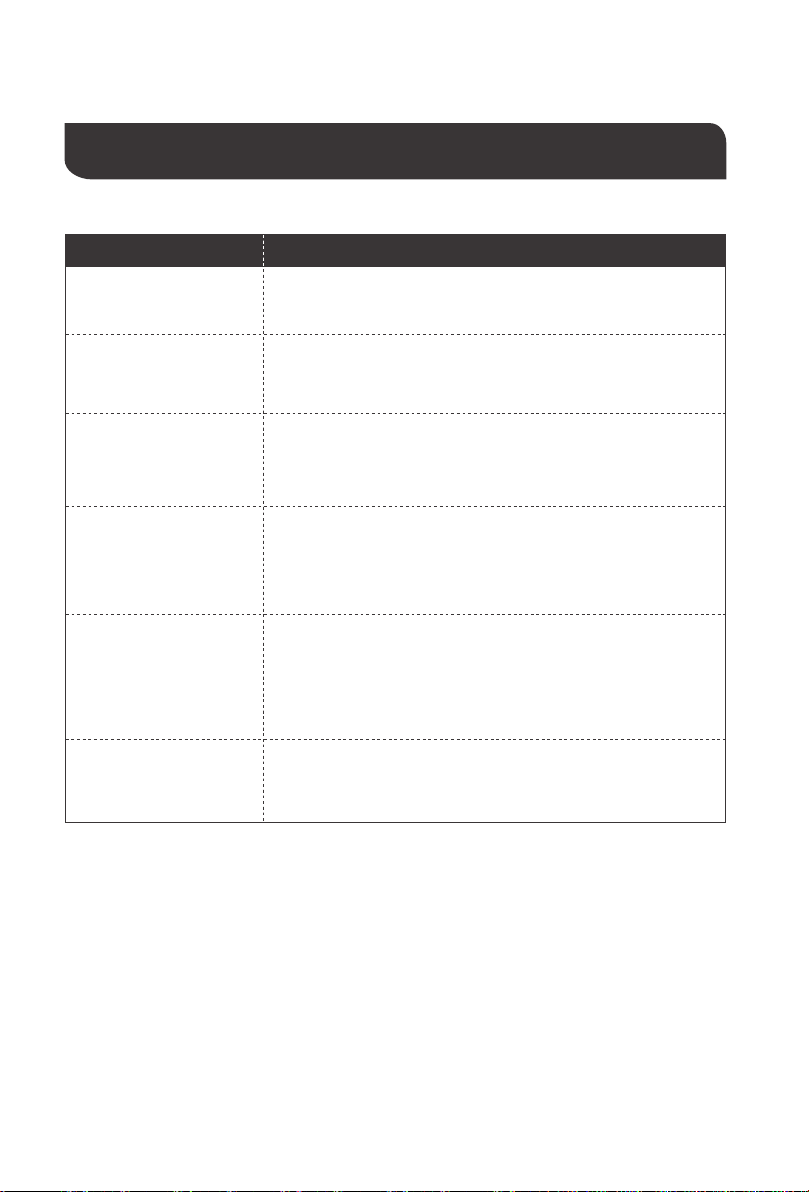
Blue Solid The PV system is charging the battery bank
The Controller is undergoing boost stage
The Controller is undergoing float stage
The Controller is undergoing equalization stage
The oversized PV system is charging the battery bank
at the rated current.
The PV system is not charging the battery bank.
PV not detected.
Blue Slow Flashing
Blue Slow Flashing
Blue Fast Flashing
Blue Double Flashing
Blue Solid
Blue Slow Flashing
Blue Fast Flashing
Blue Solid
Blue Double Flashing
Off
Blue Solid
Battery is normal
Battery over-discharged
Battery over-voltage
Controller is paralleled with another controller
Controller is not paralleled
System Error. Please check LCD for Error code
System is operating normally
Off
PV Indicator (1)
BATT Indicator (2)
Parallel Indicator (3)
Error Indicator (4)
Status
Status
Status
Status
LED Indicators
①---PV array indicator
Indicating the controller's current
charging mode.
Indicating the battery's current state.
Indicating whether controller is
paralled with another unit.
Indicating whether the controller is
functioning normally.
②---BAT indicator
③---PARALLEL indicator
④---ERROR indicator
①
②
③
④
25
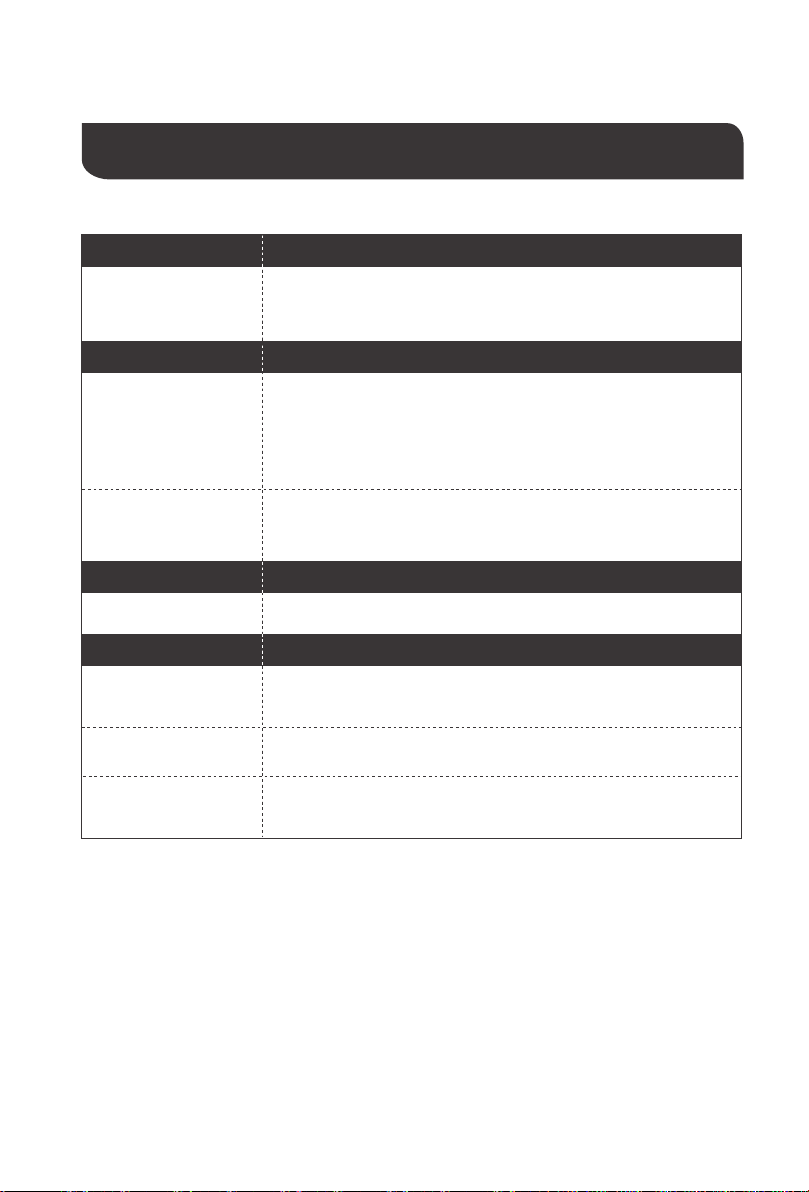
Protections
Protection Behavior
When PV shot circuit occurs, the controller will stop charging.
Clear it to resume normal operation
If the PV voltage is larger than maximum input open voltage
150VDC, PV will remain disconnected until the voltage drops
below 150VDC.
The controller will limit the battery charging current to the
maximum battery current rating. Therefore, an over-sized solar
array will not operate at peak power.
The controller will not operate if the PV wires are switched. Wire
them correctly to resume normal controller operation.
If the temperature of the controller heat sink exceeds 65℃, the
controller will automatically start the reducing the charging
current and shut down when temperature exceeds 80℃
The controller will not operate if the battery wires are switched.
Wire them correctly to resume normal controller operation.
Over-Temperature
Battery Reverse Polarity
PV Reverse Polarity
PV Overcurrent
PV Overvoltage
PV Array Short Circuit
26
System StatusTroubleshooting
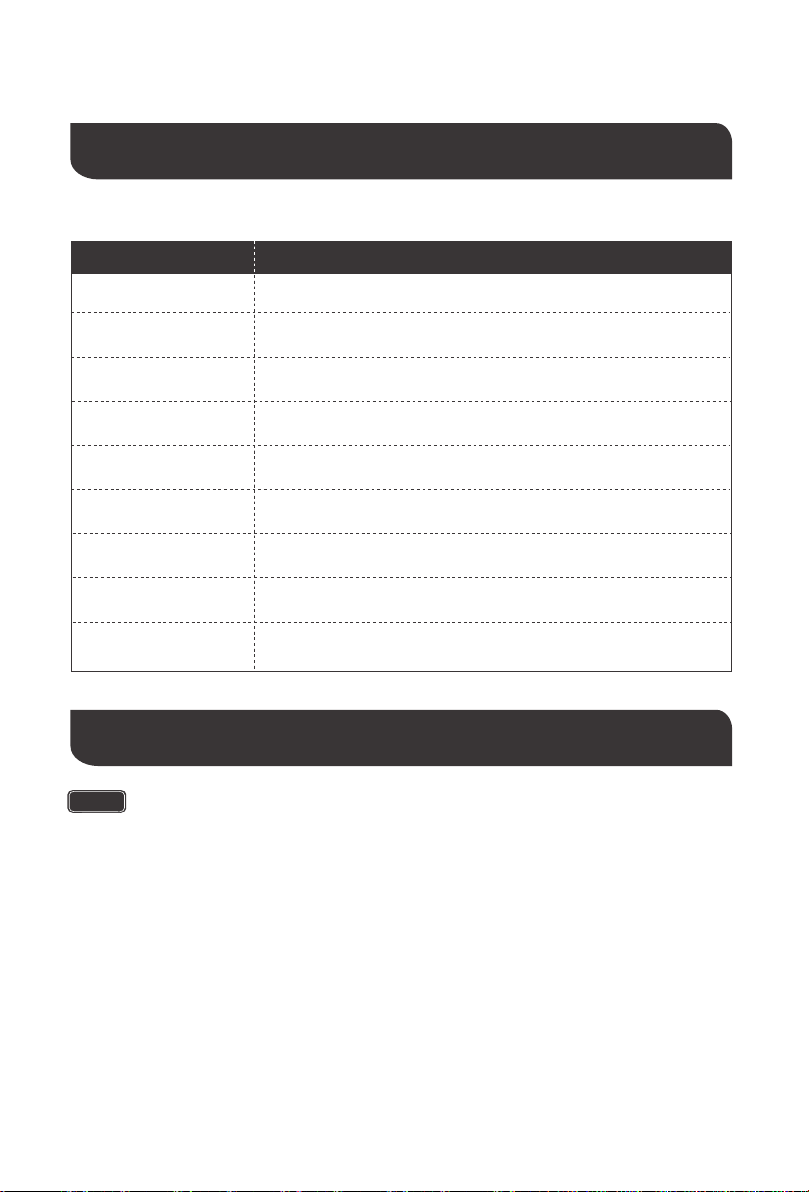
PV indicator Troubleshoot
BATT Indicator Troubleshoot
Error Indicator Troubleshoot
Buzzer (Alarm) Troubleshoot
Off during daylight
Using a multimeter check the battery voltage and verify it is not
exceeding 68V volts.
Disconnect loads, if any, and let the PV modules charge the battery bank.
Use a multi-meter to frequently check on any change in battery voltage to
see if condition improves. This should ensure a fast charge. Otherwise,
monitor the system and check to see if system improves.
System Error. Please check LCD for Error code
Check the following, Battery under-voltage alert
White Slow Flashing
White Fast Flashing
White Solid
Buzzer on for 1 minute
Buzzing for 15 seconds
Buzzing continuously
Check the following, Battery over-discharged, Controller over-
temperature or Cattery over-temperature
Check the following, Battery over-voltage, PV reverse polarity,
PV over-voltage
Ensure that the PV wires are correctly and tightly secured inside the
charge controller PV terminals. Use a multi-meter to make sure the
poles are correctly connected to the charge controller.
For best controller performance, it is recommended that these tasks be performed from
time to time.
1.Check that controller is mounted in a clean, dry, and ventilated area.
2.Check wiring going into the charge controller and make sure there is no wire damage or
wear.
3.Tighten all terminals and inspect any loose, broken, or burnt up connections.
4.Make sure LED readings are consistent. Take necessary corrective action.
5.Check to make sure none of the terminals have any corrosion, insulation damage, high
temperature, or any burnt/discoloration marks.
27
Error Codes
Maintenance
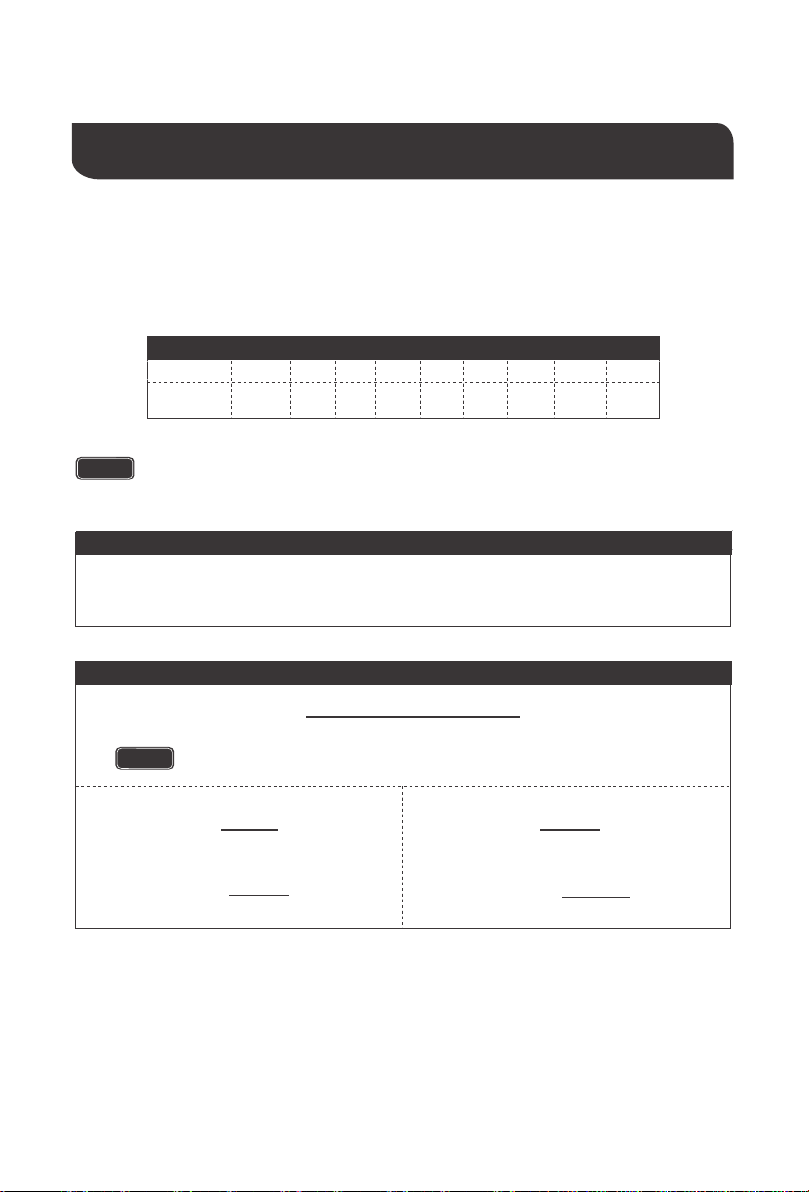
Error Number Description
E0 No error detected
Battery over-discharged
Battery over-voltage
Battery under-voltage
Controller over-temperature
Battery over-temperature
PV input over-current
PV over-voltage
PV reverse polarity
E1
E2
E3
E6
E7
E8
E10
E13
Risk of Electric Shock! Make sure that all power is turned off before touching the
terminals on the charge controller.
WARNING
28
Fusing
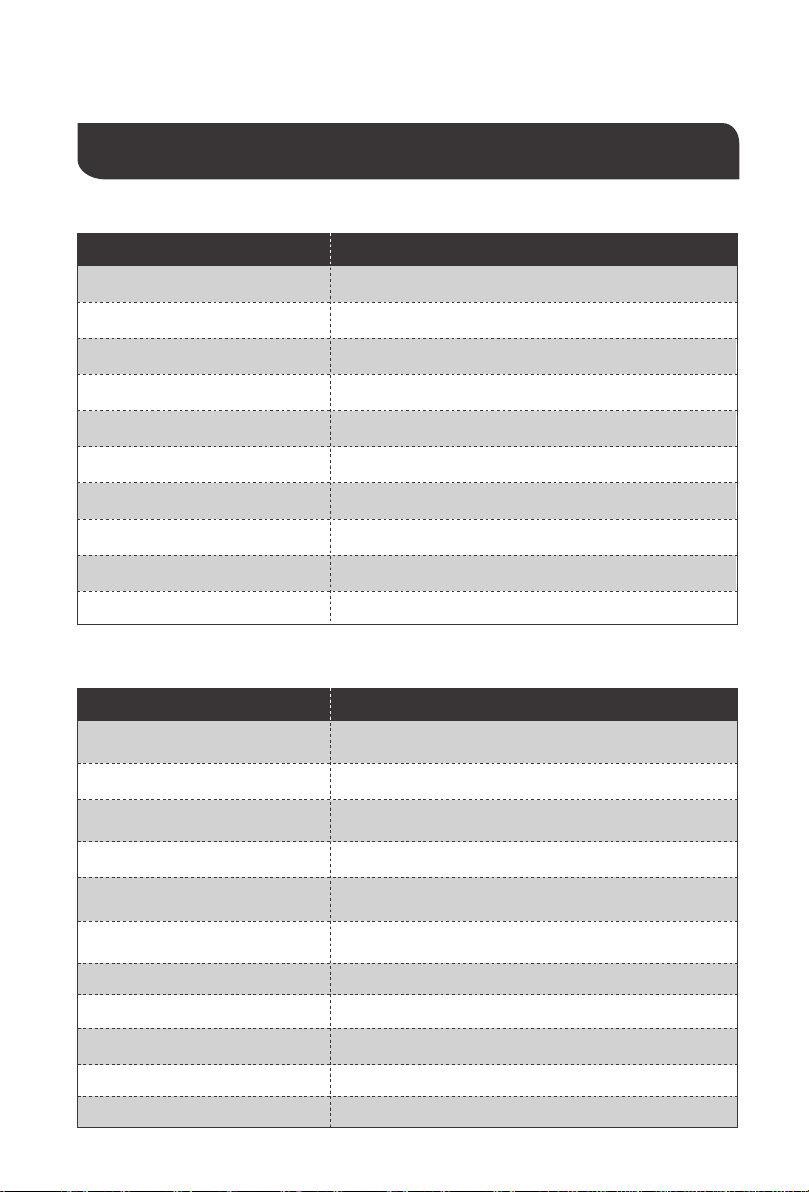
AWG 16 14 12 10 8 6 4 2 0
Max.
Current
55A40A30A25A18A
75A
95A
130A
170A
**Utilize 1.56 Sizing Factor (SF)
Different safety factors could be used. The purpose is to oversize.
Series:
Total Amperage= I
sc1 = Isc2 * SF
Parallel
Total Amperage= (Isc1 + Isc2) * SF
The NEC code requires the overcurrent protection shall not exceed 15A for
14AWG, 20A for 12 AWG, and 30A for 10AWG copper wire.
NEC Maximum Current for different Copper Wire Sizes
Fuse from Controller to Battery
Fuse from Solar Panel(s) to Controller
Ex. 200W; 2 X 100 W panels
= 5.75A * 1.56 = 8.97 =(5.75A + 5.75A)* 1.56 = 17.94
Fuse = 18A fuse
Fuse = 9A fuse
NOTE
Fusing is a recommended in PV systems to provide a safety measure for connections going from
panel to controller and controller to battery. Remember to always use the recommended wire
gauge size based on the PV system and the controller.
NOTE
Controller to Battery Fuse = Current Rating of Charge Controller
Ex. 20A MPPT CC = 20A fuse from Controller to Battery
29
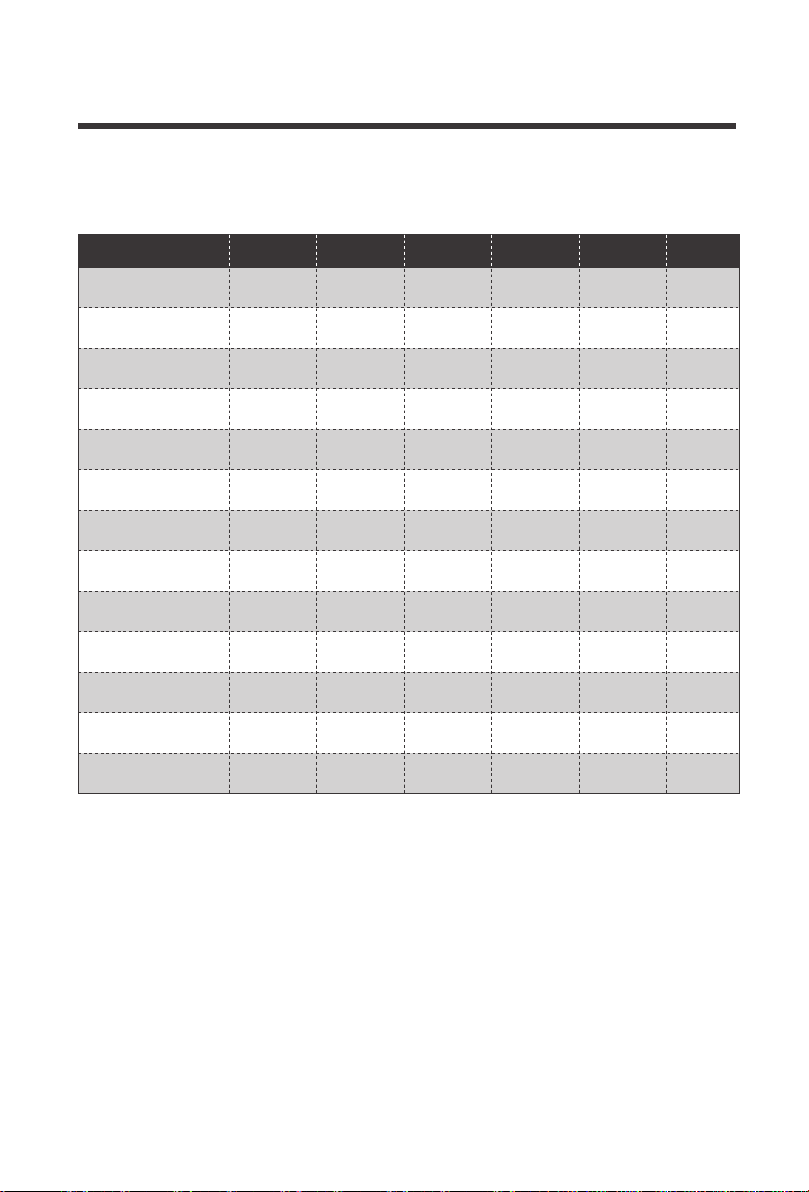
Electrical Parameters
Technical Specifications
Model RNG-CTRL-RVR100
Nominal system voltage 12V/24V/36V/48V Auto Recognition
100A
9V-60V
150 VDC (25°C), 140VDC (-25°C)
Battery voltage +2V to 75V
1300W/12V; 2600W/24V; 3900W/36V; 5200W/48V
2.7W - 2.9W
≤ 98%
>99%
-3mV/°C/2V (default)
Rated Battery Current
Battery Voltage
Max. Solar Input Voltage
Max. power point voltage range
Max. Solar Input Power
Self-Consumption
Conversion efficiency
MPPT tracking efficiency
Temp. Compensation
General
Model RNG-CTRL-RVR100
Dimensions
305 x 443 x 110 mm
12.00 x 17.44x 4.35 in
4 x Ø10mm
25mm
2
4 AWG
9.98 kg 22lbs
-35°C to +45°C
-31 ˚F to 113 ˚F
-35°C to +75°C
-31 ˚F to 167 ˚F
≤ 95% (NC)
IP32
< 3000m
RS232, RS485
Mounting Holes
Max Terminal Size
Net Weight
Working Temperature
Storage Temperature
Humidity Range
Enclosure
Altitude
Communication
FCCPart 15 Class B; CE; RoHSCertification

30
This equipment has been tested and found to comply with the limits for a class B digital device,
pursuant to part 15 of the FCC Rules. These limits are designed to provide reasonable
protection against harmful interference in a residential installation. This equipment generates,
uses and can radiate radio frequency energy and if not installed and used in accordance with
the instructions, may cause harmful interference to radio communications. However, there is no
guarantee that interference will not occur in a particular installation. If this equipment does
cause harmful interference to radio or television reception, which can be determined by turning
the equipment off and on, the user is encouraged to try to correct the interference by one or
more of the following measures:
•Reorient or relocate the receiving antenna.
•Increase the separation between the equipment and receiver.
•Connect the equipment into an outlet on a circuit different from that to which the receiver is
connected.
•Consult the dealer or an experienced radio/TV technician for help.
This device complies with Part 15 of the FCC Rules. Operation is subject to the following two
conditions: (1) this device may not cause harmful interference, and (2) this device must accept
any interference received, including interference that may cause undesired operation.
31
Battery Charging Parameters
High Voltage
Disconnect
Equalization
Voltage
Boost
Voltagege
Float Voltage
Boost Return
Voltage
Low Voltage
Reconnect
Under Voltage
Warning
Low Voltage
Warning
Discharging Limit
Voltage
Over-Discharge
Delay Time
Equalization
Duration
Equalization
Interval
16 V
14.6 V
14.4 V
13.8 V
13.2 V
12.6 V
12.0 V
11.1 V
10.6 V
5 s
2 hours
30 Days
2 hours
16 V
-----
14.2 V
13.8 V
13.2 V
12.6 V
12.0 V
11.1 V
10.6 V
5 s
-----
-----
2 hours
16 V
14.8 V
14.6 V
13.8 V
13.2 V
12.6 V
12.0 V
11.1 V
10.6 V
5 s
2 hours
30 Days
2 hours
16 V
-----
14.4 V
-----
13.2 V
12.6 V
12.0 V
11.1 V
10.6 V
5 s
-----
-----
-----
-----
-----
-----
-----
-----
-----
16 V
14.6 V
14.4 V
13.8 V
13.2 V
12.6 V
12.0 V
9-17 V
9-17 V
9-17 V
9-17 V
9-17 V
9-17 V
9-17 V
9-17 V
9-17 V
1-30 s
0-10 Hrs.
0-250
Days
1-10 Hrs.Boost Duration
Battery SEALED GEL FLOODED LI (LFP) USER Range
32
*Only charging parameters in USER mode and LI mode can be programmed.
***The above parameters are based on 12V system settings. Parameters are
multiplied by 2 for 24V systems, multiplied by 3 for 36V systems, and
multiplied by 4 for 48V systems.
****For Equalization Interval setting under USER mode, 0 Day refers to close
equalization function.
When selecting User, the battery type is to be self-customized, and in this case, the default
system voltage parameters are consistent with those of the sealed lead-acid battery. When
modifying battery charging and discharging parameters, the following rule must be followed:
• High Voltage Disconnect>Equalizing Voltage ≥ Boost Voltage ≥ Float Voltage > Boost Return
Voltage;
• Low Voltage Reconnect>Under Voltage Warning≥ Low Voltage Warning ≥ Discharging Limit
Voltage;
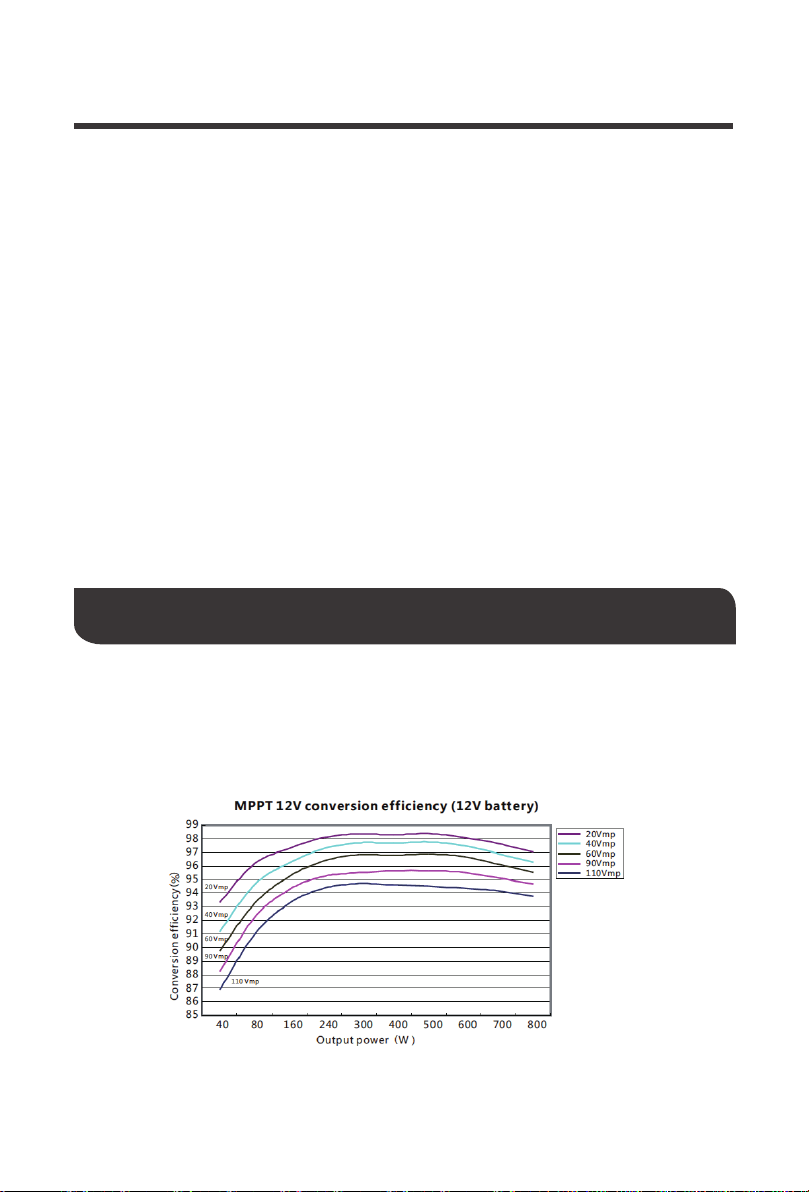
1. 12 Volt System Conversion Efficiency
Illumination Intensity: 1000W/ m
2
Temp 25
o
C
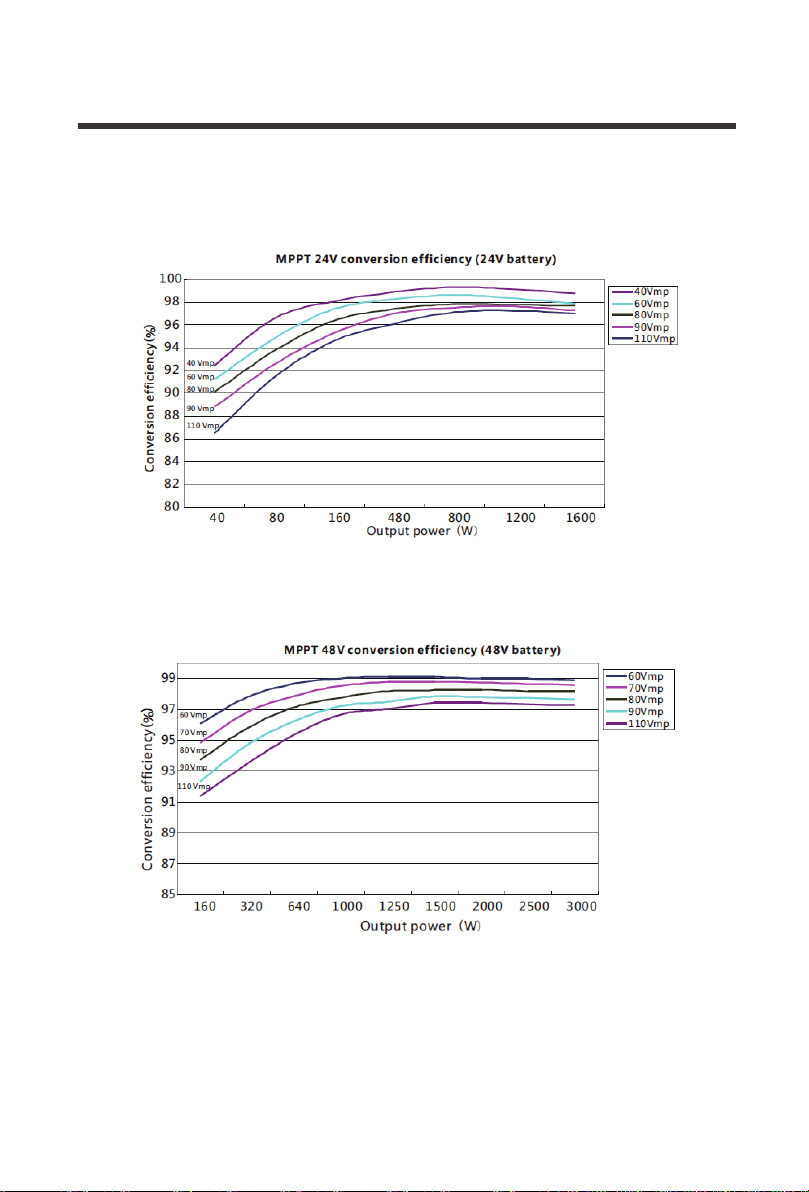
PV Power – Conversion Efficiency Curves
3. 48 Volt System Conversion Efficiency
2. 24 Volt System Conversion Efficiency
33
34
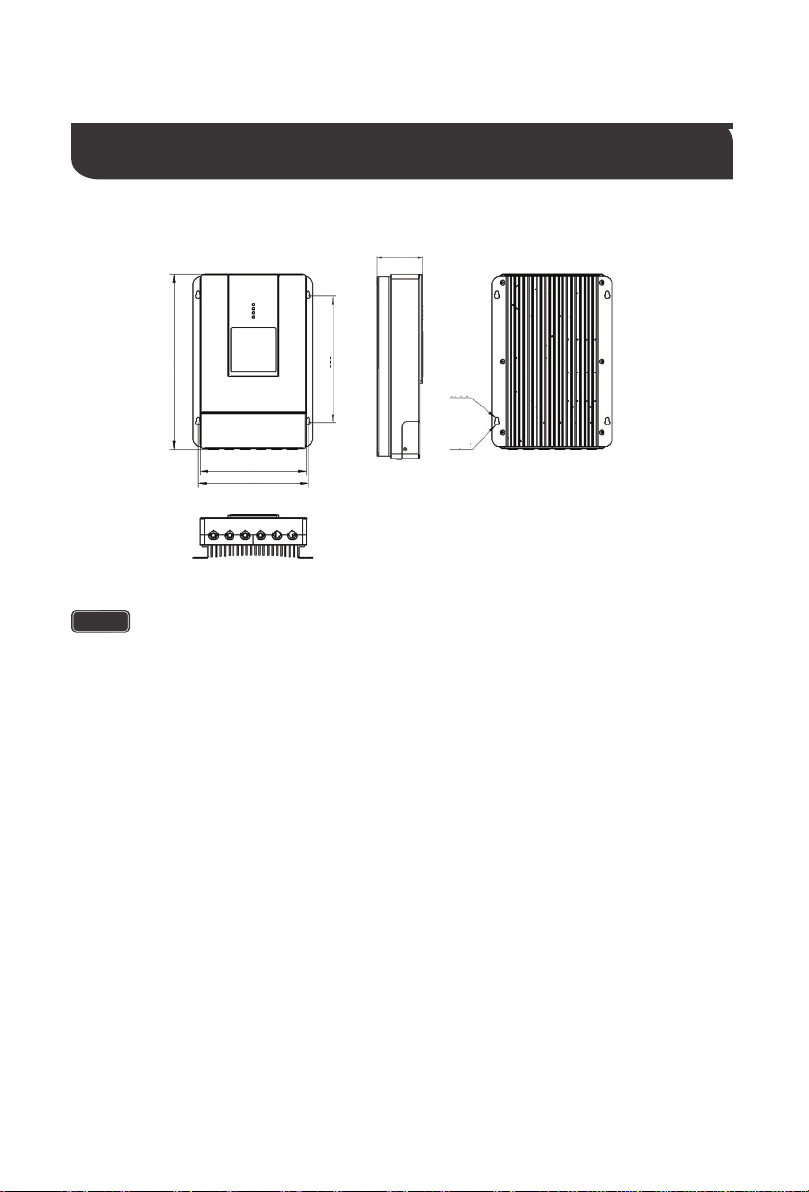
NOTE
Dimensions in millimeters (mm)
Dimensions
443
320
270
280
4Xφ8
4Xφ12
110.50

Renogy reserves the right to change
the contents of this manual without notice.
RENOGY.COM
US
2775 E Philadelphia St, Ontario, CA 91761, USA
909-287-7111
www.renogy.com
support@renogy.com
https://www.renogy.cn
support@renogy.cn
CN
400-6636-695
苏州高新区科技城培源路1号5号楼-4
CA
https://ca.renogy.com
supportca@renogy.com
https://au.renogy.com
supportau@renogy.com
AU
JP
https://www.renogy.jp
supportjp@renogy.com
https://uk.renogy.com
supportuk@renogy.com
UK
https://de.renogy.com
supportde@renogy.com
DE