
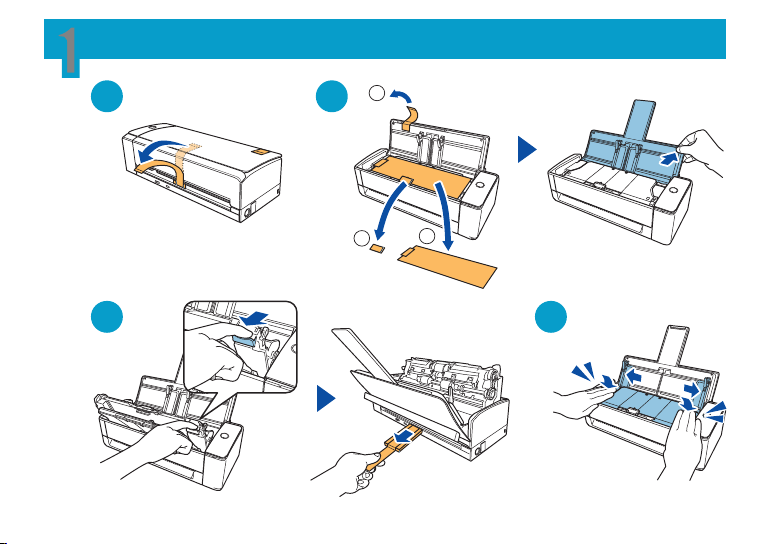
1
11
22
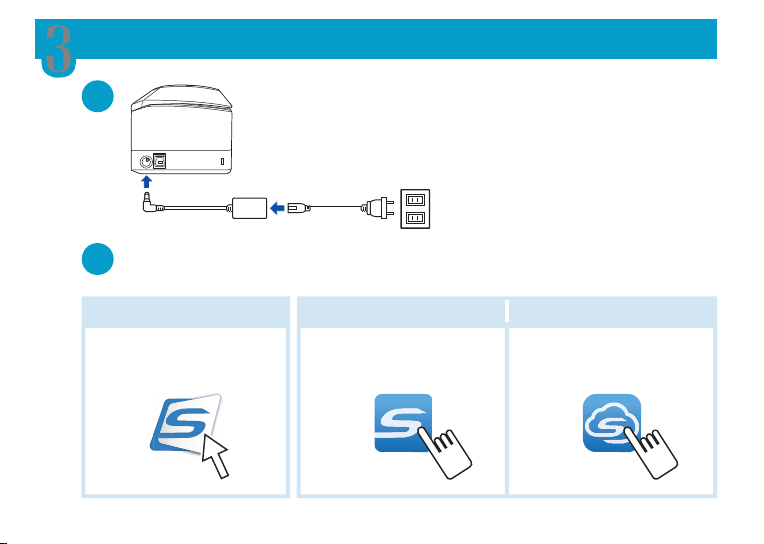
3
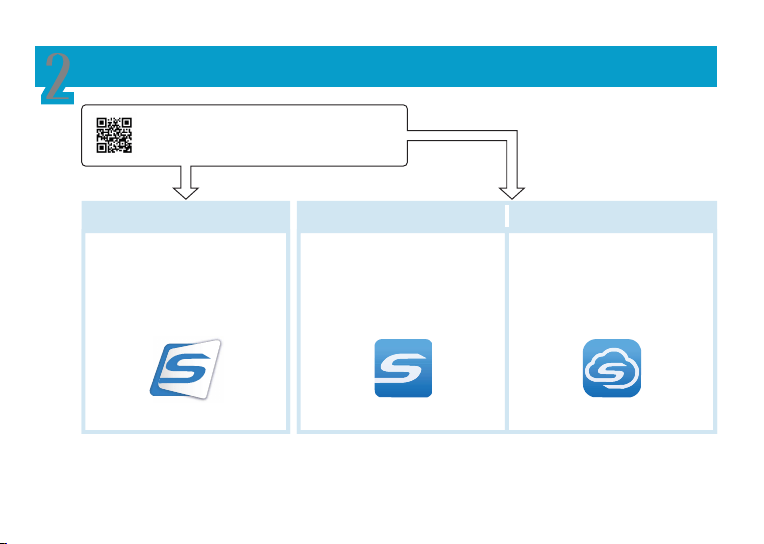
2
Windows/Mac
Smart Device/Chromebook
Smart Device
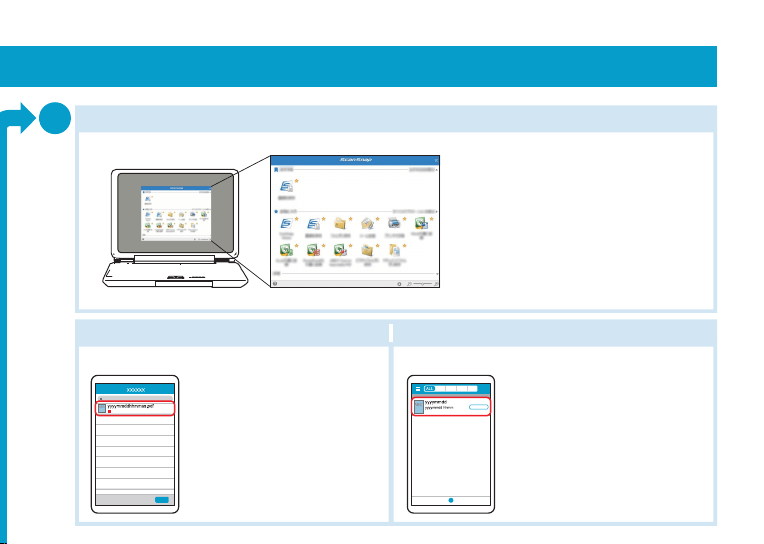
Saves images on a computer.
Enr. images sur ordinateur.
Saves images on a device.
Enr. images sur appareil.
Saves images in a cloud.
Enr. images sur le cloud.
Windows/Mac
Smart Device/Chromebook
Smart Device
Follow the setup steps in the window that appears in the software used.
Suivez les étapes de configuration de la fenêtre du logiciel utilisé.
P3PC-7032-01XA
Getting Started
Instructions préliminaires
11
33 44
https://scansnap.com/d/
* P 3 P C - 7 0 3 2 - 0 1 X A *
11
22
22
33
ScanSnap Home ScanSnap
Connect Application
ScanSnap Cloud
ScanSnap Home ScanSnap
Connect Application
ScanSnap Cloud
1
11
22
3
2
Windows/Mac
Smart Device/Chromebook
Smart Device
Saves images on a computer.
Enr. images sur ordinateur.
Saves images on a device.
Enr. images sur appareil.
Saves images in a cloud.
Enr. images sur le cloud.
Windows/Mac
Smart Device/Chromebook
Smart Device
Follow the setup steps in the window that appears in the software used.
Suivez les étapes de configuration de la fenêtre du logiciel utilisé.
P3PC-7032-01XA
Getting Started
Instructions préliminaires
11
33 44
https://scansnap.com/d/
* P 3 P C - 7 0 3 2 - 0 1 X A *
11
22
22
33
ScanSnap Home ScanSnap
Connect Application
ScanSnap Cloud
ScanSnap Home ScanSnap
Connect Application
ScanSnap Cloud
1
11
22
3
2
Windows/Mac
Smart Device/Chromebook
Smart Device
Saves images on a computer.
Enr. images sur ordinateur.
Saves images on a device.
Enr. images sur appareil.
Saves images in a cloud.
Enr. images sur le cloud.
Windows/Mac
Smart Device/Chromebook
Smart Device
Follow the setup steps in the window that appears in the software used.
Suivez les étapes de configuration de la fenêtre du logiciel utilisé.
P3PC-7032-01XA
Getting Started
Instructions préliminaires
11
33 44
https://scansnap.com/d/
* P 3 P C - 7 0 3 2 - 0 1 X A *
11
22
22
33
ScanSnap Home ScanSnap
Connect Application
ScanSnap Cloud
ScanSnap Home ScanSnap
Connect Application
ScanSnap Cloud
1
11
22
3
2
Windows/Mac
Smart Device/Chromebook
Smart Device
Saves images on a computer.
Enr. images sur ordinateur.
Saves images on a device.
Enr. images sur appareil.
Saves images in a cloud.
Enr. images sur le cloud.
Windows/Mac
Smart Device/Chromebook
Smart Device
Follow the setup steps in the window that appears in the software used.
Suivez les étapes de configuration de la fenêtre du logiciel utilisé.
P3PC-7032-01XA
Getting Started
Instructions préliminaires
11
33 44
https://scansnap.com/d/
* P 3 P C - 7 0 3 2 - 0 1 X A *
11
22
22
33
ScanSnap Home ScanSnap
Connect Application
ScanSnap Cloud
ScanSnap Home ScanSnap
Connect Application
ScanSnap Cloud
11
22
11
22
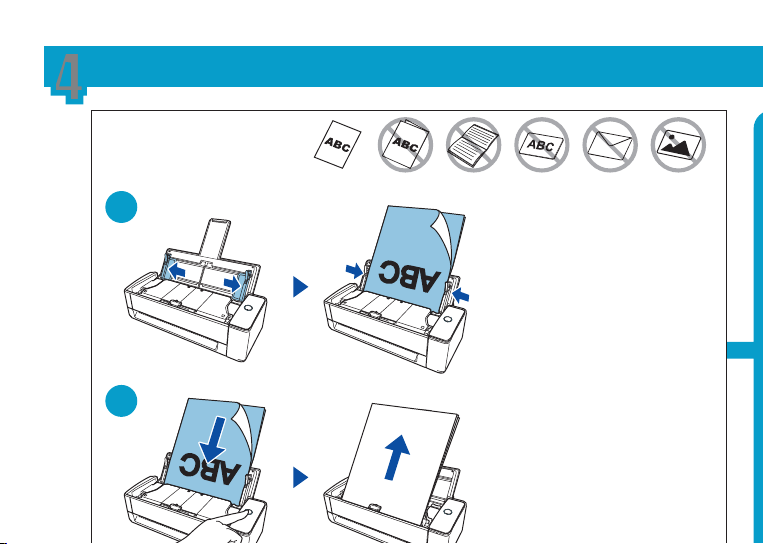
Press the button to finish the scan.
App sur touche pr finir num.
4
Regulatory Model : P3805A
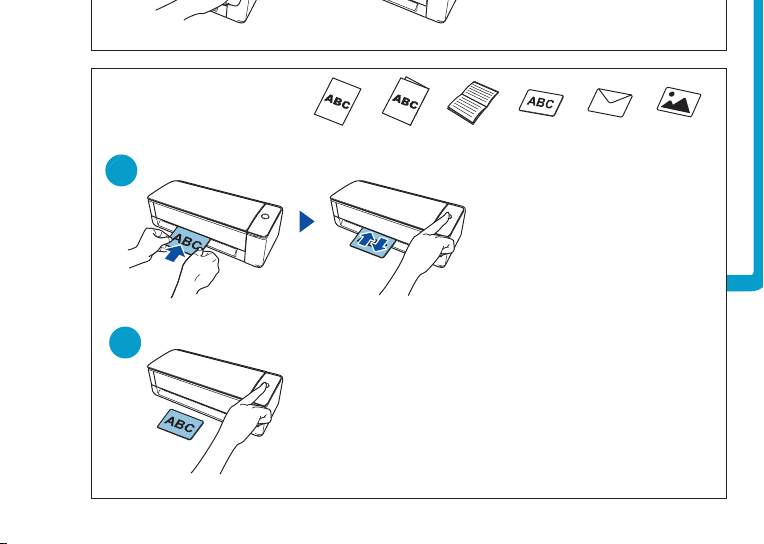
Load a document.
Chargez un document.
An image is displayed.
Une image s'ache.
An image saved in a cloud is displayed.
Imag enr. ds cloud s'ache.
Select an icon from the Quick Menu.
Sél. une icône dans le Quick Menu.
Press the button.
Appuyez sur la touche.
Insert a document and press the button.
Insérez doc et app sur touche.
33
ScanSnap Home
U-turn Scan
Return Scan
Windows/Mac
Smart Device/Chromebook Smart Device
ScanSnap Connect Application ScanSnap Cloud
Up to A4 or Legal Folded A3
Booklet Card Envelope Photo
Up to A4 or Legal Folded A3
Booklet Card Envelope Photo
https://scansnap.com/gs/
For details about the setup procedure when you use ScanSnap Home and ScanSnap Manager, refer to the URL.
Pour en savoir plus sur la procédure de configuration lorsque vous utilisez ScanSnap Home et ScanSnap Manager, consultez l'URL.
https://scansnap.fujitsu.com/g-support/en/
For further information, refer to the manuals or ScanSnap Support Site.
Pour plus d'informations, veuillez consulter les guides fournis ou le Site d'assistance de ScanSnap.
Printed in Malaysia
A
11
22
11
22
Press the button to finish the scan.
App sur touche pr finir num.
4
Regulatory Model : P3805A
Load a document.
Chargez un document.
An image is displayed.
Une image s'ache.
An image saved in a cloud is displayed.
Imag enr. ds cloud s'ache.
Select an icon from the Quick Menu.
Sél. une icône dans le Quick Menu.
Press the button.
Appuyez sur la touche.
Insert a document and press the button.
Insérez doc et app sur touche.
33
ScanSnap Home
U-turn Scan
Return Scan
Windows/Mac
Smart Device/Chromebook Smart Device
ScanSnap Connect Application ScanSnap Cloud
Up to A4 or Legal Folded A3
Booklet Card Envelope Photo
Up to A4 or Legal Folded A3
Booklet Card Envelope Photo
https://scansnap.com/gs/
For details about the setup procedure when you use ScanSnap Home and ScanSnap Manager, refer to the URL.
Pour en savoir plus sur la procédure de configuration lorsque vous utilisez ScanSnap Home et ScanSnap Manager, consultez l'URL.
https://scansnap.fujitsu.com/g-support/en/
For further information, refer to the manuals or ScanSnap Support Site.
Pour plus d'informations, veuillez consulter les guides fournis ou le Site d'assistance de ScanSnap.
Printed in Malaysia
A
11
22
11
22
Press the button to finish the scan.
App sur touche pr finir num.
4
Regulatory Model : P3805A
Load a document.
Chargez un document.
An image is displayed.
Une image s'ache.
An image saved in a cloud is displayed.
Imag enr. ds cloud s'ache.
Select an icon from the Quick Menu.
Sél. une icône dans le Quick Menu.
Press the button.
Appuyez sur la touche.
Insert a document and press the button.
Insérez doc et app sur touche.
33
ScanSnap Home
U-turn Scan
Return Scan
Windows/Mac
Smart Device/Chromebook Smart Device
ScanSnap Connect Application ScanSnap Cloud
Up to A4 or Legal Folded A3
Booklet Card Envelope Photo
Up to A4 or Legal Folded A3
Booklet Card Envelope Photo
https://scansnap.com/gs/
For details about the setup procedure when you use ScanSnap Home and ScanSnap Manager, refer to the URL.
Pour en savoir plus sur la procédure de configuration lorsque vous utilisez ScanSnap Home et ScanSnap Manager, consultez l'URL.
https://scansnap.fujitsu.com/g-support/en/
For further information, refer to the manuals or ScanSnap Support Site.
Pour plus d'informations, veuillez consulter les guides fournis ou le Site d'assistance de ScanSnap.
Printed in Malaysia
A

11
22
11
22
Press the button to finish the scan.
App sur touche pr finir num.
4
Regulatory Model : P3805A
Load a document.
Chargez un document.
An image is displayed.
Une image s'ache.
An image saved in a cloud is displayed.
Imag enr. ds cloud s'ache.
Select an icon from the Quick Menu.
Sél. une icône dans le Quick Menu.
Press the button.
Appuyez sur la touche.
Insert a document and press the button.
Insérez doc et app sur touche.
33
ScanSnap Home
U-turn Scan
Return Scan
Windows/Mac
Smart Device/Chromebook Smart Device
ScanSnap Connect Application ScanSnap Cloud
Up to A4 or Legal Folded A3
Booklet Card Envelope Photo
Up to A4 or Legal Folded A3
Booklet Card Envelope Photo
https://scansnap.com/gs/
For details about the setup procedure when you use ScanSnap Home and ScanSnap Manager, refer to the URL.
Pour en savoir plus sur la procédure de configuration lorsque vous utilisez ScanSnap Home et ScanSnap Manager, consultez l'URL.
https://scansnap.fujitsu.com/g-support/en/
For further information, refer to the manuals or ScanSnap Support Site.
Pour plus d'informations, veuillez consulter les guides fournis ou le Site d'assistance de ScanSnap.
Printed in Malaysia
A