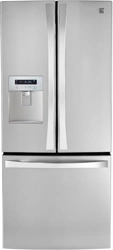
Models/Modelos: 795.7132*
*
= color number, número de color.
loñapsE / hsilgnE
Use & Care Guide
Manual de Uso y Cuidado
P/N MFL67851503
Sears Brands Management Corporation
Hoffman Estates, IL 60179 U.S.A.
Kenmore Elite®
Congelador Inferior Refrigera rod
www.kenmore.com
www.sears.com
®
Sears Canada Inc.
Toronto, Ontario, Canada M5B 2C3
www.sears.ca
Bottom Freezer Refrigerator
2
TABLE OF CONTENTS
Warranty............................................................................. 3
Protection Agreements
.............................................. 4
Important Safety Instructions
........................... 5-7
Electrical & Grounding Requirements
..............7
Parts and Features
....................................................... 8
Refrigerator Installation ..............................9-17
Unpacking Your Refrigerator ..........................9
Installation
.................................................................... 10
Removing/Replacing Your Refrigerator and
Freezer Handles, Doors and Drawers
.......11-16
Leveling and Door Alignment ......................17
Using Your Refrigerator ............................ 18-26
Setting the Controls ..................................18-19
Automatic Icemaker ..................................... 20
Food Storage Guide ..................................... 21
Refrigerator Section
Water Dispenser ........................................... 22
Refrigerator Shelves
................................................23
Humidity Controlled Crisper ........................ 23
Pantry Drawer ..................................................24
Door Bins ..........................................................24
Dairy Bin ......................................................... 24
Freezer Section
Durabase ........................................................ 25
Durabase Divider .......................................... 25
Pullout Drawer ............................................... 25
Water Filter ............................................... 26-29
Care And Cleaning .................................... 30-31
General Cleaning Tips ................................ 30
Connecting the Water Line ...................... 32-34
Troubleshooting Guide ............................. 35-42
Kenmore Connect ........................................... 43
Service ...............................................Back Cover
3
WARRANTY
REFRIGERATOR WARRANTY
Kenmore Elite Limited Warranty
®
When this appliance is installed, operated and maintained according to all supplied
instructions, the following warranty coverage applies. To arrange for warranty service,
call 1-800-4-MY-HOME® (1-800-469-4663).
For one year from the date of purchase, free repair will be provided if any non-consumable part of this •
appliance fails due to defective materials or workmanship. This coverage applies for only 90 days from
the purchase date if this product is ever used for other than private household purposes.
For fi ve years from the date of purchase, a defective sealed refrigerant system will be repaired free of •
charge. This coverage applies for only one year from the date of purchase if this appliance is ever used
for other than private household purposes.
For ten years from the date of purchase, a defective compressor will be repaired free of charge. This •
coverage applies for only two years from the date of purchase if this appliance is ever used for other
than private household purposes.
This warranty covers only defects in material and workmanship, and will NOT pay for:
1. Consumable parts that can wear out from normal use, including but not limited to fi lters, belts, light
bulbs, and bags.
2. A service technician to instruct the user in correct product installation, operation or maintenance.
3. A service technician to clean or maintain this product.
4. Damage to or failure of this product if it is not installed, operated or maintained according to the all
instructions supplied with the product.
5. Damage to or failure of this product resulting from accident, abuse, misuse or use for other than its
intended purpose.
6. Damage to or failure of this product caused by the use of detergents, cleaners, chemicals or utensils
other than those recommended in all instructions supplied with the product.
7. Damage to or failure of parts or systems resulting from unauthorized modifi cations made to this product.
Disclaimer of implied warranties; limitation of remedies
Customer’s sole and exclusive remedy under this limited warranty shall be product repair as provided
herein. Implied warranties, including warranties of merchantability or fi tness for a particular purpose,
are limited to one year or the shortest period allowed by law. Sears shall not be liable for incidental or
consequential damages. Some states and provinces do not allow the exclusion or limitation of incidental or
consequential damages, or limitation on the duration of implied warranties of merchantability or fi tness, so
these exclusions or limitations may not apply to you.
This warranty applies only while this appliance is used in the United States or Canada.
This warranty gives you specifi c legal rights, and you may also have other rights which vary from state
to state.
Sears Brands Management Corporation, Hoff man Estates, IL 60179
Sears Canada Inc., Toronto, Ontario, Canada M5B 2C3
4
PROTECTION AGREEMENTS
PRODUCT RECORD
Master Protection Agreements
Congratulations on making a smart purchase. Your new
Kenmore
®
product is designed and manufactured for
years of dependable operation. But like all products,
it may require preventive maintenance or repair from
time to time. That’s when having a Master Protection
Agreement can save you money and aggravation.
The Master Protection Agreement also helps extend
the life of your new product. Here’s what the
Agreement* includes:
• Parts and labor needed to help keep products
operating properly under normal use, not just defects.
Our coverage goes well beyond the product warranty.
No deductibles, no functional failure excluded from
coverage— real protection.
• Expert service by a force of more than 10,000
authorized Sears service technicians, which means
someone you can trust will be working on your product.
• Unlimited service calls and nationwide service, as
often as you want us, whenever you want us.
• “No-lemon” guarantee – replacement of your covered
product if four or more product failures occur within
twelve months.
• Product replacement if your covered product can’t be
• Annual Preventive Maintenance Check at your request
– no extra charge.
• Fast help by phone – we call it Rapid Resolution
– phone support from a Sears representative on all
products. Think of us as a “talking owner’s manual.”
• Power surge protection against electrical damage due
to power
• $250 Food Loss Protection annually for any food
spoilage that is the result of mechanical failure of any
covered refrigerator or freezer.
• Rental reimbursement if repair of your covered
product takes longer than promised.
• 25% discount
the regular price of any non-covered
repair service and related installed parts.
Once you purchase the Agreement, a simple phone call
is all that it takes to schedule service. You can call at
any time day or night, or schedule a service appointment
online.
The Master Protection Agreement is a risk free purchase.
If you cancel for any reason during the product warranty
period, we will provide a full refund or a prorated refund
anytime after the product warranty period expires.
Purchase your Master Protection Agreement today!
Some limitations and exclusions apply.
For prices and additional information in the
U.S.A. call 1-800-827-6655.
* Coverage in Canada varies on some items. For full
details call Sears Canada at 1-800-361-6665.
Sears Installation Service
For Sears professional installation of home appliances,
garage door openers, water heaters, and other major
home items, in the U.S.A. or Canada call
1-800-4-MY-HOME
®
.
In the space below, record the date of purchase, model and serial number of your product. You will
the model and
serial number printed on an label located on the interior liner of the refrigerator compartment. Have these
items of information available whenever you contact Sears concerning your product.
Model No.___________________ Date of Purchase ___________________
Serial No.___________________
Save these instructions and attach your sales receipt for future reference.
5
IMPORTANT SAFETY INSTRUCTIONS
WARNING
SAVE THESE INSTRUCTIONS
tfiltl
injury when using your product, basic safety precautions
should be followed, including the following.
Read all instructions before using this appliance.
• NEVER unplug your refrigerator by pulling on the
power cord. lways grip the plug firmly and pull it
straight out from the outlet.
• Immediately repair or replace all power cords that
have become frayed or otherwise damaged. Do not
use a cord that shows cracks or abrasion damage
along its length or at either the plug or connector end.
• Do not modify or extend the power cord length. It
could cause electric shock or fire.
• When moving your refrigerator away from the wall, be
careful not to roll over or damage the power cord.
BASIC SAFETY PRECAUTIONS
This guide contains many important safety messages. Always read and obey all safety messages.
This is the safety alert symbol. It alerts you to safety messages that inform you of hazards that can kill
or hurt you or others, or cause damage to the product.
All safety messages will be preceded by the safety alert symbol and the hazard
signal word DANGER, WARNING or CAUTION. These words mean:
You will be killed or seriously injured if you do not follow instructions.
You can be killed or seriously injured if you do not follow instructions.
Indicates an imminently hazardous situation which, if not avoided,
may result in minor or moderate injury, or product damage.
All safety messages will identify the hazard, tell you how to reduce the chance of injury, and tell you what can happen
if the instructions are not followed.
•
T store or use gasoline or other flammable
vapors and liquids in the vicinity of this or any other
appliance.
• DO NOT allow children to climb, stand, or hang on the
refrigerator doors or shelves in the refrigerator. They
could damage the refrigerator and seriously injure
themselves.
•
eep fingers out of pinch point areas clearances
between the doors and cabinets are necessarily small.
Be careful closing doors when children are in the area.
• Unplug your refrigerator before cleaning or making
any repairs.
NOTE: It is strongly recommended that any service be
performed by a qualified technician.
DANGER
WARNING
CAUTION
6
WARNING
DANGER: RISK OF CHILD ENTRAPMENT
SAVE THESE INSTRUCTIONS
• Before replacing a burned-out or broken light bulb,
unplug the refrigerator or turn off power at the circuit
breaker or fuse box in order to avoid contact with a live
wire filament. ( burnedout light bulb may break when
being replaced eposing the wire filament.)
NOTE: Some models have LED interior lighting and
service should be performed by a qualified technician.
WARNING: Setting either or both controls to the
OFF position does not remove power to the light circuit.
• hen you are finished, reconnect the refrigerator to
the electrical source and reset the controls (Thermostat,
Refrigerator Control, and or Freezer Control, depending
on the model) to the desired setting.
• This refrigerator must be properly installed in
accordance with the Attention Installer Instructions that
were taped to the front of the refrigerator.
• After your refrigerator is in operation, do not touch the
cold surfaces in the freezer compartment when hands
are damp or wet. Skin may adhere to the extremely cold
surfaces.
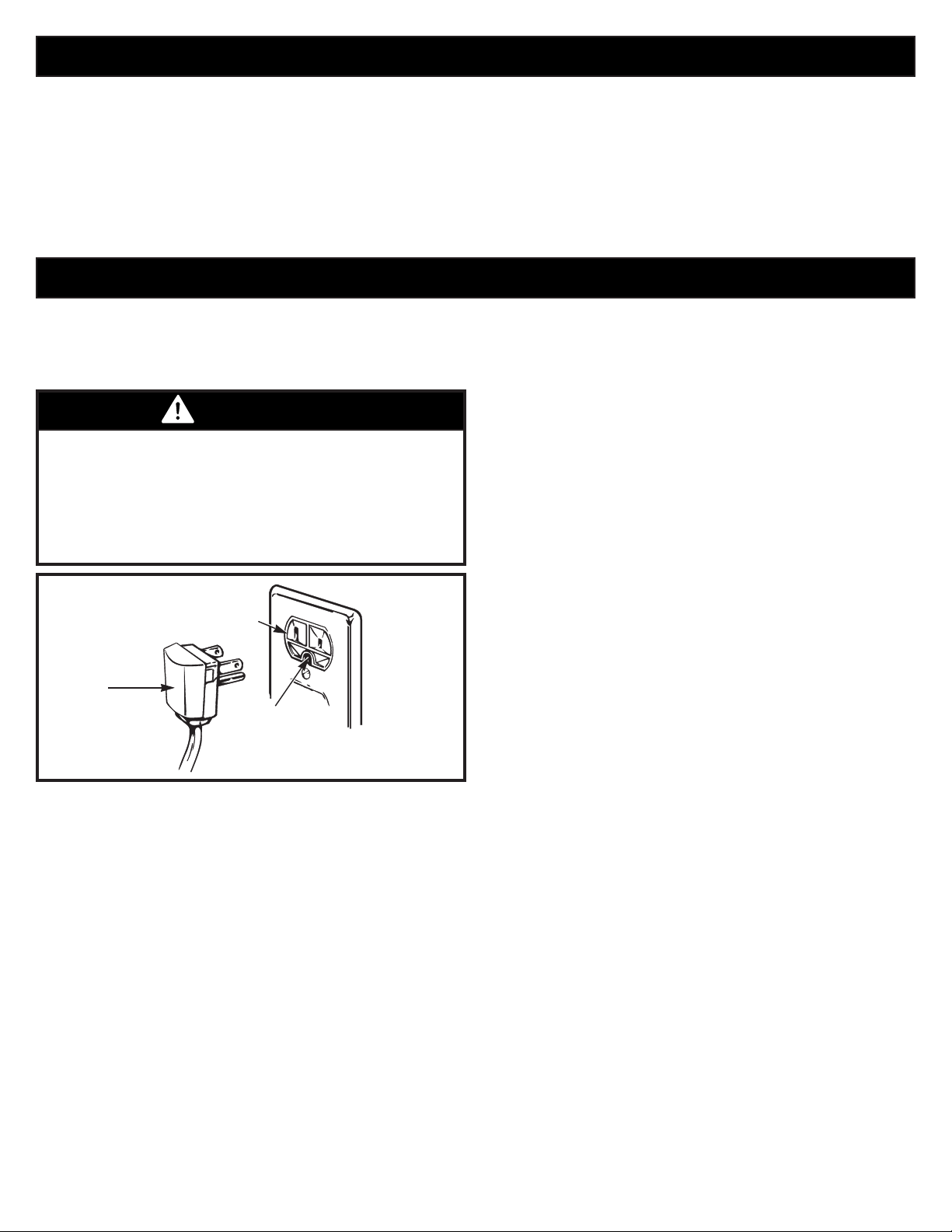
Junked or abandoned refrigerators are dangerous, even
if they are sitting for only a few days. If you are getting
rid of your old refrigerator, please follow the instructions
at right to help prevent accidents (child entrapment and
suffocation).
• DO NOT touch the automatic ice making mechanism
while the refrigerator is plugged in.
• DO NOT refreeze frozen foods which have thawed
completely. The United States Department of
Agriculture in Home and Garden Bulletin No. 69 says:
…You may safely refreeze frozen foods that have
thawed if they still contain ice crystals or if they are
still cold—below 39°F (4°C).
Thawed ground meats, poultry or fish that have any
offodor or offcolor should not be refroen and should
not be eaten. Thawed ice cream should be discarded.
If the odor or color of any food is poor or questionable,
dispose of it. The food may be dangerous to eat.
Even partial thawing and refreezing reduces the
eating quality of foods, particularly fruits, vegetables
and prepared foods. The eating quality of red meats
is affected less than that of many other foods. se
refrozen foods as soon as possible to save as much of
their quality as you can.
BEFORE YOU THROW AWAY
YOUR OLD REFRIGERATOR
OR FREEZER:
• Take off the doors.
• Leave the shelves in place so that
children may not easily climb inside
.
7
CFC/HCFC DISPOSAL
ELECTRICAL & GROUNDING REQUIREMENTS
WARNING
Your old refrigerator may have a cooling system
that used Fs or Fs (chlorofluorocarbons or
hydrochlorofluorocarbons). Fs and Fs are
believed to harm stratospheric ozone if released to the
atmosphere. Other refrigerants may also cause harm to
the environment if released to the atmosphere.
IMPORTANT: Please read carefully.
TO CONNECT ELECTRICITY
RECOMMENDED GROUNDING METHOD
The refrigerator should always be plugged into its own
individual properly grounded electrical outlet rated for
115 Volts, 60 Hz, AC only, and fused at 15 or 20 amperes.
This provides the best performance and also prevents
overloading house wiring circuits which could cause a fire
hazard from overheated wires. It is recommended that a
separate circuit serving only this appliance be provided.
se a receptacle that cannot be turned off with a switch
or pull chain. Do not use an extension cord.
Where a standard two-prong wall outlet is encountered,
it is your personal responsibility and obligation to have
it replaced with a properly grounded three-prong wall
outlet.
Electrical Shock Hazard
FOR PERSONAL SAFETY, this appliance must be
properly grounded. Have the wall outlet and the circuit
checked by a qualified electrician to make sure the
outlet is properly grounded.
If you are throwing away your old refrigerator, make
sure the refrigerant is removed for proper disposal
by a qualified technician. f you intentionally release
refrigerant, you may be subect to fines and imprisonment
under provisions of environmental legislation.
USE OF EXTENSION CORDS
Because of potential safety hazards under certain
conditions, the use of an extension cord is not
recommended. However, if you still elect to use an
extension cord, it is absolutely necessary that it be a UL-
listed (USA), 3-wire grounding type appliance extension
cord having a grounding type plug and outlet, and that
the electrical rating of the cord be 15 amperes (minimum)
and 120 volts.
Use of an extension cord will increase the clearance
needed for the back of the refrigerator.
3-prong
grounding
plug
3-prong
grounding type
wall receptacle
Ensure proper
ground exists
before use.
8
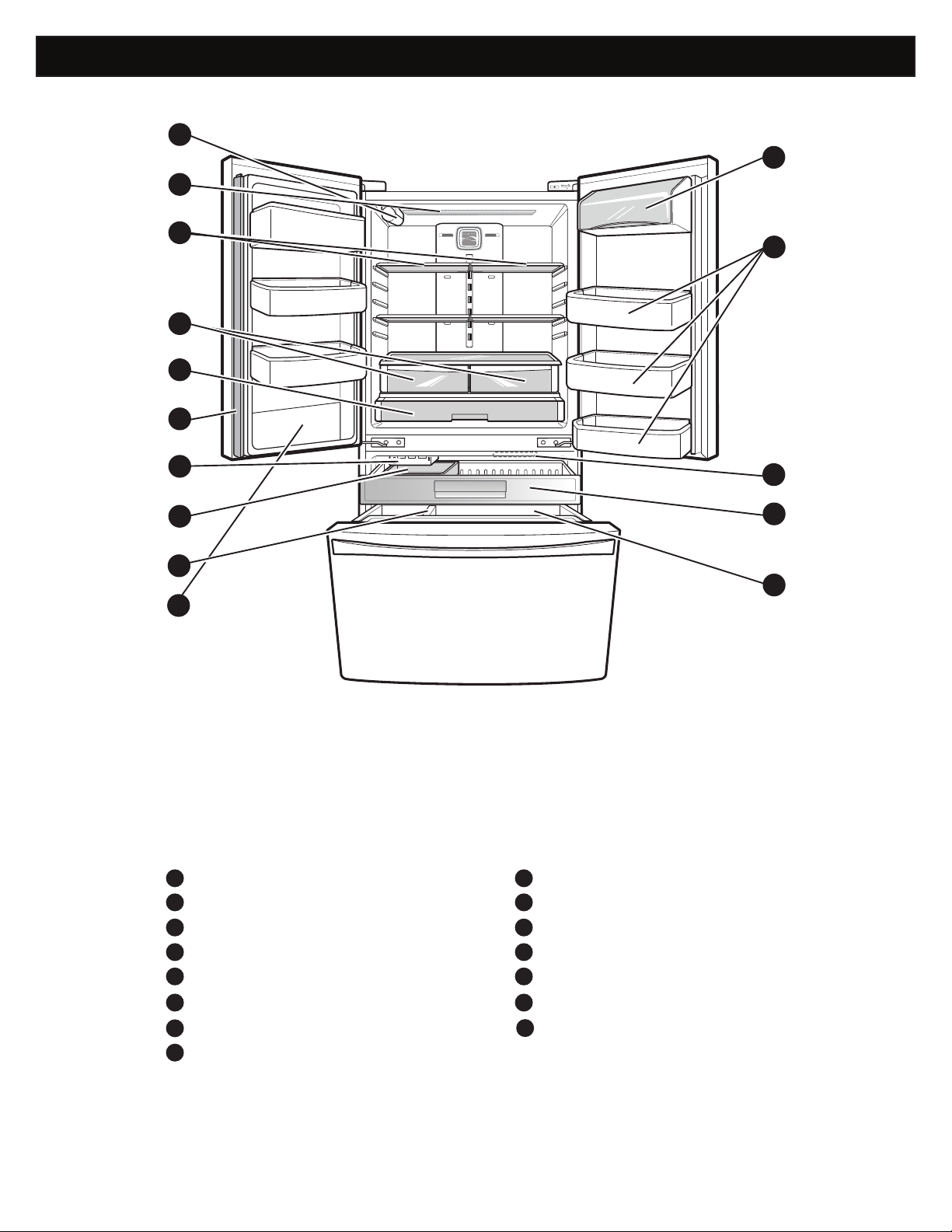
PARTS AND FEATURES
Use this page to become more familiar with the parts and features of your refrigerator.
NOTE: This guide covers several diff erent models. The refrigerator you have purchased may have some or all of the items
listed below. The locations of the features shown below may not match your model.
Water Filter
Refrigerator Light
Refrigerator Shelves
Humidity Controlled Crispers
Pantry
Articulating Mullion
Ice Maker
Ice Bin
Durabase Divider
Durabase
Pull Out Drawer
Freezer Light
Door Bins
Dairy Bin
A
I
B
J
KC
LD
ME
NF
G
H
C
F
N
M
L
K
J
D
E
Water Tank Cover
O
O
B
A
G
H
I
9
REFRIGERATOR INSTALLATION
WARNING WARNING
WARNING
UNPACKING YOUR REFRIGERATOR
Remove tape and any temporary labels from your
refrigerator before using. Do not remove any warning-
type labels, the model and serial number label, or
the Tech Sheet that is located under the front of the
refrigerator, behind the base grille.
To remove any remaining tape or glue, rub the area
briskly with your thumb. Tape or glue residue can also be
easily removed by rubbing a small amount of liquid dish
soap over the adhesive with your fingers. ipe with warm
water and dry.
o not use sharp instruments, rubbing alcohol, flammable
fluids, or abrasive cleaners to remove tape or glue. These
products can damage the surface of your refrigerator.
Refrigerator shelves are installed in the shipping position.
Please reinstall shelves according to your individual
storage needs.
Excessive Weight Hazard:
Use two or more people to move and install the
refrigerator. Failure to do so can result in back or
other injury.
Excessive Weight Hazard:
Your refrigerator is heavy. When moving the
refrigerator for cleaning or service, be sure to protect
the floor. lways pull the refrigerator straight out when
moving it. Do not wiggle or walk the refrigerator when
trying to move it, as floor damage could occur.
Explosion Hazard:
eep flammable materials and vapors, such as
gasoline, away from the refrigerator. Failure to do so
can result in fire, eplosion, or death.
10
INSTALLATION (continued)
1. To avoid noise and vibration, the unit must be leveled
and installed on a solidly constructed
If required,
adjust the leveling legs to compensate for unevenness
of the
The front should be slightly higher than
the rear to aid in door closing. Leveling legs can be
turned easily by tipping the cabinet slightly. Turn the
leveling legs to the left to raise the unit or to the right to
lower it. (See LEVELING AND DOOR ALIGNMENT.)
NOTE: Installing on carpeting, soft tile surfaces,
a platform or weakly supported structure is not
recommended.
2. Install this appliance in an area where the temperature
is between 55°F (13°C) and 110°F (43°C). If the
temperature around the appliance is too low or high,
cooling ability may be adversely
3. Select a place where a water supply can be easily
connected for the automatic icemaker.
NOTE: The water pressure must be between 20 and
120 psi on models without a water
and between
40 and 120 psi on models with a water
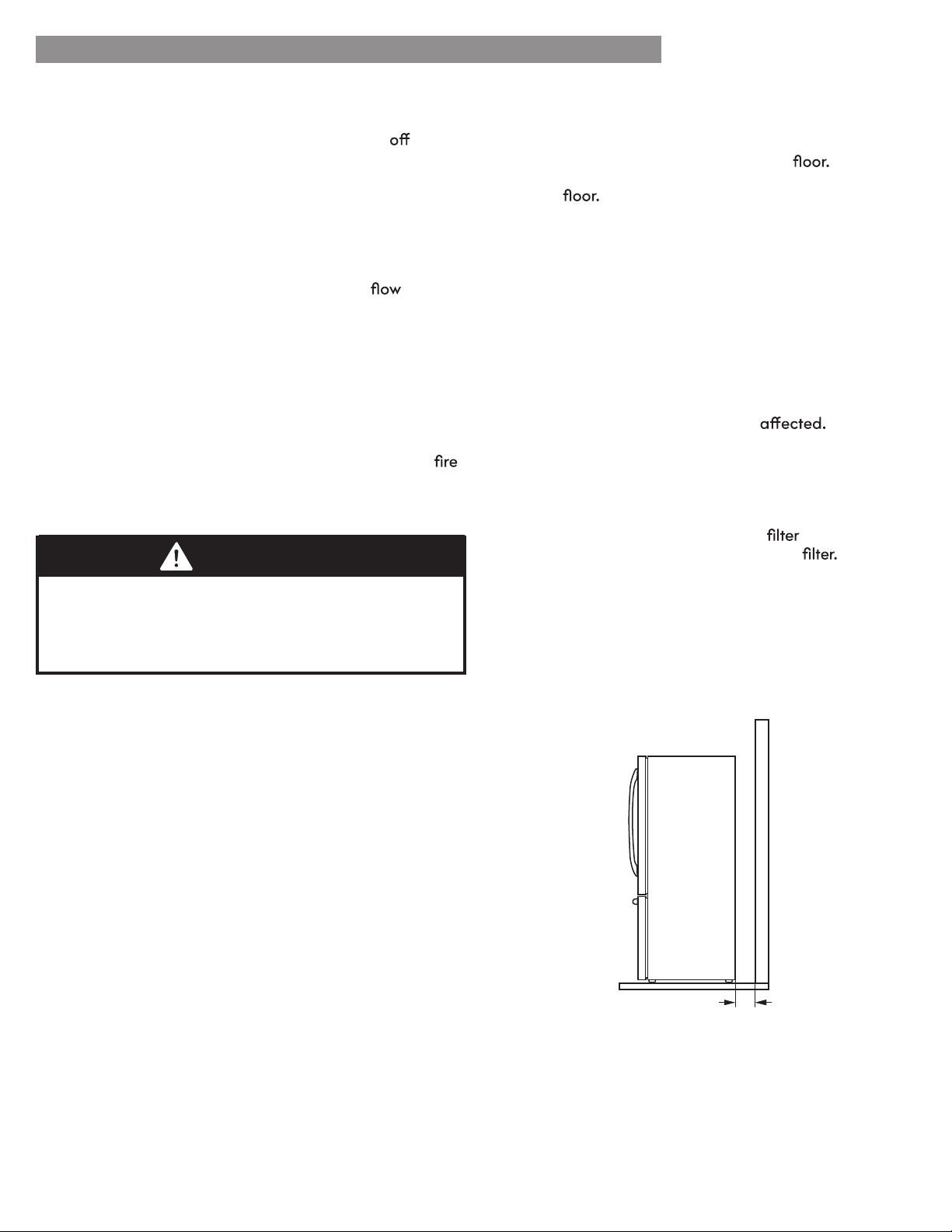
4. Too small of a distance from adjacent items may
result in lowered freezing capability and increased
electricity consumption charges. Allow at least 24
inches (61 cm) in front of the refrigerator to open the
doors and at least 2 inches (5.08 cm) between the
back of the refrigerator and the wall.
PRIOR TO USE
1. Clean your refrigerator thoroughly and wipe
all
dust that accumulated during shipping.
2. Install accessories such as ice cube bin, drawers,
shelves, etc., in their proper places. They are packed
together to prevent possible damage during shipment.
3. Allow your refrigerator to run for at least two to three
hours before putting food in it. Check the of
cold air in the freezer compartment to ensure proper
cooling. Your refrigerator is now ready for use.
INSTALLATION
The refrigerator should always be plugged into its own
individual properly grounded electrical outlet rated for
115 Volts, 60 Hz, AC only, and fused at 15 or 20 amperes.
This provides the best performance and also prevents
overloading house wiring circuits which could cause a
hazard from overheated wires. It is recommended that a
separate circuit serving only this appliance be provided.
REFRIGERATOR INSTALLATION
Shock Hazard:
To reduce the risk of electric shock, do not install the
refrigerator in a wet or damp area.
WARNING
2” (5.08 cm)
11
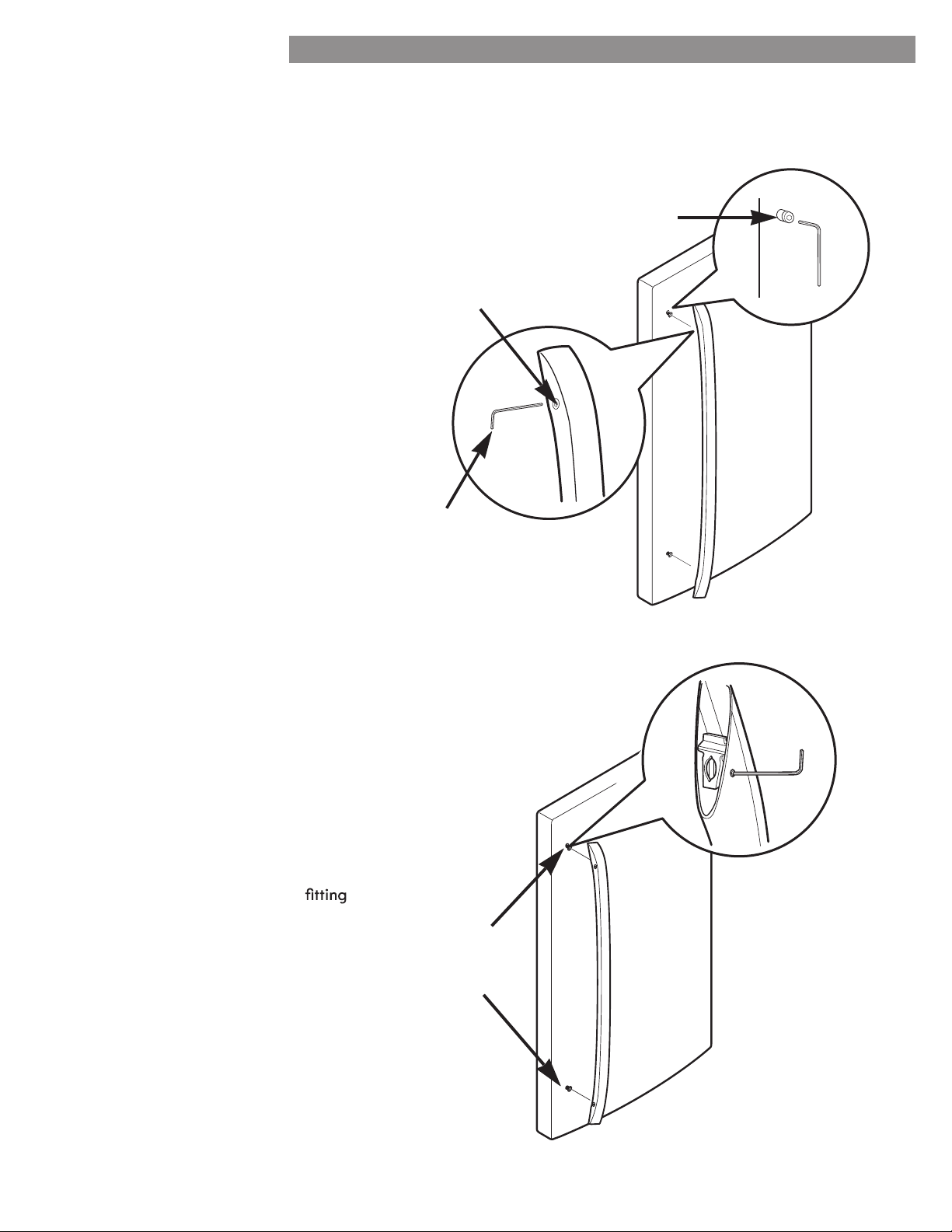
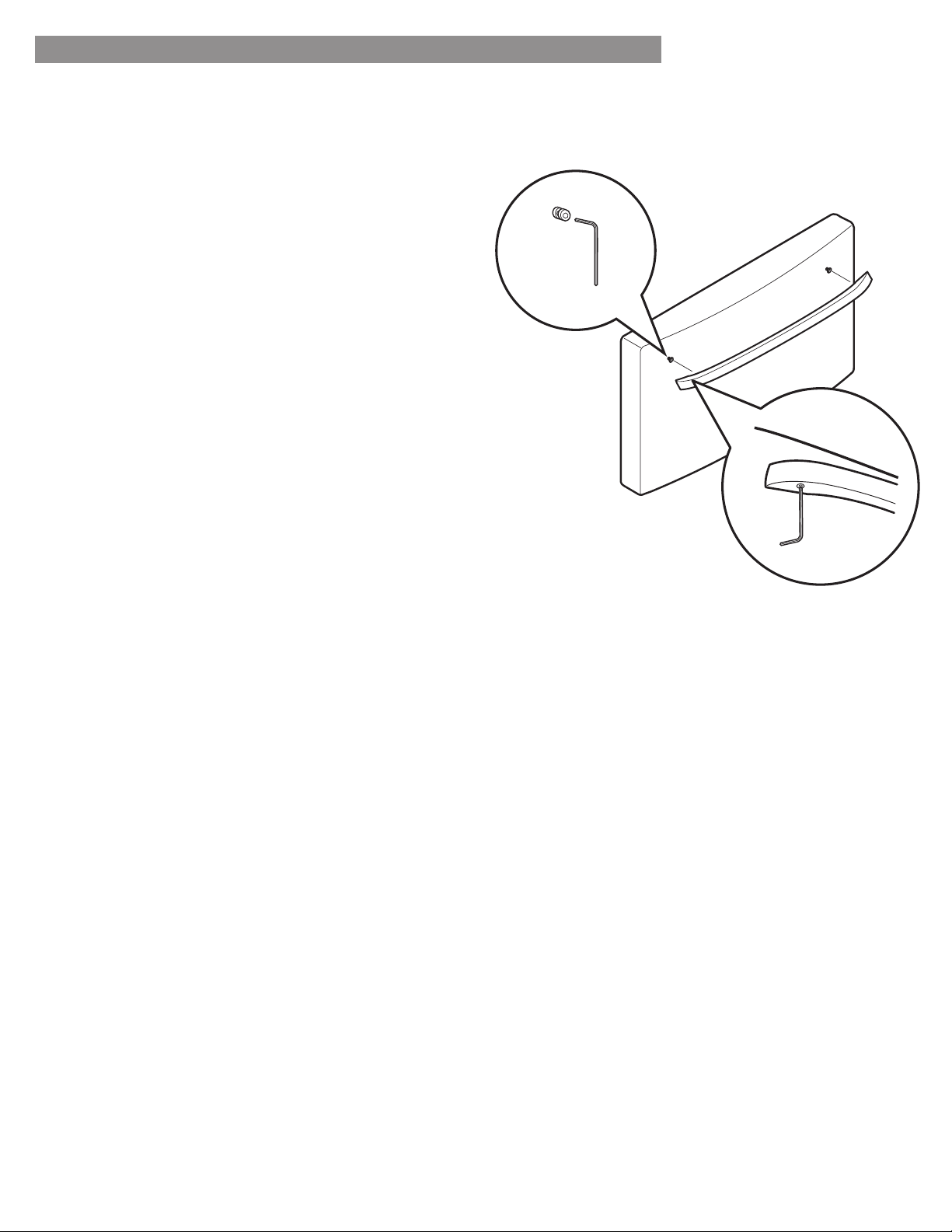
HOW TO REMOVE REFRIGERATOR
DOOR HANDLE
NOTE: Handle appearance may vary from
illustrations on this page.
Loosen the set screws with a 3/32 in. Allen
wrench and remove the handle.
NOTE: If the handle mounting fasteners need
to be tightened or removed, use a ¼ in. Allen
wrench.
NOTE: Removing the doors is always recommended when it is necessary to move the refrigerator through a narrow
opening. If it is necessary to remove the handles, follow the directions below.
REFRIGERATOR INSTALLATION
HOW TO REPLACE REFRIGERATOR
DOOR HANDLE
NOTE: Handle appearance may vary from
illustrations on this page.
Place the handle on the door by
the handle footprints over the mounting
fasteners and tightening the set screws
with a 3/32 in Allen wrench.
NOTE: If the handle mounting fasteners
need to be tightened or removed, use a
¼ in. Allen wrench.
Mounting
Fasteners
Set Screw
Allen
Wrench
Mounting
Fasteners
To replace, place the handle on the door by fitting
the handle footprints over the mounting fasteners and
tightening the set screw with a 1/8 in. Allen wrench.
NOTE: If the handle mounting fasteners need to be
tightened or removed, use a ¼ in. Allen wrench.
REFRIGERATOR INSTALLATION
HOW TO REMOVE/REPLACE FREEZER
DOOR HANDLE
NOTE: Handle appearance may vary from illustrations on
this page.
To remove, loosen the set screws located on the
lower side of the handle with a 1/8 in. Allen wrench
and remove the handle.
NOTE: Removing the doors is always recommended when it is necessary to move the refrigerator through a narrow
opening. If it is necessary to remove the handles, follow the directions below.
12
13
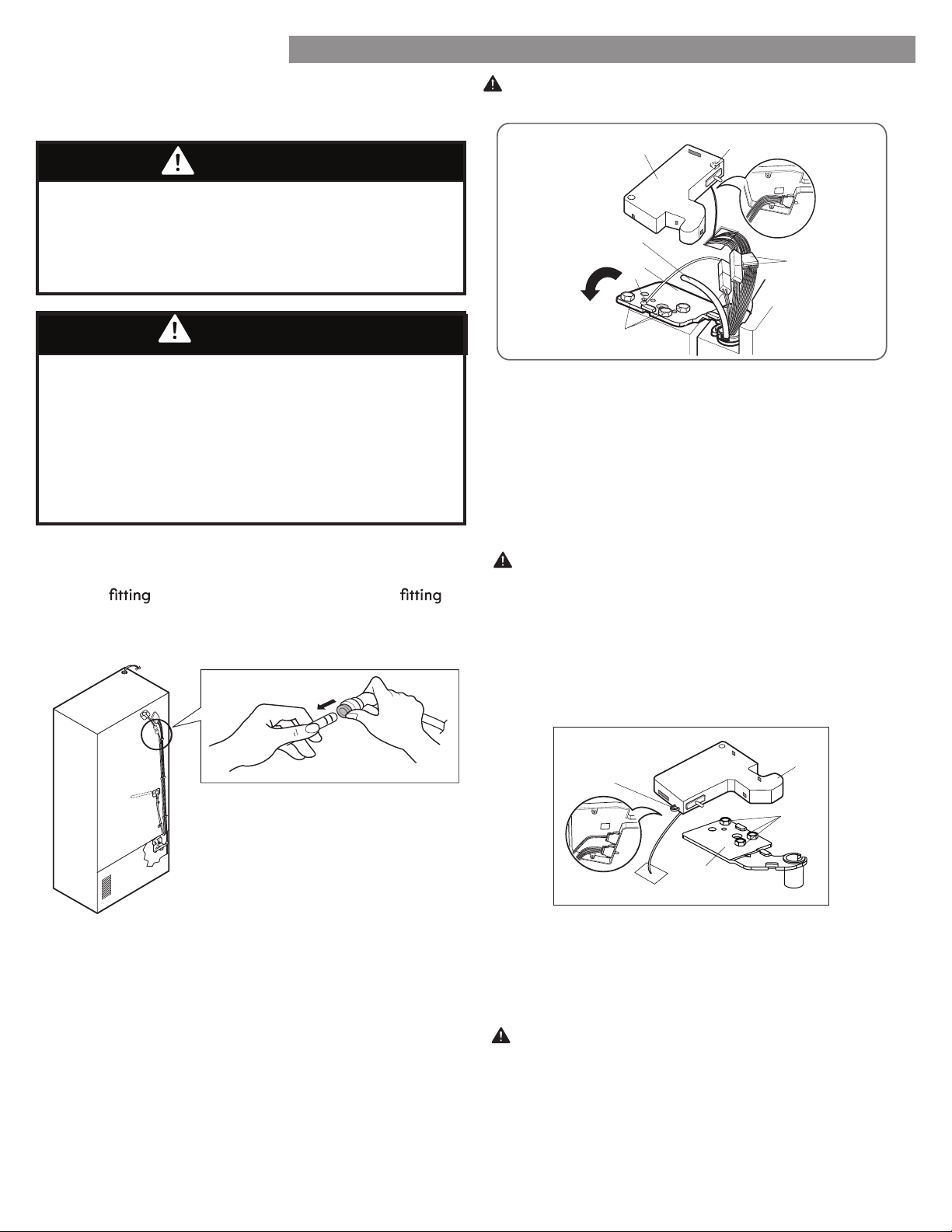
To remove the left refrigerator door:
On the back of the refrigerator, pull the water tube out of
the collet
on the connector by pressing the
release ring (see picture below).
1. Open the door. Remove the top hinge cover screw (1).
Lift up the cover (2).
2. Remove the cover.
3. Pull out the tube (3).
4. Disconnect all wire harnesses (4).
5. Remove the grounding screw (5).
6. Remove the three bolts (6) using a 10mm socket wrench.
Lift off the top hinge (7).
door does not fall forward.
CAUTION: When lifting the hinge, be careful that the
7. Lift the door from the middle hinge pin and remove the
door.
8. Place the door, inside facing up, on a non-scratching
surface.
1. Open the door. Remove the top hinge cover screw (1).
Lift up the cover (2).
2. Remove the cover.
3. Remove the three bolts (3) using a 10mm socket
CAUTION: When lifting the hinge, be careful that the
4. Lift the door from the middle hinge pin and remove
the door.
door does not fall forward.
wrench. Lift off the top hinge (4)
5. Place the door, inside facing up, on a non-scratching
surface.
WARNING
Electrical Shock Hazard
• Disconnect the electrical supply to the refrigerator
before installing. Failure to do so could result in
serious injury or death.
• Do not put hands, feet or other objects into the air
vents or bottom of the refrigerator. You may be
injured or receive an electrical shock.
(1)
(2)
(3)
(4)
REFRIGERATOR INSTALLATION
To remove the right refrigerator door:
REMOVING AND REPLACING
REFRIGERATOR DOORS
CAUTION: Before you begin, remove food and bins
from the doors.
WARNING
Excessive Weight Hazard:
Use two or more people to remove and install the
refrigerator doors. Failure to do so can result in back or
other injury.
(1)
(2)
(4)
(3)
(6)
(7)
(5)
14
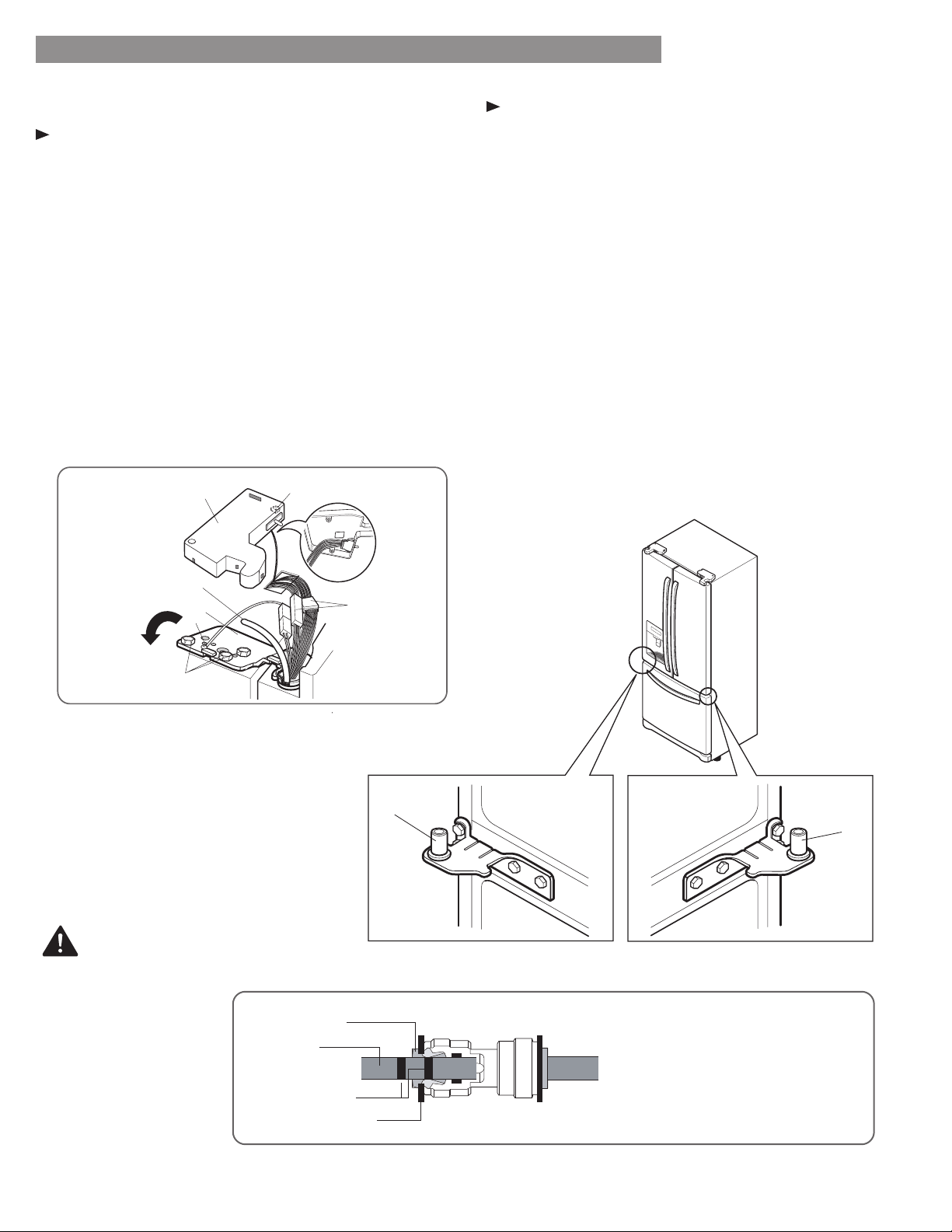
After inserting, pull the tube to
make sure that it is secure and
reinsert the clip.
Tube
Scale Mark
Collet
Clip
Reinstalling the Refrigerator Door
Left Door
1. Lower the door onto middle hinge pin (10).
2. Line up the holes in the top hinge with the holes in the
top of the refrigerator. Insert and tighten the three
Bolts (6) in the hinge.
3. Install the grounding screw (5) and connect the two
wire harnesses (4).
4. Push the water tube (3) located at the top of the left
door into the hole beside the left hinge on the top of
the cabinet until it exits through the back.
5. Insert the water supply tube (3) into the connector until
you see only one scale mark. Fully insert the tube over
⅝
in.
(15
mm).
6. Hook tabs on left side of hinge cover (1) under the
edge of the top hinge (7) and position the cover in
place. Insert and tighten the cover screw (1).
Right Door
1. Lower the door onto middle hinge pin (9).
2. Line up the holes in the top hinge with the holes in the
top of the refrigerator. Insert and tighten the three
Bolts (6) in the hinge.
3. Hook the tabs on right side of hinge cover (2) under
the edge of the top hinge (4) and position the cover in
place. Insert and tighten the cover screw (1).
REFRIGERATOR INSTALLATION
(9)
(10)
CAUTION
(1)
(2)
(4)
(3)
(6)
(7)
(5)
15
REFRIGERATOR INSTALLATION
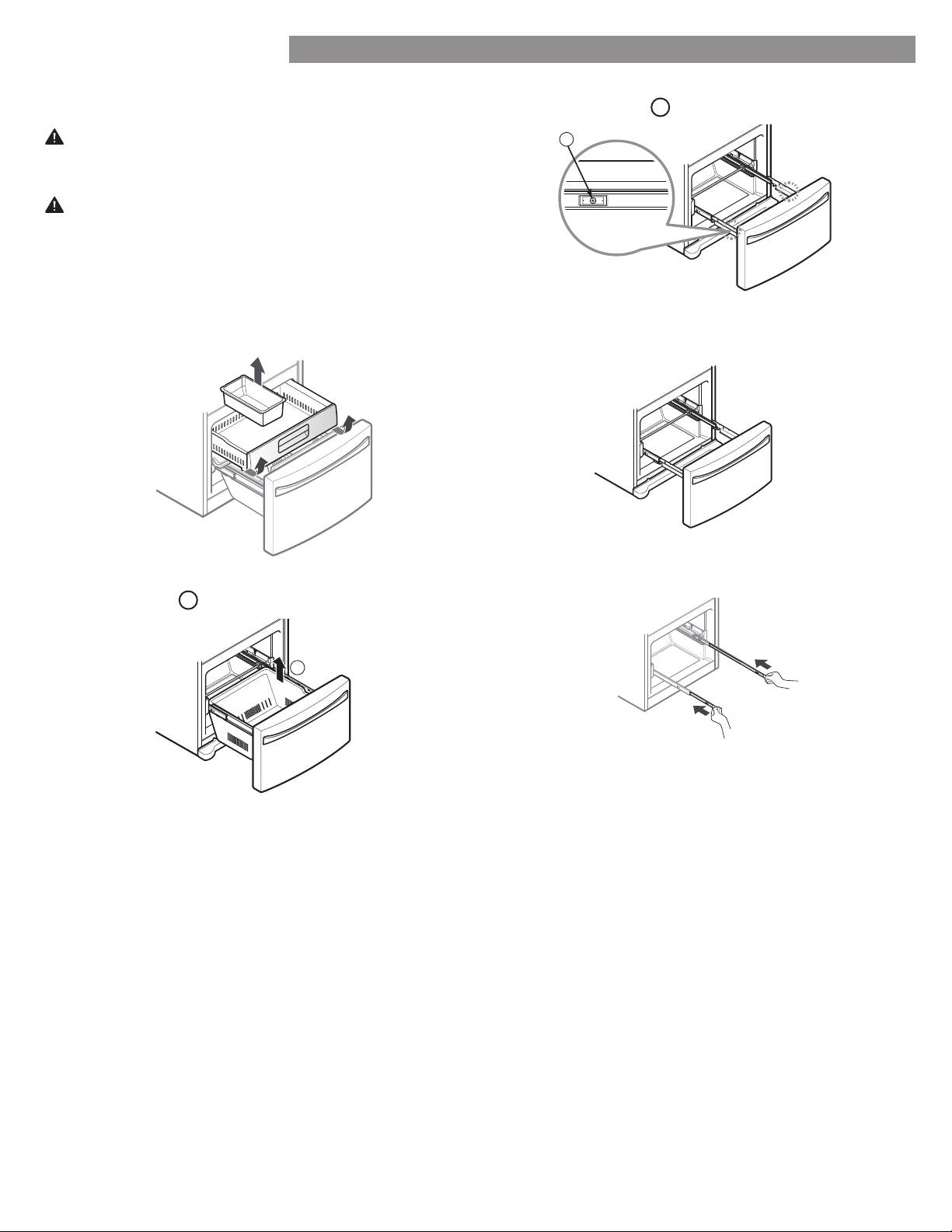
Pull the drawer open to full extension. Remove the
lower basket
1
by lifting the basket from the rail
system.
Remove the screw
2
from the rail on both sides.
Grasp the drawer on each side and pull it up to
separate it from the rails.
Using two hands, slide both bars in simultaneously.
CAUTION: Do not hold the handle when removing or
replacing the drawer. The handle may come off , causing
personal injury.
2
HOW TO REMOVE THE FREEZER DRAWER
WARNING: Use two or more people to remove and
install the freezer drawer. Failure to do so can result in
back or other injury.
1
To remove, pull the drawer out to full extension. Lift
the drawer up and out, making sure to clear the rail
system.
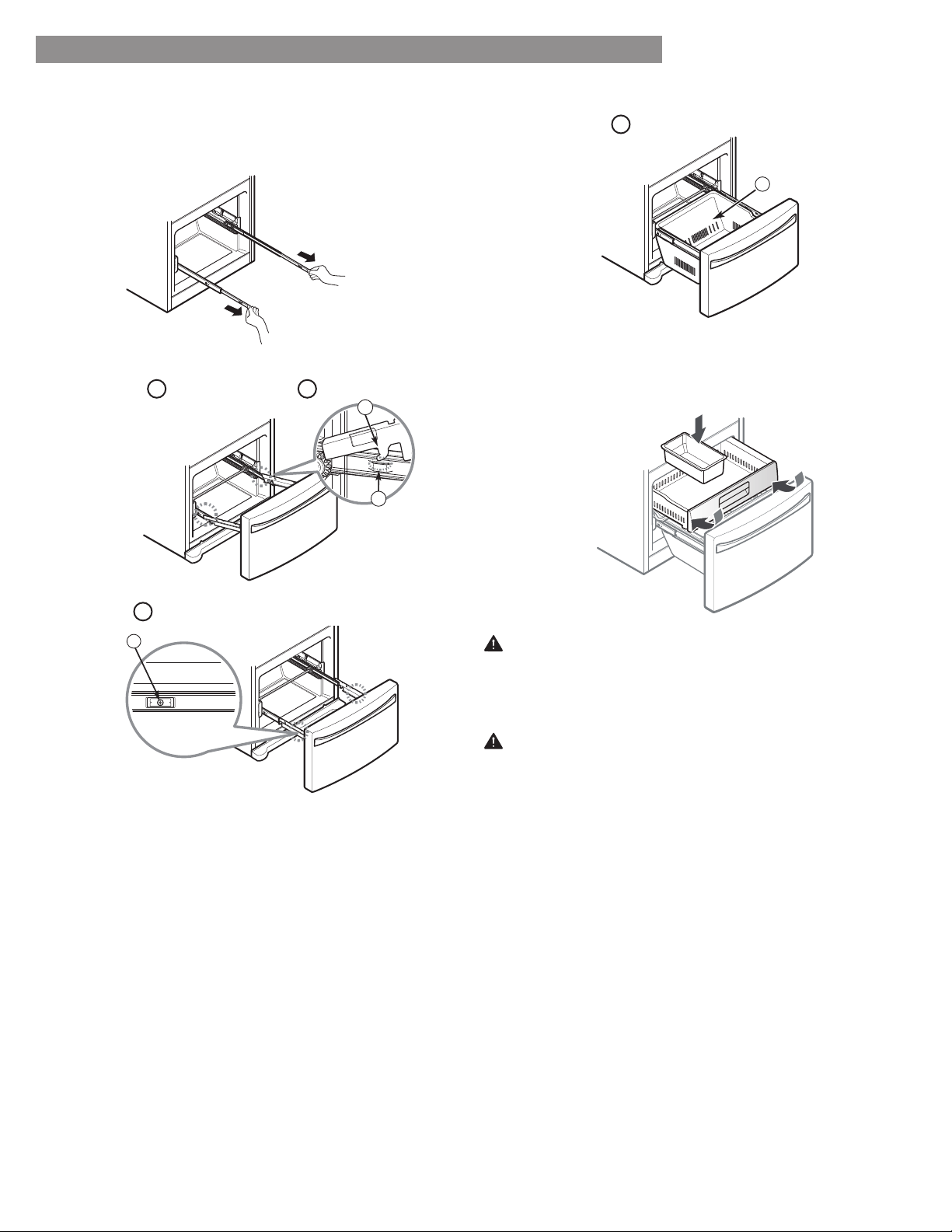
16
REFRIGERATOR INSTALLATION
Pull out each rail to full extension.
Lower the door into its final position and tighten the
screws
3
located on both sides.
With the drawer pulled out to full extension, insert the
lower basket
4
in the rail assembly.
Grasp the drawer on each side and hook door
supports
1
into the rail tabs
2
located on both
sides.
WARNING: If the Durabase divider is removed, there is
enough open space for children or pets to crawl inside.
To prevent accidental child and pet entrapment or
suff ocation risk, DO NOT allow them to touch or go
near the freezer drawer.
WARNING: DO NOT step or sit down on the freezer
drawer.
3
HOW TO INSTALL THE FREEZER DRAWER
2
1
4
To replace, with the drawer pulled out to full extension,
insert the drawer in the rail assembly.
17
LEVELING AND DOOR ALIGNMENT
Leveling
After installing, plug the refrigerator’s power cord into a
3-prong grounded outlet and push the refrigerator into the
final position.
Your refrigerator has two front leveling legs—one on the
right and one on the left. Adjust the legs to alter the tilt
from front-to-back or side-to-side. If your refrigerator
seems unsteady, or you want the doors to close more
easily, adjust the refrigerator’s tilt using the instructions
below:
NOTE: Tools Required: /
wrench or flat blade
screwdriver.
Turn the leveling leg to the left to raise that side of
the refrigerator or to the right to lower it. It may take
several turns of the leveling leg to adjust the tilt of the
refrigerator.
NOTE: Having someone push backward against the top of
the refrigerator takes some weight off of the leveling legs.
This makes it easier to adjust the legs.
2. Open both doors again and check to make sure that
they close easily. If the doors do not close easily, tilt
the refrigerator slightly more to the rear by turning
both leveling legs to the left. It may take several more
turns, and you should turn both leveling legs the same
amount.
NOTE: Your refrigerator is uniquely designed with
two fresh food doors. Either door can be opened or
closed independently of the other. You may have to
exert slight pressure on the doors to get them to close
completely.
Door Alignment
If the space between your doors is uneven, follow the
instructions below to align the doors:
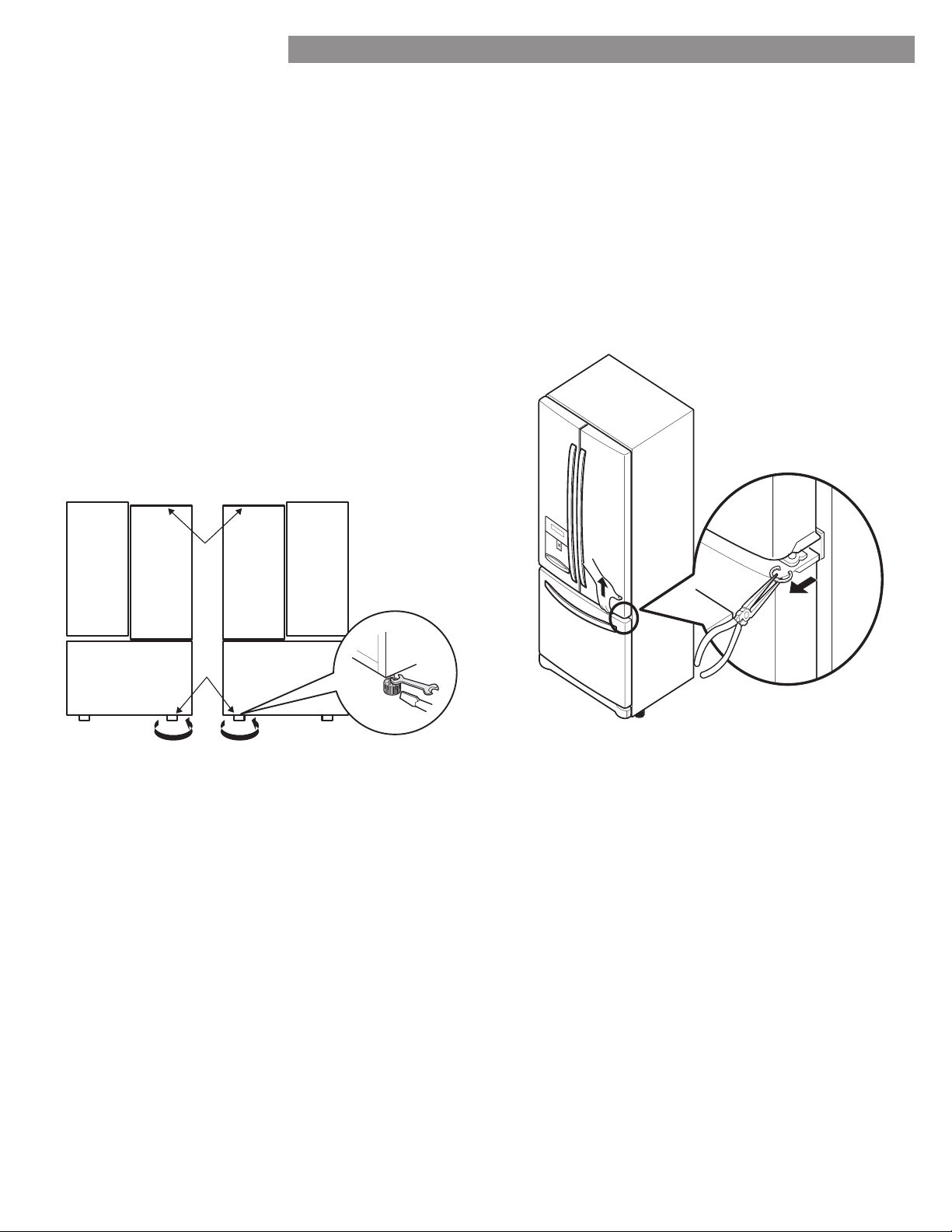
1. With one hand, lift up the door that you would like to
raise at the middle hinge.
2. With your other hand, use pliers to insert snap ring as
shown.
3. Insert additional snap rings until the doors are aligned.
(Three snap rings are provided with the refrigerator in
the Use & Care Guide packet.)
REFRIGERATOR INSTALLATION
18
USING YOUR REFRIGERATOR
SETTING THE CONTROLS
NOTE: The dispenser will not work if any door is left
open or if the control lock is engaged.
• The Refrigerator Temp Control ranges from 33°F
to 46°F (0°C to 8°C). Press the Refrigerator button
to cycle through the available temperature settings one
increment at a time.
• The Freezer Temp Control range is from -6°F to
8°F (-21°C to -13°C). Press the Freezer button to
cycle through the available temperature settings one
increment at a time.
Dispenser
Some dripping may occur after dispensing water. Hold
your cup beneath the dispenser for a few seconds after
dispensing to catch all of the drops.
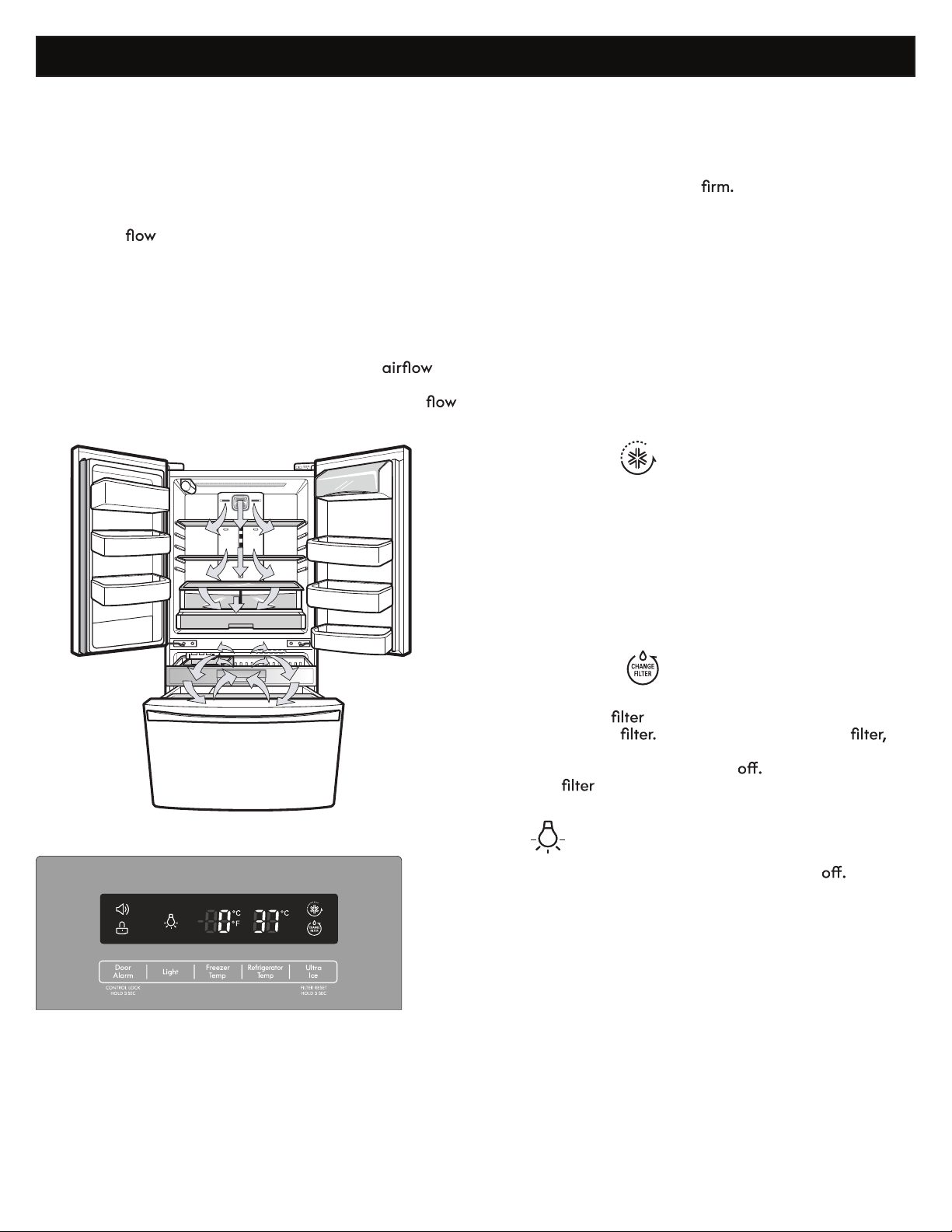
AIRFLOW
The refrigerator control functions as the thermostat for the
entire appliance (refrigerator and freezer sections). The
colder the setting, the longer the compressor will run to
keep the temperature colder. The freezer control adjusts
the cold air
from the freezer to the refrigerator.
Setting the freezer control to a lower temperature keeps
more cold air in the freezer compartment to make it
colder.
Cold air circulates from the freezer to the fresh food
section and back again through air vents in the wall
dividing the two sections. Be sure not to block vents while
packing your refrigerator. Doing so will restrict
and may cause the refrigerator temperature to become
too warm or cause interior moisture buildup. (See air
diagram below.)
Temperature
Express Freeze
• When you press the Express Freeze button, the Express
Freeze graphic will illuminate in the display and will
continue for 24 hours. The function will automatically
shut off after 24 hours.
• You can stop this function manually by touching the
button one more time.
• This function increases both ice making and freezing
capabilities.
Water Filter Reset
When the water
indicator turns on, you have to
change the water
After changing the water
press and hold the Ultra Ice (Filter Reset) button for three
seconds to turn the indicator light
You need to change
the water
approximately every six months.
Light
Press the Light button to turn the light on and
When
dispensing water, a light underneath the water switch will
illuminate.
NOTE: When changing control settings, wait 24 hours
before making additional adjustments. The controls are
set correctly when milk or juice is as cold as you would
like and when ice cream is
If the temperature in
either compartment is too cold or too warm, change the
setting one increment at a time. Wait 24 hours for the
change to stabilize before adjusting again.
19
USING YOUR REFRIGERATOR
CAUTION
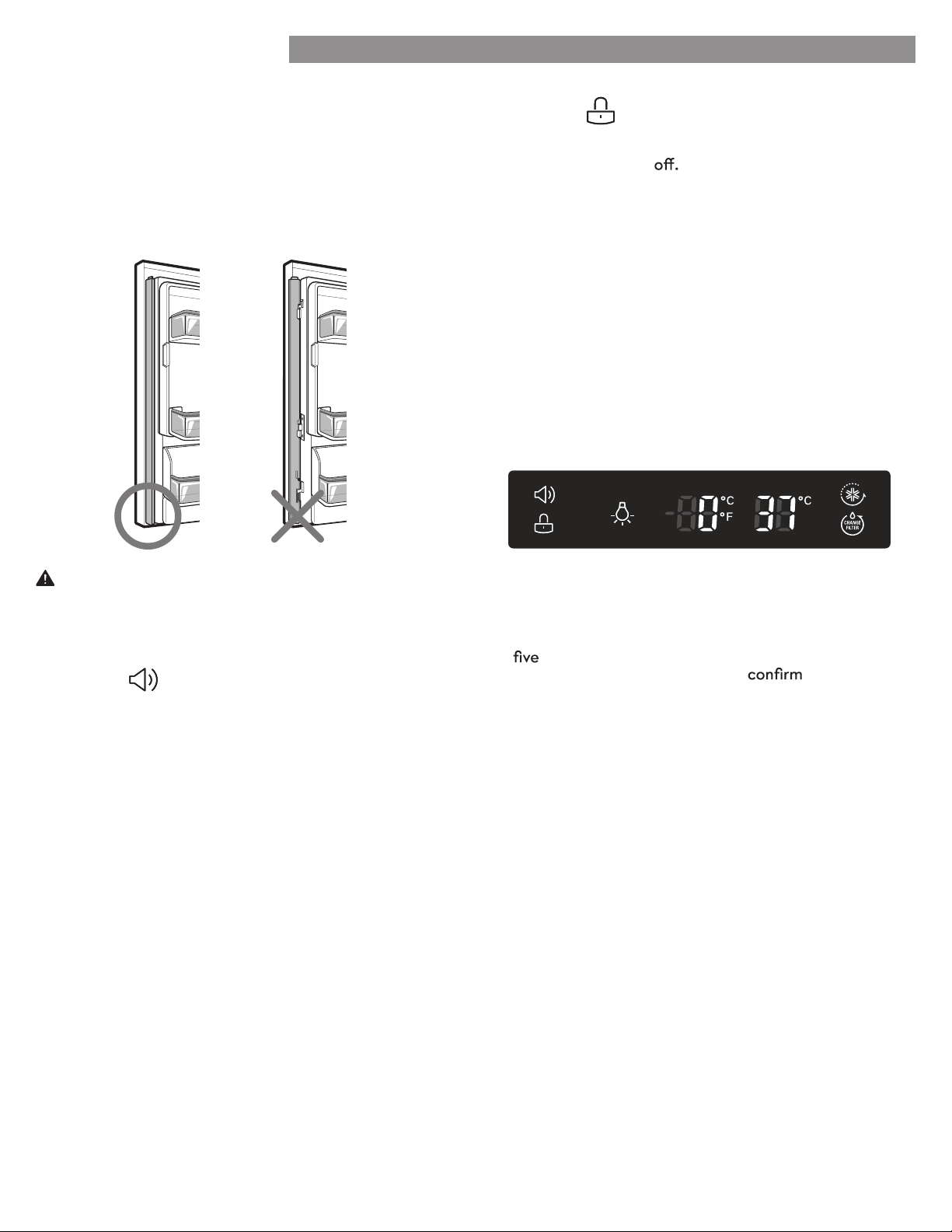
To reduce the risk of scratching the door or breaking the
door mullion, please make sure that the refrigerator door
mullion is always folded in.
Door Alarm
• When power is connected to the refrigerator, the door
alarm is initially set to ON. When you press the Door
Alarm button, the display will change to OFF and the
Door Alarm function will deactivate.
• When either the refrigerator or the freezer door is left
open for more than 60 seconds, the alarm tone will
sound to let you know that the door is open.
• When you close the door, the door alarm will stop.
Caution When Closing the Door
Control Lock
• When power is initially connected to the refrigerator,
the Lock function is
• If you want to activate the Lock function to lock other
buttons, press and hold the Door Alarm button for
three seconds or more. The Lock icon will display and
the Lock function is now enabled.
• When the Lock function is activated, no other buttons
will work. The dispenser pad is also deactivated.
• To disable the Lock function, press and hold the Door
Alarm button for approximately three seconds.
Demo Mode (For Store Use Only)
The Demo Mode disables all cooling in the refrigerator
and freezer sections to conserve energy while on display
in a retail store. When activated, OFF will display on the
control panel.
To deactivate:
With either refrigerator door opened, press and hold the
Refrigerator Temp and Ultra Ice
buttons at the same time
for
seconds. The control panel will beep and the
temperature settings will display to
that Demo Mode
is deactivated. Use the same procedure to activate the
Demo Mode.
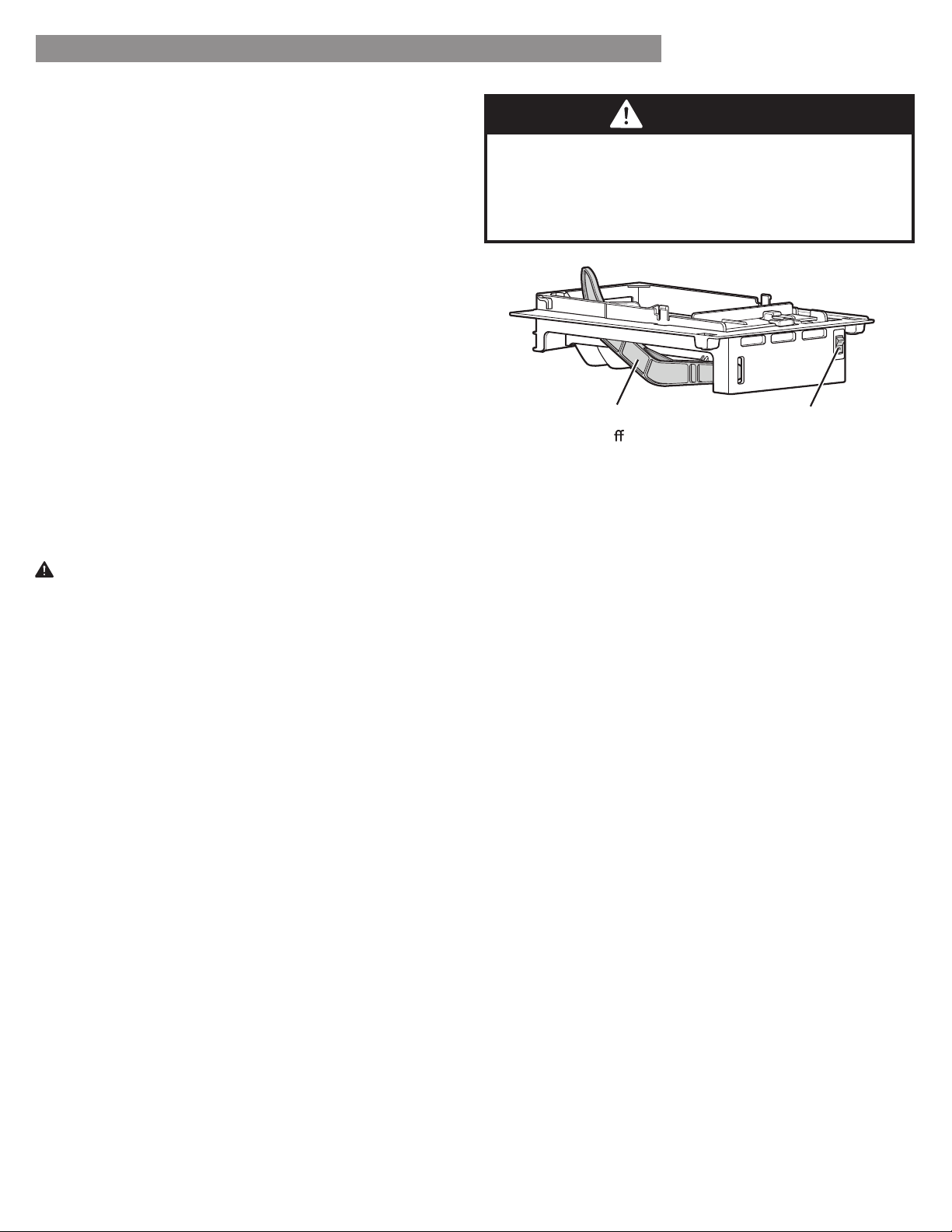
Articulating Mullion
This feature is a metal strip attached to the left door
that articulates (rotates) 90 degrees as the door is
closed, forming a mullion (base) for the left and right
door gaskets to seal against.
20
USING YOUR REFRIGERATOR
AUTOMATIC ICEMAKER
The icemaker will produce approximately 70-210 cubes
in a 24-hour period, depending on freezer compartment
temperature, room temperature, number of door openings
and other operating conditions.
• It takes about 12 to 24 hours for a newly installed
refrigerator to begin making ice. Wait 72 hours for full
ice production to occur.
• Ice making stops when the in-door ice bin is full. When
full, the in-door ice bin holds approximately 6-8 (12-16
oz) glasses of ice.
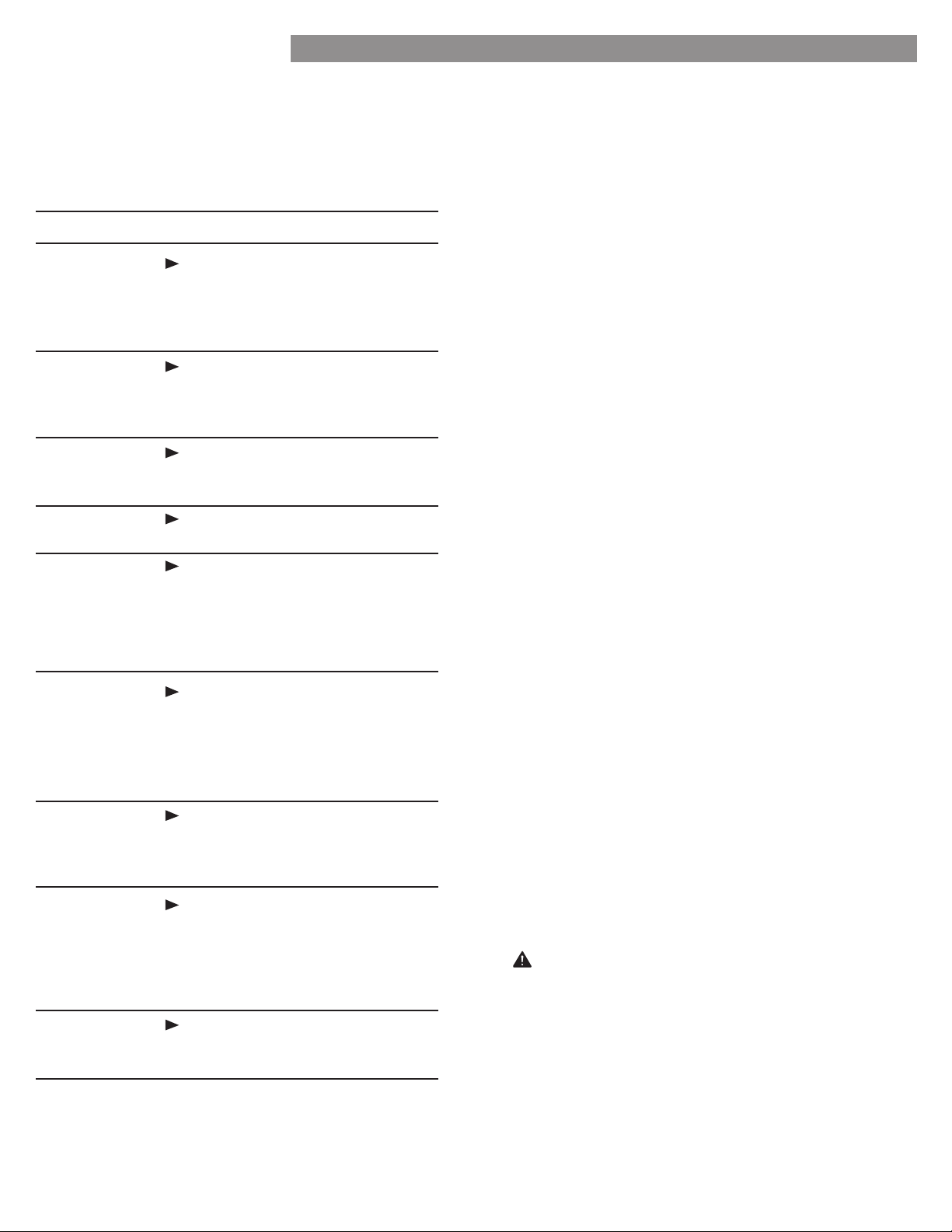
• To turn off the automatic icemaker, set the icemaker
switch to OFF (O). To turn on the automatic icemaker,
set the switch to ON (I).
• The water pressure must be between 20 and
120 psi on models without a water filter and between
40 and 120 psi on models with a water filter to
produce the normal amount and size of
ice cubes.
• Foreign substances or frost on the ice-detecting sensor
can interrupt ice production. Make sure the sensor area
is clean at all times for proper operation.
CAUTION
• The first ice produced after installation may include
particles or odor from the water supply line or the
water tank. Throw away the first few batches of
ice (about 24 cubes). This is also necessary if the
refrigerator has not been used for a long time.
• If discolored ice is produced, check the water supply.
If the problem continues, contact a Sears or other
qualifi ed service center. Do not use the ice or water
until the problem is corrected.
• Be sure nothing interferes with the sweep of the
Automatic Shut Off Arm.
• When the bin fills to the level of the Automatic Shut
Off Arm, the icemaker will stop producing ice.
• It is normal for some cubes to be stuck together.
• If ice is not used frequently, old ice cubes will become
cloudy, tase stale, and shrink.
• Never store beverage cans or other items in the ice
bin for the purpose of rapid cooling. Doing so may
damage the icemaker or the containers may burst.
• Never use thin crystal glass or crockery to collect ice.
Such containers may chip or break resulting in glass
fragments in the ice.
WARNING
Personal Injury Hazard
DO NOT place fingers or hands on the automatic ice
making mechanism while the refrigerator is plugged in.
WHEN YOU SHOULD SET THE ICEMAKER
POWER SWITCH TO OFF (O)
• When the water supply will be shut off for several
hours.
• When the ice bin is removed for more than one or two
minutes.
• When the refrigerator will not be used for several days.
NOTE: The ice bin should be emptied when the
icemaker ON/OFF switch is turned to the OFF position.
NORMAL SOUNDS YOU MAY HEAR
• The icemaker water valve will buzz as the icemaker fills
with water. If the power switch is in the ON (I) position,
it will buzz even if it has not yet been hooked up to
water. To stop the buzzing, move the power switch to
OFF (O).
NOTE: Keeping the power switch in the ON (I) position
before the water line is connected can damage the
icemaker.
• You will hear the sound of cubes dropping into the bin
and water running in the pipes as the icemaker refills.
PREPARING FOR VACATION
Set the icemaker power switch to OFF (O) and shut off
the water supply to the refrigerator.
NOTE: The ice bin should be emptied anytime the
icemaker ON/OFF switch is turned to the OFF (O)
position.
If the ambient temperature will drop below freezing, have
a qualifi ed technician drain the water supply system to
prevent serious property damage due to flooding caused
by ruptured water lines or connections.
Automatic
Shut O
Arm
Power Switch
21
FOOD STORAGE GUIDE
Wrap or store food in the refrigerator in airtight and
moisture-proof material unless otherwise noted. This
prevents food odor and taste transfer throughout the
refrigerator. For dated products, check date code to
ensure freshness.
STORING FROZEN FOOD
NOTE: Check a freezer guide or a reliable cookbook
for further information about preparing food for
freezing or food storage times.
Freezing
Your freezer will not quick-freeze a large quantity of
food. Do not put more unfrozen food into the freezer
than will freeze within 24 hours (no more than 2 to 3
lbs. of food per cubic foot of freezer space). Leave
enough space in the freezer for air to circulate around
packages. Be careful to leave enough room at the
front so the door can close tightly.
Storage times will vary according to the quality and
type of food, the type of packaging or wrap used
(how airtight and moisture-proof) and the storage
temperature. Ice crystals inside a sealed package are
normal. This simply means that moisture in the food
and air inside the package have condensed, creating
ice crystals.
NOTE: Allow hot foods to cool at room temperature
for 30 minutes, then package and freeze. Cooling hot
foods before freezing saves energy.
Packaging
Successful freezing depends on correct packaging.
When you close and seal the package, it must not
allow air or moisture in or out. If it does, you could
have food odor and taste transfer throughout the
refrigerator and could also dry out frozen food.
Packaging recommendations:
•
igid plastic containers with tightfitting lids
• Straight-sided canning/freezing jars
• Heavy-duty aluminum foil
• Plastic-coated paper
• Non-permeable plastic wraps
•
pecified freeergrade selfsealing plastic bags
Follow package or container instructions for proper
freezing methods.
Do not use
• Bread wrappers
• Non-polyethylene plastic containers
• Containers without tight lids
• Wax paper or wax-coated freezer wrap
• Thin, semi-permeable wrap
CAUTION: Do not keep beverage cans or plastic
food containers in the freezer compartment. They may
break or burst if they freeze.
Items How to
Butter or
margarine
Cheese
Milk
Eggs
Fruit
Leafy
vegetables
Vegetables
with skins
(carrots,
peppers)
Fish
Leftovers
Keep opened butter in a covered
dish or closed compartment.
When storing an extra supply,
wrap in freezer packaging and
freeze.
Store in the original wrapping
until you are ready to use it. Once
opened, rewrap tightly in plastic
wrap or aluminum foil.
Wipe milk cartons. For best
storage, place milk on interior
shelf.
Store in original carton on interior
shelf, not on door shelf.
Do not wash or hull the fruit
until it is ready to be used. Sort
and keep fruit in its original
container, in a crisper, or store in a
completely closed paper bag on a
refrigerator shelf.
Remove store wrapping and trim
or tear off bruised and discolored
areas. Wash in cold water and
drain. Place in plastic bag or
plastic container and store in
crisper.
Place in plastic bags or plastic
container and store in crisper.
tore fresh fish and shellfish in
the freezer section if they are not
being consumed the same day of
purchase. It is recommended to
consume fresh fish and shellfish the
same day purchased.
Cover leftovers with plastic wrap,
aluminum foil, or plastic containers
with tight lids.
USING YOUR REFRIGERATOR
22
REFRIGERATOR SECTION
WATER DISPENSER
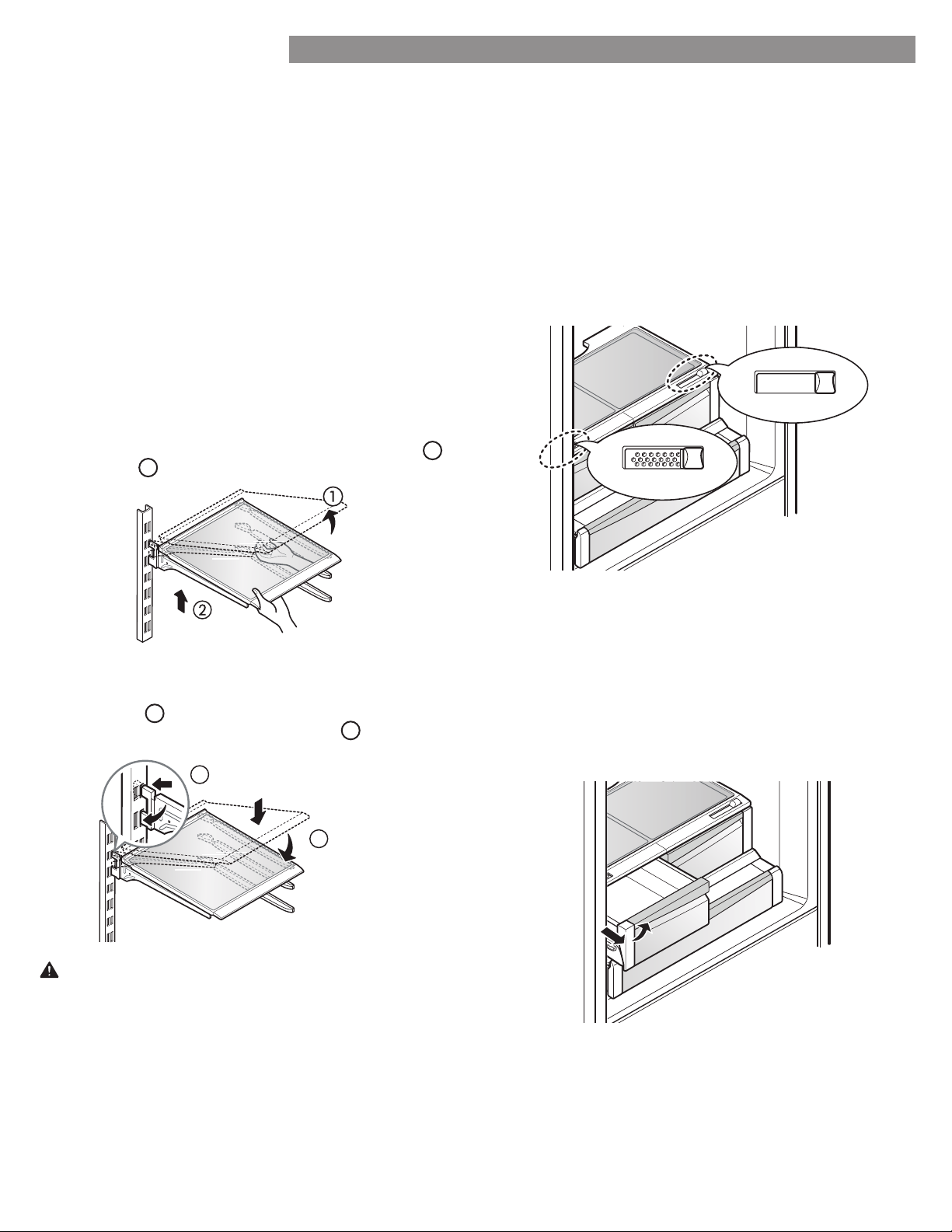
To dispense cold water, push on the dispenser switch
with a glass.
WATER TRAY
To remove the tray, press down on either of the front
corners and pull out.
NOTE: There is no drain beneath the tray. You may
need to empty the tray of any liquid that collects in it.
Some dripping may occur after dispensing. Hold your
cup beneath the dispenser for a few seconds after
dispensing to catch all of the drops.
Dispenser Switch
Push
Tabs
Holes
To replace the tray, slightly tilt up the front of the tray
and snap the tabs into the holes.
USING YOUR REFRIGERATOR
23
USING YOUR REFRIGERATOR
REFRIGERATOR SHELVES
The shelves in your refrigerator are adjustable to meet
your individual storage needs. Your model may have full
or split shelves.
Adjusting the shelves to fit diff erent heights of items will
make finding the exact item you want easier. Doing so will
also reduce the amount of time the refrigerator door is
open which will save energy.
IMPORTANT: Do not clean glass shelves with warm water
while they are cold. Shelves may break if exposed to
sudden temperature changes or impact.
NOTE: Glass shelves are heavy. Use special care when
removing them.
Adjusting Shelves (Split Shelf)
Remove shelves from the shipping position and replace
shelves in the position you want.
To remove a shelf—Tilt up the front of the shelf
1
and lift it
2
. Pull the shelf out.
CAUTION:
• Make sure that shelves are level from one side to the
other.
• Make sure that the shelf stopper is completely inserted
between the wall ribs.
• Make sure that hooks are inserted in the correct
position. (Left shelf to left hole, right shelf to right hole
only.)
Failure to do so may result in the shelf falling or spilling
food.
3
4
To reinstall a shelf—Tilt the front of the shelf
up and guide the shelf hooks into the slots at a
desired height
3
. Then, lower the front of the
shelf so that the hooks drop into the slots
4
.
HUMIDITY CONTROLLED CRISPER
The crispers provide fresher tasting fruit and vegetables by
letting you easily control humidity inside the drawer.
You can control the amount of humidity in the moisture-
sealed crispers by adjusting the control to any setting
between VEGETABLE and FRUIT.
• VEGETABLE keeps moist air in the crisper for best
storage of fresh, leafy vegetables.
• FRUIT lets moist air out of the crisper for best storage
of fruit.
REMOVING THE HUMIDITY CONTROLLED CRISPER
1. To remove, pull the drawer out to full extension.
2. Lift the front of the crisper up, then pull it straight out.
3. To install, slightly tilt up the front, insert the drawer into
the frame and push it back into place.
Fruit Vegetable
FruitVegetable
24
USING YOUR REFRIGERATOR
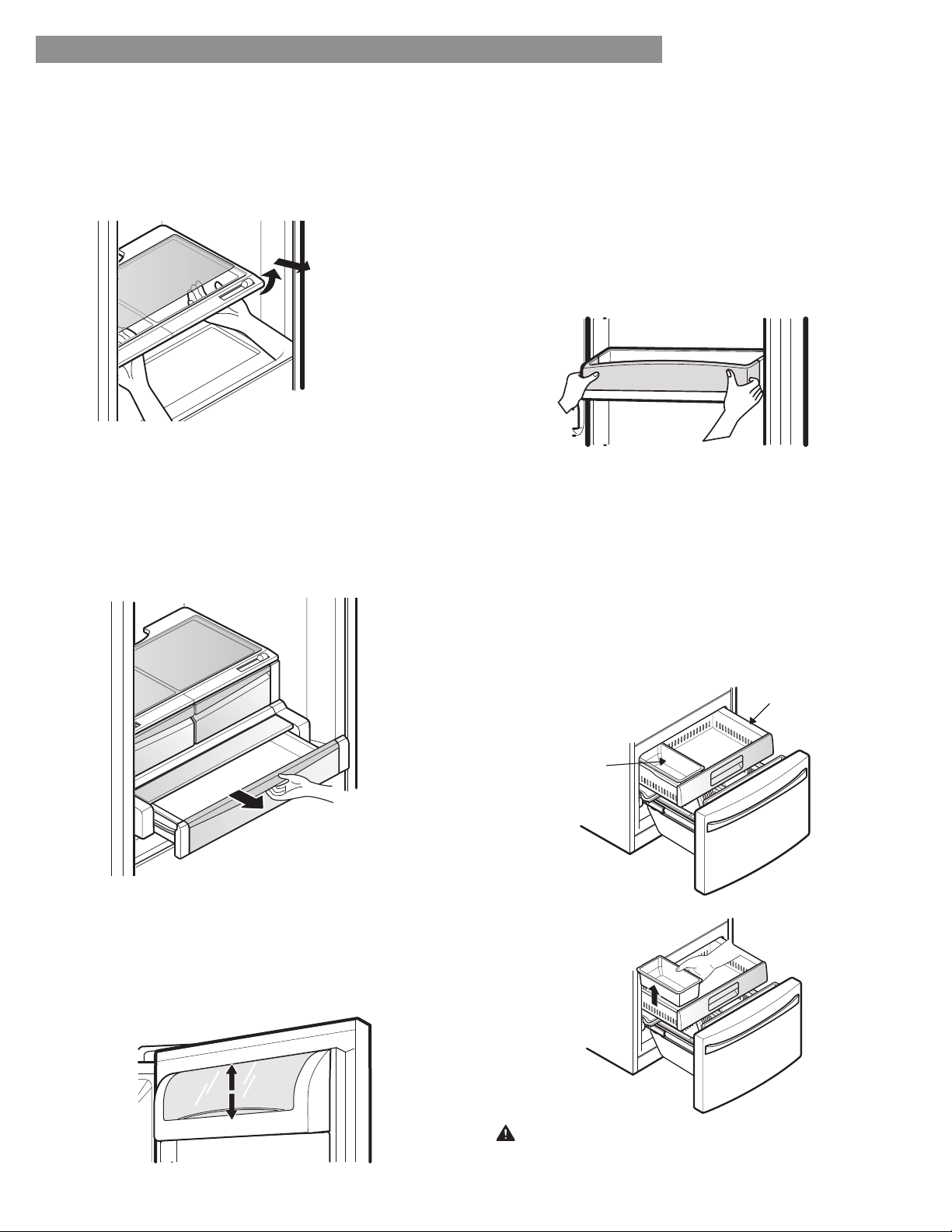
To remove the glass
1. Lift up the glass under the crisper cover.
2. Pull the glass up and out.
NOTE: Pantry drawer not shown for clarity.
PANTRY DRAWER
This drawer can be used for large party trays, deli items
and beverages. (Do not use this drawer for vegetables or
items that require high humidity.)
Pull forward to open. Lift slightly and pull out to remove.
DOOR BINS
The door bins are removable for easy cleaning and
adjustment.
1. To remove the bin, simply lift the bin up and pull
straight out.
2. To replace the bin, slide it in above the desired support
and push down until it snaps into place.
NOTE: Some bins may vary in appearance and will
only fit in one location.
DAIRY BIN
1. To remove the dairy bin, simply lift it and pull straight out.
2. To replace the dairy bin, slide it above the desired
location and push down until it stops.
FREEZER SECTION
ICE BIN
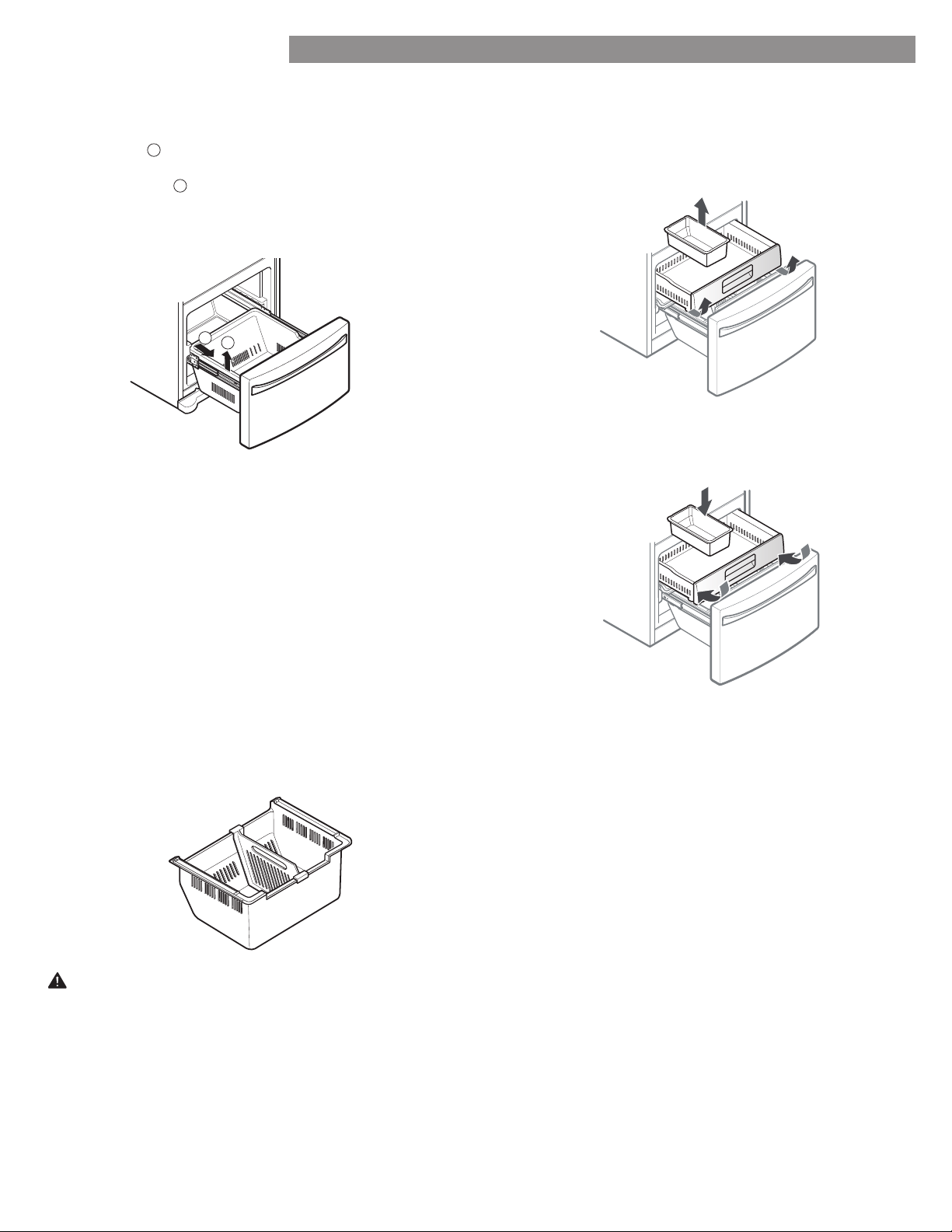
1. Pull the Freezer Drawer and the Pullout Drawer out as
far as possible to remove the Extra Ice Bin.
2. Gently lift and pull out the ice bin.
3. To replace, pull both drawers out as far as possible,
and set the bin in its correct position in the Pullout
Drawer. Close the Pullout Drawer and then the Freezer
Drawer.
CAUTION: Pinch hazard! Keep hands and feet clear
of the bottom of the freezer drawer when opening
and closing.
Extra Ice Bin
Pullout Drawer
25
USING YOUR REFRIGERATOR
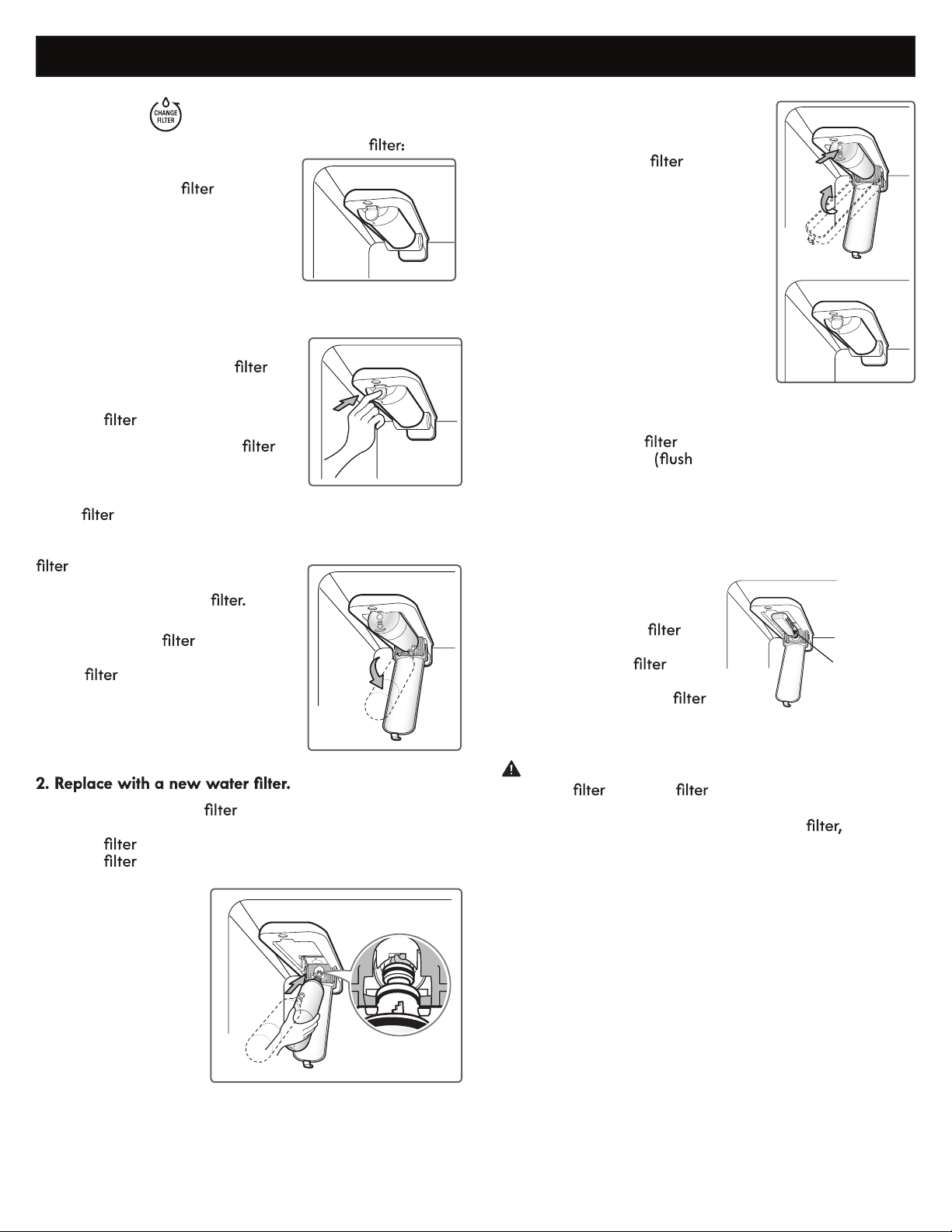
DURABASE REMOVAL AND REPLACEMENT
1. To remove the Durabase, open the drawer to full
extension
1
. Push the Durabase to the back as much as
possible, tilt the front of the Durabase up, and then lift
it up and out
2
.
2. To replace, tilt the back of the Durabase into the
drawer, then lower it down and into the rail assembly.
DURABASE DIVIDER
The Durabase divider allows you to organize the
Durabase area into sections. It can be adjusted from side
to side to accommodate items of diff erent sizes.
WARNING: If the Durabase divider is removed, there is
enough open space for children or pets to crawl inside.
To prevent accidental child and pet entrapment or
suff ocation risk, DO NOT allow children or pets to
touch or go near the drawer.
1
2
PULLOUT DRAWER
1. To remove, pull the drawer out to full extension. Lift
the drawer up and out, making sure to clear the rail
system.
2. To replace, with the drawer pulled out to full
extension, insert the drawer in the rail assembly.
NOTE: Assemble the Durabase before assembling
the pullout drawer. The pullout drawer needs
clearance in order to properly seat its rollers. If the
items are assembled improperly, the freezer door
may not close.
26
WATER FILTER
WATER FILTER
It is recommended that you replace the water
• Approximately every 6 months.
• When the water
indicator
turns on.
• When the water dispenser output
decreases.
• When the ice cubes are smaller
than normal.
•
Rotate the water
up into
position and close the cover.
The cover will click when closed
correctly.
3.
After the water
is replaced, dispense 2.5
gallons of water
for approximately 5 minutes)
to remove trapped air and contaminates from
the system. Do not dispense the entire 2.5 gallon
amount continuously. Depress and release the
dispenser pad for cycles of 30 seconds ON and 60
seconds OFF.
4. Water Filter Bypass Plug
Keep the water
bypass plug. You MUST
use the water
bypass plug when a
replacement water
cartridge is not available.
CAUTION: DO NOT operate refrigerator without
water or water plug installed.
NOTE: To purchase a replacement water
visit a
Sears store or call 1-800-4-MY-HOME
®
. Also, you may
order on-line at www.sears.com/partsdirect
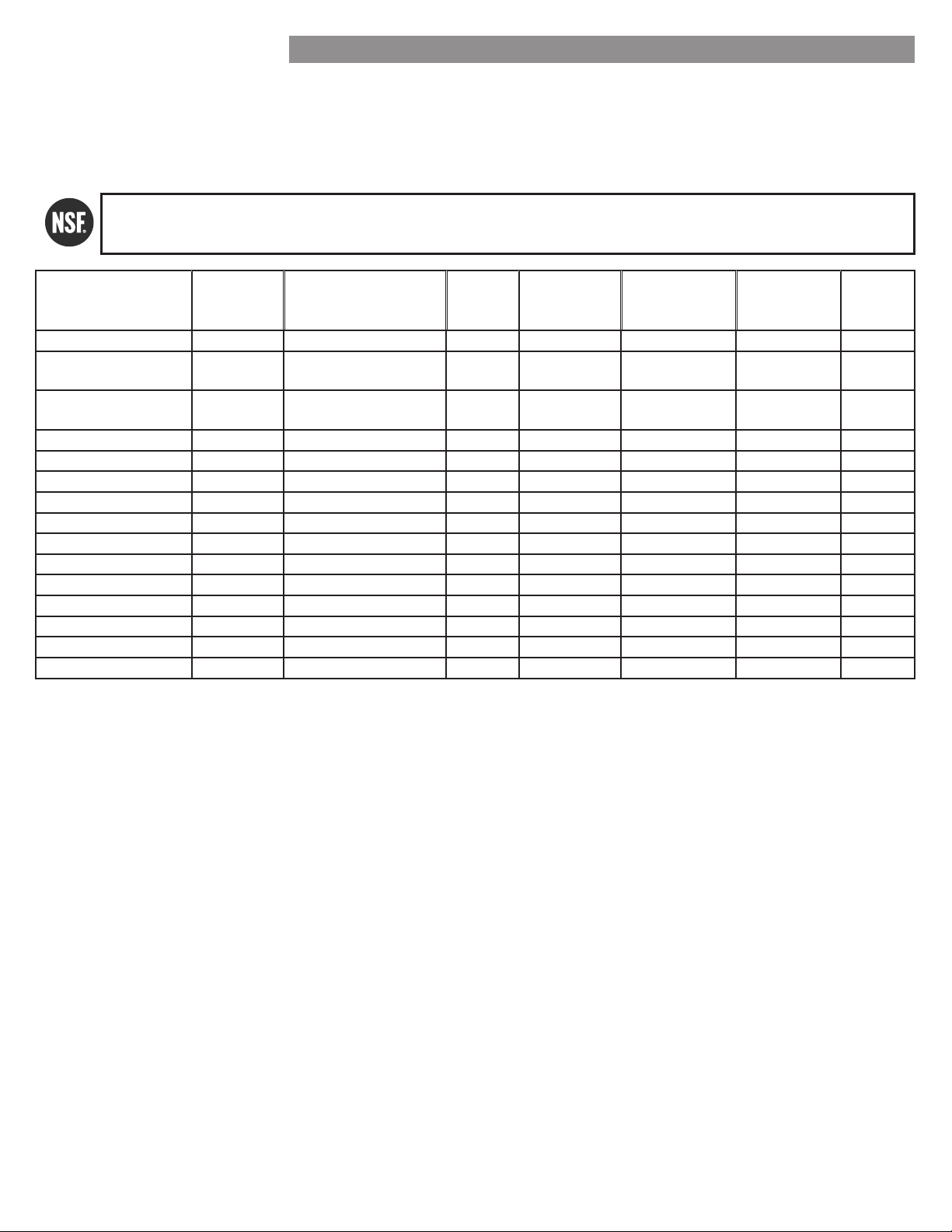
1. Remove the old water filter.
• Lower or remove the top left
shelf to allow the water
to
rotate all the way down.
• Press the push button to open the
water
cover.
NOTE: Replacing the water
causes a small amount of water
(around 1 oz. or 25 cc) to drain.
Before pushing the button to open the
water
cover, place a cup under
the front end of the cover to collect
any leaking water. Hold the water
upright, once it is removed, to
prevent any remaining water from
spilling out of the water
• Pull the water downward
and pull out. Make sure to rotate
the
down completely before
pulling it out of the manifold
hole.
•
Take the new water
out of its packaging and
remove the protective cover from the o-rings. With
water
tabs in the horizontal position, push the new
water
into the manifold hole until it stops.
Water Filter
Bypass Plug
27
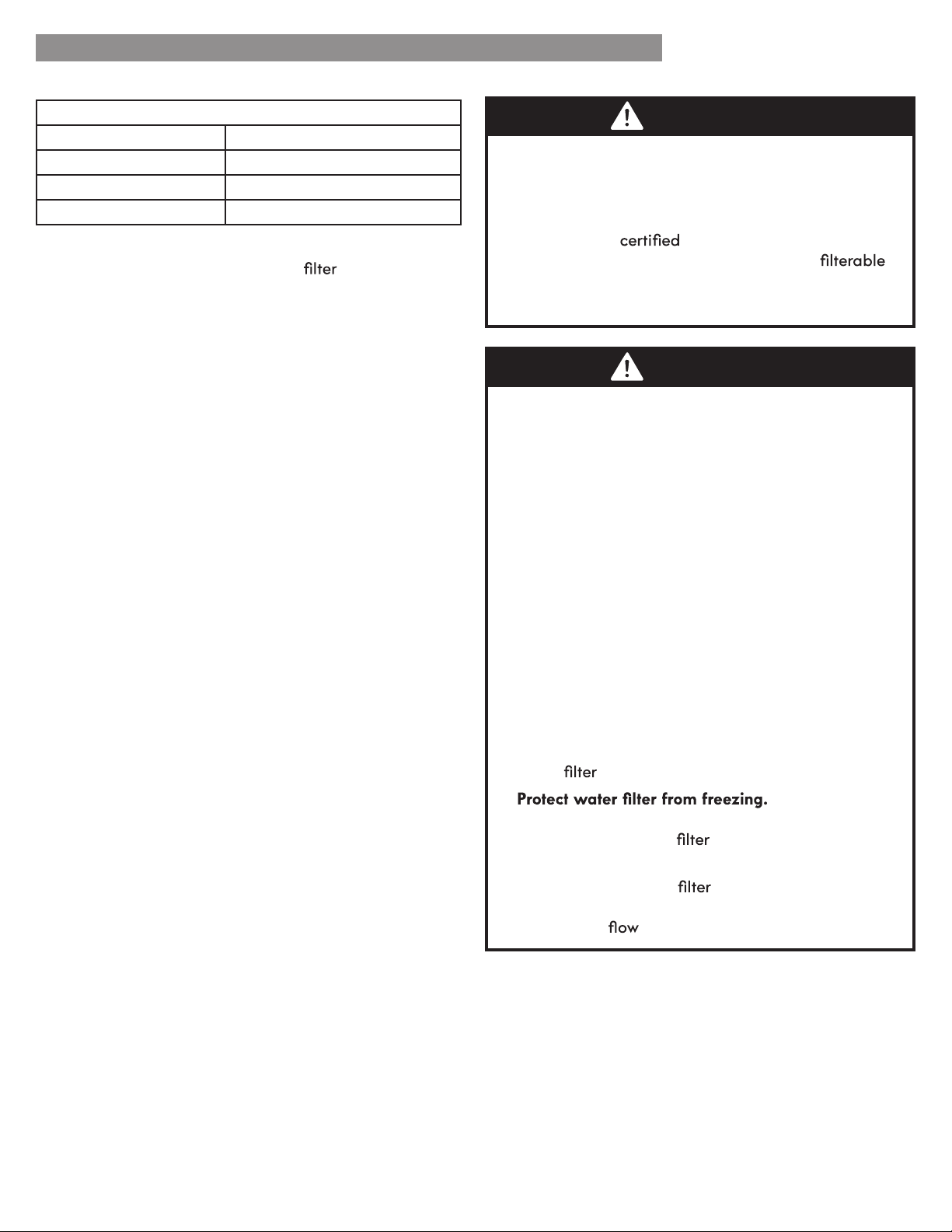
Performance Data Sheet
The concentration of the indicated substances in water entering the system was reduced to a concentration less than or
equal to the permissible limit for water leaving the system as specified in F tandard 42 and tandard .
* Based on the use of Cryptosporidium parvum oocysts
ystem tested and certified by F nternational against F tandard 42 and tandard for the
reduction of substances listed below.
Contaminant Reduction
Average
t
fill
Concentration
Reduction
Average
Product Water
Concentration
Max Permissible
Product Water
Concentration
NSF Reduction
Requirements
NSF Test
Report
Chlorine Taste and Odor 2.1 mg/L 2.0 mg/L ± 10% 97.2% 0.06 mg/L N/A J-00049247
Nominal Particulate Class I, ,
. to . m
5,600,000
pts/mL
At least 10,000 particles/mL 98.7% 73,000 pts/ml N/A J-00049282
Asbestos 190 MFL
7 to FL fibers greater
than m in length
>99% FL N/A J-0004928
Atrazine 0.0094 mg/L 0.009 mg/L ± 10% 94.7% 0.00005 mg/L 0.003 mg/L N/A J-00049293
Benzene 0.016 mg/L 0.015 mg/L ± 10% 96.7% 0.005 mg/L 0.005 mg/L N/A J-00049300
Carbofuran 0.08 mg/L 0.08 mg/L ± 10% 98.1% 0.002 mg/L 0.04 mg/L N/A J-00049294
Lindane 0.002 mg/L 0.002 mg/L ± 10% 98.2% 0.00004 mg/L 0.0002 mg/L N/A J-00051975
P-Dichlorobenzene 0.22 mg/L 0.225 mg/L ± 10% 99.8% 0.0005 mg/L 0.075 mg/L N/A J-00049298
Toxaphene 0.014 mg/L 0.015 mg/L ± 10% 93% 0.001 mg/L 0.003 mg/L N/A J-00049302
2,4-D 0.213 mg/L 0.210 mg/L ± 10% 95.2% 0.009 mg/L 0.07 mg/L N/A J-00049284
Lead pH @6.5 0.150 mg/L 0.15 mg/L ± 10% >99.3% 0.001 mg/L 0.010 mg/L N/A J-00051974
Lead pH @8.5 0.150 mg/L 0.15 mg/L ± 10% >99.3% 0.001 mg/L 0.010 mg/L N/A J-00049277
Mercury @ pH 6.5 0.0059 mg/L 0.006 mg/L ± 10% 96.1 0.0002 mg/L 0.002 mg/L N/A J-00053886
Mercury @ pH 8.5 0.0058 mg/L 0.006 mg/L ± 10% 90.1 0.0006 mg/L 0.002 mg/L N/A J-00051972
Cyst* 120,000 cysts/L Minimum 50,000 cysts/L 99.99% cystL N/A . J-00049281
WATER FILTER
28
It is essential that the manufacturer’s recommended
installation, maintenance and water
replacement
requirements be carried out for the product to perform as
advertised.
NOTE: While the testing was performed under standard
laboratory conditions, actual performance may vary.
For estimated costs of replacement water filter, please
call 1-800-469-4663 or visit our website at
www.sears.com/partsdirect
3M is a trademark of 3M Company.
NSF is a trademark of NSF International.
© 2009 3M Company. All rights reserved.
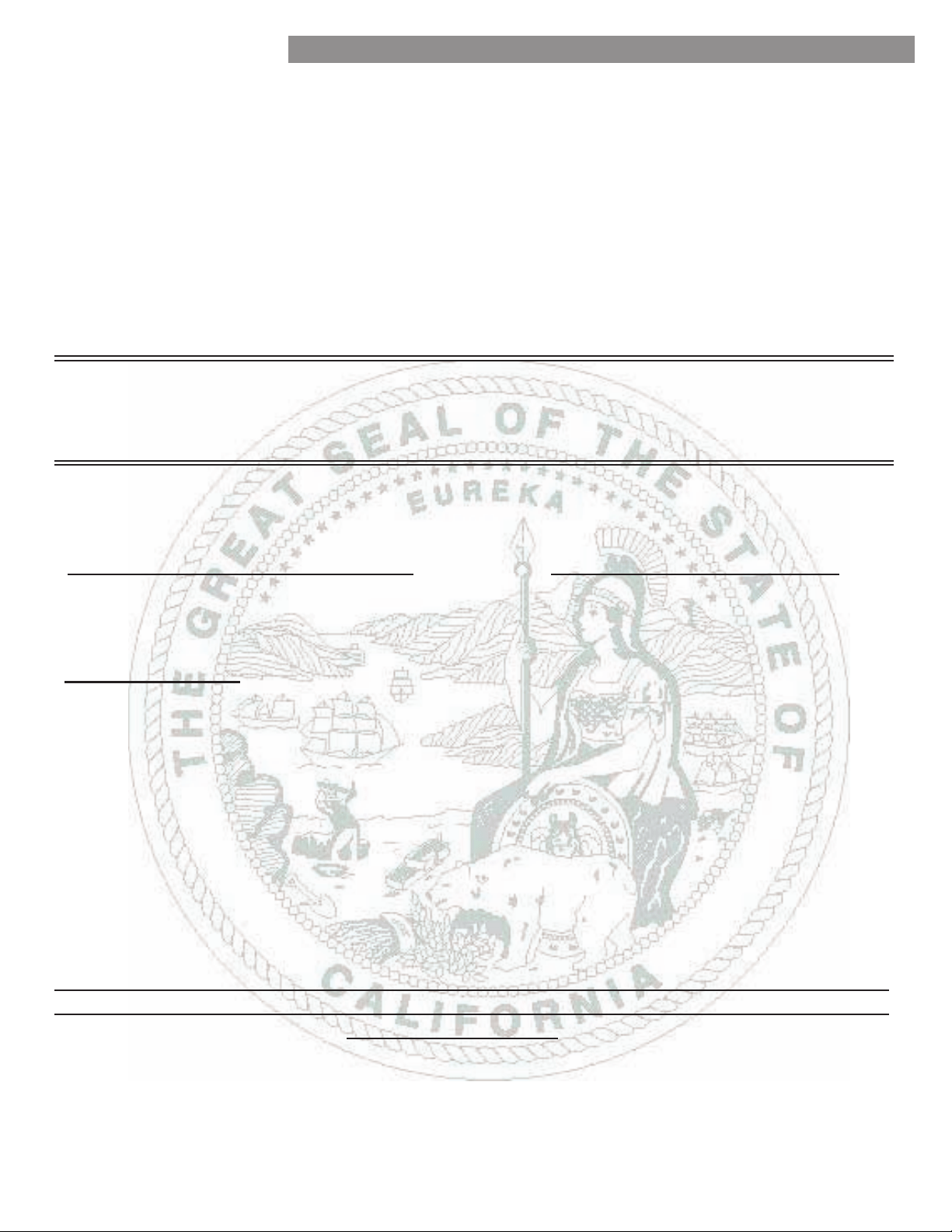
WARNING
CAUTION
To reduce the risk associated with ingestion of
contaminants: Do not use with water that is
microbiologically unsafe or of unknown quality
without adequate disinfection before and after of the
system.
Systems
for cyst reduction may be
used on disinfected water that may contain
cysts. EPA Establishment Number 10350-MN-005
To reduce the risk associated with property damage
due to water leakage:
• Read and follow the Water Filter instructions before
installation and use of this system.
• Installation and use MUST comply with all state and
local plumbing codes.
• Do not install if water pressure exceeds 120 psi (827
kPa). Contact a plumbing professional if you are
uncertain of how to check your water pressure.
• Do not install where water hammer conditions may
occur. If water hammer conditions exist, you must
install a water hammer arrester. Contact a plumbing
professional if you are uncertain of how to check for
this condition.
• Do not install on hot water supply lines.
The maximum operating water temperature of this
water
system is 100°F (38°C).
•
Do not operate
refrigerator in ambient conditions below 55°F
(12.7°C).
Drain water
when storing unit in
temperatures below 40°F (4.4°C).
• The disposable water
must be replaced every
six months, at the rated capacity, or if a noticeable
reduction in
rate occurs.
Application Guidelines/Water Supply Parameters
Service Flow 0.5 gpm (1.9 lpm)
Water Supply Potable Water
Water Pressure 40-120 psi (138 - 827 kPa)
Water Temperature 33°F - 100°F (0.6°C - 38°C)
WATER FILTER
29
WATER FILTER
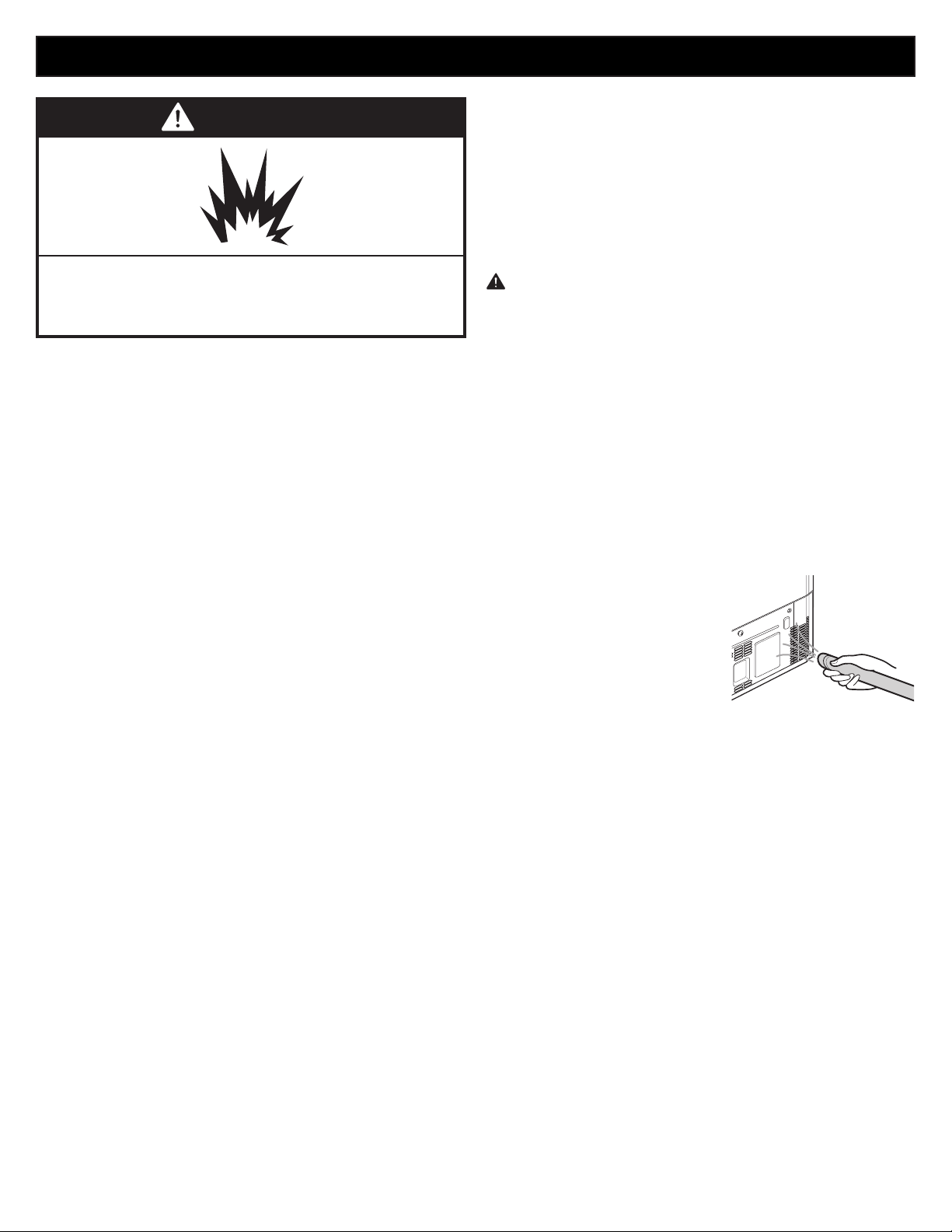
State of California
Department of Public Health
Water Treatment Device
Certificate Number
Date Issued: December 15, 2009
201909-
Manufacturer:
Sears Roebuck and Co.
The water treatment device(s) listed on this certificate have met the testing requirements pursuant to Section
116830 of the Health and Safety Code for the following health related contaminants:
sotsebsAstsyC
Lead
Mercury
2,4-D Reduction
Atrazine
Benzene
Carbofuran
Lindane
p-Dichlorobenzene
Toxaphene
Microbiological Contaminants and Turbidity
Inorganic/Radiological Contaminants
Organic Contaminants
200 gal
Rated Service Capacity:
0.5 gpm
Rated Service Flow:
Conditions of Certification:
30
CARE AND CLEANING
WARNING
Explosion Hazard
se nonflammable cleaner. Failure to do so can result
in fire, eplosion, or death.
Both the refrigerator and freezer sections defrost
automatically however, clean both sections about once a
month to prevent odors. Wipe up spills immediately.
GENERAL CLEANING TIPS
• Unplug refrigerator or disconnect power.
• Remove all removable parts, such as shelves, crispers,
etc. Refer to sections in Using Your Refrigerator for
removal instructions.
• Use a clean sponge or soft cloth and a mild detergent
in warm water. Do not use abrasive or harsh cleaners.
• Hand wash, rinse and dry all surfaces thoroughly.
• Plug in refrigerator or reconnect power.
EXTERIOR
Waxing external painted metal surfaces helps provide
rust protection. Do not wax plastic parts. Wax painted
metal surfaces at least twice a year using appliance wax
(or auto paste wax). Apply wax with a clean, soft cloth.
For products with a stainless steel exterior, use a clean
sponge or soft cloth and a mild detergent in warm water.
Do not use abrasive or harsh cleaners. Dry thoroughly
with a soft cloth.
INSIDE WALLS (allow freezer to warm up so
the cloth will not stick)
To help remove odors, you can wash the inside of the
refrigerator with a mixture of baking soda and warm
water. Mix 2 tablespoons of baking soda to 1 quart of
water (26 g soda to 1 liter water.) Be sure the baking soda
is completely dissolved so it does not scratch the surfaces
of the refrigerator.
DOOR LINERS AND GASKETS
Use a clean sponge or soft cloth and a mild detergent
in warm water. Do not use cleaning waxes, concentrated
detergents, bleaches, or cleaners containing petroleum on
plastic refrigerator parts.
PLASTIC PARTS (Covers and Panels)
Use a clean sponge or soft cloth and a mild detergent
in warm water. Do not use window sprays, abrasive
cleansers, or flammable fluids. These can scratch or
damage the material.
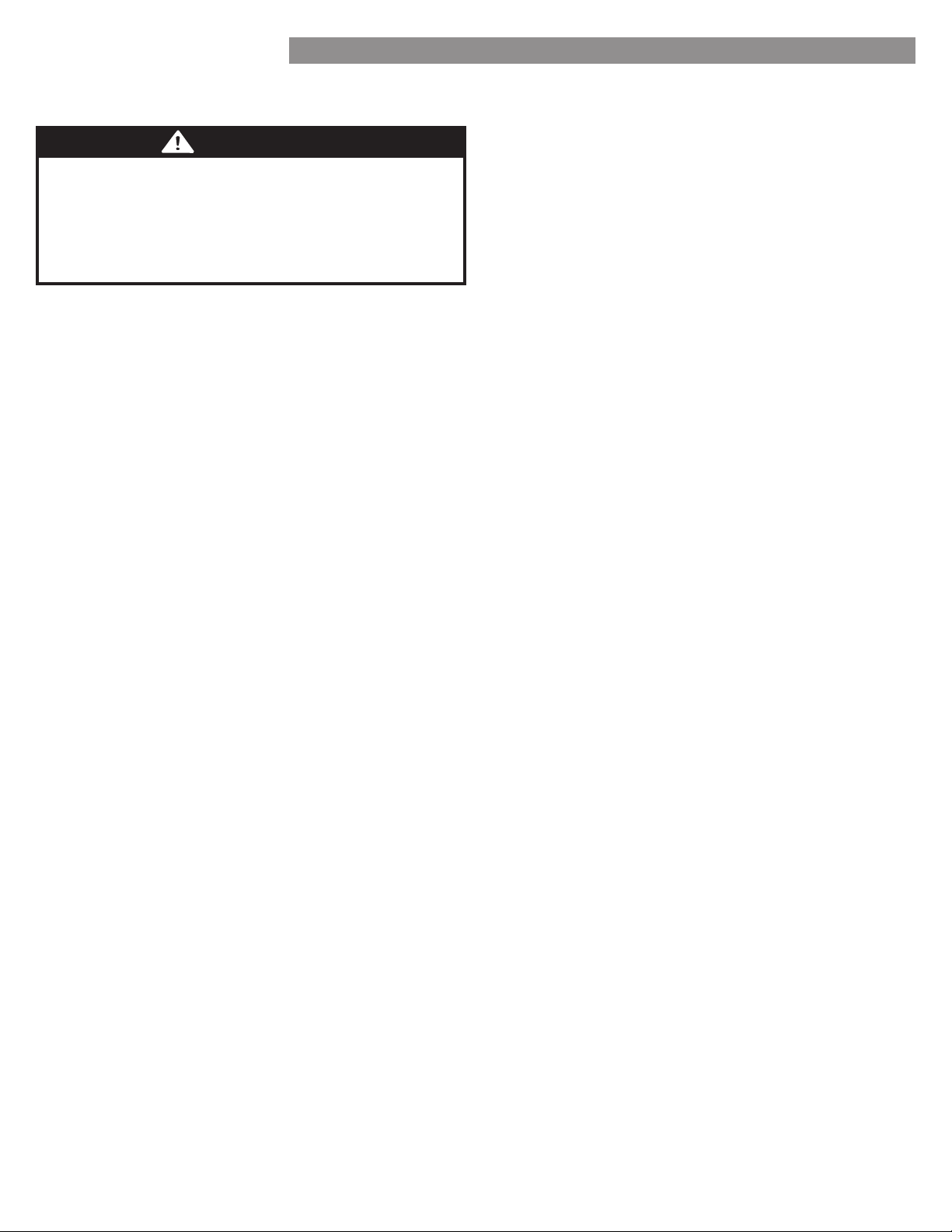
CONDENSER COILS
Use a vacuum cleaner with
an attachment to clean the
condenser cover and vents.
Do not remove the panel
covering the condenser
coil area.
CAUTION: While cleaning the inside, do not spray
water.
31
CARE AND CLEANING
CARE AND CLEANING
LIGHT REPLACEMENT
NOTE: The refrigerator and freezer compartment lights
are LED interior lighting, and service should be performed
by a qualified technician.
WARNING
Electrical Shock Hazard
Before replacing a Compartment Light, either unplug
the refrigerator or turn off power at the circuit breaker
or fuse box.
POWER INTERRUPTIONS
If the power will be out for 24 hours or less, keep all
refrigerator doors closed to help foods stay cold and
frozen.
2. If the power will be out for more than 24 hours, remove
all frozen food and store it in a frozen food locker.
WHEN YOU GO ON VACATION
If you choose to leave the refrigerator on while you are
away, follow these steps to prepare your refrigerator
before you leave.
Use up any perishables and freeze other items.
2.
Turn off the icemaker and empty the ice bin.
ttttffl
follow these steps.
Remove all food from the refrigerator.
2. Depending on your model, set the thermostat control
(refrigerator control) to OFF. See the Setting the
Controls section.
3. Clean the refrigerator, wipe it and dry well.
Tape rubber or wood blocks to the tops of both doors
to prop them open far enough for air to get in. This
stops odor and mold from building up.
WHEN YOU MOVE
When you are moving your refrigerator to a new home,
follow these steps to prepare it for the move.
Remove all food from the refrigerator and pack all
frozen food in dry ice.
2. Unplug the refrigerator.
3. Clean, wipe and dry thoroughly.
Take out all removable parts, wrap them well and
tape them together so they do not shift and rattle
during the move. Refer to the Using your Refrigerator
section for removable instructions.
5. Depending on the model, raise the front of the
refrigerator so it rolls easier OR screw in the leveling
legs all the way so they do not scrape the floor. ee
the Door Closing section.
Tape the doors shut and tape the power cord to the
refrigerator cabinet.
When you get to your new home, put everything back and
refer to the Refrigerator Installation section for preparation
instructions.
CARE AND CLEANING
32
CONNECTING THE WATER LINE
BEFORE YOU BEGIN
This water line installation is not covered by the refrigerator
warranty. Follow these instructions carefully to minimize the
risk of expensive water damage.
Water hammer (water banging in the pipes) in house
plumbing can cause damage to refrigerator parts and can
lead to water leakage or flooding. all a qualified plumber
to correct water hammer before installing the water supply
line to the refrigerator.
CAUTION: To prevent burns and product damage, only
connect the refrigerator water line to a cold water supply.
If you use your refrigerator before connecting the water
line, make sure the icemaker power switch is in the OFF (O)
position.
CAUTION: Do not install the icemaker tubing in areas
where temperatures fall below freezing.
WATER PRESSURE
A cold water supply. The water pressure must be between
2 and 2 psi on models without a water filter and
between 4 and 2 psi on models with a water filter.
If a tfilttt is connected
to your cold water supply, this water line installation is not
covered by the refrigerator warranty. Follow the following
instructions carefully to minimize the risk of expensive water
damage.
If a tfilttt is connected
to your cold water supply, the water pressure to the reverse
osmosis system needs to be a minimum of 40 to 60 psi (2.8
kgf/cm
2
~ 4.2 kgf/cm
2
, less than 2.. sec. to fill a cup
of 7 oz capacity).
If the water pressure from the reverse osmosis system is less
than 2 psi or . kgfcm2 (takes more than 4. sec to fill a
cup of 7 oz capacity):
• heck to see if the sediment filter in the reverse osmosis
system is blocked. eplace the filter if necessary.
• Allow the storage tank on the reverse osmosis system to
refill after heavy usage.
• If the issue concerning water pressure from reverse
osmosis remains, call a licensed, qualified plumber.
• All installations must be in accordance with local
plumbing code requirements.
CAUTION: Wear eye protection during installation to
prevent injury.
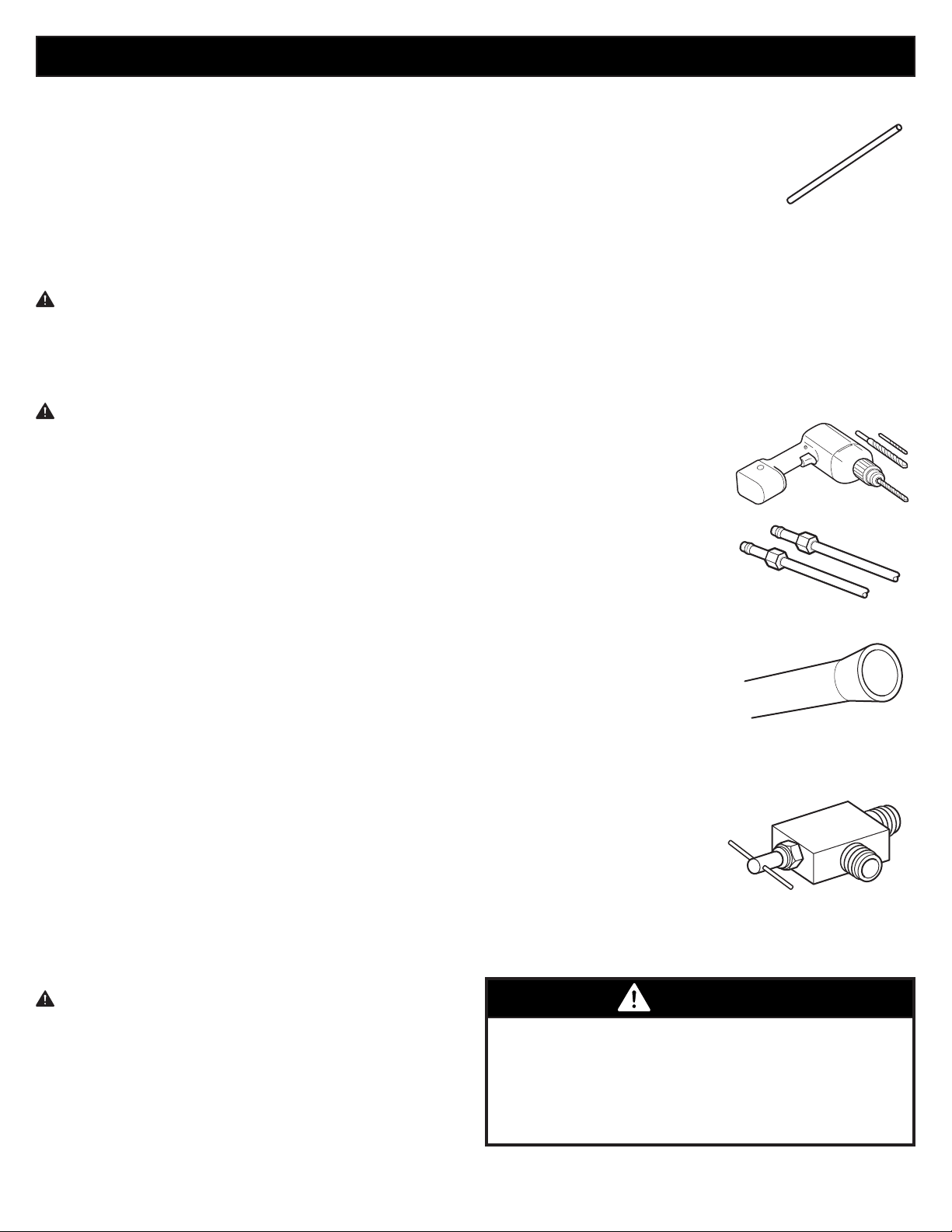
WHAT YOU WILL NEED
• Copper Tubing, ¼ in. outer
diameter, to connect the refrigerator
to the water supply. Be sure both
ends of the tubing are cut square.
• To determine how much tubing you
need: measure the distance from the water valve on the
back of the refrigerator to the water supply pipe. Then,
add feet (2.4 m). e sure there is sucient etra tubing
(about 8 feet [2.4 m] coiled into 3 turns of about 10 in.
[25 cm] diameter) to allow the refrigerator to move out
from the wall after installation.
• Power drill.
• ½ in. or adjustable wrench.
• Flat blade and Phillips head screwdrivers.
• Two ¼ in. outer diameter
compression nuts and
2 ferrules (sleeves) to
connect the copper tubing
to the shutoff valve and the
refrigerator water valve.
• If your existing copper water
line has a flared fitting at the
end, you will need an adapter
(available at plumbing supply
stores) to connect the water line
to the refrigerator OR you can
cut off the flared fitting with
a tube cutter and then use a
compression fitting.
• tffltt
to the cold water line. The
shutoff valve should have a water inlet with a minimum
inside diameter of / in. at the point of connection
to the COLD WATER LINE.
addletype shutoff valves
are included in many water
supply kits. Before purchasing,
make sure a saddle-type
valve complies with your local
plumbing codes.
NOTE: A Self Piercing Saddle Type Water Valve should
not be used.
WARNING
Electrical Shock Hazard
When using any electrical device (such as a power
drill) during installation, be sure the device is battery
powered, double insulated or grounded in a manner that
will prevent the hazard of electric shock.
33
INSTALLATION INSTRUCTIONS
nstall the shutoff valve on the nearest frequently used
drinking water line.
Turn on the nearest faucet to relieve the pressure on the
line.
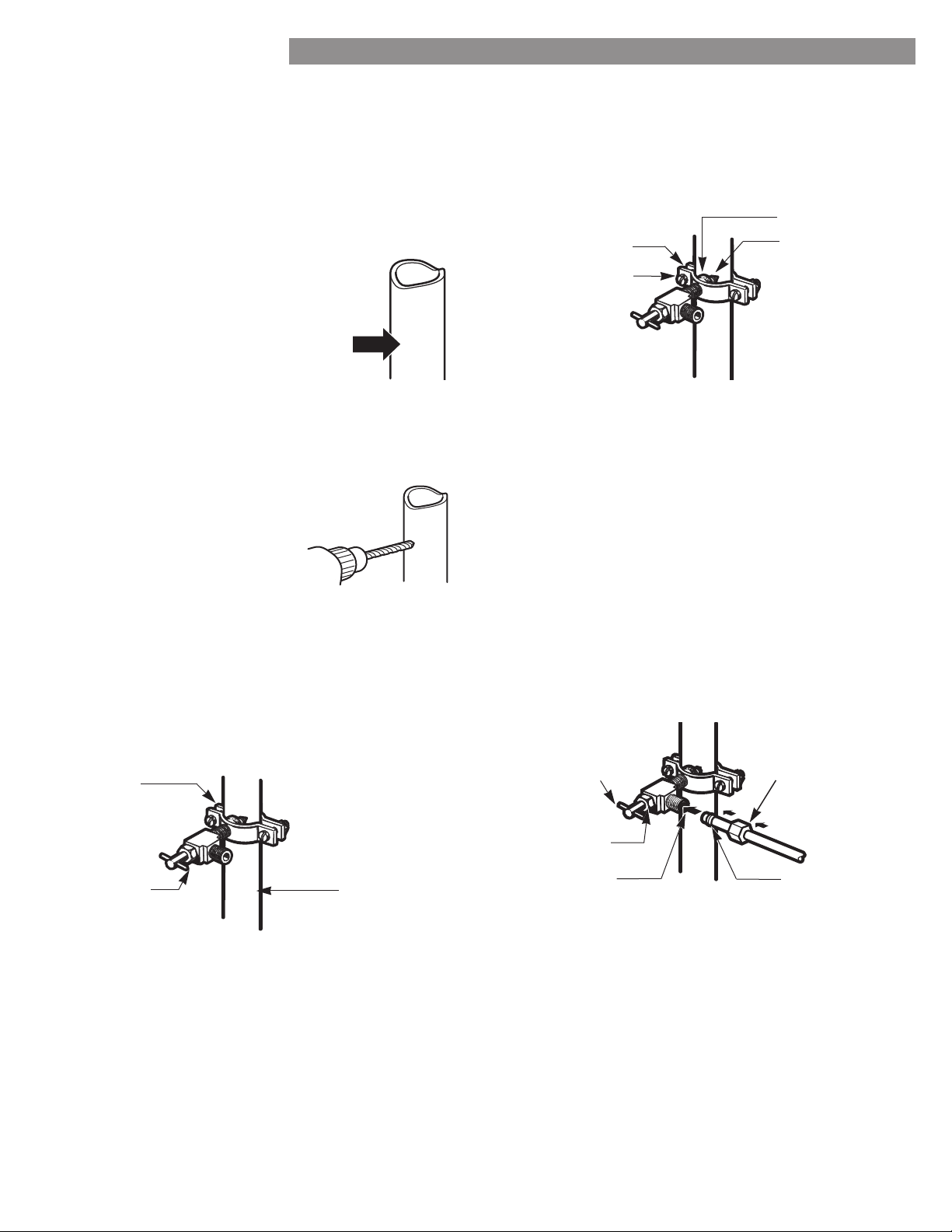
2. CHOOSE THE VALVE LOCATION
Choose a location for the valve that is
easily accessible. It is best to connect
into the side of a vertical water pipe.
When it is necessary to connect into
a horizontal water pipe, make the
connection to the top or side, rather
than at the bottom, to avoid drawing
off any sediment from the water pipe.
3. DRILL THE HOLE FOR THE VALVE
Drill a ¼ in. hole in the water pipe using a sharp bit.
Remove any burrs resulting from
drilling the hole in the pipe. Be
careful not to allow water to
drain into the drill. Failure to
drill a ¼ in. hole may result
in reduced ice production or
smaller cubes.
NOTE: The hookup line cannot be white, plastic
tubing. Licensed plumbers must use only copper
tubing NDA tubing #49595 or 49599 or Cross Link
Polyethylene (PEX) tubing.
Fasten the shutoff valve to the cold water pipe with
the pipe clamp.
NOTE: Commonwealth of Massachusetts Plumbing
Codes 248CMR shall be adhered to. Saddle valves are
illegal and use is not permitted in Massachusetts.
Consult with your licensed plumber.
5. TIGHTEN THE PIPE CLAMP
Tighten the clamp screws until the sealing washer
begins to swell.
NOTE: Do not overtighten clamp or you may crush the
tubing.
Route the tubing between the cold water line and the
refrigerator.
Route the tubing through a hole drilled in the wall or
floor (behind the refrigerator or adacent base cabinet)
as close to the wall as possible.
NOTE: e sure there is sucient etra tubing (about
8 feet coiled into 3 turns of about 10 in. diameter) to
allow the refrigerator to move out from the wall after
installation.
Place the compression nut and ferrule (sleeve) for
copper tubing onto the end of the tubing and connect
it to the shutoff valve. ake sure the tubing is fully
inserted into the valve. Tighten the compression nut
securely.
NOTE: Commonwealth of Massachusetts Plumbing
Codes 248CMR shall be adhered to. Saddle valves are
illegal and their use is not permitted in
Massachusetts. Consult with your licensed plumber.
Pipe Clamp
Saddle-Type
hutoff alve
Vertical Cold
Water Pipe
Pipe Clamp
Clamp Screw
Washer
Inlet End
Saddle-Type
hutoff alve
Packing Nut
Outlet Valve
Compression Nut
Ferrule (sleeve)
CONNECTING THE WATER LINE
34
CONNECTING THE WATER LINE
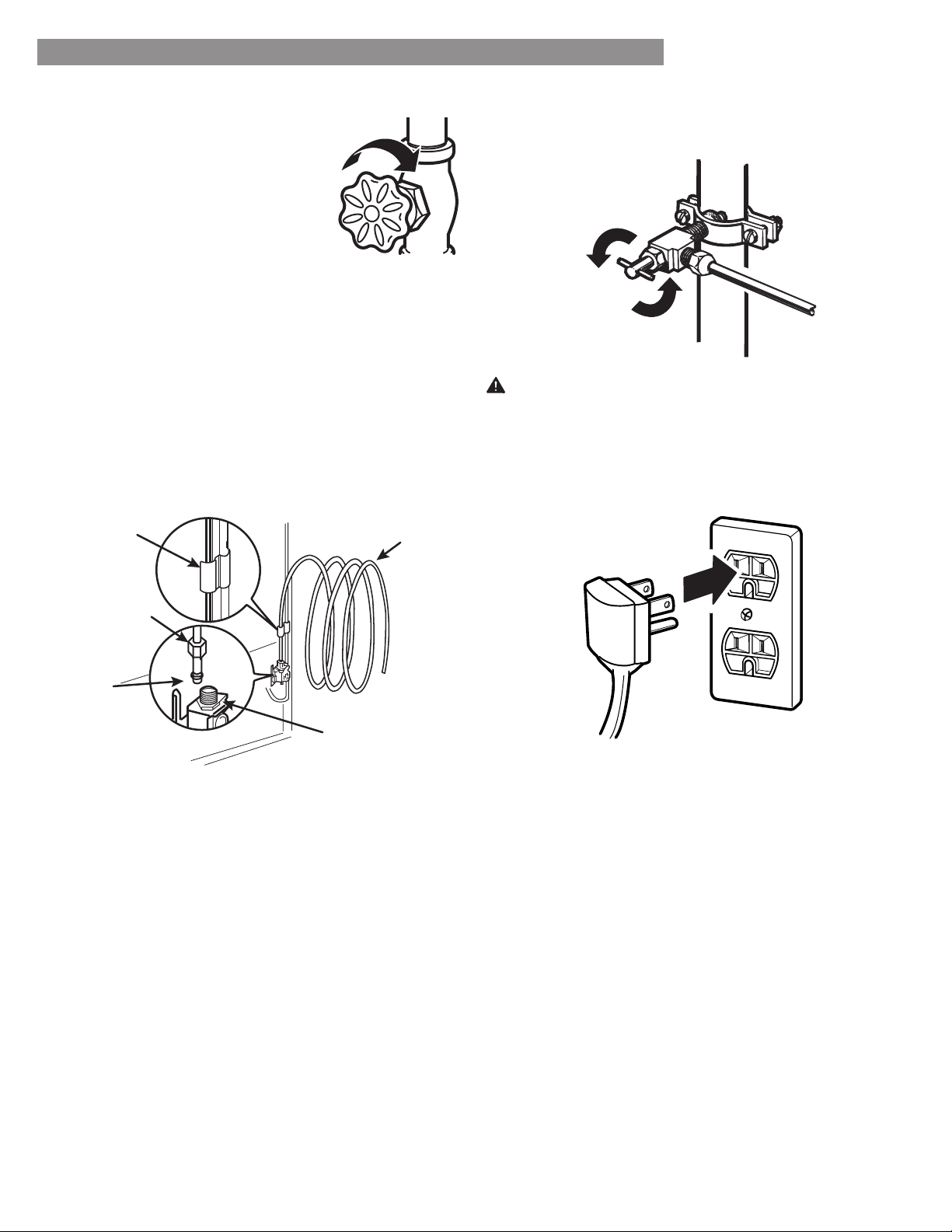
Turn the main water supply on and
flush out the tubing until the water
is clear.
hut the water off at the water
valve after about one quart of
water has been flushed through the
tubing.
. CONNECT THE TUBING TO THE
REFRIGERATOR
NOTE: Before making the connection to the
refrigerator, be sure that the refrigerator power cord is
not plugged into the wall outlet.
emove the plastic fleible cap from the water valve.
2. Place the compression nut and ferrule (sleeve) onto the
end of the tubing as shown.
3. Insert the end of the copper tubing into the connection
as far as possible. While holding the tubing, tighten the
fitting.
Tighten any connections that leak.
Arrange the coil of tubing so that it does not vibrate
against the back of the refrigerator or against the wall.
Push the refrigerator back to the wall.
Set the icemaker power switch to the ON position.
The icemaker will not begin to operate until it reaches
its operating temperature of 15°F (–9°C) or below. It
will then begin operation automatically if the icemaker
power switch is in the ON (I) position.
Tubing Clamp
¼ in. Tubing
¼ in.
Compression
Nut
Refrigerator
Connection
Ferrule
(sleeve)
CAUTION: Check to see if leaks occur at the water line
connections.
35
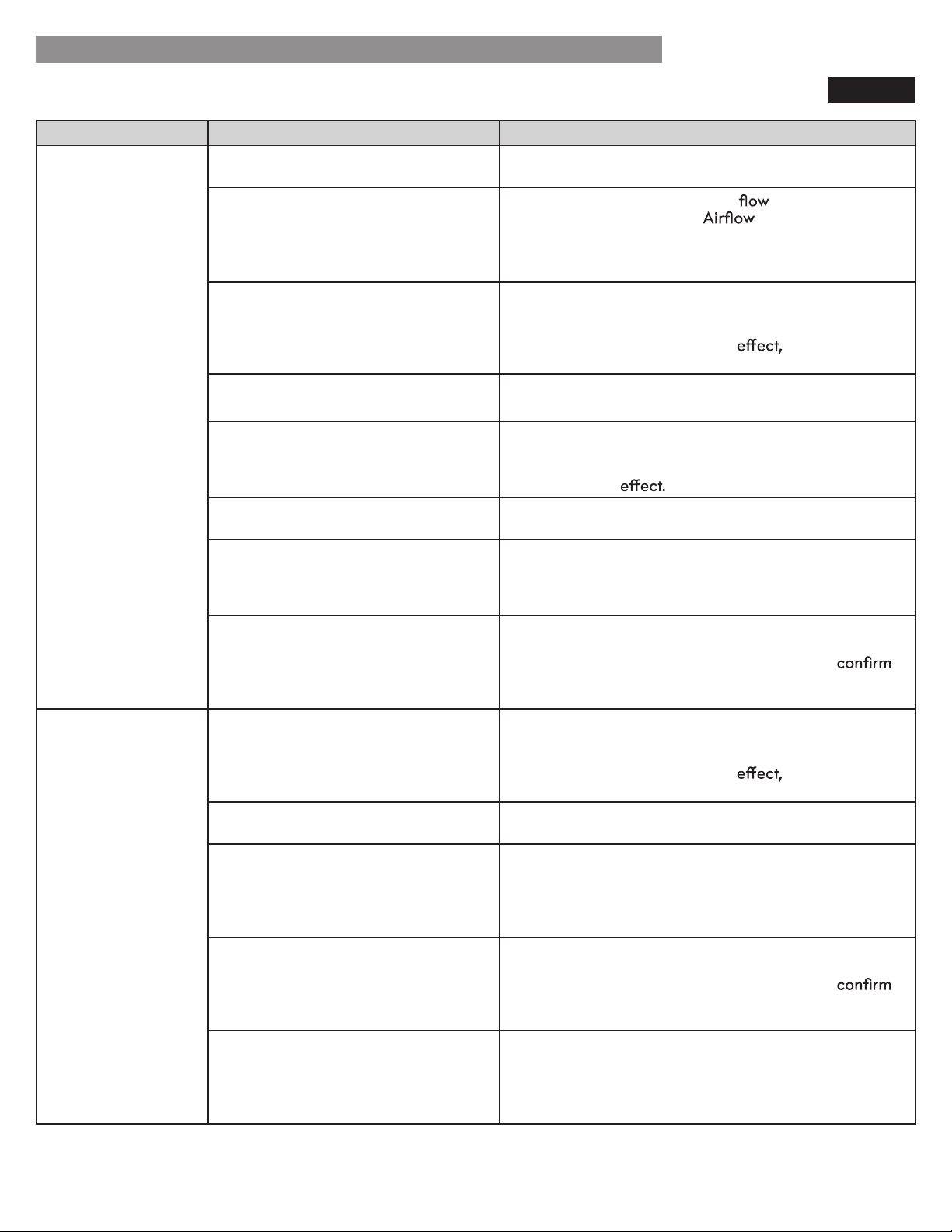
TROUBLESHOOTING GUIDE
Problem Possible Causes Solutions
Refrigerator and
Freezer section are
not cooling.
The refrigerator control is set to OFF
(some models).
Turn the control ON. Refer to the Setting the Controls
section for proper temperature settings.
Refrigerator is set to Demo Mode. Demo Mode allows the lights and control display to
work normally while disabling cooling to save energy
while on the showroom floor. efer to the Setting the
Controls section for instructions on how to disable
Demo Mode.
Refrigerator is in the defrost cycle. During the defrost cycle, the temperature of each
compartment may raise slightly. Wait 30 minutes and
confirm the proper temperature has been restored
once the defrost cycle has completed.
Refrigerator was recently installed. It may take up to 24 hours for each compartment to
reach the desired temperature.
Refrigerator was recently relocated. If the refrigerator was stored for a long period of time
or moved on its side, it is necessary for the refrigerator
to stand upright for 24 hours before connecting it to
power.
Cooling System runs
too much.
Refrigerator is replacing an older
model.
Modern refrigerators require more operating time but
use less energy due to more ecient technology.
Refrigerator was recently plugged in
or power restored.
The refrigerator will take up to 24 hours to cool
completely.
Door opened often or a large amount
of food / hot food was added.
Adding food and opening the door warms the
refrigerator, requiring the compressor to run longer in
order to cool the refrigerator back down. In order to
conserve energy, try to get everything you need out of
the refrigerator at once, keep food organized so it is
easy to find, and close the door as soon as the food is
removed. (Refer to the Food Storage Guide.)
Doors are not closed completely. Firmly push the doors shut. If they will not shut all the
way, see the Doors will not close completely or pop
open section in Parts & Features Troubleshooting.
Refrigerator is installed in a hot
location.
The compressor will run longer under warm conditions.
At normal room temperatures (70°F) expect your
compressor to run about 40% to 80% of the time.
Under warmer conditions, expect it to run even more
often. The refrigerator should not be operated above
110°F.
Condenser / back cover is clogged. Use a vacuum cleaner with an attachment to clean the
condenser cover and vents. Do not remove the panel
covering the condenser coil area.
COOLING
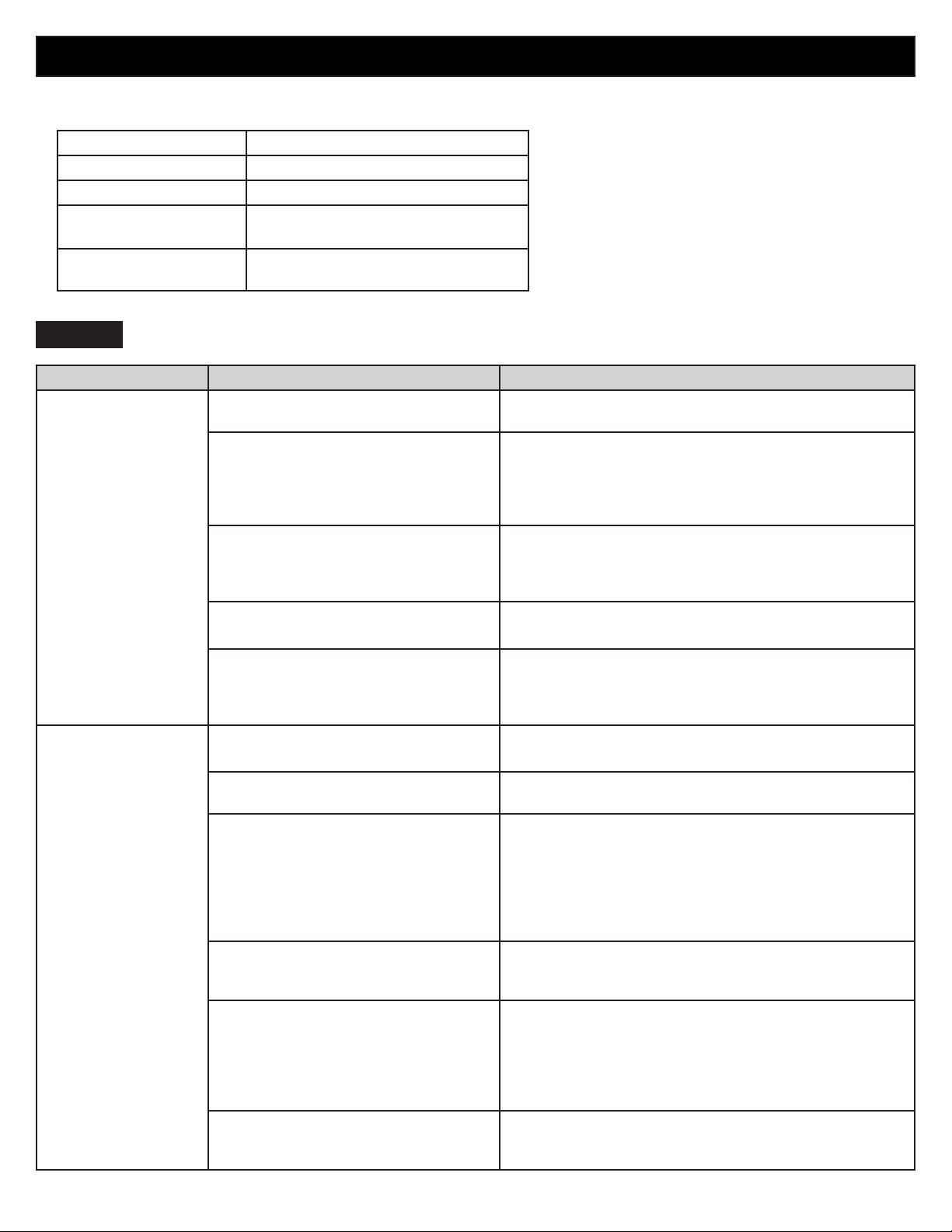
Before conducting troubleshooting, make sure that the following basic requirements are met:
Service Flow 0.5 gpm (1.9 lpm)
Water Supply Potable Water
Water Pressure 40-120 psi (138 - 827 kPa)
Operating Ambient
Temperature Limits
55°F - 110°F
Electrical Ratings
115 Volts, 60 Hz, AC only, and fused
at 15 or 20 amperes.
36
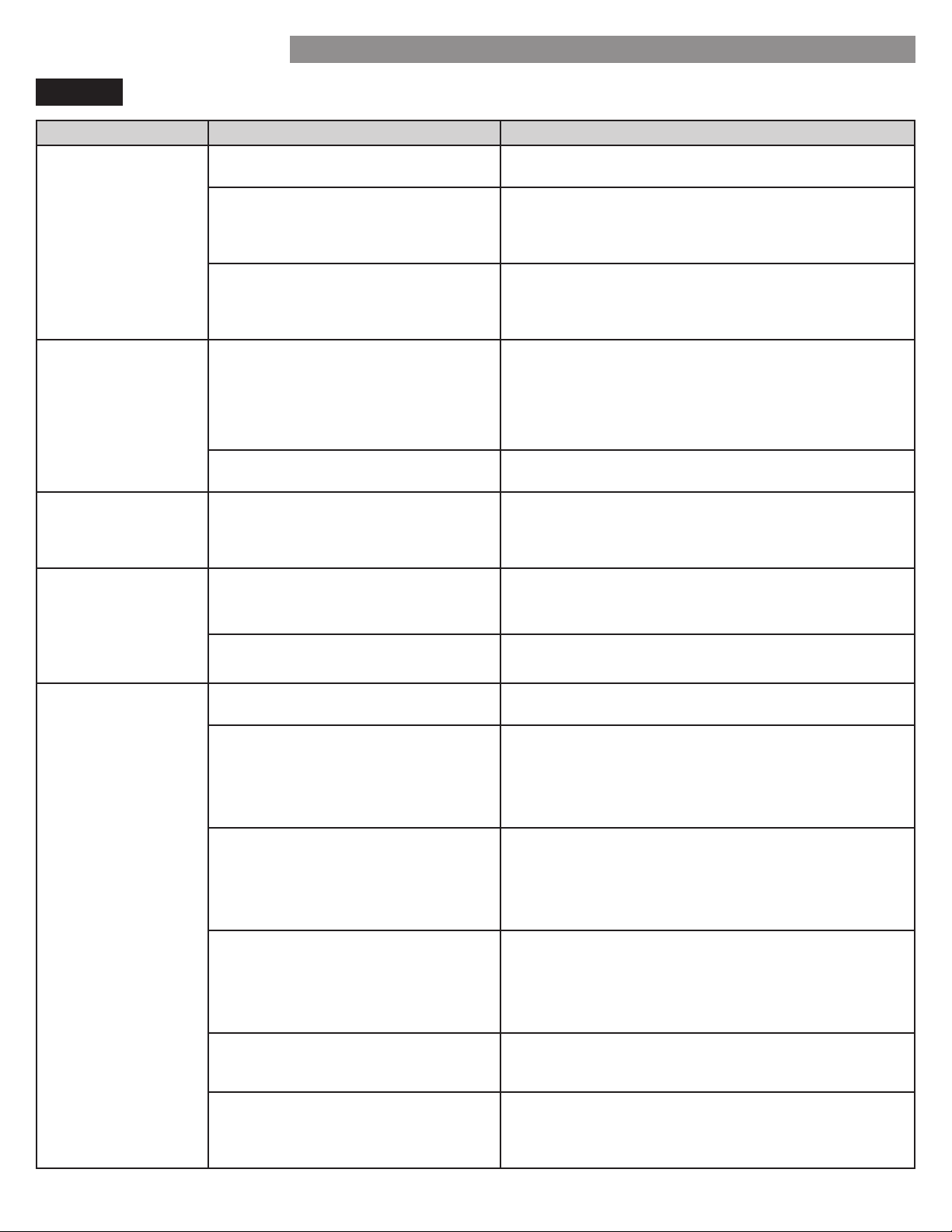
Problem Possible Causes Solutions
Refrigerator or
Freezer section is too
warm.
Refrigerator was recently installed. It may take up to 24 hours for each compartment to
reach the desired temperature.
Rearrange items to allow air to
throughout the
compartment. Refer to the
diagram in the
Using Your Refrigerator section.
Doors are opened often or for long
periods of time.
When the doors are opened often or for long periods
of time, warm, humid air enters the compartment.
This raises the temperature and moisture level within
the compartment. To lessen the
reduce the
frequency and duration of door openings.
Unit is installed in a hot location. The refrigerator should not be operated in
temperatures above 110F.
A large amount of food or hot food
was added to either compartment.
Adding food warms the compartment requiring the
cooling system to run. Allowing hot food to cool to
room temperature before putting it in the refrigerator
will reduce this
Doors not closed correctly. See the Doors will not close correctly or pop open
section in Parts & Features Troubleshooting.
Temperature control is not set
correctly.
If the temperature is too warm, adjust the control one
increment at a time and wait for the temperature to
stabilize. Refer to the Setting the Controls section for
more information.
Defrost cycle has recently completed. During the defrost cycle, the temperature of each
compartment may raise slightly and condensation may
form on the back wall. Wait 30 minutes and
the proper temperature has been restored once the
defrost cycle has completed.
Interior moisture
buildup.
Doors are opened often or for long
periods of time.
When the doors are opened often or for long periods
of time, warm, humid air enters the compartment.
This raises the temperature and moisture level within
the compartment. To lessen the
reduce the
frequency and duration of door openings.
Doors not closed correctly. See the Doors will not close correctly section in the
Troubleshooting section.
Weather is humid. Humid weather allows additional moisture to enter the
compartments when the doors are opened leading to
condensation or frost. Maintaining a reasonable level
of humidity in the home will help to control the amount
of moisture that can enter the compartments.
Defrost cycle recently completed. During the defrost cycle, the temperature of each
compartment may raise slightly and condensation may
form on the back wall. Wait 30 minutes and
that the proper temperature has been restored once
the defrost cycle has completed.
Food is not packaged correctly. Food stored uncovered or unwrapped, and damp
containers can lead to moisture accumulation within
each compartment. Wipe all containers dry and store
food in sealed packaging to prevent condensation and
frost.
COOLING
TROUBLESHOOTING GUIDE
The air vents are blocked. Cold air
circulates from the freezer to the
fresh food section and back again
through air vents in the wall dividing
the two sections.
37
TROUBLESHOOTING GUIDE
Problem Possible Causes Solutions
Food is freezing
in the refrigerator
compartment.
Food with high water content was
placed near an air vent.
Rearrange items with high water content away from
air vents.
Refrigerator temperature control is set
incorrectly.
If the temperature is too cold, adjust the control one
increment at a time and wait for the temperature to
stabilize. Refer to the Setting the Controls section for
more information.
Refrigerator is installed in a cold
location.
When the refrigerator is operated in temperature
below 41°F (5°C), food can freeze in the refrigerator
compartment. The refrigerator should not be operated
in temperature below 55°F (13°C).
Frost or ice crystals
form on frozen food
(outside of package).
Door is opened frequently or for long
periods of time.
When the doors are opened often or for long periods
of time, warm, humid air enters the compartment. This
raises the temperature and moisture level within the
compartment. Increased moisture will lead to frost
and condensation. To lessen the effect, reduce the
frequency and duration of door openings.
Door is not closing properly. Refer to the Doors will not close correctly or pop
open section in the Troubleshooting section.
Refrigerator or
Freezer section is too
cold.
Incorrect temperature control settings. If the temperature is too cold, adjust the control one
increment at a time and wait for the temperature to
stabilize. Refer to the Setting the Controls section for
more information.
Frost or ice crystals
on frozen food
(inside of sealed
package).
Condensation from food with a high
water content has frozen inside of the
food package.
This is normal for food items with a high water
content.
Food has been left in the freezer for
a long period of time.
Do not store food items with high water content in the
freezer for a long period of time.
Icemaker is not
making enough ice.
Demand exceeds ice storage
capacity.
The icemaker will produce approximately 100 cubes in
a 24 hour period.
House water supply is not connected,
valve is not turned on fully, or valve is
clogged.
Connect the refrigerator to a cold water supply with
adequate pressure and turn the water shutoff valve
fully open.
If the problem persists, it may be necessary to contact
a plumber.
ater filter has been ehausted. t is recommended that you replace the water filter
• Approximately every six months.
• hen the water filter indicator turns on.
• When the water dispenser output decreases.
• When the ice cubes are smaller than normal.
Low house water supply pressure. The water pressure must be between 20 and 120 psi
on models without a water filter and between 4 and
2 psi on models with a water filter.
If the problem persists, it may be necessary to contact
a plumber.
everse smosis filtration system is
used.
everse osmosis filtration systems can reduce the
water pressure below the minimum amount and result
in icemaker issues. (Refer to Water Pressure section.)
Tubing connecting refrigerator to
house supply valve is kinked.
The tubing can kink when the refrigerator is moved
during installation or cleaning resulting in reduced
water flow. traighten or repair the water supply line
and arrange it to prevent future kinks.
COOLING/ICE & WATER
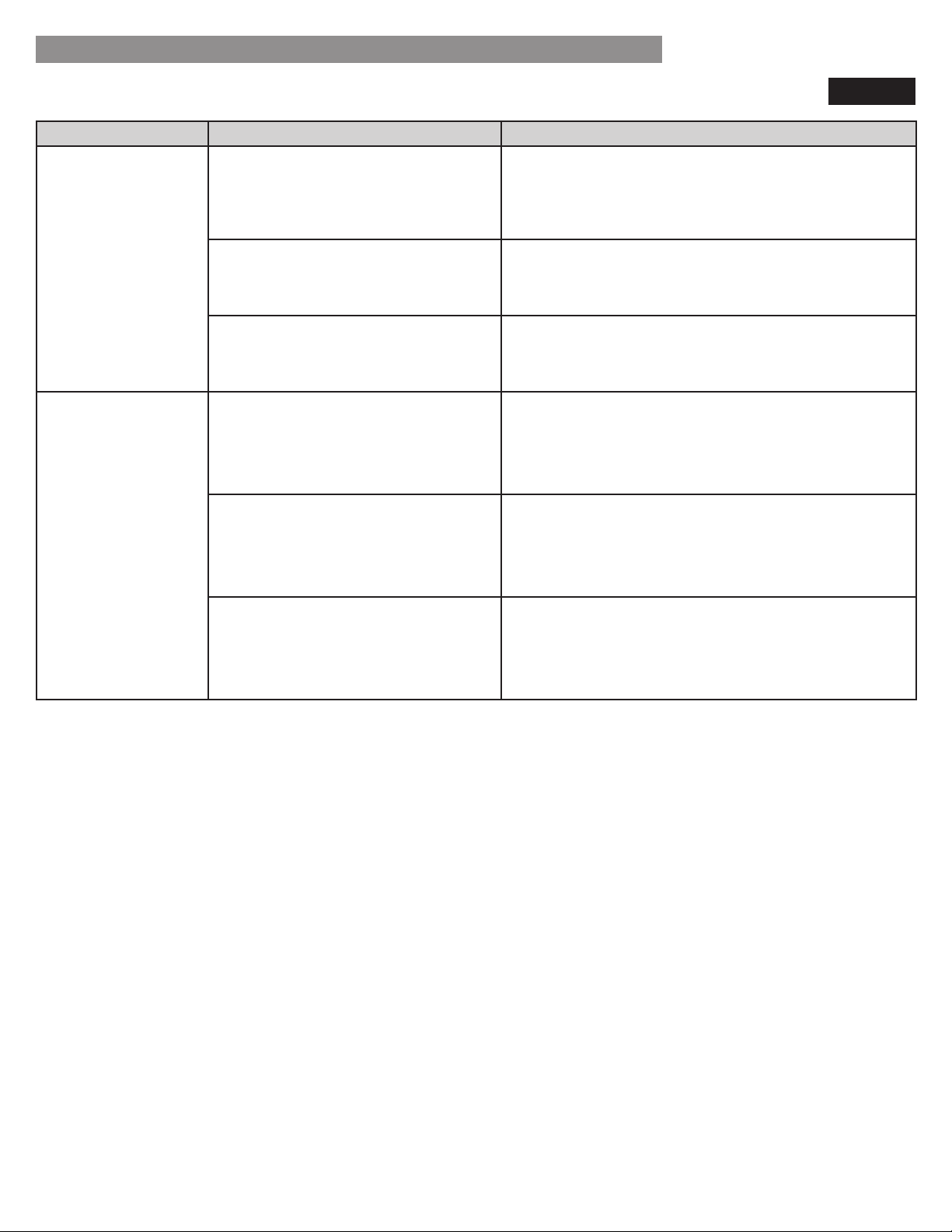
38
Problem Possible Causes Solutions
Icemaker is not
making enough ice
(continued).
Doors are opened often or for long
periods of time.
If the doors of the unit are opened often, ambient
air will warm the refrigerator which will prevent the
unit from maintaining the set temperature. Lowering
the refrigerator temperature can help, as well as not
opening the doors as frequently.
Doors are not closed completely. If the doors are not properly closed, ice production
will be affected. ee the Doors will not close
completely or pop open section in Parts & Features
Troubleshooting for more information.
The temperature setting for the
freezer is too warm.
The recommended temperature for the freezer
compartment for normal ice production is 0°F. If the
freezer temperature is warmer, ice production will be
affected.
Dispensing water
slowly.
ater filter has been ehausted. t is recommended that you replace the water filter
• Approximately every six months.
• hen the water filter indicator turns on.
• When the water dispenser output decreases.
• When the ice cubes are smaller than normal.
everse osmosis filtration system is
used.
everse osmosis filtration systems can reduce the water
pressure below the minimum amount and result in
icemaker issues.
If the problem persists, it may be necessary to contact
a plumber.
Low house water supply pressure. The water pressure must be between 20 and 120 psi on
models without a water filter and between 4 and 2
psi on models with a water filter.
If the problem persists, it may be necessary to contact
a plumber.
ICE & WATER
TROUBLESHOOTING GUIDE
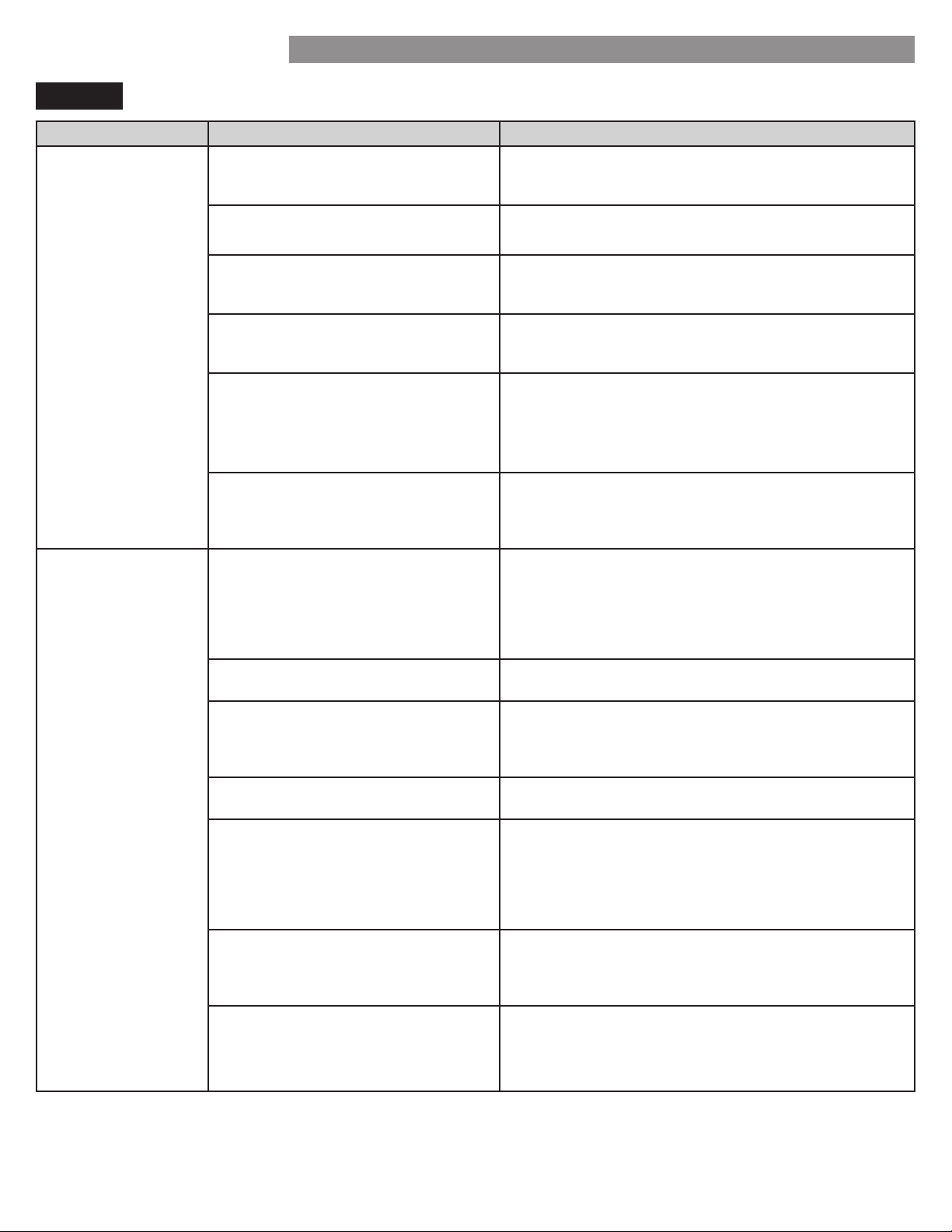
39
TROUBLESHOOTING GUIDE
Problem Possible Causes Solutions
Icemaker is not
making ice.
Refrigerator was recently installed or
icemaker recently connected.
It may take up to 24 hours for each compartment to
reach the desired temperature and for the icemaker to
begin making ice.
Icemaker not turned on. Locate the icemaker ON/OFF
switch and confirm that
it is in the ON (I) position.
The ice detecting sensor is obstructed. Foreign substances or frost on the ice-detecting sensor
can interrupt ice production. Make sure that the sensor
area is clean at all times for proper operation.
The refrigerator is not connected to
a water supply or the supply shutoff
valve is not turned on.
Connect refrigerator to the water supply and turn the
water shutoff valve fully open.
cemaker shutoff (arm or sensor)
obstructed.
f your icemaker is equipped with an ice shutoff arm,
make sure that the arm moves freely. If your icemaker
is equipped with the electronic ice shutoff sensor,
make sure that there is a clear path between the two
sensors.
everse osmosis water filtration
system is connected to your cold
water supply.
everse osmosis filtration systems can reduce the
water pressure below the minimum amount and result
in icemaker issues. (Refer to the Water Pressure
section.)
Not dispensing water. New installation or water line recently
connected.
ispense 2. gallons of water (flush for approimately
5 minutes) to remove trapped air and contaminates
from the system. Do not dispense the entire 2.5
gallon amount continuously. Depress and release the
dispenser pad for cycles of 30 seconds ON and 60
seconds OFF.
The dispenser panel is locked. Press and hold the Control Lock button for three
seconds to unlock the control panel and dispenser.
The dispenser is not set for water
dispensing.
The dispenser can be set for ice or water. Make
certain that the control panel is set for the proper
operation. Press the Ice/Water Select button on the
control panel.
Refrigerator or freezer doors are not
closed properly.
Water will not dispense if any of the refrigerator
doors are left open.
ater filter has been recently
removed or replaced.
fter the water filter is replaced, dispense 2. gallons
of water (flush for approimately minutes) to remove
trapped air and contaminates from the system. Do not
dispense the entire 2.5 gallon amount continuously.
Depress and release the dispenser pad for cycles of
30 seconds ON and 60 seconds OFF.
Tubing connecting refrigerator to
house supply valve is kinked.
The tubing can kink when the refrigerator is moved
during installation or cleaning resulting in reduced
water flow. traighten or repair the water supply line
and arrange it to prevent future kinks.
The house water supply is not
connected, the valve is not turned on
fully, or the valve is clogged.
Connect refrigerator to the water supply and turn the
water shutoff valve fully open.
If the problem persists, it may be necessary to contact
a plumber.
ICE & WATER
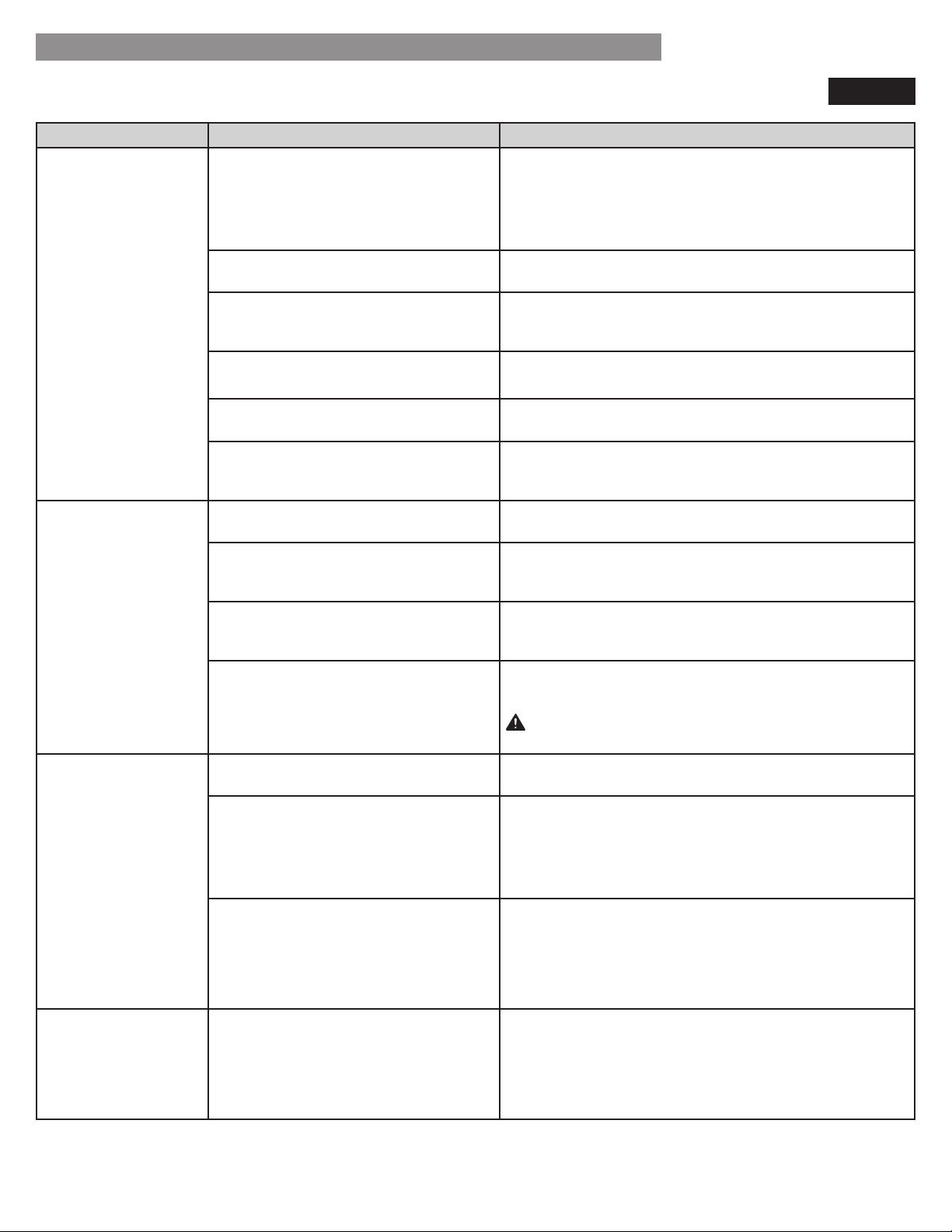
40
Problem Possible Causes Solutions
Ice has bad taste or
odor.
Water supply contains minerals such
as sulfur.
water filter may need to be installed to eliminate
taste and odor problems.
NOTE: n some cases, a filter may not help. t may not
be possible to remove all minerals / odor / taste in all
water supplies.
Icemaker was recently installed.
iscard the first few batches of ice to avoid discolored
or bad tasting ice.
Ice has been stored for too long. Ice that has been stored for too long will shrink,
become cloudy, and may develop a stale taste. Throw
away old ice and make a new supply.
The food has not been stored
properly in either compartment.
Rewrap the food. Odors may migrate to the ice if
food is not wrapped properly.
The interior of the refrigerator needs
to be cleaned.
See the Care and Cleaning section for more
information.
The ice storage bin needs to be
cleaned.
Empty and wash the bin (discard old cubes). Make
sure that the bin is completely dry before reinstalling
it.
Dispensing warm
water.
Refrigerator was recently installed. Allow 24 hours after installation for the water storage
tank to cool completely.
The water dispenser has been used
recently and the storage tank was
exhausted.
epending on your specific model, the water storage
capacity will range from approximately 10 to 30 oz.
Dispenser has not been used for
several hours.
If the dispenser has not been used for several hours,
the first glass dispensed may be warm. iscard the
first o.
Refrigerator is connected to the hot
water supply.
Make sure that the refrigerator is connected to a cold
water pipe.
WARNING: Connecting the refrigerator to a hot
water line may damage the icemaker.
Water has bad taste
or odor.
Water supply contains minerals such
as sulfur.
water filter may need to be installed to eliminate
taste and odor problems.
ater filter has been ehausted. t is recommended that you replace the water filter
• Approximately every 6 months.
• hen the water filter indicator turns on.
• When the water dispenser output decreases.
• When the ice cubes are smaller than normal.
Refrigerator was recently installed.
ispense 2. gallons of water (flush for approimately
5 minutes) to remove trapped air and contaminates
from the system. Do not dispense the entire 2.5
gallon amount continuously. Depress and release the
dispenser pad for cycles of 30 seconds ON and 60
seconds OFF.
Icemaker is making
too much ice.
cemaker shutoff (armsensor) is
obstructed.
Empty the ice bin. If your icemaker is equipped with
an ice shutoff arm, make sure that the arm moves
freely. If your icemaker is equipped with the electronic
ice shutoff sensor, make sure that there is a clear path
between the two sensors. Reinstall the ice bin and wait
24 hours to confirm proper operation.
ICE & WATER
TROUBLESHOOTING GUIDE
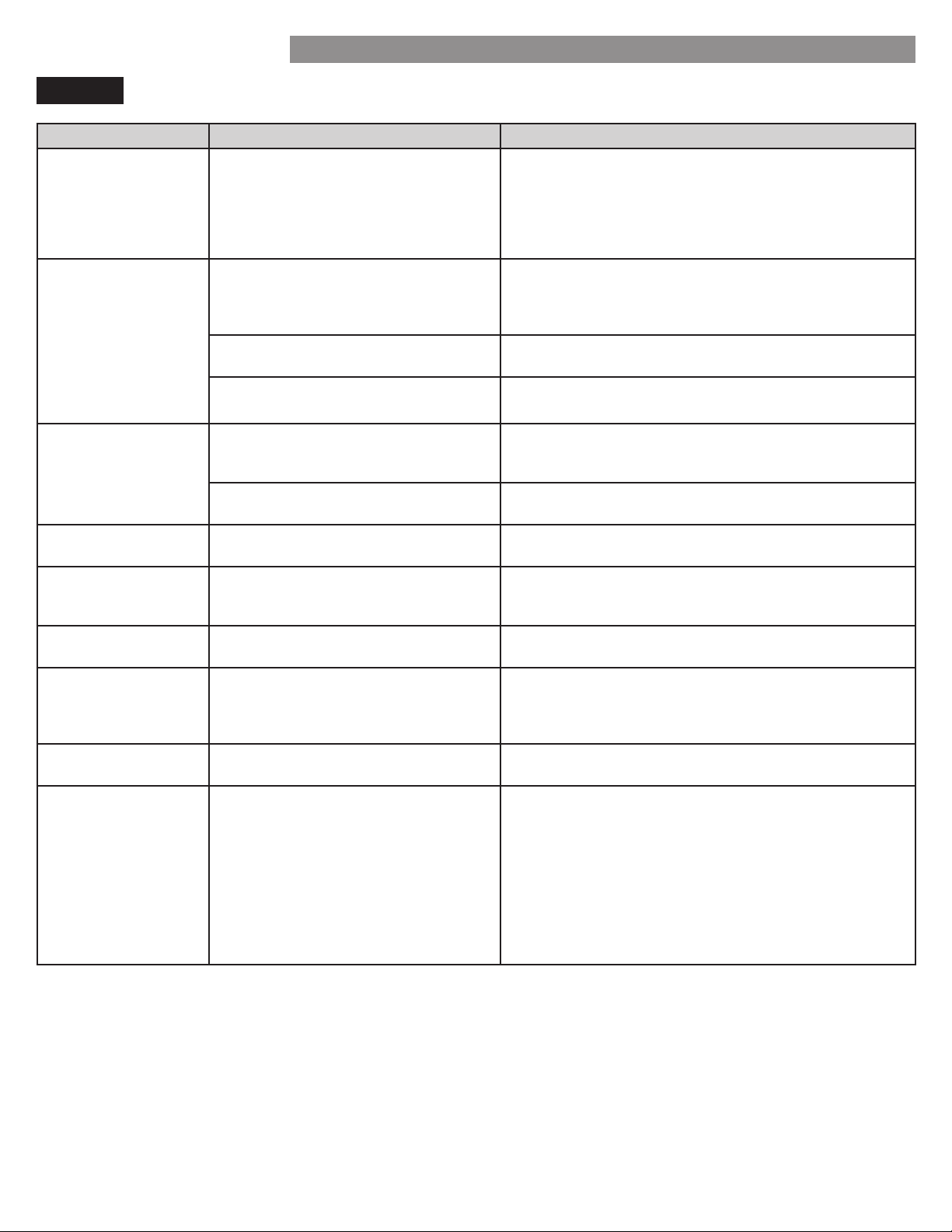
41
TROUBLESHOOTING GUIDE
Problem Possible Causes Solutions
Clicking The defrost control will click when
the automatic defrost cycle begins
and ends. The thermostat control (or
refrigerator control on some models)
will also click when cycling on and
off.
Normal Operation
Rattling Rattling noises may come from the
flow of refrigerant, the water line on
the back of the unit, or items stored
on top of or around the refrigerator.
Normal Operation
Refrigerator is not resting solidly on
the floor.
Floor is weak or uneven or leveling legs need to be
adjusted. See the Door Alignment section.
Refrigerator with linear compressor
was jarred while running.
Normal Operation
Whooshing Evaporator fan motor is circulating
air through the refrigerator and
freezer compartments.
Normal Operation
Air is being forced over the condenser
by the condenser fan.
Normal Operation
Gurgling
efrigerant flowing through the
cooling system.
Normal Operation
Popping Contraction and expansion of the
inside walls due to changes in
temperature.
Normal Operation
Sizzling Water dripping on the defrost heater
during a defrost cycle.
Normal Operation
Vibrating If the side or back of the refrigerator
is touching a cabinet or wall, some of
the normal vibrations may make an
audible sound.
To eliminate the noise, make sure that the sides and
back cannot vibrate against any wall or cabinet.
Dripping Water running into the drain pan
during the defrost cycle.
Normal Operation
Pulsating or High-
Pitched Sound
Your refrigerator is designed to run
more eciently to keep your food
items at the desired temperature. The
high eciency compressor may cause
your new refrigerator to run longer
than your old one, but it is still more
energy ecient than previous models.
While the refrigerator is running, it is
normal to hear a pulsating or high-
pitched sound.
Normal Operation
NOISE
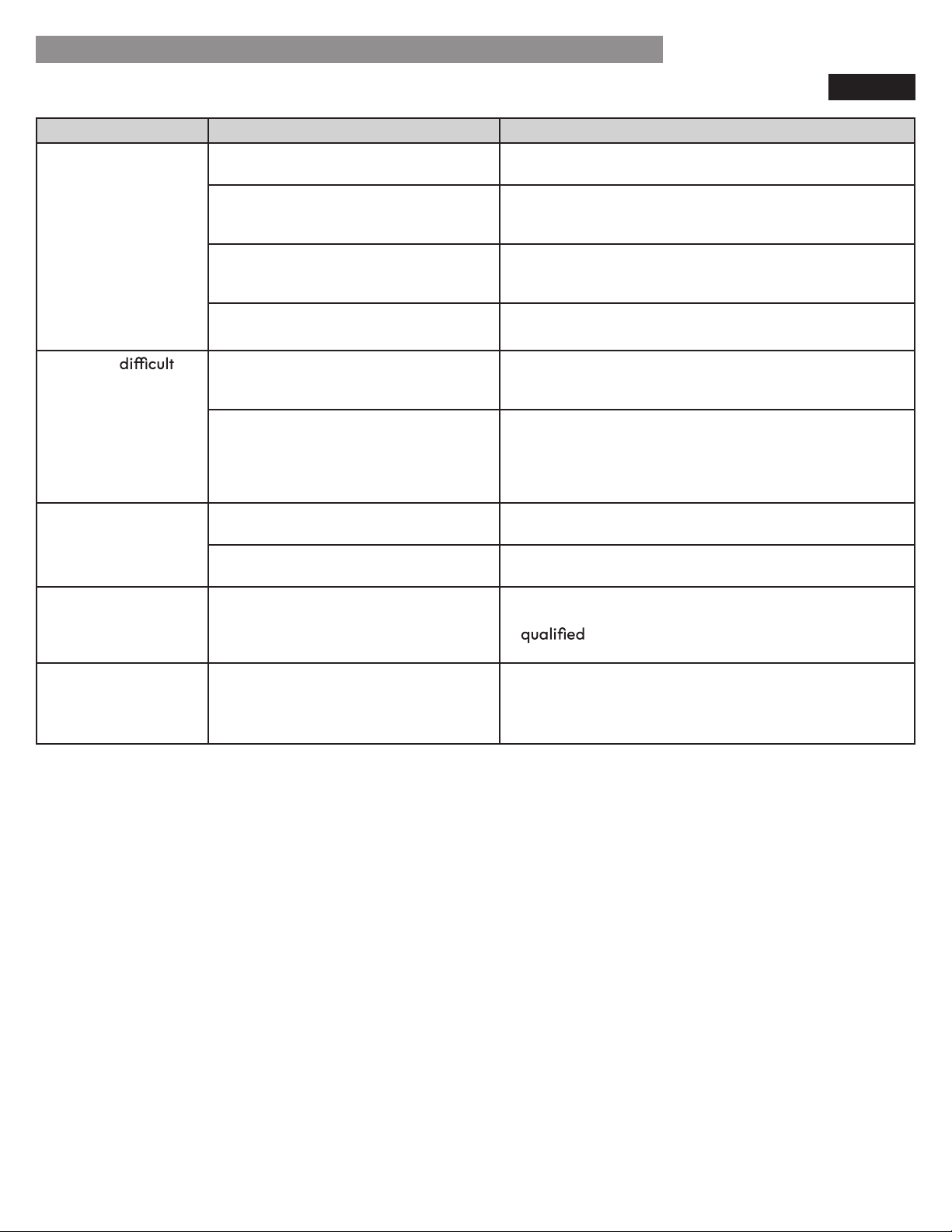
42
TROUBLESHOOTING GUIDE
Problem Possible Causes Solutions
Doors will not close
correctly or pop
open.
Food packages are blocking the door
open.
Rearrange food containers to clear the door and door
shelves.
Ice bin, crisper cover, pans, shelves,
door bins, or baskets are out of
position.
Push bins all the way in and put crisper cover, pans,
shelves and baskets into their correct positions. See the
Using Your Refrigerator section for more information.
The doors were removed during
product installation and not properly
replaced.
Remove and replace the doors according to the
Removing and Replacing Refrigerator Handles and
Doors section.
Refrigerator is not leveled properly. See Door Alignment in the Refrigeration Installation
section to level refrigerator.
Doors are
to
open.
The gaskets are dirty or sticky. Clean the gaskets and the surfaces that they touch.
Rub a thin coat of appliance polish or kitchen wax on
the gaskets after cleaning.
Door was recently closed. When you open the door, warmer air enters the
refrigerator. As the warm air cools, it can create a
vacuum. If the door is hard to open, wait one minute
to allow the air pressure to equalize, then see if it
opens more easily.
Refrigerator wobbles
or seems unstable.
Leveling legs are not adjusted
properly.
Refer to the Leveling and Door Alignment section.
Floor is not level. It may be necessary to add shims under the leveling
legs or rollers to complete installation.
Lights do not work.
The interior of
the refrigerator is
covered with dust or
soot.
The refrigerator is located near a fire
source, such as a fireplace, chimney
or candle.
Make sure that the refrigerator is not located near a
fire source, such as a fireplace, chimney or candle.
LED interior lighting failure. The refrigerator compartment lamp is LED interior
lighting, and service should be performed by
a
technician. Refer to the Light Bulb
Replacement section.
PARTS & FEATURES
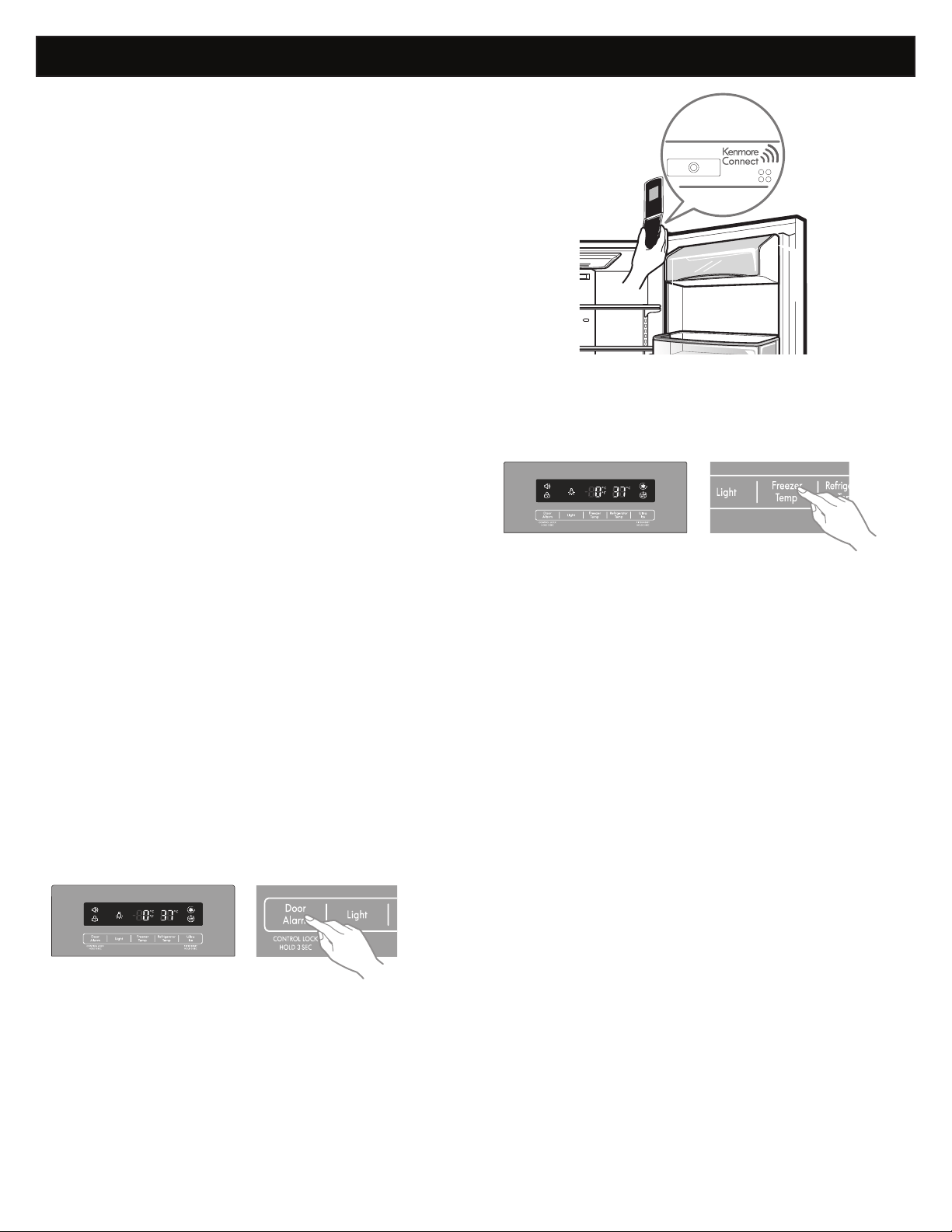
Kenmore Connect™ System
Kenmore Connect (On some models)
43
Should you experience any problems with your refrigerator,
it has the capability of transmitting data via your
telephone to the Kenmore Connect Team. This gives you the
capability of speak-ing directly to our trained specialists.
The specialist records the data transmitted from your
machine and uses it to analyze the issue, providing a fast
and effective diagnosis.
If you experience problems with your refrigerator, call
1-800-4MY-HOME (1-800-469-4663). Only use the
Kenmore Connect feature when instructed to do so by the
Kenmore Connect Team agent. The transmission sounds
that you will hear are normal and sound similar to a fax
machine.
Kenmore Connect cannot be activated unless your refrig-
erator is connected to power. If your refrigerator is unable
to turn on, then troubleshooting must be done without using
Kenmore Connect.
Using Kenmore Connect
First, call
1-800-4MY-HOME (1-800-469-4663). If the
number of the phone you are using is associated with your
refrigerator purpose, you will be quickly relayed to a
Kenmore Connect team agent. Only use the Kenmore
Connect feature when instructed to do so by the Kenmore
Connect Team agent.
1 Lock the display. To lock the display, press and hold the
Door alarm button for three seconds. (If the display has
been locked for over five minutes, you must deactivate the
lock and then reactivate it.)
2 Open the right refrigerator door.
3 Hold the mouthpiece of your phone in front of the
speaker that is located on the right hinge of the refrigera-
tor door, when instructed to do so by the call center.
4 Press and hold the Freezer Temp button for three
seconds while continuing to hold your phone to the
speaker.
5 After you hear three beeps, release the Freezer Temp
button.
6 Keep the phone in place until the tone transmission has
finished. This takes about 15 seconds, and the display will
count down the time. Once the countdown is over and the
tones have stopped, resume your conversation with the
specialist, who will then be able to assist you in using the
information transmitted for analysis.
NOTE:
- For best results, do not move the phone while the tones
are being transmitted.
- If the call center agent is not able to get an accurate
recording of the data, you may be asked to try again.
® Registered Trademark /
TM
Trademark of KCD IP, LLC in the United States, or Sears Brands, LLC in other countries
® Marca Registrada /
TM
Marca de Fábrica de KCD IP, LLC en Estados Unidos, o Sears Brands, LLC in otros países
MC
Marque de commerce /
MD
Marque déposée de Sears Brands, LLC
Get it fixed, at your home or ours!
Your Home
For troubleshooting, product manuals and expert advice:
www.managemylife.com
For repair – in your home – of all major brand appliances,
lawn and garden equipment, or heating and cooling systems,
no matter who made it, no matter who sold it!
For the replacement parts, accessories and
owner’s manuals that you need to do-it-yourself.
For Sears professional installation of home appliances
and items like garage door openers and water heaters.
1-800-4-MY-HOME
®
(1-800-469-4663)
Call anytime, day or night (U.S.A. and Canada)
www.sears.com www.sears.ca
Our Home
For repair of carry-in items like vacuums, lawn equipment,
and electronics, call anytime for the location of your nearest
Sears Parts & Repair Service Center
1-800-488-1222 (U.S.A.) 1-800-469-4663 (Canada)
www.sears.com www.sears.ca
To purchase a protection agreement on a product serviced by Sears:
1-800-827-6655 (U.S.A.) 1-800-361-6665 (Canada)
Para pedir servicio de reparación
a domicilio, y para ordenar piezas:
1-888-SU-HOGAR
®
(1-888-784-6427)
www.sears.com
Au Canada pour service en français:
1-800-LE-FOYER
MC
(1-800-533-6937)
www.sears.ca
