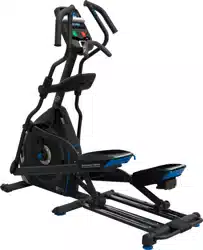
ASSEMBLY MANUAL / OWNER’S MANUAL
Manual en Español Latino Americano:
http://www.nautilus.com
E618
2
Important Safety Instructions 3
Safety Warning Labels / Serial Number 5
Grounding Instructions 6
6SHFL¿FDWLRQV
%HIRUH$VVHPEO\
Parts 8
Hardware 9
Tools 9
Assembly 10
Moving the Machine 23
Leveling the Machine 24
Features 25
Console Features 26
Bluetooth
®
Connectivity 29
Remote Heart Rate Monitor 30
Remote Resistance and Incline Controls 31
Suspension Adjust
™
Pedals 31
Operations 32
Power Up / Idle Mode 33
Initial Setup 33
Quick Start Program 33
8VHU3UR¿OHV
3UR¿OH3URJUDPV
Pausing or Stopping 39
Results / Cool Down Mode 39
GOAL TRACK Statistics 40
Console Setup Mode 42
Maintenance 43
Heart Rate Chest Strap Battery Replacement 43
Maintenance Parts 44
Troubleshooting 46
Warranty 51
TABLE OF CONTENTS
To validate warranty support, keep the original proof of purchase and record the following information:
Serial Number __________________________
Date of Purchase ____________________
To register your product warranty, go to: www.Nautilus.com/register
Or call 1 (800) 605–3369.
If you have questions or problems with your product, please call 1 (800) NAUTILUS (628–8458).
Nautilus, Inc., (800) NAUTILUS / (800) 628-8458, www.NautilusInc.com - Customer Service: North America (800) 605-3369,
[email protected] | outside U.S. www.nautilusinternational.com | © 2015 Nautilus, Inc. ® indicates trademarks registered in
the United States. These marks may be registered in other nations or otherwise protected by common law. Nautilus, the Nautilus
ORJR1DXWLOXV7UDLQHU%RZÀH[6FKZLQQ6XVSHQVLRQ$GMXVWDQG8QLYHUVDODUHWUDGHPDUNVRZQHGE\RUOLFHQVHGWR1DXWLOXV
Inc. Polar
®
, OwnCode
®
, Loctite
®
, Google Play™, Under Armour
®
and MyFitnessPal
®
are trademarks of their respective owners.
The Bluetooth
®
word mark and logos are registered trademarks owned by Bluetooth SIG, Inc., and any use of such marks by
Nautilus, Inc. is under license.
3
IMPORTANT SAFETY INSTRUCTIONS
This icon means a potentially hazardous situation which, if not avoided, could result in death or serious
injury.
Obey the following warnings:
Read and understand all warnings on this machine.
Carefully read and understand the Assembly instructions. Read and understand the complete
Manual. Keep the Manual for future reference.
To reduce the risk of electrical shock or unsupervised usage of the equipment, always unplug this
machine from the electrical outlet immediately after using and before cleaning.
• Keep bystanders and children away from the product you are assembling at all times.
• Do not connect power supply to the machine until instructed to do so.
• The machine should never be left unattended when plugged in. Unplug from outlet when not in use, and before putting
on or taking off parts.
%HIRUHHDFKXVHH[DPLQHWKHPDFKLQHIRUGDPDJHWRSRZHUFRUGORRVHSDUWVRUVLJQVRIZHDU'RQRWXVHLIIRXQGLQ
this condition. Contact Nautilus Customer Service for repair information.
• Do not drop or put objects into any opening of the machine.
• Do not assemble this machine outdoors or in a wet or moist location.
0DNHVXUHDVVHPEO\LVGRQHLQDQDSSURSULDWHZRUNVSDFHDZD\IURPIRRWWUDI¿FDQGH[SRVXUHWRE\VWDQGHUV
• Some components of the machine can be heavy or awkward. Use a second person when doing the assembly steps
involving these parts. Do not do steps that involve heavy lifting or awkward movements on your own.
• Set up this machine on a solid, level, horizontal surface.
• Do not try to change the design or functionality of this machine. This could compromise the safety of this machine and
will void the warranty.
• If replacement parts are necessary, use only genuine Nautilus replacement parts and hardware. Failure to use
genuine replacement parts can cause a risk to users, keep the machine from operating correctly and void the
warranty.
• Do not use until the machine has been fully assembled and inspected for correct performance in accordance with the
Manual.
• Use this machine only for its intended use as described in this manual. Do not use attachments not recommended by
the manufacturer.
• Do all assembly steps in the sequence given. Incorrect assembly can lead to injury or incorrect function.
• Connect this machine to a properly grounded outlet only (see Grounding Instructions).
• Keep the power cord away from heat sources and hot surfaces.
• Do not operate where aerosol products are being used.
• To disconnect, turn all controls to the off position, then remove plug from outlet.
• Silicone lubricant is not intended for human consumption. Keep out of reach of children. Store in a safe place.
• SAVE THESE INSTRUCTIONS.
4
This icon means a potentially hazardous situation which, if not avoided, could result in death or serious
injury.
Before using this equipment, obey the following warnings:
Read and understand the complete Manual. Keep the Manual for future reference.
Read and understand all warnings on this machine. If at any time the Warning labels become loose,
unreadable or dislodged, contact Nautilus Customer Service for replacement labels.
• Children must not be let on or near to this machine. Moving parts and other features of the machine can be
dangerous to children.
• Not intended for use by anyone under 14 years of age.
&RQVXOWDSK\VLFLDQEHIRUH\RXVWDUWDQH[HUFLVHSURJUDP6WRSH[HUFLVLQJLI\RXIHHOSDLQRUWLJKWQHVVLQ\RXU
chest, become short of breath, or feel faint. Contact your doctor before you use the machine again. Use the
values calculated or measured by the machine’s computer for reference purposes only.
%HIRUHHDFKXVHH[DPLQHWKLVPDFKLQHIRUORRVHSDUWVRUVLJQVRIZHDU'RQRWXVHLIIRXQGLQWKLVFRQGLWLRQ
Monitor the Pedals and Crank Arms closely. Contact Nautilus Customer Service for repair information.
0D[LPXPXVHUZHLJKWOLPLWOEVNJ'RQRWXVHLI\RXDUHRYHUWKLVZHLJKW
• This machine is for home use only.
'RQRWZHDUORRVHFORWKLQJRUMHZHOU\7KLVPDFKLQHFRQWDLQVPRYLQJSDUWV'RQRWSXW¿QJHUVRURWKHUREMHFWVLQWR
PRYLQJSDUWVRIWKHH[HUFLVHHTXLSPHQW
• Set up and operate this machine on a solid, level, horizontal surface.
• Make the Foot Pedals stable before you step on them. Use caution when you step on and off the machine.
• Disconnect all power before servicing this machine.
• Do not operate this machine outdoors or in moist or wet locations.
• Keep at least 24” (0.6 m) on each side of the machine clear. This is the recommended safe distance for access
and passage around and emergency dismounts from the machine. Keep third parties out of this space when
machine is in use.
'RQRWRYHUH[HUW\RXUVHOIGXULQJH[HUFLVH2SHUDWHWKHPDFKLQHLQWKHPDQQHUGHVFULEHGLQWKLVPDQXDO
• Correctly adjust and safely engage all Positional Adjustment Devices. Make sure that the Adjustment Devices do
not hit the user.
• Keep the Foot Pedals clean and dry.
([HUFLVHRQWKLVPDFKLQHUHTXLUHVFRRUGLQDWLRQDQGEDODQFH%HVXUHWRDQWLFLSDWHWKDWFKDQJHVLQVSHHGDQG
resistance level can occur during workouts, and be attentive in order to avoid loss of balance and possible injury.
• A machine should never be left unattended when plugged in. Unplug from outlet when not in use, and before
putting on or taking off parts.
• Prior to use, read and understand the owner’s manual. The appliance is not to be used by persons with functional
OLPLWDWLRQVDQGLPSDLUPHQWVUHGXFHGSK\VLFDOVHQVRU\RUPHQWDOFDSDELOLWLHVRUODFNRIH[SHULHQFHDQG
knowledge.
• Children should be supervised to ensure that they do not play with the appliance.
5
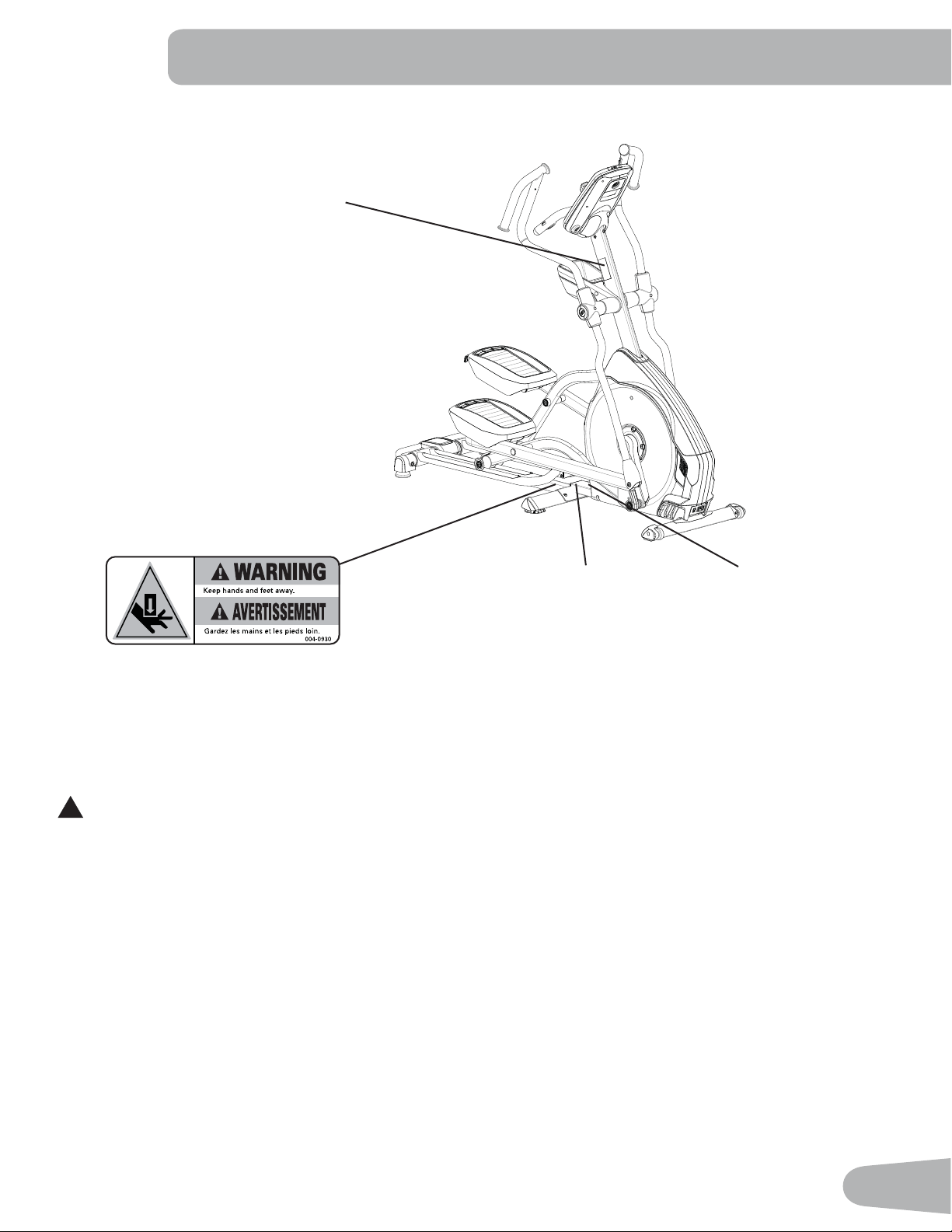
SAFETY WARNING LABELS AND SERIAL NUMBER
FCC Compliance
!
&KDQJHVRUPRGL¿FDWLRQVWRWKLVXQLWQRWH[SUHVVO\DSSURYHGE\WKHSDUW\UHVSRQVLEOHIRUFRPSOLDQFHFRXOGYRLGWKH
user’s authority to operate the equipment.
The machine and power supply comply with Part 15 of the FCC rules. Operation is subject to the following two conditions:
(1) This device may not cause harmful interference, and (2) this device must accept any interference received, including
interference that may cause undesired operation.
Note: This machine and power supply have been tested and found to comply with the limits for a Class B digital
device, pursuant to Part 15 of the FCC Rules. These limits are designed to provide reasonable protection against
harmful interference in a residential installation. This equipment generates, uses and can radiate radio frequency
energy and, if not installed and used in accordance with the instructions, may cause harmful interference to radio
communications.
However, there is no guarantee that interference will not occur in a particular installation. If this equipment does cause
harmful interference to radio or television reception, which can be determined by turning the equipment off and on, the
user is encouraged to try to correct the interference by one or more of the following measures:
• Reorient or relocate the receiving antenna.
• Increase the separation between the equipment and receiver.
• Connect the equipment into an outlet on a circuit different from that to which the receiver is connected.
&RQVXOWWKHGHDOHURUDQH[SHULHQFHGUDGLR79WHFKQLFLDQIRUKHOS
Serial Number
s
s
3URGXFW6SHFL¿FDWLRQ
WARNING!
• Injury or death is possible if caution is
not used while using this machine.
• Keep children and pets away.
• Read and follow all warnings on this
machine.
• Refer to the Owner’s Manual for
additional warnings and safety
information.
• The heart rate displayed is an
DSSUR[LPDWLRQDQGVKRXOGEHXVHGIRU
reference only.
• Not intended for use by anyone under
14 years of age.
7KHPD[LPXPXVHUZHLJKWIRUWKLV
machine is 350 lbs ( 158 kg ).
• This machine is for home use only.
• Consult a physician prior to using any
H[HUFLVHHTXLSPHQW
6
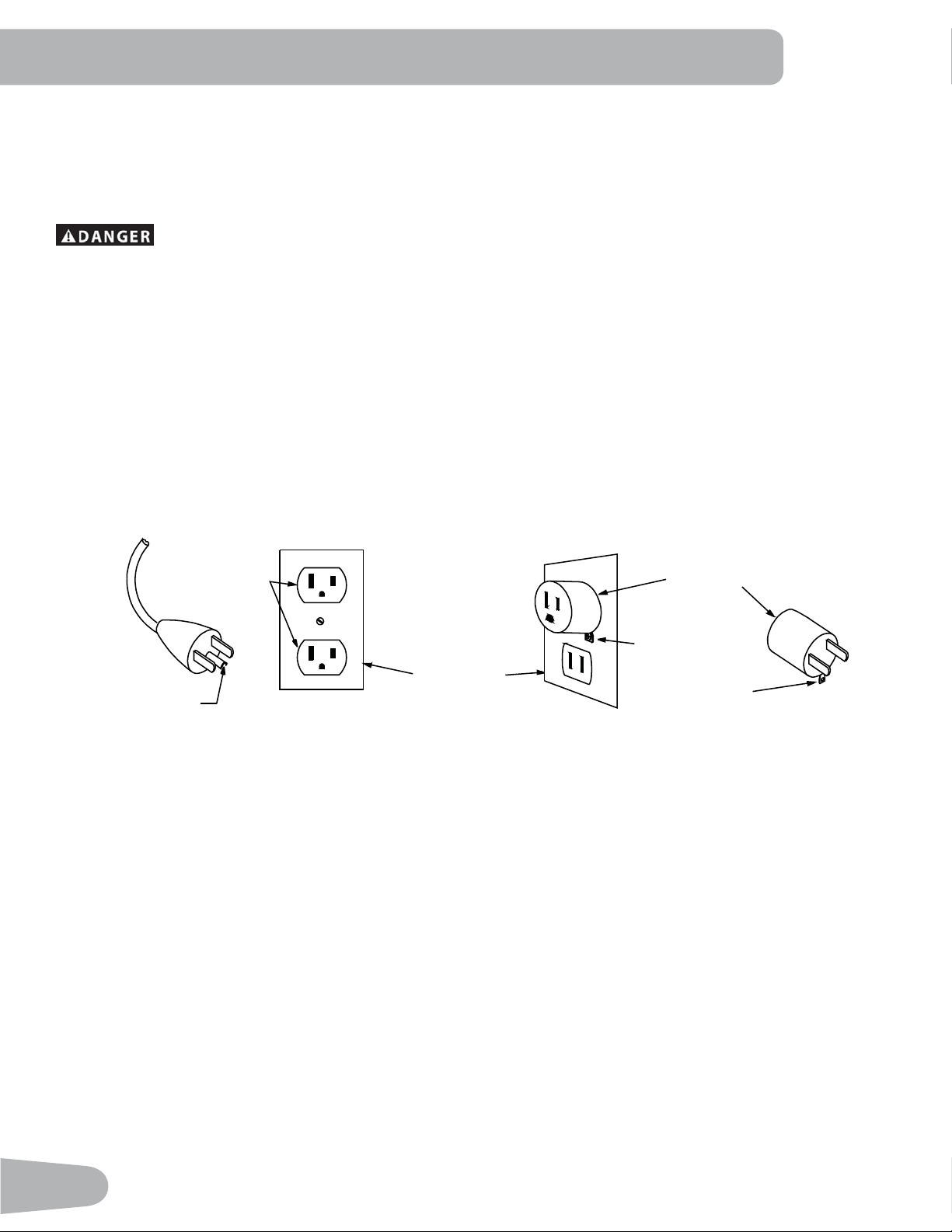
Grounding Instructions
This product must be grounded. If it should malfunction or break down, grounding provides a path of least resistance for
electric current to reduce the risk of electric shock. This product is equipped with a cord having an equipment-grounding
conductor and a grounding plug. The plug must be plugged into an appropriate outlet that is properly installed and
grounded in accordance with all local codes and ordinances.
Improper connection of the equipment-grounding conductor can result in a risk of electric shock.
&KHFNZLWKDTXDOL¿HGHOHFWULFLDQRUVHUYLFHPDQLI\RXDUHLQGRXEWDVWRZKHWKHUWKHSURGXFWLV
SURSHUO\JURXQGHG'RQRWPRGLI\WKHSOXJSURYLGHGZLWKWKHSURGXFW±LILWZLOOQRW¿WWKHRXWOHW
KDYHDSURSHURXWOHWLQVWDOOHGE\DTXDOL¿HGHOHFWULFLDQ
This machine is for use on a nominal 120-V circuit, and has a grounding plug that looks like the plug illustrated below. A
temporary adapter that looks like the adapter illustrated may be used to connect this plug to a 2-pole receptacle as shown
if a properly grounded outlet is not available.
7KHWHPSRUDU\DGDSWHUVKRXOGEHXVHGRQO\XQWLODSURSHUO\JURXQGHGRXWOHWFDQEHLQVWDOOHGE\DTXDOL¿HGHOHFWULFLDQ
7KHJUHHQFRORUHGULJLGHDUOXJRUWKHOLNHH[WHQGLQJIURPWKHDGDSWHUPXVWEHFRQQHFWHGWRDSHUPDQHQWJURXQGVXFKDV
DSURSHUO\JURXQGHGRXWOHWER[FRYHU:KHQHYHUWKHDGDSWHULVXVHGLWPXVWEHKHOGLQSODFHE\DPHWDOVFUHZ
Metal Screw
Tab for
Grounding
Screw
Adapter
Grounded
2XWOHW%R[
Grounded
Outlet
Grounding Pin
7
SPECIFICATIONS
Before Assembly
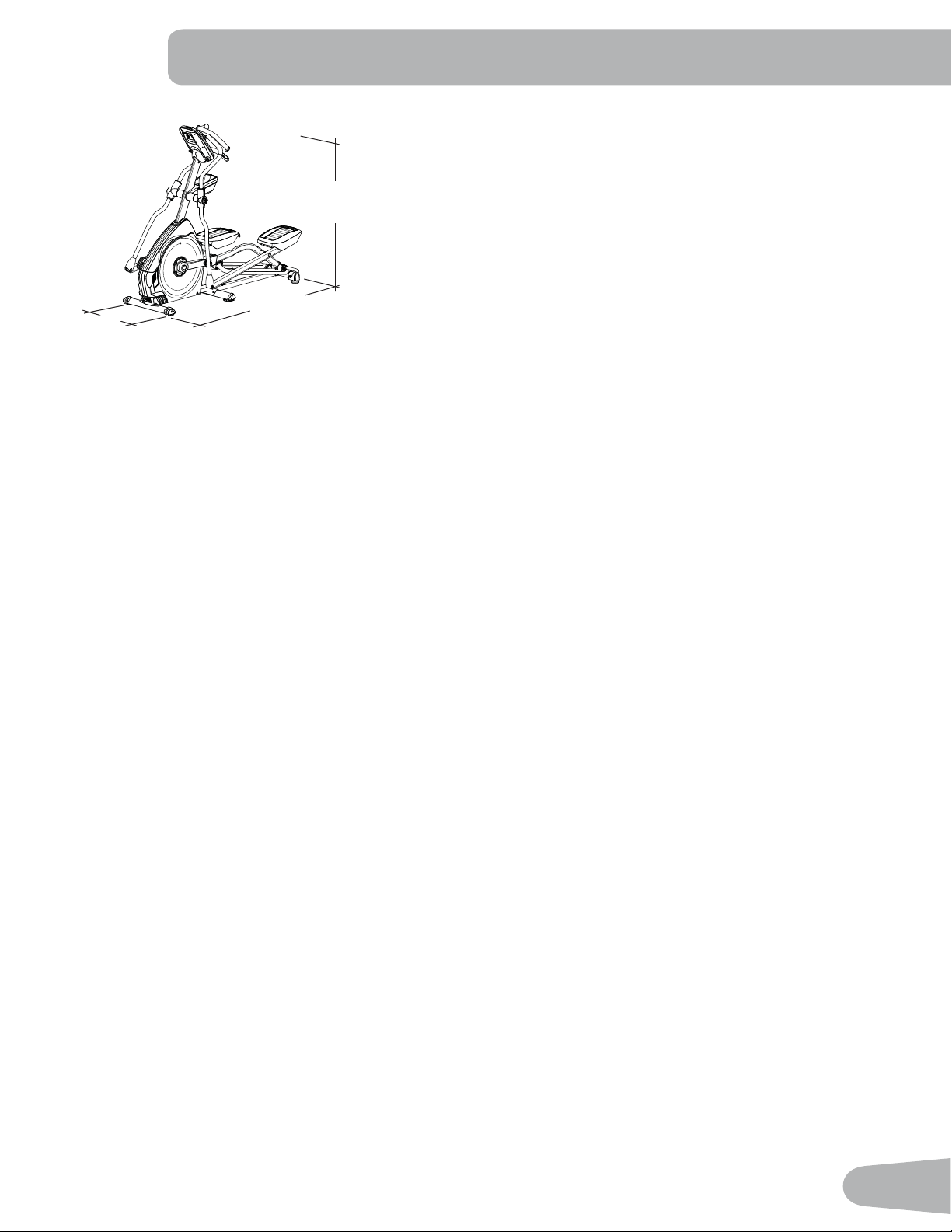
Select the area where you are going to set up and operate your machine. For safe operation, the location must be on a
KDUGOHYHOVXUIDFH$OORZDZRUNRXWDUHDRIDPLQLPXP´[´P[P%HVXUHWKDWWKHZRUNRXWVSDFH\RXDUH
XWLOL]LQJKDVDGHTXDWHKHLJKWFOHDUDQFHWDNLQJLQWRFRQVLGHUDWLRQWKHKHLJKWRIWKHXVHUDQGWKHPD[LPXPKHLJKWRIWKH
pedals with the incline fully engaged.
Basic Assembly Tips
Follow these basic points when you assemble your machine:
• Read and understand the “Important Safety Instructions” before assembly.
• Collect all the pieces necessary for each assembly step.
• Using the recommended wrenches, turn the bolts and nuts to the right (clockwise) to tighten, and the left (counter-
clockwise) to loosen, unless instructed otherwise.
• When attaching 2 pieces, lightly lift and look through the bolt holes to help insert the bolt through the holes.
• The assembly can require 2 people.
Maximum User Weight: 350 lbs. (158.8 kg)
Maximum Pedal Height - with full incline: ´FP
Machine Weight: OEVNJ
Power Requirements:
Operating Voltage: 120V AC
Operating Current: 2 A
Heart Rate Chest Strap: 1 CR2032 battery
66.9”
(170 cm)
73”
(185.5 cm)
27”
(68.5 cm)
8
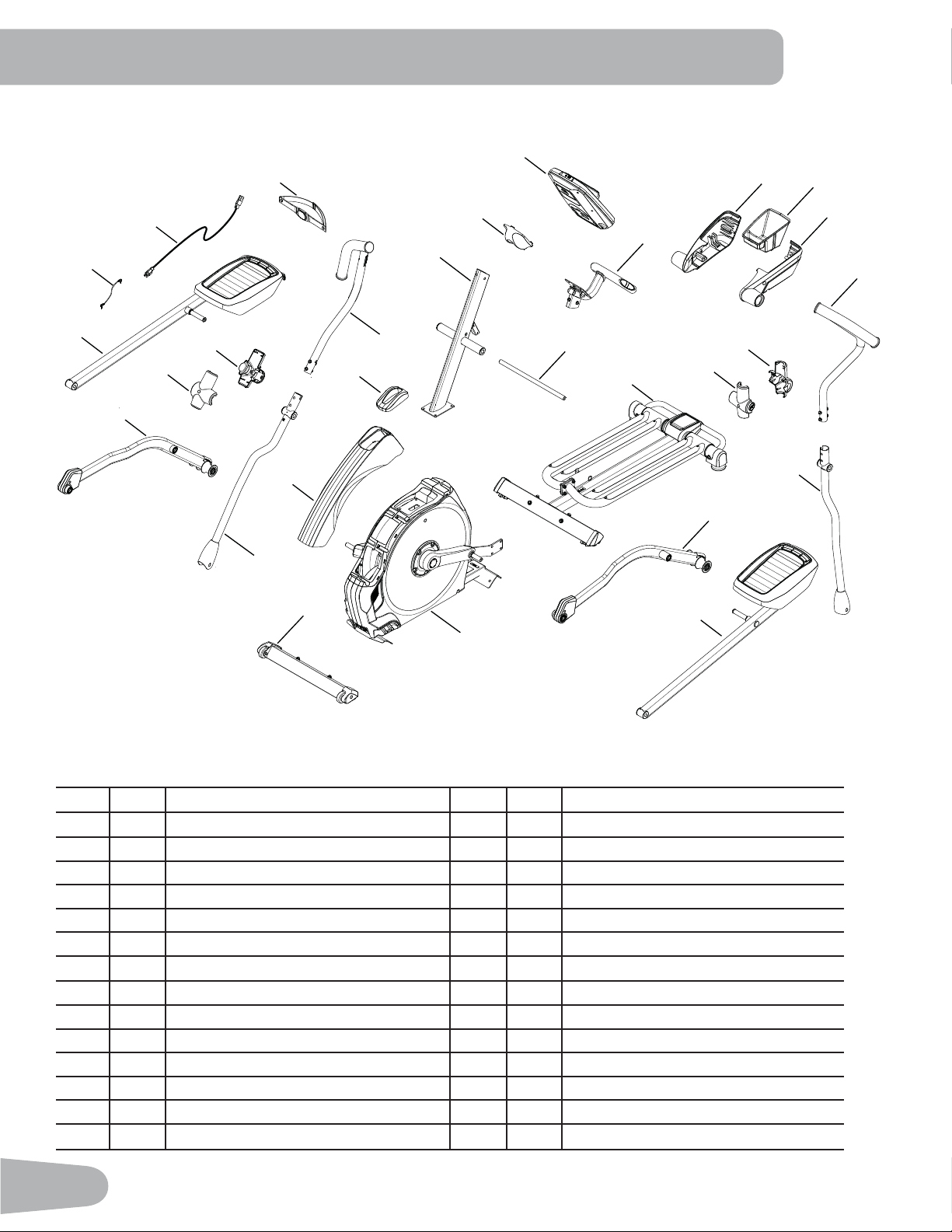
A decal has been applied to all right (“ R ”) and left (“ L ”) parts to assist with assembly.
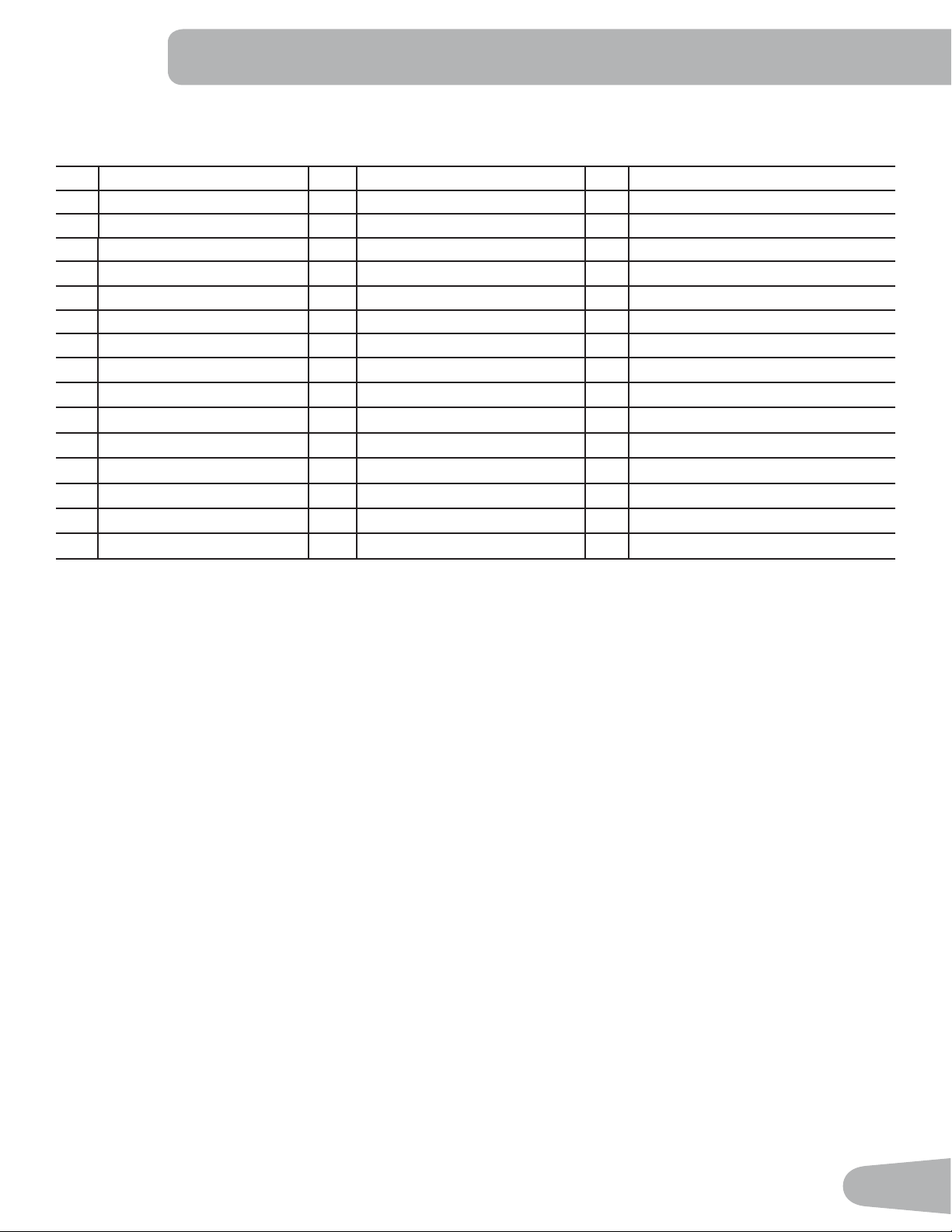
Item Qty Description Item Qty Description
1 1 Console Mast 15 1 Left Pedal
2 1 Console Junction Cover 16 1 Frame
3 1 Console 1 Front Stabilizer
4 1 Static Handlebar 18 1 Lower Right Handlebar Arm
5 1 Water Bottle Holder Shroud, Right 19 1 Upper Right Handlebar Arm
6 1 Water Bottle Holder 20 1 Upper Shroud
1 Water Bottle Holder Shroud, Left 21 1 Shroud Cap
8 1 Upper Left Handlebar Arm 22 1 Right Leg
9 2 Handlebar Shroud, Outer 23 1 Right Pedal
10 2 Handlebar Shroud, Inner 24 1 MP3 Cord
11 1 Rail Assembly 25 1 Power Cord
12 1 Arm Pivot Rod 26 1 Heart Rate (HR) Chest Strap
13 1 Left Leg 1 Silicone Lubricant, Bottle (not shown)
14 1 Lower Left Handlebar Arm
PARTS
24
25
1
2
3
4
5
6
7
8
9
10
10
9
11
12
13
14
15
16
20
17
18
19
21
22
23
26
9
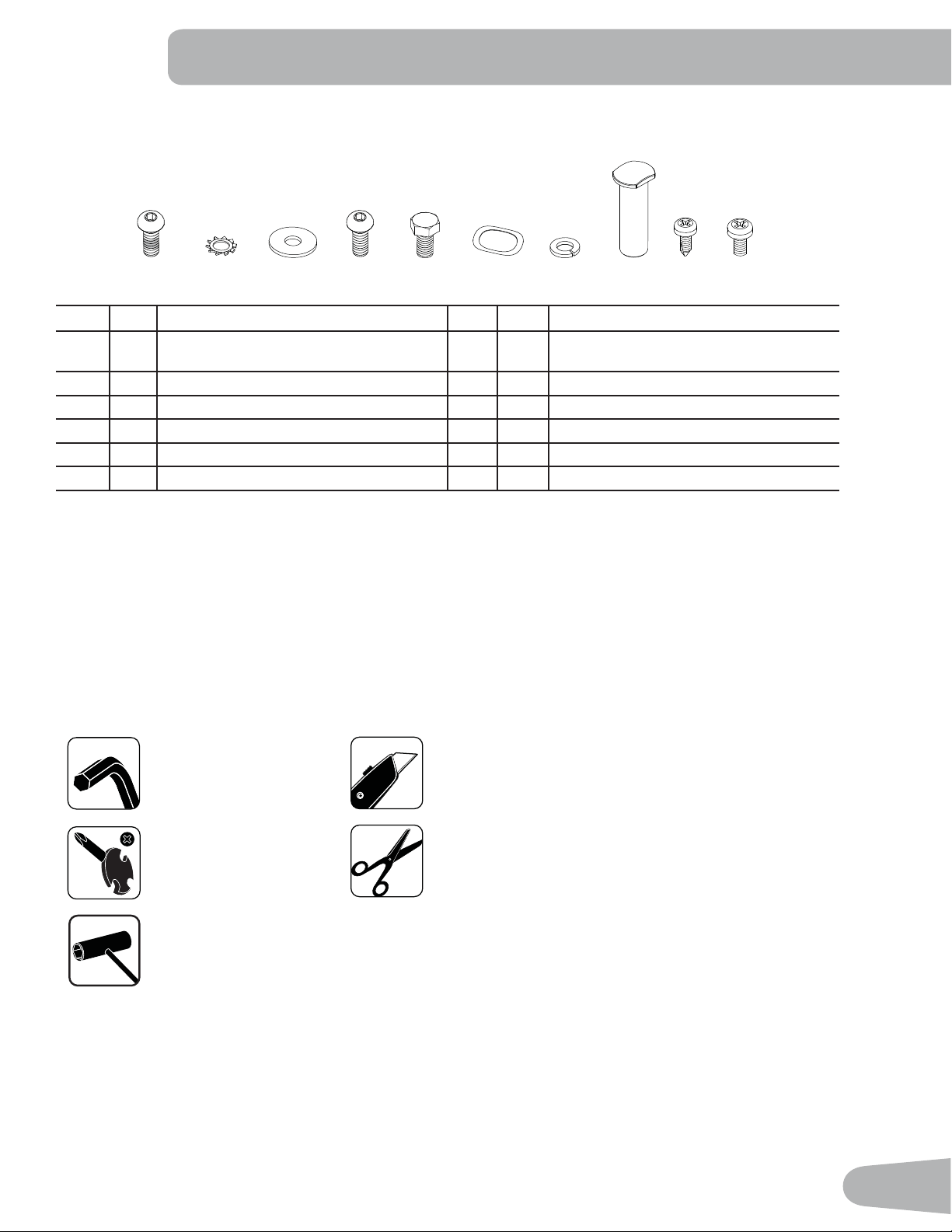
Item Qty Description Item Qty Description
A6%XWWRQ+HDG+H[6FUHZ0[ZLWK
Loctite
®
adhesive)
G 8 Lock Washer, M8
B 4 Serrated Washer, M8 H 2 Pivot Sleeve
C 8 Wide Washer, M8 I 5 3KLOOLSV+HDG6HOIWDS6FUHZ0[
D4%XWWRQ+HDG+H[6FUHZ0[ J43KLOOLSV+HDG6FUHZ0[
E2+H[+HDG6FUHZ0[
F 6 Wave Washer
Note: Select pieces of Hardware have been provided as spares on the Hardware Card. Be aware that there may be remain-
ing Hardware after the proper assembly of your machine.
HARDWARE / TOOLS
Tools
Included Not Included
6 mm
(recommended)
AB C D E F
GH
I
J
#2
13 mm
15 mm
19 mm
10
ASSEMBLY
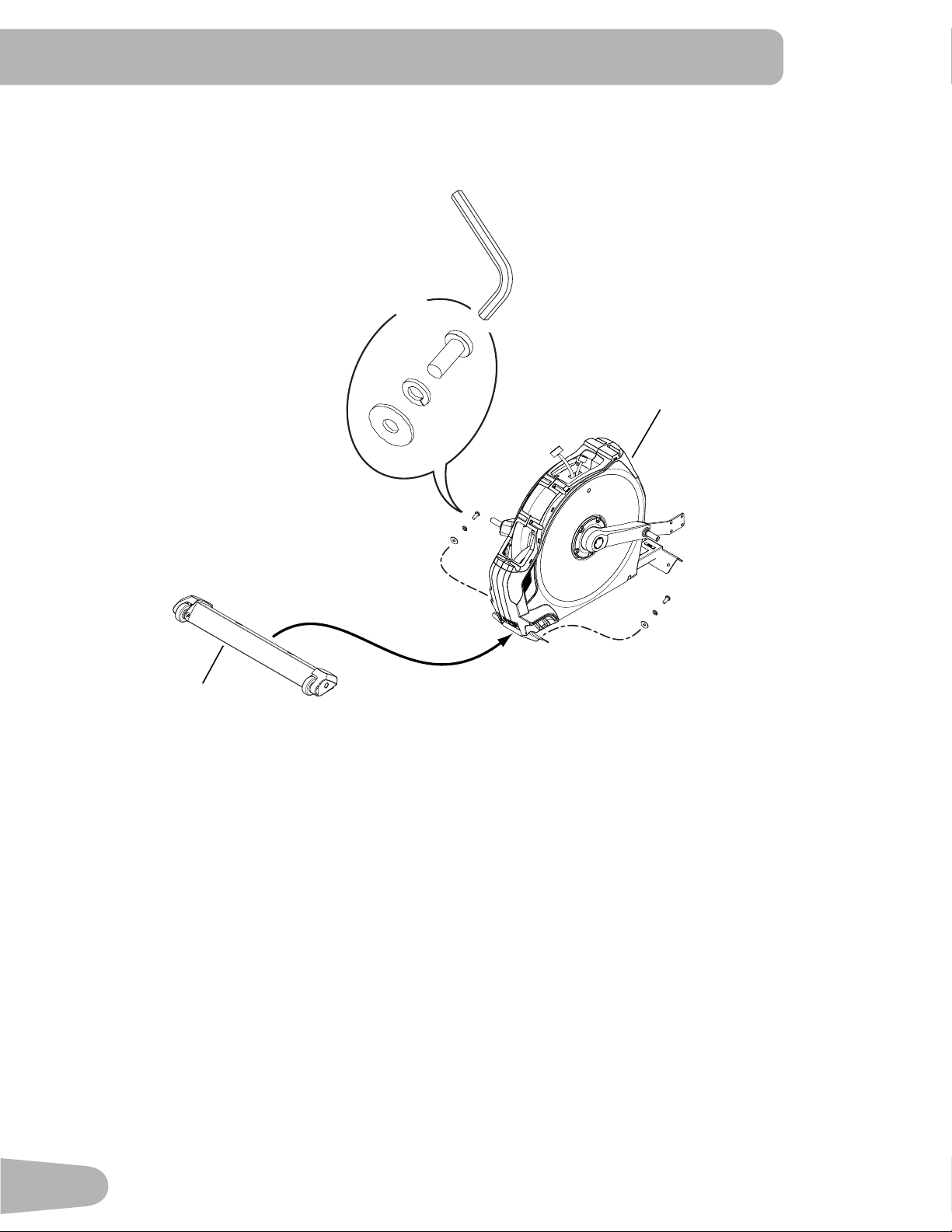
1. Attach Front Stabilizer to Frame
Note: Hardware (*) is pre-installed and not on the Hardware Card.
6mm
*
X4
*
*
17
16
11
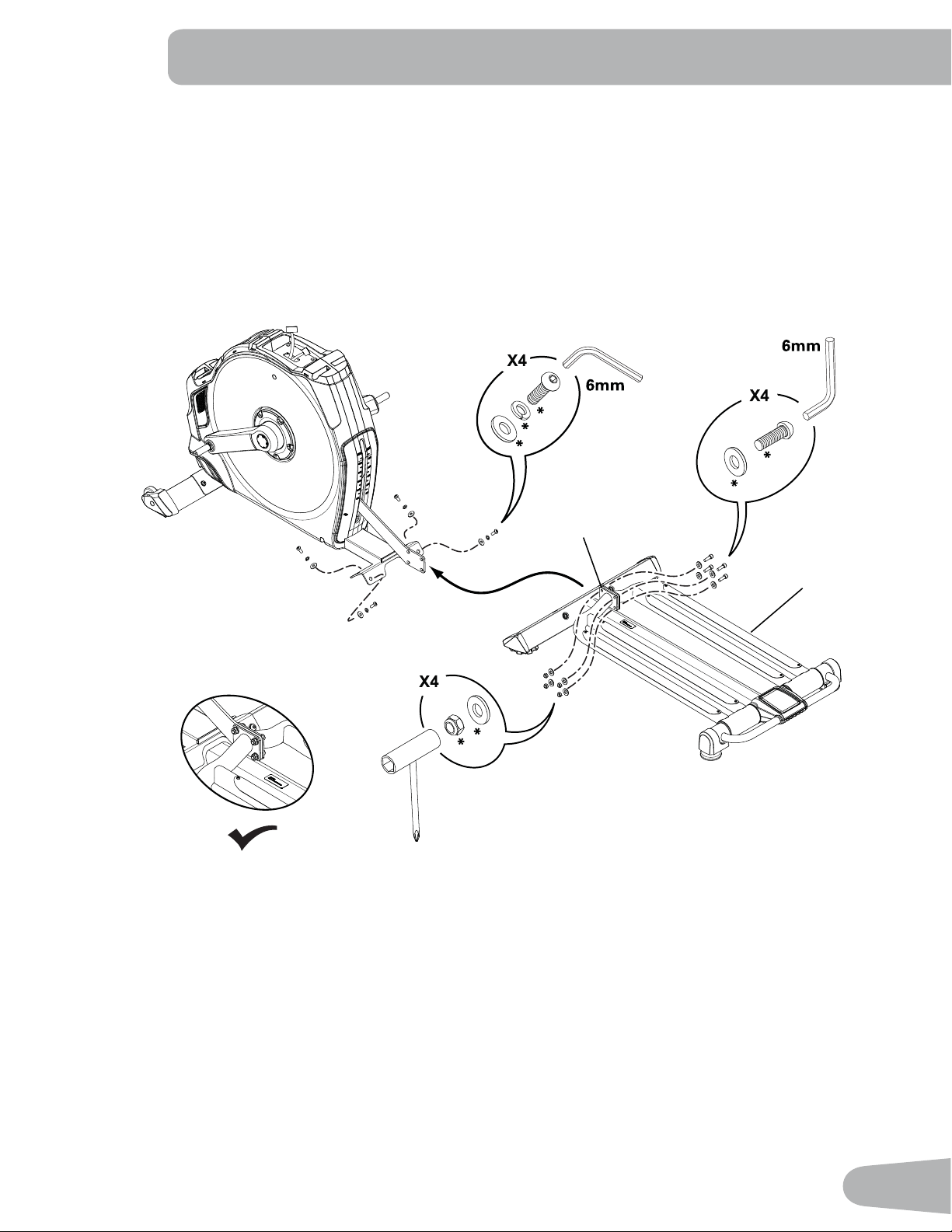
2. Attach Rail Assembly to Frame Assembly
Note: Hardware (*) is pre-installed and not on the Hardware Card. Separate the Rail mount plates (11a) and lift to
align the holes and install the hardware.
The plastic scratch guard strips on the Rails help to protect the finish during assembly.
11
11a
12
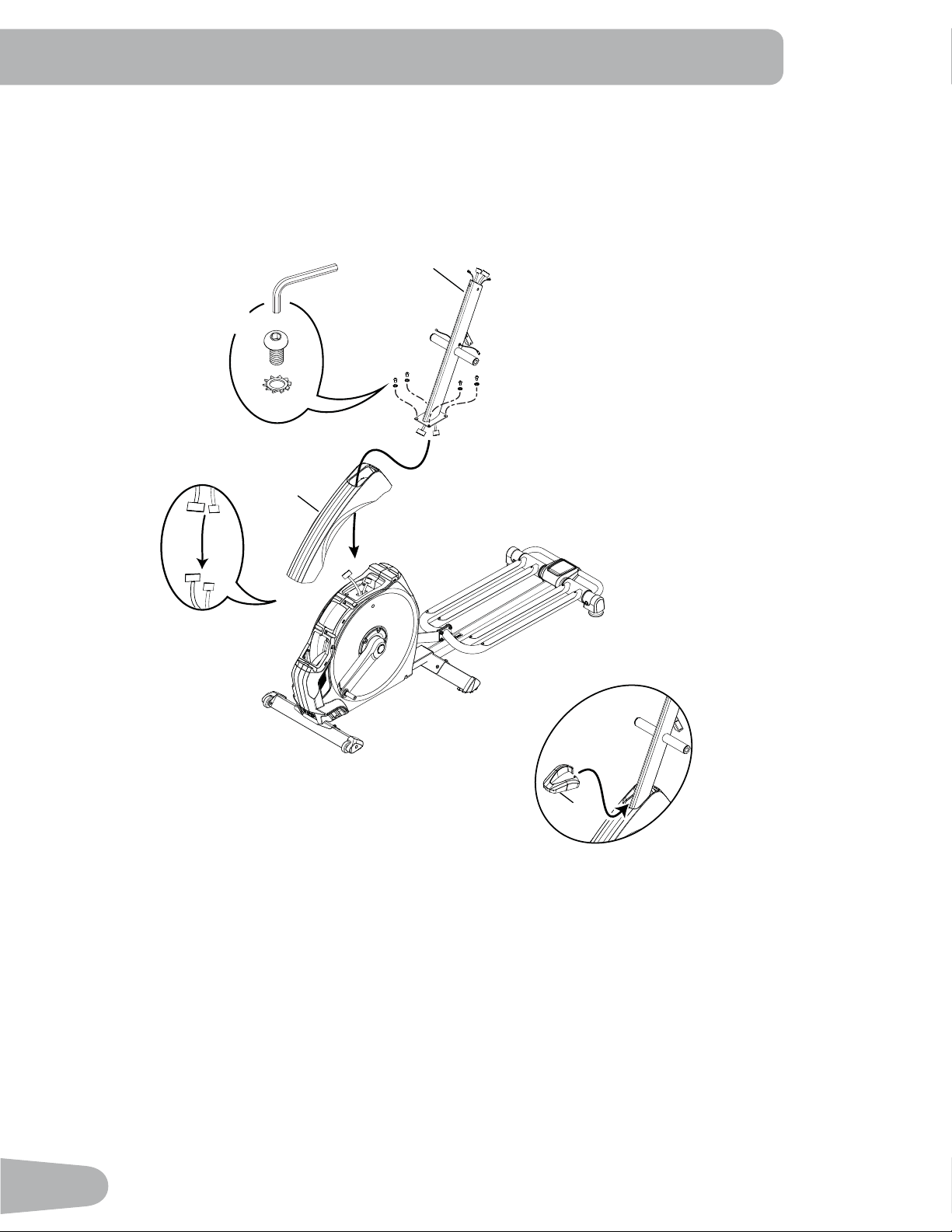
3. Connect the Cables and Attach the Console Mast to Frame Assembly
NOTICE: Put the Console Mast through the opening in the Upper Shroud. Before you connect the cables, remove
the wire tie that holds the Frame cables in place on the mount plate. Do not crimp cables. Fully tighten
the hardware.
1
20
B
D
6mm
X4
21
13
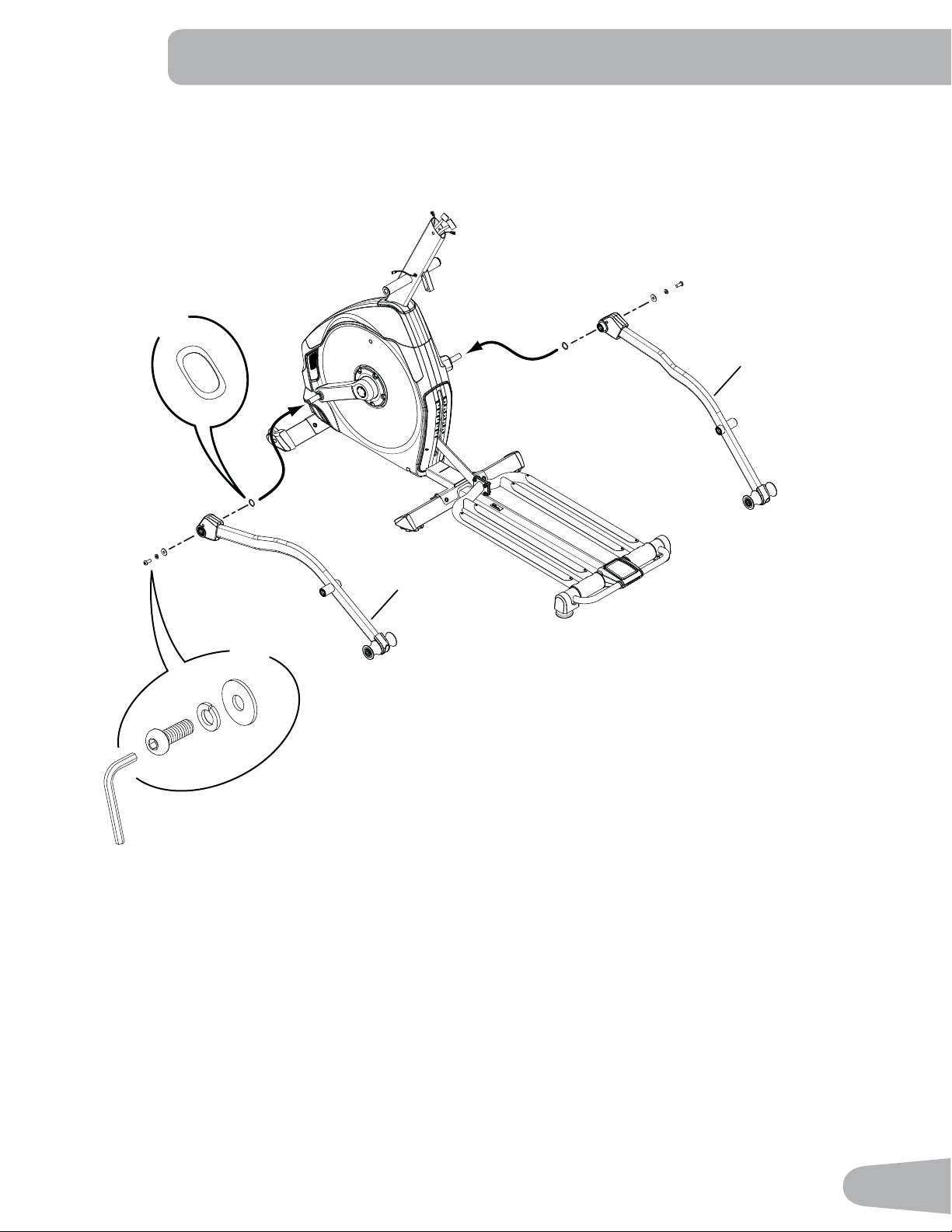
4. Attach Legs to Frame Assembly
F
X2
22
13
A
C
G
X2
6mm
14
7a
1a
7
5
1a
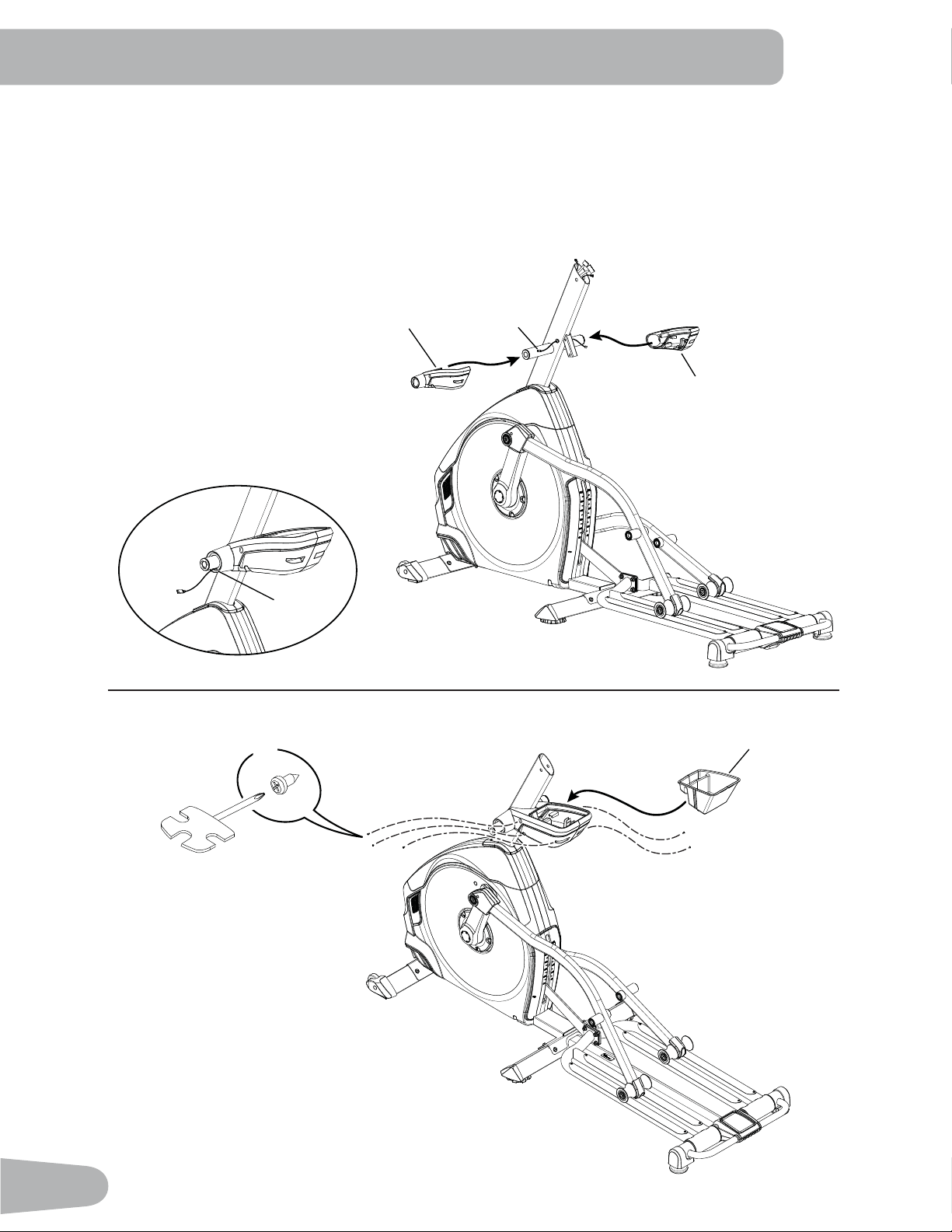
5. Install Water Bottle Holder on the Console Mast
NOTICE: 5RXWHWKHFDEOHDIURPWKHOHIWVLGHRIWKH0DVWWRWKHUHDURIWKHFURVVEDUDQGWKURXJKWKHRSHQLQJD
in the Water Bottle Holder Shroud. Do not crimp cables.
Repeat on the right side.
Install hardware and Water Bottle Holder. Push down until it snaps in place.
I
X5
6
15
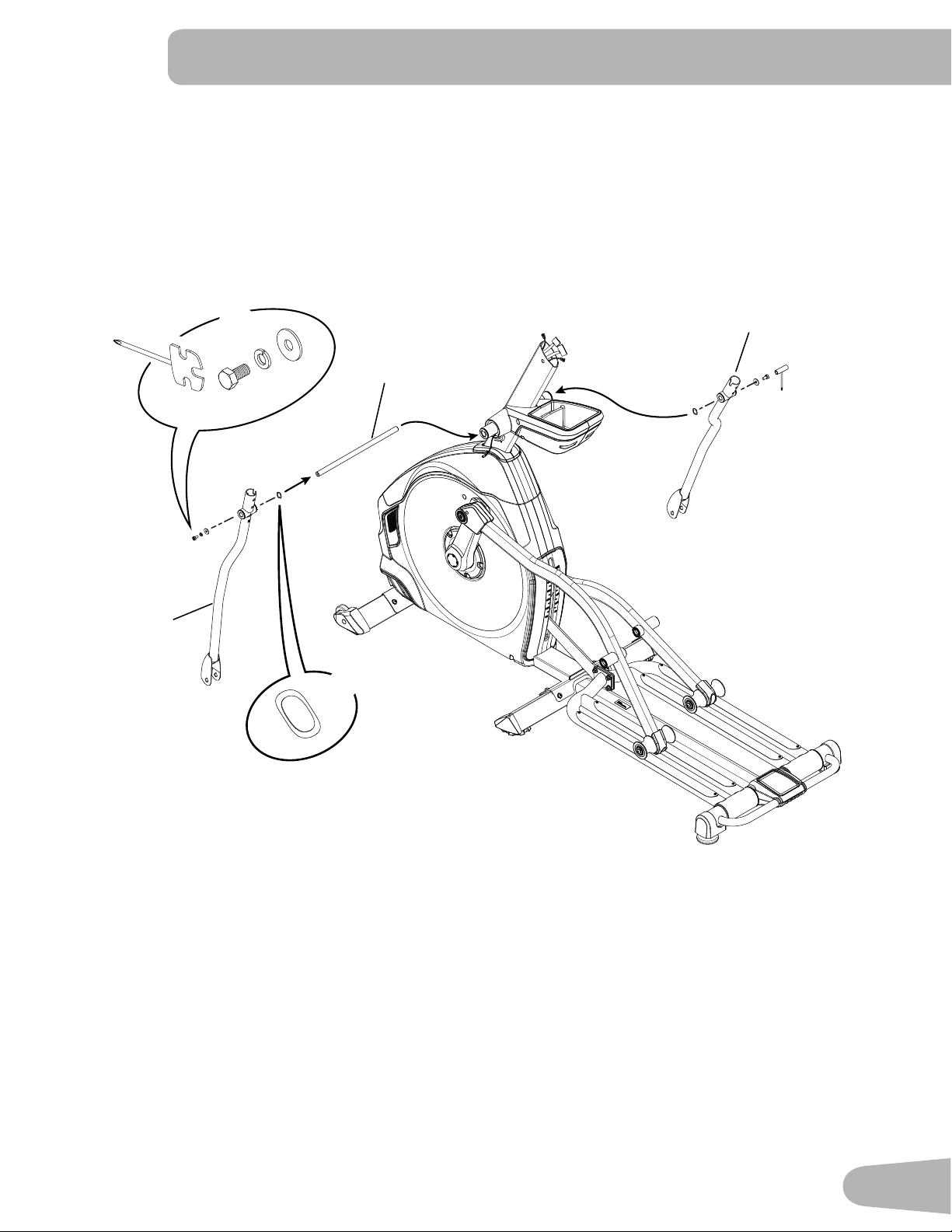
6. Install Arm Pivot Rod and Lower Handlebar Arms to Frame Assembly
Note: Be sure to put Wave Washers (F) on Arm Pivot Rod before attaching the Lower Handlebar Arms.
14
F
X2
C
G
E
X2
13 mm
12
18
16
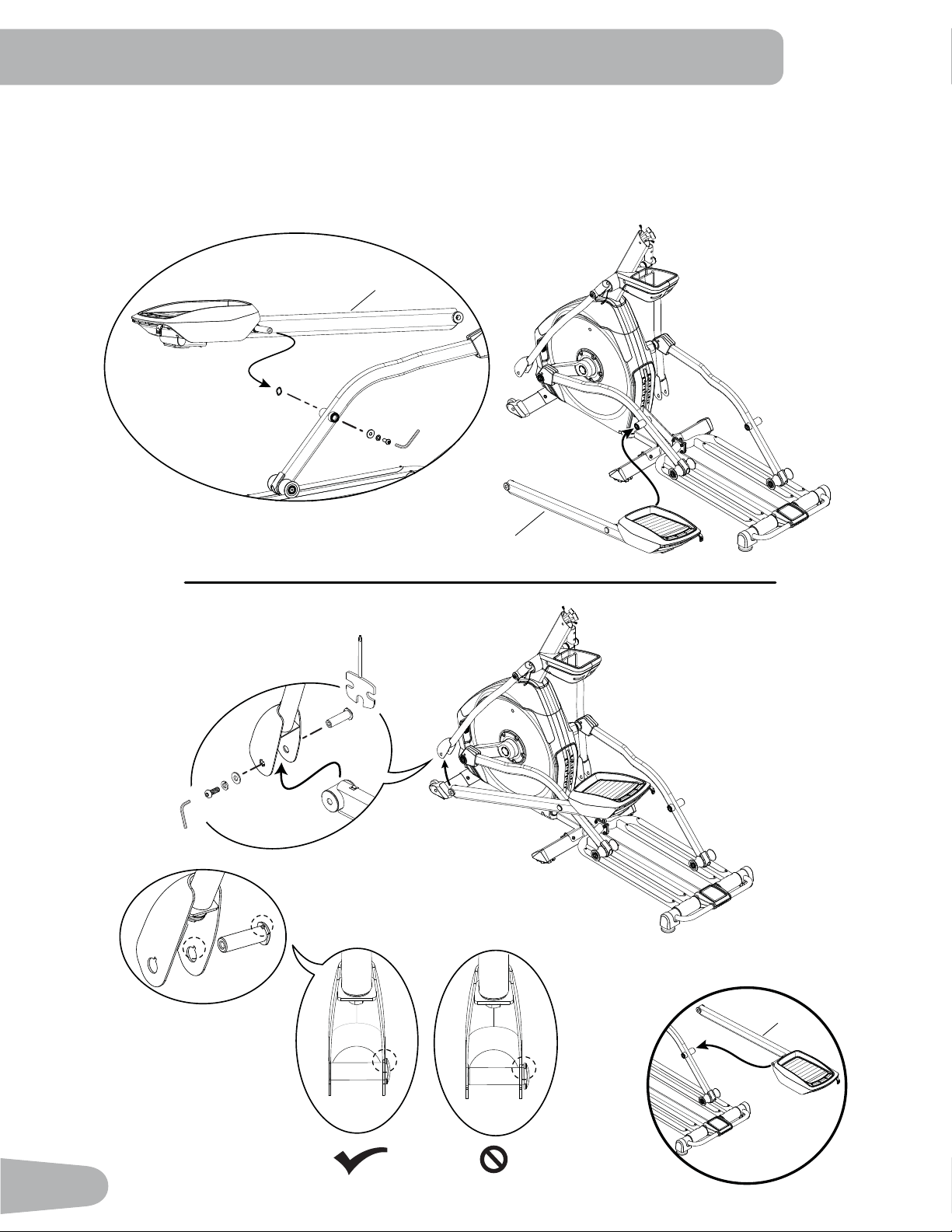
7. Attach Left Pedal to Leg and Lower Handlebar Arm
NOTICE: Attach the Pedal to the Leg first. Make sure the Pivot Sleeve (H) engages the Handlebar knuckle cover.
Repeat step on opposite side with the Right Pedal (Item 23 ).
23
15
H
C
H
G
A
6mm
15
A
C
G
F
6mm
17
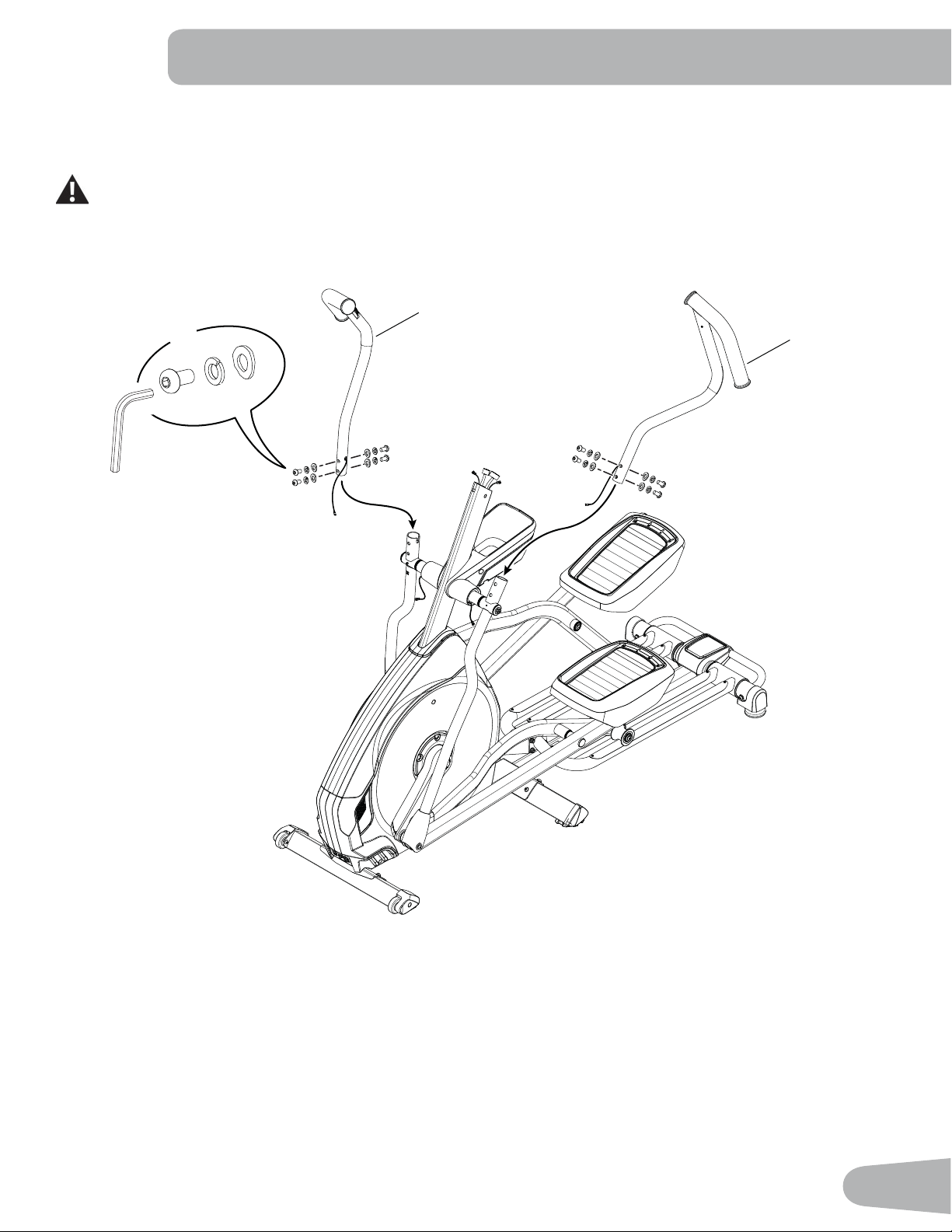
8. Attach the Upper Handlebar Arms to Frame Assembly
NOTICE: Hardware (*) is pre-installed and not on the Hardware Card. Do not crimp the cables.
Make sure the Upper Handlebar Arms are secure before you exercise.
*
*
*
X8
19
8
6mm
18
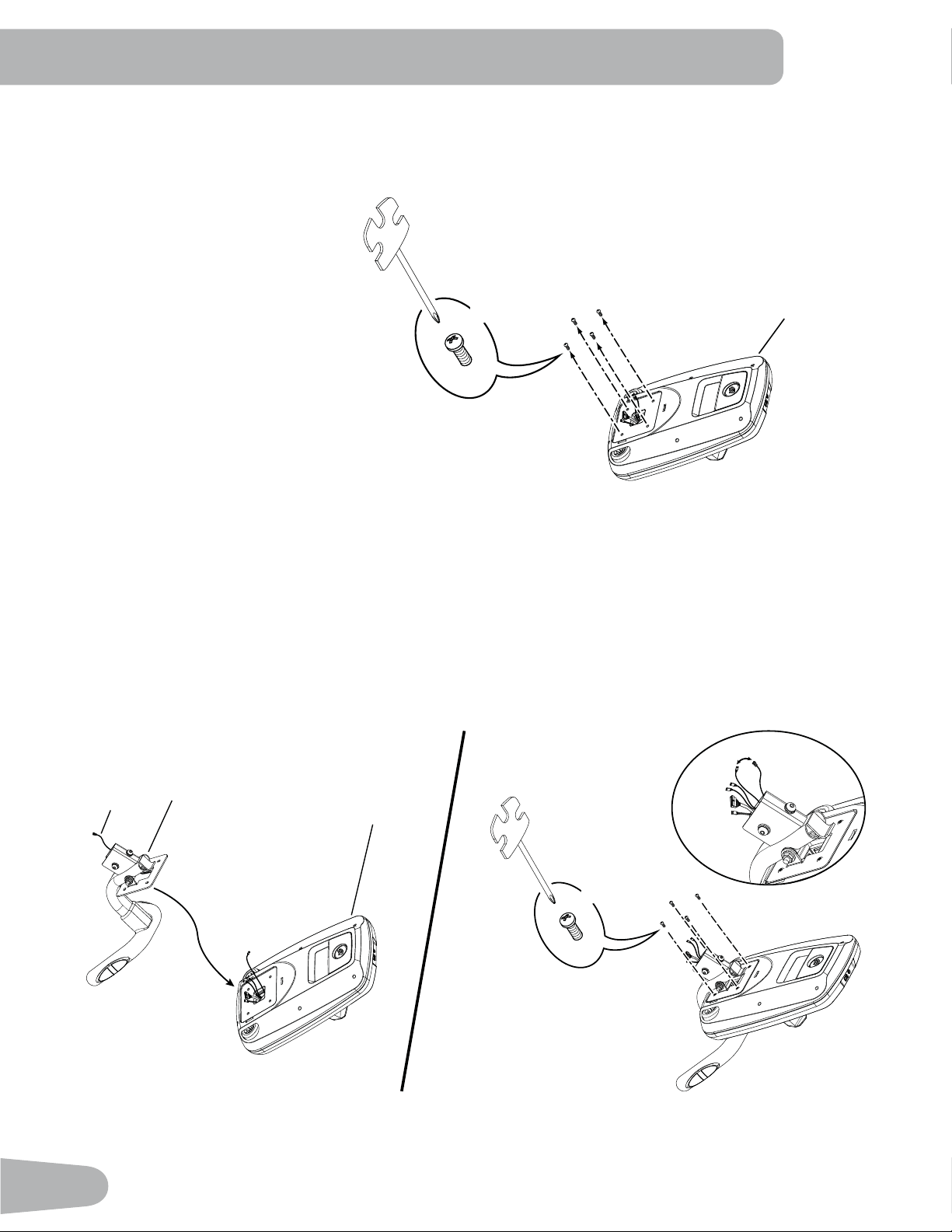
9. Remove Hardware from Console
Note: Hardware (*) is pre-installed and not on the Hardware Card. If desired, apply the French Canadian overlay to
the Console face.
10. Route Console Cables through the Static Handlebar and Attach Static Handlebar to the Console
NOTICE: Carefully place the Console face down on a padded surface. Route the Console Cables through the Static
Handlebar. Attach the Static Handlebar to the Console using the screws that were removed in Step 9.
Connect the Heart Rate Cable (4a) from the Static Handlebar to the Console Heart Rate Cable. Do not
crimp the cables.
3
#2
*
X4
3
4
4a
#2
*
X4
4a
19
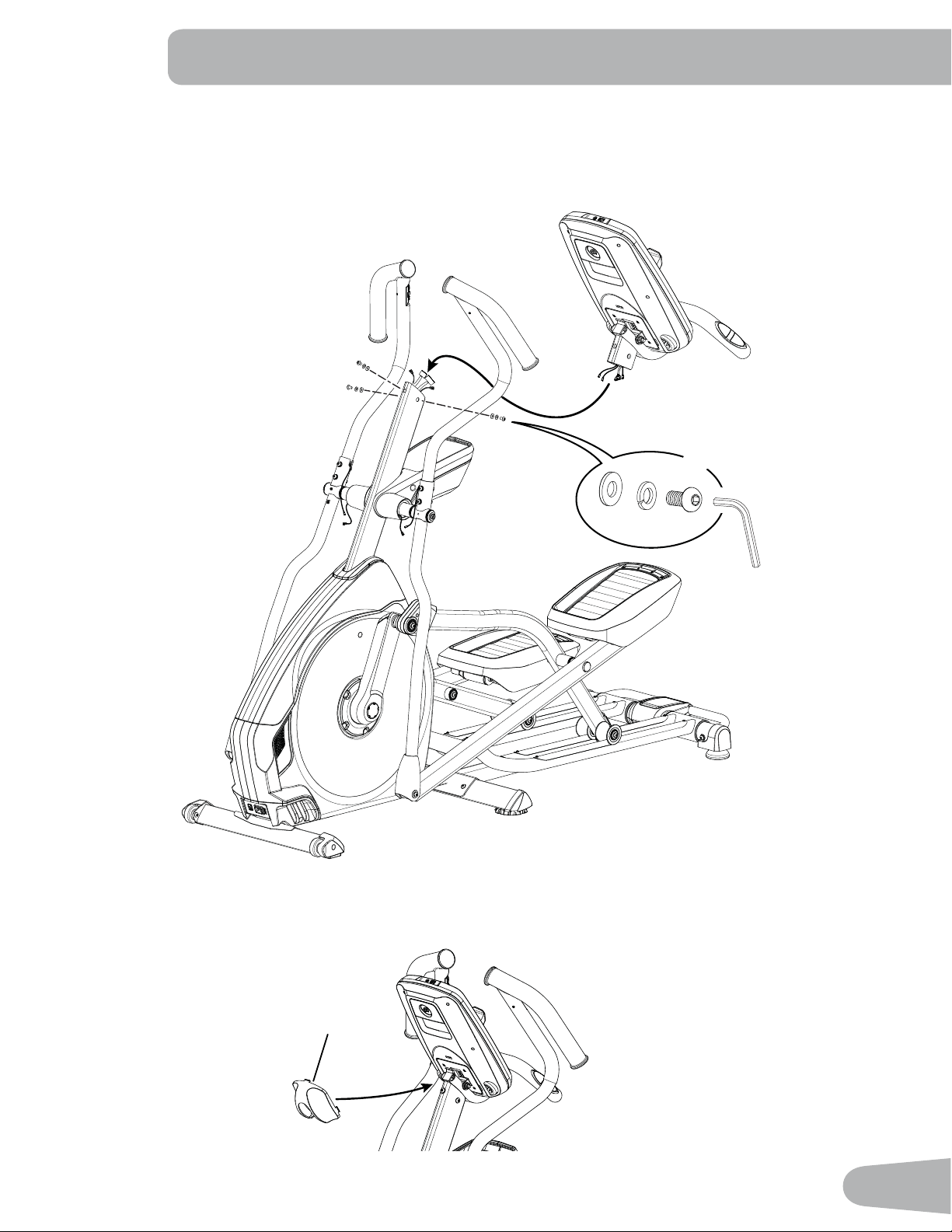
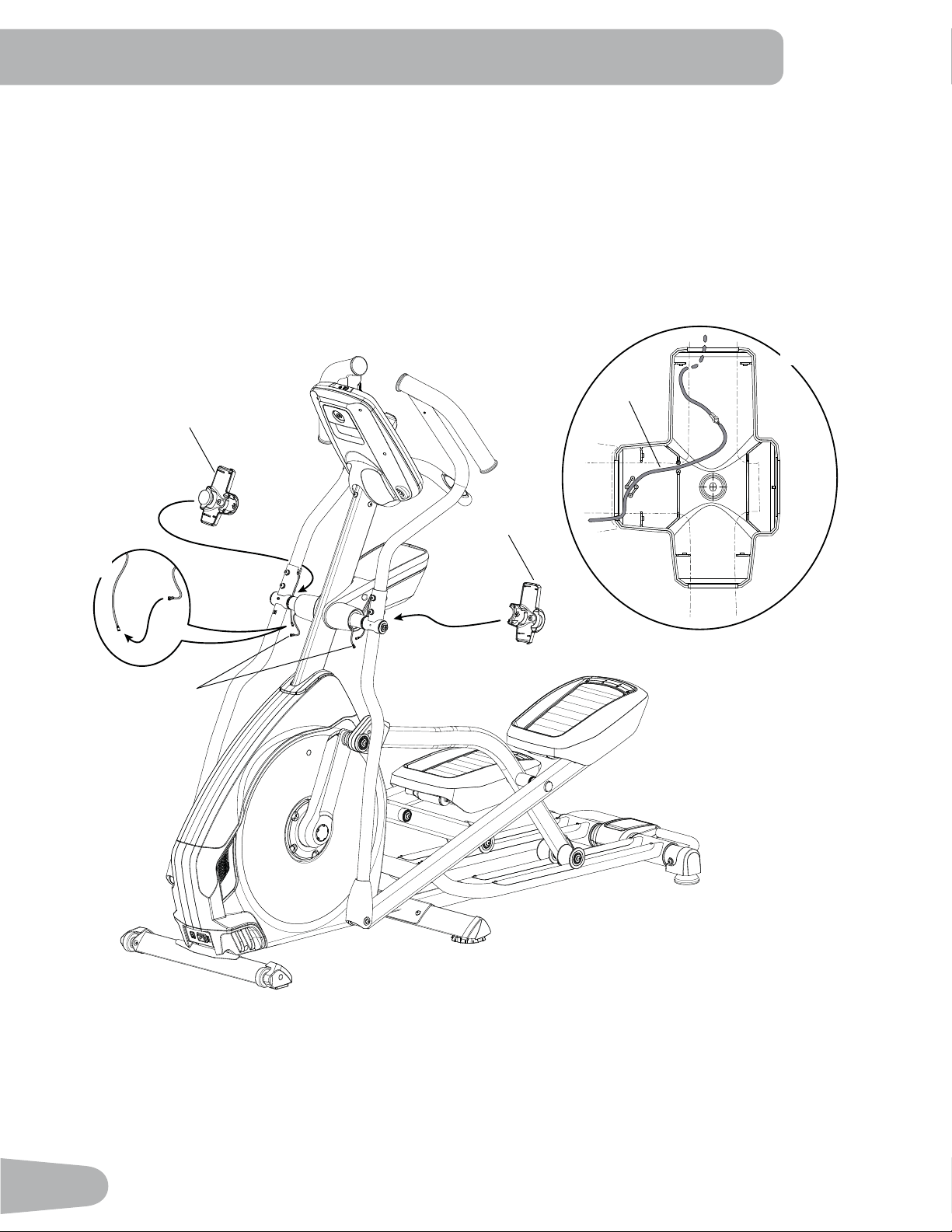
11. Connect Cables and Install the Static Handlebar Assembly to the Console Mast
NOTICE: Hardware (*) is pre-installed and not on the Hardware Card. Align the clips on the cable connectors and
make sure the connectors lock. Do not crimp cables. 3XVKWKHH[WUDZLUHGRZQLQWRWKH&RQVROH0DVWto
allow pivot clearance.
12. Attach the Console Junction Cover
2
6mm
*
X3
*
*
20
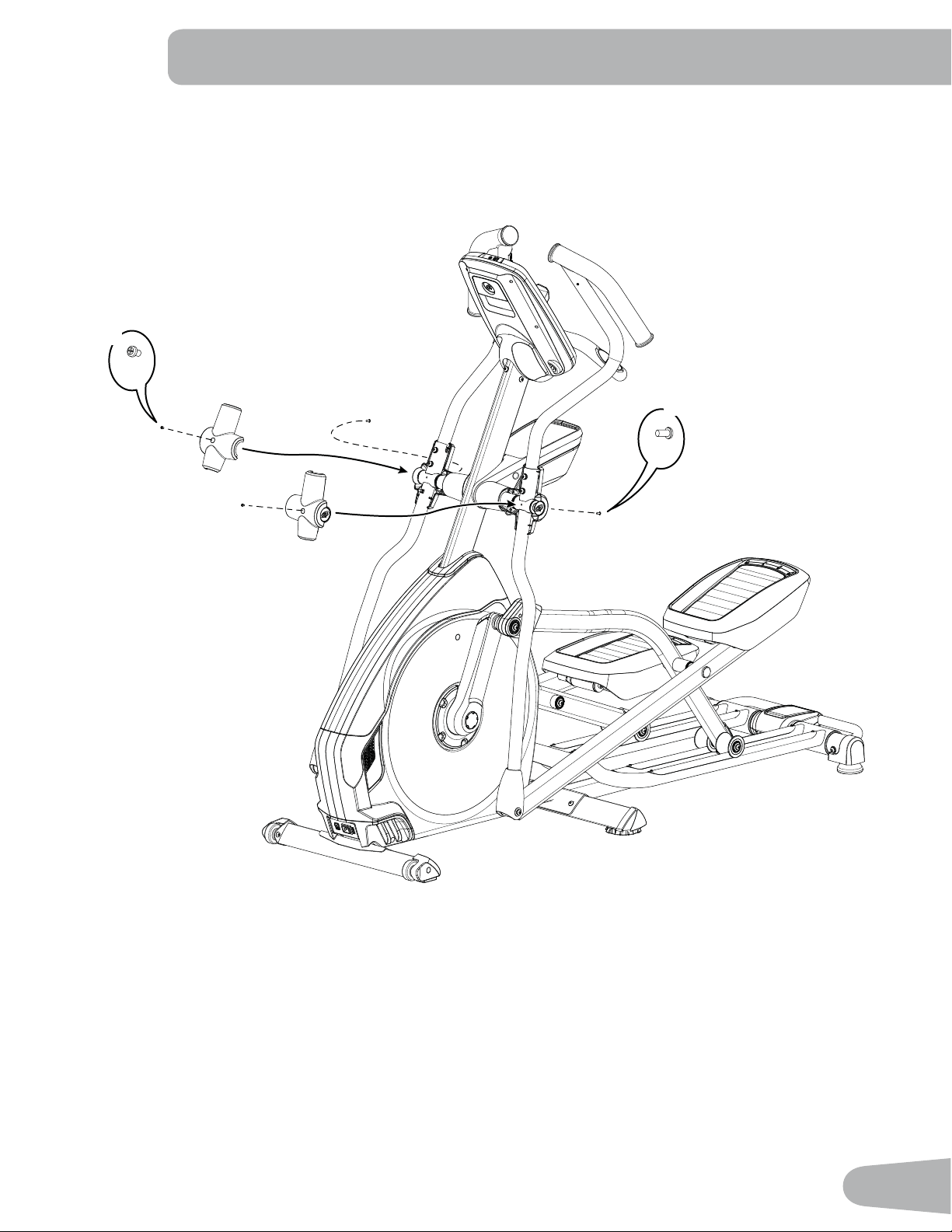
13. Connect Console Mast Cables to Cables from Handlebar Arms and Attach Rear Handlebar Shrouds
NOTICE: Connect the cables. Route the wire through the 3 guides inside the rear Handlebar Shroud and fit the
connectors inside the cavity as shown. Do not crimp cables. Make sure the inner edge of the Handlebar
Shroud is seated in the Water Bottle Holder Shroud.
1a
9
10
1a
2X
1a
2X
21
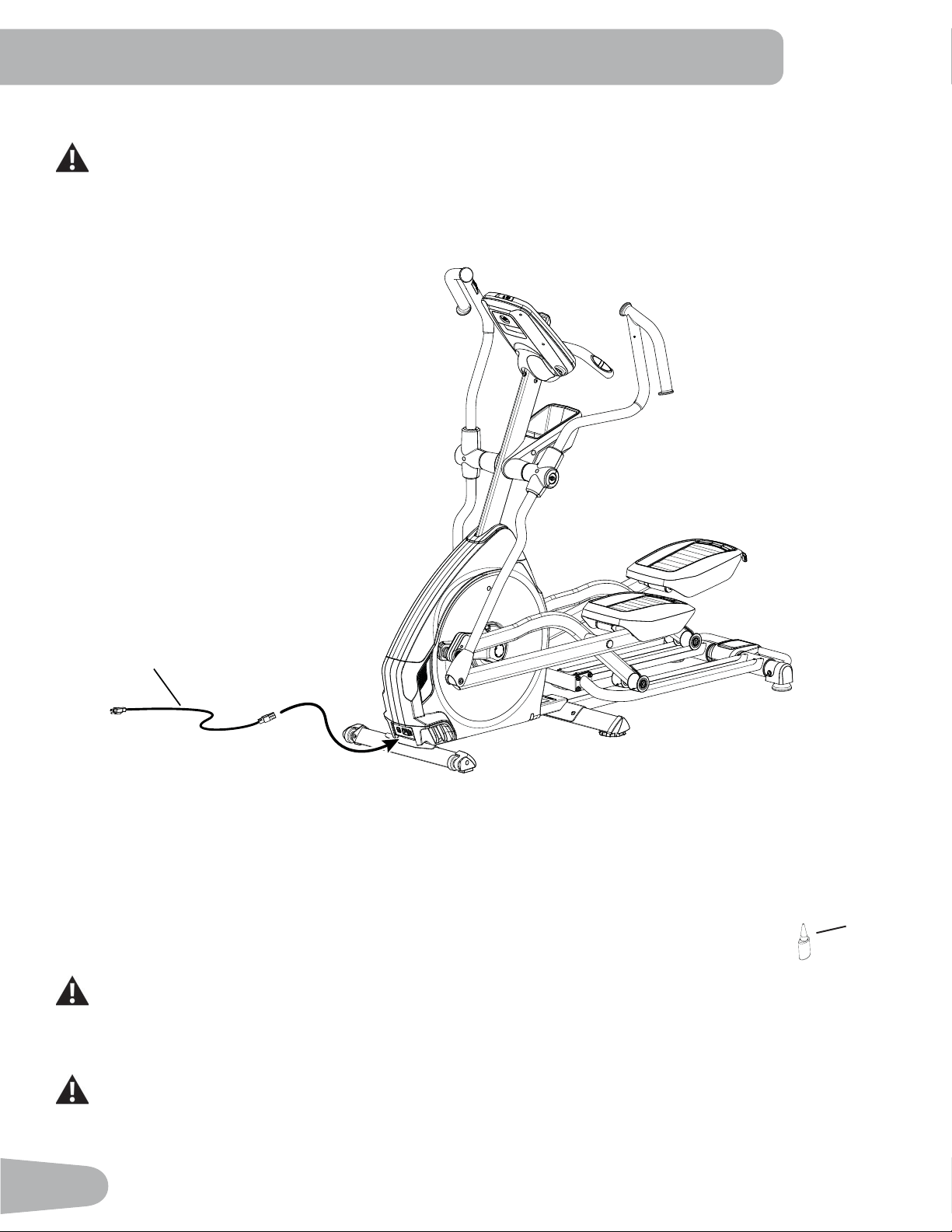
14. Attach Front Handlebar Shrouds and Install Screws
NOTICE: Do not crimp cables.
J
2X
J
2X
22
15. Connect the Power Cord to Frame Assembly
Connect this machine to a properly grounded outlet only (see Grounding Instructions).
16. Final Inspection
Inspect your machine to ensure that all hardware is tight and components are properly assembled.
Note: Remove the plastic scratch guard strips from Rails. Apply silicone lubricant to a cloth and
wipe the Rails to eliminate roller noise.
Silicone lubricant is not intended for human consumption. Keep out of reach of children. Store in a safe
place.
%HVXUHWRUHFRUGWKHVHULDOQXPEHULQWKH¿HOGSURYLGHGDWWKHIURQWRIWKLVPDQXDO
Do not use until the machine has been fully assembled and inspected for correct performance in
accordance with the Owner’s Manual.
25
26
23
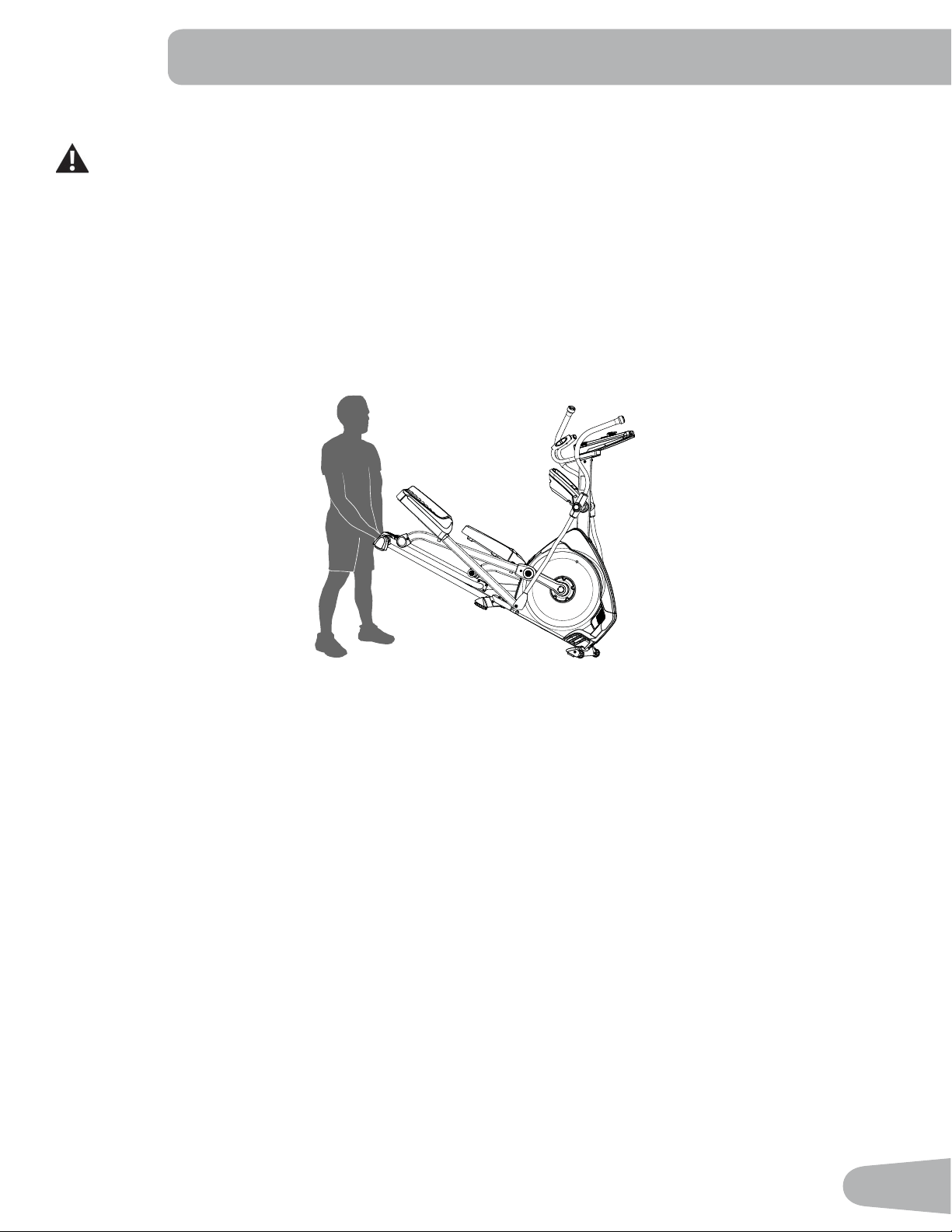
Moving the Machine
The machine may be moved by one or more persons depending on their physical abilities and capacities.
0DNHVXUHWKDW\RXDQGRWKHUVDUHDOOSK\VLFDOO\¿WDQGDEOHWRPRYHWKHPDFKLQHVDIHO\
1. Remove the power cord.
2. Use the Transport Handle to carefully lift the machine onto the transport rollers.
3. Push the machine into position.
4. Carefully lower the machine into position.
NOTICE: Be careful when you move the elliptical. Abrupt motions can affect the computer operation.
BEFORE YOU START
24
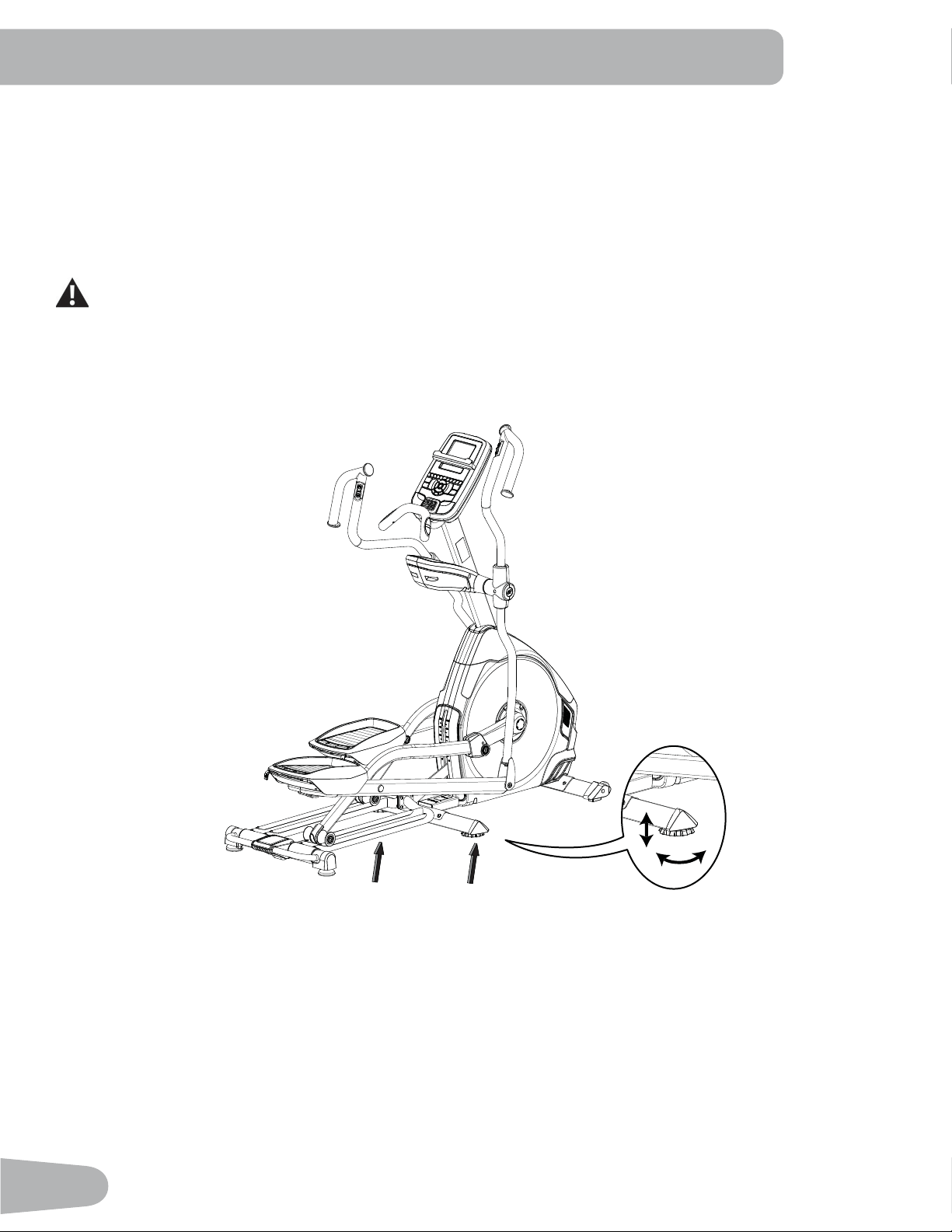
Leveling the Machine
7KHPDFKLQHQHHGVWREHOHYHOHGLI\RXUZRUNRXWDUHDLVXQHYHQRULIWKH5DLO$VVHPEO\LVVOLJKWO\RIIWKHÀRRU7RDGMXVW
1. Place the machine in your workout area.
6DIHO\VWDQGRQWKHEDFNRIWKH5DLO$VVHPEO\IRUDSSUR[LPDWHO\VHFRQGV
3. Step off the machine.
/RRVHQWKHORFNLQJQXWVDQGDGMXVWWKHOHYHOHUVXQWLOWKH\DOOFRQWDFWWKHÀRRU
Do not adjust the levelers to such a height that they detach or unscrew from the machine. Injury to you or
damage to the machine can occur.
5. Adjust until the machine is level. Tighten the locking nuts.
0DNHVXUHWKHPDFKLQHLVOHYHODQGVWDEOHEHIRUH\RXH[HUFLVH
25
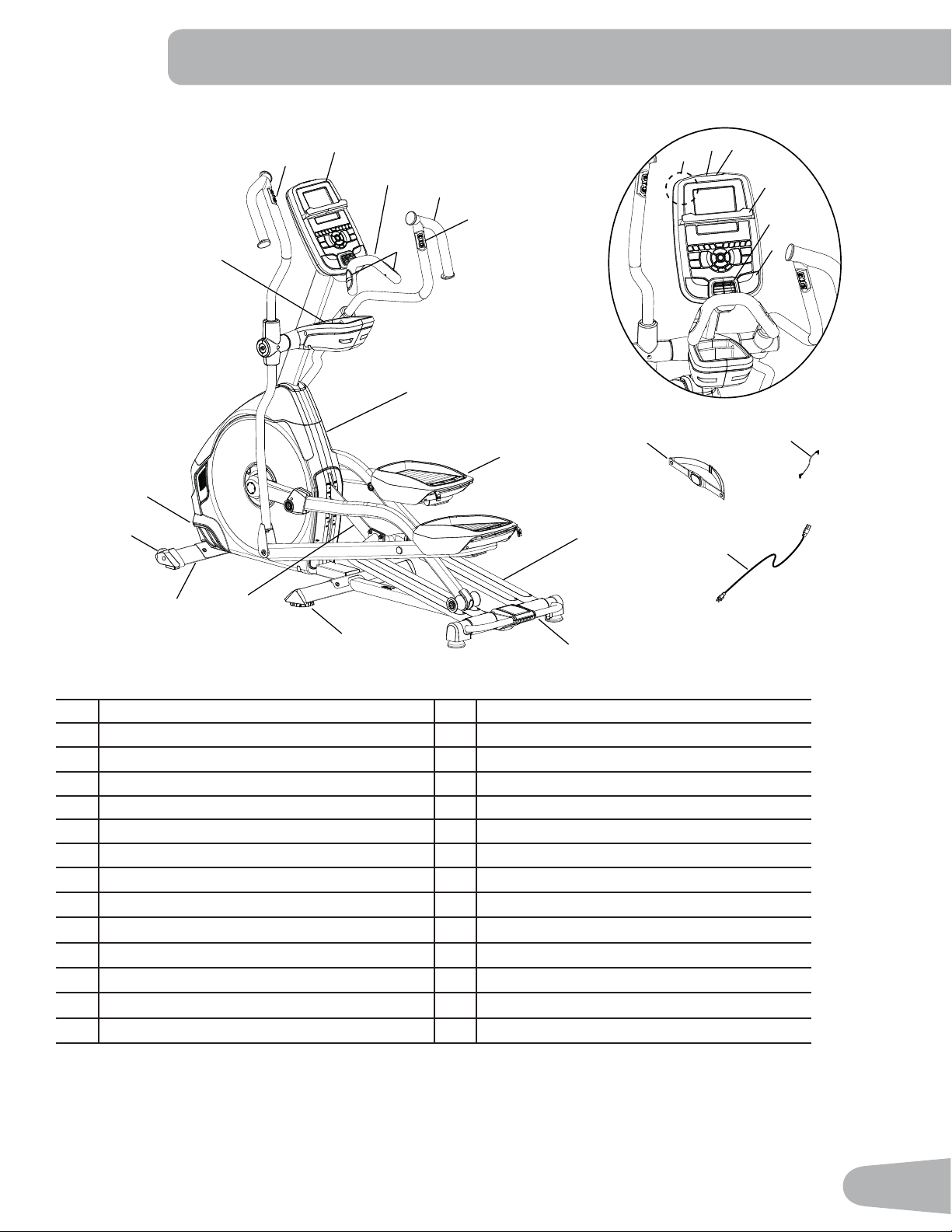
FEATURES
A Console O Water Bottle Holder
B Static Handlebar P Remote Resistance Controls
C Contact Heart Rate (CHR) Sensors Q Telemetry Heart Rate (HR) Receiver
D Upper Handlebar R USB Port
E Remote Incline Controls S MP3 Input
F Fully Shrouded Flywheel T Media Tray
G Adjustable Foot Pedal U Fan
H Rail V Speakers
I Transport Handle W Bluetooth
®
Connectivity (not shown)
J Leveler X Heart Rate (HR) Chest Strap
K Incline Arm Y MP3 Cord
L Stabilizer Z Power Cord
M Transport Roller AA Silicone Lubricant, Bottle (not shown)
N Power Connector / Power Switch
A
B
C
D
E
F
G
H
I
J
K
L
M
N
O
P
Q
R
S
T
U
V
A
Y
Z
X
WARNING! Use the values calculated or measured by the machine’s computer for reference purposes only. The
heart rate displayed is an approximation and should be used for reference only. Over exercising may
result in serious injury or death. If you feel faint stop exercising immediately.
26
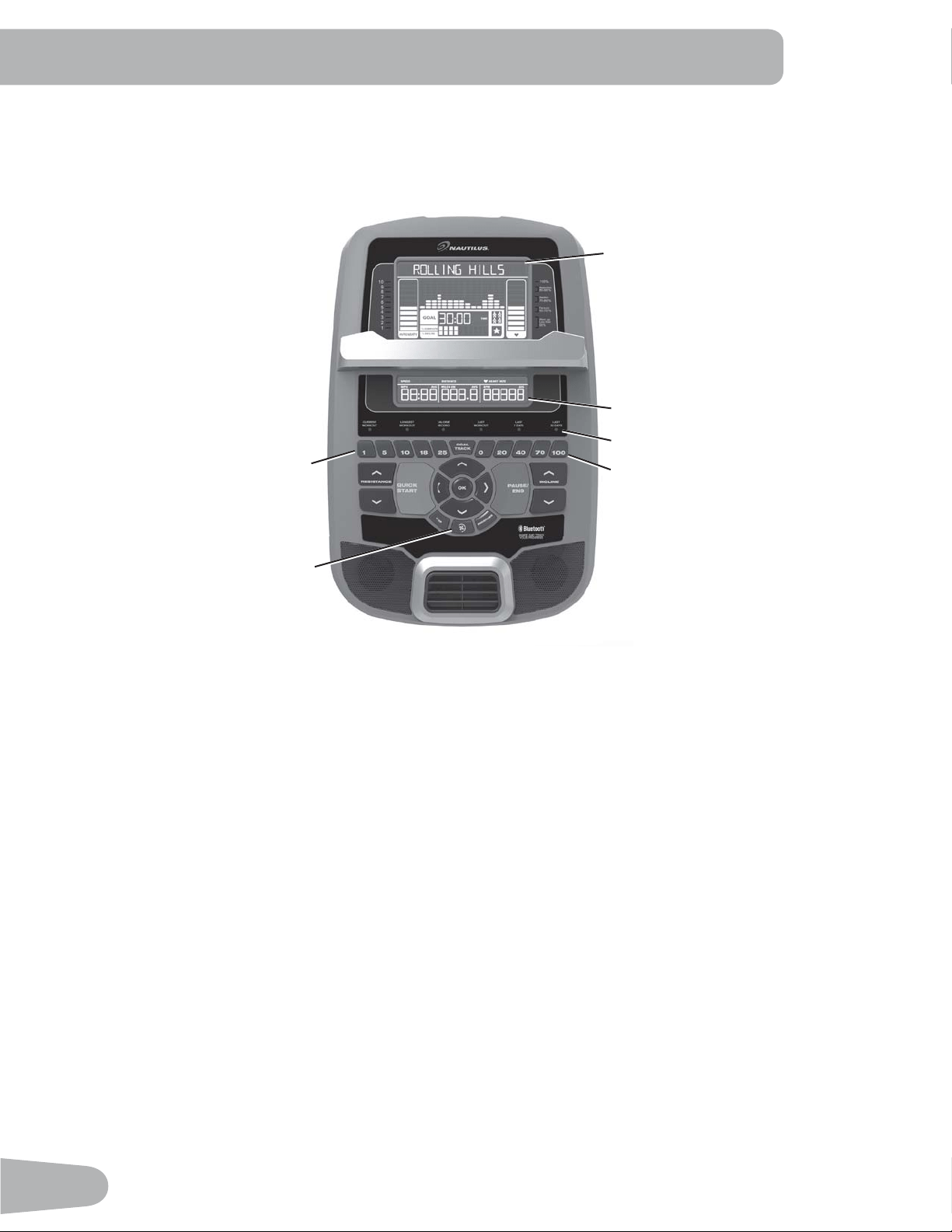
Console Features
The Console provides important information about your workout and lets you control the resistance levels while you
H[HUFLVH7KH&RQVROHIHDWXUHVWKH1DXWLOXV'XDO7UDFN
™
display with touch control buttons to navigate you through the
H[HUFLVHSURJUDPV
Keypad Functions
Resistance Increase (c) button- Increases the workout resistance level
Resistance Decrease (d) button- Decreases the workout resistance level
Incline Increase (c) button- Increases the Incline angle of the Rail Assembly
Incline Decrease (d) button- Decreases the Incline angle of the Rail Assembly
QUICK START button- Begins a Quick Start workout
86(5EXWWRQ6HOHFWVD8VHUSUR¿OH
PROGRAMS button- Selects a category and workout program
PAUSE / END button- Pauses an active workout, ends a paused workout, or goes back to the previous screen
*2$/75$&.EXWWRQ'LVSOD\VWKH:RUNRXW7RWDOVDQG$FKLHYHPHQWVIRUWKHVHOHFWHG8VHU3UR¿OH
Increase (c) button- Increases a value (age, time, distance, or calories) or moves through options
Left (e) button- Displays different workout values during a workout, and moves through options
2.EXWWRQ6WDUWVD3URJUDPZRUNRXWFRQ¿UPVLQIRUPDWLRQRUUHVXPHVDSDXVHGZRUNRXW
Upper Display
Lower Display
Incline Level Quick Buttons
Resistance Level Quick Buttons
Achievement Indicator Lights
Fan
27
Right (f) button- Displays different workout values during a workout, and moves through options
Decrease (d) button- Decreases a value (age, time, distance, or calories) or moves through options
FAN button- Controls 3-speed fan
Resistance Level Quick Buttons- Shifts the resistance levels to the setting quickly during a workout
Incline Level Quick Buttons- Shifts the incline level to the setting quickly during a workout
Achievement Indicator Lights- when an achievement level is reached or a result is reviewed, the achievement indicator
light will activate
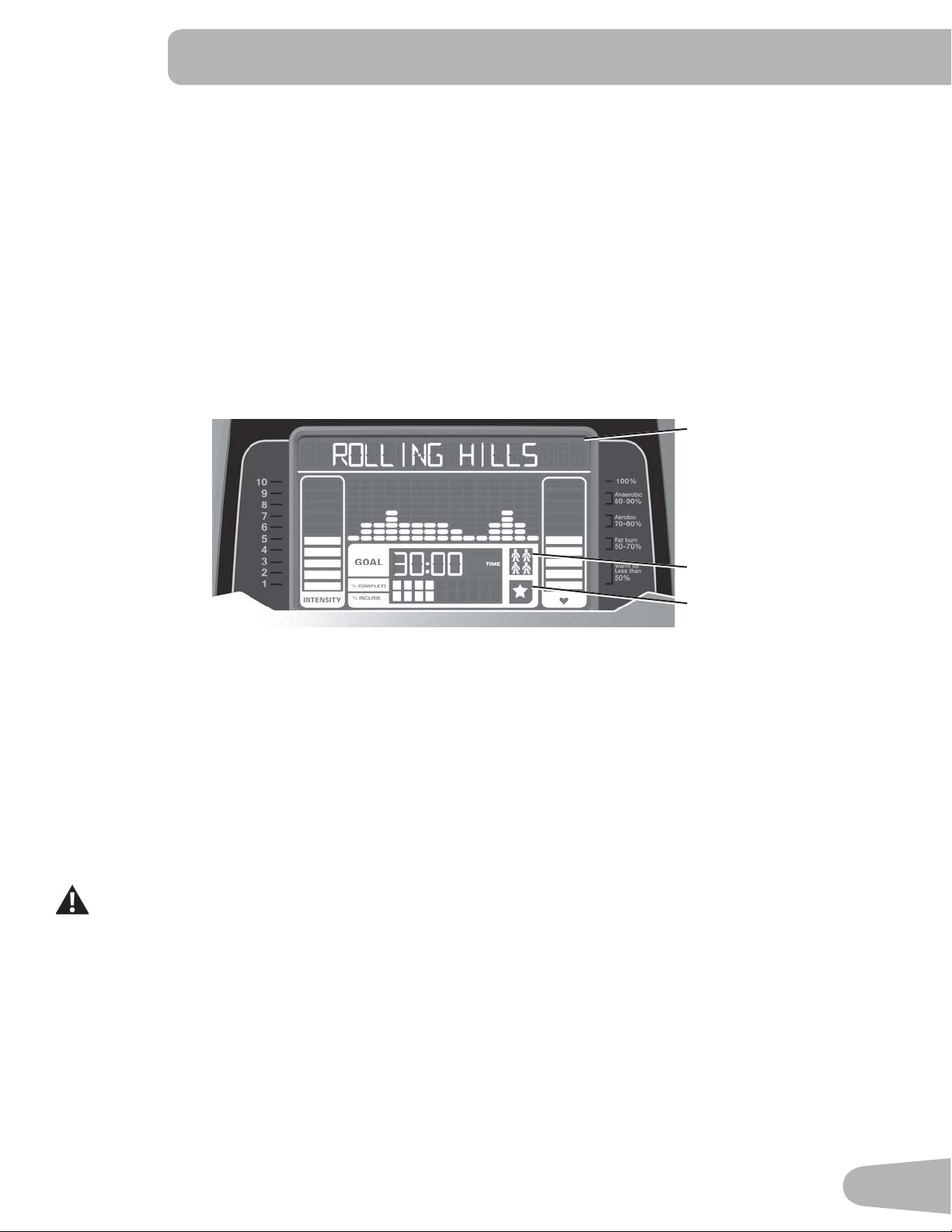
Nautilus Dual Track
™
Display
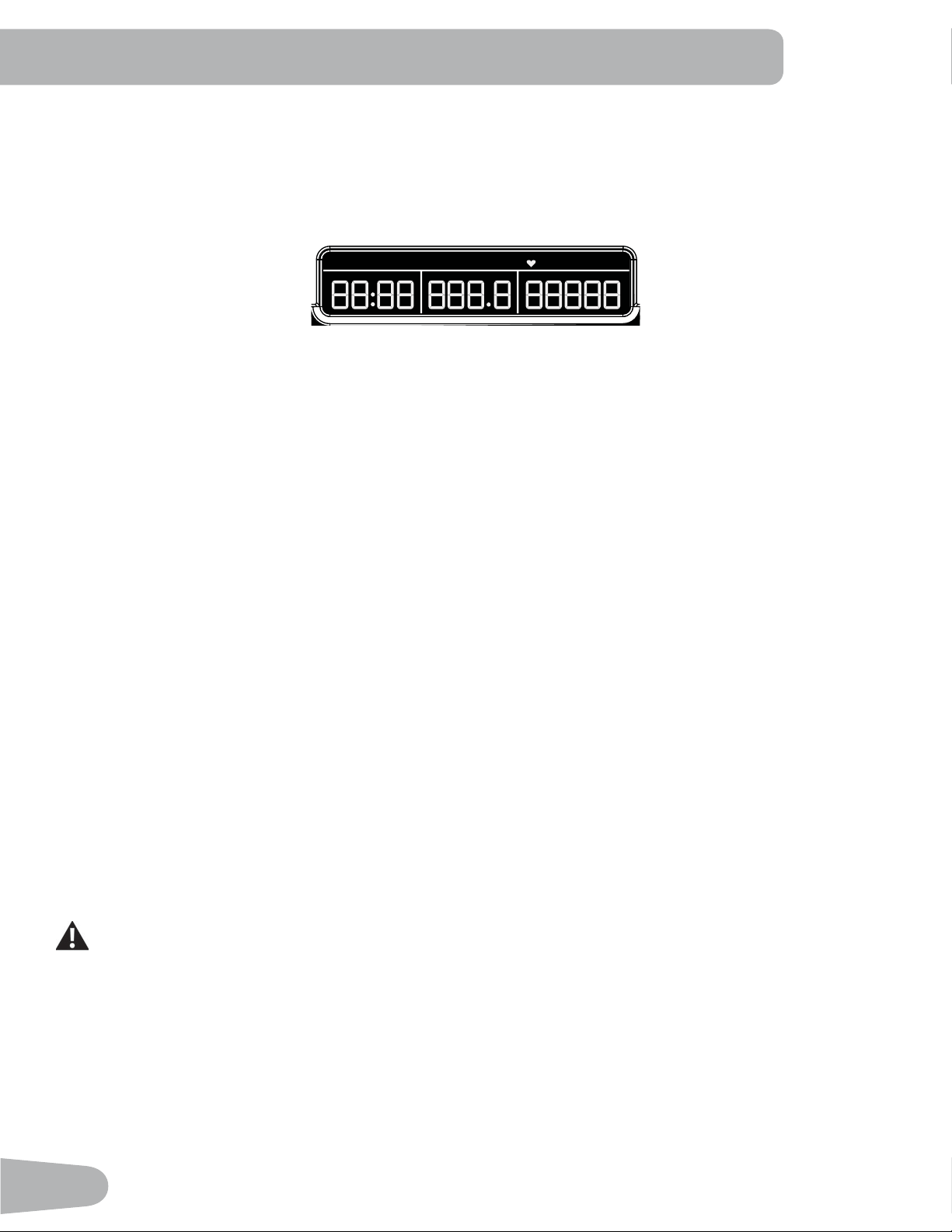
Upper Display Data
Program Display
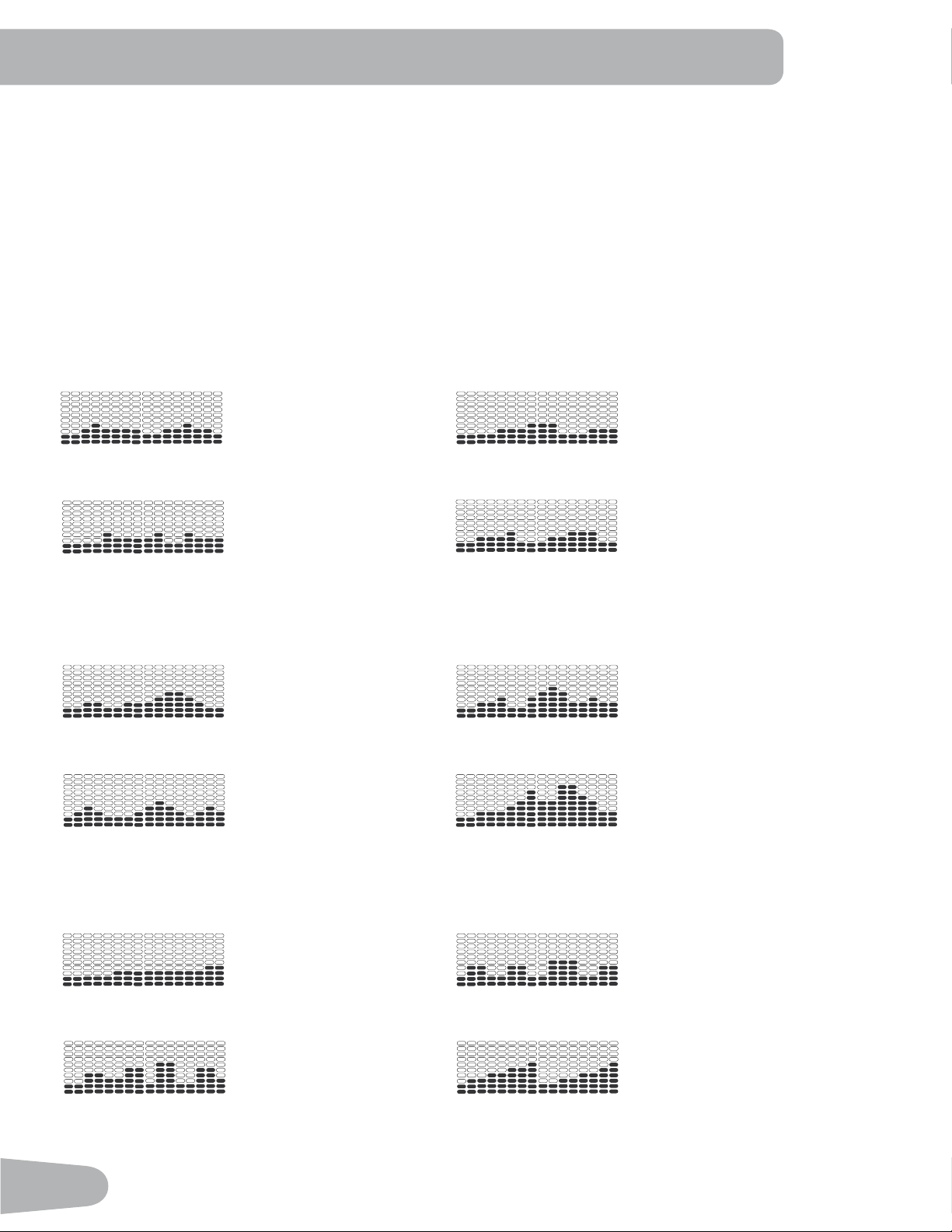
7KH3URJUDP'LVSOD\VKRZVLQIRUPDWLRQWRWKH8VHUDQGWKHJULGGLVSOD\DUHDVKRZVWKHFRXUVHSUR¿OHIRUWKHSURJUDP
(DFKFROXPQLQWKHSUR¿OHVKRZVRQHLQWHUYDOZRUNRXWVHJPHQW7KHKLJKHUWKHFROXPQWKHKLJKHUWKHUHVLVWDQFHOHYHO
7KHÀDVKLQJFROXPQVKRZV\RXUFXUUHQWLQWHUYDO
Intensity Display
The Intensity Display shows the level of work at that moment based on the current resistance level.
Heart Rate Zone Display
The Heart Rate Zone shows which zone the current heart rate value falls into for the current User. These Heart Rate
Zones can be used as a workout guide for a certain target zone (anaerobic, aerobic, or fat burn).
Consult a physician before you start an exercise program. Stop exercising if you feel pain or tightness in
your chest, become short of breath, or feel faint. Contact your doctor before you use the machine again.
The heart rate displayed is an approximation and should be used for reference only.
Note: If no heart rate is detected, the display will be blank.
NOTICE: To prevent interference with the telemetry HR receiver, do not place any personal electronic devices in the left
side of the media tray.
Goal Display
The Goal Display shows the currently selected type of goal (Distance, Time or Calories), the current value to achieve the
goal, and the percent completed toward the goal.
User Display
7KH8VHU'LVSOD\VKRZVZKLFK8VHU3UR¿OHLVFXUUHQWO\VHOHFWHG
User Display
Achievement Display
Program Display
28
Achievement Display
The Achievement Display activates when a workout goal is reached or a workout milestone is surpassed from past
workouts. The Console display will congratulate and inform the User of their achievement, along with a celebratory sound.
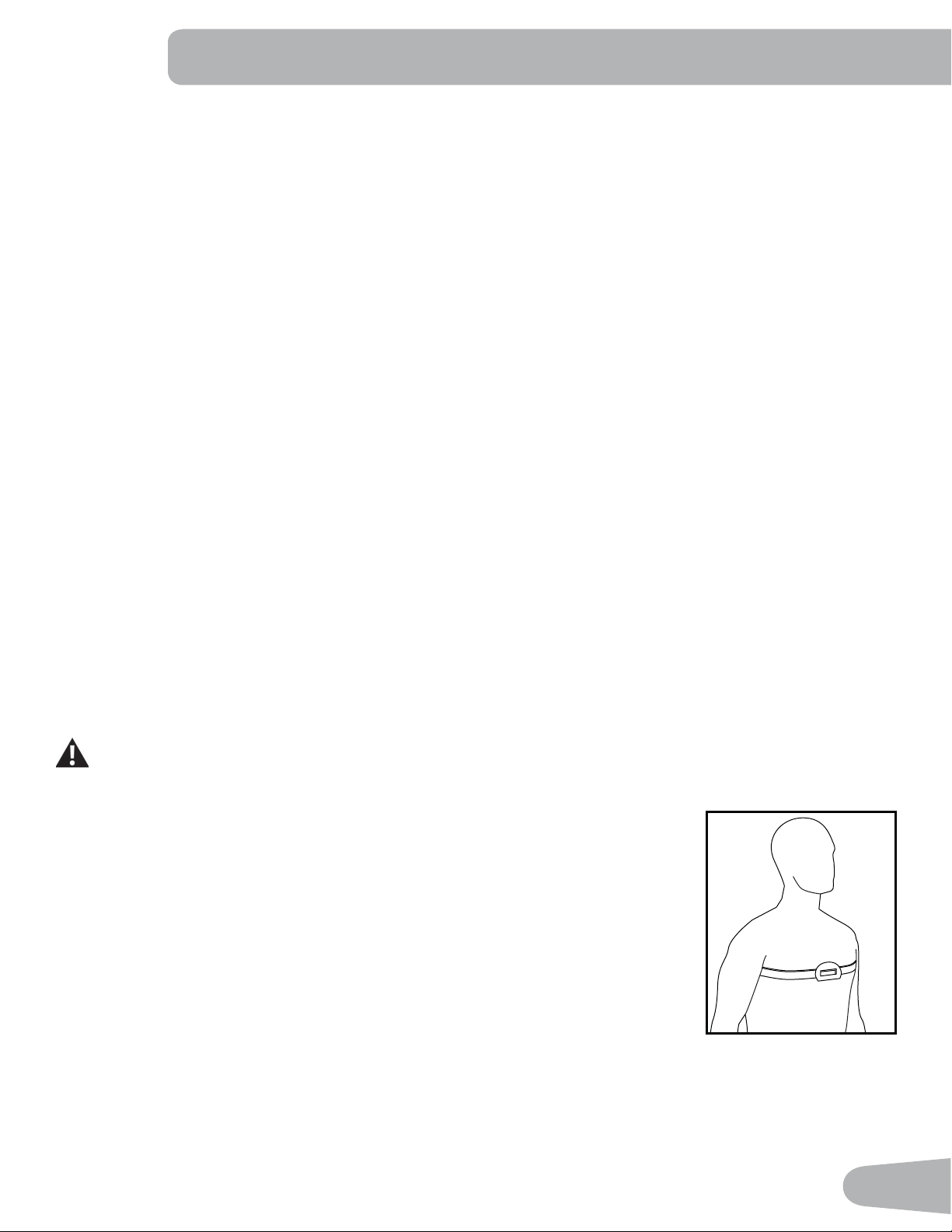
Lower Display Data
7KH/RZHU'LVSOD\VKRZVWKH:RUNRXW9DOXHVDQGFDQEHFXVWRPL]HGIRUHDFK8VHU&RQVXOWWKH³(GLW8VHU3UR¿OH´
section of this manual).
Speed
7KH6SHHGGLVSOD\¿HOGVKRZVWKHPDFKLQHVSHHGLQPLOHVSHUKRXUPSKRUNLORPHWHUVSHUKRXUNPK
Time
7KH7,0(GLVSOD\¿HOGVKRZVWKHWRWDOWLPHFRXQWRIWKHZRUNRXWWKHDYHUDJH7LPHIRUWKH8VHU3UR¿OHRUWKHWRWDORSHUD
tional time of the machine.
Note: If a Quick Start workout is performed for more than 99 minutes and 59 seconds (99:59), the units for Time will shift
to hours and minutes ( 1 hour, 40 minutes ).
Distance
The Distance display shows the distance count (miles or km) in the workout.
Note: To change the measurement units to English Imperial or metric, refer to the “Console Setup Mode” section in this
manual.
Level
The LEVEL display shows the current resistance level in the workout.
RPM
7KH530GLVSOD\¿HOGVKRZVWKHSHGDOUHYROXWLRQVSHUPLQXWH530
Heart Rate (Pulse)
The Heart Rate display shows the beats per minute (BPM) from the heart rate monitor. When a heart rate signal is re-
FHLYHGE\WKH&RQVROHWKHLFRQZLOOÀDVK
Consult a physician before you start an exercise program. Stop exercising if you feel pain or tightness in
your chest, become short of breath, or feel faint. Contact your doctor before you use the machine again.
The heart rate displayed is an approximation and should be used for reference only.
Calories
7KH&DORULHVGLVSOD\¿HOGVKRZVWKHHVWLPDWHGFDORULHVWKDW\RXKDYHEXUQHGGXULQJWKHH[HUFLVH
TIMESPEED DISTANCE LEVEL CALORIESRPM HEART RATE
MPH km/h Hr MIN AVG MILES KM AVG BPM AVG
DISTANCE
29
Bluetooth
®
Connectivity with the “Nautilus Trainer™” Fitness App
7KLV¿WQHVVPDFKLQHLVHTXLSSHGZLWK%OXHWRRWK
®
connectivity and can wirelessly sync with the “Nautilus Trainer™”
)LWQHVV$SSRQVXSSRUWHGGHYLFHV7KH6RIWZDUH$SSV\QFVZLWK\RXU¿WQHVVPDFKLQHWRWUDFNWRWDOFDORULHVEXUQHGWLPH
distance, and more. It records and stores every workout for quick reference. Plus, it automatically syncs your workout data
with MyFitnessPal
®
and Under Armour
®
Connected Fitness to make hitting your daily calorie goal easier than ever! Track
your results and share with friends and family.
1. Download the free Software App, named Nautilus Trainer™. The software app is available on the App Store and
Google Play™.
Note: For a complete list of supported devices, review the software app on the App Store or Google Play™.
)ROORZWKHLQVWUXFWLRQVRQWKH6RIWZDUH$SSWRV\QF\RXUGHYLFHWR\RXUH[HUFLVHPDFKLQH
3. To sync your workout data with MyFitnessPal
®
or Under Armour
®
Connected Fitness, click on the desired program and
login with your information.
Note: The “Nautilus Trainer™” Fitness App will automatically sync your workouts after the initial syncing.
Workout with Other Fitness Apps
7KLV¿WQHVVPDFKLQHKDVLQWHJUDWHG%OXHWRRWK
®
connectivity which allows it to work with a number of digital partners. For
our latest list of supported partners, please visit: www.nautilus.com/partners
USB Charging
If a USB Device is attached to the USB Port, the Port will attempt to charge the Device.
Note: Depending on the amperage of device, the power supplied from the USB Port may not be enough to operate the
Device and charge it at the same time.
Chest Strap
Using the provided heart rate transmitter chest strap lets you monitor your heart rate at any time during your workout.
Consult a physician before you start an exercise program. Stop exercising if you feel pain or tightness in
your chest, become short of breath, or feel faint. Contact your doctor before you use the machine again.
The heart rate displayed is an approximation and should be used for reference only.
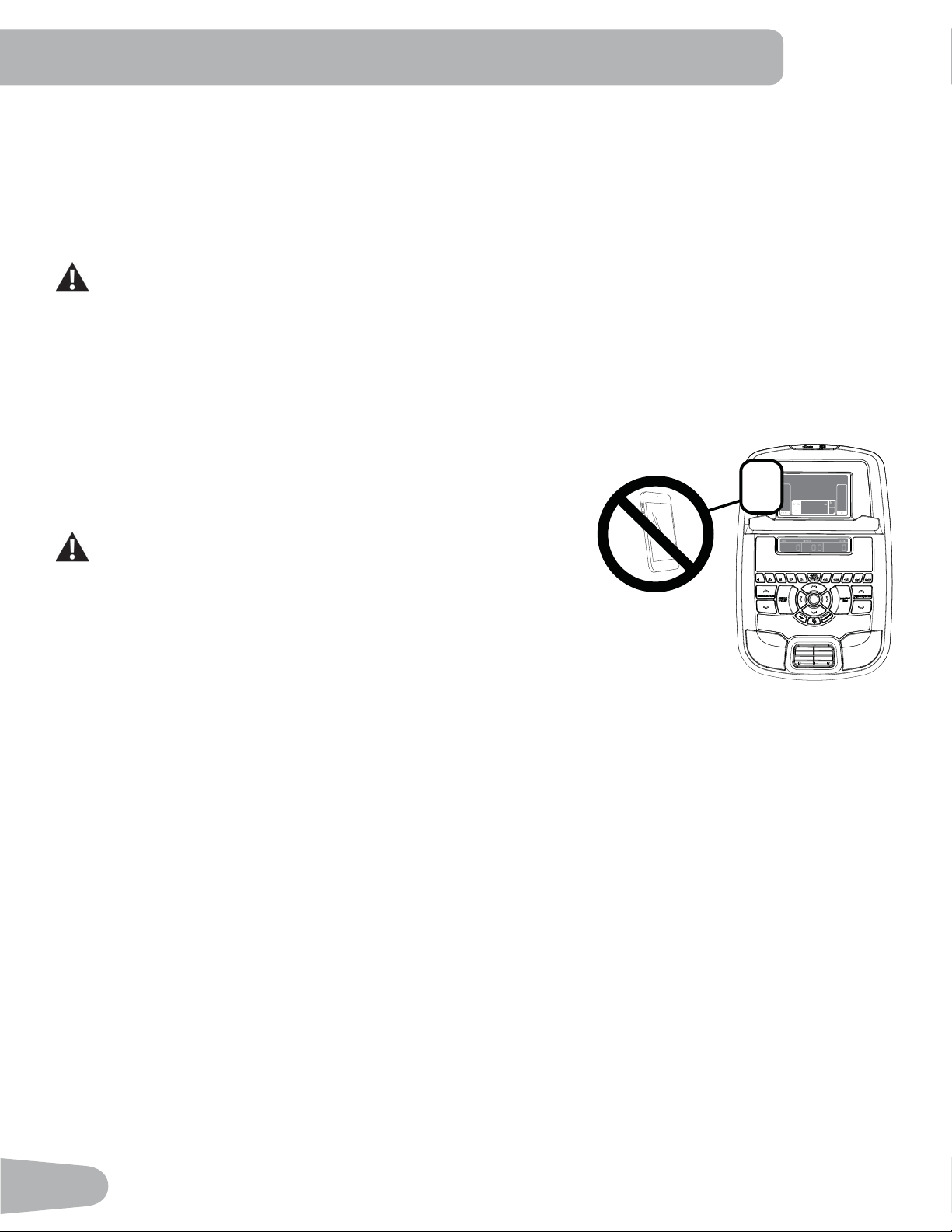
The heart rate transmitter is attached to a chest strap to keep your hands free during your
workout. To put on your chest strap:
1. Attach the transmitter to the elastic chest strap.
2. Secure the strap around your chest with the curve of the transmitter oriented upward,
just below the chest muscles.
3. Lift the transmitter off your chest and moisten the two Grooved Electrode Areas on the
back.
&KHFNWKDWWKHZHWHOHFWURGHDUHDVDUH¿UPO\DJDLQVW\RXUVNLQ
The transmitter will send your heart rate to the machine’s receiver and display your
estimated Beats Per Minute (BPM).
Always remove the transmitter before you clean the chest strap. Clean the chest strap regularly with mild soap and water,
and thoroughly dry it. Residual sweat and moisture may keep the transmitter active and drain the battery in the transmitter.
Dry and wipe clean the transmitter after each use.
30
Note: Do not use abrasives or chemicals such as steel wool or alcohol when you clean the chest strap, as they can
damage the electrodes permanently.
,IWKH&RQVROHGRHVQRWGLVSOD\DKHDUWUDWHYDOXHWKHWUDQVPLWWHUPD\EHDWIDXOW&KHFNWKDWWKHWH[WXUHGFRQWDFW
areas on the chest strap are making contact with your skin. You may need to lightly wet the contact areas. Check that
the curve of the transmitter is oriented upward. If no signal appears or you need further assistance, call your Nautilus
Representative.
Before discarding a chest strap, remove the battery. Dispose of in accordance with local regulations and/or
at approved recycling centers.
Remote Heart Rate Monitor
0RQLWRULQJ\RXU+HDUW5DWHLVRQHRIWKHEHVWSURFHGXUHVWRFRQWUROWKHLQWHQVLW\RI\RXUH[HUFLVH&RQWDFW+HDUW5DWH
(CHR) sensors are installed to send your heart rate signals to the Console. The Console can also read telemetry HR
signals from a Heart Rate Chest Strap Transmitter that operates in the 4.5kHz - 5.5kHz range.
Note: The heart rate chest strap must be an uncoded heart rate strap from
Polar Electro or an uncoded POLAR
®
compatible model. (Coded
POLAR
®
heart rate straps such as POLAR
®
OwnCode
®
chest straps
will not work with this equipment.)
If you have a pacemaker or other implanted electronic device,
consult your doctor before using a wireless chest strap or other
telemetric heart rate monitor.
NOTICE: To prevent interference with the telemetry HR receiver, do not
place any personal electronic devices in the left side of the media
tray.*
Contact Heart Rate Sensors
Contact Heart Rate (CHR) sensors send your heart rate signals to the Console. The CHR sensors are the stainless steel
parts of the Handlebars. To use, put your hands comfortably around the sensors. Be sure that your hands touch both the
WRSDQGWKHERWWRPRIWKHVHQVRUV+ROG¿UPEXWQRWWRRWLJKWRUORRVH%RWKKDQGVPXVWPDNHFRQWDFWZLWKWKHVHQVRUVIRU
the Console to detect a pulse. After the Console detects four stable pulse signals, your initial pulse rate will be shown.
Once the Console has your initial heart rate, do not move or shift your hands for 10 to 15 seconds. The Console will now
YDOLGDWHWKHKHDUWUDWH0DQ\IDFWRUVLQÀXHQFHWKHDELOLW\RIWKHVHQVRUVWRGHWHFW\RXUKHDUWUDWHVLJQDO
• Movement of the upper body muscles (including arms) produces an electrical signal (muscle artifact) that can interfere
with pulse detection. Slight hand movement while in contact with the sensors can also produce interference.
• Calluses and hand lotion may act as an insulating layer to reduce the signal strength.
• Some Electrocardiogram (EKG) signals generated by individuals are not strong enough to be detected by the sensors.
• 7KHSUR[LPLW\RIRWKHUHOHFWURQLFPDFKLQHVFDQJHQHUDWHLQWHUIHUHQFH
If your heart rate signal ever seems erratic after validation, wipe off your hands and the sensors and try again.
Heart Rate Calculations
<RXUPD[LPXPKHDUWUDWHXVXDOO\GHFUHDVHVIURP%HDWV3HU0LQXWH%30LQFKLOGKRRGWRDSSUR[LPDWHO\%30E\
DJH7KLVIDOOLQKHDUWUDWHLVXVXDOO\OLQHDUGHFUHDVLQJE\DSSUR[LPDWHO\RQH%30IRUHDFK\HDU7KHUHLVQRLQGLFDWLRQ
WKDWWUDLQLQJLQÀXHQFHVWKHGHFUHDVHLQPD[LPXPKHDUWUDWH,QGLYLGXDOVRIWKHVDPHDJHFRXOGKDYHGLIIHUHQWPD[LPXP
KHDUWUDWHV,WLVPRUHDFFXUDWHWR¿QGWKLVYDOXHE\FRPSOHWLQJDVWUHVVWHVWWKDQE\XVLQJDQDJHUHODWHGIRUPXOD
*
31
<RXUDWUHVWKHDUWUDWHLVLQÀXHQFHGE\HQGXUDQFHWUDLQLQJ7KHW\SLFDODGXOWKDVDQDWUHVWKHDUWUDWHRIDSSUR[LPDWHO\
BPM, whereas highly trained runners may have readings of 40 BPM or lower.
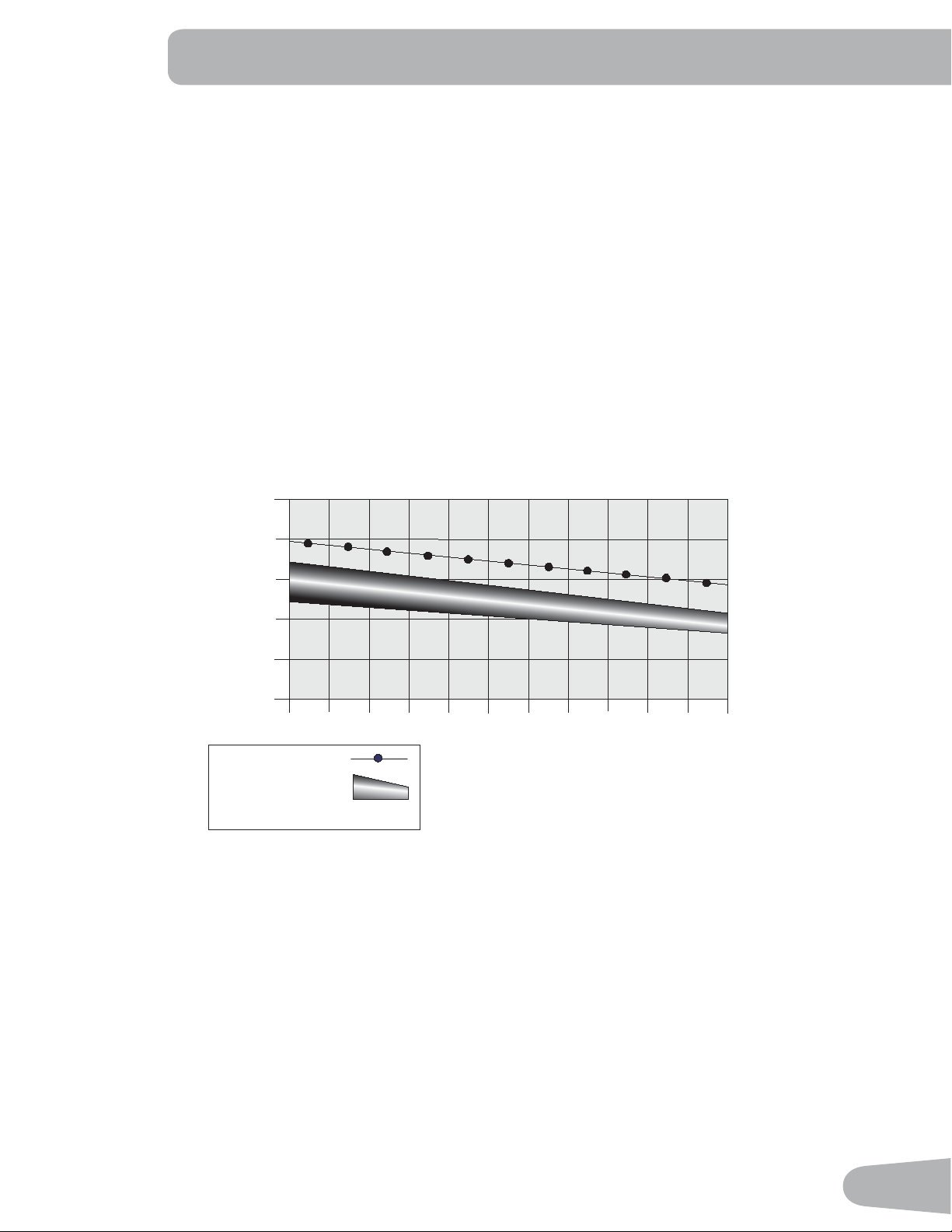
The Heart Rate table is an estimate of what Heart Rate Zone (HRZ) is effective to burn fat and improve your cardiovas-
cular system. Physical conditions vary, therefore your individual HRZ could be several beats higher or lower than what is
shown.
7KHPRVWHI¿FLHQWSURFHGXUHWREXUQIDWGXULQJH[HUFLVHLVWRVWDUWDWDVORZSDFHDQGJUDGXDOO\LQFUHDVH\RXULQWHQVLW\
XQWLO\RXUKHDUWUDWHUHDFKHVEHWZHHQ±RI\RXUPD[LPXPKHDUWUDWH&RQWLQXHDWWKDWSDFHNHHSLQJ\RXUKHDUW
rate in that target zone for over 20 minutes. The longer you maintain your target heart rate, the more fat your body will
burn.
The graph is a brief guideline, describing the generally suggested target heart rates based on age. As noted above, your
optimal target rate may be higher or lower. Consult your physician for your individual target heart rate zone.
Note:$VZLWKDOOH[HUFLVHVDQG¿WQHVVUHJLPHQVDOZD\VXVH\RXUEHVWMXGJPHQWZKHQ\RXLQFUHDVH\RXUH[HUFLVHWLPH
or intensity.
&!4"52.).'4!2'%4(%!242!4%
(EART2ATE"0-
BEATSPERMINUTE
!GE
-AXIMUM(EART2ATE
4ARGET(EART2ATE:ONE
KEEPWITHINTHISRANGE
FOROPTIMUMFATBURNING
Remote Resistance and Incline Controls
The remote resistance and incline controls are located on the upper handlebar arms. The resistance and incline can be
controlled from these keypads. The keypad on the left upper handlebar arm includes a Resistance Increase key (c) and
a Resistance Decrease (d) key. The keypad on the right upper handlebar arm includes an Incline Increase key (c) and a
Incline Decrease (dNH\7KHVHNH\VZRUNH[DFWO\WKHVDPHDVWKH5HVLVWDQFHDQG,QFOLQH,QFUHDVHDQG'HFUHDVHNH\V
on the console.
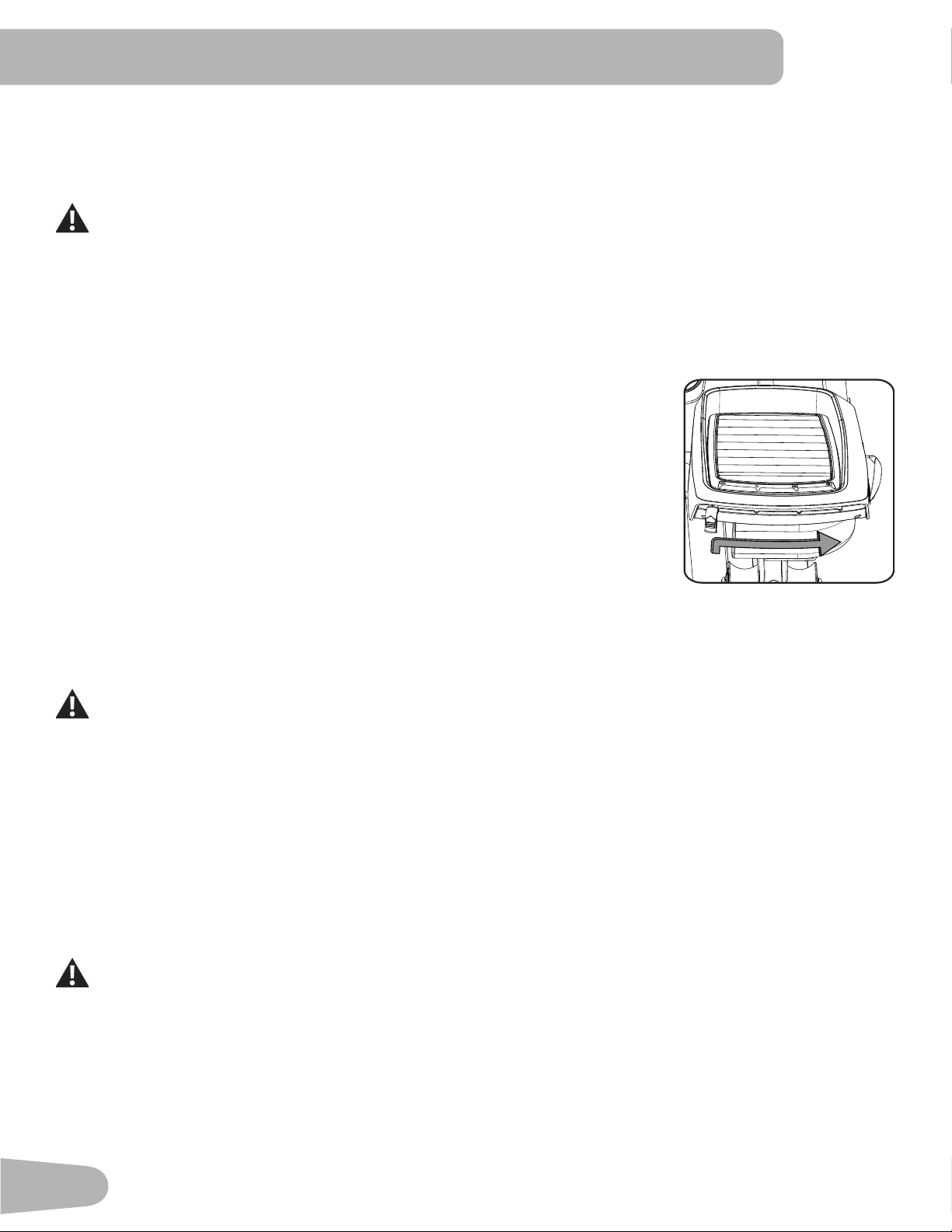
Suspension Adjust™ Pedals
The pedals are equipped with the Suspension Adjust™ Performance Cushion System which adjusts the angle and impact
resistance of the pedals. Adjustment of the pedals may adapt the same workout to affect different muscle groups. The
KHHODUHDVRIWKHSHGDOVKDYHDGHJUHHUDQJHRIYHUWLFDOPRWLRQ7KHDGMXVWPHQWOHYHUFDQVHWWKH¿UPQHVVRIWKH
action according to the weight of the user.
32
OPERATIONS
What to Wear
:HDUUXEEHUVROHGDWKOHWLFVKRHV<RXZLOOQHHGWKHDSSURSULDWHFORWKHVIRUH[HUFLVHWKDWDOORZ\RXWRPRYHIUHHO\
How Often Should You Exercise
Consult a physician before you start an exercise program. Stop exercising if you feel pain or tightness in
your chest, become short of breath, or feel faint. Contact your doctor before you use the machine again.
Use the values calculated or measured by the machine’s computer for reference purposes only. The heart
rate displayed on the console is an approximation and should be used for reference only.
• 3 times a week for 30 minutes each day.
• Schedule workouts in advance and try to follow the schedule.
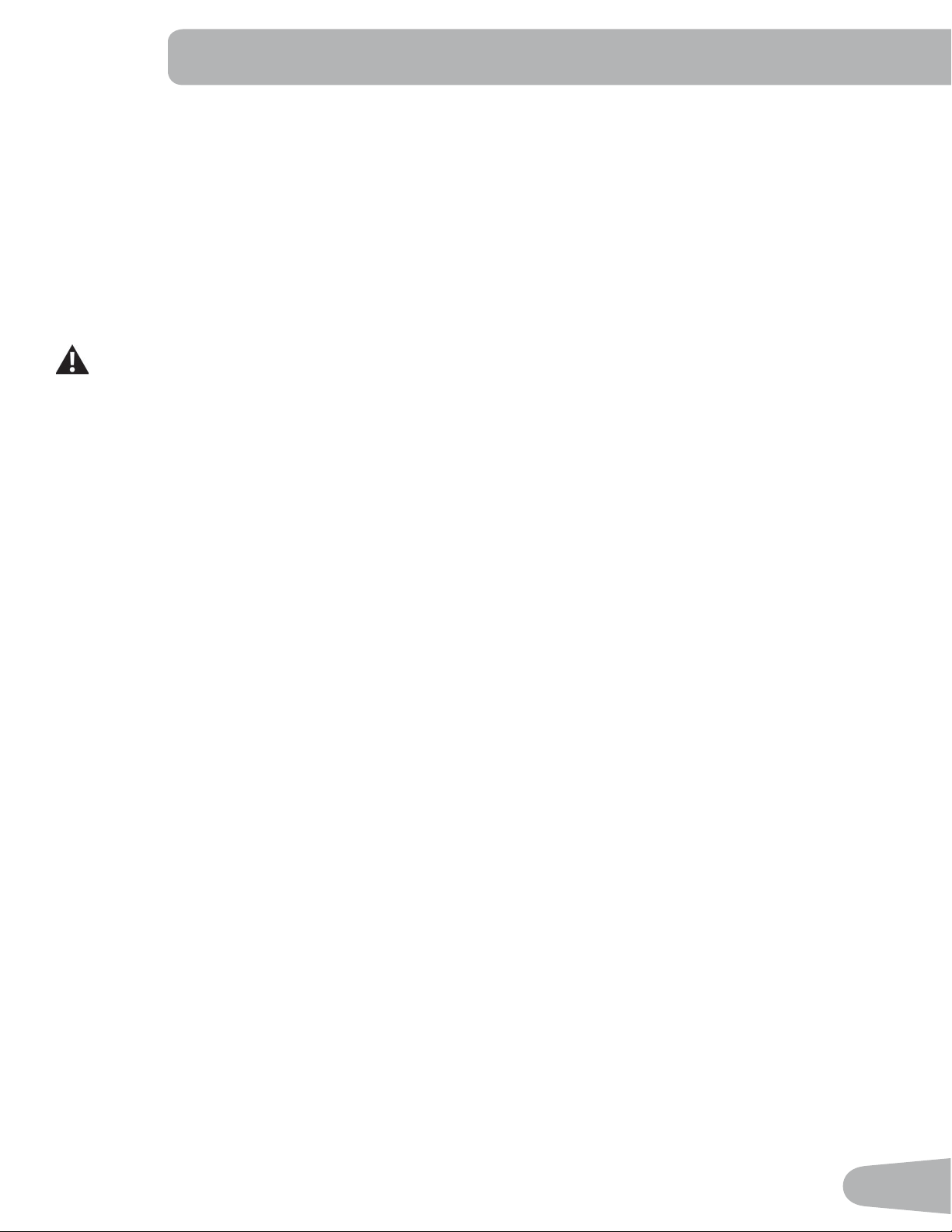
Adjusting the Pedals
The Pedals are equipped with the Suspension Adjust™ Performance Cushion System
which adjusts the angle and impact resistance of the Pedals. Adjustment of the Pedals
may adapt the same workout to affect different muscle groups. The adjustment lever
FDQVHWWKHDQJOHDQG¿UPQHVVRIWKHDFWLRQDFFRUGLQJWRWKHZHLJKWRIWKHXVHULVWKH
ORZHVWFXVKLRQVHWWLQJÀDWIRUXQGHUOEVNJIRUOEVNJ
3 for over 225 lbs. (102 kg).
Note: It is recommended to adjust both Pedals to the same setting.
To adjust the Pedal:
1. Tilt the back of the Pedal up.
2. Lift the adjustment lever out of the notch for the current setting and move it to the
desired setting. Be sure the lever is engaged in the notch at the new setting.
Mounting and Dismounting the Machine
Care should be used when mounting or dismounting the machine.
Be aware that the Pedals and the Handlebars are connected and when either of these parts move the other
does as well. In order to avoid possible serious injury, only grasp the Static Handlebars to steady yourself.
7RPRXQWWKH¿WQHVVPDFKLQH
1. Move the Pedals until the one nearest you is in the lowest position.
2. Grasp the Static Handlebars under the Console.
3. Steadying yourself with the Static Handlebars, step up onto the lowest Pedal and place your other foot onto the
opposite Pedal.
7RGLVPRXQWWKH¿WQHVVPDFKLQH
1. Move the Pedal you want to dismount from to the highest position, and bring the machine to a complete stop.
This machine is not equipped with a free-wheel. Pedal speed should be reduced in a controlled manner.
2. Grasp the Static Handlebars under the Console to steady yourself.
:LWK\RXUZHLJKWRQWKHORZHVWIRRWVZLQJWKHXSSHUIRRWRIIWKHPDFKLQHDQGGRZQRQWRWKHÀRRU.
4. Step off of the machine and release your grip from the Static Handlebars.
33
Power-Up / Idle Mode
The Console will enter Power-Up / Idle Mode if it is plugged into a power source and the Power Switch turned on, any but-
ton is pushed, or if it receives a signal from the RPM sensor as a result of pedaling the machine.
Auto Shut-Off (Sleep Mode)
,IWKH&RQVROHGRHVQRWUHFHLYHDQ\LQSXWLQDSSUR[LPDWHO\PLQXWHVLWZLOODXWRPDWLFDOO\VKXWRIIXQOHVVLQ'HPRQVWUDWLRQ
mode.
Push any button to start (wake up) the Console. If your machine is in Demonstration mode, hold down the PAUSE/END
button and Left button together for 3 seconds.
Note: The Console does not have an On/Off switch.
To disconnect, turn all controls to the off position, then remove plug from outlet.
Initial Setup
'XULQJWKH¿UVWSRZHUXSWKH&RQVROHVKRXOGEHVHWXSZLWKWKHGDWHWLPHDQG\RXUSUHIHUUHGPHDVXUHPHQWXQLWV
'DWH3XVKWKH,QFUHDVH'HFUHDVHEXWWRQVWRDGMXVWWKHFXUUHQWO\DFWLYHYDOXHÀDVKLQJ3XVKWKH/HIW5LJKWEXWWRQV
to change which segment is the currently active value (month / day / year).
2. Push OK to set.
7LPH3XVKWKH,QFUHDVH'HFUHDVHEXWWRQVWRDGMXVWWKHFXUUHQWO\DFWLYHYDOXHÀDVKLQJ3XVKWKH/HIW5LJKWEXWWRQV
to change which segment is the currently active value (hour / minute / AM or PM).
4. Push OK to set.
5. Units of Measurement: Push the Increase/Decrease buttons to adjust between “MILES” (Imperial English) or “KM”
(metric).
6. Push OK to set. The Console goes back to the Power-Up / Idle Mode screen.
Note: To adjust these selections, consult the “Console Set-Up Mode” section.
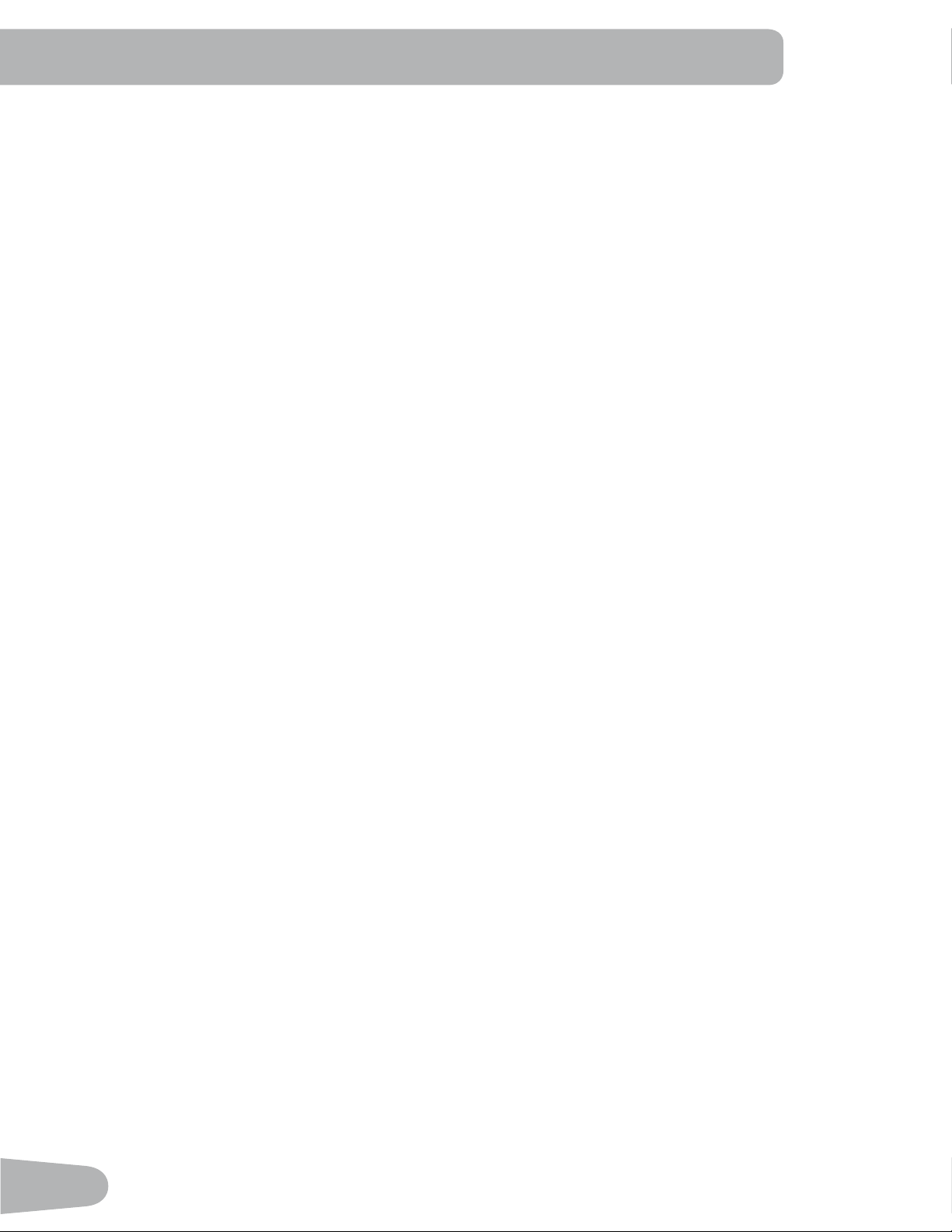
Quick Start ( Manual ) Program
The Quick Start ( Manual ) program lets you start a workout without entering any information.
During a Manual Workout, each column represents a 2 minute time period. The active column will advance across the
VFUHHQHYHU\PLQXWHV,IWKHZRUNRXWODVWVIRUPRUHWKDQPLQXWHVWKHDFWLYHFROXPQLV¿[HGRQWKHIDUWKHVWFROXPQRQ
the right and pushes the previous columns off the display.
1. Stand on the machine.
3XVKWKH8VHUEXWWRQWRVHOHFWWKHFRUUHFW8VHUSUR¿OH,I\RXGRQRWKDYHD8VHUSUR¿OHVHWXS\RXFDQVHOHFWD8VHU
SUR¿OHWKDWKDVQRFXVWRPL]HGGDWDGHIDXOWYDOXHVRQO\
3. Push the QUICK START button to start the Manual program.
4. To change the resistance level, push the Resistance Increase/Decrease buttons. The current interval and future
intervals are set to the new level. The default Manual resistance level is 4. The time will count up from 00:00.
Note: If a Manual workout is performed for more than 99 minutes and 59 seconds (99:59), the units for Time will shift to
hours and minutes ( 1 hour, 40 minutes ).
5. When done with your workout, stop pedaling and push PAUSE/END to pause the workout. Push PAUSE/END again
to end the workout.
Note: The workout results are recorded to the current User Profile.
34
User Profiles
The Console lets you store and use 4 User profiles. The User profiles automatically record the workout results for each
workout, and allow the workout data to be reviewed.
The User profile stores the following data:
• Name—up to 10 characters
• Age
• Weight
• Height
• Gender
• Preferred Workout Values
Select a User Profile
(YHU\ZRUNRXWLVVDYHGWRD8VHU3UR¿OH%HVXUHWRVHOHFWWKHSURSHU8VHU3UR¿OHEHIRUHVWDUWLQJDZRUNRXW7KHODVW8VHU
that completed a workout will be the default user.
8VHU3UR¿OHVDUHDVVLJQHGWKHGHIDXOWYDOXHVXQWLOWKH\DUHFXVWRPL]HGE\HGLWLQJ%HVXUHWRHGLWWKH8VHU3UR¿OHIRUPRUH
accurate calorie and heart rate information.
)URPWKH3RZHU8S0RGHVFUHHQSXVKWKH8VHUEXWWRQWRVHOHFWRQHRIWKH8VHU3UR¿OHV7KH&RQVROHZLOOGLVSOD\WKH
QDPHRIWKH8VHU3UR¿OHDQGWKH8VHU3UR¿OH,FRQ
Edit User Profile
1. From the Power-Up Mode screen, push the User button WRVHOHFWRQHRIWKH8VHU3UR¿OHV.
2. Push the OK button to select it.
3. The Console display shows the EDIT prompt and the current User Profile name. Push OK to start the Edit User 3UR¿OH
option.
7RH[LWWKH(GLW8VHU3UR¿OHRSWLRQSXVKWKH3$86((1'EXWWRQDQGWKHFRQVROHZLOOJREDFNWRWKHPower-Up Mode
screen.
4. The Console display shows the NAME prompt and the current User Profile name.
Note: The User name will be blank if this is the first edit. The name of a User Profile is limited to 10 characters.
The currently active segment will flash. Use the Increase/Decrease buttons to move through the alphabet and blank
space (found between A and Z). To set each segment, use the Left(e) or Right(f) buttons to shift between segments.
Push the OK button to accept the displayed User name.
5. To edit the other User data (EDIT AGE, EDIT WEIGHT, EDIT HEIGHT, EDIT GENDER), use the Increase/Decrease
buttons to adjust, and push OK to set each entry.
6. The Console display shows the SCAN prompt. This option controls how the workout values are displayed in the Lower
Display during a workout. The “OFF” setting allows the user to push the RIGHT or LEFT buttons to view the other
workout value channels when desired. The “ON” setting allows the Console to automatically display the workout value
channels every 6 seconds.
The default is “OFF”.
Push the OK button to set how the workout values are displayed.
7KH&RQVROHGLVSOD\VKRZVWKH:,5(/(66+5SURPSW,I\RXDUHXVLQJWKH&RQVROHVSHDNHUVDWWKHLUKLJKHUVHWWLQJV
and / or using a larger sized personal electronic device, the Console may show Heart Rate interference. This option
allows the Telemetry Heart Rate Receiver to be deactivated blocking the interference.
The Upper Display shows the current value setting: “ON” or “OFF”. Push the Increase(c) or Decrease(d) buttons to
change the value.
The default is “ON”.
Push the OK button to set the Telemetry Heart Rate Receiver to active.
35
8. The Console display shows the EDIT LOWER DISPLAY prompt. This option allows you to customize which Workout
Values are displayed during a workout.
7KH/RZHU'LVSOD\ZLOOVKRZDOORIWKHZRUNRXWYDOXHVZLWKWKHDFWLYH:RUNRXW9DOXHÀDVKLQJ7KH8SSHU'LVSOD\
shows the active value setting: “ON” or “OFF”. Push the Increase(c) or Decrease(d) buttons to hide the active
workout value, and push the Left(e) or Right(f) buttons to shift the active workout value.
Note: to show a hidden workout value, repeat procedure and change Upper Display value to “ON” for that value.
When done with customizing the Lower Display, push the OK button to set it.
Hr
9. The Console will go to the Power-Up Mode screen with the user selected.
Reset a User Profile
1. From the Power-Up Mode screen, push the User button WRVHOHFWRQHRIWKH8VHU3UR¿OHV.
2. Push the OK button to select it.
3. The Console display shows the current User Profile name and the EDIT prompt. Push the Increase(c) or Decrease(d)
buttons to change the prompt.
Note: 7RH[LWWKH(GLW8VHU3UR¿OHRSWLRQSXVKWKH3$86((1'EXWWRQDQGWKHFRQVROHZLOOJREDFNWRWKHPower-Up
Mode screen.
4. The Console display shows the RESET prompt and the current User Profile name. Push OK to start the Reset User
3UR¿OHRSWLRQ
5. The Console will now confirm the request to reset the User profile (the default selection is ‘NO’). Push the Increase(c)
or Decrease(d) buttons to adjust the selection.
6. Push OK to make your selection.
7KH&RQVROHZLOOJRWRWKH3RZHU8S0RGHVFUHHQ
Changing Resistance Levels
Push the Resistance Level Increase(c) or Decrease(d) buttons to change the resistance level at any time in a workout
program. To rapidly change the resistance level, push the desired Resistance Level Quick Button. The Console will adjust
to the selected resistance level of the quick button.
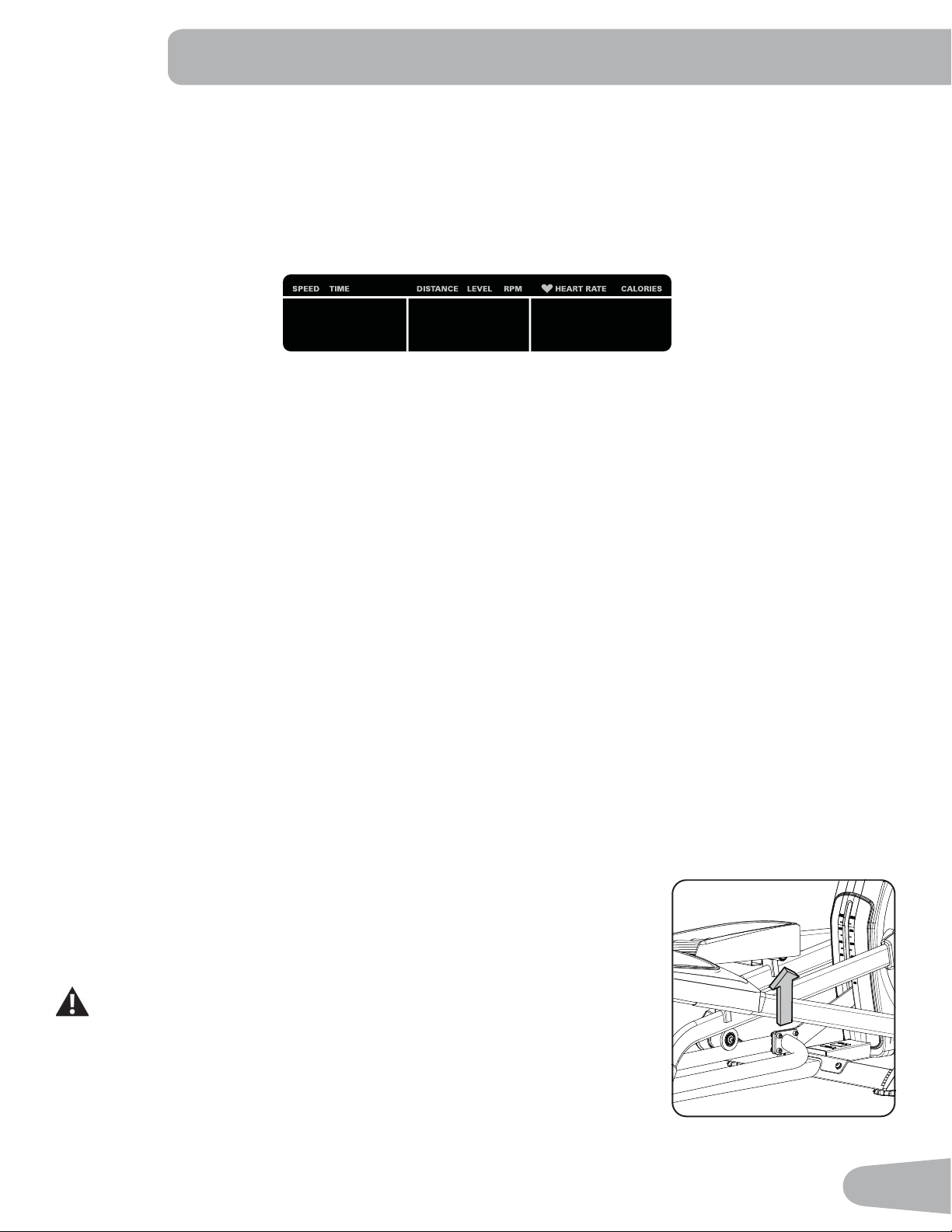
Changing Incline Levels
Push the Incline Level Increase(c) or Decrease(d) buttons to change the incline angle
of the rail assembly at any time in a workout program. To rapidly change the incline
level, push the desired Incline Level Quick Button. The Console will adjust to the se-
lected incline level of the quick button.
Be sure the area below the machine is clear before lowering. Fully lower the
Incline Assembly after each workout.
Exercise on this machine requires coordination and balance. Be sure to
anticipate that changes in speed, incline angle and resistance level can
occur during workouts, and be attentive in order to avoid loss of balance
and possible injury.
36
Note: Be sure that the workout space you are utilizing has adequate height clearance, taking into consideration the
KHLJKWRIWKHXVHUDQGWKHPD[LPXPLQFOLQHRIWKHHOOLSWLFDOPDFKLQH7KRXJKWKHLQFOLQHDQJOHFKDQJHVWKHH[HUFLVH
motion, it does not affect the calorie values.
Profile Programs
7KHVHSURJUDPVDXWRPDWHGLIIHUHQWUHVLVWDQFHDQGZRUNRXWOHYHOV7KH3UR¿OH3URJUDPVDUHRUJDQL]HGLQWR&DWHJRULHV
(Fun Rides, Mountains, and Challenges).
Note:2QFHD8VHUYLHZVDOOWKH&DWHJRULHVWKH\ZLOOEHH[SDQGHGWRGLVSOD\WKH3URJUDPVZLWKLQHDFKRIWKH
Categories.
FUN RIDES
Rolling Hills Ride in the Park
Easy Tour Stream Crossing
MOUNTAINS
Pike’s Peak Mount Hood
Pyramids Summit Pass
CHALLENGES
Uphill Finish Cross-Training
Interval Stairs
37
Workout Profile and Goal Program
7KH&RQVROHOHWV\RXVHOHFWWKH3UR¿OH3URJUDPDQGW\SHRI*RDOIRU\RXUZRUNRXW'LVWDQFH7LPHRU&DORULHVDQGVHW
the Goal value.
1. Stand on the machine.
3XVKWKH8VHUEXWWRQWRVHOHFWWKHFRUUHFW8VHUSUR¿OH
3. Push the Programs button.
4. Push the Left(e) or Right(f) buttons to select a Category of Workout.
5. Push the Increase(c) or Decrease(d) buttons to select a Profile Workout, and push OK.
6. Use the Increase(c) or Decrease(d) buttons to select a type of Goal (Distance, Time or Calories), and push OK.
Use the Increase(c) or Decrease(d) buttons to adjust the workout value.
8. Push OK to begin the goal-oriented workout. The GOAL value will count down as the value for percent completed
increases.
Note: During a Calories Goal, each column is for a 2 minute time period. The active column will advance across the
VFUHHQHYHU\PLQXWHV,IWKHZRUNRXWODVWVIRUPRUHWKDQPLQXWHVWKHDFWLYHFROXPQZLOO¿[WRWKHODVWULJKW
column and push the previous columns off the display.
Fitness Test Program
7KH)LWQHVV7HVWPHDVXUHVWKHLPSURYHPHQWVWR\RXUSK\VLFDO¿WQHVVOHYHO7KHWHVWFRPSDUHV\RXUSRZHURXWSXWLQ
ZDWWVWR\RXUKHDUWUDWH$V\RXU¿WQHVVOHYHOLPSURYHV\RXUSRZHURXWSXWZLOOLQFUHDVHDWDJLYHQKHDUWUDWH
Note: The Console must be able to read the heart rate information from the Contact Heart Rate (CHR) sensors or Heart
Rate Monitor (HRM) to work correctly.
<RXFDQVWDUWWKH)LWQHVV7HVWIURPWKH)(('%$&.FDWHJRU\7KH)LWQHVV7HVWSURJUDP¿UVWSURPSWV\RXWRVHOHFW\RXU
¿WQHVVOHYHO²%HJLQQHU³%(*´RU$GYDQFHG³$'9´7KH&RQVROHZLOOXVHWKH$JHDQG:HLJKWYDOXHVIRUWKHVHOHFWHG
8VHU3UR¿OHWRFDOFXODWHWKH)LWQHVV6FRUH
Start to work out and hold the Heart Rate Sensors. When the test starts, the intensity of the workout slowly increases. This
means you will work harder, and as a result, your heart rate increases. The intensity continues to increase automatically
XQWLO\RXUKHDUWUDWHUHDFKHVWKH³7HVW=RQH´7KLV]RQHLVLQGLYLGXDOO\FRPSXWHGWREHQHDUSHUFHQWRIWKHPD[LPXP
KHDUWUDWHRI\RXU8VHU3UR¿OH:KHQ\RXUHDFKWKH7HVW=RQHWKHPDFKLQHKROGVWKHLQWHQVLW\VWHDG\IRUPLQXWHV
This lets you reach a stable condition (where your heart rate becomes steady). At the end of the 3 minutes, the Console
measures your heart rate and the power output. These numbers, along with information about your age and weight, are
computed to produce a “Fitness Score”.
Note: Fitness Test scores should only be compared to your previous scores and not to other User Profiles.
Compare your Fitness Scores to see your improvement.
Recovery Test Program
5HFRYHU\7HVWVKRZVKRZTXLFNO\\RXUKHDUWUHFRYHUVIURPDQH[HUFLVHVWDWHWRDPRUHUHVWIXOVWDWH,PSURYHGUHFRYHU\LV
DQLQGLFDWRURILQFUHDVLQJ¿WQHVV
Note: The Console must be able to read the heart rate information from the Contact Heart Rate (CHR) sensors or Heart
Rate Monitor (HRM) to work correctly.
From an elevated heart rate, select the Recovery Test Program. The Console will show “STOP EXERCISING” and the
JRDOZLOOEHJLQWRFRXQWGRZQ6WRSH[HUFLVLQJEXWFRQWLQXHWRJULSWKHFRQWDFWKHDUWUDWHVHQVRUV$IWHUVHFRQGVWKH
display will show “RELAX” and will continue to count down to 00:00. For the entire minute the console will also show your
heart rate. You must grip the heart rate sensors for the duration of the test if not using a Remote Heart Rate Monitor.
38
The display will continue to show “RELAX” and your heart rate until the goal reaches 00:00. The console will then calcu-
late your recovery score.
Recovery Score = Your heart rate at 1:00 (the beginning of the test) minus your heart rate at 00:00 (the end of the test).
The higher the Recovery Test score value, the quicker your heart rate is returning to a more restful state and is an indica-
WLRQRILPSURYLQJ¿WQHVV%\UHFRUGLQJWKHVHYDOXHVRYHUWLPH\RXFDQVHHWKHWUHQGWRZDUGEHWWHUKHDOWK
When you select the Recovery Test Program and there is no heart rate signal or display, the Console will show “NEED
HEART RATE”. This message will show for 5 seconds. If no signal is detected, the program will end.
Helpful Tip: For a more relevant score, try to obtain a steady heart rate for 3 minutes before starting the Recovery Pro-
gram. This will be easier to achieve, and obtain the best result, in the Manual program so you can control the levels of
resistance.
Heart Rate Control (HRC) Workout Programs
The Heart Rate Control (HRC) programs let you set a heart rate goal for your workout. The program monitors your heart
rate in beats per minute (BPM) from the Contact Heart Rate (CHR) sensors on the machine or from a Heart Rate Monitor
(HRM) chest strap, and adjusts the workout to keep your heart rate in the selected zone.
Note: The console must be able to read the heart rate information from the CHR sensors or HRM for the HRC program
to work correctly.
The Target Heart Rate programs use your age and other User information to set the Heart Rate Zone values for your
workout. The console display then gives prompts for you to set up your workout:
1. Select the Heart Rate Control workout level: BEGINNER ( “BEG” ) or ADVANCED ( “ADV” ) and push OK.
2. Push the Increase(c) or Decrease(d) buttons to selectWKHSHUFHQWDJHRIPD[LPXPKHDUWUDWH±±
±±
Consult a physician before you start an exercise program. Stop exercising if you feel pain or tightness in
your chest, become short of breath, or feel faint. Contact your doctor before you use the machine again.
Use the values calculated or measured by the machine’s computer for reference purposes only. The heart
rate displayed on the console is an approximation and should be used for reference only.
3. Push the Increase(c) or Decrease(d) buttons to select the Goal type, and push OK.
4. Push the Increase(c) or Decrease(d) buttons to set the goal value for the workout.
Note: Be sure to allow time for your heart rate to reach the desired heart rate zone when setting the goal.
5. Push OK to start the workout.
A User can set a Heart Rate zone instead of a value by selecting the Heart Rate Control - User program. The Console will
adjust the workout to keep the User in the desired Heart Rate zone.
1. Select HEART RATE CONTROL - USER, and push OK.
2. Push the Increase(c) or Decrease(d) buttons to set the Heart Rate zone for the workout, and push OK. The Console
shows the Heart Rate zone (percent) on the left, and the Heart Rate range for the User on the right side of the display.
3. Push the Increase(c) or Decrease(d) buttons to select the Goal type, and push OK.
4. Push the Increase(c) or Decrease(d) buttons to set the value for the workout.
5. Push OK to start the workout.
39
Custom Program
The Custom Program lets you set the resistance level for each interval and select type of Goal (Distance, Time or Calo-
ULHVWRFUHDWHDSHUVRQDOL]HGZRUNRXW2QHFXVWRPZRUNRXWLVDYDLODEOHIRUHDFK8VHU3UR¿OH
1. Sit on the machine.
3XVKWKH8VHUEXWWRQWRVHOHFWWKHFRUUHFW8VHUSUR¿OH
3. Push the Programs button.
4. Push the Increase(c) or Decrease(d) buttons to select Custom Program, and push OK.
5. The Console shows Heart Rate Control. To select Heart Rate Control, push OK.
To continue in the Custom Program, push the Left(e) button and the Console shows Custom Program again. Push OK.
6. To edit the Custom Program, use the Right(fEXWWRQWRPRYHWRWKHQH[WLQWHUYDODQGXVHWKH,QFUHDVHc) or
Decrease(d) buttons to adjust the resistance values. Push the OK button to accept the displayed values.
8VHthe Increase(c) or Decrease(d) buttons to select a type of Goal (Distance, Time or Calories), and push OK.
8. Use the Increase(c) or Decrease(d) buttons to adjust the workout value.
9. Push OK to start the workout. The GOAL value will count down as the value for percent completed increases.
Changing a Workout Program During a Workout
The Console allows a different Workout Program to be started from an active workout.
1. From an active workout, push PROGRAMS.
2. Push the Increase(c) or Decrease(d) buttons to select the desired workout program, and push OK.
3. Push the Increase(c) or Decrease(d) buttons to select the Goal type, and push OK.
4. Push the Increase(c) or Decrease(d) buttons to set the value for the workout.
5. Push OK to stop the active workout and start the new workout.
7KHSUHYLRXVZRUNRXWYDOXHVDUHVDYHGWRWKH8VHU3UR¿OH
Pausing or Stopping
The Console will go into Pause Mode if the user stops pedaling and pushes PAUSE/END during a workout, or there is no
RPM signal for 5 seconds (user not pedaling). The Console will cycle through a series of messages that change every 4
seconds:
- WORKOUT PAUSED
- PEDAL TO CONTINUE (if a bike) / STRIDE TO CONTINUE (if an elliptical)
- PUSH END TO STOP
During a paused workout, you can use the Increase/Decrease buttons to move through the result channels manually.
1. Stop pedaling and push the PAUSE/END button to pause your workout.
2. To continue your workout, push OK or start pedaling.
To stop the workout, push the PAUSE/END button. The Console will go into Results / Cool Down mode.
Results / Cool Down Mode
After a workout the GOAL display shows 03:00 and then starts to count down. During this Cool Down period, the Console
VKRZVWKH:RUNRXW5HVXOWV$OOZRUNRXWVH[FHSW4XLFN6WDUWKDYHDPLQXWH&RRO'RZQSHULRG
The LCD display shows the Current Workout values in three channels:
a.) TIME (total), DISTANCE (total), and CALORIES (total)
40
b.) SPEED (average), RPM (average), and HEART RATE (average)
c.) TIME (average), LEVEL (average), and CALORIES (average).
Push the Left(e) or Right(f) buttons to move through the result channels manually.
During the Cool Down period, the Resistance Level will adjust to a third of the average Level of the workout. The Cool
Down resistance level can be adjusted with the Resistance Increase and Decrease buttons, but the Console will not dis-
play the value.
You can push PAUSE/END to stop the Results / Cool Down period and go back to Power-Up Mode. If there is no RPM or
HR signal, the Console automatically goes into Sleep Mode.
GOAL TRACK Statistics (and Achievements)
7KHVWDWLVWLFVIURPHYHU\ZRUNRXWDUHUHFRUGHGWRD8VHU3UR¿OH
The Nautilus Dual Track
™
Console shows the Goal Track workout Statistics on the Lower Display in three channels:
a.) TIME (total), DISTANCE (total), and CALORIES (total)
b.) SPEED (average), RPM (average), and HEART RATE (average)
c.) TIME (average), DISTANCE (average) / or LEVEL (average) *, and CALORIES (average)
* If the Goal Track Statistic is a single workout, LEVEL (average) is displayed. If the Goal Track Statistic is a
combination of multiple workouts, DISTANCE (average) is displayed instead of LEVEL (average).
7RYLHZWKH*2$/75$&.VWDWLVWLFVRID8VHU3UR¿OH
1. From the Power-Up screen, SXVKWKH8VHUEXWWRQWRVHOHFWWKHFRUUHFW8VHUSUR¿OH
2. Push the GOAL TRACK button. The Console will display the LAST WORKOUT values and activate the corresponding
Achievement light.
Note: Goal Track statistics can be viewed even during a workout. Push GOAL TRACK and the LAST WORKOUT values
ZLOOEHGLVSOD\HG7KHZRUNRXWYDOXHVIRUWKHFXUUHQWZRUNRXWZLOOEHKLGGHQH[FHSWIRUWKH*2$/GLVSOD\3XVK
GOAL TRACK again to return to the Power-Up screen.
3. Push the Increase(c) buttonWRPRYHWRWKHQH[W*2$/75$&.VWDWLVWLF³/$67'$<6´7KH&RQVROHZLOOGLVSOD\
the calories burned on the display (50 calories per segment) for the previous seven days, along with the workout value
totals. Use the Left(e) or Right(f) buttons to move through all the workout statistic channels.
4. Push the Increase(c) button to move to “LAST 30 DAYS”. The Console will display the total values for the previous
thirty days. Use the Left(e) or Right(f) buttons to move through all the workout statistic channels.
5. Push the Increase(c) button to move to the “LONGEST WORKOUT”. The Console will display the workout values with
the most Time value. Use the Left(e) or Right(f) buttons to move through all the workout statistic channels.
6. Push the Increase(c) button to move to the “CALORIE RECORD”. The Console will display the workout values with the
most Calories value. Use the Left(e) or Right(f) buttons to move through all the workout statistic channels.
3XVKWKH Increase(c) button to move to “BMI”, or %RG\0DVV,QGH[. The Console will display the BMI value based on
the User settings. %HVXUHWKHKHLJKWYDOXHLVFRUUHFWIRU\RXU8VHU3UR¿OHDQGWKHZHLJKWYDOXHLVFXUUHQW
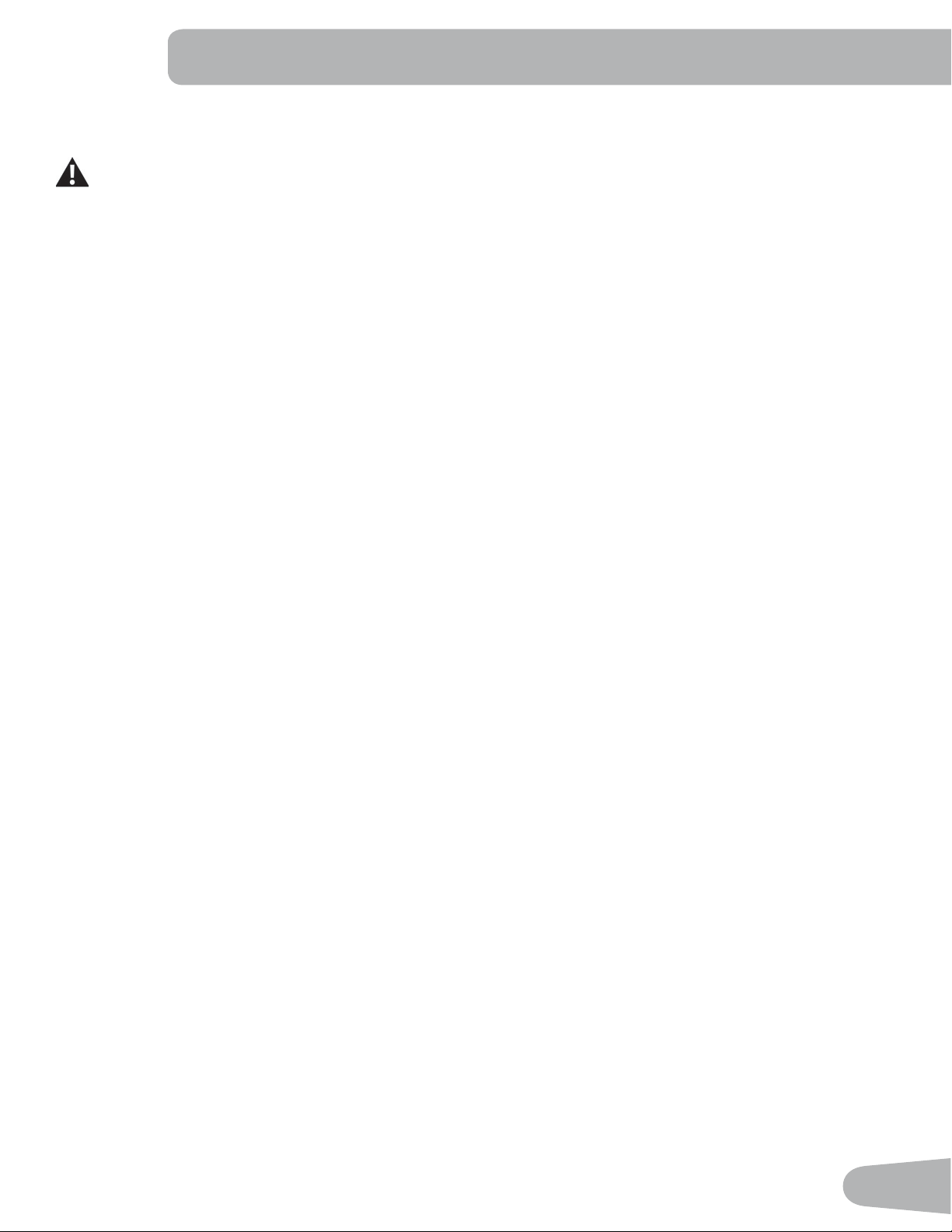
The BMI Measurement is a useful tool that shows the relationship between weight and height that is associated with body
fat and health risk. The table below gives a general rating for the BMI score:
Underweight Below 18.5
Normal 18.5 – 24.9
Overweight 25.0 – 29.9
Obesity 30.0 and above
41
Note: The rating may overestimate body fat in athletes and others who have a muscular build. It may also underesti-
mate body fat in older persons and others who have lost muscle mass.
Contact your doctor for more information about Body Mass Index (BMI) and the weight that is appropriate
for you. Use the values calculated or measured by the machine’s computer for reference purposes only.
8. Push the Increase(c) button to move to the “SAVE TO USB - OK?” prompt. Push OK and the “ARE YOU SURE?
-NO” prompt will display. Push the Increase(c) button to change it to yes and push OK. The Console will display the
“INSERT USB” prompt. Insert a USB Flash Drive into the USB Port. The Console will record the Statistics to the USB
Flash Drive.
The Console will display “SAVING”, and then “REMOVE USB” when it is safe to remove the USB Flash Drive.
Note:3XVKWKH3$86((1'EXWWRQWRIRUFHDQH[LWIURPWKH³6$9,1*´SURPSW
9. Push the Increase(c) button to move to the “CLEAR WORKOUT DATA -OK?” prompt. Push OK, and the “ARE YOU
SURE? - NO” prompt will display. Push the Increase(c) button to change to the “ARE YOU SURE? - YES” display, and
push OK. The user workouts have been reset.
10. Push GOAL TRACK to return to the Power-Up screen.
When a User performs a workout that surpasses the “LONGEST WORKOUT” or “CALORIE RECORD” of the previous
workouts, the Console will congratulate with an audible sound and tell the User the new achievement. The corresponding
Achievement Indicator Light will also be active.
42
CONSOLE SETUP MODE
The Console Setup Mode lets you input the date and time, set the units of measurement to either English or Metric,
control the sound settings ( on/ off), or see maintenance statistics (Error Log and Run Hours – for service technician use
only).
1. To go into the Console Setup Mode:
- For the later version of the console, hold down the PAUSE/END button and Increase (c) button together for 3 sec-
onds while in the Power-Up Mode.
- For the earlier version of the console, hold down the PAUSE/END button and Left button together for 3 seconds
while in the Power-Up Mode.
Note:3XVK3$86((1'WRH[LWWKH&RQVROH6HWXS0RGHDQGUHWXUQWRWKH3RZHU8S0RGHVFUHHQ
2. The Console display shows the Date prompt with the current setting. To change, push the Increase/Decrease buttons
WRDGMXVWWKHFXUUHQWO\DFWLYHYDOXHÀDVKLQJ3XVKWKH/HIW5LJKWEXWWRQVWRFKDQJHZKLFKVHJPHQWLVWKHFXUUHQWO\
active value (month / day / year).
3. Push OK to set.
4. The Console display shows the Time prompt with the current setting. Push the Increase/Decrease buttons to adjust
WKHFXUUHQWO\DFWLYHYDOXHÀDVKLQJ3XVKWKH/HIW5LJKWEXWWRQVWRFKDQJHZKLFKVHJPHQWLVWKHFXUUHQWO\DFWLYHYDOXH
(hour / minute / AM or PM).
5. Push OK to set.
6. The Console display shows the Units prompt with the current setting. To change, push OK to start the Units option.
Push the Increase/Decrease buttons to change between “MILES” (Imperial English units) and “KM” (metric units).
Note: If the units change when there is data in User Statistics, the statistics convert to the new units.
3XVK2.WRVHW
8. The Console display shows the Sound Settings prompt with the current setting. Push the Increase/Decrease buttons
to change between “ON” and “OFF”.
9. Push OK to set.
10. The Console display shows the TOTAL RUN HOURS for the machine.
)RUWKHQH[WSURPSWSXVKWKH2.EXWWRQ
12. The Console display shows the Software Version prompt.
)RUWKHQH[WSURPSWSXVKWKH2.EXWWRQ
14. The Console will display the Power-Up Mode screen.
43
MAINTENANCE
Read all maintenance instructions fully before you start any repair work. In some conditions, an assistant is required to do
the necessary tasks.
Equipment must be regularly examined for damage and repairs. The owner is responsible to make sure that
regular maintenance is done. Worn or damaged components must be repaired or replaced immediately.
Only manufacturer supplied components can be used to maintain and repair the equipment.
If at any time the Warning labels become loose, unreadable or dislodged, contact Nautilus Customer
Service for replacement labels.
To reduce the risk of electrical shock or unsupervised usage of the equipment, always unplug the
power cord from the wall outlet and the machine and wait 5 minutes before cleaning, maintaining or repairing the
machine. Place the power cord in a secure location.
Daily:
%HIRUHHDFKXVHH[DPLQHWKHH[HUFLVHPDFKLQHIRUORRVHEURNHQGDPDJHGRUZRUQSDUWV
'RQRWXVHLIIRXQGLQWKLVFRQGLWLRQ5HSDLURUUHSODFHDOOSDUWVDWWKH¿UVWVLJQRIZHDURUGDPDJH
After each workout, use a damp cloth to wipe your machine and Console free of moisture.
Note:$YRLGH[FHVVLYHPRLVWXUHRQWKH&RQVROH
NOTICE: If necessary, only use a mild dish soap with a soft cloth to clean the Console. Do not clean
with a petroleum based solvent, automotive cleaner, or any product that contains ammonia.
Do not clean the Console in direct sunlight or at high temperatures. Be sure to keep the
Console free of moisture.
Weekly:
Check for smooth roller operation. Wipe the machine to remove dust, dirt, or grime. Clean the rails
and surface of the rollers with a damp cloth.
Apply silicone lubricant to a dry cloth and wipe the rails to eliminate roller noise.
Silicone lubricant is not intended for human consumption. Keep out of reach of
children. Store in a safe place.
Note: Do not use petroleum based products.
Monthly
or after 20 hours:
Make sure all bolts and screws are tight. Tighten as necessary.
Heart Rate Chest Strap Battery Replacement
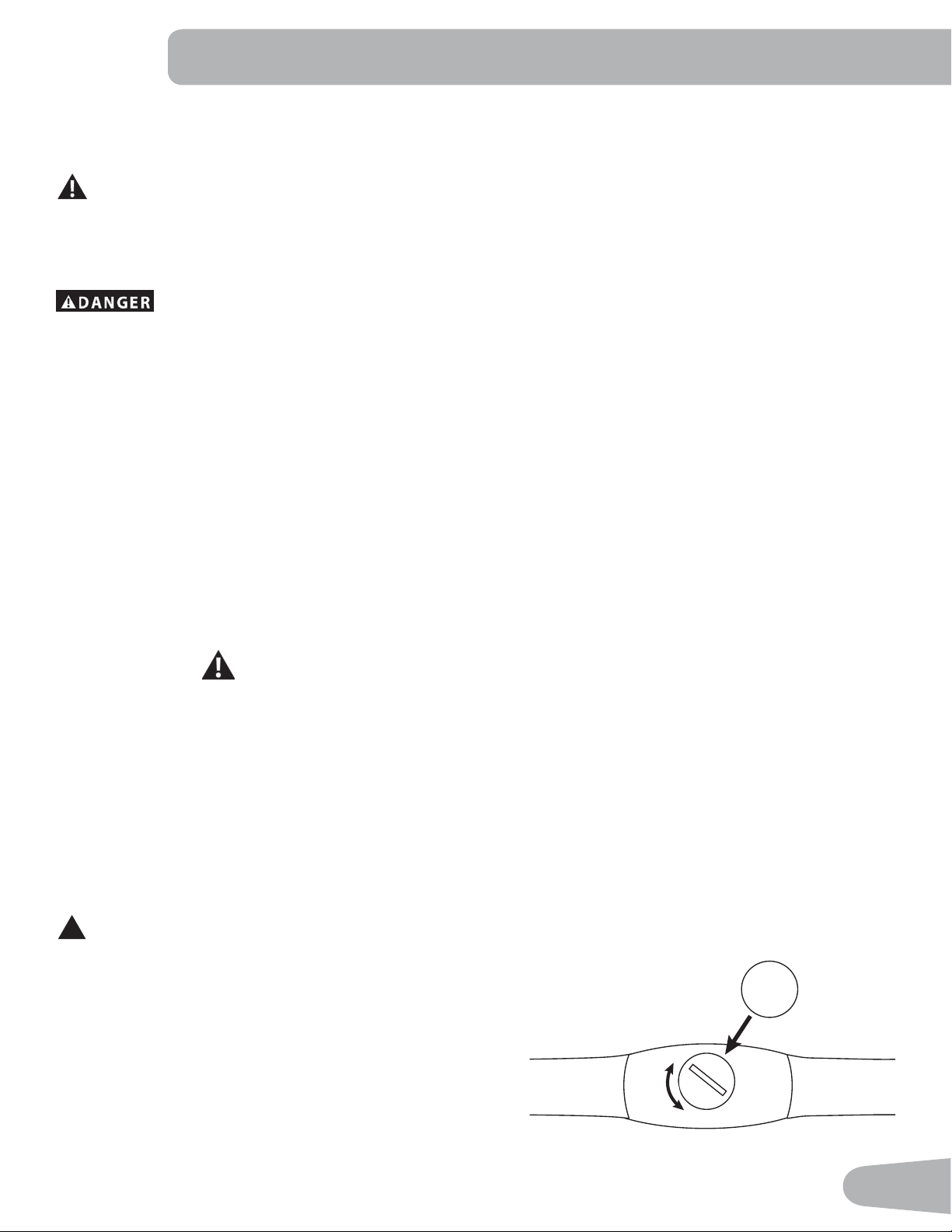
The heart rate (HR) chest strap uses a CR2032 battery.
!
Do not perform this procedure outdoors or in moist or wet locations.
1. Using a coin, loosen the slotted cover on the battery bay. Remove the cover
and battery.
2. When replacing the battery, insert it in the battery bay with the + symbol
facing up.
3. Reinstall the cover on the strap.
4. Discard the old battery. Dispose of in accordance with local regulations and/
or at approved recycling centers.
CR2032
+
44
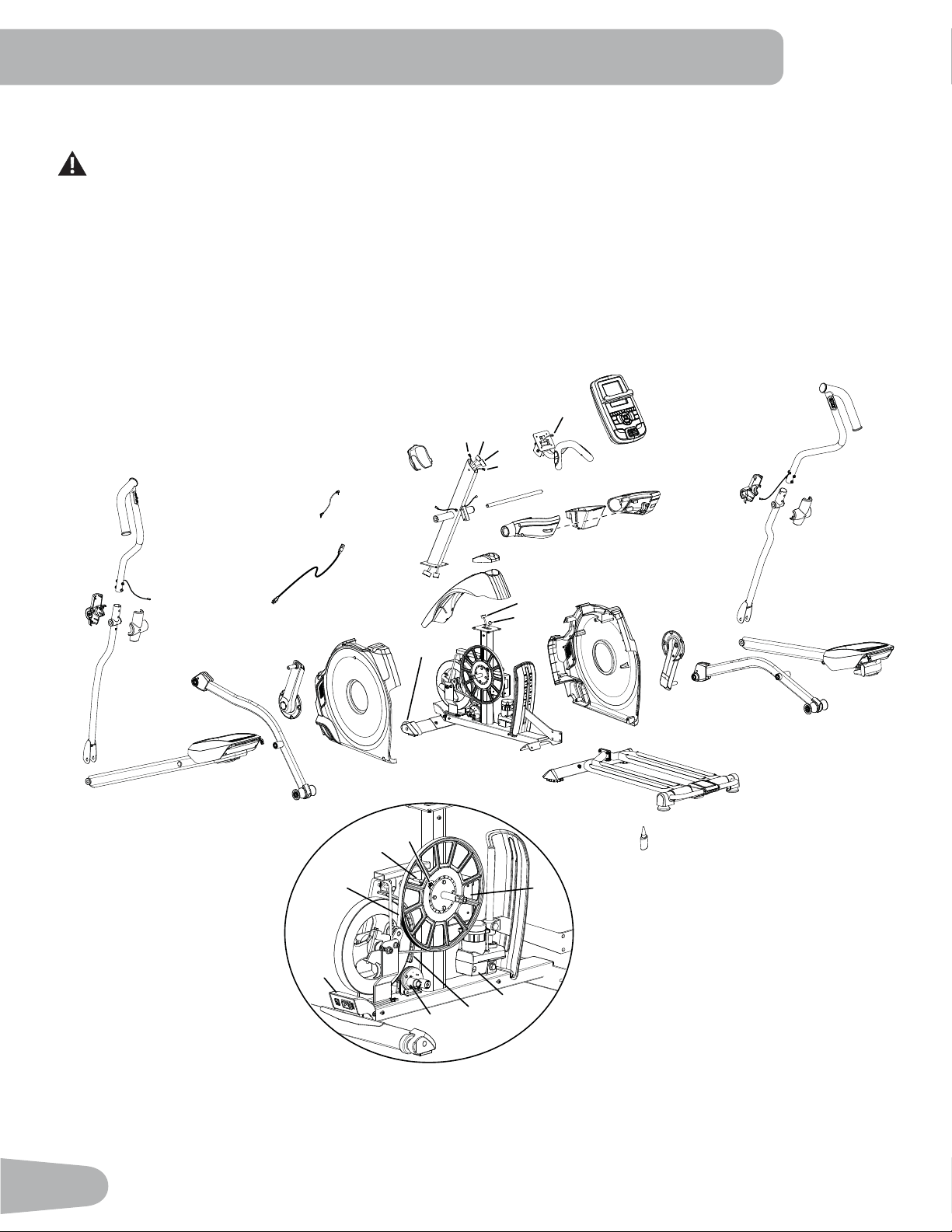
Maintenance Parts
N
Q
QQ
SS
RR
T
FF
A
B
C
I
E
G
H
J
R
S
K
L
M
X
U
V
W
DD
F
O
P
TT
R
S
AA
BB
CC
Y
Z
D
EE
VV
UU
II
JJ
HH
LL
GG
KK
PP
OO
NN
U
MM
5. Inspect your chest strap to ensure function.
Do not use until the equipment has been fully assembled and inspected for correct performance in
accordance with the Owner’s Manual.
45
A Console Q Shroud, Left GG Drive Belt
B Heart Rate (HR) Cable R Handlebar Shroud, Outer HH Drive Pulley
C Handlebar, Static S Handlebar Shroud, Inner II Speed Sensor Magnet
D Data (I/O) Cable, Upper T Data (I/O) Cable, Lower JJ RPM (Speed) Sensor
E Arm Pivot Rod U Incline Adjuster Assembly KK Flywheel
F Console Mast V Frame Assembly LL Motor Control Board (MCB)
G Water Bottle Holder W Front Stabilizer MM Servo Motor
H Handlebar Arm, Lower Right X Rail Assembly NN Brake Assembly
I Handlebar Arm, Upper Right Y Crank Assembly, Left OO Incline Motor Assembly
J Pedal Arm, Right Z Leg, Left PP Power Switch
K Crank Assembly, Right AA Pedal Arm, Left QQ AC Power Cord
L Leg, Right BB Handlebar Arm, Lower Left RR Media Cable
M Roller CC Handlebar Arm, Upper Left SS Silicone Lubricant, Bottle
N Shroud, Right DD Transport Wheel Assembly TT Cover, Console Junction
O Shroud Cap EE Lift Motor Wire, Upper UU Remote Incline Control Wire
P Shroud, Upper FF Lift Motor Wire, Lower VV Remote Resistance Control Wire
46
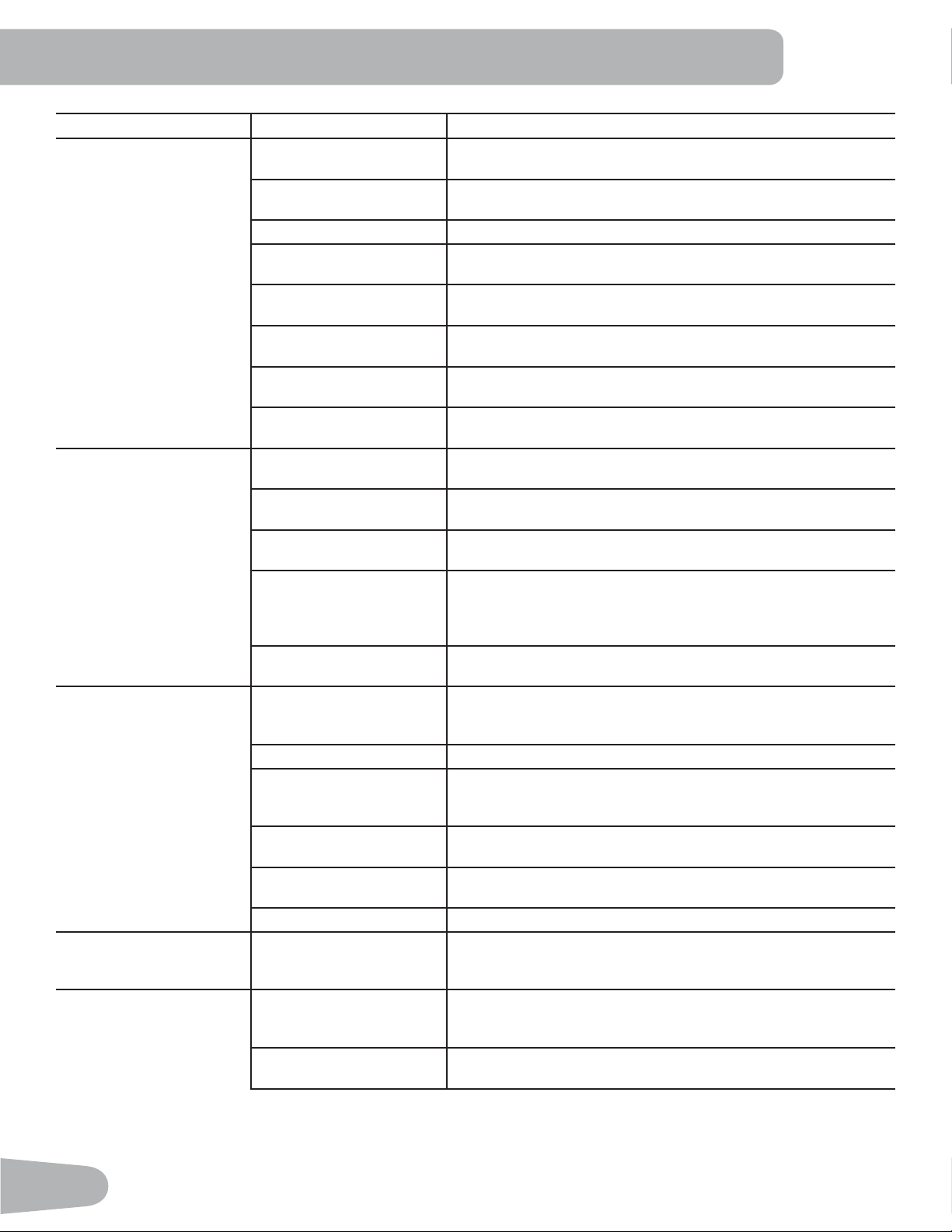
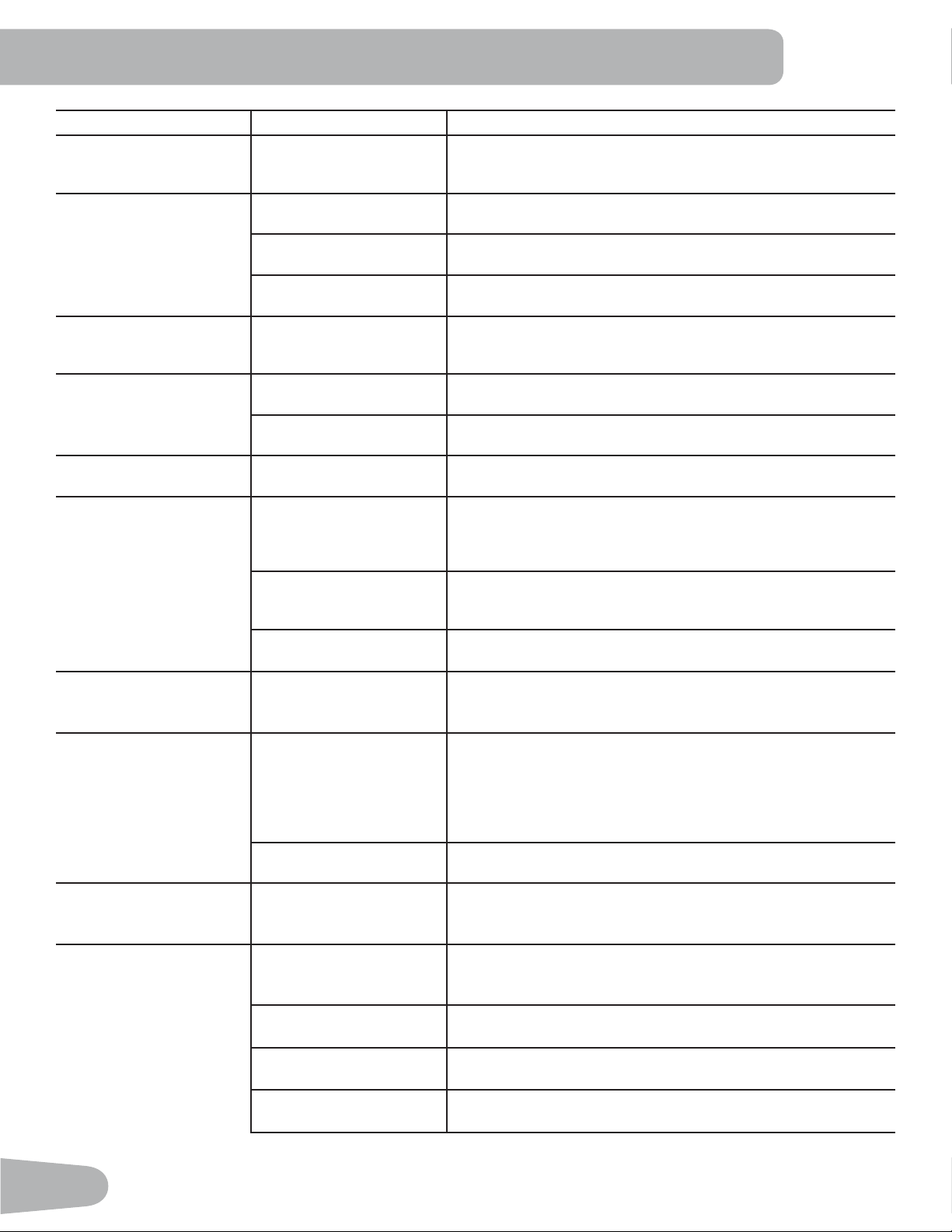
Condition/Problem Things to Check Solution
No display/partial display/
unit will not turn on
Check electrical (wall)
outlet
Make sure unit is plugged into a functioning wall outlet.
Check connection at front
of unit
Connection should be secure and undamaged. Replace
adapter or connection at unit if either are damaged.
Check Power Switch Turn on the power with the Power Switch.
Check data cable integrity All wires in cable should be intact. If any are visibly crimped or
cut, replace cable.
Check data cable
connections/orientation
Be sure cable is connected securely and oriented properly.
Small latch on connector should line up and snap into place.
Check console display for
damage
Check for visual sign that console display is cracked or other-
wise damaged. Replace Console if damaged.
Console Display ,I&RQVROHRQO\KDVSDUWLDOGLVSOD\DQGDOOFRQQHFWLRQVDUH¿QH
replace the Console.
If the above steps do not resolve the problem, contact Cus-
tomer Care for further assistance.
Unit operates but Contact
HR not displayed
HR cable connection at
Console
Be sure cable is connected securely to Console.
+5FDEOHER[FRQQHFWLRQ Be sure cables from handlebars and cable to Console are
secure and undamaged.
Sensor grip Be sure hands are centered on HR sensors. Hands must be
kept still with relatively equal pressure applied to each side.
Dry or calloused hands 6HQVRUVPD\KDYHGLI¿FXOW\ZLWKGULHGRXWRUFDOORXVHGKDQGV
A conductive electrode cream (heart rate cream) can help
make better conduct. These are available on the web or at
PHGLFDORUVRPHODUJHU¿WQHVVVWRUHV
Static Handlebar If tests reveal no other issues, Static Handlebar should be
replaced.
Unit operates but
Telemetric HR not
displayed
Chest Strap (optional)
Strap should be “POLAR
®
” compatible and uncoded. Make
sure strap is directly against skin and contact area is wet.
Chest Strap Batteries If strap has replaceable batteries, install new batteries.
&KHFN8VHU3UR¿OH 6HOHFWWKH(GLW8VHU3UR¿OHRSWLRQIRUWKH8VHU3UR¿OH*RWR
the WIRELESS HR setting and make sure that the current
value is set to ON.
Interference Try moving unit away from sources of interference (TV, Micro-
wave, etc).
Replace Chest Strap If interference is eliminated and HR does not function, replace
strap.
Replace Console If HR still does not function, replace Console.
Unit operates but
Telemetric HR displayed
incorrectly
Interference Make sure that the HR receiver is not blocked by a personal
electronic device in the left side of the media tray.
No speed/RPM reading,
Console displays “Please
Stride” error code
Check data cable integrity All wires in cable should be intact. If any are cut or crimped,
replace cable.
Check data cable
connections/orientation
Be sure cable is connected securely and oriented properly.
Small latch on connector should line up and snap into place.
TROUBLESHOOTING
47
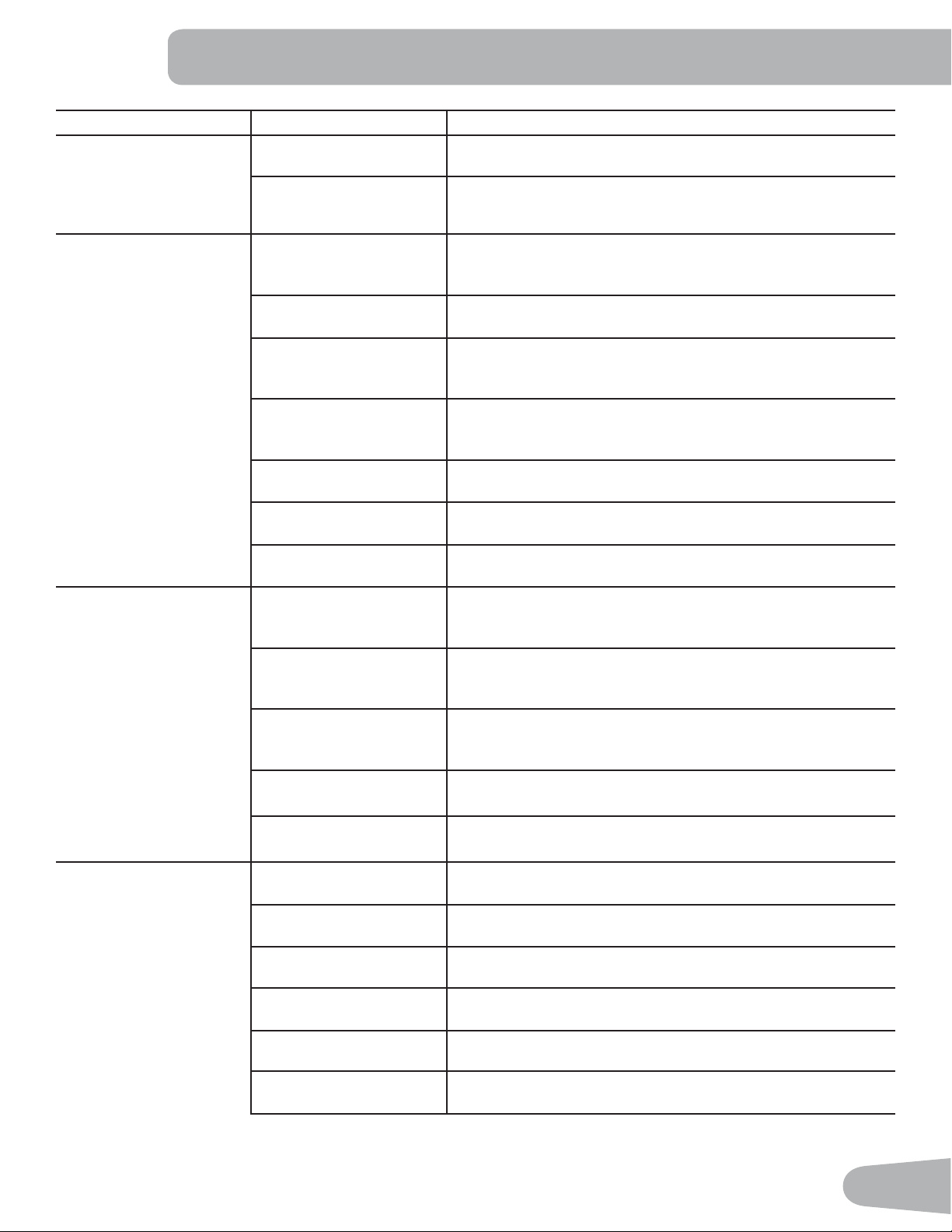
Condition/Problem Things to Check Solution
Check magnet position
(requires shroud removal)
Magnet should be in place on pulley.
Check Speed Sensor
(requires shroud removal)
Speed sensor should be aligned with magnet and connected to
data cable. Realign sensor if necessary. Replace if there is any
damage to the sensor or the connecting wire.
Resistance does not
change (machine turns on
and operates)
Check Console Check for visual sign that Console is damaged. Replace Con-
sole if damaged.
Check data cable integrity All wires in cable should be intact. If any are visibly crimped or
cut, replace cable.
Check data cable
connections/orientation
Be sure cable is connected securely and oriented properly.
Reseat all connections. Small latch on connector should line up
and snap into place.
Resistance handlebar
connection (requires
handlebar shroud removal)
Be sure cable from left Upper Handlebar and cables to Console
are secure and undamaged.
Check Servo Motor
(requires shroud removal)
If magnets move, adjust until they are within the proper range.
Replace Servo Motor if not functioning properly.
MCB (requires shroud
removal)
Replace MCB.
If the above steps do not resolve the problem, contact Cus-
tomer Care for further assistance.
Incline does not adjust
(machine turns on and
operates)
Check Console Check for visual sign that Console is damaged. Replace Con-
sole if damaged.
Incline handlebar
connection (requires
handlebar shroud removal)
Be sure cable from right Upper Handlebar and cables to Con-
sole are secure and undamaged.
Lower and Upper I/O
Cables (requires shroud
removal)
All wires in the cables should be intact. If any are cut or
crimped, replace cable.
Incline Adjuster Assembly
(requires shroud removal)
Be sure Incline Adjuster Assembly is attached to Incline Motor
drive screw.
If the above steps do not resolve the problem, contact Cus-
tomer Care for further assistance.
Console shuts off (enters
sleep mode) while in use
Check electrical (wall)
outlet
Make sure unit is plugged into a functioning wall outlet.
Check connection at front
of unit
Connection should be secure and undamaged. Replace
adapter or connection at unit if either are damaged.
Check data cable integrity All wires in the cable should be intact. If any are cut or crimped,
replace cable.
Check data cable
connections/orientation
Be sure cable is connected securely and oriented properly.
Small latch on connector should line up and snap into place.
Reset machine Unplug unit from electrical outlet for 3 minutes. Reconnect to
outlet.
Check magnet position
(requires shroud removal)
Magnet should be in place on pulley.
48
Condition/Problem Things to Check Solution
Check Speed Sensor
(requires shroud removal)
Speed sensor should be aligned with magnet and connected to
data cable. Realign sensor if necessary. Replace if there is any
damage to the sensor or the connecting wire.
Fan will not turn on or will
not turn off
Check data cable integrity All wires in cable should be intact. If any are cut or crimped,
replace cable.
Check data cable
connections/orientation
Be sure cable is connected securely and oriented properly.
Small latch on connector should line up and snap into place.
Reset machine Unplug unit from electrical outlet for 3 minutes. Reconnect to
outlet.
Fan will not turn on, but
Console operates
Check for blockage of fan Unplug unit from electrical outlet for 5 minutes. Remove mate-
rial from fan. If necessary, detach the Console to help with
removal. Replace the Console if unable to remove blockage.
Unit rocks/does not sit
level
Check leveler adjustment Adjust levelers until machine is level.
Check surface under unit $GMXVWPHQWPD\QRWEHDEOHWRFRPSHQVDWHIRUH[WUHPHO\XQ-
even surfaces. Move machine to level area.
Foot pedals loose/unit
GLI¿FXOWWRRSHUDWH
Hardware Tightly secure all hardware on the Pedal Arms and Handlebar
Arms.
Drive train click/tick
noise once per full crank
revolution
Check crank/pulley
assembly
Disconnect left and right foot assemblies and rotate crank. If
sound persists, replace crank/pulley assembly. If sound does
not come from rotating crank, check foot assemblies and up-
per/lower handlebars.
Check foot assemblies,
leg assemblies, handlebar
assemblies
Manually move foot, leg, and handlebar assemblies to isolate
sound. Replace part making sound.
Check for loose hardware Tightly secure all hardware on the Stabilizers and the base of
the Console Mast.
Knocking sound during
machine operation
Check hardware at
junction between Lower
Handlebar Arm and Pedal
Make sure that the alignment tab on the Pivot Sleeve goes into
WKHVORWLQWKHKROH%HVXUHWKH3LYRW6OHHYHH[WHQGVWKURXJK
the opposite hole in the joint cover.
Squeaking noise
that appears a few
minutes into a workout
and normally will get
progressively worse as
the workout continues
Bolt that connects the
VZLQJDUPVWRWKHD[OH
running through the
console mast
Loosen pivot rod bolt slightly until noise goes away. White
OLWKLXPJUHDVHFDQDOVREHDSSOLHGIRUDWHPSRUDU\¿[&RQWDFW
Customer Care for assistance.
Roller squeaking on rail Apply silicone lubricant to a dry cloth and wipe the rails to
eliminate roller noise.
Console continuously
cycles through program
screens
Console is in demonstra-
tion mode
Hold down the PAUSE/END button and Left button together for
3 seconds.
Workout results will not
sync with Bluetooth
®
en-
abled device
Current console mode Machine must be in Idle Mode to sync. Push the PAUSE/END
button until the Power-Up Mode screen is displayed.
Total time of workout A workout must be longer than 1 minute to be saved and
posted by the Console.
Fitness machine Unplug unit from electrical outlet for 5 minutes. Reconnect to
outlet.
Bluetooth
®
enabled device Consult your device to be sure that the Bluetooth
®
wireless
feature has been enabled on it.
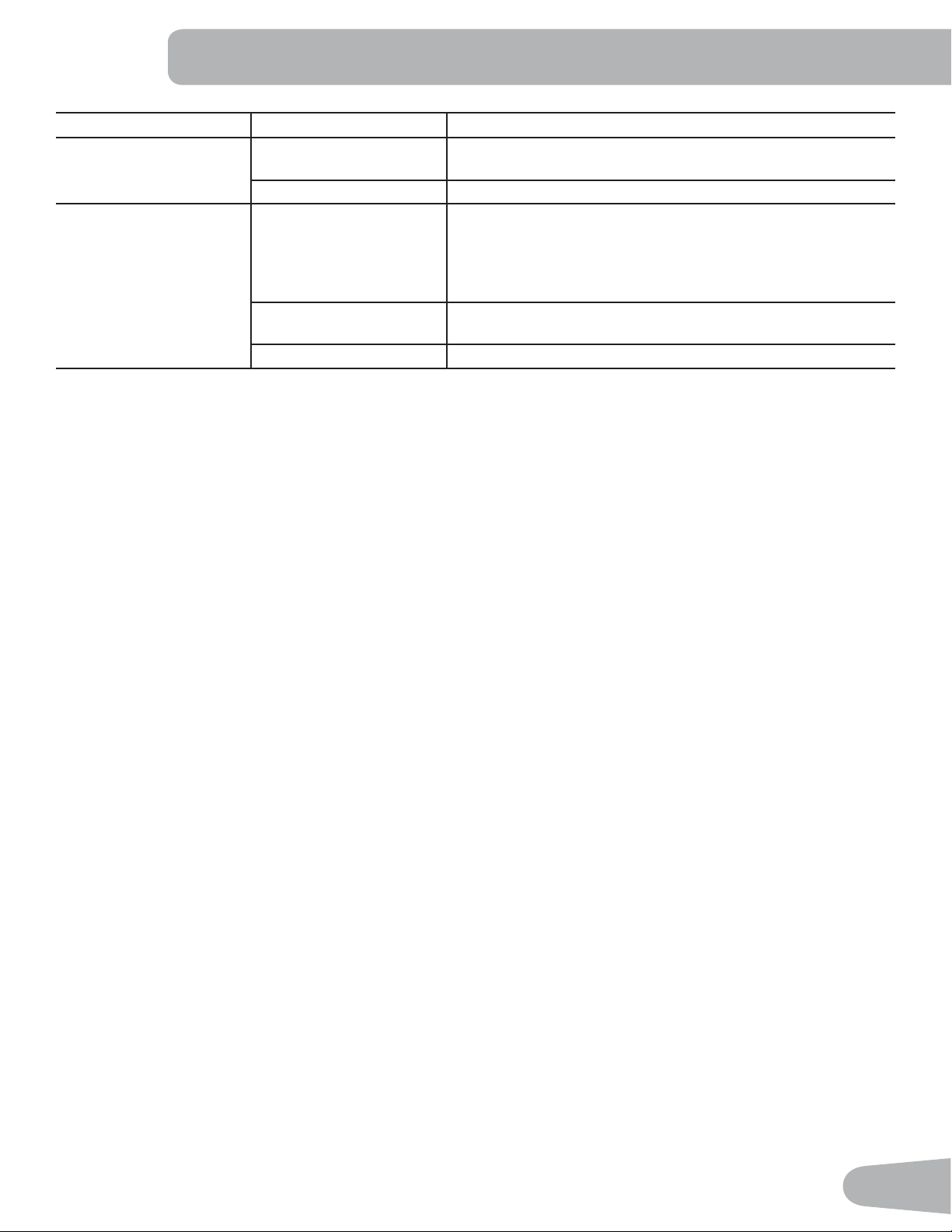
49
Condition/Problem Things to Check Solution
Fitness App 5HYLHZ6SHFL¿FDWLRQVRI)LWQHVV$SSDQGFRQ¿UP\RXUGHYLFH
is compatible.
Contact [email protected] for further assistance.
Workout results not post-
ing from Nautilus Trainer
™
to MyFitnessPal
®
/ Under
Armour
®
Connect-ed Fit-
ness.
Sync accounts From the Menu icon on the Nautilus Trainer™ App, select the
Sync to MyFitnessPal
®
or Under Armour
®
Connected Fitness.
Sync fails Review account and password for MyFitnessPal
®
/ Under Ar-
mour
®
Connected Fitness.
50
51
WARRANTY
Who Is Covered
This warranty is valid only to the original purchaser and is not transferable or applicable to any other person(s).
What Is Covered
Nautilus, Inc. warrants that this product is free from defects in materials and workmanship, when used for the purpose intended, under normal conditions, and provided it receives
proper care and maintenance as described in the Product’s Assembly and Owner’s manual. This warranty is good only for authentic, original, legitimate machines manufactured by
Nautilus, Inc. and sold through an authorized agent and used in the United States or Canada.
Terms
• Frame 15 years
• Mechanical parts 5 years
• Electronics 5 years
• Labor 2 years
(Labor support does not include the installation of replacement parts involved in the initial product assembly and preventative maintenance services.)
How Nautilus Will Support the Warranty
Throughout the terms of the warranty coverage, Nautilus, Inc. will repair any machine that proves to be defective in materials or workmanship. Nautilus reserves the right to replace
the product in the event a repair is not possible. When Nautilus determines replacement is the correct remedy, Nautilus may apply a limited credit reimbursement toward another
Nautilus, Inc. brand Product, at our discretion. This reimbursement may be prorated based on length of ownership. Nautilus, Inc. provides repair service within major metropolitan
areas. Nautilus, Inc. reserves the right to charge the consumer for travel outside these areas. Nautilus, Inc. is not responsible for dealer labor or maintenance charges beyond the
applicable warranty period(s) stated herein. Nautilus, Inc. reserves the right to substitute material, parts or products of equal or better quality if identical materials or products are
not available at the time of service under this warranty. Any replacement of the product under the terms of the Warranty in no way extends the original Warranty period. Any limited
credit reimbursement may be prorated based on length of ownership. THESE REMEDIES ARE THE EXCLUSIVE AND SOLE REMEDIES FOR ANY BREACH OF WARRANTY.
What You Must Do
• Retain appropriate and acceptable Proof of Purchase.
• Operate, maintain, and inspect the Product as specified in the Product Documentation (Assembly, Owner’s Manuals, etc.).
• Product must be used exclusively for the purpose intended.
• Notify Nautilus within 30 days after detecting an issue with the Product.
• Install replacement parts or components in accordance with any Nautilus instructions.
• Perform diagnostic procedures with a trained Nautilus, Inc representative if requested.
What Is Not Covered
• Damage due to abuse, tampering or modification of the Product, failure to properly follow assembly instructions, maintenance instructions, or safety warnings as stated in the
Product Documentation (Assembly, Owner’s Manuals, etc), damage due to improper storage or the effect of environmental conditions such as moisture or weather, misuse,
mishandling, accident, natural disasters, power surges.
• A machine placed or used in a commercial or institutional setting. This includes gyms, corporations, work places, clubs, fitness centers and any public or private entity that
has a machine for use by its members, customers, employees or affiliates.
• Damage caused by exceeding maximum user weights as defined in the Product’s Owner’s manual or warning label.
• Damage due to normal usage and wear and tear.
• This warranty does not extend to any territories or countries outside the United States and Canada.
How to Obtain Service
For Products purchased directly from Nautilus, Inc. contact the Nautilus office listed on the Contacts page of the products Owner’s manual. You may be required to return the
defective component to a specified address for repair or inspection, at your expense. Standard ground shipping of any warranty replacement parts will be paid by Nautilus, Inc. For
products purchased from a retailer, you may be asked to contact your retailer for warranty support.
Exclusions
The preceding warranties are the sole and exclusive express warranties made by Nautilus, Inc. They supersede any prior, contrary or additional representations, whether oral or
written. No agent, representative, dealer, person or employee has the authority to alter or increase the obligations or limitations of this warranty. Any implied warranties, including
the WARRANTY OF MERCHANTABILITY and any WARRANTY OF FITNESS FOR A PARTICULAR PURPOSE, are limited in duration to the term of the applicable express warranty
provided above, whichever is longer. Some states do not allow limitations on how long an implied warranty lasts, so the above limitation may not apply to you.
Limitation of Remedies
EXCEPT AS OTHERWISE REQUIRED BY APPLICABLE LAW, THE PURCHASER’S EXCLUSIVE REMEDY IS LIMITED TO REPAIR OR REPLACEMENT OF ANY COMPONENT DEEMED BY
NAUTILUS, INC. TO BE DEFECTIVE UNDER THE TERMS AND CONDITIONS STATED HEREIN. IN NO EVENT WILL NAUTILUS, INC. BE LIABLE FOR ANY SPECIAL, CONSEQUENTIAL,
INCIDENTAL, INDIRECT OR ECONOMIC DAMAGES, REGARDLESS OF THE THEORY OF LIABILITY (INCLUDING, WITHOUT LIMITATION, PRODUCT LIABILITY, NEGLIGENCE OR OTHER
TORT) OR FOR ANY LOST REVENUE, PROFIT, DATA, PRIVACY OR FOR ANY PUNITIVE DAMAGES ARISING OUT OF OR RELATED TO THE USE OF THE FITNESS MACHINE EVEN IF
NAUTILUS, INC. HAS BEEN ADVISED OF THE POSSIBILITY OF SUCH DAMAGES. THIS EXCLUSION AND LIMITATION SHALL APPLY EVEN IF ANY REMEDY FAILS OF ITS ESSENTIAL
PURPOSE. SOME STATES DO NOT ALLOW THE EXCLUSION OR LIMITATION OF CONSEQUENTIAL OR INCIDENTAL TYPE DAMAGES SO THE ABOVE LIMITATION MAY NOT APPLY TO
YOU.
State Laws
This warranty gives you specific legal rights. You may also have other rights, which vary from state to state.
Expirations
If the warranty has expired, Nautilus, Inc. may assist with replacements or repairs to parts and labor, but there will be a charge for these services. Contact a Nautilus office for
information on post-warranty parts and services. Nautilus does not guarantee availability of spare parts after expiration of warranty period.
International Purchases
If you purchased your machine outside of the United States consult your local distributor or dealer for warranty coverage.
Nautilus® %RZÀH[® Schwinn® 8QLYHUVDO®
*
EN