TT
™
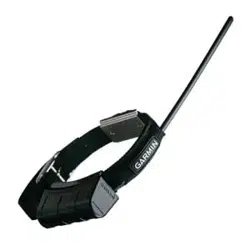
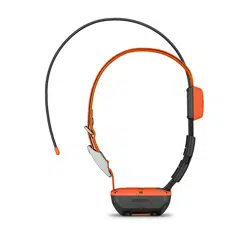
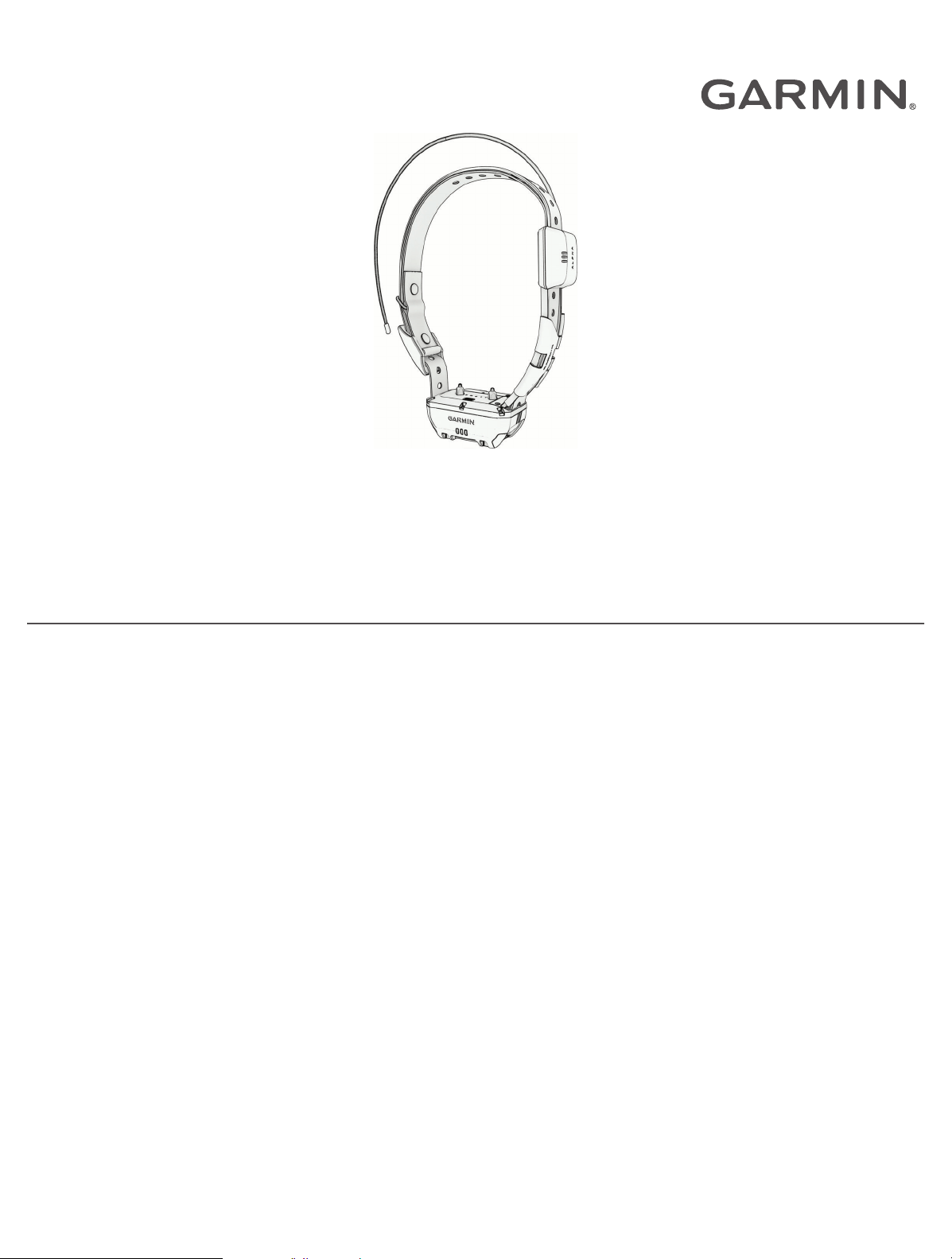
25 DOG COLLAR DEVICE
Owner’s Manual

© 2023 Garmin Ltd. or its subsidiaries
All rights reserved. Under the copyright laws, this manual may not be copied, in whole or in part, without the written consent of Garmin. Garmin reserves the right to change
or improve its products and to make changes in the content of this manual without obligation to notify any person or organization of such changes or improvements. Go to
www.garmin.com for current updates and supplemental information concerning the use of this product.
Garmin
®
, the Garmin logo, and Alpha
®
are trademarks of Garmin Ltd. or its subsidiaries, registered in the USA and other countries. Garmin Express
™
and TT
™
are trademarks of
Garmin Ltd. or its subsidiaries. These trademarks may not be used without the express permission of Garmin.
TORX
®
is a registered trademark of Acument Intellectual Properties, LLC in the United States or other countries. Wi‑Fi
®
is a registered mark of Wi-Fi Alliance Corporation. Other
trademarks and trade names are those of their respective owners.

Table of Contents
Getting Started................................. 1
Dog Collar Device.................................... 1
Turning On the Device............................. 1
Turning Off the Device............................ 1
Charging the Dog Collar Device..............2
Acquiring Satellite Signals...................... 2
Adding a Dog to the Alpha® Navigator
Using Wireless Pairing............................ 2
Selecting and Installing the Contact
Points....................................................... 3
Removing the Contact Points............. 3
Fitting the Collar on Your Dog................ 3
Dog Tracking and Training................4
Dog Tracking........................................... 4
Dog Training............................................ 4
Collar Training..................................... 5
Training Methods................................ 5
Communication with the Dog Collar
Device...................................................... 6
Using a Dynamic Update Rate................ 6
Using Sleep Mode................................... 6
Device Information........................... 6
Getting the Owner's Manual................... 6
Product Updates..................................... 7
Setting Up Wi‑Fi® for the Dog
Collar Device........................................ 7
Setting Up Garmin Express................. 7
Connecting the Dog Collar Device to a
Computer............................................. 7
VHF Radio Information........................... 7
Dog Collar Device Specifications........... 8
Appendix.......................................... 8
Purchasing Accessories......................... 8
Replacing the Dog Collar Battery........... 9
Replacing the Dog Collar Flex Band..... 10
Replacing the Dog Collar Strap............ 10
Replacing the Dog Collar VHF
Antenna..................................................11
Table of Contents i

Getting Started
WARNING
See the Important Safety and Product Information guide in the product box for product warnings and other
important information.
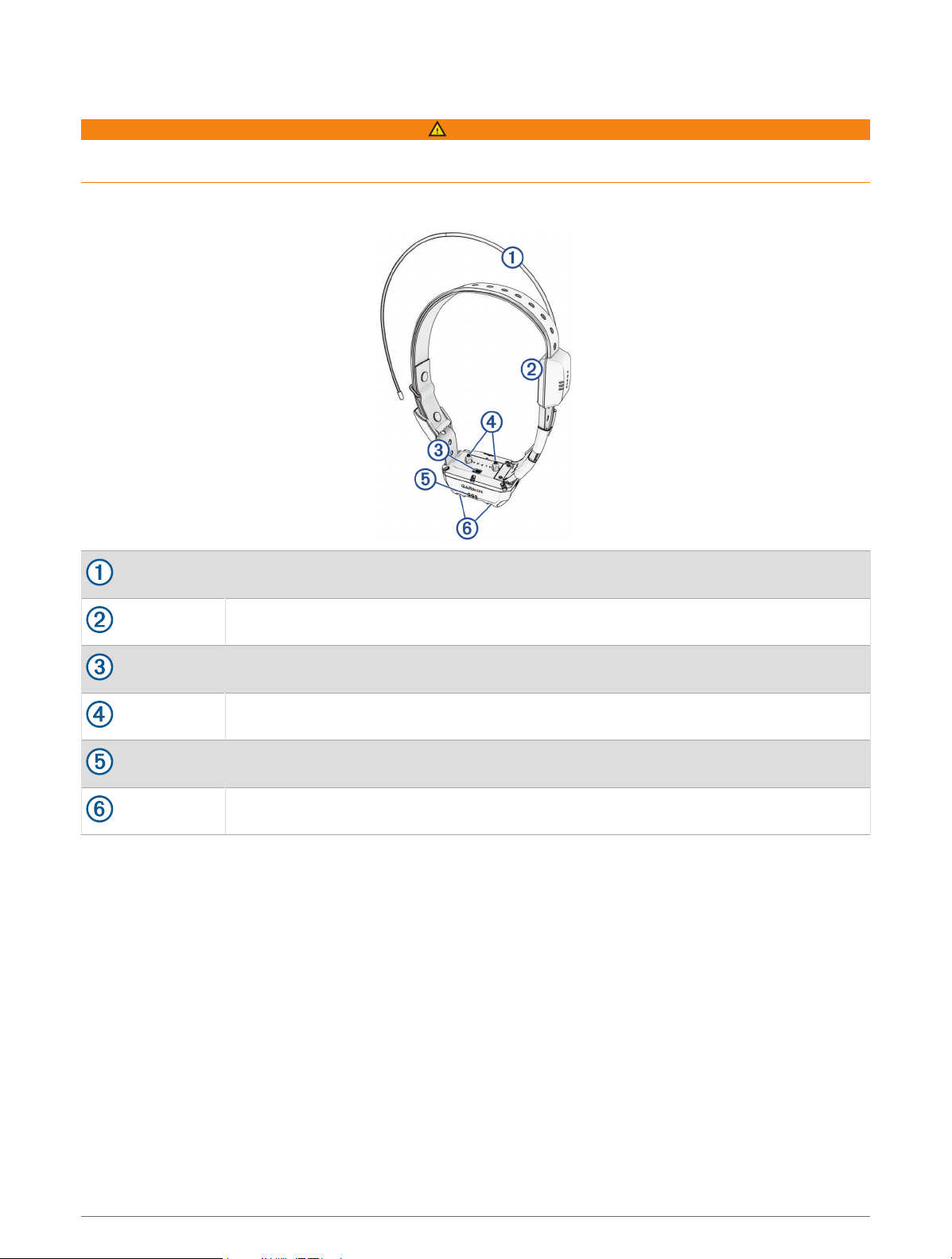
Dog Collar Device
VHF antenna
GPS antenna
Power button
Contact points
Status LED
Flashing beacon LEDs
Turning On the Device
• On the dog collar device, hold the power button until the status LED flashes and the collar beeps.
Turning Off the Device
Hold the power button until the status LED turns solid red.
The dog collar device beeps and turns off.
Getting Started 1
Charging the Dog Collar Device
NOTICE
To prevent corrosion, thoroughly dry the contacts on the dog collar device and the surrounding area before
connecting the charging clip.
You should fully charge the battery before you use the dog collar device for the first time. Charging a fully
depleted battery takes about five hours.
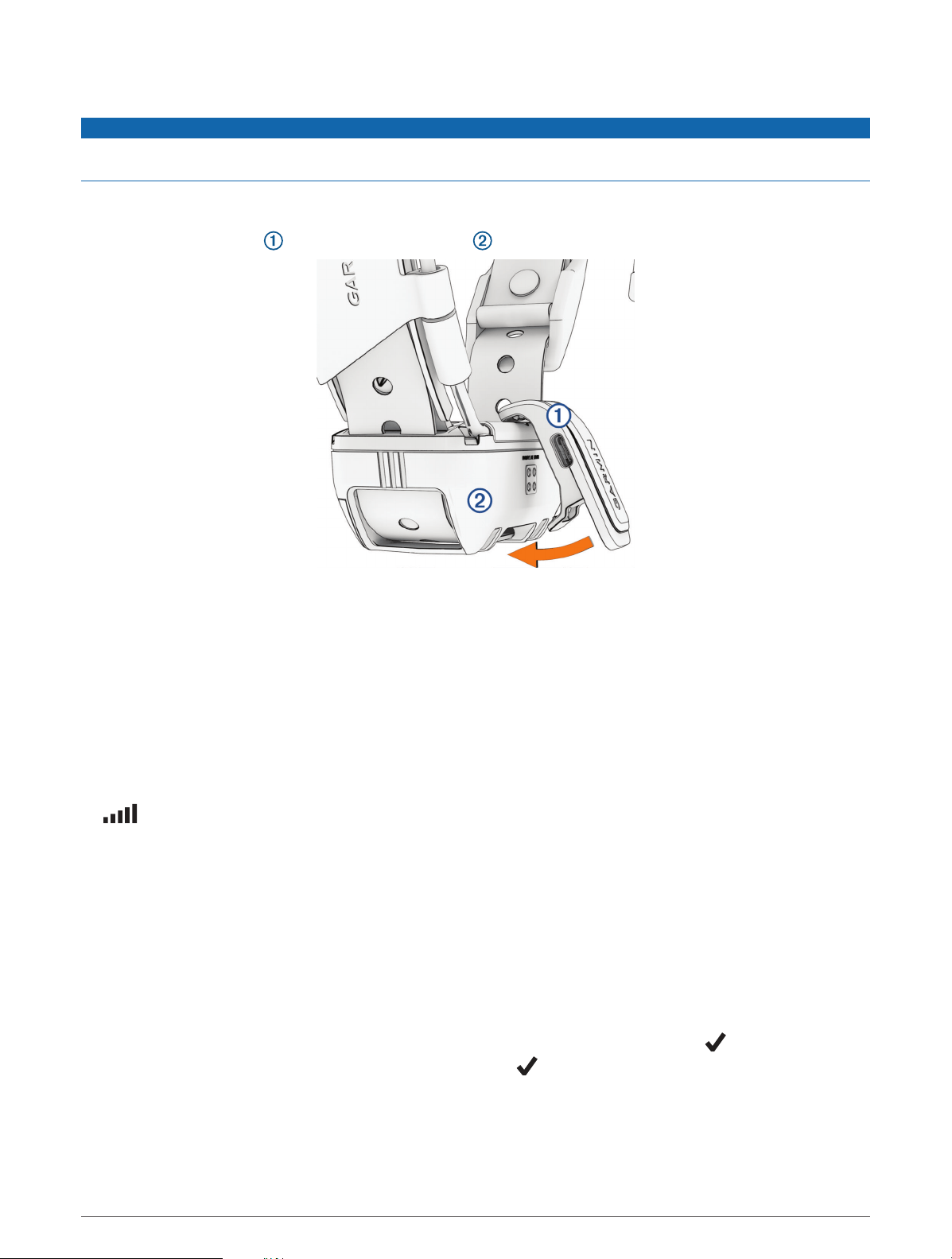
1 Snap the charging clip onto the dog collar device .
2 Plug the small end of the power cable into the USB port on the charging clip.
3 Plug the power cable into a power source.
The status LED is solid red when the collar is charging.
4 After the status LED turns solid green, remove the charging clip from the collar.
Acquiring Satellite Signals
Both the dog collar device and navigator must acquire satellite signals before you put the dog collar device on
your dog. Acquiring satellites can take a few minutes.
1 Go outdoors to an open area.
2 Turn on both devices.
in the status bar shows the GPS signal strength.
When the dog collar device has acquired satellite signals, the status LED flashes green.
Adding a Dog to the Alpha
®
Navigator Using Wireless Pairing
To pair wirelessly, the dog collar device must be within range of the Alpha navigator.
1 Hold the power button on the dog collar device until the device emits two series of beeps (about 2 seconds),
and then release the power button.
The status LED flashes blue. The dog collar device is now ready to be paired with a navigator.
2 On the navigator, select Dog List > Add Dog.
3 Select Pair Collar, and follow the on-screen instructions.
4 After successfully adding the dog collar device, enter the name of the dog, and select .
5 Select a beacon color for this dog collar device, and select .
2 Getting Started
Selecting and Installing the Contact Points
CAUTION
To prevent irritation from the contact points, remove the collar for at least eight hours out of every 24-hour
period.
Do not spray the device or collar with harsh chemicals including but not limited to flea or tick spray. Always
ensure that any flea or tick spray that is applied to the dog is completely dry before placing the collar on the dog.
Small amounts of harsh chemicals can damage the plastic components and collar strap.
For best results, select the correct contact points based on your dog's coat.
1 Select the correct contact point length for your dog's coat type:
• For dogs with thicker coats, use the longer contact points.
• For dogs with shorter coats, use the shorter contact points.
2 If necessary, use the included wrench to remove the contact points.
3 Twist the contact points into the collar.
4 Tighten with the included wrench, but do not overtighten.
When you put the collar on the dog, make sure the contact points are tight against the neck.
Removing the Contact Points
When you are not training the dog using the training buttons, remove the contact points.
Use the included wrench to remove both contact points.
Fitting the Collar on Your Dog
CAUTION
To prevent irritation from the contact points, remove the collar for at least eight hours out of every 24-hour
period.
This device is not intended for human use. Do not attempt to use on any person.
Do not spray the device or collar with harsh chemicals including but not limited to flea or tick spray. Always
ensure that any flea or tick spray that is applied to the dog is completely dry before placing the collar on the dog.
Small amounts of harsh chemicals can damage the plastic components and collar strap.
Before you can put the collar on the dog, you must pair the navigator and dog collar device (Adding a Dog to
the Alpha
®
Navigator Using Wireless Pairing, page2), and acquire satellite signals (Acquiring Satellite Signals,
page2).
In order to effectively train the dog, the collar must fit the dog properly. If the collar is too loose or positioned
incorrectly, stimulation may be inconsistent. This can delay or prevent successful training.
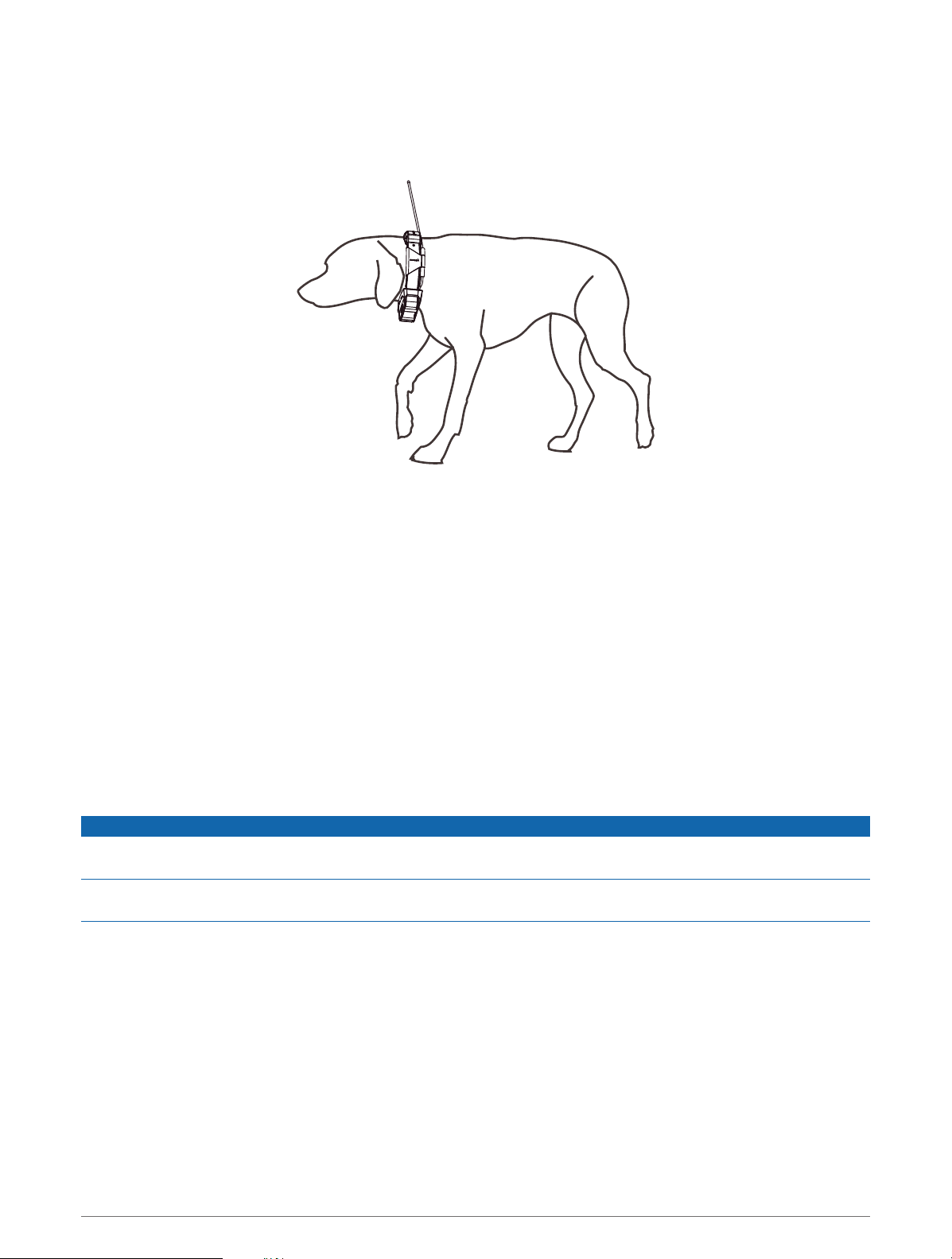
1 Position the collar with the communication antenna pointing up, the GPS antenna facing up, the LEDs facing
forward, and the contact points against the neck.
2 Place the collar around the middle of the dog's neck.
Getting Started 3
3 Tighten the strap so that it is snug around the dog's neck, and fasten the buckle.
NOTE: The collar should fit tightly and should not be able to rotate or slide on the dog's neck. The dog must
be able to swallow food and water normally. You should observe your dog's behavior to verify that the collar
is not too tight.
4 Wiggle the device to work the contact points through the dog's coat.
NOTE: The contact points must have contact with the dog's skin to be effective.
5 If the strap is too long, cut off the excess, leaving at least 7.62cm (3in.) to spare.
TIP: You can mark the hole used to fasten the buckle for future reference.
Dog Tracking and Training
One navigator can track multiple dog collar devices and other navigators.
Dog Tracking
The navigator allows you to track your dog or multiple dogs, using the tracking compass or map. The map
displays your location and your dog's location and tracks. The compass pointer indicates the direction of the
dog's current location.
Dog Training
NOTICE
You should research and investigate the training methods best suited for you, your dog, and your needs. This
manual provides some basic guidelines for training, but each dog has unique training needs.
When used properly, the Alpha training system is a very effective training tool to aid your dog in reaching its full
potential. The use of the training system should be part of an overall training program.
Begin training your dog on a leash, without the Alpha training system. You should train your dog how to heel, sit,
and come to you. After the dog understands these three basic commands, you can begin training with the dog
collar device and the leash. Finally, when the dog consistently obeys commands using the leash and collar, you
may be able to remove the leash to train with only the dog collar device.
4 Dog Tracking and Training

Collar Training
Begin training your dog on a leash, without using the Alpha training system. After the dog shows a grasp of the
commands "heel," "sit," and "here," you can begin training with the collar and the leash.
During the initial stage of collar introduction, the dog learns that collar stimulation means the same thing as a
tug on the leash. At first, the dog may be alarmed by the electronic stimulation. The key is to be patient and
consistent and not to start off at too high of an intensity. Be fair and consistent, and use repetition and praise
when using the collar as a training tool.
If the dog does not respond to the stimulation level you have selected, increase the stimulation one level at
a time until you achieve the appropriate response. After you achieve the desired response, you can lower the
stimulation level as long as the dog maintains consistency.
As the dog becomes more proficient with the commands, you can begin to introduce distractions, such as
rolling a ball in front of the dog or walking him in the presence of others.
After the dog begins to respond consistently to the command during collar training, you can remove the leash
and train with just the collar.
NOTE: You should train without a leash only when it is appropriate for your environment and your dog's
temperament. You should follow all laws and regulations for your area regarding the use of dog leashes.
Eventually in most training situations, your commands will not require stimulation to be given with the
command. You should only use stimulation when you need to repeat a command because the dog did not
obey the first one.
As the dog becomes better trained, you can decrease the use of collar training. Continue to have the dog wear
the collar until you feel certain that it is no longer needed to reinforce known commands. Abandoning the collar
too early can lead to problems in the future.
Choosing the Correct Intensity Level
1 Set the intensity to the lowest level.
2 Observe the dog for a reaction, such as a head shake, neck movement, or just a change in expression.
Sometimes dogs will vocalize due to the surprise of the electrical stimulation. If the dog vocalizes more than
once, the intensity level is too high for beginning training.
3 If there is no reaction, increase the intensity level by one level until the dog has a slight but recognizable
reaction to the stimulation.
The intensity level that causes a slight but recognizable reaction is your dog's baseline level for beginning collar
training. You do not need to, and should not, apply this intensity selection test again.
After you begin training, the dog’s performance guides your intensity selection. As the dog advances in training,
you may need to change the level depending upon the training situation.
Training Methods
Momentary stimulation: Applies a brief stimulation when you press the training button, regardless of how long
the button is depressed.
Continuous stimulation: Applies stimulation to the dog the entire time you press the training button, for a
maximum of 8 seconds. Your stimulations should typically be much shorter than 8 seconds.
Tone: Activates an audible tone the entire time you press the training button.
Vibration: Applies vibration to the dog the entire time you press the training button, for a maximum of 8
seconds. The effectiveness of vibration may vary based on the dog's temperament and experience.
Linear and Traditional Stimulation
You can use linear or traditional stimulation to customize your training experience. The default intensity method
is linear, which allows progressive stimulation from level 1 to level 18. Traditional stimulation allows you to
make quick changes using low, medium, and high settings within predetermined stimulation levels (1 through
6).
Dog Tracking and Training 5
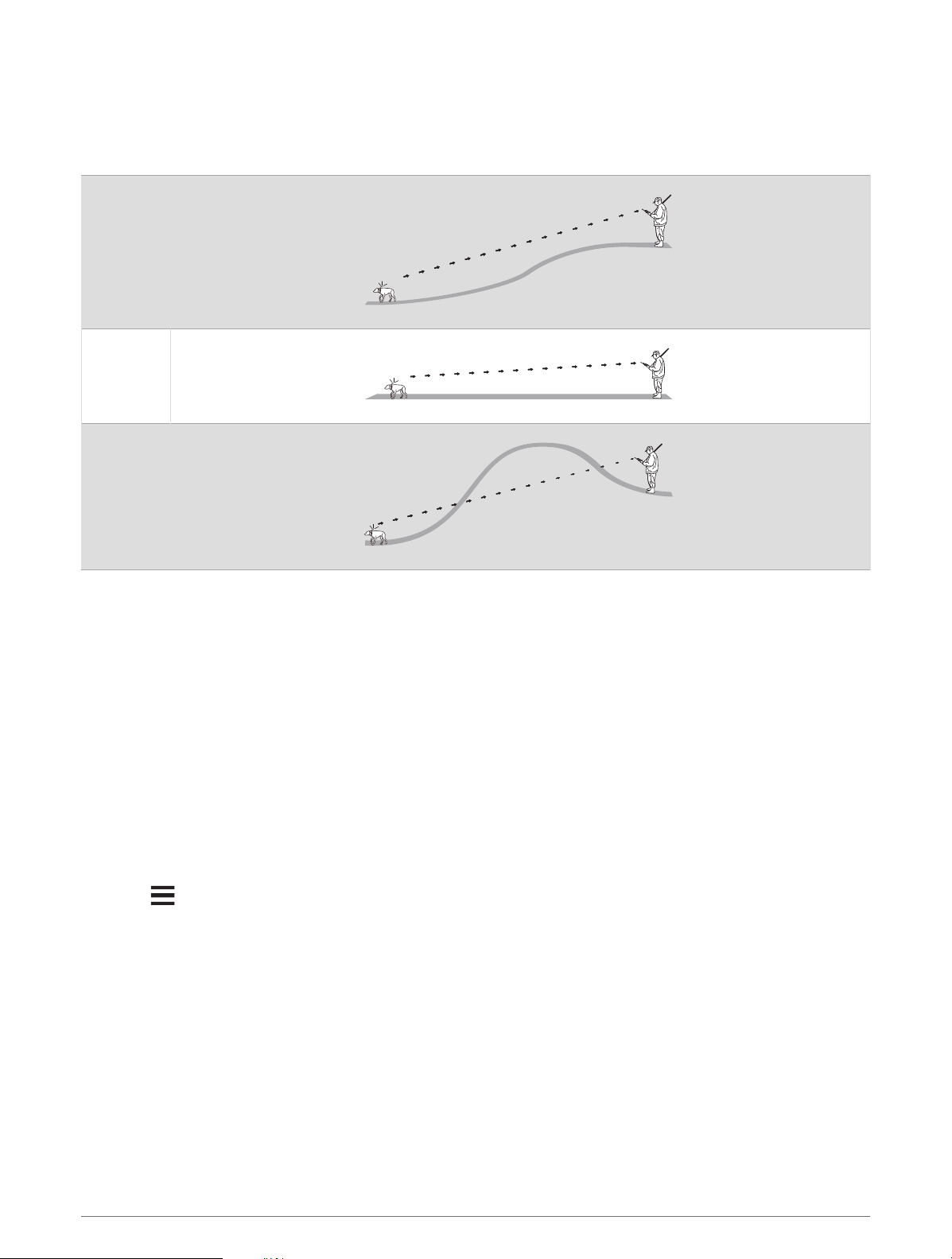
Communication with the Dog Collar Device
You should keep an unobstructed line of sight between your navigator and dog collar device to produce the best
communication signal. To achieve the best line-of-sight conditions, you should move to the highest elevation
point in your area (for example, on the top of a hill).
Best
Good
Poor
Using a Dynamic Update Rate
When you are actively tracking your dog, the dog collar device can use a dynamic update rate to help conserve
battery power based on the activity of your dog.
1 Select Dog List.
2 Select a dog.
3 Select Update Rate > Dynamic.
Using Sleep Mode
Before you can enter sleep mode, you must track your dog's location using the compatible dog collar device.
When paired with a navigator, the dog collar device can be put into sleep mode to conserve the battery when
you are not actively tracking your dog.
1 Select Dog List.
2 Select a dog.
3 Select > Adjust Collar Sleep Mode.
4 Select an option:
• Select Sleep to enter sleep mode.
• Select Wake to exit sleep mode.
Device Information
Getting the Owner's Manual
You can get the latest owner's manual from the web.
1 Go to www.garmin.com/support.
2 Select Manuals.
3 Follow the on-screen instructions to select your product.
6 Device Information
Product Updates
On your computer, install Garmin Express
™
(www.garmin.com/express).
This provides easy access to these services for Garmin
®
devices:
• Software updates
• Product registration
Setting Up Wi‑Fi
®
for the Dog Collar Device
When paired with a navigator that supports the setup of Wi‑Fi technology on a dog collar device, the dog
collar device can scan for nearby Wi‑Fi networks and pair to a selected network. When the dog collar device is
connected to a Wi‑Fi network, it automatically checks for available software updates and installs them when the
dog collar device is charging, and in range of the connected Wi‑Fi network.
1 Select Dog List.
2 Select a dog.
3 Select > Collar Wi-Fi Setup, and follow the on-screen instructions.
Setting Up Garmin Express
1 Connect the device to your computer using a USBcable.
2 Go to garmin.com/express.
3 Follow the on-screen instructions.
Connecting the Dog Collar Device to a Computer
NOTICE
To prevent corrosion, you should dry the contacts on the dog collar device and the surrounding area before
connecting the charging clip.
1 Snap the charging clip onto the dog collar device.
2 Plug the small end of the USB cable into the USB port on the charging clip.
3 Plug the other end of the USB cable into a USB port on the computer.
VHF Radio Information
This product may be used only on specific radio frequencies, which vary depending on the country of use. The
navigator and dog collar device allow the user to install a different antenna. Changing the antenna can result in
improved radio performance and higher radiated power. You must not use the device with a third party antenna
or an antenna not approved by Garmin. Go to www.garmin.com/tracking-legal for details about the performance
and radio frequency of this product, lawful accessories, and power limits for countries.
Device Information 7
Dog Collar Device Specifications
Battery type
Rechargeable, replaceable lithium-ion
1
Optional extended battery box accessory available
2
Battery life
Up to 68hr.
Up to 136hr. with optional extended battery box accessory
Operating temperature range From -20° to 60°C (from -4° to 140°F)
Charging temperature range From 0° to 40°C (from 32° to 104°F )
Storage temperature range From -20° to 70°C (from -4° to 158°F)
ANT
®
wireless range Up to 10m (32.8ft.)
VHF radio range Up to 14.48km (9mi.)
Wireless frequencies/protocols 152-169 MHz @ 23.1 dBm maximum, 2.4 GHz @ 12.33 dBm maximum
EU SAR 0.15 W/kg simultaneous torso, 0.15 W/kg simultaneous limb
Water rating 1ATM
3
Appendix
Purchasing Accessories
• Optional accessories are available at garmin.com or from your Garmin dealer.
1
Only for use with Garmin part number 361-00035-16.
2
Only for use with Garmin part number 361-00148-00.
3
The device withstands pressure equivalent to a depth of 10m. For more information, go to www.garmin.com/waterrating.
8 Appendix
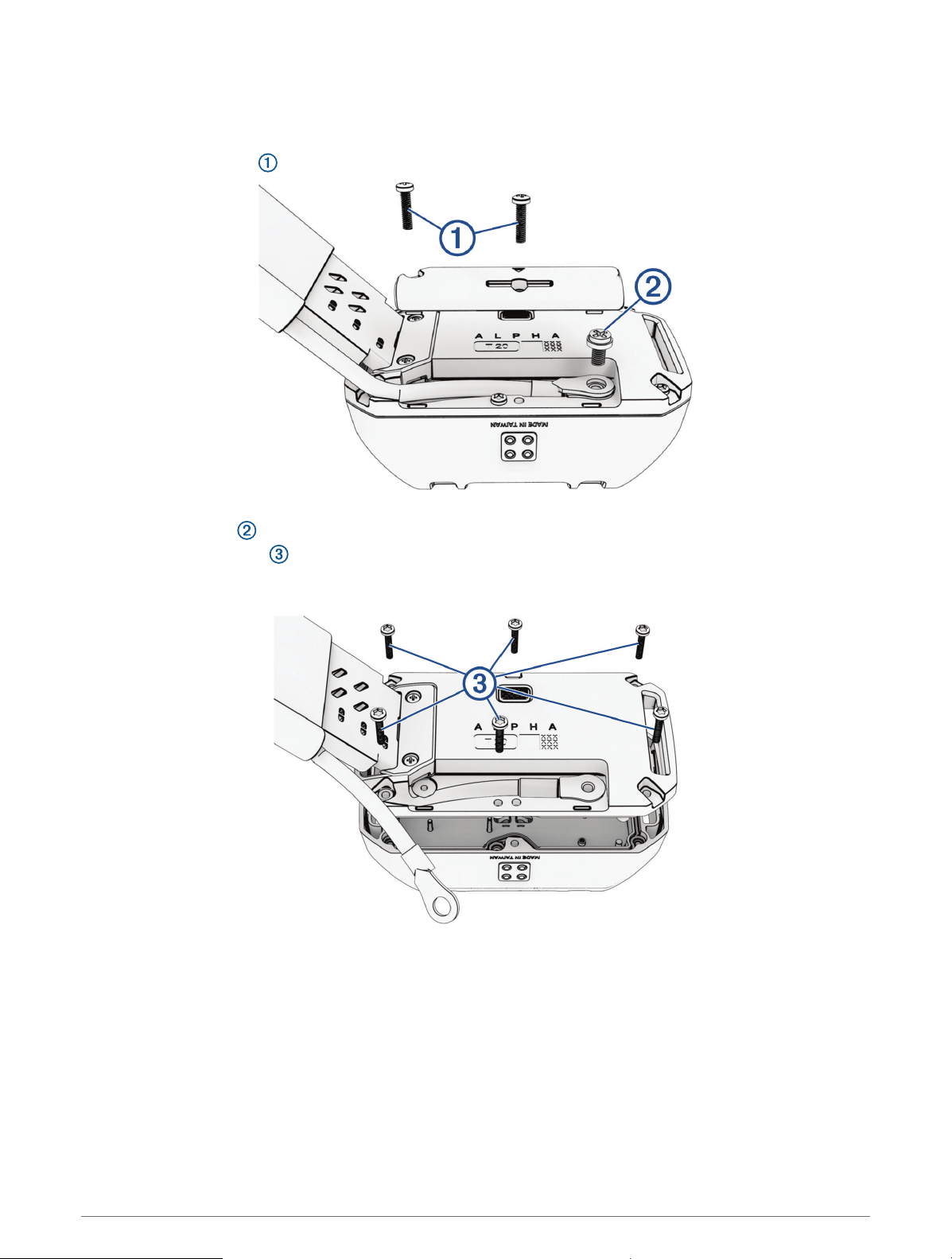
Replacing the Dog Collar Battery
Before you replace the battery, you must remove all dirt, water, and debris from the dog collar device. You must
also have a small Phillips (#2) screwdriver and a small TORX
®
(T5) screwdriver.
1 Remove the 2 screws from the cover over the VHF antenna.
2 Remove the VHF antenna cover.
3 Remove the screw securing the VHF antenna to the back plate.
4 Remove the six screws from the outer edges of the back plate.
Note the orientation of the status LED and charging clip connectors on the battery. You must install the new
battery the same way.
5 Remove the battery.
NOTE: Ensure the gasket, or battery seal, is removed with the used battery. Verify that the gasket with the
new battery is not damaged and that it is completely seated in the groove.
6 Connect the new battery to the back plate, and tighten the screws.
7 Replace the screw securing the VHF antenna to the back plate.
8 Replace the cover over the VHF antenna.
9 Replace and tighten the 2 screws on the VHF antenna cover.
After you remove the old battery, contact your local waste disposal department to properly recycle the battery.
Appendix 9
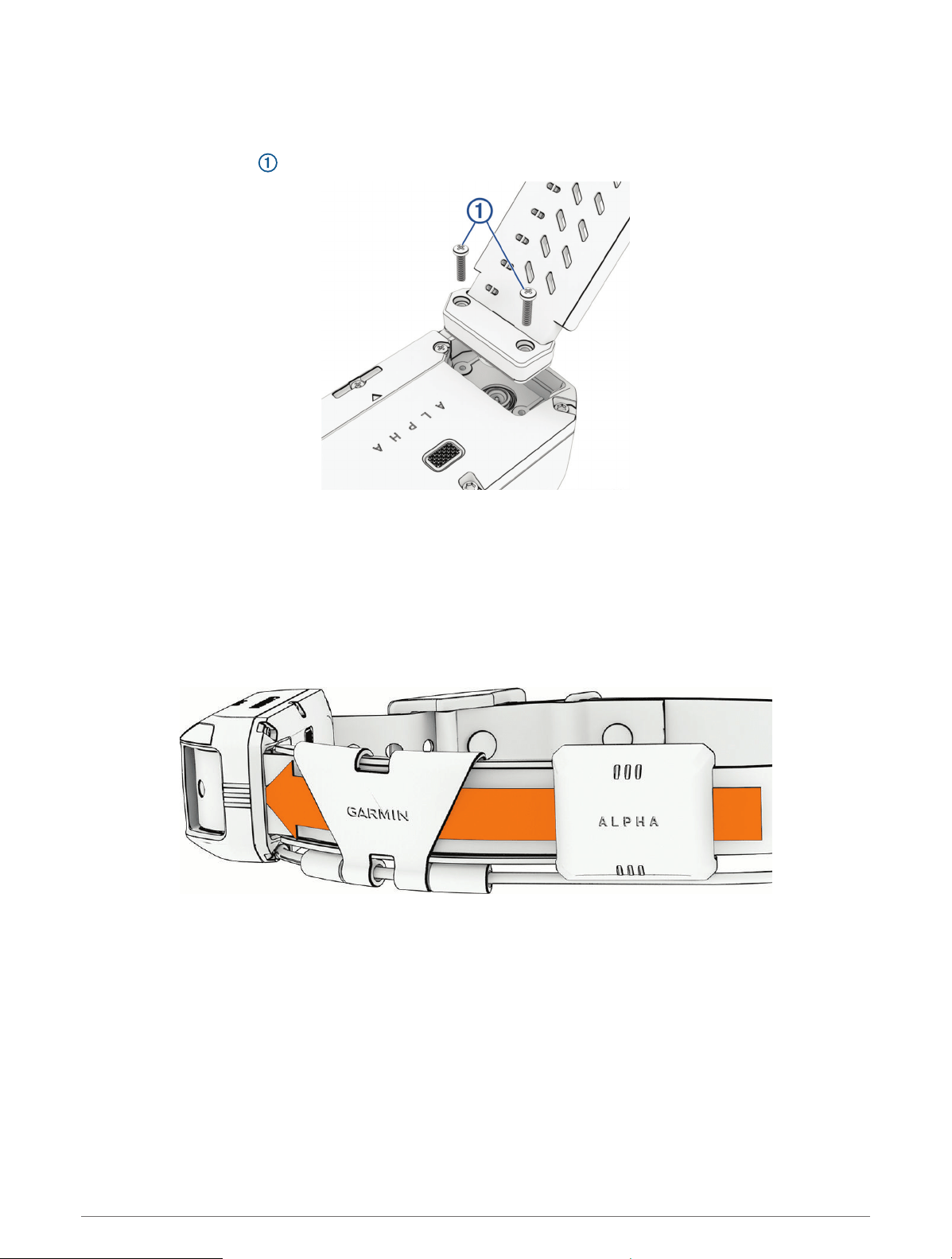
Replacing the Dog Collar Flex Band
Before you replace the dog collar flex band, you must remove all dirt, water, and debris from the dog collar
device. You must also have a small Phillips (#2) screwdriver.
1 Remove the 2 screws securing the dog collar flex band to the back plate.
2 Remove the old dog collar flex band.
3 Place the new dog collar flex band on the back plate, and tighten the 2 screws to secure it.
Replacing the Dog Collar Strap
Before you replace the dog collar strap, you must remove all dirt, water, and debris from the dog collar device.
1 Pull the dog collar strap out of the antenna guide and the dog collar device.
You may need to push and pull the dog collar strap to properly remove it.
2 Thread the new dog collar strap through the dog device and antenna guide.
10 Appendix
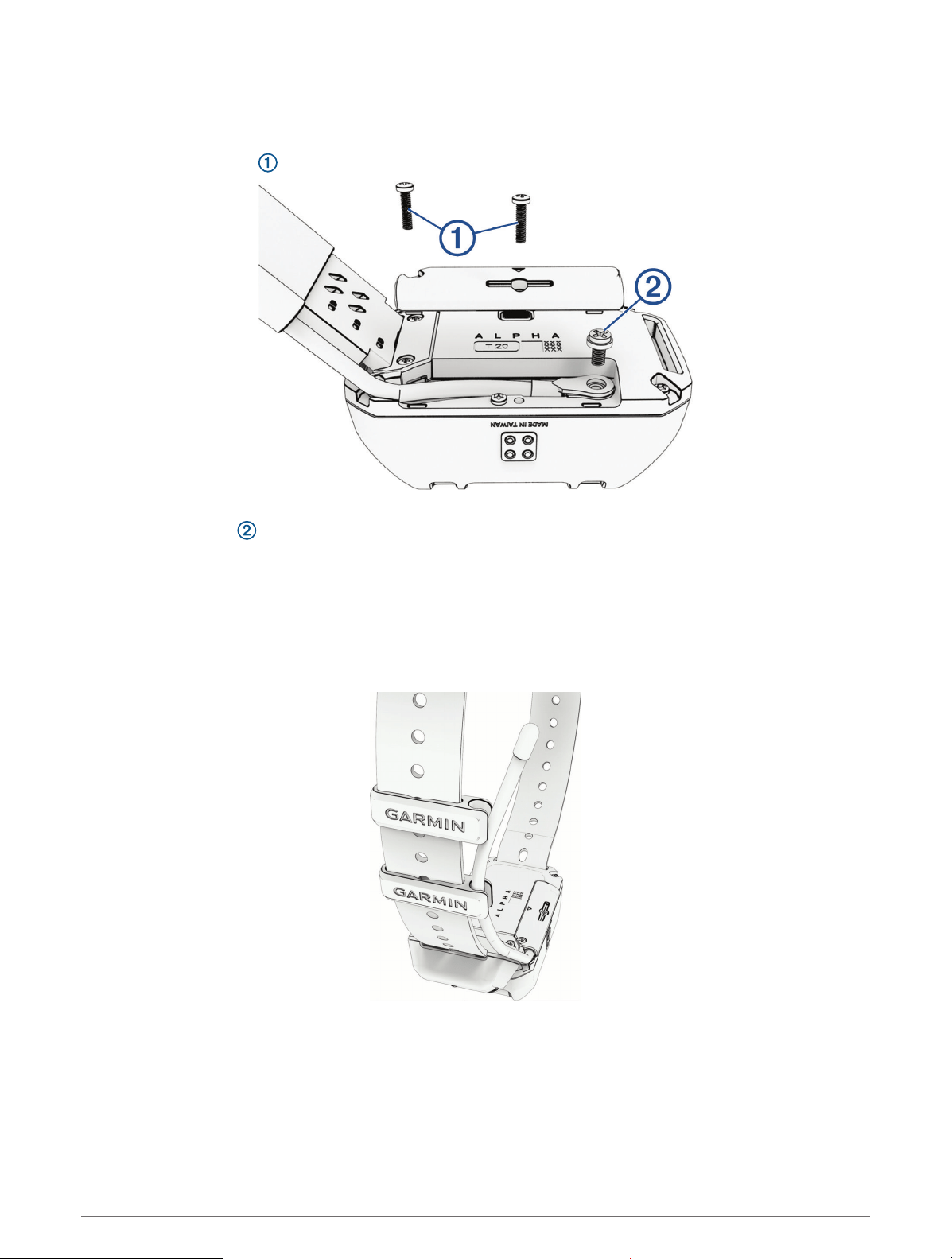
Replacing the Dog Collar VHF Antenna
Before you replace the VHF antenna, you must remove all dirt, water, and debris from the dog collar device. You
must also have a small Phillips (#2) screwdriver.
1 Remove the 2 screws from the cover over the VHF antenna.
2 Remove the VHF antenna cover.
3 Remove the screw securing the VHF antenna to the back plate.
4 Pull the length of the antenna from the antenna guide to remove the old antenna.
5 Thread the new VHF antenna through the antenna guide.
6 Replace the screw securing the VHF antenna to the back plate.
7 Replace the cover over the VHF antenna.
8 Replace and tighten the 2 screws securing the VHF antenna cover.
9 Secure the antenna with additional antenna clips (optional).
Appendix 11

support.garmin.com
GUID-992E9C90-AE40-4ED4-B3C4-9D812BD4DF89 v1May 2023