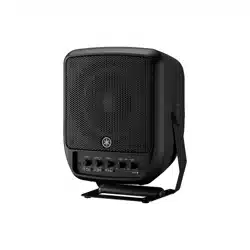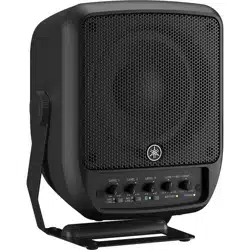
PORTABLE PA SYSTEM / SYSTÈME DE SONORISATION PORTATIF
SISTEMA DE PA PORTÁTIL / ПОРТАТИВНАЯ СИСТЕМА ЗВУКОУСИЛЕНИЯ
➘䯦䌋1"ꮠ畴⺎䶑䌋1"硍礵찏1"탗킟َ٭ذهٜ1"بتطّ
㡴㦻崭 EnglishDeutschFrançaisEspañolPortuguêsItalianoPусский丏⇢₼㠖僐浣₼㠖
뼑霢꽩
Owner’s Manual
Benutzerhandbuch
Mode d’emploi
Manual de instrucciones
Manual do Proprietário
Manuale di istruzioni
Руководство пользователя
✳榫陱伺░
✳榫鐀伺傴
캧풤켟좀켗
䣽鐄伺傴
EN
DE
FR
ES
PT
IT
RU
ZH-TW
ZH-CN
KO
JA

STAGEPAS 100BTR, STAGEPAS 100 Owner’s Manual
2
(529-M02 FCC sdoc YCA 02)
COMPLIANCE INFORMATION STATEMENT
(Supplierʼs declaration of conformity procedure)
Responsible Party: Yamaha Corporation of America
Address: 6600 Orangethorpe Avenue, Buena Park, CA. 90620, U.S.A.
Telephone: 714-522-9011
Type of Equipment: PORTABLE PA SYSTEM
Model Name: STAGEPAS 100BTR, STAGEPAS 100
This device complies with Part 15 of the FCC Rules.
Operation is subject to two following conditions:
1) this device may not cause harmful interference, and
2) this device must accept any interference received including interference that may cause undesired operation.
1. IMPORTANT NOTICE: DO NOT MODIFY THIS UNIT!
This product, when installed as indicated in the instructions contained in this manual, meets FCC requirements. Modifications
not expressly approved by Yamaha may void your authority, granted by the FCC, to use the product.
2. IMPORTANT: When connecting this product to accessories and/or another product use only high quality shielded cables.
Cable/s supplied with this product MUST be used. Follow all installation instructions. Failure to follow instructions could void your
FCC authorization to use this product in the USA.
3. NOTE: This product has been tested and found to comply with the requirements listed in FCC Regulations, Part 15 for Class
“B” digital devices. Compliance with these requirements provides a reasonable level of assurance that your use of this product in
a residential environment will not result in harmful interference with other electronic devices. This equipment generates/uses
radio frequencies and, if not installed and used according to the instructions found in the users manual, may cause interference
harmful to the operation of other electronic devices. Compliance with FCC regulations does not guarantee that interference will
not occur in all installations. If this product is found to be the source of interference, which can be determined by turning the unit
“OFF” and “ON”, please try to eliminate the problem by using one of the following measures:
- Relocate either this product or the device that is being affected by the interference.
- Utilize power outlets that are on different branch (circuit breaker or fuse) circuits or install AC line filter/s.
- In the case of radio or TV interference, relocate/reorient the antenna. If the antenna lead-in is 300 ohm ribbon lead, change the
lead-in to co-axial type cable.
If these corrective measures do not produce satisfactory results, please contact the local retailer authorized to distribute this type of
product. If you cannot locate the appropriate retailer, please contact Yamaha Corporation of America, 6600 Orangethorpe Avenue,
Buena Park, CA 90620, U.S.A.
The above statements apply ONLY to those products distributed by Yamaha Corporation of America or its subsidiaries.
(529-M04 FCC class B YCA 02)
FCC INFORMATION (U.S.A.)
(1003-M06 plate bottom en 01)
The model number, serial number, power requirements, etc.,
may be found on or near the name plate, which is at the bottom
of the unit. You should note this serial number in the space
provided below and retain this manual as a permanent record of
your purchase to aid identification in the event of theft.
Model No.
Serial No.
STAGEPAS 100BTR, STAGEPAS 100 Owner’s Manual
3
Introduction
Thank you for purchasing the Yamaha STAGEPAS
100BTR or STAGEPAS 100 portable PA System! (In this
manual, these two models are collectively referred to
as “STAGEPAS 100”). This product consists of a single
speaker unit and is designed for amplification of music
or speech at live performances or other events. This
Owner’s Manual is designed for individual users or
other personnel who use this product as company or
school equipment. The manual explains how to set up
and operate the product. To get the most out of this
product and enjoy its wide range of sophisticated
features, we recommend that you read this manual
thoroughly and keep it in a safe place for future
reference.
Features
Built-in, simplified three-channel mixer
(two mic/line inputs and a stereo input)
The compact-body speaker offers high-quality
sound and ample power and projection for various
PA situations, including business meetings and
conferences applications.
The built-in speaker enables listening to music
from your smartphone via Bluetooth®.
This product can be attached to a commercially
available microphone stand.
The built-in battery enables you to use the product
without connecting the power adaptor.
(STAGEPAS 100BTR only)
Included Accessories
Power cord x1
Power adaptor x1
Owner’s Manual (this book) x1
Optional items
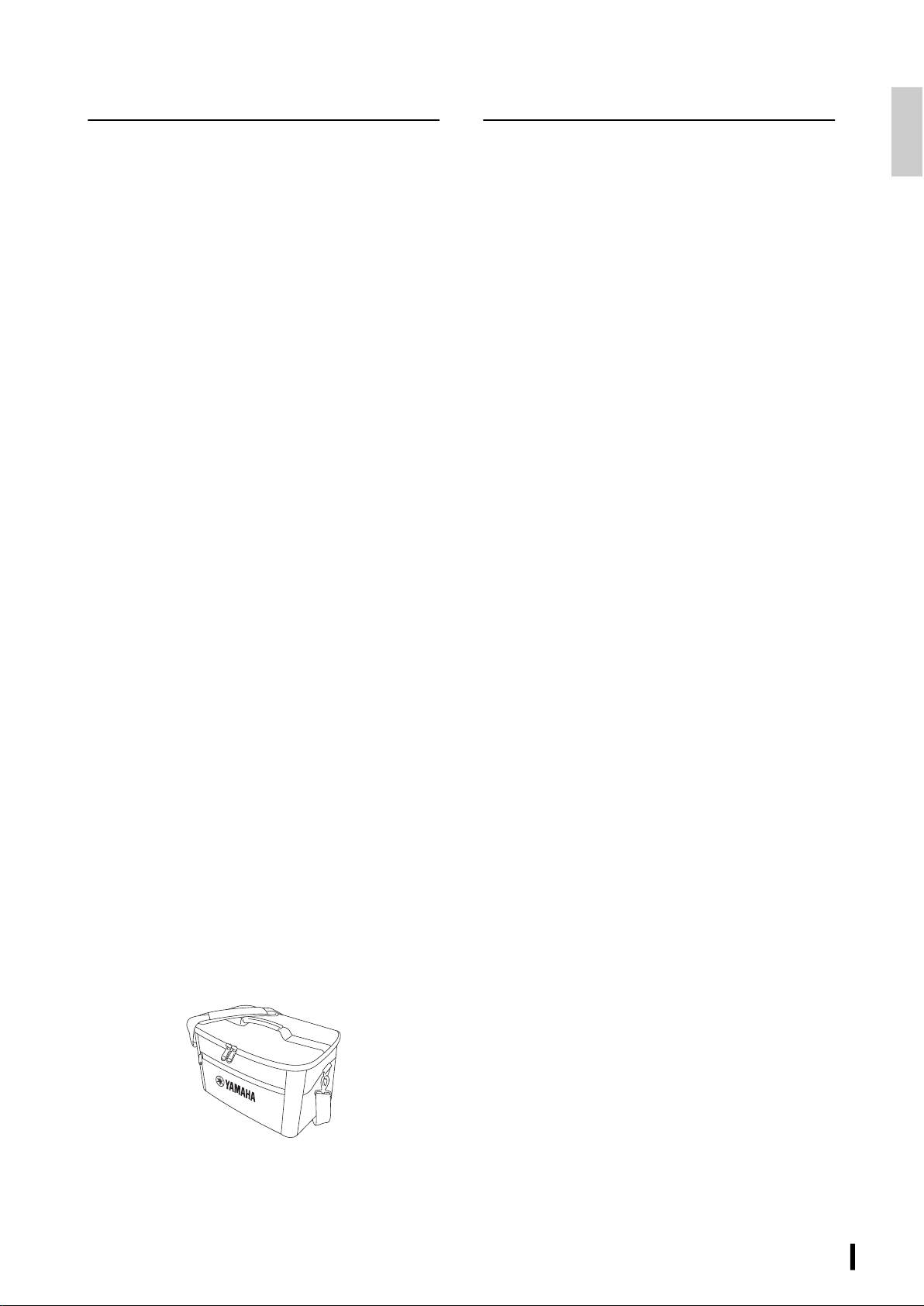
Speaker carrying bag (BAG-STP100)
Table of Contents
Introduction.......................................................3
Features..............................................................................................3
Included Accessories .....................................................................3
Optional items..................................................................................3
PRECAUTIONS.................................................... 4
NOTICE ...............................................................6
Information........................................................ 6
Controls and Functions.....................................8
Front panel........................................................................................8
Rear panel..........................................................................................9
Quick Start Guide ............................................10
Connection example ..................................................................10
Connecting the unit to power.................................................10
Getting sound out of the speaker..........................................11
Installation and Usage Examples...................12
Installing the unit on the floor ................................................12
Installing the unit on a microphone stand ......................... 12
Using the handle to carry the speaker .................................12
Using the Bluetooth® Function ......................13
Registering (pairing) a Bluetooth® device...........................13
Connecting a Bluetooth® device............................................13
Playing music on a Bluetooth® device..................................13
Disconnecting the Bluetooth® device..................................13
Charging the Build-in Battery
(STAGEPAS 100BTR Only)...............................14
Charging the battery ..................................................................14
[BATTERY] LED status..................................................................14
Troubleshooting..............................................15
Specifications ..................................................17
Dimensions ......................................................18
Block Diagram ......................End of the manual

STAGEPAS 100BTR, STAGEPAS 100 Owner’s Manual
4
PRECAUTIONS
PLEASE READ CAREFULLY BEFORE
PROCEEDING
Please keep this manual in a safe place for
future reference.
WARNING
Always follow the basic precautions listed below to
avoid the possibility of serious injury or even death
from electrical shock, short-circuiting, damages,
fire or other hazards. These precautions include, but
are not limited to, the following:
If you notice any abnormality
• If any of the following problems occur, immediately turn off
the power switch and disconnect the electric plug from the
outlet.
- The power cord or plug becomes frayed or damaged.
- Unusual smells or smoke are emitted.
- Some object, or water has been dropped into the
product.
- There is a sudden loss of sound during use of the product.
- Cracks or other visible damage appear on the product.
Then have the product inspected or repaired by qualified
Yamaha service personnel.
Power supply
• Do not place the power cord near heat sources such as
heaters or radiators, and do not excessively bend or
otherwise damage the cord, place heavy objects on it, or
place it in a position where anyone could walk on, trip over,
or roll anything over it.
• Only use the voltage specified as correct for the product.
The required voltage is printed on the name plate of the
product.
• Use the supplied adaptor only. Using the wrong adaptor
can result in damage to the product or overheating.
• Use only the supplied power cord/plug.
If you intend to use the product in an area other than in the
one you purchased, the included power cord may not be
compatible. Please check with your Yamaha dealer.
• Do not use the supplied adaptor/cord/plug for other
products.
• Check the electric plug periodically and remove any dirt or
dust which may have accumulated on it.
• Make sure to fully insert the electric plug to prevent electric
shocks or fire.
• When setting up the product, make sure that the AC outlet
you are using is easily accessible. If some trouble or
malfunction occurs, immediately turn off the power switch
and disconnect the plug from the outlet. Even when the
power switch is turned off, as long as the power cord is not
unplugged from the wall AC outlet, the product will not be
disconnected from the power source.
• Remove the electric plug from the outlet when the product
is not to be used for extended periods of time.
• Do not touch the product or the electric plug during an
electrical storm.
Do not open
• This product contains no user-serviceable parts. Do not
attempt to disassemble the internal parts or modify them
in any way.
Water warning
• Do not expose the product to rain, use it near water or in
damp or wet conditions, or place on it any containers
containing liquids which might spill into any openings.
• Never insert or remove an electric plug with wet hands.
Fire warning
• Do not place any burning items or open flames near the
product, since they may cause a fire.
Hearing loss
• Before connecting the product to other devices, turn off
the power for all devices. Also, before turning the power of
all devices on or off, make sure that all volume levels are set
to the minimum. Failing to do so may result in hearing loss,
electric shock, or device damage.
• When turning on the AC power in your audio system,
always turn on the product LAST, to avoid hearing loss and
speaker damage. When turning the power off, the product
should be turned off FIRST for the same reason.
Handling caution
• Do not subject this product or the power adaptor to
mechanical shock or drop. Doing so may result in fire,
electric shock, malfunction.
• Do not intentionally short this product. Doing so may result
in fire or injury.
• Do not place this product in the following places. Doing so
may result in fire or injury.
- A place where the temperature becomes extremely high,
such as in a place exposed to direct sunshine (e.g., inside a
car during the day) or near a fire.
- A place of extremely low air pressure or low temperature.
- A place of excessive dirt, dust or humidity.
Charging (STAGEPAS 100BTR only)
• For details on how to charge the battery, be sure to read
this manual and follow the instructions. Failure to comply
may result in fire, overheating, explosion or malfunction.
• Never charge when this product is wet. Doing so may cause
electric shock, fire, or malfunction due to short circuiting.
• Charges within the specified charging temperature range.
Charging at a temperature outside the range may cause
burns, injury, or malfunction.
PA_en_13 1/2
STAGEPAS 100BTR, STAGEPAS 100 Owner’s Manual
5
Wireless unit
• Do not use this product near medical devices or inside
medical facilities. Radio waves from this product may affect
electro-medical devices.
• Do not use this product within 15 cm (6 in) of persons with
a heart pacemaker implant or a defibrillator implant. Radio
waves from this product may affect electro-medical
devices, such as a heart pacemaker implant or defibrillator
implant.
CAUTION
Always follow the basic precautions listed below to
avoid the possibility of physical injury to you or
others. These precautions include, but are not
limited to, the following:
Power supply
• Do not cover or wrap the AC adaptor with a cloth or
blanket.
• When removing the electric plug from the product or an
outlet, always hold the plug itself and not the cord. Pulling
by the cord can damage it.
Location and connection
• Do not place the product in an unstable position or a
location with excessive vibration, where it might
accidentally fall over and cause injury.
• Keep this product out of reach of children. This product is
not suitable for use in locations where children are likely to
be present.
• To ensure proper heat dissipation of the product, when
installing it:
- Do not cover it with any cloth.
- Make sure the top surface faces up; do not install on its
sides or upside down.
- Do not use the product in a confined, poorly-ventilated
location.
Inadequate ventilation can result in overheating, possibly
causing damage to the product(s), or even fire. Make sure
that there is adequate space around the product: at least
10 cm above, 10 cm at the sides and 10 cm behind.
• Do not place the product in a location where it may come
into contact with corrosive gases or salt air. Doing so may
result in malfunction.
• Before moving the product, remove all connected cables.
• Do not use the speaker’s handles for suspended
installation. Doing so can result in damage or injury.
• Do not hold the bottom of the product when transporting
or moving it. In doing so, you may pinch your hands under
the product, and result in injury.
• Do not press the rear panel of the product against the wall.
Doing so may cause the plug and speaker cable to come in
contact with the wall and detach from the power cord,
resulting in short circuiting, malfunction, or even fire.
Maintenance
• Remove the power plug from the AC outlet when cleaning
the product.
Handling caution
• Do not insert your fingers or hands in any gaps or openings
on the product (ports, etc.).
• Do not rest your weight on the product or place heavy
objects on it.
• Do not operate the product if the sound is distorting.
Prolonged use in this condition could cause overheating
and result in fire.
• Turn off the power completely when the product is not to
be used for extended periods of time. The leakage current
of this product may cause over-discharge.
PA_en_13 2/2
STAGEPAS 100BTR, STAGEPAS 100 Owner’s Manual
6
NOTICE
To avoid the possibility of malfunction/damage to the
product, or damage to other property, follow the notices
below.
Handling and maintenance
• Do not use the product in the vicinity of a TV, radio, or other
electric products. Otherwise, the product, TV, or radio may
generate noise.
• Do not expose the product to excessive dust or vibration, or
extreme cold or heat, in order to prevent the possibility of
panel disfiguration, unstable operation, or damage to the
internal components.
• Do not install in locations where temperature changes are
severe. Otherwise, condensation may form on the inside or
the surface of the product, causing it to break.
• If there is reason to believe that condensation might have
occurred, leave the product for several hours without
turning on the power until the condensation has
completely dried out, in order to prevent possible damage.
• When cleaning the product, use a dry and soft cloth. Do not
use paint thinners, solvents, cleaning fluids, or chemical-
impregnated wiping cloths, since this might cause
alteration or discoloration.
• To avoid generating unwanted noise, make sure there is
adequate distance between the AC adaptor and the
product.
Handling and maintenance for rechargeable
battery (STAGEPAS 100BTR only)
This device contains a lithium-ion battery.
• You should recharge the batteries at least once every six
months, to ensure that they stay functional. If the batteries
are not used for a long time, they may fail to recharge.
• The battery cannot be recharged at a temperature outside
of that which is specified. Recharge the battery within the
specified temperature range.
• Rechargeable batteries have limited lifetimes, and their
capacity degrades depending on the method of storage,
the environment, frequency of use and the passage of time.
• The battery is not removable by the user.
• Lithium-ion batteries can be recycled. After usage, you may
recycle the battery, but never attempt to remove it by
yourself. Have the device inspected by qualified Yamaha
service personnel. If there is no Yamaha service personnel
in your area, dispose of it properly according to relevant
environmental laws and disposal rules in your area.
Information
About functions
• Even when the [P] (power) switch is turned off (power
lamp is off), electricity is still flowing to the product at some
or minimum levels. When you are not using the product for
a long time, make sure you unplug the power cord from the
wall AC outlet.
• XLR-type connectors are wired as follows (IEC60268
standard): pin 1: ground, pin 2: hot (+), and pin 3: cold (-).
About this manual
• The illustrations as shown in this manual are for
instructional purposes only.
• The company names and product names in this manual are
the trademarks or registered trademarks of their respective
companies.
About disposal
This product contains recyclable components.
When disposing of this product, please contact the
appropriate local authorities.
The Bluetooth® word mark and logos are registered
trademarks owned by Bluetooth SIG, Inc. and any use of such
marks by Yamaha Corporation is under license.
Yamaha cannot be held responsible for damage caused
by improper use or modifications to the product, or data
that is lost or destroyed.
STAGEPAS 100BTR, STAGEPAS 100 Owner’s Manual
7
This transmitter must not be co-located or operated in conjunction with any other antenna or transmitter.
(554-M01 FCC transmitter 01)
This equipment complies with FCC radiation exposure limits set forth for an uncontrolled environment and meets the FCC radio
frequency (RF) Exposure Guidelines. This equipment should be installed and operated keeping the radiator at least 20cm or more
away from personʼs body.
(554-M03 FCC mobile SAR 01)
This equipment complies with ISED radiation exposure limits set forth for an uncontrolled environment and meets RSS-102 of the
ISED radio frequency (RF) Exposure rules. This equipment should be installed and operated keeping the radiator at least 20cm or
more away from personʼs body.
(555-M04 ISED mobile SAR 01)
This device contains licence-exempt transmitter(s)/receiver(s) that comply with Innovation, Science and Economic Development
Canada’s licence-exempt RSS(s). Operation is subject to the following two conditions:
1. This device may not cause interference.
2. This device must accept any interference, including interference that may cause undesired operation of the device.
(555-M13 ISED RSS en 01)
Information for users on collection and disposal of old equipment:
This symbol on the products, packaging, and/or accompanying documents means that used electrical and electronic
products should not be mixed with general household waste.
For proper treatment, recovery and recycling of old products, please take them to applicable collection points, in
accordance with your national legislation.
By disposing of these products correctly, you will help to save valuable resources and prevent any potential negative
effects on human health and the environment which could otherwise arise from inappropriate waste handling.
For more information about collection and recycling of old products, please contact your local municipality, your waste
disposal service or the point of sale where you purchased the items.
For business users in the European Union:
If you wish to discard electrical and electronic equipment, please contact your dealer or supplier for further information.
Information on Disposal in other Countries outside the European Union:
This symbol is only valid in the European Union. If you wish to discard these items, please contact your local authorities
or dealer and ask for the correct method of disposal.
(58-M02 WEEE en 01)
STAGEPAS 100BTR, STAGEPAS 100 Owner’s Manual
8
Controls and Functions
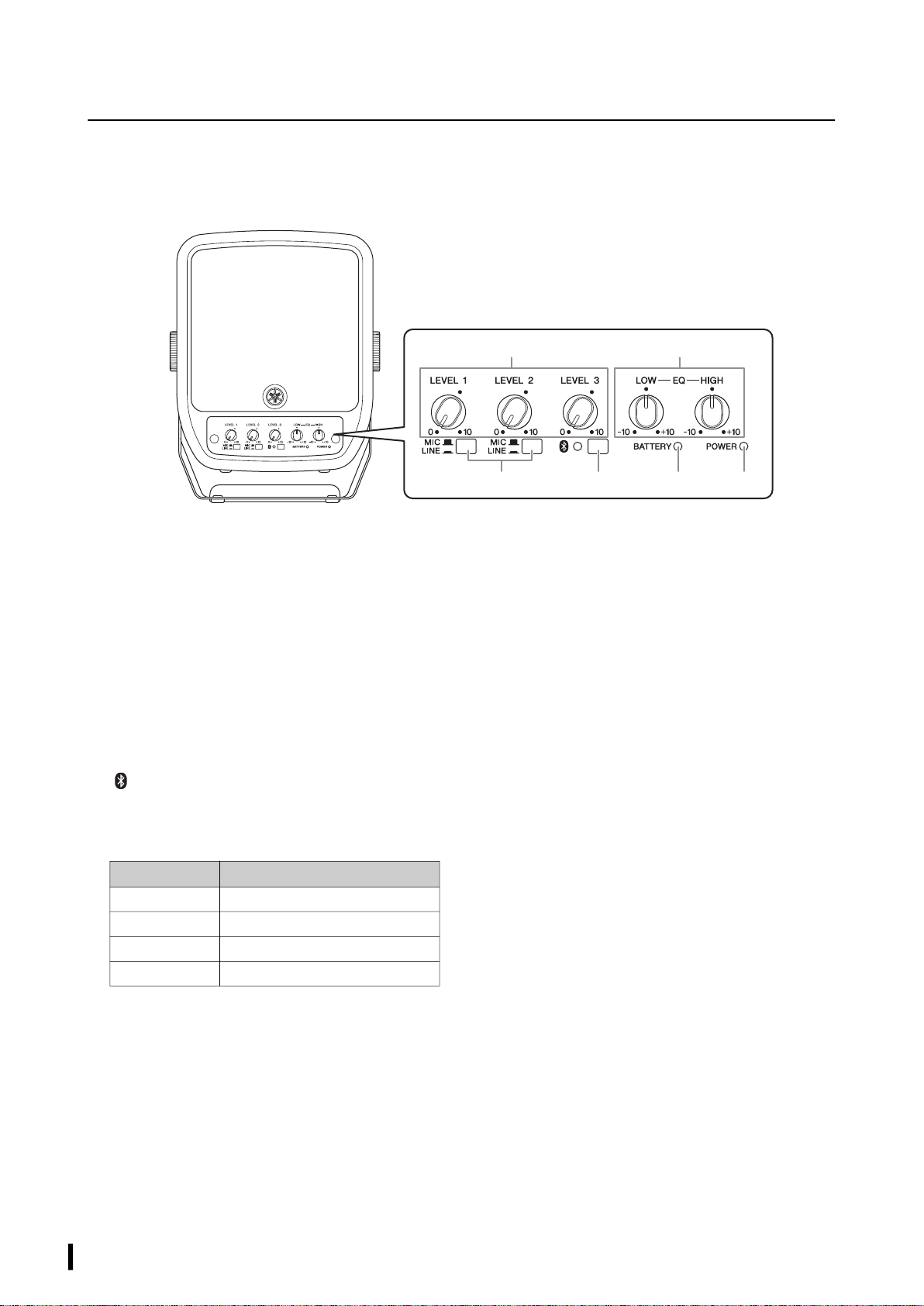
Front panel
1 [LEVEL] controls
Use these controls to adjust the volume for input
channels 1–3. To reduce noise, set the [LEVEL] control on
unused channels to minimum (zero).
2
[MIC/LINE] switches (input channels 1&2)
For low-level signals (including microphones), set the
switches to the MIC (N) position. For high-level signals
(including electronic musical instruments and audio
devices), set the switches to the LINE (O) position.
3 [ ] (Bluetooth) switch/LED
This switch turns the Bluetooth function on or off. It is
also used to pair (register) a Bluetooth device (page 13).
The LED indicates the following status:
NOTE
• The STAGEPAS 100 enables you to pair (register) up to eight
Bluetooth devices. Once a ninth Bluetooth device has been
paired successfully, the pairing information for the Bluetooth
device that was connected earliest will be deleted.
• Only one registered device can establish a connection at a
time. Multiple devices cannot be connected at the same time.
4 [BATTERY] LED (STAGEPAS 100BTR only)
The LED indicates the amount of remaining battery
charge or the charging status. For more information, refer
to “Charging the Built-in Battery” (page 14).
5 [POWER] LED
Lights up when the [P] (Power) switch ($) is turned on.
6 [EQ] controls
[LOW]: From the center position, turn these controls
clockwise to boost the low range, and turn them
counter-clockwise to cut the low range.
[HIGH]: From the center position, turn these controls
clockwise to boost the high range, and turn
them counter-clockwise to cut the high range.
16
2345
LED Status
Off Bluetooth off
Lit steadily (blue) Bluetooth connected
Flashing slowly Searching for a Bluetooth device
Flashing rapidly Waiting for Bluetooth pairing
STAGEPAS 100BTR, STAGEPAS 100 Owner’s Manual
9
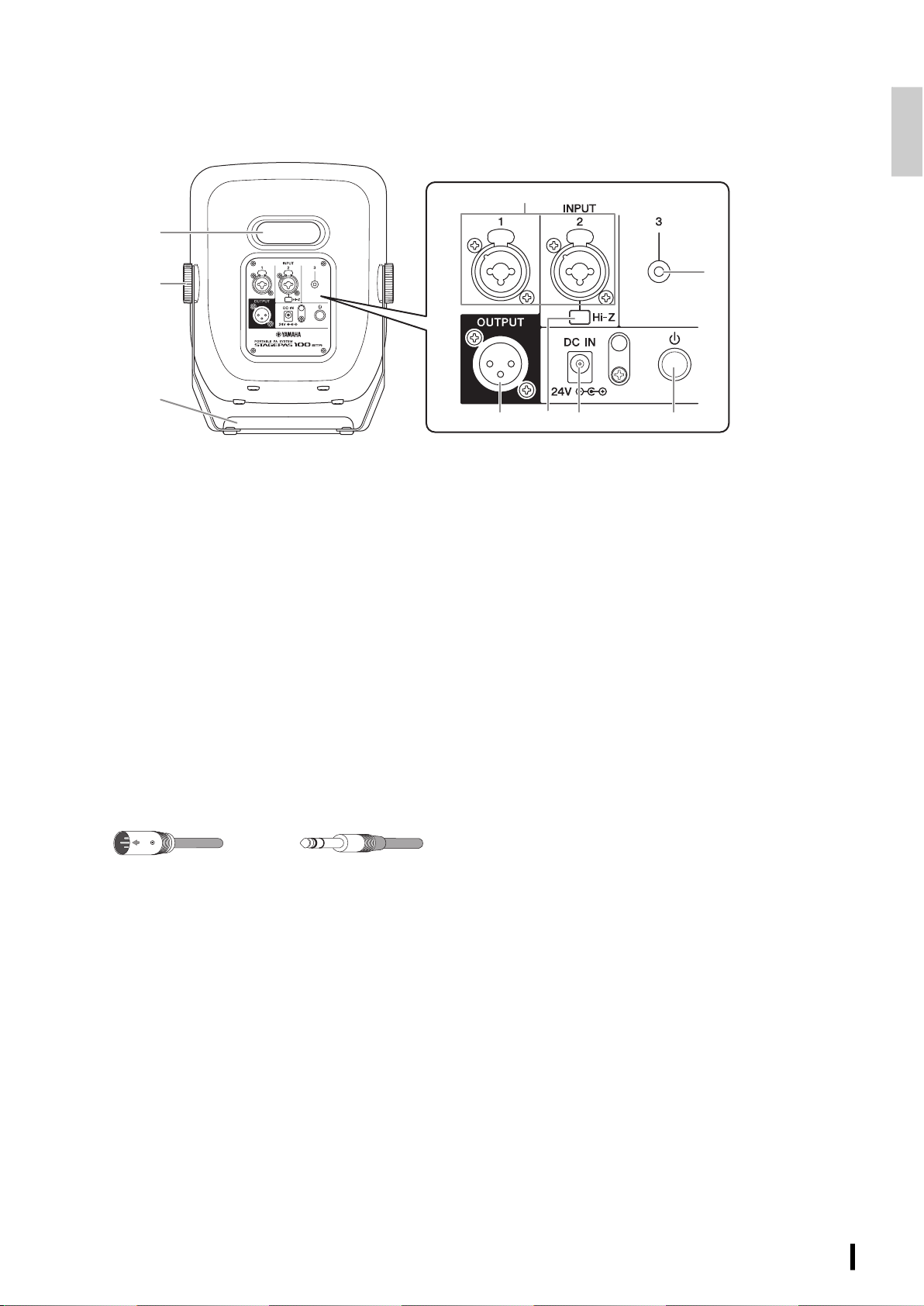
Rear panel
7 Handle
Use this handle to set up the speaker on the floor or
install it on a microphone stand. You can also use it as a
carrying handle to transport the unit. For more
information, refer to “Installation and Usage Examples”
(page 12).
8 Fixing screws
Turn the screws clockwise to tighten them. Turn the
screws counter-clockwise to loosen them.
9 [INPUT] jacks (channels 1&2)
These are mic/line input jacks. These combo jacks
support both XLR and phone plugs. Connect
microphones, guitars, electronic musical instruments or
audio equipment. Channel 2 supports Hi-Z. Set the [MIC/
LINE] switches (2) according to the input signal level.
) [INPUT] jack (channel 3)
This input jack supports a stereo-mini plug. Connect line-
level devices such as electronic musical instruments,
acoustic-electric guitars, CD players, and portable audio
players. A stereo input signal will be internally mixed into
a monaural signal.
! [Hi-Z] switch (channel 2)
Turn this switch on when connecting a musical
instrument with passive pickups (such as an acoustic-
electric guitar or electric bass without a battery) directly
to the STAGEPAS 100 without a DI (direct box). This
function is effective only for the signals input via the
phone jack.
@ [OUTPUT] jack
This output jack supports an XLR-type plug. You can
connect a powered speaker to this jack for monitoring
purposes. Mixed monaural signals are output from here.
# [DC IN] jack
Connect the included power adaptor here.
$ [P] (Power) switch
Press and hold down this switch to turn the power to the
unit on or off. The [POWER] LED (5) on the front panel
lights up when the power is turned on.
NOTICE
• Even when the [P] (Power) switch is turned off (the LED
turns off), a minimal amount of electric current is still
flowing to the unit. If you plan not to use the unit for an
extended period of time, be sure to unplug the power cord
from the AC outlet.
• Rapidly turning the [P] (Power) switch on and off in
succession may cause the unit to malfunction. After
turning off the [P] (Power) switch, wait for about six
seconds before turning it on again.
% Bass-reflex port
This is a bass-reflex port of this product. Do not insert
your hand or finger into this port.
NOTE
Air blowing out of the bass reflex ports is normal, and often
occurs when the speaker is handling program material with
heavy bass content.
7
)
!@# $
8
%
9
XLR
Phone
STAGEPAS 100BTR, STAGEPAS 100 Owner’s Manual
10
Quick Start Guide
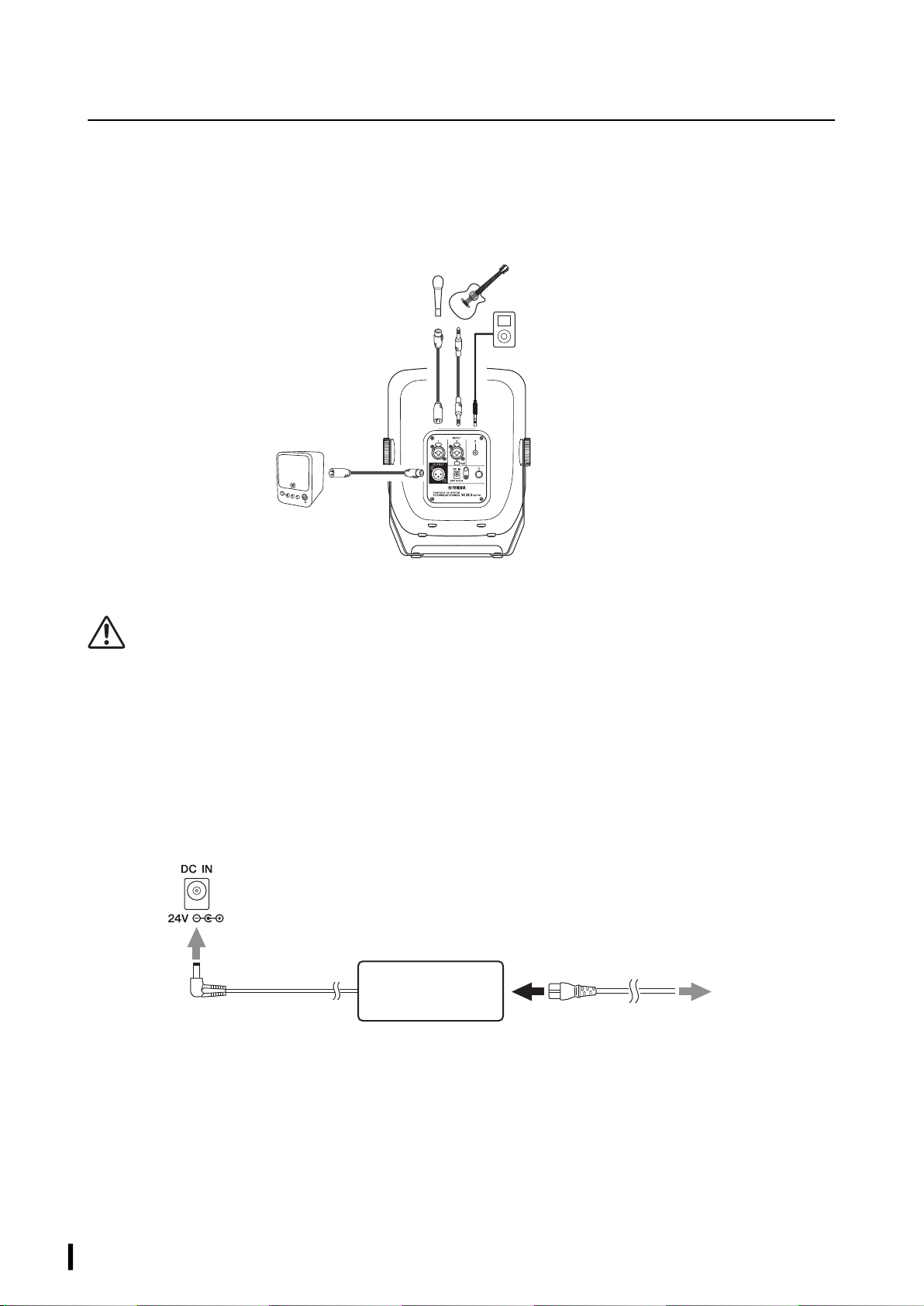
This section explains how to set up and output sound from the STAGEPAS 100.
Connection example
Before making connections, lower the volume level to the minimum by rotating the [LEVEL] controls counter-
clockwise.
Connecting the unit to power
WARNING
• Use only the included power adaptor and power cord. If you use a non-specified power adaptor or power cord, heat may be generated,
or malfunction or fire may be caused.
• If you plan not to use the unit for an extended period of time, or if there is a risk of lightning strikes, be sure to unplug the power cord
from the AC outlet. Otherwise, an electrical shock, fire or malfunction may be caused.
1 Connect the power cord to the power adaptor.
2 Connect the power adapter to the [DC IN] jack on the rear panel of the STAGEPAS 100.
3 Insert the plug on the power cord into an AC outlet.
The STAGEPAS 100BTR automatically starts charging the battery.
NOTICE
Even when the [P] (Power) switch is turned off, a certain minimal amount of electric current still flows to the unit. If you plan not to use
the unit for an extended period of time be sure to unplug the power cord from the AC outlet.
NOTE
• Locate the power adaptor at a sufficient distance from the STAGEPAS 100.
• When you remove the power adaptor, first turn off the power to the unit, and then follow this order in reverse.
Microphone
Powered monitor speaker
Portable audio player
Acoustic-electric guitar
13
2
[DC IN] jack
Power adaptor
(accessory)
Power cord (accessory)
To an AC outlet
STAGEPAS 100BTR, STAGEPAS 100 Owner’s Manual
11
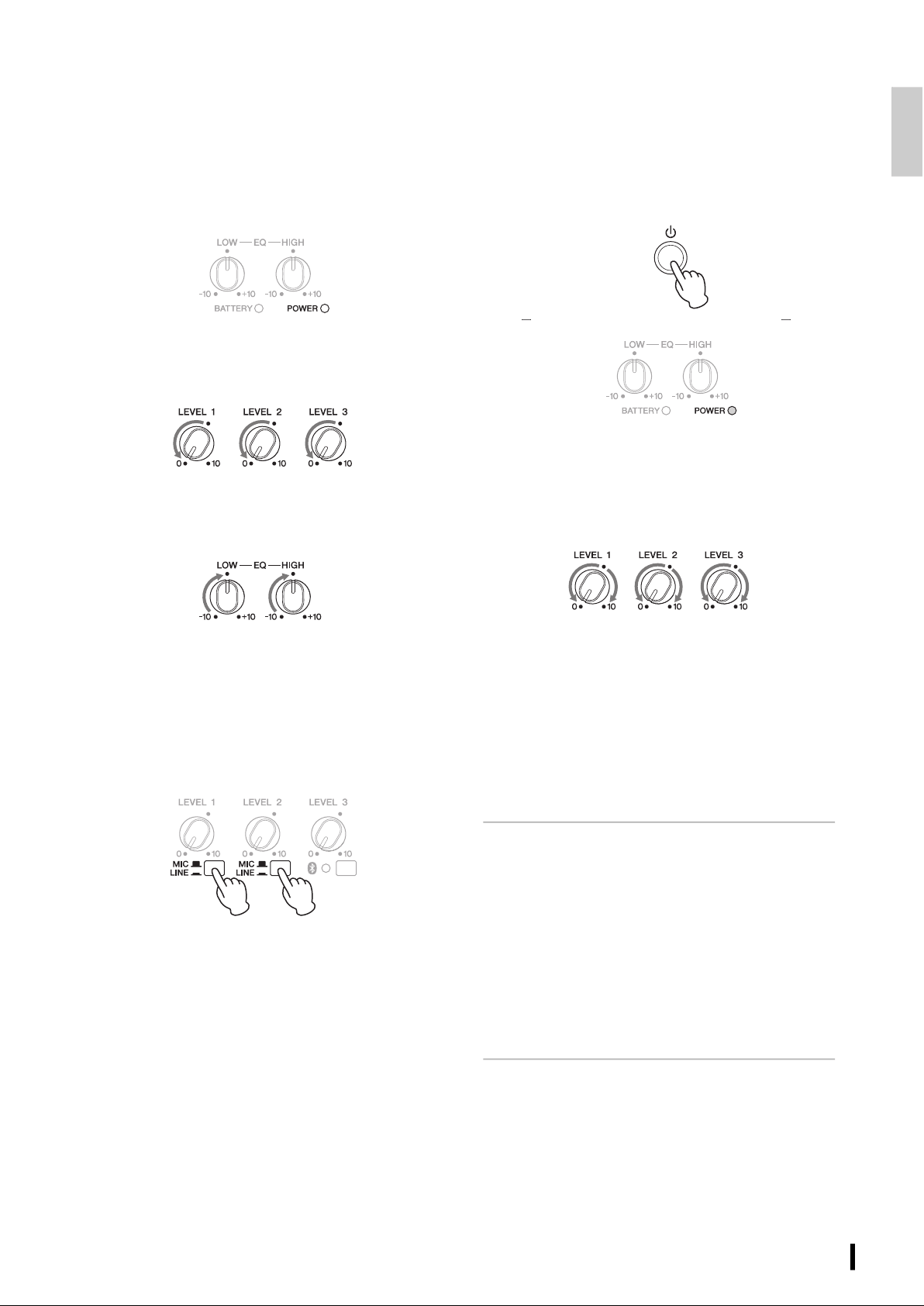
Getting sound out of the
speaker
1 Make sure that the power to the STAGEPAS
100 is turned off (the [POWER] LED is
turned off).
2 Turn the [LEVEL] controls to the minimum
(zero).
3 Set the [EQ] controls to the center (•)
position.
4 Set the [MIC/LINE] switch to the MIC (N)
position for channels to which a
microphone is connected. Set the [MIC/
LINE] switch to the LINE (O) position for
channels to which a musical instrument or
audio device is connected.
5 Turn on the power to the connected
musical instrument or audio device, then
press and hold down the [P] (Power)
switch on the STAGEPAS 100 to turn on the
power to the unit.
The [POWER] LED lights up.
6 While playing your musical instrument or
singing into the microphone, use the
[LEVEL] controls to adjust the volume of
the corresponding channels.
If you can hear sound and the volume seems appropriate,
setup is complete. If not, please refer to the checklist in the
“Troubleshooting” section (page 15).
NOTE
When you turn off the power to all devices, first turn off the power to
the STAGEPAS 100, and then turn off the connected sound sources
(such as a musical instrument or audio device) to avoid any loud,
unexpected noises from the speaker.
Adjusting the volume
• When the volume is too loud
First, turn the [LEVEL] controls to the minimum (zero). Set the
[MIC/LINE] switch to the LINE (O) position, then slowly raise
the [LEVEL] controls until the desired volume is reached.
• When the volume is too low
First, turn the [LEVEL] controls to the minimum (zero). Set the
[MIC/LINE] switch to the MIC (N) position, then slowly raise
the [LEVEL] controls until the desired volume is reached.
Off
Lit steadily
Front panel
Rear panel
STAGEPAS 100BTR, STAGEPAS 100 Owner’s Manual
12
Installation and Usage Examples
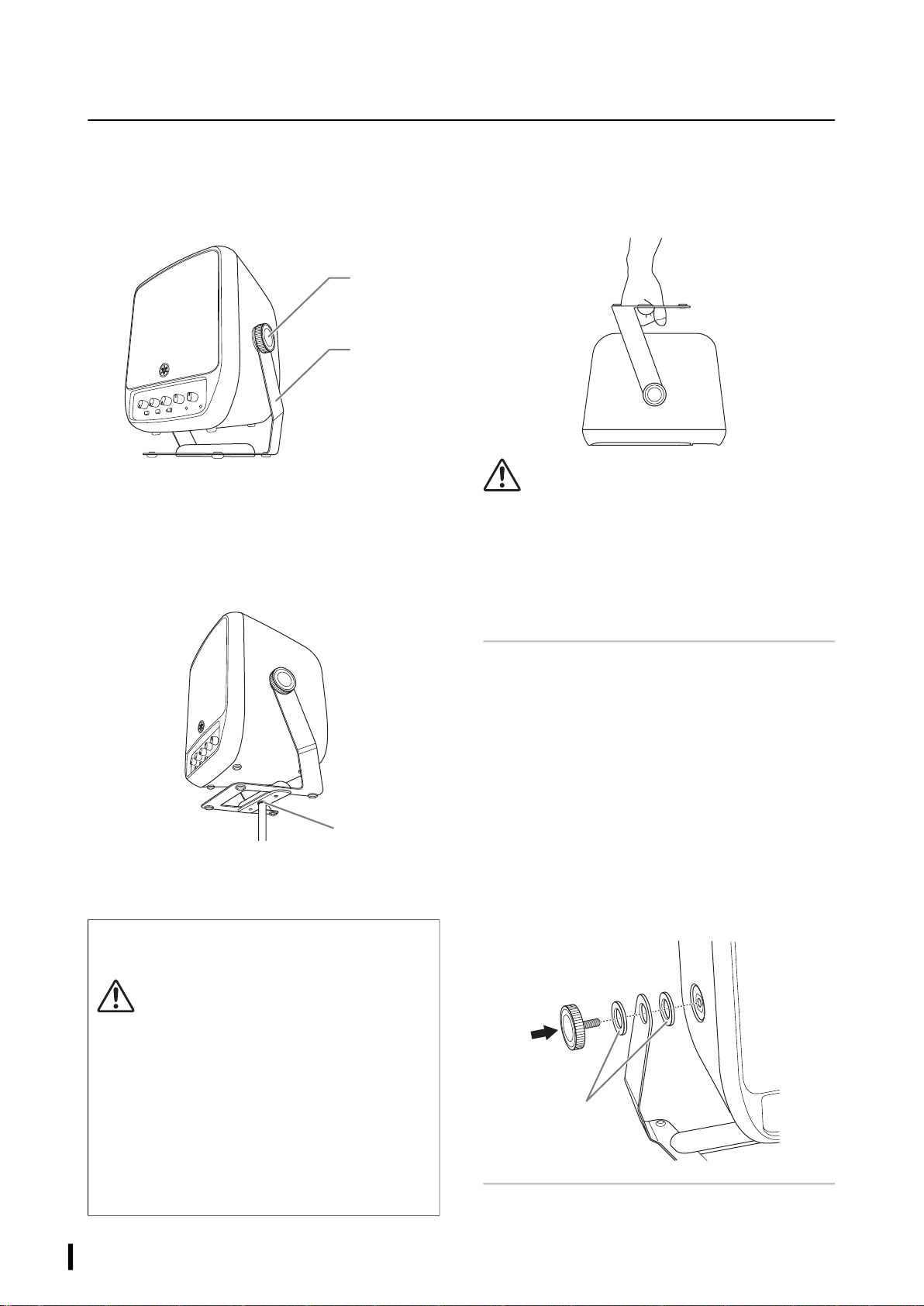
Installing the unit on the floor
This is an example of the standard installation. The handle
functions as a speaker stand, with the rubber feet on the
handle in contact with the floor.
Installing the unit on a
microphone stand
You can install this product on a commercially available
microphone stand, and adjust the height for using it as a
monitor speaker or simple PA system.
Use the screw hole (3/8 inch diameter) located on the
bottom of the handle and a screw of 9–11 mm length to
install the speaker on your microphone stand.
Using the handle to carry the
speaker
You can also use the handle to carry the speaker by hand.
CAUTION
• When you adjust the angle of the handle, pay attention not to
pinch your fingers. Otherwise, you might be injured.
• If you carry the speaker by holding the handle, be sure to
tighten the fixing screws securely so that the handle will not
move. If the handle is not securely fixed, the speaker may
rotate, possibly pinching your fingers between the handle and
the speaker, leading to injury.
Adjusting the speaker angle
1 Loosen both fixing screws.
2 Adjust the speaker angle.
3 Tighten the fixing screws to affix the unit.
NOTICE
If you loosen the fixing screws too much, the speaker may
separate from the handle and fall, possibly causing it to break.
NOTE
• You can also adjust the speaker angle by moving it by hand.
• If the fixing screws come off, refer to the illustration below to
attach them again.
When you install this product on a microphone stand,
observe the following precautions to avoid damaging the
devices or injuring yourself:
CAUTION
• Extend the tripod legs of the microphone stand as wide as
possible to maximize stability.
• The height of this product installed on the microphone
stand should be 115 cm or lower.
• Do not set up the product on any unstable, uneven, or
tilted surface. Be sure to place the product on a stable and
horizontal surface.
• Make sure that there is adequate space around the
connected cables.
• After installing the product on a microphone stand, be
sure to tighten the fixing screws securely so that the
speaker will not rotate.
Tightening
screw
Handle
Screw hole
Rubber spacers
STAGEPAS 100BTR, STAGEPAS 100 Owner’s Manual
13
Using the Bluetooth® Function
You can set up the STAGEPAS100 so it will play music from Bluetooth devices, such as a mobile device.
Registering (pairing) a
Bluetooth® device
Before you connect a Bluetooth device for the first time, you
need to “pair” the device. “Pairing” is a process of registering
one Bluetooth device (this product) from another Bluetooth
device (such as your smartphone).
Once pairing is complete, you will be able to reconnect those
devices easily after you terminate a Bluetooth connection.
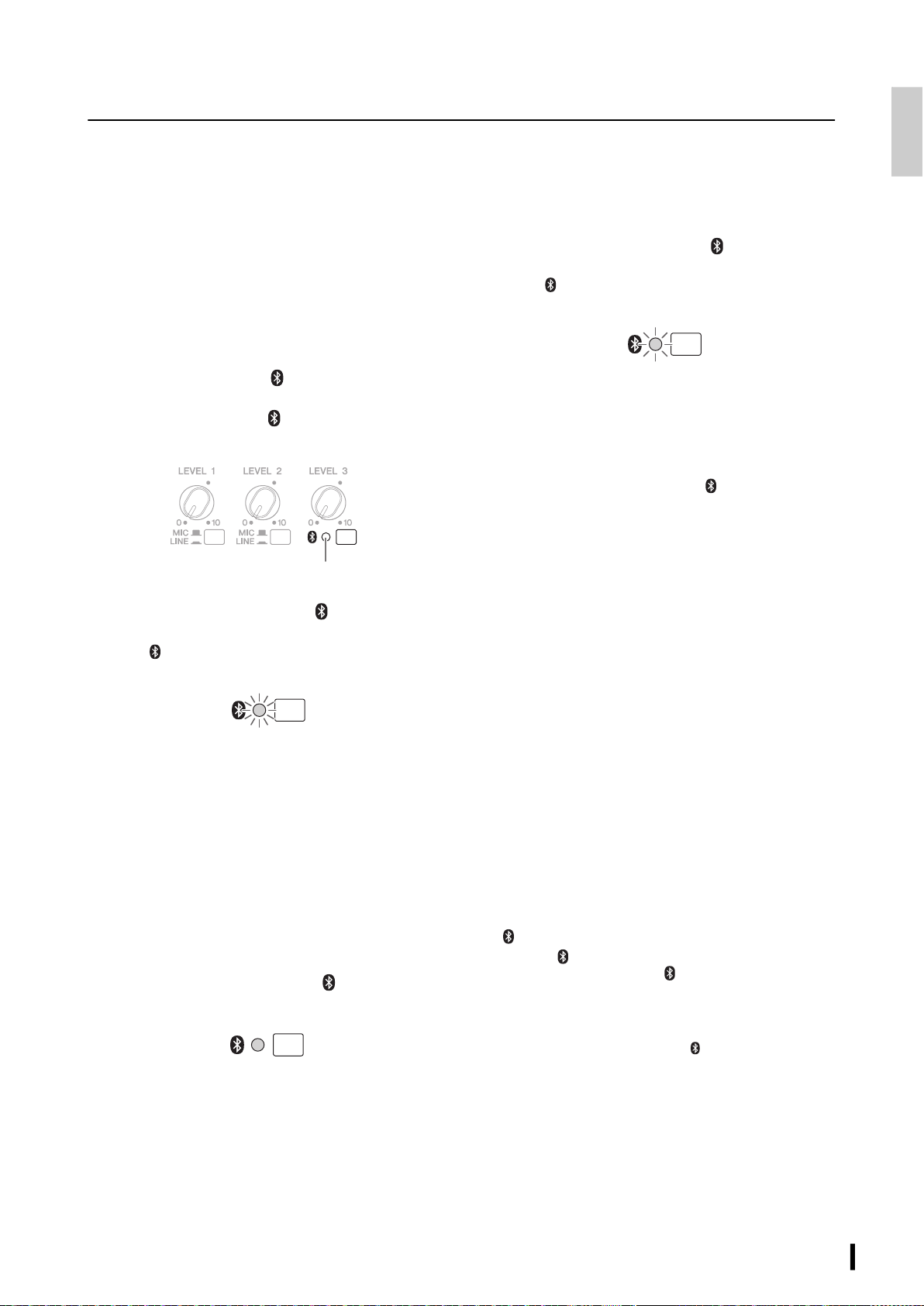
1 Make sure that the [ ] (Bluetooth) LED is
turned off. If the LED is lit steadily or
flashing, press the [ ] (Bluetooth) switch
to disable the Bluetooth function.
2 Press and hold down the [ ] (Bluetooth)
switch for three seconds or longer.
The [ ] (Bluetooth) LED will flash rapidly, indicating
that the unit is ready for pairing.
3 Turn on the Bluetooth function on the
Bluetooth device that you want to
connect.
For more information, refer to the owner’s manual for
the Bluetooth device.
4 Once the Bluetooth device displays a list of
other Bluetooth devices that are available
for connection, select STAGEPAS100.
When the pairing process is complete, the Bluetooth
connection is established and the [ ] (Bluetooth) LED
lights up.
NOTE
• The STAGEPAS 100 enables you to pair (register) up to eight
Bluetooth devices. Once a ninth Bluetooth device has been paired
successfully, the pairing information for the Bluetooth device that
was connected earliest will be deleted.
• You must complete the pairing process on the Bluetooth device
within two minutes.
Connecting a Bluetooth® device
1 Press and hold down the [ ] (Bluetooth)
switch for one second.
The [ ] (Bluetooth) LED will flash slowly, indicating
that the unit is searching for a device.
2 Turn on the Bluetooth function on the
Bluetooth device that you want to
connect.
Once a connection is made, the [ ] (Bluetooth) LED
lights up.
If the connection is not successful, select STAGEPAS100
from the list of Bluetooth devices available for
connection.
Playing music on a Bluetooth®
device
You can play music and adjust the output volume level from
your Bluetooth device.
NOTE
• You cannot adjust the volume level using the STAGEPAS 100.
• If you receive a call or text message while playing music on a
Bluetooth device such as a smartphone, music playback might be
paused momentarily. To avoid this interruption, enable Airplane
Mode, and then set Bluetooth to ON on your Bluetooth device.
Disconnecting the Bluetooth®
device
To disconnect the Bluetooth device, do one of the following:
• Use the Bluetooth device to disconnect. (The
[ ] (Bluetooth) LED on the speaker turns off).
• Press the [ ] (Bluetooth) switch on the speaker to turn off
the Bluetooth function (the [ ] (Bluetooth) LED will turn
off.)
NOTICE
Before you turn off the power to the unit, make sure that the
Bluetooth function is turned off (the [ ] (Bluetooth) LED is
turned off). If you turn off the power to the unit while the
Bluetooth function remains enabled, the unit might lose the
pairing information.
Off
Flashing rapidly
Lit steadily
Flashing slowly
STAGEPAS 100BTR, STAGEPAS 100 Owner’s Manual
14
Charging the Build-in Battery (STAGEPAS 100BTR Only)
The STAGEPAS 100BTR can be used without a power adaptor if the built-in battery is charged.
Charging the battery
1 Connect the unit to power (see
“Connecting the unit to power” on
page 10).
When you connect the power cord to an AC outlet, the
unit automatically starts charging the battery.
While the battery is being charged, the [POWER] LED
flashes green.
NOTE
• The battery is charged regardless of the on/off status of the
power switch.
• While audio is being input, the charging process is
interrupted. One minute after the audio input stops, the
charging process resumes.
2 Make sure that the [BATTERY] LED lights
green steadily (indicating that the battery
is fully charged).
Typically, charging the battery fully takes about two and a
half hours.
NOTICE
• In an excessively warm or cold environment, the battery might
not be charged.
• To maintain battery function, charge the battery once every
half year.
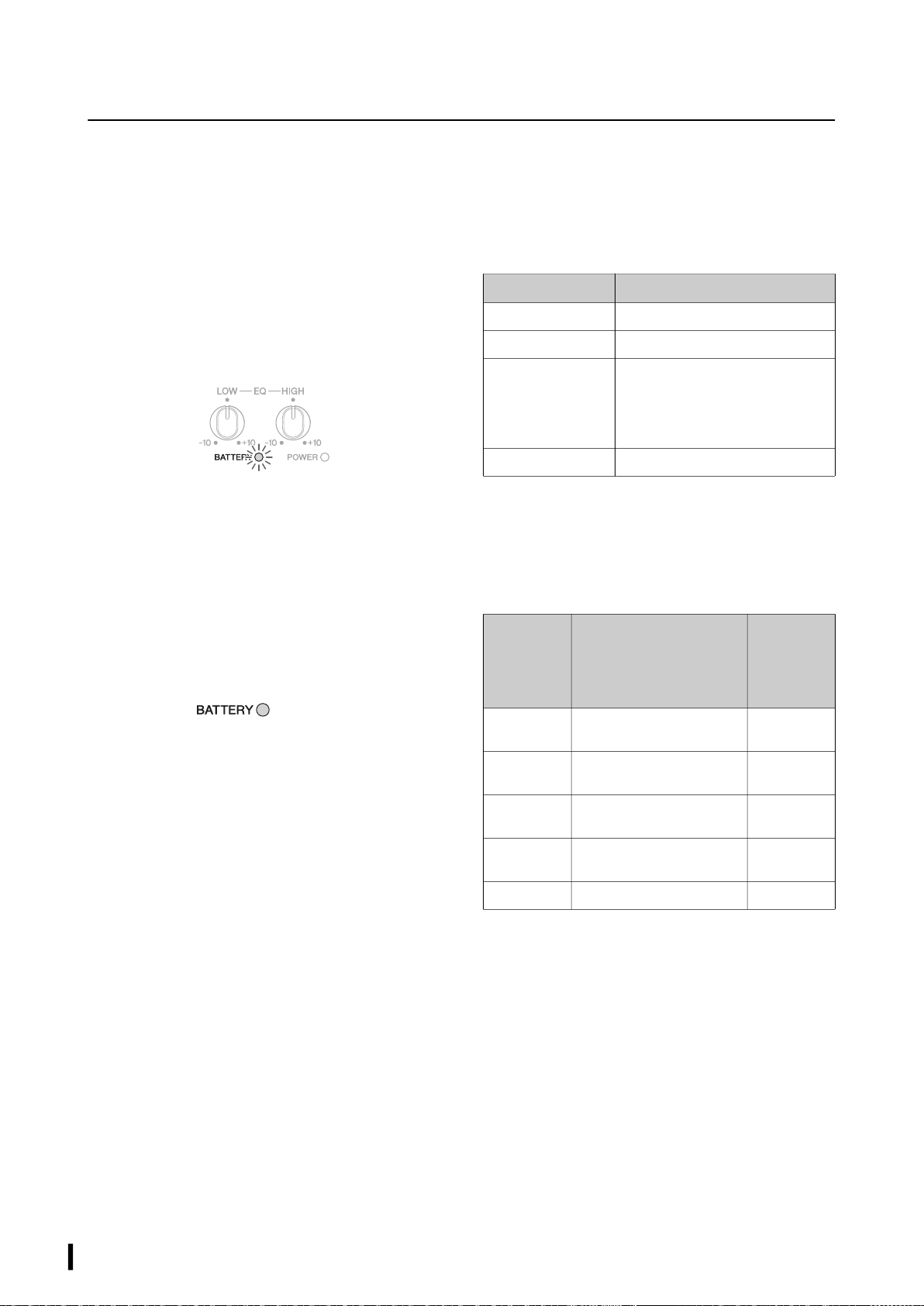
[BATTERY] LED status
With the power adaptor
In case of battery abnormality, turn off the power to the unit,
disconnect the power adaptor, and contact your Yamaha
dealer.
Without the power adaptor
* If the LED turns off, the battery abnormality may be caused by one
of the following reasons:
• The battery is being used in an excessively warm or cold
environment.
• The battery protection function has been activated.
• The battery is defective (deep discharge).
• The battery is over-discharged.
If the battery is not charged completely even after the
charging process is complete, or if for some reason the
battery cannot be charged, the batter life may be expired.
Please contact your Yamaha dealer.
Flashing
(green)
Lit steadily (green)
LED Status
Lit steadily (green) Fully charged
Flashing (green) Charging
Flashing slowly (red) Since the battery is located in an
excessively warm or cold environment,
the battery protection function has
been activated, preventing the battery
from being charged.
Flashing rapidly (red) Battery abnormality
LED Status
A guide to
the amount
of remaining
battery
charge
Lit steadily
(green)
Fully charged 100%
Lit steadily
(yellow)
Sufficiently charged 90 – 51%
Flashing
(yellow)
Minimal amount of remaining
battery charge
50 – 1%
Flashing
(red)
Zero amount of remaining
battery charge
0%
Off* Battery abnormality —

STAGEPAS 100BTR, STAGEPAS 100 Owner’s Manual
15
Troubleshooting
Power does not turn on.
You did not firmly and securely connect the power cord
and power adaptor.
(STAGEPAS 100BTR only) The built-in battery is not
charged.
If you are using the STAGEPAS 100BTR without the power
adaptor, make sure that the built-in battery is sufficiently
charged.
Power shuts down suddenly.
If heat dissipation is insufficient, the power shuts down to
protect the system from overheating. Arrange the ventilation
for better cooling, then turn the power on again.
No sound is heard.
The devices, such as a microphone or a musical
instrument, are not connected to the input jacks
properly.
The volume level of the connected musical instrument or
audio device is not sufficiently raised.
Check the volume level of the connected musical
instrument or audio device.
You are using a condenser microphone.
Use a dynamic microphone. Power cannot be supplied to
a directly-connected condenser microphone. Therefore,
you will be unable to use it.
The input
signal level is excessive.
If the internal power amplifier section is overloaded, the
amplifier will be muted to protect its circuits. The unit will
automatically reset itself after a while.
Sound is distorted or noise is produced.
The [LEVEL] control for each channel is raised too high.
The [MIC/LINE] switch is set to the MIC position.
If the input level from the source is high, setting the [MIC/
LINE] switch to the MIC position may result in a distorted
sound. Set the switch to the LINE position.
The volume of the connected device is too high.
Lower the volume of the external device.
The power cord or the power adaptor is located close to
the input cable.
Locate them away from the input cable.
Sound is not loud enough.
The [LEVEL] control for each channel is set too low.
The [MIC/LINE] switch of the corresponding channel is
set to the LINE position.
Turn the [LEVEL] control to the minimum (zero). Set the
switch to the MIC position, then slowly raise the [LEVEL]
control.
The volume of the connected device is too low.
Raise the volume of the external device.
The high-range sounds and low-range
sounds are unbalanced.
The [EQ] controls are raised or lowered too much.
Set the [EQ] controls to the center position.
Cannot connect Bluetooth/Bluetooth
audio sound cuts intermittently.
The unit may be connected to a different Bluetooth
device.
Disconnect the current Bluetooth connection, and then
connect to the desired Bluetooth device.
Your Bluetooth device may not support the A2DP profile.
Use a Bluetooth device that supports A2DP.
The unit may be located in the vicinity of a device that
emits electro-magnetic waves at a frequency of 2.4 GHz
(such as a wireless microphone transmitter, wireless LAN
device, m
icrowave oven, etc.).
Locate the STAGEPAS 100 unit away from any device that
emits electro-magnetic waves.
If your Bluetooth device also features a wireless LAN
function, turn off the function, and use only the
Bluetooth function.

STAGEPAS 100BTR, STAGEPAS 100 Owner’s Manual
16
(STAGEPAS 100BTR only)
The battery cannot be charged.
The battery is being used in an excessively warm or cold
environment.
Move the STAGEPAS 100BTR to a location at room
temperature and do not use it until the built-in battery
achieves a suitable temperature.
If the battery still cannot be charged after a sufficient
amount of time has passed, an error may have occurred
with the built-in battery. Please contact your Yamaha
dealer.
The amount of remaining battery charge
decreases very quickly.
The built-in battery life may be expiring. Please contact your
Yamaha dealer.
• To maintain battery function, charge the battery once
every half year.
• The battery has a limited life. The battery capacity
decreases little by little over time and is affected by
frequency of usage.
• The battery life varies depending on different storage
methods, operating conditions and environment.
If a problem persists, please contact your Yamaha dealer.
STAGEPAS 100BTR, STAGEPAS 100 Owner’s Manual
17
Specifications
General
System type 2 way, Coaxial bi-amp powered speaker, Bass-reflex type
Frequency range (−10 dB) 70 Hz – 20 kHz
Crossover FIR-X, 1.8 kHz
Measured maximum SPL (Peak)
IEC noise @ 1 m
120 dB SPL
Transducer
LF Diameter 6.5" Cone
Voice coil 1.7"
Magnet Ferrite
HF Diaphragm 1.4"
Type 1" throat compression driver coaxial
Magnet Ferrite
Enclosure
Material, Color Plastic (PP), Black
Dimensions (W × H × D, with handle and foot) 239 × 310 × 215 mm
Net weight (without AC adaptor) 5.2 kg (STAGEPAS 100),
5.5 kg (STAGEPAS 100BTR)
Screw threads (bottom of handle) 1 × 3/8" depth 12 mm (for 1 × 3/8" × 9–11 mm screw)
Included in the package Power cord × 1, AC adaptor (PA-500) × 1, Owner’s manual (this manual) × 1
Optional accessories BAG-STP100 (Carrying bag)
Amplifier
Amplifier type Class-D
Power rating
*1
Dynamic 100 W
Continuous 60 W
Cooling Natural cooling (no fan)
Connectors Input Input 1: Combo × 1, Input 2: Combo × 1, INPUT3: Stereo mini × 1 (Unbalanced)
Output Output: XLR3-32 × 1 (CH 1 – CH 3 Mix)
DC input DC inlet × 1 (24 V), EIAJ RC5322 type
Input impedance INPUT1, 2: LINE: 5.4 kΩ, MIC: 5.4 kΩ
INPUT2 (Hi-Z SW ON): LINE, MIC: 1 MΩ
INPUT3: 10 kΩ
Input sensitivity (VOLUME: Maximum) INPUT1, 2: LINE: −6 dBu, MIC: −36 dBu
INPUT3: −6 dBu
Maximum input level INPUT1, 2: LINE: +20 dBu, MIC: −10 dBu
INPUT3: +20 dBu
Bluetooth Profile: A2DP
Codec: SBC, MPEG4-AAC
Version: Ver. 5.0
Content protection method: SCMS-T
Wireless output: Class 1
Transmission frequency range: 2,402–2,480 MHz
Maximum output power (EIRP): 9 dBm (8 mW)
Idle power consumption 10 W (Idle), 30 W (1/8 power)
STAGEPAS 100BTR, STAGEPAS 100 Owner’s Manual
18
0 dBu = 0.775 Vrms.
*1 Power rating (120 V, 25°C). This is total value of individual output power.
This value is measured by releasing the software protection.
Dynamic: Total peak power of individual outputs. Measured at minimum load impedance, with protection released.
Continuous: Measured at nominal impedance, with protection activated.
*2 Battery charging time is an estimate for fully charging a completely exhausted battery. The time varies depending on the remaining battery
level and ambient temperature.
The contents of this manual apply to the latest specifications as of the publishing date. To obtain the latest manual, access the Yamaha website
then download the manual file.
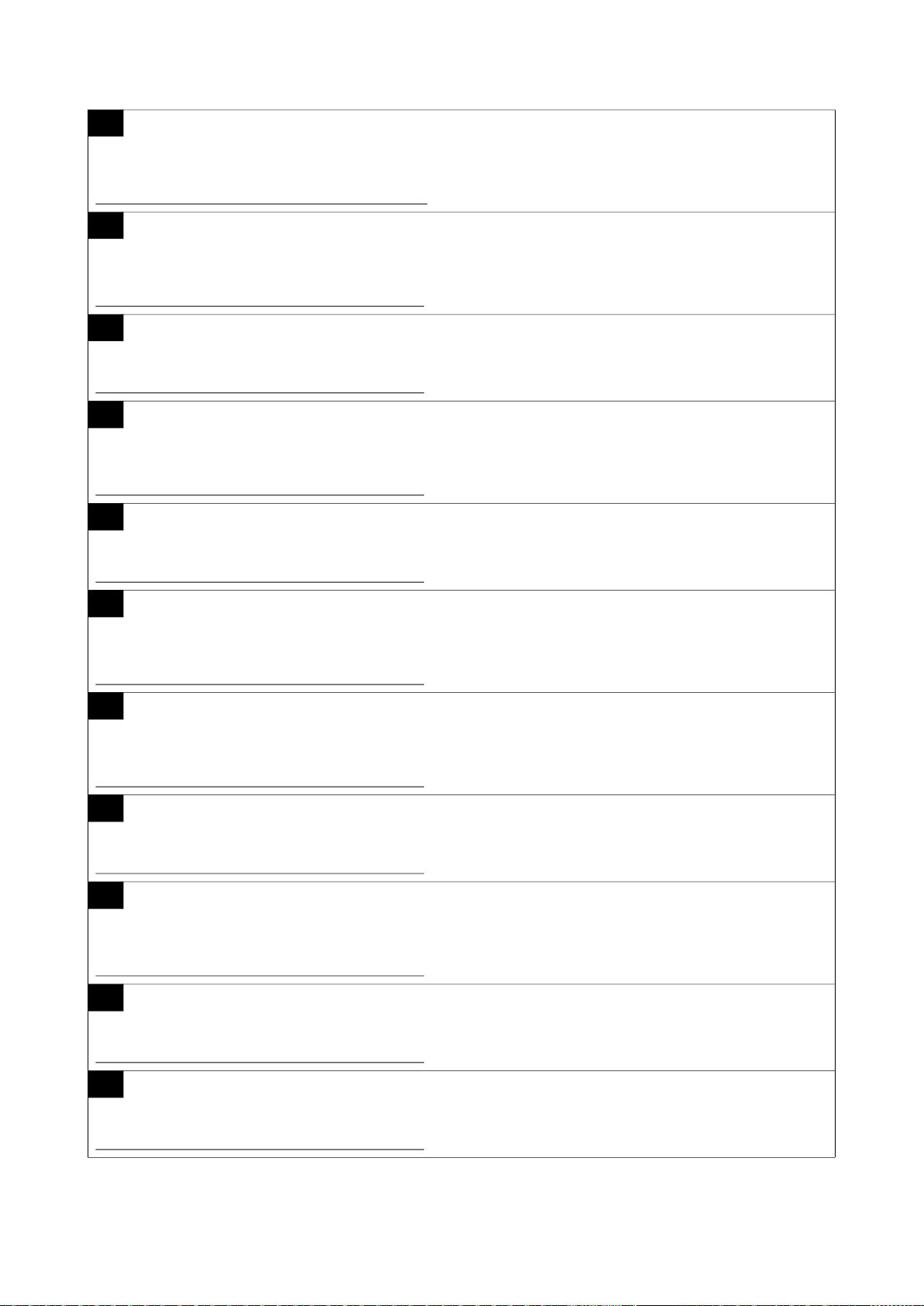
Dimensions
Unit: mm
AC adaptor
Power requirements 100 V – 240 V, 50/60 Hz
Output 24.0 V, 2.5 A
Dimensions Adaptor: 150 × 65 × 33 mm, DC cable length: 1.5 m
Net weight (without AC cable) 0.4 kg
Battery (Built in STAGEPAS 100BTR only)
Battery type Rechargeable lithium ion battery pack
Capacity 60 Wh
Operating time Maximum 6 hours, 1/16 power continuous 5 hours
Charging time
*2
Approx. 2.5 hours
Charging Temperature 0 – 40°C
224
239
275
310
215
For European Union and United Kingdom
EN
SIMPLIFIED EU DECLARATION OF CONFORMITY / SIMPLIFIED UK DECLARATION OF CONFORMITY
Hereby, Yamaha Music Europe GmbH declares that the radio equipment type [STAGEPAS 100BTR, STAGEPAS 100] is in
compliance with Directive 2014/53/EU and the radio equipment regulations of UK. The full text of the EU declaration of conformity and
the UK declaration of conformity are available at the following internet address:
https://europe.yamaha.com/en/support/compliance/doc.html
FR
DECLARATION UE DE CONFORMITE SIMPLIFIEE
Le soussigné, Yamaha Music Europe GmbH, déclare que l'équipement radioélectrique du type [STAGEPAS 100BTR, STAGEPAS
100] est conforme à la directive 2014/53/UE. Le texte complet de la déclaration UE de conformité est disponible à l'adresse internet
suivante:
https://europe.yamaha.com/en/support/compliance/doc.html
DE
VEREINFACHTE EU-KONFORMITÄTSERKLÄRUNG
Hiermit erklärt Yamaha Music Europe GmbH, dass der Funkanlagentyp [STAGEPAS 100BTR, STAGEPAS 100] der Richtlinie 2014/
53/EU entspricht. Der vollständige Text der EU-Konformitätserklärung ist unter der folgenden Internetadresse verfügbar:
https://europe.yamaha.com/en/support/compliance/doc.html
SV
FÖRENKLAD EU-FÖRSÄKRAN OM ÖVERENSSTÄMMELSE
Härmed försäkrar Yamaha Music Europe GmbH att denna typ av radioutrustning [STAGEPAS 100BTR, STAGEPAS 100]
överensstämmer med direktiv 2014/53/EU. Den fullständiga texten till EU-försäkran om överensstämmelse finns på följande
webbadress:
https://europe.yamaha.com/en/support/compliance/doc.html
IT
DICHIARAZIONE DI CONFORMITÀ UE SEMPLIFICATA
Il fabbricante, Yamaha Music Europe GmbH, dichiara che il tipo di apparecchiatura radio [STAGEPAS 100BTR, STAGEPAS 100] è
conforme alla direttiva 2014/53/UE. Il testo completo della dichiarazione di conformità UE è disponibile al seguente indirizzo Internet:
https://europe.yamaha.com/en/support/compliance/doc.html
ES
DECLARACIÓN UE DE CONFORMIDAD SIMPLIFICADA
Por la presente, Yamaha Music Europe GmbH declara que el tipo de equipo radioeléctrico [STAGEPAS 100BTR, STAGEPAS 100] es
conforme con la Directiva 2014/53/UE. El texto completo de la declaración UE de conformidad está disponible en la dirección Internet
siguiente:
https://europe.yamaha.com/en/support/compliance/doc.html
PT
DECLARAÇÃO UE DE CONFORMIDADE SIMPLIFICADA
O(a) abaixo assinado(a) Yamaha Music Europe GmbH declara que o presente tipo de equipamento de rádio [STAGEPAS 100BTR,
STAGEPAS 100] está em conformidade com a Diretiva 2014/53/UE. O texto integral da declaração de conformidade está disponível
no seguinte endereço de Internet:
https://europe.yamaha.com/en/support/compliance/doc.html
NL
VEREENVOUDIGDE EU-CONFORMITEITSVERKLARING
Hierbij verklaar ik, Yamaha Music Europe GmbH, dat het type radioapparatuur [STAGEPAS 100BTR, STAGEPAS 100] conform is met
Richtlijn 2014/53/EU. De volledige tekst van de EU-conformiteitsverklaring kan worden geraadpleegd op het volgende internetadres:
https://europe.yamaha.com/en/support/compliance/doc.html
BG
ОПРОСТЕНА ЕС ДЕКЛАРАЦИЯ ЗА СЪОТВЕТСТВИЕ
С настоящото Yamaha Music Europe GmbH декларира, че този тип радиосъоръжение [STAGEPAS 100BTR, STAGEPAS 100] е
в съответствие с Директива 2014/53/ЕС. Цялостният текст на ЕС декларацията за съответствие може да се намери на
следния интернет адрес:
https://europe.yamaha.com/en/support/compliance/doc.html
CS
ZJEDNODUŠENÉ EU PROHLÁŠENÍ O SHODĚ
Tímto Yamaha Music Europe GmbH prohlašuje, že typ rádiového zařízení [STAGEPAS 100BTR, STAGEPAS 100] je v souladu se
směrnicí 2014/53/EU. Úplné znění EU prohlášení o shodě je k dispozici na této internetové adrese:
https://europe.yamaha.com/en/support/compliance/doc.html
DA
FORENKLET EU-OVERENSSTEMMELSESERKLÆRING
Hermed erklærer Yamaha Music Europe GmbH, at radioudstyrstypen [STAGEPAS 100BTR, STAGEPAS 100] er i overensstemmelse
med direktiv 2014/53/EU. EU-overensstemmelseserklæringens fulde tekst kan findes på følgende internetadresse:
https://europe.yamaha.com/en/support/compliance/doc.html
(559-M01 RED DoC URL 02)
ET
LIHTSUSTATUD ELI VASTAVUSDEKLARATSIOON
Käesolevaga deklareerib Yamaha Music Europe GmbH, et käesolev raadioseadme tüüp [STAGEPAS 100BTR, STAGEPAS 100]
vastab direktiivi 2014/53/EL nõuetele. ELi vastavusdeklaratsiooni täielik tekst on kättesaadav järgmisel internetiaadressil:
https://europe.yamaha.com/en/support/compliance/doc.html
EL
ΑΠΛΟΥΣΤΕΥΜΕΝΗ ΔΗΛΩΣΗ ΣΥΜΜΟΡΦΩΣΗΣ ΕΕ
Με την παρούσα ο/η Yamaha Music Europe GmbH, δηλώνει ότι ο ραδιοεξοπλισμός [STAGEPAS 100BTR, STAGEPAS 100] πληροί
την οδηγία 2014/53/ΕΕ. Το πλήρες κείμενο της δήλωσης συμμόρφωσης ΕΕ διατίθεται στην ακόλουθη ιστοσελίδα στο διαδίκτυο:
https://europe.yamaha.com/en/support/compliance/doc.html
HR
POJEDNOSTAVLJENA EU IZJAVA O SUKLADNOSTI
Yamaha Music Europe GmbH ovime izjavljuje da je radijska oprema tipa [STAGEPAS 100BTR, STAGEPAS 100] u skladu s
Direktivom 2014/53/EU. Cjeloviti tekst EU izjave o sukladnosti dostupan je na sljedećoj internetskoj adresi:
https://europe.yamaha.com/en/support/compliance/doc.html
LV
VIENKĀRŠOTA ES ATBILSTĪBAS DEKLARĀCIJA
Ar šo Yamaha Music Europe GmbH deklarē, ka radioiekārta [STAGEPAS 100BTR, STAGEPAS 100] atbilst Direktīvai 2014/53/ES.
Pilns ES atbilstības deklarācijas teksts ir pieejams šādā interneta vietnē:
https://europe.yamaha.com/en/support/compliance/doc.html
LT
SUPAPRASTINTA ES ATITIKTIES DEKLARACIJA
Aš, Yamaha Music Europe GmbH, patvirtinu, kad radijo įrenginių tipas [STAGEPAS 100BTR, STAGEPAS 100] atitinka Direktyvą
2014/53/ES. Visas ES atitikties deklaracijos tekstas prieinamas šiuo interneto adresu:
https://europe.yamaha.com/en/support/compliance/doc.html
HU
EGYSZERŰSÍTETT EU-MEGFELELŐSÉGI NYILATKOZAT
Yamaha Music Europe GmbH igazolja, hogy a [STAGEPAS 100BTR, STAGEPAS 100] típusú rádióberendezés megfelel a 2014/53/
EU irányelvnek. Az EU-megfelelőségi nyilatkozat teljes szövege elérhető a következő internetes címen:
https://europe.yamaha.com/en/support/compliance/doc.html
PL
UPROSZCZONA DEKLARACJA ZGODNOŚCI UE
Yamaha Music Europe GmbH niniejszym oświadcza, że typ urządzenia radiowego [STAGEPAS 100BTR, STAGEPAS 100] jest
zgodny z dyrektywą 2014/53/UE. Pełny tekst deklaracji zgodności UE jest dostępny pod następującym adresem internetowym:
https://europe.yamaha.com/en/support/compliance/doc.html
RO
DECLARAȚIA UE DE CONFORMITATE SIMPLIFICATĂ
Prin prezenta, Yamaha Music Europe GmbH declară că tipul de echipamente radio [STAGEPAS 100BTR, STAGEPAS 100] este în
conformitate cu Directiva 2014/53/UE. Textul integral al declarației UE de conformitate este disponibil la următoarea adresă internet:
https://europe.yamaha.com/en/support/compliance/doc.html
SK
ZJEDNODUŠENÉ EÚ VYHLÁSENIE O ZHODE
Yamaha Music Europe GmbH týmto vyhlasuje, že rádiové zariadenie typu [STAGEPAS 100BTR, STAGEPAS 100] je v súlade so
smernicou 2014/53/EÚ. Úplné EÚ vyhlásenie o zhode je k dispozícii na tejto internetovej adrese:
https://europe.yamaha.com/en/support/compliance/doc.html
SL
POENOSTAVLJENA IZJAVA EU O SKLADNOSTI
Yamaha Music Europe GmbH potrjuje, da je tip radijske opreme [STAGEPAS 100BTR, STAGEPAS 100] skladen z Direktivo 2014/53/
EU. Celotno besedilo izjave EU o skladnosti je na voljo na naslednjem spletnem naslovu:
https://europe.yamaha.com/en/support/compliance/doc.html
FI
YKSINKERTAISTETTU EU-VAATIMUSTENMUKAISUUSVAKUUTUS
Yamaha Music Europe GmbH vakuuttaa, että radiolaitetyyppi [STAGEPAS 100BTR, STAGEPAS 100] on direktiivin 2014/53/EU
mukainen. EU-vaatimustenmukaisuusvakuutuksen täysimittainen teksti on saatavilla seuraavassa internetosoitteessa:
https://europe.yamaha.com/en/support/compliance/doc.html
TR BASİTLEŞTİRİLMİŞ AVRUPA BİRLİĞİ UYGUNLUK BİLDİRİMİ
İşbu belge ile, Yamaha Music Europe GmbH, radyo cihaz tipinin [STAGEPAS 100BTR, STAGEPAS 100], Direktif 2014/53/ AB'ye
uygunluğunu beyan eder. AB uyumu beyanının tam metni aşağıdaki internet adresinden edinilebilir:
https://europe.yamaha.com/en/support/compliance/doc.html
Deutsch
Français
Nederlands
Español
Italiano
Português
Ελληνικά
Svenska
Norsk
Dansk
Suomi
Polski
Čeština
Magyar
Eesti
Latviešu
Lietuvių
Slovenčina
Slovenščina
Български
Română
Energy Efciency Information for customers in European Economic
Area (EEA), Switzerland and Turkey
English
Energy Efficiency Information:
AC adaptor PA-500 / Input voltage : 230 V / Input AC frequency : 50 Hz / Output voltage (DC) : 24.0 V / Output current : 2.5 A / Output power : 60.0 W /
Average active efficiency : 89.97 % / Efficiency at low load : 87.64 % / No-load power consumption : 0.1234 W
Hrvatski
Türkçe
Yamaha Music Europe GmbH : Siemensstrasse 22-34, 25462 Rellingen, Germany / Registration No.: HRB5612
Netzadapter PA-500 / Eingangsspannung: 230 V / Netzfrequenz: 50 Hz / Ausgangsspannung (U=): 24,0 V / Ausgangsstrom: 2,5 A / Ausgangsleistung: 60,0 W /
Durchschnittliche Effizienz (aktiv): 89,97 % / Effizienz bei niedriger Last: 87,64 % / Stromverbrauch ohne Last: 0,1234 W
Informationen zur Energieeffizienz:
Adaptateur secteur PA-500 / Tension d'entrée : 230 V / Fréquence d'entrée : 50 Hz / Tension de sortie (CC) : 24,0 V / Courant de sortie : 2,5 A / Puissance de sortie : 60,0 W /
Efficacité moyenne en mode actif : 89,97 % / Efficacité à faible charge : 87,64 % / Consommation électrique sans charge : 0,1234 W
Informations concernant l'efficacité énergétique :
Netadapter PA-500 / Ingangsspanning: 230 V / Ingangsfrequentie: 50 Hz / Uitgangsspanning (DC): 24,0 V / Uitgangsstroom: 2,5 A / Uitgangsvermogen: 60,0 W /
Gemiddelde actieve efficiëntie: 89,97% / Efficiëntie bij lage belasting: 87,64% / Stroomverbruik bij geen belasting:0,1234 W
Informatie over energie-efficiëntie:
Adaptador de CA PA-500 / Tensión de entrada: 230 V / Frecuencia de CA de entrada: 50 Hz / Tensión de salida (CC): 24,0 V / Corriente de salida: 2,5 A /
Potencia de salida: 60,0 W / Eficiencia activa media: 89,97 % / Eficiencia con carga baja: 87,64 % / Consumo de energía sin carga: 0,1234 W
Información de eficiencia energética:
Adattatore CA PA-500 / Tensione in ingresso: 230 V / Frequenza CA ingresso: 50 Hz / Tensione in uscita (CC): 24,0 V / Corrente di uscita: 2,5 A /
Potenza di uscita: 60,0 W / Efficienza attiva media: 89,97 % / Efficienza a carico ridotto: 87,64 % / Consumo elettrico senza carico: 0,1234 W
Informazioni sull'efficienza energetica:
Adaptador CA PA-500 / Tensão de entrada: 230 V / Frequência de CA de entrada: 50 Hz / Tensão de saída (CC): 24,0 V / Corrente de saída: 2,5 A /
Potência de saída: 60,0 W / Média de eficiência ativa: 89,97% / Eficiência com baixa carga: 87,64% / Consumo de energia sem carga: 0,1234 W
Informações sobre eficiência de energia:
Προσαρμογέας AC PA-500 / Τάση εισόδου: 230 V / Συχνότητα εισόδου AC: 50 Hz / Τάση εξόδου (DC): 24,0 V / Ρεύμα εξόδου: 2,5 A / Ισχύς εξόδου: 60,0 W /
Μέση ενεργός απόδοση: 89,97% / Απόδοση σε χαμηλό φορτίο: 87,64% / Κατανάλωση ισχύος άνευ φορτίου: 0,1234 W
Πληροφορίες ενεργειακής απόδοσης:
Nätadapter PA-500 / Inspänning: 230 V / Växelströmsfrekvens in: 50 Hz / Utspänning (Likström): 24,0 V / Utgående ström: 2,5 A / Uteffekt: 60,0 W /
Genomsnittlig aktiv effektivitet: 89,97 % / Effektivitet vid låg belastning: 87,64 % / Energiförbrukning utan belastning: 0,1234 W
Information om energieffektivitet:
AC-adapter PA-500/indgangsspænding: 230 V/indgangs-AC-frekvens: 50 Hz/udgangsspænding (DC): 24,0 V/udgangsstrøm: 2,5 A/udgangseffekt: 60,0 W/
gennemsnitlig aktiv effektivitet: 89,97 %/effektivitet ved lav belastning: 87,64 %/strømforbrug ved ingen belastning: 0,1234 W
Oplysninger om energieffektivitet:
Verkkolaite PA-500 / Tulojännite : 230 V / Tulojännitteen taajuus : 50 Hz / Lähtöjännite (DC) : 24,0 V / Lähtövirta : 2,5 A / Lähtöteho : 60,0 W /
Keskimääräinen tehokkuus käytössä : 89,97 % / Tehokkuus pienellä kuormalla : 87,64 % / Kulutus kuormittamattomana : 0,1234 W
Energiatehokkuustiedot:
Zasilacz sieciowy PA-500 / Napięcie wyjściowe: 230 V / Częstotliwość napięcia zasilania prądem zmiennym: 50 Hz / Napięcie wyjściowe (DC): 24,0 V / Prąd wyjściowy: 2,5 A /
Maksymalna wyjściowa: 60,0 W / Średnia sprawność robocza: 89,97 % / Sprawność przy niskim poziomie obciążenia: 87,64% / Zużycie energii bez obciążenia: 0,1234 W
Informacje o efektywności energetycznej:
Adaptér napájení PA-500 / Vstupní napětí: 230 V / Vstupní frekvence střídavého proudu: 50 Hz / Výstupní napětí (DC): 24,0 V / Výstupní proud: 2,5 A /
Výstupní výkon: 60,0 W / Průměrná účinnost v aktivním režimu: 89,97 % / Účinnost při nízké zátěži: 87,64 % / Spotřeba ve stavu bez zátěže: 0,1234 W
Informace o energetické účinnosti:
PA-500 hálózati adapter / Beviteli feszültség: 230 V / Beviteli hálózati frekvencia: 50 Hz / Kimeneti feszültség (DC): 24,0 V / Kimenő áramerősség: 2,5 A /
Kimeneti teljesítmény: 60,0 W / Átlagos aktív teljesítmény: 89,97% / Hatékonyság alacsony töltésnél: 87,64% / Teljesítményfelvétel nem töltöttségnél: 0,1234 W
Energiahatékonysági adatok:
AC-adapter PA-500 / Sisendpinge: 230 V / Sisendi voolusagedus: 50 Hz / Väljundpinge (DC): 24,0 V / Väljundvool: 2,5 A / Väljundvõimsus: 60,0 W /
Tööseisundi keskmine kasutegur: 89,97% / Tõhusus väikese koormuse juures: 87,64% / Energiatarbimine koormamata seisundis: 0,1234 W
Energiatõhususe teave:
Maiņstrāvas adapteris PA-500 / Ieejas spriegums: 230 V / Ieejas maiņstrāvas frekvence: 50 Hz / Izejas spriegums (līdzstrāva): 24,0 V / Izejas strāva: 2,5 A /
Izejas jauda: 60,0 W / Vidējā aktīvā efektivitāte: 89,97 % / Efektivitāte ar mazu slodzi: 87,64 % / Enerģijas patēriņš bez slodzes: 0,1234 W
Informācija par energoefektivitāti:
Kintamosios srovės adapteris PA-500 / Įėjimo įtampa: 230 V / Įėjimo kintamosios srovės dažnis: 50 Hz / Išėjimo įtampa (nuolatinė srovė): 24,0 V / Išėjimo srovė: 2,5 A /
Išvesties galia: 60,0 W / Vidutinis efektyvumas aktyviuoju režimu: 89,97 % / Efektyvumas esant mažai apkrovai: 87,64 % / Energijos sąnaudos be apkrovos: 0,1234 W
Energijos naudojimo efektyvumo informacija:
Adaptér napájania PA-500 / Vstupné napätie: 230 V / Vstupná frekvencia striedavého prúdu: 50 Hz / Výstupné napätie (DC): 24,0 V / Výstupný prúd: 2,5 A /
Výstupný výkon: 60,0 W / Priemerná účinnosť v aktívnom režime: 89,97 % / Účinnosť pri nízkej záťaži: 87,64 % / Spotreba v stave bez záťaže: 0,1234 W
Informácie o energetickej účinnosti:
Električni napajalnik PA-500 / Vhodna napetost: 230 V / Vhodna frekvenca izmeničnega toka: 50 Hz / Izhodna napetost (enosmerni tok): 24,0 V / Izhodni tok: 2,5 A /
Izhodna moč: 60,0 W / Povprečna učinkovitost – v času delovanja: 89,97 % / Učinkovitost pri nižji obremenitvi: 87,64 % / Poraba energije – brez obremenitve: 0,1234 W
Podatki o energetski učinkovitosti:
Адаптер за променливотоково захранване PA-500 / Входно напрежение : 230 V / Входна честота (променлив ток) : 50 Hz /
Изходно напрежение (постоянен ток) : 24,0 V / Изходен ток : 2,5 A / Изходна мощност : 60,0 W / Средна активна ефективност : 89,97 % /
Ефективност при ниско натоварване : 87,64 % / Консумация на енергия без натоварване : 0,1234 W
Информация за енергийна ефективност:
Adaptor CA PA-500 / Tensiune de intrare: 230 V / Frecvență CA de intrare: 50 Hz / Tensiune de ieșire (CC): 24,0 V / Curent de ieșire: 2,5 A / Putere de ieșire: 60,0 W /
Eficiență activă medie: 89,97 % / Eficiență la sarcină redusă: 87,64 % / Consum electric fără sarcină: 0,1234 W
Informații privind eficiența energetică:
Prilagodnik izmjeničnog napajanja PA-500 / Ulazni napon: 230 V / Ulazna frekvencija izmjeničnog napajanja: 50 Hz / Izlazni napon (istosmjerna struja): 24,0 V / Izlazna struja: 2,5 A /
Izlazna snaga: 60,0 W / Prosječna aktivna učinkovitost: 89,97 % / Učinkovitost pri niskom opterećenju: 87,64 % / Potrošnja energije bez opterećenja: 0,1234 W
Informacije o energetskoj učinkovitosti:
AC adaptörü PA-500 / Giriş gerilimi : 230 V / Giriş AC frekansı : 50 Hz / Çıkış gerilimi (DC) : 24,0 V / Çıkış akımı : 2,5 A / Çıkış gücü : 60,0 W /
Ortalama etkin verimlilik : %89,97 / Düşük yükte verimlilik : %87,64 / Yüksüz güç tüketimi : 0,1234 W
Enerji Verimliliği Bilgileri:
AC ADAPTOR PA-500

For detailed guarantee information about this Yamaha product, and Pan-EEA* and Switzerland warranty service, please either visit the website address below (Printable file is available
at our website) or contact the Yamaha representative office for your country. * EEA: European Economic Area
Important Notice: Guarantee Information for customers in EEA* and Switzerland
English
Für nähere Garantie-Information über dieses Produkt von Yamaha, sowie über den Pan-EWR*- und Schweizer Garantieservice, besuchen Sie bitte entweder die folgend angegebene Internetadresse
(eine druckfähige Version befindet sich auch auf unserer Webseite), oder wenden Sie sich an den für Ihr Land zuständigen Yamaha-Vertrieb. *EWR: Europäischer Wirtschaftsraum
Wichtiger Hinweis: Garantie-Information für Kunden in der EWR* und der Schweiz
Deutsch
Pour des informations plus détaillées sur la garantie de ce produit Yamaha et sur le service de garantie applicable dans l’ensemble de l’EEE ainsi qu’en Suisse, consultez notre site Web
à l’adresse ci-dessous (le fichier imprimable est disponible sur notre site Web) ou contactez directement Yamaha dans votre pays de résidence. * EEE : Espace Economique Européen
Remarque importante: informations de garantie pour les clients de l’EEE et la Suisse
Français
Voor gedetailleerde garantie-informatie over dit Yamaha-product en de garantieservice in heel de EER* en Zwitserland, gaat u naar de onderstaande website (u vind een afdrukbaar
bestand op onze website) of neemt u contact op met de vertegenwoordiging van Yamaha in uw land. * EER: Europese Economische Ruimte
Belangrijke mededeling: Garantie-informatie voor klanten in de EER* en Zwitserland
Nederlands
Para una información detallada sobre este producto Yamaha y sobre el soporte de garantía en la zona EEE* y Suiza, visite la dirección web que se incluye más abajo (la version del
archivo para imprimir esta disponible en nuestro sitio web) o póngase en contacto con el representante de Yamaha en su país. * EEE: Espacio Económico Europeo
Aviso importante: información sobre la garantía para los clientes del EEE* y Suiza
Español
Per informazioni dettagliate sulla garanzia relativa a questo prodotto Yamaha e l’assistenza in garanzia nei paesi EEA* e in Svizzera, potete consultare il sito Web all’indirizzo riportato
di seguito (è disponibile il file in formato stampabile) oppure contattare l’ufficio di rappresentanza locale della Yamaha. * EEA: Area Economica Europea
Avviso importante: informazioni sulla garanzia per i clienti residenti nell’EEA* e in Svizzera
Italiano
Para obter uma informação pormenorizada sobre este produto da Yamaha e sobre o serviço de garantia na AEE* e na Suíça, visite o site a seguir (o arquivo para impressão está
disponível no nosso site) ou entre em contato com o escritório de representação da Yamaha no seu país. * AEE: Área Econômica Européia
Aviso importante: informações sobre as garantias para clientes da AEE* e da Suíça
Português
īȚĮȜİʌIJȠȝİȡİȓȢ ʌȜȘȡȠijȠȡȓİȢ İȖȖȪȘıȘȢ ıȤİIJȚțȐ ȝİIJȠʌĮȡȩȞʌȡȠȧȩȞ
IJȘȢ<DPDKD țĮȚ IJȘȞ țȐȜȣȥȘ İȖȖȪȘıȘȢıİȩȜİȢIJȚȢȤȫȡİȢIJȠȣǼȅȋ țĮȚ IJȘȞ ǼȜȕİIJȓĮ İʌȚıțİijIJİȓIJİIJȘȞʌĮȡĮțȐIJȦ
ȚıIJȠıİȜȓįĮǼțIJȣʌȫıȚȝȘȝȠȡijȒİȓȞĮȚįȚĮșȑıȚȝȘıIJȘȞȚıIJȠıİȜȓįĮȝĮȢȒĮʌİȣșȣȞșİȓIJİıIJȘȞĮȞIJȚʌȡȠıȦʌİȓĮIJȘȢ<DPDKDıIJȘȤȫȡĮıĮȢǼȅȋǼȣȡȦʌĮȧțȩȢȅȚțȠȞȠȝȚțȩȢȋȫȡȠȢ
ȈȘȝĮȞIJȚțȒıȘȝİȓȦıȘȆȜȘȡȠijȠȡȓİȢİȖȖȪȘıȘȢȖȚĮIJȠȣȢʌİȜȐIJİȢıIJȠȞǼȅȋțĮȚǼȜȕİIJȓĮ
ǼȜȜȘȞȚțȐ
För detaljerad information om denna Yamahaprodukt samt garantiservice i hela EES-området* och Schweiz kan du antingen besöka nedanstående webbaddress (en utskriftsvänlig fil
finns på webbplatsen) eller kontakta Yamahas officiella representant i ditt land. * EES: Europeiska Ekonomiska Samarbetsområdet
Viktigt: Garantiinformation för kunder i EES-området* och Schweiz
Svenska
Detaljert garantiinformasjon om dette Yamaha-produktet og garantiservice for hele EØS-området* og Sveits kan fås enten ved å besøke nettadressen nedenfor (utskriftsversjon finnes
på våre nettsider) eller kontakte kontakte Yamaha-kontoret i landet der du bor. *EØS: Det europeiske økonomiske samarbeidsområdet
Viktig merknad: Garantiinformasjon for kunder i EØS* og Sveits
Norsk
De kan finde detaljerede garantioplysninger om dette Yamaha-produkt og den fælles garantiserviceordning for EØO* (og Schweiz) ved at besøge det websted, der er angivet nedenfor (der
findes en fil, som kan udskrives, på vores websted), eller ved at kontakte Yamahas nationale repræsentationskontor i det land, hvor De bor. * EØO: Det Europæiske Økonomiske Område
Vigtig oplysning: Garantioplysninger til kunder i EØO* og Schweiz
Dansk
Tämän Yamaha-tuotteen sekä ETA-alueen ja Sveitsin takuuta koskevat yksityiskohtaiset tiedot saatte alla olevasta nettiosoitteesta. (Tulostettava tiedosto saatavissa sivustollamme.)
Voitte myös ottaa yhteyttä paikalliseen Yamaha-edustajaan. *ETA: Euroopan talousalue
Tärkeä ilmoitus: Takuutiedot Euroopan talousalueen (ETA)* ja Sveitsin asiakkaille
Suomi
$E\GRZLHG]LHüVLĊZLĊFHMQDWHPDWZDUXQNyZJZDUDQF\MQ\FKWHJRSURGXNWXILUP\<DPDKDLVHUZLVXJZDUDQF\MQHJRZFDá\P(2*L6]ZDMFDULLQDOHĪ\RGZLHG]LüZVND]DQąSRQLĪHMVWURQĊLQWHUQHWRZą
3OLNJRWRZ\GRZ\GUXNX]QDMGXMHVLĊQDQDV]HMVWURQLHLQWHUQHWRZHMOXEVNRQWDNWRZDüVLĊ]SU]HGVWDZLFLHOVWZHPILUP\<DPDKDZVZRLPNUDMX(2*²(XURSHMVNL2EV]DU*RVSRGDUF]\
WDĪQHWDUXQNLJZDUDQF\MQHRERZLą]XMąFHZ(2*L6]ZDMFDULL
Polski
3RGUREQp]iUXþQtLQIRUPDFHRWRPWRSURGXNWX<DPDKDD]iUXþQtPVHUYLVX
YFHOpP(+6DYHâYêFDUVNXQDOH]QHWHQDQtåHXYHGHQpZHERYpDGUHVHVRXERUNWLVNXMHGRVWXSQêQDQDãLFK
ZHERYêFKVWUiQNiFKQHERVHPĤåHWHREUiWLWQD]DVWRXSHQtILUP\<DPDKDYHVYp]HPL(+6(YURSVNêKRVSRGiĜVNêSURVWRU
'ĤOHåLWpR]QiPHQt=iUXþQtLQIRUPDFHSUR]iND]QtN\Y(+6DYHâYêFDUVNX
ýHVN\
$MHOHQ<DPDKDWHUPpNUHYRQDWNR]yUpV]OHWHVJDUDQFLDLQIRUPiFLyN
YDODPLQWD](*7UHpV6YiMFUDNLWHUMHGĘJDUDQFLiOLVV]ROJiOWDWiVWHNLQWHWpEHQNHUHVVHIHOZHEKHO\QNHWD]DOiEEL
FtPHQDZHEKHO\HQQ\RPWDWKDWyIiMOWLVWDOiOYDJ\SHGLJOpSMHQNDSFVRODWEDD]RUV]iJiEDQPĦN|GĘ<DPDKDNpSYLVHOHWLLURGiYDO(*7(XUySDL*D]GDViJL7pUVpJ
)RQWRVILJ\HOPH]WHWpV*DUDQFLDLQIRUPiFLyND](*7WHUOHWpQpV6YiMFEDQpOĘYiViUOyNV]iPiUD
Magyar
7lSVHPDWHDEHVDDPLVHNVVHOOH<DPDKDWRRWHJDUDQWLLQLQJNRJX(XURRSD
0DMDQGXVSLLUNRQQDMDâYHLWVLJDUDQWLLWHHQLQGXVHNRKWDNODVWDJHSDOXQYHHELVDLWLDOOMlUJQHYDODDGUHVVLOPHLH
saidil on saadaval prinditav fail) või pöörduge Teie regiooni Yamaha esinduse poole. * EMP: Euroopa Majanduspiirkond
2OXOLQHPlUNXV*DUDQWLLWHDYH(XURRSD0DMDQGXVSLLUNRQQD(03MDâYHLWVLNOLHQWLGHOH
Eesti keel
/DLVDƼHPWXGHWDOL]ƝWXJDUDQWLMDVLQIRUPƗFLMXSDUãR<DPDKDSURGXNWX
NƗDUƯJDUDQWLMDVDSNDOSRãDQX((=XQâYHLFƝOnjG]XDSPHNOƝMLHW]HPƗNQRUƗGƯWRWƯPHNƺDYLHWQHVDGUHVLWƯPHNƺD
YLHWQƝLUSLHHMDPVGUXNƗMDPVIDLOVYDLVD]LQLHWLHVDUMnjVXYDOVWLDSNDOSRMRãR<DPDKDSƗUVWƗYQLHFƯEX((=(LURSDV(NRQRPLNDV]RQD
6YDUƯJVSD]LƼRMXPVJDUDQWLMDVLQIRUPƗFLMDNOLHQWLHP((=XQâYHLFƝ
Latviešu
-HLUHLNLD LãVDPLRV LQIRUPDFLMRV DSLH ãƳ Ä<DPDKD³SURGXNWąLUMR
WHFKQLQĊSULHåLnjUą YLVRMH ((( LU âYHLFDULMRMH DSVLODQN\NLWHPnjVǐVYHWDLQơMHWROLDXQXURG\WXDGUHVX VYHWDLQơMH \UD
VSDXVGLQWLQDVIDLODVDUEDNUHLSNLWơVƳÄ<DPDKD³DWVWRY\EĊVDYRãDOLDL(((±(XURSRVHNRQRPLQơHUGYơ
'ơPHVLRLQIRUPDFLMDGơOJDUDQWLMRVSLUNơMDPV(((LUâYHLFDULMRMH
/LHWXYLǐNDOED
3RGUREQpLQIRUPiFLHR]iUXNHWêNDM~FHVDWRKWRSURGXNWXRGVSRORþQRVWL
<DPDKDDJDUDQþQRPVHUYLVHY(+3DâYDMþLDUVNXQiMGHWHQDZHERYHMVWUiQNHXYHGHQHMQLåãLHQDQDãHM
ZHERYHMVWUiQNHMHNGLVSR]tFLLV~ERUQDWODþDOHERVDREUiĢWHQD]iVWXSFXVSRORþQRVWL<DPDKDYRVYRMHMNUDMLQH(+3(XUySVN\KRVSRGiUVN\SULHVWRU
'{OHåLWpXSR]RUQHQLH,QIRUPiFLHR]iUXNHSUH]iND]QtNRYY(+3DâYDMþLDUVNX
6ORYHQþLQD
=DSRGUREQHMãHLQIRUPDFLMHRWHP<DPDKLQHPL]GHONXWHUJDUDQFLMVNHP
VHUYLVXYFHORWQHP(*3LQâYLFLRELãþLWHVSOHWQRPHVWRNLMHQDYHGHQRVSRGDMQDWLVOMLYDGDWRWHNDMHQDYROMRQD
QDãHPVSOHWQHPPHVWXDOLVHREUQLWHQD<DPDKLQHJDSUHGVWDYQLNDYVYRMLGUåDYL(*3(YURSVNLJRVSRGDUVNLSURVWRU
3RPHPEQRREYHVWLOR,QIRUPDFLMHRJDUDQFLML]DNXSFHY(*3LQâYLFL
6ORYHQãþLQD
Ɂɚɩɨɞɪɨɛɧɚɢɧɮɨɪɦɚɰɢɹɡɚɝɚɪɚɧɰɢɹɬɚɡɚɬɨɡɢɩɪɨɞɭɤɬɧɚ<DPDKDɢɝɚɪɚɧɰɢɨɧɧɨɬɨɨɛɫɥɭɠɜɚɧɟɜɩɚɧɟɜɪɨɩɟɣɫɤɚɬɚɡɨɧɚɧɚȿɂɉɢɒɜɟɣɰɚɪɢɹɢɥɢɩɨɫɟɬɟɬɟɩɨɫɨɱɟɧɢɹɩɨɞɨɥɭɭɟɛ
ɫɚɣɬɧɚɧɚɲɢɹɭɟɛɫɚɣɬɢɦɚɮɚɣɥɡɚɩɟɱɚɬɢɥɢɫɟɫɜɴɪɠɟɬɟɫɩɪɟɞɫɬɚɜɢɬɟɥɧɢɹɨɮɢɫɧɚ<DPDKDɜɴɜɜɚɲɚɬɚɫɬɪɚɧɚȿɂɉȿɜɪɨɩɟɣɫɤɨɢɤɨɧɨɦɢɱɟɫɤɨɩɪɨɫɬɪɚɧɫɬɜɨ
ȼɚɠɧɨɫɴɨɛɳɟɧɢɟɂɧɮɨɪɦɚɰɢɹɡɚɝɚɪɚɧɰɢɹɬɚɡɚɤɥɢɟɧɬɢɜȿɂɉɢɒɜɟɣɰɚɪɢɹ
Ȼɴɥɝɚɪɫɤɢɟɡɢɤ
3HQWUXLQIRUPDĠLLGHWDOLDWHSULYLQGDFHVWSURGXV<DPDKDúLVHUYLFLXOGHJDUDQĠLH3DQ6((úL(OYHĠLDYL]LWDĠLVLWHXOODDGUHVDGHPDLMRVILúLHUXOLPSULPDELOHVWHGLVSRQLELOSHVLWHXOQRVWUX
VDXFRQWDFWDĠLELURXOUHSUH]HQWDQĠHL<DPDKDGLQĠDUDGXPQHDYRDVWUă6((6SDĠLXO(FRQRPLF(XURSHDQ
1RWLILFDUHLPSRUWDQWă,QIRUPDĠLLGHVSUHJDUDQĠLHSHQWUXFOLHQĠLLGLQ6((úL(OYHĠLD
/LPEDURPkQă
=DGHWDOMQHLQIRUPDFLMHRMDPVWYX]DRYDM<DPDKLQSURL]YRGWHMDPVWYHQRPVHUYLVX]DFLMHOL(*3LâYLFDUVNXPROLPR9DVGDSRVMHWLWHZHEVWUDQLFXQDYHGHQXXQDVWDYNXLOLNRQWDNWLUDWH
RYODãWHQRJ<DPDKLQRJGREDYOMDþDXVYRMRM]HPOML(*3(XURSVNLJRVSRGDUVNLSURVWRU
9DåQDREDYLMHVW,QIRUPDFLMHRMDPVWYX]DGUåDYH(*3DLâYLFDUVNH
Hrvatski
https://europe.yamaha.com/warranty/
URL_5
Important Notice: Guarantee Information for customers in European
Economic Area (EEA) and Switzerland

MEMO
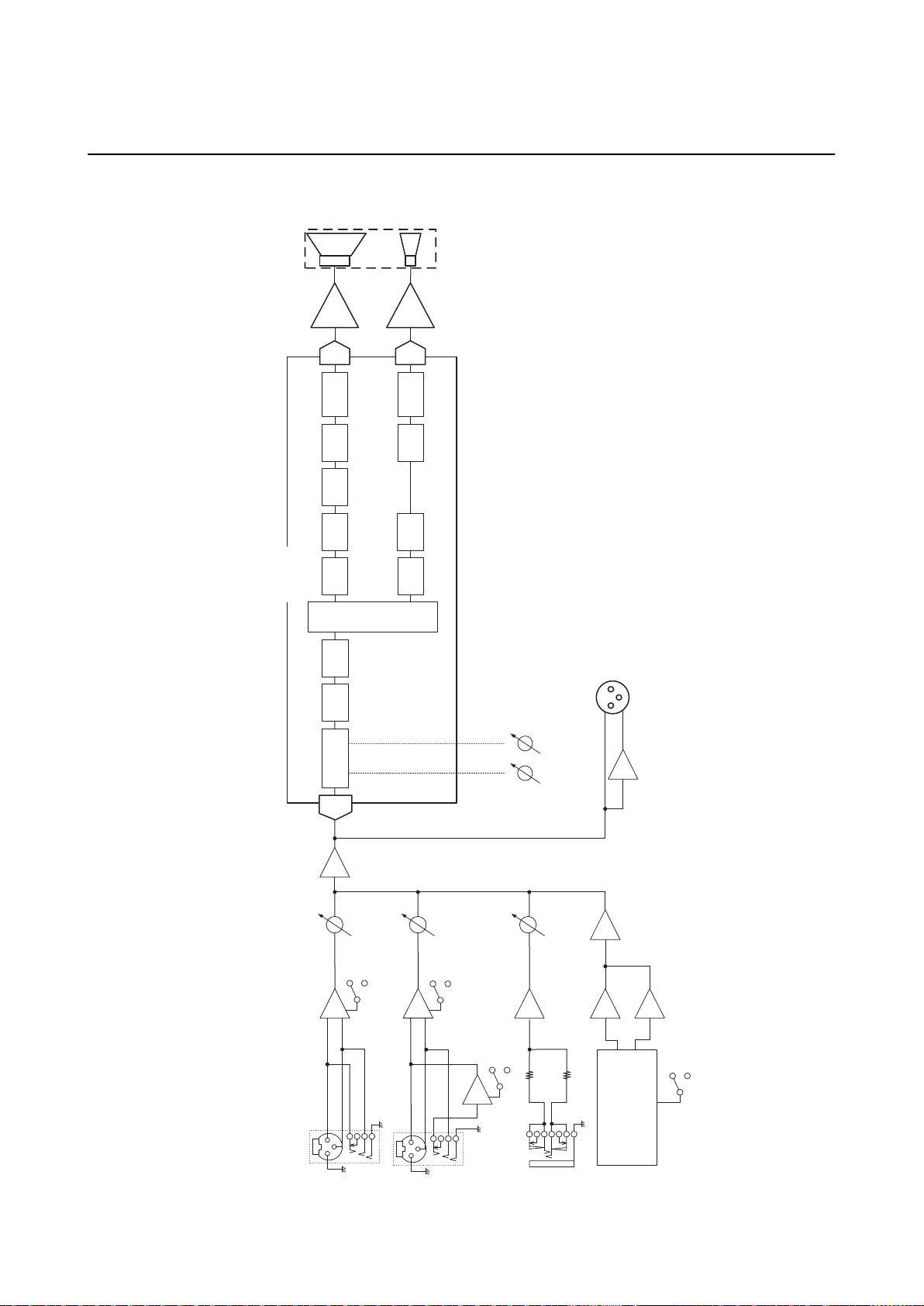
Block Diagram / Schéma fonctionnel / 框图 / /
ブロックダイアグラム
亡㕶㎬
Hi-Z
Hi-Z (1 MΩ)
SUM
INPUT
(CH1)
COMBO
Stereo mini
INPUT
(CH2)
INPUT
(CH3)
MIX
LOW
HIGH
SPEAKER
LF
COMBO
CH
LEVEL
HA
+
−
+
−
MIC/LINE
CH
LEVEL
CH
LEVEL
MIC/LINE
HA
SUM
OUTPUT
CROSS OVER
SPEAKER
HF
AMP
DSP
PEQ
AD
Main EQ
HPF
PEQ
LIMITERMUTE
DA
AMP
PEQ
LIMITER
Delay
MUTE
DA
HF
LF
Bluetooth
Audio
Bluetooth
pairing
FIR-X
FIR-X
SUM
BA
BA
Lch
Rch
INV
Main EQ

ADDRESS LIST
Head Office/Manufacturer: Yamaha Corporation 10-1, Nakazawa-cho, Naka-ku, Hamamatsu, 430-8650, Japan
Importer (European Union): Yamaha Music Europe GmbH Siemensstrasse 22-34, 25462 Rellingen, Germany
Importer (United Kingdom): Yamaha Music Europe GmbH (UK) Sherbourne Drive, Tilbrook, Milton Keynes, MK7 8BL, United Kingdom
CANADA
Yamaha Canada Music Ltd.
135 Milner Avenue, Toronto, Ontario,
M1S 3R1, Canada
Tel: +1-416-298-1311
U.S.A.
Yamaha Corporation of America
6600 Orangethorpe Avenue, Buena Park, CA
90620, U.S.A.
Tel: +1-714-522-9011
MEXICO
Yamaha de México, S.A. de C.V.
Av. Insurgentes Sur 1647 Piso 9, Col. San José
Insurgentes, Delegación Benito Juárez, CDMX,
C.P. 03900, México
Tel: +52-55-5804-0600
BRAZIL
Yamaha Musical do Brasil Ltda.
Praça Professor José Lannes, 40-Cjs 21 e 22,
Brooklin Paulista Novo CEP 04571-100 – São
Paulo – SP, Brazil
Tel: +55-11-3704-1377
ARGENTINA
Yamaha Music Latin America, S.A.,
Sucursal Argentina
Olga Cossettini 1553, Piso 4 Norte,
Madero Este-C1107CEK,
Buenos Aires, Argentina
Tel: +54-11-4119-7000
PANAMA AND OTHER LATIN
AMERICAN/CARIBBEAN REGIONS
Yamaha Music Latin America, S.A.
Edif. Torre Banco General, Piso 7, Urbanización
Marbella, Calle 47 y Aquilino de la Guardia,
Ciudad de Panamá, República de Panamá
Tel: +507-269-5311
THE UNITED KINGDOM/IRELAND
Yamaha Music Europe GmbH (UK)
Sherbourne Drive, Tilbrook, Milton Keynes,
MK7 8BL, U.K.
Tel: +44-1908-366700
GERMANY
Yamaha Music Europe GmbH
Siemensstrasse 22-34, 25462 Rellingen, Germany
Tel: +49-4101-303-0
SWITZERLAND/LIECHTENSTEIN
Yamaha Music Europe GmbH, Branch
Switzerland in Thalwil
Seestrasse 18a, 8800 Thalwil, Switzerland
Tel: +41-44-3878080
AUSTRIA/BULGARIA/
CZECH REPUBLIC/HUNGARY/
ROMANIA/SLOVAKIA/SLOVENIA
Yamaha Music Europe GmbH
Branch Austria
Schleiergasse 20, 1100 Wien, Austria
Tel: +43-1-60203900
POLAND
Yamaha Music Europe
Sp.z o.o. Oddział w Polsce
ul. Młynarska 48, 01-171 Warszawa, Poland
Tel: +48-22-880-08-88
MALTA
Olimpus Music Ltd.
Valletta Road, Mosta MST9010, Malta
Tel: +356-2133-2093
NETHERLANDS/BELGIUM/
LUXEMBOURG
Yamaha Music Europe Branch Benelux
Wattbaan 1 3439ML Nieuwegein, The Netherlands
Tel: +31-347-358040
FRANCE
Yamaha Music Europe
7 rue Ambroise Croizat, Zone d'activités de Pariest,
77183 Croissy-Beaubourg, France
Tel: +33-1-6461-4000
ITALY
Yamaha Music Europe GmbH, Branch Italy
Via Tinelli N.67/69 20855 Gerno di Lesmo (MB),
Italy
Tel: +39-039-9065-1
SPAIN/PORTUGAL
Yamaha Music Europe GmbH Ibérica, Sucursal
en España
Ctra. de la Coruña km. 17,200, 28231
Las Rozas de Madrid, Spain
Tel: +34-91-639-88-88
GREECE
Philippos Nakas S.A. The Music House
19th klm. Leof. Lavriou 190 02 Peania – Attiki,
Greece
Tel: +30-210-6686168
SWEDEN/FINLAND/ICELAND
Yamaha Music Europe GmbH Germany Filial
Scandinavia
JA Wettergrensgata 1, 400 43 Göteborg, Sweden
Tel: +46-31-89-34-00
DENMARK
Yamaha Music Denmark,
Fillial of Yamaha Music Europe GmbH, Tyskland
Generatorvej 8C, ST. TH. , 2860 Søborg, Denmark
Tel: +45-44-92-49-00
NORWAY
Yamaha Music Europe GmbH Germany -
Norwegian Branch
c/o Box 30053, 400 43 Göteborg, Sweden
Tel: +47-6716-7800
CYPRUS
Yamaha Music Europe GmbH
Siemensstrasse 22-34, 25462 Rellingen, Germany
Tel: +49-4101-303-0
RUSSIA
Yamaha Music (Russia) LLC.
Room 37, entrance 7, bld. 7, Kievskaya street,
Moscow, 121059, Russia
Tel: +7-495-626-5005
OTHER EUROPEAN REGIONS
Yamaha Music Europe GmbH
Siemensstrasse 22-34, 25462 Rellingen, Germany
Tel: +49-4101-3030
Yamaha Music Gulf FZE
JAFZA-16, Office 512, P.O.Box 17328,
Jebel Ali FZE, Dubai, UAE
Tel: +971-4-801-1500
TURKEY
Ertekin Electronik tlc. ve san. as
Kagithane Ofis ParkBaglar Cad.
No: 14 D/6 Kagithane 34406
ISTANBUL / TÜRKIYE
Tel: +90-212-312-24-24
OTHER REGIONS
Yamaha Music Gulf FZE
JAFZA-16, Office 512, P.O.Box 17328,
Jebel Ali FZE, Dubai, UAE
Tel: +971-4-801-1500
THE PEOPLE’S REPUBLIC OF CHINA
Yamaha Music & Electronics (China) Co.,Ltd.
2F, Yunhedasha, 1818 Xinzha-lu, Jingan-qu,
Shanghai, China
Tel: +86-400-051-7700
INDIA
Yamaha Music India Private Limited
P-401, JMD Megapolis, Sector-48, Sohna Road,
Gurugram-122018, Haryana, India
Tel: +91-124-485-3300
INDONESIA
PT Yamaha Musik Indonesia Distributor
Yamaha Music Center Bldg. Jalan Jend. Gatot
Subroto Kav. 4, Jakarta 12930, Indonesia
Tel: +62-21-520-2577
KOREA
Yamaha Music Korea Ltd.
11F, Prudential Tower, 298, Gangnam-daero,
Gangnam-gu, Seoul, 06253, Korea
Tel: +82-2-3467-3300
MALAYSIA
Yamaha Music (Malaysia) Sdn. Bhd.
No.8, Jalan Perbandaran, Kelana Jaya, 47301
Petaling Jaya, Selangor, Malaysia
Tel: +60-3-78030900
SINGAPORE
Yamaha Music (Asia) Private Limited
Block 202 Hougang Street 21, #02-00,
Singapore 530202, Singapore
Tel: +65-6740-9200
TAIWAN
Yamaha Music & Electronics Taiwan Co.,Ltd.
2F., No.1, Yuandong Rd., Banqiao Dist.,
New Taipei City 22063, Taiwan (R.O.C.)
Tel: +886-2-7741-8888
THAILAND
Siam Music Yamaha Co., Ltd.
3, 4, 15, 16th Fl., Siam Motors Building,
891/1 Rama 1 Road, Wangmai,
Pathumwan, Bangkok 10330, Thailand
Tel: +66-2215-2622
VIETNAM
Yamaha Music Vietnam Company Limited
15th Floor, Nam A Bank Tower, 201-203 Cach
Mang Thang Tam St., Ward 4, Dist.3,
Ho Chi Minh City, Vietnam
Tel: +84-8-3818-1122
OTHER ASIAN REGIONS
http://asia.yamaha.com/
AUSTRALIA
Yamaha Music Australia Pty. Ltd.
Level 1, 80 Market Street, South Melbourne,
VIC 3205, Australia
Tel: +61-3-9693-5111
REGIONS AND TRUST TERRITORIES
IN PACIFIC OCEAN
http://asia.yamaha.com/
NORTH AMERICA
CENTRAL & SOUTH AMERICA
EUROPE
AFRICA
MIDDLE EAST
ASIA
OCEANIA
PA58

Published 12/2022
2022ᒪ12ᴾ㺂
MWOD-A0
© 2022 Yamaha Corporation
VEY7230
Yamaha Downloads
https://download.yamaha.com/
Yamaha Pro Audio global website
https://www.yamahaproaudio.com/
䳻傢૾҆ಞ丩ଃδѣളεᣋ䍺ᴿ䲆ޢ
р⎭ᐸ䶏ᆿ᯦䰮䐥
1818
Ӈૂཝড়
2
ᾲ
ᇘᡭᵃࣗ✣㓵φ
4000517700
ޢ㖇൶φ
https://www.yamaha.com.cn
䙖φ䳻傢૾ṠᕅՐ⽴
䙖൦൶φᰛᵢ䶏৵┞ᶴᐸѣѣ⌳⭰
10-1
সφՕ᱉䗴δђ㧔ε⭫䇥ᴿ䲆ޢ
স൶φѣളᒵђⴷђ㧔ᐸሤ↛сዣ䍓ᐛѐ
⚙ኧ㩿丩‸㛗Գᴿ䲆ޢ
YAMAHA MUSIC & ELECTRONICS TAIWAN CO., LTD.
https://tw.yamaha.com
㑳ޢ
: (02) 7741-8888
᯦ᐸᶵ₁䚖ᶧ䐥
1
㲕
2
⁉
ᇘᵃሾ㐐
: 0809-091388
〒430-8650静岡県浜松市中区中沢町 10-1