EN - USER GUIDE
BRANDT
BUILT-IN
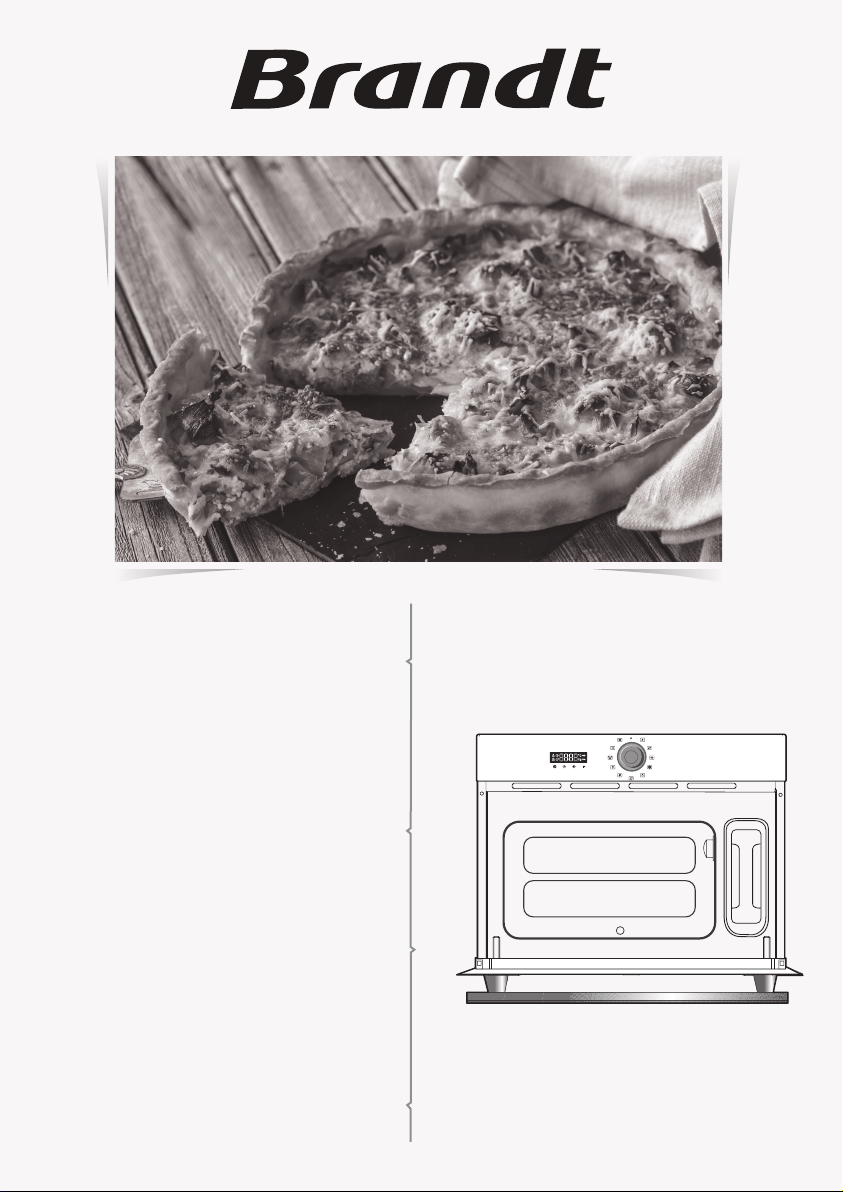
STEAM OVEN 26L
315129/BKV6132X
1
560
550
20
50
10
50
450
542
MAX 425
592
442
455
B
A
C
1.1

2
2.1
2.4
fig.3
fig.4
fig.1
fig.2
B
A
D
C
F
G
E
X2
3
3.1
3.2
3.3
3.4
4
4.1

4
4.2
4.3
4.4

ENGLISH
Dear Customer,
Thank you for purchasing and placing your trust in a BRANDT product.
We have designed and made this product with you, your lifestyle and your requirements
in mind so that it meets your expectations. This product benefits from our know-how, our
innovative spirit and the passion that has been guiding us for over 60 years.
In a continuous effort to better satisfy your needs, our customer service department is
available to listen and answer all your questions and receive any suggestions you may
have.
We also invite you to visit our website www.brandt.com
where you will find the very
latest innovations, along with some additional, useful information.
BRANDT is pleased to be on hand to offer daily support and to help you make the most
of your purchase.
Important: Before switching your appliance on, please read this user guide
carefully to familiarise yourself quickly with its operation.

ENGLISH
Installation
1
Check that:
- the electrical installation has sufficient
voltage (220-240 Volts~ 16 Amps).
If the electrical installation in your home
requires any changes in order to connect your
appliance, contact a professional electrician.
During maintenance operations, the
appliance must be unplugged from the
electrical grid; fuses must be switched off or
removed.
Warning:
The safety wire (green-yellow) is
connected to the appliance’s
terminal and must be connected to the
installation’s earth.
If the oven malfunctions in any way,
unplug it or remove the fuse for the
circuit where the oven is installed.
Warning:
We cannot accept liability for any
accident or incident resulting from
non-existent, defective or incorrect
grounding.
CHOICE OF LOCATION AND BUILDING IN
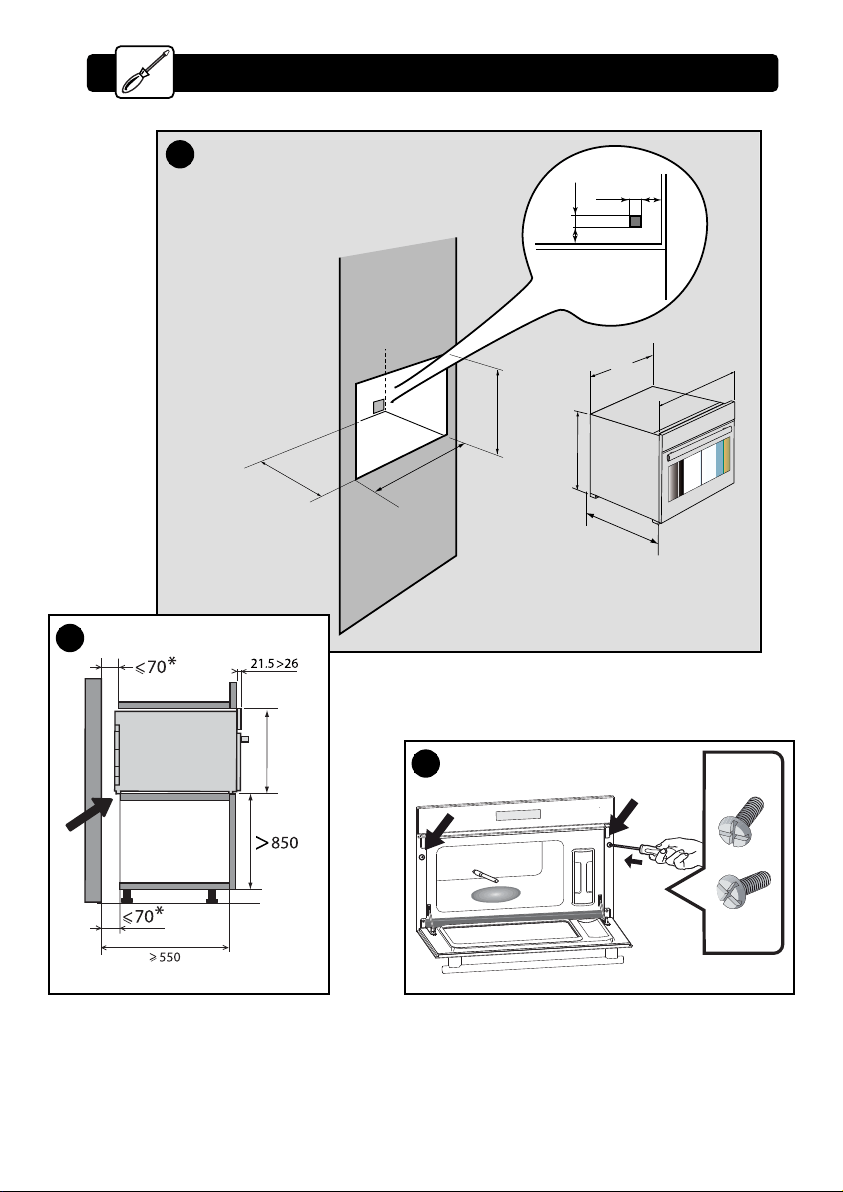
This appliance must be installed more than
850 mm up off the ground. This appliance may be
installed in a cabinet column, as indicated on the
installation diagram (fig. A).
Caution: if the back of the cabinet is open, the
space between the wall and the surface on which
the oven rests must be no more than 70 mm*
(fig. B).
Do not use your appliance immediately (wait for
about 1 to 2 hours) after transferring it from a cold
place to a warm place, as condensation may cause
a malfunction.
Centre the oven in the cabinet so as to ensure a
minimum distance of 10 mm between the
appliance and the surrounding unit. The material
of the cabinet supporting the appliance must be
heat resistant (or covered with a heat-resistant
material).
Drill a 2 mm diameter hole in the cabinet panel to
avoid splitting the wood.
For greater stability, attach the oven to the unit
with 2 screws through the holes provided on the
side panels (fig. C).
ELECTRICAL CONNECTION
Warning:
Installation should only be performed by
qualified installers and technicians.
The appliance must be recess-fitted correctly to
ensure electrical safety. The electrical connections
should be made before the appliance is installed in
its housing.
The oven must be connected via a standardised
power cable with 3 conductors of 1 mm² (1 live +
1 neutral + earth) which must be connected to the
network by means of an IEC 60083 standard power
socket or via an all-pole cut-off device in compliance
with the installation rules.
ENGLISH
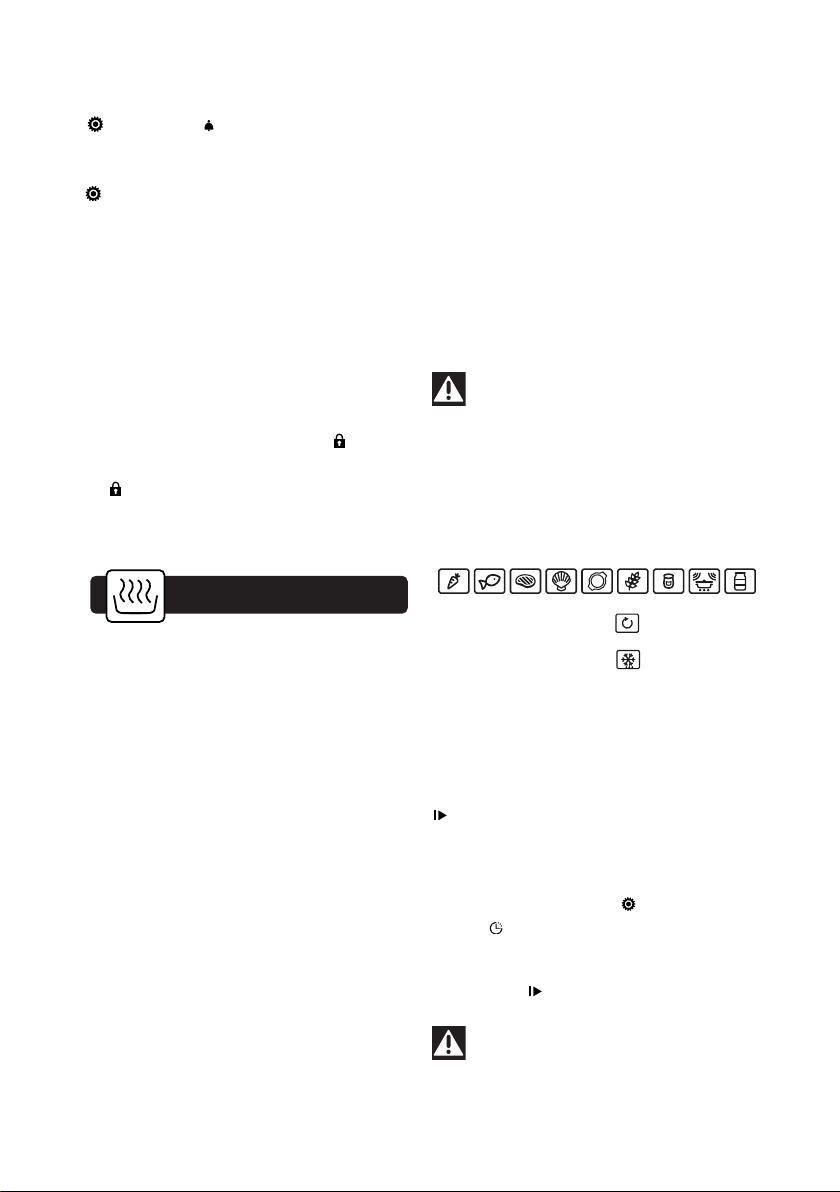
3.1 SETTING THE CLOCK
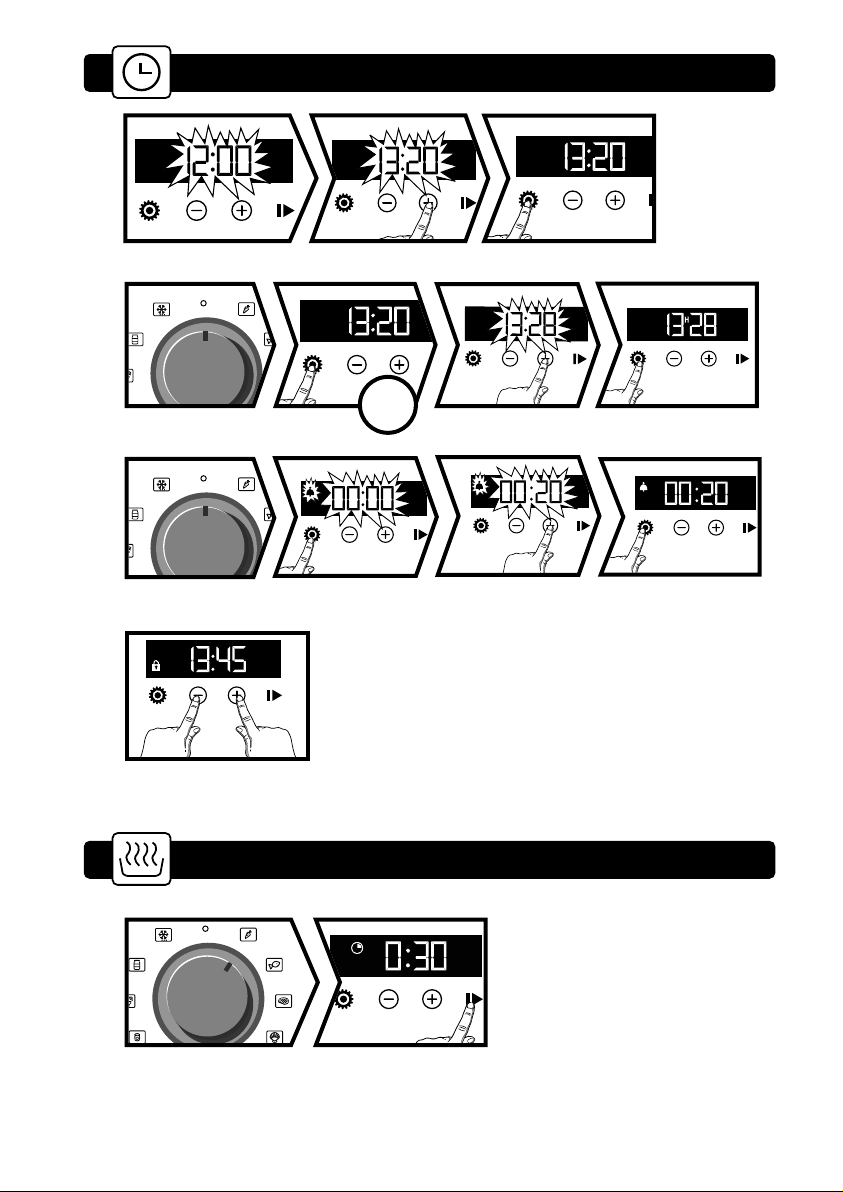
When switching on, the display flashes at 12:00.
Set the clock with + or -.
Confirm with
.
If there is a power cut, the clock flashes.
3.2 CHANGING THE CLOCK
The function selector switch must be in the 0
position.
Press ; the minute minder symbol appears .
Press again. Adjust the clock setting with + or - .
Confirm with
.
The cooking end time is automatically saved after
1m30s.
Setting the clock
3
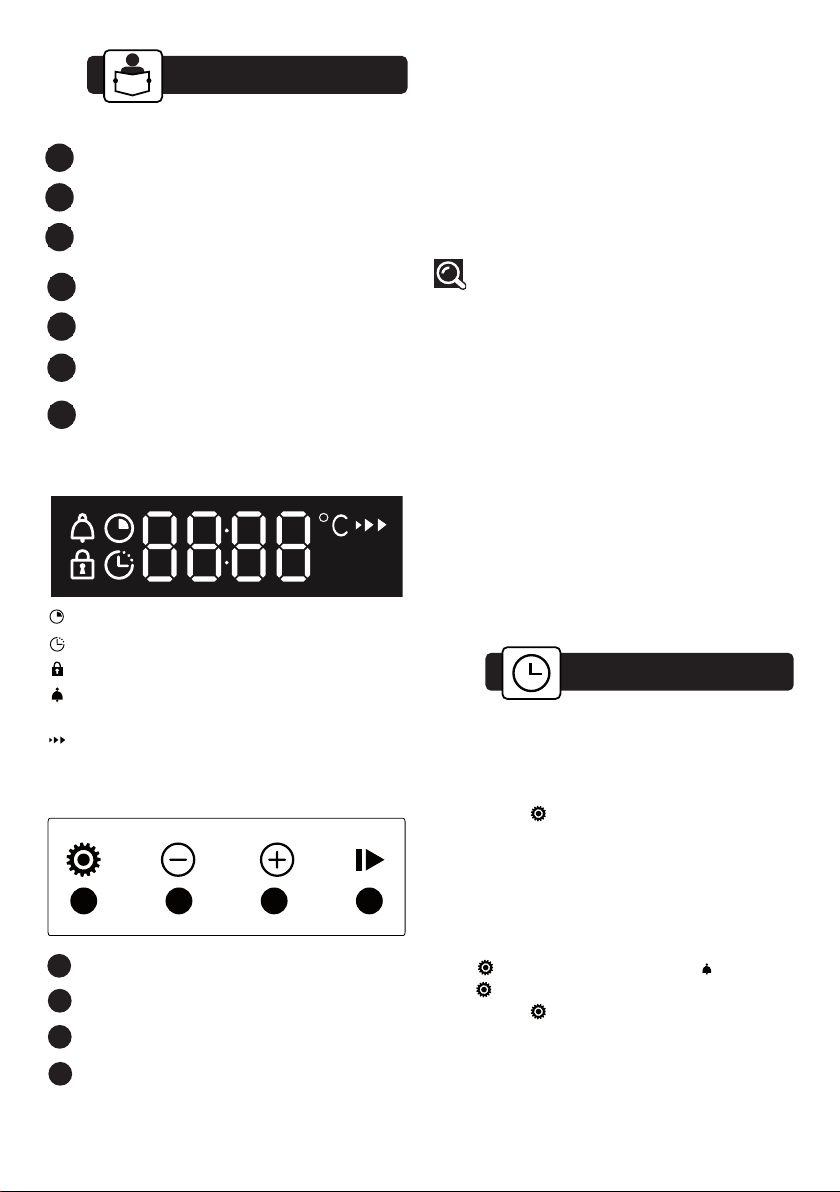
2.1 DESCRIPTION OF THE OVEN
Description of the oven
2
2.4
ACCESSORIES
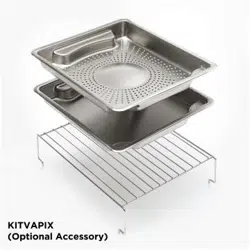
• Food dish (fig.1)
Perforated stainless steel cooking dish to prevent
contact between food and condensation water
• Condensate dish (fig.2)
Stainless steel dish for the recovery of condensation
water.
Tip
When cooking, place the dish in fig.1 on top
of the dish in fig.2 the other way round, so
that they do not nest inside each other.
For storage, place the fig.1 dish on top of
the fig.2 dish the same way round, so that
they nest inside each other.
• Shelf (fig.3)
Stainless steel removable shelf: it must be placed
in the oven.
• Removable tank (fig.4)
Tank providing an independent water supply to the
oven.
Its capacity is approximately one litre (maximum
level).
Set clock and cooking time/Menu
- button
+ button
Start
1
2
3
4
2.2
DISPLAY
2.3
BUTTONS
Cooking time
End of cooking
Keypad lock
Minute Minder
°C Temperature indicator
Temperature rise indicator
1 2 3
4
A
B
Display
Water intake tube
Steam generator
Control panel
Lamp
Tank
Gutter
C
D
E
F
G
ENGLISH
3.3 TIMER
This function can only be used when the oven is
off.
Press ; the symbol appears
.
The minute minder flashes.
Set the minute minder with + and -.
Press to confirm. The timer will then start.
Once the time has lapsed, there is a sound signal. To
stop it, press any key.
The time appears again in the display.
NB: You can modify or cancel the minute minder at
any time. To cancel, return to the timer’s menu and set
to 00:00. If you do not confirm, it will be saved
automatically after a few seconds.
3.4 KEYPAD LOCKING
Press + and - at the same time until the symbol
appears on the screen. To unlock, press + and -
until the symbol disappears off the screen.
Cooking
4
OPERATING PRINCIPLE
The water contained in the tank arrives in the cavi
ty
via a pipe. This water is transformed into steam
when it comes into contact with the hot surface of
the floor of the cavity:
this is the steam generator.
There is no need to add water to the cooking dish.
To ensure REAL STEAM COOKING, your oven is
supplied with specially designed cookware that will
produce perfect cooking.
USING THE TANK
You MUST fill the water tank to the max. level before
cooking. Replace the tank in its housing by firmly
pushing it ALL THE WAY until you feel it LOCK INTO
POSITION.
Water management
In the event of a water circuit-related problem during
cooking, the “no water” symbol appears and a beep is
emitted.
This error relates specifically to:
- an empty tank.
- a poorly seated tank.
After these two items have been checked, cooking
automatically restarts as soon as the door is closed.
Caution
When in use, the appliance becomes hot. Hot
steam will escape when you open the door of
the appliance. Keep children at a distance.
4.1 IMMEDIATE COOKING
- Your oven has 9 automatic steam cooking
functions (see Cooking Guide).
- One Manual function
- One Defrost function
Turn the function selector to choose the required
dish.
The display flashes. A cooking time is displayed
depending on the food selected. You can modify the
cooking time with the + and - buttons. Confirm with
; cooking starts and the countdown is displayed.
4.2 DEFERRED COOKING
Select a cooking programme. Change the length of
cooking if necessary. Press ; the cooking end time
symbol flashes to indicate that it can be set.
You can modify the cooking time with the + and -
buttons.
Confirm with .
Caution
To avoid spoiling the dish, do not open the
appliance door during cooking.

ENGLISH
CHANGING THE COOKING TIME
You can change the cooking time during cooking. To
do this, press and change the cooking time using
+ or -.
CANCELLING COOKING IN PROGRESS
You can stop cooking at any time by turning the
control to zero.
If steam generation has not yet begun
(approximately 1 minute), the oven stops
immediately and the time display disappears.
If steam generation has already begun, the time
changes to 3 minutes; a countdown begins and the
steam escapes before the door is opened.
END OF COOKING
0:00 is displayed. A succession of intermittent beeps
sounds for 10 minutes.
To stop the beeps, turn the selector to 0.
Caution
ALWAYS empty the tank after cooking.
Cooking
4
ENGLISH
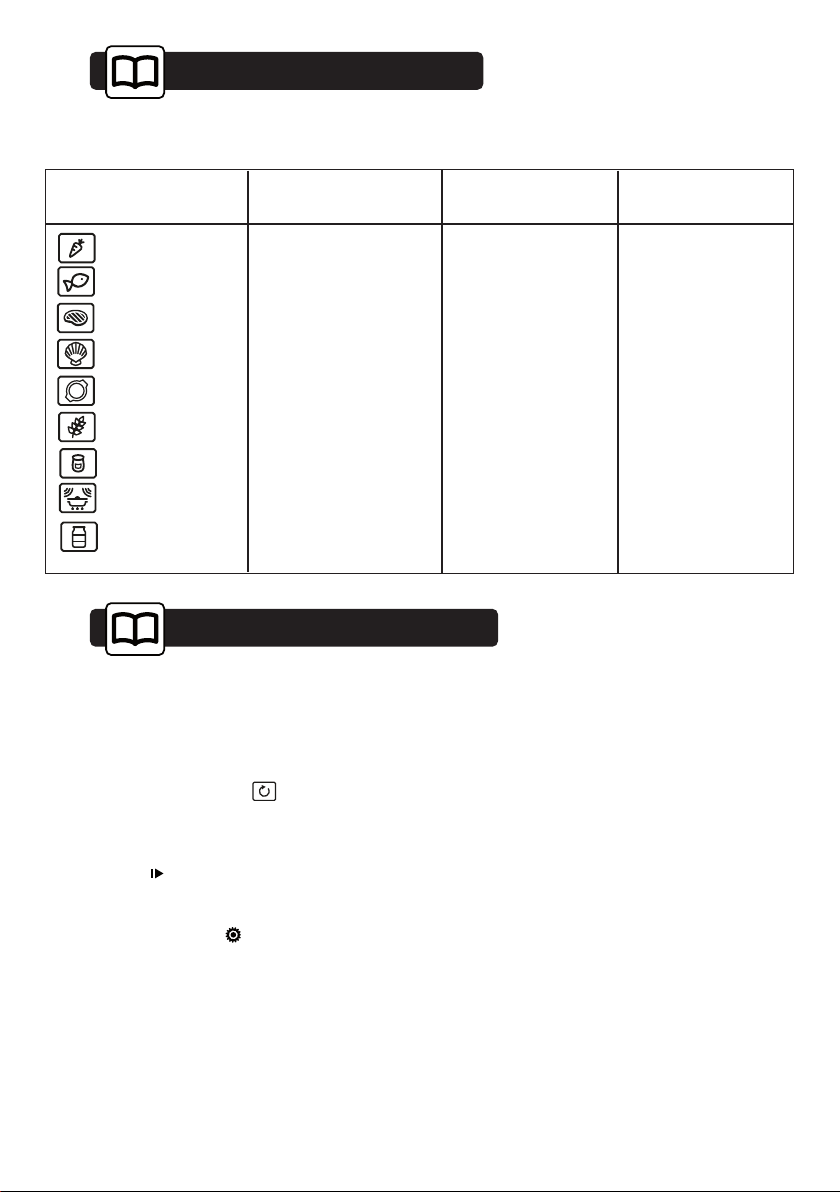
Guide to Automatic Cooking
5
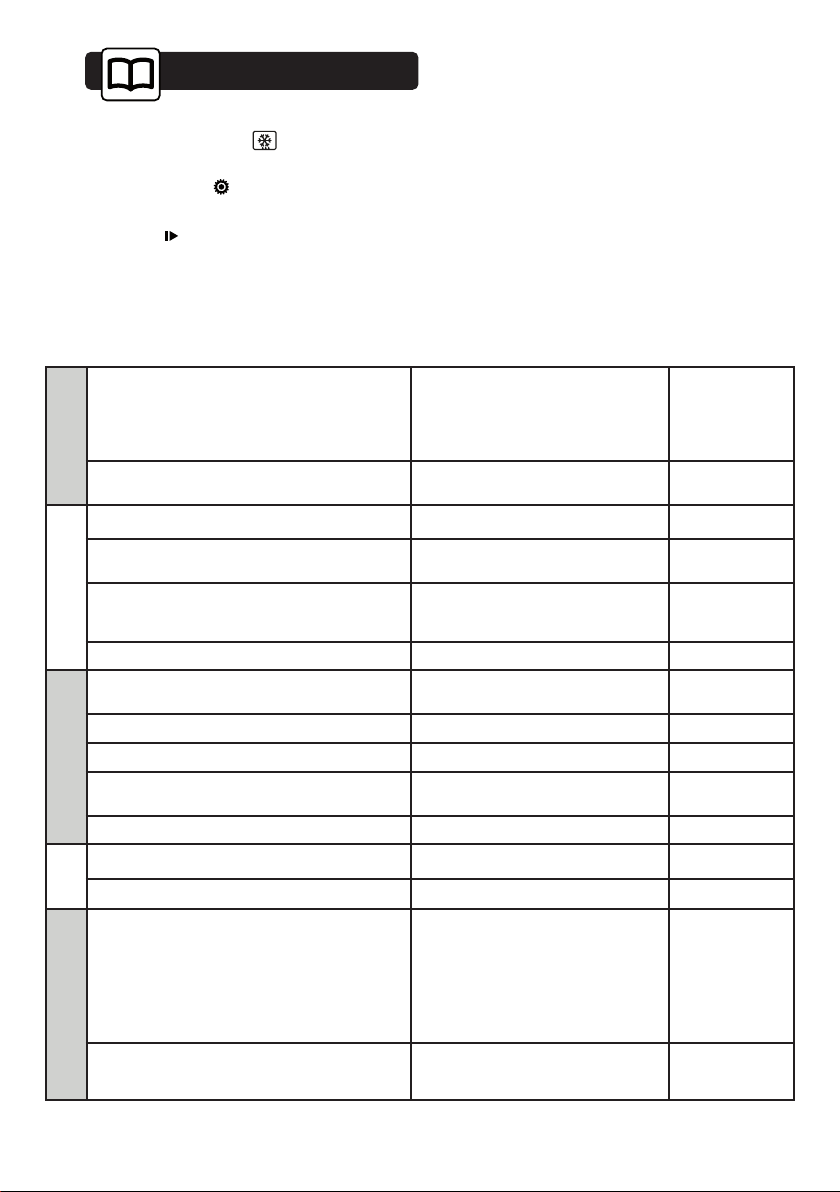
Cooking Functions Pre-programmed time
Min. time setting Max. time setting
20 min
15 min
50 min
10 min
10 min
20 min
7 hours
20 min
25 min
5 min
5 min
5 min
5 min
5 min
5 min
5 min
5 min
5 min
1 hour
1 hour
1 hour
1 hour
1 hour
1 hour
10 hours
1 hour
1 hour
Vegetables
Fish
Meat
Shellfish
Prepared meals
Cereals
Yoghurt
Reheating
Conserve
GUIDE TO AUTOMATIC COOKING
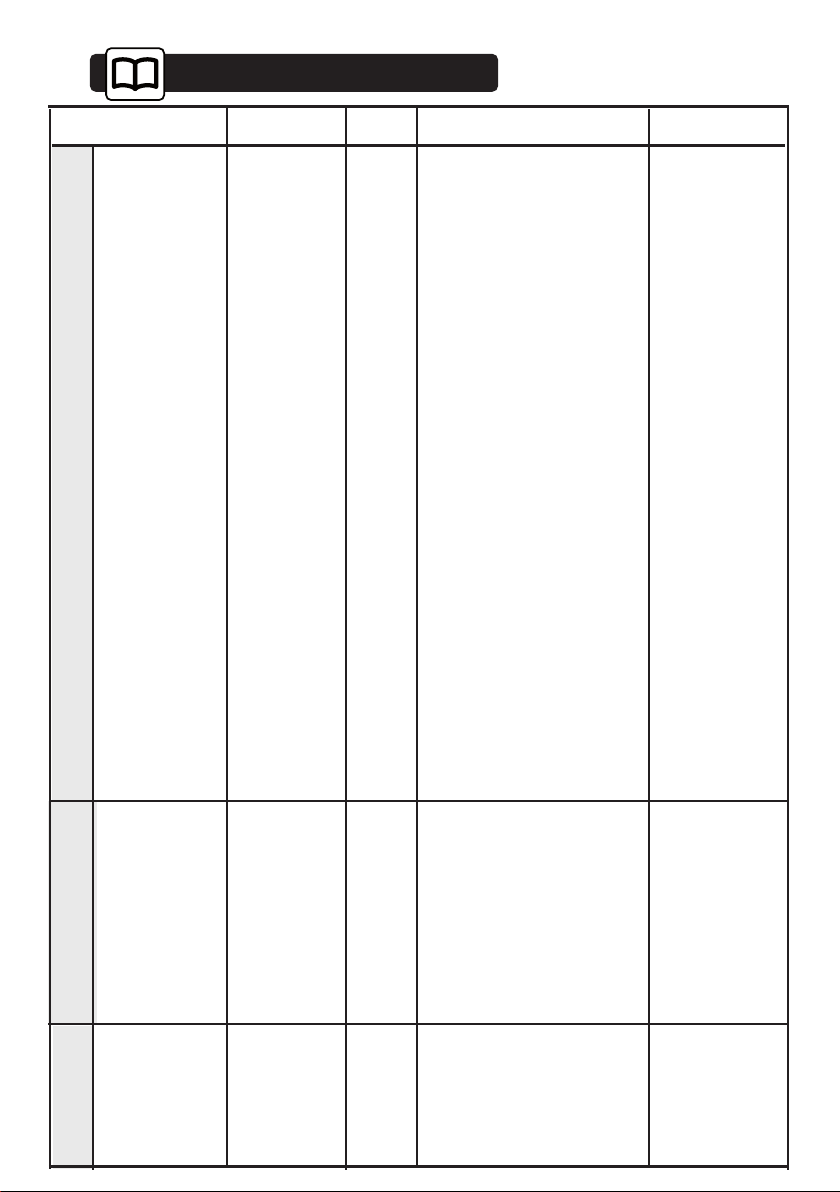
6.3 MANUAL MODE
With the manual function, you can choose the
cooking temperature and time depending on the
food (see table on next page).
Turn the function selector to .
The display flashes and a recommended cooking
time is shown. Refer to the guide to manual cooking
on the next page. Adjust the temperature and
confirm with ; cooking starts and the time is
displayed.
You can change the cooking duration and
temperature by pressing and adjust the time or
duration using + and -.
Guide to Manual Cooking
6
ENGLISH
Guide to Manual Cooking
6
Potatoes
Fresh peas
Green beans
Artichokes
(small)
TIMES
Asparagus
Broccoli
Carrots
Celeriac
Pumpkin
Mushrooms
Courgettes
Chinese artichokes
Spinach
Chicory
Fennel
Turnips
40 to 45 min.
35 to 40 min.
18 min.
20 to 22 min.
25 to 30 min.
15 to 20 min.
15 min.
10 to 15 min.
20 min.
20 min.
35 min
30 min.
22 min.
30 to 35 min.
15 to 20 min.
20 to 25 min.
25 min.
40 to 45 min.
placed upside down in the dish
for tips only, decrease cooking time
in small bunches
in thin, round slices
in thin slices
in cubes
in round slices
core removed, cut in
half along the length
cut in half
in cubes
Leeks
25 min.
cut in half
cut into round slices
whole
• These times
depend on the
type, size and
freshness of the
vegetables.
Follow the
indications that
appear in the
“Preparations”
column.
• To check the
degree of
cooking, insert
the tip of a knife
into the thickest
part of the
vegetable; if it is
cooked there
should be no
resistance.
(fresh) stir
while cooking (frozen)
/
Cabbage
30 to 35 min.
22 min.
30 to 35 min.
Brussels sprouts
Cauliflower florettes
Green, chopped
in thin strips
VEGETABLES
PREPARATIONS
NOTES
Scallops
Mussels/
Whelks
Crabs
Lobsters
Langoustines
10 to 12 min.
20 to 25 min.
25 min.
30 to 35 min.
12 to 15 min.
with seasoning
with seasoning
/
depending on weight
/
• Place the
scallops on the
rack on the glass
dish, add herbs.
• Place the shell
fish on a bed of
seaweed.
SHELLFISH
CRUSTACEANS
Apples/
peaches/pears
Compote
Creams
10 to 15 min.
25 min.
10 min.
whole, peeled
fruit in strips
in ramekins
• Times depend
on ripeness.
FRUIT
PUDDINGS
FOOD
Any quantity
100
100
100
100
100
100
100
100
100
100
100
100
100
100
100
100
100
100
°C
90
95
95
95
90
90
95
90
ENGLISH
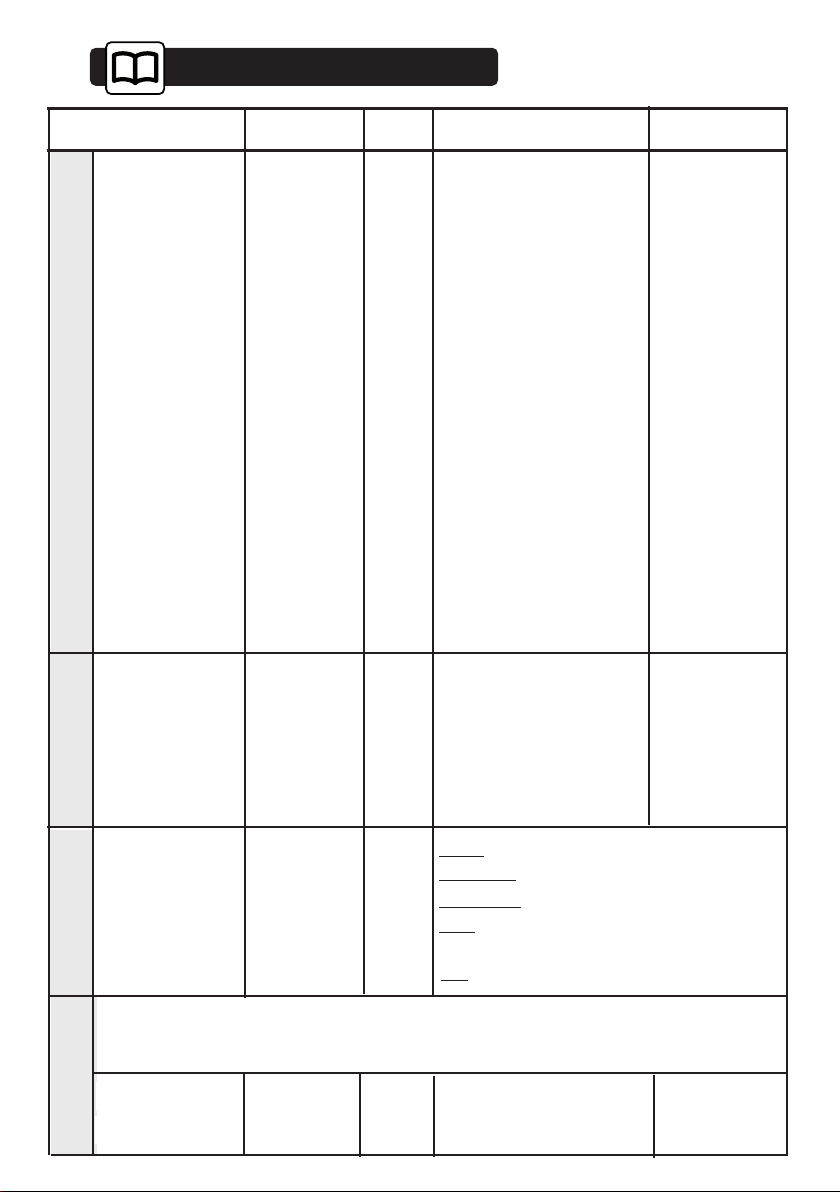
Guide to Manual Cooking
6
Pike
Cod/hake
Sea bream
Haddock
Herring
Pollack/coley
Monkfish
Mackerel
Whiting/Cod
Skate
• *Steaks: round
slices of fish
of 2 to 3 cm in
thickness
(180/200g) per
person.
• Insist on very
fresh produce.
• Place whole
fish in the dish as
they are or on bay
leaves, fennel or
other herbs.
• As soon as
cooking is
complete, remove
the skin, which
will come away
easily.
Red mullet
Red mullet/Sole
Rock salmon
Salmon
Tuna
Trout
Whole (1 kg)
25 to 30 min.
13 to 15 min.
20 to 25 min.
15 min.
20 min.
15 to 20 min.
15 min.
20 min.
15 min.
25 to 30 min.
15 min.
10 min.
20 min.
15 to 20 min.
20 to 25 min.
20 to 25 min.
whole (1 kg)
steaks (180 g)*
whole (1 kg)
fillets
whole (200 g)
steaks (180 g)
whole (250 g)
depending on thickness
fillets
whole (200 g)
fillets
thick steaks
(6 to 10 cm in length)
steaks (180/200 g)
steaks (180/200 g)
whole (200 g)
13 to 15 mins.
Pork
(tenderloin)
Poultry
(breast)
(stuffed)
Sausages
25 min.
20 to 25 min.
25 min.
20 min.
Chicken thighs: 35 to 40 min.
Roast turkey: 50 -60 min.
Morteau 400 g
• Then brown
under the grill in
another dish.
MEAT
Black/white
pudding
10 to 15 min.
• Fluff with
a fork when
cooking is
complete.
RICE, PASTA
SEMOLINA
Rice pudding
30 min.
100 g rinsed rice - 20 cl milk
- 2 tablespoons sugar
Semolina
20 min.
200 gr (1/4 litre water)
Place directly in a dish then cover with water or milk. The steam is not sufficient to
saturate these inflating foods. Place a sheet of aluminium foil on the dish to prevent
water droplets from falling in.
7 min.
5 to 6 min.
8 min.
Boiled: placed directly on the rack.
Soft-boiled: placed directly on the rack.
Fried
: broken into an individual dish placed on
the rack and covered with cooking film.
start with very
fresh eggs
kept at room
temperature.
10 to 12 min.
Hard-boiled
TIMES
PREPARATIONS
NOTES
FOOD
Any quantity
°C
FISH
85
75
85
85
80
85
75
80
80
75
85
85
85
85
100
100
100
100
95
90
90
EGGS
100
100
100
100
Pan: see detailed recipes.
100
90
100
ENGLISH
6.4 DEFROSTING
Turn the function selector to .
The display flashes. You can change the cooking
time. To do this, press and change the cooking
time using + or -.
Confirm with ; defrosting starts and the
countdown is displayed.
Defrost Guide
6
DEFROST GUIDE
VEGETABLES
In balls (spinach, etc.) placed in the dish 25 min
In a block placed in the dish 40/45 min.
FISH
Trout (whole) placed in the dish 30 min.
Salmon fillet
placed in the dish, turned over
mid-way through
25 min.
Fillets (covered with film) placed in the dish
15/20 min.
depending on
thickness
Shrimps placed in the dish 10/12 min.
MEAT
Chicken thighs
placed in the dish, turned over
mid-way through
40/45 min.
Chicken breasts (covered with film) 25 min.
Sausages placed in the dish 25 min.
Chops (pork, veal, etc.)
placed in the dish, covered with
film, turned over mid-way through
25/30 min.
Cubes of liver (for skewers) separate mid way through cooking 55/60 min.
FRUITS
Mixed red berries placed in the dish 15 min.
Compote (apples, etc.) covered with film 35/40 min.
PASTRIES AND CAKES
Doughnuts
kept in the packaging, placed on
the rack
15 min.
Pains au chocolat
kept in the packaging, placed on
the rack
15 min.
ENGLISH
Settings
7
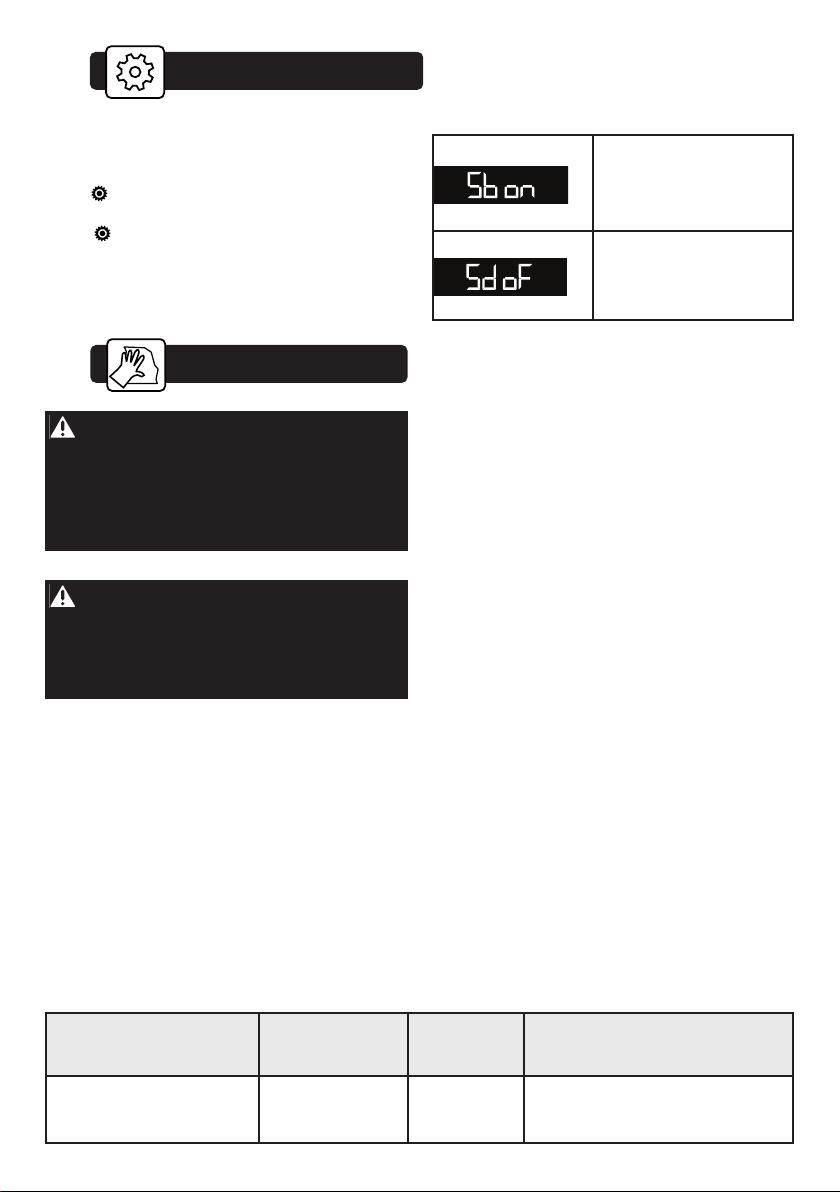
SETTINGS MENU
You can adjust different settings on your oven. To
do so:
Press for a few seconds until you get to the
“MENU” display to access the settings mode.
Press again to scroll through the different
settings.
Activate or de-activate the different parameters with
+ and -; see table opposite:
Activate/de-activate the
beeping sound of the
buttons
Activate/de-activate
demonstration setting
8
Care
Warning
Do not use scouring products, abrasive
sponges or metal scrapers to clean the glass
oven door as this could scratch the surface
and cause the glass to shatter.
Caution
For any cleaning operation inside the oven
cavity, the oven must be switched off.
Before starting to disassemble the appliance,
allow it to cool down and ensure that it has
been disconnected from the power supply.
EXTERNAL SURFACE
Use a window washing product applied to a soft
cloth. Do not use abrasive creams or scouring
sponges.
Accessory maintenance
Dish washer or hand washable, with a small
amount of detergent. Soak them if they are very
dirty.
Cleaning the cavity
(after each use).
Wipe the cavity with a dry cloth after the steam
generator has cooled or let the cavity air-dry by
leaving the door open.
Cleaning the water intake tube
(once a month).
Remove the water intake tube by unscrewing it.
Remove any hard-water deposits that may be
inside (using a thin, pointed object such as a thin
skewer or a knitting needle).
Cleaning the steam generator
(once a month).
Pour 1/2 cup of white alcohol vinegar on the
generator.
Leave for a few minutes, then clean and rinse with
water.
Do not use sponges, abrasive powders or coffee
maker descaler.
Cleaning the gutter.
Remove this gutter by pulling it upward. Wipe it
and return it to its position using the three notches
provided.
FUNCTION PERFORMANCE TESTS
STEAM TESTS: as per IEC 60350-1 Art. 8
Broccoli
100% steam 500 g
18 min. dish 1 inside dish 2
Frozen peas
100% steam
1
000 g
27 min. dish 1 inside dish 2
ENGLISH
ENVIRONMENTAL COMPLIANCE
The packaging material of this appliance is recyclable.
Make sure to recycle them and thus contribute to the
protection of the environment by depositing them in
the municipal containers provided for this purpose.
Your appliance also contains many
recyclable materials. It is therefore
marked with this logo to indicate that used
appliances should not be mixed with other
waste.
Appliance recycling organised by your
manufacturer is carried out under optimum
conditions, in accordance with European Directive
2002/96/EC on the disposal of waste electrical and
electronic equipment.
Contact your local authority or retailer for information
on used appliance collection points close to your
home.
We thank you for your help in protecting the
environment.
Environment
10
You may resolve certain little problems yourself:
The display does not light up. Check the power
(fuse OK).
Water or steam leak around the door during
cooking. Check that the oven door is properly
closed.
The oven light is not working. Replace the bulb
or fuse of your installation. Check that the oven is
properly connected.
The oven is not heating. Check that the oven is
correctly connected. Check that the oven is not set
to “DEMO” mode (see settings menu).
Contact the after-sales service if one of the
faults persists.
Troubleshooting
9
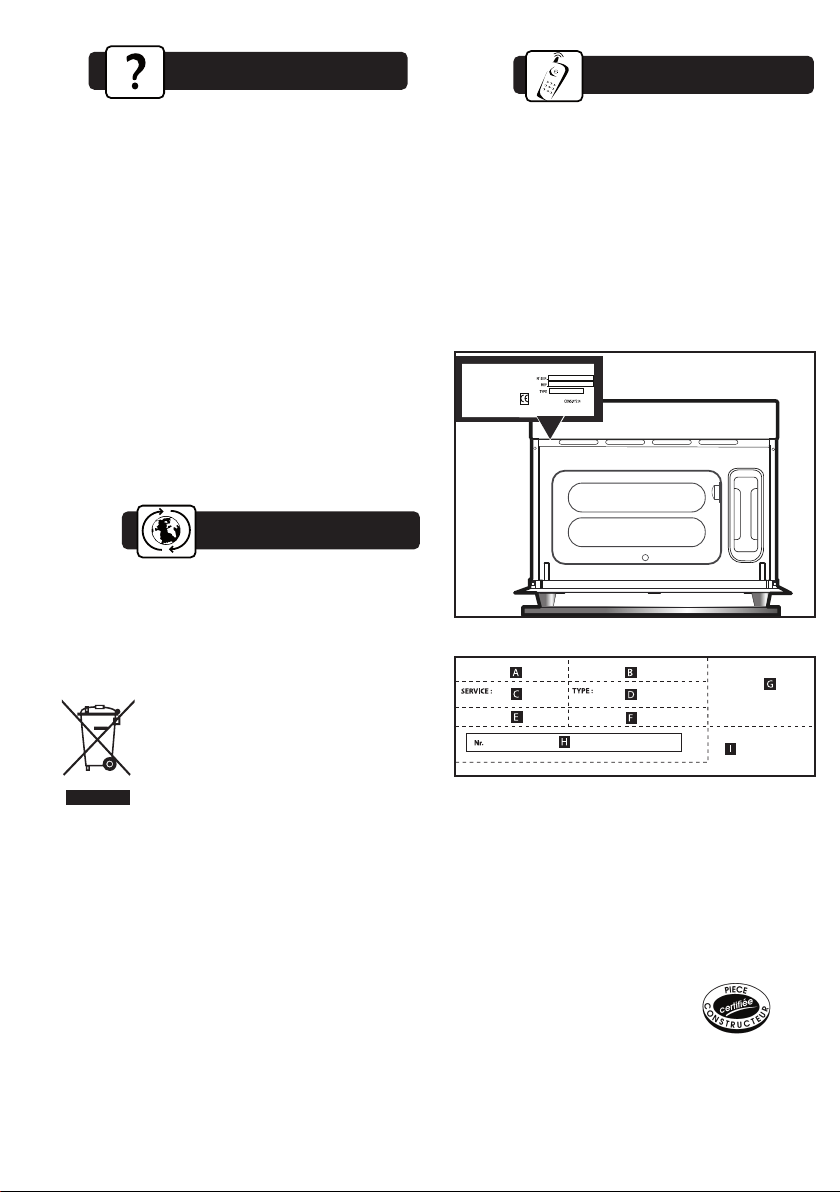
REPAIRS
Any repairs to your appliance must be made by
a qualified professional accredited to work on the
brand. When calling, please provide the full
references of your appliance (commercial
reference, service reference, serial number), so
that we can handle your call more efficiently.
This information can be found on the data plate.
B: Commercial reference
C: Service reference
H: Serial number
GENUINE PARTS
During servicing, ask for only original
spare parts to
be used.
BRANDT APPLIANCES SAS
7 rue Henri Becquerel
92500 RUEIL MALMAISON
230V ~ 50 Hz
MADE IN FRANCE
After-Sales Service
11