1
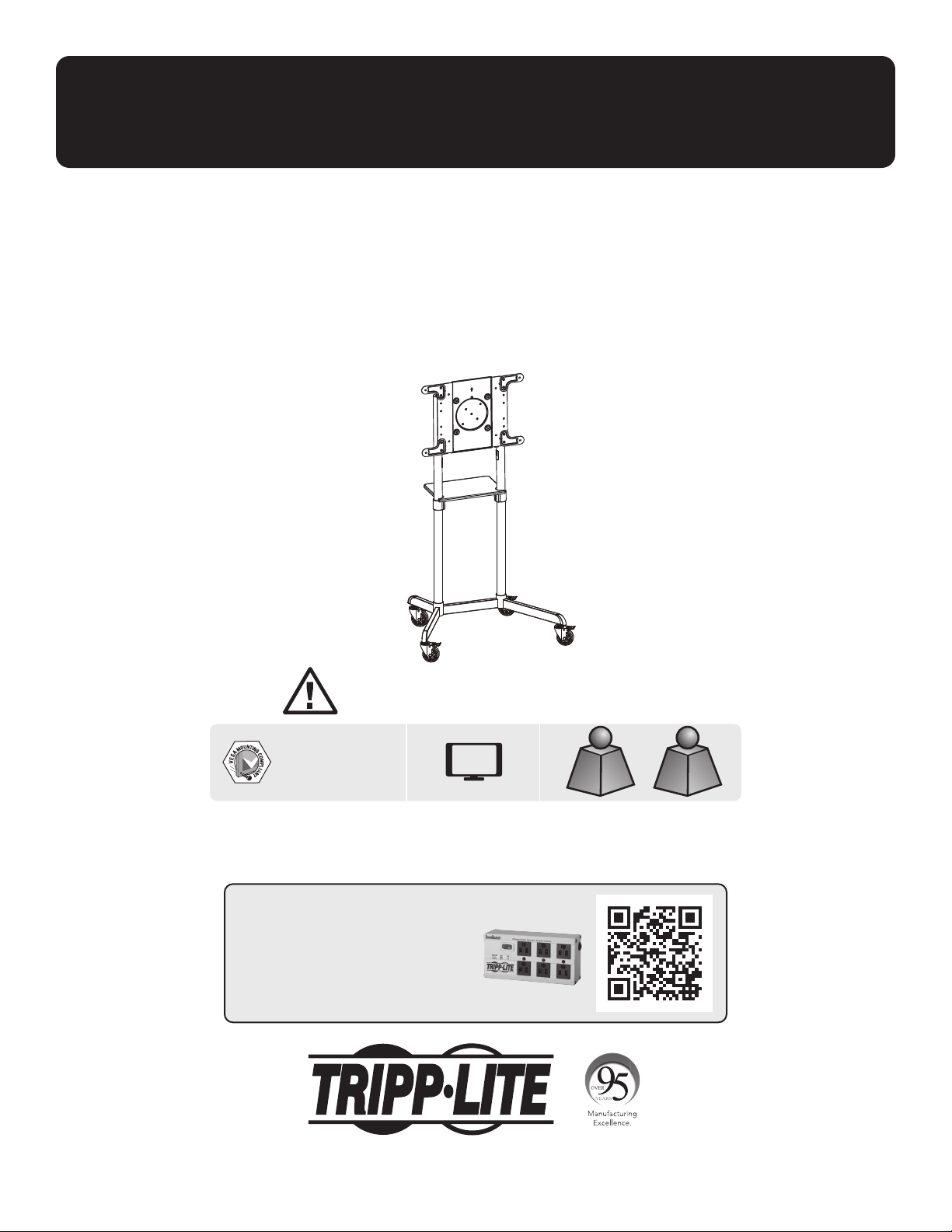
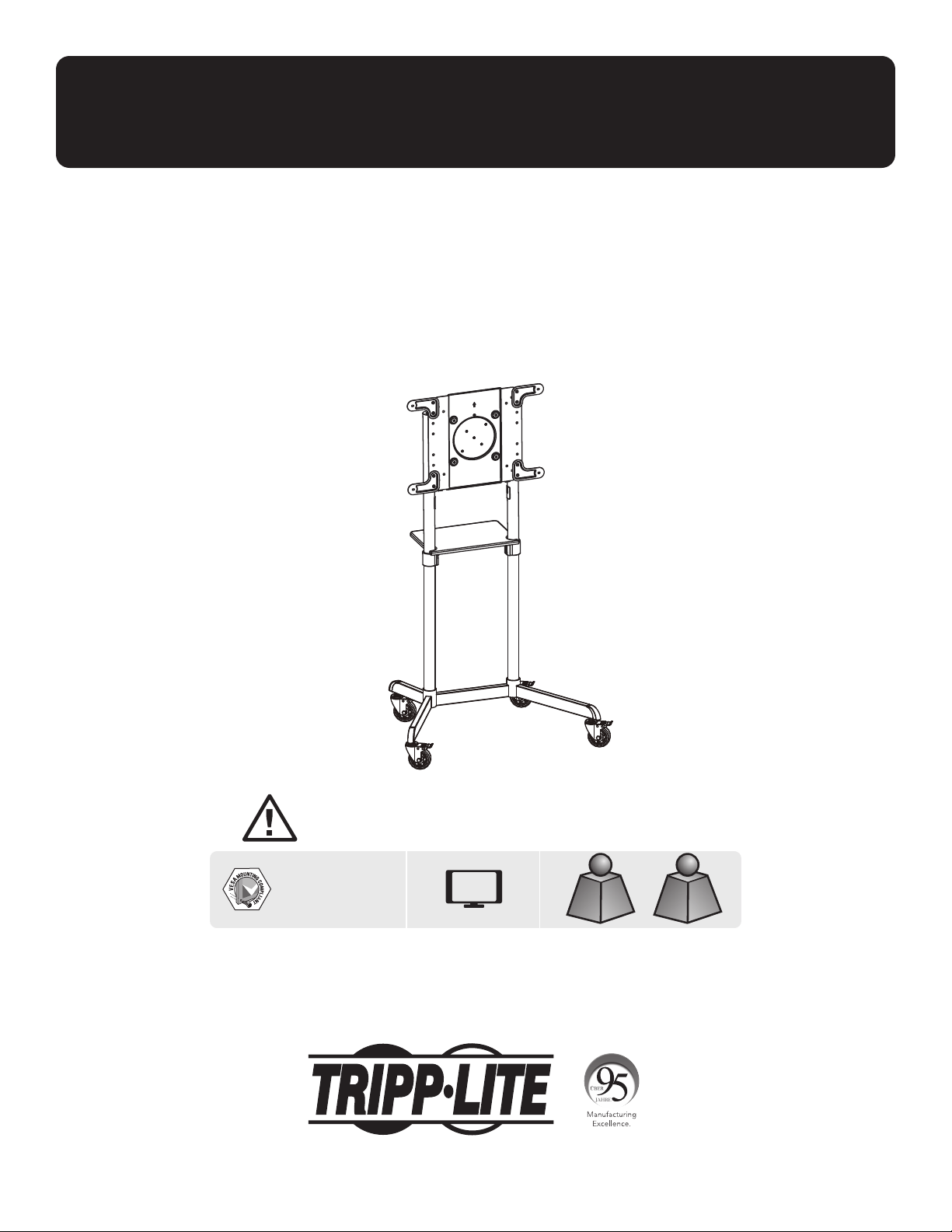
Owner’s Manual
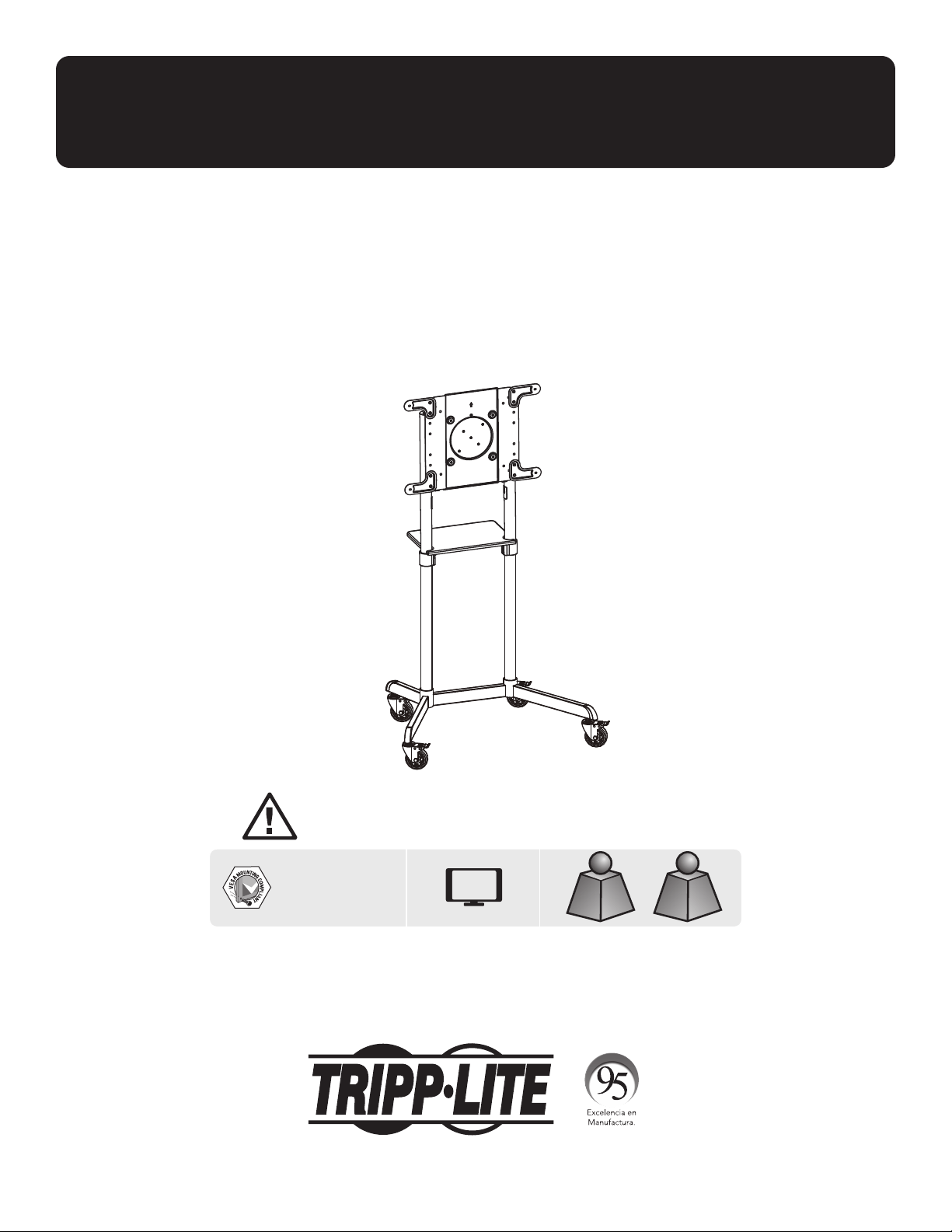
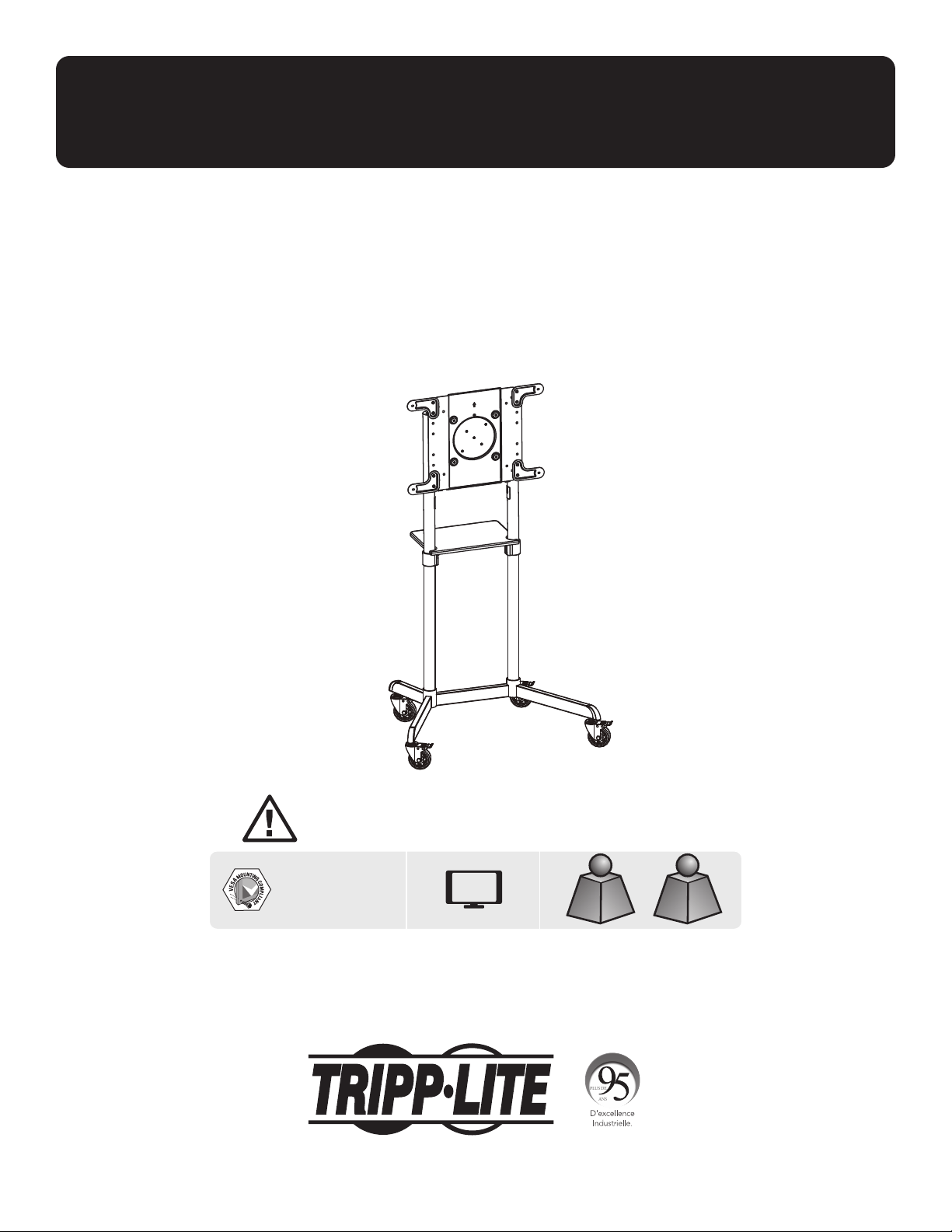
Mobile Rotating
Display Cart
Model: DMCS3770ROT
1111 W. 35th Street, Chicago, IL 60609 USA • tripplite.com/support
Copyright © 2020 Tripp Lite. All rights reserved.
WARRANTY REGISTRATION
Register your product today and be
automatically entered to win an ISOBAR
®
surge protector in our monthly drawing!
tripplite.com/warranty
WARNING! Always use an assistant or mechanical lifting equipment
to safely lift and position equipment.
200 x 200 / 300 x 300
350 x 350 / 400 x 200
400 x 400 / 600 x 200
600 x 400
70”
MAX
Rated for TVRated for TV
154 lb. / 154 lb. /
70 kg70 kg
Rated for DVDRated for DVD
11 lb. / 11 lb. /
5 kg5 kg
Español 19 • Français 37 • Рессрил 55 • Deutsch 73

2
Important Safety Instructions
Warranty and Product Registration
CAUTION
• Read the entire instruction manual before you start assembly and installation. If you have questions about any of the
instructions or warnings, contact Tripp Lite Support.
• Use with products heavier than the rated weights indicated may result in instability, causing possible injury.
• Mounts must be attached as specified in these instructions. Improper installation may result in damage or serious
personal injury.
• Safety gear and proper tools must be used. This product should only be installed by professionals.
• Ensure the supporting surface will safely support the combined weight of the equipment and all attached hardware and
components.
• Use the mounting screws provided and DO NOT OVERTIGHTEN the mounting screws.
• This product contains small items that could be a choking hazard if swallowed. Keep these items away from children.
• This product is intended for indoor use only. Using this product outdoors could lead to product failure and personal
injury.
• Check that the bracket is secure and safe to use at regular intervals (at least every three months).
5-Year Limited Warranty
Seller warrants this product, if used in accordance with all applicable instructions, to be free from original defects in material and workmanship for a period of
5 years from the date of initial purchase. If the product should prove defective in material or workmanship within that period, Seller will repair or replace the
product, at its sole discretion.
THIS WARRANTY DOES NOT APPLY TO NORMAL WEAR OR TO DAMAGE RESULTING FROM ACCIDENT, MISUSE, ABUSE OR NEGLECT. SELLER MAKES NO
EXPRESS WARRANTIES OTHER THAN THE WARRANTY EXPRESSLY SET FORTH HEREIN. EXCEPT TO THE EXTENT PROHIBITED BY APPLICABLE LAW, ALL IMPLIED
WARRANTIES, INCLUDING ALL WARRANTIES OF MERCHANTABILITY OR FITNESS, ARE LIMITED IN DURATION TO THE WARRANTY PERIOD SET FORTH ABOVE;
AND THIS WARRANTY EXPRESSLY EXCLUDES ALL INCIDENTAL AND CONSEQUENTIAL DAMAGES. (Some states do not allow limitations on how long an implied
warranty lasts, and some states do not allow the exclusion or limitation of incidental or consequential damages, so the above limitations or exclusions may not
apply to you. This warranty gives you specific legal rights, and you may have other rights which vary from jurisdiction to jurisdiction.)
WARNING: The individual user should take care to determine prior to use whether this device is suitable, adequate or safe for the use intended. Since
individual applications are subject to great variation, the manufacturer makes no representation or warranty as to the suitability or fitness of these devices for
any specific application.
PRODUCT REGISTRATION
Visit tripplite.com/warranty today to register your new Tripp Lite product. You’ll be automatically entered into a drawing for a chance to win a FREE Tripp Lite
product!*
* No purchase necessary. Void where prohibited. Some restrictions apply. See website for details.
Tripp Lite has a policy of continuous improvement. Specifications are subject to change without notice. Images may differ slightly from actual products.
3
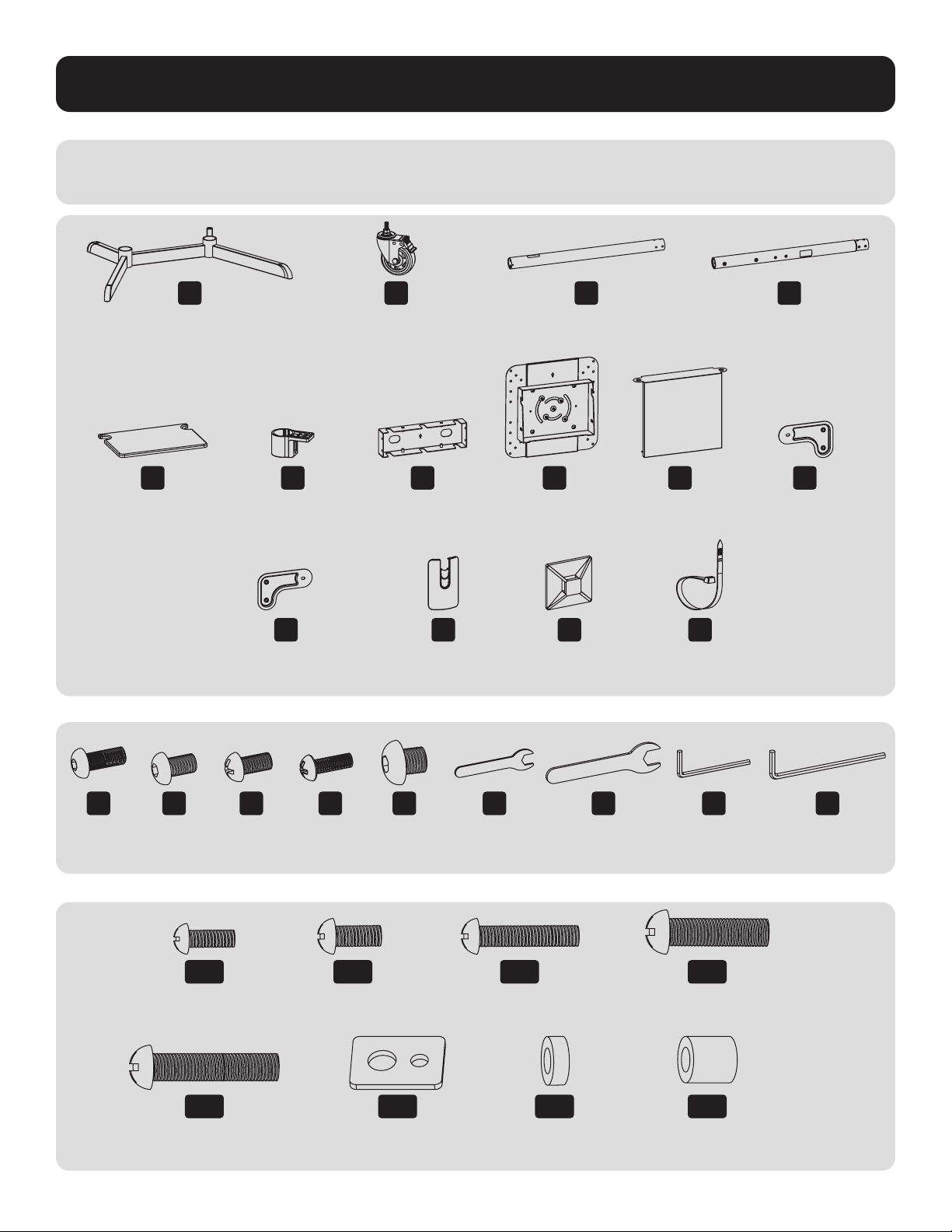
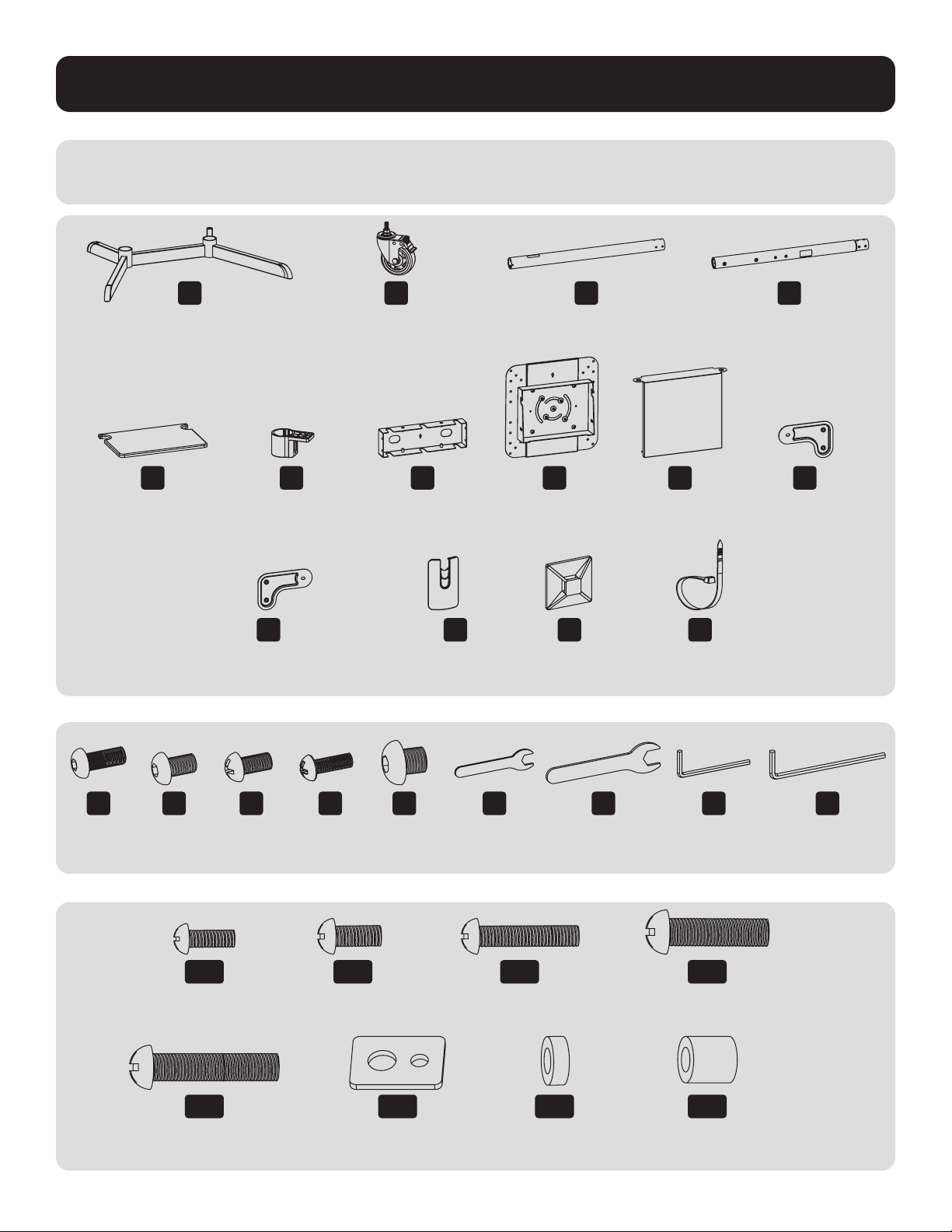
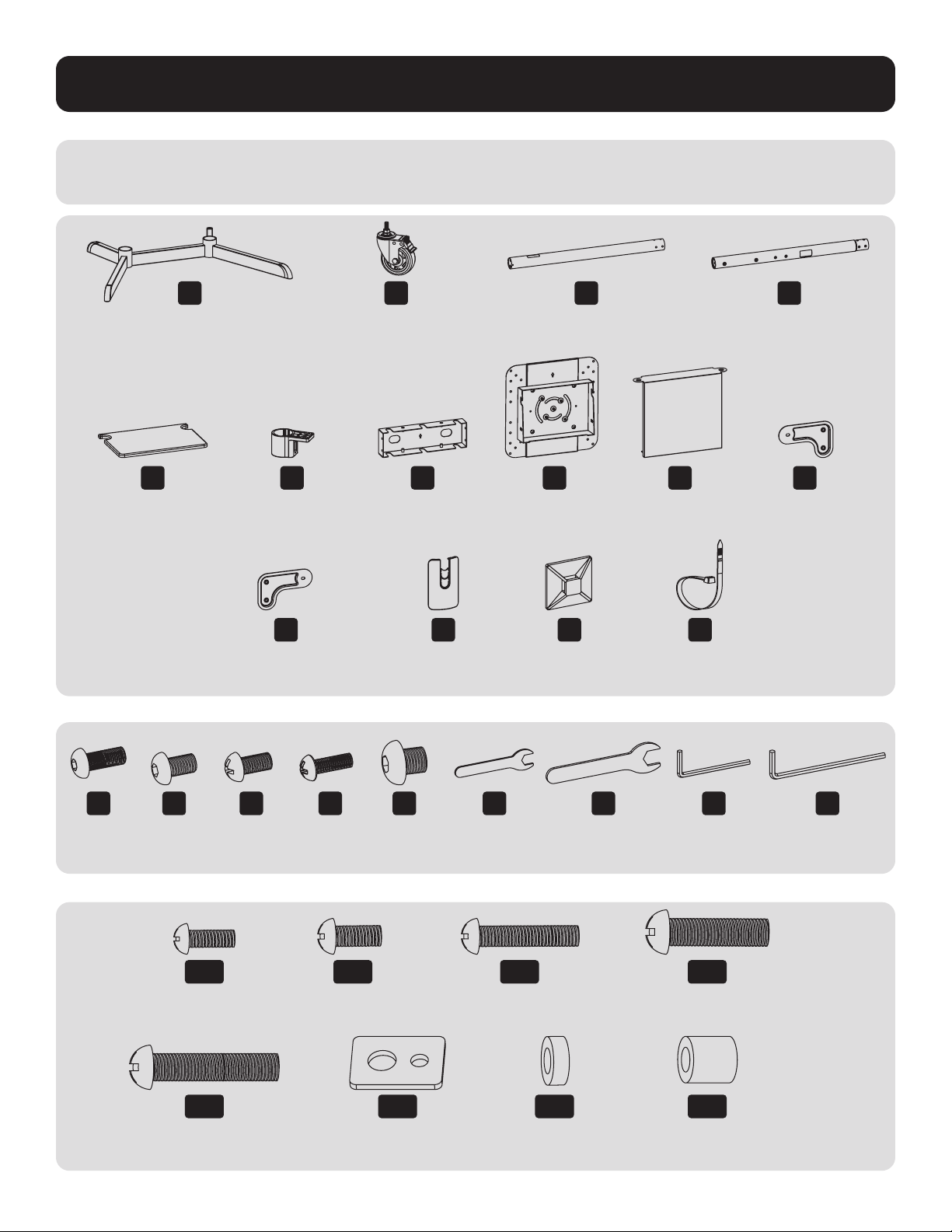
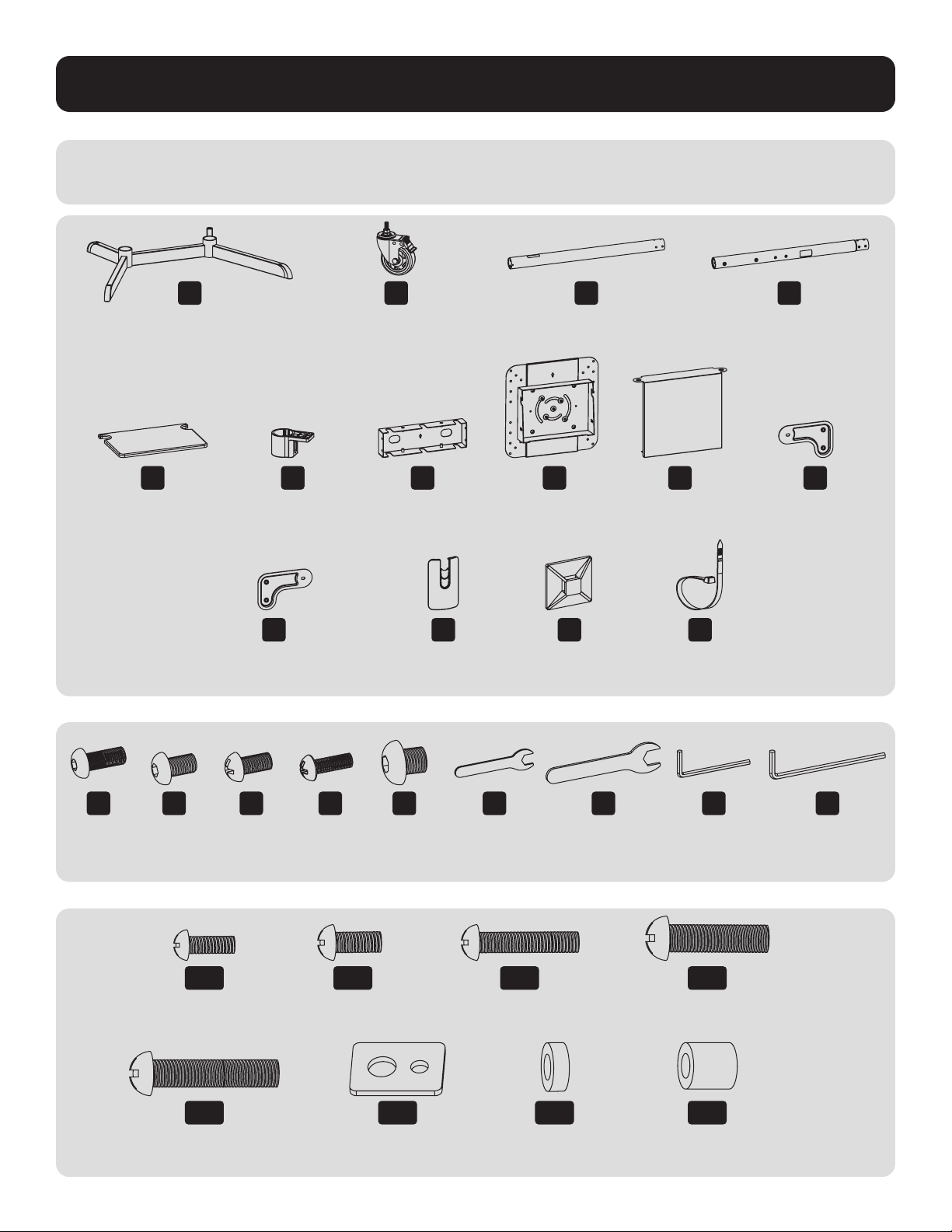
Parts List
IMPORTANT: Before beginning installation, be sure you have received all the parts listed below. If any parts are
missing or faulty, contact Tripp Lite for replacements.
M
M8 x 20
(x8)
T
M6 Wrench
(x1)
A
Base
(x1)
B
Caster
(x4)
C
Base Column
(x2)
D
Upper Column
(x2)
E
Equipment Shelf
(x1)
L
Cable Cover
(x4)
S
Cable Clip
(x5)
F
Shelf Mounting
Bracket
(x2)
G
Front Cover
(x1)
H
Mounting Plate
(x1)
I
Rear Cover
(x1)
J
VESA Extension
Adapter Arm
(x2)
K
VESA Extension Adapter Arm
(x2)
R
Cable Clip Holder
(x5)
N
M6 x 8
(x8)
U
M10 Wrench
(x1)
P
M6 x 18
(x1)
W
5mm Hex Key
(x1)
O
M6 x 12
(x16)
V
4mm Hex Key
(x1)
Q
M8 x 8
(x8)
M-A
M5 x 14
(x4)
M-E
M8 x 50
(x4)
M-C
M6 x 30
(x4)
M-G
Small Spacer
(x8)
M-B
M6 x 14
(x4)
M-F
Washer
(x4)
M-D
M8 x 30
(x4)
M-H
Big Spacer
(x8)
Package M
Package P
4
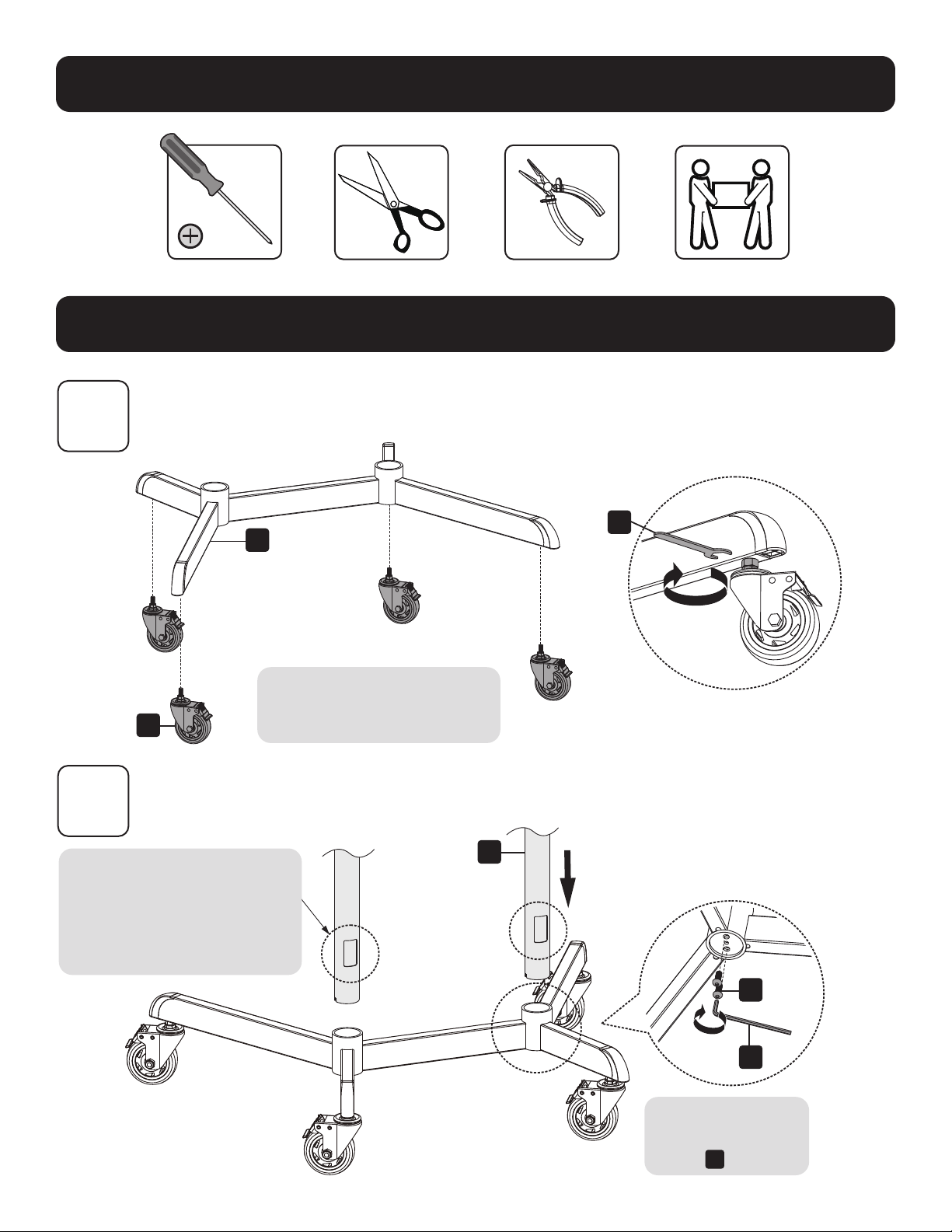
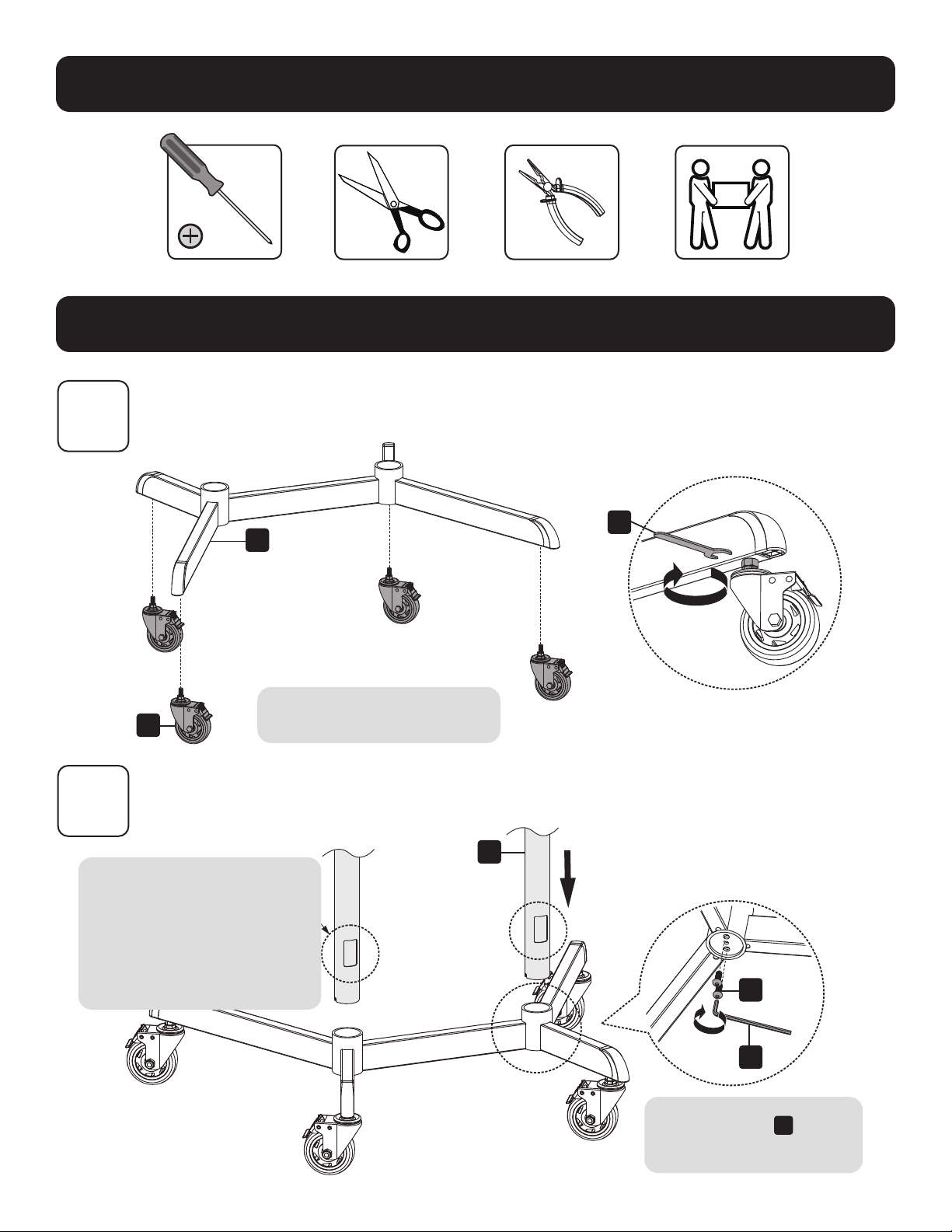
Assembly and Installation
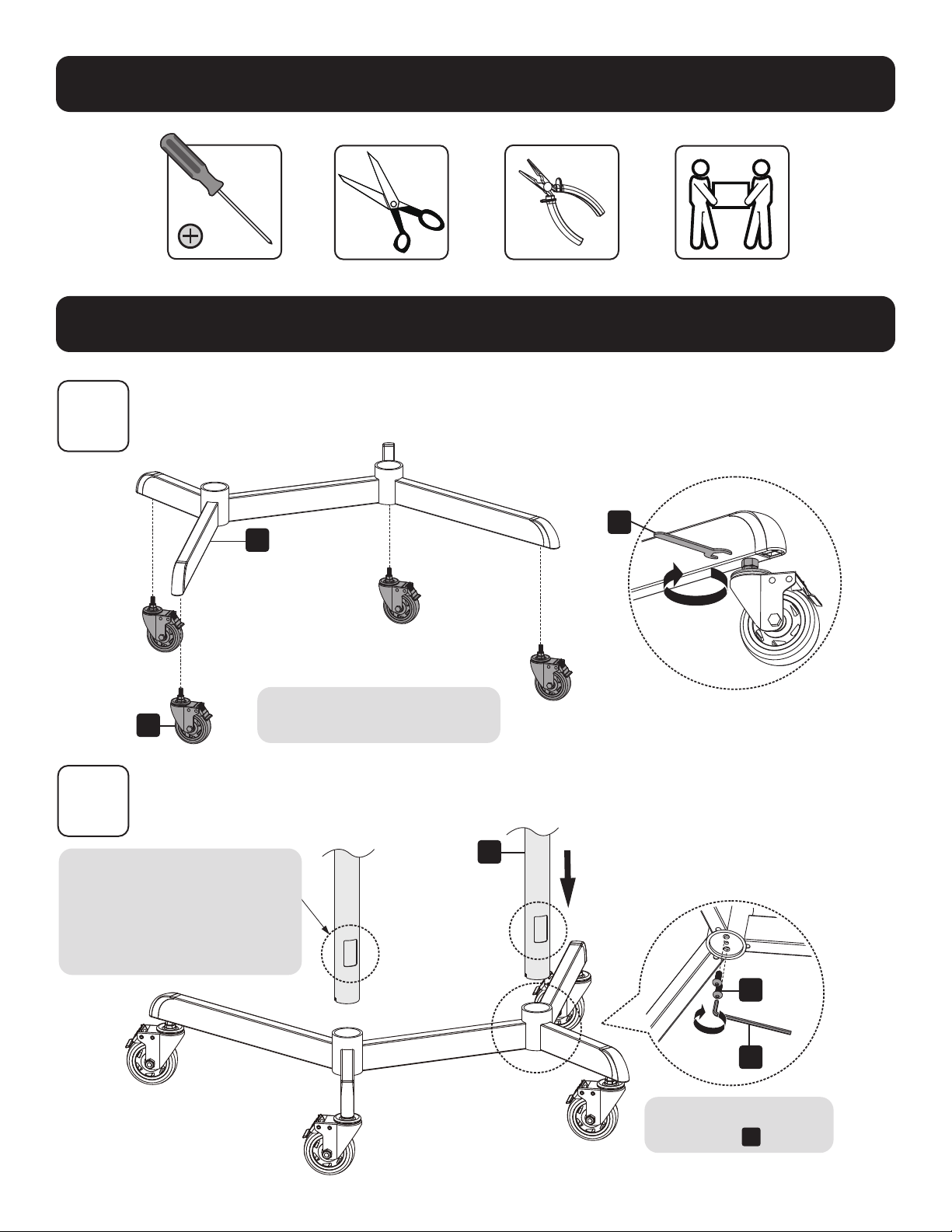
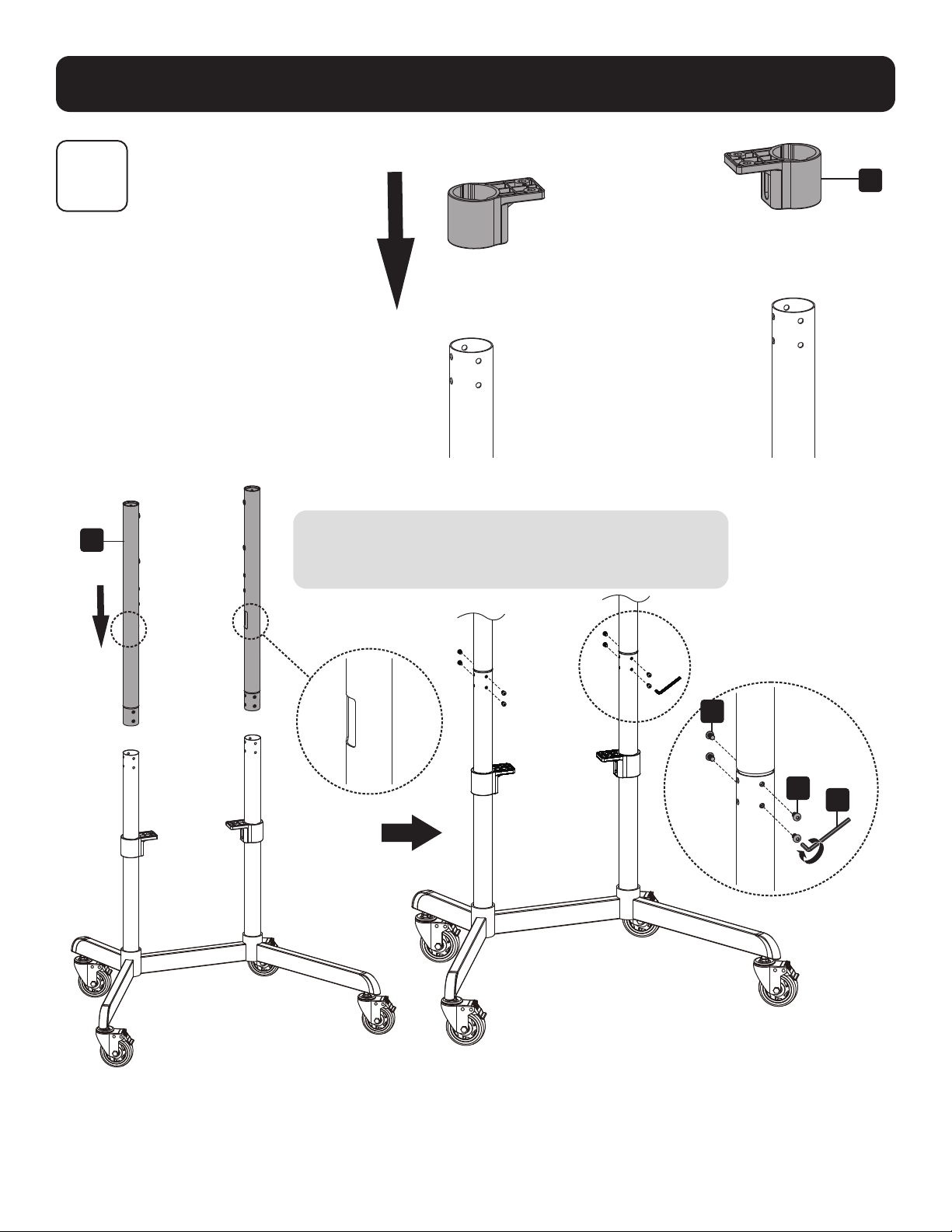
Required for Installation
1
2
B
A
U
Keep casters locked prior to
beginning installation.
Installing the Wheel Casters
Attaching the Columns to the Base
Align the column as
shown, ensuring the cable
management holes and the
shorter legs are on the same
side.
Do not fully tighten
the screws
M
.
C
M
W
5
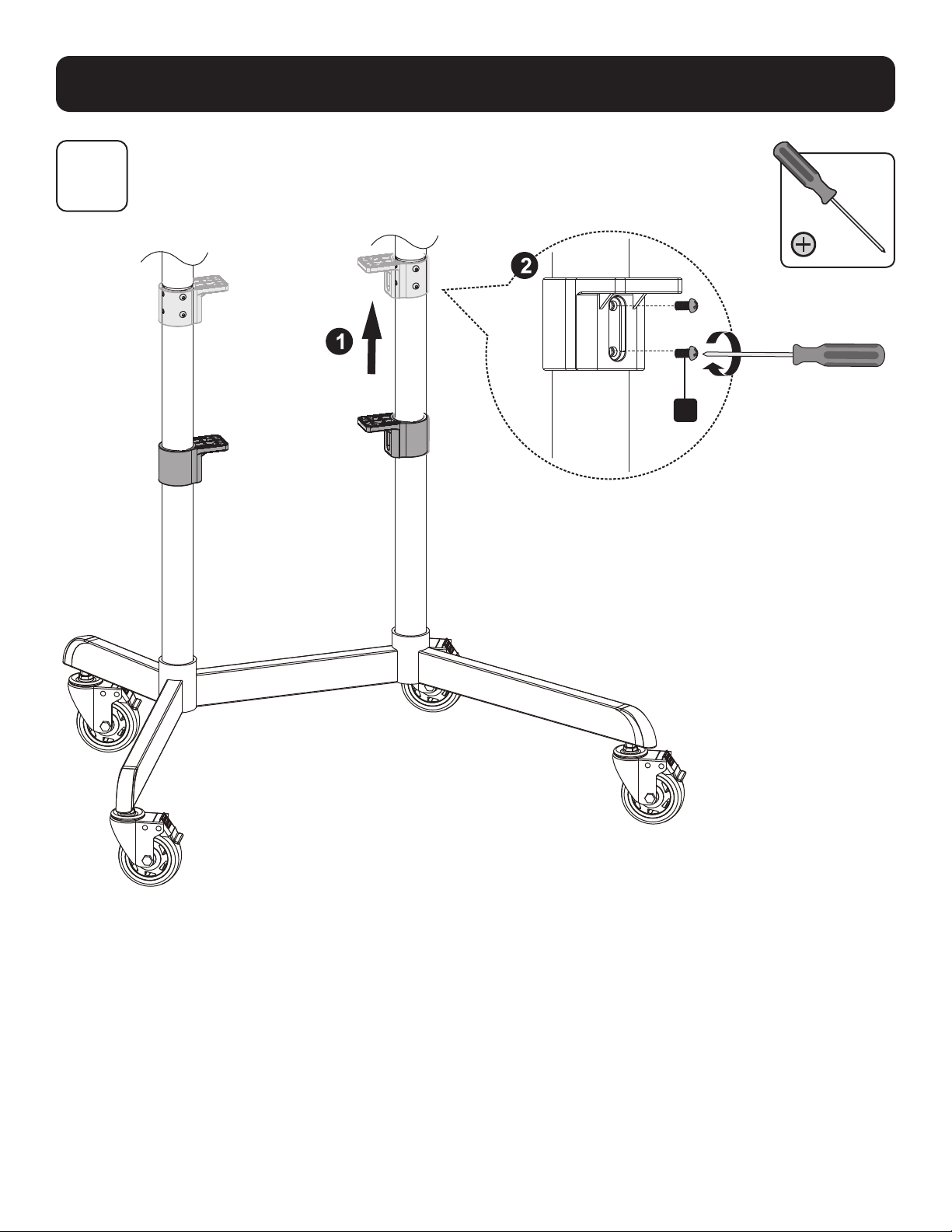
Assembly and Installation
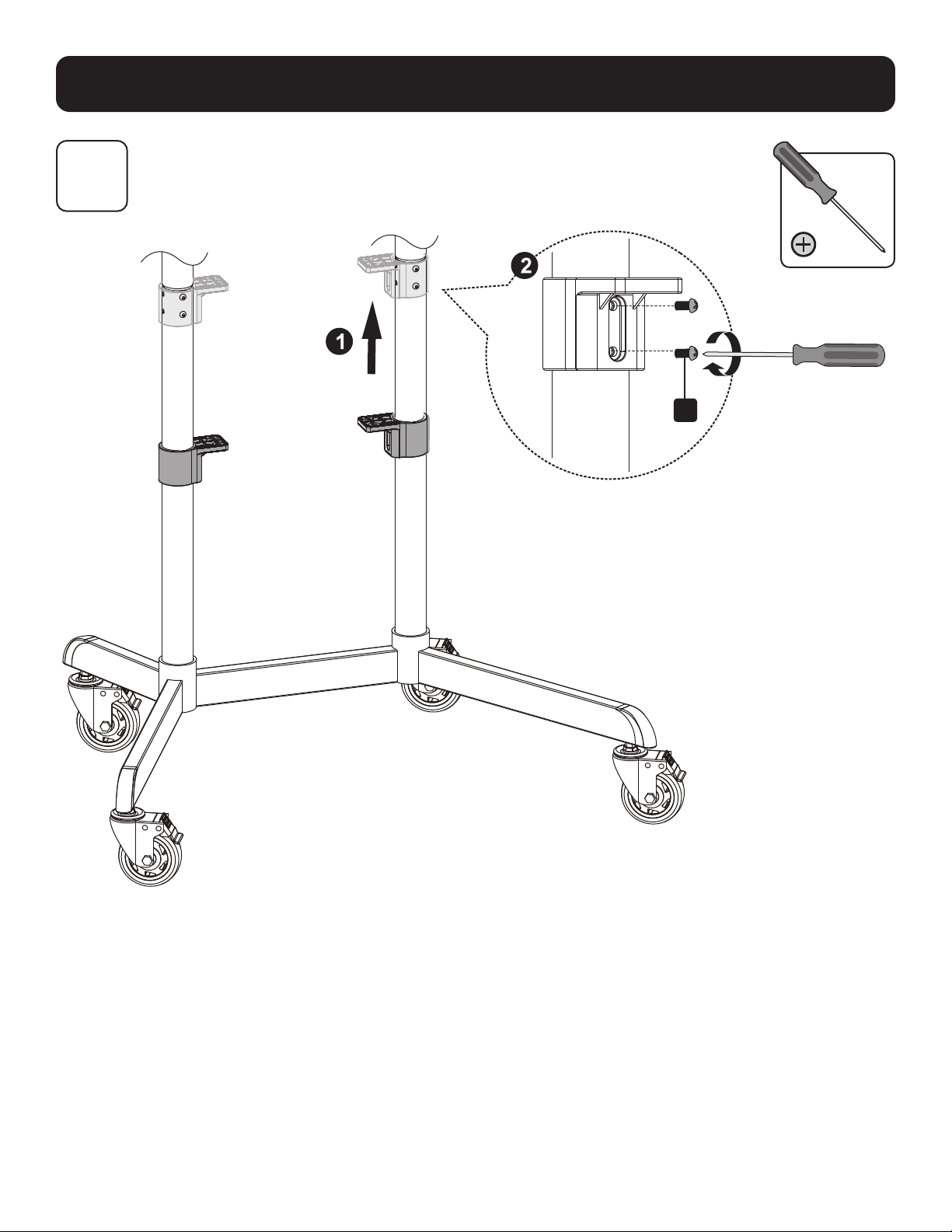
3
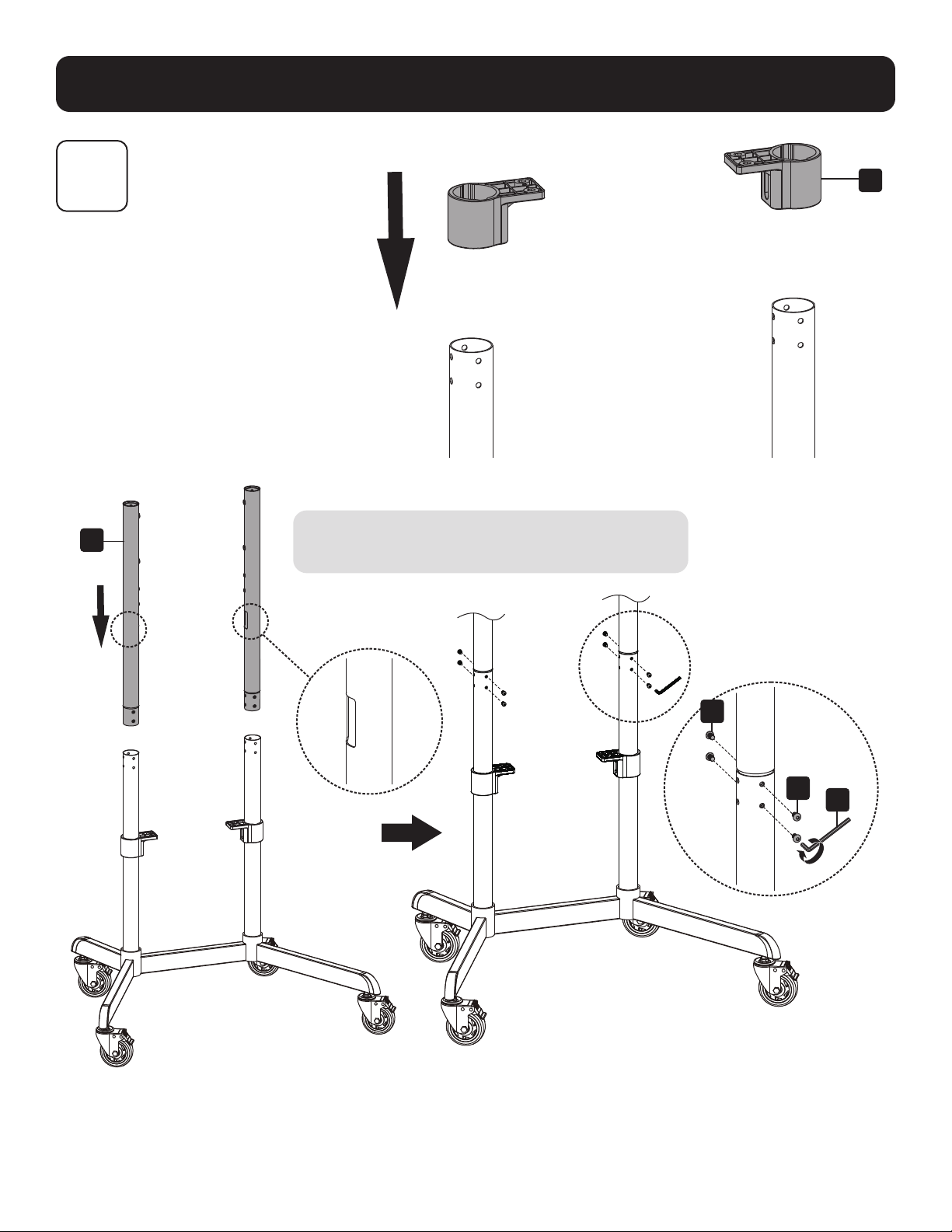
Installing the Columns
Position the cable management holes (found on
each upper column leg) facing in as shown.
F
D
N
N
V
6
Assembly and Installation
4
O
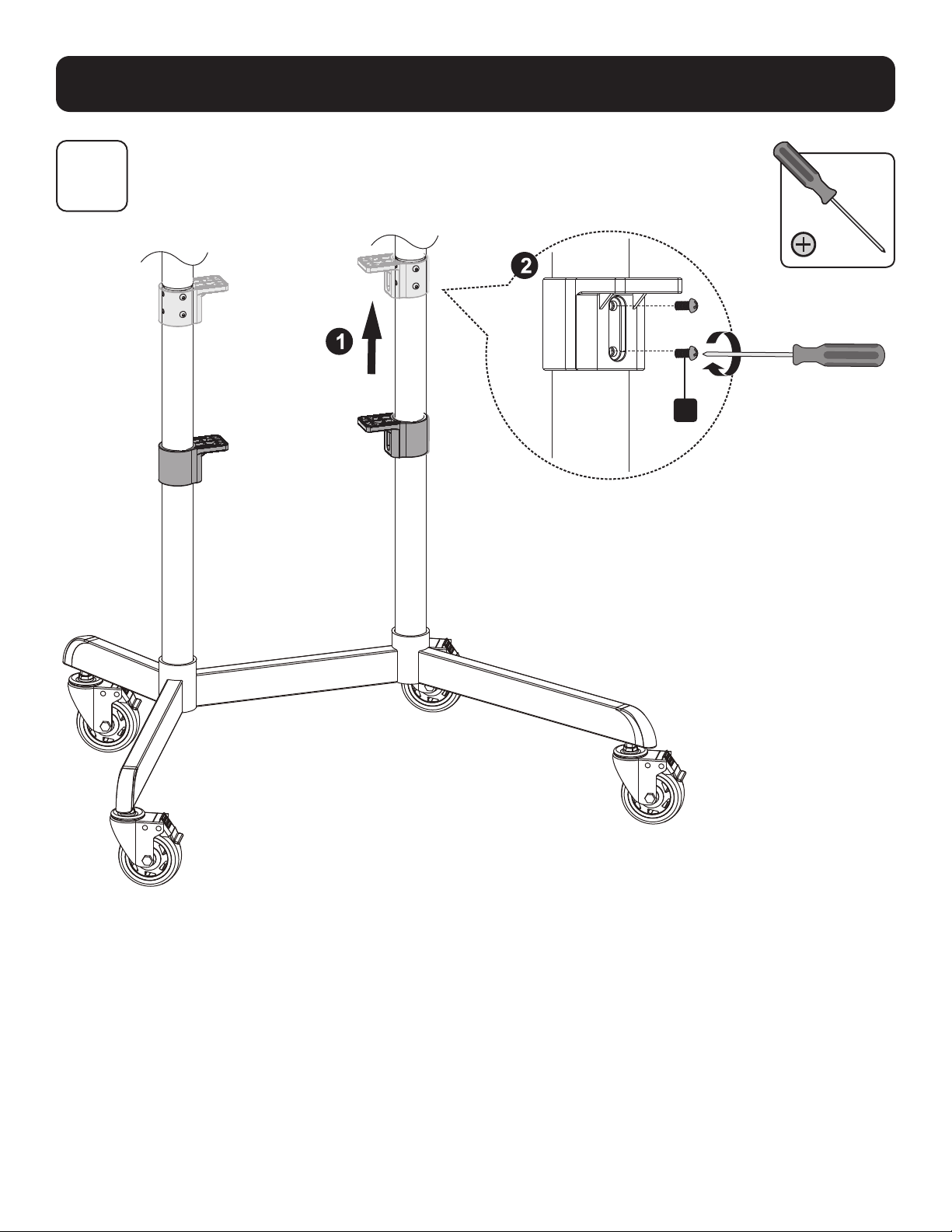
Installing the Shelf Mounting Brackets
7
Assembly and Installation
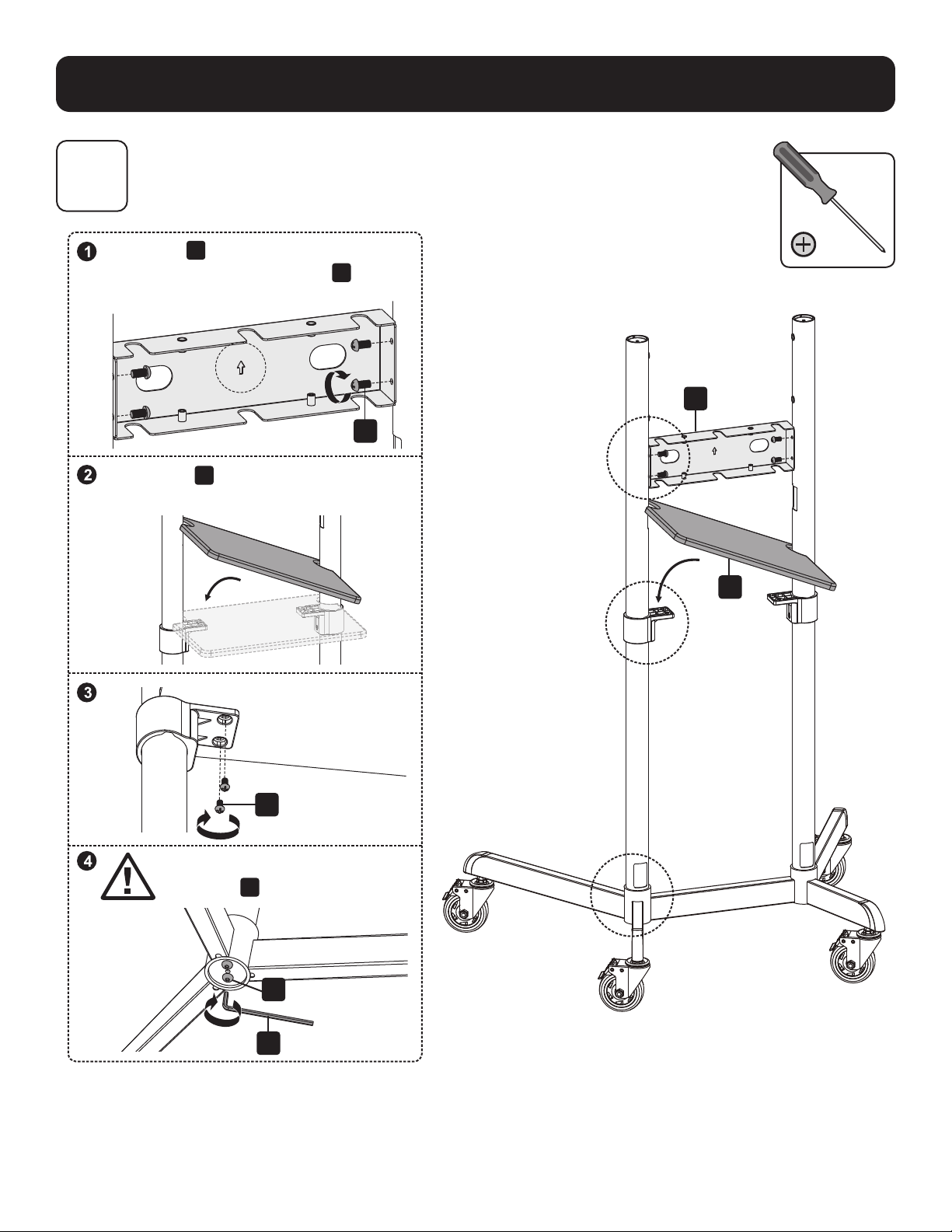
5
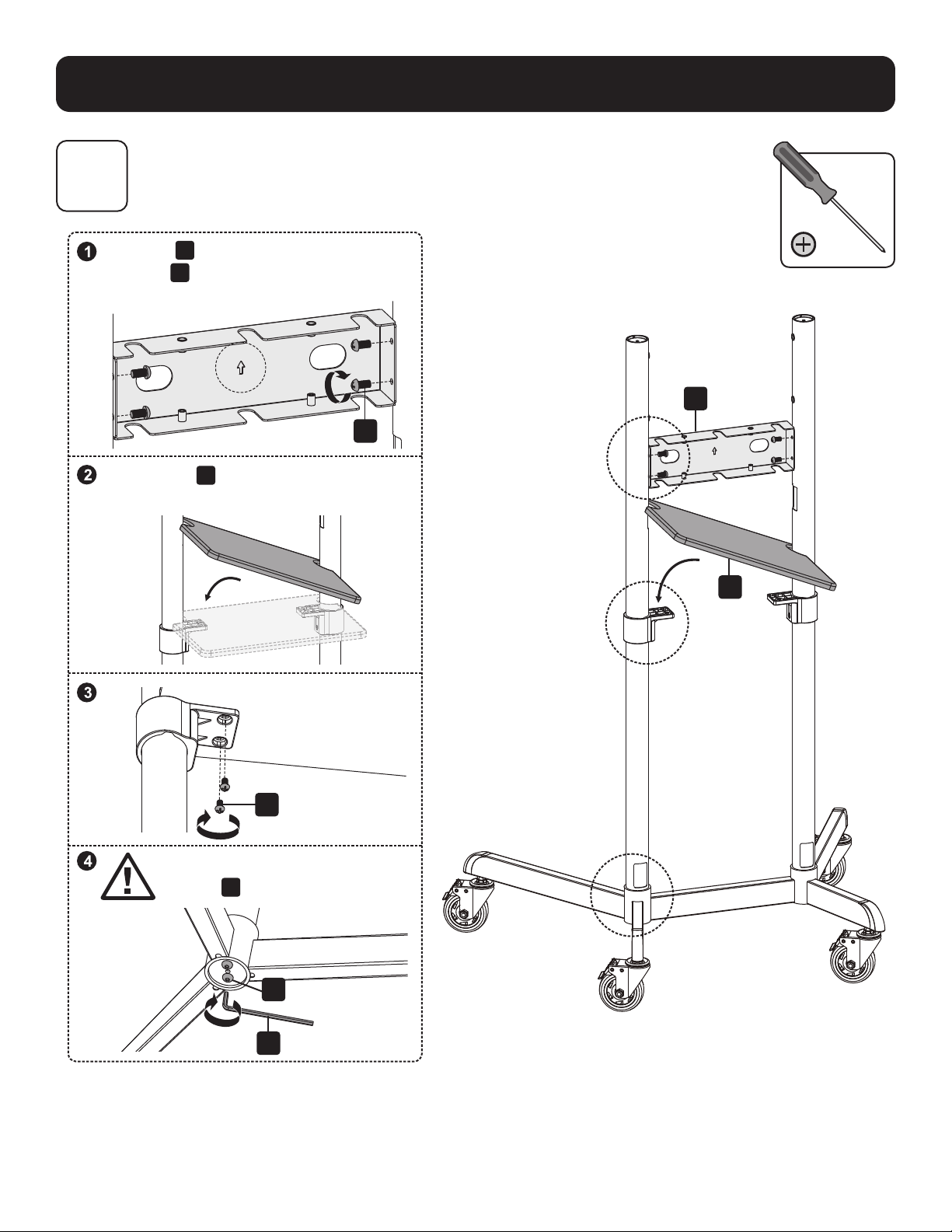
Installing the Front Cover and Equipment Shelf
G
O
O
M
W
E
Position
G
as indicated, ensuring the
front of
G
and the longer legs are on
the same side.
Make sure
E
and the shorter legs are
on the same side.
CAUTION: Fully tighten the
screws
M
under the base.

8
Assembly and Installation
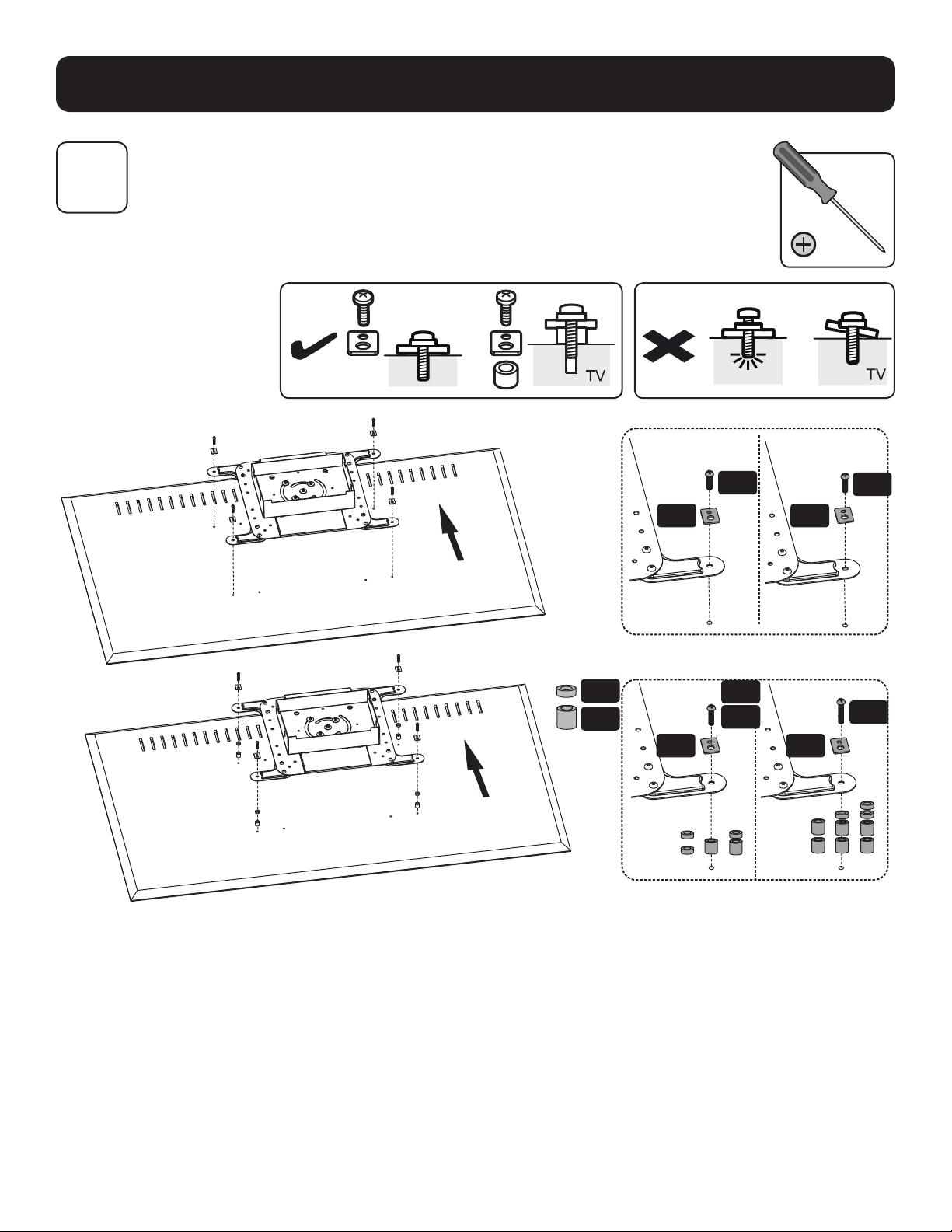
6A
Attaching the Mounting Plate to the Display
VESA 200x200 / 300x300 / 350x350 / 400x200/ 400x400
TV
M-G
M-A
M-D
M-E
M-C
M-B
M-F
M-F
M-F
M-F
M-H
H
H
Note: Choose the appropriate screws, washers and spacers (if necessary) according to the type of screen.
9
Assembly and Installation
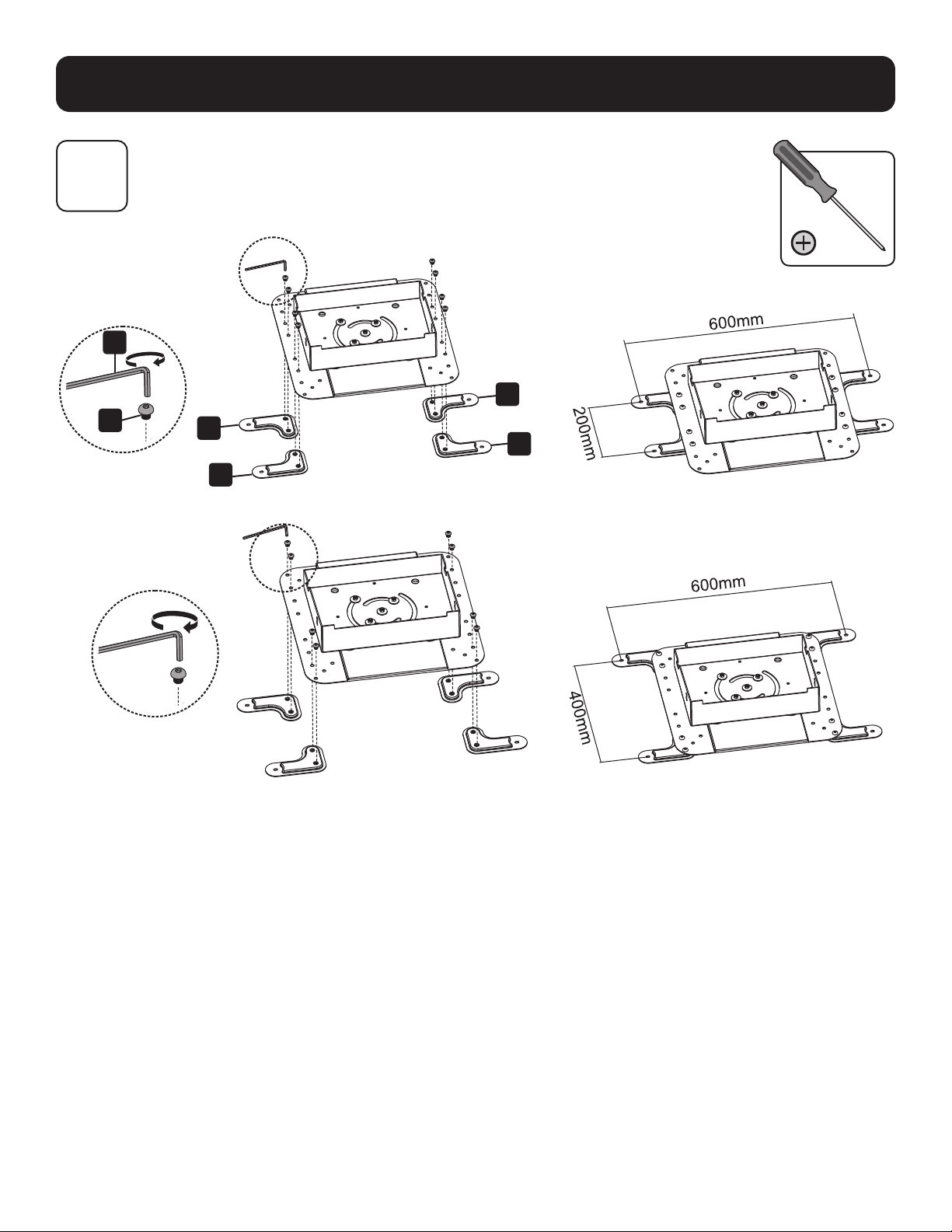
6B
6B-1: Installing the VESA Extension Adapter Arms
VESA 600 x 200
VESA 600 x 400
W
G
J
J
K
K
10
Assembly and Installation
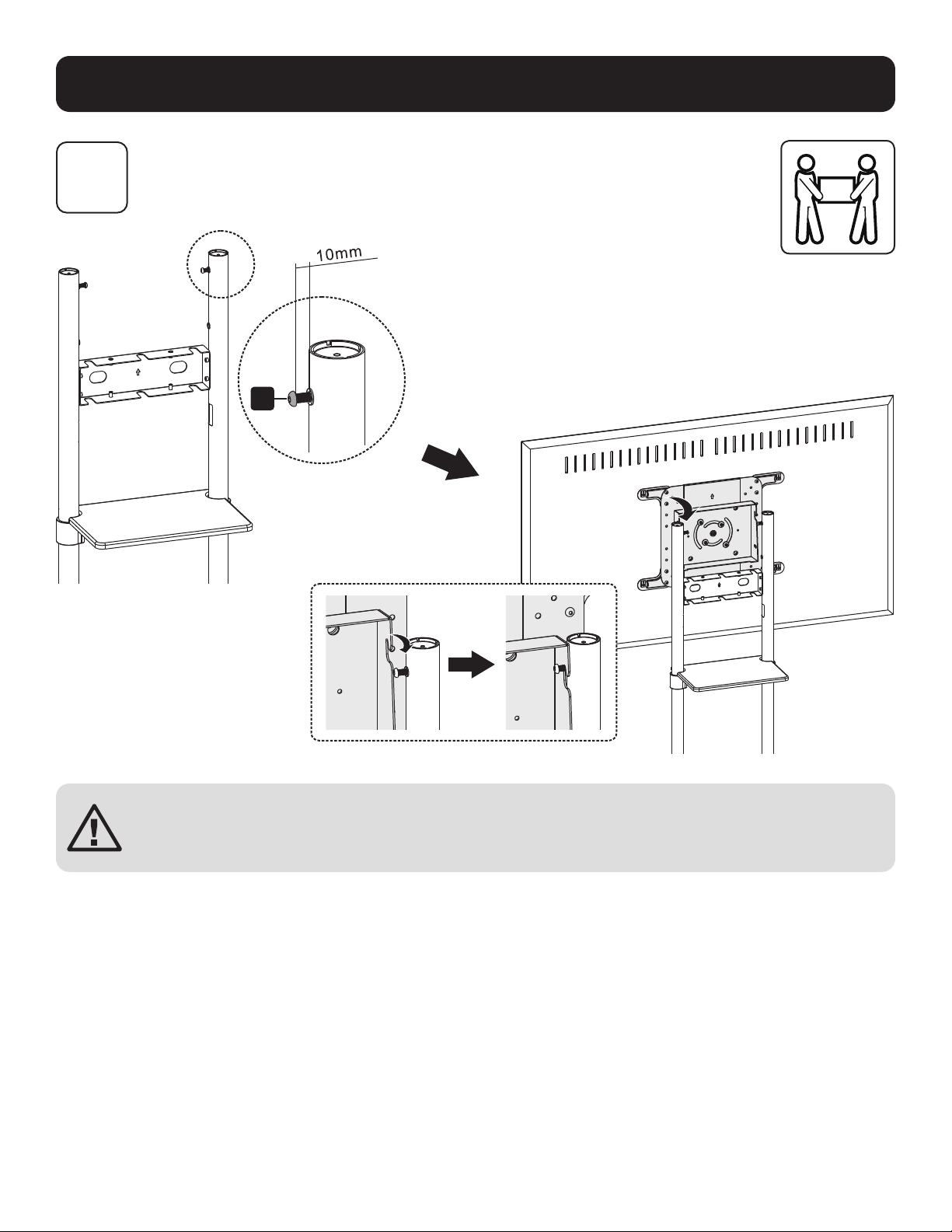
6B-2: Attaching the Mounting Plate to the Display
TV
6B
M-F M-F
M-A
M-B
M-G
M-H
M-D
M-E
M-C
M-F M-F
Note: Choose the appropriate screws, washers and spacers (if necessary) according to the type of screen.
11
Assembly and Installation
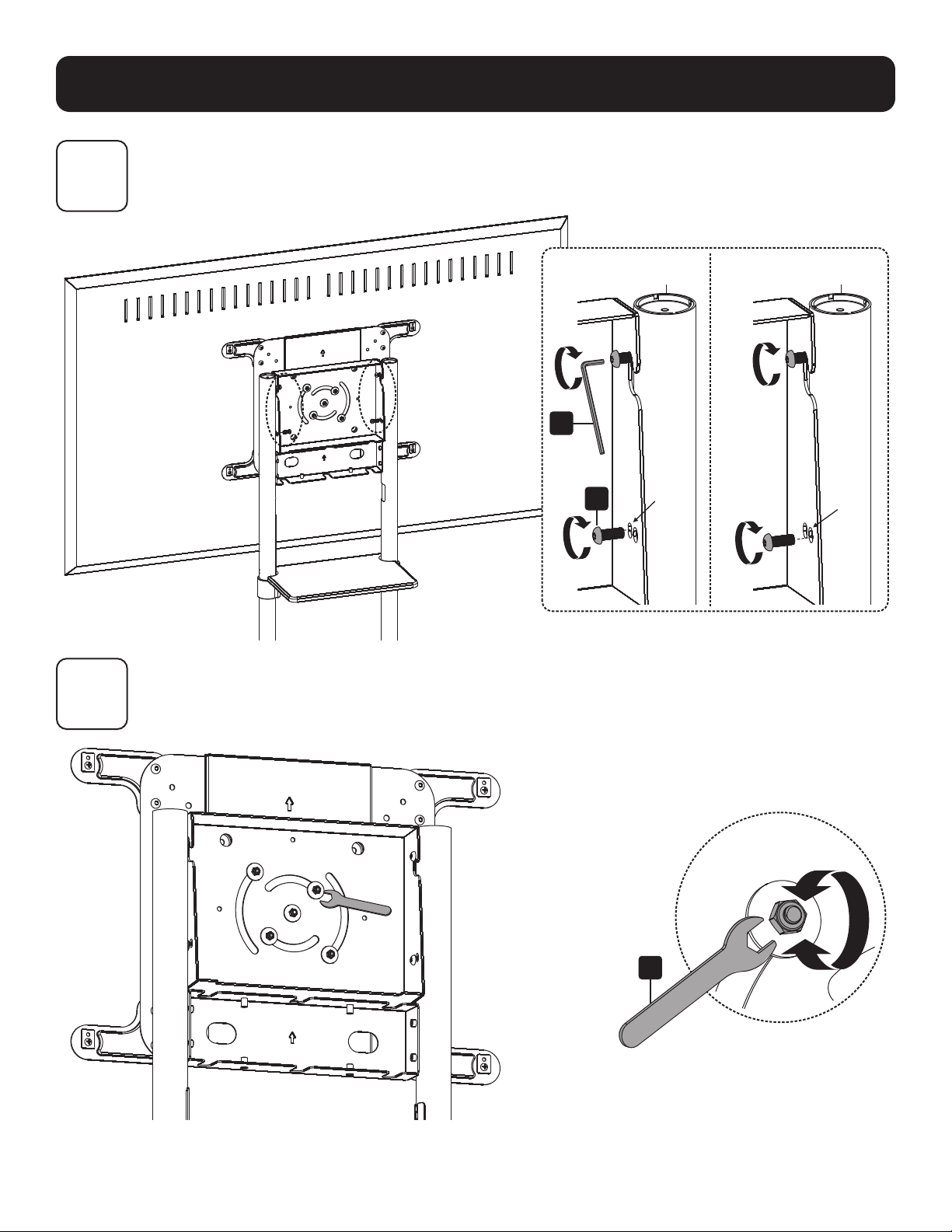
7
Mounting the Display onto the Screws
CAUTION: Adjust the columns to the desired height before installing the display.
To adjust the height of the columns after the display is installed, remove the
equipment shelf before adjusting the columns to the desired height.
M
12
Assembly and Installation
8
9
Adjusting the Tilting Angle of the Display
Adjusting the Rear Bolts Securely
M
W
Default Position (0°) Tilted Position (5°)
T
13
Assembly and Installation
10
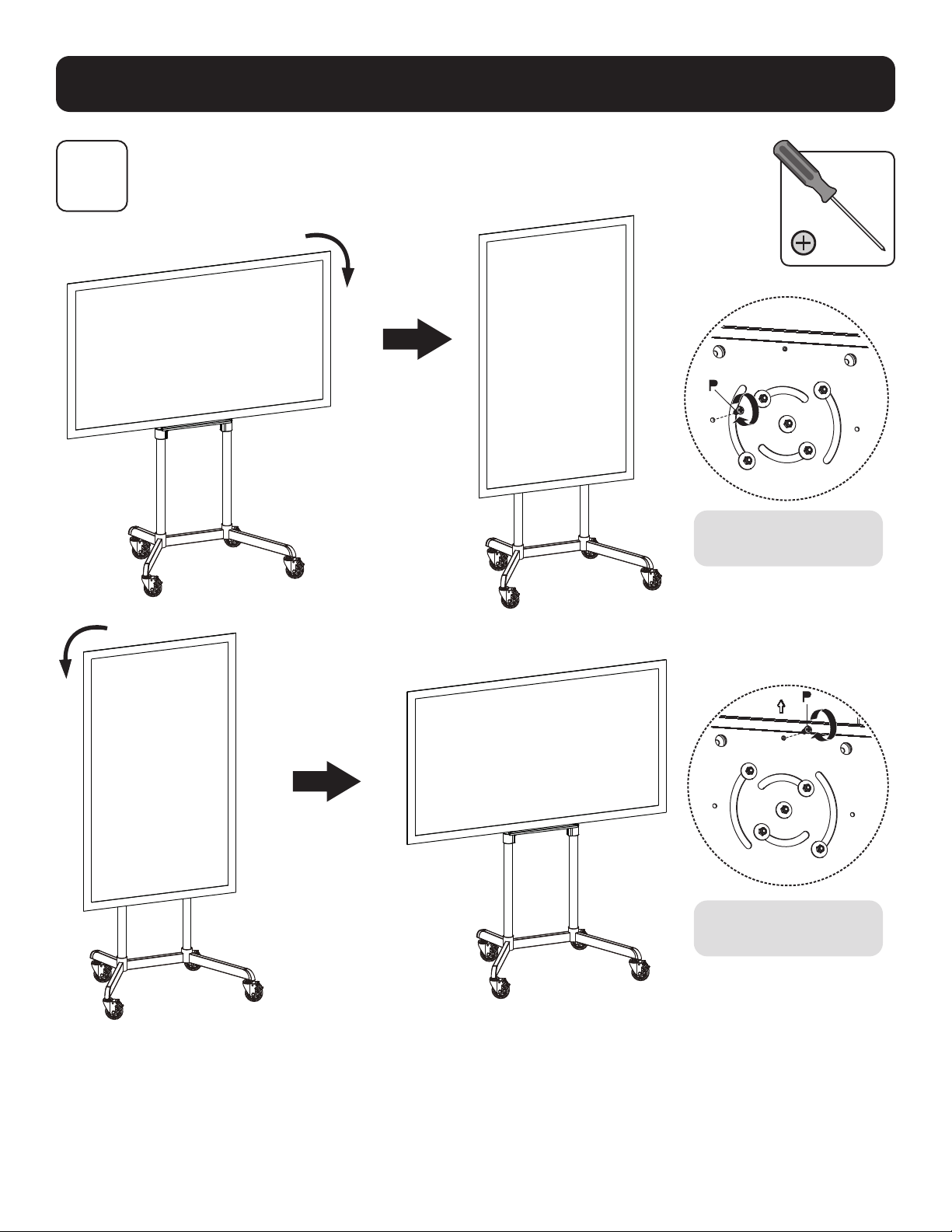
Fixing the Display in Landscape / Portrait Position (Optional)
Tighten the screw to
fix the display.
Tighten the screw to
fix the display.
14
Assembly and Installation
11A
11B
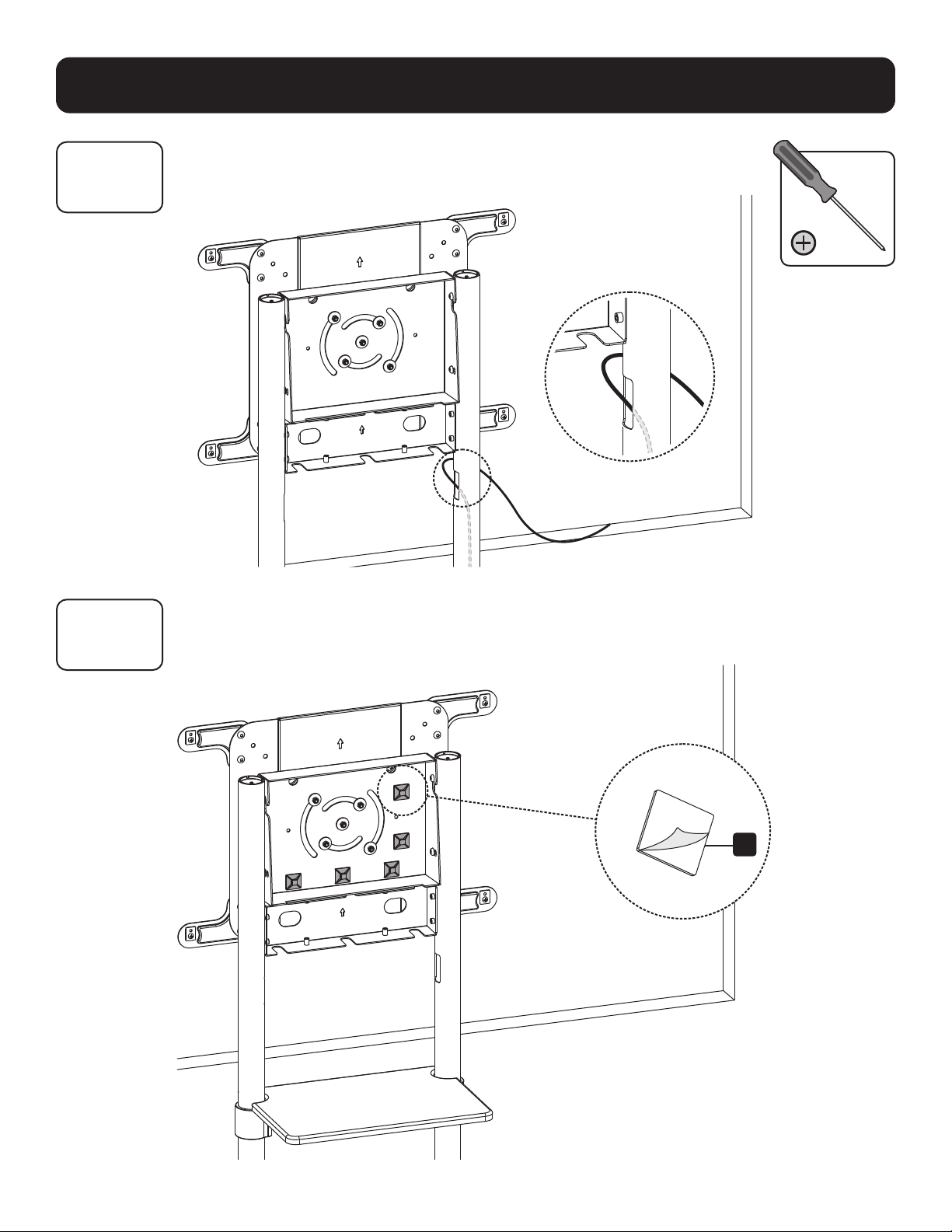
Routing the Cables
11B-1: Attaching the Cable Clip Holders
R
15
Assembly and Installation
11B
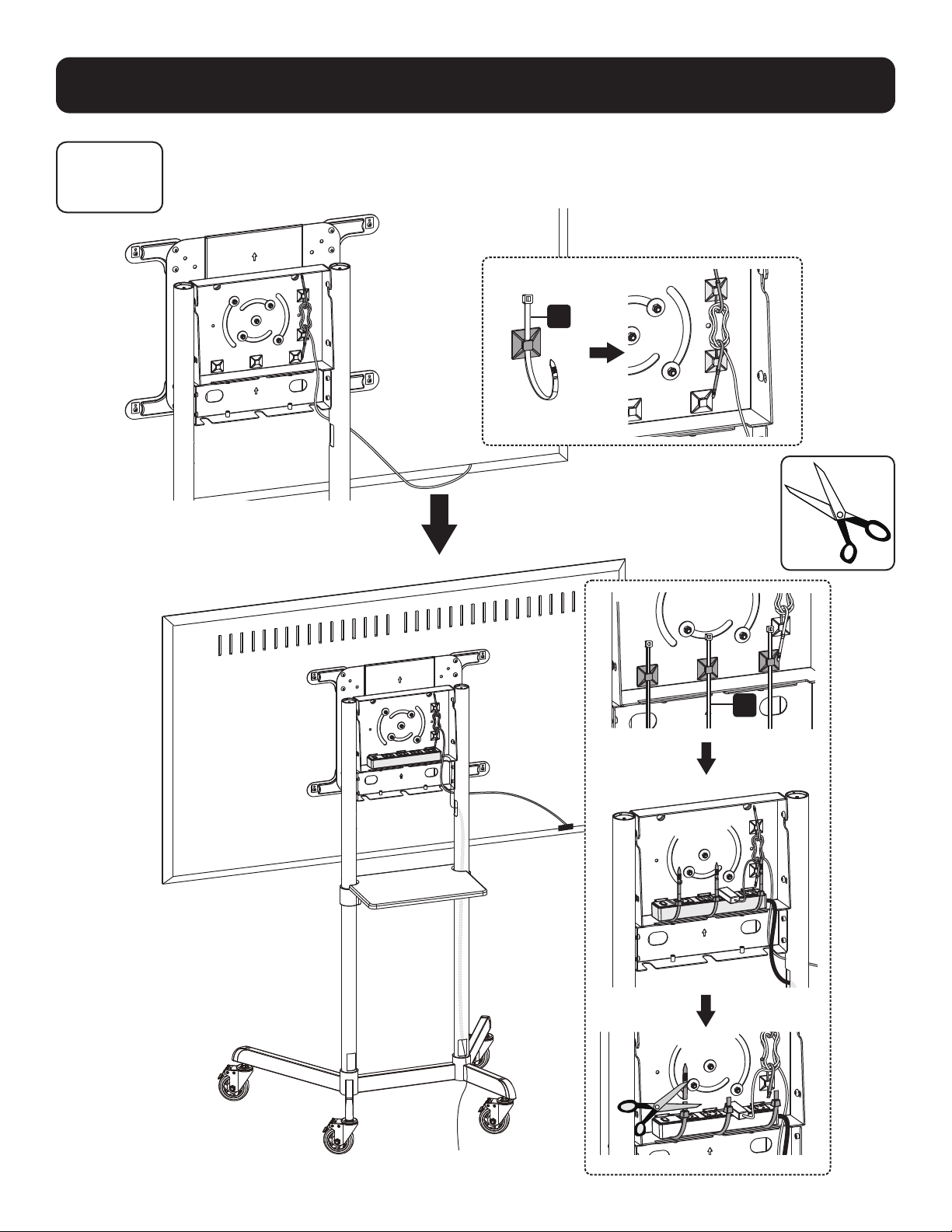
11B-2: Routing Cables through the Cable Clips
S
S

16
Assembly and Installation
12
Attaching the Cable Covers
L

17
Assembly and Installation
13
Attaching the Rear Cover
I
O
O

18
Assembly and Installation
14
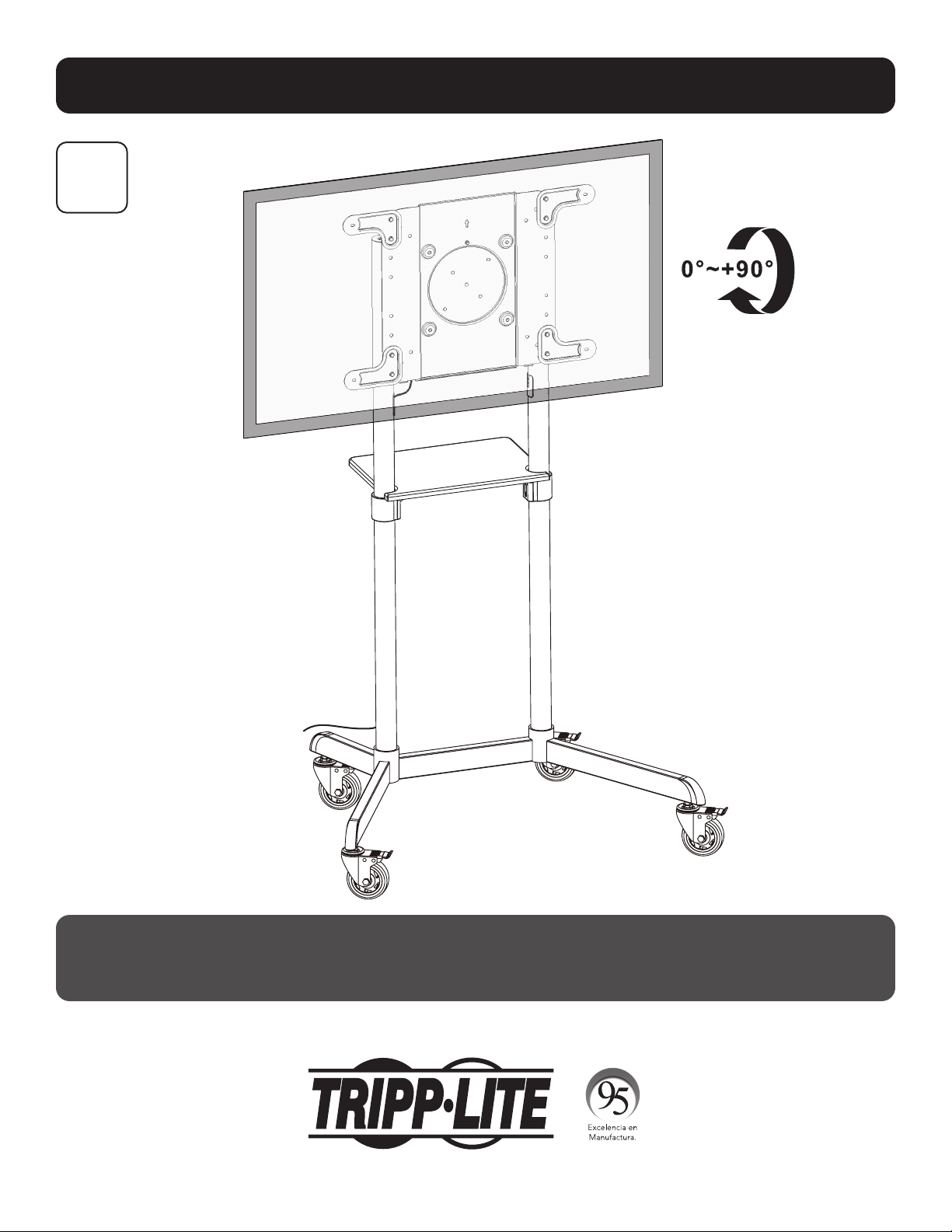
Maintenance
• Check at regular intervals (at least every three months) to be sure the bracket remains secure and safe to use.
• Please visit tripplite.com/support if you have any questions.
1111 W. 35th Street, Chicago, IL 60609 USA • tripplite.com/support
20-06-088 93-3CB9_RevA
19
MÁS DE
AÑOS
Manual del Propietario
Carro Móvil Giratorio
para Pantalla
Modelo: DMCS3770ROT
1111 W. 35th Street, Chicago, IL 60609, EE UU • tripplite.com/support
Copyright © 2020 Tripp Lite. Todos los derechos reservados.
¡ADVERTENCIA! Utilice siempre un ayudante o equipo de elevación mecánico para
levantar y colocar el equipo con seguridad.
200 x 200 / 300 x 300
350 x 350 / 400 x 200
400 x 400 / 600 x 200
600 x 400
70”
MÁXIMO
Calificado para TVCalificado para TV
70 kg 70 kg
[154 lb][154 lb]
Especificado Especificado
para DVDpara DVD
5 kg 5 kg
[11 lb][11 lb]
English 1 • Français 37 • Русский 55 • Deutsch 73

20
Instrucciones de Seguridad Importantes
Garantía
PRECAUCIÓN
• Lea todo el manual de instrucciones antes de iniciar el ensamble y la instalación. Si usted tiene preguntas sobre
cualquiera de las instrucciones o advertencias, póngase en contacto con el Soporte de Tripp Lite.
• El uso con productos más pesados que los pesos nominales especificados puede resultar en inestabilidad y causar
posibles lesiones.
• Los soportes deben instalarse como se especifica en estas instrucciones. La instalación incorrecta puede causar
daños o lesiones personales graves.
• Se deben usar mecanismos de seguridad y herramientas adecuadas. Este producto solo debe ser instalado por
profesionales.
• Asegure que la superficie de apoyo soporte con seguridad el peso combinado de todo el hardware y componentes
instalados.
• Use los tornillos de instalación suministrados y NO APRIETE EN EXCESO los tornillos de instalación.
• Este producto contiene pequeñas piezas que pueden ser un riesgo de asfixia si se ingieren. Mantenga estas piezas
fuera del alcance de los niños.
• Este producto está diseñado para usarse solo en interiores. Usar este producto en exteriores podría derivar en fallas
del producto y lesiones personales.
• Compruebe a intervalos regulares (al menos trimestralmente) que el soporte esté bien instalado y sea seguro
para usarse.
Garantía Limitada por 5 Años
El vendedor garantiza este producto, si se usa de acuerdo con todas las instrucciones aplicables, de que está libre de defectos en cuanto a materiales y
mano de obra por un período de 5 años a partir de la fecha de compra inicial. Si el producto resulta defectuoso en cuanto a materiales o mano de obra
dentro de ese período, el vendedor reparará o reemplazará el producto a su entera discreción.
ESTA GARANTÍA NO SE APLICA AL DESGASTE NORMAL O A LOS DAÑOS QUE RESULTEN DE ACCIDENTES, USO INCORRECTO, USO INDEBIDO O NEGLIGENCIA.
EL VENDEDOR NO OTORGA GARANTÍAS EXPRESAS DISTINTAS A LA ESTIPULADA EN EL PRESENTE. SALVO EN LA MEDIDA EN QUE LO PROHÍBAN LAS
LEYES APLICABLES, TODAS LAS GARANTÍAS IMPLÍCITAS, INCLUIDAS TODAS LAS GARANTÍAS DE COMERCIALIZACIÓN O IDONEIDAD, ESTÁN LIMITADAS EN
CUANTO A DURACIÓN AL PERÍODO DE GARANTÍA ESTABLECIDO; ASIMISMO, ESTA GARANTÍA EXCLUYE EXPRESAMENTE TODOS LOS DAÑOS INCIDENTALES
E INDIRECTOS. (Algunos estados no permiten limitaciones en cuanto a la duración de una garantía y algunos estados no permiten la exclusión o limitación
de daños incidentales o indirectos, de modo que es posible que las limitaciones anteriores no se apliquen a usted. Esta garantía le otorga derechos legales
específicos y es posible que usted goce de otros derechos que pueden variar de una jurisdicción a otra).
ADVERTENCIA: antes de usarlo, cada usuario debe tener cuidado al determinar si este dispositivo es adecuado o seguro para el uso previsto. Ya que las
aplicaciones individuales están sujetas a gran variación, el fabricante no garantiza la adecuación de estos dispositivos para alguna aplicación específica.
Tripp Lite tiene una política de mejora continua. Las especificaciones están sujetas a cambio sin previo aviso. Las imágenes pueden diferir ligeramente de los
productos reales.
21
Lista de Partes
IMPORTANTE: Antes de comenzar la instalación, asegúrese de haber recibido todas las partes que se enumeran a
continuación. Si hay alguna parte faltante o defectuosa, póngase en contacto con Tripp Lite para solicitar reemplazos.
M
M8 x 20
(x8)
T
Llave M6
(x1)
A
Base
(x1)
B
Rueda
(x4)
C
Columna Base
(x2)
D
Columna Superior
(x2)
E
Repisa para
Equipo
(x1)
L
Cubierta del
Cable (x4)
S
Clip para Cable
(x5)
F
Soporte para Instalación
de Repisa
(x2)
G
Cubierta Frontal
(x1)
H
Placa de
Instalación (x1)
I
Cubierta Trasera
(x1)
J
Brazo Adaptador
de Extensión
VESA
(x2)
K
Brazo Adaptador de Extensión
VESA (x2)
R
Sujetador de
Cable (x5)
N
M6 x 8
(x8)
U
Llave M10
(x1)
P
M6 x 18
(x1)
W
Llave Hexagonal
de 5 mm (x1)
O
M6 x 12
(x16)
V
Llave Hexagonal
de 4 mm (x1)
Q
M8 x 8
(x8)
M-A
M5 x 14
(x4)
M-E
M8 x 50
(x4)
M-C
M6 x 30
(x4)
M-G
Espaciador
Pequeño (x8)
M-B
M6 x 14
(x4)
M-F
Arandela
(x4)
M-D
M8 x 30
(x4)
M-H
Espaciador
Grande (x8)
Paquete M
Paquete P

22
Ensamble e Instalación
Requerido para Instalación
1
2
B
A
U
Mantenga las ruedas
bloqueadas antes de
comenzar la instalación.
Instalación de las Ruedas
Colocación de las Columnas a la Base
Alinee la columna como se
muestra, asegurando que los
orificios de administración de
cables y las patas más cortas
estén del mismo lado.
No apriete completamente
los tornillos
M
.
C
M
W
23
Ensamble e Instalación
3
Instalación de las
Columnas
Coloque los orificios de administración de cables
(que se encuentran en cada pata de columna
superior) viendo hacia adentro como se muestra.
F
D
N
N
V
24
Ensamble e Instalación
4
O
Instalación de los Soportes de Instalación de la Repisa
25
Ensamble e Instalación
5
Instalación de la Cubierta Frontal y la Repisa para el Equipo
G
O
O
M
W
E
Posicione
G
como se indica,
asegurando que el frente de
G
y las
patas más largas estén del mismo lado.
Asegúrese
E
de que y las patas más
cortas estén del mismo lado.
PRECAUCIÓN: Apriete completamente
los tornillos
M
debajo de la base.
26
Ensamble e Instalación
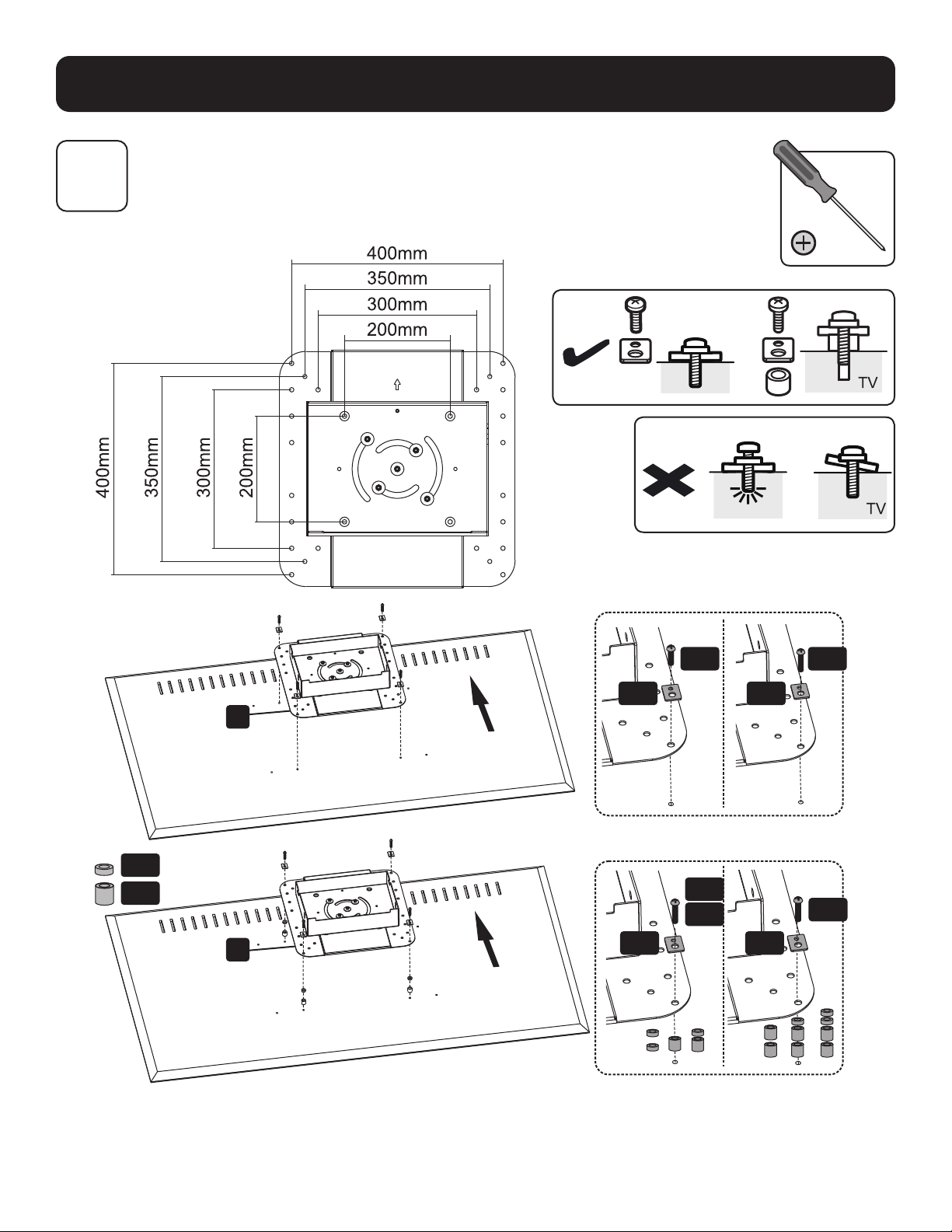
6A
Colocación de la Placa de Instalación a la Pantalla
VESA 200x200 / 300x300 / 350x350 / 400x200/ 400x400
TV
M-G
M-A
M-D
M-E
M-C
M-B
M-F
M-F
M-F
M-F
M-H
H
H
Nota: Elija los tornillos, arandelas y espaciadores (si fueran necesarios) apropiados de acuerdo al tipo de pantalla.
27
Ensamble e Instalación
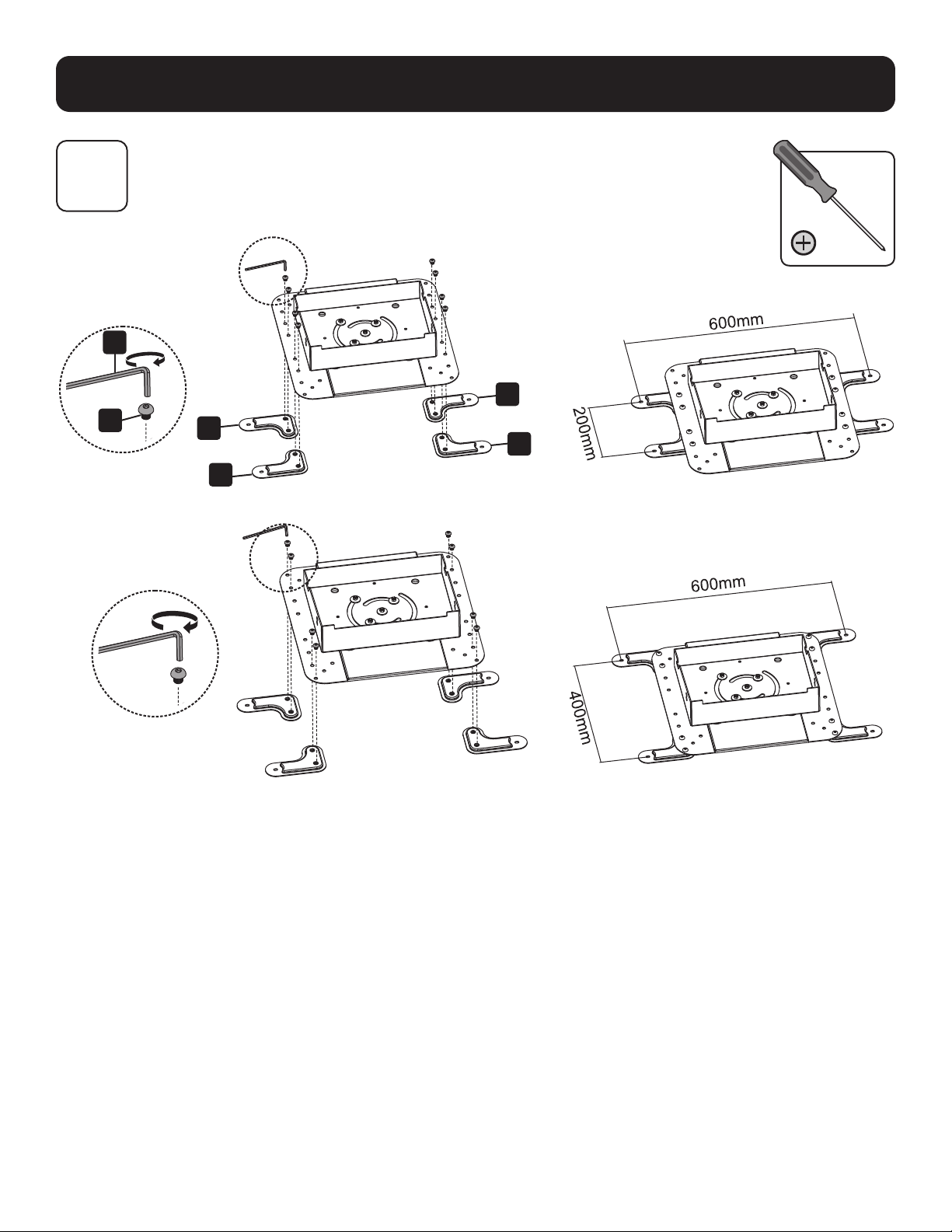
6B
6B-1: Instalación de los Brazos Adaptadores de Extensión VESA
VESA 600 x 200
VESA 600 x 400
W
G
J
J
K
K
28
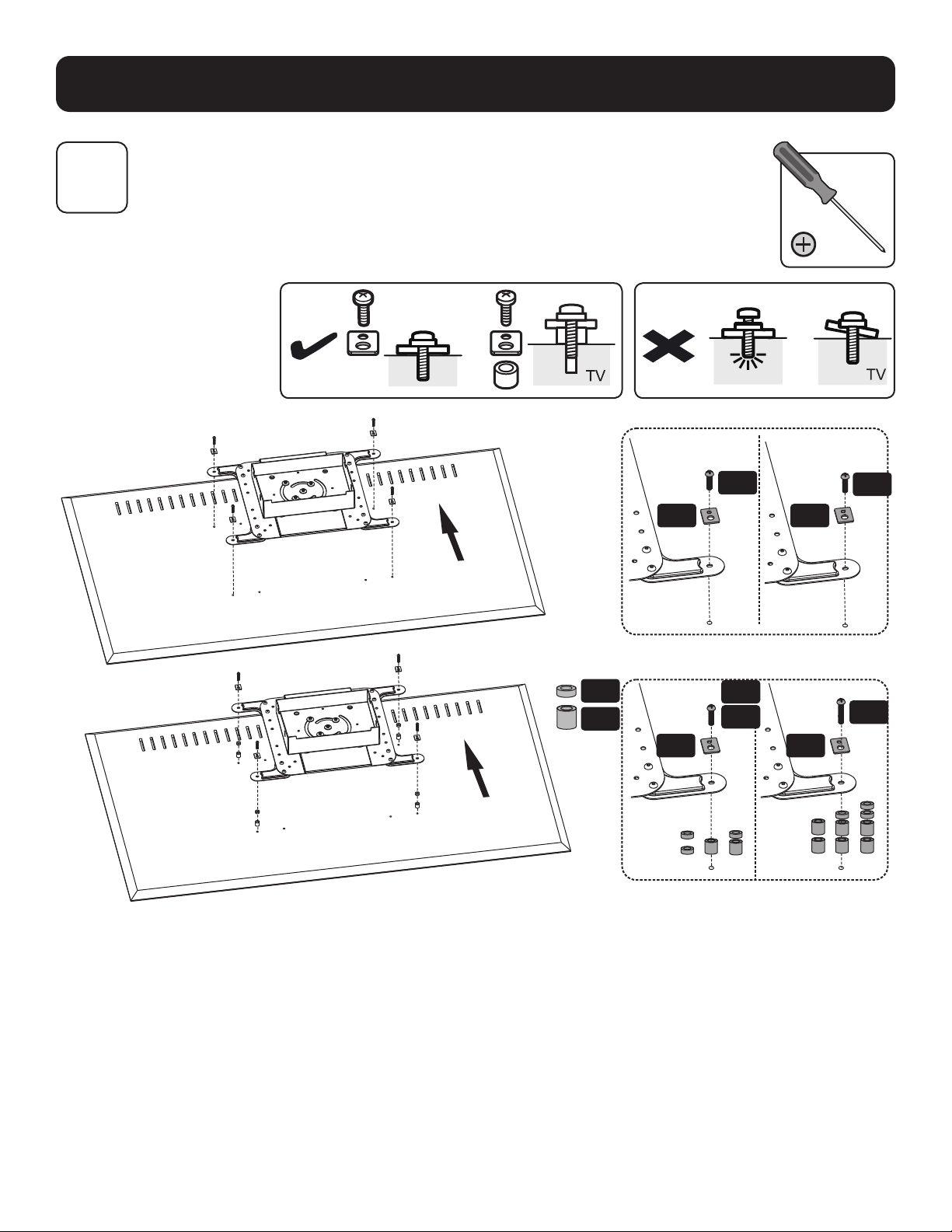
Ensamble e Instalación
6B-2: Colocación de la Placa de Instalación a la Pantalla
TV
6B
M-F M-F
M-A
M-B
M-G
M-H
M-D
M-E
M-C
M-F M-F
Nota: Elija los tornillos, arandelas y espaciadores (si fueran necesarios) apropiados de acuerdo al tipo de pantalla.

29
Ensamble e Instalación
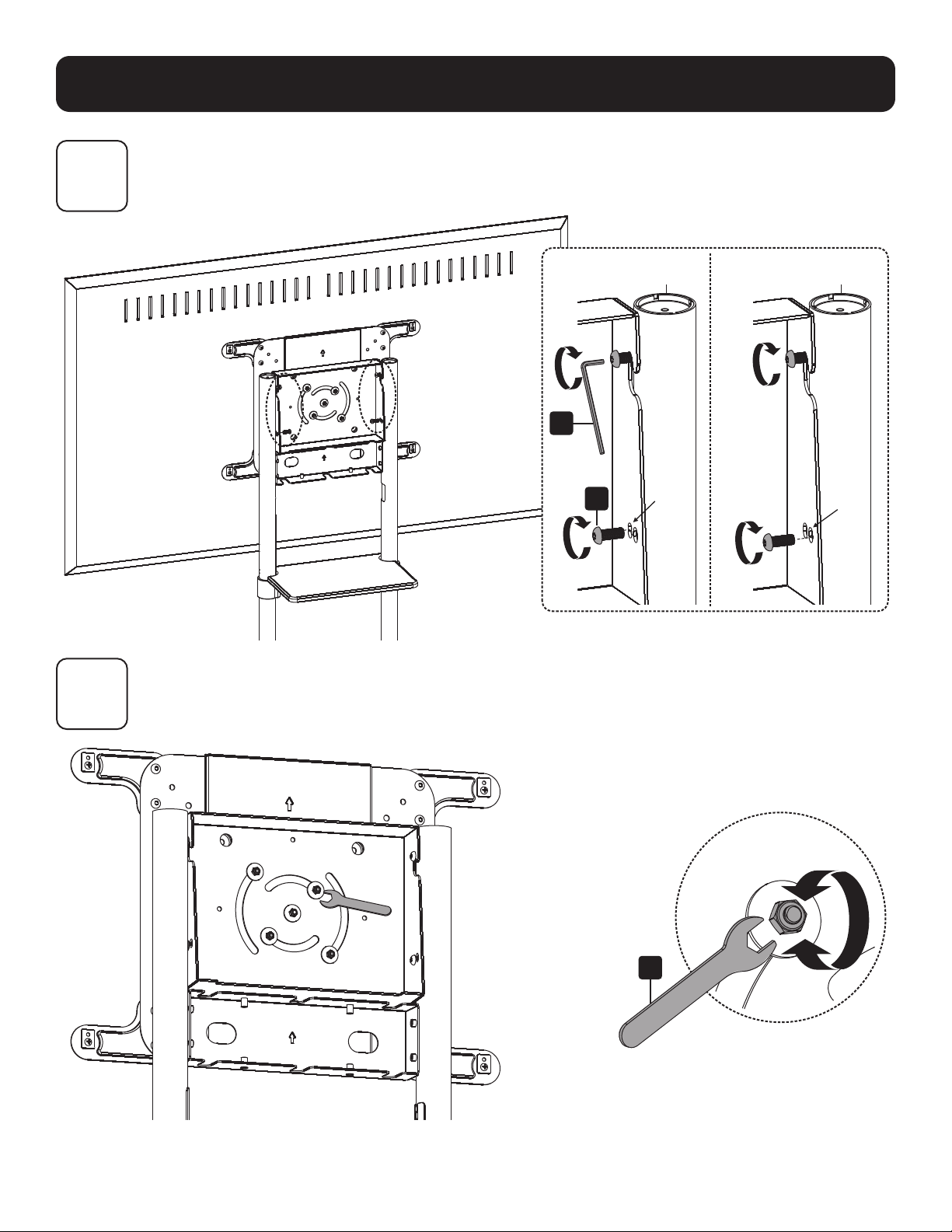
7
Instalación de la Pantalla en los Tornillos
PRECAUCIÓN: Ajuste las columnas a la altura deseada antes de instalar la pantalla.
Para ajustar la altura de las columnas después de instalada la pantalla, retire la
repisa del equipo antes de ajustar las columnas a la altura deseada.
M
30
Ensamble e Instalación
8
9
Ajuste del Ángulo de Inclinación de la Pantalla
Ajuste con Firmeza los Tornillos Posteriores
M
W
Posición
Predeterminada (0°)
Posición Inclinada
(5°)
T
31
Ensamble e Instalación
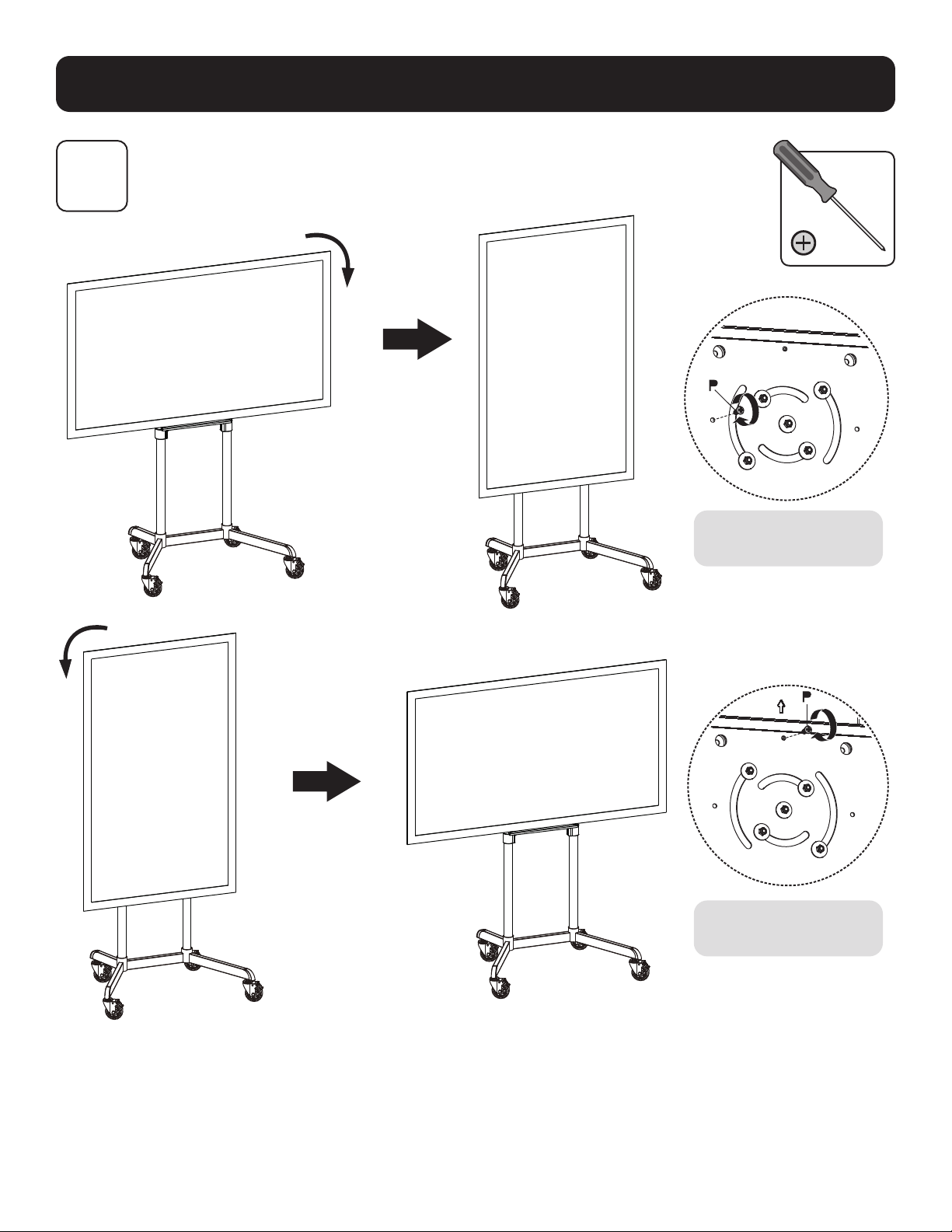
10
Fijación de la Pantalla en Posición Horizontal / Vertical (Opcional)
Apriete el tornillo para
fijar la pantalla.
Apriete el tornillo para
fijar la pantalla.
32
Ensamble e Instalación
11A
11B
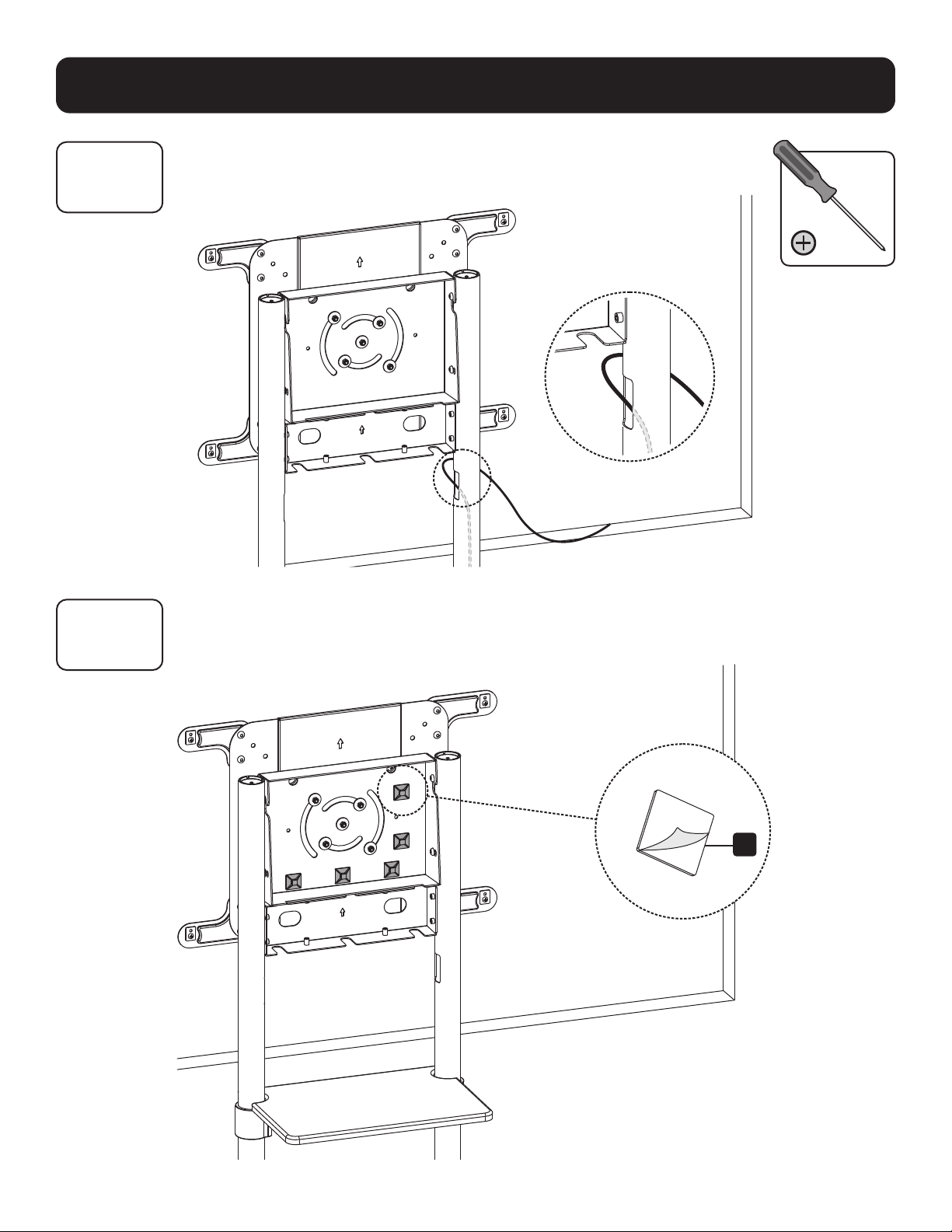
Enrutamiento de los Cables
11B-1: Instalación de los Sujetadores de Cable
R
33
Ensamble e Instalación
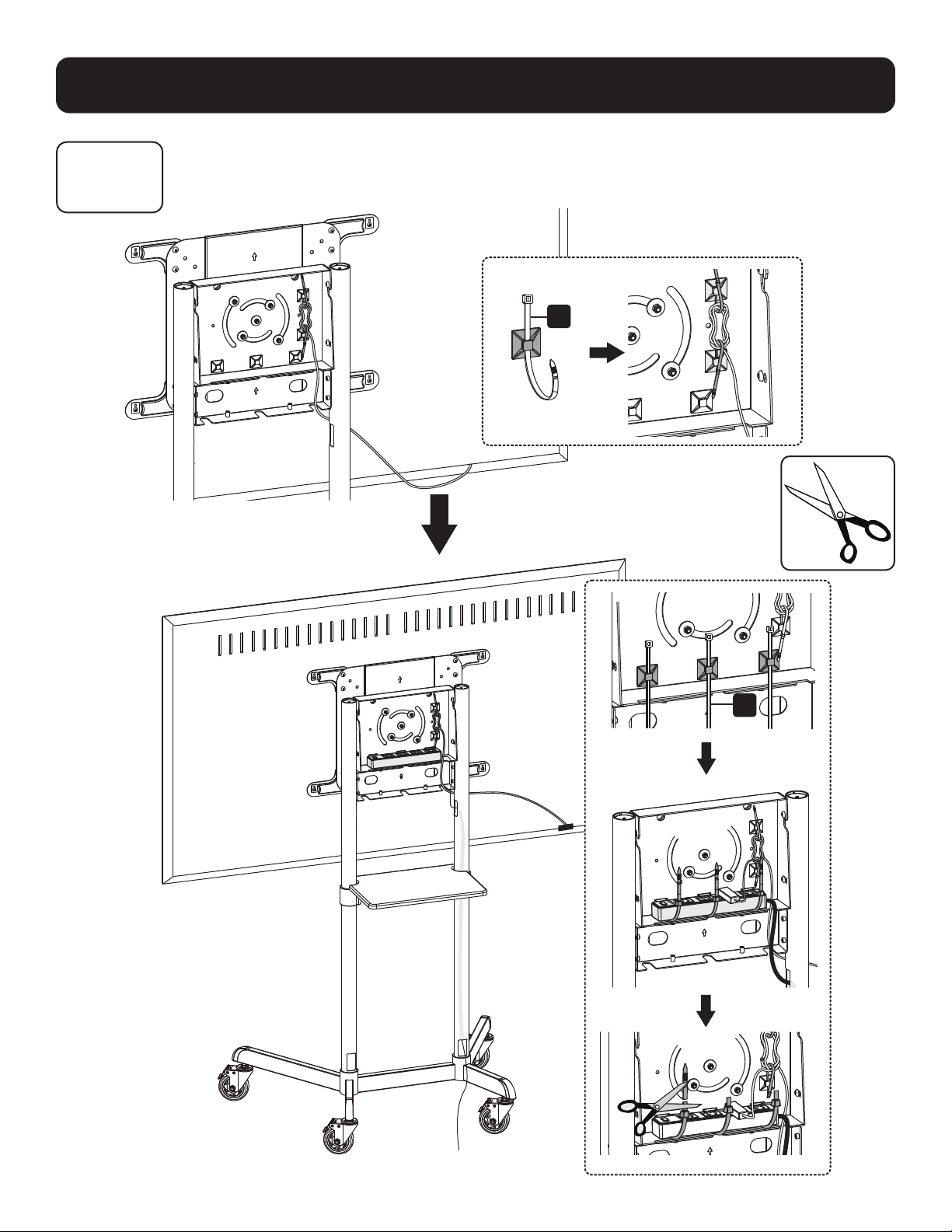
11B
11B-2: Enrutamiento de los Cables a través de los Clips de Cables
S
S
34
Ensamble e Instalación
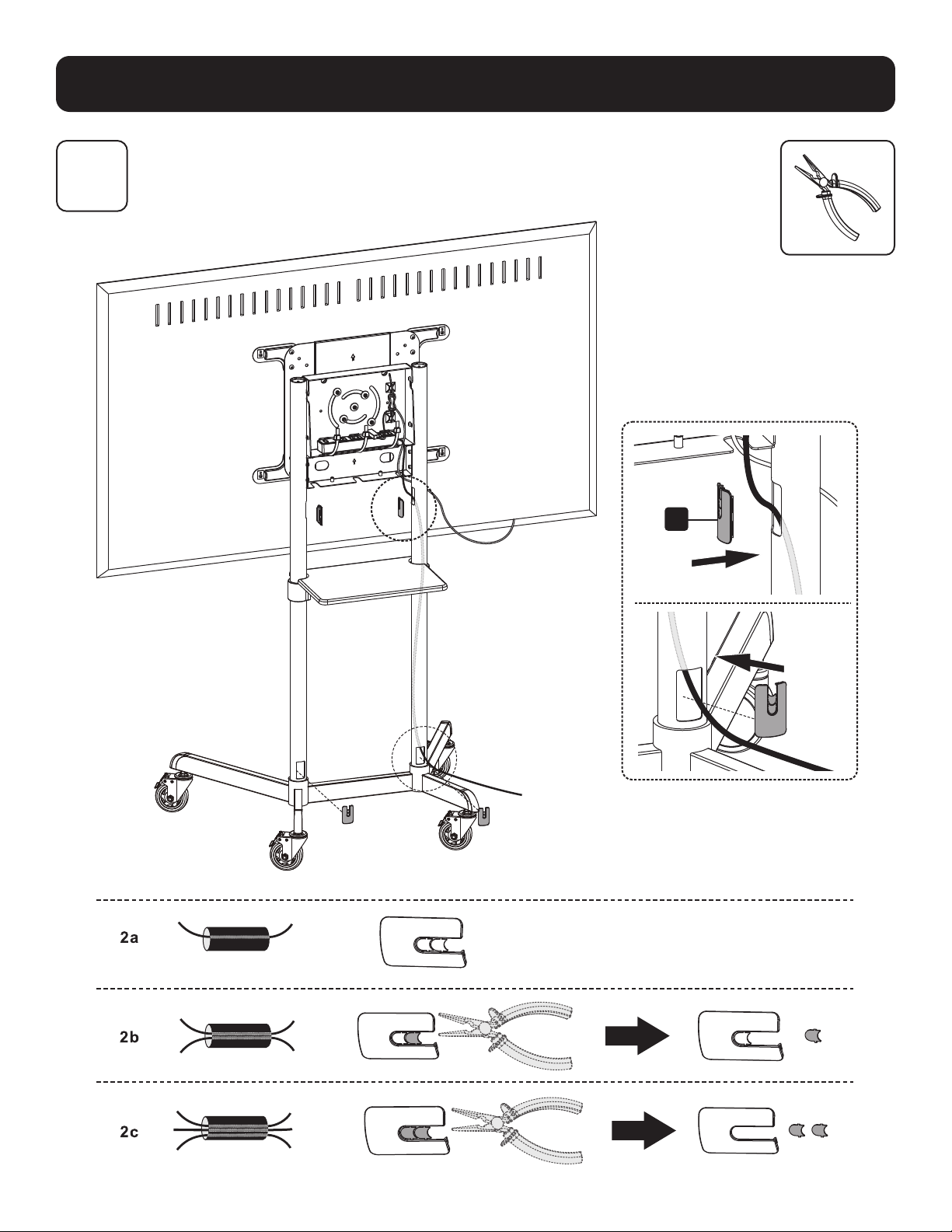
12
Instalación de las Cubiertas de Cable
L

35
Ensamble e Instalación
13
Colocación de la Cubierta Posterior
I
O
O
36
MÁS DE
AÑOS
Ensamble e Instalación
14
Mantenimiento
• Revise a intervalos regulares (al menos trimestralmente) para asegurarse que el soporte esté firme y sea seguro para usarse.
• Si tiene alguna pregunta, visite por favor tripplite.com/support.
1111 W. 35th Street, Chicago, IL 60609, EE UU • tripplite.com/support
20-06-088 93-3CB9_RevA
37
Manuel de l'utilisateur
Chariot mobile pour
écran rotatif
Modèle : DMCS3770ROT
1111 W. 35th Street, Chicago, IL 60609 USA tripplite.com/support
Droits d'auteur © 2020 Tripp Lite. Tous droits réservés.
AVERTISSEMENT! Toujours faire appel à un assistant ou utiliser de l'équipement de
levage mécanique pour soulever et mettre en place l'équipement.
200 x 200/300 x 300
350 x 350/400 x 200
400 x 400/600 x 200
600 x 400
177,8 cm
(70 po)
MAX.
Coté pour Coté pour
les téléviseursles téléviseurs
70 kg/ 154 lb70 kg/ 154 lb
Coté pour Coté pour
DVDDVD
5 kg/11 lb5 kg/11 lb
English 1 • Español 19 • Русский 55 • Deutsch 73

38
Consignes de sécurité importantes
Garantie
MISE EN GARDE
• Lire le manuel d'instructions dans son intégralité avant de commencer l'assemblage et l'installation. Pour toute question
concernant les instructions ou les avertissements, communiquer avec le soutien de Tripp Lite.
• L'utilisation avec des produits plus lourds que les charges nominales indiquées risquerait de causer une instabilité et
possiblement des blessures.
• Les supports doivent être fixés conformément à ces instructions. Une mauvaise installation risquerait de causer des
dommages ou des blessures graves.
• Utiliser de l'équipement de sécurité et des outils appropriés. L'installation de ce produit doit être confiée uniquement à
des professionnels.
• S'assurer que la surface d'appui va supporter sans risque la charge combinée de l'équipement et de tout matériel et
composant attachés.
• Utiliser les vis de montage fournies et NE PAS TROP SERRER les vis de montage.
• Ce produit contient de petits éléments qui pourraient présenter un risque d'étouffement en cas d'ingestion. Garder ces
éléments hors de la portée des enfants.
• Ce produit est prévu pour être utilisé à l'intérieur uniquement. L'utilisation de ce produit à l'extérieur pourrait entraîner
une défaillance du produit et des lésions corporelles.
• Vérifier à intervalles réguliers que le support peut être utilisé de façon sûre et sécuritaire (au moins tous les trois mois).
Garantie limitée de 5 ans
Le vendeur garantit ce produit, s'il est utilisé conformément à toutes les instructions applicables, est exempt de tous défauts de matériaux et de fabrication
pour une période de 5 ans à partir de la date d'achat initiale. Si le produit s'avère défectueux en raison d'un vice de matériau ou de fabrication au cours de
cette période, le vendeur s'engage à réparer ou remplacer le produit, à son entière discrétion.
CETTE GARANTIE NE S'APPLIQUE PAS À L'USURE NORMALE OU AUX DOMMAGES RÉSULTANT D'UNE MAUVAISE UTILISATION, D'UN ABUS OU D'UNE
NÉGLIGENCE. LE VENDEUR N'ACCORDE AUCUNE GARANTIE EXPRESSE AUTRE QUE LA GARANTIE EXPRESSÉMENT DÉCRITE DANS LE PRÉSENT DOCUMENT.
SAUF DANS LA MESURE OÙ CELA EST INTERDIT PAR LA LOI EN VIGUEUR, TOUTE GARANTIE IMPLICITE, Y COMPRIS TOUTES LES GARANTIES DE QUALITÉ
MARCHANDE OU D'ADAPTATION, SONT LIMITÉES À LA PÉRIODE DE GARANTIE CI-DESSUS ET CETTE GARANTIE EXCLUT EXPRESSÉMENT TOUS DOMMAGES
DIRECTS ET INDIRECTS. (Certains États ne permettent pas de limitations sur la durée d'une garantie implicite, et certains États ne permettent pas l'exclusion
ou la limitation des dommages fortuits ou consécutifs, de sorte que les limitations ou exclusions susmentionnées peuvent ne pas s'appliquer à vous. Cette
garantie vous accorde des droits légaux spécifiques, et vous pouvez avoir d'autres droits qui varient d'une compétence à l'autre.)
AVERTISSEMENT : L'utilisateur individuel doit prendre soin de déterminer avant l'utilisation si cet appareil est approprié, adéquat et sûr pour l'usage prévu.
Puisque les utilisations individuelles sont sujettes à des variations importantes, le fabricant ne fait aucune déclaration ou garantie quant à l'aptitude ou
l'adaptation de ces dispositifs pour une application spécifique.
La politique de Tripp Lite en est une d'amélioration continue. Les caractéristiques techniques sont modifiables sans préavis. Les images peuvent différer
légèrement des produits actuels.
39
Liste des pièces
IMPORTANT : Avant de commencer l'installation, s'assurer d'avoir reçu toutes les pièces mentionnées ci-dessous. Si
des pièces sont manquantes ou défectueuses, contacter Tripp Lite pour obtenir un remplacement.
M
M8 x 20
(x8)
T
Clé M6
(x1)
A
Base
(x1)
B
Roulette
(x4)
C
Colonne de base
(x2)
D
Colonne
supérieure
(x2)
E
Étagère pour
l'équipement
(x1)
L
Couvre-câble
(x4)
S
Serre-câble
(x5)
F
Support de montage
pour étagère
(x2)
G
Couvercle avant
(x1)
H
Plaque de
montage (x1)
I
Couvercle arrière
(x1)
J
Bras d'adaptateur
de rallonge VESA
(x2)
K
Bras d'adaptateur de rallonge
VESA (x2)
R
Support pour
serre-câble (x5)
N
M6 x 8
(x8)
U
Clé M10
(x1)
P
M6 x 18
(x1)
l
Clé hexagonale
de 5mm (x1)
O
M6 x 12
(x16)
V
Clé hexagonale
de 4 mm (x1)
Q
M8 x 8
(x8)
M-A
M5 x 14
(x4)
M-E
M8 x 50
(x4)
M-C
M6 x 30
(x4)
M-G
Petite entretoise
(x8)
M-B
M6 x 14
(x4)
M-F
Rondelle
(x4)
M-D
M8 x 30
(x4)
M-H
Grande entretoise
(x8)
Emballage M
Emballage P
40
Assemblage et installation
Requis pour l'installation
1
2.
B
A
U
Garder les roulettes
verrouillées avant de
commencer l'installation.
Installation des roulettes
Fixation des colonnes à la base
Aligner la colonne comme
illustré en s'assurant que les
trous de gestion des câbles
et les pattes les plus courtes
se trouvent du même côté.
Ne pas serrer
complètement
les vis
M
.
C
M
l
41
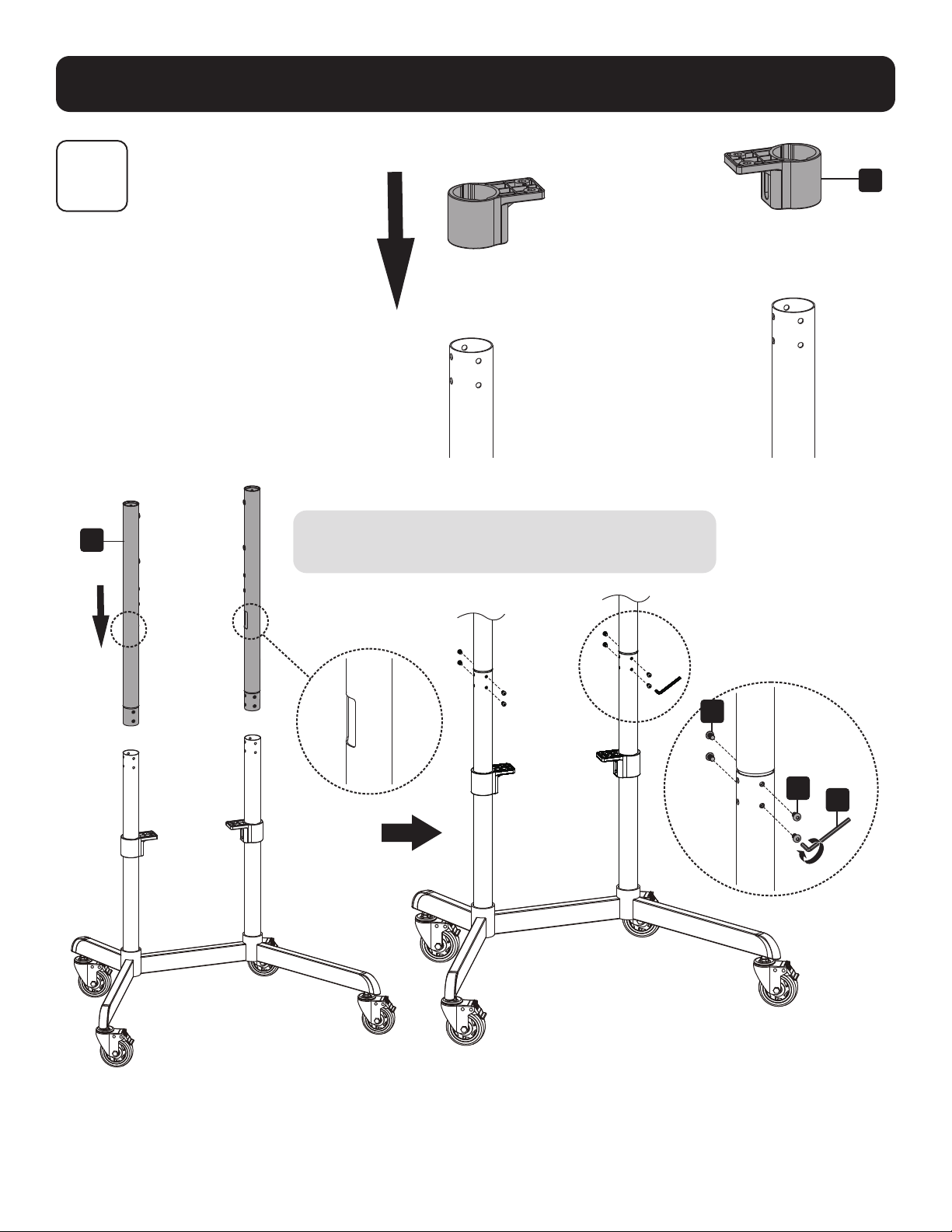
Assemblage et installation
3
Installation des colonnes
Positionner les trous de gestion des câbles (situés
sur la patte de chaque colonne supérieure) tournés
vers l'intérieur comme illustré.
F
D
N
N
V
42
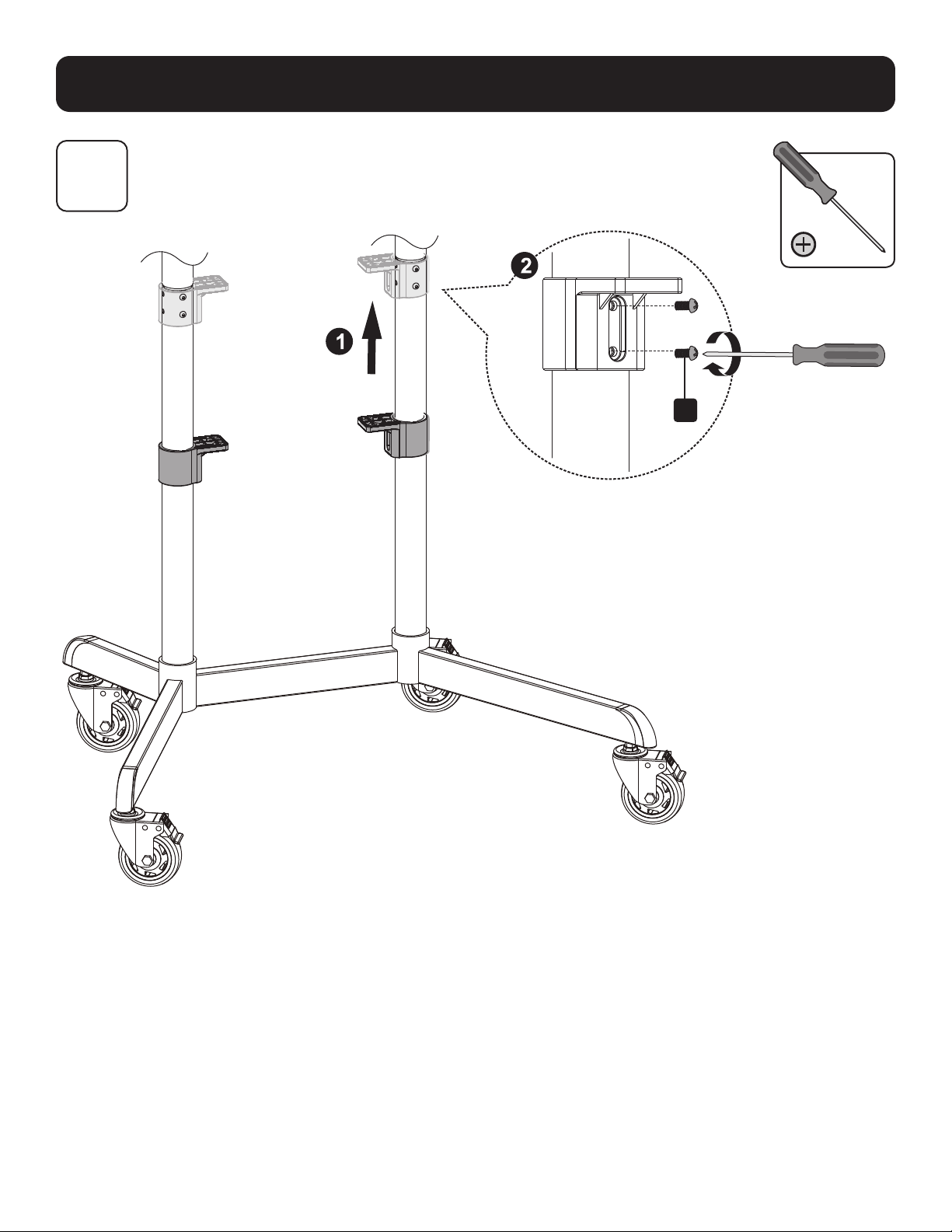
Assemblage et installation
4
O
Installation des supports de montage pour étagère
43
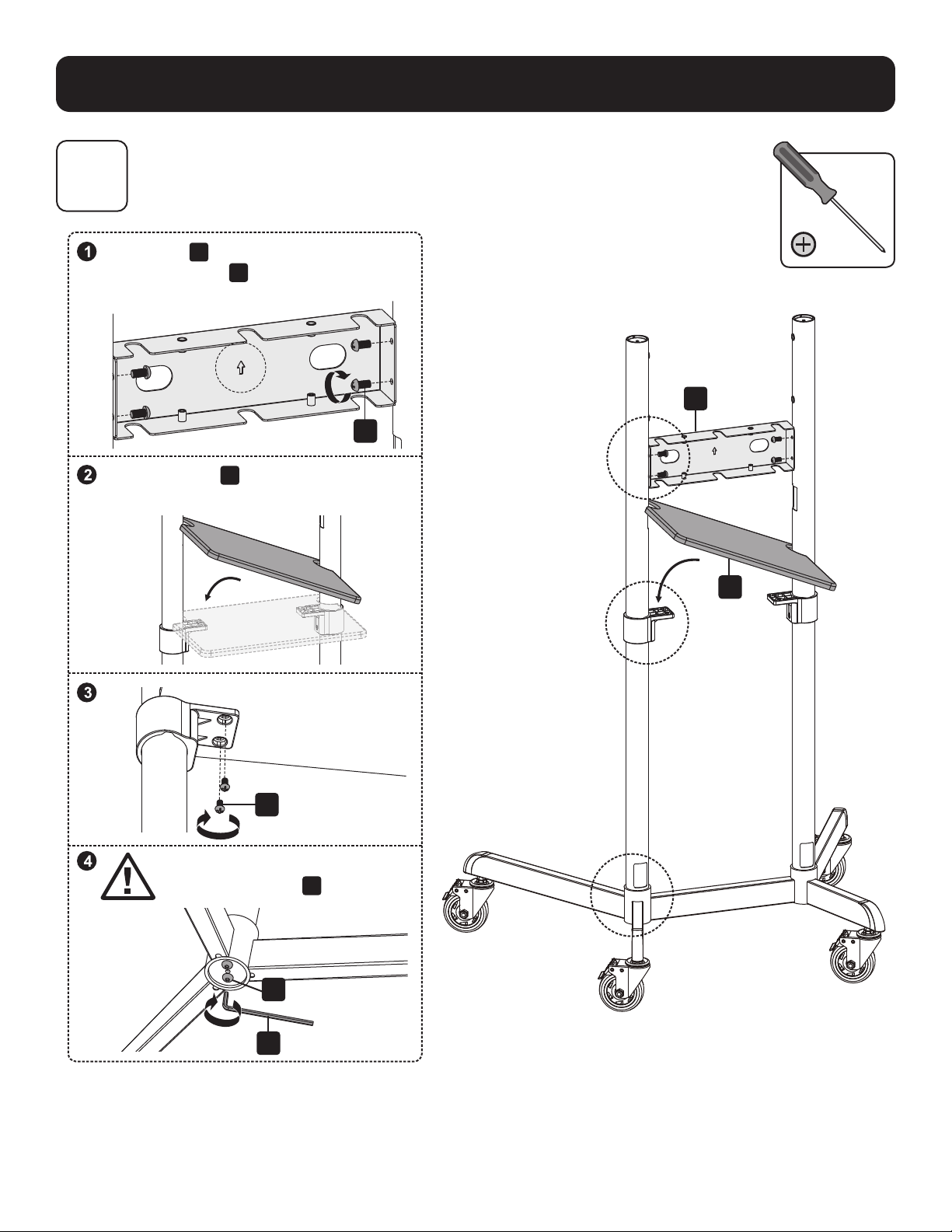
Assemblage et installation
5
Installation du couvercle avant et de l'étagère pour l'équipement
G
O
O
M
l
E
Positionner
G
comme indiqué en s'assurant
que le devant de
G
et les pattes les plus
longues se trouvent du même côté.
S'assurer que
E
et les pattes les plus
courtes se trouvent du même côté.
MISE EN GARDE : Serrer
complètement les vis
M
sous la base.
44
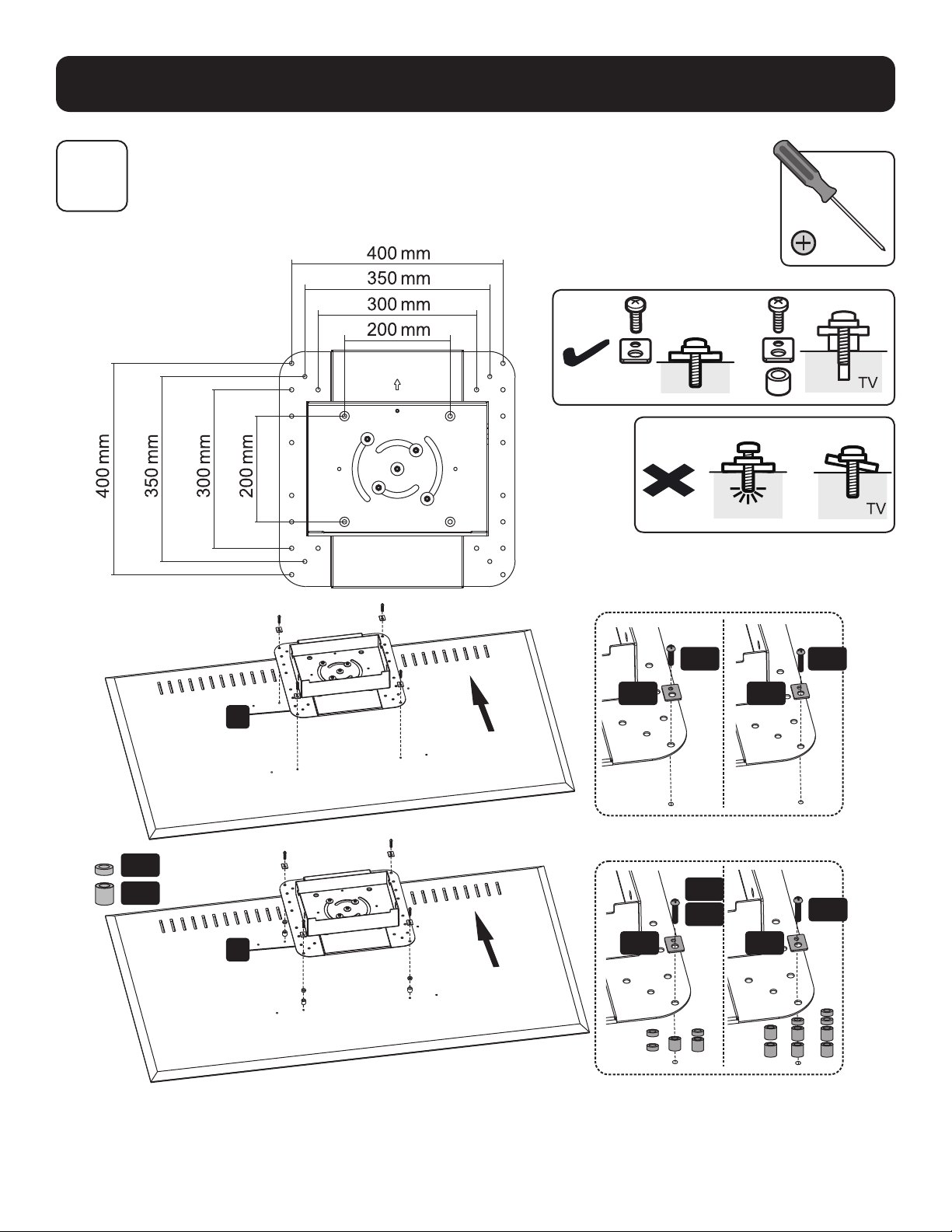
Assemblage et installation
6A
Fixation de la plaque de montage à l'écran
VESA 200 x 200/300 x 300/350 x 350/400 x 200/400 x 400
TV
M-G
M-A
M-D
M-E
M-C
M-B
M-F
M-F
M-F
M-F
M-H
H
H
Remarque : Choisir les vis, les rondelles et les entretoises appropriées (le cas échéant) en fonction du type d'écran.
45
Assemblage et installation
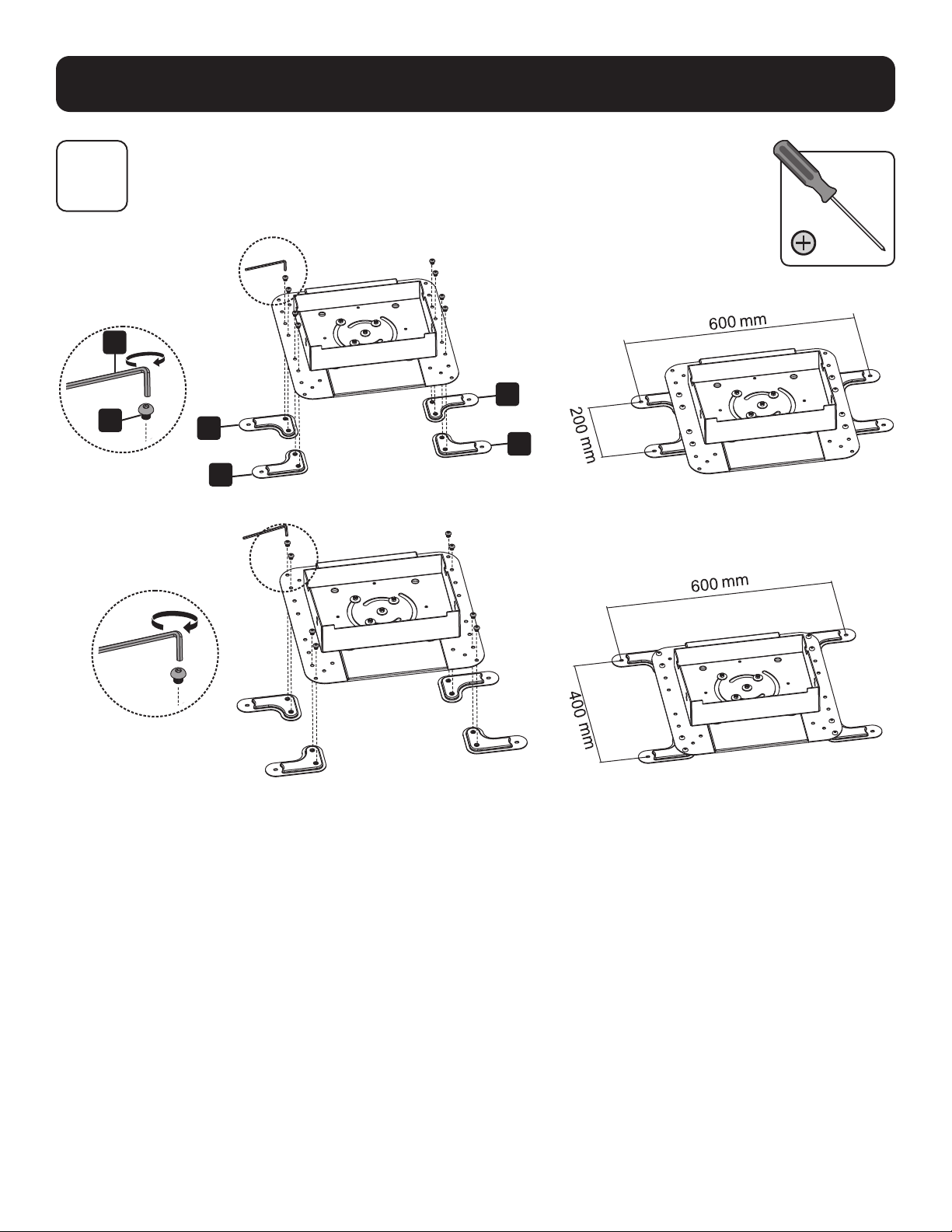
6B
6B-1 : Installation des bras d'adaptateur de rallonge VESA
VESA 600 x 200
VESA 600 x 400
l
G
J
J
K
K

46
Assemblage et installation
6B-2 : Fixation de la plaque de montage à l'écran
TV
6B
M-F M-F
M-A
M-B
M-G
M-H
M-D
M-E
M-C
M-F M-F
Remarque : Choisir les vis, les rondelles et les entretoises appropriées (le cas échéant) en fonction du type d'écran.
47
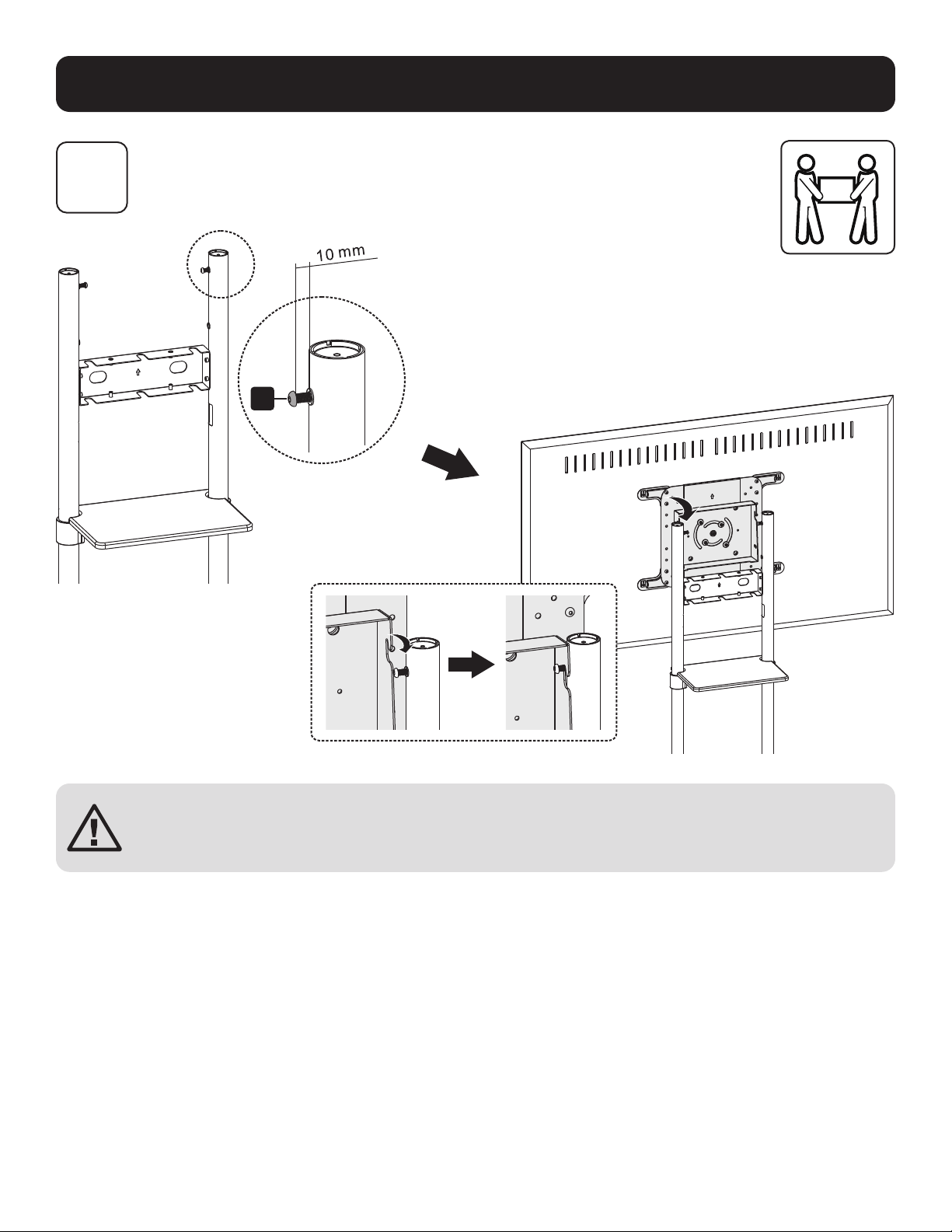
Assemblage et installation
7
Montage de l'écran sur les vis
MISE EN GARDE : Ajuster les colonnes à la hauteur désirée avant d'installer l'écran.
Pour ajuster la hauteur des colonnes une fois l'écran installé, retirer l'étagère pour
l'équipement avant d'ajuster les colonnes à la hauteur souhaitée.
M

48
Assemblage et installation
8
9
Ajustement de l'angle d'inclinaison de l'écran
Ajustement ferme des boulons arrière
M
l
Position par défaut
(0°)
Position inclinée (5°)
T

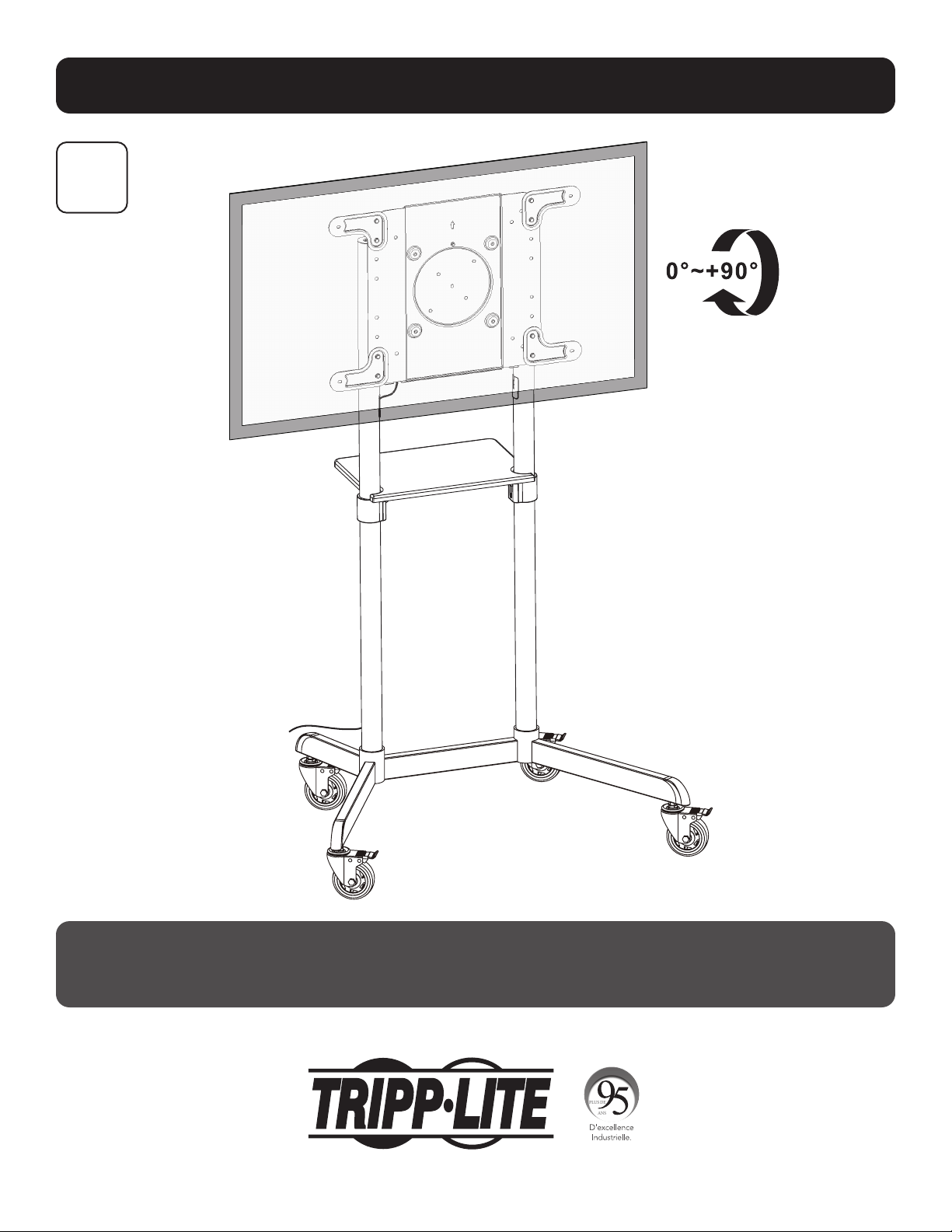
49
Assemblage et installation
10
Fixation de l'écran en position horizontale/verticale (facultatif)
Serrer la vis pour fixer
l'écran en place.
Serrer la vis pour fixer
l'écran en place.
50
Assemblage et installation
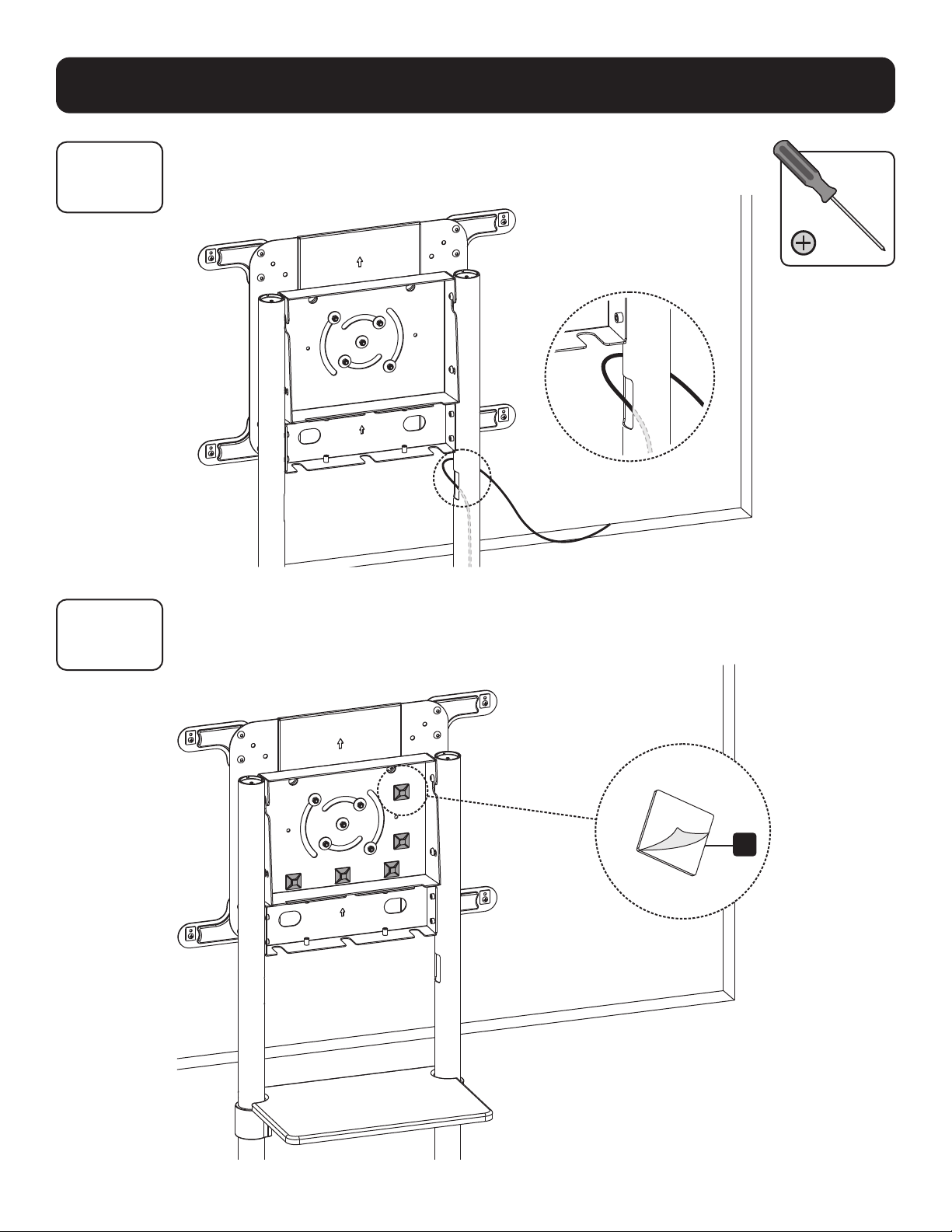
11A
11B
Acheminement des câbles
11B-1 : Fixation des supports de serre-câble
R
51
Assemblage et installation
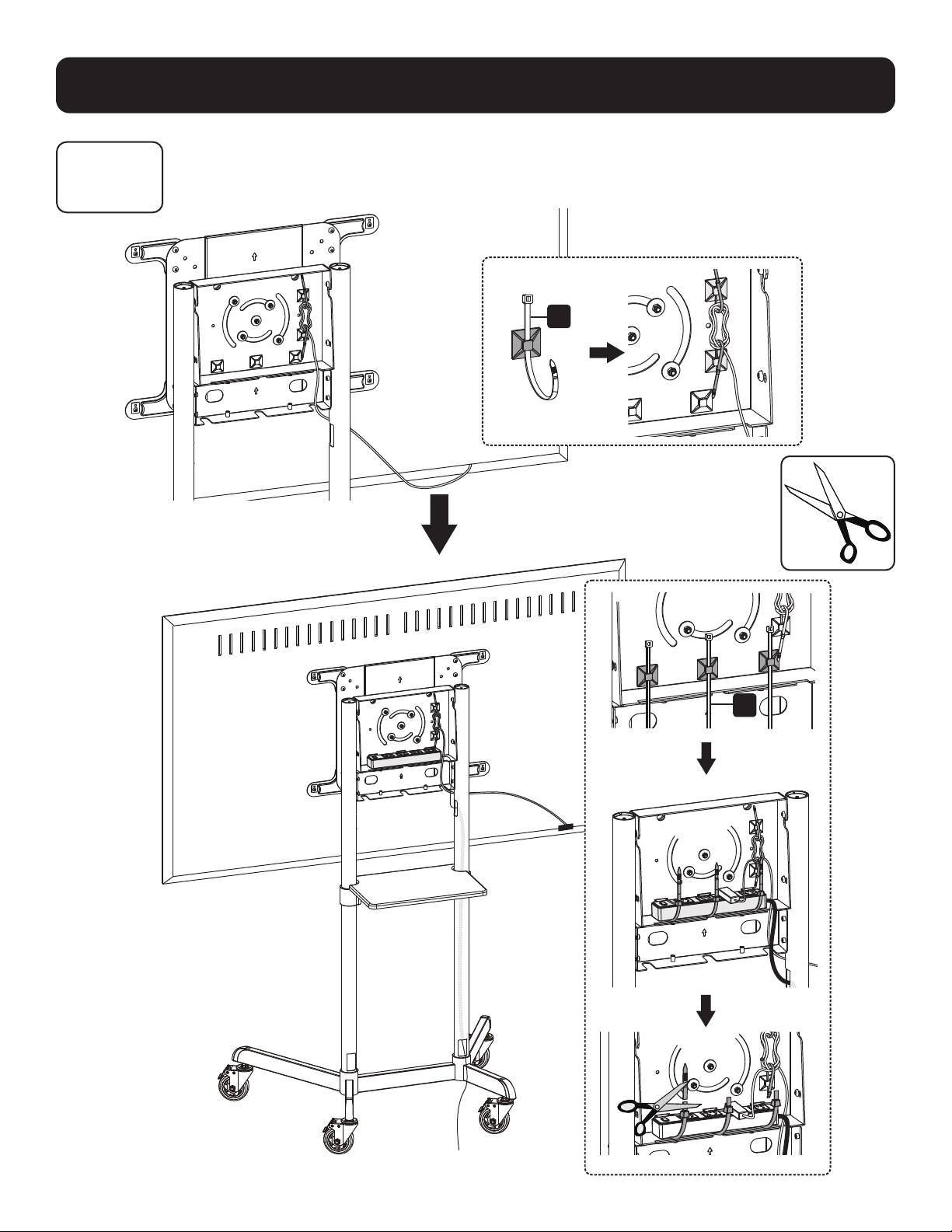
11B
11B-2 : Acheminement des câbles à travers les serre-câbles
S
S
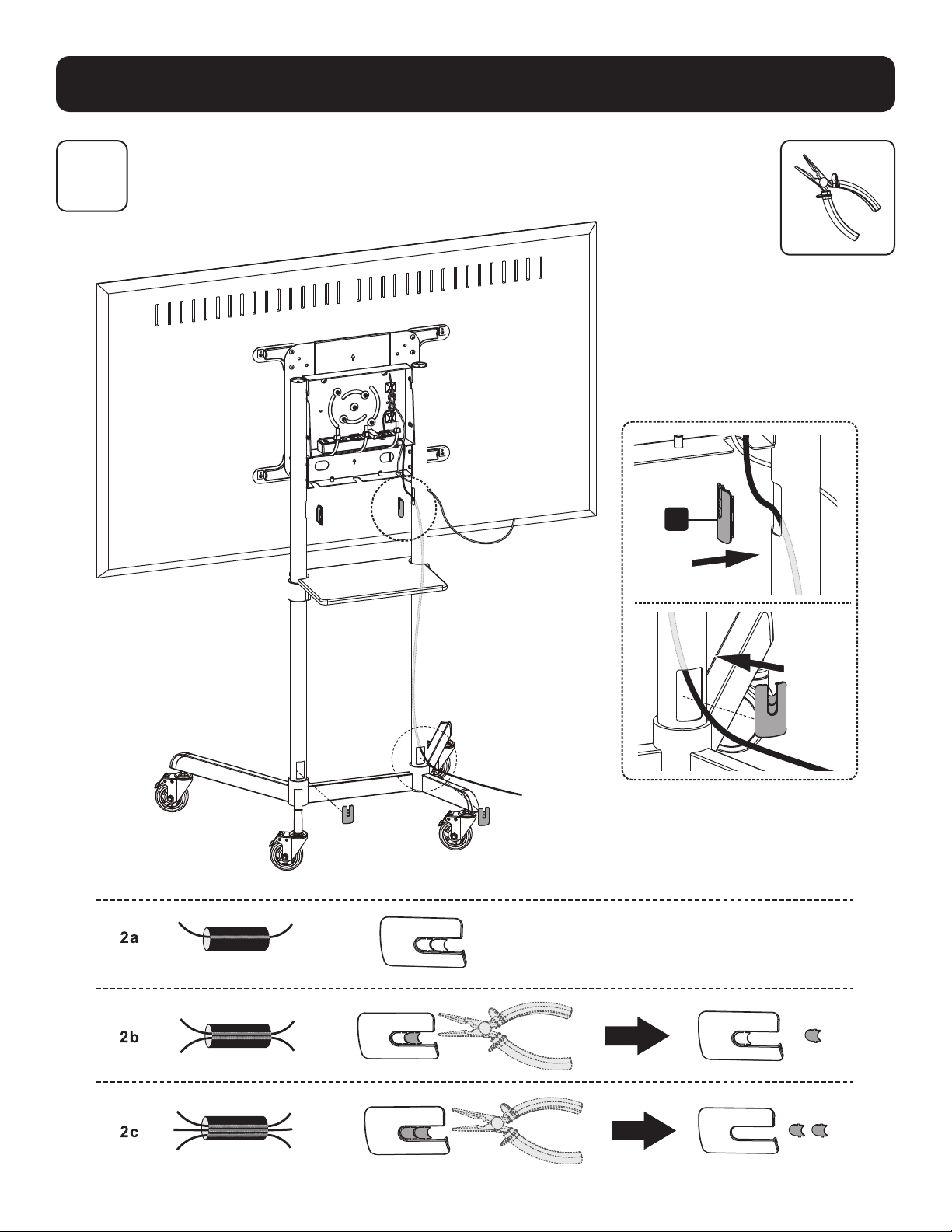
52
Assemblage et installation
12
Fixation des couvercles de câble
L
53
Assemblage et installation
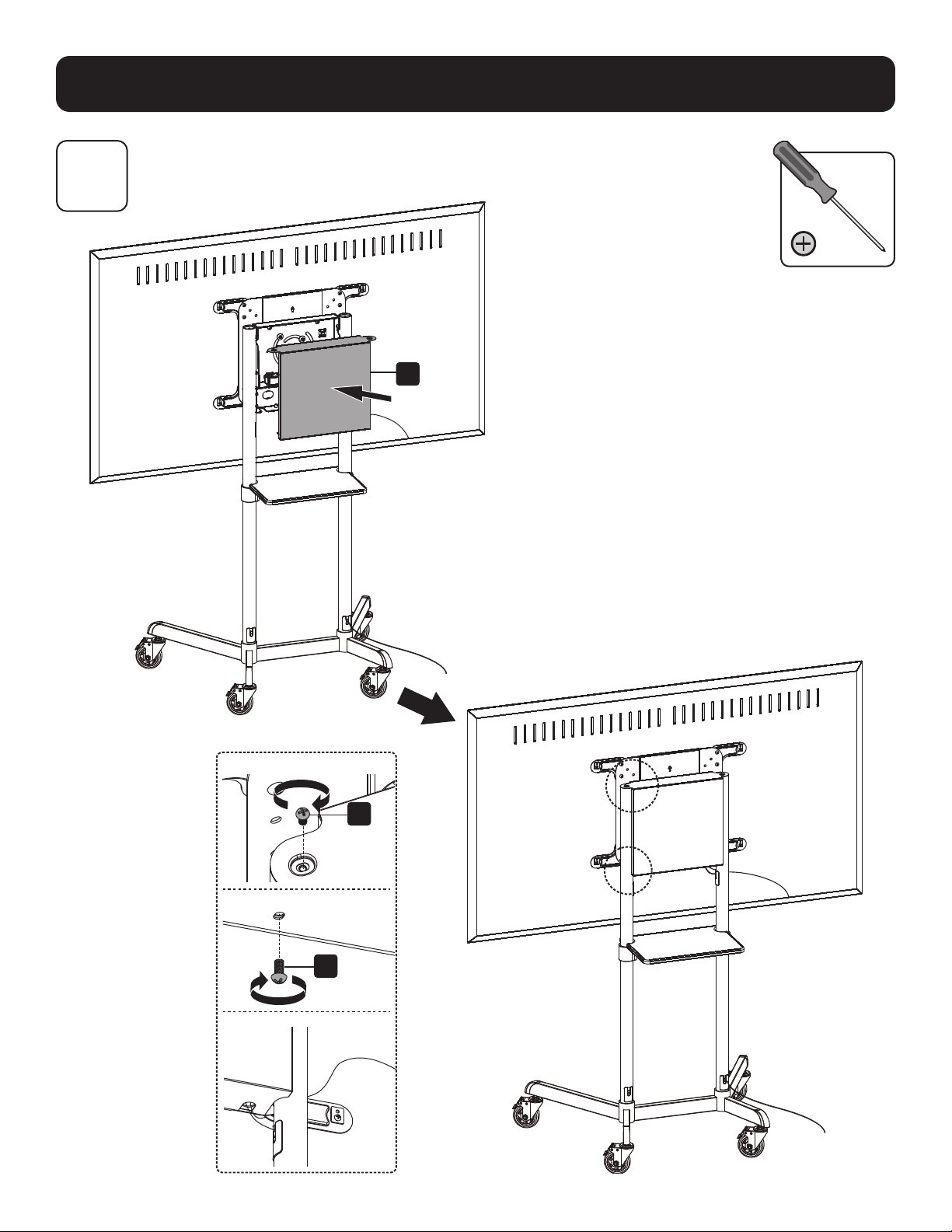
13
Fixation du couvercle arrière
I
O
O
54
Assemblage et installation
14
Entretien
• Vérifier à intervalles réguliers (au moins tous les trois mois) que le support peut être utilisé de façon sûre et sécuritaire.
• Pour toute question, visiter tripplite.com/support.
1111 W. 35th Street, Chicago, IL 60609 USA tripplite.com/support
20-06-088 93-3CB9_RevA
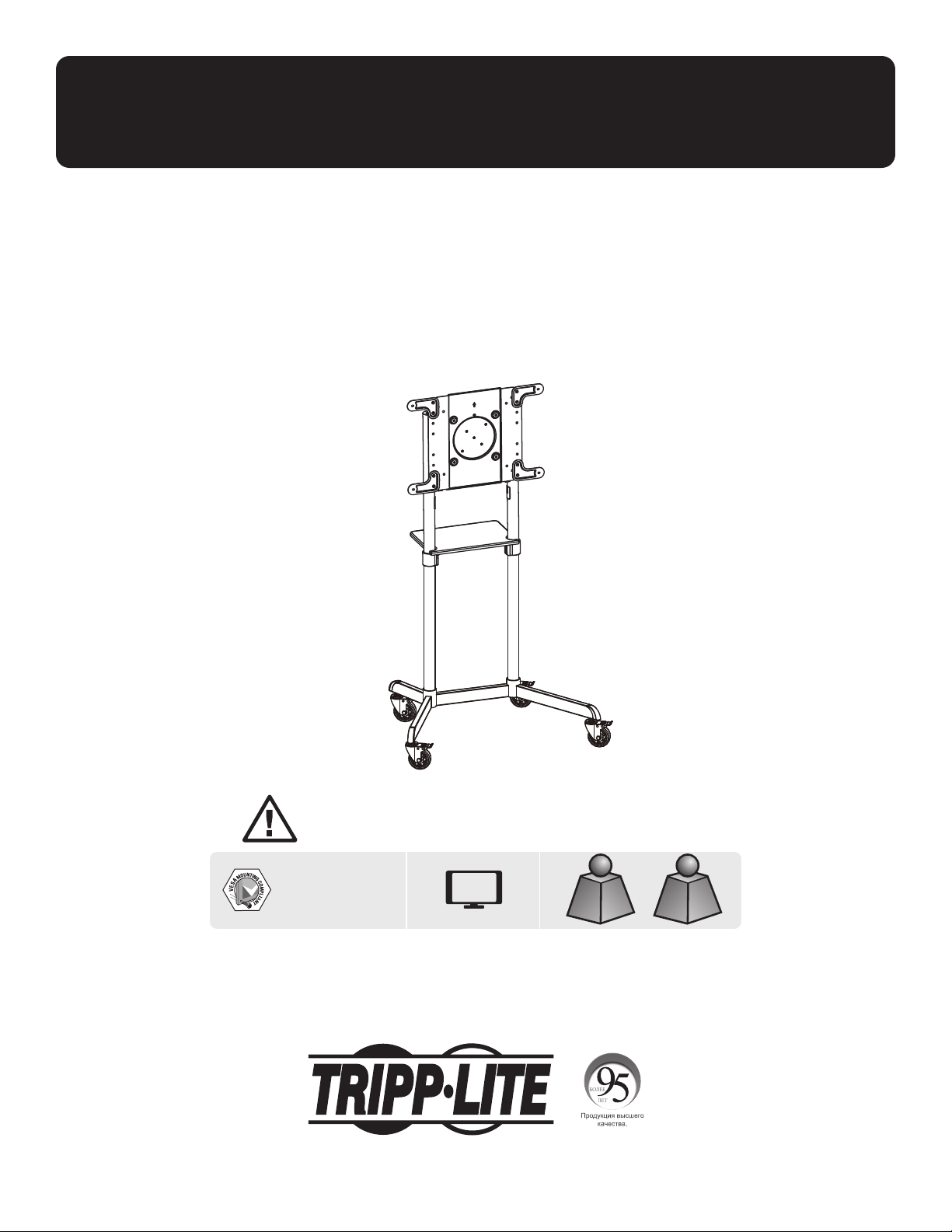
55
Руководcтво пользoвателя
Передвижная подставка для дисплея
с вращающимся кронштейном
Модель: DMCS3770ROT
1111 W. 35th Street, Chicago, IL 60609 USA • tripplite.com/support
Охраняется авторским правом © 2020 Tripp Lite. Перепечатка запрещается.
ВНИМАНИЕ! Для безопасного подъема и надлежащего размещения оборудования обязательно обращайтесь за
помощью или пользуйтесь грузоподъемным оборудованием.
200 x 200 / 300 x 300
350 x 350 / 400 x 200
400 x 400 / 600 x 200
600 x 400
До
70”
Для телевизораДля телевизора
до до
70 кг70 кг
Для DVD-Для DVD-
проигрывателяпроигрывателя
до до
5 кг5 кг
English 1 • Español 19 • Français 41 • Deutsch 73

56
Важные указания по технике безопасности
Гарантийные обязательства
ВНИМАНИЕ!
• Перед началом сборки и установки внимательно изучите все разделы руководства. С вопросами относительно любых указаний и предупреждений
обращайтесь в службу поддержки компании Tripp Lite.
• Использование данного приспособления с изделиями, масса которых превышает указанный предел, может привести к потере устойчивости с возможным
нанесением травмы.
• Крепление кронштейнов должно производиться в соответствии с указаниями, изложенными в настоящем руководстве. Неправильная установка может
привести к причинению материального ущерба или существенного вреда здоровью людей.
• Необходимо использование защитных средств и надлежащих инструментов. Установка данного изделия должна производиться только специалистами.
• Убедитесь в том, что опорная поверхность с запасом выдержит суммарную нагрузку, создаваемую оборудованием и всеми входящими в комплект
деталями оснастки и другими компонентами.
• Используйте крепежные винты, поставляемые в комплекте, и НЕ ПЕРЕТЯГИВАЙТЕ их.
• Данное изделие содержит мелкие детали, которые могут вызвать удушье в случае проглатывания. Эти детали следует хранить в недоступном для детей
месте.
• Данное изделие предназначено для использования только в закрытых помещениях. Использование данного изделия на открытом воздухе может привести
к его выходу из строя и причинению вреда здоровью людей.
• Регулярно (не реже, чем раз в три месяца) проверяйте надежность крепления кронштейна и безопасность его использования.
Условия 5-летней ограниченной гарантии
Продавец гарантирует отсутствие изначальных дефектов материала или изготовления в течение 5 лет с момента первоначальной покупки данного изделия при условии его использования в соответствии со
всеми применимыми к нему указаниями. В случае проявления каких-либо дефектов материала или изготовления в течение указанного периода Продавец осуществляет ремонт или замену данного изделия
исключительно по своему усмотрению.
ДЕЙСТВИЕ НАСТОЯЩЕЙ ГАРАНТИИ НЕ РАСПРОСТРАНЯЕТСЯ НА СЛУЧАИ ЕСТЕСТВЕННОГО ИЗНОСА ИЛИ ПОВРЕЖДЕНИЯ В РЕЗУЛЬТАТЕ АВАРИИ, НЕНАДЛЕЖАЩЕГО ИСПОЛЬЗОВАНИЯ, НАРУШЕНИЯ ПРАВИЛ
ЭКСПЛУАТАЦИИ ИЛИ ХАЛАТНОСТИ. ПРОДАВЕЦ НЕ ПРЕДОСТАВЛЯЕТ НИКАКИХ ЯВНО ВЫРАЖЕННЫХ ГАРАНТИЙ ЗА ИCКЛЮЧЕНИЕМ ПРЯМО ИЗЛОЖЕННОЙ В НАCTОЯЩЕМ ДОКУМЕНТЕ. ЗА ИСКЛЮЧЕНИЕМ СЛУЧАЕВ,
ЗАПРЕЩЕННЫХ ДЕЙСТВУЮЩИМ ЗАКОНОДАТЕЛЬСТВОМ, ВСЕ ПОДРАЗУМЕВАЕМЫЕ ГАРАНТИИ, ВКЛЮЧАЯ ВСЕ ГАРАНТИИ ПРИГОДНОСТИ ДЛЯ ПРОДАЖИ ИЛИ ИСПОЛЬЗОВАНИЯ ПО НАЗНАЧЕНИЮ, ОГРАНИЧЕНЫ ПО
ПРОДОЛЖИТЕЛЬНОСТИ ДЕЙСТВИЯ ВЫШEУКАЗАННЫМ ГАРАНТИЙНЫМ СРОКОМ; КРОМЕ ТОГО, ИЗ НАСТОЯЩЕЙ ГАРАНТИИ ЯВНЫМ ОБРАЗОМ ИСКЛЮЧАЮТСЯ ВСЕ ПОБОЧНЫЕ, СЛУЧАЙНЫЕ И КОСВЕННЫЕ УБЫТКИ. (В
некоторых штатах не допускается введение ограничений на продолжительность действия тех или иных подразумеваемых гарантий, а в некоторых - исключение или ограничение размера побочных или
косвенных убытков. В этих случаях вышеизложенные ограничения или исключения могут на вас не распространяться. Настоящая гарантия предоставляет конкретные юридические права, а набор других
прав может быть различным в зависимости от юрисдикции).
ВНИМАНИЕ! До начала использования данного устройства пользователь должен убедиться в том, что оно является пригодным, соответствующим или безопасным для предполагаемого применения. В связи
с большим разнообразием конкретных применений производитель не дает каких-либо заверений или гарантий относительно пригодности данных изделий для какого-либо конкретного применения или их
соответствия каким-либо конкретным требованиям.
Компания Tripp Lite постоянно совершенствует свою продукцию. Технические характеристики могут изменяться без предварительного уведомления. Внешний вид реальных изделий может несколько
отличаться от представленного на иллюстрациях.
57
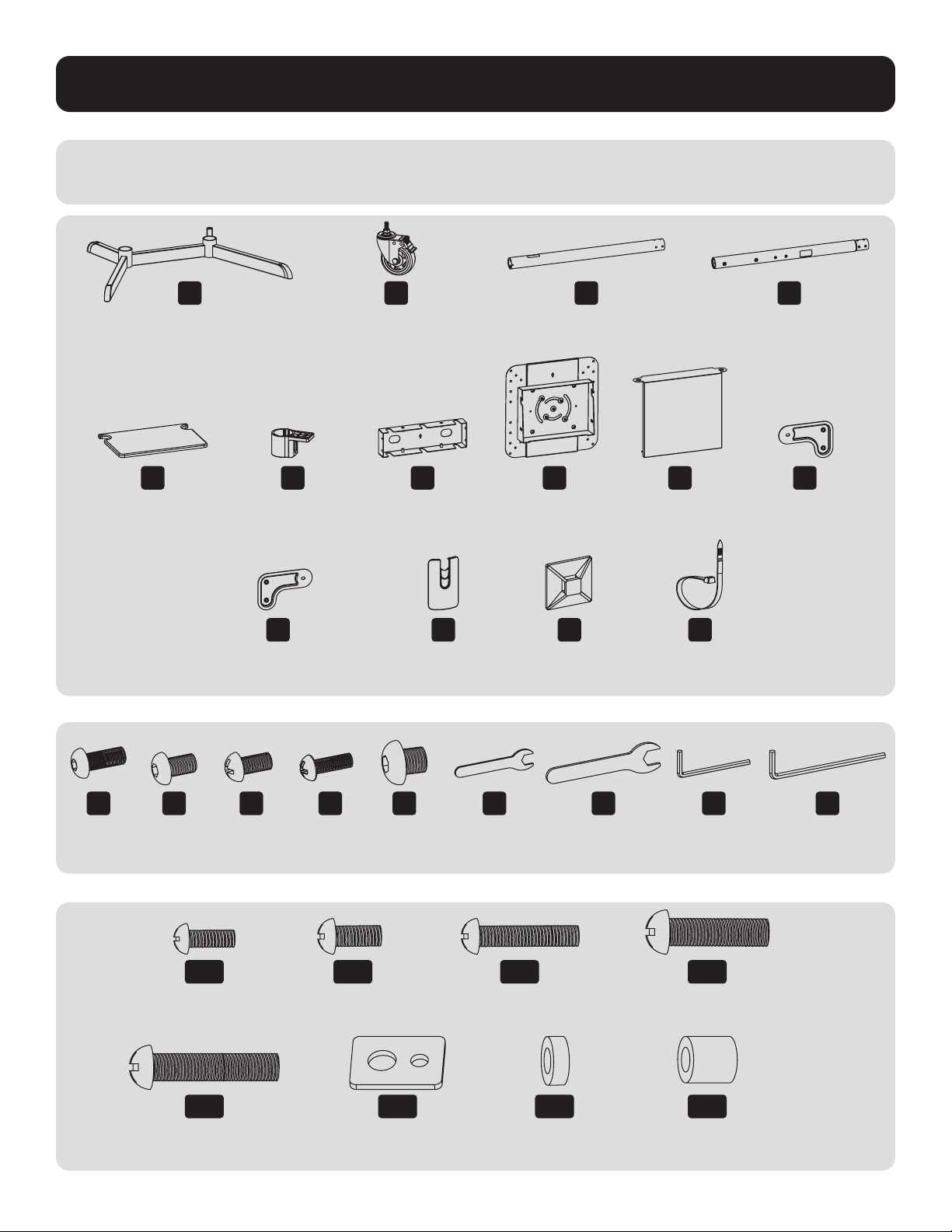
Комплектация
ВНИМАНИЕ! Перед началом установки убедитесь в том, что вами получены все детали согласно представленному ниже перечню. В случае отсутствия или
повреждения каких-либо деталей обратитесь в компанию Tripp Lite для их замены.
M
Винт M8 x 20
(8 шт.)
T
Ключ гаечный M6
(1 шт.)
A
Основание
(1 шт.)
B
Ролик
(4 шт.)
C
Стойка нижняя
(2 шт.)
D
Стойка верхняя
(2 шт.)
E
Полка для
оборудования
(1 шт.)
L
Крышка кабельного
канала (4 шт.)
S
Кабельный хомут
(5 шт.)
F
Кронштейн для
крепления полки
(2 шт.)
G
Заглушка передняя
(1 шт.)
H
Монтажная пластина
(1 шт.)
I
Заглушка задняя
(1 шт.)
J
Рычаг соединительный
раздвижной VESA
(2 шт.)
K
Рычаг соединительный раздвижной VESA
(2 шт.)
R
Держатель кабельного
хомута (5 шт.)
N
Винт M6 x 8
(8 шт.)
U
Ключ гаечный M10
(1 шт.)
P
Винт M6 x 18
(1 шт.)
Вт
Ключ шестигранный
на 5 мм (1 шт.)
O
Винт M6 x 12
(16 шт.)
В
Ключ шестигранный
на 4 мм (1 шт.)
Q
Винт M8 x 8
(8 шт.)
M-A
Винт M5 x 14
(4 шт.)
M-E
Винт M8 x 50
(4 шт.)
M-C
Винт M6 x 30
(4 шт.)
M-G
Проставка малая
(8 шт.)
M-B
Винт M6 x 14
(4 шт.)
M-F
Шайба
(4 шт.)
M-D
Винт M8 x 30
(4 шт.)
M-H
Проставка большая
(8 шт.)
Упаковочный комплект M
Упаковочный комплект P
58
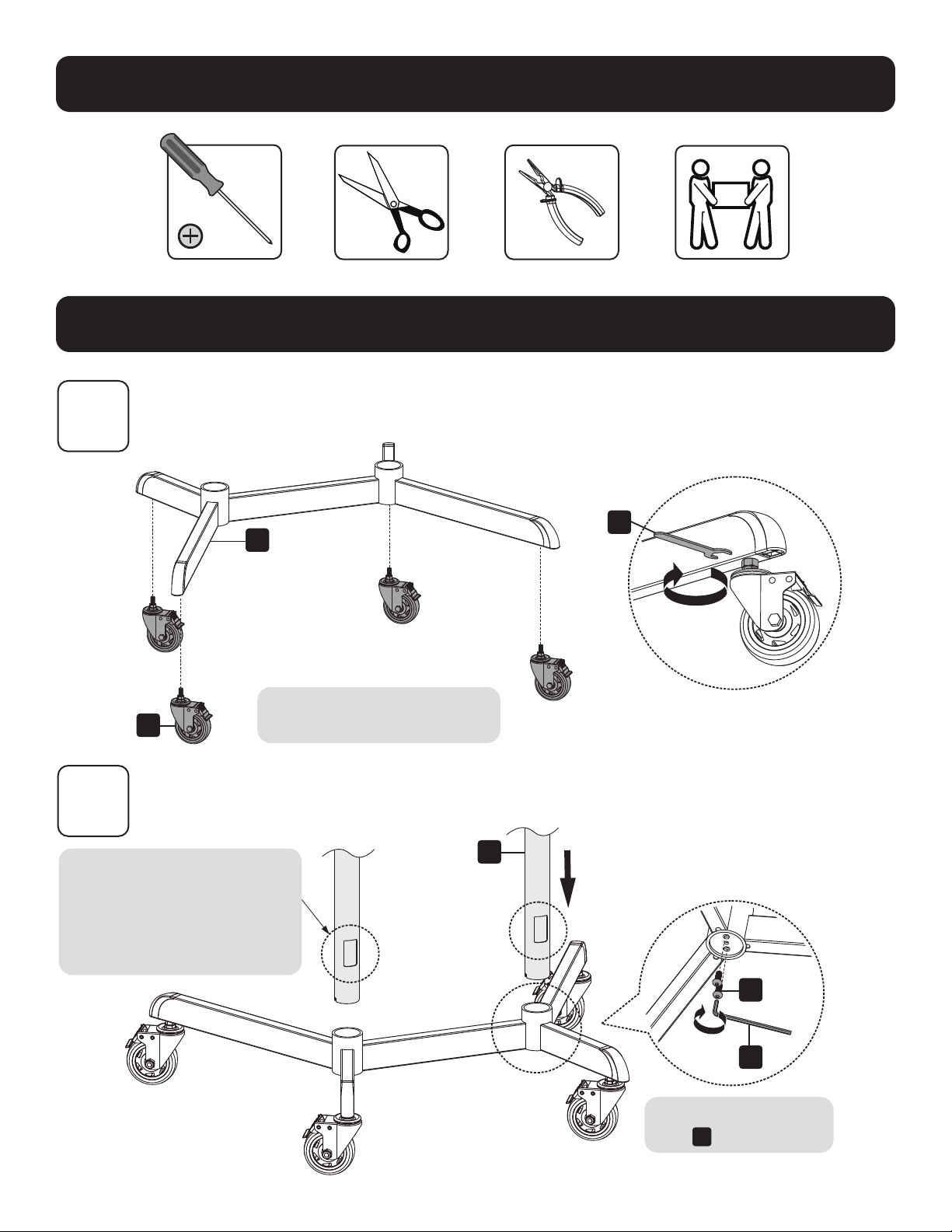
Сборка и установка
Необходимо для установки
1
2
B
A
U
Перед началом установки
заблокируйте ролики.
Установка роликов
Крепление стоек к основанию
Выровняйте стойку как показано
на рисунке, чтобы отверстия для
прокладки кабеля и более короткие
стойки находились на одной стороне.
Не затягивайте до упора
винты
M
.
C
M
Вт
59
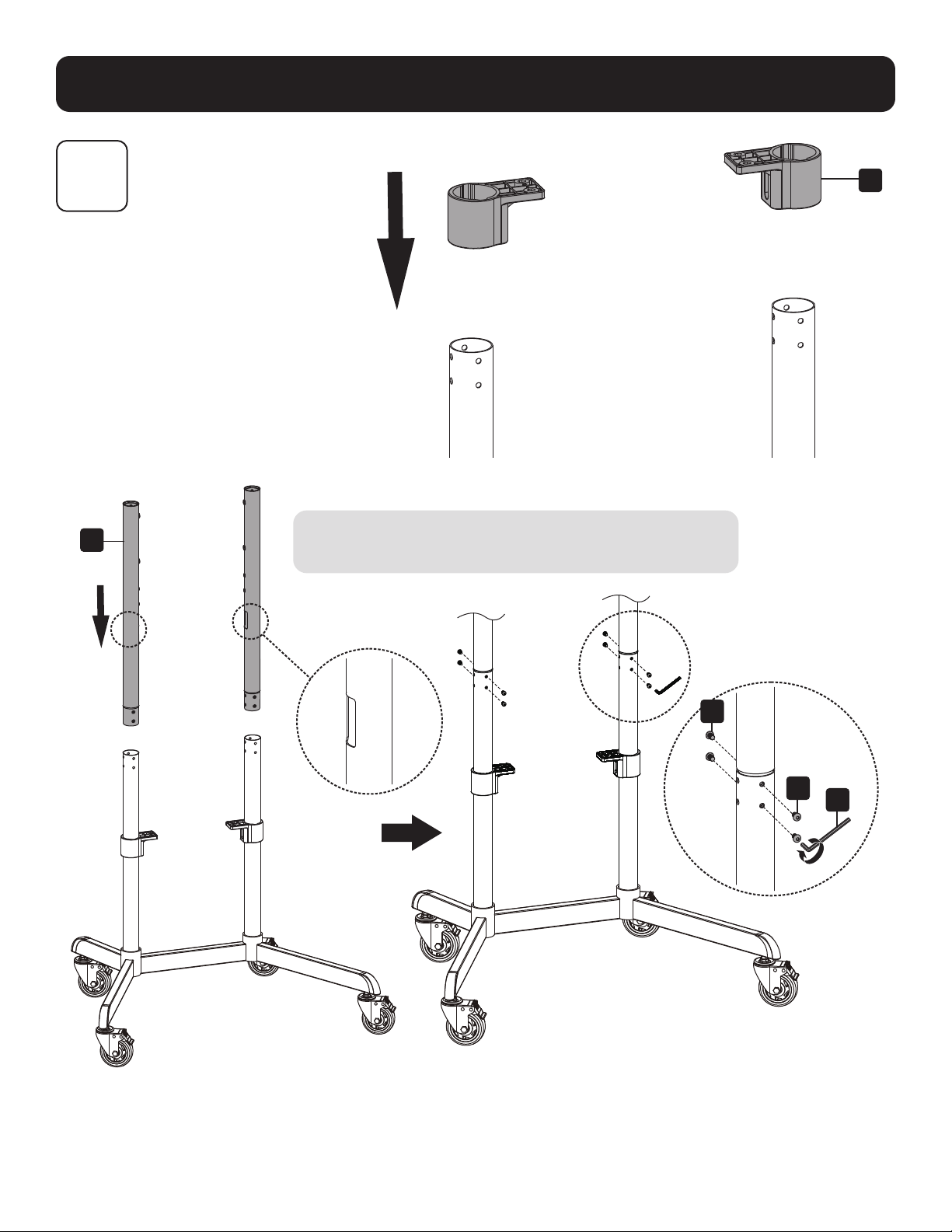
Сборка и установка
3
Установка стоек
Расположите отверстия для прокладки кабеля (находящиеся в каждой
из верхней стоек), обратив их внутрь как показано на рисунке.
F
D
N
N
В
60
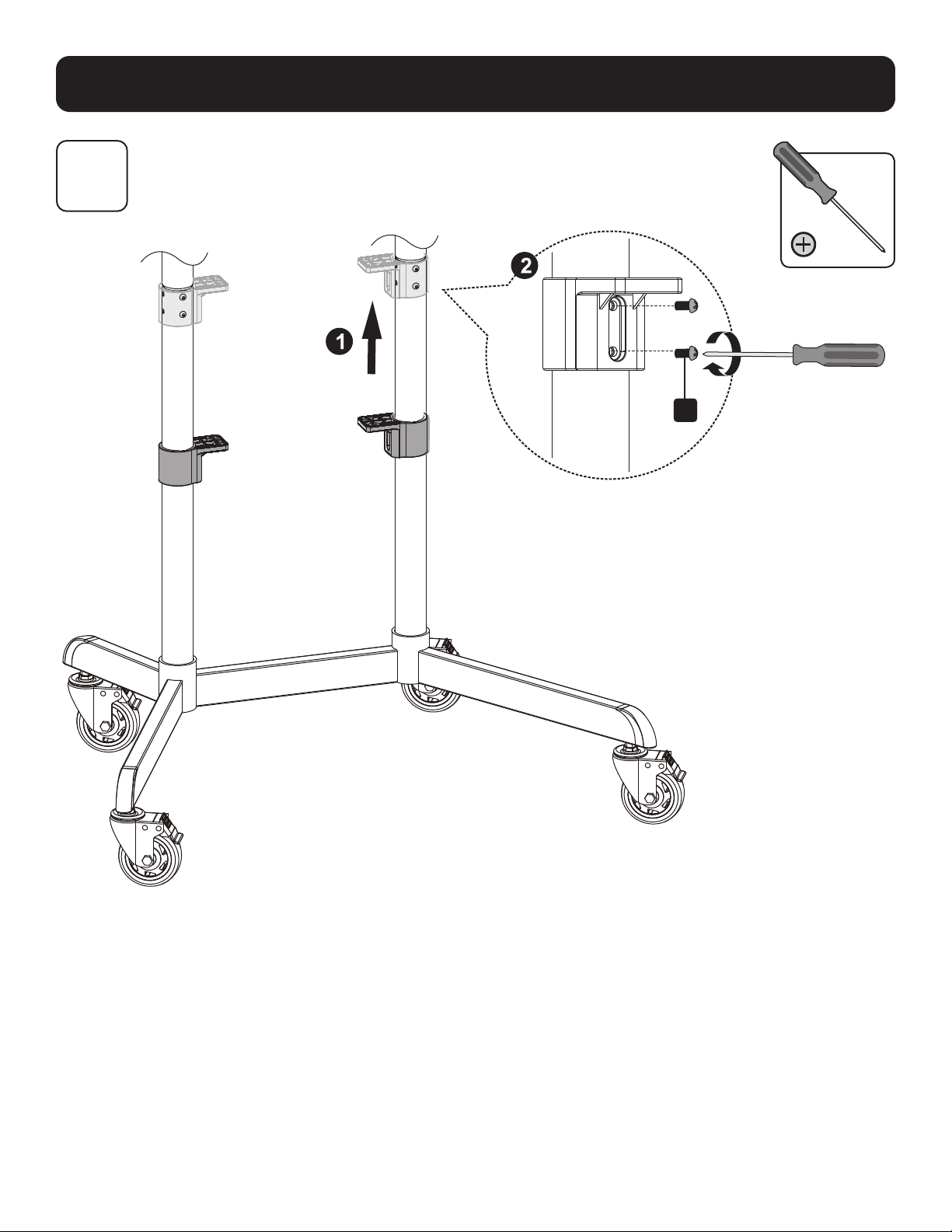
Сборка и установка
4
O
Установка кронштейнов для крепления полки

61
Сборка и установка
5
Установка верхней заглушки и полки для оборудования
G
O
O
M
Вт
E
Расположите
G
как показано на рисунке, чтобы
лицевая часть
G
и более длинные стойки
находились на одной стороне.
Убедитесь в том, что
E
и более короткие стойки
находятся на одной стороне.
ВНИМАНИЕ! Затяните до упора винты
M
под основанием.
62
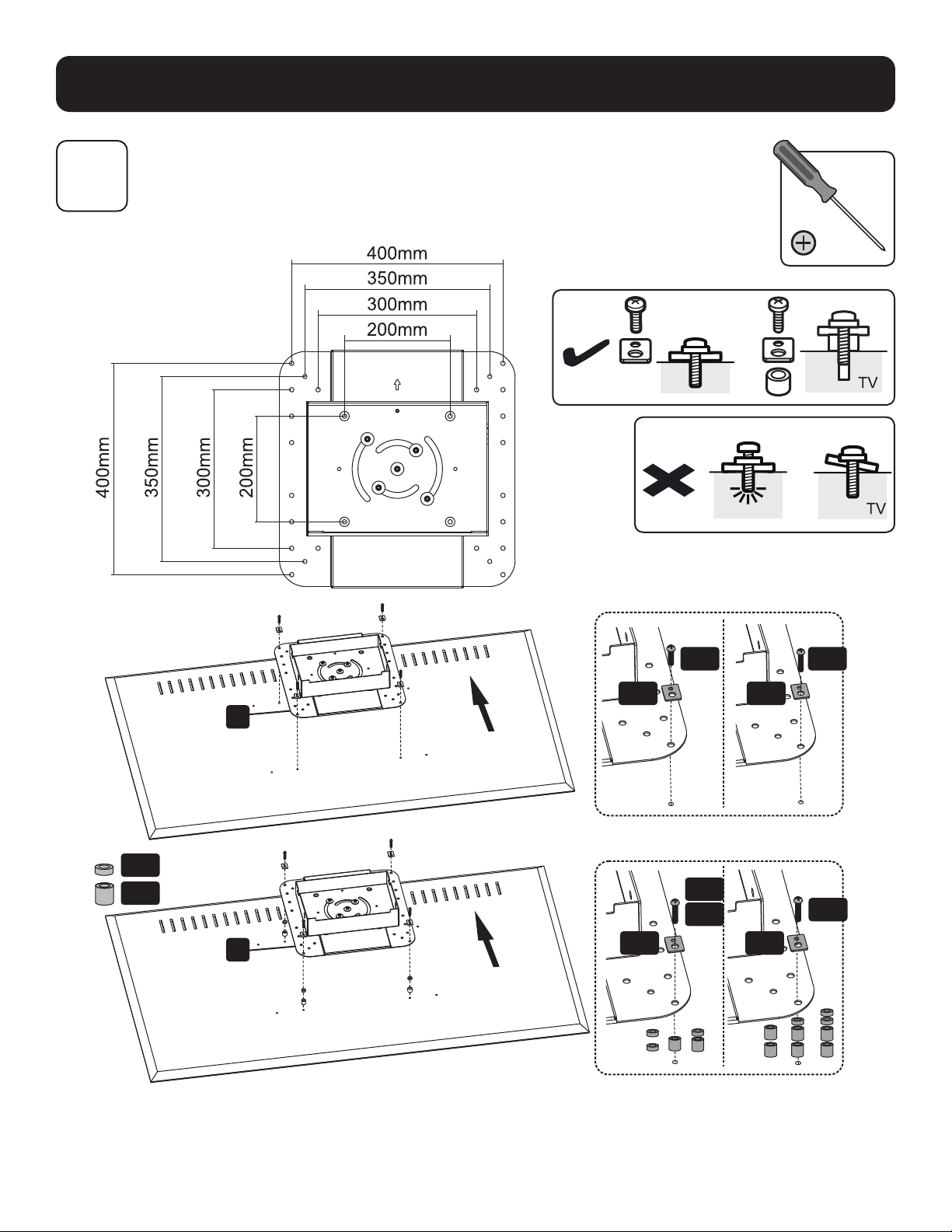
Сборка и установка
6A
Крепление монтажной пластины к дисплею
VESA 200x200 / 300x300 / 350x350 / 400x200/ 400x400
TV
M-G
M-A
M-D
M-E
M-C
M-B
M-F
M-F
M-F
M-F
M-H
H
H
Примечание. Выберите соответствующие винты, шайбы и проставки (при необходимости) в соответствии с типом экрана.

63
Сборка и установка
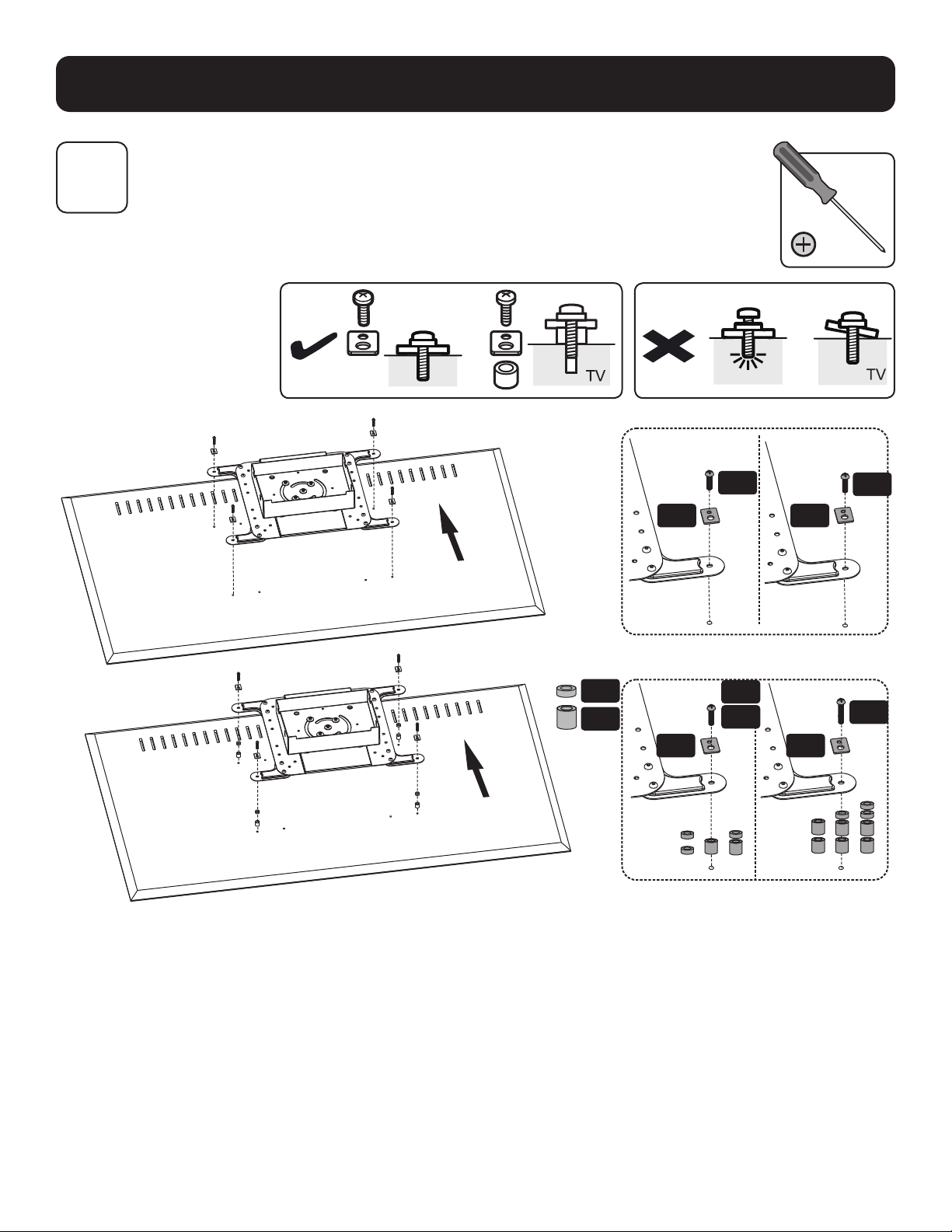
6B
6B-1: Установка раздвижных соединительных рычагов VESA
VESA 600 x 200
VESA 600 x 400
Вт
G
J
J
K
K
64
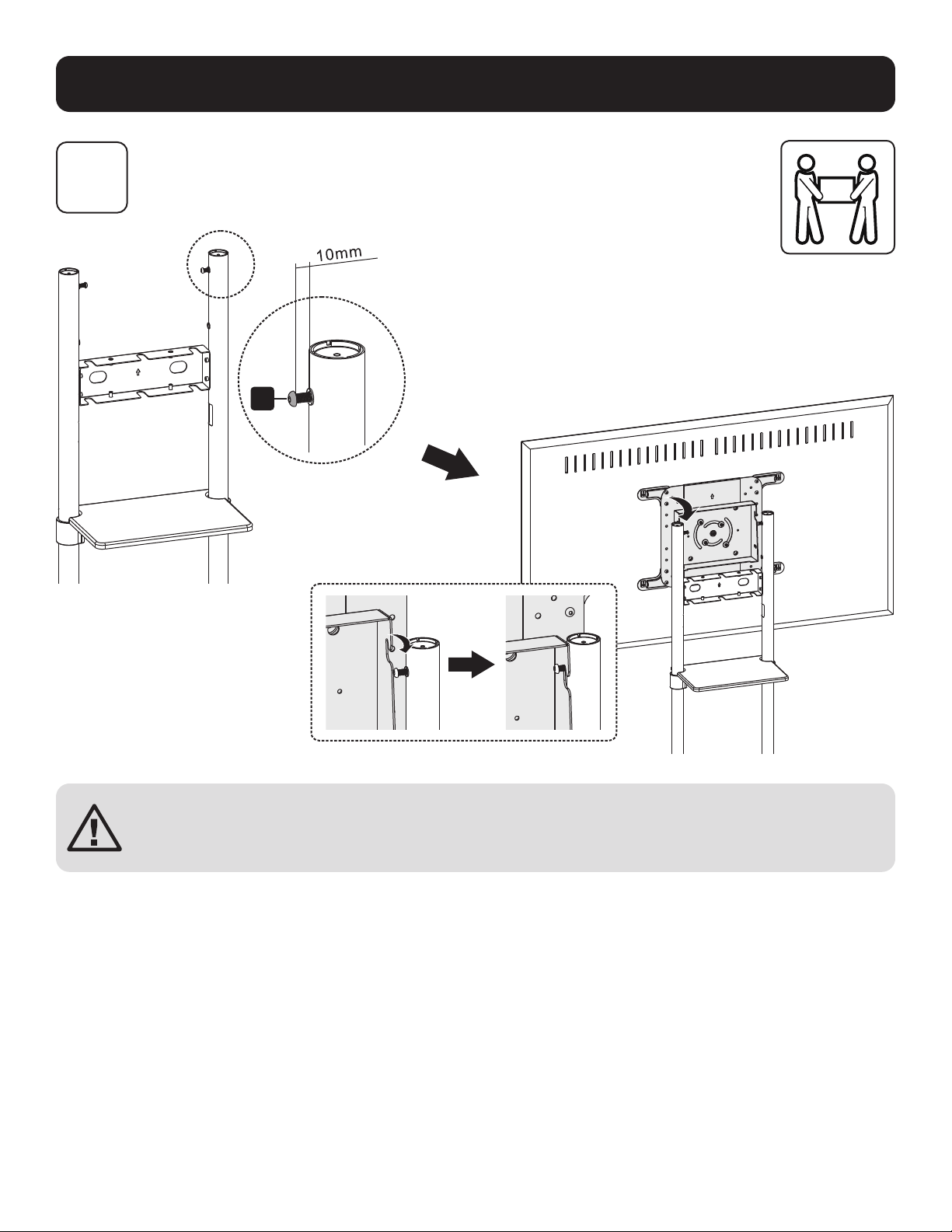
Сборка и установка
6B-2: Крепление монтажной пластины к дисплею
TV
6B
M-F M-F
M-A
M-B
M-G
M-H
M-D
M-E
M-C
M-F M-F
Примечание. Выберите соответствующие винты, шайбы и проставки (при необходимости) в соответствии с типом экрана.
65
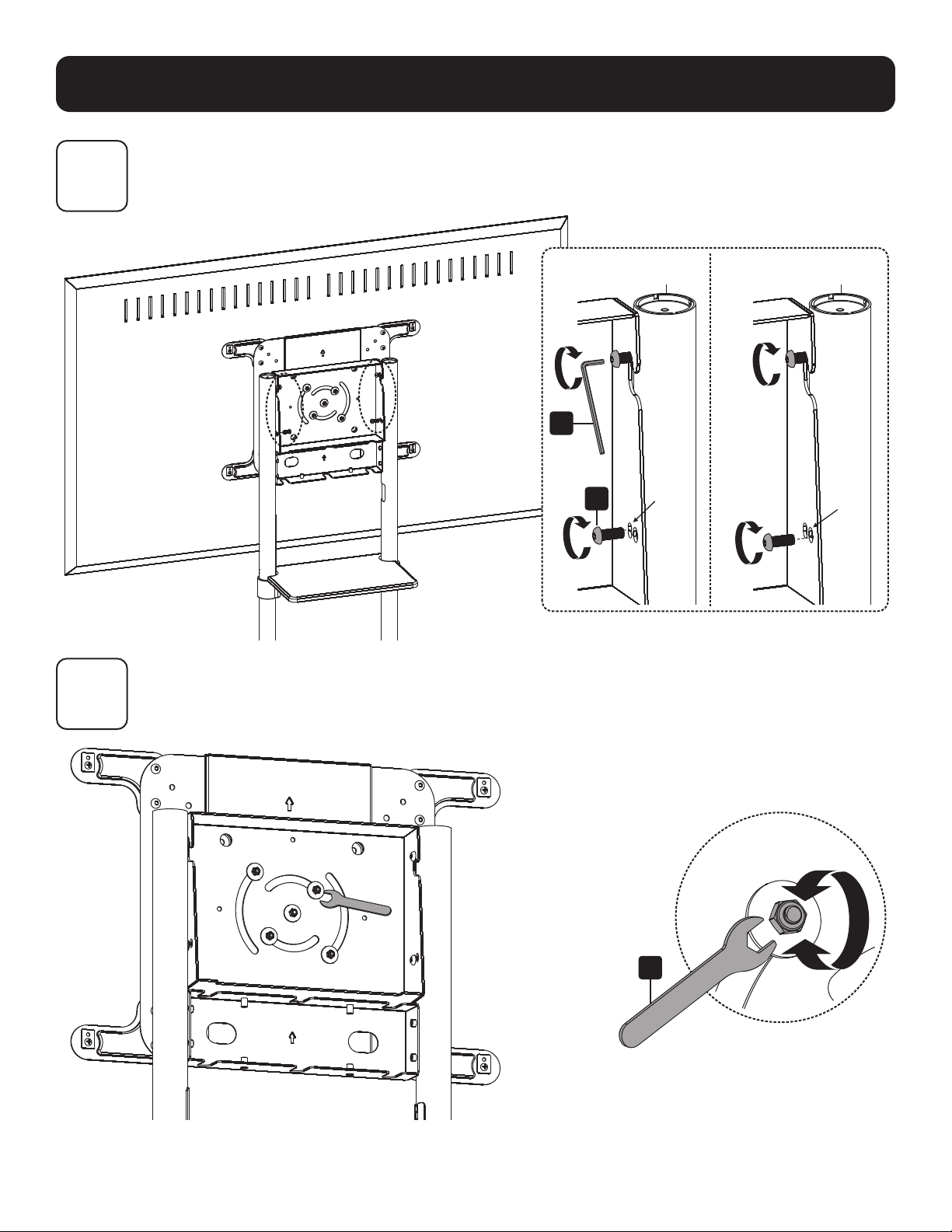
Сборка и установка
7
Крепление дисплея на винтах
ВНИМАНИЕ! Перед установкой дисплея отрегулируйте высоту опорных стоек. Для регулировки высоты стоек после
установки дисплея снимите полку для оборудования, прежде чем зафиксировать стойки на нужной высоте.
M
66
Сборка и установка
8
9
Регулировка угла наклона дисплея
Регулировка задних болтов с фиксацией
M
Вт
Исходное положение (0°) Наклонное положение (5°)
T
67
Сборка и установка
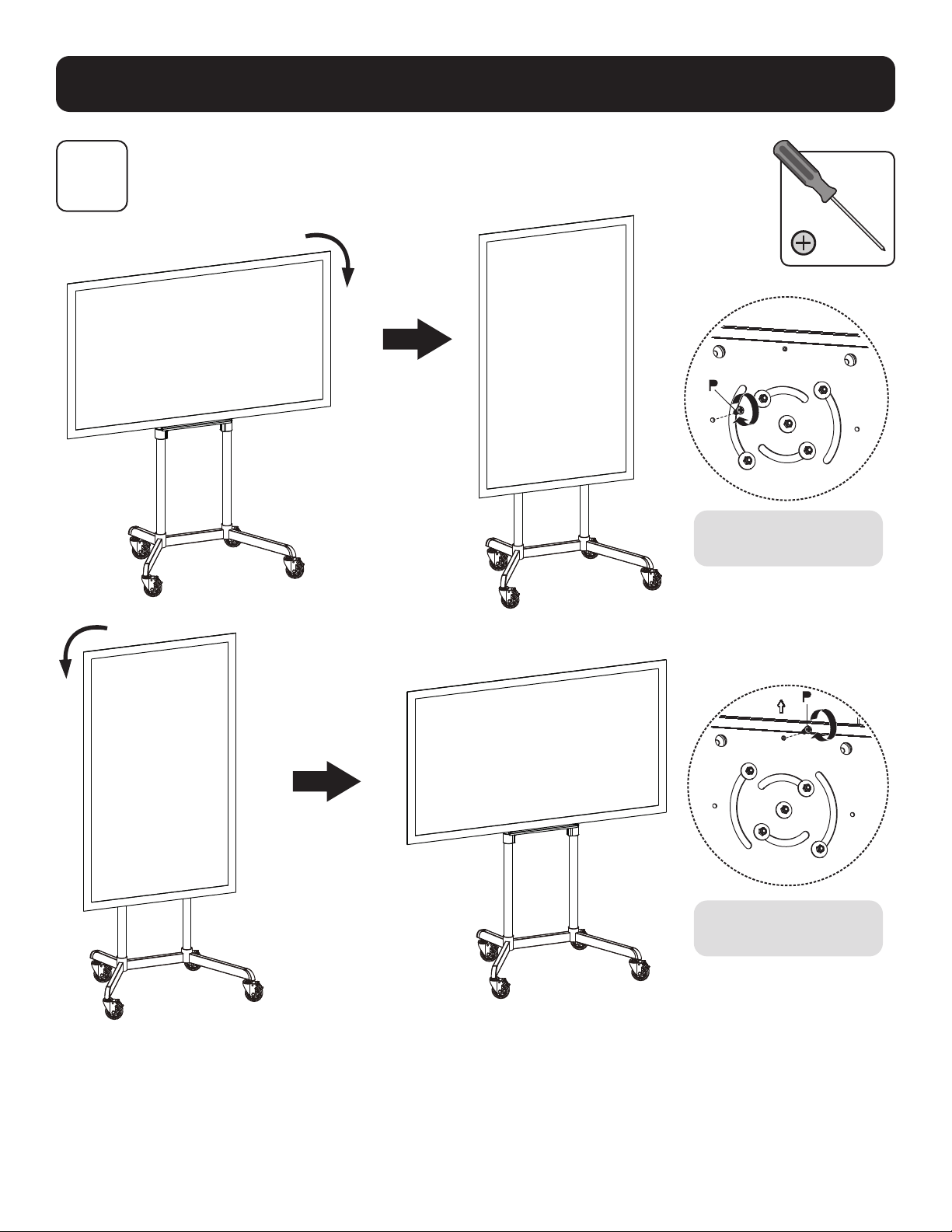
10
Фиксация дисплея в горизонтальном/вертикальном положении (опционально)
Затяните винт для фиксации
дисплея.
Затяните винт для фиксации
дисплея.
68
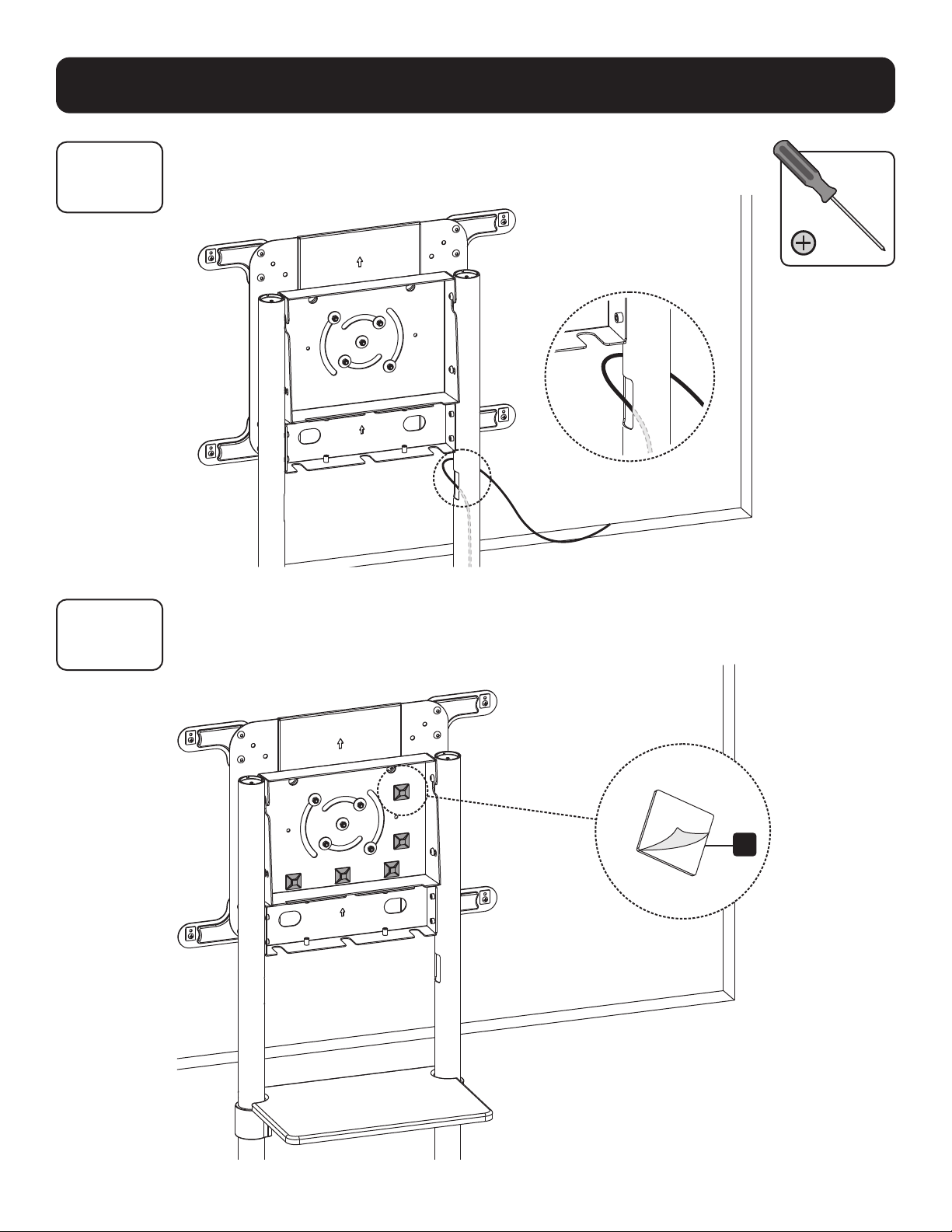
Сборка и установка
11A
11B
Прокладка кабелей
11B-1: Крепление держателей кабельных хомутов
R

69
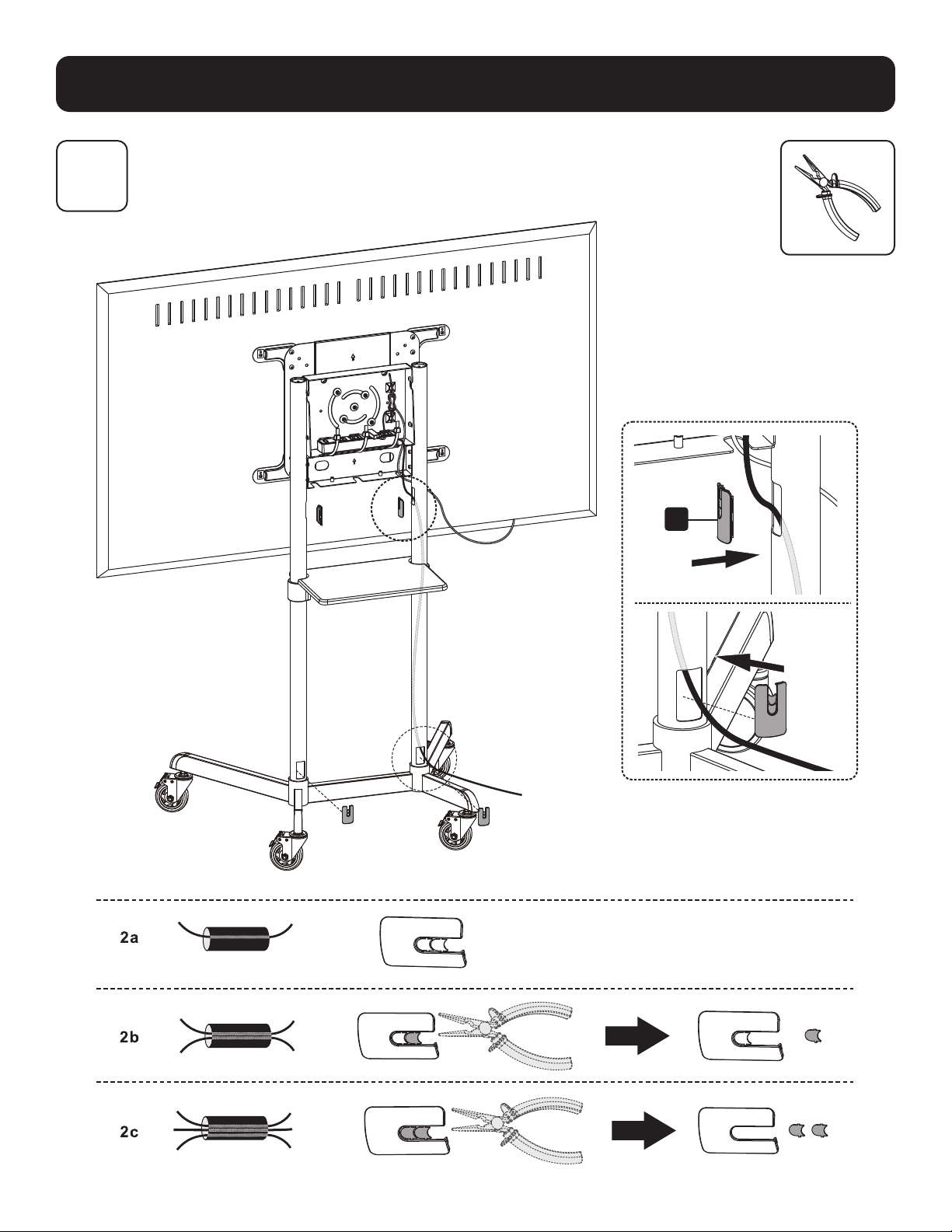
Сборка и установка
11B
11B-2: Прокладка кабелей через кабельные хомуты
S
S
70
Сборка и установка
12
Крепление защитных крышек кабельных каналов
L

71
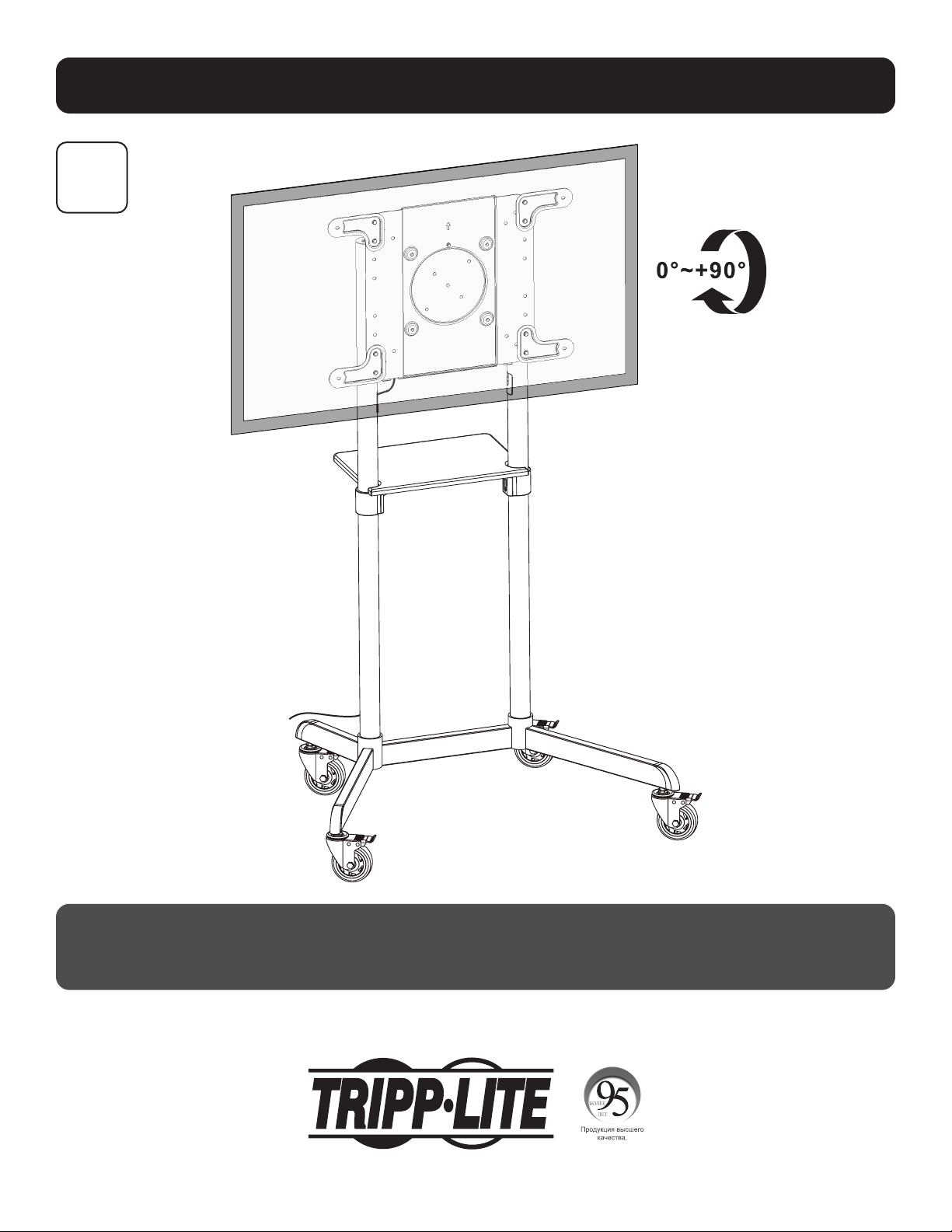
Сборка и установка
13
Крепление задней заглушки
I
O
O
72
Сборка и установка
14
Техническое обслуживание
• Регулярно (не реже, чем раз в три месяца) проверяйте надежность крепления кронштейна и безопасность его использования.
• В случае возникновения каких-либо вопросов посетите страницу tripplite.com/support.
1111 W. 35th Street, Chicago, IL 60609 USA • tripplite.com/support
20-06-088 93-3CB9_RevA
73
Benutzerhandbuch
Mobiler rotierender
Bildschirmwagen
Modell: DMCS3770ROT
1111 W. 35th Street, Chicago, IL 60609 USA • tripplite.com/support
Copyright © 2020 Tripp Lite. Alle Rechte vorbehalten.
WARNUNG! Verwenden Sie eine mechanische Hebevorrichtung, um das Gerät sicher
anzuheben und zu positionieren.
200 x 200 / 300 x 300
350 x 350 / 400 x 200
400 x 400 / 600 x 200
600 x 400
70 Zoll
max.
Eingestuft für Eingestuft für
FERNSEHERFERNSEHER
70 kg/ 70 kg/
(154 lb.)(154 lb.)
Eingestuft für DVDEingestuft für DVD
5 kg/ 5 kg/
(11 lb.)(11 lb.)
English 1 • Español 19 • Français 37 • Рессрил 55

74
Wichtige Sicherheitshinweise
Garantie
VORSICHT
• Lesen Sie das gesamte Handbuch, bevor Sie mit der Installation und Montage beginnen. Wenden Sie sich bei Fragen
zu dieser Anleitung oder diesen Warnhinweisen bitte an den Tripp Lite Support.
• Die Verwendung mit Produkten, die schwerer als die angegebenen Nenngewichte sind, kann zu Instabilität und damit zu
Verletzungen führen.
• Halterungen müssen wie in dieser Anleitung angegeben angebracht werden. Eine unsachgemäße Installation kann zu
Schäden oder schweren Verletzungen führen.
• Es sind Sicherheitseinrichtungen und geeignete Werkzeuge zu verwenden. Dieses Produkt sollte nur von Fachleuten
installiert werden.
• Stellen Sie sicher, dass die verwendete Montagefläche das Gewicht des Geräts sowie das zugehörige Material und
sämtliche zugehörigen Komponenten tragen kann.
• Verwenden Sie die mitgelieferten Befestigungsschrauben und ziehen Sie die Befestigungsschrauben NICHT ZU FEST an.
• Dieses Produkt enthält Kleinteile, die beim Verschlucken zu Erstickungsgefahr führen können. Diese Teile von Kindern
fernhalten.
• Dieses Produkt ist nur für den Einsatz in geschlossenen Räumen geeignet. Die Verwendung dieses Produktes im Freien
kann zu Fehlfunktionen und Verletzungen führen.
• Stellen Sie in regelmäßigen Abständen (mindestens alle drei Monate) sicher, dass die Wandhalterung sicher angebracht
ist.
5-Jahres-Garantie
Der Verkäufer garantiert für einen Zeitraum von fünf Jahren ab Kaufdatum, dass das Produkt weder Material- noch Herstellungsfehler aufweist, wenn es
gemäß aller zutreffenden Anweisungen verwendet wird. Wenn das Produkt in diesem Zeitraum Material- oder Herstellungsfehler aufweist, kann der Verkäufer
diese Fehler nach eigenem Ermessen beheben oder das Produkt ersetzen.
DIE NORMALE ABNUTZUNG ODER BESCHÄDIGUNGEN AUFGRUND VON UNFÄLLEN, MISSBRAUCH ODER UNTERLASSUNG WERDEN VON DIESER GARANTIE
NICHT GEDECKT. AUSSER DEN NACHSTEHEND AUSDRÜCKLICH DARGELEGTEN GARANTIEBEDINGUNGEN ÜBERNIMMT DER VERKÄUFER KEINERLEI
GARANTIE. AUSSER WENN VON DEN GÜLTIGEN GESETZEN UNTERSAGT, SIND ALLE IMPLIZIERTEN GARANTIEN, EINSCHLIESSLICH ALLE GARANTIEN FÜR DIE
GEBRAUCHSTAUGLICHKEIT ODER EIGNUNG AUF DIE OBEN FESTGELEGTE GARANTIEDAUER BESCHRÄNKT. DIESE GARANTIE SCHLIESST AUSDRÜCKLICH ALLE
FOLGESCHÄDEN UND BEILÄUFIG ENTSTANDENEN SCHÄDEN AUS. (Da einige Länder den Ausschluss oder die Beschränkung von Folgeschäden oder beiläufig
entstandenen Schäden sowie den Ausschluss von implizierten Garantien oder die zeitliche Beschränkung einer implizierten Garantie untersagen, sind die oben
genannten Beschränkungen für Sie möglicherweise nicht zutreffend. Diese Garantie gibt Ihnen bestimmte Rechte. Sie haben jedoch möglicherweise andere
Rechte, die abhängig von der Gerichtsbarkeit variieren können.)
WARNUNG: Der Benutzer muss vor der Verwendung überprüfen, ob das Gerät für den beabsichtigten Zweck geeignet und angemessen ist und ob der
Einsatz sicher ist. Da die Anwendungen variieren können, übernimmt der Hersteller keine Garantie bezüglich der Eignung dieser Geräte für einen bestimmten
Verwendungszweck.
Tripp Lite hat den Grundsatz, sich kontinuierlich zu verbessern. Spezifikationen können ohne Ankündigung geändert werden. Die Fotos können von den
tatsächlichen Produkten leicht abweichen.
75
Stückliste
WICHTIG: Bevor Sie mit der Installation beginnen, stellen Sie sicher, dass Sie alle unten aufgeführten Teile erhalten
haben. Wenn Teile fehlen oder fehlerhaft sind, wenden Sie sich an Tripp Lite, um Ersatz zu erhalten.
M
M8 x 20
(x8)
T
M6-
Schraubenschlüssel
(x1)
A
Sockel
(x1)
B
Laufrolle
(x4)
C
Sockelsäule
(x2)
D
Obere Säule
(x2)
E
Geräteregal
(x1)
L
Kabelabdeckung
(x4)
S
Kabelklemme
(x5)
F
Regalhalterung
(x2)
G
Vordere
Abdeckung
(x1)
H
Montageplatte
(x1)
I
Hintere
Abdeckung
(x1)
J
VESA-
Verlängerungsadapterarm
(x2)
K
VESA-Verlängerungsadapterarm
(x2)
R
Kabelklemmenhalter
(x5)
N
M6 x 8
(x8)
U
M10-Schrauben-
schlüssel
(x1)
P
M6 x 18
(x1)
B
5-mm-
Inbusschlüssel
(1x)
O
M6 x 12
(x16)
V
4-mm-
Inbusschlüssel
(1x)
Q
M8 x 8
(x8)
M-A
M5 x 14
(x4)
M-E
M8 x 50
(x4)
M-C
M6 x 30
(x4)
M-G
Kleiner Abstandhalter
(x8)
M-B
M6 x 14
(x4)
M-F
Beilagscheibe
(x4)
M-D
M8 x 30
(x4)
M-H
Großer Abstandhalter
(x8)
Paket M
Paket P
76
Montage und Installation
Für die Installation erforderlich
1
2
B
A
U
Lassen Sie die Rollen vor der
Installation verriegelt.
Einbau der Radrollen
Befestigung der Säule an der Basis
Richten Sie die Säule wie
gezeigt aus und stellen
Sie sicher, dass sich die
Kabelführungslöcher und
die kürzeren Beine auf der
gleichen Seite befinden.
Die Schrauben
M
nicht
vollständig anziehen.
C
M
B

77
Montage und Installation
3
Aufstellen der Säulen
Positionieren Sie die Kabelführungslöcher (auf jedem Schenkel
der oberen Säule), nach innen gewandt wie gezeigt.
F
D
N
N
V
78
Montage und Installation
4
O
Anbringen der Regalbefestigungshalterungen
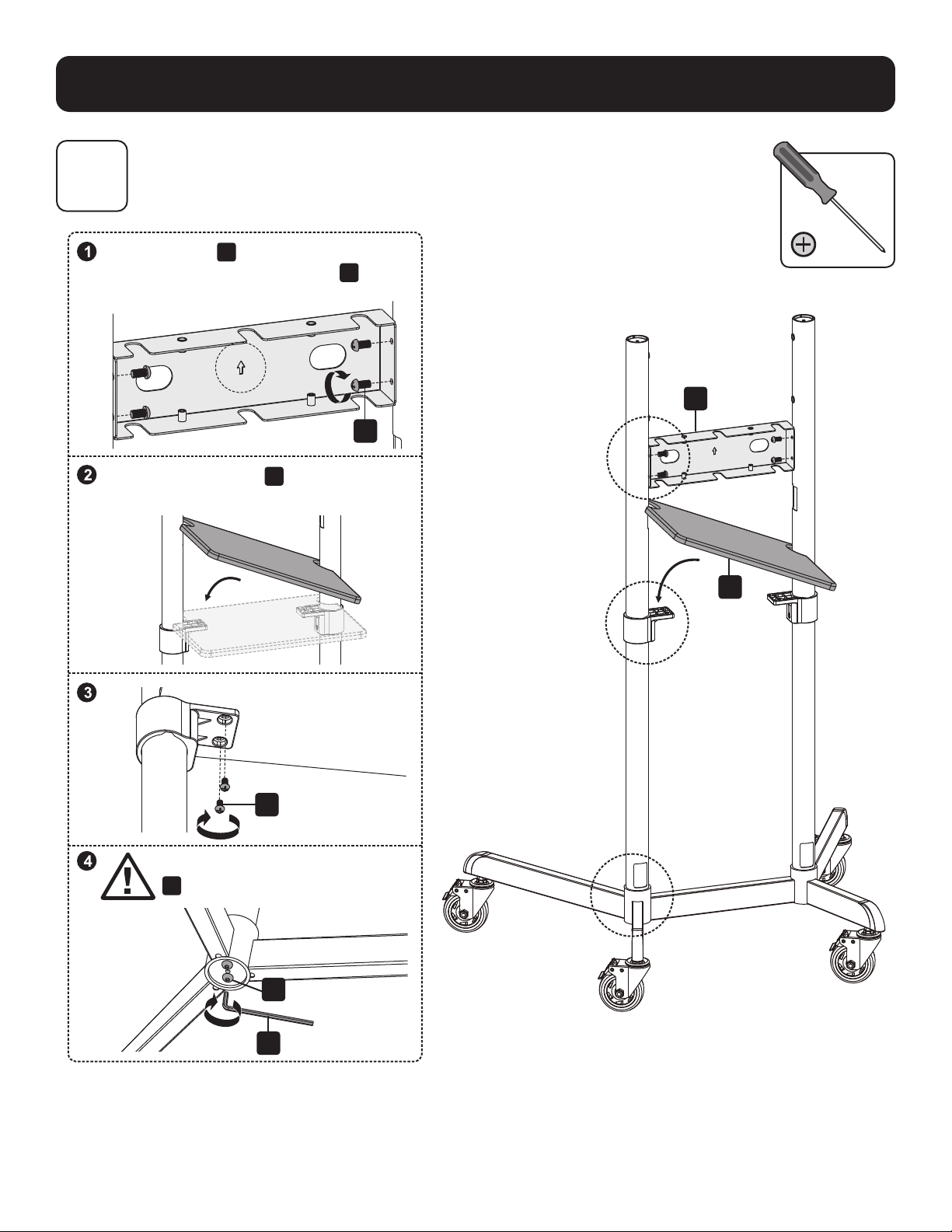
79
Montage und Installation
5
Montage der vorderen Abdeckung und des Geräteregals
G
O
O
M
B
E
Positionieren Sie
G
wie gezeigt und stellen Sie
sicher, dass sich die Vorderseite von
G
und die
längeren Beine auf der gleichen Seite befinden.
Stellen Sie sicher, dass
E
und die kürzeren
Beine sich auf der gleichen Seite befinden.
ACHTUNG: Ziehen Sie die Schrauben
M
unter dem Sockel fest.
80
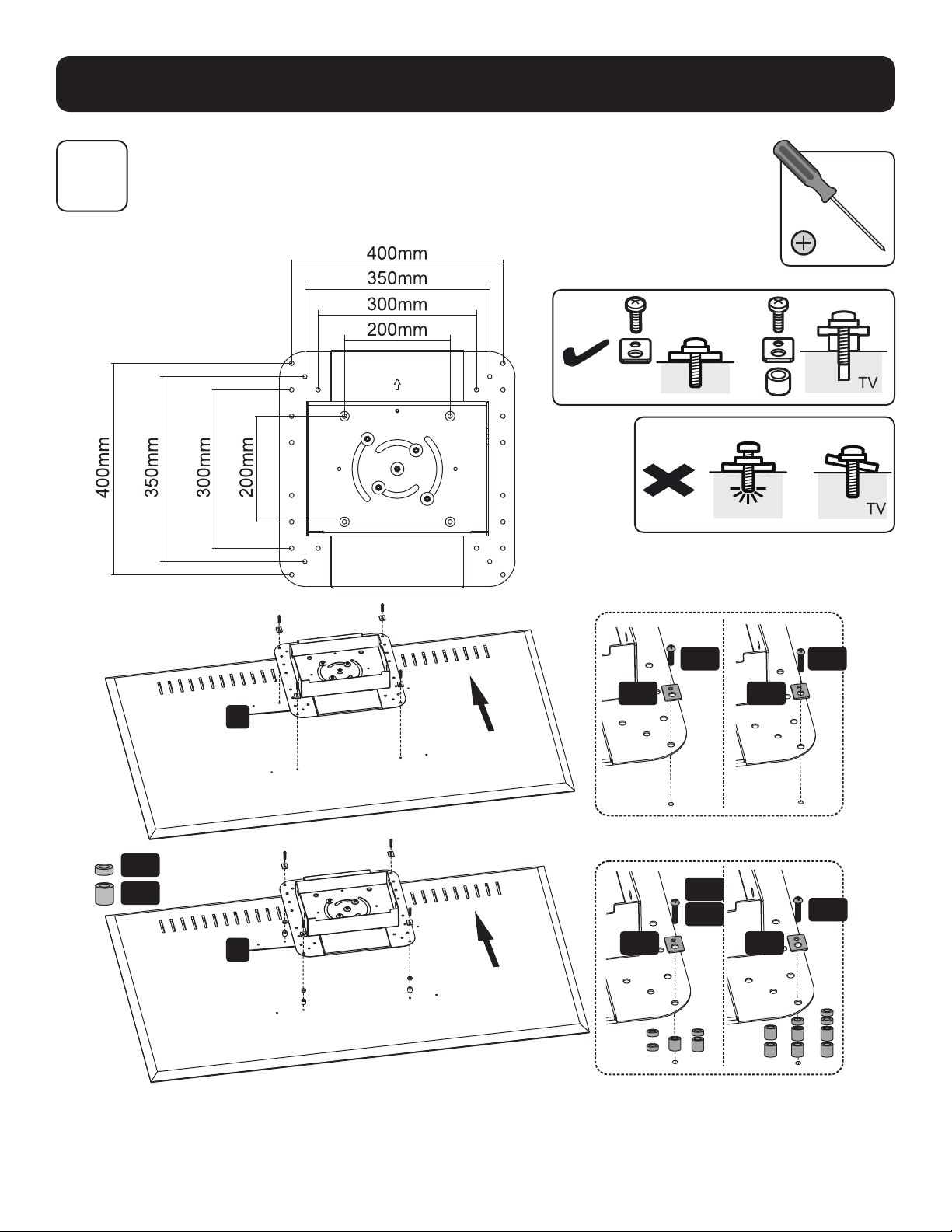
Montage und Installation
6A
Befestigung der Montageplatte am Bildschirm
VESA 200 x 200 / 300 x 300 / 350 x 350 / 400 x 200/ 400 x 400
TV
M-G
M-A
M-D
M-E
M-C
M-B
M-F
M-F
M-F
M-F
M-H
H
H
Hinweis: Verwenden Sie die für den Bildschirmtyp geeigneten Schrauben, Unterlegscheiben und Abstandhalter (falls erforderlich).

81
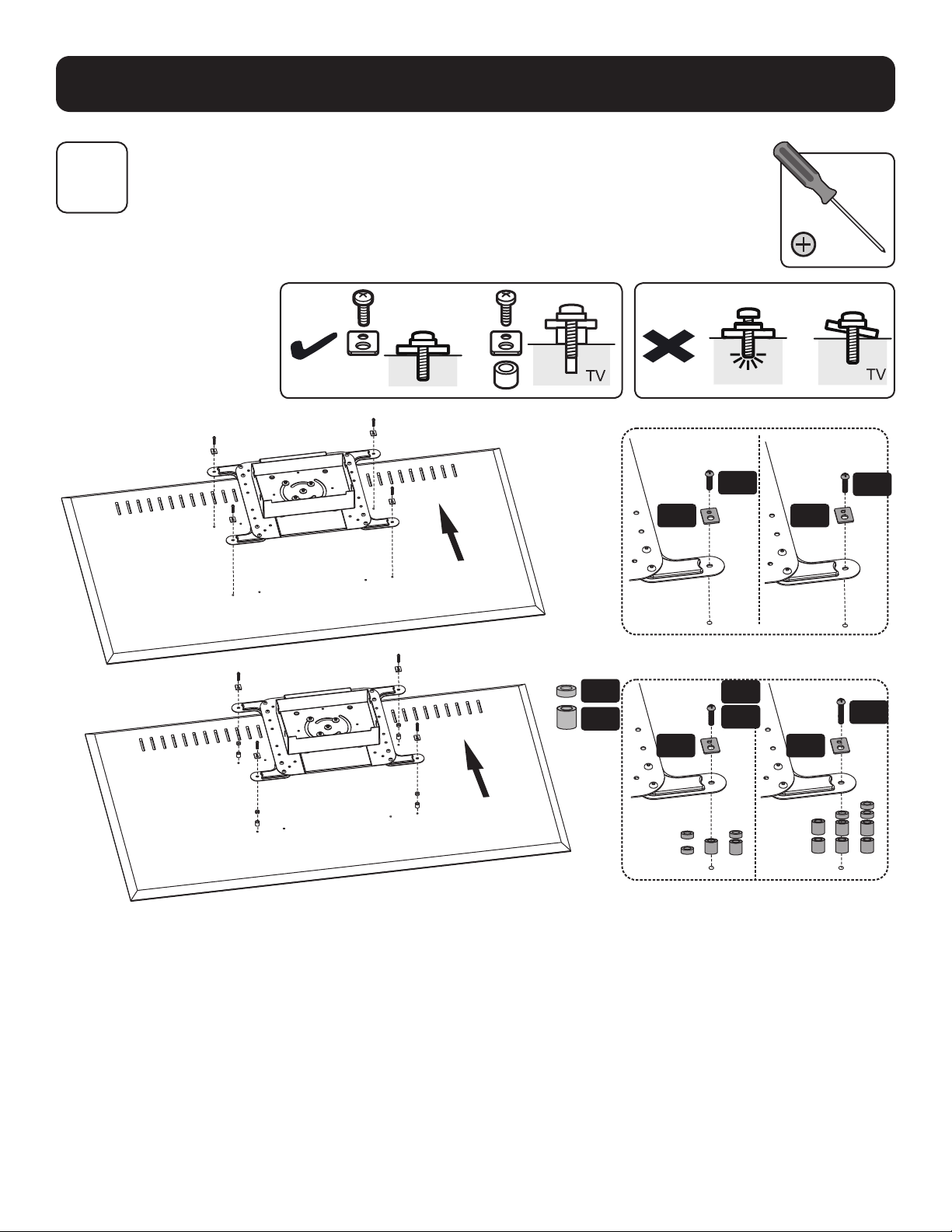
Montage und Installation
6B
6B-1: Installieren der VESA-Verlängerungsadapterarme
VESA 600 x 200
VESA 600 x 400
B
G
J
J
K
K
82
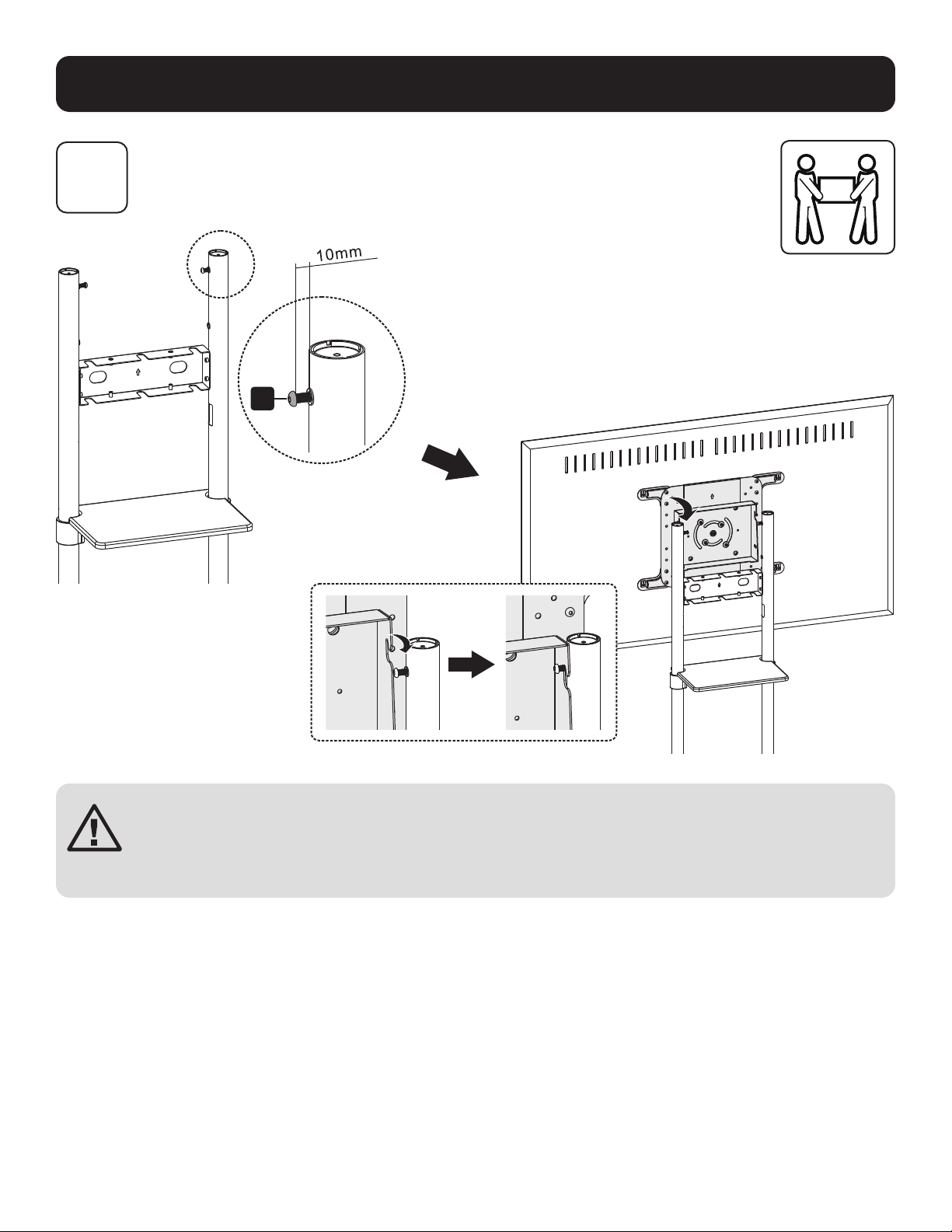
Montage und Installation
6B-2: Befestigen der Montageplatte am Bildschirm
TV
6B
M-F M-F
M-A
M-B
M-G
M-H
M-D
M-E
M-C
M-F M-F
Hinweis: Verwenden Sie die für den Bildschirmtyp geeigneten Schrauben, Unterlegscheiben und Abstandhalter (falls erforderlich).
83
Montage und Installation
7
Den Bildschirm auf die Schrauben aufsetzen
ACHTUNG: Stellen Sie die Säulen auf die gewünschte Höhe ein, bevor Sie den
Bildschirm anbringen. Um die Höhe der Säulen nach der Installation des Bildschirms
anzupassen, entfernen Sie das Geräteregal, bevor Sie die Säulen auf die gewünschte
Höhe einstellen.
M

84
Montage und Installation
8
9
Einstellen des Neigungswinkels des Bildschirms
Ziehen Sie die hinteren Schrauben in der gewünschten Position sicher fest
M
B
Standardposition (0°)Gekippte Stellung
(5°)
T
85
Montage und Installation
10
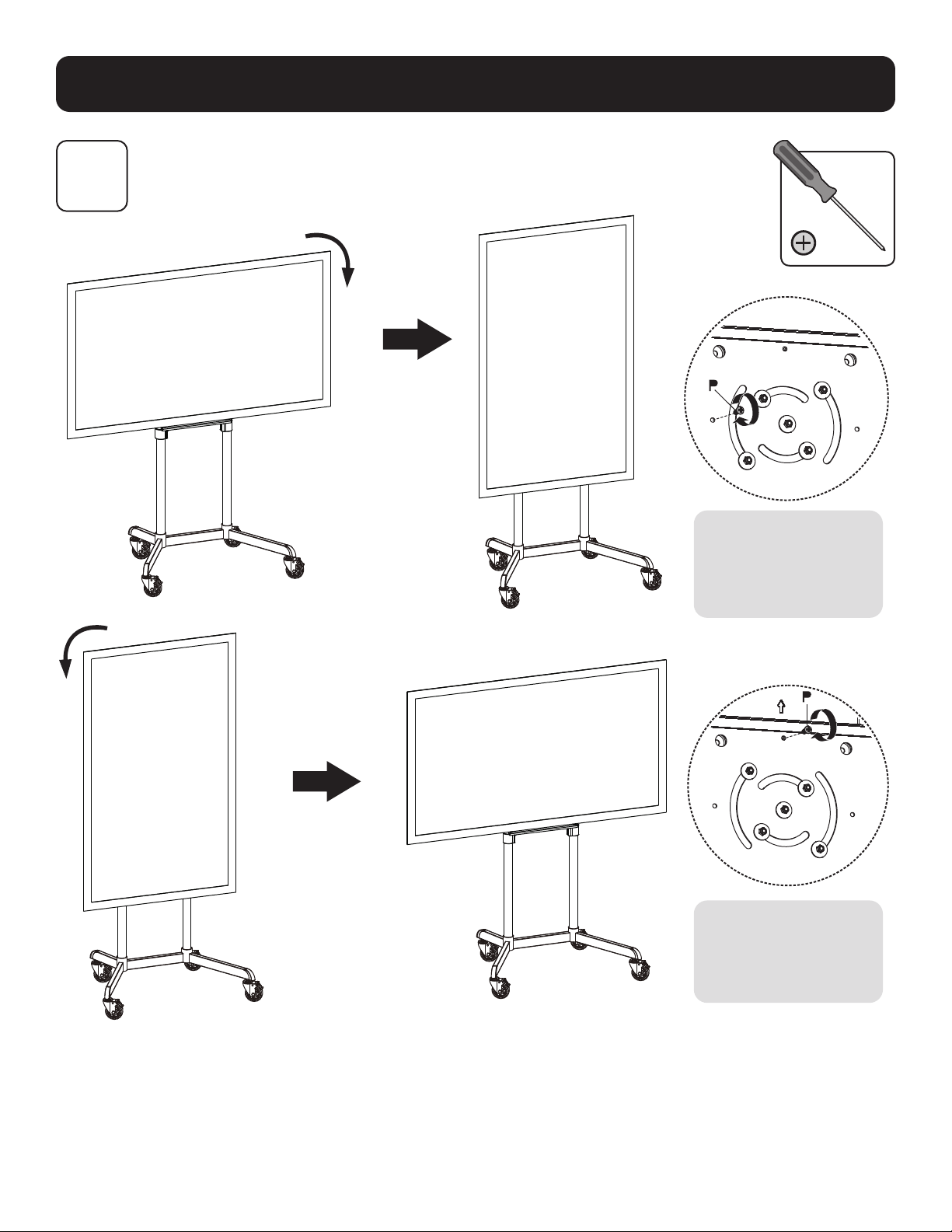
Befestigung des Displays in Querformat / Hochformat (Optional)
Ziehen Sie die
Schraube fest, um
den Bildschirm zu
fixieren.
Ziehen Sie die
Schraube fest, um
den Bildschirm zu
fixieren.
86
Montage und Installation
11A
11B
Verlegen der Kabel
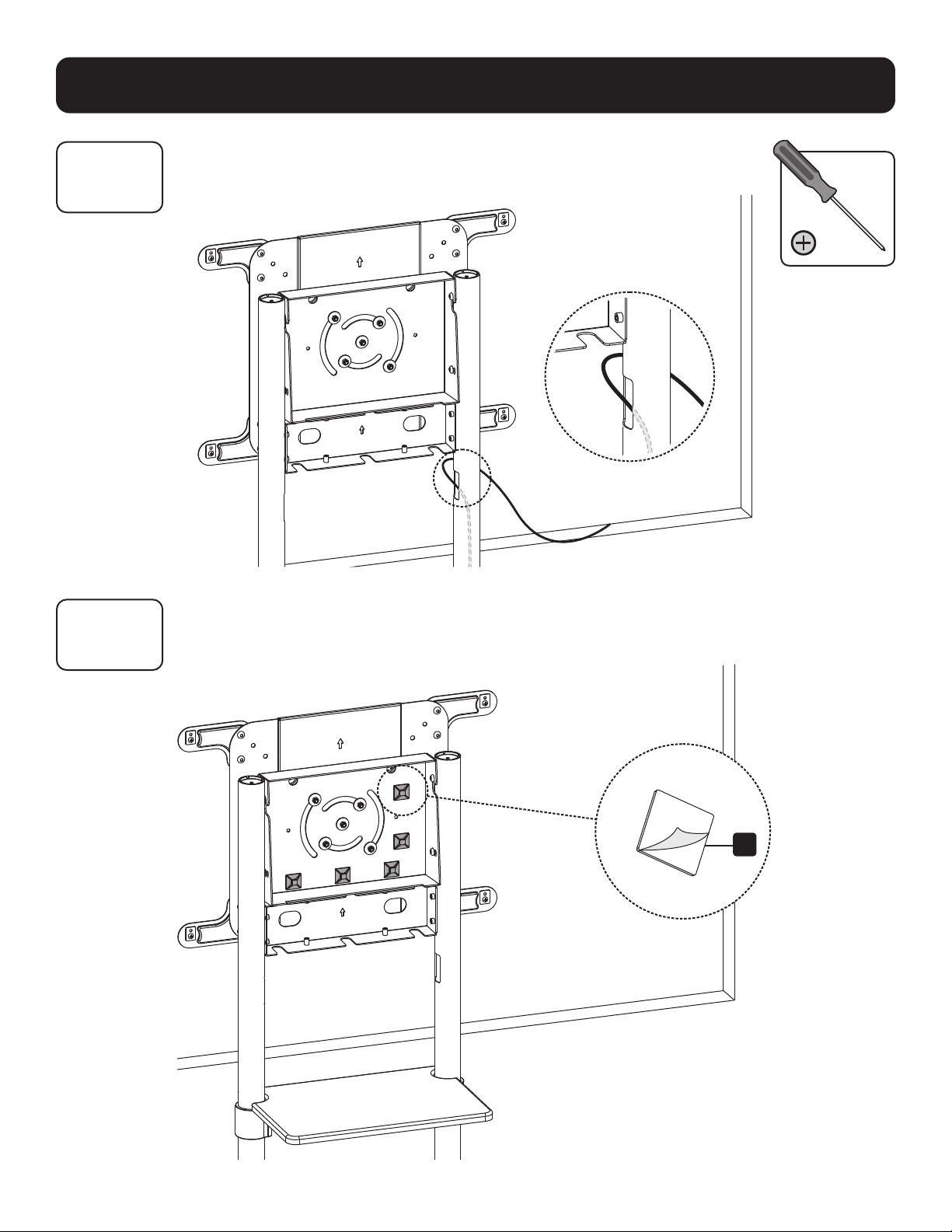
11B-1: Anbringen der Kabelklemmenhalter
R
87
Montage und Installation
11B
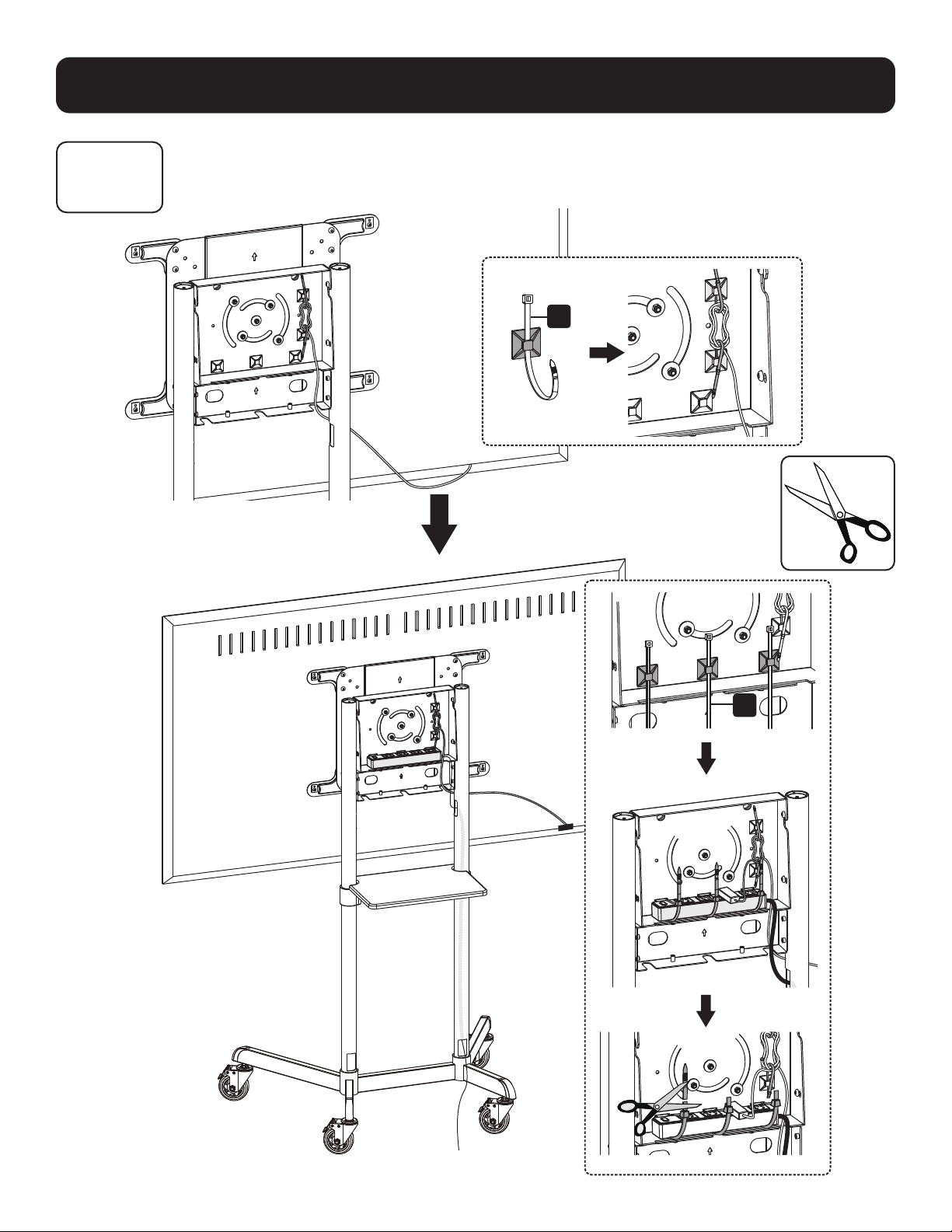
11B-2: Führen der Kabel durch die Kabelklemmen
S
S
88
Montage und Installation
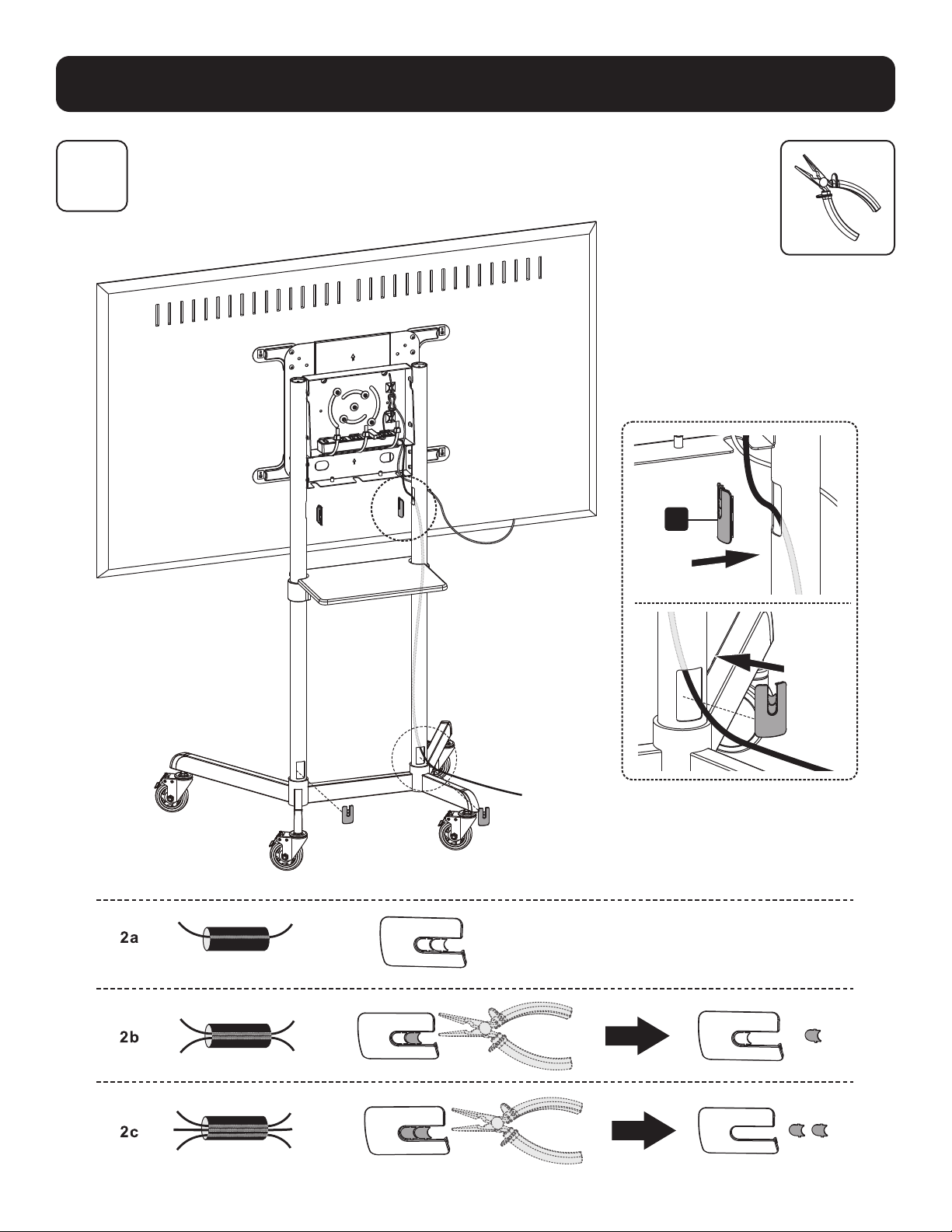
12
Anbringen der Kabelabdeckungen
L

89
Montage und Installation
13
Anbringen der hinteren Abdeckung
I
O
O
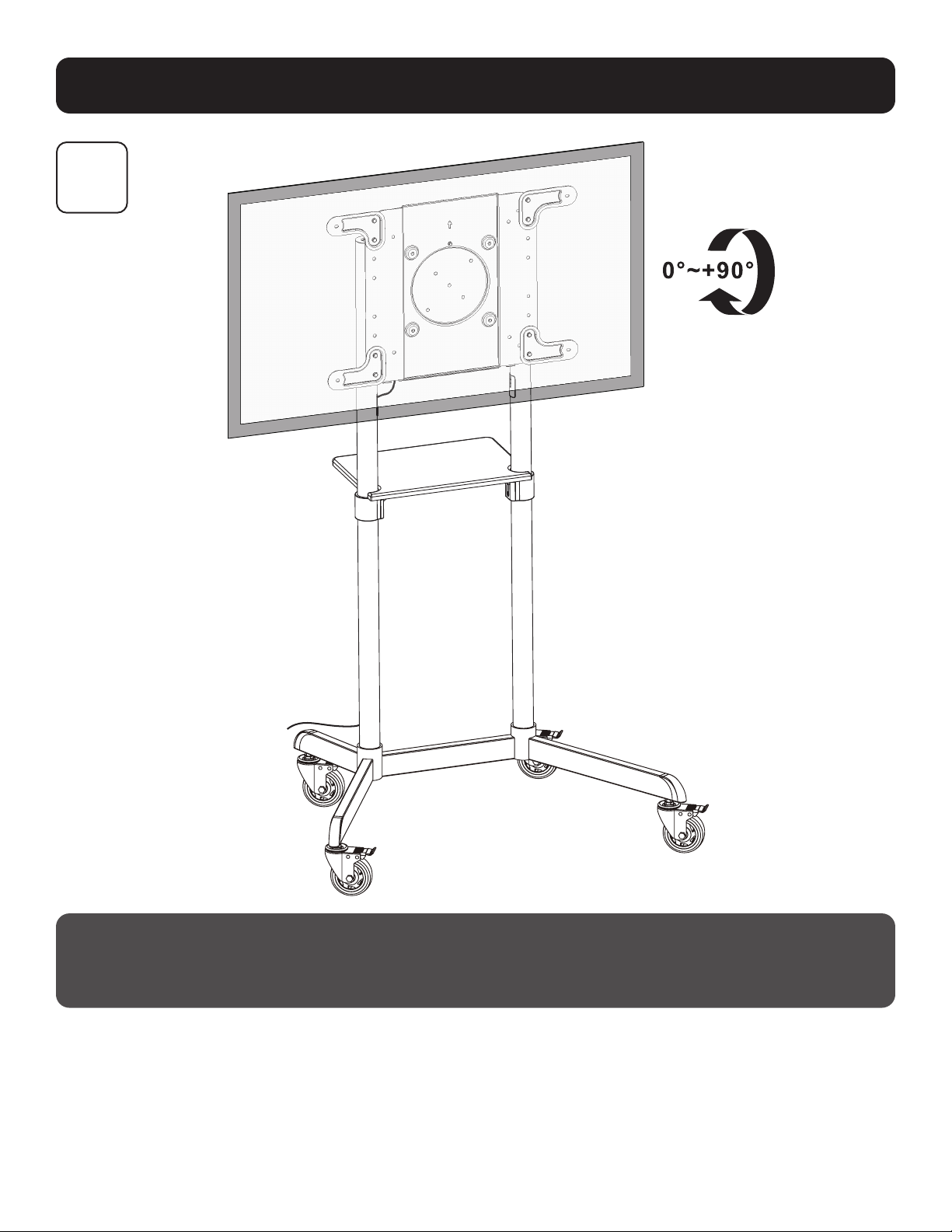
90
Montage und Installation
14
Wartung
• Kontrollieren Sie in regelmäßigen Abständen (mindestens alle drei Monate), um sicherzustellen, dass die Halterung fest
sitzt und eine sichere Anwendung gewährleistet ist.
• Wenn Sie Fragen haben, besuchen Sie bitte tripplite.com/support.

91

92
1111 W. 35th Street, Chicago, IL 60609 USA • tripplite.com/support
20-06-088 93-3CB9_RevA