TM
SUPERSAFE is a safety protection technology by GOOLOO
TM
R
ENRICH YOUR DRIVING LIFE
User Manual
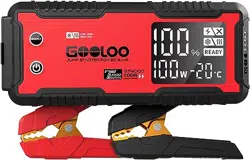
Jump Starter
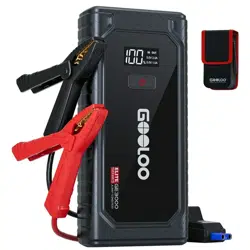
Model: GT4000
series
URBO
4000A
JUMP STARTER
Reg No.
5904374

Thank you for choosing gooloo jump starter. To ensure a good user experience, personal
safety, and property security, please read all of the instructions carefully before using this
product, please keep this manual for reference.
Charge It First !
Warning
While reading through the manual, you can start to charge your GT4000 with car charger
provided or wall charger
.
Please note that the wall adaptor is not supplied for protecting
environment purpose, but you can charge it with the wall adaptor come with your smart
phone.
1
This unit is for vehicle (equipment) with 12V batteries. It may be dangerous if it is used with
other types of batteries. Read and understand the safety information before using the jump
starter. Failure to follow the safety information may cause damage to the jump starter, and
may also result in electric shock, explosions, fire, property damage, and personal injury.
Product Parts and Functions Description
2
2
3
4
5
6
1
8
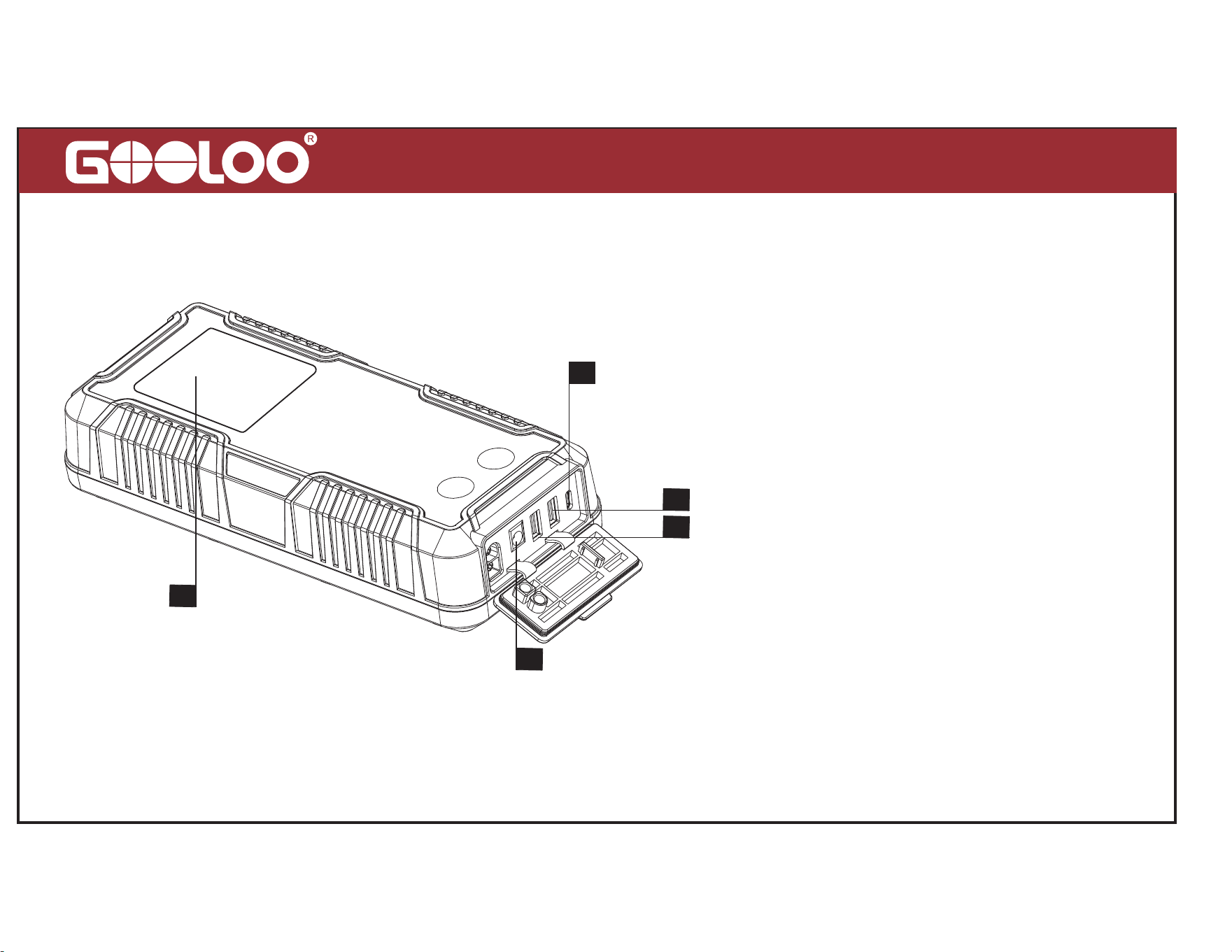
1. Display Screen
2. USB-C In/Out Port (PD100W Max)
3. USB1 Out Port (QC3.0, 5V/9V/12V)
4. USB2 Out Port (5V/2.4A)
5. DC Out Port (15V/10A, Max 150W)
6. Power Button: Press 1-2s to power
on the jump starter, press about 10s
to force shutdown.
Product Parts and Functions Description
3
6
8
7
9
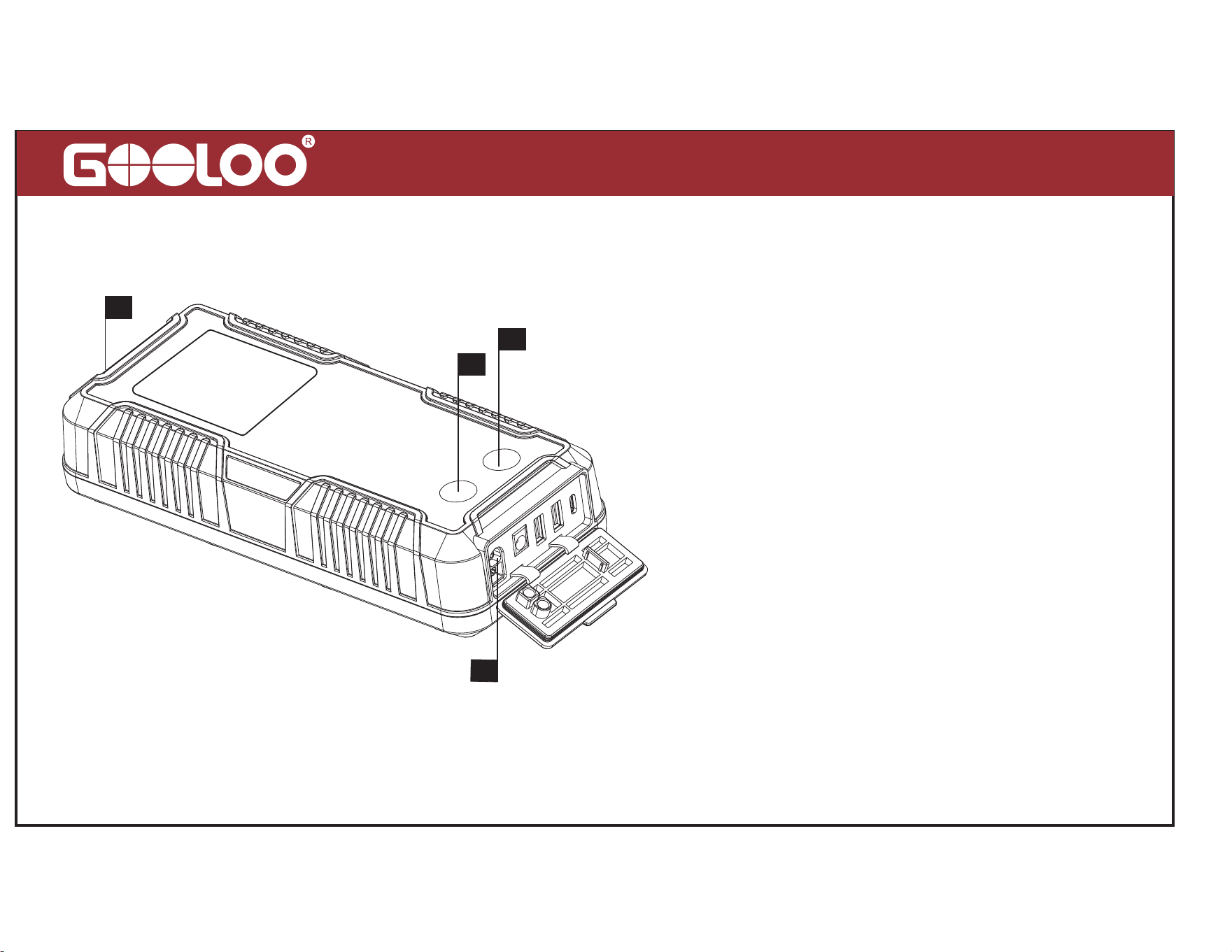
7. BOOST Button: Press 1-2s to force
output, and READY will be displayed
on the screen.
8. 12V Battery Clamps Output: DO
NOT press the BOOST button before
connecting the clamps to the vehicle
battery correctly.
9. LED Light: Turn on the unit first by
pressing the power button for 1-2s ,
then press the power button 1-2s
again to turn on the LED light.
4
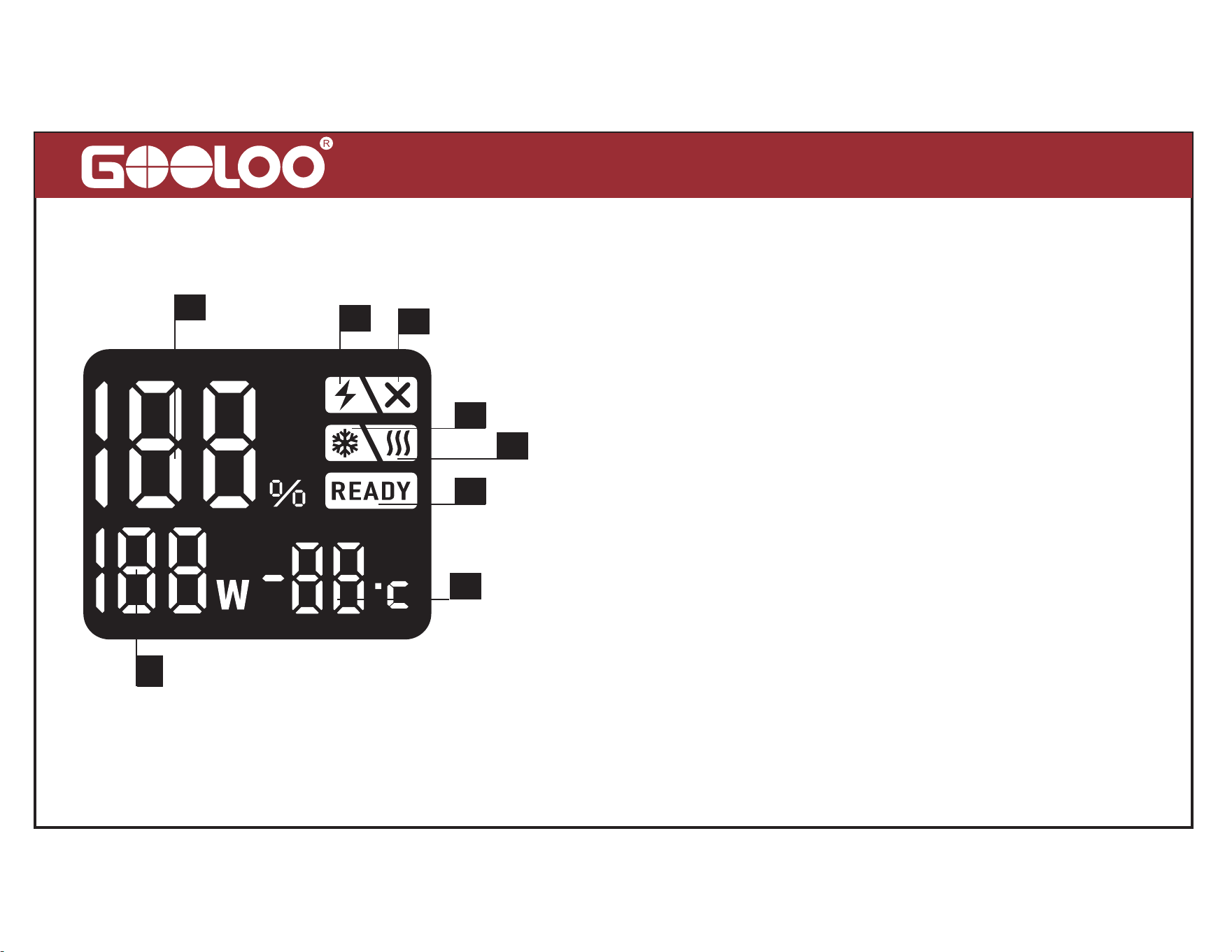
Display Screen Instructions
1
2
3
4
5
6
7
8
1. Battery Power Percentage
:
Battery percentage of
charge/standby/discharge
2. Low Current Mode:
Support charging for the devices
that need light charging current like headphone, smart watch,etc.
Press POWER and BOOST button simultaneously for 2-3s to turn
on this mode.
3. “+” and “-” Poles of Battery Clips Reversed
4. Battery Low Temperature Reminder
5. Battery Pre-heating:
GT4000 Unique Function
6. Ready to Start the Vehicle
7. Pre-heating Temperature Display:
GT4000 Unique
Function
8. Charging Power
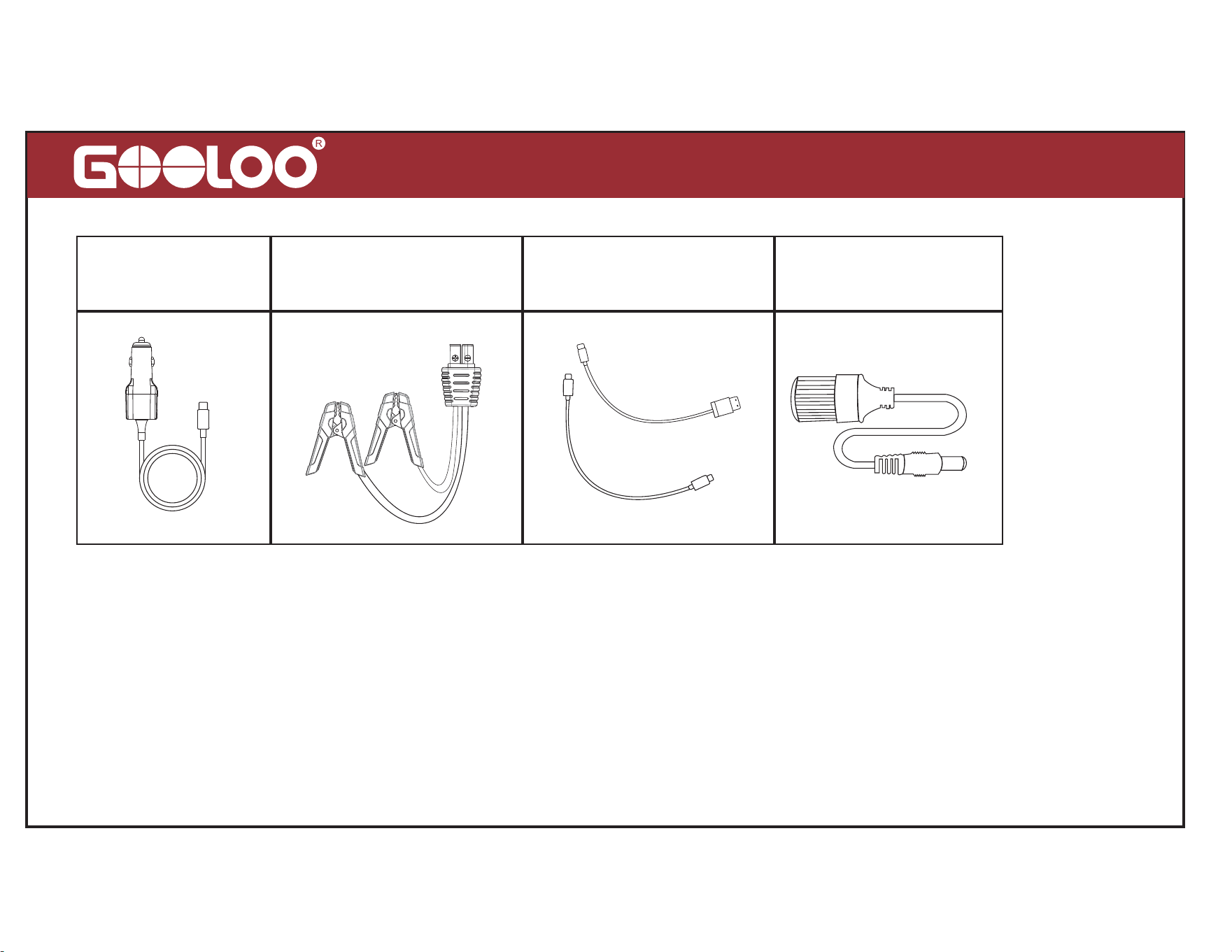
This unit can be charged with car charger provided or quick speed wall charger (Quick
Speed Wall Charger not Included)
.
Only via the PD100W USB-C wall charger or SC100W
car charger can this unit achieve the 100W max input function. PD100W USB-C quick speed
wall charger need to purchase separately.
Support PD100W Max Speed Charging
5
USB-C IN
USB-A/USB-C OUT DC OUT
12V BATTERY
CLAMP OUT
(SC100W Car Charger)
6
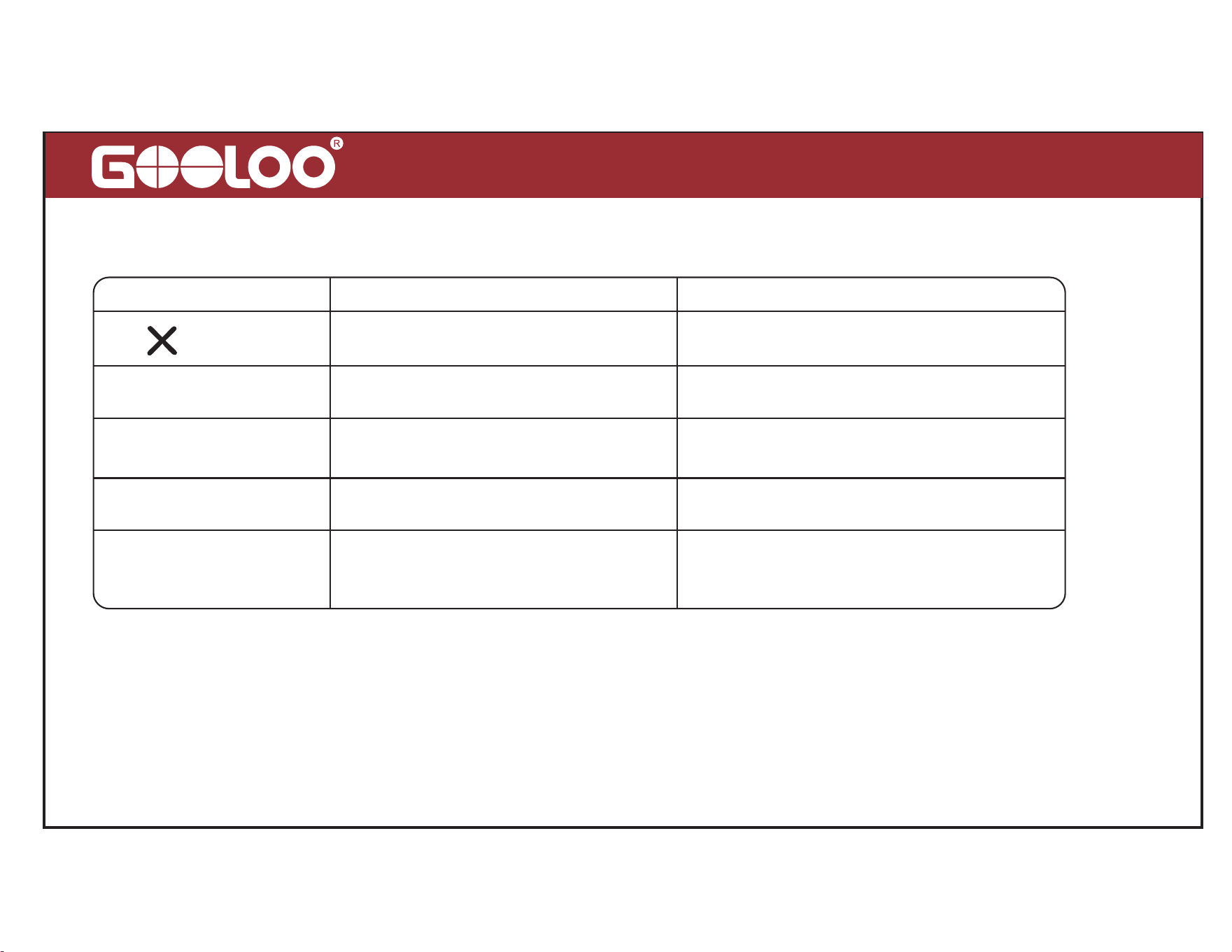
How to Start a 12V Vehicle (Make sure battery power
20%)
1. Connect Vehicle Battery 2. READY (Solid) 3. Start Vehicle Engine
START
ENGINE
100
%
READY
Note: Do not press the BOOST button before connecting the vehicle battery correctly.
+
-
7
Error Message/ Cause/ Solution
Error Message Cause Error Solution
READY (blinks)+Beeping
“1”
“2”
“3”
The temp of jump starter is too low
or high.
Restore the temp of jump starter to
32°F -113°F.
Overcurrent protection
Stop starting your vehicle
,
protection
mode will disappear after 30s.
Non-stop starts vehicles more than
4 times within 10mins, it entered
safe mode.
Stop starting your vehicle
,
safe mode
will disappear after 10mins.
Reverse connection
Vehicle battery dead
Press “BOOST”for 2-3s, when “READY”
icon is solid, start the vehicle within 30s.
Please correct the connection between
jump clamps and battery terminals
+ Beeping
+ Beeping
+ Beeping
+ Beeping
If the problem persists, stop using the jump starter and contact our service team directly
at [email protected], we will do our best to solve the problem within 24 hours.

15V/10A DC Output (12-16.8V,150W Max)
Connect the 12V devices that need to be powered by cigarette lighter socket (the Cigarette
Lighter Socket Adapter is included).
How to Turn On/Off the LED Flashlight
Power on, then press power button for 1-2s to turn on the LED light. There are 3 modes of
LED light (Normal, Strobe, SOS, Off) if you press lightly.
IP65 Water Resistant
It doesn’t matter when this unit touched with small splashes, you just need to wipe it off. It
can prevent splash water in your daily life, but it is not allowed to be immersed in water.
Pre-heating Technology (Unique features of GT4000)
GT4000 can be used in an environment of -40°C/-40°and reach the starting temperature
within100 seconds after connecting the vehicle battery. The jump starter will automatically
turn onthe pre-heating function after connecting the vehicle battery or pressing BOOST
button 1-2sin extremely cold environment
.
8
9
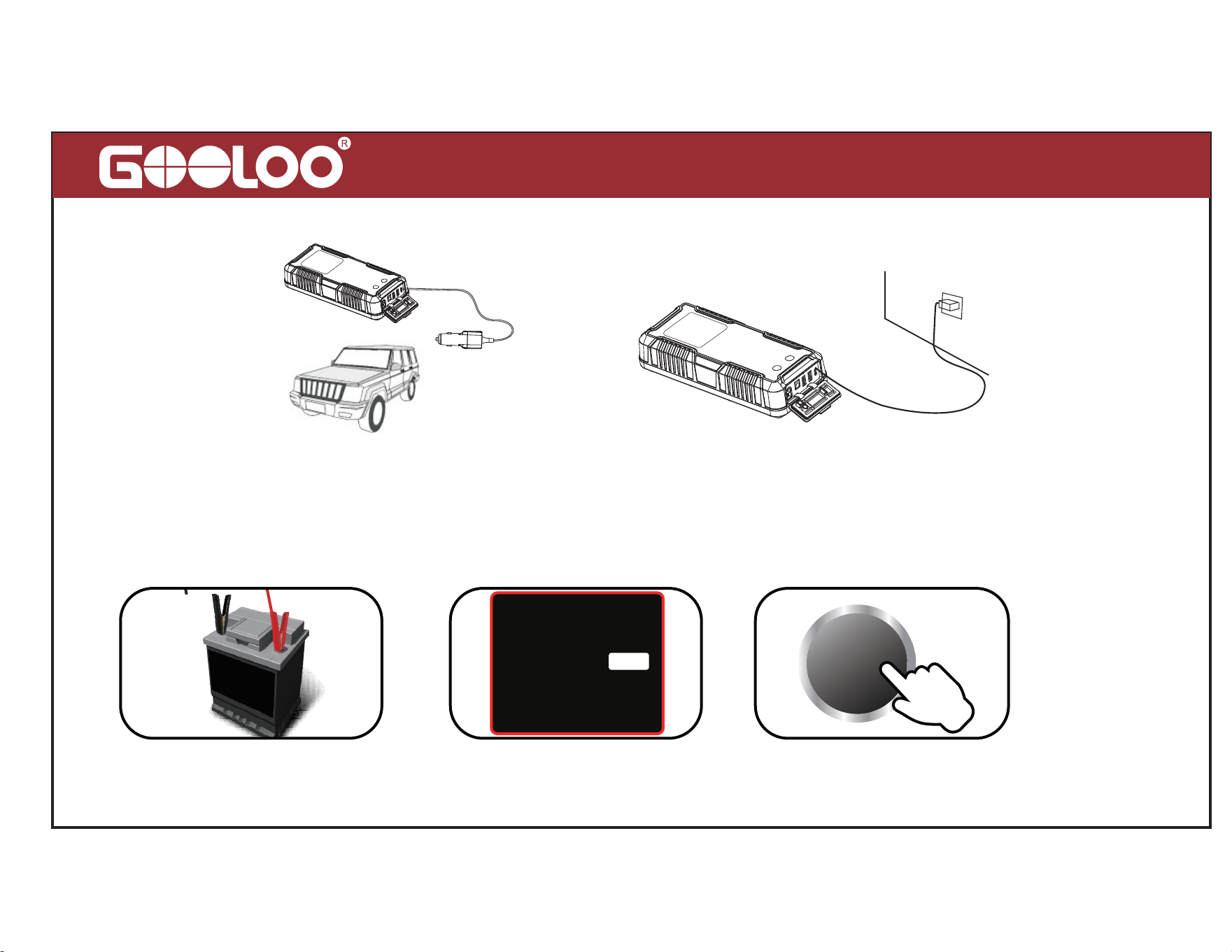
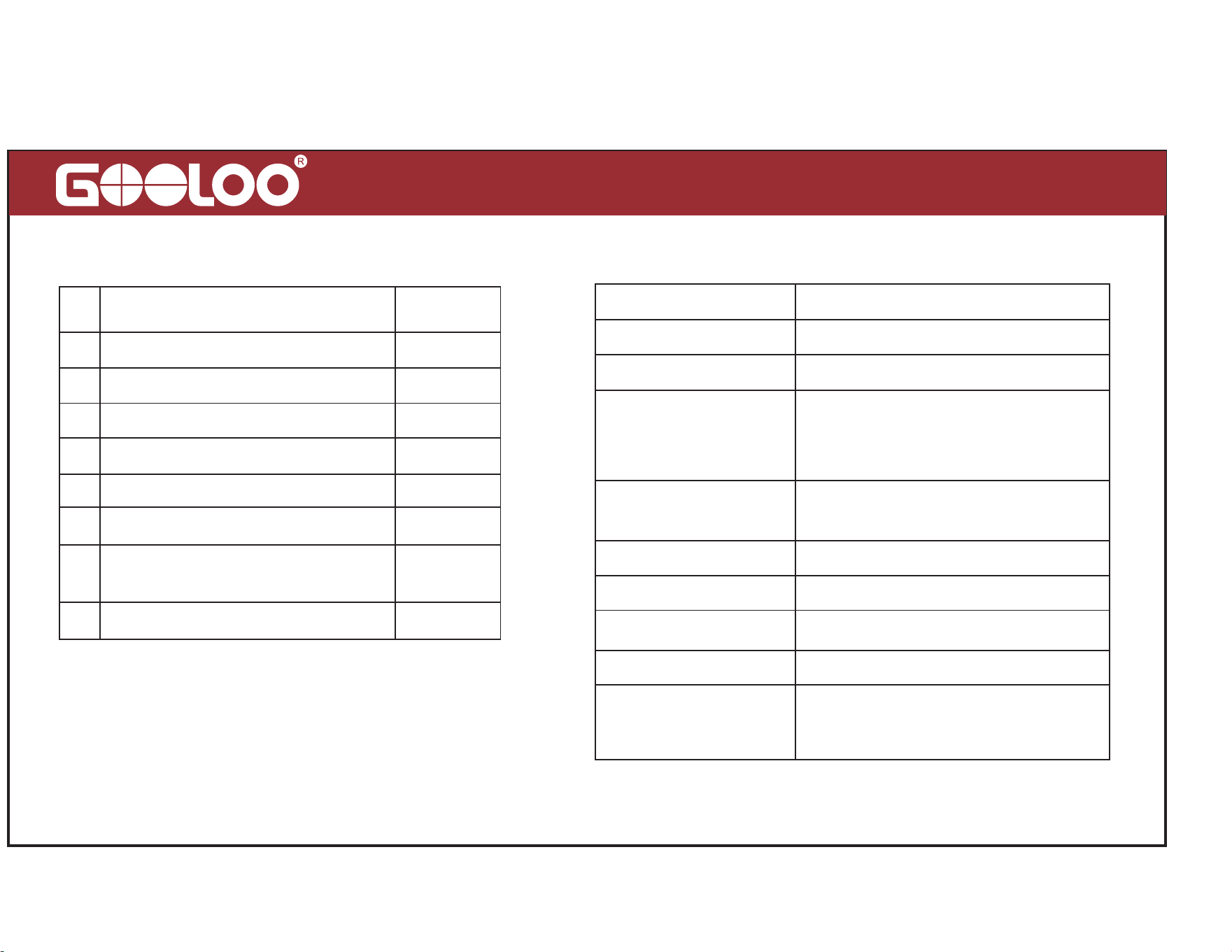
Technical SpecificationPackage Content
#
QuantityPart Name
Host
Carrying Bag
USB-A to USB-C Cable
Jumper Cable
SC100W Max Car Charger
1
1
1
1
1
1
1
1
1
2
3
USB-C to USB-C Cable
4
5
6
7
8
User Manual
Cigarette Lighter Socket
Adapter
Capacity
99.2Wh
Starting Current
Peak Current
USB-C In/Out
USB1 Out
USB2 Out
DC Out
800A (3s)
4000A
PD100W Max (5V/3A, 9V/3A,
12V/3A,15V/3A, 20V/5A);
Backwards Compatibility
15V/10A (150W Max)
QC3.0 18W Max (5V/3A,
9V/2A, 12V/1.5A)
5V/2.4A
Operating Temp
Life time
Full Charge Time
> 1000 Cycles
-40
℃~
60
℃
/-40
~140
About 1.2 hours if use quick
speed PD100W wall charger
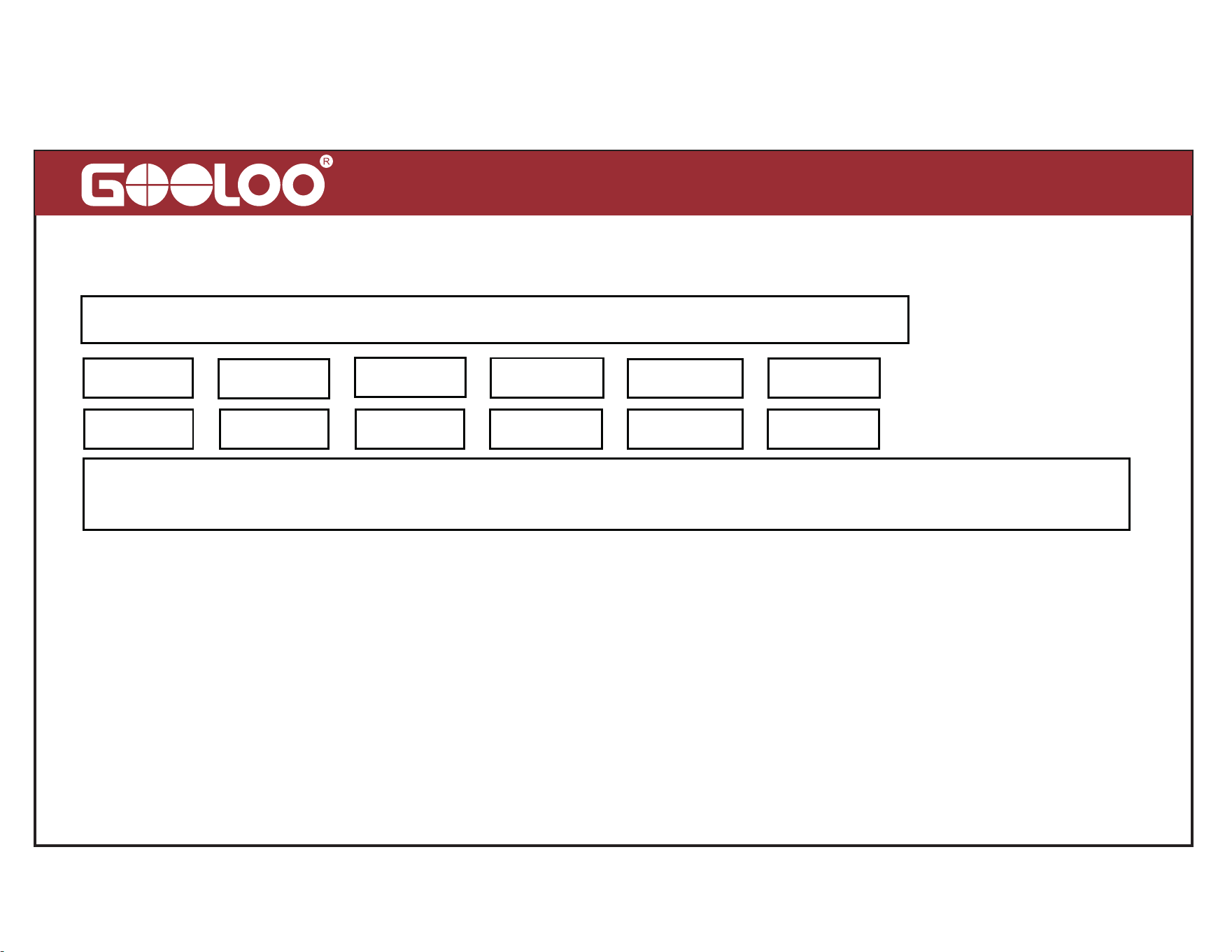
Toxic and Harmful Substances
FAQ
Q1: What is the operating temperature of this unit and how to store it?
A: This unit is lithium polymer battery, operating temp is -40-60 ºC/ -40-140ºF. If the
ambient temperature is higher than 60ºC/140ºF, the internal construction of the battery cells
may be damaged, it may swell and become unsafe. So don’t store the device in vehicle
which parkedin hot weather for long periods of time.
10
P
b
H
g
C
d
C
r
(
V
i
)
P
B
B
P
B
D
E
000000
Composition and amount of toxic or harmful substance in this product
0: Indicate that the content of harmful substances in all homogeneous materials is all
lower than the prescribed limit of MCV (the standard 2002/95/EC/RoHs)

11
Q2: How to start a vehicle with this unit?
A: Please refer to the instructions about “How to Start a 12V Vehicle“.
Q3: How do you know if this unit is connected to the vehicle correctly?
A: With the battery clamps connected to the vehicle battery, if the READY(Solid) appears
on the screen, it means clamps connected correctly, while if appears on the screen, which
means it's connected reversely.
Q4: What should I do if this unit can’t start a vehicle?
A: Recharge this unit fully, and try to press the “BOOST” button after connecting the vehicle
battery correctly, READY(Solid) will appear on the screen, then start the vehicle within 30s.
If it still does not work, contact us at: contact@gooloo.com ( Attach your order ID).
Q5: What should I do if this unit can’t charge up?
A: Charge it with a USB-C cable and wall charger for a full overnight period. If it still does
not work, contact us at: contact@gooloo.com (Attach your order ID).

Q6: What should I do if this unit can’t charge other devices?
A: Try to charge the device with another charging cable, If it works, which means the charging
cable we provided is defective, we will provide you a new one; If it still does not work, please
email us at: contact@gooloo.com (Attach your order ID).
Q7: How to turn off this unit ?
A: This unit will be turned off automatically in 30s when it's not used. Or you can press
POWER button for about 10s to force shutdown.
Q8: Can this unit charge other devices while it is being charged?
A: Yes.
Q9: Can this product charge other devices while starting a vehicle?
A: No.
Q10: How often does this unit need to be recharged??
A: It would be best to recharge it every 3 months.
12

Warning
13
Q11: Why it shuts off in 30s when charging other devices?
1. Please read this user manual carefully before using this machine.
2. Please be careful when using this machine. If you do not follow the instructions, you may
injure yourself or damage the equipment or vehicle battery.
3. Do Not allow people who do not have proper knowledge or ability to operate the device
without supervision.
4. Do Not use this unit as a toy. Keep it away from children to avoid accident.
5. This unit work for vehicles (equipment) with 12V battery, doesn't for vehicles with non-12V
battery. It is forbidden to be used in other machines, such as airplanes and ships.
6. Do Not use this unit when any cable, clamp, or cord was damaged or when this unit was
overheated, swelled or leaking fluid.
A
.
This unit may shut off automatically when charging for the devices that need light charging
current, such as headphone, smart watch,etc since there is minimum load current limitation
(200mA) on this unit, so please use Low Current Mode when you are facing such probelm.

7. Do Not use it as a vehicle battery or a battery charger.
8. Do not use the unit to start a vehicle while charging the internal battery.
9. Only use the jumper cable provided to start vehicle and the qualified charger to charge
this unit.
10. Don't over-discharge the unit (don't let the battery run out), charge it regularly, preferably
every 3 months.
11. Make sure the blue plug of the jumper cable is plugged fully into the battery clamps
output port, otherwise, the blue plug could be melt.
12. Make sure the battery terminals are clean before starting up, and make sure the battery
clamps are well connected. If the battery terminals on the vehicle are dirty or corroded, the
output power of the unit will decrease.
13. Do not start the vehicle continuously for more than 4 times within 10 minutes. If the
engine fails to start successfully within 3s after the first start, stop cranking and wait at least
30s to start the vehicle again.
14. Do Not connect the jump starter's clamps to the battery reversely after pressing the
''BOOST'' button to avoid accident.
14

15. Use this unit to start the vehicle when the battery power is more than 20%.
16. Do Not recharge this product immediately after starting the vehicle, please let it cool for
30 minutes before recharging it.
17. Do Not let the product be immersed in water
18. Do not operate this product in an explosive environment, such as a place where flammable
liquid, gas or dust exists.
19. Do not modify or disassemble this machine. Only service technicians can repair this
equipment.
20. Do not expose the product to extreme heat or fire.
21. Do not drop or squeeze the device. If the device is hit hard or damaged in any other way,
it should be inspected by a qualified battery technician.
22. Do not store in places where the temperature may exceed 60ºC/140ºF.
23. Only charge at ambient temperature of -10~45ºC/14~113ºF.
24. Under extreme conditions, the battery may leak. If there is a liquid leak from the device,
do not handle it with bare hands. If there is skin contact, wash immediately with soap and
15

16
water. If the liquid accidentally touches the eyes, immediately rinse the eyes with water for at
least 10 minutes and seek medical help.
25. The device contains a lithium battery. At the end of the product's service life, or if the
device leaks liquid, dispose of the device according to local regulations.
Within 18 months, we will provide timely and effective online after- sales service after your
purchase
.
18 Months Online After- Sales Service
Within the first 30 days after your purchase, you can apply return for it through Amazon when
you have any issue.
30 Days Money Back Guarantee
We will replace the defective unit due to manufacturing issues with a new one within 18
months.
30 Days to 18 Months
Your Warranty Includes

Disclaimer
17
A. When the product needs to be repaired or replaced, the original purchaser should show
the original receipt (order ID), and the warranty will take effect.
B. The warranty does not cover damage or product failures caused by normal wear and tear,
physical abuse, improper installation, misuse, modification, or unauthorized third-party
repairs.
C. We are not responsible for any accidental or indirect damage caused by incorrect use or
misuse of this product.
D. All warranty claims are limited to repair or replacement of the defective product and at the
sole discretion of GOOLOO.
18
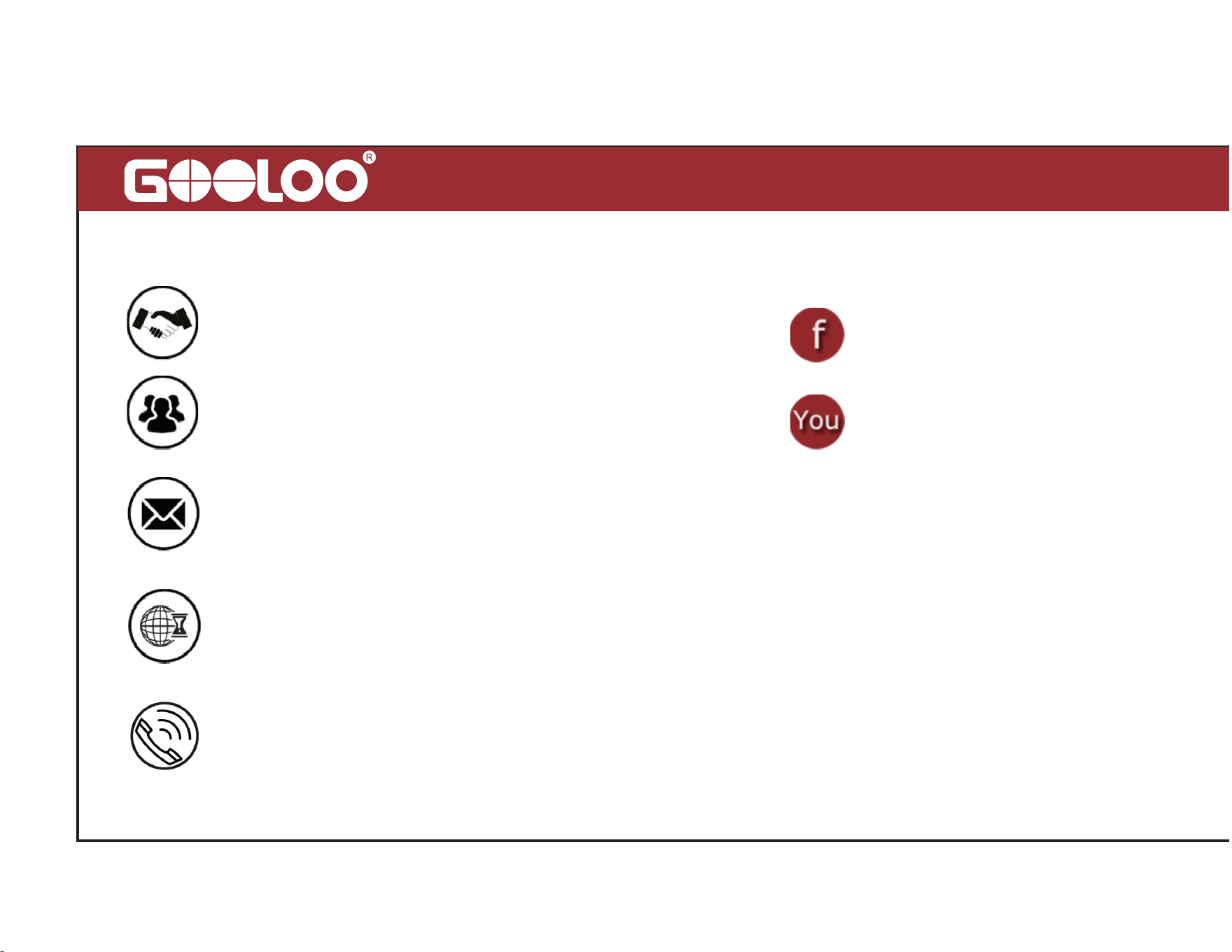
Attention
Do Not Place Near or Into Fire
Avoid Extreme Temperatures
Do Not Drop
Do Not Disassemble
Do Not Submerge In Water
19
Customer Service
18 Months Limited Warranty Service
Lifetime Technical Service
Feel Free to Contact Us
For FAQ and More Information
www.gooloo.com
contact@gooloo.com(recommend)
1-888-886-1805
Mon.-Fri. PST 9:00a.m.-5:00p.m.
@gooloofans
@GoolooOfficial
20
Thank You
for Choosing Us
Made in China
CONFORMS TO UL STD.2743
800205