2018.5.22
D07380
TOTO U.S.A., Inc. 1155 Southern Road Morrow, GA 30260
Phone : (770) 282-8686
You are advised to record the following information to allow quick service.
Date of purchase : Name of shop :
Tel : ( )
Date : year month day
Warranty Registration and Inquiry
For product warranty registration, TOTO U.S.A. Inc. recommends On-Line Warranty Registration. Please visit
our web site http://www.totousa.com. If you have questions regarding warranty policy or coverage, please
contact TOTO U.S.A. Inc.,
Customer Service Department, 1155 Southern Road, Morrow, GA 30260 (888) 295 - 8134 or (678) 466 - 1300
when calling from outside of U.S.A.
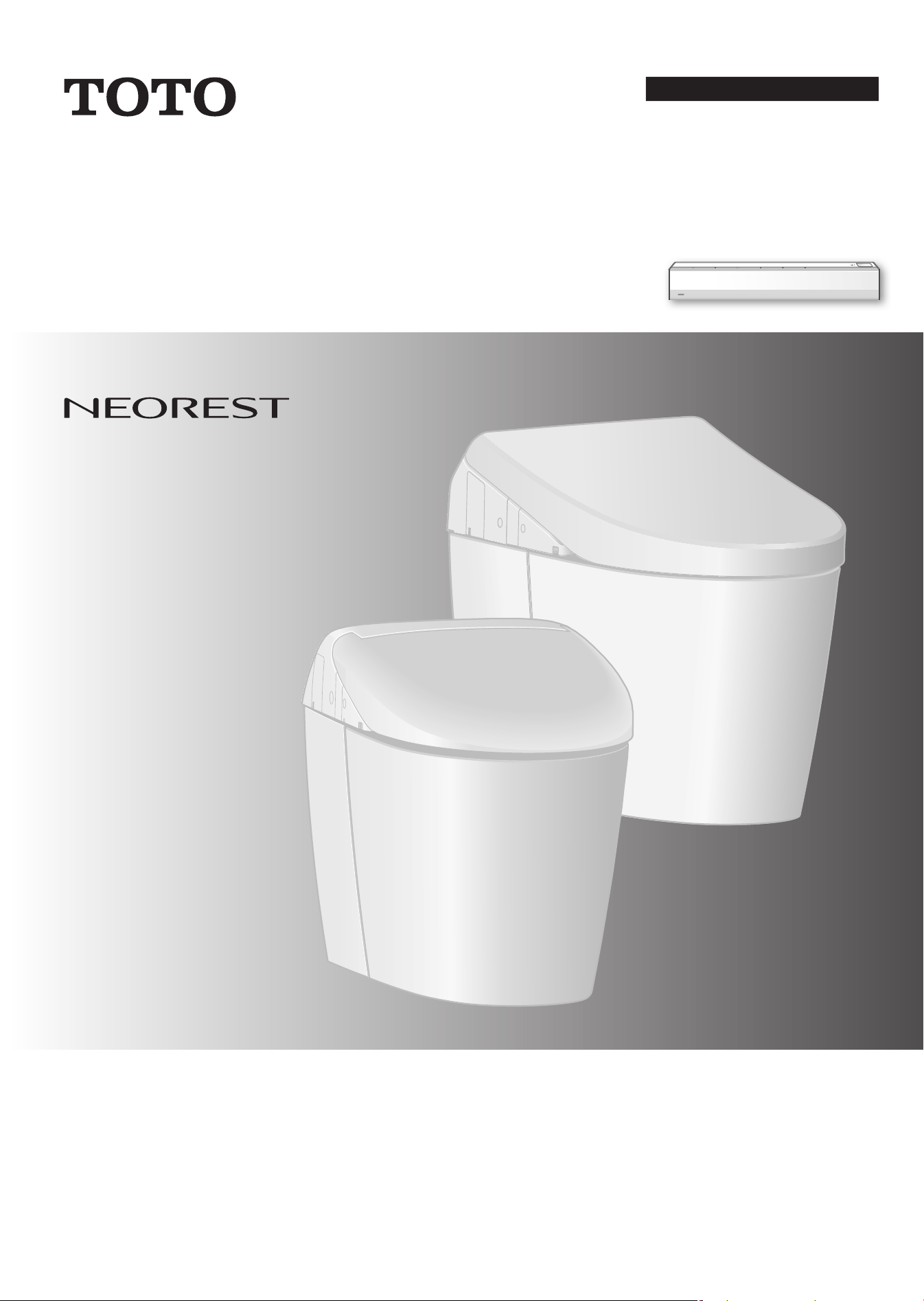
NEOREST AH
RH
AH
SN989M
(MS989CUMFG)
RH
SN988M
(MS988CUMFG)
■ Thank you for your recent purchase of this product.
Please read the enclosed information to ensure the safe use of your product.
■
Be sure to read this Instruction Manual before using your product and keep it in a safe place for future reference.
Instruction Manual
NEOREST
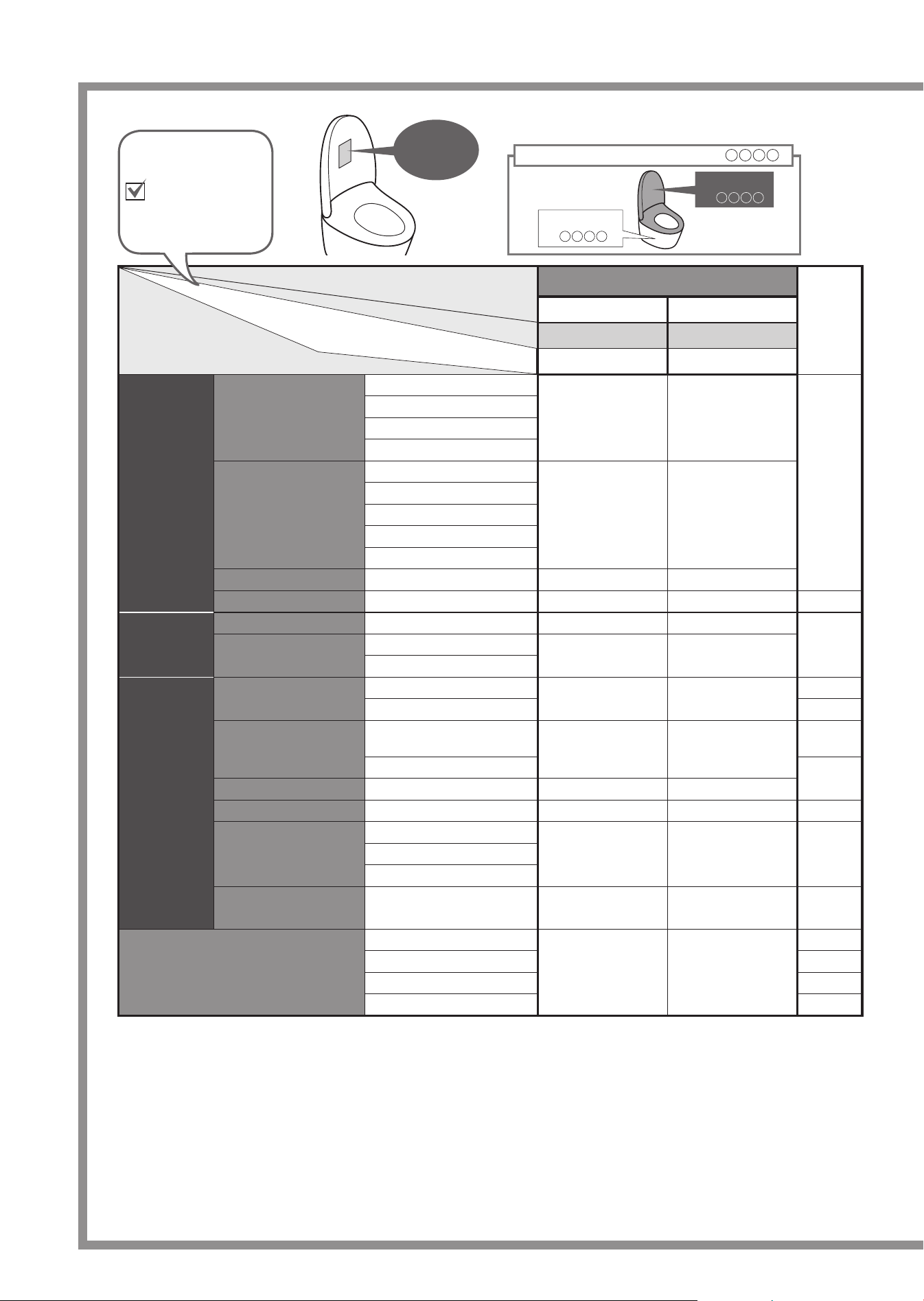
Ref.
Page
AH RH
SN989M
SN988M
Basic
Functions
Cleansing
Rear cleansing
ll
18, 19
Rear soft cleansing
Front cleansing
Wide front cleansing
Changing the
cleansing method
Wand position adjustment
ll
Water pressure adjustment
Oscillating cleansing
Pulsating cleansing
Personal setting lock
Drying
Warm air drying
ll
Changing the temperature
Temperature adjustment
ll
26, 27
Sanitary
Functions
Removing odors
Deodorizer
ll
22, 23
"ewater+" sanitizing
Auto wand CLEAN
ll
Auto bowl CLEAN
Convenience
Functions
Flushing
Remote control fl ushing
ll
19
Auto fl ushing 24, 25
Opening and closing
Opening and closing the toilet
seat with remote control
ll
19
Auto open / close
24, 25
Lighting up
Soft light
ll
Heating the toilet seat
Heated seat
ll
-
Save energy by
lowering the toilet
seat temperature
Auto energy saver
ll
30, 31Auto energy saver+
Timer energy saver
Lower the bowl unit
water level
Lower water level
ll
54
Maintenance
Bowl unit cleaning
ll
34
Cleaning lift 36
Removable toilet lid 37
Wand cleaning 38
Product name (Model)
Part No.
Functions
2
Part number system
Bowl Unit
CT
Combination model number MS
Top Unit
SN
What functions are available on your product?
Product
name,
Part No.
Your Model
Check your model
name and write a
check mark in this
fi eld as needed.
3
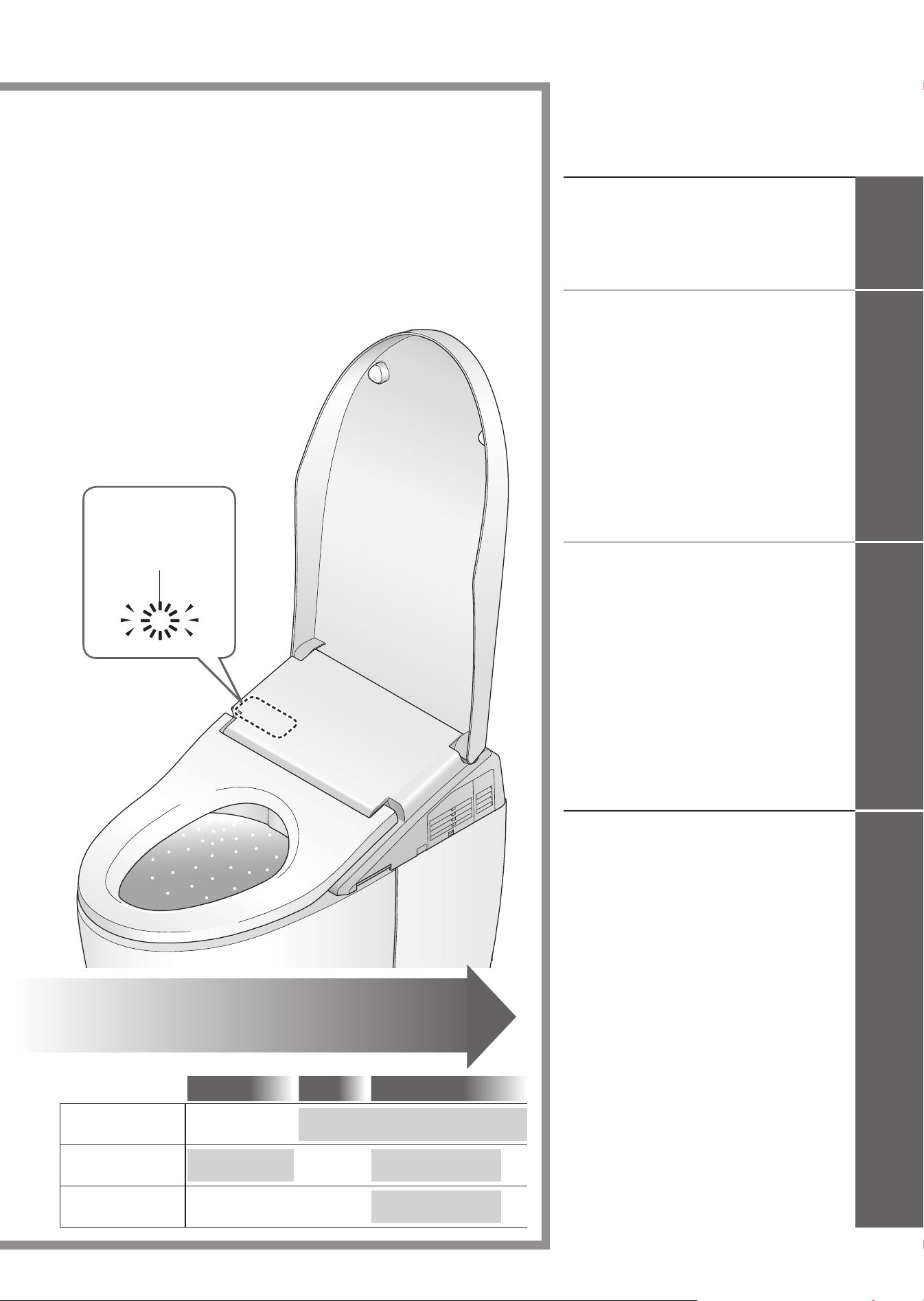
As you approach As you sit
As you stand up
Removing odors
inside the bowl unit.
Sanitize the bowl
unit with "ewater+"
Sanitize the wand
with "ewater+"
Deodorizer
Auto bowl CLEAN
Auto bowl CLEAN
Auto wand CLEAN
Auto power deodorizer
Safety Precautions
......................
4
Operational Precautions
..........
11
Parts Names
..............................
14
Preparation
................................
16
Changing Settings
...................
42
What to Do?
..............................
56
l
If the water does not fl ow due to
a power outage
.........................
56
l
If the water does not fl ow due to
a water service interruption
.......
58
l
If you cannot operate with
the remote control
.....................
58
l
Freeze Damage Prevention
......
59
l
Long Periods of Disuse
.............
60
l
Removal of Operation Guide
....
62
Troubleshooting
........................
63
Specifi cations
...........................
71
Warranty
....................................
72
Basic Operations
......................
18
Automatic Functions
(Cleaning Features)
.................
22
Deodorizer, Auto wand CLEAN,
Auto bowl CLEAN, Bowl light, CLEAN indicator
Automatic Functions
(Convenience Features)
.........
24
Auto fl ushing, Auto open/close, Soft light
Temperature Adjustment
(Toilet Seat, Warm Water, Drying)
... 26
Energy Saver Features
...........
28
Table of Contents
Maintenance
.............................
32
l
Power Plug
...............................
32
l
Top Unit
.....................................
33
l
Bowl Unit
...................................
34
Bowl unit cleaning
l
Deodorizing Filter
......................
35
l
Gap between the Top Unit and
Bowl Unit
....................................
36
l
Gap between the Top Unit and
the Toilet Lid
................................
37
l
Wand
........................................
38
Wand cleaning
l
Water Filter Drain Valve
............
39
l
Water Filter (Bowl Unit)
.............
40
Keep It
Clean
Sanitary Toilet
The self-cleaning functions
operate automatically.
(See pages 22 and 23 for details.)
Lights to show
that the "CLEAN"
functions are
operating.
ReferenceMaintenanceOperation
Introduction
4
IMPORTANT SAFEGUARDS
READ ALL INSTRUCTIONS BEFORE USING
Symbols and Meanings
WARNING
May result in death or serious injury.
CAUTION
May result in injury or property damage.
The following symbols are used to indicate important safety instructions for the use of the product.
Symbol Meaning
This symbol indicates a prohibited use of the product.
This symbol is used to indicate a required step in the use of this product.
• This product is classifi ed as Class 1 Equipment and must be grounded.
•
Install this equipment where the electrical outlet is accessible.
• This appliance is not intended for use by persons (including children) with reduced physical, sensory or
mental capabilities, or lack of experience and knowledge, unless they have been given supervision or
instruction concerning use of the appliance by a person responsible for their safety.
Children should be supervised to ensure that they do not play with the appliance.
• Use the new hose set included with this equipment. Do not reuse an old hose set.
WARNING
Do not plug or unplug the power plug with wet hands.
• Doing so may cause electrical shock.
Do not get any water or cleaning solution on the top unit or power plug.
• Doing so may cause fi re, electrical shock, heat or short circuit.
•
Doing so may cause the product to crack resulting in injury or water damage.
Never disassemble, repair or alter.
Do not use tools in places other than designated.
• Doing so may cause fi re, electrical shock, overheating, short circuit or breakdown.
Do not install the product on moving vehicles such as wheeled vehicles or
boats.
•
Doing so may cause fi re, electric shock, short circuit or malfunction.
•
The toilet seat, toilet lid, top unit or other parts may come loose and fall off, resulting in injury.
Safety Precautions
5
WARNING
Do not use the product if a malfunction occurs.
In case of breakdown or other problem, be sure to cut off power by means such as unplugging
the power plug or switching the breaker in the distribution board to OFF.
Close the water shutoff valve to stop water supply.
Possible malfunctions:
Water is leaking from a pipe or the top unit.
The product is cracked or broken.
The product makes a strange noise or emits a strange odor.
The product emits smoke.
The product is abnormally hot.
The bowl unit is clogged.
The toilet seat cushion is out of place.
• Continued use after malfunction could cause a fi re, electric shock, heat, short circuit, injury or
water damage.
Do not use other water than allowed by the laws and ordinances of the
region of use.
Only use drinking water. Do not use seawater or recycled water.
•
Doing so may cause irritation to the skin and malfunction.
Do not touch the power plug during thunderstorms.
• Doing so may cause electrical shock.
Do not allow the water supply hose to touch the power plug or outlet.
•
Doing so may cause condensation resulting in a fi re, electrical shock, heat or a short.
Do not do anything that may damage the power cord or power plug.
Do not strike, yank, twist, excessively bend, damage, alter, or heat the power cords. Also,
do not place anything heavy on, bind or pinch the power cords.
•
Using a damaged power cord may result in a fi re, electrical shock, heat or short.
Do not use a loose or faulty electrical outlet.
•
Doing so may cause fi re or short circuit.
Do not use any outlet or wiring equipment beyond its specifi ed rating.
•
Plugging too many plugs into the same outlet, for example using outlet splitters, can cause fi re
due to heat.
Do not use any power supply other than the one specifi ed.
AC 120 V, 60 Hz
•
Doing so may cause fi re or excessive heat.
Do not stick a fi nger or anything else into the warm air outlet.
Do not place anything on the warm air outlet or drape clothes over it.
•
Doing so may cause burns, electrical shock or malfunction.
Keep cigarettes and other open fl ames away from the product.
•
Failure to do so may cause fi re.
Introduction
6
WARNING
Refrain from sitting on the seat for long periods.
• It may cause low-temperature burns.
To prevent the following persons from getting a moderate temperature burn during use, other
person should turn off the toilet seat heater and set the dryer temperature to "Low".
Young children, the aged and other users unable to set the temperature appropriately
themselves.
The ill, physically disabled and others who do not have freedom of movement.
Those using any medicines that cause drowsiness (sleeping or cold medicine), those who
have been drinking heavily, anyone severely fatigued and anyone else liable to fall asleep.
This is an electrical product. Do not install it anywhere water is likely to get on
the product or anywhere with humidity high enough that water is likely to form
on the surface of this product. When using the product in a bathroom, install
a fan or ventilation port and ensure good air fl ow through the bathroom.
• Failure to do so may cause fi re or electrical shock.
Always connect the product to the cold water supply.
• Connecting to hot water supply may result in burns and equipment damage.
Make sure that a properly grounded (3 prong) outlet has been installed.
• Failure to install a grounded outlet could cause electrical shock in the event of a malfunction or
short circuit.
Insert the power plug securely into the outlet.
• Failure to do so may cause fi re, heat or short circuit.
To unplug, hold the power plug, not the power cord.
Do not unplug by pulling the power cord.
•
Pulling on the power cord may cause damage and result in fi re or heat.
If the electric cord is damaged, avoid danger by having the manufacturer’s
repair department or equivalent specialist replace it.
Always unplug the power plug from the outlet before maintenance or
inspection.
•
Failure to do so may cause electrical shock or malfunction.
Periodically remove dust and dirt from the power plug and make sure it is
securely plugged into the wall outlet.
• Failure to do so may cause fi re, heat or short circuit.
Unplug the power plug from the outlet and wipe clean with a dry cloth.
When leaking battery fl uid adheres to your body or clothes, wash it away
with clean water.
•
The fl uid may damage your eyes or skin.
Safety Precautions (Continued)
7
CAUTION
Do not use the product if the top unit is unstable.
• Doing so may cause the top unit to come loose and fall, resulting in injury.
If the product is damaged, do not touch the damaged section.
•
Doing so may cause electrical shock or injury. Replace it immediately.
Do not apply strong force, mechanical shock, step on or stand on the toilet
seat, toilet lid or top unit. Also do not place any heavy object on the toilet
seat, toilet lid or top unit.
• Doing so could cause cracking or cause the top unit to come loose and fall, resulting in injury.
• Doing so could damage the product and cause injury or water damage.
Do not lift up this product by the toilet seat or lid.
Do not raise the toilet seat or lid while objects are resting on top of the unit.
• Doing so may cause the top unit to come loose and fall, resulting in injury.
When maintaining the plastic parts (top unit etc.) or the water supply hose, use
a neutral kitchen detergent diluted with water. Do not use any of the following.
Toilet cleaner, household cleaner, benzene, paint thinner, powdered cleanser or nylon scrubbing brush.
• These items may damage or crack the plastic and cause injury or malfunction.
• These items could damage the water supply hose and cause a water leak.
To prevent a sudden water leak, do not remove the water fi lter drain valve
when the shutoff valve is open.
•
Doing so will cause water to spurt out.
(Refer to Page 39 for instructions on cleaning the water fi lter drain valve.)
Do not fold or crush the water supply hose; do not damage by cutting with a sharp object.
• Doing so may cause water leaks.
Do not pour hot water into the toilet.
•
Doing so may result in damage to the toilet, injury or water damage.
Do not fl ush anything other than bodily waste and toilet paper. Also, do not
fl ush too much toilet paper.
Do not fl ush the bowl unit if it is clogged.
•
Doing so may clog the toilet, causing waste water overfl ow, and water damage.
WARNING
Preliminary studies in females suggest that overuse of continuous spraying
can increase the possibility of vaginal mucosa drying and potential reduction in
desirable microbial organisms.
Although these studies have not been validated, please consult your healthcare
provider for concerns regarding whether these circumstances may apply to you.
More importantly, if you are an individual suffering from any immune defi ciency as a
result of disease, chemotherapy, or other medical condition compromising the immune
system you should consult your healthcare provider before use of this product.
Introduction
8
Safety Precautions (Continued)
CAUTION
Keep the bowl fi lled with water.
•
Failure to do so may cause sewer gas, chlorine gas, or hydrogen sulfi de to corrode facilities and equipment.
Do not use the product while the top unit is lifted up by the cleaning lift.
When lowering the top unit by the cleaning lift, do not insert your fi ngers
into the gap between the top unit and the bowl unit.
If a water leak should occur, always close the shutoff valve.
When the ambient temperature is likely to drop to 32°F (0°C) or lower,
prevent damage to the pipes and hoses due to freezing.
• Frozen water pipes could cause the top unit and the pipes to break, resulting in a water leak.
•
Regulate the room temperature to prevent the pipes and hoses from freezing during cold months.
When not using the product for a long time, close the shutoff valve, drain the water
from the top unit and water supply hose, and unplug the power plug from the outlet.
•
When using the product again, allow the product to refi ll with water fi rst.
Otherwise, the water in the tank might become contaminated and cause skin infl ammation or
other problems. (Refer to Page 61 for instructions on replenishing the water.)
•
Leaving the power on may cause fi re or heat.
When installing the water fi lter drain valve, make sure that it is securely
tightened in its proper position.
• Failure to securely tighten it may cause a water leak.
If the bowl unit is clogged, unplug the power plug and remove the clog.
• If the auto fl ush were allowed to function, it would make the wastewater in the bowl unit overfl ow
and may result in water damage.
•
Use commercially available tools that are made for unclogging the bowl unit to remove the clogging.
Always fl ush, even after just urinating.
• Failure to do so may clog the toilet, causing waste water overfl ow and water damage or
inadequate fl ushing of the bowl unit.
Wipe condensation on the bowl unit, tank, water supply pipe and shutoff
valve with a dry cloth.
•
Condensation may cause staining and corrosion of the fl oor.
• Ventilate the restroom to prevent condensation.
Wipe any urine, condensation, cleaner, water, etc. that has gotten on the
fl oor with a well-wrung mop or cloth.
• Failure to do so may cause staining and corrosion of the fl oor.
Make sure of the plus and minus signs on the batteries before inserting them.
Remove depleted batteries immediately.
When replacing the batteries:
Replace both batteries with new ones.
Use the same brand for both new batteries (any brand available).
•
Failure to do so may cause the batteries to leak fl uid, generate heat, rupture, or ignite.
When the product is supposed not to be used for long time, remove the
batteries from the remote control and battery box.
•
Failure to do so may cause the batteries to leak fl uid.
9
DANGER
To reduce the risk of electrocution:
1. Do not use while bathing.
2. Do not place or store the product where it can fall or be pulled into a tub or sink.
3. Do not place in or drop into water or other liquid.
4. Do not reach for the product when it has fallen into water. Unplug it immediately.
WARNING
To reduce the risk of burns, electrocution, fi re or injury to persons:
1. Close supervision is necessary when this product is used by, on, or near children or
invalids.
2. Use this product only for its intended use as described in this manual. Do not use
attachments not recommended by the manufacturer.
3. Never operate this product if it has a damaged cord or plug, is not working properly, has
been dropped or damaged, or has been dropped in water. Return the product to a service
center for examination and repair.
4. Keep the cord away from heated surfaces.
5. Never block the air openings on the product or place it on a soft surface, such as a bed
or couch, where the air openings may be blocked. Keep the air openings free of lint, hair,
and other similar items.
6. Never use while sleepy or drowsy.
7. Never drop or insert any object into any opening or hose.
8. Do not use outdoors. Do not operate where aerosol (spray) products are being used or
where oxygen is being administered.
9. Connect this product to a properly grounded outlet only.
See "Grounding Instructions" in Page 10.
10. The tank should be fi lled with water only.
•
Servicing should be performed by an authorized service representative.
•
This product is for household use.
Introduction
10
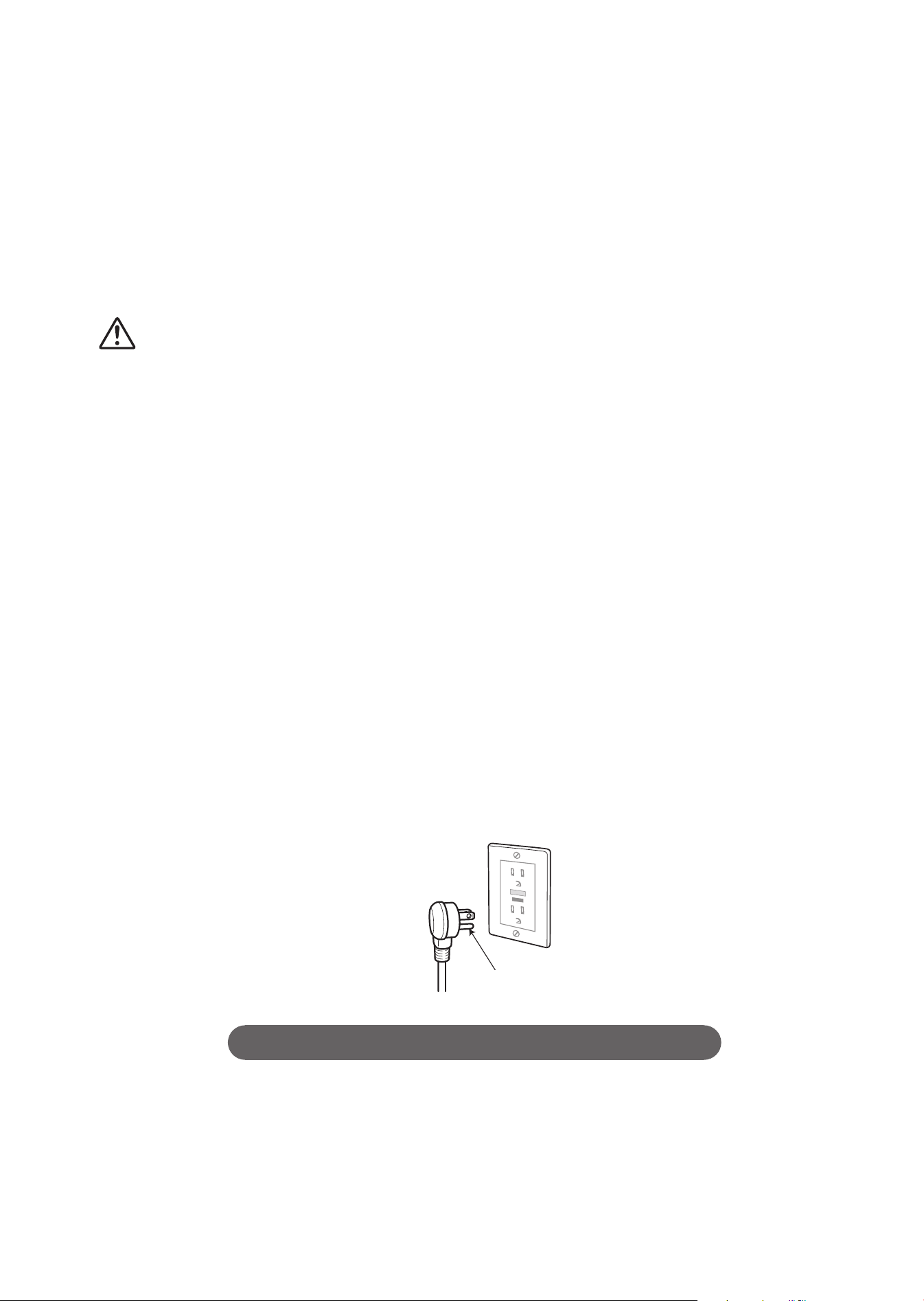
Grounding Instructions
This product should be grounded. In the event of an electrical short circuit, grounding
reduces the risk of electric shock by providing an escape wire for the electrical current.
The plug must be plugged into an outlet that is properly installed and grounded.
DANGER - Improper use of the grounding plug can result in a risk of electric shock.
If repair or replacement of the cord or plug is necessary, do not connect the grounding wire
to either fl at-head terminal.
Check with a qualifi ed electrician or serviceman if the grounding wire instructions are not
completely understood, or if in doubt as to whether the product is properly grounded.
This product is factory equipped with a specifi c electric cord and plug to permit connection
to a proper electric circuit. Make sure that the product is connected to an outlet having the
same confi guration as the plug.
No adapter should be used with this product. Do not modify the plug provided - if it will not fi t
in the outlet, have the proper outlet installed by a qualifi ed electrician.
If the product must be reconnected for use on a different type of electric circuit, the
reconnection should be made by qualifi ed service personnel.
If it is necessary to use an extension cord, use only a three wire extension cord that has a
three blade grounding plug, and a three-slot receptacle outlet that will accept the plug on the
product.
Replace or repair a damaged cord.
Grounding pin
SAVE THESE INSTRUCTIONS
Safety Precautions (Continued)
11
Operational Precautions
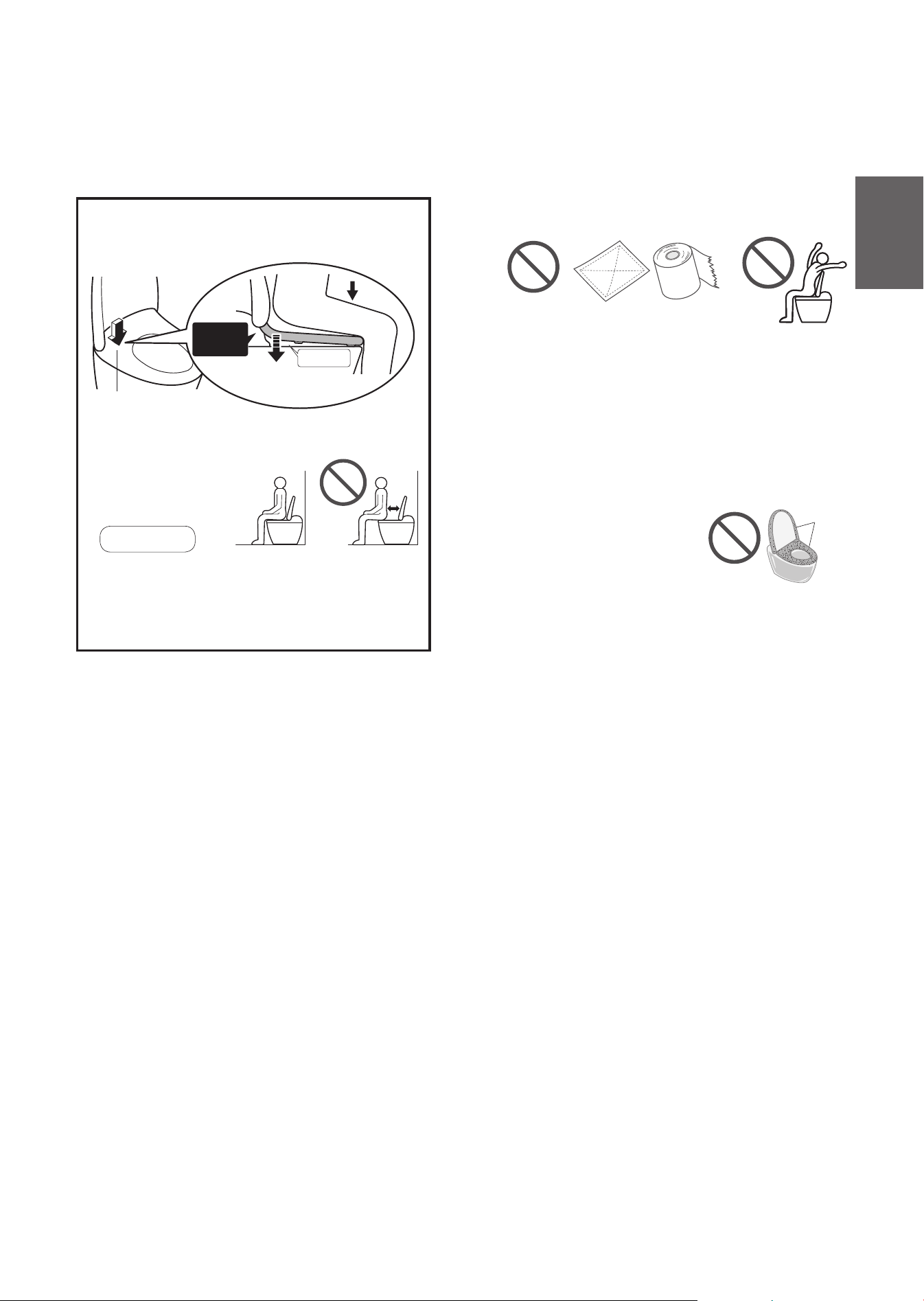
About the seat switch
When you sit on the toilet seat, the seat switch
turns ON, enabling you to use various features.
(A click sound is heard when the seat switch is
ACTIVATED.)
Seat switch (Built-in)
Gap
The toilet seat lowers.
Switch
ON
Sit back on the toilet seat.
The seat switch will not turn on unless you sit
on the seat properly.
Note
When a child uses the product, the seat switch
may not be ACTIVATED by their light body weight.
Since the toilet seat is designed to move up and
down, a clearance is provided between the toilet
seat cushion and the bowl unit.
For prevention of damage
Wipe plastic areas such as the top unit and
remote control with a soft cloth tightly wrung out
with water.
Dry cloth or tissue
Do not lean against the toilet lid.
For prevention of malfunctions and
failures
Do not block the remote control transmitter or
receiver.
(May cause top unit to malfunction)
Unplug the power plug if there is a risk of
lightning.
A toilet seat cover or a toilet lid cover cannot be used.
(The seat switch may not
function properly.
Additionally, the toilet seat
and lid may not open or close
properly.)
Covers
Do not urinate on the top unit, toilet seat or wand.
(Doing so may cause a failure or discoloration.)
Do not apply strong forces to the control panel of the
remote control.
When using a toilet cleaner to clean the toilet, wash it off
within 3 minutes and leave the toilet seat and toilet lid open.
Wipe off any cleaner that remains on the bowl unit.
(If vapor from a toilet cleaner enters the top unit,
it may cause a malfunction.)
Do not use the product with the toilet lid removed.
Do not expose to direct sunlight.
(Doing so may cause changes in color, irregular
heated seat temperature, or operation failure of
the remote control.)
Use radios, etc. away from product.
(The product could cause interference with the
radio signal.)
If you use a booster seat for infants or a soft
highchair, remove it after use.
(Keeping it installed may prevent some of the
functions from being used.)
Do not apply force to the remote control.
(May cause malfunctions.)
To prevent the remote control from being dropped,
set it in the hanger when you are not using it. Be
careful not to expose it to water.
Do not place anything on the toilet seat and lid,
and do not press them with hands.
(Failure to do so may turn on the seat switch, causing
the fl oor to get wet if buttons on the remote control are
touched and warm water comes out from the wand.)
Introduction

12
Operational Precautions
(Continued)
Body Sensor Compliance
FEDERAL COMMUNICATIONS COMMISSION
(FCC) INTERFERENCE STATEMENT
This equipment has been tested and found
to comply with the limits for a Class B digital
device, pursuant to part 15 of the FCC Rules.
These limits are designed to provide reasonable
protection against harmful interference in a
residential installation. This equipment generates,
uses and can radiate radio frequency energy
and, if not installed and used in accordance with
the instructions, may cause harmful interference
to radio communications.
However, there is no guarantee that interference
will not occur in a particular installation.
If this equipment does cause harmful interference
to radio or television reception, which can be
determined by turning the equipment off and
on, the user is encouraged to try to correct the
interference by one or more of the following
measures:
Reorient or relocate the receiving antenna.
Increase the separation between the equipment
and receiver.
Connect the equipment into an outlet on a
circuit different from that to which the receiver
is connected.
Consult the dealer or an experienced radio/TV
technician for help.
CAUTION:
Any changes or modifi cations not expressly
approved by the grantee of this device could void
the user’s authority to operate the equipment.
This device complies with part 15 of the FCC
Rules.
Operation is subject to the following two
conditions:
(1) this device may not cause harmful
interference, and
(2) this device must accept any interference
received, including interference that may cause
undesired operation.
RF exposure warning
This equipment complies with FCC RF exposure
limits set forth for an uncontrolled environment.
This equipment must not be co-located or
operating in conjunction with any other antenna
or transmitter.
Canada, Industry Canada (IC) Notices
This device complies with Industry Canada’s
licenceexempt RSSs.
Operation is subject to the following two
conditions:
(1) This device may not cause interference; and
(2) This device must accept any interference,
including interference that may cause undesired
operation of the device.
Radio Frequency (RF) Exposure Information
The radiated output power of the Wireless Device
is below the Industry Canada (IC) radio frequency
exposure limits.
The Wireless Device should be used in such a
manner such that the potential for human contact
during normal operation is minimized.
This device has also been evaluated and shown
compliant with the IC RF Exposure limits under
portable exposure conditions.
(antennas are less than 8 inch (20 cm) of a
person's body).

13
Introduction
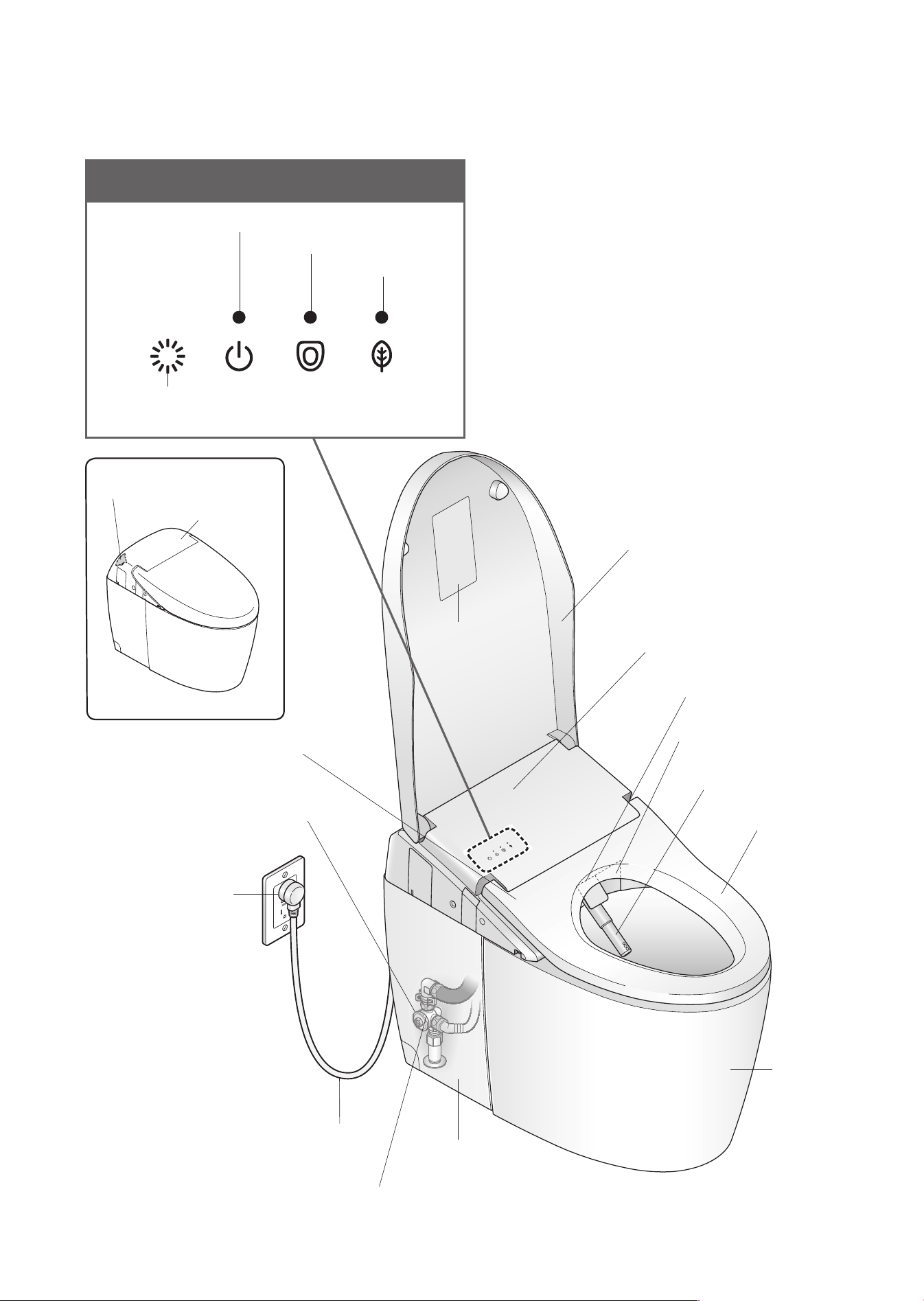
14
Parts Names
Main display
<All the CLEAN indicator and LEDs lights up in the fi gure>
Power LED
Seat LED
Energy saver LED
CLEAN indicator
<The drawing is AH>
Shutoff valve
(Page 17)
Wand cover
Body sensor (built-in)
<AH>
Wand
Bowl unit
(Page 34)
Water fi lter
(Internal parts of the shutoff valve)
(Page 40)
Power cord
Warm air outlet cover
Toilet lid
Side panel
Product name,
part no., etc.
(Page 17, 40, 56)
Seat switch (built-in)
Heated seat
<The drawing is RH>
Body sensor
(built-in)
Remote control
receiver
Power plug
(Page 32)
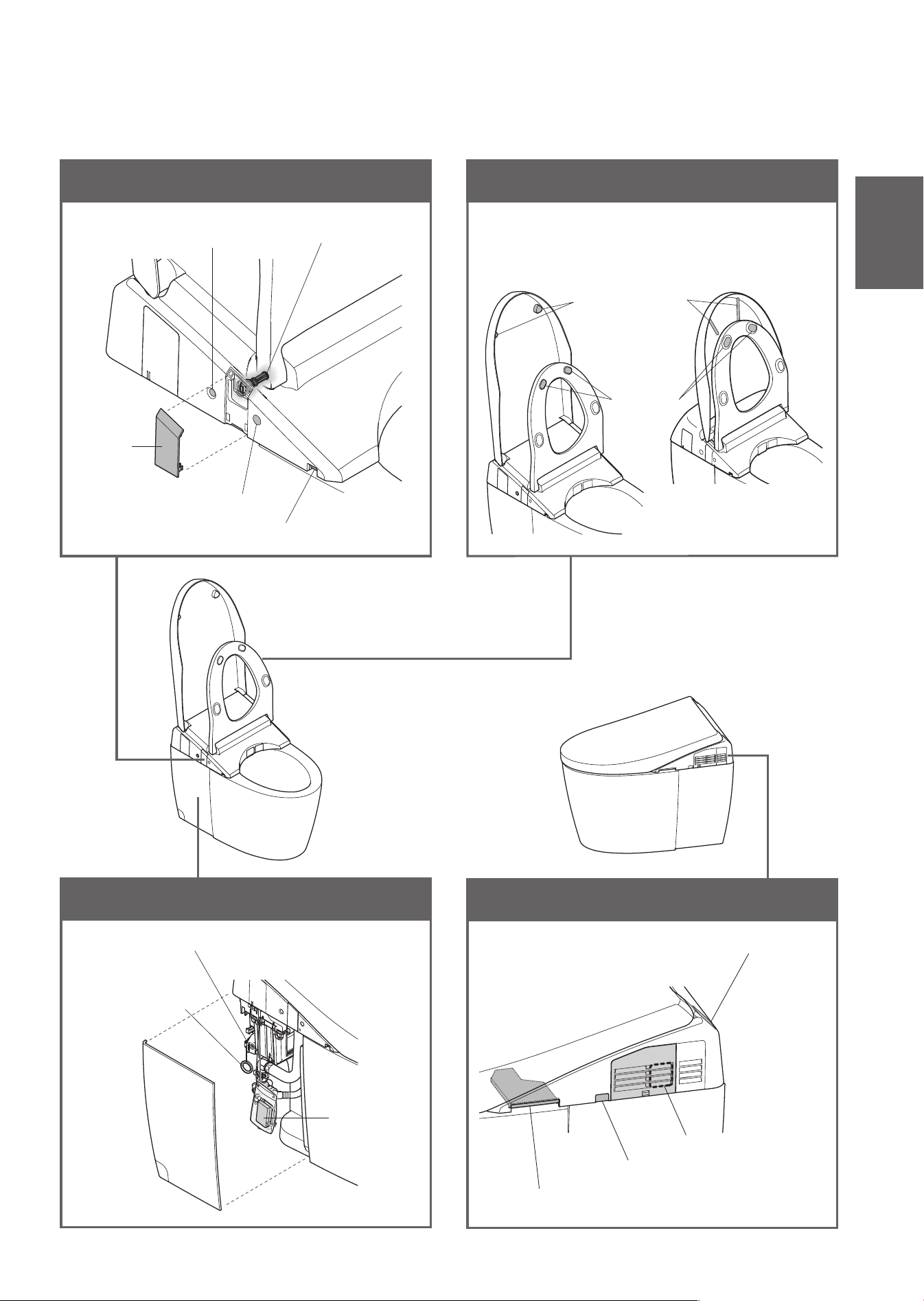
15
Left side of bowl unit
Toilet lid and toilet seat underside
NEOREST AH
NEOREST RH
Left side of top unit
Water drain lever (Page 60)
Soft light
Water fi lter drain
valve (Page 39)
Flush button (Page 58)
Cover
Battery box
(Page 57)
Battery box plug socket (Page 57)
Hand lever
(For fl ushing in case
of power outage)
(Page 56)
Right side of top unit
Deodorizer outlet
Remote control receiver (AH)
Cleaning lift button (Page 36)
Deodorizing fi lter (Page 35)
Toilet seat
cushions
Toilet lid cushions
Introduction
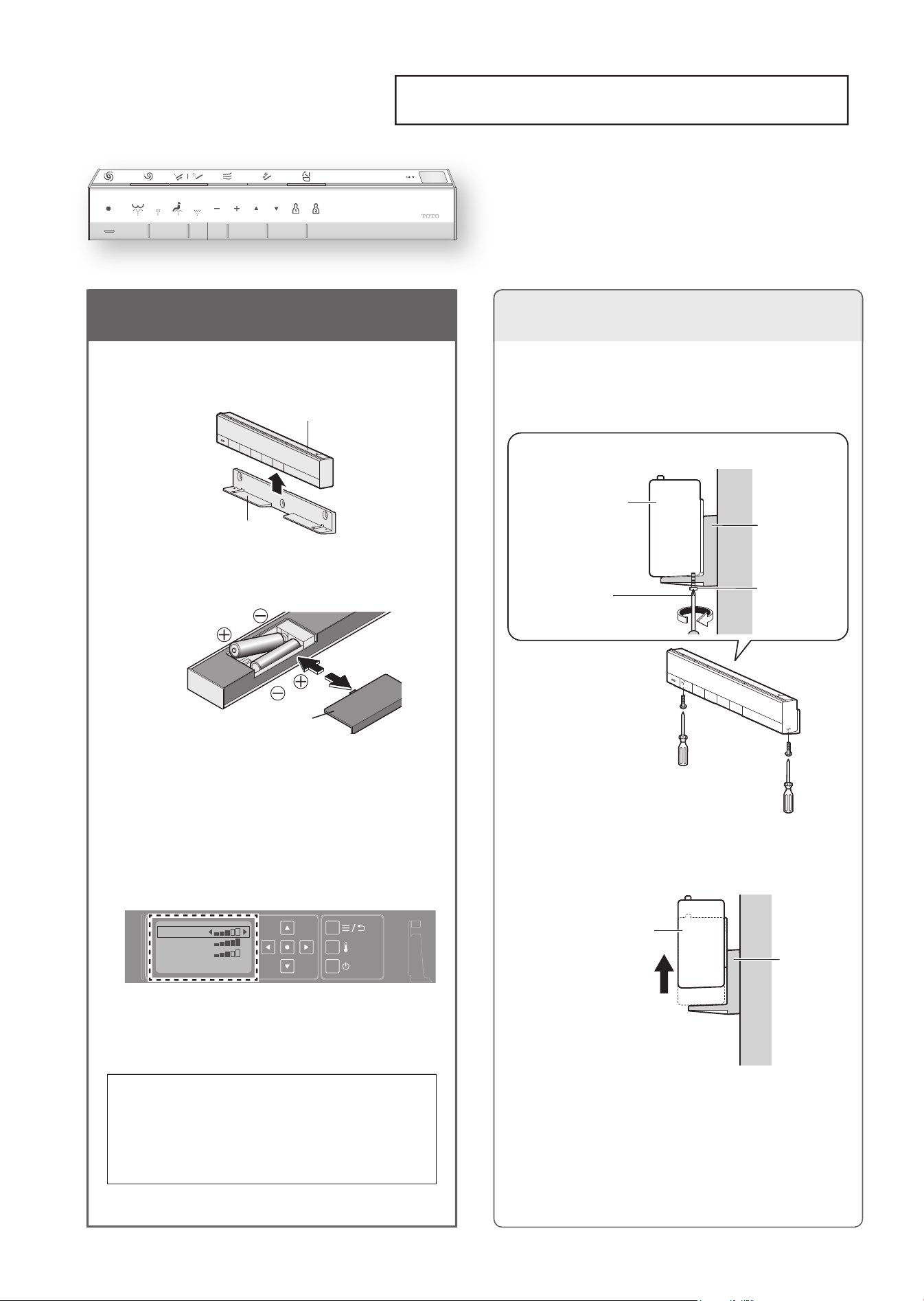
Preparation
Using the Product for the First Time
1. Insert the battery
1
Remove the remote control
from the hanger.
Hanger
Remote control
2
Open the battery cover and
insert two AA batteries.
WATER TEMP
SEAT TEMP
DRYER TEMP
When batteries are properly inserted,
temperature levels appear on the display of
the remote control (back side).
➞
When the temperature levels are not
displayed, perform step
3
of "Language
Selection" in page 52.
The display goes out when no button on
the remote control is pressed for about 60
seconds or more.
Battery cover
Open
CloseClose
3
Mount the remote control in
the hanger.
■
About the batteries
Use dry cell, alkaline batteries.
Be sure to follow "Safety Precautions" to
prevent the batteries from rupturing or leaking
fl uid,etc. (Pages 6, 8)
If the remote control is secured
(for anti theft)
16
1
Remove the screws
(2, left and right) from the
remote control fi xture.
Phillips screwdriver
(Fine-tip type)
Remote control
Hanger
Screw
(2 pieces,
left and right)
(View from side)
Remove
Wall
2
Remove the remote control
from the hanger.
Remote
control
Hanger
Wall
■
To secure the remote control again
Tighten and fi x the screws
(2, left and right).
(Overtightening may cause damage to
parts such as the hanger.)
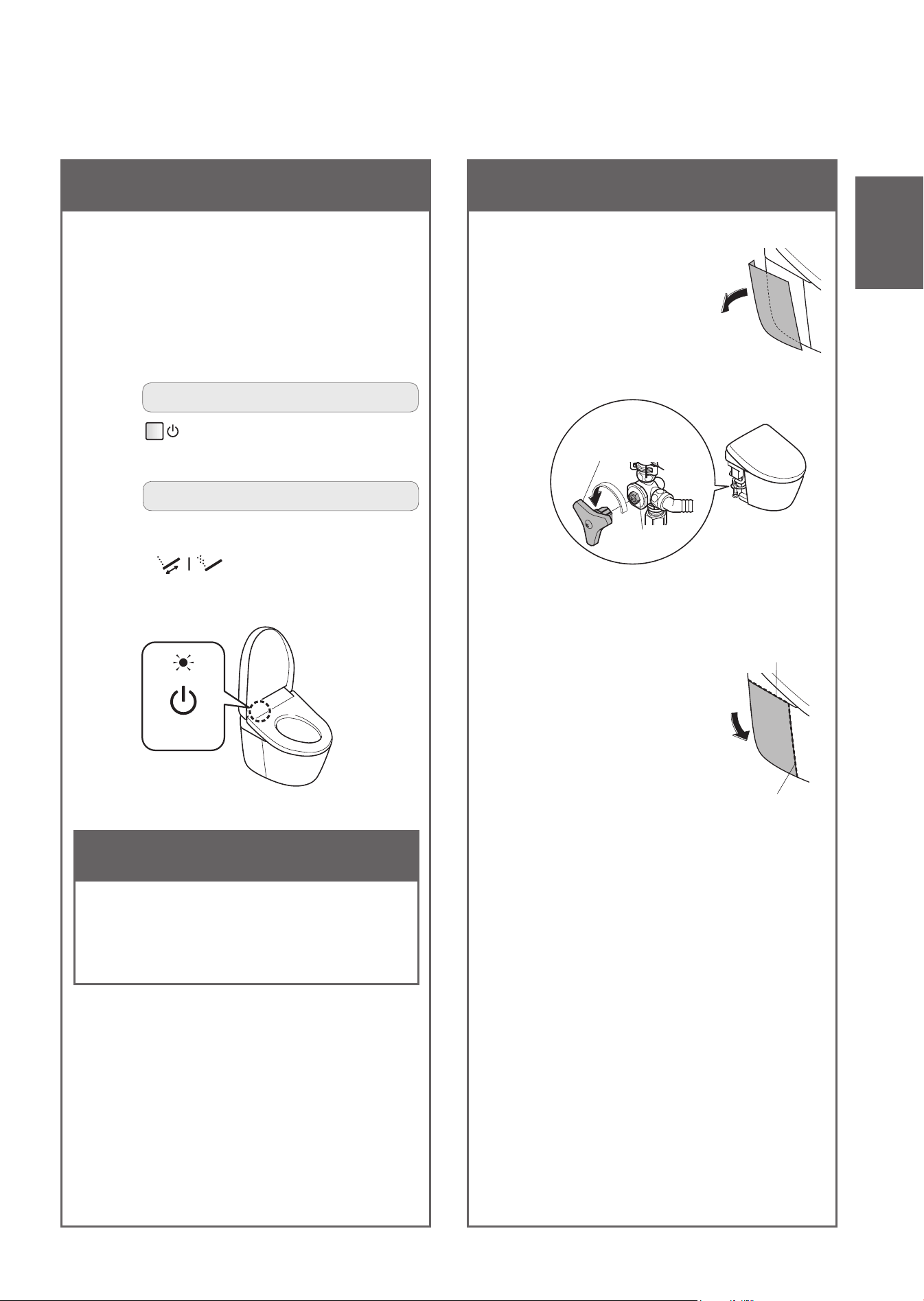
2. Turn on the power
1
Insert the power plug.
•
The wand extends and then retracts.
2
Check that the "Power" LED
lights up.
•
When it is off, switch the "Power" to "ON".
To operate from the back of remote control
Press "Power ON/OFF" button for
about 3 seconds or longer.
To operate from the front of remote control
•
Recommended if the remote control is
secured to prevent theft.
Press "Oscillating cleansing/
Pulsating cleansing" button about
10 seconds or longer.
<Power>
3. Open the shutoff valve
1
Remove the side
panel (left).
2
Fully open the shutoff valve.
Handle
*1
(For opening or closing
the shutoff valve)
Shutoff
valve
*1 Installed on the back of the side panel
(on the left).
3
Reinstall the side
panel.
•
Fit the side panel to the
top and side of the bowl
unit without a gap.
Side of the bowl unit
Top of the
bowl unit
17
To turn the power "OFF"
Perform the same operation as step
2
above.
•
The "Power" LED goes off.
Introduction
18
Basic Operations
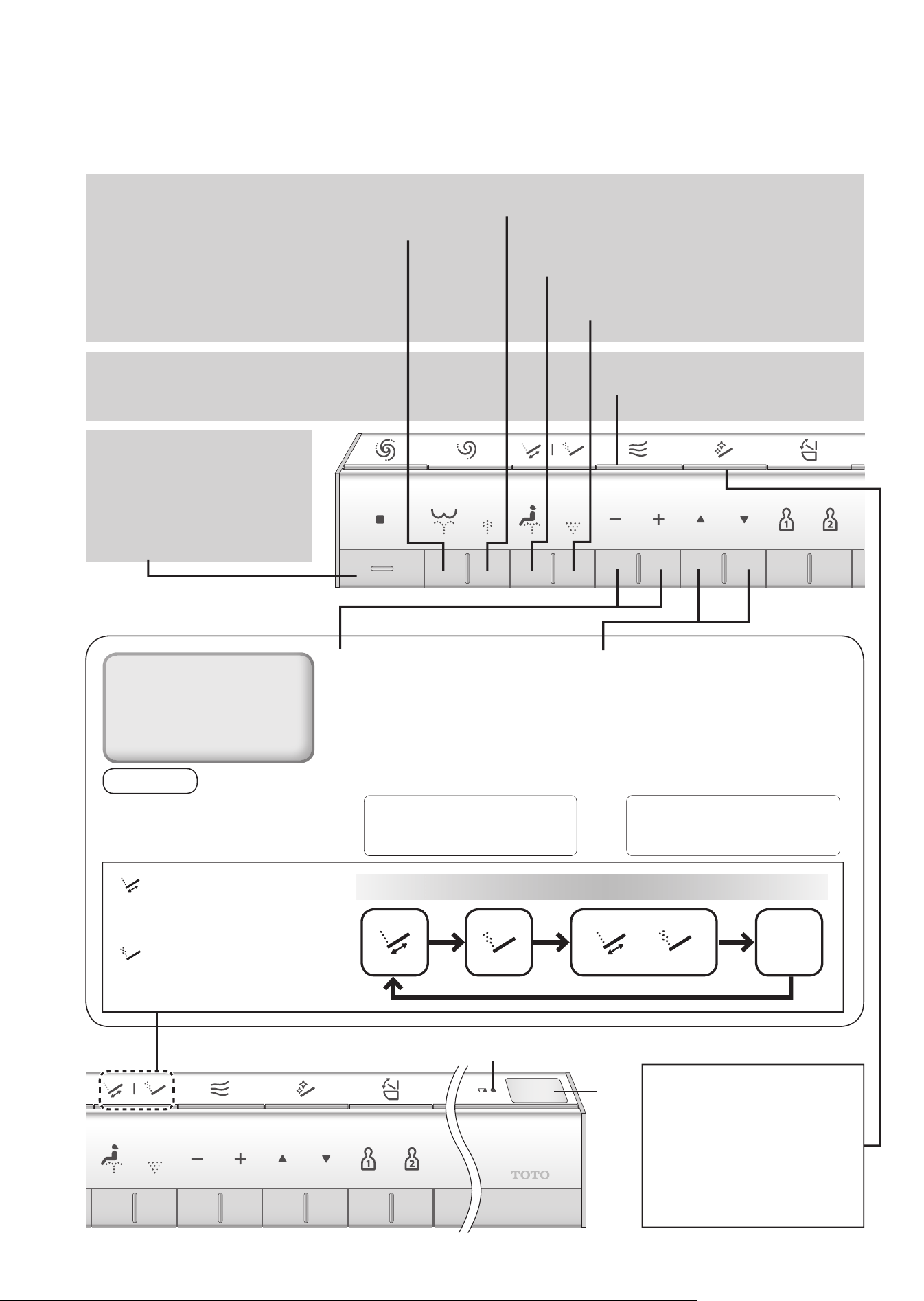
Press a button on the remote control; a beep sounds when the top unit receives the signal.
Cleanses your rear.
Serves as a bidet
for ladies.
Cleanses your rear with soft embracing water fl ow.
Gently cleanses a wide area.
Dries your rear.
Stops the operation.
Drying
"Stopping"
"Rear cleansing"
"Front cleansing"
"Wide front cleansing"
"Warm air drying"
"Rear soft cleansing"
Cleansing
Stopping
Note
Sitting back on the toilet seat
makes it easier to adjust the wand
position and to reduce splashing.
●
Functions that operate when
a button is pressed during
"Rear cleansing","Rear soft
cleansing", "Front cleansing"
or "Wide front cleansing".
Water pressure adjustment
You can select from 5 levels of water
pressure.
([-] Softer, [+] Stronger)
When you press the cleansing
buttons (Rear, Rear soft, Front,
Wide front), the position returns to
the standard position (3rd position).
If you do not want to return the
wand to the standard position.
(Page 54)
Wand position adjustment
You can select from 5 levels of wand
position between the front and the
rear, using the [▲] and [▼] buttons.
When you press the cleansing
buttons (Rear, Rear soft, Front,
Wide front), the position returns to
the standard position (3rd position).
If you do not want to return the
wand to the standard position.
(Page 54)
The cleansing setting changes each time the button is pressed
+
OFF
*1
Low battery warning LED
(Page 58)
"Oscillating cleansing"
The wand moves back and forth to
cleanse your rear thoroughly.
"Pulsating cleansing"
Cleanses with the water praaessure
pulsating between soft and strong.
Wand CLEAN
Cleans the wand with ewater+
The wand can be automatically
cleaned when you use the
cleansing functions (Rear
cleansing , Front cleansing,
etc.). (Page 22)
19
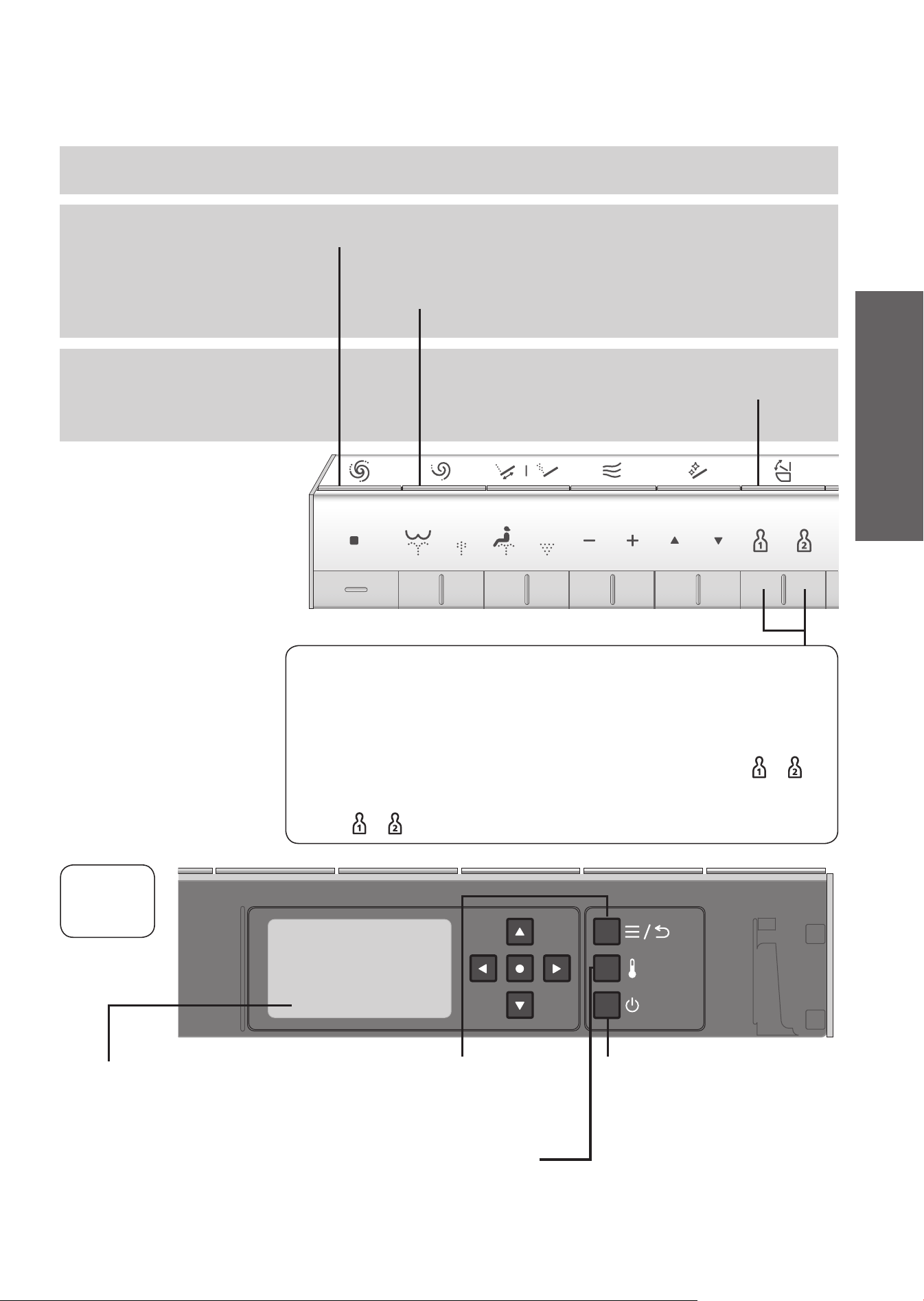
Flushing
Opening and closing
"Menu, Return" button
(Page 20)
Adjust settings
Return to previous menu
"Temperature adjustment"
button
(Page 26)
Adjust temperatures
"Power ON/OFF" button
Pressing it about 3 seconds or
longer turns the power on/off.
If the remote control is secured
to prevent theft (Page 17 Step
2
-
2
)
Display screen
The display goes out when no
buttons on the remote control is
pressed for about 60 seconds
or more.
Remote
control
back side
*1 Remote control transmitter
When fl ushing and opening/closing the toilet seat with the remote control
Opens and closes the toilet seat.
"Opening and closing the toilet seat"
Up to 33 ft (10 m) of toilet paper (single)
Up to 10 ft (3 m) of toilet paper (single)
"Full fl ush"
Performs a full fl ush.
"Light fl ush"
Performs a light fl ush.
Personal setting lock
To store a settings
While cleansing is in progress, set your preferred "Water pressure", "Wand
position" and "Warm water temperature" and then press and hold
or for
2 seconds or longer.
To use
Press or , and then press the button for the cleansing you want to use.
You can store your preferred "Water pressure", "Wand position" and
"Warm water temperature" settings.
Operation
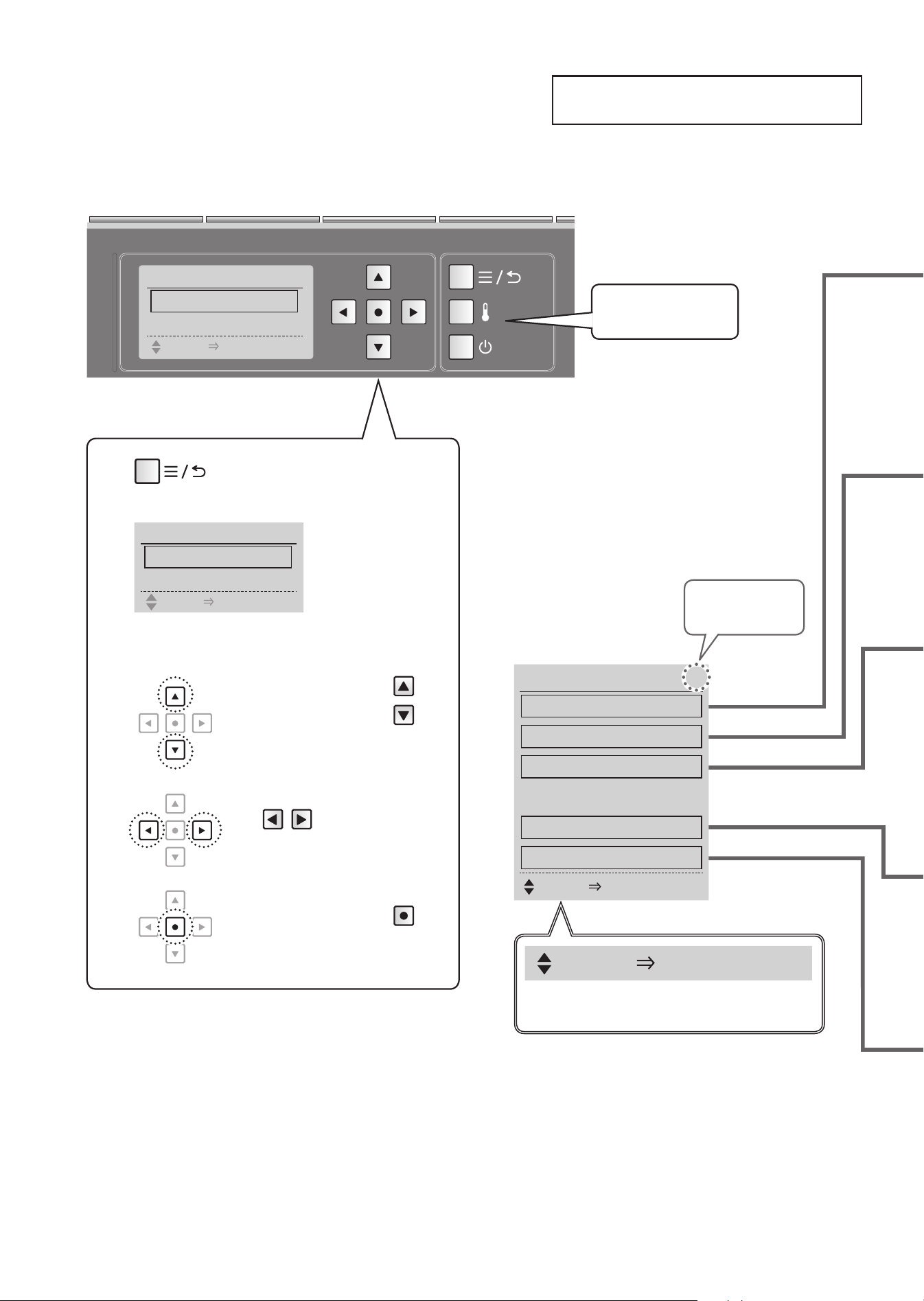
SELECT [●ENTER] PUSH
The next step is shown at the bottom of
the display screen.
Basic Operations
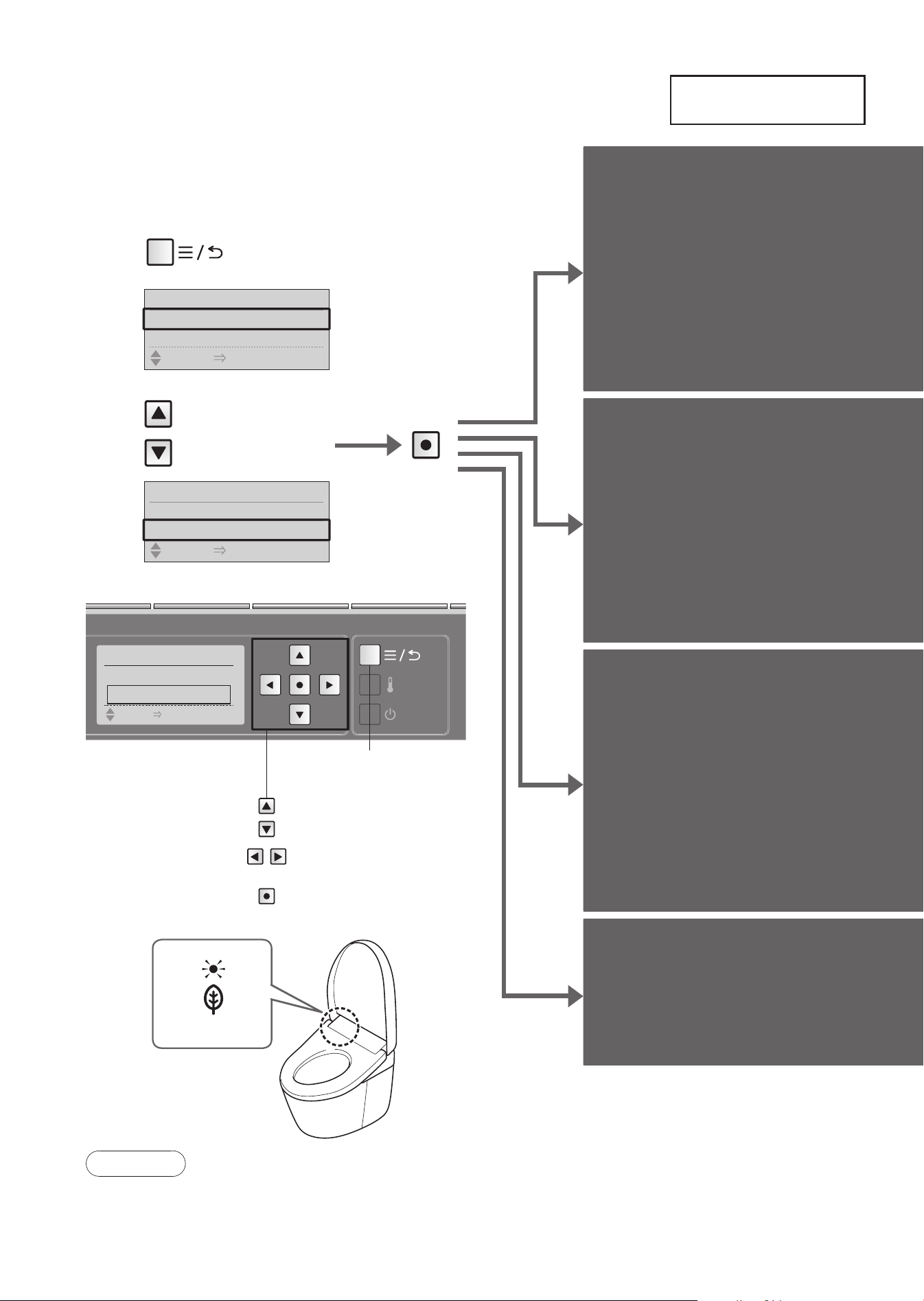
About the Menu Screen
20
MENU 1/ 6
1.MANUAL CLEANING
2.ENERGY SAVER
3.AUTO FUNCTION
4.AIR DEODORIZER
5.
语⾔
/
語⾔
/ LANGUAGE
6.OTHER SETTING
SELECT [
●
ENTER] PUSH
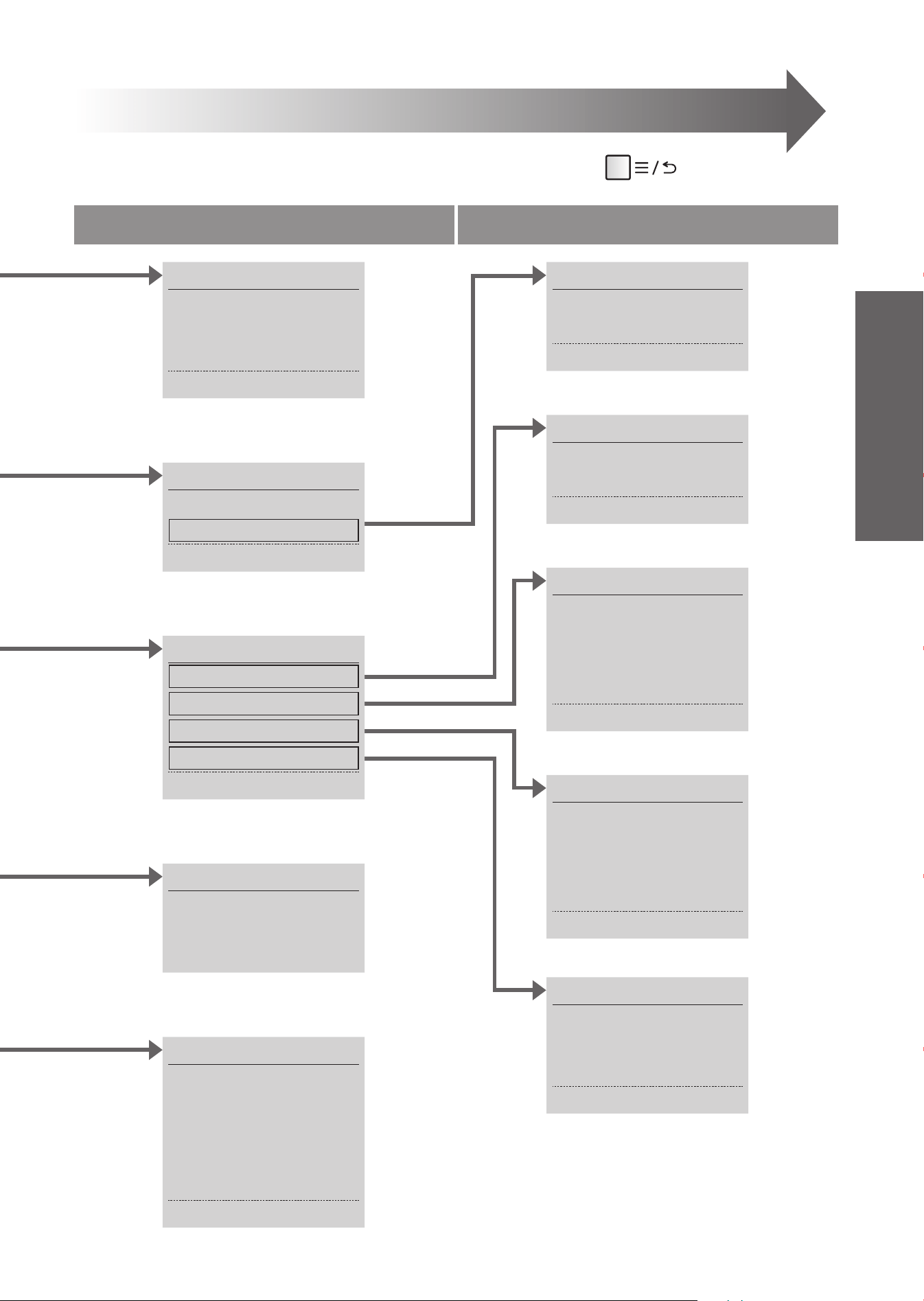
This section is an overview of the settings that can be confi gured with the remote control.
See the corresponding pages for the detailed descriptions.
Remote control back side
Adjust temperatures
(Page 26)
1
Press
• The display screen changes.
MENU 1/6
1.MANUAL CLEANING
2.ENERGY SAVER
SELECT [
●
ENTER] PUSH
2
Set the item from the display screen.
When you move the
buttons (Up/Down),
the frame of the item moves.
When you move
the
buttons
(Right/Left), you can select
the setting.
When you press the
button, the item is entered.
*1
*1 [AIR DEODORIZER] appears but this feature is not available on this product.
Number of items
on display
MENU 1/6
1.
MANUAL CLEANING
2.ENERGY SAVER
SELECT
[●ENTER] PUSH
21
Level 1 Level 2
You can set as desired
If you want to return to the previous item, press the button.
语⾔
/
語⾔
/ LANGUAGE
1.
中⽂简体
2.
繁體中⽂
3. ENGLISH
OTHER SETTING 1/5
1.
ANTI FREEZING
2.BEEP
3.
LOWER WATER LEVEL
4.
PRESSURE/POSITION SETTING
5.
PERSONAL SETTING LOCK
AUTO FUNCTION 1/4
1.AUTO FLUSH
2.AUTO OPEN/CLOSE
3.AUTO CLEANING
4.LIGHT
ENERGY SAVER 1/2
1.
AUTO ENERGY SAVER
2.TIMER SAVER
MANUAL CLEANING 1/3
1.
BOWL CLEANING ON/OFF
2.
WAND CLEANING ON/OFF
3.MANUAL CLEAN
TIMER SAVER 1/1
TIMER SAVER
AUTO FLUSH 1/2
1.AUTO FLUSH
2.AUTO FLUSH DELAY
AUTO OPEN/CLOSE 1/4
1.AUTO OPEN/CLOSE
2.AUTO CLOSE DELAY
3.AUTO OPEN DELAY
4.SEAT/LID
AUTO CLEANING 1/4
1.AUTO WAND CLEAN
2.AUTO BOWL CLEAN
3.DEODORIZER
4.
AUTO POWER DEODORIZER
LIGHT 1/3
1.SOFT LIGHT
2.BOWL LIGHT
3.INDICATOR
Operation
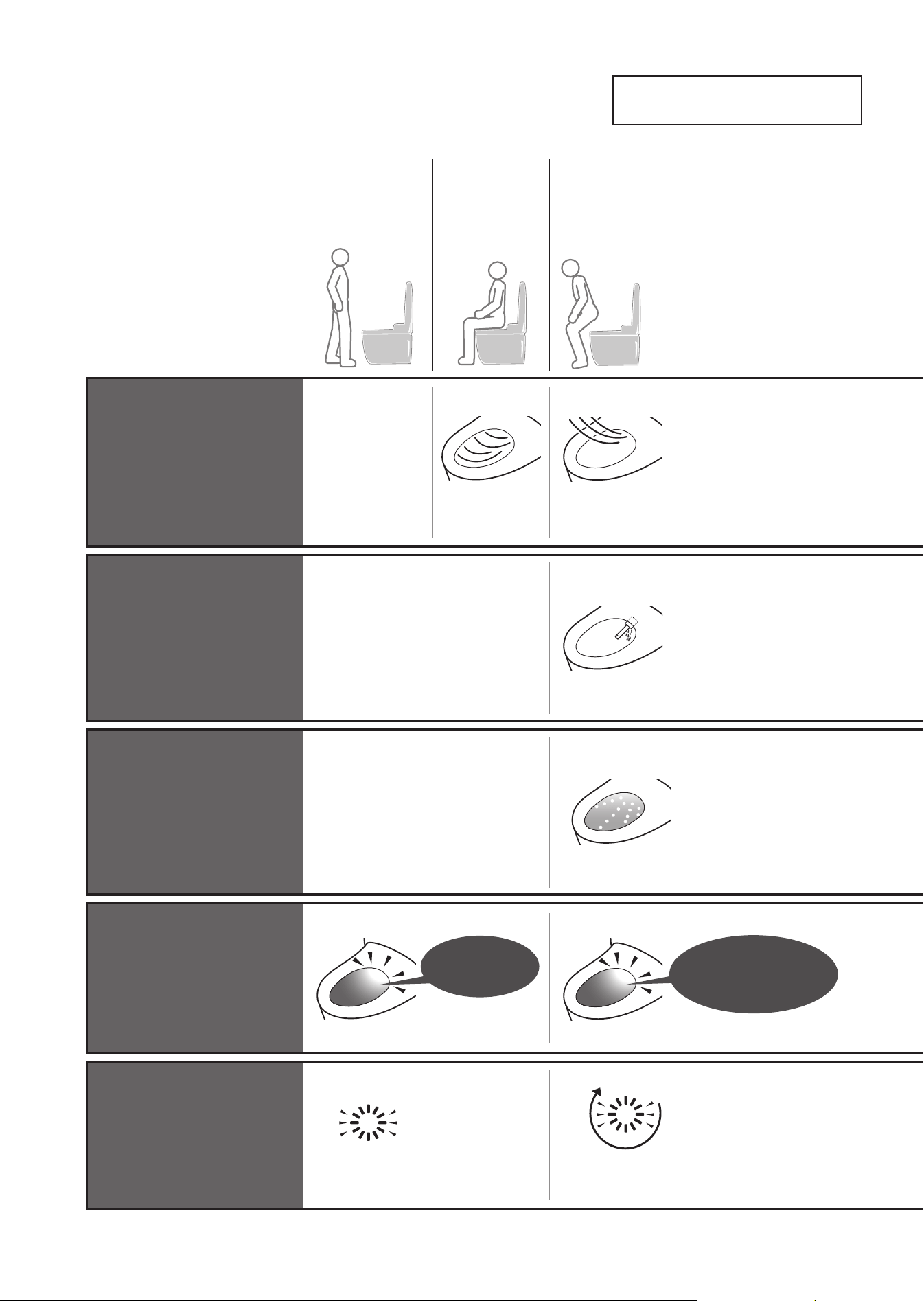
Automatic Functions
Cleaning Features
22
"ewater+"
*1
is used
automatically to clean
the wand and bowl unit.
•
Operation under the initial
settings is described below.
As you
approach
As you
sit
*2
As you
stand up
Removing odors inside
the bowl unit
Deodorizer
Starts
the deodorizer
Starts the auto
power deodorizer
( After about 10 seconds)
➝
It stops after about 60
seconds.
Cleans the wand
automatically
( After about 25 seconds)
•
Only when the cleansing
functions are used.
➝
The wand extends and
"ewater+"
*1
comes out from
the base of the wand.
Sanitize the wand with
"ewater+"
*1
Auto wand
CLEAN
After-mist
(After auto wand CLEAN)
• If the cleansing
functions are not used,
after-mist starts after
about 25 seconds.
➝
"ewater+"
*1
mist is
sprayed on the bowl unit.
Sanitize the bowl unit with
"ewater+"
*1
Auto bowl
CLEAN
Pre-mist
➝
A mist is sprayed inside the
bowl unit to make it more
diffi cult for dirt to adhere.
Lights up during
auto wand CLEAN
and after-mist
Bowl light
Lights up
during
pre-mist
(Lights up)
(Lights up in a cycle)
CLEAN
indicator
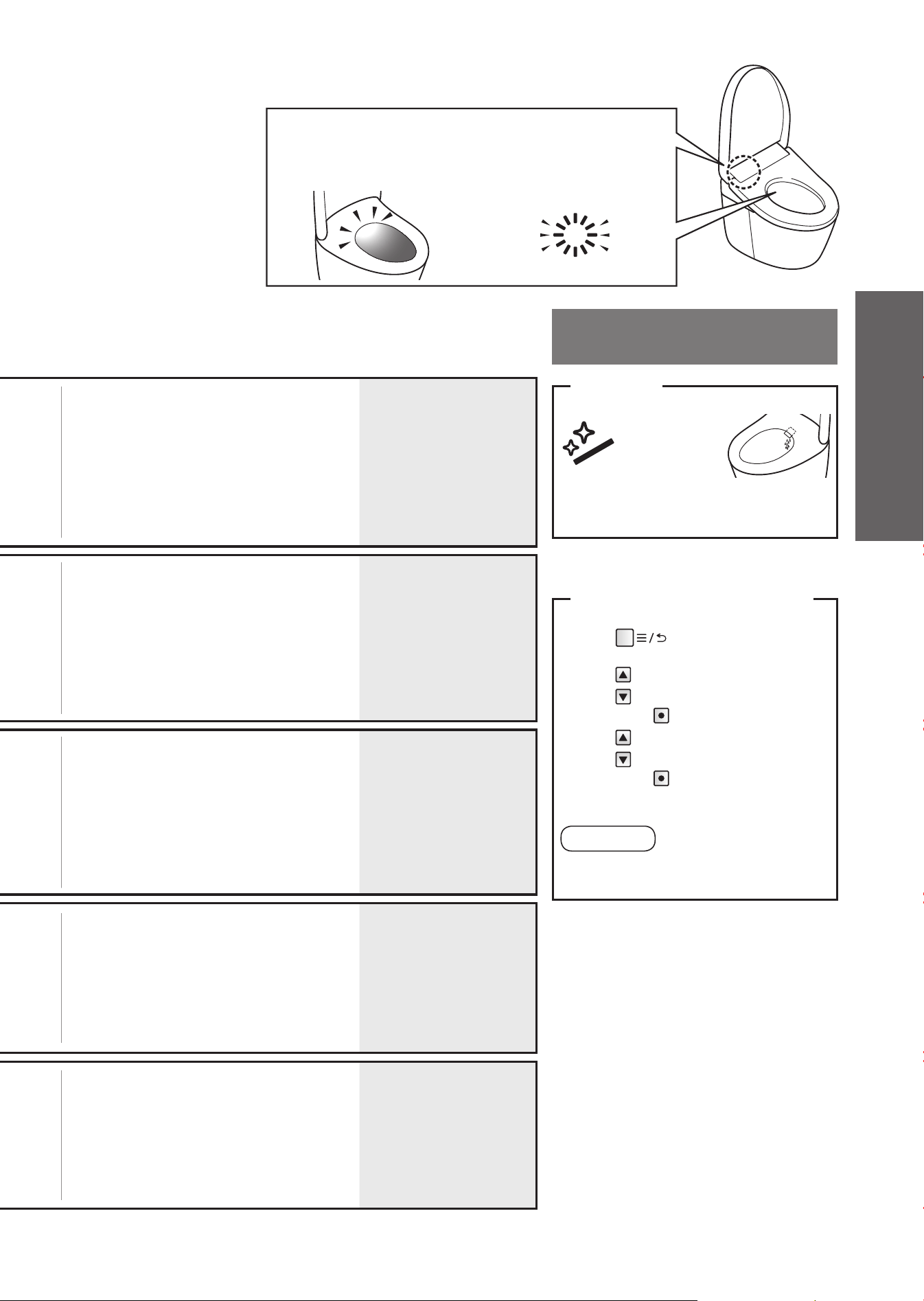
23
Note
Changing
settings
•
Deodorizing fi lter needs regular
maintenance.
(Page 35)
• "Deodorizer" ON/OFF
•
"Auto power deodorizer"
ON/OFF
(Page 48 for all)
• When the cleansing functions (Rear
cleansing and Front cleansing etc,) have
not been used in 8 hours, the wand is
cleaned automatically.
(Water comes out from around the wand.)
• "Auto wand CLEAN"
ON/OFF
(Page 48)
• The pre-mist and after-mist are not
sprayed if the toilet seat is open.
•
The pre-mist does not work for about 90
seconds after the after-mist has fi nished.
• When the cleansing feature (Rear
cleansing and Front cleansing etc,)
is not used for about 8 hours, mist is
sprayed on the bowl unit automatically.
• "Auto bowl CLEAN"
ON/OFF
(Page 48)
• "Bowl light" ON/OFF
(Page 50)
• Lights up continuously or in a cycle when
"Auto wand CLEAN", "Auto bowl CLEAN"
or "Auto power deodorizer" is operating.
(Lights only when the toilet seat is not
in-use)
• "CLEAN indicator"
ON/OFF
(Page 50)
●
To clean the toilet bowl with a toilet brush or
a similar tool (Page 34)
Lights to show that the "CLEAN"
functions are operating.
For bowl unit ("Manual CLEAN")
1
Press
2
Select [MANUAL CLEANING]
➝
Press
3
Select [MANUAL CLEAN]
➝
Press
("ewater+" mist is sprayed on the bowl unit)
Note
• It cannot be used when the wand is out
or when you are sitting on the toilet seat.
Bowl light
Lights to show that auto
bowl CLEAN and auto wand
CLEAN are operating.
CLEAN indicator
Lights to show that the
"clean" functions are
operating.
*1 What is meant by "ewater+" ?
This water containing hypochlorous acid
generated from chloride ions in tap water,
is widely used for cleaning and disinfecting
items such as food, utensils and baby bottles.
Well water may not deliver the required effect.
(Because the level of chloride ions is low.)
"ewater+" helps to minimize dirty surfaces,
but does not make cleaning unnecessary.
The effect and duration vary depending on
the usage environment and conditions.
*2 Water comes out from the area around the
wand for several seconds while water is
warmed up.
"ewater+" can also be used by
pressing the remote control button
For wand
(After wand cleaning, water comes out
from around the wand.)
●
To clean the wand with it extended.
➝
"Wand cleaning" (Page 38)
Press
"Wand CLEAN"
button.
Operation
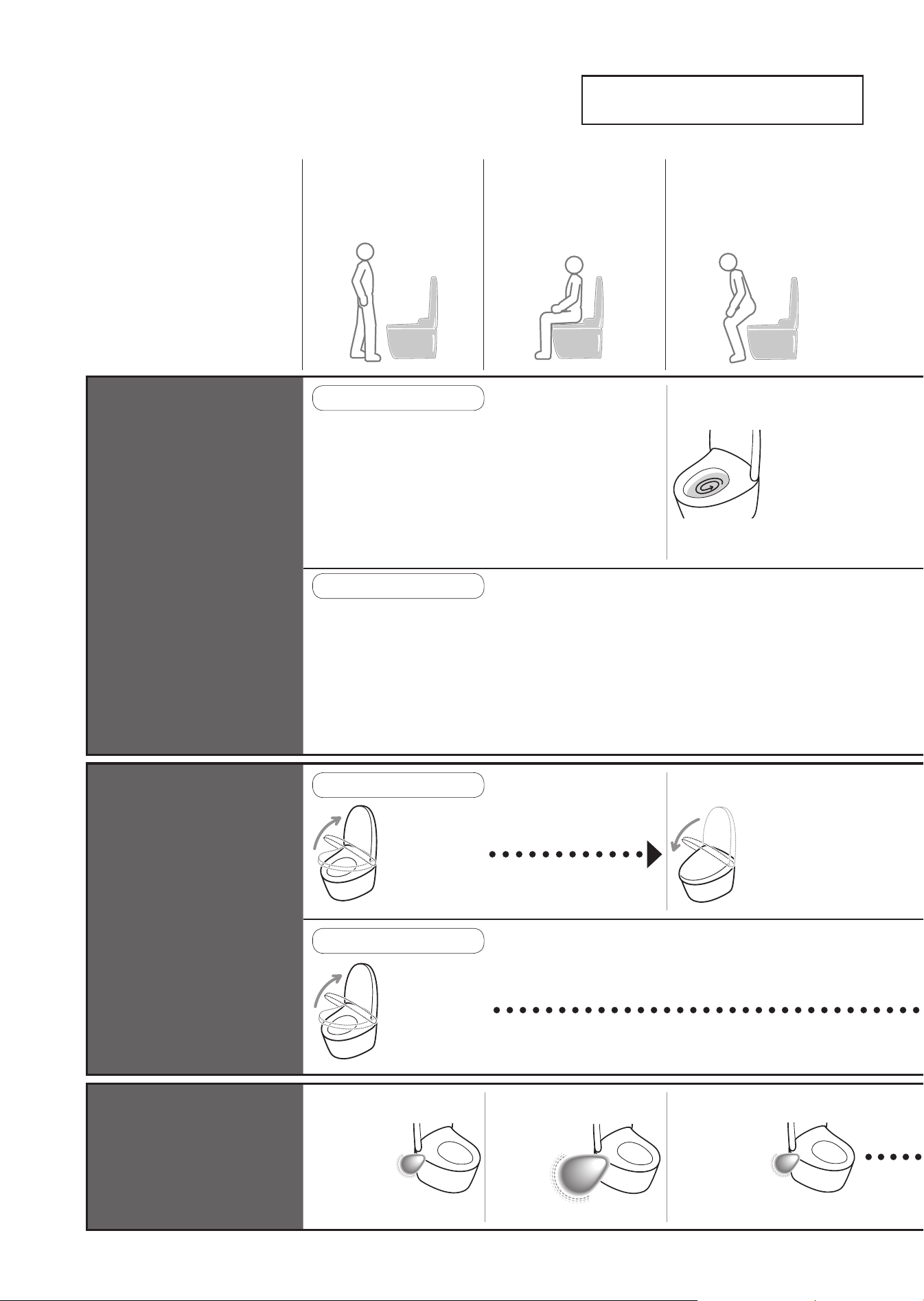
Automatic Functions
Convenience Features
24
Various automatic
functions are available.
•
Operation under the initial
settings is described below.
As you
approach
*1
As you
sit
As you
stand up
The toilet
fl ushes
( After about
10 seconds)
Flush automatically
Auto fl ushing
When using the toilet seat
When standing and using
Opening the toilet lid
automatically
Auto open/
close
When using the toilet seat
The toilet
lid opens
The toilet lid
closes
( After about
90 seconds)
When standing and using
The toilet
lid opens
Open the toilet seat with the remote control.
Lights
up in
high
mode
Lighting up the inside of the
bathroom with a soft light
Soft light
Lights up
in middle
mode
Lights up
in middle
mode
(About 90 seconds)
*1 Detection by the body sensor may be diffi cult when the toilet is used by someone small, such as a child.
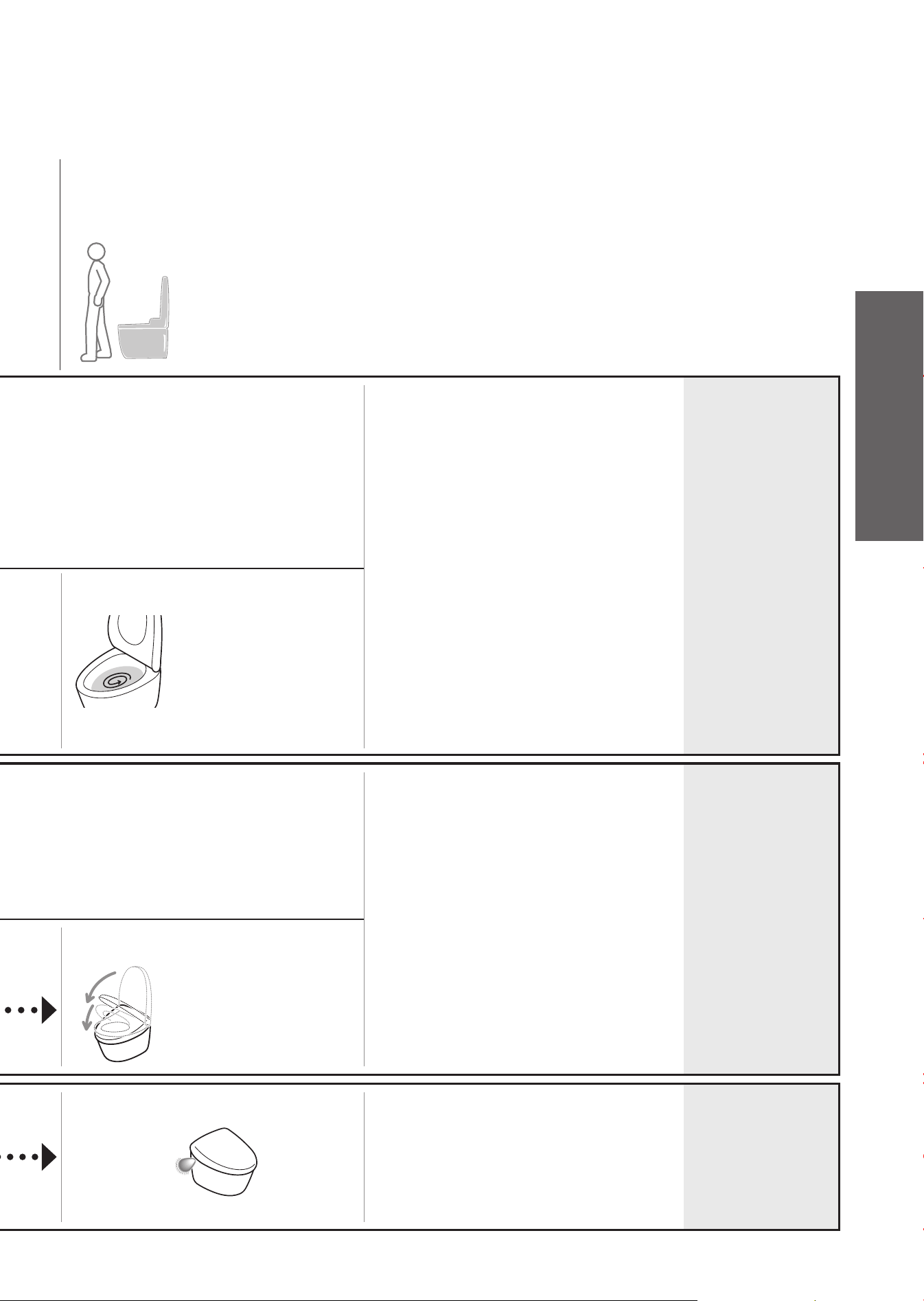
25
As you
move away
Note
Changing
settings
• Auto fl ush is not available in the
following cases.
➝
About 60 seconds after the toilet is
fl ushed.
(After 60 seconds have passed,
fl ush using the remote control.)
When the time spent sitting on the toilet
seat or standing in front of the bowl unit
is less than about 6 seconds.
(Flush with the remote control.)
• The fl ushing varies depending on how
long you sit on the toilet seat.
Around 6 to 30 seconds: "Light fl ush"
Around 30 seconds or more: "Full fl ush"
• When the tank is fi lling and an LED will
fl ash on the main display, you cannot
fl ush the toilet.
• Depending on factors such as the
location of the toilet, it may take up to
about 20 seconds for light fl ush to start
when using standing up.
• "Auto fl ushing"
ON/OFF
• "Auto fl ush delay"
(5 seconds,
10 seconds or
15 seconds)
(Page 44 for all)
The toilet fl ushes
( Performs a "Light fl ush"
about 3 seconds after
the user has moved
about 1.3 ft (about
40 cm) away from the
bowl unit.)
• When the toilet lid is closed by hand, it
cannot open automatically for about 15
seconds.
(Open and close by hand.)
• When you do not sit on the toilet seat, or
when you sit on it or stand in front of the
bowl unit briefl y, it takes about 5 minutes
before the lid closes automatically.
•
"Auto open/close"
ON/OFF
•
"Auto open delay"
(15 seconds,
30 seconds or
90 seconds)
•
"Auto close delay"
(25 seconds or
90 seconds)
•
"Seat/lid"
(Lid/Seat
∙
Lid)
(Page 46 for all)
The toilet lid and
toilet seat close
( About 90 seconds after
moving away from the
bowl unit by about 1.3 ft
(about 40 cm) or more.)
Lights
up in low
mode
(Goes out after
about 5 seconds)
• "Soft light"
ON/OFF
(Page 50)
Operation
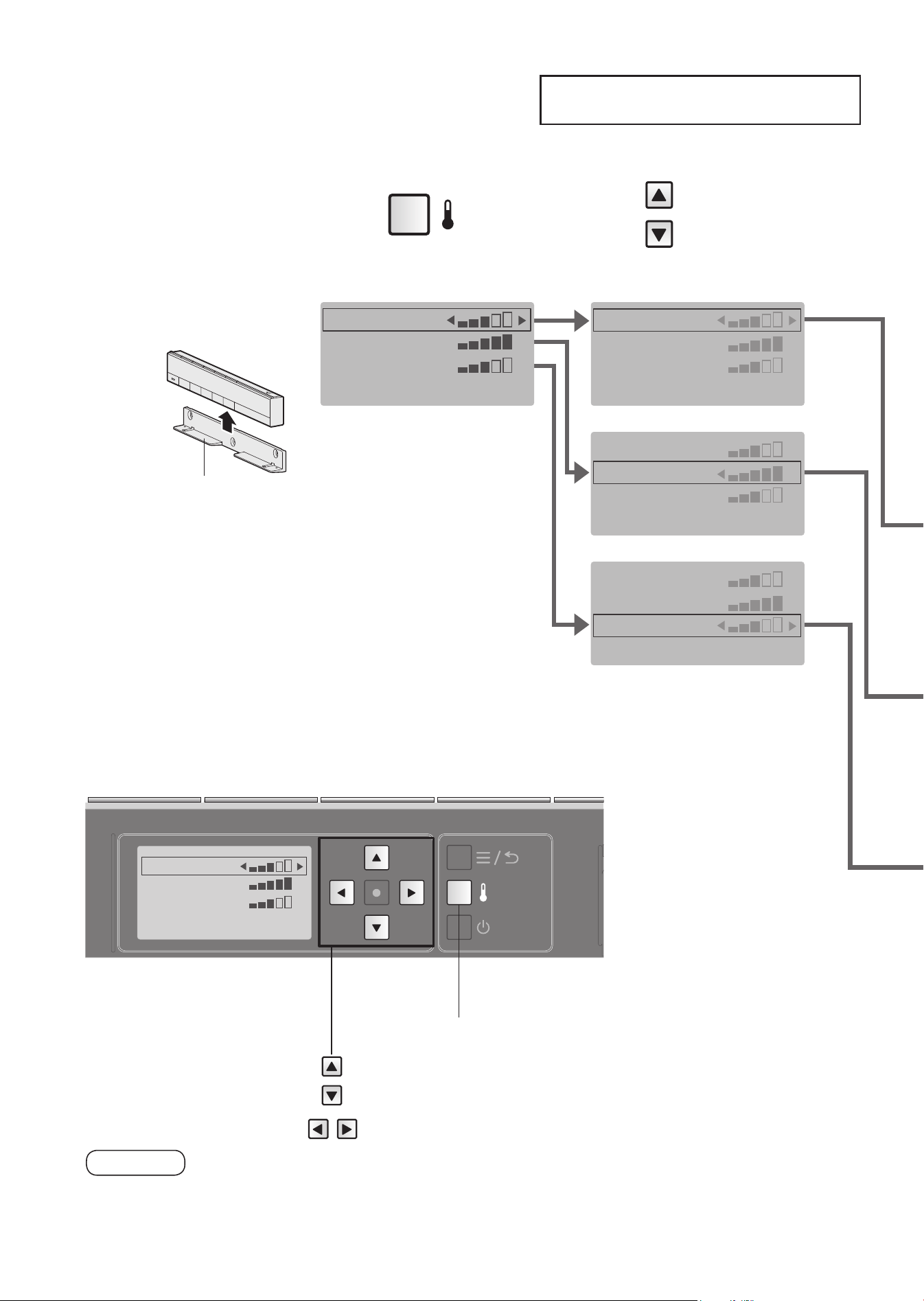
Temperature Adjustment
Warm Water, Toilet Seat, Drying
WATER TEMP
SEAT TEMP
DRYER TEMP
26
Remote control back side
Temperature
adjustment button
Move the frame.
Select the setting.
Five different temperature levels from high to low and "OFF" can be set.
2
Press
3
Select the item you
want to set.
1
Remove the
remote control
from the hanger.
If the remote
control is secured
to prevent theft
(Page 16)
●
During setting, the display goes out when no button is pressed within
about 60 seconds.
If you fail to complete the setting, redo from the step 2.
CAUTION
Hanger
WATER TEMP
SEAT TEMP
DRYER TEMP
WATER TEMP
SEAT TEMP
DRYER TEMP
WATER TEMP
SEAT TEMP
DRYER TEMP
WATER TEMP
SEAT TEMP
DRYER TEMP
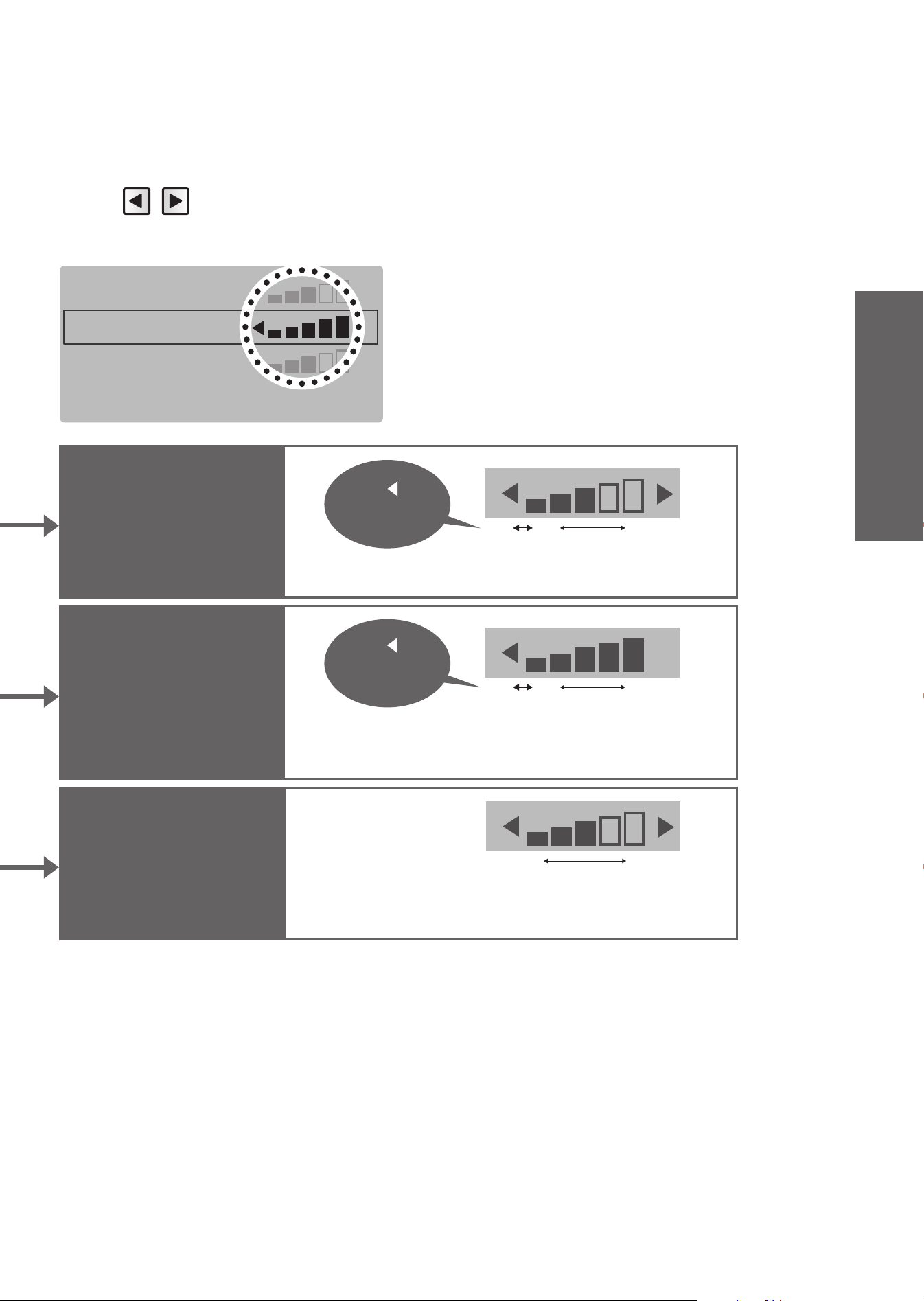
27
WATER TEMP
SEAT TEMP
DRYER TEMP
Warm water
temperature
Toilet seat
temperature
Drying air
temperature
*1 To prevent condensation, the water temperature does not drop below 68°F (20°C) even when set to "OFF".
●
If adjusting the temperature does not warm up the toilet seat
➝
Is "Energy saver" set to "ON"? (Page 28)
When "OFF" is set, the "Seat" LED on the main
display will go off.
OFF
*1
Low High
OFF
Low High
Press until
[OFF]
appears.
5
Mount the
remote control
in the hanger.
If the remote control
is secured to
prevent theft
(Page 16)
4
Select the
temperature level.
<Settings complete>
The "Drying" cannot be turned "OFF".
Low High
Press until
[OFF]
appears.
Operation
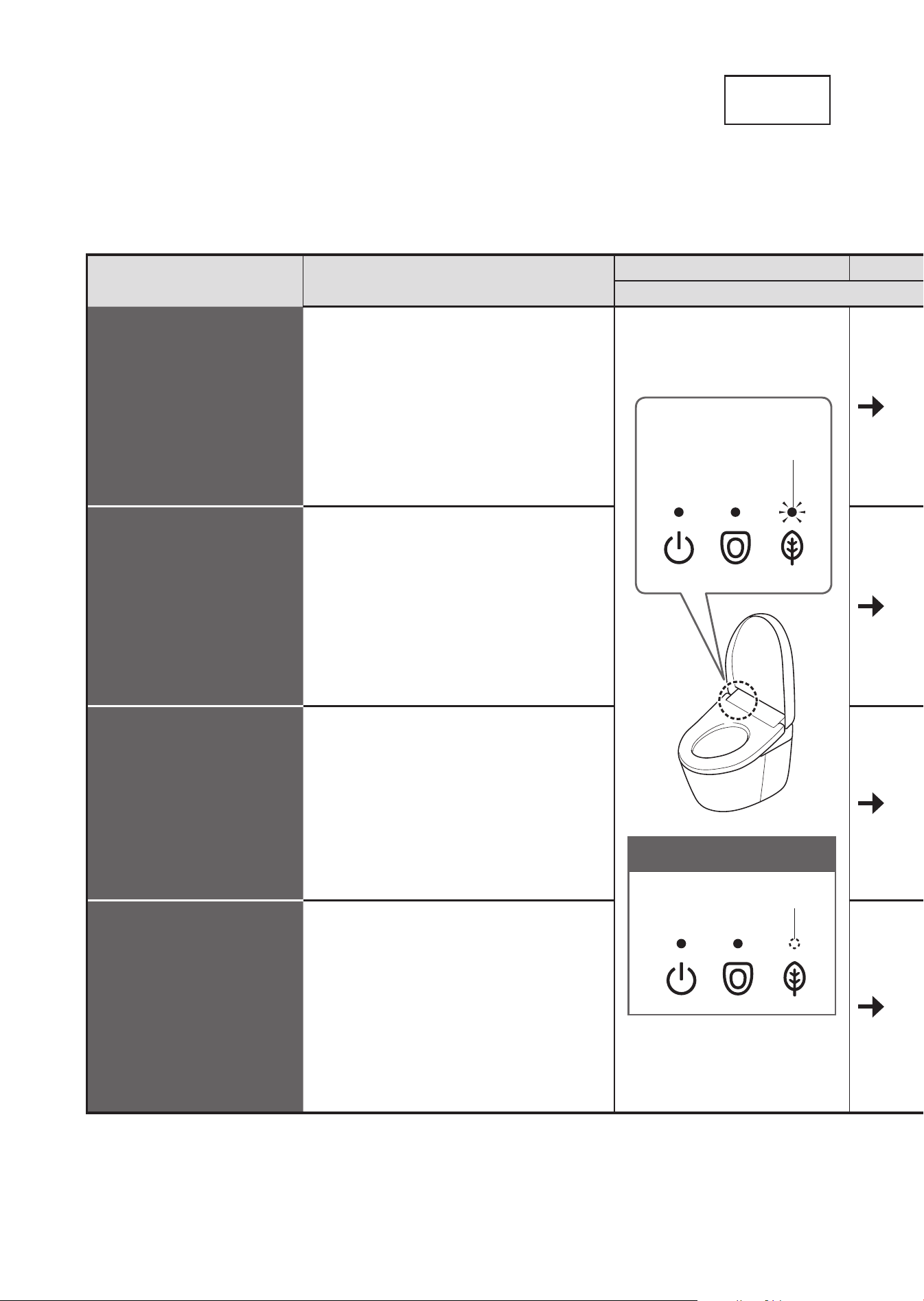
Energy Saver Features
Type
28
Type Situation
Energy saver is on
Main display
Auto energy
saver
You want the product to
save energy automatically.
The product detects time periods with
infrequent use and lowers the toilet seat
temperature automatically.
Energy saver is off
OFF
Lit
(Green)
Auto energy
saver+
You want to save more
energy.
In addition to the "Auto energy saver"
feature, it automatically turns off the toilet
seat heater during time periods when the
toilet is never used.
Timer energy
saver
You want to save energy
only for the preset duration
of time. (6 hours, 9 hours)
Once the time is set, the toilet seat
heater turn off automatically during the
set time period every day.
Timer energy saver
+
Auto energy saver /
Auto energy saver+
You want to save a lot of
energy with auto energy saver
and timer energy saver.
When
both
"Timer energy saver" and
"Auto energy saver / Auto energy saver+"
are
set
, "Auto energy saver / Auto energy
saver+" operates when "Timer energy
saver" is not operating.
"Auto energy saver","Auto energy saver+" or "Timer energy saver" can be selected.
To save energy, the temperature of the toilet seat becomes low (or "OFF").
"Auto energy saver" takes about 10 days to detect time periods in which the toilet seat is never or infrequently used.
Even if the energy saver feature is on (i.e., the toilet seat heater is set to "Low" or "OFF"), the toilet seat is heated
to the set temperature in about 15 minutes.
(The LED indication on the main display returns to the state for when the energy saver is on.)
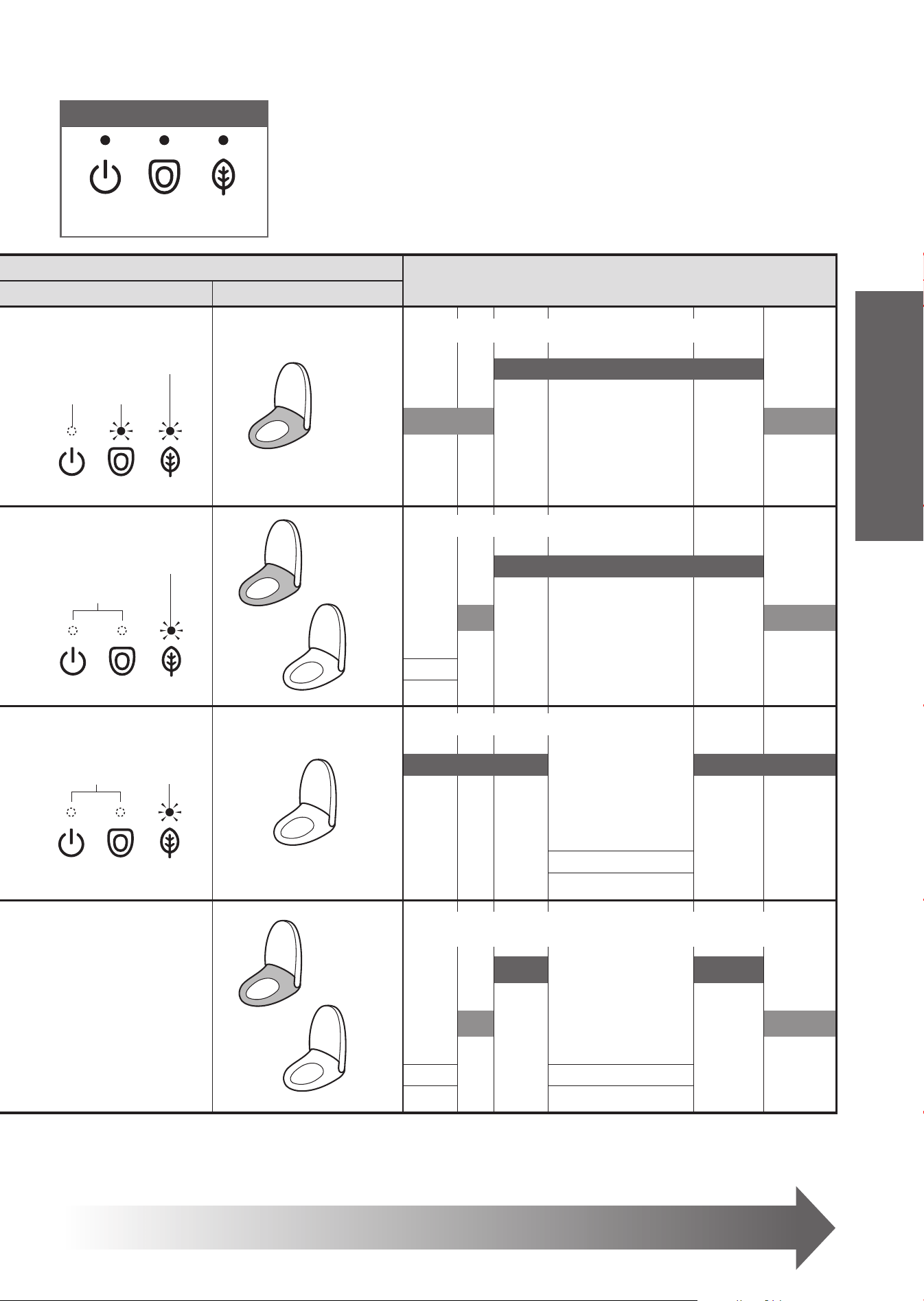
29
When energy saver is in operation
AM PM
Toilet seat heater
046 8 5 9 0
OFF Lit
Lit
(Orange)
Low
Set temperature
*1
Low
temperature
*2
Low
temperature
*2
OFF
Lit
(Orange)
Low
OFF
Set temperature
*1
Low
temperature
*2
Low
temperature
*2
OFF
*3
OFF
Lit
(Green)
OFF
Set temperature
*1
Set temperature
*1
OFF
*3
During "Auto energy
saver / Auto energy
saver+":
Same LED indication
as "Auto energy
saver / Auto energy
saver+" (see above)
During
"Timer energy saver":
Same LED indication
as "Timer energy
saver" (see above)
Low
OFF
Low
temperature
*1
Low
temperature
*1
Low
temperature
*2
Low
temperature
*2
OFF
*3
OFF
*3
*1 The toilet seat temperature set on page 26.
*2 The time period when the toilet seat heater is set to a "Low".
*3 The time period when the toilet seat heater is set to a "OFF"
Main display
<Power> <Seat> <Energy
saver>
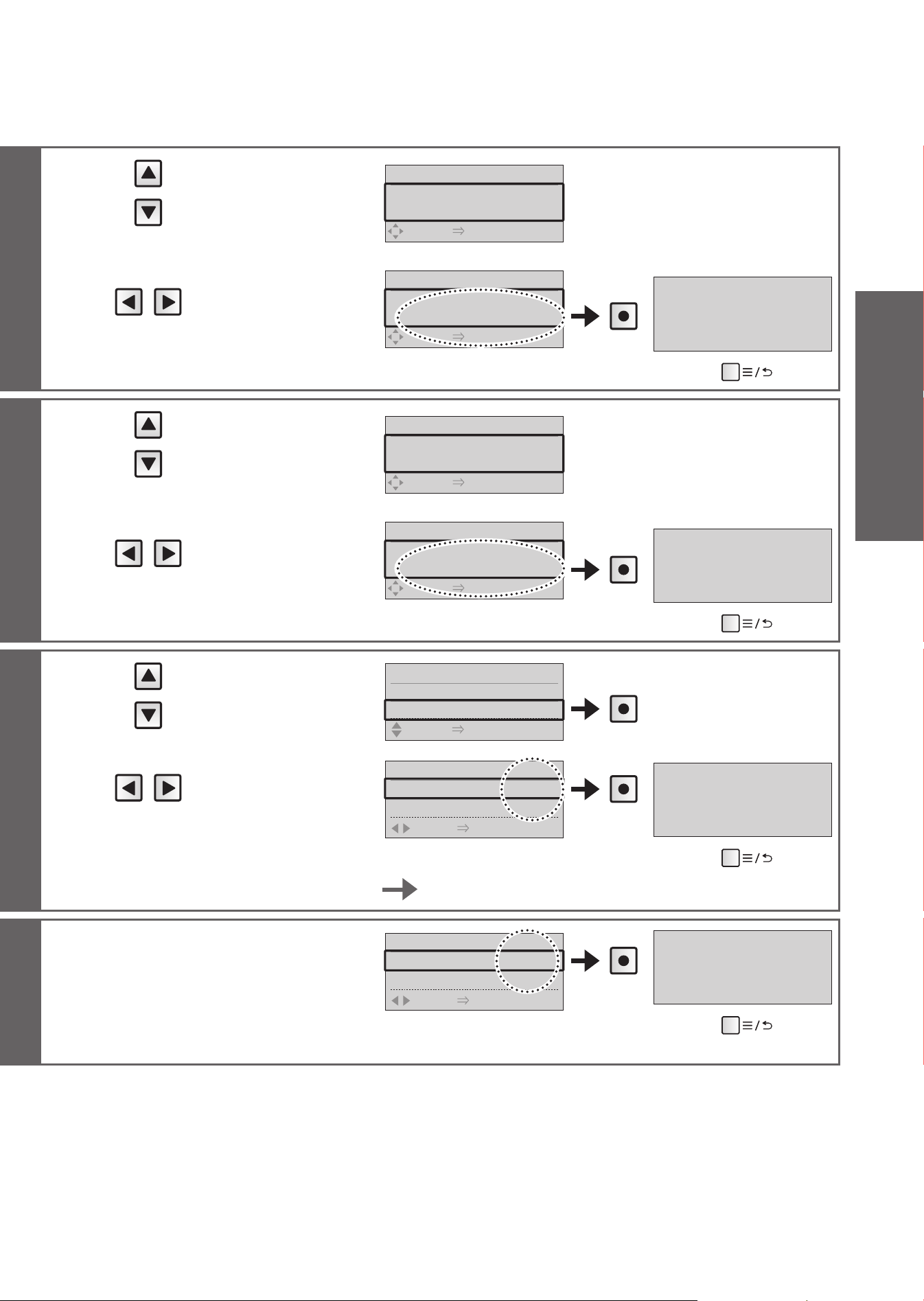
To set energy saver
Page 30 and 31
Example: Used infrequently from 9 pm to 6 am
Example: Not used from 0 am to 4 am
Example: Set from 8 am to 5 pm
Example:
When "Timer energy saver" and "Auto energy saver+"
are used together
Operation
Energy Saver Features
How to Set
Auto energy
saver
Auto energy
saver+
Timer energy
saver
Turning off
energy saver
30
CAUTION
●
During setting, the display goes out when no button is
pressed within about 60 seconds. If you fail to complete
the setting, redo from the step 1.
Press
Set the "Timer energy saver" at the time you
want to start it.
1
Press
2
Select
[ENERGY SAVER]
Remote control
back side
: Move the frame.
: Select the setting.
: Confi rm the setting.
Menu, Return button
ENERGY SAVER 2/2
1.
AUTO ENERGY SAVER
2. TIMER SAVER
SELECT [
●
ENTER] PUSH
MENU 1/6
1. MANUAL CLEANING
2. ENERGY SAVER
SELECT [
●
ENTER] PUSH
MENU 2/6
1. MANUAL CLEANING
2. ENERGY SAVER
SELECT [
●
ENTER] PUSH
When energy saver is set,
the "Energy saver" LED
(green) lights up.
<Energy saver>
3
Select
[AUTO ENERGY
SAVER]
ENERGY SAVER 1/2
1.AUTO ENERGY SAVER
◀
OFF
▶
SELECT [
●
ENTER] PUSH
4
Select
[AUTO ENERGY
SAVER]
ENERGY SAVER 1/2
1.AUTO ENERGY SAVER
◀
AUTO ENERGY SAVER
▶
SELECT [
●
ENTER] PUSH
Press
AUTO ENERGY SAVER ON
(To return
➝
)
3
Select
[AUTO ENERGY
SAVER]
ENERGY SAVER 1/2
1.AUTO ENERGY SAVER
◀
OFF
▶
SELECT [
●
ENTER] PUSH
4
Select
[AUTO ENERGY
SAVER+]
ENERGY SAVER 1/2
1.AUTO ENERGY SAVER
◀
AUTO ENERGY SAVER+
▶
SELECT [
●
ENTER] PUSH
Press
AUTO ENERGY SAVER+ ON
(To return
➝
)
3
Select [TIMER
SAVER]
ENERGY SAVER 2/2
1.AUTO ENERGY SAVER
2.TIMER SAVER
SELECT [
●
ENTER] PUSH
Press
4
Select
[6H], [9H] or [OFF]
TIMER SAVER 1/1
1.TIMER SAVER
◀
6H
▶
SELECT
[
●
ENTER] PUSH
Press
TIMER SAVER ON
(To return
➝
)
To change the timer energy saver time
Set the timer energy saver again at the time you want to start it.
Select [OFF] in step
4
in each
procedure above.
TIMER SAVER 1/1
1.TIMER SAVER
◀
OFF
▶
SELECT
[
●
ENTER] PUSH
(Example:
"Timer energy saver")
Press
TIMER SAVER OFF
(To return
➝
)
31
Operation
Maintenance
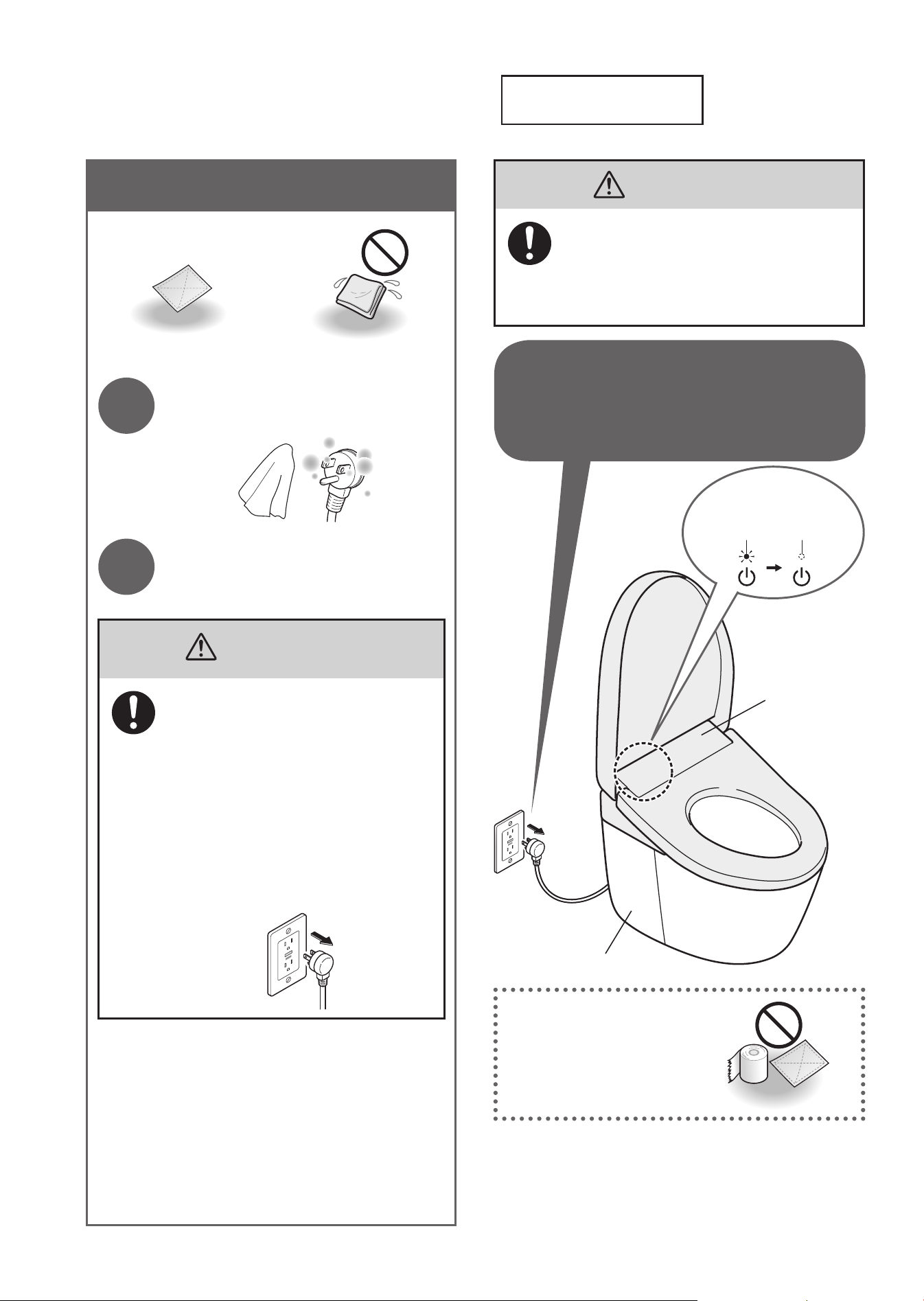
Power Plug
Do not use a dry cloth
or toilet paper on plastic
parts.
(May cause damage.)
*1 Except when using "Wand cleaning" or "Bowl unit
cleaning".
*1 After the power plug is inserted, the toilet lid does
not open automatically for about 10 seconds.
(Because it is preparing for operation.)
Open and close by hand.
WARNING
Always unplug the power plug from
the outlet before maintenance or
inspection.
(Failure to do so may cause electric shock
or malfunction, resulting in a breakdown.)
Top unit
Bowl unit
32
The "Power"
LED goes off.
Lit OFF
For safety, unplug the power
plug before maintenance.
*1
Power Plug (Approximately once a month)
Dry cloth Wet cloth
1
Unplug the power plug and
wipe it with a dry cloth.
2
Insert the power plug.
• The "Power" LED lights up.
WARNING
●
Periodically remove dust from
the blades and other parts of the
power plug.
•
Unplug the power plug and wipe it
with a dry cloth.
●
Fully insert the power plug.
●
When unplug the power plug, hold
the main body of the power plug.
•
Pulling the power cord may
damage the power plug or power
cord.
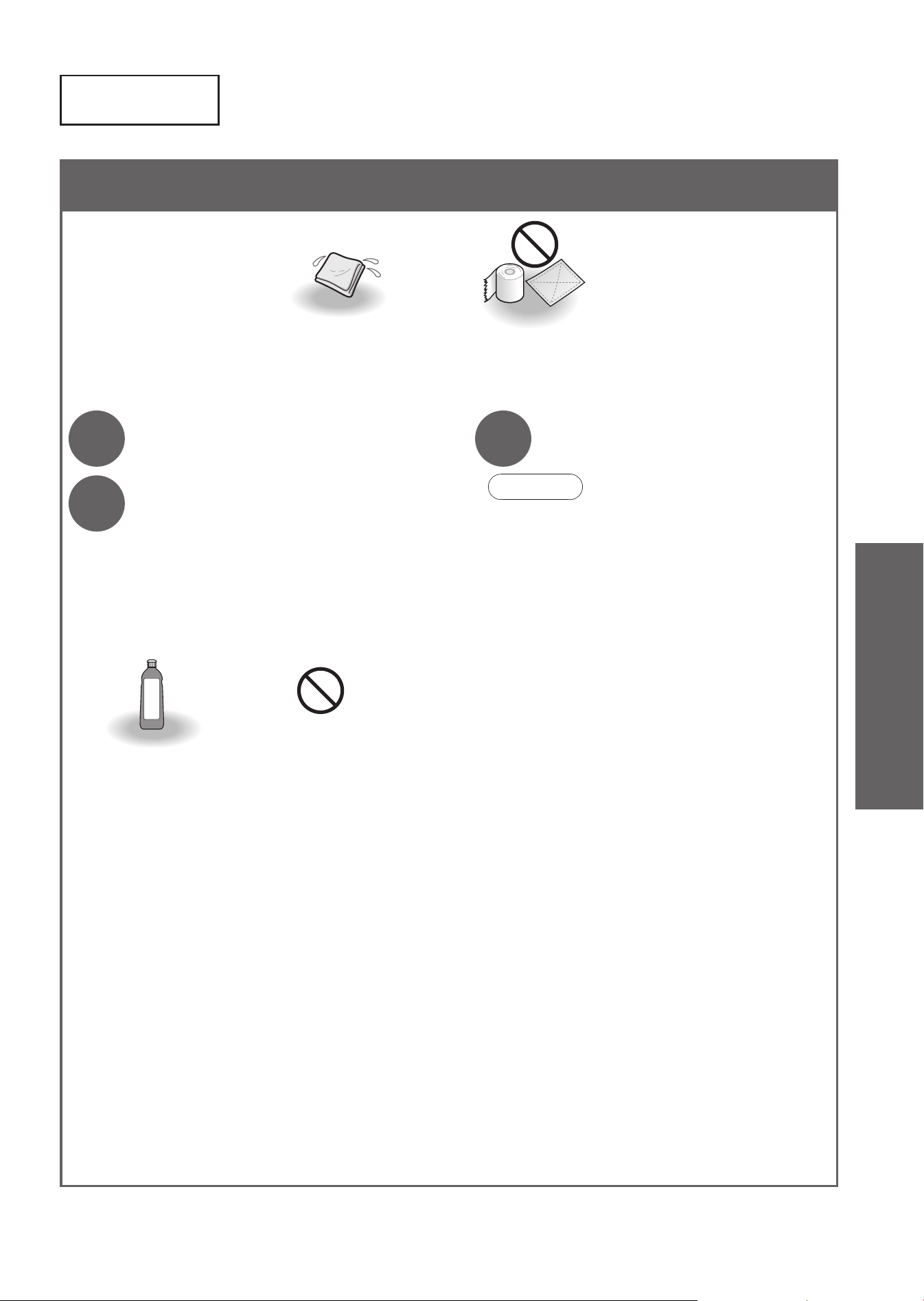
Top Unit (Approximately daily)
Soft cloth soaked
in water
•
Toilet paper
•
Dry cloth
•
Nylon scrubbing brush
(May cause damage.)
1
Unplug the power plug.
2
Wipe with a soft cloth that has
been soaked in water and
wrung-out thoroughly.
■
For heavy dirt
•
Wipe with a soft cloth soaked in diluted,
neutral kitchen detergent, and then wipe
with a soft cloth soaked in water.
•
Paint thinner
•
Benzene
•
Powdered cleanser
•
Neutral kitchen
detergent
3
Insert the power plug.
• The "Power" LED lights up.
Attention!
● This product is an electric appliance.
Be careful not to let water seep inside or leave
detergent in the gap between the top unit and
bowl unit.
(May damage plastic parts or cause a malfunction.)
● When using a toilet cleaner to clean the toilet,
rinse it off within 3 minutes and leave the toilet
seat and toilet lid open.
•
Wipe off any cleaner that remains on the bowl
unit. (If vapor from a toilet cleaner enters the
top unit, it may cause a malfunction.)
●
Do not push or pull the covers around the wand
with undue force.
(May cause damage or malfunction.)
●
Wipe the back surface of the toilet seat and the
toilet seat cushions with a soft cloth tightly wrung
out with water. (Otherwise adhesion of dirt may
result in discoloration.)
33
Top Unit
Maintenance
Maintenance
Bowl Unit
34
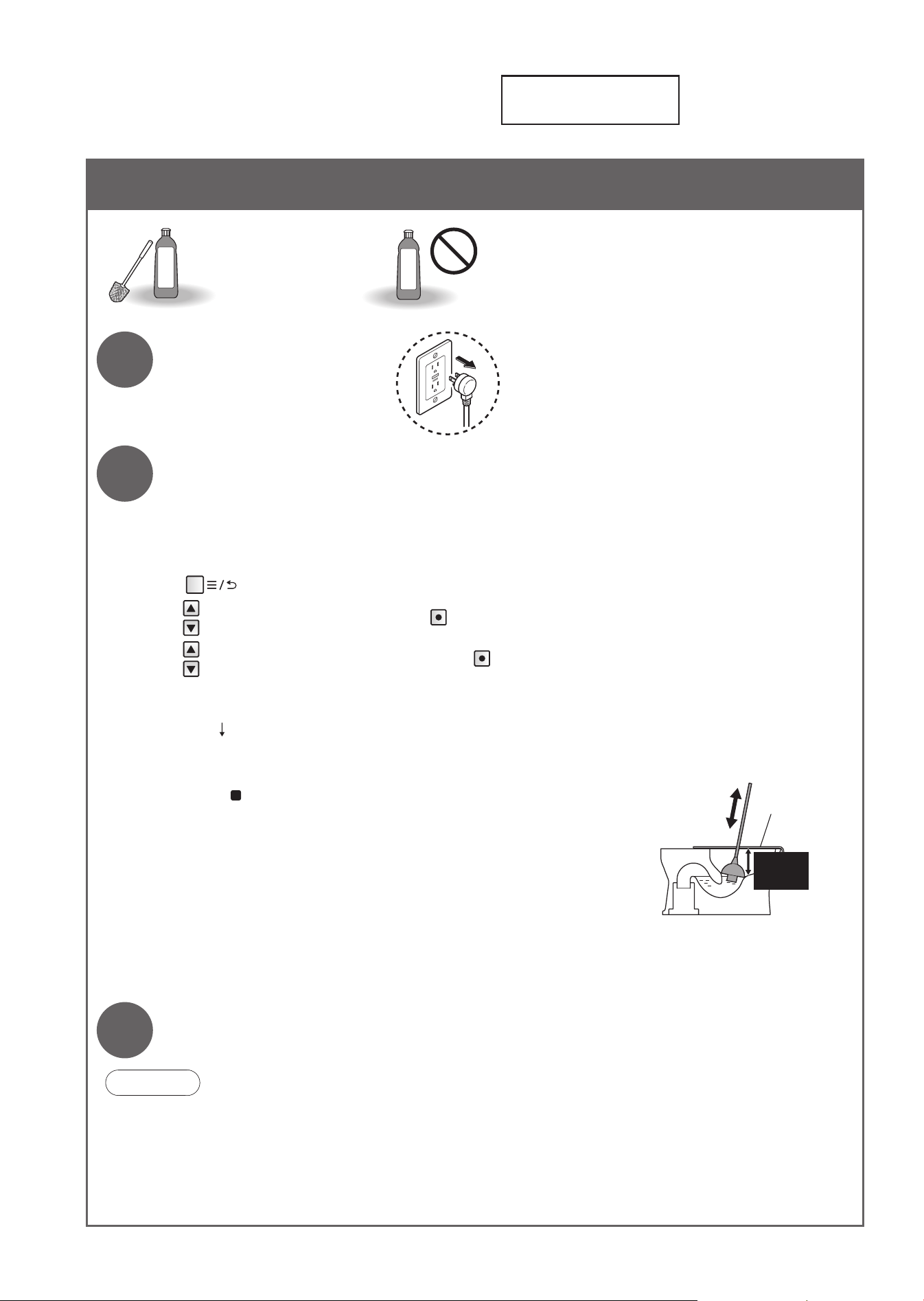
Bowl Unit (Approximately daily)
•
Toilet brush
•
Neutral toilet
detergent
•
Strongly acidic cleaners or strong alkaline cleaners
•
Cleaners containing abrasive compounds
•
Fluoride-based detergent
(containing hydrogen fl uoride or ammonium fl uoride)
•
Wire brush
•
Abrasive nylon scrubbing brush
1
Unplug the power plug.
2
Clean with a toilet brush or a similar tool.
The water level in the bowl unit can be lowered to perform maintenance.
(Insert the power plug.)
<"Bowl unit cleaning"> Operate with the buttons on the back side of the remote control.
(1) Press
(2)
Select [MANUAL CLEANING]
➝
Press
(3)
Select [BOWL CLEANING ON/OFF]
➝
Press
•
The water in the bowl unit fl ows, and then drains. After that, the water level drops for about 50 seconds.
Clean inside the bowl unit.
• The water in the bowl unit drains, and then returns to its original level.
To stop part way through,
press
("Stopping" button) on the front side of the remote control.
If the bowl unit is clogged
Vinyl sheet,
etc.
Keep 4 in
(10 cm) or
more
• Using plunger or similar, provide 4 in (10 cm) or more clearance
between the top of the bowl unit and the water surface. Use
commercially available tools that are made for unclogging the bowl
unit. (May cause overfl ow of dirty water and water damage.)
If the fl oor is dirty
• Clean it with a well wrung cloth. (Not cleaning the fl oor may cause stains or corrosion.)
• Sitting is recommended to reduce splashing caused by standing and urinating.
3
Insert the power plug.
•
The "Power" LED lights up.
Attention!
●
Be careful not to expose the top unit or the gap between it and the bowl unit to water.
(May cause water overfl ow into the room.)
●
Do not use any water repellant, stain-proofi ng cleaner or surface coating agent.
These products would not damage the porcelain surface, but they may cover the porcelain surface and
reduce the effect of the built-in stain prevention technology.
35
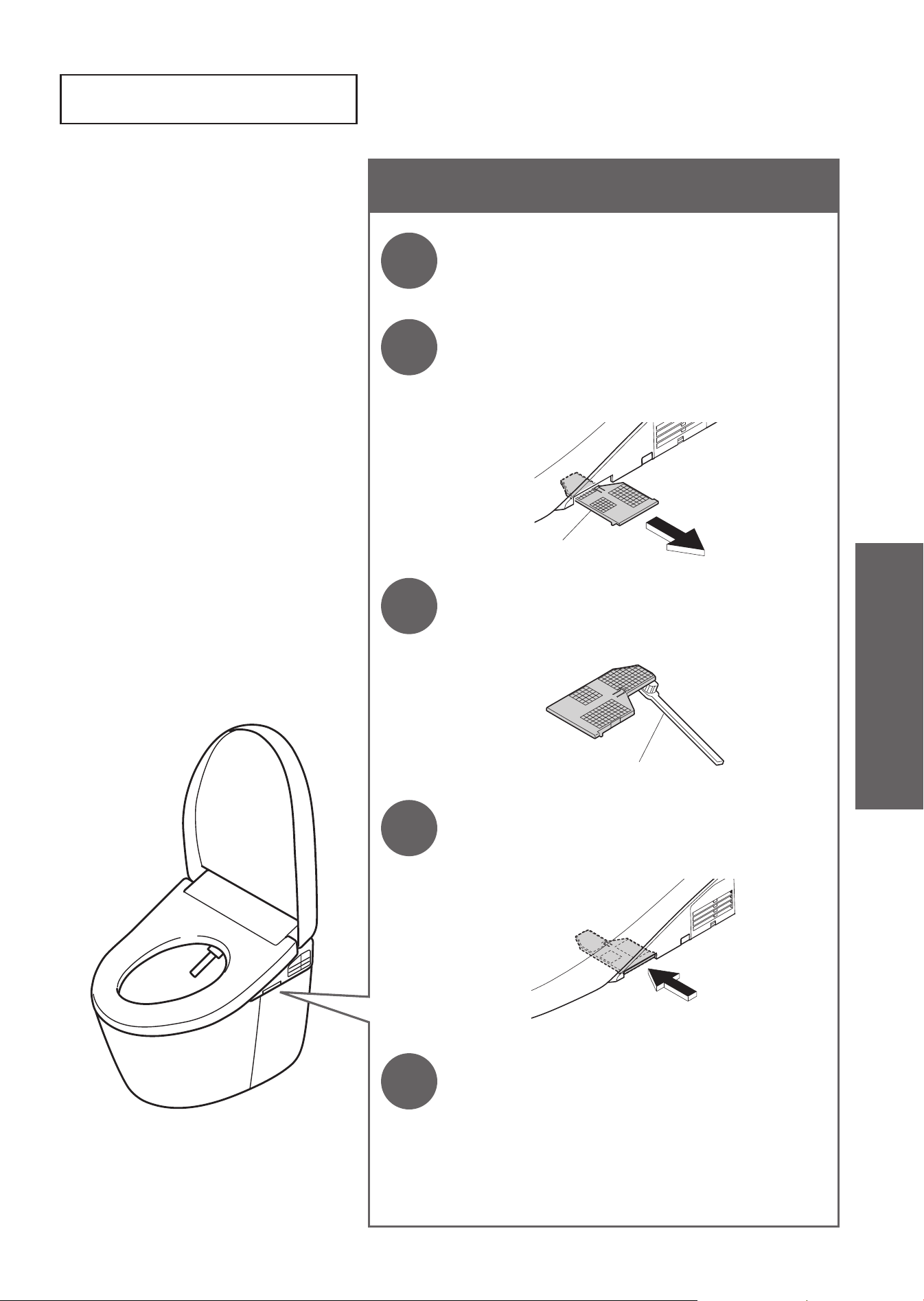
Deodorizing Filter (Approximately once a month)
1
Unplug the power plug.
2
Remove the deodorizing fi lter.
• Hold the knob and pull outward.
• Do not pull with undue force.
(May cause damage or malfunction.)
Deodorizing Filter
3
Clean with a tool such as a toothbrush.
• When washing with water, dry off all water before
mounting.
Toothbrush, etc.
4
Mount the deodorizing fi lter.
Push fi rmly until a click
sound is heard.
5
Insert the power plug.
•
The "Power" LED lights up.
Deodorizing Filter
Maintenance
Maintenance
Gap between the Top Unit and Bowl Unit
36
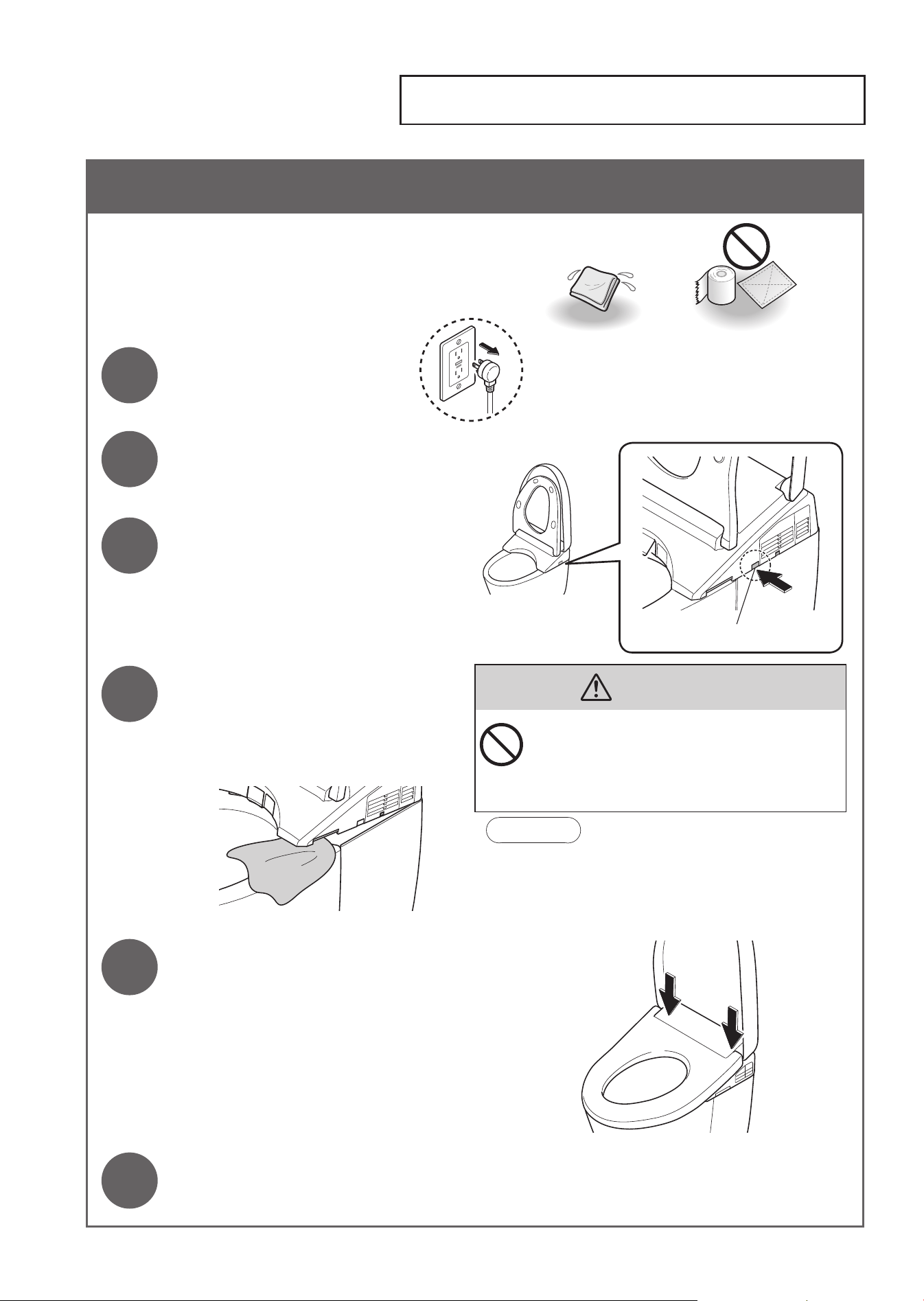
Gap between the Top Unit and Bowl Unit (Approximately once a month)
You can lift up the top unit with the cleaning lift
button and clean the gap between it and the
bowl unit.
1
Unplug the power plug.
Soft cloth soaked
in water
Toilet paper, etc.
(May cause damage.)
2
Open the toilet seat and lid.
3
Press the cleaning lift button.
• This raises the front side of the top unit.
Cleaning lift button
4
Clean the gap.
• Wipe with a soft cloth soaked in a
diluted, neutral kitchen detergent. Then,
wipe it with a soft cloth soaked in water
so that no detergent remains.
CAUTION
l
Do not use the product while the top unit is
lifted up by the cleaning lift.
l
When lowering the top unit by the cleaning
lift, do not insert your fi ngers into the gap
between the top unit and the bowl unit.
Attention!
●
Do not directly spray cleaner and water.
● Do not force the toilet seat or lid to move while the
top unit is raised up.
5
Close the toilet seat and push it
fi rmly until a click sound is heard.
6
Insert the power plug.
• The "Power" LED lights up.
37
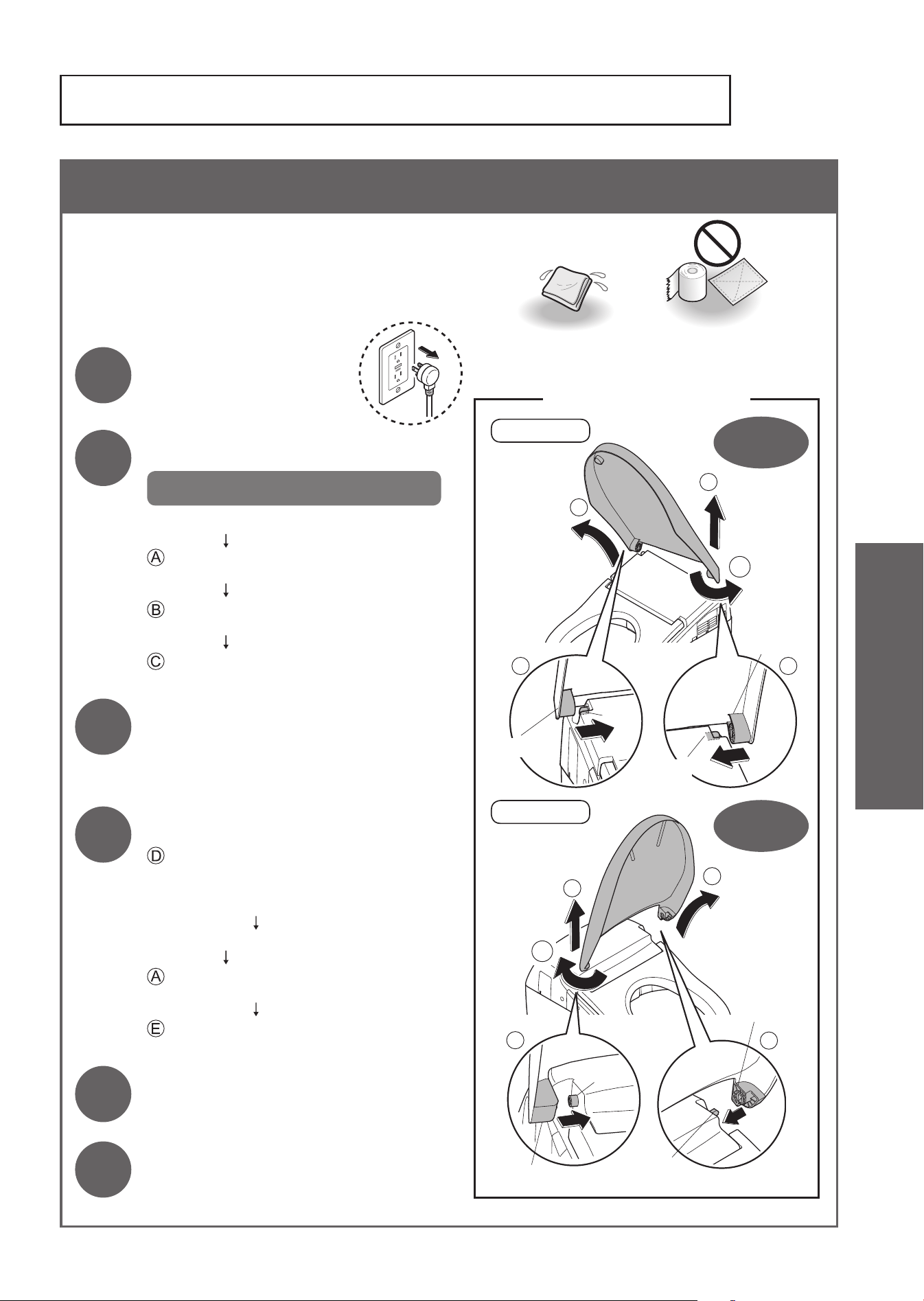
Gap between the Top Unit and the Toilet Lid (Approximately once a month)
The toilet lid can be removed for thorough
cleaning.
1
Unplug the power
plug.
Soft cloth soaked
in water
Toilet paper, etc.
(May cause damage.)
2
Remove the toilet lid.
Confi rm the model (AH or RH)!
Slightly tilt the toilet lid to the front.
: <AH> Pull right side outward.
<RH> Pull left side outward.
: Disconnect the hinge from the tab and
pull up.
: Remove the toilet lid.
3
Wipe with a soft cloth that has
been soaked in water and
wrung-out thoroughly.
4
Reinstall the toilet lid.
: <AH> Align the right side pin and hinge
parts.
<RH> Align the left side pin and hinge
parts.
Slightly tilt the toilet lid to the front.
: <AH> While pulling left side outward.
<RH> While pulling right side outward.
: Mount by joining the hinge with the tab.
• Be careful not to pinch your fi ngers.
5
Insert the power plug.
• The "Power" LED lights up.
6
Open and close the toilet lid
to check the reinstallation.
ED
C
B
A
Hold with
both hands
Hold with
both hands
<Removing and Reinstalling>
For AH
Pin
Tab
Hinge
Hinge
For RH
B
E
D
C
A
Hinge
Pin
Tab
Hinge
Gap between the Top Unit and the Toilet Lid
Maintenance
Maintenance
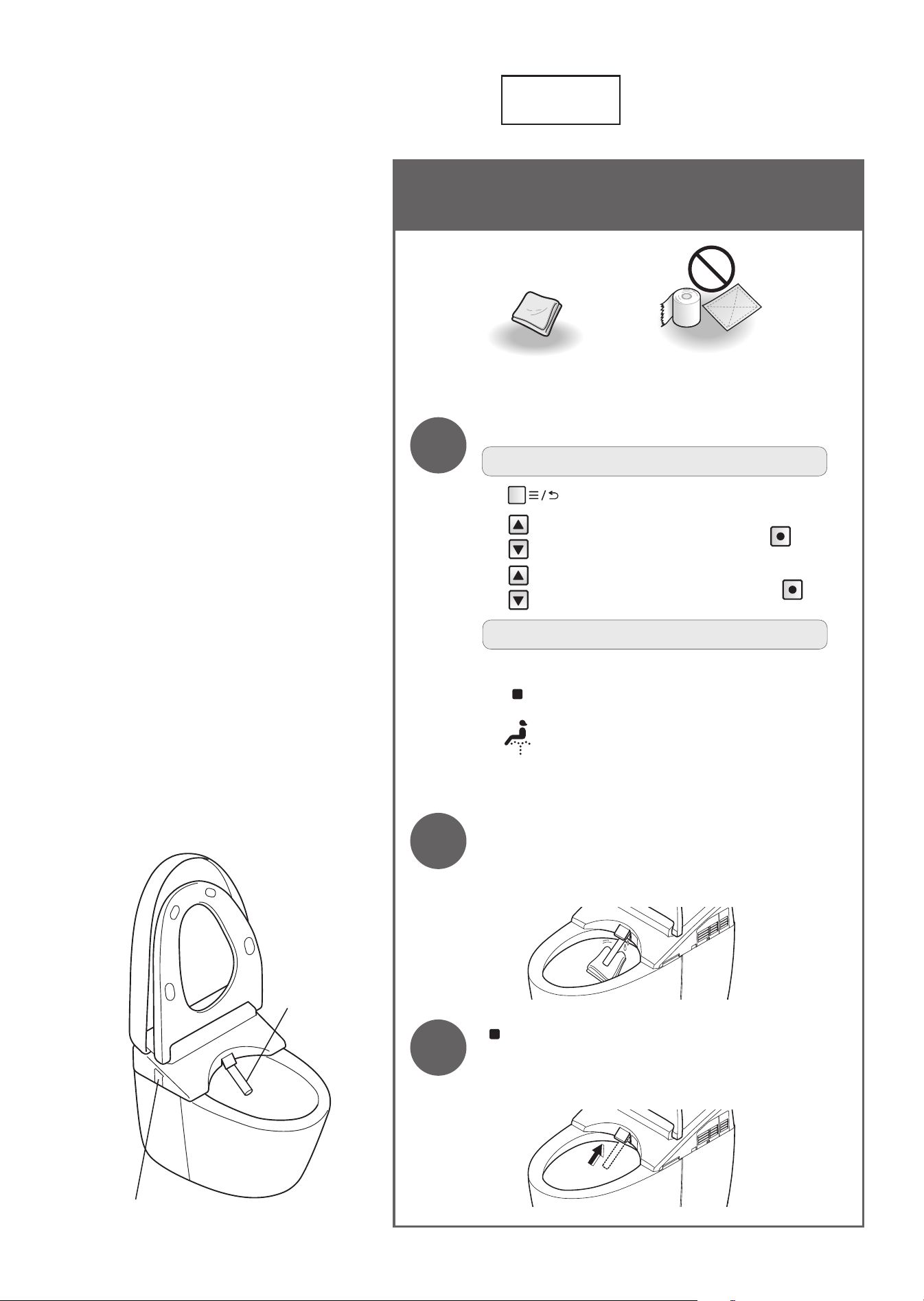
Wand
38
Wand (Approximately once a month)
< If you notice dirt (Wand cleaning)>
Soft cloth Toilet paper, etc.
(May cause damage.)
1
Extend the wand.
To operate from the back of remote control
(1) Press
(2)
Select [MANUAL CLEANING]
➝
Press
(3)
Select [WAND CLEANING ON/OFF]
➝
Press
To operate from the front of remote control
•
Recommended if the remote control is secured to prevent theft.
(1)
Press "Stopping" button about 10 seconds or longer.
(2)
Press "Front cleansing" button about 3 seconds or longer.
• The wand extends and water sprays out for cleaning.
•
The wand automatically retracts after about 5 minutes.
2
Wipe with a soft, wet cloth.
• Do not pull, push or press the wand with excessive
force.
(May cause damage or malfunction.)
3
Press "Stopping" button on the front
side of the remote control.
• The wand retracts.
Wand
Water fi lter drain valve
39
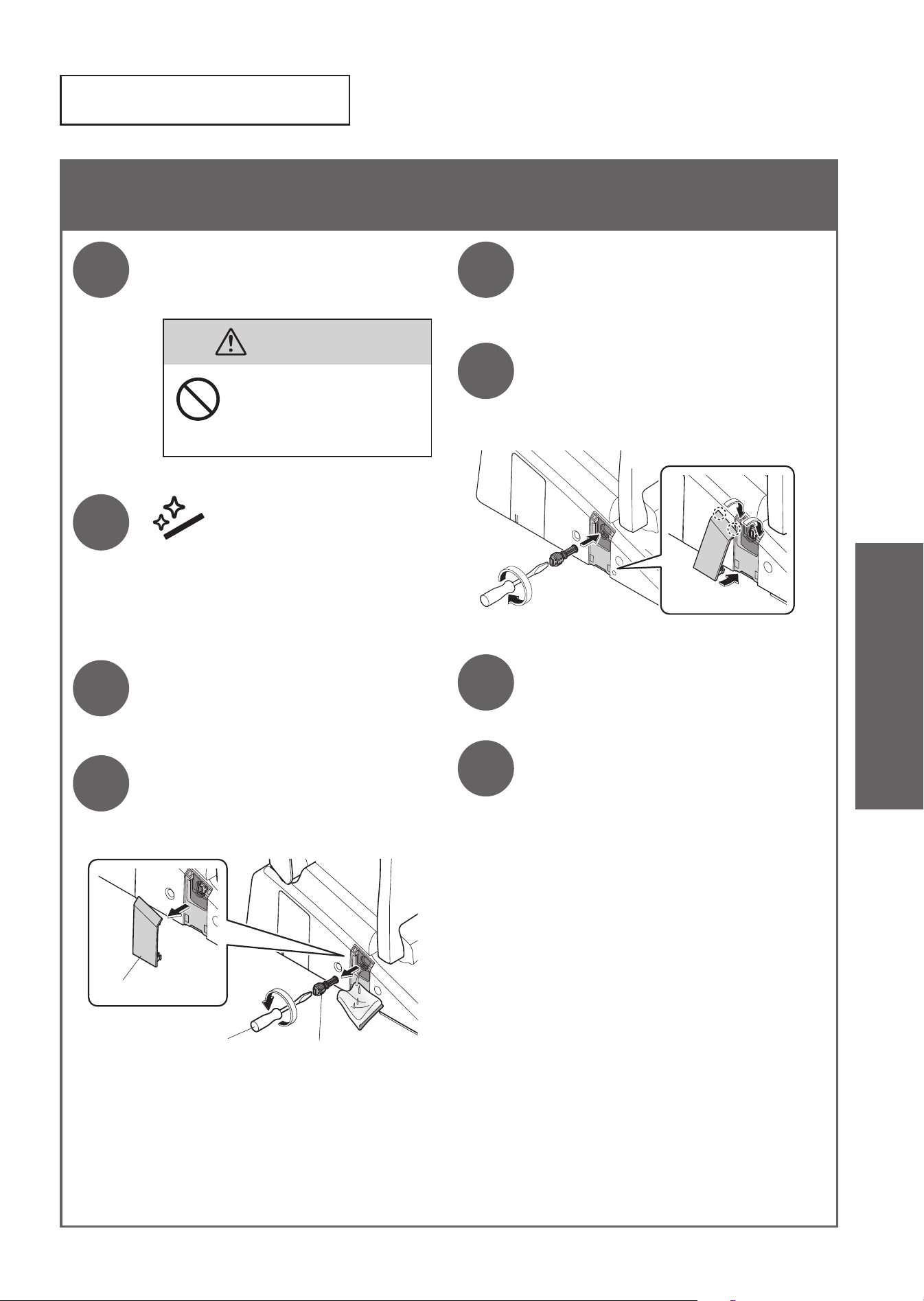
Water Filter Drain Valve (Approximately once every 6 months)
<If you think the water pressure has weakened>
1
Close the shutoff valve.
(Page 63)
• The water supply stops.
CAUTION
Do not remove the water
fi lter drain valve while the
shutoff valve is open.
(Otherwise, water may leak out.)
2
Press
"Wand CLEAN" button.
• The wand cover opens.
(Release the pressure from the water
supply pipe.)
3
Unplug the power plug.
4
Remove the cover and
water fi lter drain valve.
• Loosen the water fi lter drain valve with
a fl at-head screwdriver and then pull it.
Cover
Flat-head screwdriver
Water fi lter drain valve
5
Clean with a tool such as a
toothbrush.
• Also, remove any dust from inside the
hole of the water fi lter drain valve.
6
Reinstall the water fi lter
drain valve and cover.
• Insert the water fi lter drain valve and
use a fl at-head screwdriver to tighten it
securely.
7
Insert the power plug.
• The "Power" LED lights up.
8
Open the shutoff valve.
(Page 17)
Water Filter
Drain Valve
Maintenance
Maintenance
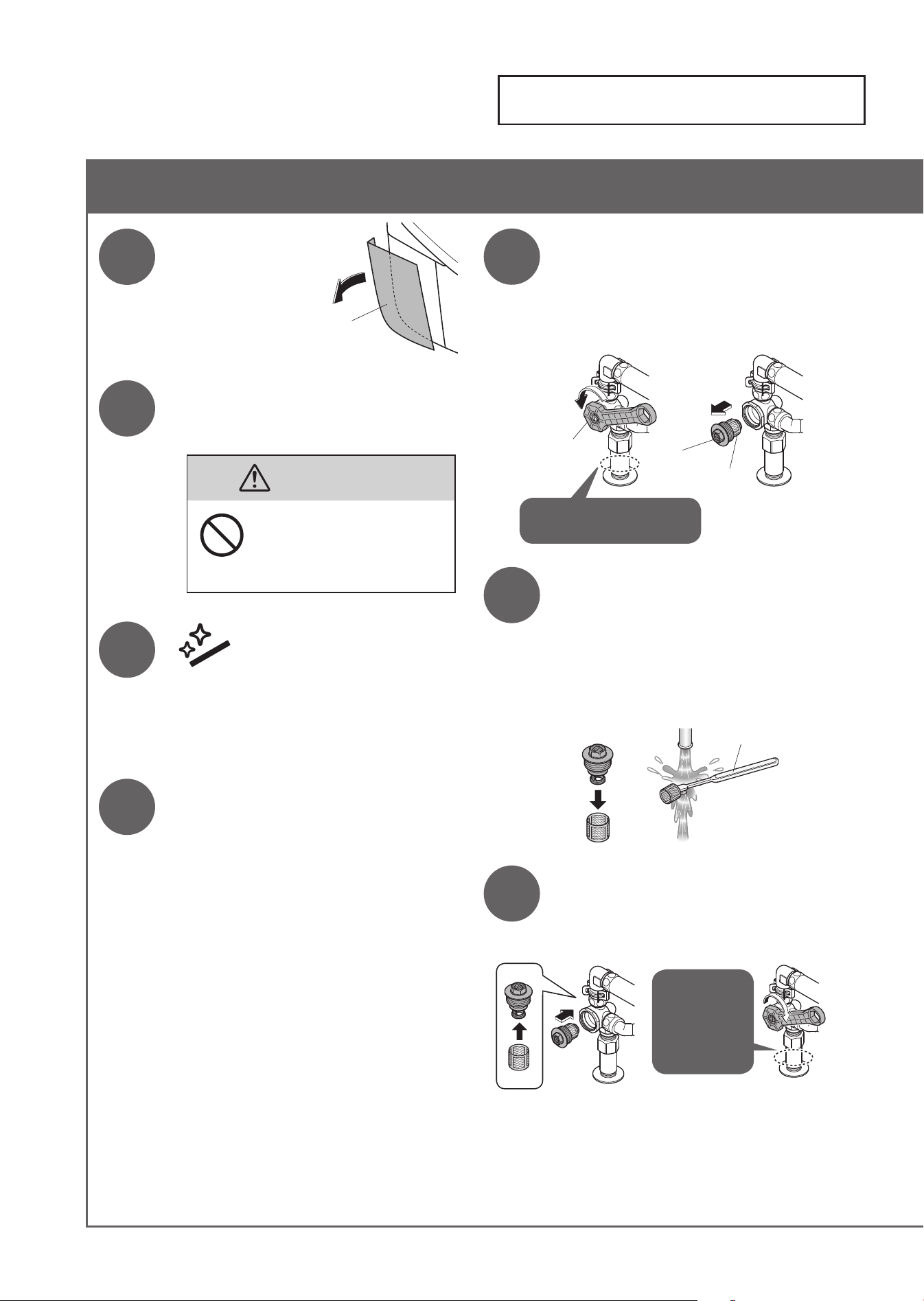
Water Filter (Bowl Unit)
40
Water Filter (Bowl Unit) (Approximately once every 6 months)
1
Remove the side
panel (left).
There is an opening/closing
tool (accessory) on the rear
surface.
2
Close the shutoff valve.
(Page 63)
• The water supply stops.
CAUTION
Do not remove the water
fi lter while the shutoff
valve is open.
(Otherwise, water may leak out.)
3
Press
"Wand CLEAN" button.
•
The wand cover opens.
(Release the pressure from the water
supply pipe.)
4
Unplug the power plug.
5
Loosen the cap of the water
fi lter to remove the water
fi lter.
• Use the opening/closing tool
(accessory).
Hold the pipe with hands
while loosing the cap.
Water fi lter
Cap
Opening/
closing tool
6
Remove the water fi lter
from the cap and clean it
with a toothbrush or similar
instrument.
• Do not use detergent.
• Do not apply excessive force to the
water fi lter. (May cause deformation)
Toothbrush, etc.
7
Install the water fi lter to the
cap, then tighten the cap with
the opening/closing tool.
Hold the
pipe with
hands while
tightening
the cap.
41
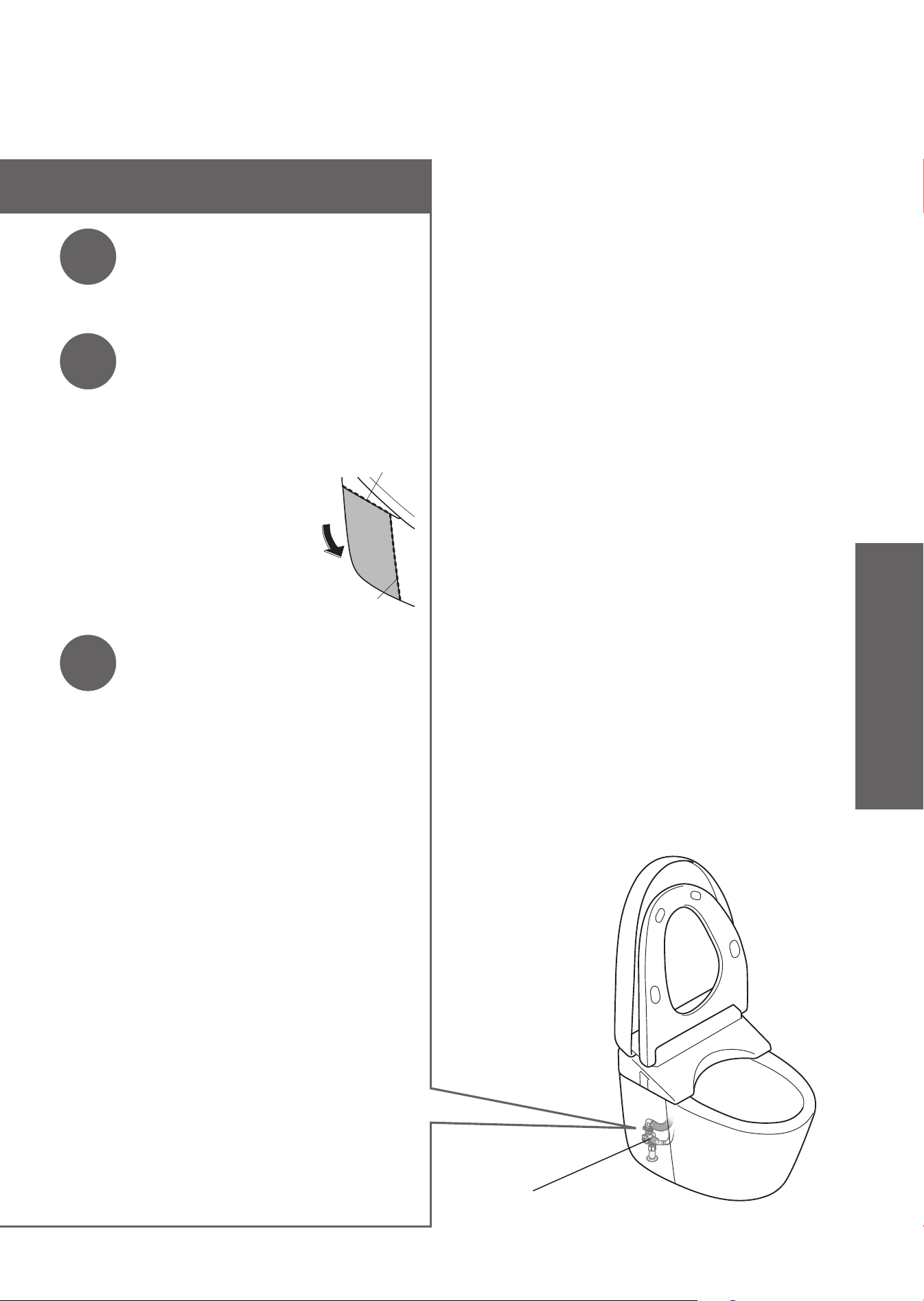
8
Open the shutoff valve.
(Page 17)
• Check that there are no leaks in the
shutoff valve or plumbing connections.
9
Mount the opening/closing
tool to its original position
and reinstall the side panel.
• Fit the side panel to the top and side
of the bowl unit without a gap.
10
Insert the power plug.
• The "Power" LED lights up.
Side of the bowl unit
Top of the bowl unit
Water fi lter
(Internal parts of the shutoff valve)
Maintenance
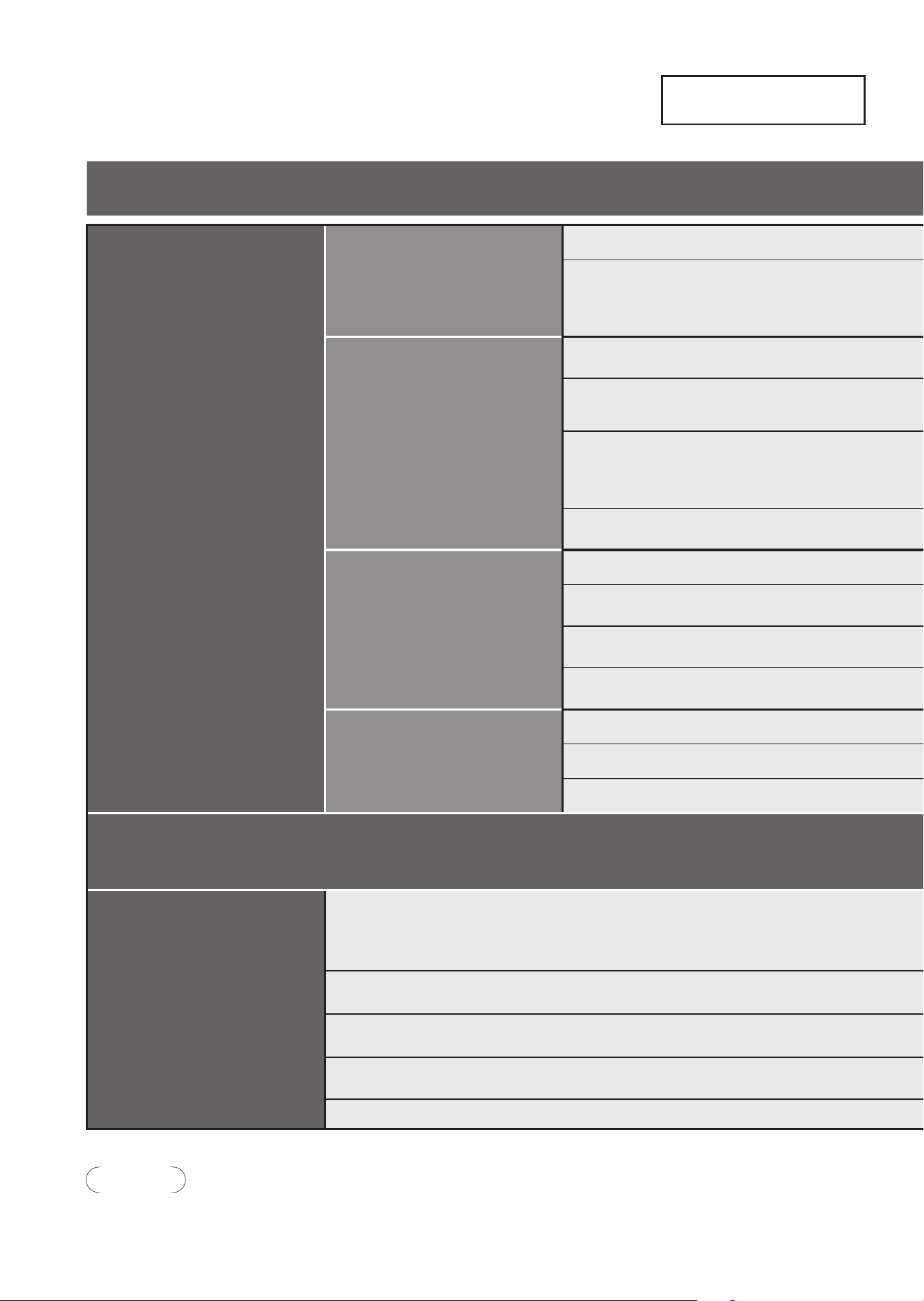
Changing Settings
Setting List
42
Setting Types
Auto functions
Auto fl ushing
Auto fl ushing
Auto fl ush delay
Auto open/close
Auto open/close
Auto close delay
Auto open delay
Seat/lid
Auto cleaning
Auto wand CLEAN
Auto bowl CLEAN
Deodorizer
Auto power deodorizer
Light
Soft light
Bowl light
CLEAN indicator
Language settings
Other settings
Anti freezing
Beep sound
Lower water level
Pressure/position setting
Personal setting lock
CAUTION
●
During setting, the display goes out when no button is pressed within about 60 seconds. If you fail to complete the setting,
redo from the step 1.
43
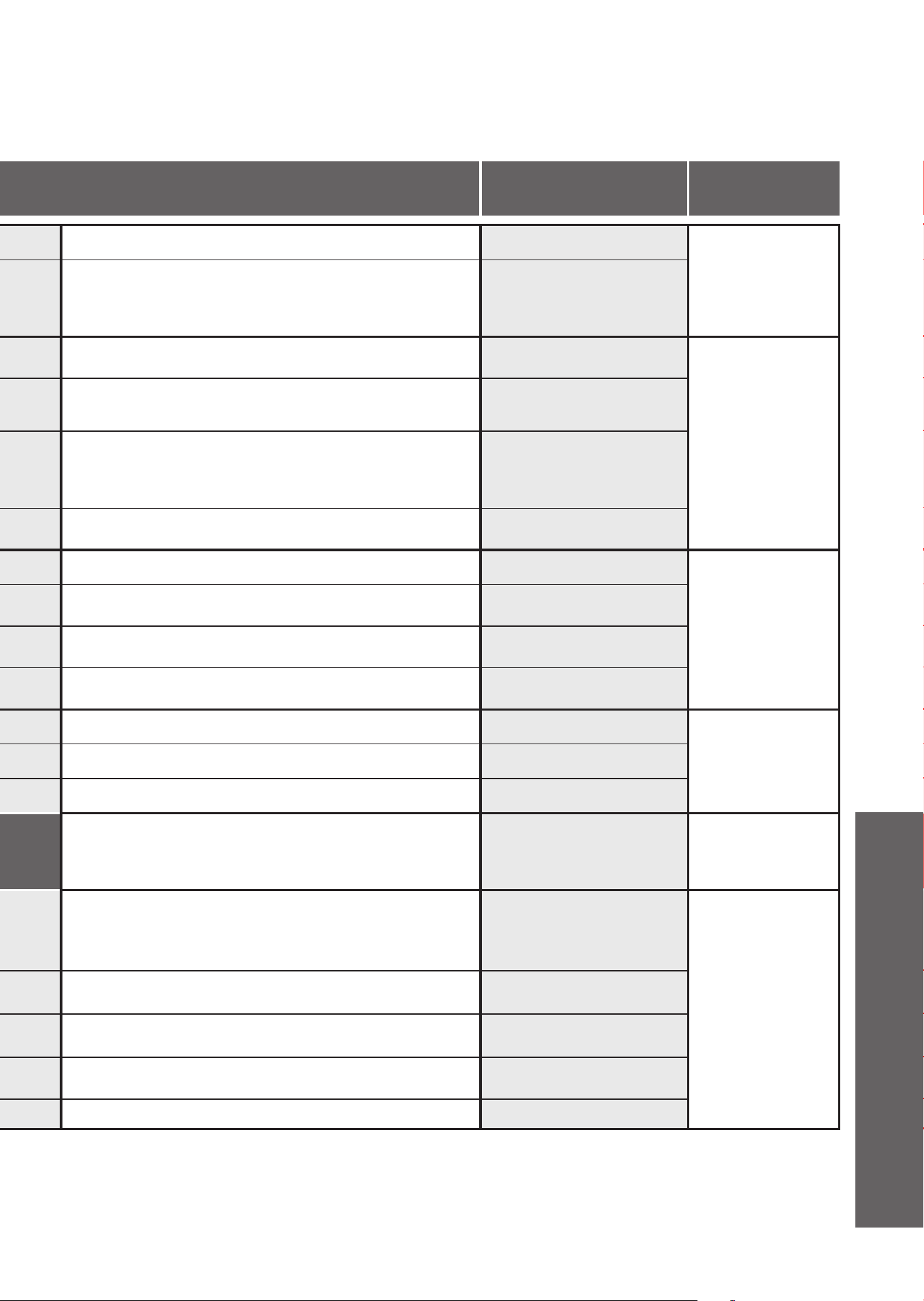
Available Settings
•Bold: "Initial settings"
Setting
Ref. Page
Set whether or not to clean the bowl unit automatically
ON/OFF
Page 44
Change the amount of time before the toilet fl ushes
automatically
5seconds/
10seconds/
15seconds
Set whether or not to open and close the toilet lid
automatically
ON/OFF
Page 46
Change the amount of time before the lid/seat closes
automatically
25seconds/
90seconds
Change the amount of time after which the lid/seat
opens automatically upon closing it with hands
15seconds/
30seconds/
90seconds
Automatically open and close the toilet lid only/
Automatically open and close the toilet seat and toilet lid
LID/Seat · Lid
Set whether or not to clean the wand automatically
ON/OFF
Page 48
Set whether or not to spray mist in the bowl unit
automatically
ON/OFF
Set whether or not to deodorize automatically after
sitting on the toilet seat
ON/OFF
Set whether or not to power deodorize automatically
after standing up
ON/OFF
Set whether or not to use the soft light
ON/OFF
Page 50
Set whether or not to use the light inside the bowl unit
ON/OFF
Set whether or not to light up the CLEAN indicator
ON/OFF
Select the language displayed on the back of remote
control
Simplified chinese/
Traditional chinese/
English
Page 52
Set whether or not to run the water for the bowl unit
and top unit automatically at a fi xed interval in order
to prevent freezing
(dynamic mode
➝
Page 59)
ON/OFF
Page 54
Set whether or not to make a beep sound
ON/OFF
Lower the bowl unit water level
-
Set whether or not to keep your favorite pressure and
position settings
ON/OFF
Set whether or not to use the personal setting lock
ON/OFF
Reference
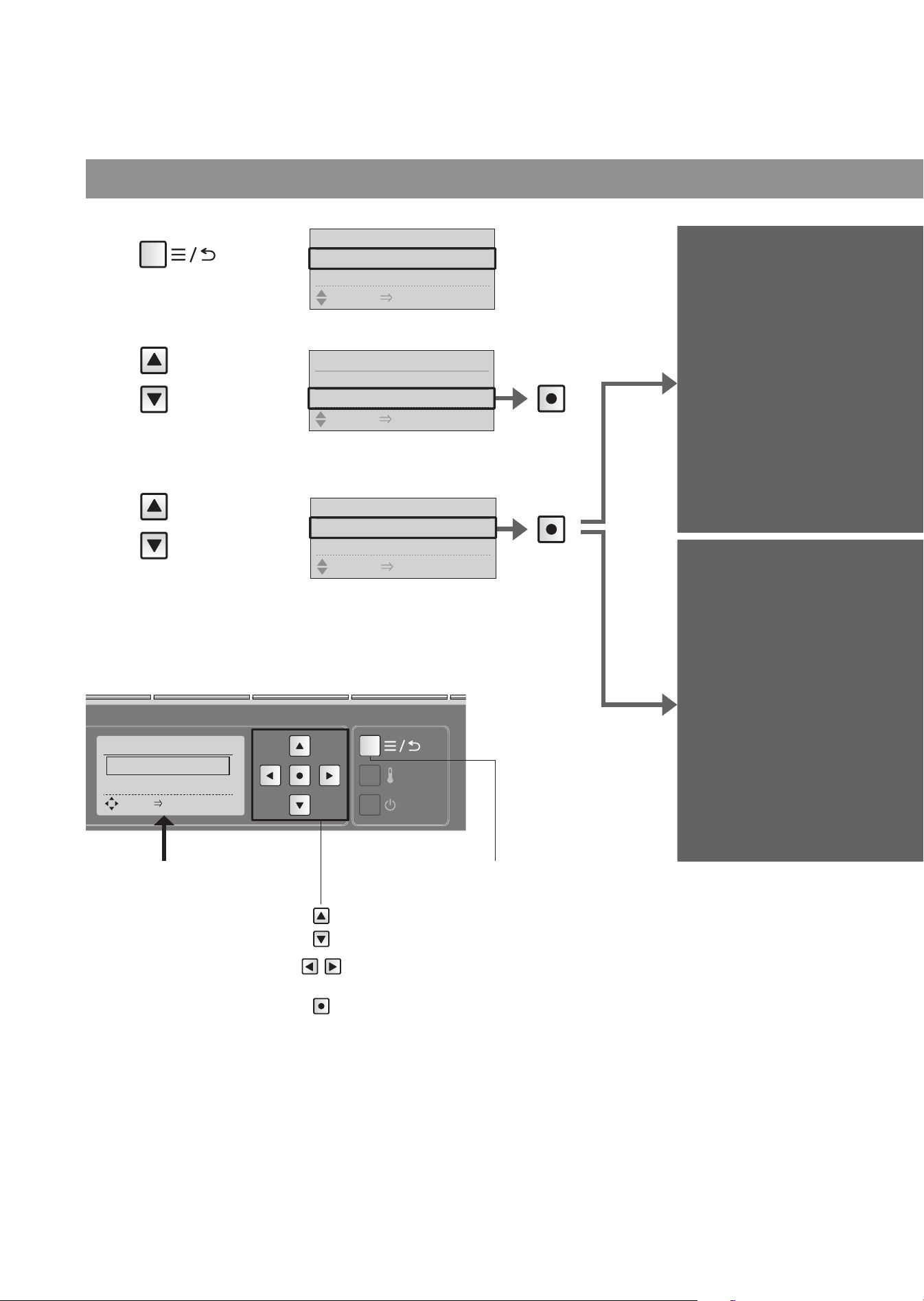
Press
Set whether or not to clean
the bowl unit automatically
Auto
fl ushing
Change the amount of time
before the toilet fl ushes
automatically
Auto fl ush
delay
*1
1
Press
2
Select
[AUTO
FUNCTION]
3
Select
[AUTO
FLUSH]
Press
Auto fl ushing
44
Changing Settings
Remote control back side
Items set on this display
1. AUTO FLUSH
"Auto fl ushing"
2. AUTO FLUSH DELAY
"Auto fl ush delay"
Move the frame.
Select the setting.
Confi rm the setting.
AUTO FLUSH 1/2
1. AUTO FLUSH
2.
AUTO FLUSH DELAY
SELECT [
●
ENTER] PUSH
Menu, Return
button
AUTO FUNCTION 1/4
1. AUTO FLUSH
2. AUTO OPEN/CLOSE
SELECT [
●
ENTER] PUSH
MENU 1/6
1. MANUAL CLEANING
2. ENERGY SAVER
SELECT [
●
ENTER] PUSH
MENU 3/6
2. ENERGY SAVER
3. AUTO FUNCTION
SELECT [
●
ENTER] PUSH
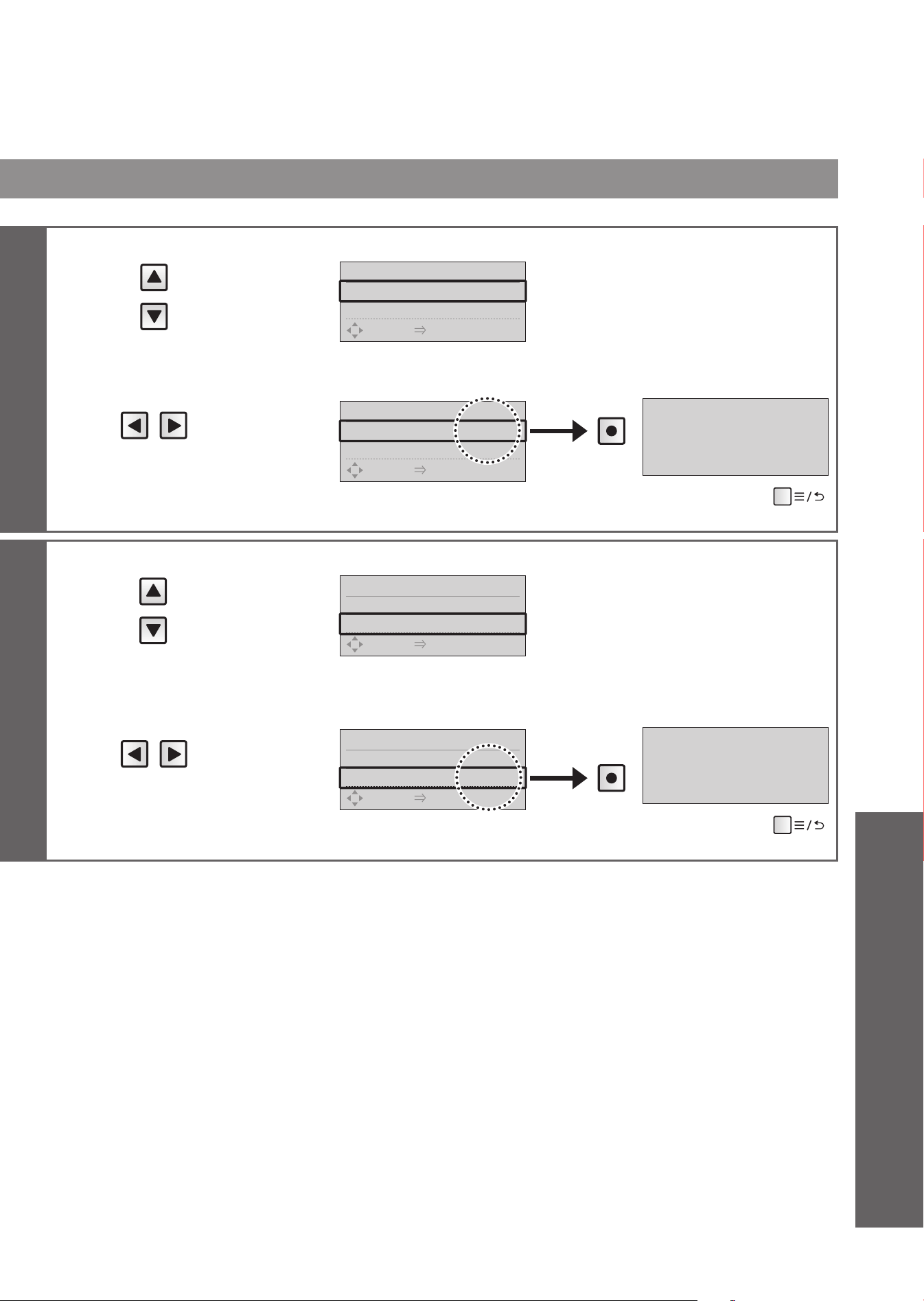
4
Select
[AUTO FLUSH]
AUTO FLUSH 1/2
1.AUTO FLUSH
◀
ON
▶
2.
AUTO FLUSH DELAY
10S
SELECT [
●
ENTER] PUSH
5
Select
[ON] or [OFF]
AUTO FLUSH 1/2
1.AUTO FLUSH
◀
OFF
▶
2.
AUTO FLUSH DELAY
10S
SELECT [
●
ENTER] PUSH
Press
AUTO FLUSH OFF
(To return
➝
)
4
Select
[AUTO FLUSH
DELAY]
AUTO FLUSH 2/2
1.AUTO FLUSH ON
2.
AUTO FLUSH DELAY
◀
10S
▶
SELECT [
●
ENTER] PUSH
5
Select
[5S], [10S]
or [15S]
AUTO FLUSH 2/2
1.AUTO FLUSH ON
2.
AUTO FLUSH DELAY
◀
15S
▶
SELECT [
●
ENTER] PUSH
Press
AUTO FLUSH DELAY 15S
(To return
➝
)
*1 This operation is not available when the "Auto fl ushing" is "OFF".
45
Reference
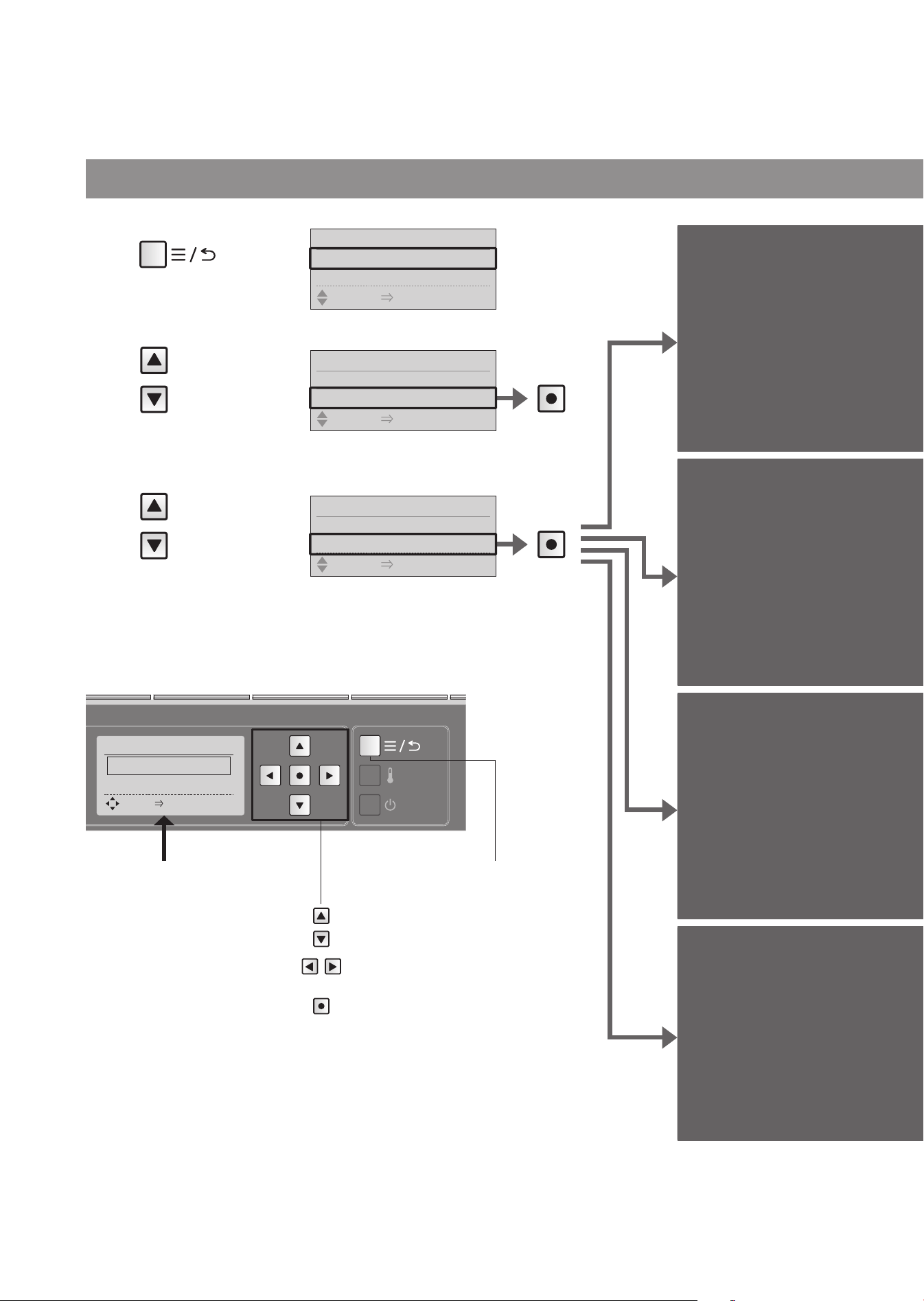
Set whether or not to open
and close the toilet lid
automatically
Auto open/
close
Change the amount of time
before the lid/seat closes
automatically
Auto close
delay
*1
Change the time period till
automatic opening
(after closing by hand.)
Auto open
delay
*1
Automatically open and
close the toilet lid only/
Automatically open and
close the toilet seat and
toilet lid
Seat/lid
*1
Remote control back side
Items set on this display
1. AUTO OPEN/CLOSE
"Auto open/close"
2. AUTO CLOSE DELAY
"Auto close delay"
3. AUTO OPEN DELAY
"Auto open delay"
4. SEAT/LID
"Seat/lid"
Menu, Return
button
Auto open/close
Move the frame.
Select the setting.
Confi rm the setting.
1
Press
2
Select
[AUTO
FUNCTION]
3
Select
[AUTO
OPEN/
CLOSE]
Press
Press
46
Changing Settings
AUTO OPEN/CLOSE
1/4
1.
AUTO OPEN/CLOSE
2.
AUTO CLOSE DELAY
SELECT [
●
ENTER] PUSH
MENU 1/6
1. MANUAL CLEANING
2. ENERGY SAVER
SELECT [
●
ENTER] PUSH
MENU 3/6
2. ENERGY SAVER
3. AUTO FUNCTION
SELECT [
●
ENTER] PUSH
AUTO FUNCTION 2/4
1. AUTO FLUSH
2. AUTO OPEN/CLOSE
SELECT [
●
ENTER] PUSH
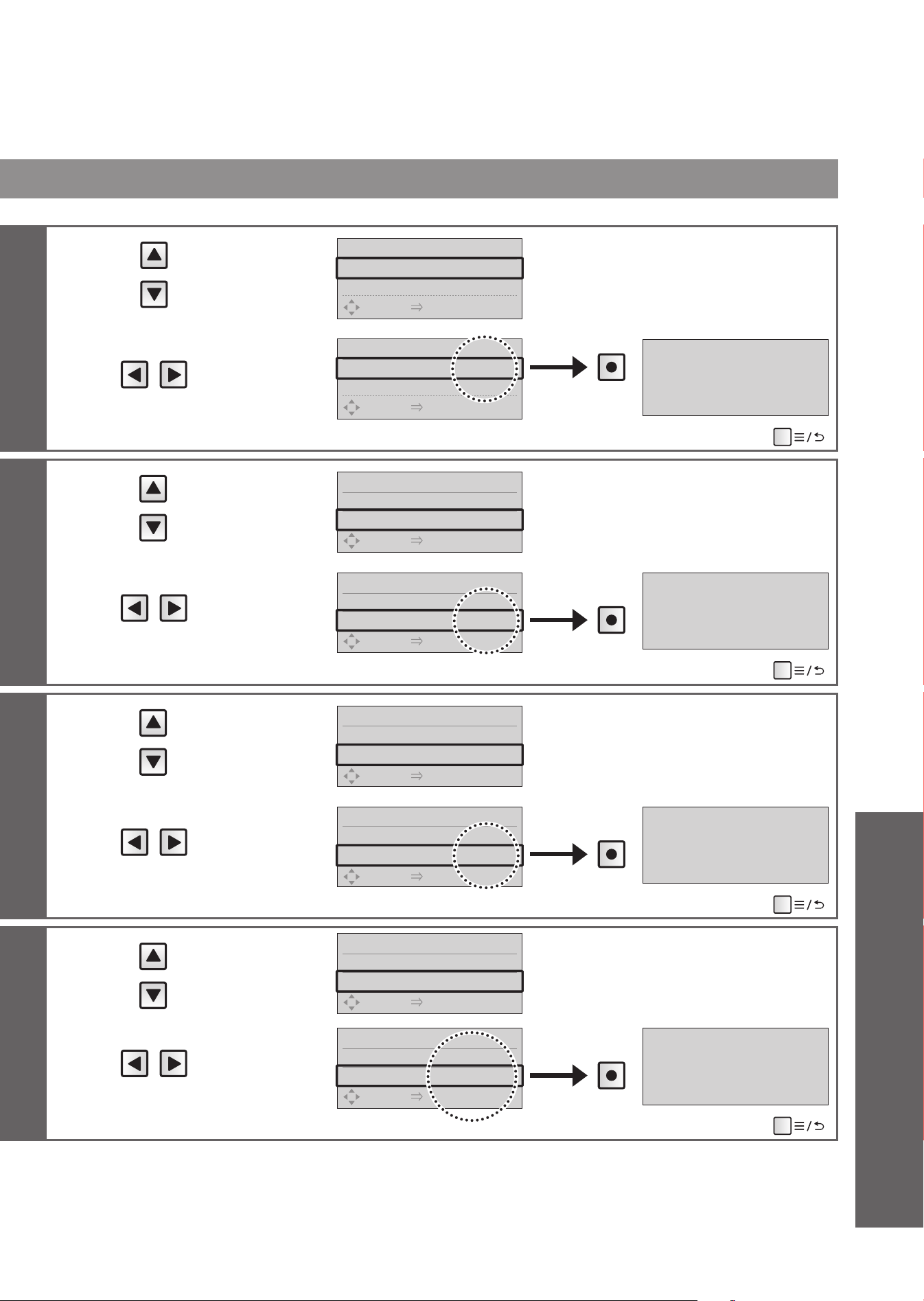
4
Select
[AUTO OPEN/
CLOSE]
AUTO OPEN/CLOSE 1/4
1.
AUTO OPEN/CLOSE
◀
ON
▶
2.
AUTO CLOSE DELAY
90S
SELECT [
●
ENTER] PUSH
5
Select
[ON] or [OFF]
AUTO OPEN/CLOSE 1/4
1.
AUTO OPEN/CLOSE
◀
OFF
▶
2.
AUTO CLOSE DELAY
90S
SELECT [
●
ENTER] PUSH
Press
AUTO OPEN/CLOSE OFF
(To return
➝
)
4
Select
[AUTO CLOSE
DELAY]
AUTO OPEN/CLOSE 2/4
1.
AUTO OPEN/CLOSE
ON
2.
AUTO CLOSE DELAY
◀
90S
▶
SELECT [
●
ENTER] PUSH
5
Select
[25S] or [90S]
*2
AUTO OPEN/CLOSE 2/4
1.
AUTO OPEN/CLOSE
ON
2.
AUTO CLOSE DELAY
◀
25S
▶
SELECT [
●
ENTER] PUSH
Press
AUTO CLOSE DELAY 25S
(To return
➝
)
4
Select
[AUTO OPEN
DELAY]
AUTO OPEN/CLOSE 3/4
2.
AUTO CLOSE DELAY
90S
3.
AUTO OPEN DELAY
◀
15S
▶
SELECT [
●
ENTER] PUSH
5
Select
[15S], [30S] or
[90S]
AUTO OPEN/CLOSE 3/4
2.
AUTO CLOSE DELAY
90S
3.
AUTO OPEN DELAY
◀
30S
▶
SELECT [
●
ENTER] PUSH
Press
AUTO OPEN DELAY 30S
(To return
➝
)
4
Select
[SEAT/LID]
AUTO OPEN/CLOSE 4/4
3.
AUTO OPEN DELAY
15S
4.SEAT/LID
◀
LID
▶
SELECT [
●
ENTER] PUSH
5
Select
[LID] or
[SEAT∙LID]
*3
AUTO OPEN/CLOSE 4/4
3.
AUTO OPEN DELAY
15S
4.SEAT/LID
◀
SEAT·LID
▶
SELECT [
●
ENTER] PUSH
Press
AUTO OPEN/CLOSE
SEAT·LID
(To return
➝
)
*1 This operation is not available when the "Auto open/close" is "OFF".
*2
When set to "25 seconds", the lid/seat does not open automatically for about 15 seconds after closing automatically.
*3 When the "Seat/lid" are set to open automatically, pre-mist is not sprayed.
47
Reference
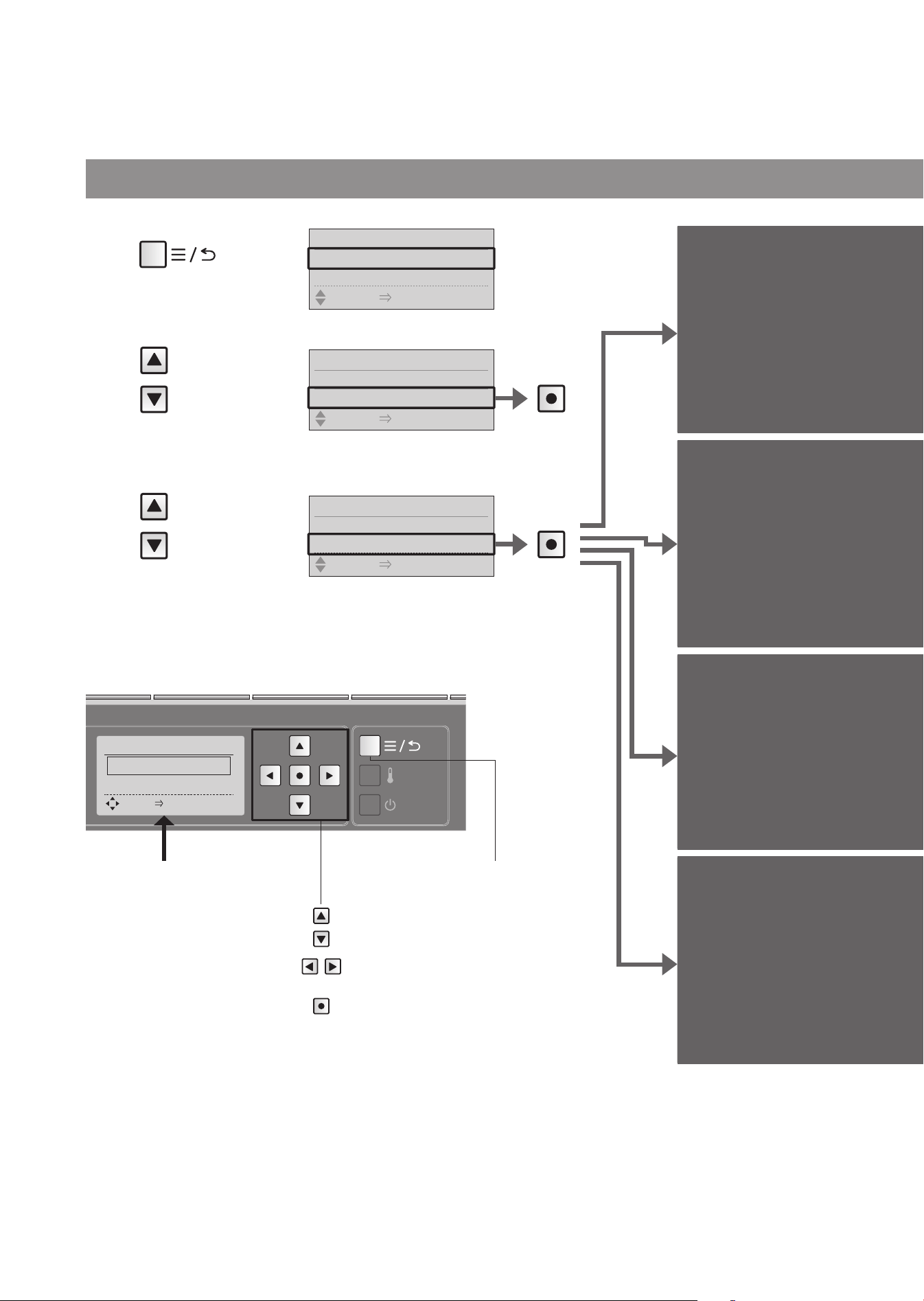
Set whether or not
to clean the wand
automatically
Auto wand
CLEAN
Set whether or not to
spray mist in the bowl
unit automatically
Auto bowl
CLEAN
Set whether or not to
deodorize automatically
after sitting on the toilet
seat
Deodorizer
Set whether or not
to power deodorize
automatically after
standing up
Auto power
deodorizer
Auto cleaning
2
Select
[AUTO
FUNCTION]
48
Changing Settings
1
Press
3
Select
[AUTO
CLEANING]
Remote control back side
Items set on this display
1. AUTO WAND CLEAN
"Auto wand CLEAN"
2. AUTO BOWL CLEAN
"Auto bowl CLEAN"
3. DEODORIZER
"Deodorizer"
4. AUTO POWER
DEODORIZER
"Auto power deodorizer"
Menu, Return
button
Move the frame.
Select the setting.
Confi rm the setting.
AUTO CLEANING 1/4
1.
AUTO WAND CLEAN
2.
AUTO BOWL CLEAN
SELECT [
●
ENTER] PUSH
Press
Press
AUTO FUNCTION 3/4
2. AUTO OPEN/CLOSE
3. AUTO CLEANING
SELECT [
●
ENTER] PUSH
MENU 1/6
1. MANUAL CLEANING
2. ENERGY SAVER
SELECT [
●
ENTER] PUSH
MENU 3/6
2. ENERGY SAVER
3. AUTO FUNCTION
SELECT [
●
ENTER] PUSH
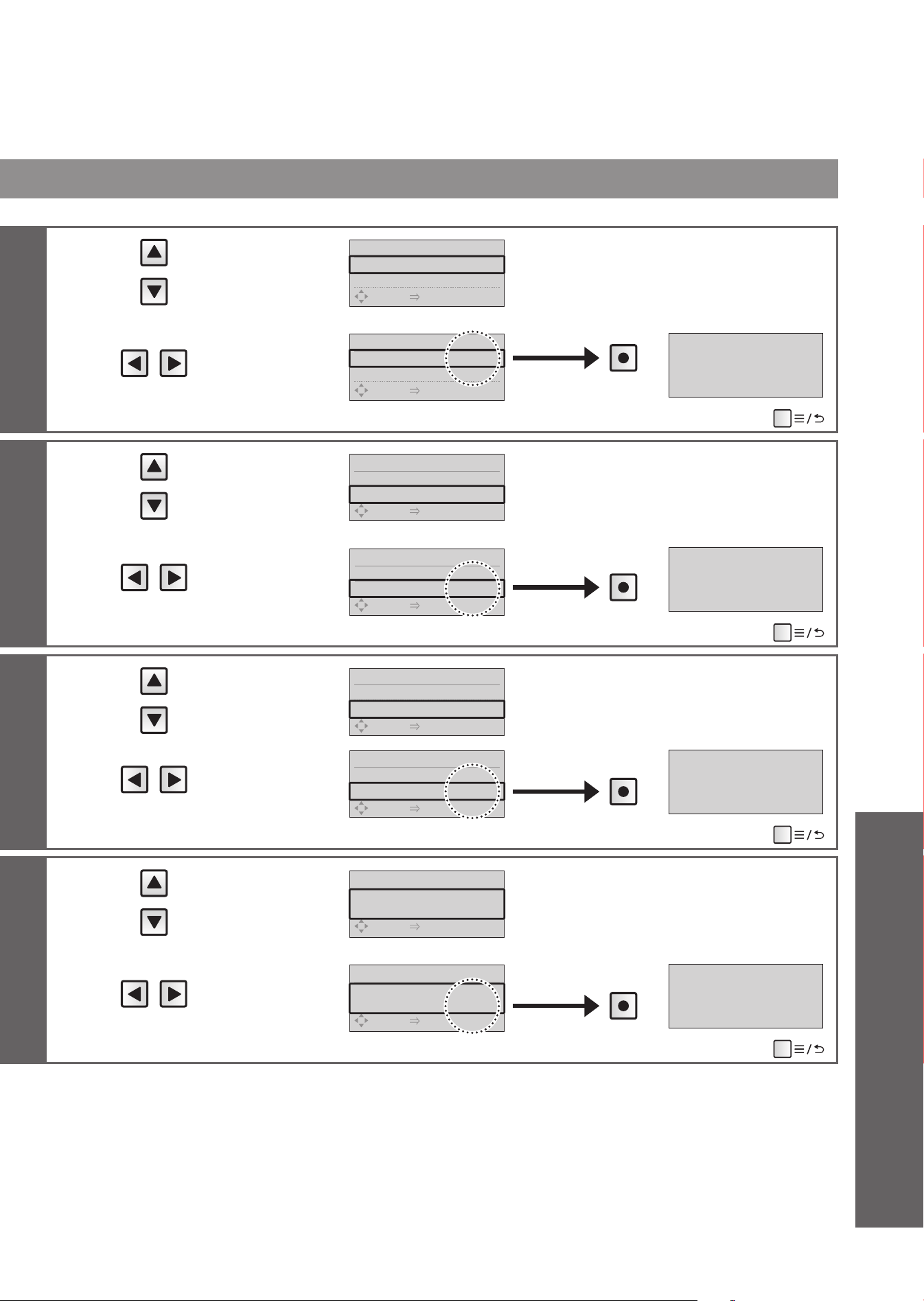
4
Select
[AUTO WAND
CLEAN]
AUTO CLEANING 1/4
1.
AUTO WAND CLEAN
◀
ON
▶
2.
AUTO BOWL CLEAN
ON
SELECT [
●
ENTER] PUSH
5
Select
[ON] or [OFF]
AUTO CLEANING 1/4
1.
AUTO WAND CLEAN
◀
OFF
▶
2.
AUTO BOWL CLEAN
ON
SELECT [
●
ENTER] PUSH
Press
AUTO WAND CLEAN OFF
(To return
➝
)
4
Select
[AUTO BOWL
CLEAN]
AUTO CLEANING 2/4
1.
AUTO WAND CLEAN
ON
2.
AUTO BOWL CLEAN
◀
ON
▶
SELECT [
●
ENTER] PUSH
5
Select
[ON] or [OFF]
AUTO CLEANING 2/4
1.
AUTO WAND CLEAN
ON
2.
AUTO BOWL CLEAN
◀
OFF
▶
SELECT [
●
ENTER] PUSH
Press
AUTO BOWL CLEAN OFF
(To return
➝
)
4
Select
[DEODORIZER]
AUTO CLEANING 3/4
2.
AUTO BOWL CLEAN
ON
3.DEODORIZER
◀
ON
▶
SELECT [
●
ENTER] PUSH
5
Select
[ON] or [OFF]
AUTO CLEANING 3/4
2.
AUTO BOWL CLEAN
ON
3.DEODORIZER
◀
OFF
▶
SELECT [
●
ENTER] PUSH
Press
DEODORIZER OFF
(To return
➝
)
4
Select
[AUTO POWER
DEODORIZER]
AUTO CLEANING 4/4
4.
AUTO POWER DEODORIZER
◀
ON
▶
SELECT [
●
ENTER] PUSH
5
Select
[ON] or [OFF]
AUTO CLEANING 4/4
4.
AUTO POWER DEODORIZER
◀
OFF
▶
SELECT [
●
ENTER] PUSH
Press
AUTO POWER DEODORIZER
OFF
(To return
➝
)
49
Reference
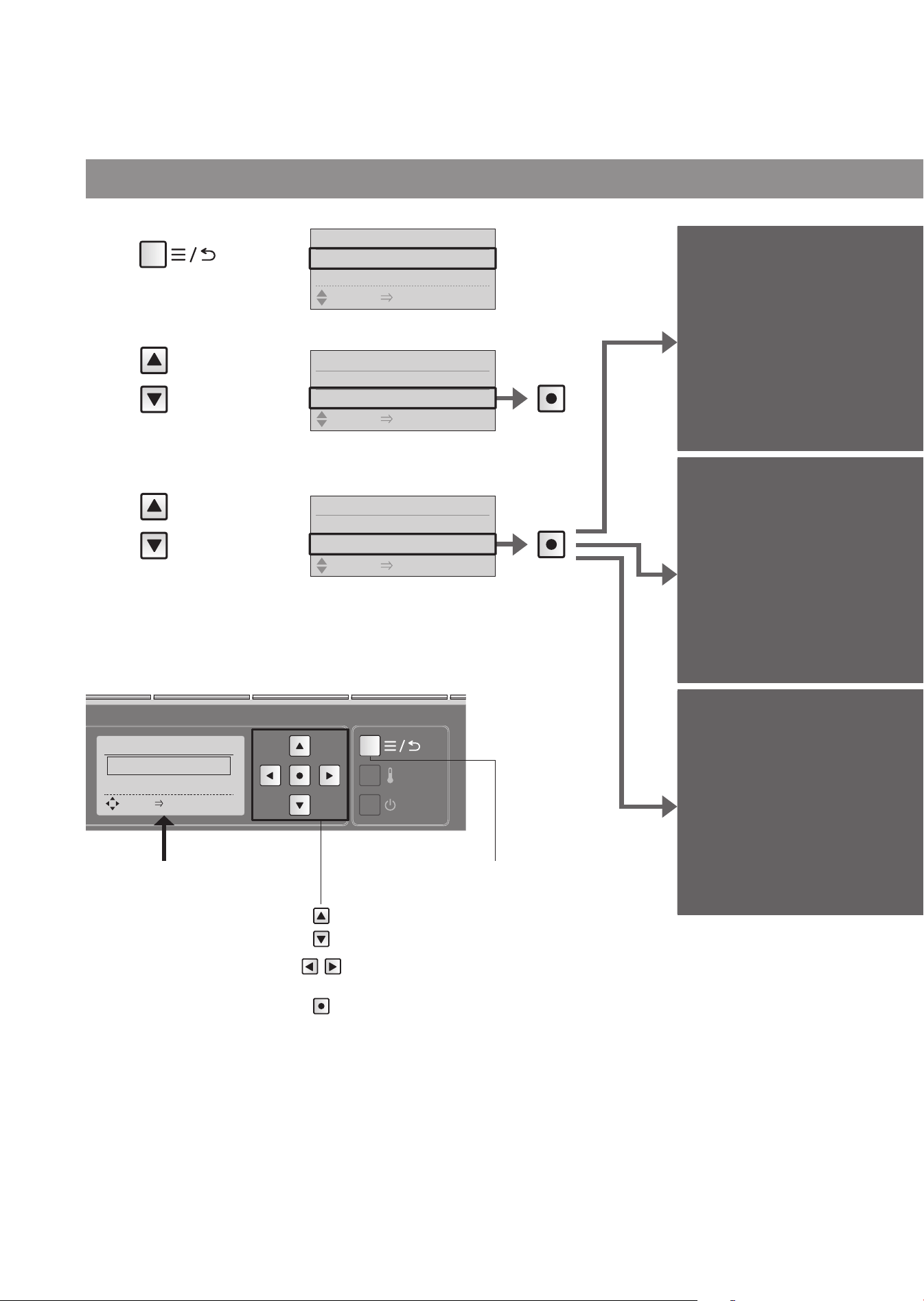
Light
2
Select
[AUTO
FUNCTION]
50
Press
Changing Settings
Set whether or not to
use the soft light
Soft light
Set whether or not to use
the light inside the bowl unit
Bowl light
Set whether or not to light
up the CLEAN indicator
CLEAN
indicator
1
Press
3
Select
[LIGHT]
Remote control back side
Items set on this display
1. SOFT LIGHT
"Soft light"
2. BOWL LIGHT
"Bowl light"
3. INDICATOR
"CLEAN indicator"
Menu, Return
button
Move the frame.
Select the setting.
Confi rm the setting.
LIGHT 1/3
1. SOFT LIGHT
2. BOWL LIGHT
SELECT [
●
ENTER] PUSH
Press
MENU 1/6
1. MANUAL CLEANING
2. ENERGY SAVER
SELECT [
●
ENTER] PUSH
MENU 3/6
2. ENERGY SAVER
3. AUTO FUNCTION
SELECT [
●
ENTER] PUSH
AUTO FUNCTION 4/4
3. AUTO CLEANING
4. LIGHT
SELECT [
●
ENTER] PUSH
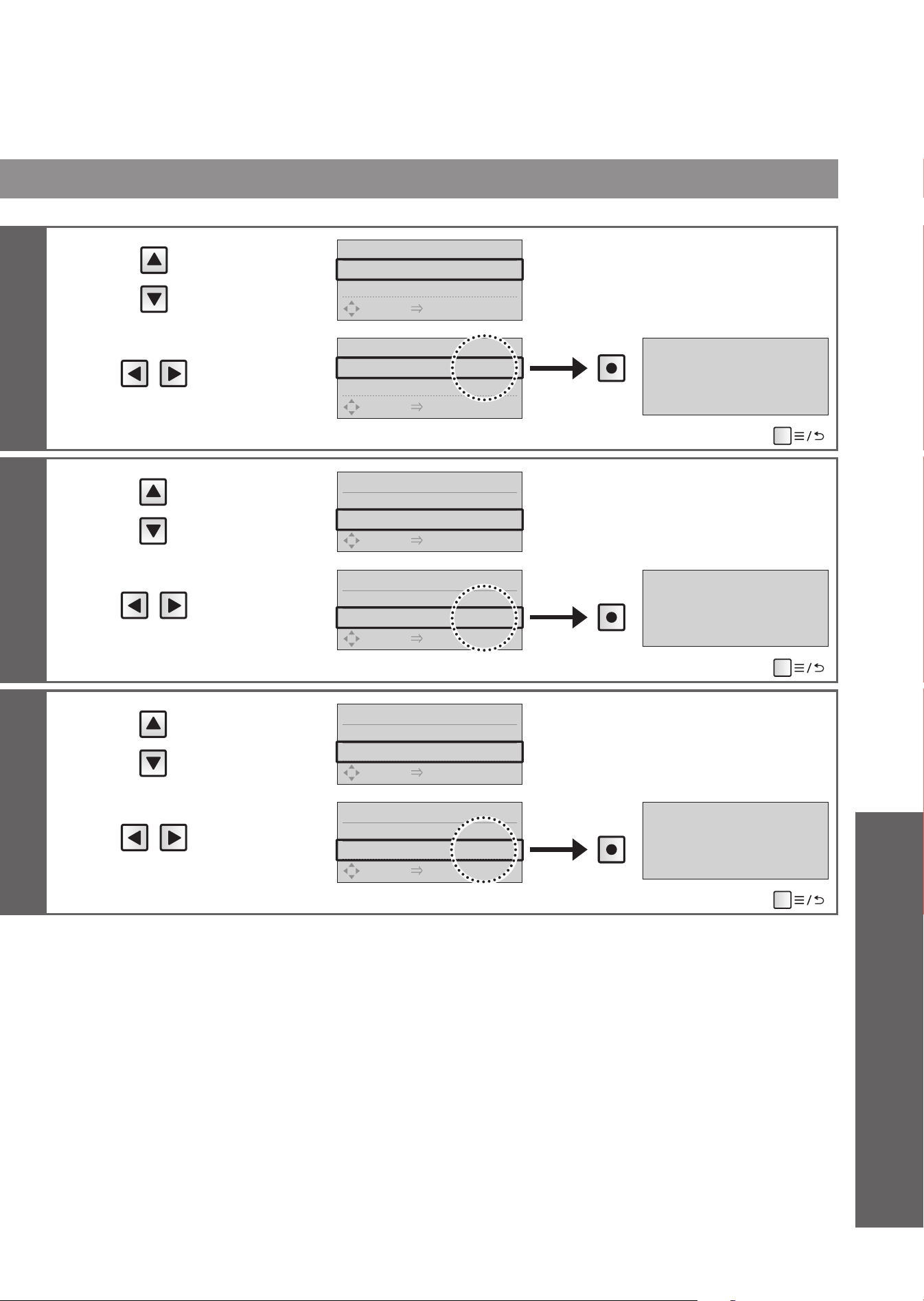
51
4
Select
[SOFT LIGHT]
LIGHT 1/3
1.SOFT LIGHT
◀
ON
▶
2.BOWL LIGHT ON
SELECT [
●
ENTER] PUSH
5
Select
[ON] or [OFF]
LIGHT 1/3
1.SOFT LIGHT
◀
OFF
▶
2.BOWL LIGHT ON
SELECT [
●
ENTER] PUSH
Press
SOFT LIGHT OFF
(To return
➝
)
4
Select
[BOWL LIGHT]
LIGHT 2/3
1.SOFT LIGHT ON
2.BOWL LIGHT
◀
ON
▶
SELECT [
●
ENTER] PUSH
5
Select
[ON] or [OFF]
LIGHT 2/3
1.SOFT LIGHT ON
2.BOWL LIGHT
◀
OFF
▶
SELECT [
●
ENTER] PUSH
Press
BOWL LIGHT OFF
(To return
➝
)
4
Select
[INDICATOR]
LIGHT 3/3
2.BOWL LIGHT ON
3.INDICATOR
◀
ON
▶
SELECT [
●
ENTER] PUSH
5
Select
[ON] or [OFF]
LIGHT 3/3
2.BOWL LIGHT ON
3.INDICATOR
◀
OFF
▶
SELECT [
●
ENTER] PUSH
Press
INDICATOR OFF
(To return
➝
)
Reference
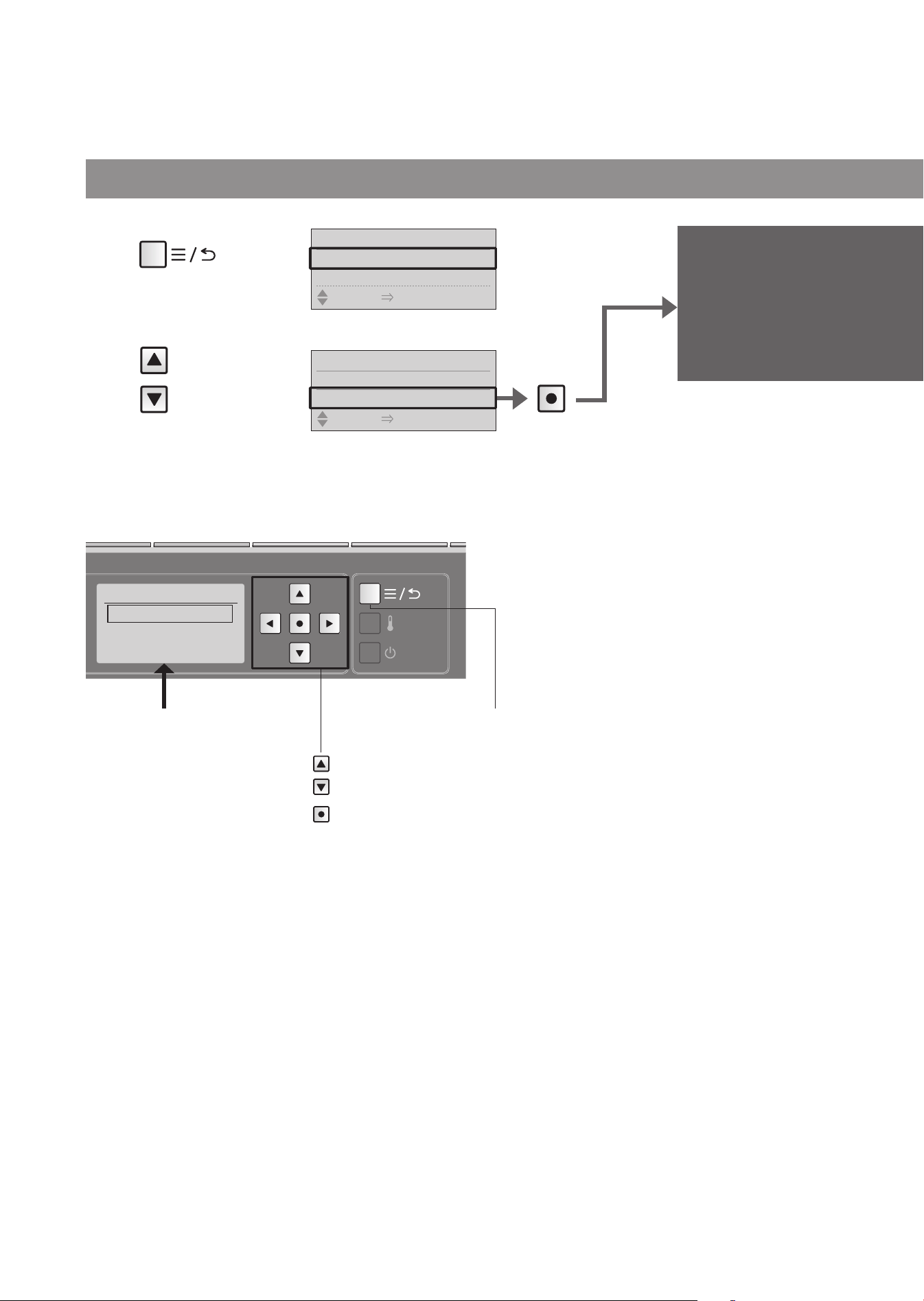
52
Language settings
Changing Settings
Select the language
displayed on the back
of remote control
Language
settings
1
Press
2
Select
[
语⾔
/
語⾔
/
LANGUAGE]
语⾔/語⾔/
LANGUAGE
1.
中⽂简体
2.
繁體中⽂
3. ENGLISH
Remote control back side
Items set on this display
1.
中⽂简体
"Simplifi ed Chinese"
2.
繁體中⽂
"Traditional Chinese"
3.ENGLISH
"English"
Menu, Return
button
Move the frame.
Confi rm the setting.
Press
MENU 1/6
1. MANUAL CLEANING
2. ENERGY SAVER
SELECT [
●
ENTER] PUSH
MENU 5/6
4. AIR DEODORIZER
5.
语⾔
/
語⾔
/ LANGUAGE
SELECT [
●
ENTER] PUSH
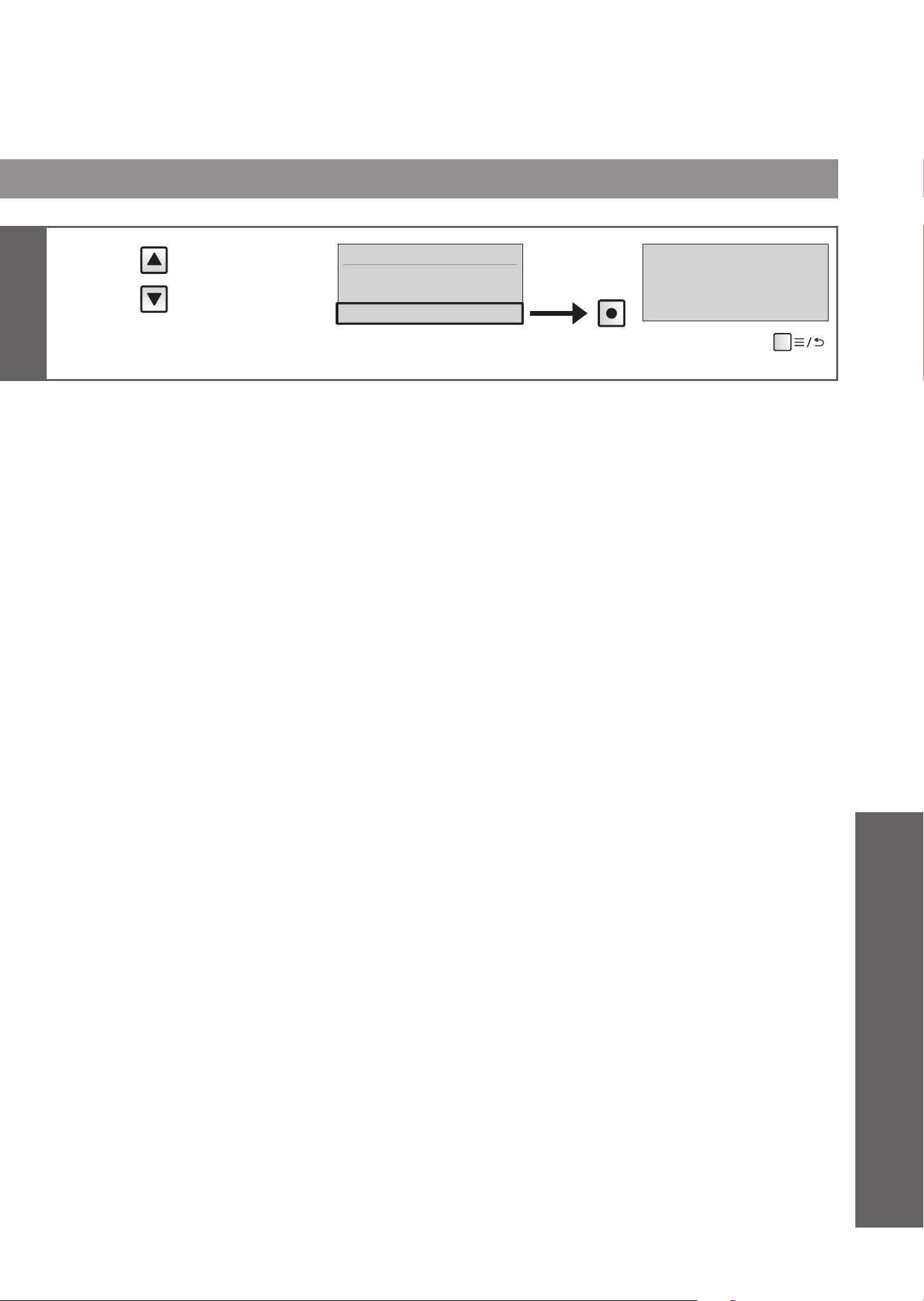
53
3
Select
[
中⽂简体
],
[
繁體中⽂
] or
[ENGLISH]
语⾔
/
語⾔
/LANGUAGE
1.
中⽂简体
2.
繁體中⽂
3. ENGLISH
Press
LANGUAGE ENGLISH
(To return
➝
)
Reference
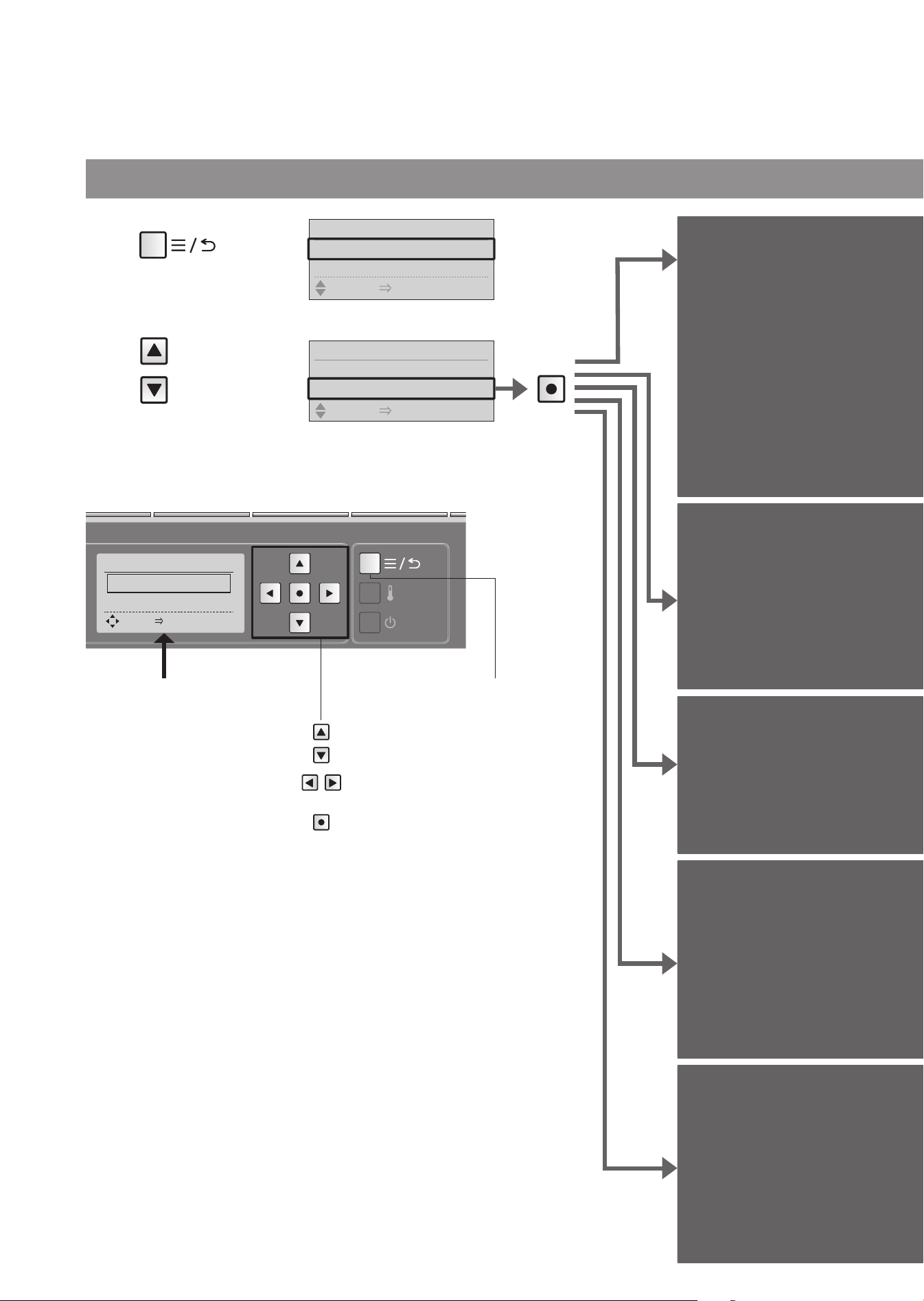
Other settings
54
Changing Settings
Set whether or not to run
the water for the bowl
unit and top unit
automatically
at a fi xed interval in order
to prevent freezing
Anti freezing
Set whether or not to
make a beep sound
Beep sound
Lowering the bowl unit water
surface (For reducing water
rebound, collecting a stool
sample, etc.)
Water surface lowering
Lower water
level
Set whether or not to keep
your favorite pressure and
position settings
Pressure/
position
setting
Set whether or not to use
the personal setting lock
Personal
setting lock
1
Press
2
Select
[OTHER
SETTING]
Remote control back side
Items set on this display
1. ANTI FREEZING
"Anti freezing"
2. BEEP
"Beep sound"
3. LOWER WATER LEVEL
"Lower water level"
4. PRESSURE/POSITION
SETTING
"Pressure/position setting"
5. PERSONAL SETTING
LOCK
"Personal setting lock"
Menu, Return
button
Move the frame.
Select the setting.
Confi rm the setting.
OTHER SETTING 1/5
1. ANTI FREEZING
2. BEEP
SELECT [
●
ENTER] PUSH
Press
MENU 1/6
1. MANUAL CLEANING
2. ENERGY SAVER
SELECT [
●
ENTER] PUSH
MENU 6/6
5.
语⾔
/
語⾔
/ LANGUAGE
6. OTHER SETTING
SELECT [
●
ENTER] PUSH
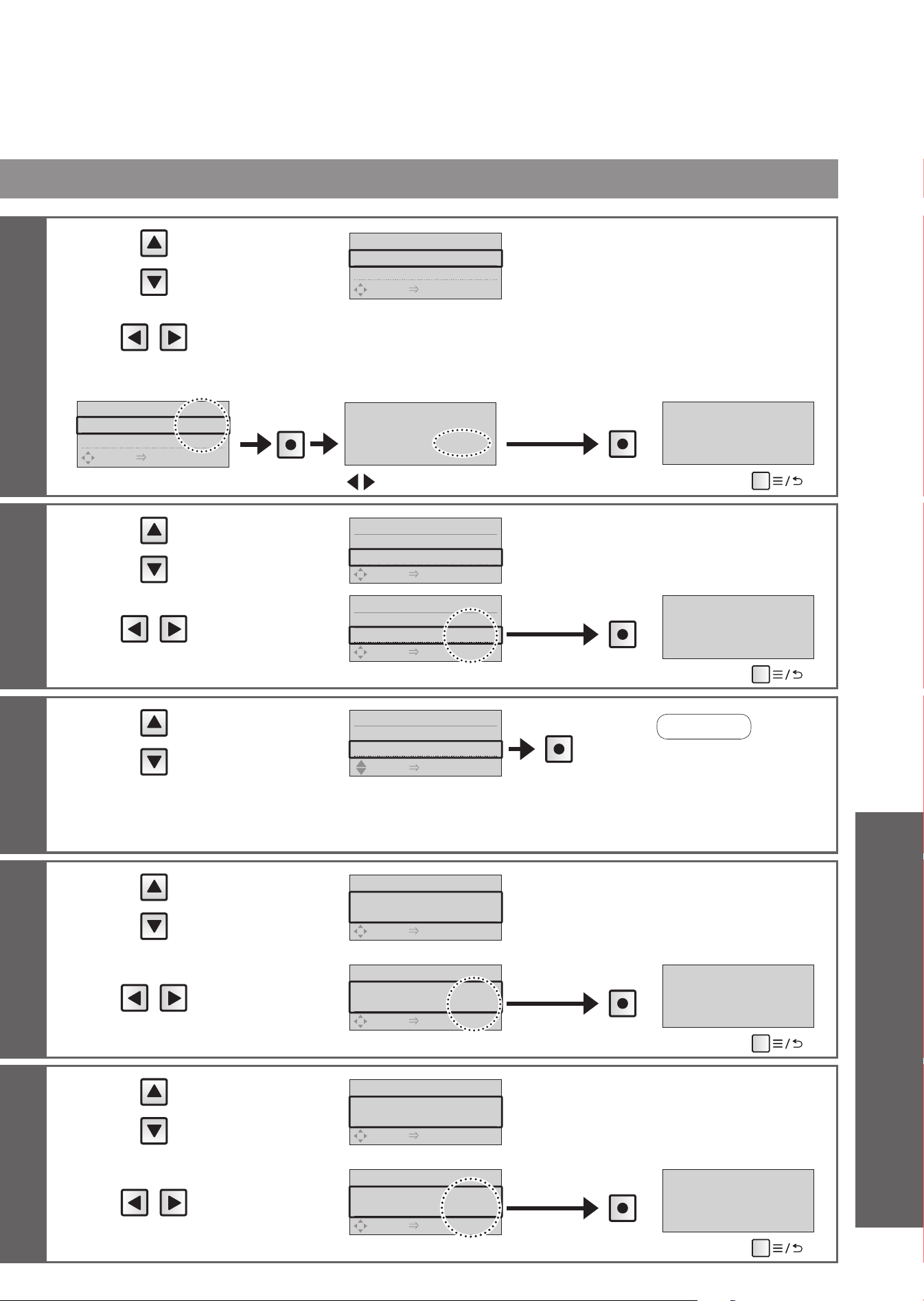
55
3
Select
[ANTI FREEZING]
OTHER SETTING 1/5
1.
ANTI FREEZING
◀
OFF
▶
2.BEEP ON
SELECT [
●
ENTER] PUSH
4
Select
[ON] or [OFF]
<For setting to [ON]> When the time is set, the bowl unit is cleaned in about 10 minutes intervals to prevent freezing.
OTHER SETTING 1/5
1.
ANTI FREEZING
◀
ON
▶
2.BEEP ON
SELECT [
●
ENTER] PUSH
Press
FLUSHES EVERY 10 MIN
CHANGE SETTING?
◀
YES
▶
Press
ANTI FREEZING ON
Select [YES]
(To return
➝
)
3
Select
[BEEP]
OTHER SETTING 2/5
1.ANTI FREEZING OFF
2.BEEP
◀
ON
▶
SELECT [
●
ENTER] PUSH
4
Select
[ON] or [OFF]
OTHER SETTING 2/5
1.ANTI FREEZING OFF
2.BEEP
◀
OFF
▶
SELECT [
●
ENTER] PUSH
Press
BEEP OFF
(To return
➝
)
3
Select
[LOWER WATER
LEVEL]
OTHER SETTING 3/5
2.BEEP ON
3.LOWER WATER LEVEL
SELECT [
●
ENTER] PUSH
The water in the
bowl unit fl ows and
accumulates at a
low water level.
Press
3
Select
[PRESSURE/
POSITION SETTING]
OTHER SETTING 4/5
4.PRESSURE /POSITION
SETTING
◀
OFF
▶
SELECT [
●
ENTER] PUSH
4
Select
[ON] or [OFF]
OTHER SETTING 4/5
4.PRESSURE /POSITION
SETTING
◀
ON
▶
SELECT [
●
ENTER] PUSH
Press
PRESSURE/POSITION
SETTING ON
(To return
➝
)
3
Select
[PERSONAL
SETTING LOCK]
OTHER SETTING 5/5
5.
PERSONAL SETTING LOCK
◀
ON
▶
SELECT [
●
ENTER] PUSH
4
Select
[ON] or [OFF]
OTHER SETTING 5/5
5.
PERSONAL SETTING LOCK
◀
OFF
▶
SELECT [
●
ENTER] PUSH
Press
PERSONAL SETTING
LOCK OFF
(To return
➝
)
•
The water level returns
normal when the toilet
is fl ushed. Please set
this function each time
you want to lower the
water level.
Note
Reference
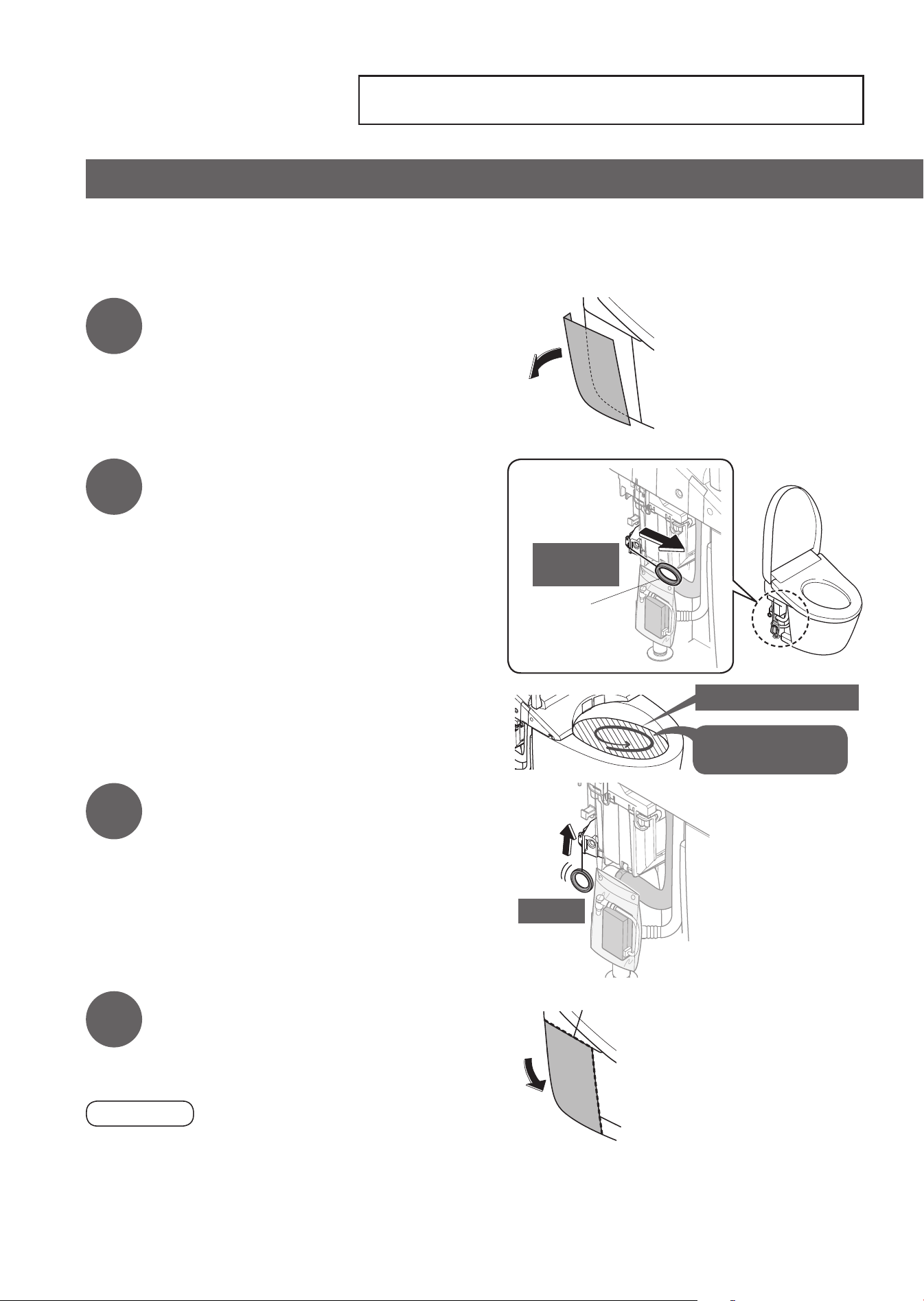
What to Do?
If the water does not fl ow due to a power outage
56
1
Remove the side panel (left).
2
Pull the hand lever to where it
stops. (about 30 seconds)
• The water surface in the bowl rises.
Keep
pulling
Hand lever
(For fl ushing in
case of power
outage)
Rises to this level
No water in the
bowl overfl ows.
3
When the beep sound is made
and water supply stops, release
the hand lever.
• The toilet fl ushes.
• You cannot fl ush the toilet for about 60
seconds after fl ushing it or releasing the
hand lever halfway.
Wait at least about 60 seconds and then
fl ush the toilet again.
Release
4
Reinstall the side panel.
• Fit the side panel to the top and side of the
bowl unit without a gap.
Attention!
•
When the power is restored, be sure to perform a full fl ush.
(To prevent waste from remaining in the discharge pipe.)
•
You can fl ush the toilet with a bucket. (Page 58)
Side of the bowl unit
Top of the bowl unit
n
You can fl ush the toilet with the hand lever (for fl ushing in case of power outage).
•
Pulling the hand lever does not fl ush the toilet when the power is supplied.
When testing the operation, unplug the power plug.
If the water does not fl ow due to a power outage (when water failure hasn't occurred)
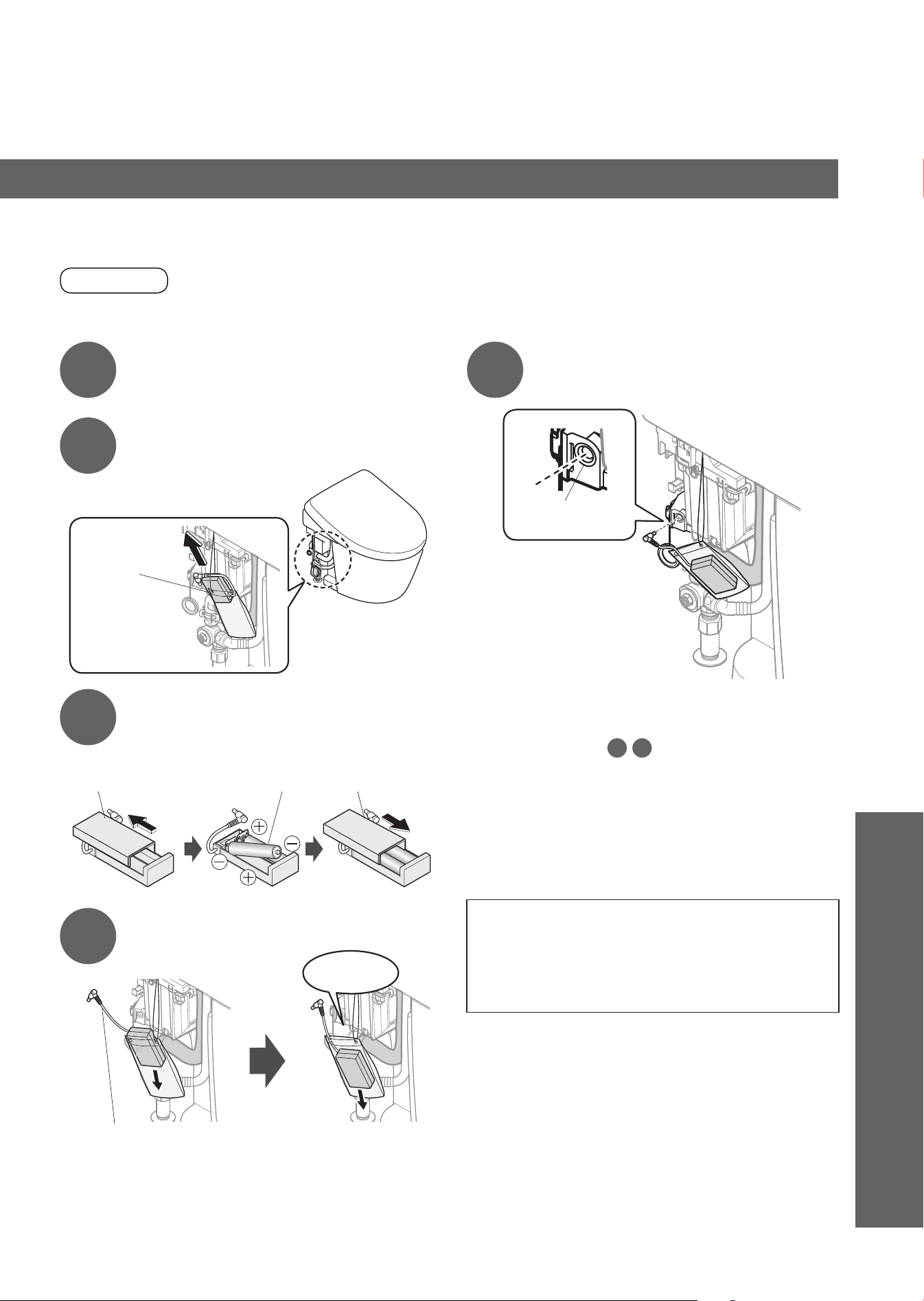
57
1
Remove the side panel (left).
(Page 56)
2
Take the battery box out of the
bag.
Battery box
3
Insert two AA batteries
properly in the battery box.
AA batteries
Open
the cover
Close
the cover
4
Put the battery in the bag.
Take the battery box
cable out of the bag.
Close
the bag
5
Connect the battery box cable
to the battery box plug socket.
Battery box plug
socket
n
To fl ush the toilet with the hand lever
(Page 56 Step
2
3
)
• When the power outage recovers: unplug
the battery box, take out the batteries, put
the battery box cable inside the bag, and
put back the side panel. (Page 56)
n
About the batteries
•
Use dry cell, alkaline batteries.
•
Be sure to follow "Safety Precautions" to
prevent the batteries from rupturing or leaking
fl uid,etc. (Pages 6, 8)
If power outage lasts for a long period (2 days or more), insert batteries in the
battery box.
Attention!
• Be careful not to expose the battery box to water.
(May cause malfunctions.)
Reference
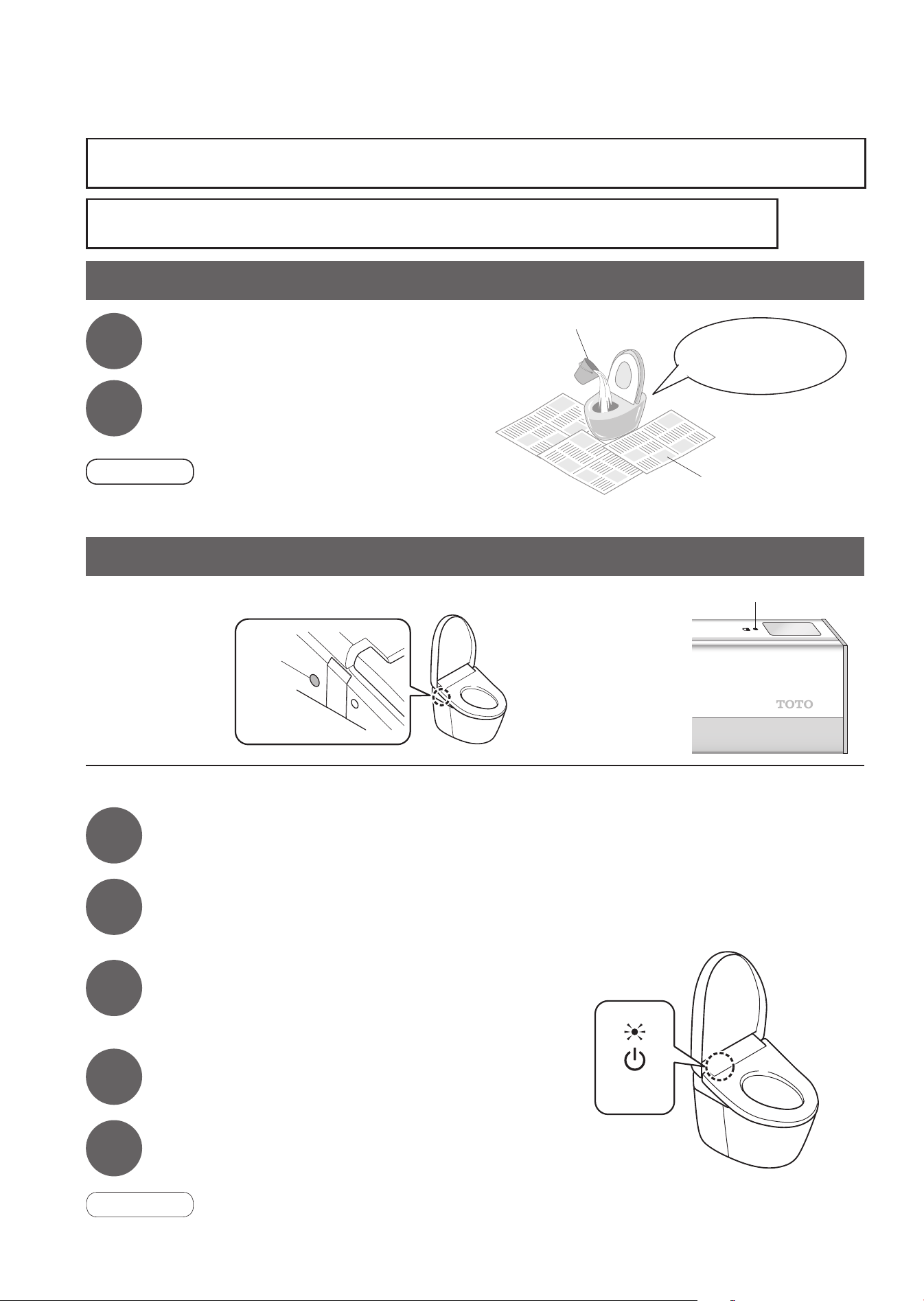
58
What to Do?
If the water does not fl ow due to a water service interruption
If you cannot operate with the remote control
n
Replacing the batteries
1
Unplug the power plug.
<Power>
2
Remove the remote control from the
hanger.
(Page 16)
3
Open the battery cover and replace two
AA batteries.
(Page 16)
• The low battery warning LED goes off.
4
Mount the remote control in the hanger.
5
Insert the power plug.
• The "Power" LED lights up.
Attention!
•
"ON" and "OFF" settings of the functions such as the energy saver function may be canceled when the batteries
are replaced. Set them again.
If the water does not fl ow due to a water service interruption
If you cannot operate with the remote control
n
Flush is also possible using the buttons on the left
side of top unit.
FLUSH
Button
1
Use a bucket to fl ush water.
Newspaper, dustcloth, etc.
Large bucket
Pour strongly, aiming
at the center of the
bowl unit.
2
If the water level is low after
fl ushing, add more water.
• Prevents odors.
Attention!
•
If there is a water supply failure, set "Auto fl ushing" to "OFF". (Page 44)
•
When the water supply is restored, be sure to perform a full fl ush. (To prevent waste from remaining in the discharge pipe.)
n
If the low battery
warning LED is
fl ashing, replace
the batteries.
Low battery warning LED
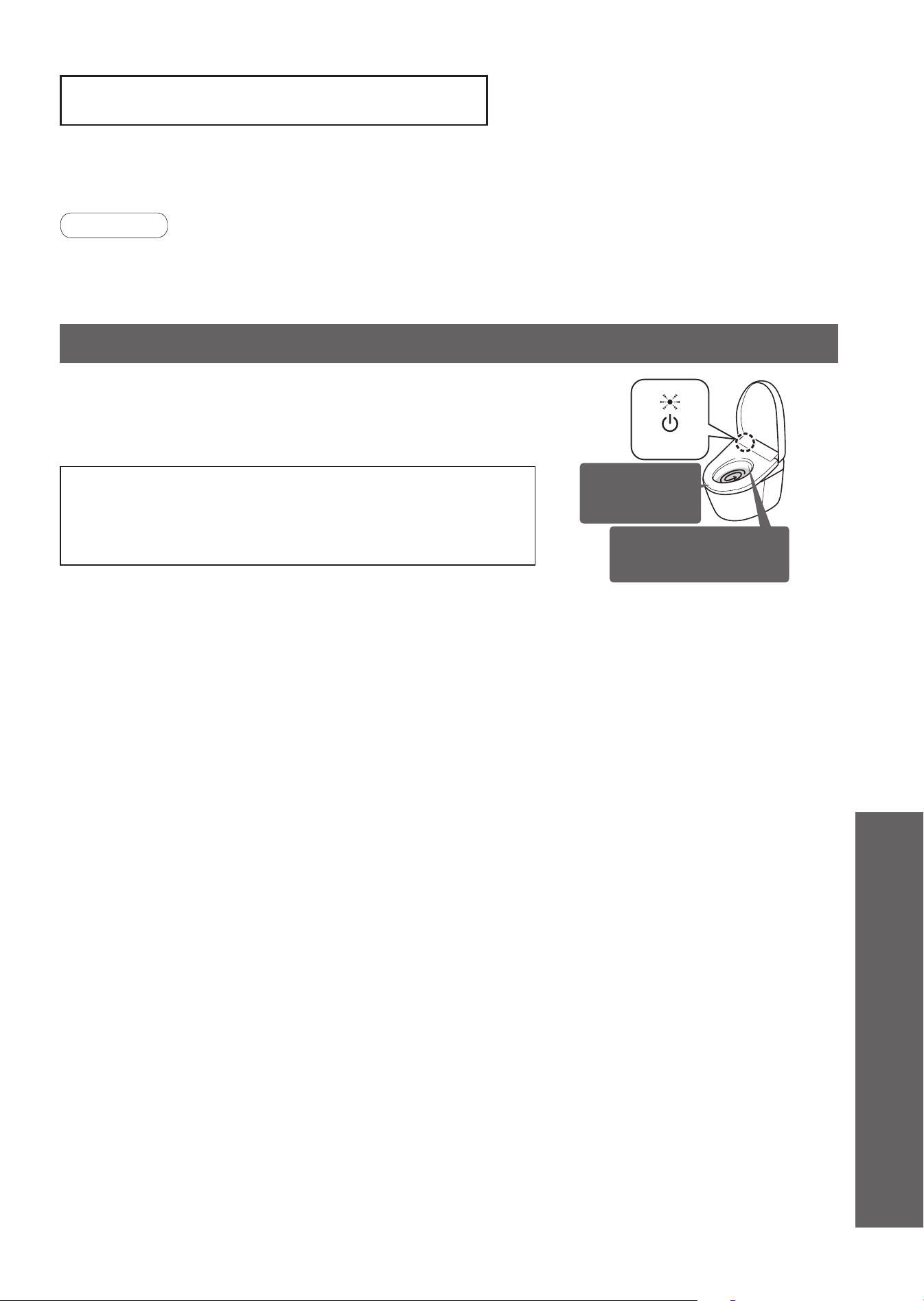
59
When the ambient temperature is likely to drop to 32°F (0°C) or lower, take measures to
prevent freezing.
Attention!
• When the ambient temperature is likely to drop to 32°F (0°C) or lower, do not use the energy saver feature.
(May damage the product.)
•
Warm the bathroom or take measures against freezing so that the ambient temperature does not drop below 32°F (0°C).
• Before starting to work, set “Auto fl ushing” (Page 44) and "Auto open/close" (Page 46) to "OFF".
This method runs the water for the bowl unit and top unit automatically at a fi xed
interval in order to prevent freezing.
n
How to Set (Page 54)
• Switch "Anti freezing" to "ON" with the remote control.
While Anti freezing is set to ON, it works as follows.
• The "Power" LED fl ashes.
• The toilet fl ushes at intervals of about 10 minutes.
• About 1.69 oz (about 50 ml) of water comes out from near the wand at
intervals of about 5 minutes. (The wand remains retracted.)
<Power>
The toilet fl ushes
at intervals of
about 10 minutes.
Water comes out from
near the wand at intervals
of about 5 minutes.
How to Freeze Damage Prevention (Dynamic mode)
Freeze Damage Prevention
Reference
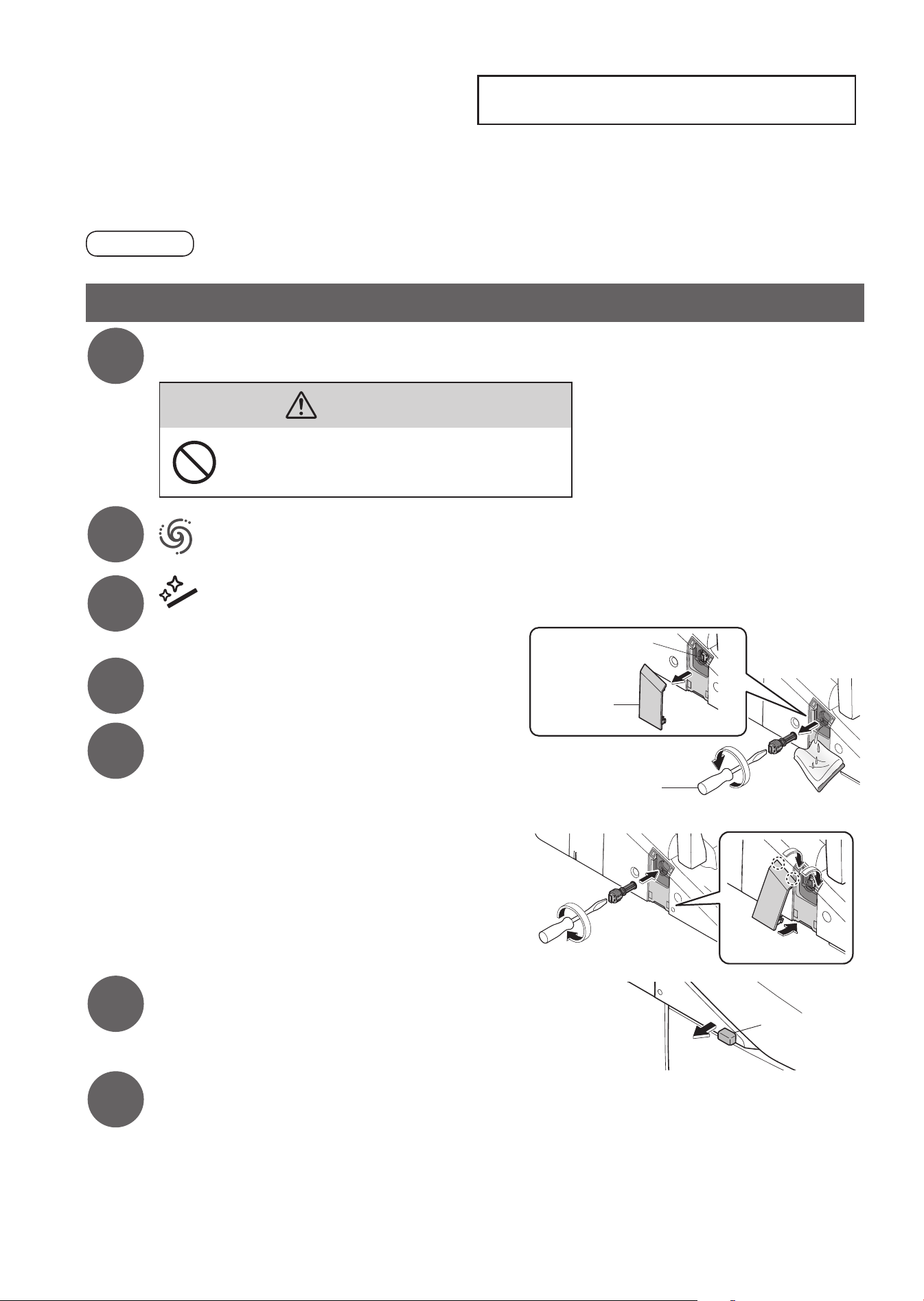
What to Do?
Long Periods of Disuse
60
If the toilet is in a location you will not visit for a long time, drain the water.
(The water in the tank may cause malfunctions or become contaminated and cause skin irritation or other problems.)
(May cause freezing and damage to product.)
CAUTION
• Do not drain water when the top unit is lifted up with the "Cleaning lift" (Page 36).
How to drain the water
1
Close the shutoff valve.
(Page 63)
• The water supply stops.
CAUTION
Do not remove the water fi lter drain valve
while the shutoff valve is open.
(Otherwise, water may leak out.)
2
Press "Full fl ush" button on the remote control to drain the tank.
3
Press "Wand CLEAN" button.
• The wand cover opens.
(Release the pressure from the water supply pipe.)
4
Unplug the power plug.
5
Drain the pipe.
(1) Remove the cover and water fi lter drain valve.
• Loosen the water fi lter drain valve with a fl at-head
screwdriver and then pull it.
(2) After draining the water, install the water fi lter drain
valve and cover.
• Insert the water fi lter drain valve and use
a fl at-head screwdriver to tighten it securely.
6
Pull out the water drain lever.
• Water comes out from around the wand (about 20 seconds).
Water drain
lever
7
Release your hand to return the water drain lever to its original position.
n
If water may get frozen
• Add antifreeze solution in the water in the bowl to prevent freezing.
(The antifreeze solution should not be fl ushed out. Collect it before using the toilet and dispose of it.)
n
To use the product again
• The water needs to be resupplied. (Page 61)
Cover
Flat-head
screwdriver
Water fi lter drain
valve
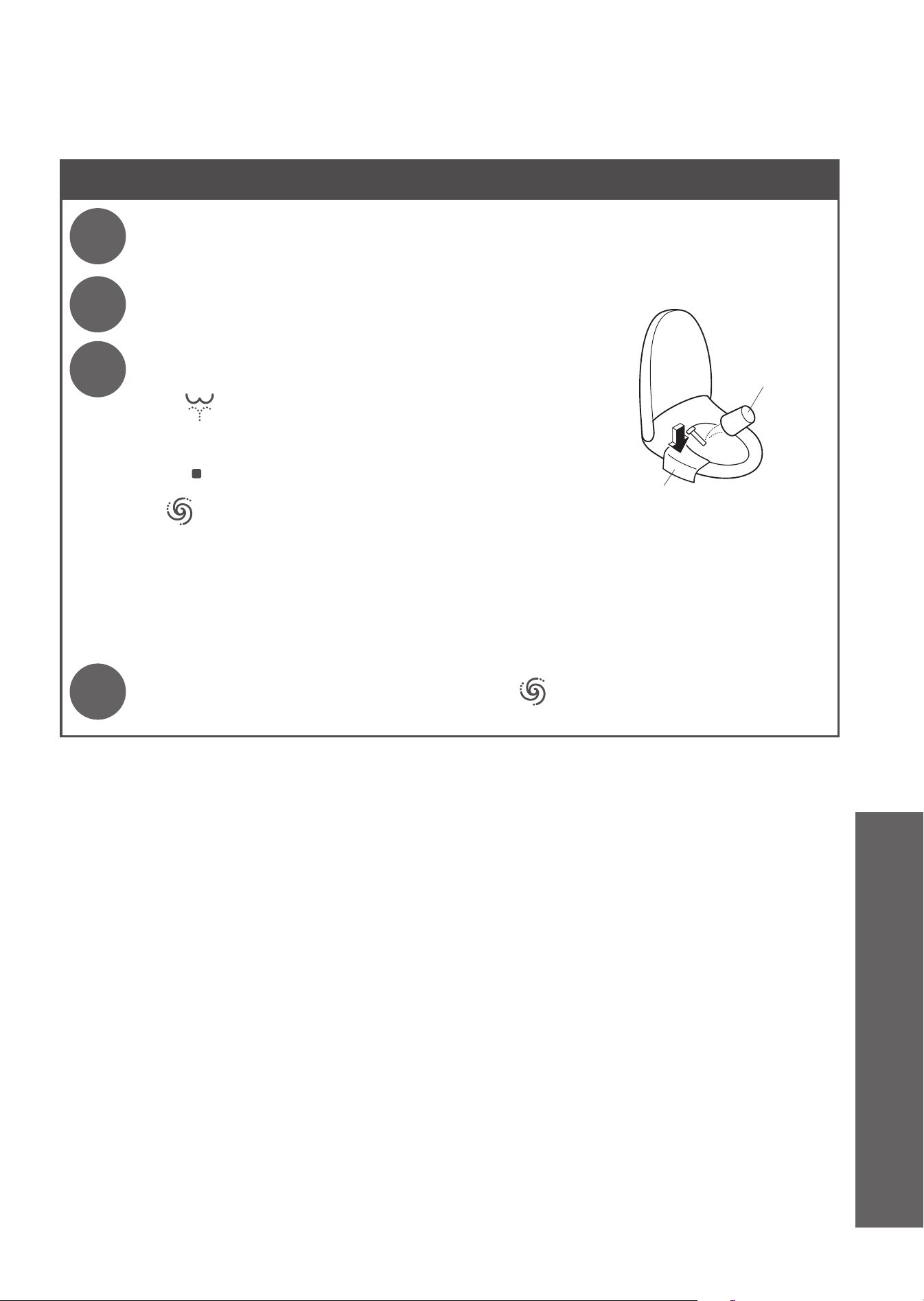
61
Resupplying the Water
1
Open the shutoff valve.
(Page 17)
• Check that water is not leaking from a pipe or the top unit.
2
Insert the power plug.
• The "Power" LED lights up.
3
À
Discharge water from the wand.
(1) Pressing down the left side of the toilet seat,
(2) Press "Rear cleansing" button to discharge water from
the wand.
• Catch the water in a paper cup or other receptacle.
(3)
Press "Stopping" button.
Á
Press "Full fl ush" button.
• The toilet fl ushes while the tank fi lls with water. The LED on the main display fl ashes. It stays lit after
the tank becomes full (about 80 seconds max.).
• You cannot fl ush the toilet until water supply is complete. Never operate the toilet while the tank is
fi lling with water.
n
If the remaining water has frozen and no water comes out
• Heat the inside of the bathroom, and warm the water supply hose and shutoff valve using a cloth
soaked in warm water.
4
After the bowl unit fi lls with water, press ("Full fl ush" button) again.
Soft cloth soaked in water
(to prevent scratching)
Paper cup
Reference
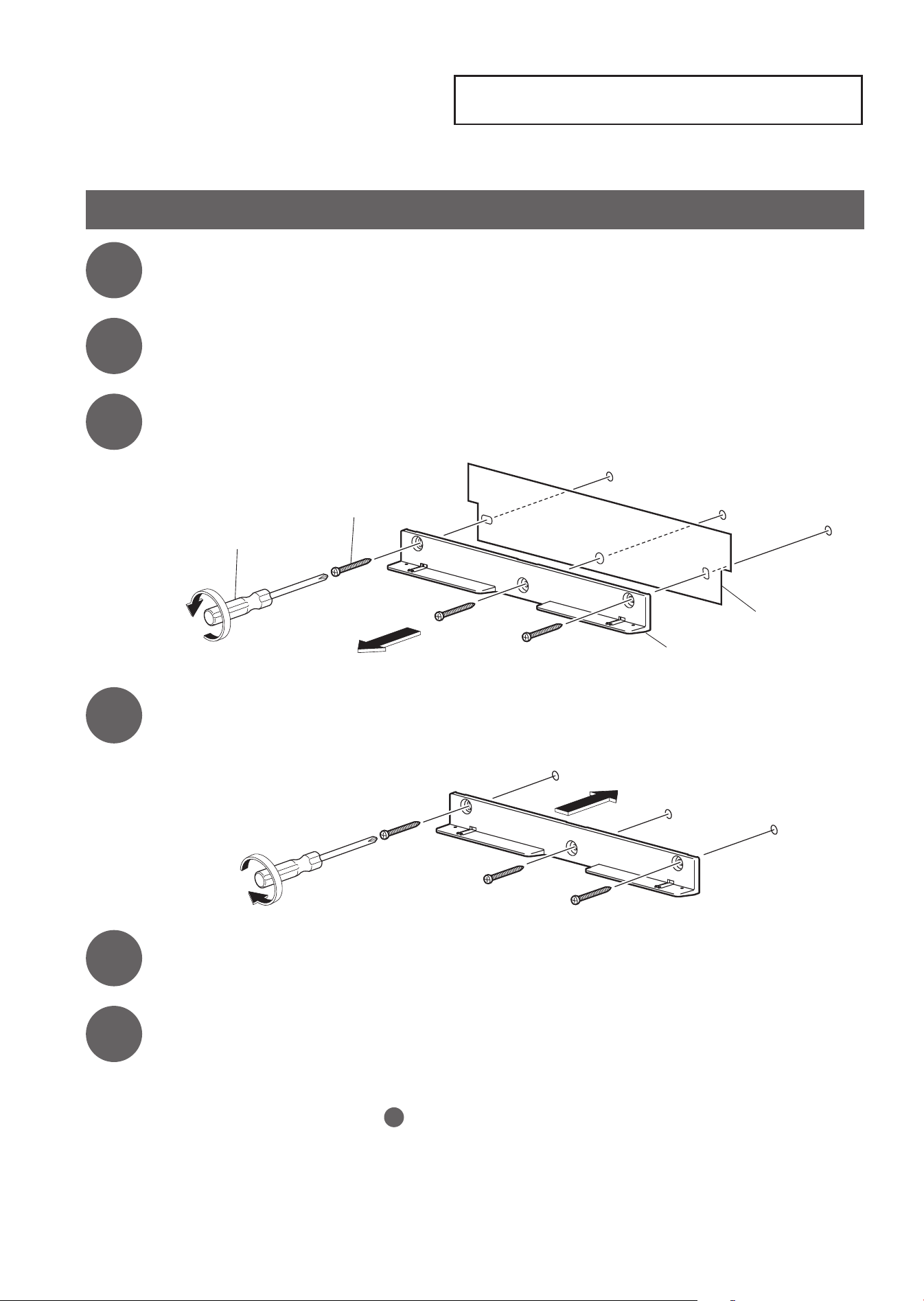
What to Do?
Removal of Operation Guide
62
How to remove the operation guide
Follow the procedure below.
1
Unplug the power plug.
2
Remove the remote control from the hanger.
(Page 16)
3
Remove the hanger and operation guide.
Hanger
Operation guide
Phillips screwdriver
Screw
4
Screw the hanger on the wall.
5
Mount the remote control in the hanger.
6
Insert the power plug.
•
The "Power" LED lights up.
n
To install back the operation guide, follow the procedure above.
(Install the operation guide at step
4
.)
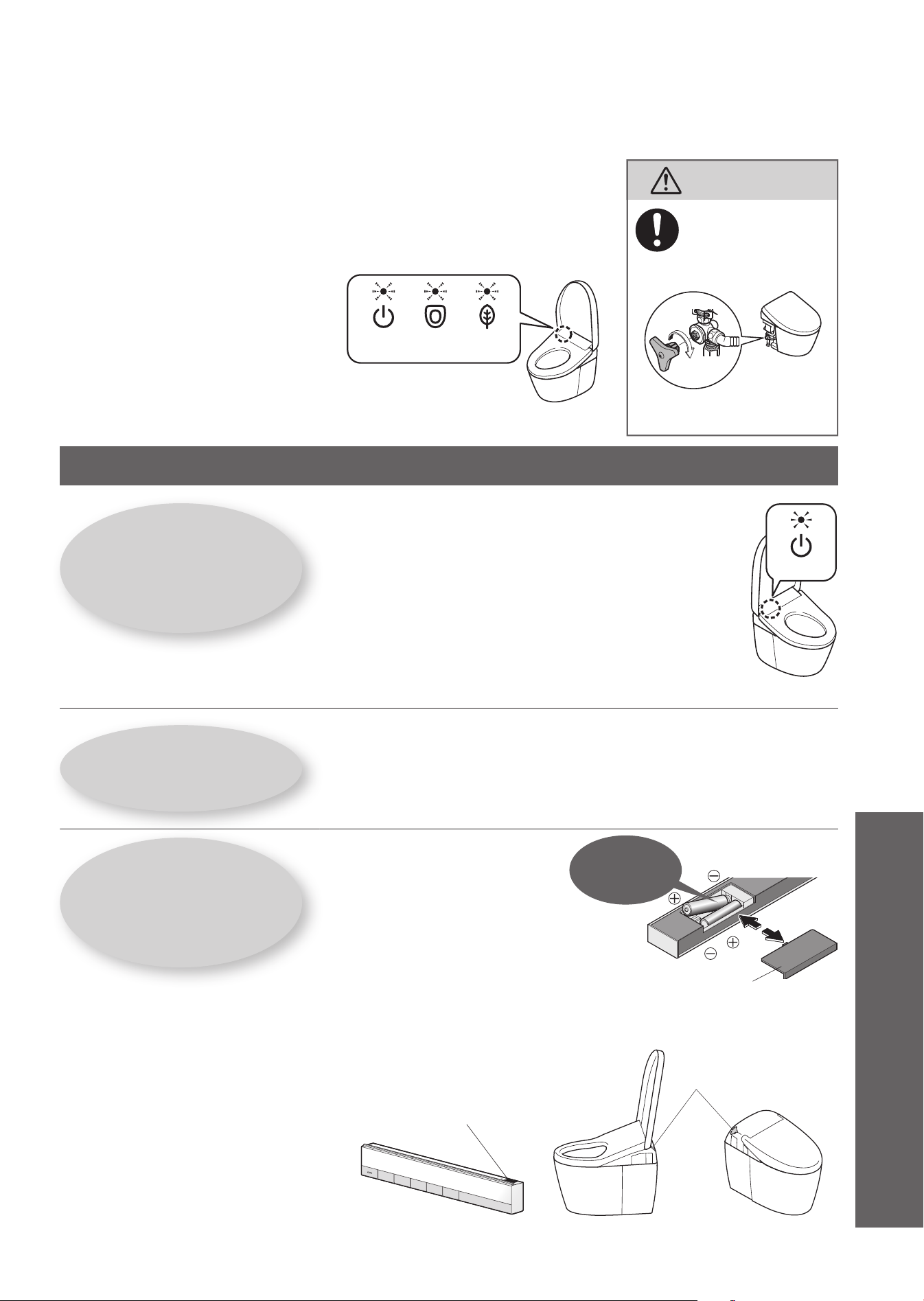
63
Is the Power LED lit?
n
Is the "Power ON/OFF" setting "OFF"?
➝
Switch it to "ON" with the remote control. (Page 17 Step
2
-
2
)
n
Is the "Power" LED on the main display
fl ashing?
➝
The "Anti freezing" is set to "ON". (Pages 54, 59)
<Power>
n
Is the breaker on the distribution board turned on?
➝
Check whether there is a power outage or the breaker has
turned "OFF".
Is the Energy saver
LED lit?
n
While the LED is lit, energy saver
(Page 28)
is in operation,
so the toilet seat temperature may be reduced or the
heater may be turned off.
Is the remote control
working?
n
Is the low battery warning
LED on the top surface
of the remote control
fl ashing?
➝
Replace the batteries. (Pages 16, 58)
n
Is the remote control transmitter
or the remote control receiver
blocked?
➝
Remove obstructions, dirt, water droplets or any other blockages.
Troubleshooting
First, try the actions described on pages 63 - 70.
If the problem persists, consult the installer, seller, or TOTO customer service (see
contact information on the back cover).
In the following case, unplug the power plug and consult with TOTO customer
service (see contact information on the back cover).
CAUTION
If a water leak
occurs, close the
shutoff valve.
Please check fi rst
"Power" LED, "Seat" LED,
and "Energy saver" LED
are fl ickering
The beep sound keeps sounding
<Seat><Power> <Energy
saver>
Remote control transmitter
Remote control
receiver
<The drawing is AH>
Battery cover
OpenOpen
The remote
control uses
batteries
to operate.
CloseClose
<The drawing is RH>
Reference
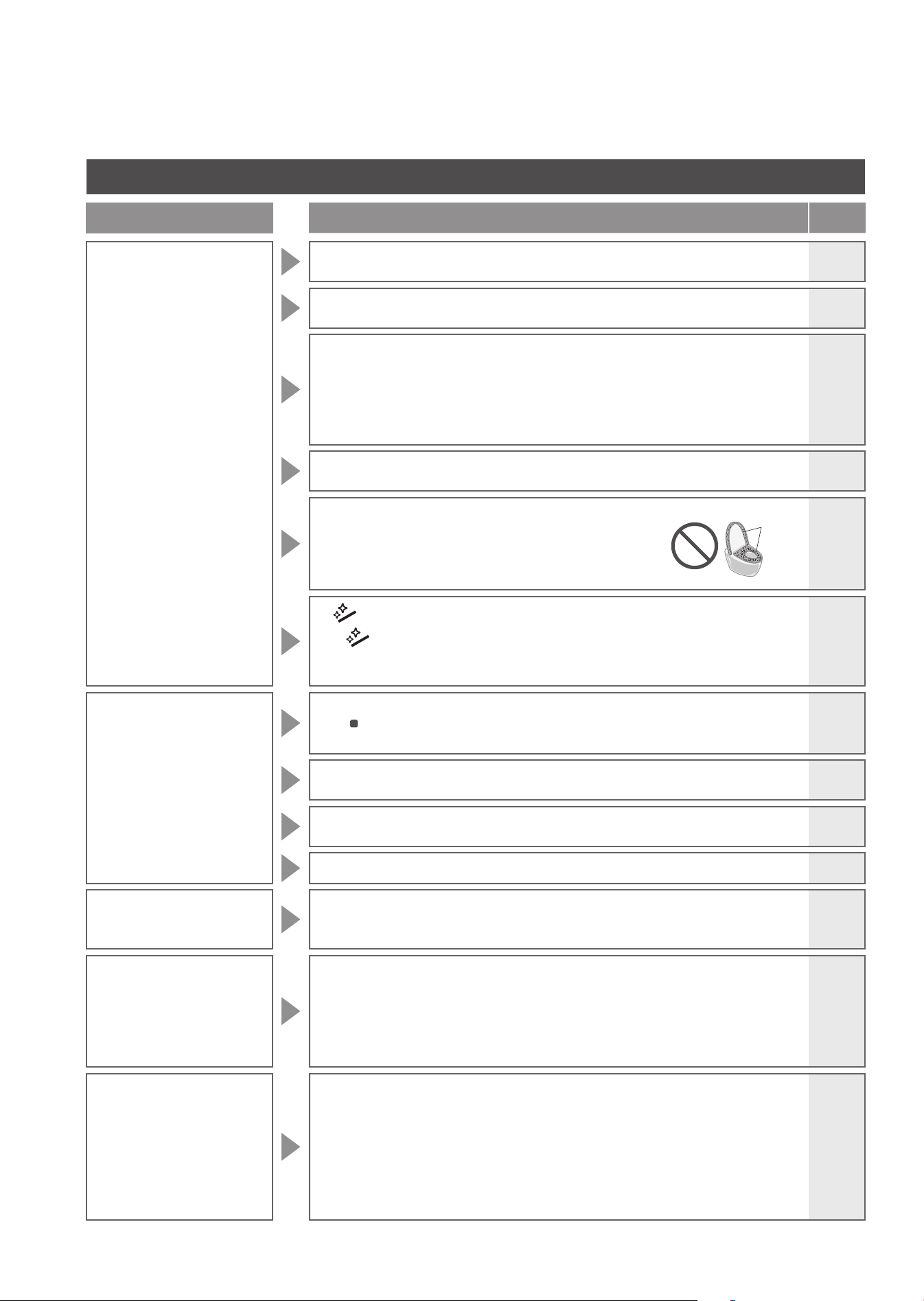
64
Rear Cleansing, Front Cleansing and Wand
Trouble
Please check
Ref.
Page
The wand
(or cleansing water)
does not come out
●
When the temperature is low, it takes time for the wand to come out after the
remote control button is pressed because the water must be warmed up fi rst.
-
●
Did you sit on the toilet continuously for 2 hours or longer? (If so, operation is
stopped for safety purposes.)
➞
Stand up from the seat and then use again.
-
●
If the water supply pressure drops signifi cantly, for example if water is used
elsewhere or if there is a water failure, the function may stop for safety.
➞
Unplug the power plug and wait about 10 seconds before inserting it again.
If the same symptom reappears.
➞
There may be a malfunction.
Consult with TOTO customer service (see contact information on the back
cover).
-
●
The seat switch will not turn on unless you sit on the seat properly.
➞
Sit back on the toilet seat.
11
●
Are you using a toilet seat cover, a toilet lid cover or a
seat for infants?
➞
Remove any covers.
When using a seat for infants or a soft highchair,
remove after each use.
11
●
Are you pressing "Wand CLEAN" button?
•
When you press "Wand CLEAN" button, "ewater+" comes out from
the vicinity of the wand to clean the wand.
➞
To clean the wand with it extended, perform "Wand cleaning".
38
The wand extends but
the cleansing water
does not come out/
The cleansing water
pressure is weak
●
Has a water failure occurred?
➞
Press "Stopping" button on the remote control and wait until water
service is restored.
-
●
Is the shutoff valve closed?
➞
Fully open the shutoff valve.
17
●
Is the water fi lter drain valve clogged with foreign matter?
➞
Clean the filter.
39
●
Is the water pressure set to a low level?
18
The cleansing water
is cold
●
Is the warm water temperature set to "OFF" or a low level?
●
When the temperature of the water supply or the bathroom is low, the water
temperature may be low when fi rst sprayed.
26
-
Stops in the
middle of use
●
"Rear cleansing", "Rear soft cleansing", "Front cleansing", and "Wide front
cleansing" stop automatically after about 5 minutes of continuous use.
●
Does the seat switch have diffi culty detecting?
➞
Sit back on the toilet seat. If you get up slightly from the seat, or sit forward
on the seat, the seating switch may temporarily stop detecting your
presence.
-
11
Water comes out
unexpectedly
from the wand
●
Is the "Power" LED (green) on the main display fl ashing?
•
The "Anti freezing (dynamic mode)" is set to "ON".
(Water comes out from near the wand at about 5 minutes intervals and the
bowl unit fl ushes at about 10 minutes intervals.)
●
When you sit on the toilet seat, water comes out for several seconds while
water is warmed up.
●
Has the CLEAN indicator lit up in a cycle?
•
"Auto wand CLEAN" starts and the wand is cleaned.
54,59
-
22
Covers
Troubleshooting
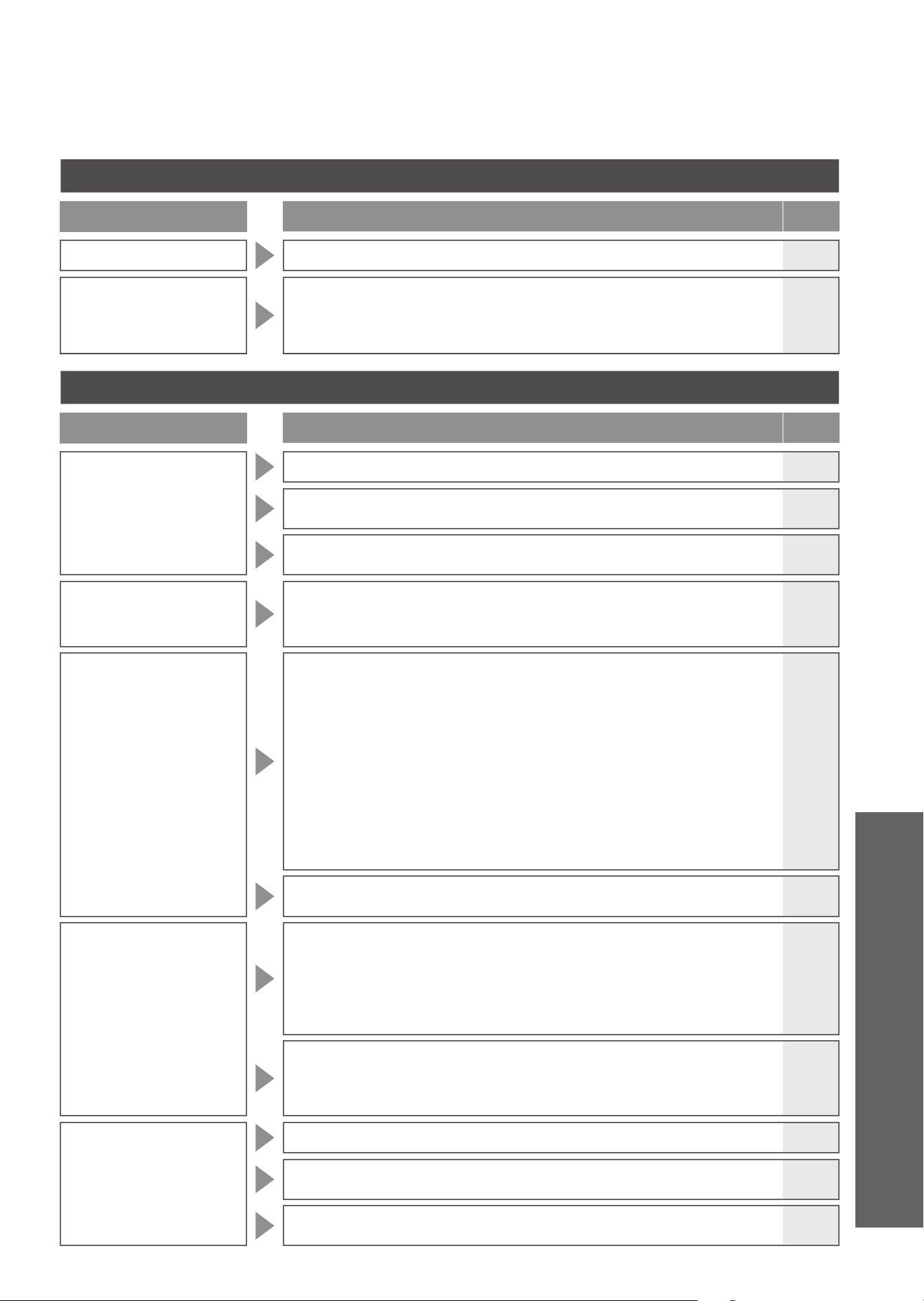
65
Warm air drying
Trouble
Please check
Ref.
Page
The dryer temperature is low
●
Is the dryer temperature set to low level?
26
Stops in the
middle of use
●
The feature stops automatically after about 10 minutes of continuous use.
●
Does the seat switch have diffi culty detecting?
➞
Sit back on the toilet seat. If you get up slightly from the seat, or sit forward
on the seat, the seating switch may temporarily stop detecting your presence.
-
11
Flushing
Trouble
Please check
Ref.
Page
For not fl ushing
●
Is the shutoff valve fully open?
17
●
Has a power outage occurred?
➞
You can flush the toilet with the hand lever (for flushing in case of power outage).
56
●
Has a water failure occurred?
➞
Use a bucket to flush water.
58
The toilet does not fl ush
even when the button of
remote control is pressed
●
Is the LEDs on the main display fl ashing?
•
The tank is fi lling with water. (This takes about 60 seconds maximum.)
-
The bowl unit does not
clean automatically or
timing is delayed
(Auto fl ushing)
●
Is "Auto fl ushing" set to "OFF"?
➞
Set to "ON".
●
Even if "Auto fl ushing" is set to "ON", it is not available in the following instances.
•
About 60 seconds after the toilet is fl ushed.
➞
Wait about 60 seconds and fl ush the toilet with the remote control.
•
When the time spent sitting on the toilet seat or standing in front of the
bowl unit is less than about 6 seconds.
➞
Flush with the remote control.
•
When staying in front of the bowl unit after standing and using the toilet.
➞
The water fl ows after a maximum of about 20 seconds from when you
leave the bathroom.
●
The seat switch will not turn on unless you sit on the seat properly.
➞
Sit back on the toilet seat.
44
19
19
-
11
●
The timing for the "Auto fl ushing" can be changed.
(After about 10 seconds
➞
after about 5 or 15 seconds)
44
The toilet fl ushes on
its own
●
Is "Auto fl ushing" set to "ON"?
➞
You can turn it "OFF".
●
Does the seat switch or the body sensor have diffi culty turning on or
detecting?
➞
Sit back on the toilet seat. If you lift your hip off the toilet seat during use
or sit forward on it, the seat switch may not turn on, and thus auto flushing
may occur during use.
44
11
●
Is the "Power" LED (green) on the main display fl ashing?
•
The "Anti freezing (dynamic mode)" is set to "ON".
(Water comes out from near the wand at about 5 minutes intervals and the
bowl unit fl ushes at about 10 minutes intervals.)
54,59
Waste material does
not fl ush down
completely
●
Is the shutoff valve fully open?
17
●
Is the water fi lter clogged?
➞
Clean the filter.
40
●
Is the water supply to the toilet disrupted by other running water fi xtures?
➞
Cease using other fixtures and then flush the toilet.
-
Reference
66
Flushing
Trouble
Please check
Ref.
Page
Waste material does
not fl ush down
completely
●
Are the fl ush and light fl ush buttons being used correctly?
•
(for solid waste) : up to 33 ft (10 m) of toilet paper (single)
•
(for liquid waste): up to 10 ft (3 m) of toilet paper (single)
19
●
Flushing may be diffi cult depending the consistency of the waste material.
➞
Flush the toilet again. If the bowl unit is not cleansed with a flushing,
remove the stains with a brush or similar instrument.
34
●
When the tank is fi lling, you cannot fl ush the toilet.
➞
Once the "Power" LED on the main display are lit and the tank fills up with water, flush the toilet.
-
A small amount of water
fl ows into the bowl unit
after the unit fl ushes
●
If the water supply pressure drops signifi cantly, for example if water is used
elsewhere or if there is a water failure, water is supplied so that the water
surface in the bowl unit rises to a certain level.
If the same symptom reappears.
➞
There may be a malfunction.
Consult with TOTO customer service (see contact information on the back cover).
-
Some barium remains
after fl ushing
●
It may be diffi cult to fl ush down substances with a higher specifi c gravity than water, such as barium.
➞
Flush the toilet again. If the bowl unit is not cleansed by flushing, remove
the stains with a brush or similar instrument.
34
There is residue on the
bowl unit surface
●
Oil and other hard-to-see grime may stick to the bowl unit surface.
➞
Clean with (non-abrasive) neutral toilet detergent.
34
Pulling the hand lever
(for fl ushing in case of
power outage) does not
fl ush the toilet
●
Pulling the hand lever does not fl ush the toilet when the power is supplied.
When testing the operation, unplug the power plug.
●
To fl ush the toilet with the hand lever, keep pulling the lever until the beep
sound is made and water supply stops.
●
You cannot fl ush the toilet for about 60 seconds after fl ushing it with the hand
lever or releasing the hand lever halfway.
➞
Wait at least about 60 seconds and then flush the toilet again.
●
If power outage lasts for a long period (2 days or more), insert batteries in the battery box.
●
If the toilet does not fl ush with batteries in the battery box, the batteries are running out.
➞
Replace them with new ones.
-
56
-
57
-
Toilet Seat and Toilet Lid (Auto open/close)
Trouble
Please check
Ref.
Page
The toilet lid does not
open automatically
●
Is "Auto open/close" set to "OFF"?
➞
Set to "ON".
●
Even when set to "ON", "Auto open/close" is not performed for about 15
seconds after the toilet seat or toilet lid is closed.
When the toilet lid is closed by hand
(To make the product more user-friendly, a time interval is set from when the
lid is closed to when it will open next.)
➞
Move away from the toilet and wait at least about 15 seconds before
approaching the bowl unit again or open and close by hand.
46
-
●
Is "Auto open delay" set to "30 seconds" or "90 seconds"?
46
●
After the power plug is inserted, the toilet lid does not open automatically for about 10 seconds.
➞
Open and close by hand.
-
●
Is a toilet lid or seat cover installed?
➞
Remove any covers.
11
●
Detection by the body sensor may be diffi cult when the toilet is used by
someone small, such as a child.
-
Troubleshooting
67
Toilet Seat and Toilet Lid (Auto open/close)
Trouble
Please check
Ref.
Page
The toilet lid does not
close automatically
●
Is "Auto open/close" set to "OFF"?
➞
Set to "ON".
●
In the following cases, the toilet lid closes in about 5 minutes.
•
When you did not sit on the toilet seat
•
When you sat on the toilet seat for less than 6 seconds
•
When you stood in front of the bowl unit for less than 6 seconds
46
-
The toilet lid opens
on its own
●
Because the body sensor can detect movement through the wall or door in
front of the toilet, the "Auto open/close" function may cause the toilet lid to
open automatically even when you are outside of the bathroom.
➞
You can also set "Auto open/close" to "OFF".
●
Is a urinal or wash basin also installed in the bathroom?
➞
The body sensor may detect someone using the urinal, causing the toilet
lid to open or close.
46
-
The toilet lid closes
on its own
●
Is "Auto open/close" set to "ON"?
➞
You can turn it "OFF".
●
Is "Auto close delay" set to "25 seconds"?
●
The seat switch will not turn on unless you sit on the seat properly.
➞
Sit back on the toilet seat.
46
46
11
The toilet lid and
toilet seat open
at the same time
●
Is "Seat/lid" set to "Seat·lid"?
46
Stops (or closes)
while opening
●
If the lid or seat hits an obstruction the fi rst time it opens after the power plug
is inserted, it may stop (or close) partway during the next operation.
➞
Eliminate any obstructions and unplug the power plug. Insert the power plug again
after about 5 seconds. Then press
"Opening and closing the toilet seat" button.
-
Cannot open or close
with the remote control
●
If it opens automatically.
➞
Check "Is the remote control working?"
●
If automatic opening does not work either
•
The toilet lid may not be mounted correctly.
➞
Mount them correctly.
●
Incorrect detection may occur when operating under fl uorescent lights.
63
37
-
Toilet Seat and Toilet Lid
Trouble
Please check
Ref.
Page
The toilet seat is cold
●
Is the toilet seat temperature set to "OFF" or a low level?
26
●
Is energy saver in operation?
•
The energy saver feature is on when the "Energy saver" LED is on and the
"Power" LED is off on the main display.
When you sit on the seat, the toilet seat heater is turned on temporarily
and the seat is warmed in about 15 minutes.
➞
You can turn it "OFF" if the energy saver feature is "ON".
28
30
●
Have you been seated for a long time?
•
After about 20 minutes of sitting, the temperature starts going down, and after about 1
hour, the toilet seat heater is turned "OFF".
➞
Stand up from the seat and then use again.
-
●
The seat switch will not turn on unless you sit on the seat properly.
➞
Sit back on the toilet seat.
11
●
Is a toilet lid or seat cover installed?
➞
Remove any covers.
11
Reference
68
Energy Saver
Trouble
Please check
Ref.
Page
The energy saver LED
does not light up
●
Did you unplug the power plug or was there a power outage?
•
The "Energy saver" LED on the main display may go off when the power is
turned on even if the energy saver feature is "ON".
(It will turn on within about 24 hours since the setting is retained.)
-
The timer energy saver
feature is not working
●
Did you replace the remote control batteries?
•
"Timer energy saver" may be canceled when the batteries are replaced.
➞
Set the timer energy saver again at the time you want to start it.
30
The auto energy
saver+ or auto energy
saver feature is not
working
●
Because the function takes several days learning the usage conditions before
starting energy saver, the amount of energy saving may be low, depending
on the frequency of use.
➞
Check the energy saver setting.
28
●
Did you replace the remote control batteries?
•
The settings may be canceled when the batteries are replaced.
➞
Set them again.
30
Deodorizer
Trouble
Please check
Ref.
Page
The deodorizer seems
to be not working
●
Is "Deodorizer" set to "OFF"?
➞
Set to "ON".
●
Even after sitting down, you do not hear operation sounds.
➞
Sit back on the toilet seat.
If you hear an operation sound from the deodorizer, but odors are not
removed.
➞
Clean the deodorizing filter.
48
-
35
A strange odor is
emitted
●
Are you using an air freshener or deodorizer that you purchased separately?
•
Doing so may reduce the effectiveness of the product's deodorizer or
cause strange odors.
➞
Remove the air freshener or deodorizer.
-
The auto power
deodorizer does not
work
●
Is "Auto power deodorizer" set to "OFF"?
➞
Set to "ON".
●
It starts about 10 seconds after you stand up from the toilet seat.
48
-
Troubleshooting
69
Sanitary
Trouble
Please check
Ref.
Page
The soft light, bowl
light and CLEAN
indicator do not
light up
●
Is the setting "OFF"?
➞
Set to "ON".
●
If the CLEAN indicator LED is not lit, it is time to replace the component that
generates "ewater+". Consult the installer, seller, or TOTO Customer Service.
(see contact information on the back cover).
50
-
Pre-mist and after-
mist do not work
●
Is "Auto bowl cleaning" set to "OFF"?
➞
Set to "ON".
●
The following functions do not work when the toilet seat is open.
•
Is "Seat/lid" of "Auto open/close" set to "Seat•lid"?
➝
You can change it to "Lid".
●
The pre-mist does not work for about 90 seconds after the after-mist has
fi nished.
48
46
-
The pre-mist sprays
out spontaneously
●
Because the body sensor can detect movement through the wall or door in
front of the toilet, the "Auto bowl CLEAN" function may cause the toilet to
pre-mist even when you are outside of the bathroom.
➞
You can also set "Auto bowl CLEAN" to "OFF".
●
If the cleansing functions (e.g.,Rear cleansing and Front cleansing) are not
used for about 8 hours, "Auto bowl CLEAN" starts and mist is sprayed inside
the bowl unit.
48
23
Others
Trouble
Please check
Ref.
Page
Water is leaking
from the plumbing
connections
●
If any nuts in a connection are loose, fi rmly tighten them with a tool such as a
monkey wrench.
➞
If the water leak does not stop, close the shutoff valve and consult with
TOTO customer service (see contact information on the back cover).
-
The display on the
remote control goes
out
●
The display goes out when no button on the remote control is pressed for
about 60 seconds or more.
-
The top unit is
unstable
●
There is clearance between the toilet seat cushion and the bowl unit for
activating the seat switch. When you sit on the toilet seat, the toilet seat
subsides slightly to activate the seat switch.
11
Water splashes up
when using the toilet
●
The water in the bowl unit that is used to mask the smell of excrement is the
cause of the splashing.
➞
Adding a layer of toilet paper on the surface of the water can slightly
dampen splashing.
-
When fl ushing, you
hear a squishing
sound underneath
the fl oor
●
There are cases when the sound is made inside the discharge pipe because
of the device to ensure water in the bowl unit after the unit fl ushes.
-
When fl ushing, you
hear a gurgling sound
●
When the toilet is fl ushed together with waste material, the sound is a result
of air, waste material and water being pulled through the system.
-
Reference
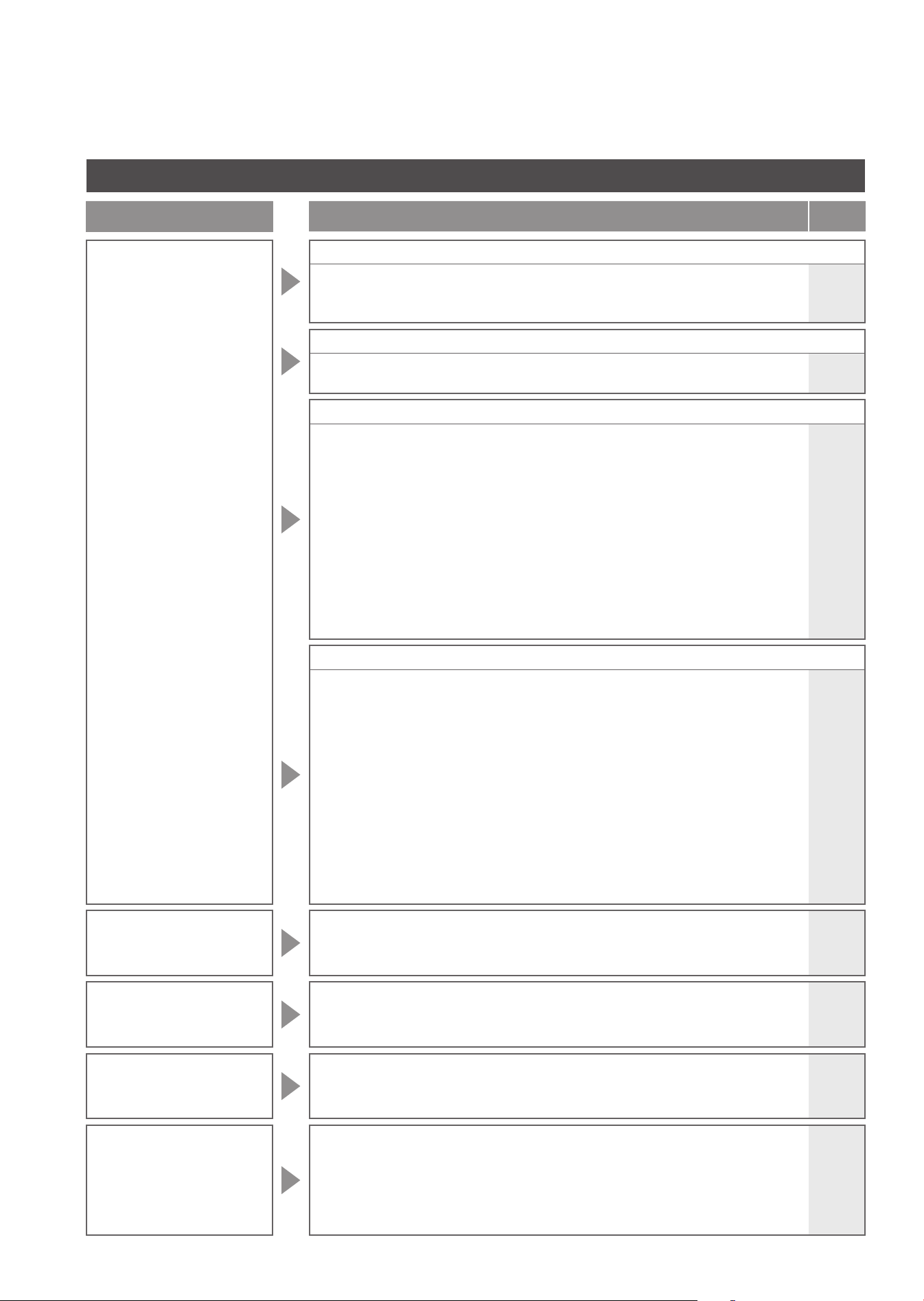
70
Others
Trouble
Please check
Ref.
Page
The top unit makes a
sound
When entering the bathroom
●
If "Auto bowl CLEAN" is "ON", you may hear that pre-mist is spraying mist in
the bowl unit to make it more diffi cult for dirt to adhere.
➞
You can turn it "OFF".
48
When using the cleansing functions (Rear cleansing, Soft rear cleansing, or Front cleansing)
●
You can hear the sound of the pump operating while cleansing water is being
supplied.
-
When moving away from the bowl unit after use
●
When "Auto power deodorizer" is "ON", operation sounds are made while the
deodorizing power increases for 60 seconds after you stand up from the toilet seat.
➞
You can turn it "OFF".
●
If "Auto wand CLEAN" is "ON" and you use the cleansing functions (e.g.,Rear
cleansing and Front cleansing), you may hear that the wand is extended and
cleaned with "ewater+".
➞
You can turn it "OFF".
●
If "Auto bowl CLEAN" is "ON" and you sit on the toilet seat and use the toilet,
you may hear that mist of "ewater+" is sprayed inside the bowl unit.
➞
You can turn it "OFF".
●
You may hear that the wand is extended and the remaining water in the product
is drained after "Auto wand CLEAN" and other functions are performed.
48
48
48
-
When not using the product (e.g., at night)
●
You may hear the following sounds if "Auto wand CLEAN" or "Auto bowl
CLEAN" is "ON" and if you do not use the cleansing functions (e.g.,Rear
cleansing and Front cleansing) for about 8 hours.
"Auto wand CLEAN" : Sound of cleaning the wand with "ewater+"
: Sound of extending the wand and draining remaining
water from the product after operation of functions
"Auto bowl CLEAN" : Sound of spraying mist of "ewater+" mist inside
the bowl unit
➞
You can turn it "OFF".
●
Because the body sensor can detect movement through the wall or door in front of
the toilet, the "Auto open/close" and "Auto bowl CLEAN" functions may cause the
toilet to pre-mist, or the lid to open, even when you are outside of the bathroom.
➞
You can also set "Auto open/close" or "Auto bowl CLEAN" to "OFF".
48
46,48
You are not sure if the
Air deodorizer has
been set or not
●
Since this product does not include the "Air deodorizer" function, it cannot be
set even if you operate the remote control.
-
There are black stain
on or around
the bowl unit
●
Ammonia in urine may cause black stains.
➞
If urine has splashed on the bowl unit or floor, wipe it immediately.
-
There is black or pink
slime on the toilet
bowl surface
●
It is a result of growth of airborne fungal spores or bacteria that feed on fi lth
on the toilet bowl.
➞
Clean with (non-abrasive) neutral toilet detergent.
-
There are water
droplets on the bowl
unit surface
●
Condensation occurs when the humidity is high, and there is a signifi cant
difference between water and room temperatures.
➞
Wipe off droplets with dry cloth.
(Condensation can build up on condensation-proof bowls when the
difference between room and water temperatures exceeds 59°F (15°C)
and the ambient humidity reaches 80%.)
-
Troubleshooting
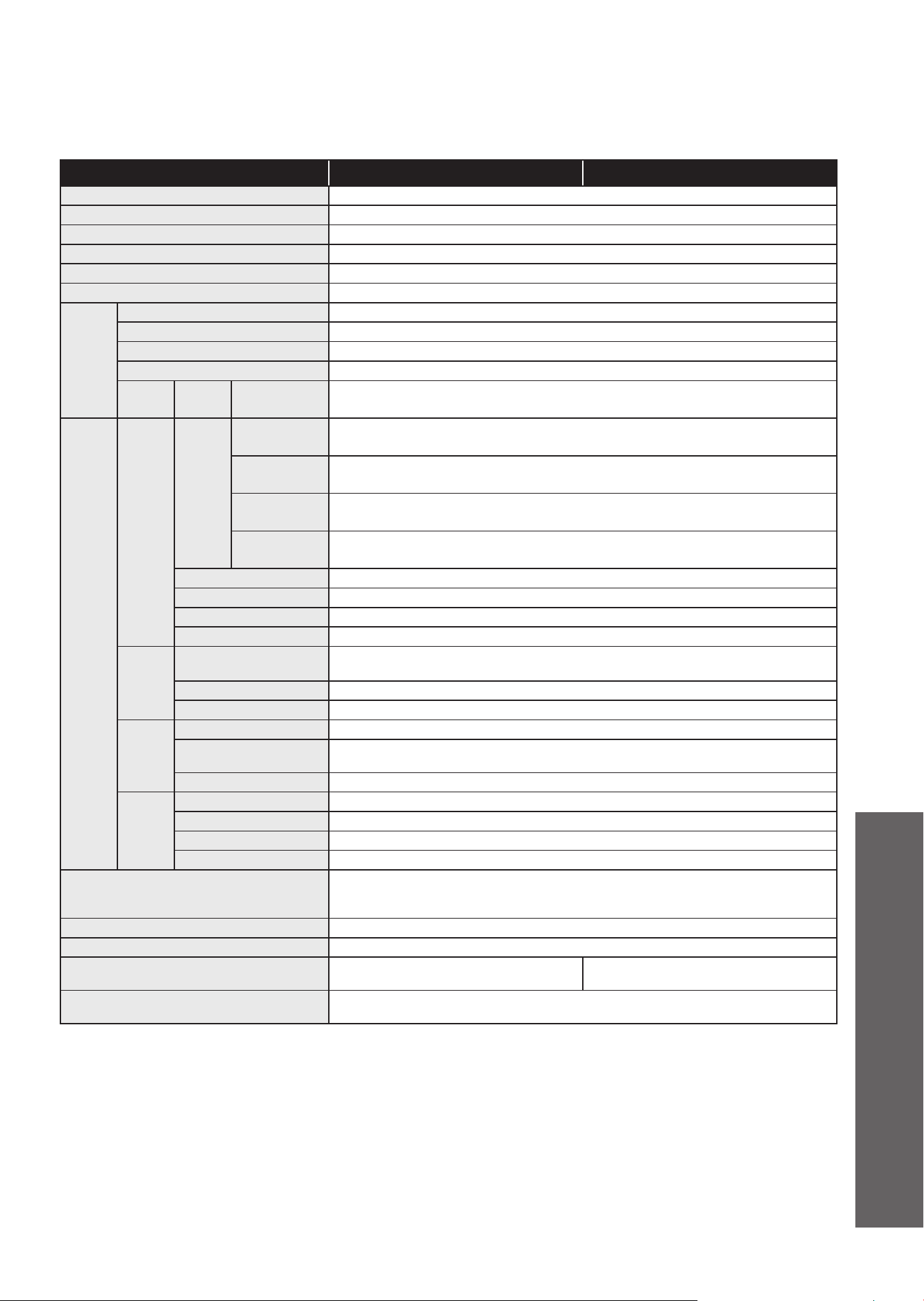
71
Item AH RH
Rated power supply AC 120 V, 60 Hz
Rated power consumption 1288 W
Maximum power consumption 1443 W
Type of water heater Instantaneous type
Power cord length 3.94 ft (1.2 m)
Water protection level IPX4
Bowl
unit
Flush volume Full 1.0 gal (4.0 L) , Light 0.8 gal (3.0 L)
Water supply system Direct supply, Pressurized supply
Flush type Cyclone fl ushing
Bowl style Elongated
Anti
freezing
Dynamic
mode
Flush volume
(dynamic)
11.4 gal/h (43 L/h)
*1
Functions
Cleansing
Spray
volume
Rear cleansing
Approx. 0.08 - 0.11 gal/min (Approx. 0.32 - 0.43 L/min)
<at 29 PSI (0.20 MPa) water pressure>
Rear soft
cleansing
Approx. 0.08 - 0.11 gal/min (Approx. 0.32 - 0.43 L/min)
<at 29 PSI (0.20 MPa) water pressure>
Front cleansing
Approx. 0.08 - 0.11 gal/min (Approx. 0.29 - 0.43 L/min)
<at 29 PSI (0.20 MPa) water pressure>
Wide front
cleansing
Approx. 0.09 - 0.11 gal/min (Approx. 0.35 - 0.43 L/min)
<at 29 PSI (0.20 MPa) water pressure>
Water temperature Adjustable temperature range: OFF, about 86 - 104°F (about 30 - 40°C)
Heater capacity 1116 W
Safety device Temperature fuse
Backfl ow prevention device
Vacuum breaker, Check valve
Heated
seat
Surface temperature
Adjustable temperature range: OFF, about 82 - 97°F (about 28 - 36°C)
(Auto energy saver: about 79°F (about 26°C) Auto energy saver+: OFF)
Heater capacity 50 W
Safety device Temperature fuse
Deodorizer
Method 0
2
deodorization
Airfl ow volume
Normal mode: Approx. 3.17 ft
3
/min (Approx. 0.09 m
3
/min),
Power mode: Approx. 5.65 ft
3
/min (Approx. 0.16 m
3
/min)
Power consumption Normal mode: Approx. 1.7 W, Power mode: Approx. 5.3 W
Warm
air dryer
Warm air temperature
*2
Adjustable temperature range: about 95 - 140°F (about 35 - 60°C)
Airfl ow volume Approx. 10.24 ft
3
/min (Approx. 0.29 m
3
/min)
Heater capacity 347 W
Safety device Temperature fuse
Water supply pressure
Minimum required water pressure: 7.25 PSI (0.05 MPa)
<Dynamic, 2.6 gal/min (10 L/min)>,
Maximum water pressure: 108.75 PSI (0.75 MPa) <Static>
Water supply temperature 32 - 95°F (0 - 35°C)
Working ambient temperature 32 - 104°F (0 - 40°C)
Dimensions
W 1.27 x D 2.27 x H 1.81 ft
(W 386 x D 691 x H 551 mm)
W 1.27 x D 2.26 x H 1.76 ft
(W 386 x D 689 x H 535 mm)
Weight
About 90 lb (about 41 kg)
<Functions about 13 lb (about 6 kg), Bowl unit about 77 lb (about 35 kg)>
Specifi cations
*1 The fl ush volume changes depending on water pressure.
*2 Temperature around the warm air outlet measured by TOTO.
l
When disposing of this product, please follow your local or state guidelines for proper disposal.
Reference

72
Limited Warranty
1. TOTO warrants its Neorest brand products to be free from defects in materials and workmanship during normal use when
properly installed and serviced, for a period of three (3) years from date of purchase. This limited warranty is extended only to
the ORIGINAL PURCHASER of the product and is not transferable to any third party, including but not limited to any
subsequent purchaser or owner of the product. This warranty applies only to TOTO product purchased and installed in USA
and Canada.
2. TOTO's obligations under this warranty are limited to repair, replacement or other appropriate adjustment, at TOTO's option,
of the product or parts found to be defective in normal use, provided that such product was properly installed, used and
serviced in accordance with instructions.
TOTO reserves the right to make such inspections as may be necessary in order to determine the cause of the defect. TOTO
will not charge for labor or parts in connection with warranty repairs or replacements. TOTO is not responsible for the cost of
removal, return and/or reinstallation of the product.
3.This warranty does not apply to the following items:
a) Damage or loss sustained in a natural calamity such as fire, earthquake, flood, thunder, electrical storm, etc.
b) Damage or loss resulting from any accident, unreasonable use, misuse, abuse, negligence, improper care, or maintenance
of the product.
c) Damage or loss resulting from sediments or foreign matter contained in a water system.
d) Damage or loss resulting from the quality of water in the region where the product is used.
e) Damage or loss resulting from improper installation or from installation of the product in a harsh and/or hazardous
environment, or improper removal, repair or modification of the product. This includes locations where the water pressure
is above local codes or standards. (NOTE : Product model codes allow a maximum of 80 PSI. Check local codes or
standards for requirements).
f) Damage or loss resulting from electrical surges or lightning strikes or other acts which are not the fault of TOTO or which
the product is not specified to tolerate, including failure to use the factory equipped cord and plug or use of a loose or faulty
electrical outlet or use of a current or socket other than a 120V, 60Hz electrical current from a GFI (ground, fused) socket.
g) Damage or loss resulting from normal and customary wear and tear, such as gloss reduction, scratching or fading over
time due to use, cleaning practices or water or atmospheric conditions, including but not limited to, the use of bleach, alkali,
acid cleaners, dry (powder) cleaners or any other abrasive cleaners or the use of metal or nylon scrubbers.
4. If the Danger Label which has been placed over the seams on the back of the product's top unit is broken or otherwise not
intact, this limited warranty is void.
5. In order for this limited warranty to be valid, proof of purchase is required. TOTO encourages warranty registration upon
purchase to create a record of product ownership at http://www.totousa.com. Product registration is completely voluntary and
failure to register will not diminish your limited warranty rights.
6. If the product is used commercially or is installed outside of USA and Canada, TOTO warrants the product to be free from
defects in materials and workmanship during normal use for one (1) year from the date of installation of the product, and all
other terms of this warranty shall be applicable except the duration of the warranty.
7. This warranty gives you specific legal rights. You may have other rights which vary from state to state, province to province or
country to country.
8. To obtain warranty repair service under this warranty, you must take the product or deliver it prepaid to a TOTO service
facility together with proof of purchase (original sales receipt) and a letter stating the problem, or contact a TOTO distributor
or products service contractor, or write directly to TOTO U.S.A., INC., 1155 Southern Road, Morrow, GA 30260 (888) 295-
8134 or (678) 466-1300, if outside the U.S.A. If, because of the size of the product or nature of the defect, the product cannot
be returned to TOTO, receipt by TOTO of written notice of the defect together with proof of purchase (original sales receipt)
shall constitute delivery. In such case, TOTO
may choose to repair the product at the purchase'r s location or pay to transport
the product to a service facility.
WARNING! TOTO shall not be responsible or liable for any failure of, or damage to, this product caused by either
chloramines in the treatment of public water supply or cleaners containing chlorine (calcium hypochlorite).
NOTE: The use of a high concentrate chlorine or chlorine related products can seriously damage the fittings. This damage
can cause leakage and serious property damage.
THIS WRITTEN WARRANTY IS THE ONLY WARRANTY MADE BY TOTO. REPAIR, REPLACEMENT OR OTHER
APPROPRIATE ADJUSTMENT AS PROVIDED UNDER THIS WARRANTY SHALL BE THE EXCLUSIVE REMEDY
AVAILABLE TO THE ORIGINAL PURCHASER. TOTO SHALL NOT BE RESPONSIBLE FOR LOSS OF THE PRODUCT OR
FOR OTHER INCIDENTAL, SPECIAL OR CONSEQUENTIAL DAMAGES OR EXPENSES INCURRED BY THE ORIGINAL
PURCHASER, OR FOR LABOR OR OTHER COSTS DUE TO INSTALLATION OR REMOVAL, OR COSTS OF REPAIRS
BY OTHERS, OR FOR ANY OTHER EXPENSE NOT SPECIFICALLY STATED ABOVE. IN NO EVENT WILL TOTO'S
RESPONSIBILITY EXCEED THE PURCHASE PRICE OF THE PRODUCT. EXCEPT TO THE EXTENT PROHIBITED BY
APPLICABLE LAW, ANY IMPLIED WARRANTIES, INCLUDING THAT OF MERCHANTABILITY OR FITNESS FOR USE OR
FOR A PARTICULAR PURPOSE, ARE EXPRESSLY DISCLAIMED. SOME STATES DO NOT ALLOW LIMITATIONS ON
HOW LONG AN IMPLIED WARRANTY LASTS, OR THE EXCLUSION OR LIMITATION OF INCIDENTAL OR
CONSEQUENTIAL DAMAGES, SO THE ABOVE LIMITATION AND EXCLUSION MAY NOT APPLY TO YOU.
Th
ree
Y
ears
Li
m
i
te
d
W
arranty

73
MEMO

74
MEMO

75
MEMO