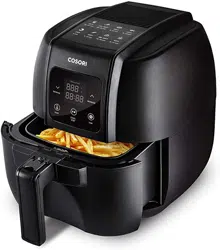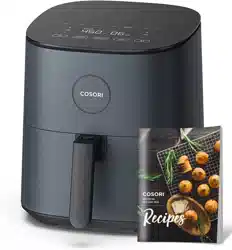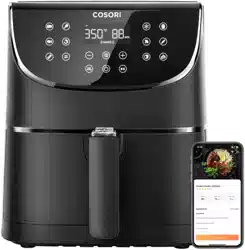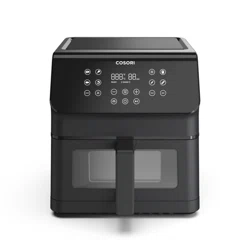
Premium II Plus 6.5-Quart Air Fryer
User Manual
Questions or Concerns?
Mon–Fri, 9:00 am–5:00 pm PST/PDT
[email protected] | 1-888-402-1684
2
(We hope you love your new air fryer as much as we do)
Our helpful, in-house chefs are ready to assist
you with any questions you might have!
On behalf of all of us at COSORI,
CONTACT OUR CHEFS
Email: [email protected]
Toll-Free: 1-888-402-1684
Mon–Fri, 9:00 am—5:00 pm PST/PDT
explore
our digital recipe gallery
cosori.com
enjoy
weekly, featured recipes
made exclusively by our in-house chefs
Thank you for
your purchase!
Happy cking!
Get Creative with COSORI
Download the free VeSync app to access original
recipes and video tutorials from the COSORI chefs,
interact with our online community, and more!
3
Table of Contents
Package Contents
Specifications
Package Contents
Specifications
Important Safeguards
Getting to Know Your Air Fryer
Display Diagram
Display Messages
Before First Use
Using Your Air Fryer
Accessories
Care & Maintenance
Troubleshooting
Warranty Information
Customer Support
3
3
4
7
8
9
10
11
18
18
19
22
25
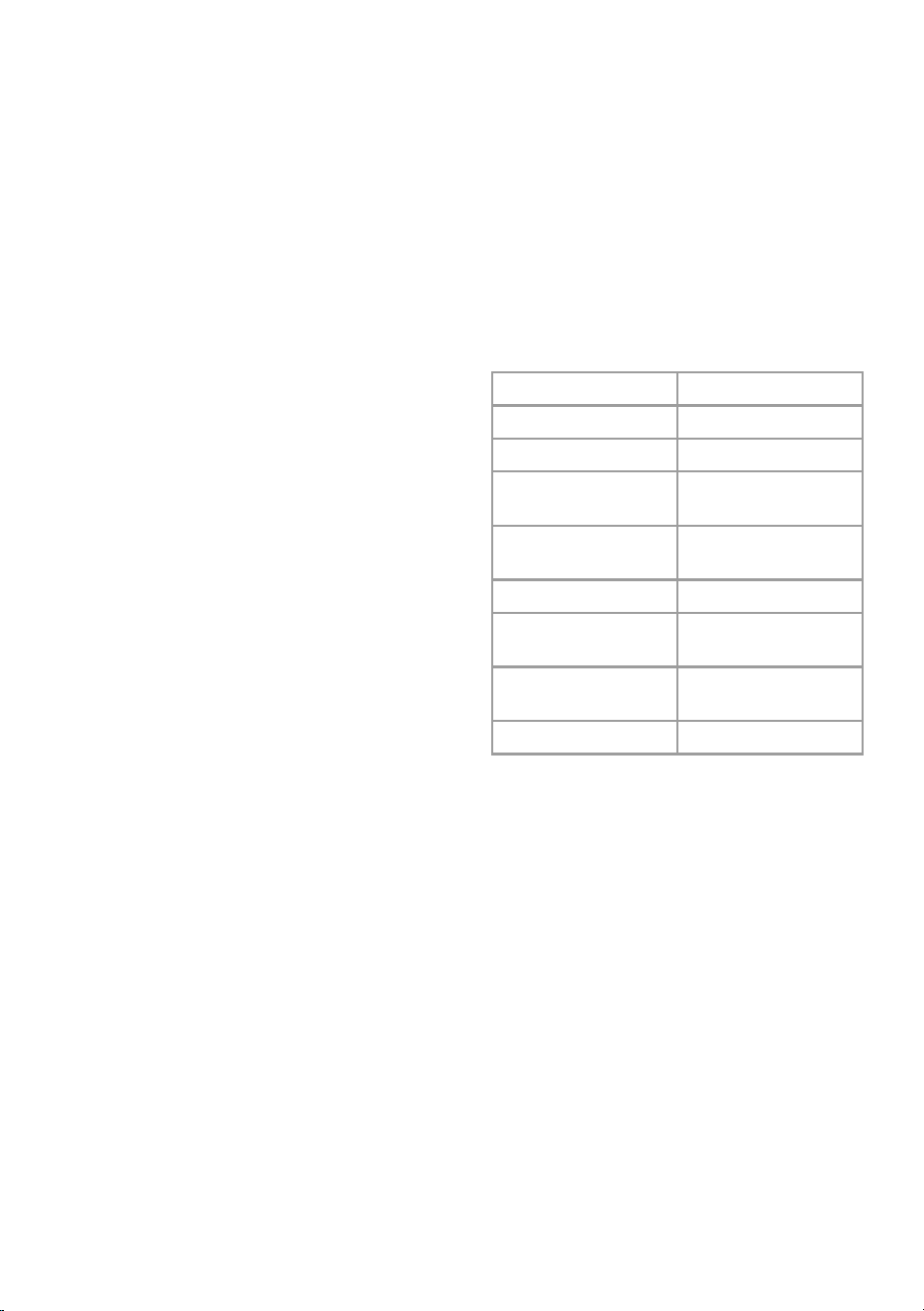
Model CAF-P652-KUS
Power Supply AC 120V, 60Hz
Rated Power 1700W
Capacity
6.5 qt / 6.2 L
(serves 3–5 people)
Temperature
Range
170°–400°F /
75°–205°C
Time Range 1–60 min
Dimensions
(including handle)
14.6 x 11.8 x 12.6 in /
37.2 x 30 x 32.1 cm
Dimensions (not
including handle)
12 x 11.8 x 12.6 in /
30.5 x 30 x 32.1 cm
Weight 12.6 lb / 5.7 kg
1
×
Premium II Plus 6.5-Quart Air Fryer
1
×
Crisper Plate
1
×
Recipe Book
1
×
User Manual
1
×
Quick Reference Guide
4
Do not touch hot surfaces.
Use handle.
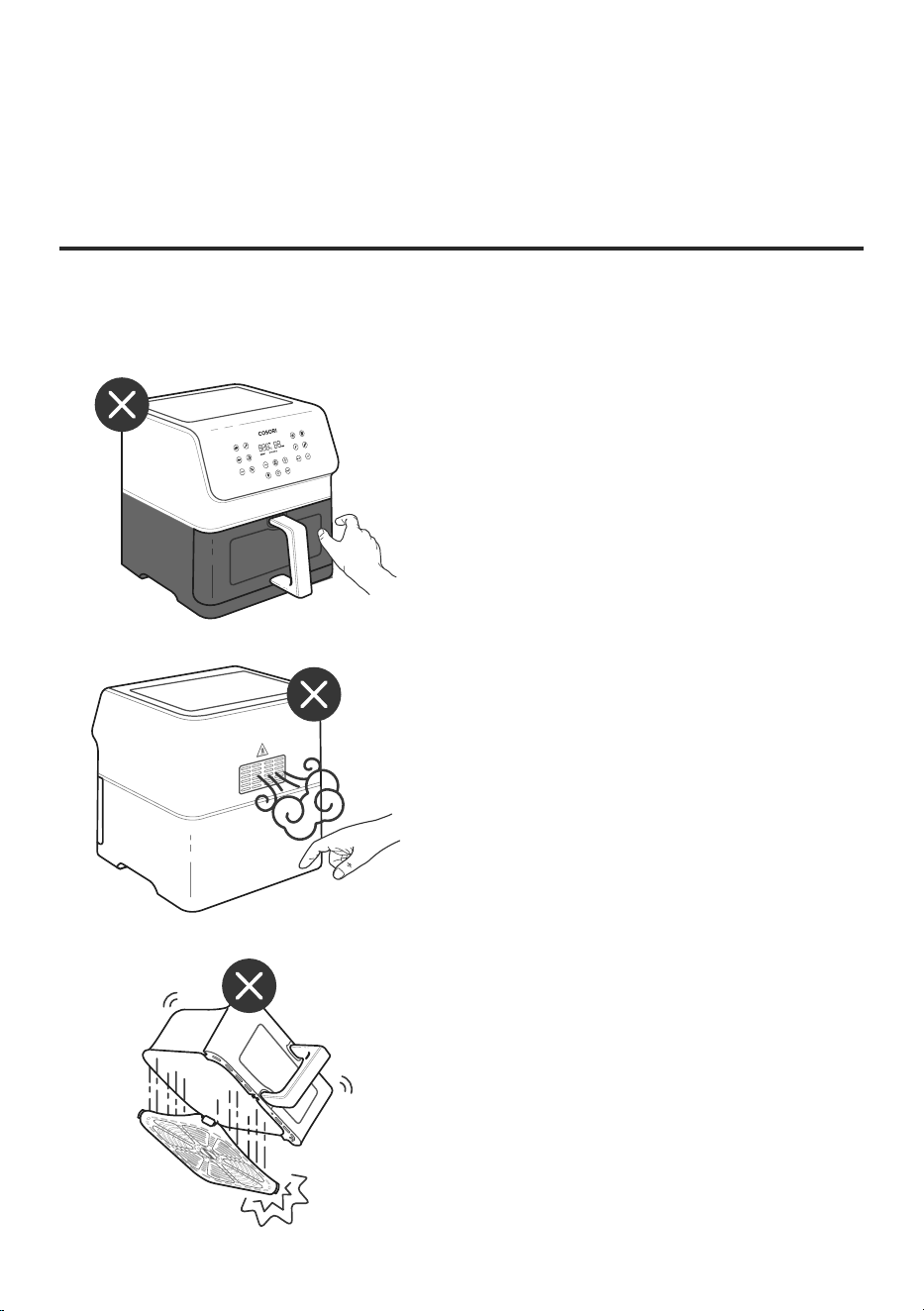
Do not block any ventilation
openings. Hot steam is released
through openings. Keep your
hands and face clear of openings.
CAUTION: The hot crisper plate may
fall out when turning the basket over.
Note:
• Firmly insert the crisper plate into
the basket to reduce the chance of it
falling out.
• Always use tongs to carefully
remove hot food.
Follow basic safety precautions when using your air fryer. Read all instructions.
IMPORTANT SAFEGUARDS
Key Safety Points
READ AND SAVE
THESE INSTRUCTIONS

5
General Safety
While Air Frying
• To protect against electric shock,
donot immerse the air fryer
housing, cord, or plug in water or
other liquids.
• Closely supervise children near your
air fryer.
• Unplug when not in use and before
cleaning. Allow to cool before putting
on or taking o parts.
• Do not use your air fryer if it is
damaged, not working, or if the
cord or plug is damaged. Any other
servicing should be performed by
an authorized service representative.
Contact Customer Support (see
page 25).
• Do not use third-party replacement
parts or accessories, as this may
cause injuries.
• Do not use outdoors.
• Do not place the air fryer or any
of its parts on a stove, near gas or
electric burners, or in a heated oven.
• Be extremely cautious when moving
your air fryer (or removing the
basket) if it contains hot oil or other
hot liquids.
• Always place the crisper plate
on a heat-resistant surface after
removing it from the basket.
• Do not clean with metal scouring
pads. Metal fragments can break o
the pad and touch electrical parts,
creating a risk of electric shock.
• Do not place anything on top of
your air fryer. Do not store any
materials, other than manufacturers
recommended accessories, in this
air fryer when not in use.
• Only use your air fryer as directed in
this manual.
• This air fryer is not to be used
by persons (including children)
with reduced physical, sensory
or mental capabilities, or lack of
experience and knowledge, unless
they have been given supervision
or instruction concerning use of the
appliance by a person responsible
for their safety.
• An air fryer works with hot air only.
Never fill the basket with oil or fat.
• Never use your air fryer without the
basket in place.
• Do not place oversized foods or
metal utensils into your air fryer.
• Do not touch the basket or crisper
plate during or immediately after air
frying.
• Do not place paper, cardboard,
non-heat-resistant plastic, or similar
materials into your air fryer. You may
use parchment paper or foil.
• Never put baking or parchment
paper into the air fryer without food
on top. Air circulation can cause
paper to lift and touch heating coils.
• Always use heat-safe containers.
Be extremely cautious if using
containers that aren’t metal or glass.
• Keep your air fryer away from
flammable materials (curtains,
tablecloths, etc.). Use on a flat, stable,
heat-resistant surface away from
heat sources or liquids.
• Immediately turn o and unplug
your air fryer if you see dark
smoke coming out. White smoke
is normal, caused by heating fat
or food splashing, but dark smoke
means that food is burning or there
is a circuit problem. Wait for smoke
to clear before pulling the basket
out. If the cause was not burnt
food, contact Customer Support
(page25).
• Do not allow children to clean or
perform maintenance on the air
fryer unless they are supervised.
• Not for commercial use. Household
use only.
• Children should be supervised to
ensure that they do not play with the
appliance.
• The appliance is not intended to be
operated by means of an external
timer or separate remote-control
system.
6
Power & Cord
Electromagnetic Fields (EMF)
Extension Cords
• A short power-supply cord is
provided to reduce the risk resulting
from becoming entangled in or
tripping over a longer cord.
• Do not let the power cord (or any
extension cord) hang over the edge
of a table or counter, or touch hot
surfaces.
• Remove and discard the plug’s
protective cover to prevent a
choking hazard.
• Keep the air fryer and its cord out of
reach of children.
• Never use an outlet below the
counter when plugging in your air
fryer.
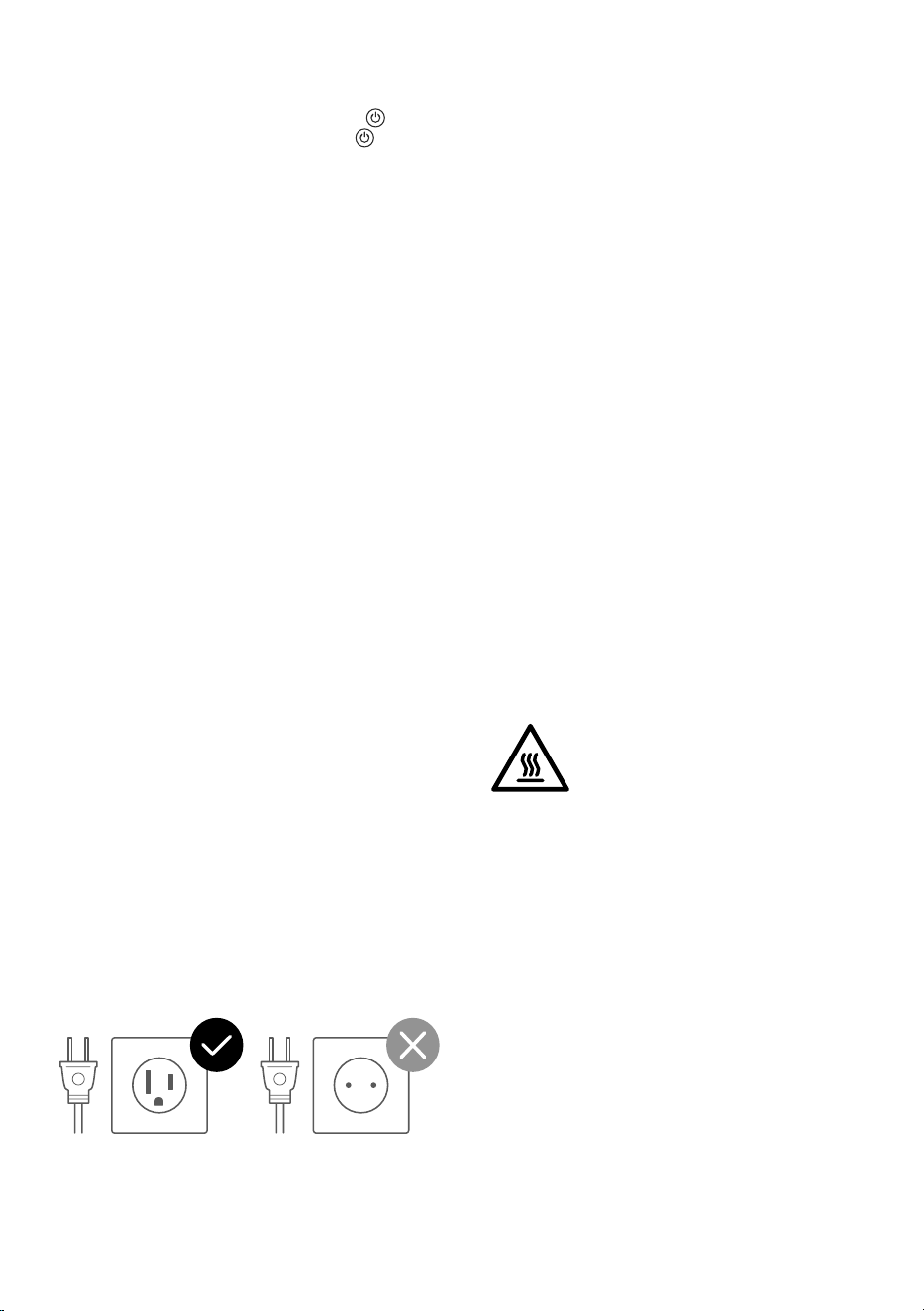
• Your air fryer has a polarized plug
(one prong is wider than the other),
which fits into a polarized outlet
only one way. If the plug does not
fit, reverse the plug. If it still does not
fit, do not use the plug in that outlet.
Donot alter the plug in any way.
• Your air fryer should only be used
with 120V, 60Hz electrical systems.
Do not plug into another type of
outlet.
• Longer extension cords are available
and may be used if care is exercised
in their use. If a longer extension
cord is used:
• The marked electrical rating of
the extension cord should be
at least as great as the electrical
rating of the air fryer.
• The cord should be arranged
so that it will not drape over the
countertop or tabletop where it
can be pulled on by children or
tripped over unintentionally.
The COSORI Air Fryer complies with all
standards regarding electromagnetic
fields (EMF). If handled properly and
according to the instructions in this
user manual, the appliance is safe
to use based on scientific evidence
available today.
220-240V120V, 60Hz
SAVE THESE INSTRUCTIONS
• Do not leave your air fryer
unattended while in use.
• To turn the air fryer o, press
once. The air fryer will beep, will
turn blue, and all other buttons will
turn o.
• To unplug, grab the plug and pull
from the outlet. Never pull from the
power cord.
CAUTION: Hot Surface
7
GETTING TO KNOW YOUR AIR FRYER
Your COSORI Air Fryer uses rapid 360° air circulation technology to cook with little to no oil for
quick, crispy, delicious food with up to 85% less oil than deep fryers. With user-friendly, one-
touch controls, a nonstick basket, and an intuitive, safe design, the COSORI Air Fryer is the star of
your kitchen.
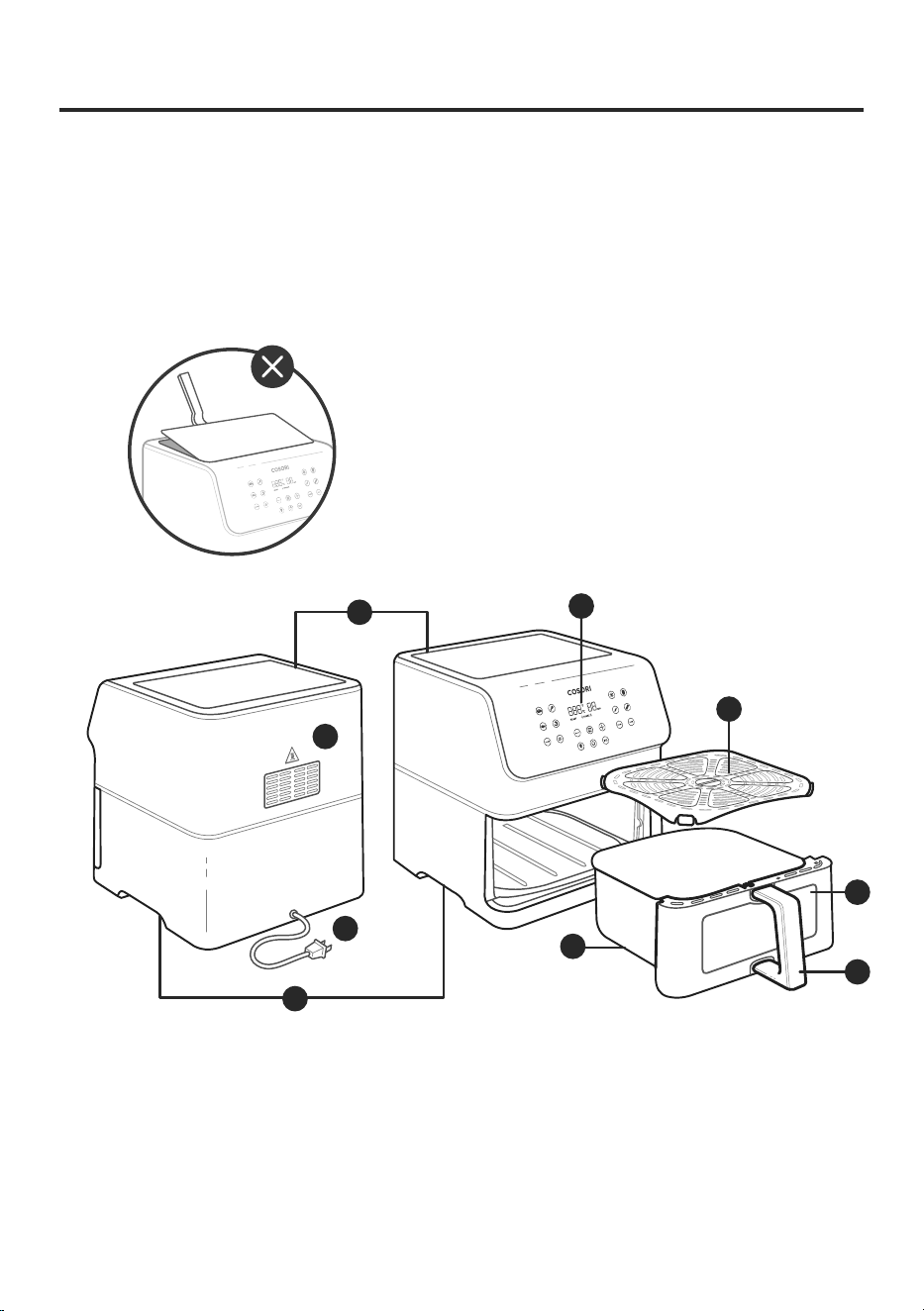
Air Fryer Diagram
Note:
• Do not try to open the top of the air fryer. This is not a lid.
• The basket and crisper plate are made with nonstick
coating. It is PFOA-free and BPA-free.
A. Air Inlet
B. Control Screen
C. Crisper Plate
D. Air Outlet
E. Power Cord
F. Housing Handles
G. Basket
H. Basket Window
I. Basket Handle
FRONT
C
H
I
G
E
D
BACK
B
A
F
8
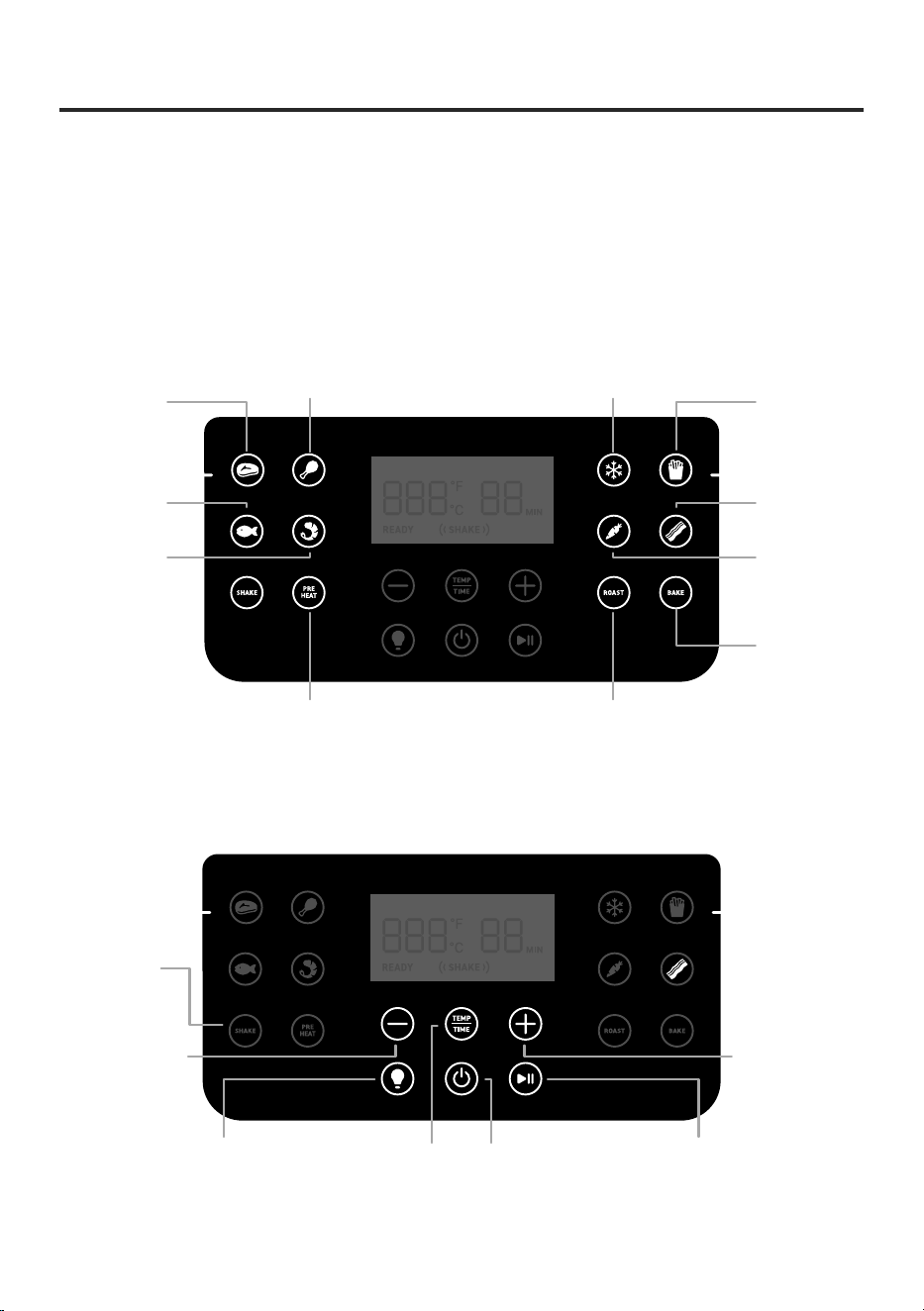
Note:
•
When you press a button to use a cooking function, it will turn blue to show
that it’s active. Pressing again will deselect the function and return to air frying
manually.
•
To save or reset cooking functions, see Cooking Function Settings (page 12).
DISPLAY DIAGRAM
Frozen Foods
Chicken
French Fries
Steak
Vegetables
Shrimp
Bacon
Seafood
RoastPreheat
Bake
Shake
Reminder
On/O
On/O
Increase
time/temperature
Start/PauseCooking Light
On/O
Decrease
time/temperature
Switch between
controlling time
and temperature
Note: Turns Preheat on/o
(while in a cooking function
or cooking manually).
Cooking Functions
Control Panel
9
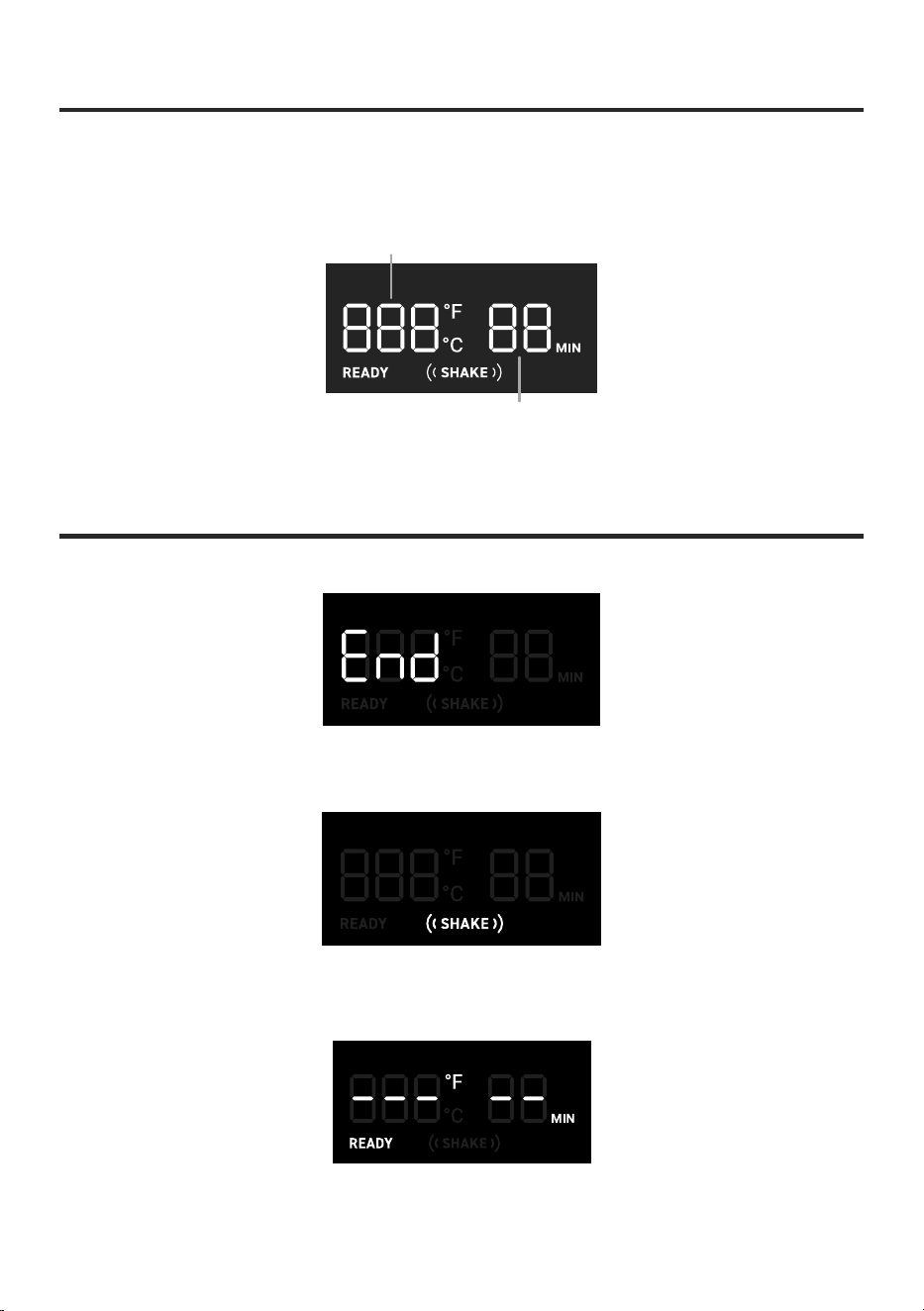
DISPLAY MESSAGES
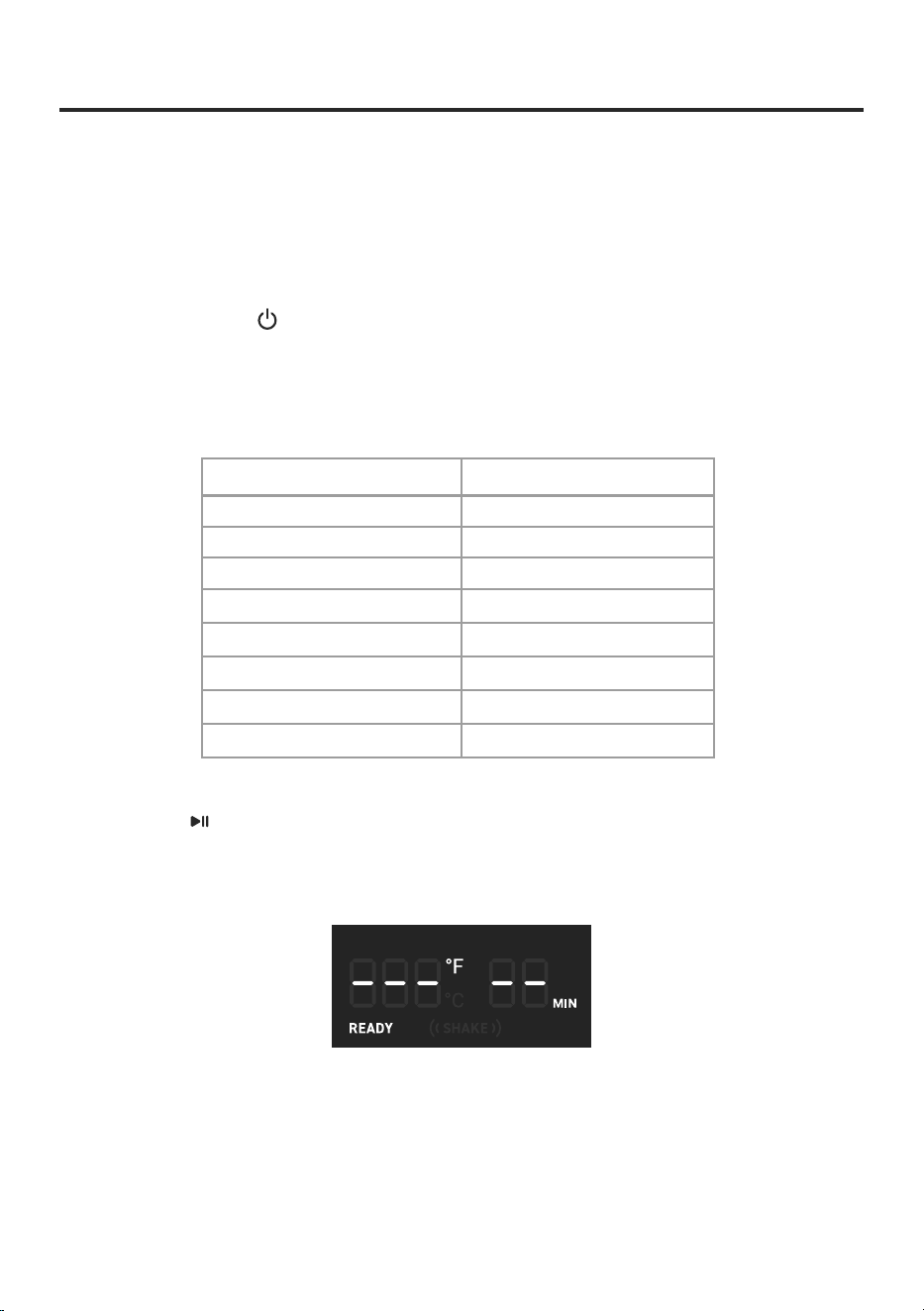
Cooking function has ended.
Reminder to shake or flip food.
Air fryer is preheated. Add food to the basket.
Cooking will start when the basket is reinserted.
DISPLAY DIAGRAM (CONT.)
Display
Time display
Temperature display
10
BEFORE FIRST USE
Setting Up
1. Remove all packaging from the air fryer,
including any temporary stickers.
2. Place the air fryer on a stable, level, heat-
resistant surface. Keep away from areas that
can be damaged by steam (such as walls or
cupboards).
3. Wash the basket and crisper plate thoroughly,
using either a dishwasher or a non-abrasive
sponge.
Note:
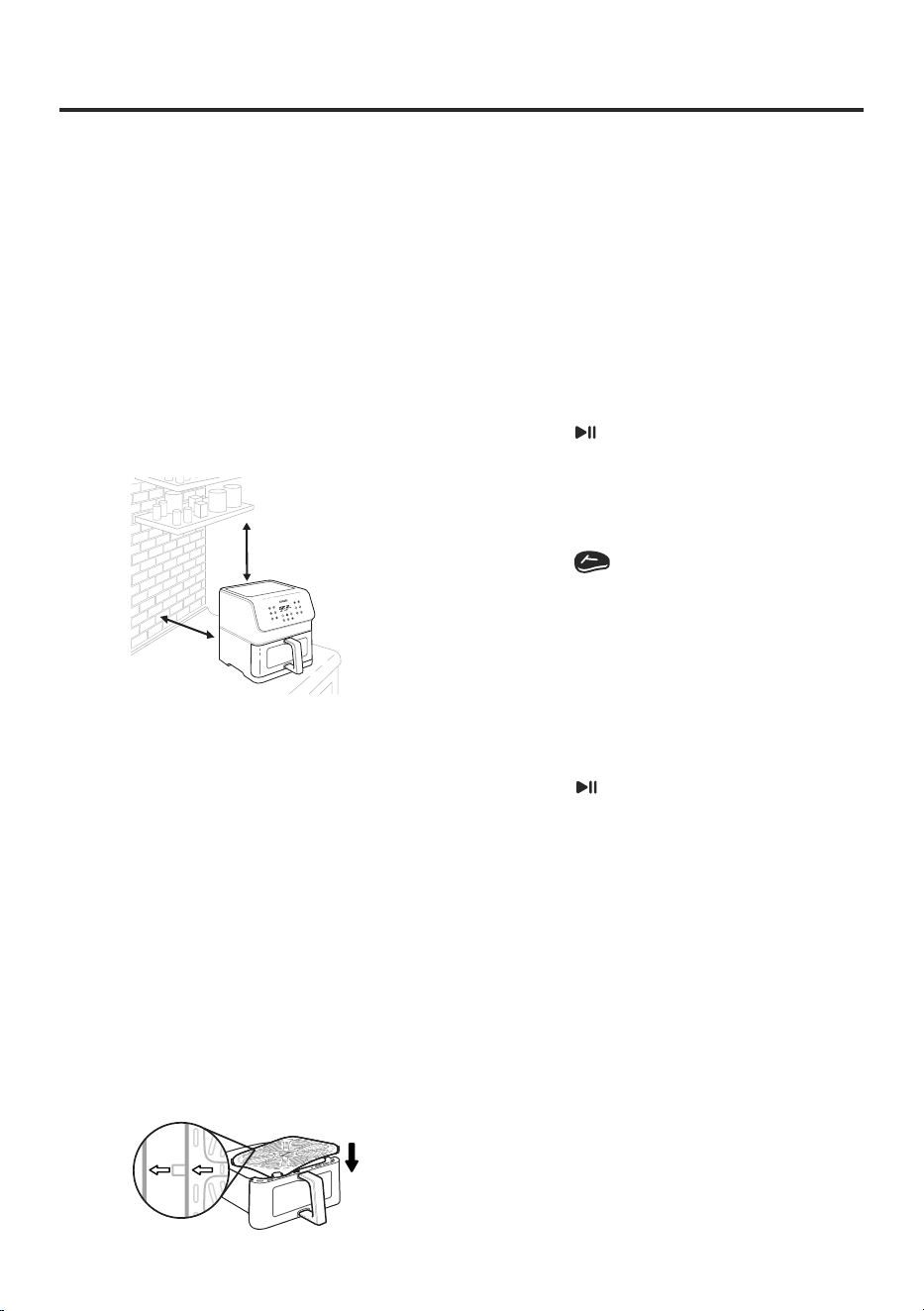
Leave 5 inches / 13 cm of space behind and
above the air fryer. [Figure 1.1] Leave enough room
in front of the air fryer to remove the basket.
Note:
There may be water spots on the basket
window after washing. This is normal. Run the air
fryer for 15 minutes to completely dry the basket.
Note:
Optionally, press SHAKE to turn o the shake
reminder and press PREHEAT to remove preheat.
Figure 1.1
Figure 1.2
5 in /
13 cm
5 in /
13 cm
Test Run
A test run will help you become familiar with your
air fryer, make sure it’s working correctly, and clean
it of possible residues in the process.
1. Make sure the air fryer basket is empty and
plug in the air fryer.
2. Press PREHEAT. The display will show “400°F”
and “5 MIN”.
3. Press to begin preheating. When
preheating is done, the air fryer will beep.
4. Pull out the basket and let it cool for 5
minutes. Then place the empty basket back in
the air fryer.
5. Press to select the Steak fuction. The
display will show “400°F” and “10MIN”.
6. Press TEMP/TIME twice. The time will blink
on the display. Press the — button once to
change the time to 5 minutes.
• Any air fryer may have a plastic smell from
the manufacturing process. This is normal.
If the plastic smell does not decrease after
a test run, contact Customer Support (see
page 25).
• Use caution when turning the basket over
after cooking, as the hot crisper plate may
fall out and create a safety hazard.
Note:
4. Wipe the inside and outside of the air fryer
with a slightly moist cloth. Dry with a towel.
5. Align the arrows on the crisper plate with the
arrows on the basket and push down firmly
to insert. Place the basket inside the air fryer.
[
Figure 1.2
]
7. Press to begin. When finished, the air fryer
will beep.
8. Pull out the basket. This time, let the
basket cool completely for 10–30 minutes.
11
USING YOUR AIR FRYER
Preheating
We recommend preheating before placing food inside the air fryer, unless your air fryer is
already hot. Food will not cook thoroughly without preheating.
1. Plug in. Press to turn on the air fryer display.
2. Press PREHEAT. The display will show “400°F” and “5 MIN”.
3. Optionally, press the + or — buttons to change the temperature. The time will
adjust automatically.
Temperature Time
400°F / 205°C 5 minutes
390°F / 200°C 5 minutes
380°F / 195°C 5 minutes
370°F / 190°C 4 minutes
360°F / 180°C 4 minutes
350°F / 175°C 4 minutes
340°F / 170°C 4 minutes
330°F / 165°C and below 3 minutes
4. Press to begin preheating.
5. When preheating is done, the air fryer will beep 3 times. The display will show the
set preheat temperature. [
Figure 2.1
]
Note:
• If no buttons are pressed for 3 minutes while in standby, the air fryer will clear all settings.
• All cooking functions (except Bacon) include Preheat. To skip the preheating stage, press PREHEAT
to remove Preheat.
Figure 2.1
12
Air Frying
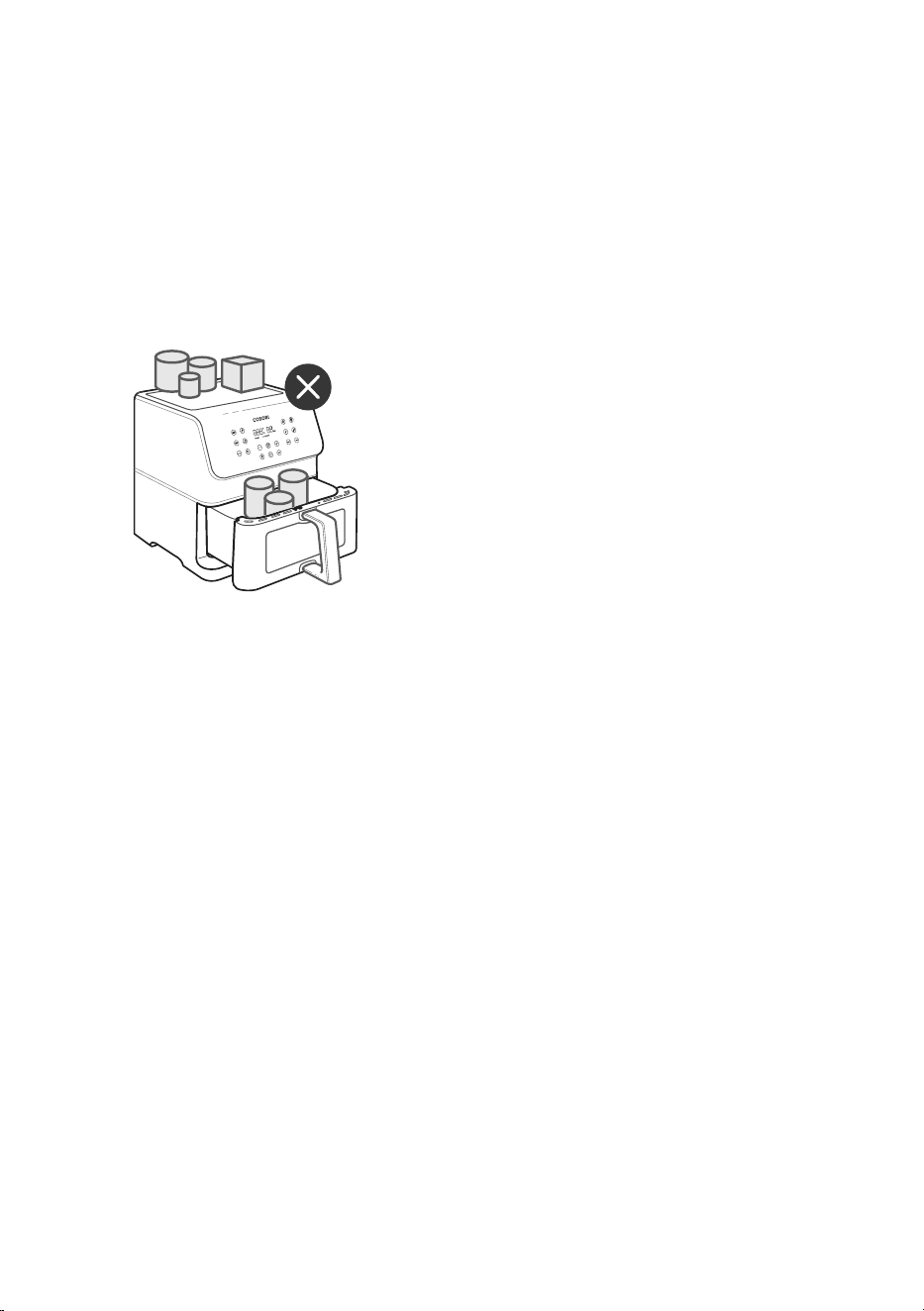
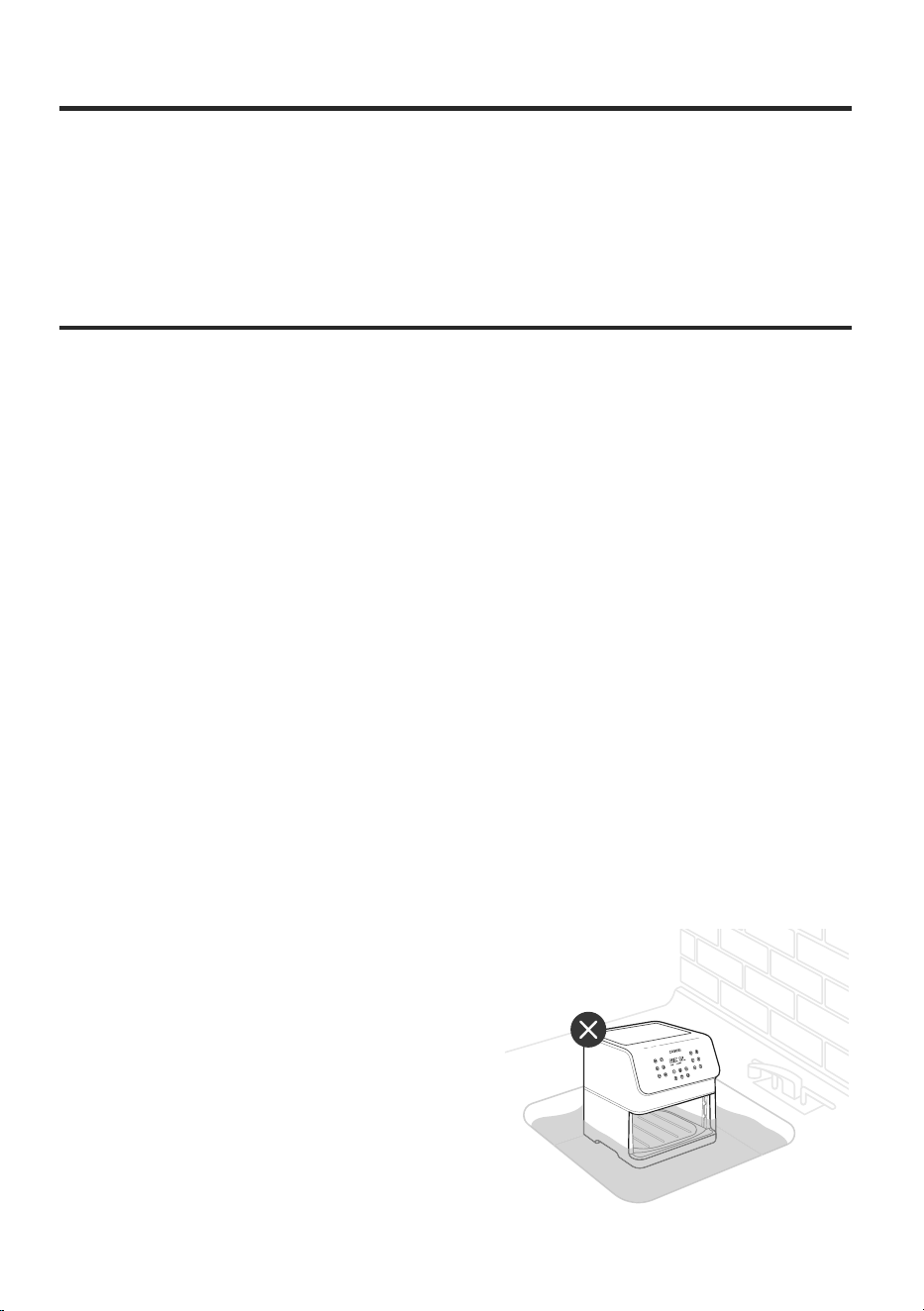
• Do not place anything on top of your air
fryer. Thiswill disrupt airflow and cause
poor air frying results. [
Figure 2.2
]
• An air fryer is not a deep fryer. Do not fill the
basket with oil, frying fat, or any liquid.
• Be careful of hot steam when taking the
basket out of the air fryer.
Figure 2.2
Note:
Using a cooking function is the easiest way
to air fry. Cooking functions are programmed
with an ideal time and temperature for
cooking certain foods.
• You can customize a function’s time
(1–60 minutes), temperature (170°–400°F
/ 75°–205°C), Preheat settings, and Shake
Reminder settings, unless noted.
• To customize a function:
1. Choose a function and adjust
the time and temperature.
Optionally, add/remove the Shake
Reminder by pressing SHAKE, and
add/remove Preheat by pressing
PREHEAT.
2. Press and hold the function icon
until the air fryer beeps 1 time.
Cooking Function Settings
Results may vary. Check out our Quick
Reference Guide and Recipe Book for a guide
to customizing functions for perfect results.
• To reset a function:
• To reset all functions:
• Without making changes, press
and hold both the function icon
and Temp/Time icon for 3 seconds
until the air fryer beeps 1 time.
• Press and hold both + and — for
3seconds until the air fryer beeps
1time.
Note: The air fryer will remember the most recent
cooking function settings the next time you turn on
the air fryer.
13
Cooking Function Settings (cont.)
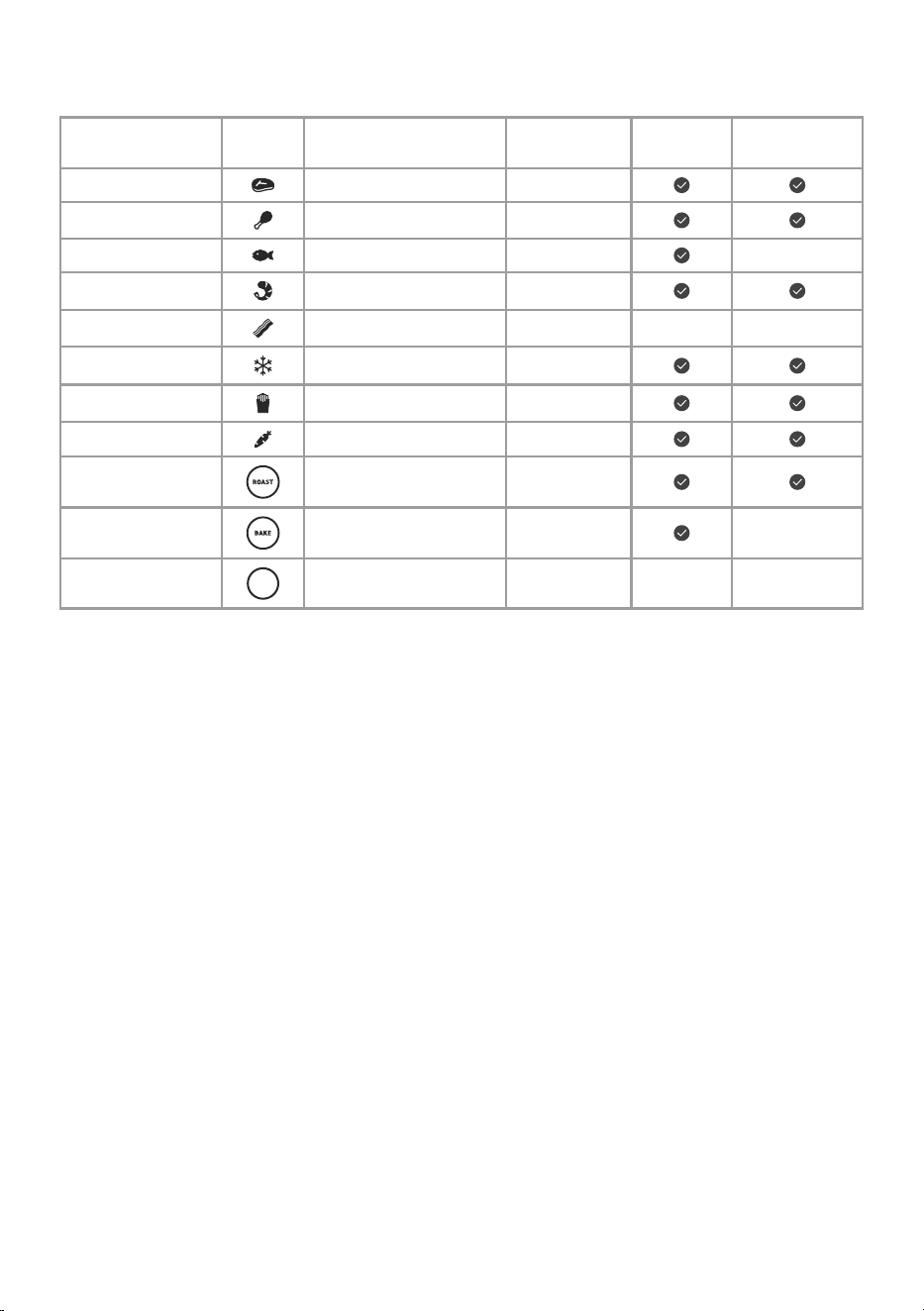
Function Symbol Default Temperature
Default Time
(Minutes)
Preheat
Shake
Reminder?*
Steak 400°F / 205°C 10
Chicken 390°F / 200°C 20
Seafood 370°F / 190°C 10
Shrimp 370°F / 190°C 6
Bacon 320°F / 160°C 8
Frozen Foods 380°F / 195°C 12
French Fries** 380°F / 195°C 18
Vegetables 400°F / 205°C 10
Roast 380°F / 195°C 15
Bake 330°F / 165°C 20
Preheat
PRE
HEAT
400°F / 205°C
5
(auto adjust)
*
See Shaking Food (page 15).
**
See Cooking Guide (page 16) for tips on air frying french fries.
Air Frying
1. Place the crisper plate into the basket.
The crisper plate allows excess oil to
drip down to the bottom of the basket.
2. Select a cooking function (see page12).
Note: Cooking functions are programmed
with an ideal time and temperature for cooking
certain foods. You can also set a custom time and
temperature without choosing a function.
Note:
• To rapidly increase or decrease time
or temperature, press and hold the +
or – buttons.
• If you do not pressTEMP/TIME, then
pressing + or – will automatically
change temperature.
Note:
• The crisper plate may not be used for all
recipes, such as for muns and breads.
• Align the arrows on the crisper plate and
basket bottom when inserting.
3. Optionally, customize the
temperature and time, turn Preheat
on/o, and add/remove a Shake
Reminder. You can do this anytime
during cooking.
a. Press TEMP/TIME to change
temperature or time. The
temperature or time will blink on
the display.
b. Press the + or – buttons to change
the temperature (170°–400°F /
75°–205°C) or time (1–60 minutes).
14
Note:
See Shaking Food (page 15).
CAUTION: The hot crisper plate may fall
out when turning the basket over.
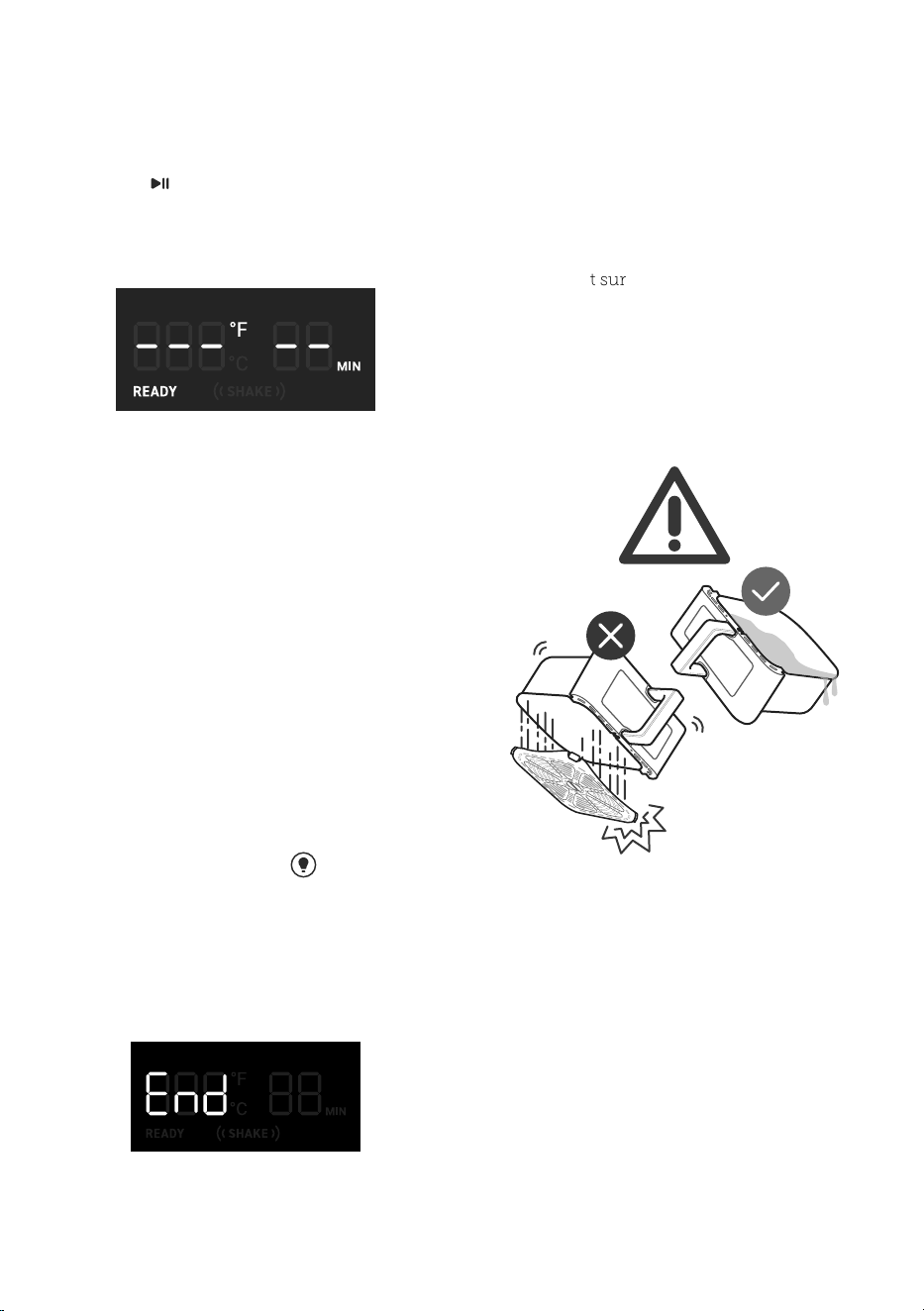
6. If the Shake Reminder is turned on, it
will appear halfway through cooking
time. The air fryer will beep 5 times, and
((SHAKE)) will blink on the display.
a. Take the basket out of the
air fryer, being careful of hot
steam. The air fryer will pause
cooking automatically, and the
display will turn o until the
basket is replaced.
b. Shake or flip the food.
c. Put the basket back into the air fryer.
9. Take the basket out of the air fryer,
being careful of hot steam.
10. Remove food from the basket.
a. Make sure the basket is resting on a
flat surface.
b. Watch for hot oil or fat collected
in the basket. To avoid splashing,
drain oil before replacing the
basket. [
Figure 2.3
]
11. Allow to cool before cleaning.
c. Press SHAKE to add/remove a
Shake Reminder.
d. Press PREHEAT to add/remove
Preheat.
4. Press to begin air frying.
5. When preheating is finished, add food
to the basket when the air fryer displays
Figure 2.3
7. During cooking, press to turn
on the cooking light and monitor
cooking status of the food. The light will
automatically turn o after 2 minutes.
8. The air fryer will beep 3 times when
finished. The display will show:

15
Shaking Food
• Small foods that are stacked will usually
need shaking, such as fries or nuggets.
• Without shaking, foods may not be
crispy or evenly cooked.
• You can flip other foods, such as steak,
to ensure even browning.
How to Shake What to Shake
• The Shake Reminder will alert you with
5 beeps, and ((SHAKE)) will blink on
the display.
• If you do not remove the baskets, the
Shake Reminder will beep again after
1 minute and the display will show a
solid ((SHAKE)).
• The Shake Reminder will go away
once you take out the basket.
Shake Reminder
• Shake or flip food once halfway through
cooking, or more if desired.
• The Shake Reminder is designed to
remind you to check on your food. Tap
SHAKE to turn on the Shake Reminder.
Certain functions use the Shake Reminder
automatically (see Cooking Function
Settings, page 13).
When to Shake
Note: Do not use this method if there is
a risk of hot liquids splashing.
• During cooking, take the basket out of the
air fryer and shake, mix, or flip the food.
• When you take the basket out, the air
fryer will pause cooking automatically.
Asa safety feature, the display will turn
o until the basket is replaced.
• When you replace the basket, cooking
will automatically resume.
• Avoid shaking longer than 30 seconds, as
the air fryer may start to cool down.
a. To shake food:
• Hold the basket handle just
above a heat-resistant surface
for safety purposes. Shake the
basket.
1. Place the basket on a heat-
resistant holder or surface.
2. Carefully shake the basket.
1. Place the basket on a heat-
resistant holder or surface.
2. Use tongs to mix or flip the food.
b. If the basket is too heavy to shake:
c. If the basket is too heavy to shake
and there are hot liquids present:

16
• You can air fry any frozen foods or
goods that can be baked in an oven.
• To make cakes, hand pies, or any food
with filling or batter, place food in a
heat-safe container before placing in
the basket.
• Air frying high-fat foods will cause fat
to drip to the bottom of the basket. To
avoid excess smoke while cooking, pour
out fat drippings after cooking.
• Liquid-marinated foods create splatter
and excess smoke. Pat these foods dry
before air frying.
Note:
For more from the COSORI Kitchen, check
out our Recipe Book and Tips from the Chef.
Food Tips
• Add ½–1 US tbsp / 8–15 mL oil for
crispiness.
• When making fries from raw potatoes,
soak uncooked fries in water for 15
minutes to remove starch prior to frying.
Pat dry with a towel before adding oil.
• Cut uncooked fries smaller for crispier
results. Try cutting fries into ¼- by
3-inch / 0.6- by 7.6-cm strips.
French Fries
Cooking Guide
• If the basket is overfilled, food will
cook unevenly.
• Do not pack in food.
• Adding a small amount of oil to your
food will make it crispier. Use no more
than 2 US tbsp / 30 mL of oil.
• Oil sprays are excellent for applying small
amounts of oil evenly to all food items.
Overfilling
Using Oil

17
More Functions
• Press and hold TEMP/TIME for 3seconds.
• The air fryer will beep once, and the
temperature unit will change from
Fahrenheit to Celsius.
• Repeat to switch back to Fahrenheit.
• Press and hold BAKE and SHAKE at the
same time for 3 seconds until the air
fryer beeps once to turn o the sound.
Repeat to turn the sound back on..
• Press to pause cooking. The air fryer
will stop heating, and will blink until
you press to resume cooking.
• After 30 minutes of inactivity, the air fryer
will turn o.
• This allows you to pause the cooking
function without removing the basket
from the air fryer.
• If you pull out the basket, the air fryer will
pause cooking automatically. The display
will turn o temporarily as a safety
feature.
• When you return the basket, the air fryer
will automatically resume cooking based
on your previous settings.
• Press to turn the cooking light on/o.
• View the food cooking through the clear
basket window without removing the
basket from the air fryer.
• If the air fryer has no active cooking
functions, the air fryer will clear all
settings and turn o after 3 minutes of
inactivity.
• If the air fryer overheats, it will
automatically shut down as a
safety feature.
• Let the air fryer cool down
completely before using it again.
Switching Temperature Units
Turn Sound On/Off
Pausing
Automatically Resume Cooking
Monitor Cooking Status
Automatic Shutoff
Overheat Protection
Note:
• The cooking light will automatically turn o
after 2 minutes.
• When the air fryer is cooking and you reinsert
the basket or press , the cooking light will
turn o after 30 seconds.
18
ACCESSORIES
Additional and replacement accessories are available for your air fryer. For more information,
contact Customer Support Customer Support (see page 25).
Note: Make sure the heating coil is completely dry
before turning on the air fryer.
CARE & MAINTENANCE
1. Turn o and unplug the air fryer. Allow
it to cool completely before cleaning.
Pull out the basket for faster cooling.
2. Wipe the outside of the air fryer with a
moist cloth, if necessary.
3. The basket and crisper plate are
dishwasher-safe. You can also wash
them with hot, soapy water and a non-
abrasive sponge. Soak if necessary.
4. For stubborn grease:
a. In a small bowl, mix 2 US tbsp/
30mL of baking soda and
1UStbsp / 15 mL of water to
form a spreadable paste.
b. Use a sponge to spread the
paste on the baskets and
scrub. Let the baskets sit for
15minutes before rinsing.
c. Wash basket with soap and
water before using.
5. Clean the inside of the air fryer with a
slightly moist, non-abrasive sponge
or cloth. Do not immerse in water.
[
Figure 3.1
] If needed, clean the
heating coil to remove food debris.
6. Dry before using.
Note:
•
Always clean the air fryer basket and interior
after every use.
•
Lining the basket with foil (except the crisper
plate) may make cleanup easier.
Note:
•
The basket and crisper plate have a nonstick
coating. Avoid using metal utensils and
abrasive cleaning materials.
•
There may be water spots on the basket
window after washing. This is normal.
Runthe air fryer for 15 minutes to completely
dry the basket.
Figure 3.1
19
TROUBLESHOOTING
Problem Possible Solution
The air fryer will not turn
on.
Make sure the air fryer is plugged in.
Push the basket securely into the air fryer.
Food is not completely
cooked.
Place smaller batches of food items into the basket. If the
basket is overstued, then foods will be undercooked.
Increase cooking temperature or time.
Food is cooked unevenly.
Foods that are stacked on top of each other or close to
each other need to be shaken or flipped during cooking
(see Shaking Food, page 15).
Food is not crispy after air
frying.
Spraying or brushing a small amount of oil on foods can
increase crispiness (see Cooking Guide, page 16).
French fries are not cooked
correctly.
See French Fries, page 16.
Basket will not slide into the
air fryer securely.
Make sure the basket is not overfilled with food.
Make sure the crisper plate is securely inside the
basket.
Basket window is dirty or
foggy.
Wash the basket in the dishwasher. Make sure it is dried
thoroughly.
Dark smoke is coming out
of the air fryer.
Immediately unplug your air fryer. Dark smoke
means that food is burning or there is a circuit
problem. Wait for smoke to clear before pulling the
baskets out. If the cause was not burnt food, contact
Customer Support (see page 25).
20
Problem Possible Solution
White smoke or steam is
coming out of the air fryer.
The air fryer may produce some white smoke or steam
when you use it for the first time or during cooking. This
is normal.
Make sure the basket and the inside of the air fryer are
cleaned properly and not greasy.
Cooking greasy foods will cause oil to collect beneath
the crisper plate. This oil will produce white smoke, and
the basket may be hotter than usual. This is normal, and
should not aect cooking. Handle basket with care.
The air fryer has a plastic
smell.
Any air fryer may have a plastic smell from the
manufacturing process. This is normal. Follow the
instructions for a Test Run (page 10) to get rid of
the plastic smell. If a plastic smell is still present, please
contact Customer Support (see page 25).
Display shows Error Code
“E1”.
There is an open circuit in the temperature monitor.
Contact Customer Support (see page 25).
Display shows Error Code
“E2”.
There is a short circuit in the temperature monitor.
Contact Customer Support (see page 25).
Display shows Error Code
“E3”.
The air fryer’s overheat protection has activated. Turn o
and unplug the air fryer and allow it to cool completely.
If the display continues to show “E3”, contact Customer
Support (see page 25).
Display shows Error Code
“E4”.
The air fryer has been plugged into a 220–240V
outlet. Unplug the air fryer. Only use the air fryer with
120V, 60Hz outlets.
If your problem is not listed, please contact Customer Support (see page 25).
TROUBLESHOOTING (CONT.)

21
FEDERAL COMMUNICATION
COMMISSION INTERFERENCE
STATEMENT - PART 15
This device complies with Part 15 of the FCC Rules. Operation is subject to the following two
conditions:
(1) This device may not cause harmful interference, and
(2) This device must accept any interference received, including interference that may cause
undesired operation.
NOTE: This equipment has been tested and found to comply with the limits for a Class B digital
device, pursuant to Part 15 of the FCC Rules. These limits are designed to provide reasonable
protection against harmful interference in a residential installation. This equipment generates,
uses and can radiate radio frequency energy and, if not installed and used in accordance with
the instructions, may cause harmful interference to radio communications. However, there is no
guarantee that interference will not occur in a particular installation. If this equipment does cause
harmful interference to radio or television reception, which can be determined by turning the
equipment o and on, the user is encouraged to try to correct the interference by one or more of
the following measures: :
• Reorient or relocate the receiving antenna.
• Increase the separation between the equipment and receiver.
• Connect the equipment into an outlet on a circuit dierent from that to which the
receiver is connected.
• Consult the dealer or an experienced radio/TV technician for help.
FCC Caution: Any changes or modifications not expressly approved by the party responsible for
compliance could void the user’s authority to operate this equipment.
FCC SUPPLIER’S DECLARATION OF CONFORMITY (SDOC)
Arovast Corporation hereby declares that this equipment is in compliance with FCC
requirements. The declaration of conformity may be consulted in the support section of our
website, accessible from www.cosori.com

22
WARRANTY INFORMATION
Product Name
Premium II Plus
6.5-Quart Air Fryer
Model CAF-P652-KUS
For your own reference, we strongly recommend
that you record your order ID and date of purchase.
Date of Purchase
Order ID
TERMS & POLICY
COSORI Limited Product Warranty
Register your products at https://warranty.
cosori.com/warranty to stay up to date with
important product information such as
product updates, limited warranties, usage
and maintenance recommendations, and
notifications concerning safety warnings or
product recalls. Registration is not required
to claim your limited warranty.
Two (2) Year Limited Consumer Product
Warranty
Arovast Corporation (“Arovast”) warrants
that the product shall be free from
defects in material and workmanship
for a period of 2years from the date of
original purchase (“Limited Warranty
Period”), provided the product was used in
accordance with its use and care instructions
(e.g. in the intended environment and under
normal circumstances).
Your Limited Warranty Benefits
During the Limited Warranty Period and
subject to this limited Warranty Policy,
Arovast will, in its sole and exclusive
discretion, either (i) refund the purchase
price if the purchase was made directly
from the online COSORI store, (ii) repair
any defects in material or workmanship, (iii)
replace the product with another product of
equal or greater value, or (iv) provide store
credit in the amount of the purchase price.
Who Is Covered?
This limited warranty extends only to the
original consumer purchaser of the product
and is not transferable to any subsequent
owner of the product, regardless of
whether the product transferred ownership
during the specified term of the limited
warranty. The original consumer purchaser
must provide verification of the defect
or malfunction and proof of the date of
purchase to claim the Limited Warranty
Benefits.
Be Aware of Unauthorized Dealers or
Sellers
This limited warranty does not extend to
products purchased from unauthorized
dealers or sellers. Arovast’s limited warranty
only extends to products purchased from
authorized dealers or sellers that are subject
to Arovast’s quality controls and have agreed
to follow its quality controls. Please be aware,
products purchased from an unauthorized
website or dealer may be counterfeit, used,
defective, or may not be designed for use
in your country. You can protect yourself
and your products by making sure you only
purchase from Arovast or its authorized
dealers.
If you have any questions about a
specific seller, or if you think you may
have purchased your product from an
unauthorized seller, please contact our
Customer Support via [email protected].
What’s Not Covered?
• Normal wear and tear, including parts
that might wear out over time (e.g.
batteries, filters, cleaning brush, essential
oil pads, etc.).
• If the proof-of-purchase has been altered
in any way or is made illegible.
• If the model number, serial number or
production date code on the product has
been altered, removed or made illegible.
• If the product has been modified from its
original condition.

23
• If the product has not been used
in accordance with directions and
instructions in the user manual.
• Damages caused by connecting
peripherals, additional equipment
or accessories other than those
recommended in the user manual.
• Damages or defects caused by accident,
abuse, misuse, or improper or inadequate
maintenance.
• Damages or defects caused by service
or repair of the product performed by
an unauthorized service provider or by
anyone other than Arovast.
• Damages or defects occurring during
commercial use, rental use, or any use for
which the product is not intended.
• If the unit has been damaged, including
but not limited to damage by animals,
lightning, abnormal voltage, fire, natural
disaster, transportation, dishwasher, or
water (unless the user manual expressly
states that the product is dishwasher-
safe).
• Incidental and consequential damages.
• Damages or defects exceeding the cost of
the product.
Claiming Your Limited Warranty Service
in 5 Simple Steps:
1. Make sure your product is within the
specified limited warranty period.
2. Make sure you have a copy of the invoice
and order ID or proof-of-purchase.
3. Make sure you have your product.
DONOT dispose of your product before
contacting us.
4. Contact our Customer Support team
via [email protected].
5. Once our Customer Support team has
approved your request, please return the
product with a copy of the invoice and
order ID.
Sole and Exclusive Remedy
THE FOREGOING LIMITED WARRANTY
CONSTITUTES AROVAST CORPORATION’S
EXCLUSIVE LIABILITY, AND YOUR SOLE
AND EXCLUSIVE REMEDY, FOR ANY
BREACH OF ANY WARRANTY OR OTHER
NONCONFORMITY OF THE PRODUCT
COVERED BY THIS LIMITED PRODUCT
WARRANTY STATEMENT. THIS LIMITED
WARRANTY IS EXCLUSIVE, AND IN LIEU OF
ALL OTHER WARRANTIES. NO EMPLOYEE
OF AROVAST CORPORATION OR ANY
OTHER PARTY IS AUTHORIZED TO MAKE
ANY WARRANTY IN ADDITION TO THE
LIMITED WARRANTY IN THIS LIMITED
PRODUCT WARRANTY STATEMENT.
Disclaimer of Limited Warranties
TO THE FULLEST EXTENT PROVIDED
BY APPLICABLE LAW, EXCEPT AS
WARRANTED IN THIS LIMITED
PRODUCT WARRANTY POLICY, AROVAST
CORPORATION PROVIDES THE PRODUCTS
YOU PURCHASE FROM AROVAST
CORPORATION “AS IS” AND AROVAST
CORPORATION HEREBY DISCLAIMS ALL
WARRANTIES OF ANY KIND, WHETHER
EXPRESS OR IMPLIED, STATUTORY,
OR OTHERWISE, INCLUDING BUT
NOT LIMITED TO ANY WARRANTIES
OF MERCHANTABILITY, NON-
INFRINGEMENT, AND FITNESS FOR
PARTICULAR PURPOSE.

24
Limitations of Liability
TO THE FULLEST EXTENT PROVIDED
BY APPLICABLE LAW, IN NO EVENT
WILL AROVAST CORPORATION, ITS
AFFILIATES, OR THEIR LICENSORS,
SERVICE PROVIDERS, EMPLOYEES,
AGENTS, OFFICERS, OR DIRECTORS BE
LIABLE FOR:
(a) DAMAGES OF ANY KIND ARISING
OUT OF OR IN CONNECTION WITH
PRODUCTS PURCHASED FROM AROVAST
CORPORATION IN EXCESS OF THE
PURCHASE PRICE PAID BY THE
PURCHASER FOR SUCH PRODUCTS, OR
(b) INDIRECT, SPECIAL, INCIDENTAL,
CONSEQUENTIAL, OR PUNITIVE DAMAGES
EVEN IF AROVAST CORPORATION OR ONE
OF ITS SUPPLIERS HAS BEEN ADVISED
OF THE POSSIBILITY OR LIKELIHOOD OF
SUCH DAMAGES.
AND REGARDLESS OF WHETHER CAUSED
BY TORT (INCLUDING NEGLIGENCE),
BREACH OF CONTRACT, OR OTHERWISE.
OUR LIABILITY SHALL UNDER NO
CIRCUMSTANCES EXCEED THE ACTUAL
AMOUNT PAID BY YOU FOR THE
DEFECTIVE PRODUCT, NOR SHALL WE
UNDER ANY CIRCUMSTANCES BE LIABLE
FOR ANY CONSEQUENTIAL, INCIDENTAL,
SPECIAL OR PUNITIVE DAMAGES OR
LOSSES, WHETHER DIRECT OR INDIRECT.
EXCEPT AS COVERED BY THIS
LIMITED PRODUCT WARRANTY
STATEMENT, AROVAST
CORPORATION SHALL NOT BE LIABLE
FOR COSTS ASSOCIATED WITH THE
REPLACEMENT OR REPAIR OF PRODUCTS
PURCHASED FROM IT, INCLUDING, BUT
NOT LIMITED TO, LABOR, INSTALLATION,
OR OTHER COSTS INCURRED BY THE
USER AND, IN PARTICULAR, ANY
COSTS RELATING TO THE REMOVAL OR
REPLACEMENT OF ANY PRODUCT.
OTHER RIGHTS YOU MAY HAVE
SOME JURISDICTIONS DO NOT ALLOW
FOR: (1) EXCLUSION OF IMPLIED
WARRANTIES; (2) LIMITATION ON THE
DURATION OF IMPLIED WARRANTIES;
AND/OR (3) EXCLUSION OR LIMITATION
OF INCIDENTAL OR CONSEQUENTIAL
DAMAGES; SO THE DISCLAIMERS IN THIS
POLICY MAY NOT APPLY TO YOU. IN
THESE JURISDICTIONS YOU HAVE ONLY
THE IMPLIED WARRANTIES THAT ARE
EXPRESSLY REQUIRED TO BE PROVIDED
IN ACCORDANCE WITH APPLICABLE
LAW. THE LIMITATIONS OF WARRANTIES,
LIABILITY, AND REMEDIES APPLY TO THE
MAXIMUM EXTENT PERMITTED BY LAW.
ALTHOUGH THIS LIMITED WARRANTY
GIVES YOU SPECIFIC LEGAL RIGHTS,
YOU MAY HAVE OTHER RIGHTS IN YOUR
JURISDICTION. THIS STATEMENT OF
LIMITED WARRANTY IS SUBJECT TO
APPLICABLE LAWS THAT APPLY TO YOU
AND THE PRODUCT. PLEASE REVIEW
THE LAWS IN YOUR JURISDICTION TO
UNDERSTAND YOUR RIGHTS FULLY.
CHANGES TO THIS POLICY
We may change the terms and availability of
this limited warranty at our discretion, but
any changes will not be retroactive.
This warranty is made by:
AROVAST CORPORATION
1202 N. Miller St., Suite A
Anaheim, CA 92806, USA

25
CUSTOMER SUPPORT
If you have any questions or concerns about your new product, please contact our helpful
Customer Support Team.
*Please have your invoice and order ID ready before contacting Customer Support.
Arovast Corporation
1202 N. Miller St., Suite A
Anaheim, CA 92806, USA
Email: [email protected]
Toll-Free: 1-888-402-1684
Support Hours
Mon–Fri, 9:00 am–5:00 pm PST/PDT
26
NOTES
27
NOTES

28
Questions or Concerns?
Mon–Fri, 9:00 am–5:00 pm PST/PDT
[email protected] | 1-888-402-1684
A0_23G20_us