
8910
USERS MANUAL
Read this manual thoroughly before use
Digital Multimeter


This meter is a compact 3
1
/2-digit digital multimeter for
measuring DC and AC voltage, DC and AC current,
resistance, diode, continuity, capacitance and transistor. It
is easy to operate and is an ideal test tool.
1
INTRODUCTION
This instrument is warranted to be free from defects in
material and workmanship for a period of one year. Any
instrument found defective within one year from the delivery
date and returned to the factory with transportation charges
prepaid, will be repaired, adjusted, or replaced at no charge
to the original purchaser. This warranty does not cover
expandable items such as battery or fuse. If the defect has
been caused by a misuse or abnormal operating conditions,
the repair will be billed at a nominal cost.
WARRANTY
2
The meter has been designed according to IEC 61010
concerning electronic measuring instruments with a
measurement category ( CAT II 600 V ) and pollution
degree 2.
SAFETY INFORMATION
To avoid possible electric shock or personal injury, follow
these guidelines:
Do not use the meter if it is damaged. Before you use
the meter, inspect the case. Pay particular attention
to the insulation surrounding the connectors.
Inspect the test leads for damaged insulation or
exposed metal. Check the test leads for continuity.
Replace damaged test leads before you use the meter.
Do not use the meter if it operates abnormally.
Protection may be impaired. When in doubt, have the
meter serviced.
Do not operate the meter where explosive gas, vapor,
or dust is present.
Do not apply more than the rated voltage, as marked
on the meter, between terminals or between any
terminal and earth ground.
Warning

3
Before use, verify the meter's operation by measuring a
known voltage.
When measuring current, turn off circuit power before
connecting the meter in the circuit. Remember to place
the meter in series with the circuit.
When servicing the meter, use only specified
replacement parts.
Use caution when working with voltage above 30V ac
rms, 42V peak, or 60V dc. Such voltages pose a shock
hazard.
When using the probes, keep your fingers behind the
finger guards on the probes.
When making connections, connect the common test
lead before you connect the live test lead. When you
disconnect test leads, disconnect the live test lead first.
Remove the test leads from the meter before you open
the battery cover or the case.
Do not operate the meter with the battery cover or
portion of the case removed or loosened.
To avoid false readings, which could lead to possible
electric shock or personal injury, replace the battery as
soon as the low battery indicator (
) appears.
Do not use the meter in a manner not specified by this
manual or the safety features provided by the meter
may be impaired.

4
Adhere to local and national safety codes. Individual
protective equipment must be used to prevent shock
and arc blast injury where hazardous live conductors
are exposed.
To avoid electric shock, do not touch any naked
conductor with hand or skin, and do not ground
yourself.
Remaining endangerment:
When an input terminal is connected to dangerous live
potential, this potential can occur at all other terminals!
CAT II -
Measurement Category
II
is for measurements
performed on circuits directly connected to low
voltage
installation. ( Examples are measurements on
household
appliances, portable tools and similar equipments. )
Do not use the meter for measurements within
Measurement Categories III and IV.
Caution
To avoid possible damage to the meter or to the equipment
under test, follow these guidelines:
Disconnect circuit power and discharge all capacitors
thoroughly before measuring resistance, diode, capacitor,
transistor, and continuity.
Use the proper terminals, function and range for your
5
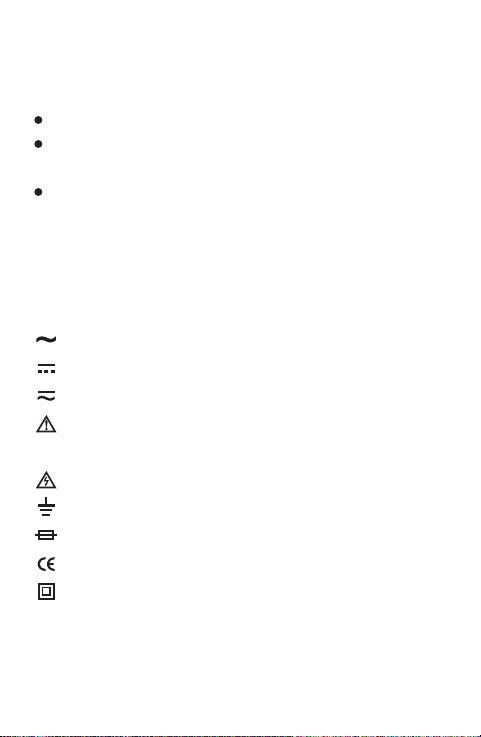
Symbols
measurements.
Before measuring current, check the meter's fuse.
Before turning the rotary switch to change functions,
disconnect test leads from the circuit under test.
Remove all test leads from the meter before measuring
transistor or capacitor.
Alternating Current
Direct Current
DC or AC
Caution, risk of danger, refer to the operating manual
before use.
Caution, risk of electric shock.
Earth (ground) Terminal
Fuse
Conforms to European Union directives
The equipment is protected throughout by double
insulation or reinforced insulation.
FRONT PANEL
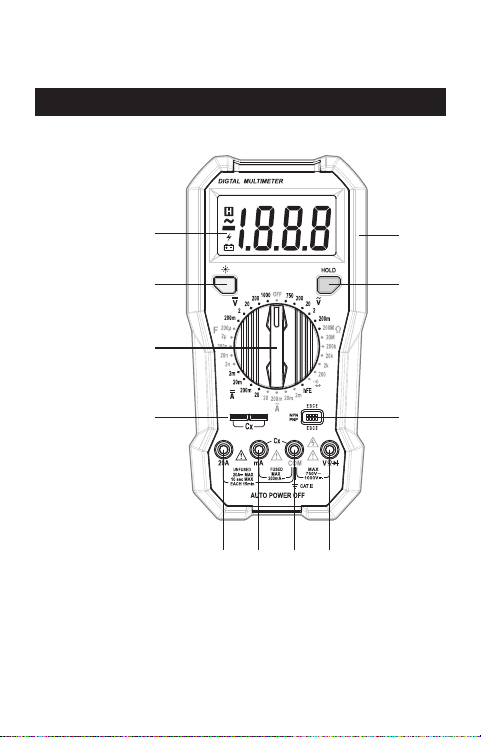
1. Display
3
1
/2-digit LCD, with a max. reading of 1999
2. Continuity Indicator
An indicator used in continuity test.
6
10
9
5 6 7 8
1
3
2
4
11

7
3. Function/Range Switch
Used to select the desired function and range as well
as to turn on or off the meter.
To save battery power, set this function/range switch in
the " OFF " position if you don't use the meter.
4. Capacitance Test Socket
5. " 20A " Terminal
Plug-in connector for the red test lead for current
( 200mA - 20A ) measurements.
6. " mA " Terminal
Plug-in connector for the red test lead for current
measurements which are less than 200mA.
7. " COM " Terminal
Plug-in connector for the black test lead.
8. " " Terminal
Plug-in connector for the red test lead for voltage,
resistance, continuity and diode measurements.
9. Transistor Socket
10." HOLD " Button
Used to enter/exit Data Hold mode.
11.Holster

8
Display: 3
1
/2-digit LCD, with a max. reading of 1999
Overrange Indication: Only figure " 1 " shown on the
display
Negative Polarity Indication: Negative sign "
-
" shown
on the display automatically
Sampling Rate: About 2 - 3 times/sec
Operating Environment: Temperature: 0°C ~ 40°C
Relative Humidity: < 75%RH
Storage Environment: Temperature: -10°C ~ 50°C
Relative Humidity: < 85%RH
Battery: 9V battery, 6F22 or equivalent, 1 piece
Low Battery Indication: " " shown on the display
Size: 195X95X42mm
Weight: About 333g (including battery and holster)
GENERAL SPECIFICATION
SPECIFICATION
Accuracy is specified for a period of one year after
calibration and at 18°C to 28°C, with relative humidity
< 75%.
9
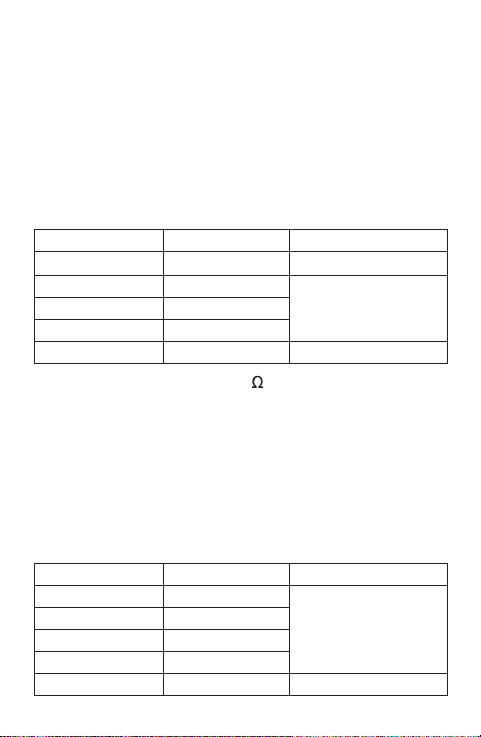
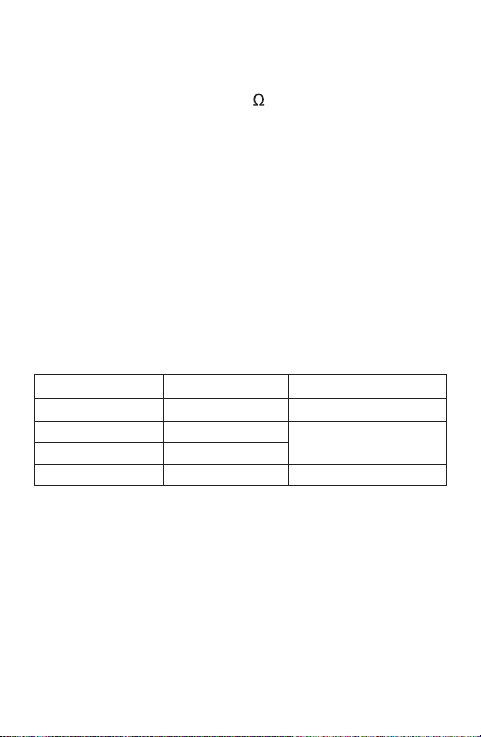
ResolutionRange Accuracy
DC Voltage
Input Impedance: About 10M
Overload Protection:
the 200mV range: 250V DC/AC rms
other ranges: 1000V DC or 750V AC rms
2V
20V
200V
1000V
± (0.8% + 2)
1mV
10mV
100mV
1V ± (1.0% + 2)
200mV 100µV ± (0.5% + 2)
AC Voltage
ResolutionRange Accuracy
2V
20V
200V
750V
± (1.0% + 3)
1mV
10mV
100mV
1V ± (1.5% + 5)
200mV 100µV
Accuracy specifications take the form of :
± ([% of Reading]+[number of Least Significant Digits])
10
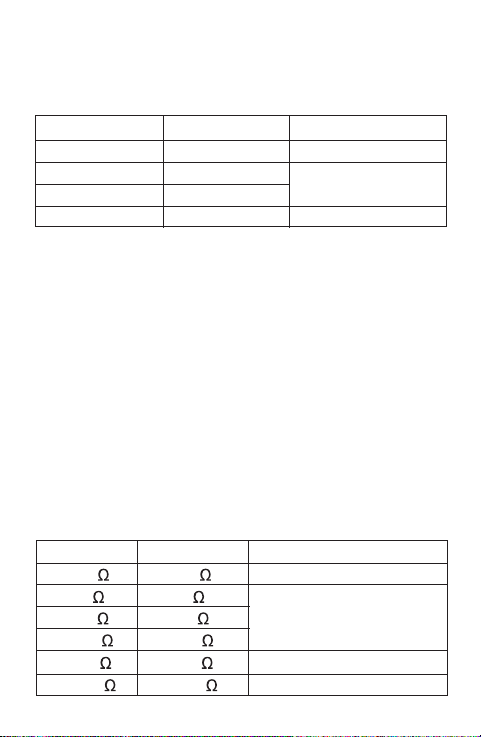
DC Current
Overload Protection:
250mA/250V Fast fuse ( for protection for " mA " terminal
inputs only )
( There is no fuse protection for " 20A " terminal inputs. )
Max. Allowable Input Current: 20A
( For inputs > 2A: measurement duration < 10 secs,
interval > 15 minutes )
Max Voltage Drop: 200mV
± (1.5% + 2)
2mA
20mA
200mA
1µA
10µA
100µA
± (2.0% + 5)20A 10mA
ResolutionRange Accuracy
Input Impedance: About 10M
Frequency Range:
200V and 750V ranges: 40Hz - 100Hz
other ranges: 40Hz - 400Hz
Response: Average, calibrated in rms of sine wave
Overload Protection:
the 200mV range: 250V DC/AC rms
other ranges: 1000V DC or 750V AC rms
± (0.8% + 2)
11
Frequency Range: 40Hz - 400H
Overload Protection:
250mA/250V Fast fuse ( for protection for " mA " terminal
inputs only )
( There is no fuse protection for " 20A " terminal inputs. )
Max. Allowable Input Current: 20A
( For inputs > 2A: measurement duration < 10 secs,
interval > 15 minutes )
Response: Average, calibrated in rms of sine wave
Max Voltage Drop: 200mV
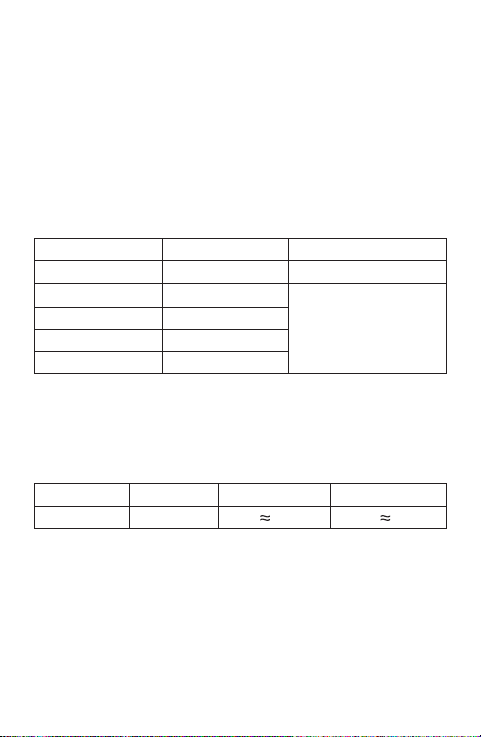
AC Current
ResolutionRange Accuracy
Resistance
±
[
5%×(reading - 10) + 10
]
± (1.5% + 2)
200
2k
20k
200k
20M 10k
100
1
10
0.1 ± (1.2% + 3)
± (1.0% + 2)
200M 100k
± (1.8% + 3)
2mA
20mA
200mA
1µA
10µA
100µA
± (3.0% + 5)20A 10mA
ResolutionRange Accuracy
± (1.2% + 3)
PNP & NPN 0 - 1000 Ib 10µA Vce 2.8V
Transistor hFE Test
Test Current Test VoltagehFERange
Open Circuit Voltage: < 3.2V
Overload Protection: 250V DC/AC rms
12
Capacitance
2nF
200nF
± (5% + 10)
1nF
100pF
1pF
2µF
ResolutionRange Accuracy
200µF 0.1µF
± (5% + 5)
20nF
10pF
OPERATING INSTRUCTION
13
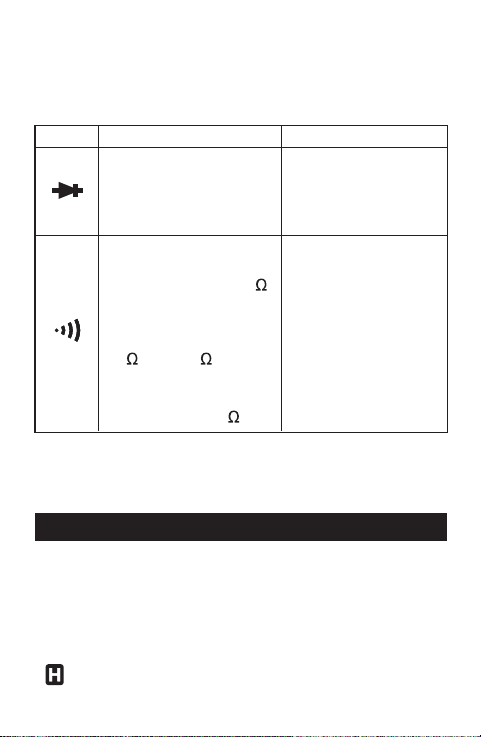
Diode and Continuity
Test ConditionRange Description
Open Circuit Voltage:
about 2.8V
Open Circuit Voltage:
about 2.8V
The approx. forward
voltage drop of the
diode is shown on the
display.
The built-in buzzer will
sound if the resistance
is less than about 30 .
The buzzer may or may
not sound if the
resistance is between
30 and 150 .
The buzzer will not
sound if the resistance
is more than 150 .
Data Hold Mode
Press the " HOLD " button to enter Data Hold mode. The
present reading is held on the display and the symbol
"
" appears on the display as an indication.
Measuring DC Voltage
1. Connect the black test lead to the " COM " terminal
and the red test lead to the " " terminal.
2. Set the range switch in desired
range position.
If the magnitude of the voltage to be measured is not
known beforehand, set the range switch to the highest
range first and then reduce it range by range until
satisfactory resolution is obtained.
3. Connect the test leads across the source or circuit to
be tested.
4. Read the reading on the display. The polarity of the red
lead connection will be indicated as well.
Note:
To avoid electric shock to you or damages to the meter, do
not apply a voltage higher than 1000V between the
terminals.
14
To exit Data Hold mode, just press this button again. " "
disappears.

Measuring AC Voltage
1. Connect the black test lead to the " COM " terminal
and the red test lead to the " " terminal.
2. Set the range switch in desired
range position.
If the magnitude of the voltage to be measured is not
known beforehand, set the range switch to the highest
range first and then reduce it range by range until
satisfactory resolution is obtained.
3. Connect the test leads across the source or circuit to
tested.
4. Read the reading on the display.
Note:
To avoid electric shock to you or damages to the meter, do
not apply a voltage higher than 750V between the
terminals.
Measuring DC Current
1. Connect the black test lead to the " COM " terminal.
If the current to be measured is less than 200mA,
connect the red test lead to the " mA " terminal. If the
current is between 200mA and 20A, connect the red
15

16
test lead to the " 20A " terminal instead.
2. Set the range switch in desired range position.
Note: If the red test lead is connected to the " 20A "
terminal, the range switch must be set in the DC
20A range position, and vice versa.
3. Turn off power to the circuit to be tested. Then
discharge all capacitors.
4. Break the circuit path to be tested, and connect the
test leads in series with the circuit.
5. Turn on power to the circuit, then read the display. The
polarity of the red test lead connection will be indicated
as well.
Note:
If the magnitude of the current to be measured is not
known beforehand, set the range switch to the highest
range first and then reduce it range by range until
satisfactory resolution is obtained.
Measuring AC Current
1. Connect the black test lead to the " COM " terminal.
If the current to be measured is less than 200mA,
connect the red test lead to the " mA " terminal. If the

17
current is between 200mA and 20A, connect the red
test lead to the " 20A " terminal instead.
2. Set the range switch in desired range position.
Note: If the red test lead is connected to the " 20A "
terminal, the range switch must be set in the AC
20A range position, and vice versa.
3. Turn off power to the circuit to be tested. Then
discharge all capacitors.
4. Break the circuit path to be tested, and connect the
test leads in series with the circuit.
5. Turn on power to the circuit, then read the display.
Note:
If the magnitude of the current to be measured is not
known beforehand, set the range switch to the highest
range first and then reduce it range by range until
satisfactory resolution is obtained.
Measuring Resistance
1. Connect the black test lead to the " COM " terminal and
the red test lead to the "
" terminal.
2. Set the range switch in desired range position.
3. Connect the test leads across the object to be tested.

18
4. Read the reading on the display.
Note:
1. For measurements > 1M , the meter may take a few
seconds to stabilize reading. This is normal for high
resistance measurements.
2. When the input is not connected, i.e. at open circuit,
" 1 " will be displayed as an overrange indication.
3. Before measurement, disconnect all power to the
circuit to be tested and discharged all capacitors
thoroughly.
4. For measurements in 200M
range, the display will
show a value when the test leads are shorted. This is
normal, and you must subtract this value from all the
measurements performed in 200M
range to get
correct measurement results.
Measuring Capacitance
1. Set the range switch in desired F range position.
2. Thoroughly discharge the capacitor to be tested, then
insert the two leads of the capacitor into the two holes
of the capacitance test socket on the meter.
3. Wait until the reading is stable, then read the reading
on the display.
19
Note:
In low measuring range, the display may show a value
before you plug the capacitor into the capacitance test
socket. This is normal and this value should be subtracted
from subsequent measurements.
Diode Test
1. Connect the black test lead to the " COM " terminal and
the red test lead to the " " terminal. ( Note: The
polarity of the red lead is positive "
+
". )
2. Set the range switch to
( or ) position.
3. Connect the red test lead to the anode of the diode to
be tested and the black test lead to the cathode of the
diode.
4. The display shows the approximate forward voltage
drop of the diode. If the connection is reversed, " 1 "
will be shown on the display.
Continuity Test
1. Connect the black test lead to the " COM " terminal and
the red test lead to the " " terminal.
20
2. Set the range switch to ( or ) position.
3. Connect the test leads across the circuit to be tested.
4. If the resistance is less than about 30 , the built-in
buzzer will sound and the continuity indicator on the
meter will light.
Note:
Before test, disconnect all power to the circuit to be tested
and discharged all capacitors thoroughly.
Transistor hFE Test
1. Set the range switch to position.
2. Identify whether the transistor to be measured is NPN
or PNP type and locate the emitter, base and collector
of the transistor. Insert the leads of the transistor into
the proper holes of the transistor socket on the meter.
3. The display will show the approximate hFE value.
Auto Power Off
If you have not operated the meter for about 15 minutes,
it will turn off automatically. To turn on the meter again, set
the rotary switch in the " OFF " position first and then set it
to a desired switch position.

Warning
Except replacing fuse and battery, never attempt to repair
or service the meter unless you are qualified to do so and
have the relevant calibration, performance test, and
service instructions.
Store the meter in dry place when not in use. Don't store it
in an environment with intense electromagnetic field.
General Maintenance
Periodically wipe the case with a damp cloth. Do not use
abrasives or solvents.
Dirt or moisture in the terminals can affect readings.
Clean the terminals as follows:
1. Turn off the meter and remove all the test leads from
the meter.
2. Shake out any dirt which may exist in the terminals.
3. Soak a new swab with alcohol.
4. Work the swab around in each terminal.
MAINTENANCE
21
Replacing the Battery and Fuse
To avoid false readings, which could lead to possible
electric shock or personal injury, replace the battery
as soon as the low battery indicator (
) appears.
To prevent damage or injury, install only replacement
fuse specified.
Turn off the meter and remove the test leads before
opening the battery cover or the case.
To replace the battery, Remove the holster from the meter
first. Then remove the screw on the battery cover and
remove the battery cover. Replace the exhausted battery
with a new one of the same type. Reinstall the battery
cover, the screw and the holster.
To replace the fuse, remove the holster from the meter.
Remove the screw on the battery cover and remove the
battery cover. Remove the screws on the back cover and
Warning
22
If the meter does not seem to work properly, check and
replace (as needed) the battery or fuse, and/or review this
manual to verify correct operation.

23
Manual: 1 piece
Test Lead: 1 pair
ACCESSORIES
NOTE
1. This manual is subject to change without notice.
2. Our company will not take the other responsibilities for
any loss.
3. The contents of this manual can not be used as the
reason to use the meter for any special application.
remove the back cover. Replace the blown fuse with a
new one of the same ratings. Reinstall the back cover, the
battery cover, and all the screws correctly. And Reinstall
the holster.
This meter uses one fuse:
250mA/250V, Fast action, Ø5X20mm
DISPOSAL OF THIS ARTICLE
Dear Customer,
If you at some point intend to dispose of this
article, then please keep in mind that many of
its components consist of valuable materials,
which can be recycled.
Please do not discharge it in the garbage bin,
but check with your local council for recycling
facilities in your area.
V150613
24