Use and Care Manual
Bosh Dual Fuel Range
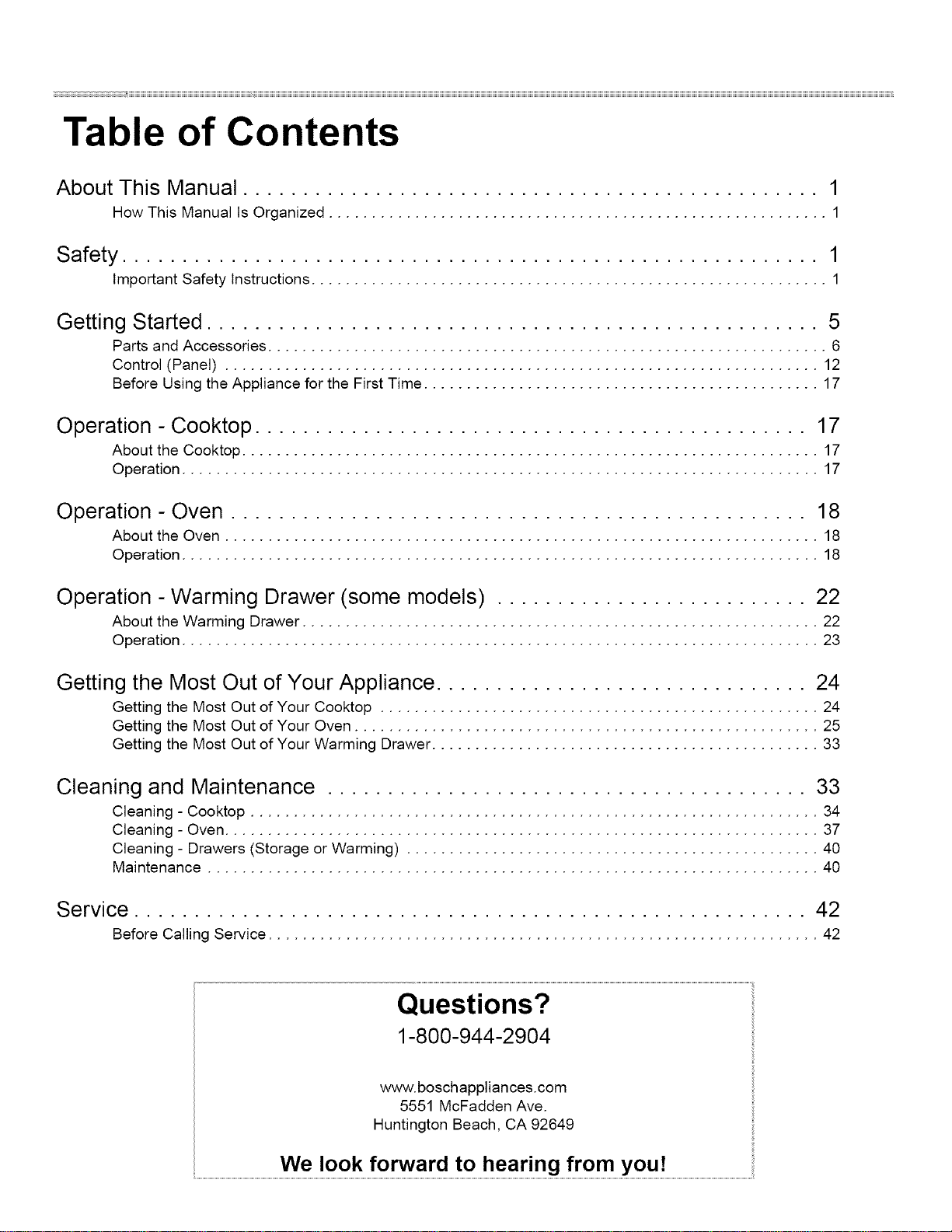
Table of Contents
About This Manual ................................................ 1
How This Manual Is Organized .......................................................... 1
Safety .......................................................... 1
Important Safety Instructions ............................................................ 1
Getting Started ................................................... 5
Parts and Accessories ................................................................. 6
Control (Panel) ..................................................................... 12
Before Using the Appliance for the First Time .............................................. 17
Operation - Cooktop .............................................. 17
About the Cooktop ................................................................... 17
Operation .......................................................................... 17
Operation - Oven ................................................ 18
About the Oven ..................................................................... 18
Operation .......................................................................... 18
Operation - Warming Drawer (some models) .......................... 22
About the Warming Drawer ............................................................ 22
Operation .......................................................................... 23
Getting the Most Out of Your Appliance ............................... 24
Getting the Most Out of Your Cooktop ................................................... 24
Getting the Most Out of Your Oven ...................................................... 25
Getting the Most Out of Your Warming Drawer ............................................. 33
Cleaning and Maintenance ........................................ 33
Cleaning - Cooktop .................................................................. 34
Cleaning - Oven ..................................................................... 37
Cleaning - Drawers (Storage or Warming) ................................................ 40
Maintenance ....................................................................... 40
Service ........................................................ 42
Before Calling Service ................................................................ 42
Questions?
1-800-944-2904
www.boschappliances.com
5551 McFadden Ave.
Huntington Beach, CA 92649
...............................................................................................We Ioo k forw ard toh ea ring from you!....................................................................................................
About This Manual
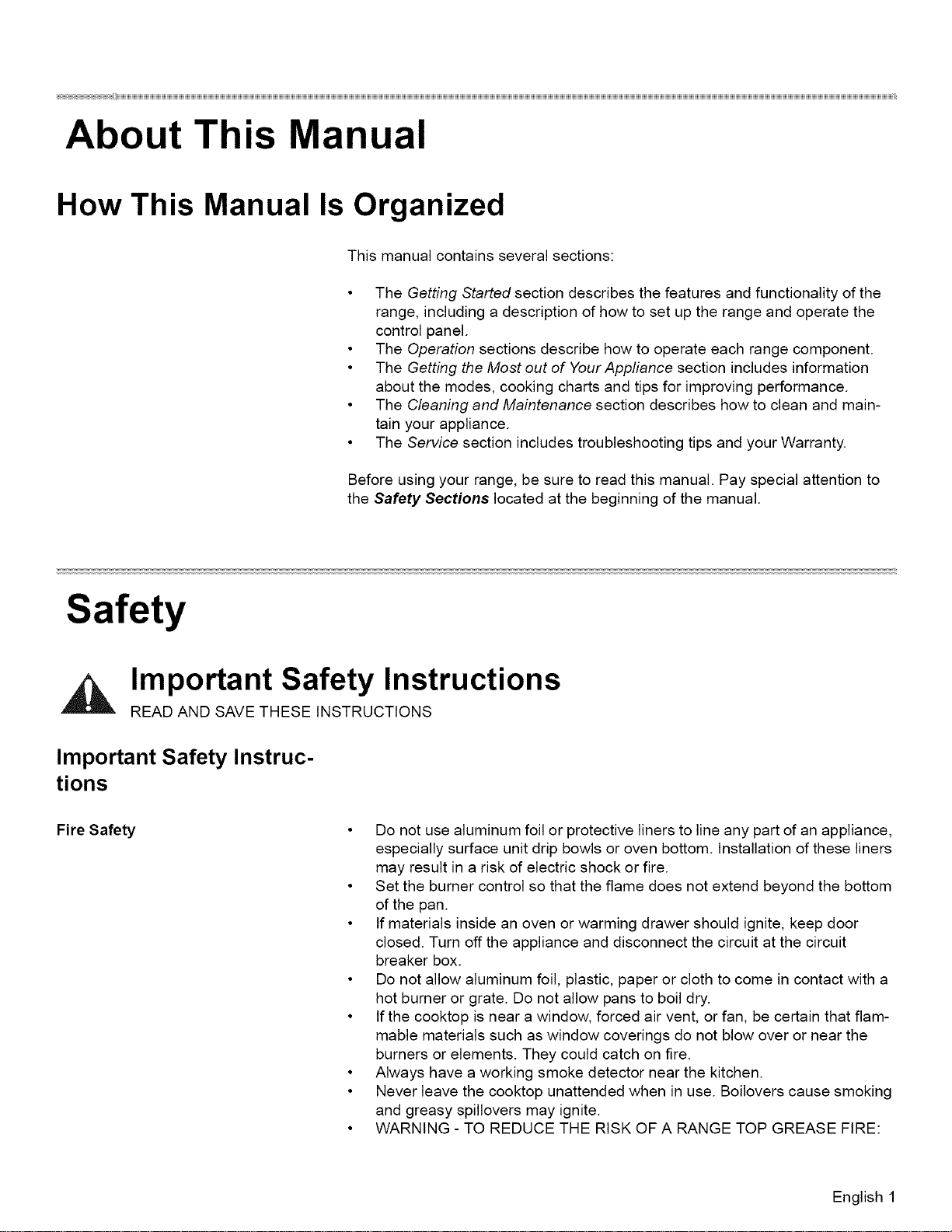
How This Manual Is Organized
This manual contains several sections:
• The Getting Started section describes the features and functionality of the
range, including a description of how to set up the range and operate the
control panel.
• The Operation sections describe how to operate each range component.
• The Getting the Most out of Your Appfiance section includes information
about the modes, cooking charts and tips for improving performance.
• The Cleaning and Maintenance section describes how to clean and main-
tain your appliance.
• The Service section includes troubleshooting tips and your Warranty.
Before using your range, be sure to read this manual. Pay special attention to
the Safety Sections located at the beginning of the manual.
Safety
Important Safety Instructions
READ AND SAVE THESE INSTRUCTIONS
Important Safety Instruc-
tions
Fire Safety • Do not use aluminum foil or protective liners to line any part of an appliance,
especially surface unit drip bowls or oven bottom. Installation of these liners
may result in a risk of electric shock or fire.
• Set the burner control so that the flame does not extend beyond the bottom
of the pan.
• If materials inside an oven or warming drawer should ignite, keep door
closed. Turn off the appliance and disconnect the circuit at the circuit
breaker box.
• Do not allow aluminum foil, plastic, paper or cloth to come in contact with a
hot burner or grate. Do not allow pans to boil dry.
• If the cooktop is near a window, forced air vent, or fan, be certain that flam-
mable materials such as window coverings do not blow over or near the
burners or elements. They could catch on fire.
• Always have a working smoke detector near the kitchen.
• Never leave the cooktop unattended when in use. Boilovers cause smoking
and greasy spillovers may ignite.
• WARNING - TO REDUCE THE RISK OF A RANGE TOP GREASE FIRE:
English 1
Safety
Gas Safety
a) Never leave surface units unattended at high settings. Boilovers cause
smoking and greasy spillovers that may ignite. Heat oils slowly on low or
medium settings.
b) Always turn hood ON when cooking at high heat orwhen flambeing food
(i.e. Crepes Suzette, Cherries Jubilee, Peppercorn Beef Flambe').
c) Clean ventilating fans frequently. Grease should not be allowed to accu-
mulate on fan or filter.
d) d) Use proper pan size. Always use cookware appropriate for the size of
the surface element."
• In the event that personal clothing or hair catches fire, drop and roll immedi-
ately to extinguish flames.
• Smother flames from food fires other than grease fires with baking soda.
Never use water on cooking fires.
• Take care that drafts like those from fans or forced air vents do not push the
flames so that they extend beyond the edges of the pan.
• WARNING - TO REDUCE THE RISK OF INJURY TO PERSONS IN THE
EVENT OF A RANGE TOP GREASE FIRE, OBSERVE THE FOLLOWING:
a) SMOTHER FLAMES with a close-fitting lid, cookie sheet, or metal tray,
then turn off the burner. BE CAREFUL TO PREVENT BURNS. If the
flames do not go out immediately, EVACUATE AND CALL THE FIRE
DEPARTMENT.
b) NEVER PICK UP A FLAMING PAN - You may be burned.
c) DO NOT USE WATER, including wet dishcloths or towels - a violent
steam explosion will result.
d) Use an extinguisher ONLY if:
1) You know you have a Class ABC extinguisher, and you already
know how to operate it.
2) The fire is small and contained in the area where it started.
3) The fire department is being called.
4) You can fight the fire with your back to an exit.
5) Have an appropriate fire extinguisher available, nearby, highly visi-
ble and easily accessible near the oven. "
• Whenever possible, do not operate the ventilation system during a cooktop
fire. However, do not reach through fire to turn it off.
• To prevent carbon monoxide build-up, do not block appliance air vents.
Do not store or use combustible materials, gasoline or other flamma-
ble vapors and liquids in the vicinity of this or any other appliance.
• WHAT TO DO IF YOU SMELL GAS:
• Do not try to light any appliance.
• Do not touch any electrical switch.
• Do not use any phone in your building.
• Immediately call your gas supplier from a neighbor's phone.
Follow the gas supplier's instructions.
• If you cannot reach your gas supplier, call fire department.
Installation and service must be performed by a qualified installer,
authorized service agency or the gas supplier.
• Have the installer show you where the gas shut-off valve is located.
English 2
Burn Prevention
Child Safety
Cleaning Safety
Safety
• If a burner goes out and gas escapes, open windows and doors. Wait until
gas dissipates before using the appliance.
• If you smell gas, your installer has not done a proper job of checking for
leaks. If the connections are not perfectly tight, you can have a small leak
and, therefore, a faint smell. Finding a gas leak is not a "do-it-yourself" pro-
cedure. Some leaks can only be found with the burner control in the ON
• position and this must be done by a qualified service technician. See warn-
ing in "Gas Safety" on page 2.
• DO NOT TOUCH SURFACE UNITS OR AREAS NEAR UNITS - Surface
units may be hot even though they are dark in color. Areas near surface
units may become hot enough to cause burns. During and after use, do not
touch, or let clothing, potholders, or other flammable materials contact sur-
face units or areas near units until they have had sufficient time to cool.
Among these areas are the cooktop and areas facing the cooktop.
• DO NOT TOUCH HEATING ELEMENTS OR INTERIOR SURFACES OF
OVEN - Heating elements may be hot even though they are dark in color.
Interior surfaces of an oven become hot enough to cause burns. During and
after use, do not touch, or let clothing, potholders, or other flammable mate-
rials contact heating elements or interior surfaces of oven until they have
had sufficient time to cool. Other surfaces of the appliance may become hot
enough to cause burns. Among these surfaces are oven vent openings, sur-
faces near these openings and oven doors.
• Exercise caution when opening the appliance. Standing to the side, open
the door (or drawer) slowly and slightly to let hot air and/or steam escape.
Keep your face clear of the opening and make sure there are no children or
pets near the unit. After the release of hot air and/or steam, proceed with
your cooking. Keep doors shut unless necessary for cooking or cleaning
purposes. Do not leave open doors unattended.
• Do not heat or warm unopened food containers. Build-up of pressure may
cause the container to burst and cause injury.
• Always place oven racks in desired location while oven is cool. If a rack
must be moved while oven is hot, do not let potholder contact the heating
elements.
• Always turn hood ON when cooking at high heat or when flambeing food
(i.e. Crepes Suzette, Cherries Jubilee, Peppercorn Beef Flambe').
• Use high heat settings on the cooktop only when necessary. To avoid bub-
bling and splattering, heat oil slowly on no more than a low-medium setting.
Hot oil is capable of causing extreme burns and injury.
Never move a pan of hot oil, especially a deep fat fryer. Wait until it is cool.
When children become old enough to use the appliance, it is the legal
responsibility of the parents or legal guardians to ensure that they are
instructed in safe practices by qualified persons.
• Do not allow anyone to climb, stand, lean, sit, or hang on any part of an
appliance, especially a door, warming drawer, or storage drawer. This can
damage the appliance, and the unit may tip over, potentially causing severe
injury.
• Do not allow children to use this appliance unless closely supervised by an
adult. Children and pets should not be left alone or unattended in the area
where the appliance is in use. They should never be allowed to play in its
vicinity, whether or not the appliance is in use.
• CAUTION - Items of interest to children should not be stored in an appli-
ance, in cabinets above an appliance or on the backsplash. Children climb-
ing on an appliance to reach items could be seriously injured.
"IMPORTANT SAFETY NOTICE: The California Safe Drinking and Toxic
Enforcement Act requires the Governor of California to publish a list of sub-
stances known to the state to cause cancer, birth defects or other reproduc-
English 3
Safety
CookwareSafety
Proper Installation and Maintenance
tive harm, and requires businesses to warn customers of potential exposure
to such substances.
1) The burning of gas cooking fuel and the elimination of soil during self-
cleaning can generate small amounts of Carbon Monoxide.
2) The fiberglass insulation in self-clean ovens gives off very small
amounts of formaldehyde during the first several cleaning cycles.
3) California lists formaldehyde as a potential cause of cancer. Carbon
Monoxide is a potential cause of reproductive toxicity.
4) Exposure to these substances can be minimized by:
1) Providing good ventilation when cooking with gas.
2) Providing good ventilation during and immediately after self clean-
ing the oven.
3) Operating the unit according to the instructions in this manual."
Do not clean the appliance while it is still hot. Some cleaners produce nox-
ious fumes when applied to a hot surface. Wet cloths or sponges can cause
burns from steam.
When self-cleaning, confirm that the door locks and will not open. If the door
does not lock, do not run Self-Clean. Contact service.
Birds have very sensitive respiratory systems. Keep pet birds out of the
kitchen or other rooms where kitchen fumes could reach them. During self
clean, fumes are released that may be harmful to birds. Other kitchen fumes
such as overheating margarines and cooking oils may also be harmful.
Keep oven free from grease build up.
• Do not place food directly on oven bottom.
• Follow the manufacturer's directions when using cooking or roasting bags.
• Hold the handle of the pan when stirring or turning food. This helps prevent
spills and movement of the pan.
• Use Proper Pan Size. The use of undersized cookware will expose a portion
of the heating element or burner to direct contact and may result in ignition
of clothing. Select cookware having flat bottoms large enough to cover the
surface heating unit. This appliance is equipped with one or more surface
units of different size. Proper relationship of cookware to heating element or
burner will also improve efficiency.
• Always position handles of utensils inward so they do not extend over adja-
cent work areas, burners, or the edge of the cooktop. This reduces the risk
of fires, spills and burns.
• Adjust burner flame size so that it does not extend beyond the edge of the
cookware. Proper relationship of cookware to burner flame reduces safety
risks.
• WARNING: When properly cared for, your new appliance has been
designed to be safe and reliable. Read all instructions carefully before use.
These precautions will reduce the risk of burns, electric shock, fire, and
injury to persons. When using kitchen appliances, basic safety precautions
must be followed, including those in the following pages.
• Have the installer show you the location of the circuit breaker or fuse. Mark it
for easy reference.
• This appliance must be properly installed and grounded by a qualified tech-
nician. Connect only to properly grounded outlet. Refer to Installation
Instructions for details.
English 4
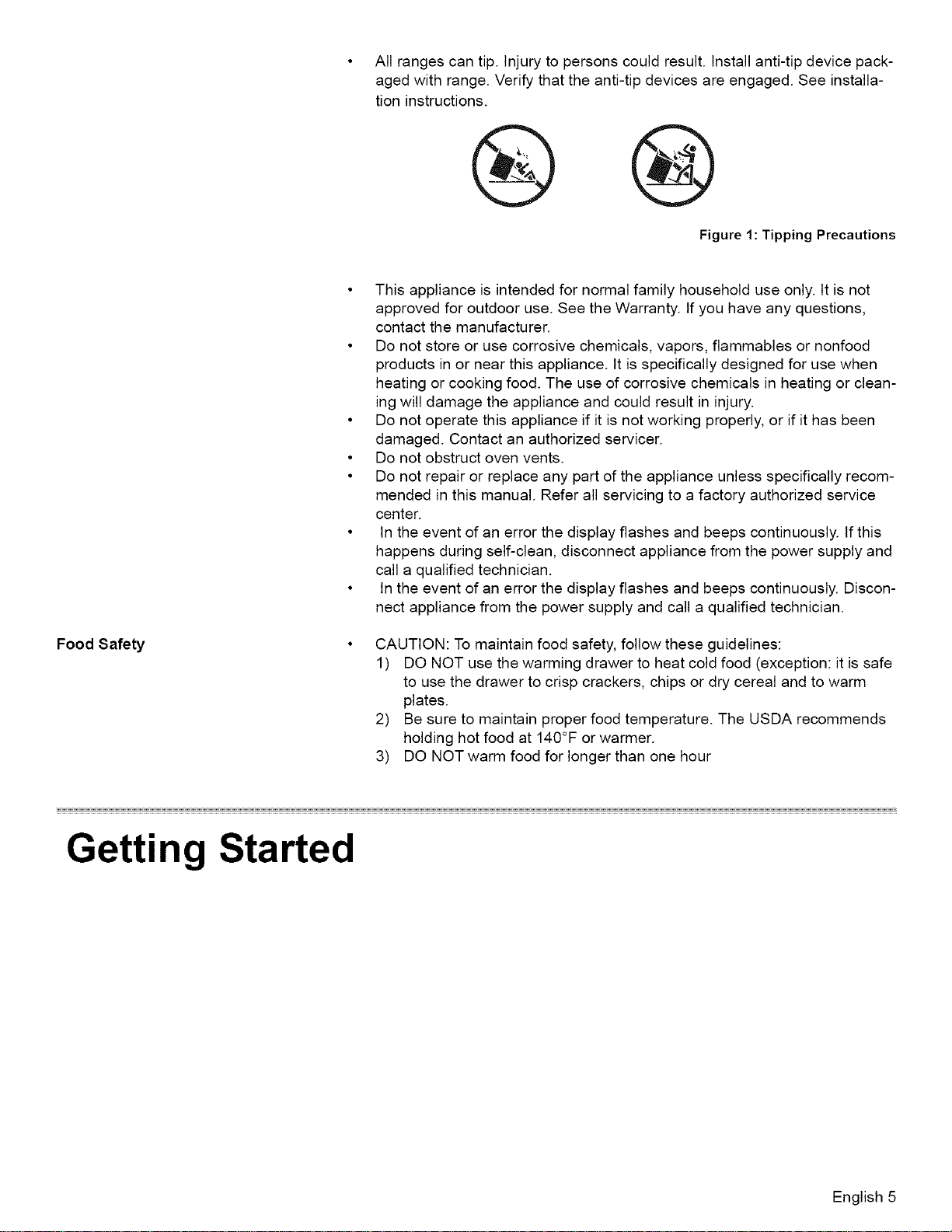
Allrangescantip.Injurytopersonscouldresult.Installanti-tipdevicepack-
agedwithrange.Verifythattheanti-tipdevicesareengaged.Seeinstalla-
tioninstructions.
Figure 1: Tipping Precautions
Food Safety
• This appliance is intended for normal family household use only. It is not
approved for outdoor use. See the Warranty. tf you have any questions,
contact the manufacturer.
• Do not store or use corrosive chemicals, vapors, flammables or nonfood
products in or near this appliance. It is specifically designed for use when
heating or cooking food. The use of corrosive chemicals in heating or clean-
ing will damage the appliance and could result in injury.
• Do not operate this appliance if it is not working properly, or if it has been
damaged. Contact an authorized servicer.
• Do not obstruct oven vents.
• Do not repair or replace any part of the appliance unless specifically recom-
mended in this manual. Refer all servicing to a factory authorized service
center.
• In the event of an error the display flashes and beeps continuously. If this
happens during self-clean, disconnect appliance from the power supply and
call a qualified technician.
• In the event of an error the display flashes and beeps continuously. Discon-
nect appliance from the power supply and call a qualified technician.
CAUTION: To maintain food safety, follow these guidelines:
1) DO NOT use the warming drawer to heat cold food (exception: it is safe
to use the drawer to crisp crackers, chips or dry cereal and to warm
plates.
2) Be sure to maintain proper food temperature. The USDA recommends
holding hot food at 140°F or warmer.
3) DO NOT warm food for longer than one hour
Getting Started
English 5
GettingStarted
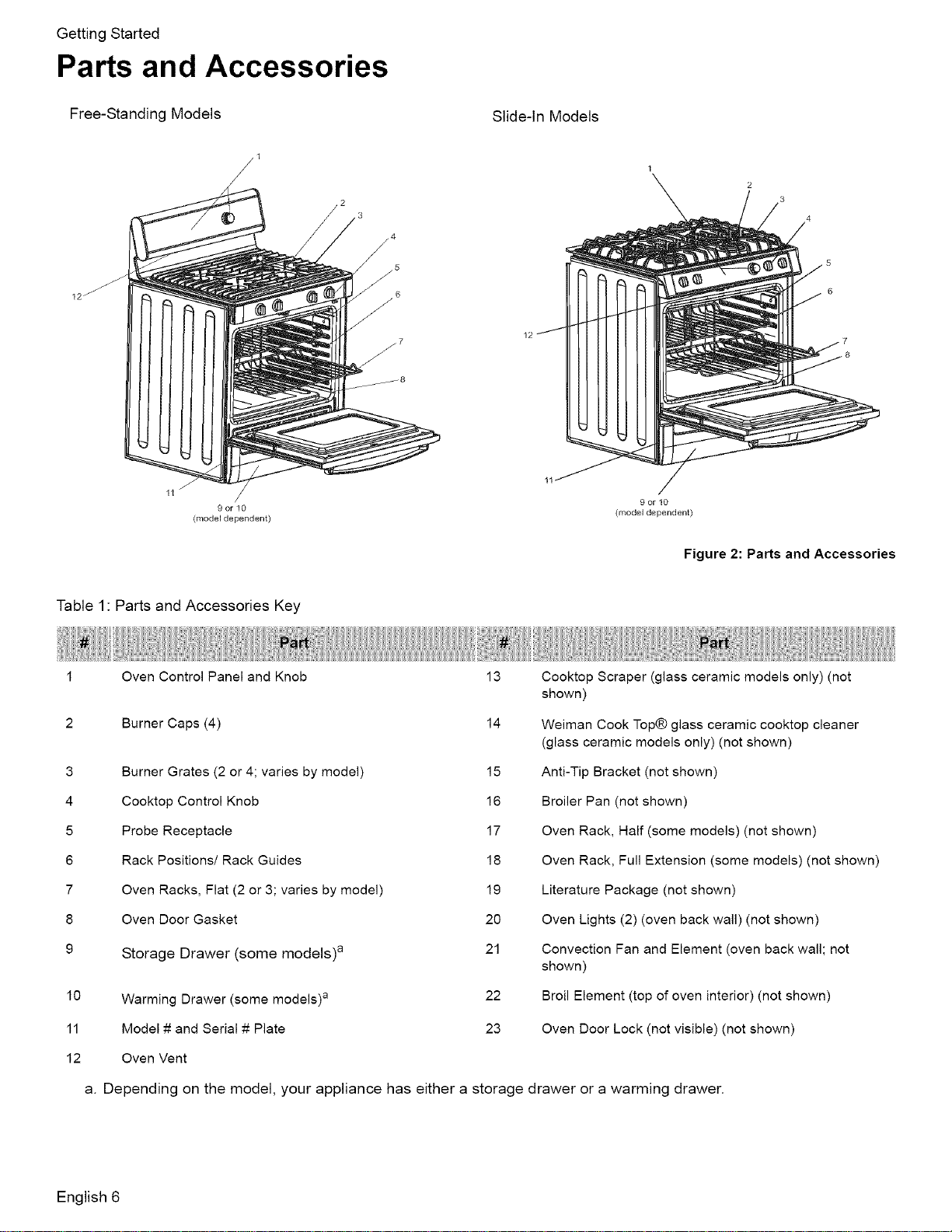
Parts and Accessories
Free-Standing Models Slide-In Models
11 /
9or10
(model dependent)
Table 1 Parts and Accessories Key
1
2
9or10
(model dependent)
Figure 2: Parts and Accessories
3
4
5
6
7
8
9
10
11
12
Oven Control Panel and Knob
Burner Caps (4)
Burner Grates (2 or 4; varies by model)
Cooktop Control Knob
Probe Receptacle
Rack Positions/Rack Guides
Oven Racks, Flat (2 or 3; varies by model)
Oven Door Gasket
Storage Drawer (some models) a
Warming Drawer (some models) a
Model # and Serial # Plate
Oven Vent
13
14
15
16
17
18
19
2O
21
22
23
Cooktop Scraper (glass ceramic models only) (not
shown)
Weiman Cook Top@ glass ceramic cooktop cleaner
(glass ceramic models only) (not shown)
Anti-Tip Bracket (not shown)
Broiler Pan (not shown)
Oven Rack, Half (some models) (not shown)
Oven Rack, Full Extension (some models) (not shown
Literature Package (not shown)
Oven Lights (2) (oven back wall) (not shown)
Convection Fan and Element (oven back wall; not
shown)
Broil Element (top of oven interior) (not shown)
Oven Door Lock (not visible) (not shown)
a. Depending on the model, your appliance has either a storage drawer or a warming drawer.
English 6
Sealed Gas Burners
Getting Started
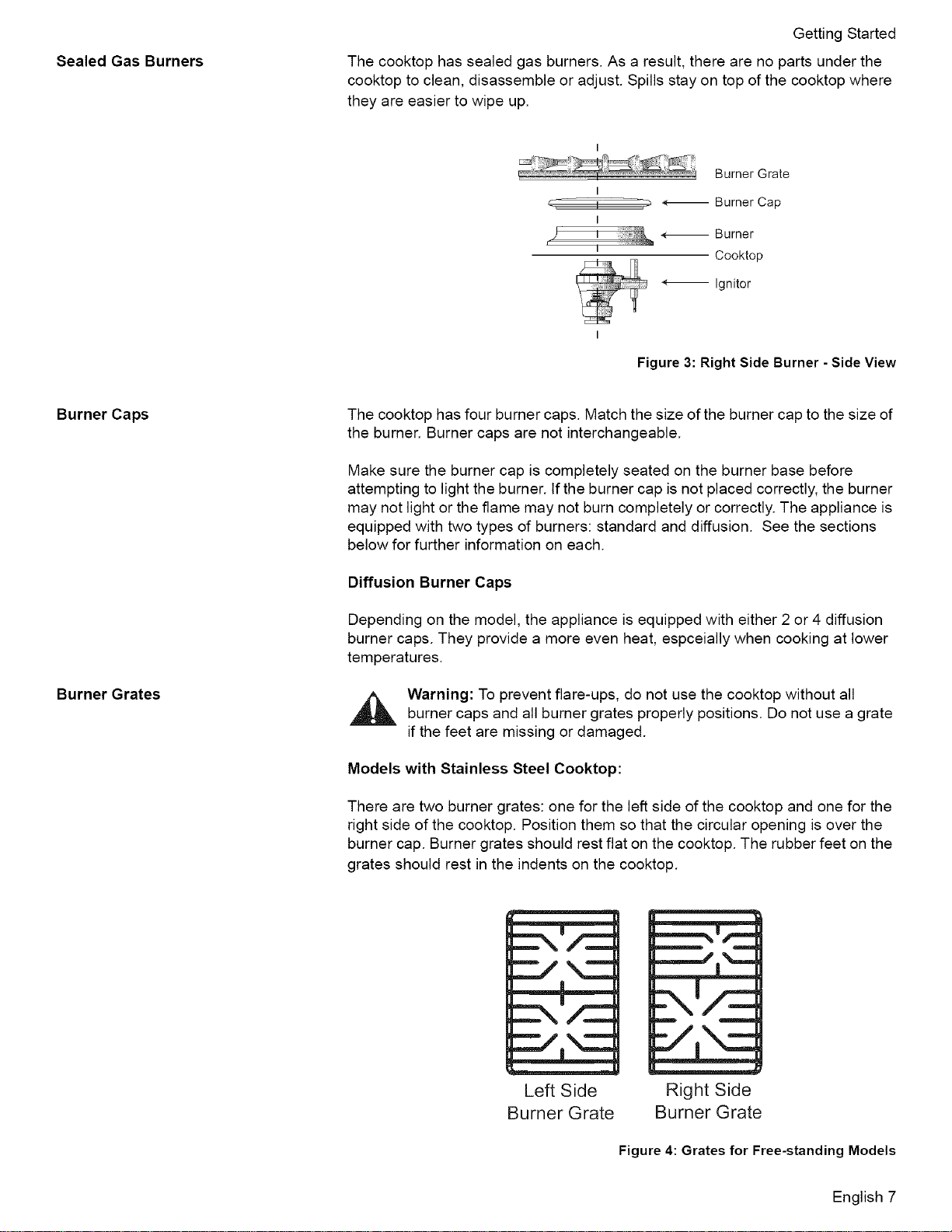
The cooktop has sealed gas burners. As a result, there are no parts under the
cooktop to clean, disassemble or adjust. Spills stay on top of the cooktop where
they are easier to wipe up.
Burner Grate
I
_- , _ 4-_ Burner Cap
r
I
i *-- Burner
r ,,
Cooktop
4_ Ignitor
Figure 3: Right Side Burner - Side View
Burner Caps
Burner Grates
The cooktop has four burner caps. Match the size of the burner cap to the size of
the burner. Burner caps are not interchangeable.
Make sure the burner cap is completely seated on the burner base before
attempting to light the burner. If the burner cap is not placed correctly, the burner
may not light or the flame may not burn completely or correctly. The appliance is
equipped with two types of burners: standard and diffusion. See the sections
below for further information on each.
Diffusion Burner Caps
Depending on the model, the appliance is equipped with either 2 or 4 diffusion
burner caps. They provide a more even heat, espceially when cooking at lower
temperatures.
Warning: To prevent flare-ups, do not use the cooktop without all
burner caps and all burner grates properly positions. Do not use a grate
if the feet are missing or damaged.
Models with Stainless Steel Cooktop:
There are two burner grates: one for the left side of the cooktop and one for the
right side of the cooktop. Position them so that the circular opening is over the
burner cap. Burner grates should rest flat on the cooktop. The rubber feet on the
grates should rest in the indents on the cooktop.
Left Side
Burner Grate
_-NI/=_
m m
Right Side
Burner Grate
Figure 4: Grates for Free-standing Models
English 7
GettingStarted
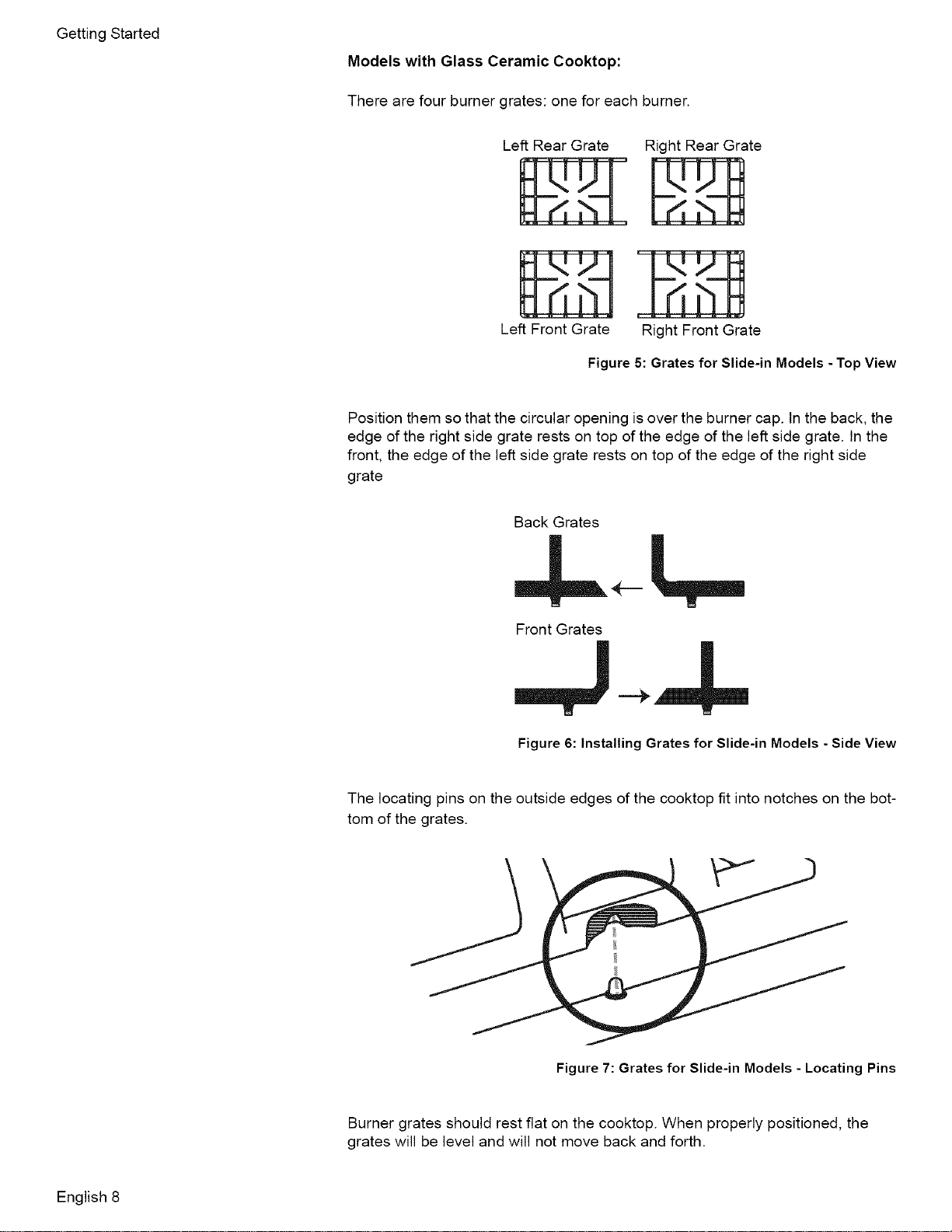
ModelswithGlassCeramicCooktop:
Therearefourburnergrates:oneforeachburner.
LeftRearGrate
LeftFrontGrate
RightRearGrate
RightFrontGrate
Figure 5: Grates for Slide-in Models - Top View
Position them so that the circular opening is over the burner cap. In the back, the
edge of the right side grate rests on top of the edge of the left side grate. In the
front, the edge of the left side grate rests on top of the edge of the right side
grate
Back Grates
Front Grates
W N
Figure 6: Installing Grates for Slide-in Models - Side View
The locating pins on the outside edges of the cooktop fit into notches on the bot-
tom of the grates.
Figure 7: Grates for Slide-in Models - Locating Pins
Burner grates should rest flat on the cooktop. When properly positioned, the
grates will be level and will not move back and forth.
English 8
Electronic Ignitor
High Power Burner
Precision Burner
Oven Racks
Flat Oven Racks
Getting Started
The cooktop uses electronic ignitors to light the burners, There is no pilot light.
Each burner has its own ignitor. For proper operation, keep the ignitor clean and
dry. It is necessary to clean these when there is a boilover or when the burner
does not light even though the ignitor clicks.
Caution: All ignitors spark when any single burner is turned on. Do not touch
any of the burners when the cooktop is in use.
The high power burner is the largest burner. It is the most powerful burner on the
cooktop. It retains heat longer than normal burner caps and, at low settings, pro-
hibits the flame from touching the cookware. This results in a gentle, more pre-
dictable heat. Use the low settings on this burner to simmer large amounts of
sauces or soups. Use the high settings to quickly bring large amounts of water to
a boil.
The precision burner is the smallest burner on the cooktop. It is well suited for
gentle cooking of small amounts of food. Use the burner to melt butter or choco-
late or to prepare delicate sauces.
Depending on model, the range is equipped with one of the following combina-
tions:
• Three flat racks
• Two flat racks and one full extension rack
• Two flat racks and one half rack
The racks are designed with a stop so they will stop before coming completely
out of the oven and not tilt.
CAUTION
To avoid burns, place oven racks in desired positions before turning
oven on. Always use oven mitts when the oven is warm.If a rack
must be moved while the oven is hot, do not let oven mitts contact
hot burners.
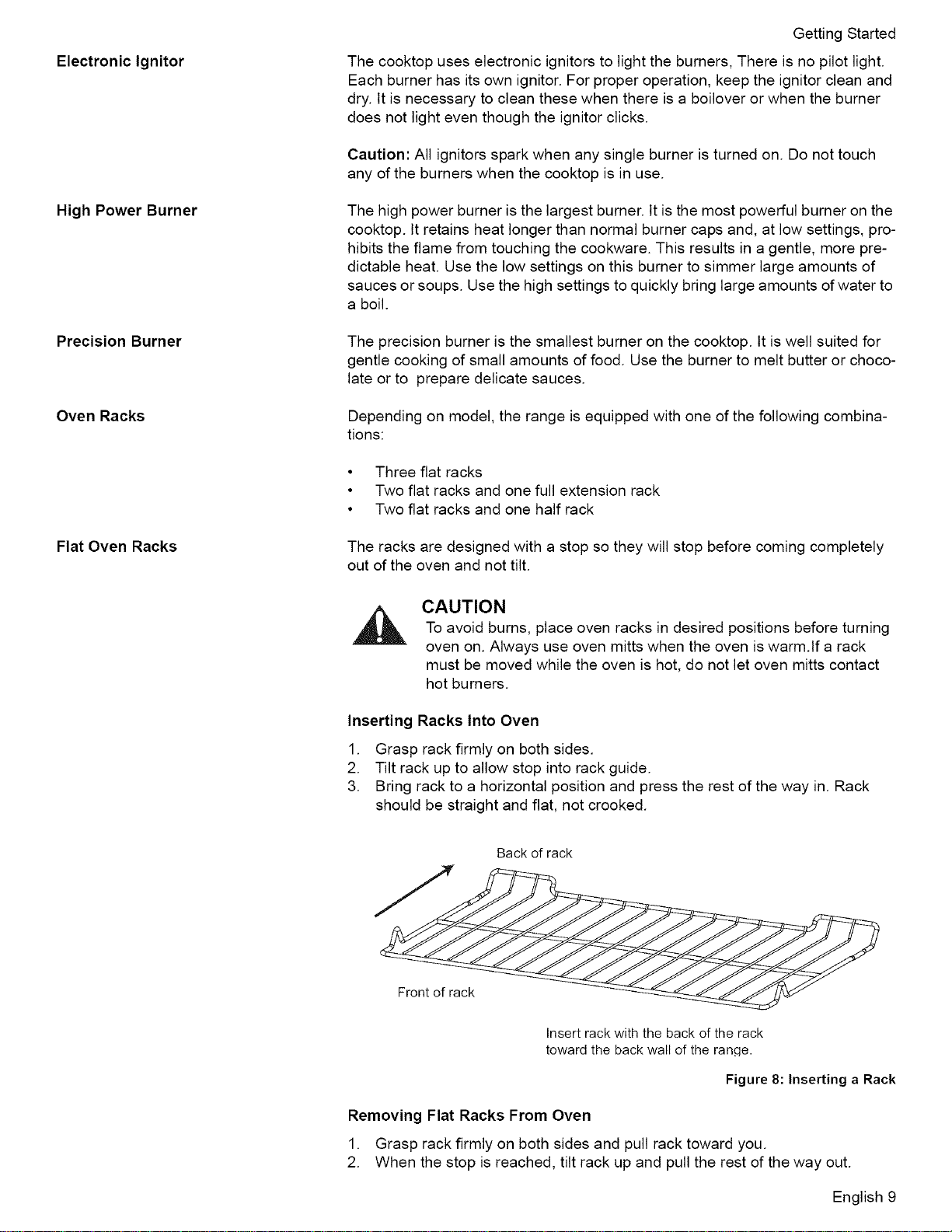
Inserting Racks Into Oven
1. Grasp rack firmly on both sides.
2. Tilt rack up to allow stop into rack guide.
3. Bring rack to a horizontal position and press the rest of the way in. Rack
should be straight and flat, not crooked.
Back of rack
Insert rack with the back of the rack
toward the back wall of the rancle.
Figure 8: Inserting a Rack
Removing Flat Racks From Oven
1. Grasp rack firmly on both sides and pull rack toward you.
2. When the stop is reached, tilt rack up and pull the rest of the way out.
English 9
GettingStarted
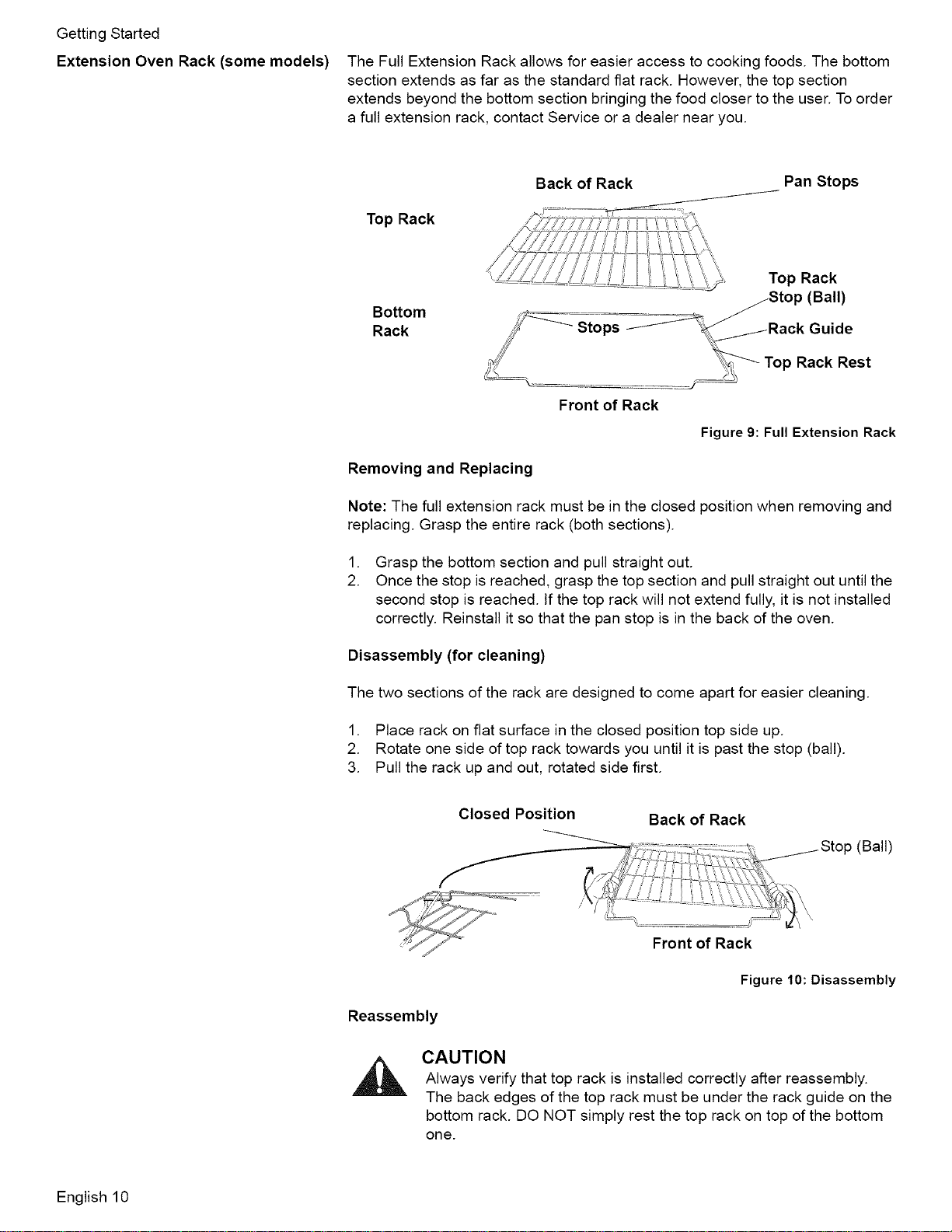
Extension Oven Rack (some models) The Full Extension Rack allows for easier access to cooking foods The bottom
section extends as far as the standard fiat rack However, the top section
extends beyond the bottom section bringing the food closer to the user To order
a full extension rack, contact Service or a dealer near you
Top Rack
Bottom
Rack
Back of Rack Pan Stops
Top Rack
(Ball)
Front of Rack
Removing and Replacing
Top Rack Rest
Figure 9: Full Extension Rack
Note: The full extension rack must be in the closed position when removing and
replacing Grasp the entire rack (both sections)
.
2
Grasp the bottom section and pull straight out
Once the stop is reached, grasp the top section and pull straight out until the
second stop is reached If the top rack will not extend fully, it is not installed
correctly Reinstall it so that the pan stop is in the back of the oven
Disassembly (for cleaning)
The two sections of the rack are designed to come apart for easier cleaning
1. Place rack on flat surface in the closed position top side up.
2. Rotate one side of top rack towards you until it is past the stop (ball).
3. Pull the rack up and out, rotated side first.
Closed Position Back of Rack
_fi " _1.Stop (Ball)
,",&=;...........................
' Front of Rack
Figure 10: Disassembly
Reassembly
CAUTION
Always verify that top rack is installed correctly after reassembly.
The back edges of the top rack must be under the rack guide on the
bottom rack. DO NOT simply rest the top rack on top of the bottom
one.
English 10
GettingStarted
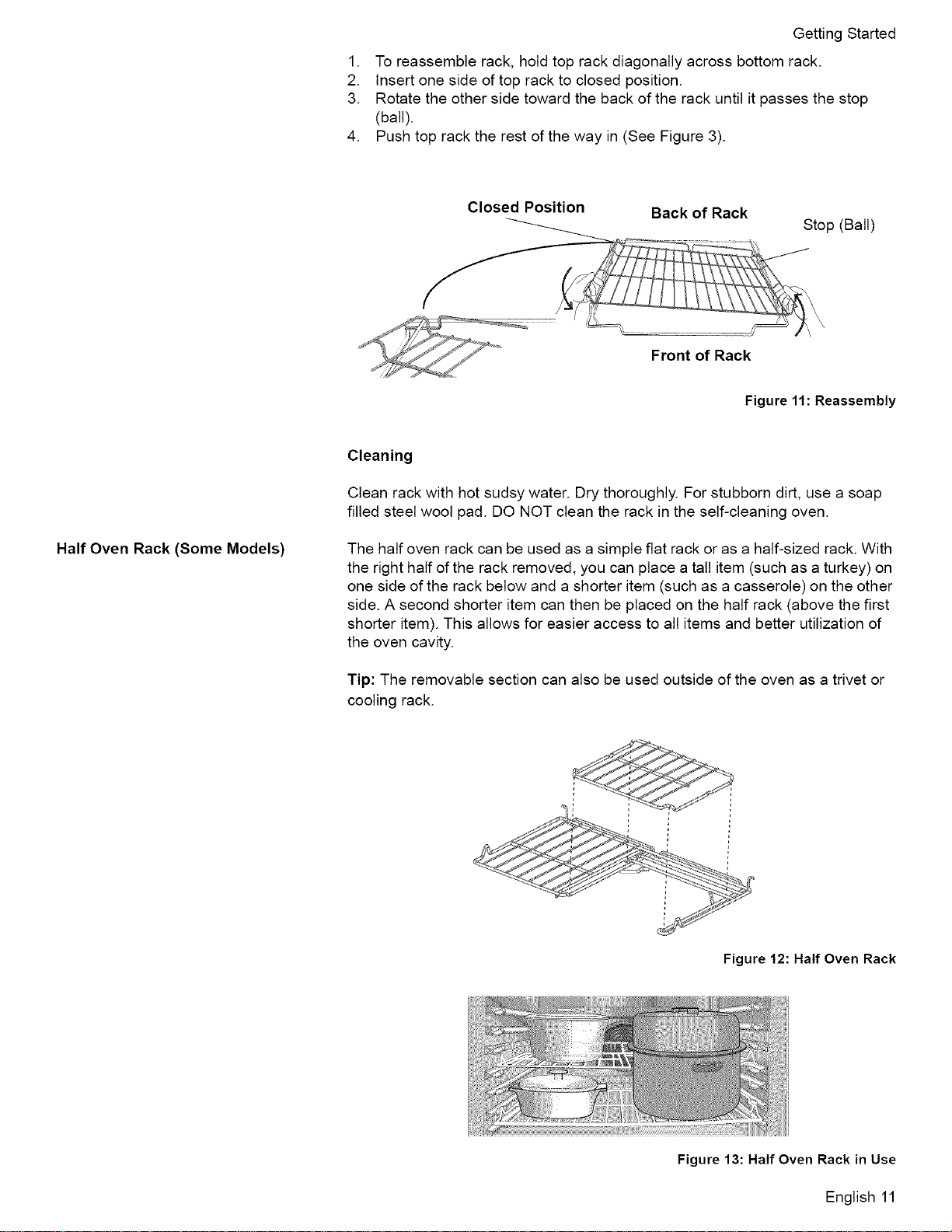
1. Toreassemblerack,holdtoprackdiagonallyacrossbottomrack.
2. Insertonesideoftopracktoclosedposition.
3. Rotatetheothersidetowardthebackoftherackuntilitpassesthestop
(ball).
4. Pushtopracktherestofthewayin(SeeFigure3).
Closed Position
Back of Rack
Stop (Ball)
Front of Rack
Figure 11: Reassembly
Cleaning
Clean rack with hot sudsy water. Dry thoroughly. For stubborn dirt, use a soap
filled steel wool pad. DO NOT clean the rack in the self-cleaning oven.
Half Oven Rack (Some Models) The half oven rack can be used as a simple flat rack or as a half-sized rack. With
the right half of the rack removed, you can place a tall item (such as a turkey) on
one side of the rack below and a shorter item (such as a casserole) on the other
side. A second shorter item can then be placed on the half rack (above the first
shorter item). This allows for easier access to all items and better utilization of
the oven cavity.
Tip: The removable section can also be used outside of the oven as a trivet or
cooling rack.
Figure 12: Half Oven Rack
Figure 13: Half Oven Rack in Use
English 11
GettingStarted
OvenBottom
Caution:Donotplacefooddirectlyonovenbottom.Donotusealuminumfoilor
protectivelinerstolineanypartofanappliance,especiallysurfaceunitdrip
bowlsorovenbottom.Installationoftheselinersmayresultinariskofelectric
shockorfire.
Combustion Vents (slide-in models
only)
The combustion vents are located along the back edge of the cooktop. They
allow the burners to operate properly. Do not block these vents.
CAUTION: DO NOT block combsustion vents. Blocked vents could lead to fire
or unintentional release of carbon monoxide.
Oven Vent
Free-standing Models:
The oven vent is located below the display above the rear left cooktop burner. It
is normal to see steam escaping from the vent and condensation may collect on
the backguard and cooktop. This area may become hot when the oven is
in use. To prevent carbon monoxide build-up, do not block the vent. The
oven vent is also important for air circulation.
Slide-in Models:
The oven vent is located above the oven door handle. Warm air may be
released from the vent before, during and after cooking. It is normal to see
steam escaping from the vent and condensation may collect in this area. This
area may be warm when the oven is in use. Do not block the vent as it is impor-
tant for air circulation.
Automatic Shutoff
The oven will automatically shut off after 12 hours (24 hours if the time format is
set for 24 hour in the Select Function section).
Self Cleaning The oven features a self-cleaning function that eliminates the manual labor
involved with cleaning your oven.
Indicators and Other Features
Beep - Signals that more information must be entered or confirms the receipt of
an entry. A Beep also signals the end of a program or an oven error.
End-of-Cycle Indicator - To indicate when a mode is finished, 3 consecutive
beeps will sound.
Default Settings - The cooking modes automatically select the default tempera-
ture. These can be changed when a different one is needed.
Flashing Symbol or Number - Signals an incomplete setting and calls for
another step or START to be pressed.
F Number Codes -These codes display when there is a problem with the range.
Cooling Fan (Slide-in models only) The cooling fan runs during all modes. You may hear it running and you may
feel warm air as it is released from the oven vent. This is normal.
Convection Fan
The convection fan operates during any convection mode. When the oven is
operating in the convection mode, the fan will turn off automatically when the
door is opened. The convection fan does run during self-clean, although not at
the beginning of the mode.
Note: On some models, the convection fan also runs during preheat for the
bake mode.
Control (Panel)
English 12
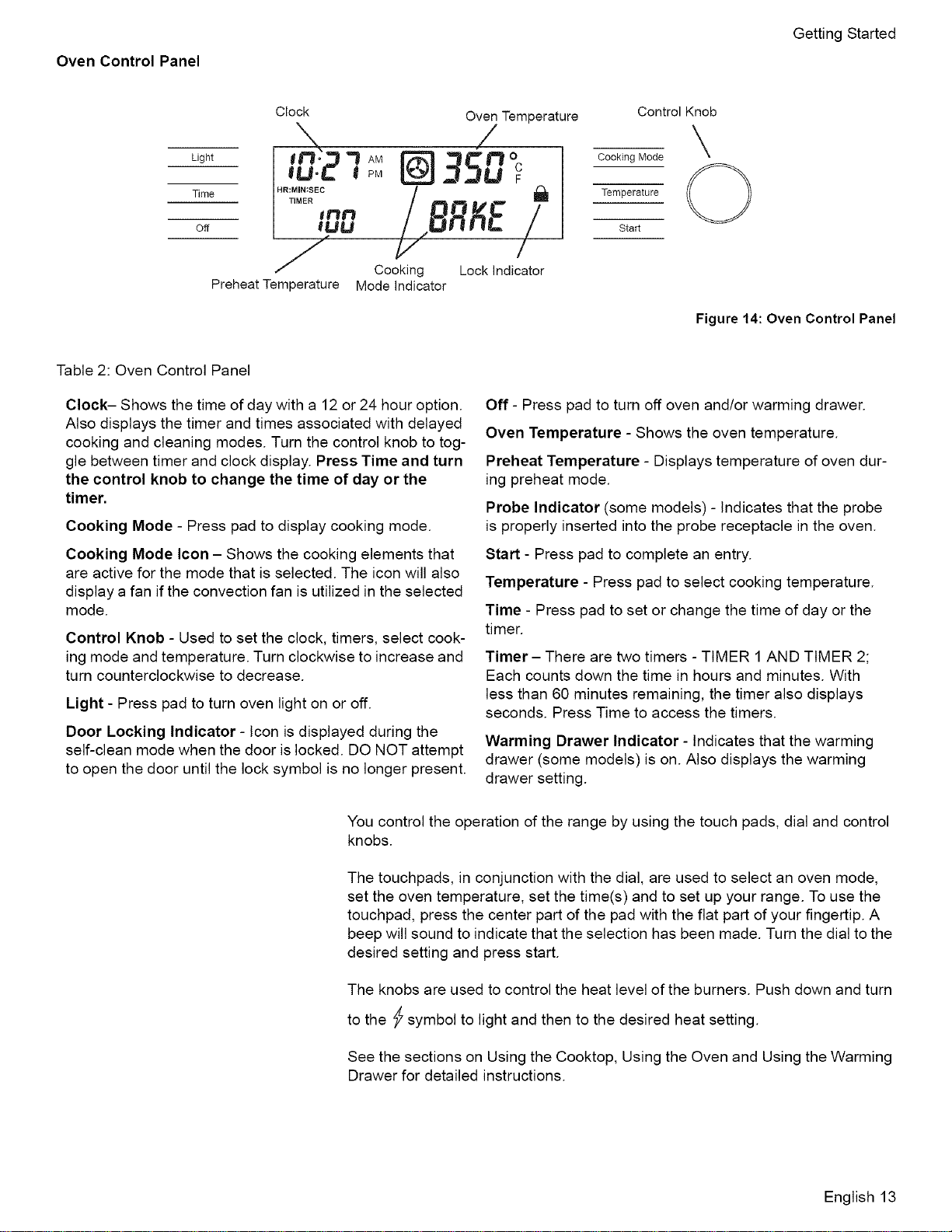
Oven Control Panel
Getting Started
Light
Time
Off
Preheat Temperature
Clock Oven Temperature
_° _ AM " _O
,u.2 @35uc
.R:M,R:see /
H TIMER ,'_ _ Dql_ *_ _lw
'ocklnd/tor
Mode Indicator
Control Knob
CookingMode
Temperature O
Start
Figure 14: Oven Control Panel
Table 2: Oven Control Panel
Clock- Shows the time of day with a 12 or 24 hour option.
Also displays the timer and times associated with delayed
cooking and cleaning modes. Turn the control knob to tog-
gle between timer and clock display. Press Time and turn
the control knob to change the time of day or the
timer.
Cooking Mode - Press pad to display cooking mode.
Cooking Mode Icon - Shows the cooking elements that
are active for the mode that is selected. The icon will also
display a fan if the convection fan is utilized in the selected
mode.
Control Knob - Used to set the clock, timers, select cook-
ing mode and temperature. Turn clockwise to increase and
turn counterclockwise to decrease.
Light - Press pad to turn oven light on or off.
Door Locking Indicator - Icon is displayed during the
self-clean mode when the door is locked. DO NOT attempt
to open the door until the lock symbol is no longer present.
Off - Press pad to turn off oven and/or warming drawer.
Oven Temperature - Shows the oven temperature.
Preheat Temperature - Displays temperature of oven dur-
ing preheat mode.
Probe Indicator (some models) - Indicates that the probe
is properly inserted into the probe receptacle in the oven.
Start - Press pad to complete an entry.
Temperature - Press pad to select cooking temperature.
Time - Press pad to set or change the time of day or the
timer.
Timer - There are two timers - TIMER 1 AND TIMER 2;
Each counts down the time in hours and minutes. With
less than 60 minutes remaining, the timer also displays
seconds. Press Time to access the timers.
Warming Drawer Indicator - Indicates that the warming
drawer (some models) is on. Also displays the warming
drawer setting.
You control the operation of the range by using the touch pads, dial and control
knobs.
The touchpads, in conjunction with the dial, are used to select an oven mode,
set the oven temperature, set the time(s) and to set up your range. To use the
touchpad, press the center part of the pad with the flat part of your fingertip. A
beep will sound to indicate that the selection has been made. Turn the dial to the
desired setting and press start.
The knobs are used to control the heat level of the burners. Push down and turn
to the _ symbol to light and then to the desired heat setting.
See the sections on Using the Cooktop, Using the Oven and Using the Warming
Drawer for detailed instructions.
English 13
GettingStarted
The Clock
About the Clock
Setting the Clock
Changing the Clock
The Select Functions
Menu
_! Change the Beep Volume
• Always set the clock after installation or after a power failure. Once power
returns to the oven, the clock defaults to 12:00 am.
• The time of day is displayed in hours and minutes.
• The clock time will appear during all oven operations except when the timer
is running.
• The oven is preset to a 12 hour clock and indicates AM and PM To switch
to a 24 hour clock, see "Select Function" section.
• If you do not complete the operation of setting the clock, the oven will beep
periodically as a reminder to set the clock time. Press OFF to stop the beep-
ing.
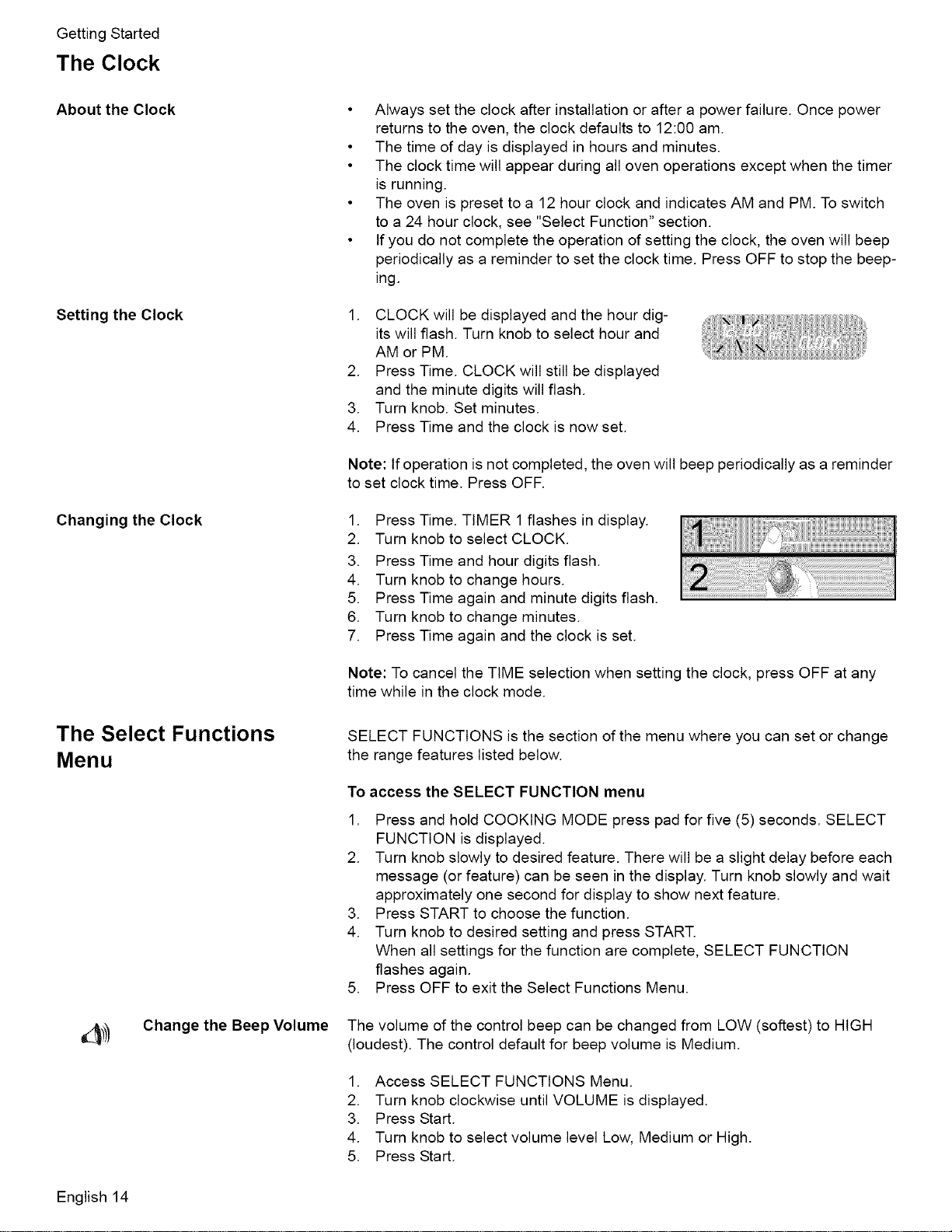
1. CLOCK will be displayed and the hour dig-
its will flash. Turn knob to select hour and
AM or PM.
2. Press Time. CLOCK will still be displayed
and the minute digits will flash.
3. Turn knob. Set minutes.
4. Press Time and the clock is now set.
Note: If operation is not completed, the oven will beep periodically as a reminder
to set clock time. Press OFF.
1. Press Time. TIMER 1flashes in display.
2. Turn knob to select CLOCK.
3. Press Time and hour digits flash.
4. Turn knob to change hours.
5. Press Time again and minute digits flash.
6. Turn knob to change minutes.
7. Press Time again and the clock is set.
Note: To cancel the TIME selection when setting the clock, press OFF at any
time while in the clock mode.
SELECT FUNCTIONS is the section of the menu where you can set or change
the range features listed below.
To
1.
access the SELECT FUNCTION menu
Press and hold COOKING MODE press pad for five (5) seconds. SELECT
FUNCTION is displayed.
2. Turn knob slowly to desired feature. There will be a slight delay before each
message (or feature) can be seen in the display. Turn knob slowly and wait
approximately one second for display to show next feature.
3. Press START to choose the function.
4. Turn knob to desired setting and press START.
When all settings for the function are complete, SELECT FUNCTION
flashes again.
5. Press OFF to exit the Select Functions Menu.
The volume of the control beep can be changed from LOW (softest) to HIGH
(loudest). The control default for beep volume is Medium.
1. Access SELECT FUNCTIONS Menu.
2. Turn knob clockwise until VOLUME is displayed.
3. Press Start.
4. Turn knob to select volume level Low, Medium or High.
5. Press Start.
English 14
f Change the TemperatureScale
Turn Clock Display ON or
OFF
Access Demo Mode
Getting Started
The oven has been preset to the Fahrenheit temperature scale. The feature
allows you to switch between Fahrenheit and Celsius temperature.
1. Access SELECT FUNCTIONS Menu.
2. Turn knob clockwise until SELECT TEMP F-C is displayed.
3. Press Start.
4. Turn knob to select Fahrenheit (F) or Celsius (C).
5. Press Start to accept new selection.
Clock time display can be turned off. The default display is on.
1. Access SELECT FUNCTIONS Menu.
2. Turn knob clockwise until CLOCK DISPLAY is displayed.
3. Press START.
4. Turn knob to select ON or OFF
5. Press START to accept new selection.
The demo mode is for appliance store use only.
Change the Display Lan-
ABC guage
Lock / Unlock the Oven
Control Panel
Change the Oven
Temperature Offset
O Reset the Factory Set-
tings
Language choices are English, Spanish, and French. English is the default lan-
guage. Note: The SELECT FUNCTIONS menu is displayed in English only,
regardless of which language is selected.
1. Access SELECT FUNCTIONS Menu.
2. Turn knob clockwise until desired language is displayed.
3. Press Start.
4. Turn knob clockwise to select a different language.
5. Press Start to accept a language change.
The oven keypad can be locked for safety purposes. This feature can be used to
prevent changes to the oven function. This function DOES NOT lock the oven
door.
1. Access SELECT FUNCTIONS Menu.
2. Turn knob clockwise until LOCK KEYS is flashing.
3. Press _art. KEY PAD LOCKED is displayed. The display will beep if a key
is pressed to indicate that the keypad is locked.
4. To unlock keypads, press Cooking Mode and hold for 5 seconds. Display
will read UNLOCKING KEY PAD.
5. When unlocked, the clock will again appear in the display.
This feature allows the adjustment of the oven temperature if food is consistently
too brown or too light.
1. Access SELECT FUNCTIONS Menu.
2. Turn knob clockwise until OVEN TEMP OFFSET is displayed.
3. Press START. 0° F is displayed.
4. Turn the knob to increase temperature in 25° F increments.
5. Press START to accept a temperature change.
This feature is used to change all the "Select Functions" settings back to the
original factory settings (or defaults).
1. Access SELECT FUNCTIONS Menu.
2. Turn knob clockwise until RESET DEFAULTS is displayed.
3. Press START. Display reads SELECT FUNCTIONS.
English 15
GettingStarted
SettheSabbathFeature
About the Sabbath Feature
The Sabbath Feature is for religious faiths with "no work" requirements on the
Sabbath.
• The oven will bake for 73 hours before automatically turning off.
• While baking in Sabbath mode, the display will show SABBATH and the
BAKE icon will be displayed. The clock will be off and no temperature will
show in the display.
• During the Sabbath mode, only the OFF key will operate. Press OFF at any
time during the Sabbath mode to end the mode and turn off the oven.
• At the end of 73 hours, the oven will turn off automatically and the display
will show SABBATH END. Press Off to return to time of day.
• The warming drawer does not operate with the Sabbath feature unless the
feature is also activated in the oven.
• The probe CANNOT be used during the Sabbath mode.
Setting the Sabbath Feature for the Oven Only
1. Verify that the oven is turned off.
2. Access SELECT FUNCTIONS Menu.
3. Turn knob clockwise until SABBATH OPTION appears.
4. Press START. BAKE will show in display and temperature will flash.
5. Turn knob to set oven temperature.
6. Turn oven light on if desired (press LIGHT).
Note: The light cannot be changed after this point. It will stay on or off, as
selected, during the entire Sabbath mode.
7. Press START. Oven starts after 5 seconds.
The oven operates for 73 hours and then turns off automatically.
Setting the Sabbath Feature for both the Warming Drawer and the Oven.
Note: warming drawer does not operate with the Sabbath feature unless the
feature is also activated in the oven.
1. Turn the warming drawer on to the desired heat setting. See "Turning on the
Warming Drawer" on page 23.
2. Verify that the oven is turned off.
3. Access SELECT FUNCTIONS Menu.
4. Turn knob clockwise until SABBATH OPTION appears.
5. Press START. BAKE will show in display and temperature will flash.
6. Turn knob to set oven temperature.
7. Turn oven light on if desired (press LIGHT).
Note: The light cannot be changed after this point. It will stay on or off, as
selected, during the entire Sabbath mode.
8. Press START. Oven starts after 5 seconds. Sabbath Feature is activated for
both the warming drawer and the oven.
The oven and warming drawer operates for 73 hours and then turn off automati-
cally.
Setting the Sabbath Feature for the Warming Drawer Only
English 16
ThewarmingdrawerdoesnotoperatewiththeSabbathfeatureunlessthefea-
tureisalsoactivatedintheoven.See"SettingtheSabbathFeatureforboththe
WarmingDrawerandtheOven."onpage16.
®
Change the Time Format The clock can be set to a 12 hour or 24 hour format. The default for clock format
is 12 hour.
1. Access SELECT FUNCTIONS Menu.
2. Turn knob clockwise until TIME FORMAT is displayed.
3. Press Start.
4. Turn knob to select 12 hour or 24 hour format.
5. Press _art to accept new selection.
Turn Automatic Convec-
tion Conversion ON or
OFF
This feature automatically converts package or recipe temperatures for use with
the convection bake mode. The default setting is "on".
1. Access SELECT FUNCTIONS Menu.
2. Turn knob clockwise until AUTO CONVECT BAKE is displayed.
3. Press _art.
4. Turn knob to select ON or OFF.
5. Press Start to accept new selection.
Before Using the Appliance for the First Time
• Remove all packing materials and labels from range. Remove packing
materials from inside the oven and inside the drawer.
• While cool, wipe with a clean, damp sponge and dry.
• For models with a glass ceramic cooktop, apply the glass ceramic cooktop
cleaner. Buffwith a clean cloth. See Care and Cleaning Section.
• There may be a slight odor during first uses; this is normal and will disap-
pear.
• Read and understand all safety precautions and Use and Care Manual infor-
mation prior to operating.
Operation - Cooktop
About the Cooktop
Operation
This section explains how to operate the cooktop. See "Getting the Most Out of
Your Cooktop" on page 24 for guidelines to improve cooktop results.
Use the cooktop for surface cooking applications such as boiling, frying, simmer-
ing, steaming and sauteing.
English 17
Setting the Burner Heat
Level
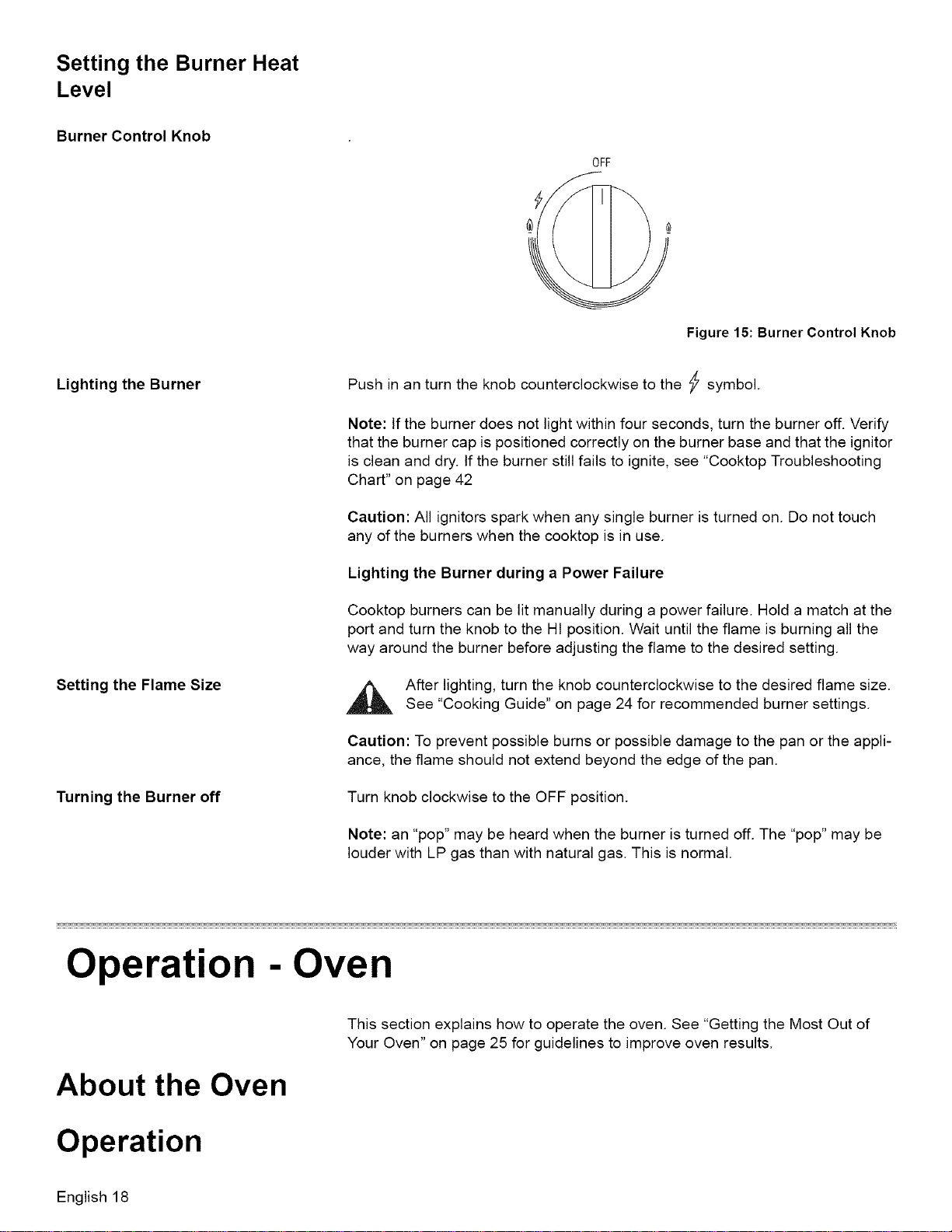
Burner Control Knob
Lighting the Burner
Setting the Flame Size
Turning the Burner off
OFF
Figure 15: Burner Control Knob
Push in an turn the knob counterclockwise to the _ symbol.
Note: If the burner does not light within four seconds, turn the burner off. Verify
that the burner cap is positioned correctly on the burner base and that the ignitor
is clean and dry. If the burner still fails to ignite, see "Cooktop Troubleshooting
Chart" on page 42
Caution: All ignitors spark when any single burner is turned on. Do not touch
any of the burners when the cooktop is in use.
Lighting the Burner during a Power Failure
Cooktop burners can be lit manually during a power failure. Hold a match at the
port and turn the knob to the HI position. Wait until the flame is burning all the
way around the burner before adjusting the flame to the desired setting.
After lighting, turn the knob counterclockwise to the desired flame size.
See "Cooking Guide" on page 24 for recommended burner settings.
Caution: To prevent possible burns or possible damage to the pan or the appli-
ance, the flame should not extend beyond the edge of the pan.
Turn knob clockwise to the OFF position.
Note: an "pop" may be heard when the burner is turned off. The "pop" may be
louder with LP gas than with natural gas. This is normal.
Operation - Oven
About the Oven
This section explains how to operate the oven. See "Getting the Most Out of
Your Oven" on page 25 for guidelines to improve oven results.
Operation
English 18
Setting the Cooking Mode
and Temperature
Automatic Convection Conversion
(models with convection bake)
Hot Oven Indicator
Using the Timer
To set the timer:
Operation - Oven
CAUTION
Do not use aluminum foil or protective liners to line any part of an
appliance, especially surface unit drip bowls or oven bottom. Installa-
tion of these liners may result in a risk of electric shock or fire.
Note: To back out of a current mode, press OFF. (Selecting OFF when not set-
ting the cooking mode will turn the oven off.)
.
2.
3.
.
5.
6.
.
.
9.
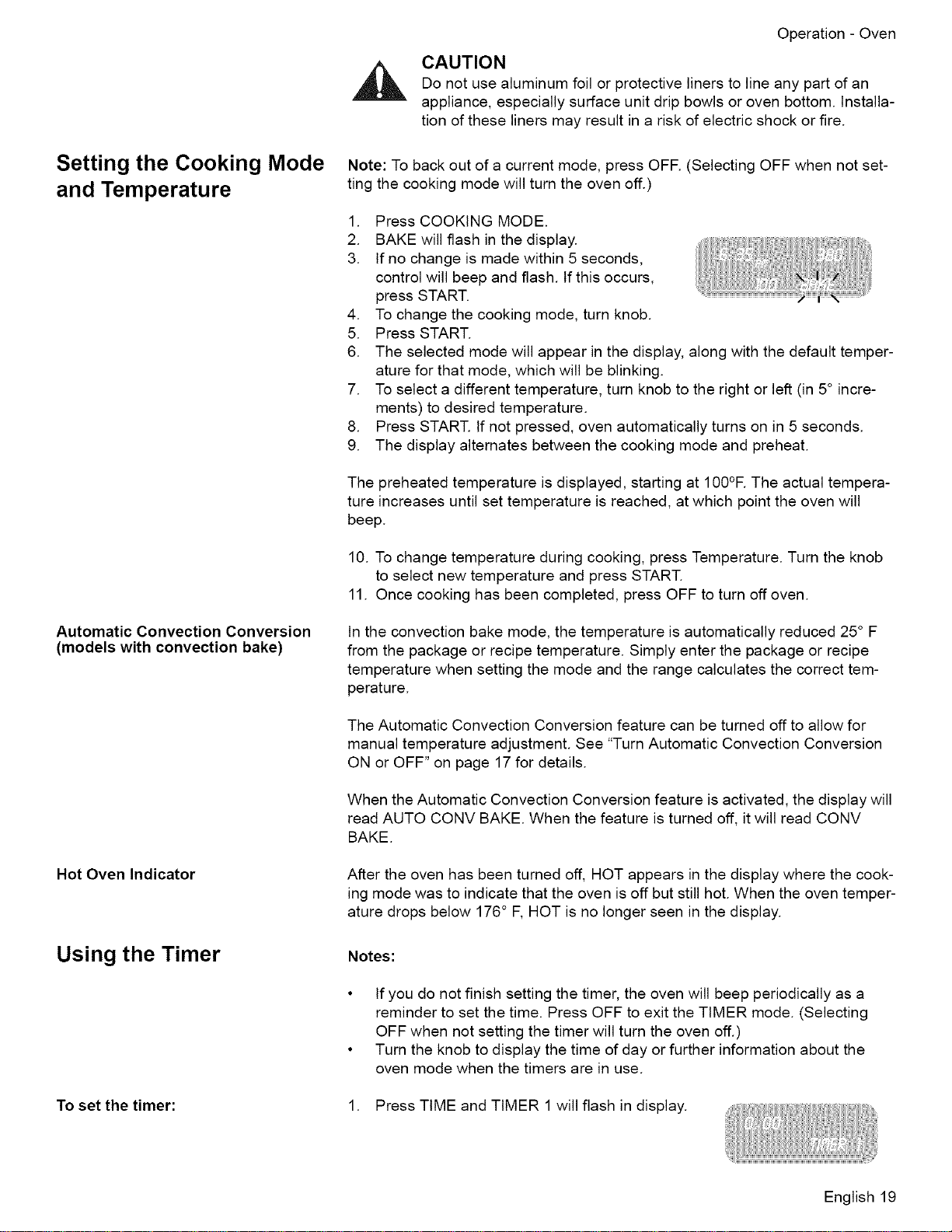
Press COOKING MODE.
BAKE will flash in the display.
If no change is made within 5 seconds,
control will beep and flash, tf this occurs,
press START.
To change the cooking mode, turn knob.
Press START.
The selected mode will appear in the display, along with the default temper-
ature for that mode, which will be blinking.
To select a different temperature, turn knob to the right or left (in 5° incre-
ments) to desired temperature.
Press START. If not pressed, oven automatically turns on in 5 seconds.
The display alternates between the cooking mode and preheat.
The preheated temperature is displayed, starting at 100°R The actual tempera-
ture increases until set temperature is reached, at which point the oven will
beep.
10. To change temperature during cooking, press Temperature. Turn the knob
to select new temperature and press START.
11. Once cooking has been completed, press OFF to turn off oven.
In the convection bake mode, the temperature is automatically reduced 25° F
from the package or recipe temperature. Simply enter the package or recipe
temperature when setting the mode and the range calculates the correct tem-
perature.
The Automatic Convection Conversion feature can be turned off to allow for
manual temperature adjustment. See "Turn Automatic Convection Conversion
ON or OFF" on page 17 for details.
When the Automatic Convection Conversion feature is activated, the display will
read AUTO CONV BAKE. When the feature is turned off, it will read CONV
BAKE.
After the oven has been turned off, HOT appears in the display where the cook-
ing mode was to indicate that the oven is off but still hot. When the oven temper-
ature drops below 176° F, HOT is no longer seen in the display.
Notes:
• If you do not finish setting the timer, the oven will beep periodically as a
reminder to set the time. Press OFF to exit the TIMER mode. (Selecting
OFF when not setting the timer will turn the oven off.)
• Turn the knob to display the time of day or further information about the
oven mode when the timers are in use.
1. Press TIME and TIMER 1 will flash in display.
English 19
Operation- Oven
ChangingtheTimeds
Clearing the Timeds
Cancelling
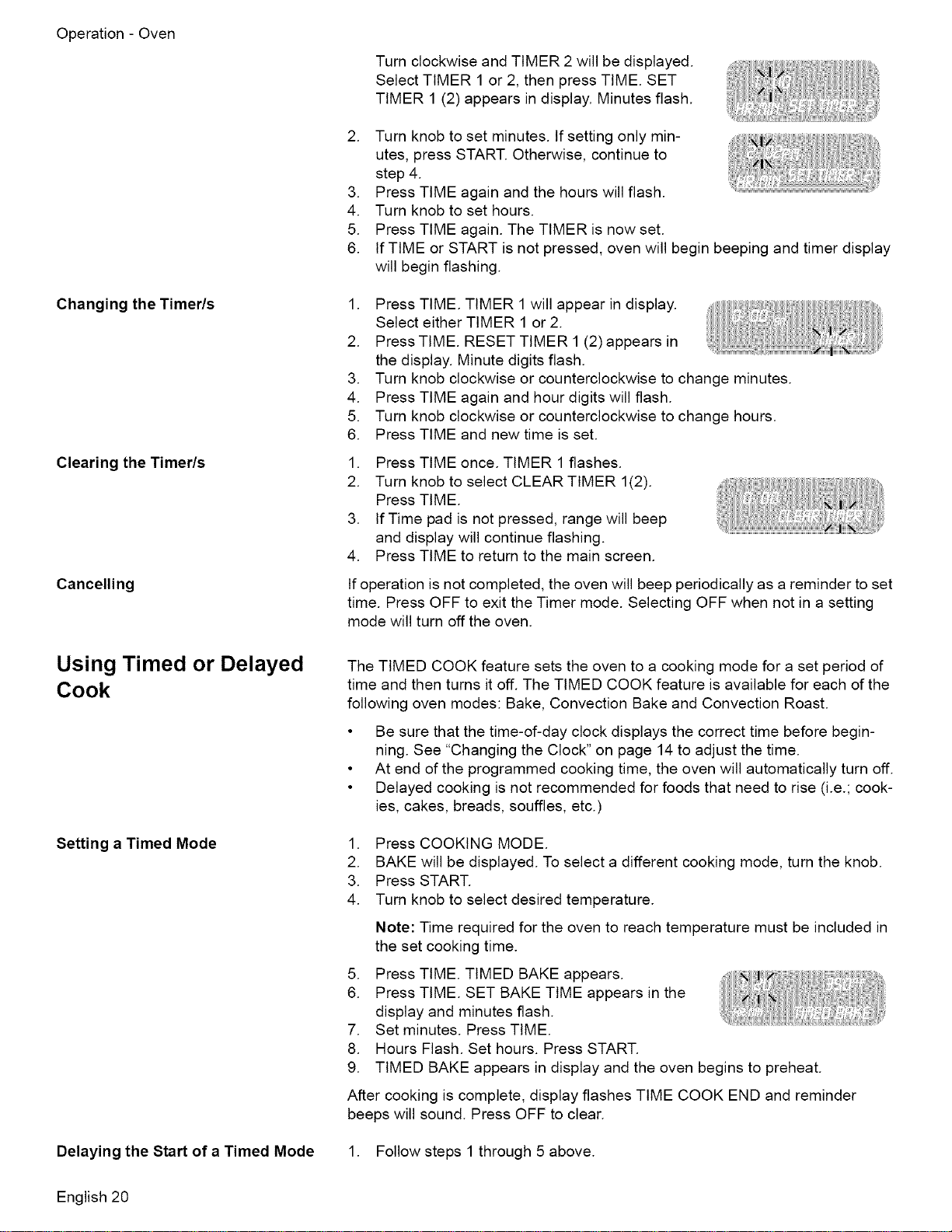
Turn clockwise and TIMER 2 will be displayed.
Select TIMER 1 or 2, then press TIME. SET
TIMER 1 (2) appears in display. Minutes flash.
.
.
4.
5.
6.
Turn knob to set minutes. If setting only min-
utes, press START. Otherwise, continue to
step 4.
Press TIME again and the hours will flash.
Turn knob to set hours.
Press TIME again. The TIMER is now set.
If TIME or START is not pressed, oven will begin beeping and timer display
will begin flashing.
.
.
.
4.
5.
6.
Press TIME. TIMER 1 will appear in display.
Select either TIMER 1 or 2.
Press TIME. RESET TIMER 1 (2) appears in
the display. Minute digits flash.
Turn knob clockwise or counterclockwise to change minutes.
Press TIME again and hour digits will flash.
Turn knob clockwise or counterclockwise to change hours.
Press TIME and new time is set.
1. Press TIME once. TIMER 1 flashes.
2. Turn knob to select CLEAR TIMER 1(2).
Press TIME.
3. If Time pad is not pressed, range will beep
and display will continue flashing.
4. Press TIME to return to the main screen.
If operation is not completed, the oven will beep periodically as a reminder to set
time. Press OFF to exit the Timer mode. Selecting OFF when not in a setting
mode will turn off the oven.
Using Timed or Delayed
Cook
Setting a Timed Mode
Delaying the Start of a Timed Mode
The TIMED COOK feature sets the oven to a cooking mode for a set period of
time and then turns it off. The TIMED COOK feature is available for each of the
following oven modes: Bake, Convection Bake and Convection Roast.
• Be sure that the time-of-day clock displays the correct time before begin-
ning. See "Changing the Clock" on page 14 to adjust the time.
• At end of the programmed cooking time, the oven will automatically turn off.
• Delayed cooking is not recommended for foods that need to rise (i.e.; cook-
ies, cakes, breads, souffles, etc.)
1. Press COOKING MODE.
2. BAKE will be displayed. To select a different cooking mode, turn the knob.
3. Press START.
4. Turn knob to select desired temperature.
Note: Time required for the oven to reach temperature must be included in
the set cooking time.
5. Press TIME. TIMED BAKE appears.
6. Press TIME. SET BAKE TIME appears in the
display and minutes flash.
7. Set minutes. Press TIME.
8. Hours Flash. Set hours. Press START.
9. TIMED BAKE appears in display and the oven begins to preheat.
After cooking is complete, display flashes TIME COOK END and reminder
beeps will sound. Press OFF to clear.
1. Follow steps 1 through 5 above.
English 20
To Check the Cooking Time and Stop
Time After a Delay Has Been Set
Setting the Sabbath Feature
Using the Probe (some
models)
Setting the Probe
.
3.
.
.
6.
7.
8.
9.
10.
Operation - Oven
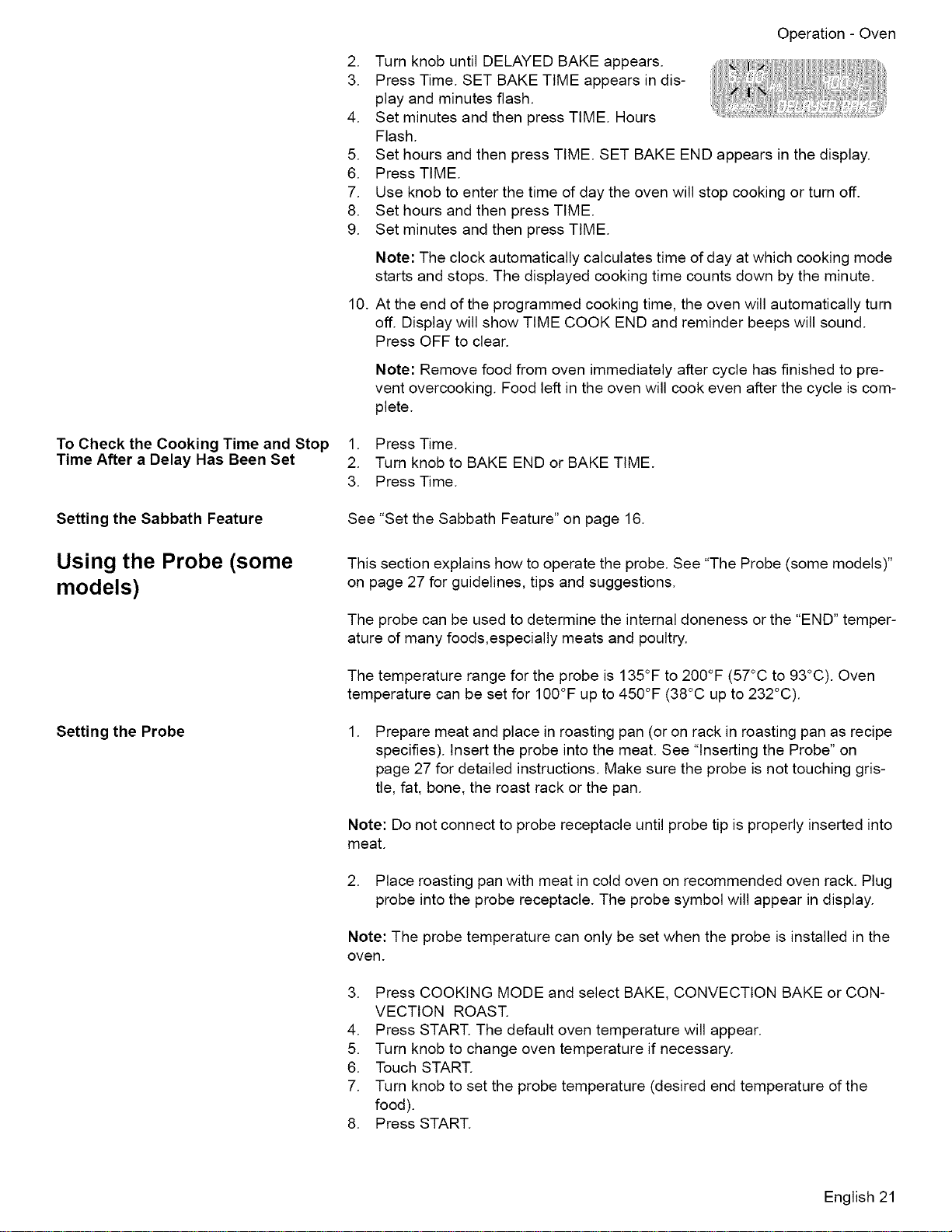
Turn knob until DELAYED BAKE appears.
Press Time. SET BAKE TIME appears in dis-
play and minutes flash.
Set minutes and then press TIME. Hours
Flash.
Set hours and then press TIME. SET BAKE END appears in the display.
Press TIME.
Use knob to enter the time of day the oven will stop cooking or turn off.
Set hours and then press TIME.
Set minutes and then press TIME.
Note: The clock automatically calculates time of day at which cooking mode
starts and stops. The displayed cooking time counts down by the minute.
At the end of the programmed cooking time, the oven will automatically turn
off. Display will show TIME COOK END and reminder beeps will sound.
Press OFF to clear.
Note: Remove food from oven immediately after cycle has finished to pre-
vent overcooking. Food left in the oven will cook even after the cycle is com-
plete.
1. Press Time.
2. Turn knob to BAKE END or BAKE TIME.
3. Press Time.
See "Set the Sabbath Feature" on page 16.
This section explains how to operate the probe. See "The Probe (some models)"
on page 27 for guidelines, tips and suggestions.
The probe can be used to determine the internal doneness or the "END" temper-
ature of many foods,especially meats and poultry.
The temperature range for the probe is 135°F to 200°F (57°C to 93°C). Oven
temperature can be set for 100°F up to 450°F (38°C up to 232°C).
.
Prepare meat and place in roasting pan (or on rack in roasting pan as recipe
specifies). Insert the probe into the meat. See "Inserting the Probe" on
page 27 for detailed instructions. Make sure the probe is not touching gris-
tle, fat, bone, the roast rack or the pan.
Note: Do not connect to probe receptacle until probe tip is properly inserted into
meat.
2. Place roasting pan with meat in cold oven on recommended oven rack. Plug
probe into the probe receptacle. The probe symbol will appear in display.
Note: The probe temperature can only be set when the probe is installed in the
oven.
3. Press COOKING MODE and select BAKE, CONVECTION BAKE or CON-
VECTION ROAST.
4. Press START. The default oven temperature will appear.
5. Turn knob to change oven temperature if necessary.
6. Touch START.
7. Turn knob to set the probe temperature (desired end temperature of the
food).
8. Press START.
English 21
Changing the Oven Temperature
When Using the Probe
Changing the Probe Temperature
The chosen oven temperature is displayed in the upper right hand corner of the
display.
The probe temperature is displayed in the center to the left of the cooking mode.
It starts at 80 degrees and increases in 5°F increments until the chosen probe
temperature is reached.
The oven is preheated when the beep signals once.
When the set probe temperature is reached, END appears in display and oven
turns off.
1. Touch TEMPERATURE. Oven temp will flash in the display.
2. Turn the knob to desired temperature and press START twice.
1. Touch TEMPERATURE. The oven temperature will flash.
2. Press start and PROBE TEMP will flash.
3. Turn the knob to desired temperature and press START again.
Note: Always remove probe from oven when cooking is complete. The probe
symbol will remain in the display until the probe is removed. Do not leave probe
attachment in oven during self-clean. Oven will not self-clean with the probe
installed in the oven
Operation - Warming Drawer (some models)
This section explains how to operate the warming drawer. See "Getting the Most
Out of Your Warming Drawer" on page 33 for guidelines to improve warming
drawer results.
About the Warming Drawer
The warming drawer will keep hot, cooked foods at serving temperature. Warm-
ing drawer settings are Low, Medium, and High.
Warming Drawer Specifi-
cations
Parts Key:
1. Stainless Steel Drawer Interior
2. Gasket
3. Rail Lock
Drawer Interior: 25" W x 17" D x 5" H
Figure 16: Warming Drawer Parts
Dish sizes:
• 2 -9 x 13" Pyrex 3-quart dishes, side by side.
• 2 -9 1/2 x 15" Pyrex 4-quart dishes, side by side.
• 4 -10 1/2" plates, single or stacked
• 3 -11" plates, single or stacked
English 22
Operation-WarmingDrawer(somemodels)
Warming Drawer Settings: The warming drawer has three
settings: Low, Medium and High. Thsee icons are seen in
the display when the corresponding setting is selected:
For recommended settings, see "Warming Drawer Chart" on
page 33.
Low
Medium |
High |
Figure 17: Warming Drawer Settings
Operation
Preheating
Preheat Times:
Turning on the Warming
Drawer
CAUTION
To maintain food safety, follow these guidelines:
• DO NOT use the warming drawer to heat cold food (exception: it is safe to
use the drawer to crisp crackers, chips or dry cereal and to warm plates).
• Be sure to maintain proper food temperature. The USDA recommends hold-
ing hot food at 140°F or warmer.
• DO NOT warm food for longer than one hour.
Caution: Plastic containers, plastic wrap or aluminum foil can melt if in direct
contact with the drawer or a hot cooking container. If it melts onto the drawer, it
may not be removable.
For best results, preheat the warming drawer when warming food.
• Low: 10 minutes
• Medium: 15 minutes
• High: 20 minutes
When Only Using the Warming
Drawer
When Also Using The Oven
Setting the Sabbath Feature
1. Press COOKING MODE.
2. Turn knob to select WARMING DRAWER.
3. Press START.
4. Turn knob to select heat setting.
5. Press START.
1. Press COOKING MODE.
2. Press START to select WARMING DRAWER.
3. Turn knob to select heat setting.
4. Press START.
Note: The warming drawer does not operate with the Sabbath feature unless
the feature is also activated in the oven. See "Setting the Sabbath Feature for
both the Warming Drawer and the Oven." on page 16.
1. Turn the warming drawer on the desired heat level.
2. Activate the Sabbath Feature. See "Set the Sabbath Feature" on page 16.
English 23
Turning Off the Warming
Drawer
When Only Using the Warming
Drawer
When Using the Warming Drawer
and the Oven
Crisping Stale Items
Warming Empty Serving
Bowls and Plates
1. Press OFF.
1. Press OFF.
2. Turn knob to select CANCEL DRWR, CANCEL OVEN, or CANCEL BOTH.
3. Press OFF.
• Place food in low sided dishes or pans.
• Preheat on Low.
• Check crispness after 45 minutes. Add time as needed.
• Use only heat-safe dishes.
• Warm on setting appropriate for cooking container.
• Check dish temperature during warming period.
• Place empty plates or dishes in a cold warming drawer. Do not preheat
drawer prior to placing dishes.
Getting the Most Out of Your Appliance
Getting the Most Out of Your Cooktop
Cooktop Cooking Guide
Boiling Water
Recommended Settings
Time to boil can vary greatly depending on environmental conditions. Try the fol-
lowing tips to decrease boil time:
• Use a lid.
• Use a pan that is appropriately sized for the amount of water and the size of
the burner.
• Select a pan with a flat base (See "Cookware Selection Guide" on page 25
for details).
• Choose a medium-weight pan (rather than a heavy-weight one).
• _art with water that is already warm.
• Boil the smallest amount of water necessary. Smaller volumes will boil faster
than larger volumes.
Use this chart as a guide for heat settings. A range of heat settings are listed
because the actual setting depends on:
• type and quality of pan (See "Selecting Cookware"),
• type, quantity and temperature of the food,
• burner used and
• the cook's preference.
Table 3: Cooking Guide
Bringing water to boil 9 - High
English 24
Table3: CookingGuide
GettingtheMostOutofYourAppliance
Pan frying, sauteing, browning meat, deep fat frying
Most frying, eggs, pancakes, slow boil
Simmering, finish cooking, covered foods, steaming
Melting butter and chocolate
6-8 - Med-High
4-5 - Med
2-3 - Med Low
1 - Low
Cookware Selection Guide
Cookware Characteristics
To Test the Flatness of Your Pans
Pan selection directly affects cooking speed and uniformity. For best results
select pans with flat bases. When a pan is hot, the base (pan bottom) should
rest evenly on the surface without wobbling (rocking). Flat, medium-to-heavy-
weight pans are best.
Turn the pan upside down on the countertop and place
a ruler flat against the bottom of the pan. The bottom of
the pan and the straight edge of the ruler should be
flush against each other.
Another simple test to determine even heat dis-
tribution across the cookware bottom is to place
1" (25.4 mm) of water in the pan. Bring the water
to a boil and observe the location of the bubbles
as the water starts to boil. Good, flat cookware
will have an even distribution of bubbles over
the bottom surface area.
Match Pan Diameter to Flame Size
The flame should be the same size as the bottom of the pan or smaller. Do not
use small pans with high flame settings as the flames can lick up the sides of the
pan.
Place oversized pans that span two burners front to rear, not side to side.
Tight Fitting Lids - A lid shortens cooking/boiling time by holding heat inside
the pot.
Cookware Tips • Use of pots and pans with rounded (either concave or convex) warped or
dented bottoms should be avoided. See drawings.
• Make sure the bottom of the pot or pan being used is clean and dry.
• Use pots and pans with thick, smooth metal bottoms.
Specialty Pans Specialty pans such as griddles, roasters, pressure cookers, woks, water bath
canners and pressure canners must have the same features as described
above. Use only a flat-bottomed wok.
Getting the Most Out of Your Oven
English 25
GettingtheMostOutofYourAppliance
Oven Cooking Guide
Rack Position
6
5
4
3
2
1
Multiple Rack Cooking
Pan Placement
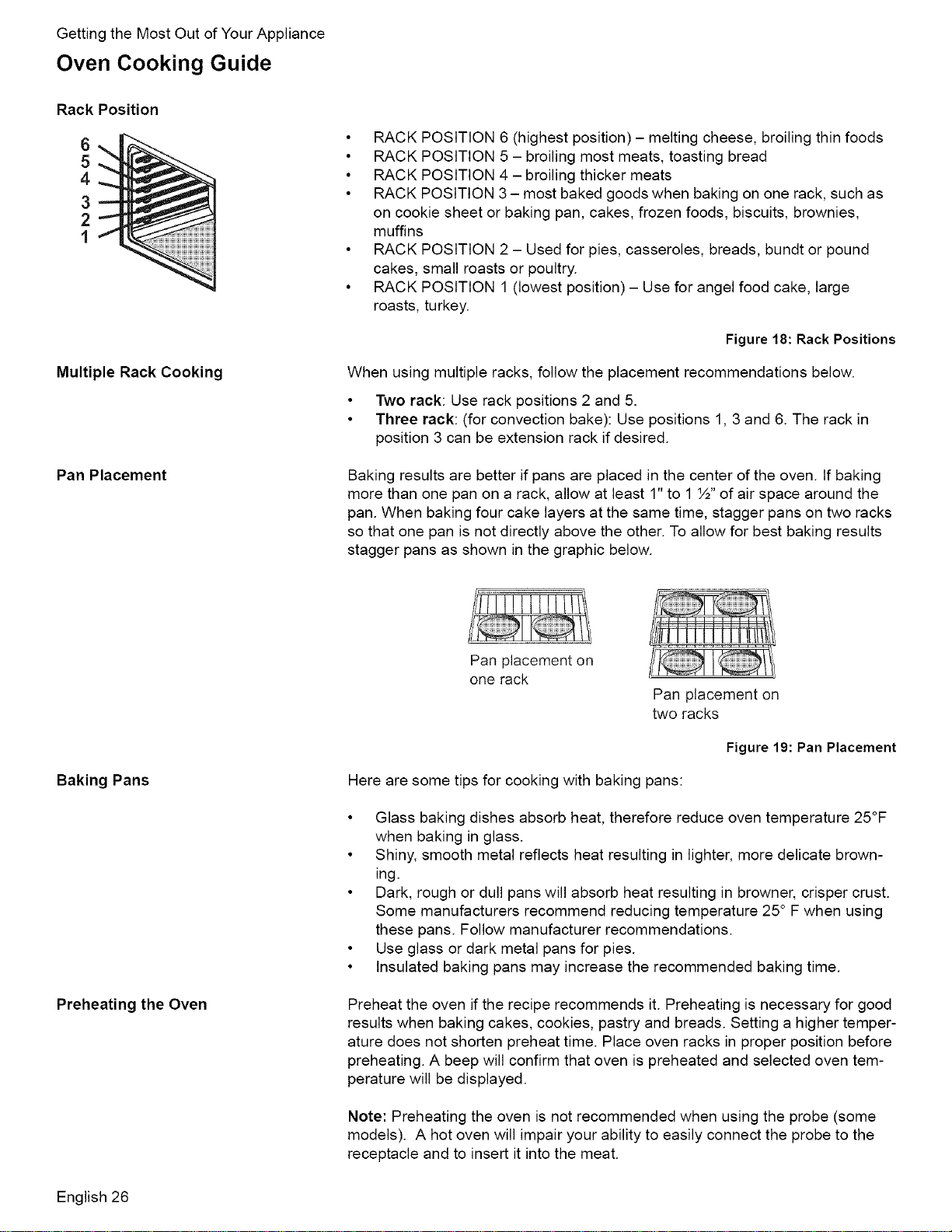
• RACK POSITION 6 (highest position) - melting cheese, broiling thin foods
• RACK POSITION 5 - broiling most meats, toasting bread
• RACK POSITION 4 - broiling thicker meats
• RACK POSITION 3 - most baked goods when baking on one rack, such as
on cookie sheet or baking pan, cakes, frozen foods, biscuits, brownies,
muffins
• RACK POSITION 2 - Used for pies, casseroles, breads, bundt or pound
cakes, small roasts or poultry.
• RACK POSITION 1 (lowest position) - Use for angel food cake, large
roasts, turkey.
Figure 18: Rack Positions
When using multiple racks, follow the placement recommendations below.
• Two rack: Use rack positions 2 and 5.
• Three rack: (for convection bake): Use positions 1, 3 and 6. The rack in
position 3 can be extension rack if desired.
Baking results are better if pans are placed in the center of the oven. If baking
more than one pan on a rack, allow at least 1" to 1 ½" of air space around the
pan. When baking four cake layers at the same time, stagger pans on two racks
so that one pan is not directly above the other. To allow for best baking results
stagger pans as shown in the graphic below.
Baking Pans
Preheating the Oven
Pan placement on
one rack
Pan placement on
two racks
Figure 19: Pan Placement
Here are some tips for cooking with baking pans:
• Glass baking dishes absorb heat, therefore reduce oven temperature 25°F
when baking in glass.
• Shiny, smooth metal reflects heat resulting in lighter, more delicate brown-
ing.
• Dark, rough or dull pans will absorb heat resulting in browner, crisper crust.
Some manufacturers recommend reducing temperature 25° F when using
these pans. Follow manufacturer recommendations.
• Use glass or dark metal pans for pies.
• Insulated baking pans may increase the recommended baking time.
Preheat the oven if the recipe recommends it. Preheating is necessary for good
results when baking cakes, cookies, pastry and breads. Setting a higher temper-
ature does not shorten preheat time. Place oven racks in proper position before
preheating. A beep will confirm that oven is preheated and selected oven tem-
perature will be displayed.
Note: Preheating the oven is not recommended when using the probe (some
models). A hot oven will impair your ability to easily connect the probe to the
receptacle and to insert it into the meat.
English 26
The Probe (some models)
Oven Cooking Modes
[_ Bake, Proof and Warm
Getting the Most Out of Your Appliance
• The oven is well insulated and the retained heat will continue to cook the
meat after the oven has shut off. For this reason, remove the meat from the
oven as soon as the control beeps.
• Since meat continues to cook after being removed from the oven, set the
internal (probe) temperature 5 - 10 degrees below the desired final internal
temperature (exception: poultry). Allow standing time (10 -20 minutes)
before carving the meat.
• Always use the handle of the probe for inserting and removing. Use a
potholder to remove since the probe becomes hot.
• Remove the probe from the oven when it is not being used.
• The probe cannot be used with frozen meats. For best results, completely
thaw meats before using the probe.
Inserting the Probe
• For meats, insert the probe tip into the thickest part and do not touch bone,
fat, or gristle.
• For large poultry products and turkeys, insert the probe in the thickest part of
the inner thigh.
• For other foods, such as a meatloaf, the probe tip should be located in the
center of the thickest part of the food.
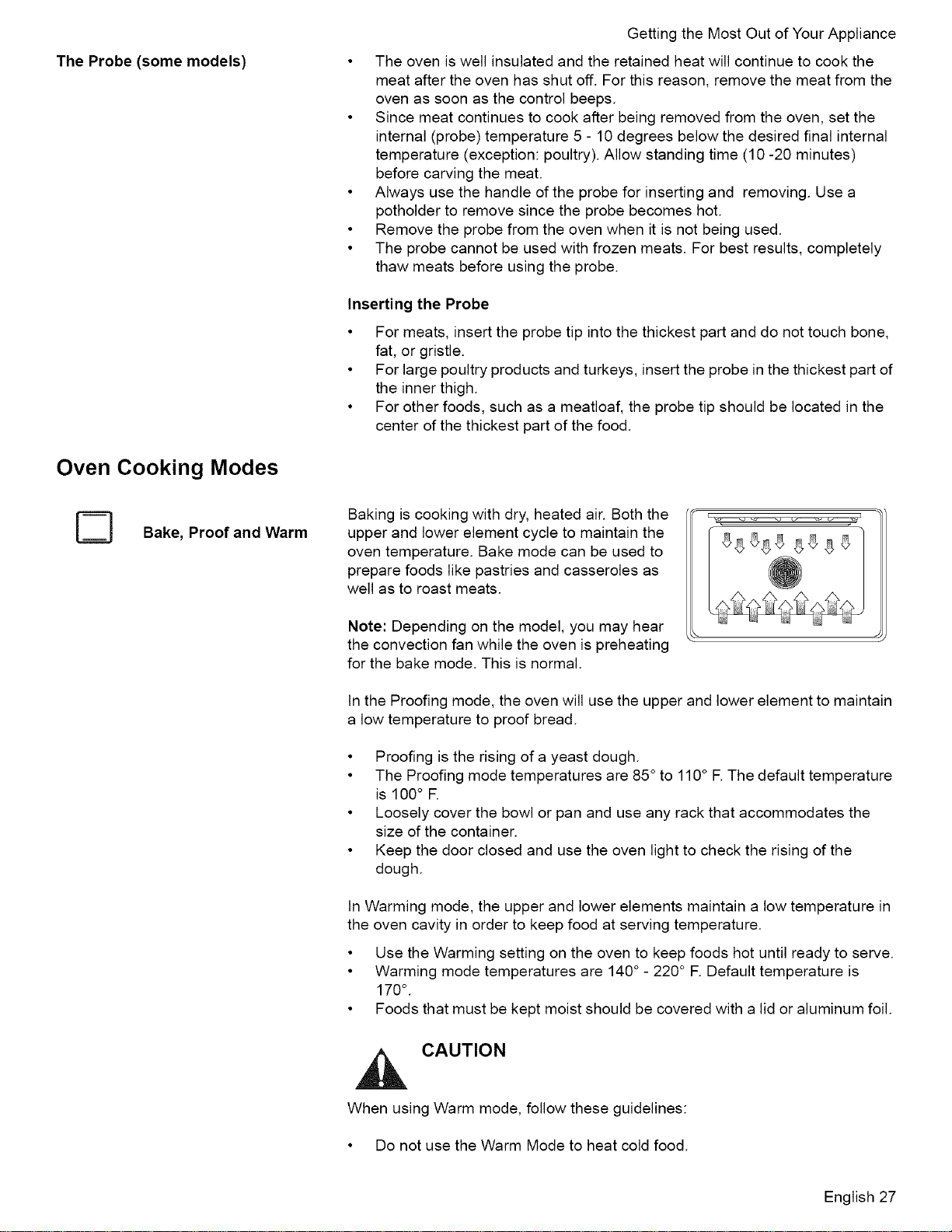
Baking is cooking with dry, heated air. Both the
upper and lower element cycle to maintain the
oven temperature. Bake mode can be used to
prepare foods like pastries and casseroles as
well as to roast meats.
Note: Depending on the model, you may hear
the convection fan while the oven is preheating
for the bake mode. This is normal.
In the Proofing mode, the oven will use the upper and lower element to maintain
a low temperature to proof bread.
• Proofing is the rising of a yeast dough.
• The Proofing mode temperatures are 85 ° to 110° E The default temperature
is 100° R
• Loosely cover the bowl or pan and use any rack that accommodates the
size of the container.
• Keep the door closed and use the oven light to check the rising of the
dough.
In Warming mode, the upper and lower elements maintain a low temperature in
the oven cavity in order to keep food at serving temperature.
• Use the Warming setting on the oven to keep foods hot until ready to serve.
• Warming mode temperatures are 140° - 220° F. Default temperature is
170°
• Foods that must be kept moist should be covered with a lid or aluminum foil.
CAUTION
When using Warm mode, follow these guidelines:
• Do not use the Warm Mode to heat cold food.
English 27
GettingtheMostOutofYourAppliance
Convection Bake
Automatic Convection Conversion
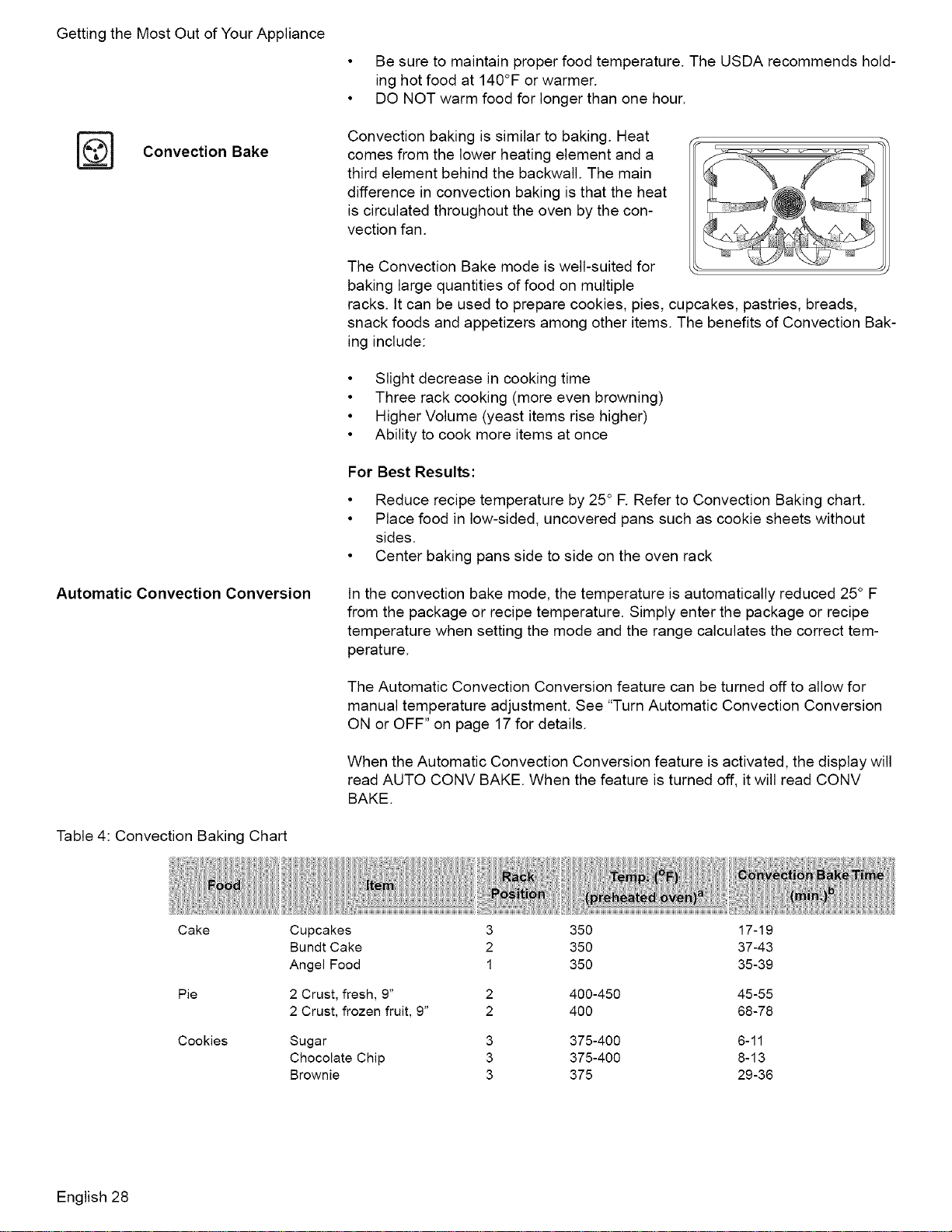
Table 4: Convection Baking Chart
• Be sure to maintain proper food temperature. The USDA recommends hold-
ing hot food at 140°F or warmer.
• DO NOT warm food for longer than one hour.
Convection baking is similar to baking. Heat
comes from the lower heating element and a
third element behind the backwall. The main
difference in convection baking is that the heat
is circulated throughout the oven by the con-
vection fan.
The Convection Bake mode is well-suited for
baking large quantities of food on multiple
racks, tt can be used to prepare cookies, pies, cupcakes, pastries, breads,
snack foods and appetizers among other items. The benefits of Convection Bak-
ing include:
• Slight decrease in cooking time
• Three rack cooking (more even browning)
• Higher Volume (yeast items rise higher)
• Ability to cook more items at once
For Best Results:
• Reduce recipe temperature by 25 ° F. Refer to Convection Baking chart.
• Place food in low-sided, uncovered pans such as cookie sheets without
sides.
• Center baking pans side to side on the oven rack
In the convection bake mode, the temperature is automatically reduced 25° F
from the package or recipe temperature. Simply enter the package or recipe
temperature when setting the mode and the range calculates the correct tem-
perature.
The Automatic Convection Conversion feature can be turned off to allow for
manual temperature adjustment. See "Turn Automatic Convection Conversion
ON or OFF" on page 17 for details.
When the Automatic Convection Conversion feature is activated, the display will
read AUTO CONV BAKE. When the feature is turned off, it will read CONV
BAKE.
Cake
Pie
Cookies
Cupcakes
Bundt Cake
Angel Food
2 Crust, fresh, 9"
2 Crust, frozen fruit, 9"
Sugar
Chocolate Chip
Brownie
3
2
1
3
3
3
350 17-19
350 37-43
350 35-39
400-450 45-55
400 68-78
375-400 6-11
375-400 8-13
375 29-36
English 28

Table4:ConvectionBakingChart
GettingtheMostOutofYourAppliance
Broil
Breads
Yeast bread, loaf, 9x5 2 400 18-22
Yeast rolls 3 400-425 12-15
Quick bread, loaf, 8x4 2 375-400 45-55
Biscuits 3 400-425 11-15
Muffins 3 450 15-19
Pizza Frozen 3 425-475 23-26
Fresh 3 450-475 12-15
a. This temperature must be manually reduced by 25 ° F if the Automatic Convection Conversion
feature has been turned off.
b. This chart is a guide. Actual times depend on the mixes or recipes baked. Follow recipe or
package directions.
Broiling uses intense heat radiated from the
upper element. The Broil mode is best suited to
cooking thin, tender cuts of meat (1" or less),
poultry and fish. It can also be used to brown
breads and casseroles. Always broil with the
door closed.
The benefits of Broiling include:
• Fast and efficient cooking
• Cooking without the addition of fats or liquids
• Browning as the food cooks
For Best Results:
• Preheat oven 3-4 minutes. Do not preheat for more than 5 minutes.
• Steaks and Chops should be at least 3/4" thick
• Brush fish and poultry with butter or oil to prevent sticking
• Use the broil pan and grid included with your range
• Do not cover the broiler grid with foil. It is designed to drain fats and oils
away from the cooking surface to prevent smoking and spattering
• Turn meats once halfway through the recommended cooking time (see Broil
Chart for examples).
• When top browning casseroles, use only metal or glass ceramic dishes such
as Corningware®.
• Never use heat-proof glass (Pyrex®); they can't tolerate the high tempera-
ture.
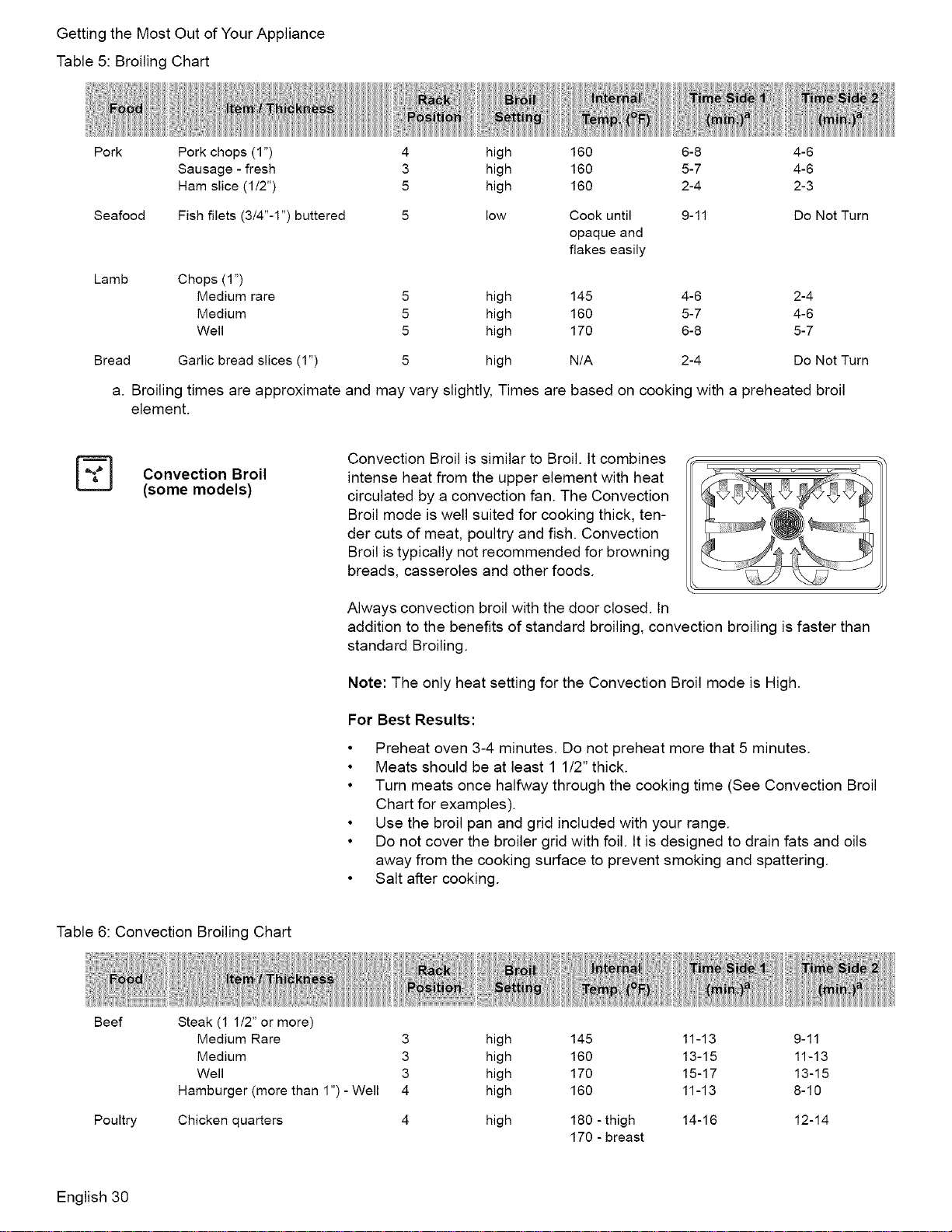
Table 5: Broiling Chart
Beef
Poultry
Steak (3/4"-1 ")
Medium Rare 5 high 145 5-7 4-6
Medium 5 high 160 6-8 5-7
Well 5 high 170 7-9 6-8
Hamburgers (3/4"-1") - Well 4 high 160 7-9 8-10
Breast (bone in) 4 low 170 21-23 18-20
English 29
GettingtheMostOutofYourAppliance
Table5:BroilingChart
Pork
Seafood
Pork chops (1") 4 high
Sausage - fresh 3 high
Ham slice (1/2") 5 high
Fish filets (3/4"-1") buttered
low
Lamb
Chops (1")
Medium rare 5 high
Medium 5 high
Well 5 high
Bread Garlic bread slices (1") high
a. Broiling times are approximate and may vary slightly, Times are
element.
160 6-8 4-6
160 5-7 4-6
160 2-4 2-3
Cook until
opaque and
flakes easily
9-11 Do Not Turn
145 4-6 2-4
160 5-7 4-6
170 6-8 5-7
N/A 2-4 Do Not Turn
based on cooking with a preheated broil
Convection Broil
(some models)
Convection Broil is similar to Broil. It combines
intense heat from the upper element with heat
circulated by a convection fan. The Convection
Broil mode is well suited for cooking thick, ten-
der cuts of meat, poultry and fish. Convection
Broil is typically not recommended for browning
breads, casseroles and other foods.
Always convection broil with the door closed. In
addition to the benefits of standard broiling, convection broiling is faster than
standard Broiling.
Note: The only heat setting for the Convection Broil mode is High.
For Best Results:
• Preheat oven 3-4 minutes. Do not preheat more that 5 minutes.
• Meats should be at least 1 1/2" thick.
• Turn meats once halfway through the cooking time (See Convection Broil
Chart for examples).
• Use the broil pan and grid included with your range.
• Do not cover the broiler grid with foil. It is designed to drain fats and oils
away from the cooking surface to prevent smoking and spattering.
• Salt after cooking.
Table 6: Convection Broiling Chart
Beef Steak (1 1/2" or more)
Medium Rare 3
Medium 3
Well 3
Hamburger (more than 1") - Well 4
Poultry Chicken quarters 4
high 145 11-13 9-11
high 160 13-15 11-13
high 170 15-17 13-15
high 160 11-13 8-10
high 180 - thigh 14-16 12-14
170 - breast
English 30
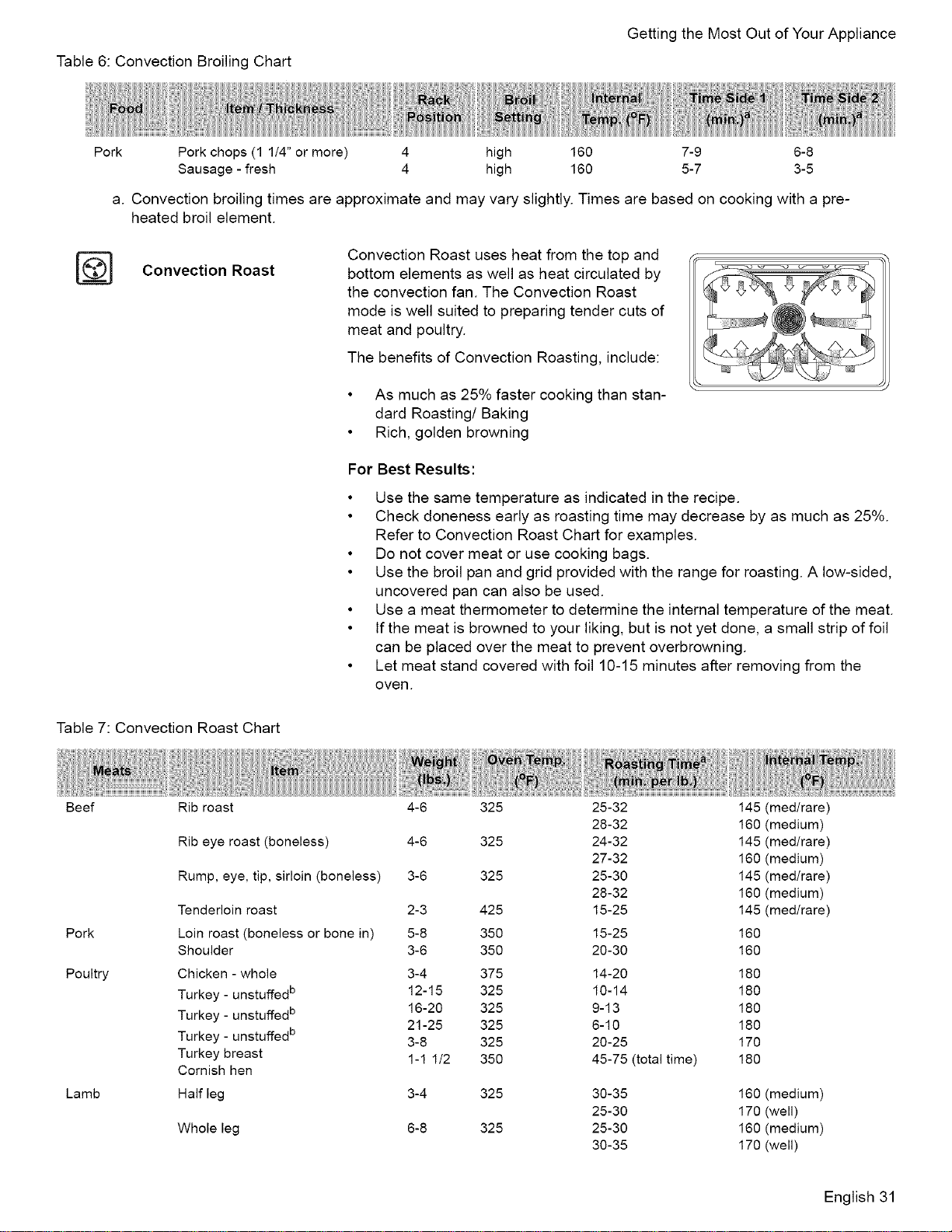
Table6:ConvectionBroilingChart
GettingtheMostOutofYourAppliance
Pork
Pork chops (1 1/4" or more) 4
Sausage - fresh 4
high 160 7-9 6-8
high 160 5-7 3-5
a. Convection broiling times are approximate and may vary slightly. Times are based on cooking with a pre-
heated broil element.
Convection Roast
Convection Roast uses heat from the top and
bottom elements as well as heat circulated by
the convection fan. The Convection Roast
mode is well suited to preparing tender cuts of
meat and poultry.
The benefits of Convection Roasting, include:
• As much as 25% faster cooking than stan-
dard Roasting/Baking
• Rich, golden browning
For Best Results:
• Use the same temperature as indicated in the recipe.
• Check doneness early as roasting time may decrease by as much as 25%.
Refer to Convection Roast Chart for examples.
• Do not cover meat or use cooking bags.
• Use the broil pan and grid provided with the range for roasting. A low-sided,
uncovered pan can also be used.
• Use a meat thermometer to determine the internal temperature of the meat.
• If the meat is browned to your liking, but is not yet done, a small strip of foil
can be placed over the meat to prevent overbrowning.
• Let meat stand covered with foil 10-15 minutes after removing from the
oven.
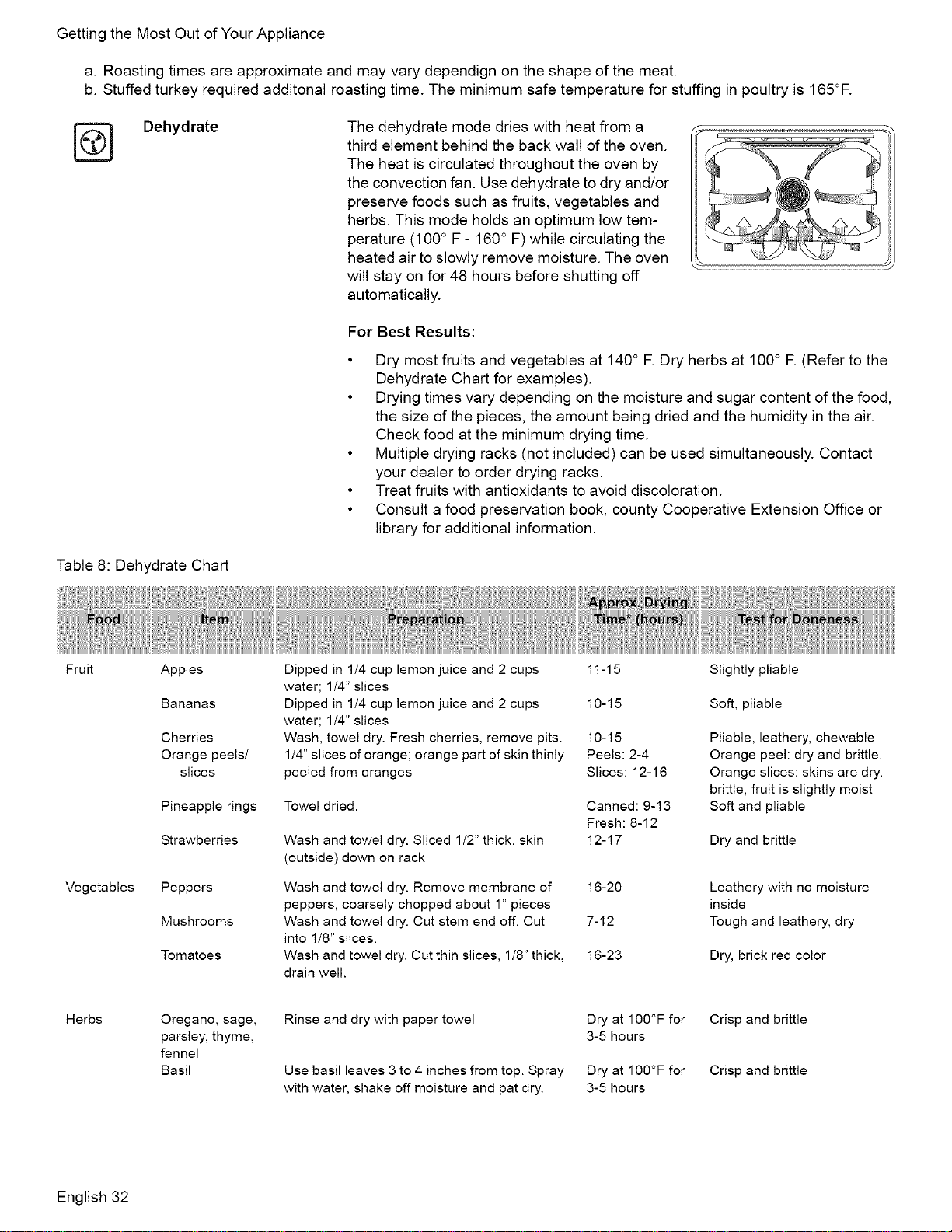
Table 7: Convection Roast Chart
Beef Rib roast
Pork
Poultry
Lamb
Rib eye roast (boneless)
Rump, eye, tip, sirloin (boneless)
Tenderloin roast
Loin roast (boneless or bone in)
Shoulder
Chicken - whole
Turkey - unstuffed b
Turkey - unstuffed b
Turkey - unstuffed b
Turkey breast
Cornish hen
Half leg
Whole leg
4-6 325 25-32 145
28-32 160
4-6 325 24-32 145
27-32 160
3-6 325 25-30 145
28-32 160
2-3 425 15-25 145
5-8 350 15-25 160
3-6 350 20-30 160
3-4 375 14-20 180
12-15 325 10-14 180
16-20 325 9-13 180
21-25 325 6-10 180
3-8 325 20-25 170
1-1 1/2 350 45-75(totaltime) 180
3-4 325 30-35 160
25-30 170
6-8 325 25-30 160
30-35 170
(med/rare)
(medium)
(med/rare)
(medium)
(med/rare)
(medium)
(med/rare)
(medium)
(well)
(medium)
(well)
English 31
GettingtheMostOutofYourAppliance
a.Roastingtimesareapproximateandmayvarydependignontheshapeofthemeat.
b.Stuffedturkeyrequiredadditonalroastingtime.Theminimumsafetemperatureforstuffinginpoultryis165°E
[_ Dehydrate
The dehydrate mode dries with heat from a
third element behind the back wall of the oven.
The heat is circulated throughout the oven by
the convection fan. Use dehydrate to dry and/or
preserve foods such as fruits, vegetables and
herbs. This mode holds an optimum low tem-
perature (100 ° F - 160° F) while circulating the
heated air to slowly remove moisture. The oven
will stay on for 48 hours before shutting off
automatically.
For Best Results:
• Dry most fruits and vegetables at 140° R Dry herbs at 100° R (Refer to the
Dehydrate Chart for examples).
• Drying times vary depending on the moisture and sugar content of the food,
the size of the pieces, the amount being dried and the humidity in the air.
Check food at the minimum drying time.
• Multiple drying racks (not included) can be used simultaneously. Contact
your dealer to order drying racks.
• Treat fruits with antioxidants to avoid discoloration.
• Consult a food preservation book, county Cooperative Extension Office or
library for additional information.
Table 8: Dehydrate Chart
Fruit
Vegetables
Apples
Bananas
Cherries
Orange peels/
slices
Pineapple rings
Strawberries
Peppers
Mushrooms
Tomatoes
Dipped in 1/4 cup lemon juice and 2 cups
water; 1/4" slices
Dipped in 1/4 cup lemon juice and 2 cups
water; 1/4" slices
Wash, towel dry. Fresh cherries, remove pits.
1/4" slices of orange; orange part of skin thinly
peeled from oranges
Towel dried.
Wash and towel dry. Sliced 1/2" thick, skin
(outside) down on rack
11-15 Slightly pliable
10-15 Soft, pliable
10-15
Peels: 2-4
Slices: 12-16
Canned: 9-13
Fresh: 8-12
12-17
Wash and towel dry. Remove membrane of 16-20
peppers, coarsely chopped about 1" pieces
Wash and towel dry. Cut stem end off. Cut 7-12
into 1/8" slices.
Wash and towel dry. Cut thin slices, 1/8" thick, 16-23
drain well.
Pliable, leathery, chewable
Orange peel: dry and brittle.
Orange slices: skins are dry,
brittle, fruit is slightly moist
Soft and pliable
Dry and brittle
Leathery with no moisture
inside
Tough and leathery, dry
Dry, brick red color
Herbs
Oregano, sage,
parsley, thyme,
fennel
Basil
Rinse and dry with paper towel
Use basil leaves 3 to 4 inches from top. Spray
with water, shake off moisture and pat dry.
Dry at 100°F for
3-5 hours
Dry at 100°F for
3-5 hours
Crisp and brittle
Crisp and brittle
English 32
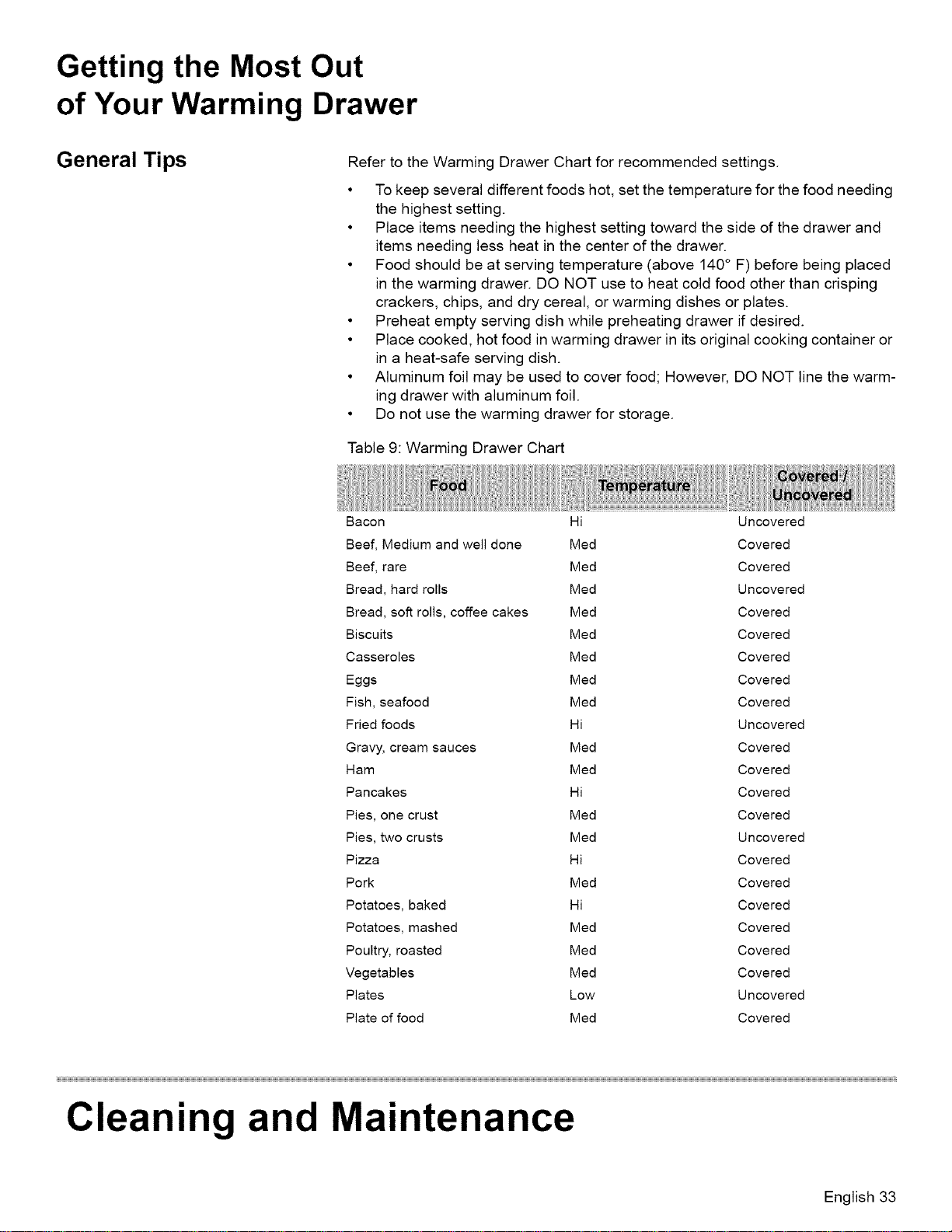
Getting the Most Out
of Your Warming Drawer
General Tips Refer to the Warming Drawer Chart for recommended settings.
• To keep several different foods hot, set the temperature for the food needing
the highest setting.
• Place items needing the highest setting toward the side of the drawer and
items needing less heat in the center of the drawer.
• Food should be at serving temperature (above 140° F) before being placed
in the warming drawer. DO NOT use to heat cold food other than crisping
crackers, chips, and dry cereal, or warming dishes or plates.
• Preheat empty serving dish while preheating drawer if desired.
• Place cooked, hot food in warming drawer in its original cooking container or
in a heat-safe serving dish.
• Aluminum foil may be used to cover food; However, DO NOT line the warm-
ing drawer with aluminum foil.
• Do not use the warming drawer for storage.
Table 9: Warming Drawer Chart
Bacon Hi Uncovered
Beef, Medium and well done Med Covered
Beef, rare Med Covered
Bread, hard rolls Med Uncovered
Bread, soft rolls, coffee cakes Med Covered
Biscuits Med Covered
Casseroles Med Covered
Eggs Med Covered
Fish, seafood Med Covered
Fried foods Hi Uncovered
Gravy, cream sauces Med Covered
Ham Med Covered
Pancakes Hi Covered
Pies, one crust Med Covered
Pies, two crusts Med Uncovered
Pizza Hi Covered
Pork Med Covered
Potatoes, baked Hi Covered
Potatoes, mashed Med Covered
Poultry, roasted Med Covered
Vegetables Med Covered
Plates Low Uncovered
Plate of food Med Covered
Cleaning and Maintenance
English 33
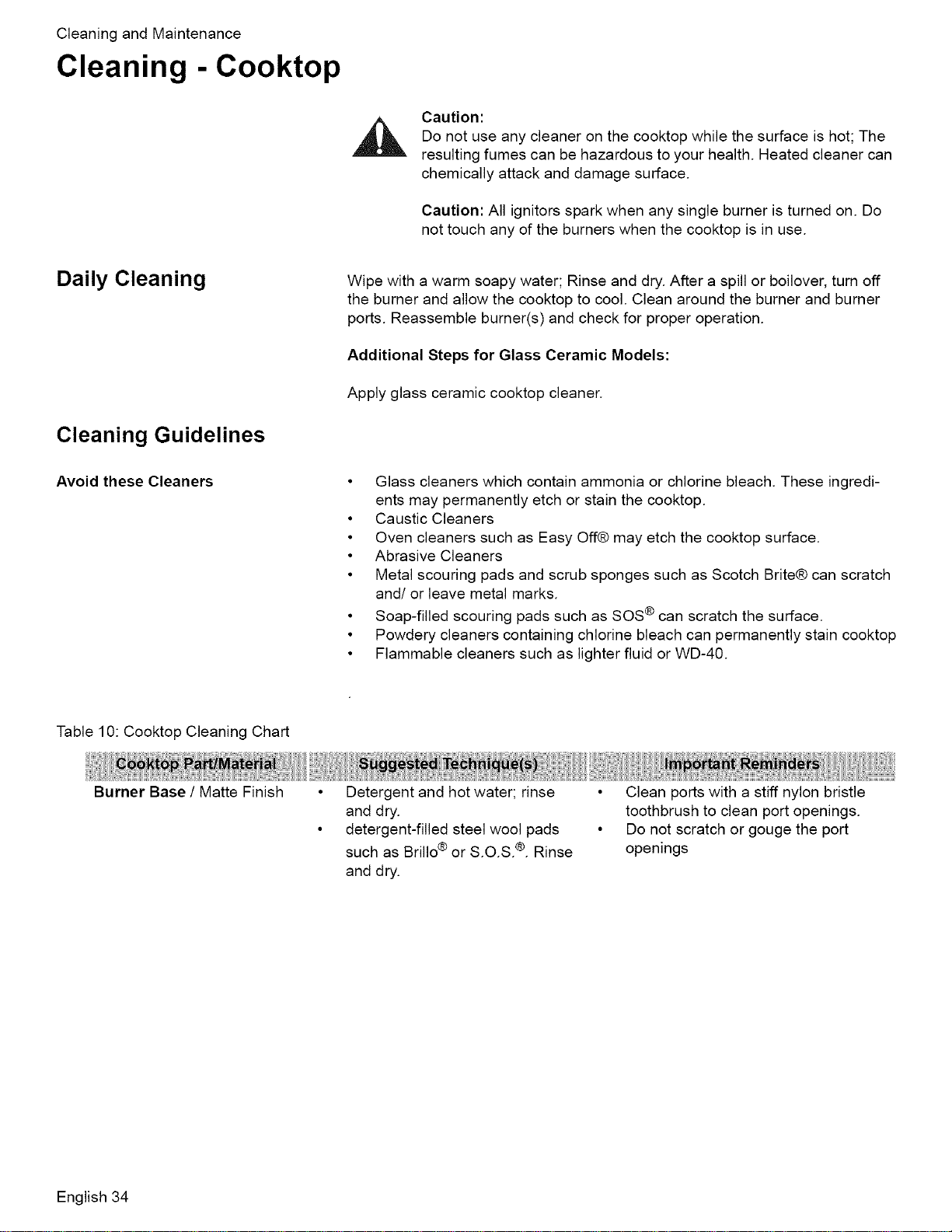
CleaningandMaintenance
Cleaning - Cooktop
Caution:
Do not use any cleaner on the cooktop while the surface is hot; The
resulting fumes can be hazardous to your health. Heated cleaner can
chemically attack and damage surface.
Caution: All ignitors spark when any single burner is turned on. Do
not touch any of the burners when the cooktop is in use.
Daily Cleaning
Cleaning Guidelines
Avoid these Cleaners
Wipe with a warm soapy water; Rinse and dry. After a spill or boilover, turn off
the burner and allow the cooktop to cool. Clean around the burner and burner
ports. Reassemble burner(s) and check for proper operation.
Additional Steps for Glass Ceramic Models:
Apply glass ceramic cooktop cleaner.
• Glass cleaners which contain ammonia or chlorine bleach. These ingredi-
ents may permanently etch or stain the cooktop.
• Caustic Cleaners
• Oven cleaners such as Easy Off@ may etch the cooktop surface.
• Abrasive Cleaners
• Metal scouring pads and scrub sponges such as Scotch Brite® can scratch
and/or leave metal marks.
• Soap-filled scouring pads such as SOS ® can scratch the surface.
• Powdery cleaners containing chlorine bleach can permanently stain cooktop
• Flammable cleaners such as lighter fluid or WD-40.
Table 10: Cooktop Cleaning Chart
Burner Base / Matte Finish
Detergent and hot water; rinse
and dry.
detergent-filled steel wool pads
such as Brillo ® or S.O.S. ®. Rinse
and dry.
• Clean ports with a stiff nylon bristle
toothbrush to clean port openings.
• Do not scratch or gouge the port
openings
English 34
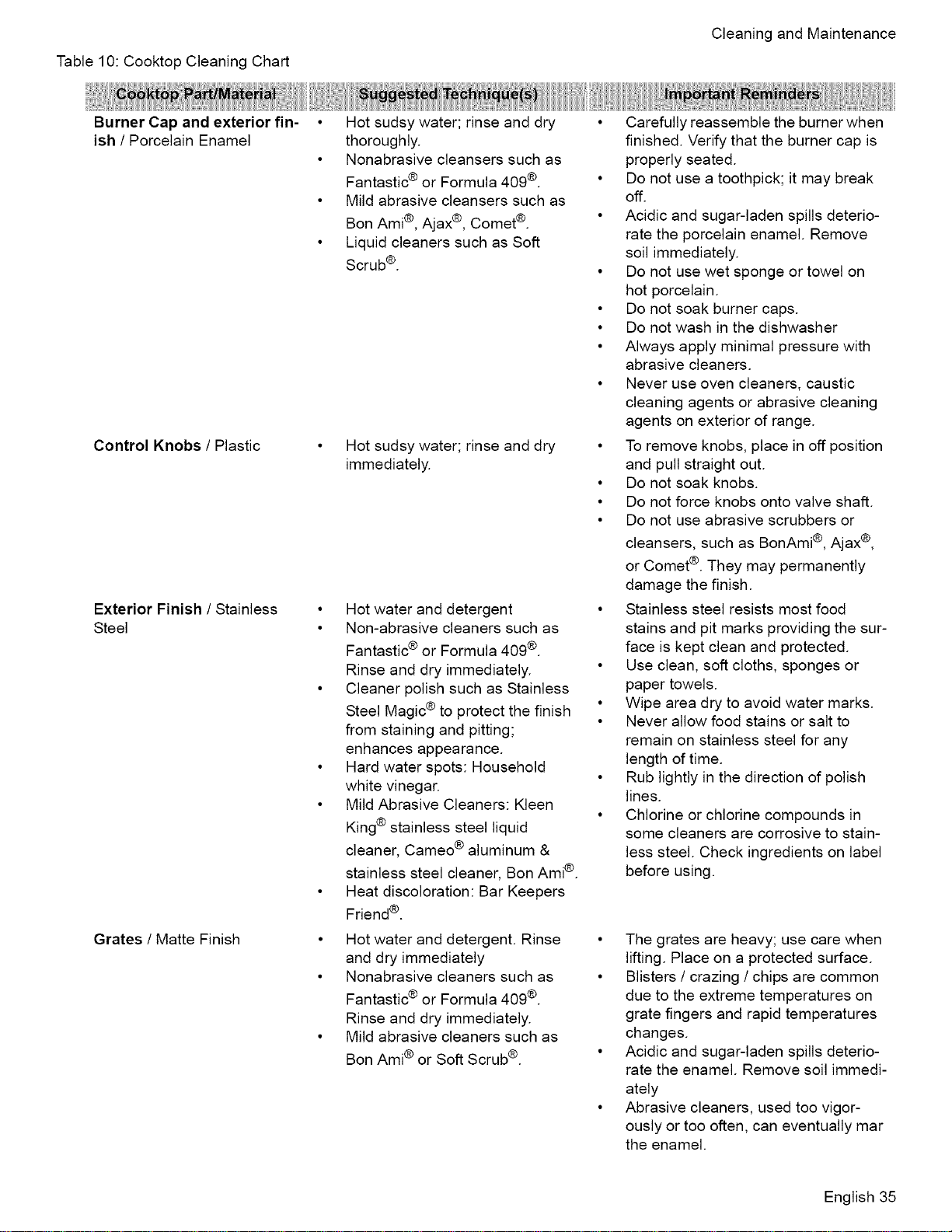
Table10:CooktopCleaningChart
CleaningandMaintenance
Burner Cap and exterior fin-
ish / Porcelain Enamel
Control Knobs / Plastic
Exterior Finish / Stainless
Steel
Grates / Matte Finish
• Hot sudsy water; rinse and dry
thoroughly.
• Nonabrasive cleansers such as
Fantastic ® or Formula 409 ®.
• Mild abrasive cleansers such as
Bon Ami®, Ajax®, Comet ®.
• Liquid cleaners such as Soft
Scrub®.
• Hot sudsy water; rinse and dry
immediately.
• Hot water and detergent
• Non-abrasive cleaners such as
Fantastic ® or Formula 409 ®.
Rinse and dry immediately.
• Cleaner polish such as Stainless
Steel Magic ® to protect the finish
from staining and pitting;
enhances appearance.
• Hard water spots: Household
white vinegar.
• Mild Abrasive Cleaners: Kleen
King® stainless steel liquid
cleaner, Cameo ®aluminum &
stainless steel cleaner, Bon Ami®.
• Heat discoloration: Bar Keepers
Friend ®.
• Hot water and detergent. Rinse
and dry immediately
• Nonabrasive cleaners such as
Fantastic ® or Formula 409 ®.
Rinse and dry immediately.
• Mild abrasive cleaners such as
Bon Ami® or Soft Scrub ®.
• Carefully reassemble the burner when
finished. Verify that the burner cap is
properly seated.
• Do not use a toothpick; it may break
off.
• Acidic and sugar-laden spills deterio-
rate the porcelain enamel. Remove
soil immediately.
• Do not use wet sponge or towel on
hot porcelain.
• Do not soak burner caps.
• Do not wash in the dishwasher
• Always apply minimal pressure with
abrasive cleaners.
• Never use oven cleaners, caustic
cleaning agents or abrasive cleaning
agents on exterior of range.
• To remove knobs, place in off position
and pull straight out.
• Do not soak knobs.
• Do not force knobs onto valve shaft.
• Do not use abrasive scrubbers or
cleansers, such as BonAmi ®,Ajax ®,
or Comet®. They may permanently
damage the finish.
• Stainless steel resists most food
stains and pit marks providing the sur-
face is kept clean and protected.
• Use clean, soft cloths, sponges or
paper towels.
• Wipe area dry to avoid water marks.
• Never allow food stains or salt to
remain on stainless steel for any
length of time.
• Rub lightly in the direction of polish
lines.
• Chlorine or chlorine compounds in
some cleaners are corrosive to stain-
less steel. Check ingredients on label
before using.
• The grates are heavy; use care when
lifting. Place on a protected surface.
• Blisters / crazing / chips are common
due to the extreme temperatures on
grate fingers and rapid temperatures
changes.
• Acidic and sugar-laden spills deterio-
rate the enamel. Remove soil immedi-
ately
• Abrasive cleaners, used too vigor-
ously or too often, can eventually mar
the enamel.
English 35
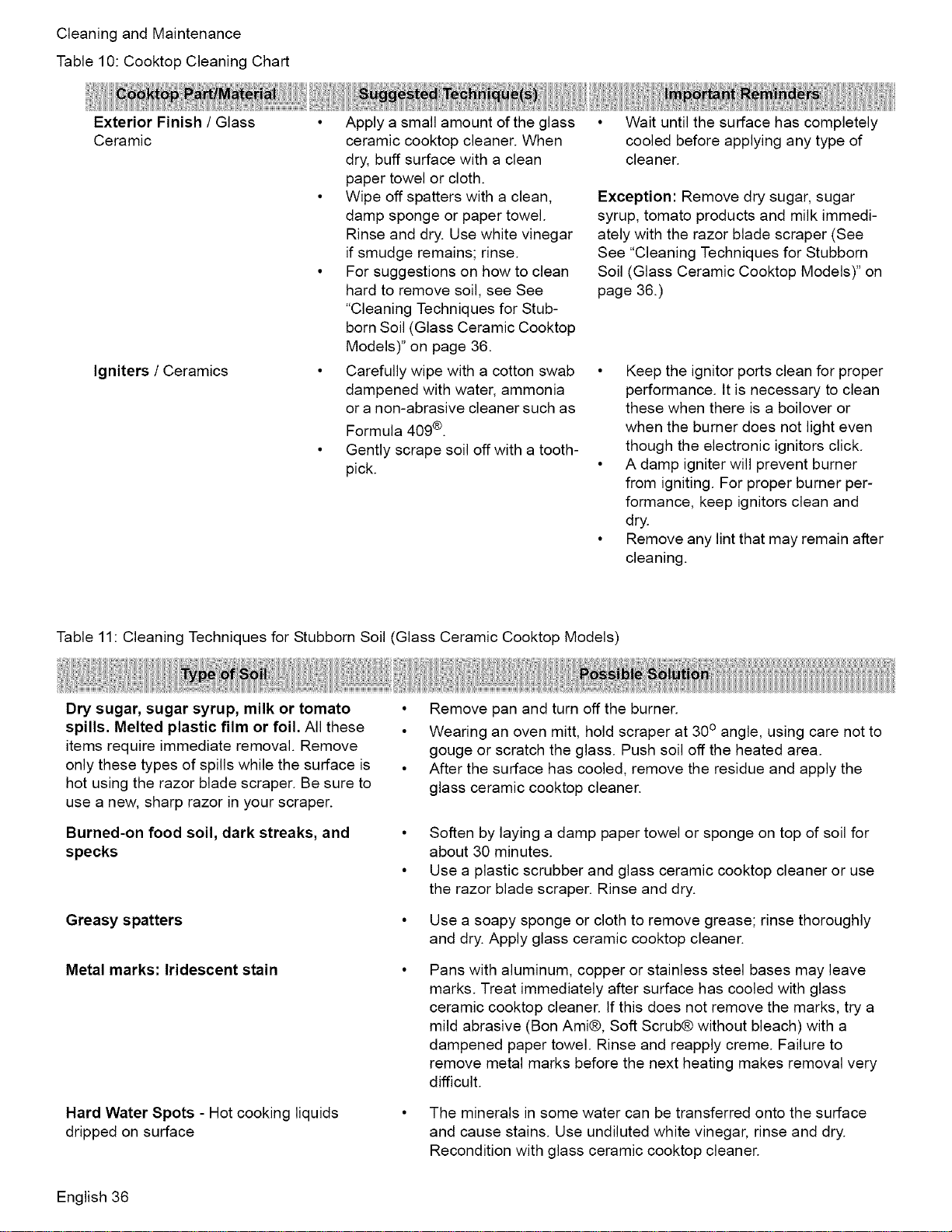
CleaningandMaintenance
Table10:CooktopCleaningChart
ExteriorFinish/ Glass
Ceramic
Igniters / Ceramics
• Apply a small amount of the glass
ceramic cooktop cleaner. When
dry, buff surface with a clean
paper towel or cloth.
• Wipe off spatters with a clean,
damp sponge or paper towel.
Rinse and dry. Use white vinegar
if smudge remains; rinse.
• For suggestions on how to clean
hard to remove soil, see See
"Cleaning Techniques for Stub-
born Soil (Glass Ceramic Cooktop
Models)" on page 36.
• Carefully wipe with a cotton swab
dampened with water, ammonia
or a non-abrasive cleaner such as
Formula 409®.
• Gently scrape soil off with a tooth-
pick.
• Wait until the surface has completely
cooled before applying any type of
cleaner.
Exception: Remove dry sugar, sugar
syrup, tomato products and milk immedi-
ately with the razor blade scraper (See
See "Cleaning Techniques for Stubborn
Soil (Glass Ceramic Cooktop Models)" on
page 36.)
• Keep the ignitor ports clean for proper
performance. It is necessary to clean
these when there is a boilover or
when the burner does not light even
though the electronic ignitors click.
• A damp igniter will prevent burner
from igniting. For proper burner per-
formance, keep ignitors clean and
dry.
• Remove any lint that may remain after
cleaning.
Table 11: Cleaning Techniques for Stubborn Soil (Glass Ceramic Cooktop Models)
Dry sugar, sugar syrup, milk or tomato
spills. Melted plastic film or foil. All these
items require immediate removal. Remove
only these types of spills while the surface is
hot using the razor blade scraper. Be sure to
use a new, sharp razor in your scraper.
Burned-on food soil, dark streaks, and
specks
Greasy spatters
Metal marks: Iridescent stain
Hard Water Spots - Hot cooking liquids
dripped on surface
• Remove pan and turn off the burner.
• Wearing an oven mitt, hold scraper at 30° angle, using care not to
gouge or scratch the glass. Push soil off the heated area.
• After the surface has cooled, remove the residue and apply the
glass ceramic cooktop cleaner.
• Soften by laying a damp paper towel or sponge on top of soil for
about 30 minutes.
• Use a plastic scrubber and glass ceramic cooktop cleaner or use
the razor blade scraper. Rinse and dry.
Use a soapy sponge or cloth to remove grease; rinse thoroughly
and dry. Apply glass ceramic cooktop cleaner.
Pans with aluminum, copper or stainless steel bases may leave
marks. Treat immediately after surface has cooled with glass
ceramic cooktop cleaner. If this does not remove the marks, try a
mild abrasive (Bon Ami®, Soft Scrub® without bleach) with a
dampened paper towel. Rinse and reapply creme. Failure to
remove metal marks before the next heating makes removal very
difficult.
The minerals in some water can be transferred onto the surface
and cause stains. Use undiluted white vinegar, rinse and dry.
Recondition with glass ceramic cooktop cleaner.
English 36
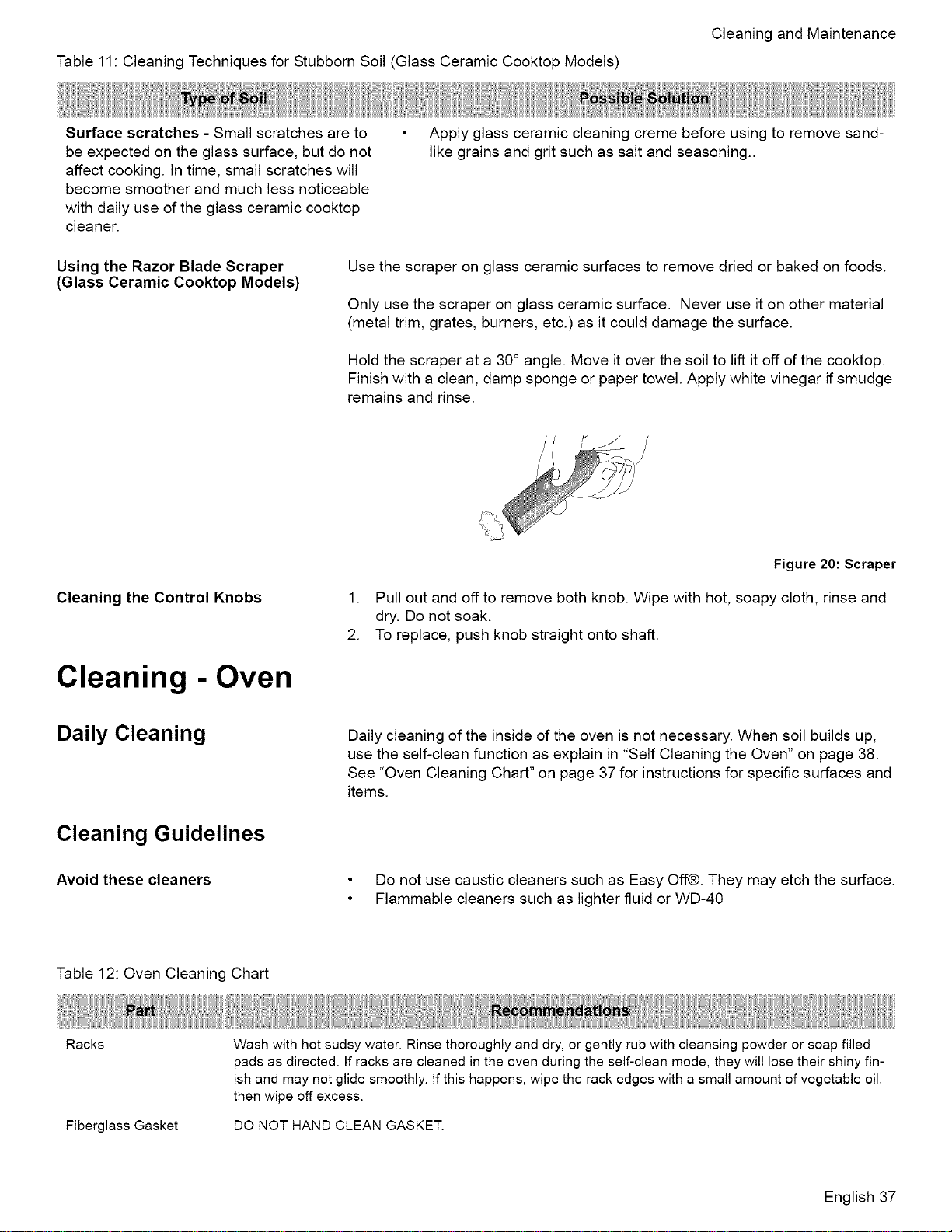
Table11 CleaningTechniquesforStubbornSoil(GlassCeramicCooktopModels'
CleaningandMaintenance
Surfacescratches-Smallscratchesareto
beexpectedontheglasssurface,butdonot
affectcooking.Intime,smallscratcheswill
becomesmootherandmuchlessnoticeable
withdailyuseoftheglassceramiccooktop
cleaner.
• Applyglassceramiccleaningcremebeforeusingtoremovesand-
likegrainsandgritsuchassaltandseasoning..
Using the Razor Blade Scraper
(Glass Ceramic Cooktop Models)
Use the scraper on glass ceramic surfaces to remove dried or baked on foods.
Only use the scraper on glass ceramic surface. Never use it on other material
(metal trim, grates, burners, etc.) as it could damage the surface.
Hold the scraper at a 30° angle. Move it over the soil to lift it off of the cooktop.
Finish with a clean, damp sponge or paper towel. Apply white vinegar if smudge
remains and rinse.
Cleaning the Control Knobs
Cleaning - Oven
Daily Cleaning
Cleaning Guidelines
Avoid these cleaners
Figure 20: Scraper
1. Pull out and off to remove both knob. Wipe with hot, soapy cloth, rinse and
dry. Do not soak.
2. To replace, push knob straight onto shaft.
Daily cleaning of the inside of the oven is not necessary. When soil builds up,
use the self-clean function as explain in "Self Cleaning the Oven" on page 38.
See "Oven Cleaning Chart" on page 37 for instructions for specific surfaces and
items.
• Do not use caustic cleaners such as Easy Off®. They may etch the surface.
• Flammable cleaners such as lighter fluid or WD-40
Table 12: Oven Cleaning Chart
Racks
Fiberglass Gasket
Wash with hot sudsy water. Rinse thoroughly and dry, or gently rub with cleansing powder or soap filled
pads as directed. If racks are cleaned in the oven during the self-clean mode, they will lose their shiny fin-
ish and may not glide smoothly. If this happens, wipe the rack edges with a small amount of vegetable oil,
then wipe off excess.
DO NOT HAND CLEAN GASKET.
English 37
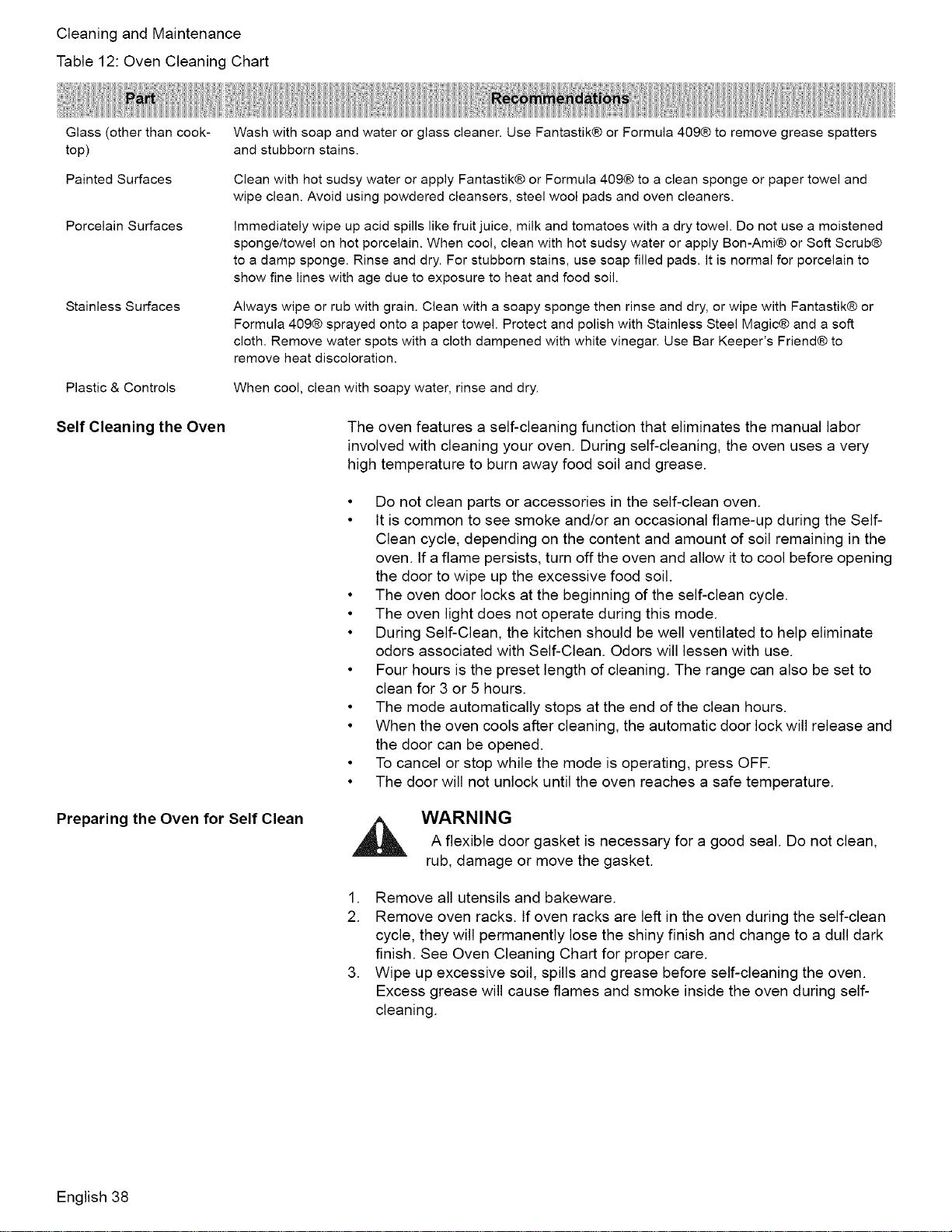
CleaningandMaintenance
Table12:OvenCleaningChart
Glass (other than cook-
top)
Painted Surfaces
Porcelain Surfaces
Stainless Surfaces
Plastic & Controls
Wash with soap and water or glass cleaner. Use Fantastik® or Formula 409® to remove grease spatters
and stubborn stains.
Clean with hot sudsy water or apply Fantastik® or Formula 409® to a clean sponge or paper towel and
wipe clean. Avoid using powdered cleansers, steel wool pads and oven cleaners.
Immediately wipe up acid spills like fruit juice, milk and tomatoes with a dry towel. Do not use a moistened
sponge/towel on hot porcelain. When cool, clean with hot sudsy water or apply Bon-Ami® or Soft Scrub®
to a damp sponge. Rinse and dry. For stubborn stains, use soap filled pads. It is normal for porcelain to
show fine lines with age due to exposure to heat and food soil.
Always wipe or rub with grain. Clean with a soapy sponge then rinse and dry, or wipe with Fantastik® or
Formula 409® sprayed onto a paper towel. Protect and polish with Stainless Steel Magic® and a soft
cloth. Remove water spots with a cloth dampened with white vinegar. Use Bar Keeper's Friend® to
remove heat discoloration.
When cool, clean with soapy water, rinse and dry.
Self Cleaning the Oven The oven features a self-cleaning function that eliminates the manual labor
involved with cleaning your oven. During self-cleaning, the oven uses a very
high temperature to burn away food soil and grease.
Preparing the Oven for Self Clean
• Do not clean parts or accessories in the self-clean oven.
• It is common to see smoke and/or an occasional flame-up during the Self-
Clean cycle, depending on the content and amount of soil remaining in the
oven. If a flame persists, turn off the oven and allow it to cool before opening
the door to wipe up the excessive food soil.
• The oven door locks at the beginning of the self-clean cycle.
• The oven light does not operate during this mode.
• During Self-Clean, the kitchen should be well ventilated to help eliminate
odors associated with Self-Clean. Odors will lessen with use.
• Four hours is the preset length of cleaning. The range can also be set to
clean for 3 or 5 hours.
• The mode automatically stops at the end of the clean hours.
• When the oven cools after cleaning, the automatic door lock will release and
the door can be opened.
• To cancel or stop while the mode is operating, press OFF.
• The door will not unlock until the oven reaches a safe temperature.
,_ WARNINGA flexible door gasket is necessary for a good seal. Do not clean,
rub, damage or move the gasket.
1. Remove all utensils and bakeware.
2. Remove oven racks, tf oven racks are left in the oven during the self-clean
cycle, they will permanently lose the shiny finish and change to a dull dark
finish. See Oven Cleaning Chart for proper care.
3. Wipe up excessive soil, spills and grease before self-cleaning the oven.
Excess grease will cause flames and smoke inside the oven during self-
cleaning.
English 38
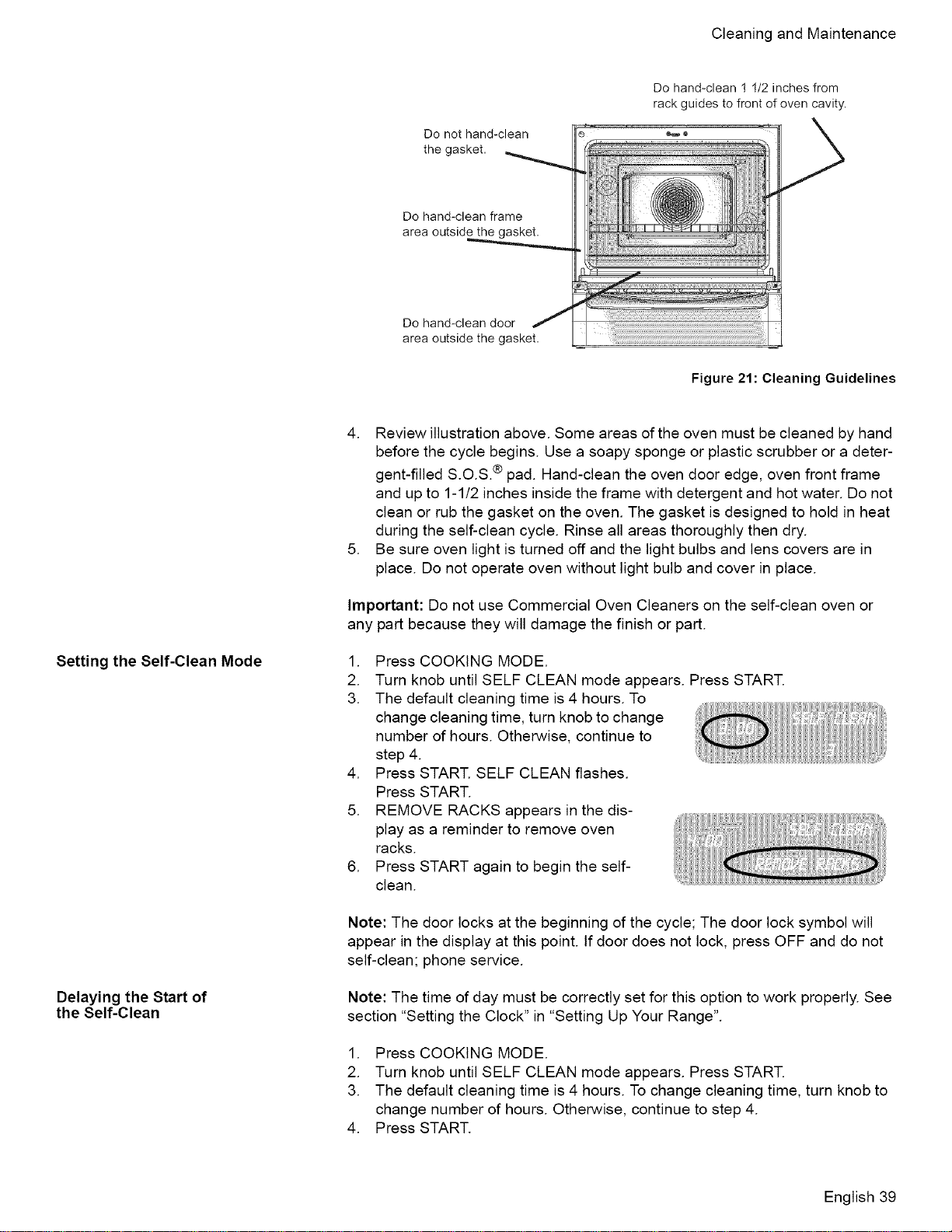
CleaningandMaintenance
Do not hand-clean
the gasket,
Do hand-clean 1 1/2 inches from
rack guides to front of oven cavity.
Do hand-clean frame
area outside the gasket.
Do hand-clean door
area outside the gasket,
Figure 21: Cleaning Guidelines
Setting the Self-Clean Mode
Delaying the Start of
the Self-Clean
4. Review illustration above. Some areas of the oven must be cleaned by hand
before the cycle begins. Use a soapy sponge or plastic scrubber or a deter-
gent-filled S.O.S.® pad. Hand-clean the oven door edge, oven front frame
and up to 1-1/2 inches inside the frame with detergent and hot water. Do not
clean or rub the gasket on the oven. The gasket is designed to hold in heat
during the self-clean cycle. Rinse all areas thoroughly then dry.
5. Be sure oven light is turned off and the light bulbs and lens covers are in
place. Do not operate oven without light bulb and cover in place.
Important: Do not use Commercial Oven Cleaners on the self-clean oven or
any part because they will damage the finish or part.
.
2.
3.
.
5.
.
Press COOKING MODE.
Turn knob until SELF CLEAN mode appears. Press START.
The default cleaning time is 4 hours. To
change cleaning time, turn knob to change
number of hours. Otherwise, continue to
step 4.
Press START. SELF CLEAN flashes.
Press START.
REMOVE RACKS appears in the dis-
play as a reminder to remove oven
racks.
Press START again to begin the self-
clean.
Note: The door locks at the beginning of the cycle; The door lock symbol will
appear in the display at this point. If door does not lock, press OFF and do not
self-clean; phone service.
Note: The time of day must be correctly set for this option to work properly. See
section "Setting the Clock" in "Setting Up Your Range".
1. Press COOKING MODE.
2. Turn knob until SELF CLEAN mode appears. Press START.
3. The default cleaning time is 4 hours. To change cleaning time, turn knob to
change number of hours. Otherwise, continue to step 4.
4. Press START.
English 39
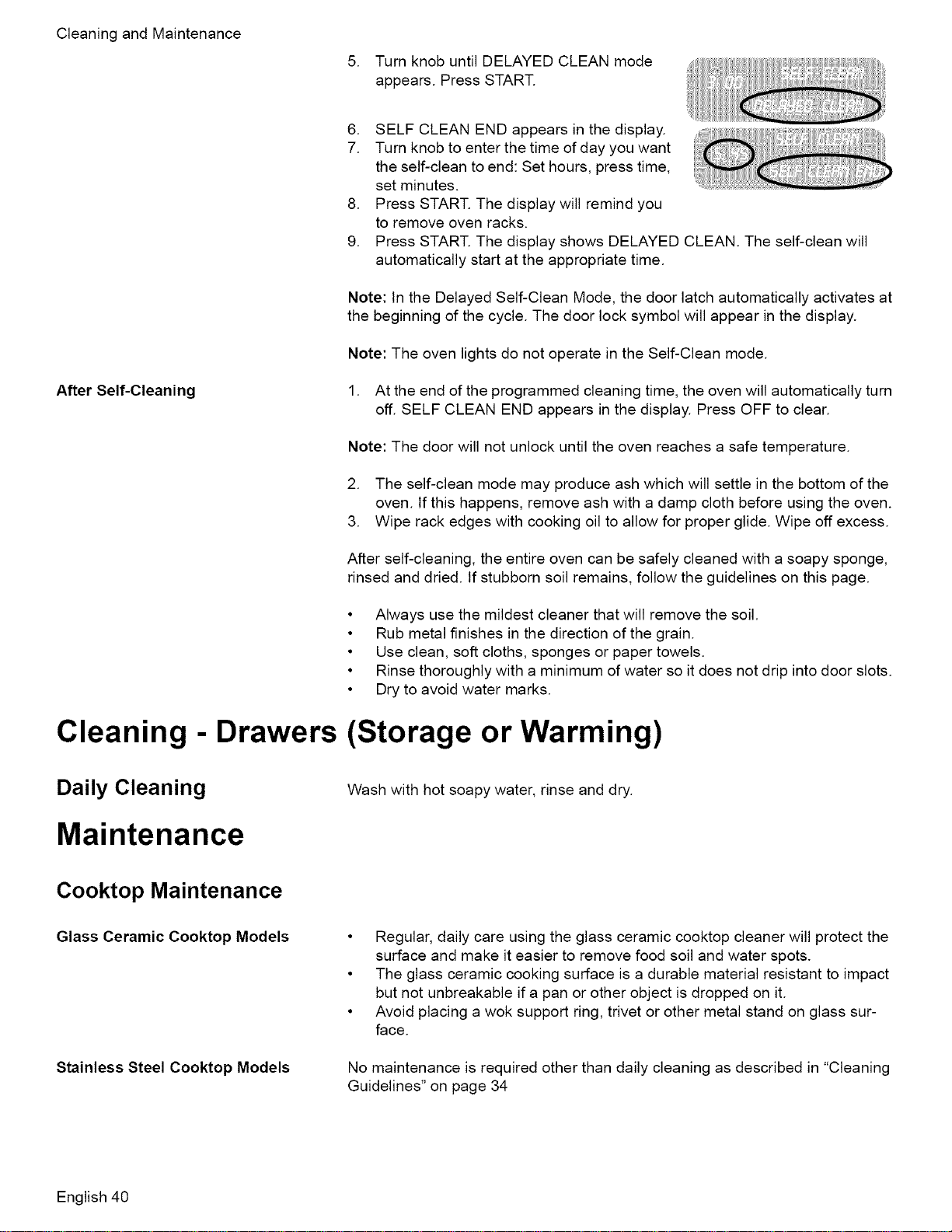
CleaningandMaintenance
5. TurnknobuntilDELAYEDCLEANmode
appears.PressSTART.
.
7.
.
9.
SELF CLEAN END appears in the display.
Turn knob to enter the time of day you want
the self-clean to end: Set hours, press time,
set minutes.
Press START. The display will remind you
to remove oven racks.
Press START. The display shows DELAYED CLEAN. The self-clean will
automatically start at the appropriate time.
Note: In the Delayed Self-Clean Mode, the door latch automatically activates at
the beginning of the cycle. The door lock symbol will appear in the display.
Note: The oven lights do not operate in the Self-Clean mode.
After Self-Cleaning 1. At the end of the programmed cleaning time, the oven will automatically turn
off. SELF CLEAN END appears in the display. Press OFF to clear.
Note: The door will not unlock until the oven reaches a safe temperature.
2. The self-clean mode may produce ash which will settle in the bottom of the
oven. tf this happens, remove ash with a damp cloth before using the oven.
3. Wipe rack edges with cooking oil to allow for proper glide. Wipe off excess.
After self-cleaning, the entire oven can be safely cleaned with a soapy sponge,
rinsed and dried. If stubborn soil remains, follow the guidelines on this page.
• Always use the mildest cleaner that will remove the soil.
• Rub metal finishes in the direction of the grain.
• Use clean, soft cloths, sponges or paper towels.
• Rinse thoroughly with a minimum of water so it does not drip into door slots.
• Dry to avoid water marks.
Cleaning - Drawers (Storage or Warming)
Daily Cleaning Wash with hot soapy water, rinse and dry.
Maintenance
Cooktop Maintenance
Glass Ceramic Cooktop Models
Stainless Steel Cooktop Models
• Regular, daily care using the glass ceramic cooktop cleaner will protect the
surface and make it easier to remove food soil and water spots.
• The glass ceramic cooking surface is a durable material resistant to impact
but not unbreakable if a pan or other object is dropped on it.
• Avoid placing a wok support ring, trivet or other metal stand on glass sur-
face.
No maintenance is required other than daily cleaning as described in "Cleaning
Guidelines" on page 34
English 40
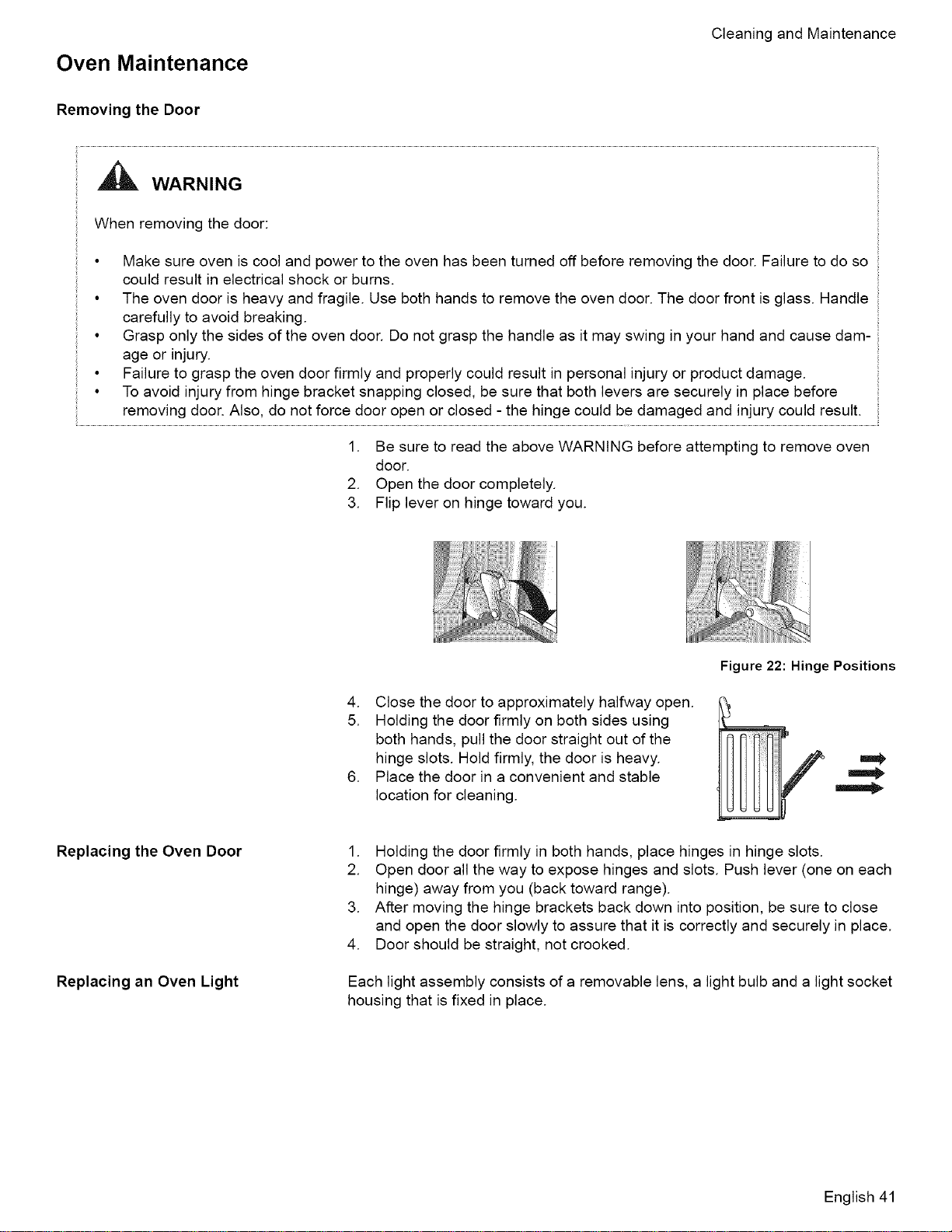
Oven Maintenance
Cleaning and Maintenance
Removing the Door
WARNING
When removing the door:
• Make sure oven is cool and power to the oven has been turned off before removing the door. Failure to do so
could result in electrical shock or burns.
• The oven door is heavy and fragile. Use both hands to remove the oven door. The door front is glass. Handle
carefully to avoid breaking.
• Grasp only the sides of the oven door. Do not grasp the handle as it may swing in your hand and cause dam-
age or injury.
• Failure to grasp the oven door firmly and properly could result in personal injury or product damage.
• To avoid injury from hinge bracket snapping closed, be sure that both levers are securely in place before
removing door. Also, do not force door open or closed - the hinge could be damaged and injury could result.
1. Be sure to read the above WARNING before attempting to remove oven
door.
2. Open the door completely.
3. Flip lever on hinge toward you.
Replacing the Oven Door
Replacing an Oven Light
Figure 22: Hinge Positions
4. Close the door to approximately halfway open.
5. Holding the door firmly on both sides using
both hands, pull the door straight out of the
hinge slots. Hold firmly, the door is heavy.
6. Place the door in a convenient and stable
location for cleaning.
1. Holding the door firmly in both hands, place hinges in hinge slots.
2. Open door all the way to expose hinges and slots. Push lever (one on each
hinge) away from you (back toward range).
3. After moving the hinge brackets back down into position, be sure to close
and open the door slowly to assure that it is correctly and securely in place.
4. Door should be straight, not crooked.
Each light assembly consists of a removable lens, a light bulb and a light socket
housing that is fixed in place.
English 41
_WARNING
• Make sure the appliance and lights are cool and power to the appliance
has been turned off before replacing the light bulb(s). Failure to do so
could result in electrical shock or burns.
• The lenses (if equipped) must be in place when using the appliance.
• The lenses (if equipped) serve to protect the light bulb from breaking.
• The lenses (if equipped) are made of glass. Handle carefully to avoid
breaking. Broken glass could cause an injury.
• Light socket is live when door is open
1. Read the WARNING above.
2. Turn off power at the main power supply (fuse or breaker box).
3. Remove the lens by unscrewing it.
4. Remove the light bulb from its socket by unscrewing it.
5. Replace the bulb with a new 40 watt appliance bulb. Avoid touching the bulb
with fingers, as oils from hands can damage the bulb when it becomes hot.
6. Screw the lens back on.
7. Turn power back on at the main power supply (fuse or breaker box).
Service
Before Calling Service
Use these suggestions before calling for service to avoid service charges
Troubleshooting Charts
The Cooktop
Table 13: Cooktop Troubleshooting Chart
A slight odor is noticeable
when an element is turned on
Scraper is not working prop-
erly.
Cooking results are not what
was expected.
Water takes too long to boil
White cooktop appears to
have a green tint
Burners click continuously
This is normal with new cooktops and will disappear after several uses
The scraper blade is dull. The scraper is packaged with single-edge, stainless steel
blades. Replace with a standard single-edge blade.
• The cooktop is not level. Adjust leveling legs on bottom of range.
• Cooking pan is not the appropriate size or type. See "Cookware Selection Guide".
Time to boil can vary greatly depending on environmental conditions. See "Boiling
Water" on page 24 for tips to decrease time to boil.
The white cooktop may have a green tint while cooling down. This is normal. The
cooktop will return to its original color when the glass has cooled.
Knob(s) are in the "light" position. Tunr knobs to the "OFF" position or to desired
flame setting.
English 42
Table13:CooktopTroubleshootingChart
Service
Surfaceburnersdonotlight
Unevenortoohighflame;
burnerishardtolight
Unevenflame- LPgasusers
Gasisturnedoff.Makesurethegasshut-offvalveisintheONpositionandthegas
supplytothehouseisnotshutoff.
Unitisnothookeduptothegassupply.Callgascompany
Plugisnotcompletelyinsertedintooutletorthehousewiringisincorrect.Check
thepowersupply,verifythattheunitisgroundedwiththecorrectpolarity,make
suretheunitispluggedin.
Circuitbreakeristripped.Checkcircuitbreakerandrestifnecessary.Checkand/or
replacefuse
Burnerportsareclogged.Turnthecooktopoffandallowtheburnerstocool.
Removeburnercapsanduseastiffnylonbristletoothbrushtopushdebristhrough
burnerports.
Misalignedburnercap.Verifythatburnercapsareproperlypositionedoverburn-
ers.
Ignitoriswet,damagedordirty.Checkignitorformoisture.Ifwet,allowtoairdry
beforeusing.Checkforburned-onfoodorgrease.Seecleaningrecommendations.
Burnerwillnotlightifignitoriswet,damagedordirty.
Burnerportsareclogged.Turnthecooktopoffandallowtheburnerstocool.
Removeburnercapsanduseastiffnylonbristletoothbrushtopushdebristhrough
burnerports.
Misalignedburnercap.Verifythatburnercapsareproperlypositionedoverburn-
ers.
Burnercapiswet.Turnoffburnerandallowtocool.Dryburnercapandbasethor-
oughly.
Callservice
TheOven
Table 14: Oven Troubleshooting Chart
The oven mode or temperature selected
or the numbers selected do not appear in
the display
Oven door is locked and will not release,
even after cooling
Oven is not heating
Oven is not cooking evenly
Baking results are not as expected
Food takes longer to cook than expected
The knob was turned too rapidly. Turn knob slower until correct wording or
temperature appears. Review manual instructions when setting clock,
timer, or Self-Clean.
Turn the oven off at the circuit breaker and wait 5 minutes. Turn breaker
back on. The oven should reset itself and will be operable.
Check circuit breaker or fuse box to your house. Make sure there is proper
electrical power to the oven. Be sure oven temperature has been selected.
Adjust oven calibration if necessary (see "Change the Oven Temperature
Offset" on page 15). Refer to cooking charts for recommended rack posi-
tion.
Refer to cooking charts for recommended rack position. Check "Getting the
Most Out of Your Oven" on page 25 for tips and suggestions. Adjust oven
calibration if necessary (see "Change the Oven Temperature Offset" on
page 15).
The oven is carefully calibrated to provide accurate results. However, the
temperature can be offset if food is consistently too brown or too light. See
"Change the Oven Temperature Offset" on page 15.
English 43
Service
Table14:OvenTroubleshootingChart
Foodisovercooked
ConvectionBakeResultsarenotas
Expected
Oventemperatureistoohotortoocold
Ovenlightisnotworkingproperly
Ovenlightwillnotturnoff
Cannotremovelenscoveronlight
OvenwillnotSelf-Cleanproperly
Clockandtimerarenotworkingproperly
Porcelainchips
"F"andanumberappearsindisplayand
controlbeeps
Withanewrangethereisastrongodor
whenovenisturnedon
Controldoesnotreactwhenthepadis
touched
Fanisrunningduringmodesthatdon't
useconvection
Warmairorsteamescapesfromoven
vent
Theoveniscarefullycalibratedtoprovideaccurateresults.However,the
temperaturecanbeoffsetiffoodisconsistentlytoobrownortoolight.See
"ChangetheOvenTemperatureOffset"onpage15.
IftheAutomaticConvectionConversionFeatureisturnedoff,thetempera-
turemustbemanuallyreducedby25°EIfthefeatureisactive,thetemper-
atureisautomaticallyadjusted.See"TurnAutomaticConvection
ConversionONorOFF"onpage17formoreinformation.Refertocooking
chartsandtipsforrackpositions,cookingtimesandpanselection.Adjust
ovencalibrationifnecessary.See"ChangetheOvenTemperatureOffset"
onpage15.
Theoventhermostatneedsadjustment.SeeOvenTemperatureOffset.
Replaceorreinsertthelightbulbiflooseordefective.Touchingthebulb
withfingersmaycausethebulbtoburnout.
Checkforobstructioninovendoor.Checktoseeifhingeisbent.Whenthe
Sabbathfeatureisactivated,theovenlightwillstayonoroff(asselected
duringset-up)duringtheentireSabbathmode.
Theremaybesoilbuild-uparoundthelenscover.Wipelenscoverarea
withacleandrytowelpriortoattemptingtoremovethelenscover.
AllowtheoventocoolbeforerunningSelf-Clean.Alwayswipeoutloose
soilsorheavyspilloversbeforerunningSelf-Clean.Ifovenisbadlysoiled,
setovenforafive-hourSelf-Clean.SeePreparingtheOventoSelf-Clean.
Makesurethereiselectricalpowertooven.SeeClockandTimersections.
Whenovenracksareremovedandreplaced,alwaystiltracksupwardand
donotforcethemtoavoidchippingtheporcelain.
Thisisafaultcode.PressOfftoclearthedisplayandstopbeeping.Reset
ovenifnecessary.Iffaultcoderemainsandbeepcontinues,recordfault
code,cancelovenandcallauthorizedservicetechnician.
Thisisnormalwithanewrangeandwilldisappearafterafewuses.Oper-
atingtheself-cleancyclewillalso"burn-off'thesmellmorequickly.
Besurethatpadisclean.Touchthecenterofthetouchpad.Usetheflat
partofyourfinger.
Onsomemodels,theconvectionfanwillrunwhiletheovenispreheating
forthebakemode.Thisisnormal.
Slide-inmodelsalsohaveacoolingfanthatrunsduringeverycooking
mode.
Itisnormaltoseeorfeelsteamorwarmairescapingfromtheovenvent.
Donotblockthevent.
How to Obtain Service or
Parts
To reach a service representative, see the contact information at the front of the
manual. Please be prepared with the information printed on your product data
plate when calling.
English 44
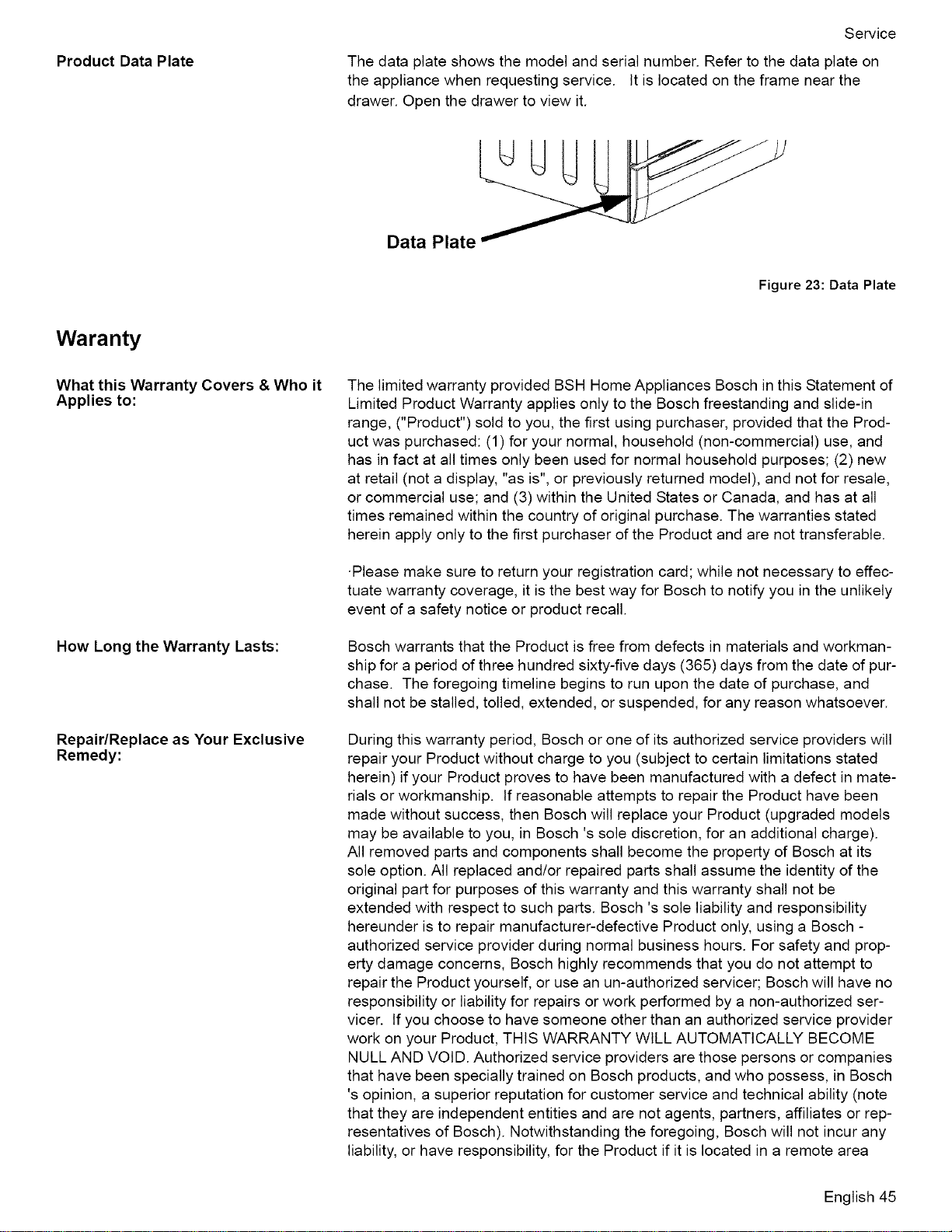
Product Data Plate
Service
The data plate shows the model and serial number. Refer to the data plate on
the appliance when requesting service. It is located on the frame near the
drawer. Open the drawer to view it.
Data Plate
Figure 23: Data Plate
Waranty
What this Warranty Covers & Who it
Applies to:
How Long the Warranty Lasts:
Repair/Replace as Your Exclusive
Remedy:
The limited warranty provided BSH Home Appliances Bosch in this Statement of
Limited Product Warranty applies only to the Bosch freestanding and slide-in
range, ("Product") sold to you, the first using purchaser, provided that the Prod-
uct was purchased: (1) for your normal, household (non-commercial) use, and
has in fact at all times only been used for normal household purposes; (2) new
at retail (not a display, "as is", or previously returned model), and not for resale,
or commercial use; and (3) within the United States or Canada, and has at all
times remained within the country of original purchase. The warranties stated
herein apply only to the first purchaser of the Product and are not transferable.
-Please make sure to return your registration card; while not necessary to effec-
tuate warranty coverage, it is the best way for Bosch to notify you in the unlikely
event of a safety notice or product recall.
Bosch warrants that the Product is free from defects in materials and workman-
ship for a period of three hundred sixty-five days (365) days from the date of pur-
chase. The foregoing timeline begins to run upon the date of purchase, and
shall not be stalled, tolled, extended, or suspended, for any reason whatsoever.
During this warranty period, Bosch or one of its authorized service providers will
repair your Product without charge to you (subject to certain limitations stated
herein) if your Product proves to have been manufactured with a defect in mate-
rials or workmanship. If reasonable attempts to repair the Product have been
made without success, then Bosch will replace your Product (upgraded models
may be available to you, in Bosch's sole discretion, for an additional charge).
All removed parts and components shall become the property of Bosch at its
sole option. All replaced and/or repaired parts shall assume the identity of the
original part for purposes of this warranty and this warranty shall not be
extended with respect to such parts. Bosch's sole liability and responsibility
hereunder is to repair manufacturer-defective Product only, using a Bosch -
authorized service provider during normal business hours. For safety and prop-
erty damage concerns, Bosch highly recommends that you do not attempt to
repair the Product yourself, or use an un-authorized servicer; Bosch will have no
responsibility or liability for repairs or work performed by a non-authorized ser-
vicer. If you choose to have someone other than an authorized service provider
work on your Product, THIS WARRANTY WILL AUTOMATICALLY BECOME
NULL AND VOID. Authorized service providers are those persons or companies
that have been specially trained on Bosch products, and who possess, in Bosch
's opinion, a superior reputation for customer service and technical ability (note
that they are independent entities and are not agents, partners, affiliates or rep-
resentatives of Bosch). Notwithstanding the foregoing, Bosch will not incur any
liability, or have responsibility, for the Product if it is located in a remote area
English 45
Service
(morethan100milesfromanauthorizedserviceprovider)orisreasonablyinac-
cessible,hazardous,threatening,ortreacherouslocale,surroundings,orenvi-
ronment;inanysuchevent,ifyourequest,Boschwouldstillpayforlaborand
partsandshipthepartstothenearestauthorizedserviceprovider,butyou
wouldstillbefullyliableandresponsibleforanytraveltimeorotherspecial
chargesbytheservicecompany,assumingtheyagreetomaketheservicecall.
Outof Warranty Product: Bosch is under no obligation, at law or otherwise, to provide you with any con-
cessions, including repairs, pro-rates, or Product replacement, once this war-
ranty has expired.
Warranty Exclusions: The warranty coverage described herein excludes all defects or damage that
are not the direct fault of Bosch, including without limitation, one or more of the
following: (1) use of the Product in anything other than its normal, customary
and intended manner (including without limitation, any form of commercial use,
use or storage of an indoor product outdoors, use of the Product in conjunction
with air or water-going vessels); (2) any party's willful misconduct, negligence,
misuse, abuse, accidents, neglect, improper operation, failure to maintain,
improper or negligent installation, tampering, failure to follow operating instruc-
tions, mishandling, unauthorized service (including self-performed "fixing" or
exploration of the appliance's internal workings); (4) adjustment, alteration or
modification of any kind; (5) a failure to comply with any applicable state, local,
city, or county electrical, plumbing and/or building codes, regulations, or laws,
including failure to install the product in strict conformity with local fire and build-
ing codes and regulations; (6) ordinary wear and tear, spills of food, liquid,
grease accumulations, or other substances that accumulate on, in, or around
the Product; and (7) any external, elemental and/or environmental forces and
factors, including without limitation, rain, wind, sand, floods, fires, mud slides,
freezing temperatures, excessive moisture or extended exposure to humidity,
lightning, power surges, structural failures surrounding the appliance, and acts
of God. In no event shall Bosch have any liability or responsibility whatsoever
for damage to surrounding property, including cabinetry, floors, ceilings, and
other structures or objects around the Product. Also excluded from this warranty
are scratches, nicks, minor dents, and cosmetic damages on external surfaces
and exposed parts; Products on which the serial numbers have been altered,
defaced, or removed; service visits to teach you how to use the Product, or visits
where there is nothing wrong with the Product; correction of installation prob-
lems (you are solely responsible for any structure and setting for the Product,
including all electrical, plumbing or other connecting facilities, for proper founda-
tion/flooring, and for any alterations including without limitation cabinetry, walls,
floors, shelving, etc.); and resetting of breakers or fuses. TO THE EXTENT
ALLOWED BY LAW, THIS WARRANTY SETS OUT YOUR EXCLUSIVE REM-
EDIES WITH RESPECT TO PRODUCT, WHETHER THE CLAIM ARISES IN
CONTRACT OR TORT (INCLUDING STRICT LIABILITY, OR NEGLIGENCE)
OR OTHERWISE. THIS WARRANTY IS tN LIEU OF ALL OTHER WARRAN-
TIES, WHETHER EXPRESS OR IMPLIED. ANY WARRANTY IMPLIED BY
LAW, WHETHER FOR MERCHANTABILITY OR FITNESS FOR A PARTICU-
LAR PURPOSE, OR OTHERWISE, SHALL BE EFFECTIVE ONLY FOR THE
PERIOD THAT THIS EXPRESS LIMITED WARRANTY IS EFFECTIVE. IN NO
EVENT WILL THE MANUFACTURER BE LIABLE FOR CONSEQUENTIAL,
SPECIAL, INCIDENTAL, INDIRECT, "BUSINESS LOSS", AND/OR PUNITIVE
DAMAGES, LOSSES, OR EXPENSES, INCLUDING WITHOUT LIMITATION
TIME AWAY FROM WORK, HOTELS AND/OR RESTAURANT MEALS,
REMODELLING EXPENSES IN EXCESS OF DIRECT DAMAGES WHICH ARE
DEFINITIVELY CAUSED EXCLUSIVELY BY Bosch, OR OTHERWISE. SOME
STATES DO NOT ALLOW THE EXCLUSION OR LIMITATION OF INCIDEN-
TAL OR CONSEQUENTIAL DAMAGES, AND SOME STATES DO NOT
ALLOW LIMITATIONS ON HOW LONG IMPLIED WARRANTY LASTS, SO
THE ABOVE LIMITATIONS MAY NOT APPLY TO YOU. THIS WARRANTY
GIVES YOU SPECIFIC LEGAL RIGHTS, AND YOU MAY ALSO HAVE OTHER
English 46
How to Obtain Warranty Service:
Service
RIGHTS, WHICH VARY FROM STATE TO STATE. No attempt to alter, modify
or amend this warranty shall be effective unless authorized in writing by an
officer of BSH.
To obtain warranty service for your Product, you should contact the nearest
Bosch authorized service center.
BSH Home Appliances - 5551 McFadden Avenue, Huntington Beach, CA 92649
/ 800-944-2904
English 47

Invented for life
5551 McFadden Avenue, Huntington Beach, CA 92649 • 800-944-2904 • www.boschappliances.com
9000135016 • 10091B • 3/06 © BSH Home Appliances Corporation • Litho in USA