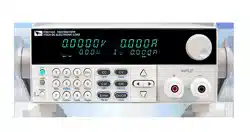
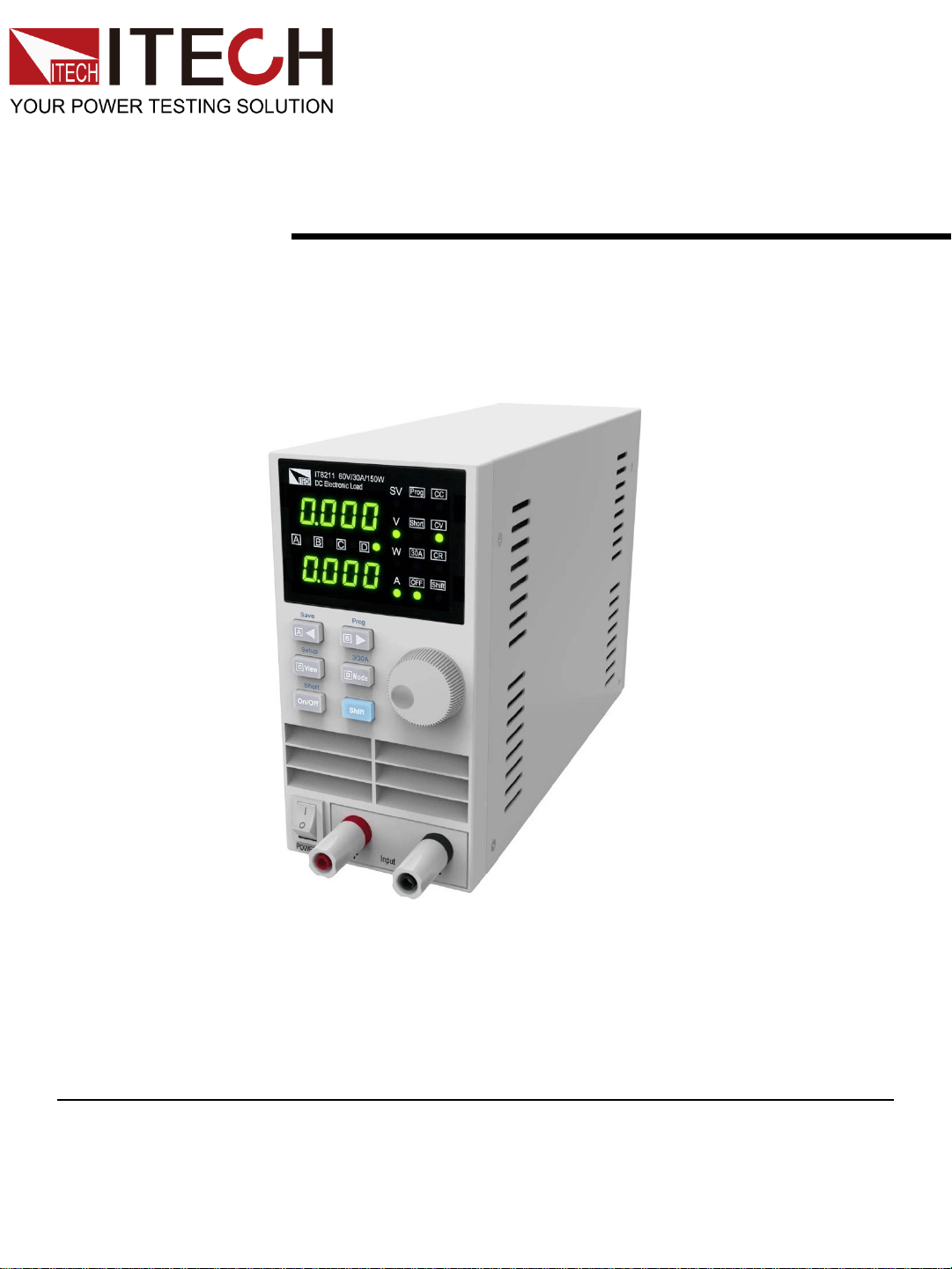
Digital Control Electronic load
User ’s Manual
IT8211
Copyright ©ITECH Electronics Co., Ltd.

Safety Regulations
To avoid electrical shock, do not open the cabinet. Refer only to
qualified personnel for service.
To avoid injuries, always disconnect power, discharge circuits,
and remove external voltage sources before touching
components.
KEEP AWAY FROM LIVE CIRCUITS.
We cannot accept responsibility for any direct or indirect
financial damage or loss of profit that might occur when using
the electronic load.
The instrument chassis and cover must be connected to an
electrical ground.
WARNING
We certify that this product met its published specifications at
time of shipment from the factory.
Certification
Notice
The information contained in this document is subject to change
without notice.
This hardware product is warranted against defects in material
and workmanship for a period of ONE year from date of delivery.
IT8211 Electronic load for use with a hardware product and when
properly installed on that hardware product, are warranted not to
fail to execute their programming instructions due to defects in
material and workmanship for a period of 90 days from date of
delivery. During the warranty period our company will either
repair or replace products which proved to be defective. Our
company does not warranty that the operation for the software
firmware or hardware shall be uninterrupted or error free. For
warranty service, with the exception of warranty options, this
product must be returned to a service facility designated by our
company. Customer shall prepay shipping charges by (and shall
pay all duty and taxes) for products returned to our place for
warranty service. Our company shall pay for return of products
to Customer.
Warranty
The foregoing warranty shall not apply to defects resulting from
improper or inadequate maintenance by the customer,
customer-supplied software or interfacing, unauthorized
modification or misuse, operation outside of the environmental
specifications for the product, or improper site preparation and
maintenance.
Limitation of Warranty
Compliance Statements
The ITECH products you have purchased is subject to
Directive 2002/96/EC of the European Parliament and the
Council of the European Union on waste electrical and
electronic equipment (WEEE) , and in jurisdictions adopting
that Directive, is marked as being put on the market after
August 13, 2005, and should not be disposed of as unsorted
municipal waste. Please utilize your local WEEE collection
facilities in the disposition of this product and otherwise
observe all applicable requirements.
Disposal of Old Electrical & Electronic Equipment (Applicable in
the European Union and other European countries with separate
collection systems)
Connect it to safety earth ground using the wire recommended in
the user’s manual.
High voltage danger
The symbol on an instrument indicates that the user should refer
to the operating instructions located in the manual.
Safety Symbols
About IT8211
IT8211 digital control electronic load (60V/30A/ 150W)
High resolution and accuracy: 10mV/1mA, CV / CC/ CR work
mode, short-test function, friendly interface, storage for 4*100
sets preset value. All these help you to achieve different
complex test purpose easily
。
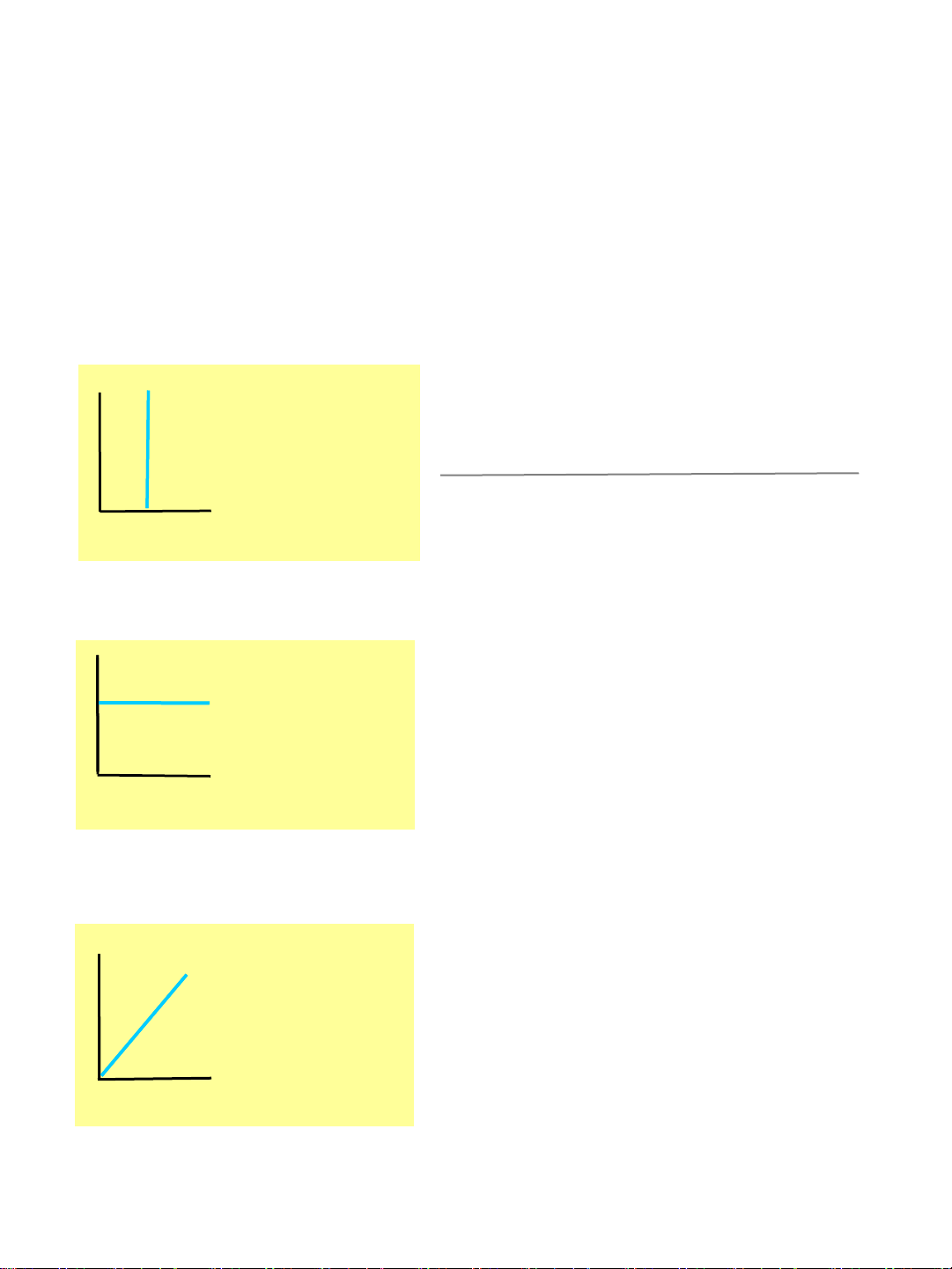
CC work mode
V
I
ConstantCurrent
CC
時
,
為幾伏特
,ITECH
來吸取電流
V
Constant current
I
When the load works in
CV mode, it will consume
enough current to control
power supply under test,
and achieve your preset
value
V
I
Constant voltage
II
CV work mode
CR work mode
When the load works in
CR mode, it will
consume the current
that linear proportionate
to input voltage
Constant
V
I
Constant resistance
Attribute
When the load works in
CC mode, it will absorb
the current what you set
Digital control electronic load
Full range 10mV /1mA resolution
Very small size
Highlight LED display
Working mode: CC/CV/CR
Very competitive price
Input on/off control
High reliability, OC/OV/OP/ protection
Storage for 4*40 sets preset value
Easily operated
Programmable LIST mode: 25*4 sets
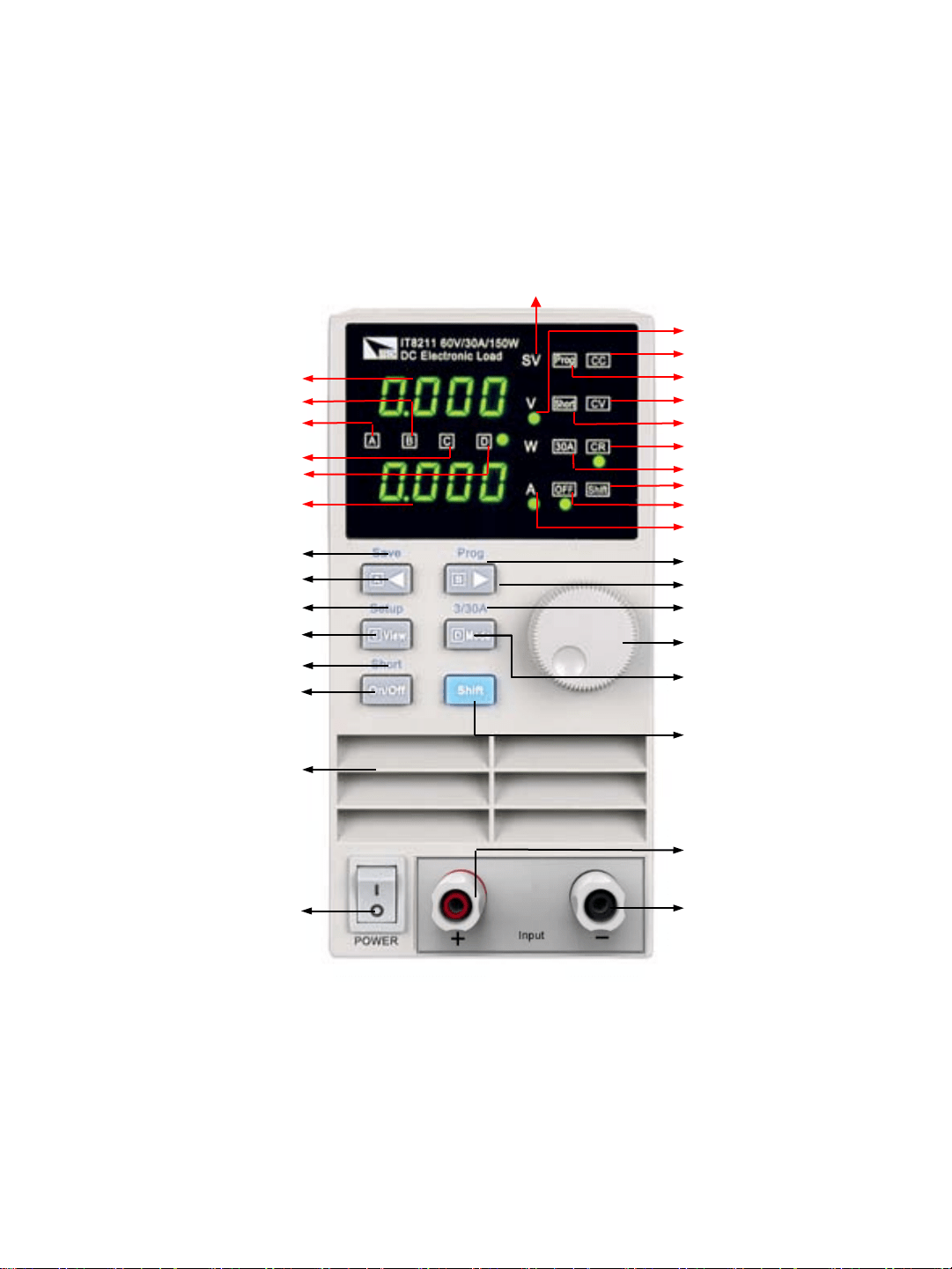
3/30A selector(shift)
Shift button
Main power on/off
Air flow input
Input on/off button
Switch +shortcut C
Left arrow +shortcut A
Memory save (shift)
Current value
Stepping value D + memory D
Stepping value C + memory C
Stepping value A + memory A
Stepping value B + memory B
Voltage value
CV mode indicator
Short indicator
CC mode indicator
CR mode indicator
Recall indicator
Selector indicator
Shift indicator
Input off indicator
Right arrow + memory B
Rotary encoder
Input +
Input -
Recall (shift)
Function setup (shift)
Mode selector + memory D
Voltage setup indicator
Current setup indicator
Setup indicator
Short on/off
Panel layout
Quick Start
This instrument is carefully inspected before shipment. Upon receipt, please inspect the
instrument for damage that might occurred in transit, if any sign of damage, please
contact the vendor.
Work voltage of load has two type: 110V AC or 220V AC. Please switch the correct line
voltage accordance to the voltage in you area by toggle the switch on the rear panel
If the above 2 points are right, please power on the electronic load.
Check out
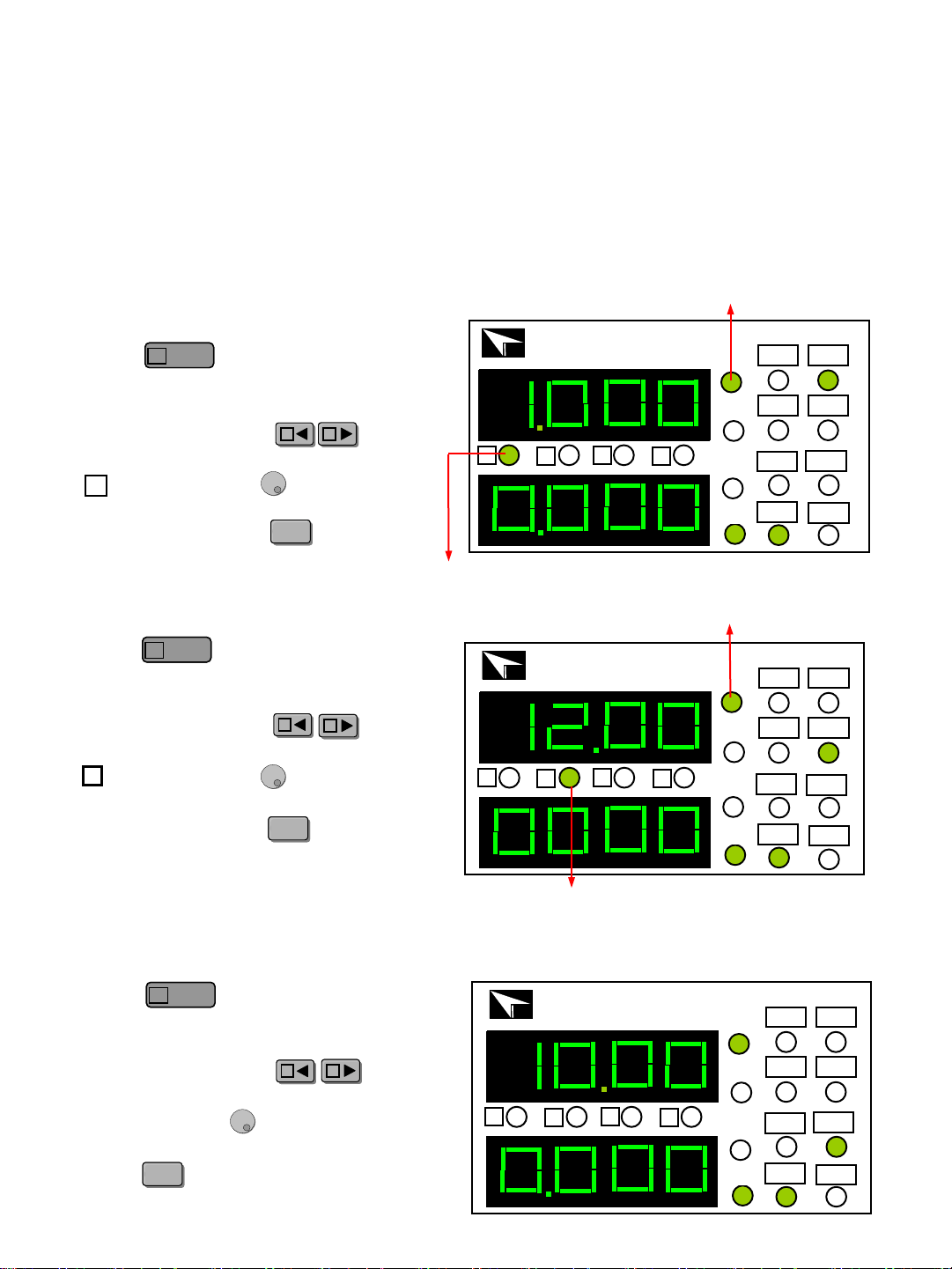
Press key to turn on the CC
light, and now the load work in CC
mode, you can set current value.
For example, press key,
move the cursor to the position
n ,screw the knob ,the current
value will rise or decline1A. After
setting value, press key to
make load start to work.
Preset cursor
IT8211 60V/30A/150W
DC Electronic Load
Prog CC
Short CV
OFF
Shift
30A
CR
ITECH
A
B
C
D
SV
V
W
A
Step cursor B
IT8211 60V/30A/150W
DC Electronic Load
Prog CC
Short CV
OFF
Shift
30A
CR
ITECH
A
B
C
D
SV
V
W
A
Preset voltage
Step cursor A
IT8211 60V/30A/150W
DC Electronic Load
Prog CC
Short CV
OFF
Shift
30A
CR
ITECH
A
B
C
D
SV
V
W
A
Press key to turn on the CV
light, and now the load work in CV
mode, you can set voltage value.
For example, press key ,
move the cursor to the position
n ,screw the knob ,the voltage
value will rise or decline1V. After
setting value, press key to make
load start to work.
Voltage set
B
AA
BB
Mode
D
Mode
D
On/OffOn/Off
Press key to turn on the CR
light, and now the load work in CR
mode, you can set resistance value.
For example, press key ,
move the cursor to the position,
screw the knob ,the voltage value
will rise or decline. After setting value,
press key to make the load start to
work.
Resistance set
BB
AA
Mode
D
Mode
D
On/OffOn/Off
current set
AA
BB
Mode
D
Mode
D
A
On/OffOn/Off
Input on/off
Press key at the front panel
to toggle the input on/off. Disable t
the input (zero current) does not
affect the programmed setting. The
input will return to the previously
programmed values when the input
is enabled again.
IT8211 60V/30A/150W
DC Electronic Load
Prog CC
Short CV
OFF
Shift
30A
CR
ITECH
A
B
C
D
SV
V
W
A
OCP function
IT8211 60V/30A/150W
DC Electronic Load
Prog CC
Short CV
OFF
Shift
30A
CR
ITECH
A
B
C
D
SV
V
W
A
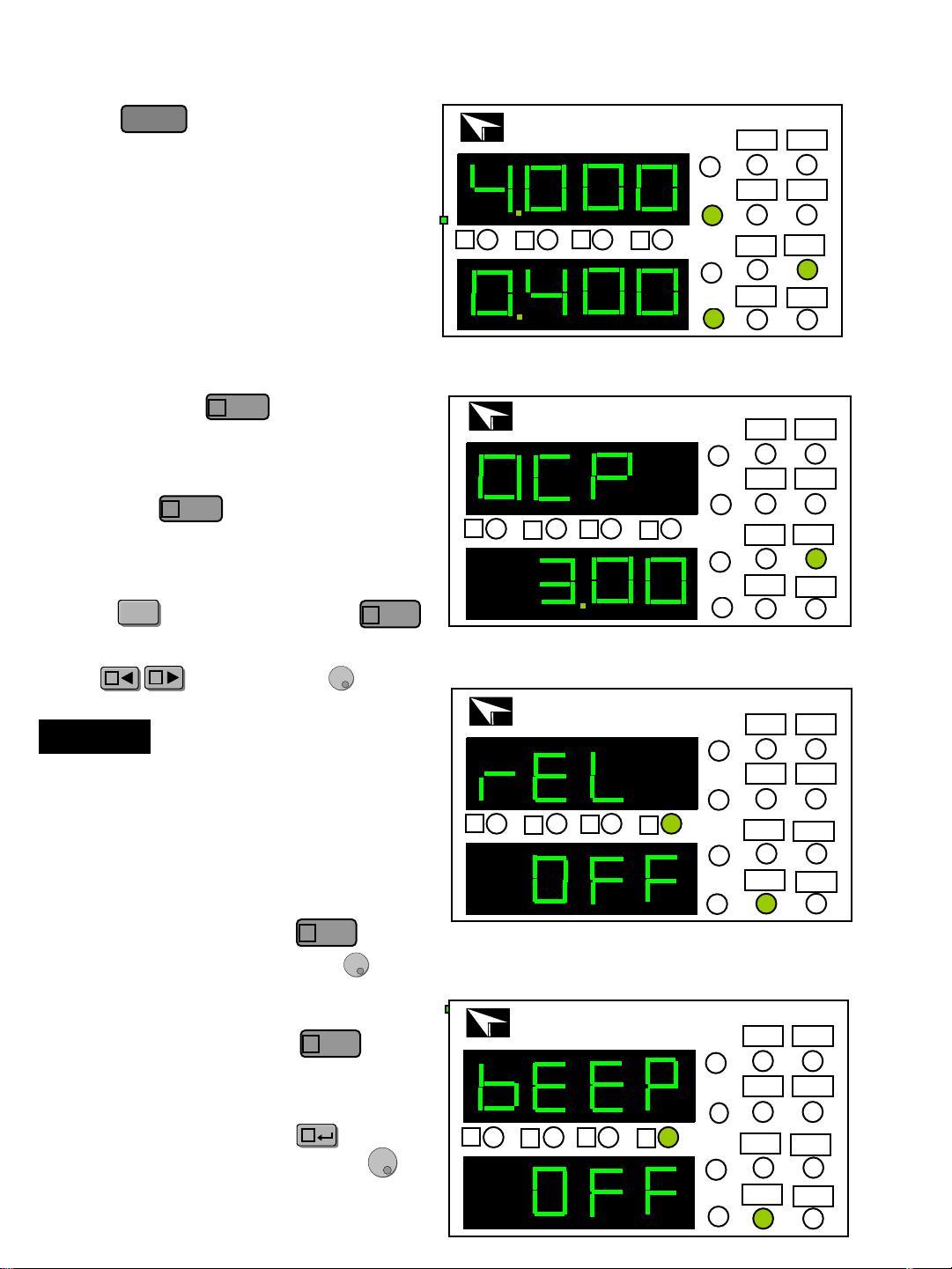
The input of electronic load will be
turned off automatically if the OCP value
is less than the actual current value.
Default OCP setting is 30A,
NOTE
Press key, and then press
(Setup) key, OCP LED will be lit.
Use key and knob to
set OCP value.
ShiftShift
AA
BB
View
C
view function
The electronic load usually display
the actual voltage and current value,
and then press key ,the light
will change
V to SV, the load display
the preset voltage, current or
resistance value and the actual power,
and press key, it will be back
to show an actual value.
View
C
View
C
After setting REL, Press to enter
the BEEP setting. Use the knob
to turn the knob sound ON or OFF.
CC
V
A
IT8211 60V/30A/150W
DC Electronic Load
Prog CC
Short CV
OFF
Shift
30A
CR
ITECH
A
B
C
D
SV
W
On/Off
Key sound (BEEP)
SV
V
A
IT8211 60V/30A/150W
DC Electronic Load
Prog CC
Short CV
OFF
Shift
30A
CR
ITECH
A
B
C
D
SV
W
After setting OCP, press to enter
the REL setting, use the knob to
select ON/OFF. ON means the REL
function is turn on; OFF means the REL
function is turn off. Press to
confirm.
Real-time reveal (REL)
View
C
View
C
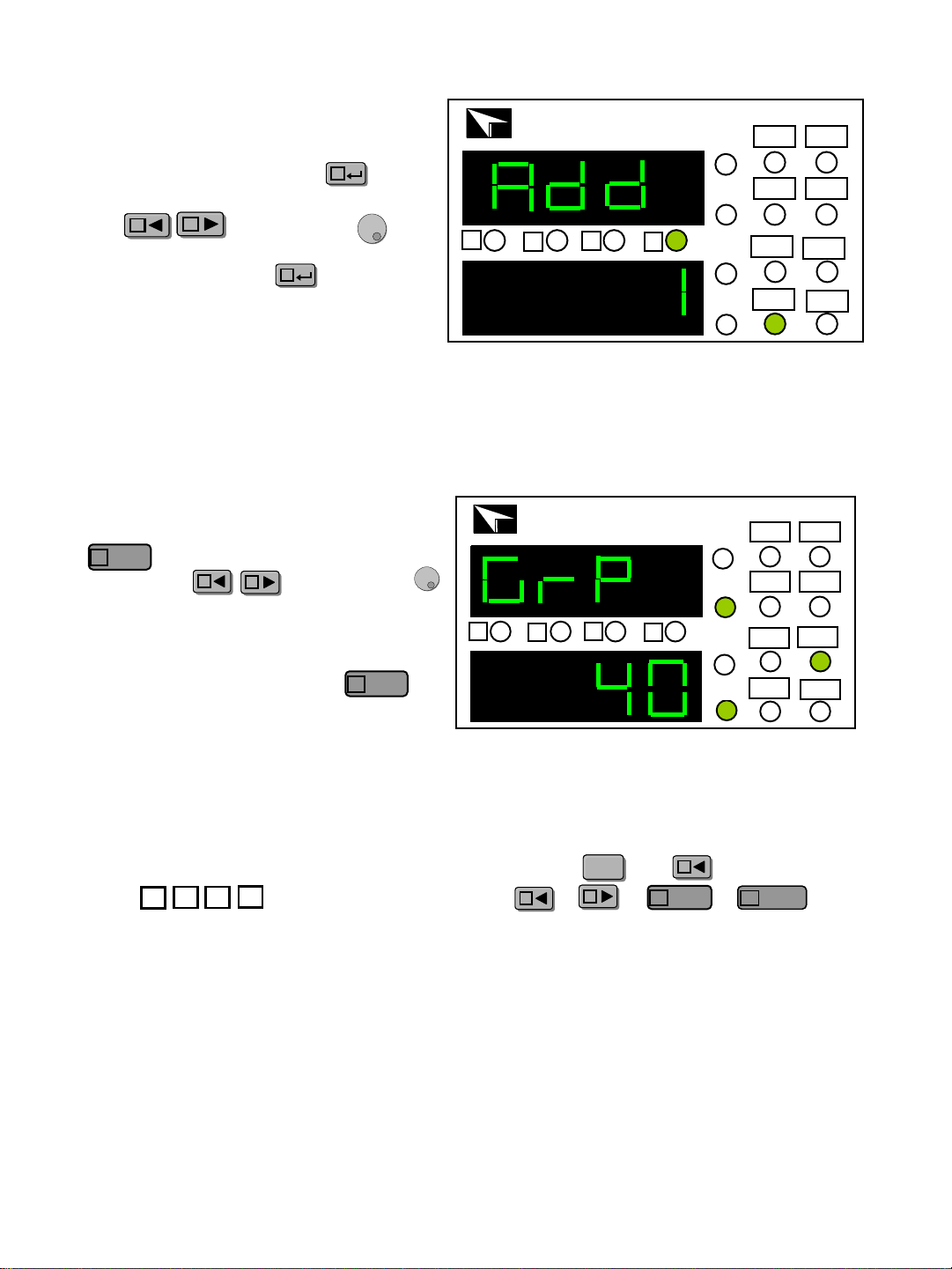
Set address (ADD)
After setting BEEP, Press to
enter the ADD setting, use the cursor
key and the knob to
enter address to store settings. ADD
range: 0~31,press to confirm.
CC
AA
BB
CC
V
A
IT8211 60V/30A/150W
DC Electronic Load
Prog CC
Short CV
OFF
Shift
30A
CR
ITECH
A
B
C
D
Set group (GRP)
After setting the OCP value, press
key to enter GRP setting, use the
cursor key and the knob
to select store group. There are 40
groups to be selected, each group
can store 4 group current , voltage
or resistance values. Press
key to confirm and exit setup mode.
AA
BB
View
C
View
C
Store Operation
After the voltage or current value has been set, press and (Save) key, the
cursor will wink together. Choose or or or key to
save the preset value.
ShiftShift
AA
AA
BB
View
C
Mode
D
Mode
D
A
B
C
D
SV
W
IT8211 60V/30A/150W
DC Electronic Load
Prog CC
Short CV
OFF
Shift
30A
CR
ITECH
A
B
C
D
SV
V
W
A
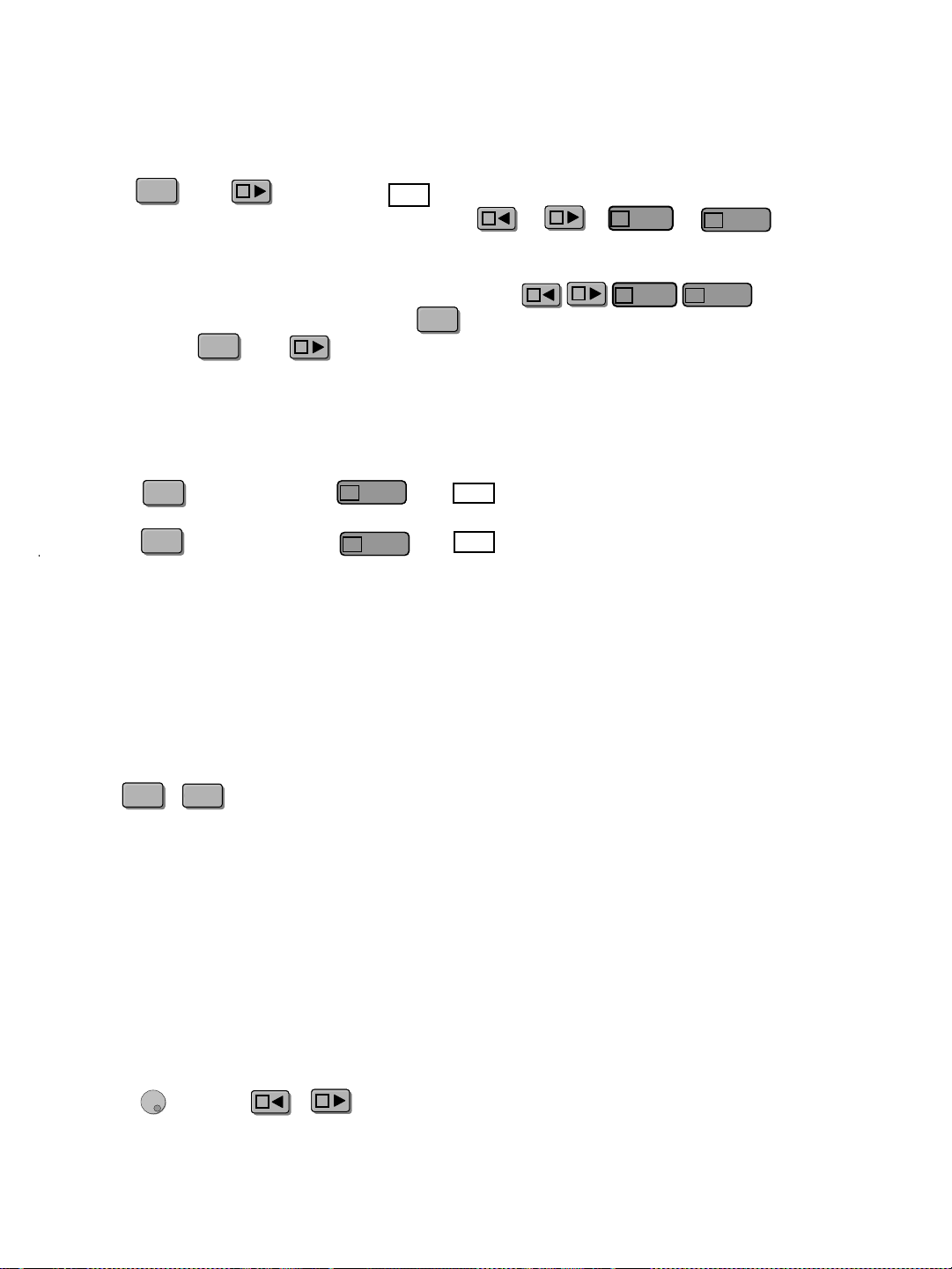
Recall Operation
Current range switch (3/30 A)
Short-circuit operation
IT8211 loads can simulate a short circuit at its input by turning the load on with,
full-scale current. The short circuit can be toggled on/off at the front panel using
the + . Short operation does not infect the operation setting current value,
when short operation is in off state ,load back to the original setting state.
The actual value of the electronic short is dependent on the mode and current
range that are active when the short is turned on. In CC,CW and CR mode, the
max short-circuit current value is 1.2 time of the current range. In CV mode,
short-circuit operation is same as the operation of setting CV to 0V.
ShiftShift
On/OffOn/Off
Check and reset the voltage ,current and resistance value
The electronic load usually display the actual voltage and current value. If you
want to check or reset the preset voltage, current and resistance value, screw
Knob or press or key, the bright will change V to SV . The preset on
the LED will wink for 3 second. If not reset a value ,it will recover to show an
actual value.
AA
BB
Press and (Prog) key, will be lighted up, that means you can recall
the parameter from the store group. Chose or or or key to
recall the parameter which has been saved.
When the electronic load is on recall operation, keys are
disabled, they only can be used with key. If you want to exit recall function,
please press and (Prog) key.
ShiftShift
BB
Prog
ShiftShift
BB
ShiftShift
AA
BB
View
C
Mode
D
Mode
D
AA
BB
View
C
Mode
D
Mode
D
Press key, then press key, light will be lit, that means current
in high range:30A ,you can set the current from 0 to 30A.
Press key, then press key, light will be turned off. You can set
the current from 0 to 3A .
current resolution in high current range is 10mA, current resolution in low current
range is 1mA.
ShiftShift
30A
ShiftShift
30A
Mode
D
Mode
D
Mode
D
Mode
D
Trouble shooting hint
If the input is disabled
1. check if the voltage or current preset value is zero, if so, please set the voltage or
current value once again.
2. check if the OCP indicator is lit, if so, set OCP value properly.
LIST function
The function helps you test the features of power supply to be measured when with
different load easily.
Power on IT8211 with pressing the key (Prog) at the same time. The normal function
of all keys are forbidden, only list function are permitted.
Press and keys to enter the list edit menu:
STEP allow you to choose and edit the step you want, range: 0-99;
TYPE allow you to choose the working mode (1/2/3, which is corresponded to CC/CV/CR
mode);
DATA allow you set the mode value, e.g. you set TYPE as 1(CC mode), so the value to be
set here is current value;
DT is the delay time, range; 0.4S-25S;
HV set the up limit of the input voltage;
LV set the low limit of the input voltage;
HA set the up limit of the input current;
LA set the low limit of the input current.
The menu is set in cycle, enter the next step setting directly. Press + to
exit (the present step won’t be saved ).
NOTE: the unit saves the list file in four group automatically: 0-24 steps in A key, 25-
49 steps in B key, 50-74 steps in C key, 75-99 steps in D key. Set the last step
CC/0A if the total steps is less than 25. if you press A key, it will run from step 0,
if you press B key, it will run from step 25, if you press C key, it will run from 50,
if you press D key, it will run from step 75.
SV
V
A
IT8211 60V/30A/150W
DC Electronic Load
Prog CC
Short CV
OFF
Shift
30A
CR
ITECH
A
B
C
D
SV
W
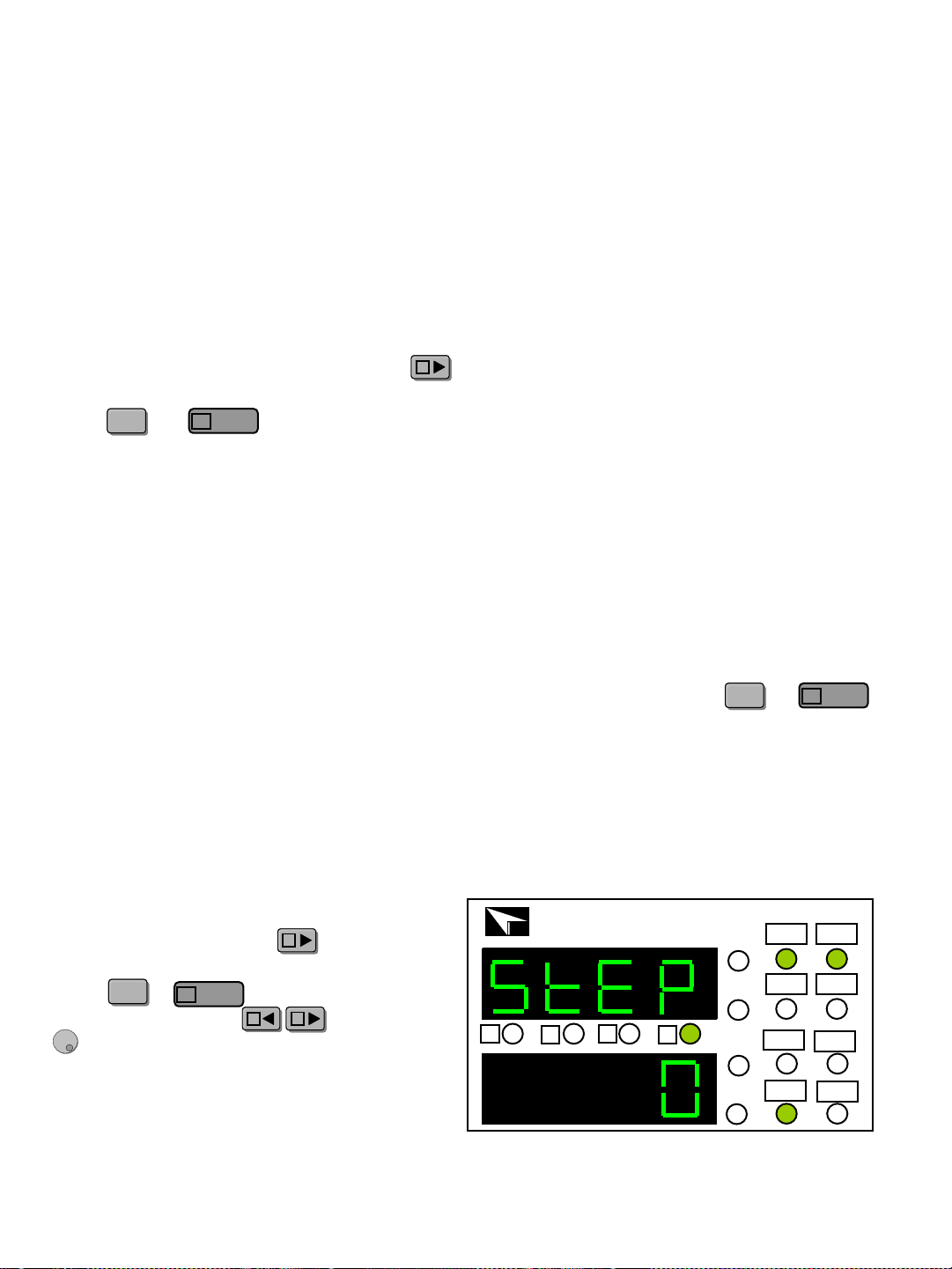
Operation:
Press power on button + key to power
on the unit and enter the LIST mode.
Press + to enter list edit menu.
Use the cursor keys and the Knob
to set the step.
BB
AA
BB
ShiftShift
View
C
ShiftShift
View
C
BB
ShiftShift
View
C
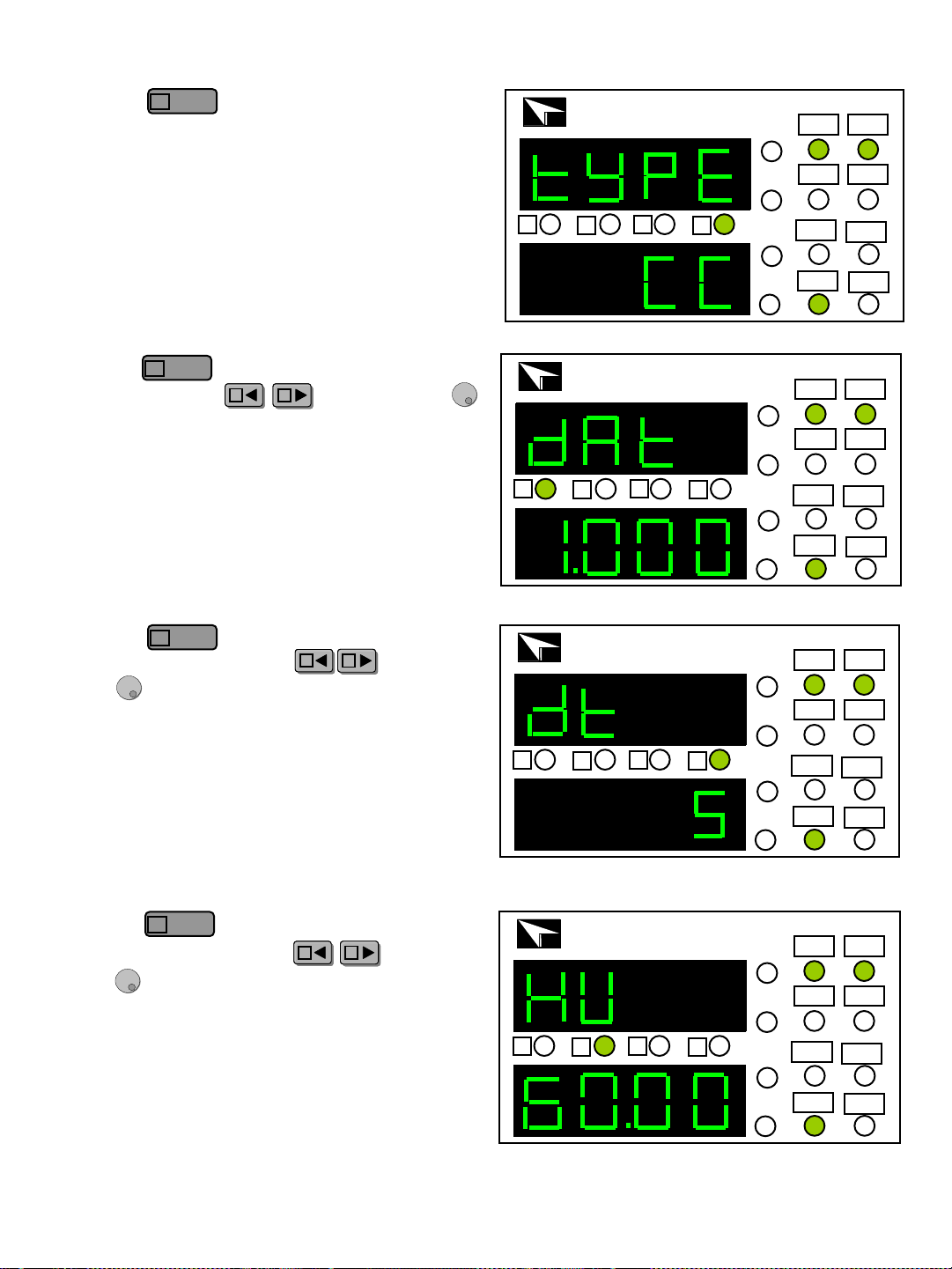
2) Press key to enter TYPE setting.
Use the knob to switch the working mode,
CC mode, CV mode, CR mode.
Right figure set TYPE as CC mode.
3)Press key to enter DATA setting.
Use cursor keys and the knob
to set the mode value. Right figure set DATA
as 1.000A
4)Press key to enter Delay Time
setting, use cursor keys and the
knob to set the delay time, the range of a
single step is 0.4s to 25s. Right figure set the
DT as 5s.
5)Press key to enter High Voltage
setting, use cursor keys and the
knob to set the high limit of the input
voltage. Right figure set the HV as 60.00V.
SV
V
A
IT8211 60V/30A/150W
DC Electronic Load
Prog CC
Short CV
OFF
Shift
30A
CR
ITECH
A
B
C
D
SV
W
SV
V
A
IT8211 60V/30A/150W
DC Electronic Load
Prog CC
Short CV
OFF
Shift
30A
CR
ITECH
A
B
C
D
SV
W
SV
V
A
IT8211 60V/30A/150W
DC Electronic Load
Prog CC
Short CV
OFF
Shift
30A
CR
ITECH
A
B
C
D
SV
W
SV
V
A
IT8211 60V/30A/150W
DC Electronic Load
Prog CC
Short CV
OFF
Shift
30A
CR
ITECH
A
B
C
D
SV
W
View
C
View
C
AA
BB
View
C
AA
BB
View
C
AA
BB
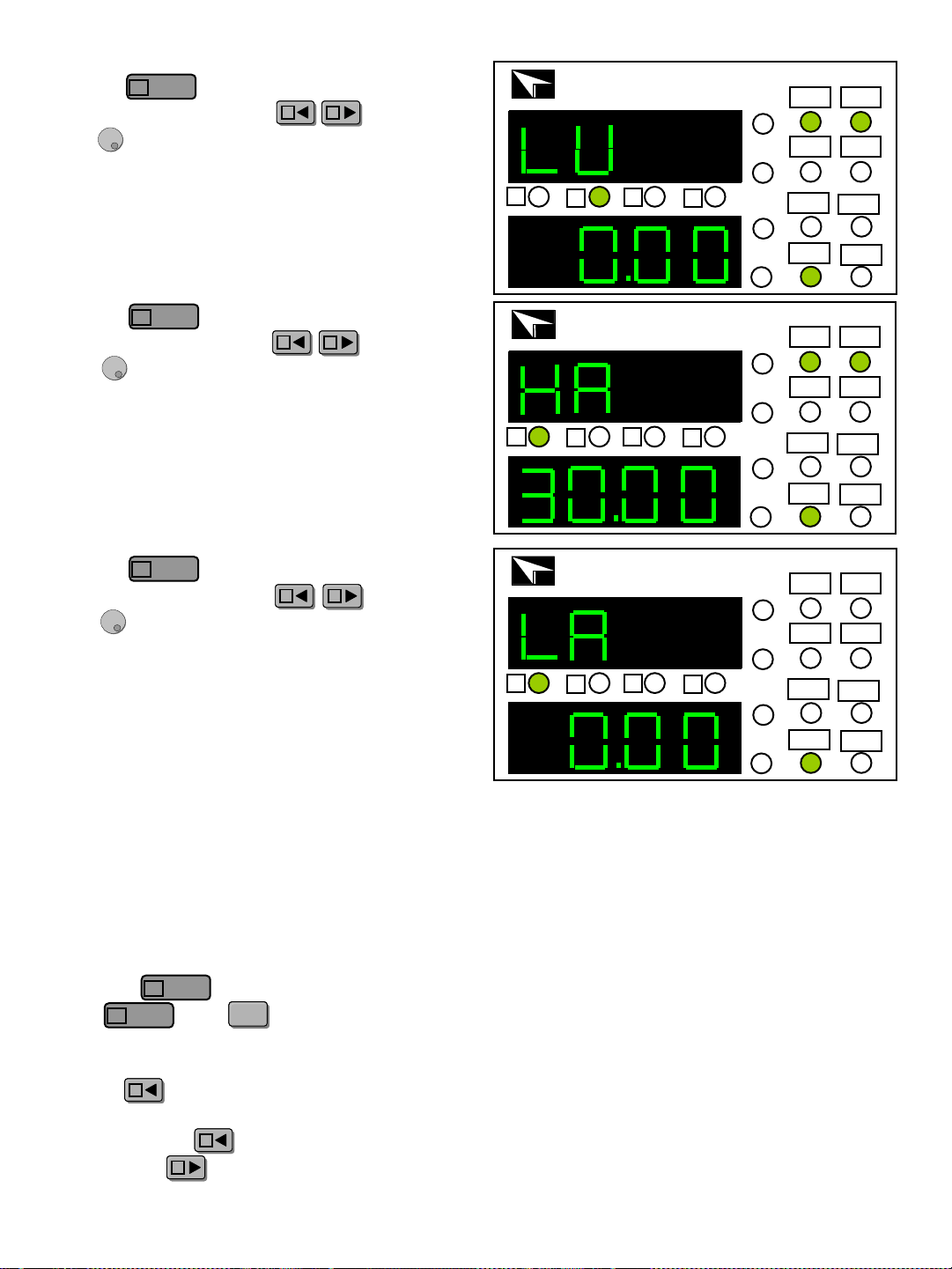
6) Press key to enter Low Voltage
setting. use cursor keys and the
knob to set the low limit of the input voltage.
Right figure set the Low Voltage as 0.00V.
7) Press key to enter High Current
setting, use cursor keys and the
knob to set the high limit of the input
current. Right figure set the High Current as
30.00A.
8) Press key to enter Low Current
setting, use cursor keys and the
knob to set the low limit of the input
current. Right figure set the Low Current as
0.00A.
9) Repeat step 1 settings, in turn set 5 steps:
1/2/2V/5S/60V/0V/30A/0A;
2/3/10Ω/5S/60V/0V/30A/0A;
3/1/2A/5S/60V/0V/30A/0A;
4/1/0A/5S/60V/0V/30A/0A (because the total
steps is less than 25 steps, so the last step
should be CC/0A.)
10) Press key to finish the setting, and
press and keys to exit the edit
menu, the instrument will save the setting
automatically.
Press key to run the list file.
NOTE: if the total steps is more than 25, e.g.
30 steps. press key to run the previous 25
steps, press key to run the last 5 steps.
SV
V
A
IT8211 60V/30A/150W
DC Electronic Load
Prog CC
Short CV
OFF
Shift
30A
CR
ITECH
A
B
C
D
SV
W
SV
V
A
IT8211 60V/30A/150W
DC Electronic Load
Prog CC
Short CV
OFF
Shift
30A
CR
ITECH
A
B
C
D
SV
W
SV
V
A
IT8211 60V/30A/150W
DC Electronic Load
Prog CC
Short CV
OFF
Shift
30A
CR
ITECH
A
B
C
D
SV
W
View
C
View
C
View
C
AA
BB
AA
BB
AA
BB
View
C
View
C
ShiftShift
AA
BB
AA
Cursor position
Voltage
Stepping values
Current
Stepping values
Resistance
stepping values
10V
Area
Stepping
values
Area
Stepping
values
0-3A 1A
0.1-10Ω 1Ω
10-99Ω 10Ω
0-30A 10A
100-999Ω 100Ω
1000-4000Ω 1000Ω
1V
0-3A 0.1A
0.1-10Ω 0.1Ω
10-99Ω 1Ω
0-30A 1A
100-999Ω 10Ω
1000-4000Ω 100Ω
0.1V
0-3A 0.01A
0.1-10Ω 0.01Ω
10-99Ω 0.1Ω
0-30A 0.1A
100-999Ω 1Ω
1000-4000Ω 10Ω
0.01V
0-3A 0.001A
0.1-10Ω 0.001Ω
10-99Ω 0.01Ω
0-30A 0.01A
100-999Ω 0.1Ω
1000-4000Ω 1Ω
Step value for Cursor Position
A
B
C
D
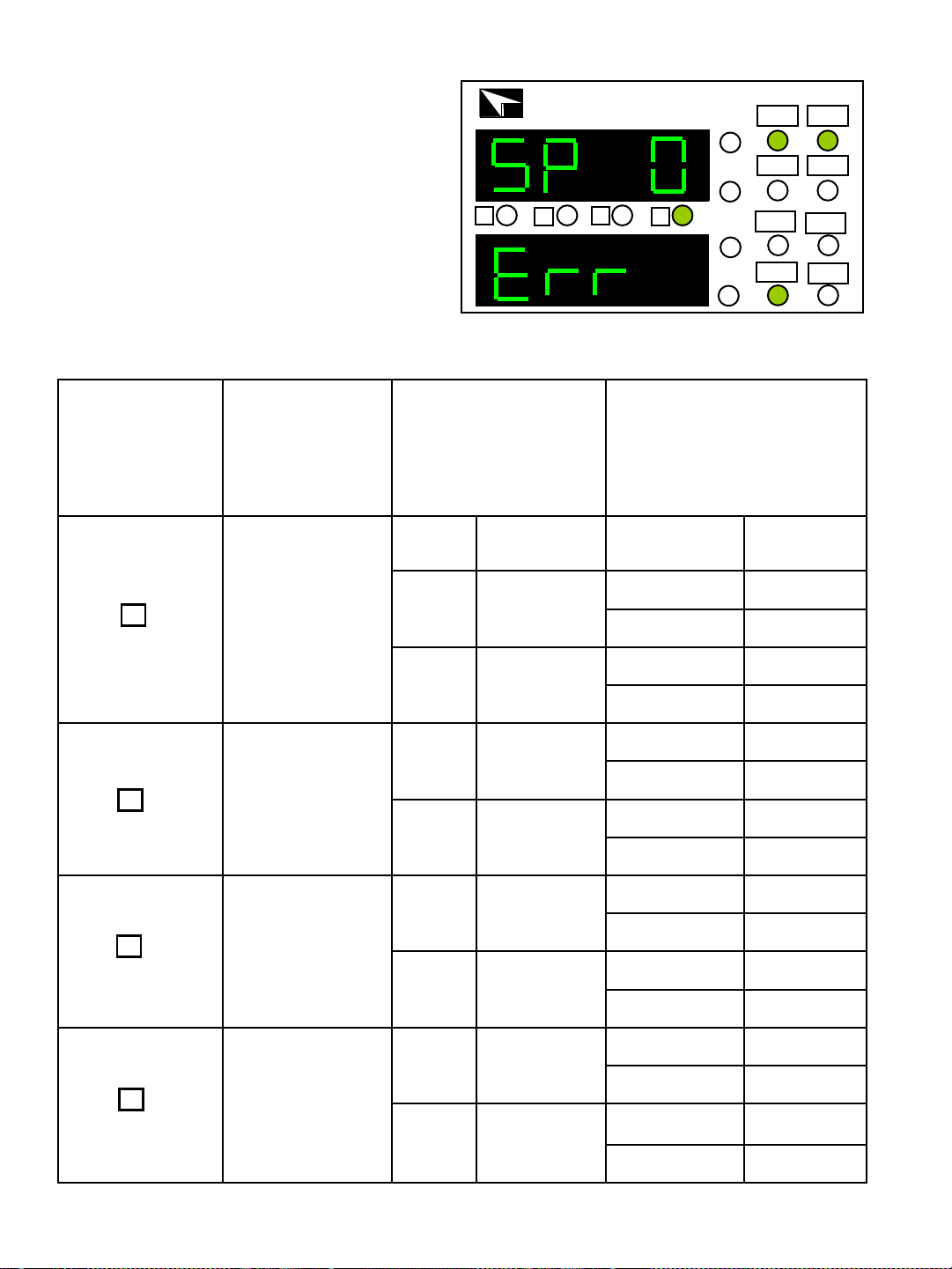
11) When past the test successfully, the
instrument display as normal; when fail to
pass the test, the instrument will display
as right figure, display wrong step, alarm
3 second and shut the input. Right figure
show the condition the first step not pass.
SV
V
A
IT8211 60V/30A/150W
DC Electronic Load
Prog CC
Short CV
OFF
Shift
30A
CR
ITECH
A
B
C
D
SV
W
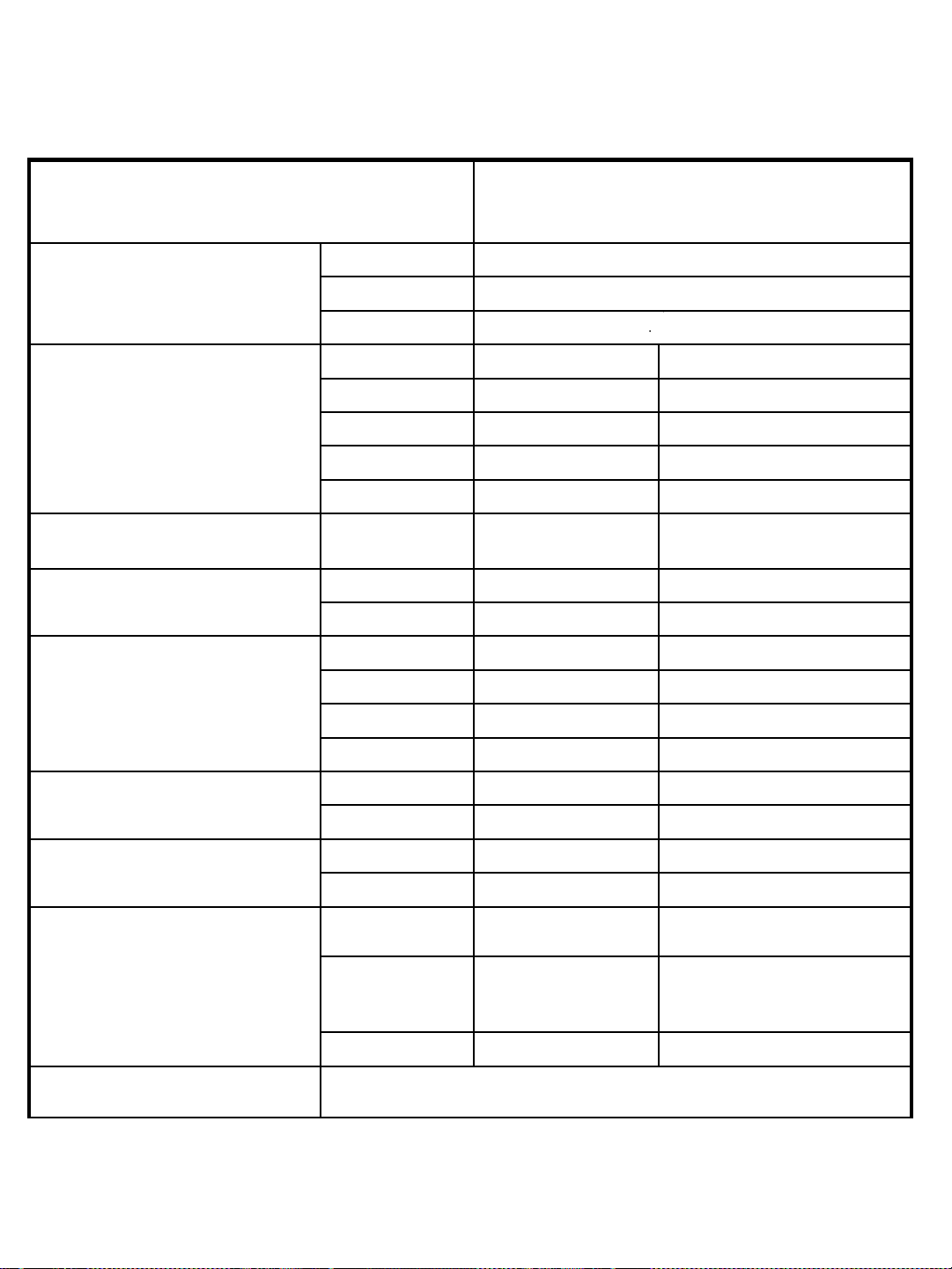
Parameter IT8211
Input ratings, ( 0 ~ 40 ℃)
Voltage 0 ~ 60V
Current 1mA ~ 30A
Power 150W
Load Regulation
Range Accuracy Resolution
0~10V
±(0.05%+0.1%FS)
1mV
0~60V
±(0.05%+0.1%FS)
10mV
0~3A
±(0.1%+0.1%FS)
1mA
0~30A
±(0.1%+0.15%FS)
10mA
CV Mode
Regulation
0.1~60V
±(0.05%+0.1%FS)
10mV
CC Mode
Regulation
0~3A
±(0.1%+0.1%FS)
1mA
0~30A
±(0.1%+0.15%FS)
10mA
CR Mode
Regulation
(input voltage>= 10%full range,
input current >=10%full range)
0.1~10Ω
±(1%+0.8%FS)
0.001Ω
10~99Ω
±(1%+0.8%FS)
0.01Ω
100~999Ω
±(1%+0.8%FS)
0. 1Ω
1K~4KΩ
±(1%+0.8%FS)
1Ω
Current
Measurement
0~3A
±(0.1% + 0.1%FS)
1mA
0~30A
±(0.1% + 0.15%FS)
10mA
Voltage
Measurement
0~10V
±(0.05% + 0.1%FS)
1mV
0~60V
±(0.05% + 0.1%FS)
10mV
Power
Measurement
(input voltage >=10%full range,
Input current >=10%full range)
0~10W
±(1%+0.5%FS)
1mW
10~99W
±(1%+0.5%FS)
10mW
100~150W
±(1%+0.5%FS)
100mW
Dimension(W*H*D) 88*175*282(mm)
Technique parameter
Contact US
Thank you for purchasing ITECH products.Ifyou have any doubt about this
product, please contact us as follow.
1. Please refer to the CD-ROM of related user’s manual in package.
2. Click www.itechate.com or scan the right two-dimension code
to visit the ITECH website.
3. Send E-mail to fae@itech.sh or dial the service hot-line in China:
4006025000
4. Select the most convenient contact method for further consultancy.