USER
MANUAL
SR-S20...
SRS579NP
SRS580DTKG
SRS582DSSB
SRS615DP
SR-S22...
SRS580DW
SRS581DTKM
SRS582DTKGM
SRS614DW
SRS616DSSB
SRS616DHSS
FRIDGE/FREEZER
Before operating the appliance, please read this manual thoroughly
and retain it for future reference.
ENGLISH
DA68-00500P REV(0.2)
DA68-00500P 6/26/02 2:34 PM Page 1

2
These warnings are to prevent injury to users or other persons. Please observe them.
After reading the warnings, keep them in a safe place for future reference.
FEATURES
Energy-saving fridge/freezer
• Power consumption is kept to a minimum by
distributing cool air separately to the refrigera-
tor and freezer.
Faster cooling times
• The quick freezing function allow you to freeze
food more quickly.
High humidity for fresher food
• You can keep food, fruit and vegetables fresh
for longer because your refrigerator supplies
highly humidified cold air. This can be up to
four or five times more effective than a normal
refrigerator.
Door alarm
• When the refrigerator door is left open for
more than two minutes, a musical alarm is
automatically triggered. This feature helps you
save electricity and preserve stored foods.
Abundant supply of ice and cold water
• The ice and water dispenser provides ice and
cold water at any time.
Extra refrigerating compartment
• You do not have to open the main door to
access frequently used food in the extra
refrigerating compartment. This saves time
and money.
CONTENTS
FEATURES............................................................................................2
SAFETY WARNINGS............................................................................2
INSTALLING THE APPLIANCE............................................................4
PREPARING THE APPLIANCE............................................................5
FRONT CONTROL PANEL...................................................................6
CONTROLLING THE FREEZER AND REFRIGERATOR
TEMPERATURES.................................................................................7
ICE/COLD WATER DISPENSER .........................................................9
STORING FOOD.................................................................................10
VIEW OF YOUR FRIDGE/FREEZER.................................................11
REMOVING THE FREEZER ACCESSORIES...................................12
REMOVING THE REFRIGERATOR ACCESSORIES ......................13
EXTRA REFRIGERATING COMPARTMENT ...................................13
CLEANING THE ACCESSORIES ......................................................13
CHANGING THE INTERIOR LIGHT...................................................14
ICE-MAKING FILTER..........................................................................15
PROBLEMS AND SOLUTIONS..........................................................15
What is the H. M. Cycle (High-efficiency,
Multi-evaporator Cycle)?
•
The refrigerator and freezer have separate
evaporators. Given this independent
system, the refrigerator and freezer are
cooled individually as required and are,
therefore, more efficient.
Food odour from the refrigerator does not
affect food in the freezer because the two
are not connected.
SAFETY WARNINGS
CAUTION/WARNING SYMBOLS USED OTHER SYMBOLS USED
Indicates that a danger of
death or serious injury exists.
Indicates that a risk of
personal injury or material
damage exists.
WARNING
CAUTION
Represents
something you must NOT
touch.
Represents
something you must
observe.
Indicates that you must disconnect the
power plug from the socket.
Represents something that must be
earthed to prevent electric shock.
Represents something you must NOT
disassemble.
Represents something you must NOT do.
DA68-00500P 6/26/02 2:34 PM Page 2

3
Do not use the fridge/freezer with a multi-plug adapter.
• This causes a potential fire hazard.
Make sure that the power plug is not squashed or
damaged by the back of the fridge/freezer.
• A damaged power plug may overheat and cause a fire.
Do not allow water to splash or run on to the fridge/
freezer.
• There is a risk of fire or electric shock.
Do not use aerosols near the fridge/freezer.
• There is a risk of explosion or fire.
Do not place heavy articles on the power cord.
• There is a risk of a short circuit and fire.
Do not insert the power plug with wet hands.
• You may receive an electric shock.
Do not put a container filled with water on the appliance.
• If spilled, there is a risk of fire or electric shock.
Do not install the fridge/freezer in a damp place or a
place where it might be splashed with water.
• Deteriored insulation of the electric parts may cause elec-
tric shock or fire.
Do not store volatile or inflammable substances in the
refrigerator.
• The storage of benzene, thinner, alcohol, ether, LP gas
and other such products may cause explosions.
Do not remove the power cord by pulling on its
lead.
• Damage to the cord may cause a short-circuit,
fire and/or electric shock.
• If the power cord is damaged, it must be replaced
by the manufacturer, a certified service agent or
qualified service personnel.
Do not store articles on the appliance.
• When you open or close the door, the articles
may fall and cause personal injury and/or materi-
al damage.
Do not store medicine, scientific materials and
temperature-sensitive products in the refriger-
ator.
• Check product labels to make sure that refrigera-
tion is not prohibited.
Do not let children hang from the door.
If you detect abnormal sounds, smells or
smoke, pull out the power plug immediately
and contact your SAMSUNG Electronics ser-
vice centre.
Do not touch the inside walls of the freezer or
products stored in the freezer with wet hands.
• It may cause frostbite.
Do not put your hands under the fridge/freezer.
• Sharp edges may cause personal injury.
Never put fingers or other objects into the
dispenser opening and ice chute.
Pull the power plug out before changing the interior
light of the refrigerator.
• Otherwise, there is a risk of electric shock.
If you wish to dispose of the fridge/freezer, first
remove the door and its seals.
• If a child plays in the appliance, the door can close and
the child can become trapped. The child will die from suf-
focation.
Be sure to earth the appliance.
• If the appliance is not properly earthed, it may break
down or cause electric shock.
Do not disassemble, repair or alter the appliance.
• You run the risk of causing a fire, malfunctions and/or
personal injury.
WARNING
If the fridge/freezer is not to be used for a long
time, pull out the power plug.
• Any deterioration in the insulation may cause fire.
Do not use a wet or damp cloth when cleaning
the plug. Remove any foreign matter from the
power plug pins.
• There is a risk of burning and fire.
If you wish to move the fridge/freezer, hold it
by the back and bottom handles.
• If the appliance is disconnected from the power
supply, you should wait for at least five minutes
before plugging it back in.
CAUTION
Do not overfill the refrigerator with food.
• If food falls out when you open the doors, there is a risk
of personal injury and/or material damage.
Do not put bottles or glass containers in the freezer.
• When the contents freeze, the glass may break and
cause personal injury.
If the power plug socket is loose, do not insert the
power plug.
• There is a risk of electric shock or fire.
DA68-00500P 6/26/02 2:34 PM Page 3

4
INSTALLING THE APPLIANCE
Clean your fridge/freezer.
•
Wipe the inside and outside of
your fridge/freezer with a dry
cloth.
Store food in the refrigerator.
•
Wait for at least two or three hours after plugging
your appliance in before storing food and other
items in it.
Allow a clearance of 1 cm to the right, left and back when installing the appliance; this has the advantage
of reducing power consumption.
LEVELLING
When you adjust the level of the fridge/freezer, set the front legs slightly higher than the rear legs, so
that you can open and close the door more easily.
First disassemble the leg cover and then adjust the level of the fridge/freezer.
If your fridge/freezer tilts to the
left, turn the left adjusting
screw.
If your fridge/freezer tilts to the
right, turn the right adjusting
screw.
Allow sufficient space to install
the appliance on a flat surface.
•
If your appliance is not level, the
internal cooling system may not
work correctly.
DA68-00500P 6/26/02 2:34 PM Page 4

5
PREPARING THE APPLIANCE
Once you have performed the following steps, your fridge/freezer should be fully operational.
If not, check the power supply and electricity source. If you have any doubts or problems, con-
tact your SAMSUNG service centre.
Place the shelves and containers which
were removed for transport in their
appropriate positions (refer to pages
10 to 12).
Set the temperature control to the cold-
est temperature and wait for one hour.
The freezer should get slightly chilled
and the motor should run smoothly
producing a soft humming noise.
Clean the fridge/freezer and acces-
sories to remove any dust that accu-
mulated during packing and shipping
(refer to page 13).
Once the refrigerator temperature is
sufficiently low, you can store food in
the appliance.
It takes a few hours after starting the
fridge/freezer to reach the appropriate
temperature.
When the refrigerator is plugged in, the
interior light should come on each time
you open the refrigerator door.
Your fridge/freezer is operated by a compressor
which switchs “on and off” to maintain the internal
temperature. When the compressor is new, it
requires a running-in period, which can last for up
to five months. During this period, it may be slightly
noisy. This is quite normal and does not represent
a fault.
WARNING
EARTHING THE APPLIANCE
The appliance must be earthed.
You must earth the fridge/freezer to prevent any power leakage or electric shock caused by cur-
rent leakage from the appliance.
•
Never use gas pipes, telephone lines or other potential lightning rods as earths.
You are using a power plug without earth.
•
Connect one end of the earthing wire (yellow/green or
green) to the earthing screw and the other end to a steel or
copper pipe, such as a water pipe.
Earthing screw
Earthing
wire
Copper
pipe
DA68-00500P 6/26/02 2:34 PM Page 5

6
FRONT CONTROL PANEL
Basic model
Model with ice and water dispenser
FREEZER TEMPERATURE BUTTON
Sets the freezer temperature.
Press the button repeatedly to change
the temperature in sequence between
-14°C and -26°C.
REFRIGERATOR TEMPERATURE BUTTON
Sets the refrigerator temperature.
Press the button repeatedly to change the
temperature in sequence between 7°C and -1°C.
VACATION BUTTON
Turns the refrigerator off but not the freezer.
QUICK FREEZE BUTTON
Speeds up the freezing process in
the freezer.
ICE MODE BUTTON
Sets the ice dispensing mode:
ice cubes, crushed ice or ice off.
ICE TIMER BUTTON
Schedules ice making. On the speci-
fied day, the ice maker makes the ice
cubes.
DA68-00500P 6/26/02 2:34 PM Page 6

Quick Freeze
Fuzzy
•
This light switches on when you press the QUICK FREEZE button.
•
Press the button again to cancel the Quick Freeze mode. The freezer automatically
switches back to the normal control mode after 2.5 hours.
•
When the power cord is connected to the wall socket, the Fuzzy light is on.
The compressor, fan and defrosting heater are automatically controlled to
optimise food storage.
Temperature Display
Displays the current and selected freezer
temperatures.
Freezer Display
Indicates that you are setting the freezer
temperature or have opened the freezer door.
Temperature Display
Displays the current and selected refrigerator
temperatures.
Refrigerator Display
Indicates that you are setting the refrigerator
temperature or have opened the refrigerator door.
CONTROLLING THE FREEZER AND REFRIGERATOR TEMPERATURES
Freezer
•
The freezer can be set to a temperature between
-14°C and -26°C.
•
Press the FREEZER TEMP. button repeatedly until the
required temperature is shown in the temperature dis-
play.
•
The temperature display changes in sequence between
-14°C and -26°C. When the display reaches
-26°C, it returns to -14°C.
•
After five seconds, the display reverts to the average
freezer temperature, which changes as the freezer
reaches the new temperature.
Refrigerator
•
The refrigerator can be set to a temperature between
7°C and -1°C.
•
Press the REFRIGERATOR TEMP. button
repeatedly until the required temperature is shown in
the temperature display.
•
The temperature display changes in sequence and
reverts same as the freezer control methods.
•
When the setting temperature is -1°C or 0°C, it can cuase water
on the shelf freeze slightly. If your unit has Auto lcemaker & Water
Dispenser, be sure to set the refrigerator temperature above 0°C,
because a reservoir system is in the refrigerator compartment.
Vacation
•
When the vacation light is on, the refrigerator is switched off but not the freezer.
Press the button again to cancel the Vacation mode. Be sure to remove all food in
the refrigerator when you select this mode.
INDICATORS (BASIC MODEL)
Lock
•
This light indicates that the four function buttons have been locked.
•
To lock the buttons, press the FREEZER TEMP. and REFRIGERATOR TEMP.
buttons at the same time for about three seconds. Press both buttons again for
about three seconds to unlock them.
7
DA68-00500P 6/26/02 2:34 PM Page 7

8
OTHER INDICATORS
(MODEL WITH ICE AND WATER DISPENSER)
•
Press the ICE MODE button to
make ice cubes or crushed ice
and also to stop making ice.
•
Press the button one or more
times to change between ice
cubes, crushed ice and ice off in
sequence. The appropriate light
comes on.
•
If you select “Ice off”, the ice
maker in the freezer is switched
off until the ice mode is changed
to ice cubes or crushed ice, also
be sure to remove any ice cubes
already in the ice bucket.
•
Press the ICE TIMER button to
schedule ice making.
•
The “Ice off” mode is automa-
tically selected. Remove any
ice from the ice bucket.
•
You can set the ice timer to
between 3 and 30 days. When
the display reaches 30 days, it
goes back to 3 days. For exam-
ple, if you are going to come back
after 10 days, set the ice timer to
10 days; the ice maker will start
making ice automatically after
about 8 days.
•
Press the ICE MODE button to
cancel the ice timer. Be sure to
remove any ice cubes in the ice
bucket after setting the timer.
•
The water filter indicator initially
lights up green. Press the ICE
TIMER and ICE MODE buttons at
the same time for about three
seconds to reset the water filter
installation date.
•
The green light changes to orange after five months to indicate that you
should soon change the water filter. It changes to red after an additional
one month (six months after the water filter was changed or installed) to
indicate that you must change the water filter.
•
If you wish to turn off the filter indicutor lamp or the filter is not connected,
press the ice timer & icemode button simultaneously for 5 seconds.
If you wish to turn on the filter indicutor lamp again, press the ice timer &
ice mode button simultaneously for 3 seconds.
Ice Cubes, Crushed Ice and Ice Off
Ice Timer and Vacation
Water Filter Indicator
+
- If you select both the Vacation and Ice Timer modes, the refrigerator is switched off. Remove all food from the refrigera-
tor but leave the water tap open. Check that the tap and other pipe connections do not leak. When the start time is
reached, the appliance begins making ice, the Vacation mode is cancelled and the refrigerator operates normally.
- If you select the Vacation mode but not the Ice Timer mode and when you are away for an extended period of time,
close the water tap. The refrigerator switches off and the “Ice off” mode is selected.
Remove any food from the refrigerator and any ice from the ice bucket.
- If the Vacation mode is selected for long periods of time, pour out about 10 cups of water from the water dispenser when
you return home.
DA68-00500P 6/26/02 2:34 PM Page 8
9
ICE / COLD WATER DISPENSER (MODEL WITH ICE AND WATER DISPENSER ONLY)
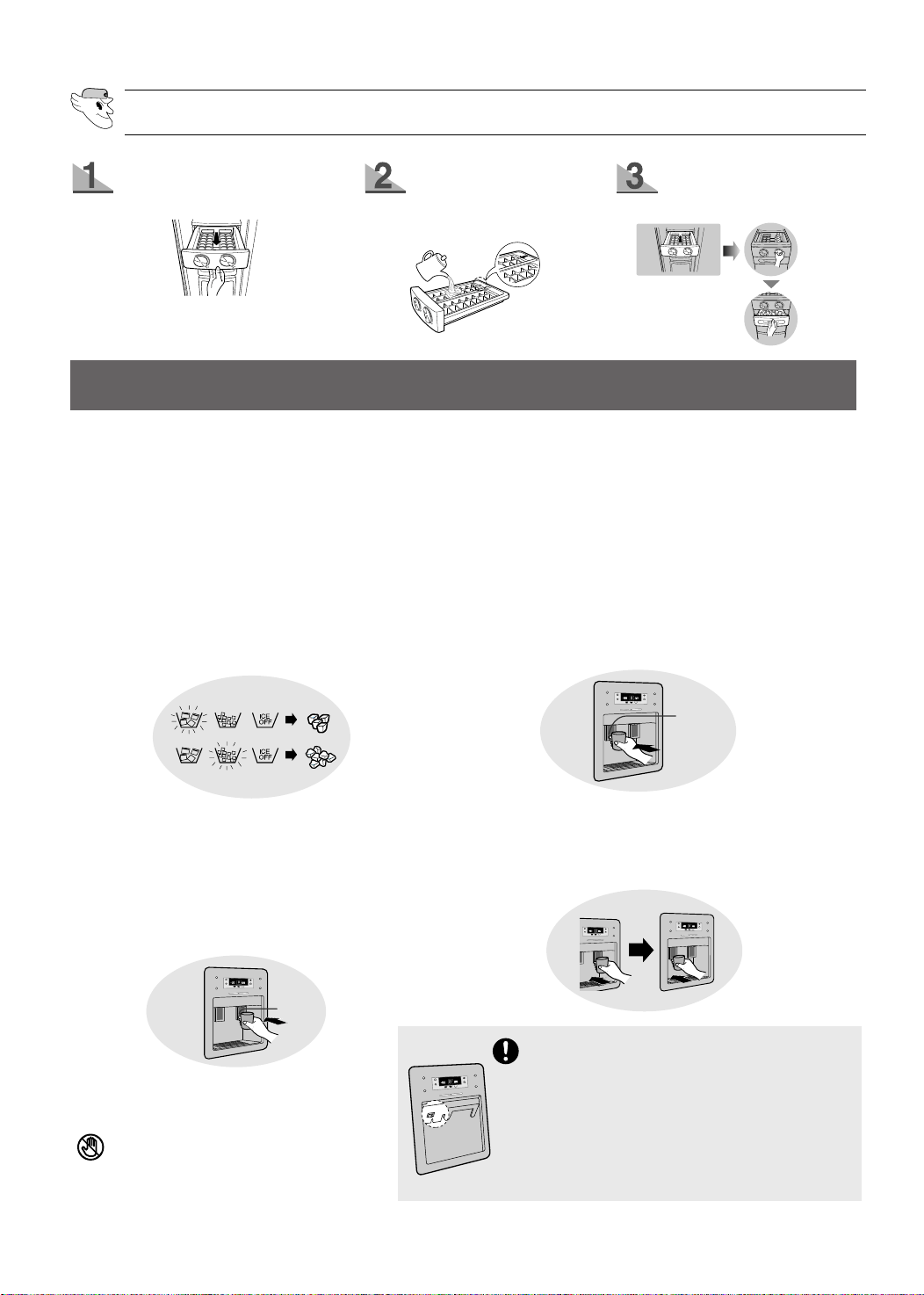
The ice making device makes 10 cubes at a time and
about 100 cubes a day automatically.
This quantity may be influenced by such factors as the
freezer temperature and the number of times that the
door is opened. When your appliance is first plugged
in, the Cubed Ice mode is selected automatically.
Press the ICE MODE button to select the type
of ice:
•
Ice cubes
•
Crushed ice
•
No ice
Push the ice dispenser lever with a cup.
•
Place a cup near the dispenser to prevent the
ice from jumping out.
•
If you wish to use the ice dispenser and the cold
water dispenser, use the ice dispenser first.
The water dispenser can serve six glasses of water
in succession.
You must then wait for several minutes to allow the
stored water to cool again.
Cold Water
•
Push the water dispenser lever with a cup.
•
If you have just installed the appliance, you
must pour the first six glasses of water away,
to remove the initial plastic smell of the water
storage case
•
If the water from the cold water dispenser is not
chilled, pour the warm water away, add ice from
the ice dispenser and fill your glass with water.
MAKING ICE (BASIC MODEL)
Pull out the ice tray.
Add water until it reaches
the water level indicator.
Put the ice tray back in
place.
Push
Push
Never put your fingers or any other
objects in the dispenser opening.
The refrigerator is provided with anti sweat-
heater inside of dispenser panel and is delivered
to user with heater switch “ON”
You’d better turn off the anti sweat-heater under
normal use for saving energy by pressing heater
switch. Please turn on the anti sweat-heater the
time when sweat occurs on the surface of
dispenser panel.(position : ON)
DA68-00500P 6/26/02 2:34 PM Page 9

10
STORING FOOD
FROZEN FOOD STORAGE METHODS
REFRIGERATED FOOD STRORAGE METHODS
Tempered glass shelf
•
Can be used safely because
it will not break if it falls.
Fresh center (option)
•
Helps preserve the taste of
food and prolongs its fresh-
ness. Use the chiller to store
cheese, meat, snacks, fish or
any food to be used quickly.
Fresh salad drawer(Upper)
•
Is used to store vegetables.
•
This compartment is airtight.
The cooling system does not,
therefore, directly affect the food stored in it. It
maintains the water content and freshness of the
food for a long time.
Fresh fruit salad drawer(Low)
•
Is used to store fruit.
•
This compartment preserves
freshness for a long time by
maintaining the moisture in the food.
❈ For more space, you can store food with drawers
removed.
Dairy compartment
•
Can be used to store
fatty foods, like butter
and cheese.
Multiple guard
•
Can be used to store
foods in small
packages, such as
milk and yoghurt.
Extra refrigerating compartment
(model with Home Bar)
•
Can be used to store
frequently used items,
such as beverages.
Beverage shelf
•
Can be used to store
a variety of bottles,
cans and cartons.
Egg rack
•
Put eggs in the egg rack and then place
the rack on the tempered glass shelf.
Multiple guard
•
Can be used for small packages of frozen food.
Tempered glass shelf
•
Can be used to store all types of frozen food.
DA68-00500P 6/26/02 2:34 PM Page 10

11
Meat and dry goods storage compartment
•
Can be used to store meat and dry goods. Stored
food should be wrapped securely using foil or
other suitable wrapping materials.
Door guard
•
Can be used for frozen foods.
Ice chute and ice-maker cover
•
Do not put your fingers, hands or any foreign
object in the chute and ice-maker cover.
VIEW OF YOUR FRIDGE/FREEZER
Guard
Ice maker
Ice chute
Light
Shelf
(tempered glass or wire,
depending on the model)
Twist ice maker
Ice tray
Drawer
(wire or plastic basket,
depending on the model)
Leg cover
FREEZER
Basic model Model with ice and water dispenser
DA68-00500P 6/26/02 2:34 PM Page 11

12
REMOVING THE FREEZER ACCESSORIES
•
Do not use excessive force when
disassembling the cover; otherwise,
you may cause damage.
Tempered glass shelf
•
Pull the shelf out as far as
it goes. Then lift it up and
remove it.
Multiple guard and door
guard
•
Hold the multiple guard and
door shelf in both hands
and then lift it up.
Meat and dry goods
storage compartment
•
Remove the compartment
by pulling it out and lifting it
up slightly.
Ice maker and tray
•
Remove the ice tray by
pulling it towards you.
Then remove the ice
maker (basic model
only).
Leg cover
•
Open the freezer and refrigera-
tor doors, remove the three
screws and detach the cover.
•
To reassemble the leg cover,
put it back into position and tighten the three
screws.
❈ Only remove the leg cover if strictly
necessary.
NOTE
REFRIGERATOR
Lights
Fresh center (option)
Dairy compartment
Guard
Extra Refrigerator Compartment
(model with Home Bar)
Shelf
Drawer cover
Bottle guard
Egg rack
Fresh salad drawer(upper)
Fresh fruit salad drawer (lower)
DA68-00500P 6/26/02 2:34 PM Page 12

13
REMOVING THE REFRIGERATOR ACCESSORIES
Tempered glass shelf
•
Pull the shelf out as far as it will go. Then lift it up
and remove it.
Fresh fruit salad drawer and cover
•
Remove the compartment by holding the han-
dle, pulling the compartment towards you and
lifting it up slightly.
•
Remove the cover by pulling it towards you.
Bottle and door guard
•
Hold the shelf in both hands and remove it by
lifting it up.
To access the extra refrigerating compartment, hold the compartment door handle and pull it
downwards.
•
The extra refrigerating compartment gives you added convenience because you do not need to open
the main refrigerator door. In addition, this saves energy.
It is recommended that you use the extra refrigerating compartment for frequently used foods like
beverages.
When the door is opened, it can be used as a tray to support items, such as beverage bottles
and glasses.
•
Do not scratch the surface of the door.
NOTE
•
The door of the extra refrigerating compartment should never be removed. The extra refrigerating compartment can-
not function if the door is missing.
•
When closing the extra refrigerating compartment door, be careful not to put your hands or fingers in a position
where they can be caught or injured.
•
If you use the open door as a tray, do not place heavy objects on it. Do not allow children to hang from the door;
there is a risk of personal injury or material damage.
EXTRA REFRIGERATING COMPARTMENT (MODEL WITH HOME BAR)
CLEANING THE ACCESSORIES
Inside
•
Clean the accessories using a mild detergent. Then wipe with a dry cloth.
•
After washing the accessories, make sure that they are dry before using them again.
Exterior
•
Wipe the front control panel with a clean cloth.
•
The doors and door handles should be cleaned with a mild detergent and cloth. Dry them
with a clean cloth.
•
The exterior should be polished once or twice a year.
Rear
•
Use a vacuum cleaner to remove dust once or twice a year.
ent
DA68-00500P 6/26/02 2:34 PM Page 13

14
INTERIOR LIGHT IN THE FREEZER (BASIC MODEL ONLY) / REFRIGERATOR
INTERIOR LIGHT IN THE FREEZER (MODEL WITH ICE AND WATER
DISPENSER)
NOTE
•
When cleaning the appliance or if you are not going to use it for a long time, remove the power plug, leave
the doors open and keep the appliance dry.
•
Do not clean it by spraying it directly with water.
•
Do not clean it with benzene, thinner or car detergent.
CHANGING THE INTERIOR LIGHT
Before changing the interior light, unplug the appliance from the power supply. If you
experience difficulty when changing the light, contact your service centre.
WARNING
Place a flat screwdriver under
the light cover hooks and push
in the direction of the arrow.
Pull the cover in the direction
of the arrow.
After changing the bulb,
replace the light cover.
Lift and pull out the ice maker cover (
➀
).
Use a screwdriver to remove the light cover (
➁
).
Replace the bulb with a new one (
➂
), and then secure
the light cover back into place using a screwdriver.
Replace the ice maker cover.
➀
➁
➂
Extra refrigerating compartment (model with Home Bar)
•
Use a damp cloth to clean the extra refrigerating compartment. Then wipe it with a dry cloth.
Rubber door seals
•
If the rubber door seals are dirty, the door will not close properly and the refrigerator and
freezer will be unable to function efficiently. Clean them with a mild detergent and damp cloth.
Then wipe them with a dry cloth.
Ice and water dispenser and drainage grid (model with ice and water dispenser )
•
Use a damp cloth to clean the ice and water dispenser. Then wipe it with a dry cloth.
•
Keep the ice and water dispenser and drainage grid dry.
DA68-00500P 6/26/02 2:34 PM Page 14

15
PROBLEMS AND SOLUTIONS
The fridge/freezer does not work at all or it does
not chill sufficiently
•
Check that the power plug is properly connected.
•
Check that the power plug fuse has not blown.
•
Is the temperature control on the front panel set to
the correct temperature?
•
Is the fridge/freezer in direct sunlight or located
near a heat source?
• Is the back of the fridge/freezer too close to the
wall?
The food in the refrigerator is frozen
•
Is the temperature control on the front panel set to
the correct temperature?
•
Is the temperature in the room too low?
•
Did you put food with a high water content in the
coldest part of the refrigerator.
You can hear unusual noise or sounds
•
Check that the floor is level and stable.
•
Is the back of the appliance too near to the wall?
•
Was anything dropped behind or under the appli-
ance?
•
Is the noise from the compressor in the appliance?
•
A “ticking” sound may be heard from inside the
appliance, but this is normal. It is caused when
the various accessories contract or expand.
The front corners and sides of the fridge/freezer
are hot; condensation forms
•
Heat-proof pipes are installed in the front corners
of the refrigerator to prevent condensation.
•
Condensation can occur when you leave the door
open for too long or you store food with a high
water content unwrapped in the refrigerator and
the temperature and humidity levels are high.
Ice is not dispensed
•
Did you stop the ice making function?
•
Is there any ice in the ice storage unit?
•
Is the water tap open and the water pipe connect-
ed?
•
Is the freezer temperature too warm?
(Set it to a lower temperature.)
•
Did you wait for 12 hours after installation before
making ice?
You can hear water babbling in the refrigerator
• The babbling comes from the refrigerant circulat-
ing in the fridge/freezer.
There is a bad smell in the fridge/freezer
• You did not wrap food with a strong smell or you
have forgotten something in the refrigerator.
• Wrap food with a strong smell so that it is airtight.
Throw away any food that has gone off.
Frost forms on the wall of the freezer
• Is the air inlet/outlet blocked?
• Allow sufficient space between the food items for
air to circulate efficiently.
• Is the door closed properly?
No water is dispensed
• Is the water tap open and the water pipe connect-
ed?
• Is the water pipe blocked?
• Is the water tank frozen because the refrigerator
temperature is too low? Select a warmer setting
via the front control panel.
ICE-MAKING FILTER
What is the ice-making filter?
•
The ice-making filter is a device which removes impureties from the water.
How do I install the ice-making filter?
•
Connect the ice-making filter provided to the water tap (refer to the installation manual).
•
Remove the residue in the ice-making filter by rinsing it with water.
How often should I change the ice-making filter?
•
Every 6 months on average but it may vary, depending on the water quality.
•
The water filter indicator turns orange to inform you that you should replace the water filter soon.
When it turns red, replace the filter with a new one. Water filters are available from your dealer and
authorised service centres.
Filtering chemicals and purification
•
The ice-making filter uses carbon to filter odours, chemicals and other impureties.
DA68-00500P 6/26/02 2:34 PM Page 15

Ambient Room Temperature Limits
This appliance is designed to operate at the ambient temperatures specified by its temper-
ature class marked on the rating plate.
NOTE: The internal temperature may be affected by such factors as the location of the
appliance, ambient temperature and the frequency with which you open the doors.
Adjust the temperature as required to compensate for these factors.
Temperature
Symbol
Ambient Temperature
Class
Maximum Minimum
Extended Temperate SN 32°C (90°F) 10°C (50°F)
Temperate N 32°C (90°F) 16°C (61°F)
Subtropical ST 38°C (100°F) 18°C (64°F)
Tropical T 43°C (109°F) 18°C (64°F)
16
DA68-00500P 6/26/02 2:34 PM Page 16

Installation Manual
Please READ
To avoid any potential problems,
we recommend that you
first read the fridge/freezer
installation manual before
installing the fridge/freezer.
DA68-00500P 6/26/02 2:34 PM Page 17

INSTALLING THE FRIDGE/FREEZER
Checking the Dimensions of Your Entrance Door
Check the dimensions of your entrance door to determine whether the fridge/freezer
can pass through it.
Selecting the Location for the Fridge/Freezer
• Select a location with easy access to the water supply.
• Select a location with enough space surrounding the appliance.
• Select a location without direct exposure to sunlight.
DOOR DEPTH
(except handle)
40mm
917mm
908mm
917mm
908mm
884mm
724mm
729mm
759mm
1783mm
1760mm
1783mm
1760mm
50mm
85mm
DIMENSION
Width Depth Height
2
DA68-00500P 6/26/02 2:34 PM Page 18

Removing the Water Tube from the Fridge/Freezer
1) Remove the screw from clamp ( ).
2) Disassemble the water tube by pressing the coupler (➁) and pulling the water
tube (➀) away.
FRIDGE/FREEZER TOO LARGE TO BE DELIV-
ERED THROUGH THE ENTRANCE DOOR
Disassembling the Leg Cover Assembly
Open the freezer and refrigerator doors, and then disassemble the leg cover assembly
by turning the three screws counter-clockwise.
a
a
LEG COVER ASSEMBLY
SCREW
3
DA68-00500P 6/26/02 2:34 PM Page 19

Disassembling the Freezer Door
1) With the door closed, disassemble the upper hinge cover (➀) using a flat screwdriv-
er, and then disconnect the wires (➁).
2) Disassemble bolt (
➂
) and screw (
➃
) to the counter-clockwise by using a tool, and
take off the upper hinge (➄) along the arrow (➅). Take care when disassembling the
door to ensure that it does not fall on you.
3) Disassemble
the door from the lower
hinge
(➆)
by lifting the door (➇).
4) Disassemble the lower hinge (➈) from the
bracket lower hinge (➉) by lifting the
lower hinge (➈) in the direction of the
arrow.
4
DA68-00500P 6/26/02 2:34 PM Page 20

3) Disassemble
the door from the lower
hinge
(➆)
by lifting the door (➇).
4) Disassemble the lower hinge (➈) from the
bracket lower hinge (➉) by lifting the
lower hinge (➈) in the direction of the
arrow.
Note
After disassembling the fridge/freezer and moving
it to the required location, you must reassemble it.
Disassembling the Refrigerator Door
1) With the door closed, disassemble the upper hinge cover (➀) using a flat screwdriv-
er, and then disconnect the wires (➁).
2) Disassemble bolt (
➂
) and screw (
➃
) to the counter-clockwise by using a tool, and
take off the upper hinge (➄) along the arrow (➅). Take care when disassembling the
door to ensure that it does not fall on you.
5
DA68-00500P 6/26/02 2:34 PM Page 21

1) Insert the lower hinge (
➀
) in the bracket
lower hinge (➁).
2) Assemble the freezer door by inserting
the hose (
➂
) in the lower side of the door
into the hole in the lower hinge (
➃
) and
pulling the hose down.
3) Insert the upper hinge shaft (➄) into the hole (➅). After leveling between the upper
hinge hole (➆) and the hole of the refrigerator
(➇). assemble bolt
(➈) and screw (➉) to
the clockwise by using a tool.
4) Connect the wires. 5)
Put the front part of the upper hinge
cover ( ) on the front part of the upper
hinge ( ) and assemble, starting with the
front part of the upper hinge cover.
Assembling the Freezer Door
11
12
6
DA68-00500P 6/26/02 2:34 PM Page 22

Assembling the Refrigerator Door
1) Insert the lower hinge (
➀
) in the bracket
lower hinge (➁).
2) Place the hole in the refrigerator door (➂)
over the lower hinge (➃).
3) Insert the upper hinge shaft (➄) into the hole (➅). After leveling between the upper
hinge hole (➆) and the hole of the refrigerator
(➇). assemble bolt
(➈) and screw (➉) to
the clockwise by using a tool.
4) Connect the wires. 5)
Put the front part of the upper hinge
cover ( ) on the front part of the upper
hinge ( ) and assemble, starting with the
front part of the upper hinge cover.
11
12
7
DA68-00500P 6/26/02 2:34 PM Page 23

LEG COVER ASSEMBLY
SCREW
Assembling the Water Tube
1) While pressing the coupler (➁), insert the water tube (➀) in the coupler.
2) Tighten the screw on the clamp ( ).
Assembling the Leg Cover Assembly
a
a
Assemble the leg cover assembly by turning the three screws clockwisely, as shown in the figure.
8
DA68-00500P 6/26/02 2:34 PM Page 24
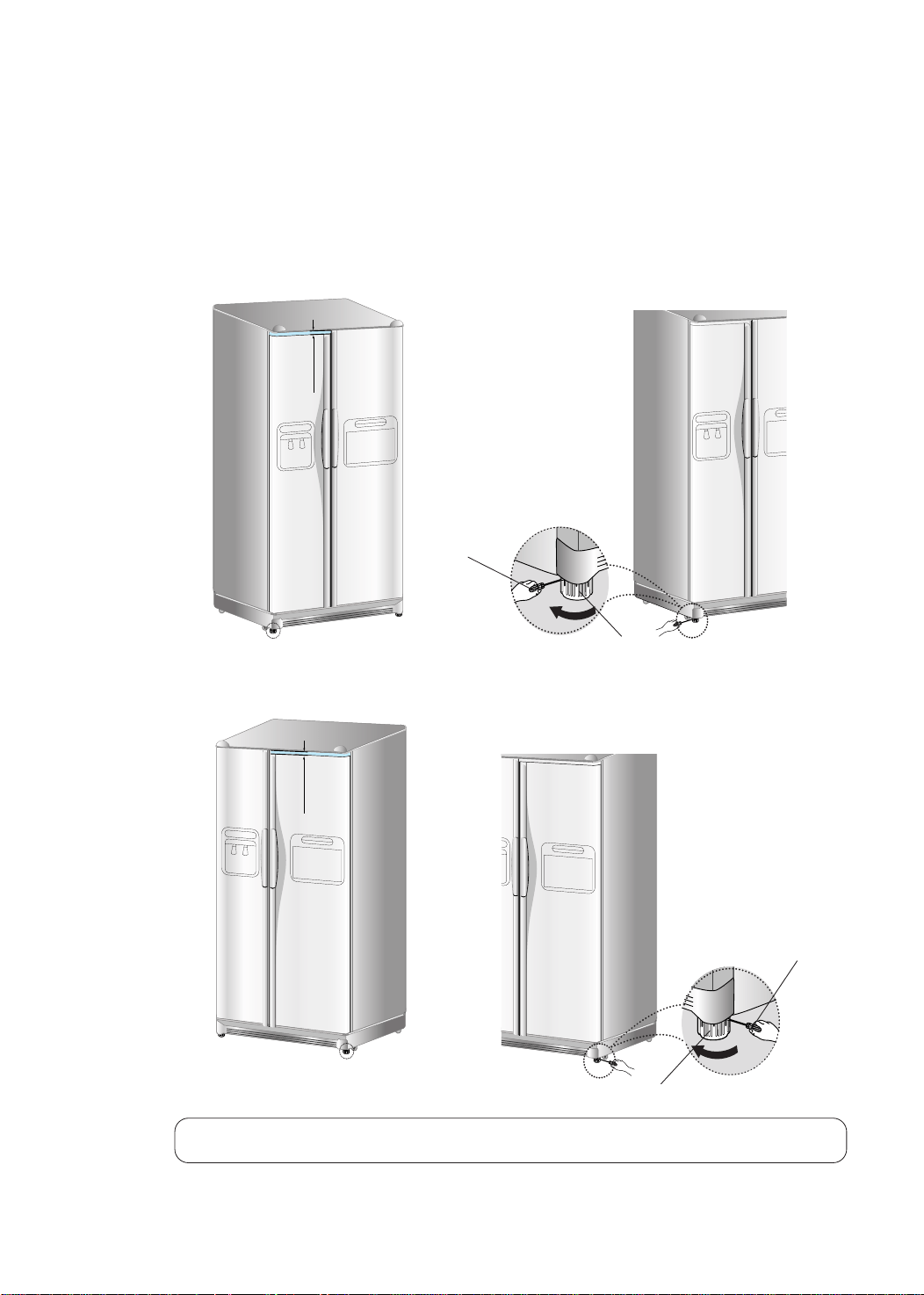
IF THERE IS CLEARANCE BETWEEN FRIDGE DOOR
AND FREEZER DOOR, PLEASE FOLLOW THE STEPS.
●
First : Please level up the refrigerator.
(The differance can cause, if the floor where installed is uneven)
●
Freezer door is lower than that of
refrigerator
1) Insert a straight driver (-) (
➀
) into hole
of the control lever (➁), rotates it clock-
wisely and level up the balance.
●
Freezer door is higher than that
of refrigerator
1) Insert a straight driver (-) (
➀
) into hole
of the control lever (➁), rotates it
clockwisely and level up the balance.
❇
Not to adjust the clearance by using control lever, Please refer to the next page.
DIFFERANCE OF HEIGHT
DIFFERANCE OF HEIGHT
➀
DRIVER(-)
➀
DRIVER(-)
➁
CONTROL LEVER
➁
CONTROL LEVER
9
DA68-00500P 6/26/02 2:34 PM Page 25

10
●
Second : Adjust the height of the refrigerator door.
●
If the door of freezer is situated lower
than the door of refrigerator..
●
If the door of freezer is situated higher
than the door of refrigerator..
3) When you are finished with it, please make a nut's (①) turn until the last point in
the direction of an arrow ( ) then fix it again with wrench (➂).
Attention : If you didn't fix a nut (
①
)firmly, a blot (
➁
) could be released.
➂WRENCH
Adjustment part
➀NUT
➁BOLT
Adjustment part
➂WRENCH
➀NUT
➁BOLT
➀NUT
➁BOLT
➂WRENCH
➂WRENCH
➂WRENCH
➁BOLT
➁BOLT
●
please open the door of refrigerator and adjust the height following the direction below.
1) Release a nut (①) in the bottom part of refrigerator until the last point of bolt (➁).
❇
When you release the nut(①), please fix the extra wrench(➂) which is wrapped to a bolt(➁)then
release a nut(①) after making a turn little bit in the direction of an arrow ( ).
➁BOLT
➂WRENCH
➀NUT
2) Please adjust the height difference between the door of refrigerator and that of freezer making a
bolt's (➂) turn with the wrapped extra wrench(➁) in the direction of an arrow
().
❇
When you make a turn a bolt (➁) in the direction of an arrow ( ), the door of refrigerator goes up.
DA68-00500P 6/26/02 2:35 PM Page 26

1) For the ice maker to operate automatically, water pressure of 1.4 - 4.5 kgf/cm
2
is
required. (It should be possible to fill a disposable paper cup (approximately 180 cc)
within 10 seconds.)
2) The water tube can be cut to the required length.
Make sure that the tube is not bent.
3) Place the water tube away from any sources of heat.
4) The purifier is for filtering only. It does not sterilize or destroy any micro-organisms.
5) If the fridge/freezer is installed in the area with low water pressure (below
1.4 kgf/cm
2
), you may purchase and install a booster pump to compensate for the
low pressure.
6) The service life of the purifier depends on the condition of the usage, but we recom-
mend that you change it every six months.
You should, therefore, install it easily in a location.
7)
To supply water of the storage tank inside the fridge, press the cold water button for
about two or three minutes until cold water runs from the cold water outlet.
8) To avoid any leakage, seal every joined area using sealing tape.
9) The water tube should be connected to the cold water tap.
Checking the Parts (Model with the purifier)
INSTALLING THE WATER DISPENSER LINE
Note:
The purifier is optional and available at
extra cost from your dealer.
11
Tapping screw x 12EA
Water tube
Purifier lock station
Clip A x 8EA
Sealing tape
Tightening band
Purifier
DA68-00500P 6/26/02 2:35 PM Page 27

3. Remove any residual matter inside the purifier. (Model with the purifier)
1) Open the main water tap to check
whether water is running through the
water tube on the water inlet side of
the purifier.
2) If water does not come out through the
tube, check whether the tap is open.
3) Leave the tap open until clean water is
running out and any residual matter
that built up during manufacturing has
been removed.
INSTALLATION PROCEDURE
1. Connect the water pipe with coupler and tap.
1) Close the main water tap.
2) Connect coupler “A” to the tap.
3) Every join should be protected with sealing tape.
Note:
If the coupler does not fit on the existing
tap, consult the nearest authorised ser-
vice dealer and purchase the right cou-
plers for the installation.
WARRANTY INFORMATION
This water line installation is not covered by the fridge/freezer
or ice maker manufacturer's warranty.
Follow these instructions carefully to minimise the risk of
expensive water damage.
TAP
COUPLER “A”
1) Cut the water tube attached to the purifi-
er to the appropriate length after measur-
ing the distance between the purifier and
the cold water tap.
2) If you wish to reassemble the water inlet
and outlet sides of the purifier during
purifier installation, see the reference
illustration.
2. Select the location where the purifier is to install. (Model with the purifier)
REFERENCE
90DEGREE
SQUARE
The water tube must be connect-
ed to the cold water pipe.
If it is connected to the hot
water pipe, it may cause the purifi-
er to malfunction.
CAUTION
12
COUPLER
WATER INLET SIDE
OF PURIFIER
WATER TUBE
PURIFIER
OUTLET SIDE OF
PURIFIER
WATER TUBE
PURIFIER
OUTLET SIDE OF
PURIFIER
WATER
DA68-00500P 6/26/02 2:35 PM Page 28

WATER TUBE
PURIFIER
PURIFIER
LOCK STA-
TIONS
PURIFIER LOCK STA-
TION
PURIFIER LOCK STA-
TION
4. Attach the purifier lock stations.
(Model with the purifier)
1) Hold the purifier lock stations in the appro-
priate position (under the sink for example)
and fix it tightly into place where to screw.
5. Secure the purifier in position.
(Model with the purifier)
1) Fix the purifier in position, as shown in the
figure on the right.
TIGHTENING
BAND
BACK COVER OF
FRIDGE/FREEZER
6. Connect the water tube to the fridge.
1) Remove the back cover of the fridge.
2) Connect the water tube to the valve, as
shown in the figure.
(The connection nut is located on the right
side of the maintenance panel on the back
of the fridge.)
3) When connected, check whether there is any
leakage.
If any, repeat the connection.
4) Assembly the back cover of the fridge.
CONNECTION NUT
WATER TUBE
CLIP A
WATER TUBE
7. Secure the water tube.
1) Using clip ”A”, fix the water tube to the wall.
2) When the water tube is secure, make sure
whether the water tube is not excessively
bent, pinched or squashed.
13
DA68-00500P 6/26/02 2:35 PM Page 29

9. Check the volume of water supplied to the
ice maker.
1) Remove the upper ice maker from the refrig-
erator.
ICE MAKER
CHECK THE WATER SUPPLIED
TEST BUTTON
TOO MUCH
OPTIMUM
LEVEL
2) When you press the test button, the ice cube container is filled with water from the
water supply tap for the ice maker. Check the amount of water (see the illustration
below). If there is too little water, the ice cubes will be small inacceptably. This is not
a problem with the fridge/freezer but with the water pressure in the pipe and
occurs frequently. When this problem occurs, use the following method to check the
volume of water supplied.
8. Complete the installation of the water dis-
penser line.
1) Switch on the fridge/freezer and press the
lever on the left of the dispenser until water
runs out through the water tube (approximate-
ly two to three minutes).
(Press it until all air has been empty.)
2) At this time, check for any possible leakages
at the joins in the water tube.
After securing the water tube, move the
fridge/freezer to the required location.
Once the fridge/freezer is in position, move it
as little as possible.
TOO LITTLE
14
DA68-00500P 6/26/02 2:35 PM Page 30

Checking the Volume of Water Supplied to the Ice Maker.
1. Set the control panel to the option change mode.
Press the FREEZER TEMP. and VACATION buttons at the same time for
about 12 seconds until the temperature display switches to the option
change mode and you hear a beep.
2. The number in the right-hand refrigerator temperature display corre-
sponds to the option number. Press the REFRIGERATOR TEMP. button
to increase the number. Press the VACATION button to decrease the
number. Set the number to 3.
3. The number in the left-hand freezer temperature display corresponds to
the value of each option. Press the FREEZER TEMP. button to increase
the value. Press the QUICK FREEZE button to decrease the value.
Choose the required volume, specified to the table above.
4. Wait until the control panel automatically switches to the control mode.
5. Check the volume of water supplied to the ice maker (refer to phase 9 on the previ-
ous page).
OPTIMUM
LEVEL
If the volume of water supplied is slightly below the optimum level, it is admissible
to use the ice maker.
Data Time
00 5
01 4
02 3
03 6
04 7
05 8
06 9
07 10
08 12
09 13
10 15
11 17
12 19
13 21
14 23
15 25
Volume of water
Note
When setting the water supply
volume, do not select the largest
volume directly, as the water may
overflow. Proceed step by step.
Five seconds
CHECK THE WATER SUPPLIED
15
DA68-00500P 6/26/02 2:35 PM Page 31

DA68-00500P 6/26/02 2:35 PM Page 32