ISearsl
Serial
Number
Model and serial
number may be found
at the right-hand side
of the base.
You should record both
model and serial number
in a safe place for
future use. ,,
Read GENERAL and
ADDITIONAL SAFETY
INSTRUCTIONS
carefully
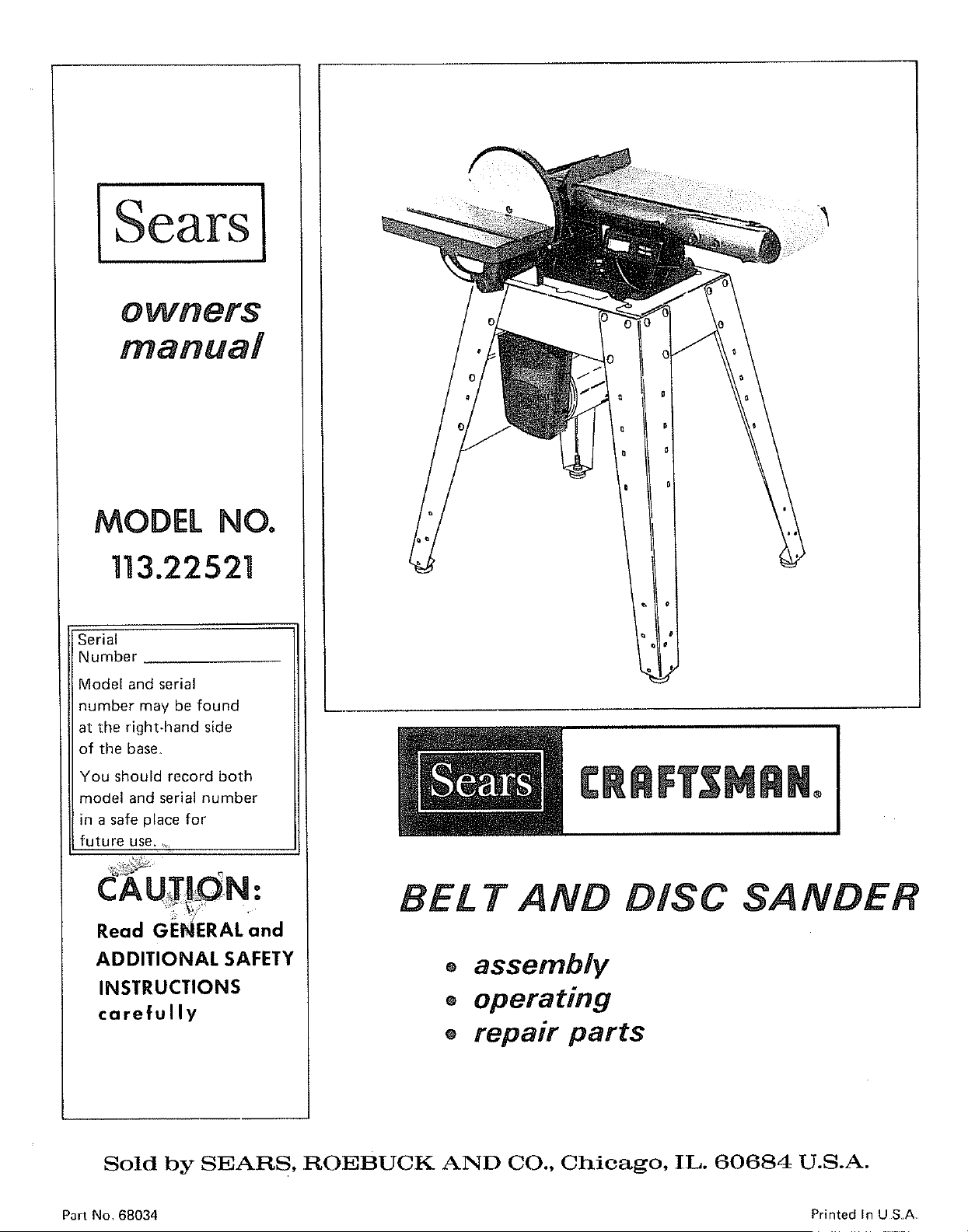
BE£ T AND DISC SANDER
o assembly
® operating
® repair parts
Sold by SEARS, ROEBUCK AND CO., Chicago, IL. 60684 U.S.A.
Part No 68034 Printed InUSA
FULL ONE YEAR WARRANTY ON CRAFTSMAN BELT AND DISC SANDER
If within one year from the date of purchase, this Craftsman Belt and Disc Sander fails due to a defect in
material or workmanship. Sears will repair it free of charge
Warranty service is available by simply contacting the nearest Sears store or Service Center throughout the
United States
This warranty gives you specific legat rights, and you may also have other rights which vary from state to state
SEARS_ ROEBUCK ANDCO
RSC 41-3
SEARS TOWER
CHICAGO IL 60684
generaB safely insfrucfions for power fooUs
1 KNOW YOUR POWER TOOL
Read the owner's manual carefully Learn its application
and limitations as well as the specific potential hazards
peculiar to this tool
13_ SECURE WORK
Use clamps or a vise to hold work when practical Its
safer than using your hand frees both hands to operate
tool
2, GROUND ALL TOOLS
This tool is equipped with an approved 3-conductor
cord and a 3-plong grounding type plug to fit the proper
grounding type receptacle Th_ green conductor in the
cord is the grounding wire Never connect the green wire
to a live terminal
3 KEEP GUARDS IN PLACE
- Jn working order and in proper adjustment and align
merit
4 REMOVE ADJUSTING KEYS AND WRENCHES
Form habit of checking to see that keys and adjusting
w_enches are removed from tool before turning it on
5 KEEP WORK AREA CLEAN
Cluttered areas and benches mvite accidents Ftoor
must not be slippery due to wax or sawdust
6. AVOID DANGEROUS ENVIRONMENT
Don't use power tools in damp or wet locations or ex
pose them to rain Keep work area well lighted Provide
adequate surrounding work space
7 KEEP CHILDREN AWAY
Atl visitors should be kept a safe distance from work area
8. MAKE WORKSHOP KID-PROOF
- with padlocks, master switches, or by removing starter
keys
9. DON'T FORCE TOOL
It will do [he job better and safer at the rate for which
il was designed
10 USE RIGHT TOOL
Don't force tool or attachment to do a job it was not
designed for
11 WEAR PROPER APPAREL
Do not wear _oose clothing, gloves neckties or jewelry
(rings, wristwatches) to get caught m moving parts
NONSLIP footwear ts recommended Wear protective
had covering to contain tong hair Roll tong sleeves
above the elbow
12 USE SAFETY GOGGLES (Head Protection)
Wear safety goggles (must comply w_th ANS Z87 1)
at all times Also use face or dust mask if cutting opm
at_on is dusty and ear protectors (plugs or muffs) during
extended periods Of operatlon
14_ DON'T OVERREACH
Keep proper footing and balance at alt ttmes
15. MAINTAIN TOOLS WITH CARE
Keep tools sharp and clean for best and safest perform
ance Follow instructions for lubricating and changing
accessories
16. DISCONNECT TOOLS
before serv*cmg; when changing accessories such as
blades bits cutters etc
17, AVOID ACCIDENTAL STARTING
Make sure switch is in "OFF" position before plugging
in
18. USE RECOMMENDED ACCESSORIES
Consult theowners manual for recommended accessories
Follow the instructions that accompany the accessories
The use of improper accessories may cause hazards
19, NEVER STAND ON TOOL
Serious iniury could occur if the tool is tipped or if the
cutting tool is accidentally contacted
Do not store materials above or near the tool such that
it is necessary to stand on the tool to reach them
20. CHECK DAMAGED PARTS
Before further use of the tool a guard or other part that
is damaged should be carefully checked to ensure that it
will operate properly and perform its intended func1_ion
Check for alignment of moving parts binding of moving
parts, breakage of parts, mounting_ and any other con.
ditions that may affect its operation A guard or other
part that is damaged should be properly repaired or
reptaced
21 DIRECTION OF FEED
22.
Feed work into a blade or cutter against the direction of
_otation of the blade or cutter only
NEVER LEAVETOOLRUNNING
UNATTENDED
Turn power off Don[ leave toot until it comes to a
complete stop
2
additional safe,/instructions for
beUt and disc sander
Safety is a combination of operator common sense and
alertness at all times when the finishing machine is being
used,
WARNING: FOR YOUR OWN SAFETY, NO NOT
ATTEMPT TO OPERATE YOUR FINISHING
MACftlNE UNTIL IT IS COMPLETELY ASSEM-
BLED AND INSTALLED ACCORDING TO THE
INSTRUCTIONS . . . AND UNTIL YOU HAVE
READ AND UNDERSTOOD THE FOLLOWING.
PAGE
1, General Safety Instructions For Power Tools .... 2
2. Getting To Know Your Sander ................. 18
3 Basic Machine Operation .......................... 21
4. Maintenance ............................ 23
5.. Stability Of Machine
If there is any tendency for the machine to tip over or
move during certain operations such as when finishing
long heavy boards, the sander should be bolted down
6 Location
The machine should be positioned so neither the opera-
tor nor a casual observer is forced to stand in line with
the abrasive belt or disc This machine is intended for
indoor use only
7. Kickback
When finishing on the Disc, always apply the workpiece
to the "Down Side" of the disc, Applying the work-
piece to the "Up Side" could cause it to fly up
(kickback) which could be hazardous
8 Protection: Eyes, Hands, Face, Ears, Body
a Wear safety goggles that comply with ANSZ87 1-
1968, and a face shield if operation is dusty Wear
ear plugs or muffs during extended periods of opera-
tion
b, Do not finish pieces of material too small to hold by
hand
c, Avoid awkward hand positions, where a sudden slip
could cause a hand to move into the abrasive disc or
belt
d. Never climb on the machine
e. Never turn your Sander "ON" before clearing the
table(s) or work surface(s) of all objects (tools,
scraps of wood, etc) except for the workpiece and
related feed or support devices for the operation
planned
f Make sure the abrasive belt runs in the right direction
Always have the tracking adjusted correctly so that the
belt does not run off the pulleys
g. Hold the work firmly when finishing on the abrasive
belt and against the worktable when finishing on the
disc
h Always adjust the worktable to within 1/16 in of the
abrasive disc or belt
When finishing a large piece of material, make sure it
is supported at table height,
Never leave the machine work area with the power on,
before the machine has come to a complete stop, or
without removing and storing the switch key
k Never operate the machine with protective cover on
the unused shaft end of the motor removed
9. If any part of this belt disc sander should break, bend,
or fail in any way or any electrical component fail to
perform properly, or if any is missing, shut off power
switch, remove power supply cord from power supply
and replace damaged missing and/or failed paris before
resuming operation
10 Read and follow the instructions appearing on label on
the rear of the Disc Dust Trap (Disc Housing):
DANGER
FOR YOUR OWN SAFETY:
1. READ AND UNDERSTAND OWNERS MAN-
UAL BEFORE OPERATING MACHINE
2 WEAR SAFETY GOGGLES AND DUST MASK
3_KNOW HOW TO AVOID "KICKBACKS*" ON
SANDING DISC
4 ALWAYS SUPPORT WORKPIECE WITH "BACK
STOP" OR "WORKTABLE"
11 Think Safety.
CAUTION: This machine is not designed for heavy
deburring operations. When finishing ferrous met-
als, sparks will be generated and could cause a
fire. Disconnect any type of dust collecting hose
from the machine. Also remove all traces of wood
dust that may have accumulated inside the dust
traps in the machine.
3
additiona8 safe instructions
for beat and disc sander
WARNING: THE 2-1/2" MACHINE PULLEY AND
THE 2" MOTOR PULLEY FURNISHED, WILL
RUN THE DISC AT APPROXIMATELY 2700
RPM AND THE BELT AT APPROXIMATELY
2100 (FEET PER MINUTE) WHEN USED WITH A
3450 RPM MOTOR. NEVER SUBSTITUTE OR
INTERCHANGE THESE PULLEYS TO INCREASE
THIS SPEED BECAUSE IT COULD BE DANGER-
OUS.
WARNING: DO NOT ALLOW FAMILIARITY
(GAINED FROM FREQUENT USE OF YOUR
MACHINE) TO BECOME COMMONPLACE. AL-
WAYS REMEMBER THAT A CARELESS FRAC-
TION OF A SECOND IS SUFFICIENT TO IN-
FLICT SEVERE INJURY.
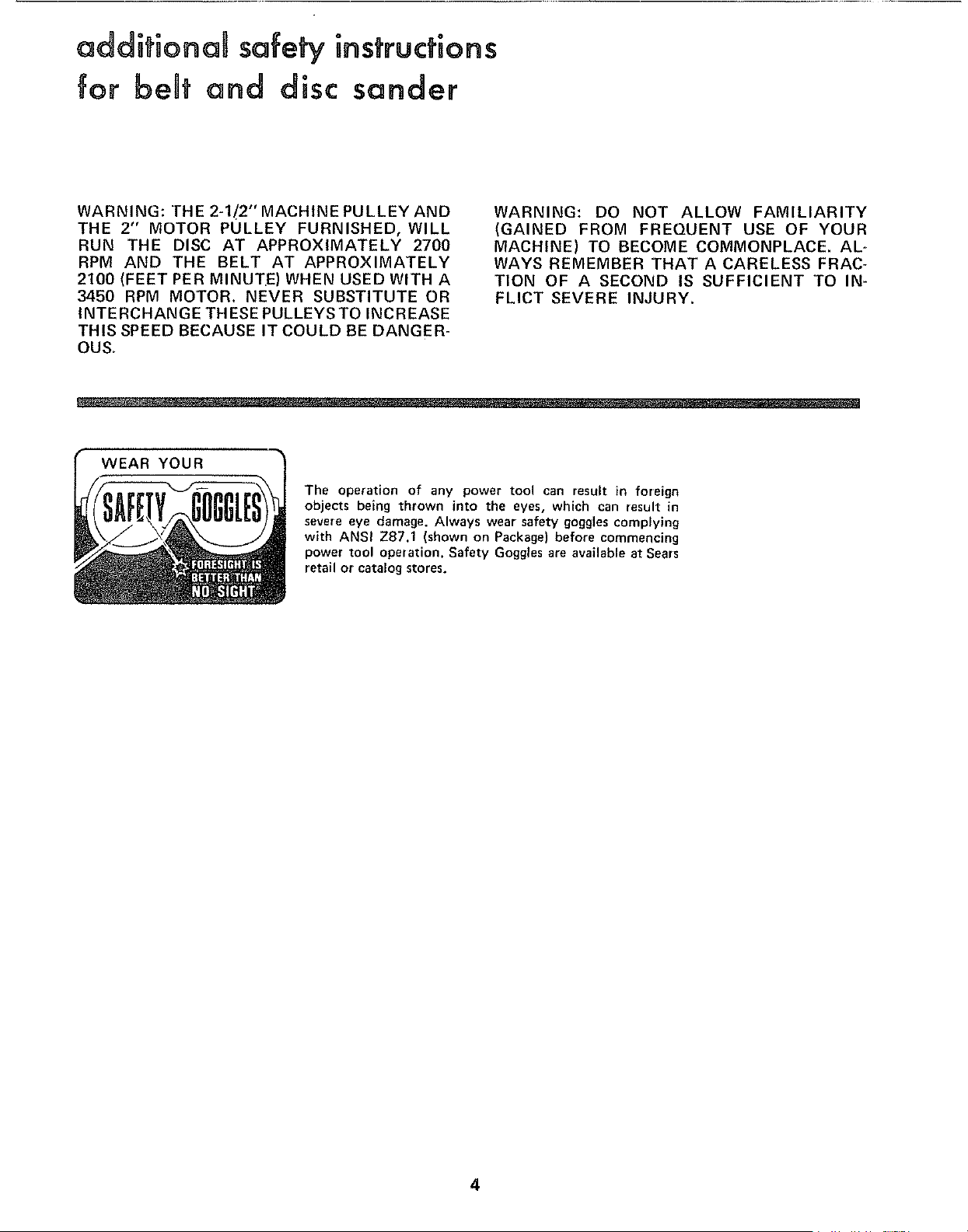
WEAR YOUR
The operation of any power tool can result in foreign
objects being thrown into the eyes, which can result in
severe eye damage. Always wear safety goggles complying
with ANSI Z87.1 (shown on Package) before commencing
power tool operation. Safety Goggles are available at Sears
retail or catalog stores.
4
motor specifications and enectricaUrequirements
This machine is designed to use a 3450 RPM motor only
Do not use any motor that runs faster than 3450 RPM
It is wired for operation on 110-120 volts, 60 Hz,, alter-
nating current IT MUST NOT BE CONVERTED TO
OPERATE ON 230 VOLTS EVEN THOUGH SOME OF
THE RECOMMENDED MOTORS ARE DUAL VOLTAGE
THESE CRAFTSMAN MOTORS HAVE BEEN
FOUND TO BE ACCEPTABLE FOR USE ON
THIS TOOL.
HP RPM VOLTS CATALOG NO.
1/2 3450 110-120 1216
1/2 3450 110-120 1218
3/4 3450 110-120 1219
3/4 3450 110-120 1226
CAUTION: Do not use blower or washing machine motors
or any motor with an automatic reset overload protector
as their use may be hazardous.
CONNECTING TO POWER SOURCE OUTLET
This machine must be grounded while in use to protect
the operator from electric sbock,
Plug power cord into a 110-120V properly grounded type
outlet protected by a 15-amp. time delay or Circuit-Saver
fuse or circuit breaker
If you are not sure that your outlet is properly grounded,
have it checked by a qualified electrician
WARNING: DO NOT PERMIT FINGERS TO TOUCH THE
TERMINALS OF PLUGS WHEN INSTALLING OR RE-
MOVING THE PLUG TO OR FROM THE OUTLET
WARNING: IF NOT PROPERLY GROUNDED THIS
POWER TOOL CAN INCUR THE POTENTIAL HAZARD
OF ELECTRICAL SHOCK,. PARTICULAR LY WHEN USED
IN DAMP LOCATIONS IN PROXIMITY TO PLUMBING.
IF AN ELECTRICAL SHOCK OCCURS THERE IS THE
POTENTIAL OF A SECONDARY HAZARD SUCH AS
YOUR HANDS CONTACTING THE ABRASIVE BELT
OR DISC.
if power cord is worn or cut, or damaged in any way, have
it replaced immediately.
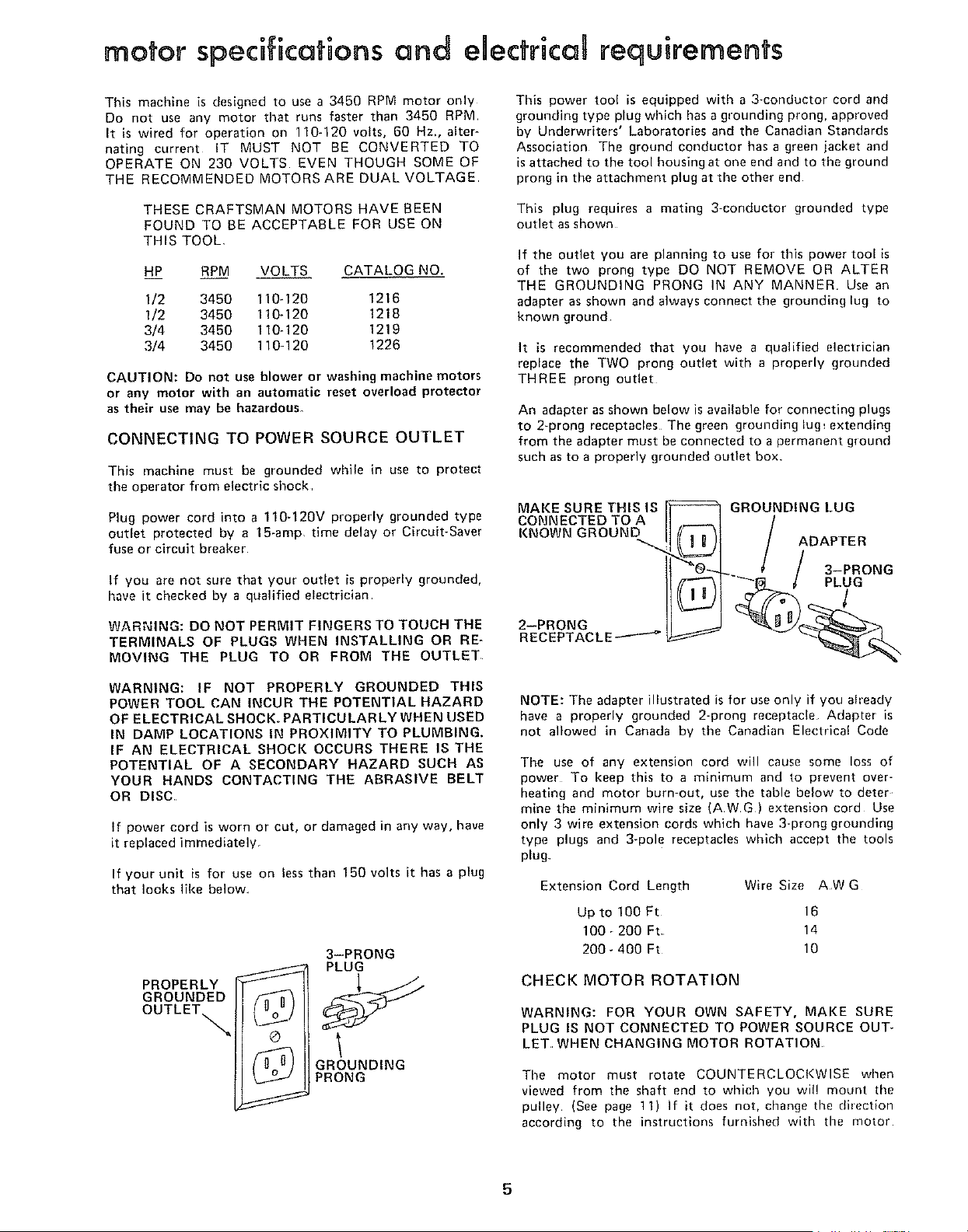
If your unit is for use on less than 150 volts it has a plug
that looks like below
PROPERLY
GROUNDED
OUTLETs.
/n u)
©
/n U]
3-PRONG
PLUG
GROUNDING
PRONG
This power too! is equipped with a 3-conductor cord and
grounding type plug which has a grounding prong, approved
by Underwriters' Laboratories and the Canadian Standards
Association The ground conductor has a green iacket and
is attached to the tool housing at one end and to the ground
prong in the attachment plug at the other end
This plug requires a mating 3-conductor grounded type
outlet as shown
If the outlet you are planning to use for this power tool is
of the two prong type DO NOT REMOVE OR ALTER
THE GROUNDING PRONG iN ANY MANNER Use an
adapter as shown and always connect the grounding lug to
known ground
It is recommended that you have a qualified electrician
replace the TWO prong outlet with a properly grounded
THREE prong outlet
An adapter as shown below is available for connecting plugs
to 2-prong receptacles The green grounding lug_ extending
from the adapter must be connected to a permanent gTound
such as to a properly grounded outlet box
MAKESURETHISIS
CONNECTED TO A
KNOWN GROUND
2--PRONG
RECEPTACLE---'---_
GROUNDING LUG
ADAPTER
3-PRONG
PLUG
l
NOTE: The adapter illustrated is for use only if you aheady
have a properly grounded 2-prong receptacle Adapter is
not allowed in Canada by the Canadian Electrical Code
The use of any extension cord will cause some loss of
power To keep this to a minimum and to prevent over-
heating and motor burn-out, use the table below to deter
mine the minimum wire size (AWG) extension cord Use
only 3 wire extension cords which have 3-prong grounding
type plugs and 3-pole receptacles which accept the tools
plug
Extension Cord Length Wire Size AW G
Up to 100 Ft 16
100_200 Ft 14
200_400 Ft 10
CHECK MOTOR ROTATION
WARNING: FOR YOUR OWN SAFETY, MAKE SURE
PLUG IS NOT CONNECTED TO POWER SOURCE OUT*
LET, WHEN CHANGING MOTOR ROTATION
The motor must rotate COUNTERCLOCKWISE when
viewed from the shaft end to which you wil! mount the
pulley (See page 11) If it does not, change the direction
according to the instructions furnished with the motor
5
unpacking
CONTENTS
UNPACKING AND CHECKING CONTENTS ..... 6
ASSEMBLY .................................... 7
Mounting Belt and Disc Sander On
Recommended Craftsman Floor Base ........ 7
Check Motor Rotation .......................... 11
On-Off Switch .............................. 13
Installing Work Table ....................... 15
Installing Abrasive Belt-Tensioning and Tracking 16
Installing Belt Dust Trap ..................... 17
Installing Backstop .............................. 18
GETTING TO KNOW YOUR SANDER ............ 18
Belt Adjusting Screws .......................... 19
Belt Locking Screws ......................... 19
Work Table Tilt Lock Screw .................... 19
Backstop Lock Screw ............................ 20
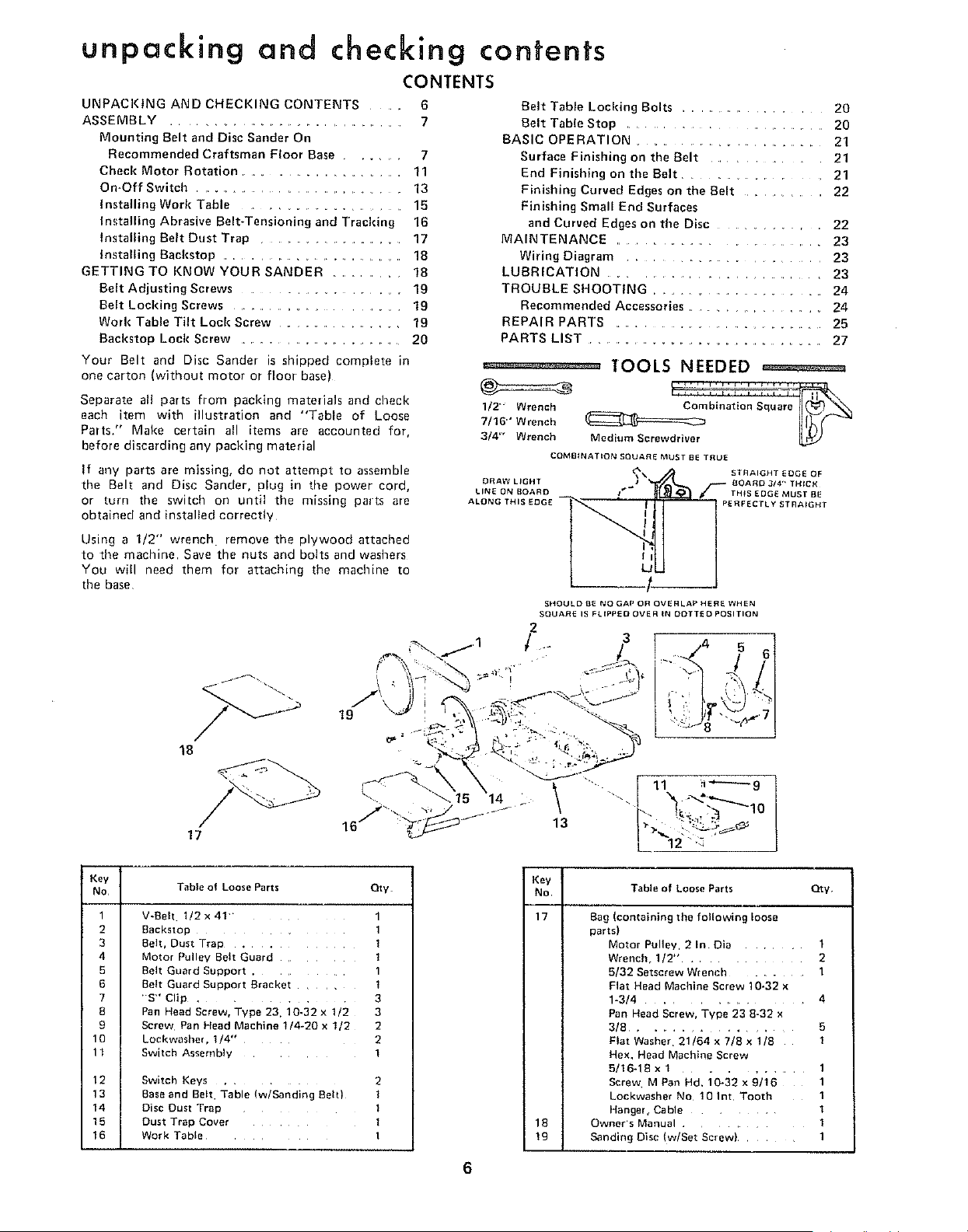
Your Belt and Disc Sander is shipped complete in
one carton (without motor or floor base)
Separate all parts from packing materials and check
each item with illustration and "Table of Loose
Parts." Make certain all items are accounted for,
before discarding any packing material
If any parts are missing, do not attempt to assemble
the Belt and Disc Sander, plug in time power cord,
or turn the switch on until the missing parts are
obtained and installed correctly
Using a 1/2" wrench• remove the plywood attached
to time machine Save the nuts and bolts and washers
You will need them for attaching the machine to
the base
19
18
and checking contents
Belt Table Locldng Bolts ....................... 20
Belt Table Stop ......................... 20
BASIC OPERATION ............................. 21
Surface Finishing on the Belt ................. 21
End Finishing on the Belt ................ 21
Finishing Curved Edges on the Belt .............. 22
Finishing Small End Surfaces
and Curved Edges on the Disc ............. 22
MAINTENANCE ......................... 23
Wiring Diagram ...................... 23
LUBRICATION ....................... 23
TROUBLE SHOOTING ............................ 24
Recommended Accessories ................. 24
REPAIR PARTS ................................. 25
PARTS LIST ..................................... 27
°_ _"_°_--° TOOLS NEEDED ==========
1/2"" Wrench __
W16"' Wrench
3/4' Wrench Medium Screwdriver
COMBINATION SQUARE MUST BE TRUE
DRAW LIGHT
LINE ON BOARD
ALONG THI
STRAIGHT EDGE OF
BOARD 3/4" TH{CK
TH_S EDGE MUST BE
PERFECTLY STRAIGHT
SHOULD BE NO GAP OR OVERLAP HERE WHEN
SQUARE IS FLIPPED OVER IN DOTTED POSITION
2
"r/ .. 3 5
17
\ ......111 1
14 Z ""-,
16/' " .......
L 2"'_
Key
No
1
2
3
4
5
6
7
8
9
10
11
12
13
14
15
16
Table o1 Loose Parts Oty
V-Beh 1/2x4!
Backstol: 1
Belt, Dust Trap . 1
Motor Pul ev Belt Guard ]
Belt Guard Suoport .
3elt Guard SUDDOrt Bracket
'S" Clip . 3
Pan Head Screw. Type 23. 10-32 x 1/2 3
Screw Pan Head Machine 1/4-20 x 1/2 2
LockwasheL 1/4- 2
Switch Assembly i
Switch Keys 2
Baseand Belt Table (w/Sanding Belt) I
Disc Dust TraD I
Dust Trap Cover l
Work Table I
Key
No
17
i
i
i IB
Table of Loose Farts Qty
Bag (containing the following loose
parts)
Motor Pulley, 2 In Din ........ 1
Wrench, 1I2" ............. 2
5/32 Setscrew Wrench ......... 1
Flat Head Machine Screw 10-32 x
1-3/4 ................. 4
Pan Head Screw, Type 23 8-32 x
3/8 ............... 5
Flat Washer 21/64 x 7/8 x 1/8 1
Hex. Head Machine Screw
5/16-18 x 1 ........... 1
Screw MPan Hd. 10-32x9/16 1
Lockwasher No 10 Int Tooth 1
Hange{, Cable ........ 1
Owner's Manual ............ 1
Sanding Disc (w/Set Screw) ........ 1
6
assembly
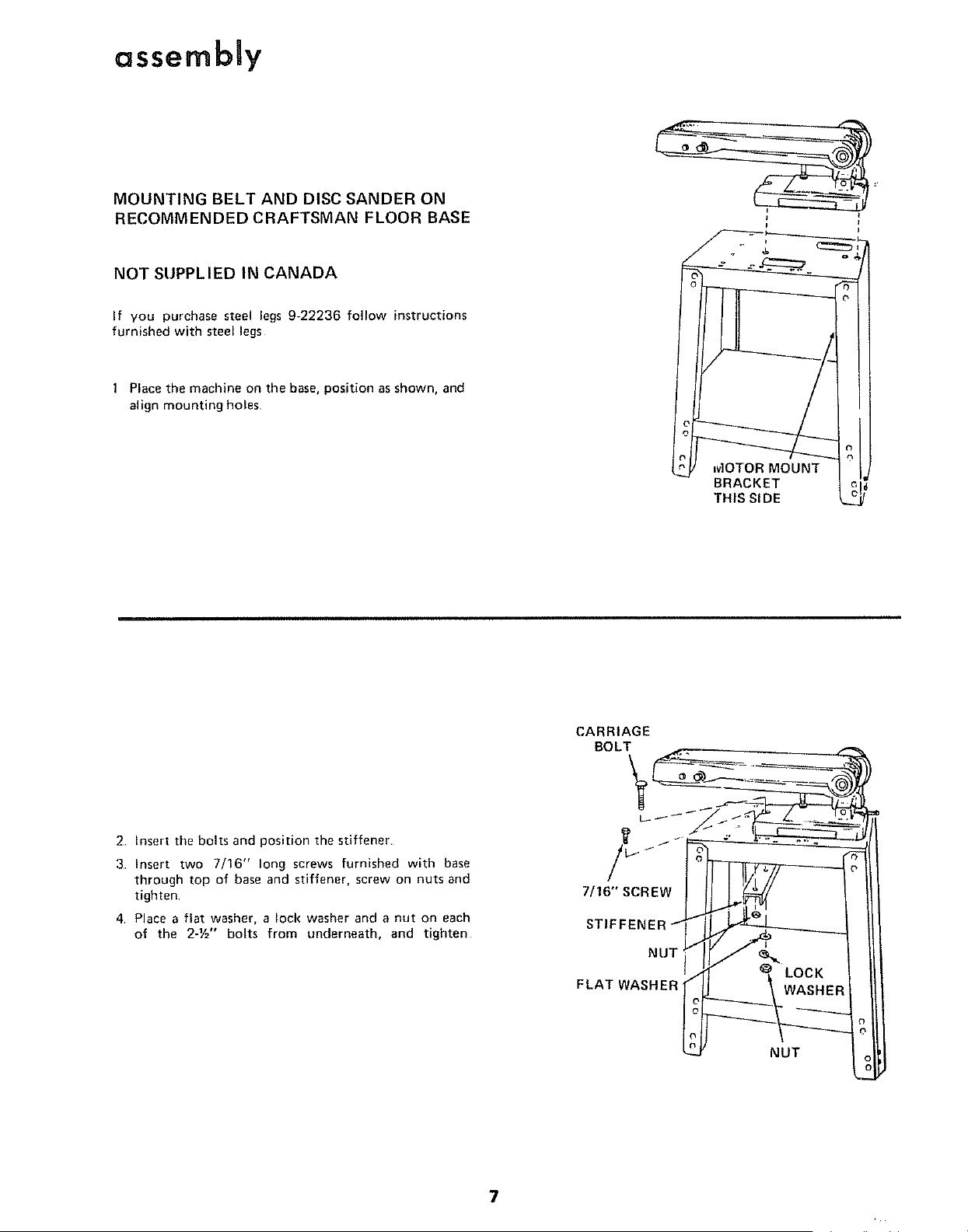
MOUNTING BELT AND DISC SANDER ON
RECOMMENDED CRAFTSMAN FLOOR BASE
NOT SUPPLIED IN CANADA
If you purchase steel legs 9-22236 follow instructions
furnished with steel legs
Place the machine on the base, position as shown, and
align mounting holes
+
t_J MOTOR MOUNT J
BRACKET L
THIS SIDE L__
CARRIAGE
BOLT
2 Insert the bolts and position the stiffener
3 Insert two 7/16" long screws furnished with base
through top of base and stiffener, screw on nuts and
tighten
4 Place a flat washer, a lock washer and a nut on each
of the 2-1/='' bolts from underneath, and tighten
7/16" SCREW
STIFFENEF
NUT
FLAT WASHER
LOCK
WASHER
NUT
7
assembly
1/2" WRENCH
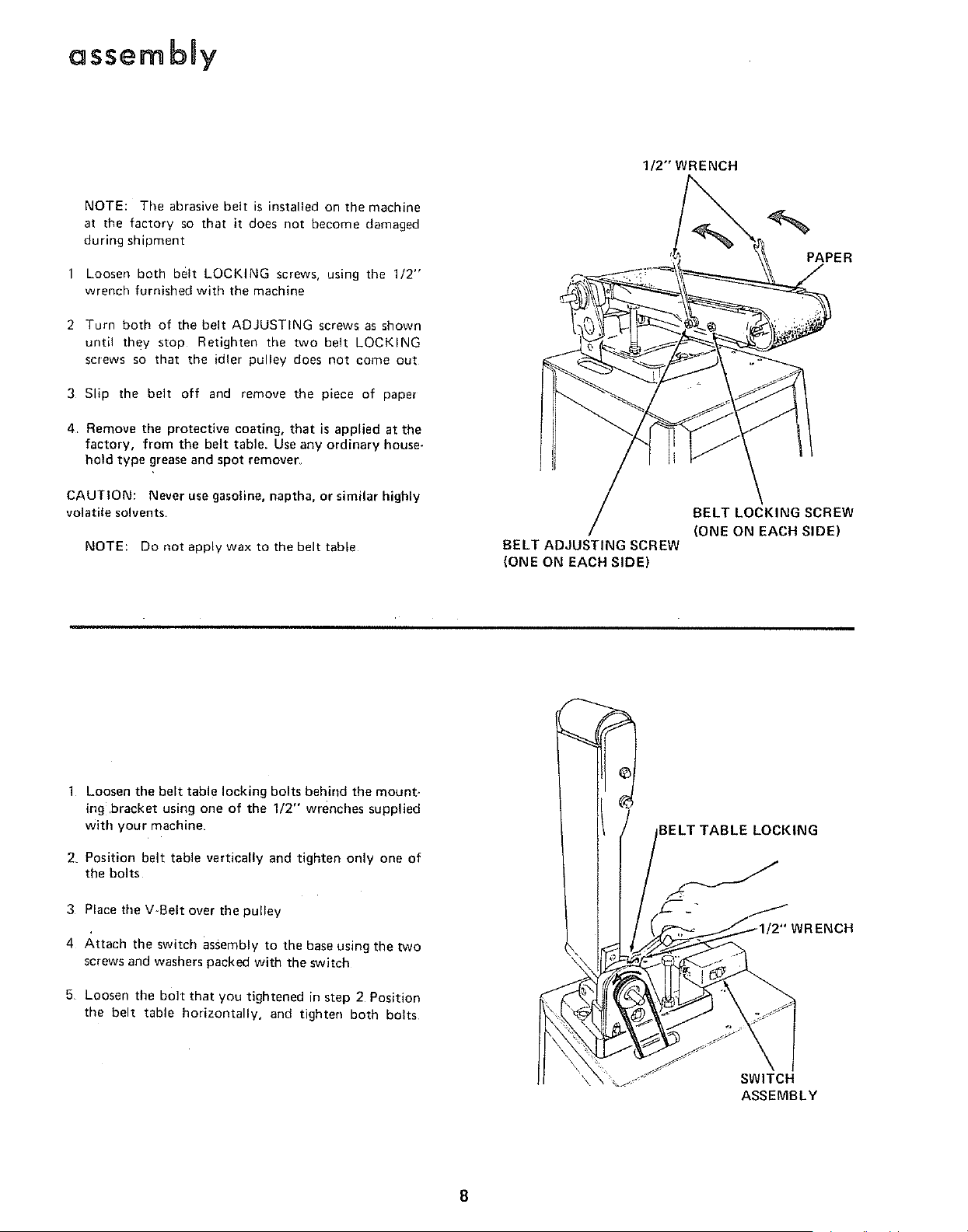
NOTE: The abrasive belt is installed on the machine
at the factory so that it does not become damaged
during shipment
Loosen both belt LOCKING screws, using the 1/2"
wrench furnished with the machine
2 Turn both of the belt ADJUSTING screws as shown
until they stop Retighten the two belt LOCKING
screws so that the idler pulley does not come out
3 Slip the belt off and _emove the piece of paper
4. Remove tile protective coating, that is applied at the
factory, from the belt table. Useany ordinary house-
hold type greaseand spot remover.
CAUTION: Never use gasoline, naptha, or similar highly
volatile solvents.
NOTE: Do not apply wax to the belt table
BELT ADJUSTING SCREW
(ONE ON EACH SIDE)
PAPER
BELT LOCKING SCREW
(ONE ON EACH SIDE)
1 Loosen the belt table locking bolts behind the mount-
ing,bracket using one of the 1/2" wrenches supplied
with your machine,
2. Position belt table vertically and tighten only one of
the bolts
3 Place tile V-Belt over the pulley
4 Attach the switch assembly to the baseusing the two
screws and washers packed with the switch
5 Loosen the bolt that you tightened in step 2 Position
the belt table horizontally, and tighten both bolts
BELT TABLE LOCKING
-" _ RENCH
SWITCH
ASSEMBLY
8
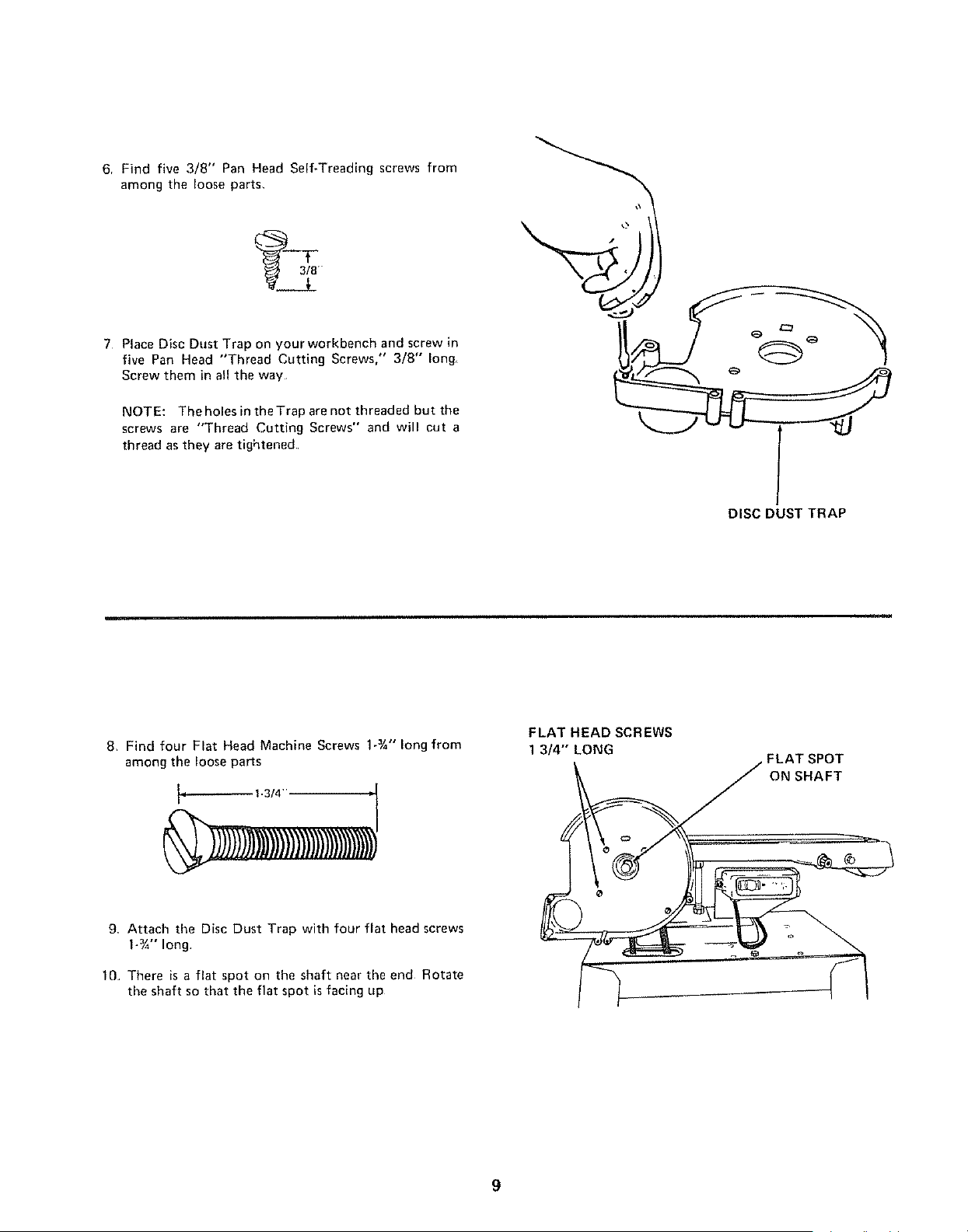
6, Find five 3/8" Pan Head Self-Treading screws from
among the loose parts,
7 Place Disc Dust Trap on yourworkbench and screw in
five Pan Head "Thread Cutting Screws," 3/8" long
Screw them in all the way
NOTE: The holes in the Trap are not threaded but the
screws are "Thread Cutting Screws" and will cut a
thread as they are tightened
DISC DUST TRAP
8, Find four Flat Head Machine Screws 1-3/4"long from
among the loose paris
1-3/4"
FLAT HEAD SCREWS
1 3/4" LONG
FLAT SPOT
ON SHAFT
9 Attach the Disc Dust Trap with four flat head screws
1-¾" long
10 There is a flat spot on the shaft near the end Rotate
the shaft so that the flat spot is facing up
9
assembly
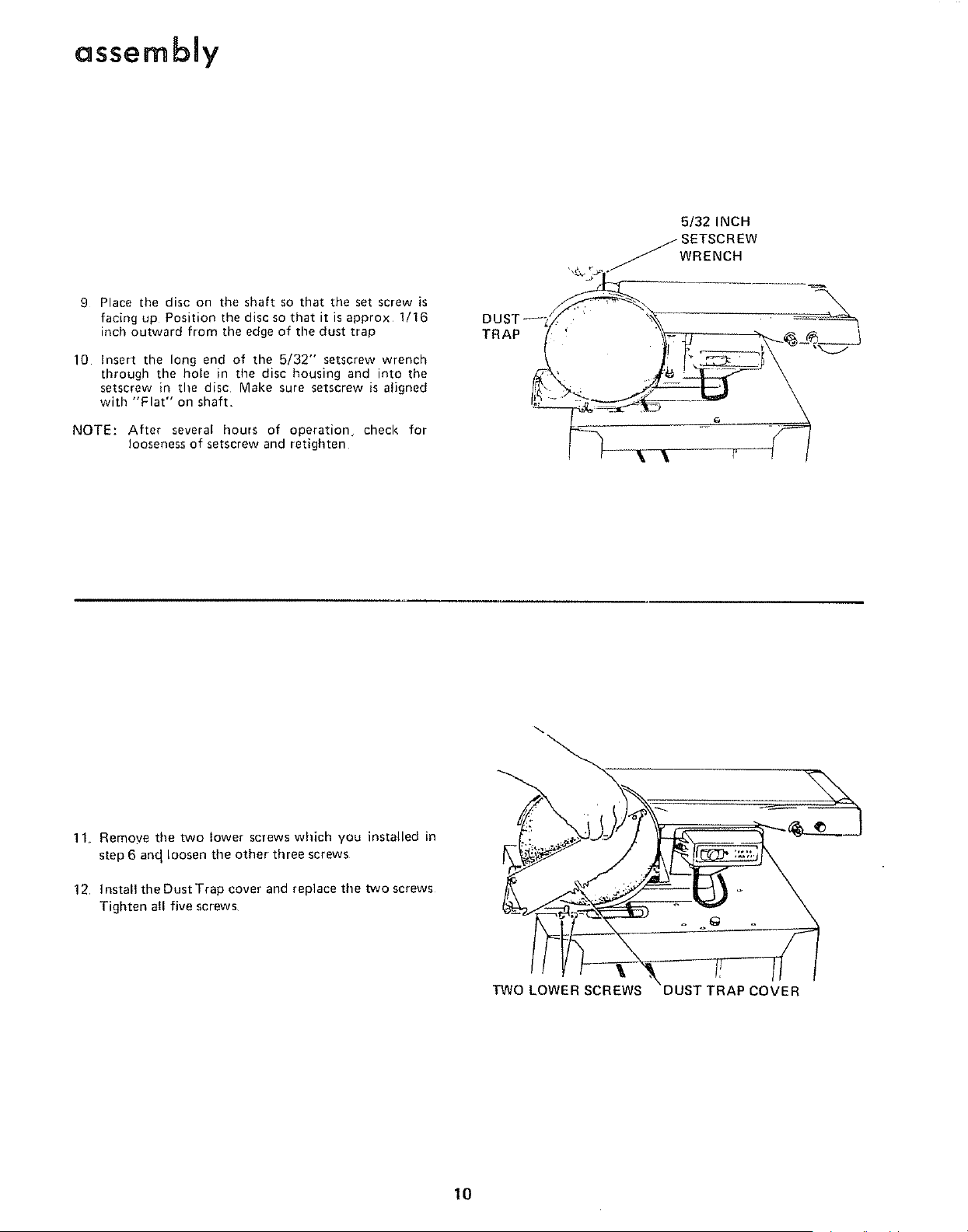
9 Place the disc on the shaft so that the set screw is
facing up Position the disc so that it isapprox 1/16
inch outward from the edge of the dust trap
10 h_sert the long end of the 5/32" setscrew wrench
through the hole in the disc housing and into the
setscrew in the disc Make sure setscrew is aligned
with "Flat" on shaft
NOTE: After several hours of operation check for
looseness of setscrew and retighten
TRAP
5/32INCH
_SETSCREW
._WRENCH
11 Remoye the two lower screws which you installed in
step 6 and loosen the other three screws
12, ]nstallthe Dust Trap cover and replace the two screws
Tighten all five screws
TWO LOWER SCREWS COVER
10
MOTOR BASE CLAMP
SCREWS
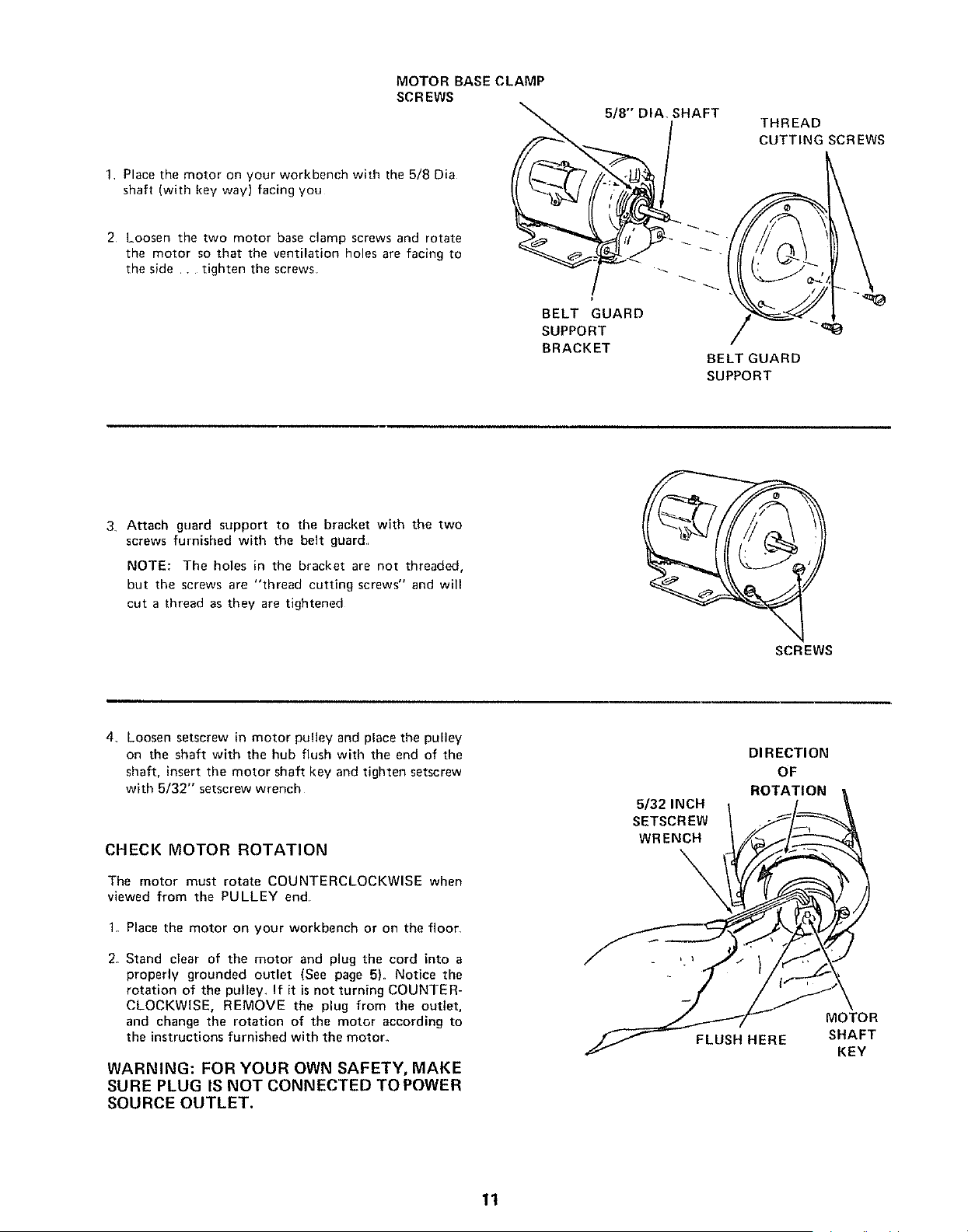
1 Place the motor on your workbench with the 5/8 Dia
shaft (with key way) facing you
2 Loosen the two motor base clamp screws and rotate
the motor so that the ventilation holes are facing to
the side . tighten the screws
5/8"' DIA SHAFT
BELT GUARD
SUPPORT
BRACKET
THREAD
CUTTINGSCREWS
BELT GUARD
SUPPORT
3 Attach guard support to the bracket with the two
screws furnished with the belt guard
NOTE: The holes in the bracket are not threaded,
but the screws are "thread cutting screws" and will
cut a thread as they are tightened
SCREWS
4_ Loosen setscrew in motor pulley and place the pulley
on the shaft with the hub flush with the end of the
shaft, insert the motor shaft key and tighten setscrew
with 5/32" setscrew wrench
CHECK MOTOR ROTATION
The motor must rotate COUNTERCLOCKWISE when
viewed from the PULLEY end
1. Place the motor on your workbench or on the floor
2. Stand clear of the motor and plug the cord into a
properly grounded outlet (See page 5). Notice the
rotation of the pulley. If it is not turning COUNTER-
CLOCKWISE, REMOVE the plug from the outlet,
and change the rotation of the motor according to
the instructions furnished with the motor.
WARNING: FOR YOUR OWN SAFETY, MAKE
SURE PLUG IS NOT CONNECTED TOPOWER
SOURCE OUTLET.
5/32 INCH
SETSCREW
WRENCH
DIRECTION
OF
ROTATION
\
MOTOR
FLUSH HERE SHAFT
KEY
11
assembly
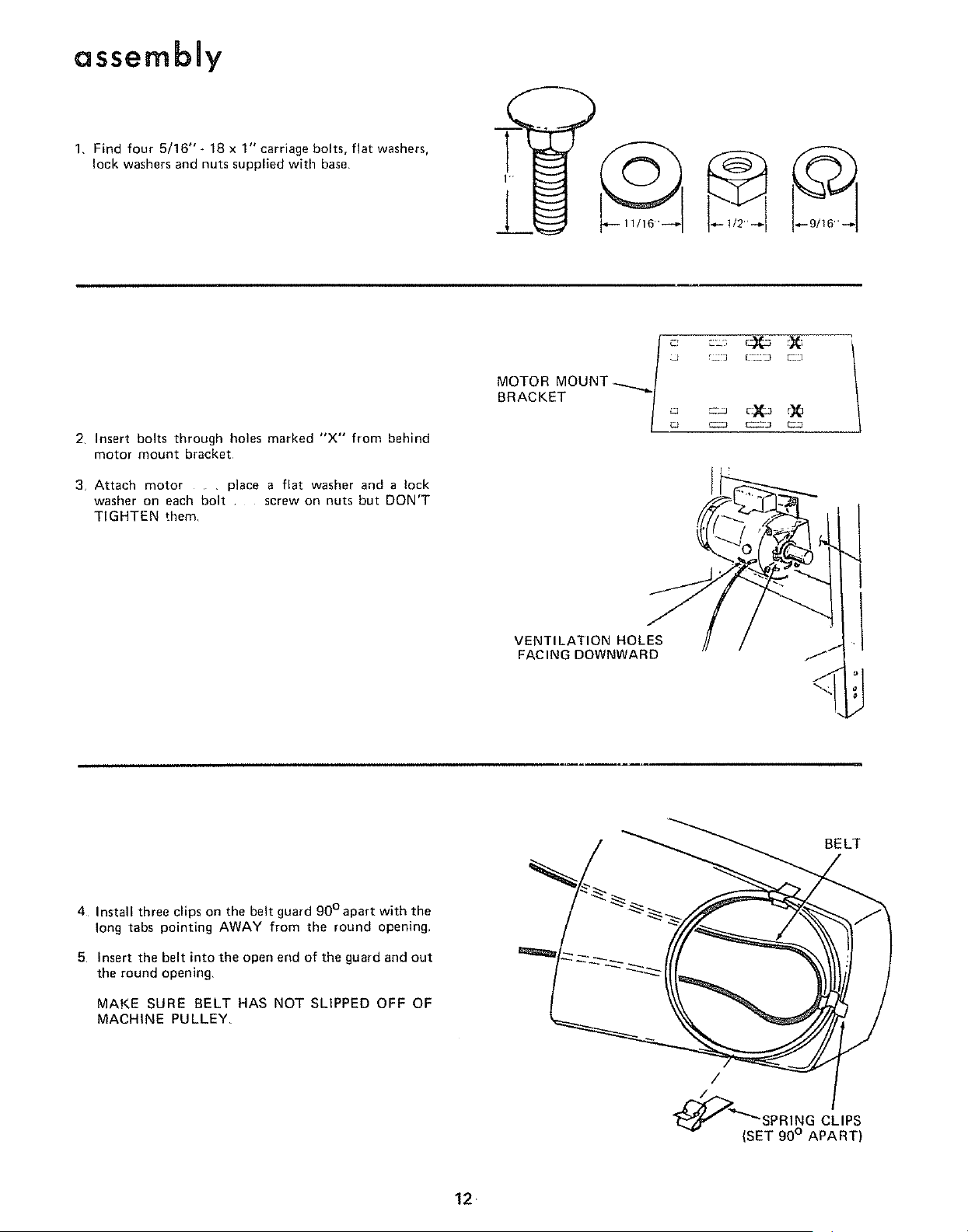
1, Find four 5/16" _ 18 x 1" carriage bolts, flat washers,
lock washers and nuts supplied with base,
2 Insert bolts through holes marked "X'" from behind
motor mount bracket
3 Attach motor , place a flat washer and a lock
washer on each bolt screw on nuts but DON'T
TIGHTEN them
MOTOR MOUNT
BRACKET _"_'/ __ _ __T_c)_;_rX_
VENTILATION HOLES
FACING DOWNWARD
4 Install three clips on the belt guard 90°apart with the
long tabs pointing AWAY from the round opening,
5 Insert the belt into the open end of the guard and out
the round opening,
MAKE SURE BELT HAS NOT SLIPPED OFF OF
MACHINE PULLEY
/
SPRING CLIPS
(SET 90° APART)
12 ¸
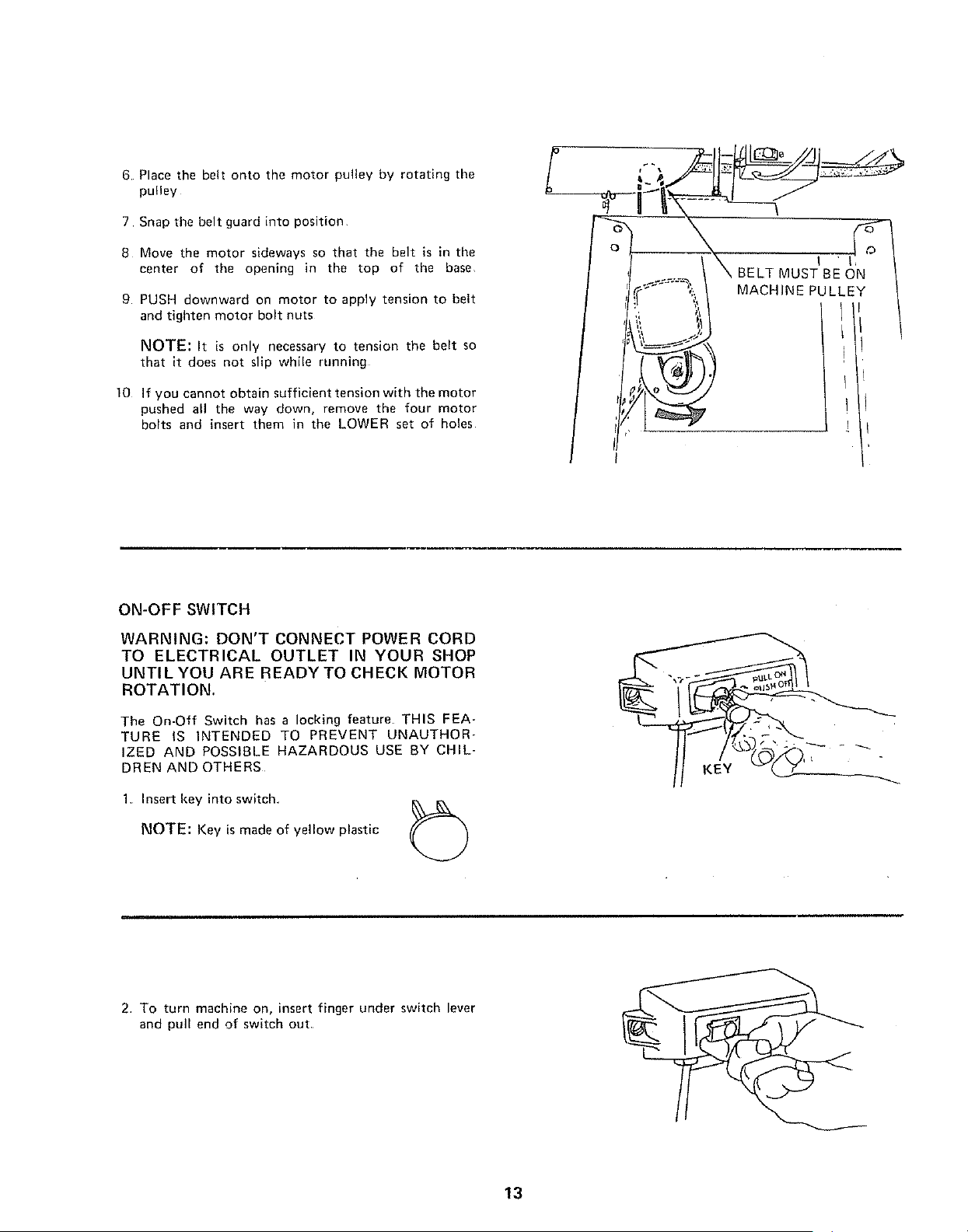
6 Place the belt onto the motor pulley by rotating the
pulley
7 Snap the belt guard into position
8 Move the motor sideways so that the belt is in the
center of the opening in the top of the base
9 PUSH downward on motor to apply tension to belt
and tighten motor bolt nuts
NOTE: It is only necessary to tension the belt so
that it does not slip while running
10 If you cannot obtain sufficient tension with the motor
pushed all the way down, remove the four motor
bolts and insert them in the LOWER set of holes
ON-OFF SWITCH
WARNING: DON'T CONNECT POWER CORD
TO ELECTRICAL OUTLET IN YOUR SHOP
UNTILYOU ARE READYTO CHECK MOTOR
ROTATION.
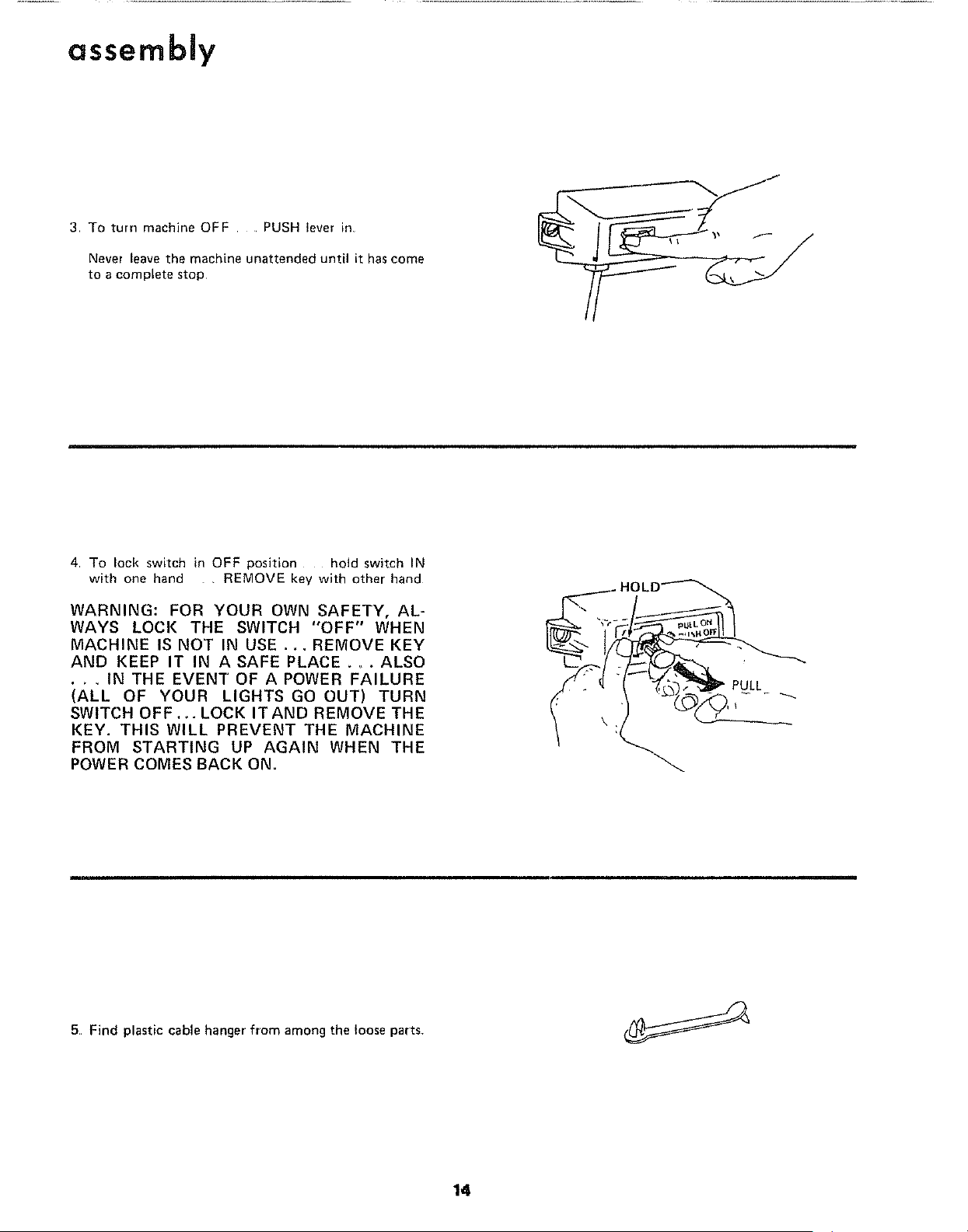
The On-Off Switch has a locking feature. THIS FEA-
TURE tS INTENDED TO PREVENT UNAUTHOR-
IZED AND POSSIBLE HAZARDOUS USE BY CHIL-
DREN AND OTHERS
1, Insert key into switch
NOTE: Key is made of yellow plastic
KEY
2 To turn machine on, insert finger under switch lever
and pull end of switch out
13
assembly
3 To turn machine OFF . PUSH lever in
Never leave the machine unattended until it has come
to a complete stop
4 To lock switch in OFF position hold switch IN
with one hand , REMOVE key with other hand
WARNING: FOR YOUR OWN SAFETY, AL-
WAYS LOCK THE SWITCH "OFF" WHEN
MACHINE IS NOT IN USE .+. REMOVE KEY
AND KEEP IT IN A SAFE PLACE +,, . ALSO
• + + IN THE EVEN'[" OF A POWER FAILURE
(ALL OF YOUR LIGHTS GO OUT) TURN
SWITCH OFF.+. LOCK ITAND REMOVE THE
KEY. THIS WILL PREVENT THE MACHINE
FROM STARTING UP AGAIN WHEN THE
POWER COMES BACK ON.
_ HOLD_
5 Find plastic cable hanger from among the loose parts+
14
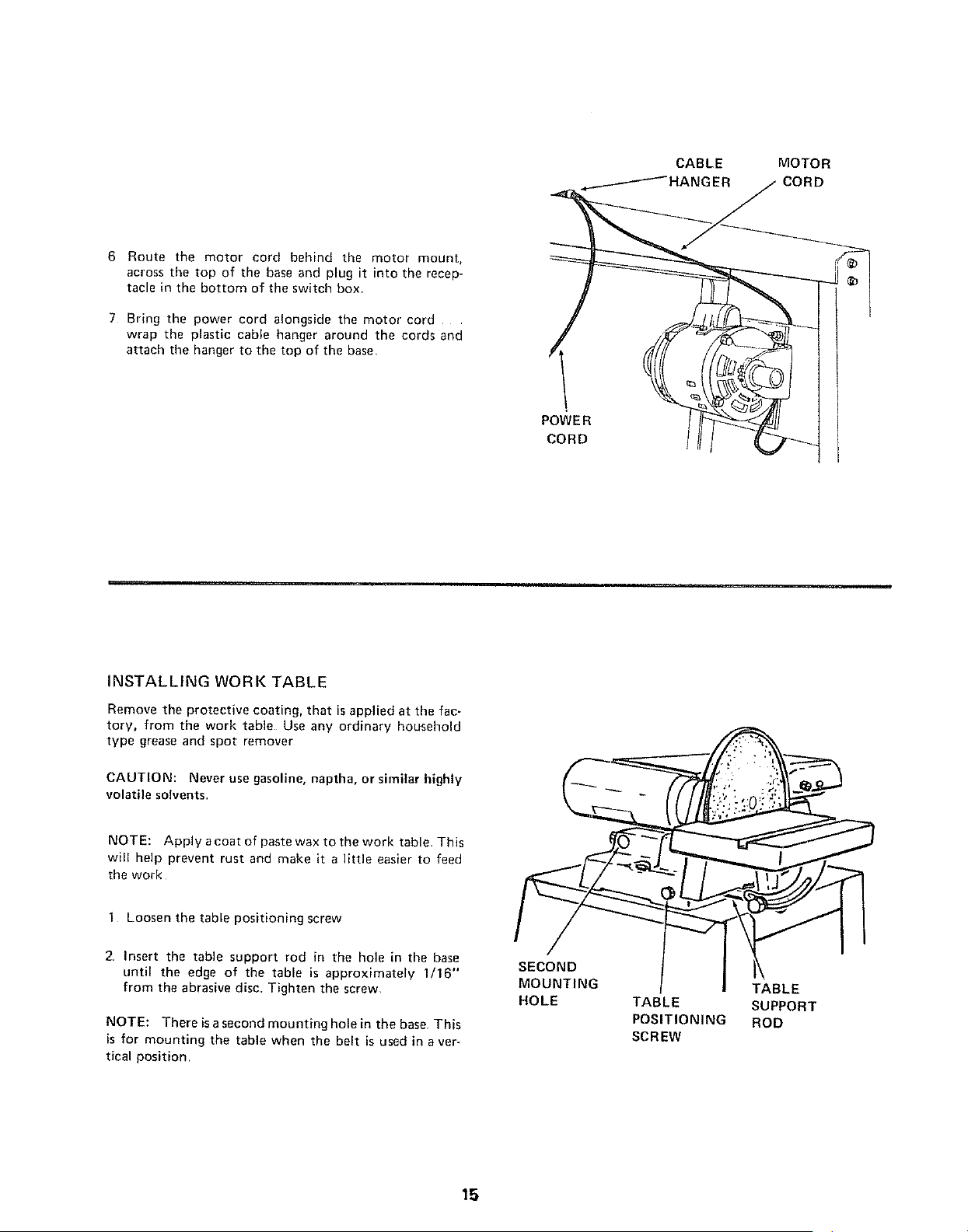
CABLE MOTOR
IANGER CORD
6 Route the motor cord behind the motor mount,
across the top of the base and plug it into the recep-
tacle in the bottom of the switch box
7 Bring the power cord alongside the motor cord
wrap the plastic cable hanger around the cords and
attach the hanger to the top of the base
POWE R
CORD
INSTALLING WORK TABLE
Remove the protective coating, that is applied at the fac-
tory, from the work table Use any ordinary household
type grease and spot remover
CAUTION: Never use gasoline, naptha, or similar highly
volatile solvents
NOTE: Apply acoat of paste wax to the work table This
will help prevent rust and make it a little easier to feed
the work
1 Loosen the table positioning screw
2 Insert the table support rod in the hole in the base
until the edge of the table is approximately 1/16"
from the abrasive disc. Tighten the screw,
NOTE: There isasecond mounting hole in the base This
is for mounting the table when the belt is used in aver-
tical position
SECOND
MOUNTING
HOLE
TABLE
TABLE SUPPORT
POSITIONING ROD
SCREW
15
assembly
INSTALLING ABRASIVE BELT-TENSIONING
AND TRACKING
WARNING: FOR YOUR OWN SAFETY, TURN
SWITCH "OFF" AND REMOVE PLUG FROM
POWER SOURCE OUTLET BEFORE REMOV-
ING OR INSTALLING ABRASIVE BELT°
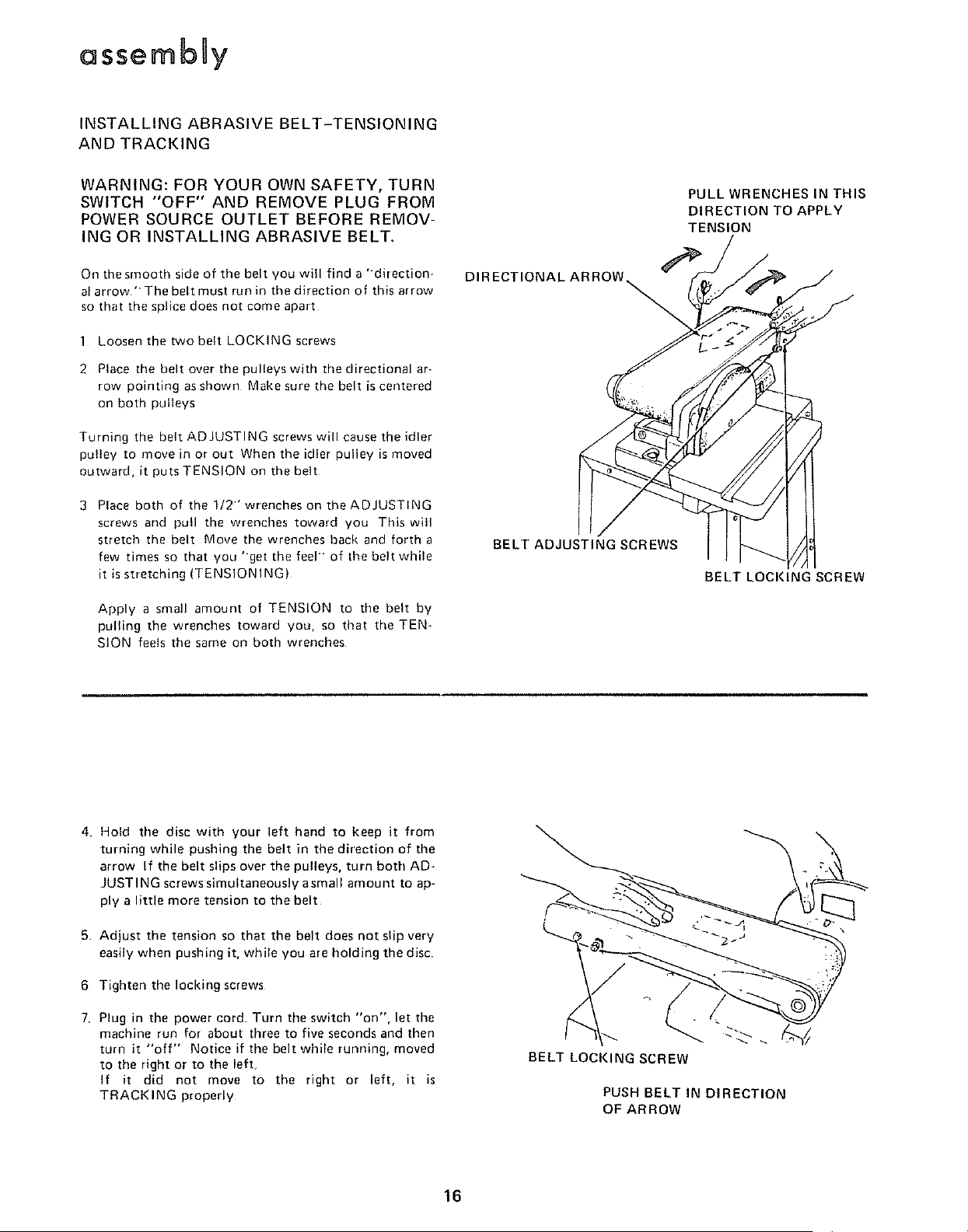
On the smooth side of tile belt you will find a "direction-
al arrow"The belt must run in the direction of this arrow
so that the splice does not come apart
1 Loosen the two belt LOCKING screws
2 Place the belt over the pulleys with the directional ar-
row pointing as shown Make sure the belt is centered
on both pulleys
Turning the belt ADJUSTING screws will cause the idler
pu!ley to move in or out When the idler pulley is moved
outward, it puts TENSION on the belt
3 Place both of the 1/2" wrenches on the ADJUSTING
screws and pull the wrenches toward you This will
stretch the belt Move the wrenches back and fortha
few times so that you "get the feel of the belt while
it is stretching (TENSIONING)
Apply a small amount of TENSION to the belt by
pulling the wrenches toward you, so that the TEN-
StON feels the same on both wrenches
PULL WRENCHES IN THIS
DIRECTION TO APPLY
TENSION
DIRECTIONAL ARROW_
BELT ADJUSTING SCREWS
BELT LOCKING SCREW
4_ Hold the disc with your left hand to keep it from
turning while pushing the belt in the direction of the
arrow If the belt slips over the pulleys, turn both AD-
JUSTING screws simultaneously asmall amount to ap-
ply a little more tension to the belt
5 Adjust the tension so that the belt does not slip very
easily when pushing it, while you are holding the disc
6 Tighten the locking screws
7 Plug in the power cord Turn the switch "on", let the
machine run for about three to five seconds and then
turn it "off" Notice if the belt while running, moved
to the right or to the left.
If it did not move to the right or left, it is
TRACKING properly
BELT LOCKING SCREW
PUSH BELT IN DIRECTION
OF ARROW
16
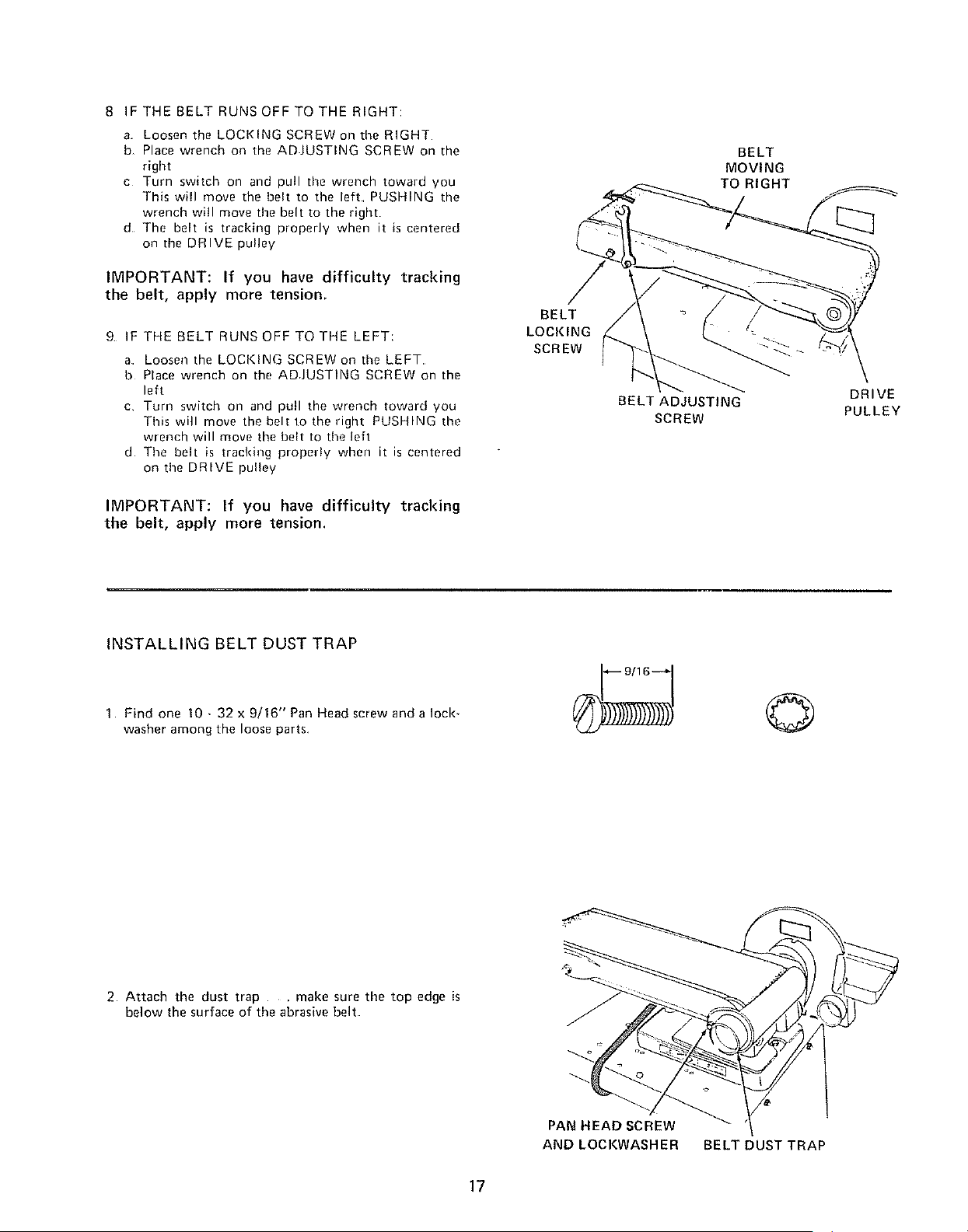
8 IF THE BELT RUNS OFF TO THE RIGHT:
a Loosen the LOCKING SCREW on the RIGHT
b, Place wrench on the ADJUSTING SCREW on the
right
c Torn switch on and pull the wrench toward you
This will move the belt to the left PUSHING the
wrench will move the belt to the right
d The belt is tracking properly when it is centered
on the DRIVE pulley
IMPORTANT: If you have difficulty tracking
the belt, apply more tension,
9 IF THE BELT RUNS OFF TO THE LEFT:
a Looseo the LOCKING SCREW on time LEFT
b Place wrench on the ADJUSTING SCREW on the
left
c Turn switch on and pull the wrench toward you
This will move the belt to the right PUSHING the
wrench will move time belt to time left
d Time belt is tracking properly when it is centered
on time DRIVE pulley
IMPORTANT: If you have difficulty tracking
the belt, apply more tension.
BELT
LOCKING
SCREW
BELT
MOVING
TO RIGHT
BELT ADJUSTING
SCREW
DRIVE
PULLEY
INSTALLING BELT DUST TRAP
1 Find one 10 - 32 x 9/16" Pan Heed screw and a lock-
washer among the loose parts
©
2 Attach the dust trap .... make sure the top edge is
below the surface of the abrasive belt
PAN HEAD SCREW
AND LOCKWASHER BELT DUST TRAP
17
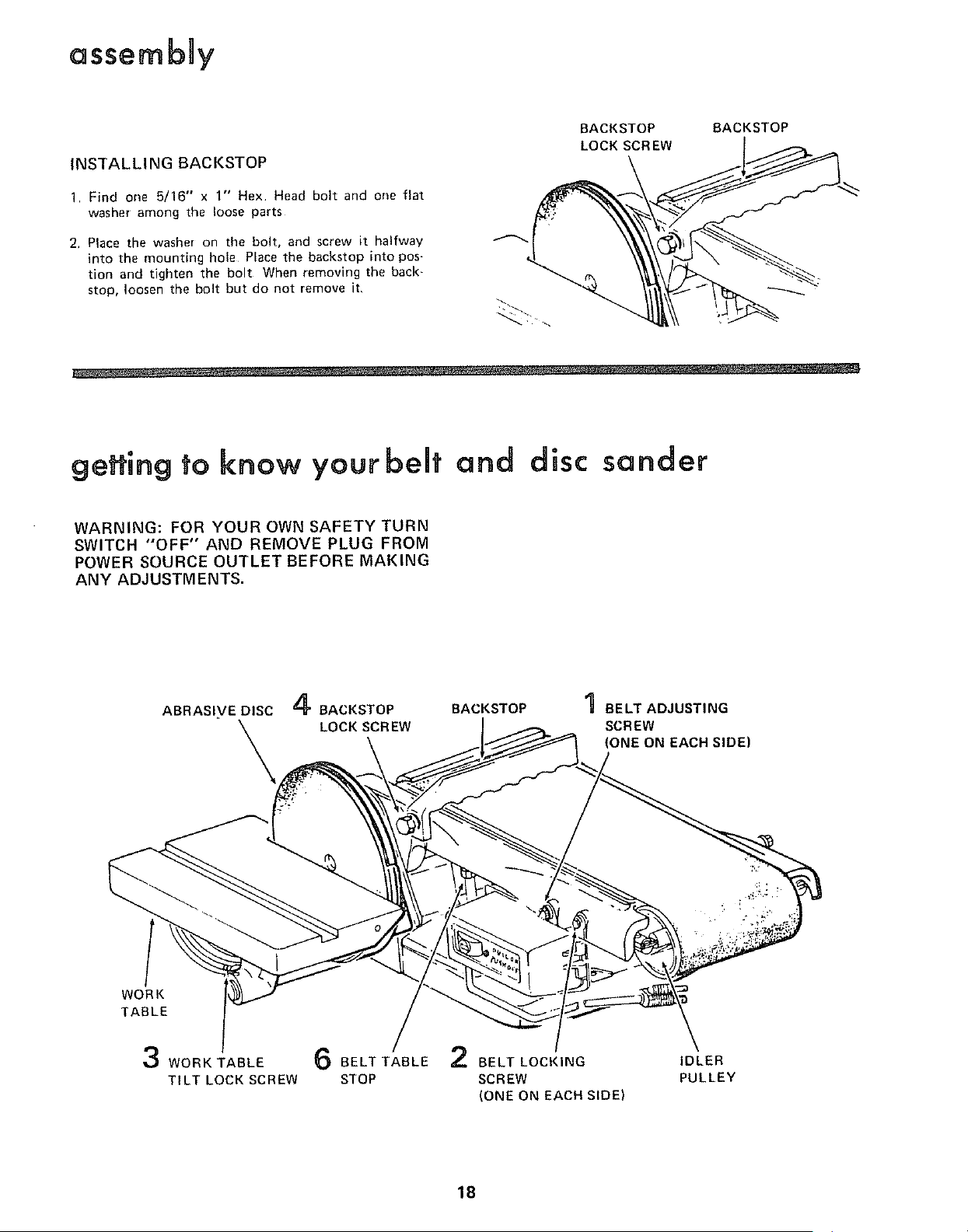
assembay
INSTALLING BACKSTOP
1 Find one 5/16" x 1" Hex. Head bolt and one flat
washer among the loose parts
2, Place the washer on the bolt, and screw it halfway
into the mounting hole Place the backstop into pos-
tion and tighten the bolt When removing the back-
stop, loosen the bolt but do not remove it,
BACKSTOP BACKSTOP
LOCK SCREW
geffing to know your bent and disc sander
WARNING: FOR YOUR OWN SAFETY TURN
SWITCH "OFF" AND REMOVE PLUG FROM
POWER SOURCE OUTLET BEFORE MAKING
ANY ADJUSTMENTS.
ABRASIVE DISC 4 BACKSTOP
LOCK SCREW
BACKSTOP
BELT ADJUSTING
SCREW
(ONE ON EACHSIDE)
WORK
TABLE
3 WORK TABLE 6 BELT TABLE 2 BELT LOCKING
TILT LOCK SCREW STOP SCREW
(ONE ON EACH SIDE)
IDLER
PULLEY
18
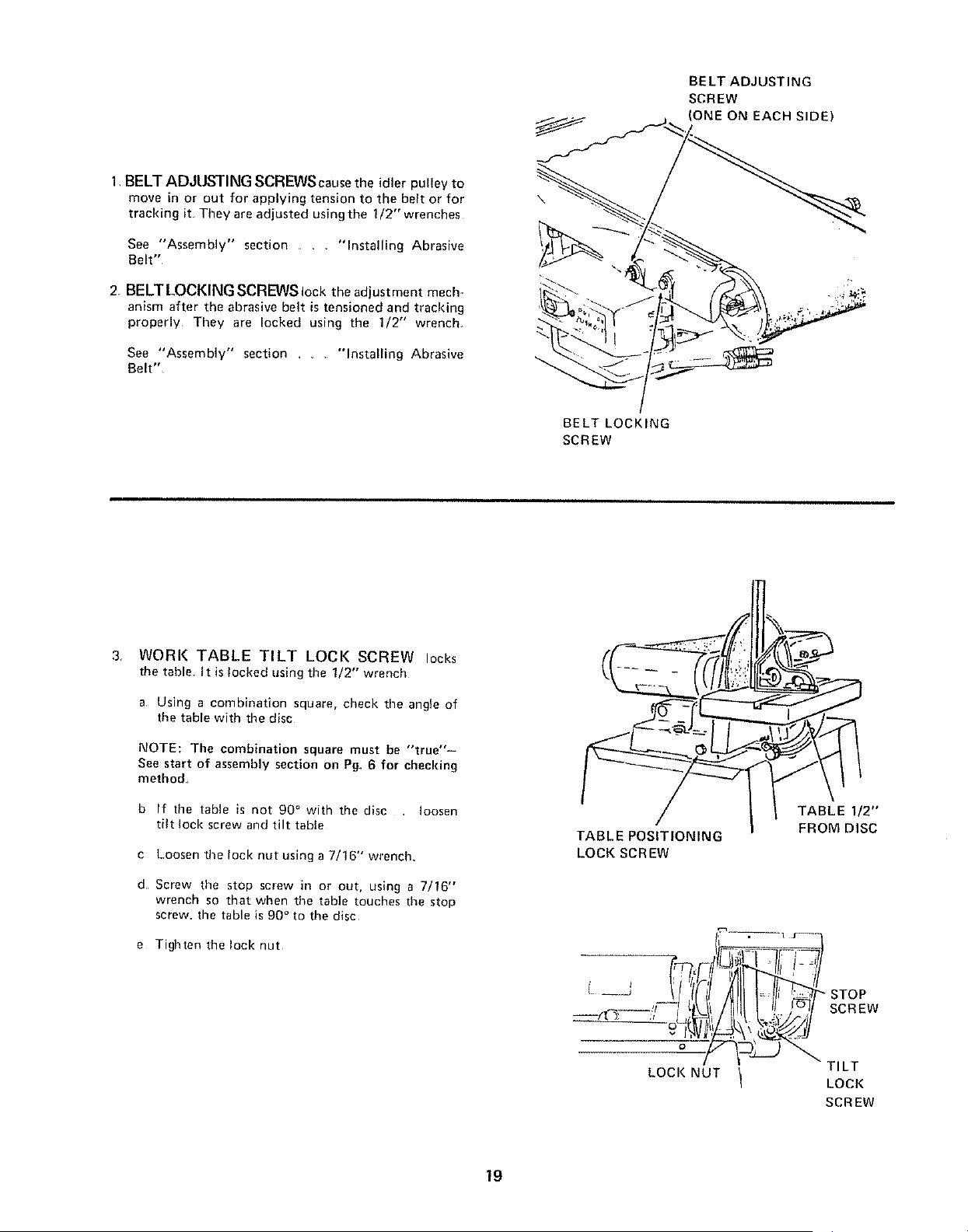
BELT ADJUSTING
SCREW
(ONE ON EACH SIDE)
1,BELT ADJUSTING SCREWS causethe idler pulley to
move in or out for applying tension to the belt or for
tracking it They are adjusted using the 1/2" wrenches
See "Assembly" section .... "Installing Abrasive
Belt"
2, BELT LOCKING SCREWS lock the adjust ment mech-
anism after the abrasive belt is tensioned and tracking
properly They are locked using the 1/2" wrench_
See "Assembly" section ...... "Installing Abrasive
Belt"
\
BELT LOCKING
SCREW
3 WORK TABLE TILT LOCI( SCREW locks
the table, It is locked using the 1/2" wrench
a Using a combination square, check the angle of
the table with the disc
NOTE: The combination square must be "true"-
Sea start of assembly section on Pg. 6 for checking
method
b If time table is not 90 ° with the disc loosen
tilt lock screw and tilt table
c Loosen the lock nut using a 7/16" wrench
d Screw time stop screw in or out, using a 7/16"
wrench so that when the table touches the stop
screw, the table is 90 ° to time disc
e Tighten the lock nut
TABLE POSt'f IONtNG
LOCK SCREW
. I j'--
I L )?)1 SCREW
- -iz 2--J T,LT
LOCI( NUT t
LOCi(
SCREW
19
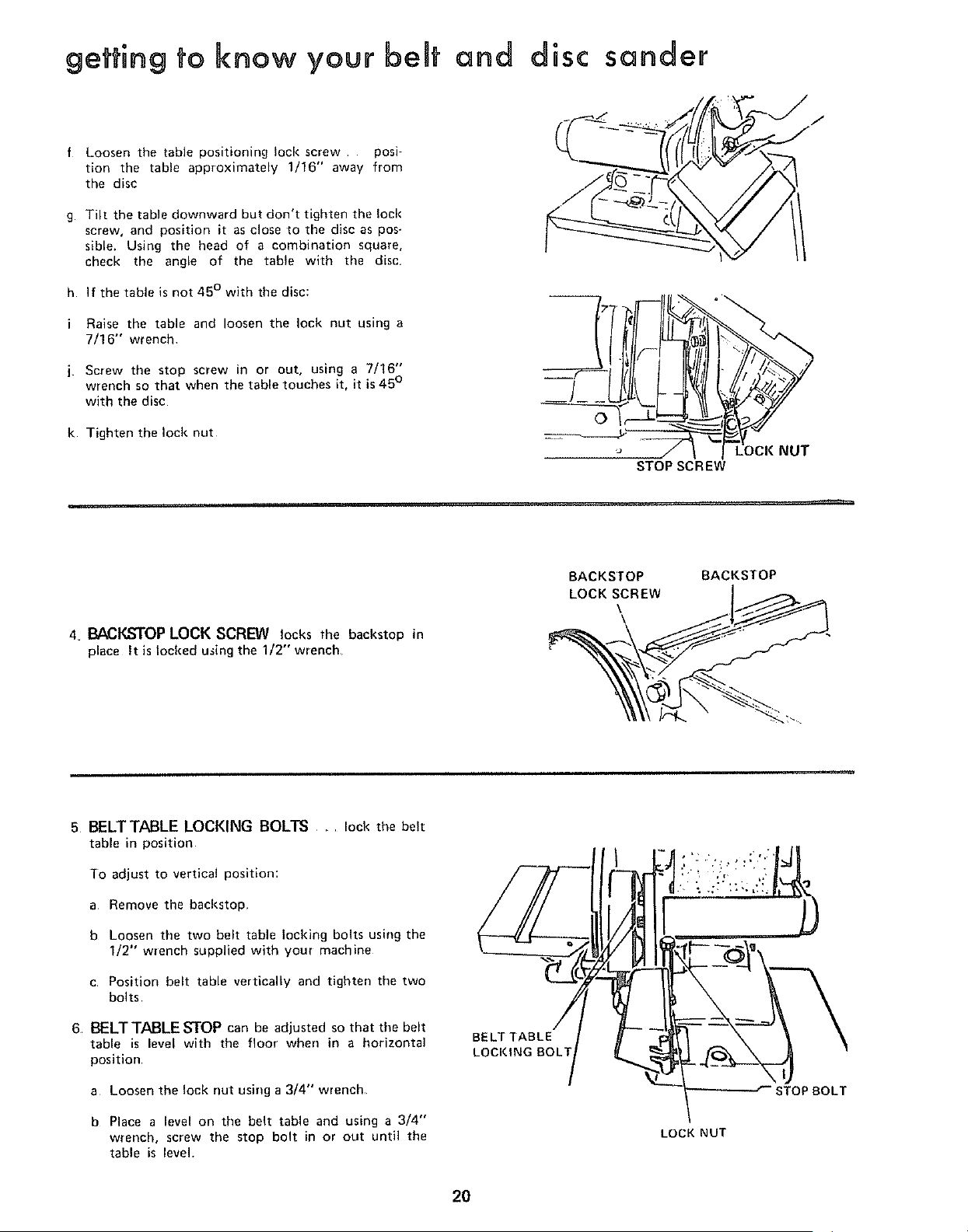
getting to know your beat and disc sander
f Loosen the table positioning lock screw posi-
tion the table approximately 1/16" away from
the disc
g Tilt the table downward but don't tighten the loci{
screw, and position it as close to the disc as pos-
sible. Using the head of a combination square,
check the angle of the table with the disc
h If the table is not 45 ° with the disc:
Raise the table and loosen the lock nut using a
7/16" wrench
Screw the stop screw in or out, using a 7/16"
wrench so that when the table touches it, it is 45°
with the disc
k Tighten the lock nut
o
4. BACKSTOP LOCK SCREW locks the backstop in
place It is locked using the 1/2" wrench
BACKSTOP
LOCK SCREW
\
BACKSTOP
6 BELTTABLE LOCKING BOLTS ..... lock the belt
table in position
To adjust to vertical position:
a Remove the backstop
b Loosen the two belt table locking bolts using the
1/2" wrench supplied with your machine
c Position belt table vertically and tighten the two
bolts
6, BELTTABLE STOP can be adjusted so that the belt
table is level with the floor when in a horizontal
position
a Loosen the lock nut using a 3/4" wrench
b Place a level on the belt table and using a 3/4"
wrench, screw the stop bolt in or out until the
table is level.
BELT TABLE
LOCKING BOLT
LOCK NUT
STOPBOLT
2O
basic operation
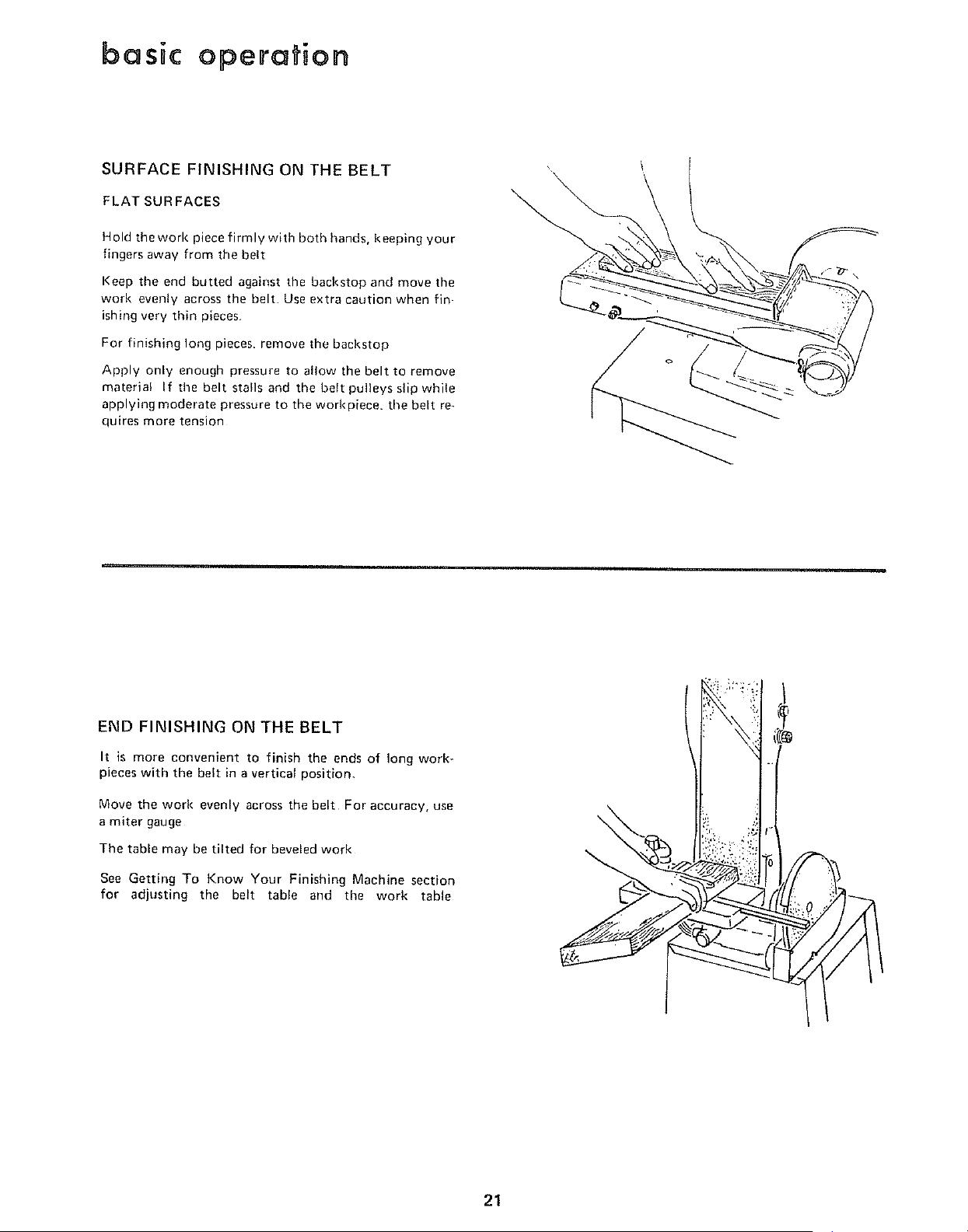
SURFACE FINISHING ON THE BELT
FLAT SURFACES
Hold the work piece firmly with both hands, keeping your
fingers away from the belt
Keep the end butted against the backstop and move the
work evenly across the belt Use extra caution when fin-
ishing very thin pieces
For finishing long pieces, remove the backstop
Apply only enough pressure to allow the belt to remove
material If the belt stalls and the belt pulleys slip while
applying moderate pressure to the worl<piece, the belt re
quires more tension
\
END FINISHING ON THE BELT
It is more convenient to finish the ends of long work-
pieces with the belt in a vertical position,
Move the work evenly across the belt For accuracy, use
a miter gauge
The table may he tilted for beveled work
See Getting To Know Your Finishing Machine section
for adjusting the belt table and the work table
21
basic operation
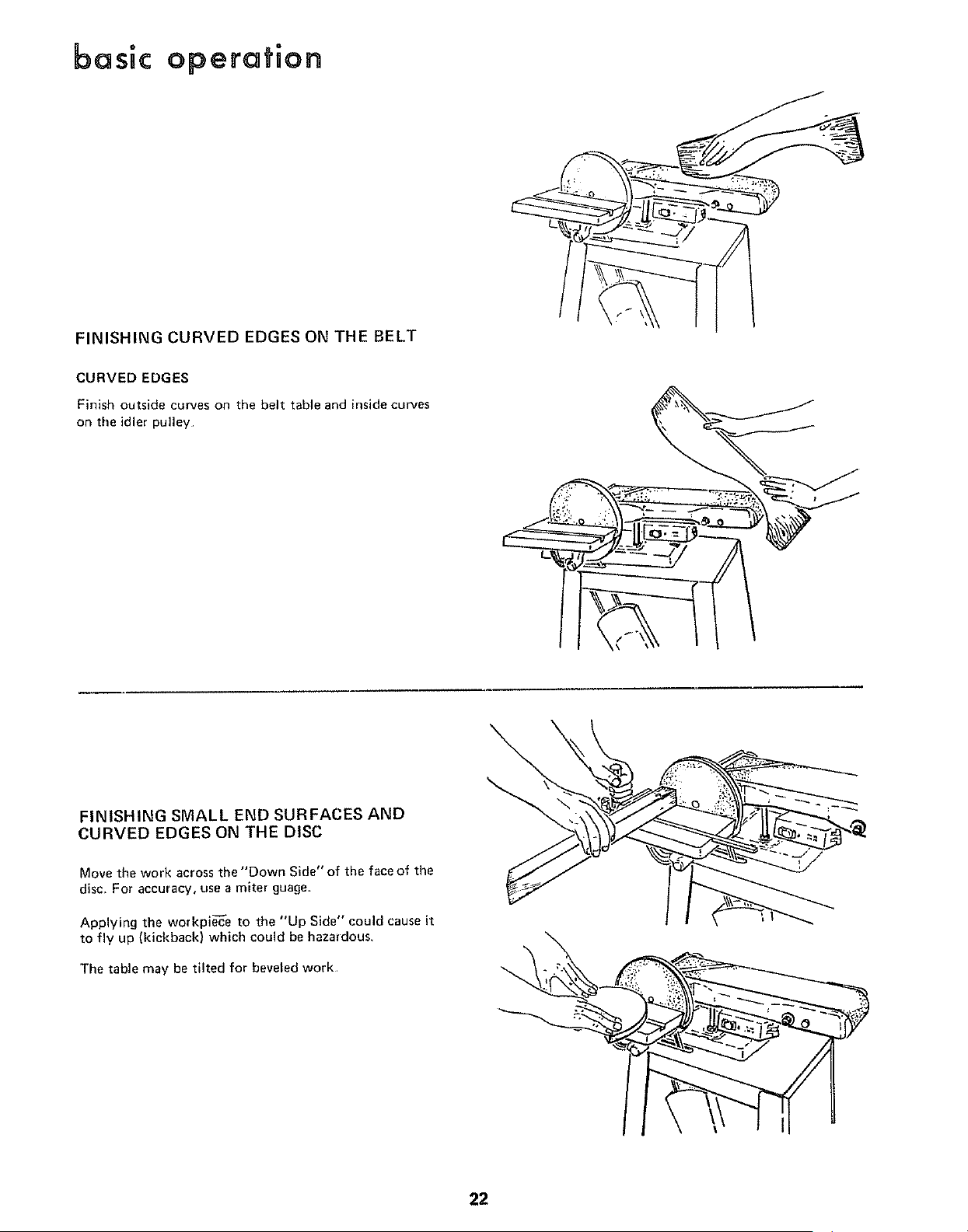
FINISHING CURVED EDGES ON THE BELT
CURVED EDGES
Finish outside curves on the belt table and inside curves
on the idler pulley
FINISHING SMALL END SURFACES AND
CURVED EDGES ON THE DISC
Move the work across the "Down Side" of the face of the
disc For accuracy, use a miter guage.
Applying the workpie'c'e to the "Up Side" could cause it
to fly up (kickback) which could be hazardous,
The table may be tilted for beveled work,
22
maintenance
WARNING: FOR YOUR OWN SAFETY, TURN
SWITCH "OFF" AND REMOVE PLUG FROM
POWER SOURCE OUTLET BEFORE ADJUST-
ING, MAINTAINING, OR LUBRICATING
YOUR FINISHING MACHINE.
Keep your machine and your wolkshop clean The dust
traps around the disc ancl the belt are designed to deflect
most of the fine dust They should be connected to a
Home-N-Shop Vac for most efficient dust removal
WARNING: DO NOT ATTACH A HOME-N-
SHOP VAC WHEN FINISHING IRON OR
STEEL. THE SPARKS COULD IGNITE THE
DEBRIS AND CAUSE A FIRE.
If power cord is worn or cut, or damaged in any wav.
have it replaced immediately
Frequently blow out any dust that may accumulate
inside the motor
For motor maintenance, follow instructions furnished
with motor
A coat of automobile-type wax applied to the worktable
will help prevent rust and make it a little easier to feed
the work while finishing
Do not apply wax to the belt table because the belt
could pick up the wax and deposit it on the pulleys,
causing the belt to slip
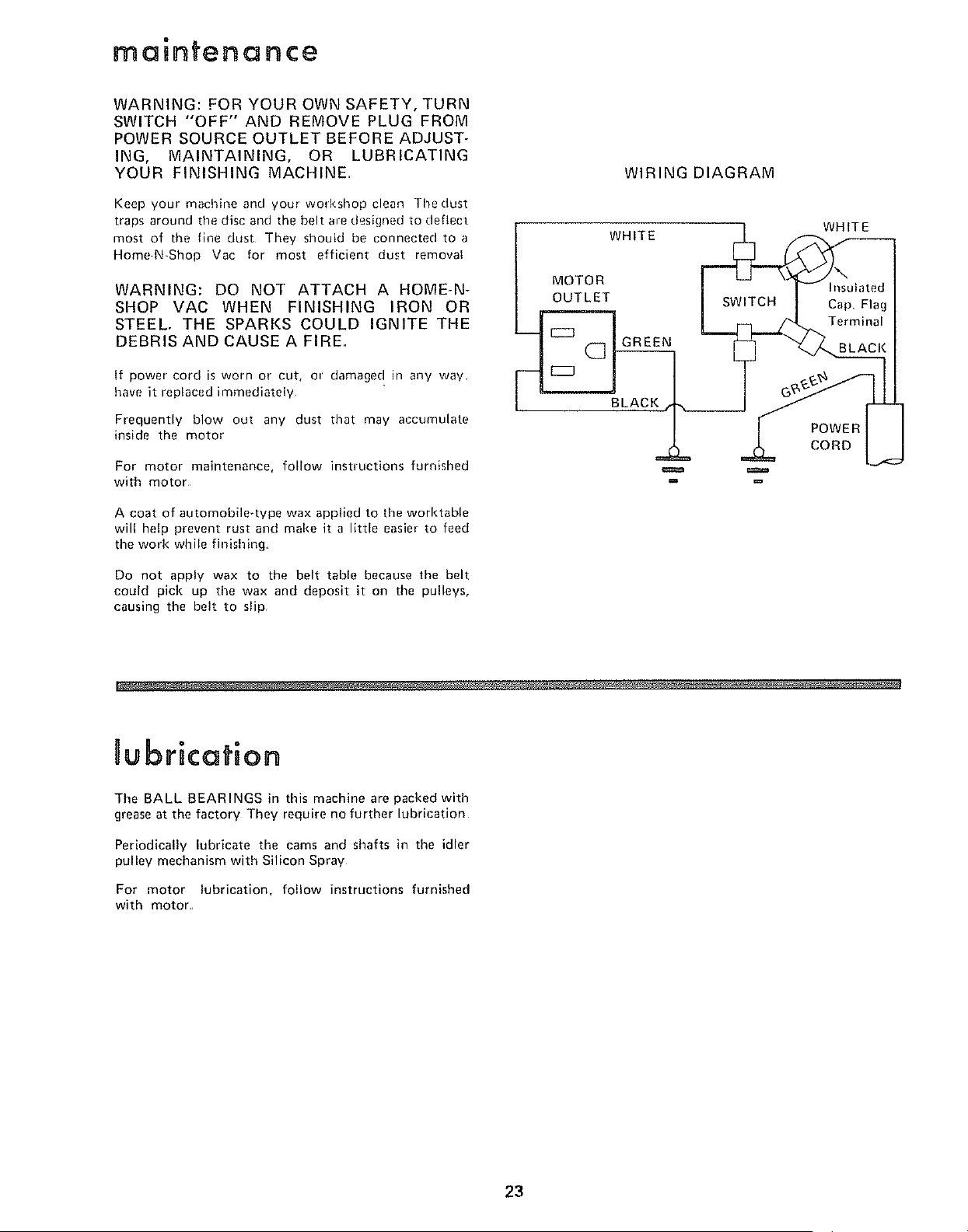
MOTOR
OUTLET
WIRING DIAGRAM
WHITE
SWITCH
(_] GREEN
BLACK
m m
WHITE
Insulated
Cap, Flag
Terminal
POWER
CORD
Jubrication
The BALL BEARINGS in this machine are packed with
grease at the factory They require no further lubrication
Periodically lubricate the cams and shafts in the idler
pulley mechanism with Silicon Spray
For motor lubrication, follow instructions furnished
with motor
23
troubBe shooting
WARNING: FOR YOUR OWN SAFETY, TURN
SWITCH "OFF" AND REMOVE PLUG FROM
POWER SOURCE OUTLET BEFORE TROUBLE
SHOOTING YOUR SANDER.
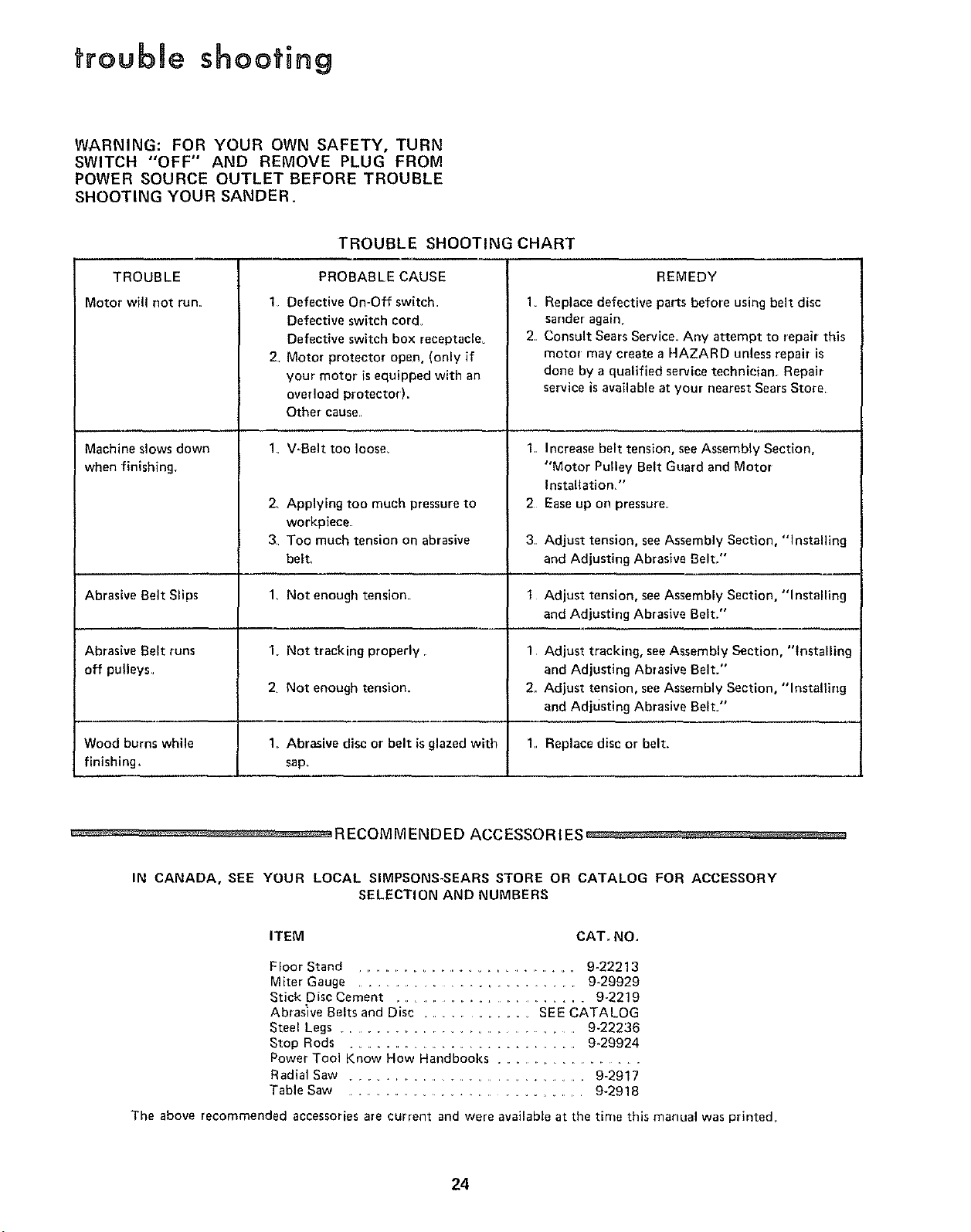
TROUBLE
Motor will not run.
Machine slows down
when finishing.
TROUBLE SHOOTING CHART
PROBABLE CAUSE
1 Defective On-Off switch
Defective switch cord
Defective switch box receptacle_
2. Motor protector open, (only if
your motor is equipped with an
over load protector).
Other cause,.
V-Belt too loose,
2.
3
1,
2,
Applying too much pressure to
workpiece
Too much tension on abrasive
belt_
2
REMEDY
1
2
3.
t
1
2.
1,
Replace defective parts before using belt disc
sander again,.
Consult Sears Service. Any attempt to repair this
motor may create a HAZARD unless repair is
done by a qualified service technician Repair
service is available at your nearest Sears Store
Increase belt tension, seeAssembly Section,
"Motor Pulley Belt Guard and Motor
Installation."
Ease up on pressure
Adjust tension, see Assembly Section, "Installing
and Adjusting Abrasive Belt."
Abrasive Belt Slips Not enough tension Adjust tension, seeAssembly Section, "Installing
and Adjusting Abrasive Belt."
Abrasive Belt tuns Not tracking properly Adjust tracking, seeAssembly Section, "Installing
off pulleys, and Adjusting Abrasive Belt."
Not enough tension. Adjust tension, seeAssembly Section, "Installing
and Adjusting Abrasive Belt."
Wood burns while Abrasive disc or belt is glazed with Replace disc or belt.
finishing, sap_
................... RECOMMENDED ACCESSORIES _ _ ,
IN CANADA, SEE YOUR LOCAL SIMPSONS-SEARS STORE OR CATALOG FOR ACCESSORY
SELECTION AND NUMBERS
ITEM CAT. NO,
Floor Stand .................................. 9-22213
Miter Gauge .................................... 9_29929
Stick Disc Cement .......................... 9-2219
Abrasive Belts and Disc ................... SEE CATALOG
Steel Legs ....................................... 9-22236
Stop Rods ........................................ 9-29924
Power Tool Know How Handbooks .........................
Radial Saw ..................................... 9-2917
Table Saw .................................... 9-2918
The above recommended accessories are current and were available at the time this manual was printed,,
24
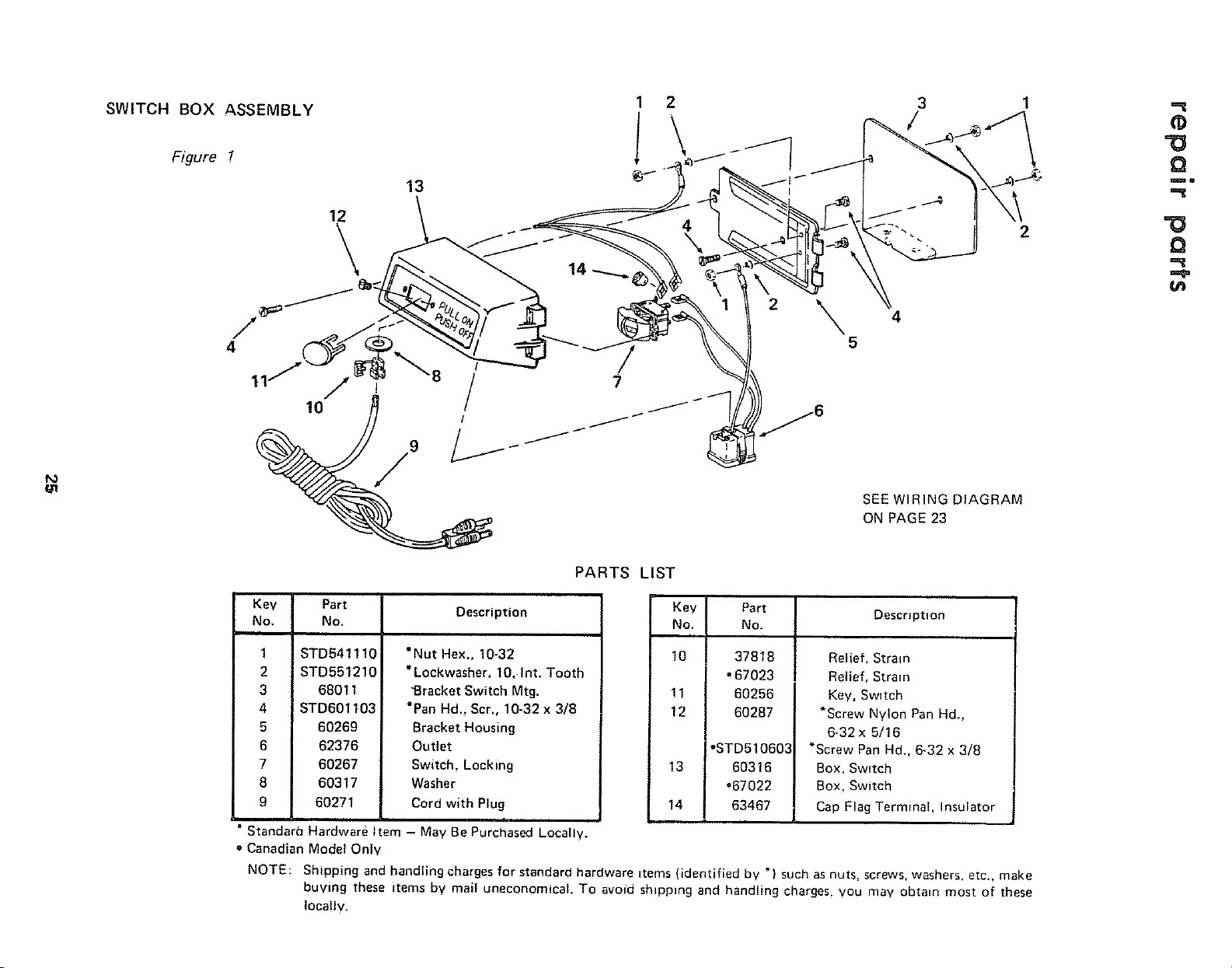
SWITCH BOX ASSEMBLY
2
I
2
\
5
3
/
2
Q
mo
Q
SEE WIRING DIAGRAM
ON PAGE 23
PARTS LIST
Key Part
No. No.
1 STD541110
2 STD551210
3 68011
4 STD601103
5 60269
6 62376
7 60267
8 60317
9 60271
Description
*Nut Hex,, 10-32
*Lockwasher, 10, Int. Tooth
"Bracket Switch Mtg,
*Pan Hd. Scr., 10-32 x 3/8
Bracket Housing
Outlet
Switch, Locking
Washer
Cord with Plug
• Standara Hardware Item - May Be Purchased Locally.
= Canadian Model Only
Key
No.
10
11
12
13
t4
Part
No.
37818
•67023
60256
60287
°STD510603
60316
°67022
63467
Description
Relief, Strain
Relief, Strain
Key, Swltch
*Screw Nylon Pan Hd.,
6-32x 5/16
*Screw Pan Hd., 6-32 x 3/8
Box. Switch
Box, Switch
Cap Flag Terminal, Insulator
NOTE: Shipping and handling charges for standard hardware items (identified by *) such asnuts. screws, washers, etc., make
buying these items bv mail uneconomical. To avoid shipping and handling charges, you may obtain most of these
locally.
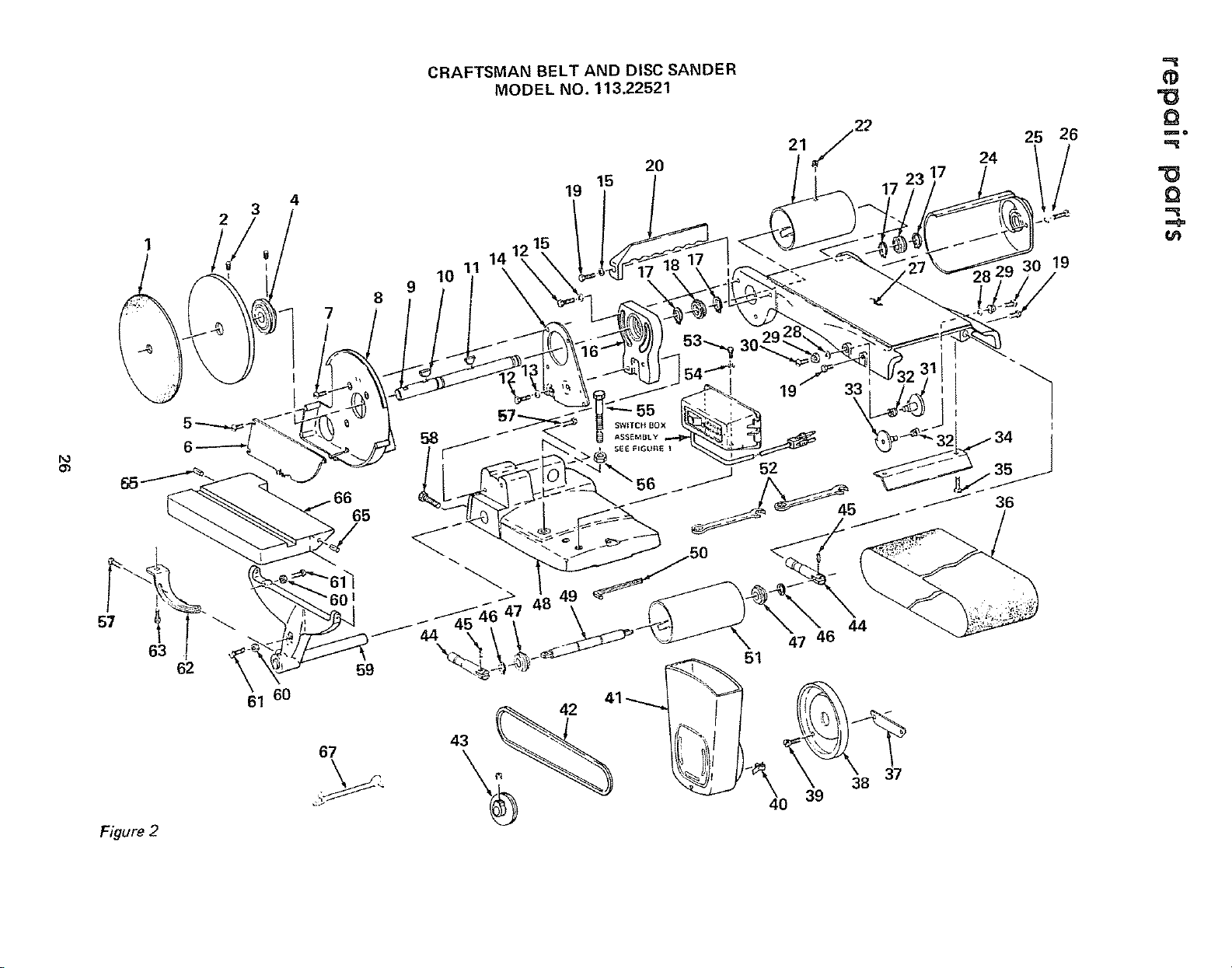
2
4
CRAFTSMAN BELT AND DISC SANDER
MODEL NO. 113.22521
20
15
19
24
25
26
19
,=_
=O
Q
_o
=O
Q
U=D
o_
63
62
61 60
Figure 2
7
I
65
8
67
58
J
55
SWITCH BOX
ASSEMBLY
19 33!
44
47
51
"4
1
t
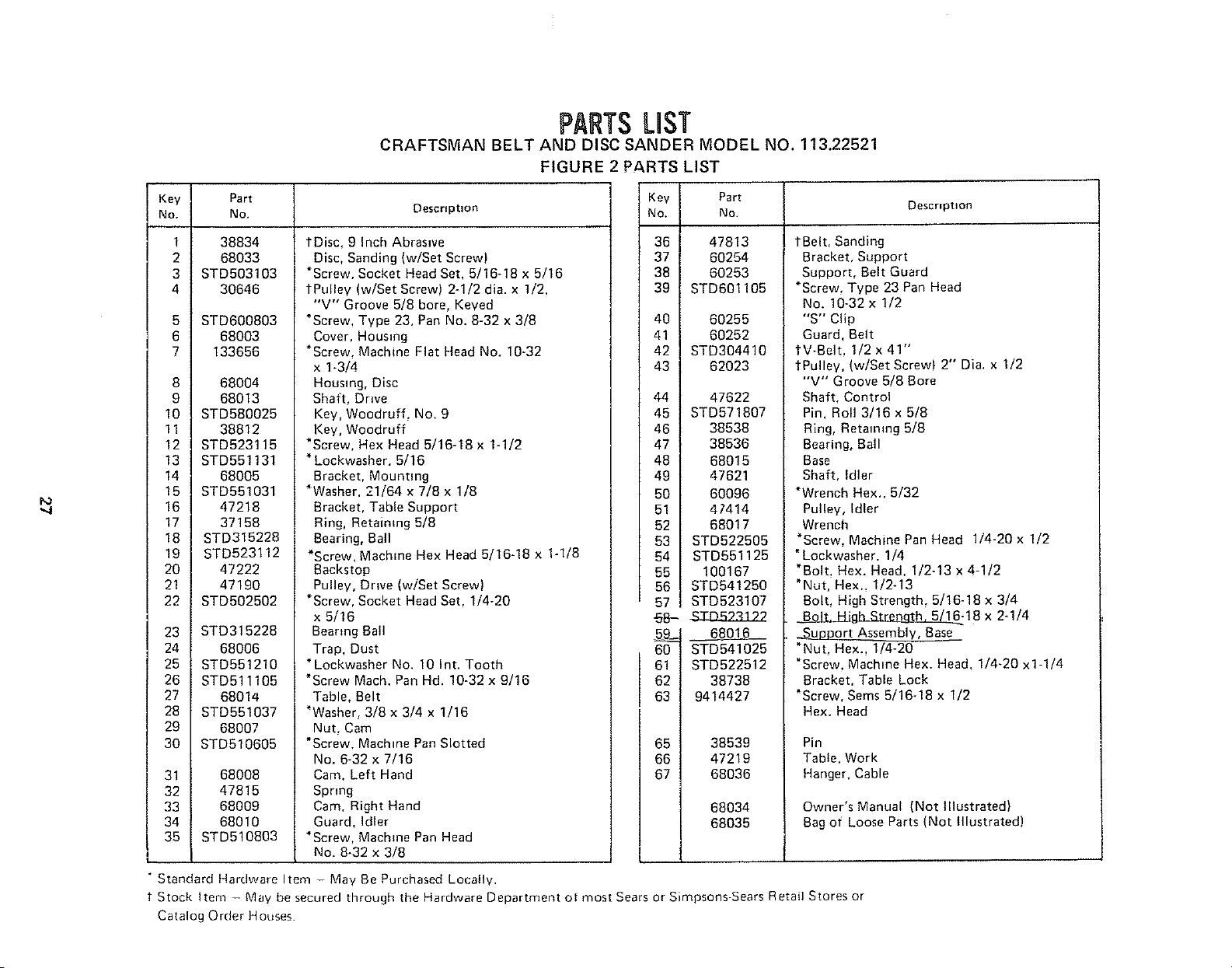
PARTSLiST
CRAFTSMAN BELT AND DISC SANDER MODEL NO. 113.22521
FIGURE
Key Part
No. No. Descrtpnon
1
2
3
4
5
6
7
8
9
10
11
12
13
14
15
16
17
18
19
20
21
22
23
24
25
26
27
28
29
30
31
32
33
34
35
38834
68033
STD503103
30646
STD600803
68003
133656
68004
68013
STD580025
38812
STD523115
STD551131
68005
STD551031
47218
37158
STD315228
STD523112
47222
47190
STD502502
STD315228
68006
STD551210
STD511105
68014
STD551037
68007
STD510605
68008
47815
68009
68010
STD510803
1Disc, 9 inch Abrasive
Disc, Sanding (w/Set Screw)
*Screw. Socket Head Set, 5/16-18 x 5/16
tPulley (w/Set Screw) 2-1/2 dia. x 1/2,
"V" Groove 5/8 bore, Keyed
*Screw, Type 23, Pan No. 8-32 x 3/8
Cover, Housing
*Screw, Machine Fiat Head No. 10-32
x 1-3/4
Housing, Disc
Shaft, Drwe
Key, Woodruff, No. 9
Key, Woodruff
*Screw, Hex Head 5/16-18 x 1-1/2
* Lockwasher. 5/16
Bracket, Mounting
*Washer. 21/64 x 7/8 x 1/8
Bracket, Table Support
Ring, Retaining 5/8
Bearing, Ball
*Screw, Machine Hex Head 5/16-18 x 1-1/8
Backstop
Pulley, Drive (w/Set Screw)
*Screw, Socket Head Set, 1/4-20
x 5/16
Bearing Ball
Trap, Dust
* Lockwasher No. 10 Int. Tooth
*Screw Mach. Pan Hd. 10-32 x 9/16
Table, Belt
*Washer, 3/8 x 3/4 x 1/16
Nut, Cam
*Screw. Machine Pan Slotted
No. 6-32 x 7/16
Cam, Left Hand
Spring
Cam, Right Hand
Guard, Idler
*Screw, Machine Pan Head
No. 8-32 x 3/8
PARTS LIST
Key Part
No, No.
36 47813
37 60254
38 60253
39 STD601105
40 60255
41 60252
42 STD304410
43 62023
44 47622
45 STD571807
46 38538
47 38536
48 68015
49 47621
50 60096
51 47414
52 68017
53 STD522505
54 STD551125
55 100167
56 STD541250
57 STD523107
68-$ZJ3523322
68016
60 STD541025
61 STD522512
62 38738
63 9414427
65 38539
66 47219
67 68036
68034
68035
Description
tBelt, Sanding
Bracket, Support
Support, Belt Guard
*Screw, Type 23 Pan Head
No. 10-32 x 1/2
"S" Clip
Guard, Belt
IV-Belt, 1/2 x 41"
¢Pulley, (w!Set Screw) 2" Dia. x 1/2
"V" Groove 5/8 Bore
Shaft, Control
Pin, Roll 3/16 x 5/8
Ring, Retaining 5/8
Bearing, Ball
Base
Shaft, Idler
*Wrench Hex.. 5/32
Pulley, Idler
Wrench
*Screw, Machine Pan Head 1/4-20 x 1/2
* Lockwasher. 1/4
*Bolt, Hex. Head. I/2-13 x 4-1/2
"Nut, Hex., I/2-13
Bolt, High Strength, 5/16-18 x 3/4
BoJ_..l_Jgl__18 x 2-1/4
_Support Assembly, Base
*Nut, Hex. 1/4-20
*Screw, Machine Hex. Head, 1/4-20 x1-1/4
Bracket, Table Lock
*Screw, Sems 5/16-18 x 1/2
Hex. Head
Pin
Table, Work
Hanger, Cable
Owner's Manual (Not Illustrated)
Bag of Loose Parts (Not Illustrated)
• Standard Hardware Item - May Be Purchased Locally.
Stock Item - May be secured through the Hardware Department of most Sears or Simpsons-Sears Retail Stores or
Catalog Order Houses.
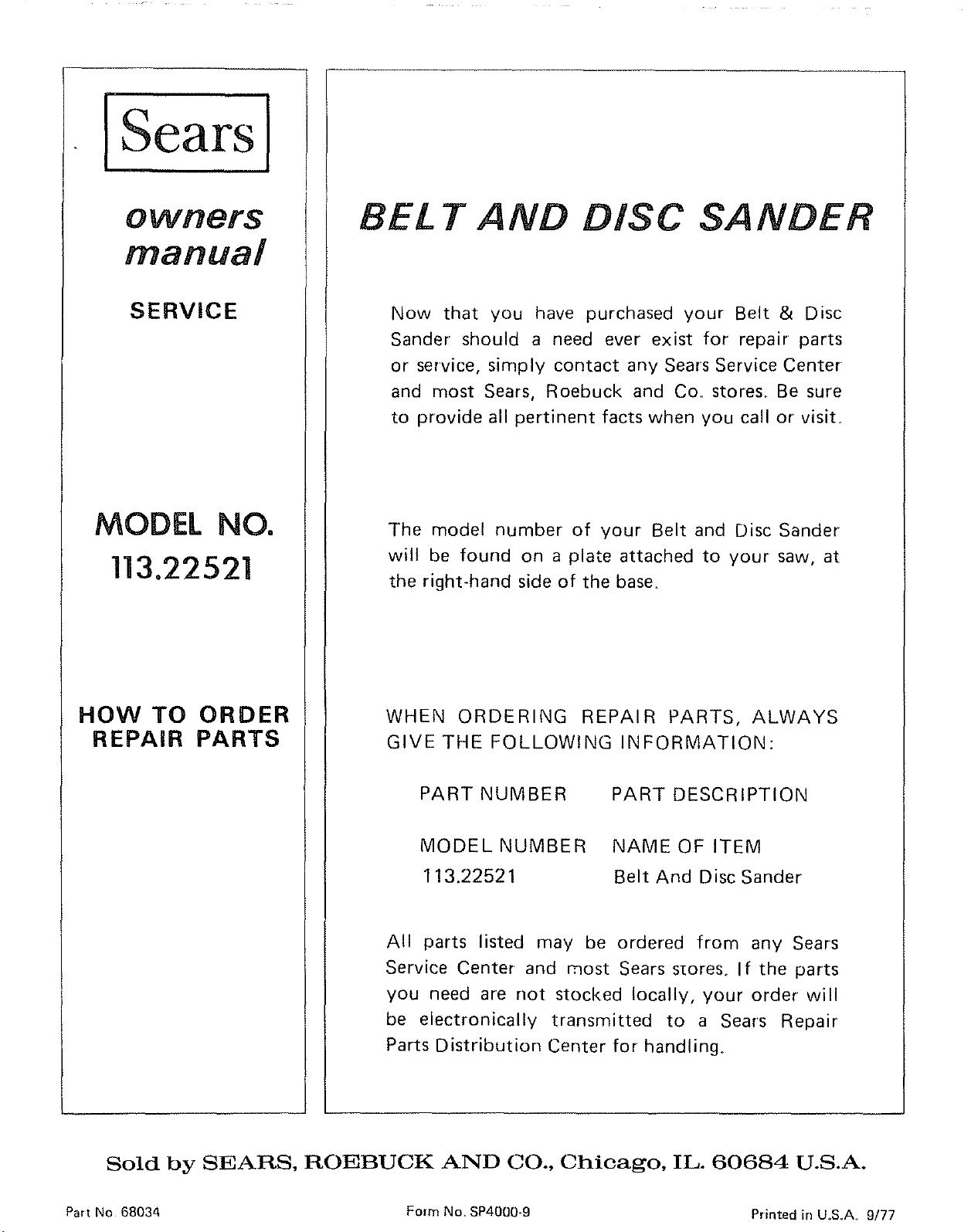
iSearsl
owners
manual
SERVICE
MODEL NO.
113.22521
HOW TO ORDER
REPAIR PARTS
BEi T AND DISC SANDER
Now that you have purchased your Belt & Disc
Sander should a need ever exist for repair parts
or service, simply contact any Sears Service Center
and most Sears, Roebuck and Co. stores.. Be sure
to provide all pertinent facts when you call or visit.
The model number of your Belt and Disc Sander
will be found on a plate attached to your saw, at
the right-hand side of the base.
WHEN ORDERING REPAIR PARTS, ALWAYS
GIVE THE FOLLOWING INFORMATION:
PART NUMBER PART DESCRIPTION
MODEL NUMBER NAME OF ITEM
113.22521 Belt And Disc Sander
All parts listed may be ordered from any Sears
Service Center and most Sears s_ores° If the parts
you need are not stocked locally, your order will
be electronically transmitted to a Sears Repair
Parts Distribution Center for handling..
Sold by SEARS, ROEBUCK AND CO., Chicago, IL. 60684 U.S.A.
Part No 68034 Form No, SP4000-9 Printed in U.,S.A_ 9/77