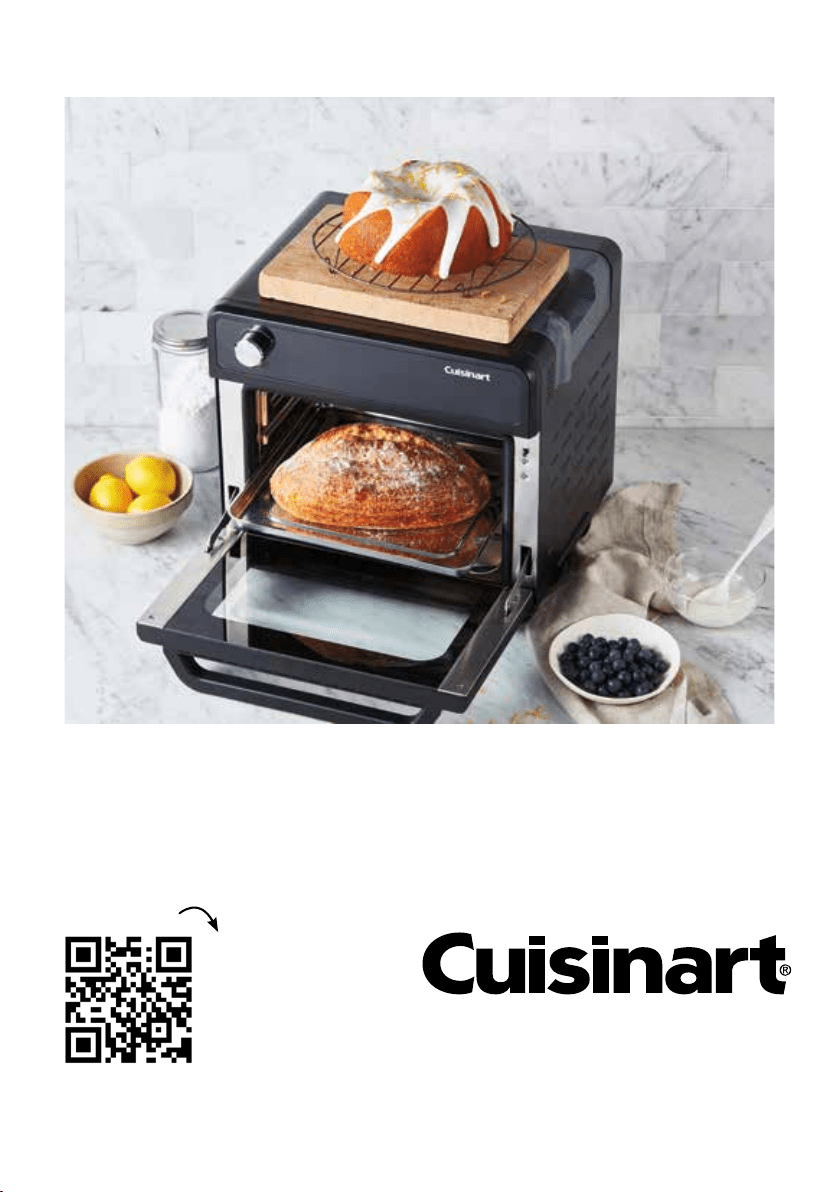
Scan to access
delicious recipes
and cooking
charts to use with
your Cuisinart
Gourmet Pro
Gourmet Pro
Combi Oven with Convection, Steam & Air Fry

2
CONTENTS
Important Safeguards ........................................................................... 3
Special Cordset Instructions .............................................................. 4
Before the First Use .............................................................................. 5
Parts & Features .................................................................................. 6
Controls & Functions ............................................................................ 7
Getting to Know Your Control Panel .................................................... 8
Oven Rack Position Guide .................................................................. 9
When Cooking With Steam ................................................................ 10
Operating Instructions ....................................................................... 11
Cooking Functions ............................................................................. 12
Auto Presets And Dual Cook Functions ............................................. 21
Cleaning & Maintenance .................................................................... 27

3
IMPORTANT SAFEGUARDS
READ ALL INSTRUCTIONS BEFORE USING
When using any electrical appliance, especially when children are present, basic safety
precautions should always be taken to reduce the risk of fire, electric shock and/or injury,
including the following:
• Never leave unattended while cooking to avoid possibility of fire.
• This appliance is intended for HOUSEHOLD USE ONLY and similar applications such as:
- staff kitchen areas in shops, offices & other working environments;
- farmhouses;
- clients in hotels, motels and other residential type environments;
- bed and breakfast settings
•
This appliance is not intended for use by persons (including children) with reduced physical,
sensory, or mental capabilities, or lack experience and knowledge unless, they have been
given instruction and or guidance concerning use of the appliance by a person responsible
for their safety.
• Use only on an appropriate benchtop & indoors only, sitting away from flammable materials such
as curtains, draperies and walls of similar nature as a fire may occur if comes in contact or
becomes covered during operation.
• Do not place on or near a hot gas, electric burner, or in a heated oven.
• Do not use appliance for other than its intended use.
• This appliance is for 220V~240V use only. Check voltage to be sure the voltage indicated on the
nameplate agrees with your voltage.
• Plug cord to wall outlet. To safely disconnect, press "Start / Stop" to stop cooking cycle and
remove plug from electrical outlet.
• To avoid the possibility of the unit being accidentally pulled off the working area, which could
result in damage to the unit or personal injury, do not let the cord hang over the edge of a table or
benchtop.
• To avoid damage to the cord and possible fire or electrocution hazard, do not let cord come into
contact with any hot surfaces including a stovetop.
• Do not operate this appliance if it has been dropped or damaged (including the cord) in any
manner or is not operating correctly.
• Do not operate this appliance in an appliance cabinet or under a wall cabinet. When storing in an
appliance cabinet, always unplug the unit from the electrical outlet. Not doing so could create a
risk of fire, especially if the unit is in contact with the walls of any cabinetry or on closing the
cabinet door and touching the unit.
• Keep hands hair and clothing away during operation to reduce the risk of injury.
• Always unplug from the electrical outlet when not in use before putting on or taking off parts and
before cleaning.
• The use of attachments not recommended by Cuisinart may be hazardous.
• At no time, before or during cooking and cleaning immerse unit, plug or cord in water, or any other
liquids – this is to protect against the starting of a fire and electric shock that could induce injury
to persons. If the unit, plug or cord should fall into water or other liquids, unplug the cord from the
electrical output immediately. DO NOT reach into the water.

4
• Do not cover crumb tray or any part of the oven except the baking pan with aluminium foil – this
will cause overheating of the oven. Do not place paper, plastic or cardboard products in the oven.
• The top of the oven, steam vents and any other opening should always be clear 15cms of any
other object while in use.
• Caution hot surface: The temperature of accessible surfaces may be high when the
appliance is operating. Surfaces marked with this symbol will be very hot to touch during
use – only use handles and/or knobs. DO NOT TOUCH until the unit has cooled down.
• Oversized foods, aluminium food packages and utensils must not be inserted in the oven as this
can create a risk of fire or electric shock.
• No object should ever be rested on the glass door. This includes cooking utensils and baking
dishes.
• Do not place sealed or airtight containers into the oven.
• Extreme caution should be exercised when using containers constructed of materials other than
metal, glass or ceramic in the oven.
• Use extreme caution when removing trays, pans, racks or disposing of grease and oils or when
moving the unit itself that may contain hot oils or grease to avoid burns.
• Do not clean with metal scouring pads. Pieces can break off the pad and touch electrical parts,
involving a risk of electric shock.
• Children should be supervised to ensure that they do not play with the appliance.
• If the supply cord is damaged, it must be replaced by the manufacturer, its service agent or
similarly qualified persons in order to avoid a hazard.
• Do not cover crumb tray or any part of the oven except the baking pan with aluminium foil – this
will cause overheating of the oven.
• Caution: Do not immerse in water.
• Caution: The heating element surface is subject to residual heat after use.
• The appliances are not intended to be operated by means of an external timer or separate remote-
control system.
SPECIAL CORDSET INSTRUCTIONS
A short power supply cord is provided to reduce the risks resulting from becoming entangled
in or tripping over a longer cord.
Extension cords may be used if care is exercised in their use. If an extension cord is used, the
marked electrical rating of the extension cord must be at least as great as the electrical rating
of the appliance, and the longer cord should be arranged so that it will not drape over the
countertop or tabletop where it can be tripped over unintentionally or pulled on by children.
SAVE THESE INSTRUCTIONS

5
BEFORE THE FIRST USE
Before using your Gourmet Pro Oven for the rst time, remove any dust from
shipping by wiping the base, cover and controls with a damp cloth. Be sure to
thoroughly clean all accessories before rst use. The oven rack, baking tray, cooking
basket and crumb tray are dishwasher safe. Rinse water reservoir in hot, sudsy
water.
Ensure the top of the oven, steam vents and other opening should always be clear
at least 15cms of any cabinet or other objects while in use.
Allow at least 5cms clearance for the sides and back of oven from wall or cabinet
surfaces.
Important: Never place objects such as food / trays / baking dishes to rest on the
oven door when open. This will damage the operation of the door. Do not use on
heat-sensitive surfaces.
DO NOT STORE ITEMS ON TOP OF THE OVEN. IF YOU DO, REMOVE THEM
BEFORE YOU TURN YOUR OVEN ON. THE EXTERIOR WALLS GET VERY HOT
WHEN IN USE.
Preheat your oven for 15 minutes before the rst use to remove any residual fumes
from the oven. It is normal to smell a little odour on the rst use as the heating
elements are coated with a protective lm against corrosion. It is normal operation
for steam and/or smoke to be vented from the top rear of the oven . Ensure you allow
adequate clearance and ventilation whilst in use.
1. Place the oven and appropriate accessories on a clean, dry, at surface. Make
sure oven interior and accessories have been cleaned and dried thoroughly
before use. Plug the oven into a 230/240V powerpoint.
2.
Open the unit using the handle on the door, pulling it downward until it rests comfortably
in place.
3. Before cooking, position the oven rack for the cooking function being used.
Refer to the Rack Position Guide on page 11 for proper positioning. Never
operate the oven without the drip tray in place.
6
9
6
8
7
5
10
3
4
2
1
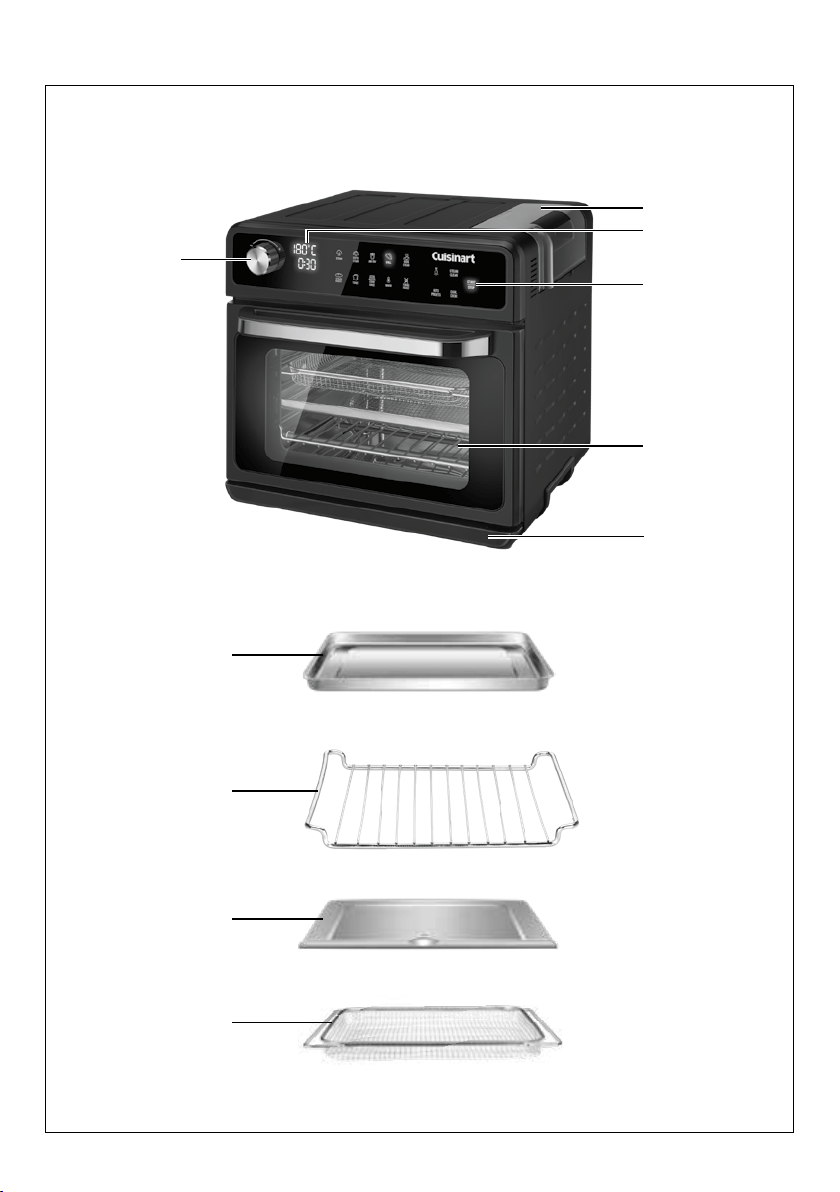
PARTS & FEATURES

7
1. Water Reservoir
1L removable water tank (BPA Free) used for all functions that require steam as
well as for oven steam cleaning.
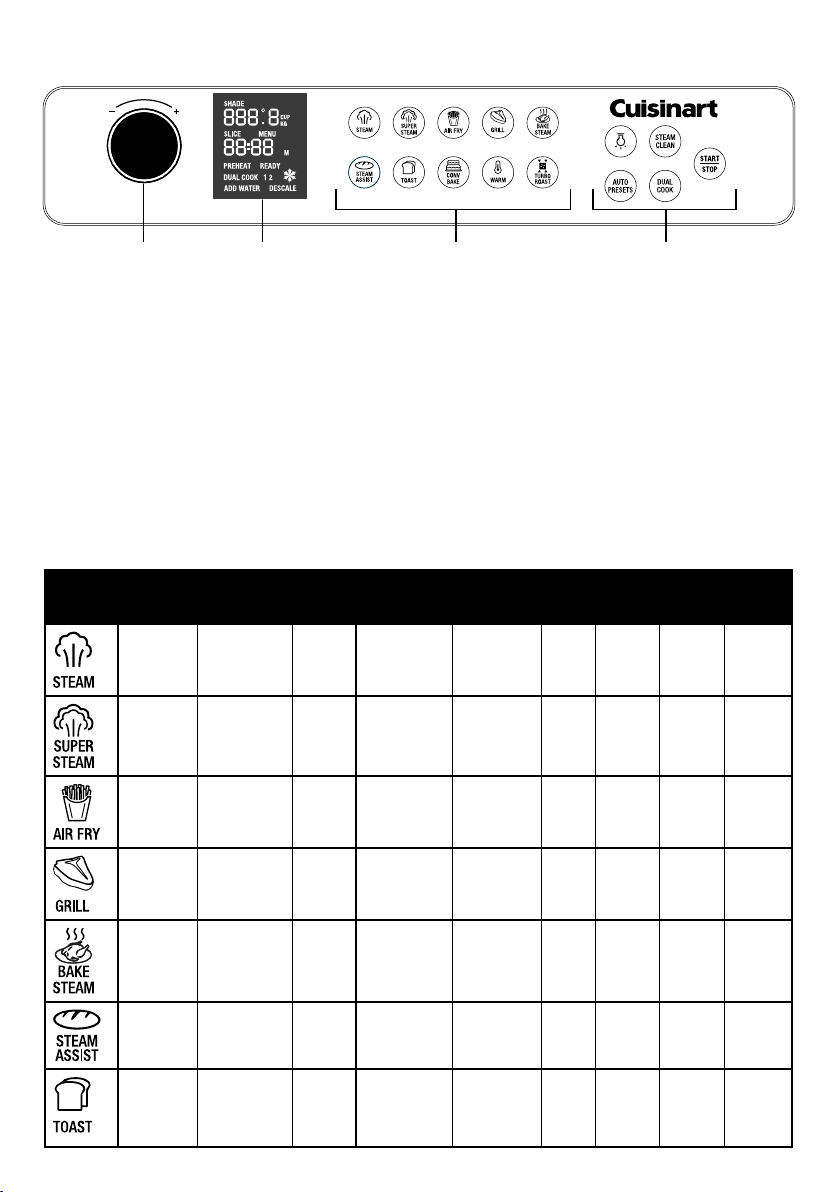
2. Touch Control Panel & LCD display
Displays information such as cooking mode, menu functions, pre-heating,
temperature, timer, oven light, steam cleaning, clock, water relling and
descaling reminders. See Getting to Know Your Control Panel on page 8.
Functions and settings are selected by pressing with your nger on the required
setting.
3. Selector Dial
Turn the dial to adjust options such as presets, temperature and time that
appear on the LCD screen, press the control dial to conrm the selection.
4. Drip tray
The drip tray comes already positioned in your oven & is designed to collect
excess liquid. The drip tray slides out from the bottom front of the oven.
5. Start/Stop
Starts & stops the active function, cooking time & temperature selected. Press
and hold the Start/Stop for 3 secs to turn the oven off and into standby.
6. Baking Tray
For use when baking or roasting. When air frying or grilling - always position
underneath the cooking basket to catch any crumbs/residue when using the
basket (see page 10).
7. Oven Rack
Three shelf positions for multiple cooking functions: See page 10.
8. Crumb Tray
Sits underneath the heating elements to catch crumbs. Always remove when
using the steam functions to allow excess water to exit the oven.
9. Cooking Basket
Use for air-frying, grilling or steaming.
10. Stainless Steel Interior
8
GETTING TO KNOW YOUR CONTROL PANEL
1. Selector Dial
Turn the dial to set the cooking time and temperature, adjust measurements eg weight in
preset menu, change the toast settings (toast color, number of slices) or set the clock.
Press down on the dial to conrm selection.
2. Control panel screen display
LCD display shows clock, temperature, cooking time, auto preset menu, measurement,
frozen, preheat, ready, add water, descale & dual cook.
3. 10 Cooking Functions
STEAM, SUPER STEAM, AIR FRY, GRILL, BAKE STEAM, STEAM ASSIST, TOAST,
CONV BAKE, WARM, TURBO ROAST.
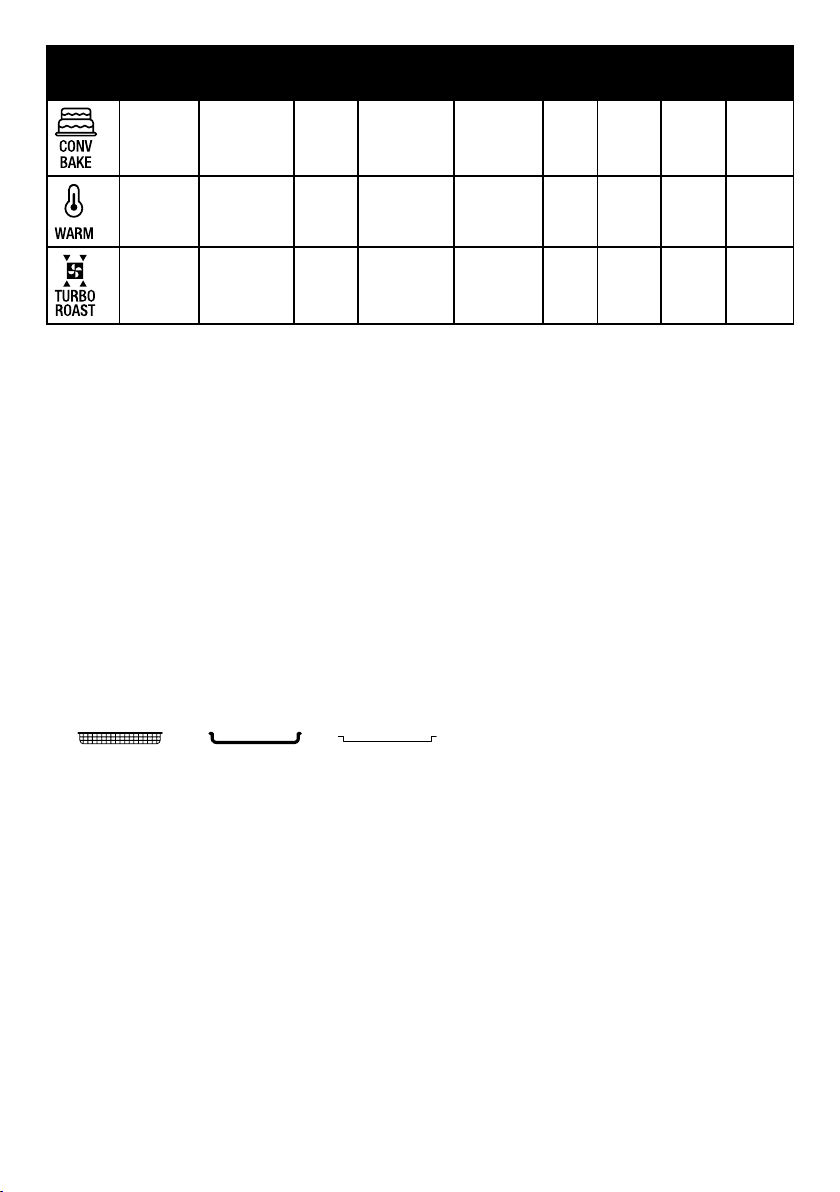
The default temperature and cooking time for each setting is shown in the table below.
These times and temperatures can be adjusted according to your preference.
FUNCTION DEFAULT
SETTING
TEMPERATURE
RANGE
TIME
RANGE
TEMPERATURE
INCREMENTS
CONVECTION
FAN SPEED
PRE-
HEAT
CHANGE
TEMP
CHANGE
TIME
REQUIRES
WATER IN
TANK
100
°C
30
MINS
40-100°C
1-60
MINS
5°C
LOW NO YES YES YES
120
°C
20
MINS
50-200°C
1-60
MINS
5°C
LOW NO YES YES YES
200
°C
20
MINS
180-230°C
1-45
MINS
10°C
HIGH NO YES YES NO
230
°C
20
MINS
FIXED AT
230°C
1-120
MINS
FIXED AT
230°C
LOW NO NO YES NO
180
°C
30
MINS
110-230°C
1-120
MINS
10°C
LOW NO YES YES YES
180
°C
20
MINS
50-230°C
1-120
MINS
5°C
LOW NO YES YES YES
SHADE: 4
SLICE: 3-4
FROZEN:
OFF
FIXED TEMP
LOW NO NO NO NO
3 421
9
4. Operational Functions plus Auto Pre-set Menu
The operational functions include Oven light, Steam Clean, Dual Cook and Start / Stop
START / STOP – Press once to start or pause the cooking function.
Press and hold for 3 secs to stop or cancel a cooking function
STEAM CLEAN – Injects steam into the oven to loosen any grease or residue on the inside
and allow for an easy wipe clean. The duration of the auto steam clean function is 45 minutes.
LIGHT – Activates the oven’s internal light for 2 mins at which time the light will switch off
automatically or press again to turn off.
DUAL COOK – Combines 2 cooking functions with temperature and timing to run
consecutively (refer to page 26).
AUTO PRESETS – Offers 20 default cooking menus (refer to page 21).
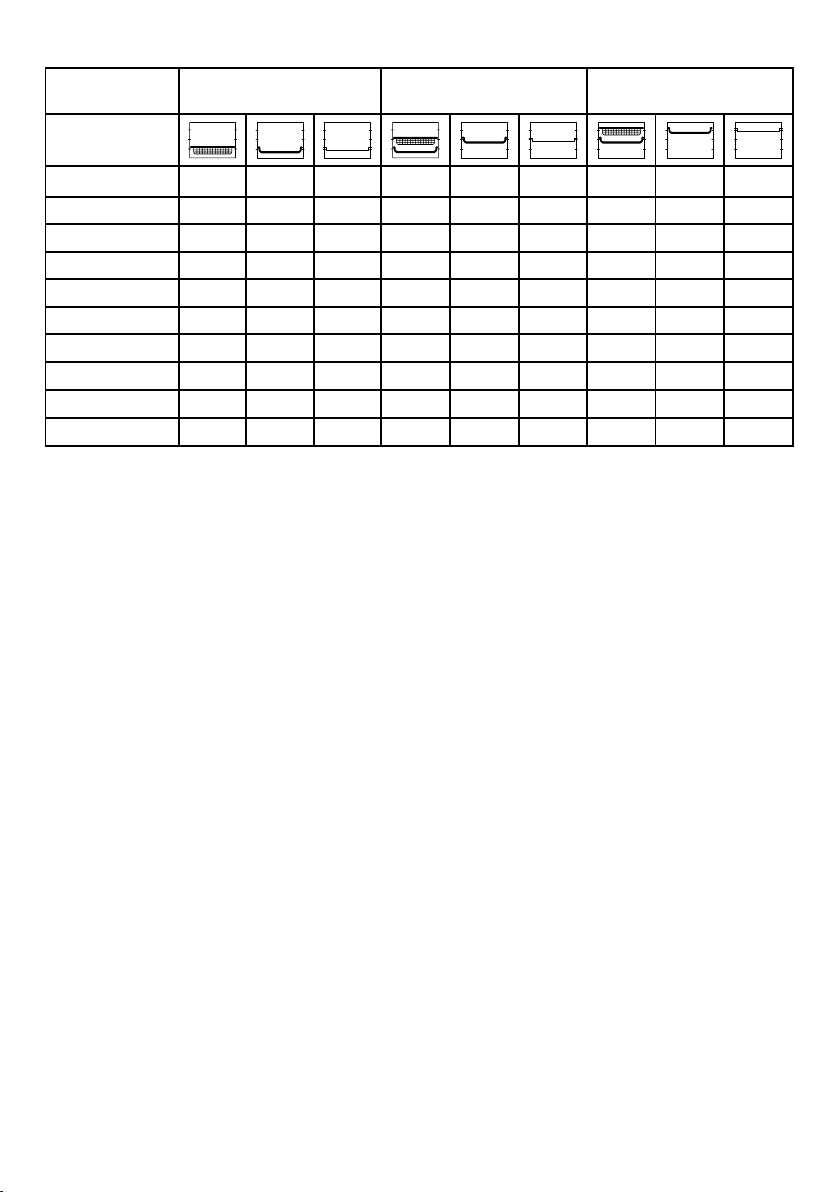
5. Oven Rack & Pan Positions
Please refer to the chart for suggested oven rack, baking tray/drip pan, and cooking
basket positions.
Rack position 1, 2 and 3 are marked on the right hand side of the door housing when the
door is open.
FUNCTION DEFAULT
SETTING
TEMPERATURE
RANGE
TIME
RANGE
TEMPERATURE
INCREMENTS
CONVECTION
FAN SPEED
PRE-
HEAT
CHANGE
TEMP
CHANGE
TIME
REQUIRES
WATER IN
TANK
180
°C
20
MINS
50-230°C
1-120
MINS
10°C
LOW YES YES YES NO
60°C
30
MINS
50-150°C
1-120
MINS
10°C
LOW NO YES YES NO
180
°C
20
MINS
180-230°C
1-120
MINS
5°C
HIGH YES YES YES YES
Oven
Rack
Baking Tray/Drip
Pan
Cooking
Basket
10
SUGGESTED RACK/PAN/BASKET POSITIONS
* Using suitable steaming trays or containers
WHEN COOKING WITH STEAM
The following functions require water in the reservoir to operate: STEAM, SUPER STEAM,
BAKE STEAM, STEAM ASSIST and TURBO ROAST. If no water is available (or runs out
during cooking), ADD WATER will display in the control panel screen display, and the oven
will continue to emit a prompt sound, at which point the machine will stop working. At this
point, please add water to the water tank. After adding water, press START / STOP, and the
oven will resume operation.
Fill the water reservoir with ltered water if using a function requiring steam. Remove
reservoir by lifting vertically, using the integrated handle. Invert and remove reservoir cap and
ll. Replace cap and return reservoir so that it is properly seated in its original position.
After using the Steam Oven, ensure the water reservoir is emptied.
IMPORTANT: Please note that many foods release water when they cook. When cooking
large quantities or foods that contain a high level of moisture, condensation is likely to build
up and escape from the oven. This could leave moisture on your benchtop.
Position 1
(Bottom shelf)
Position 2
(Middle shelf)
Position 3
(Top shelf)
Function
Steam
X X* X X X*
Super Steam
X X* X X X*
Air Fry
X X
Grill
X X X
Bake Steam
X X X X
Steam Assist
X X X X
Toast
X
Conv Bake
X X X X
Warm
X X X X
Turbo Roast
X X

11
OPERATING INSTRUCTIONS
When you use the oven for the rst time, once you have set up the clock, the touch screen
will be blank except for the Start/Stop light . To activate the functions screen press
START /STOP or turn the selector dial . The functions will illuminate to 50% brightness.
SETTING THE CLOCK
When the appliance starts for the rst time, it will display the clock and the hours in the
default time of 12:00 will be ashing.
To change the time:
1. Turn the selector dial to set the hour, then press the dial to conrm.
2. The minutes of the clock will now be ashing. Turn the selector dial to set the minutes
and press the selector to conrm.
3.
Turn the selector dial to toggle between showing PM and not showing anything (indicating AM).
NOTE: If no action is taken, the time will be automatically set to the current displayed time
after 5 seconds, and the system time will be in 12-hour format.
If you want to reset the time, press START / STOP while the oven is in standby mode to enter
sleep mode, and then press and hold the selector dial to adjust the clock.
The oven has 2 modes:
SLEEP/OFF MODE
When the oven is in SLEEP/OFF mode, only the clock will be visible. In sleep mode, the
appliance can be awakened and entered to standby mode by pressing the START / STOP
function or turning the control dial. The oven will then switch to stand by mode.
STANDBY MODE
In standby mode, all touch panel function buttons will light up to 50% brightness. At this
time, you can select the desired cooking mode or function to operate. If there is no operation
in standby mode, the machine will enter sleep mode after 5 minutes, or press START / STOP
to let the oven enter to sleep mode.
DIAL SELECTOR
This used to adjust to clock settings, temperature and time as well as select Auto Presets.
During a cooking function you can pause and add or reduce the cooking time or adjust
temperatures by turning the dial, the START/STOP will ash. The time remaining will also
ash. Turn the dial to adjust the time up or down then press the selector to conrm. The
temperature will now ash. Turn the dial to adjust the temperature up or down.
Press START / STOP to recommence the program function.
RETURNING TO STANDBY MODE DURING OPERATION
If at any stage you would like to cease cooking or cancel a function and return to the standby
mode to select another function, press and hold START / STOP down for 3 seconds. This will
end the current program and the unit will return to standby mode.
USING THE OVEN LIGHT
Touch the " " function on the control touch panel to turn the oven light on.
Touch the "
" function again to turn off the oven light.
NOTE: When the light is on it will automatically switch off after a period of 2 minutes. When
opening the oven door, the light automatically switches on.
12
CHANGING THE OVEN LIGHT BULB
WARNING: Always unplug the oven and allow to cool before replacing the bulb. Use only a
G9 type 220~240V 25W halogen bulb.
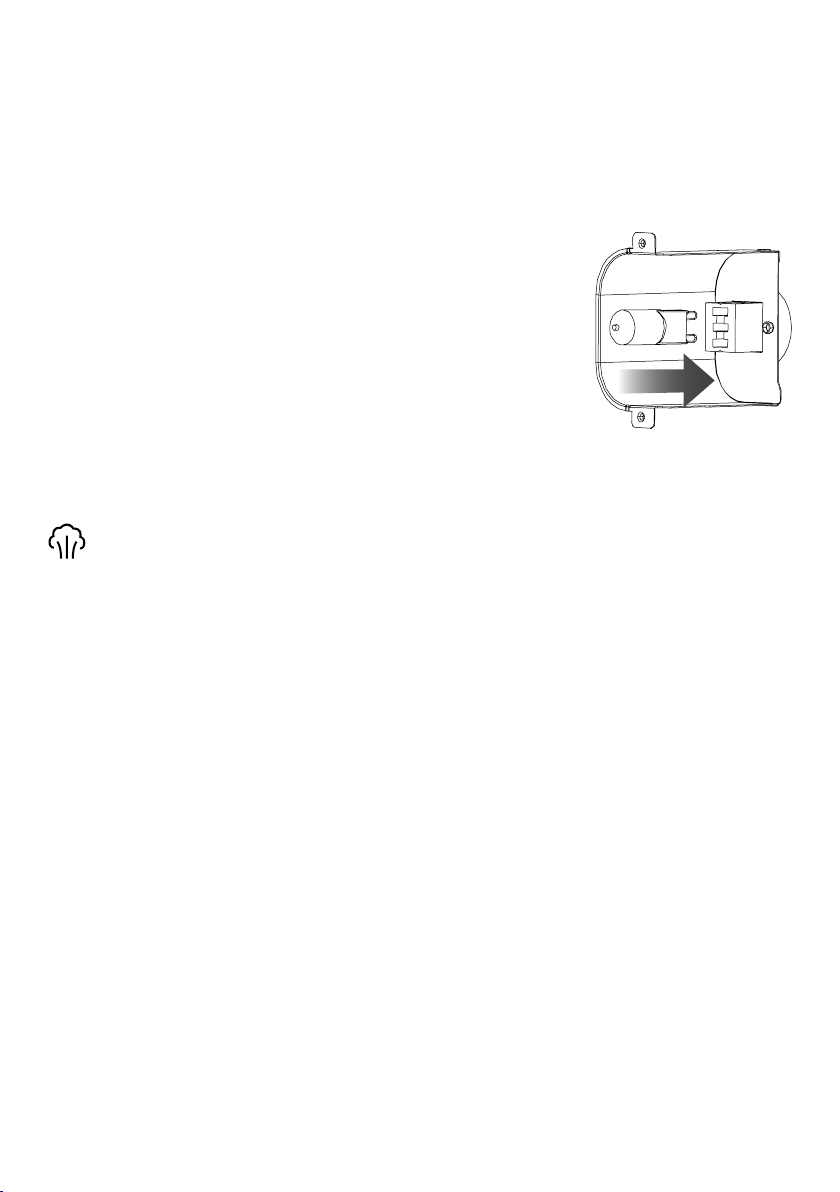
The light is positioned at the rear of the oven cavity on the right hand side, however access
to the light bulb is outside of the oven on the back wall.
As you look at the back of the oven, the removable back panel is located on the far left hand side.
The removable panel should be printed with “Lightbulb access” so that you can easily identify it.
To remove the panel, use a Phillips head screwdriver and turn
the screw anti-clockwise until loose. Once the panel has been
removed, you will see the lightbulb inside. To remove the light,
place your ngers on the outside of the light housing and gently
pull towards you.
To insert the new bulb, line up the bulb with the socket and push
into the socket gently.
To replace the removable panel, line the screw up with the hole
and use a Phillips head screwdriver to turn clockwise until the
panel is secured.
COOKING FUNCTIONS
STEAM
Suggested rack placement: position 1 or 2. Remove crumb tray.
When using this mode, please ensure that the water in the water tank is sufcient.
From standby mode:
1. Select Steam on the touch control panel. The Steam function will be solid at 100%
brightness. The default temperature for super steam is 100°C, and default time is 30
minutes, with an adjustable temperature range of 40-100°C and an adjustable time range
of 1-60 minutes.
2. Rotate the selector dial to adjust the cooking temperature and press to conrm.
3. Rotate the selector dial again to adjust the cooking time and press START / STOP to
start steaming.
There is no preheating of the oven required on the steam function - food should be placed in
oven before selecting cooking function and pressing START, as preheat time is minimal and
incorporated into overall cooking time.
To PAUSE cooking press START / STOP. To RESUME cooking press START / STOP again.
The timer display will countdown while cooking is in progress so that you are aware of the
cooking time remaining. When the program is nished, the oven will BEEP 3 times to indicate
that the program is complete. The oven will then automatically return to standby mode.
IMPORTANT: Remove drip tray and empty before using this function.
13
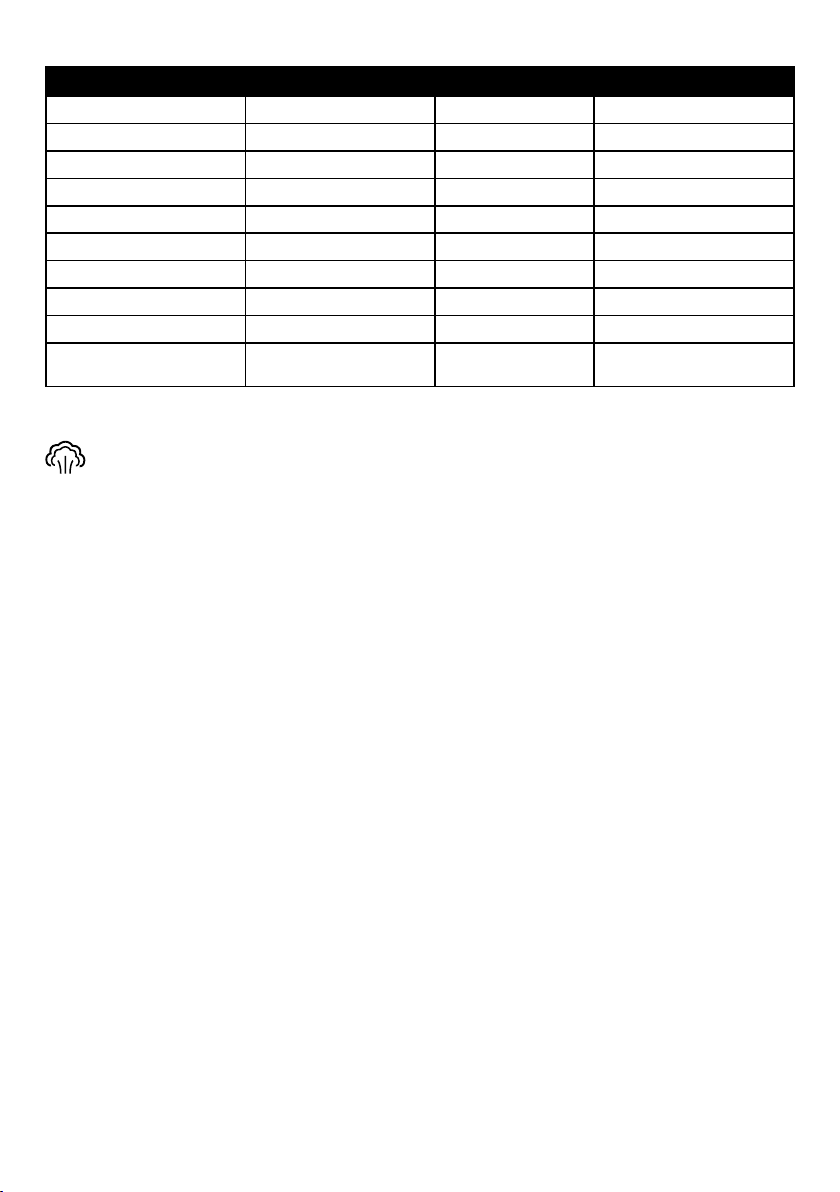
STEAMING COOKING CHART
SUPER STEAM
Suggested rack placement: position 1 or 2. Remove crumb tray.
Super Steam uses steam plus the additional heat of the top elements. It is the perfect setting
for steamed vegetables and cooking rice and custards. Put vegetables in the lower or middle
rack position and set up to 120°C for at least 20 minutes.
When using this mode, please ensure that the water in the water tank is sufcient.
From standby mode:
1. Select Super Steam on the touch control panel. The Super Steam function will be solid
at 100% brightness. The default temperature for super steam is 120°C, and default time
is 20 minutes, with an adjustable temperature range of 50-200°C and an adjustable time
range of 1-60 minutes.
2. Rotate the selector dial to adjust the cooking temperature and press to conrm.
3. Rotate the selector dial again to adjust the cooking time and press START / STOP to
start steaming.
There is no preheating of the oven required on the super steam function - food should be
placed in oven before selecting cooking function and pressing START, as preheat time is
minimal and incorporated into overall cooking time.
To PAUSE cooking press START / STOP. To RESUME cooking press START / STOP again.
The timer display will countdown while cooking is in progress so that you are aware of the
cooking time remaining. When the program is nished, the oven will BEEP 3 times to indicate
that the program is complete. The oven will then automatically return to standby mode.
IMPORTANT: Remove drip tray and empty before using this function.
STEAMING TIPS
It is recommended that vegetables, seafood, and other proteins must use a steam
temperature of no less than 100°C.
Food Qty. Preparation Approx. Cooking Times
Artichokes 4 (large) Trimmed 100-120 mins
Asparagus 450g Trimmed 10-12 mins
Broccoli 2 cups 4cm florets 20 mins
Cauliflower 2 cups 4cm florets 20-25 mins
Corn 2 cobbs Husked 20 mins
Green Beans 2 cups Trimmed 15 mins
Snow Peas 2 cups Trimmed 10 mins
Potatoes (New) 450g Whole 40-45 mins
Prawns 500g (peeled) Peeled & devined 12-15 mins
Fish; Ocean Trout,
Salmon, Swordfish
500g
Cut into portion
sizes
18-20 mins

14
• When cooking all vegetables/proteins, we recommend placing the ingredients on a
baking pan or suitable heatproof container and then placing them into the oven for
cooking.
• When cooking seafood, we recommend adding a small amount of wine or other avored
liquid to the bottom of the baking pan to enhance the avor.
• When cooking with steam, juices easily accumulate in the baking pan. If the baking pan
is lled with juice after cooking, please let it cool and carefully remove it.
Note: As Super Steam uses additional heat, never use any containers that aren't oven-proof.
AIR FRY
Air fried foods are a quick and healthy alternative to deep frying in oil. A high-speed fan and
multiple heating elements circulate hot air from the top down to prepare a variety of meals that
can be both delicious and healthier than traditional frying. Many foods that are usually fried
can be air-fried without using excess amounts of oil. Air-fried foods will taste lighter and be
less greasy than deep-fried foods. Air-frying doesn’t require oil, but a light spray can enhance
browning and crispiness. Use an oil sprayer or a non stick olive oil cooking spray to keep it
extra light, a pastry brush to evenly coat, or pour a little oil into a bowl, add food, and toss.
Suggested rack placement: position 3. Always use the provided cooking basket with the
baking tray on the shelf below to catch any crumbs.
From standby mode:
1. Select Air Fry on the touch control panel. The Air Fry function will be solid at 100%
brightness. The default temperature for air fry is 200°C, and default time is 20 minutes, with
an adjustable temperature range of 180 - 230°C and an adjustable time range of
1-45 minutes.
2. Rotate the selector dial to adjust the cooking temperature and press to conrm.
3. Rotate the selector dial again to adjust the cooking time and press START / STOP to start
air frying.
There is no preheating of the oven required on the air fry function - food should be placed in
oven before selecting cooking function and pressing START, as preheat time is minimal and
incorporated into overall cooking time.
To PAUSE cooking press START / STOP. To RESUME cooking press START / STOP again.
The timer display will countdown while cooking is in progress so that you are aware of the
cooking time remaining. When the program is nished, the oven will BEEP 3 times to indicate
that the program is complete. The oven will then automatically return to standby mode.

15
AIR FRY TIPS
Most oils can be used for air-frying. Olive oil is preferred for a richer avour. Vegetable,
canola or grapeseed oils are recommended for milder avours.
An assortment of coatings can be used on air fried foods. Some examples of different crumb
mixtures include;
- breadcrumbs,
- seasoned breadcrumbs
- panko breadcrumbs
- crushed cornakes
- crushed potato chips.
Various ours, including gluten-free, and other dry foods like cornmeal also work very well.
• Pre-spray the cooking basket to avoid any breaded or marinade coated food sticking to
the basket.
• Most foods do not need to be turned during cooking, but larger items, like chicken
drumsticks, should be turned halfway through the cooking cycle to ensure they are
evenly cooked with browning results.
• When air-frying large quantities of food such as chips that ll the basket, toss food
halfway through the cooking cycle to ensure evenly cooked results and browning.
• Use higher temperatures for foods that cook quickly, like bacon and chips.
• Use lower temperatures for foods that take longer to cook, like crumbed chicken.
• Foods will cook more evenly if they are cut into the same-size pieces.
16
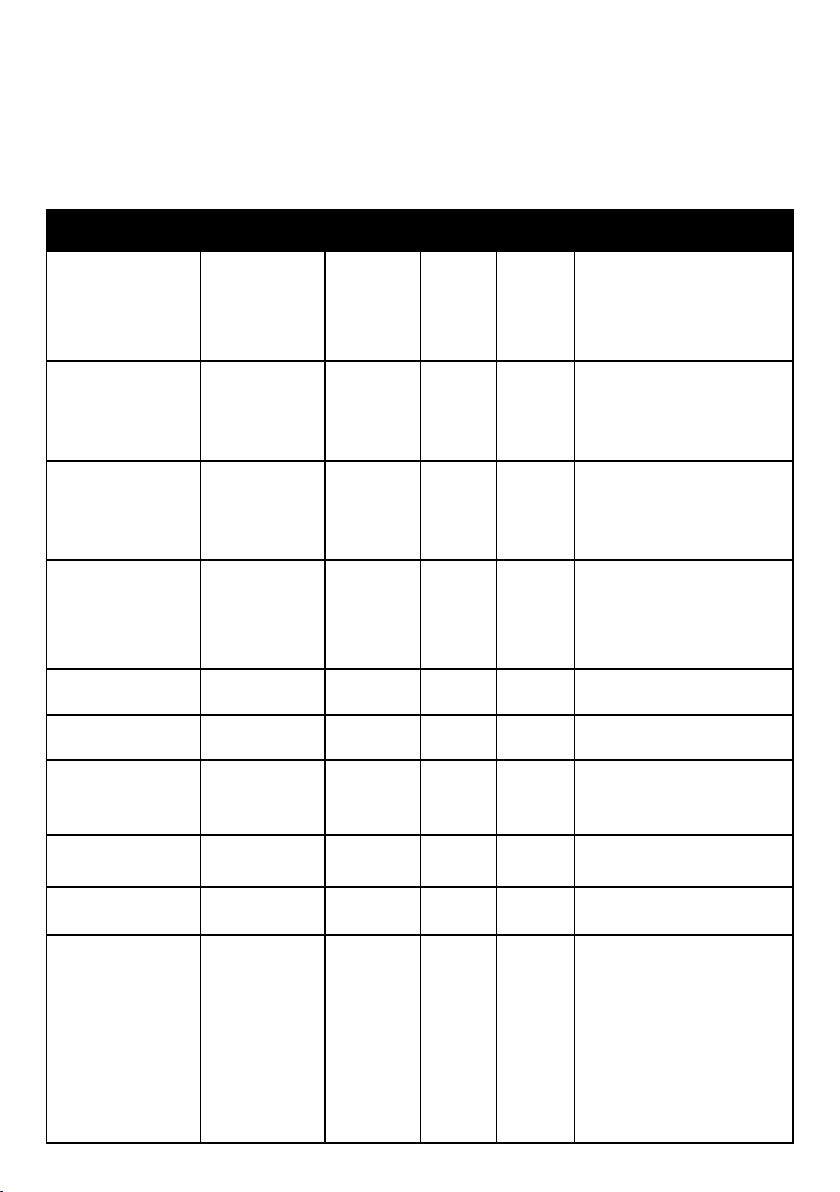
AIR FRYING COOKING CHART
The chart below lists recommended amounts, cooking times and temperatures for
various types of food that can be air-fried in the Gourmet Pro oven. If portions exceed
recommendations, you can toss occasionally while cooking to ensure crispiest, and even
browning results. Smaller amounts of food may require less time. For best air fry results, use
the oven light to periodically check on the cooking food.
We suggest using the upper position 3 for best results unless otherwise stated.
Food Recommended
Amount
Temperature Approx.
Time
Shelf
Position
Cooking
Instruction
Bacon
250g (about
5 rashers)
200°C
9 to 10
mins
3
Place bacon in the cooking
basket and place in shelf
position 3 ( top) with the
baking tray in position 2
(middle) to catch any fats.
Chicken Wings
900g (about 10) -
Max 1.4kg
200°C
20 to 25
mins
2
Avoid sugary marinades as
this may result in burning of
the sugar. Best cooked in a
single layer. Turn once during
last 5 mins of cooking
Frozen Chips/Fries 450g - 900g 220°C
12 to 25
mins
3
When cooking a larger volume
(Position 2) rack may be
required. Toss once during
cooking for even browning.
Frozen Wedges 450g - 900g 220°C
12 to 25
minutes
3
When cooking a larger volume
(Position 2) rack may be
required. Toss once during
cooking required for even
browning.
Frozen Snacks e.g.
Spring Rolls
500g 210°C
8 to 10
mins
2
Place in a single layer in
basket.
Frozen Chicken
Nuggets / Tenders
400g 220ºC 8 mins 2
Place in a single layer in
basket.
Frozen Fish Fingers 600g 220ºC
10
mins
2
Place in a single layer in
basket. Do not layer. Turn
after 5 mins.
Fresh Hand Cut Chips 450g - 900g 200°C
15 to 20
mins
2
Spray well with oil before
frying.
Frozen Salt & Pepper
Squid
500g 210°C
10
mins
2 Toss halfway
Quick roasted
vegetable medley e.g
Cut into cubes
Eggplant
Sweet Potato
Zucchini
Capsicum
Onion
500g 200°C
15-20
mins
2 or 3
Lightly spray with olive oil all
over vegetables. For slices cut
1-½cm thick and cook for 10
mins. For larger cut vegetables
4cm x 4cm cook for 15-20
mins. Use rack Position 3 for
thin slices , rack Position 2 for
thicker pieces of vegetables.
Turn halfway through cooking
to evenly brown.
17
TURBO ROAST
This function uses the unique combination of a high speed fan with convection heat and steam
to achieve a crisp outside, tender juicy inside and less time it takes to roast in a standard oven.
For a roast chicken quicker than ordering takeaway, use the "TurboRoast Chicken" Auto Pre-set
N.1 (page 21) to cook a roast you can boast in 40mins
(1.5kg or less size).
When using this mode, please ensure that water in the water tank is sufcient.
Suggested rack placement: position 1.
Turbo Roast has a preheating stage during which display will show PREHEAT; once preheat is
complete, the oven will beep. Display will show READY and the countdown timer will begin.
From standby mode:
1.
Select Turbo Roast on the touch control panel. The function will be solid at 100% brightness.
The default temperature for Turbo Roast is 180°C, and default time is 20 minutes, with an
adjustable temperature range of 180-230°C and an adjustable time range of 1-120 minutes.
2. Rotate the selector dial to adjust the cooking temperature and press to conrm.
3. Rotate the selector dial again to adjust the cooking time and press START / STOP to start
preheating.
4.
Once the oven has preheated and display shows ready. Add food to the oven.
To PAUSE cooking press START / STOP. To RESUME cooking press START / STOP again.
The timer display will countdown while cooking is in progress so that you are aware of the
cooking time remaining. When the program is nished, the oven will BEEP 3 times to indicate
that the program is complete. The oven will then automatically return to standby mode.
Cooking tip:
Standing a roast loosely covered with foil before carving after cooking is recommended
highly to all the meat to rest and the juices to be absorbed into the cooked esh. If cut
straight after cooking it is very common to see a lot of juices run from the meat and this
results in drier meat rather than delicious juicy meat.
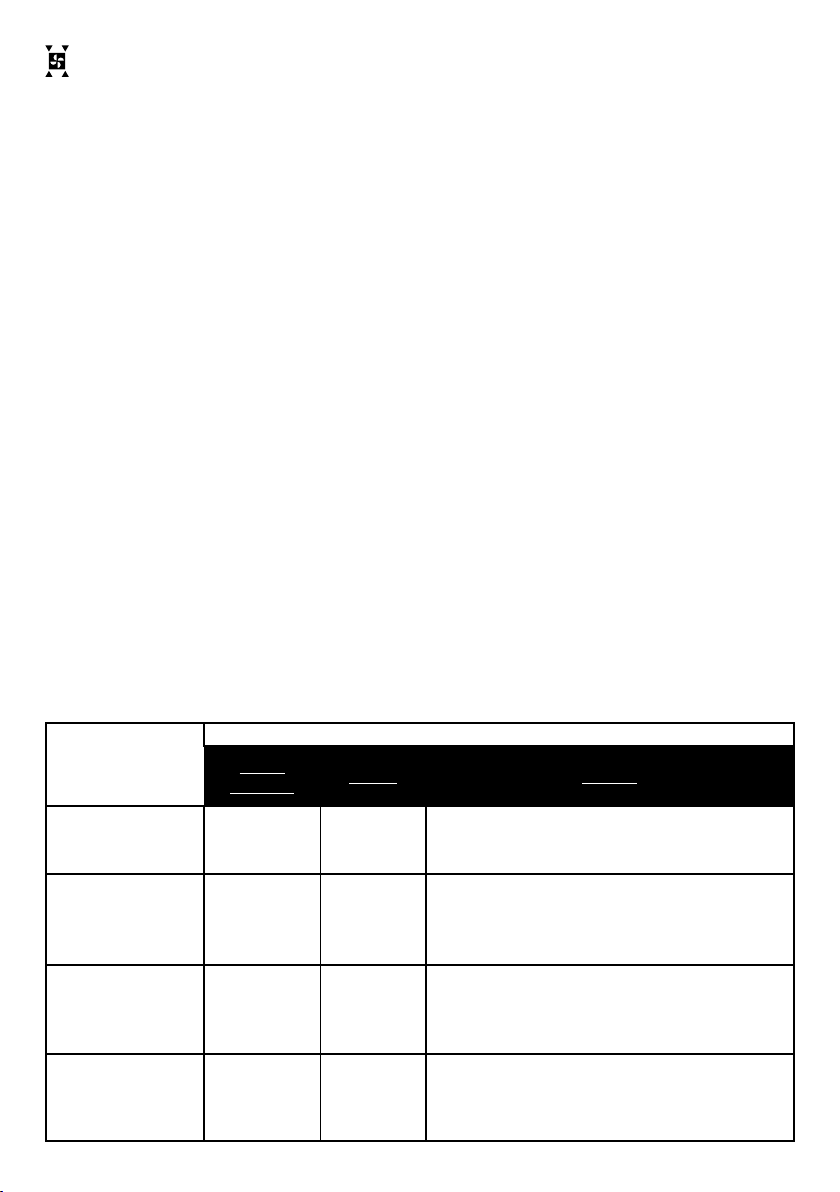
ROAST CHART
TURBO ROAST
TIME/
WEIGHT
TEMP. NOTES
Chicken
(Unstuffed)
15mins/500g 180°C For stuffed chicken adjust time: 20mins/500g
Beef
(Blade, Round)
Medium
20mins/500g
200°C
180°C
Preheat oven at 200°C
Reduce to 180°C & place beef in oven
Pork Loin
(Rolled or Bone-in)
Blush Pink
10mins/500g
230°C
180°C
Cook at 230°C for 25mins any size
Reduce to 180°C & cook for 10mins/500g
TIP: Go to page 26 to use the Dual Cook Function
Lamb
(On Bone)
Medium
20mins/500g 180°C

18
CONVECTION BAKE
Almost anything you bake in a standard oven can be baked in your Gourmet Pro oven, but
usually with reduced cooking time. Baking is recommended for a variety of foods you would
normally prepare in a conventional oven such as cakes, cookies, custards, pies and breads.
Convection bake has a preheating stage during which display will show PREHEAT; once
preheat is complete, the oven will beep. Display will show READY and the countdown timer
will begin.
NOTE: Use the recipe and temperature you would use in a standard oven, however, baking
time may need to be shortened. It is recommended to check food at least 10 minutes prior
to the baking time specied in the recipe. Cakes may benet by covering with foil half way
through baking to prevent cracking or overcooking on the top.
Suggested rack placement: position 1.
From standby mode:
1. Select Convection Bake on the touch control panel. The Convection Bake function will
be solid at 100% brightness. The default temperature for Convection Bake is 180°C, and
default time is 20 minutes, with an adjustable temperature range of 50 - 230°C and an
adjustable time range of 1-120 minutes.
2. Rotate the selector dial to adjust the cooking temperature and press to conrm.
3. Rotate the selector dial again to adjust the cooking time and press START / STOP to start
preheating.
4. Once the oven has preheated the display will show ready. Add food to commence baking.
To PAUSE cooking press START / STOP. To RESUME cooking press START / STOP again.
The timer display will countdown while cooking is in progress so that you are aware of the
cooking time remaining. When the program is nished, the oven will BEEP 3 times to indicate
that the program is complete. The oven will then automatically return to standby mode.
BAKE STEAM
The combination of baking & steaming means crispy outside & juicy inside results, in less
time, using little to no oil when roasting with steam alone. Even & moist heat benets many
types of foods, from silky custards to effortless browned braised & tender dishes.
Suggested rack placement: position 1. Remove crumb tray.
This function can be used to reheat foods / leftovers without drying them out.
When using the Bake Steam mode, please ensure that water in the tank is sufcient.
From standby mode:
1. Select Bake Steam on the touch control panel. The Bake Steam function will start ashing.
The default temperature for Bake Steam is 180°C, and default time is 30 minutes, with an
adjustable temperature range of 110 - 230°C and an adjustable time range of 1-120 minutes.
2. Rotate the selector dial to adjust the cooking temperature and press to conrm.
3.
Rotate the selector dial again to adjust the cooking time and press START / STOP to start baking.
To PAUSE cooking press START / STOP. To RESUME cooking press START / STOP again.
The timer display will countdown while cooking is in progress so that you are aware of the
cooking time remaining. When the program is nished, the oven will BEEP 3 times to indicate
that the program is complete. The oven will then automatically return to standby mode.

19
STEAM ASSIST
The Steam Assist function simulates a bakers oven with an initial burst of steam followed
by convection baking for crispy crusts & perfectly soft risen interiors. Use the Steam Assist
function for other recipes that use yeast as the leavening agent and bakery / pastry items.
When using this mode, please ensure that water in the tank is sufcient.
Suggested rack placement: position 1.
From standby mode:
1. Select Steam Assist on the touch control panel. The Steam Assist function will be solid
at 100% brightness. The default temperature for Steam assist is 180°C, and default time
is 20 minutes, with an adjustable temperature range of 50-230°C and an adjustable time
range of 1-120 minutes.
2. Rotate the selector dial to adjust the cooking temperature and press to conrm.
3. Rotate the selector dial again to adjust the cooking time and press START / STOP to
start baking.
To PAUSE cooking press START / STOP. To RESUME cooking press START / STOP again.
The timer display will countdown while cooking is in progress so that you are aware of the
cooking time remaining. When the program is nished, the oven will BEEP 3 times to indicate
that the program is complete. The oven will then automatically return to standby mode.
GRILL
The Grill function is perfect for making open cheese melts, browning the top of lasagne or
grilling vegetables.
Suggested rack placement: position 2 or 3. Use the provided cooking basket with the baking
tray on the shelf below to catch any residue.
From standby mode:
1. Select Grill on the touch control panel. The Grill function will be solid at 100% brightness.
The temperature for Grill is 230°C, and default time is 20 minutes, with an adjustable time
range of 1-120 minutes.
2. Rotate the selector dial to adjust the cooking time and press START / STOP to start
grilling.
There is no preheating of the oven required on the grill function. Food should be placed in
oven before selecting cooking function and pressing START, as preheat time is minimal and
incorporated into overall cooking time.
To PAUSE cooking press START / STOP. To RESUME cooking press START / STOP again.
The timer display will countdown while cooking is in progress so that you are aware of the
cooking time remaining. When the program is nished, the oven will BEEP 3 times to indicate
that the program is complete. The oven will then automatically return to standby mode.

20
TOAST
Suggested rack placement: position 2. Place in middle shelf. Both top and bottom elements
activate.
From standby mode:
1. Select Toast on the touch control panel. The Toast function will be solid at 100%
brightness.
The default number of bread slices is 3-4 pieces and the default toast shade is 4.
2. Rotate the selector dial to adjust the shade colour from 1-7. Shade 1 is the lightest shade,
and shade 7 the darkest. Press the selector dial to conrm.
3. Rotate the selector dial again to adjust the number of bread slices. Select from 1-2,
or 5-6 slices. Press the selector dial to conrm.
4. If the bread is frozen, rotate the dial again to select the frozen bread option.
A snowake icon will appear if the frozen function is selected. Press the selector dial to
conrm and press START/STOP to start toasting.
To PAUSE toasting press START / STOP. If the bread is not frozen, press START/STOP to
start toasting. To RESUME cooking press START / STOP again.
The timer display will countdown while cooking is in progress so that you are aware of the
cooking time remaining. When the program is nished, the oven will BEEP 3 times to indicate
that the program is complete. The oven will then automatically return to standby mode.
NOTE: Use the crumb tray provided when cooking toast. For most even cooking, place the
toast in the centre directly onto the wire rack.
WARM
Suggested rack placement: position 1 or 2.
From standby mode:
1. Select Warm on the touch control panel. The Warm function will be solid at 100%
brightness.
The default temperature for Warm is 60°C, and default time is 30 minutes, with an
adjustable temperature range of 50-150°C and an adjustable time range of 1-120 minutes.
2. Rotate the selector dial to adjust the cooking temperature and press to conrm.
3. Rotate the selector dial again to adjust the cooking time and press START / STOP to start
warming.
To PAUSE cooking press START / STOP. To RESUME cooking press START / STOP again.
The timer display will countdown while cooking is in progress so that you are aware of the
cooking time remaining. When the program is nished, the oven will BEEP 3 times to indicate
that the program is complete. The oven will then automatically return to standby mode.
IMPORTANT - ELEMENT OPERATION
The oven uses an intuitive element control to adjust the usage of elements based on the
function selected and the temperature. As a result, not all elements will activate or may
turn off and on during the cooking cycle. Elements may also glow red, while others don't or
operate at a reduced power. This is normal operation.

21
AUTO PRESETS AND DUAL COOK FUNCTIONS
AUTO PRESETS
Auto presets take the guesswork out of cooking with in-built programs for the cooking
functions, times and temperatures for commonly cooked recipes such as roasts, lasagnes,
chips, rice, vegetables and cakes. Select the program number from the chart below, enter
the weight (or other details) when prompted, press START / STOP and let the oven do all of
the work (and cooking) for you!
USING THE AUTO PRESET MENU
From standby mode:
1. Select the Auto Preset function and the preset number will start ashing underneath the
MENU description in the control panel. Each preset number correlates to a built in menu
program which can be found in the Auto Preset Cooking Chart.
NOTE: The auto pre-set menu is printed on the inside of the oven door for your easy
reference.
2. Rotate the selector dial to select the desired menu number from 1-20, and press to conrm
selection.
3. For menu options that require a weight to be selected, the weight in kg will ash in the
control panel. Turn the selector dial to select the weight and press to conrm selection.
4. Press START/STOP to commence cooking.
A default total cooking time and temperature will display in the control panel. If you wish to
adjust the temperature up or down, press selector dial. The temperature will start to ash in the
display and at this point, you can use the selector dial to adjust the temperature up or down.
Press START / STOP again to re-commence cooking.
5. Throughout the cooking process press START / STOP to pause, and press again to resume
cooking.
6. For some of the preset functions, there are 2 cooking settings that have been automatically
programmed (for example bake steam at 180°C and then air fry at 230°C) The temperature
and total cooking time will display. When the oven automatically switches to the second
function, you will hear an audible beep, and the temperature will adjust to reect the new
setting.
7. After the program is nished, 3 BEEP audible sound will be heard, indicating that the
operation has been completed, and the oven will automatically return to standby mode.
IMPORTANT NOTE: At any time whether the oven is paused or working, press and hold
the START / STOP button for about 3 seconds to end the current program, and the oven
will return to standby mode.
TO ADJUST PRESETS
You can change the time or temperature of any auto presets at any time during the cooking.
Turn the selector dial to change the cooking time. To change the temperature, press the
selector dial, the temperature will ash. Turn the selector dial to increase or decrease. Press
START/STOP to recommence cooking.

22
AUTO PRESET COOKING MENU
Preset
No.
Menu
Preset
Description
Options
Shelf/
Rack
Position
Instructions
What you
need to
know
1
Turbo
Roast
Chicken
Turbo Fast
roasting with
steam, nished
off at a higher
temperature for
crispy skin
Select by Weight
1.5kg or less -
Default cooking
time 40 mins
2kg or less -
Default cooking
time 50 mins
2.5kg or less -
Default cooking
time 60 mins
Baking tray -
position 1
Ensure the water tank is full
before starting. Oven will
PREHEAT beforehand for a
few minutes. Add chicken
when it shows READY. Cover
chicken with foil to rest for 10
minutes for best results after
cooking.
Temperature
and times may
adjust on the
display whilst
cooking - this
is normal.
Temperature
and times can
be changed at
the start and
during cooking
if required.
2
Roast
Pork
Pork cooked
on high
temperature
for crispy
crackling and
nished by
roasting
Select by Weight
1.5kg or less -
Default cooking
time 70 mins
2kg or less -
Default cooking
time 80 mins
2.5kg or less -
Default cooking
time 90 mins
Baking tray -
position 1
Times & Temperature based
on medium / well done
- rolled pork loin. If you
prefer your meat medium
rare, please reduce
the cooking time by 10
minutes.
- rolled pork loin. Cover with
foil to rest for at least 10
minutes after cooking for
best results.
Temperature
and times can
be changed at
the start and
during cooking
if required.
3
Roast
Lamb
Lamb roasted
with added
steam for
moist tender
result
Select by Weight
1.5kg or less -
Default cooking
time 55 mins
2kg or less -
Default cooking
time 65 mins
2.5kg or less -
Default cooking
time 75 mins
Baking tray -
position 1
Ensure the water tank is
full before starting.Times
and Temperature based on
medium / well done - easy
carve leg bone out. If you
prefer your meat medium
rare, please reduce
the cooking time by 10
minutes.
Cover with foil to rest for
at least 10 minutes after
cooking for best results.
Temperature
and times can
be changed at
the start and
during cooking
if required.
4
Pork
Belly
High heat
for crispy
cracking
followed by
roasting
Select by Weight
1kg or less -
Default cooking
time 60 mins
1.5kg or less -
Default cooking
time 70 mins
2kg or less -
Default cooking
time 80 mins
Baking tray -
position 1
Times and temperature
based on medium / well
done pork belly. If you
prefer your meat medium
rare, please reduce
the cooking time by 10
minutes. Cover with foil to
rest for at least 10 minutes
after cooking for best
results.
Temperature
and times can
be changed at
the start and
during cooking
if required.
5
Roast
Beef
Beef roasted
with added
steam for
moist tender
result
Select by Weight
1.5kg or less -
Default cooking
time 60 mins
2kg or less -
Default cooking
time 70 mins
Baking tray -
position 1
Ensure the water tank is
full before starting.Times
& Temperature based on
medium / well done -beef
rump roast. If you prefer
your meat medium rare,
please reduce the cooking
time by 10 minutes.
Cover with foil to rest for
at least 10 minutes after
cooking for best results.
Temperature
and times can
be changed at
the start and
during cooking
if required.

23
Preset
No.
Menu
Preset
Description
Options
Shelf/Rack
Position
Instructions
What you
need to
know
6
Roast
vegetables
Baked
vegetables
with steam
nished with
a higher
temperature
for a crispy
result
1kg
Baking tray -
position 3
Ensure the water
tank is full before
starting.
Temperature
and times can
be changed at
the start and
during cooking if
required.
7 Pizza
High
temperature
for perfect
pizza results
Use a suitable 25cm
pizza tray
Oven rack -
position 2
Oven will PREHEAT
beforehand for a
few minutes. Add
Pizza when it shows
READY.
Temperature
and times can
be changed at
the start and
during cooking if
required.
8
Chicken
Drumsticks
Baked with
added steam
for tender
results.
Finished
with high
temperature
for crispy skin
1kg to 1.5kg
Cooking basket
in position 3
with baking
tray under
Ensure the water
tank is full before
starting. Note: Store
bought marinated
drumsticks need
to be monitored to
ensure skin does
not burn. May need
to consider reducing
temperature.
Temperature
and times can
be changed at
the start and
during cooking if
required.
9 Lasagne
Convection
cooking
2kg
Baking tray -
position 2
Pre-set is based on
2kg lasagne.
Temperature
and times can
be changed at
the start and
during cooking if
required.
10
Grilled
Fish
Grills sh and
nishes off
with a short
burst of air
fry for added
crisp and
browning
2cm thick
Cooking basket
in position 3
with baking
tray under
Based on fresh sh
llet around 2cm in
thickness.
Temperature
and times can
be changed at
the start and
during cooking if
required.

24
Preset
No.
Menu
Preset
Description
Options
Shelf/Rack
Position
Instructions
What you
need to
know
11
Frozen
Chips
High
temperature
for golden
crispy results
Select by Weight
500g or less - Default
cooking time 20 mins
900g or less - Default
cooking time 30 mins
Cooking basket
in position 3
with baking
tray underneath
For best results,
shake the basket
once half way through
cooking.
Temperature
and times can
be changed at
the start and
during cooking if
required.
12
Frozen
Snacks
High
temperature
for golden
crispy results
Select by Weight
500g or less - Default
cooking time 10 mins
900g or less - Default
cooking time 15 mins
Cooking basket
in position 3
with baking
tray underneath
For best results,
shake the basket
once half way
through cooking.
13
Chicken
Schnitzel
High
temperature
for golden
crispy results
500grams or 1kg
Cooking basket
in position 2
with baking
tray underneath
For best results
turn halfway during
cooking.
14
Steamed
Rice
Steamed for
light uffy
results
Cooking Rack
in position 3
Ensure the water
tank is full before
starting.
Ratio 1 cup rice to
1.5 cups of water.
Cover with foil to
steam.
15
Bread
Proong
Low
temperature
steaming for
the perfect
rise
Default 40°C
Baking tray -
position 1
Ensure the water
tank is full before
starting.
Temperature
can be adjusted
using the dial
selector.

25
Preset
No.
Menu
Preset
Description
Options
Shelf/Rack
Position
Instructions
What you
need to
know
16
Frozen
Dumplings
Steamed
dumplings
with a glossy
nish
500grams
Cooking rack
position 2
Ensure the water tank
is full before starting.
17 Cake
For baking
packet mixes
Cooking rack
position 1
Oven will PREHEAT
beforehand for a
few minutes. Add
cake pan when it
shows READY.
Use a 20cm
round cake pan
18
Baked
Custard
Steamed for a
silky result
Up to 5 ramekins
Cooking rack
position 2
For best results
turn halfway during
cooking.
Ensure the water
tank is full before
starting.
19
Plate
warming
Gently warms
a stack of
plates before
serving
Cooking rack
position1
Ensure the water
tank is full before
starting.
20
Bottle / Jar
Sterilsation
100
°
C Steam for
15 mins
Cooking Rack
in position 1
Ensure the water
tank is full before
starting.

26
DUAL COOK
Dual Cook is a special feature that enables you to combine two cooking functions with
different temperatures and timings and run them consecutively. This is ideal for recipes that
require multiple cooking steps, e.g.
• Starting a casserole or a dish like nachos, use CONV BAKE to heat through and then
switch to Grill for a melted and browned cheese top.
• Beginning a dish on a higher heat to achieve a crispy crust and then reducing temperature
for tender results similar to slow cooking.
• Baking a dish then switching to the Warm function to keep food ready until serving.
• Browning pork rind at a high temperature on Air Fry to produce crackling then switching to
the Turbo Roast function to complete cooking.
From standby mode:
1. Select Dual Cook on the touch control panel. The Dual Cook function will start be solid at
100% brightness and the screen will display “Dual Cook 1”.
Choose the rst cooking function from: STEAM, SUPER STEAM, AIR FRY, GRILL, BAKE
STEAM, STEAM ASSIST, CONV BAKE, WARM, or TURBO ROAST.
2. Rotate the selector dial to adjust the cooking temperature for the rst cooking function
and press to conrm.
3. Rotate the selector dial again to adjust the cooking time.
4. Press the selector dial again and the display will show “Dual Cook 2”.
Choose the second cooking function from: STEAM, SUPER STEAM, AIR FRY, GRILL,
BAKE STEAM, STEAM ASSIST, CONV BAKE, WARM, or TURBO ROAST.
5. Rotate the selector dial to adjust the cooking temperature for the second cooking
function and press to conrm. Rotate the selector dial to adjust the cooking time and
press START / STOP to begin cooking.
To PAUSE cooking press START / STOP. To RESUME cooking press START / STOP again.
The timer display will countdown each function ‘DUAL COOK 1’ and ‘DUAL COOK 2’ while
cooking is in progress so that you are aware of the cooking time remaining. The program
will automatically switch from Dual cook 1 to Dual cook 2. When the program is nished,
the oven will BEEP 3 times to indicate that the program is complete. The oven will then
automatically return to standby mode.
NOTE: If selecting cooking functions with steam, please ensure there is sufcient water in
the water reservoir.
NOTE: If at any stage you would like to cease cooking or cancel the function and return
to standby mode, press and hold START/STOP for 3 seconds. This will end the current
program.
27
CLEANING & MAINTENANCE
• Always wait for the machine to completely cool down before cleaning.
• Check and empty the drip tray before each use. This slides out of the front base of the
oven.
• Be sure to unplug the oven from the power socket.
• Do not use abrasive cleaners, which may damage the surface of the oven. When cleaning
the outer wall of the oven, simply wipe it with a clean, damp cloth and dry it thoroughly.
Apply detergent to a cleaning cloth before cleaning, not directly to the surface of the oven.
• When cleaning the inner walls, wipe with a damp microber cloth and a mild detergent
solution or with a sponge sprayed with a detergent solution.
• Do not use abrasive or corrosive cleaning products, which may damage the oven surface.
Do not use tools such as wire brushes to clean the inner walls of the oven.
• Baking pan, frying basket, and crumb tray should be hand-washed with a hot dish soap
solution or cleaned with a nylon pad or nylon brush. These parts are made of stainless steel
and are dishwasher safe.
• After cooking greasy food, it is important to clean the inside of the oven after cooling to
avoid steam melting grease affecting the cooking effect the next time you use it. Removing
grease helps keep the consistent cooking over time.
• When cleaning crumbs, pull out the crumb tray and empty it, wipe it clean and put it back
in place. To remove residual oil, soak the crumb tray in a hot detergent solution or wash it
with a non-abrasive detergent.
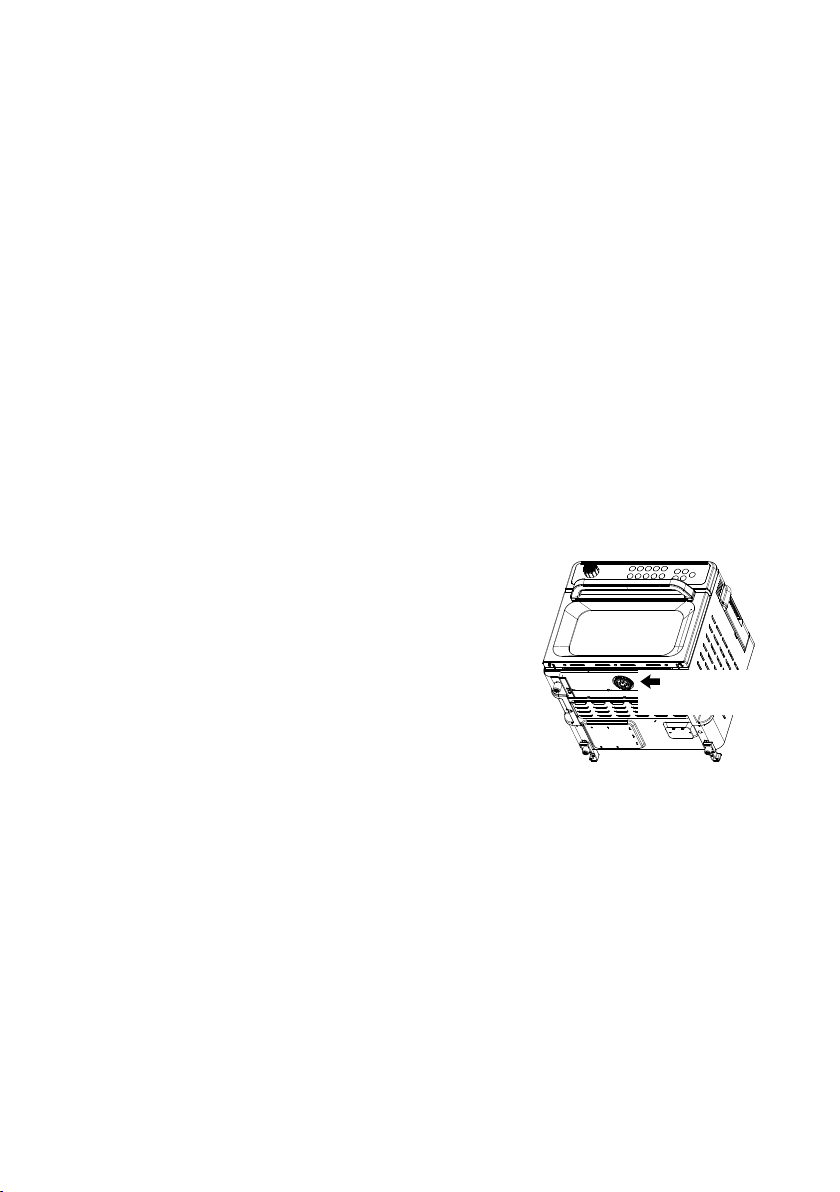
• Do not wrap cord around the machine. The cord storage
board on the rear side of the machine should be used.
• Other maintenance services shall be completed by
authorized maintenance personnel.
• When the drip tray is removed and emptied, it is also
recommended to regularly unscrew the black drip cover
located underneath the oven where the drip tray sits and
clean it with water and dishwashing liquid.
AUTO STEAM CLEAN
Remove crumb tray, rack, baking pan and cooking basket. Wash these separately.
From standby mode:
1. Select Steam Clean on the touch control panel. The Steam Clean function will be solid at
100% brightness. The default temperature for is 100°C, and default time is 45 minutes. The
temperature on STEAM CLEAN cannot be adjusted.
2. Press START / STOP to start steam cleaning.
To PAUSE cleaning press START / STOP. To RESUME cleaning press START / STOP again.
The timer display will countdown while cleaning is in progress so that you are aware of the
cooking time remaining. When the program is nished, the oven will BEEP 3 times to indicate
that the program is complete. The oven will then automatically return to standby mode.
Wipe out oven walls with a damp microber cloth and a mild detergent solution. Leave door
ajar to dry out.
Please unscrew for
cleaning drip cover

28
AFTER USING, THE STEAM FUNCTIONS OR SELF-CLEAN
• Always remove any excess water or moisture from the oven walls and racks using kitchen
paper or cloth after using any steam functions or self-clean.
• Leave the door in the ajar position to allow oven to air dry for a period.
• Ensure there is no moisture under the crumb tray. Remove the crumb tray when steaming
or using self-clean.
• Remove and empty the slide-out drip tray at the base of the oven after each use.
• We recommended emptying the water reservoir after each use.
• Replace with fresh water each time you need to use a steam function.
• When the drip tray is removed and emptied, it is also recommended to regularly unscrew
the black drip cover located underneath the oven where the drip tray sits and clean it with
water and dishwashing liquid.
• Altough tap water is ne, the use of ltered water in the water reservoir is preferred to
reduce scale buildup.
WATER SHORTAGE
If the water tank is short of water, "ADD WATER" will display in the control panel, and the
oven will continue to emit a prompt sound, at which point the machine will stop working.
At this point, please add water to the water tank. After adding water, press START / STOP,
and the oven will resume operation.
DESCALE
‘DESCALE 0:32’ will appear and ash with in the control panel display with a beeping sound
after 50 hours of steaming. When this appears you will need to decalcify the oven for the
display to stop ashing.
1. Fill the water tank with water and add an appropriate amount of distilled white vinegar to
the water reservoir. The ratio should be 1 cup vinegar to 1 cup water.
2. Press the Steam Clean function and the oven will automatically start the descaling
program.
3. After around 20 minutes when the rst stage of descaling is complete ‘Descale 0:12’ will
ashing with continuous beeping to alarm user to remove the water tank, rinse and add
clean fresh water.
4. Press ‘start/stop’ after adding fresh clean water to the tank to continue the process.
5. Once the process is complete, the oven will enter Standby Mode. Descaling program is
completed.
6. Remove the water tank and rinse out with fresh clean water.
7. Re-ll half the water reservoir with ltered water, install it back into the machine, select the
Steam function, and run for 30 minutes to remove residual vinegar from the oven.
8. Finally, use a clean cloth to dry the remaining water inside the oven.

29
TROUBLESHOOTING:
The oven is making a gurgling and/or
pumping sound during operation.
This is the operation of the steam pump and is completely
normal when using a function / preset using steam.
Why is my unit beeping? Steam reservoir is empty and will indicate 'ADD WATER'
on the display screen. Remove and rell with water, then
replace. See page 10 for instructions.
Why is water is leaking onto the counter? Drip tray is not in place, or it may be full. Always check
before each use and empty after use.
When cooking with high moisture
content foods, steam and moisture may
escape from the oven door.
This is normal operation.
The interior of the stainless steel oven is
showing marks/stains like rust.
Water heated and dried in the oven can create mineral
deposits that are brown in colour and look like rust. These
deposits can be cleaned off the surface but will return
during regular use. Water quality can vary in different
states so this may be more pronounced.
Can the crumb tray be left inside oven
when steaming/baking?
The crumb tray should be removed when steaming/
baking/roasting to allow any moisture content to exit via
the drainage hole on the base oor of the oven.
The oven elements don’t all glow red
when heating. Are they faulty?
The oven features smart temperature control that
regulates the number of elements used and adjusts the
temperature to ensure even heat. This means that not all
elements need maximum power at the same time and
certain elements will be off depending on the cooking
method selected.
Note the middle top element is designed to only operate
during the Air Fry function.
Steam escapes through the gaps around
the oven door.
When using steam-related functions, a large amount of
steam is generated in the oven cavity. This is normal and
some steam may escape around the door gap.
The fan is still working after cooking. Once you have nished cooking, the cooling fan will
continue to work between 5 to 10 minutes to cool down
the electronic components. Please do not unplug your
oven until the fan stops.

30
NOTES:

31
NOTES:

©2023 Cuisinart
Suite 101 Ground Floor 18 Rodborough Rd
Frenchs Forest NSW, 2086 Australia
Visit our Website: cuisinart.com.au
Printed in China
IB-23/169A