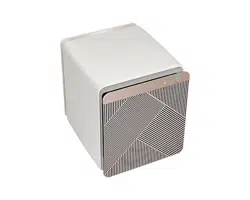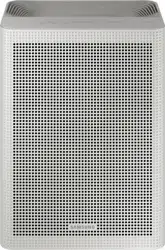
Air Purier
User Manual
AX53A9350GE / AX53B9350GG / AX53B9350GN
•
•
DB68-11328A-01_IB_ACR AX9500A_Small PET_SA_EN.indd 1DB68-11328A-01_IB_ACR AX9500A_Small PET_SA_EN.indd 1 2022-06-03 오전 8:34:542022-06-03 오전 8:34:54
2
Contents
Safety Information 3
Package Contents 7
Air Purifier Overview 8
Using the Air Purifier 18
Cleaning and Maintenance 22
Using the SmartThings App 25
Appendix 28
Correct Disposal of This Product
(Waste Electrical & Electronic Equipment)
(Applicable in countries with separate collection systems)
DB68-11328A-01_IB_ACR AX9500A_Small PET_SA_EN.indd 2DB68-11328A-01_IB_ACR AX9500A_Small PET_SA_EN.indd 2 2022-06-03 오전 8:34:542022-06-03 오전 8:34:54
3
English
Safety Information
Safety Information
WARNING
CAUTION
FOR INSTALLATION
WARNING
Only connect to a socket that can provide the rated power supply. Do not use the socket with other
products. Do not extend the power cord.
•
•
•
Do not install the air purier near a heat source and ammable objects, or in areas that are highly
humid or dusty. Avoid exposure to oil, gas, direct sunlight and water.
•
CAUTION
When installing the product, make sure that the power plug can be easily removed when needed.
•
Install the product on a solid at ground.
•
DB68-11328A-01_IB_ACR AX9500A_Small PET_SA_EN.indd 3DB68-11328A-01_IB_ACR AX9500A_Small PET_SA_EN.indd 3 2022-06-03 오전 8:34:542022-06-03 오전 8:34:54
4
English
Safety Information
Safety Information
Keep a safe distance from surrounding objects.
•
•
•
Make sure that the power cord is not pressed under the product.
•
FOR POWER SUPPLY
WARNING
Use a dry cloth to wipe the power plug and the contact area to keep them free from dust, water and
other undesirable substances.
•
Check the position of the power plug when you connect it to a socket.
•
Please contact your local Samsung Service Centre if the power plug or cord is damaged.
If the supply cord is damaged, it must be replaced by the manufacturer, its service agent or similarly
qualied persons in order to avoid a hazard.
Make sure that the power plug is securely tted in the socket. Do not use it when the plug or cord is
damaged.
•
When you disconnect the power cord, pull it by the plug. Do not pull the cord itself.
•
Do not forcibly bend, pull, twist or tie the power cord into a knot. Do not hang it on a metallic object or
put a heavy object on it. Do not put the cord in a small gap between heavy objects, or forcibly push it
behind the air purier.
•
This appliance has a polarized plug (one blade is wider than the other). To reduce the risk of electric
shock, this plug is intended to t a polarized outlet only one way. If the plug does not t fully in outlet,
reverse the plug. If it still does not t, contact a qualied electrician.
•
CAUTION
Remove the power plug of your air purier when it is not used for a period of time and during a
thunderstorm.
•
Product installation must be handled by ofcial Samsung service personnel or a certied local
technician to avoid power cord or plug damage, which can be dangerous.
Disconnect the air purier from the power source before cleaning or repairing.
DB68-11328A-01_IB_ACR AX9500A_Small PET_SA_EN.indd 4DB68-11328A-01_IB_ACR AX9500A_Small PET_SA_EN.indd 4 2022-06-03 오전 8:34:542022-06-03 오전 8:34:54
5
English
Safety Information
FOR USING
WARNING
If the product is exposed to water, immediately disconnect it from the power source and contact your
local Samsung Service Centre.
•
If you notice a noise, burning smell or smoke from the product, immediately stop using it and contact
your local Samsung Service Centre.
•
If there is gas leakage (e.g., city gas or propane gas) in the location where the product is used, do NOT
touch the product or power cord. Immediately open the windows to ventilate the location, and then
contact the gas service provider's agent or a qualied technical expert for assistance.
•
•
Do not pull out the power plug while operating the air purier.
•
Please contact your local Samsung Service Centre when you require repair service.
•
Do not handle the power plug with wet hands.
•
Do not strike the product with excessive force or pull or press the front panel forcefully.
•
Store the plastic package away from children or discard it according to the law.
•
Do not insert your nger or other objects into the air inlet or outlet.
•
•
Do not place an object near the air purier as children may use them to climb onto the product.
•
If the power plug area has contacted water, completely dry it before using the air purier again.
•
Do not insert a metal object and similar items inside the air purier.
•
Do not place a heavy object on the air purier.
•
To reduce the risk of re or electric shock, do not use this fan with any solid-state speed control device.
Not suitable for use with solid-state speed controls.
DB68-11328A-01_IB_ACR AX9500A_Small PET_SA_EN.indd 5DB68-11328A-01_IB_ACR AX9500A_Small PET_SA_EN.indd 5 2022-06-03 오전 8:34:542022-06-03 오전 8:34:54
6
English
Safety Information
Safety Information
If any of the electric components inside the air purier has contacted liquid or water, disconnect the
product from the power source and contact your local Samsung Service Centre.
•
Do NOT attempt to repair or modify the product.
•
•
CAUTION
Keep your air purier at least 7 feet away from a TV or other audio/visual media.
•
Operate the air purier with no obstacles in the vicinity.
•
•
Do not step on the product or place other objects on it (laundry, candles, burning cigarettes, plates,
medicine, metal items, air fresheners, etc.).
•
Do not tilt or ip the air purier while the power plug is connected to the socket.
•
Do not use bug repellent or other spray products on the air purier.
•
Do not submerge the air purier.
•
Do not handle the product with wet hands.
•
This appliance is not intended for use by persons (including children) with reduced physical, sensory or
mental capabilities, or lack of experience and knowledge, unless they have been given supervision or
instruction concerning use of the appliance by a person responsible for their safety. Children should be
supervised to ensure that they do not play with the appliance.
Cleaning and user maintenance shall not be made by children without supervision.
FOR CLEANING
WARNING
Do not apply water, benzene, thinner, alcohol, acetone or similar substances directly on the product.
•
Disconnect the product from the power source when cleaning. Wait for the fan to completely stop before cleaning.
•
CAUTION
Be sure to cut off all power sources before cleaning or any other maintenance work. Before connecting
power after maintenance, be sure to conrm that the product is assembled completely.
DB68-11328A-01_IB_ACR AX9500A_Small PET_SA_EN.indd 6DB68-11328A-01_IB_ACR AX9500A_Small PET_SA_EN.indd 6 2022-06-03 오전 8:34:552022-06-03 오전 8:34:55
7
English
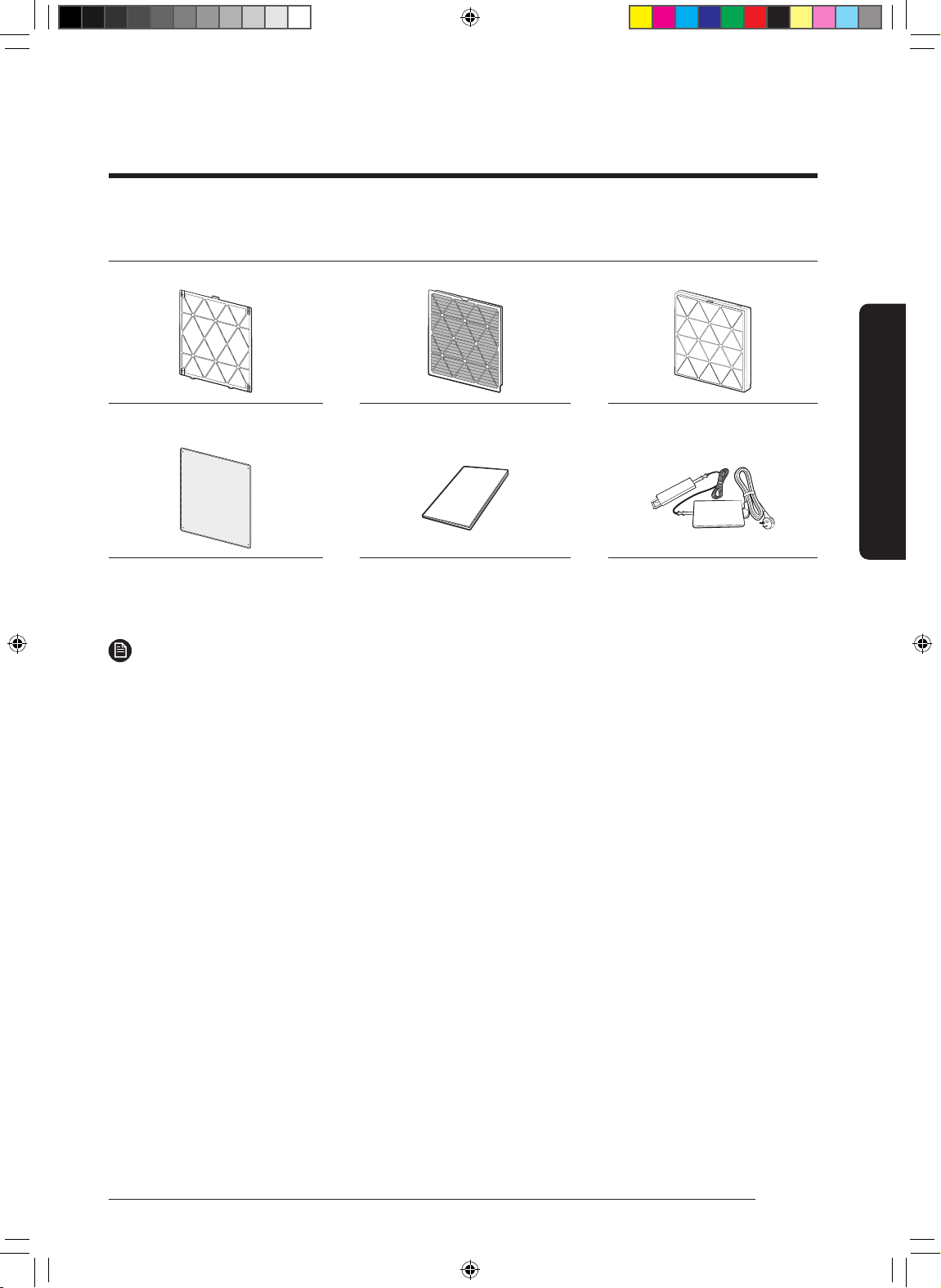
Package Contents
Package Contents
Accessories
NOTE
•
–
DB68-11328A-01_IB_ACR AX9500A_Small PET_SA_EN.indd 7DB68-11328A-01_IB_ACR AX9500A_Small PET_SA_EN.indd 7 2022-06-03 오전 8:34:552022-06-03 오전 8:34:55
8
English
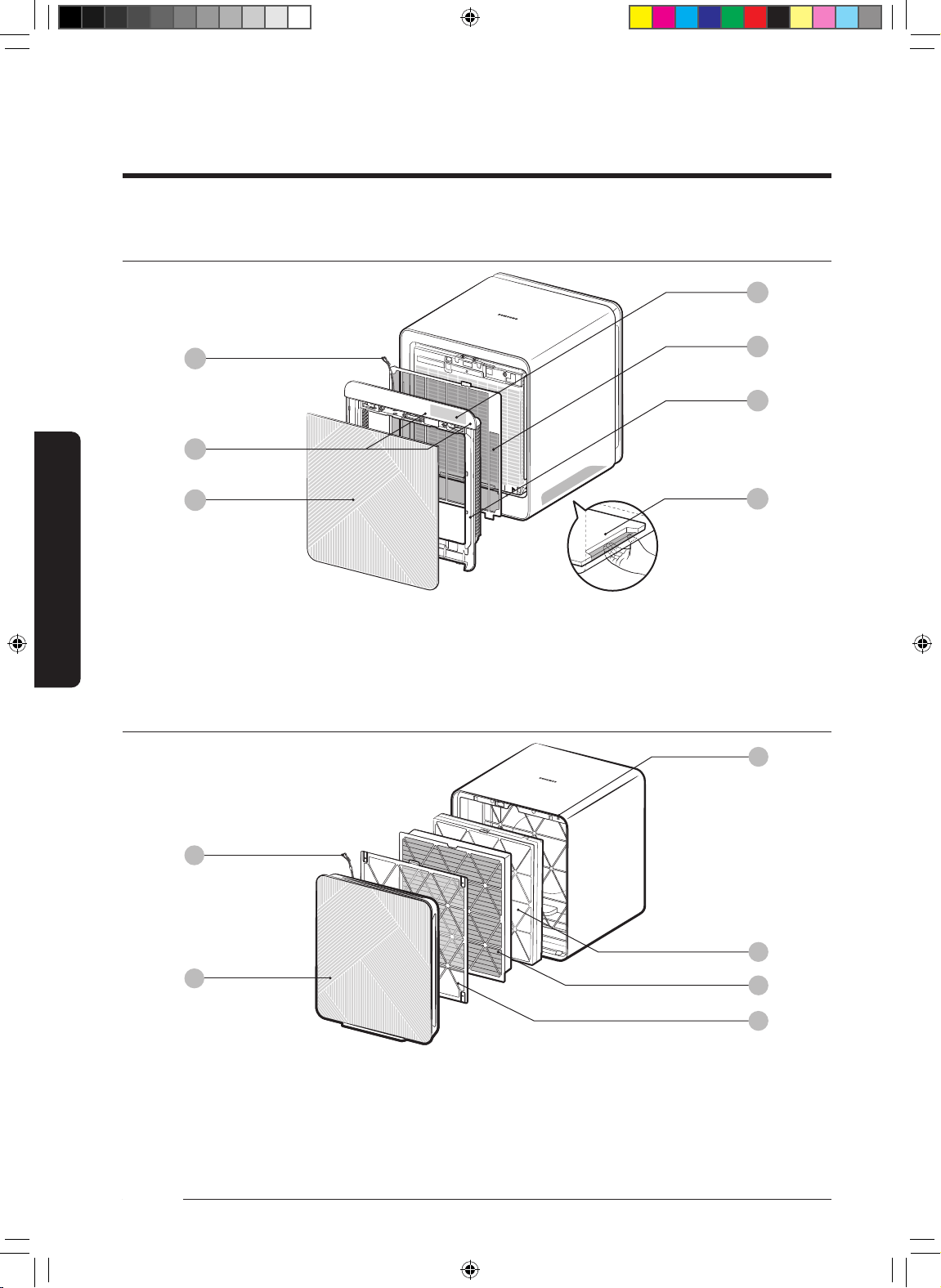
Air Purier Overview
01
02
03
04
05
06
Front of main unit
01
07
03
02
04
05
06
Air Purier Overview
01
02
Button unit
03
04
05
06
07
Air Purier Overview
Rear of main unit
04
05
06
02
03
01
DB68-11328A-01_IB_ACR AX9500A_Small PET_SA_EN.indd 8DB68-11328A-01_IB_ACR AX9500A_Small PET_SA_EN.indd 8 2022-06-03 오전 8:34:552022-06-03 오전 8:34:55
9
English
Air Purier Overview
01
•
•
•
02
•
•
* Mode button + Power button
•
03
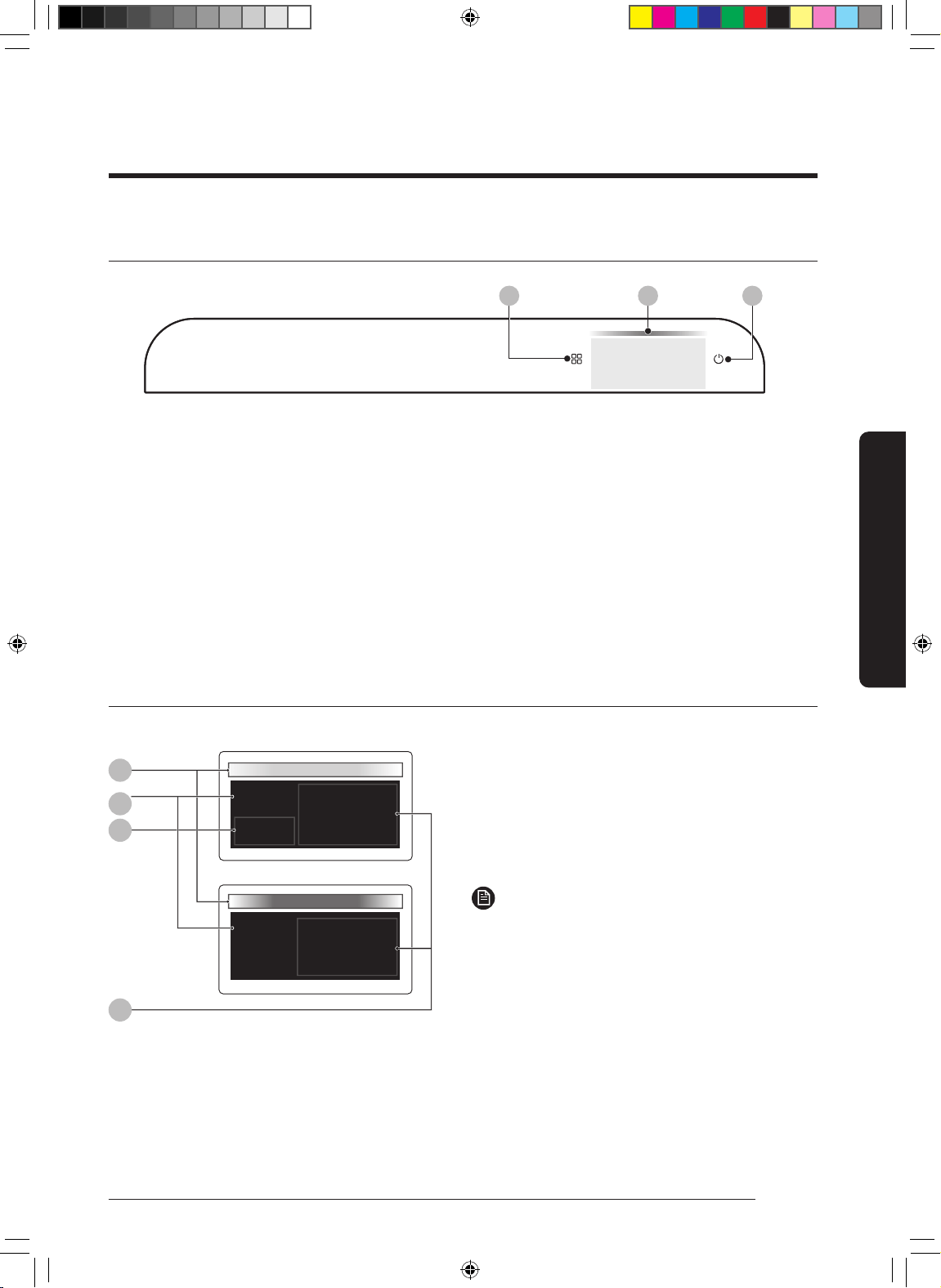
Display
03
01
125
Smart
PM10
GAS
Smart
04
02
PM10, PM2.5 and PM1.0 indication
GAS indication
01
02
03
04
NOTE
•
㎛
–
human hair
•
㎛
–
human hair
•
㎛
–
human hair
㎛
Button unit
01 02
Smart
PM10
5
03
DB68-11328A-01_IB_ACR AX9500A_Small PET_SA_EN.indd 9DB68-11328A-01_IB_ACR AX9500A_Small PET_SA_EN.indd 9 2022-06-03 오전 8:34:562022-06-03 오전 8:34:56
10
English
Air Purier Overview
Air Purier Overview
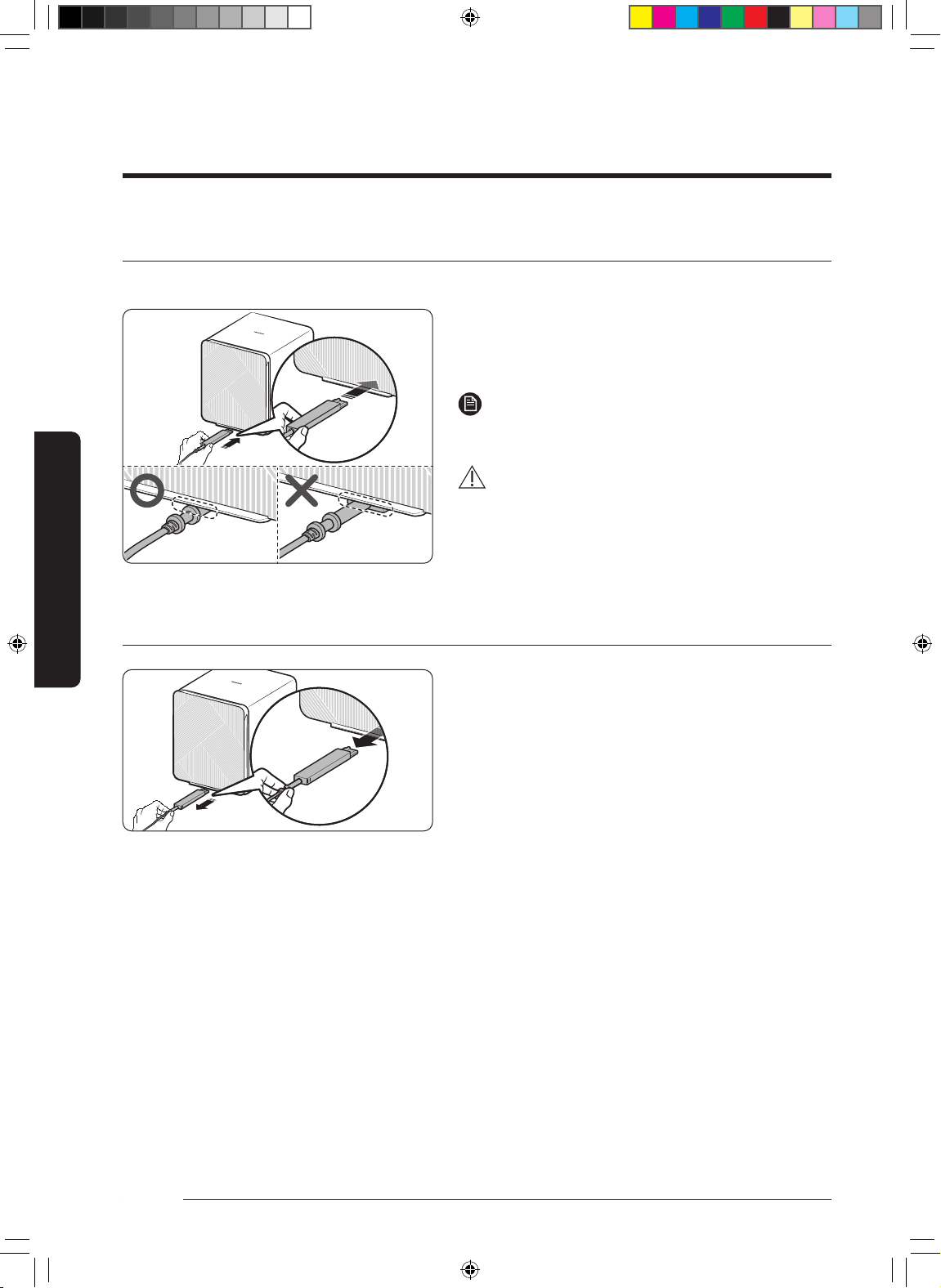
Connecting the power adapter
•
NOTE
•
CAUTION
•
•
Removing the power adapter
•
DB68-11328A-01_IB_ACR AX9500A_Small PET_SA_EN.indd 10DB68-11328A-01_IB_ACR AX9500A_Small PET_SA_EN.indd 10 2022-06-03 오전 8:34:562022-06-03 오전 8:34:56
11
English
Air Purier Overview
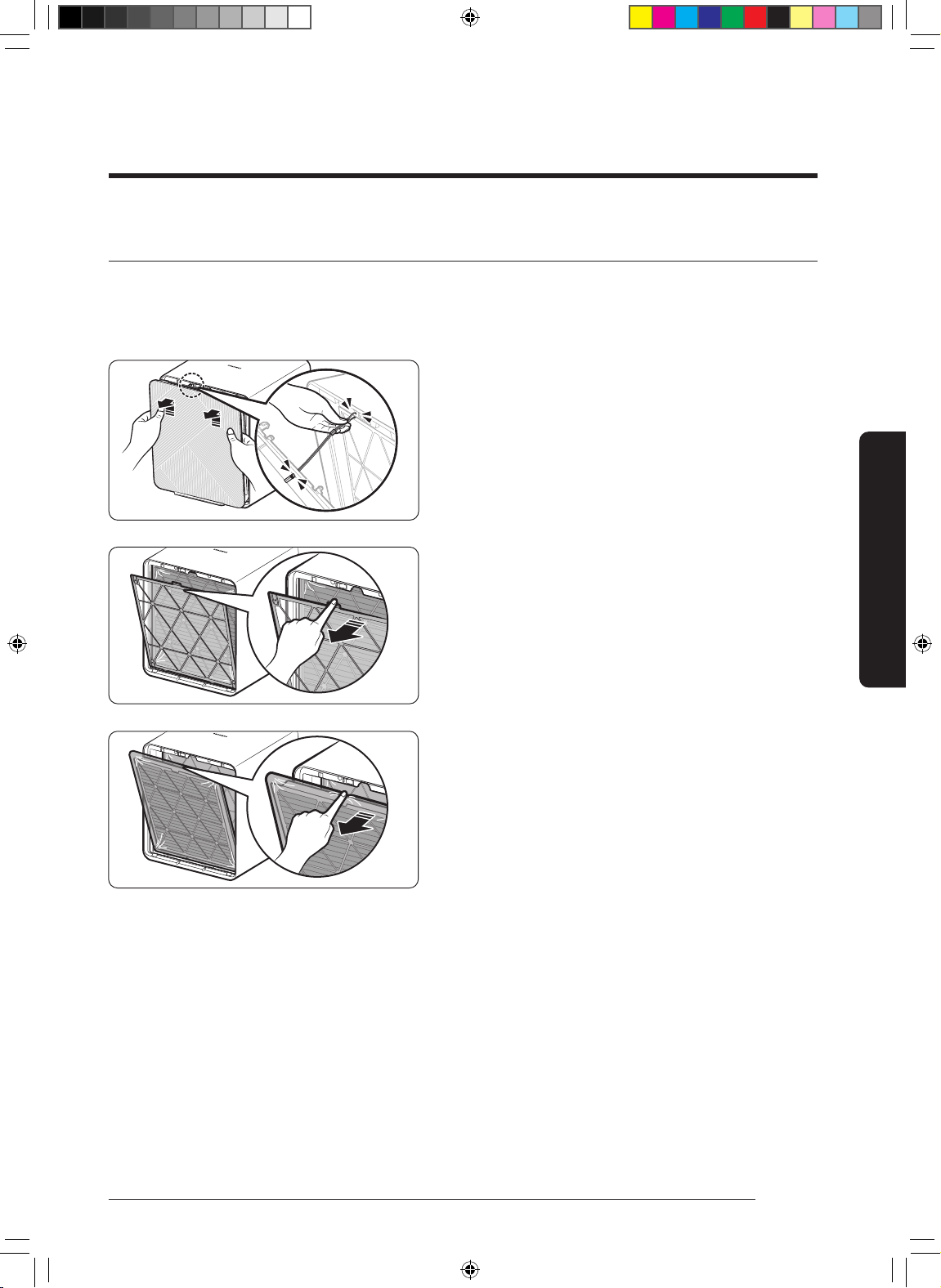
Removing the lters
STEP 1
•
•
STEP 2
STEP 3
DB68-11328A-01_IB_ACR AX9500A_Small PET_SA_EN.indd 11DB68-11328A-01_IB_ACR AX9500A_Small PET_SA_EN.indd 11 2022-06-03 오전 8:34:562022-06-03 오전 8:34:56
12
English
Air Purier Overview
Air Purier Overview
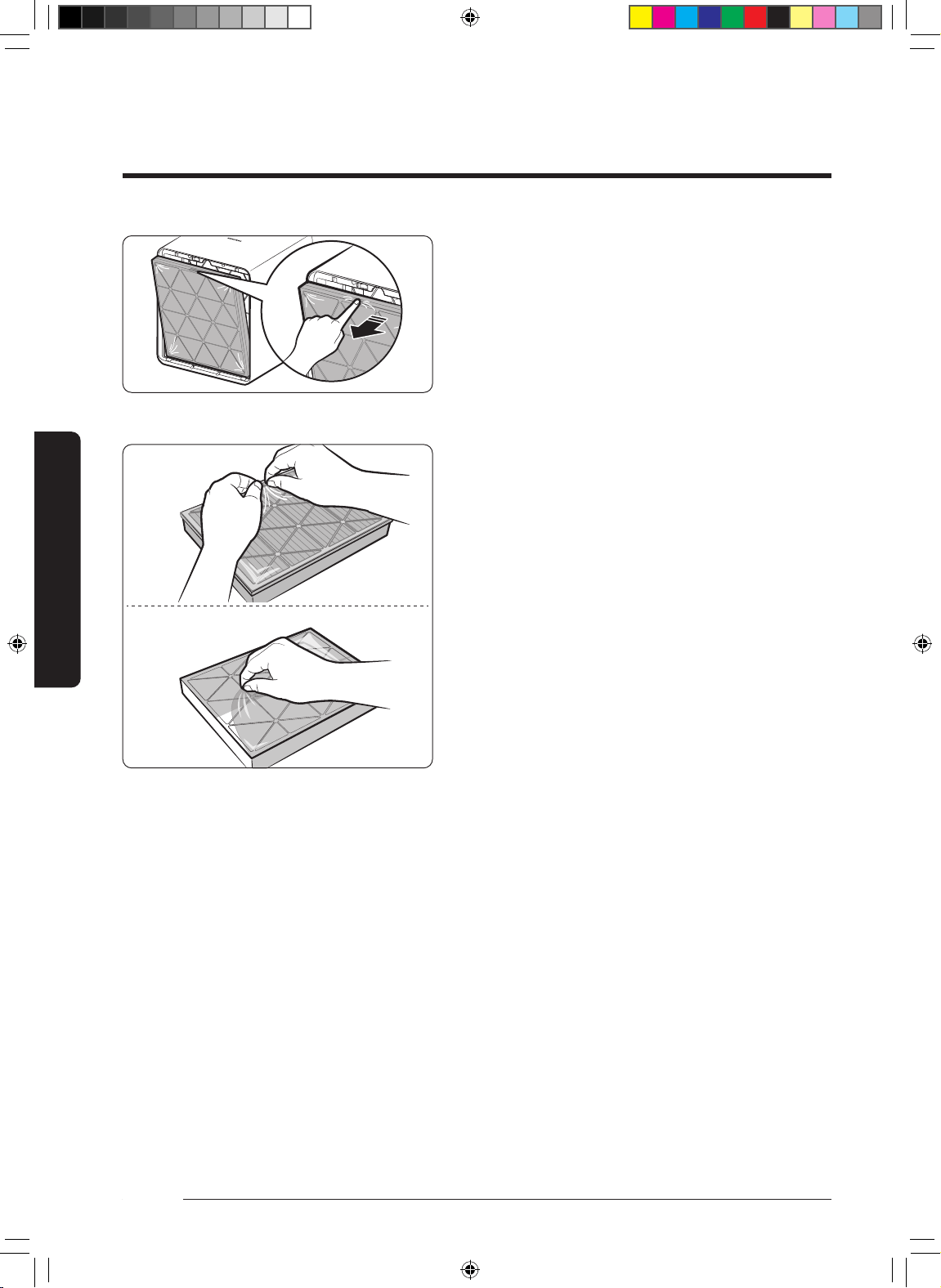
STEP 4
STEP 5
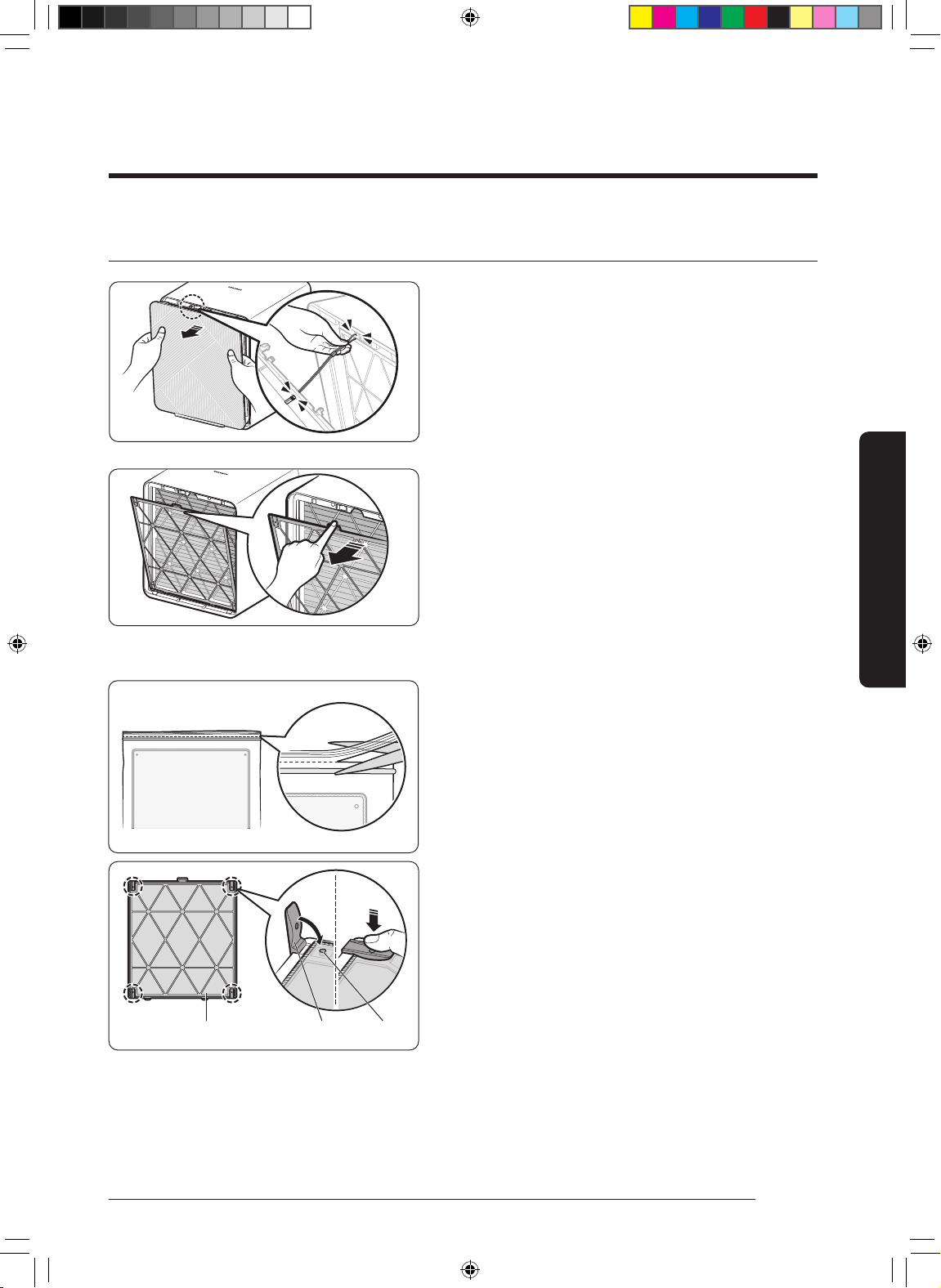
Pet Deodorization Filter
Dust Collecting Filter
DB68-11328A-01_IB_ACR AX9500A_Small PET_SA_EN.indd 12DB68-11328A-01_IB_ACR AX9500A_Small PET_SA_EN.indd 12 2022-06-03 오전 8:34:572022-06-03 오전 8:34:57
13
English
Air Purier Overview
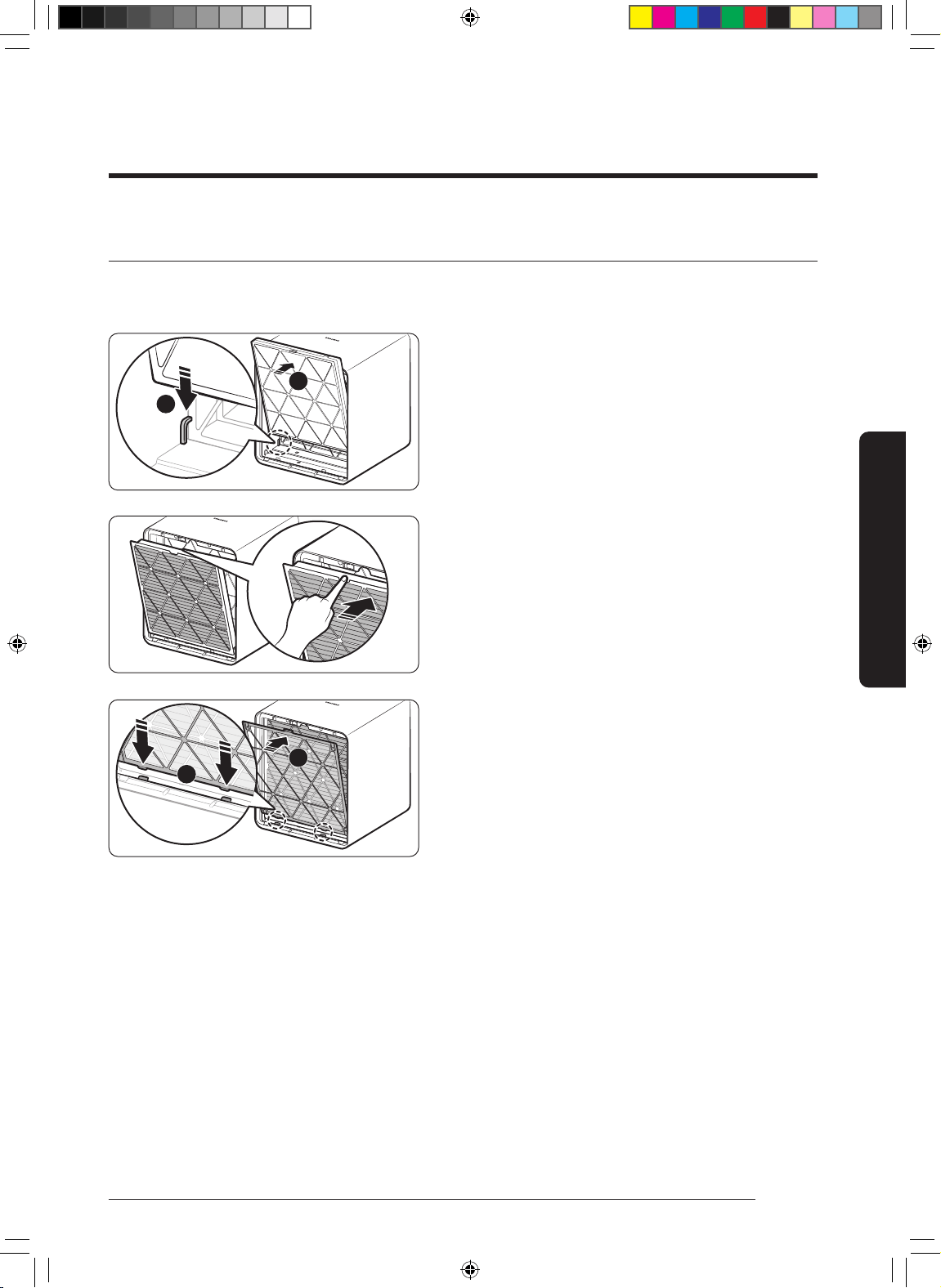
Attaching the lters
STEP 1
• Put (
②
①
•
STEP 2
STEP 3
•
②
①
1
2
1
2
DB68-11328A-01_IB_ACR AX9500A_Small PET_SA_EN.indd 13DB68-11328A-01_IB_ACR AX9500A_Small PET_SA_EN.indd 13 2022-06-03 오전 8:34:572022-06-03 오전 8:34:57
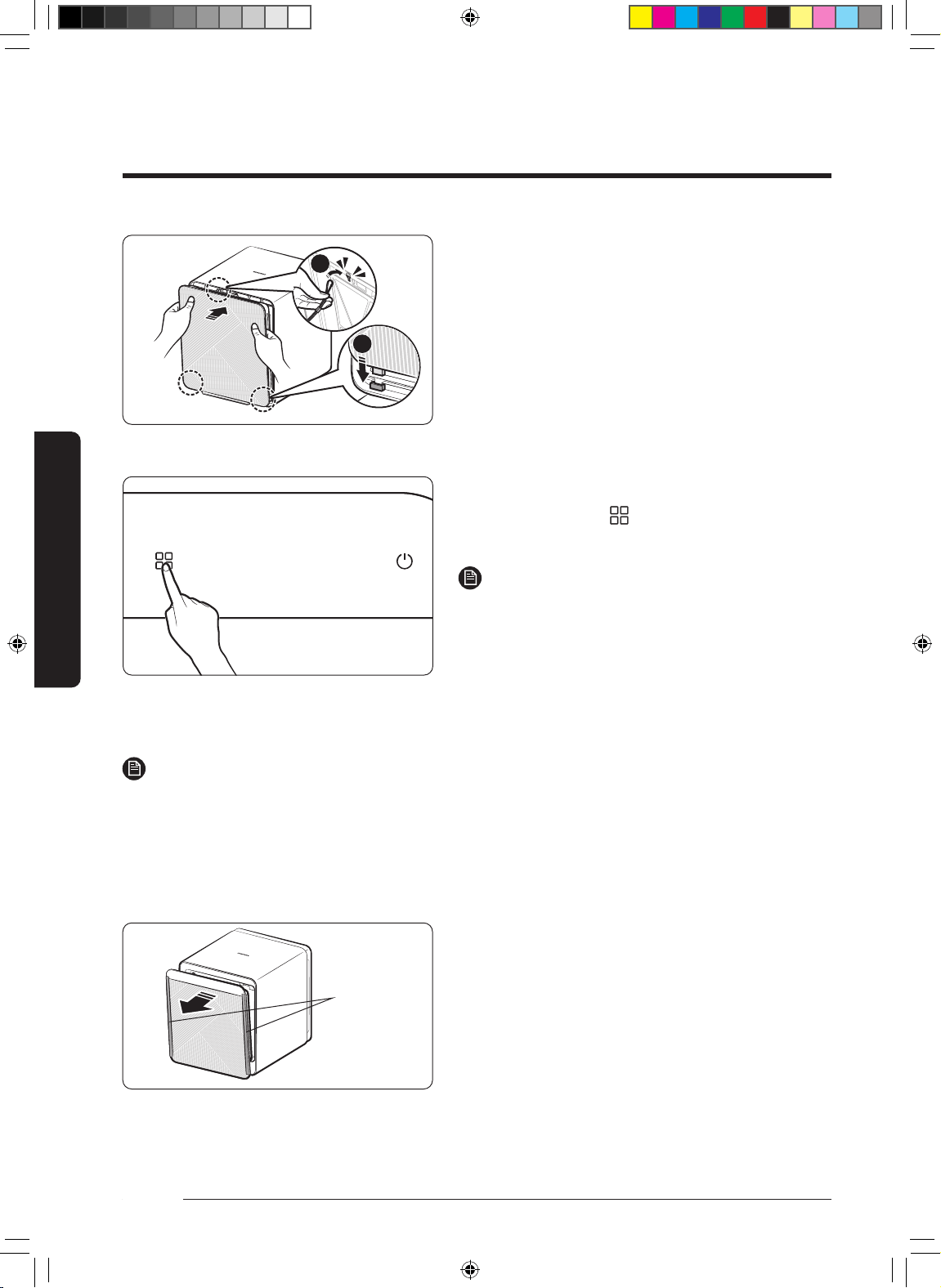
14
English
Air Purier Overview
Air Purier Overview
STEP 4
•
①
•
②
•
]
NOTE
•
•
NOTE
•
•
1
2
DB68-11328A-01_IB_ACR AX9500A_Small PET_SA_EN.indd 14DB68-11328A-01_IB_ACR AX9500A_Small PET_SA_EN.indd 14 2022-06-03 오전 8:34:572022-06-03 오전 8:34:57
15
English
Air Purier Overview
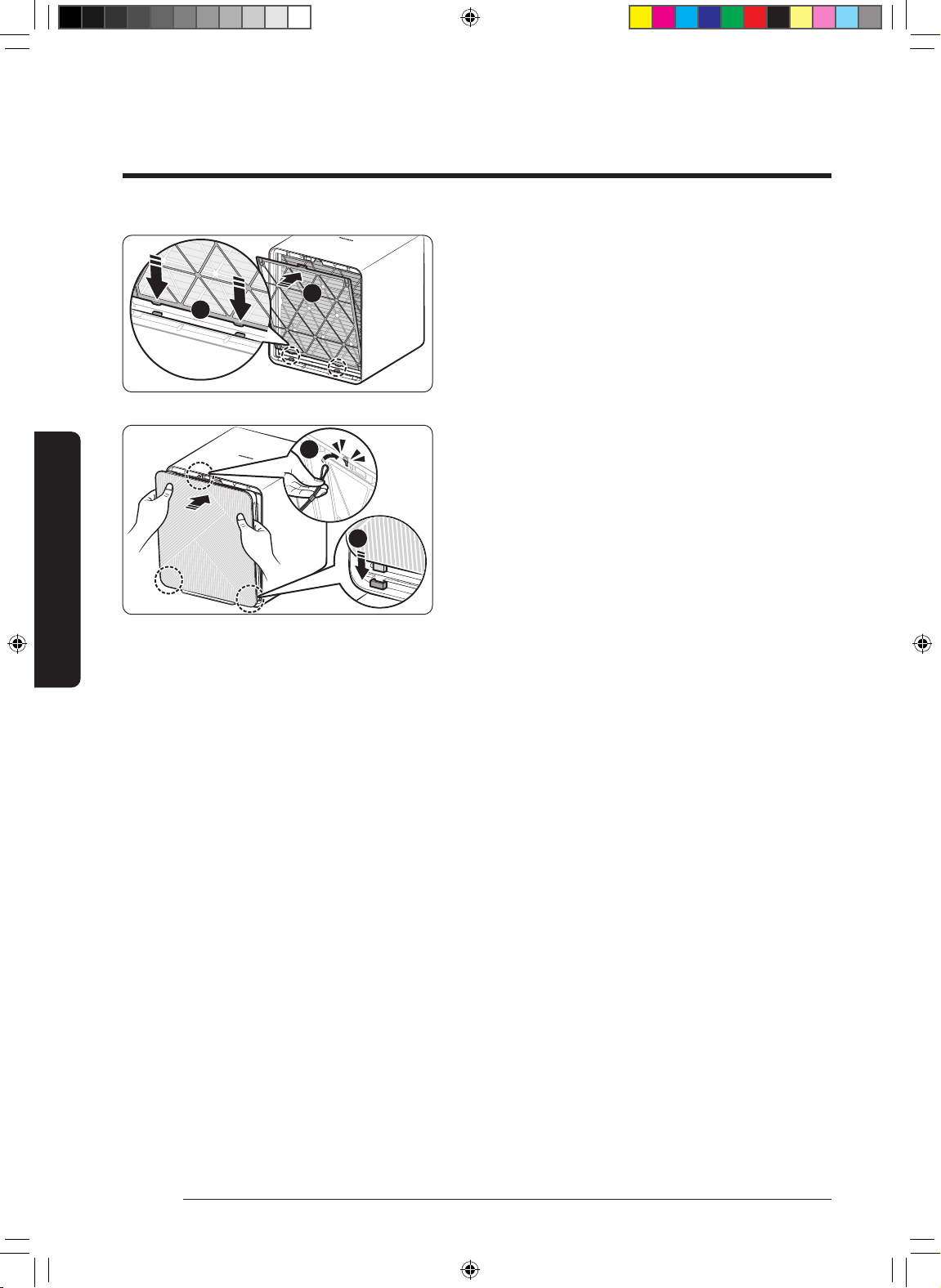
Attaching the pet mesh lter
STEP 1
•
•
STEP 2
STEP 3
packaging
•
STEP 4
•
•
•
Bump
DB68-11328A-01_IB_ACR AX9500A_Small PET_SA_EN.indd 15DB68-11328A-01_IB_ACR AX9500A_Small PET_SA_EN.indd 15 2022-06-03 오전 8:34:582022-06-03 오전 8:34:58
16
English
Air Purier Overview
STEP 5
•
②
①
STEP 6
•
①
•
②
1
2
1
2
Air Purier Overview
DB68-11328A-01_IB_ACR AX9500A_Small PET_SA_EN.indd 16DB68-11328A-01_IB_ACR AX9500A_Small PET_SA_EN.indd 16 2022-06-03 오전 8:34:582022-06-03 오전 8:34:58
17
English
Air Purier Overview
Using the lters
•
–
•
•
•
•
•
•
–
•
Pet deodorization lter
•
–
–
•
•
Dust collecting lter
•
DB68-11328A-01_IB_ACR AX9500A_Small PET_SA_EN.indd 17DB68-11328A-01_IB_ACR AX9500A_Small PET_SA_EN.indd 17 2022-06-03 오전 8:34:582022-06-03 오전 8:34:58
18
English
Using the Air Purier
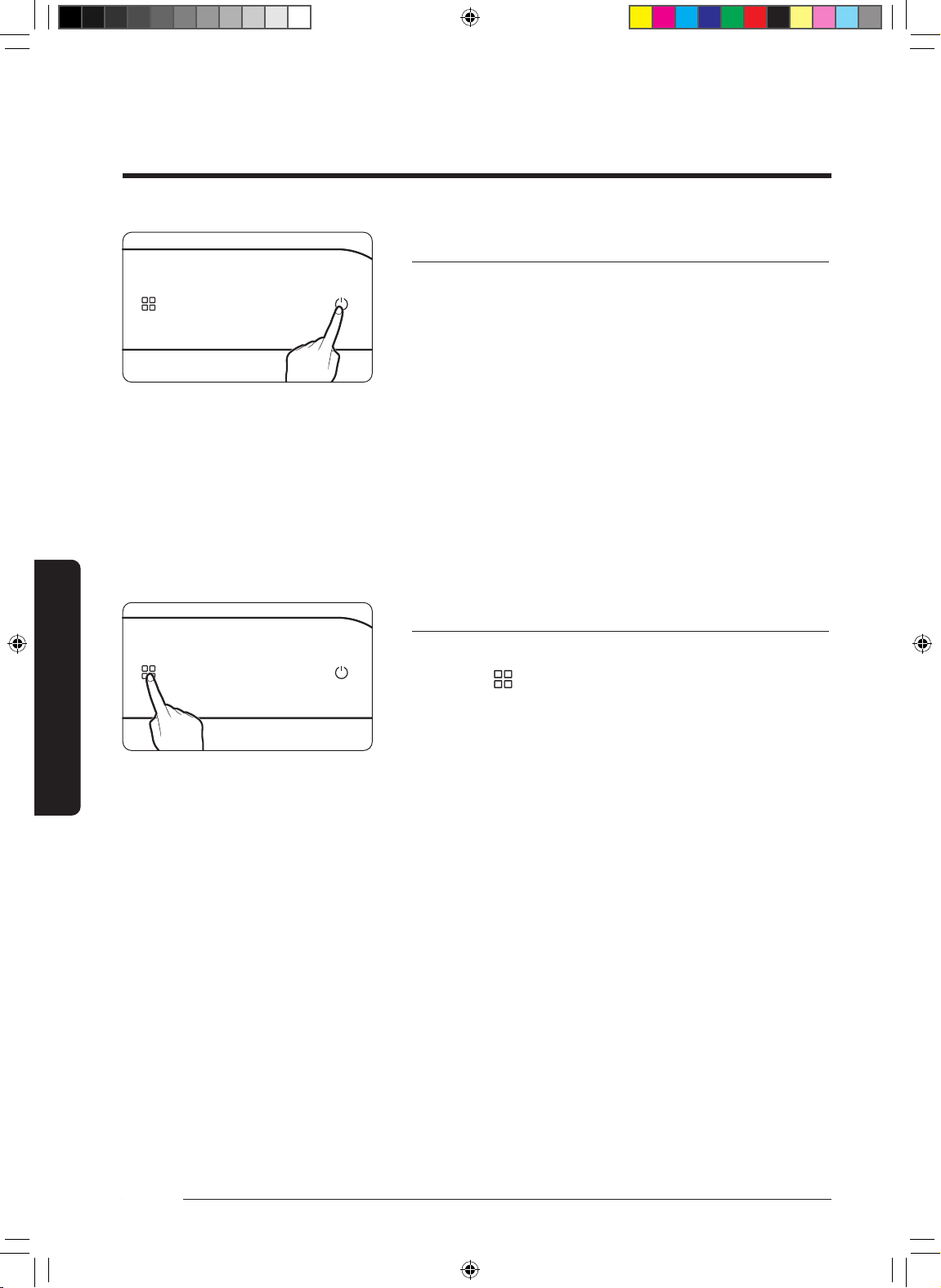
Turning on/off the air purier
•
–
–
•
•
Changing the operation mode
Change the device operation mode as necessary.
•
–
•
–
•
–
–
•
Using the Air Purier
Using the Air Purier
DB68-11328A-01_IB_ACR AX9500A_Small PET_SA_EN.indd 18DB68-11328A-01_IB_ACR AX9500A_Small PET_SA_EN.indd 18 2022-06-03 오전 8:34:592022-06-03 오전 8:34:59
19
English
Using the Air Purier
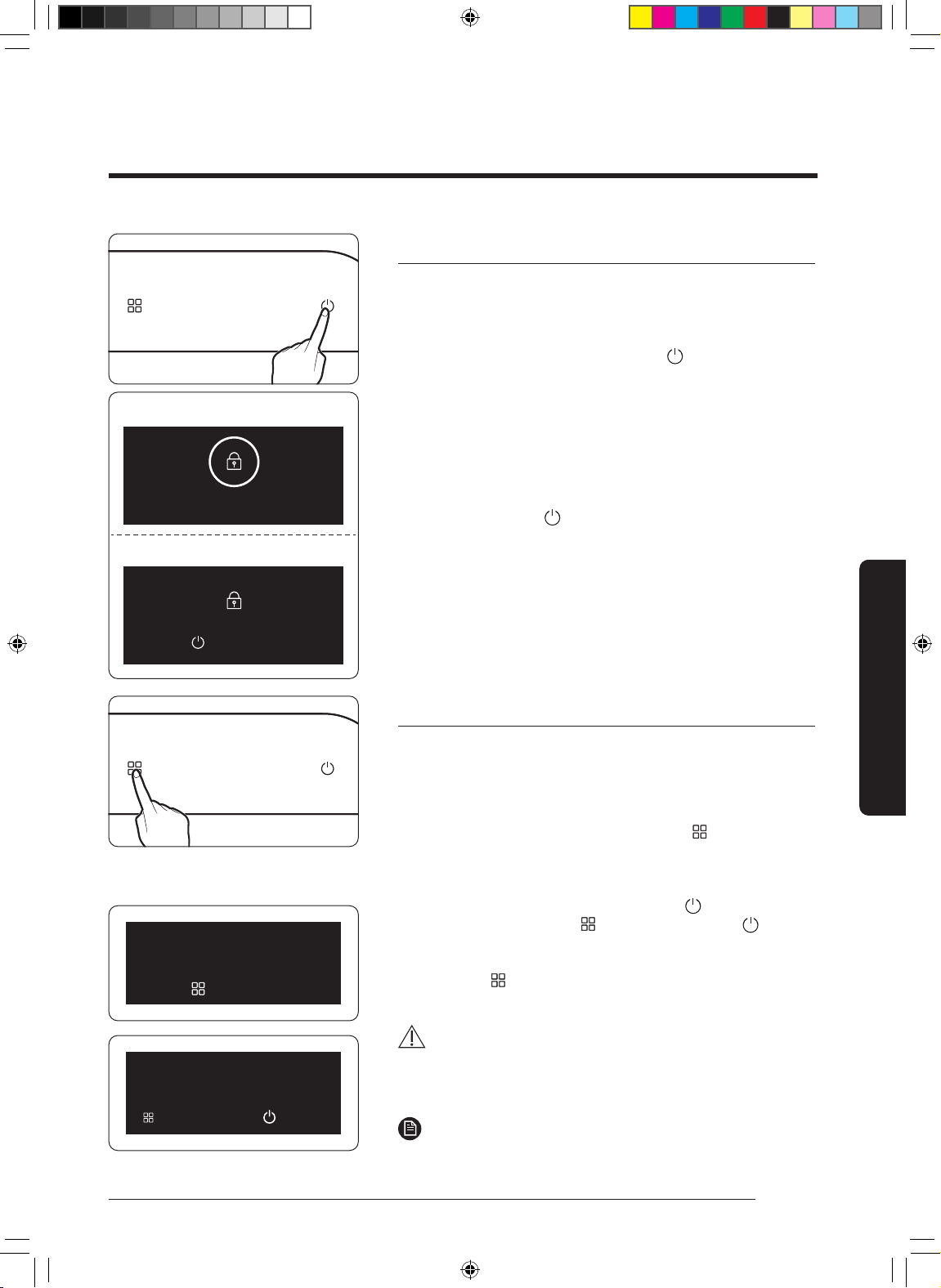
Lock function
Use this function to lock all buttons to prevent the buttons from
being pressed by mistake or by children during operation of the
device.
•
]
•
Turning off the function
•
]
Filter replacement reminder
This function informs you when you need to replace the pet
deodorization lter and dust collecting lter.
•
•
CAUTION
•
NOTE
•
Child Lock on
Hold 3 sec to unlock
Lock
Unlock
Filter Reset needed
Hold 3 sec to reset
Reset filter?
Reset
Cancel
DB68-11328A-01_IB_ACR AX9500A_Small PET_SA_EN.indd 19DB68-11328A-01_IB_ACR AX9500A_Small PET_SA_EN.indd 19 2022-06-03 오전 8:34:592022-06-03 오전 8:34:59
20
English
Using the Air Purier
Using the Air Purier
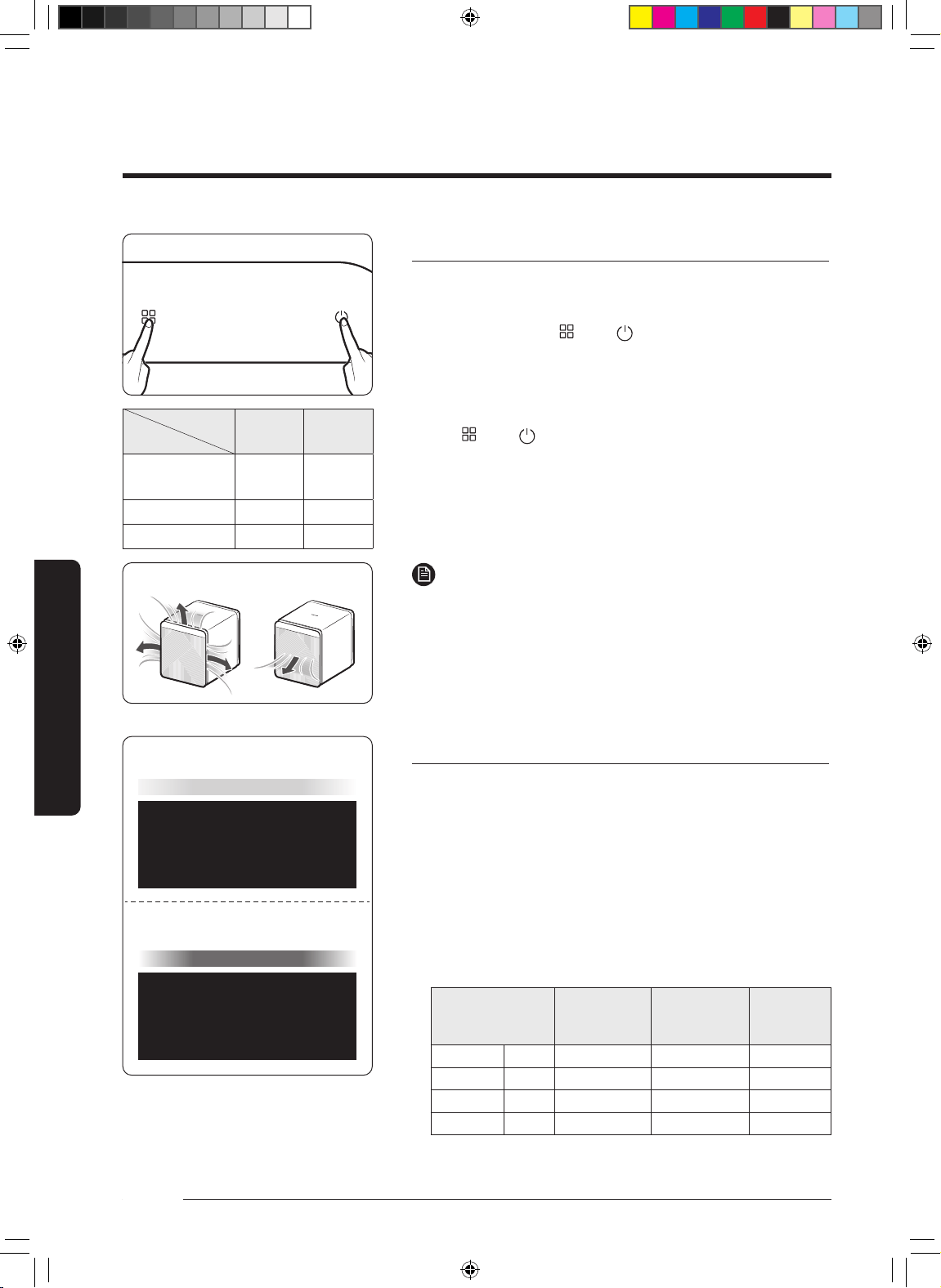
Air outlet setting
While in Smart mode with high fan speed, change the number
of air outlets if necessary.
•
•
•
NOTE
•
•
Checking air quality
The concentrations of PM10, PM2.5 and PM1.0 are shown,
and the air quality and GAS level are shown with colour
indicators, depending on the PM10, PM2.5, PM1.0 and GAS
levels.
•
–
•
Pollution level
PM10
concentration
(
㎍
/m³)
PM2.5
/
PM1.0
concentration
(
㎍
/m³)
Gas
pollution
level
Poor
•
Mode
Fan speed
Smart
High fan
speed
High
125
Smart
PM10
GAS
Smart
Example of PM10 level indication
Example of GAS level indication
DB68-11328A-01_IB_ACR AX9500A_Small PET_SA_EN.indd 20DB68-11328A-01_IB_ACR AX9500A_Small PET_SA_EN.indd 20 2022-06-03 오전 8:34:592022-06-03 오전 8:34:59
21
English
Using the Air Purier
NOTE
•
•
–
–
–
•
•
•
•
•
DB68-11328A-01_IB_ACR AX9500A_Small PET_SA_EN.indd 21DB68-11328A-01_IB_ACR AX9500A_Small PET_SA_EN.indd 21 2022-06-03 오전 8:35:002022-06-03 오전 8:35:00
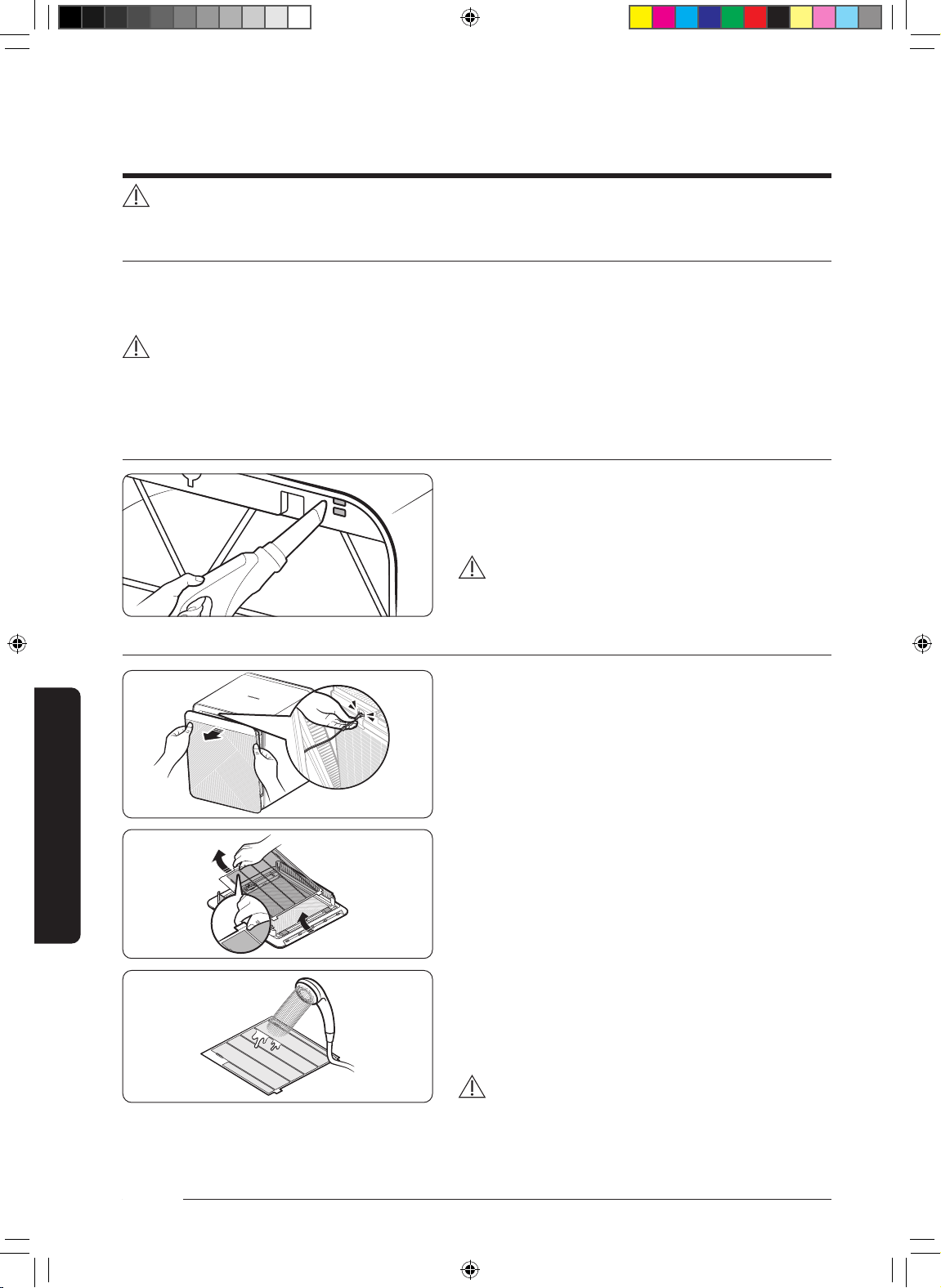
22
English
Cleaning and Maintenance
Cleaning the air purier exterior
•
•
•
CAUTION
•
•
Cleaning the sensor unit
•
CAUTION
•
Cleaning and drying the front panel
STEP 1
•
•
STEP 2
•
•
STEP 3
•
•
CAUTION
•
PULL
PULL
Cleaning and Maintenance
DB68-11328A-01_IB_ACR AX9500A_Small PET_SA_EN.indd 22DB68-11328A-01_IB_ACR AX9500A_Small PET_SA_EN.indd 22 2022-06-03 오전 8:35:002022-06-03 오전 8:35:00
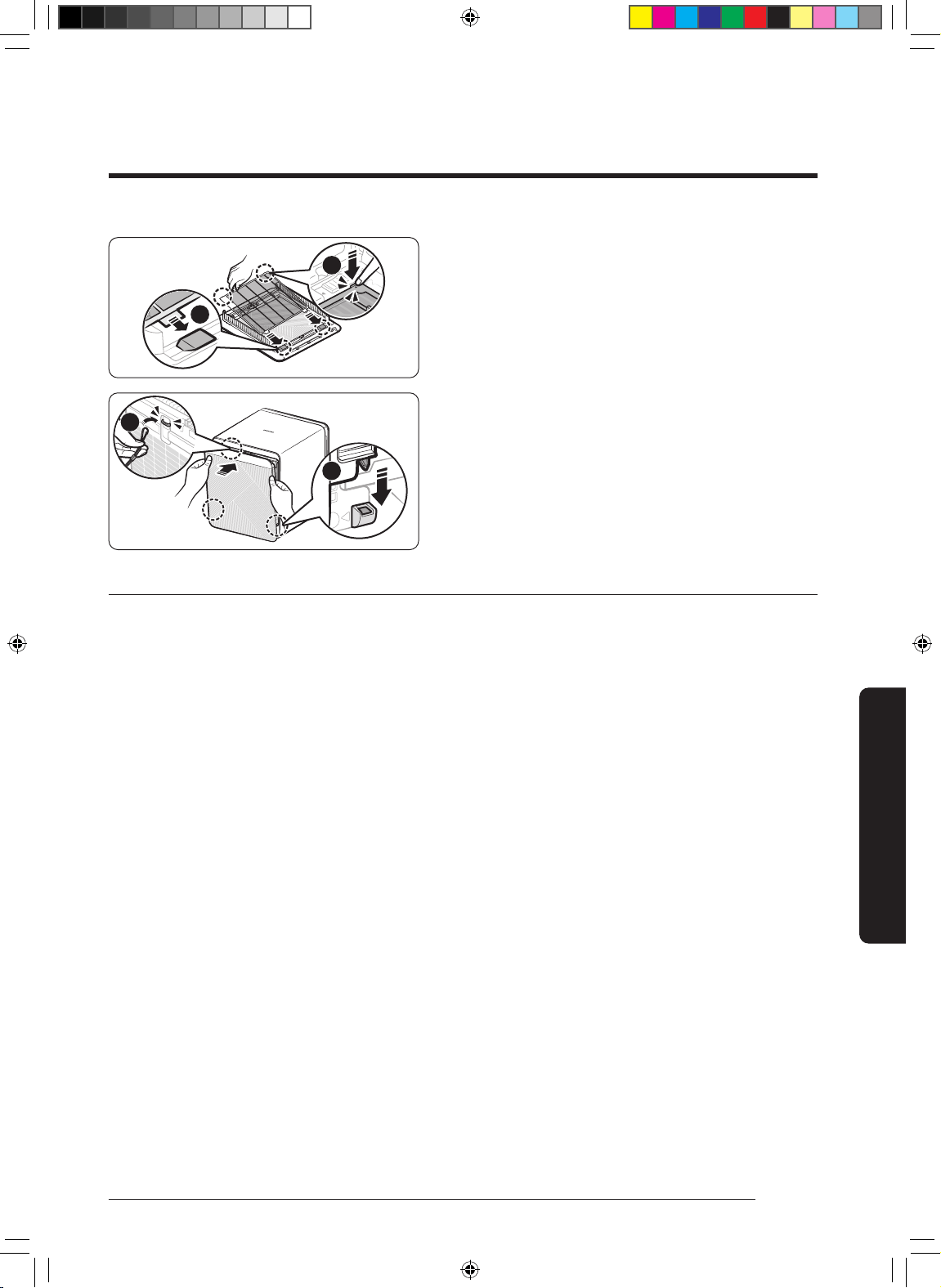
23
English
Cleaning and Maintenance
STEP 4
•
–
①
②
STEP 5
•
①
•
②
Standard table model name (It's optional)
•
PULL
2
1
2
1
DB68-11328A-01_IB_ACR AX9500A_Small PET_SA_EN.indd 23DB68-11328A-01_IB_ACR AX9500A_Small PET_SA_EN.indd 23 2022-06-03 오전 8:35:002022-06-03 오전 8:35:00
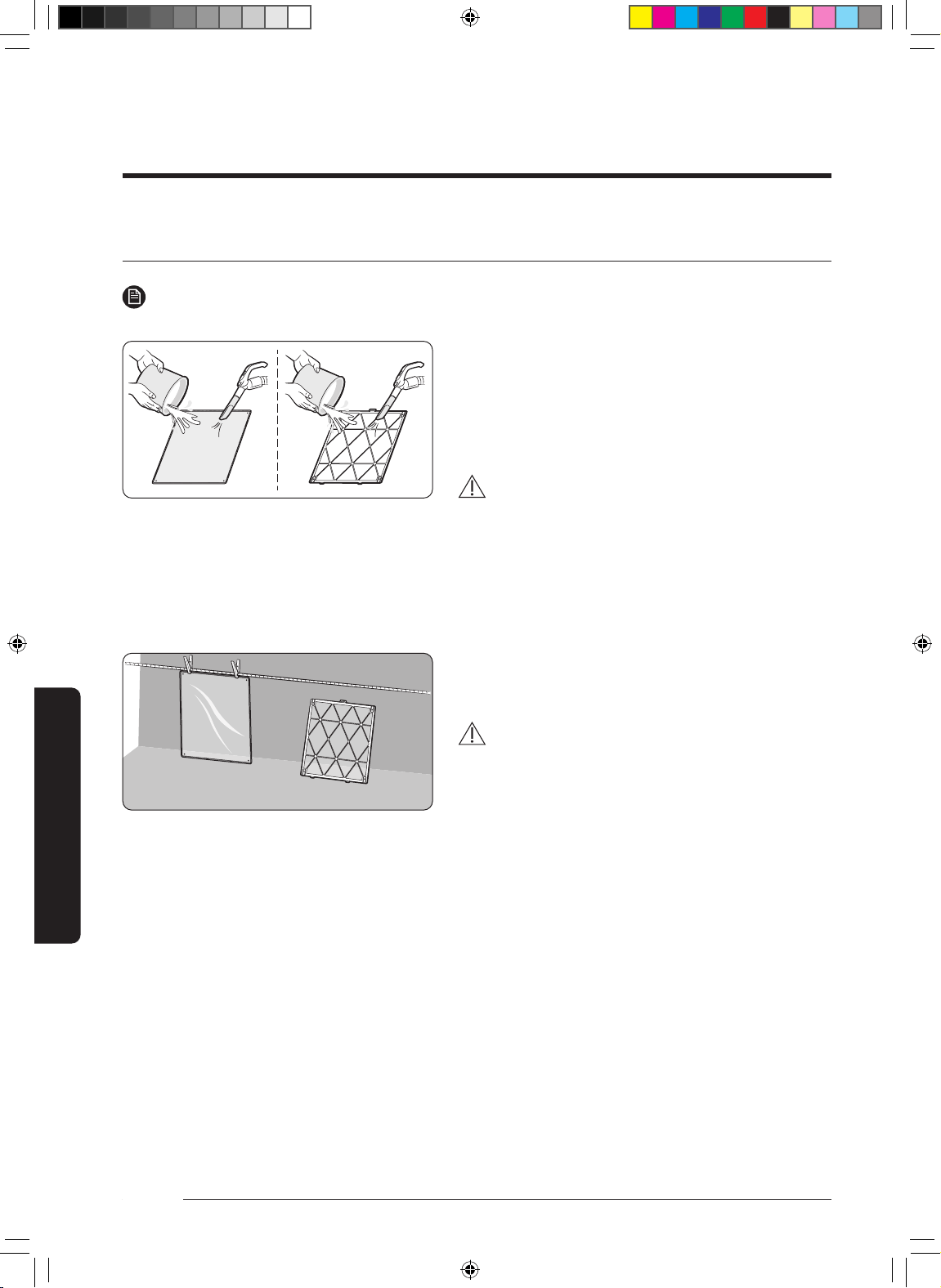
24
English
Cleaning and Maintenance
Cleaning and Maintenance
Cleaning and drying the lters
NOTE
•
Cleaning the pet mesh lter and pre-lter
•
–
CAUTION
•
•
Drying the lters
•
CAUTION
•
DB68-11328A-01_IB_ACR AX9500A_Small PET_SA_EN.indd 24DB68-11328A-01_IB_ACR AX9500A_Small PET_SA_EN.indd 24 2022-06-03 오전 8:35:002022-06-03 오전 8:35:00
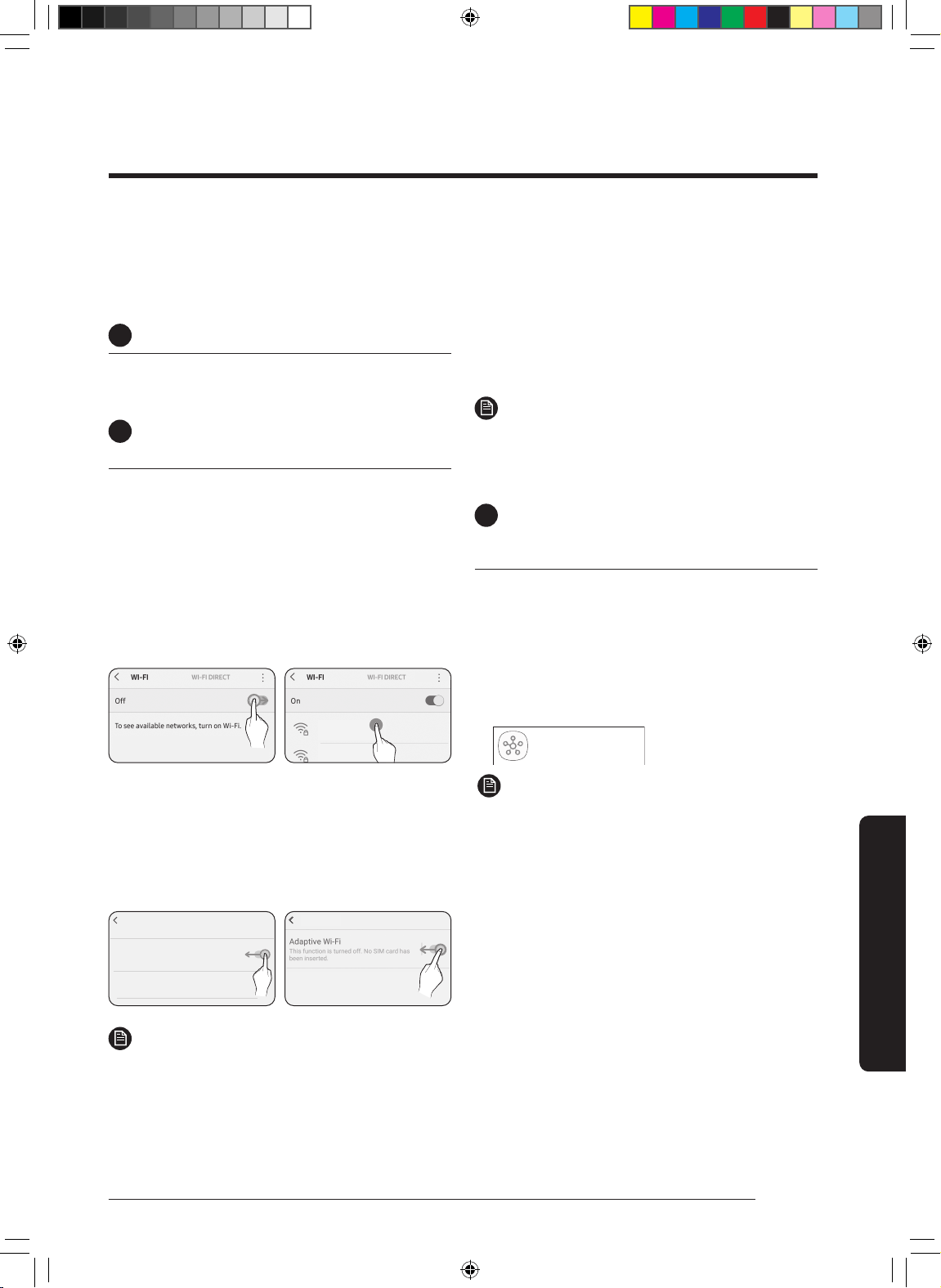
25
English
Using the SmartThings App
SmartThings app
1
Checking the power connections
C
2
Setting up and connecting to a Wi-Fi
access point using your smartphone
1
To connect the product to a Wi-Fi network,
turn on Wi-Fi at "Settings > Wi-Fi", and then
select the access point to connect to
•
• 2.4 GHz
SAMSUNG_2G
SAMSUNG_5G
On
2
Turning off "Switch to mobile data" at
"Settings > Wi-Fi" on your Smartphone
•
Advanced
Switch to mobile data
Insert SIM card to use mobile data.
Advanced
Off
Off
NOTE
•
3
Checking the Internet connectivity
•
NOTE
•
3
Downloading the SmartThings
app and registering your Samsung
account
1
Downloading the SmartThings app
•
•
SmartThings (Samsung Connet)
Samsung Electronics Co., Ltd.
NOTE
•
•
DB68-11328A-01_IB_ACR AX9500A_Small PET_SA_EN.indd 25DB68-11328A-01_IB_ACR AX9500A_Small PET_SA_EN.indd 25 2022-06-03 오전 8:35:012022-06-03 오전 8:35:01
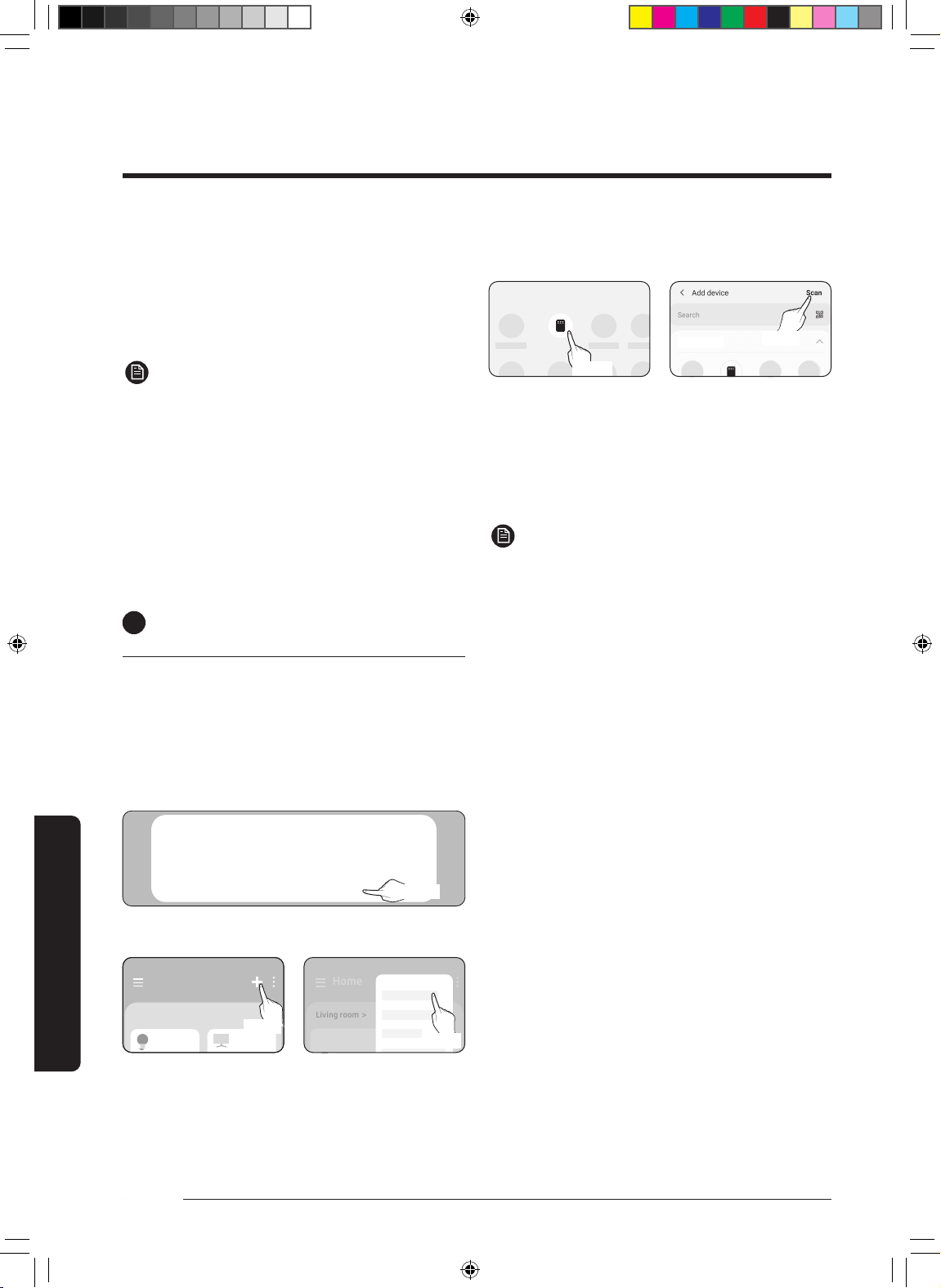
26
English
Using the SmartThings App
SmartThings
app
2
Registering your Samsung account
•
NOTE
•
•
4
Connecting the SmartThings app to
your product
1
Selecting the product to connect to
A new device has been found.
Add this device to SmartThings?
Don’t add Later
Add now
선택
Home
Living room >
Add device
Home
Living room >
•
•
Air purifier
By device type
By device type
2
Connecting the SmartThings app to your
product
•
•
NOTE
•
•
•
•
•
DB68-11328A-01_IB_ACR AX9500A_Small PET_SA_EN.indd 26DB68-11328A-01_IB_ACR AX9500A_Small PET_SA_EN.indd 26 2022-06-03 오전 8:35:012022-06-03 오전 8:35:01
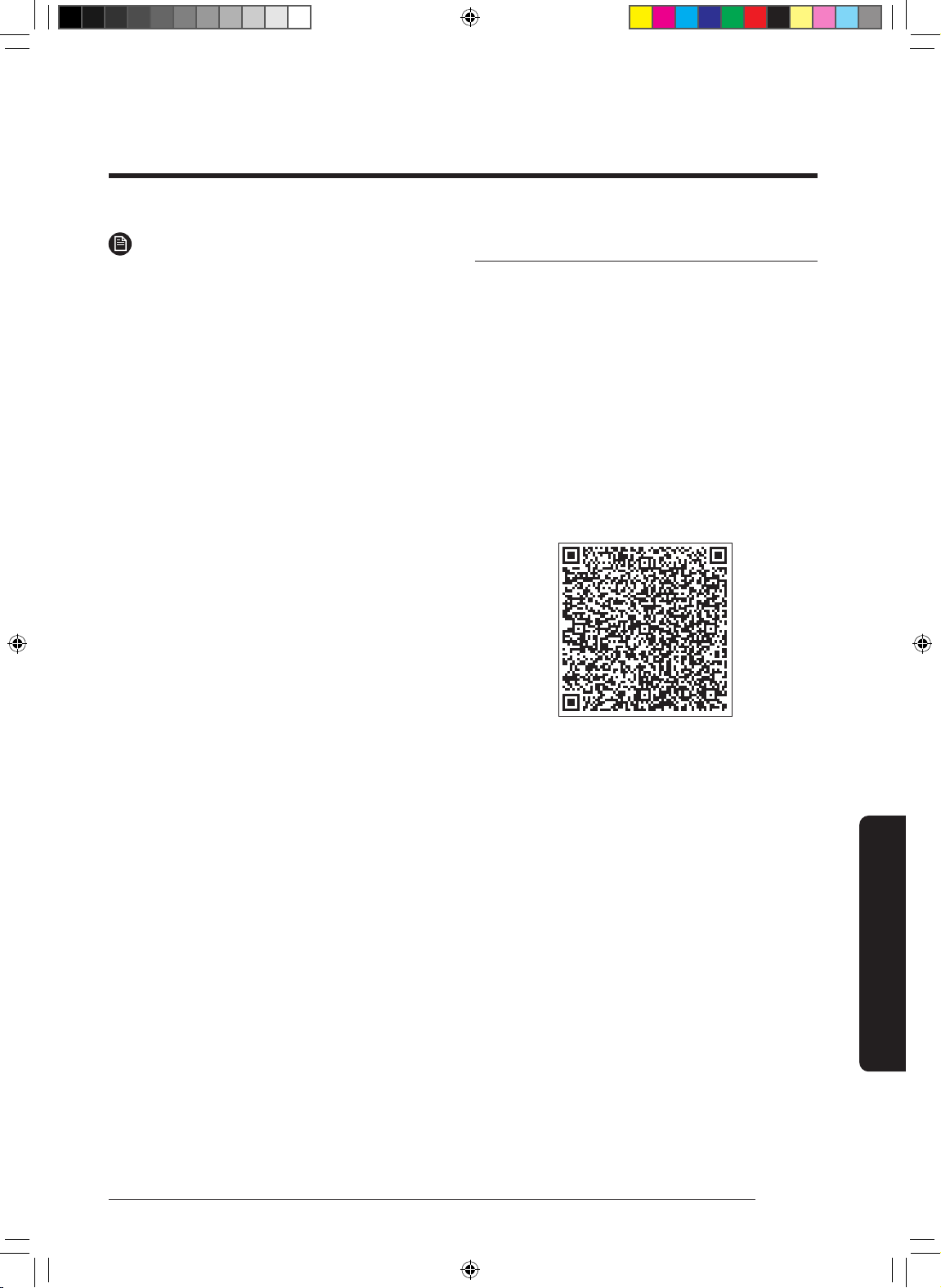
27
English
Using the SmartThings App
NOTE
•
•
•
Open Source Announcement
DB68-11328A-01_IB_ACR AX9500A_Small PET_SA_EN.indd 27DB68-11328A-01_IB_ACR AX9500A_Small PET_SA_EN.indd 27 2022-06-03 오전 8:35:012022-06-03 오전 8:35:01
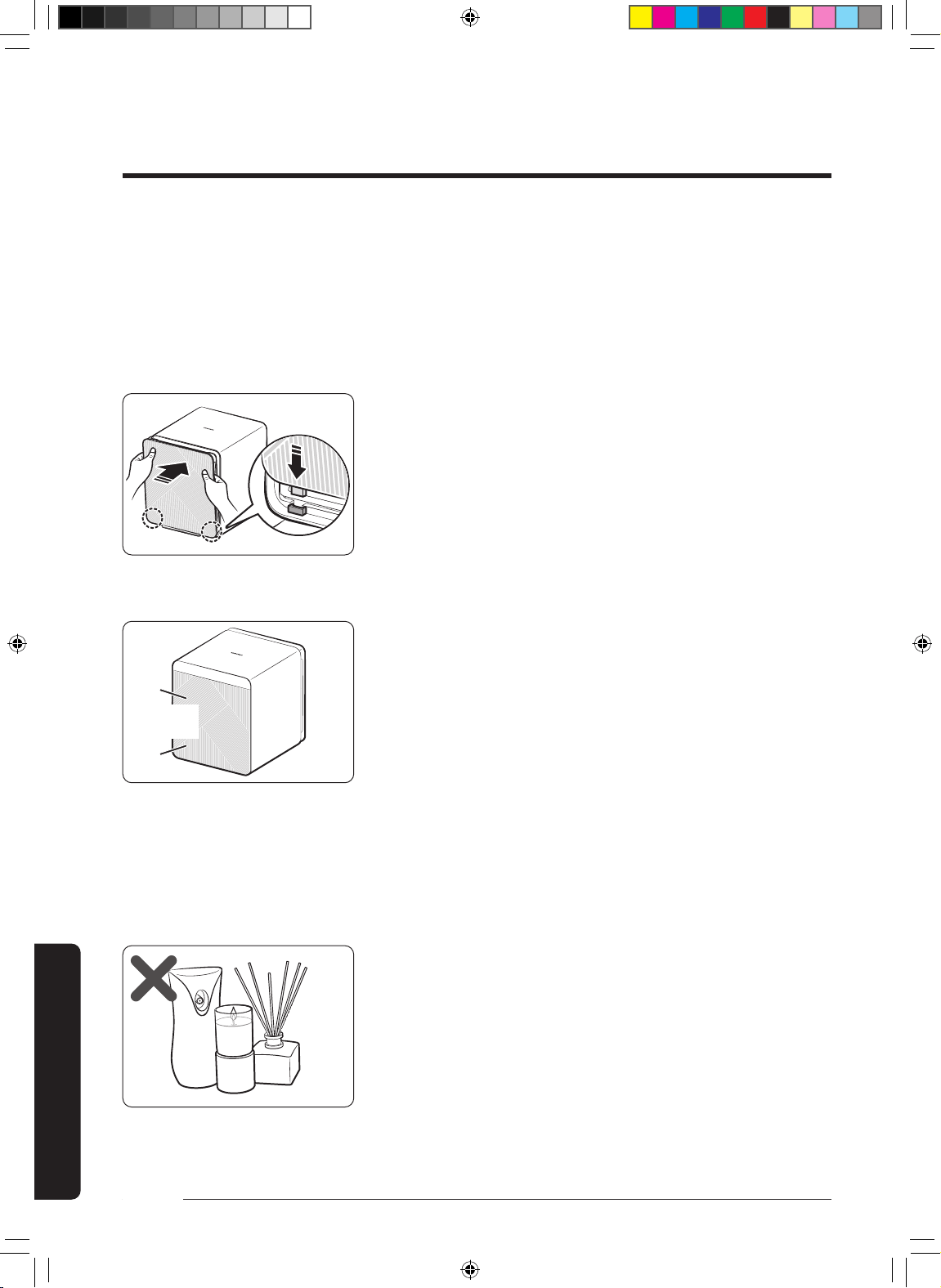
28
English
Appendix
Operation issue
The device will not operate
•
•
•
•
Noise
I hear a strange noise from the device
•
•
–
•
–
•
Odours
Strange smell comes from the device
•
–
Crackling-
rattle
Before Requesting Service
DB68-11328A-01_IB_ACR AX9500A_Small PET_SA_EN.indd 28DB68-11328A-01_IB_ACR AX9500A_Small PET_SA_EN.indd 28 2022-06-03 오전 8:35:012022-06-03 오전 8:35:01
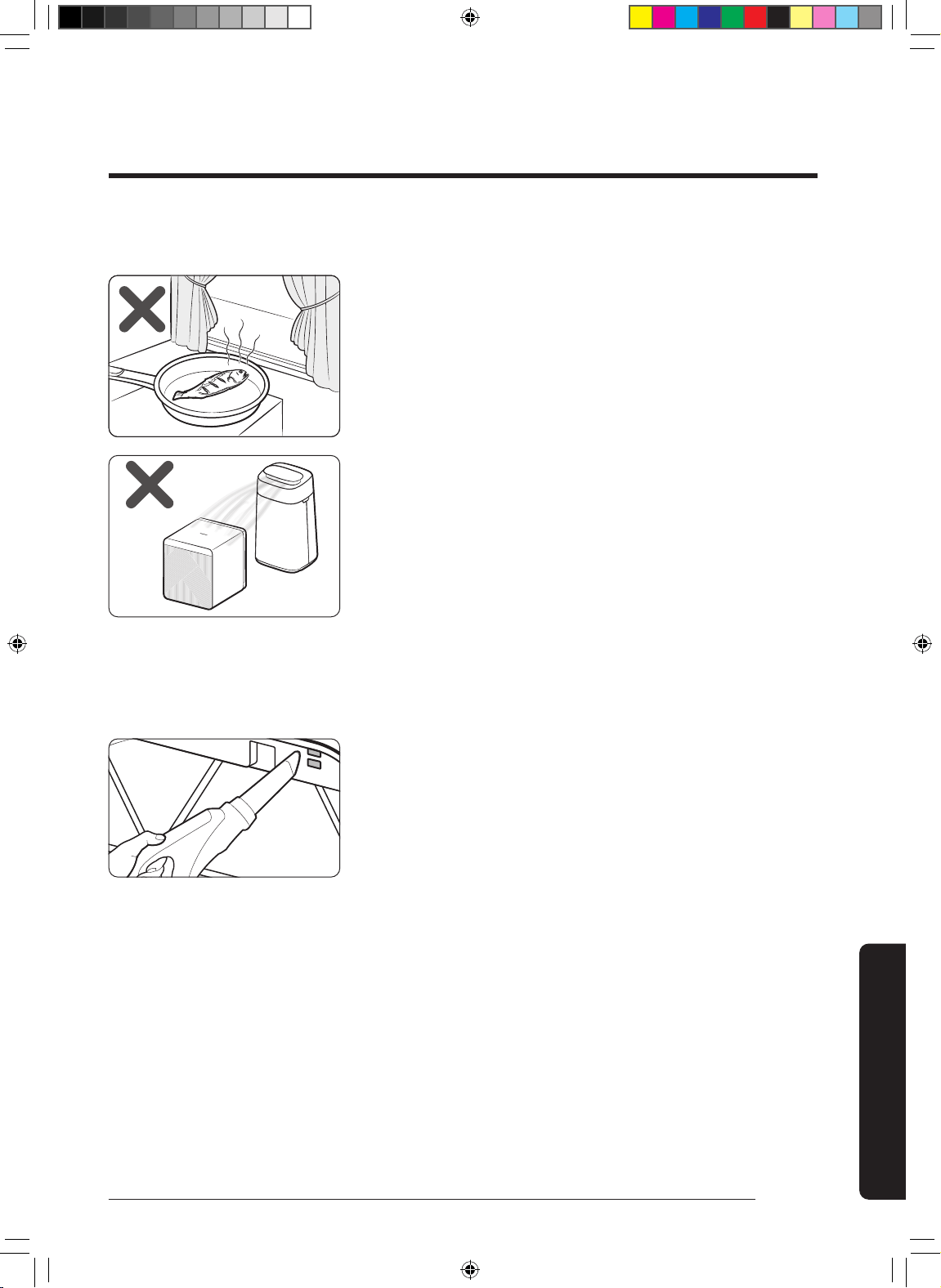
29
English
Appendix
Odours
•
–
–
–
•
–
Air quality
The air quality indicator stays red.
(The air quality indicator does not seem to work properly.)
•
•
㎍
•
•
•
•
DB68-11328A-01_IB_ACR AX9500A_Small PET_SA_EN.indd 29DB68-11328A-01_IB_ACR AX9500A_Small PET_SA_EN.indd 29 2022-06-03 오전 8:35:022022-06-03 오전 8:35:02
30
English
Appendix
Before Requesting Service
Air quality
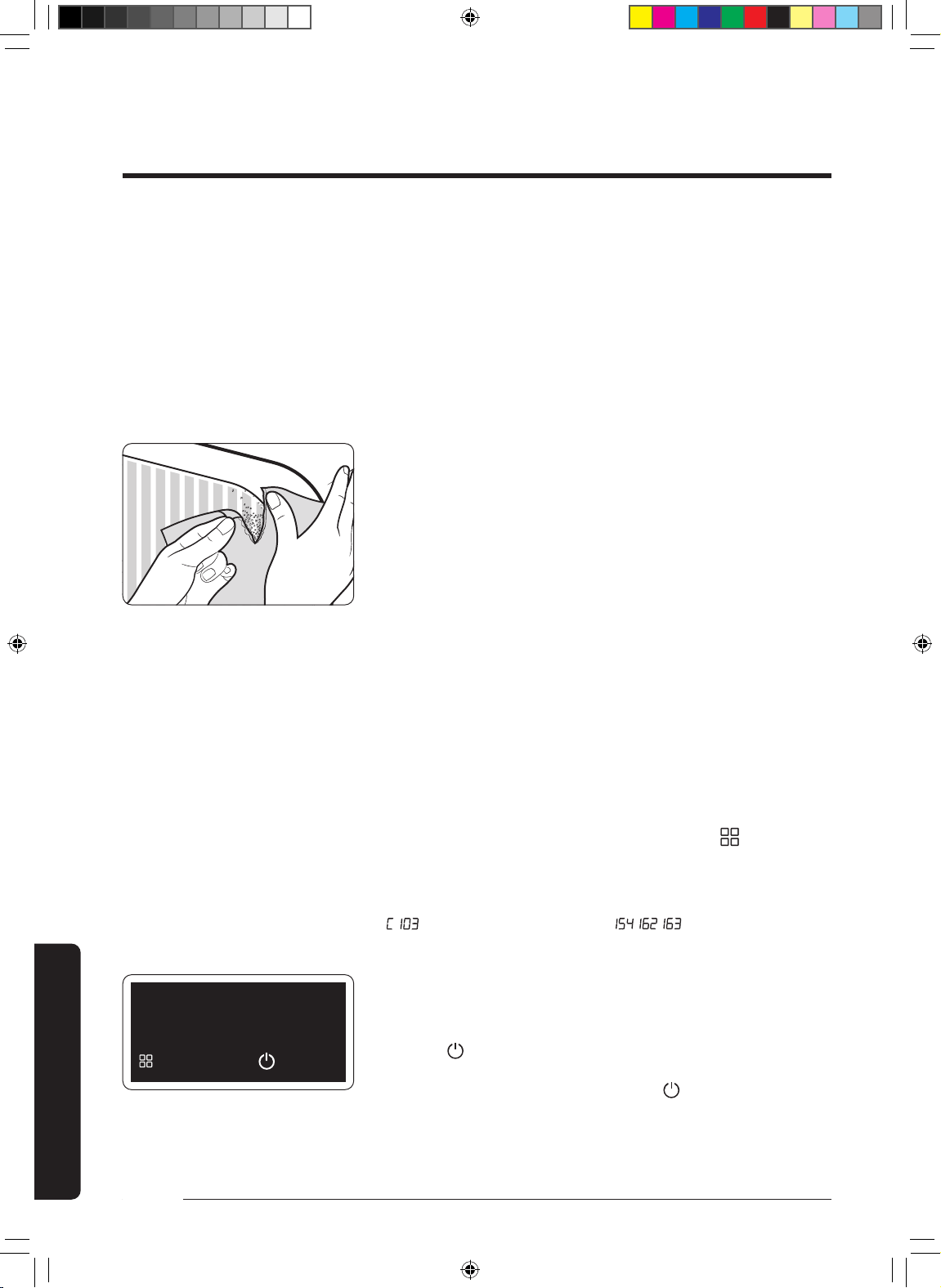
The fan speed does not change when the air quality level
changes
•
–
The PM10, PM2.5, PM1.0 levels do not change from Good (05).
•
–
The PM10 and PM2.5 levels are different from the values
provided by the Ministry of Environment
•
Display
The lter replacement indicator is kept lit up
•
The display output is strange.
•
An 'Update Software?' message appears.
•
•
•
Update software?
Later
Update
DB68-11328A-01_IB_ACR AX9500A_Small PET_SA_EN.indd 30DB68-11328A-01_IB_ACR AX9500A_Small PET_SA_EN.indd 30 2022-06-03 오전 8:35:022022-06-03 오전 8:35:02
31
English
Appendix
Memo
DB68-11328A-01_IB_ACR AX9500A_Small PET_SA_EN.indd 31DB68-11328A-01_IB_ACR AX9500A_Small PET_SA_EN.indd 31 2022-06-03 오전 8:35:022022-06-03 오전 8:35:02
COUNTRY CALL OR VISIT US ONLINE AT
NEW ZEALAND
DB68-11328A-01_IB_ACR AX9500A_Small PET_SA_EN.indd 32DB68-11328A-01_IB_ACR AX9500A_Small PET_SA_EN.indd 32 2022-06-03 오전 8:35:032022-06-03 오전 8:35:03