Go online for a comprehensive walkthrough
of your new purchase!
This guide has everything you need to get ready for first use,
including setting up, using and maintaining your machine, but online
you’ll find additional resources like tips and troubleshooting, videos,
product registration, parts, and more. Go to support.BISSELL.com.
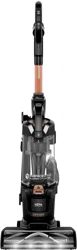
SURFACESENSE™ PET
2817 SERIES

2 BISSELL.com
WARNING
TO REDUCE THE RISK OF FIRE, ELECTRIC SHOCK OR INJURY:
» Always connect to a polarized outlet (one slot is wider than
the other). Unplug from outlet when not in use and before
conducting maintenance.
» Do not modify the polarized plug to fit a non-polarized outlet
or extension cord.
» Do not leave vacuum cleaner when it is plugged in. Unplug
from outlet when not in use and before servicing.
» Do not use outdoors or on wet surfaces.
» Do not allow to be used as a toy. Close attention is necessary
when used by or near children.
» Do not use for any purpose other than described in this user
guide. Use only manufacturer’s recommended attachments.
» Do not use with damaged cord or plug. If appliance is not
working as it should, has been dropped, damaged, left
outdoors, or dropped into water, have it repaired at an
authorized service center.
» Do not pull or carry by cord, use cord as a handle, close a
door on cord, or pull cord around sharp edges or corners.
Do not run appliance over cord. Keep cord away from
heated surfaces.
» Do not unplug by pulling on cord. To unplug, grasp the plug,
not the cord.
» Do not handle plug or vacuum cleaner with wet hands.
» Do not put any object into openings. Do not use with any
opening blocked; keep openings free of dust, lint, hair, and
anything that may reduce air flow.
» Keep hair, loose clothing, fingers, and all parts of body away
from openings and moving parts.
» Turn all controls OFF before plugging or unplugging vacuum
cleaner.
» Use extra care when cleaning on stairs.
» Do not use to pick up flammable or combustible materials
(lighter fluid, gasoline, kerosene, etc.) or use in areas where
they may be present.
» Do not use vacuum cleaner in an enclosed space filled
with vapors given off by oil-based paint, paint thinner,
some moth-proofing substances,flammable dust, or other
explosive or toxic vapors.
» Do not use to pick up toxic material (chlorine bleach,
ammonia, drain cleaner,etc.).
» Do not pick up anything that is burning or smoking, such as
cigarettes, matches or hot ashes.
» Do not use without filters in place.
» Do not pick up hard or sharp objects such as glass, nails,
screws, coins, etc.
» Keep appliance on a level surface.
» If the appliance has a handheld accessory like pet brush,
motor driven head, etc. the user shall avoid entrapment.
» Do not carry the vacuum cleaner while it is running.
» Unplug before connecting or disconnecting the TurboEraser®
Tool.
» Plastic film can be dangerous. To avoid danger of suffocation,
keep away from children.
SAVE THESE INSTRUCTIONS
THIS MODEL IS FOR HOUSEHOLD USE ONLY.
COMMERCIAL USE OF THIS MACHINE VOIDS THE MANUFACTURER’S WARRANTY.
THIS APPLIANCE HAS A POLARIZED PLUG To reduce the risk of electric
shock, this appliance has a polarized plug (one blade is wider than the other). This plug will fit in a polarized outlet only one way. If the plug does
not fit fully in the outlet, reverse the plug. If it still does not fit, contact a qualified electrician to install a proper outlet. Do not change the plug in
any way.
IMPORTANT SAFETY INSTRUCTIONS
READ ALL INSTRUCTIONS BEFORE USING YOUR APPLIANCE.
When using an electrical appliance, basic precautions should be observed, including the following:
BISSELL.com 3
We’re so happy you chose a SurfaceSense™ Pet vacuum. We put
this guide together to help with set up and maintenance. We’ve also
included some tips we think will come in handy when you first start
using this machine, so let’s get started!
For a comprehensive walkthrough of your product,
go to support.BISSELL.com.
What’s in the Box? ...........................................................4
Product View .......................................................................4
Assembly ................................................................................ 5
Using Your Vacuum .........................................................6
Above Floor Cleaning .................................................... 7
Emptying the Dirt Tank.................................................8
Cleaning the Inner Cyclone Separator ............... 8
Cleaning and Replacing the Filters ....................... 9
Maintaining the Pet TurboEraser® Tool ............ 10
Replacing the Brush & Belt ......................................10
Protecting the Vacuum’s Motor .............................. 11
Troubleshooting ................................................................. 11
Warranty .................................................................................11
4 BISSELL.com
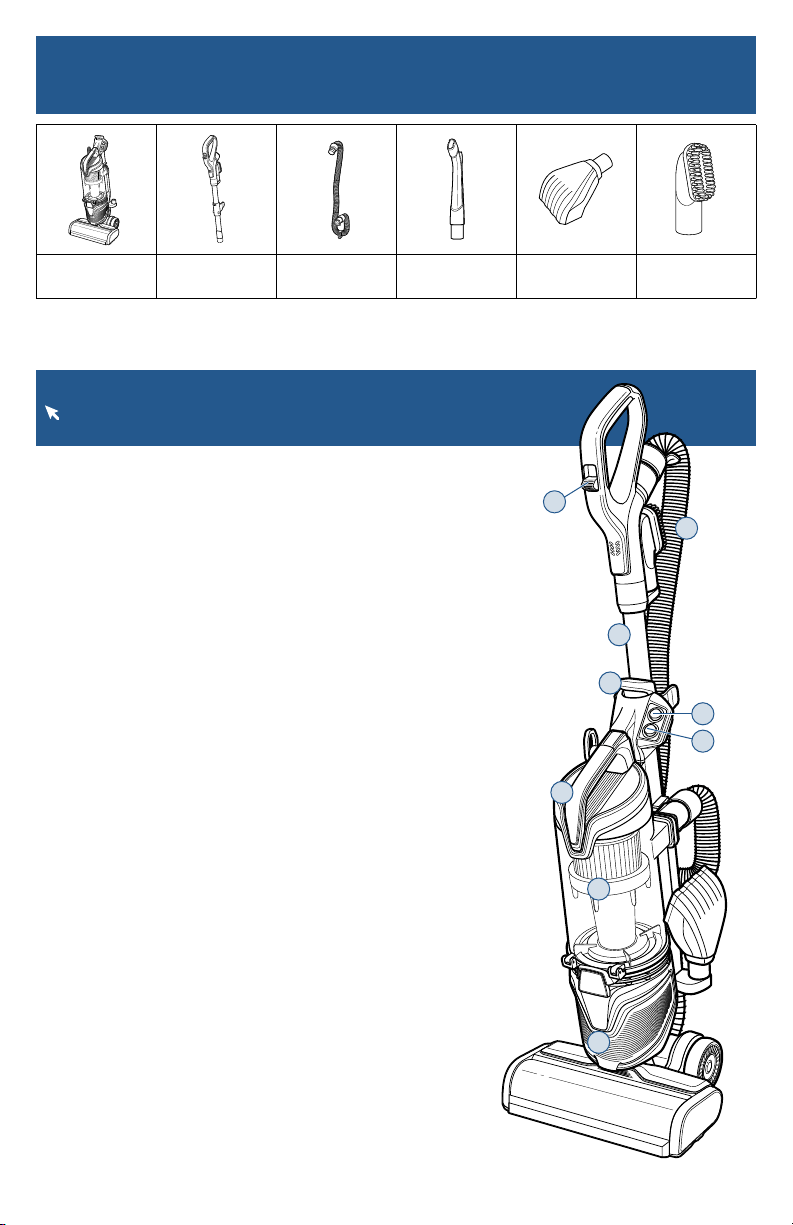
1. Suction Control Switch
2. Hose
3. Quick Release Extension Wand
4. Dirt Tank Release Button
5. Power Switch
6. Brush Roll Auto/Off Switch
7. Pre-Motor Filter
8. Dirt Tank
9. Post-Motor Filter
Product View
For additional support videos and information about your vacuum,
visit support.BISSELL.com.
Vacuum Base Upper Handle &
Extension Wand
Stretch Hose LED Lighted
Crevice Tool
Pet TurboEraser®
Tool
2-in-1 Pet
Dusting Brush
What’s in the Box?
Standard accessories may vary by model.To identify what should be included with your purchase,
please refer to the “Carton Contents” list located on the carton top flap.
4
3
2
7
8
9
5
6
1
BISSELL.com 5
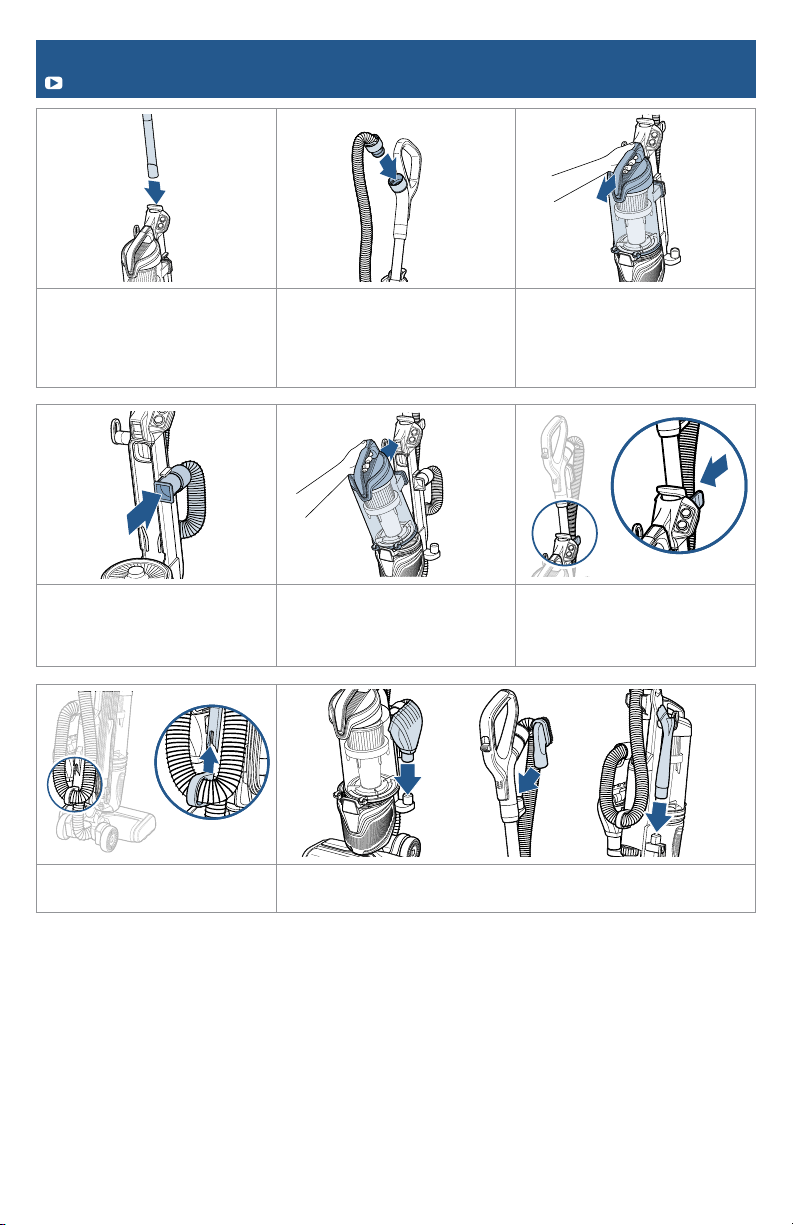
Assembly
Go to support.BISSELL.com for assembly videos.
1. Slide end of wand into top
of base. It will “click” when
inserted correctly.
2. Attach stretch hose by lining
the tabs on the circular cuff
with the notches on the back of
the handle. Twist clockwise to
lock hose into place.
3. Press the dirt tank release
button and pull tank away
from the vacuum to remove.
4. Attach end of hose to
vacuum by sliding square cuff
into the bracket below the
power switch.
5. Place the dirt tank on
the vacuum by securing the
bottom in place first, then push
back until you hear a “click”.
6. Attach hose to hose cuff by
clicking it into place.
7. Attach lower hose clip by
clicking it into place.
8. Attach tools to tool holders on vacuum.
6 BISSELL.com
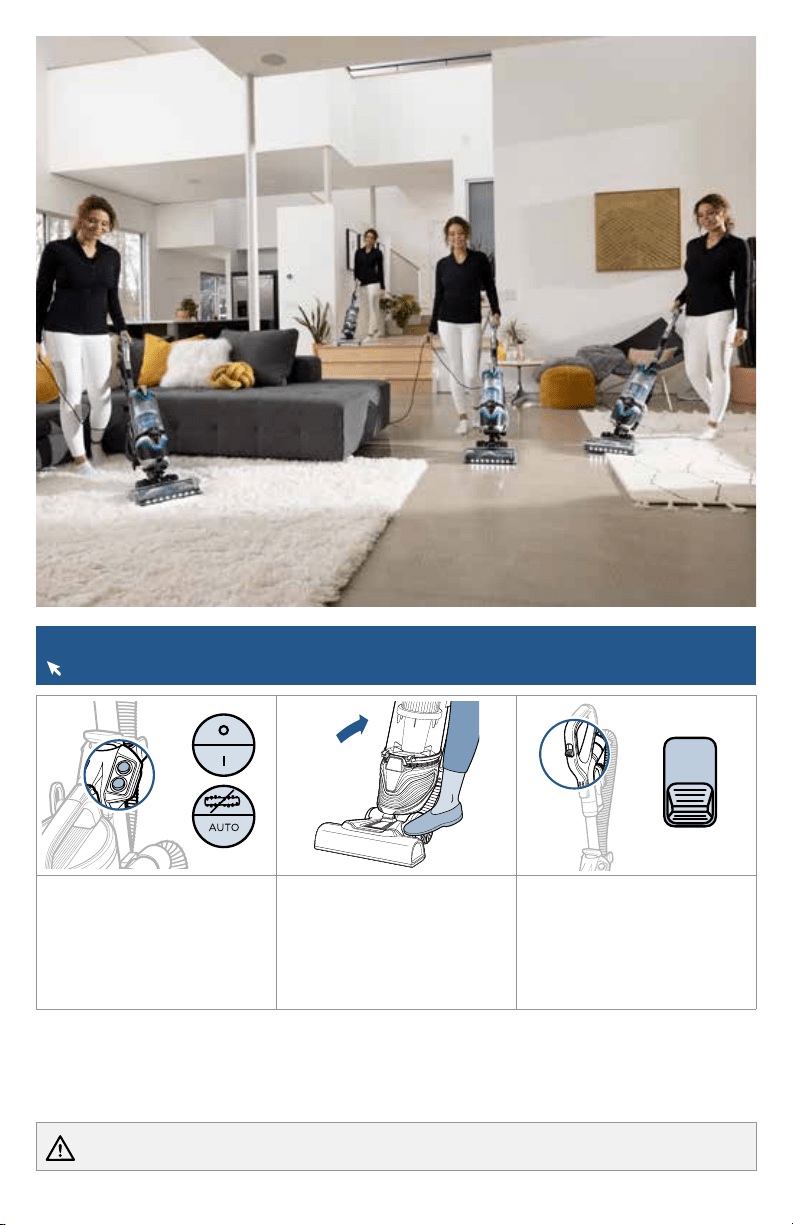
Using Your Vacuum
For additional ways to use your vacuum’s features, check out support.BISSELL.com.
1. Turn the power switch ON.
Brush roll switch is on AUTO
to allow vacuum to sense
floor type.
Optional: To manually turn off
the brush roll, flip switch up.
2. Step gently on base and pull
the handle back to recline.
Note: The brush roll
automatically shuts off when
vacuum is locked in upright
position. Recline to reactivate.
3. Use the suction control
slider to change settings
between plush carpet and
low carpet/bare floor for
easy multi-surface cleaning.
WARNING Do not plug in your vacuum until you are familiar with all instructions and operating procedures.
BISSELL.com 7
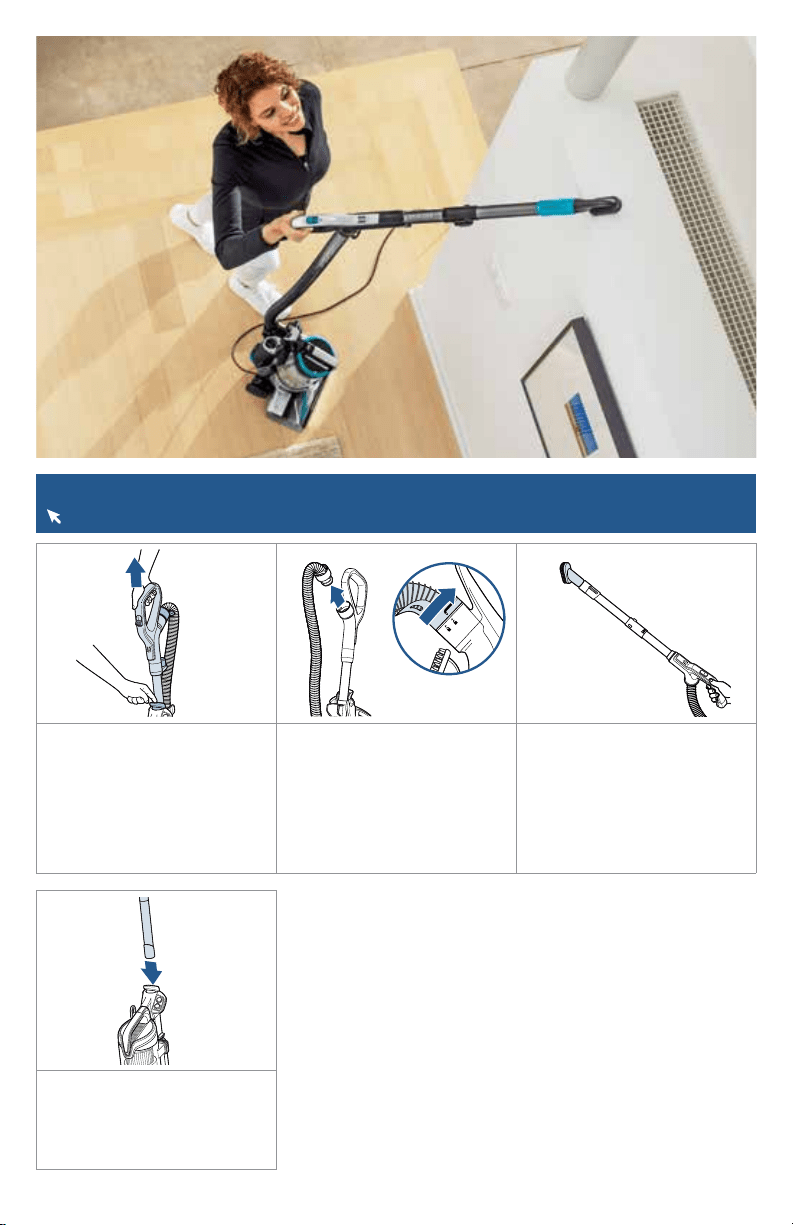
Above Floor Cleaning
Visit support.BISSELL.com to see all the ways you can use your vacuum’s tools.
1. Clean hard-to-reach spaces
with the Quick Release
Extension Wand. Push the
release button to remove and
attach desired tool.
2. The stretch hose can be
removed from the extension
wand. To do so, twist circular
hose cuff counter-clockwise
and remove from handle.
3. Attach desired tool. Use
the Pet TurboEraser® Tool for
best results on furniture and
stairs. The LED crevice tool is
best along baseboards. The
dusting brush can be used on
upholstery and other sensitive
surfaces.
4. When finished, replace the
wand back on the vacuum by
sliding into place until you hear
a “click” and reattach hose to
handle if needed.
8 BISSELL.com
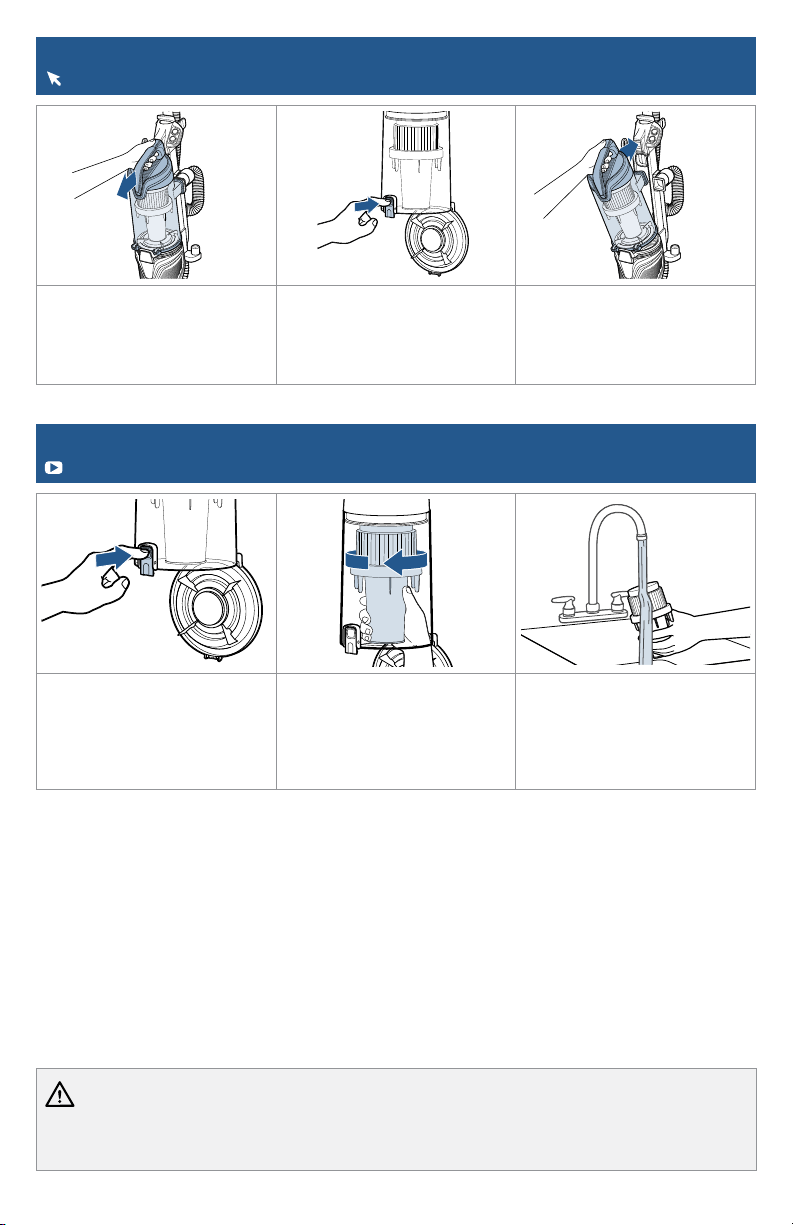
Cleaning the Inner Cyclone Separator
We have additional maintenance videos for your machine on support.BISSELL.com.
1. Hold the dirt tank over a
trash container. Press the
bottom release button to
empty.
2. Twist cyclone counter-
clockwise and pull down to
remove.
3. Tap separator against
inside of trash container and
rinse under warm water, if
necessary. Be sure to let it dry
completely before placing back
in dirt tank.
Emptying the Dirt Tank
For additional maintenance steps, visit support.BISSELL.com.
1. Press the dirt tank release
button and grab the handle to
pull the dirt tank away from
vacuum.
2. Hold the dirt tank over a
trash bin and press the empty
button. Once emptied, snap
bottom back into place.
3. Return the dirt tank to
the vacuum by securing the
bottom in place first and then
pushing back until you hear a
“click”.
WARNING To reduce the risk of electrical shock:
• Turn power switch OFF and disconnect polarized plug from electrical outlet before performing maintenance or troubleshooting checks.
• Before using your vacuum, make sure that the dirt tank is in locked position and that all filters, both pre- and post-filters, are in place. DO NOT
operate your vacuum without these filters.
BISSELL.com 9
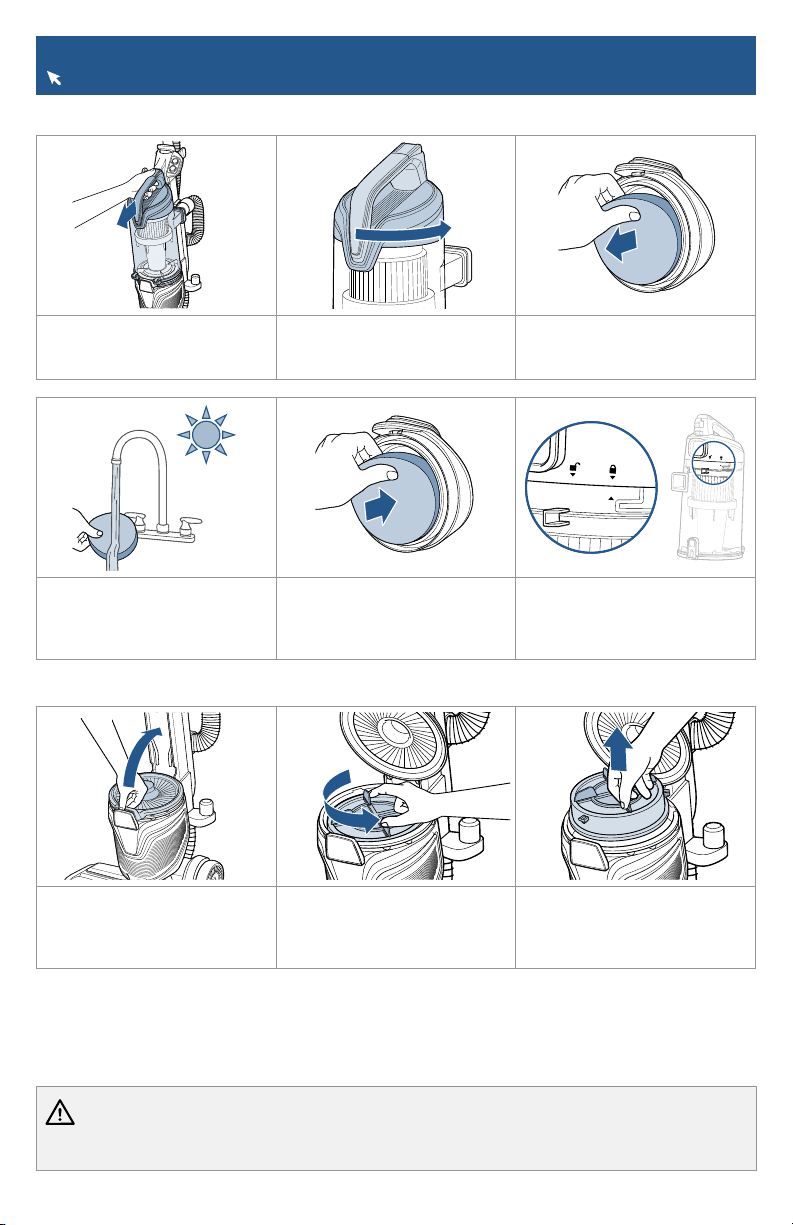
Cleaning and Replacing the Filters
Visit BISSELL.com to find replacement filters.
1. Pull tab up to access
post-motor filter.
2. Twist filter counter-
clockwise to unlock and
remove from vacuum.
3. Remove from vacuum.
1. Press the dirt tank release
button and pull away from
vacuum.
2. Twist tank cover to the
unlock position then pull up on
handle.
3. Remove pre-motor filter
from top of dirt tank lid by
pulling out.
24h
4. Clean with mild detergent,
rinse and squeeze all excess
water. Allow filters to dry
completely before reinserting.
5. Return pre-motor filters to
the top of the dirt tank. Place
the thick foam filter in last.
6. Put tank cover back on and
twist to lock.
Pre-Motor Filter
Post-Motor Filter
WARNING To reduce the risk of electrical shock:
• Turn power switch OFF and disconnect polarized plug from electrical outlet before performing maintenance or troubleshooting checks.
• Do not operate vacuum with damp or wet filters. Allow components to dry before reassembling the dirt tank.
Note: When reassembling, be sure to lock the filter back into place. The pleated filter may NOT be
washed. If dust/debris accumulates, gently tap the filter on the inside of a trash container.
10 BISSELL.com
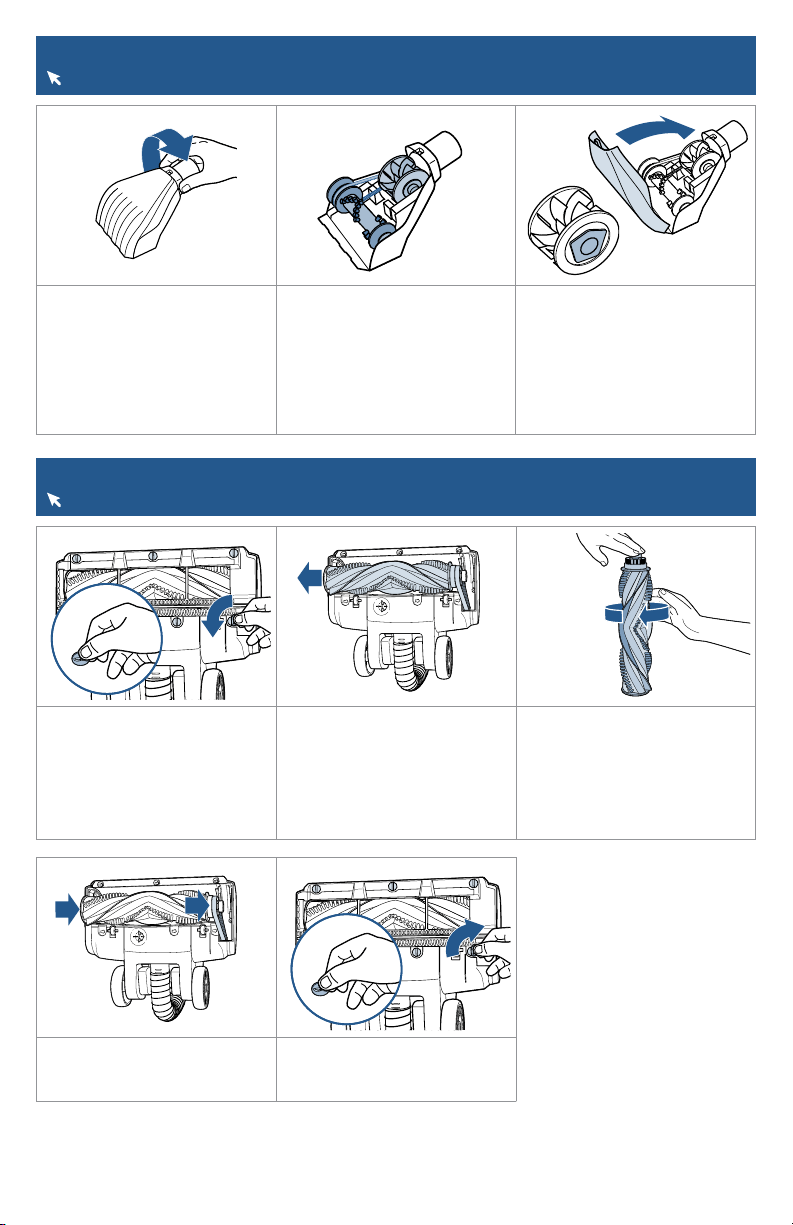
Maintaining the Pet TurboEraser® Tool
For additional maintenance steps, visit support.BISSELL.com.
1. Twist gray collar counter-
clockwise, until slot appears,
then separate faceplate.
2. Remove brush roll, belt
and paddle wheel. Inspect
for damages and replace if
necessary.
3. To reassemble, align two
clips on each end of paddle
wheel with belt on and pop
into place. Place brush roll
with belt back in. Put faceplate
back on by aligning tabs in the
top of the cover and “click”
into place.
Replacing the Brush & Belt
Visit BISSELL.com to find replacement parts.
1. Unplug and turn vacuum
over. Use coin to turn 6 slats to
remove bottom cover.
2. Pull brush roll straight out
and slide belt off motor gear.
3. Inspect brush roll by placing
it on its end and spinning.
The brush roll should spin
freely, multiple times by one
flick. If it doesn’t, replace brush
roll. Inspect belt for damages
and replace if necessary.
4. Place belt back on brush
roll. Hook belt back around the
motor gear.
5. Reattach bottom cover by
turning 6 slats to tighten.

BISSELL.com 11
Problem Possible Cause Remedies
Vacuum is hard
to push or pull.
Suction needs adjustment.
Adjust using the suction control switch on
the handle. See page 6.
Vacuum won’t
pick up dirt.
There is a clog in the vacuum.
Remove main hose, run broomstick through
to clear.
Remove bottom brush cover and clear
debris from brush, belt and foot area.
Remove lower hose and run broomstick
through to clear any clogs.
Filters are dirty.
Remove and rinse pre-motor filters. Allow
enough time for them to dry properly
before reinserting. Remove and dust off
post-motor filter. See page 9.
Incorrect suction control settings. Adjust using the suction control feature.
Brush roll
doesn’t rotate.
Brush roll switch is off. Make sure the brush roll switch is set to AUTO.
Vacuum is locked in upright
position.
Recline vacuum and turn the brush roll
switch to AUTO.
Brush roll
doesn’t rotate
and LED
headlights
flash.
Brush roll has lodged debris or
other entanglements, keeping the
brush from rotating.
Remove bottom brush cover and clear
debris from brush, belt and foot area.
To reset brush motor, machine should be
unplugged before turning ON.
Prolonged usage on super plush
carpet may have overloaded the
brush motor.
Turn off and unplug the vacuum for 1 hour.
Loud noise. Suction relief valve was activated.
Clear any clogs from the upper and lower
hose and brush area. Also clean all filters.
Troubleshooting
Below are some of the issues you may run into. If you don’t see the issue you’re experiencing
below, visit support.BISSELL.com.
WARNING To reduce the risk of electrical shock, turn power switch OFF and disconnect polarized plug from electrical
outlet before performing maintenance or troubleshooting checks.
Protecting the Vacuum’s Motor
For more assistance with your vacuum’s motor protection, visit support.BISSELL.com.
There is an internal thermal protector in your vacuum that protects it from overheating. It controls the
main vacuum motor only, not the brush motor. When it activates, the main motor will stop. The front
lights and brush roll will stay on but there won’t be any suction. If this happens, follow these steps:
1. Turn vacuum OFF and unplug from electrical outlet.
2. Check for the source of overheating problem (full dirt tank, dirty filters or a clog) and fix by
following the steps in the “Vacuum won’t pick up dirt” troubleshooting section.
3. When the motor cools for approximately 30 minutes, the thermal protector automatically resets
and cleaning may continue. If the vacuum will not turn ON or the thermal protector continues to
activate contact Consumer Care.
Warranty
5-Year limited warranty, may vary by state. Visit support.BISSELL.com or call 1-800-237-7691
for complete warranty information.
But wait, there’s more!
Join us online for a complete guide to your new product, including
troubleshooting, product registration, parts, and more.
Go to support.BISSELL.com.
VIDEOS
INFOREGISTER PARTS SUPPORT
We’re Waggin’ Our Tails!
BISSELL proudly supports BISSELL Pet Foundation® and its mission to help
save homeless pets. When you buy a BISSELL® product, you help save pets,
too. We’re proud to design products that help make pet messes, odors and
pet homelessness disappear. Visit BISSELLsavespets.com to learn more.
©2021 BISSELL Inc. All rights reserved.
Part Number 1629239 08/21