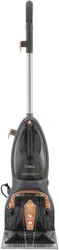
T146000
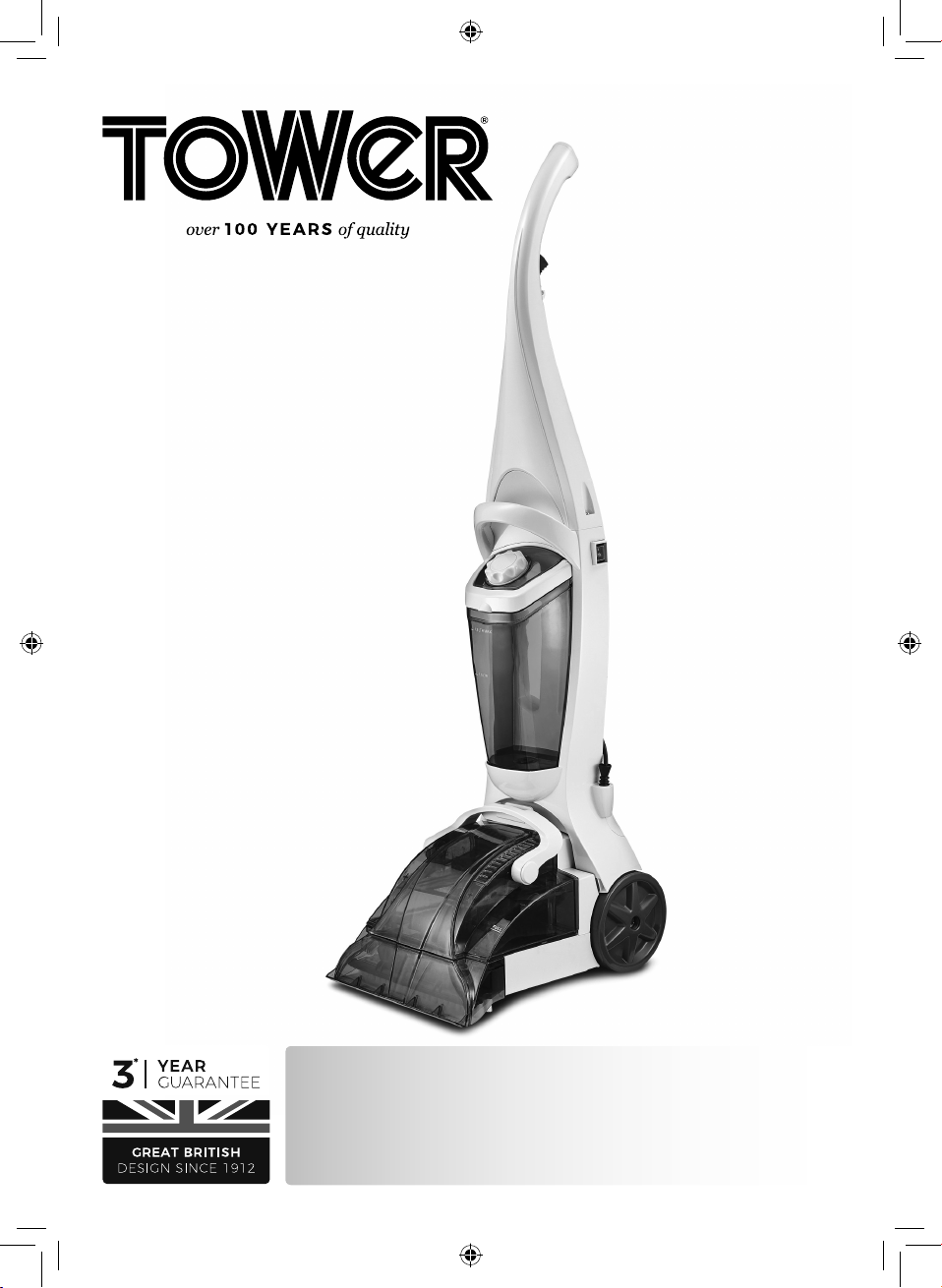
TCW10
Carpet Washer
SAFETY AND INSTRUCTION MANUAL
PLEASE READ CAREFULLY
*Subject to registering your Extended Guarantee online at www.towerhousewares.co.uk.
2
GREAT BRITISH DESIGN, INNOVATION
AND EXCELLENCE SINCE 1912
Since the turn of the 20th century, Tower has been designing,
developing and manufacturing housewares and small
appliances used by millions of households throughout the
UK and beyond. During the 1960s, the rise in popularity
of pressure cooking saw Tower become the UK’s largest
producer of pressure cookers, right through into the late
1980s. In recent years the Tower brand has been reborn with
an exciting and varied range of housewares and electrical
appliances that have quickly reinstated the brand’s richly
deserved status as a household name.
Visit
www.towerhousewares.co.uk
for more fantastic products.
3
Contents:
Thank you for purchasing this appliance from the
Tower range.
Please read this manual carefully BEFORE using the
appliance for your own safety.
It has been designed to provide many years of
trouble-free use.
There are many benets to using a Tower Carpet
Washer:
• 600W Powerful motor.
• Dirty and clean water tanks.
• 6 Metre power cord.
• Sucks up spills, refreshes and neutralises lingering
pet odours and washes carpets with ease.
• Lightweight design.
• Includes 250ml carpet cleaning shampoo.
1. Specications
Components and
structure
2. Technical Data
3. Important Safety
Information
4. Before First Use
5. Using your Appliance
6. Troubleshooting
7. Recycling
8. Cleaning & Care
9. Wiring Safety
10. Warranty Information
See back page for Customer
Service Information.
4
This box contains:
Instruction Manual
Carpet Washer
2 x Crosshead Screws
Carpet Cleaning Solution
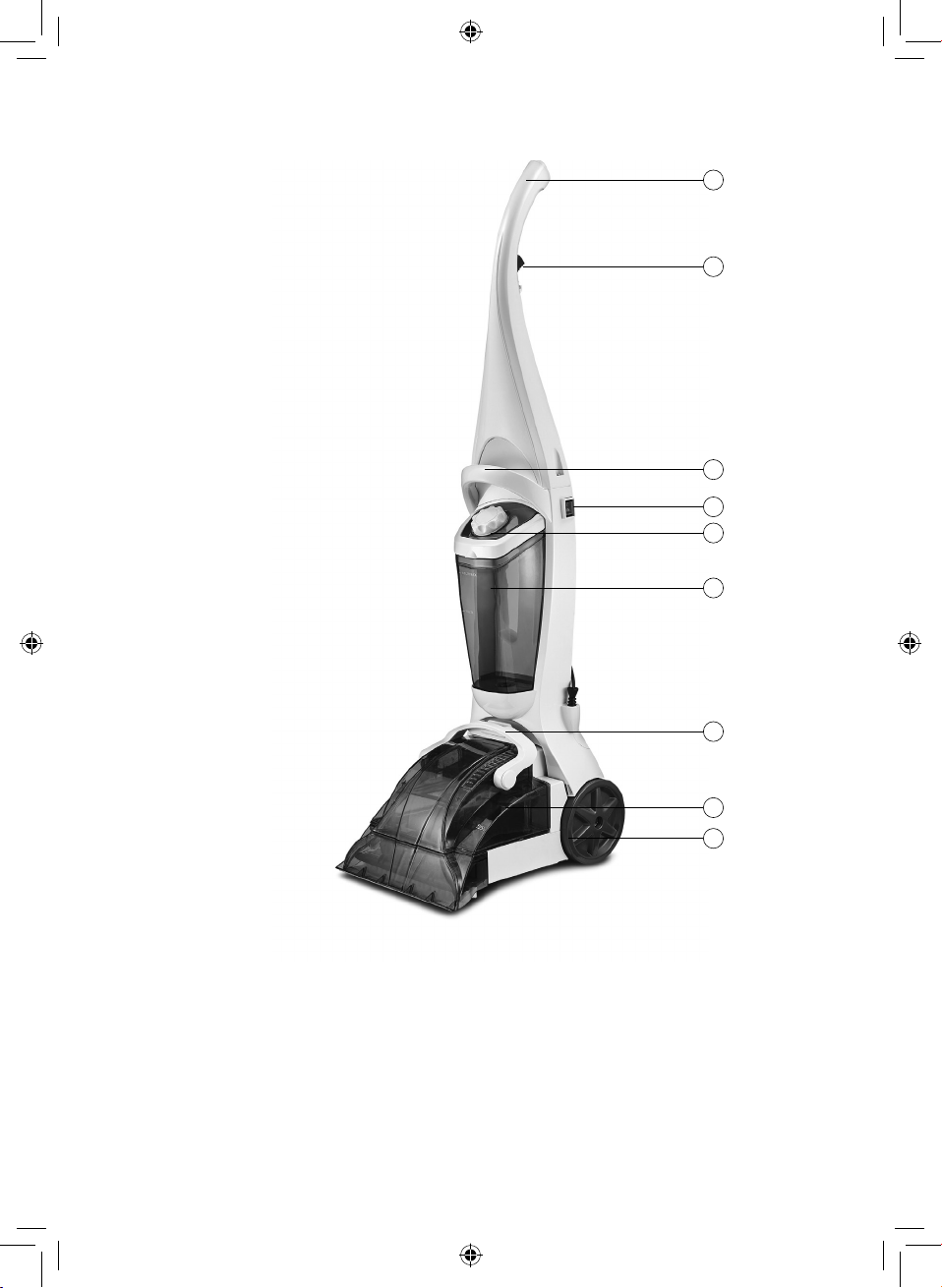
1. Handle
2. Trigger
3. Water tank handle
4. On/Off switch
5. Water tank cap
6. Clean Water Tank
7. Floorhead Handle
8. Dirty Water Tank
9. Wheels
1 - Specications:
Structure of your appliance:
3
2
4
5
6
7
8
1
9

5
Description: XP10 Carpet Washer
Model: T146000
Voltage: 230V
Frequency: 50Hz
Product Power: 600W
Protection Class: IPX4
Documentation
We declare that this product conforms to the following product legislation in
accordance with the following directive(s):
2014/30/EU Electromagnetic Compatibility Directive.
2014/35/EU Low Voltage Directive.
2011/65/EU Restriction of Hazardous Substances Directive.
2009/125/EC Eco-Design of Energy Related Products.
RK Wholesale LTD Quality Assurance, United Kingdom.
2 - Technical Data:
Should you encounter problems or require a replacement part, contact the Tower
Customer Support Team: +44 (0) 333 220 6066.
Some spare parts may be ordered from the Tower website.
Your warranty becomes void should you decide to use non Tower spare parts.
Spare parts can be purchased from www.towerhousewares.co.uk
Guarantee for spare parts:
The spares and accessories are guaranteed for 1 year from date of purchase.
The main body and housing are guaranteed for the extended free warranty subject
to registration.
If any defect arises due to faulty materials of workmanship, the faulty products must
be returned to the place of purchase within 12 months from the date of purchase.
Refund or replacement is at the discretion of the retailer.
6
Please read these notes carefully BEFORE using your
Tower appliance
3 - Important Safety Information:
• Check that the voltage
of the main circuit
corresponds with the
rating of the appliance
before operating.
• If the supply cord or
appliance is damaged,
stop using the appliance
immediately and
seek advice from the
manufacturer, its service
agent or a similarly
qualied person.
• DO NOT let the cord
hang over the edge of a
table or counter or let it
come into contact with
any hot surfaces.
• DO NOT carry the
appliance by the power
cord.
• DO NOT use any
extension cord with this
appliance.
• DO NOT pull the plug
out by the cord as this
may damage the plug
and/or the cable.
• Switch off at the wall
socket then remove the
plug from the socket
when not in use or
before cleaning.
• Switch off and
unplug before tting
or removing tools/
attachments, after use
and before cleaning.
• Close supervision is
necessary when any
appliance is used by or
near children.
• Children should not play
with the appliance.
• This appliance can
be used by children
aged from 8 years and
above and persons
with reduced physical,
sensory or mental
capabilities or lack
of experience and
knowledge if they have
been given supervision
or instruction
concerning use of the
appliance in a safe way
and understand the
hazards involved.
• Cleaning and user
maintenance should
not be undertaken
by children without
supervision.
• Take care when any
appliance is used near
pets.
7
• Not suitable for carpets
with long bres as the
bristles will damage the
bres.
• Keep the vacuum
cleaner moving over
the carpet surface
at all times to avoid
damaging the carpet
bres.
• DO NOT use this
product for anything
other than its intended
use.
• DO NOT immerse cords,
plugs or any part of the
appliance in water or
any other liquid.
• This appliance is for
household use only.
• DO NOT use the
appliance outdoors.
• Keep hair, loose
clothing, ngers and all
body parts away from
moving parts.
• DO NOT use to pick up
ammable liquids such
as gasoline or use in an
area where they might
be present.
• DO NOT use the
appliance without the
dust container lter in
place.
• DO NOT pick up
anything that is burning
or smoking such as
cigarettes, matches or
hot ashes.
• Use extra care when
cleaning on stairs.
• Use only manufacturer’s
recommended
accessories.
• DO NOT pull cord, use
cord as a handle, close
a door on cord, or pull
cord around sharp
edges or corners.
• DO NOT run vacuum
cleaner over the cord.
Keep cord away from
heated surfaces.
• This product is tted
with a thermal cut-out,
which will activate if the
motor overheats due
to blocked air inlets. If
the appliance cuts out,
allow it to cool for 1 hour,
then empty the dust
container and clean all
of the lters.
• In the unlikely event
the appliance develops
a fault, stop using
it immediately and
seek advice from the
Customer Support
Team:
+44 (0) 333 220 6066
8
Read all instructions and safety information carefully before rst use. Please retain
this information for future reference.
1. Remove the product from the box.
2. Remove any packaging from the product.
3. Please retain all packaging until you have checked and counted all the parts
and the contents against the parts list.
4. Assemble the unit, as instructed below.
5. Prepare the carpet. To do this, remove as much furniture from the room as
possible. Alternatively, cover any furniture in the surrounding area with a
protective cover or cloth.
6. Vacuum the carpet thoroughly.
7. Test a small area of the carpet for colour fastness. To do this, dampen a cloth
with the included carpet cleaning solution, rub it gently over the small test
area and check for any colour bleeding. If the cloth remains clean and there is
no colour bleeding, the carpet is safe to clean.
8. Dispose of the packaging in a responsible manner.
4 - Before First Use
Assembly :
1. To use the unit, begin by assembling it. To do this, begin by setting it in an
upright position
2. Once the appliance is upright, place the handle rmly onto the main body,
ensuring the cord clip is on the same side as the mains cord hooks. The handle
is correctly installed when both the cord clip and the cord hook are facing
towards the back of the unit.
3. Once the handle is afxed to the unit, drive one of the 2 included crosshead
screws into the corresponding holes on either side of the handle and tighten
them using a screwdriver. Be careful not to overtighten the screws, as this
could cause damage to the unit.
Filling the Clean Water Tank:
WARNING! ALWAYS ll the clean water tank before attempting to operate the unit.
1. Once the unit has been assembled, ll the clean water tank to begin using it.
2. To ll the clean water tank, begin by unplugging the unit from the mains.
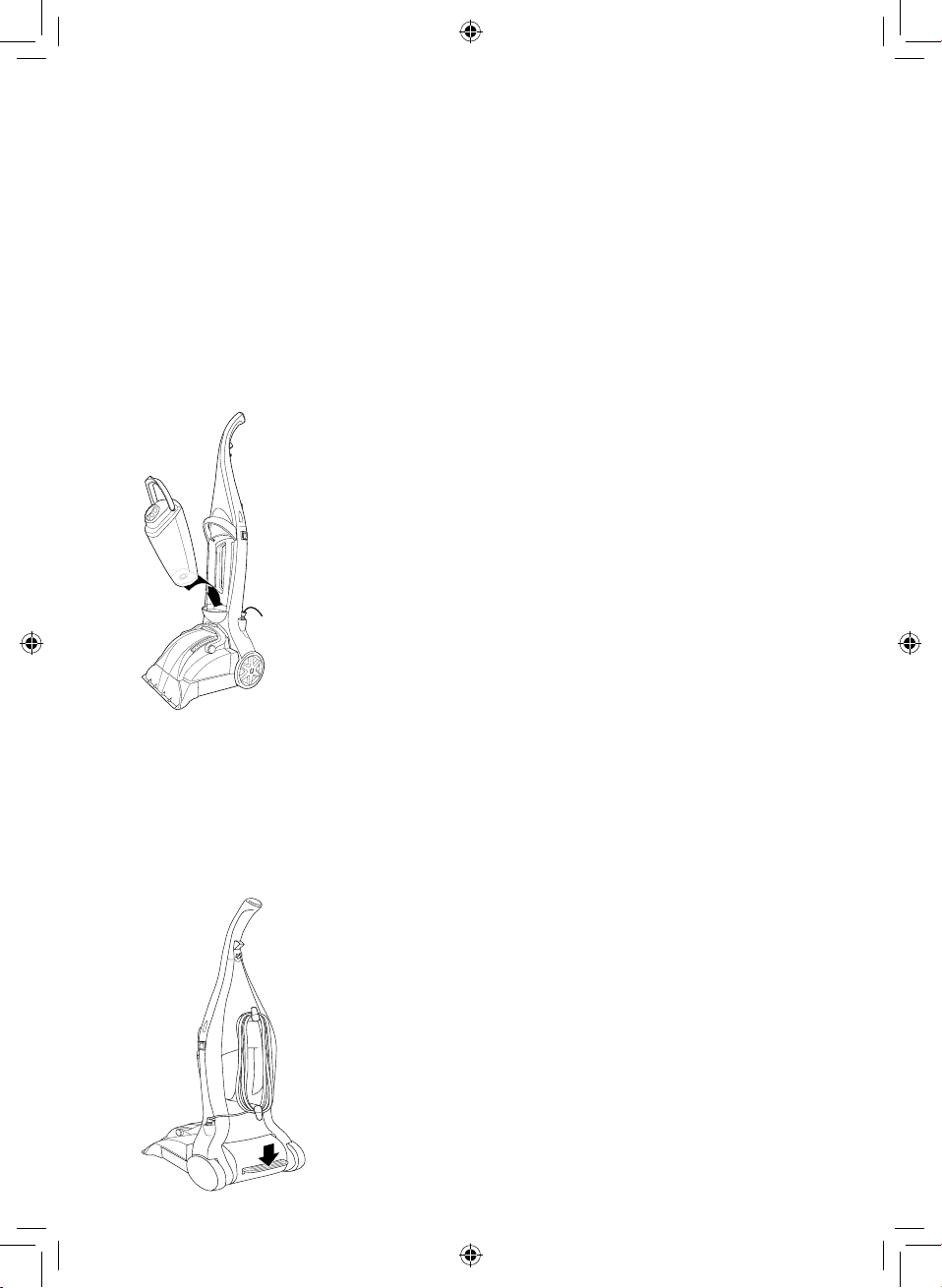
When the unit has been unplugged from the mains, rmly grip the water tank
and pull the water tank handle forwards and upwards to unlock it. Once the
tank handle has been unlocked, tilt the tank away from the main body of the
unit until it detaches.
3. Once the clean water tank has been detached from the unit, unscrew the
cap by turning it counter-clockwise, and add in the included carpet cleaning
solution. Be careful to observe the instructions and measurements detailed on
the bottle when pouring the cleaning solution into the tank.
5 - Using Your Appliance
9
Note: The included carpet cleaning solution can be replaced with any low-foaming
carpet cleaning solutions available in the market.
4. Once the carpet cleaning solution has been measured out and added to the
water tank, top up the remainder of the tank with warm tap water. When the
tank is full, replace the tank cap and turn it clockwise to tighten it and secure it
into place.
Note: The water tank’s maximum working capacity is 1.8 litres.
5. When the tank has been lled and securely closed up with the safety cap, push
it back into position inside the main body of the unit and secure it by pushing
the handle downwards until it clicks into place.
Using the Appliance:
1. When the water tank has been lled, plug the unit into an active mains socket,
ensuring the socket switch is turned to the ON position.
2. Once the unit is plugged in, turn it on by icking the On/Off switch to the On
position.
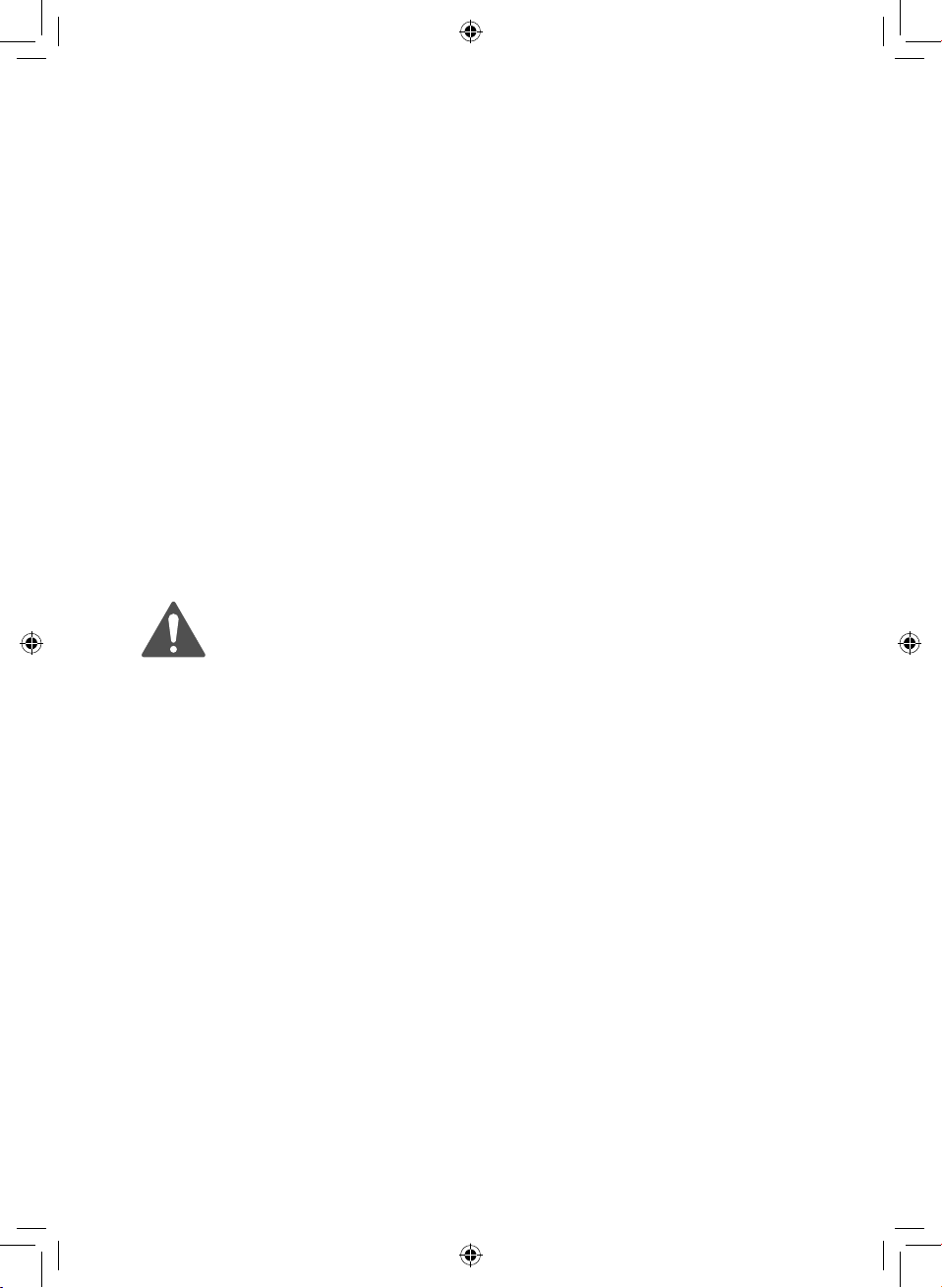
3. Once the unit is turned on, press down on the handle release pedal to lower
the oorhead into position. The unit is now ready for carpet cleaning.
10
4. To clean a carpet, press down on the trigger on the handle of the unit, and pull
the unit slowly backwards across the area to be cleaned. Try to use a steady,
gentle back and forth motion.
5. Repeat this process as many times as necessary until the relevant area of
carpet is cleaned, then move on to a different area, as required.
Tips for Carpet Cleaning:
1. Grip the carpet cleaner by the carrying handle when lifting it or moving it to
another section of carpet.
2. Avoid making the carpet too wet, as this could damage the bres or create
mould or mildew underneath them. Try not to use more than two squirts of
solution for each area of carpet – use mostly dry passes when cleaning.
3. Always work from back to front while cleaning a carpet, to avoid stepping on
any wet areas.
4. Allow time for the carpet to dry off after cleaning. Avoid walking on a freshly
cleaned carpet until it is fully clean.
5. Open a window or use a fan or dehumidier to help a freshly cleaned carpet
dry out faster and prevent the growth of mould or mildew.
6. Vacuum the carpet thoroughly after it has dried.
7. Wipe any cleaning solution residue from woodwork or furniture after cleaning,
to prevent it from damaging or staining these surfaces.
SAFETY INFORMATION FOR THE INCLUDED CARPET CLEANING SOLUTION
• Only for use with Tower carpet cleaners.
• Keep out of the reach of children.
• Causes serious eye irritation.
• Harmful to aquatic life with long lasting effects.
• Avoid release to the environment.
• IF IN EYES: Rinse cautiously with water for several minutes. Remove contact
lenses, if present and easy to do. Continue rinsing. If eye irritation persists:
Get medical advice.
• Dispose of container in accordance with national regulations.
11
DISPOSAL OF THE UNIT
Appliances bearing the symbol shown here may not be disposed of in domestic
rubbish. You are required to dispose of old electrical and electronic appliances like
this separately.
Please visit www.recycle-more.co.uk or www.recyclenow.co.uk for access to
information about the recycling of electrical items.
Please visit www.weeeireland.ie for access to information about the recycling of
electrical items purchased in Ireland.
The WEEE directive, introduced in August 2006, states that all electrical items must
be recycled, rather than taken to landll.
Please arrange to take this appliance to your local Civic Amenity site
for recycling, once it has reached the end of its life.
7 - Recycling
Problem Possible Solution
The carpet cleaner will
not work
Ensure the carpet cleaner is plugged into a mains socket and
that the socket switch is turned to the ON position.
If the unit will still not run, contact a qualied service person or
our Customer Support team.
The suction power is
weak while cleaning.
The water tank may be full, or the lters may require cleaning.
Empty the water tank and clean the lters, as detailed in the
‘Cleaning and Care’ section of this instruction manual.
Ensure the water tank is correctly installed and secured into
place within the main body of the unit.
The unit will not
dispense cleaning
solution when the
trigger is pressed.
Ensure the water tank is full. If necessary, ll the water tank as
detailed in the ‘Filling the Water Tank’ section of this instruction
manual.
Ensure the water tank is correctly installed and secured into
place within the main body of the unit.
The motor is making an
unusual sound
The water tank is full. Empty the water tank as detailed in the
‘Cleaning and Care’ section of this instruction manual.
6 - Troubleshooting
12
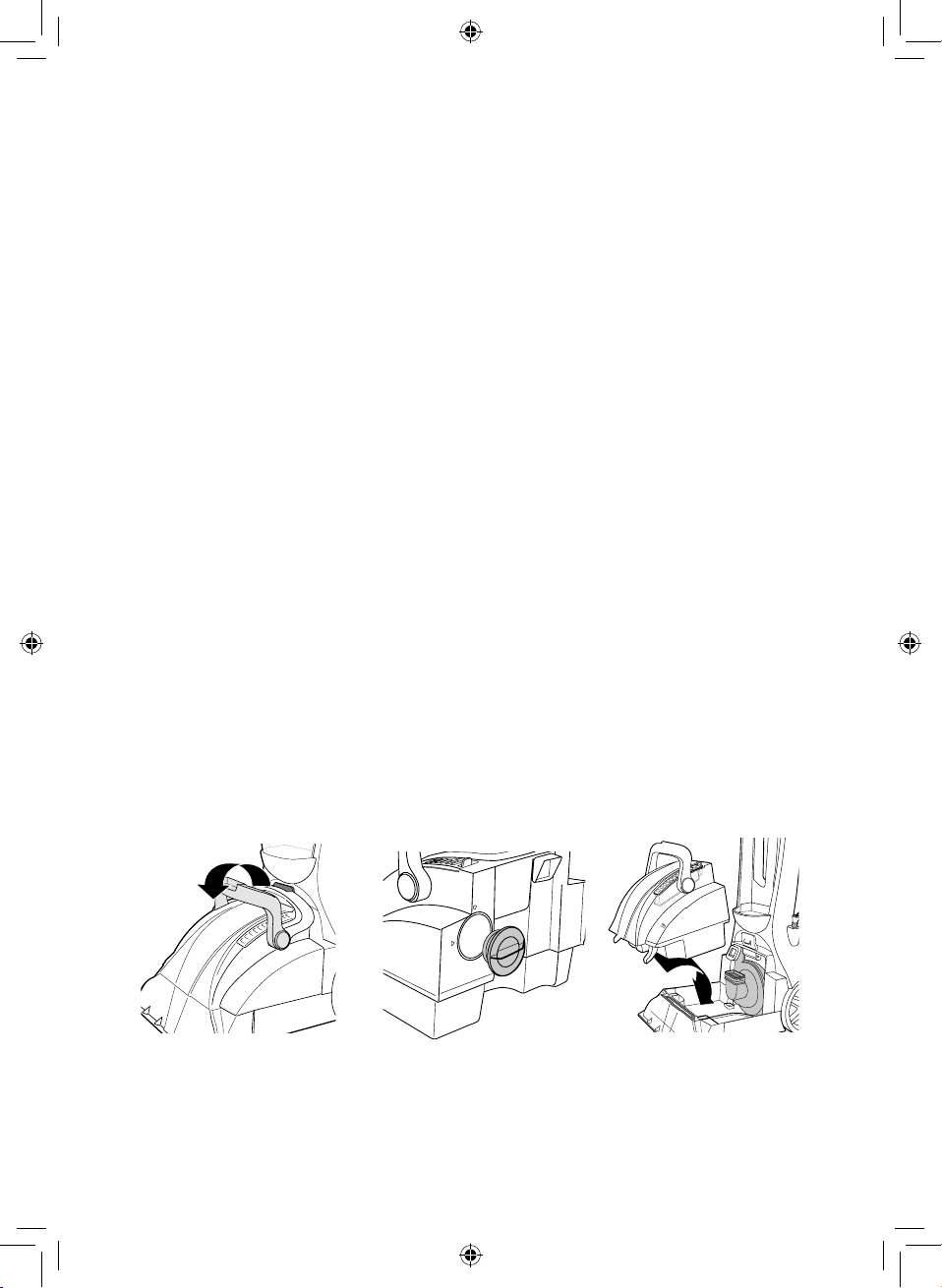
Note: Ensure the carpet cleaner is turned off and unplugged from the mains before
carrying out any cleaning or maintenance.
Cleaning the Unit:
1. Clean the unit and accessories with a soft, damp cloth and allow it to dry fully
before attempting to use it again.
2. Do not use any harsh cleaners or chemicals with the unit, as this may cause
damage to the outer surfaces.
CAUTION! DO NOT allow water to enter any part of the unit other than the water
tank, as this could cause damage to the internal components.
Emptying the Water Tank:
1. This unit is equipped with an automatic shut-off device, which prevents the
carpet cleaner from picking up more water than the water tank can hold. The
dirty water tank will need emptying when the motor gives off a high-pitched
sound, the oat inside the water tank has risen to the surface, or when dirty
cleaning solution can no longer be seen through the water tank lid. When this
occurs, follow the steps below to empty and refresh the unit’s water tank.
2. To remove the dirty water tank from the carpet cleaner, rmly grip it and pull
back on the tab on the main body of the unit to release the water tank handle.
Once the tank handle has been unlocked, tilt the tank away from the main
body of the unit until it detaches.
3. When the water tank has been detached from the unit, unscrew the cap by
turning it counter-clockwise. Once the cap has been removed, empty the
water tank. When the tank is empty, replace the tank cap and turn it clockwise
to tighten it and secure it into place.
4. When the tank has been emptied and securely closed up with the safety cap,
push it back into position inside the main body of the unit and secure it by
pushing the handle downwards and into the locking tab until it clicks into
place.
5. The unit is now ready for normal use.
U
N
LO
C
K
LOCK
8 - Cleaning & Care
Step 1 Step 2 Step 3
13
Cleaning The Filters:
1. This unit is equipped with detachable exhaust and motor lters. These lters
should be periodically cleaned to ensure optimal operation.
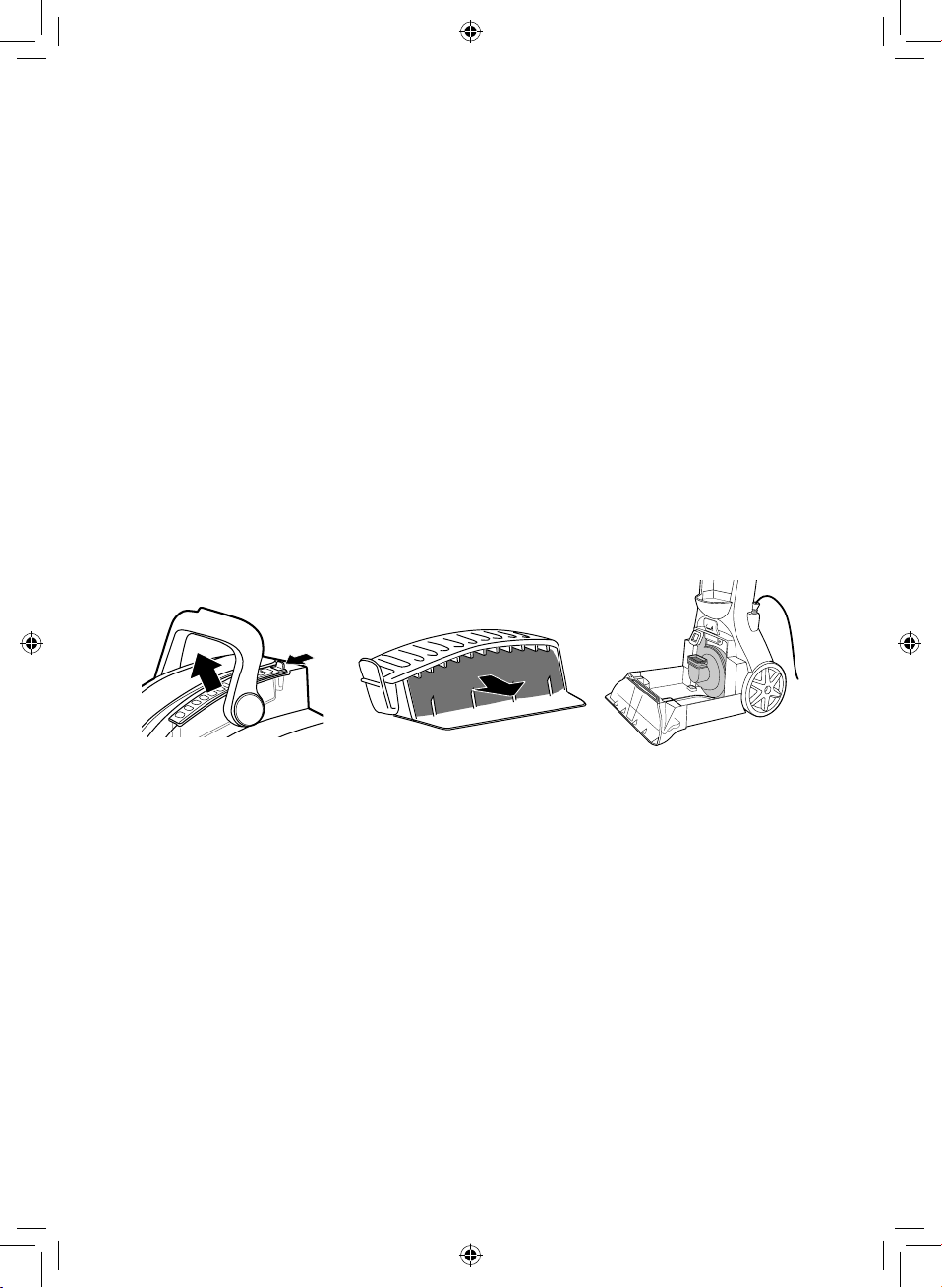
2. To clean the exhaust and motor lters, begin by detaching the water tank from
the unit, as instructed in the section above.
3. When the water tank has been detached from the unit, open it and retrieve
the exhaust lter from inside.
4. Once the exhaust lter has been removed from the tank, rinse it under warm
running water and leave it to dry thoroughly. Take care to ensure the lter is
fully cleaning before replacing it into the unit.
5. When the exhaust lter is fully dry, place it back into its housing and insert it
back into the water tank.
6. When the exhaust lter has been replaced into the unit, pull the motor lter
out from inside the water tank and repeat the steps above to clean it. Take care
to ensure the lter is fully clean before replacing it into the unit.
7. Once both lters have been replaced, push the tank back into position inside
the main body of the unit and secure it by pushing the handle downwards
until it clicks into place.
8. The unit is now ready for normal use.
Storing the Appliance:
Note: Before storing the carpet washer, unplug it from the mains and ensure all
parts are completely dry.
WARNING! DO NOT store the carpet cleaner with cleaning solution or dirty water
inside the water tank. ALWAYS empty and clean the water tank prior to storing the
unit.
Store the appliance in a cool, dry place, preferably inside its original packaging, and
out of the reach of children.
Step 1 Step 2 Step 3
14
WARNING:
This appliance is double insulated.
Do not connect any wire to the earth terminal.
9 - Wiring Safety for UK Use Only
IMPORTANT
As the colours in the mains lead of this
appliance may not correspond with
the coloured markings identifying the
terminals in your plug, please proceed
as follows:
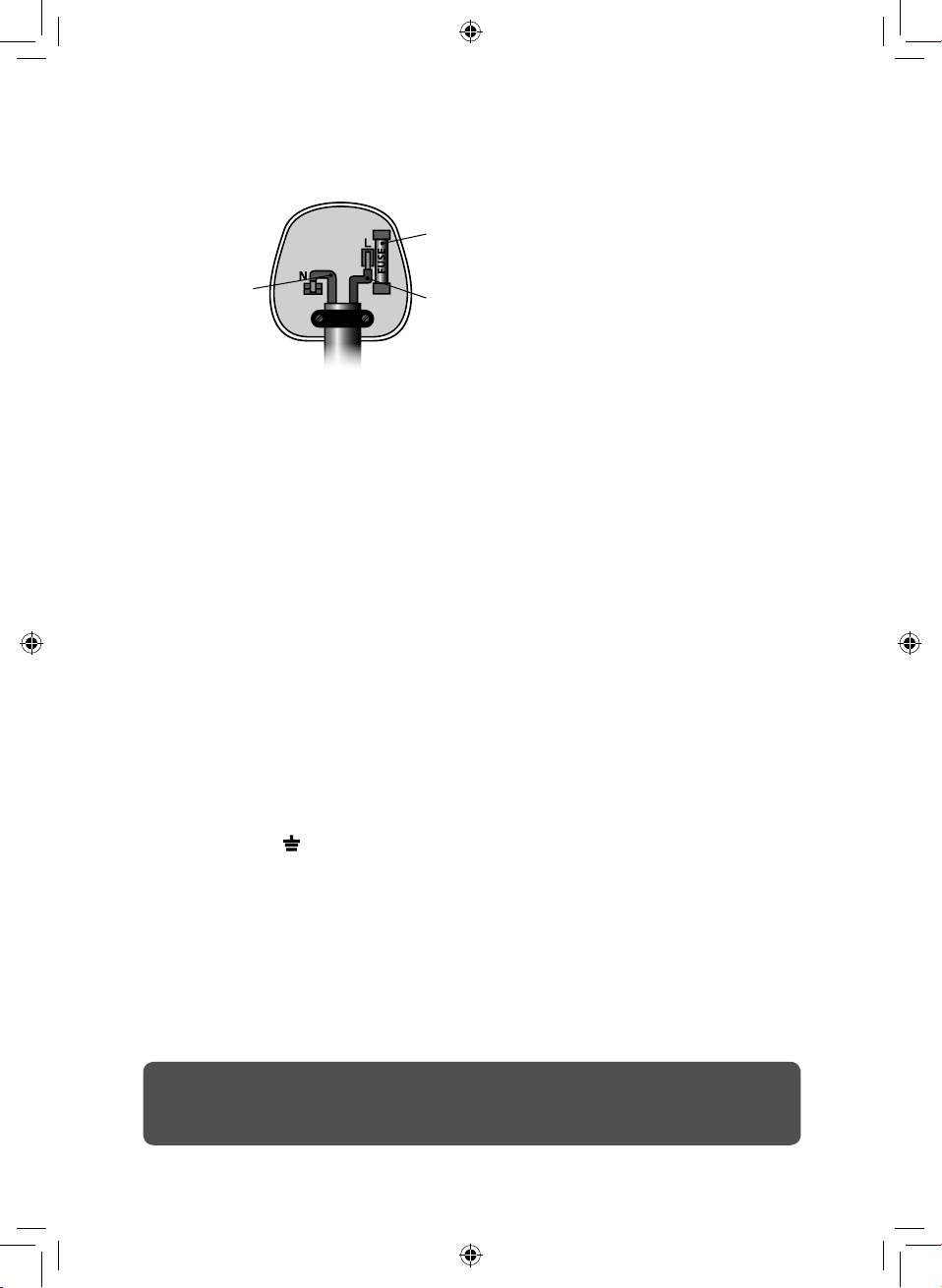
The wires in the mains lead are
coloured in accordance with the
following code:
Blue neutral [N] Brown
live [L]
Plug Fitting Details (Where Applicable).
The wire coloured blue is the neutral
and must be connected to the
terminal marked [N] or coloured black.
The wire coloured brown is the live
wire and must be connected to the
terminal marked [L] or coloured red.
On no account must either the brown
or the blue wire be connected to the
[EARTH] terminal .
Always ensure that the cord grip is
fastened correctly.
The plug must be fitted with a fuse
of the same rating already fitted and
conforming to BS 1362 and be ASTA
approved.
If in doubt consult a qualified
electrician who will be pleased to do
this for you.
Non-Rewireable Mains Plug.
If your appliance is supplied with a
non-rewireable plug fitted to the
mains lead and should the fuse need
replacing, you must use an ASTA
approved one (conforming to BS 1362
of the same rating).
If in doubt, consult a qualified
electrician who will be pleased to do
this for you.
If you need to remove the plug –
disconnect it from the mains – and
then cut it off of the mains lead and
immediately dispose of it in a safe
manner. Never attempt to reuse the
plug or insert it into a socket outlet as
there is a danger of an electric shock.
Fuse
Neutral
(Blue)
Live
(Brown)
15
This product is guaranteed for 12 months
from the date of original purchase.
If any defect arises due to faulty materials
of workmanship, the faulty products must
be returned to the place of purchase.
Refund or replacement is at the discretion
of the retailer.
The Following Conditions Apply:
• The product must be returned to the
retailer with proof of purchase or a
receipt.
• The product must be installed and
used in accordance with the
instructions contained in this
instruction guide.
• It must be used only for domestic
purposes.
• It does not cover wear and tear,
damage, misuse or consumable parts.
• Tower has limited liability for incidental
or consequential loss or damage.
This guarantee is valid in the UK and Eire
only.
The standard one year guarantee is only
extended to the maximum available for
each particular product upon registration
of the product within 28 days of purchase.
If you do not register the product with us
within the 28 day period, your product is
guaranteed for 1 year only.
To validate your extended warranty, please
visit www.towerhousewares.co.uk and
register with us online.
Please note that length of extended
warranty offered is dependent on product
type and that each qualifying product
needs to be registered individually in order
to extend its warranty past the standard
1 year.
Extended warranty is only valid with proof
of purchase or receipt.
As a thank you for purchasing
one of our fantastic products,
we are offering you an extra
2 years peace of mind in
addition to your 1 year
guarantee.
To receive your extra 2 year
guarantee, register your
appliance online within 28
days of purchase by visiting
www.towerhousewares.co.uk
10 - Warranty
thank you!
We hope you enjoy your appliance for many years. As a thank you for
purchasing one of our fantastic products, we are offering you an extra
2 years peace of mind.
*To receive your extra 2 years guarantee, register your appliance online
within 28 days of purchase by visiting:
www.towerhousewares.co.uk
Should you have a problem with your appliance, or need any spare parts,
please call our Customer Support Team on:
+44 (0) 333 220 6066
1119.V1
Your warranty becomes void should you
decide to use non Tower spare parts.
Spare parts can be purchased from
www.towerhousewares.co.uk