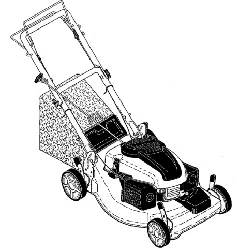
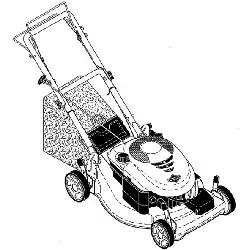
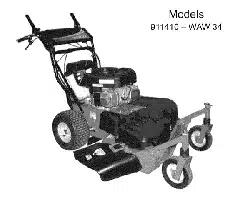
Zoom XLo
Owner/Operator Manual
Manuel Du Proprietaire/Utilisateur
Models
915145 - Zoom XL 42
915147 - Zoom XL 48
915149 - Zoom XL 54
ENGLISH
FRAN(_AIS
04040800 10/09
Printed in USA
SAFETY .......................... 4
ASSEMBLY ...................... 10
CONTROLS AND FEATURES ....... 11
OPERATION ..................... 12
MAINTENANCE SCHEDULE ........ 16
SERVICE AND ADJUSTMENTS ..... 17
STORAGE ....................... 25
TROUBLESHOOTING ............. 26
SERVICE PARTS ................. 28
ACCESSORIES ................... 28
SPECIFICATIONS ................. 29
WARRANTY ..................... 30
II_/ d-'{o]_ll_o,]_o)_I
NON-ENGLISH MANUALS
Manuals in languages other than
English may be obtained from your
Dealer. Visit your dealer or
www.ariens.com for a list of
languages available for your
equipment.
Manuals printed in languages other
than English are also available as a
free download on our website:
htt p://www.ariens.co m
MANUALES EN IDIOMAS
DIFERENTES DEL INGLES
Puede obtener manuales en
idiomas diferentes del ingles en su
distribuidor. Visite a su distribuidor
o vaya a www.ariens.com para
obtener una lista de idiomas
disponibles para su equipo.
Tambien puede imprimir manuales
en idiomas diferentes del ingles
descargandolos gratuitamente de
nuestra pagina Web:
htt p://www.ariens.co m
Manuels non anglais
Des manuels dans differentes
,_ langues sont disponibles chezvotre revendeur. Rendez-vous
chez votre revendeur ou allez sur
le site www.ariens.com pour
consulter la liste des langues
disponibles pour votre equipement.
Les manuels imprimes dans des
langues differentes de I'anglais
sont egalement disponibles en
telechargement gratuit sur notre
site Web:
htt p://www.ariens.co m
THE MANUAL
Before operation of unit, carefully and
completely read your manuals. The contents
will provide you with an understanding of
safety instructions and controls during normal
operation and maintenance.
All reference to left, right, front, or rear are
given from operator seated in operation
position and facing the direction of forward
travel.
MODEL AND SERIAL NUMBERS
When ordering replacement parts or making
service inquiries, know the Model and Serial
numbers of your unit and engine.
Numbers are located on the product
registration form in the unit literature
package.
They are printed on a serial number label,
located on the frame of your unit (figure 1).
1. Unit Serial Number Label
2. Engine Serial Number Label
Figure 1
GB-2
RecordUnitModelandSerialnumbers
here.
RecordEngineModelandSerial
numbershere.
PRODUCT REGISTRATION
The Ariens dealer must register the product
at the time of purchase. Registering the
product will help the company process
warranty claims or contact you with the latest
service information. All claims meeting
requirements during the limited warranty
period will be honored, whether or not the
product registration card is returned. Keep a
proof of purchase if you do not register your
unit.
Customer Note: If the dealer does not
register your product, please fill out, sign, and
return the product registration card to Ariens.
UNAUTHORIZED REPLACEMENT
PARTS
Use only Ariens replacement parts. The
replacement of any part on this unit with
anything other than an Ariens authorized
replacement part may adversely affect the
performance, durability, and safety of this unit
and may void the warranty. Ariens disclaims
liability for any claims or damages, whether
warranty, property damage, personal injury or
death arising out of the use of unauthorized
replacement parts.
DELIVERY
Customer Note: If you have purchased this
product without complete assembly and
instruction by your retailer, it is your
responsibility to:
Read and understand all assembly
instructions in this manual. If you do not
understand or have difficulty following
the instructions, contact your nearest
Ariens Dealer for assistance.
NOTE: To locate your nearest Ariens Dealer,
go to www.ariens.com on the internet.
,_ WARNING: Improper assembly oradjustments can cause serious
injury.
Before Attempting To Operate Your
Unit:
1. Make sure all assembly has been
properly completed.
2. Understand all Safety Precautions
provided in the manuals.
3. Review control functions and operation
of the unit. Do not operate the unit
unless all controls function as described
in this manual.
4. Review recommended lubrication,
maintenance and adjustments.
5. Review Limited Warranty Policy.
6. Fill out a product registration card and
return the card to the Ariens Company or
go to www.ariens.com.
DISCLAIMER
Ariens reserves the right to discontinue,
change, and improve its products at any time
without notice or obligation to the purchaser.
The descriptions and specifications contained
in this manual were in effect at printing.
Equipment described within this manual may
be optional. Some illustrations may not be
applicable to your unit.
GB-3
[,='Y-,1_1=11"4
WARNING: This cutting machine
is capable of amputating hands
and feet and throwing objects.
Failure to observe the safety
instructions in the manuals and on
decals could result in serious injury
or death.
Slopes are a major factor related
to loss-of-control and tip-over
accidents. Operation on all slopes
requires extra caution.
Tragic accidents can occur if the
operator is not alert to the
presence of children. Never
assume that children will remain
where you last saw them.
Gasoline is extremely flammable
and the vapors are explosive,
handle with care.
Disengage attachment, stop unit
and engine, remove key, engage
parking brake, and allow moving
parts to stop before leaving
operator's position.
SAFETY ALERTS
Look for these symbols to point
out important safety
precautions. They mean:
Attention!
Personal Safety Is
Involved!
Become Alert!
Obey The Message!
The safety alert symbol is used in decals and
with this manual. Understand the safety
message. It contains important information
about personal safety.
DANGER: IMMINENTLY
HAZARDOUS SITUATION! If not
avoided, WILL RESULT in death or
serious injury.
_ WARNING: POTENTIALLY
HAZARDOUS SITUATION! If not
avoided, COULD RESULT in
death or serious injury.
CAUTION: POTENTIALLY
HAZARDOUS SITUATION! If not
avoided, MAY RESULT in minor or
moderate injury. It may also be
used to alert against unsafe
practices.
NOTATIONS
NOTE: General reference information for
proper operation and maintenance practices.
IMPORTANT: Specific procedures or
information required to prevent damage to
unit or attachment.
SAFETY DECALS AND
LOCATIONS
ALWAYS replace missing or damaged Safety
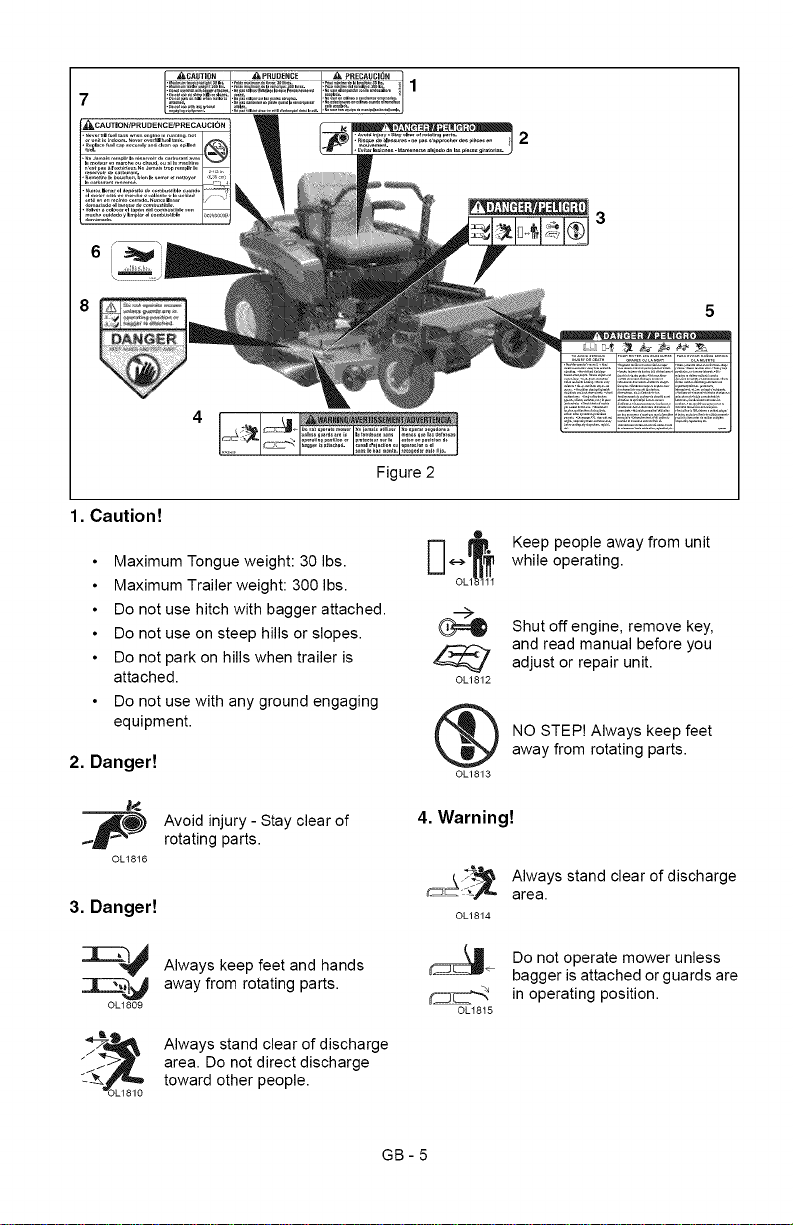
Decals. Refer to figure 2 for Safety Decal
locations.
GB-4
7
6
Figure2
5
1. Caution!
• Maximum Tongue weight: 30 Ibs.
• Maximum Trailer weight: 300 Ibs.
• Do not use hitch with bagger attached.
• Do not use on steep hills or slopes.
• Do not park on hills when trailer is
attached.
• Do not use with any ground engaging
equipment.
2. Danger!
J_
_p Avoid injury - Stay clear of
rotating parts.
OL1816
3. Danger!
OL1809
Always keep feet and hands
away from rotating parts.
Always stand clear of discharge
area. Do not direct discharge
toward other people.
®
©L1812
OL1813
Keep people away from unit
while operating.
Shut off engine, remove key,
and read manual before you
adjust or repair unit.
NO STEP! Always keep feet
away from rotating parts.
4. Warning!
©L1814
0LI815
Always stand clear of discharge
area.
Do not operate mower unless
bagger is attached or guards are
in operating position.
GB-5
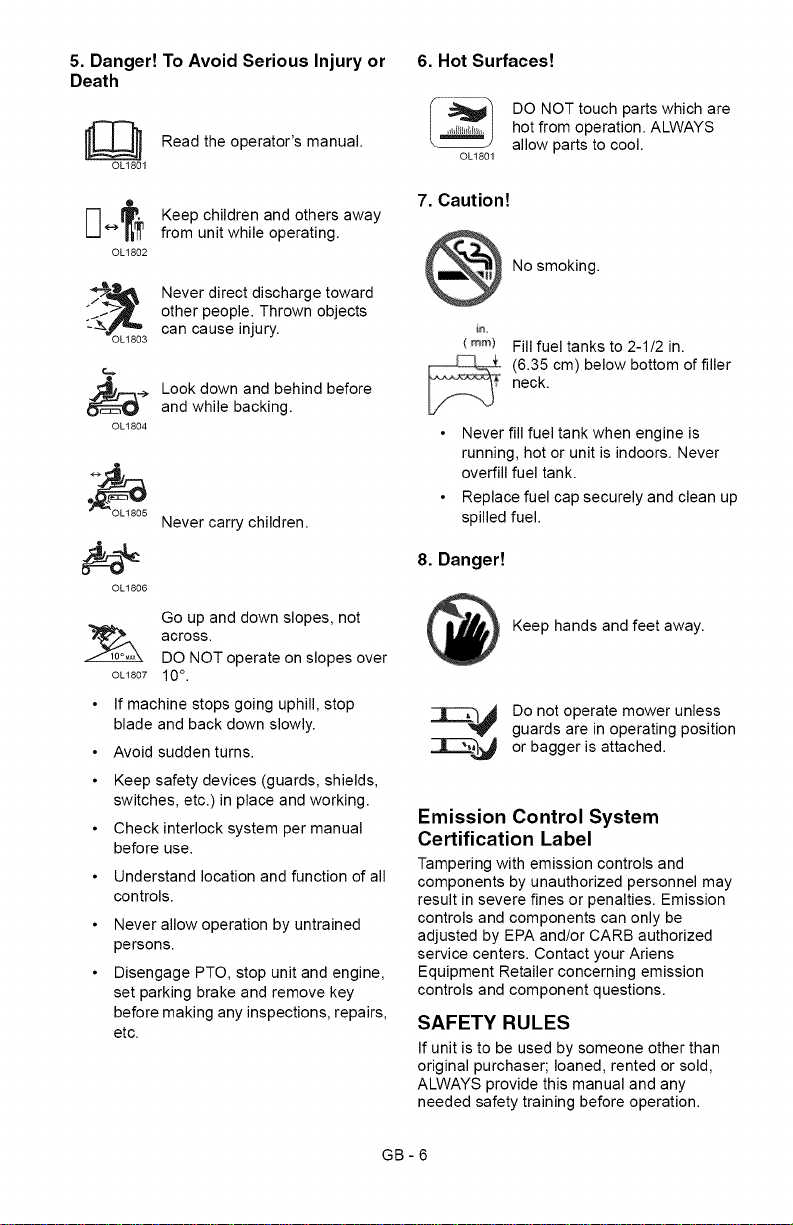
5. Danger! To Avoid Serious Injury or
Death
[]] Read the operator's manual.
OL1801
Q
OL1802
OL1803
0[-1804
Keep children and others away
from unit while operating.
Never direct discharge toward
other people. Thrown objects
can cause injury.
Look down and behind before
and while backing.
OL1806
Never carry children.
Go up and down slopes, not
across.
DO NOT operate on slopes over
OL1807 10°.
• If machine stops going uphill, stop
blade and back down slowly.
• Avoid sudden turns.
• Keep safety devices (guards, shields,
switches, etc.) in place and working.
• Check interlock system per manual
before use.
• Understand location and function of all
controls.
Never allow operation by untrained
persons.
Disengage PTO, stop unit and engine,
set parking brake and remove key
before making any inspections, repairs,
etc.
6. Hot Surfaces!
OL1801
DO NOT touch parts which are
hot from operation. ALWAYS
allow parts to cool.
7. Caution!
No smoking.
iD.
(ram)
Fill fuel tanks to 2-1/2 in.
(6.35 cm) below bottom of filler
neck.
Never fill fuel tank when engine is
running, hot or unit is indoors. Never
overfill fuel tank.
Replace fuel cap securely and clean up
spilled fuel.
8. Danger!
Keep hands and feet away.
|,_ Do not operate mower unless
guards are in operating position
_--_']_j or bagger is attached.
Emission Control System
Certification Label
Tampering with emission controls and
components by unauthorized personnel may
result in severe fines or penalties. Emission
controls and components can only be
adjusted by EPA and!or CARB authorized
service centers. Contact your Ariens
Equipment Retailer concerning emission
controls and component questions.
SAFETY RULES
If unit is to be used by someone other than
original purchaser; loaned, rented or sold,
ALWAYS provide this manual and any
needed safety training before operation.
GB-6
Onlytheusercanpreventandisresponsible
foraccidentsorinjuriesoccurringto
themselves,otherpeopleorproperty.
Read,understand,andfollowallsafety
practicesinOwner/OperatorManualbefore
assembling,usingorworkingonthismower.
ALWAYSremovekeyfromignitionandwire
fromsparkplugbeforeassembly,orworking
onthisunit.
Inspectunitbeforeeachusefor:missingor
damageddecalsandshields,correctly
operatingsafetyinterlocksystem,and
deteriorationofgrasscatchers.Replaceor
repairasneeded.
ALWAYScheckoverheadandside
clearancescarefullybeforeoperation.
ALWAYSbeawareoftrafficwhencrossingor
operatingalongstreetsorcurbs.
Keepchildren,people,andpetsaway.Be
alertandshutoffunitifanyoneenterswork
area.Keepchildrenunderwatchfulcareofa
responsibleadult.
NEVERallowchildrentooperateorplayon
ornearunit.
Keepareaofoperationclearofalltoys,and
debris.Thrownobjectscancauseinjury.
Stayalertforhiddenhazards,holes,andruts.
Avoidunevenorroughterrain.DONOT
operateneardrop-offs,ditches,or
embankments.Unitcansuddenlyturnoverif
awheelisovertheedgeofaclifforditch,orif
anedgecavesin.
Dust,fog,etc.canreducevisionandcause
anaccident.Operateunitonlywhenthereis
goodvisibilityandlight.
Dataindicatesthatoperators,age60and
above,areinvolvedinalargerpercentageof
ridingmowerrelatedinjuries.These
operatorsshouldevaluatetheirabilityto
operatetheridingmowersafelyenoughto
protectthemselvesandothersfromserious
injury.
Wearadequatesafetygear,sturdyshoes,
andprotectivegloves.
Onlytrainedadultsmayoperateunit.Training
includesbeingfamiliarwithcontrolsand
actualoperation.
NEVERoperateunitafterorduringtheuseof
medication,drugsoralcohol.
NEVERallowanyonetooperatethisunit
whentheiralertnessorcoordinationis
impaired.
DONOTwearlooseclothingorjewelryand
tiebackhairthatmaygetcaughtinrotating
parts.
Protecteyes,faceandheadfromobjectsthat
maybethrownfromunit.Wearappropriate
hearingprotection.Alwayswearsafety
gogglesorsafetyglasseswithsideshields
whenoperatingmower.
Avoidsharpedges.Sharpedgescancut.
Movingpartscancutofffingersorahand.
ALWAYSkeephandsandfeetawayfromall
rotatingpartsduringoperation.Rotatingparts
cancutoffbodyparts.
ALWAYSkeephandsawayfromallpinch
points.
Startandoperateunitonlywhenseatedin
operator'sposition.Steeringcontrollevers
mustbeinneutral,PTOdisengagedand
parkingbrakesetwhenstartingengine.
ALWAYSkeepbodyandhandsawayfrom
pinholesornozzleswhichejecthydraulic
fluidunderpressure.
DONOTtouchunitpartswhichmightbehot
fromoperation.Allowpartstocoolbefore
attemptingtomaintain,adjustorservice.
NEVERplaceyourhandsoranypartofyour
bodyorclothinginsideornearanymoving
partwhileunitisrunning.
NEVERdirectdischargetowardspersonsor
property.Thrownobjectsmayricochetback
towardsoperator.ALWAYSstandclearofthe
dischargearea.
ALWAYSdisengageattachment,stopunit
andengine,removekey,engageparking
brake,andallowmovingpartstostopbefore
leavingoperator'sposition.
Useextremecautionongravelsurfaces.
DisengagePTOwhenattachmentisnotin
useandwhencrossinggravelsurfaces.
DONOToperateunitifsafetyinterlock
systemisdamagedordisabled.Checksafety
interlockbeforeeachuse.
ALWAYSremovekeytopreventunauthorized
use.
DO NOT operate at too fast a rate. Slow
down before turning.
Stop engine before removing grass catcher or
unclogging chute.
DO NOT mow on wet grass. Reduced
traction could cause sliding.
DO NOT mow with the deck access plate
open. Always make sure the access plate is
down, or secured down, with the hardware.
DO NOT try to stabilize the machine by
putting your foot on the ground.
Know the weight of loads. Limit loads to those
you can safely control and the unit can safely
handle.
GB-7
ALWAYSkeepprotectivestructures,guards
andpanelsingoodrepair,inplaceand
securelyfastened.
Donotoperatewithouteitherentiregrass
catcherorthedischargeguardinplace.
DONOToperateinreverseunlessabsolutely
necessary.ALWAYSlookdownandbehind
beforeandwhilebacking;especiallyfor
children.
Followthemanufacturer'srecommendations
forwheelweightsorcounterweightsto
improvestabilitywhenusingattachments.
NEVERcarrypassengers-especially
children-evenwithbladesoff.
Useextracarewhenapproachingblind
cornersorobjectsthatmayobscurevisionof
hiddenobstaclesandchildren.
Ifyoucannotbackupaslopeoryoufeel
uneasyonit,donotmowit.
Mowupanddownslopes,notacrossthem.
Useslowspeedonanyslope.Tiresmaylose
tractiononslopeseventhoughthebrakesare
functioningproperly.
Keepallmovementsontheslopeslow and
gradual, DO NOT make sudden changes in
speed or direction.
Use extra care while operating machines with
grass catcher or other attachments. They can
affect stability of the machine.
Avoid starting, stopping, or turning on a
slope. If tires lose traction, disengage the
blades and proceed slowly straight down the
slope.
DO NOT operate on slopes over 10°.
DO NOT park on slopes unless necessary. If
unit is parked on a slope, ALWAYS chock or
block wheels and set parking brake.
DO NOT disengage or bypass transmission
and coast downhill.
Tow only with a machine that has a hitch
designed for towing. Do not attach towed
equipment except at the hitch point.
Follow the manufacturer's recommendations
for weight limits for towed equipment and
towing on slopes.
NEVER allow children or others in or on
towed equipment.
On slopes, the weight of the towed equipment
may cause loss of traction and loss of control.
Travel slowly and allow extra distance to stop.
Use extra care when loading or unloading
unit onto trailer or truck.
Secure unit chassis to transport vehicle.
NEVER secure from rods or linkages that
could be damaged.
DO NOT transport machine while engine is
running.
ALWAYS turn off power to attachment and
shut off fuel when transporting unit.
Keep unit free of grass clippings, leaves, and
other debris. Clean up oil or fuel spills.
This product is equipped with an internal
combustion type engine. DO NOT use unit on
or near any unimproved, forest-covered or
brush covered land unless exhaust system is
equipped with a spark arrester meeting
applicable local, state or federal laws. A spark
arrester, if it is used, must be maintained in
effective working order by operator.
Fuel is highly flammable and its vapors are
explosive. Handle with care. Use an
approved fuel container.
NO smoking, NO sparks, NO flames.
ALWAYS allow engine to cool before
servicing.
NEVER fill fuel tank when engine is running
or hot from operation.
NEVER fill or drain fuel tank indoors.
NEVER overfill fuel tank.
Replace fuel cap securely and clean up
spilled fuel.
NEVER fill containers inside a vehicle or on a
truck or trailer bed with a plastic liner. Always
place containers on the ground away from
your vehicle before filling.
When practical, remove gas-powered
equipment from the truck or trailer and refuel
it on the ground. If this is not possible, then
refuel such equipment on a trailer with a
portable container, rather than from a
gasoline dispenser nozzle.
Keep the nozzle in contact with the rim of the
fuel tank or container opening at all times until
fueling is complete. Do not use a nozzle lock-
open device.
If fuel is spilled on clothing, change clothing
immediately.
Avoid Electric Shock. Objects contacting both
battery terminals at the same time may result
in injury and unit damage. DO NOT reverse
battery connections.
Explosive Gases from battery can cause
death or serious injury. Poisonous battery
fluid contains sulfuric acid and its contact with
skin, eyes or clothing can cause severe
chemical burns.
NO flames, NO sparks, NO smoking near
battery.
ALWAYS wear safety glasses and protective
gear near battery. Use insulated tools.
GB-8
Batteryposts,terminalsandrelated
accessoriescontainleadandlead
compounds,chemicalsknowntotheStateof
Californiatocausecancerandreproductive
harm.Washhandsafterhandling.
ALWAYSkeepbatteriesoutofreachof
children.
Reverseconnectionsmayresultinsparks
whichcancauseseriousinjury.Always
connectpositive(+)leadofchargerto
positive(+)terminal,andnegative(-)leadto
negative(-)terminal.
ALWAYSdisconnectnegative(-)cableFIRST
andpositive(+)cableSECOND.ALWAYS
connectpositive(+)cableFIRST,and
negative(-)cableSECOND.
Afrozenbatterycanexplodeandresultin
deathorseriousinjury.DONOTchargeor
jumpstartabatterycontainingfrozenfluid.
Thawthebatterybeforeputtingonacharger
orjumpstarting.
ALWAYSkeepprotectivestructures,guards,
andpanelsingoodrepair,inplaceand
securelyfastened.NEVERmodifyorremove
safetydevices.
DONOTchangeenginegovernorsettingsor
over-speedengine.
Fumesfromengineexhaustcancauseinjury
ordeath.DONOTrunengineinanenclosed
area.Alwaysprovidegoodventilation.
ALWAYSmaintainunitinsafeoperating
condition.Damagedorwornoutmufflercan
causefireorexplosion.
Stopandinspectequipmentifyoustrikean
objectorifthereisanunusualvibration.
Repair,ifnecessary,beforerestarting.Never
makeadjustmentsorrepairswiththeengine
running.
Mowerbladesaresharpandcancutyou.
Wraptheblade(s)orweargloves,anduse
extracautionwhenservicingthem.NEVER
weldorstraightenmowerblades.
Rotationofoneblademaycauserotationof
theotherblades.
Checkbrakeoperationfrequently.Adjustand
serviceasrequired.
Keepallhardwareproperlytightened.
Storedenergyinspringscancauseinjury.
Maintainorreplacesafetyandinstruction
labels,asnecessary.
Neverstorethemachineorfuelcontainer
insideabuildingwherethereisanopen
flame,suchasawaterheater.
Shutofffuel(ifprovided)andallowengineto
coolcompletelybeforestoringinclosedarea
orcoveringunit.
Cleangrassanddebrisfromunit,especially
fromaroundmufflerandengine,tohelp
preventfires.
Forextendedstorage,cleanunitthoroughly.
SeeEngineManualforproperstorage.
Useonlyattachmentsoraccessories
designedforyourunit.
Checkattachmentcomponentsfrequently.If
wornordamaged,replacewith
manufacturer'srecommendedparts.
GB-9
_[.,."_"]::1_v_I:)_"d
,_ WARNING: AVOID INJURY. Readand understand the entire Safety
section before proceeding.
Tools Required
Adjustable wrench
9/16" wrench
Petroleum jelly or dielectric grease.
Unpack Unit
Remove unit and all other components from
the shipping container. Engage transmission
bypass lever (see MOVING UNIT
MANUALLYon page 14). Push unit from
container onto a level surface. Disengage
transmission bypass lever.
Connect Battery
See Battery Removal and Installation on
page 21 and perform steps 2 and 3 in the
installation section.
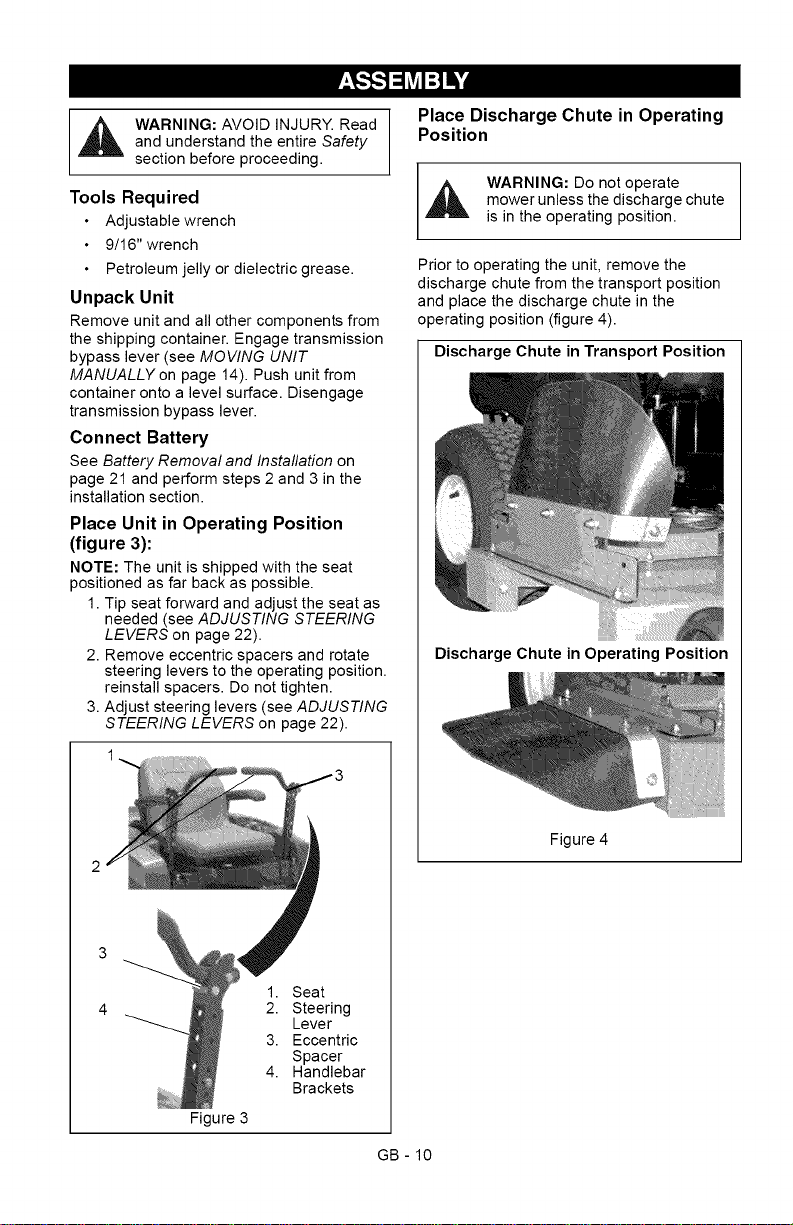
Place Unit in Operating Position
(figure 3):
NOTE: The unit is shipped with the seat
positioned as far back as possible.
1. Tip seat forward and adjust the seat as
needed (see ADJUSTING STEERING
LEVERS on page 22).
2. Remove eccentric spacers and rotate
steering levers to the operating position.
reinstall spacers. Do not tighten.
3. Adjust steering levers (see ADJUSTING
STEERING LEVERS on page 22).
Figure 3
1. Seat
2. Steering
Lever
3. Eccentric
Spacer
4. Handlebar
Brackets
Place Discharge Chute in Operating
Position
,_ WARNING: Do not operate
mower unless the discharge chute
is in the operating position.
Prior to operating the unit, remove the
discharge chute from the transport position
and place the discharge chute in the
operating position (figure 4).
Discharge Chute in Transport Position
Discharge Chute in Operating Position
Figure 4
GB - 10
Check Engine Oil Level
1.Refer to Engine Manual.
Level Mower Deck
See on page 18.
Fill Fuel Tanks
See FILLING FUEL TANKSon page 13.
Adjust Seat
See Adjusting Seat on page 13.
Check Safety Interlock System
WARNING: Safety interlock failure
and improper operation of unit can
result in death or serious injury.
Check system before each use to
make sure it is functioning
properly.
See Safety Interlock System on page 12.
Check function of all controls
See OPERATION on page 12.
Check Tire Pressure
CAUTION: Avoid injury! Explosive
separation of tire and rim parts is
possible when they are serviced
incorrectly:
Do not attempt to mount a tire
without the proper equipment
and experience to perform the
job.
Do not inflate the tires above
the recommended pressure,
Do not weld or heat a wheel
and tire assembly. Heat can
cause an increase in air
pressure resulting in an
explosion, Welding can
structurally weaken or deform
the wheel.
Do not stand in front or over
the tire assembly when
inflating. Use a clip-on chuck
and extension hose long
enough to allow you to stand
to one side.
See SPECIFICATIONS on page 29.
[_o]_hj_[o]l[,,..'-]P'_,__,In_]I_1_:_u|_"]
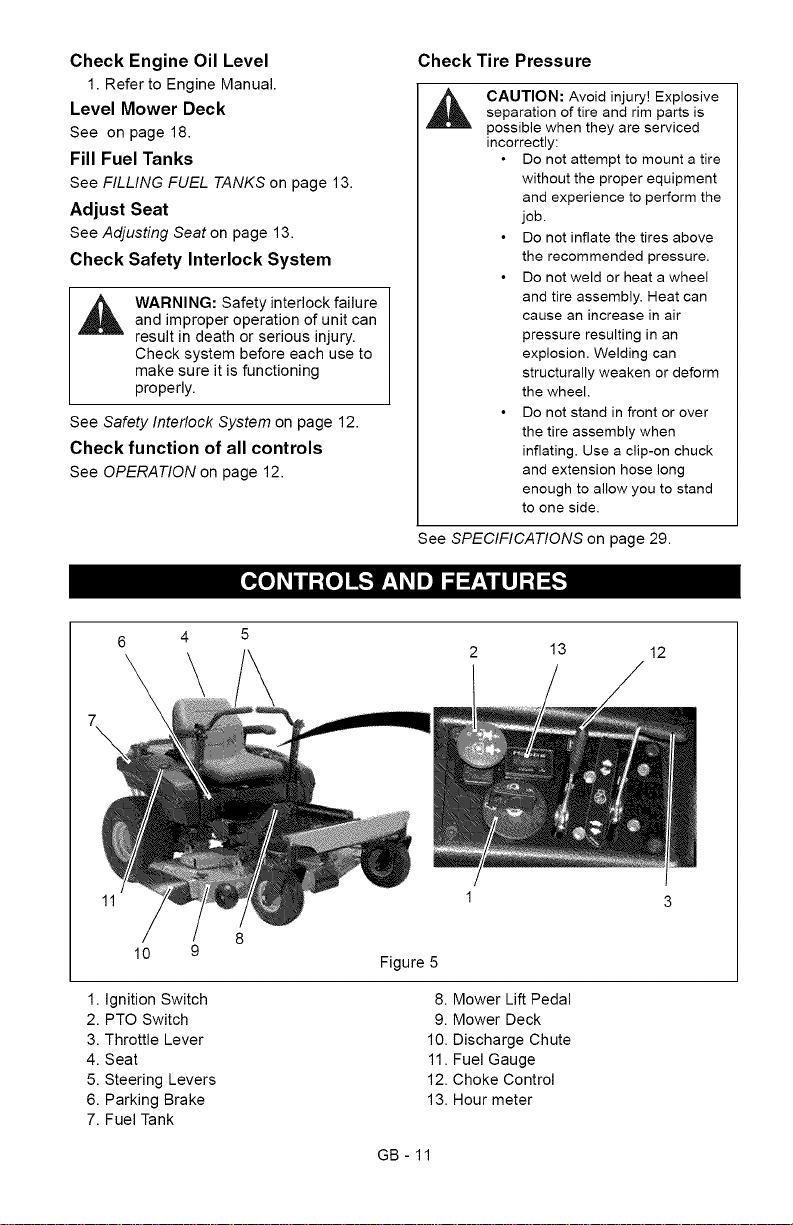
13 12
11
10 9
1. Ignition Switch
2. PTO Switch
3. Throttle Lever
4. Seat
5. Steering Levers
6. Parking Brake
7. Fuel Tank
Figure 5
8. Mower Lift Pedal
9. Mower Deck
10. Discharge Chute
11. Fuel Gauge
12. Choke Control
13. Hour meter
GB- 11
A ARNING:AVOIDINJURY.ReadandunderstandtheentireSafety
section before proceeding.
CONTROLS AND FEATURES
See figure 5 for all controls and features
locations.
Safety Interlock System
WARNING: Safety interlock failure
and improper operation of unit can
result in death or serious injury.
Check system before each use to
make sure it is functioning
properly.
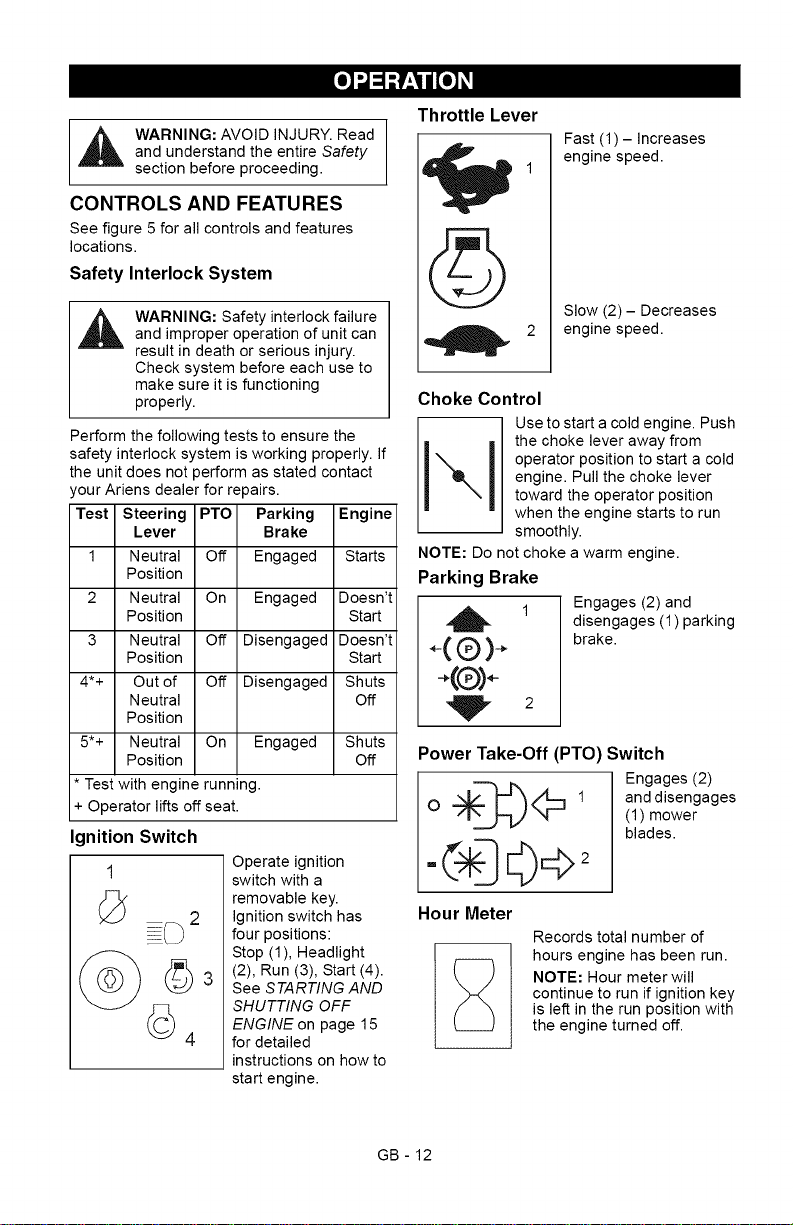
Perform the following tests to ensure the
safety interlock system is working properly. If
the unit does not perform as stated contact
our Ariens dealer for repairs.
Test Steering PTO Parking Engine
Lever Brake
1 Neutral Off Engaged Starts
Position
2 Neutral On Engaged Doesn't
Position Start
3 Neutral Off Disengaged Doesn't
Position Start
4*+ Out of Off Disengaged Shuts
Neutral Off
Position
5*+ Neutral On Engaged Shuts
Position Off
* Test with engine running.
+ Operator lifts off seat.
Ignition Switch
1
Operate ignition
switch with a
removable key.
Ignition switch has
four positions:
Stop (1), Headlight
(2), Run (3), Start (4).
See STARTING AND
SHUTTING OFF
ENGINE on page 15
for detailed
instructions on how to
start engine.
Throttle Lever
Fast (1) - Increases
engine speed.
Slow (2) - Decreases
engine speed.
Choke Control
Use to start a cold engine. Push
I I thechokeleveraway from
operator position to start a cold
engine. Pull the choke lever
toward the operator position
when the engine starts to run
smoothly.
NOTE: Do not choke a warm engine.
Parking Brake
2
Engages (2) and
disengages (1) parking
brake.
Power Take-Off (PTO) Switch
Engages (2)
O "=_<_:3 1 anddisengages(1)mower
blades.
Hour Meter
Records total number of
hours engine has been run.
NOTE: Hour meter will
continue to run if ignition key
is left in the run position with
the engine turned off.
GB - 12

SteeringLevers
Reverse(1)-Pullbothsteeringlevers
backward.
Forward(2)- Pushbothsteeringlevers
forward.
Left(3)- Pullleftsteeringleverbackor
pushrightsteeringleverforwardora
combinationofboth.
Right(4)- Pullrightsteeringleverback
orpushleftsteeringleverforwardora
combinationofboth.
Pressmowerliftpedalandinstalladjustment
pininthedesiredadjustmenthole.
NOTE:Adjustingtheseat
furtherforwardwillhelp
increasetheleveragein
liftingthemowerdeck(see
Adjusting Seat on
page 13).
Adjusting Seat
Lift adjustment lever and slide seat forward or
backward to the desired position.
NOTE: To stop, return both steering levers to
neutral.
NOTE: The steering levers must be in the
neutral position to start the engine.
NOTE: The parking brake must be
disengaged prior to moving the steering
levers from the neutral position.
Mower Lift Pedal (Figure 6)
Raises and lowers the deck.
2
1 3
1. Adjustment Pin
2. Mower Lift Pedal
3. Adjustment Hole
Figure 6
NOTE: The adjustment pin is used to set the
height of the mower deck. See
SPECIFICATIONS on page 29 for cutting
height dimensions.
1. Seat
2. Adjustment Lever
Figure 7
FILLING FUEL TANKS
1. Clean fuel caps and surrounding area to
prevent dust, dirt, and debris from
entering fuel tanks.
2. Remove fuel caps.
IMPORTANT: See Engine Manual for correct
type and grade of fuel.
3. Fill fuel tanks to 2-1/2 in. (6.35 cm)
below bottom of filler neck. See
SPECIFICATIONS on page 29 for
capacity of fuel tanks.
4. Replace fuel caps.
GB - 13
GASOLINE
IMPORTANT: ALWAYS use gasoline that
meets the following guidelines:
Clean, fresh gasoline.
A minimum of 87 octane/87 AKI (91
RON). High altitude use may require a
different octane. Consult your engine
manual.
Gasoline with up to 10% ethanol
(gasohol) or up to 15% MTBE (methyl
tertiary butyl ether) is acceptable.
Use of any gasoline other than those
approved above may void the engine
warranty. If the pumps are not marked
for the content of alcohol or ethers,
check ethanol and MTBE levels with
the fuel supplier.
Do not modify the fuel system to use
different fuels.
Never mix oil and gasoline.
NOTE: All gasoline is not the same. If the
engine experiences starting or performance
problems after using a new gasoline, switch
to a different fuel provider or fuel brand.
IMPORTANT: Excessively oxygenated or
reformulated fuels (fuels blended with
alcohols or ethers) can damage the fuel
system or cause performance problems. If
any undesirable operating problems occur,
use a gasoline with a lower percentage of
alcohol or ether.
Fuel Stabilizer
Gasoline left in the fuel system for extended
periods without a stabilizer will deteriorate,
resulting in gum deposits in the system.
These deposits can damage the carburetor
and the fuel hoses, filter and tank. Prevent
deposits from forming in the fuel system
during storage by adding a quality fuel
stabilizer to the fuel. Follow the
recommended mix ratio found on the fuel
stabilizer container.
STOPPING IN AN EMERGENCY
Bring steering levers back to neutral, set
parking brake, and turn off engine.
MOVING UNIT MANUALLY
WARNING: DO NOT disengage
or bypass transmission and coast
downhill.
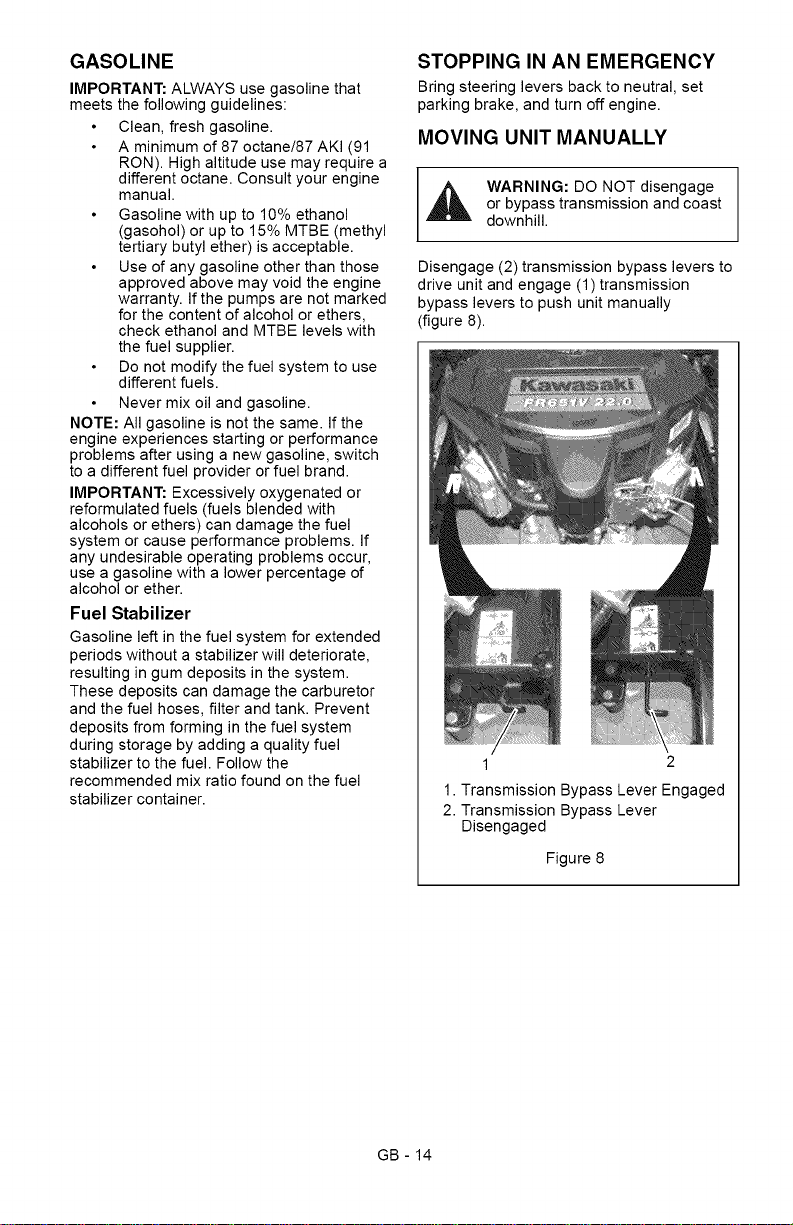
Disengage (2) transmission bypass levers to
drive unit and engage (1)transmission
bypass levers to push unit manually
(figure 8).
1 2
1. Transmission Bypass Lever Engaged
2. Transmission Bypass Lever
Disengaged
Figure 8
GB - 14
STARTING AND SHUTTING OFF
ENGINE
Starting the Engine
NOTE: Disengage the PTO, engage the
parking brake, and place the steering levers
in neutral prior to starting the engine.
1. If the engine is cold, push the choke
control away from operator position to
start. If the engine is warm or hot, do not
use choke.
2. Move the throttle to 1/3 Fast position.
See Engine Manual for detailed
instructions.
IMPORTANT: DO NOT operate starter for
more than 15 seconds per minute as damage
can occur.
3. Turn ignition key to start position and
release once the engine has started.
4. Pull the choke lever toward operator
position when the engine is warm. Wait
until the engine is running smoothly
before operation.
IMPORTANT: Let the engine warm up
several seconds to several minutes
depending on outside temperature.
Stopping the Engine
1. Stop unit.
2. Disengage PTO.
3. Set throttle lever to slow.
4. Turn ignition switch to off position and
remove key.
5. Set parking brake.
OPERATING MOWER
1. Start engine.
2. Set throttle lever to fast.
IMPORTANT: Never engage PTO if mower is
plugged with grass or other material.
3. Engage PTO to start mower blades.
NOTE: The parking brake must be
disengaged prior to moving the steering
levers from the neutral lockout position.
4. Release parking brake.
5. Use steering levers to move the unit.
6. Disengage PTO to stop mower blades.
TRANSPORTING UNIT
ALWAYS shut off engine, set parking brake,
remove key, and close fuel shut-off valve or
drain fuel when transporting unit on a truck or
trailer. Tie unit down securely. Do not tie
down by linkages, guards, cables or other
parts that may be damaged.
FOR BEST PERFORMANCE
Cut grass when it is dry.
Keep mower blades sharp.
Keep mower deck properly leveled.
Adjust anti-scalp rollers to prevent scalping.
Do not set height of cut too low. For very tall
grass, mow twice.
Do not travel too fast.
Mow with the engine set at full throttle.
When mulching, only remove 1/3 of grass
length per cutting.
Discharge clippings into areas already cut.
Vary cutting pattern with each mowing.
Do not allow grass or debris to collect inside
of mower deck. Clean after each use.
GB- 15
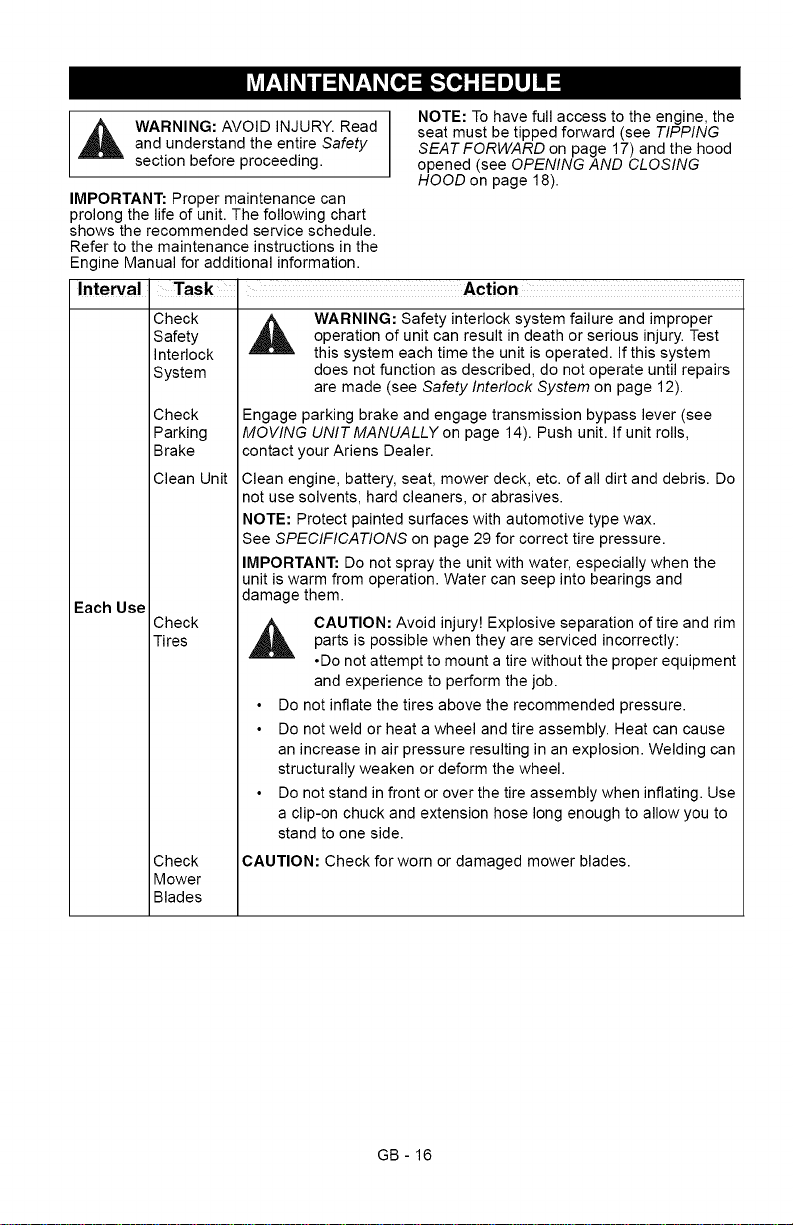
_1 ARNING:AVOIDINJURY.ReadandunderstandtheentireSafety
section before proceeding.
IMPORTANT: Proper maintenance can
prolong the life of unit. The following chart
shows the recommended service schedule.
Refer to the maintenance instructions in the
Engine Manual for additional information.
Interval
Each Use
NOTE: To have full access to the engine, the
seat must be tipped forward (see TIPPING
SEAT FORWARD on page 17) and the hood
opened (see OPENING AND CLOSING
HOOD on page 18).
Task . Action
Check
Safety
Interlock
System
Check
Parking
Brake
Clean Unit
Check
Tires
Check
Mower
Blades
WARNING: Safety interlock system failure and improper
operation of unit can result in death or serious injury. Test
this system each time the unit is operated. If this system
does not function as described, do not operate until repairs
are made (see Safety Interlock System on page 12).
Engage parking brake and engage transmission bypass lever (see
MOVING UNIT MANUALLY on page 14). Push unit. If unit rolls,
contact your Ariens Dealer.
Clean engine, battery, seat, mower deck, etc. of all dirt and debris. Do
not use solvents, hard cleaners, or abrasives.
NOTE: Protect painted surfaces with automotive type wax.
See SPECIFICATIONS on page 29 for correct tire pressure.
IMPORTANT: Do not spray the unit with water, especially when the
unit is warm from operation. Water can seep into bearings and
damage them.
,_ CAUTION: Avoid injury! Explosive separation of tire and rim
parts is possible when they are serviced incorrectly:
•Do not attempt to mount a tire without the proper equipment
and experience to perform the job.
Do not inflate the tires above the recommended pressure.
Do not weld or heat a wheel and tire assembly. Heat can cause
an increase in air pressure resulting in an explosion. Welding can
structurally weaken or deform the wheel.
Do not stand in front or over the tire assembly when inflating. Use
a clip-on chuck and extension hose long enough to allow you to
stand to one side.
CAUTION: Check for worn or damaged mower blades.
GB - 16
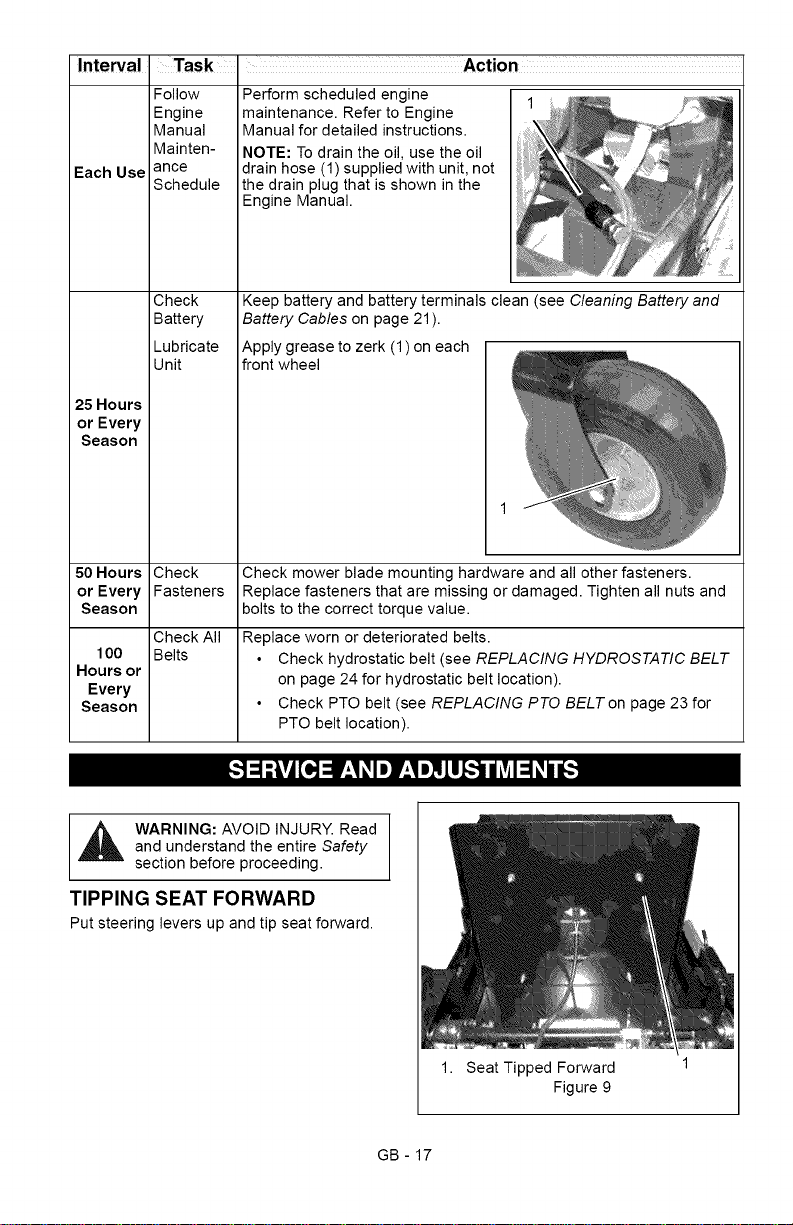
Interval Task Action
Follow
Engine
Manual
Mainten-
Each Use ance
Schedule
Check
Battery
Lubricate
Unit
25 Hours
or Every
Season
50 Hours Check
or Every Fasteners
Season
Check All
100 Belts
Hours or
Every
Season
Perform scheduled engine
maintenance. Refer to Engine
Manual for detailed instructions.
NOTE: To drain the oil, use the oil
drain hose (1)supplied with unit, not
the drain plug that is shown in the
Engine Manual.
SI_!SI
Check mower blade mounting hardware and all other fasteners.
Replace fasteners that are missing or damaged. Tighten all nuts and
bolts to the correct torque value.
Replace worn or deteriorated belts.
Check hydrostatic belt (see REPLACING HYDROSTATIC BELT
on page 24 for hydrostatic belt location).
Check PTO belt (see REPLACING PTO BELT on page 23 for
PTO belt location).
[,._o]_l !'_,1_,II] V_,!I]_lL,.!l II_vtI=1_,/ Lr,.l
_ ARNING: AVOID INJURY. Readand understand the entire Safety
section before proceeding.
TIPPING SEAT FORWARD
Put steering levers up and tip seat forward.
1. Seat Tipped Forward
Figure 9
GB - 17
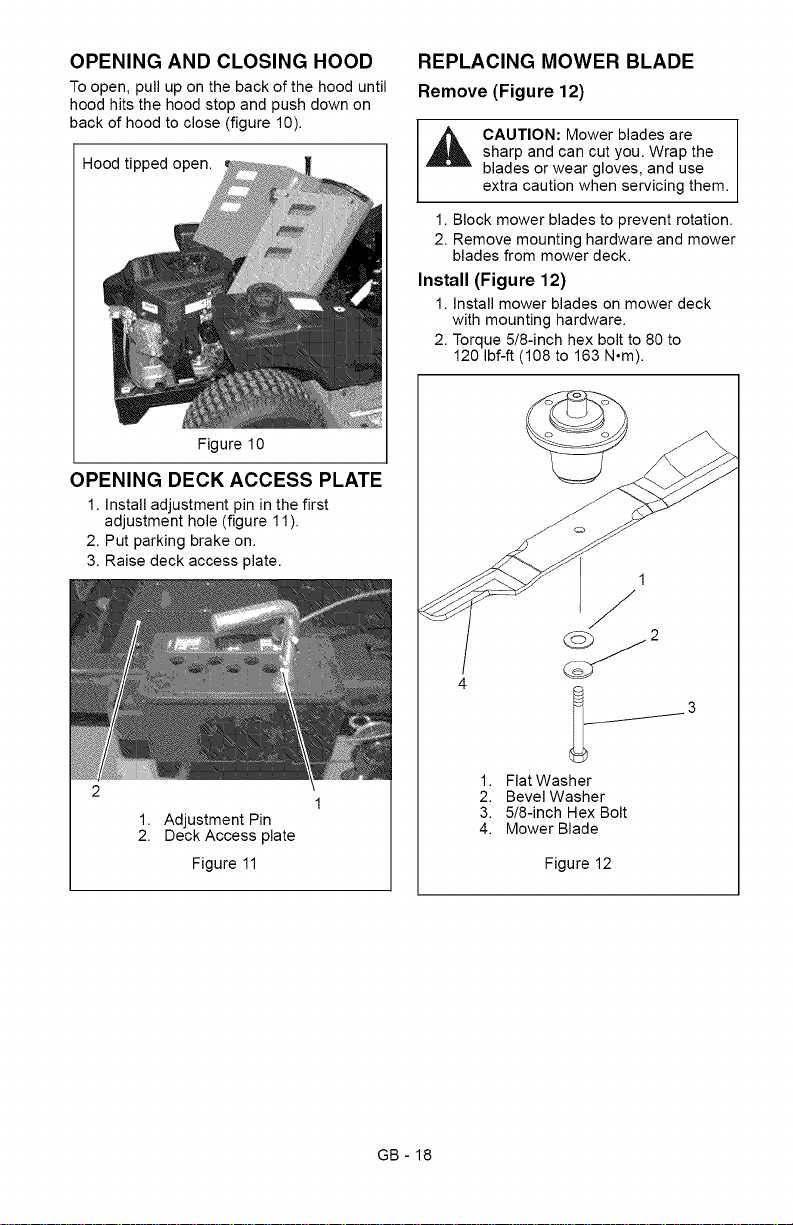
OPENING AND CLOSING HOOD
To open, pull up on the back of the hood until
hood hits the hood stop and push down on
back of hood to close (figure 10).
Hood tipped open.
Figure 10
OPENING DECK ACCESS PLATE
1. Install adjustment pin in the first
adjustment hole (figure 11).
2. Put parking brake on.
3. Raise deck access plate.
1. Adjustment Pin
2. Deck Access plate
Figure 11
REPLACING MOWER BLADE
Remove (Figure 12)
CAUTION: Mower blades are
sharp and can cut you. Wrap the
blades or wear gloves, and use
extra caution when servicing them.
1. Block mower blades to prevent rotation.
2. Remove mounting hardware and mower
blades from mower deck.
Install (Figure 12)
1. Install mower blades on mower deck
with mounting hardware.
2. Torque 5/8-inch hex bolt to 80 to
120 Ibf-ft (108 to 163 N°m).
1.
2.
3.
4.
1
f
Flat Washer
Bevel Washer
5/8-inch Hex Bolt
Mower Blade
Figure 12
GB - 18
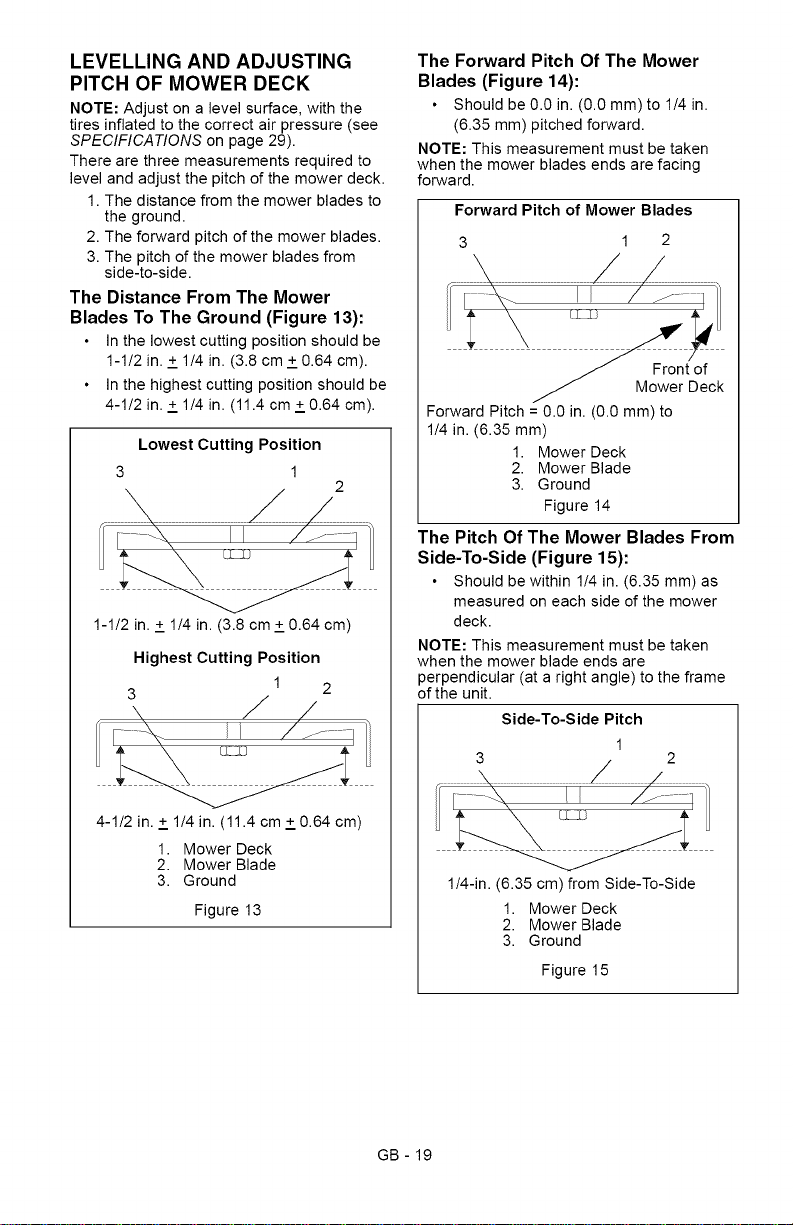
LEVELLING AND ADJUSTING
PITCH OF MOWER DECK
NOTE: Adjust on a level surface, with the
tires inflated to the correct air pressure (see
SPECIFICATIONS on page 29).
There are three measurements required to
level and adjust the pitch of the mower deck.
1. The distance from the mower blades to
the ground.
2. The forward pitch of the mower blades.
3. The pitch of the mower blades from
side-to-side.
The Distance From The Mower
Blades To The Ground (Figure 13):
In the lowest cutting position should be
1-1/2 in. + 1/4 in. (3.8 cm + 0.64 cm).
In the highest cutting position should be
4-1/2 in. + 1/4 in. (11.4 cm + 0.64 cm).
Lowest Cutting Position
3 1
2
1-1/2 in. + 1/4 in. (3.8 cm + 0.64 cm)
Highest Cutting Position
1 2
3
4-1/2 in. + 1/4 in. (11.4 cm + 0.64 cm)
1. Mower Deck
2. Mower Blade
3. Ground
Figure 13
The Forward Pitch Of The Mower
Blades (Figure 14):
Should be 0.0 in. (0.0 mm) to 1/4 in.
(6.35 mm) pitched forward.
NOTE: This measurement must be taken
when the mower blades ends are facing
forward.
Forward Pitch of Mower Blades
3 1 2
Forward Pitch = 0.0 in. (0.0 mm) to
1/4 in. (6.35 mm)
1. Mower Deck
2. Mower Blade
3. Ground
Figure 14
The Pitch Of The Mower Blades From
Side-To-Side (Figure 15):
Should be within 1/4 in. (6.35 mm) as
measured on each side of the mower
deck.
NOTE: This measurement must be taken
when the mower blade ends are
perpendicular (at a right angle) to the frame
of the unit.
Side-To-Side Pitch
1/4-in. (6.35 cm)from Side-To-Side
1. Mower Deck
2. Mower Blade
3. Ground
Figure 15
GB - 19
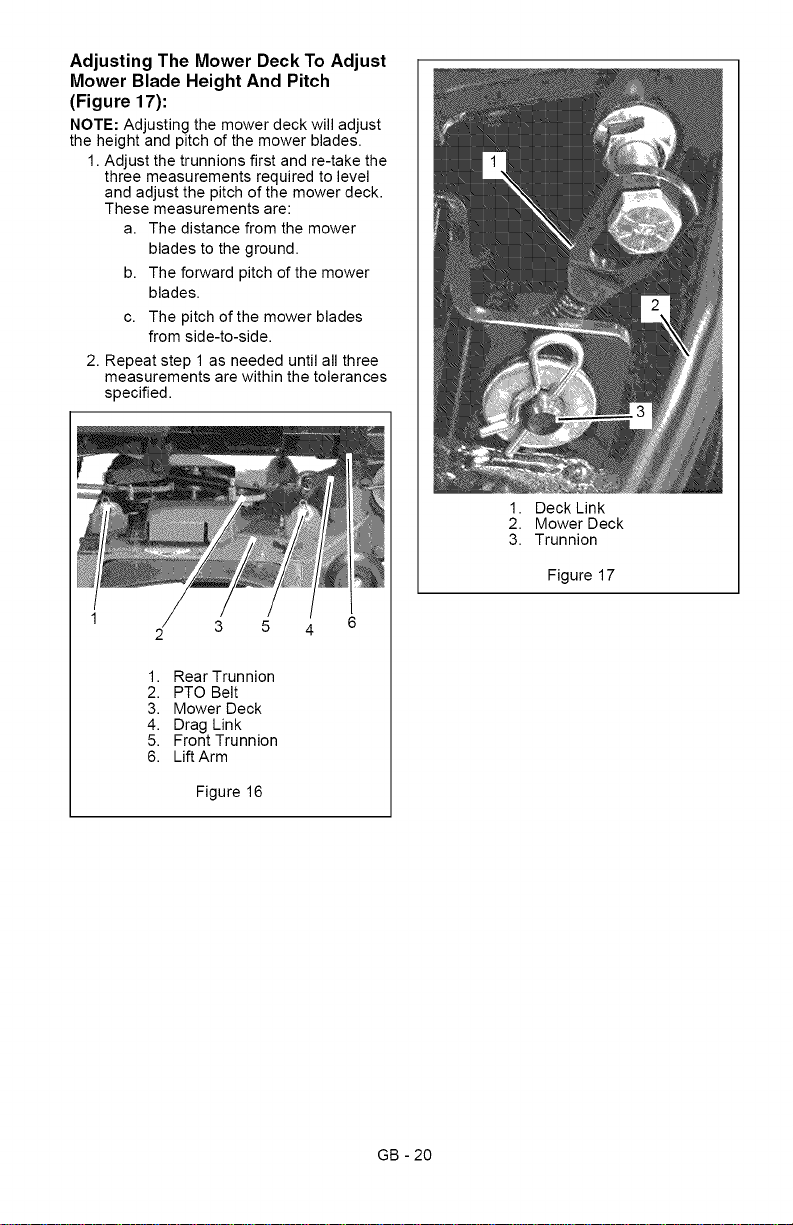
Adjusting The Mower Deck To Adjust
Mower Blade Height And Pitch
(Figure 17):
NOTE: Adjusting the mower deck will adjust
the height and pitch of the mower blades.
1. Adjust the trunnions first and re-take the
three measurements required to level
and adjust the pitch of the mower deck.
These measurements are:
a. The distance from the mower
blades to the ground.
b. The forward pitch of the mower
blades.
c. The pitch of the mower blades
from side-to-side.
2. Repeat step 1 as needed until all three
measurements are within the tolerances
specified.
3 5
1. Rear Trunnion
2. PTO Belt
3. Mower Deck
4. Drag Link
5. Front Trunnion
6. Lift Arm
Figure 16
1. Deck Link
2. Mower Deck
3. Trunnion
Figure 17
GB - 20
SERVICING BATTERY
NOTE: Unit comes equipped with a
maintenance-free battery that requires no
regular maintenance except cleaning the
terminals and periodic charging.
_ ARNING: Battery posts,
terminals and related accessories
contain lead and lead compounds,
chemicals known to the State of
California to cause cancer and
reproductive harm. Wash hands
after handling.
Battery Removal and Installation
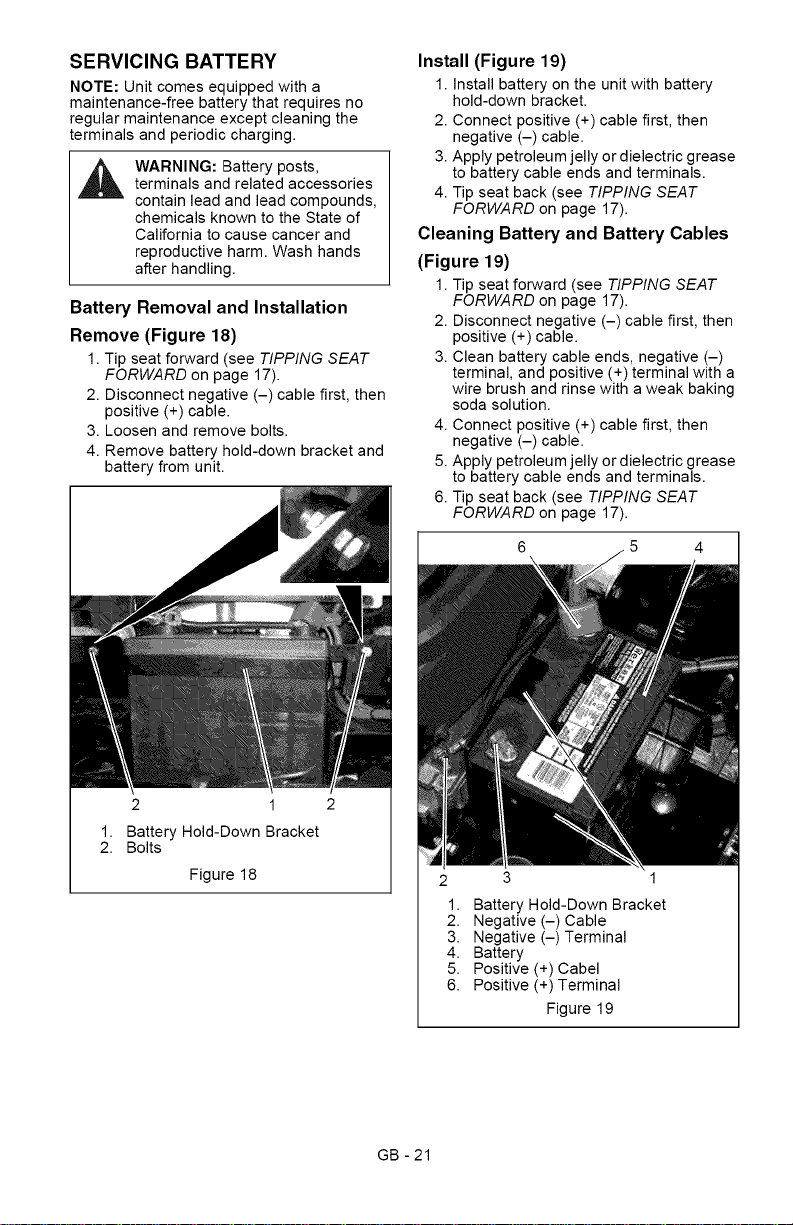
Remove (Figure 18)
1. Tip seat forward (see TIPPING SEAT
FORWARD on page 17).
2. Disconnect negative (-) cable first, then
positive (+) cable.
3. Loosen and remove bolts.
4. Remove battery hold-down bracket and
battery from unit.
2 1
Battery Hold-Down Bracket
Bolts
Figure 18
Install (Figure 19)
1. Install battery on the unit with battery
hold-down bracket.
2. Connect positive (+) cable first, then
negative (-) cable.
3. Apply petroleum jelly or dielectric grease
to battery cable ends and terminals.
4. Tip seat back (see TIPPING SEAT
FORWARD on page 17).
Cleaning Battery and Battery Cables
(Figure 19)
1. Tip seat forward (see TIPPING SEAT
FORWARD on page 17).
2. Disconnect negative (-) cable first, then
positive (+) cable.
3. Clean battery cable ends, negative (-)
terminal, and positive (+) terminal with a
wire brush and rinse with a weak baking
soda solution.
4. Connect positive (+) cable first, then
negative (-) cable.
5. Apply petroleum jelly or dielectric grease
to battery cable ends and terminals.
6. Tip seat back (see TIPPING SEAT
FORWARD on page 17).
6 4
2 3 1
1. Battery Hold-Down Bracket
2. Negative (-) Cable
3. Negative (-) Terminal
4. Battery
5. Positive (+) Cabel
6. Positive (+) Terminal
Figure 19
GB - 21
Charging the Battery
(Figure 19)
WARNING: FROZEN BATTERIES
CAN EXPLODE and result in
death or serious injury. DO NOT
charge a frozen battery. Let the
battery thaw before charging.
Follow First Aid directions for contact with
battery fluid.
External Contact: Flush with water.
Eyes: Flush with water for at least 15
minutes and get medical attention
immediately!
Internal Contact: Drink large quantities
of water. Follow with Milk of Magnesia,
beaten egg or vegetable oil. Get medical
attention immediately!
In case of internal contact, DO NOT
induce vomiting!
IMPORTANT: DO NOT fast charge. Charging
at a higher rate will damage or destroy
battery.
IMPORTANT: ALWAYS follow information
provided on battery and battery charger.
Contact battery and battery charger
manufacturers for detailed instructions.
1. Remove battery from unit (see Battery
Removal and Installation on page 21).
2. Place battery in a well-ventilated area.
3. Connect positive (+) lead of charger to
positive (+) terminal, and negative (-)
lead of charger to negative (-) terminal.
4. Charge battery according to battery
charger and battery manufacturers'
instructions.
5. Install battery on unit (see Battery
Removal and Installation on page 21).
Jump-Starting
Ariens does not recommend jump-starting
your unit. Jump-starting can damage engine
and electrical system components. See your
engine manual for more detailed information.
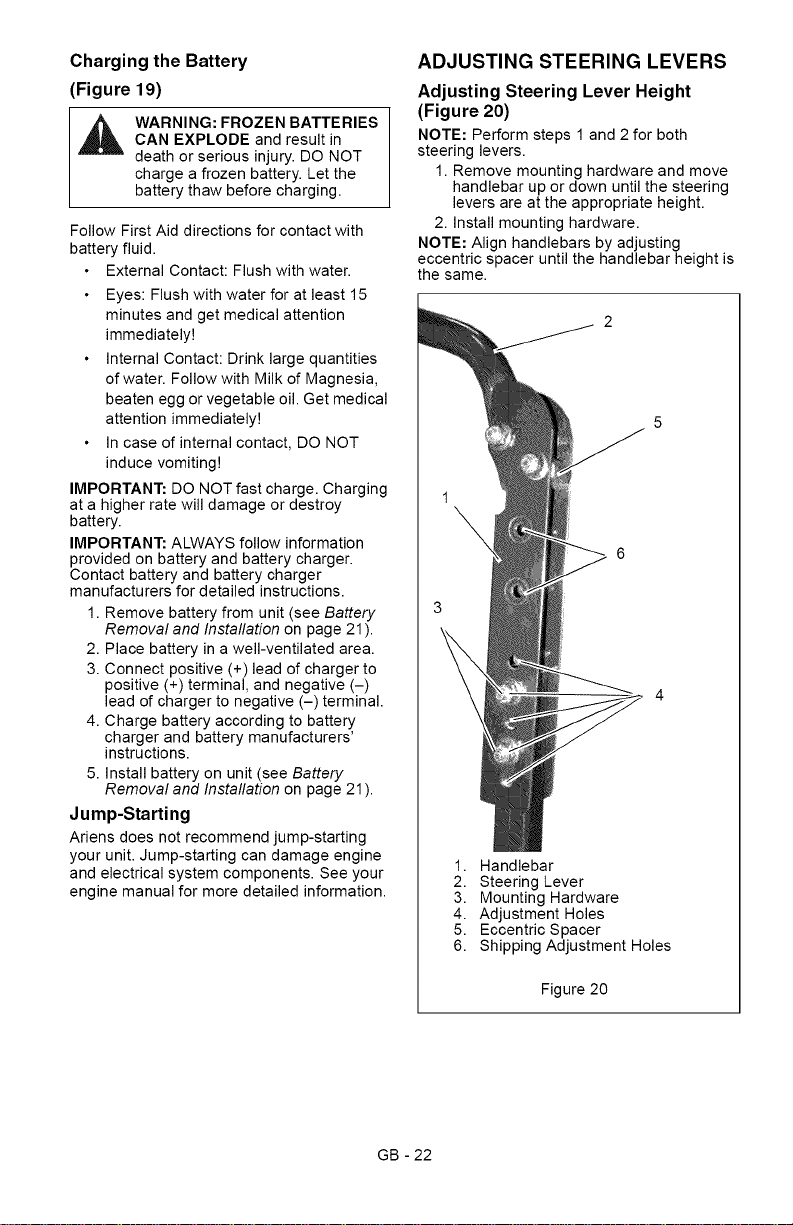
ADJUSTING STEERING LEVERS
Adjusting Steering Lever Height
(Figure 20)
NOTE: Perform steps 1 and 2 for both
steering levers.
1. Remove mounting hardware and move
handlebar up or down until the steering
levers are at the appropriate height.
2. Install mounting hardware.
NOTE: Align handlebars by adjusting
eccentric spacer until the handlebar height is
the same.
1. Handlebar
2. Steering Lever
3. Mounting Hardware
4. Adjustment Holes
5. Eccentric Spacer
6. Shipping Adjustment Holes
Figure 20
GB - 22
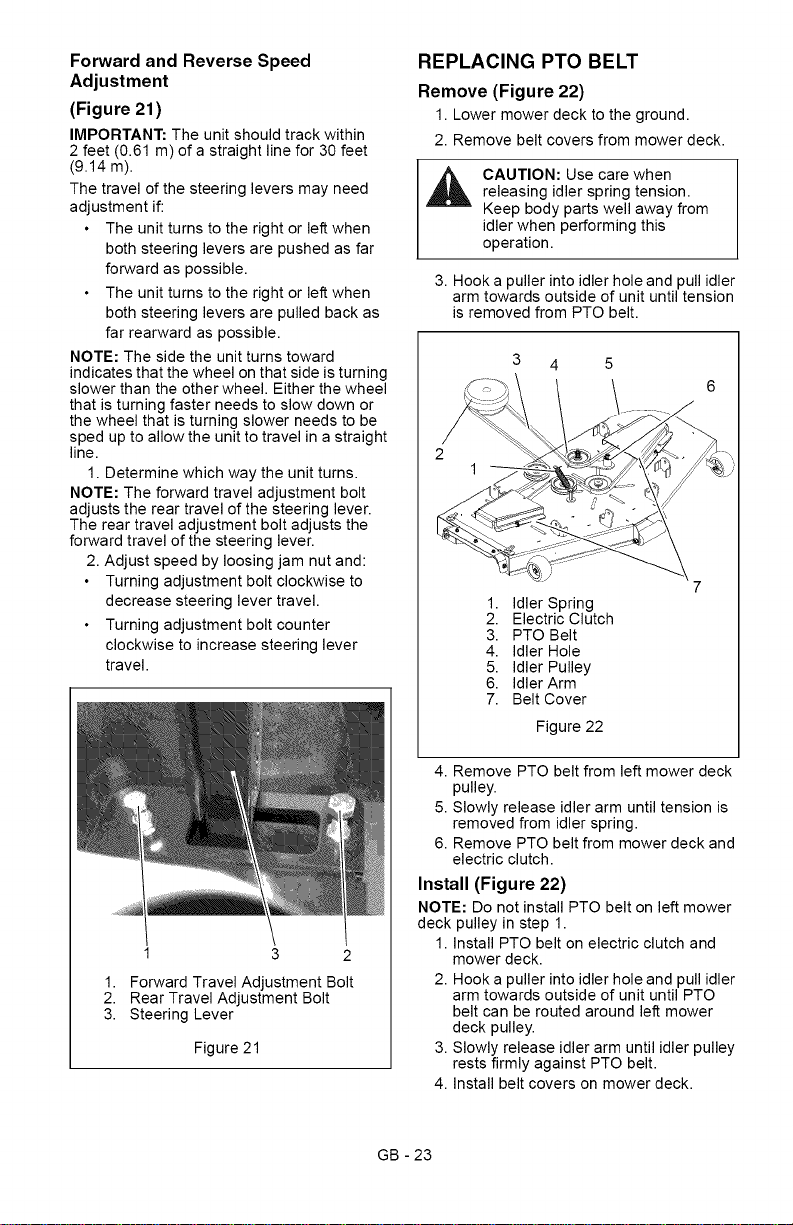
Forward and Reverse Speed
Adjustment
(Figure 21)
IMPORTANT: The unit should track within
2 feet (0.61 m) of a straight line for 30 feet
(9.14 m).
The travel of the steering levers may need
adjustment if:
The unit turns to the right or left when
both steering levers are pushed as far
forward as possible.
The unit turns to the right or left when
both steering levers are pulled back as
far rearward as possible.
NOTE: The side the unit turns toward
indicates that the wheel on that side is turning
slower than the other wheel. Either the wheel
that is turning faster needs to slow down or
the wheel that is turning slower needs to be
sped up to allow the unit to travel in a straight
line.
1. Determine which way the unit turns.
NOTE: The forward travel adjustment bolt
adjusts the rear travel of the steering lever.
The rear travel adjustment bolt adjusts the
forward travel of the steering lever.
2. Adjust speed by loosing jam nut and:
Turning adjustment bolt clockwise to
decrease steering lever travel.
Turning adjustment bolt counter
clockwise to increase steering lever
travel.
1. Forward Travel Adjustment Bolt
2. Rear Travel Adjustment Bolt
3. Steering Lever
Figure 21
REPLACING PTO BELT
Remove (Figure 22)
1. Lower mower deck to the ground.
2. Remove belt covers from mower deck.
_i CAUTION: Use care whenreleasing idler spring tension.
Keep body parts well away from
idler when performing this
operation.
3. Hook a puller into idler hole and pull idler
arm towards outside of unit until tension
is removed from PTO belt.
3 4
2
1
1. Idler Spring
2. Electric Clutch
3. PTO Belt
4. Idler Hole
5. Idler Pulley
6. Idler Arm
7. Belt Cover
Figure 22
4. Remove PTO belt from left mower deck
pulley.
5. Slowly release idler arm until tension is
removed from idler spring.
6. Remove PTO belt from mower deck and
electric clutch.
Install (Figure 22)
NOTE: Do not install PTO belt on left mower
deck pulley in step 1.
1. Install PTO belt on electric clutch and
mower deck.
2. Hook a puller into idler hole and pull idler
arm towards outside of unit until PTO
belt can be routed around left mower
deck pulley.
3. Slowly release idler arm until idler pulley
rests firmly against PTO belt.
4. Install belt covers on mower deck.
GB - 23
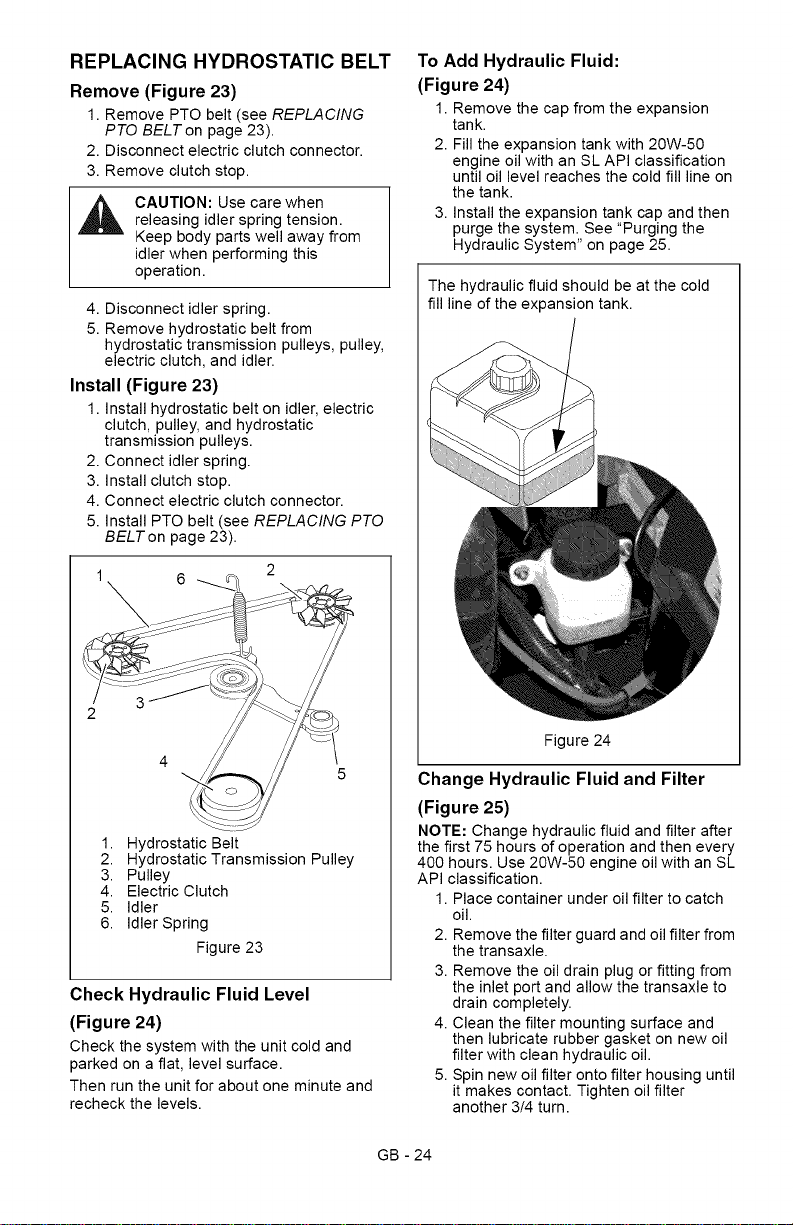
REPLACING HYDROSTATIC BELT
Remove (Figure 23)
1. Remove PTO belt (see REPLACING
PTO BELT on page 23).
2. Disconnect electric clutch connector.
3. Remove clutch stop.
_ AUTION: Use care whenreleasing idler spring tension.
Keep body parts well away from
idler when performing this
operation.
4. Disconnect idler spring.
5. Remove hydrostatic belt from
hydrostatic transmission pulleys, pulley,
electric clutch, and idler.
Install (Figure 23)
1. Install hydrostatic belt on idler, electric
clutch, pulley, and hydrostatic
transmission pulleys.
2. Connect idler spring.
3. Install clutch stop.
4. Connect electric clutch connector.
5. Install PTO belt (see REPLACING PTO
BELTon page 23).
2
6
4
5
1. Hydrostatic Belt
2. Hydrostatic Transmission Pulley
3. Pulley
4. Electric Clutch
5. Idler
6. Idler Spring
Figure 23
Check Hydraulic Fluid Level
(Figure 24)
Check the system with the unit cold and
parked on a flat, level surface.
Then run the unit for about one minute and
recheck the levels.
To Add Hydraulic Fluid:
(Figure 24)
1. Remove the cap from the expansion
tank.
2. Fill the expansion tank with 20W-50
engine oil with an SL API classification
until oil level reaches the cold fill line on
the tank.
3. Install the expansion tank cap and then
purge the system. See "Purging the
Hydraulic System" on page 25.
The hydraulic fluid should be at the cold
fill line of the expansion tank.
Figure 24
Change Hydraulic Fluid and Filter
(Figure 25)
NOTE: Change hydraulic fluid and filter after
the first 75 hours of operation and then every
400 hours. Use 20W-50 engine oil with an SL
API classification.
1. Place container under oil filter to catch
oil.
2. Remove the filter guard and oil filter from
the transaxle.
3. Remove the oil drain plug or fitting from
the inlet port and allow the transaxle to
drain completely.
4. Clean the filter mounting surface and
then lubricate rubber gasket on new oil
filter with clean hydraulic oil.
5. Spin new oil filter onto filter housing until
it makes contact. Tighten oil filter
another 3/4 turn.
GB - 24
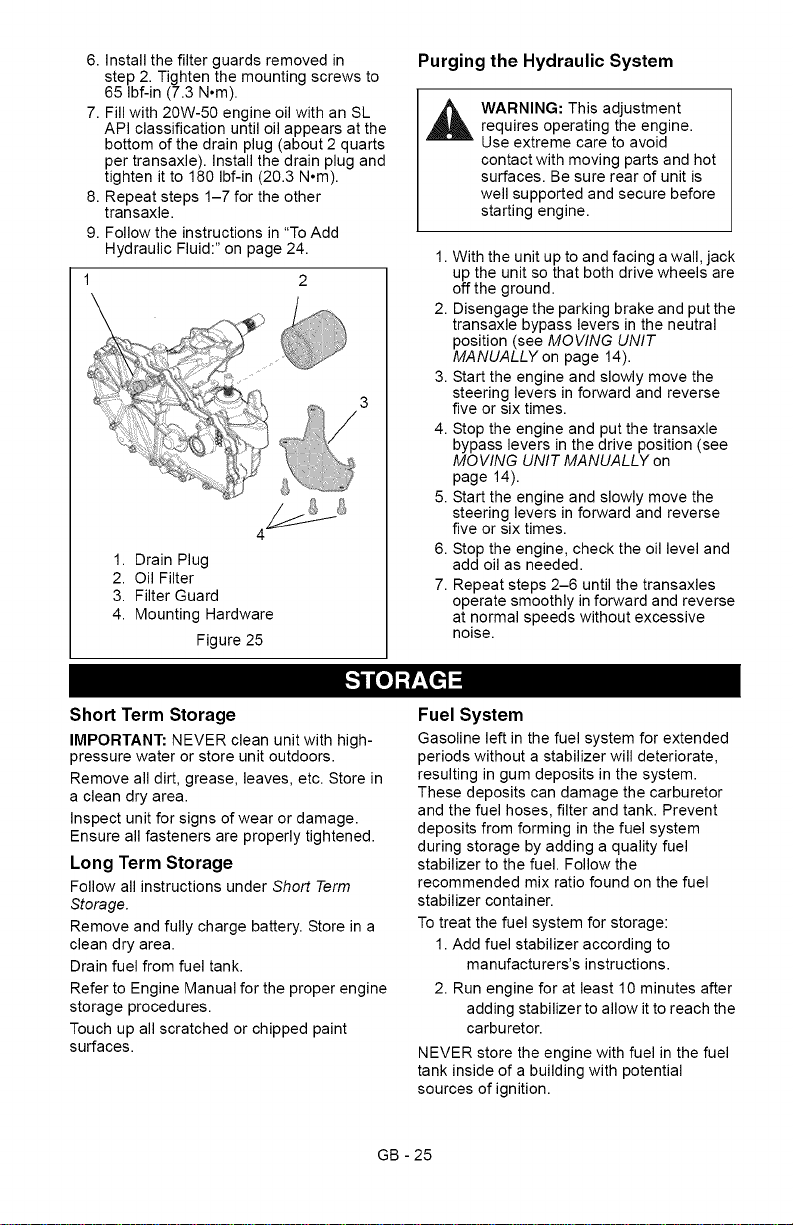
6.Installthefilterguardsremovedin
step2.Tightenthemountingscrewsto
65Ibf-in(7.3N°m).
7.Fillwith20W-50engineoilwithanSL
APIclassificationuntiloilappearsatthe
bottomofthedrainplug(about2quarts
pertransaxle).Installthedrainplugand
tightenitto180Ibf-in(20.3N°m).
8.Repeatsteps1-7fortheother
transaxle.
9.Followtheinstructionsin"ToAdd
HydraulicFluid:"onpage24.
1.DrainPlug
2.OilFilter
3.FilterGuard
4.MountingHardware
Figure25
Purging the Hydraulic System
,_ WARNING: This adjustmentrequires operating the engine.
Use extreme care to avoid
contact with moving parts and hot
surfaces. Be sure rear of unit is
well supported and secure before
starting engine.
1. With the unit up to and facing a wall, jack
up the unit so that both drive wheels are
off the ground.
2. Disengage the parking brake and put the
transaxle bypass levers in the neutral
position (see MOVING UNIT
MANUALLY on page 14).
3. Start the engine and slowly move the
steering levers in forward and reverse
five or six times.
4. Stop the engine and put the transaxle
bypass levers in the drive position (see
MOVING UNIT MANUALLY on
page 14).
5. Start the engine and slowly move the
steering levers in forward and reverse
five or six times.
6. Stop the engine, check the oil level and
add oil as needed.
7. Repeat steps 2-6 until the transaxles
operate smoothly in forward and reverse
at normal speeds without excessive
noise.
[,,.']i_o_ =1
Short Term Storage
IMPORTANT: NEVER clean unit with high-
pressure water or store unit outdoors.
Remove all dirt, grease, leaves, etc. Store in
a clean dry area.
Inspect unit for signs of wear or damage.
Ensure all fasteners are properly tightened.
Long Term Storage
Follow all instructions under Short Term
Storage.
Remove and fully charge battery. Store in a
clean dry area.
Drain fuel from fuel tank.
Refer to Engine Manual for the proper engine
storage procedures.
Touch up all scratched or chipped paint
surfaces.
Fuel System
Gasoline left in the fuel system for extended
periods without a stabilizer will deteriorate,
resulting in gum deposits in the system.
These deposits can damage the carburetor
and the fuel hoses, filter and tank. Prevent
deposits from forming in the fuel system
during storage by adding a quality fuel
stabilizer to the fuel. Follow the
recommended mix ratio found on the fuel
stabilizer container.
To treat the fuel system for storage:
1. Add fuel stabilizer according to
manufacturers's instructions.
2. Run engine for at least 10 minutes after
adding stabilizer to allow it to reach the
carbu retor.
NEVER store the engine with fuel in the fuel
tank inside of a building with potential
sources of ignition.
GB - 25
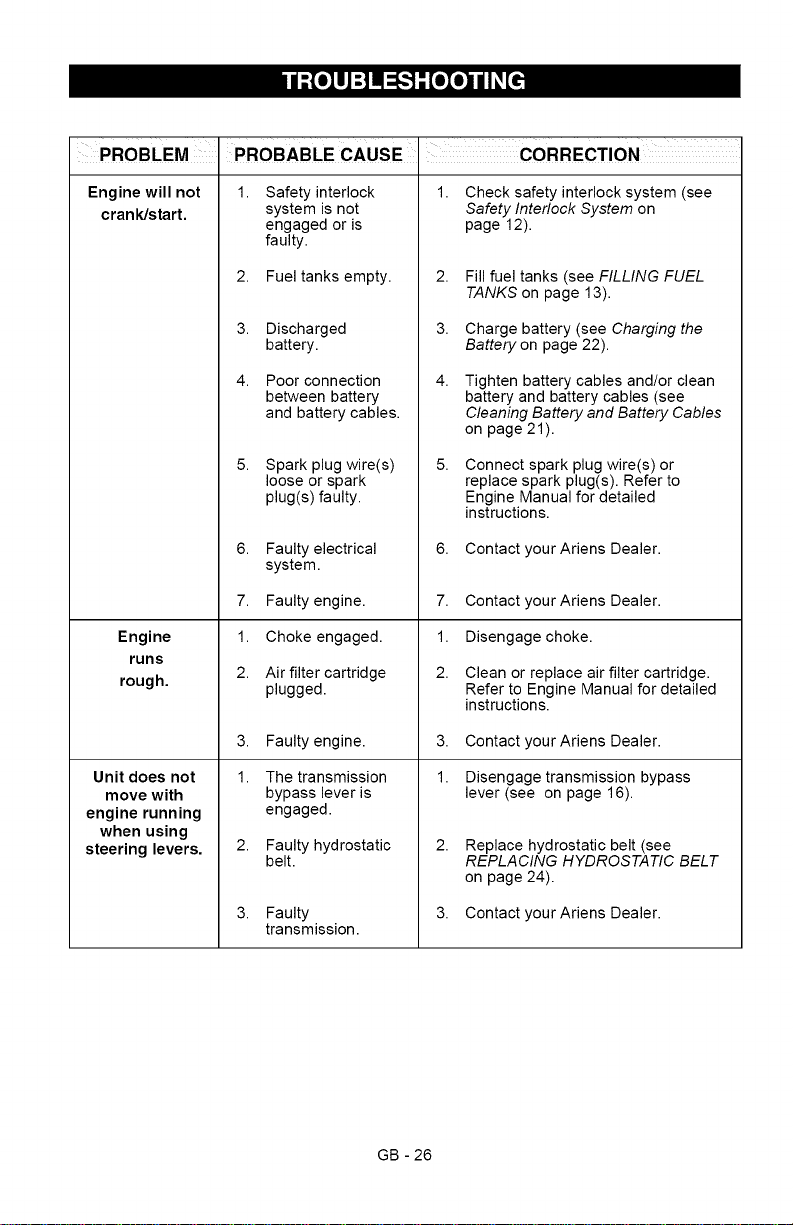
Engine will not
crank/start.
Engine
runs
rough.
Unit does not
move with
engine running
when using
steering levers.
1, 1,
Safety interlock
system is not
engaged or is
faulty.
2. Fuel tanks empty.
3. Discharged
battery.
4. Poor connection
between battery
and battery cables.
5,
Spark plug wire(s)
loose or spark
plug(s) faulty.
6. Faulty electrical
system.
7. Faulty engine.
1. Choke engaged.
2. Air filter cartridge
plugged.
3. Faulty engine.
1. The transmission
bypass lever is
engaged.
2. Faulty hydrostatic
belt.
3. Faulty
transmission.
2,
3.
4.
5,
Check safety interlock system (see
Safety Interlock System on
page 12).
Fill fuel tanks (see FILLING FUEL
TANKS on page 13).
Charge battery (see Charging the
Battery on page 22).
Tighten battery cables and/or clean
battery and battery cables (see
Cleaning Battery and Battery Cables
on page 21).
Connect spark plug wire(s) or
replace spark plug(s). Refer to
Engine Manual for detailed
instructions.
6. Contact yourAriens Dealer.
7. Contact your Ariens Dealer.
1. Disengage choke.
2. Clean or replace air filter cartridge.
Refer to Engine Manual for detailed
instructions.
3. Contact yourAriens Dealer.
1. Disengage transmission bypass
lever (see on page 16).
2,
Replace hydrostatic belt (see
REPLACING HYDROSTATIC BELT
on page 24).
3. Contact yourAriens Dealer.
GB - 26
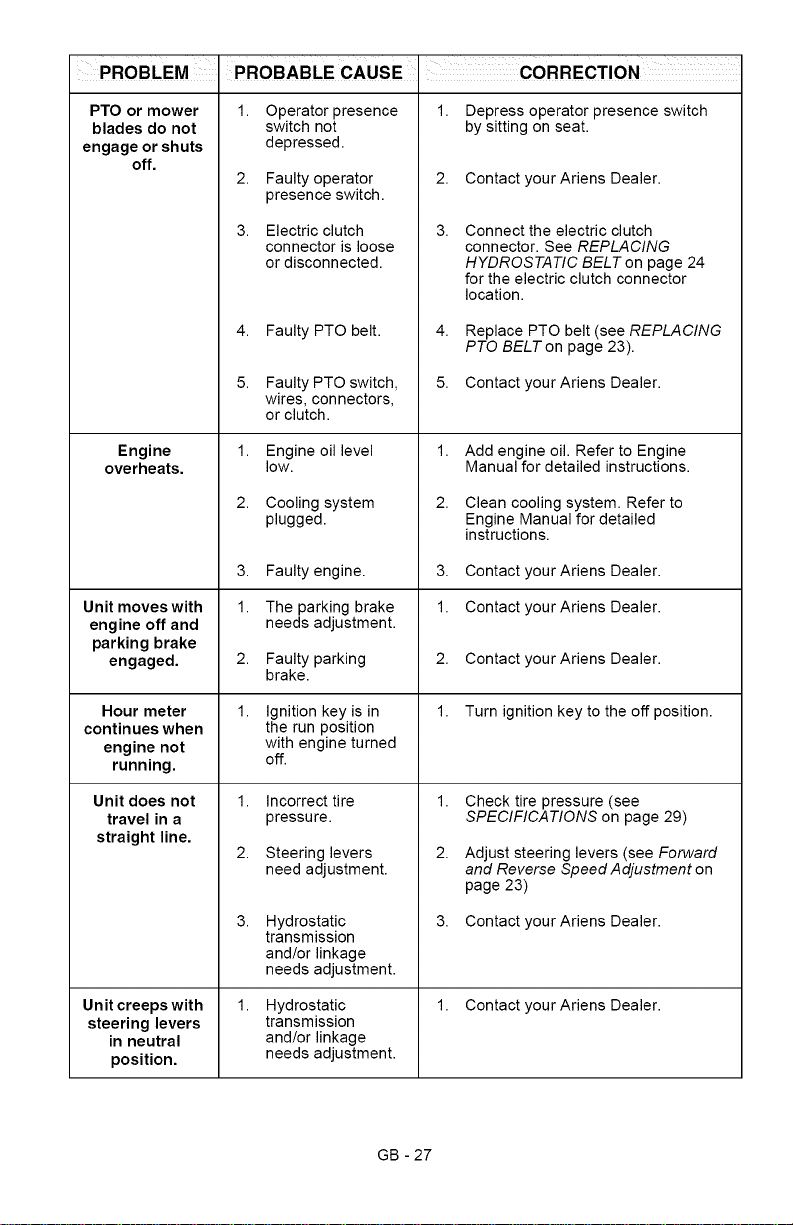
PTO or mower
blades do not
engage or shuts
off.
Engine
overheats.
Unit moves with
engine off and
parking brake
engaged.
Hour meter
continues when
engine not
running.
Unit does not
travel in a
straight line.
Unit creeps with
steering levers
in neutral
position.
1. Operator presence
switch not
depressed.
2. Faulty operator
presence switch.
3. Electric clutch
connector is loose
or disconnected.
4. Faulty PTO belt.
5. Faulty PTO switch,
wires, connectors,
or clutch.
1. Engine oil level
low.
2. Cooling system
plugged.
3. Faulty engine.
1. The parking brake
needs adjustment.
2. Faulty parking
brake.
1. Ignition key is in
the run position
with engine turned
off.
1. Incorrect tire
pressure.
2. Steering levers
need adjustment.
3. Hydrostatic
transmission
and/or linkage
needs adjustment.
1. Hydrostatic
transmission
and/or linkage
needs adjustment.
1. Depress operator presence switch
by sitting on seat.
2. Contact yourAriens Dealer.
3.
4.
5.
Connect the electric clutch
connector. See REPLACING
HYDROSTATIC BELT on page 24
for the electric clutch connector
location.
Replace PTO belt (see REPLACING
PTO BELT on page 23).
Contact your Ariens Dealer.
1. Add engine oil. Refer to Engine
Manual for detailed instructions.
2. Clean cooling system. Refer to
Engine Manual for detailed
instructions.
3. Contact yourAriens Dealer.
1. Contact yourAriens Dealer.
2. Contact yourAriens Dealer.
1. Turn ignition key to the off position.
1.
2.
Check tire pressure (see
SPECIFICATIONS on page 29)
Adjust steering levers (see Forward
and Reverse Speed Adjustment on
page 23)
3. Contact yourAriens Dealer.
1. Contact yourAriens Dealer.
GB - 27
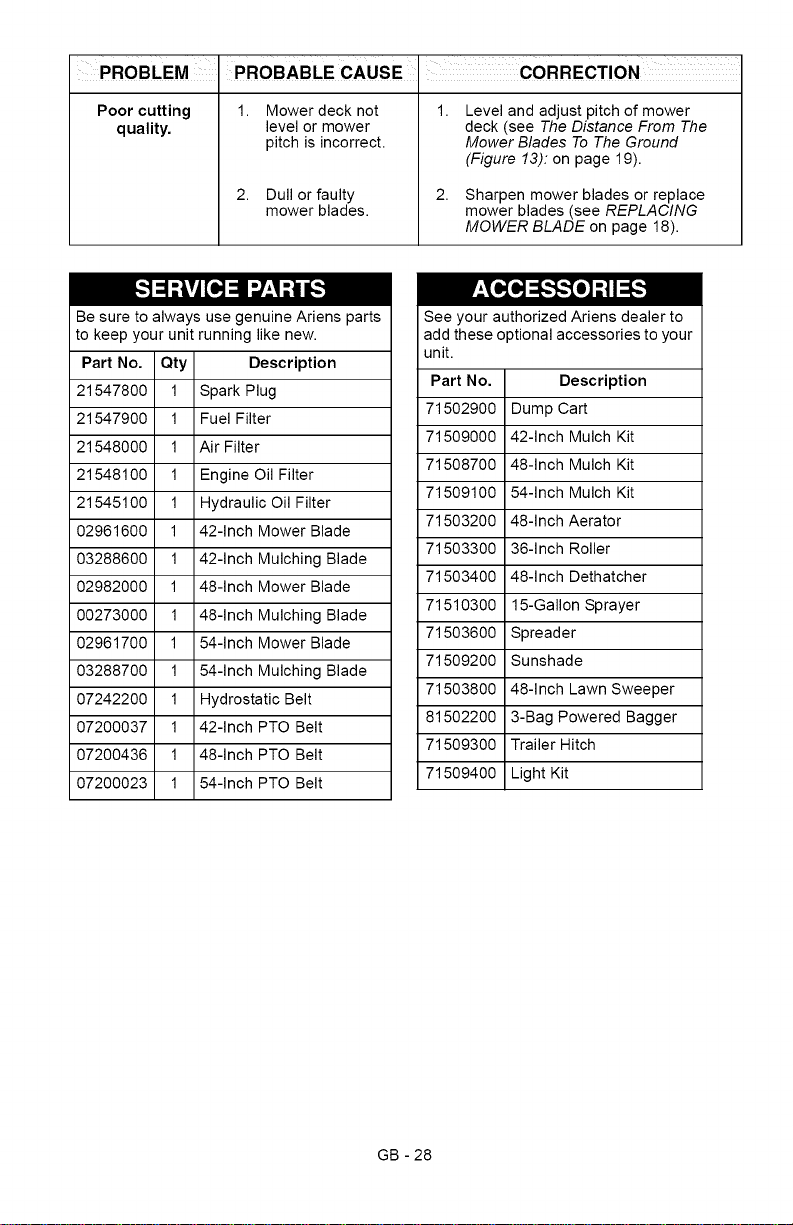
Poor cutting
quality.
1. Mower deck not
level or mower
pitch is incorrect.
2. Dull or faulty
mower blades.
1.
2.
Level and adjust pitch of mower
deck (see The Distance From The
Mower Blades To The Ground
(Figure 13): on page 19).
Sharpen mower blades or replace
mower blades (see REPLACING
MOWER BLADE on page 18).
Be sure to always use genuine Ariens parts
to keep your unit running like new.
Part No. Qty Description
21547800 1 Spark Plug
21547900 1 Fuel Filter
21548000 1 Air Filter
21548100 1 Engine Oil Filter
21545100 1 Hydraulic Oil Filter
02961600 1 42-Inch Mower Blade
03288600 1 42-Inch Mulching Blade
02982000 1 48-Inch Mower Blade
00273000 1 48-Inch Mulching Blade
02961700 1 54-Inch Mower Blade
03288700 1 54-Inch Mulching Blade
07242200 1 Hydrostatic Belt
07200037 1 42-Inch PTO Belt
07200436 1 48-Inch PTO Belt
07200023 1 54-Inch PTO Belt
See your authorized Ariens dealer to
add these optional accessories to your
unit.
Part No.
71502900
71509000
71508700
71509100
71503200
71503300
71503400
71510300
71503600
71509200
71503800
81502200
71509300
71509400
Description
Dump Cart
42-Inch Mulch Kit
48-Inch Mulch Kit
54-Inch Mulch Kit
48-Inch Aerator
36-Inch Roller
48-Inch Dethatcher
15-Gallon Sprayer
Spreader
Sunshade
48-Inch Lawn Sweeper
3-Bag Powered Bagger
Trailer Hitch
Light Kit
GB - 28
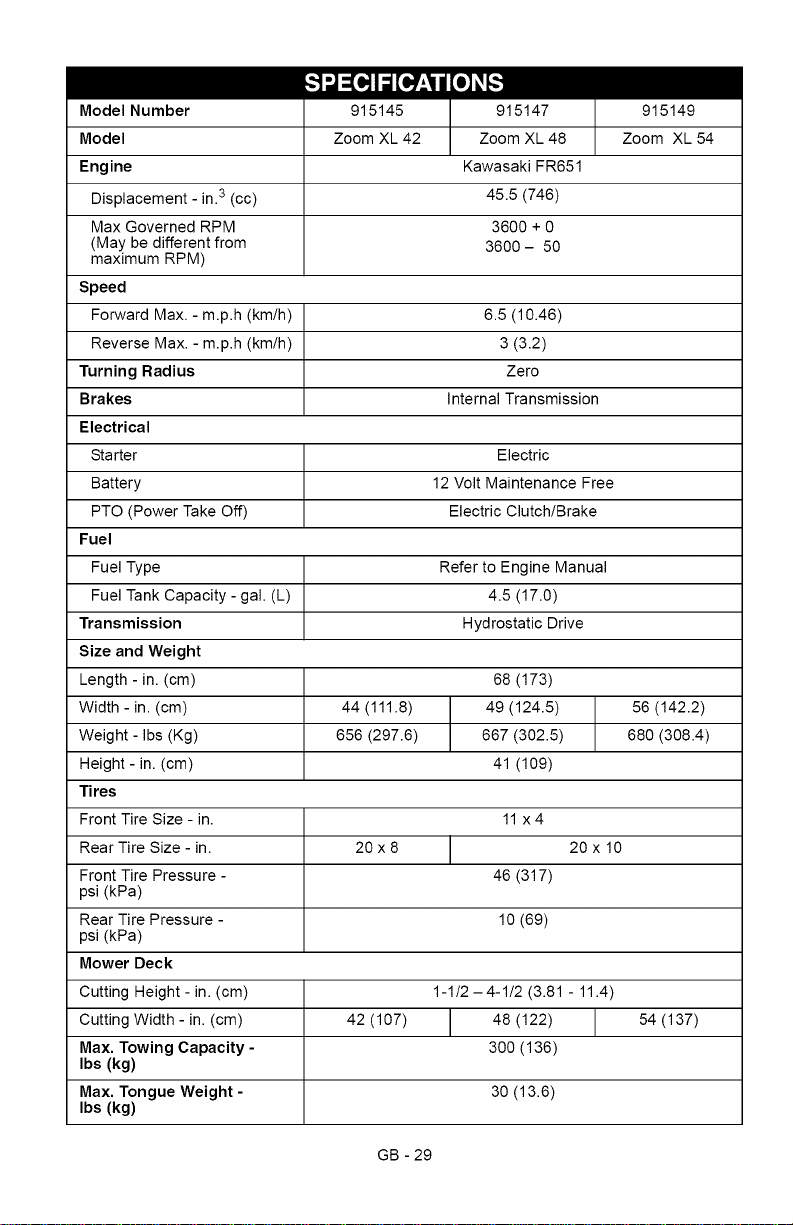
Model Number
Model
Engine
Displacement - in.3 (cc)
Max Governed RPM
(May be different from
maximum RPM)
Speed
Forward Max. - m.p.h (km/h)
Reverse Max. - m.p.h (km/h)
Turning Radius
Brakes
Electrical
Starter
Battery
PTO (Power Take Off)
Fuel
Fuel Type
Fuel Tank Capacity - gal. (L)
Transmission
Size and Weight
Length - in. (cm)
Width - in. (cm)
Weight - Ibs (Kg)
Height - in. (cm)
Tires
Front Tire Size - in.
Rear Tire Size - in.
Front Tire Pressure -
psi (kPa)
Rear Tire Pressure -
psi (kPa)
Mower Deck
Cutting Height - in. (cm)
Cutting Width - in. (cm)
Max. Towing Capacity -
Ibs (kg)
Max. Tongue Weight -
Ibs (kg)
915145
Zoom XL 42
915147
Zoom XL 48
Kawasaki FR651
45.5 (746)
3600 + 0
3600- 50
915149
Zoom XL 54
GB - 29
6.5 (10.46)
3 (3.2)
Zero
Internal Transmission
Electric
12 Volt Maintenance Free
Electric Clutch/Brake
Refer to Engine Manual
4.5 (17.0)
Hydrostatic Drive
68 (173)
44 (111.8) 49 (124.5) 56 (142.2)
656 (297.6) 667 (302.5) 680 (308.4)
41 (109)
11 x4
20 x 8 20 x 10
46 (317)
10 (69)
1-1/2 -4-1/2 (3.81 - 11.4)
42 (107) 48 (122) 54 (137)
300 (136)
30 (13.6)
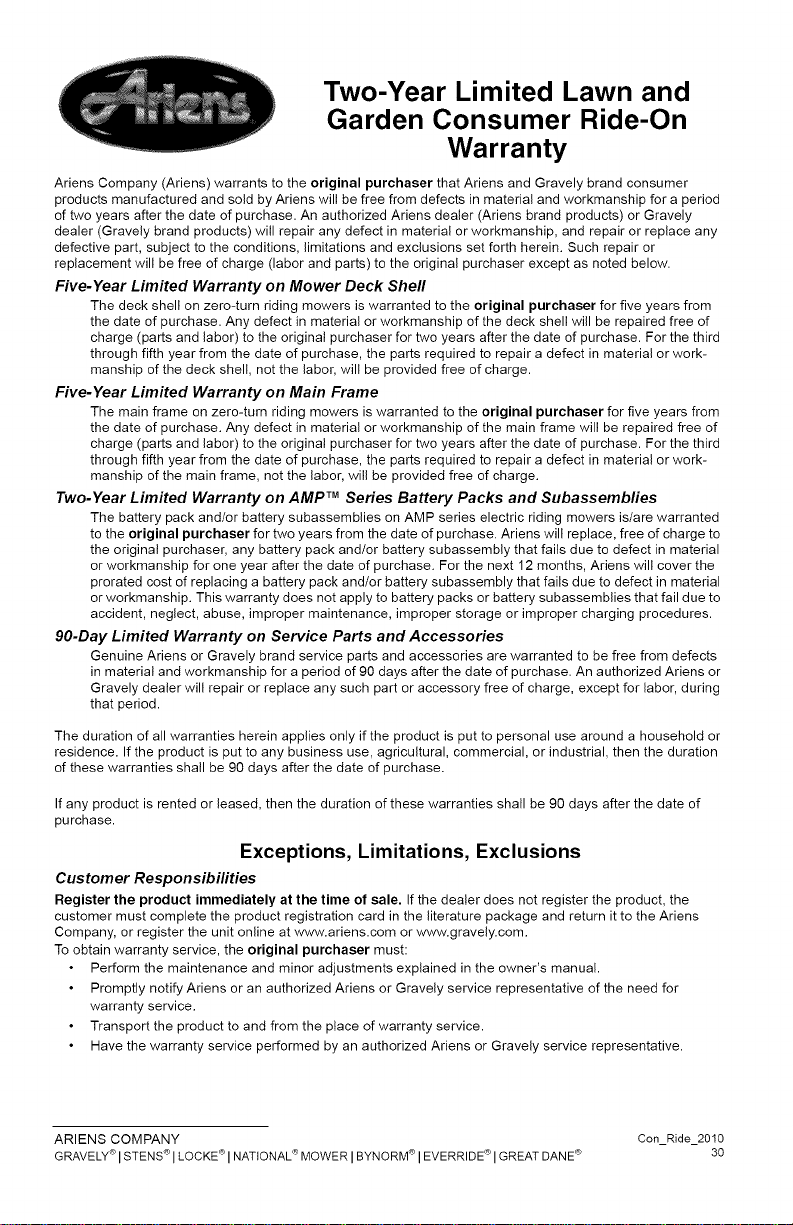
Two-Year Limited Lawn and
Garden Consumer Ride-On
Warranty
Ariens Company (Ariens) warrants to the original purchaser that Ariens and Gravely brand consumer
products manufactured and sold by Ariens will be free from defects in material and workmanship for a period
of two years after the date of purchase. An authorized Ariens dealer (Ariens brand products) or Gravely
dealer (Gravely brand products) will repair any defect in material or workmanship, and repair or replace any
defective part, subject to the conditions, limitations and exclusions set forth herein. Such repair or
replacement will be free of charge (labor and parts) to the original purchaser except as noted below.
Five-Year Limited Warranty on Mower Deck Shell
The deck shell on zero-turn riding mowers is warranted to the original purchaser for five years from
the date of purchase. Any defect in material or workmanship of the deck shell will be repaired free of
charge (parts and labor) to the original purchaser for two years after the date of purchase. For the third
through fifth year from the date of purchase, the parts required to repair a defect in material or work-
manship of the deck shell, not the labor, will be provided free of charge.
Five-Year Limited Warranty on Main Frame
The main frame on zero-turn riding mowers is warranted to the original purchaser for five years from
the date of purchase. Any defect in material or workmanship of the main frame will be repaired free of
charge (parts and labor) to the original purchaser for two years after the date of purchase. For the third
through fifth year from the date of purchase, the parts required to repair a defect in material or work-
manship of the main frame, not the labor, will be provided free of charge.
Two-Year Limited Warranty on AMP TM Series Battery Packs and Subassembfies
The battery pack and/or battery subassemblies on AMP series electric riding mowers is/are warranted
to the original purchaser for two years from the date of purchase. Ariens will replace, free of charge to
the original purchaser, any battery pack and/or battery subassembly that fails due to defect in material
or workmanship for one year after the date of purchase. For the next 12 months, Ariens will cover the
prorated cost of replacing a battery pack and/or battery subassembly that fails due to defect in material
or workmanship. This warranty does not apply to battery packs or battery subassemblies that fail due to
accident, neglect, abuse, improper maintenance, improper storage or improper charging procedures.
90-Day Limited Warranty on Service Parts and Accessories
Genuine Ariens or Gravely brand service parts and accessories are warranted to be free from defects
in material and workmanship for a period of 90 days after the date of purchase. An authorized Ariens or
Gravely dealer will repair or replace any such part or accessory free of charge, except for labor, during
that period.
The duration of all warranties herein applies only if the product is put to personal use around a household or
residence. If the product is put to any business use, agricultural, commercial, or industrial, then the duration
of these warranties shall be 90 days after the date of purchase.
If any product is rented or leased, then the duration of these warranties shall be 90 days after the date of
purchase.
Exceptions, Limitations, Exclusions
Customer Responsibilities
Register the product immediately at the time of sale. If the dealer does not register the product, the
customer must complete the product registration card in the literature package and return it to the Ariens
Company, or register the unit online at www.ariens.com or www.gravely.com.
To obtain warranty service, the original purchaser must:
Perform the maintenance and minor adjustments explained in the owner's manual.
Promptly notify Ariens or an authorized Ariens or Gravely service representative of the need for
warranty service.
Transport the product to and from the place of warranty service.
Have the warranty service performed by an authorized Ariens or Gravely service representative.
ARIENS COMPANY Con Ride 2010
GRAVELY_>ISTENS_>I LOCKETS'INATIONALS>MOWER IBYNORM_>I EVERRIDEC_'I GREATDANEc_' 30
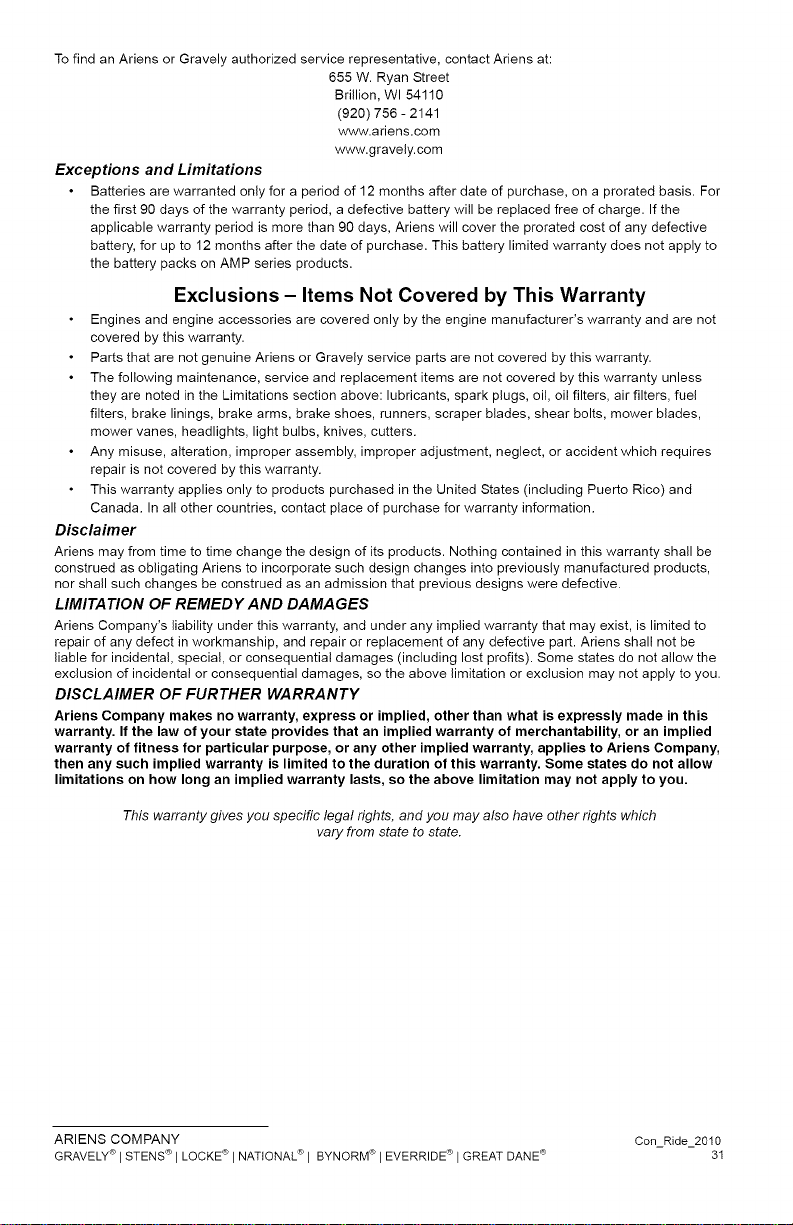
TofindanAriensorGravelyauthorizedservicerepresentative,contactAriensat:
655W.RyanStreet
Brillion,WI54110
(920)756-2141
www.ariens.com
www.gravely.com
Exceptions and Limitations
Batteries are warranted only for a period of 12 months after date of purchase, on a prorated basis. For
the first 90 days of the warranty period, a defective battery will be replaced free of charge. If the
applicable warranty period is more than 90 days, Ariens will cover the prorated cost of any defective
battery, for up to 12 months after the date of purchase. This battery limited warranty does not apply to
the battery packs on AMP series products.
Exclusions - Items Not Covered by This Warranty
Engines and engine accessories are covered only by the engine manufacturer's warranty and are not
covered by this warranty.
Parts that are not genuine Ariens or Gravely service parts are not covered by this warranty.
The following maintenance, service and replacement items are not covered by this warranty unless
they are noted in the Limitations section above: lubricants, spark plugs, oil, oil filters, air filters, fuel
filters, brake linings, brake arms, brake shoes, runners, scraper blades, shear bolts, mower blades,
mower vanes, headlights, light bulbs, knives, cutters.
Any misuse, alteration, improper assembly, improper adjustment, neglect, or accident which requires
repair is not covered by this warranty.
This warranty applies only to products purchased in the United States (including Puerto Rico) and
Canada. In all other countries, contact place of purchase for warranty information.
Disclaimer
Ariens may from time to time change the design of its products. Nothing contained in this warranty shall be
construed as obligating Ariens to incorporate such design changes into previously manufactured products,
nor shall such changes be construed as an admission that previous designs were defective.
LIMITATION OF REMEDY AND DAMAGES
Ariens Company's liability under this warranty, and under any implied warranty that may exist, is limited to
repair of any defect in workmanship, and repair or replacement of any defective part. Ariens shall not be
liable for incidental, special, or consequential damages (including lost profits). Some states do not allow the
exclusion of incidental or consequential damages, so the above limitation or exclusion may not apply to you.
DISCLAIMER OF FURTHER WARRANTY
Ariens Company makes no warranty, express or implied, other than what is expressly made in this
warranty. If the law of your state provides that an implied warranty of merchantability, or an implied
warranty of fitness for particular purpose, or any other implied warranty, applies to Ariens Company,
then any such implied warranty is limited to the duration of this warranty. Some states do not allow
limitations on how long an implied warranty lasts, so the above limitation may not apply to you.
This warranty gives you specific legal rights, and you may also have other rights which
vary from state to state.
ARIENS COMPANY Con Ride 2010
GRAVELY®I STENSC_'I LOCKETS'INATIONAL®I BYNORM<_'I EVERRIDEC_'I GREATDANEc_' 31

Ariens Company
655 West Ryan Street
Brillion, WI 54110-1072
920-756-2141
Fax 920-756-2407
www.ariens.com
A WARNING A
The engine exhaust from this product
contains chemicals known to the State
of California to cause cancer, birth
defects or other reproductive harm.