
Operating and installation
instructions
Cooker and oven
To avoid the risk of accidents or damage to the appliance it is
essential to read these instructions before it is installed and used for
the first time.
en-GB M.-Nr. 11 189 711

Contents
2
Warning and Safety instructions...................................................................... 5
Caring for the environment .............................................................................. 15
Guide to the appliance...................................................................................... 16
Cooker................................................................................................................. 16
Oven .................................................................................................................... 17
Oven controls..................................................................................................... 18
Function selector ................................................................................................ 19
Temperature selector ....................................................................................... 19
Clock/timer.......................................................................................................... 19
Display............................................................................................................ 19
Sensor controls .............................................................................................. 19
Features.............................................................................................................. 20
Data plate ............................................................................................................ 20
Scope of delivery................................................................................................. 20
Accessories supplied and available to order....................................................... 20
Safety features .................................................................................................... 26
PerfectClean treated surfaces............................................................................. 27
Hob control elements.......................................................................................... 27
Before using for the first time .......................................................................... 28
Before using for the first time.............................................................................. 28
Heating up the oven for the first time.................................................................. 29
Overview of functions ....................................................................................... 30
Energy saving tips ............................................................................................. 31
Operation............................................................................................................ 33
Easy to use.......................................................................................................... 33
Pre-heating the oven ........................................................................................... 33
Clock/timer ........................................................................................................ 34
Display................................................................................................................. 34
Symbols in the display ................................................................................... 34
Sensor controls ................................................................................................... 34
Setting the time ................................................................................................... 35
Time display ................................................................................................... 35
At the end of the duration .............................................................................. 35
Using the minute minder................................................................................. 36
Setting the minute minder.............................................................................. 36
Changing the minute minder duration............................................................ 37
Deleting the minute minder duration .............................................................. 37

Contents
3
Switching cooking programmes on and off automatically .................................. 38
Setting a cooking duration ............................................................................. 38
At the end of the cooking duration:................................................................ 39
Setting a cooking duration and a finish time.................................................. 39
Changing the cooking duration...................................................................... 40
Deleting a cooking duration ........................................................................... 40
Deleting the end of cooking duration............................................................. 41
Changing the time of day .................................................................................... 41
Changing settings ............................................................................................... 42
Settings overview ........................................................................................... 43
Baking................................................................................................................. 44
Tips on baking..................................................................................................... 44
Notes on the cooking charts ............................................................................... 44
Notes on the functions ........................................................................................ 45
Roasting ............................................................................................................. 46
Tips for roasting .................................................................................................. 46
Notes on the cooking charts ............................................................................... 46
Notes on the functions ........................................................................................ 47
Grilling ................................................................................................................ 48
Tips for grilling..................................................................................................... 48
Notes on the cooking charts ............................................................................... 48
Notes on the functions ........................................................................................ 49
Further applications .......................................................................................... 50
Defrost................................................................................................................. 50
Low temperature cooking.................................................................................... 51
Drying .................................................................................................................. 52
Frozen food/Ready meals.................................................................................... 53
Heat crockery ...................................................................................................... 53
Cleaning and care ............................................................................................. 54
Unsuitable cleaning agents ................................................................................. 54
Removing normal soiling ..................................................................................... 55
Removing stubborn soiling (excluding the FlexiClip runners) ............................. 56
Stubborn soiling on the FlexiClip runners ........................................................... 56
Cleaning the catalytic enamelled back panel...................................................... 57
Removing soiling caused by spices, sugar and similar deposits................... 57
Removing oil and grease................................................................................ 57
Door removal....................................................................................................... 58
Dismantling the door ........................................................................................... 59
Fitting the door .................................................................................................... 61
Removing the side runners with FlexiClip runners.............................................. 62
Removing the back panel.................................................................................... 62
Lowering the top heat/grill element..................................................................... 63
Problem solving guide ...................................................................................... 64

Contents
4
Service................................................................................................................ 67
Contact in the event of a fault ............................................................................. 67
Warranty .............................................................................................................. 67
Installation.......................................................................................................... 68
Installation dimensions........................................................................................ 68
Installation in a tall or base unit...................................................................... 68
Side view of H22xx ....................................................................................... 69
Side viewH 28xx,H 25xx, H 27xx ................................................................. 70
Connections and ventilation........................................................................... 71
Installing the cooker ............................................................................................ 72
Installing the oven ............................................................................................... 73
Electrical connection ........................................................................................... 74
Oven ............................................................................................................... 75
Electrical connection: Other countries ........................................................... 76
Cooking charts .................................................................................................. 77
Batter................................................................................................................... 77
Shortcrust pastry................................................................................................. 78
Yeast dough ........................................................................................................ 79
Quark dough........................................................................................................ 80
Sponge mixture ................................................................................................... 80
Choux pastry, puff pastry, meringue................................................................... 81
Savoury dishes.................................................................................................... 82
Beef ..................................................................................................................... 83
Veal...................................................................................................................... 84
Pork ..................................................................................................................... 85
Lamb, game ........................................................................................................ 86
Poultry, fish.......................................................................................................... 87
Notes for test institutes .................................................................................... 88
Test food according to EN60350-1 .................................................................... 88
Energy efficiency class according to EN60350-1............................................... 89
Data sheet for household ovens .................................................................... 89

Warning and Safety instructions
5
For the sake of simplicity, cookers and ovens will subsequently be
referred to as the “oven”.
This oven complies with all current local and national safety
requirements. However, inappropriate use can lead to personal
injury and damage to property.
Read the operating and installation instructions carefully before
using the oven. They contain important information on safety,
installation, use and maintenance. This prevents both personal
injury and damage to the oven.
In accordance with standard IEC/EN60335-1, Miele expressly and
strongly advises that you read and follow the instructions in the
chapter on installing the oven as well as the safety instructions and
warnings.
Miele cannot be held liable for damage caused by non-compliance
with these instructions.
Keep these instructions in a safe place and pass them on to any
future owner.
The safety instructions and warnings for the hob can be found in
the separate operating and installation instructions for the hob.

Warning and Safety instructions
6
Appropriate use
This oven is intended for domestic use and use in other similar
environments.
The oven is not intended for outdoor use.
The oven is intended for domestic use only to bake, roast, grill,
cook, defrost and dry food.
All other types of use are not permitted.
This oven may only be used by people with reduced physical,
sensory or mental capabilities or lack of experience and knowledge if
they are supervised whilst using it.
They may only use it unsupervised if they have been shown how to
use it in a safe manner. They must be able to recognise and
understand the dangers of misuse.
The oven compartment is equipped with special lamps to cope
with particular conditions (e.g. temperature, moisture, chemical
resistance, abrasion resistance and vibration). These special lamps
must only be used for the purpose for which they are intended. They
are not suitable for room lighting.
The oven contains 1light source corresponding to energy
efficiency classG.

Warning and Safety instructions
7
Safety with children
Activate the system lock to ensure that children cannot switch the
oven on by mistake.
Children under 8 years of age must be kept away from the oven
unless they are constantly supervised.
Children aged 8 and older may only use the oven without
supervision if they have been shown how to use it in a safe manner.
Children must be able to understand and recognise the possible
dangers caused by incorrect operation.
Children must not be allowed to clean or maintain the oven
unsupervised.
Children should be supervised in the vicinity of the oven. Never
allow children to play with the oven.
Risk of suffocation due to packaging material. Whilst playing,
children may become entangled in packaging material (such as
plastic wrapping) or pull it over their head, presenting the risk of
suffocation.
Keep packaging material away from children.
Risk of injury caused by hot surfaces. Children’s skin is far more
sensitive to high temperatures than that of adults. External parts of
the oven such as the door glass, control panel and the vent become
quite hot.
Do not let children touch the oven when it is in operation.
Risk of injury caused by hot surfaces. The cooking zones on hobs
get hot when in use. Place pots and pans on the cooking zone in
such a way that children cannot pull them down and burn
themselves.
Risk of injury from the open door.
The oven door can support a maximum weight of 15kg. Children
could injure themselves on an open door.
Do not let children sit on the open door, lean against it or swing on it.

Warning and Safety instructions
8
Technical safety
Unauthorised installation, maintenance and repairs can cause
considerable danger for the user. Installation, maintenance and
repairs must only be carried out by a Miele authorised technician.
Damage to the oven can compromise your safety. Check the oven
for visible signs of damage. Do not use a damaged oven.
Temporary or permanent operation on an autonomous power
supply system or a power supply system that is not synchronised
with the mains power supply (e.g. island networks, back-up systems)
is possible. A prerequisite for operation is that the power supply
system complies with the specifications of EN50160 or an
equivalent standard.
The function and operation of the protective measures provided in
the domestic electrical installation and in this Miele product must
also be maintained in isolated operation or in operation that is not
synchronised with the mains power supply, or these measures must
be replaced by equivalent measures in the installation. As described,
for example, in the current version of BS OHSAS 18001–2 ISO
45001.
The electrical safety of this oven can only be guaranteed when
correctly earthed. It is most important that this basic safety
requirement is fulfilled. If in doubt, the electrical installation should
be checked by a qualified electrician.
The connection data (voltage and frequency) on the data plate of
the oven must match the mains electricity supply in order to avoid
the risk of damage to the oven. Compare this before connecting the
appliance to the mains. If in any doubt, consult a qualified
electrician.
Multi-socket adapters and extension leads do not guarantee the
required safety of the appliance. Do not use these to connect the
oven to the mains electricity supply.
For safety reasons, the oven may only be used when it has been
built in and fully installed.

Warning and Safety instructions
9
The oven must not be used in a non-stationary location (e.g. on a
ship).
Risk of injury due to electric shock. Any contact with live
connections or tampering with the electrical or mechanical
components of the oven will endanger your safety and may lead to
the oven malfunctioning.
Do not open the oven housing under any circumstances.
While the oven is under warranty, repairs should only be
undertaken by a Miele authorised service technician. Otherwise the
warranty will be invalidated.
Miele can only guarantee the safety of the oven when original
Miele spare parts are used. Faulty components must only be
replaced by original spare parts.
If the oven is delivered without a power connection cable, a
special cable must be installed by a Miele authorised service
technician (see “Installation”, “Electrical connection”).
If the connection cable is damaged, it must be replaced with a
special connection cable by a Miele authorised service technician (see
“Installation”, “Electrical connection”).
During installation, maintenance and repair work, e.g. if the oven
interior lighting is faulty (see “Problem solving guide”), the oven must
be completely disconnected from the household electricity supply.
To ensure this, do one of the following:
- Disconnect the mains fuse
- Completely unscrew the screw-out fuse (in countries where this is
applicable)
- Pull out the plug (if one is present) at the wall socket To do this,
pull the plug and not the mains connection cable.
The oven requires a sufficient supply of cool air for efficient
operation. Make sure that the supply of cool air is not hindered in
any way (e.g. by fitting heat insulation strips in the housing unit).
Furthermore, the required supply of cool air must not be excessively
heated by other heat sources (e.g. solid fuel stoves).

Warning and Safety instructions
10
If the oven is built in behind a furniture front (e.g. a door), do not
close the furniture door while the oven is in use. Heat and moisture
can build up behind the closed furniture door. This can result in
damage to the oven, housing unit and floor. Leave the furniture front/
door open until the oven has cooled down completely.
Correct use
Risk of injury caused by hot surfaces. The oven gets hot during
operation. You could burn yourself on the heating elements, oven
compartment, accessories or food.
Wear oven gloves when placing hot food in the oven or removing it
and when adjusting oven shelves, for example, in a hot oven
compartment.
To avoid fuelling any flames, do not open the oven door if smoke
occurs inside the appliance. Interrupt the process by switching the
appliance off and disconnect it from the mains electricity supply. Do
not open the door until the smoke has dispersed.
Due to the high temperatures radiated, objects left near the oven
could catch fire. Do not use the oven to heat up the room.
Oils and fats can ignite if allowed to overheat. Never leave the
oven unattended when cooking with oil or fats. Never attempt to put
out oil or fat fires with water. Switch the oven off and extinguish the
flames by leaving the door closed.
Oils and fats can ignite if allowed to overheat. Never leave the hob
unattended when cooking with oil or fats. Never attempt to put out
oil or fat fires with water. Switch the hob off and carefully smother
the flames on the hob with a lid or a fire blanket.
Items left on the hob could melt or catch fire from residual heat or
if the appliance is turned on by mistake. Never use the hob as a
place to store items.

Warning and Safety instructions
11
Grilling food for excessively long cooking durations can cause it to
dry out with the risk of catching fire. Do not exceed the
recommended cooking durations.
Certain foods dry out quickly and may catch fire due to high grill
temperatures.
Never use grill modes to finish baking partially baked rolls or bread or
to dry flowers or herbs. Instead, use the Fan plus or Conventional
heat function.
If using alcohol in your recipes, please be aware that high
temperatures can cause the alcohol to evaporate. The vapour can
catch fire on hot heating elements.
When using residual heat to keep food warm, corrosion from high
air humidity and condensation can occur in the oven. This can also
cause damage to the control panel, worktop and surrounding
kitchen furniture. Keep the oven on and select the lowest
temperature available for the selected function. The cooling fan will
then continue to run automatically.
Food which is stored in the oven compartment or left in it to be kept
warm can dry out and the moisture released can lead to corrosion
damage in the oven. Always cover food that is left in the oven to keep
warm.
An accumulation of heat can cause the floor of the oven to crack
or flake off.
Never line the floor of the oven compartment with aluminium foil or
oven liners.
If you wish to place crockery on the oven floor during cooking, or
place crockery on the oven floor to heat it up, you can do so, but
only with the Fan plus or Eco Fan heat function.
The oven compartment floor can become damaged by items
being pushed around on it. When placing pots, pans or crockery on
the oven compartment floor, ensure that you avoid pushing them
around.

Warning and Safety instructions
12
Risk of injury caused by steam. Pouring a cold liquid onto a hot
surface creates steam, which can cause severe scalding. The
sudden temperature change can also cause damage to hot
enamelled surfaces. Never pour cold liquids directly onto hot
enamelled surfaces.
It is important that the temperature in the food being cooked is
evenly distributed and sufficiently high. This can be achieved by
stirring or turning the food.
Plastic dishes that are not suitable for use in an oven will melt and
may ignite at high temperatures, and can damage the oven.
Use only plastic containers that are suitable for use in an oven.
Follow the manufacturer’s instructions.
Heating up food in closed containers, such as tins or sealed jars,
will result in an increase in pressure, which can cause them to
explode. Do not heat up unopened tins or jars of food in the oven.
Risk of injury from the open door. You could bang into the open
door or trip over it. Avoid leaving the door open unnecessarily.
The door can support a maximum load of 15kg. Do not lean or sit
on an open door, or place heavy items on it. Make sure that nothing
gets trapped between the door and the oven compartment. This
could damage the oven.
The following applies to stainless steel surfaces:
Adhesives will damage the stainless steel surface and cause it to
lose its dirt-repellent protective coating. Do not use sticky notes,
adhesive tape or other types of adhesive on the stainless steel
surface.
Magnets can cause scratches. Do not use the stainless steel
surface as a magnetic notice board.

Warning and Safety instructions
13
Cleaning and care
Risk of injury due to electric shock. The steam from a steam
cleaning appliance could reach live electrical components and cause
a short circuit. Do not use a steam cleaner to clean the appliance.
The side runners can be removed (see “Cleaning and care” –
“Removing the side runners with FlexiClip runners”). Refit the side
runners correctly.
The catalytic enamelled back panel can be removed for cleaning
purposes (see “Cleaning and care – Removing the back panel”).
Ensure that the back panel is replaced correctly and do not use the
oven without it fitted.
Scratches on the door glass can cause the glass to break. Do not
use abrasive cleaners, hard sponges, brushes or sharp metal tools to
clean the door glass.
In warm, moist environments, there is a higher probability of pest
infestations (such as cockroaches). Ensure the oven and the area
surrounding it are always kept clean.
Damage caused by pests is not covered by the warranty.

Warning and Safety instructions
14
Accessories
Miele cookers may only be combined with hobs specified by
Miele as suitable for use with that appliance (see “Installation –
Electrical connection”).
Only use original Miele accessories. If other parts are used,
warranty, performance and product liability claims will be invalidated.
Miele will guarantee to supply functional spare parts for a
minimum of 10years and up to 15years following the
discontinuation of your oven.
The Miele gourmet oven dish HUB5000/HUB5001 (if available)
must not be inserted into shelf level1. This will damage the floor of
the oven. The lack of clearance will create an accumulation of heat
which can cause the enamel to crack or flake off. Never place a
Miele oven dish on the upper support of shelf level1 either as it will
not be secured by the non-tip safety notches. As a general rule, use
shelf level2.

Caring for the environment
15
Disposing of the packaging
material
The packaging material is used for
handling and protects the appliance
from transport damage. The packaging
material used is selected from materials
which are environmentally friendly for
disposal and can generally be recycled.
Recycling the packaging material
reduces the use of raw materials. Use
material-specific collection points for
valuable materials and take advantage
of return options. Your Miele dealer will
take the packaging material away.
Disposing of your old
appliance
Electrical and electronic appliances
contain many valuable materials. They
also contain certain materials,
compounds and components which
were essential for their correct
functioning and safety. These could be
hazardous to human health and to the
environment if disposed of with
household waste or if handled
incorrectly. Please do not, therefore,
dispose of your old appliance with
household waste.
Instead, please make use of officially
designated collection and disposal
points to dispose of and recycle
electrical and electronic appliances in
your local community, with your dealer
or with Miele, free of charge. By law,
you are solely responsible for deleting
any personal data from the old
appliance prior to disposal. You are
legally obliged to remove any old
batteries which are not securely
enclosed by the appliance and to
remove any lamps without destroying
them, where this is possible. These
must be taken to a suitable collection
point where they can be handed in free
of charge. Please ensure that your old
appliance poses no risk to children
while being stored for disposal.
Guide to the appliance
16
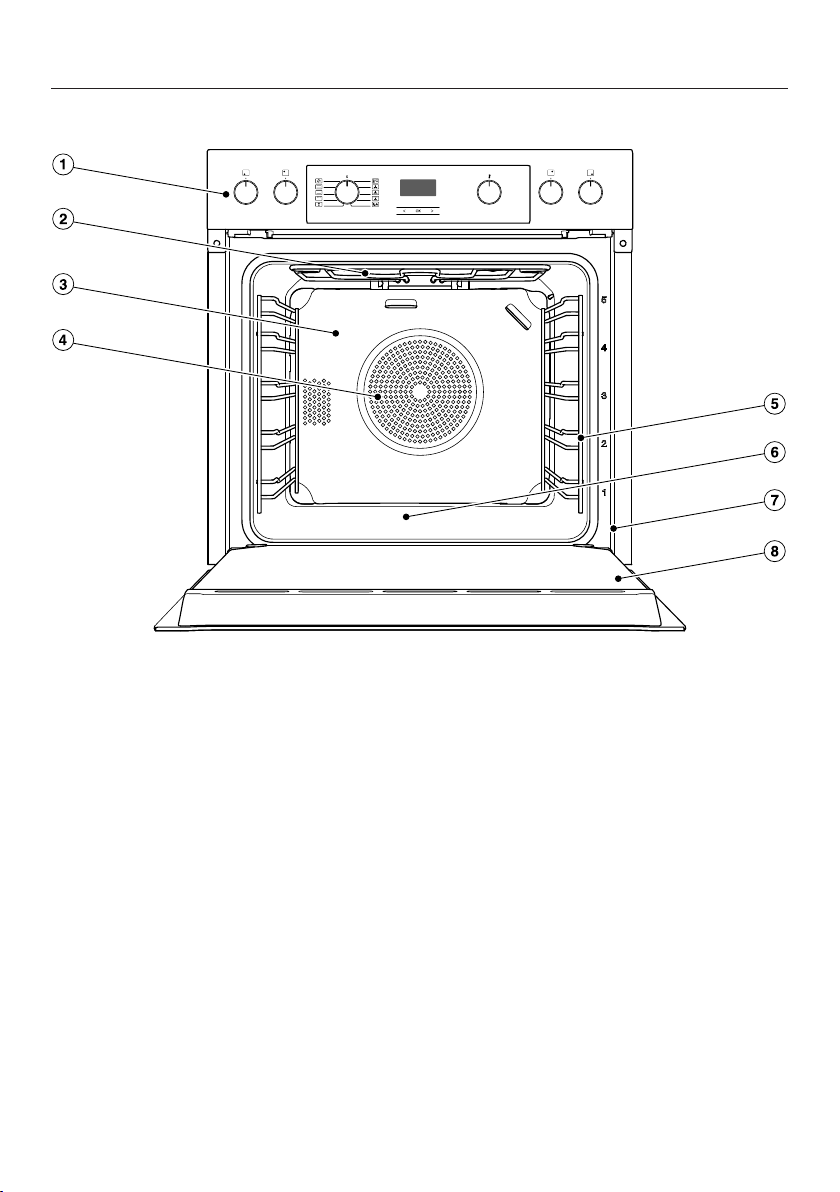
Cooker
a
Oven control elements, hob rotary controls
b
Top heat/grill element
c
Catalytic enamelled back panel
d
Air inlet for the fan with ring heating element behind it
e
Side runners with 5shelf levels
f
Oven floor with bottom heat element underneath it
g
Front frame with data plate
h
Door

Guide to the appliance
17
Oven
a
Control elements
b
Top heat/grill element
c
Catalytic enamelled back panel
d
Air inlet for the fan with ring heating element behind it
e
Side runners with 5shelf levels
f
Oven floor with bottom heat element underneath it
g
Front frame with data plate
h
Door
Oven controls
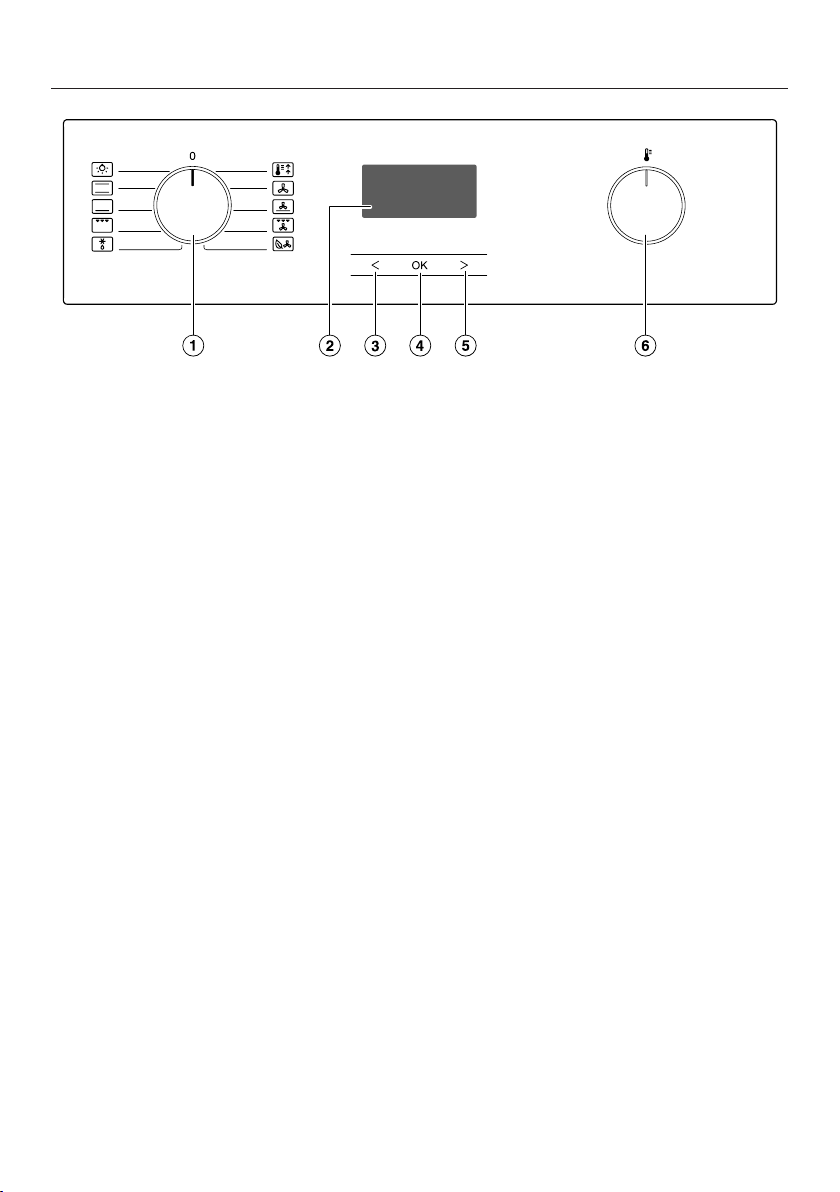
18
a
Function selector
For selecting oven functions
b
Clock/timer
For displaying the time of day and settings
c
Sensor control
For modifying times and settings
d
OKsensor control
For selecting functions and saving settings
e
Sensor control
For modifying times and settings
f
Temperature selector
For setting the temperature

Oven controls
19
Function selector
Use the function selector to select the
required function and switch on the
oven lighting independently.
It can be turned clockwise or anti-
clockwise.
In the 0 position it can be retracted by
pressing it in.
Functions
Lighting
Conventional heat
Bottom heat
Full grill
Defrost
Booster
Fan plus
Intensive bake
Fan grill
Eco Fan heat
Temperature selector
When a function is selected, the
recommended temperatures and the
symbol appear in the display. Use the
temperature selector to change the
temperature for cooking processes in 5-
degree increments.
The temperature selector can be
turned clockwise or anti-clockwise. It
can be retracted in any position by
pressing it in.
Clock/timer
The clock/timer is operated via the
display and the, OK and sensor
controls.
Display
The display shows the time of day or
your settings.
It goes dark if settings are not being
entered.
Please refer to “Clock/timer” for more
information.
Sensor controls
The sensor controls respond to the
touch of a fingertip. Every touch on the
sensors is confirmed by an audible
tone.
The tone can be switched off by
changing setting to status (see
“Clock/timer – Changing settings”).

Features
20
A list of the models described in these
operating and installation instructions
can be found on the back page of this
booklet.
Data plate
The data plate is located on the front
frame, visible when the door is open.
The data plate states the model
number, the serial number as well as
connection data (voltage, frequency
and maximum rated load).
Please have this information to hand,
should you need to contact Miele
regarding any questions or problems.
Scope of delivery
- Operating and installation
instructions for using the oven
- Screws for securing your oven in the
housing unit
- Various accessories
Accessories supplied and
available to order
Features will vary depending on
model.
Side runners, universal tray and wire
rack (or “rack” for short) are supplied
as standard with the oven.
Depending on the model, your oven
may also come supplied with some of
the accessories listed here.
All the accessories listed as well as the
cleaning and care products are
designed for Miele ovens.
These are available to order via the
Miele Webshop, the Miele Customer
Service Department or from your Miele
dealer.
When ordering, please quote the model
identifier of your oven and the reference
number of the accessories required.
Side runners
There are runners on the left and right
of the oven compartment with
shelves for inserting accessories.
The numbers for the shelf levels are
marked on the front frame.
Each level consists of 2rails, one above
the other.
The accessories (e.g. the rack) are
pushed into the oven between the two
rails.
You can remove the side runners (see
“Cleaning and care” – “Removing the
side runners with FlexiClip runners”).
Features
21
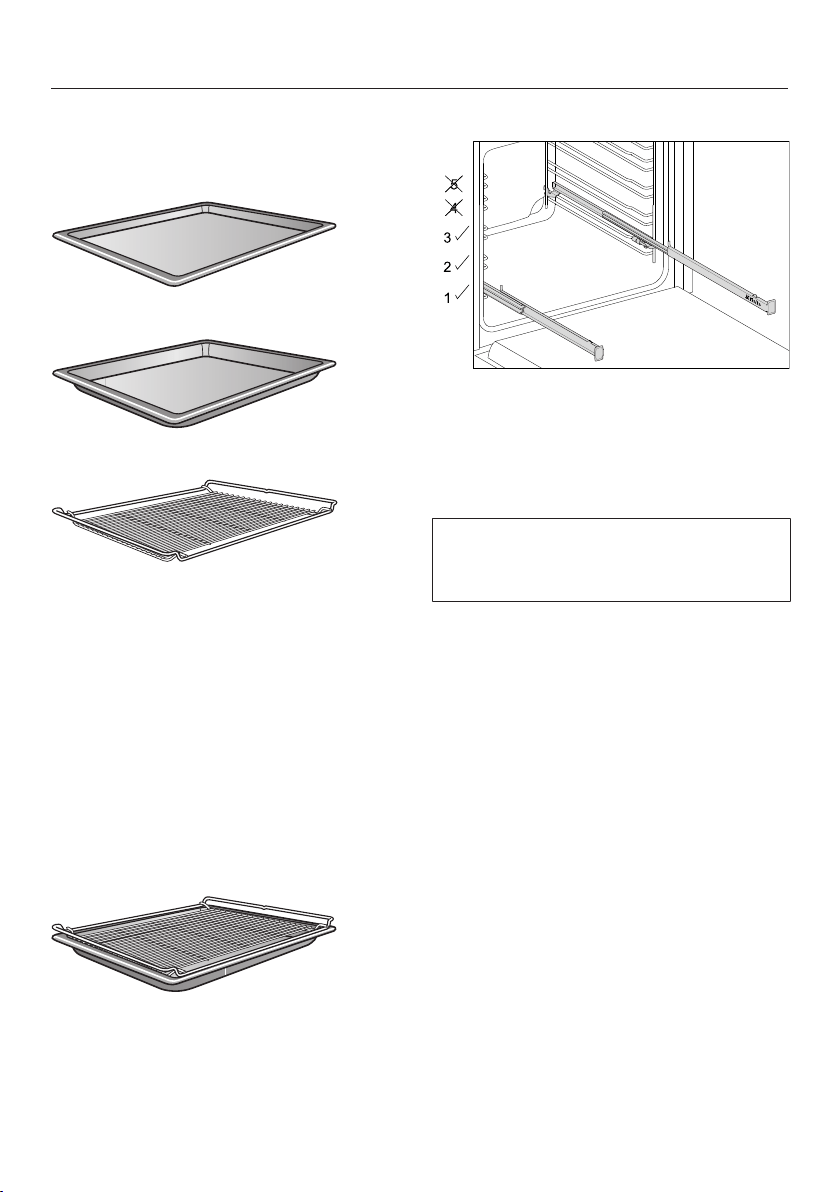
Baking tray, universal tray and rack
with non-tip notches
Baking tray HBB71:
Universal tray HUBB71:
Rack HBBR71:
These accessories are inserted into the
oven between the two rails of a shelf in
the side runner.
Always place the rack with the loading
surface in the lower position.
These accessories have non-tip safety
notches fitted in the middle of their
short sides. The non-tip safety notches
prevent the trays from being pulled out
completely from the side runners when
you only wish to pull accessories out
partially.
If you are using the universal tray with
the rack on top, insert the tray between
the rails of a shelf of the side runners
and the rack will automatically slide in
above them.
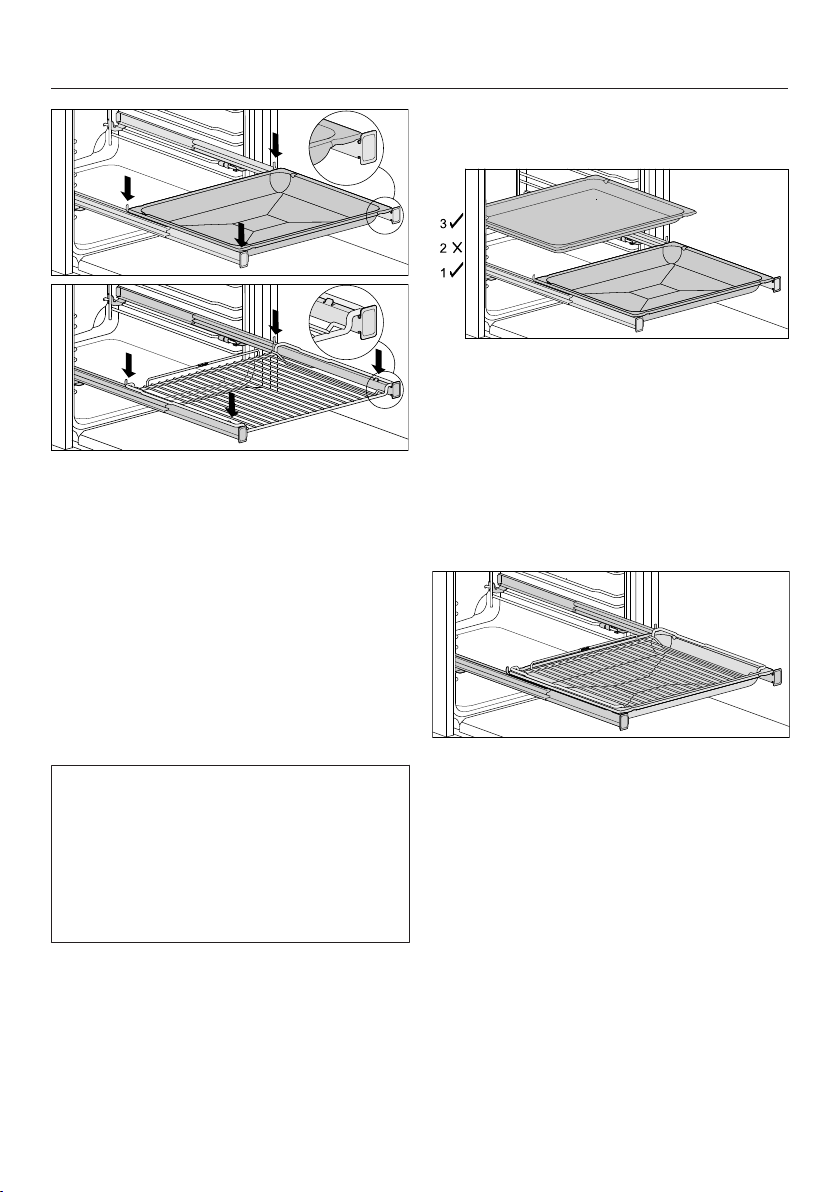
FlexiClip runners HFC70-C
FlexiClip runners can only be fitted on
levels 1, 2 and 3.
The FlexiClip runners can be drawn
right out of the oven individually to give
a good overview of cooking in progress.
Push the FlexiClip runners right into
the oven compartment before placing
accessories on them.
Features
22
To prevent the risk of accessories
sliding off the runners:
- Make sure that they are sitting
securely on their runners in between
the stoppers at either end of each
runner.
- Always place the rack with the
loading surface in the lower position
on the FlexiClip runners.
The FlexiClip runners can support a
maximum load of 15kg.
Because the FlexiClip runners sit on
the top rail of the side runners, the gap
between the level the FlexiClip runners
are on and the one above is smaller
than if, for instance, racks were fitted
on each level. Cooking results will be
affected if the gap is too small.
You can use more than one baking tray,
universal tray or rack at a time.
Place the baking tray, universal tray
or rack on the FlexiClip runners.
Leave at least one shelf level free
between the FlexiClip runner and any
baking tray, universal tray or rack
above it.
You can use the universal tray together
with the rack on the FlexiClip runners.
Place the universal tray together with
the rack on the FlexiClip runners. The
rack will automatically slide between
the rails of the shelf level above the
FlexiClip runners.
Leave at least one shelf level free
between the FlexiClip runner and any
baking tray, universal tray or rack
above it.

Features
23
Fitting the FlexiClip runners
Risk of injury caused by hot
surfaces.
The oven gets hot during operation.
You could burn yourself on the
heating elements, oven compartment
or accessories.
Allow the heating elements, oven
compartment and the accessories to
cool before fitting or removing the
FlexiClip runners.
Preferably fit the FlexiClip runners onto
level1. You can then use them for food
which should be cooked on level2.
One level of the side runners consists of
two rails. The FlexiClip runners are fitted
on the upper rail of the two rails that
make up a shelf level.
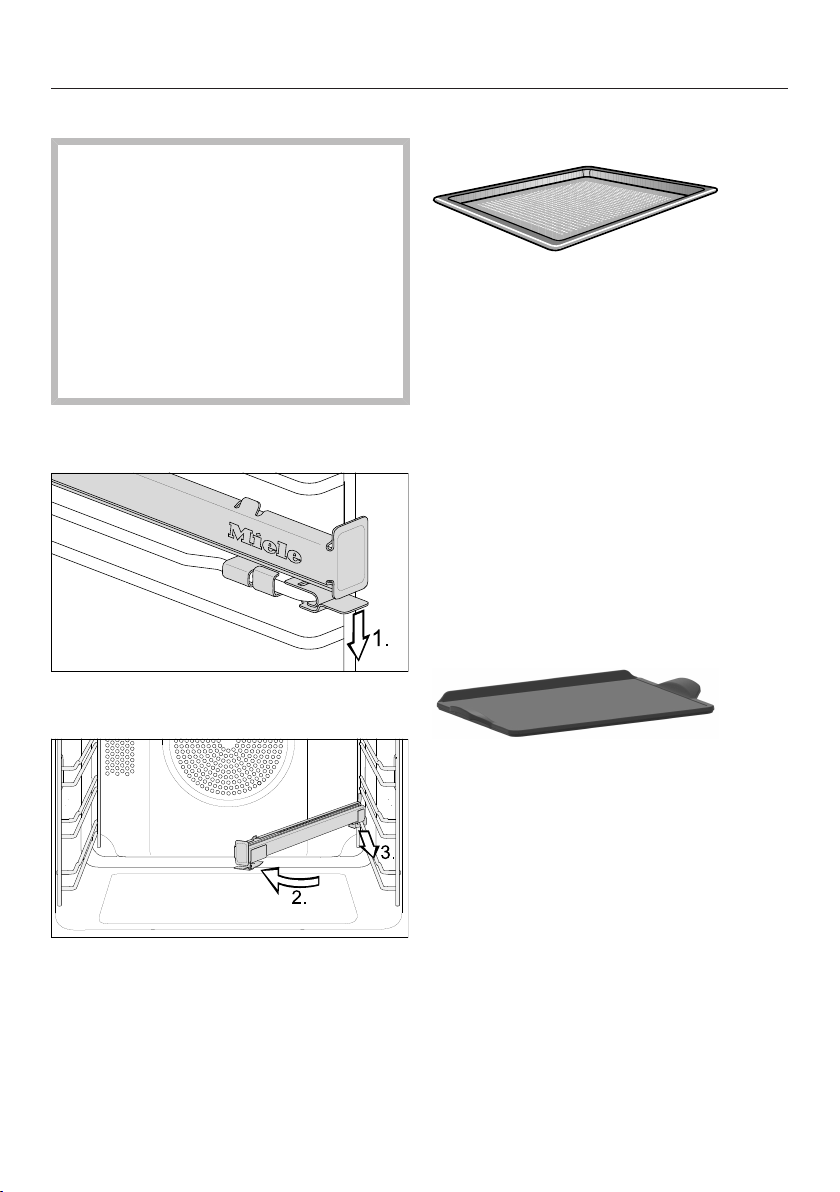
The FlexiClip runner with the Miele logo
is fitted on the right.
When fitting or removing the FlexiClip
runners, do not extend them.
Hook the FlexiClip runner onto the
front of the top rail of a side runner
(1.).
Then hold the FlexiClip runner at an
angle towards the middle of the oven
compartment (2.).
Slide the FlexiClip runner at an angle
along the top rail as far as it will go
(3.).
Then swing the FlexiClip runner back
to the side of the oven compartment
and secure it to the top rail with an
audible click (4.).
If the FlexiClip runners are difficult to
pull out after fitting, you may need to
pull firmly on them once to release
them.
Features
24
Removing the FlexiClip runners
Risk of injury caused by hot
surfaces.
The oven gets hot during operation.
You could burn yourself on the
heating elements, oven compartment
or accessories.
Allow the heating elements, oven
compartment and the accessories to
cool before fitting or removing the
FlexiClip runners.
Push the FlexiClip runner in all the
way.
Push down on the tab at the front of
the FlexiClip runner (1.).
Swing the FlexiClip runner towards the
middle of the oven compartment (2.),
then pull it forwards along the top rail
(3.).
Lift the FlexiClip runner off the rail
and take it out of the oven.
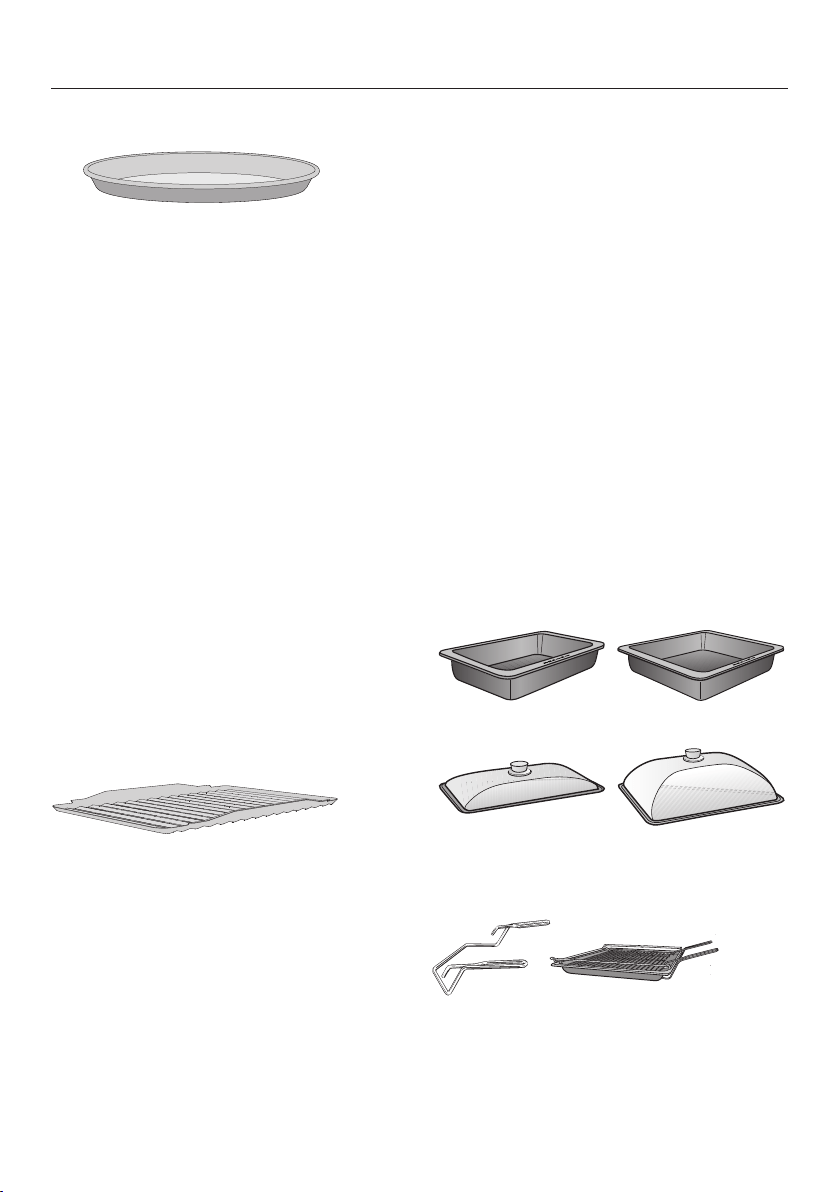
Perforated gourmet baking tray
HBBL71
The perforated gourmet baking tray has
been specially developed for the
preparation of baked goods made from
fresh yeast and quark doughs, as well
as bread and bread rolls.
The tiny perforations assist in browning
the underside of baked goods.
The gourmet baking tray can also be
used for dehydrating or drying food.
The enamelled surface has been treated
with PerfectClean.
The round perforated baking tray
HBFP27-1 can be used for the same
things.
Baking stone HBS 70
The baking stone is ideal for items
which need a well baked base such as
pizza, quiche, bread, bread rolls and
savoury snacks.
The baking stone is made from heat-
retaining fireclay and is glazed. A
paddle made of untreated wood is
supplied with the baking stone for
placing food on it and taking it off.
Slide the rack in and place the baking
stone on it.
Features
25
Round baking trays
The solid round baking tray HBF27-1
is suitable for cooking pizzas, flat cakes
made with yeast or whisked mixtures,
sweet and savoury tarts, baked
desserts, flat bread, and can also be
used for frozen cakes and pizzas.
The perforated round baking tray
HBFP27-1 has been specially
developed for baked goods made from
fresh yeast and quark dough and for
baking bread and rolls. The tiny
perforations assist in browning the
underside of baked goods.
The tray can also be used for
dehydrating or drying food.
The enamelled surface of both baking
trays has been treated with
PerfectClean.
Insert the rack and place the round
baking tray on the rack.
Grilling and roasting insertHGBB71
The grilling and roasting insert fits in the
universal tray.
The juices from the food being grilled or
roasted collect under the insert,
preventing them from burning on. The
juices can then be used for making
gravy and sauces.
The enamelled surface has been treated
with PerfectClean.
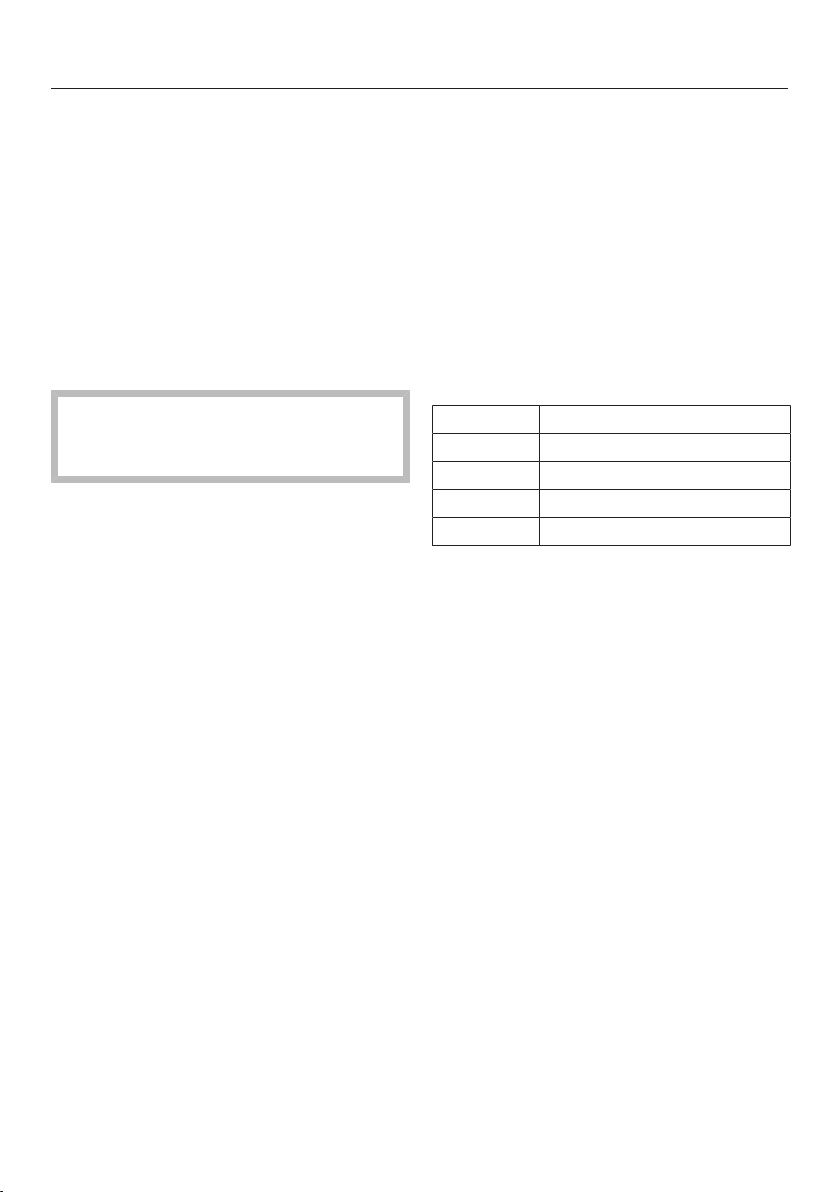
HUB gourmet oven dishes
HBD gourmet oven dish lids
Unlike other oven dishes, Miele
gourmet oven dishes can be placed in
the oven directly on the shelf runners.
They have non-tip safety notches like
the rack to prevent them from being
pulled out too far.
The surface of the oven dish has a non-
stick coating.
Gourmet oven dishes are available in
different depths. The width and the
height are the same.
Suitable lids are available separately.
Please quote the model number when
ordering.
Depth: 22cm Depth: 35cm
HUB5000-M
HUB5001-M*
HUB5001-XL*
HBD60-22 HBD60-35
* Suitable for use on induction hobs
Handle HEG
The handle makes it easier to take the
universal tray, baking tray and rack out
of the oven.

Features
26
Catalytic enamelled liners
Catalytic enamelled surfaces are self-
cleaning, which means that oil and fat
are burnt off automatically when very
high temperatures are reached inside
the oven. See “Cleaning and care” for
more information.
- Side liners
The side liners are installed behind
the side runners and protect the
interior walls against soiling.
- Back panel
This should be replaced if the
catalytic enamel has become
ineffective due to incorrect use or
very heavy soiling.
When ordering, please quote the model
number of your oven.
Accessories for cleaning and care
- Miele all-purpose microfibre cloth
- Miele oven cleaner
Safety features
- System lock for the oven
(see “Clock/timer – Changing
settings”)
- Cooling fan
The cooling fan will come on
automatically when a cooking
programme is started. It ensures that
the hot oven air is mixed with cool
ambient air and thus cooled before it
is expelled via the gap between the
door and control panel.
The cooling fan will continue to run
for a while after the oven has been
switched off to prevent any humidity
building up in the oven compartment,
on the control panel or on the oven
housing unit.
The cooling fan will switch itself off
automatically after a certain period of
time.
- Safety switch-off
This safety switch-off is activated
automatically if the oven has been
operating for an unusually long
period of time. The period of time will
depend on the particular oven
function being used.
- Ventilated door
The oven door is made of glass
panes that have a heat-reflective
coating on part of their surface.
When the oven is operating, air is
passed through the door to keep the
outer pane cool.
The door can be removed and
disassembled for cleaning purposes
(see “Cleaning and care”).
Features
27
PerfectClean treated surfaces
PerfectClean surfaces have very good
non-stick properties and are
exceptionally easy to clean.
Food can be easily removed from these
surfaces. Soiling from baking and
roasting can be easily removed from
these surfaces.
Food can be sliced or cut up on
PerfectClean surfaces.
However, do not use ceramic knives
as these will scratch the
PerfectClean surface.
Surfaces treated with PerfectClean
enamel can be cleaned as you would
clean glass.
Read the instructions in “Cleaning and
care” so that the benefits of the non-
stick properties and easy cleaning are
retained.
PerfectClean treated surfaces:
- Oven compartment
- Universal tray
- Baking tray
- Grilling and roasting insert
- Perforated gourmet baking tray
- Round baking tray
- Round perforated baking tray
Hob control elements
(features will vary depending on model)
H2xxxE/H2xxxImodels also have rotary
controls for operating the cooking
zones on the linked hob.
All the hob rotary controls are
retractable when they are at the
position. The range of settings is
printed on the control.
Cooking zones:
Symbol Cooking zone
Front left
Rear left
Rear right
Front right
The hob can still be operated when the
system lock for the oven is switched
on.
Please read the separate operating and
installation instructions provided with
your hob. It contains additional
information on how to install and use
your hob.

Before using for the first time
28
Before using for the first time
The oven must not be operated
until it has been correctly installed in
its housing unit.
Press and release the function and
temperature selectors if they are
retracted.
The time of day can only be changed
when the function selector is at0.
Set the time of day.
Setting the time of day for the
first time
The time of day is shown in the 24-hour
format.
After connecting the oven to the
electricity supply, will flash on the
display.
The time of day is set in segments: first
the hours, then the minutes.
Confirm withOK.
will light up and will flash.
While the symbol is flashing,
confirm with OK.
The hours will flash.
Use or to set the hours.
Confirm withOK.
The hours are saved and the minutes
will flash.
Use or to set the minutes.
Confirm withOK.
The time of day is now saved.
The time of day can be displayed in
the 12-hour format by setting in
the settings menu to status(see
“Clock/timer – Changing settings”).

Before using for the first time
29
Heating up the oven for the
first time
When the oven is heated up for the first
time it may give off a slight smell. This
can be eliminated by heating the oven
for at least an hour.
It is important to ensure that the
kitchen is well ventilated during this
operation.
Prevent the odour from escaping into
other rooms.
Remove any protective wrapping and
stickers from the oven and
accessories.
Before heating the oven up, wipe the
oven compartment with a damp cloth
to remove any dust or bits of
packaging that may have
accumulated inside during storage
and unpacking.
Fit the FlexiClip runners (if present) to
the side runners and insert all trays
and the rack.
Select the Fan plus operating
mode.
The recommended temperature of
160°C will appear. The symbol will
flash.
The oven heating, lighting and cooling
fan will switch on.
Set the maximum temperature
(250°C).
Heat the oven for at least an hour.
After the heating-up phase, turn the
operating mode selector to0.
Cleaning the oven compartment after
heating it up for the first time
Danger of injury caused by hot
surfaces.
The oven gets hot during operation.
You could burn yourself on the
heating elements, oven compartment
or accessories.
Allow the heating elements, oven
compartment and the accessories to
cool before manual cleaning.
Take all accessories out of the oven
compartment and clean them by
hand (see “Cleaning and care”).
Clean the oven compartment with a
clean sponge and a solution of hot
water and washing-up liquid or a
clean, damp microfibre cloth.
Dry all surfaces with a soft cloth.
Leave the oven door open until the
oven compartment is completely dry.
Overview of functions
30
Functions Recommended
value
Range
Fan plus 160 °C 30–250 °C
Intensive bake 170 °C 50–250 °C
Eco Fan heat 190 °C 100–250 °C
Defrost 25 °C 25–50 °C
Booster 160 °C 100–250 °C
Conventional heat 180 °C 30–250 °C
Bottom heat 190 °C 100–250 °C
Full grill 240 °C 200–250 °C
Fan grill 200 °C 100–250 °C

Energy saving tips
31
Cooking programmes
- Remove all accessories from the
oven compartment that are not
required for cooking.
- In general, if a range of temperatures
is given in a recipe or chart, it is best
to select the lower temperature and
to check the food after the shortest
duration.
- Preheat the oven compartment only if
instructed to do so in the recipe or
the cooking chart.
- If possible, do not open the door
during a programme.
- Use dark, matt bakeware and
cooking containers made of non-
reflective materials (enamelled steel,
heat-resistant glass, coated
aluminium). Shiny materials such as
stainless steel or aluminium reflect
the heat and therefore can give a
more uneven food heating result. Do
not cover the oven floor or the rack
with heat-reflecting aluminium foil.
- Monitor cooking durations to avoid
wasting energy when cooking.
Set the cooking duration, or use a
food probe if you have one.
- The Fan plus function can be used
for cooking many types of food.
Because the fan distributes the heat
in the oven compartment straight
away, it allows you to use a lower
temperature than you would with
Conventional heat. It also enables
you to cook on multiple shelf levels at
the same time.
- Eco Fan heat is an innovative
function which is suitable for smaller
foodstuffs, e.g.frozen pizzas, part-
baked rolls, biscuits and for meat
dishes and roasts. Energy-efficient
cooking thanks to optimal utilisation
of heat. When cooking on a single
shelf, up to 30% less energy is used
with comparatively good cooking
results. Do not open the door during
the cooking programme.
- Fan grill is the best function for
grilled dishes. With this function you
can use lower temperatures than in
other grill functions which use the
maximum temperature setting.
- Whenever possible you should cook
multiple foods at the same time.
Place them next to each other in the
oven or on different shelf levels.
- Foods which you are unable to cook
at the same time should, if possible,
be cooked one after the other in
order to make use of existing heat in
the oven.

Energy saving tips
32
Residual heat utilisation
- In cooking programmes using
temperatures greater than 140°C
and with cooking durations longer
than 30minutes, the temperature can
be turned down to the lowest
possible level about 5minutes before
the end of the cooking programme.
The residual heat in the oven is
sufficient for cooking the food until it
is done. However, never switch the
oven off (see “Warning and safety
instructions”).
- If you wish to run the programme for
cleaning oil and grease off the
catalytic enamelled parts of the oven,
it is best to do so immediately after a
cooking programme. The residual
heat in the oven will help reduce the
amount of energy consumed.
Energy-saving mode
The oven will switch itself off
automatically to save energy if a
programme is not being run and
controls have not been operated. The
time of day will appear in the display or
the display will remain dark (see “Clock/
timer – Changing settings”).

Operation
33
Easy to use
Place the food in the oven.
Select the required oven function with
the function selector.
The recommended temperature will
appear.
The oven interior lighting, heating and
the cooling fan will switch on.
Use the temperature selector to
change the temperature, if necessary.
The actual temperature will appear and
the heating-up phase will commence.
You will see the temperature increasing.
A buzzer will sound when the set
temperature is reached for the first time.
When the cooking programme is
finished, turn the function selector
to0.
Take the food out of the oven.
Pre-heating the oven
The Boosterfunction is used to quickly
pre-heat the oven.
It is only necessary to pre-heat the oven
in a few instances.
Most dishes can be placed in the
cold oven to make use of the heat
produced during the heating-up
phase.
Pre-heat the oven when cooking the
following food with the following
functions:
- Dark bread dough as well as beef
sirloin joints and fillet with the Fan
plusand Conventional
heatfunctions
- Cakes and pastries with a short
cooking duration (approx. 30minutes
or less) as well as delicate items (e.g.
sponge) with the Conventional
heatfunction
Rapid heat-up
The heating-up phase can be shortened
with the Boosterfunction.
Do not use the Boosterfunction
to pre-heat the oven when baking
pizzas or delicate mixtures (e.g.
sponges, biscuits).
The food will brown too quickly on
top.
Select Booster.
Select a temperature.
Change to the required function after
the set temperature has been
reached.
Place the food in the oven.
Clock/timer
34
The clock/timer offers the following
functions:
- Time of day display
- Minute minder
- Switching cooking processes on and
off automatically
- Changing various settings
The clock/timer is operated via the
display and the, OK and sensor
controls.
The functions available are indicated by
symbols.
Display
Symbols in the display
Depending on the position of the
function selector and/or whether a
sensor control has been pressed, the
following symbols appear:
Symbol/function
Minute minder Any
Cooking duration
Function End of cooking duration
Temperature
Time of day
0
Setting
Setting status
System lock
You can only set or change a function if
the function selector is in the correct
position.
Sensor controls
Sensor
control
Use
- Highlight functions
- Reduce duration
- Access settings
- Change the status of a
setting
- Highlight functions
- Increase duration
- Change the status of a
setting
OK - Access functions
- Saving set durations and
changed settings
- Access set durations
Set minutes or seconds with the
orsensor controls in increments of 1.
If you hold the sensor control down the
display will count down faster.

Clock/timer
35
Setting the time
The time of day is set in segments:
- For the time of day and cooking
durations, first the hours, then the
minutes.
- For a minute minder duration, first the
minutes, then the seconds.
Confirm withOK.
The respective functions appear
depending on the position of the
function selector(,, or).
Highlight the function you want using
the or sensor control.
The appropriate symbol will flash for
approx. 15seconds.
While the symbol is flashing, confirm
with OK.
The function is accessed and the left-
hand numeric block will flash.
You can only set the time while the
numeric block is flashing. If the time
has elapsed and the numeric block is
no longer flashing, you have to access
the function again.
Use the orsensor control to set
the value you want.
Confirm withOK.
The right-hand numeric block will flash.
Use the orsensor control to set
the value you want.
Confirm withOK.
The time has now been saved.
Time display
The symbols and or will show
if you have set times.
If you are using the minute minder,
cooking duration and end of cooking
duration functions at the same time,
the last time that you set will be shown.
If you have set a cooking duration, the
time of day will not be displayed.
At the end of the duration
When a duration has elapsed, the
appropriate symbol will flash and a
buzzer will sound if the buzzer is
switched on (see “Clock/timer –
Changing settings”).
Confirm withOK.
The buzzer will stop and the symbols in
the display will go out.

Clock/timer
36
Using the minute minder
The minute minder can be used to time
other activities in the kitchen,
e.g.boiling eggs.
The minute minder can also be used at
the same time as a cooking programme
in which the start and finish times have
been set, e.g. as a reminder to stir a
dish or add seasoning etc.
A maximum minute minder time of
99minutes and 59seconds can be set.
Setting the minute minder
Example: you want to boil some eggs
and set a minute minder duration of
6minutes and 20seconds.
Press the sensor control repeatedly
until starts flashing.
Confirm withOK.
will appear and the minutes will
start to flash.
If you press the sensor control
once, two dashes will appear and then
when you press again the maximum
possible value will appear in the
minute numeric block.
Use theorsensor control to set
the minutes.
Confirm withOK.
The minutes are saved and the seconds
will flash.
Use theorsensor control to set
the seconds.
Confirm withOK.
The minute minder duration is now
saved and will count down in seconds.
The symbol indicates the minute
minder duration.
At the end of the minute minder
duration:
- flashes.
- The display will show the time
counting upwards.
- For approx. 7minutes, a buzzer will
sound if switched on (see “Clock/
timer – Changing settings”).

Clock/timer
37
Confirm withOK.
The buzzer will stop and the symbols in
the display will go out.
If no cooking durations have been set,
the time of day appears in the display.
Changing the minute minder duration
Press the sensor control repeatedly
until starts flashing.
The minute minder duration selected
will appear.
Confirm withOK.
The minutes will flash.
Use theorsensor control to set
the minutes.
Confirm withOK.
The seconds will flash.
Use theorsensor control to set
the seconds.
Confirm withOK.
The changed minute minder duration is
now saved and will count down in
seconds.
Deleting the minute minder duration
Press the sensor control repeatedly
until starts flashing.
Confirm withOK.
The minutes will flash.
Reduce the minutes down to
using the sensor control or
increase them up to using the
sensor control.
The next time the sensor control is
pressed two dashes will appear in place
of the minutes:
Confirm withOK.
Four dashes appear:
Confirm withOK.
The minute minder duration is now
deleted.
If no cooking durations have been set,
the time of day appears in the display.

Clock/timer
38
Switching cooking
programmes on and off
automatically
Cooking programmes can be switched
on or off automatically for all functions
apart fromFull grill andFan grill.
To do this, set a cooking duration or a
cooking duration and finish time after
selecting an oven function and a
temperature.
The maximum cooking duration which
can be set for a cooking programme is
11hours and 59minutes.
We recommend having the oven switch
on and switch off automatically when
roasting.
When baking, the oven should not be
set to start a long time off. Otherwise
the cake mixture or dough will dry out,
and the raising agents will lose their
effectiveness.
Setting a cooking duration
Example: a cake needs to bake for
1hour and 5minutes.
Place the food in the oven.
Select the required oven function and
the temperature.
The oven heating, lighting and cooling
fan will switch on.
Press the sensor control repeatedly
until starts flashing.
appears.
Confirm withOK.
will appear and the hours will
start to flash.
If you press the sensor control
once, two dashes will appear and then
when you press again the maximum
possible value will appear in the hour
numeric block.
Use theorsensor control to set
the hours.
Confirm withOK.
The hours are saved and the minutes
will flash.
Use theorsensor control to set
the minutes.
Confirm withOK.

Clock/timer
39
The cooking duration is now saved and
will count down in minutes until the last
minute, which will count down in
seconds.
The symbol indicates the cooking
duration.
At the end of the cooking duration:
- appears.
- will flash.
- The oven heating will switch off
automatically.
- The cooling fan continues to run.
- For approx. 7minutes, a buzzer will
sound if switched on (see “Clock/
timer – Changing settings”).
Confirm withOK.
- The buzzer will stop and the symbols
in the display will go out.
- The time of day appears.
- The oven heating will then switch on
again.
Turn the function selector to0.
Take the food out of the oven.
Setting a cooking duration and a
finish time
To switch a cooking programme on and
off automatically, you set a cooking
duration and a finish time.
Example: the current time of day is
11:15; a roast with a cooking duration
of 90minutes needs to be ready at 1:30
p.m.
Place the food in the oven.
Select the required oven function and
the temperature.
The oven heating, lighting and cooling
fan will switch on.
First set the cooking duration:
Press repeatedly until starts
flashing.
Confirm withOK.
will appear and the hours will
start to flash.
Use theorsensor control to set
the hours.
Confirm withOK.
The hours are saved and the minutes
will flash.
Use theorsensor control to set
the minutes.
Confirm withOK.
The cooking duration is now saved.
The symbol indicates the cooking
duration.

Clock/timer
40
Then set the end of cooking duration:
Press the sensor control repeatedly
until starts flashing.
(= current time of day + cooking
duration = +) appears in the
display.
Confirm withOK.
The hours will flash.
Use theorsensor control to set
the hours.
Confirm withOK.
The hours are saved and the minutes
will flash.
Use theorsensor control to set
the minutes.
Confirm withOK.
The end of cooking duration is now
saved.
The oven heating, lighting and cooling
fan will switch off.
The selected end of cooking duration
will then appear in the display.
As soon as the start time (- =
) has been reached, the oven
heating, lighting and cooling fan will
switch on.
The cooking duration set appears
and will count down in minutes until the
last minute, which will count down in
seconds.
Changing the cooking duration
Press the sensor control repeatedly
until starts flashing.
The remaining cooking duration will
appear in the display.
Confirm withOK.
The hours will flash.
Use theorsensor control to set
the hours.
Confirm withOK.
The minutes will flash.
Use theorsensor control to set
the minutes.
Confirm withOK.
The changed cooking duration is now
saved.
Deleting a cooking duration
Press the orsensor control
repeatedly until starts flashing.
Confirm withOK.
The hours will flash.

Clock/timer
41
Press the or sensor control
repeatedly until two dashes appear:
Confirm withOK.
Four dashes appear:
Confirm withOK.
The cooking duration and any finish
time will be deleted.
The time of day appears when no
minute minder duration is set.
The oven heating, lighting and cooling
fan will switch on.
If you want to end the cooking
programme:
Turn the function selector to0.
Take the food out of the oven.
Deleting the end of cooking duration
Press the orsensor control
repeatedly until starts flashing.
Confirm withOK.
The hours will flash.
Press the or sensor control
repeatedly until two dashes appear.
Confirm withOK.
Four dashes appear.
Confirm withOK.
The symbol appears and the
cooking duration set will count down in
minutes until the last minute, which will
count down in seconds.
If you want to end the cooking
programme:
Turn the function selector to0.
Take the food out of the oven.
If the function selector is turned to the
0position, the settings for cooking
duration and end of cooking duration
will be deleted.
Changing the time of day
The time of day can only be changed
when the function selector is at0.
Turn the function selector to0.
Press the sensor control repeatedly
until starts flashing.
Confirm withOK.
The hours will flash.
Use theorsensor control to set
the hours.
Confirm withOK.
The hours are saved and the minutes
will flash.
Use theorsensor control to set
the minutes.
Confirm withOK.
The time of day is now saved.
The time of day must be reset
following an interruption to the power
supply.

Clock/timer
42
Changing settings
Default settings are set in the oven
controls at the factory (see “Settings
overview”).
You change a setting by changing its
status.
Turn the function selector to0.
Press thesensor control
untilappears:
If you want to change another setting,
press the or sensor control
repeatedly until the relevant number
appears.
Confirm withOK.
The setting is applied and the current
status appears, e.g.
To change the status:
Press the or sensor control
repeatedly until the status you want is
shown.
Confirm with OK.
The selected status is now saved and
the setting appears again.
To change further settings, proceed in
the same way.
If you do not want to change further
settings:
Wait approx. 15seconds until the
time of day appears.
The settings are retained in the event
of an interruption to the power supply.

Clock/timer
43
Settings overview
Setting Status
Buzzer
volume
The buzzer is switched off.
to
*
The buzzer is switched on.
You can adjust the volume. When you select a status,
you will hear the corresponding buzzer.
Time of day
format
* The time of day is shown in a 24-hour format.
The time of day is shown in a 12-hour format.
If you change the clock after 1:00p.m. from a 12-hour
clock to a 24-hour clock you will need to update the
hour accordingly.
System lock
for the oven
* The system lock is switched off.
The system lock is switched on and appears on the
display.
The system lock prevents the oven from being used
unintentionally.
It remains active even after an interruption to the power
supply.
Keypad tone
The keypad tone is switched off.
* The keypad tone is switched on.
Temperature
display
*
The temperature is displayed in degrees Celsius.
The temperature is displayed in degrees Fahrenheit.
* Factory default setting

Baking
44
Handling food carefully will help
protect your health.
Cakes, pizzas and french fries should
be cooked until golden, not dark
brown.
Tips on baking
- Set a cooking duration. If used for
baking, do not delay the start for too
long. Cake mixture or dough will dry
out, and the raising agents will lose
their effectiveness.
- Generally speaking, you can use
racks, baking trays, universal trays
and any type of baking tray made of
heat-resistant material.
- Avoid using bright, thin-walled tins as
they give an uneven or poor browning
result. Under adverse circumstances,
the food will not cook properly.
- Position rectangular tins with the
longer side across the width of the
oven compartment for optimum heat
distribution and even baking results.
- Always place bakeware on the rack.
- Bake cakes with fruit toppings or
deep cakes on the universal tray.
Using baking parchment
Miele accessories, e.g. the universal
tray, are treated with PerfectClean
enamel (see “Features”). Surfaces
treated with PerfectClean enamel
generally do not need to be greased or
covered with baking parchment.
Use baking parchment when baking
lye mixtures because the sodium
hydroxide used can damage the
surface treated with PerfectClean.
Use baking parchment when baking
sponge, meringue, macaroons or
similar items. Due to their high egg
white content, these are more likely to
stick.
Use baking paper when cooking
frozen food on the rack.
Notes on the cooking charts
You can find the cooking charts at the
end of this book.
Selecting the temperature
As a general rule, select the lower
temperature given in the chart.
Baking at temperatures higher than
those recommended may reduce the
cooking duration, but will lead to
uneven browning of the food, and
unsatisfactory cooking results.

Baking
45
Selecting the cooking duration
Unless otherwise stated, the cooking
durations given in the cooking charts
are for an oven compartment which has
not been pre-heated. With a pre-heated
oven compartment, shorten times by
around 10minutes.
As a general rule, check the food
after the shortest duration. Stick a
wooden skewer into the food.
If it comes out clean without any batter/
dough on it, the food is done.
Notes on the functions
You can find an overview of all the
functions with their recommended
values in “Overview of functions”.
UsingFan plus
Because the fan distributes the heat
around the oven compartment straight
away, it allows you to use a lower
temperature than you would with the
Conventional heatfunction.
Use this function if you are baking on
multiple shelves at the same time.
1 shelf: place the food in shelf level2.
2shelves: place the food on shelf
levels1+3 or 2+4.
3shelves: place the food on shelf
levels1+3+5.
Tips
- If you are cooking on multiple shelves
at the same time, slide the universal
tray in on the lowest level.
- For moist biscuits and cakes, bake on
a maximum of 2shelf levels at once.
UsingIntensive bake
Use this function for baking cakes with
moist toppings.
Do not use this function for baking thin
biscuits.
Place cakes on shelf level1 or 2.
UsingConventional heat
Dark metal, enamel, or aluminium
bakeware with a matt finish, as well as
heat-resistant glass, ceramic, and
coated bakeware can be used.
Use this function for baking traditional
recipes. If using an older recipe or
cookbook, set the oven temperature
10°C lower than the recommended
one. This will not change the cooking
duration.
Place the food in shelf level1 or 2.
UsingEco Fan heat
Use this function for cooking small
amounts of food, e.g. frozen pizzas,
part-baked rolls or biscuits, while
saving energy.
Place the food in shelf level2.

Roasting
46
Tips for roasting
-
You can use all crockery made from
temperature-resistant materials, e.g.
roasting dishes, roasting pans with lid,
ovenproof glass dishes, roasting bags,
dishes made from earthenware or cast
iron, the universal tray, rack and/or
anti-splash insert (if available) on top of
the universal tray.
- Pre-heating the oven compartment
is only required when roasting beef
sirloin joints and fillet. Pre-heating is
generally not necessary.
-
Use a closed roasting dish for roasting
meat, such as an oven dish. The meat
stays succulent. The oven compartment
will also stay cleaner than when roasting
on the rack. This ensures that sufficient
stock remains for making gravy.
- If you are using a roasting bag,
follow the instructions on the
packaging.
- If you are using the rack or an open
roasting dish for roasting, you can
add a little fat or oil to very lean meat
or place a few strips of streaky bacon
on the top.
-
Season the meat and place in the
roasting dish. Dot with butter or
margarine or brush with oil or cooking
fat if necessary. For large lean cuts of
meat (2–3kg) and fatty poultry add
about 1/8litre of water to the dish.
-
Do not add too much liquid during
cooking as this will hinder the browning
process. Browning only occurs towards
the end of the cooking duration.
Remove the lid about halfway through
the cooking duration if a more intensive
browning result is desired.
- At the end of the programme, take
the food out of the oven
compartment, cover it and leave to
stand for about 10minutes. This
helps retain juices when the meat is
carved.
- For a crisp finish, baste poultry
10minutes before the end of the
cooking duration with slightly salted
water.
Notes on the cooking charts
You can find the cooking charts at the
end of this book.
Take note of the temperature range,
the shelf levels and the timings.
These also take the type of cooking
container, the size of the meat and
cooking practices into account.
Selecting the temperature
As a general rule, select the lower
temperature given in the chart. If
higher temperatures are used than
those specified, the meat will brown
on the outside, but will not be
properly cooked through.
When cooking with Fan plus,
select a temperature which is approx.
20°C lower than with Conventional
heat.
For cuts which weigh more than 3kg,
select a temperature approx. 10°C
lower than that given in the cooking
chart. The roasting process will take
longer, but the meat will cook evenly
through and the skin or crackling will
not be too thick.
When roasting on the wire rack, set a
temperature approx. 10°C lower than
for roasting in a covered oven dish.

Roasting
47
Selecting the cooking duration
Unless otherwise stated, the durations
given in the cooking chart are for an
oven compartment which has not been
pre-heated.
The traditional British method for
calculating the roasting time is to
allow 15 to 20minutes per lb/
450grammes, according to type of
meat, plus approx. 20minutes,
adjusting the length of time as
roasting proceeds to obtain the
required result. The roasting time can
also be determined by multiplying the
thickness of the roast [cm] with the
time per cm [min/cm] stated below,
depending on the type of meat:
- Beef/venison: 15–18min/cm
- Pork/veal/lamb: 12–15min/cm
- Sirloin/fillet: 8–10min/cm
As a general rule, check the food
after the shortest duration.
Tips
-
For frozen meat, increase the cooking
duration by approx. 20minutes per kg.
- Frozen meat weighing less than
approx. 1.5kg does not need to be
defrosted before roasting.
Notes on the functions
You can find an overview of all the
functions with their recommended
values in “Overview of functions”.
Use the Bottom heatfunction
towards the end of the cooking
duration to brown the base of the
food.
Do not use the Intensive
bakefunction for roasting as the
juices will become too dark.
UsingFan plus
This function is suitable for roasting
meat, fish and poultry that needs to be
well browned as well as sirloin joints
and fillet.
The Fan plusfunction allows you to
use a lower temperature than you would
with the Conventional heatfunction,
because the heat is immediately
distributed around the oven
compartment.
Place the food in shelf level2.
UsingConventional heat
Use this function for baking traditional
recipes. If using an older recipe or
cookbook, set the oven temperature
10°C lower than the recommended
one. This will not change the cooking
duration.
Place the food in shelf level2.
UsingEco Fan heat
Use this function for cooking smaller
roasts or meat dishes while saving energy.
Place the food in shelf level2.
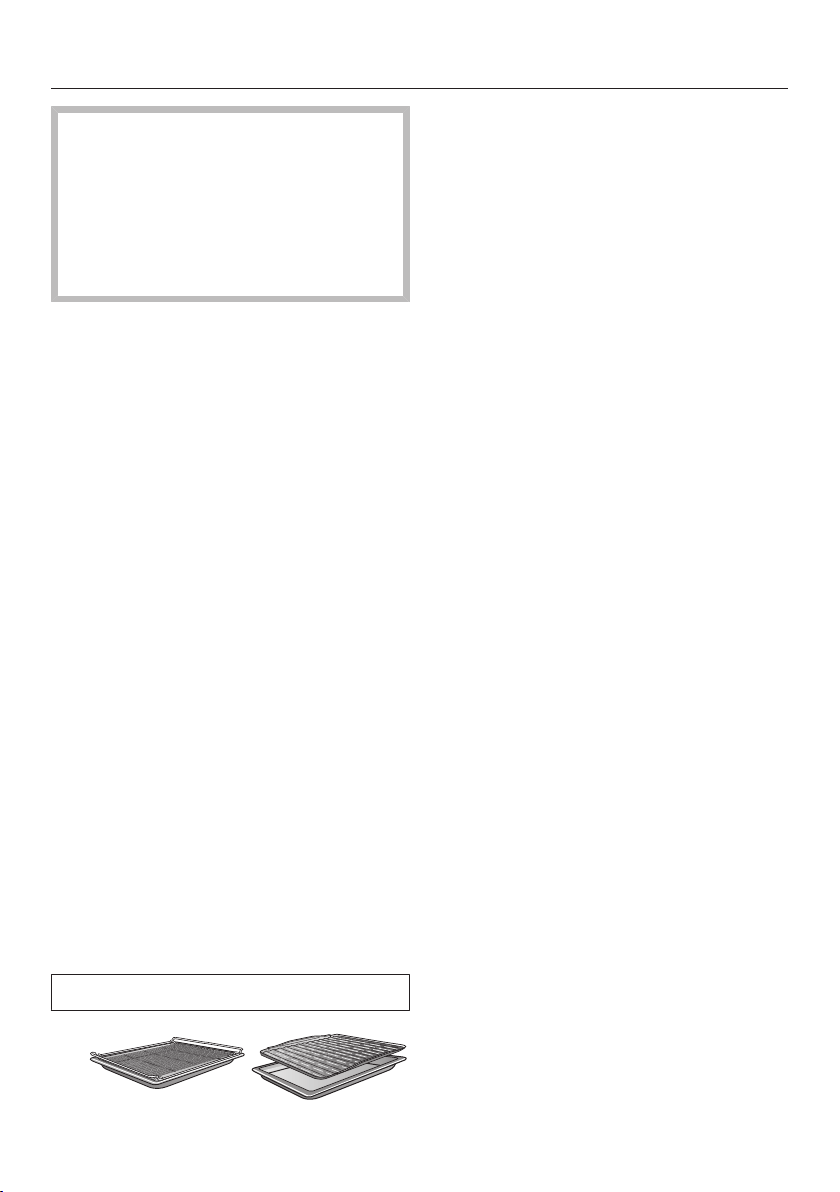
Grilling
48
Risk of injury caused by hot
surfaces.
If you grill with the door open, hot air
will escape from the oven instead of
being cooled by the cooling fan. The
control elements will get hot.
Grill with the oven door closed.
Tips for grilling
- Pre-heating is necessary when
grilling. Pre-heat the top heat/grill
element for approx. 5minutes with
the door closed.
- Trim the meat if necessary. Do not
season the meat with salt before
grilling as this draws the juices out.
- Add a little oil to lean meat if
necessary. Do not use other types of
fat as they can easily burn and cause
smoke.
- Clean fish in the normal way. To
enhance the flavour, season with a
little salt. Fish can also be drizzled
with lemon juice.
- Use the universal tray with the wire
rack or the grilling and roasting insert
(if present) in place. The juices collect
under the insert. This prevents them
from spitting and making the oven
dirty and they can then be used for
making gravy and sauces. Brush the
wire rack or the grilling and roasting
insert with oil and then place the food
on top.
Do not use the baking tray.
Notes on the cooking charts
You can find the cooking charts at the
end of this book.
Take note of the temperature range,
the shelf levels and the durations.
These take the size of the meat and
cooking practices into account.
Check the food after the shortest
duration quoted.
Selecting the temperature
As a general rule, select the lower
temperature given in the chart. If
higher temperatures are used than
those specified, the meat will brown
on the outside, but will not be
properly cooked through.
Choosing a shelf level
Select the shelf level depending on
the thickness of the food to be
cooked.
Place flat food in shelf level3 or 4.
Place thicker food in shelf level1 or
2.

Grilling
49
Selecting the cooking duration
Grill thinner cuts of meat/slices of fish
for approx. 6–8minutes per side.
It is best to grill food of a similar
thickness at the same time so that
the cooking durations do not vary too
much.
As a general rule, check whether the
food is cooked after the shortest
duration.
To test the food, press down on the
meat with a spoon. This lets you
determine how well the meat has
been cooked.
- Rare/pink
If the meat gives easily to the
pressure of the spoon, it will still be
red on the inside.
- Medium
If there is some resistance, the inside
will be pink.
- Well done
If there is very little resistance, it is
cooked through.
Tip: If the surface of a thicker cut of
meat is browned but the centre is still
raw, move the food to a lower level or
reduce the temperature and continue
grilling. This will stop the surface from
becoming excessively charred.
Notes on the functions
You can find an overview of all the
functions with their recommended
values in “Overview of functions”.
UsingFull grill
Use this function to grill flat thin cuts in
large quantities and for browning large
baked dishes.
The whole of the top heating/grill
element glows red to provide the
required heat.
UsingFan grill
This function is suitable for grilling
thicker food, such as chicken.
A temperature setting of 220°C is
generally recommended for thinner
types of food, while 180–200°C is
recommended for thicker cuts.

Further applications
50
This section provides information on the
following applications:
- Defrost
- Low temperature cooking
- Drying
- Frozen food/ready meals
- Heating crockery
Defrost
Gentle defrosting of frozen goods
means that the vitamins and minerals
are generally retained.
Select Defrost.
Alter the recommended temperature
if necessary.
Air is circulated throughout the oven
compartment to gently defrost the
frozen goods.
Risk of infection from bacteria.
Bacteria such as salmonella can
cause life-threatening food
poisoning.
It is particularly important to observe
food hygiene rules when defrosting
fish and meat, and in particular when
defrosting poultry.
Do not use the liquid produced
during defrosting.
Process the food as required as soon
as it has been defrosted.
Tips
- Remove the packaging and place the
frozen goods on the universal tray or
in a suitable bowl or dish.
- Use the universal tray with the rack
placed on top of it for defrosting
poultry. This way the frozen goods
will not be lying in the defrosted
liquid.
- Meat, poultry or fish does not need to
be fully defrosted before cooking.
Defrost until the food has started to
thaw. The surface will then be
sufficiently thawed to take herbs and
seasoning.
Further applications
51
Low temperature cooking
Low temperature cooking is ideal for
cooking delicate cuts of beef, pork, veal
or lamb when a tender result is desired.
First sear the meat all over at a high
temperature on the hob in order to seal
it.
Then place the meat in the pre-heated
oven compartment where the low
temperature and long cooking duration
will cook it to perfection and ensure it is
very tender.
The meat will relax. The juices inside
will start to circulate evenly throughout
the meat to reach the outer layers.
This gives very tender and succulent
results.
Only use lean meat which has been
correctly hung and trimmed. Bones
must be removed before cooking.
For searing, use a suitable cooking oil
or fat that can withstand high
temperatures (e.g. clarified butter,
vegetable oil).
Do not cover meat during the cooking
process.
The cooking duration takes approx.
2–4hours depending on the weight
and size of the meat and how well you
want it cooked.
As soon as the cooking process is
done, you can carve the meat straight
from the oven. It does not need to
rest.
The meat can be left in the oven
compartment to keep warm until you
serve it. This will not affect results in
any way.
Serve on pre-heated plates with very
hot sauce or gravy to prevent it
cooling down too quickly. The meat is
at the ideal temperature for eating
straight away.
UsingConventional heat
Follow the information in the cooking
charts at the end of this book.
Use the universal tray with the rack
placed on top of it.
Place the rack together with the
universal tray on shelf level2.
Select the Conventional
heatfunction and a temperature
of 120°C.
Pre-heat the oven together with the
universal tray and rack for approx.
15minutes.
Whilst the oven is pre-heating, sear
the meat thoroughly on all sides on
the hob.
Danger of burning due to hot
surfaces.
The oven gets hot during operation.
You could burn yourself on the
heating elements, oven compartment
or accessories.
Use oven gloves when placing hot
food in the oven or removing it and
when working in the hot oven
compartment.
Place the seared meat on the rack.
Reduce the temperature to 100°C
(see “Cooking charts”).
Continue cooking the meat until it is
done.
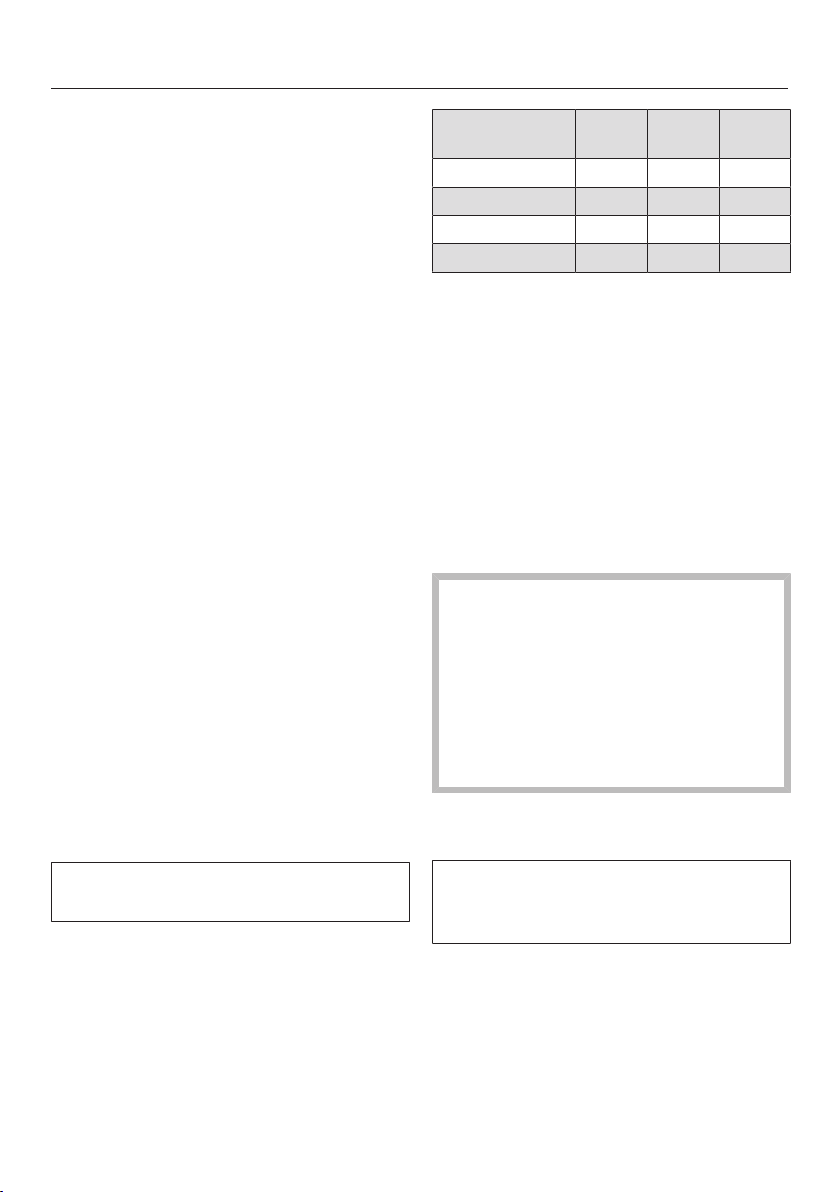
Further applications
52
Drying
Dehydrating or drying is a traditional
method of preserving fruit, certain
vegetables and herbs.
It is important that fruit and vegetables
are ripe and not bruised before they are
dried.
Peel and core the food for drying, if
necessary, and cut it up.
Distribute the food for drying evenly
in a single layer according to size
over the wire rack or the universal
tray.
Tip: You can also use the gourmet
perforated baking tray, if you have one.
Dry on a maximum of 2levels at the
same time.
Place the food for drying on shelf
levels1+3.
If using the wire rack and universal
tray, place the universal tray below
the wire rack.
Select Fan plus.
Alter the recommended temperature
and then set the drying time.
Turn the food for drying on the
universal tray at regular intervals.
The drying times are longer for whole
or halved dried food.
Food for
drying
[°C] [h]
Fruit 60–70 2–8
Vegetables 55–65 4–12
Mushrooms 45–50 5–10
Herbs* 30–35 4–8
Operating mode, Temperature,
Drying time, Fan plus,
Conventional heat
* Dry herbs only on the universal tray on shelf
level2 and use the Conventional
heatoperating mode, as the fan is
switched on in the Fan plusoperating mode.
Reduce the temperature if
condensation begins to form in the
oven compartment.
Removing the dried food
Risk of injury caused by hot
surfaces.
The oven gets hot during operation.
You could burn yourself on the
heating elements, oven compartment
or accessories.
Use oven gloves when removing
dried food from the oven.
Allow the dried fruit or vegetables to
cool down after drying.
Dried fruit needs to be completely dry,
but also soft and elastic. Juice should
not escape when cut.
Store dried food in sealed glass jars
or tins.

Further applications
53
Frozen food/Ready meals
Tips for cakes, pizza and baguettes
- Bake cakes, pizza and baguettes on
baking paper on the rack.
Do not use the baking tray or the
universal tray for frozen foods with a
large surface area. The tray could
become warped and difficult, or even
impossible, to remove from the oven
compartment when hot. Additional
use will make the warping worse.
- Use the lowest temperature
recommended on the packaging.
Tips for French fries, croquettes and
similar items
- These frozen items can be cooked on
the baking tray or universal tray.
Place baking parchment on the tray
so that they cook gently.
- Use the lowest temperature
recommended on the packaging.
- Turn food several times during
cooking.
Preparing frozen food/ready meals
Handling food carefully will help
protect your health.
Cakes, pizzas and french fries should
be cooked until golden, not dark
brown.
Select the function and temperature
recommended on the packaging.
Pre-heat the oven compartment.
Place the food in the pre-heated oven
compartment on the shelf level
recommended on the packaging.
Check the food at the end of the
shortest cooking duration
recommended on the packaging.
Heat crockery
Use the Fan plus operating mode for
pre-heating crockery.
Only pre-heat heat-resistant crockery.
Place the wire rack on shelf level1
and place the crockery to be pre-
heated on it. Depending on the size
of the crockery, you can also place
the rack on the oven floor and take
the side runners out to make more
room.
Select Fan plus.
Set the temperature to 50–80°C.
Risk of burns!
Use oven gloves when removing the
crockery from the oven. Droplets of
water may have accumulated
underneath the crockery.
Remove the heated crockery from the
oven.

Cleaning and care
54
Danger of injury caused by hot
surfaces.
The oven gets hot during operation.
You could burn yourself on the
heating elements, oven compartment
or accessories.
Allow the heating elements, oven
compartment and the accessories to
cool before manual cleaning.
Risk of injury due to electric
shock.
The steam from a steam cleaning
appliance could reach live electrical
components and cause a short
circuit.
Never use a steam cleaner for
cleaning.
Surfaces can discolour or alter if
unsuitable cleaning agents are used.
The oven front is particularly
susceptible to damage from oven
cleaners or descaling agents.
All surfaces are susceptible to
scratching. Scratches on glass can in
some circumstances lead to
breakage.
Remove all cleaning agent residues
immediately.
Unsuitable cleaning agents
To avoid damaging the surfaces, do not
use:
- cleaning agents containing soda,
ammonia, acids or chlorides
- cleaning agents containing descaling
agents on the front
- abrasive cleaning agents (e.g.
powder cleaners, scouring milk,
scouring pads)
- solvent-based cleaning agents
- stainless-steel cleaning agents
- dishwasher cleaner
- glass cleaning agents
- cleaning agents for ceramic glass
hobs
- hard, abrasive brushes or sponges
(e.g. pot scourers, brushes or
sponges which have been previously
used with abrasive cleaning agents)
- melamine eraser blocks
- sharp metal scrapers
- wire wool
- spot cleaning with mechanical
cleaning agents
- oven cleaners
- stainless-steel spiral pads

Cleaning and care
55
If soiling is left on for any length of
time, it may become impossible to
remove. If items are used frequently
without being cleaned, it may
become very difficult to clean them.
It is therefore best to remove any
soiling immediately.
The accessories are not
dishwasher-safe.
Tip: Soiling caused by spilt fruit juices
and cake mixtures is best removed
while the oven compartment is still
warm.
To make it easier to clean the oven:
Remove the door.
Take out the side runners with
FlexiClip runners (if fitted).
Remove the catalytic enamelled back
panel.
Lower the top heat/grill element.
Removing normal soiling
Removing normal soiling
Remove normal soiling immediately
with warm water, washing-up liquid
and a clean sponge or a clean, damp
microfibre cloth.
Remove all cleaning agent residues
thoroughly with clean water.
This is particularly important for any
parts with a PerfectClean finish, as
cleaning agent residues will impair
the non-stick function.
After cleaning, wipe the surfaces dry
using a soft cloth.
Cleaning the seal
There is a seal around the oven
compartment to seal it off from the
inside of the door.
Grease deposits on the seal can
cause it to become brittle and
cracked.
It is advisable to wipe the seal clean
after each use.

Cleaning and care
56
Removing stubborn soiling
(excluding the FlexiClip
runners)
Spilt fruit and roasting juices may
cause lasting discolouration or matt
patches on surfaces. This
discolouration will not affect the
properties of the surface finish.
Do not attempt to remove these
stains. Only use the equipment
specified.
Baked-on deposits can be removed
with a glass scraper or with a
stainless-steel spiral pad (e.g.
Spontex Spirinett), hot water and
washing-up liquid.
Exposure to scouring agents,
abrasive brushes or sponges and
oven cleaner can cause catalytic
enamel to lose its self-cleaning
properties.
Remove the catalytic enamelled
panels before using an oven cleaner.
Using oven cleaners
Very stubborn soiling on PerfectClean
surfaces can be cleaned using the
Miele oven cleaner, which must only
be applied to cold surfaces.
If the oven spray gets into gaps and
openings, a strong odour is
generated during subsequent
cooking programmes.
Do not spray the oven cleaner onto
the roof of the oven compartment.
Do not spray the oven cleaner into
the gaps and openings of the oven
compartment walls and rear wall.
Follow the instructions on the
packaging.
Oven cleaners from other
manufacturers must only be used in a
cold oven and for no longer than a
maximum of 10minutes.
You can then also use the scouring
pad on the back of a washing-up
sponge to remove the soiling.
Remove all cleaning agent residues
thoroughly with clean water.
Dry all surfaces with a soft cloth.
Stubborn soiling on the
FlexiClip runners
Cleaning FlexiClip telescopic runners
in a dishwasher would remove the
special grease which is essential for
their smooth functioning.
Never attempt to clean FlexiClip
telescopic runners in a dishwasher.
For stubborn surface soiling or if the
bearings become sticky with spilled fruit
juices proceed as follows:
Soak the FlexiClip runners for approx.
10minutes in a solution of hot water
and washing-up liquid.
If necessary use the back of a
washing-up sponge to remove the
soiling. The bearings can be carefully
cleaned with a soft brush.
Cleaning may cause some
discolouration or fading in places,
however this will not affect the
functioning of the runners in any way.

Cleaning and care
57
Cleaning the catalytic
enamelled back panel
Catalytic enamel is self-cleaning, which
means that oil and fat are burnt off
automatically when very high
temperatures are reached inside the
oven. You do not require any additional
cleaning agents. The higher the
temperature, the more effective the
process.
Exposure to scouring agents,
abrasive brushes or sponges and
oven cleaner can cause catalytic
enamel to lose its self-cleaning
properties.
Remove the catalytic enamelled
parts before using an oven cleaner in
the oven compartment.
Removing soiling caused by spices,
sugar and similar deposits
Remove the back panel (see
“Cleaning and care – Removing the
back panel”).
Clean the back panel by hand with a
solution of hot water and washing-up
liquid applied with a soft brush.
Rinse the back panel thoroughly.
Let the back panel dry before placing
it back in the oven.
Removing oil and grease
Remove any accessories from the
oven compartment, including the side
runners.
Before starting the cleaning process,
remove any large deposits of soiling
from the inside of the door and the
PerfectClean surfaces to prevent
them burning on.
Select the Fan plus function and
250°C.
Then heat the empty oven for at least
1hour.
The length of time required will
depend on the level of soiling.
If the catalytic coating is very heavily
soiled with oil and grease, a film can
form on the oven compartment
surface during the cleaning process.
Risk of injury caused by hot
surfaces.
The oven gets hot during operation.
You could burn yourself on the
heating elements and oven
compartment.
Allow the heating element and oven
compartment to cool before manual
cleaning.
Clean the inside of the door and the
oven compartment with a solution of
hot water and washing-up liquid,
applied with a clean sponge or a
clean, damp microfibre cloth.
Any remaining soiling will gradually
disappear with each subsequent use
of the oven at high temperatures.
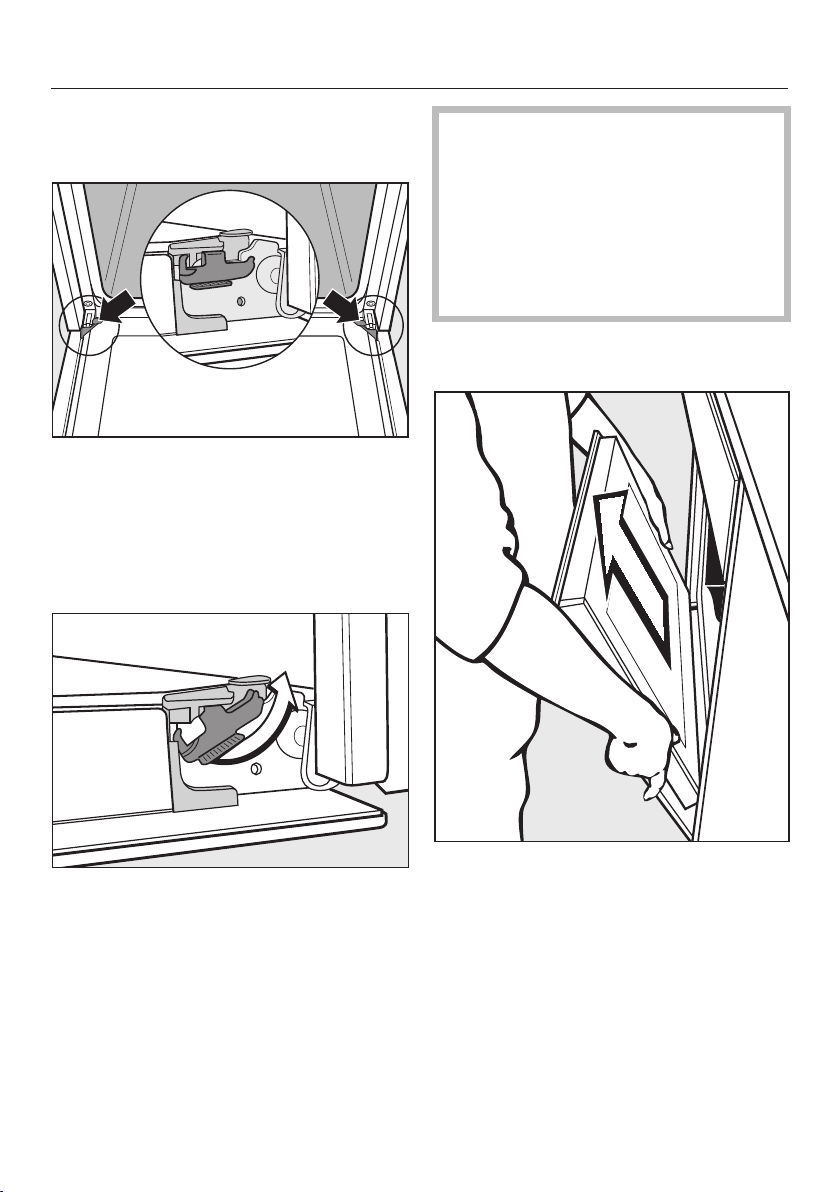
Cleaning and care
58
Door removal
The door weighs approx. 9kg.
The oven door is connected to the door
hinges by retainers.
Before removing the door from the
retainers, the locking clamps on both
door hinges have to be released.
Open the door fully.
Release the locking clamps by
turning them as far as they will go.
The oven could become damaged if
you incorrectly remove the door.
Never pull the door horizontally off its
retainers, as they will spring back
against the oven.
Never pull the door off the retainers
by the handle, as the handle could
break off.
Raise the door up till it rests partially
open.
Hold the door on either side and pull
it diagonally upwards off the
retainers. Make sure that the door
goes back on straight.
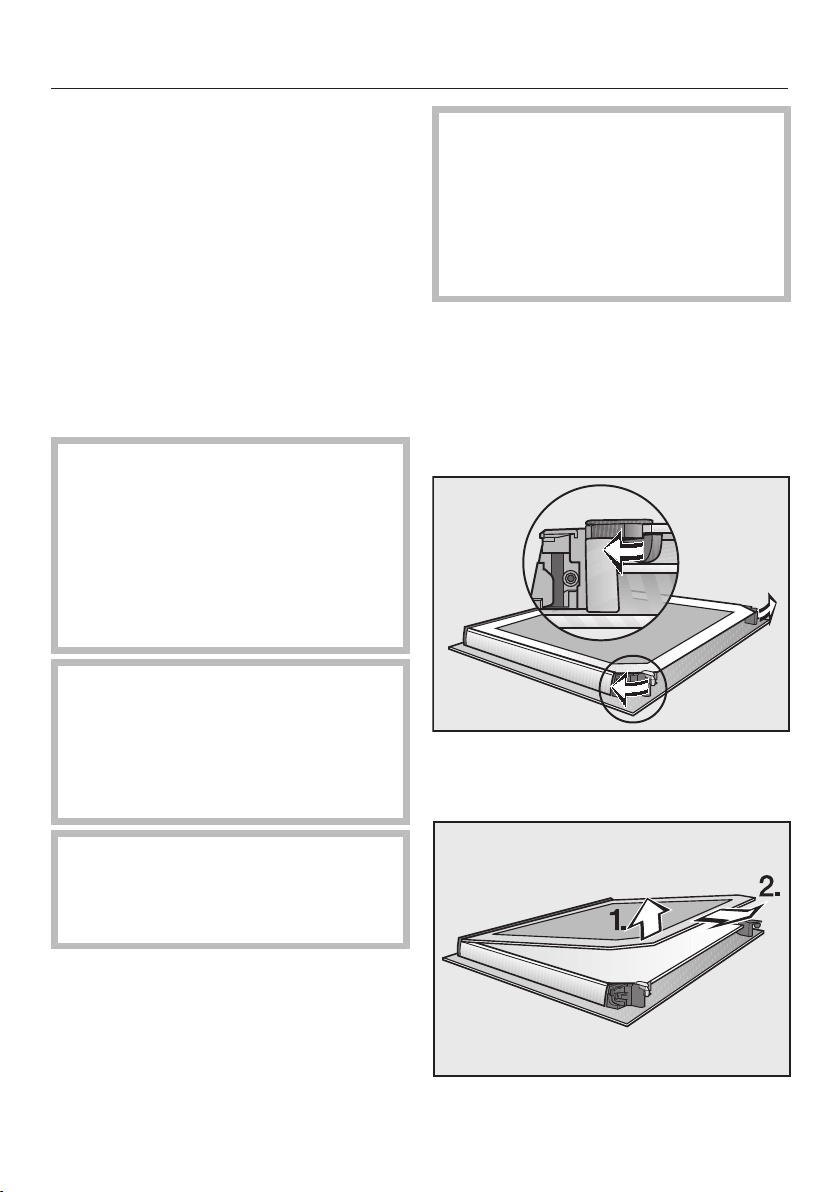
Cleaning and care
59
Dismantling the door
The oven door is an open system with 3
glass panes which have a heat-
reflective coating on some of their
surfaces.
When the oven is operating, air is
directed through the door to keep the
outer pane cool.
If soiling has worked its way in between
the glass panes, the door can be
dismantled in order to clean in between
the panes.
Scratches on the door glass can
cause the glass to break.
Do not use abrasive cleaners, hard
sponges, brushes or sharp metal
tools to clean the door glass.
When cleaning the door glass, you
must also follow the instructions that
apply to the oven front.
Oven cleaners will damage the
surface of the aluminium profiles.
Only clean these parts with warm
water and washing-up liquid, applied
with a clean sponge cloth or a clean,
damp microfibre cloth.
The door glass could break if
dropped.
Keep the disassembled door glass in
a safe place.
Risk of injury caused by the door
slamming shut.
The door may slam shut if you
attempt to disassemble it when it is
fitted to the oven.
Always remove the door before
disassembling it.
Place the door with the outer glass
pane on a soft surface (e.g. a tea
towel) to prevent it getting scratched.
The door handle should line up with
the edge of the table so that the glass
lies flat and does not get broken
during cleaning.
Flip the two glass pane retainers
outwards to open them.
Remove the inner pane:
Gently lift the inner pane up and out
of the plastic strip.
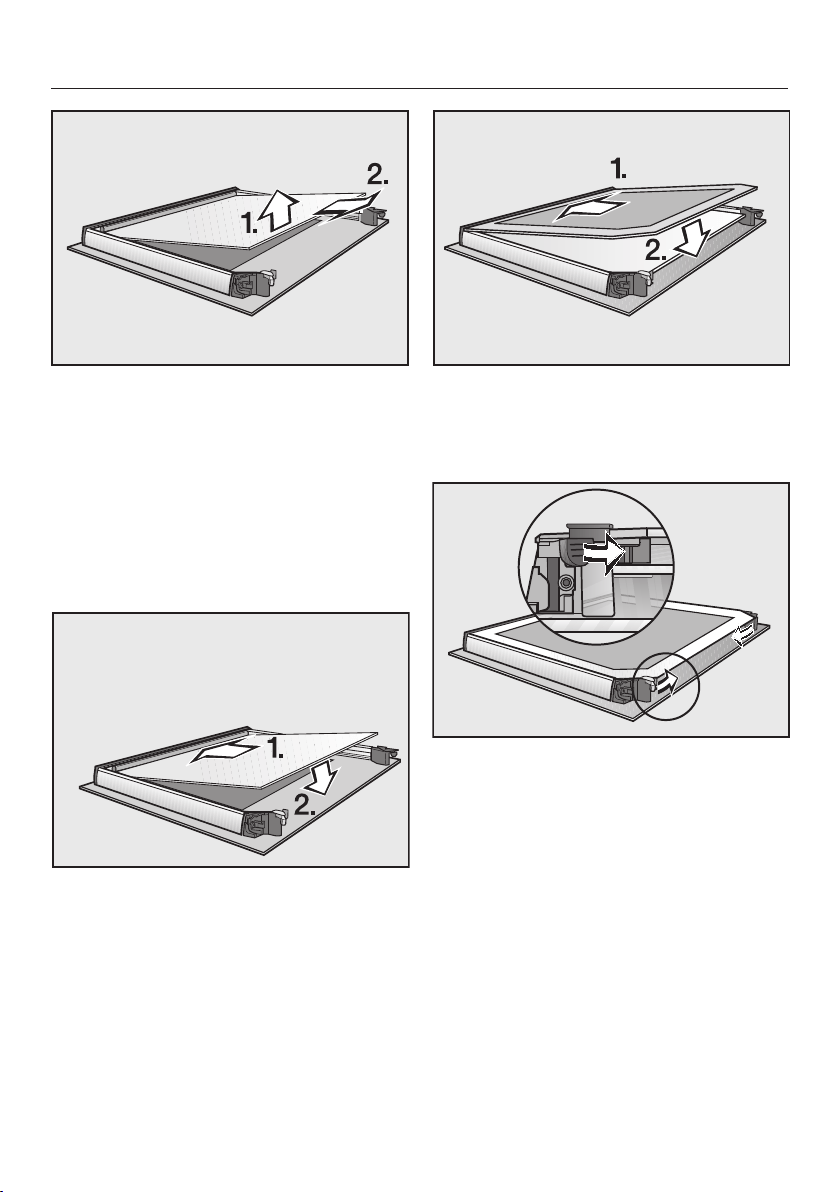
Cleaning and care
60
Lift the middle pane up gently and
pull it out.
Clean the door panes and other parts
with a clean sponge and a solution of
hot water and washing-up liquid or a
clean, damp microfibre cloth.
Dry all parts with a soft cloth.
Then reassemble the door carefully:
Refit the middle pane in such a way
that the material number is legible
(not reversed).
Push the inner pane with the matt
printed side facing downwards into
the plastic strip and place it between
the retainers.
Flip both the glass pane retainers
inwards to close them.
The door is now reassembled.
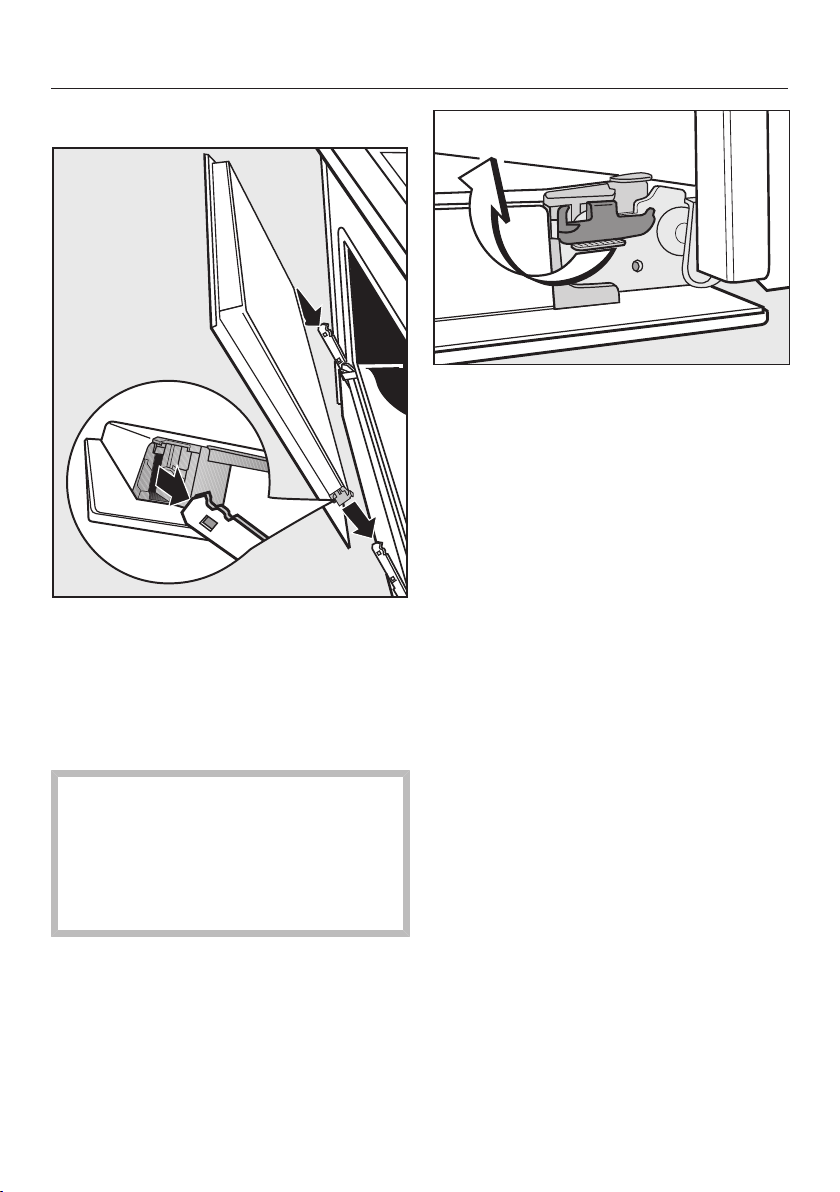
Cleaning and care
61
Fitting the door
Hold the door securely on both sides
and carefully fit it back into the hinge
retainers.
Make sure that you fit the door
straight.
Open the door fully.
If the locking clamps are not locked,
the door could become loose,
resulting in damage.
Always ensure that the locking
clamps are locked after refitting the
door.
To relock the locking clamps, turn
them back up to the horizontal
position as far as they will go.
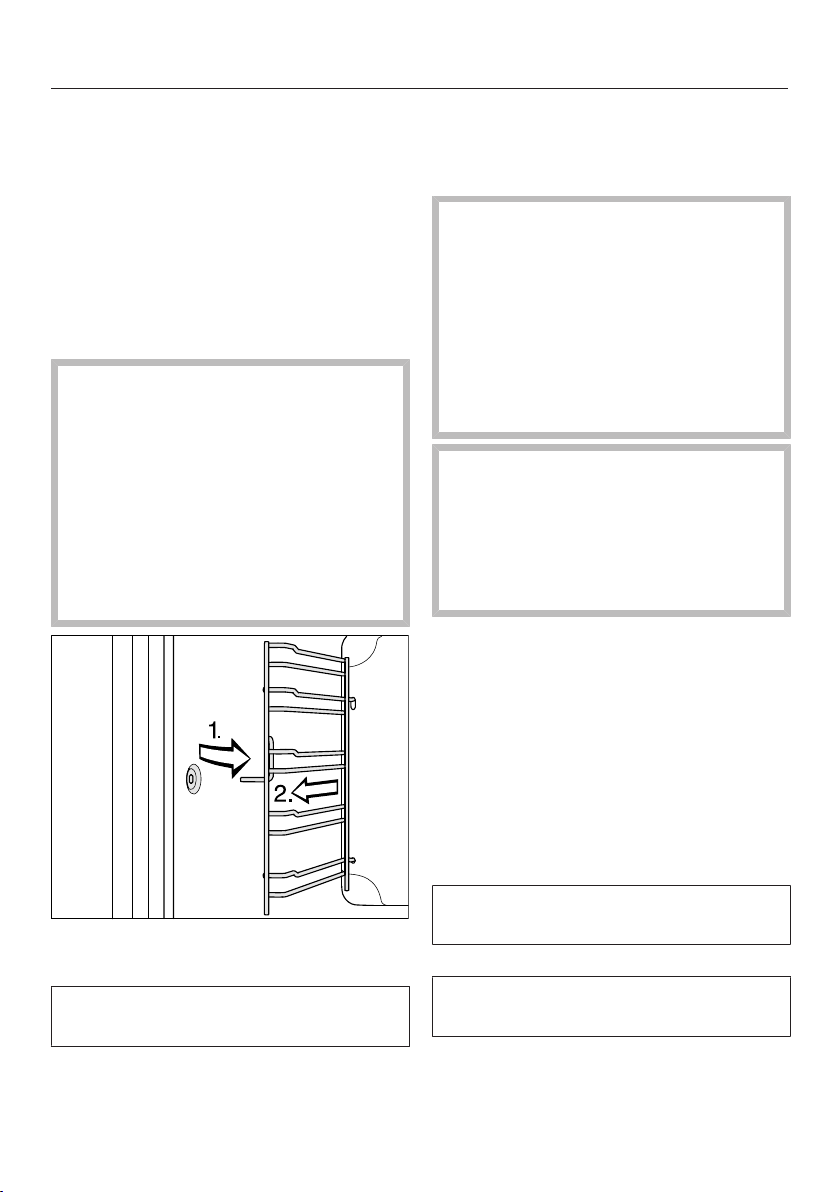
Cleaning and care
62
Removing the side runners
with FlexiClip runners
The side runners can be removed
together with the FlexiClip runners (if
inserted).
If you wish to remove the FlexiClip
runners separately beforehand, please
follow the instructions in “Features” –
“Fitting and removing FlexiClip runners”.
Danger of injury caused by hot
surfaces.
The oven gets hot during operation.
You could burn yourself on the
heating elements, oven compartment
or accessories.
Allow the heating elements, oven
compartment and accessories to
cool before removing the side
runners.
Pull the side runners out of holder(1.)
and remove them(2.).
Reassemble by following these
instructions in reverse order.
Insert the components carefully.
Removing the back panel
The back panel can be removed for
cleaning purposes.
Risk of injury caused by hot
surfaces.
The oven gets hot during operation.
You could burn yourself on the
heating elements, oven compartment
or accessories.
Allow the heating element, oven
compartment and the accessories to
cool before removing the rear panel.
Risk of injury caused by the
rotating fan impeller.
You could injure yourself on the
impeller of the hot air fan.
Never put the oven into operation
without the back panel in place.
Disconnect the appliance from the
mains. Switch off at the wall and
withdraw the plug from the socket, or
switch off at the isolator, or switch off
the fuse of the electrical installation.
Remove the side runners.
Undo the four screws at the corners
of the back panel and take it out.
Clean the back panel (see “Cleaning
and Care – Cleaning the catalytic
enamelled back panel”).
Reassemble by following these
instructions in reverse order.
Refit the back panel carefully.
Make sure the openings are located as
illustrated in the “Overview” section.
Refit the side runners.
Reconnect the appliance to the
electricity supply.
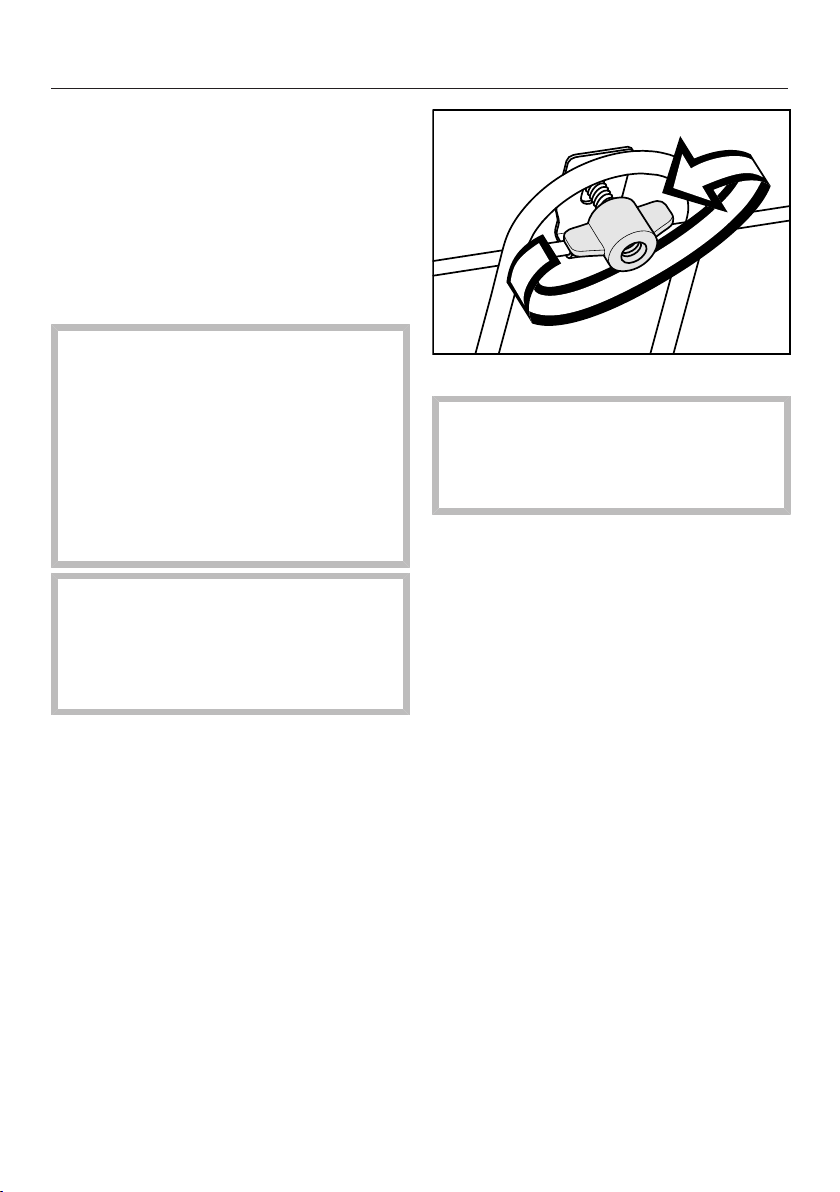
Cleaning and care
63
Lowering the top heat/grill
element
If the oven compartment roof is badly
soiled, the top heat/grill element can be
lowered to make cleaning easier. Clean
the oven compartment roof regularly
with a damp cloth or a dishwashing
sponge.
Danger of injury caused by hot
surfaces.
The oven gets hot during operation.
You could burn yourself on the
heating elements, oven compartment
or accessories.
Allow the heating elements, oven
compartment and the accessories to
cool before manual cleaning.
The enamel on the oven floor can
become damaged by fastening nuts
being dropped on it.
Place a cloth or similar item over the
oven compartment floor to protect it.
Remove the side runners.
Unscrew the wing nut.
Be careful not to damage the top
heat/grill element.
Never use force when lowering the
top heat/grill element.
Carefully lower the top heat/grill
element.
You can now access the top of the oven
compartment.
Clean the ceiling of the oven with hot
water and washing-up liquid, applied
with a clean sponge cloth or a clean,
damp microfibre cloth.
After cleaning, raise the top heat/grill
element gently back up again.
Replace the wing nut and tighten it
securely.
Fit the side runners.

Problem solving guide
64
Many malfunctions and faults that can occur in daily operation can be easily
remedied. You can save time and money in many cases, as you do not need to call
the Miele Customer Service Department.
Information to help you rectify faults yourself can be found at www.miele.com/
service.
The following tables are designed to help you to find the cause of a malfunction or
a fault and to resolve it.
Problem Cause and remedy
The display is dark. There is no power to the oven.
Check that the oven plug is correctly inserted into
the socket and switched on.
Check whether the circuit breaker has tripped.
Contact a qualified electrician or the Miele
Customer Service Department.
The oven compartment
does not heat up.
The system lock has been activated.
Switch off the system lock (see “Clock/timer –
Changing settings”).
There is no power to the oven.
Check whether the fuse has tripped. Contact a
qualified electrician or the Customer Service
Department for assistance.
is flashing in the
display.
There has been a power cut.
Reset the time of day (see “Using for the first
time”).
Cooking times will also need to be reset.
appears unexpec-
tedly in the display and
the symbol flashes at
the same time. The
buzzer may also be
sounding.
The oven has been operating for an unusually long
time and this has activated the safety switch-off
function.
Turn the function selector to 0. The oven is now
ready to use again immediately.
appears in the dis-
play.
A fault has occurred that you cannot resolve.
Call the Miele Customer Service Department.
The buzzer does not
sound.
The buzzers are switched off.
Switch on the buzzer (see “Clock/timer – Changing
settings”).

Problem solving guide
65
Problem Cause and remedy
A noise can be heard
after a cooking process.
The cooling fan will continue to run for a while after
the oven has been switched off to prevent any
humidity building up in the oven, on the control panel
or in the oven housing unit.
This cooling fan will switch itself off automatically
after a certain period of time.
The oven has switched
itself off.
To save power, the oven switches off automatically if a
button is not pressed after a certain amount of time or
after a cooking programme has ended.
Switch the oven back on.
Cakes/biscuits are not
cooked properly after
the duration given in the
cooking chart.
A different temperature from the one given in the
recipe was used.
Select the temperature required for the recipe.
The ingredient quantities are different from those
given in the recipe.
Check whether you amended the recipe. The
addition of more liquid or more eggs makes a
moister mix which requires a longer cooking
duration.
The browning of the
baked goods is uneven.
The wrong temperature or shelf level was selected.
There will always be a slight unevenness in
browning. If browning is very uneven, check
whether the correct temperature and shelf level
were selected.
The material or colour of the bakeware is not suitable
for the oven function selected.
When using the Conventional heat function, light
coloured, shiny tins will not produce as desirable
results. Dark, matt tins are best for baking.
Spots like rust appear
on catalytic enamelled
surfaces.
The catalytic cleaning process does not remove
spices, sugar and similar deposits.
Take the catalytic enamelled panels out of the
oven and remove this type of deposit with a mild
solution of hot water and washing-up liquid
applied with a soft brush (see “Cleaning and care –
Cleaning the catalytic enamelled back panel ”).
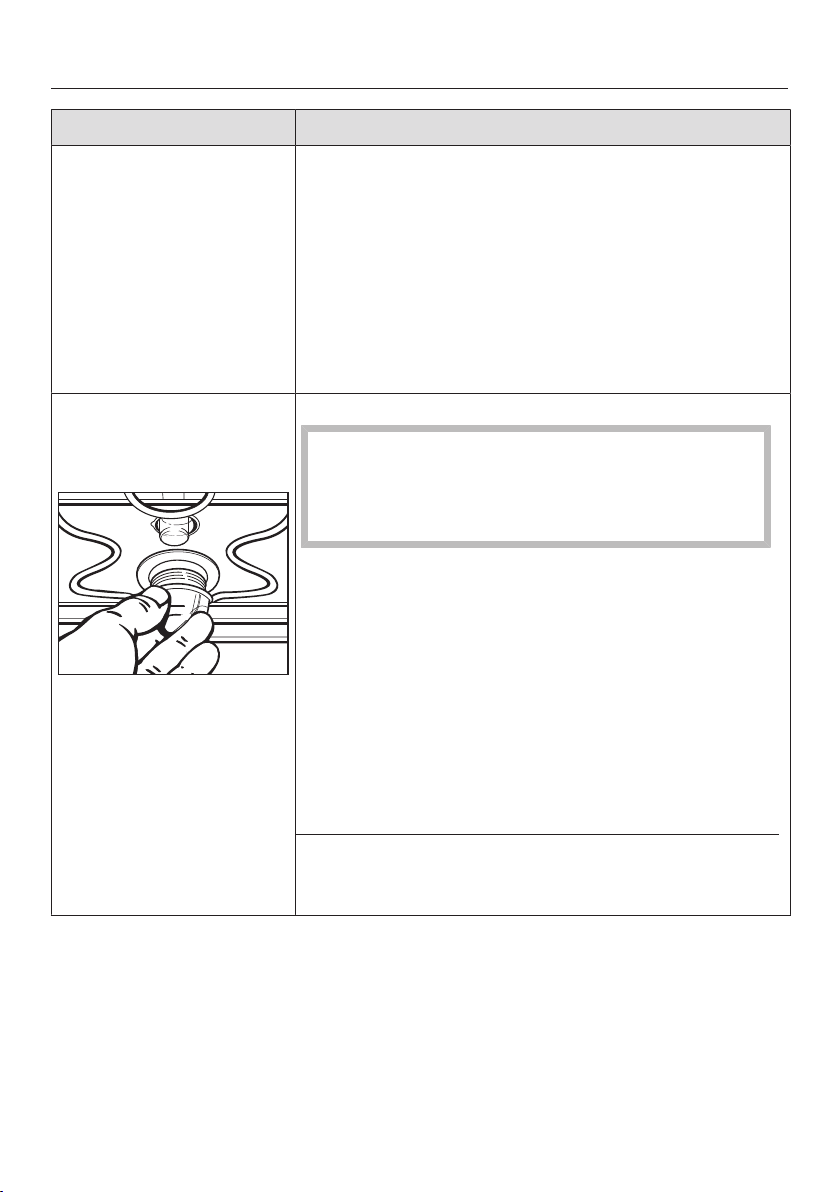
Problem solving guide
66
Problem Cause and remedy
The FlexiClip runners do
not push in or pull out
smoothly.
The bearings in the FlexiClip runners are not
sufficiently lubricated.
Lubricate the bearings with the special Miele
lubricant.
Only the special Miele lubricant is designed for the
high temperatures in the oven compartment. Other
lubricants may resinify when heated and will gum
up the FlexiClip runners. You can obtain the
special Miele lubricant from your Miele dealer or
from the Miele Customer Service Department.
The top oven interior
lighting does not turn
on.
The halogen lamp is faulty.
Danger of burning!
Make sure the oven heater elements are switched
off. Make sure the oven compartment has cooled
down.
Disconnect the oven from the mains. Switch off
at the wall and withdraw the plug from the socket
or switch off the fuse of the electrical installation.
Turn the lamp cover a quarter turn anti-clockwise
to release it and then pull it together with its seal
downwards to take it out.
Replace the halogen lamp (Osram66725AM/A,
230V, 25W, G9).
Refit the lamp cover together with its seal and
turn clockwise to secure.
Reconnect the oven to the electricity supply.
You have selected the Eco Fan heatfunction.
The oven interior lighting does not switch on in this
function.

Service
67
Information to help you rectify faults
yourself and about Miele spare parts
can be found at www.miele.com/
service.
Contact in the event of a fault
In the event of any faults which you
cannot remedy yourself, please contact
your Miele dealer or the Miele Customer
Service Department.
You can book a Miele Customer
Service Department call-out online at
www.miele.com/service.
Contact information for the Miele
Customer Service Department can be
found at the end of this document.
Please quote the model identifier and
serial number of your appliance (Fabr./
SN/Nr.) when contacting the Miele
Customer Service Department. This
information can be found on the data
plate.
Please note that telephone calls may be
monitored and recorded for training
purposes and that a call-out charge will
be applied to service visits where the
problem could have been resolved as
described in this booklet.
This information is given on the data
plate, which is visible on the front frame
of the oven when the door is fully open.
In the case of cookers, also quote the
model identifier and serial number of
the hob (see the separate operating and
installation instructions included with
the hob).
Warranty
For information on the appliance
warranty specific to your country please
contact Miele. See back cover for
address.
In the UK, your appliance warranty is
valid for 2 years from the date of
purchase. However, you must activate
your cover by calling 0330 160 6640 or
registering online at www.miele.co.uk.
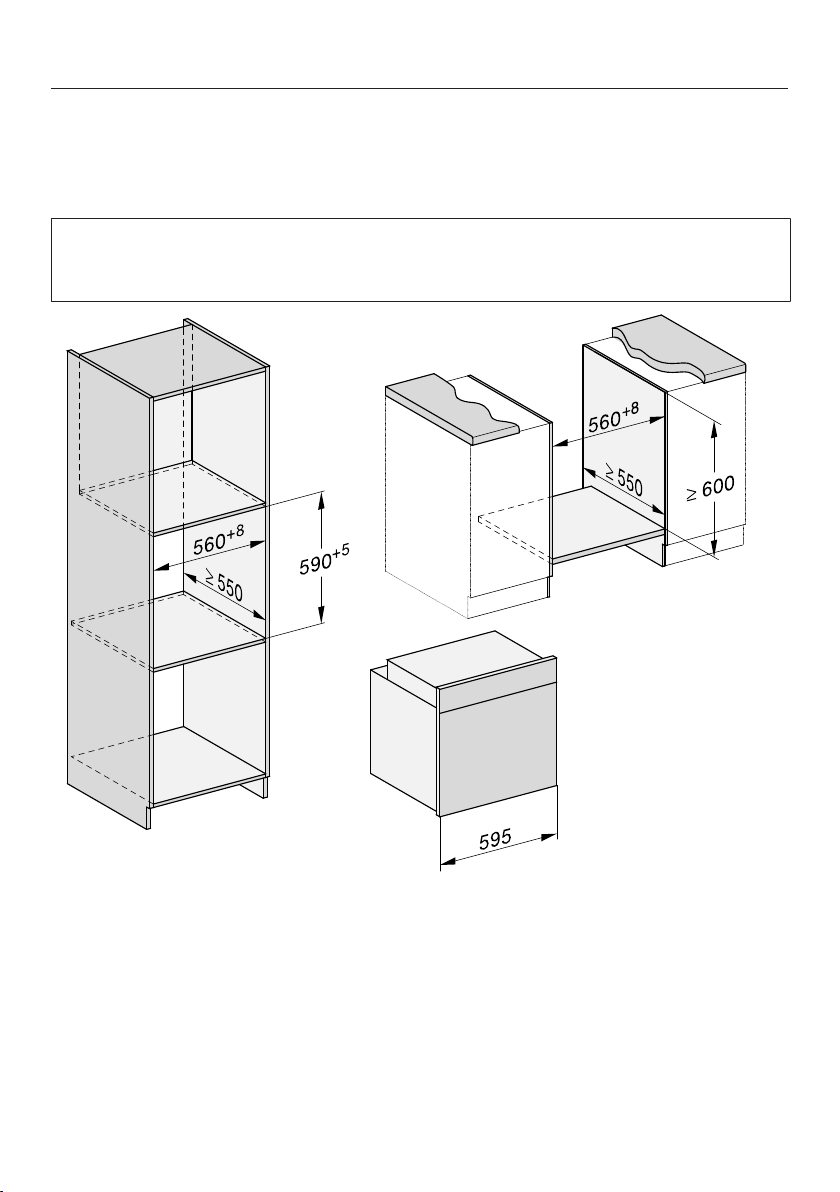
Installation
*INSTALLATION*
68
Installation dimensions
Dimensions are given in mm.
Installation in a tall or base unit
When building the oven into a base unit underneath a hob, please also observe
the installation instructions for the hob as well as the building-in depth required
for the hob.
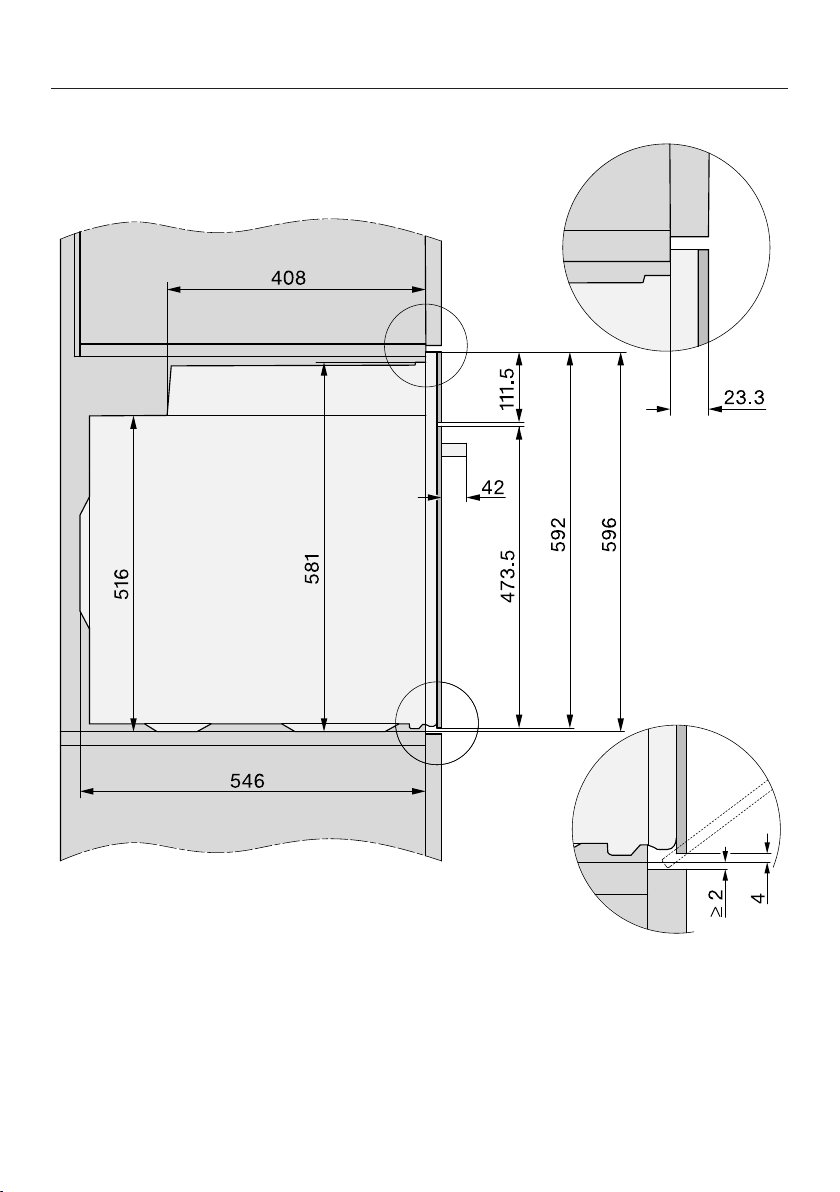
Installation
*INSTALLATION*
69
Side view of H22xx
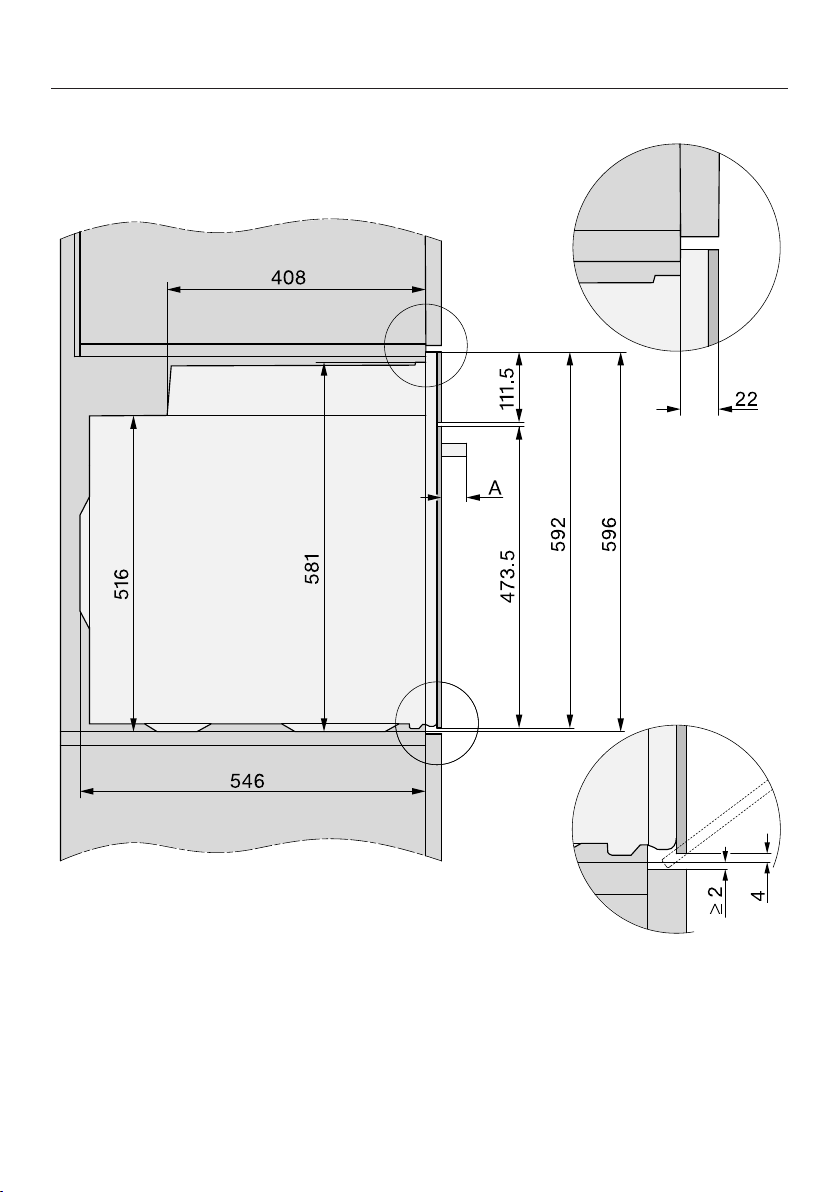
Installation
*INSTALLATION*
70
Side viewH 28xx,H 25xx, H 27xx
A H 25xx, H 27xx: 43mm
H 28xx: 47mm
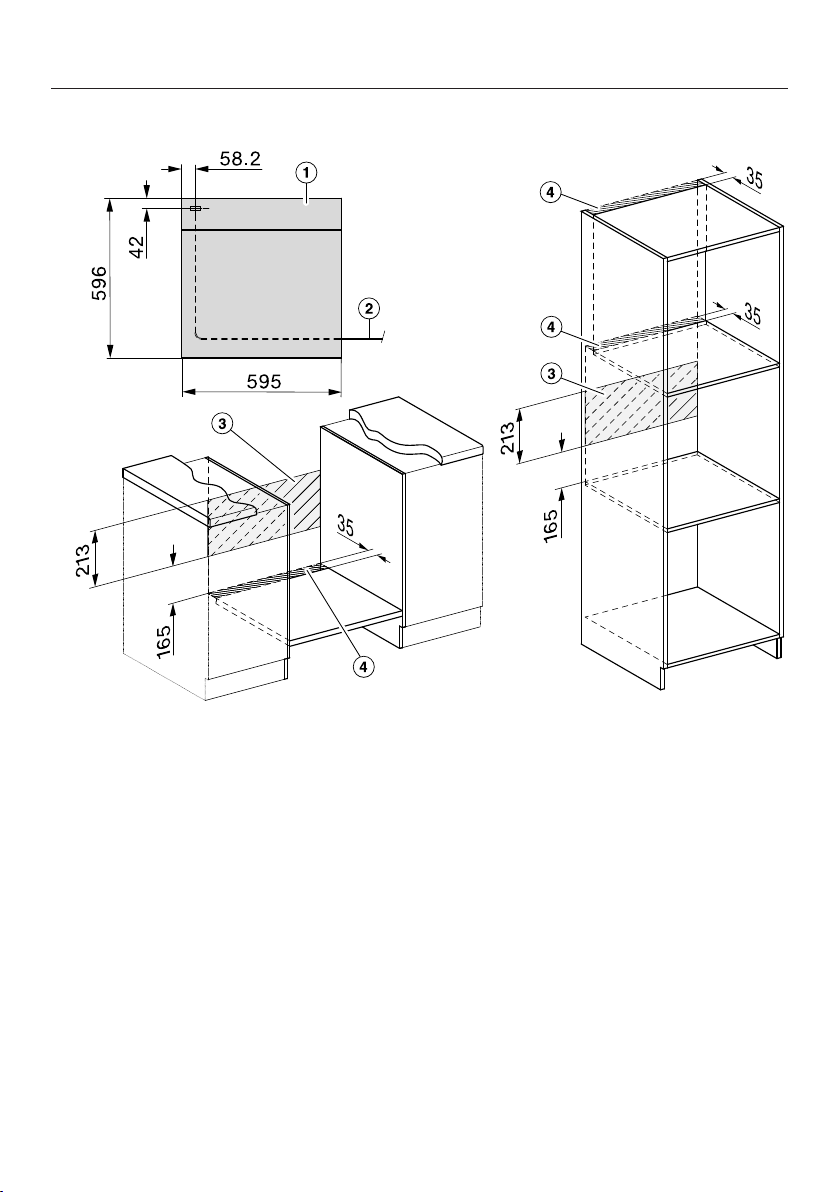
Installation
*INSTALLATION*
71
Connections and ventilation
a
Front view
b
Mains connection cable, length=1500mm
c
No connections permitted in this area
d
Ventilation cut-out, min. 150cm²
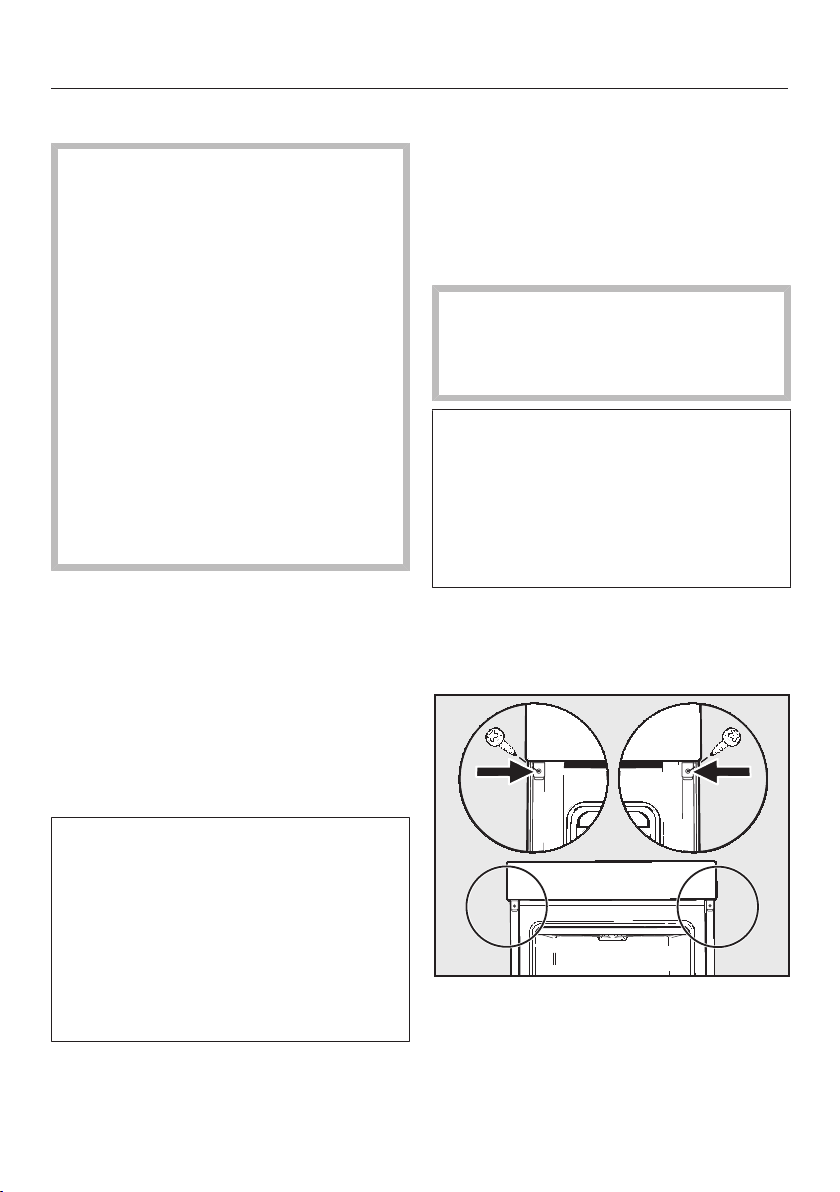
Installation
*INSTALLATION*
72
Installing the cooker
For safety reasons, the cooker may
only be used when it has been fully
installed.
The cooker requires a sufficient
supply of cool air for efficient
operation. The required supply of
cool air must not be excessively
heated by other heat sources (e.g.
solid fuel stoves).
The following must be observed
when installing the appliance:
Make sure that the interim shelf that
the cooker sits on does not touch the
wall.
Do not fit heat insulation strips to the
side walls of the housing unit.
Before installation
Ensure that there is no power to the
socket.
Please observe the wiring diagram on
the cooker.
Remove the appliance lid to connect
the single conductors of the power
cable to the connection terminals.
All H2xxxI cookers that are combined
with an induction hob are also
equipped with a ferrite ring.
With the exception of the earth
conductor, all other single conductors
of the power cable must be drawn
through the aperture of the ferrite ring
before they are secured to the
connection terminals.
Secure the single conductors to the
respective connection terminals.
Replace the appliance lid.
Installing the cooker
Connect the cooker to the electrical
supply.
Place the cooker in front of the base
unit.
Insert the plug of the built-in hob into
the connection on the cooker.
Lifting the cooker by the door handle
could cause damage to the door.
Use the handle cut-outs on the side
of the housing to lift the appliance.
It is a good idea to remove the door
(see “Cleaning and care – Removing the
door”) and to remove the accessories
before installing the appliance. The
cooker is then easier to push into the
cabinet carcase and you do not run the
risk of lifting it by the door handle.
Push the cooker into the base unit
and align it.
Open the door, if you have not
removed it.
Secure the cooker to the side walls of
the cabinet carcase using the screws
supplied.
Refit the door if necessary (see
“Cleaning and care” – “Fitting the
door”).
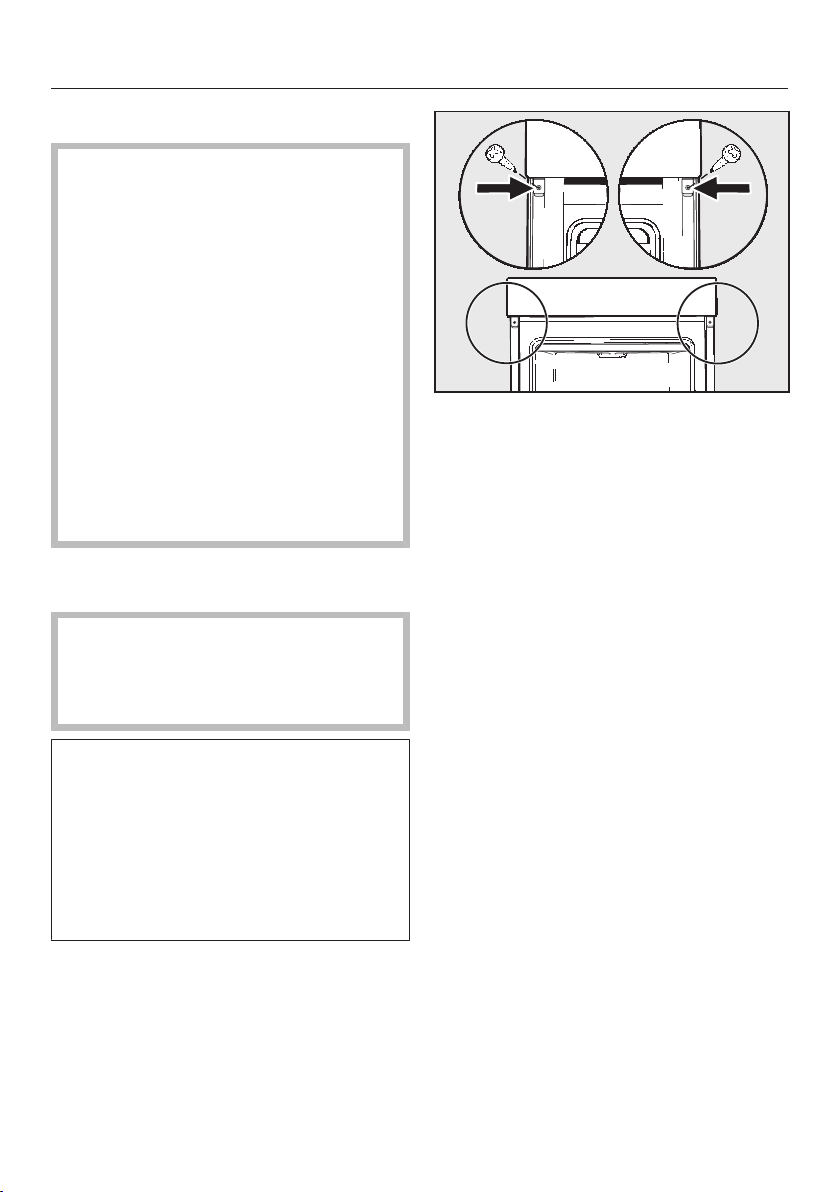
Installation
*INSTALLATION*
73
Installing the oven
For safety reasons, the oven may
only be used when it has been fully
installed.
The oven requires a sufficient supply
of cool air for efficient operation. The
required supply of cool air must not
be excessively heated by other heat
sources (e.g. solid fuel stoves).
The following must be observed
when installing the appliance:
Make sure that the shelf that the
oven sits on does not touch the wall.
Do not fit heat insulation strips to the
side walls of the housing unit.
Connect the oven to the electrical
supply.
Carrying the oven by the door handle
could damage the door.
Use the recessed grips on the side of
the housing to carry the appliance.
It is a good idea to remove the door
(see “Cleaning and care” – “Removing
the door”) and the accessories before
installing the appliance. This makes
the oven lighter when you push it into
the housing unit and you do not run
the risk of lifting it by the door handle
by mistake.
Push the oven into the housing unit
and align it.
Open the door, if you have not
removed it.
Use the screws supplied to secure
the oven to the side walls of the
housing unit.
Refit the door if necessary (see
“Cleaning and care” – “Fitting the
door”).

Installation
*INSTALLATION*
74
Electrical connection
Danger of injury!
Installation, repairs and other
maintenance work by unqualified
persons could be dangerous. Miele
cannot be held liable for
unauthorised work.
The appliance may only be
connected to the mains electricity
supply by a qualified electrician who
is familiar with and complies with the
national regulations and any
additional regulations of the local
electricity provider.
The appliance must be connected to an
electrical system designed in
accordance with VDE0100.
Connection to a switched socket (in
accordance with VDE0701) is
recommended as this provides easier
access in the case of a service call.
If the appliance is hardwired or if the
plug is not accessible, an additional
means of disconnection must be
provided for all poles.
Suitable means of disconnection
include switches with an all-pole
contact gap of at least 3mm. These
include circuit breakers, fuses and
contactors (EN60335).
Connection data is given on the data
plate situated at the front of the oven
compartment. Please ensure the
connection data matches the
household supply.
When contacting Miele, please quote
the following:
- Model identifier
- Serial number
- Connection data (mains voltage/
frequency/maximum rated load)
When replacing the cable supplied
with another cable or changing the
connection, only cable type
H05VV-F with a suitable cross-
sectional area (CSA) may be used.
Temporary or permanent operation on
an autonomous power supply system or
a power supply system that is not
synchronised with the mains power
supply (e.g. island networks, back-up
systems) is possible. A prerequisite for
operation is that the power supply
system complies with the specifications
of EN50160 or an equivalent standard.
The function and operation of the
protective measures provided in the
domestic electrical installation and in
this Miele product must also be
maintained in isolated operation or in
operation that is not synchronised with
the mains power supply, or these
measures must be replaced by
equivalent measures in the installation.
As described, for example, in the
current version of VDE-AR-E2510-2.
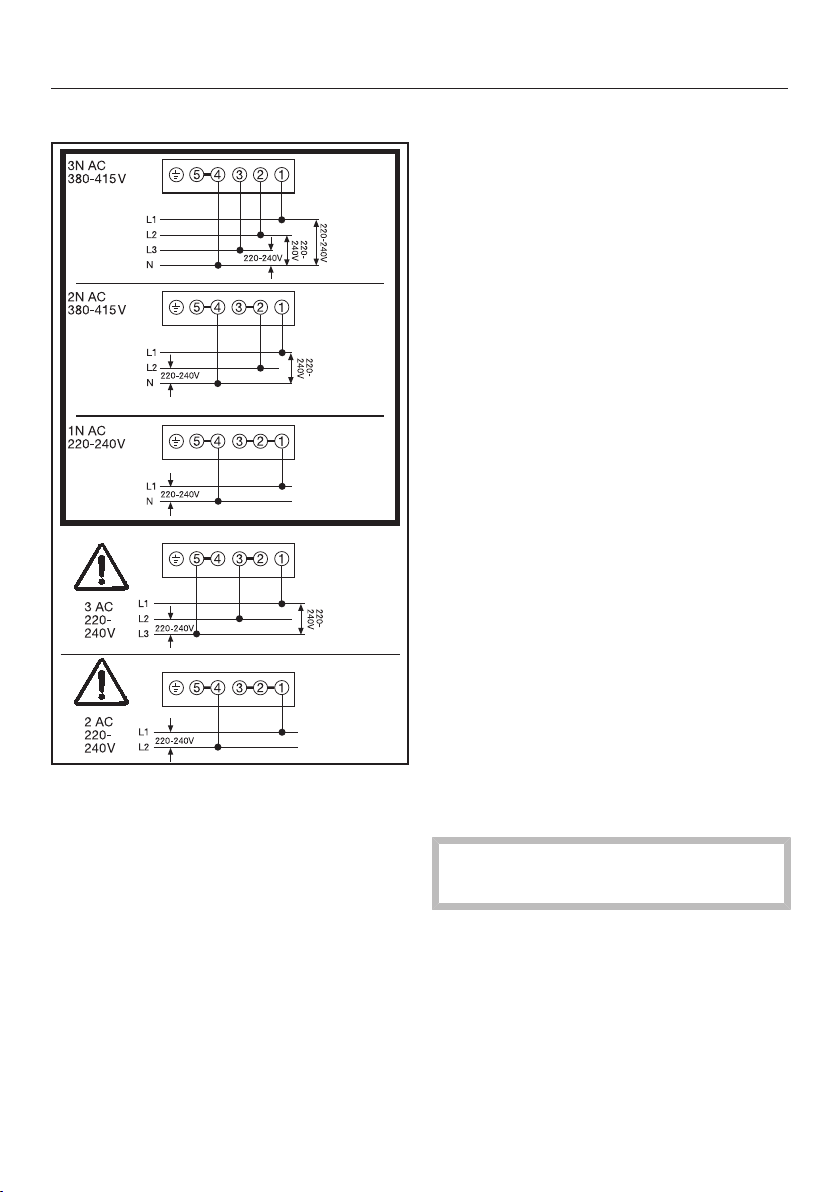
Installation
*INSTALLATION*
75
Wiring diagram Cooker
Cookers with integrated hob controls
are not supplied with a connection
cable.
The cooker must be connected to the
mains supply using a type H05VV-F
mains cable only, with a suitable cross-
sectional area (CSA) according to the
diagrams shown.
Maximum connected load: see data
plate.
Possible combination hobs
Miele cookers with integrated hob
controls may only be combined with
hobs as specified by Miele for use with
that cooker.
Contact Miele or your Miele Dealer for
further information on suitable
combinations.
Oven
The wires in the mains lead are
coloured as follows:
Green/yellow = earth
Blue = neutral
Brown = live
WARNING - THIS APPLIANCE
MUST BE EARTHED
For extra safety it is advisable to protect
the appliance with a suitable residual
current device (RCD).
Maximum connected load: see data
plate.

Installation
*INSTALLATION*
76
Electrical connection: Other
countries
All electrical work should be carried out
by a suitably qualified and competent
Miele approved service technician in
strict accordance with local and
national safety regulations.
Connection should be made via a fused
connection unit or a suitable isolator,
which complies with national and local
safety regulations, and the on/off switch
should be easily accessible after the
appliance has been installed.
If the switch is not accessible after
installation (depending on country) an
additional means of disconnection must
be provided for all poles.
Switches with a minimum all-pole
contact gap of 3mm are suitable for
isolating the appliance. These include
circuit breakers, fuses and protective
devices.
The voltage and rated load are given on
the data plate situated at the front of
the oven interior. Please ensure that
these match the household mains
supply.
For extra safety it is advisable to install
a suitable residual current device
(RCD) / ground fault interrupter (GFI).
Contact a qualified electrician for
advice.
If the cord is damaged a new cord must
be fitted by a Miele approved service
technician.
WARNING - THIS APPLIANCE
MUST BE EARTHED
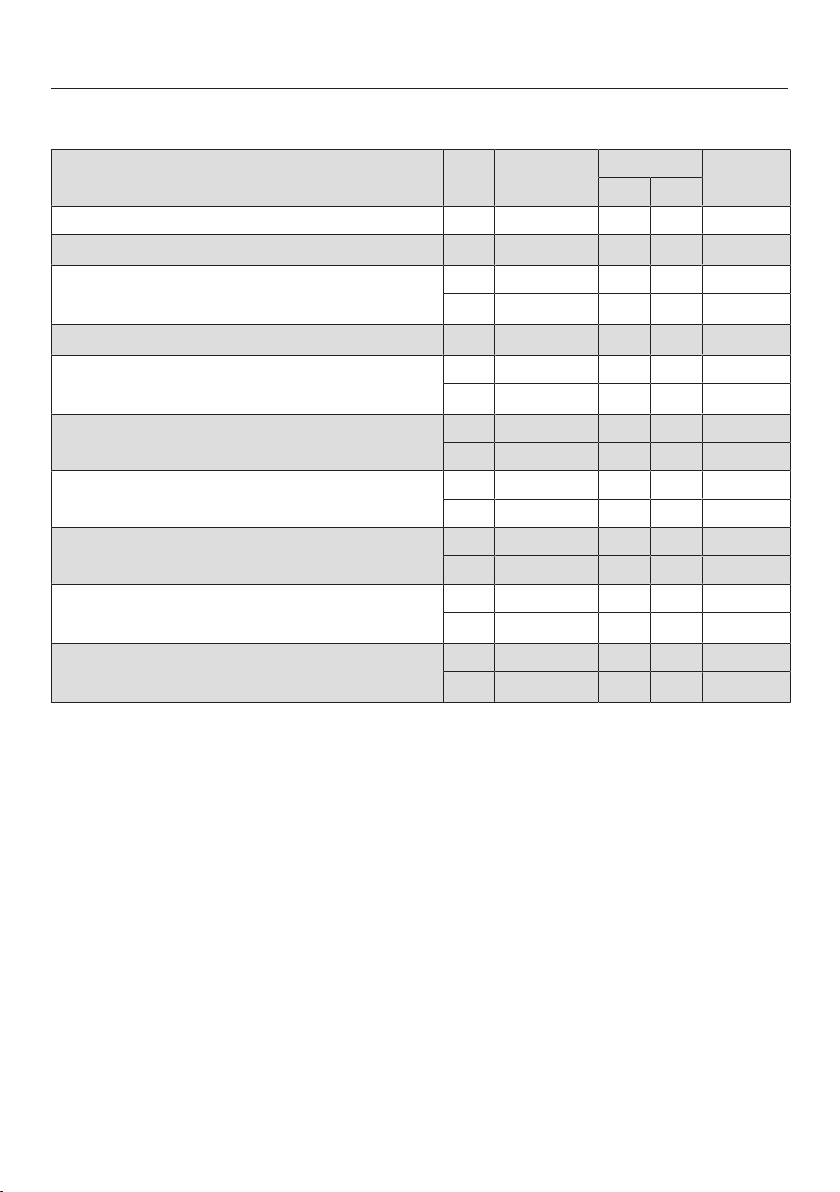
Cooking charts
77
Batter
Cakes/biscuits
(accessories)
[°C]
[min]
+HFC: -HFC:
Muffins (1tray)
150–160 1 2 25–35
Muffins (2trays) 150–160
1+3
3
1+3
30–40
4
Small cakes* (1tray)
150 1 2 25–35
160
2
2 3 20–30
Small cakes* (2trays)
150
2
1+3
3
1+3 25–35
Madeira cake (wire rack, loaf tin, 30cm)
1
150–160 1 2 60–70
155–165
2
1 2 60–70
Marble, nut cake (wire rack, loaf tin,
30cm)
1
150–160 1 2 55–65
150–160 1 2 60–70
Marble, nut cake (wire rack, ring tin/Bundt
cake tin, 26cm)
1
150–160 1 2 55–65
150–160 1 2 55–65
Fresh fruit cake (1tray)
160–170 1 2 45–55
155–165 1 1 45–55
Fresh fruit cake (wire rack, springform cake
tin, 26cm)
1
150–160 1 2 55–65
170–180
2
1 1 35–45
Flan base (wire rack, flan base tin,
28cm)
1
150–160 1 2 25–35
170–180
2
1 2 15–25
Operating mode, Temperature, Shelf level (+HFC: with FlexiClip runners
HFC70-C / -HFC:without FlexiClip runners HFC70-C), Cooking duration, Fan plus,
Conventional heat
*
The settings also apply for testing in accordance with EN60350-1.
Fit the FlexiClip runners HFC70-C (if available).
1
Use a dark coloured, matt baking tin and place it centrally on the wire rack.
2
Pre-heat the oven before putting food inside. Do not use the Boosteroperating mode for
this purpose.
3
Fit the FlexiClip runners HFC70-C (if available) onto the bottom shelf level.
4
Take the trays out of the oven early if the food is sufficiently browned before the specified
cooking duration has elapsed.
Cooking charts
78
Shortcrust pastry
Cakes/biscuits
(accessories)
[°C]
[min]
+HFC: -HFC:
Biscuits (1tray)
140–150 1 2 20–30
150–160 1 2 25–35
Biscuits (2trays) 140–150
1+3
3
1+3
20–30
4
Drop cookies* (1tray)
140 1 2 35–45
160
2
2 3 20–30
Drop cookies* (2trays) 140
1+3
3
1+3
40–50
4
Flan base (wire rack, flan base tin,
28cm)
1
150–160 1 2 35–45
170–180
2
1 2 20–30
Cheesecake (wire rack, springform cake
tin, 26cm)
1
170–180 1 2 80–90
150–160 1 2 80–90
Apple pie* (wire rack, springform cake tin,
20cm)
1
160 1 2 80–100
180 1 1 75–95
Apple pie, double crust (wire rack,
springform cake tin, 26cm)
1
180–190
2
1 2 60–70
160–170 1 2 60–70
Fresh fruit cake, glazed (wire rack,
springform cake tin, 26cm)
1
170–180 1 2 60–70
150–160 1 2 55–65
Fresh fruit cake, glazed (1tray)
170–180 1 2 50–60
160–170 1 2 45–55
Fruit flan (1tray)
210–220
2
– 1 55–65
180–190 – 1 35–45
Operating mode, Temperature, Shelf level (+HFC: with FlexiClip runners
HFC70-C / -HFC:without FlexiClip runners HFC70-C), Cooking duration, Fan plus,
Eco Fan heat, Conventional heat, Intensive bake
*
The settings also apply for testing in accordance with EN60350-1.
Fit the FlexiClip runners HFC70-C (if available).
1
Use a dark coloured, matt baking tin and place it centrally on the wire rack.
2
Pre-heat the oven before putting food inside. Do not use the Boosteroperating mode for
this purpose.
3
Fit the FlexiClip runners HFC70-C (if available) onto the bottom shelf level.
4
Take the trays out of the oven early if the food is sufficiently browned before the specified
cooking duration has elapsed.
Cooking charts
79
Yeast dough
Cakes/biscuits
(accessories)
[°C]
[min]
+HFC: -HFC:
Bundt cake (wire rack, Bundt cake tin,
24cm)
1
150–160 1 2 50–60
160–170 1 1 50–60
Stollen (1tray)
150–160 1 2 55–65
160–170 1 2 55–65
Streusel cake with/without fruit (1tray)
160–170 1 2 40–50
170–180 2 3 45–55
Fresh fruit cake (1tray)
160–170 1 2 45–55
170–180 2 3 45–55
Apple turnovers/raisin whirls (1tray)
160–170 1 2 25–35
Apple turnovers/raisin whirls (2trays) 160–170
1+3
3
1+3
30–40
5
White bread, free-form (1tray)
180–190 1 2 35–45
190–200 1 2 30–40
White bread (wire rack, loaf tin, 30cm)
1
180–190 1 2 35–45
190–200
2
1 2 30–40
Wholegrain bread (wire rack, loaf tin,
30cm)
1
180–190 1 2 55–65
200–210
2
1 2 45–55
Proving yeast dough (wire rack)
30–35
–
4
–
4
–
Operating mode, Temperature, Shelf level (+HFC: with FlexiClip runners
HFC70-C / -HFC:without FlexiClip runners HFC70-C), Cooking duration, Fan plus,
Conventional heat
1
Use a dark coloured, matt baking tin and place it centrally on the wire rack.
2
Pre-heat the oven before putting food inside. Do not use the Boosteroperating mode for
this purpose.
3
Fit the FlexiClip runners HFC70-C (if available) onto the bottom shelf level.
4
Place the wire rack on the floor of the oven and stand the bowl containing the dough on the
wire rack. Depending on the size of the bowl, you may need to remove the side runners.
5
Take the trays out of the oven early if the food is sufficiently browned before the specified
cooking duration has elapsed.
Cooking charts
80
Quark dough
Cakes/biscuits
(accessories)
[°C]
[min]
+HFC: -HFC:
Fresh fruit cake (1tray)
160–170 1 2 40–50
170–180 2 3 50–60
Apple turnovers/raisin whirls (1tray)
160–170 2 3 25–35
Apple turnovers/raisin whirls (2trays)
150–160
1+3
1
1+3
25–35
2
Operating mode, Temperature, Shelf level (+HFC: with FlexiClip runners
HFC70-C / -HFC:without FlexiClip runners HFC70-C), Cooking duration, Fan plus,
Conventional heat
1
Fit the FlexiClip runners HFC70-C (if available) onto the bottom shelf level.
2
Take the trays out of the oven early if the food is sufficiently browned before the specified
cooking duration has elapsed.
Sponge mixture
Cakes/biscuits
(accessories)
[°C]
[min]
+HFC: -HFC:
Sponge cake base (2eggs) (wire rack,
springform cake tin, 26cm)
1
160–170
2
1 2 15–25
Sponge cake base (4–6eggs) (wire rack,
springform cake tin, 26cm)
1
150–160
2
1 2 30–40
Whisked sponge* (wire rack, springform
cake tin, 26cm)
1
180 1 2 25–35
150–170
2
1 2 25–45
Swiss roll sponge (1tray)
180–190
2
1 2 15–25
Operating mode, Temperature, Shelf level (+HFC: with FlexiClip runners
HFC70-C / -HFC:without FlexiClip runners HFC70-C), Cooking duration, Fan plus,
Conventional heat
*
The settings also apply for testing in accordance with EN60350-1.
Fit the FlexiClip runners HFC70-C (if available).
1
Use a dark coloured, matt baking tin and place it centrally on the wire rack.
2
Pre-heat the oven before putting food inside. Do not use the Boosteroperating mode for
this purpose.
Cooking charts
81
Choux pastry, puff pastry, meringue
Cakes/biscuits
(accessories)
[°C]
[min]
+HFC: -HFC:
Choux buns (1tray)
160–170 1 2 30–40
Pastry puffs (1tray)
180–190 1 2 20–30
Pastry puffs (2trays)
180–190
1+3
1
1+3
20–30
2
Macaroons (1tray)
120–130 1 2 25–50
Macaroons (2trays)
120–130
1+3
1
1+3
25–50
2
Meringues/pavlovas (1tray of 6,
each6cm)
80–100 1 2 120–150
Meringues/pavlovas (2trays of 6,
each6cm)
80–100
1+3
1
1+3 150–180
Operating mode, Temperature, Shelf level (+HFC: with FlexiClip runners
HFC70-C / -HFC:without FlexiClip runners HFC70-C), Cooking duration, Fan plus
1
Fit the FlexiClip runners HFC70-C (if available) onto the bottom shelf level.
2
Take the trays out of the oven early if the food is sufficiently browned before the specified
cooking duration has elapsed.
Cooking charts
82
Savoury dishes
Food
(accessories)
[°C]
[min]
+HFC: -HFC:
Savoury flan (1tray)
220–230
1
– 1 25–35
180–190 – 1 30–40
Onion tart (1tray)
180–190
1
1 2 25–35
170–180 1 2 30–40
Pizza, yeast dough (1tray)
170–180 1 2 25–35
210–220
1
1 2 20–30
Pizza, quark dough (1tray)
170–180 1 2 25–35
190–200
1
1 2 25–35
Frozen pizza, pre-cooked (wire rack)
200–210 1 2 20–25
Toast* (wire rack)
250 – 3 5–8
Baked dishes/gratins (e.g. toast) (wire rack
on universal tray)
250
2
2 3 3–6
Grilled vegetables (wire rack on universal
tray)
250
2
3 4
5–10
3
250
2
3 3
5–10
3
Ratatouille (1universal tray)
180–190 1 2 40–60
Operating mode, Temperature, Shelf level (+HFC: with FlexiClip runners
HFC70-C / -HFC:without FlexiClip runners HFC70-C), Cooking duration,
Conventional heat, Intensive bake, Fan plus, Eco Fan heat, Full grill,
Fan grill
*
The settings also apply for testing in accordance with EN60350-1.
1
Pre-heat the oven before putting food inside. Do not use the Boosteroperating mode for
this purpose.
2
Pre-heat the oven for 5minutes before putting food inside. Do not use the
Boosteroperating mode for this purpose.
3
If possible, turn the food halfway through the cooking duration.
Cooking charts
83
Beef
Food
(accessories)
[°C]
[min]
10
[°C]
Braised beef, approx.1kg (oven dish
with lid)
2
150–160
3
2
6
120–130
7
–
2
170–180
3
2
6
120–130
7
–
2
180–190
2
6
160–180
8
–
Fillet of beef, approx.1kg (universal
tray)
2
180–190
3
2
6
25–60 45–75
Fillet of beef (rare), approx.1kg
1
2
80–85
4
2
6
70–80 45–48
Fillet of beef (medium), approx.1kg
1
2
90–95
4
2
6
80–90 54–57
Fillet of beef (well done), approx.1kg
1
2
95–100
4
2
6
110–130 63–66
Sirloin joint, approx.1kg (universal tray)
2
180–190
3
2
6
35–65 45–75
Sirloin joint (rare), approx.1kg
1
2
80–85
4
2
6
80–90 45–48
Sirloin joint (medium), approx.1kg
1
2
90–95
4
2
6
110–120 54–57
Sirloin joint (well done), approx.1kg
1
2
95–100
4
2
6
130–140 63–66
Burger, meat patties
*
(wire rack on shelf
level4 and universal tray on shelf level1)
250
5
4
15–25
9
–
Operating mode, Temperature, Shelf level, Cooking duration, Core
temperature, Fan plus, Conventional heat, Eco Fan heat, Full grill
*
The settings also apply for testing in accordance with EN60350-1.
1
Use the wire rack and universal tray.
2
Sear the meat on the hob first.
3
Pre-heat the oven before putting food inside. Do not use the Boosteroperating mode for
this purpose.
4
Pre-heat the oven at 120°C for 15minutes. Reduce the temperature when you place the food
in the oven.
5
Pre-heat the oven for 5minutes before putting food inside. Do not use the
Boosteroperating mode for this purpose.
6
Fit the FlexiClip runners HFC70-C (if available).
7
Roast with the lid on to start with. Remove the lid 90minutes into the cooking duration and
add approx.0.5litres of liquid.
8
Roast with the lid on to start with. Remove the lid 100minutes into the cooking duration and
add approx.0.5litres of liquid.
9
If possible, turn the food halfway through the cooking duration.
10
If you have a separate food probe you can use the core temperature shown.
Cooking charts
84
Veal
Food
(accessories)
[°C]
[min]
7
[°C]
Braised veal, approx.1.5kg (oven dish
with lid)
2
160–170
3
2
5
120–130
6
–
2
170–180
3
2
5
120–130
6
–
Fillet of veal, approx.1kg (universal tray)
2
160–170
3
2
5
30–60 45–75
Fillet of veal (pink), approx.1kg
1
2
80–85
4
2
5
50–60 45–48
Fillet of veal (medium), approx.1kg
1
2
90–95
4
2
5
80–90 54–57
Fillet of veal (well done), approx.1kg
1
2
95–100
4
2
5
90–100 63–66
Saddle of veal (pink), approx.1kg
1
2
80–85
4
2
5
80–90 45–48
Saddle of veal (medium), approx.1kg
1
2
90–95
4
2
5
100–130 54–57
Saddle of veal (well done), approx.1kg
1
2
95–100
4
2
5
130–140 63–66
Operating mode, Temperature, Shelf level, Cooking duration, Core
temperature, Fan plus, Conventional heat
1
Use the wire rack and universal tray.
2
Sear the meat on the hob first.
3
Pre-heat the oven before putting food inside. Do not use the Boosteroperating mode for
this purpose.
4
Pre-heat the oven at 120°C for 15minutes. Reduce the temperature when you place the food
in the oven.
5
Fit the FlexiClip runners HFC70-C (if available).
6
Roast with the lid on to start with. Remove the lid 90minutes into the cooking duration and
add approx.0.5litres of liquid.
7
If you have a separate food probe you can use the core temperature shown.
Cooking charts
85
Pork
Food
(accessories)
[°C]
[min]
10
[°C]
Pork joint/pork neck roast, approx.1kg
(oven dish with lid)
160–170
2
5
130–140
6
80–90
170–180
2
5
130–140
6
80–90
Pork joint with crackling, approx.2kg
(oven dish)
180–190
2
5
130–150
7
80–90
190–200
2
5
130–150
7
80–90
Pork tenderloin, approx.350g
1
2
90–100
3
2
5
70–90 60–69
Ham roast, approx.1.5kg (oven dish
with lid)
160–170
2
5
130–160
8
80–90
Gammon joint, approx.1kg (universal
tray)
150–160
2
5
50–60 63–68
Gammon joint, approx.1kg
1
2
95–105
3
2
5
140–160 63–66
Meat loaf, approx.1kg (universal tray)
170–180
2
5
60–70
7
80–85
190–200
2
5
70–80
7
80–85
Bacon
1
250
4
4 3–5 –
Sausages
1
250
4
3
5
8–15
9
–
Operating mode, Temperature, Shelf level, Cooking duration, Core
temperature, Fan plus, Conventional heat, Eco Fan heat, Full grill
1
Use the wire rack and universal tray.
2
Sear the meat on the hob first.
3
Pre-heat the oven at 120°C for 15minutes. Reduce the temperature when you place the food
in the oven.
4
Pre-heat the oven for 5minutes before putting food inside. Do not use the
Boosteroperating mode for this purpose.
5
Fit the FlexiClip runners HFC70-C (if available).
6
Roast with the lid on to start with. Remove the lid 60minutes into the cooking duration and
add approx.0.5litres of liquid.
7
Add approx.0.5litres of liquid halfway through the cooking duration.
8
Roast with the lid on to start with. Remove the lid 100minutes into the cooking duration and
add approx.0.5litres of liquid.
9
If possible, turn the food halfway through the cooking duration.
10
If you have a separate food probe you can use the core temperature shown.
Cooking charts
86
Lamb, game
Food
(accessories)
[°C]
[min]
6
[°C]
Leg of lamb on the bone, approx.1.5kg
(oven dish with lid)
170–180
2
4
100–120
5
64–82
Saddle of lamb, off the bone (universal
tray)
1
180–190
2
2
4
10–20 53–80
Saddle of lamb, off the bone (wire rack
and universal tray)
1
95–105
3
2
4
40–60 54–66
Saddle of venison, off the bone
(universal tray)
1
160–170
2
2
4
70–90 60–81
Roebuck saddle, off the bone (universal
tray)
1
140–150
2
2
4
25–35 60–81
Leg of wild boar, off the bone,
approx.1kg (oven dish with lid)
1
170–180
2
4
100–120
5
80–90
Operating mode, Temperature, Shelf level, Cooking duration, Core
temperature, Conventional heat
1
Sear the meat on the hob first.
2
Pre-heat the oven before putting food inside. Do not use the Boosteroperating mode for
this purpose.
3
Pre-heat the oven at 120°C for 15minutes. Reduce the temperature when you place the food
in the oven.
4
Fit the FlexiClip runners HFC70-C (if available).
5
Roast with the lid on to start with. Remove the lid 50minutes into the cooking duration and
add approx.0.5litres of liquid.
6
If you have a separate food probe you can use the core temperature shown.
Cooking charts
87
Poultry, fish
Food
(accessories)
[°C]
[min]
7
[°C]
Poultry, 0.8–1.5kg (universal tray)
170–180
2
3
55–65 85–90
Chicken, approx.1.2kg (wire rack on
universal tray)
180–190
1
2
3
55–65
4
85–90
Poultry, approx.2kg (oven dish)
180–190
2
3
100–120
5
85–90
190–200
2
3
110–130
5
85–90
Poultry, approx.4kg (oven dish)
160–170
2
3
180–200
6
90–95
180–190
2
3
180–200
6
90–95
Fish, 200–300g (e.g. trout) (universal
tray)
210–220
2
2
3
15–25 75–80
Fish, 1–1.5kg (e.g. salmon trout)
(universal tray)
210–220
2
2
3
30–40 75–80
Fish fillet in foil, 200–300g (universal
tray)
200–210
2
3
25–30 75–80
Operating mode, Temperature, Shelf level, Cooking duration, Core
temperature, Fan plus, Fan grill, Conventional heat, Eco Fan heat
1
Pre-heat the oven for 5minutes before putting food inside. Do not use the
Boosteroperating mode for this purpose.
2
Pre-heat the oven before putting food inside. Do not use the Boosteroperating mode for
this purpose.
3
Fit the FlexiClip runners HFC70-C (if available).
4
If possible, turn the food halfway through the cooking duration.
5
Add approx.0.25litres of liquid at the start of the cooking process.
6
Add approx.0.5litres of liquid after 30minutes.
7
If you have a separate food probe you can use the core temperature shown.
Notes for test institutes
88
Test food according to EN60350-1
Test food (accessories)
[°C]
6
[min]
+HFC: -HFC:
Small cakes (1baking tray
1
)
150 1 2 25–35
160
4
2 3 20–30
Small cakes (2baking trays
1
)
150
4
1+3
7
1+3 25–35
Drop cookies (1baking tray
1
)
140 1 2 35–45
160
4
2 3 20–30
Drop cookies (2baking trays
1
)
140
1+3
7
1+3
40–50
8
Apple pie (wire rack
1
, springform cake tin
2
,
20cm)
160 1 2 80–100
180 1 1 75–95
Whisked sponge (wire rack
1
, springform
cake tin
2
, 26cm)
180 1 2 25–35
3
150–170
4
1 2 25–45
Toast (wire rack
1
)
250 – 3 5–8
Burger (wire rack
1
on shelf level4 and
universal tray
1
on shelf level1)
250
5
– 4
15–25
9
Operating mode, Temperature, Shelf level (+HFC: with FlexiClip runners
HFC70-C / -HFC:without FlexiClip runners HFC70-C), Cooking duration, Fan plus,
Conventional heat, Full grill
1
Only use original Miele accessories.
2
Use a dark matt springform cake tin.
Place the springform cake tin centrally on the wire rack.
3
In general, if a range of temperatures is given, it is best to select the lower temperature and to
check the food after the shortest cooking duration.
4
Pre-heat the oven before putting food inside. Do not use the Boosteroperating mode for
this purpose.
5
Pre-heat the oven for 5minutes before putting food inside. Do not use the
Boosteroperating mode for this purpose.
6
Fit the FlexiClip runners HFC70-C (if available).
7
Fit the FlexiClip runners HFC70-C (if available) onto the bottom shelf level. If you have several
pairs of FlexiClip runners, fit only one pair.
8
Take the trays out of the oven early if the food is sufficiently browned before the specified
cooking duration has elapsed.
9
If possible, turn the food halfway through the cooking duration.
Notes for test institutes
89
Energy efficiency class according to EN60350-1
The energy efficiency rating is determined in accordance with EN60350-1.
Energy efficiency rating:A+
Please observe the following when conducting testing:
- Testing is undertaken using the Eco Fan heatfunction.
- Only accessories that are required for testing should be in the oven
compartment during tests.
Do not use other accessories that might be available such as FlexiClip runners
or catalytic enamelled panels such as side panels or roof liners.
- An important pre-condition for determining the energy efficiency rating is that
the door is tightly shut during testing.
Depending on measurement devices used, the functioning of the door seal can
be affected to a greater or lesser extent. This has a negative impact on the test
results.
Pushing against the door will compensate for this. In certain unfavourable
circumstances, suitable technical aids may also be necessary for this. This does
not occur in normal use.
Data sheet for household ovens
In acc. with delegated regulation (EU) No. 65/2014 and regulation (EU) No.
66/2014
MIELE
Model name/identifier H2265-1B, H2265-1E,
H2760B, H2765B,
H2860B, H2850B
Energy efficiency index/cavity (EEI
cavity
) 81,7
Energy efficiency class/cavity
A+++ (most efficient) to D (least efficient) A+
Energy consumption per cycle for each cavity in conventional mode 1,05 kWh
Energy consumption per cycle for each cavity in fan-forced convection
mode
0,71 kWh
Number of cavities 1
Heat source(s) per cavity electric
Volume of cavity 76 l
Mass of the appliance 42,0 kg


United Kingdom
Miele Co. Ltd., Fairacres, Marcham Road, Abingdon, Oxon, OX14 1TW
Tel: 0330 160 6600, Internet: www.miele.co.uk, E-mail: [email protected]
Australia
Miele Australia Pty. Ltd.
ACN 005 635 398
ABN 96 005 635 398
Level 4, 141 Camberwell Road
Hawthorn East, VIC 3123
Tel: 1300 464 353
Internet: www.miele.com.au
Miele Electrical Appliances Co., Ltd.
1-3 Floor, No. 82 Shi Men Yi Road
Jing' an District
200040 Shanghai, PRC
Tel: +86 21 6157 3500
Fax: +86 21 6157 3511
E-mail: [email protected],
Internet: www.miele.cn
China Mainland
Miele (Hong Kong) Ltd.
41/F - 4101, Manhattan Place
23 Wang Tai Road
Kowloon Bay, Hong Kong
Tel: (852) 2610 1025
Fax: (852) 3579 1404
Email:
Website: www.miele.hk
Hong Kong, China
Miele India Pvt. Ltd.
1st Floor, Copia Corporate Suites,
Commercial Plot 9,
Mathura Road, Jasola,
New Delhi - 110025
E-mail: customercare@miele.in
Website: www.miele.in
India
Miele Ireland Ltd.
2024 Bianconi Avenue
Citywest Business Campus
Dublin 24
Tel: (01) 461 07 10
Fax: (01) 461 07 97
E-Mail: [email protected]
Internet: www.miele.ie
Ireland
Malaysia
Miele Sdn Bhd
Suite 12-2, Level 12
Menara Sapura Kencana
Petroleum
Solaris Dutamas No. 1
Jalan Dutamas 1
50480 Kuala Lumpur, Malaysia
Phone: +603-6209-0288
Fax: +603-6205-3768
Miele New Zealand Limited
IRD 98 463 631
8 College Hill
Freemans Bay, Auckland 1011
New Zealand
Tel: 0800 464 353
Internet: www.miele.co.nz
New Zealand
Miele Pte. Ltd.
29 Media Circle
#11-04 ALICE@Mediapolis
Singapore 138565
Tel: +65 6735 1191
Fax: +65 6735 1161
E-Mail: [email protected]
Internet: www.miele.sg
Singapore
Miele (Pty) Ltd.
63 Peter Place, Bryanston 2194
P.O. Box 69434, Bryanston 2021
Tel: (011) 875 9000
Fax: (011) 875 9035
E-mail: [email protected]
Internet: www.miele.co.za
South Africa
Miele Appliances Ltd.
Showroom 1, Eiffel 1 Building
P.O. Box 114782 - Dubai
Tel. +971 4 3044 999
Fax. +971 4 3418 852
800-MIELE (64353)
E-Mail: [email protected]
Website: www.miele.ae
United Arab Emirates
Manufacturer:
Miele & Cie. KG, Carl-Miele-Straße 29, 33332 Gütersloh, Germany
Thailand
Miele Appliances Ltd.
BHIRAJ TOWER at EmQuartier
43rd Floor Unit 4301-4303
689 Sukhumvit Road
North Klongton Sub-District
Vadhana District
Bangkok 10110, Thailand
Sheikh Zayed Road, Umm Al Sheif
Kuwait
Miele Kuwait
Al Wazzan United Trading Co.
P. O. Box : 3379
Hawally, 32034 Kuwait
Tel.: 00965-22001010
Fax: 00965-24838292
E-mail: [email protected]
Website: www.alwazzanunited.com

M.-Nr. 11 189 711 / 06en-GB
H2265-1B, H2265-1E, H2760B, H2765B, H2860B,
H2850B





