
SUN HAZARD
— Never look directly at the sun
with this device.
WARNING:
CHOKING HAZARD
— Small parts.
Not for children under 3 years.
WARNING:
Contains button or coin cell battery.
Hazardous if swallowed
— see instructions.
WARNING:
The lens contains lead that may be harmful.
Wash hands after touching.
WARNING:
This product can expose you to chemicals including lead,
which is known to the State of California to cause cancer
and birth defects or other reproductive harm.
For more information go to www.P65Warnings.ca.gov.
WARNING:
INCLUDED
X
1
CR2032
3V
STAR APP114
INSTRUCTION MANUAL
114 MM REFLECTOR TELESCOPE WITH
ASTRONOMY APP
80-40114
EN
10+
ARTELESCOPE
DOWNLOAD THE APP
2
Customer Service: Call 1-866-252-3811
• SUN WARNING:
NEVER ATTEMPT TO OBSERVE THE SUN WITH THIS DEVICE! OBSERVING THE SUN EVEN
FOR A MOMENT WILL CAUSE INSTANT AND IRREVERSIBLE DAMAGE TO YOUR EYE OR EVEN BLINDNESS.
EYE DAMAGE IS OFTEN PAINLESS, SO THERE IS NO WARNING TO THE OBSERVER THAT THE DAMAGE HAS
OCCURRED UNTIL IT IS TOO LATE. DO NOT POINT THE DEVICE AT OR NEAR THE SUN. DO NOT LOOK
THROUGH THE DEVICE AS IT IS MOVING. CHILDREN SHOULD ALWAYS HAVE ADULT SUPERVISION WHILE OBSERVING.
• RESPECT PRIVACY: WHEN USING THIS DEVICE, RESPECT THE PRIVACY OF OTHER PEOPLE. FOR EXAMPLE, DO NOT
USE IT TO LOOK INTO PEOPLE’S HOMES.
• CHOKING HAZARD: CHILDREN SHOULD ONLY USE DEVICE UNDER ADULT SUPERVISION. KEEP PACKAGING
MATERIALS LIKE PLASTIC BAGS AND RUBBER BANDS OUT OF THE REACH OF CHILDREN AS THESE
MATERIALS POSE A CHOKING HAZARD.
• RISK OF BLINDNESS: NEVER USE THIS DEVICE TO LOOK DIRECTLY AT THE SUN OR IN THE DIRECT PROXIMITY OF THE
SUN. DOING SO MAY RESULT IN A PERMANENT LOSS OF VISION.
• RISK OF FIRE: DO NOT PLACE DEVICE, PARTICULARLY THE LENSES, IN DIRECT SUNLIGHT. THE CONCENTRATION OF
LIGHT RAYS COULD CAUSE A FIRE.
• DO NOT DISASSEMBLE THIS DEVICE: IN THE EVENT OF A DEFECT, PLEASE CONTACT YOUR DEALER. THE DEALER
WILL CONTACT THE CUSTOMER SERVICE DEPARTMENT AND CAN SEND THE DEVICE IN TO BE REPAIRED IF
NECESSARY.
• DO NOT SUBJECT THE DEVICE TO TEMPERATURES EXCEEDING 60 °C 140 °F.
• DISPOSAL: KEEP PACKAGING MATERIALS, LIKE PLASTIC BAGS AND RUBBER BANDS, AWAY FROM
CHILDREN AS THEY POSE A RISK OF SUFFOCATION. DISPOSE OF PACKAGING MATERIALS AS LEGALLY
REQUIRED. CONSULT THE LOCAL AUTHORITY ON THE MATTER IF NECESSARY AND RECYCLE MATERIALS
WHEN POSSIBLE.
• THE WEEE SYMBOL IF PRESENT INDICATES THAT THIS ITEM CONTAINS ELECTRICAL OR ELECTRONIC
COMPONENTS WHICH MUST BE COLLECTED AND DISPOSED OF SEPARATELY.
• NEVER DISPOSE OF ELECTRICAL OR ELECTRONIC WASTE IN GENERAL MUNICIPAL WASTE. COLLECT AND
DISPOSE OF SUCH WASTE SEPARATELY.
• MAKE USE OF THE RETURN AND COLLECTION SYSTEMS AVAILABLE TO YOU, OR YOUR LOCAL RECYCLING PROGRAM.
CONTACT YOUR LOCAL AUTHORITY OR PLACE OF PURCHASE TO FIND OUT WHAT SCHEMES ARE AVAILABLE.
• ELECTRICAL AND ELECTRONIC EQUIPMENT CONTAINS HAZARDOUS SUBSTANCES WHICH, WHEN DISPOSED OF
INCORRECTLY, MAY LEAK INTO THE GROUND. THIS CAN CONTRIBUTE TO SOIL AND WATER POLLUTION WHICH IS
HAZARDOUS TO HUMAN HEALTH, AND ENDANGER WILDLIFE.
• IT IS ESSENTIAL THAT CONSUMERS LOOK TO RE-USE OR RECYCLE ELECTRICAL OR ELECTRONIC WASTE TO AVOID IT
GOING TO LANDFILL SITES OR INCINERATION WITHOUT TREATMENT.
BUTTON/COIN BATTERY WARNING: THIS PRODUCT CONTAINS A BUTTON OR COIN CELL BATTERY. A SWALLOWED
BUTTON OR COIN CELL BATTERY CAN CAUSE INTERNAL CHEMICAL BURNS IN AS LITTLE AS TWO HOURS AND LEAD
TO DEATH. DISPOSE OF USED BATTERIES IMMEDIATELY. KEEP NEW AND USED BATTERIES AWAY FROM CHILDREN. IF
YOU THINK BATTERIES MIGHT HAVE BEEN SWALLOWED OR PLACED INSIDE ANY PART OF THE BODY, SEEK IMMEDIATE
MEDICAL ATTENTION.
IMPORTANT SAFETY INSTRUCTIONS
READ AND FOLLOW THE INSTRUCTIONS BEFORE USE.
KEEP THESE INSTRUCTIONS FOR LATER USE.
3
What‘s Included
Available Downloads Visit:
www.esmanuals.com
6
8
7
1
5
10
11
12
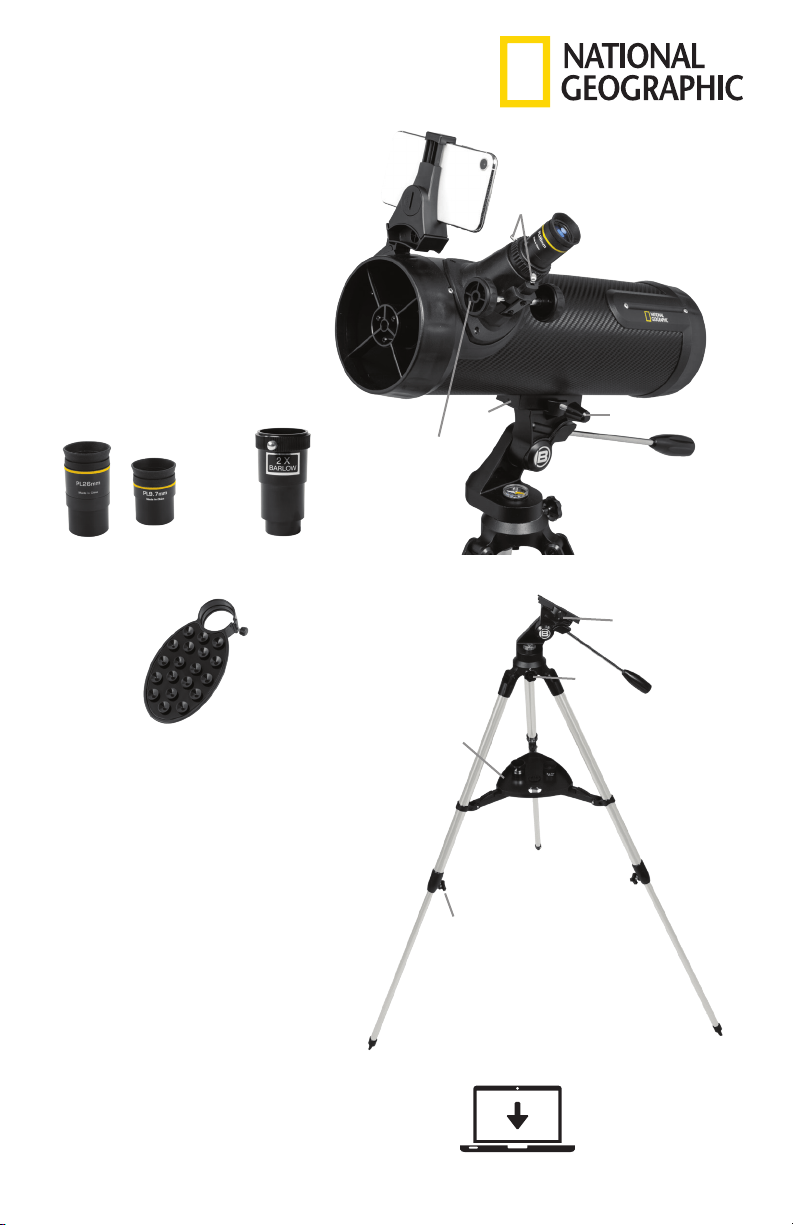
Parts Overview
1. 114 mm Reflector Telescope
2. Panhandle Alt-Azimuth Mount
3. Tripod
4. Accessory Tray
5. Focus Wheel/Focuser
6. 1.25” Eyepieces (9.7 mm and 26 mm)
7. 2x Barlow Lens
8. Smartphone Adapter
9. Leg Locking Knob
10. Telescope Mount Bracket
11. Mount Locking Knob
12. Eyepiece Locking Screws
13. Azimuth (horizontal) Tension Knob
14. Smartphone Mount w/Bluetooth
Phone not included.
14
3
2
4
13
9
11
4
How To Set Up
Note: We recommend assembling your telescope for the first time in the daylight or in a lit room so
that you can familiarize yourself with assembly steps and all components.
1. Take the tripod (Part 3) and fully extend each leg.
2. Align the accessory tray (Part 4) and turn 180 degrees to lock into place.
3a. Assemble the panhandle mount (Part 2) by screwing in the handle and placing the mount onto the
tripod.
3b1. If the mount includes a locking knob, insert the washer first then the spacer and turn the knob to
securely lock the mount to the tripod.
3b2. If the mount includes a locking screw, insert the washer first then the spacer and using a hex wrench
(if included), turn the screw to securely lock the mount to the tripod.
4. Adjust the height of the tripod by unlocking the leg locking knob first (Part 9) and slide one tripod leg
at a time to the preferred length. Repeat this two more times.
5a-b. Locate the mounting bracket at the bottom of your telescope (Part 10). Slide in the telescope and
lock it into place with the mount locking screw (Part 11).
6a. Remove the dust cover from the telescope and insert an eyepiece. 26 mm is preferred.
6b. Tighten the eyepiece locking screws (Part 12) on the focuser (Part 5) to secure the eyepiece in place.
7. To move the telescope up or down, loosen the handle (Part 2), move the telescope up or down and
tighten the handle to lock it to the desired position.
8a. To turn the telescope left or right, loosen the azimuth (horizontal) tension knob. (Part 13).
8b. Turn the telescope left or right to the desired position.
8c. Tighten the azimuth (horizontal) tension knob (Part 13) to keep the telescope securely in place.
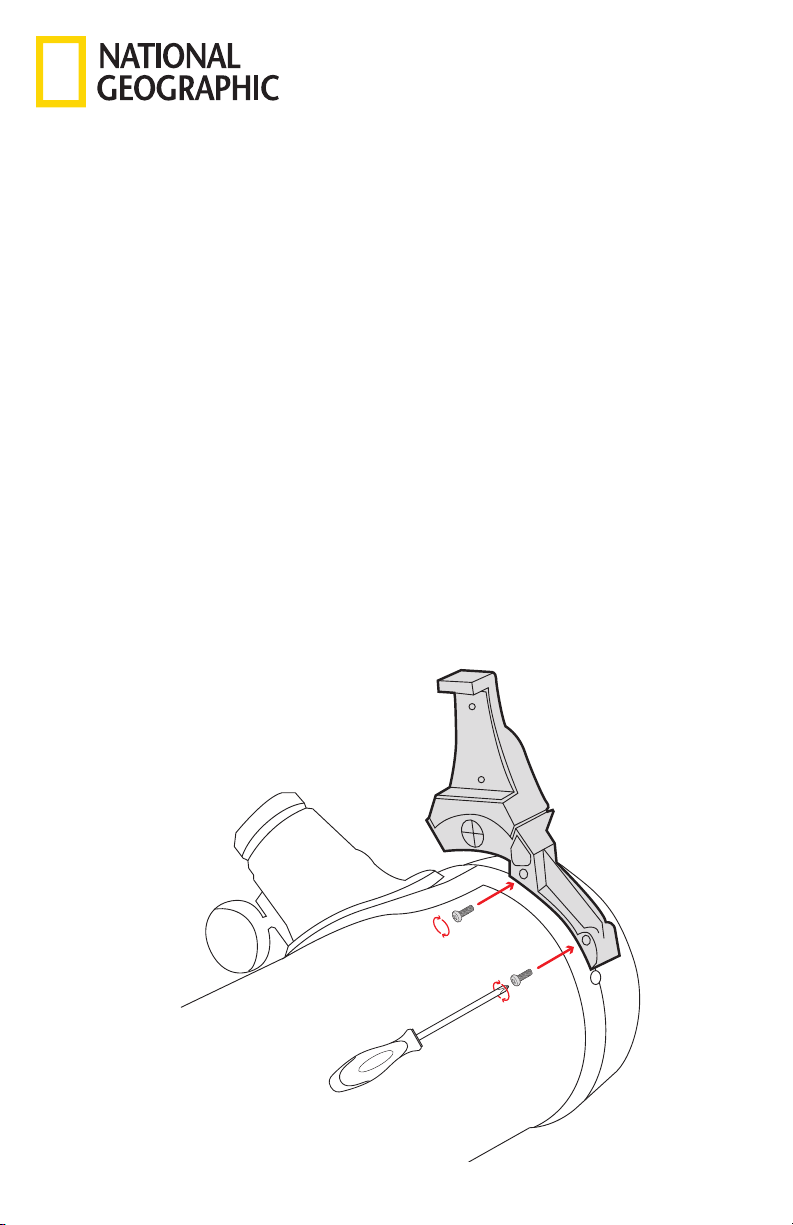
Attaching Smartphone Mount:
Once you have set up your telescope, install the smartphone mount to the mounting bracket. You will
need a screwdriver (not included) for this step.
1. Grab the Smartphone Mount with Bluetooth (Part 14) and the included screws.
2. Align the Smartphone Mount to the mounting bracket and slide it into place.
3. With the screwdriver, insert the screws and tigthen.
5
Using Your Telescope:
After you have aligned your viewfinder, you are ready to start observing! Put the 26mm eyepiece into
the focuser to get the widest field of view. This wider field of view will make it easier to locate and track
objects. Use the panhandle to move the scope up, down and side to side until your target comes into
view in the eyepiece. It is important to remember that the rotation of the Earth means objects will move
out of your eyepiece fairly quickly. Once you have found and focused on your desired target, you can
track it as it journeys across the night sky using the panhandle.
To get a closer look at an object, take out the 26mm eyepiece and replace it with the 9.7mm eyepiece.
This will increase the magnification to 51.5x. For the strongest magnification, take out the 9.7mm eyepiece
and insert the 2x Barlow lens into the focuser. Put the 9.7mm eyepiece into the Barlow lens and secure
it in place, this will up the magnification from 51.5x to 103x. If you use the Barlow lens with the 26 mm
eyepiece, the magnification will change from 19x to 38x.
Note: This telescope is designed for
astronomical use. Terrestrial objects may
appear inverted, sideways or at an angle
depending on how your tube is oriented
due to optical design. This rotation
is perfectly normal on all Newtonian
reflectors and will not affect astronomical viewing.
Cleaning:
The internal optics of your reflector telescope will rarely requiring cleaning as long as you put the dust
cover on when the device is not in use. Small particles of dust that may enter the optical tube assembly
during an observing session should not impact image quality. In the rare circumstance that a film of
dirt collects on either mirror, you will need to contact Customer Service at (866) 252-3811 or service@
explorescientific.com to arrange for the device to be returned to our facility for disassembly, cleaning
and collimation. Although the optics inside of the reflector will likely never require cleaning as long as the
dust cover is on when the telescope is not in use, eyepieces will need to be kept free of dust and dirt. To
clean the eyepiece, use only a photo-grade soft brush or a lint-free cloth to gently remove any particles
from the lens. Do not press down hard while cleaning as this might scratch the lens. If the eyepiece lens is
exceptionally dirty, it may be necessary to dampen a lint-free cleaning cloth with an optical glass cleaning
fluid and then wipe the lens clean using very light pressure. The eyepiece is NOT waterproof so do
not spray fluids directly onto the glass or dip it in water. Never use harsh detergents! After you have
finished cleaning an eyepiece, allow it to fully dry before storing.
Make sure your telescope is always protected against dust and dirt. After use, leave it in a warm room
to dry off before storing.
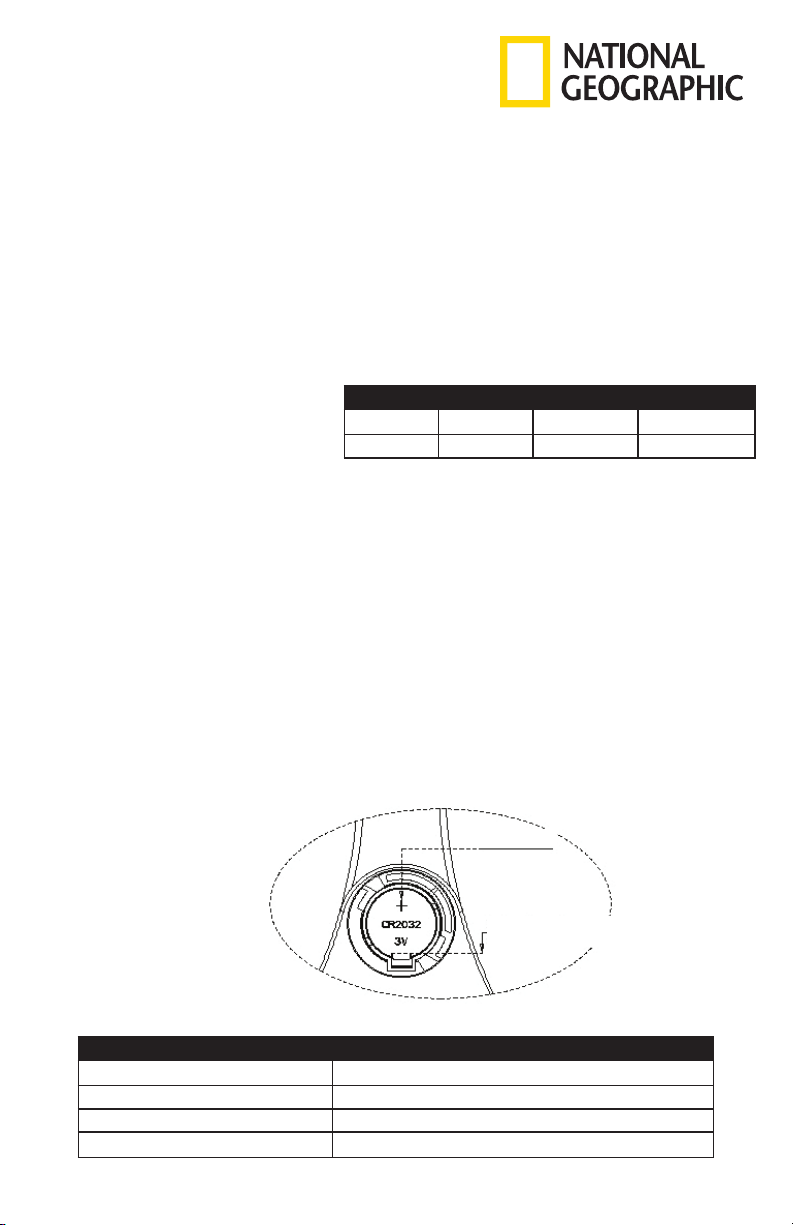
Replacing Coin Battery:
Troubleshooting Guide:
Problem Solution
No picture Remove dust protection cap.
Blurred picture Adjust focus using focus wheel.
No focus possible Wait for temperature to balance out.
Bad quality Never observe through a glass surface such as a window.
Push aside and
remove the battery.
Battery (+)
Focal Length Eyepiece Magnification 2x Barlow Lens
500mm 26mm 19x 38x
500mm 9.7mm 51.5x 103x
6
Using The Smartphone Adapter:
SUPERVISION BY ADULTS
Read and follow the instructions, safety rules and first aid information
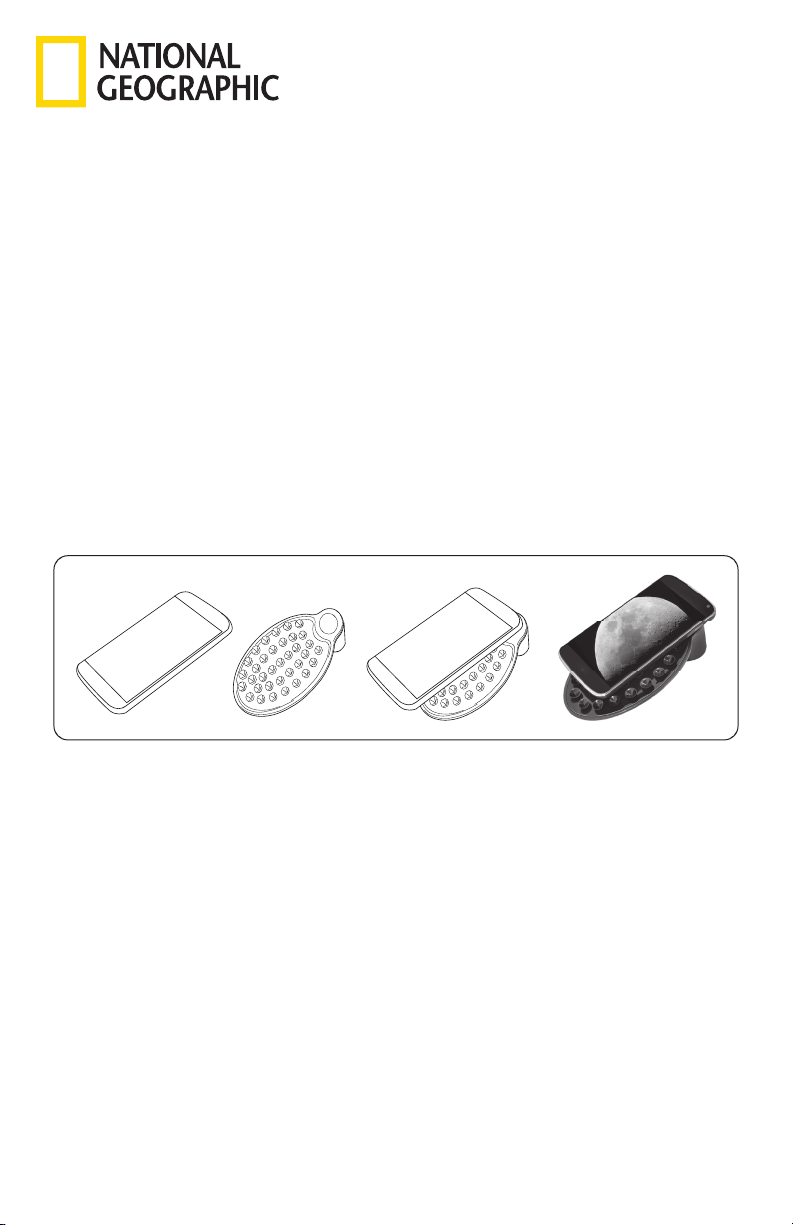
The Smartphone Adapter will allow you to connect almost any “smart” device to a 1.25” eyepiece.
To use the adapter, place it directly onto the selected eyepiece and secure it by tightening the set screw
until snug.
Be careful not to overtighten because this could damage the adapter and/or the eyepiece.
The camera lens on your smart device will need to be centered over the eyepiece. This alignment is best
done by opening the camera function and viewing the image while you center the device. Once you have
positioned the device correctly, carefully press it onto the suction cup/non-skid surface of the adapter
pad. Never allow the adapter pad to hold your device without you supporting the item as well.
The point at which you secure the eyepiece/adapter combination into the diagonal/focuser depends
largely on the dimensions of your device. For smaller devices like smart phones, it may be easier to secure
it to the eyepiece/adapter combination before inserting the entire unit into the diagonal on the telescope.
For larger devices, such as tablets, it may be easier to secure the eyepiece/adapter combination into the
diagonal, and then align and attach your device.
After positioning your device and capturing images, you can enhance and edit the photos using the
imaging software of your choice. One option can be found at https://www.getpaint.net/.
WARNING: Do not leave your device unsupported or unattended on the adapter pad.
Though the surface of the adapter pad is designed with suction cups and is non-skid, the manufacturer
cannot assure that the pad will support the weight of various devices or guarantee that it will adhere to
all surfaces on various smart devices. The pad is not intended to secure, balance or support the device
on its own, and the operator should not let the device rest solely on the adapter pad. Leaving the device
unattended or allowing it to balance on its own without operator support may result in the device falling,
unbalancing the entire instrument and possibly damaging the telescope or your smart device.
CHEMICALS
Any chemicals and liquids used in preparing, using, or cleaning should be kept out of reach of children.
Do not drink any chemicals. Hands should be washed thoroughly under running water after use. In case
of accidental contact with the eyes or mouth rinse with water. Seek medical treatment for ailments arising
from contact with the chemical substances and take the chemicals with you to the doctor.
Keep packaging materials (plastic bags, rubber bands, etc.) away from children. There is a risk of
SUFFOCATION.
Dispose of packaging materials as legally required. Consult the local authority on the matter if necessary.
DISPOSAL
Dispose of the packaging materials properly, according to their type, such as paper or cardboard. Contact
your local waste-disposal service or environmental authority for information on the proper disposal.
Please take the current legal regulations into account when disposing of your device. You can get more
information on the proper disposal from your local waste-disposal service or environmental authority.
7
To download the application:
Method 1:
Using your smart device, scan the QR code on the left
to download and install the ARTelescope-3L App.
Method 2:
Download and install the ARTelescope-3L App by
searching through the Apple Store or Google Play.
Using the ARTelescope-3L App:
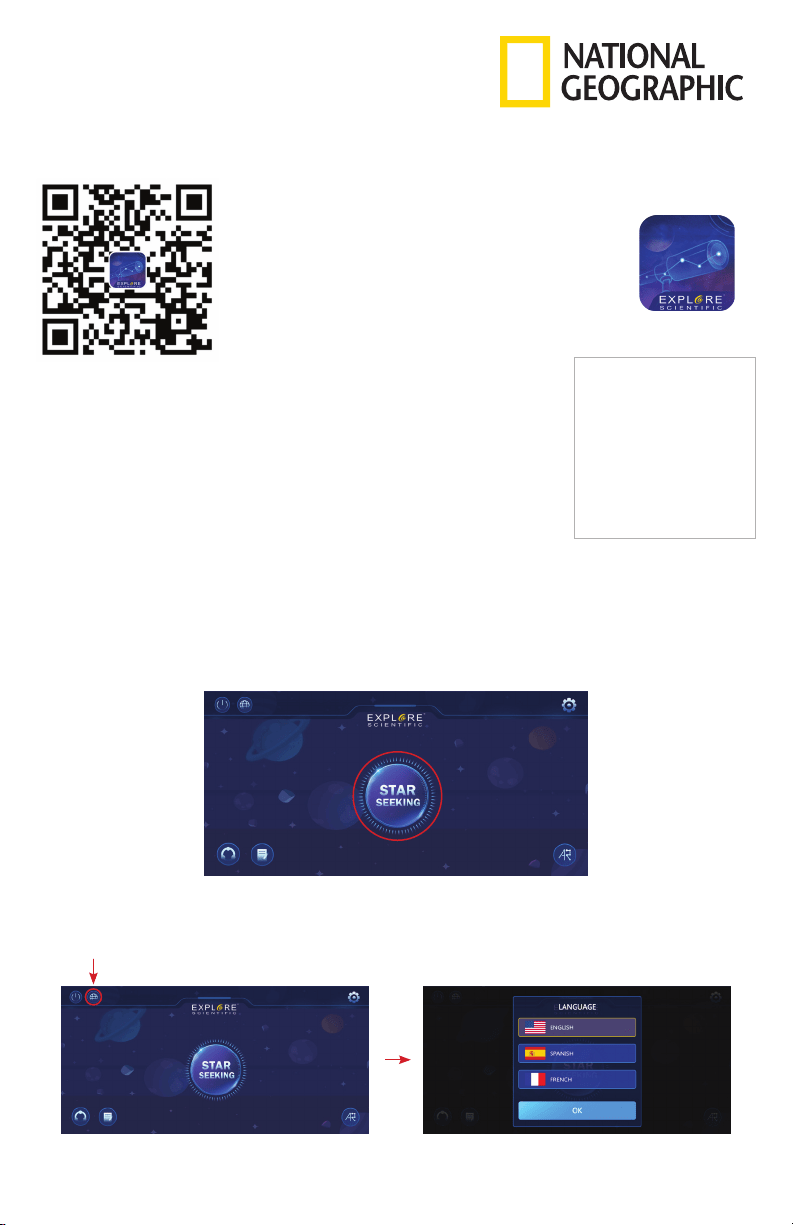
After launching the application, tap the “Star Seeking” icon in the middle of the screen to access the
Bluetooth interface. Note: Bluetooth on your device will need to be enabled.
If the device is placed in the telescope bracket, click “Automatic Search” to match and enter the AR star
search module.
To access the language selection function:
Go to the home menu screen and click the globe icon in the upper left corner to enter the language
switch function.
To activate the application:
After installing, open the application. For the ARTelescope-3L to function
properly, you will need to allow it to access the camera, location and
Bluetooth functions on your smart device. Next, select your preferred
language. Activate the application by scanning the activation QR code
pictured here.
Important: Please keep this activation
code to be able to activate more devices.
Activation Code
Download the App
How to Install & Use the App
ARTelescope-3L
8
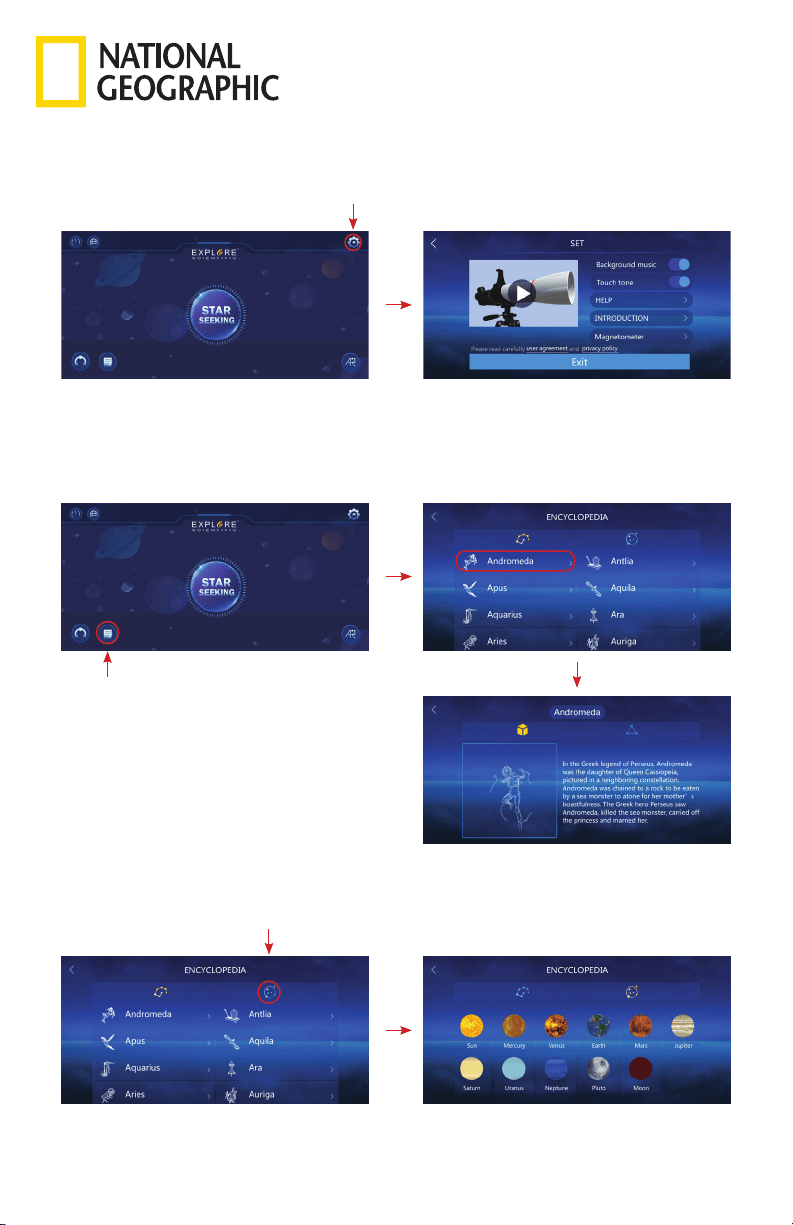
To access the encyclopedia for constellations:
Go to the home menu screen, click the encyclopedia icon in the lower left corner to access information
on constellations and solar system objects. Tap on an object for information that includes pictures, text
and audio.
To access the encyclopedia for solar system objects:
Go to the encyclopedia screen, click the “solar system” icon to access information about the solar
system objects. Tap on an object for information that includes pictures, text and audio.
To access the 3D assembly animation:
Go to the home menu screen, click the upper right corner to enter the 3D assembly animation of
the telescope, and click the animation play button to watch the 3D assembly animation in the freely
rotating interface.
9
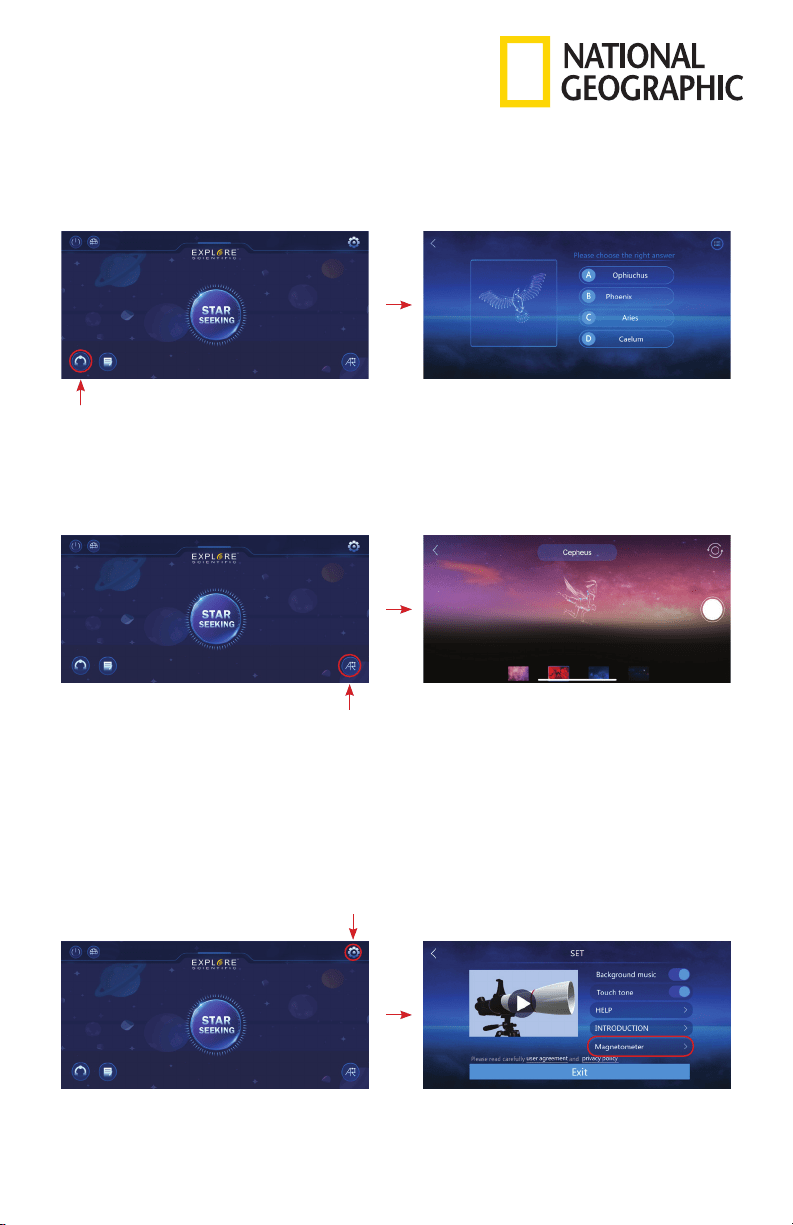
To access the constellation quiz function:
Go to the main home screen and tap the icon in the lower left corner to enter the multiple
choice quiz mode.
To access the AR constellation photo function:
Go to the home menu screen, click the AR constellation function in the lower right. The names and
outlines of constellations in the viewing area will appear as you move your device across the night
sky. You can take a photo of the constellation in AR mode by allowing the application to access your
device’s camera.
Notes:
• The application needs to keep the device network in a normal state during the activation process.
• Permission to open the camera, album, and location of the device will pop up when the App is
launched for the first time. Please tap “Allow” to confirm approval.
• Gyroscope standard of the equipment. When the position deviation of the star finder module is large,
manual calibration of the equipment’s position and direction can be carried out by calibrating the
Magnetometer in settings.
10
Observing Tips:
Star hopping
Star hopping is a technique used by amateur astronomers to navigate the night sky. By using easily
recognizable constellations and asterisms as a guide, an observer can locate stars and other objects.
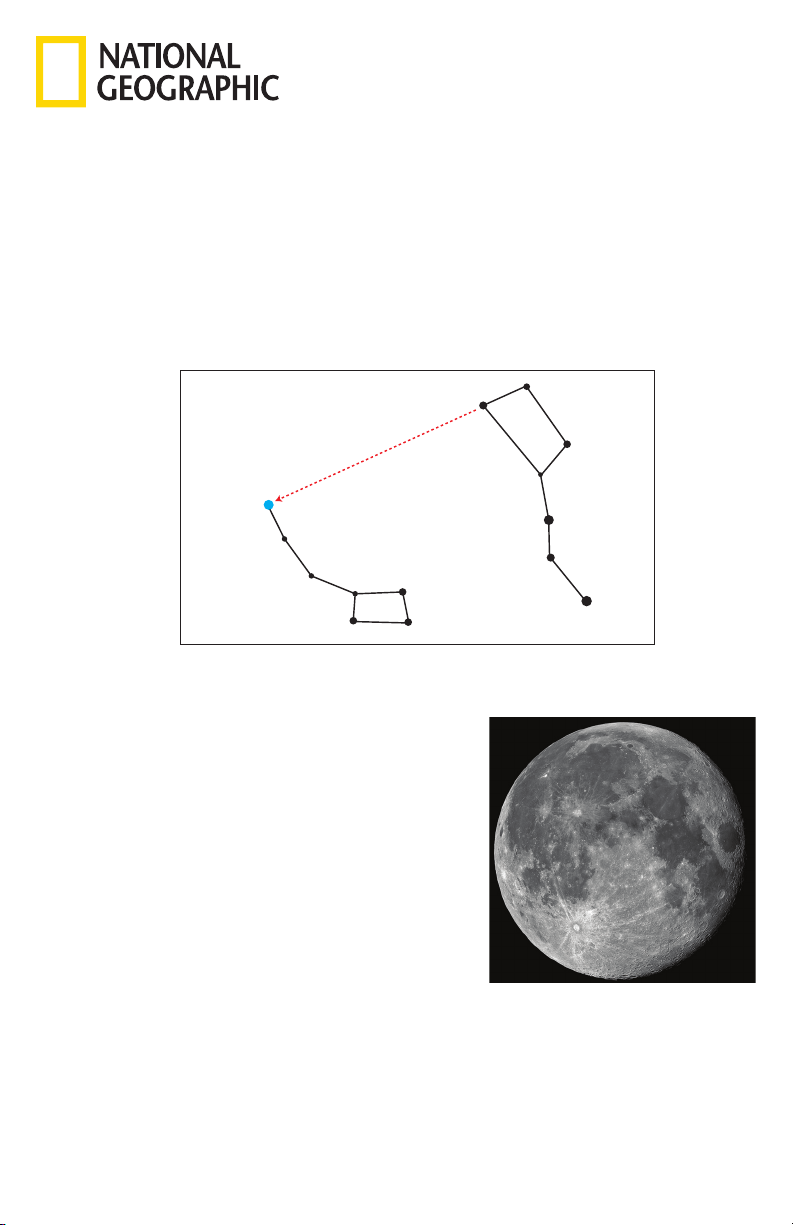
For example, Polaris, which is commonly referred to as The North Star, can be located quickly using
star hopping. First, find the Big Dipper asterism in the Ursa Major constellation. The popular pattern is
defined by seven stars, and the two stars on the front edge of the Big Dipper’s “bowl” are Merak and
Dubhe. Next, draw an imaginary line from the bottom star (Merak) on this front edge through the top
star (Dubhe) on the front edge. Follow the line to the first bright star you see. That should be Polaris.
Finally, to verify your finding, locate the Little Dipper asterism. Polaris is the anchor star at the end of
the Little Dipper’s “handle.”
Image credit: Howard Eskildsen
Note: Images are for illustration purposes only. Quality of your image may very depending upon atmospheric conditions and location.
Possible Objects for Observation:
What you can observe at any one time in your telescope
depends on several factors beyond aperture and magnification.
These factors include location, date, time and sky conditions.
The following are all objects that can be seen with the unaided
eye and/or binoculars. Your telescope can enhance views of any
of these objects if the observing conditions are right.
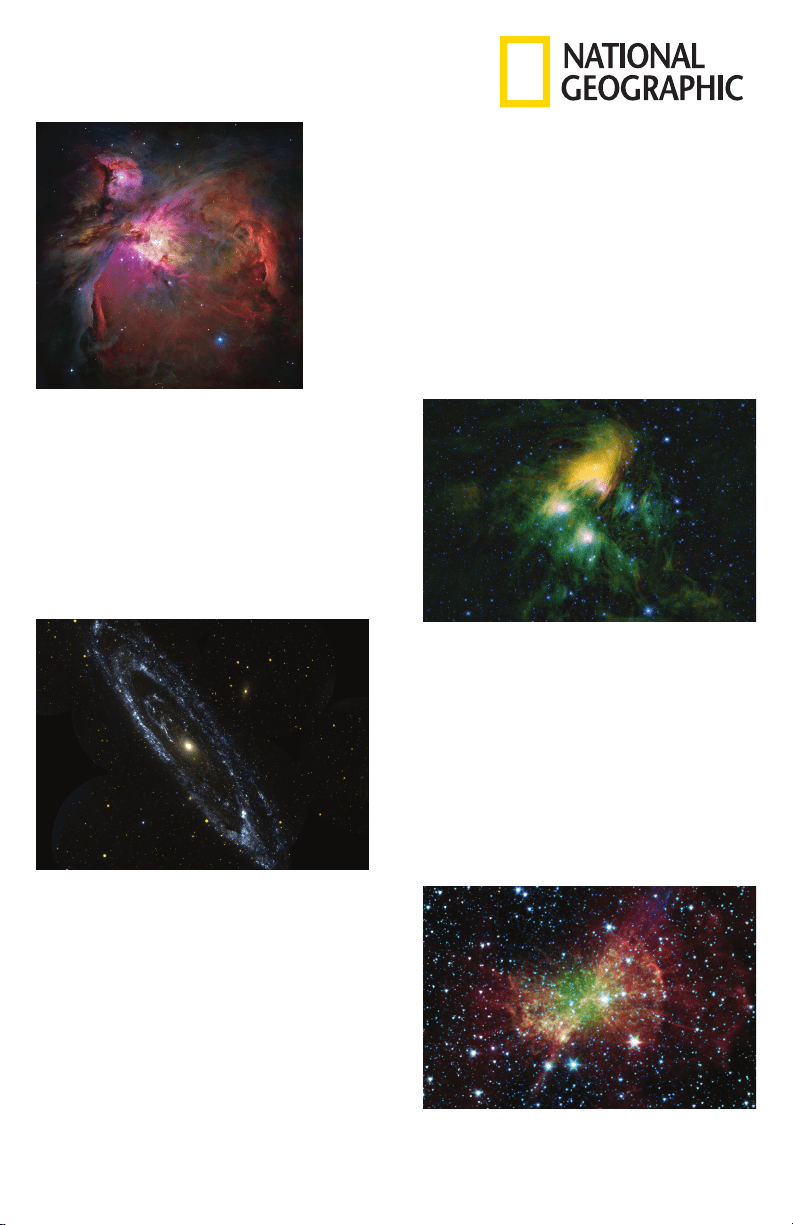
The Moon:
Diameter: 3,476 km
Distance: Approximately 384,401 km
The Moon is the Earth’s only natural satellite, and it is the
second brightest object in the sky (after the Sun). Although it
is our closest neighbor, a lot of people have never really taken
a good long like at the Moon. With your telescope, you should
be able to see several interesting lunar features. These include
lunar maria, which appear as vast plains, and some of the larger
craters. The best views will be found along the terminator, which
is the edge where the visible and shadowed portions of the
Moon meet.
BIG DIPPER
LITTLE DIPPER
POLAR STAR
CASSIOPEIA
Caph
Zeta
Beta
Kochab
Pherkad
Gamma
Eta
Epsilon
Delta
Alpha
Shedar
Cih
Ksora
Segin
Alkaid
Alcor
Mizar
Alioth
Megrez
Phecda
Merak
Dubhe
Note: The positioning of the Big Dipper in relation to the Little Dipper does not change, but the
orientation of both in the night sky will rotate throughout the year due to the motion of the Earth.
11
Orion Nebula(M42):
Right ascension: 05: 35.4 (hours: minutes)
Declination: -05: 27 (degrees: minutes)
Distance: Approximately 1,344 light years
The Orion Nebula is a vast star-forming region located in
the “sword” branching off of the famous Orion’s Belt. Also
known as Messier 42, this diffuse nebula is bright enough to
see with the unaided eye — although it will only appear as a
slightly foggy star. However, with your telescope, you can see
many of the beautiful details, such as the billowing clouds of
gas and dust where new stars are being born.
Image credit: NASA, ESA, M. Robberto (Space Telescope Science Institute/ESA)
and the Hubble Space Telescope Orion Treasury Project Team
11
Pleiades Star Cluster(M45):
Right ascension: 03: 47.0 (hours: minutes)
Declination: +24: 07 (degrees: minutes)
Distance: Approximately 444 light years
The Pleiades Star Cluster is a group of brilliant blue
stars located in the Taurus Constellation. Also known
as Messier 45 or “Seven Sisters”, this open star cluster
consists of more than 1,000 confirmed stars, although
an average of only six are visible to the unaided eye.
With your telescope, you can quickly reveal some
of the more elusive members of this legendary and
beautiful cluster.
Image credit: NASA/JPL-Caltech/UCLA
Dumbbell Nebula(M27)
Right ascension: 19:59.6 (hours: minutes)
Declination: +22:43 (degrees: minutes)
Distance: Approximately 1,360 light years
The Dumbbell Nebula was the first planetary nebula
ever discovered. It is one of the most popular sights
in the Vulpecula constellation. Easy to find with
binoculars and amazing in a telescope, the shape of
this bright, double-lobed nebula has been compared
to a dumbbell, an hourglass or an apple core. As an
added bonus, the white dwarf that lies at the heart of
the Dumbbell Nebula is larger than any other star of
its kind.
Image credit: NASA/JPL-Caltech/Harvard-Smithsonian CfA
Andromeda Galaxy(M31):
Right ascension: 00: 42.7 (hours: minutes)
Declination: +41: 16 (degrees: minutes)
Distance: Approximately 2.54 million light years
The Andromeda Galaxy is the closest major galaxy
to our own Milky Way. Also known as Messier 31,
this famous spiral galaxy is part of the Local Group
of galaxies. Although it is technically bright enough
to see with the unaided eye under a very dark sky,
your telescope may show its bright center, hints of
its spiral structure and its much smaller companion
galaxies known as M32 and M110.
Image credit: NASA/JPL-Caltech
Note: Images are for illustration purposes only. Quality of your image may very depending upon atmospheric conditions and location.
1212
Light
Light
Secondary Mirror
Primary Mirror
(Objective)
Focuser
Focuser
Light
Light
Objective Lens
Light
Light
Secondary Mirror
Primary Mirror (Objective)
Correcting Lens
Reflector
(Newtonian)
Refractor
Catadioptric
(Maksutov-Cassegrain/
Schmidt-Cassegrain)
Light
Light
Secondary Mirror
Primary Mirror
(Objective)
Focuser
Focuser
Light
Light
Objective Lens
Light
Light
Secondary Mirror
Primary Mirror (Objective)
Correcting Lens
Reflector
(Newtonian)
Refractor
Catadioptric
(Maksutov-Cassegrain/
Schmidt-Cassegrain)
Light
Light
Secondary Mirror
Primary Mirror
(Objective)
Focuser
Focuser
Light
Light
Objective Lens
Light
Light
Secondary Mirror
Primary Mirror (Objective)
Correcting Lens
Reflector
(Newtonian)
Refractor
Catadioptric
(Maksutov-Cassegrain/
Schmidt-Cassegrain)
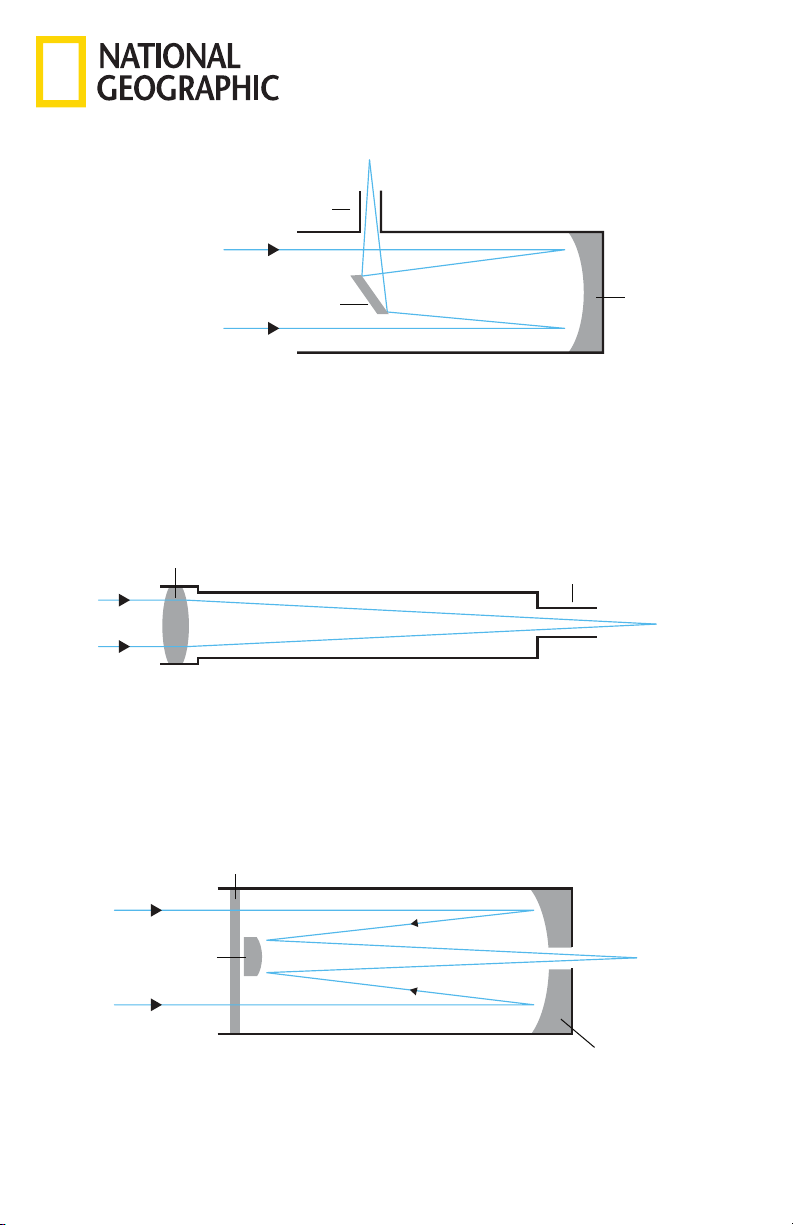
Reflector
A reflector telescope uses mirrors to gather and focus light. Light enters the telescope through its
open front end and travels to the concave primary mirror at the back. From there the light is reflected
back up the tube to a flat secondary mirror, which sits at a 45° angle in relation to the eyepiece. Light
bounces off of this secondary mirror and out through the eyepiece. A reflector telescope is designed
for astronomical use. Terrestrial objects may appear inverted, sideways or at an angle depending on
how your tube is oriented due to optical design. This rotation is perfectly normal on all Newtonian
reflectors and will not affect astronomical viewing.
Refractor:
A refracting telescope uses a collection of lenses to gather and focus light. A refractor’s views will
be upside down if a diagonal is not in use. A standard diagonal will generate a “right side up” image,
however, it will rotate the image on the vertical axis (mirror image). To get the “right side up” image
without the rotation, you will need to use a special diagonal with an erect image prism.
Catadioptric:
A catadioptric telescope uses a combination of mirrors and lenses to gather and focus light. Popular
catadioptric designs include the Maksutov-Cassegrain and Schmidt-Cassegrain.
Types Of Telescopes:
1313
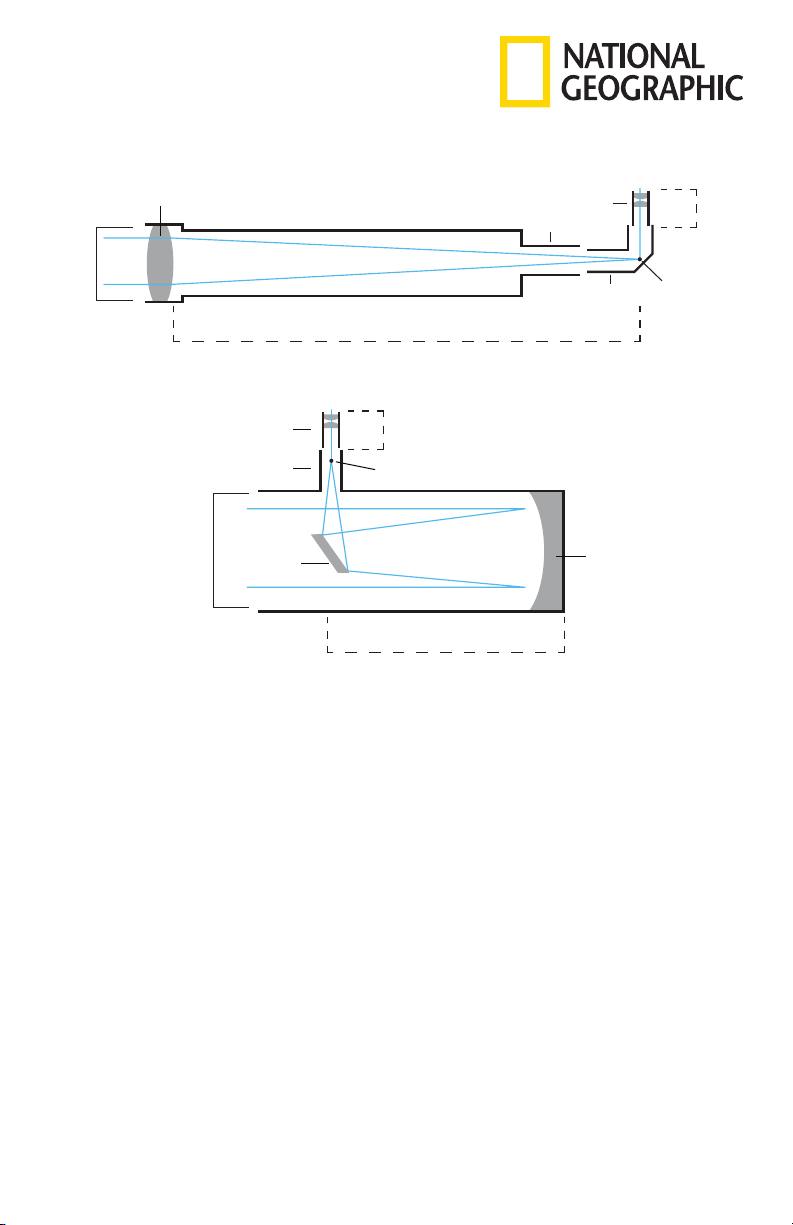
Aperture:
This figure, which is usually expressed in millimeters, is the diameter of a telescope’s light-gathering
surface (objective lens in a refractor or primary mirror in a reflector). Aperture is the key factor in
determining the brightness and sharpness of the image.
Objective Lens:
The objective lens is the main light-gathering component of a refractor telescope. It is actually
composed of several lens elements.
Diagonal:
This accessory houses a mirror that deflects the ray of light 90 degrees. With a horizontal telescope
tube, this device deflects the light upwards so that you can comfortably observe by looking downwards
into the eyepiece. The image in a standard diagonal mirror appears upright, but rotated around its
vertical axis (mirror image). To get an image without this rotation, you will need to use a special
diagonal with an erect image prism.
Eyepiece:
An eyepiece is an optical accessory comprised of several lens elements. It determines the magnification
of a particular observing setup.
Primary Mirror:
The primary mirror is the principle light-gathering surface of a reflector telescope.
Secondary Mirror:
A secondary mirror is a small mirror that sits at a 45° angle in relation to the primary mirror of a
reflecting telescope. Light from the primary mirror is reflected back up the tube to the secondary
mirror. The light is directed from this mirror up into the eyepiece.
Objective Lens
Aperture
(mm)
Aperture
(mm)
Eyepiece
Diagonal Focal Point
Focal Point
Focal Length Telescope
(mm)
Focal Length Telescope
(mm)
Focal Length
Eyepiece
(mm)
Focal Length
Eyepiece
(mm)
Focuser
Secondary
Mirror
Primary Mirror
(Objective)
Focuser
Eyepiece
Telescope Terms to Know:
1414
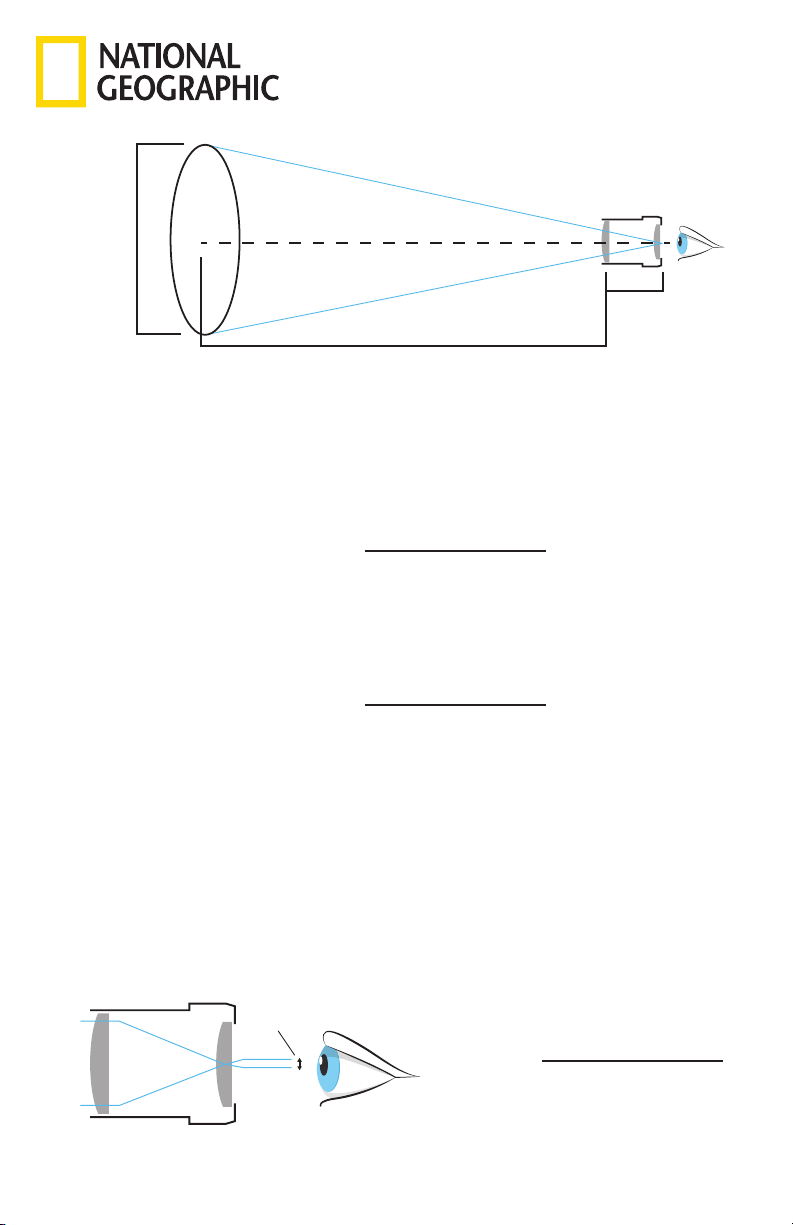
Magnification:
The magnification corresponds to the difference between observation with the naked eye and
observation through a magnifying device like a telescope. If a telescope configuration has a
magnification of 30x, then an object viewed through the telescope will appear 30 times larger than
it would with the naked eye. To calculate the magnification of your telescope setup, divide the focal
length of the telescope tube by the focal length of the eyepiece. For example, a 20mm eyepiece in a
telescope with a 1000mm focal length will result in 50x power, which will make the object appear 50
times larger. If you change the eyepiece, the power goes up or down accordingly.
Focal ratio
The focal ratio of a telescope is determined by dividing the telescope’s focal length by its aperture
(usually expressed in millimeters). It plays a key role in determining a telescope’s field of view and
significantly impacts imaging time in astrophotography. For example, a telescope with a focal length of
1000mm and a 100mm clear aperture has a focal ratio of f/10.
Focal length (Telescope):
The focal length is the distance in millimeters between the objective lens or primary mirror and the
point at which entering light rays converge — otherwise known as the focal point. The focal lengths of
the telescope tube and the eyepiece are used to determine magnification.
Focal length (Eyepiece):
The focal length is the distance in millimeters between the center of the first lens element in an
eyepiece and the focal point. The focal lengths of the telescope tube and the eyepiece are used
to determine magnification. Short eyepiece focal lengths produce higher magnifications than long
eyepiece focal lengths.
Exit Pupil
The exit pupil is the diameter of the beam of light coming out of the eyepiece. To calculate exit pupil,
divide the focal length of your eyepiece by your telescope’s focal ratio. For example, if you use a 20mm
eyepiece with an f/5 telescope, the exit pupil would be 4mm.
Magnification =
Telescope Focal Length
Eyepiece Focal Length
Focal Ratio =
Telescope Focal Length
Telescope Aperture
Exit Pupil =
Eyepiece Focal Length
Telescope Focal Ratio
Eyepiece Lens
Long Eye Relief Distance
Eyepiece Lens
Short Eye Relief Distance
Eyepiece Lens
Exit Pupil (mm)
Telescope Focal Length
1000mm
Eyepiece
Focal Length
20mm
Aperture
102mm
15
Eyepiece Lens
Long Eye Relief Distance
Eyepiece Lens
Short Eye Relief Distance
Eyepiece Lens
Exit Pupil (mm)
Eyepiece Lens
Long Eye Relief Distance
Eyepiece Lens
Short Eye Relief Distance
Eyepiece Lens
Exit Pupil (mm)
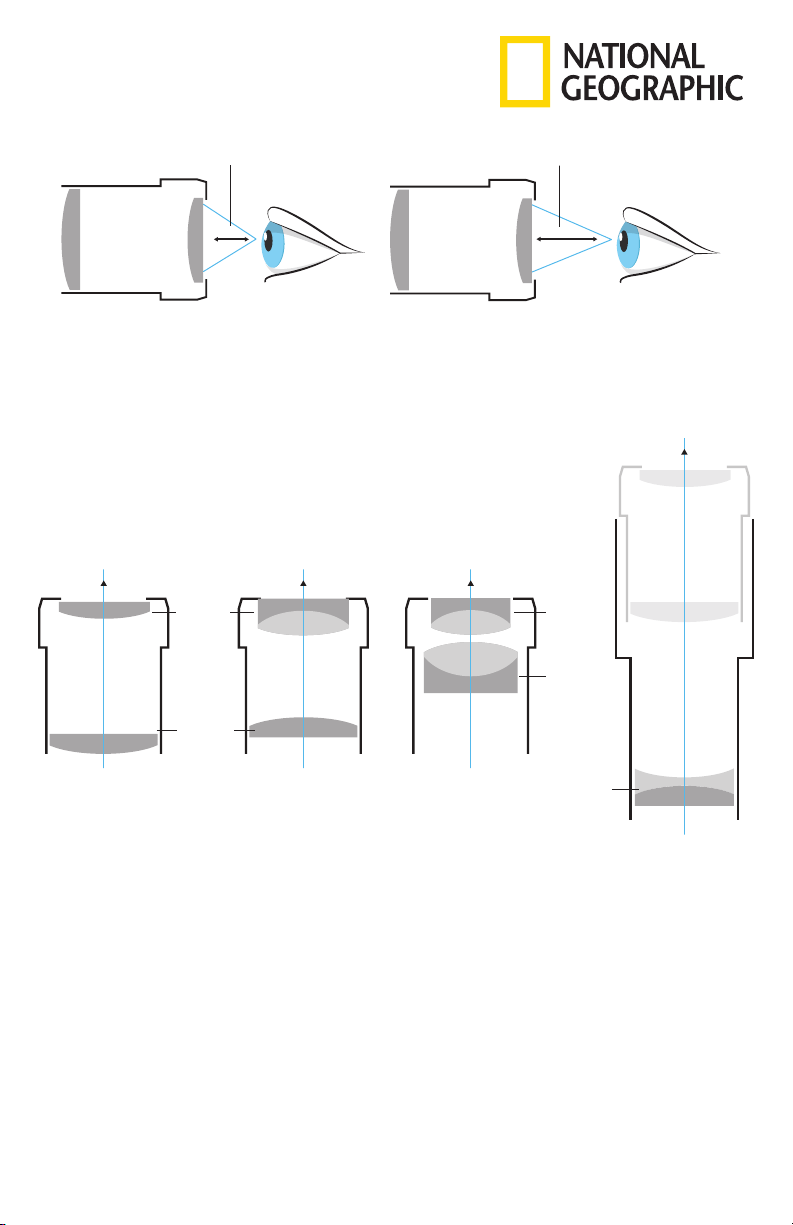
Eye Relief
Eye relief is all about a comfortable viewing experience because it is the distance at which you
need to position your eye from the eyepiece’s outermost surface to enjoy the full field of view. This
characteristic is of special concern to observers who wear glasses to correct an astigmatism, because a
long enough eye relief is necessary to allow room
for glasses.
Huygenian Eyepieces:
A Huygenian eyepiece uses two plano-convex lenses separated by an air gap. They have a fairly narrow
apparent field of view.
Kellner Eyepieces:
A Kellner eyepiece uses three lens elements - two of which are paired together in an achromatic
doublet design to minimize chromatic aberrations. They typically produce an apparent field of view
around 45°.
Plössl Eyepieces:
A Plossl eyepiece uses two doublets (a pairing of lens) for a total of four lens elements. This eyepiece
design delivers sharp views and an apparent field of view of approximately 50°, which works well for
both planetary and deep sky viewing.
Barlow Lens:
A Barlow lens effectively increases the focal length of a telescope. It is inserted between the eyepiece
and the focuser/diagonal (depending on the optical setup) and multiplies the magnification power of
the eyepiece.
For example, a 2x Barlow will double the magnification of a particular eyepiece.
Barlow Lens
2 Lens Elements
Huygenian Eyepiece
2 Lens Elements
Light
Kellner Eyepiece
3 Lens Elements
Light
Plössl Eyepiece
4 Lens Elements
Light
Light
Eye Lens
Field Lens
Eye Lens
Field Lens
Field Lens

16
Caution: The user is cautioned that changes or modifications not expressly approved by the party
responsible for compliance could void the user’s authority to operate the equipment.
Note: This equipment has been tested and found to comply with the limits for a Class B digital device,
pursuant to part 15 of the FCC Rules. These limits are designed to provide reasonable protection
against harmful interference in a residential installation. This equipment generates uses and can radiate
radio frequency energy and, if not installed and used in accordance with the instructions, may cause
harmful interference to radio communications. However, there is no guarantee that interference will not
occur in a particular installation. If this equipment does cause harmful interference to radio or television
reception, which can be determined by turning the equipment off and on, the user is encouraged to try
to correct the interference by one or more of the following measures:
—Reorient or relocate the receiving antenna.
—Increase the separation between the equipment and receiver.
—Connect the equipment into an outlet on a circuit different from that to which the receiver is
connected.
—Consult the dealer or an experienced radio/TV technician for help.
FCC RF Radiation Exposure Statement:
This equipment complies with FCC radiation exposure limits set forth for an uncontrolled environment.
This equipment should be installed and operated with a minimum distance of 20cm between the
radiator and any part of your body.
FCC Supplier’s Declaration of Conformity
Product name / model number: Smartphone Mount w/Bluetooth / AR5588
This device complies with part 15 of the FCC Rules. Operation is subject to the following two conditions:
(1) This device may not cause harmful interference, and (2) this device must accept any interference
received, including interference that may cause undesired operation.
Explore Scientific, LLC
1010 South 48th Street, Springdale, AR 72762
866.252.3811
www.explorescientific.com

17
Notes:

18
Notes:

19
Notes:

20
V102020
©2020 National Geographic Partners LLC. All rights reserved.
NATIONAL GEOGRAPHIC and Yellow Border Design are trademarks of the
National Geographic Society, used under license.
©2020 Explore Scientic, LLC
1010 S. 48th Street, Springdale AR 72762.
All rights reserved. Made in China.
explorescientic.com | 866.252.3811
Contents, colors and specications may vary.