INSTRUCTION MANUAL
MANUAL DE INSTRUCCIONES
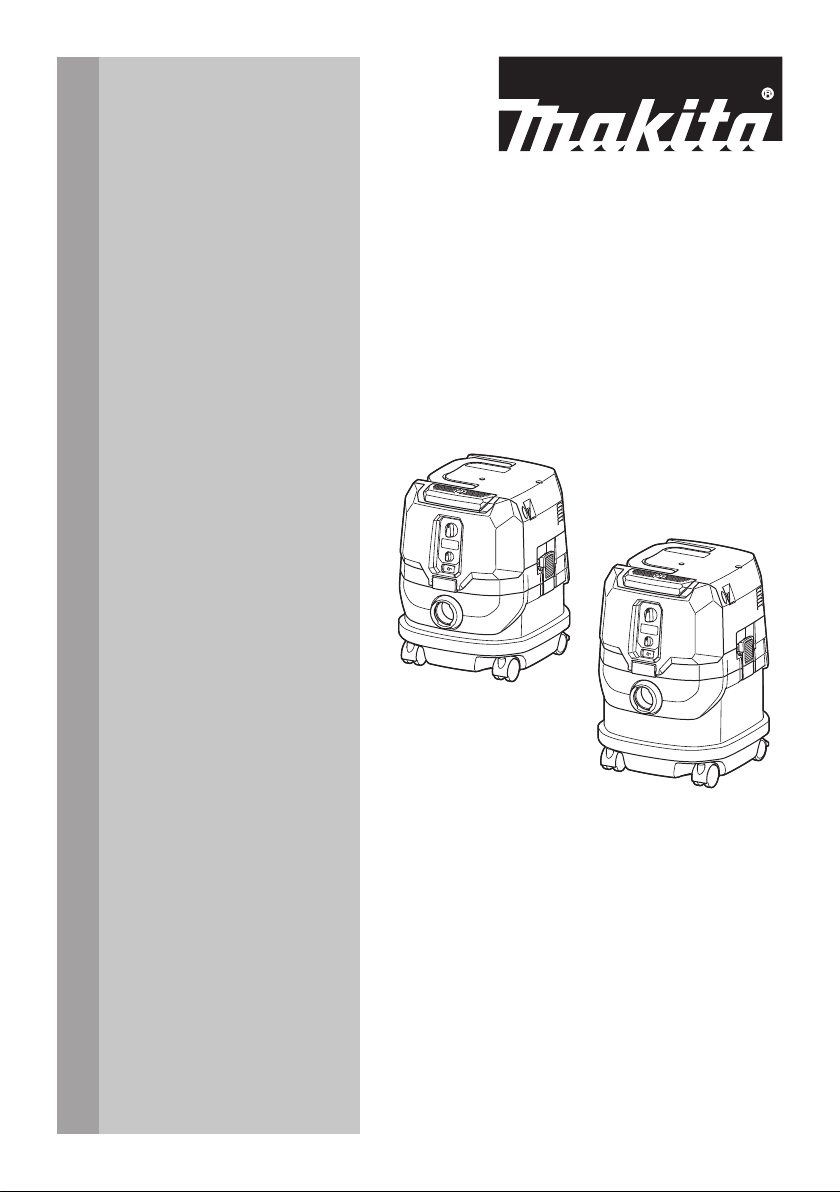
Cordless Vacuum Cleaner
Aspiradora Inalámbrica
GCV02
GCV04
IMPORTANT: Read Before Using.
IMPORTANTE: Lea antes de usar.
2 ENGLISH
ENGLISH (Original instructions)
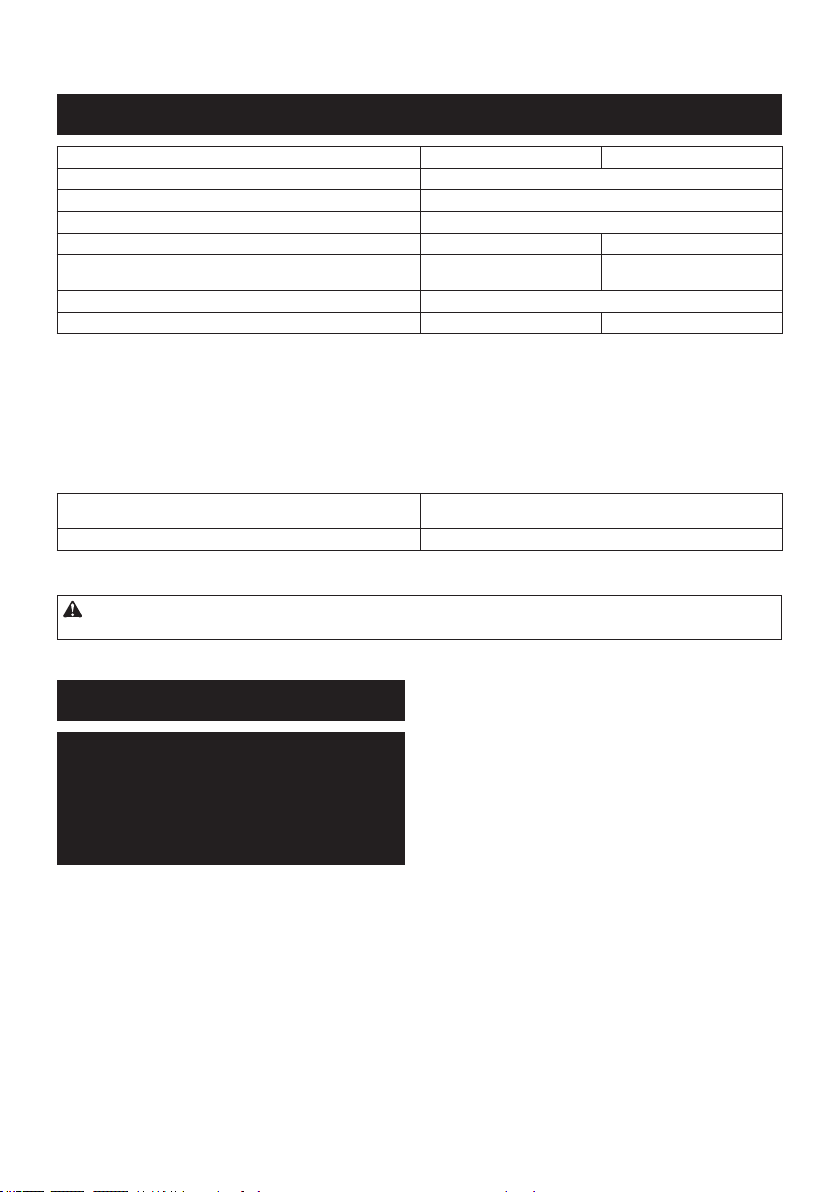
SPECIFICATIONS
Model: GCV02 GCV04
Standard lter type Powder lter (for dry dust)
Maximum air volume (with BL4040, ø38 mm (1-1/2") x 2.5 m (98-1/2") hose)
2.7 m
3
/min (95.35 cu.ft/min)
Vacuum (with BL4040, ø38 mm (1-1/2") x 2.5 m (98-1/2") hose) 23 kPa
Recoverable capacity 8 L (2.1 gal.) 15 L (4.0 gal.)
Dimensions (L x W x H) 366 mm x 334 mm x 425 mm
(14-3/8″ x 13-1/8″ x 16-3/4″)
366 mm x 334 mm x 475 mm
(14-3/8″ x 13-1/8″ x 18-3/4″)
Rated voltage D.C. 36 V - 40 V max
Net weight 8.3 - 10.2 kg (18.3 - 22.5 lbs) 8.6 - 10.5 kg (19.0 - 23.1 lbs)
• Due to our continuing program of research and development, the specications herein are subject to change
without notice.
• Specications and battery cartridge may dier from country to country.
• The weight does not include accessories but battery cartridge(s). The lightest and heaviest combination weight
of the appliance and battery cartridge(s) are shown in the table.
• For wet dust, the oat and the water lter or cloth lter are required.
Applicable battery cartridge and charger
Battery cartridge BL4020 / BL4025 / BL4040* / BL4050F*
* : Recommended battery
Charger DC40RA / DC40RB / DC40RC
• Some of the battery cartridges and chargers listed above may not be available depending on your region of
residence.
WARNING: Only use the battery cartridges and chargers listed above. Use of any other battery cartridges
and chargers may cause injury and/or re.
SAFETY WARNINGS
IMPORTANT
SAFETY
INSTRUCTIONS
When using an electrical appliance,
basic precautions should always be fol-
lowed, including the following:
READ ALL
INSTRUCTIONS
BEFORE USING
THIS APPLIANCE.
WARNING
To reduce the risk of re, electric shock
or injury:
1. Do not leave appliance when battery
tted. Remove battery from appli-
ance when not in use and before
servicing.
2. Do not use on wet surfaces. Do not
expose to rain. Store indoors.
3. Do not allow to be used as a toy.
Close attention is necessary when
used by or near children.
4. Use only as described in this man-
ual. Use only manufacturer's recom-
mended attachments.
5. Do not use with damaged battery.
If appliance is not working as it
should, has been dropped, dam-
aged, left outdoors, or dropped into
water, return it to a service center.

3 ENGLISH
6.
Do not handle battery or appliance
with wet hands.
7.
Do not put any object into openings.
Do not use with any opening blocked;
keep free of dust, lint, hair, and any-
thing that may reduce air ow.
8. Keep hair, loose clothing, ngers,
and all parts of body away from
openings and moving parts.
9. Turn o all controls before removing
the battery cartridge.
10.
Use extra care when cleaning on stairs.
11. Do not use to pick up ammable or
combustible liquids, such as gaso-
line, or use in areas where they may
be present.
12. Use only the charger supplied by
the manufacturer to recharge.
13. Do not pick up anything that is burn-
ing or smoking, such as cigarettes,
matches, or hot ashes.
14. Always make sure that lters are
correctly installed before use. Do
not use the cleaner without lters
in place. Replace a damaged lter
immediately. It is recommended to
have some spares as lters are con-
sumable items.
15. Do not charge the battery outdoors.
16.
Do not use the cleaner as a stool or
work bench. The machine may fall
down and may result in personal injury.
17. Do not pick up foam or soapy liquid.
It can cause foam to come out of air
exit, resulting in electric shock and
damage to the cleaner.
18. Do not vacuum the following:
• Flammable liquid (kerosene,
gasoline, solvents such as ben-
zine, thinner, etc.)
• Hot substances that are burn-
ing or smoking (cigarettes,
matches, incense sticks, can-
dles, hot ashes), sparks and
metal dust generated by cutting
or grinding metal, etc.
• Flammable material (toner,
paint, spray, etc.)
•
Foam like carpet cleaning agent, etc.
(they may cause explosion or re)
• Explosive or pyrophoric sub-
stances (nitroglycerin, alumi-
num, magnesium, titanium, zinc,
red phosphorus, yellow phos-
phorus, celluloid, etc. and their
dust, gas or steam)
• Sharp objects (glass, cutlery,
wood splinter, metal, stone, nail,
razor, push pin, etc.)
•
Solidifying and conductive ne
powder (metal or carbon powder)
• Dehumidier
• Large amount of powder (our,
re extinguisher powder, etc.)
• Substances that cause toxic
symptoms
• Aggressive chemicals (acid,
leach, etc.)
• Liquid or damp garbage, includ-
ing vomit and excreta
• Asbestos
• Pesticides
Such action may cause re, injury
and/or property damage.
To reduce your exposure to these
chemicals, always wear approved
respiratory protection such as dust
masks that are specially designed
to lter out microscopic particles.
Direct the exhaust air away from
your face and body.
NOTE: Read the OSHA regulation
on silica dust to understand the
requirements needed to reduce
exposure to silica dust at the job-
site. Specic rules apply to the drill-
ing, demolition cutting and grinding
materials that contain silica. All
OSHA requirements regarding
reducing silica dust can be found at
the OSHA website: www.osha.gov.
Battery tool use and care
1. Prevent unintentional starting.
Ensure the switch is in the o-po-
sition before connecting to battery
pack, picking up or carrying the
appliance. Carrying the appliance with
your nger on the switch or energiz-
ing appliance that have the switch on
invites accidents.
4 ENGLISH
2.
Disconnect the battery pack from
the appliance before making any
adjustments, changing accessories,
or storing appliance. Such preventive
safety measures reduce the risk of
starting the appliance accidentally.
3. Recharge only with the charger
specied by the manufacturer. A
charger that is suitable for one type of
battery pack may create a risk of re
when used with another battery pack.
4. Use appliances only with speci-
cally designated battery packs. Use
of any other battery packs may create
a risk of injury and re.
5. When battery pack is not in use,
keep it away from other metal
objects, like paper clips, coins,
keys, nails, screws or other small
metal objects, that can make a
connection from one terminal to
another. Shorting the battery terminals
together may cause burns or a re.
6. Under abusive conditions, liquid
may be ejected from the battery;
avoid contact. If contact acciden-
tally occurs, ush with water. If liq-
uid contacts eyes, additionally seek
medical help. Liquid ejected from the
battery may cause irritation or burns.
7. Do not use a battery pack or appli-
ance that is damaged or modied.
Damaged or modied batteries
may exhibit unpredictable behavior
resulting in re, explosion or risk of
injury.
8. Do not expose a battery pack or
appliance to re or excessive tem-
perature. Exposure to re or tem-
perature above 130 °C may cause
explosion.
9. Follow all charging instructions
and do not charge the battery
pack or appliance outside of the
temperature range specied in the
instructions. Charging improperly or
at temperatures outside of the speci-
ed range may damage the battery and
increase the risk of re.
10.
Have servicing performed by a quali-
ed repair person using only identical
replacement parts. This will ensure that
the safety of the product is maintained.
11. Do not modify or attempt to repair
the appliance or the battery pack
except as indicated in the instruc-
tions for use and care.
SAVE THESE
INSTRUCTIONS.
This appliance is intended for commer-
cial use.
Symbols
The followings show the symbols used for
tool.
volts
direct current
Take particular care and
attention.
Never stand on the cleaner.
Important safety
instructions for
battery cartridge
1.
Before using battery cartridge, read
all instructions and cautionary mark-
ings on (1) battery charger, (2) bat-
tery, and (3) product using battery.
2. Do not disassemble or tamper the
battery cartridge. It may result in a
re, excessive heat, or explosion.
3. If operating time has become
excessively shorter, stop operating
immediately. It may result in a risk
of overheating, possible burns and
even an explosion.
4. If electrolyte gets into your eyes,
rinse them out with clear water and
seek medical attention right away. It
may result in loss of your eyesight.

5 ENGLISH
5.
Do not short the battery cartridge:
(1) Do not touch the terminals with
any conductive material.
(2) Avoid storing battery cartridge
in a container with other metal
objects such as nails, coins, etc.
(3) Do not expose battery cartridge
to water or rain.
A battery short can cause a large
current ow, overheating, possible
burns and even a breakdown.
6. Do not store and use the tool and
battery cartridge in locations where
the temperature may reach or
exceed 50 °C (122 °F).
7. Do not incinerate the battery car-
tridge even if it is severely damaged
or is completely worn out. The bat-
tery cartridge can explode in a re.
8. Do not nail, cut, crush, throw, drop
the battery cartridge, or hit against a
hard object to the battery cartridge.
Such conduct may result in a re,
excessive heat, or explosion.
9. Do not use a damaged battery.
10. The contained lithium-ion batteries
are subject to the Dangerous Goods
Legislation requirements.
For commercial transports e.g. by
third parties, forwarding agents,
special requirement on packaging
and labeling must be observed.
For preparation of the item being
shipped, consulting an expert for
hazardous material is required.
Please also observe possibly more
detailed national regulations.
Tape or mask o open contacts and
pack up the battery in such a man-
ner that it cannot move around in
the packaging.
11. When disposing the battery car-
tridge, remove it from the tool and
dispose of it in a safe place. Follow
your local regulations relating to
disposal of battery.
12. Use the batteries only with the prod-
ucts specied by Makita. Installing
the batteries to non-compliant products
may result in a re, excessive heat,
explosion, or leak of electrolyte.
13. If the tool is not used for a long
period of time, the battery must be
removed from the tool.
14. During and after use, the battery
cartridge may take on heat which
can cause burns or low temperature
burns. Pay attention to the handling
of hot battery cartridges.
15. Do not touch the terminal of the tool
immediately after use as it may get
hot enough to cause burns.
16. Do not allow chips, dust, or soil
stuck into the terminals, holes, and
grooves of the battery cartridge.
It may result in poor performance
or breakdown of the tool or battery
cartridge.
17. Unless the tool supports the use
near high-voltage electrical power
lines, do not use the battery car-
tridge near a high-voltage electrical
power lines. It may result in a mal-
function or breakdown of the tool or
battery cartridge.
18. Keep the battery away from
children.
SAVE THESE
INSTRUCTIONS.
CAUTION: Only use genuine Makita batteries.
Use of non-genuine Makita batteries, or batteries that
have been altered, may result in the battery bursting
causing res, personal injury and damage. It will
also void the Makita warranty for the Makita tool and
charger.
Tips for maintaining maximum
battery life
1. Charge the battery cartridge before completely
discharged. Always stop tool operation and
charge the battery cartridge when you notice
less tool power.
2. Never recharge a fully charged battery car-
tridge. Overcharging shortens the battery
service life.
3. Charge the battery cartridge with room tem-
perature at 10 °C - 40 °C (50 °F - 104 °F). Let
a hot battery cartridge cool down before
charging it.
4. When not using the battery cartridge, remove
it from the tool or the charger.
5. Charge the battery cartridge if you do not use
it for a long period (more than six months).
6 ENGLISH
Important safety instructions for
wireless unit
1. Do not disassemble or tamper with the wire-
less unit.
2. Keep the wireless unit away from young chil-
dren. If accidentally swallowed, seek medical
attention immediately.
3. Use the wireless unit only with Makita tools.
4. Do not expose the wireless unit to rain or wet
conditions.
5. Do not use the wireless unit in places where
the temperature exceeds 50 °C (122 °F).
6. Do not operate the wireless unit in places
where medical instruments, such as heart
pace makers are nearby.
7. Do not operate the wireless unit in places
where automated devices are nearby. If oper-
ated, automated devices may develop malfunction
or error.
8. Do not operate the wireless unit in places
under high temperature or places where
static electricity or electrical noise could be
generated.
9. The wireless unit can produce electromagnetic
elds (EMF) but they are not harmful to the
user.
10. The wireless unit is an accurate instrument. Be
careful not to drop or strike the wireless unit.
11. Avoid touching the terminal of the wireless
unit with bare hands or metallic materials.
12. Always remove the battery on the product
when installing the wireless unit into it.
13. When opening the lid of the slot, avoid the
place where dust and water may come into the
slot. Always keep the inlet of the slot clean.
14. Always insert the wireless unit in the correct
direction.
15. Do not press the wireless activation button
on the wireless unit too hard and/or press the
button with an object with a sharp edge.
16. Always close the lid of the slot when
operating.
17. Do not remove the wireless unit from the slot
while the power is being supplied to the tool.
Doing so may cause a malfunction of the wireless
unit.
18. Do not remove the sticker on the wireless unit.
19. Do not put any sticker on the wireless unit.
20. Do not leave the wireless unit in a place where
static electricity or electrical noise could be
generated.
21. Do not leave the wireless unit in a place sub-
ject to high heat, such as a car sitting in the
sun.
22. Do not leave the wireless unit in a dusty or
powdery place or in a place corrosive gas
could be generated.
23. Sudden change of the temperature may bedew
the wireless unit. Do not use the wireless unit
until the dew is completely dried.
24. When cleaning the wireless unit, gently wipe
with a dry soft cloth. Do not use benzine, thin-
ner, conductive grease or the like.
25. When storing the wireless unit, keep it in the
supplied case or a static-free container.
26. Do not insert any devices other than Makita
wireless unit into the slot on the tool.
27. Do not use the tool with the lid of the slot dam-
aged. Water, dust, and dirt come into the slot may
cause malfunction.
28. Do not pull and/or twist the lid of the slot more
than necessary. Restore the lid if it comes o
from the tool.
29. Replace the lid of the slot if it is lost or
damaged.
SAVE THESE INSTRUCTIONS.
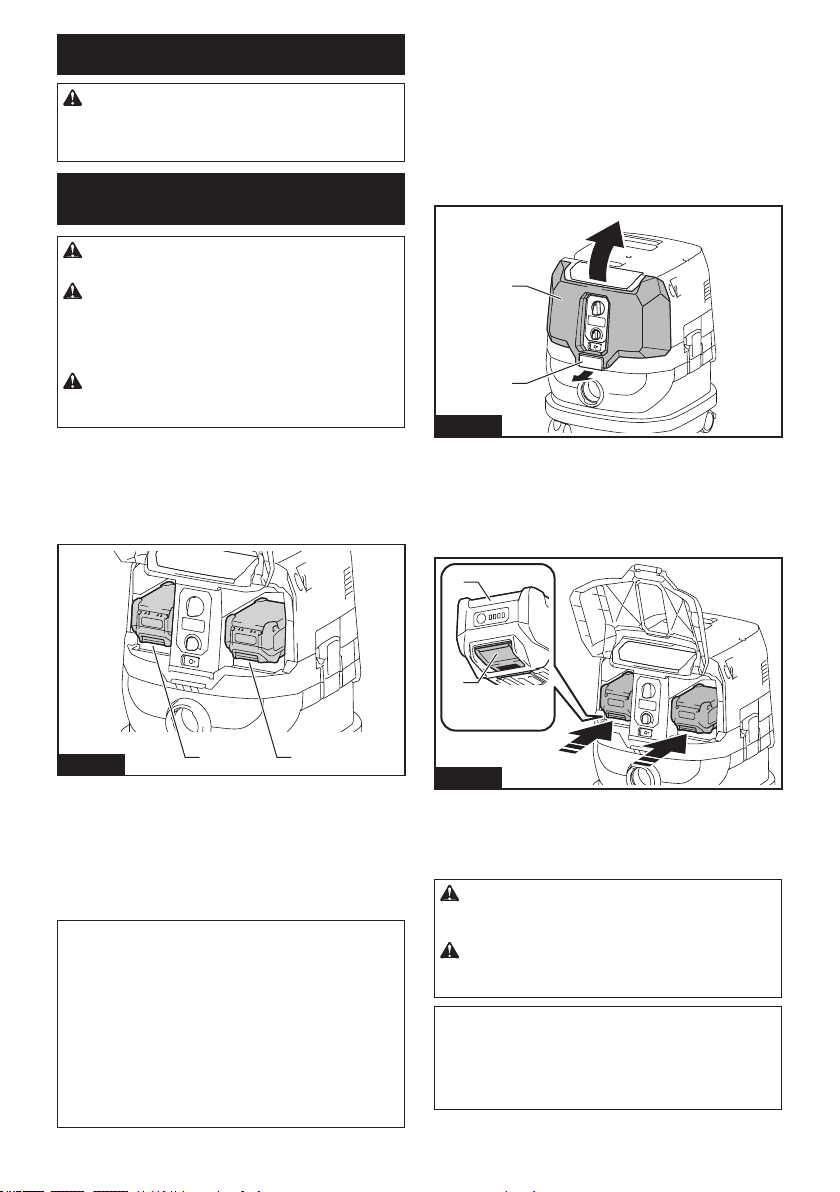
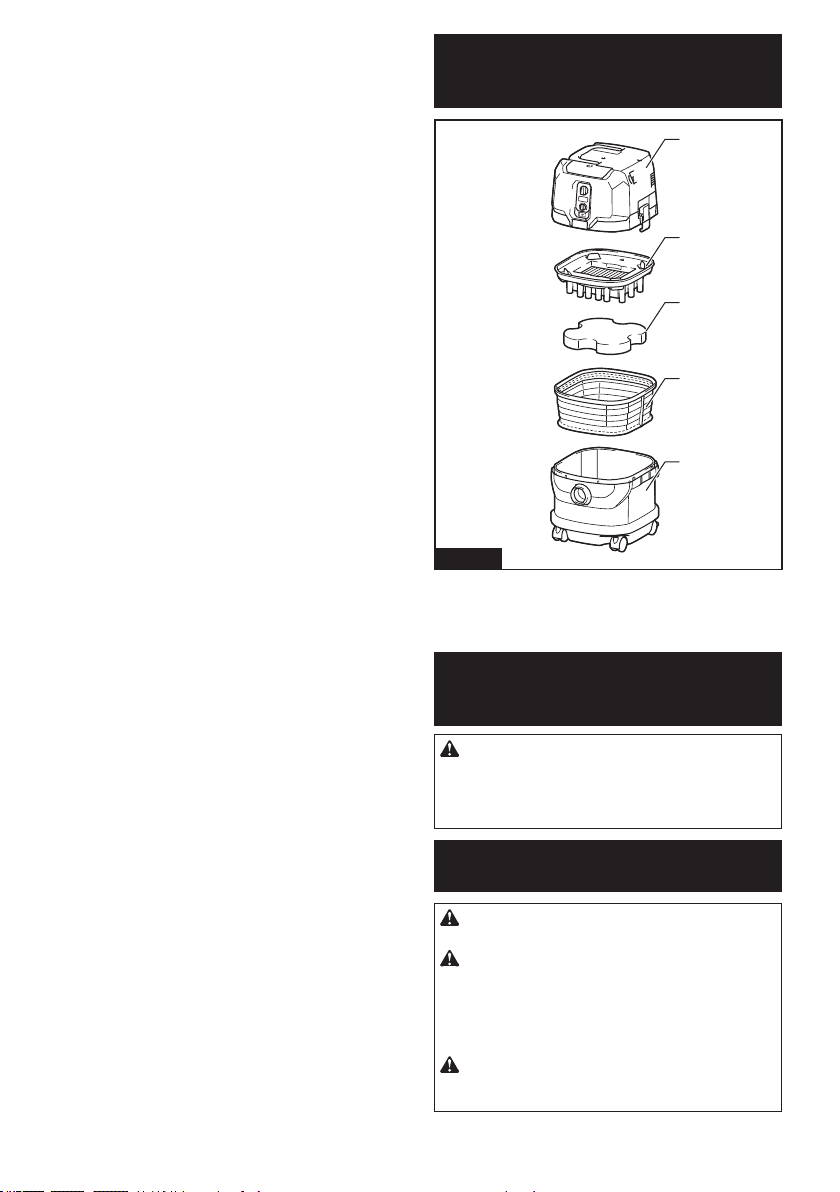
PARTS DESCRIPTION
1
2
3
4
5
Fig.1
► 1. Head unit 2. Powder lter (HEPA) 3. Damper
4. Prelter 5. Tank
7 ENGLISH
FUNCTIONAL DESCRIPTION
CAUTION: Always be sure that the appliance
is switched o and the battery cartridges are
removed before adjusting or checking function on
the appliance.
Installing or removing battery
cartridge
CAUTION: Always switch o the appliance
before installing or removing battery cartridges.
CAUTION: Hold the cleaner and battery car-
tridges rmly when installing or removing battery
cartridges. Failure to do so may cause them to slip
o your hands, resulting in damage to the cleaner and
battery cartridges or personal injury.
CAUTION: Be careful not to pinch your n-
gers when opening or closing the battery cover.
Failure to do so may cause personal injury.
The cleaner has double battery slots. With two identical
batteries in parallel, you can extend your running time
in one or more uses without having to stop to recharge
batteries. The cleaner also works with a single battery,
so you can choose with either double batteries or single
battery according to your needs.
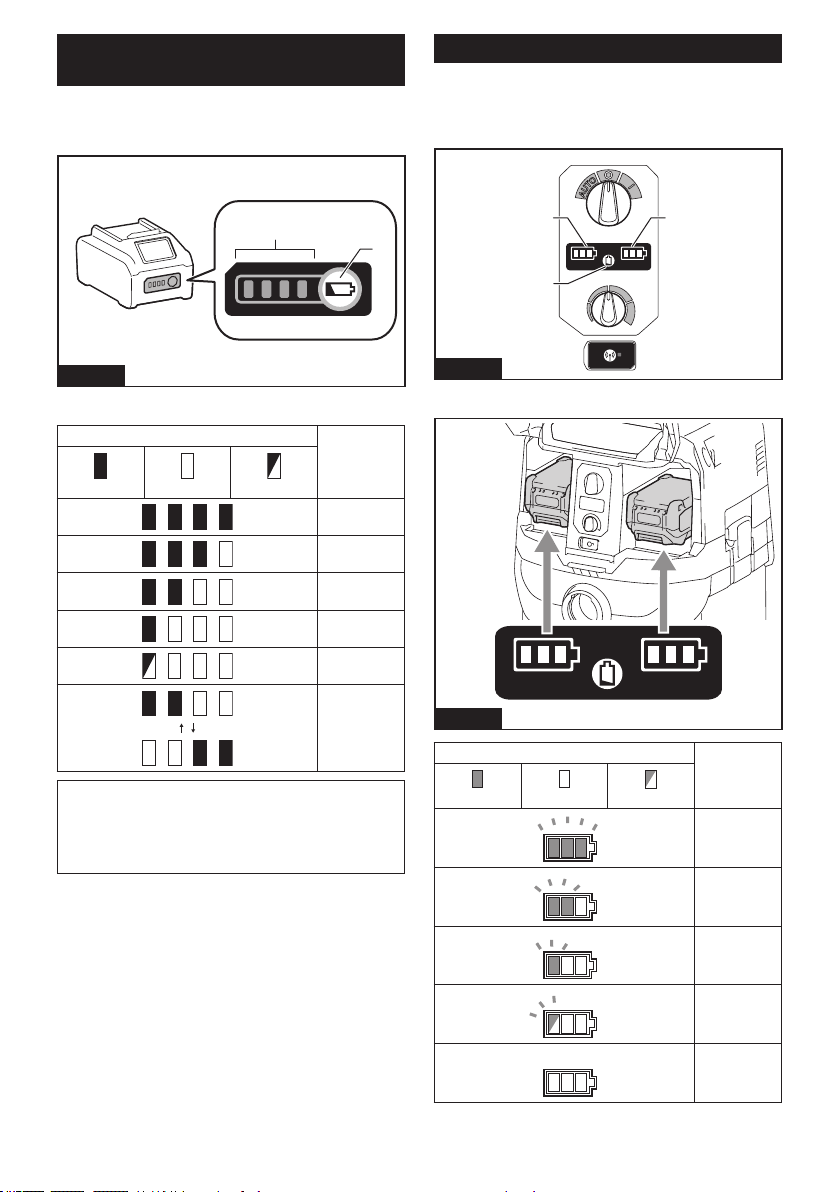
2
1
Fig.2
► 1. Left battery slot 2. Right battery slot
With double batteries
Continuous drive with two batteries allows longer run-
time and more ecient cleaning. When the rst battery
is becoming empty, the cleaner automatically switches
a power source, so it continues working with the second
battery.
NOTE: The left battery slot (when facing the front of
the cleaner) has priority over the right battery slot.
The right battery slot will only be identied as a power
source, either when no battery is installed in the
left battery slot or the battery in the left battery slot
becomes empty.
NOTE: You can remove the battery from the left
battery slot and recharge it after the cleaner has
switched its power source from the left battery slot to
the right without ceasing operation. To give priority
back to the left battery slot after installing a recharged
battery, restart the cleaner.
With a single battery
Only one battery is required as a power source in either
the left or right battery slot. The cleaner automatically
determines which battery slot is available according to
operating conditions.
Installation and uninstallation
To install battery cartridges, release the lock rst,
and open the battery cover. Then insert the battery
cartridges.
1
2
Fig.3
► 1. Lock 2. Battery cover
Align the tongues on the battery cartridges with the
grooves in the battery housing and slip them into place.
Insert them all the way until they lock in place with a
little click.
Then lock the battery cover.
1
2
Fig.4
► 1. Battery cartridge 2. Button
To remove the battery cartridges, slide them out of the
battery housing while pressing and holding the buttons
in front of the cartridges.
CAUTION: Always install the battery cartridge
fully. If not, it may accidentally fall out of the appli-
ance, causing injury to you or someone around you.
CAUTION: Do not install the battery cartridge
forcibly. If the cartridge does not slide in easily, it is
not being inserted correctly.
NOTE: When the cleaner switches the power source
from the rst battery to the second, it may require a
temporary halt in operations, causing a slight loss of
suction. Please note that it is not malfunction so the
cleaner recovers and resumes operations immedi-
ately after the pause.
8 ENGLISH
Indicating the remaining battery
capacity
Press the check button on the battery cartridge to indi-
cate the remaining battery capacity. The indicator lamps
light up for a few seconds.
1
2
Fig.5
► 1. Indicator lamps 2. Check button
Indicator lamps Remaining
capacity
Lighted O Blinking
75% to 100%
50% to 75%
25% to 50%
0% to 25%
Charge the
battery.
The battery
may have
malfunctioned.
NOTE: Depending on the conditions of use and the
ambient temperature, the indication may dier slightly
from the actual capacity.
NOTE: The rst (far left) indicator lamp will blink when
the battery protection system works.
Battery indicators on control panel
The remaining battery capacity can be read on the
control panel at any time. Press the check button, and
the left and right indicators will show the battery charge
levels correspondingly.
11
2
Fig.6
► 1. Battery indicators 2. Check button
Fig.7
Battery indicator status Remaining
battery
capacity
On
O
Blinking
50% to 100%
20% to 50%
0% to 20%
Charge the
battery
Battery not
inserted
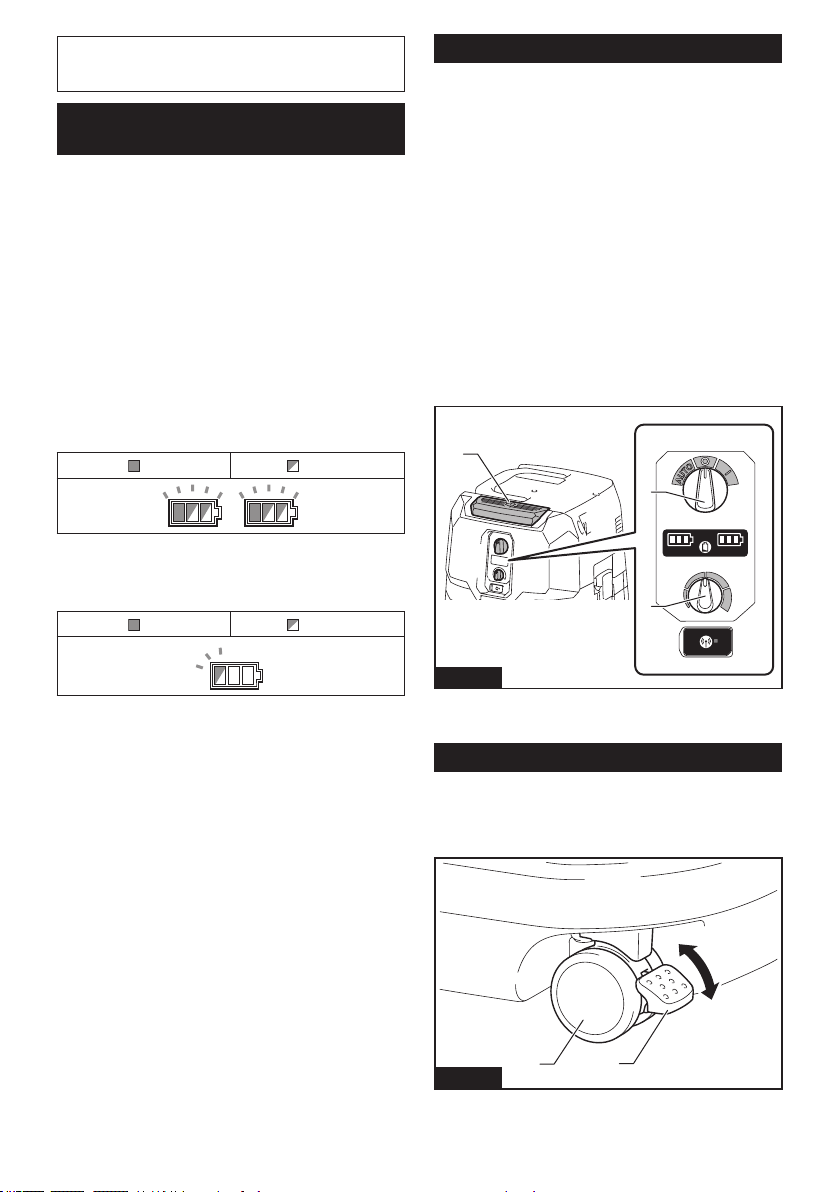
9 ENGLISH
NOTE: The battery indicators will also be activated
when the cleaner starts functioning or switches its
power source from one to another.
Appliance / battery protection
system
The appliance is equipped with an appliance/battery
protection system. This system automatically cuts o
power to the motor to extend appliance and battery life.
The appliance will automatically stop during operation
if the appliance or battery is placed under one of the
following conditions:
Overload protection
When the appliance/battery is operated in a manner
that causes it to draw an abnormally high current, the
appliance automatically stops. In this situation, turn the
appliance o and stop the application that caused the
appliance to become overloaded. Then turn the appli-
ance on to restart.
Overheat protection
On Blinking
When the appliance is overheated, the appliance stops
automatically, and both left and right battery indicators
blink. In this situation, let the appliance cool down
before turning the appliance on again.
On Blinking
When the battery is overheated, the appliance stops
automatically, and one of the indicators for overheated
battery blinks. In this situation, let the battery cool down
before turning the appliance on again.
Overdischarge protection
When the battery capacity becomes low, the appliance
stops automatically. If the appliance does not run along
with the switch operation, remove the batteries from the
appliance and recharge them.
Protections against other causes
Protection system is also designed for other causes that
could damage the appliance and allows the appliance to
stop automatically. Take all the following steps to clear
the causes, when the appliance has been brought to a
temporary halt or stop in operation.
1. Turn the appliance o, and then turn it on again to
restart.
2. Charge the battery(ies) or replace it/them with
recharged battery(ies).
3. Let the appliance and battery(ies) cool down.
If no improvement can be found by restoring protection
system, then contact your local Makita Service Center.
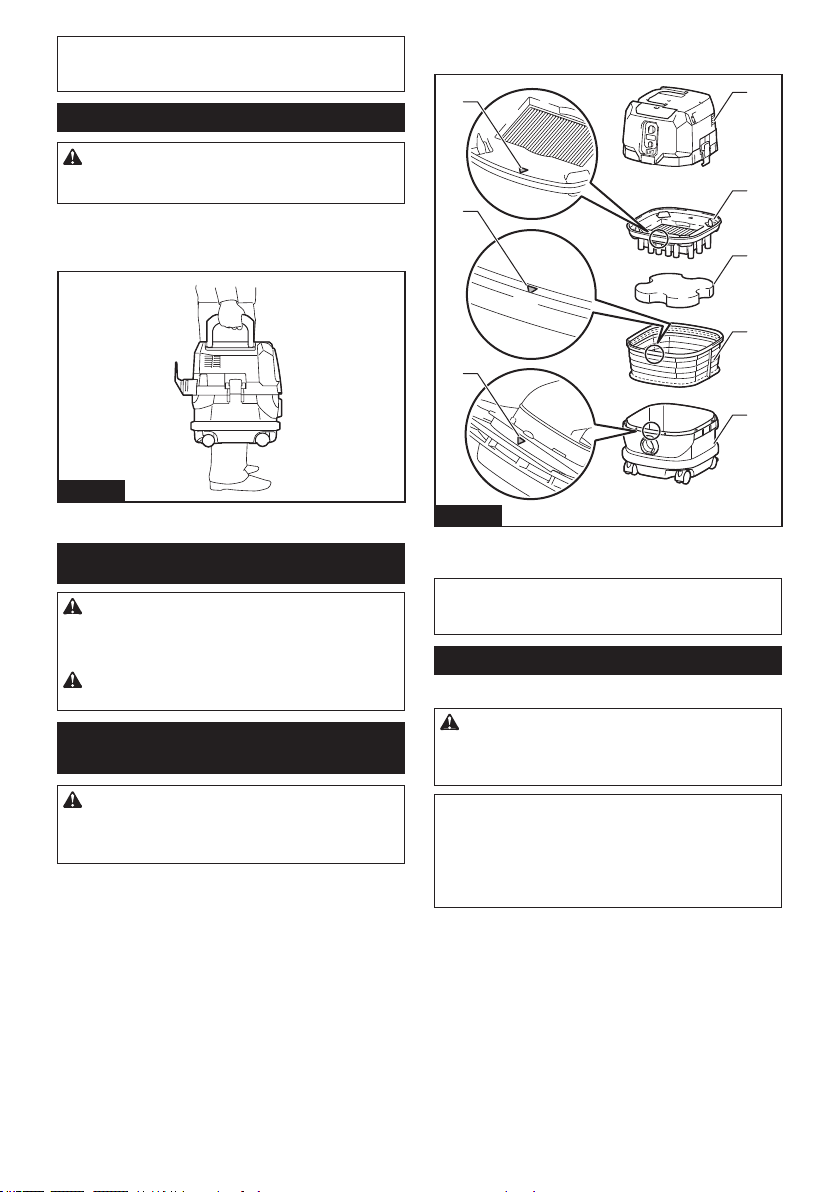
Switch action
Turning cleaner on
1.
Turn the stand-by switch in the "I" (ON) or "AUTO" (ON)
position to have the cleaner ready in stand-by mode.
2. Press the power button.
To switch back to stand-by mode, press the power
button again.
Turning cleaner o
Perform one of the following steps.
• Press the power button to set the cleaner back in
stand-by mode, and then turn the stand-by switch
in the "O" (OFF) position.
• Turn the stand-by switch in the "O" (OFF) position.
Adjusting suction power
The suction power can be adjusted according to your work needs.
• Turn the suction force adjusting knob to the left to
reduce the suction power.
• Turn the suction force adjusting knob to the right
to increase the suction power.
1
3
2
Fig.8
► 1. Stand-by switch 2. Power button 3. Suction force
adjusting knob
Locking and unlocking casters
Rear casters can be locked with stoppers to help the
cleaner stand still.
Lower the stopper lever by hand to lock the caster, and
raise it up to release.
1
2
3
4
Fig.9
► 1. Caster 2. Stopper lever 3. Unlocked position
4. Locked position
10 ENGLISH
NOTE: When moving the cleaner, make sure that the
caster is unlocked. Moving the cleaner with the caster
in a locked position may cause damage to the caster.
Carriage handle
CAUTION: Lift and carry the appliance with
due care. Failing to do so may result in personal
injury or damage to the appliance.
When carrying the cleaner, carry it by holding the han-
dle on the head unit. The handle is retractable on the
head unit when not in use.
Fig.10
ASSEMBLY
CAUTION: Always be sure that the appliance
is switched o and the battery cartridges are
removed before carrying out any work on the
appliance.
CAUTION: Always wear dust mask during
assembly or maintenance.
Installing powder lter (HEPA) and
prelter (for dry dust)
CAUTION: Never pick up water or other liq-
uids or wet dusts when using the powder lter.
Picking up such things may cause the powder lter
breakage.
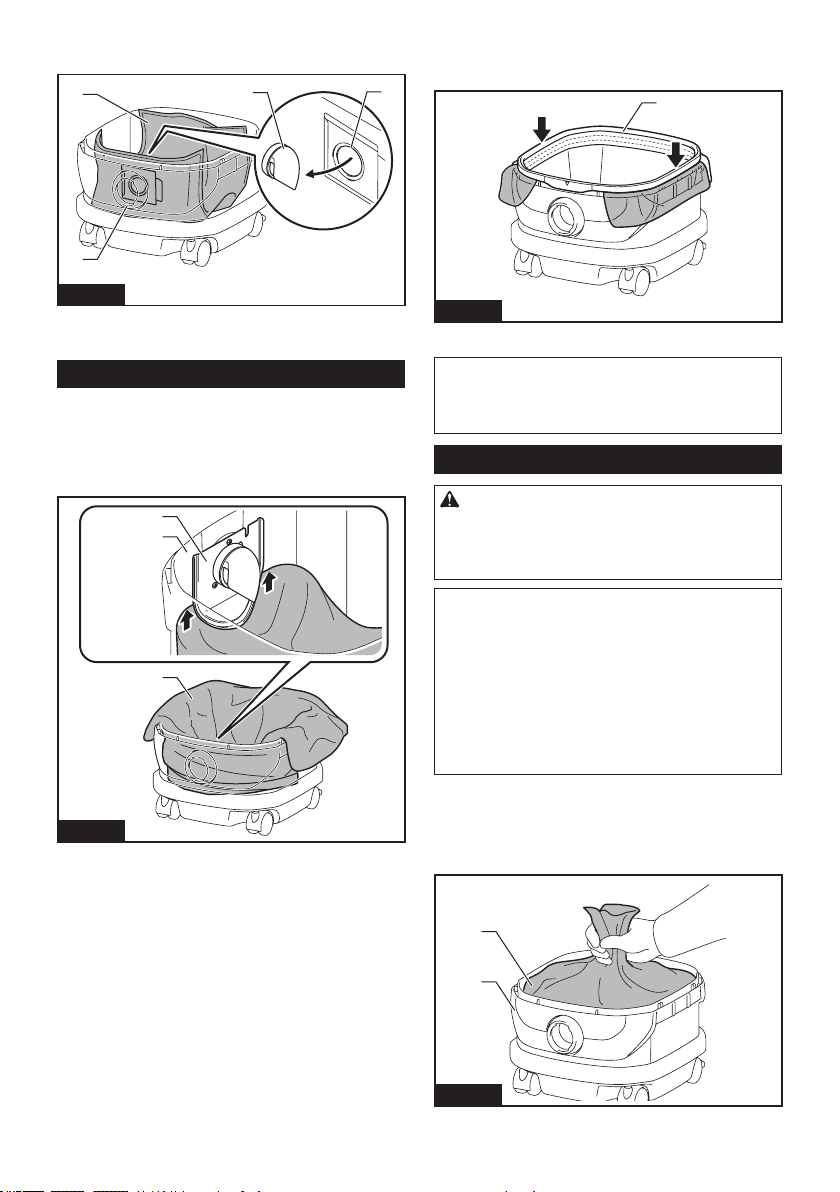
To use powder lter:
1. Place the prelter into the tank aligning the mount-
ing position markings on the prelter and tank.
2. Set the damper into the prelter, and then place
the powder lter over the damper aligning the mounting
position markings on the powder lter and prelter.
3. Mount the head unit over the tank and secure
them with the locking latches.
1
2
3
4
5
6
6
6
Fig.11
► 1. Head unit 2. Powder lter (HEPA) 3. Damper
4. Prelter 5. Tank 6. Mounting position marking
NOTICE: Before using the powder lter, make
sure that prelter and damper are used together. It
is not allowed to install powder lter alone.
Installing paper pack
Optional accessory
WARNING: Before using a paper pack, make
sure that the prelter is used together. Failure to
use the prelter together may cause unusual noise
and heat, resulting in a re.
NOTICE: Never pick up water or other liquids
or wet dusts when using a paper pack. Picking up
such things may cause the paper pack breakage.
NOTICE: Before using a paper pack, make sure
that the powder lter, damper and prelter are
always used together.
1. Unfold a paper pack.
2. Align the paper pack opening with the dust intake
of the tank.
11 ENGLISH
3. Install the paper pack into the tank with its card-
board opening hooked on the paper pack holder.
1
4
2
3
Fig.12
► 1. Paper pack 2. Cardboard opening 3. Paper pack
holder 4. Dust intake
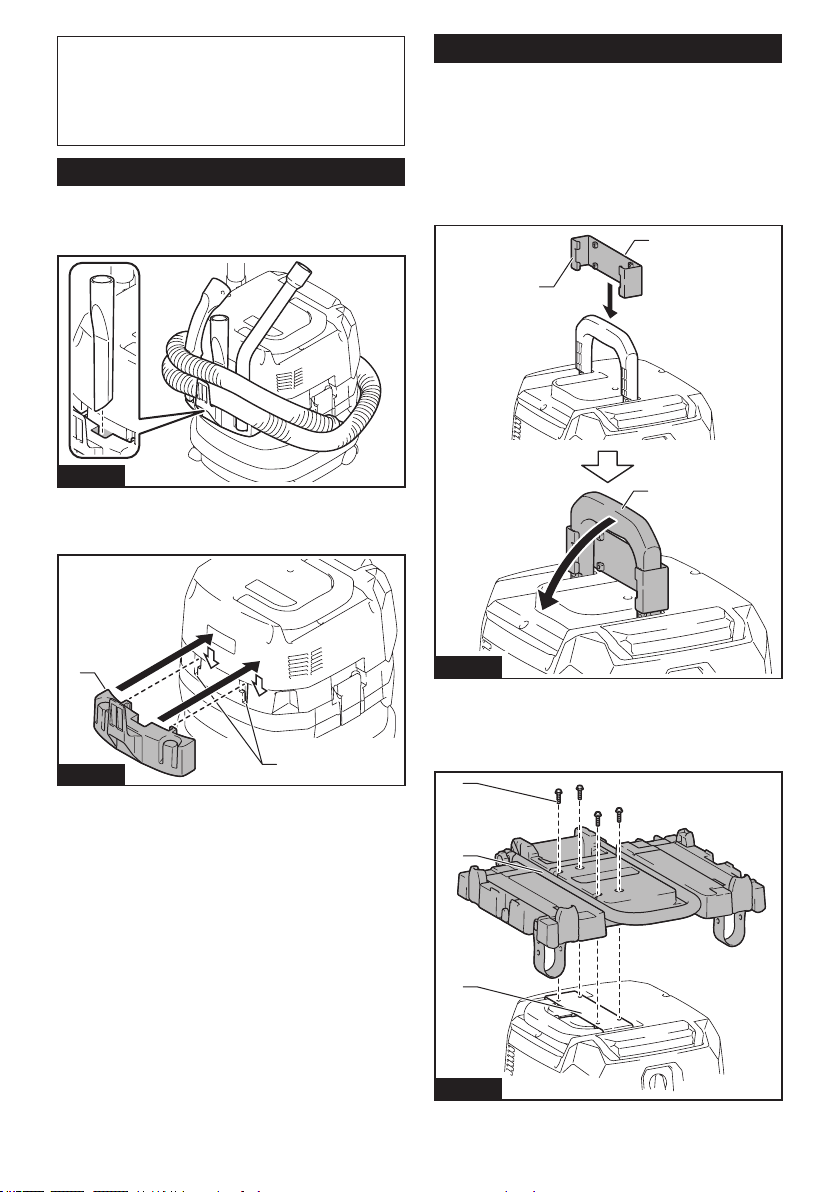
Installing polyethylene bag
With a polyethylene bag installed in the tank, you can
easily empty the tank without letting your hands dirty.
Lay a polyethylene bag over the tank, and slip one side
of the top edge of the bag at its open end in between
the holder plate and the front wall of the tank.
1
2
3
Fig.13
► 1. Holder plate 2. Front wall of tank 3. Polyethylene
bag
Spread the other top edges of the bag outwards over
the top rims of the tank. Place the prelter over the poly-
ethylene bag to fasten the opening of the bag securely.
1
Fig.14
► 1. Prelter
NOTE:
A polyethylene bag available on the market
can be used. 0.04 mm or thicker one is recommended.
NOTE:
Too much dust will tear the bag easily, so do not
collect the dust more than the half of the bag capacity.
Emptying tank with polyethylene bag
WARNING: Always make sure that the cleaner
is switched o and the battery cartridges are
removed before emptying the tank. Failure to do
so may cause an electric shock and serious personal
injury.
NOTICE: Do not apply a great impact on the
tank. Applying a great impact may cause deformation
and damage to the parts.
NOTICE: Empty the tank at least once a day
although this depends on picked-up dust volume
in the tank. Or, the suction force will weaken and the
motor may be broken.
NOTICE: Do not grab the hooks or latches when
emptying the tank. Grabbing the hooks or latches
may cause them to break.
Release the locking latches and lift the head unit up o the tank.
Shake o dust from the prelter before lifting the lter
away from the tank.
Then remove the polyethylene bag out of the tank,
closing the opening of the bag by hand.
1
2
Fig.15
► 1. Polyethylene bag 2. Tank
12 ENGLISH
NOTE: Take the polyethylene bag out of the tank
carefully to avoid it from being scratched and torn by
the edges inside the tank.
NOTE: Empty the polyethylene bag before it
becomes full. Too much dust in the tank may cause
the polyethylene bag to be torn.
Installing multi hook
Use the multi hook to hold a hose, accessories and
attachments not in use in place, and you can quickly
take them out according to your preferences.
Fig.16
Place the multi hook over the mounting base at the rear
of the cleaner, setting the rails on the multi hook along
the grooves on the mounting base.
1
2
Fig.17
► 1. Multi hook 2. Mounting base
Installing MAKPAC adapter
Optional accessory
Connectable and stackable MAKPAC storage cases
can be installed on top of the cleaner with an optional
adapter. The cases are available in many sizes and
styles to suit your preferences.
Place the mounting base hook over the handle of the
cleaner with its mounting surface facing upwards when
the handle is folded into the closed position.
1
2
3
Fig.18
► 1. Mounting base hook 2. Mounting surface
3. Handle
Mount the MAKPAC adapter onto the mounting base hook,
and secure them together with four screws provided.
2
3
1
Fig.19
► 1. MAKPAC adapter 2. Mounting base hook
3. Screw
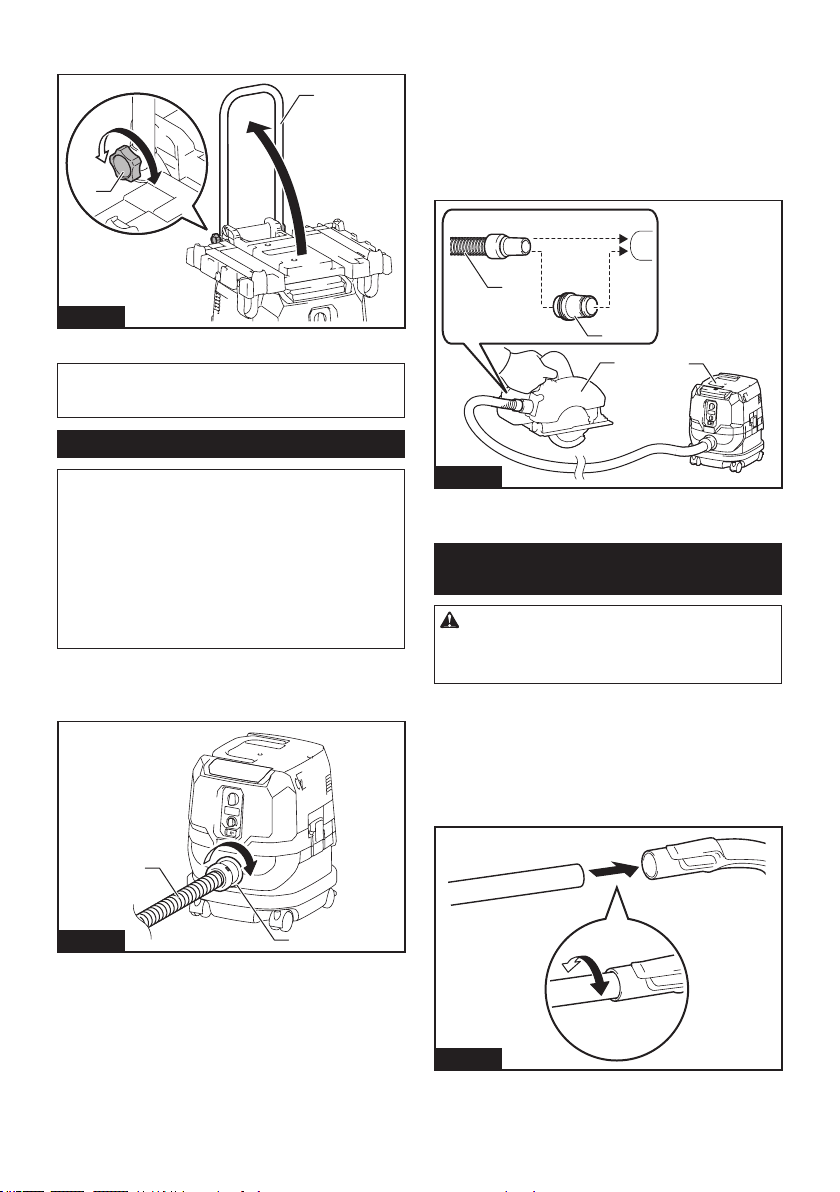
13 ENGLISH
Lift the push bar up and tighten the knob to prepare
installing the MAKPAC cases onto the cleaner.
1
2
Fig.20
► 1. Push bar 2. Knob
NOTE: For details on installing the MAKPAC cases,
refer to the instructions provided with the MAKPAC
adapter and cases.
Installing hose
NOTICE: Never force the hose for bending or
stamp it. Never move the cleaner by pulling the
hose. Forcing, stamping and pulling the hose may
cause a breakage or deformation of the hose.
NOTICE: When picking up large wastes such as
planer carvings, concrete dusts or similar other
than small wastes, use the 38 mm inner diameter
hose (optional accessory). Using the 28 mm inner
diameter hose (optional accessory) may cause a
hose stung and damage.
Connection to cleaner
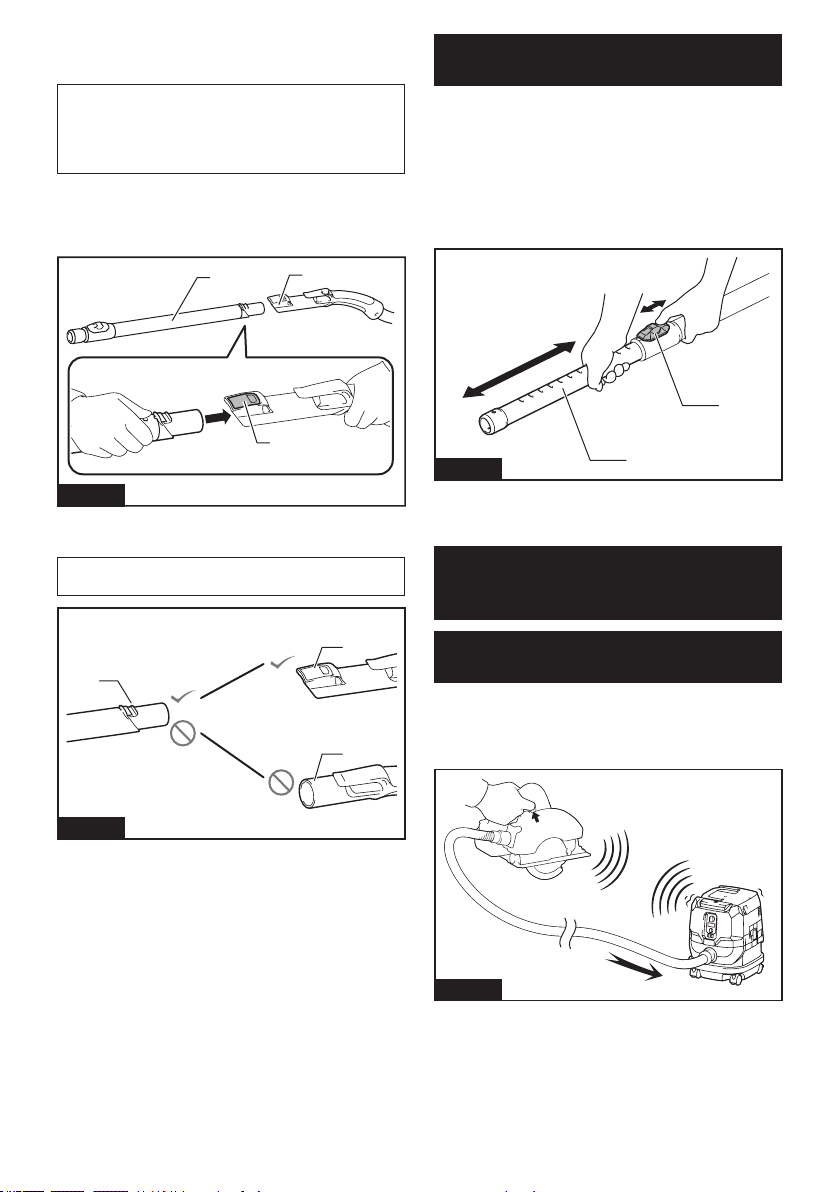
Insert the hose end to the dust intake (hose inlet) of the
cleaner, then turn it clockwise until it locks in place.
1
2
Fig.21
► 1. Hose 2. Dust intake (hose inlet)
Connections with your work tools
(Country specic)
By connecting the vacuum cleaner to any available
work tools compatible with the cleaner, it works as a
dust extractor for your power tools.
Select one of the front cus or joints (optional acces-
sories) as most suitable for your tool model. Place the
cus or joint, as necessary, between the front end of the
cleaner hose and a dust extraction port of your tool.
1
2
3
4
Fig.22
► 1. Front cus or joint 2. Cleaner hose 3. Power tool
4. Vacuum cleaner
Installing or removing cleaner
attachments
CAUTION: After installing an attachment,
check if it is securely installed. If the attachment
is installed imperfectly, it may come o and cause
personal injury.
Attachments without lock function
Optional accessory
Insert an attachment into the suction inlet of the cleaner
by pushing and hand screwing it in place.
Hand twist and pull the attachment apart from the suc-
tion inlet after use.
Fig.23
14 ENGLISH
Attachments with lock function
Optional accessory
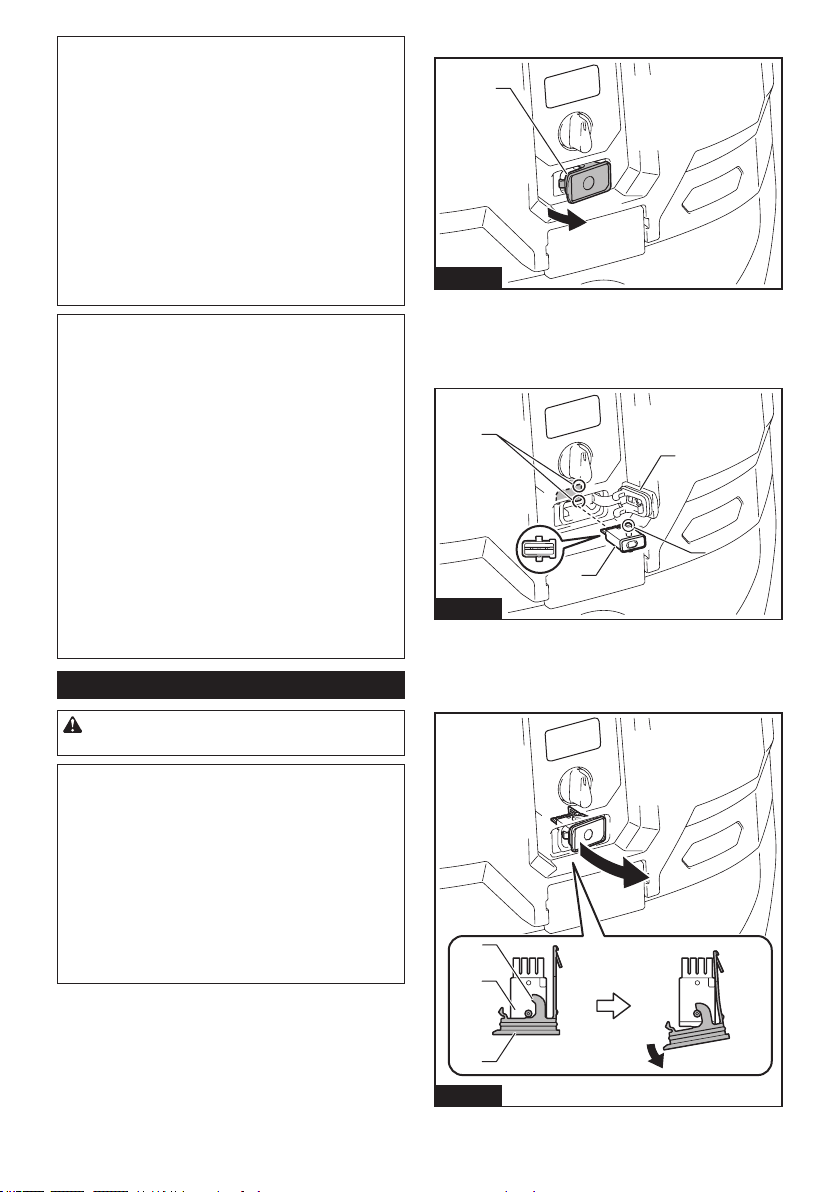
NOTICE: When installing the attachment with
lock function, be sure to align the release button
with the hook on the attachment. If they are not
aligned, the attachment will not be locked and may
come o from the cleaner.
Insert an attachment into the suction inlet of the cleaner
by pushing them together with a click.
To remove the attachment, pull it o while pushing the
release button.
1
3
2
Fig.24
► 1. Suction inlet with lock function 2. Release button
3. Attachment with lock function
NOTE: An attachment with lock function can only be
installed in the suction inlet with lock function.
1
2
3
Fig.25
► 1. Attachment with lock function 2. Suction inlet with
lock function 3. Suction inlet without lock function
Adjusting lengths of slide-type
extension wand
Optional accessory
A slide-type extension wand can be combined for
shorter and longer lengths. It allows to clean hard-to-
reach areas and comfortable positioning options.
Pull in and out the slide pipe to change wand lengths
while pressing and holding the slide button.
Release the slide button to lock the slide pipe in your
desired position.
2
1
Fig.26
► 1. Slide pipe 2. Slide button
WIRELESS ACTIVATION
FUNCTION
What you can do with the wireless
activation function
The wireless activation function enables clean and
comfortable operation. By connecting a supported tool
to the cleaner, you can run the cleaner automatically
along with the switch operation of the tool.
Fig.27
15 ENGLISH
NOTICE: Be sure to refer to the instruction man-
ual of the tool when using the cleaner with wire-
less activation function.
NOTICE: Do not disassemble or tamper with the
wireless unit.
NOTICE: To prevent dust coming into the slot
of the wireless unit, always close the lid securely
during operation and storage.
NOTICE: Do not remove the wireless unit while
the power is being supplied. Doing so may cause a
malfunction of the wireless unit.
NOTICE: Do not press the wireless activation
button too hard and/or press the button with an
object with a sharp edge.
NOTE: Wireless activation needs Makita tools
equipped with the wireless unit.
NOTE: Prior to the initial use of the wireless activa-
tion function with each tool, the tool registration is
required. Once the registration is nished with the
tool, the re-registration is not required unless it is
cancelled.
NOTE: Before registration, be sure that the wireless
unit is properly inserted.
NOTE: One wireless unit can register up to 10 links
with other wireless units. If more than 10 other wire-
less units are registered to one wireless unit, the one
registered earliest will be cancelled automatically.
NOTE: The position of the wireless activation button
varies depending on the tool.
NOTE: The cleaner also starts by pressing the power
button when the stand-by switch is set to "AUTO".
However the power button will not actuate when the
wireless activation function is used.
Installing the wireless unit
CAUTION: Place the cleaner on a at and
stable surface when installing the wireless unit.
NOTICE: Clean the dust and dirt on the cleaner
before installing the wireless unit. Dust or dirt
may cause malfunction if it comes into the slot of the
wireless unit.
NOTICE: To prevent the malfunction caused by
static, touch a static discharging material, such
as a metallic part, before picking up the wireless
unit.
NOTICE: When installing the wireless unit,
always be sure that the wireless unit is inserted
in the correct direction and the lid is completely
closed.
1. Open the lid on the cleaner as shown in the gure.
1
Fig.28
► 1. Lid
2.
Insert the wireless unit to the slot and then close the lid.
When inserting the wireless unit, align the projections
with the recessed portions on the slot.
1
2
3
4
Fig.29
►
1. Wireless unit 2. Projection 3. Lid 4. Recessed portion
When removing the wireless unit, open the lid slowly.
The hooks on the back of the lid will lift the wireless unit
as you pull up the lid.
1
2
3
Fig.30
► 1. Wireless unit 2. Hook 3. Lid
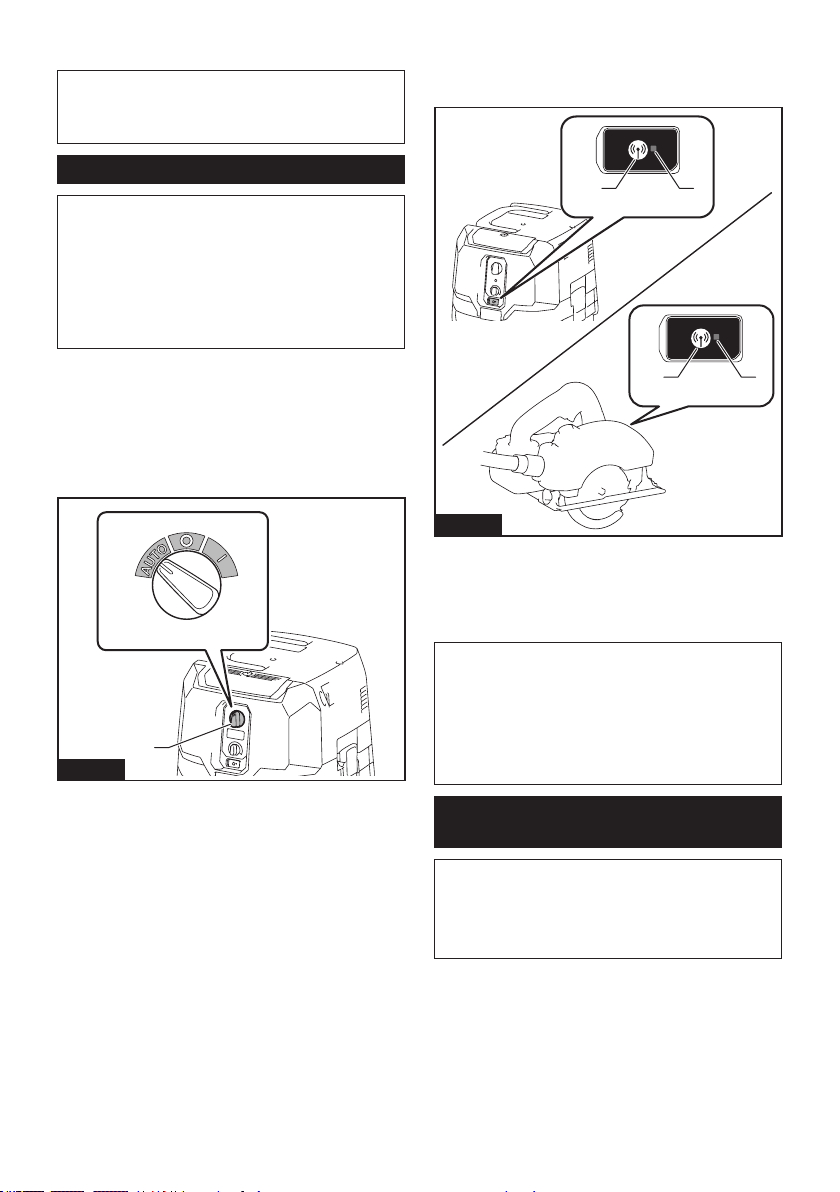
16 ENGLISH
After removing the wireless unit, keep it in the supplied
case or a static-free container.
NOTICE: Always use the hooks on the back of
the lid when removing the wireless unit. If the
hooks do not catch the wireless unit, close the lid
completely and open it slowly again.
Tool registration for the cleaner
NOTE: A Makita tool supporting the wireless activa-
tion function is required for the tool registration.
NOTE: Finish installing the wireless unit to the tool
before starting the tool registration.
NOTE: During the tool registration, do not pull the
switch trigger on the tool or turn on the power switch
on the cleaner.
NOTE: Refer to the instruction manual of the tool, too.
If you wish to activate the cleaner along with the
switch operation of the tool, nish the tool registration
beforehand.
1. Install the wireless units to the cleaner and the
tool, respectively.
2. Install the batteries to the cleaner and the tool.
3. Set the stand-by switch on the cleaner to "AUTO".
1
Fig.31
► 1. Stand-by switch
4. Press the wireless activation button on the cleaner
for 3 seconds until the wireless activation lamp blinks in
green. And then press the wireless activation button on
the tool in the same way.
21
21
Fig.32
► 1. Wireless activation button 2. Wireless activation
lamp
If the cleaner and the tool are linked successfully, the
wireless activation lamps will light up in green for 2
seconds and start blinking in blue.
NOTE: The wireless activation lamps nish blinking
in green after 20 seconds elapsed. Press the wireless
activation button on the tool while the wireless acti-
vation lamp on the cleaner is blinking. If the wireless
activation lamp does not blink in green, push the wire-
less activation button briey and hold it down again.
NOTE: When performing two or more tool registration
for the cleaner, nish the tool registration one by one.
Starting the wireless activation
function
NOTE: Finish the tool registration for the cleaner for
wireless activation.
NOTE: Always place the cleaner so that you can see
the status of the wireless activation lamp.
NOTE: Refer to the instruction manual of the tool, too.
After registering a tool to the cleaner, the cleaner will
automatically runs along with the switch operation of
the tool.
1. Install the wireless units to the cleaner and the
tool, respectively.
2. Install the batteries to the cleaner and the tool.
17 ENGLISH
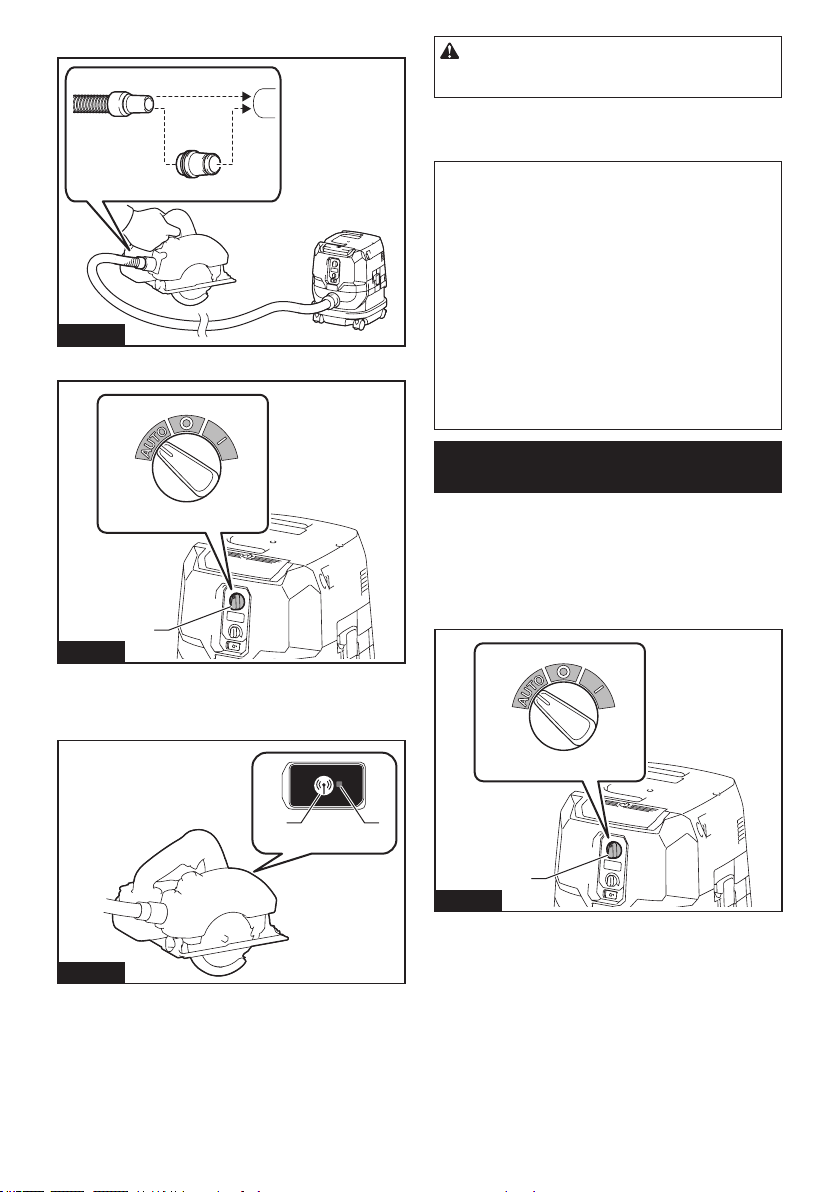
3. Connect the hose of the cleaner with the tool.
Fig.33
4. Set the stand-by switch on the cleaner to "AUTO".
1
Fig.34
► 1. Stand-by switch
5. Push the wireless activation button on the tool
briey. The wireless activation lamp will blink in blue.
21
Fig.35
► 1. Wireless activation button 2. Wireless activation
lamp
6. Pull the switch trigger of the tool. Check if the
cleaner runs while the switch trigger on the tool is being
pulled.
CAUTION: Always check if the wireless acti-
vation function works before starting a work with
the tool.
To stop the wireless activation, push the wireless activa-
tion button on the tool, or set the stand-by switch on the
cleaner to "I" or "O".
NOTE: The wireless activation lamp on the tool will
stop blinking in blue when there is no operation for
2 hours. In this case, set the stand-by switch on the
cleaner to "AUTO" and press the wireless activation
button on the tool again.
NOTE: The cleaner starts/stops with a delay. There is
a time lag when the cleaner detects a switch opera-
tion of the tool.
NOTE: The transmission distance of the wireless unit
may vary depending on the location and surrounding
circumstances.
NOTE: When two or more tools are registered to one
cleaner, the cleaner may start running even if you
don't pull the switch trigger because other user is
using the wireless activation function.
Cancelling tool registration for the
cleaner
Perform the following procedure when cancelling the
tool registration for the cleaner.
1. Install the wireless units to the cleaner and the
tool, respectively.
2. Install the batteries to the cleaner and the tool.
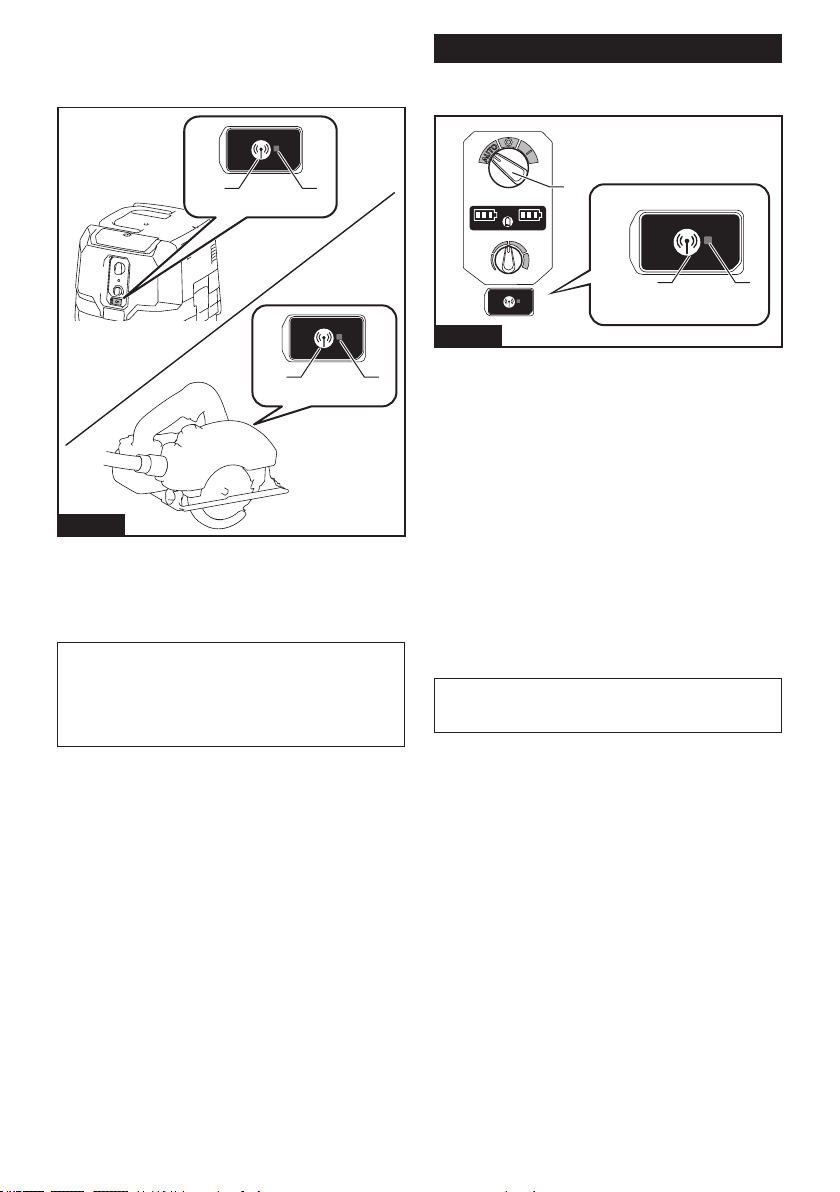
3. Set the stand-by switch on the cleaner to "AUTO".
1
Fig.36
► 1. Stand-by switch
18 ENGLISH
4. Press the wireless activation button on the cleaner
for 6 seconds. The wireless activation lamp blinks in
green and then become red. After that, press the wire-
less activation button on the tool in the same way.
21
21
Fig.37
► 1. Wireless activation button 2. Wireless activation
lamp
If the cancellation is performed successfully, the wire-
less activation lamps will light up in red for 2 seconds
and start blinking in blue.
NOTE: The wireless activation lamps nish blinking in
red after 20 seconds elapsed. Press the wireless acti-
vation button on the tool while the wireless activation
lamp on the cleaner is blinking. If the wireless acti-
vation lamp does not blink in red, push the wireless
activation button briey and hold it down again.
Erasing all tool registrations
You can erase all tool registrations from the cleaner as
follows.
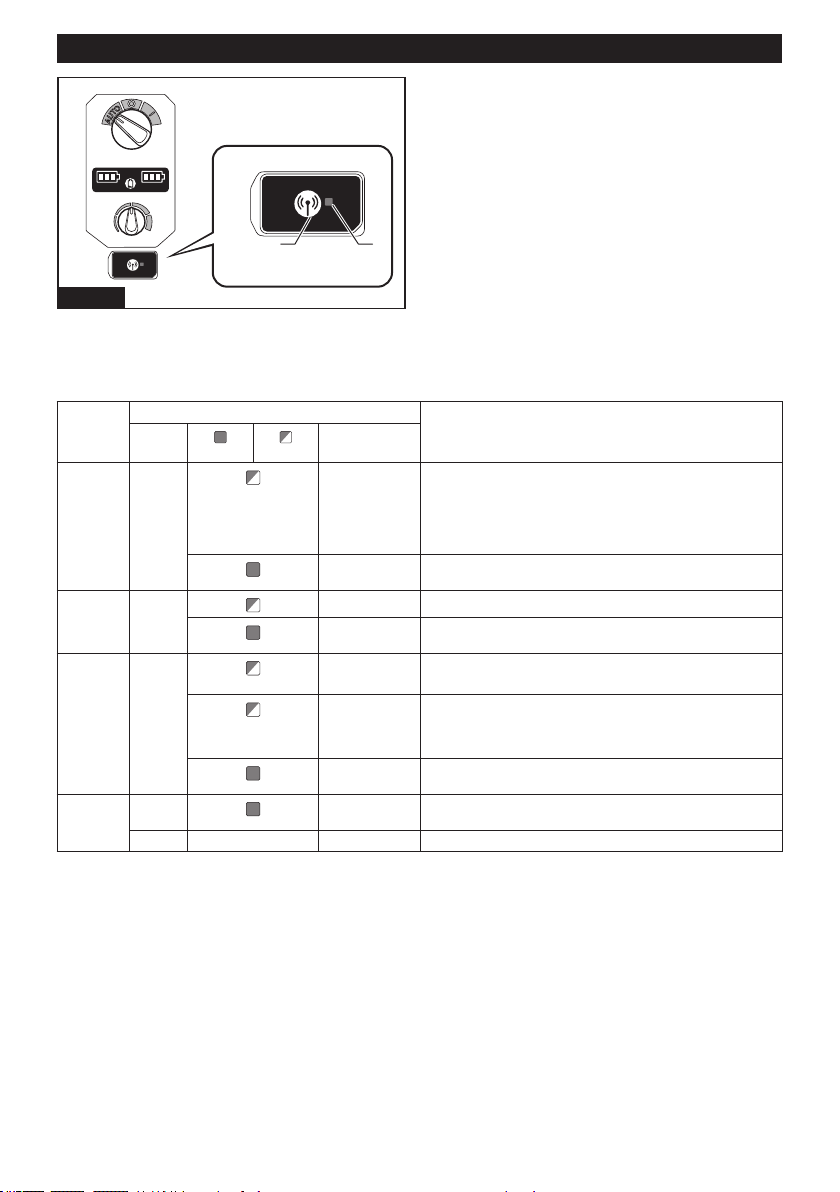
32
1
Fig.38
► 1. Stand-by switch 2. Wireless activation button
3. Wireless activation lamp
1. Install the wireless unit to the cleaner.
2. Install the batteries to the cleaner.
3. Set the stand-by switch to "AUTO".
4. Hold down the wireless activation button for about
6 seconds until the wireless activation lamp blinks in red
(about twice per one second).
5. When the wireless activation lamp starts blinking
in red, release your nger from the wireless activation
button. Thereafter, hold down the wireless activation
button again for about 6 seconds.
6. When the wireless activation lamp starts blinking
fast (about 5 times per one second) in red, release your
nger from the wireless activation button. When the
wireless activation lamp lights up in red and later lights
o, all tool registrations are erased.
NOTE: If the wireless activation lamp does not blink
in red, press the wireless activation button briey and
try again.
19 ENGLISH
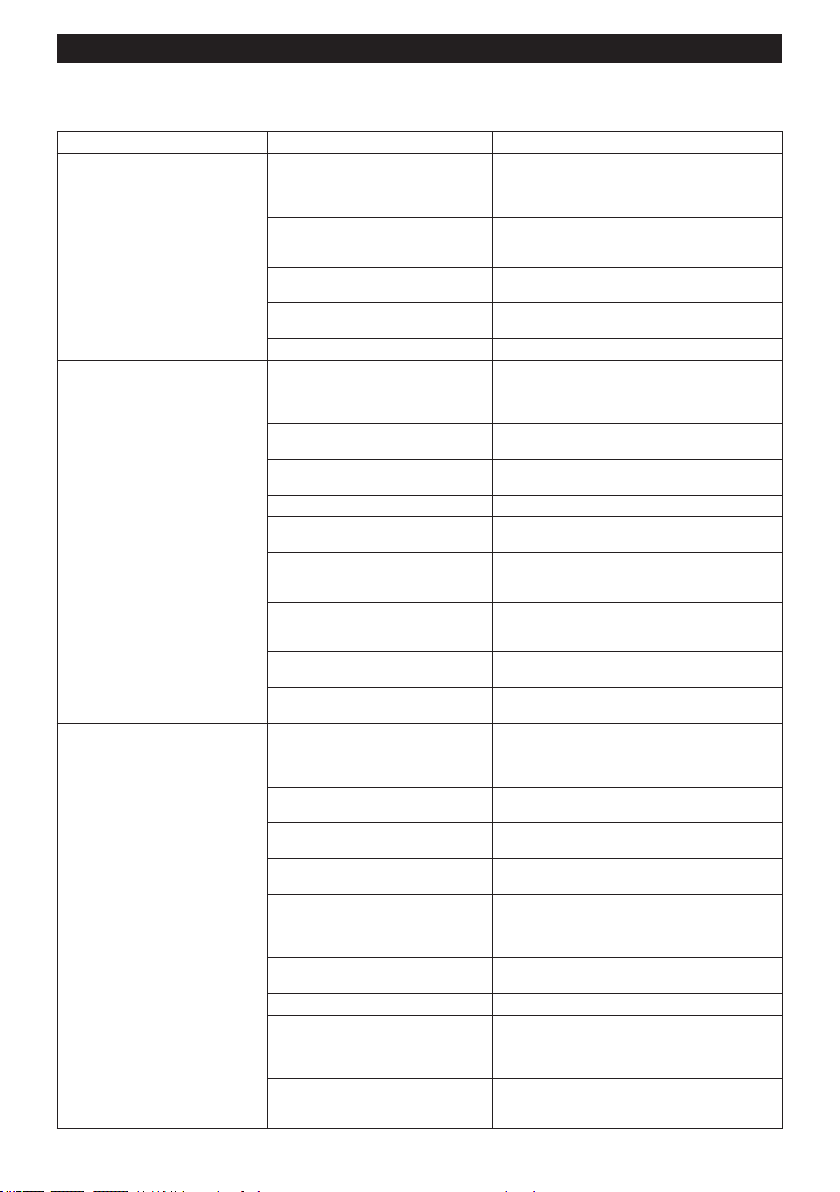
Description of the wireless activation lamp status
21
Fig.39
► 1. Wireless activation button 2. Wireless activation
lamp
The wireless activation lamp shows the status of the wireless activation function. Refer to the below table for the
meaning of the lamp status.
Status Wireless activation lamp Description
Color
On
Blinking
Duration
(approximate)
Standby Blue
Cleaner: con-
tinuing
Tool: 2 hours
Waiting for the tool registration or the wireless activation function
is available.
The lamp on the cleaner blinks when the stand-by switch is set in
AUTO. The lamp on the tool blinks when the wireless activation
button is pushed. The lamp on the tool will automatically turn o
when no operation is performed for 2 hours.
When the tool is
running.
The wireless activation of the cleaner is available and the tool is
running.
Tool
registration
Green
20 seconds Ready for the tool registration. Searching the tool to be registered.
2 seconds The tool registration has been nished. The wireless activation
lamp will start blinking in blue.
Cancelling/
erasing
tool
registration
Red
(slow: 2 times/sec.)
20 seconds Ready for the cancellation of the tool registration. Searching the
tool to be cancelled.
(fast: 5 times/sec.)
When the
wireless acti-
vation button is
pressed down.
Ready to erase all tool registrations.
2 seconds The tool registration has been cancelled/erased. The wireless
activation lamp will start blinking in blue.
Others Red
3 seconds The power is supplied to the wireless unit and the wireless activa-
tion function is starting up.
O - - The stand-by switch is not set to "AUTO".
20 ENGLISH
Troubleshooting for wireless activation function
Before asking for repairs, conduct your own inspection rst. If you nd a problem that is not explained in the manual,
do not attempt to dismantle the tool. Instead, ask Makita Authorized Service Centers, always using Makita replace-
ment parts for repairs.
State of abnormality Probable cause (malfunction) Remedy
The wireless activation lamp does
not light/blink.
The wireless unit is not installed into the
cleaner and/or the tool.
The wireless unit is improperly installed
into the cleaner and/or the tool.
Install the wireless unit correctly.
The terminal of the wireless unit and/or
the slot is dirty.
Gently wipe o dust and dirt on the terminal of the
wireless unit and clean the slot of the cleaner and/
or the tool.
The wireless activation button on the
tool has not been pushed.
Push the wireless activation button on the tool
briey.
The stand-by switch on the cleaner is
not set to "AUTO".
Set the stand-by switch on the cleaner to "AUTO".
No power supply Supply the power to the tool and the cleaner.
Cannot nish tool registration / can-
celling tool registration successfully.
The wireless unit is not installed into the
cleaner and/or the tool.
The wireless unit is improperly installed
into the cleaner and/or the tool.
Install the wireless unit correctly.
The terminal of the wireless unit and/or
the slot is dirty.
Gently wipe o dust and dirt on the terminal of the wire-
less unit and clean the slot of the cleaner and/or the tool.
The stand-by switch on the cleaner is
not set to "AUTO".
Set the stand-by switch on the cleaner to "AUTO".
No power supply Supply the power to the tool and the cleaner.
Incorrect operation
Push the wireless activation button briey and perform
the tool registration/cancellation procedures again.
The tool and cleaner are away from
each other (out of the transmission
range).
Get the tool and the cleaner closer to each other. The
maximum transmission distance is approximately 10 m
however it may vary according to the circumstances.
Before nishing the tool registration/cancellation;
- the switch trigger on the tool is pulled or;
- the power button on the cleaner is turned on.
Push the wireless activation button briey and
perform the tool registration/cancellation procedures
again.
The tool registration procedures for the
tool or the cleaner has not nished.
Perform the tool registration procedures for the tool
and the cleaner at the same timing.
Radio disturbance by other appliances
which generate high-intensity radio waves.
Keep the tool and the cleaner away from the appli-
ances such as Wi-Fi devices and microwave ovens.
The cleaner does not run along with
the switch operation of the tool.
The wireless unit is not installed into the
cleaner and/or the tool.
The wireless unit is improperly installed
into the cleaner and/or the tool.
Install the wireless unit correctly.
The terminal of the wireless unit and/or
the slot is dirty.
Gently wipe o dust and dirt on the terminal of the wire-
less unit and clean the slot of the cleaner and/or the tool.
The wireless activation button on the
tool has not been pushed.
Push the wireless activation button briey and make
sure that the wireless activation lamp is blinking in blue.
The stand-by switch on the cleaner is
not set to "AUTO".
Set the stand-by switch on the cleaner to "AUTO".
More than 10 tools are registered to
the cleaner.
Perform the tool registration again.
If more than 10 tools are registered to the cleaner,
the tool registered earliest will be cancelled
automatically.
The cleaner erased all tool
registrations.
Perform the tool registration again.
No power supply Supply the power to the tool and the cleaner.
The tool and cleaner are away from
each other (out of the transmission
range).
Get the tool and the cleaner closer to each other.
The maximum transmission distance is approxi-
mately 10 m however it may vary according to the
circumstances.
Radio disturbance by other appliances
which generate high-intensity radio
waves.
Keep the tool and the cleaner away from the appli-
ances such as Wi-Fi devices and microwave ovens.
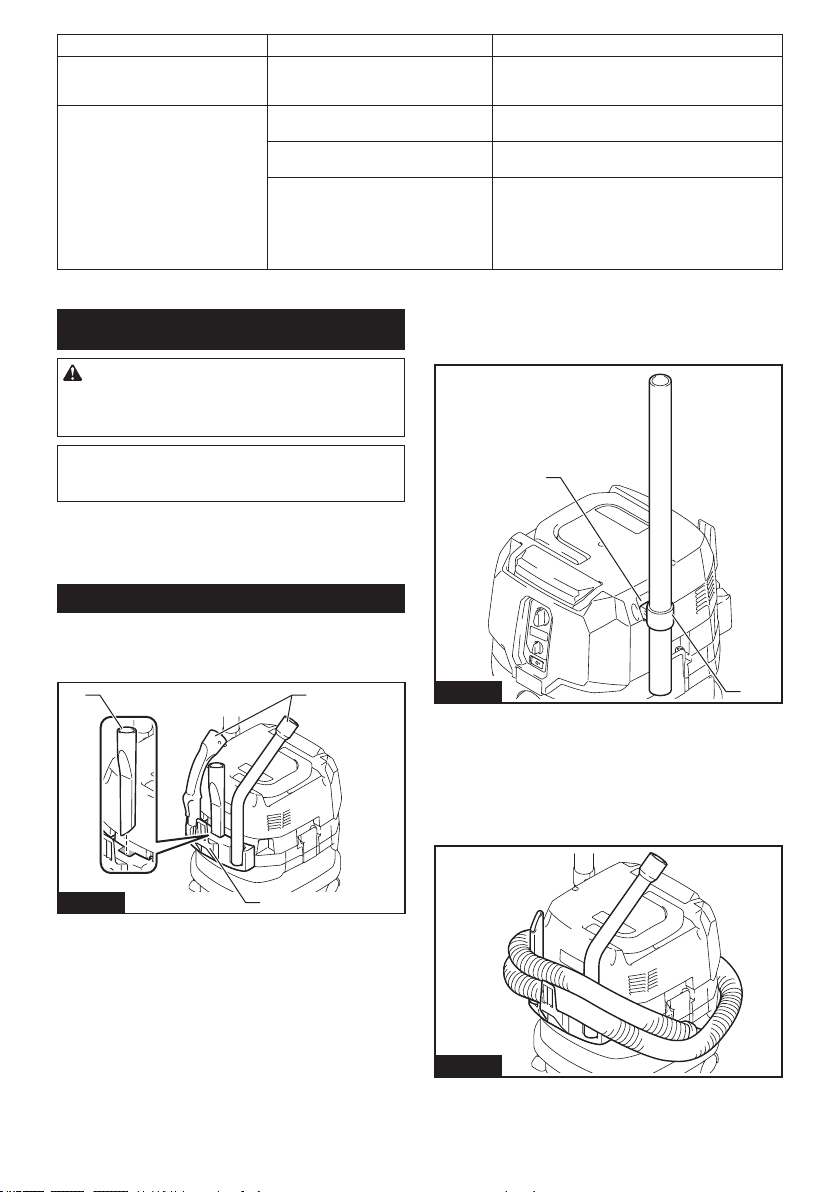
21 ENGLISH
State of abnormality Probable cause (malfunction) Remedy
The cleaner runs while the tool's
switch trigger is not pulled.
Other users are using the wireless acti-
vation of the cleaner with their tools.
Turn o the wireless activation button of the other
tools or cancel the tool registration of the other
tools.
Cannot erase all tool registrations in
the cleaner.
Pressing the wireless button on the tool. Press the wireless button on the cleaner for erasing
all tool registrations.
The stand-by switch on the cleaner is
not set to "AUTO".
Set the stand-by switch on the cleaner to "AUTO".
The wireless activation button is not
held down correctly.
Hold down the wireless activation button for more
than 6 seconds and then release it when the wire-
less activation lamp blinks in red. Hold down the
wireless activation button for more than 6 seconds
again until the wireless activation button rapidly
blinks in red and then release the button.
MAINTENANCE
CAUTION: Always be sure that the appliance
is switched o and the battery cartridges are
removed before attempting to perform inspection
or maintenance.
NOTICE: Never use gasoline, benzine, thinner,
alcohol or the like. Discoloration, deformation or
cracks may result.
To maintain product SAFETY and RELIABILITY,
repairs, any other maintenance or adjustment should
be performed by Makita Authorized or Factory Service
Centers, always using Makita replacement parts.
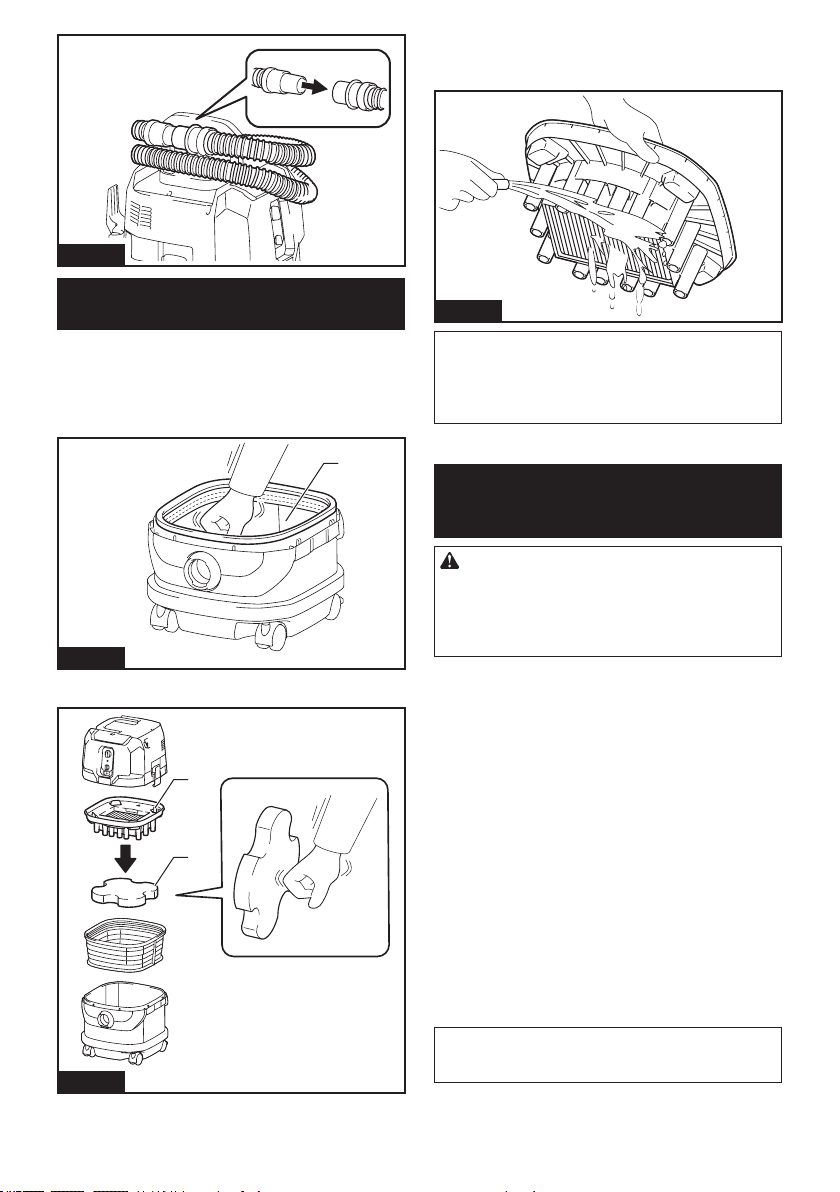
Storage of accessories
Accessories and attachments not in use, such as noz-
zles and brushes, can be hooked and stored in the multi
hook at the rear of the cleaner.
1
2
2
Fig.40
► 1. Multi hook 2. Accessories and attachments not
in use
Pipes (with an optional stopper installed) can be placed
into the pipe holder when not using the cleaner for a
short time.
1
2
Fig.41
► 1. Stopper (optional accessory) 2. Pipe holder
A hose can be wrapped and stored around the housing
or handle of the cleaner in large loops. Connect its both
ends together to make loops and hook the loops onto
the handle raised up. Alternatively, keep its root end
installed in the hose inlet and hang the loops on the
multi hook with the loose end tied up.
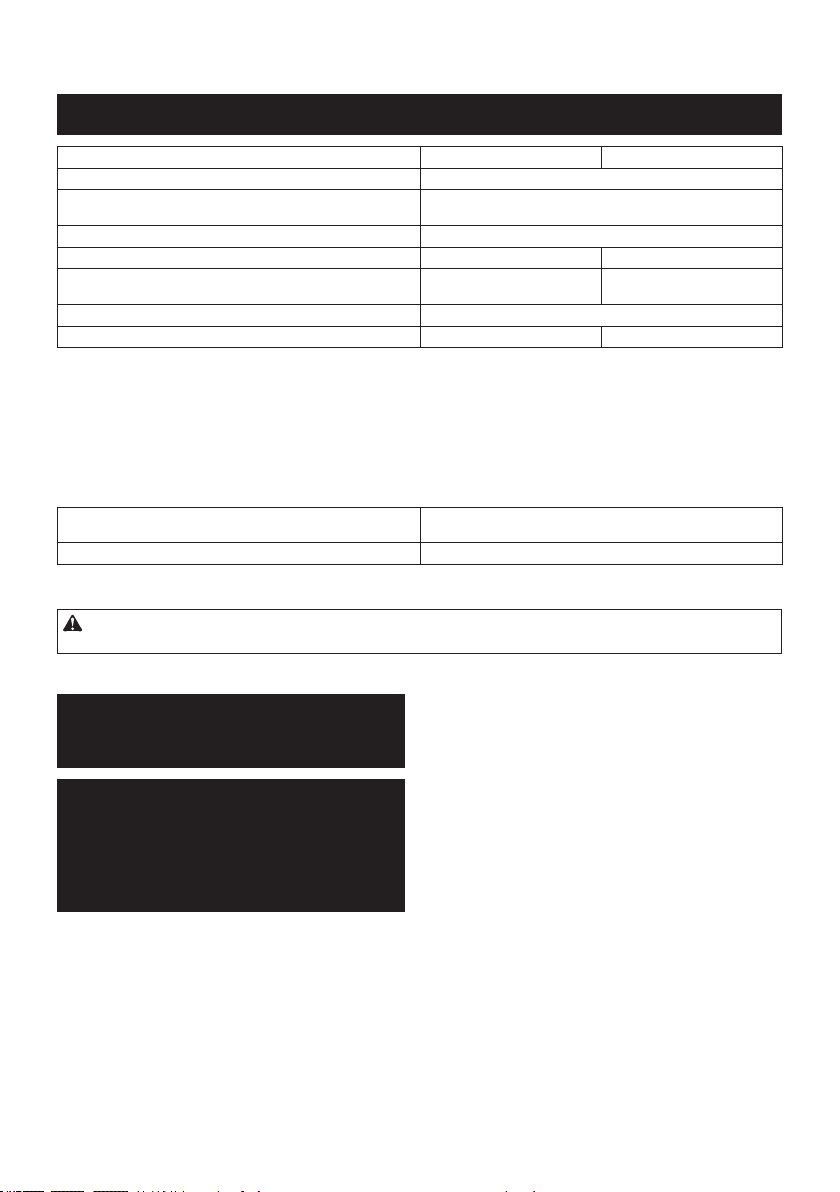
Fig.42
22 ENGLISH
Fig.43
Cleaning of powder lter (HEPA) and
prelter
Clean out the powder lter, prelter and damper at
regular intervals since clogged lters and damper may
result in poor suction performance.
Routinely wipe and shake dust o lters and damper
by hand.
1
Fig.44
► 1. Prelter
1
2
Fig.45
► 1. Damper 2. Powder lter (HEPA)
Occasionally wash the powder lter in water, rinse and
dry thoroughly in the shade before use. Never wash
lters in a washing machine.
Fig.46
NOTE: Do not rub or scratch the powder lter, the
prelter and the damper with hard objects such as a
brush and a paddle.
NOTE: The lters wear out in course of time. It is
recommended to have some spares for them.
OPTIONAL
ACCESSORIES
CAUTION: These accessories or attachments
are recommended for use with your Makita tool
specied in this manual. The use of any other
accessories or attachments might present a risk of
injury to persons. Only use accessory or attachment
for its stated purpose.
If you need any assistance for more details regard-
ing these accessories, ask your local Makita Service
Center.
• Hose
• Front cus (22, 24, 38)
• Straight pipe
• Extension wand
• Corner nozzle
• Round brush
• Powder lter, HEPA (for dry dust)
• Damper
• Prelter
• Nozzle assembly
• Bent pipe
• Polyethylene bag
• Paper pack
• MAKPAC adapter
• Wireless unit
• Makita genuine battery and charger
NOTE: Some items in the list may be included in the
tool package as standard accessories. They may
dier from country to country.

23 ENGLISH
MAKITA LIMITED WARRANTY
Please refer to the annexed warranty sheet for the
most current warranty terms applicable to this product.
If annexed warranty sheet is not available, refer to the
warranty details set forth at below website for your
respective country.
United States of America: www.makitatools.com
Canada: www.makita.ca
Other countries: www.makita.com
24 ESPAÑOL
ESPAÑOL (Instrucciones originales)
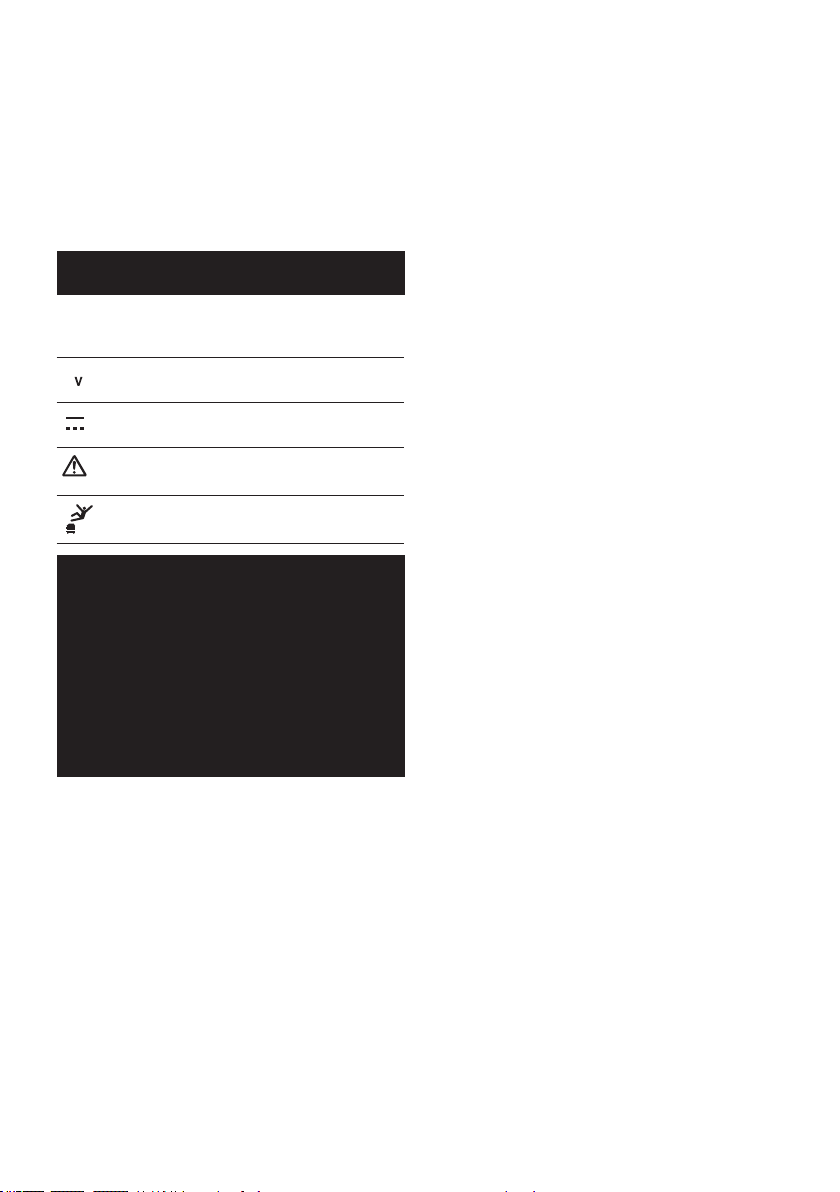
ESPECIFICACIONES
Modelo: GCV02 GCV04
Tipo de ltro estándar Filtro de polvo (para polvo seco)
Volumen de aire máximo
(con BL4040, manguera de ø38 mm (1-1/2") x 2,5 m (98-1/2"))
2,7 m
3
/min (95,35 cu.ft/min)
Aspiradora (con BL4040, manguera de ø38 mm (1-1/2") x 2,5 m (98-1/2"))
23 kPa
Capacidad recuperable 8 L (2,1 gal) 15 L (4,0 gal)
Dimensiones (La x An x Al) 366 mm x 334 mm x 425 mm
(14-3/8″ x 13-1/8″ x 16-3/4″)
366 mm x 334 mm x 475 mm
(14-3/8″ x 13-1/8″ x 18-3/4″)
Tensión nominal 36 V - 40 V c.c. máx.
Peso neto
8,3 kg - 10,2 kg (18,3 lbs - 22,5 lbs) 8,6 kg - 10,5 kg (19,0 lbs - 23,1 lbs)
• Debido a nuestro continuo programa de investigación y desarrollo, las especicaciones aquí incluidas están
sujetas a cambio sin previo aviso.
• Las especicaciones y el cartucho de batería pueden variar de país a país.
• El peso incluye el o los cartuchos de batería, pero no los accesorios. La combinación de menor y mayor peso
del aparato y del o los cartuchos de batería se muestra en la tabla.
• Para polvo húmedo, se requieren el otador y el ltro de agua o de tela.
Cartucho de batería y cargador aplicables
Cartucho de batería BL4020 / BL4025 / BL4040* / BL4050F*
* : Batería recomendada
Cargador DC40RA / DC40RB / DC40RC
• Algunos de los cartuchos de batería y cargadores enumerados arriba podrían no estar disponibles depen-
diendo de su área de residencia.
ADVERTENCIA: Use únicamente los cartuchos de batería y los cargadores indicados arriba. El uso de
cualquier otro cartucho de batería y cargador podría ocasionar una lesión y/o un incendio.
ADVERTENCIAS DE
SEGURIDAD
INSTRUCCIONES
IMPORTANTES DE
SEGURIDAD
Al usar cualquier aparato eléctrico,
siempre deben seguirse las precaucio-
nes básicas, incluyendo las siguientes:
GUARDE ESTAS
INSTRUCCIONES.
ADVERTENCIA
Para reducir el riesgo de incendio, des-
carga eléctrica o lesión:
1. No deje el aparato con la batería
puesta. Retire la batería del aparato
cuando no lo vaya a utilizar y antes
de dar servicio de mantenimiento.
2. No lo utilice sobre supercies
húmedas. No lo exponga a la lluvia.
Almacénelo en interiores.
3. No permita que sea utilizado como
un juguete. Preste mucha atención
cuando sea utilizado por niños o
cerca de ellos.
4. Utilícelo solamente como se des-
cribe en este manual. Sólo use
aditamentos recomendados por el
fabricante.

25 ESPAÑOL
5.
No lo utilice con una batería dañada.
Si el aparato no está funcionando
como debiera, se ha dejado caer, se
ha dañado, se ha dejado a la intem-
perie o ha caído sobre agua, llévelo
a un centro de servicio.
6. No manipule la batería ni el aparato
con las manos mojadas.
7. No introduzca ningún objeto en las
aberturas. No lo utilice con ninguna
abertura bloqueada; manténgalo
libre de polvo, pelusa, cabello y
cualquier objeto que pueda reducir
el ujo de aire.
8. Mantenga el cabello, la ropa hol-
gada, los dedos y todas las partes
del cuerpo lejos de las aberturas y
piezas móviles.
9. Apague todos los controles antes
de retirar el cartucho de batería.
10. Tenga especial cuidado cuando lim-
pie en escaleras.
11. No lo utilice para recoger líquidos
inamables o combustibles, tal
como gasolina, ni en áreas donde
puedan estar presentes.
12.
Utilice solamente el cargador suminis-
trado por el fabricante para recargar.
13. No recoja nada que se esté que-
mando o desprenda humo, tal
como cigarros, fósforos o cenizas
calientes.
14. Asegúrese siempre de que los
ltros estén instalados correcta-
mente antes de usarlos. No utilice la
aspiradora sin los ltros colocados
en su sitio. Reemplace cualquier
ltro dañado de inmediato. Se
recomienda tener algunos repues-
tos, ya que los ltros son artículos
consumibles.
15. No cargue la batería en exteriores.
16. No utilice la aspiradora como banco
o mesa de trabajo. La máquina
podría caerse y ocasionar una
lesión personal.
17. No aspire espuma ni jabón líquido.
Puede hacer que salga espuma
por la salida de aire, provocando
una descarga eléctrica y daños a la
aspiradora.
18. No aspire los siguientes elementos:
• Líquidos inamables (quero-
seno, gasolina, disolventes
como bencina, diluyentes, etc.)
• Sustancias calientes que están
ardiendo o echando humo
(cigarrillos, cerillas, palitos de
incienso, velas, cenizas calien-
tes), chispas y polvo metálico
generados por el corte o el
lijado de metales, etc.
• Materiales inamables (tóner,
pinturas, aerosoles, etc.)
• Espumas, como limpiadores de
alfombras, etc. (pueden causar
explosiones o incendios)
•
Sustancias explosivas o pirofó-
ricas (nitroglicerina, aluminio,
magnesio, titanio, zinc, fósforo
rojo, fósforo amarillo, celuloide,
etc., y su polvo, gases o vapores)
• Objetos alados (cristal, cubier-
tos, astillas de madera, meta-
les, piedras, clavos, cuchillas,
tachuelas, etc.)
• Polvo no conductor y solidi-
cante (polvo metálico o de
carbono)
• Deshumidicador
• Grandes cantidades de polvo
(harina, polvo de extintor de
incendios, etc.)
• Sustancias que causan sínto-
mas tóxicos
• Productos químicos agresivos
(ácidos, lixiviados, etc.)
• Basura líquida o húmeda, inclu-
yendo vómitos y heces
• Asbesto
• Pesticidas
Tal acción podría ocasionar un incen-
dio, lesiones y/o daños materiales.
Para reducir la exposición a estas
sustancias químicas, utilice un
equipo de protección respiratoria
aprobado, tal como las máscaras
contra polvo que están especial-
mente diseñadas para ltrar partí-
culas microscópicas. No apunte la
salida de aire a la cara y al cuerpo.

26 ESPAÑOL
NOTA: Lea el reglamento OSHA en
lo referente a polvo de sílice a n de
entender los requisitos necesarios
para reducir la exposición al polvo
de sílice en el puesto de trabajo.
Contiene normas especícas sobre
el taladrado, la demolición, el corte
y el lijado de materiales que con-
tienen sílice. Todos los requisitos
de la OSHA relacionados con la
reducción de polvo de sílice se pue-
den encontrar en el sitio web de la
OSHA: www.osha.gov.
19. Este aparato no se destina para
utilizarse por personas (incluyendo
niños) cuyas capacidades físicas,
sensoriales o mentales sean dife-
rentes o estén reducidas o carezcan
de experiencia o de conocimiento,
a menos que dichas personas reci-
ban una supervisión o capacitación
para el funcionamiento del aparato
por una persona responsable de su
seguridad.
20. Los niños deben supervisarse para
asegurar que ellos no empleen los
aparatos como juguete.
Uso y cuidado de la herramienta
a batería
1. Evite un arranque accidental.
Asegúrese de que el interruptor
esté en la posición apagada antes
de conectar el paquete de bate-
rías, levantar el aparato o cargarlo.
Cargar el aparato con su dedo en el
interruptor o pasar energía al aparato
con el interruptor encendido puede
propiciar accidentes.
2. Desconecte el paquete de baterías
del aparato antes de hacer cual-
quier ajuste, cambiar accesorios o
almacenar el aparato. Estas medidas
de seguridad preventivas reducen el
riesgo de poner en marcha el aparato
accidentalmente.
3. Recargue sólo con el cargador
especicado por el fabricante. Un
cargador que es adecuado para un
solo tipo de batería puede generar
riesgo de incendio al ser utilizado con
otra batería.
4.
Use los aparatos únicamente con
los paquetes de baterías designados
especícamente para ellos. El uso
de otros paquetes de baterías puede
generar riesgo de lesiones e incendio.
5. Cuando no se esté usando la bate-
ría, manténgala alejada de otros
objetos metálicos, como sujeta-
papeles (clips), monedas, llaves,
clavos, tornillos u otros objetos
pequeños de metal los cuales pue-
den actuar creando una conexión
entre las terminales de la batería.
Originar un cortocircuito en las termi-
nales puede causar quemaduras o
incendios.
6. En condiciones abusivas, podrá
escapar líquido de la batería; evite
tocarlo. Si lo toca accidentalmente,
enjuague con agua. Si hay contacto
del líquido con los ojos, busque
asistencia médica. Puede que el
líquido expulsado de la batería cause
irritación o quemaduras.
7. No utilice un paquete de baterías
o aparato que esté dañado o haya
sido modicado. Las baterías daña-
das o modicadas podrían com-
portarse de manera impredecible
causando un incendio, explosión o
riesgo de lesión.
8. No exponga un paquete de baterías
o aparato al fuego o a una tempe-
ratura excesiva. La exposición al
fuego o una temperatura superior a
130 °C podría causar una explosión.
9. Siga todas las instrucciones rela-
tivas a la carga y no cargue el
paquete de baterías o el aparato
fuera del rango de temperatura
especicado en las instrucciones.
Cargar de manera inapropiada o a
temperaturas fuera del rango especi-
cado podría dañar la batería e incre-
mentar el riesgo de incendio.
10. Pida que el servicio lo realice un
técnico en reparaciones calicado
y que utilice únicamente piezas de
repuesto idénticas a las originales.
Esto garantizará que se mantenga la
seguridad del producto.
27 ESPAÑOL
11.
No modique ni intente reparar el
aparato ni el paquete de baterías
salvo como se indique en las ins-
trucciones para el uso y cuidado.
GUARDE ESTAS
INSTRUCCIONES.
Este aparato está diseñado para uso
comercial.
Símbolos
A continuación se muestran los símbolos
utilizados para la herramienta.
volts o voltios
corriente directa o continua
Ponga especial atención y
tenga cuidado.
Nunca se pare sobre la
aspiradora.
Instrucciones
importantes de
seguridad para
el cartucho de
batería
1. Antes de utilizar el cartucho de bate-
ría, lea todas las instrucciones e
indicaciones de precaución en el (1)
el cargador de batería, (2) la batería,
y (3) el producto con el que se utiliza
la batería.
2. No desarme ni modique el car-
tucho de batería. Podría ocurrir
un incendio, calor excesivo o una
explosión.
3. Si el tiempo de operación se ha
acortado en exceso, deje de ope-
rar de inmediato. Podría correrse
el riesgo de sobrecalentamiento,
posibles quemaduras e incluso
explosión.
4. En caso de que ingresen electrolitos
en sus ojos, enjuáguelos bien con
agua limpia y consulte de inmediato
a un médico. Esto podría ocasionar
pérdida de visión.
5. Evite cortocircuitar el cartucho de
batería:
(1) No toque las terminales con nin-
gún material conductor.
(2) Evite guardar el cartucho de
batería en un cajón junto con
otros objetos metálicos, tales
como clavos, monedas, etc.
(3) No exponga el cartucho de bate-
ría al agua o la lluvia.
Un cortocircuito en la batería
puede causar un ujo grande de
corriente, sobrecalentamiento,
posibles quemaduras e incluso una
descompostura.
6. No guarde ni utilice la herramienta
y el cartucho de batería en lugares
donde la temperatura pueda alcan-
zar o exceder los 50 °C (122 °F).
7. Nunca incinere el cartucho de bate-
ría incluso en el caso de que esté
dañado seriamente o ya no sirva
en absoluto. El cartucho de batería
puede explotar si se tira al fuego.
8. No clave, corte, aplaste, lance o deje
caer el cartucho de batería, ni gol-
pee un objeto sólido contra el car-
tucho de batería. Dicha acción podría
resultar en un incendio, calor excesivo
o en una explosión.
9. No use una batería dañada.
10. Las baterías de ión de litio están
sujetas a los requisitos reglamen-
tarios en materia de bienes peligro-
sos.
Para el trasporte comercial, por
ej., mediante terceros o agentes
de transporte, se deben tomar en
cuenta los requisitos especiales
relativos al empaque y el etiquetado.
Para efectuar los preparativos
del artículo que se va a enviar, se
requiere consultar a un experto en
materiales peligrosos. Si es posible,
consulte además otras regulaciones
nacionales más detalladas.

28 ESPAÑOL
Pegue o cubra con cinta adhesiva
los contactos abiertos y empaque
la batería de manera que ésta no
pueda moverse dentro del paquete.
11. Para deshacerse del cartucho de
batería, sáquelo de la herramienta y
deséchelo en un lugar seguro. Siga
las regulaciones locales relaciona-
das al desecho de las baterías.
12. Utilice las baterías únicamente con
los productos especicados por
Makita. Instalar las baterías en pro-
ductos que no cumplen con los requi-
sitos podría ocasionar un incendio, un
calentamiento excesivo, una explosión
o una fuga de electrolito.
13. Siga las regulaciones locales rela-
cionadas al desecho de las baterías.
14. El cartucho de batería podría absor-
ber calor durante y después de su
uso, lo que ocasionaría quemaduras
o quemaduras a baja temperatura.
Tenga cuidado con la manipulación
de los cartuchos de batería que
estén calientes.
15. No toque el terminal de la herra-
mienta inmediatamente después
de su uso, ya que el mismo podría
estar lo sucientemente caliente
como para provocarle quemaduras.
16. No permita que las rebabas, el polvo
o la tierra queden atrapados en los
terminales, oricios y ranuras del
cartucho de batería. Esto podría
ocasionar un desempeño deciente o
descompostura de la herramienta o del
cartucho de batería.
17. No utilice el cartucho de batería
cerca de cables eléctricos de alto
voltaje, a menos que la herramienta
sea compatible con el uso cercano a
estos cables eléctricos de alto vol-
taje. Esto podría ocasionar una avería
o descompostura de la herramienta o
del cartucho de batería.
18. Mantenga la batería alejada de los
niños.
GUARDE ESTAS
INSTRUCCIONES.
PRECAUCIÓN: Utilice únicamente baterías
originales de Makita. El uso de baterías no origina-
les de Makita, o de baterías alteradas, puede ocasio-
nar que las baterías exploten causando un incendio,
lesiones personales y daños. Asimismo, esto inva-
lidará la garantía de Makita para la herramienta y el
cargador Makita.
Consejos para alargar al máximo
la vida útil de la batería
1. Cargue el cartucho de batería antes de que
se descargue completamente. Pare siem-
pre la operación y cargue el cartucho de
batería cuando note menos potencia en la
herramienta.
2. No cargue nunca un cartucho de batería que
esté completamente cargado. La sobrecarga
acortará la vida de servicio de la batería.
3. Cargue el cartucho de batería a una tempera-
tura ambiente de 10 °C - 40 °C (50 °F - 104 °F).
Si un cartucho de batería está caliente, déjelo
enfriar antes de cargarlo.
4. Cuando no utilice el cartucho de batería,
sáquelo de la herramienta o del cargador.
5. Cargue el cartucho de batería si no va a utili-
zarlo durante un período prolongado (más de
seis meses).
Instrucciones importantes
de seguridad para la unidad
inalámbrica
1. No desarme ni modique la unidad
inalámbrica.
2. Mantenga la unidad inalámbrica alejada de
los niños pequeños. En caso de ingerirla
accidentalmente, solicite atención médica de
inmediato.
3. Utilice la unidad inalámbrica solamente con
herramientas de Makita.
4. No exponga la unidad inalámbrica a la lluvia ni
a condiciones de humedad.
5. No utilice la unidad inalámbrica en lugares
donde la temperatura exceda los 50 °C (122
°F).
6. No utilice la unidad inalámbrica en lugares
donde haya instrumentos médicos tales como
marcapasos cerca.
7. No utilice la unidad inalámbrica en lugares
donde haya dispositivos automáticos cerca.
Si se utiliza, los dispositivos automáticos podrían
causar alguna avería o error.
8. No opere la unidad inalámbrica en lugares con
alta temperatura o donde pueda generarse
electricidad estática o ruido eléctrico.
9. La unidad inalámbrica puede producir campos
electromagnéticos (CEM), sin embargo éstos
no son dañinos para el usuario.
10. La unidad inalámbrica es un instrumento de
precisión. Tenga cuidado de no dejar caer ni
golpear la unidad inalámbrica.
29 ESPAÑOL
11. Evite tocar la terminal de la unidad inalámbrica
con las manos descubiertas o con materiales
metálicos.
12. Retire siempre la batería del producto al insta-
lar en él la unidad inalámbrica.
13. Cuando abra la tapa de la ranura, evite el lugar
donde el polvo y el agua puedan introducirse
en la ranura. Mantenga siempre la entrada de
la ranura limpia.
14. Inserte siempre la unidad inalámbrica en la
dirección correcta.
15. No oprima el botón de activación inalámbrica
en la unidad inalámbrica demasiado fuerte, ni
lo haga con ningún objeto que tenga un borde
loso.
16. Cierre siempre la tapa de la ranura durante la
operación.
17. No retire la unidad inalámbrica de la ranura
mientras se esté suministrando energía a la
herramienta. El hacerlo podría causar una avería
de la unidad inalámbrica.
18. No retire la etiqueta en la unidad inalámbrica.
19. No coloque ninguna etiqueta en la unidad
inalámbrica.
20. No deje la unidad inalámbrica en un lugar
donde pueda generarse electricidad estática o
ruido eléctrico.
21. No deje la unidad inalámbrica en un lugar
sujeto a temperaturas altas, tal como un vehí-
culo estacionado bajo el sol.
22. No deje la unidad inalámbrica en un lugar
donde haya polvo o suciedad ni en un lugar
donde pueda generarse gas corrosivo.
23. Los cambios repentinos de temperatura
podrían humedecer la unidad inalámbrica. No
utilice la unidad inalámbrica hasta que la con-
densación se haya secado por completo.
24. Cuando vaya a limpiar la unidad inalámbrica,
hágalo cuidadosamente usando un paño
suave seco. No utilice bencina, disolvente,
grasa conductora o sustancias similares.
25. Cuando vaya a almacenar la unidad inalám-
brica, guárdela en el estuche suministrado o
en un contenedor libre de electricidad estática.
26. No inserte ningún otro dispositivo que no sea
la unidad inalámbrica de Makita en la ranura de
la herramienta.
27. No utilice la herramienta si la tapa de la ranura
está dañada. La entrada de agua, polvo o sucie-
dad en la ranura podría causar una avería.
28. No jale ni tuerza la tapa de la ranura más de
lo necesario. Vuelva a colocar la tapa si ésta se
sale de la herramienta.
29. Reemplace la tapa de la ranura si llega a per-
derse o dañarse.
GUARDE ESTAS
INSTRUCCIONES.
DESCRIPCIÓN DE LAS
PIEZAS
1
2
3
4
5
Fig.1
► 1. Cabezal 2. Filtro de polvo (HEPA)
3. Amortiguador 4. Preltro 5. Tanque
DESCRIPCIÓN DEL
FUNCIONAMIENTO
PRECAUCIÓN: Asegúrese siempre de que
el aparato esté apagado y que los cartuchos de
batería hayan sido extraídos antes de realizar
cualquier ajuste o revisión del funcionamiento del
aparato.
Instalación o extracción del
cartucho de batería
PRECAUCIÓN: Apague siempre el aparato
antes de instalar o extraer cartuchos de batería.
PRECAUCIÓN: Sujete la aspiradora y los car-
tuchos de batería con rmeza al colocar o quitar
los cartuchos de batería. Si no lo hace, es posible
que se le resbalen de las manos y que se dañe la
aspiradora y los cartuchos de batería, o se produzcan
lesiones personales.
PRECAUCIÓN: Tenga cuidado de no pellizcar
sus dedos al abrir o cerrar la cubierta de la bate-
ría. El no hacerlo podría causar lesiones personales.
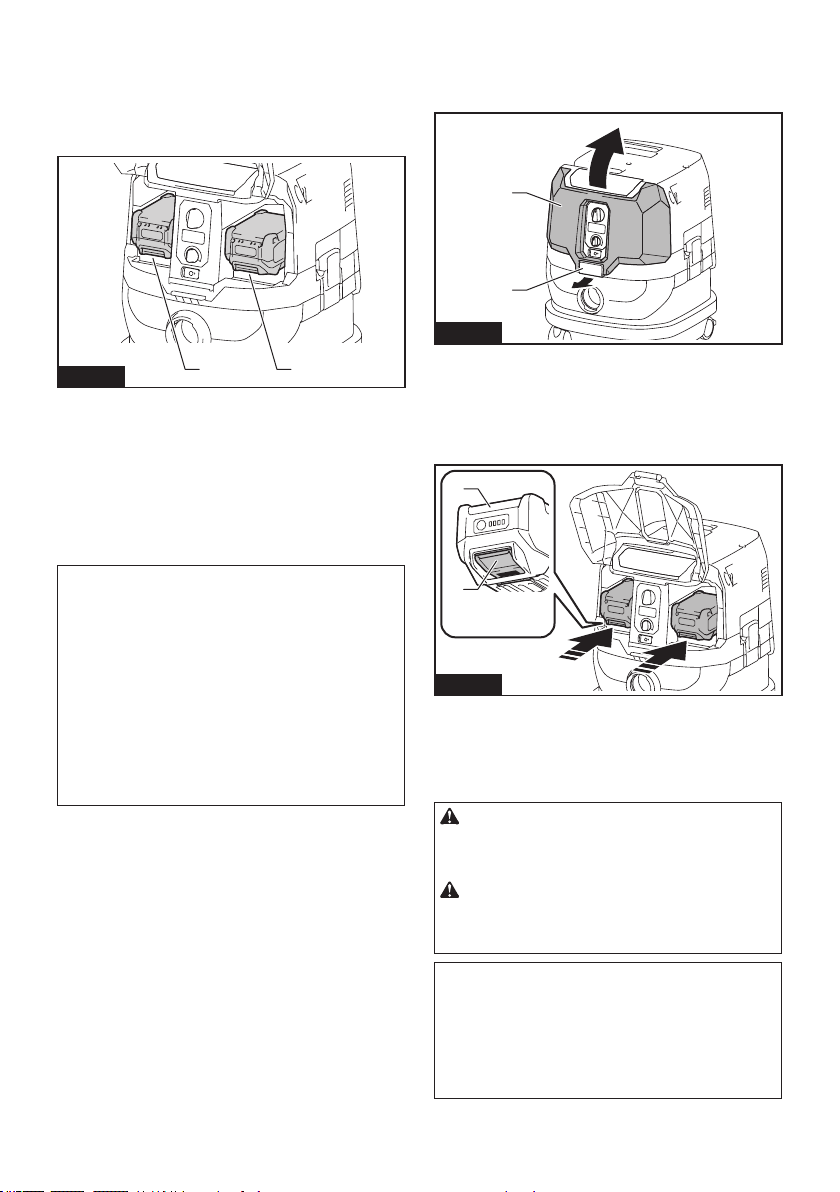
30 ESPAÑOL
La aspiradora tiene dos ranuras de batería. Con dos
baterías idénticas en paralelo, puede extender su
tiempo de funcionamiento en uno o más usos, sin tener
que detenerse para recargar las baterías. La aspira-
dora también funciona con una sola batería, por lo que
puede elegir entre baterías dobles o baterías sencillas,
según sus necesidades.
2
1
Fig.2
► 1. Ranura izquierda de batería 2. Ranura derecha
de batería
Con baterías dobles
El accionamiento continuo con dos baterías permite un
tiempo de funcionamiento más prolongado y un aspi-
rado más eciente. Cuando la primera batería se está
agotando, la aspiradora cambia automáticamente una
fuente de energía, por lo que continúa funcionando con
la segunda batería.
NOTA: La ranura izquierda de batería (cuando se
mira hacia el frente de la aspiradora) tiene prioridad
sobre la ranura derecha de batería. La ranura dere-
cha de batería solo se identicará como una fuente
de alimentación, ya sea cuando no hay batería ins-
talada en la ranura izquierda de batería o cuando la
batería en la ranura izquierda de batería se vacíe.
NOTA: Puede extraer la batería de la ranura
izquierda de batería y recargarla después de que la
aspiradora haya cambiado su fuente de alimentación
de la ranura izquierda de batería a la derecha sin
dejar de funcionar. Para volver a dar prioridad a la
ranura izquierda de batería después de instalar una
batería recargada, reinicie la aspiradora.
Con una sola batería
Solamente se requiere una batería como fuente de
alimentación en cualquiera de la ranura izquierda o
derecha de batería. La aspiradora determina automá-
ticamente qué ranura de batería está disponible según
las condiciones de funcionamiento.
Instalación y desinstalación
Para instalar los cartuchos de batería, libere el seguro
primero y abra la cubierta de la batería. Luego, inserte
los cartuchos de batería.
1
2
Fig.3
► 1. Seguro 2. Cubierta de la batería
Alinee las lengüetas de los cartuchos de batería con
las ranuras de la carcasa de batería, y deslícelas en su
lugar. Insértelas por completo hasta que queden asegu-
radas en su lugar haciendo un pequeño clic.
Luego, asegure la cubierta de la batería.
1
2
Fig.4
► 1. Cartucho de batería 2. Botón
Para quitar los cartuchos de batería, deslícelos fuera
de la carcasa de la batería mientras presiona y man-
tiene presionados los botones en la parte frontal de los
cartuchos.
PRECAUCIÓN: Instale siempre el cartucho
de batería por completo. De no hacerlo, éste podría
caerse accidentalmente del aparato, ocasionándole
lesiones a usted o a alguien cerca de usted.
PRECAUCIÓN: No instale el cartucho de
batería a la fuerza. Si el cartucho no se desliza al
interior fácilmente, se debe a que no está siendo
insertado correctamente.
NOTA: Cuando la aspiradora cambia la fuente de
alimentación de la primera batería a la segunda, es
posible que sea necesario detener temporalmente
el funcionamiento, lo que ocasionará una pequeña
pérdida de succión. Tenga en cuenta que esto no es
una avería, por lo que la aspiradora se recupera y
reanuda las operaciones inmediatamente después
de la pausa.
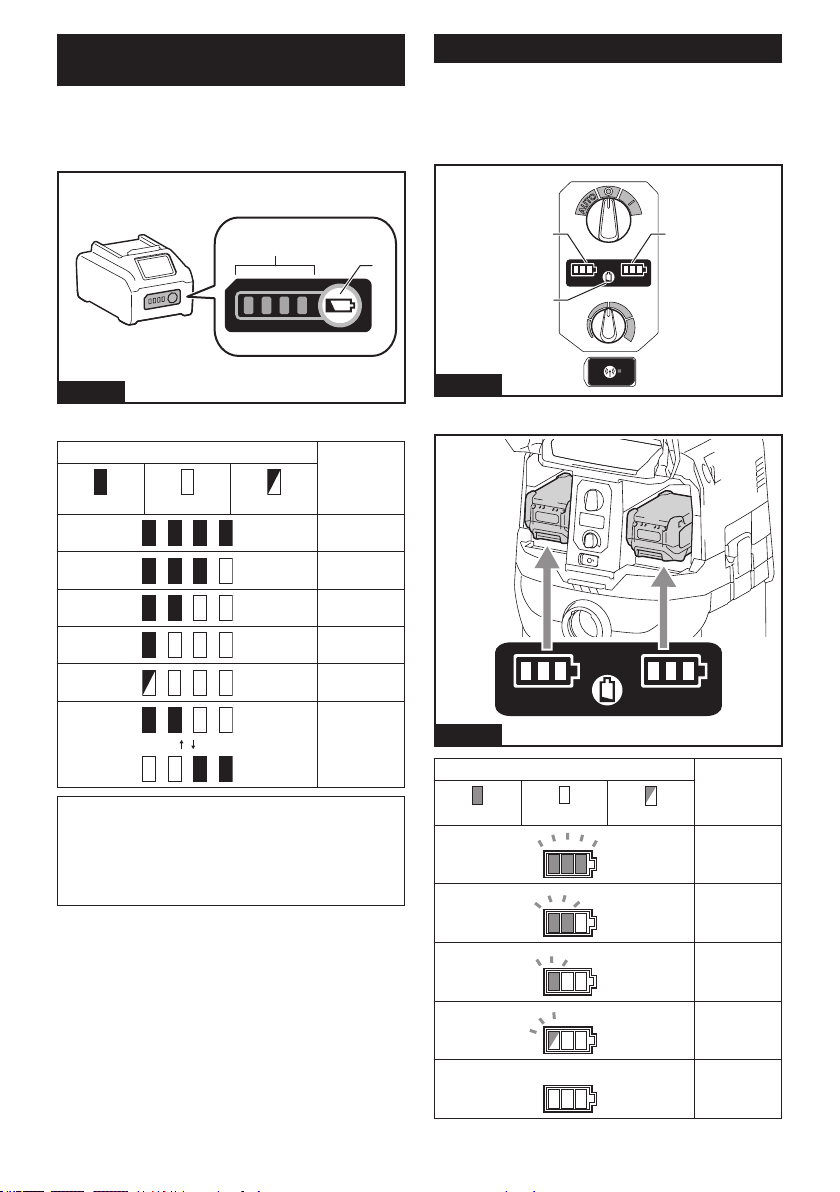
31 ESPAÑOL
Indicación de la capacidad restante
de la batería
Oprima el botón de vericación en el cartucho de la
batería para que indique la capacidad restante de la
batería. Las luces indicadoras se iluminarán por algu-
nos segundos.
1
2
Fig.5
► 1. Luces indicadoras 2. Botón de vericación
Luces indicadoras Capacidad
restante
Iluminadas Apagadas Parpadeando
75% a 100%
50% a 75%
25% a 50%
0% a 25%
Cargar la
batería.
La batería
pudo haber
funcionado
mal.
NOTA: Dependiendo de las condiciones de uso y
la temperatura ambiente, la indicación podrá diferir
ligeramente de la capacidad real.
NOTA: La primera luz indicadora (extrema izquierda)
parpadeará cuando el sistema de protección de
batería esté en funcionamiento.
Indicadores de batería del panel de control
La capacidad restante de la batería se puede leer en
el panel de control en cualquier momento. Presione
el botón de vericación, y los indicadores izquierdo y
derecho mostrarán los niveles de carga de la batería
según corresponda.
11
2
Fig.6
► 1. Indicadores de batería 2. Botón de vericación
Fig.7
Estado del indicador de batería Capacidad
restante de la
batería
Encendido
Apagado
Parpadeando
50% a 100%
20% a 50%
0% a 20%
Cargar la
batería
Batería no
insertada
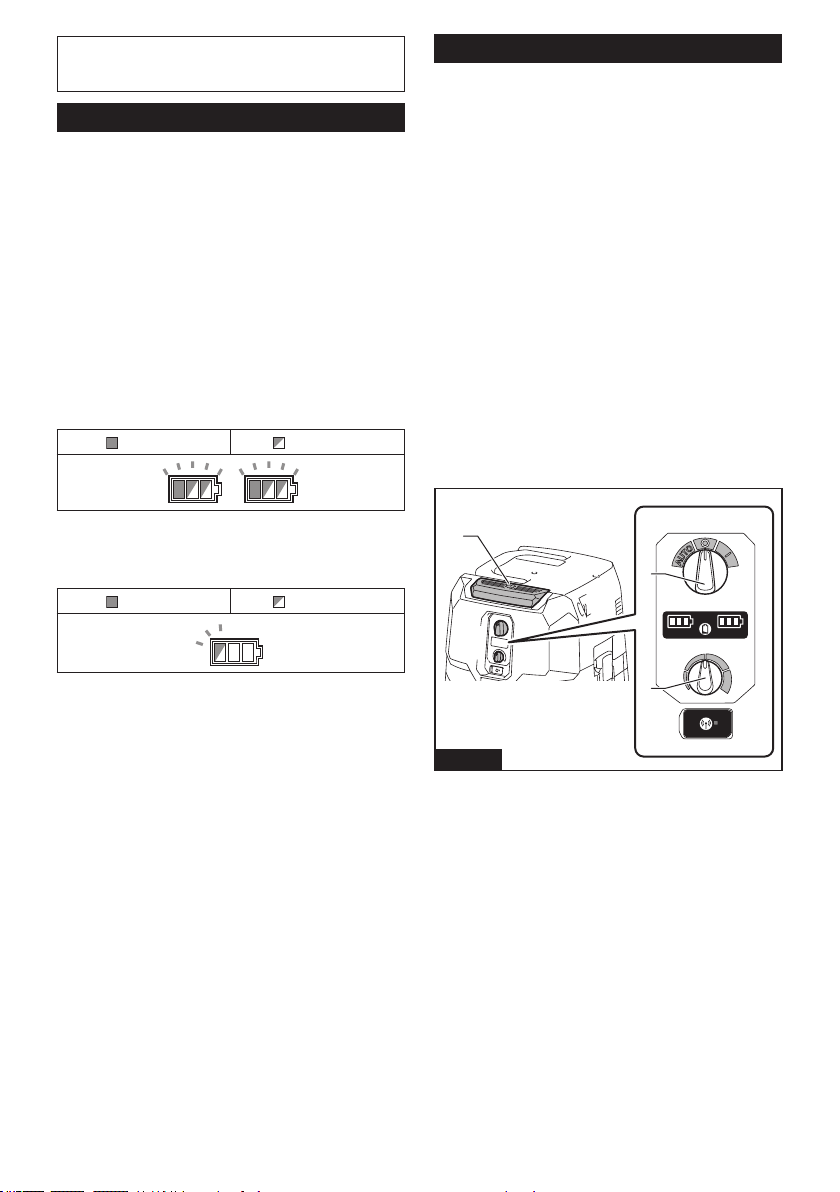
32 ESPAÑOL
NOTA: Los indicadores de batería también se acti-
varán cuando la aspiradora comience a funcionar o
cambie su fuente de alimentación de una a otra.
Sistema de protección del aparato/batería
El aparato está equipado con un sistema de protección
del aparato/batería. Este sistema corta automática-
mente la alimentación al motor para prolongar la vida
del aparato y la batería. El aparato se detendrá automá-
ticamente durante la operación si el aparato o la batería
se someten a una de las siguientes condiciones:
Protección contra sobrecarga
Cuando el aparato/batería se están utilizando de manera
que causa que consuma una cantidad de corriente
inusualmente alta, el aparato se detiene automáticamente.
En esta situación, apague el aparato y detenga la aplica-
ción que haya causado que el aparato se sobrecargara.
Luego, encienda el aparato para volver a arrancarlo.
Protección contra sobrecalentamiento
Encendido Parpadeando
Cuando el aparato se sobrecaliente, éste se detendrá
automáticamente, y los indicadores de batería izquierdo
y derecho parpadean. En este caso, deje que el apa-
rato se enfríe antes de volver a encenderlo.
Encendido Parpadeando
Cuando la batería se sobrecalienta, el aparato se detiene
automáticamente y uno de los indicadores de batería
sobrecalentada parpadea. En este caso, deje que la bate-
ría se enfríe antes de volver a encender el aparato.
Protección contra sobredescarga
Cuando la capacidad de la batería es baja, el aparato
se detiene automáticamente. Si el aparato no funciona
junto con la operación del interruptor, retire las baterías
del aparato y recárguelas.
Protección contra otras causas
El sistema de protección también está diseñado para
otras causas que podrían dañar el aparato, y permite
que el aparato se detenga automáticamente. Siga
todos los pasos a continuación para eliminar las causas
cuando el aparato se haya detenido temporalmente o
se haya detenido durante el funcionamiento.
1. Apague el aparato, y luego enciéndalo nueva-
mente para reiniciarlo.
2. Cargue la(s) batería(s) o reemplácela(s) con
batería(s) recargada(s).
3. Deje que el aparato y la(s) batería(s) se enfríen.
Si no hay ninguna mejora al restaurar el sistema de
protección, comuníquese con su centro local de servi-
cio Makita.
Accionamiento del interruptor
Encendido de la aspiradora
1. Gire el interruptor de modo en espera a la posi-
ción "I" (ENCENDIDO) o "AUTO" (ENCENDIDO)
para que la aspiradora esté lista en modo de
espera.
2. Oprima el botón de encendido/apagado.
Para cambiar de vuelta al modo en espera, oprima
nuevamente el botón de encendido/apagado.
Apagado de la aspiradora
Realice uno de los siguientes pasos.
• Presione el botón de encendido/apagado para
volver a poner la aspiradora en modo en espera, y
luego coloque el interruptor de modo en espera en
la posición "O" (APAGADO).
• Ponga el interruptor de modo en espera en la
posición "O" (APAGADO).
Ajuste de la potencia de succión
La potencia de succión se puede ajustar según sus
necesidades de trabajo.
• Gire la perilla de ajuste de la fuerza de succión a
la izquierda para reducir la potencia de succión.
• Gire la perilla de ajuste de la fuerza de succión a
la derecha para aumentar la potencia de succión.
1
3
2
Fig.8
► 1. Interruptor de modo en espera 2. Botón de
encendido/apagado 3. Perilla de ajuste de la fuerza
de succión
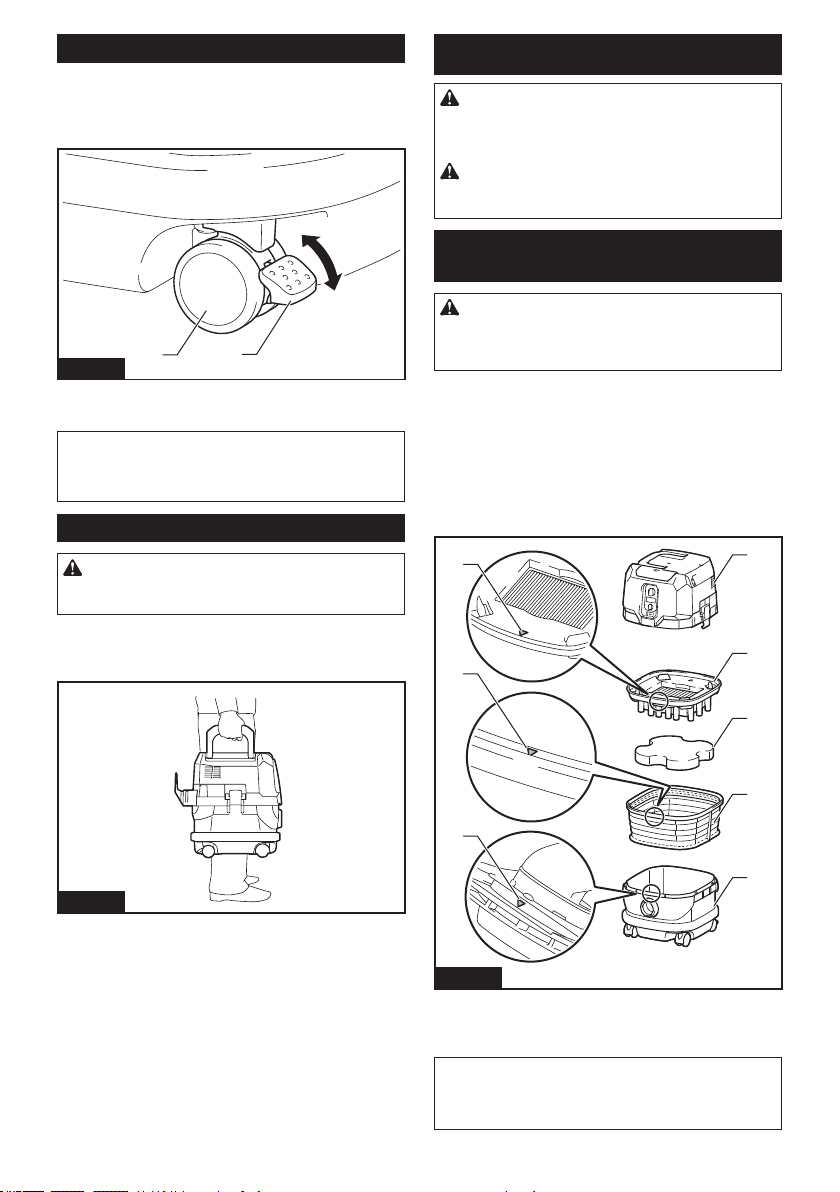
33 ESPAÑOL
Bloqueo y desbloqueo de las ruedas
Las ruedas traseras se pueden bloquear con topes para
que la aspiradora quede quieta.
Baje la palanca del tope con la mano para bloquear la
rueda y levántela para soltarla.
1
2
3
4
Fig.9
► 1. Rueda 2. Palanca del tope 3. Posición
LIBERADA 4. Posición BLOQUEADA
NOTA: Cuando mueva la aspiradora, asegúrese de
que la rueda esté desbloqueada. El mover la aspira-
dora con la rueda en una posición bloqueada podría
causar daños a la rueda.
Mango de transporte
PRECAUCIÓN: Levante y transporte el apa-
rato con el cuidado debido. El no hacerlo podría
resultar en una lesión personal o daños al aparato.
Cuando transporte la aspiradora, sosténgala del mango
ubicado en el cabezal. El mango del cabezal es retráctil
para guardarse cuando no se utilice.
Fig.10
MONTAJE
PRECAUCIÓN: Asegúrese siempre de que el
aparato esté apagado y los cartuchos de batería
hayan sido extraídos antes de realizar cualquier
trabajo en el aparato.
PRECAUCIÓN: Utilice siempre una más-
cara contra el polvo durante el ensamblado o
mantenimiento.
Instalación del ltro de polvo (HEPA)
y el preltro (para polvo seco)
PRECAUCIÓN: Nunca aspire agua ni otros
líquidos o polvo húmedo cuando utilice el ltro de
polvo. El aspirar este tipo de objetos podría causar la
avería del ltro de polvo.
Para usar el ltro de polvo:
1.
Coloque el preltro dentro del tanque alineando las
marcas de posición de montaje del preltro y el tanque.
2.
Ponga el amortiguador en el preltro, y luego coloque
el ltro de polvo sobre el amortiguador, alineando las marcas
de posición de montaje del ltro de polvo y del preltro.
3. Monte el cabezal sobre el tanque, y asegúrelo con
los broches de aseguramiento.
1
2
3
4
5
6
6
6
Fig.11
► 1. Cabezal 2. Filtro de polvo (HEPA)
3. Amortiguador 4. Preltro 5. Tanque 6. Marca de
posición de montaje
AVISO: Antes de usar el ltro de polvo, asegú-
rese de que el preltro y el amortiguador siempre
se utilicen juntos. El ltro de polvo no debe ser
instalado solo.
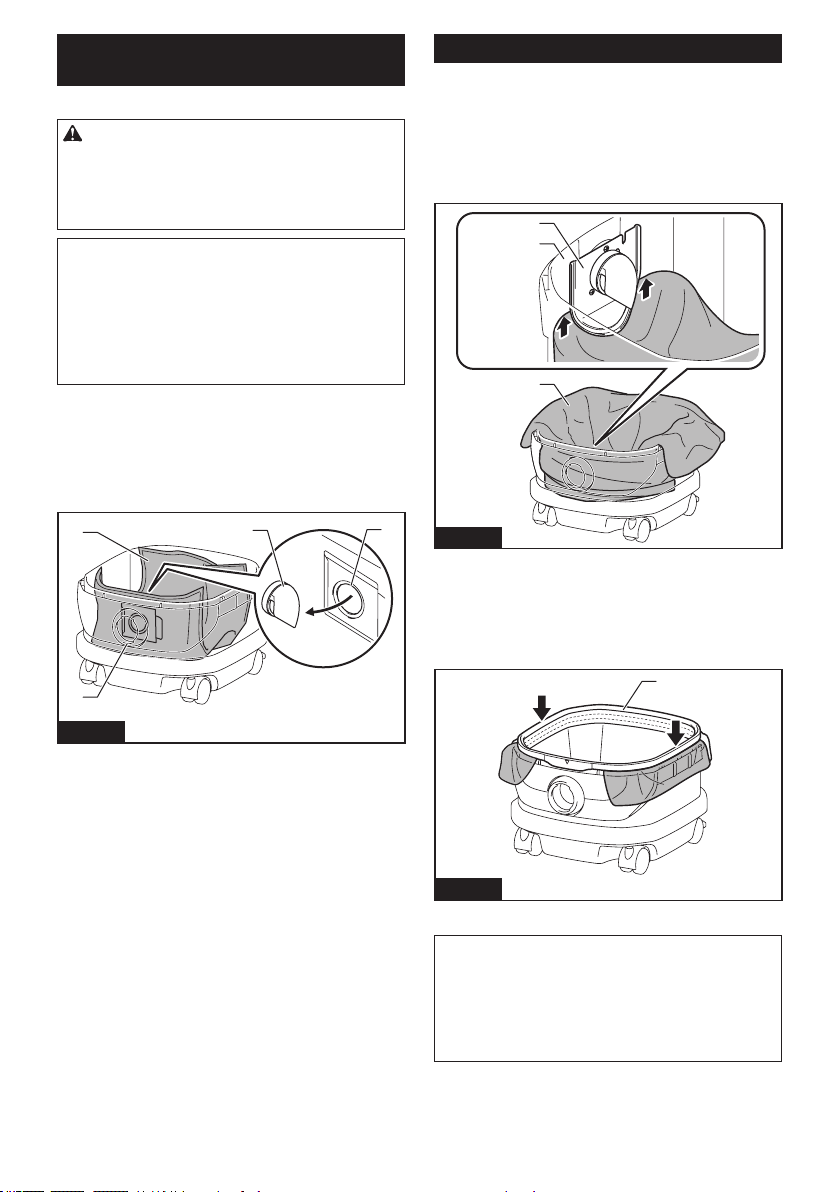
34 ESPAÑOL
Instalación de la bolsa de papel para
polvo
Accesorio opcional
ADVERTENCIA: Antes de usar una bolsa de
papel para polvo, asegúrese de que el preltro se
utilice en conjunto. No utilizar el preltro junto con la
bolsa de papel para polvo podría ocasionar un ruido
y calentamiento anormales, lo cual puede provocar
un incendio.
AVISO: Nunca aspire agua ni otros líquidos o
polvo húmedo cuando utilice una bolsa de papel
para polvo. El aspirar este tipo de objetos podría
causar la avería de la bolsa de papel para polvo.
AVISO: Antes de usar una bolsa de papel para
polvo, asegúrese de que el ltro de polvo, el
amortiguador y el preltro se utilicen siempre
juntos.
1. Desdoble una bolsa de papel para polvo.
2. Alinee la abertura de la bolsa de papel para polvo
con la admisión para polvo del tanque.
3. Instale la bolsa de papel para polvo dentro del tan-
que, con su abertura de cartón enganchada al soporte
de la bolsa de papel para polvo.
1
4
2
3
Fig.12
► 1. Bolsa de papel para polvo 2. Abertura de car-
tón 3. Soporte de la bolsa de papel para polvo
4. Admisión para polvo
Instalación de la bolsa de polietileno
Con una bolsa de polietileno instalada en el tanque,
puede vaciar el tanque fácilmente sin ensuciarse las
manos.
Coloque una bolsa de polietileno sobre el tanque y
deslice un lado del borde superior de la bolsa en su
extremo abierto entre la placa del sujetador y la pared
frontal del tanque.
1
2
3
Fig.13
► 1. Placa del sujetador 2. Pared frontal del tanque
3. Bolsa de polietileno
Extienda los otros bordes superiores de la bolsa hacia
afuera sobre los rebordes superiores del tanque.
Coloque el preltro sobre la bolsa de polietileno para
sujetar la abertura de la bolsa de forma segura.
1
Fig.14
► 1. Preltro
NOTA: Se puede utilizar cualquier bolsa de polieti-
leno disponible en el mercado. Se recomienda el uso
de una con un grosor de 0,04 mm o más.
NOTA: Si se recolecta demasiado polvo la bolsa
podría romperse fácilmente, por lo que debe evitar
recolectar más de la mitad de la capacidad de la
bolsa.
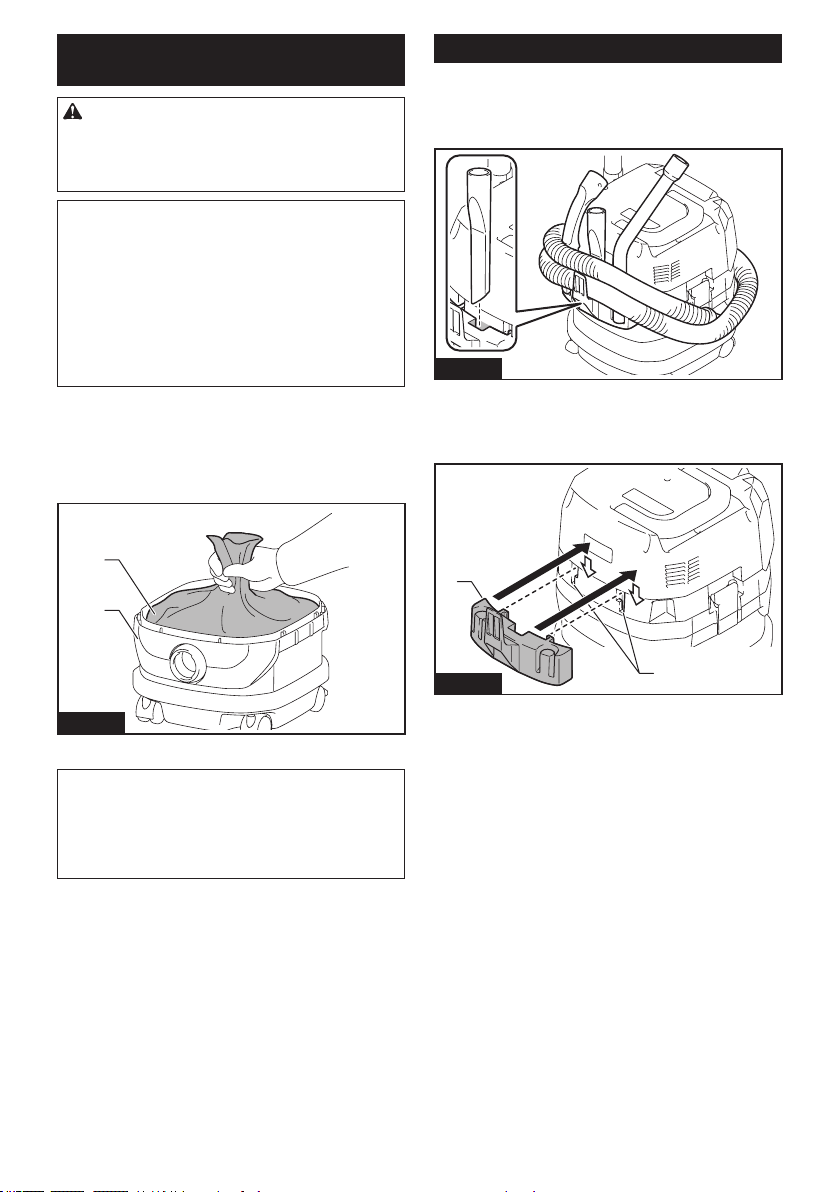
35 ESPAÑOL
Vaciado del tanque con la bolsa de
polietileno
ADVERTENCIA: Asegúrese siempre de que
la aspiradora esté apagada y de que los cartu-
chos de batería hayan sido extraídos antes de
vaciar el tanque. El no hacerlo podría ocasionar una
descarga eléctrica y lesiones personales graves.
AVISO: Evite los impactos fuertes sobre el tan-
que. Un impacto fuerte podría deformar y dañar las
piezas.
AVISO: Vacíe el tanque por lo menos una vez al
día, aunque esto dependerá del volumen de polvo
aspirado en el tanque. De lo contrario, la fuerza de
succión se vería reducida y el motor podría averiarse.
AVISO: Evite agarrar los ganchos o broches
mientras vacía el tanque. Agarrar los ganchos o
broches podría ocasionar que se rompieran.
Suelte los broches de bloqueo y levante el cabezal para
retirarlo del tanque.
Sacuda el polvo del preltro antes de levantar y quitar
el ltro del tanque.
Luego, saque la bolsa de polietileno del tanque,
cerrando la abertura de la bolsa con la mano.
1
2
Fig.15
► 1. Bolsa de polietileno 2. Tanque
NOTA: Saque la bolsa de polietileno del tanque con
cuidado para evitar que se raye y rasgue con los
bordes del interior del tanque.
NOTA: Vacíe la bolsa de polietileno antes de que se
llene. Demasiado polvo en el tanque podría causar
que la bolsa de polietileno se rompa.
Instalación del gancho múltiple
Use el gancho múltiple para sujetar una manguera,
accesorios y aditamentos que no estén en uso en
su lugar, y pueda sacarlos rápidamente según sus
preferencias.
Fig.16
Coloque el gancho múltiple sobre la base de montaje
en la parte posterior de la aspiradora, colocando los
rieles del gancho múltiple a lo largo de las ranuras de la
base de montaje.
1
2
Fig.17
► 1. Gancho múltiple 2. Base de montaje
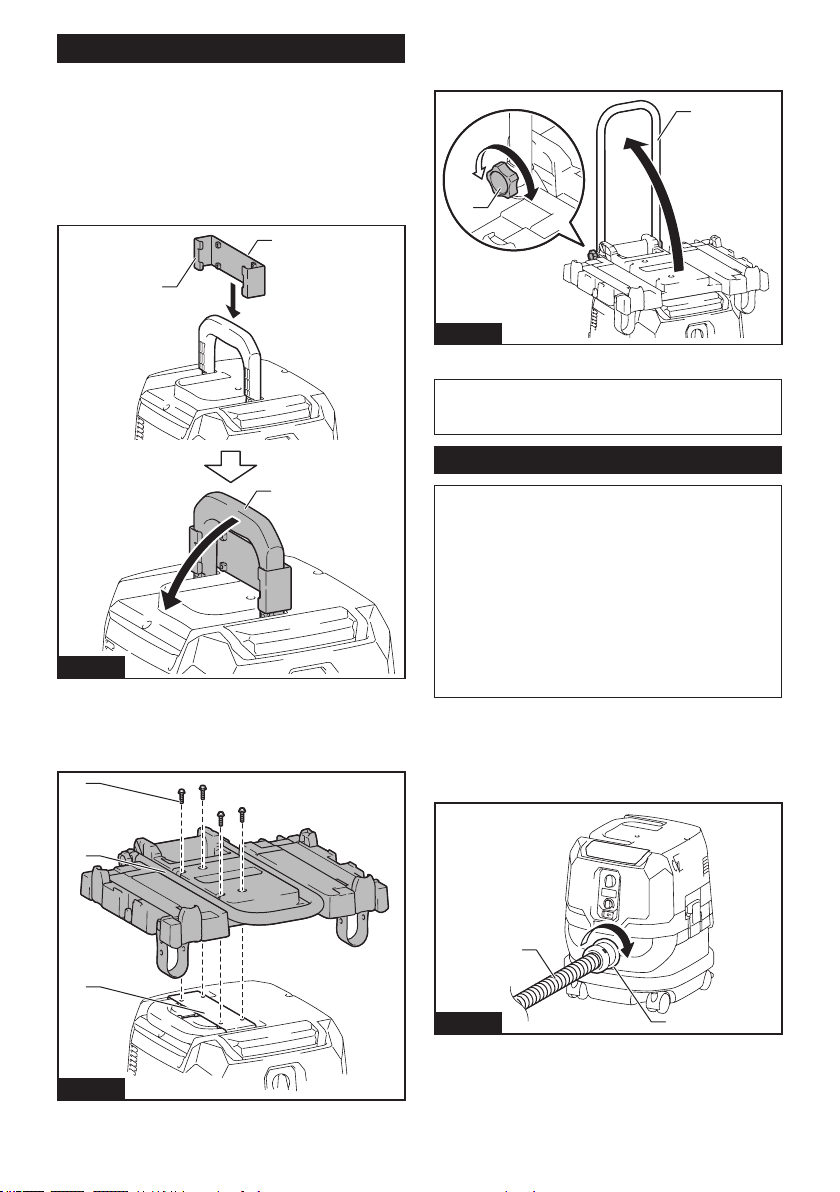
36 ESPAÑOL
Instalación del adaptador MAKPAC
Accesorio opcional
Las cajas de almacenamiento MAKPAC conectables y apila-
bles se pueden instalar en la parte superior de la aspiradora
con un adaptador opcional. Las cajas están disponibles en
muchos tamaños y estilos para adaptarse a sus preferencias.
Coloque el gancho de la base de montaje sobre el mango
de la aspiradora con su supercie de montaje hacia arriba,
cuando el mango esté doblado en la posición cerrada.
1
2
3
Fig.18
► 1. Gancho de la base de montaje 2. Supercie de
montaje 3. Mango
Monte el adaptador MAKPAC sobre el gancho de la base de montaje,
y asegúrelos juntos con los cuatro tornillos que se proporcionan.
2
3
1
Fig.19
► 1. Adaptador MAKPAC 2. Gancho de la base de
montaje 3. Tornillo
Levante la barra de empuje y apriete el pomo para
preparar la instalación de las cajas MAKPAC sobre la
aspiradora.
1
2
Fig.20
► 1. Barra de empuje 2. Pomo
NOTA: Para detalles sobre cómo instalar las cajas
MAKPAC, consulte las instrucciones proporcionadas
con el adaptador y cajas MAKPAC.
Instalación de la manguera
AVISO: Nunca fuerce la manguera para doblarla
ni la aplaste con el pie. Nunca mueva la aspira-
dora jalándola de la manguera. El forzar, aplastar
y jalar la manguera podría ocasionar que ésta se
averíe o se deforme.
AVISO: Cuando aspire residuos grandes tales
como los generados al tallar con cepillo, polvo de
concreto o similares que no sean residuos peque-
ños, utilice la manguera con diámetro interior de
38 mm (accesorio opcional). El usar la manguera
con diámetro interior de 28 mm (accesorio opcional)
podría causar obstrucciones y daños a la manguera.
Conexión a la aspiradora
Inserte el extremo de la manguera a la admisión para
polvo (entrada de la manguera) de la aspiradora, luego
gírelo en el sentido de las manecillas del reloj hasta que
encaje en su lugar.
1
2
Fig.21
► 1. Manguera 2. Admisión para polvo (entrada de la
manguera)
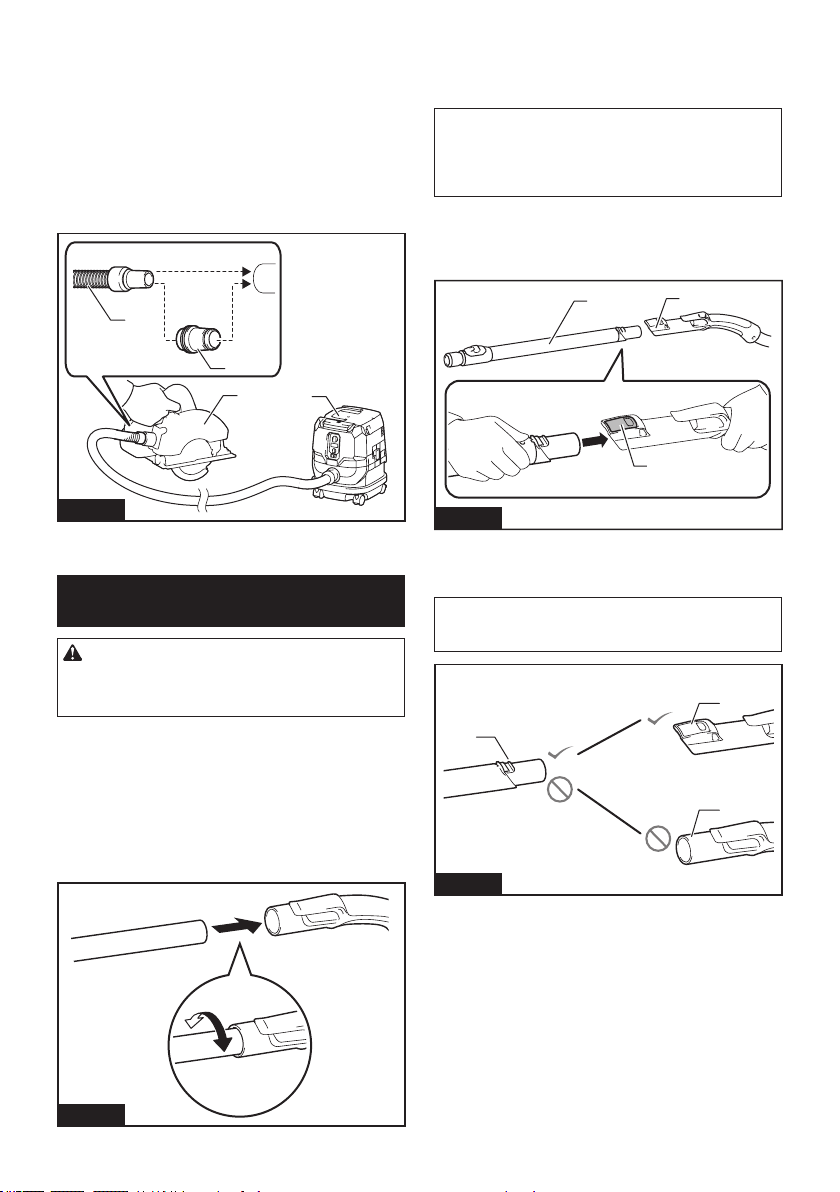
37 ESPAÑOL
Conexiones con sus herramientas de trabajo
(Especíco del país)
Al conectar la aspiradora a cualquier herramienta de trabajo
disponible compatible con la aspiradora, funciona como un
extractor de polvo para sus herramientas eléctricas.
Seleccione una de las bocas delanteras o juntas (acce-
sorios opcionales) como el más adecuado para su
modelo de herramienta. Coloque las bocas o la junta,
según sea necesario, entre el extremo frontal de la
manguera de la aspiradora y un puerto de extracción de
polvo de su herramienta.
1
2
3
4
Fig.22
► 1. Bocas delanteras o junta 2. Manguera de la aspi-
radora 3. Herramienta eléctrica 4. Aspiradora
Instalación o desinstalación de los
aditamentos para aspiradora
PRECAUCIÓN: Después de instalar un adita-
mento, verique si está bien instalado. Si el adi-
tamento no está instalado perfectamente bien, éste
podría salirse y ocasionar una lesión personal.
Cuando se utiliza el aditamento sin la
función de bloqueo
Accesorio opcional
Inserte un aditamento en la entrada de succión de la aspi-
radora empujándolo y atornillándolo a mano en su lugar.
Gire con la mano y separe el aditamento de la entrada
de succión después de su uso.
Fig.23
Aditamentos con la función de
bloqueo
Accesorio opcional
AVISO: Cuando instale el aditamento con la
función de bloqueo, asegúrese de alinear el botón
de liberación con el gancho sobre el aditamento.
Si no están alineados, el aditamento no se bloqueará
y podría salirse de la aspiradora.
Inserte un aditamento en la entrada de succión de la
aspiradora empujándolos juntos al escuchar un clic.
Para quitar el aditamento, tire de él mientras presiona el
botón de liberación.
1
3
2
Fig.24
► 1. Entrada de succión con la función de bloqueo
2. Botón de liberación 3. Aditamento con la función
de bloqueo
NOTA: Un aditamento con la función de bloqueo se
puede instalar solamente en la entrada de succión
con la función de bloqueo.
1
2
3
Fig.25
► 1. Aditamento con la función de bloqueo 2. Entrada
de succión con la función de bloqueo 3. Entrada de
succión sin la función de bloqueo
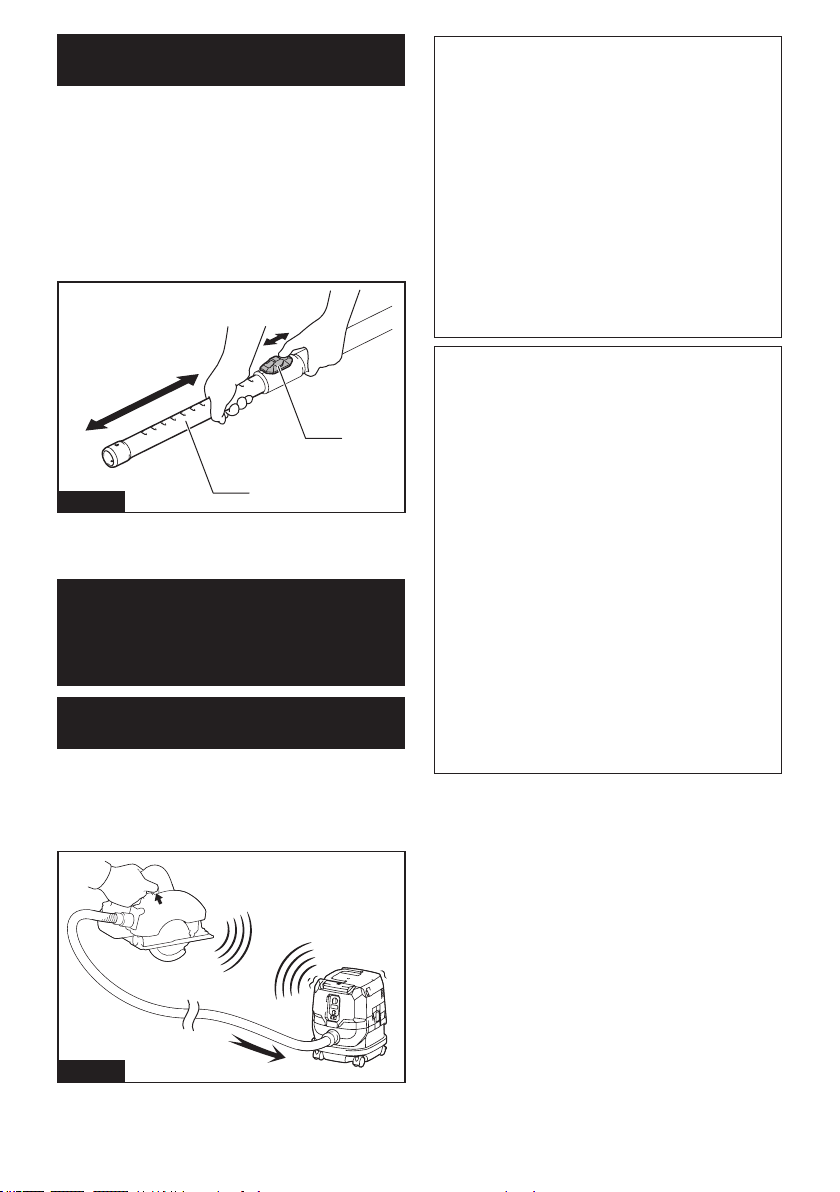
38 ESPAÑOL
Ajuste de las longitudes del tubo de
extensión de tipo corredera
Accesorio opcional
Un tubo de extensión de tipo corredera se puede com-
binar para longitudes más cortas y más largas. Permite
limpiar áreas de difícil acceso y un posicionamiento
más cómodo.
Tire hacia adentro y hacia afuera del tubo deslizable
para cambiar las longitudes del tubo mientras presiona
y mantiene presionado el botón deslizable.
Suelte el botón deslizable para bloquear el tubo desli-
zable en la posición deseada.
2
1
Fig.26
► 1. Tubo deslizable 2. Botón deslizable
FUNCIÓN DE
ACTIVACIÓN
INALÁMBRICA
Lo que puede hacer con la función
de activación inalámbrica
La función de activación inalámbrica permite una ope-
ración limpia y cómoda. Si conecta a la aspiradora una
herramienta compatible, podrá hacer que la aspiradora
funcione automáticamente al activar el interruptor de la
herramienta.
Fig.27
AVISO: Asegúrese de consultar el manual de
instrucciones de la herramienta cuando uti-
lice la aspiradora con la función de activación
inalámbrica.
AVISO: No desarme ni modique la unidad
inalámbrica.
AVISO: Para impedir que entre el polvo en
la ranura de la unidad inalámbrica, cierre
siempre bien la tapa durante la operación o el
almacenamiento.
AVISO: No retire la unidad inalámbrica mientras
se esté suministrando electricidad. De lo contrario
se podría causar una avería de la unidad inalámbrica.
AVISO: No oprima el botón de activación ina-
lámbrica demasiado fuerte ni lo haga con ningún
objeto que tenga un borde loso.
NOTA: La activación inalámbrica requiere que la
unidad inalámbrica esté equipada con herramientas
Makita.
NOTA: Antes de usar por primera vez la función de
activación inalámbrica con cada herramienta, es
necesario registrar la herramienta. Una vez nalizado
el registro de la herramienta, éste no será necesario
de nuevo a menos que haya sido cancelado.
NOTA: Antes del registro, asegúrese de que la uni-
dad inalámbrica haya sido insertada correctamente.
NOTA: Una unidad inalámbrica puede registrar hasta
10 enlaces con otras unidades inalámbricas. Si se
registran más de otras 10 unidades inalámbricas a
una unidad inalámbrica, la registrada al principio se
cancelará automáticamente.
NOTA: La posición del botón de activación inalám-
brica varía en función de la herramienta.
NOTA: La aspiradora también puede ponerse en
marcha oprimiendo el botón de encendido/apagado
cuando el interruptor de modo en espera está ajus-
tado en “AUTO”.
Sin embargo, el botón de encendido/apagado no se
activará cuando la función de activación inalámbrica
se esté utilizando.
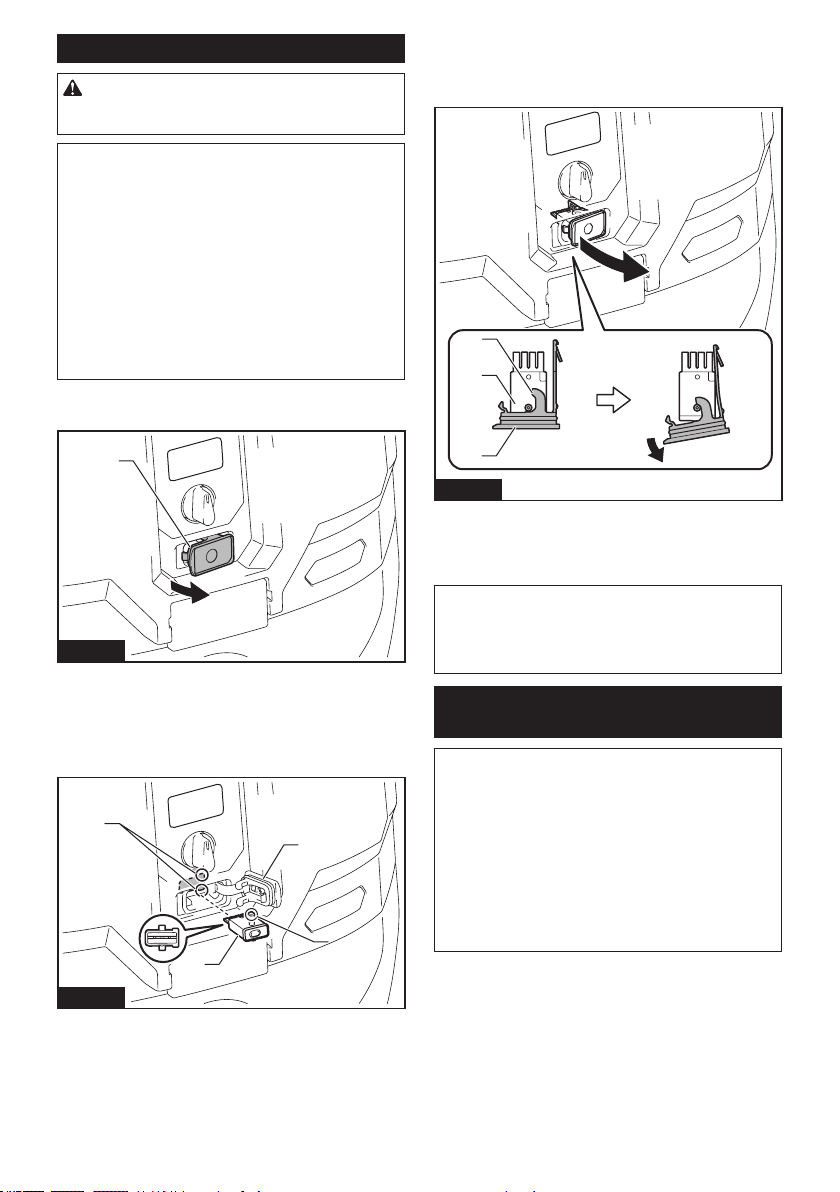
39 ESPAÑOL
Instalación de la unidad inalámbrica
PRECAUCIÓN: Coloque la aspiradora sobre
una supercie plana y estable cuando vaya a
instalar la unidad inalámbrica.
AVISO: Limpie el polvo y la suciedad en la aspi-
radora antes de instalar la unidad inalámbrica.
El polvo o la suciedad podrían causar una avería
si llegan a introducirse en la ranura de la unidad
inalámbrica.
AVISO: Para evitar una avería a causa de la elec-
tricidad estática, toque un material de descarga
de electricidad estática, tal como una pieza metá-
lica antes de levantar la unidad inalámbrica.
AVISO: Cuando vaya a instalar la unidad inalám-
brica, asegúrese siempre de que ésta sea inser-
tada en la dirección correcta y que la tapa esté
completamente cerrada.
1. Abra la tapa de la aspiradora tal como se muestra
en la ilustración.
1
Fig.28
► 1. Tapa
2. Inserte la unidad inalámbrica en la ranura y luego
cierre la tapa.
Cuando inserte la unidad inalámbrica, alinee las partes
salientes con las partes cóncavas en la ranura.
1
2
3
4
Fig.29
► 1. Unidad inalámbrica 2. Parte saliente 3. Tapa
4. Parte cóncava
Cuando extraiga la unidad inalámbrica, abra la tapa
lentamente. Los ganchos en la parte posterior de la
tapa levantarán la unidad inalámbrica mientras usted
jala hacia arriba la tapa.
1
2
3
Fig.30
► 1. Unidad inalámbrica 2. Gancho 3. Tapa
Una vez extraída la unidad inalámbrica, guárdela en el
estuche suministrado o en un contenedor libre de elec-
tricidad estática.
AVISO: Use siempre los ganchos en la parte
posterior de la tapa cuando extraiga la unidad
inalámbrica. Si los ganchos no sujetan la unidad
inalámbrica, cierre la tapa por completo y vuelva a
abrirla lentamente.
Registro de herramientas para la
aspiradora
NOTA: Para el registro de la herramienta, se requiere
una herramienta Makita compatible con la función de
activación inalámbrica.
NOTA: Termine de instalar la unidad inalámbrica en
la herramienta antes de comenzar con el registro de
la herramienta.
NOTA: Durante el registro de la herramienta, no jale
el gatillo interruptor en la herramienta ni active el
interruptor de encendido/apagado en la aspiradora.
NOTA: Consulte también el manual de instrucciones
de la herramienta.
Si desea activar la aspiradora junto con el interruptor
de activación de la herramienta, termine antes con el
registro de la herramienta.
1. Instale las unidades inalámbricas en la aspiradora
y en la herramienta respectivamente.
2. Instale las baterías en la aspiradora y en la
herramienta.
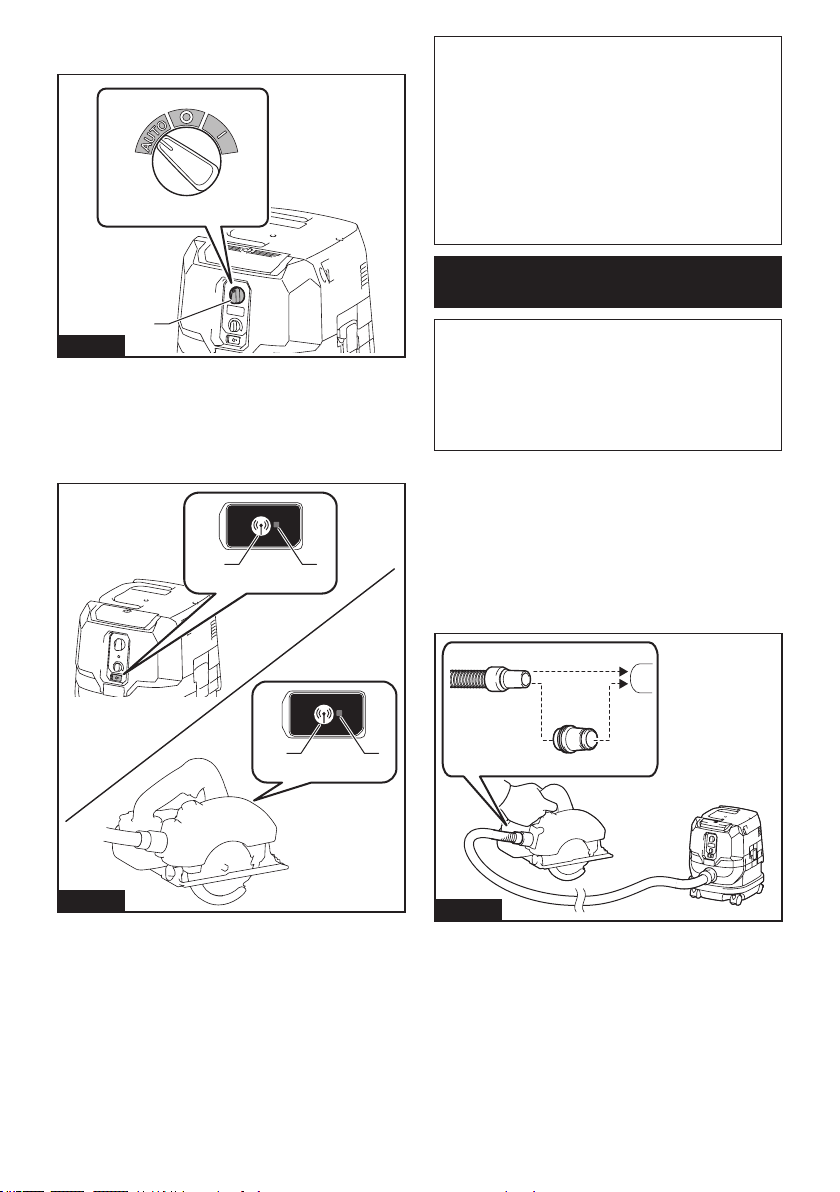
40 ESPAÑOL
3. Ajuste el interruptor de modo en espera en la aspi-
radora en “AUTO”.
1
Fig.31
► 1. Interruptor de modo en espera
4. Oprima el botón de activación inalámbrica en la
aspiradora durante 3 segundos hasta que la luz indica-
dora de activación inalámbrica parpadee en verde. Y
luego oprima el botón de activación inalámbrica en la
herramienta de la misma manera.
21
21
Fig.32
► 1. Botón de activación inalámbrica 2. Luz indica-
dora de activación inalámbrica
Si la aspiradora y la herramienta han sido conectadas
exitosamente, las luces indicadoras de activación ina-
lámbrica se encenderán en verde durante 2 segundos y
comenzarán a parpadear en azul.
NOTA: Las luces indicadoras de activación inalám-
brica terminarán parpadeando en verde después de
un lapso de 20 segundos. Oprima el botón de acti-
vación inalámbrica en la herramienta mientras la luz
indicadora de activación inalámbrica en la aspiradora
esté parpadeando. Si la luz indicadora de activación
inalámbrica no parpadea en verde, oprima el botón
de activación inalámbrica durante un lapso breve y
vuelva a mantenerlo oprimido.
NOTA: Cuando realice dos o más registros de herra-
mientas para una aspiradora, termine el registro de
las herramientas de uno en uno.
Inicio de la función de activación
inalámbrica
NOTA: Termine con el registro de la herramienta en
la aspiradora para la activación inalámbrica.
NOTA: Coloque siempre la aspiradora de manera
que pueda ver el estado de la luz indicadora de acti-
vación inalámbrica.
NOTA: Consulte también el manual de instrucciones
de la herramienta.
Después de registrar una herramienta en la aspiradora,
esta última se activará automáticamente junto con el
interruptor de activación de la herramienta.
1. Instale las unidades inalámbricas en la aspiradora
y en la herramienta respectivamente.
2. Instale las baterías en la aspiradora y en la
herramienta.
3. Conecte la manguera de la aspiradora a la
herramienta.
Fig.33
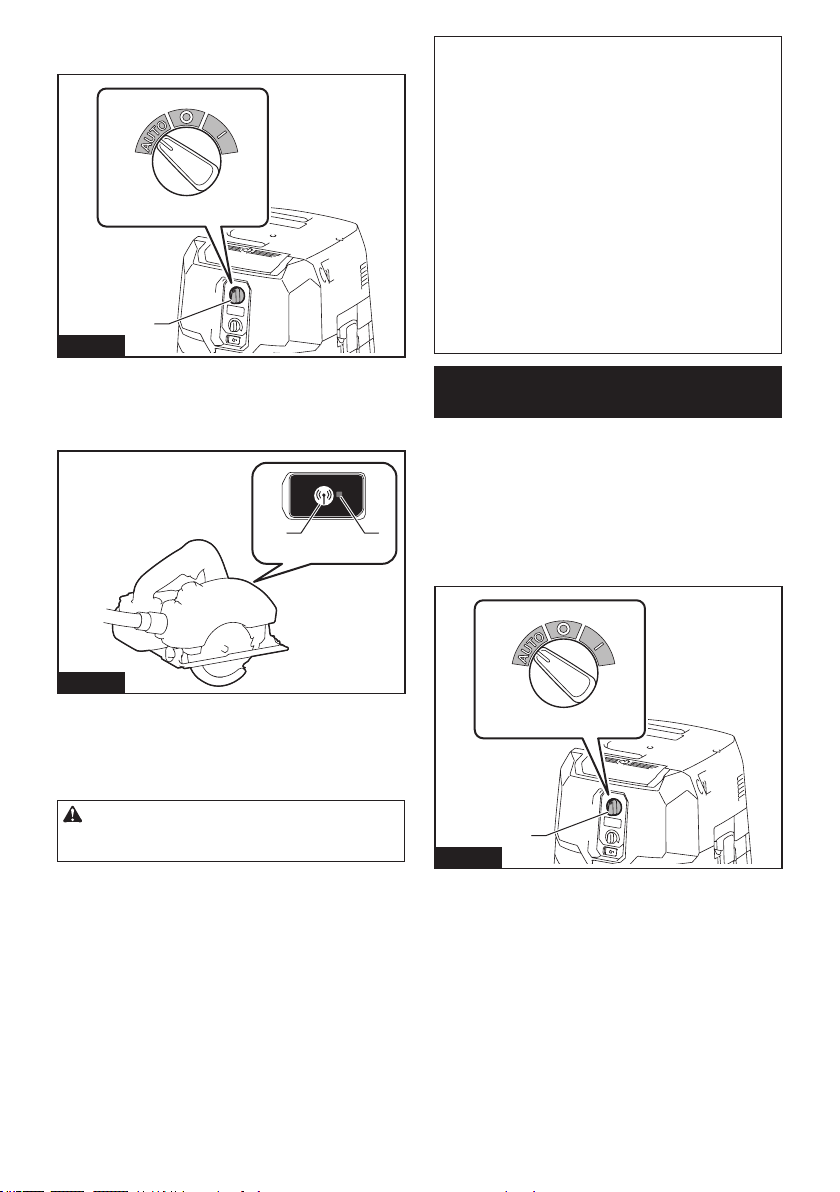
41 ESPAÑOL
4. Ajuste el interruptor de modo en espera en la aspi-
radora en “AUTO”.
1
Fig.34
► 1. Interruptor de modo en espera
5. Oprima el botón de activación inalámbrica en la
herramienta durante un lapso breve. La luz indicadora
de activación inalámbrica parpadeará en azul.
21
Fig.35
► 1. Botón de activación inalámbrica 2. Luz indica-
dora de activación inalámbrica
6. Jale el gatillo interruptor de la herramienta.
Verique que la aspiradora funcione mientras jala el
gatillo interruptor en la herramienta.
PRECAUCIÓN: Verique siempre que fun-
ciona la función de activación inalámbrica antes
de empezar a trabajar con la herramienta.
Para detener la activación inalámbrica, oprima el botón
de activación inalámbrica en la herramienta, o ajuste el
interruptor de modo en espera en la aspiradora en “I”
o en “O”.
NOTA: La luz indicadora de activación inalámbrica en
la herramienta dejará de parpadear en azul cuando
no haya operación durante 2 horas. En este caso,
ajuste el interruptor de modo en espera en la aspi-
radora en “AUTO” y oprima el botón de activación
inalámbrica en la herramienta nuevamente.
NOTA: La aspiradora se pondrá en marcha/deten-
drá con un retraso. Existirá un desfase cuando la
aspiradora detecte la activación del interruptor de la
herramienta.
NOTA: La distancia de transmisión de la unidad
inalámbrica podrá variar en función del lugar y las
circunstancias de los alrededores.
NOTA: Cuando dos o más herramientas estén
registradas en una aspiradora, esta última podrá
comenzar a funcionar incluso si usted no jala el gatillo
interruptor debido a que otro usuario está utilizando
la función de activación inalámbrica.
Cancelación del registro de
herramientas para la aspiradora
Realice el siguiente procedimiento para cancelar el
registro de la herramienta para la aspiradora.
1. Instale las unidades inalámbricas en la aspiradora
y en la herramienta respectivamente.
2. Instale las baterías en la aspiradora y en la
herramienta.
3. Ajuste el interruptor de modo en espera en la aspi-
radora en “AUTO”.
1
Fig.36
► 1. Interruptor de modo en espera
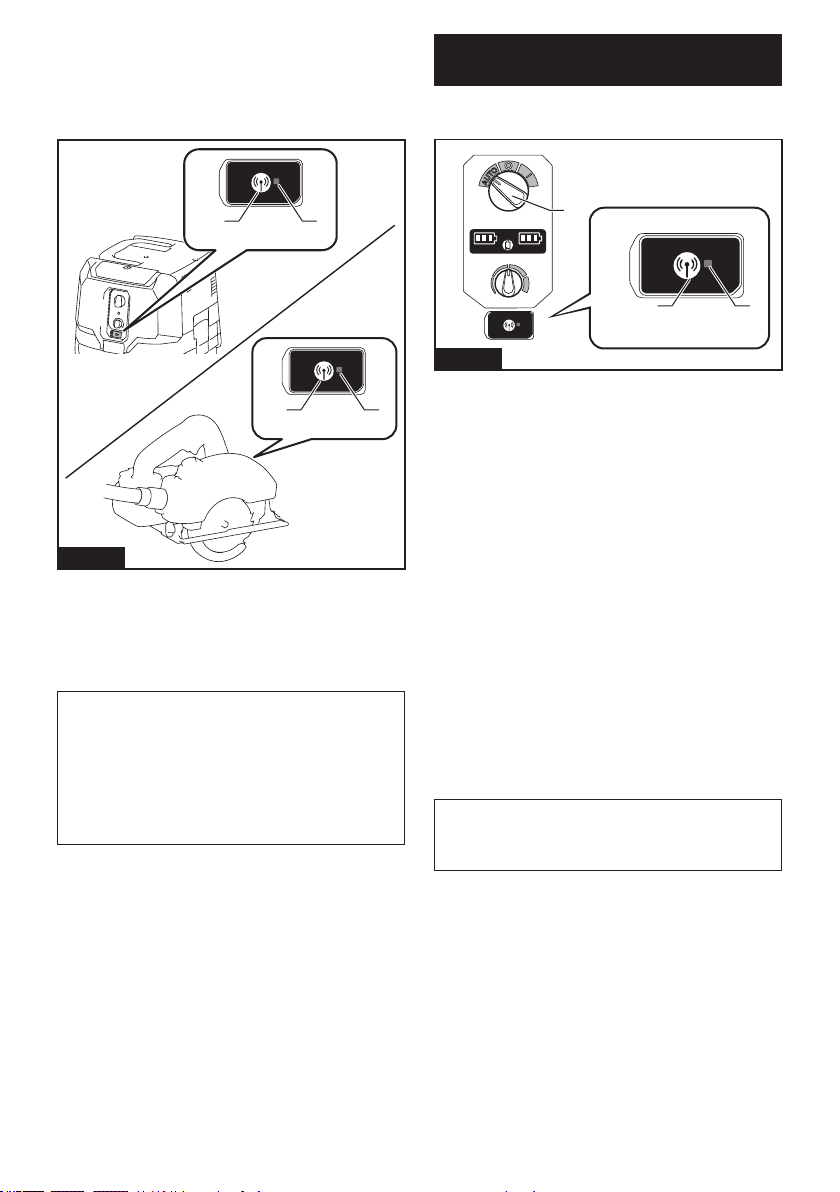
42 ESPAÑOL
4. Oprima el botón de activación inalámbrica en la
aspiradora durante 6 segundos. La luz indicadora de
activación inalámbrica parpadeará en verde y luego se
pondrá en rojo. Después de eso, oprima el botón de
activación inalámbrica en la herramienta de la misma
manera.
21
21
Fig.37
► 1. Botón de activación inalámbrica 2. Luz indica-
dora de activación inalámbrica
Si la cancelación se realiza exitosamente, las luces
indicadoras de activación inalámbrica se encenderán
en rojo durante 2 segundos y comenzarán a parpadear
en azul.
NOTA: Las luces indicadoras de activación inalám-
brica terminarán parpadeando en rojo después de un
lapso de 20 segundos. Oprima el botón de activación
inalámbrica en la herramienta mientras la luz indi-
cadora de activación inalámbrica en la aspiradora
esté parpadeando. Si la luz indicadora de activación
inalámbrica no parpadea en rojo, oprima el botón
de activación inalámbrica durante un lapso breve y
vuelva a mantenerlo oprimido.
Borrado de todos los registros de
herramientas
Usted puede borrar todos los registros de herramientas
de la aspiradora como se indica a continuación.
32
1
Fig.38
► 1. Interruptor de modo en espera 2. Botón de acti-
vación inalámbrica 3. Luz indicadora de activación
inalámbrica
1. Instale la unidad inalámbrica en la aspiradora.
2. Instale las baterías en la aspiradora.
3. Ajuste el interruptor de modo en espera en
“AUTO”.
4. Mantenga oprimido el botón de activación inalám-
brica durante aproximadamente 6 segundos hasta que
la luz indicadora de activación inalámbrica parpadee en
rojo (cerca de dos veces durante un segundo).
5. Cuando la luz indicadora de activación inalám-
brica comience a parpadear en rojo, suelte el botón
de activación inalámbrica. Posteriormente, vuelva a
mantener oprimido el botón de activación inalámbrica
alrededor de 6 segundos.
6. Cuando la luz indicadora de activación inalám-
brica comience a parpadear rápidamente en rojo (cerca
de 5 veces durante un segundo), suelte el botón de
activación inalámbrica. Cuando la luz indicadora de
activación inalámbrica se encienda en rojo y luego se
apague, todos los registros de herramientas se habrán
borrado.
NOTA: Si la luz indicadora de activación inalámbrica
no parpadea en rojo, oprima el botón de activación
inalámbrica durante un lapso breve e inténtelo
nuevamente.
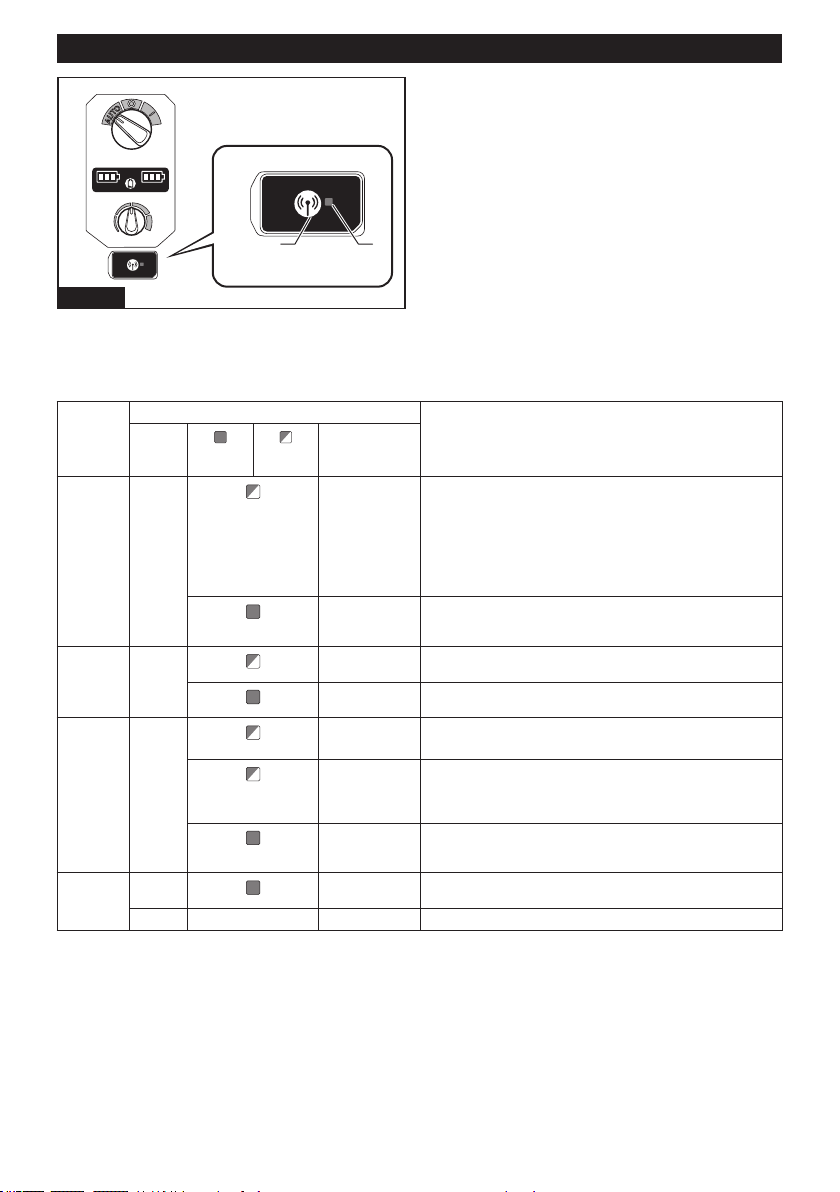
43 ESPAÑOL
Descripción del estado de la luz indicadora de activación inalámbrica
21
Fig.39
► 1. Botón de activación inalámbrica 2. Luz indica-
dora de activación inalámbrica
La luz indicadora de activación inalámbrica muestra el estado de la función de activación inalámbrica. Consulte la
tabla a continuación para ver qué signica el estado de la luz indicadora.
Estado Luz indicadora de activación inalámbrica Descripción
Color
Encendida
Parpa-
deando
Duración
(aproximada)
En espera Azul
Aspiradora:
continua
Herramienta: 2
horas
Se está esperando el registro de la herramienta o la función de
activación inalámbrica están disponibles.
La luz indicadora en la aspiradora parpadea cuando el interruptor
de modo en espera está ajustado en “AUTO”. La luz indicadora
en la herramienta parpadea cuando se presiona el botón de
activación inalámbrica. La luz indicadora en la herramienta se
apaga automáticamente cuando no se realiza ninguna operación
durante 2 horas.
Cuando la herra-
mienta está
funcionando.
La activación inalámbrica de la aspiradora está disponible y la
herramienta está funcionando.
Registro
de la
herramienta
Verde
20 segundos Ya se puede realizar el registro de la herramienta. Se está bus-
cando la herramienta que se va a registrar.
2 segundos El registro de la herramienta ha terminado. La luz indicadora de
activación inalámbrica comenzará a parpadear en azul.
Cancelación/
borrado del
registro de
herramientas
Rojo
(lento: 2 veces/s)
20 segundos Ya se puede cancelar el registro de la herramienta. Se está
buscando la herramienta que se va a cancelar.
(rápido: 5 veces/s)
Cuando el botón
de activación
inalámbrica es
presionado.
Ya se pueden borrar todos los registros de herramientas.
2 segundos El registro de la herramienta ha sido cancelado/borrado. La luz
indicadora de activación inalámbrica comenzará a parpadear
en azul.
Otros Rojo
3 segundos La energía es suministrada a la unidad inalámbrica y la función
de activación inalámbrica está arrancando.
Apagada
- - El interruptor de modo en espera no está ajustado en “AUTO”.
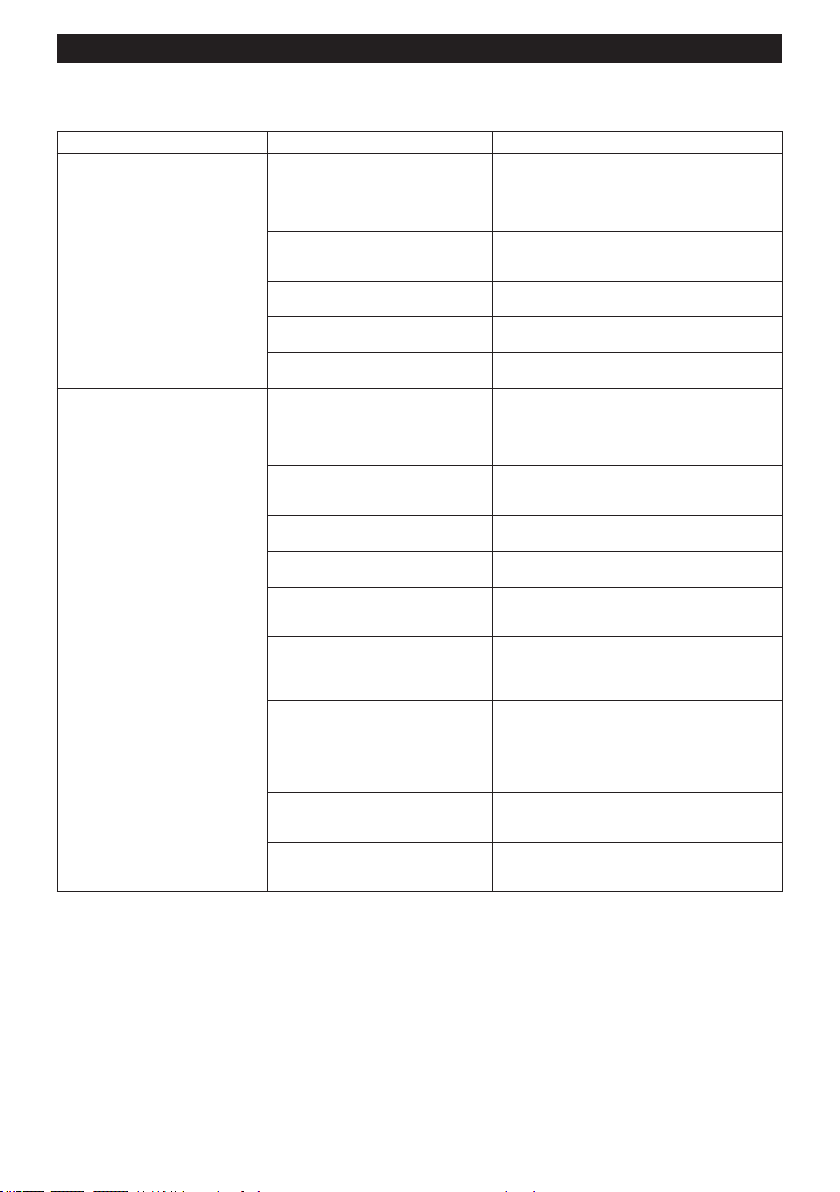
44 ESPAÑOL
Detección y solución de problemas para la función de activación inalámbrica
Antes de solicitar alguna reparación, primero realice una inspección por su cuenta. Si detecta algún problema que
no esté explicado en el manual, no intente desensamblar la herramienta. En vez de esto, solicite la reparación a un
centro de servicio autorizado de Makita, usando siempre piezas de repuesto Makita.
Estado de la anomalía Causa probable (avería) Remedio
La luz indicadora de activación ina-
lámbrica no enciende/parpadea.
La unidad inalámbrica no está instalada
en la aspiradora y/o la herramienta.
La unidad inalámbrica está instalada
incorrectamente en la aspiradora y/o la
herramienta.
Instale la unidad inalámbrica correctamente.
La terminal de la unidad inalámbrica y/o
la ranura está sucia.
Retire con cuidado el polvo y la suciedad en la
terminal de la unidad inalámbrica y limpie la ranura
de la aspiradora y/o de la herramienta.
El botón de activación inalámbrica en la
herramienta no se ha oprimido.
Oprima el botón de activación inalámbrica en la
herramienta durante un lapso breve.
El interruptor de modo en espera en la
aspiradora no está ajustado en “AUTO”.
Ajuste el interruptor de modo en espera en la
aspiradora en “AUTO”.
No hay suministro de energía. Suministre energía a la herramienta y a la
aspiradora.
No se puede terminar/cancelar
el registro de la herramienta
exitosamente.
La unidad inalámbrica no está instalada
en la aspiradora y/o la herramienta.
La unidad inalámbrica está instalada
incorrectamente en la aspiradora y/o la
herramienta.
Instale la unidad inalámbrica correctamente.
La terminal de la unidad inalámbrica y/o
la ranura está sucia.
Retire con cuidado el polvo y la suciedad en la
terminal de la unidad inalámbrica y limpie la ranura
de la aspiradora y/o de la herramienta.
El interruptor de modo en espera en la
aspiradora no está ajustado en “AUTO”.
Ajuste el interruptor de modo en espera en la
aspiradora en “AUTO”.
No hay suministro de energía. Suministre energía a la herramienta y a la
aspiradora.
Operación incorrecta Oprima el botón de activación inalámbrica durante
un lapso breve y realice los procedimientos de
registro/cancelación de la herramienta nuevamente.
La herramienta y la aspiradora están
lejos una de la otra (fuera del rango de
transmisión).
Acerque más la herramienta a la aspiradora. La
distancia máxima de transmisión es de aproxima-
damente 10 m, pero puede variar en función de las
circunstancias.
Antes de terminar el registro/cancela-
ción de la herramienta;
- el gatillo interruptor en la herramienta
se ha jalado; o
- el botón de encendido/apagado en la
aspiradora está activado.
Oprima el botón de activación inalámbrica durante
un lapso breve y realice los procedimientos de
registro/cancelación de la herramienta nuevamente.
Los procedimientos de registro para la
herramienta o la aspiradora no se han
terminado.
Realice los procedimientos de registro tanto para
la herramienta como para la aspiradora al mismo
tiempo.
La perturbación radioeléctrica generada
por otros aparatos que emiten ondas de
radio de alta intensidad.
Mantenga la herramienta y la aspiradora lejos de
aparatos tales como dispositivos Wi-Fi y hornos de
microondas.
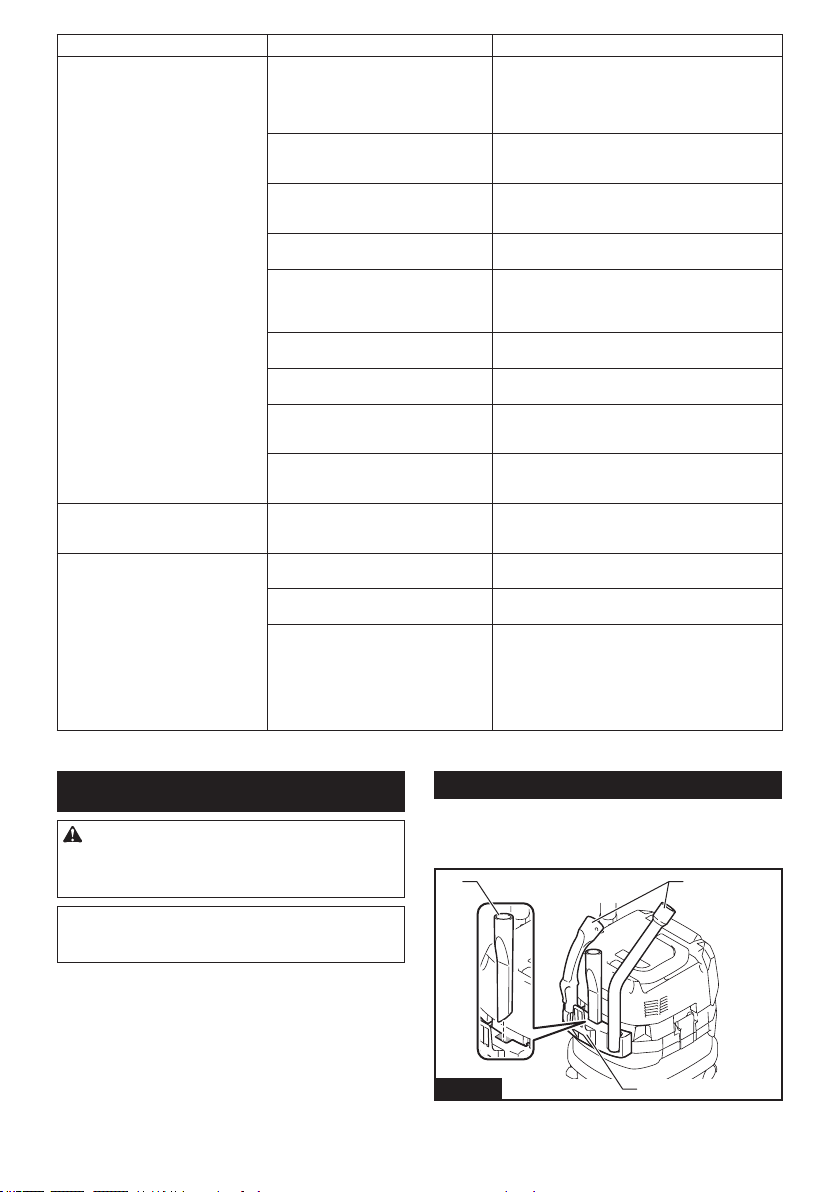
45 ESPAÑOL
Estado de la anomalía Causa probable (avería) Remedio
La aspiradora no funciona junto con
el interruptor de activación de la
herramienta.
La unidad inalámbrica no está instalada
en la aspiradora y/o la herramienta.
La unidad inalámbrica está instalada
incorrectamente en la aspiradora y/o la
herramienta.
Instale la unidad inalámbrica correctamente.
La terminal de la unidad inalámbrica y/o
la ranura está sucia.
Retire con cuidado el polvo y la suciedad en la
terminal de la unidad inalámbrica y limpie la ranura
de la aspiradora y/o de la herramienta.
El botón de activación inalámbrica en la
herramienta no se ha oprimido.
Oprima el botón de activación inalámbrica durante un
lapso breve y asegúrese de que la luz indicadora de
activación inalámbrica esté parpadeando en azul.
El interruptor de modo en espera en la
aspiradora no está ajustado en “AUTO”.
Ajuste el interruptor de modo en espera en la
aspiradora en “AUTO”.
Más de 10 herramientas están registra-
das en la aspiradora.
Vuelva a realizar el registro de la herramienta.
Si más de 10 herramientas están registradas en la
aspiradora, la herramienta registrada al principio se
cancelará automáticamente.
La aspiradora borró todos los registros
de herramientas.
Vuelva a realizar el registro de la herramienta.
No hay suministro de energía. Suministre energía a la herramienta y a la
aspiradora.
La herramienta y la aspiradora están
lejos una de la otra (fuera del rango de
transmisión).
Acerque más la herramienta a la aspiradora. La distancia
máxima de transmisión es de aproximadamente 10 m,
pero puede variar en función de las circunstancias.
La perturbación radioeléctrica generada
por otros aparatos que emiten ondas de
radio de alta intensidad.
Mantenga la herramienta y la aspiradora lejos de
aparatos tales como dispositivos Wi-Fi y hornos de
microondas.
La aspiradora funciona aun cuando
el gatillo interruptor de la herra-
mienta no ha sido jalado.
Otros usuarios están usando la activa-
ción inalámbrica de la aspiradora con
sus herramientas.
Apague el botón de activación inalámbrica de las
demás herramientas o cancele el registro de dichas
herramientas.
No se pueden borrar todos los
registros de herramientas en la
aspiradora.
El botón de activación inalámbrica en la
herramienta está oprimido.
Oprima el botón de activación inalámbrica en la aspira-
dora para borrar todos los registros de herramientas.
El interruptor de modo en espera en la
aspiradora no está ajustado en “AUTO”.
Ajuste el interruptor de modo en espera en la
aspiradora en “AUTO”.
El botón de activación inalámbrica no
se está manteniendo oprimido de forma
correcta.
Mantenga oprimido el botón de activación inalámbrica
durante más de 6 segundos y luego suéltelo cuando
la luz indicadora de activación inalámbrica parpadee
en rojo. Mantenga oprimido el botón de activación
inalámbrica durante más de 6 segundos nuevamente
hasta que el botón de activación inalámbrica parpadee
rápidamente en rojo y luego suelte el botón.
MANTENIMIENTO
PRECAUCIÓN: Asegúrese siempre de que el
aparato haya sido apagado y que los cartuchos
de batería hayan sido extraídos antes de intentar
realizar una inspección o tarea de mantenimiento.
AVISO: Nunca use gasolina, bencina, diluyente
(tíner), alcohol o sustancias similares. Puede que
esto ocasione grietas o descoloramiento.
Para mantener la SEGURIDAD y FIABILIDAD del pro-
ducto, las reparaciones, y cualquier otra tarea de man-
tenimiento o ajuste deberán ser realizadas en centros
de servicio autorizados o de fábrica Makita, empleando
siempre repuestos Makita.
Almacenamiento de los accesorios
Los accesorios y aditamentos que no estén en uso, como
boquillas y cepillos, se pueden enganchar y almacenar en
el gancho múltiple en la parte posterior de la aspiradora.
1
2
2
Fig.40
► 1. Gancho múltiple 2. Accesorios y aditamentos no
en uso
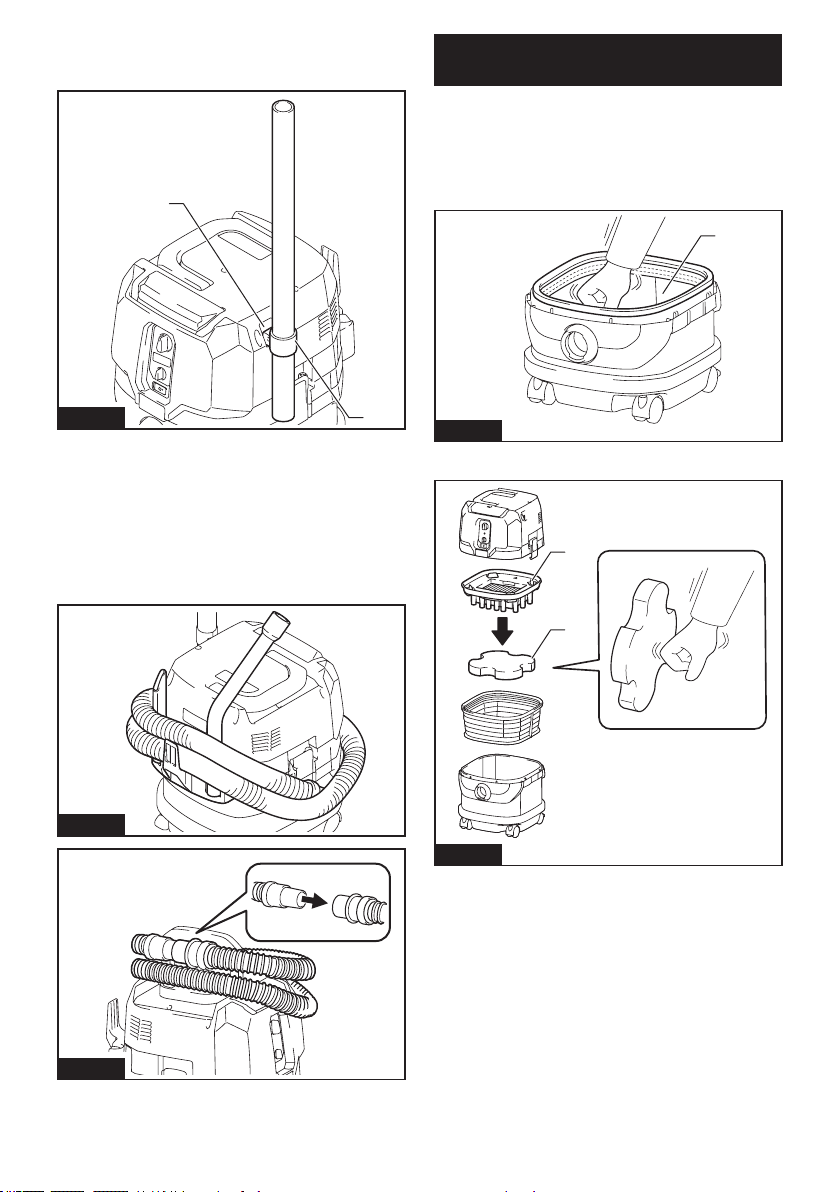
46 ESPAÑOL
Los tubos (con un tope opcional instalado) se pueden
colocar en el sujetador del tubo cuando no vaya a
utilizar la aspiradora por poco tiempo.
1
2
Fig.41
► 1. Tope (accesorio opcional) 2. Sujetador del tubo
Se puede envolver y almacenar una manguera alrede-
dor de la carcasa o el mango de la aspiradora en bucles
grandes. Conecte sus dos extremos juntos para hacer
bucles y enganche los bucles sobre el mango levan-
tado. Alternativamente, mantenga el extremo de la base
instalado en la entrada de la manguera y cuelgue los
bucles sobre el gancho múltiple con el extremo suelto
atado.
Fig.42
Fig.43
Limpieza del ltro de polvo (HEPA) y
el preltro
Limpie el ltro de polvo, preltro y amortiguador a
intervalos regulares, ya que los ltros y el amortiguador
obstruidos podrían resultar en un desempeño de suc-
ción deciente.
Limpie y sacuda cotidianamente el polvo de los ltros y
del amortiguador manualmente.
1
Fig.44
► 1. Preltro
1
2
Fig.45
► 1. Amortiguador 2. Filtro de polvo (HEPA)
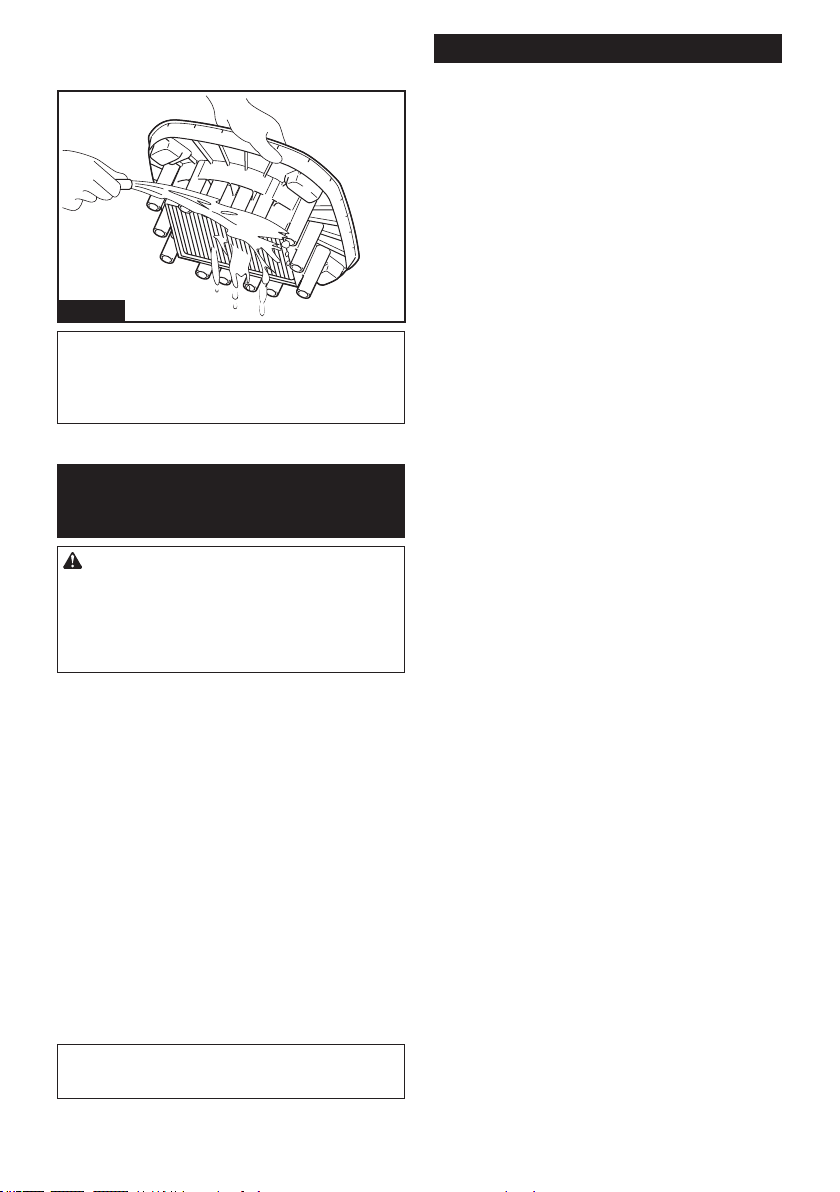
De vez en cuando lave el ltro de polvo con agua,
enjuáguelo y séquelo bien a la sombra antes de usarlo.
Nunca lave los ltros en la lavadora.
Fig.46
NOTA: No frote ni raye el ltro de polvo, el preltro
o el amortiguador con objetos duros tales como un
cepillo y una pala.
NOTA: Los ltros se desgastan con el tiempo. Se
recomienda contar con piezas de repuesto.
ACCESORIOS
OPCIONALES
PRECAUCIÓN: Estos accesorios o aditamen-
tos están recomendados para utilizarse con su
herramienta Makita especicada en este manual.
El empleo de cualquier otro accesorio o aditamento
puede conllevar el riesgo de lesiones personales.
Utilice los accesorios o aditamentos solamente para
su n establecido.
Si necesita cualquier ayuda para más detalles en
relación con estos accesorios, pregunte a su centro de
servicio local Makita.
• Manguera
• Bocas delanteras (22, 24, 38)
• Tubo recto
• Tubo de extensión
• Boquilla para esquinas
• Cepillo redondo
• Filtro de polvo, HEPA (para polvo seco)
• Amortiguador
• Preltro
• Conjunto de boquillas
• Tubo curvo
• Bolsa de polietileno
• Bolsa de papel para polvo
• Adaptador MAKPAC
• Unidad inalámbrica
• Batería y cargador originales de Makita
NOTA: Algunos de los artículos en la lista pueden
incluirse en el paquete de la herramienta como acce-
sorios estándar. Éstos pueden variar de país a país.
GARANTÍA LIMITADA DE MAKITA
Ésta Garantía no aplica para México
Consulte la hoja de la garantía anexa para ver los
términos más vigentes de la garantía aplicable a este
producto. En caso de no disponer de esta hoja de
garantía anexa, consulte los detalles sobre la garantía
descritos en el sitio web de su país respectivo indicado
a continuación.
Estados Unidos de América: www.makitatools.com
Canadá: www.makita.ca
Otros países: www.makita.com
47 ESPAÑOL

Some dust created by power sanding, sawing, grinding, drilling, and other
construction activities contains chemicals known to the State of California
to cause cancer, birth defects or other reproductive harm. Some examples
of these chemicals are:
• lead from lead-based paints,
• crystalline silica from bricks and cement and other masonry products, and
• arsenic and chromium from chemically-treated lumber.
Your risk from these exposures varies, depending on how often you do this
type of work. To reduce your exposure to these chemicals: work in a well
ventilated area, and work with approved safety equipment, such as those
dust masks that are specially designed to filter out microscopic particles.
WARNING
< USA only >
ADVERTENCIA
Algunos polvos creados por el lijado, aserrado, esmerilado, taladrado y
otras actividades de la construcción contienen sustancias químicas
reconocidas por el Estado de California como causantes de cáncer, defectos
de nacimiento y otros peligros de reproducción. Algunos ejemplos de estos
productos químicos son:
• plomo de pinturas a base de plomo,
• sílice cristalino de ladrillos y cemento y otros productos de albañilería, y
• arsénico y cromo de maderas tratadas químicamente.
El riesgo al que se expone varía, dependiendo de la frecuencia con la que
realice este tipo de trabajo. Para reducir la exposición a estos productos
químicos: trabaje en un área bien ventilada y póngase el equipo de seguridad
indicado, tal como las máscaras contra polvo que están especialmente
diseñadas para filtrar partículas microscópicas.
< Sólo en los Estados Unidos >
Makita Corporation
3-11-8, Sumiyoshi-cho,
Anjo, Aichi 446-8502 Japan
www.makita.com
885913-941
GCV02-1
EN, ESMX
20210615