Frigidaire.com USA 1-800-374-4432 Frigidaire.ca Canada 1-800-265-8352
Introduction............................................................2
Important Safety Instructions .........................3
Features ...................................................................9
Before using the appliance............................. 13
Using the cooktop..............................................14
Using the oven.....................................................21
Cleaning and maintenance .............................41
Before you call....................................................49
Warranty ...............................................................52
914779732/A (Sept 2021)

2
Thank you for bringing Frigidaire into your home!
We see your purchase as the beginning of a long
relationship together.
This manual is your resource for the use and care of
your product. Please read it before using your
appliance. Keep it handy for quick reference. If
something doesn’t seem right, the troubleshooting
section will help you with common issues.
FAQs, helpful tips and videos, cleaning products,
and kitchen and home accessories are available at
www. frigidaire.com.
We are here for you! Visit our website, chat with an
agent, or call us if you need help. We may be able
to help you avoid a service visit. If you do need ser-
vice, we can get that started for you.
Let’s make it official! Be sure to register your prod-
uct.
Keep your product info here so it’s easy to find.
Model Number:
Serial Number:
Purchase Date:
Installation Checklist
Doors
• Handles are secure and tight
• Door seals completely to cabinet on all
sides.
Leveling
• Range is level side-to-side and front-to-
back.
• Cabinet is setting solid on all corners.
Electrical power
• House power turned in
• Range wired or plugged in
Final checks
• Shipping material removed
• Registration card sent in
INTRODUCTION
3
Read all instructions before using this appli-
ance.
This manual contains important safety sym-
bols and instructions. Please pay attention
to these symbols and follow all instructions
given.
Do not attempt to install or operate your
appliance until you have read the safety
precautions in this manual. Safety items
throughout this manual are labeled with a
WARNING or CAUTION statement based
on the risk type.
Warnings and important instructions
appearing in this guide are not meant to
cover all possible conditions and situations
that may occur. Common sense, caution,
and care must be exercised with installing,
maintaining, or operating your appliance.
DEFINITIONS
This is the safety alert symbol. It is used
to alert you to potential personal injury
hazards. Follow all the safety messages that
follow this symbol to avoid possible injury
or death.
IMPORTANT INSTRUCTIONS FOR
UNPACKING AND INSTALLATION
Remove all tape and packaging before
using the appliance. Dispose of the carton
and plastic bags after unpacking the appli-
ance. Never allow children to play with
packaging material. Do not remove the wir-
ing label and other information attached to
the appliance. Do not remove model/serial
number plate.
Cold temperatures can damage the elec-
tronic control. If this appliance has not been
used for a long time, make sure that it has
been stored at temperatures above 32ºF
(0ºC) for at least 3 hours before turning on
power to the appliance.
Never modify or alter the construction of
the appliance by removing the leveling legs,
panels, wire covers, anti-tip brackets/
screws, or any other part of the appliance.
Be sure to have an appropriate foam-type
fire extinguisher available, clearly visible
and easily accessible located near the appli-
ance.
All materials used in construction of cabi-
nets, enclosures, and supports surrounding
the product must have a temperature rating
above 200°F (94°C).
WARNING
Indicates a potentially hazardous situa-
tion which, if not avoided, may result in
death or serious injury.
CAUTION
Indicates a potentially hazardous situa-
tion which, if not avoided, may result in
minor or moderate injury.
IMPORTANT
Indicates installation, operation, mainte-
nance, or valuable information that is not
hazard related.
NOTE
Indicates a short, informal reference –
something written down to assist the
memory or for future reference.
IMPORTANT
Read and follow the instructions and pre-
cautions below for unpacking, installing,
and servicing your appliance.
IMPORTANT SAFETY INSTRUCTIONS

4
GROUNDING INSTRUCTIONS
Proper Installation—Be sure your appliance
is properly installed and grounded by a
qualified technician. In the United States,
install in accordance with the National Fuel
Gas Code ANSI Z223.1/NPFA No. 54, latest
edition and National Electrical Code NFPA
No. 70 latest edition, and local electrical
code requirements. In Canada, install in
accordance with CAN/CGA B149.1 and
CAN/CGA B149.2 and CSA Standard C22.1,
Canadian Electrical code, Part 1-latest edi-
tions and local electrical code require-
ments. Install only as per the installation
instructions provided in the documentation
received with this appliance.
For personal safety, this appliance must be
properly grounded. For maximum safety,
the power cord must be securely con-
nected to an electrical outlet or junction
box that is the correct voltage, is correctly
polarized and properly grounded, and pro-
tected by a circuit breaker in accordance
with local codes.
It is the personal responsibility of the con-
sumer to have the appropriate outlet or
junction box with the correct, properly
grounded wall receptacle installed by a
qualified electrician. It is the responsibility
and obligation of the consumer to contact a
qualified installer to ensure that the electri-
cal installation is suitable and in confor-
mance with all local codes and ordinances.
See the installation instructions provided
with this appliance for complete installation
and grounding instructions.
IMPORTANT INSTRUCTIONS FOR USING
THE APPLIANCE
WARNING
• Avoid fire hazard or electrical shock.
Failure to follow this warning may
cause fire, serious injury, or death.
• Avoid fire hazard or electrical shock.
Do not use an adapter plug, an
extension cord, or remove the
grounding prong from the power
plug. Failure to follow this warning
may cause fire, serious injury, or
death.
CAUTION
Persons with a pacemaker or similar medi-
cal device should exercise caution using or
standing near an induction unit while it is
in operation as the electromagnetic field
may affect the working of the pacemaker
or similar medical device. It would be
advisable to consult your doctor or the
pacemaker or similar medical device man-
ufacturer about your particular situation.
Do not touch surface burners or elements,
areas near these burners or elements, inte-
rior surfaces of the oven, or the warmer
drawer (if provided). Surface burners and
elements may be hot even though they
appear to be cool. Areas near surface
burners and elements may become hot
enough to cause burns. During and after
use, do not touch, or let clothing or other
flammable materials come into contact
with these areas until they are cool. These
areas may include the cooktop, surfaces
facing the cooktop, oven vent areas and
the oven door and oven window.
IMPORTANT SAFETY INSTRUCTIONS
5
WARNING
• Storage In or On the Appliance -
Flammable materials should not be
stored in the oven, near surface
burners or elements, or in the stor-
age or warmer drawer (if provided).
This includes paper, plastic, and
cloth items, such as cookbooks, plas-
ticware and towels, as well as flam-
mable liquids. Do not store
explosives, such as aerosol cans, on
or near the appliance.
• Do not leave children alone - Chil-
dren should not be left alone or
unattended in the area where appli-
ance is in use. They should never be
allowed to sit or stand on any part of
the appliance, including the storage
drawer, lower broiler drawer, warmer
drawer, or lower double oven.
• Do not store items of interest to chil-
dren in the cabinets above the appli-
ance or on the backguards of ranges.
Children climbing on or near the
appliance to reach items could be
seriously injured.
• Do not allow children to climb or
play around the appliance. The
weight of a child on an open oven
door may cause the appliance to tip,
resulting in serious burns or other
injury. An open drawer when hot
may cause burns.
• Stepping, leaning, or sitting on the
door or drawers of this appliance
can result in serious injuries and also
cause damage to the appliance.
• Never cover any slots, holes or pas-
sages in the oven bottom or cover
and entire rack with materials such
as aluminum foil. Aluminum foil lin-
ings may also trap heat, causing a
fire hazard.
CAUTION
• When heating fat or grease, watch it
closely. Grease may catch fire if it
becomes too hot.
• Do not use water or flour on grease
fires.
• Smother fire or flame or use dry
chemical or foam-type extinguisher.
Cover the fire with a pan lid or use
baking soda.
• Only use dry potholders. Moist or
damp potholders on hot surfaces
may result in burns from steam. Do
not let potholders touch hot heating
elements or hot cooking areas. Do
not use towels or other bulky cloths.
• Do not heat unopened food contain-
ers - Build-up of pressure may cause
the container to burst and result in
injury.
WARNING
IMPORTANT SAFETY INSTRUCTIONS

6
IMPORTANT INSTRUCTIONS FOR USING
YOUR INDUCTION COOKTOP
Know which knob or key controls each sur-
face heating area. Place the cookware con-
taining food on the cooking area before
turning it on. Turn the cooking area off
before removing the cookware.
Cookware handles should be turned inward
and not extend over adjacent surface ele-
ments. — To reduce the risk of burns, igni-
tion of flammable materials and spillage
due to unintentional contact with the uten-
sil, the handle of the cookware should be
positioned so that it is turned inward and
does not extend over other cooking areas.
Use proper pan size — This appliance is
equipped with one or more surface units of
different sizes. Select cookware with flat
bottoms that match the surface unit size.
Using the proper cookware on the cooking
area will improve efficiency.
Glazed cooking utensils — Only certain
types of cookware are suitable for cooktop
service and must be magnetic in order to
work properly on the induction zones.
Check the manufacturer’s recommenda-
tions for cooktop use to ensure that the
cookware is compatible with induction
cooking.
Improper cookware may break due to sud-
den changes in temperature. Check the
cookware manufacturer’s recommenda-
tions for cooktop use.
Do not place metallic objects such as
knives, forks, spoons and lids on the cook-
top surface since they can become hot.
Never leave surface elements unattended.
Boil-overs may cause smoking and greasy
spills that may ignite. A pan that has boiled
dry could be damaged and may damage
the cooktop
When you are flaming foods under a venti-
lating hood, turn on the fan.
IMPORTANT INSTRUCTIONS FOR GLASS
AND CERAMIC COOKTOPS
Clean cooktop glass with caution. If a wet
sponge or cloth is used to wipe spills on a
hot cooking area, be careful to avoid steam
burns. Some cleaners can produce harmful
fumes if applied to a hot surface. Avoid
scratching the cooktop glass with sharp
objects.
• Wear proper apparel - Loose-fitting
or hanging garments should never
be worn while using the appliance.
Do not let clothing or other flamma-
ble materials come into contact with
hot surfaces.
• Do not attempt to operate the appli-
ance during a power failure. If the
power fails, always turn off the appli-
ance. If the appliance is not turned
off, electric surface elements may
resume operation when power is
restored. Once the power is restored,
reset the clock and the oven func-
tion.
CAUTION
WARNING
Do Not Clean or Operate a Broken Cook-
top. If cooktop should break, cleaning
solutions and spillovers may penetrate
the broken cooktop and create a risk of
electric shock. Contact a qualified techni-
cian immediately.
IMPORTANT SAFETY INSTRUCTIONS

7
IMPORTANT INSTRUCTIONS FOR USING
YOUR OVEN
Protective liners—Do not use aluminum foil,
aftermarket oven liners, or any other mate-
rials or devices to line oven bottom, oven
racks, or any other part of the appliance.
Only use aluminum as recommended for
baking, such as lining cookware or as a
cover placed on food. Any other use of pro-
tective liners or aluminum foil may result in
a risk of electric shock, fire or a short circuit.
Take care when opening oven door, lower
oven door, or warmer drawer (some mod-
els). Stand to the side of the appliance
when opening the door of a hot oven. Let
hot air or steam escape before you remove
food or place it back in the oven.
Keep oven vent ducts unobstructed. Touch-
ing surfaces in this area when the oven is on
may cause severe burns. Do not place plas-
tic or heat-sensitive items on or near the
oven vent. These items can melt or ignite.
Placement of oven racks - Always place
oven racks in required position while the
oven is cool. If a rack has to be moved while
the oven is hot, do not let the potholder
come into contact with a hot burner or ele-
ment in oven. Use potholders and grasp the
rack with both hands when repositioning it.
Remove all cookware and utensils before
moving the rack.
Do not use a broiler pan without its insert.
Broiler pans and inserts allow dripping fat
to drain away from the high heat of the
broiler. Do not cover the broiler insert with
aluminum foil; exposed fat and grease
could ignite.
Do not cook food on the oven bottom.
Always cook in proper cookware and
always use the oven racks.
IMPORTANT INSTRUCTIONS FOR CLEAN-
ING YOUR APPLIANCE
Clean the appliance regularly to keep all
parts free of grease that could catch fire. Do
not allow grease to accumulate. Greasy
deposits in the fan could catch fire.
Always follow the manufacturer’s recom-
mended directions when using kitchen
cleaners and aerosols. Be aware that excess
residue from cleaners and aerosols may
ignite causing damage and injury.
Clean ventilating hoods frequently, grease
should not be allowed to accumulate on
hood or filter. Follow the manufacturer’s
instructions for cleaning ventilating hoods.
CAUTION
Make sure all controls are turned off and
that the appliance is cool before manually
cleaning any part of the appliance. Clean-
ing a hot appliance can cause burns.
IMPORTANT SAFETY INSTRUCTIONS
8
IMPORTANT INSTRUCTIONS FOR SER-
VICE AND MAINTENANCE
Do not repair or replace any part of the
appliance unless specifically recommended
in the manuals. All other servicing should
be done only by a qualified technician. This
reduces the risk of personal injury and dam-
age to the appliance.
Always contact your dealer, distributor, ser-
vice agent, or manufacturer about prob-
lems or conditions you do not understand.
Ask your dealer to recommend a qualified
technician and an authorized repair service.
Know how to disconnect the power to the
appliance at the circuit breaker or fuse box
in case of an emergency.
Remove the oven door from any unused
oven if it is to be stored or discarded.
Do not touch a hot oven light bulb with a
damp cloth. Doing so could cause the bulb
to break. Handle halogen lights (if pro-
vided) with paper towels or soft gloves.
Disconnect the appliance or shut off the
power to the appliance before removing
and replacing the bulb.
Important: This appliance has been tested
and found to comply with the limits for a
class B digital device, pursuant to Part 18 of
the FCC rules (United States) and ICES-001
(Canada). These limits are designed to pro-
vide reasonable protection against harmful
interference in a residential installation. This
unit uses and can radiate radio frequency
energy that may interfere with radio com-
munications if not installed and used in
accordance with the instructions manual.
However, there is no guarantee that inter-
ference will not occur in a particular instal-
lation. If this unit does cause interference to
radio or television reception, which can be
determined by turning the unit off and on,
the user is encouraged to try to correct the
interference by one or more of the follow-
ing measures:
• Reorient or relocate the receiving
antennae.
• Increase distance between unit and
receiver.
• Connect the unit into an outlet or a
circuit different from the one to which
the receiver is connected.
WARNING
California Residents: for cancer and
reproductive harm information, visit
www.P65Warnings.ca.gov
IMPORTANT SAFETY INSTRUCTIONS
9
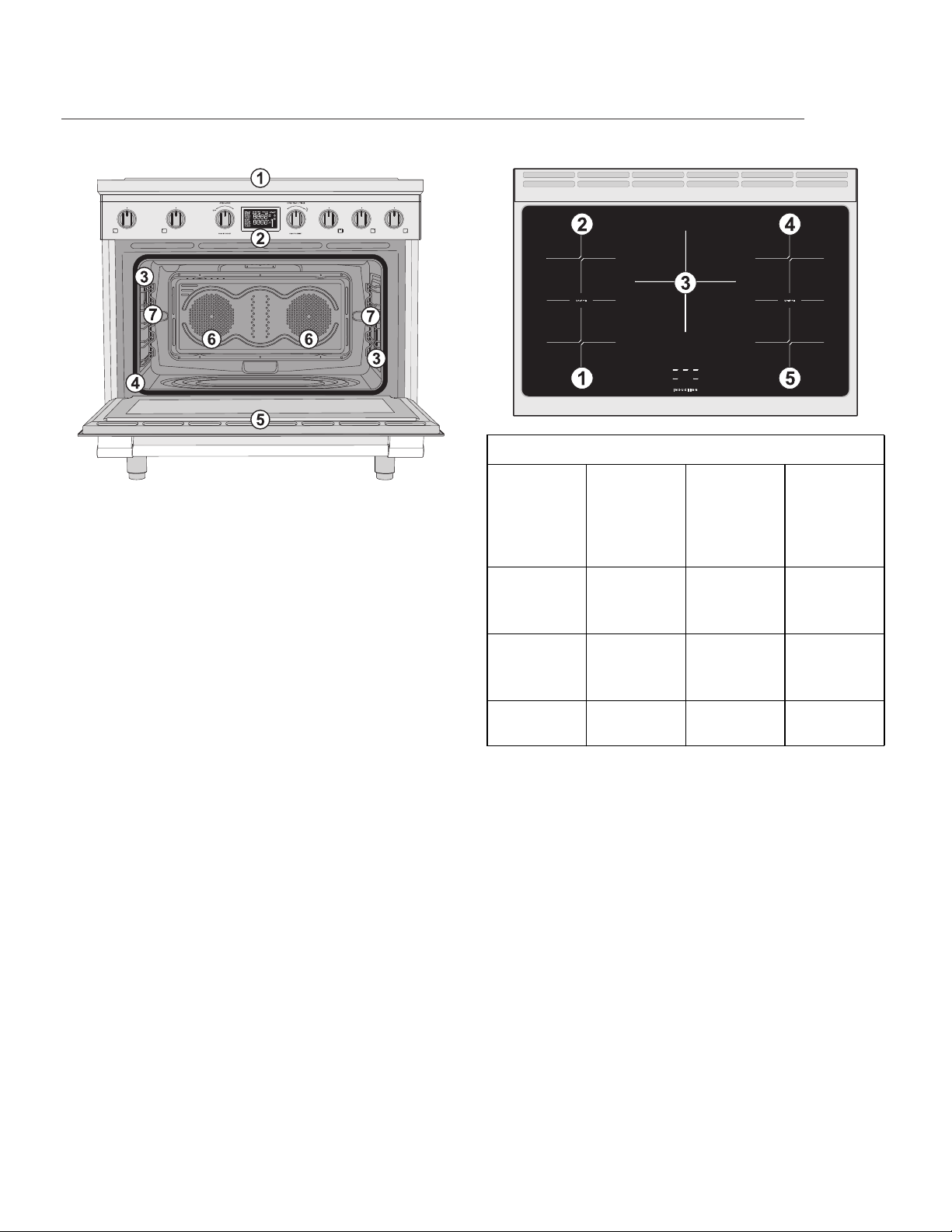
General description
1. Cooktop
2. Control panel
3. Inside lights
4. Seal
5. Oven door
6. Fan
7. Rack/tray support frame shelf
Cooktop
Cooking zones characteristics table
Zone Dimen-
sions
Max.
absorbed
power (W)
Max.
absorbed
power in
Boost
mode (W)
1-2-4-5
Single
zone
180 mm - 7
1/16”
1850 3000
1-2-4-5
Bridge
mode
180 mm - 7
1/16”
3700 -
3 265 mm -
10 7/16”
2600 3700
FEATURES
10
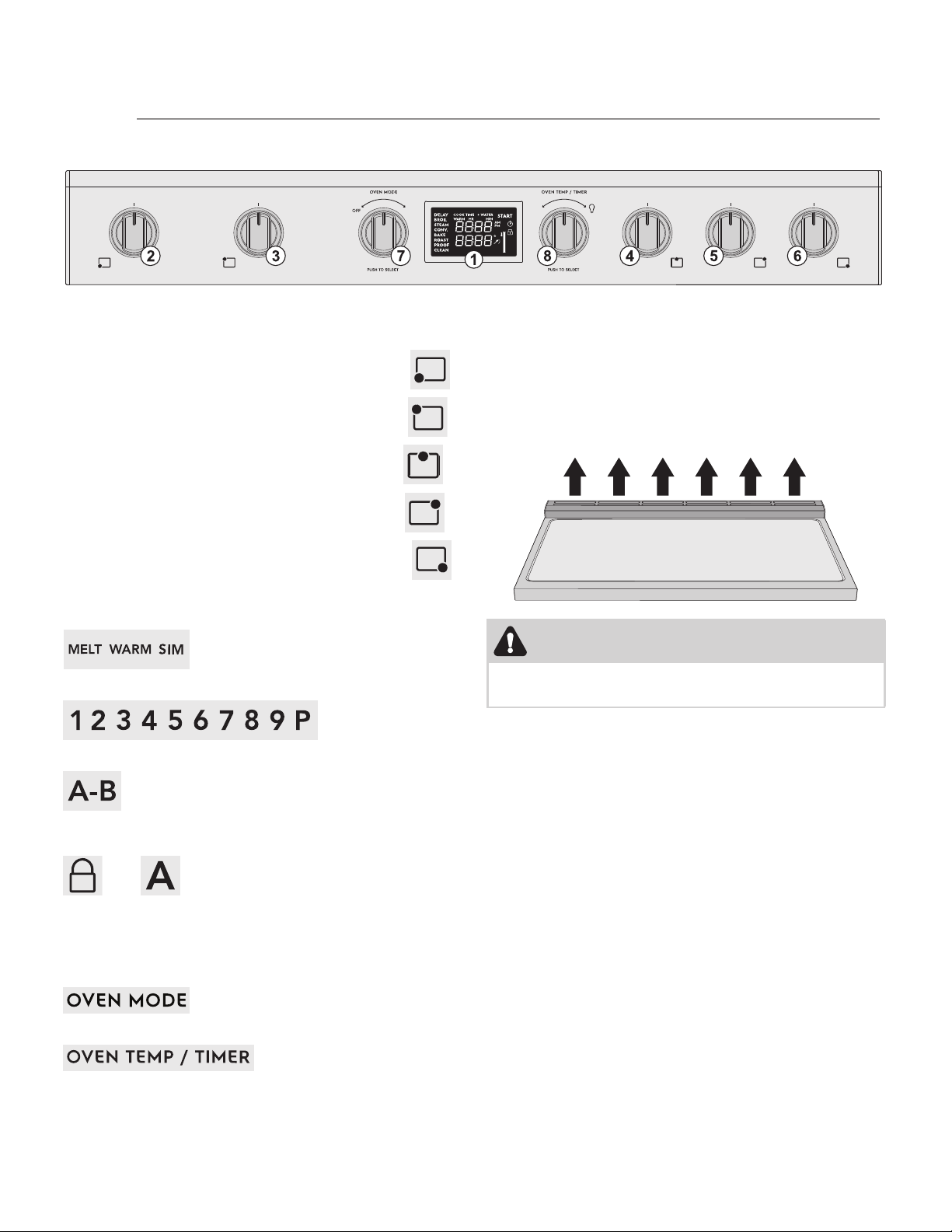
Control panel
1. Oven display
Cooktop knobs:
2. Cooktop cooking zone knob (front left)
3. Cooktop cooking zone knob (rear left)
4. Cooktop cooking zone knob (central)
5. Cooktop cooking zone knob (rear right)
6. Cooktop cooking zone knob (front right)
The following wording appears on each cooktop
knob:
For the Melt, Keep Warm and Simmer functions.
For the cooktop power levels.
For the Bridge and Heating Accelerator
functions (on every cooktop knob except
knob no. 4)
and for the Cooktop Control Lock and
Heating Accelerator functions (on cooktop
knob no. 4 only)
Oven knobs:
7. Oven mode knob
8. Oven temperature knob
Cooling fan
The fan cools the oven and comes into operation
during cooking.
The fan causes a steady outflow of air that exits
from the rear of the appliance, which may continue
for a brief period of time even after the appliance
has been turned off.
CAUTION
Do not obstruct ventilation openings and heat
dispersal slots.
FEATURES
11
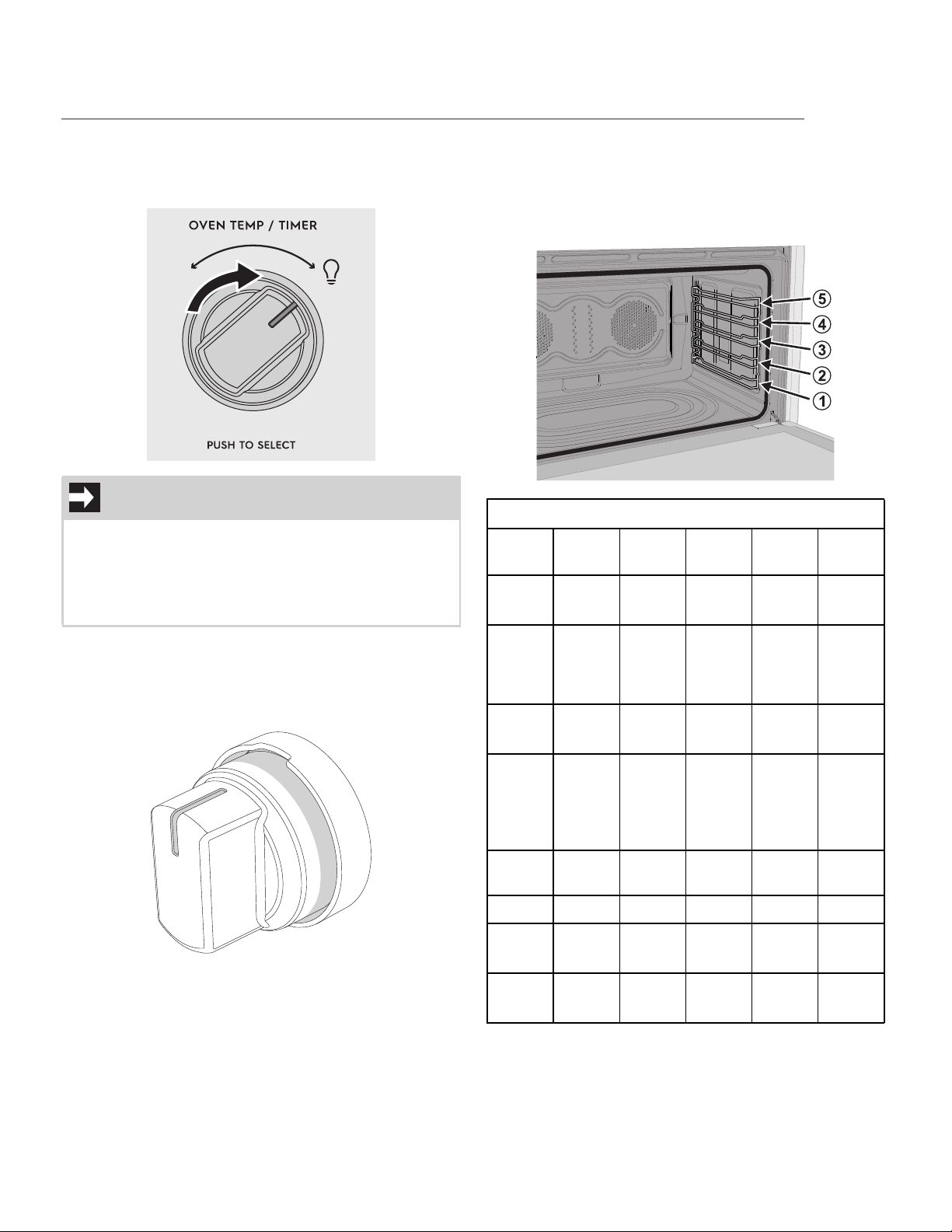
Inside lights
The inside lights can be toggled ON and OFF by
turning the oven temperature knob to he bulb icon:
Backlit knobs
Each knob is equipped with LED lights that light up
whenever the knob is turned out of the OFF posi-
tion.
Oven shelf positions
The appliance is fitted with shelf supports to posi-
tion trays and racks at different heights. The inser-
tion heights are indicated from the bottom
upwards.
NOTE
• When the oven display is in standby mode
or during cooking, the lights are normally off
and can be toggled on in any moment.
• The lights cannot be turned on during the
Sabbath function.
Cooking Functions table
Func-
tion
Min T° Max T° Meat
Probe
Cook
time
Delay
Bake 170°F
75°C
550°F
280°C
Yes Yes Yes
Con-
vec-
tion
bake
170°F
75°C
550°F
280°C
Yes Yes Yes
Broil 400°F
200°C
550°F
280°C
No No No
Con-
vec-
tion
roast
170°F
75°C
550°F
280°C
Yes Yes
(with-
out
meat
probe)
Yes
(with-
out
meat
probe)
Steam
clean
- - NoNoYes
Proof - - No Yes No
Warm 160°F
70°C
200°F
90°C
No No No
Sab-
bath
170°F
75°C
550°F
280°C
No Yes No
FEATURES
12
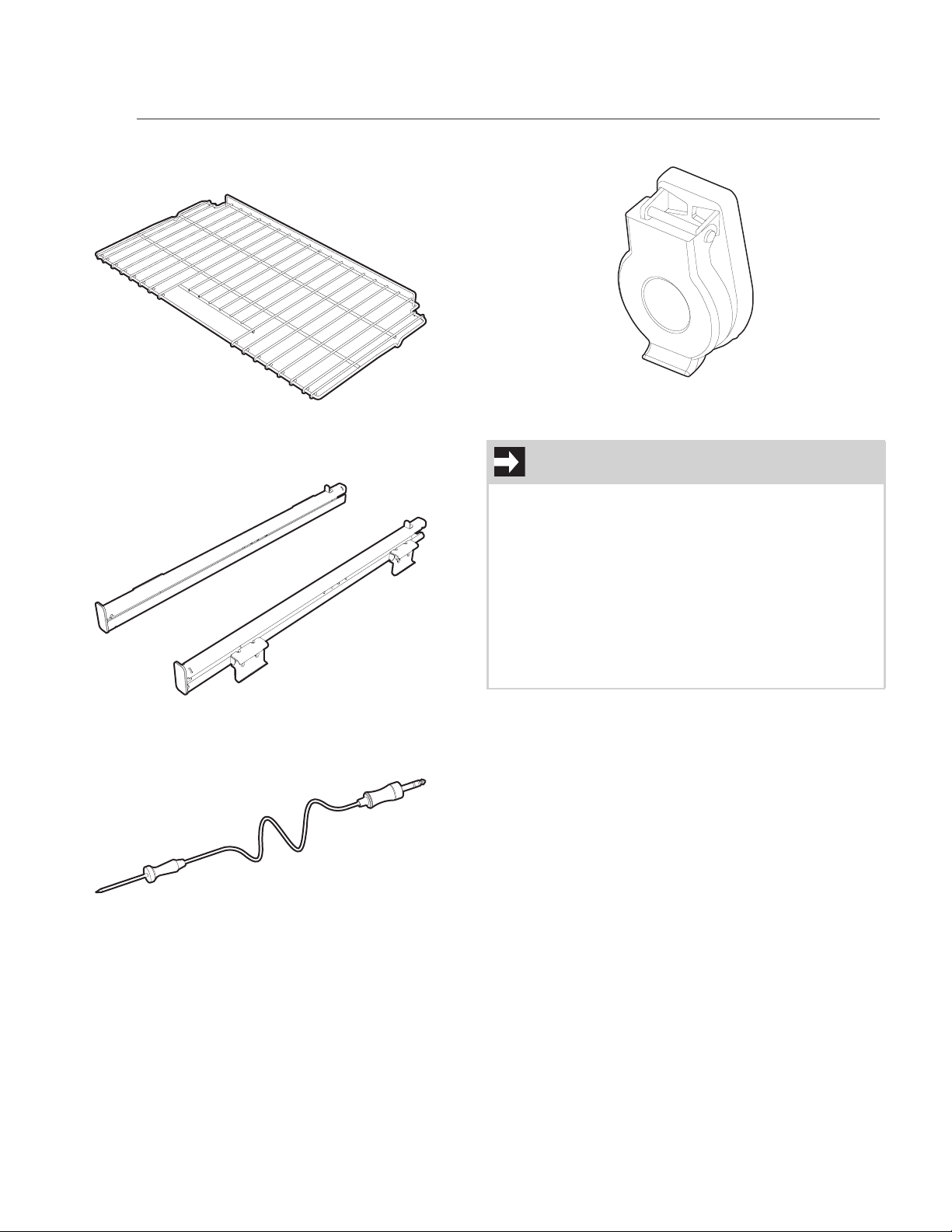
Available accessories
Regular rack
Useful for supporting containers with food during
cooking.
Telescopic guide set
Useful for easily removing the racks from the oven
cavity.
Temperature probe
With the temperature probe, you can cook accord-
ing to the temperature measured at the center of
the food.
Protective cover
Used to cover and protect the temperature probe
socket when the temperature probe is not in use.
Special accessories (not included)
Low backguard
This accessory is an extension of the backguard. It
is intended to be mounted over the included back-
guard as an extended duct for the heat dispersal
openings located on the wall-wards side of the
range cooktop.
Side fillers
These are aesthetic panels intended to cover the
lateral spaces below the rear protruding part of the
cooktop.
NOTE
• Some models are not provided with all
accessories.
• The accessories intended to come into con-
tact with food are made of materials that
comply with the provisions of current legisla-
tion.
• Supplied and optional can be requested
from Authorized Assistance Centers. Use
only original accessories supplied by the
manufacturer.
FEATURES
13
First power on
Preliminary setup
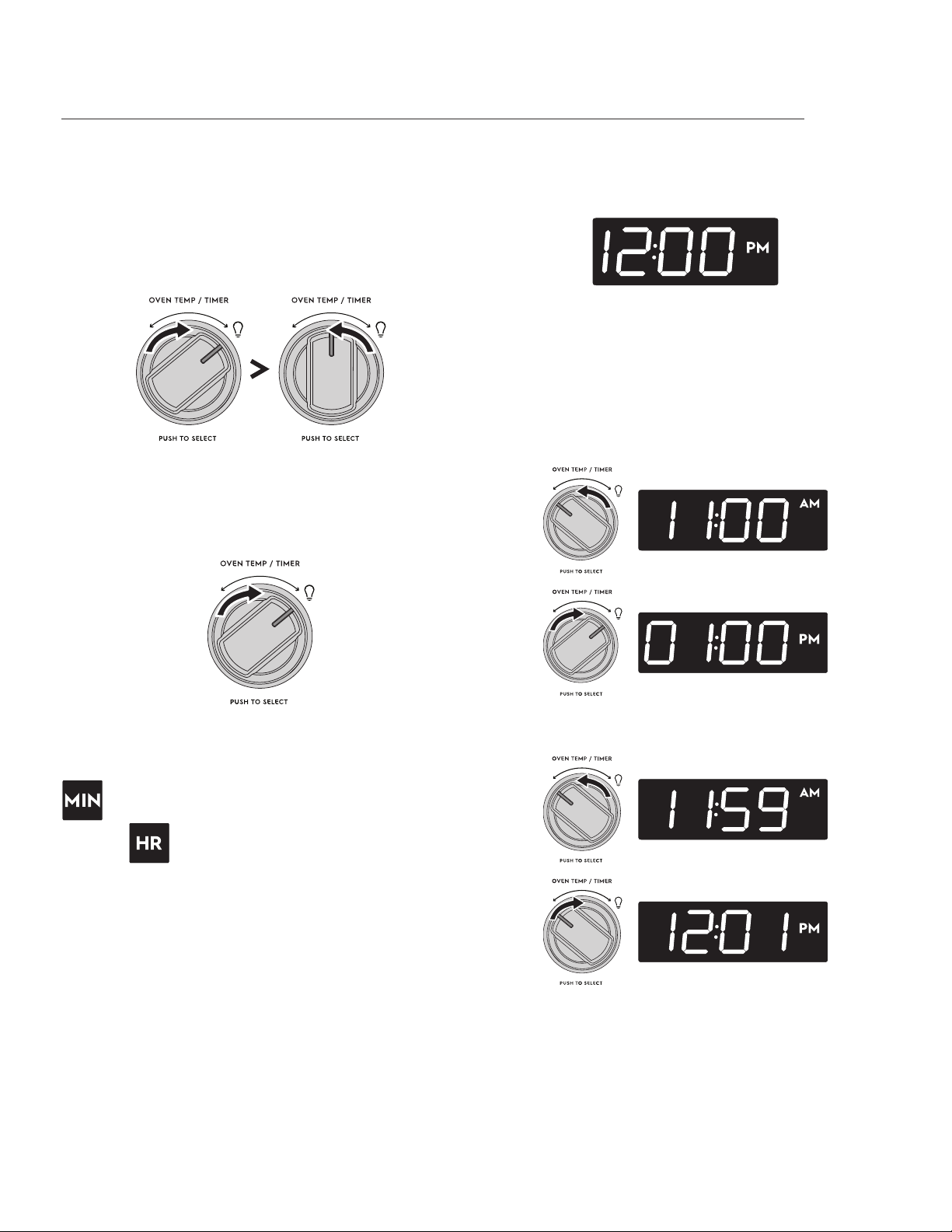
When setting the clock or a timer, depending on
how you turn the knob, you can set a different
increase / decrease speed for the settable minutes.
• Turn and release: minutes increase / decrease
one by one.
Example: 00:00 > 00:01 > 00:02 > 00:03 > etc.
• Hold turn: minutes increase / decrease one by
one for the first 3 minutes, then the timer
switches directly to the nearest multiple of 15,
increasing or decreasing in 15 minute steps.
Example: 00:00 > 00:01 > 00:02 > 00:03 > 00:15 >
00:30 > 00:45 > 01:00 > 01:15 > etc.
When setting the minutes you will only see the
icon. Once 60 minutes have been exceeded
the icon will also appear.
Blackout management
After a blackout, there can be two scenarios
depending on how long the appliance has been
without power.
1. A few seconds to a few minutes: the appli-
ance restores the settings and features set
before the power loss event.
2. A few minutes to hours: The appliance does
not save the previous settings and will have
to be reprogrammed.
First power on
When the range is first plugged in, or when the
power supply has been interrupted “12:00 PM” will
flash on the timer display.
It will stop flashing once the current time is set up
as below.
Setting the display clock
1. Press the oven temperature knob to enable
the time selection.
2. The hours can be set by turning the
temperature knob towards the right or left.
Press the knob to confirm the selection.
3. Repeat the same process for setting the
minutes. Press the knob to confirm the
selection.
Once the time has been set, the display switches to
standby mode where only the current time is
shown.
To adjust the display clock after the initial set up, in
the stand-by mode, just hold turn the temperature
knob left or right for at least 3 seconds, until you
see the hour digits flashing.
BEFORE USING THE APPLIANCE
14
The instructions to adjust the clock in detail are the
same as for setting the clock in the case of the first
power on (see “Setting the display clock”) starting
from point no. 2.
Cooking with the induction cooktop
Preliminary information
• Each zone of the induction cooktop has its
own dedicated display, where the power level
and the function symbols are indicated.
• Each zone of the cooktop can be activated by
pressing and then turning the relative cook-
top knobs.
• Cooktop knobs can only be pressed when
they are in the OFF position (zone deacti-
vated).
• Once a zone has been activated (knob not in
the OFF position), simply turn the relative
knob to change the power level or to deacti-
vate the zone.
What is Electromagnetic induction?
Induction cooking uses electromagnets to create
heat in compatible cookware.
Below each cooking zone on an induction cooktop,
there is a copper coil. When the cooking zone is
turned on, the electricity turns the coil into a type
of magnet that heats metal cookware in the cook-
ing zone.
Induction features
Because heat starts in the cookware instead of the
cooktop, induction offers several advantages.
Fast Heating: Cookware will heat up faster than on
a conventional electric cooktop. Pay close attention
to avoid scorching food when starting to cook. You
may need to use a lower setting for cooking food
than you are used to.
Precise Control: The heat going into the cookware
will change immediately when you change the set-
ting of the cooking zone.
Even Heating: Cookware will typically heat more
evenly on an induction cooktop, so you are less
likely to have hot or cool spots in the cookware.
Cooler Cooktop: An induction cooktop will be
cooler when you remove the cookware than a con-
ventional electric cooktop would be. Because the
cooktop doesn’t get as hot, you are not as likely to
get burned. Spills are also less likely to cook onto
the surface, making clean-up easier.
Energy Efficiency: Induction cooking wastes less
energy than a conventional cooktop, so it uses less
electricity.
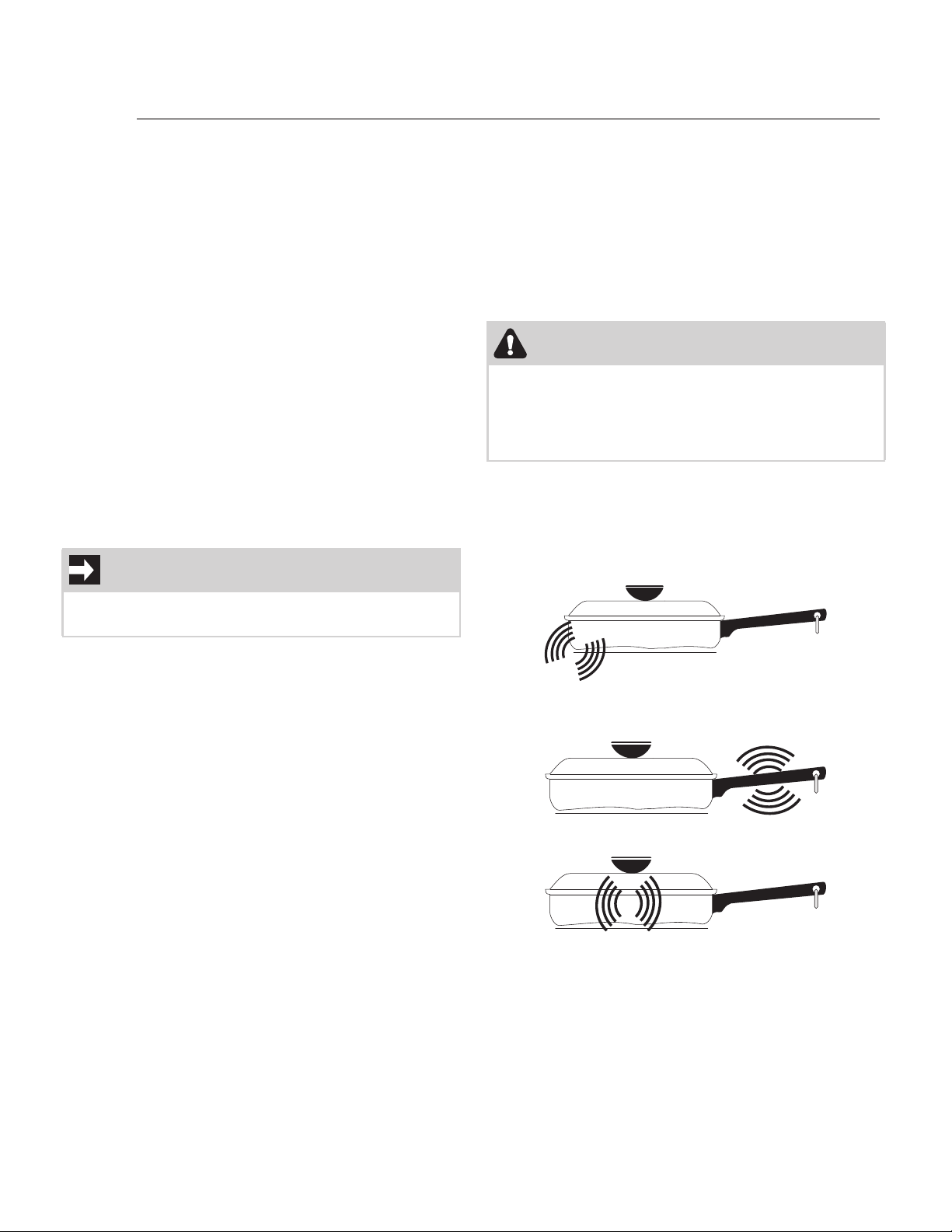
Sounds
The magnetic field over the induction cooking zone
may cause cookware to vibrate, creating a buzzing
or humming noise. These sounds are not unusual,
especially at high settings.
Cookware that is not perfectly flat on the bottom
may vibrate slightly against the cooktop.
A loose handle may vibrate in its socket.
Multi-material cookware may allow small vibrations
in its structure.
Sounds are less likely to occur with heavier, higher
quality cookware.
An induction cooktop may also produce faint click-
ing sounds from the electronic switches that main-
tain the desired cooking temperature. You may also
IMPORTANT
To avoid damaging the appliance, do not force the
knobs to turn if you have not pressed them first.
CAUTION
Although induction cooking zones do not pro-
duce heat, they can become hot from contact
with hot cookware. Burns may occur if a cooking
zone or the surrounding area is touched before it
has cooled to a safe temperature.
USING THE COOKTOP
15
hear a fan that cools the electronics inside the
cooktop.
Use the correct cookware type
The magnetic cooking zone sensors located below
the cooktop surface require the use of cookware
made with magnetic material in order to start the
heating process on any of the cooking zones.
Use only cookware with a perfectly flat bottom
suitable for induction cooking. The use of cookware
with an irregular bottom could affect the efficiency
of the heating system and even prevent the pan
from being detected on the cooking zone.
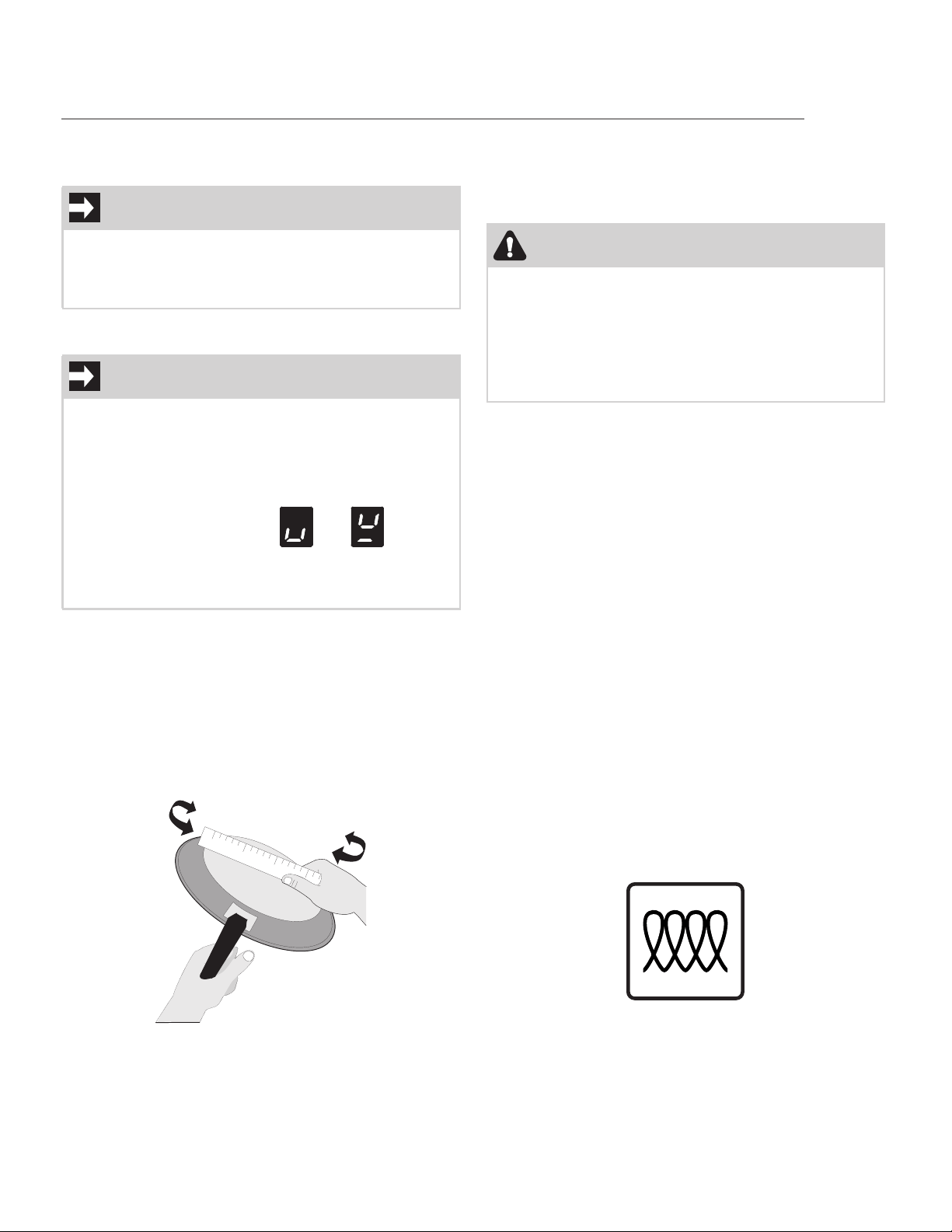
Check for flatness by rotating a ruler across the bot-
tom of the cookware. Cookware should have fl at
bottoms that make good contact with the entire
surface of the heating element.
Cookware material types
Cookware material is especially important when
using an induction cooktop. The cookware must
contain magnetic iron or steel to work on an induc-
tion cooktop. Common materials for induction
cookware include the following:
• Stainless Steel - Slow heat conductor with
uneven cooking results. Durable, easy to clean,
and resists staining. Some types of stainless
steel will not work on an induction cooktop.
Use the magnet test to check stainless steel
cookware.
• Cast Iron - A slow heat conductor that retains
heat very well. Cooks evenly once cooking
temperature is reached.
• Porcelain-enamel on metal - Heating charac-
teristics will vary depending on the base
material. Porcelain-enamel on a compatible
metal will work on an induction cooktop. Use
the magnet test to check porcelain-enamel
cookware.
Cookware sold as induction-ready will often have a
symbol printed on the bottom by the manufacturer.
NOTE
Be sure to read detailed instructions for induction
cooktop cleaning in the “Care and Cleaning” sec-
tion and “Before You Call” checklist section of this
Use and Care Guide.
IMPORTANT
• Each cooking zone is fitted with a magnetic
sensor that distinguishes between suitable
and unsuitable cookware.
• If unsuitable cookware is used, no heat is
generated and no cooking will be performed.
• The alternating symbols and
appear when improper cookware is used,
with missing pan or when you remove the
pan during cooking.
CAUTION
Proper cookware on an operating induction cook-
ing zone will heat up very quickly. If an empty
piece of cookware is left on an operating induc-
tion cooking zone, the rapid change in tempera-
ture may warp or damage the cookware.
Do NOT place hot cookware on the control panel.
The heat may damage the electronic parts.
USING THE COOKTOP

16
The magnet test
To see if a piece of cookware will work on your
induction cooktop, try to stick a magnet to it. If the
magnet clings firmly to the bottom of the cook-
ware, the cookware will work on your induction
cooktop. If the magnet clings weakly or not at all,
the cookware will not heat up on your induction
cooktop.
Minimum pan size requirements
USE THE CORRECT SIZE COOKWARE - The
cooking zones available on the Induction cooktop
require a MINIMUM pan size to be used at each
location. We recommend using cookware with a
diameter that allows efficient cooking.
Below is a summary table showing the recom-
mended diameter of the cookware for each cook-
ing zone.
Example of correct pan arrangement on cooking
zones 1 - 2 - 4 - 5:
* In the (3) case, the measurement refers to the
length of a an elongated pan. For the width of this
pan keep a maximum of 180 mm - 7” 1/16.
First power on
When the range is first plugged in, or when the
power supply has been interrupted, all the symbols
on the cooktop display light up for one second.
Cooktop power management
The cooktop is equipped with a power manage-
ment module which optimizes or limits energy con-
sumption.
If the total power levels set exceed the maximum
allowed limit, the electronic board automatically
manages the power supplied to the cooking zones.
The levels set by the automatic management sys-
tem are shown on the display.
Cookware diameters table
Zone Cooking zone
mode
Recom-
mended diam-
eter
1-2-4-5 Single zone (1) 180 mm - 7” 1/
16
1-2-4-5 Single zone in
Bridge function
(2)
180 mm - 7” 1/
16
1-2-4-5 Double zone in
Bridge function
(3) *
400 mm - 15”
3/4
3 Single zone 265 mm - 10”
7/ 1 6
USING THE COOKTOP
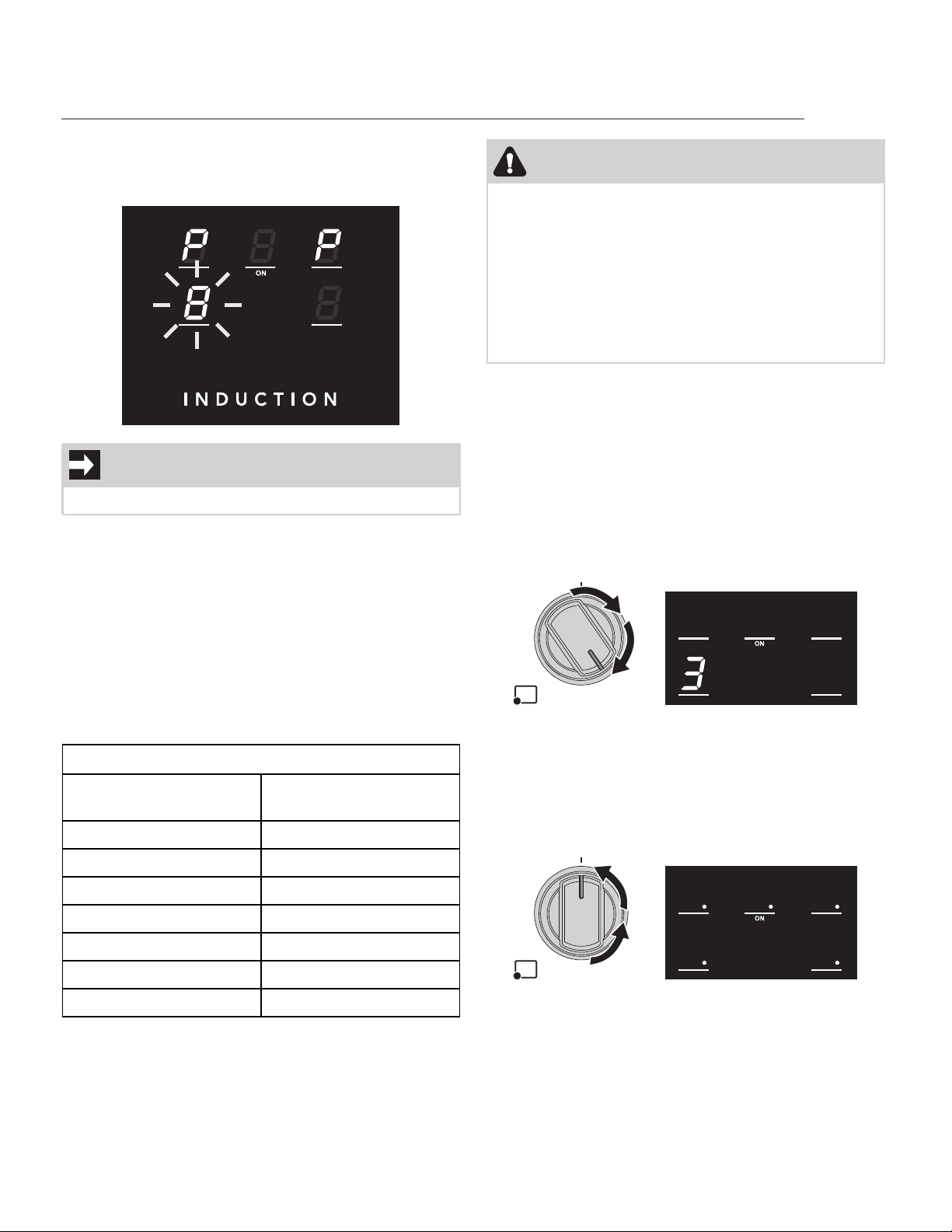
17
A flashing a power level icon indicates that it will be
automatically limited to a new value selected by the
power management module.
Cooktop operation time limitation
The cooktop is equipped with an automatic device
that limits its duration of use.
If you do not change the cooking zone settings, the
maximum operating duration of each individual
zone depends on the power level selected.
When the device for limiting the operating time is
activated, the cooking zone switches off, a short
signal is emitted and if hot the symbol appears on
the display.
Switching on the cooking zones
To switch on a cooking zone, press and then turn
the corresponding knob clockwise. A short beep
will be emitted.
The corresponding display shows the selected
power level, “ON” appears below the central cook-
ing zone display and all the other cooking zone dis-
plays briefly display “0” and then go off. (the
example shows the front left cooking zone at level
3).
Turning off the cooking zones
To switch off a cooking zone, simply turn the corre-
sponding knob to “OFF”. All the cooking zone dis-
plays show flashing red dots at their lower right
corner and the word “ON” below the central cook-
ing zone display for 10 seconds.
IMPORTANT
Priority is given to the last set zone.
Maximum cooking duration table
Power level selected Maximum duration of
use in hours/minutes
1 8 hours
2 6 hours
3 - 4 5 hours
5 4 hours
6 - 7 1 ½ hours
8 - 9 1 ½ hours
P 10 minutes
CAUTION
Protection from overheating
• If the cooktop is used at full power for a long
period of time, the internal electronics may
have difficulty cooling if the room tempera-
ture is high.
• To prevent excessively high temperatures
from forming inside the cooktop, the power
of the cooking zone is automatically lowered.
USING THE COOKTOP
18
Induction cooktop residual heat
After the cooking zones have been switching off, if
they are still hot the corresponding displays shows
the flashing symbol . When the temperature
drops below the safety threshold, the symbol dis-
appears.
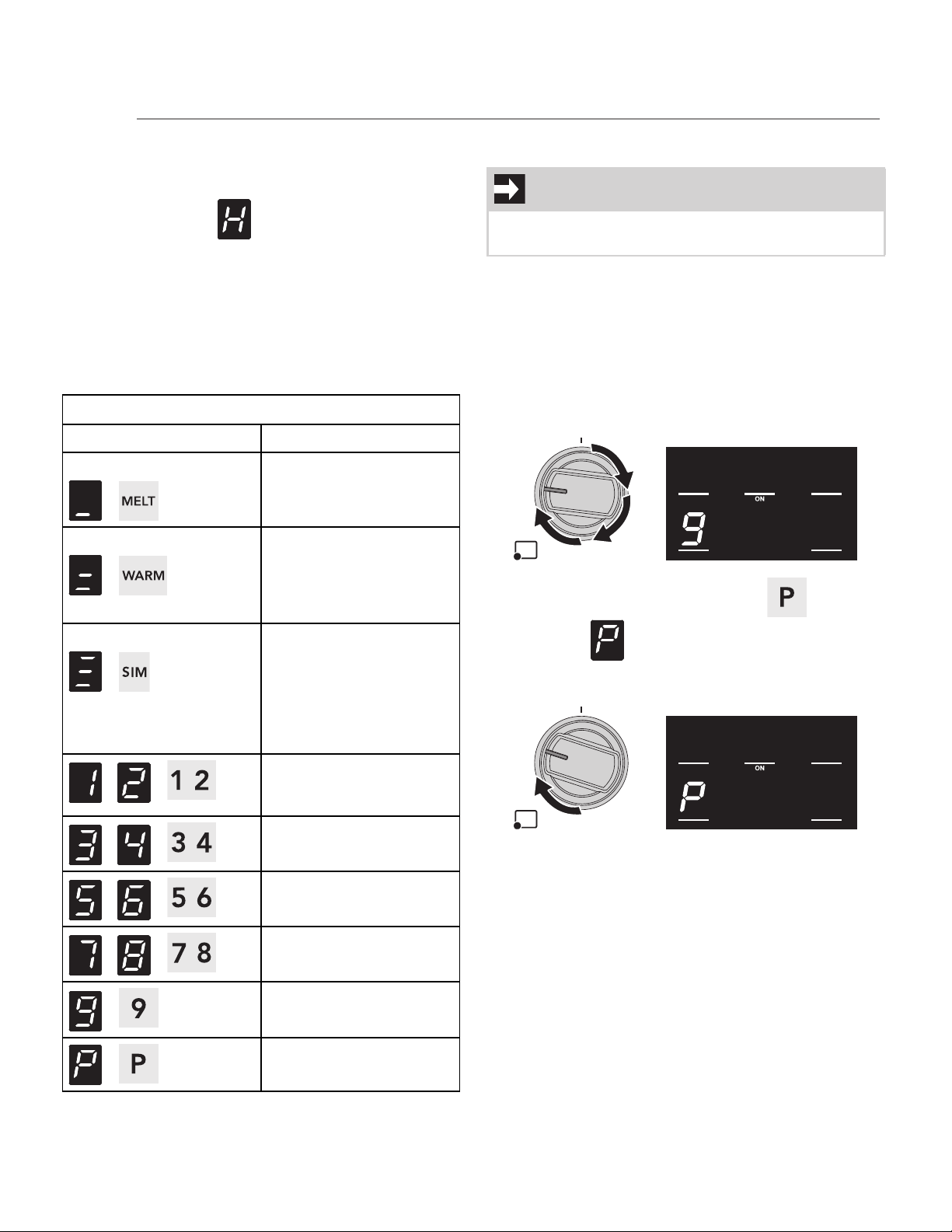
Power levels
The power of the cooking zone can be adjusted to
various levels. Information on the different types of
cooking can be found in the table. All power levels
are available for all cooking zones.
* See boost mode
Boost mode
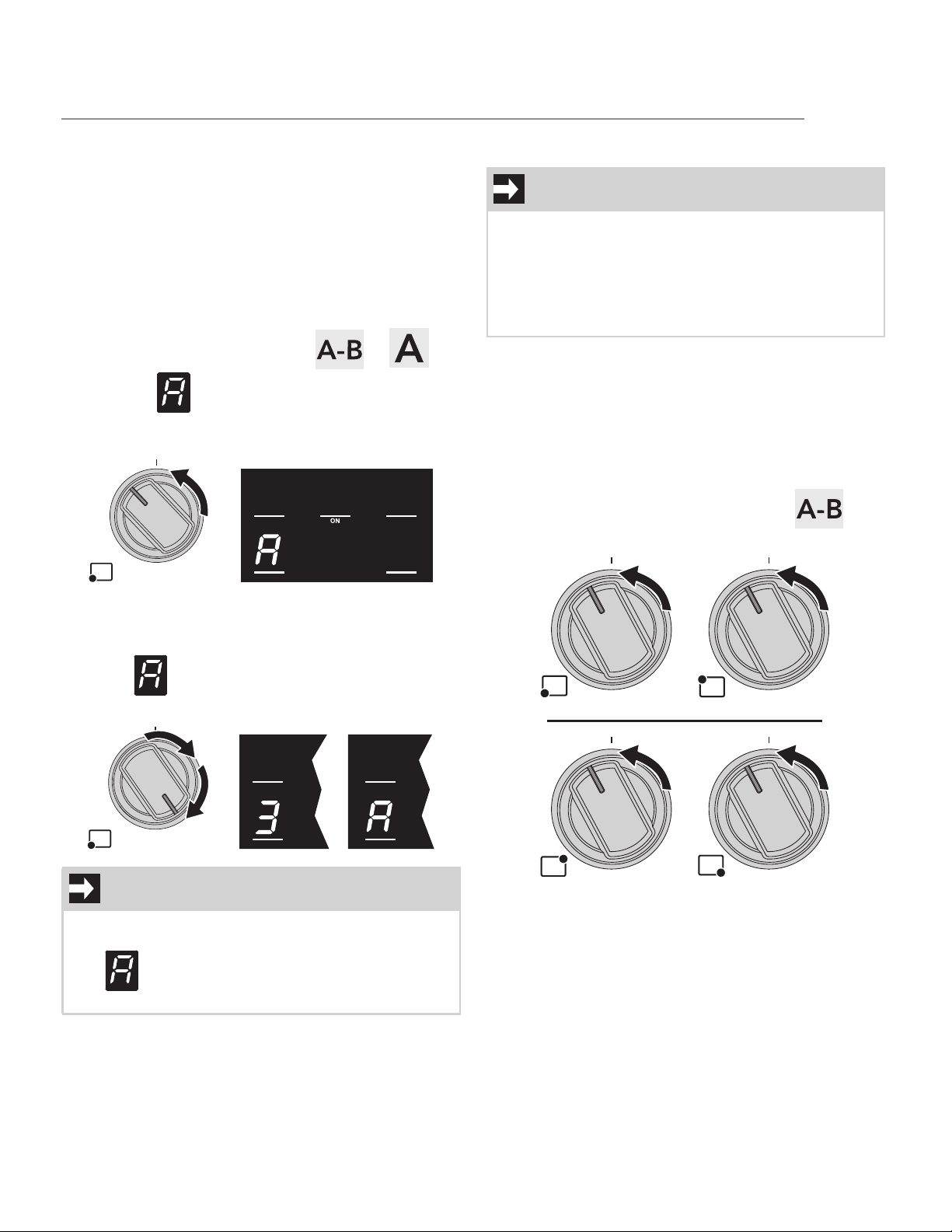
A Booster function allows you to activate the cook-
ing zone on the maximum power for up to 10 min-
utes. Useful for bringing a large quantity of water
quickly to the boil or cooking meat over high heat.
To activate Boost mode (the example shows the
front left cooking zone):
1. Press a cooktop knob.
2. Turn the knob all the way clockwise to level 9.
3. Turn clockwise again to position and
hold until is shown on the
corresponding cooking zone display (a beep
will be emitted).
4. Release the knob.
To deactivate Boost mode, simply bring the knob to
the OFF position or select another power level.
Cooking zone power levels table
Power level selected Suitable for...
Melt function
/
Melting butter, choco-
late or similar.
Keep Warm function
/
Warming dishes and
keeping small amounts
of water boiling, whisk-
ing egg yolk or butter
sauces.
Simmer function
/
Heating solid or liquid
foods, keeping water
boiling, thawing frozen
foods, making 2- or 3-
egg omelets, fruit and
vegetable dishes, vari-
ous preparations.
- /
Cooking small amounts
of food (minimum
power).
- /
Cooking large amounts
of food.
- /
Cooking large amounts
of food, roasting.
- /
Roasting.
/
Roasting larger pieces,
frying with flour.
/ *
Roasting, frying, cook-
ing (maximum power).
IMPORTANT
After 10 minutes of operation in Boost mode, the
cooktop automatically brings the power to level 9.
USING THE COOKTOP
19
Heating accelerator function
This function allows you to bring the cooking zone
to the selected power level more quickly than when
selecting the power level.
To activate the Heating accelerator function (the
example shows the front left cooking zone at level
3):
1. Press and hold a cooktop knob.
2. Keep the knob pressed and turn it
counterclockwise to position or
until the symbol appears on the
corresponding cooking zone display (a beep
will be emitted).
3. Keep the knob pressed and select the
required power level within 3 seconds. The
corresponding cooking zone display will
show and the selected power level
number alternating.
You can increase the power level at any time. The
“acceleration” time frame will be modified
automatically. To deactivate the Heating
acceleration function, simply bring the knob to the
OFF position or select a lower power level.
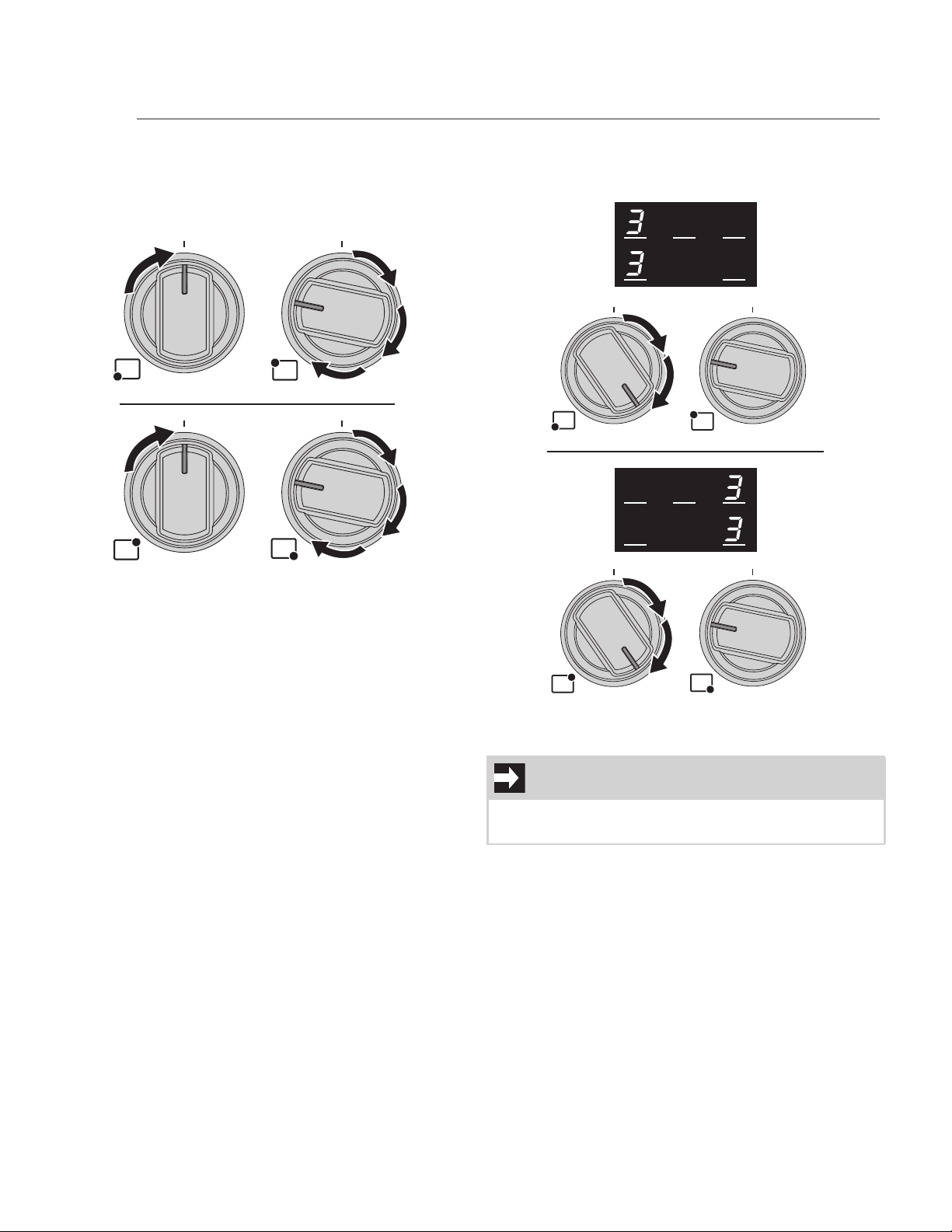
Bridge function
The bridge function allows you to control two cook-
ing zones simultaneously. This function is useful
when cooking with oblong cookware such as roast-
ing pans or fish kettles, or when cooking with two
pans at the same time.
To activate the Bridge function:
1. Press and hold turn the front / rear left or
right knobs counterclockwise to the
positions (a short beep will be emitted):
2. Release the knobs.
IMPORTANT
Once the selected power level is reached, the
Heating accelerator function will be deactivated
(the symbol will disappear) and the power
level will remain the selected one.
IMPORTANT
• This function is only available for the cook-
ing zones marked with “BRIDGE” (1 - 2 and 4
- 5). All the other zone combinations are not
allowed.
• With the bridge function activated, is it not
possible to activate Boost mode.
USING THE COOKTOP
20
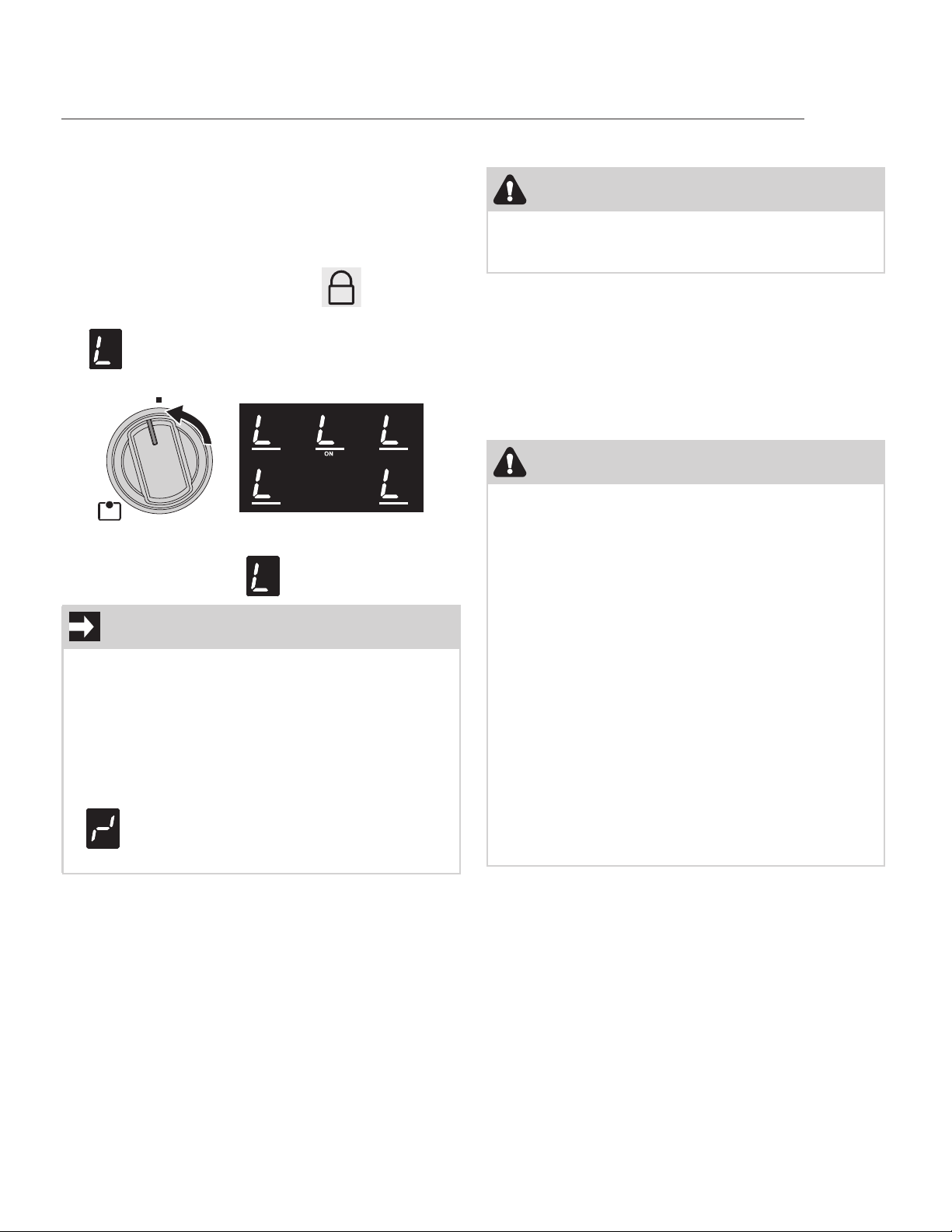
3. Return the front left / rear right knob to the
OFF position, then promptly press and turn
the rear left or the front right cooking zone
knobs until you reach power level 9 (a long
beep will be emitted).
Now both cooking zone displays shows level 0 and
flashing red dots appear on all displays. The Bridge
function is now activated.
4. You can control both the linked zones using
the front left or rear right cooking zone
knobs.
To deactivate the Bridge function, bring both knobs
to the OFF position.
NOTE
This function automatically distributes an equal
amount of power over both the zones involved.
USING THE COOKTOP
21
Control Lock
The control lock is a device that protects the appli-
ance from accidental or inappropriate use. Only the
cooktop knobs will be locked.
To activate the Control Lock:
1. Press and hold turn the central cooking zone
knob counterclockwise to the position
until all the cooking zone displays show the
symbols (two short beeps will be emit-
ted in the meantime):
To deactivate the Control Lock, follow the instruc-
tions in point 1 until the symbol disappears.
Oven preparation
Prepare your range for first time use by setting
Bake function at 350°F (175°C) for about 30 min-
utes. (see “Timed cooking”). This allows the inside
of the oven to remove eventual manufacturing resi-
dues. Some smoke and noises during this time is
normal.
Using the accessories
IMPORTANT
• After about 10 seconds without interacting
with the cooktop knobs, the cooking zone
displays will be turned off. To check if the
Control Lock is active or not, simply try to
turn on any cooking zone.
• When you activate Control Lock, if you turn
and hold the central cooking zone knob for
more than 30 seconds, the flashing symbol
will appear as an error message.
Release the knob to remove it.
CAUTION
Remove all accessories, materials and literature
from the inside of the oven before performing this
operation.
CAUTION
• Always use potholders or oven mitts when
removing food or adjusting the oven racks
and guides. Wait until the oven has cooled
down completely, if possible. Oven accesso-
ries may be HOT and may cause burns.
• If the rack has to be moved while the oven is
still hot, do not let oven mitts come into con-
tact with heating elements.
• Be careful when removing oven racks from
the lowest rack position to avoid contact
with the hot oven door.
• To avoid possible injury or damage to the
appliance, ensure that racks are installed
correctly and not backwards or upside
down.
• To avoid damage to the enameled and
chromed surfaces, be very careful when
inserting and removing the telescopic
guides.
USING THE OVEN
22
Regular rack
The rack is fitted with mechanical safety locks that
prevent it from being removed by accident:
To insert the rack:
1. Grip the rack firmly on both sides.
2. Keep the front of rack slightly tilted upwards
and rest the rear part in one of the spaces
indicated.
3. Gently slide in the rack until it comes to a
complete stop.
To remove the rack:
1. Slide out the rack until it stops due to the
mechanical safety locks.
2. Slightly lift it upwards and pull it all the way
out.
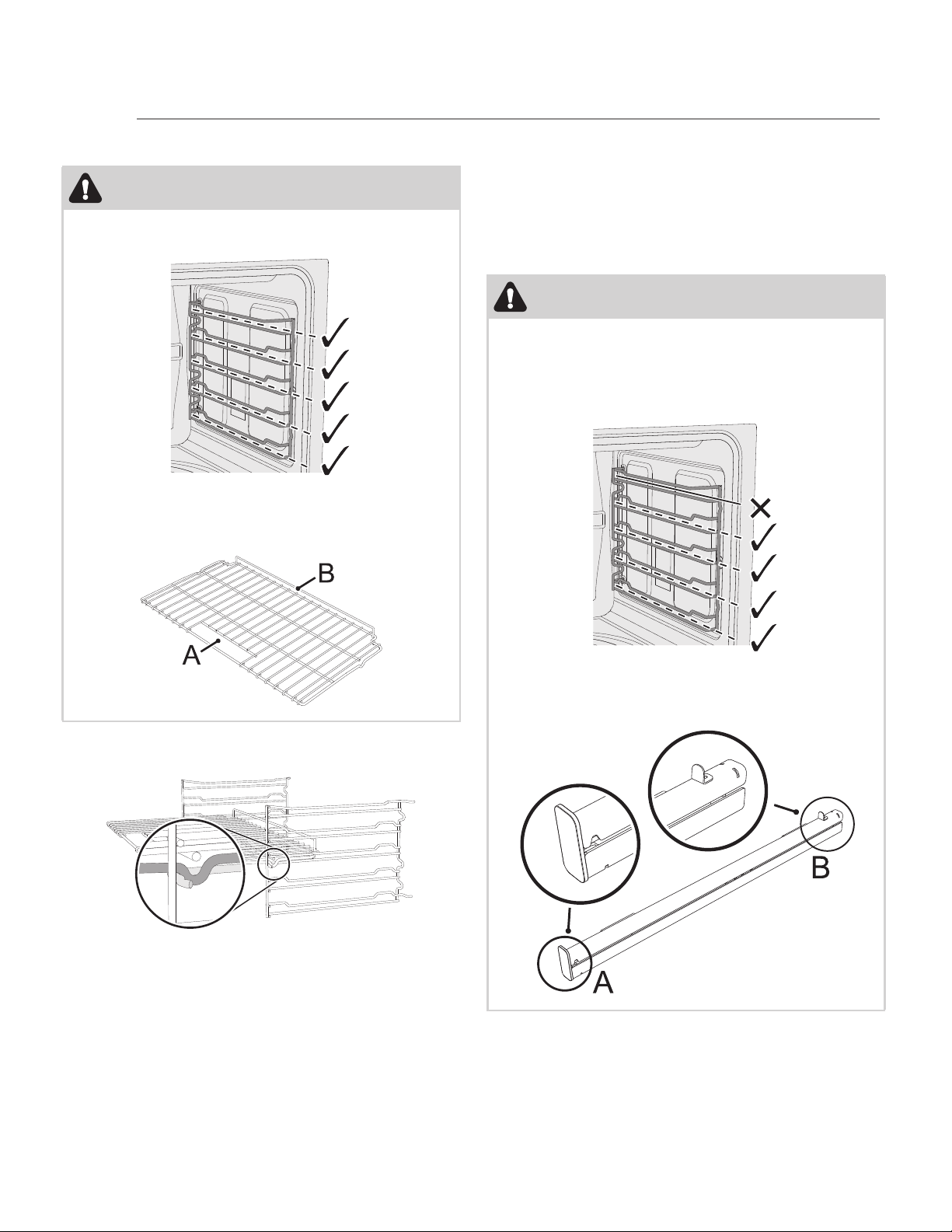
Telescopic guides
CAUTION
• Be careful to insert the rack in the correct
spaces indicated by the dashed lines:
• Part A of the rack must face towards the
outside of the oven and part B must face
upwards.
CAUTION
• Be careful to hook the telescopic guides in
the correct spaces indicated by the dashed
lines. To avoid damaging the appliance the
top shelf position is not designed for the
guides to be inserted.
• Part A of the guides must face towards the
outside of the oven and part B must face
inwards.
USING THE OVEN
23
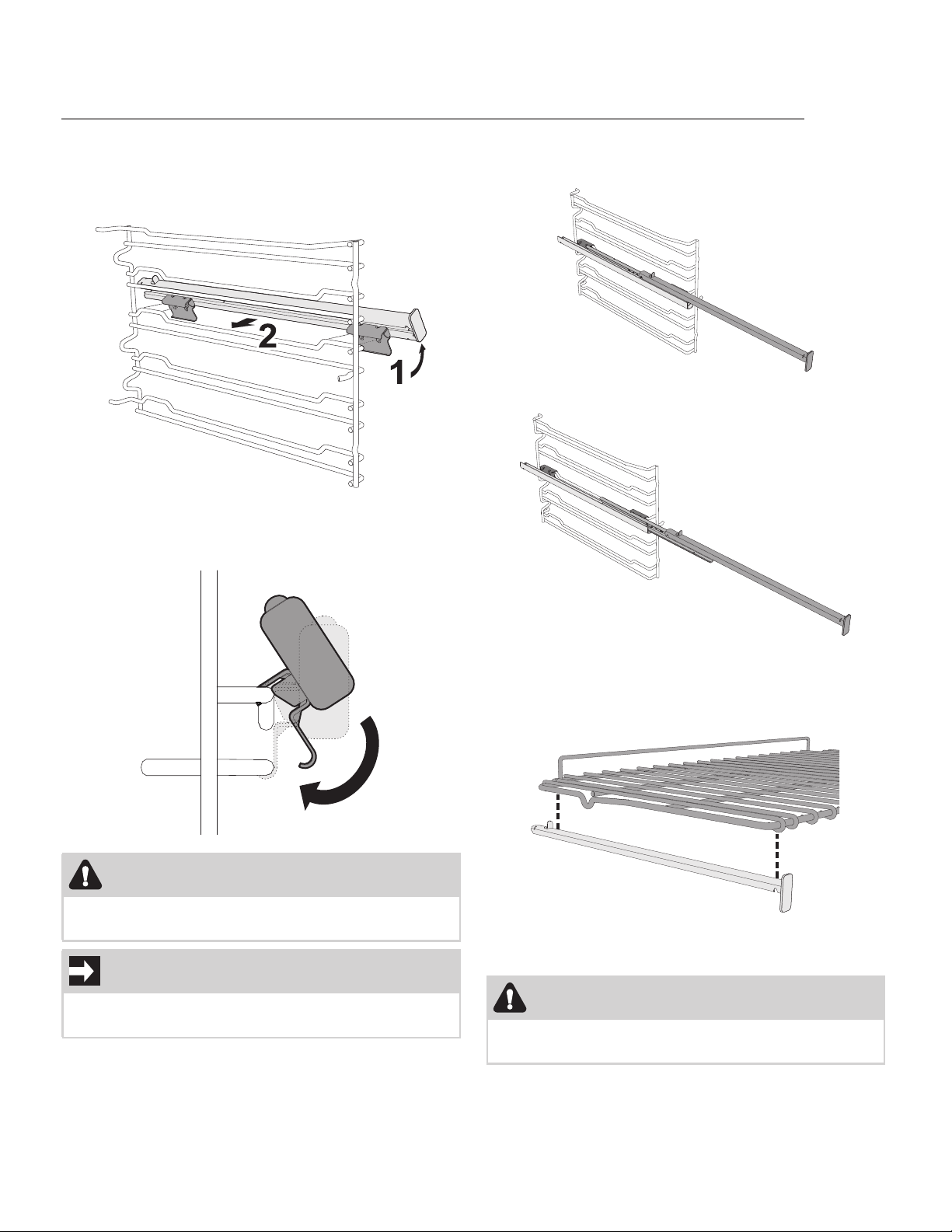
To install the telescopic guides:
1. Slightly tilt the guides towards the inside wall
of the oven (1) and rest its hooks on the
raised parts of the oven shelf supports (2).
2. Turn the guides in order to lock the lower
part of the hook onto the lower part of the
shelf support.
The telescopic guides allow a two stage extraction:
• Partial extraction:
• Total extraction:
When using the guides, extract the guides com-
pletely and gently place the rack on them.
Take care to position the rack on the guides as
shown in the figure below.
To remove the telescopic guides, follow the installa-
tion instructions in reverse.
CAUTION
Ensure that the telescopic guides have been
installed correctly and securely.
IMPORTANT
To avoid damaging the guides, pull them out and
push them in gently.
CAUTION
Wear protective gloves when removing the
guides.
USING THE OVEN
24
Temperature probe
With the temperature probe, roasts, pork loin and
various cuts and sizes of meat can be cooked to
perfection.
The probe, in fact, allows foods to be cooked to
perfection because it accurately monitors the core
temperature of the food.
The core temperature of the food is measured by a
sensor located in the tip of the probe.
For cooking with the temperature probe see “Meat
probe cooking”.
Cooking with the oven
With this range, you can bake many kinds of food in
several ways.
Four different cooking functions are available: dif-
ferent heating elements, combinations of them and
internal fans will be activated, according to the
type of dish you intend to cook.
List of cooking functions
WARNING
• Do not leave the temperature probe unat-
tended.
• Do not allow children to play with the probe.
• Take care not to hurt yourself on the sharp
parts of the probe.
CAUTION
• Do not touch the rod or the tip of the probe
after having used it.
• Wear oven mitts when handling the tem-
perature probe.
• Take care not to scratch or damage enam-
eled or chrome-plated surfaces with the tip
or the plug of the temperature probe.
• Do not insert the probe into openings and
slots on the appliance.
• Only use the temperature probe provided or
recommended by the manufacturer.
• When the probe is not in use, make sure that
the protective cover is properly closed.
IMPORTANT
• Do not pull the cable to remove the probe
from the socket or from the food.
• Make sure that the probe or its cable do not
get caught in the door.
• No part of the probe should be allowed to
come into contact with the walls of the oven
cavity, the heating elements, the rack or the
guides when they are still hot.
• When not in use, the probe should not be
kept inside the appliance.
• Make sure the plug of the probe is fully
inserted into the socket.
• Do not use the probe to place food into or
to remove it from the oven cavity.
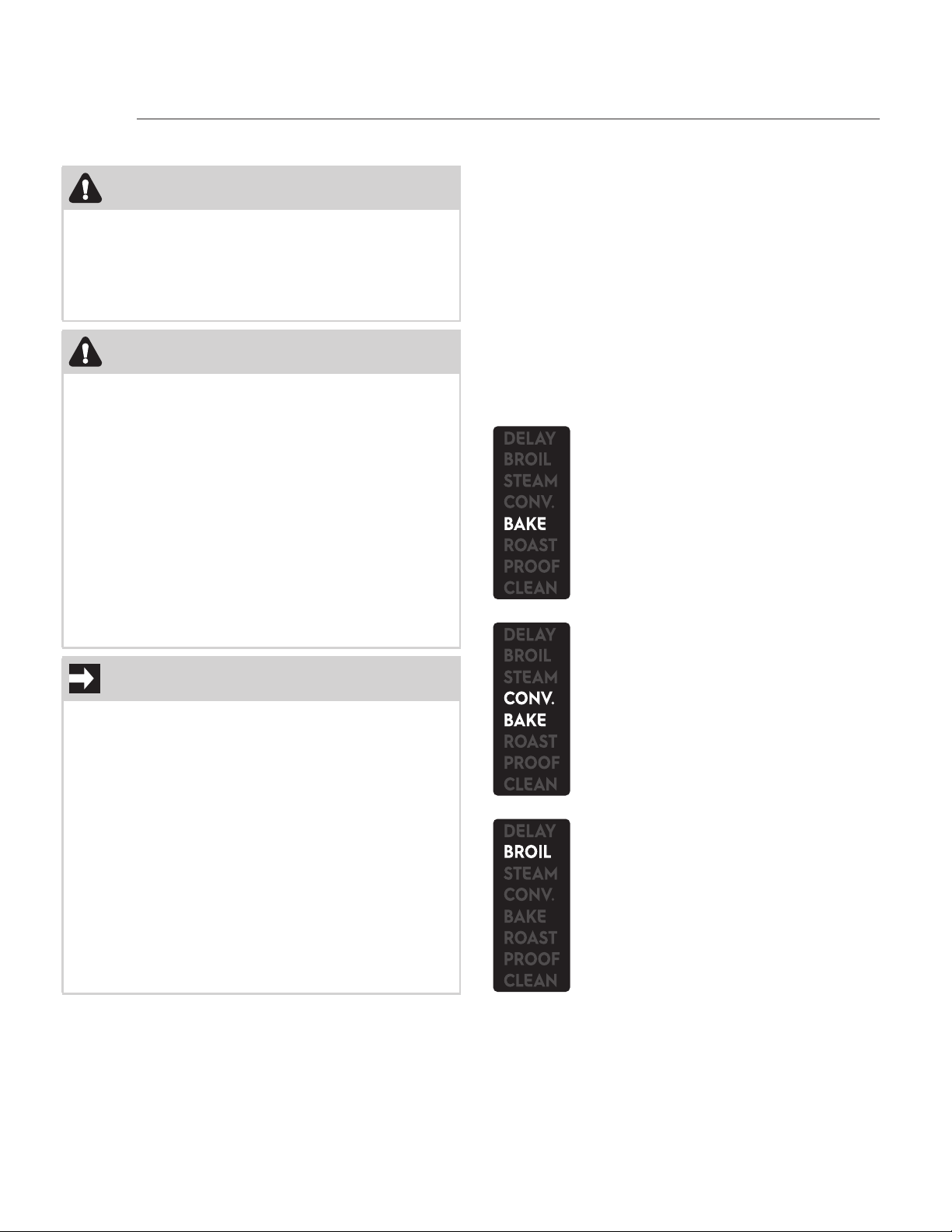
Bake
This function is best used for your stan-
dard recipes. This function is suitable
for cooking one dish at a time. Perfect
for bread, biscuits, cookies and similar
dishes.
Convection bake
This function allows different foods to
be cooked on several levels extremely
quickly and efficiently, without odors
and flavors mingling. Recommended for
leavened cakes and muffins.
Broil
This function gives perfect grilling
results, especially for thin and medium
thickness meat and gives the food an
even browning at the end of cooking.
Perfect for sausages, spare ribs, bacon,
fish and shrimps. This function enables
large quantities of food to be grilled
evenly.
USING THE OVEN
25
Manual cooking
Preliminary information
• The word “START” flashes in the upper right
corner of the display to indicate that is possi-
ble to start the selected function.
• Once a function is started or when setting the
temperature and timing functions the word
“START” disappears.
• When you select a function you can set the
temperature, the minute minder (see “Cook-
ing timer”), the cooking time (see “Timed
cooking”) and the delay time (see “Delayed
cooking”) exactly in this order.
• Every function can be paused at any time by
simply opening the door. During the pause
the inside lights turns on, the heating ele-
ments are deactivated as well as the oven fan
(if the function provides for fan activation)
and the flashing word “START” appears. Close
the door to resume the function (the word
“START” disappears).
• When setting the temperature and the timing
functions, the relative symbol/word starts
flashing:
1. Temperature: .
2. Stand alone timer / cooking timer: .
3. Timed cooking: .
4. Delayed cooking: .
• Move through the temperature setting and
the timing functions by pressing the oven
temperature knob. Change the relative values
by turning the oven temp. knob left or right.
• The temperature and the timing functions can
be set or reset during cooking.
• To cancel the timing functions, simply set the
relative values in minutes / hours to zero.
• While setting a function or when a function is
in progress, it always possible to go in
standby mode by turning the oven mode
knob to the left and then releasing it. Doing
so will cancel the cooking settings or stop the
cooking function.
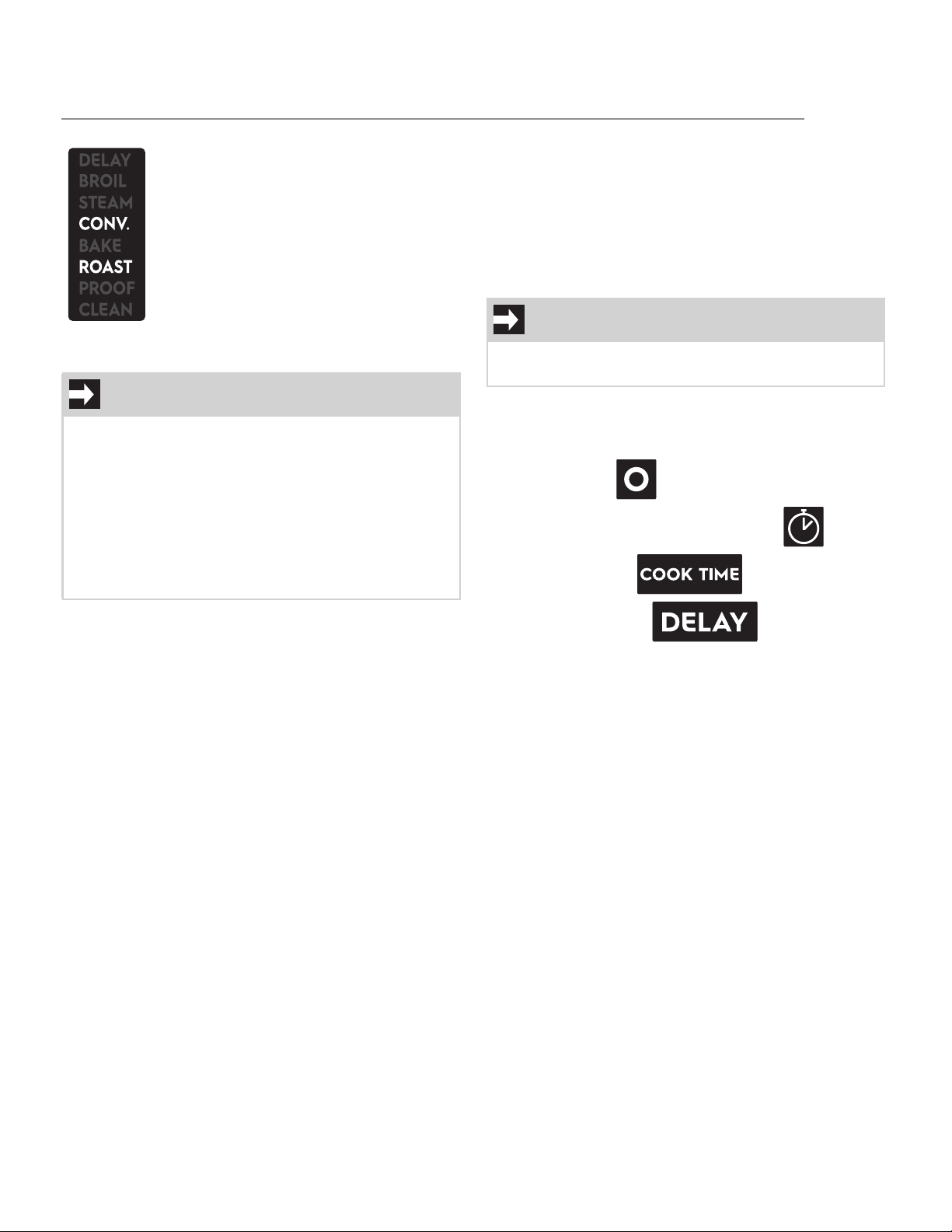
Convection roast
The combination of the fan and heating
elements allows you to cook both on
single level and on several levels. Hot air
circulation ensures instant and even dis-
tribution of heat. This function is sug-
gested for the simultaneous cooking of
different types of food, as long as they
need the same temperatures and same
type of cooking. Recommended for ten-
der cuts of beef, lamb, pork and poultry.
NOTE
Each cooking function has its own auto-suggest
(default) temperatures.
• Bake: 350°F / 175°C.
• Convection bake: 325°F / 165°C.
• Broil: 550°F / 280°C.
• Convection roast: 350°F / 175°C.
• Warm: 170°F / 75°C.
• Sabbath: 350°F / 175°C.
IMPORTANT
It is not possible to set the temperature and all the
timing for all functions.
USING THE OVEN
26
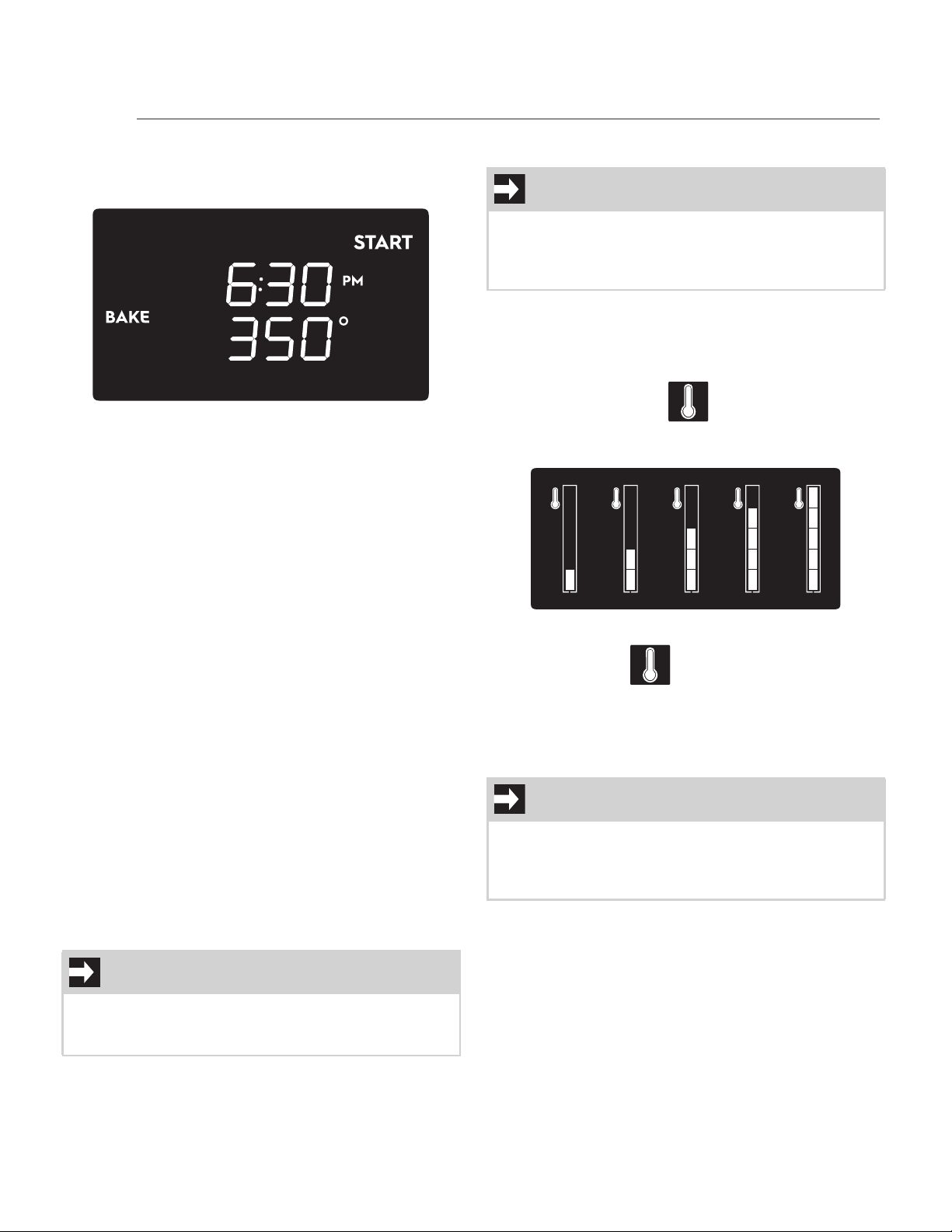
To set a manual cooking cycle
1. Press the oven mode knob. The default screen
will show:
2. Turn the oven mode knob to select the
cooking function. If you keep turning the
knob, you can select the auxiliary functions
and the special functions (see “Auxiliary
functions” and “Special functions”).
3. Turn the oven temperature knob to the left or
right to select the temperature.
4. Once the cooking function and temperature
have been selected, press the oven mode
knob to start cooking (the word “START”
disappears)
Manual cooking in progress
1. Manual cooking can be stopped at any time
by turning the oven mode knob to the left.
2. Open the door to pause cooking. Close the
door to resume cooking.
3. Turn the oven temperature knob to the right
to turn on and off the lights.
4. The temperature can be changed by pressing
and then rotating the temperature knob. The
timing functions can be selected by pressing
the temperature knob again (see “Timing
functions”). You can change the temperature
and the timing functions by pressing and
turning the temperature knob even during
the pause.
Preheating
The bake, convection bake and broil functions are
always preceded by preheating, during which the
oven is heated to the set cooking temperature.
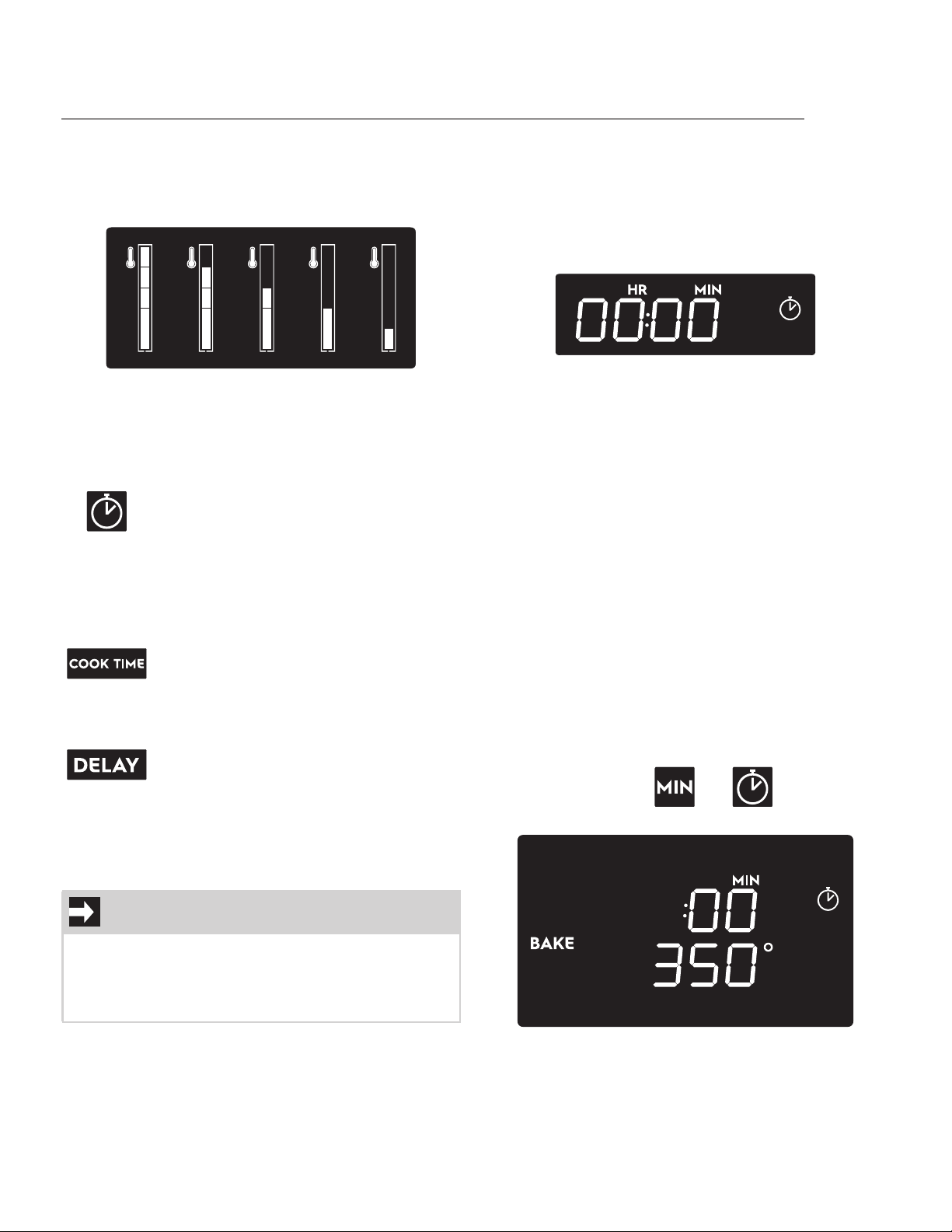
The temperature bar is shown on the right hand
side of the display. The icon and the bar seg-
ments flash to indicate that the oven temperature is
increasing.
When preheating is complete, the temperature bar
segments and the icon become steady.
The duration of preheating varies according to the
temperature and the cooking function selected.
A buzzer sounds to signal the end of preheating.
Open the oven door to stop the buzzer.
NOTE
At the end of any function, a buzzer is triggered
and sounds twice every 15 seconds (except for the
Sabbath function).
NOTE
At the start of each cooking cycle, the oven will
preheat in order to reach the selected cooking
temperature (except for Convection roast and
Sabbath functions).
IMPORTANT
There is no preheating for the convection roast
function. When starting to cook using the convec-
tion roast function the display immediately shows
the full temperature bar.
USING THE OVEN
27
Oven residual heat
When the display is in standby mode and the oven
cavity is still hot, the decreasing temperature bar
will be shown at the right side of the screen.
The temperature bar will disappear when the oven
cavity temperature decreases to below 140°F
(60°C).
Timing functions
Minute minder
The minute minder allows you to set a timer and a
buzzer will sound at the end of the set time.
Stand alone timer
The stand alone timer can be useful when cooking
with the induction cooktop.
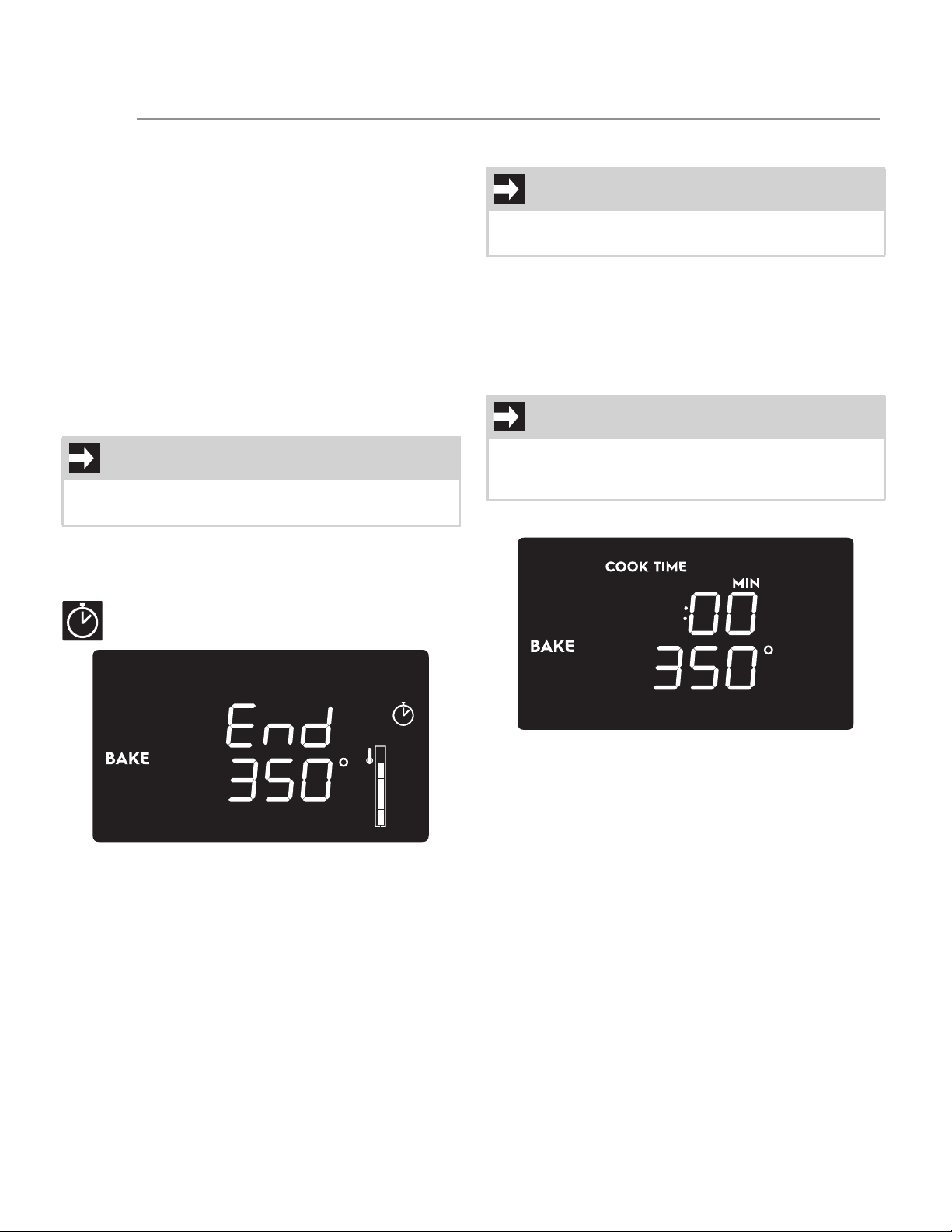
With the display in standby mode:
1. Press the temperature knob. The screen will
show:
2. Turn the temperature knob left or right to set
the time.
3. Press the temperature knob to start the
timer.
During the countdown, you can change the previ-
ously set time by pushing and rotating the tem-
perature knob. Push the knob again to resume the
timer countdown.
When the timer expires, a buzzer sounds and the
clock icon starts to flash.
To stop the buzzer, simply interact with one of the
oven knobs or open the door, then the display
switches to standby mode.
Cooking timer
This timer mode acts as a stand alone timer during
a function in progress.
1. Set a manual cooking cycle (See “Manual
cooking”) (example is a 350°F Bake).
2. Press the oven temperature knob until the
display shows the and icons and
the number “:00”.
3. Set the time by turning the temperature
knob.
4. Keep pressing the temperature knob until
“START” flashes on the display. The
countdown starts immediately.
Minute minder
The function of this timer is only to warn
the user when the set time has expired. It
does not stop any function in progress. It
can be activated either as a stand alone
timer or when setting a function, but its
operation is the same.
Timed cooking
This timer stops the function in progress
when the time has elapsed. It can only
be activated when setting a function.
Delayed cooking
This timer allows you to start a function
after the preset time. It can only be acti-
vated when setting a function and when
timed cooking has been set.
NOTE
• The minute minder can be set both during
cooking and as a stand alone timer.
• A minimum of 1 minute and a maximum of 12
hours can be set.
USING THE OVEN
28
5. Press the oven mode knob to start cooking.
Cooking timer in progress
During cooking you can change or deactivate the
cooking timer by pressing the oven temperature
knob until the display shows the number of min-
utes/hours that were previously selected.
1. To reset the timer, keep the temperature knob
turned to the left until you reach “:00”.
2. To change the timer, turn the temperature
knob left or right to select another
countdown.
3. Keep pressing the temperature knob until the
display shows the current time or the new
countdown in progress.
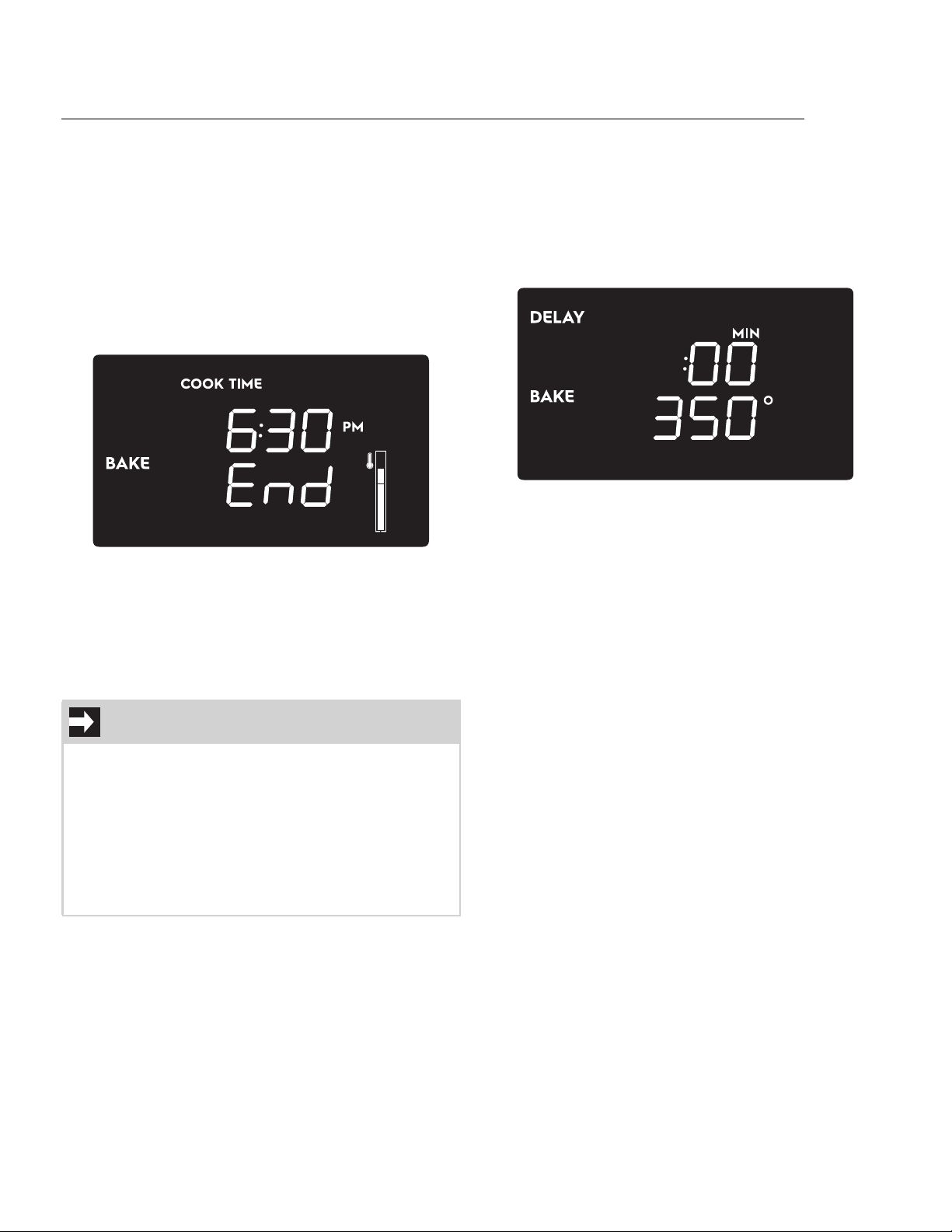
End of cooking timer
When the timer expires, a buzzer sounds and the
following screen appears on the display with the
icon flashing.
To stop the buzzer, simply interact with one of the
oven knobs or open the door, then the display
switches to the cooking in progress screen.
Timed cooking
The timed cooking allows you to stop the cooking
process after a preset time.
1. Set a manual cooking cycle (See “Manual
cooking”) (Example is a 350°F Bake).
2. Press the oven temperature knob until
“COOK TIME” flashes on the display.
3. Turn the temperature knob left or right to set
the time.
4. Press the temperature knob until the display
shows the cooking settings screen with the
cooking time just set and the word “START”
flashing.
5. Press the oven mode knob to start the timed
cooking.
Timed cooking in progress
When the cooking is in progress, by pressing and
turning the temperature knob, you can:
1. Change the temperature.
2. Set a minute minder timer.
3. Change or reset the timed cooking
countdown. If you reset the countdown,
cooking switches to manual mode.
Open the door to pause cooking.
IMPORTANT
• If cooking is paused, the countdown anyway
continues.
IMPORTANT
The timed cooking is allowed for all functions
except Warm, Steam clean and Broil.
IMPORTANT
On this screen, if you do not interact with the
knobs for 5 seconds, the display switches to the
cooking settings screen.
USING THE OVEN
29
You can change the temperature and the timing
functions by pressing and turning the temperature
knob even during the pause.
Close the door to resume cooking.
To stop cooking, turn and release the oven mode
knob to the left.
End of timed cooking
At the end of cooking, a buzzer sounds and “End”
will appear on the display together with the current
time.
By turning and releasing the oven mode knob to
the left or after a few seconds of waiting, the dis-
play switches to the standby screen (current time
only) with the decreasing temperature bar to indi-
cate that the oven cavity is still hot.
Delayed cooking
The delayed function allows you to start a timed
cooking automatically after a preset time.
To set a delayed function:
1. Set a timed cooking function (see “Timed
cooking”) (Example is 350°F Bake).
2. Once the cooking duration has been set,
press the temperature knob until the
following screen is displayed with the word
“DELAY” flashing:
3. Turn the temperature knob left or right to
select a delay time.
4. Press the temperature knob to switch to the
cooking settings screen.
5. Press the oven mode knob to start the delay
countdown. During this phase, the display is
less bright.
6. Once delay countdown ends, the brightness
of the display returns normal and timed
cooking starts.
7. At the end of timed cooking follow the same
instructions described previously for timed
cooking (see “End of timed cooking”).
IMPORTANT
• Delayed cooking can only be selected if a
timed cooking has been set.
• Delayed cooking is allowed for all functions
except Warm, Proof and Broil.
• The minimum settable delay is 1 min.
• For the Warm function, the max. settable
delay is 12 hours; for all the other functions it
is 1 hour.
USING THE OVEN
30
Auxiliary functions
Three auxiliary functions are available, selectable in
the same way as the cooking functions.
Steam Clean
For the details on setting and starting the Steam
Clean function see the dedicated chapter.
Proof
Preliminary operations:
1. Open the oven door.
2. Place the container containing the dough in
the oven.
3. Close the oven door.
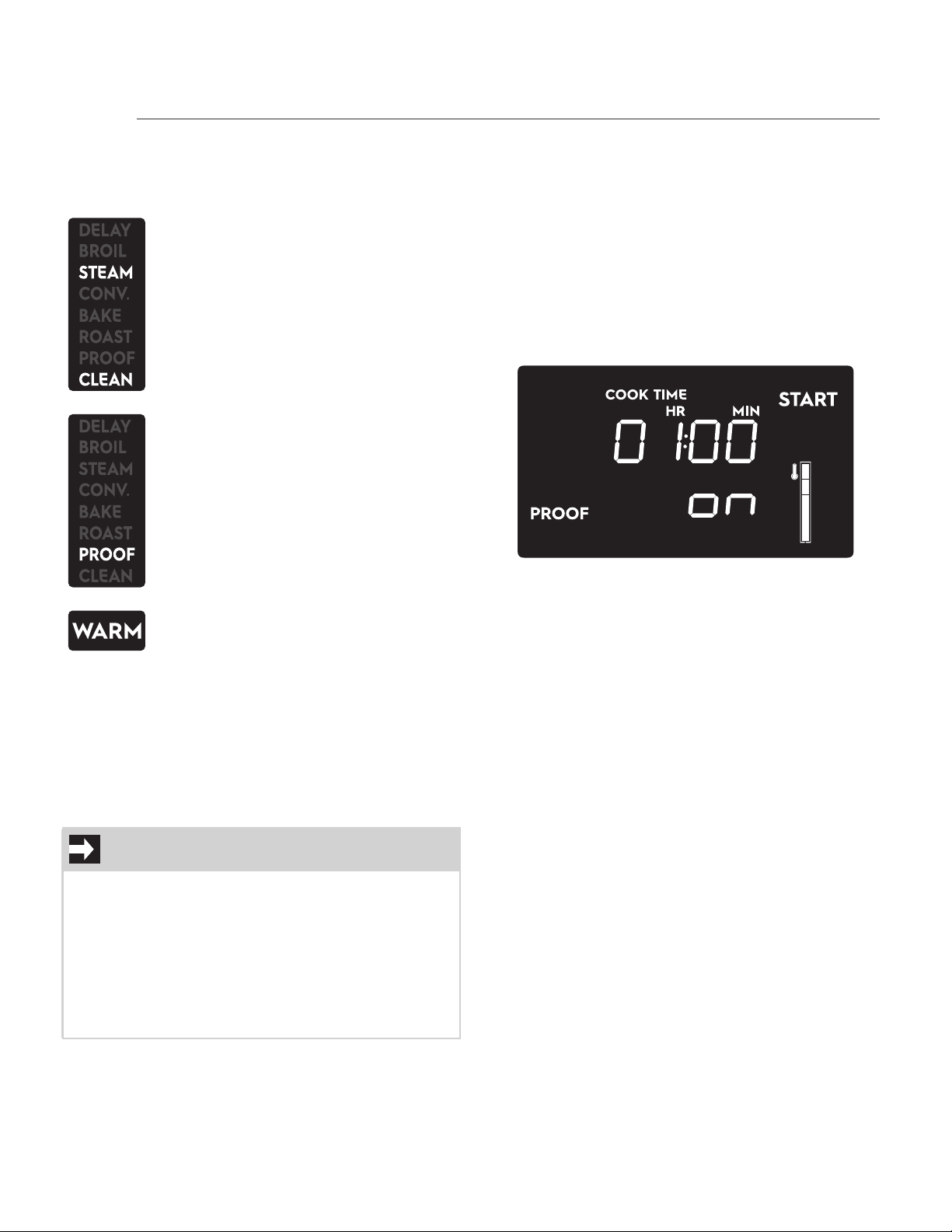
To set the Proof function:
1. Press the oven mode knob.
2. Turn the oven mode knob until the Proof
setting screen appears on the display (the
word “START” flashes):
3. By pressing the oven temp. knob you can set
a minute minder timer or change the default
duration of the function (see “Cooking timer”
and “Timed cooking”).
4. Press the oven mode knob to start the Proof
function (the default/user countdown starts
and the word “on” disappears).
Proof function in progress
By pressing and turning the oven temp. knob, you
can modify the minute minder and the duration of
the function (see “Cooking timer” and “Timed
cooking”).
Open the door to pause function.
You can change the temperature and the timing
functions by pressing and turning the temperature
knob even during the pause.
Close the door to resume function.
Turn the oven mode knob to the left and then
release it to stop the function.
Steam clean
This function is an assisted cleaning
procedure that facilitates dirt removal.
This function allows the inside of the
oven can be cleaned with great ease.
Dirt residues are softened by the steam
produced by heating a small amount of
water on the bottom of the oven cavity.
Proof
This function allows to create the per-
fect environment to activate yeast when
baking homemade breads or pizza
using heat coming only from the upper
part of the oven cavity.
Warm
This function allows you to maintain a
constant temperature inside the oven.
Useful to prevent freshly cooked food
from cooling down.
IMPORTANT
• When you select the Proof function the
“COOK TIME” appears on the display to indi-
cate that the default duration of this function
is 1 hour.
• It is not possible to set a delayed start for
this function.
• For best results, a container of water should
be placed at the bottom of the oven cavity.
USING THE OVEN
31
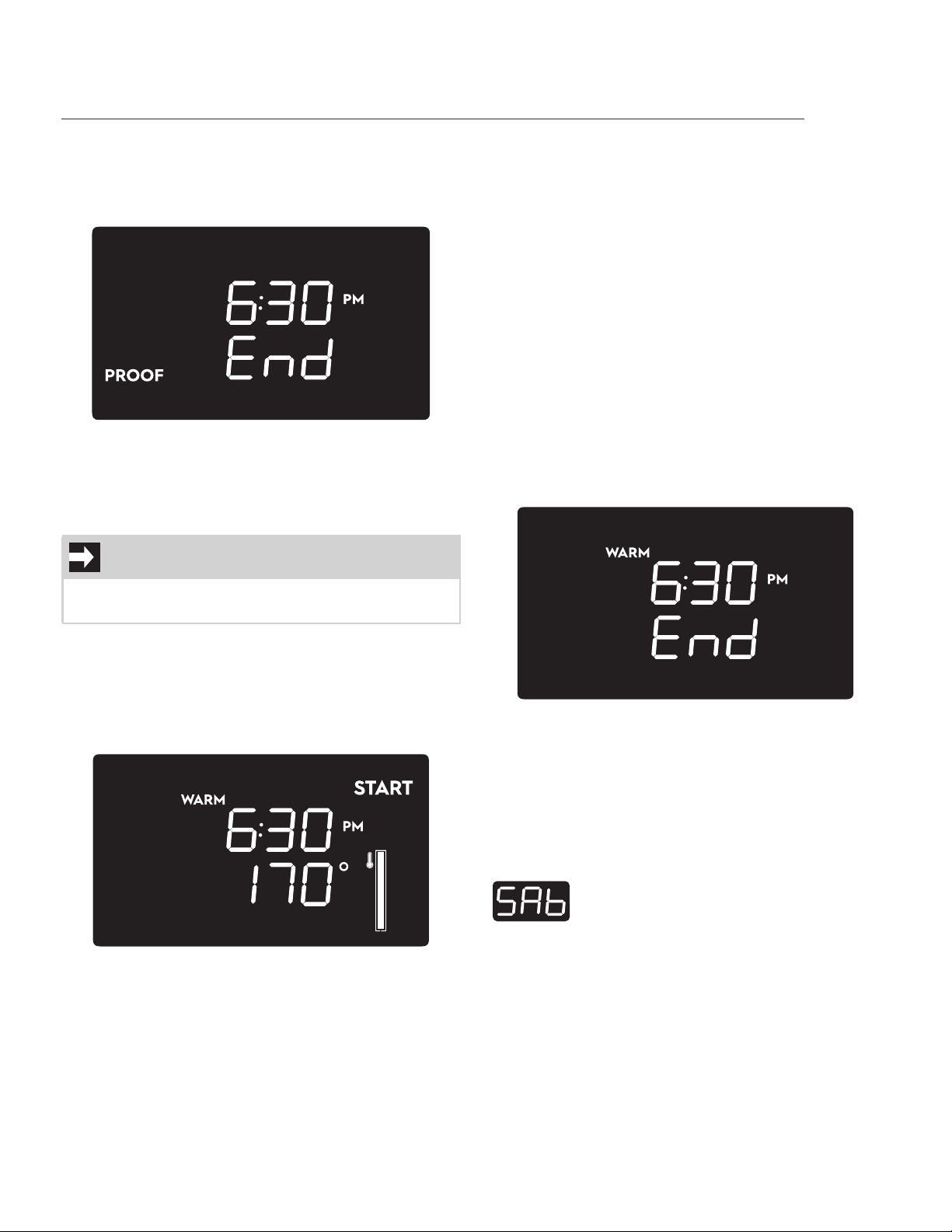
End of Proof function
At the end of the Proof function, a buzzer sounds
and “END” will appear on the display together with
the current time.
Turn and release the oven mode button to stop the
buzzer and the function. The display goes into
standby mode.
Warm
To set the Warm function
1. Press the oven mode knob.
2. Turn the oven mode knob until the Warm
setting screen appears on the display (the
word “START” flashes):
3. Press turn and release the oven temp. knob
to change the Function temperature.
4. Press turn and release the same knob again
and to set a function timer.
5. Press oven temp. knob again to confirm the
timer and to switch to the Warm setting
screen.
6. Press the oven mode knob to start the Warm
function.
Warm function in progress
You can modify the temperature and duration of
the function by pressing and turning the oven
temp. knob.
Open the door to pause function.
You can change the temperature and the timing
functions by pressing and turning the temperature
knob even during the pause.
Close the door to resume function.
Turn the oven mode knob to the left and then
release it to stop the function.
End of Warm function
At the end of the Warm function, a buzzer sounds
and “END” will appear on the display together with
the current time.
Turn and release the oven mode button to stop the
buzzer and the function. The display goes into
standby mode.
Special functions
Two special functions are available, selectable in
the same way as the cooking and auxiliary func-
tions.
NOTE
The temperature range for this function is from
160°F (70°C) to 200°F (90°C).
Sabbath
Function that allows you to cook food
whilst respecting the provisions of the
Jewish day of rest. This function has the
same characteristics as the Bake func-
tion.
USING THE OVEN
32
Sabbath function
The Sabbath function operates the appliance in a
particular way:
• The maximum operating time is 72 hours.
• A timed cooking from 10 minutes to a maxi-
mum of 72 hours can be set.
• No minute minder timer is allowed.
• No delayed cooking is allowed.
• No preheating will be performed.
• The internal fans remain off.
• The oven lights cannot be toggled on.
• No sound will be emitted.
To set the Sabbath function:
1. With the display is in standby mode, press the
oven mode knob to access the cooking set-
tings screen.
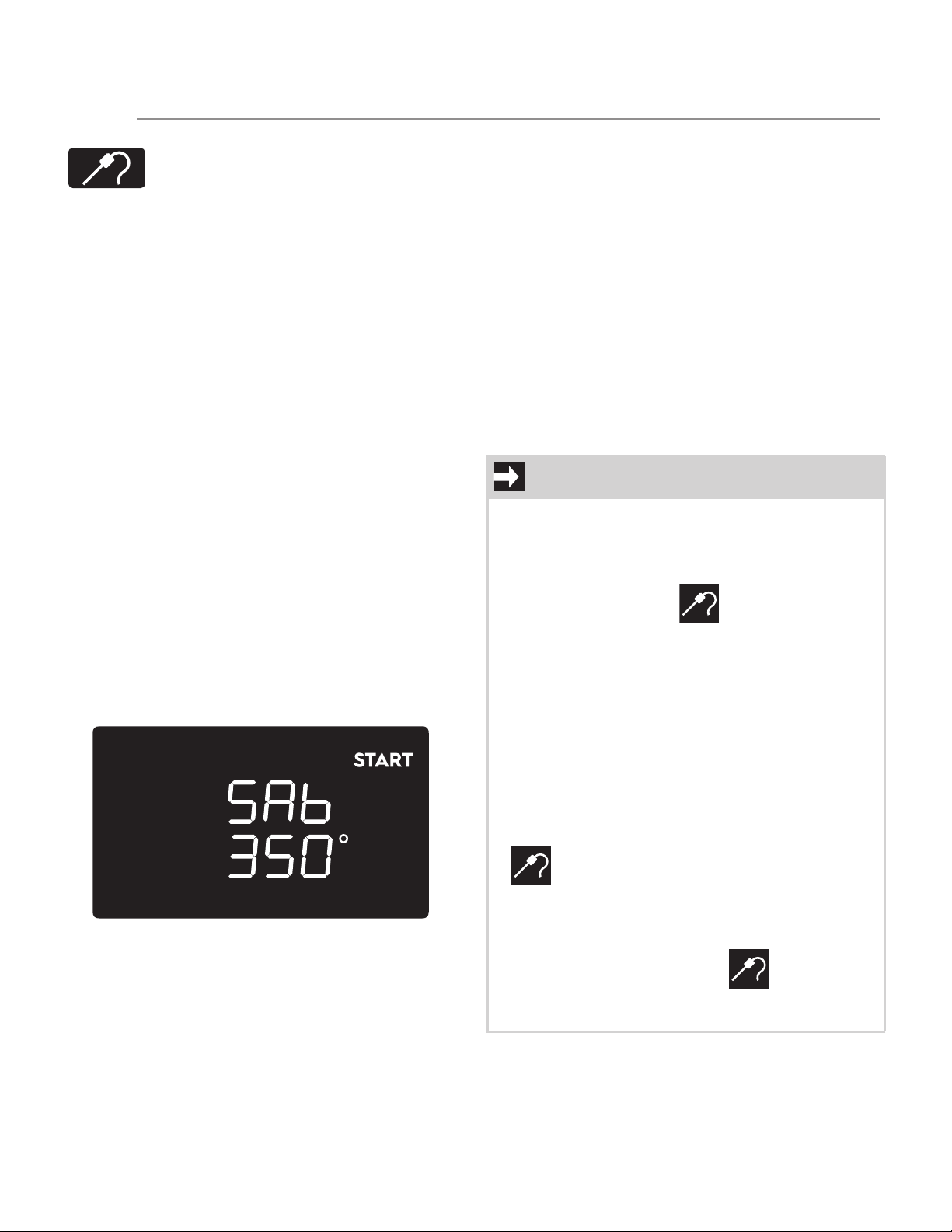
2. Turn it once to the left. The display below will
appear (“START” will flash):
3. Press and turn the oven temperature knob
once to change the temperature (the
degrees symbol starts flashing).
4. Press the temp. knob again to set a timed
cooking (the default duration is 1 hour).
5. Turn the temp. knob to change the timed
cooking duration.
6. Press the temp. knob again to confirm the
previous selections and to switch to the
cooking settings screen.
7. Press the oven mode knob to start the
function.
Sabbath function in progress
When the Sabbath function is in progress, no action
is allowed except to stop cooking by rotating the
oven mode knob to the left. Only the word “SAb” is
shown on the display.
End of Sabbath function
When the Sabbath cooking function has ended, the
display switches directly to standby mode.
Meat probe cooking
Meat probe cooking
Useful function for cooking various
types of meat to perfection by measur-
ing the core temperature of the meat.
This is not a timed cooking function: the
cooking process ends when the probe
sensor reaches the set target tempera-
ture.
IMPORTANT
• Meat probe cooking is allowed only with
Bake, Convection Bake and Convection
Roast functions.
• If you use the meat probe with any other
cooking function, the icon starts to
flash (except for the Sabbath function).
• With the meat probe inserted, it is not possi-
ble to set a minute minder timer when set-
ting a cooking cycle or during a cooking.
• If you insert the meat probe when a timed
Bake, Conv. Bake or Conv. Roast is in prog-
ress, the timer will be canceled and the func-
tion continues using the default temperature
or the set temperature of the meat probe.
• If you insert the meat probe when other
timed cooking functions are in progress, the
icon starts to flash and the cooking
process will go ahead ignoring the meat
probe.
• If the meat probe is inserted when the dis-
play is in standby mode, the icon starts
to flash, but it is still possible to set a stand
alone timer.
USING THE OVEN
33
Preliminary operations
1. Open the oven door.
2. Place the food on the rack.
3. Insert the tip of the probe into the food
before placing it in the oven.
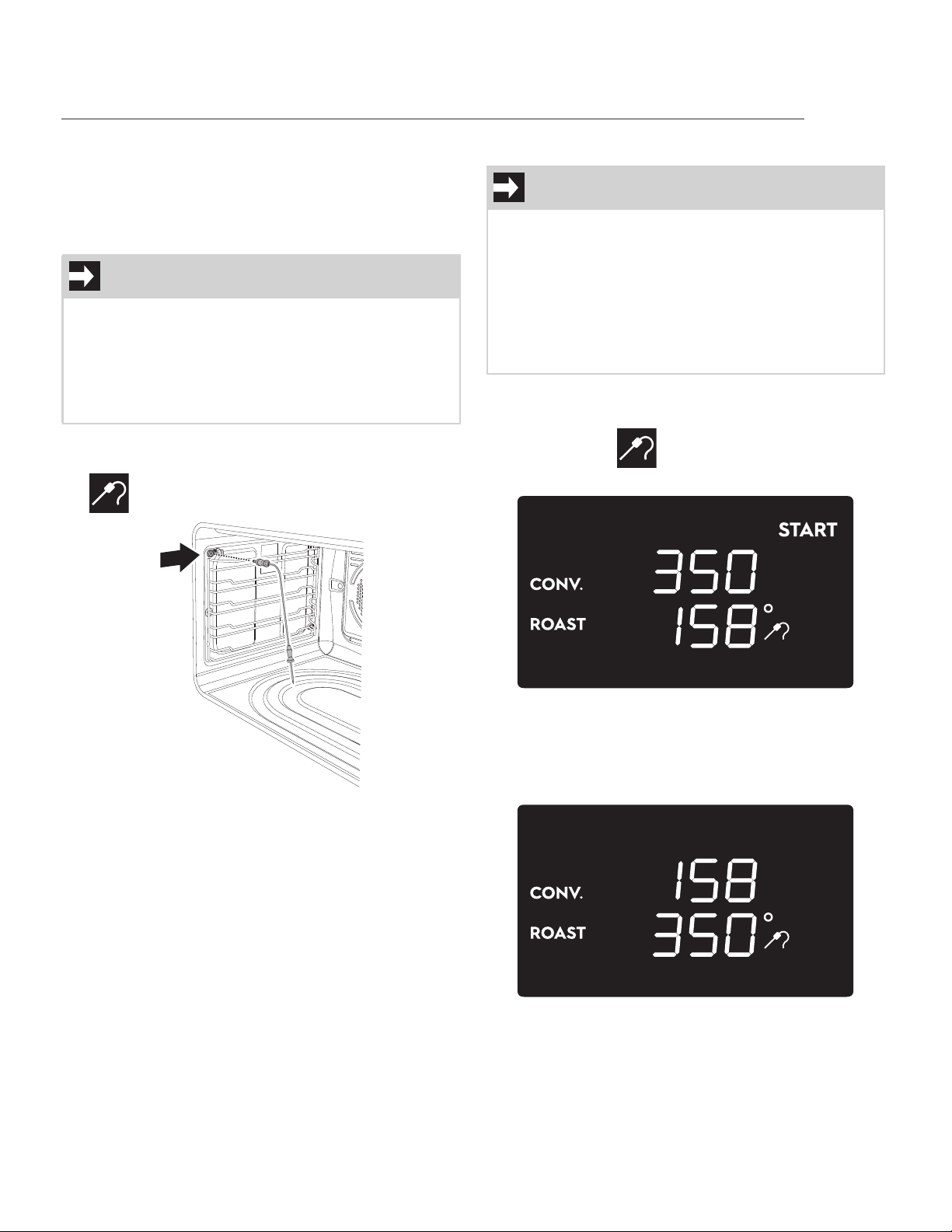
4. Insert the plug of the probe into the socket
on the left the side of the oven cavity. The
icon starts flashing.
5. Place the rack with the food to be cooked in
the oven.
6. Close the oven door.
To set a meat probe cooking
1. Press the oven mode knob.
2. Select a function enabled for meat probe
cooking. The icon becomes steady and
the word “START” flashes.
3. Press the oven temp. knob to change the
oven cavity temperature. The display will
show the default cavity temperature at the
bottom with the flashing degree symbol. The
word “+” disappears.
4. Turn the oven temp. knob to change the
cavity temperature.
IMPORTANT
• Always insert the probe so that the tip is in
the center of the thickest part of the meat.
Do not allow the probe to touch bone, fat,
gristle or the pan.
• Make sure that the tip of the probe does not
protrude from the food.
IMPORTANT
When setting a meat probe cooking cycle there
two temperature values have to be selected:
• Oven cavity temperature: Min. 170°F (75°C) -
Max. 550 °F (280°C) - Default: 350°F
(175°C).
• Meat probe target temperature: Min. 100°F
(38°C) - Max. 200°F (90°C) - Default: 160°F
(70°C).
USING THE OVEN
34
5. Press the oven temp. knob to confirm the
selection and to allow the probe target
temperature to be changed (shown at the
bottom).
6. Turn the oven temp. knob to change the
probe target temperature.
7. Press the oven temp. knob to confirm the
selection and switch to the probe cooking
settings screen. The word “START” begins to
flash again.
8. Press the oven mode knob to start the Meat
probe cooking process. The word “START”
disappears.
Meat probe cooking in progress
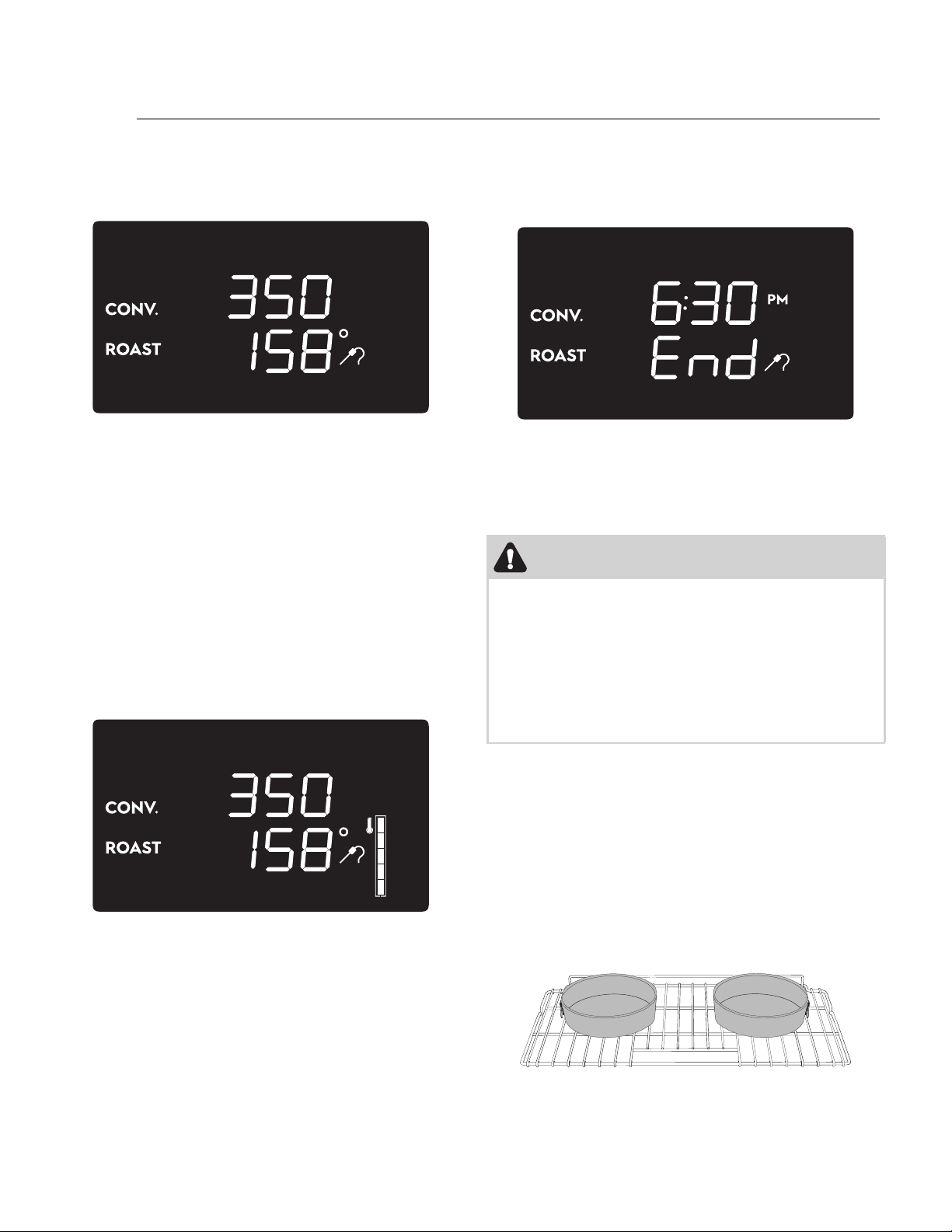
When meat probe cooking is in progress the dis-
play will show the oven cavity temperature at the
top, the meat probe target temperature at the bot-
tom and the full temperature bar on the right.
1. Press the oven temp. knob to change the
oven cavity and the meat probe target tem-
perature as was done when setting the cook-
ing cycle.
2. Open the door to pause cooking. Close the
door to resume cooking.
3. Turn the oven mode knob to the left and then
release it to stop the cooking cycle.
End of meat probe cooking
The meat probe cooking will end when the probe
reaches the set target temperature. A buzzer will
sound and the display will show:
Turn and release the oven mode button to stop the
buzzer and the function. The display goes into
standby mode.
Oven cooking tips
Air circulation in the oven
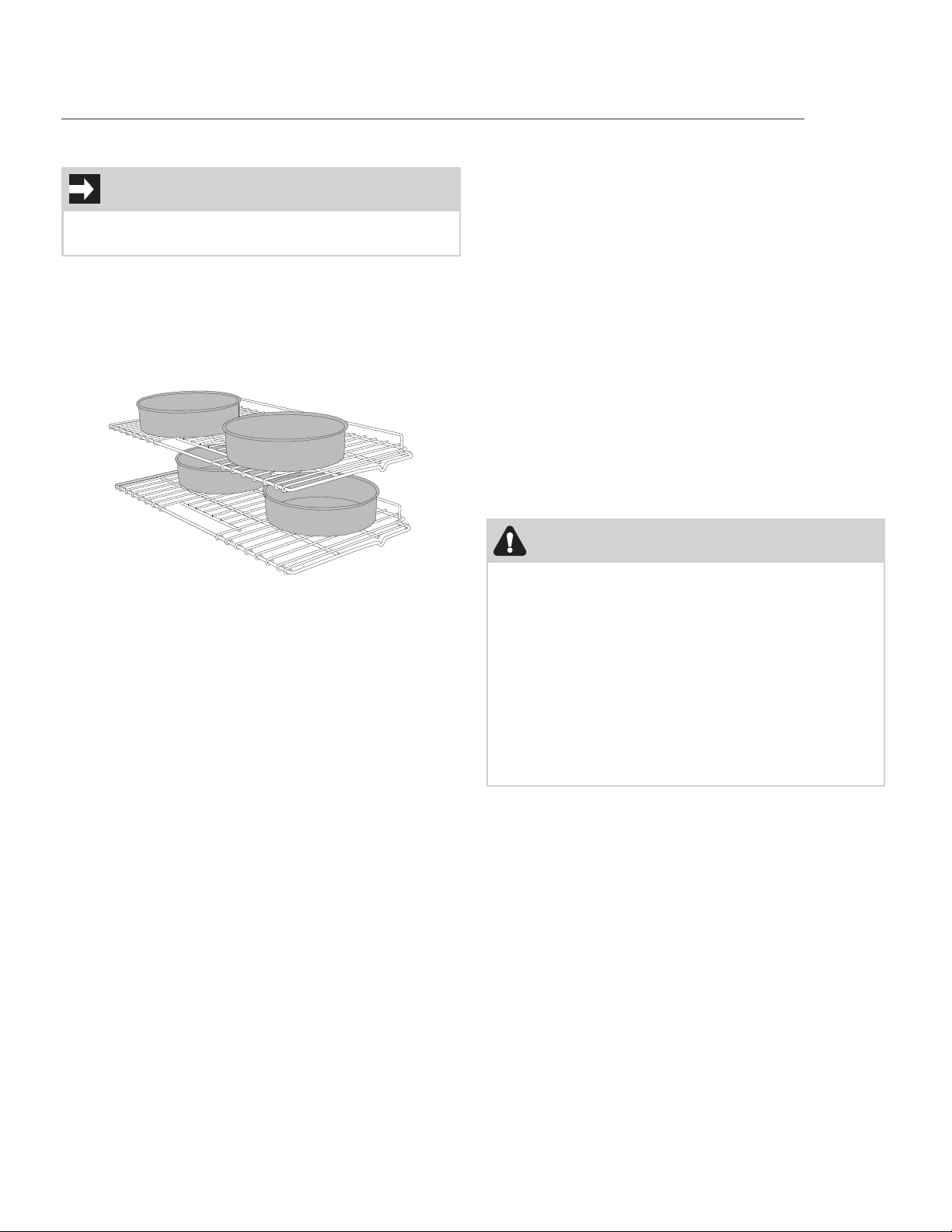
If using 1 rack, place it in center of oven. If using
multiple racks, stagger cookware as shown in the
following figures. For optimum air circulation and
best baking results, allow at least 2” around the
cookware for proper air circulation and be sure
pans and cookware are not touching each other,
the oven door, the sides or the back of the oven
cavity. The hot air must circulate around the pans
and cookware in the oven for even heat to reach
around the food.
Pan position for one rack baking
WARNING
FOOD POISONING HAZARD. Do not let food sit
for more than one hour before or after cooking.
Doing so can result in food poisoning or sickness.
Foods that can easily spoil such as milk, eggs, fish,
meat or poultry, should be chilled in the refrigera-
tor first. Even when chilled, they should not stand
in the oven for more than 1 hour before cooking
begins and should be removed promptly once
cooking has ended.
USING THE OVEN
35
When baking with two or more racks we recom-
mend arranging the pans on the upper rack closer
to the door and the pans on the lower rack closer to
the fans (see the figure below).
Make sure that pans don't touch the internal glass
pane of the door or the back wall of the oven.
Pan position for four rack baking
Bake function tips
• Use the bake function to cook most food
items that require normal cooking tempera-
tures.
• As much as possible, use only one rack on
position 2 or 3 and center the pans. If using
two racks, place them in positions 1 and 4.
• Dark or dull pans absorb more heat than shiny
bakeware resulting in dark or overbrowning of
foods. It may be necessary to reduce the oven
temperature or cook time to prevent over-
browning of some foods. Dark pans are rec-
ommended for pies. Shiny pans are
recommended for cakes, cookies and muffins.
• Fully preheat the oven before baking items
like cookies, cakes, biscuits and breads.
• Do not open oven door often. Opening the
door will reduce the temperature in the oven
and may increase the cook time.
Convection Bake function tips
• The Convection Bake function is optimized for
multiple rack cooking.
• When baking cookies and biscuits on multiple
racks, use positions 1 and 4. When baking
cakes on multiple racks, use positions 1 and 3.
• Cookies and biscuits should be baked on pans
with no sides or very low side to allow heated
air to circulate around the food.
• Food baked on pans with a dark finish will
cook faster.
• When placing multiple food items in the oven,
allow at least 2” of space between them for
proper air circulation.
• Use tested recipes with times adjusted for
Convection Baking when using this mode.
Check food at the minimum cooking time.
Broil function tips
• Use the Broil function to cook meats that
require direct exposure to radiant heat for
optimum browning results.
• Always allow the oven to preheat before plac-
ing the food in it.
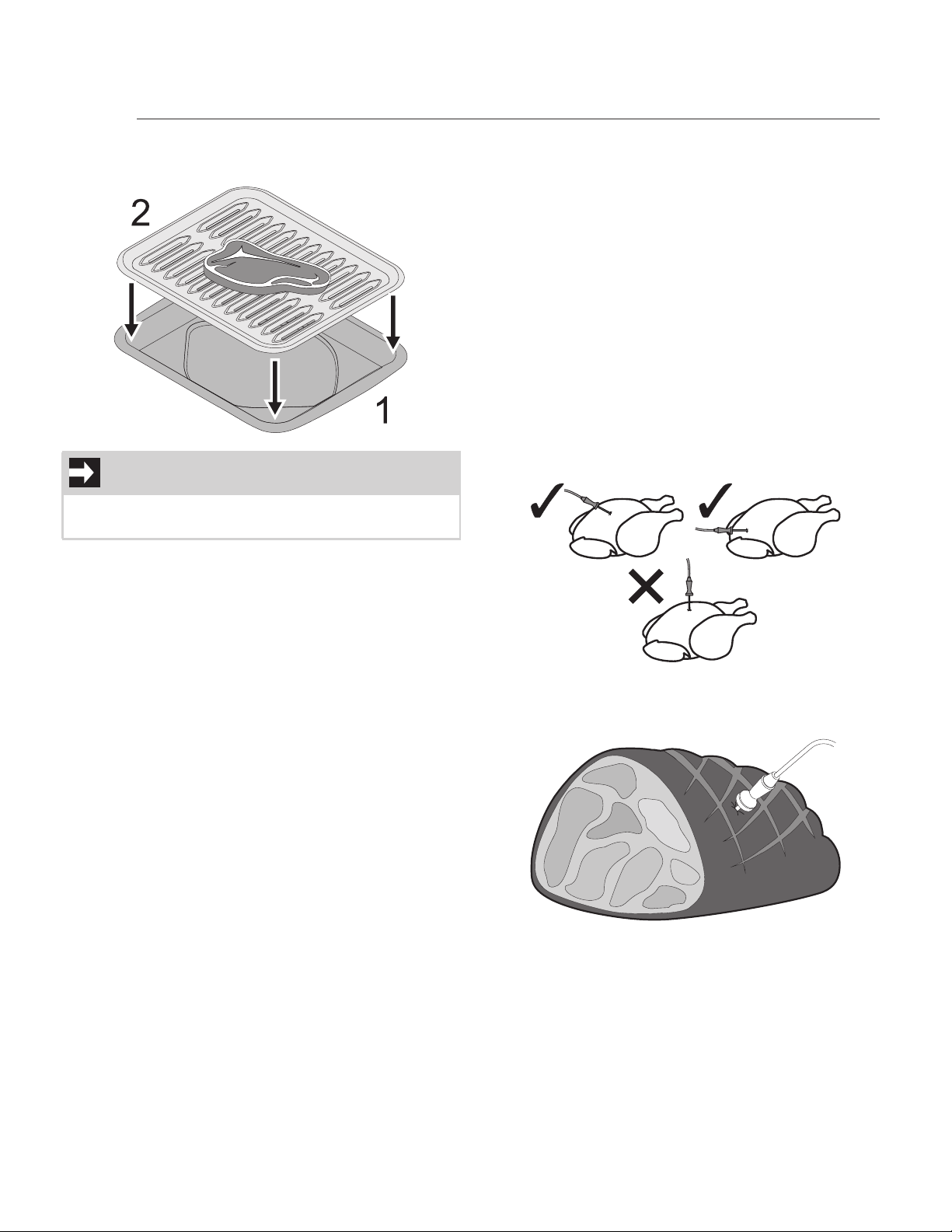
• For proper broiling, use the broiler pan (1) and
its insert (2) to place the meat on as shown in
the figure below. The broiler pan insert con-
NOTE
Always use caution when removing food from the
oven.
WARNING
• Should an oven fire occur, close the oven
door. If the fire continues, throw baking soda
on the fire or use a fire extinguisher. Do not
put water or flour on the fire. Flour may be
explosive and water can cause a grease fire
to spread and cause personal injury.
• Use potholders or oven mitts when working
with a hot oven.
• Consuming raw or undercooked meats,
poultry, seafood or shellfish may increase
your risk of food borne illness.
USING THE OVEN
36
tains slots that allow grease from the meat to
drain into the broil pan.
• Broiling is direct heat cooking and will pro-
duce some smoke. If the smoke is excessive
please refer to the “Oven problems” table.
• Broil one side until the food is browned; turn
and cook the second side. Season and serve.
• Always pull the rack out to the “stop” position
before turning or removing food (see “Regu-
lar rack”).
Convection Roast function tips
• Convection roast combines a cook cycle with
the convection fan and heating element to
rapidly roast meats and poultry. Heated air
circulates around the meat from all sides,
sealing in juices and flavors. Meats cooked
with this function are crispy brown on the
outside while staying moist on the inside. In
addition, there is no need to reduce the oven
temperature when using convection roast.
• The Convection Roast function is optimized
for multiple oven rack cooking.
• Place an oven rack in position 2 (next up from
bottom).
• Please refer to the “Convection Roast function
cooking table” for temperature and time
instructions when cooking with this function.
• Do not cover foods when dry roasting - this
will prevent the meat from browning properly.
Meat probe cooking tips
• For some foods, especially poultry and roasts,
testing the internal temperature is the most
effective way of insuring that your food has
been properly cooked.
• For bone-in ham or lamb, insert the probe
into the center of the lowest large muscle or
joint. For dishes such as meat loaf or casse-
roles, insert the probe into the center of the
food. When cooking fish, insert the probe just
above the gill.
• For whole poultry or turkey, insert the probe
into the thickest part of the inner thigh, below
the leg.
• In general, place the temperature probe trans-
versely in the thickest part of the food and for
least 3/4 of its length.
• For very thick pieces of meat, take care to
insert the entire length of the probe to ensure
correct temperature detection.
NOTE
The broiler pan and the insert are not included
with the appliance.
USING THE OVEN
37
User settings menu
The user settings menu allows you to set the fol-
lowing parameters (displayed in this order):
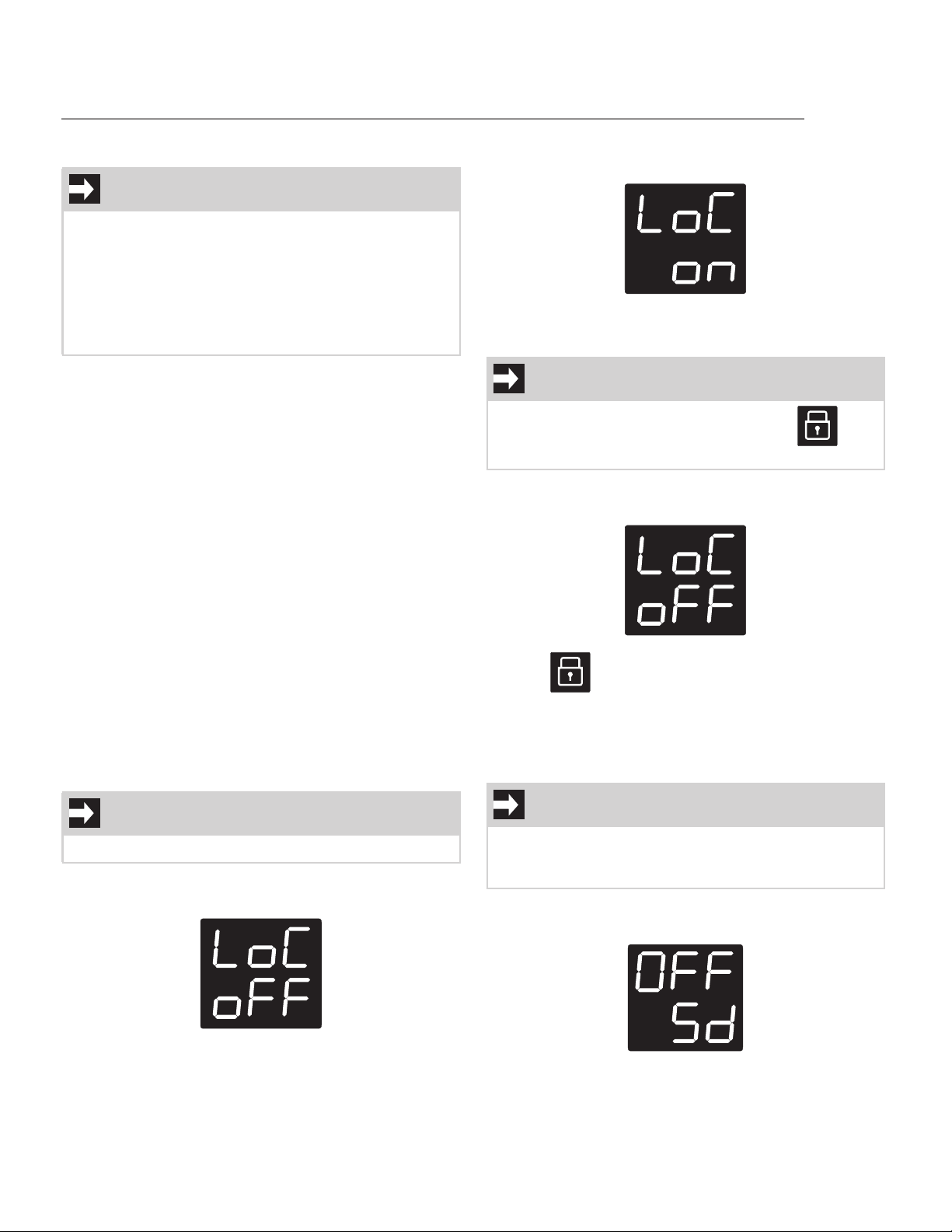
1. Child lock mode:
The child lock mode allows you to lock the oven
controls to prevent the appliance being activated
unintentionally.
2. Demo mode:
This mode deactivates all the heating elements of
the appliance, keeping the controls active. It is
designed to simulate the operation of the appliance
and is intended for exhibitors.
3. Temperature units:
This feature allows you to set the unit of measure-
ment of temperature, degrees Celsius (°C) or
degrees Fahrenheit (°F).
4. Time format:
This feature gives you the option to display the
time in 12h format with AM/PM indication or 24h
format.
Child lock mode
After accessing the settings menu, the oven display
will show:
By turning the temperature knob to right the
screen will show
Press the knob to activate the child lock mode. The
display will return to the standby screen.
To deactivate the child lock mode, turn the tem-
perature knob to the right. The display will show
and the icon starts to flash. Now press the
temperature knob for a few seconds to deactivate
the child lock mode. The display will return to the
standby screen.
Demo mode
After accessing the settings menu, keep pressing
the temperature knob until the display shows:
IMPORTANT
• To access the settings menu, you must first
have to turn on the oven light and then press
and hold the oven temperature knob for a
few seconds.
• To exit from the settings menu, press and
hold the temperature knob until the display
goes into standby mode.
IMPORTANT
This setting will only lock the oven knobs.
NOTE
When the child lock mode is active, the icon
appears on the right side of the display.
IMPORTANT
This mode can be activated and deactivated only
for the first 5 minutes after the power to the appli-
ance has been turned on.
USING THE OVEN
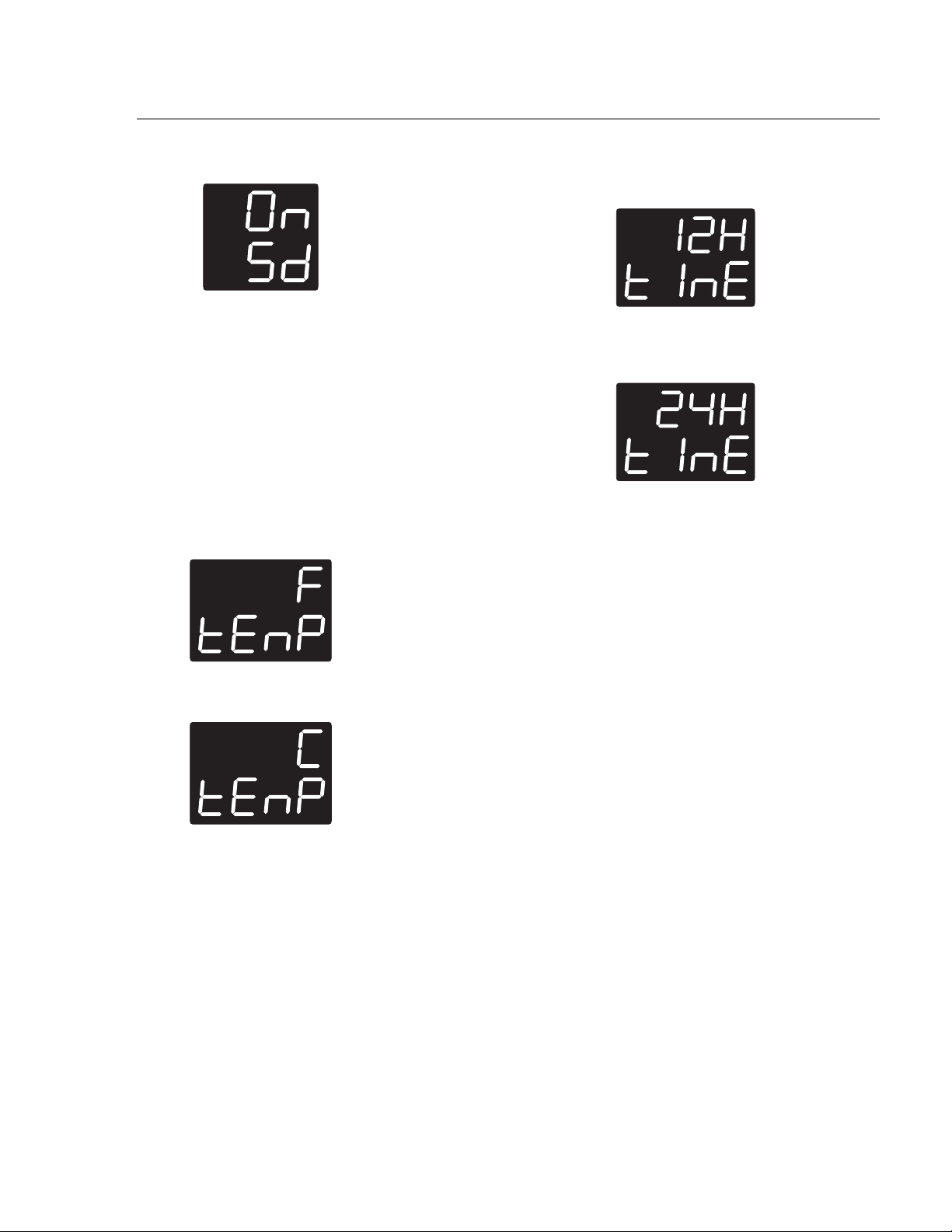
38
By turning the temperature knob to right the
screen will show:
Now keep pressing the temperature knob to exit
from the settings menu.
The demo mode is now active and the range will
operate normally with the difference that “5d” will
always be displayed and no heat will be produced.
To deactivate the demo mode you have to discon-
nect and re-connect the appliance to the power
supply and access the settings menu, disabling the
parameter described above.
Temperature units
After accessing the settings menu keep pressing
the temperature knob until the display shows
Turning the temperature knob to right causes the
display to switch between °C and °F.
Press the knob to confirm the selection and exit
from the user menu if you wish to do so.
Time format
After accessing the settings menu keep pressing
the temperature knob until the display shows
By turning the temperature knob to the right, the
display switches between the 12h (with the AM/PM
indication) and the 24h time format.
Press the knob to confirm the selection and to exit
from the settings menu.
USING THE OVEN
39
Oven cooking tables
Bake function cooking table
Food Rack
position
Recommended pan
Cookies 2
Shiny pan with no sides/ very low sides placed on the rack
Biscuits 3
Shiny pan with no sides/ very low sides placed on the rack
Convection Bake function cooking table
Food Rack
position
Recommended pan
Cookies 1 - 4
Shiny pan with no sides/ very low sides placed on the rack
Biscuits 1 - 4
Shiny pan with no sides/ very low sides placed on the rack
White cake 1 - 3 8 inch diameter
Broil function cooking table
Food Rack position Oven T° Cooking time
1st side (min)
Cooking time
2nd side
(min)
Doneness
Steak
4 550°F - 280°C 6 6 Med-Rare
5 550°F - 280°C 6 4 Rare
Chicken Breast-
bone in
4 450°F - 230°C 20 20 Well Done
Chicken Breast
boneless
3 450°F - 230°C 30 10 Well Done
Fish Steak 4 500°F - 260°C 6 - Well Done
Shrimp 3 550°F - 280°C 5 - Well Done
Hamburger
5 550°F - 280°C 6 4 Med-Rare
5 550°F - 280°C 8 5 Well Done
USING THE OVEN
40
* In Convection Roast it is recommended to use the meat probe to reach the desired cooking level. Oth-
erwise, refer to the Time/lb column.
** For lower meat weight it is suggested to decrease the Probe T° setting by 5°F. The cooking duration
will decrease accordingly.
Convection Roast function cooking table
Meat type Weight (lb) Oven T° Probe T° Time/lb (min/
lb)
Rack
position
Standing Rib Roast
(med-rare)
5 - 7 350°F - 175°C 145°F - 60°C 15 2
Standing Rib Roast
(well done)
5 - 7 350°F - 175°C 170°F - 75°C 24 2
Whole Ham, bone-
in
10 - 15 325°F - 160°C - 24 2
Whole Turkey 10 - 15 325°F - 160°C - 12 2
Whole Turkey 15 - 20 325°F - 160°C - 10 2
Whole Chicken 4 - 6 375°F - 190°C 180°F - 80°C 19 2
Pork Shoulder/Butt
Roast
10 - 15 325°F - 160°C 180°F - 80°C 25 2
Pork Loin 4 - 6 350°F - 175°C 165°F - 70°C 25 2
USING THE OVEN
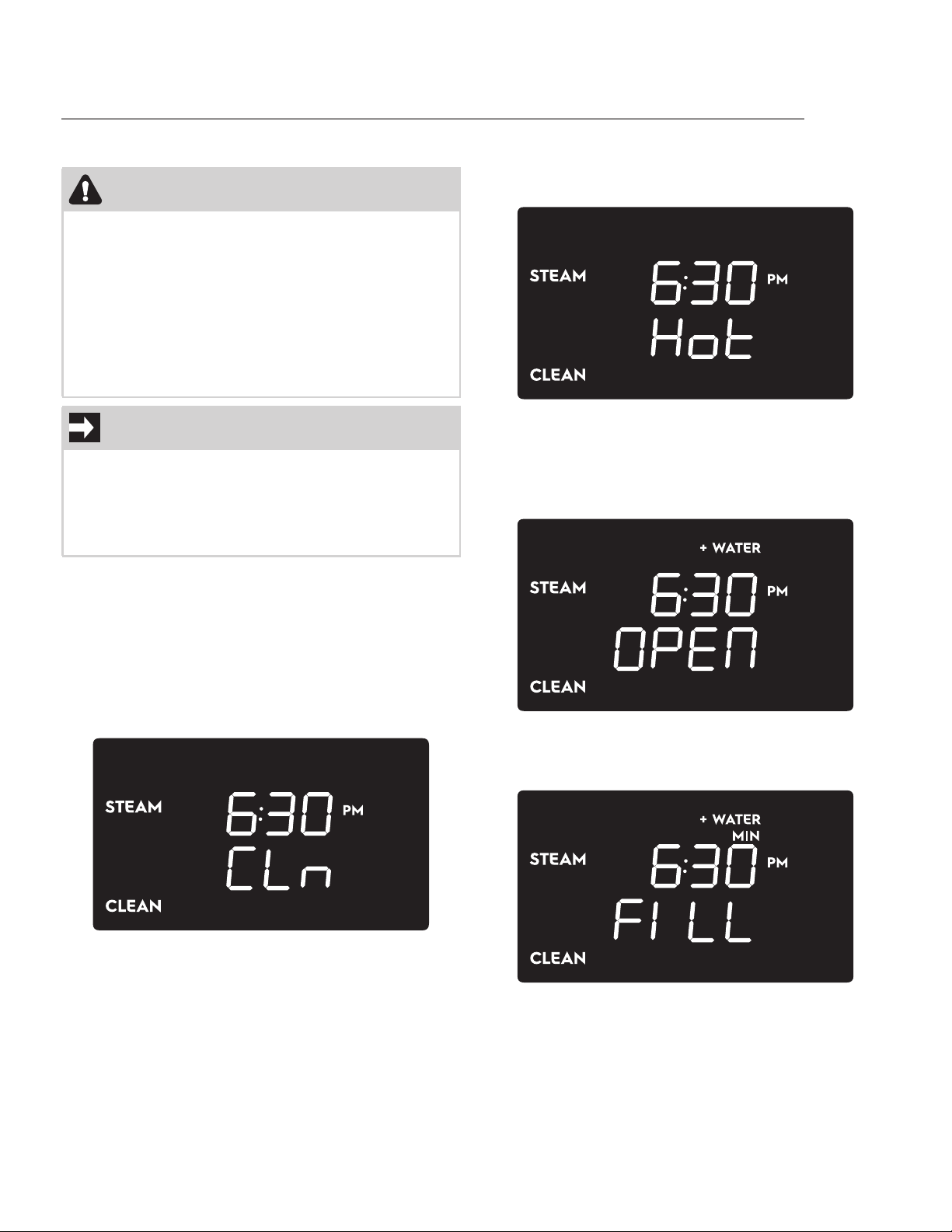
41
Steam clean function
Before setting and starting the Steam cleaning
cycle, completely remove all accessories from
inside the oven.
To set the Steam Clean function (display in standby
mode):
1. Press the oven mode knob.
2. Turn the oven mode knob until the Steam
clean screen appears on the display:
3. A delayed start can be set for this function by
pressing the oven temp. knob until “DELAY”
appears and then follow the instruction
described in the “Delayed cooking” chapter.
4. Press the oven mode knob.
• If the inside temperature is above 167°F
(75°C) the display shows:
In this case the function cannot be started. Wait
until the oven has cooled down.
• If the inside temperature is below 167°F
(75°C) the display shows the following
screen:
5. Open the oven door. The word “FILL”
appears on the display to indicate that is
possible to pour water into the oven cavity.
CAUTION
• Remove any food residues or large spills
from previous cooking operations from the
inside of the oven.
• Only carry out this cleaning cycle when the
oven is cold.
• In order to prevent burnings caused by hot
steam it is strongly recommended to not
open the door during the steam clean func-
tion.
IMPORTANT
• The temperature and the duration of this
function are fixed and cannot be changed.
• The steam cleaning cycle lasts for 1 hour and
can only be started when the inside tem-
perature is below 167°F (75°C).
CARE AND CLEANING
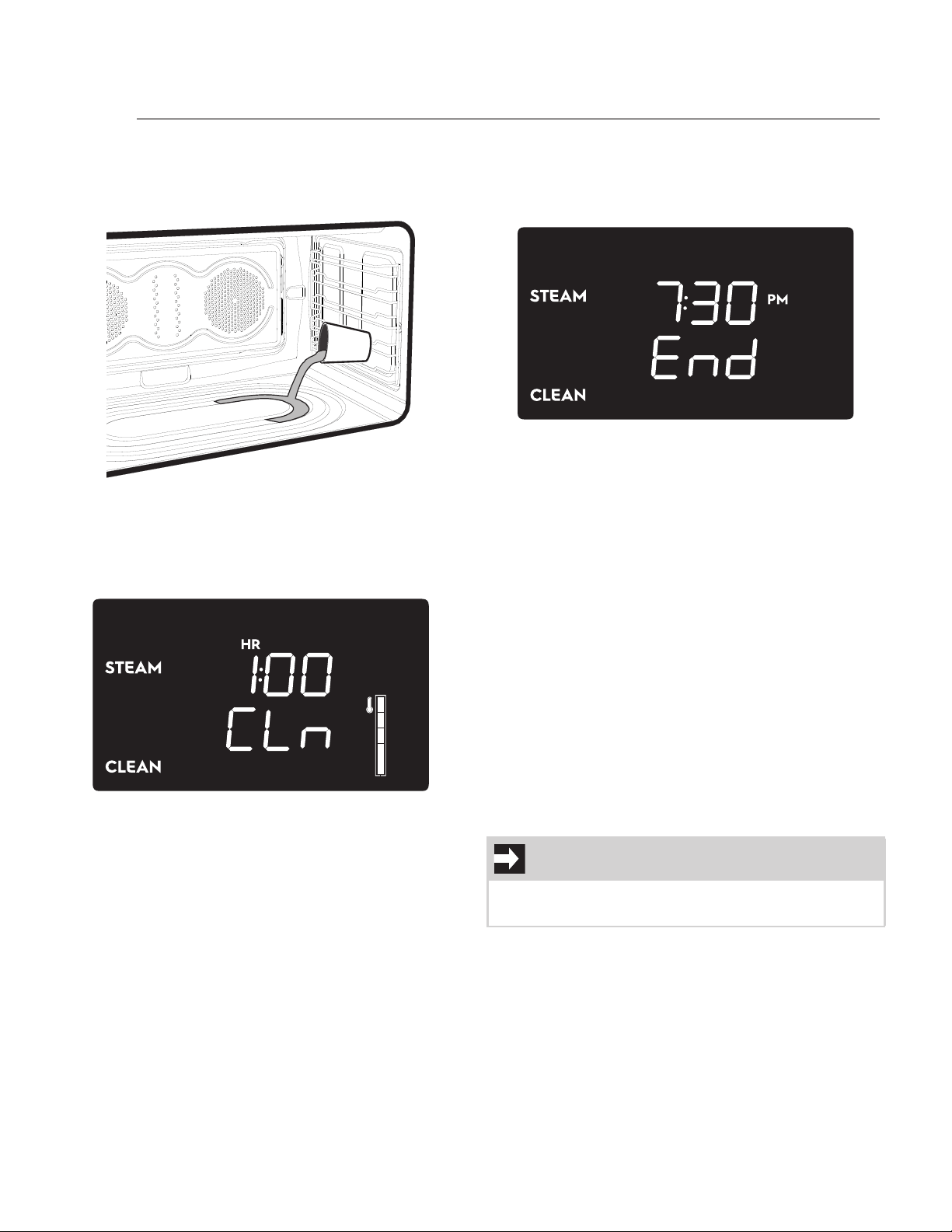
42
6. Pour approximately 13.5 fl. oz. (400 cc - 1.7
cup) of water onto the bottom of the oven.
Make sure it does not overflow out of the
cavity.
7. Close the oven door. The display now shows
only the current time and the flashing word
“START”.
8. Press the oven mode knob to start the Steam
Clean function.
End of Steam clean function
At the end of the cleaning cycle, a buzzer sounds
and “END” will appear on the display together with
the current time.
1. Turn and release the oven mode knob to the
left to stop the buzzer, the display switches
to the stand-by screen.
2. Open the door about 2” (5 cm) to let out
most of the hot steam. Be very careful to
keep distance while the hot steam comes
out.
3. Open the door completely and wipe away
the less stubborn dirt with a microfiber cloth.
Use an anti-scratch sponge with brass
filaments on tougher encrustations. In case
of grease residues, use specific oven cleaning
products.
4. Remove all the water left inside the oven nd
dry carefully.
For improved hygiene and to avoid food being
affected by any unpleasant smells, we recommend
that the oven is dried using the Convection Bake
function at 320°F (160 °C) for approximately 10
minutes.
IMPORTANT
• We recommend wearing rubber gloves for
these operations.
CARE AND CLEANING

43
Surface type Cleaning recommendations
Aluminum & chrome
surfaces (rear backguard
and handle tips)
Use hot, soapy water and a cloth. Dry with a clean cloth.
Plastic & Zamak alloy
(control knobs)
For general cleaning, use hot soapy water and a cloth. For more difficult
to remove soil and built-up grease, apply a liquid detergent directly onto
the soil. Leave for 30 to 60 minutes. Rinse with a damp cloth and dry. Do
not use abrasive cleaners on any of these materials; they can scratch. To
remove the control knobs, turn them to the OFF position; grasp firmly
and pull straight off the shaft. To replace knobs after cleaning, line up the
flat sides of both the knob and the shaft; then push the knob into place.
Stainless steel (all external
trim pieces and control
panel)
Clean stainless with warm soapy water using a clean sponge or cloth.
Rinse with clean water and dry with a soft clean cloth. Do not use harsh
cleaners. Only use kitchen cleaners that are especially made for cleaning
Stainless Steel. Always be sure to rinse the cleaners from the surface as
bluish stains may occur during heating that cannot be removed.
Porcelain enamel (oven
cavity inside walls)
Gentle scouring with a soapy scouring pad will remove most spots. Rinse
with a 1:1 solution of clear water and ammonia. If necessary, cover difficult
spots with an ammonia-soaked paper towel for 30 to 40 minutes. Rinse
with clean water and a damp cloth; then scrub with a soap-filled scouring
pad. Rinse and wipe dry with a clean cloth. Remove all cleaners as the
porcelain may become damaged when heated. Do not use spray oven
cleaners on the cooktop.
Glass (door glasses and
display glass)
Use soap & water to thoroughly clean the top, sides and front of the oven
door. Rinse well. You may use a glass cleaner on the outside glass of the
oven door. Do not immerse the door in water. Do not spray or allow water
or the glass cleaner to enter the door vents. Do not use oven cleaners,
cleaning powders or any harsh abrasive cleaning materials on the outside
of the oven door.
Ceramic glass (induction
cooktop surface)
See “Cleaning recommendations for the ceramic glass surface” for a
detailed description.
Oven racks & shelves
Oven racks must be removed. Clean using a mild, abrasive cleaner follow-
ing the manufacturer’s instructions. Rinse with clean water and dry.
CARE AND CLEANING
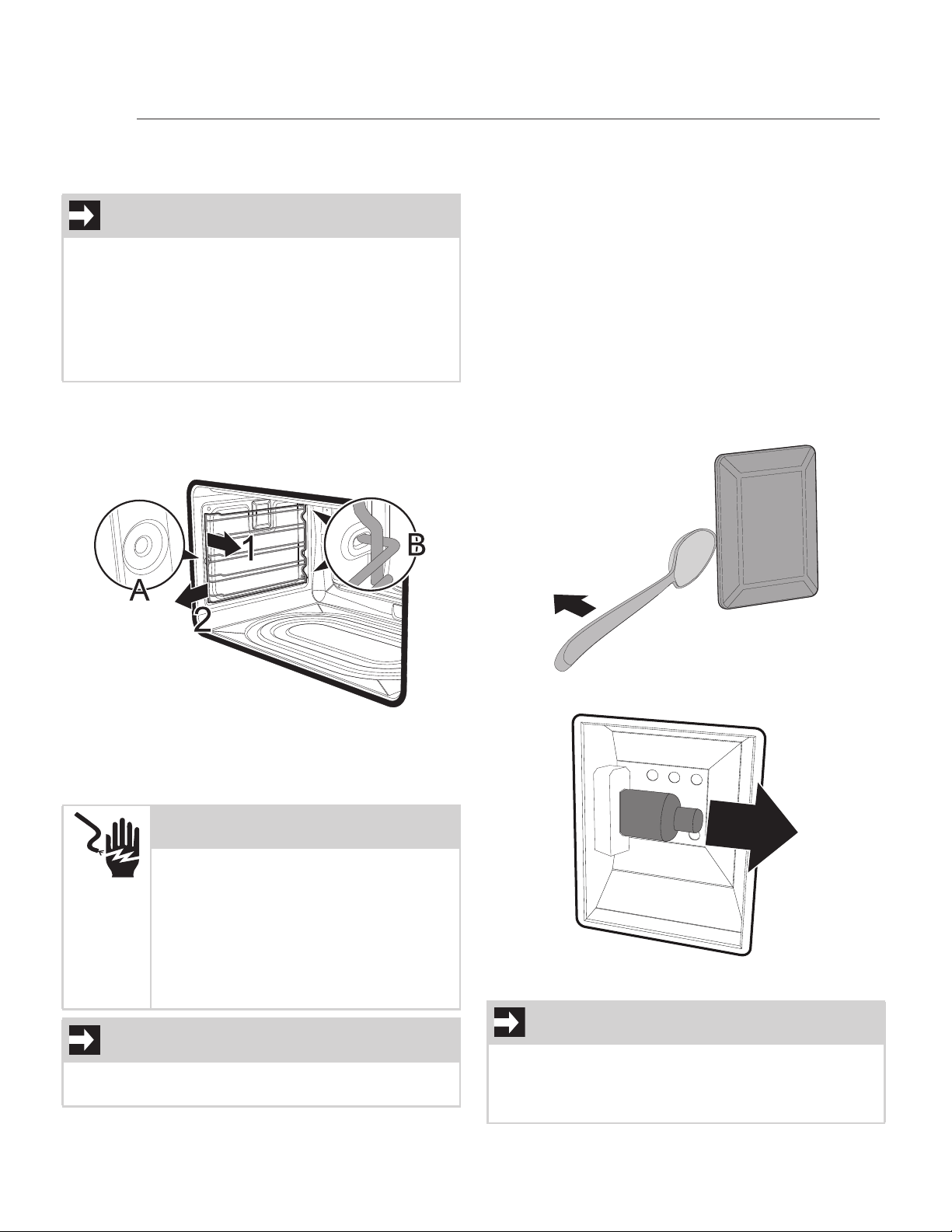
44
Oven maintenance
Removing the shelf supports
To remove the shelf supports:
1. Pull the frame towards the inside of the oven
to unhook it from its groove A, then slide it
out of the seats B at the back.
1. When cleaning is complete, repeat the above
procedures to put the self supports back in.
Replacing the oven light
The oven lights will automatically turn ON when the
oven door is opened. The oven lights may also be
manually operated by turning the oven tempera-
ture knob to the bulb icon (see “Inside lights”).
The oven light bulb is covered by a glass shield. The
glass shield can be removed to be cleaned manu-
ally or for replacing the oven light bulb. THIS
GLASS SHIELD MUST BE IN PLACE WHENEVER
THE OVEN IS IN USE.
To replace the oven lights:
1. Turn the power off at the main source or
unplug the appliance.
2. Remove the bulb cover using a tool that
cannot scratch the enamel surfaces (e.g. a
spoon).
1. Slide out the light bulb and remove it.
2. Install the new light bulb.
IMPORTANT
This has to be done in order to replace the oven
lights and enables you to clean the oven side
walls.
• Grasp the shelf supports firmly by both ends
to prevent scratching the enamel of the oven
cavity when removing them.
• Wear protective gloves.
WARNING
ELECTRIC SHOCK HAZARD -
Make sure the range is unplugged
and that all parts are COOL
before replacing oven light. Wear
a leather-faced glove for protec-
tion against possible broken glass
or burns.
IMPORTANT
The oven is fitted with two 120V - 40W halogen
light bulbs.
NOTE
Do not allow your fingers to touch the new bulb
when installing it. This will shorten the life of the
new bulb. Use a paper towel to cover the new
bulb when installing it.
CARE AND CLEANING
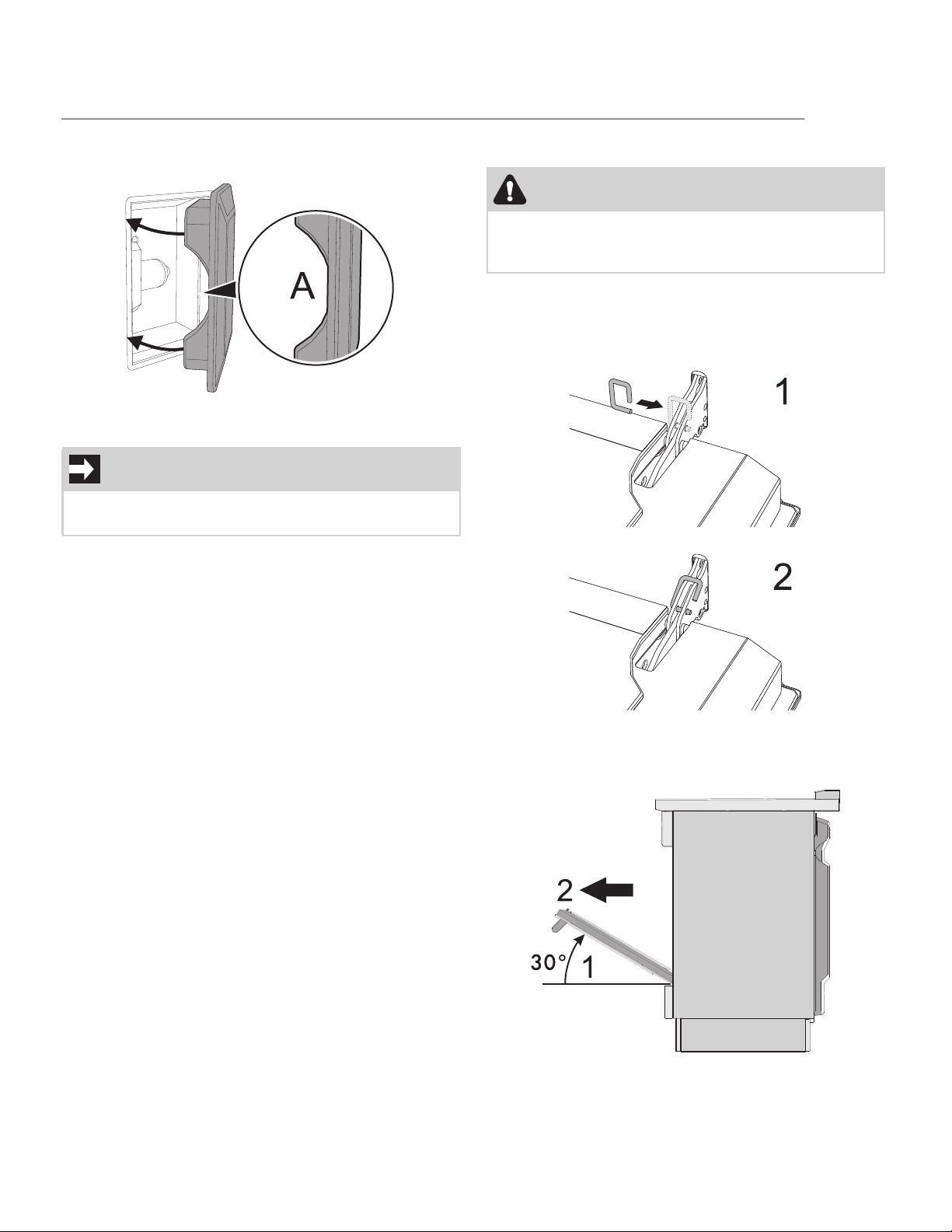
45
3. Close the cover. Ensure that the molded part
of the glass (A) is facing the door.
Special door care instructions
• Do not close the oven door until all the inte-
rior oven racks are fully inserted and retracted
to the back of the oven.
• Do not hit the glass with pots, pans, or any
other object. The oven door glass may break
or even break unexpectedly at a later time.
• Scratching, hitting, jarring or stressing the
oven door glass may weaken its structure
causing an increased risk of breakage at a
later time.
• You may use a glass cleaner on the outside of
the oven door glass. Do not spray or allow
water or the cleaner to enter or drip down
into the oven door vents. First spray cleaner
onto the cloth and then wipe the oven door
clean.
• Do not use strong oven cleaners, powders or
harsh abrasive cleaning materials on the out-
side of the oven door or glass.
Removing the oven door
To remove the door proceed as follows:
1. Open the door completely and insert two pins
into the holes on the hinges indicated in the
figure:
2. Grasp the door on both sides with both
hands, lift it forming an angle of around 30°
(1) and slide it out (2).
IMPORTANT
Most oven doors contain glass that can break.
Read the following recommendations:
CAUTION
The oven door is heavy. Be careful when removing
and lifting the door. Do not lift the oven door by
the handle.
CARE AND CLEANING
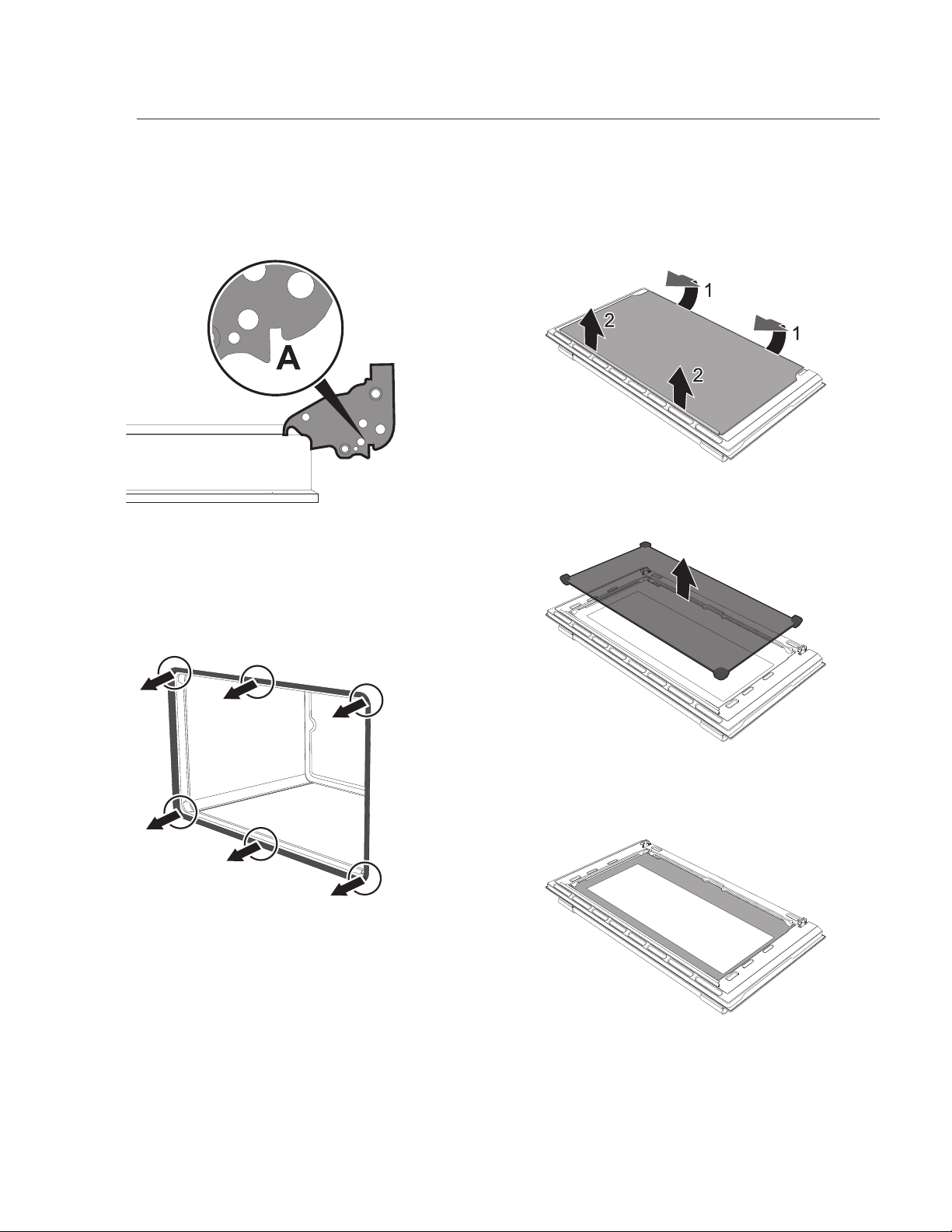
46
3. To reassemble the door, put the hinges in the
relevant slots in the oven, making sure that
the grooved sections A are resting
completely in the slots. Lower the door and
once it is in place remove the pins from the
holes in the hinges.
Removing the oven seal
To permit thorough cleaning of the oven, the door
seal may be removed. There are fasteners on all 4
sides and in the middle to attach it to the edge of
the oven. Pull the seal outwards at the indicated
points in order to remove it from the appliance.
The seal should be soft and elastic. To clean the
seal, use a non-abrasive sponge and wash with
lukewarm water.
Removing the internal glass panes
For easier cleaning, the internal glass panes of the
door can be disassembled:
1. Remove the internal glass pane by pulling the
rear part gently upwards, following the
movement indicated by the arrows (1).
2. Then pull the front part upwards (2). In this
way, the 4 pins attached to the glass detach
from their housings in the oven door.
3. Clean the external glass pane and the panes
that were previously removed. Use absorbent
kitchen roll. In case of stubborn dirt, wash
with a damp sponge and neutral detergent.
CARE AND CLEANING
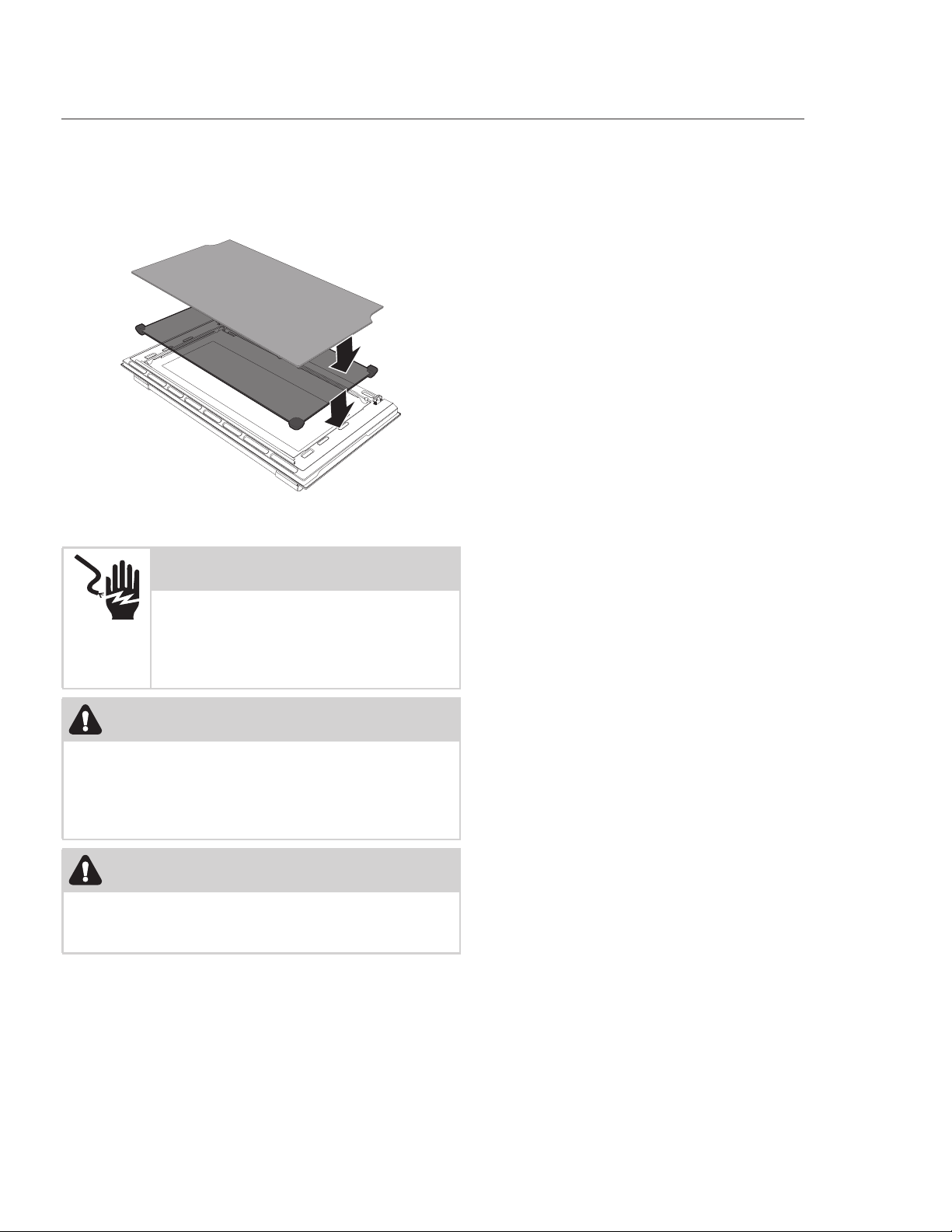
47
4. Refit the panes in the reverse order in which
they were removed. Reposition the internal
glass pane. Take care to center and insert the
4 pins into their housings in the oven door by
applying slight pressure.
Cooktop cleaning and maintenance
CONSISTENT AND PROPER CLEANING IS ESSEN-
TIAL TO MAINTAINING YOUR CERAMIC GLASS
COOKTOP.
• Do not use steam jets to clean the appliance.
• Do not use cleaning products containing chlo-
rine, ammonia or bleach on steel parts or
parts with metallic finishes on the surface
(e.g. anodizing, nickel- or chromium-plating).
• Do not use abrasive or corrosive detergents
on glass parts (e.g. powder products, stain
removers and metallic sponges).
• Do not use rough or abrasive materials or
sharp metal scrapers.
• Do not slide anything metal or glass across
the cooktop.
• Do not use your cooktop as a cutting board or
work surface in the kitchen.
• Do not cook foods directly on the cooktop
surface without a pan.
• Do not drop heavy or hard objects on the
glass cooktop, they may cause it to crack or
break.
Cleaning recommendations for the
ceramic glass surface
To maintain the surfaces, clean them regularly after
each use once they have cooled down. Any marks
left by the use of pans with aluminum bases can be
wiped off with a damp cloth soaked in vinegar. If,
after cooking, burnt residues remain, remove them
with water and dry thoroughly with a clean cloth.
Grains of sand which may end up on the cooktop
while cleaning lettuce or potatoes can scratch the
cooktop when you move pans around.
Therefore, make sure that no grains of sand are left
on the cooktop.
Changes in color do not affect the function and sta-
bility of the glass. It is not a question of changes to
the cooktop material, but simply due to residues
which were not removed and therefore charred.
Shiny spots can form due to the bases of pans rub-
bing on the surface, especially if they are aluminum,
and the use of unsuitable cleaning agents. They are
difficult to remove using common cleaning prod-
ucts. You may need to repeat the cleaning process
several times. Using aggressive detergents or slid-
ing the base of pans on the surface can, over time,
wear away the decorations of the cooktop and
could cause spots to form.
WARNING
ELECTRIC SHOCK HAZARD -
Disconnect the appliance from
the power supply before carry-
ing out cleaning.
WARNING
DO NOT use a cooktop cleaner on a hot
cooktop. The fumes can be hazardous to
your health and can chemically damage
the ceramic-glass surface.
CAUTION
Before cleaning the cooktop, make sure the con-
trols are turned to OFF and that the cooktop is
COOL.
CARE AND CLEANING

48
Regular daily cleaning
Always use only specific products that do not con-
tain abrasives or chlorine-based acids. Pour the
product onto a damp cloth and wipe the surface,
rinse thoroughly and dry with a soft cloth or a
microfiber cloth.
Weekly routine cleaning
Clean and maintain the cooktop once a week using
a standard product for cleaning glass. Always fol-
low the manufacturer's instructions. The silicone in
these products creates a protective water- and dirt-
repellent film. All the dirt remaining on the film and
can be removed easily. Just wipe the surface with a
clean cloth. Make sure that no detergent remains
on the cooktop surface because it will react aggres-
sively when the cooktop is heated and can alter its
structure.
Food stains or residues
Do not use metallic sponges or sharp scrapers as
they will damage the surfaces. Use ordinary non-
abrasive products with the aid of wooden or plastic
utensils if necessary. Rinse thoroughly and dry with
a soft cloth or a microfiber cloth. Do not allow resi-
dues of sugary foods (such as jam) to set inside the
oven. If allowed to set for too long, sugar residue
could pit the enamel lining of the oven.
CARE AND CLEANING
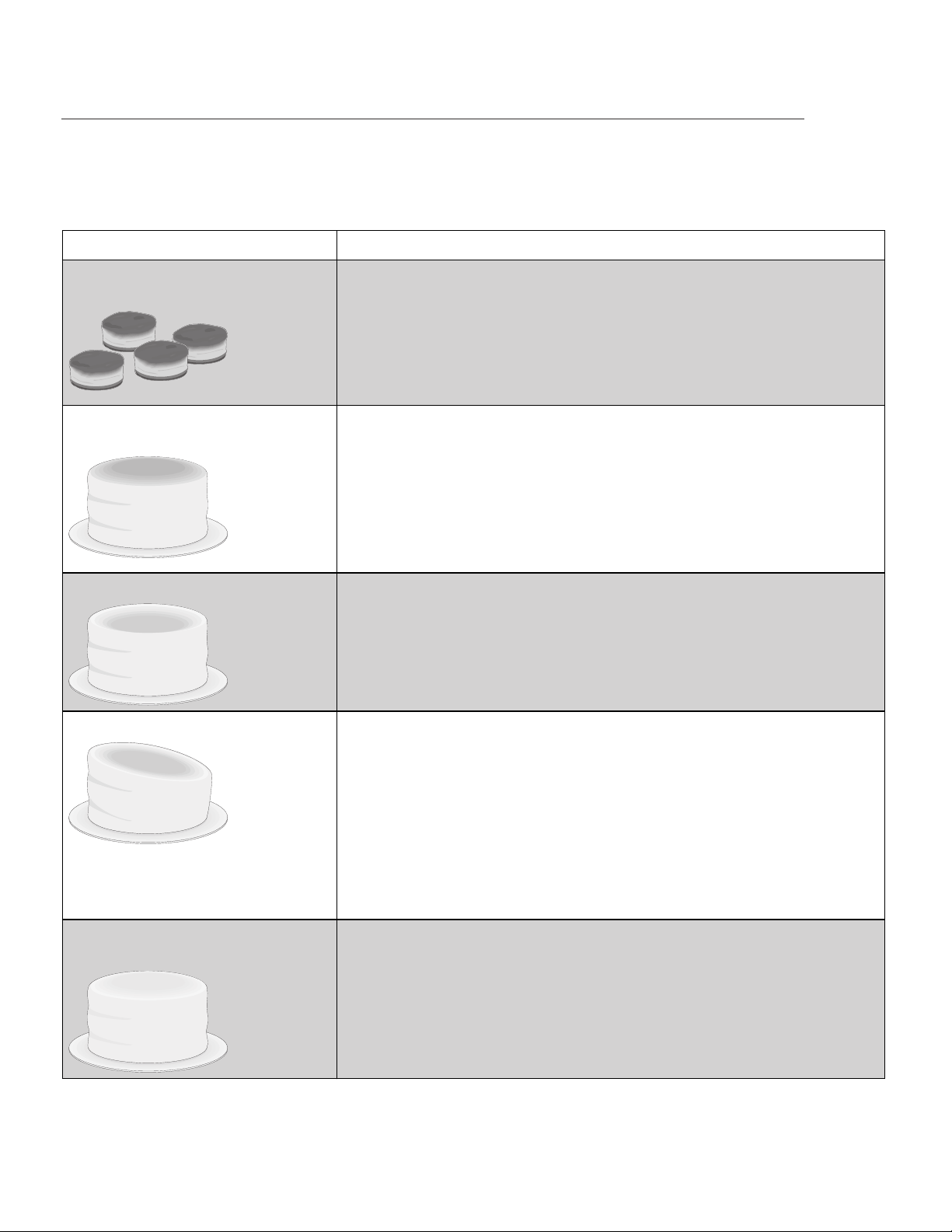
49
Baking problems
For best results, pre-heat the oven when baking cookies, breads, cakes, pies or pastries etc. There is no
need to preheat the oven for roasting meats or baking casseroles. The cooking times and temperatures
needed to bake a product may vary slightly from your previous appliance.
Problem Causes Corrections
Cookies and biscuits burn on
the bottom
• Cookies and biscuits placed
in the oven before preheat-
ing has finished.
• Oven rack overcrowded.
• Dark pan absorbs heat too
fast.
Allow the oven to preheat to the
selected temperature before plac-
ing food in it.
See the “Air circulation in the
oven” section.
Cakes too dark on top or
bottom
• Cakes put into the oven
before preheating has fin-
ished.
• Rack position too high or
low.
• Oven too hot.
Allow the oven to preheat to the
selected temperature before plac-
ing food in it.
Use proper rack position for bak-
ing needs.
Set oven temperature 25°F/12°C
lower than recommended.
Cakes not done in the center
• Oven too hot.
• Incorrect pan size.
• Pan not centered in the
oven.
Set oven temperature 25°F/12°C
lower than recommended.
Use pan size suggested in recipe.
See the “Air circulation in the
oven” section.
Cakes not level
• Range not level.
• Pan too close to oven wall or
rack overcrowded.
• Pan warped.
Place a marked glass measuring
cup filled with water on the cen-
ter of the oven rack. If the water
level is uneven, refer to the instal-
lation instructions for leveling the
range.
Be sure to allow 2” to 4” (5.1cm to
10.2cm) of clearance on all sides
of each pan in the oven.
Do not use pans that are dented
or warped.
Food not done when cooking
time is up
• Oven too cool.
• Oven overcrowded.
• Oven door opened too fre-
quently.
Set oven temperature 25°F/12°C
higher than suggested and bake
for the recommended time.
Be sure to remove all pans from
the oven except the ones to be
used for baking.
Open oven door only after short-
est recommended baking time.
BEFORE YOU CALL

50
Let us help you troubleshoot your concern! This section will help you with common issues. If you need us, visit our
website, chat with an agent, or call us. We may be able to help you avoid a service visit. If you do need service,
we can get that started for you!
1-887-435-3287 (United States)
ElectroluxAppliances.com
1-800-265-8352 (Canada)
ElectroluxAppliances.ca
Oven problems
Problem Solution
Display shows an error code (“Err
XX”)
A fault has been detected. Record the fault code and call tech-
nical support.
Installation
Place the rack in the center of the oven. Place a level on the
oven rack. Contact installing agent if rack and or cabinet are
not level
Kitchen cabinet misalignment may make the range appear to
be not level. Be sure cabinets are square and level. Contact the
cabinetmaker to correct the problem.
Entire range does not operate
Make sure the electrical cord is securely connected inside the
electrical junction box.
Cord/plug is not installed and/or connected. Cord is not sup-
plied with the range. Contact your dealer, installing agent or
authorized servicer.
Service wiring not complete. Contact your dealer, installing
agent or authorized servicer.
Power outage. Check the house lights to be sure. Call your
local electric company. Short in cord/plug. Replace cord/plug.
Controls are not set properly. See instructions to set the con-
trols.
House fuse has blown or circuit breaker has tripped immedi-
ately following installation.
House fuse may not be fully engaged. Check fuse and screw or
engage circuit breaker securely.
Oven lights do not work
Burned-out or loose bulb. Follow the instructions under Oven
Light to replace or tighten the bulb.
Poor cooking results
Many factors affect baking results. See “Oven cooking tips” for
hints, cause and corrections.
Adjust the recipe’s recommended power levels or cooking
times.
Cookware is too lightweight or warped. Use heavier quality
cookware so foods being prepared may cook more evenly.
Fan noise when the appliance is off
This range is equipped with a cooling fan that runs during the
cooking process to cool internal electronic components. It is
normal for this fan to continue to run for an extended period
of time, even when the oven is off.
Flames inside oven or smoking from
oven vents
Excessive spillovers in oven. For example, this will happen for
pie spillovers or large amounts of grease left on the oven bot-
tom. Wipe up excessive spillovers before switching on the
oven. If flames or excessive smoke are present see “Broil func-
tion tips” in the Setting Oven cooking tips section.
BEFORE YOU CALL

51
Excessive oven smoke during
broiling
Meat too close to the broiler element. Reposition the rack to pro-
vide more clearance between the meat and the broiler. Pour a
small amount of water into the broiler pan before cooking to pre-
vent meat grease from producing smoke due to intense heating.
Do not let the water overflow from the pan. Meat not properly
prepared. Remove excess fat from meat. Cut any remaining fatty
edges to prevent curling but do not cut into the lean. Grid on
broiler pan wrong side-up. Grease does not drain into broiler pan.
Broiler pan used without grid or grid covered with aluminum foil.
DO NOT use the broiler pan without the grid or cover the grid with
aluminum foil.
Oven needs to be cleaned. Grease has built up on oven surfaces.
Regular cleaning is necessary when broiling frequently. Grease or
food spatters cause excessive smoking.
Cooktop problems
Problem Solution
Cookware is too hot or not hot
enough
Incorrect surface control setting. Adjust power level setting.
Cookware does not heat or does not
heat evenly
Be sure the correct surface control knob is turned on for the cook-
ing zone needed.
Cookware is light weight or warped. Use only flat, evenly bal-
anced, medium or heavyweight cookware. Flat pans heat better
than warped pans. Cookware materials and weight of the mate-
rial affect heating. Heavy and medium weight pans heat evenly.
Because lightweight pans heat unevenly, foods may burn easily.
Control for power level setting not
responding
Wait 5-6 seconds without any pressing the control to allow it to
reset.
Areas of discoloration with metallic
sheen on cooktop surface
Mineral deposits from water and food. Remove them and buff
with a non-abrasive cloth or sponge.
Scratches or abrasions on cooktop
surface
Coarse particles such as salt or hardened soils between cooktop
and utensils can cause scratches. Be sure the cooktop surface
and bottoms of utensils are clean before use. Small scratches do
not affect cooking and will become less visible with time.
Cleaning materials not recommended for ceramic-glass cooktop
have been used.
Cookware with a rough bottom was used. Use smooth, flat-bot-
tomed cookware.
Metal marks on the cooktop
Sliding or scraping of metal utensils on cooktop surface. Do not
slide metal utensils on the cooktop surface. Buff with a non-abra-
sive cloth or sponge. For more information, see “Cooktop clean-
ing and maintenance”.
Brown streaks or specks on cooktop
surface
Boil overs are cooked onto the surface. For more information see
“Cooktop cleaning and maintenance”.
BEFORE YOU CALL

USA
1.800.374.4432
Frigidaire
10200 David Taylor Drive
Charlotte, NC 28262
Canada
1.800.265.8352
Electrolux Canada Corp.
5855 Terry Fox Way
Mississauga, Ontario, Canada
L5V 3E4
52
Your appliance is covered by a one year limited warranty. For one year from your original date of purchase,
Electrolux will pay all costs for repairing or replacing any parts of this appliance that prove to be defective in
materials or workmanship when such appliance is installed, used and maintained in accordance with the pro-
vided instructions.
Exclusions
This warranty does not cover the following:
1. Products with original serial numbers that have been removed, altered or cannot be readily deter-
mined.
2. Product that has been transferred from its original owner to another party or removed outside the
USA or Canada.
3. Rust on the interior or exterior of the unit.
4. Products purchased “as-is” are not covered by this warranty.
5. Food loss due to any refrigerator or freezer failures.
6. Products used in a commercial setting.
7. Service calls which do not involve malfunction or defects in materials or workmanship, or for
appliances not in ordinary household use or used other than in accordance with the provided
instructions.
8. Service calls to correct the installation of your appliance or to instruct you how to use your
appliance.
9. Expenses for making the appliance accessible for servicing, such as removal of trim, cupboards,
shelves, etc., which are not a part of the appliance when it is shipped from the factory.
10. Service calls to repair or replace appliance light bulbs, air filters, water filters, other consumables, or
knobs, handles, or other cosmetic parts.
11. Surcharges including, but not limited to, any after hour, weekend, or holiday service calls, tolls, ferry
trip charges, or mileage expense for service calls to remote areas, including the state of Alaska.
12. Damages to the finish of appliance or home incurred during installation, including but not limited to
floors, cabinets, walls, etc.
13. Damages caused by: services performed by unauthorized service companies; use of parts other
than genuine Electrolux parts or parts obtained from persons other than authorized service
companies; or external causes such as abuse, misuse, inadequate power supply, accidents, fires, or
acts of God.
DISCLAIMER OF IMPLIED WARRANTIES; LIMITATION OF REMEDIES
CUSTOMER’S SOLE AND EXCLUSIVE REMEDY UNDER THIS LIMITED WARRANTY SHALL BE PRODUCT
REPAIR OR REPLACE-MENT AS PROVIDED HEREIN. CLAIMS BASED ON IMPLIED WARRANTIES, INCLUDING
WARRANTIES OF MERCHANTABILITY OR FITNESS FOR A PARTICULAR PURPOSE, ARE LIMITED TO ONE
YEAR OR THE SHORTEST PERIOD ALLOWED BY LAW, BUT NOT LESS THAN ONE YEAR. ELECTROLUX
SHALL NOT BE LIABLE FOR CONSEQUENTIAL OR INCIDENTAL DAMAGES SUCH AS PROPERTY DAMAGE
AND INCIDENTAL EXPENSES RESULTING FROM ANY BREACH OF THIS WRITTEN LIMITED WARRANTY OR
ANY IMPLIED WARRANTY. SOME STATES AND PROVINCES DO NOT ALLOW THE EXCLUSION OR LIMITA-
TION OF INCIDENTAL OR CONSEQUENTIAL DAMAGES, OR LIMITATIONS ON THE DURATION OF IMPLIED
WARRANTIES, SO THESE LIMITATIONS OR EXCLUSIONS MAY NOT APPLY TO YOU. THIS WRITTEN WAR-
RANTY GIVES YOU SPECIFIC LEGAL RIGHTS. YOU MAY ALSO HAVE OTHER RIGHTS THAT VARY FROM
STATE TO STATE.
If You Need Service
Keep your receipt, delivery slip, or some other appropriate payment record to establish the warranty period
should service be required. If service is performed, it is in your best interest to obtain and keep all receipts. Ser-
vice under this warranty must be obtained by contacting Electrolux at the addresses or phone numbers below.
This warranty only applies in the USA and Canada. In the USA, your appliance is warranted by Electrolux Major
Appliances North America, a division of Electrolux Home Products, Inc. In Canada, your appliance is warranted
by Electrolux Canada Corp. Electrolux authorizes no person to change or add to any obligations under this
warranty. Obligations for service and parts under this warranty must be performed by Electrolux or an autho-
rized service company. Product features or specifications as described or illustrated are subject to change
without notice.
WARRANTY