
Technical Support and E-Warranty Certificate www.vevor.com/support
Instruction Manual
BELT & DISC SANDER
We continue to be committed to provide you tools with competitive price.
"Save Half ", "Half Price" or any other similar expressions used by us only represents an
estimate of savings you might benefit from buying certain tools with us compared to the major
top brands and doses not necessarily mean to cover all categories of tools offered by us. You
are kindly reminded to verify carefully when you are placing an order with us if you are
actually saving half in comparison with the top major brands.
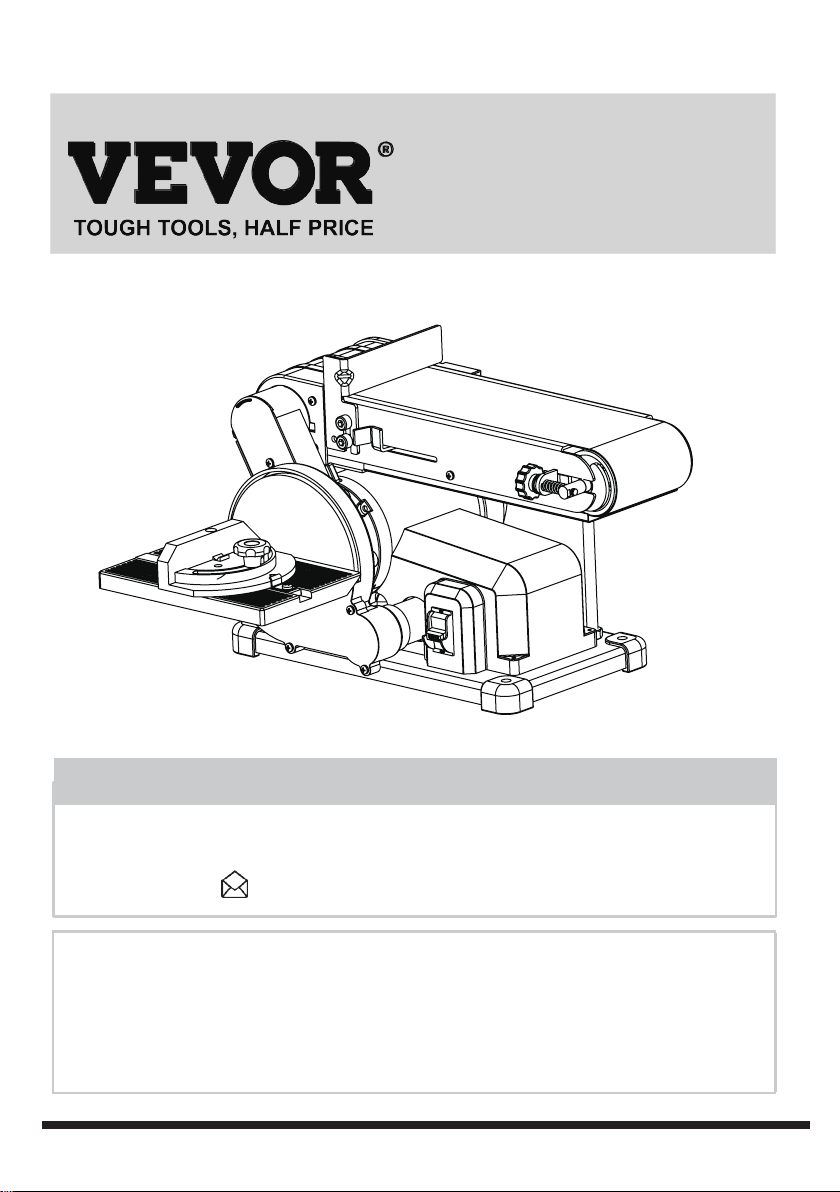
MODEL: BD4602
BELT & DISC SANDER
Have product questions? Need technical support? Please feel free to
contact us:
CustomerService@vevor.com
NEED HELP? CONTACT US!
This is the original instruction, please read all manual instructions
carefully before operating. VEVOR reserves a clear interpretation of our
user manual. The appearance of the product shall be subject to the
product you received. Please forgive us that we won't inform you again if
there are any technology or software updates on our product.
1
BD4602
2
Specifications 2
Safety guidelines 3
Package contents 8
Operating instructions
9
Maintenance
12
Troubleshooting
13
Exploded view 14
Parts list
15
Motor 120VAC, 60Hz , 4.3A
Speed (no load) 3570RPM
Belt size 4" x 36"
Belt speed 1732 FPM
Disc speed 3570RPM
Disc size 6"
TABLE OF CONTENTS
SPECIFICATIONS

BD4602
3
SAFETY GUIDELINES
SAFETY GUIDELINES - DEFINITIONS
• Always wear safety goggles or safety glasses with side shields.
• Always wear respiratory and hearing protection.
• To reduce the risk of injury, user and all bystanders must read and understand
instruction manual before using this product.
• Failure to keep your hands away from the moving part and cutting surface will
result in serious personal injury.
• No children or pregnant women should enter the work area where the paint
sanding is being done until all clean up is completed.
• A dust mask or respirator should be worn by all persons entering the work area.
The filter should be replaced daily or whenever the wearer has difficulty breathing.
•
NO EATING, DRINKING or SMOKING should be done in the work area to prevent
ingesting contaminated paint particles. Workers should wash and clean up BEFORE
eating, drinking or smoking. Articles of food, drink, or smoking should not be left in
the work area where dust would settle on them.
• Paint should be removed in such a manner as to minimize the amount of dust
generated.
• Areas where paint removal is occurring should be sealed with plastic sheeting
of 4 miles thickness.
• Sanding should be done in a manner to reduce tracking of paint dust outside the
work area.
• All surfaces in the work area should be vacuumed and thoroughly cleaned daily
for the duration of the sanding project. Vacuum filter bags should be changed
frequently.
• Plastic drop cloths should be gathered up and disposed of along with any dust
chips or other removal debris. They should be placed in sealed refuse receptacles
and disposed of through regular trash pick-up procedures. During clean up,
children and pregnant women should be kept away from the immediate work area.
• All toys, washable furniture and utensils used by children should be washed
thoroughly before being used again.
Use of this tool can generate and/or disperse dust, which may cause serious
and permanent respiratory or other injury. Always use NIOSH/OSHA approved
respiratory protection appropriate for the dust exposure. Direct particles away
from face and body.
WARNING!
!
POWER TOOL SAFETY
1. READ and become familiar with the entire Instruction Manual. LEARN the
tool’s application, limitations and possible hazards.
2. KEEP GUARDS IN PLACE and in working order.
3.
REMOVE ADJUSTING KEYS AND WRENCHES. Form the habit of checking
to see that keys and adjusting wrenches are removed from the tool before
turning ON.

BD4602
4
4. KEEP WORK AREA CLEAN. Cluttered areas and benches invite accidents.
5. DO NOT USE IN DANGEROUS ENVIRONMENTS. Do not use power tools
in damp locations, or expose them to rain or snow. Keep work area well lit.
6. KEEP CHILDREN AWAY. All visitors and bystanders should be kept a safe
distance from work area.
7. MAKE WORKSHOP CHILD PROOF with padlocks, master switches or by
removing starter keys.
8. DO NOT FORCE THE TOOL. It will do the job better and safer at the rate
for which it w
as designed.
9. USE THE RIGHT TOOL. Do not force the tool or an attachment to do a job
for which it was not designed.
10. USE PROPER EXTENSION CORDS. Make sure your extension cord is in
good condition. When using an extension cord, be sure to use one heavy
enough to carry the current your product will draw. An undersized cord will
result in a drop in line voltage and in loss of power which will cause the tool
to overheat. The table on page 8 shows the correct size to use depending
on cord length and nameplate ampere rating. If in doubt, use the next heavier
gauge. The smaller the gauge number, the heavier the cord.
11. WEAR PROPER APPAREL. Do not wear loose clothing, gloves, neckties,
rings, bracelets or other jewelry which may get caught in moving parts.
Nonslip footwear is recommended. Wear protective hair covering to contain
long hair.
12. ALWAYS WEAR EYE PROTECTION. Any power tool can throw foreign
objects into the eyes and could cause permanent eye damage. ALWAYS
wear Safety Goggles (not glasses) that comply with ANSI Safety
standard
Z87.1. Everyday eyeglasses have only impact–resistant lenses. They ARE
NOT safety glasses. NOTE: Glasses or goggles not in compliance with ANSI
Z87.1 could seriously injure you when they break.
13. WEAR A FACE MASK OR DUST MASK. Sanding operation produces dust.
14. SECURE WORK. Use clamps or a vise to hold work when practical. It is
safer than using your hand and it frees both hands to operate the tool.
15.
DISCONNECT TOOLS FROM POWER SOURCE before servicing, and when
changing accessories such as blades, bits and cutters.
16. REDUCE THE RISK OF UNINTENTIONAL STARTING. Make sure switch
is in the OFF position before plugging the tool in.
17. USE RECOMMENDED ACCESSORIES. Consult this Instruction Manual for
recommended accessories. The use of improper accessories may cause risk
of injury to yourself or others.
18. NEVER STAND ON THE TOOL. Serious injury could occur if the tool is tipped
or if the cutting tool is unintentionally contacted.
19. CHECK FOR DAMAGED PARTS. Before further use of the tool, a guard or
other part that is damaged should be carefully checked to determine that it will
operate properly and perform its intended function – check for alignment of
moving parts, binding of moving parts, breakage of parts, mounting and any
other conditions that may affect its operation. A guard or other part that is
damaged should be properly repaired or replaced.

BD4602
5
People with electronic devices, such as pacemakers, should consult their
physician(s) before using this product. Operation of electrical equipment in
close proximity to a heart pacemaker could cause interference or failure of
the pacemaker.
WARNING!
!
20. NEVER LEAVE THE TOOL RUNNING UNATTENDED. TURN THE POWER
“OFF”. Do not walk away from a running tool until the blade comes to a complete
stop and the tool is unplugged from the power source.
21. DO NOT OVERREACH. Keep proper footing and balance at all times.
22.
MAINTAIN TOOLS WITH CARE. Keep tools sharp and clean for best and safest
performance. Follow instructions for lubricating and changing accessories.
23. DO NOT use power tool in presence of flammable liquids or gases.
24. DO NOT operate the tool if you are under the influence of any drugs, alcohol
or medication that could affect your ability to use the tool properly.
25.
Dust generated from certain materials can be hazardous to your health. Always
operate saw in well-ventilated area and provide for proper dust removal.
26. WEAR HEARING PROTECTION to reduce the risk of induced hearing loss.
POWER TOOL SAFETY
1. USE sander on horizontal surfaces only. Operating the sander when mounted
on non-horizontal surfaces might result in motor damage.
2. TO STOP it from tipping over or moving when in use, the sander must be
securely fastened to a bench top or supporting surface.
3. PLACE the sander so neither the user nor bystanders are forced to stand in
line with the abrasive belt or disc.
4.
MAKE SURE the sanding belt is installed in the correct direction. See directional
arrow on back of belt.
5. ALWAYS have the tracking adjusted properly so the belt does not run off the
pulleys.
6.
DO NOT USE sanding belts or discs that are damaged, torn or loose. Use only
correct size sanding belt and disc. Narrower belts uncover parts that could
trap fingers.
7. MAKE SURE there are no nails or foreign objects in the part of the workpiece
to be sanded.
8. ALWAYS HOLD the workpiece firmly when sanding. Keep hands away from
sanding belt or disc. Sand only one workpiece at a time.
9. ALWAYS HOLD the workpiece firmly on the table when using the disc sander
and when using the belt sander.
10. ALWAYS SAND ON THE DOWNWARD SIDE of the sanding disc when using
the disc sander. Sanding on the upward side of the disc could cause the
workpiece to fly out of position, resulting in injury.
11. ALWAYS maintain a minimum clearance of 1/16 in. (1.6 mm) or less between
the table or backstop and the sanding belt or disc.
12. DO NOT sand pieces of material that are too small to be safely supported.
13. KEEP fingers away from where the belt goes into the dust trap.
14. WHEN sanding a large workpiece, provide additional support at table height.

A separate electrical circuit should be used for your machines. This circuit should
not be less than #12 wire and should be protected with a 20-A time-lag fuse. If an
extension cord is used, use only 3-wire extension cords which have 3-pronged
grounding type plugs and matching receptacle which will accept the machine’s plug.
Before connecting the machine to the power line, make sure the switch is in the
"OFF" position and be
sure that the electric current is of the same characteristics as
indicated on the machine. All line connections should make good contact. Running
on low voltage will damage the machine.
GROUNDED
OUTLET BOX
CURRENT
CARRYING
PRONGS
GROUNDING BLADE
IS LONGEST OF THE 3 BLADES
GROUNDED OUTLET
BOX
GROUNDING
MEANS
ADAPTER
Figure. 1
Figure. 2
MOTOR SPECIFICATIONS
Your machine is wired for 120 V, 60Hz alternating current. Before connecting the
machine to the
power source, make sure the switch is in the "OFF" position.
GROUNDING INSTRUCTIONS
All grounded, cord-connected machines: In the event of a malfunction or breakdown,
grounding provides a path of least resistance for electric current to reduce the risk of
electric shock. This machine is equipped with an electric cor
d having an equipment
grounding conductor and a grounding plug.
!
DANGER!
DO NOT EXPOSE THE MACHINE TO RAIN OR OPERATE THE MACHINE IN
DAMP LOCATIONS.
THIS MACHINE MUST BE GROUNDED WHILE IN USE TO PROTECT THE
OPERATOR FROM ELECTRIC SHOCK.
BD4602
6
IMPORTANT INFORMATION-Electrical
The plug must be plugged into a matching outlet that is properly installed and
grounded in accordance with all local codes and ordinances.
Do not modify the plug provided–if it will not fit the outlet, have the proper outlet
installed by a qualified electrician.
Improper connection of the equipment-grounding conductor can result in risk of
electric shock. The conductor with insulation having an outer surface that is green
with or without yellow stripes is
the equipment-grounding conductor. If repair or
replacement of the electric cord or plug is necessary, do not connect the
equipment-grounding conductor to a live
terminal.
Check with a qualified electrician or service personnel if the grounding instructions
are not completely understood, or if in doubt as to whether the machine
is properly
Use only 3-wire extension cords that have
3-pronged grounding type plugs and
matching 3-conductor receptacles that accept the machine’s plu
g, as shown in Fig. A.
Repair or replace damaged or worn cord immediately.
grounded.
Use proper extension cords. Make sure your extension cord is in good condition
and is a 3-wire extension cord which has a 3-pronged grounding type plug and
matching
receptacle which will accept the machine’s plug. When using an extension
cord, be sure to use one heavy enough to carry the current of the machine. An
undersized cord will cause a
drop in line voltage, resulting in loss of power and
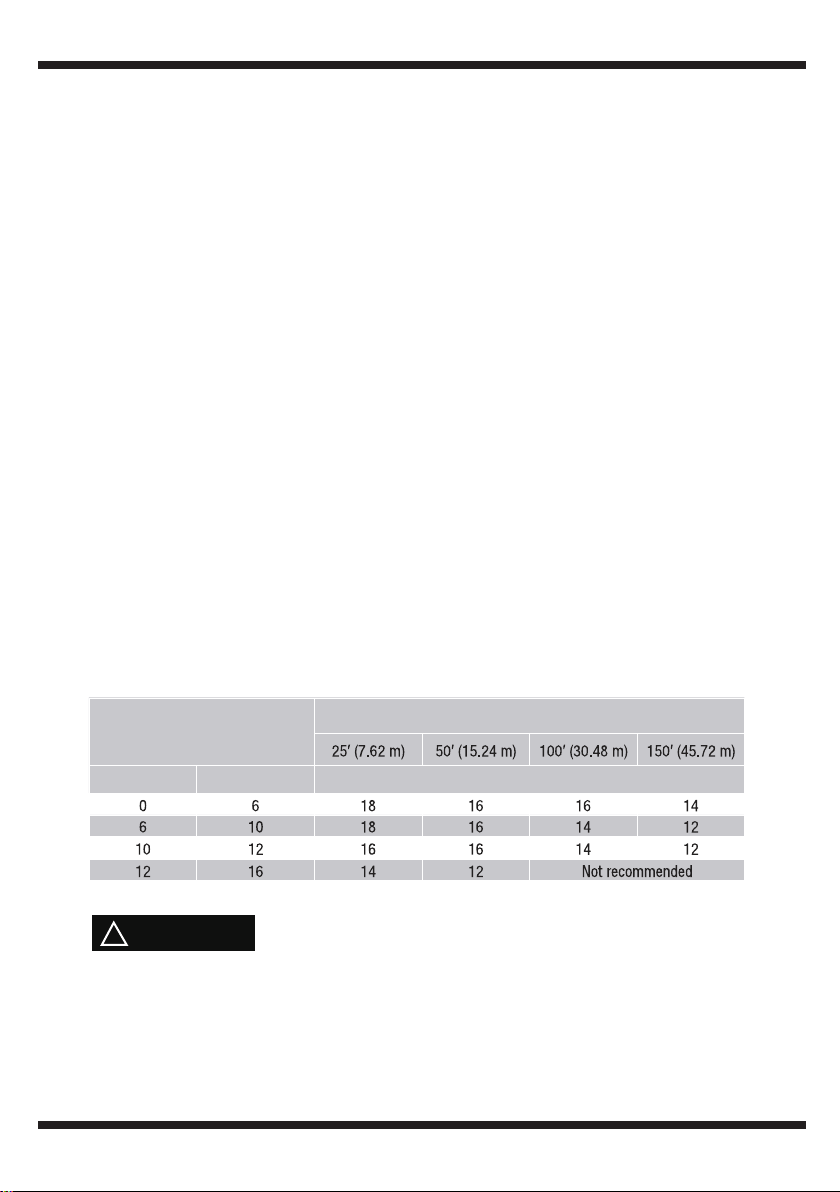
gauge to use depending on the cord
length. If in doubt, use the next heavier gauge. The smaller the gauge number, the
heavier the cord.
MINIMUM GAUGE FOR CORD SETS
overheating. The table shows the correct
Ampere rating of the tool
(120V circuit only)
more than not more than
Total length of cord
Minimum Gauge for the extension cord (AWG)
In all cases,make certain the receptacle in question is properly grounded.
If you are not sure,have a electrician check the receptacle.
WARNING!
!
BD4602
7
3
5
8
9
4
6
7
2
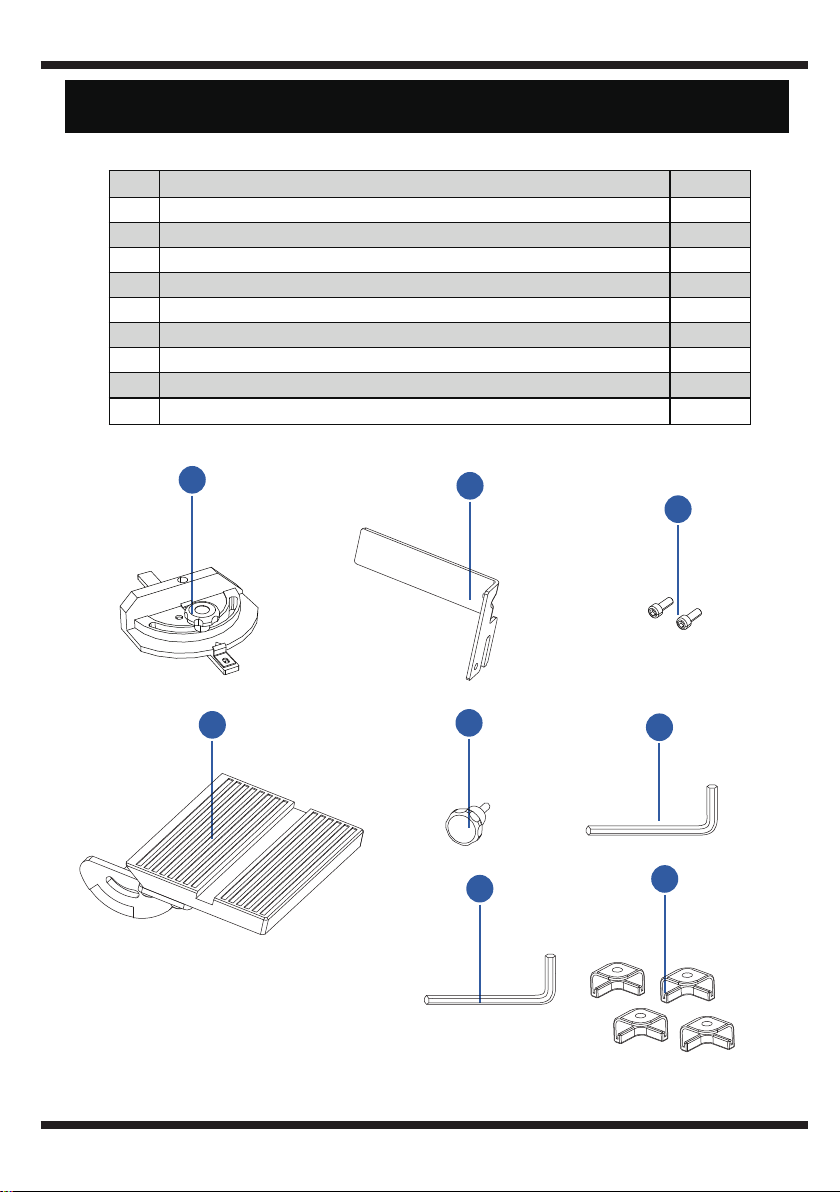
No. Description Qty.
1
Belt / disc sander (not shown) 1
2
Miter gauge 1
3
Belt backstop 1
4
hex bolt 2
5
Worktable 1
6
Table lock knob 1
7
Hex wrench S=5 1
8
Hex wrench S=6 1
9
Rubber foot 4
BD4602
8
PACKAGE CONTENTS
INSTALLING WORKTABLE ON DISC
The worktable can be used with both the sanding disc and the belt. It should be
used to support workpieces in all sanding operations except inside curve
applications.
The belt backstop prevents the workpiece from being pulled or dragged beyond
the sanding belt surface. It should always be used to help control the workpiece
when using the sanding belt.
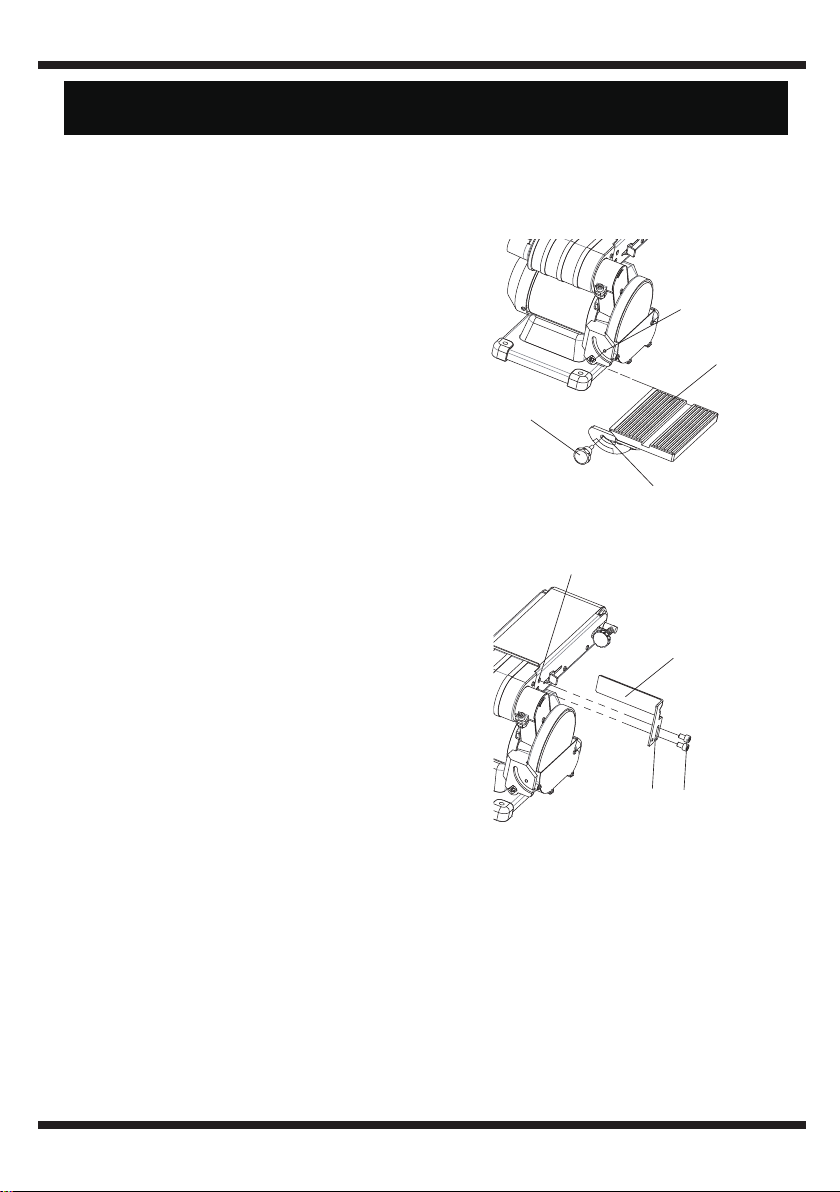
1. Place the fence (1) onto the sander
frame, aligning the slot (2) on the fence
with the threaded hole (3).
2. Insert two screws (4) through the slot (2)
and tighten into threaded hole (3) with the
5 mm hex key.
The use of a dust collection system with the sander is strongly recommended.
It will maintain shop cleanliness, and help prevent possible health hazards
caused by wood dust.
The sander has two 35mm diameter dust ports. Slide the hose of your dust
collector over the outlet, and secure with a hose clamp.
NOTE: Dryer vent hoses are not acceptable for this purpose.
A miter gauge (1) is supplied with your sander and can be used with the sanding
table. The miter gauge body can be adjusted from 0° to 60° right or left for angle
or miter sanding.
1. Place the worktable (1) onto the disc
sander frame, aligning the semi-circular
slot (2) with the threaded hole (3).
2. Insert the worktable lock knob (4) through
semi-circular slot (2) and tighten into
threaded hole (3).
3. Adjust worktable to level or any angle
between 0° and 45° for sanding.
INSTALLING BELT BACKSTOP
INSTALLING DUST COLLECTION
MITER GAUGE
2
2
4
4
1
1
3
3
BD4602
9
OPERATING INSTRUCTIONS
MOUNTING BELT / DISC SANDER TO WORKBENCH
ADJUSTING DISC TABLE SQUARE WITH SANDING DISC
1. Place the sander on a surface that is level but also provides enough room
on all sides for the workpiece and for the operator (or bystanders) to not be
standing in line with the wood while using the tool. Allow room for the belt to be
positioned horizontally or vertically.
2. The hardware to mount this sander is NOT supplied with the sander.
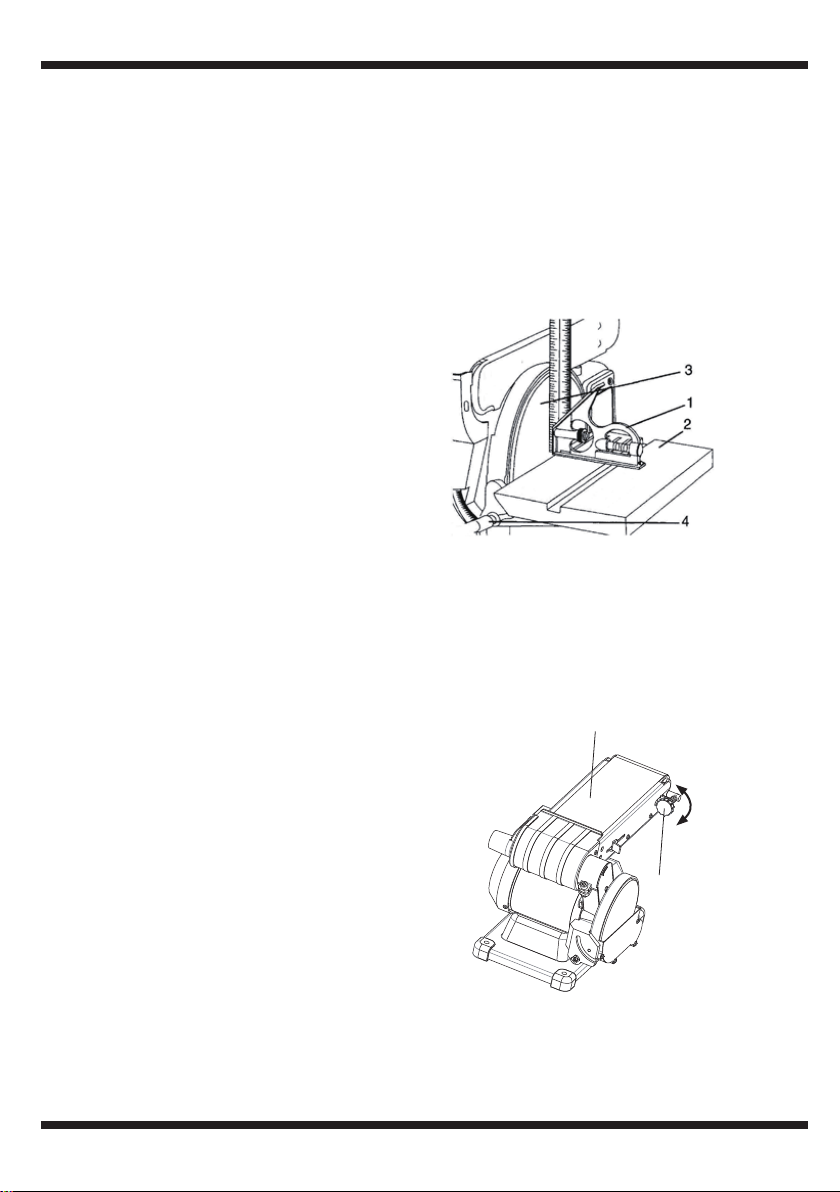
1. Using a combination square (1), place
one side of the square on the disc
table (2) with the other side against the
sanding disc (3),
and check to see if the
disc table is 90° to the disc.
2. If the disc table surface is not 90° to the
disc, loosen the table lock knob (4), adjust
table square with disc and tighten the
table lock knob (4).
3. Loosen the screw and secure the
scale pointer at 0°.
NOTE: The disc table (2) can be tilted from 0° to 45° by loosening the table
lock knob (4). Tilt the disc table (2) to the desired angle. Tighten table
lock knob (4).
TO PROPERLY TRACK THE SANDING BELT
1. Plug in the sander.
2. Turn power switch ON, then immediately
OFF, n
oting whether the belt (1) tends to
slide off its track, and to which side (front
or back) of the sander.
3. If the sanding belt does not slide to either
side, it is tracking properly.
4. Viewed from the switch end, if the sanding
belt runs toward the disc side, slightly turn
the tracking knob (2) counterclockwise (up).
5. Viewed from the switch end, if the
sanding belt runs away from the disc
side, slightly turn the tracking knob (2)
clockwise (down).
6. Turn power switch ON, then immediately
OFF again, again taking note of any belt
movement.
7. Readjust tracking knob (2) another 1/4
turn, necessary.
up
down
2
1
BD4602
10
ON/OFF SWITCH
SANDING INSIDE CURVES
BELT VERTICAL SANDING
BELT HORIZONTAL SANDING
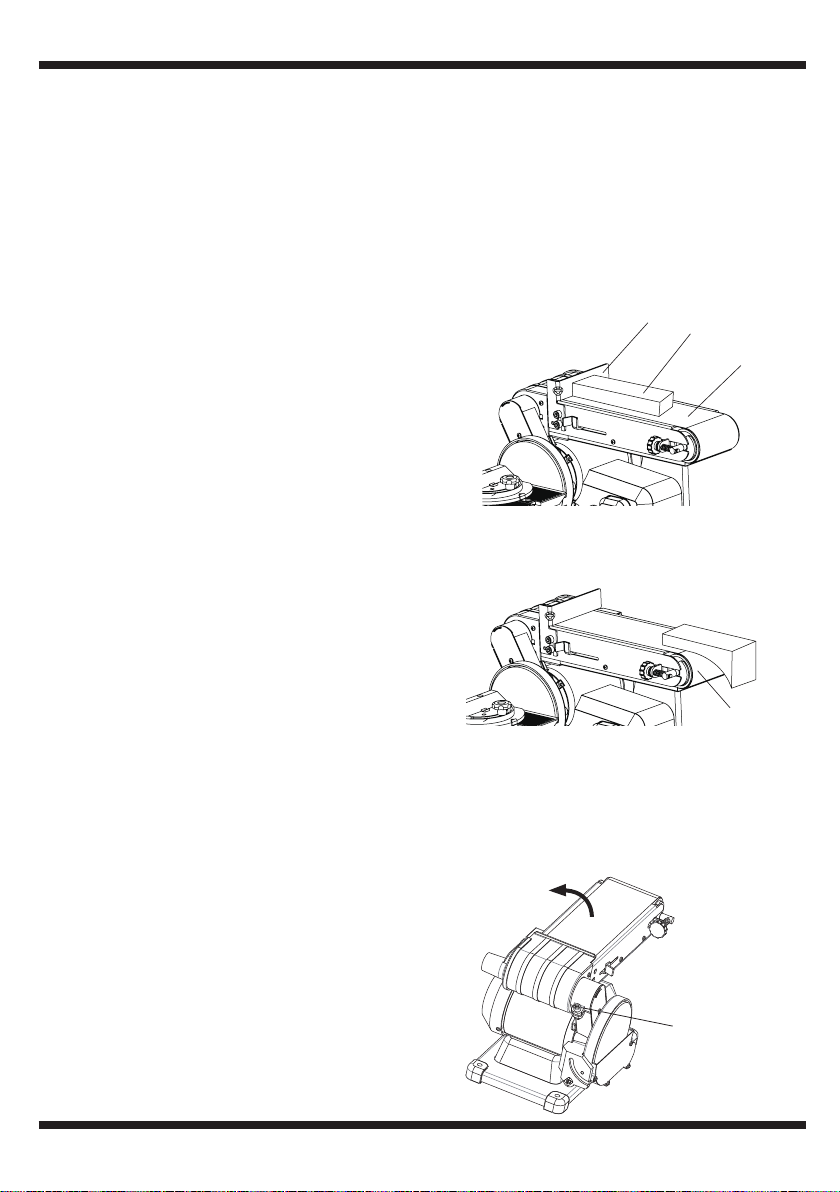
When using the sanding belt in the horizontal
position, to perform surface or edge sanding,
the belt worktable (1) must always be used.
Always hold the workpiece (2) firmly keeping
your fingers away from the sanding belt (3).
Always keep the end of the workpiece against
the belt worktable (1) and move the work
evenly across the sanding belt (3). Apply only
enough pressure to allow the sanding belt
to remove material. Use extra caution when
sanding very thin pieces.
With care, freehand sanding of inside curves
can be accomplished on the idler drum (1).
Never attempt to sand the ends of a
workpiece on the idler drum (1).
Your belt/disc sander - belt station can sand vertically as well as horizontally.
Depending on operator needs and the workpiece, the worktable can be used
with either the horizontal or vertical position.
To change from one position to the other:
1. Loosen the inner hex screw (1) by turning
it counterclockwise with the 5 mm hex key.
2. Manually move the work support station
into the vertical or horizontal position, as
required.
3. Retighten the inner hex screw (1) by
turning it clockwise.
The ON/OFF power switch is located on the front of the sander, and
incorporates a removable safety key.
In situations where the sander may be left unattended, the operator has the
option of removing the safety key of the ON/OFF switch to render the
sander inoperable. When the operator is ready to use the machine again,
simply insert the safety key into the slot in the switch and pushing it in until
it "seat
s."
2
3
1
1
1
BD4602
11
REPLACING SANDING BELT
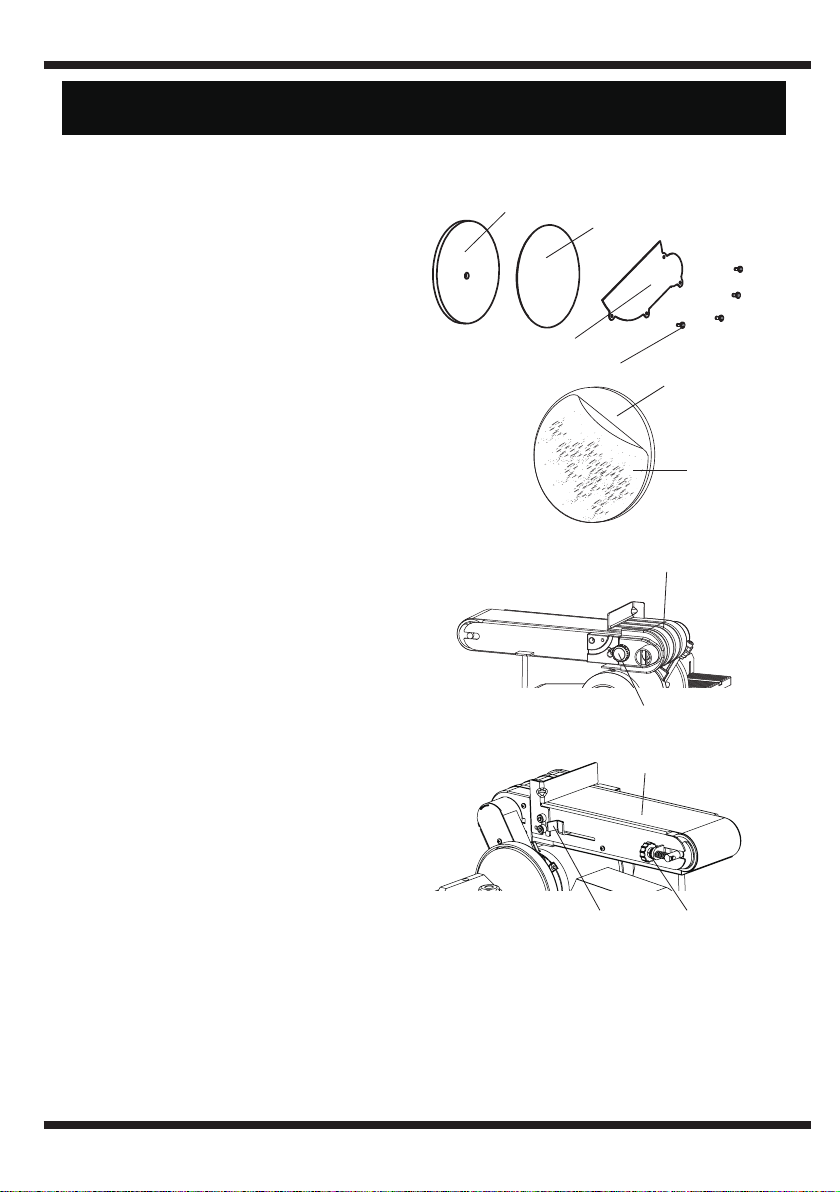
1. Loosen and remove the locking konb (1).
2. Remove the belt exhaust cover (2).
3. Pull out the tension lever (3) to release
the tension of the sanding belt.
4. Remove the sanding belt (4) from both
sanding drums.
5. Place new sanding belt over sanding
drums. Make sure the belt arrow located
on the inside of the belt is pointed in the
right direction.
6. Push the tension lever (3) in to apply belt
tension.
7. Replace the belt exhaust cover (2) in
position and tighten the locking knob.
8. Push the belt
by hand and check if the
sanding belt tends running to one side
or the other of the two drums.
9. View from the switch end of sander, if the sanding belt runs toward disc,
slightly turn the tracking knob (5) counterclockwise (up).
10.View from the switch end of sander, if the sanding belt runs away from the
disc, slightly turn the tracking knob (5) clockwise (down).
11.Plug in the sander and turn the switch ON and OFF quickly to check if the
sanding belt moves to either side. Re-adjust and fine-tune the belt tracki
ng
if necessary.
REPLACING SANDING DISC
A sanding disc is pre-mounted at the factory. Use only sanding discs that
measures 6 in. (150 mm) in diameter.
1. Remove the disc worktable and then
remove the disc cover (1) by removing
four screws (2).
2. Remove the existing disc, and clean any
residue left on disc plate (3). Only use
mineral spirits to remove this residue.
3. Peel the plastic (4) back from new
sanding disc (5) and carefully press
sanding disc firmly in position around
the sanding plate. Make sure the disc is
centered on the plat
e.
4. Reinstall the disc cover (1), tighten four
screws (2) and place sanding table back
on unit.
1
1
3
5
2
2
4
3
5
5
4
BD4602
12
MAINTENANCE

WARNING!
To avoid injury from an accidental start, turn the switch OFF
and always remove the plug from the power source before
making any adjustments.
PROBLEM PROBLEM CAUSE SUGGESTED CORRECTIVE ACTION
Motor will not
run.
1. Defective or broken ON/OFF
switch / switch cord / switch
relay.
2. Burned out motor.
3. Blown house fuse
1. Replace all broken or defective parts
before using sander.
3. Replace house fuse. Turn OFF other
appliances and power tools on the
same circuit.
Machine slows
down while
sanding.
1. Operator applying too much
pressure to workpiece.
2. Dirt on wheels.
3. Worn or stretched belt.
1. Use less pressure in applying
workpiece to sanding surface.
2. Clean wheels.
3. Replace pulley belt.
Motor does not
develop full
speed.
1. Power line overloaded with
lights, other tools, etc.
2. Long/wrong extension cord
being used.
3. Incorrect fuses or circuit
breakers in power cord.
1. Reduce the load on power line.
2. Replace with correct extension cord.
3. Install correct fuses or circuit breaker.
Sanding belt
runs off pulleys.
1. Not tracking properly. 1. Adjust the tracking. See “TO
PROPERLY TRACK THE SANDING
BELT”.
Wood burns
while sanding.
1. Sanding disc or belt glazed
with sap.
2. Excessive pressure being
applied to workpiece.
1. Replace belt or disc.
2. Reduce pressure applied to
workpiece.
Motor
overheats.
1. Motor overload. 1. Reduce motor load. Allow to cool off
before restarting.
Dust Collection
not working.
1. Dust exhaust is blocked. 1. Turn sander off and unplug. Use a
vacuum to remove sawdust blockage.
2. Contact Professional Service Station
for repair. Any attempt to repair this
motor may create a hazard unless
repair is done by a qualified technician.
BD4602
13
TROUBLESHOOTING GUIDE
BD4602
14
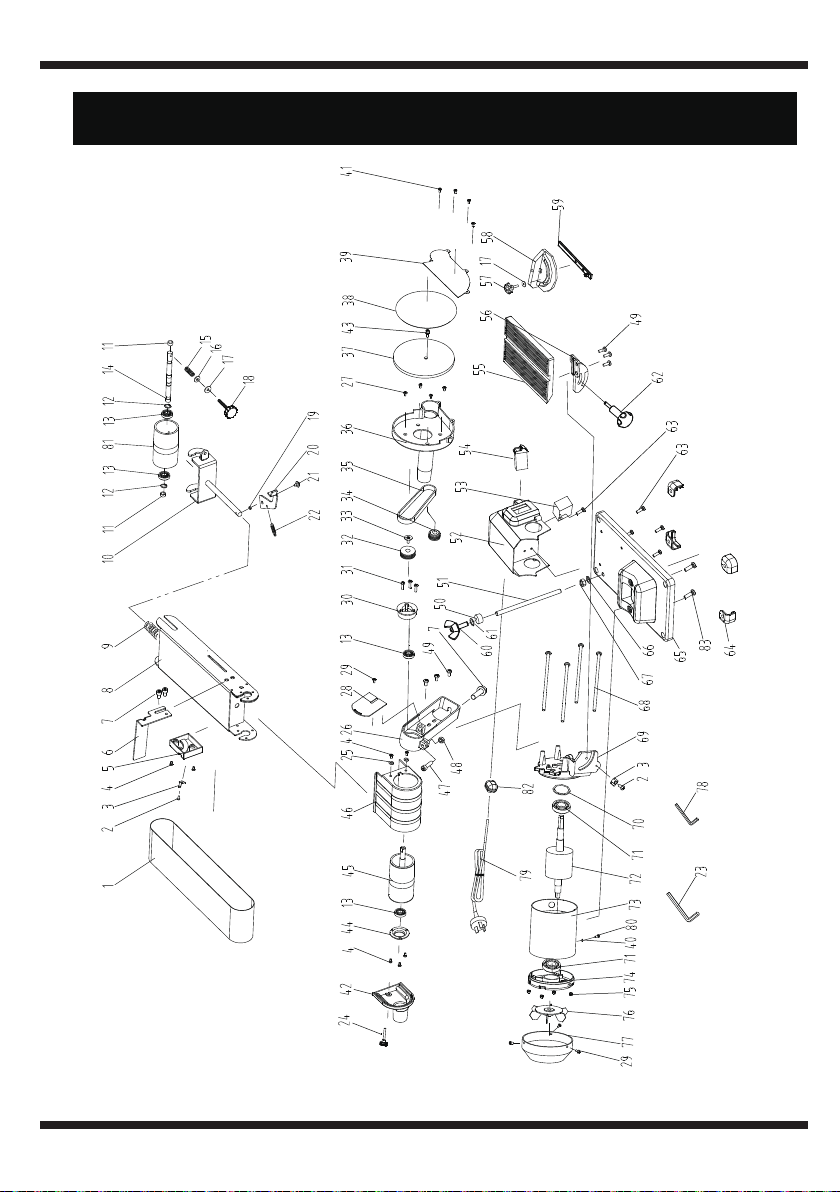
EXPLODED VIEW

BD4602
15
PARTS LIST
No Name Specification Qty
1
Sanding Belt
100*915mm 1
2
Philips Screw +Spring Washer+Flat Washer Black
M4X8 2
3
Pointer
2
4
Philips Screw
M5X10 7
5
Fixed Block
1
6
Limit Plate
1
7
Hexagon Socket Cap Screw +Flat Washer
M8X16 3
8
Support Assy
1
9
Compressed Spring
1
10
Guiding Shelf
1
11
Protecting Bush
2
12
Circlip for Shaft
D12 2
13
Bearing
6001-2RS 2
14
Driven Shaft
1
15
Regulating Spring
1
16
Rubber Washer
1
17
Flat Washer
6 2
18
Belt Adjustable Lever
1
19
lining
1
20
Tension Plate
1
21
Philips Screw +External Teeth Lock Washer+Flat Washer
M5X16 1
22
Tension Spring
1
23
Allen Wrench
S=6 1
24
Knob
M5X24 1
25
Flat Washer
5 2
26
Belt Cover
1
27
Philips Screw
M4×10 4
28
Belt Cover Plate
1
29
Philips Screw and Flat Washer Assy
M4X10 4
30
Bearing Pedestal
1
31
Philips Screw +Spring Washer
M5X25 3
32
Drive Shaft Wheel
1
33
Philips Screw and Lovk Washer Assy
M5x16 left 1
34
Motor Shaft Wheel
1
35
belt
1
36
Disc Protection Plate
1
37
Alumimum Disc
1
38
Disc Paper
150mm-80# 1
39
Disc Protection Plate Cover
1
40
Teeth Washer
4 1
41
Philips Screw
M4X10 4
42
Suction Hood Blind Plate
1

BD4602
16
No Name Specification Qty
43
Hexagon Socket Cap Screw +External Teeth Lock Washer
M6X16
1
44
Bearing HAT
1
45
Drive Roller Assy
1
46
Belt Suction Hood
1
47
Hexagon Socket Cap Screw
M8X25
1
48
Hexagon Nut
M8
1
49
Philips Screw +Spring Washer+Flat Washer Black
M6X16
6
50
Rubber Foot
1
51
Supporting Bar
1
52
Sw itch Box
1
53
Capacitor
1
54
Sw itch
1
55
Work Table
1
56
Work Table Support
1
57
Mitre Gauge Handle
1
58
Index Plate
1
59
Mitre Joint
1
60
Knob
M4x12
φ4
1
61
Big washer
1
62
Table lock handel
1
63
Philips Screw
ST4.2X16 5
64
Rubber Foot
4
65
Base Assy
1
66
Washer
1
67
Hexagon Nut
M10 1
68
Hexagon Socket Cap Screw +Flat Washer
M5X148 4
69
Front End Cover
1
70
Wave Spring Washer
1
71
Bearing
6003-2RS 2
72
Rotor
1
73
Stator
1
74
Rear End Cover
1
75
Hexagon Flange Nut
M5 4
76
Fan
1
77
Motor Cover
1
78
Allen Wrench
S=5 1
79
Plug
1
80
Philips Screw +Spring Washer+Flat Washer Black
M4×8 1
81
Driven Roller
1
82
Strain Relief
6P4 1
83
Hex Screw +Spring Washer+Flat Washer
M6×12 2
φ4

Technical Support and E-Warranty Certificate
www.vevor.com/support
Made in China