
Page 1
OPERATOR’S MANUAL
10” Compact-Slide Miter Saw
240-0021
For more information or to ask questions,
Call Toll-Free: (866) 902-9690
Monday-Friday between 8:30 AM and 5:00 PM ET
CAUTION: To Reduce The Risk Of Injury, User Must Read
And Understand Operator’s Manual. Save These Instructions
For Future Reference.
TM
OPERATOR’S MANUAL
®

Page 2
Safety symbols............................................................................................... 3
Safety instructions......................................................................................... 4
Electrical......................................................................................................... 8
Laser............................................................................................................... 9
Application..................................................................................................... 10
Specifications and features........................................................................... 12
Assembly and adjustment.…………………...………………………................ 15
Operation ..................................................................................................... 23
Maintenance................................................................................................. 30
Troubleshooting............................................................................................ 31
Warranty....................................................................................................... 32
TABLE OF CONTENTS
Page 3
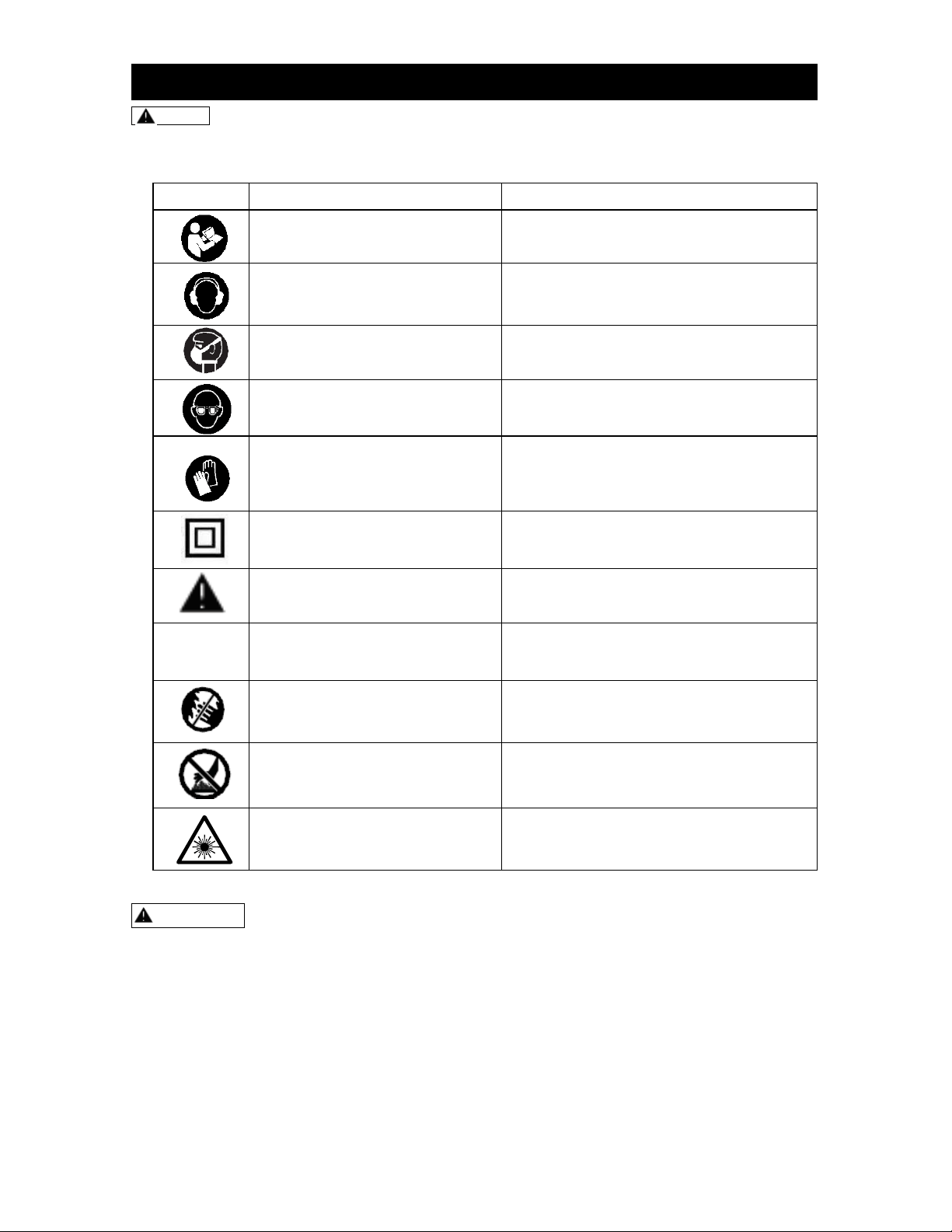
NOTE: Some of these following
symbols may be used on this tool. Please
study these and learn their meaning.
Proper interpretation of these symbols will
allow you to operate the tool better and
safer.
Symbol
Name
Designation / Explanation
Read the Operator’s
Manual.
To reduce the risk of injury, user must
read Operator’s Manual.
Hearing protection
Wear hearing protection to reduce the
risk of induced hearing loss.
Inhalation protection
Wear respiratory protection to reduce the
risk of inhalation of harmful dust.
Eye protection
Always wear safety goggles or safety
glasses with side shields and a full face
shield when operating this product.
Hand protection
Wear gloves for handling saw blades and
rough material (recommendation that
saw blades should be carried in a holder
wherever practicable).
Class II construction
Double insulated construction
Safety alert
Precautions that involve your safety.
Do not expose to rain.
Do not expose and operate the tool in
rain.
No hands symbol.
Failure to keep your hands away from
the blade will result in serious personal
injury.
Hot surface
To reduce the risk of injury or damage,
avoid contact with any hot surface.
Laser radiation
To reduce the risk of injury to your eye,
do not stare into the beam.
WARNING! To ensure safety and reliability, all repairs should be performed by an
authorized service center.
SAFETY SYMBOLS

Page 4
WARNING! When using electric
tools basic safety precautions should
always be followed to reduce the risk of
fire, electric shock and personal injury
including the following. Read all these
instructions before attempting to
operate this product and save these
instructions.
KEEP GUARDS IN PLACE and in
working order.
KEEP WORK AREA CLEAN. Cluttered
areas and benches invite injuries.
DON'T USE IN DANGEROUS
ENVIRONMENT. Do not use power
tools in damp or wet locations, or
expose tools to rain. Keep work area
well lighted.
Guard against electric shock. Avoid
body contact with earthed or grounded
surfaces (e.g. pipes, radiators, ranges,
refrigerators).
Make the workshop childproof with
padlocks and master switches or by
removing starter keys.
KEEP CHILDREN AWAY. All visitors
should be kept safe distance from work
area.
Store idle tools. When not in use, tools
should be stored in a dry locked-up
place, out of reach of children.
Do not force the tool. It will do the job
better and safer at the rate for which it
was intended.
USE RIGHT TOOL. Don't force tool or
attachment to do a job for which it was
not designed.
WEAR PROPER APPAREL. Do not
wear loose clothing, gloves, neckties,
rings, bracelets, or other jewelry which
may get caught in moving parts. Nonslip
footwear is recommended. Wear
protective hair covering to contain long
hair.
ALWAYS USE SAFETY GLASSES.
Also use face or dust mask if cutting
operation is dusty. Everyday eyeglasses
only have impact resistant lenses, they
are NOT safety glasses.
Connect dust extraction equipment. If
the tool is equipped with dust extraction
and collection features, ensure these
are connected and properly used.
Do not abuse the cord. Never yank the
cord to disconnect it from the socket.
Keep the cord away from heat, oil and
sharp edges.
SECURE WORK. Use clamps or a vise
to hold work when practical. It's safer
than using your hand and it frees both
hands to operate tool.
Do not overreach. Keep proper footing
and balance at all times.
MAINTAIN TOOLS WITH CARE.
- Keep cutting tools sharp and clean for
better and safer performance.
- Follow instructions for lubricating and
changing accessories.
- Inspect tool cords periodically and if
damaged have these repaired by an
authorized service center.
- Inspect extension cords periodically and
replace if damaged.
- Keep handles dry, clean and free from
oil and grease.
DISCONNECT TOOLS before servicing
and when changing accessories such as
blades, bits, cutters and so on.
USE RECOMMENDED
ACCESSORIES. Consult the Operator’s
Manual for recommended accessories.
The use of improper accessories may
cause risk of injury to persons.
REMOVE ADJUSTING KEYS AND
WRENCHES. Form a habit of checking
to see that keys and adjusting wrenches
are removed from the tool before turning
it on.
AVOID UNINTENTIONAL STARTING.
Ensure switch is in off position before
plugging in.
Use outdoor extension cords. When
the tool is used outdoors, use only
extension cords intended for outdoor
use and so marked.
Stay alert. Watch what you are doing,
use common sense and do not operate
the tool when you are tired.
Use proper extension cord. Make sure
your extension cord is in good condition.
When using an extension cord, be sure
to use one that is heavy enough to carry
the current your product will draw.
An undersized cord will cause a drop in
line voltage, resulting in loss of power
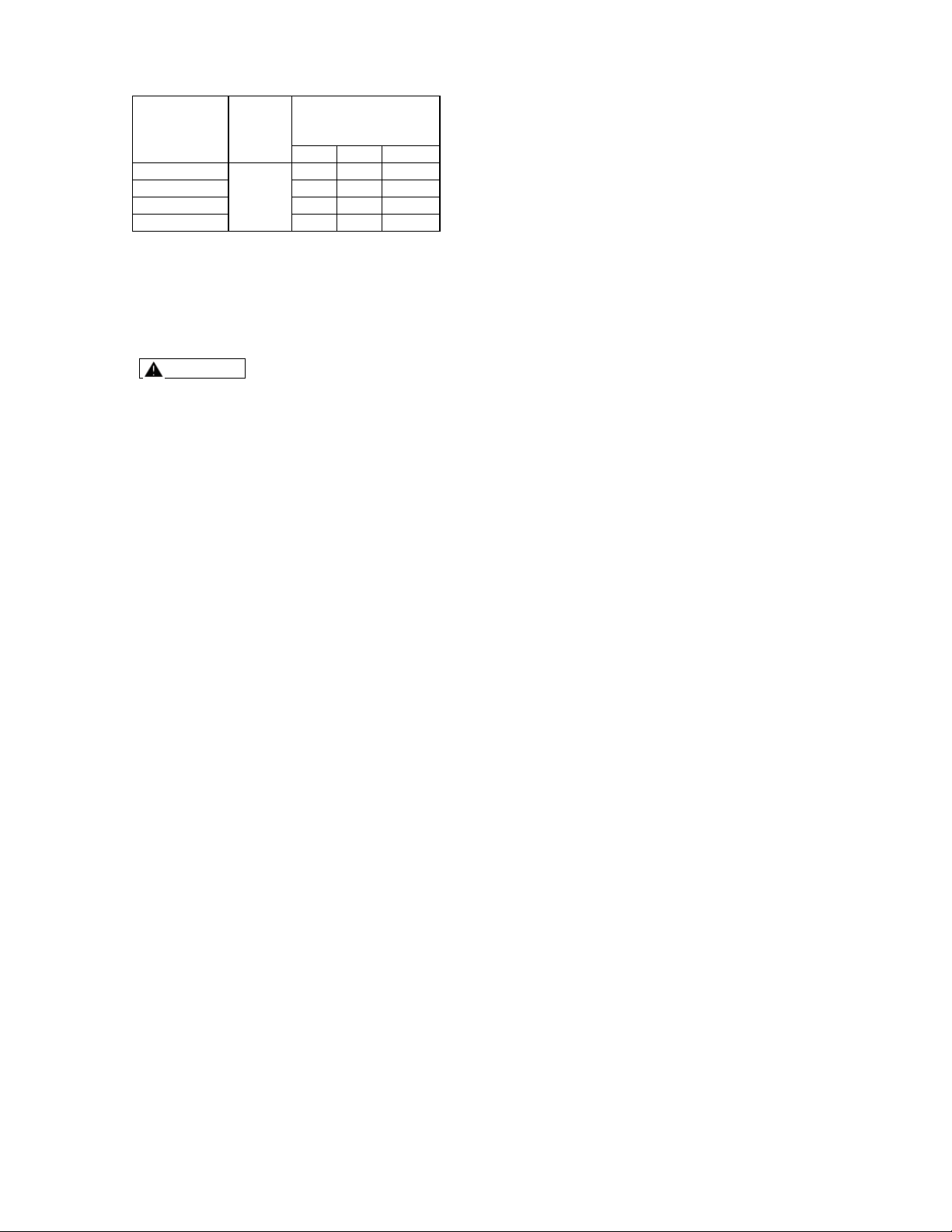
and overheating. Table 1.1 shows the
correct size to use depending on cord
length and nameplate ampere rating. If
in doubt, use the next heavier gauge.
The smaller the gauge number, the
heavier the cord.
(Continued on page 5)
SAFETY INSTRUCTIONS
Page 5
Table 1.1
Minimum gauge for cord
Tool’s Ampere
Rating
(120V circuit
only)
Volts
Total Length of Cord in
Feet
Cord Size in A.W.G.
25’
50’
100’
0~6
120v~
18
16
16
6~10
18
16
14
10~12
16
16
14
12~16
14
12
*
* Not Recommended
ADDITONAL SAFETY
INSTRUCTIONS
WARNING The use of any
accessory or attachment other than
one recommended in this Operator’s
Manual may present a risk of personal
injury.
Have your tool repaired by an
authorized service center. This electric
tool complies with the relevant safety
rules. Repairs should only be carried out
by qualified persons using manufacturer
approved parts, otherwise this may
result in considerable danger to the
user.
Check damaged parts.
- Before further use of tool, it should be
carefully checked to determine that it will
operate properly and perform its
intended function.
- Check for alignment of moving parts,
binding of moving parts, breakage of
parts, mounting and any other
conditions that may affect its operation.
- A guard or other part that is damaged
should be properly repaired or replaced
by an authorized service center unless
otherwise indicated in this Operator’s
Manual.
- Have defective switches replaced by
an authorized service center.
- Do not use the tool if the switch does
not turn it on and off.
Never stand on the tool. Serious injury
could occur if the tool is tipped or if the
blade is contacted unintentionally.
Direction of feed: Always feed work
into a blade or cut against the direction
of rotation of the blade.
Never leave a tool running
unattended. Turn the power off. Don’t
leave the tool until it comes to a
complete stop.
Make workshop kid proof with
padlocks, master switches, or by
removing starter keys.
Don’t force tool. It will do the job better
and safer at the rate for which it was
designed.
Never use saw blades which are
damaged or deformed.
Replace the table insert when worn.
Use only saw blades specified by the
manufacturer;
Never use saw blades manufactured
from high speed steel;
Wear suitable personal protective
equipment when necessary, this could
include:
i) Hearing protection to reduce the risk of
induced hearing loss;
ii) Eye protection;
iii) Respiratory protection to reduce the risk
of inhalation of harmful dust;
iv) Gloves for handling saw blades and
rough material (recommendation that
saw blades should be carried in a holder
wherever possible).
Connect the saw to a dust-collecting
device when sawing wood;
Select the correct saw blade for the
material to be cut;
Never use the saw to cut materials
other than those specified;
Use only the saw with guards in good
working order and properly
maintained, and in position;
Keep the floor area free of loose
material e.g. chips and cut-offs;
Ensure the speed marked on the saw
blade is at least equal to the speed
marked on the saw;
Ensure that any spacers and arbor
rings used are suitable for the purpose
as stated by the manufacturer;
Repairs shall only be carried out by
the manufacturer or an authorized
agent;
Never remove any cut-offs or other
parts of the work piece from the
cutting area while the machine is
running with an unguarded saw blade.
Do not operate the saw without the
guards in place.
Be sure to turn the tool off and wait
for the saw blade to stop before
moving the work piece or changing
the settings.
Be sure that the power is
disconnected before changing the
blade or servicing the saw.
(Continued on page 5)

Page 6
When servicing, use only
manufacturer approved replacement
parts.
Never reach around the saw blade.
Do not perform any operation free
hand. Always place the work piece, to
be cut, on the miter saw table, and
position it firmly against the fence as a
backstop. Always use the fence.
Always keep hands out of the path of
the saw blade. Do not reach under the
material being cut or into the blade’s
cutting path with your fingers or hand for
any reason.
To reduce the risk of injury, return the
saw arm to the full rear position after
each crosscut operation.
Always make sure that the miter table
and saw arm (bevel function) are
locked in position before operating
your saw. Lock the miter table by
securely tightening the miter-lock lever.
Lock the saw arm (bevel function) by
securely tightening the bevel locking
lever.
Be sure that the blade path is free of
nails. Always carefully inspect lumber
and remove all nails before cutting.
Always be sure that the blade clears
the work piece. Never start the saw
with the blade touching the work piece.
Always allow the motor to come to full
speed before starting a cut.
Support long work pieces when
cutting to minimize the risk of blade
pinching or kickback. The saw may
slip, walk or slide while cutting long or
heavy boards.
Never use a length-stop on the free
(scrap) end of a clamped work piece;
never hold onto or bind the free (scrap)
end of the work piece in any operation.
If a clamp and a length-stop are used
together, these must both be installed
on the same side of the saw table to
prevent the saw from catching the loose
end and kicking up.
Never cut more than one piece at a
time. Do not stack more than one work
piece on the worktable at a time.
Avoid awkward operations and hand
positions where a sudden slip could
cause your hand to move into the
blade. Always make sure that you have
good balance. Never operate your saw
on the floor or in a crouched position.
Only use the correct blades. Use the
correct blade size, style and cutting
speed for the material and the type of
cut. Do not use blades with incorrect
size holes. Never use blade washers or
blade bolts that are defective or
incorrect.
Always keep blades clean and sharp.
Sharp blades minimize stalling and
kickback.
Do not use dull or damaged blades.
Bent blades can break easily or cause
kickback.
Never hold a work piece by hand if it
is too small to be clamped. Always
keep your hands clear of the “no hands”
zone.
Never apply lubricants to the blade
when it is running.
Never use solvents to clean plastic
parts. Solvents could dissolve or
otherwise damage the material.
Do not turn the motor switch on and
off rapidly. This could cause the blade
to loosen, which could create a hazard.
Should this ever occur, stand clear and
allow the saw blade to come to a
complete stop. Disconnect the saw from
the power source and securely tighten
the blade bolt.
Never leave the saw unattended while
it is connected to a power supply. Turn
the power off. Don’t leave the tool until it
comes to a complete stop.
Keep the motor ventilation slots
clean and free of chips or dust. To
avoid motor damage, the motor should
be blown out or vacuumed frequently to
keep sawdust from interfering with the
motor ventilation. Disconnect the saw
from the power source before removing
dust with a vacuum or by blowing.
Never lift this tool by gripping the
cutting handle or the miter fence. This
may cause misalignment. Always lock
the saw arm in the “Down” position and
then carry the saw by holding the base
or lift it using the carrying handle
/support bracket.
WARNING: Some dust created by
power sanding, sawing, grinding,
drilling and other construction activities
contains chemicals to cause cancer,
birth defects or other reproductive
harm.
Some examples of these chemicals are:
Lead from lead-based paints.
Crystalline silica from bricks, cement,
and other masonry products.
Arsenic and chromium from chemically
treated lumber.
(Continued on page 7)
Page 7
Your risk from these exposures varies,
depending on how often you do this type of
work.
To reduce your exposure to these
chemicals:
Know your power tool. Read the
Operator’s Manual carefully. Learn the
applications and limitations, as well as
the specific potential hazards related to
this tool. Following this rule will reduce
the risk of electric shock, fire or serious
injury.
Before beginning power tool
operation, always wear safety
goggles or safety glasses with a side
shield and a full face shield when
needed. We recommend a Wide Vision
Safety Mask for use over eyeglasses or
standard safety glasses with side
shields. Always use eye protection
which is marked to comply with ANSI
Z87.1.
Protect your lungs. Wear a face mask
or a dust mask if the operation is dusty.
Protect your hearing. Wear
appropriate personal hearing protection
during use. Under some conditions and
duration of use, noise from this tool may
contribute to hearing loss.
All visitors and bystanders must
wear the same safety equipment that
the operator of the saw wears.
Inspect the tool cords periodically
and, if damaged, have them repaired by
an authorized service center.
Always check the tool for damaged
parts. Before further use of the tool, a
guard or other part that is damaged
should be carefully checked to
determine whether it will operate
properly and perform its intended
function. Check for misalignment or
binding of moving parts, broken parts,
and any other condition that may affect
the tool’s operation. A guard or other
part that is damaged should be properly
repaired or replaced by an authorized
service center.
Save this Operator’s Manual. Refer to
it frequently and use it to instruct others
who may use this tool. If someone
borrows this tool, make sure they have
the Operator’s Manual also.
WARNING: Do not permit fingers to
touch the terminal or the plug when
installing or removing the plug from an
outlet.
To reduce the risk of electric shock,
double-insulated tools are equipped with
a polarized plug (one prong is wider
than the other). This plug will fit into a
polarized outlet only one way. If the plug
does not fit in the outlet properly,
reverse the plug. If it still does not fit,
contact a qualified electrician to install a
polarized outlet. Do not change the plug
in any way.
Double insulation eliminates the need
for the three-wire grounded power cord
and grounded power supply system.
Applicable only to Class II (double-
insulated) tools. This compound miter
saw is a double-insulated tool.
WARNING: Double insulation does
not take the place of normal safety
precautions when operating this tool.
Before plugging in the tool, be sure that
the outlet voltage supplied is within the
voltage marked on the tool’s data plate.
Do not use “AC-only” rated tools with a
DC power supply.
Avoid body contact with grounded
surfaces such as, pipes, radiators,
ranges and refrigerators. There is an
increased risk of electric shock if your
body is grounded.
Do not expose power tools to rain or wet
conditions, and do not use power tools
in wet or damp locations. Water entering
a power tool will increase the risk of
electric shock. This tool is intended for
indoor use only.
If operating a power tool in damp
locations is unavoidable, always use a
ground fault circuit interrupter (GFCI) to
supply power to your tool. Always wear
electrician’s rubber gloves and footwear
in damp conditions.
Inspect tool cords for damage. Have
damaged tool cords repaired by an
authorized service center. Be sure to
stay constantly aware of the cord
location, and keep it well away from the
moving blade.
Do not abuse the cord. Never use the
cord to carry the tool or to remove the
plug from the outlet. Keep the cord away
from heat, oil, sharp edges and moving
parts. Replace damaged cords
immediately. Damaged cords increase
the risk of electric shock.
ELECTRICAL
Page 8
WARNING: LASER LIGHT. LASER
RADIATION. Avoid direct eye exposure.
Do not stare into the beam. Only turn
the laser beam on when the laser will
shine on a work piece.
WARNING: Use of controls,
adjustments or performance of
procedures other than those specified
in this manual may result in hazardous
radiation exposure.
WARNING: The use of optical
instruments to view the laser beam,
including but not limited to telescopes
or transits, will increase eye hazard.
This miter saw has a built-in laser light.
This is a Class II laser that emits a
maximum output power of 635 nm (1 mW)
wavelengths. These lasers do not normally
present an optical hazard, however do not
stare into the beam. Doing so can cause
flash blindness.
The laser should be used and
maintained in accordance with the
manufacturer’s instructions.
Never aim the beam at any person or
any object other than the work piece.
Always ensure that the laser beam is
aimed at a sturdy work piece without
a reflective surface. Wood or rough-
coated surfaces are acceptable. Bright,
shiny reflective surfaces are not suitable
for laser use, because the reflective
surface could reflect the beam back at
the operator.
Do not attempt to activate the laser
when the tool housing is removed.
The laser is activated with a button
that is independent of the main switch
for the saw.
Do not replace the laser light
assembly with a different type. Any
repairs must be carried out by the laser
manufacturer or an authorized service
center.
Do not attempt to repair the laser
guide by yourself.
Do not attempt to change any parts
of the laser guide.
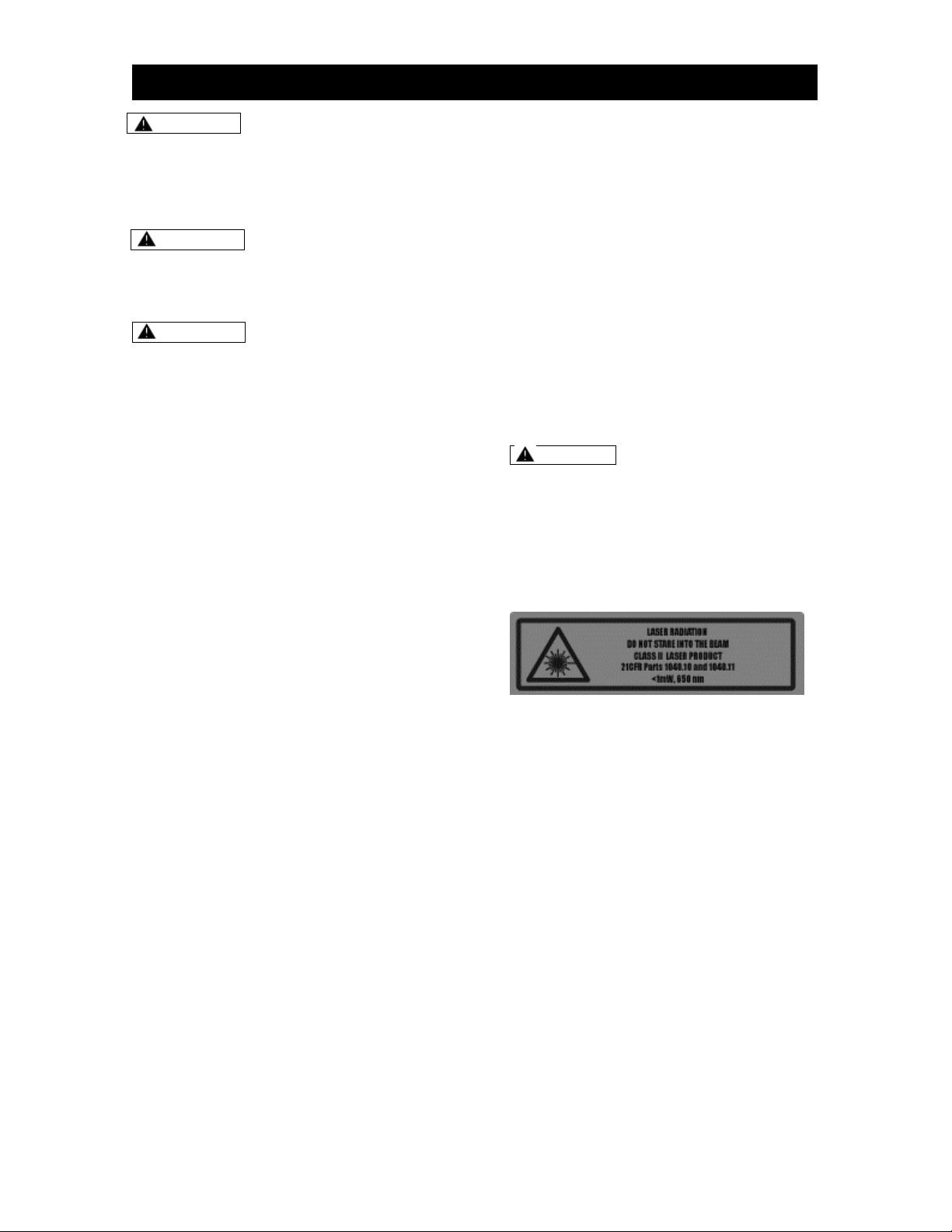
CAUTION: The following label is
affixed to your tool. It indicates the
location from which the saw emits the
laser light. Be aware of the laser light
location when using the tool. Always
make sure that any bystanders in the
vicinity of use are made aware of the
dangers of looking directly into the
laser.
LASER

Page 9
FUNCTION DESCRIPTIONS
AND INTENDED USE
This miter saw has been designed for
making straight lengthways and crossway
cuts in wood.
The capacity of this miter saw is designed
for sawing hardwood and softwood.
This miter saw is not suitable for cutting
aluminum or other non-ferrous metals or
alloys.
OPERATOR’S GLOSSARY OF
TERMS
Bevel Cut: A cutting operation made
with the blade at any angle other than
90° to the miter table.
Blade Flange: A ring or collar on a
spindle or arbor that permits other
objects, such as a blade, to be attached
to it.
Chamfer Cut: A cut that removes a
wedge from a block of wood so that the
end (or part of the end) is angled at
more than 90°.
Compound Miter Cut: A cut made
using both a miter angle and a bevel
angle at the same time.
Crosscut: A cutting operation made
across the grain of the work piece.
Freehand Cut: Performing a cut without
using a fence, miter gauge, fixture, work
clamp, or other proper device to keep
the work piece from twisting or moving
during the cut. Do not perform any
operation freehand. Use a clamp or a
vise whenever possible.
Kerf: The material removed by the
blade in a through cut, or the slot
produced by the blade in a non-through
or partial cut.
Kickback: A hazard that can occur
when the blade binds or stalls, throwing
the work piece back toward the
operator.
Miter Cut: A cutting operation made
with the blade at any angle other than
90° to the fence.
No-Hands Zone: The area between the
marked symbols on both sides of the
miter-table base. This zone is identified
by the No-Hands Zone symbols inside
the symbols on the miter table base.
Non-Through Cut: Any cutting
operation where the blade does not
extend completely through the thickness
of the work piece.
Revolutions Per Minute (RPM): The
number of turns completed by a
spinning object in one minute.
Saw-Arm Locking pin: Locks the saw
arm in the “Down” position.
Saw Blade Path: The area over, under,
behind, or in front of the blade, as it
applies to the work piece; the area that
will be or has been cut by the blade.
Set: The distance that the saw blade
tooth is bent (or set) outward from the
face of the blade.
Slide Bars: Guide the saw arm when
making a slide cut.
Spindle Lock: Allows the operator to
stop the blade from rotating while
tightening or loosening the blade screw
during blade replacement or removal.
Throat Plate: A plate inserted in the
miter saw’s table that allows for blade
clearance.
Through Sawing: Any cutting operation
where the blade extends completely
through the thickness of the work piece.
Work Piece or Material: The item on
which the cutting operation is
performed. The surfaces of a work piece
are commonly referred to as faces,
ends, and edges.
APPLICATION
Page 10
E
C
D
A
FIG.1
B
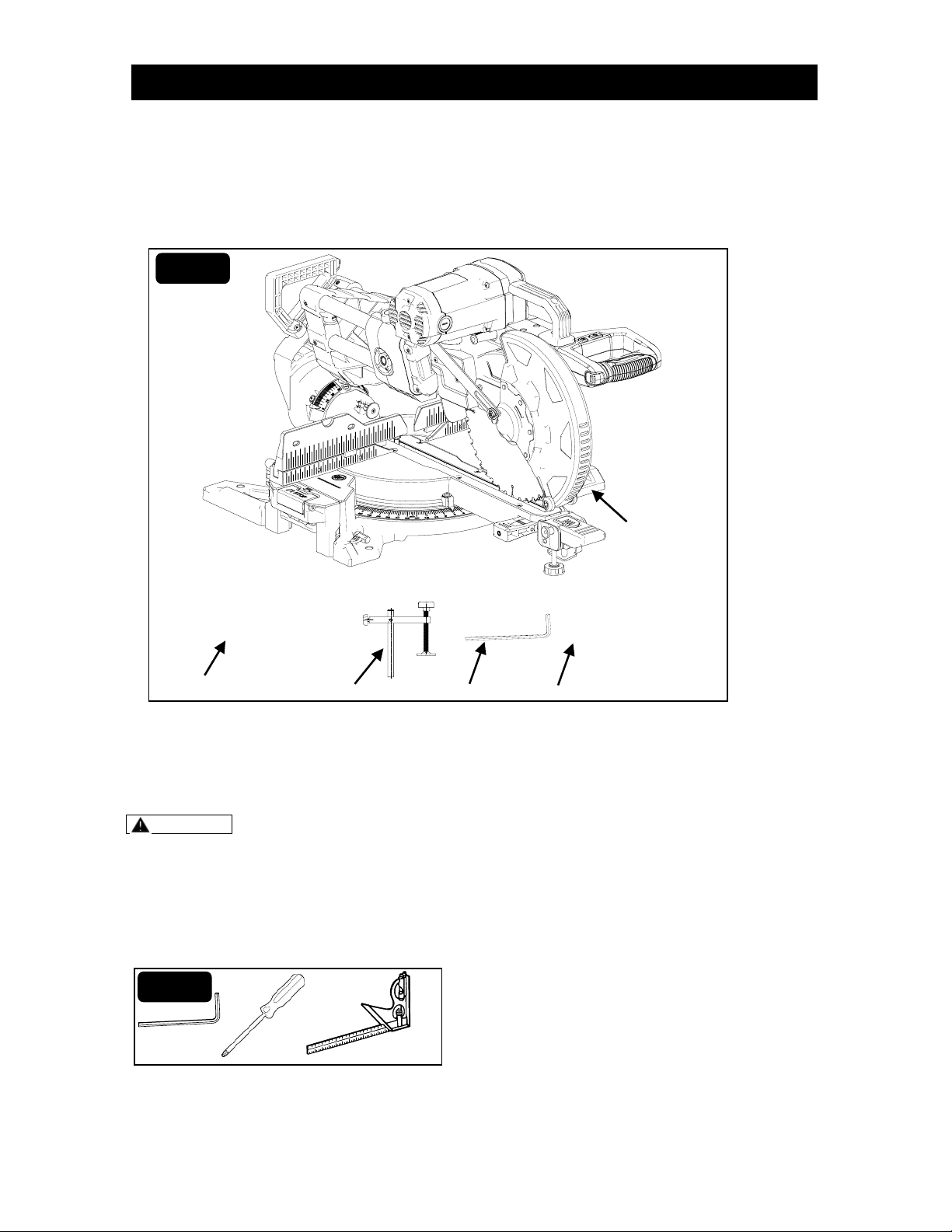
PART LIST
Carefully remove the miter saw from its
packaging and check that the following
parts are included (Fig. 1).
A 1pc Miter saw
B 1pc Dust bag
C 1pc Saw blade wrench for changing
blade (6 mm hex key)
D 1pc Work piece clamp
E 1pc Operator’s Manual
WARNING If any parts are damaged or missing, do not operate this saw until the
missing parts are replaced. Failure to heed this warning could result in serious personal
injury.
TOOLS NEEDED
The following tools (not included) are needed for making adjustments (Fig. 2):
1. 3mm Hex key
2. Philips screwdriver
3. Combination square
FIG. 2
APPLICATION
Page 11
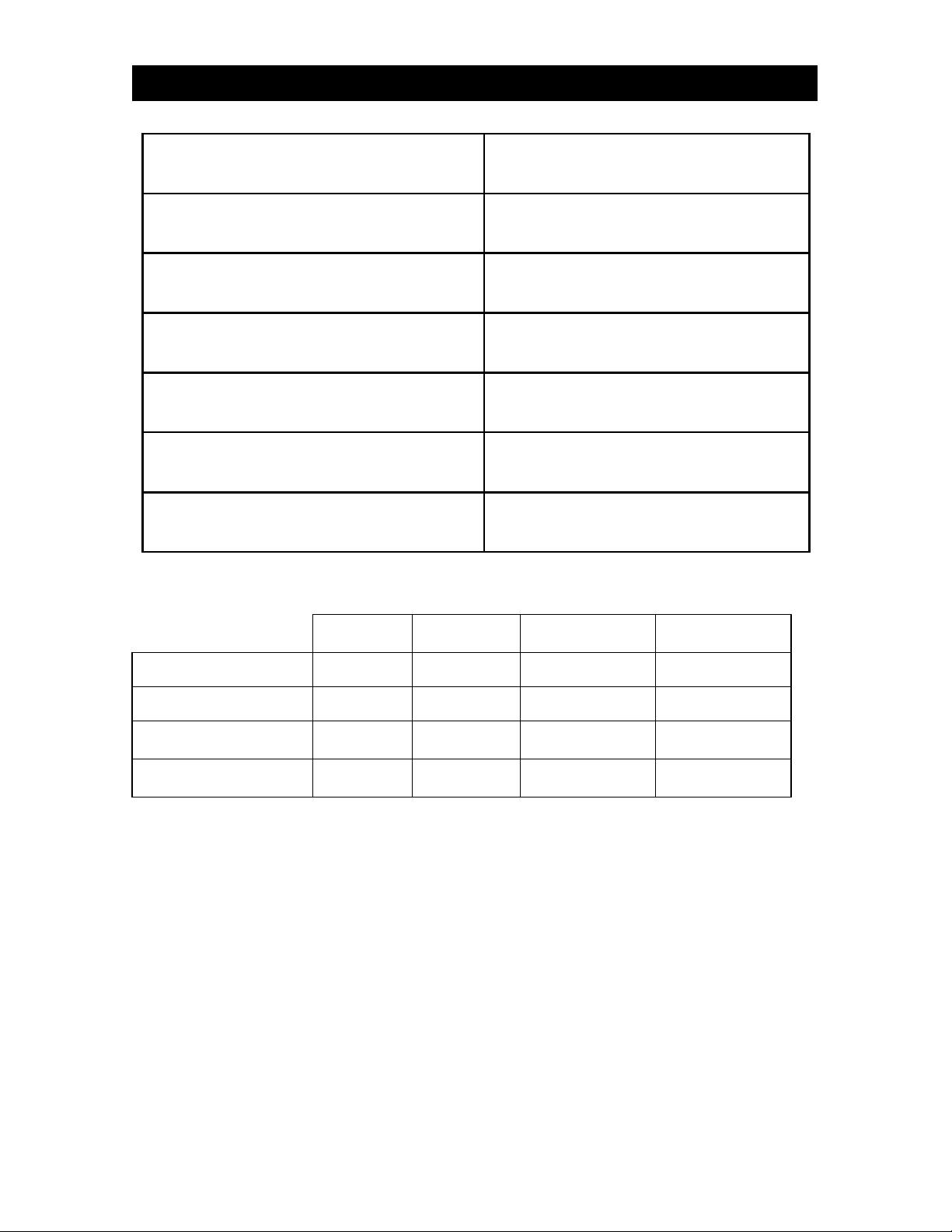
Motor
120V, ~60Hz
Rated current
15A
No load speed
4,600 RPM
Blade diameter
10”
Arbor size
5/8”
Electrical brake
Yes
Net weight
58 pounds
Cutting Capacities (Inches)
0° Miter x
0° Bevel
45° Miter x
0° Bevel
0° Miter x
45° Bevel
45° Miter x
45° Bevel
Max. Cross Cut
13.5”
9.5”
13.5”
9.5”
Max. Depth of Cut
3.5”
3.5”
1.8” - L, 1.0” -R
1.8” - L, 1.0”-R
Max. Cross Cut @
Max. Depth of Cut
12.6”
9.0”
12.6”
9.0”
Max. Depth of Cut @
Max. Cross Cut
3.0”
3.0”
1.7” - L, 0.9” - R
1.7” - L, 0.9”- R
SPECIFICATIONS AND FEATURES
Page 12
SPECIFICATIONS AND FEATURES
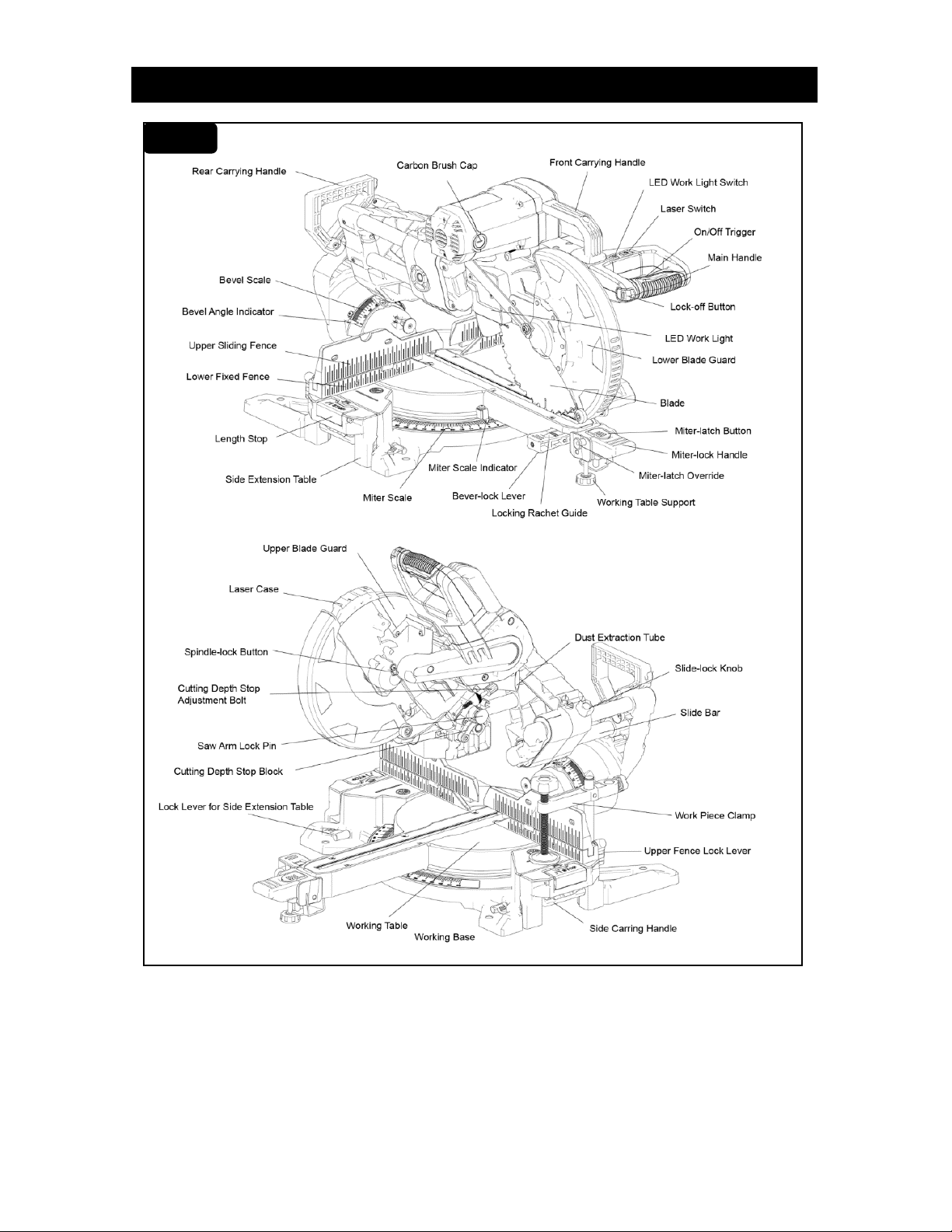
FIG. 2
FIG. 3

Page 13
KNOW YOUR SLIDING COMPOUND
MITER SAW
The safe use of this saw requires an
understanding of the information on the
tool and in this Operator’s Manual, as well
as knowledge of the project you are
attempting. Before use of this saw,
familiarize yourself with all of the operating
features and safety rules.
10 INCH BLADE
Your compound miter saw is designed to
be used ONLY with a 10 inch blade with
5/8 inch arbor.
Equipped with a 10 inch, 48 tooth, and
general purpose blade.
15 AMP MOTOR
This saw has a powerful 15 AMP motor
with sufficient power to handle tough
cutting jobs.
BEVEL-LOCK LEVER
To lock the saw at desired bevel angles.
CARRYING HANDLES
For convenience when carrying or
transporting the miter saw from one place
to another, carrying handles are located on
the top of the saw arm and the end of the
slide bar.
ELECTRIC BRAKE
The electric brake quickly stops blade
rotation after the On/Off trigger is released.
LED WORK LIGHT
LED work light shines on the work area for
improved visibility.
LASER
Laser projects a laser cutting line on the
work area for improved cutting accuracy.
MITER-LOCK HANDLE
The miter-lock handle securely locks the
miter table at the desired miter angle.
MITER-LATCH BUTTON
When pushing the miter latch button down,
it will release the miter table from pre-set
index points.
POSITIVE STOPS ON MITER TABLE
Positive stops at right and left 0°, 15°,
22.5°, 31.6°, and 45°.
LOWER BLADE GUARD
The lower blade guard is made of shock-
resistant, translucent plastic that provides
protection from each side of the blade. It
retracts over the upper blade guard as the
saw is lowered into the work piece.
SPINDLE-LOCK BUTTON
The spindle-lock button locks the spindle
while installing, changing, or removing
blade.
MULTI-SLIDE BAR
When unlocked, the saw arm will glide
forward and backward the length of the
multi-slide bar for cutting various work-
piece width.
SLIDE-LOCK KNOB
The slide-lock knob locks and unlocks the
sliding bars of this tool.
UPPER SLIDING FENCE
Upper fences adjustable for added
precision.
WORK PIECE CLAMP
The work piece clamp is mounted on the
left or right side of the base behind the
fence to securely clamp the work piece.
DEPTH STOP ADJUSTMENT BOLT
The depth stop adjustment is a feature
used when cutting grooves in the work
piece. The depth adjustment is used to
limit the blade depth.
SPECIFICATIONS AND FEATURES
Page 14
UNPACKING
WARNING This saw is heavy, to
avoid back injury when unpacking,
grasp the carrying handle firmly, lift
with your legs, not your back, and get
help when necessary.
WARNING Check this saw carefully,
if any parts are damaged or missing, do
not operate this saw and contact (866)
902-9690 for assistance. Failure to heed
this warning could result in possible
serious personal injury.
WARNING Do not attempt to modify
this miter saw or create accessories not
recommended for use with this saw.
Any such alteration or modification is
misuse and could result in a hazardous
condition leading to possible serious
personal injury.
WARNING Do not connect to a
power supply until assembly is
complete. Failure to comply could
result in accidental starting and
possible serious personal injury.
This miter saw requires assembly.
Carefully lift the saw from the carton by
the carrying handle with two (2) hands
and put on flat ground.
The saw arm is secured in the “Down”
position in carton. To release the saw
arm, push down on the top of the saw
arm, and pull out the locking pin, use the
handle to lift the saw arm.
Inspect the miter saw carefully to make
sure that no breakage or damage
occurred during shipping.
The saw is factory set for accurate
cutting. After assembling it, check for
accuracy as directed in the adjustment
section of this manual. If shipping has
influenced the settings, refer to specific
procedures explained in this manual.
NOTE: Do not discard the packing
material until you have carefully
inspected and satisfactorily operated
the miter saw.
TRANSPORTING THE SAW
WARNING Failure to unplug your
saw could result in accidental starting
causing serious injury.
WARNING This saw is heavy, to
avoid back injury, lift with your legs, not
your back, and get help when
necessary.
Step 1: Set the saw head at miter 0°, bevel
0° and tighten the miter detent and the
bevel lock knob.
Step 2: Return and lock the upper sliding
fence in place.
Step 3: Lower the saw arm and lock the
saw arm in the “Down” position by
inserting the locking pin.
NOTE: The locking pin is used for
carrying and storage only.
Step 4: To get a balance point, pull and
slide the saw head toward operator and
tighten the slide-lock knob.
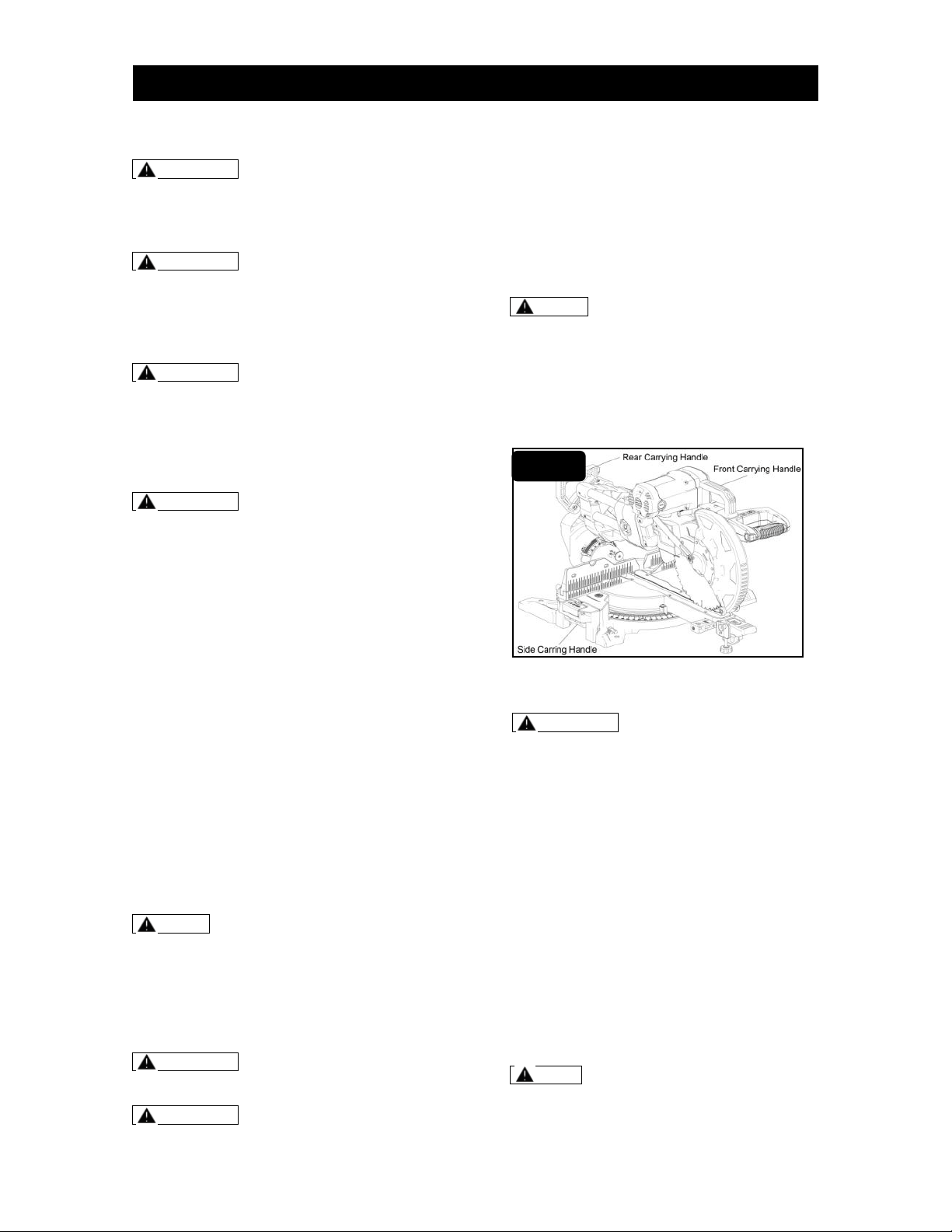
Step 5: Carefully lift the saw by holding the
carrying handle (Fig. 4).
Step 6: Move it to required position.
MOUNTING THE SAW
WARNING Before mounting the saw,
always disconnect from the power
source. Failure to unplug your saw
could result in accidental starting
causing serious injury.
This miter saw is recommended to be
mounted on a firm supporting surface,
such as a workbench. Four large bolt holes
have been provided in the saw base for
this purpose (Fig. 5).
Step 1: Place the saw onto the workbench.
Step 2: Align the four mounting holes
located on the saw base with the ready-
made holes of the workbench.
Step 3: Tighten the saw onto the
workbench securely with 4 sets hex bolt kit
(3/8”, not supplied, including bolt, screw,
flat washer and spring washer). Bolts
should be of sufficient length.
Note: Carefully check the
workbench after mounting to make sure
that no movement can occur during
use. If any tipping, sliding, or walking is
(Continued on page 16)
ASSEMBLY AND ADJUSTMENT
FIG. 4
Page 15
noted, secure the workbench to the
floor before operating.
NOTE: Many of the illustrations in
the manual show portions of this tool.
This is intentional so that we can
clearly show points being made in the
illustrations.
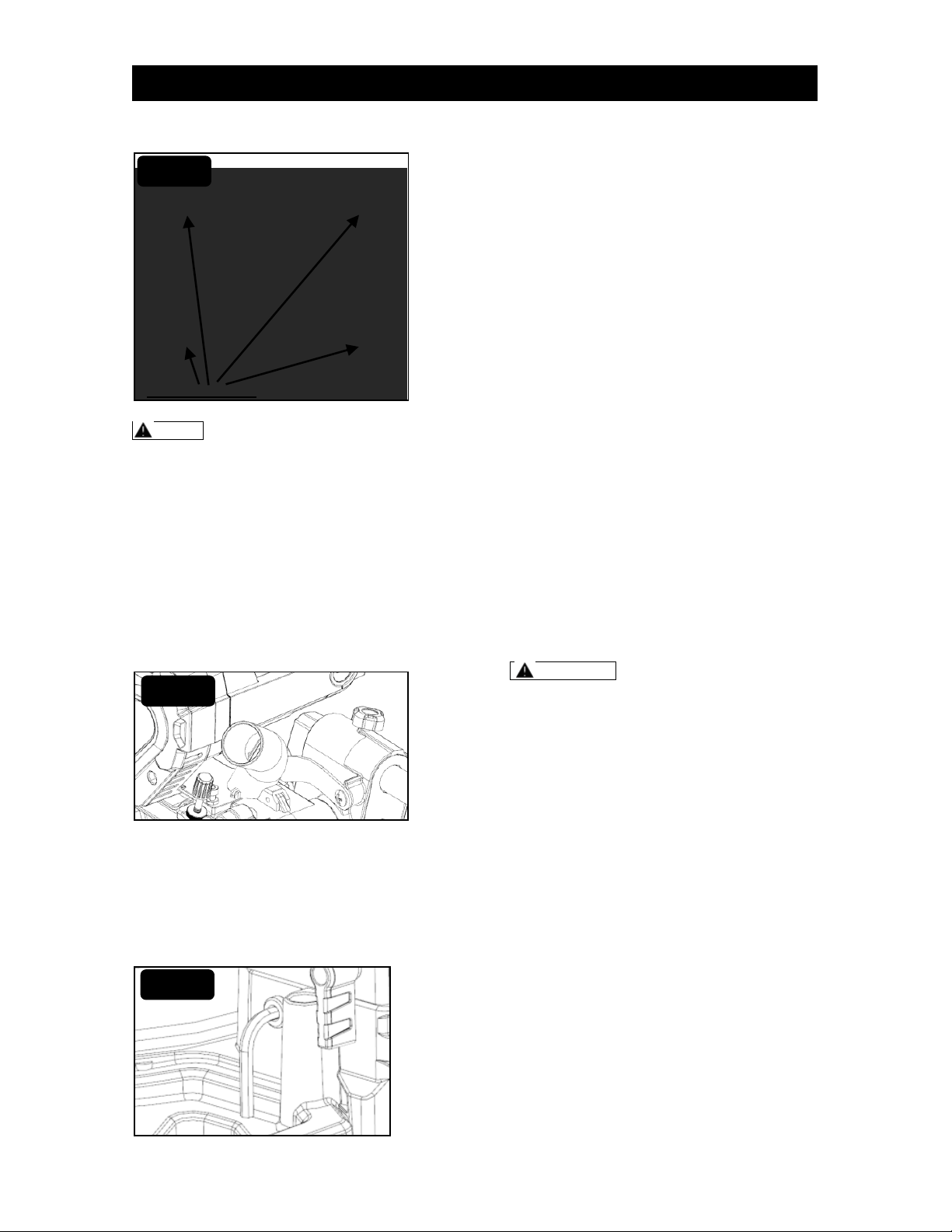
DUST EXTRACTION PORT
This miter saw comes with a dust bag to
help you keep the work area clean. The
dust bag is ideal for smaller jobs. The dust
port also accepts a standard 1 1/4”
vacuum hose for dust collection (Fig. 6).
SAW BLADE WRENCH
STORAGE
The storage area for the saw blade wrench
to change the blade is located in the back
of saw’s base (Fig. 7).
ADJUSTMENT LOCKING
LEVERS
The adjustment locking levers for sliding
fence and extension support arms are
designed to provide the needed leverage
to lock and unlock the controls easily.
These levers can be rotated and pulled
out, and rotated back without controlling
the adjustment and then pushed back in to
continue the locking or unlocking rotation.
Example for upper sliding fence
adjustment – to unlock:
Step 1: Rotate the lever approximately ½
turn to the left (counter-clockwise).
Step 2: Pull out the lever to disengage
from the locking bolt and then rotate
approximately ½ turn clockwise.
Step 3: Release the lever to re-engage
with the locking bolt and rotate
approximately ½ turn to the left (counter-
clockwise) to continue loosening the
locking bolt until the fence can slide.
Step 4: Slide the fence to desired position.
Step 5: Repeat the above steps in
opposite order to tighten the locking bolt.
BEVEL-LOCK LEVER
ADJUSTMENT
WARNING Before performing any
assembly or adjustment, always
disconnect from power source. Failure
to unplug your saw could result in
accidental starting causing serious
injury.
The bevel-lock lever will securely lock the
cutting head of saw at the desired bevel
angle. Press the lever down to lock the
cutting head and lift the lever up to unlock
the cutting head (Fig. 8).
1. Unplug the miter saw.
2. To lock the cutting head.
1. Press the left-side of locking ratchet
guide down.
2. Lift the bevel-lock lever and press
down to lock.
3. Several cycles may be required to
lock the cutting head firmly.
3. To unlock the cutting head.
1. Press the right-side of locking ratchet
guide down.
2. Press the bevel-lock lever down and
lift to unlock.
(Continued on page 16)
4 holes for mounting
FIG. 5
FIG. 6
FIG. 7
ASSEMBLY AND ADJUSTMENT
Page 16
3. Several cycles may be required to
lock the cutting head firmly.
SETTING THE BEVEL ANGLE
WARNING Before performing any
assembly or adjustment, always
disconnect from power source. Failure
to unplug your saw could result in
accidental starting causing serious
injury.
WARNING To avoid risk of personal
injury, if movement is tight or if there is
play in the bevel pivot, have your saw
serviced by an authorized service
center before using or contact (866)
902-9690 for assistance.
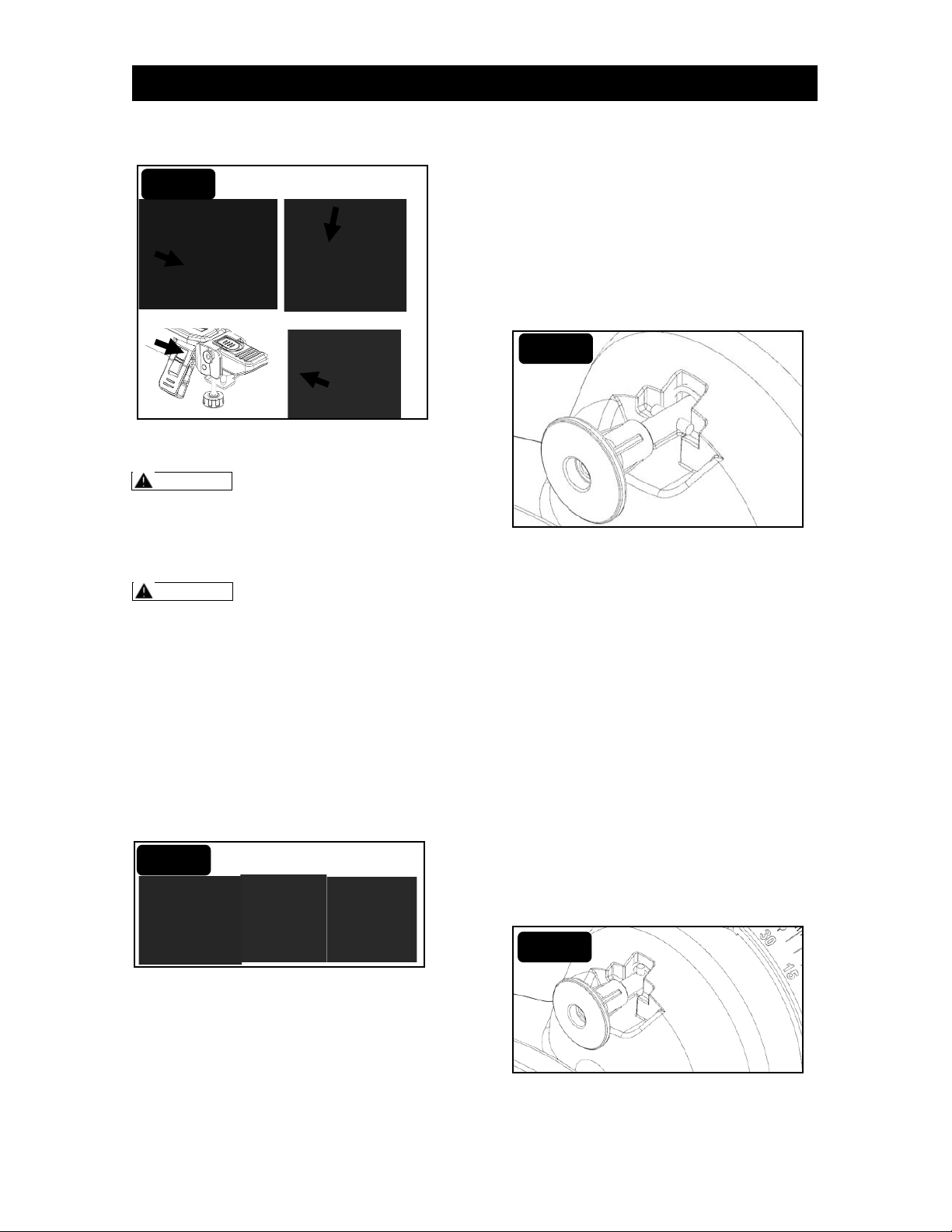
This saw has dual bevel and is equipped
with two sets of bevel scale to show the
bevel angle. If tilt the saw head to the left,
please read the right bevel scale, when
tilting the saw head to the right, please
read the left bevel scale.
The bevel angle of this equipment ranges
from left 47° to right 47° (Fig. 9).
This tool has a 0°, 33.9°, 45° left or right
detent feature to automatically hold it at
these bevel angles setting. There is an
angle detent pin on this tool for quick
adjustment.
To adjust the bevel angle without the
bevel angle detent pin being used.
Step 1: Unplug the saw.
Step 2: Lift the bevel lock lever to unlock the
saw cutting head. To avoid the saw head
tilting down suddenly due to its own weight,
hold the saw arm in place with one hand
when loosening the bevel-lock lever.
Step 3: Make sure the angle detent pin is in
disengaged position (Fig. 10). If not, pull the
pin out and rotate its cross pin 1/4 turn left
or right, release the pin to allow it to return
and rest in the disengaged position.
Step 4: Tilt the saw head to required bevel
left or right, push down the bevel lock lever
to lock the saw cutting head in place.
To adjust the bevel angle with the bevel
angle detent pin being used (Fig. 11).
Step 1: Unplug the saw.
Step 2: Lift the bevel lock lever to unlock the
saw cutting head. To avoid the saw head
tilting down suddenly due to its own weight,
hold the saw arm in place with one hand
when loosening the bevel-lock lever.
Step 3: Pull out the bevel angle detent pin
with one hand to allow the saw head to tilt
freely, holding the bevel angle detent pin in
this position.
Step 4: Tilt the saw head to the required
angle.
Step 5: Release the bevel angle detent pin
and keep moving the saw head until the
bevel angle detent pin engages into its
detent automatically (Fig. 11).
Step 6: Push down the bevel lock lever to
lock the saw head in place.
To lock the cutting head
To unlock the cutting head
FIG. 8
FIG. 9
FIG. 10
FIG. 11
ASSEMBLY AND ADJUSTMENT
Page 17
MITER CONTROL
ADJUSTMENT
WARNING Before performing any
assembly or adjustment, always
disconnect from power source. Failure
to unplug your saw could result in
accidental starting causing serious
injury.
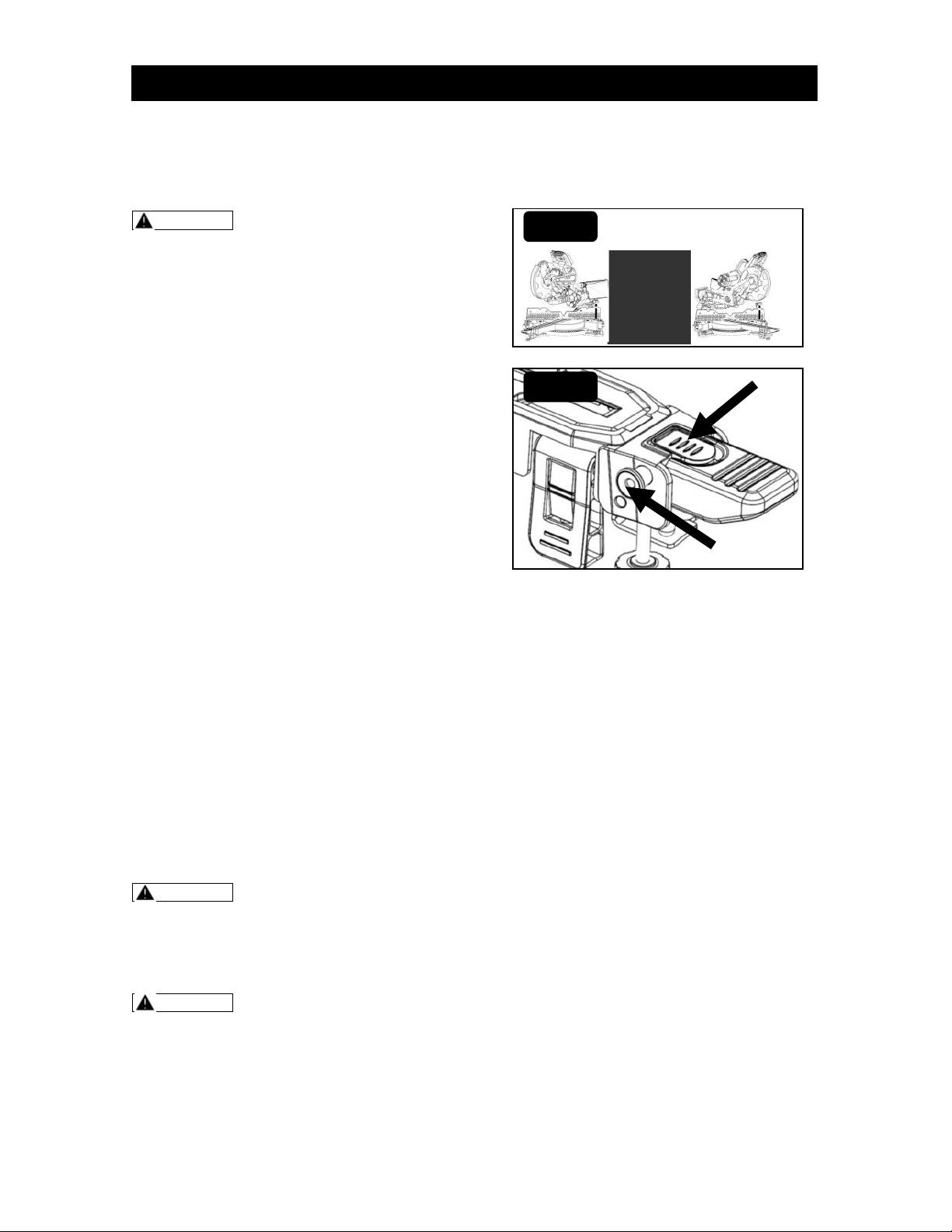
The miter-lock handle and miter-latch
button allow you to miter the working table
of your saw from 0° to 55° left/right.
1. Unplug the saw.
2. To miter the working table:
a) Lift the miter-lock handle to unlock
the working table and grip it to rotate
the working table.
b) Use thumb to push the miter-latch
button down and rotate the working
table to the miter angle desired on the
miter scale.
c) Push down the miter-lock handle to
lock the working table.
3. To override the common angle detent:
a) Lift the miter-lock handle to unlock
the working table and grip it to rotate
the working table.
a) Use thumb to push the miter-latch
button down and push the miter-latch
override button inside.
4. To reset the override function (Fig. 13)
a) Use thumb to push the miter-latch
button down (A).
b) Pull out the miter-latch override
button (B) to reset the override
function.
SETTING THE MITER ANGLE
WARNING Before performing any
assembly or adjustment, always
disconnect from power source. Failure
to unplug your saw could result in
accidental starting causing serious
injury.
WARNING To avoid risk of personal
injury, if movement is tight or if there is
play in the adjustment, have your saw
serviced by an authorized service
center before using or contact (866)
902-9690 for assistance.
The miter angle of this saw ranges from
left 55° to right 55° (Fig. 12). There are 9
often used angles on this saw, these
angles include: 0°, 15°, 22.5°, 31.6°, 45°
left and right. The miter-latch button is
used for setting the often used angles (Fig.
13).
To adjust the miter angle without the
miter latch button being used:
Step 1: Unplug the saw.
Step 2: Lift the miter-lock handle to unlock
the working table and grip it to rotate the
working table.
Step 3: Push the miter-latch button down
with thumb.
Step 4: Turn the working table to required
angle.
Step 5: Push down the miter-lock handle to
lock the working table in place.
Adjust the miter angle with the Miter
angle detent lever being used:
Step 1: Unplug the saw.
Step 2: Lift the miter-lock handle to unlock
the working table and grip it to rotate the
working table.
Step 3: Push the miter-latch button down
with thumb.
Step 4: Turn the working table to required
angle, release the miter-latch button, and
continue turning the miter table until the
detent pin engages into required miter
detent automatically.
Step 5: Push down the miter-lock handle to
lock the working table in place.
FIG. 12
FIG. 13
ASSEMBLY AND ADJUSTMENT
B
A
Page 18
SETTING THE CUTTING DEPTH
WARNING Before performing any
assembly or adjustment, always
disconnect from power source. Failure
to unplug your saw could result in
accidental starting causing serious
injury.
WARNING To avoid risk of personal
injury, if movement is tight or if there is
play in the adjustment, have your saw
serviced by an authorized service
center before using or contact (866)
902-9690 for assistance.
The depth stop block is a feature provided
to allow for full-depth cuts or non-through
cuts used to cut grooves.
To get a full-depth cuts
Step 1: Unplug the saw.
Step 2: Make sure the saw head is on the
full “Up” position by itself.
Step 3: Raise depth stop block (Fig. 14).
Step 4: Press down the saw head to get
full-depth cuts.
For non-through cuts (Fig. 15).
Step 1: Unplug the saw.
Step 2: Make sure the saw head is on the
full “Up” position by itself.
Step 3: Turn down the depth stop block.
Step 4: Plug the saw and press down the
saw head to cut and check the depth,
adjust the cutting depth to requirement by
turning the depth stop adjustment bolt.
Step 5: Tighten the lock-nut.
USING THE LED WORK LIGHT
This miter saw is equipped with a LED
work light on the left side of saw head (Fig.
16), there is a switch on the main handle.
USING THE LASER GUIDE
WARNING Do not attempt to repair
or disassemble the laser. If unqualified
persons attempt to repair this laser
product, serious injury may result. Any
repair required on this laser product
should be performed by an authorized
service center (866) 902-9690 for
assistance.
This miter saw is equipped with a laser
guide on the fixed safety guard (Fig.17),
there is a switch on the main handle.
1. Mark your work piece with a pencil at
the point to cut.
2. Press the laser switch to activate the
laser line.
3. Align your pencil line to the laser line.
4. Clamp your work piece in place using
the work piece clamp.
5. Follow the cutting instruction to cut.
FIG. 14
1
2
FIG. 16
FIG. 17
ASSEMBLY AND ADJUSTMENT
FIG. 15
Page 19
USING THE WORK PIECE
CLAMP
WARNING In some operations, the
clamp assembly may interfere with the
operation of the lower blade guard
assembly. To reduce the risk of serious
personal injury, always make sure that
there is no interference with the lower
blade guard prior to beginning any
cutting operation.
WARNING Before performing any
assembly or adjustment, always
disconnect from power source.
Failure to unplug your saw could result
in accidental starting causing serious
injury.
WARNING To avoid risk of personal
injury, if movement is tight or if there is
play in the adjustment, have your saw
serviced by an authorized service
center before using or contact (866)
902-9690 for assistance.
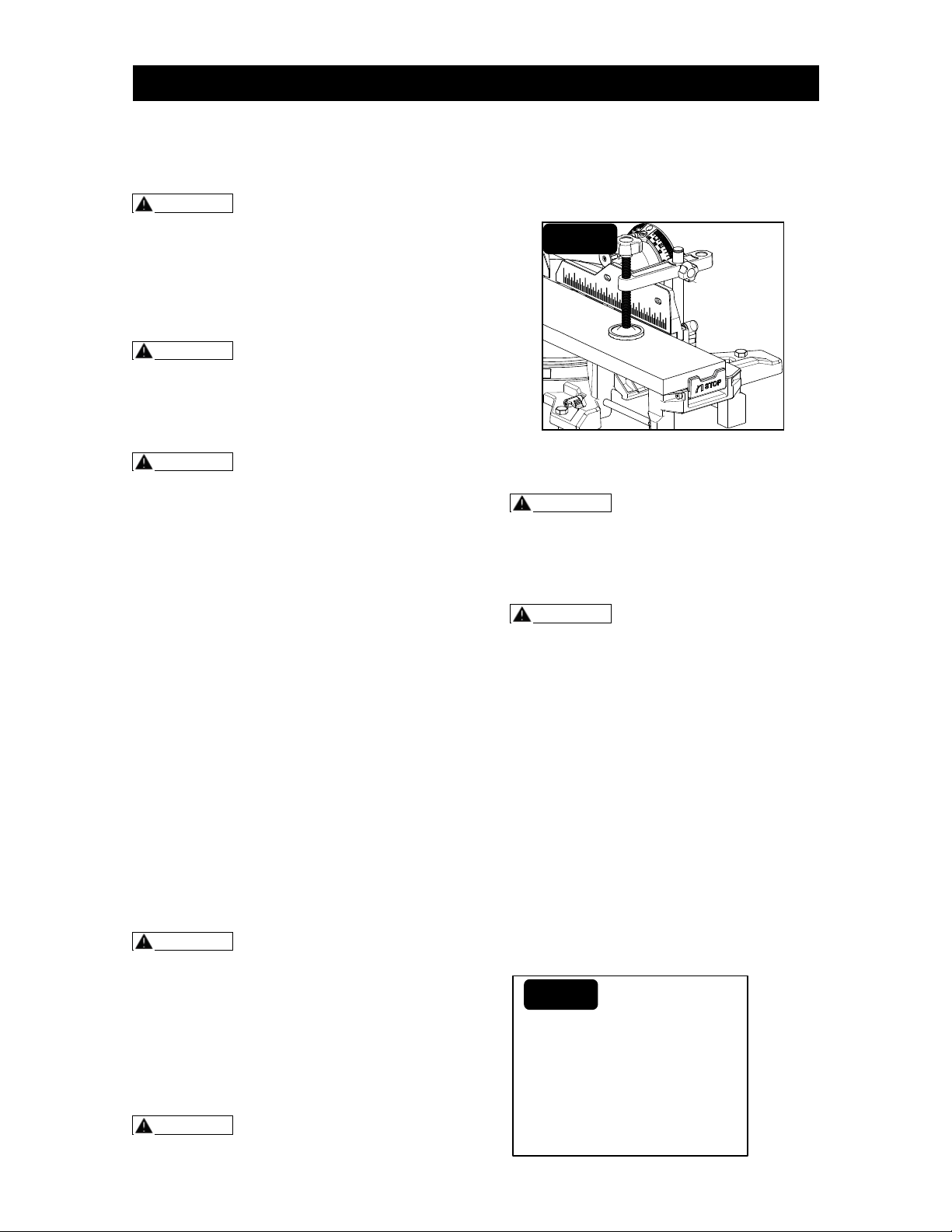
Step 1: Unplug the saw.
Step 2: Insert the work piece clamp into
one of the two receptacles in the base
behind the fence, until the end of the
clamp’s bar touches the bottom of
receptacle.
Step 3: Adjust the clamp height so it does
not touch the upper sliding fence, tighten
the knob on the horizontal bracket to lock
the height of the clamp.
Step 4: Move the saw head up and down,
forward and back to make sure it clears
the clamp.
Step 5: Turn knob of the work piece clamp
in clockwise direction to firmly clamp the
work piece in place (Fig. 18).
Step 6: To remove the work piece clamp,
turn knob of the work piece clamp in
counter-clockwise direction and pull out
the whole clamp to remove.
WARNING When using the work
piece clamp included to secure the
work piece, clamp the work piece on
one side of the blade only. The work
piece must remain unclamped on the
other side of the blade to prevent the
blade from binding in the work piece.
The work piece binding the blade will
cause the motor to stall and cause kick
back, result in possible serious injury.
WARNING There may be extreme
compound cuts where the clamp
cannot be used. Support work piece
with your hand outside the “No Hands”
zone. Do not try to cut short pieces that
cannot be clamped and cause your
hand to be in the “No Hands” zone.
USING THE EXTENSION TABLE
WARNING: Before performing any
assembly or adjustment, always
disconnect from power source. Failure
to unplug your saw could result in
accidental starting causing serious
injury.
WARNING To avoid risk of personal
injury, if movement is tight or if there is
play in the adjustment, have your saw
serviced by an authorized service
center before using or contact (866)
902-9690 for assistance.
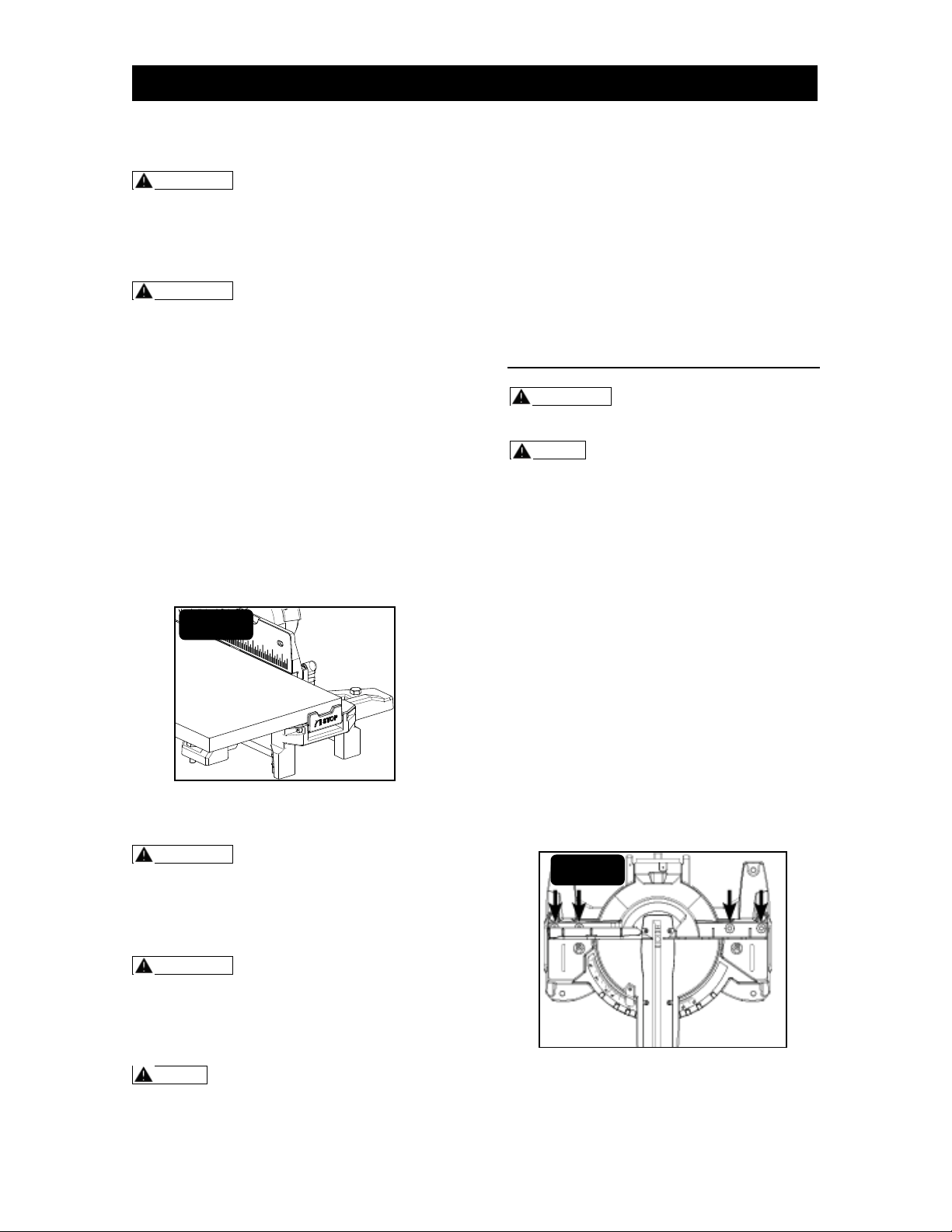
This saw is equipped with two extension
tables on the left and right side of the base
(Fig. 19). The extension tables provide
extra work piece support and are
especially useful when cutting long work
pieces.
Step 1: Unplug the saw.
Step 2: Loosening the extension table
locking lever in front of the saw base.
Step 3: Pull and slide the side extension
table to required position.
Step 4: Tighten the extension table lock
lever to keep the side extension table in
place.
FIG. 18
ASSEMBLY AND ADJUSTMENT
FIG. 19
Page 20
USING THE LENGTH STOP
WARNING Before performing any
assembly or adjustment, always
disconnect from power source. Failure
to unplug your saw could result in
accidental starting causing serious
injury.
WARNING To avoid risk of personal
injury, if movement is tight or if there is
play in the adjustment, have your saw
serviced by an authorized service
center before using or contact (866)
902-9690 for assistance.
It is very convenient to get all same length
work pieces by using the length stop. This
length stop is located on the extension
arms (Fig. 20).
The length stop is a pivoted block. To
using the length stop, press the lower part
of its side face. It will turn to form a right
angle to the table.
To fold the length stop, gently push the
upper part of it toward saw arm. It will
return to original position.
ACCURACY ADJUSTMENT
WARNING Before performing any
assembly or adjustment, always
disconnect from power source. Failure
to unplug your saw could result in
accidental starting causing serious
injury.
WARNING To avoid risk of personal
injury, if movement is tight or if there is
play in the adjustment, have your saw
serviced by an authorized service
center before using or contact (866)
902-9690 for assistance.
NOTE: The saw is factory set for
accurate cutting. After assembling it,
check for accuracy as directed in the
following section of this manual. If
shipping has influenced the settings,
refer to specific procedures explained
as following.
There are 5 accuracy adjustments totally:
(1) Squaring the blade to the fence.
(2) Squaring the blade to the table.
(3) Adjusting the blade to the miter table,
45° bevel, 0° miter.
(4) Bevel angle indicator adjustment.
(5) Miter angle indicator adjustment.
(1) SQUARING THE BLADE TO
THE FENCE
WARNING Failure to unplug your
saw could result in accidental starting
causing serious injury.
NOTE: To do accuracy adjustment,
you will need the combination square
(not supplied).
Step 1: Unplug the saw.
Step 2: Set the bevel and miter angles to
0°.
Step 3: Lower and lock the saw arm in the
“Down” position.
Step 4: Place the heel of a combination
square against the blade body (not teeth)
and the ruler of the square against the
fence.
Step 5: If the blade is not 90° to the fence,
completely unscrew the fence-locking knob
and remove the upper sliding fences.
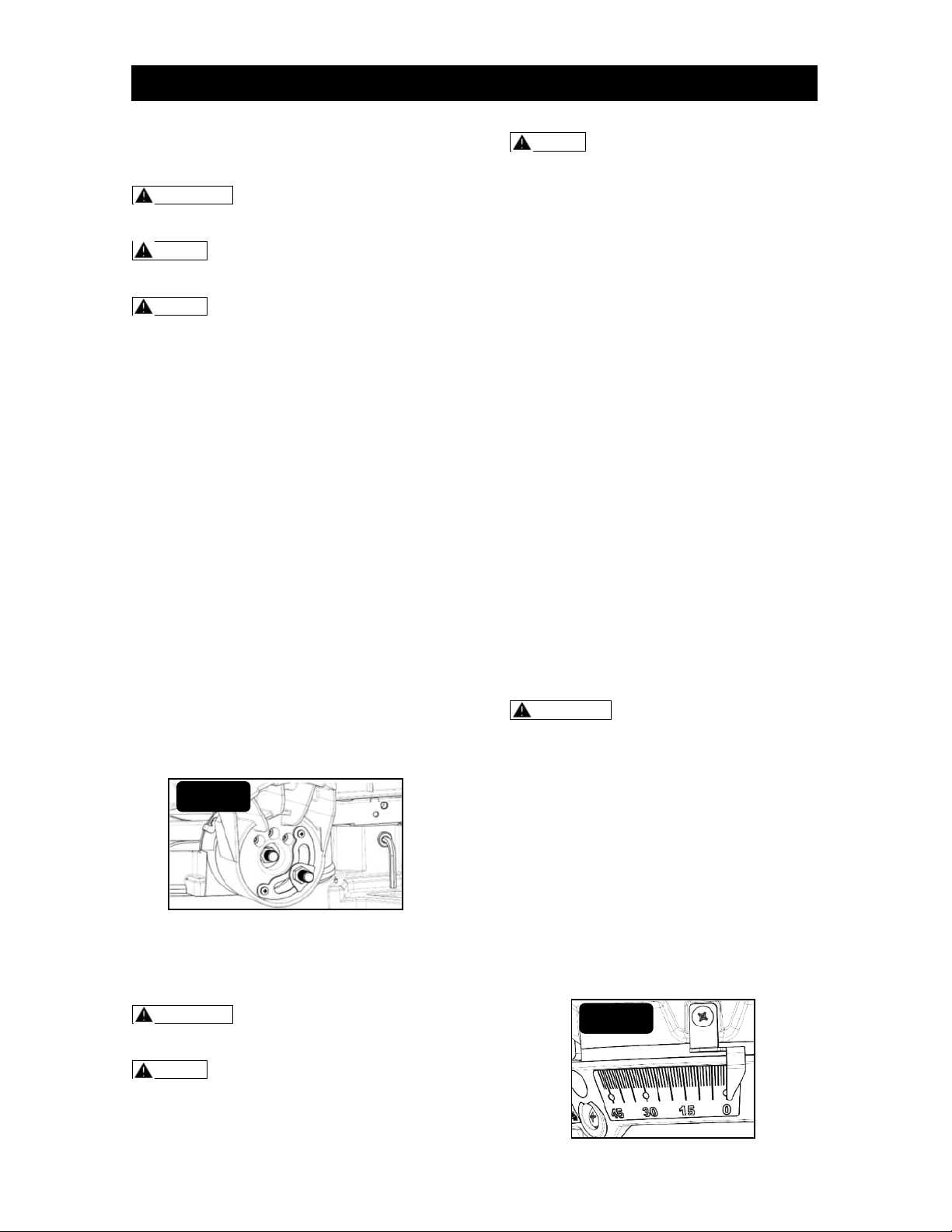
Step 6: Loosen four screws with hex key
(not supplied) and rotate the fence until the
square ruler is flush along its entire length.
Retighten the hex-head bolts (Fig. 21).
Step 7: Replace the upper sliding fences
and reattach the fence-locking knobs.
FIG. 20
FIG. 21
ASSEMBLY AND ADJUSTMENT
Page 21
(2) SQUARING THE BLADE TO
THE TABLE
WARNING Failure to unplug your
saw could result in accidental starting
causing serious injury.
NOTE: To do accuracy adjustment,
you will need the combination square
(not supplied).
NOTE: To correct angle accuracy of
the blade to the miter table, either by
squaring the blade to the table, or by
adjusting the blade to the miter table
45° bevel, 0° miter. You can get the
same results.
Step 1: Unplug the saw.
Step 2: Set the bevel & miter angles to 0°.
Step 3: Lower and lock the saw arm in the
“Down” position.
Step 4: Set the Miter angle at 0° and lock it
in place.
Step 5: Place a combination square on the
miter table with the rule against the table
and the heel of the square against the
body (not teeth) of saw blade.
Step 6: If the blade is not 90° to the Miter
table, loosen the bevel-lock lever.
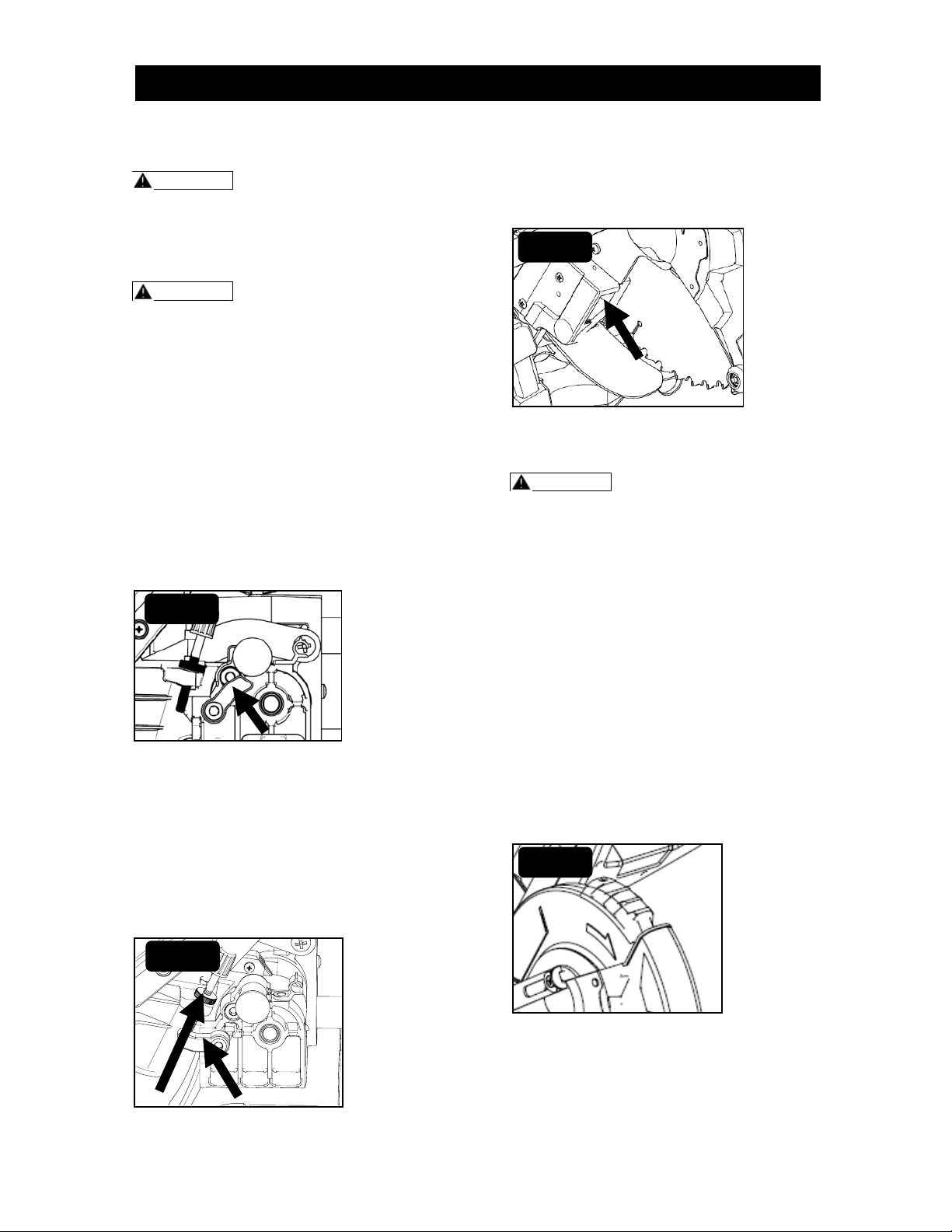
Step 7: Loosen the locking blots which are
located on the back of the saw (Fig. 22)
with small hex key (not supplied) and
carefully tilt the saw arm left or right until
the heel of the square is flush with the saw
blade along its entire length.
Step 8: Once the angle is set, retighten all
of the bolts and the bevel-lock lever.
(3) ADJUSTING THE BLADE TO
THE MITER TABLE 45°BEVEL,
0° MITER
WARNING Failure to unplug your
saw could result in accidental starting
causing serious injury.
NOTE: To do accuracy adjustment,
you will need the combination square
(not supplied) and remove the rule of
the combination square. Due to tight
checking place, only use the
combination Square’s head.
NOTE: To correct angle accuracy of
the blade to the miter table, either by
squaring the blade to the table, or by
adjusting the blade to the miter table
45° bevel, 0° miter. You can get the
same results.
Step 1: Unplug the saw.
Step 2: Set the bevel-angle to 45° and lock
it in place.
Step 3: Lower the saw arm and push the
locking pin to lock the saw arm in the
“Down” position.
Step 4: Set the miter-angle to 0° and lock it
in place.
Step 5: Place a combination square’s head
on the miter table with its long flat side
against the table and its 45° side against
the blade body (not teeth).
Step 6: If the blade is not 45° to the miter
table, loosen the locking blot which are
located on the back of the saw (Fig. 22)
with small hex key (not supplied) and
carefully tilt the saw arm left or right until
the 45° side of the square is flush with the
saw blade along its entire length.
Step 7: Once the angle is set, retighten all
of the bolts and the bevel-lock lever.
(4) BEVEL-ANGLE INDICATOR
ADJUSTMENT
WARNING Failure to unplug your
saw could result in accidental starting
causing serious injury.
Step 1: Unplug the saw.
Step 2: Place the bevel angle at 0°
position, push down the bevel–lock lever to
lock it in place.
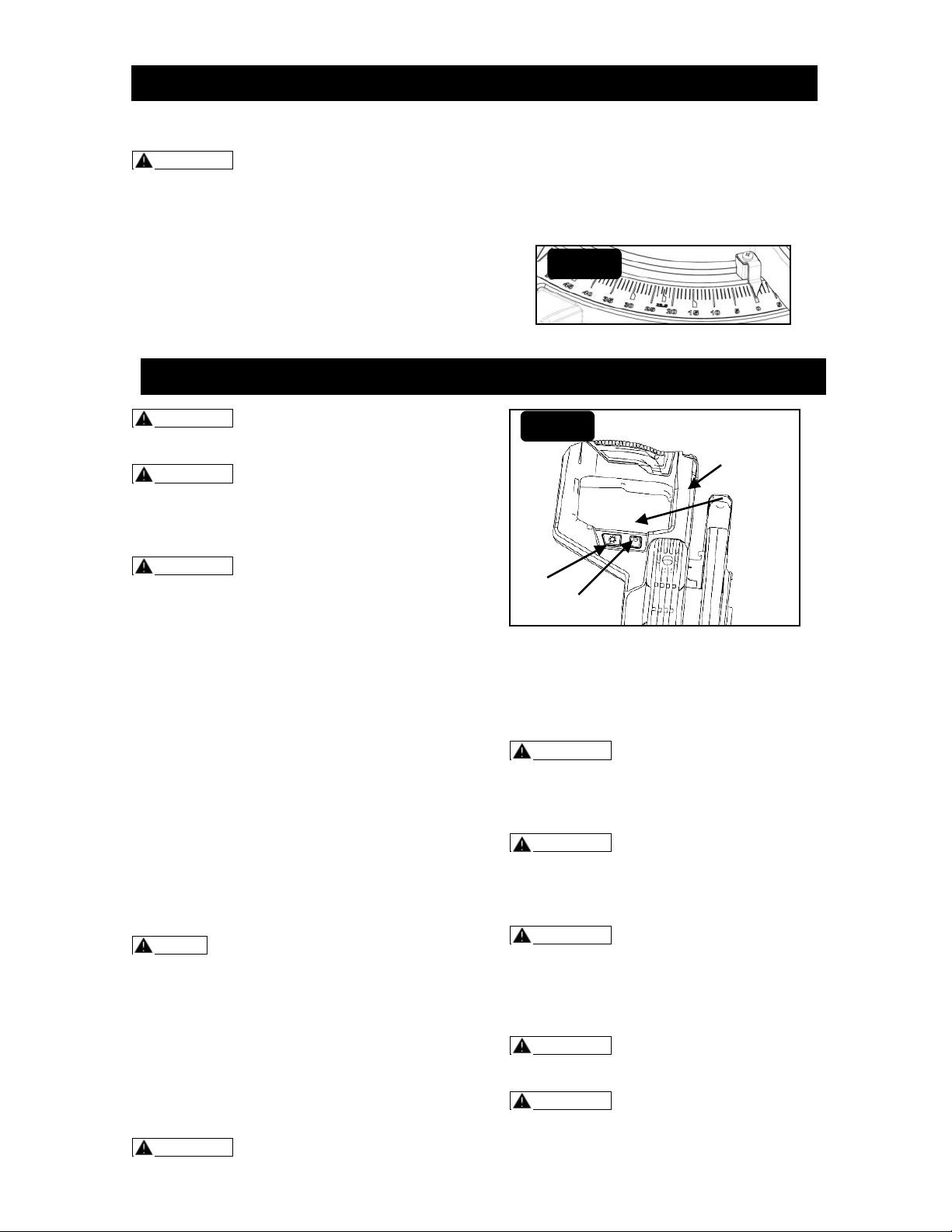
Step 3: Check to see if the bevel-angle
indicators of both sides are pointing to 0°
on the bevel scale (Fig. 23).
Step 4: If the indicator is not pointing to 0°,
loosen the bevel-angle indicator screw,
adjust the indicator to 0° on bevel-angle
scale,
Step 5: Retighten the bevel-angle indicator
screw.
FIG. 22
FIG. 23
ASSEMBLY AND ADJUSTMENT
Page 22
(5) MITER-ANGLE INDICATOR
ADJUSTMENT
WARNING Failure to unplug your
saw could result in accidental starting
causing serious injury.
Step 1: Unplug the saw.
Step 2: Place the working table at the zero
position, make sure that miter-detent pin is
secured at the center, and push down the
miter lock handle to lock the working table.
Step 3: Check to see if the miter-angle
indicator is pointing to 0° on the Miter scale
(Fig. 24).
Step 4: If the indicator is not pointing to 0°,
loosen the miter-angle indicator screw and
adjust the miter-angle indicator to the “0”
mark on the miter scale.
Step 5: Retighten the miter-angle indicator
screw.
WARNING To reduce the risk of
injury, wear safety goggles or glasses
with side shields.
WARNING before each use, verify
that the blade is free of cracks, loose
teeth, missing teeth, or any other
damage. Do not use if damage is
observed or suspected.
WARNING Always wait for the blade
to stop completely, and unplug the tool
before changing accessories or making
adjustments.
SWITCH ON/OFF
For safety reasons, the On/Off trigger is
designed to prevent accidental starts. The
On/off trigger cannot be locked. It must
remain pressed during the entire operation
(Fig. 25).
To Switch On
Step 1: Press the lock-off button to
disengage the lock.
Step 2: Squeeze the On/Off trigger and
release the lock-off button.
To Switch Off
Release the On/Off trigger, the lock-off
button will engage the safety switch
automatically.
NOTE: Make the On/Off trigger
childproof. Insert a small padlock (not
included) or cable with padlock through
the holes in the On/Off trigger, locking
the trigger and preventing children or
other unauthorized users from turning
on the saw.
Before operating this saw the following
items should be taken into
consideration. Ignoring these items
may cause serious injuries:
WARNING Do not attempt to modify
this saw or create accessories not
recommended for use with this saw.
Any such alteration or modification is
misuse and could result in a hazardous
condition leading to possible serious
personal injury.
WARNING Do not connect to a power
supply until assembly is complete.
Failure to comply could result in
accidental starting and possible serious
personal injury.
WARNING Do not start this saw
without checking for interference
between the blade and the fence.
Damage could result to the blade if it
strikes the fence during operation.
WARNING To avoid serious personal
injury, always tighten the miter-lock
knob and bevel-lock lever securely
before making a cut. Failure to do so
could result in movement of the control
arm or miter table while making a cut.
WARNING To reduce the risk of
injury, return bar to the full rear position
after each crosscut operation.
WARNING To avoid serious personal
injury, always keep hands outside of
(Continued on page 23)
OPERATION
FIG. 24
Lock-off Button
On/Off
Trigger
FIG. 25
Laser
Switch
LED Work
Light Switch
ASSEMBLY AND ADJUSTMENT
Page 23
the “No-Hands Zone”, as marked on the
saw table, or at least 3.25” away from
the blade. Never perform any cutting
operation “freehand” (i.e., without
holding the work piece against the
fence), because the blade could grab
the work piece, causing it to slip and
twist.
CAUTION Never use another person
as an additional support for a work
piece that is longer or wider than the
basic saw table, or to help feed,
support, or pull the work piece.
NOTE: When cutting a long work
piece, use the side extension block or a
3.0” high block (not supplied) to
support the work piece.
NOTE: Never operate the saw
without all guards securely in place and
in good operating condition.
CHOP CUTS
Chop cuts are used mainly for narrow
pieces. During chop cut, the saw arm is
pushed towards the end and the slide-lock
knob is fixed.
WARNING Failure to unplug the saw
could result in accidental start up,
which may cause serious injury.
WARNING Use a clamping position
that does not interfere with the cutting
operation.
NOTE: This tool has multi-slide bar
of two sections. Each section can be
locked / unlocked by its own locking
knob.
Step 1: Unplug the saw.
Step 2: Loosen the slide-lock knobs to
release the multi-slide bars.
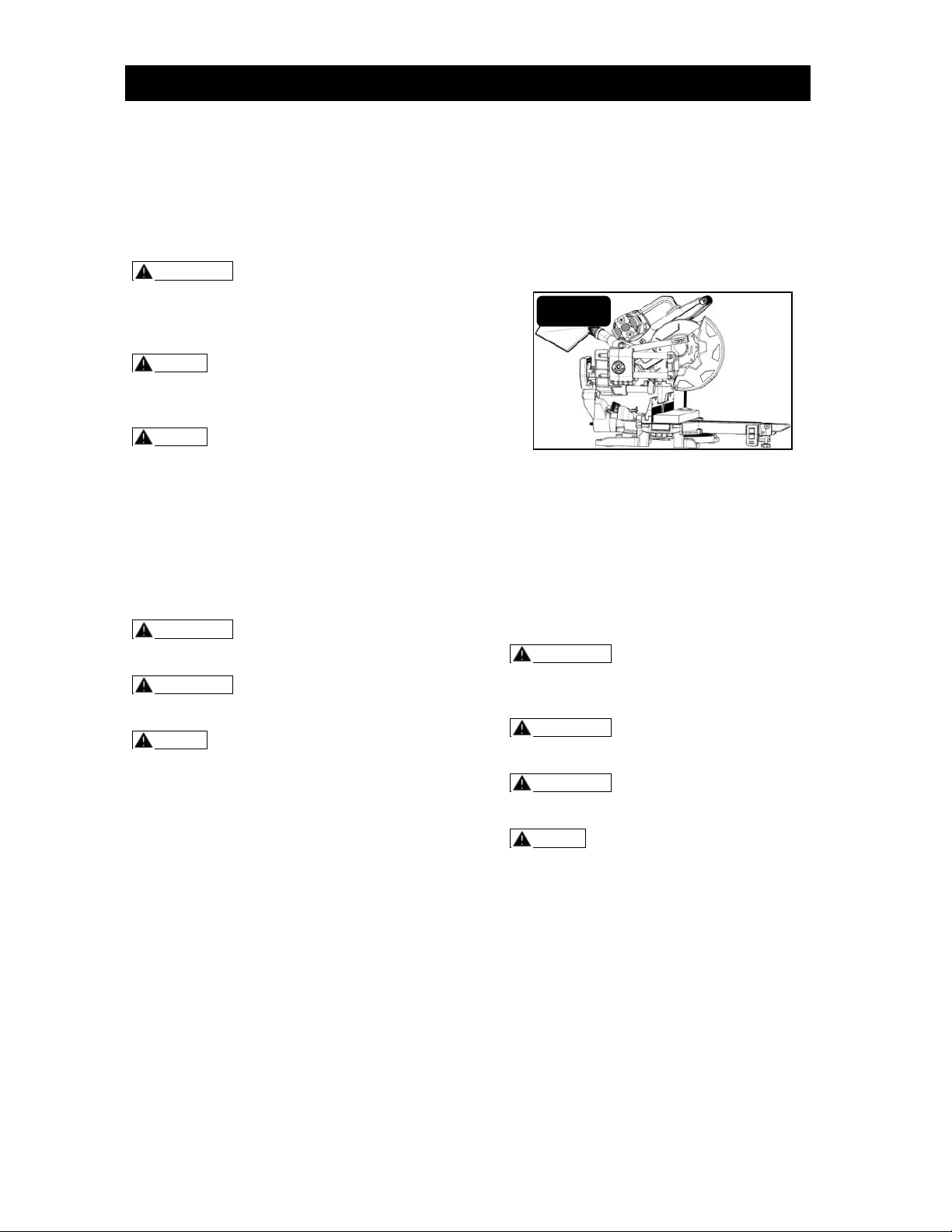
Step 3: Push and slide the saw arm to the
rear as far as it will go (Fig. 26).
Step 4: Tighten the slide-lock knobs.
Step 5: Properly position the work piece.
Make sure that the work piece is clamped
firmly against the table and the fence.
Ensure the work piece clamp does not
interfere with the cutting operation.
Step 6: Plug the saw into a power source.
Step 7: Before turning the saw on, lower
the saw arm to make sure that the clamp
clears the moveable safety guard and the
saw arm.
Step 8: Squeeze On/Off trigger. Always
allow the blade to reach full speed before
cutting. Lower the saw arm while open the
moveable safety guard to make the cut.
Step 9: After finishing the cut, release
trigger and wait until blade comes to a
complete stop before returning the saw
arm to the raised position
Step 10: Remove the work piece and
repeat. When cutting a long work piece or
do repeated cutting, use extension table
and length stop.
SLIDE CUTS
Slide cuts are used mainly for wide pieces.
During slide cut, the slide-lock knob is
loosened and the saw arm is pulled
towards the operator before triggered on.
When cutting, the saw arm is lowered to
the work piece and then pushed to the rear
of the saw to make the cut.
WARNING Never pull the saw toward
you during a cut. The blade can
suddenly climb up on top of the work
piece and force itself toward you.
WARNING Failure to unplug the saw
could result in accidental start up,
which may cause serious injury.
WARNING Use a clamping position
that does not interfere with the cutting
operation.
NOTE: This tool has multi-slide bar
of two sections. Each section can be
locked / unlocked by its own locking
knob.
Step 1: Unplug the saw.
Step2: Loosen the slide-lock knobs to
release the multi - slide bars.
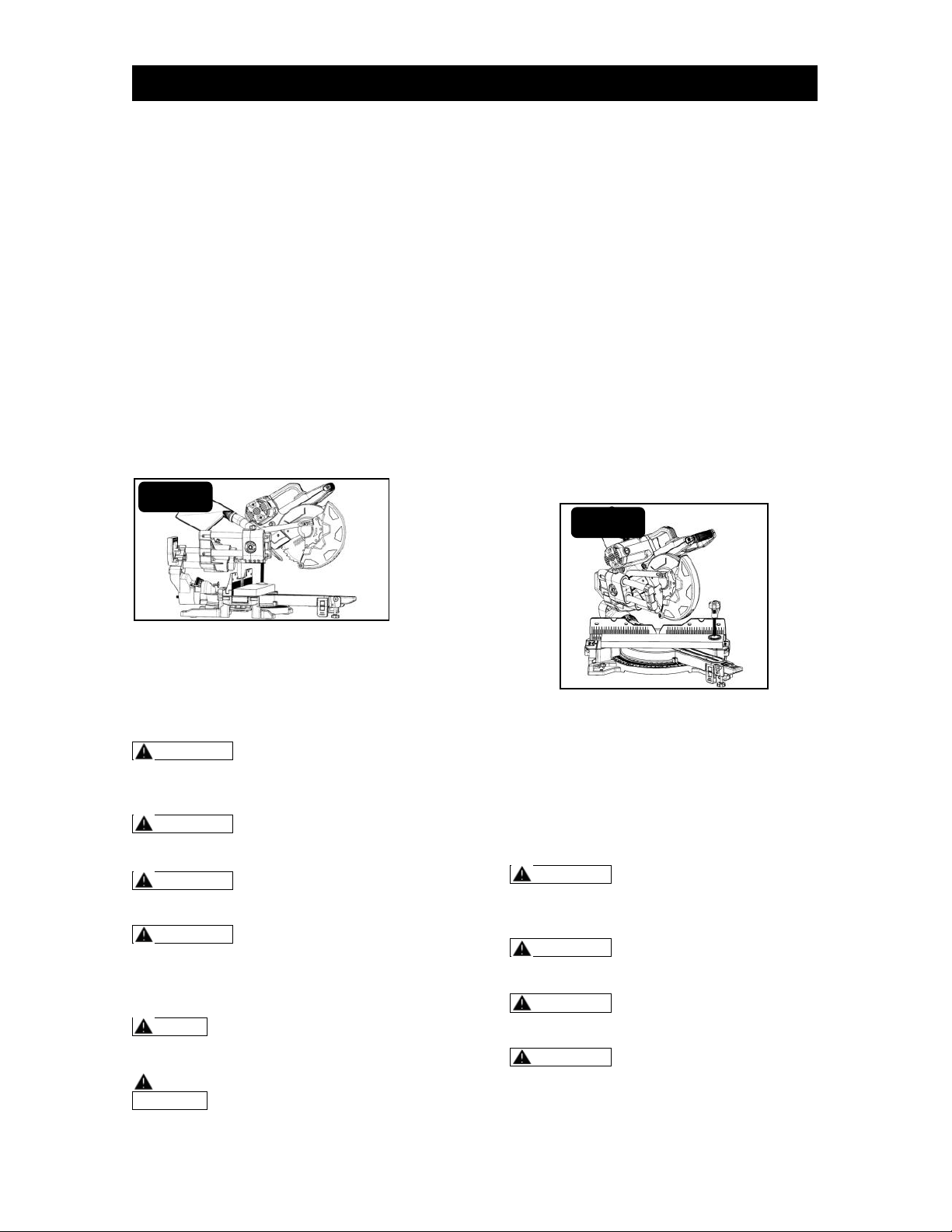
Step3: Pull the saw arm toward the
operator until the blade clears the front of
the work piece or to its maximum
extension (Fig. 27).
Step 4: Properly position the work piece.
Make sure that the work piece is clamped
firmly against the table and the fence.
Ensure the work piece clamp does not
interfere with the cutting operation.
(Continued on page 24)
FIG. 26
OPERATION
Page 24
Step 6: Plug the saw into a power source.
Step 7: Squeeze On/Off trigger. Always
allow the blade to reach full speed before
cutting. Lower the saw arm and make the
cut.
Step 8: Lower the saw arm all the way
down while open the moveable guard and
cut through the edge of the work piece.
Step 9: Smoothly push the saw arm toward
the fence all the way to the rear position to
complete the cut. DO NOT FORCE.
Step 10: After finishing the cut, release
trigger and wait until the blade comes to a
complete stop before returning the saw
arm to the raised position.
Step 11: Remove the work piece and
repeat. When cutting a long work piece or
do repeated cutting, use extension table
and length stop.
MITER CUTS
Miter cuts are made with the miter table
set at an angle other than 0°, either left or
right during chop cut and slide cut.
WARNING Never pull the saw toward
you during a cut. The blade can
suddenly climb up on top of the work
piece and force itself toward you.
WARNING Failure to unplug the saw
could result in accidental start up,
which may cause serious injury.
WARNING Use a clamping position
that does not interfere with the cutting
operation.
WARNING To avoid serious personal
injury, always tighten the miter - lock
lever securely before making a cut.
Failure to do so could cause serious
injury.
NOTE: This saw has multi-slide bar
of two sections. Each section can be
locked/unlocked by the locking knob.
NOTE: When performing any miter
cuts, the upper fence could be moved
depending on your requirement.
Step 1: Unplug the saw.
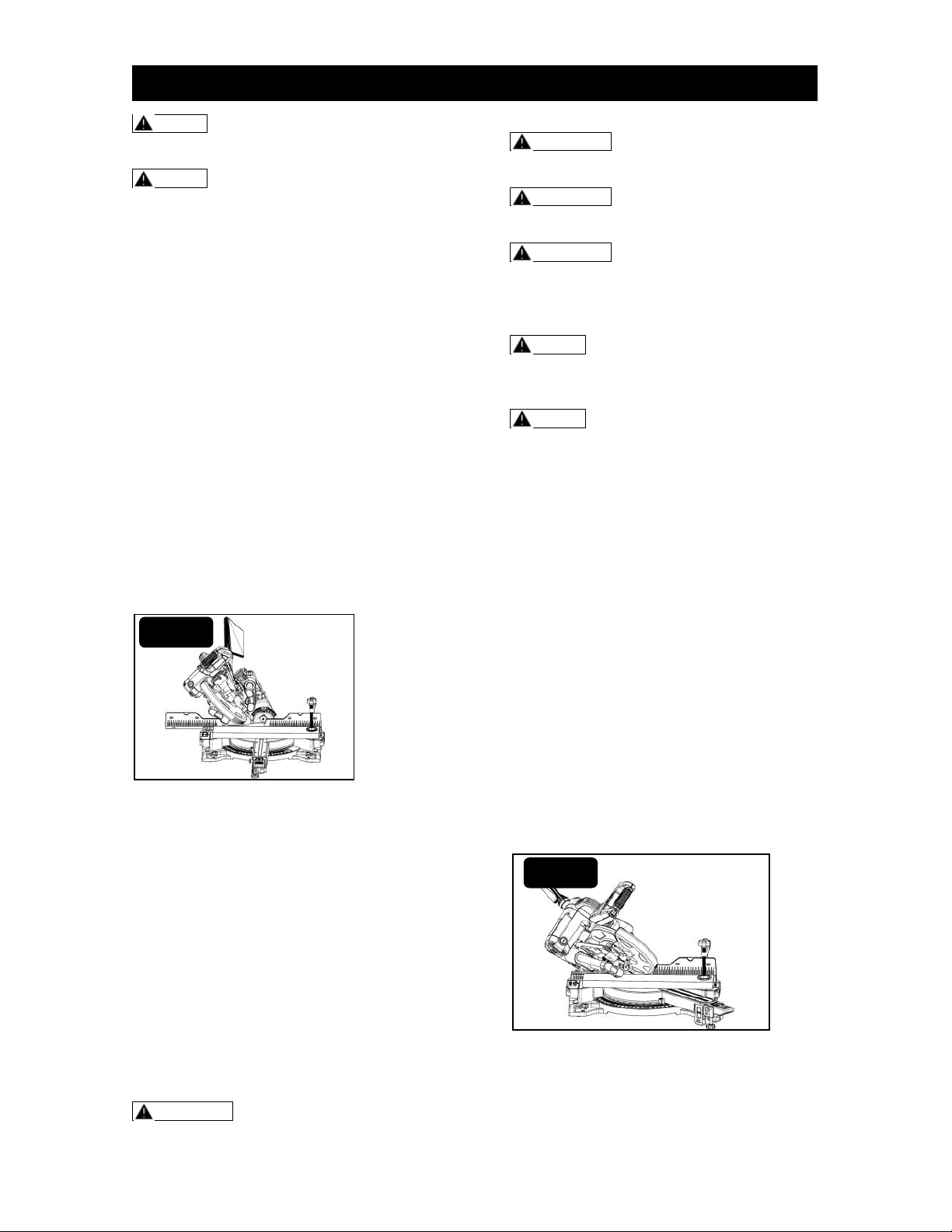
Step 2: Set the bevel angle at 0° and turn
the miter table to desired angle using
either the miter-detent or the miter scale
(refer to ‘Setting the miter angle’ section )
(Fig. 28).
Step 3: Properly position the work piece.
Make sure that the work piece is clamped
firmly against the table and the fence.
Ensure the work piece clamp does not
interfere with the cutting operation.
Step 4: Carefully follow all instructions for
applicable chop cuts or slide cuts
according to your requirement.
Step 5: After finishing the cut, release
trigger and wait until the blade comes to a
complete stop before returning the saw
arm to the raised position.
Step 6: Remove the work piece and
repeat. When cutting a long work piece or
do repeated cutting, use extension table
and length stop.
BEVEL CUTS
Bevel cuts are made with the blade at an
angle other than 90° to the miter table. A
straight bevel cut is made with the miter
table set at the 0° position and the saw
arm set at a bevel angle between 0° and
45°, right or left.
WARNING Never pull the saw toward
you during a cut. The blade can
suddenly climb up on top of the work
piece and force itself toward you.
WARNING Failure to unplug the saw
could result in accidental start up,
which may cause serious injury.
WARNING Use a clamping position
that does not interfere with the cutting
operation.
WARNING To avoid serious personal
injury, always tighten the bevel-lock
lever securely before making a cut.
Failure to do so could cause serious
injury.
(Continued on page 25)
FIG. 27
FIG. 28
OPERATION
Page 25
NOTE: This tool has multi-slide bar
of two sections. Each section can be
locked/unlocked by the locking knob.
NOTE: When performing any bevel
cuts, the upper fence can slide left or
right depending on your requirement.
Step 1: Unplug the saw.
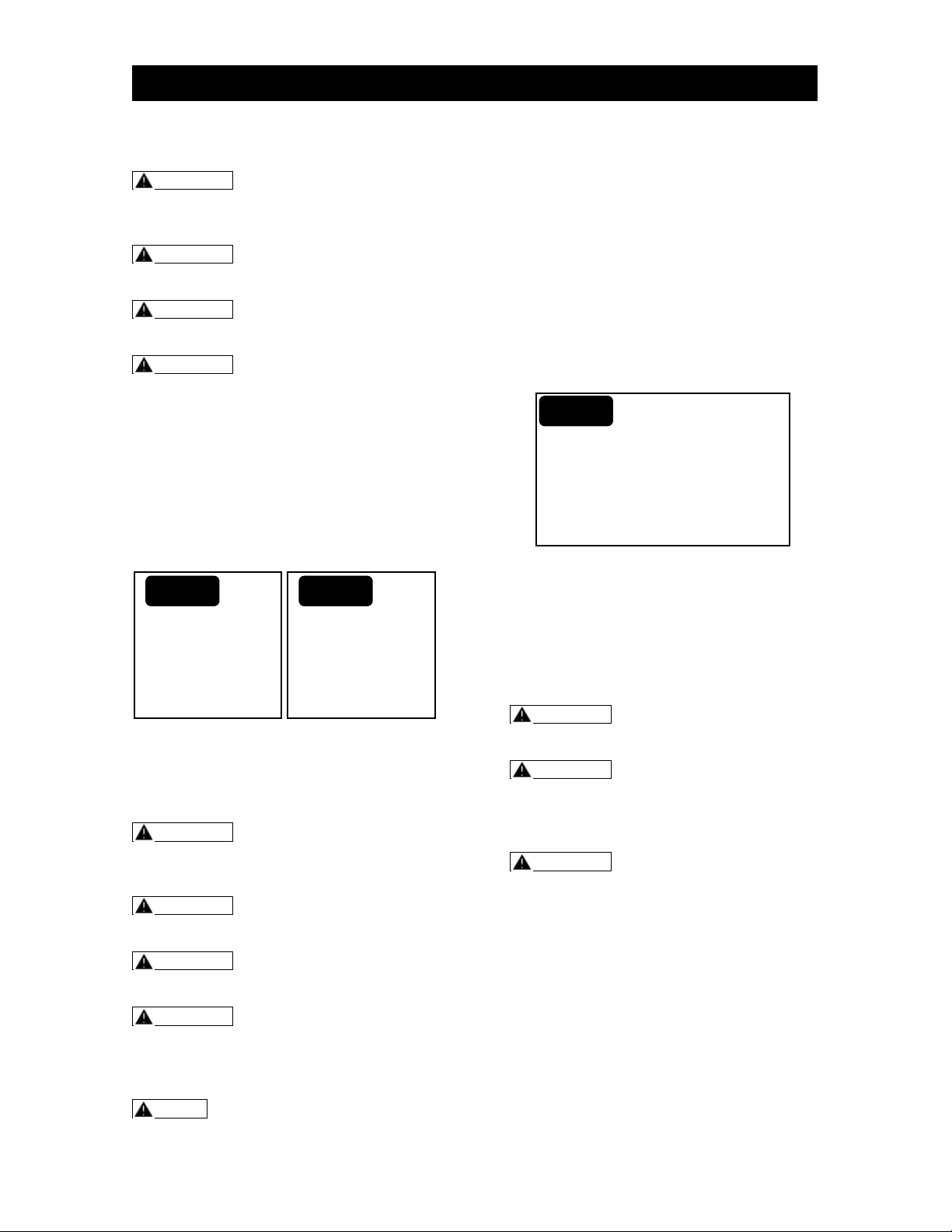
Step 2: Set the bevel angle at desired
angle and turn the miter table to 0° (refer
to ‘Setting the bevel angle’ section) (Fig.
29).
Step 3: Properly position the work piece.
Make sure that the work piece is clamped
firmly against the table and the fence.
Ensure the work piece clamp does not
interfere with the cutting operation.
Step 4: Carefully follow all instructions for
applicable chop cuts or slide cuts
according to your requirement.
Step 5: After finishing the cut, release
trigger and wait until the blade comes to a
complete stop before returning the saw
arm to the raised position.
Step 6: Remove the work piece and
repeat. When cutting a long work piece or
do repeated cutting, use extension table
and length stop.
COMPOUND MITER CUTS
Compound miter cuts are used for
decorative moldings, picture frames and
other fine joinery. To make this type of cut,
the miter table must be rotated to the
correct miter angle and the saw arm must
be tilted to the correct bevel angle.
Always take special care when making
compound miter cuts, due to the
interaction of the miter angle setting and
bevel angle setting, the first angle setting
should be checked after setting the second
angle, Once the two correct settings for a
particular cut have been obtained, always
make a test cut.
WARNING Never pull the saw toward
you during a cut. The blade can
suddenly climb up on top of the work
piece and force itself toward you.
WARNING Failure to unplug the saw
could result in accidental start up,
which may cause serious injury.
WARNING Use a clamping position
that does not interfere with the cutting
operation.
WARNING To avoid serious personal
injury, always tighten the bevel-lock
lever and miter-lock lever securely
before making a cut. Failure to do so
could cause serious injury.
NOTE: This tool has multi-slide bar
of two sections. Each section can be
locked /unlocked by its own locking
knob.
NOTE: When performing any
compound miter cuts, the upper fence
could be moved depending on your
requirement.
Step 1: Unplug the saw.
Step 2: Tilt the saw head to desired bevel
angle and turn the miter table to desired
angle (Fig. 30).
Step 3: Properly position the work piece.
Make sure that the work piece is clamped
firmly against the table and the fence.
Ensure the work piece clamp does not
interfere with the cutting operation.
Step 4: Carefully follow all instructions for
applicable chop cuts or slide cuts
according to your requirement.
Step 5: After finishing the cut, release
trigger and wait until the blade comes to a
complete stop before returning the saw
arm to the raised position.
Step 6: Remove the work piece and
repeat. When cutting a long work piece or
do repeated cutting, use extension table
and length stop.
FIG. 29
FIG. 30
OPERATION
Page 26
CUTTING WARPED MATERIAL
WARNING Never pull the saw toward
you during a cut. The blade can
suddenly climb up on top of the work
piece and force itself toward you.
WARNING Failure to unplug the saw
could result in accidental start up,
which may cause serious injury.
WARNING Use a clamping position
that does not interfere with the cutting
operation.
WARNING To avoid kickback and
serious personal injury, never position
the concave side of bowed or warped
material against the fence.
When cutting warped material, be certain
that the material to be cut is positioned on
the miter table with the convex side
against the fence (Fig. 31). If the warped
material is positioned the wrong way, it will
pinch the blade near the end of the cut
(Fig. 32).
CUTTING GROOVES
The depth-stop adjustment is a feature for
cutting grooves in the work piece. A
groove should be cut as a slide cut.
WARNING Never pull the saw toward
you during a cut. The blade can
suddenly climb up on top of the work
piece and force itself toward you.
WARNING Failure to unplug the saw
could result in accidental start up,
which may cause serious injury.
WARNING Use a clamping position
that does not interfere with the cutting
operation.
WARNING To avoid serious personal
injury, always tighten the bevel-lock
lever and miter-lock lever securely
before making a cut. Failure to do so
could cause serious injury.
NOTE: This tool has multi-slide bar
of two sections. Each section can be
locked/ unlocked by its own locking
knob.
Step 1: Unplug the saw.
Step 2: Loosen the lock nut, rotate the
depth stop adjustment bolt to the desired
cutting depth, and retighten the lock nut.
Step 3: Place a proper spacer between the
work piece and the fence.
Step 4: Plug the saw into a power source.
Step 5: Cut the two outside edges of the
groove.
Step 6: To create the groove, use a wood
chisel or make multiple passes with a
router to remove the material between the
outside edges (Fig. 33).
CUTTING BASE MOLDING
Base moldings and many other moldings
can be cut on a miter saw. The setup of
the saw depends on the base molding
characteristics and applications. Perform
practice cuts on scrap materials to achieve
the best result.
WARNING Failure to unplug the saw
could result in accidental start up,
which may cause serious injury.
WARNING To avoid serious personal
injury, always tighten the bevel-lock
lever or miter-lock lever securely before
making a cut. Failure to do so could
cause serious injury.
WARNING Always use the work
piece clamp, and place tape on the area
being clamped to avoid marks on the
work piece.
Step 1: Unplug the saw.
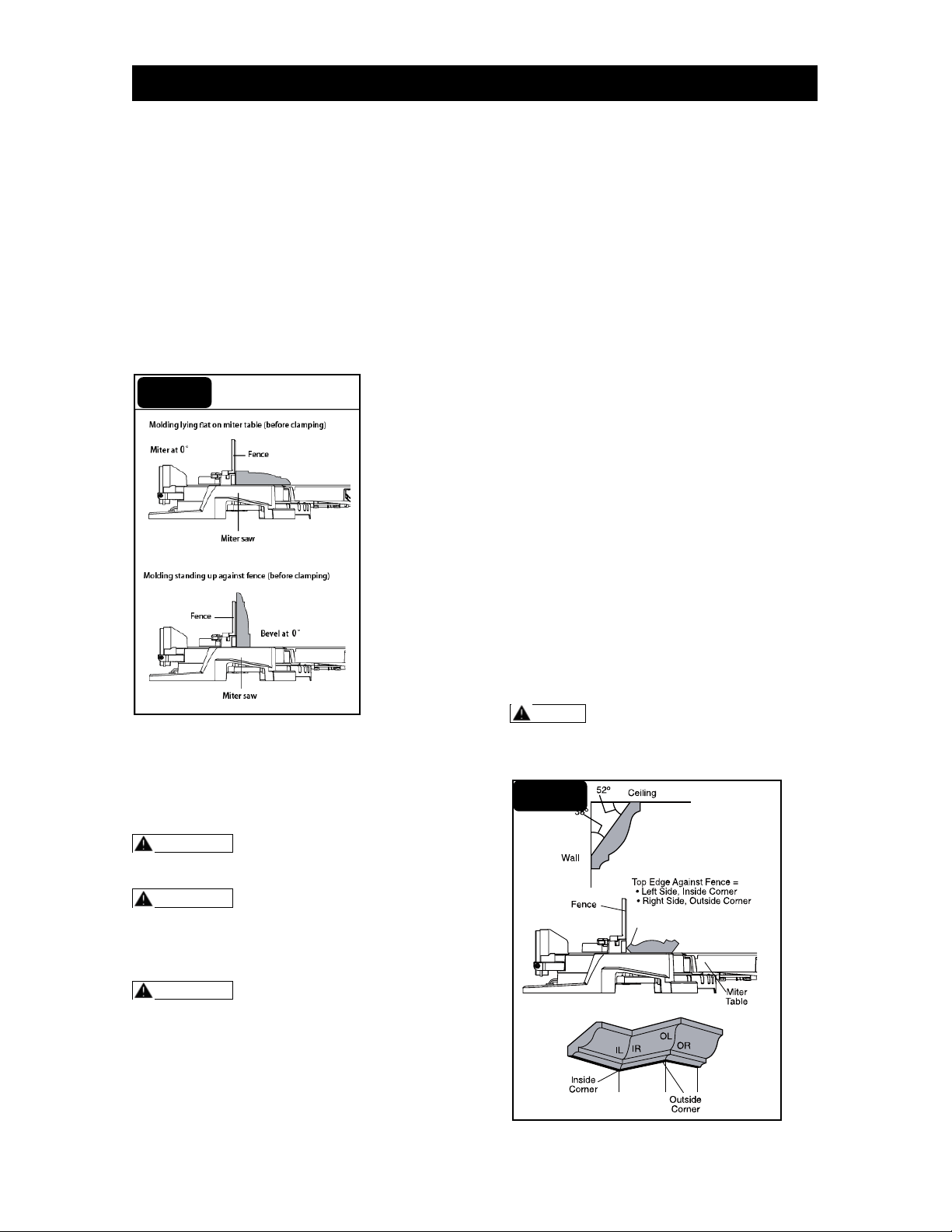
Step 2: Always make sure that the molding
rests firmly against the fence (bevel 0°)
and table (miter 0°). Use the work piece
clamp provided or use C-clamps (not
supplied), and place tape on the area
being clamped to avoid marks on the work
piece (Fig. 34).
Step 3: Tilt the saw head to desired bevel
angle and turn the miter table to desired
angle.
(Continued on page 27)
FIG. 31
FIG. 32
FIG. 33
OPERATION
Page 27
Step 4: Reduce splintering by taping the
cut area prior to making the cut.
Step 5: Plug the saw into a power source.
Step 6: Carefully follow all instructions for
applicable miter, bevel or compound cuts.
Step 7: After finishing the cut, release
trigger and wait until the blade comes to a
complete stop before returning the saw
arm to the raised position.
Step 8: Remove the work piece and
repeat.
When cutting a long work piece or do
repeated cutting, use extension table and
length stop.
CUTTING CROWN MOLDING
This miter saw is ideal for cutting crown
molding. To fit properly, it must be
compound-mitered with extreme accuracy.
WARNING Failure to unplug the saw
could result in accidental start up,
which may cause serious injury.
WARNING To avoid serious personal
injury, always tighten the bevel-lock
lever or miter-lock lever securely before
making a cut. Failure to do so could
cause serious injury.
WARNING Always use the work
piece clamp, and place tape on the area
being clamped to avoid marks on the
work piece.
CUTTING USA CROWN
MOLDING
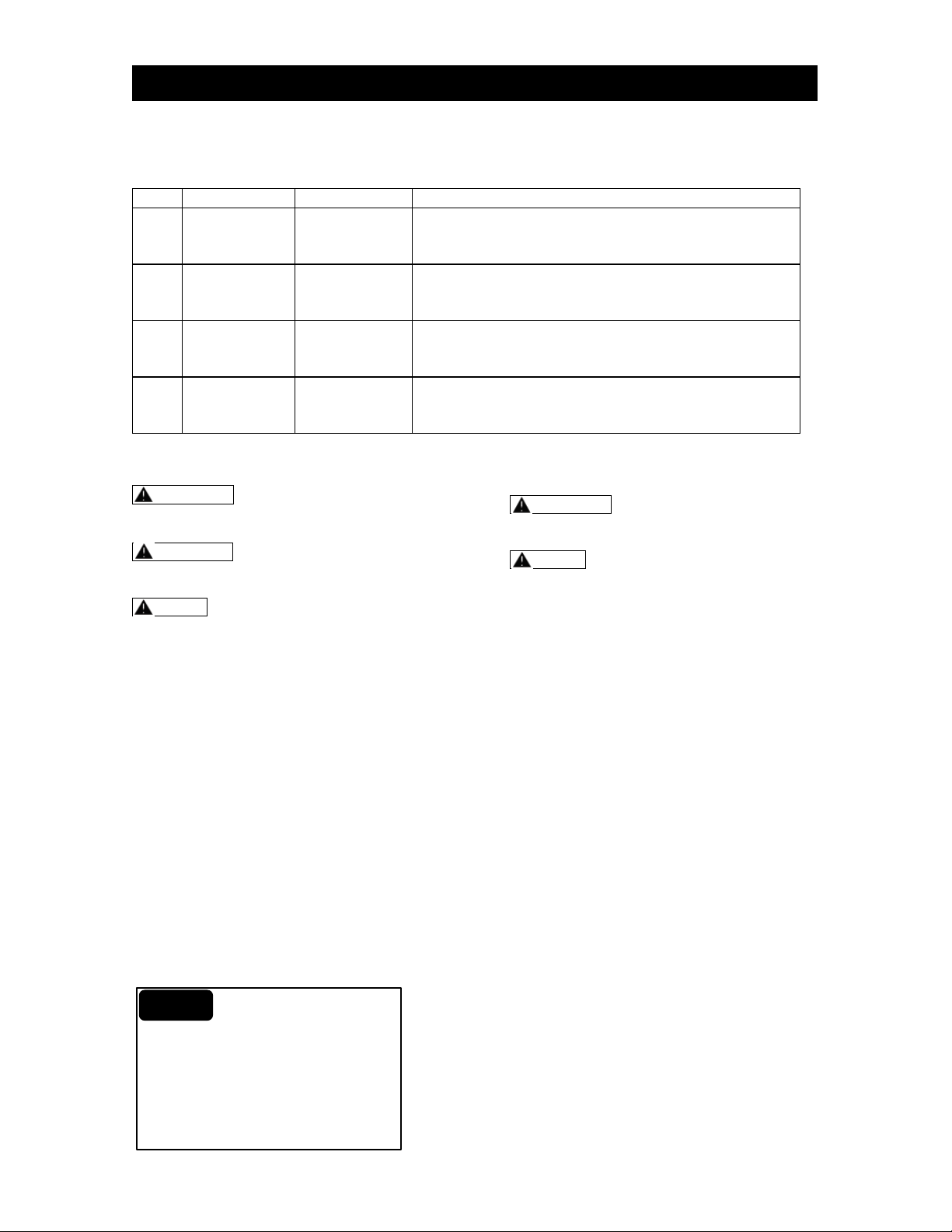
USA Crown molding has a high top rear
spring angle (the section that fits flat
against the ceiling) of 52° and a bottom
rear spring angle (the section that fits flat
against the wall) of 38°.
Step 1: Unplug the saw.
Step 2: Set the bevel angle at 33.9°, miter
angle at 31.6° either left or right,
depending on the desired cut for the
application. Tighten the miter lock knob
and the bevel lock lever.
Step 3: Place tape on the area being
clamped to avoid marks on the work piece,
then position work piece with its back flat
on the saw table. Always place top edge of
the molding against fence. Clamp work
piece in place using the work piece clamp.
Step 4: Reduce splintering by taping the
cut area prior to making the cut.
Step 5: Plug the saw into a power source.
Step 6: Carefully follow all instructions for
applicable miter, bevel or compound cuts.
Step 7: After finishing the cut, release
trigger and wait until the blade comes to a
complete stop before returning the saw
arm to the raised position.
Step 8: Remove the work piece and
repeat. When cutting a long work piece or
repeated cutting, use extension table and
length stop.
NOTE: Miter and bevel setting for
standard crown molding cuts. The pre-
condition: crown molding is milled
consistently. Wall corner is exact 90°.
FIG. 34
FIG. 35
OPERATION
Page 28
See the following table for correct angle settings and correct positioning of the crown
molding on the miter table.
Key
Miter Setting
Bevel Setting
Type of Cut
IL
31.6° Right
33.9° Left
Inside corner - Left side
1. Position top of molding against fence.
2. LEFT side is finished piece.
IR
31.6° Left
33.9° Right
Inside Corner - Right side
1. Position top of molding against fence.
2. RIGHT side is finished piece.
OL
31.6° Left
33.9° Right
Outside Corner - Left side
1. Position top of molding against fence.
2. LEFT side is finished piece.
OR
31.6° Right
33.9° Left
Outside Corner - Right side
1. Position top of molding against fence.
2. RIGHT side is finished piece.
TO REMOVE THE BLADE
WARNING Before performing any
maintenance or cleaning work, always
unplug the saw!
WARNING Failure to unplug the saw
could result in accidental start up,
which may cause serious injury.
NOTE: Always wear gloves when
handling or working near blade which
located on the safety guard.
Step 1: Unplug the saw.
Step 2: Raise the saw arm and lift the
moveable safety guard.
Step 3: Loosen screw with a Phillips
screwdriver(not included)(Step A2,Fig. 36).
Step 4: Lift and hold the lower blade guard
to expose the threaded blade.
Step 5: Press and hold the spindle-lock
button, and rotate the blade at the same
time until the blade is locked into position.
Step 6: Use the blade wrench (included) to
turn the threaded blade screw clockwise.
Remove the blade screw and the outer
blade flange.
Step 7: Remove the blade, wipe the blade
flanges and spindle to remove any dust
and debris, put the outer blade flange back
and tighten the blade screw (Fig. 36).
TO INSTALL THE BLADE
WARNING Failure to unplug the saw
could result in accidental start up,
which may cause serious injury.
NOTE: Always wear gloves when
handling or working near blade which
located on the safety guard.
Step 1: Unplug the saw.
Step 2: Loosen and remove the blade
screw and outer blade flange.
Step 3: Ensure that the inner blade flange
is properly installed.
Step 3: Match the arrow on the blade with
the arrow on the upper blade guard. Make
sure that the teeth of the blade are pointing
downward. Install the selected blade by
sliding the blade into the upper blade
guard and then placing the blade in
position.
Step 4: Install the outer blade flange, make
sure that the flat side of the blade flange is
placed against the blade (Fig. 36).
Step 5: Press and hold the spindle-lock
button, and use the blade wrench to turn
the blade screw counter-clockwise until the
lock engages. Securely tighten the blade
screw.
Step 6: Rotate the blade screw guard into
position, and use Philips screwdriver (not
supplied) to securely tighten the screw.
Step 7: Make sure that the spindle-lock
button is released so the blade will rotate
freely.
Step 8: Lower the saw arm, and check the
clearance between the blade and the miter
table. The blade should rotate freely.
FIG. 36
OPERATION
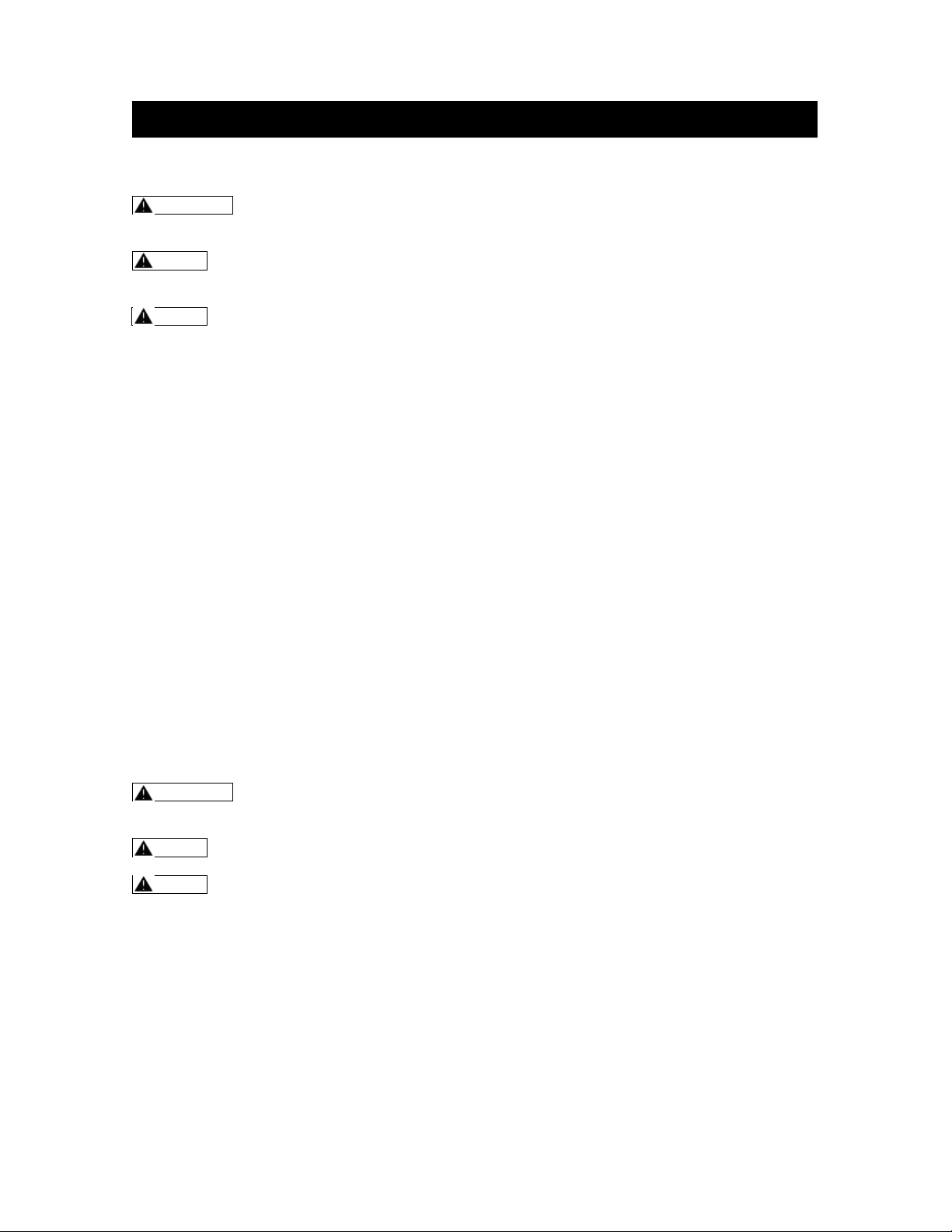
Page 29
GENERAL MAINTENANCE
WARNING Failure to unplug the saw
could result in accidental start up,
which may cause serious injury.
NOTE: Always wear gloves when
handling or working near blade which
located on the safety guard.
NOTE: Use only manufacturer’s
recommended replacement parts and
accessories.
Keep all nuts, bolts and screws tight to
be sure that the machine is in safe
working condition.
Examine the machine and replace worn
or damaged parts for safety
Removing and installing the saw blade
1) Lubrication
All of the bearings in this miter saw are
lubricated with a sufficient amount of high
grade lubricant for the life of the saw under
normal operating conditions. Therefore, no
further lubrication is required.
Some areas will require infrequent
lubrications. You will need to apply:
Automotive oil directly to the slide bars.
Light oil or pressurized light spray oil to
the arm pivot shaft.
Light oil or pressurized light spray oil to
the torsion spring.
2) Cleaning the Miter Saw
WARNING Failure to unplug the saw
could result in accidental start up,
which may cause serious injury.
NOTE: Wear safety glasses to
protect your eyes whilst cleaning.
NOTE: Always wear gloves when
handling or working near blade which
located on the safety guard.
Use a soft brush to remove any
accumulated sawdust.
Wipe down the miter saw enclosure with
a slightly damp cloth. Do not spray the
saw with water. Water contact may
destroy the switch and the electric
motor.
3) Storage
After cleaning the miter saw thoroughly,
store the saw in a dry room allow the
motor to cool down beforehand.
Store the miter saw out the reach of
children.
4) Transport
Use the original packaging to ship
whenever possible.
MAINTENANCE
Page 30
WARNING: Before performing any
repair work, always unplug the saw and
wait until the cutting blade has come to
a standstill.
CAUTION: Improper repairs can
result in the product functioning
unsafely. This endangers yourself and
your environment.
Faults which cannot be rectified with the
aid of following table may be rectified by
an authorized service center.
Please be aware that any improper repairs
will also invalidate the warranty and
additional costs may be incurred.
Use only manufacturer approved spare
parts. Only these spare parts are designed
and suitable for the product. The use of
other spare parts not only voids the
warranty, you can also endanger yourself
and your environment.
Fault/malfunction
Cause
Remedy
Motor does not power
on.
Brush worn.
Contact customer service center.
Brush sparks
excessively when
switch is released.
Brush worn/damaged.
Replace brushes.
See MAINTENANCE chapter
Blade hits table.
Misalignment
See ASSEMBLY chapter.
Angle of cut is
inaccurate.
Miter table is unlocked.
Use miter-lock knob.
See ASSEMBLY chapter.
Too much sawdust under
table.
Vacuum or blow out dust.
WEAR EYE PROTECTION!
Cutting arm cannot
fully raise or blade
guard cannot fully
close.
Parts failure.
Contact customer service center.
Pivot spring not replaced
properly after service.
Contact customer service center.
Sawdust buildup.
Clean and lubricate moving parts.
Blade binds, jams, or
burns wood.
Improper operation.
See ASSEMBLY chapter.
Dull blade.
Replace or sharpen blade.
Improper blade.
Replace blade.
Warped blade.
Replace blade.
Saw vibrates or
shakes.
Saw blade is damaged.
Replace blade.
Saw blade is loosened.
Tighten arbor bolt.
TROUBLESHOOTING

Page 31
If, during normal use, this MASTERFORCE® power tool breaks or fails due to a defect in
material or workmanship within three years from the date of original purchase, simply bring this
tool and its sales receipt back to your nearest Menards® retail store for a free equivalent
replacement within those three years.
The warranty:
(1) Excludes expendable parts including but not limited to blades, bits, light bulbs, and/or
batteries;
(2) Shall be void if this tool is used for commercial or/and rental purposes;
And
(3) Does not cover any losses, injuries to persons/properties, or costs. This warranty does give
you specific legal rights and you may have other rights, which vary from state to state.
*SAVE YOUR RECEIPTS. Your warranty is void without them. For help, please call to our
customer center, toll free number: (866) 902-9690.
WARRANTY

Page 32
For more information or to ask questions,
Call Toll-Free:
(866) 902-9690
Monday-Friday between 8:30 AM and 5:00 PM ET
©2015 Menard, Inc, Eau Claire, WI 54703
06/2015
®